
F-27Q Stryker. Instruction Manual Bedienungsanleitung Manuel d utilisation Manuale di Istruzioni
|
|
|
- Beryl Williams
- 9 years ago
- Views:
Transcription
1 F-27Q Stryker Instruction Manual Bedienungsanleitung Manuel d utilisation Manuale di Istruzioni

2 NOTICE All instructions, warranties and other collateral documents are subject to change at the sole discretion of Horizon Hobby, Inc. For up-to-date product literature, visit and click on the support tab for this product. Meaning of Special Language: The following terms are used throughout the product literature to indicate various levels of potential harm when operating this product: NOTICE: Procedures, which if not properly followed, create a possibility of physical property damage AND little or no possibility of injury. CAUTION: Procedures, which if not properly followed, create the probability of physical property damage AND a possibility of serious injury. WARNING: Procedures, which if not properly followed, create the probability of property damage, collateral damage, and serious injury OR create a high probability of superfi cial injury. WARNING: Read the ENTIRE instruction manual to become familiar with the features of the product before operating. Failure to operate the product correctly can result in damage to the product, personal property and cause serious injury. This is a sophisticated hobby product. It must be operated with caution and common sense and requires some basic mechanical ability. Failure to operate this Product in a safe and responsible manner could result in injury or damage to the product or other property. This product is not intended for use by children without direct adult supervision. Do not attempt disassembly, use with incompatible components or augment product in any way without the approval of Horizon Hobby, Inc. This manual contains instructions for safety, operation and maintenance. It is essential to read and follow all the instructions and warnings in the manual, prior to assembly, setup or use, in order to operate correctly and avoid damage or serious injury. Additional Safety Precautions and Warnings As the user of this product, you are solely responsible for operating in a manner that does not endanger yourself and others or result in damage to the product or the property of others. This model is controlled by a radio signal subject to interference from many sources outside your control. This interference can cause momentary loss of control so it is advisable to always keep a safe distance in all directions around your model, as this margin will help avoid collisions or injury. Age Recommendation: Not for children under 14 years. This is not a toy. Always keep a safe distance in all directions around your model to avoid collisions or injury. This model is controlled by a radio signal subject to interference from many sources outside your control. Interference can cause momentary loss of control Always operate your model in open spaces away from full-size vehicles, traffi c and people. Always carefully follow the directions and warnings for this and any optional support equipment (chargers, rechargeable battery packs, etc.). Always keep all chemicals, small parts and anything electrical out of the reach of children. Always avoid water exposure to all equipment not specifi cally designed and protected for this purpose. Moisture causes damage to electronics. Never place any portion of the model in your mouth as it could cause serious injury or even death. Never operate your model with low transmitter batteries. Battery Warnings The Battery Charger included with your aircraft is designed to safely charge the Li-Po battery. CAUTION: All instructions and warnings must be followed exactly. Mishandling of Li-Po batteries can result in a fi re, personal injury, and/or property damage. By handling, charging or using the included Li-Po battery you assume all risks associated with lithium batteries. If at any time the battery begins to balloon or swell, discontinue use immediately. If charging or discharging, discontinue and disconnect. Continuing to use, charge or discharge a battery that is ballooning or swelling can result in fi re. Always store the battery at room temperature in a dry area for best results. Always transport or temporarily store the battery in a temperature range of º F. Do not store battery or model in a car or direct sunlight. If stored in a hot car, the battery can be damaged or even catch fi re. NEVER USE A Ni-Cd OR Ni-MH CHARGER. Failure to charge the battery with a compatible charger may cause fi re resulting in personal injury and/or property damage. Never discharge Li-Po cells to below 3V under load. Never cover warning labels with hook and loop strips. Never leave charging batteries unattended. Never charge batteries outside safe temperature range. Never charge damaged batteries. 2

3 Thank you for purchasing the ParkZone Stryker F-27Q. You are about to take fl ight with one of the hottest fl ying wings ever built. Its potent one-two punch of sizzling speed and amazing precision aerobatic ability will make every fl ight one to remember. Before you blast off, though, you must take time to read through this manual. With the F-27Q Stryker things happen fast and it can cover a lot of ground in a hurry. The better understanding you have of its performance and systems prior to your fi rst fl ight, the better that fl ight will be. Includes: BIND PLUG Stryker Specifications Wingspan 37.1 in (943mm) Length 24.1 in (612mm) Weight (RTF) 30 oz (855 g) Table of Contents Charging the Flight Battery... 4 Low Voltage Cutoff (LVC)... 4 Transmitter and Receiver Binding... 5 Installing Battery... 5 Before Flight... 6 Installing a Receiver... 6 Battery Selection and Installation... 6 Installing Vertical Fins... 6 Center of Gravity (CG)... 7 Installing Clevises on Control Horns and Control Centering... 7 Factory Settings... 7 Installing Nose... 8 Transmitter and Model Setup... 8 Control Direction Test... 9 Service of Power Components Nose Wheel Flying Tips and Repairs First Flight Preparation Maintenance After Flying AMA National Model Aircraft Safety Code Troubleshooting Guide Warranty and Repair Policy Contact Information FCC Information Compliance Information for the European Union Parts Contact Information Replacement Parts Optional Parts To register your product online, visit 3

4 Charging the Flight Battery Your Stryker comes with a DC balancing charger and 3S Li-Po battery. You must charge the included Li-Po battery pack with a Li-Po specifi c charger only (such as the included charger). Never leave the battery and charger unattended during the charge process. Failure to follow the instructions properly could result in a fi re. When charging, make certain the battery is on a heat-resistant surface. Charge the fl ight battery while assembling the aircraft. Install the fully charged battery to perform control tests and binding. DC Li-Po Balancing Charger Features Charges 2- to 3-cell lithium polymer battery packs Variable charge rates from 300mAh to 2-amp Simple single push-button operation LED charge status indicator LED cell balance indicator Audible beeper indicates power and charge status 12V accessory outlet input cord Specifications Input power: 12V DC, 3-amp Charges 2- to 3-cell Li-Po packs with minimum capacity of 300mAh 3S 11.1V 2200mAh 25C Li-Po Battery Pack (PKZ1029) The ParkZone 3S Li-Po battery pack features a balancing lead that allows you to safely charge your battery pack when used with the included ParkZone Li-Po balancing charger. The Battery Charging Process 1. Charge only batteries that are cool to the touch and are not damaged. Look at the battery to make sure it is not damaged e.g., swollen, bent, broken or punctured. 2. Attach the input cord of the charger to the appropriate power supply (12V accessory outlet). 3. When the Li-Po charger has been correctly powered up, there will be an approximate 3-second delay, then an audible beep and the green (ready) LED will fl ash. 4. Turn the control on the Amps selector so the arrow points to the charging rate required for the Battery (see chart, for example the Stryker s 2200mAh Li-Po battery will charge at 2.0 amps). DO NOT change the charge rate once the battery begins charging. 5. Move the cell selector switch to 2-cell or 3-cell for your battery. 6. Connect the Balancing Lead of the Battery to the 2-cell (it has 3 pins) or 3-cell (it has 4 pins) charger port. 7. The green and red LEDs may fl ash during the charging process, when the charger is balancing cells. Balancing prolongs the life of the battery. 8. When the battery is fully charged, there will be an audible beep for about 3 seconds, and the green LED will shine continuously. 9. Always unplug the battery from the charger immediately upon completion of charging. CAUTION: Overcharging a battery can cause a fi re. Note: Attempting to charge an over-discharged battery will cause the charger to repeatedly fl ash and beep, indicating an error has occurred. Battery Capacity Maximum Charge Rate mAh 300mA mAh 500mA mAh 1A mAh 1.5A 2000mAh + 2.0A CAUTION: Only use a charger specifi cally designed to charge a Li-Po battery. Failure to do so could result in fi re causing injury or property damage. CAUTION: Never exceed the recommended charge rate. Low Voltage Cutoff (LVC) When a Li-Po battery is discharged below 3V per cell, it will not hold a charge. The ESC protects the fl ight battery from over-discharge using Low Voltage Cutoff (LVC). Before the battery charge decreases too much, LVC removes power supply from the motor. Power to the motor pulses, showing that some battery power is reserved for fl ight control and safe landing. When the motor pulses, land the aircraft immediately and recharge the fl ight battery. Disconnect and remove the Li-Po battery from the aircraft after use to prevent trickle discharge. Fully charge your Li-Po battery before storing it. During storage make sure battery charge does not go below 3V per cell. 4

5 Transmitter and Receiver Binding Binding is the process of programming the receiver of the control unit to recognize the GUID (Globally Unique Identifi er) code of a single specifi c transmitter. You need to bind your chosen Spektrum DSM2 /DSMX technology equipped aircraft transmitter to the receiver for proper operation. Note: Any JR or Spektrum full range DSM2 /DSMX transmitter can bind to the Spektrum AR600 receiver. Please visit y.com for a complete list of compatible transmitters. Note: When using a Futaba transmitter with a Spektrum DSM module, you must reverse the throttle channel. Binding Procedure Reference Table BIND PLUG 1. Read transmitter instructions for binding to a receiver (location of transmitter s Bind control). 2. Make sure transmitter is powered off. 3. Move the transmitter controls to neutral (fl ight controls: rudder, elevators and ailerons) or to low positions (throttle, throttle trim, and fl ight control trims).* 4. Install a bind plug in the receiver bind port extension. 5. Connect the fl ight battery to the ESC. 6. Power on the ESC switch. The receiver LED will begin to fl ash rapidly under the rear hatch. 7. Power on the transmitter while holding the transmitter bind button or switch. Refer to your transmitter s manual for binding button or switch instructions. 8. When the receiver binds to the transmitter, the light on the receiver will be solid and the ESC will produce a series of sounds. The series of sounds is a long tone, then 3 short tones that confi rm the LVC is set for the ESC. 9. Remove the bind plug from the bind port extension. 10. Safely store the bind plug (some owners attach the bind plug to their transmitter using two-part loops and clips). 11. The receiver should keep the binding to the transmitter until another binding is done. * The throttle will not arm if the transmitter s throttle control is not put at the lowest position. If you encounter problems, obey binding instructions and refer to transmitter troubleshooting guide for other instructions. If needed, contact the appropriate Horizon Product Support offi ce. Installing Battery 1. Remove front canopy (A) from fuselage. 2. Loosen hook and loop straps (B). 3. Put fully charged battery (C) in hook and loop straps in fuselage. 4. Tighten hook and loop straps around battery. 5. Connect battery connector to ESC power connector only when preparing to fl y the model. Note: Power on ESC switch (D) only when ready to fl y the model. This switch powers on the receiver to receive throttle signal for the motor. 6. Put front canopy tabs under rear hatch, align front canopy with fuselage and close canopy. Note: Always disconnect the Li-Po from the receiver of the aircraft when not fl ying. Failure to do so will render the battery unusable. A C B CAUTION: Always keep hands away from propeller. When armed, the motor will turn the propeller in response to any throttle movement. ESC Switch Use The ESC switch must be powered on to bind the receiver to a transmitter and to do a Control Test of the model. The ESC switch powers off the model s receiver/radio system to prevent accidental powering of the motor. Disarm the motor by powering off the ESC switch. Arm the motor by moving the bound transmitter s throttle to idle/off position and powering on the ESC switch. The ESC switch does not stop the ESC from consuming battery power. Note: Not to scale. Not all wiring shown. D CAUTION: Leaving a battery connected to the ESC could cause permanent damage to your battery by overdischarging (especially a Li-Po battery). Even if the ESC switch is powered off. 5

6 Before Flight Lower throttle and throttle trim to lowest settings. Power on Transmitter Connect battery to ESC. Power on ESC switch. Wait 5 seconds Continuous LED Series of tones Installing a Receiver 1. Install your park fl yer or full range receiver in the fuselage using hook and loop tape or double-sided servo tape. 2. Attach right aileron to elevator channel of your receiver. Left aileron goes to aileron channel of your receiver. You will also need to activate the delta wing/elevon confi guration of your transmitter. Battery Selection and Installation 1. We recommend the ParkZone 2200mAh 11.1V 25C Li-Po battery (PKZ1029). 2. If using another battery, the battery must be at least a 25C 2100mAh battery. Note: If using a DX5e or DX4e transmitter, this is the mix function on the front of the transmitter. For specifi c set-ups for JR/Spektrum 6+ channel transmitters, see Transmitter and Model Set Up section. 3. Attach the ESC connector to the throttle channel of the receiver. 3. Your battery should be approximately the same capacity, dimensions and weight as the ParkZone Li-Po battery to fi t in the fuselage without changing the center of gravity a large amount. Installing Vertical Fins D F E G H B C A Note: Before fl ying the model in extreme high-speed maneuvers, apply CA (H) where the vertical fi n connects with the fuselage housing. NOTICE: Use of CA accelerant on your model can damage paint. DO NOT wipe accelerant from model, but let accelerant evaporate. Assembly 1. Apply double-stick tape (A) to the bottom of each vertical fi n (B), in front of the rudder hinge. 2. Carefully trim the excess tape (using a sharp hobby knife blade or scissors). Note: Make sure tape does not go past rudder hinge. 3. Carefully put left vertical fi n under fairing and in left housing (C) on the fuselage. Rudder control horn is on inner side and Stryker decal is on outer side of vertical fi n). 4. Install right vertical fi n using double-stick tape. 5. Install linkages (D) on servos (E) then attach clevises (F) to control horns (G). 6

7 Center of Gravity (CG) Install included battery in the fuselage using the hook and loop straps. 140mm (5.5 inches) forward from fi rewall on end of fuselage Installing Clevises on Control Horns and Control Centering Tip: Turn the clevis clockwise or counterclockwise on the linkage. Pull the tube from the clevis to the linkage. Carefully spread the clevis and put the clevis pin in a selected hole in the control horn. Move the tube to hold the clevis on the control horn After binding a transmitter to model receiver, set trims and sub-trims to 0, then adjust clevises to center control surfaces Factory Settings Fly the model at factory settings before making changes. For pilots who wish to fl y model for unlimited aerobatics, adjust position of linkages on servo arms and control horns for increased travel. Arms Horns Ailerons Rudders Ailerons Rudders 7

8 Installing Nose 1. Align magnets and install nose (A) on fuselage (B). Note: Always repair or replace the nose when it is damaged to keep the model fl ying correctly. A B Transmitter and Model Setup Transmitter Set up Flying wings are controlled by elevons (moveable surfaces on the wing). Elevons take the aileron control (move opposite directions), and elevator control (move up/down same direction) and mixes them together electronically through the transmitter. Make sure both elevons move up and down (travel) the same amount. This model tracks well when the left and right ailerons travel the same amount in response to the control stick. For the Spektrum DX4e and DX5e transmitter: Set trim to neutral, and make sure servo arm is fully vertical. If not, adjust servo arm. Then adjust linkage length so both ailerons travel the same amount. For computerized transmitters (such as the Spektrum DX6i, DX7 and DX8): Set trim and sub-trim to 0. Make sure each servo arm is fully vertical. Adjust each servo/channel sub-trim as needed to make each servo arm fully vertical. Then adjust servo travel so both control surfaces travel the same amount. This model does not require use of aileron differential programming in the transmitter. Model Set up At fi rst fl ight, fl y the model in low rate. The fi rst time you use high rate, fl y at low to medium speed. Note: High rate, as listed, is only for EXTREME maneuvering. Use a ruler and measure the surface s travel at the root of each control surface. We recommend this setup for servo channel reversing for DX4e, DX5e, DX7 and DX8 transmitters ( Same for JR9303/9503, 11X and 12X ): Throttle: Normal Aileron: Reverse Elevator: Reverse Rudder: Normal For the DX6i we recommend this setup for servo channel reversing: Throttle: Normal Elevator: Normal Aileron: Reverse Rudder: Normal Note: When setting up model for control using a spectrum DX6i transmitter, swap servo connections between aileron and elevator ports on receiver (from factory settings). Do a control test to make sure model operates correctly. Recommended Computerized Transmitter Dual Rates and Expo High Rate Low Rate Expo Elevator **35-40mm up/down 13mm up/down High-50%, Low-5% Aileron **35-40mm up/down 17mm up/down High-50%, Low-10% Rudder 35-40mm left/right 5% **Note: Higher values (listed above) require moving a clevis one hole closer to the base of the control horn or moving a linkage one hole closer to the base of a servo arm. NOTICE: When using a DSMX non-computer transmitter (DX4e/DX5e) with multiple aircraft, always re-bind and set a model s failsafe before each fl ight. Please refer to your transmitter s manual for failsafe instructions. Spektrum DX4e and DX5e Dual Rates (No Expo) High Rate Low Rate Elevator 16mm up/down 12mm up/down Aileron 12mm up/down 12mm up/down Rudder 35mm left/right 35mm left/right 8

9 Control Direction Test Bind your aircraft and transmitter before doing these tests. Move the controls on the transmitter to make sure aircraft control surfaces move correctly. Elevator Up Down Aileron Right Left Rudder Right Left 9

10 Service of Power Components Disassembly 1. Remove front canopy (A) from fuselage. 2. Disconnect battery from ESC. 3. Remove battery from hook and loop straps in fuselage. 4. Loosen screw (B) and remove rear hatch (C) from fuselage. 5. Disconnect 3 bullet connectors of motor from ESC connectors (motor wire colors align with ESC wire colors). 6. Remove spinner nut (D), propeller (E), backplate (F) and collet (G) from motor shaft. Note: A tool may be needed to turn spinner nut. 7. Remove 4 screws (H) and 4 silicone spacers (I) from motor mount (J) and fi rewall of fuselage. 8. Remove 4 screws (K) and 4 lock washers (L) from motor mount (J) and motor (M). 9. Remove ESC (N) from hook and loop strap and fuselage. A C B K N I J H G E D Note: Not all wiring shown. L M F Assembly 1. Assemble model by obeying instructions above in reverse. 2. Make sure propeller size numbers (6 x 6) face the motor. 3. Use a small amount of clear tape to hold the motor wires on the fuselage. Make sure no wires are pinched or damaged when the rear hatch is installed on the fuselage. CAUTION: DO NOT handle the motor or ESC while the fl ight battery is connected to the ESC. Personal injury could result. Nose Wheel 1. Remove and retain screw (A) from nose wheel pant (B) and nose wheel (C). 2. Remove wheel from nose wheel pant. 3. Install wheel and screw in nose wheel pant. B A C 10

11 Flying Tips and Repairs Range Check your Radio System After fi nal assembly, range check the radio system with the Stryker. Refer to your specifi c transmitter instruction manual for range test information. CAUTION: Keep hands away from the propeller. Always assume the motor is powered on and that propeller blades may turn at any time. Launching Always inspect and repair model before fl ying. Any damage or loose linkages decrease control a large amount in high-speed fl ight. CAUTION: Always launch the model with the throttle set at 0% to avoid injury from the pusher propeller. When the model is safely free of your hand, increase throttle to between 60 and 100%. Always launch your model at a very small upward angle and directly into the wind, even in a light breeze. Hand Launching To hand launch the Stryker, hold the airplane in the fi nger grips on the underside of the airplane. Give a fi rm throw directly into the wind slightly up (5 10 degrees above the horizon) with the throttle all the way down and the propeller not spinning. After release, when the propeller is clear of your hands, throttle up to climb out. Landing Land the model when you hear hear the motor pulsing (LVC) or if you notice a reduction in power. If using a transmitter with a timer, set the timer so you have enough fl ight time to make several landing approaches. Recharge the battery and repair the model as needed. The model s nose wheel and bottom fi n skids let the model land on hard surfaces when needed (which may damage the propeller). Align model directly into the wind and fl y down to the ground. Fly the airplane down to the ground using 1/4-1/3 throttle to keep enough energy for a proper fl are. Before the model touches down, always fully decrease throttle to avoid damage to propeller, motor, ESC or other components. Repairs Always decrease throttle at propeller strike. Thanks to the Z-foam construction of the Stryker, repairs to the foam can be made using virtually any adhesive (hot glue, regular CA, epoxy, etc). When parts are not repairable, see the Replacement Parts List for ordering by item number. NOTICE: Use of CA accelerant on your model can damage paint. DO NOT wipe accelerant from model, but let accelerant evaporate. Flying Always choose a wide-open space for fl ying your ParkZone Stryker. It is ideal for you to fl y at a sanctioned fl ying fi eld. If you are not fl ying at an approved site, always avoid fl ying near houses, trees, wires and buildings. You should also be careful to avoid fl ying in areas where there are many people, such as busy parks, schoolyards, or soccer fi elds. Consult local laws and ordinances before choosing a location to fl y your aircraft. First Flight Preparation Remove and inspect contents Charge fl ight battery Read this instruction manual thoroughly Fully assemble model Install the fl ight battery in the aircraft (once it has been fully charged) Power on ESC switch Bind aircraft to your transmitter Make sure linkages move freely Perform the Control Direction Test with the transmitter Adjust fl ight controls and transmitter Perform a radio system Range Check Find a safe and open area Plan fl ight for fl ying fi eld conditions Maintenance After Flying Power off ESC switch Disconnect fl ight battery from ESC (Required for Safety and battery life) Power off transmitter Remove fl ight battery from aircraft Recharge fl ight battery Repair or replace all damaged parts Store fl ight battery apart from aircraft and monitor the battery charge Make note of fl ight conditions and fl ight plan results, planning for future fl ights 11

12 AMA National Model Aircraft Safety Code Effective January 1, 2011 A. GENERAL A model aircraft is a non-human-carrying aircraft capable of sustained fl ight in the atmosphere. It may not exceed limitations of this code and is intended exclusively for sport, recreation and/or competition. All model fl ights must be conducted in accordance with this safety code and any additional rules specifi c to the fl ying site. 1. Model aircraft will not be fl own: (a) In a careless or reckless manner. (b) At a location where model aircraft activities are prohibited. 2. Model aircraft pilots will: (a) Yield the right of way to all man carrying aircraft. (b) See and avoid all aircraft and a spotter must be used when appropriate. (AMA Document #540-D-See and Avoid Guidance.) (c) Not fl y higher than approximately 400 feet above ground level within three (3) miles of an airport, without notifying the airport operator. (d) Not interfere with operations and traffi c patterns at any airport, heliport or seaplane base except where there is a mixed use agreement. (e) Not exceed a takeoff weight, including fuel, of 55 pounds unless in compliance with the AMA Large Model Aircraft program. (AMA Document 520-A) (f) Ensure the aircraft is identifi ed with the name and address or AMA number of the owner on the inside or affi xed to the outside of the model aircraft. (This does not apply to model aircraft fl own indoors). (g) Not operate aircraft with metal-blade propellers or with gaseous boosts except for helicopters operated under the provisions of AMA Document #555. (h) Not operate model aircraft while under the infl uence of alcohol or while using any drug which could adversely affect the pilot s ability to safely control the model. (i) Not operate model aircraft carrying pyrotechnic devices which explode or burn, or any device which propels a projectile or drops any object that creates a hazard to persons or property. Exceptions: Free Flight fuses or devices that burn producing smoke and are securely attached to the model aircraft during fl ight. Rocket motors (using solid propellant) up to a G-series size may be used provided they remain attached to the model during fl ight. Model rockets may be fl own in accordance with the National Model Rocketry Safety Code but may not be launched from model aircraft. Offi cially designated AMA Air Show Teams (AST) are authorized to use devices and practices as defi ned within the Team AMA Program Document (AMA Document #718). (j) Not operate a turbine-powered aircraft, unless in compliance with the AMA turbine regulations. (AMA Document #510-A). 3. Model aircraft will not be fl own in AMA sanctioned events, air shows or model demonstrations unless: (a) The aircraft, control system and pilot skills have successfully demonstrated all maneuvers intended or anticipated prior to the specifi c event. (b) An inexperienced pilot is assisted by an experienced pilot. 4. When and where required by rule, helmets must be properly worn and fastened. They must be OSHA, DOT, ANSI, SNELL or NOCSAE approved or comply with comparable standards. B. RADIO CONTROL 1. All pilots shall avoid fl ying directly over unprotected people, vessels, vehicles or structures and shall avoid endangerment of life and property of others. 2. A successful radio equipment ground-range check in accordance with manufacturer s recommendations will be completed before the fi rst fl ight of a new or repaired model aircraft. 3. At all fl ying sites a safety line(s) must be established in front of which all fl ying takes place (AMA Document #706-Recommended Field Layout): (a) Only personnel associated with fl ying the model aircraft are allowed at or in front of the safety line. (b) At air shows or demonstrations, a straight safety line must be established. (c) An area away from the safety line must be maintained for spectators. (d) Intentional fl ying behind the safety line is prohibited. 4. RC model aircraft must use the radio-control frequencies currently allowed by the Federal Communications Commission (FCC). Only individuals properly licensed by the FCC are authorized to operate equipment on Amateur Band frequencies. 5. RC model aircraft will not operate within three (3) miles of any pre-existing fl ying site without a frequency-management agreement (AMA Documents #922-Testing for RF Interference; #923- Frequency Management Agreement) 6. With the exception of events fl own under offi cial AMA Competition Regulations, excluding takeoff and landing, no powered model may be fl own outdoors closer than 25 feet to any individual, except for the pilot and the pilot s helper(s) located at the fl ight line. 7. Under no circumstances may a pilot or other person touch a model aircraft in fl ight while it is still under power, except to divert it from striking an individual. This does not apply to model aircraft fl own indoors. 8. RC night fl ying requires a lighting system providing the pilot with a clear view of the model s attitude and orientation at all times. 9. The pilot of a RC model aircraft shall: (a) Maintain control during the entire fl ight, maintaining visual contact without enhancement other than by corrective lenses prescribed for the pilot. (b) Fly using the assistance of a camera or First-Person View (FPV) only in accordance with the procedures outlined in AMA Document #550. Please see your local or regional modeling association s guidelines for proper, safe operation of your model aircraft. 12

13 Troubleshooting Guide Problem Possible Cause Solution Aircraft will not respond to throttle but responds to other controls Extra propeller noise or extra vibration Reduced fl ight time or aircraft underpowered Aircraft will not Bind to transmitter Aircraft will not link to transmitter Control surface does not move Throttle not at idle and/or throttle trim too high Throttle servo travel is lower than 100% Throttle channel is reversed Damaged propeller and spinner, collet or motor Propeller is out of balance Flight battery charge is low Propeller installed backwards Flight battery damaged Flight conditions may be too cold Battery capacity may be low for fl ight conditions Transmitter too near aircraft during binding process Aircraft will not bind to transmitter Bind plug is not installed correctly in bind port extension Flight battery/transmitter battery charge is too low ESC switch is off Transmitter too near aircraft during linking process Aircraft will not bind to transmitter Bind plug left installed in bind port extension Aircraft bound to different model memory (ModelMatch radios only) Flight battery/transmitter battery charge is too low ESC switch is off Transmitter may have been bound to a different model (using different DSM Protocol) Control surface, control horn, linkage or servo damage Wire damaged or connections loose Transmitter not bound correctly or incorrect model selected Control trim out of adjustment ESC switch is off Reset controls with throttle stick and throttle trim at lowest setting Make sure throttle servo travel is 100% or greater Reverse throttle channel on transmitter Replace damaged parts Balance or replace propeller Completely recharge fl ight battery Install propeller with numbers facing forward Replace fl ight battery and follow fl ight battery instructions Make sure battery is warm before use Replace battery or use a larger capacity battery Move powered transmitter a few feet from aircraft, disconnect and reconnect fl ight battery to aircraft Aircraft or transmitter is too close to large metal object Install bind plug in bind port extension and bind aircraft to transmitter Replace/recharge batteries Power on ESC switch Move powered transmitter a few feet from aircraft, disconnect and reconnect fl ight battery to aircraft Aircraft or transmitter is too close to large metal object Remove bind plug before cycling power Select correct model memory on transmitter Replace/recharge batteries Power on ESC switch Bind aircraft to transmitter Replace or repair damaged parts and adjust controls Do a check of wires and connections, connect or replace as needed Re-bind or select correct model in transmitter Adjust trims to restore full control Power on ESC switch Controls reversed Transmitter settings reversed Do the Control Direction Test and adjust controls on transmitter appropriately Motor loses power Damage to motor, propeller shaft or power components Do a check of batteries, transmitter, receiver, motor and wiring for damage (replace as needed) Motor power pulses then motor loses power ESC uses default soft Low Voltage Cutoff (LVC) Weather conditions might be too cold Battery C rating might be too small Recharge fl ight battery or replace battery that is no longer performing Postpone flight until weather is warmer Use recommended 25C battery 13

14 Warranty and Repair Policy Warranty Period Exclusive Warranty- Horizon Hobby, Inc., (Horizon) warranties that the Products purchased (the Product ) will be free from defects in materials and workmanship at the date of purchase by the Purchaser. Limited Warranty Horizon reserves the right to change or modify this warranty without notice and disclaims all other warranties, express or implied. (a) This warranty is limited to the original Purchaser ( Purchaser ) and is not transferable. REPAIR OR REPLACEMENT AS PROVIDED UNDER THIS WAR- RANTY IS THE EXCLUSIVE REMEDY OF THE PURCHASER. This warranty covers only those Products purchased from an authorized Horizon dealer. Third party transactions are not covered by this warranty. Proof of purchase is required for all warranty claims. (b) Limitations- HORIZON MAKES NO WARRANTY OR REPRESENTATION, EXPRESS OR IMPLIED, ABOUT NON-INFRINGEMENT, MERCHANTABILITY OR FITNESS FOR A PARTICULAR PURPOSE OF THE PRODUCT. THE PUR- CHASER ACKNOWLEDGES THAT THEY ALONE HAVE DETERMINED THAT THE PRODUCT WILL SUITABLY MEET THE REQUIREMENTS OF THE PURCHASER S INTENDED USE. (c) Purchaser Remedy- Horizon s sole obligation hereunder shall be that Horizon will, at its option, (i) repair or (ii) replace, any Product determined by Horizon to be defective. In the event of a defect, these are the Purchaser s exclusive remedies. Horizon reserves the right to inspect any and all equipment involved in a warranty claim. Repair or replacement decisions are at the sole discretion of Horizon. This warranty does not cover cosmetic damage or damage due to acts of God, accident, misuse, abuse, negligence, commercial use, or modifi cation of or to any part of the Product. This warranty does not cover damage due to improper installation, operation, maintenance, or attempted repair by anyone other than Horizon. Return of any Product by Purchaser must be approved in writing by Horizon before shipment. Damage Limits HORIZON SHALL NOT BE LIABLE FOR SPECIAL, INDIRECT OR CONSEQUENTIAL DAMAGES, LOSS OF PROFITS OR PRODUCTION OR COMMERCIAL LOSS IN ANY WAY CONNECTED WITH THE PRODUCT, WHETHER SUCH CLAIM IS BASED IN CONTRACT, WARRANTY, NEGLIGENCE, OR STRICT LIABILITY. Further, in no event shall the liability of Horizon exceed the individual price of the Product on which liability is asserted. As Horizon has no control over use, setup, fi nal assembly, modifi cation or misuse, no liability shall be assumed nor accepted for any resulting damage or injury. By the act of use, setup or assembly, the user accepts all resulting liability. If you as the Purchaser or user are not prepared to accept the liability associated with the use of this Product, you are advised to return this Product immediately in new and unused condition to the place of purchase. Law: These Terms are governed by Illinois law (without regard to confl ict of law principals). Warranty Services Questions, Assistance, and Repairs Your local hobby store and/or place of purchase cannot provide warranty support or repair. Once assembly, setup or use of the Product has been started, you must contact Horizon directly. This will enable Horizon to better answer your questions and service you in the event that you may need any assistance. For questions or assistance, please direct your to productsupport@ horizonhobby.com, or call toll free to speak to a Product Support representative. You may also fi nd information on our website at www. horizonhobby.com. Inspection or Repairs If this Product needs to be inspected or repaired, please use the Horizon Online Repair Request submission process found on our website or call Horizon to obtain a Return Merchandise Authorization (RMA) number. Pack the Product securely using a shipping carton. Please Note that original boxes may be included, but are not designed to withstand the rigors of shipping without additional protection. Ship via a carrier that provides tracking and insurance for lost or damaged parcels, as Horizon is not responsible for merchandise until it arrives and is accepted at our facility. An Online Repair Request is available at under the Repairs tab. If you do not have internet access, please contact Horizon Product Support to obtain a RMA number along with instructions for submitting your product for repair. When calling Horizon, you will be asked to provide your complete name, street address, address and phone number where you can be reached during business hours. When sending product into Horizon, please include your RMA number, a list of the included items, and a brief summary of the problem. A copy of your original sales receipt must be included for warranty consideration. Be sure your name, address, and RMA number are clearly written on the outside of the shipping carton. Notice: Do not ship batteries to Horizon. If you have any issue with a battery, please contact the appropriate Horizon Product Support office. Warranty Inspection and Repairs To receive warranty service, you must include your original sales receipt verifying the proof-of-purchase date. Provided warranty conditions have been met, your Product will be repaired or replaced free of charge. Repair or replacement decisions are at the sole discretion of Horizon. Non-Warranty Repairs Should your repair not be covered by warranty the repair will be completed and payment will be required without notification or estimate of the expense unless the expense exceeds 50% of the retail purchase cost. By submitting the item for repair you are agreeing to payment of the repair without notifi cation. Repair estimates are available upon request. You must include this request with your repair. Non-warranty repair estimates will be billed a minimum of ½ hour of labor. In addition you will be billed for return freight. Horizon accepts money orders and cashiers checks, as well as Visa, Master- Card, American Express, and Discover cards. By submitting any item to Horizon for inspection or repair, you are agreeing to Horizon s Terms and Conditions found on our website under the Repairs tab. Contact Information 14 Country of Purchase Horizon Hobby Address Phone Number/ Address United States of America United Kingdom Germany France Horizon Service Center (Electronics and engines) Horizon Product Support (All other products) Horizon Hobby Limited Horizon Technischer Service Horizon Hobby SAS 4105 Fieldstone Rd Champaign, Illinois USA 4105 Fieldstone Rd Champaign, Illinois USA Units 1-4 Ployters Rd Staple Tye Harlow, Essex CM18 7NS United Kingdom Hamburger Str Elmshorn Germany 14 Rue Gustave Eiffel Zone d Activité du Réveil Matin Montgeron Online Repair Request: visit [email protected] +44 (0) [email protected] [email protected] +33 (0) [email protected]

15 FCC Information This device complies with part 15 of the FCC rules. Operation is subject to the following two conditions: (1)This device may not cause harmful interference, and (2) this device must accept any interference received, including interference that may cause undesired operation. CAUTION: Changes or modifi cations not expressly approved by the party responsible for compliance could void the user s authority to operate the equipment. This product contains a radio transmitter with wireless technology which has been tested and found to be compliant with the applicable regulations governing a radio transmitter in the 2.400GHz to GHz frequency range. Compliance Information for the European Union Declaration of Conformity (in accordance with ISO/IEC ) No. HH Product(s): PKZ F-27Q Stryker BNF Item Number(s): PKZ5680 Equipment class: 1 The object of declaration described above is in conformity with the requirements of the specifi cations listed below, following the provisions of the European R&TTE directive 1999/5/EC and EMC Directive 2004/108/EC EN V1.7.1: 2006 EN V1.3.2: 2008 Declaration of Conformity (in accordance with ISO/IEC ) No. HH Product(s): F-27Q Stryker PNP Item Number(s): PKZ5675 Equipment class: 1 The object of declaration described above is in conformity with the requirements of the specifi cations listed below, following the provisions of the European R&TTE directive 1999/5/EC: EN V1.7.1: 2006 EN V1.4.1: 2008 EN55022: 2006, EN55024: 1998+A1: 2001+A2: 2003 Signed for and on behalf of: Horizon Hobby, Inc. Champaign, IL USA April 22, 2011 Steven A. Hall Vice President International Operations and Risk Management Horizon Hobby, Inc. Signed for and on behalf of: Horizon Hobby, Inc. Champaign, IL USA April 28, 2011 Steven A. Hall Vice President International Operations and Risk Management Horizon Hobby, Inc. Instructions for disposal of WEEE by users in the European Union This product must not be disposed of with other waste. Instead, it is the user s responsibility to dispose of their waste equipment by handing it over to a designated collections point for the recycling of waste electrical and electronic equipment. The separate collection and recycling of your waste equipment at the time of disposal will help to conserve natural resources and ensure that it is recycled in a manner that protects human health and the environment. For more information about where you can drop off your waste equipment for recycling, please contact your local city offi ce, your household waste disposal service or where you purchased the product. 15

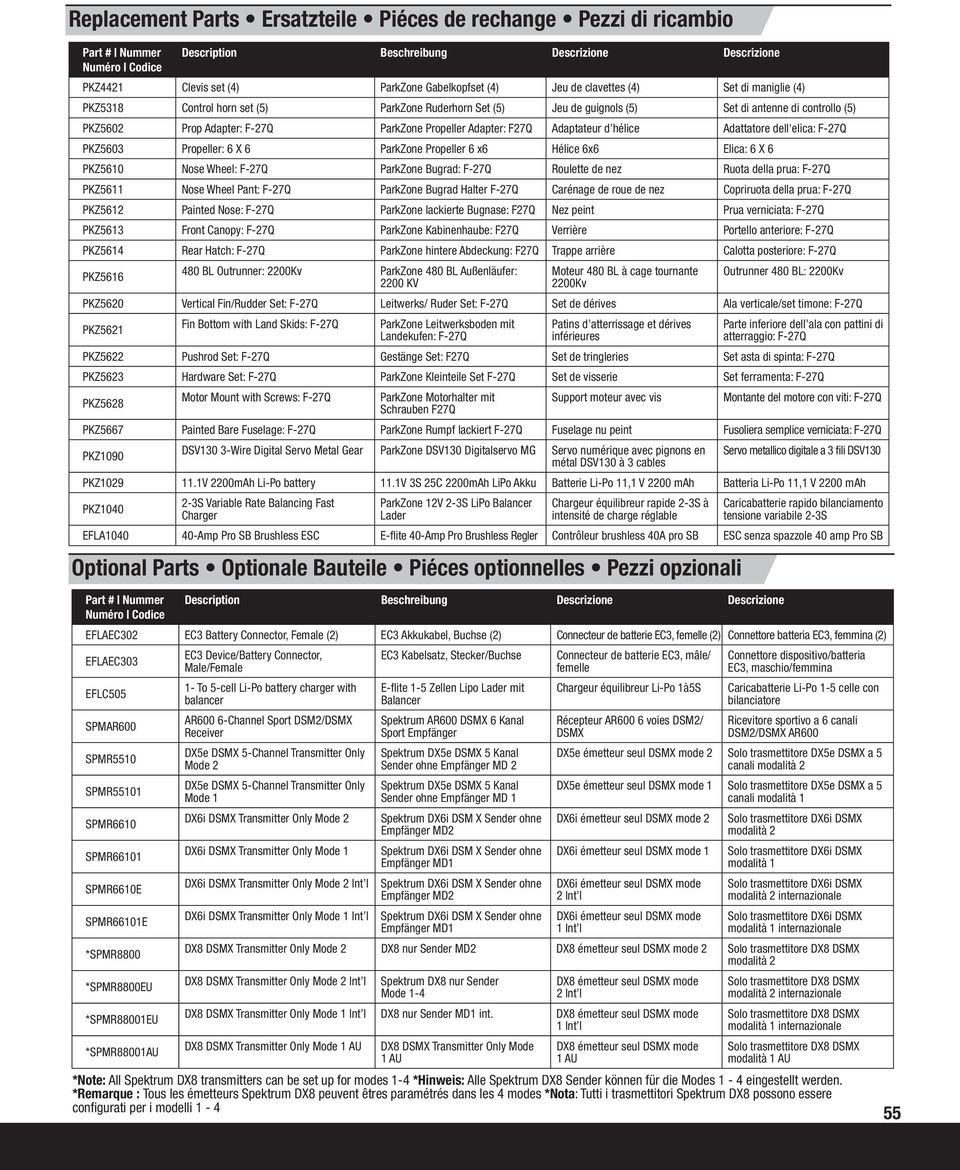
16 Replacement Parts Ersatzteile Piéces de rechange Pezzi di ricambio Part # Nummer Numéro Codice Description Beschreibung Descrizione Descrizione PKZ4421 Clevis set (4) ParkZone Gabelkopfset (4) Jeu de clavettes (4) Set di maniglie (4) PKZ5318 Control horn set (5) ParkZone Ruderhorn Set (5) Jeu de guignols (5) Set di antenne di controllo (5) PKZ5602 Prop Adapter: F-27Q ParkZone Propeller Adapter: F27Q Adaptateur d hélice Adattatore dell'elica: F-27Q PKZ5603 Propeller: 6 X 6 ParkZone Propeller 6 x6 Hélice 6x6 Elica: 6 X 6 PKZ5610 Nose Wheel: F-27Q ParkZone Bugrad: F-27Q Roulette de nez Ruota della prua: F-27Q PKZ5611 Nose Wheel Pant: F-27Q ParkZone Bugrad Halter F-27Q Carénage de roue de nez Copriruota della prua: F-27Q PKZ5612 Painted Nose: F-27Q ParkZone lackierte Bugnase: F27Q Nez peint Prua verniciata: F-27Q PKZ5613 Front Canopy: F-27Q ParkZone Kabinenhaube: F27Q Verrière Portello anteriore: F-27Q PKZ5614 Rear Hatch: F-27Q ParkZone hintere Abdeckung: F27Q Trappe arrière Calotta posteriore: F-27Q PKZ BL Outrunner: 2200Kv ParkZone 480 BL Außenläufer: 2200 KV Moteur 480 BL à cage tournante 2200Kv Outrunner 480 BL: 2200Kv PKZ5620 Vertical Fin/Rudder Set: F-27Q Leitwerks/ Ruder Set: F-27Q Set de dérives Ala verticale/set timone: F-27Q PKZ5621 Fin Bottom with Land Skids: F-27Q ParkZone Leitwerksboden mit Landekufen: F-27Q Patins d atterrissage et dérives inférieures Parte inferiore dell ala con pattini di atterraggio: F-27Q PKZ5622 Pushrod Set: F-27Q Gestänge Set: F27Q Set de tringleries Set asta di spinta: F-27Q PKZ5623 Hardware Set: F-27Q ParkZone Kleinteile Set F-27Q Set de visserie Set ferramenta: F-27Q PKZ5628 Motor Mount with Screws: F-27Q ParkZone Motorhalter mit Schrauben F27Q Support moteur avec vis Montante del motore con viti: F-27Q PKZ5667 Painted Bare Fuselage: F-27Q ParkZone Rumpf lackiert F-27Q Fuselage nu peint Fusoliera semplice verniciata: F-27Q PKZ1090 DSV130 3-Wire Digital Servo Metal Gear ParkZone DSV130 Digitalservo MG Servo numérique avec pignons en Servo metallico digitale a 3 fili DSV130 métal DSV130 à 3 cables PKZ V 2200mAh Li-Po battery 11.1V 3S 25C 2200mAh LiPo Akku Batterie Li-Po 11,1 V 2200 mah Batteria Li-Po 11,1 V 2200 mah PKZ S Variable Rate Balancing Fast Charger ParkZone 12V 2-3S LiPo Balancer Lader Chargeur équilibreur rapide 2-3S à intensité de charge réglable Caricabatterie rapido bilanciamento tensione variabile 2-3S EFLA Amp Pro SB Brushless ESC E-fl ite 40-Amp Pro Brushless Regler Contrôleur brushless 40A pro SB ESC senza spazzole 40 amp Pro SB Optional Parts Optionale Bauteile Piéces optionnelles Pezzi opzionali Part # Nummer Numéro Codice Description Beschreibung Descrizione Descrizione EFLAEC302 EC3 Battery Connector, Female (2) EC3 Akkukabel, Buchse (2) Connecteur de batterie EC3, femelle (2) Connettore batteria EC3, femmina (2) EFLAEC303 EFLC505 SPMAR600 SPMR5510 SPMR55101 SPMR6610 SPMR66101 SPMR6610E SPMR66101E *SPMR8800 *SPMR8800EU *SPMR88001EU *SPMR88001AU EC3 Device/Battery Connector, Male/Female 1- To 5-cell Li-Po battery charger with balancer AR600 6-Channel Sport DSM2/DSMX Receiver DX5e DSMX 5-Channel Transmitter Only Mode 2 DX5e DSMX 5-Channel Transmitter Only Mode 1 DX6i DSMX Transmitter Only Mode 2 DX6i DSMX Transmitter Only Mode 1 DX6i DSMX Transmitter Only Mode 2 Int l DX6i DSMX Transmitter Only Mode 1 Int l EC3 Kabelsatz, Stecker/Buchse E-fl ite 1-5 Zellen Lipo Lader mit Balancer Spektrum AR600 DSMX 6 Kanal Sport Empfänger Spektrum DX5e DSMX 5 Kanal Sender ohne Empfänger MD 2 Spektrum DX5e DSMX 5 Kanal Sender ohne Empfänger MD 1 Spektrum DX6i DSM X Sender ohne Empfänger MD2 Spektrum DX6i DSM X Sender ohne Empfänger MD1 Spektrum DX6i DSM X Sender ohne Empfänger MD2 Spektrum DX6i DSM X Sender ohne Empfänger MD1 Connecteur de batterie EC3, mâle/ femelle Chargeur équilibreur Li-Po 1à5S Récepteur AR600 6 voies DSM2/ DSMX Connettore dispositivo/batteria EC3, maschio/femmina Caricabatterie Li-Po 1-5 celle con bilanciatore Ricevitore sportivo a 6 canali DSM2/DSMX AR600 DX5e émetteur seul DSMX mode 2 Solo trasmettitore DX5e DSMX a 5 canali modalità 2 DX5e émetteur seul DSMX mode 1 Solo trasmettitore DX5e DSMX a 5 canali modalità 1 DX6i émetteur seul DSMX mode 2 DX6i émetteur seul DSMX mode 1 DX6i émetteur seul DSMX mode 2 Int l DX6i émetteur seul DSMX mode 1 Int l Solo trasmettitore DX6i DSMX modalità 2 Solo trasmettitore DX6i DSMX modalità 1 Solo trasmettitore DX6i DSMX modalità 2 internazionale Solo trasmettitore DX6i DSMX modalità 1 internazionale DX8 DSMX Transmitter Only Mode 2 DX8 nur Sender MD2 DX8 émetteur seul DSMX mode 2 Solo trasmettitore DX8 DSMX modalità 2 DX8 DSMX Transmitter Only Mode 2 Int l Spektrum DX8 nur Sender Mode 1-4 DX8 émetteur seul DSMX mode 2 Int l DX8 DSMX Transmitter Only Mode 1 Int l DX8 nur Sender MD1 int. DX8 émetteur seul DSMX mode 1 Int l DX8 DSMX Transmitter Only Mode 1 AU DX8 DSMX Transmitter Only Mode 1 AU DX8 émetteur seul DSMX mode 1 AU Solo trasmettitore DX8 DSMX modalità 2 internazionale Solo trasmettitore DX8 DSMX modalità 1 internazionale Solo trasmettitore DX8 DSMX modalità 1 AU *Note: All Spektrum DX8 transmitters can be set up for modes 1-4 *Hinweis: Alle Spektrum DX8 Sender können für die Modes 1-4 eingestellt werden. *Remarque : Tous les émetteurs Spektrum DX8 peuvent êtres paramétrés dans les 4 modes *Nota: Tutti i trasmettitori Spektrum DX8 possono essere confi gurati per i modelli
17 2011 Horizon Hobby, Inc. ParkZone, JR, DSM, DSM2, Bind-N-Fly, Z-foam and Plug-N-Play are trademarks or registered trademarks of Horizon Hobby, Inc. The Spektrum trademark is used with permission of Bachmann Industries, Inc. Futaba is a registered trademark of Futaba Denshi Kogyo Kabushiki Kaisha Corporation of Japan. Patents Pending PKZ5680, PKZ5675 Created 04/

SR210 Instruction Manual SR210 Bedienungsanleitung Manuel d utilisation SR210 Manuale di istruzioni SR210
 SR210 Instruction Manual SR210 Bedienungsanleitung Manuel d utilisation SR210 Manuale di istruzioni SR210 EN NOTICE All instructions, warranties and other collateral documents are subject to change at
Brushless Motors Instructions
 Brushless Motors Instructions Thank you for purchasing the Dynamite Fuze Brushless Motor. Fuze brushless motors are high torque motors designed for direct-drive applications. The 1/18 versions feature
SR310 Instruction Manual SR310 Bedienungsanleitung Manuel d utilisation SR310 Manuale di istruzioni SR310
 SR310 Instruction Manual SR310 Bedienungsanleitung Manuel d utilisation SR310 Manuale di istruzioni SR310 NOTICE All instructions, warranties and other collateral documents are subject to change at the
TM1100 Bedienungsanleitung. TM1100 Guide de l utilisateur. TM1100 Guida per l utente
 TM1100 User Guide TM1100 Bedienungsanleitung TM1100 Guide de l utilisateur TM1100 Guida per l utente NOTICE All instructions, warranties and other collateral documents are subject to change at the sole
LOSB9595 1/36 th Brushless ESC and 10250Kv Motor Combination
 LOSB9595 1/36 th Brushless ESC and 10250Kv Motor Combination Thank you for purchasing this Losi High Performance Brushless System! This technically advanced system will offer maintenance free operation,
AR6400T User Guide Bedienungsanleitung AR6400T Guide de l utilisateur AR6400T AR6400T Guida per l utente
 AR6400T User Guide Bedienungsanleitung AR6400T Guide de l utilisateur AR6400T AR6400T Guida per l utente NOTICE All instructions, warranties and other collateral documents are subject to change at the
T-28 Trojan Instruction Manual Charge-and-Fly Park Flyer
 T-28 Trojan Instruction Manual Charge-and-Fly Park Flyer Wingspan: 44 in (1118mm) Length: 36 in (914mm) Weight (RTF): 30 oz (875 g) Servos: Four 3-wire servos Motor: PKZ 480 960Kv outrunner brushless motor
Passport DC Li-Po 6S Charger. Operation Manual
 Passport DC Li-Po 6S Charger Operation Manual www.dynamiterc.com Introduction Thank you for purchasing the Dynamite Passport DC Li-Po 6S Charger. The Passport line of chargers are high-performance battery
Park 250 Brushless Outrunner Instructions
 Park 250 Brushless Outrunner Instructions Thank you for purchasing the E-flite Park 250 Brushless Outrunner motor. This motor is ideal for 3D models 4-6 oz (115-170g), and sport and scale models 6-12 oz
CG02 GB 3-Axis Brushless Camera/ Gimbal Instruction Manual Bedienungsanleitung Manuel d utilisation Manuale di Istruzioni
 CG02 GB 3-Axis Brushless Camera/ Gimbal Instruction Manual Bedienungsanleitung Manuel d utilisation Manuale di Istruzioni 1 NOTICE All instructions, warranties and other collateral documents are subject
Passport AC/DC Li-Po 6S Charger. Operation Manual
 Passport AC/DC Li-Po 6S Charger Operation Manual www.dynamiterc.com Introduction Thank you for purchasing the Dynamite Passport AC/DC Li-Po 6S Charger. The Passport line of chargers are high-performance
Instruction Manual Bedienungsanleitung Manuel d utilisation Manuale di Istruzioni
 Instruction Manual Bedienungsanleitung Manuel d utilisation Manuale di Istruzioni NOTICE All instructions, warranties and other collateral documents are subject to change at the sole discretion of Horizon
Carbon-Z. Yak 54 3X. Instruction Manual Bedienungsanleitung Manuel d utilisation Manuale di Istruzioni
 Carbon-Z Yak 54 3X Instruction Manual Bedienungsanleitung Manuel d utilisation Manuale di Istruzioni NOTICE All instructions, warranties and other collateral documents are subject to change at the sole
Conscendo. Instruction Manual Bedienungsanleitung Manuel d utilisation Manuale di Istruzioni
 Conscendo S Instruction Manual Bedienungsanleitung Manuel d utilisation Manuale di Istruzioni EN Conscendo S NOTICE All instructions, warranties and other collateral documents are subject to change at
OWNER S MANUAL Keep these instructions for future reference as they contain important information.
 CHOKING HAZARD Small parts. Not for children under years. Sparc! is distributed exclusively by Horizon Hobby Inc. Champaign, IL 8 00 www.sparctoys.com www.horizonhobby.com 09. OWNER S MANUAL Keep these
ShockWave 26 EP Rally Sport Owners Manual Electric Deep-V Boat
 ShockWave 26 EP Rally Sport Owners Manual Electric Deep-V Boat Specifications Hull Length...26 in (660mm) Beam...7.5 in (191mm) Motor... Water-cooled high-performance 550-size Radio System... Pro Boat
Royal Aircraft Factory S.E.5a. Instruction Manual Bedienungsanleitung Manuel d utilisation Manuale di Istruzioni
 Royal Aircraft Factory S.E.5a Instruction Manual Bedienungsanleitung Manuel d utilisation Manuale di Istruzioni NOTICE All instructions, warranties and other collateral documents are subject to change
Instruction Manual Bedienungsanleitung Manuel d utilisation Manuale di Istruzioni
 Instruction Manual Bedienungsanleitung Manuel d utilisation Manuale di Istruzioni EN Getting Started To get more information, including details on downloading the Spektrum AS3X Mobile Programming Application,
Instruction Manual Bedienungsanleitung Manuel d utilisation Manuale di Istruzioni N803GM
 Instruction Manual Bedienungsanleitung Manuel d utilisation Manuale di Istruzioni N803GM Designed in cooperation with and licensed by Glasair Aviation. 2 EN NOTICE All instructions, warranties and other
J-3 Cub BL Instruction Manual
 J-3 Cub BL Instruction Manual PKZ4517 6 0 5 4 8 2 5 4 8 4 7 9 ParkZone products are distributed exclusively by Horizon Hobby, Inc. 4105 Fieldstone Road Champaign, IL 61822 2007 Horizon Hobby, Inc. www.parkzone.com
PRODUCT MANUAL SPECIFICATIONS SAFETY PRECAUTIONS. 1460mm/57.48in 1112mm/43.78in 27.74dm²/429.96in² 1600g/56.50oz 57.68g/dm²
 SPECIFICATIONS SAFETY PRECAUTIONS PRODUCT MANUAL Wing span: Length: Wing area: Flying weight: Wing loading: 1460mm/57.48in 1112mm/43.78in 27.74dm²/429.96in² 1600g/56.50oz 57.68g/dm² This electric R/C model
Hawker Sea Fury 480 ARF. Assembly Manual
 Hawker Sea Fury 480 ARF Assembly Manual Notice All instructions, warranties and other collateral documents are subject to change at the sole discretion of Horizon Hobby, Inc. For up-to-date product literature,
Brief introduction----------------------------------------------------------------------------03
 A-1 skyraider Brief introduction----------------------------------------------------------------------------03 Specification----------------------------------------------------------------------------------03
SRS4210 Instruction Manual. SRS4210 Bedienungsanleitung. Manuel d utilisation SRS4210. Manuale di istruzioni SRS4210
 SRS4210 Instruction Manual SRS4210 Bedienungsanleitung Manuel d utilisation SRS4210 Manuale di istruzioni SRS4210 Notice All instructions, warranties and other collateral documents are subject to change
CG03 3-Axis Brushless 4K Camera/Gimbal. Instruction Manual Bedienungsanleitung Manuel d utilisation Manuale di Istruzioni
 CG03 3-Axis Brushless 4K Camera/Gimbal Instruction Manual Bedienungsanleitung Manuel d utilisation Manuale di Istruzioni NOTICE All instructions, warranties and other collateral documents are subject to
Assembly and Operating Manual Nano warbirds FW 190 Specification: *Length: 18 1/2"(470mm) *Wing Span: 21 7/10"(550mm)
 Assembly and Operating Manual Nano warbirds FW 190 Specification: *Length: 18 1/2"(470mm) *Wing Span: 21 7/10"(550mm) *Flying Weight: 6 1/2 oz (185g) Dear customer, Congratulations on your choice of a
Phoenixtech Brushless Motor Speed Controller Programming Guide
 Congratulations on the purchase of your new Phoenixtech Brushless Motor Speed Controller. This latest series of controllers is unique in that it is equipped with a robust internal switching Battery Eliminator
harbor cub Electric Remote Control Airplane Model 92906 assembly & Operating Instructions
 harbor cub Electric Remote Control Airplane Model 92906 assembly & Operating Instructions IMPORTANT: If damage is caused due to a crash, your warranty is void. Visit our website at: http://www.harborfreight.com
UMX. P3 Revolution. Instruction Manual Bedienungsanleitung Manuel d utilisation Manuale di Istruzioni
 UMX P3 Instruction Manual Bedienungsanleitung Manuel d utilisation Manuale di Istruzioni NOTICE All instructions, warranties and other collateral documents are subject to change at the sole discretion
Specifications. Tandem Rescue RTF Instruction Manual EFLH2500
 Tandem Rescue RTF Instruction Manual EFLH2500 2009 Horizon Hobby, Inc. 4105 Fieldstone Road Champaign, IL 61822 USA Horizon Hobby UK Units 1-4 Ployters Rd Staple Tye Harlow, Essex CM18 7NS United Kingdom
Owners Manual Bedienungsanleitung Manuel de l'utilisateur Manuale dell'utente
 Owners Manual Bedienungsanleitung Manuel de l'utilisateur Manuale dell'utente PRB0400 PRB0400I PRB0400AU 17 17 PRB0300 PRB0300I PRB0300AU NOTICE All instructions, warranties and other collateral documents
3 WATT LED SPOTLIGHT Model No. SLM - 3801
 3 WATT LED SPOTLIGHT Model No. SLM - 3801 OWNER'S MANUAL Customer Service Tel: 1-800-268-3319 Superex Canada Ltd, Toronto,M2H 3B8 Made in China Table of Contents A). Important Safety Instructions B). Charging
AR7100/AR7100R User Guide
 12848 2008 DSM and DSM2 are trademarks or registered trademarks of Horizon Hobby, Inc. Spektrum is used with permission of Bachmann Industries, Inc. Spektrum radios and accessories are exclusively available
Introduction. Table of Contents. Specifications
 Assembly Manual Table of Contents Introduction...2 Table of Contents...2 Warning...3 Additional Required Equipment...3 Additional Tools and Adhesives...3 Contents of Kit/Parts Layout...4 Warranty Information...5
SebArt professional line
 SebArt professional line New Sukhoi 29S 50E ARF ASSEMBLY MANUAL The new Sukhoi 29S 50E ARF was designed by Italy aerobatic pilot, Sebastiano Silvestri and the design is based on of his new Tournament Of
Sukhoi SU-29MM. Instruction Manual / Bedienungsanleitung Manuel d utilisation / Manuale di Istruzioni
 Sukhoi SU-29MM Instruction Manual / Bedienungsanleitung Manuel d utilisation / Manuale di Istruzioni NOTICE All instructions, warranties and other collateral documents are subject to change at the sole
You motor now is ready to run. Wires Connection: Installing the Controller: Normal start up:
 Dear customer, Thanks for purchase of our Brushless Motor Controller. This is a new generation of sensorless speed controllers, with latest humanize software design, especially for ALL types of brushless
OWNER S MANUAL MANUEL DU PROPRIÉTAIRE MANUAL DEL USUARIO BEDIENUNGSANLEITUNG MODEL 6608 KC1829-R01 130916
 OWNER S MANUAL MANUEL DU PROPRIÉTAIRE MANUAL DEL USUARIO BEDIENUNGSANLEITUNG MODEL 6608 KC1829-R01 130916 SAFETY PRECAUTIONS Never fly the helicopter with low batteries. Low battery indicators include:
How To Build A Roc Plane
 SebArt professional line AngelS EVO 50E ARF ASSEMBLY MANUAL The new AngelS EVO 50E ARF, was designed by the 10 times F3A Italian Champion Sebastiano Silvestri, it is the replica of his 2 meter size F3A
AR636 User Guide AR636 Bedienungsanleitung Guide de L utilisateur - AR636 AR636 Guidea Dell utente
 AR636 User Guide AR636 Bedienungsanleitung Guide de L utilisateur - AR636 AR636 Guidea Dell utente 1 NOTICE All instructions, warranties and other collateral documents are subject to change at the sole
UMX BEAST 3D. Instruction Manual Bedienungsanleitung Manuel d utilisation Manuale di Istruzioni
 UMX BEAST 3D Instruction Manual Bedienungsanleitung Manuel d utilisation Manuale di Istruzioni NOTICE All instructions, warranties and other collateral documents are subject to change at the sole discretion
AR610 User Guide AR610 Bedienungsanleitung Guide de l utilisateur - AR610 AR610 Guida dell utente
 AR610 User Guide AR610 Bedienungsanleitung Guide de l utilisateur - AR610 AR610 Guida dell utente 1 EN NOTICE All instructions, warranties and other collateral documents are subject to change at the sole
SebArt professional line AngelS 30E ARF
 SebArt professional line AngelS 30E ARF ASSEMBLY MANUAL The new AngelS 30E ARF, was designed by the 10 times F3A Italian Champion Sebastiano Silvestri, it is the replica of his 2 meter size F3A competition
Specifications. *Specifications are subject to change without notice.*
 INSTRUCTION MANUAL Extra 300 EP (0) 50W Motor System Requires : -channel radio w/ mini servos, Outrunner Motor KM37810, w/ Propeller Adaptor HW3010, 0A Brushless ESC with 11x8E proepller, cells 1.8V 300mAh
Pawnee Brave Night Flyer
 Pawnee Brave Night Flyer Instruction Manual Bedienungsanleitung Manuel d utilisation Manuale di Istruzioni NOTICE All instructions, warranties and other collateral documents are subject to change at the
RC HELICOPTER INSTRUCTION MANUAL
 AGE 14+ RC HELICOPTER INSTRUCTION MANUAL 1. Smart R/C system 2. Full scale remote control 3. Omnidirectional flight 4. Smooth hover performance 5. Newly designed electricity saving functionality 6. Longer
Ultra Micro F4U Corsair RTF/BNF
 Ultra Micro F4U Corsair RTF/BNF Instruction Manual Bedienungsanleitung Manuel d utilisation Manuale di Istruzioni NOTICE All instructions, warranties and other collateral documents are subject to change
Quadcopter. Radio Controlled CHARGING FLYING CONTROLLER SETUP LINKING FLYING BASICS
 Vista UAV Quadcopter Spare Blades ( black, color) AAA Batteries () Radio Controlled Quadcopter Radio CHARGING FLYING USB Charger Flight Battery Screwdriver Plug the charger into a USB to AC adapter (DIDP
Mini Edge 540 3D. Assembly Manual
 Mini Edge 540 3D Assembly Manual 2 Table of Contents Introduction...2 Specifications...2 Contents of Kit/Parts Layout...3 Required Electronics & Accessories...4 Recommended High Performance Motor Setup*...4
Wireless Indoor/ Outdoor Thermometer
 Wireless Indoor/ Outdoor Thermometer Owner s Manual Please read before using this equipment. ˆ Contents FCC Information... 3 FCC Declaration of Conformity... 5 Preparation... 5 Installing Batteries...
Katana EP. Specifications. 301 sq in / 19.4 sq dm. * Specifications are subject to change without notice.*
 INSTRUCTION MANUAL Katana EP Outrunner Motor Requires: -channel radio w/ micro servos, 0A Brushless ESC, 3 cells.v 00mAh Li-Po battery & charger. Wing Span Wing Area Flying Weight Fuselage Length HIGH
HBZ7300. HobbyZone products are distributed exclusively by Horizon Hobby, Inc. 4105 Fieldstone Road Champaign, IL 61822 2009 Horizon Hobby, Inc.
 HBZ7300 HobbyZone products are distributed exclusively by Horizon Hobby, Inc. 4105 Fieldstone Road Champaign, IL 61822 2009 Horizon Hobby, Inc. Horizon Hobby UK Units 1-4 Ployters Rd Staple Tye Harlow,
4-Channel 2.4GHz DSMR System. Instruction Manual Bedienungsanleitung Manuel d utilisation Manuale di istruzioni
 4-Channel 2.4GHz DSMR System Instruction Manual Bedienungsanleitung Manuel d utilisation Manuale di istruzioni NOTICE All instructions, warranties and other collateral documents are subject to change at
AutoGlow Installation and User s Manual. Installation and User s Manual. OSA AutoGlow. Figure 1. AutoGlow Introduction
 AutoGlow TM Installation and User s Manual Automatic Mode Velocity Sensing EEPROM OSA AutoGlow Thank you for purchasing the AutoGlow automatic glow plug control system. AutoGlow allows the model aviation
Super Decathlon BL Instruction Manual
 Super Decathlon BL Instruction Manual ParkZone products are distributed exclusively by Horizon Hobby, Inc. 4105 Fieldstone Road Champaign, IL 61822 2008 Horizon Hobby, Inc. Horizon Hobby UK Units 1-4,
Technical data. Assembly: Introduction. Before starting construction. Equipment needed. Glider or Electro Glider?
 Palio pro S2084 Technical data Wing span: Lenght: Weight: Wing area: Wing loading: El. Motor/ no. of cells: Controls: Introduction 2150 mm 1150 mm 1120 g 1860 g 42 dm2 27 g/dm2 44 g/dm2 600 / 7-8 cells
Mini Power Bank and Charger
 Mini Power Bank and Charger Owner s Manual Please read before using this equipment. Your charger is ETL listed to UL standards and meets all applicable FCC standards. WARNING: To reduce the risk of fire
BroadBand PowerShield. User Manual
 BroadBand PowerShield User Manual 990-0375G 12/2006 Chapter 1 General Information The PowerShield provides a power source for broadband telephony and other DC applications. Safety This Safety Guide contains
Indoor/Outdoor Color Camera with Built-in 2.4 GHz Wireless Transmitter, plus X10 controlled power supply, and Video Receiver.
 Indoor/Outdoor Color Camera with Built-in 2.4 GHz Wireless Transmitter, plus X10 controlled power supply, and Video Receiver. OWNER'S MANUAL VR36A XC18A XM13A MODEL VK69A (INCLUDES XC18A CAMERA, XM13A
RETRACTABLE LANDING GEAR
 HUGHES H-1 RETRACTABLE LANDING GEAR INSTALLATION INSTRUCTIONS Congratulations on your decision to add retractable landing gear to your RC model of the Hughes H-1. Though originally conceived simply for
USER MANUAL. EZRUN Series Brushless Speed Controller EZRUN-150A-PRO
 USER MANUAL EZRUN Series Brushless Speed Controller EZRUN-150A-PRO User Manual of EZRUN-150A-PRO Brushless ESC HW-SM405ENG-20130809 Page - 1 - Declaration Thanks for purchasing our Electronic Speed Controller
Table of Contents. Spektrum Air Module
 Air Module System Table of Contents Alternate Languages...3 Introduction...3 Features and Benefits...4 Specifications...4 DSM Air modules...4 Important Module Information...5 Installation...6 Preparing
Tango 40 ARF Assembly manual
 Tango 40 ARF Assembly manual Specifications Wingspan... 48.2 in (1225mm) Wing Area... 747 sq in (48.2 sq dm) Length... 49.4 in (1255mm) Weight... 5.5 6.5 lb (2.5 kg 2.95 kg) Engine....56.82 Four-Stroke....40.52
PT-19 ARF. Assembly Manual. Specifications
 PT-19 ARF Assembly Manual Specifications Wingspan: 45 in (1440mm) Length: 36 in (910mm) Wing Area: 310 sq in (19.9 sq dm) Weight w/o Battery: 22 24 oz (680 740 g) Weight w/battery: 27 29 oz (820 880 g)
NFC Communication Tray Model: HHX-IT3-Z
 INSTRUCTION MANUAL NFC Communication Tray Model: HHX-IT3-Z ENGLISH CONTENTS Introduction...3 Important safety information...4 Know your unit...6 Transferring data to the PC...7 Care and maintenance...8
ROTOR LOADER OWNER S MANUAL
 ROTOR LOADER OWNER S MANUAL ROTOR LOADER OWNER S MANUAL WARNING IMPORTANT SAFETY INSTRUCTIONS AND GUIDELINES. Misuse of paintball equipment may cause serious injury or death. QUICK SET-UP GUIDE BATTERY
INSTRUCTION MANUAL. Specification: collective pitch 3D quadcopter. TYPE: Collective Pitch Electric 3D Quadcopter. Rotor Diameter: 118MM.
 collective pitch 3D quadcopter INSTRUCTION MANUAL Specification: TYPE: Collective Pitch Electric 3D Quadcopter Rotor Diameter: 118MM Length:635 MM Width: 365 MM Weight: 986g w/out battery Flying weight
EPM3. Phase Sequence and Motor Rotation Tester. Users Manual
 EPM3 Phase Sequence and Motor Rotation Tester Users Manual 1 L1 L2 L3 2 3 A B C CAT 600V 3-PHASE TESTER 5 TEST M1 M2 BATT M3 EPM3 MOTOR ROTATION TESTER EPM3 MOTOR ROTATION DETERMINED WHILE FACING MOTOR
Universal Wireless Effects Controller USER S GUIDE SA115
 Universal Wireless Effects Controller USER S GUIDE SA115 Welcome Thank you for purchasing this Hot Hand 3 Universal Wireless Effects Controller. We hope that the new functionality of the Hot Hand 3 unit
INSTRUCTION MANUAL. Black Angel. www.copterx.com. Features. Kit Helicopter. Copyright 2009 KY MODEL Company Limited.
 INSTRUCTION MANUAL Features - Carbon fiber main blade, tail blade, fly paddle, tail fin for extra weight saving and durability. - CNC machined high grade aluminum rotor head and tail gear box to ensure
Xcelorin Brushless Electronic Speed Control
 Xcelorin Brushless Electronic Speed Control Thank you for purchasing the Losi Xcelorin Sensored Electronic Speed Control (ESC). This ESC will provide you the benefit of the latest in brushless technology.
Wireless Base Station Single and Multiple Headsets
 Wireless Base Station Single and Multiple Headsets Operation Manual 7340 SW Durham Road Portland, OR 97224 USA Phone: 503-684-6647 1-800-527-0555 Fax: 503-620-2943 email: [email protected] www.firecom.com
Skywalker X8. Assembly manual January 2013
 Skywalker X8 Assembly manual January 2013 This Manual Was Created by Ray Grauberger www.raygrauberger.com Technical Data This is the X-8 FPV wing from Skywalker Technology. The BIG FPV wing! The X-8 has
AR12100 PowerSafe User Guide
 15035 Printed 1-09 2009 DSM and DSM2 are trademarks or registered trademarks of Horizon Hobby, Inc. The Spektrum trademark is used with permission of Bachmann Industries, Inc. Spektrum radios and accessories
Bluetooth Audio Receiver GDI-BTPB300. Quick Start Guide
 Bluetooth Audio Receiver GDI-BTPB300 Quick Start Guide 1. Before You Start Using Your 3play Bluetooth Audio Receiver Important Safety Instructions and Warnings Please read this user guide carefully before
Assembly Manual For. Dolphine Jet. Wingspan: 88 in Wingarea: 1479.8 sp in Length: 78.8 in Engine: 50CC. www.pilot-rc.com
 Assembly Manual For Dolphine Jet Wingspan: 88 in Wingarea: 1479.8 sp in Length: 78.8 in Engine: 50CC www.pilot-rc.com INTRODUCTION Thank you for purchasing our Dolphin Jet. we strive to achieve the real
User Guide for the Wireless Headset (HS-11W) 9235346 Issue 1
 User Guide for the Wireless Headset (HS-11W) 9235346 Issue 1 DECLARATION OF CONFORMITY We, NOKIA CORPORATION declare under our sole responsibility that the product HS-11W is in conformity with the provisions
HYDRA HV OPERATION MANUAL. 2.0 Making Connections on your HYDRA speed control. Rosin core electrical solder
 HYDRA HV OPERATION MANUAL Starting Power Safe power on arming program helps prevent motor from accidentally turning on. Always use extreme care with high power systems. Auto shut down when signal is lost
Ultra Micro Pole Cat. Instruction Manual Bedienungsanleitung Manuel d utilisation Manuale di Istruzioni
 Ultra Instruction Manual Bedienungsanleitung Manuel d utilisation Manuale di Istruzioni NOTICE All instructions, warranties and other collateral documents are subject to change at the sole discretion of
O P E R A T I N G I N S T R U C T I O N S
 O P E R A T I N G I N S T R U C T I O N S CAUTION The Phase 3 Models Fantom is designed for intermediate to advanced pilots. It's not intended for beginners. It is not a trainer! Specifications AND Features:
Passport Ultra 100W LCD AC/DC Multi-Chemistry Battery Charger
 Passport Ultra 100W LCD AC/DC Multi-Chemistry Battery Charger Instruction Manual Bedienungsanleitung Manuel d utilisation Manuale di Istruzioni NOTICE All instructions, warranties and other collateral
Nokia Bluetooth Stereo Headset BH-221
 Nokia Bluetooth Stereo Headset BH-221 Issue 2.0 2 Introduction About your headset With the Nokia Bluetooth Stereo Headset BH-221, you can handle calls hands-free, enjoy your favourite music, and listen
Multi-Pitch Pitching Machine USER MANUAL
 Multi-Pitch Pitching Machine USER MANUAL TABLE OF CONTENTS Thank you for purchasing the Cimarron Multi-Pitch Pitching Machine. The Cimarron Multi-Pitch Pitching Machine is a high performance pitching machine
1:10-SCALE 2WD MONSTER TRUCK KIT ECX03034 // ECX03034l INSTRUCTION MANUAL BEDIENUNGSANLEITUNG MANUEL D UTILISATION MANUALE DI ISTRUZIONI
 1:10-SCALE 2WD MONSTER TRUCK KIT ECX03034 // ECX03034l INSTRUCTION MANUAL BEDIENUNGSANLEITUNG MANUEL D UTILISATION MANUALE DI ISTRUZIONI Congratulations on your purchase of the ECX AMP MT 2WD Monster Truck
Nokia Bluetooth Headset BH-800 User Guide. 9246974 Issue 2
 Nokia Bluetooth Headset BH-800 User Guide 9246974 Issue 2 DECLARATION OF CONFORMITY We, NOKIA CORPORATION declare under our sole responsibility that the product HS-24W is in conformity with the provisions
Zebra RW 420 Mobile Battery Eliminator Kits
 Zebra Technologies Corporation 475 Half Day Road, Suite 500 Lincolnshire, IL 60069 USA Zebra RW 420 Mobile Battery Eliminator Kits Installation Instructions September, 2010 RW 420 Mobile Battery Eliminator
1/10 Element 3900kV Brushless System
 TM TM 1/10 Element 3900kV Brushless System Element 3900kV Brushless System The 1/10th Scale Element 3900kV brushless system is designed specifi cally for use in lightweight 2WD off-road applications, making
4.3-inch Back-Up Camera
 TM 4.-inch Back-Up Camera Model No.: PKC0BU4 Owner s Manual and Warranty Information Read these instructions completely before using this product. Retain this Owner s Manual for future reference. INTRODUCTION