
How to Create an ecatt?
|
|
|
- Nigel McLaughlin
- 9 years ago
- Views:
Transcription
1 How to Create an ecatt? Applies to: SAP ECC 5.0 and above Summary This is a step by step guide to create a CATT script in SAP ECC version 5 and upwards. It can be used by beginners to create a basic CATT script. Author(s): Biju Thantry Parasuraman Company: Infosys Technologies Limited. Created on: 25 April 2007 Author Bio Biju Thantry Parasuraman is a SAP Consultant with Infosys Technologies Ltd. He has more than six years of Domain expertise in the field of Hitech and Discrete manufacturing of which more than three years have been as an SAP consultant SAP AG 1
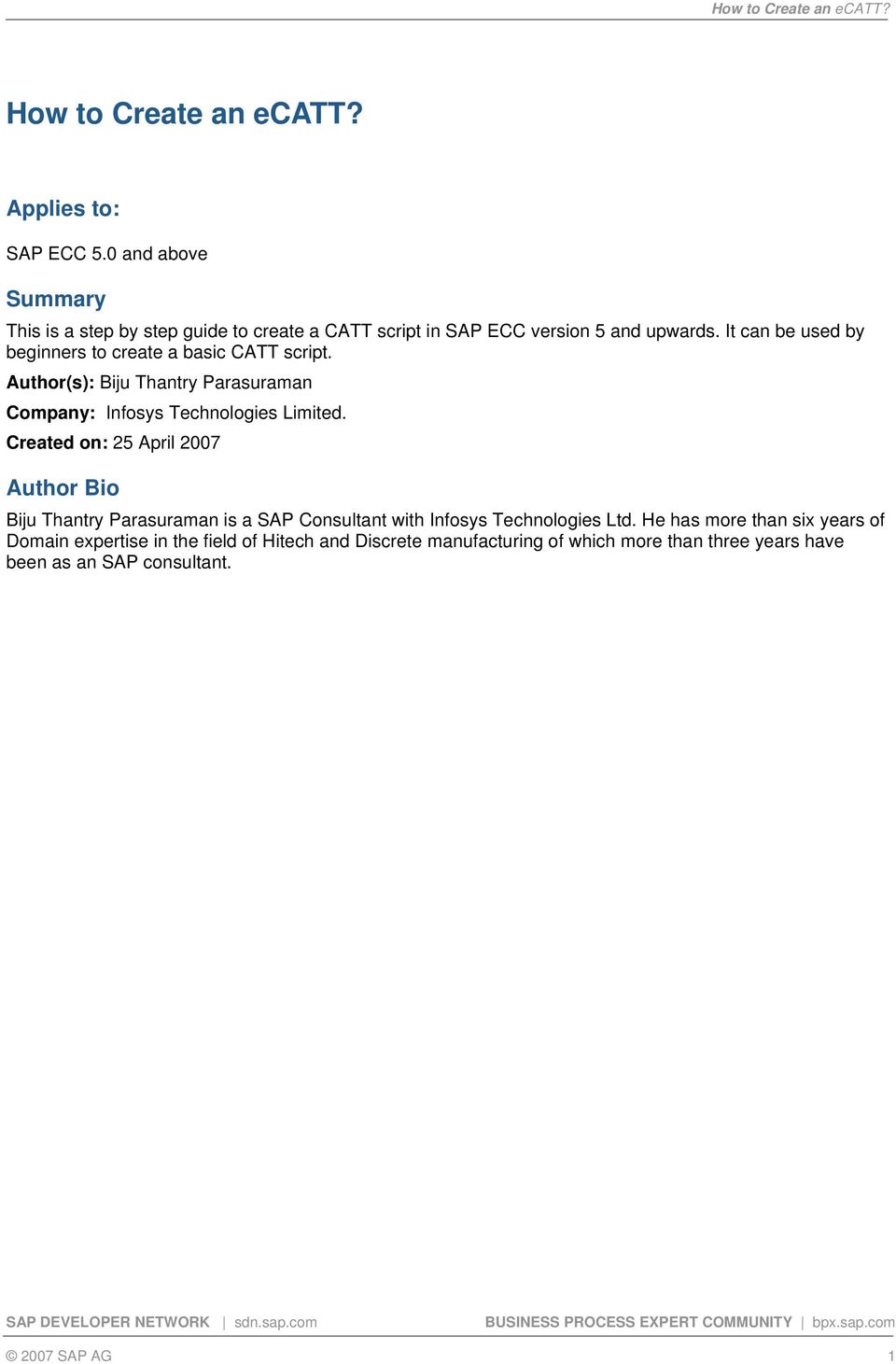
2 Table of Contents Applies to:... 1 Summary... 1 Author Bio... 1 Table of Contents... 2 A Step by Step Guide... 2 Disclaimer and Liability Notice A Step by Step Guide To create an ecatt you must first create the Test Script. After the test script you will create a Test Configuration. In many cases it is also helpful to create a Test Data Container and/or a System Data Container but these will not be used in this example. Click create or F5 and you will then see the following screen: 2007 SAP AG 2
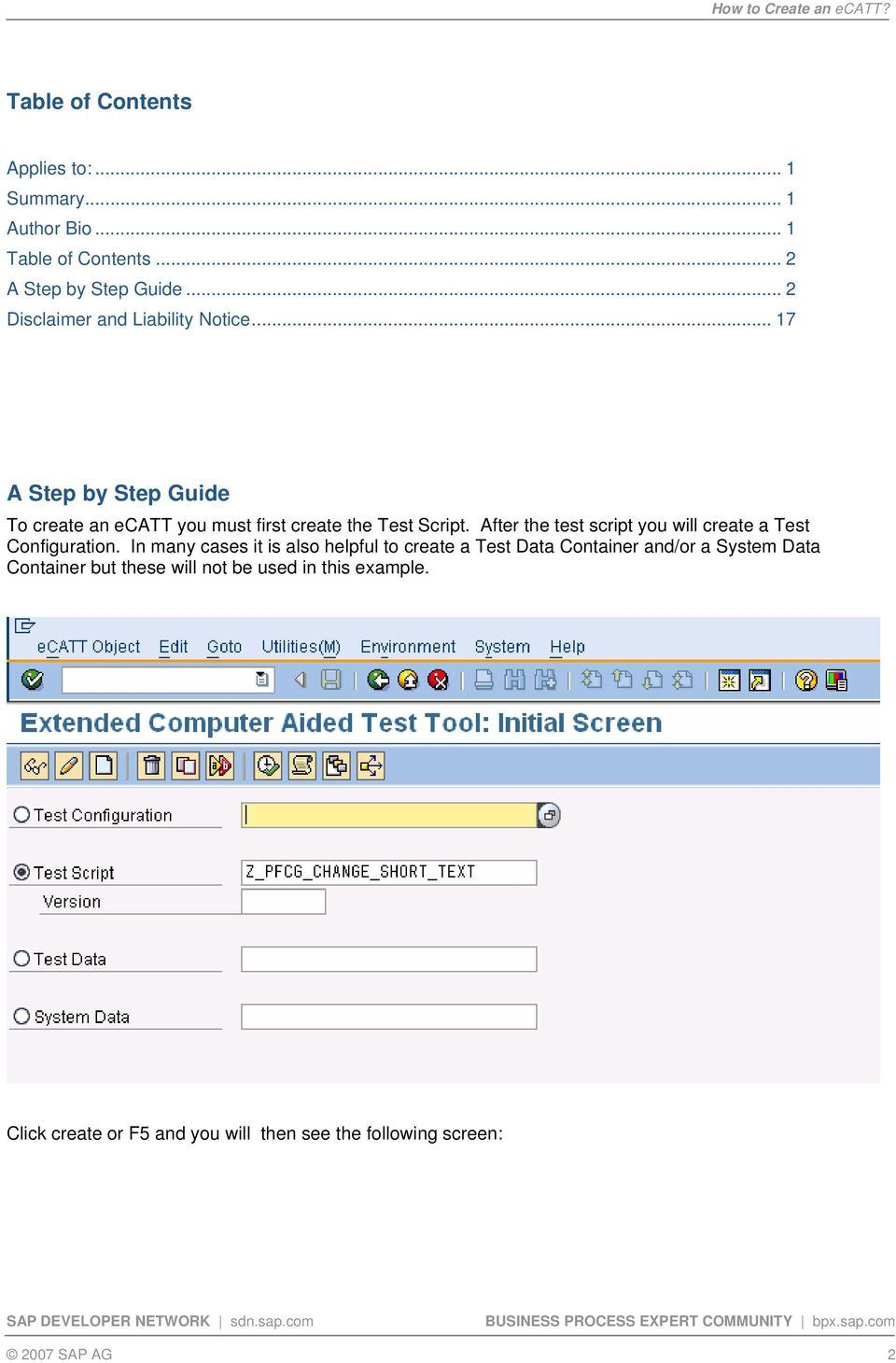
3 Enter title Enter component Click on Pattern button on menu bar Choose Group value = UI Control Choose Command value = TCD (Record) 2007 SAP AG 3
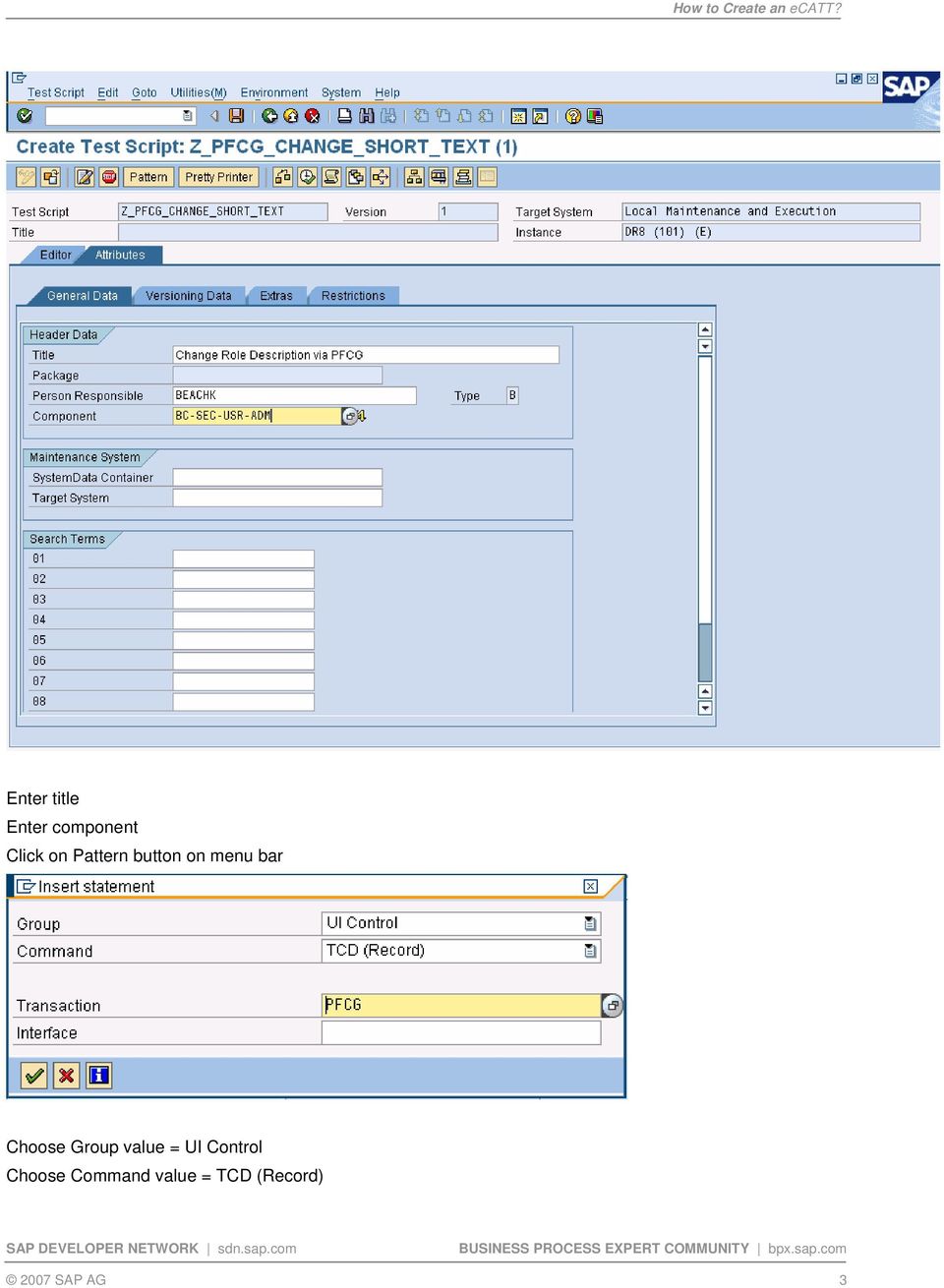
4 Enter code and press enter to accept the default interface Click the green check mark <<<Record the function you are attempting to perform>>> After backing out of the function you were recording you will be returned to the ecatt screen and you should see a prompt asking if you want to transfer the data. Answer Yes. You should then see the following: Now double-click on the Interface. In this case the interface was named PFCG_ SAP AG 4
5 Using the split screen you must now navigate through the various screens you just recorded replacing fixed values with import variables SAP AG 5

6 This is done by opening the Dynpro menu and going through each numbered screen to review your input. In this process my ecatt will change the description of a role. So I will have two variables: 1) the role name and 2) the description. From the screen print above you can see I located the Role Name on the first screen by double-clicking on the menu node named Field. You must then move over to the third subscreen and tab over to the VALIN column where you find the actual value you entered into SAP when recording the interface. In this case that value is ZP:FI:AM:DSP_RPT. You must then change that to a variable as shown on the next screen SAP AG 6

7 The variable name is Z_ROLE_NAME. Once you enter the variable name hit the enter key and the following screen will appear: The default parameter type will be Local. You should change this to Import and click on the Yes button. The screen will now look like the following screen. Note the green square. This icon indicates a variable is present. icon on screen 1 has changed from the 2007 SAP AG 7

8 Now change all the other variables in the same manner. When complete click on the save icon and save as a local object or place in a development class if you desire to transport the ecatt. Before you can execute the ecatt you must first create a Test Configuration. Do this by executing SECATT transaction code and entering a name for the Test Configuration and clicking on the create icon. This name can be anything in the customer name space 2007 SAP AG 8

9 Give the Test Configuration a Name and Component and then click on the Configuration tab to see the following screen SAP AG 9

10 Enter the name of the test script you would like to execute when you execute the test configuration. In this case it is the test script of the same name. See below SAP AG 10

11 Now we need to create the Excel template file to store the variable data in. Do this by clicking on the download icon or just press ctrl-shift-f11. You will then be prompted with a Windows save as dialog box. Accept the default name and directory and click save. Back in SAP you should now see this screen. This appears since we did not create a Test Data Container. Click on the Yes icon and you should see the message at the bottom of the screen variants successfully downloaded SAP AG 11

12 Now click on the Variants icon and you should see the following screen. We must now set the default Mode for each time the Test Configuration is executed. Since we will always be running the script with an external file choose the External Variants / Path option SAP AG 12
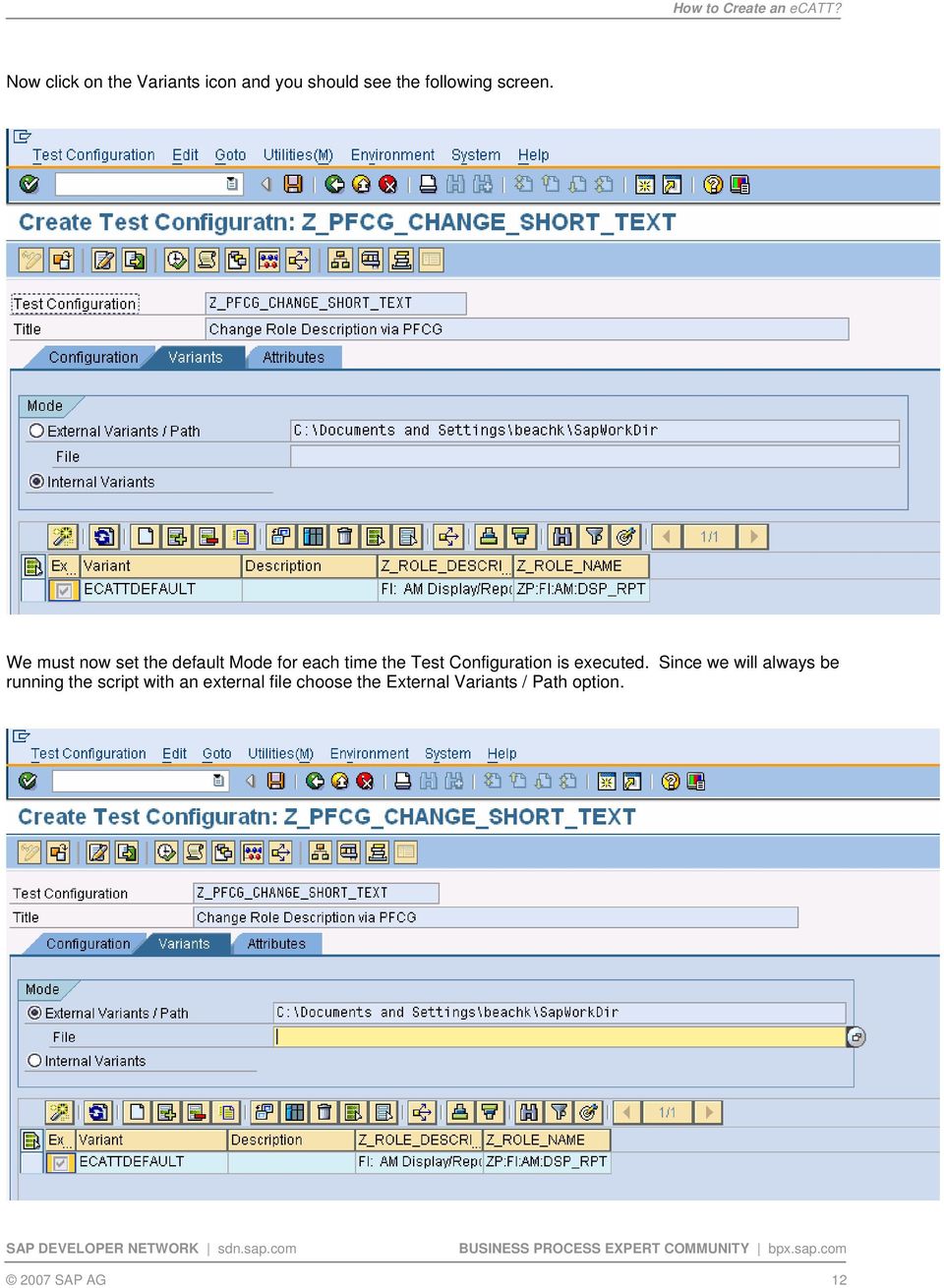
13 Now click on the drop-down on the File and choose the variant file you just created in the previous step. Your screen should look similar to the one shown here. Now click on the save icon and save as a local object or place into a development class (package) so it can be transported. You are now ready to execute your new ecatt Test Script via the Test Configuration. Open your txt file and populate with your data. Be sure and number each record in your data file or ecatt will not be able to read the data correctly. When you are done it should look similar to this: 2007 SAP AG 13
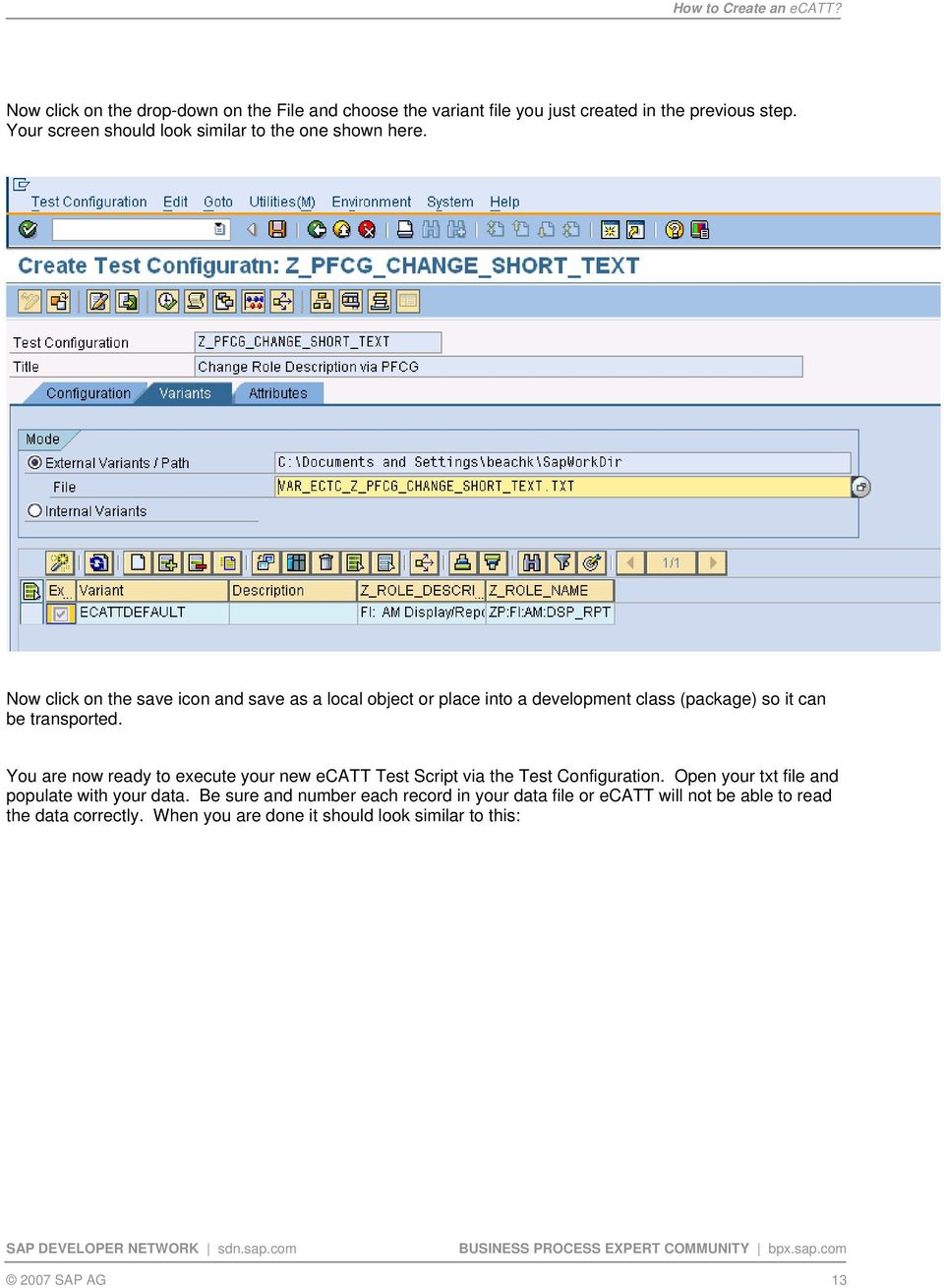
14 Save your Excel file but be sure to keep it as a plain text file. If you update it to the.xls format, then SAP will not be able to read the file. Now go back to SAP and run tcode SECATT and enter your Test Configuration and click execute. You will be taken to this screen: 2007 SAP AG 14
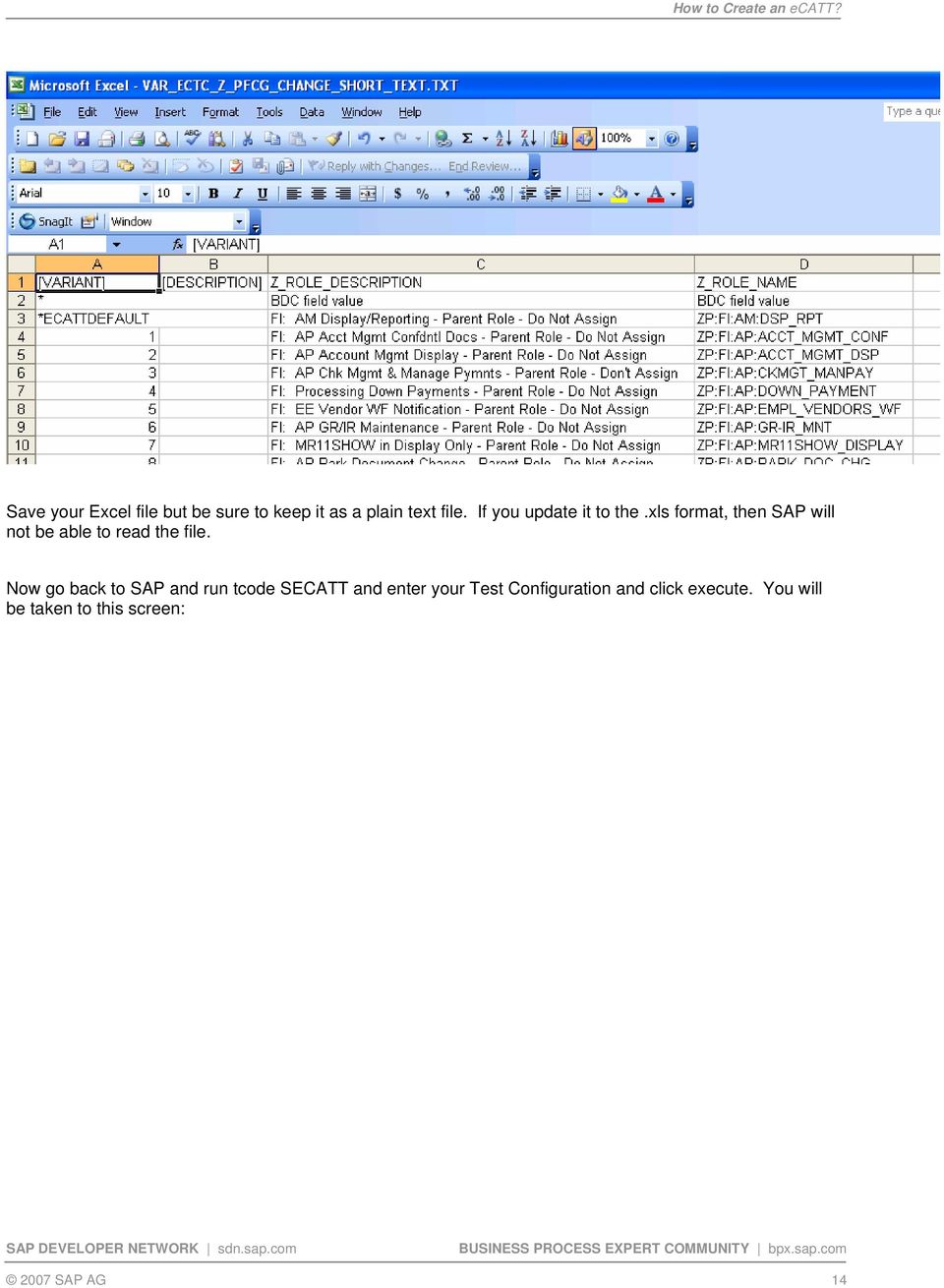
15 You can choose your error behavior. I normally change it to S No Termination, Continue with Next Script Command. Next click on the variants tab and validate the mode and file path are correct SAP AG 15

16 Next click on the UI Control and specify whether you would like to execute in the foreground or background. The Test Configuration will normally default to the background. As with CATT the Foreground method of execution is very helpful when trying to troubleshoot errors in the test script. Then click execute and you are done. NOTE: If you are running the test script remotely you must create a system data container to store the name of all the possible RFC connections you may potentially need when executing a script. These RFC connections are taken from table RFCDES (see SM59). Then in the Test Configuration you reference the 2007 SAP AG 16
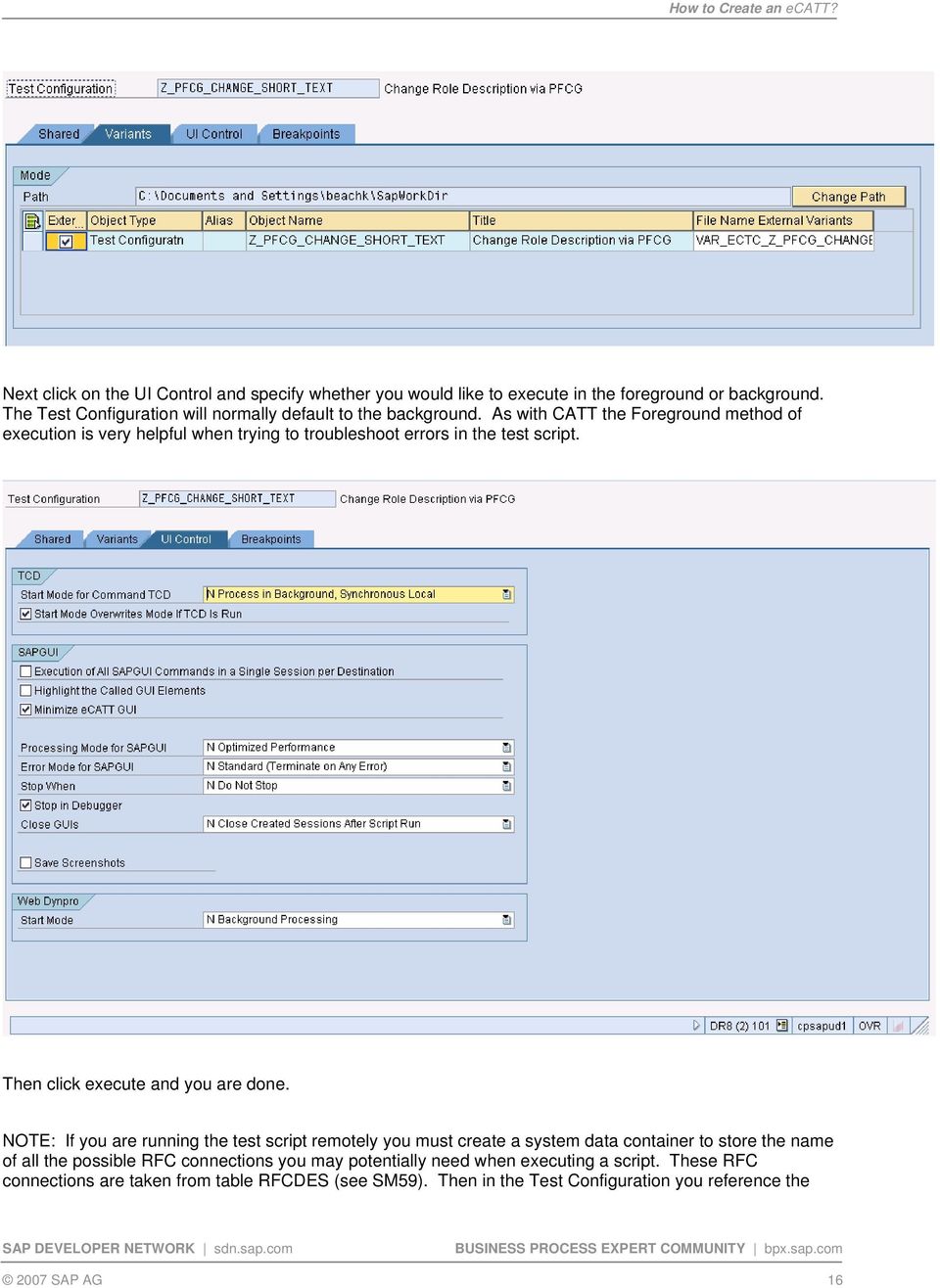
17 System Data Container name and the specific Target System. This information is found under the Shared tab in the Test Configuration. Now you are ready to execute the ecatt. Disclaimer and Liability Notice This document may discuss sample coding or other information that does not include SAP official interfaces and therefore is not supported by SAP. Changes made based on this information are not supported and can be overwritten during an upgrade. SAP will not be held liable for any damages caused by using or misusing the information, code or methods suggested in this document, and anyone using these methods does so at his/her own risk. SAP offers no guarantees and assumes no responsibility or liability of any type with respect to the content of this technical article or code sample, including any liability resulting from incompatibility between the content within this document and the materials and services offered by SAP. You agree that you will not hold, or seek to hold, SAP responsible or liable with respect to the content of this document SAP AG 17

Deleting the User Personalization done on Enterprise Portal
 Deleting the User Personalization done on Enterprise Portal Applies to: SRM 7.0 with EP 6.0. For more information, visit the Supplier Relationship Management homepage Summary This document explains the
Creating Transaction and Screen Variants
 Creating Transaction and Screen Variants Applies to: Tested on SAP version ECC 6. Summary This article explain a way to create Transaction and Screen Variants to change screen layouts. And how to assign
BW Performance Monitoring
 Applies to: SAP BW 7.0. For more information, visit the EDW homepage. Summary This article helps to achieve BW statistics of the system which will help a user to calculate the performance for a particular
Standard SAP Configuration of SMS through HTTP with Third Party SMS Gateway
 Standard SAP Configuration of SMS through HTTP with Third Party SMS Gateway Applies to: SAP R/3 4.7 EE SR 200,ECC 5.0 For more information, visit the Web Services homepage. Summary There is an increasing
Display Options in Transaction SE16
 Display Options in Transaction SE16 Applies to: SAP-HCM. For more information, visit the Enterprise Resource Planning homepage. Summary This document deals with the various data display options available
How to Generate Stack Xml for Ehp4 and Above Upgrade
 How to Generate Stack Xml for Ehp4 and Above Upgrade Applies to: ECC 6.0 EHP4 or Above. For more information, visit the Enterprise Resource Planning homepage Summary For upgrading Enhancement Package4
SAP FI - Automatic Payment Program (Configuration and Run)
 SAP FI - Automatic Payment Program (Configuration and Run) Applies to: SAP ECC 6.0. For more information, visit the Financial Excellence homepage. Summary This document helps you to configure and run Automatic
SAP CRM 2007 - Campaign Automation
 SAP CRM 2007 - Campaign Automation Applies to: SAP CRM 7.0 For more information, visit the Customer Relationship Management homepage Summary Campaign Automation is designed to help you in the increasingly
Query OLAP Cache Optimization in SAP BW
 Query OLAP Cache Optimization in SAP BW Applies to: SAP NetWeaver 2004s BW 7.0 Summary This article explains how to improve performance of long running queries using OLAP Cache. Author: Sheetal Maharshi
ABAP Debugging Tips and Tricks
 Applies to: This article applies to all SAP ABAP based products; however the examples and screen shots are derived from ECC 6.0 system. For more information, visit the ABAP homepage. Summary This article
LSMW: Upload Master Data using Batch Input Recording
 LSMW: Upload Master Data using Batch Input Recording Applies to: All modules of SAP where upload of data need to be performed using Batch Input Recording. For more information, visit the Master Data Management
Quick Viewer: SAP Report Generating Tool
 Quick Viewer: SAP Report Generating Tool Applies to: SAP Net Weaver 7.0, ABAP, SAP ECC 6.0, to all those who wants to learn about SAP Report Generating Tool: Quick Viewer. For more information, please
How to Modify, Create and Delete Table Entries from SE16
 How to Modify, Create and Delete Table Entries from SE16 Applies to This article applies to all SAP ABAP based products; however the examples and screen shots are derived from ECC 6.0 system. For more
Creation and Configuration of Business Partners in SAP CRM
 Creation and Configuration of Business Partners in SAP CRM Applies to: SAP CRM 2005 (5.0) and above release. For more information, visit the Customer Relationship Management homepage. Summary This document
Configuration of Enterprise Services using SICF and SOA Manager
 Configuration of Enterprise Services using SICF and SOA Manager Applies to: SAP NetWeaver 7.0 SP14 and above. For more information, visit the SOA Management homepage. Summary This document will provide
Order Split Usage in Production Orders
 Order Split Usage in Production Orders Applies to: SAP Shop Floor Control (Production Orders) R/3 and ECC 6.0. For more information, visit the Enterprise Resource Planning homepage. Summary: This is an
Step by Step Guide for Language Translation Tool
 Step by Step Guide for Language Translation Tool Applies to: SAP ECC 6.0 Summary This document helps people to understand the steps involved in translation of standard SAP screen and also helps to change
Step by Step Guide How to Copy Flat File from Other Application Server to BI and Load through Info Package
 Step by Step Guide How to Copy Flat File from Other Application Server to BI and Load through Info Package Applies to: SAP BW 7.x. For more information, visit the EDW Homepage. Summary The objective of
Restricting Search Operators in any Search View
 Restricting Search Operators in any Search View Applies to SAP CRM 2007 and SAP CRM 7.0. For more information, visit the Customer Relationship Management homepage. Summary The purpose of this article is
Step by Step Procedure to Block and Debug a CIF Queue Flowing from R/3 to APO System
 Step by Step Procedure to Block and Debug a CIF Queue Flowing from R/3 to APO System Applies to: SAP R/3 and SAP APO. For more information, visit the ABAP homepage. Summary This article gives a detailed
Web Dynpro ABAP: ALV and Table in Popup Window
 Web Dynpro ABAP: ALV and Table in Popup Window Applies to: SAP ECC 6.0 Summary Normally in ABAP, we come across the scenario of displaying ALV in popup. This article tells about displaying data both in
Step by Step guide of Report-to- Report Interface in BW Reporting
 Step by Step guide of Report-to- Report Interface in BW Reporting Applies to: SAP BI 7.0. For more information, visit the Business Intelligence Home Page Summary This paper gives a detail understanding
SAP CRM System 6.0/7.0. For more information, visit the Customer Relationship Management homepage
 Applies to: SAP CRM System 6.0/7.0. For more information, visit the Customer Relationship Management homepage Summary This article explains how to customize the Fact Sheet for different business roles.
Deleting the Requests from the PSA and Change Log Tables in Business Intelligence
 Deleting the Requests from the PSA and Change Log Tables in Business Intelligence Applies to: SAP BI 7.0. For more information, visit the Business Intelligence homepage Summary This paper discusses how
SAP CRM Middleware Configurations
 SAP CRM Middleware Configurations Applies to: SAP CRM Middleware Configurations. For more information, visit the Customer Relationship Management homepage. Summary This whitepaper elaborates the steps
Creating New Unit of Measure in SAP BW
 Creating New Unit of Measure in SAP BW Applies to: Software Component: SAP_BW. For more information, visit the Business Intelligence homepage. Release: 700 Summary This article is intended to serve as
Understanding DSO (DataStore Object) Part 1: Standard DSO
 Understanding DSO (DataStore Object) Part 1: Standard DSO Applies to: SAP NetWeaver BW. Summary This is the first of a three part series of documents containing each and every detail about DSOs and their
ABAP Proxy Interfacing
 Applies to: This document applies to SAP versions ECC 6.0. Summary This article contains the guidelines for using the ABAP Proxy interfacing. ABAP proxies are used when ABAP applications needs to send
ALE Settings, for Communication between a BW System and an SAP System
 ALE Settings, for Communication between a BW System and an SAP System Applies to: SAP ECC 6.0. For more details, visit the EDW homepage. Summary This document helps people to create ALE settings, which
Exposing RFC as Web Service and Consuming Web Service in Interactive Forms in ABAP
 Exposing RFC as Web Service and Consuming Web Service in Interactive Forms in ABAP Applies to: SAP Interactive Forms by Adobe and Web Service in ABAP. For more information, visit SAP Interactive forms
Transfer of GL Master from Source SAP System to a Target SAP System through IDOCS
 Transfer of GL Master from Source SAP System to a Target SAP System through IDOCS Applies to: SAP ECC 6.0. For more information, visit the Enterprise Resource Planning homepage. Summary SAP offers a wide
Web Dynpro: Multiple ALV Grids and Layouts in ALV
 Web Dynpro: Multiple ALV Grids and Layouts in ALV Applies to: SAP ECC 6.0. For more information, visit the Web Dynpro ABAP homepage. Summary The article is designed in such a way that person with ABAP
Deploying Crystal Reports on Top of a SAP BI Query
 Deploying Crystal Reports on Top of a SAP BI Query Applies to: SAP BI NetWeaver 2004s, Crystal Reports 2008. For more information, visit the Business Intelligence homepage. Summary The objective of the
Understanding BEx Query Designer: Part-2 Structures, Selections and Formulas
 Understanding BEx Query Designer: Part-2 Structures, Selections and Formulas Applies to: SAP NetWeaver BW. Summary This document is the second installment of a 6 part Query Designer Training guide for
Table of Content. SAP Query creation and transport Procedure in ECC6
 SAP Query creation and transport Procedure in ECC6 Applies to: ECC6, For more information, visit the Enterprise Resource Planning homepage. Summary This article guides the how to technique for creating
Reverse Transport Mechanism in SAP BI
 Reverse Transport Mechanism in SAP BI Applies to: SAP Net Weaver 2004s BI 7.0 Ehp1 SP 08. For more information, visit the EDW homepage Summary This document helps you to understand the detailed step by
Step by Step Procedure to Create Broadcasters, to Schedule and to Enhance of SAP- BI Queries from Query Designer
 Step by Step Procedure to Create Broadcasters, to Schedule and to Enhance of SAP- BI Queries from Query Designer Applies to: SAP Business Intelligence 7.0. For more information, visit the EDW homepage.
Multi Provider Creation Based on Sales and Planning Info Cubes
 Multi Provider Creation Based on Sales and Planning Info Cubes Applies to: SAP BI 2004s or SAP BI 7.x. For more information, visit the Business Intelligence homepage. Summary In This article, I am going
Workflow Troubleshooting and Monitoring in SAP ECC 6.0
 Workflow Troubleshooting and Monitoring in SAP ECC 6.0 Applies to: ECC 6.0, Workflow Troubleshooting & Monitoring Summary A major advantage of workflow is the ability to monitor the workflow steps according
Virtual Office Remote Installation Guide
 Virtual Office Remote Installation Guide Table of Contents VIRTUAL OFFICE REMOTE INSTALLATION GUIDE... 3 UNIVERSAL PRINTER CONFIGURATION INSTRUCTIONS... 12 CHANGING DEFAULT PRINTERS ON LOCAL SYSTEM...
Working with SAP BI 7.0 Data Transfer Process (DTP)
 Working with SAP BI 7.0 Data Transfer Process (DTP) Applies to: SAP BI 7.0. For more information, visit the EDW homepage Summary The objective of this document is to know the various available DTP options
Currency Conversion using Variables in SAP BI -Reporting
 Currency Conversion using Variables in SAP BI -Reporting Applies to: SAP BI 7.0. For more information, visit the Business Intelligence homepage. Summary This Article gives you a brief idea on how to do
Creating Web Service from Function Modules/BAPIs & Integrating with SAP Interactive Forms
 Creating Web Service from Function Modules/BAPIs & Integrating with SAP Interactive Forms Applies to: ECC 6.0, SAP Interactive forms by Adobe. Summary This document states how to create Web Service from
TROUBLESHOOTING INCORRECT REPORTING OF THE WHO CHANGED PARAMETER
 TROUBLESHOOTING INCORRECT REPORTING OF THE WHO CHANGED PARAMETER TECHNICAL ARTICLE Product Version: 3.0 December/2011. Legal Notice The information in this publication is furnished for information use
Table of Contents. Passing Data across Components through Component Controller between Two Value Nodes
 Passing Data across Components through Component Controller between Two Value Nodes Applies to: SAP CRM WEBCLIENT UI 2007. For more information, visit the Customer Relationship Management homepage Summary
1 Intel Smart Connect Technology Installation Guide:
 1 Intel Smart Connect Technology Installation Guide: 1.1 System Requirements The following are required on a system: System BIOS supporting and enabled for Intel Smart Connect Technology Microsoft* Windows*
Different Types of Alerts for Process Chains. Table of Content
 Different Types of Alerts for Process Chains Applies to: This article applies to BW 3.x and SAP Business Intelligence (BI 7.0) with highest support package. For more information, visit the EDW homepage.
SAP BW 7.3: Exploring Semantic Partitioning
 SAP BW 7.3: Exploring Semantic Partitioning Applies to: SAP BW 3.x & SAP BI Net Weaver 2004s. For more information, visit the EDW homepage. Summary A semantically partitioned object is an InfoProvider
SAP CRM 7.02 SAP CRM 7.02, version for SAP HANA October 2012 English Document Version 3.1
 SAP CRM 7.02 SAP CRM 7.02, version for SAP HANA October 2012 English Document Version 3.1 Quick Guide to Implementing the SAP Best Practices for Enhancement Package 2 and Enhancement Package 2, Version
Organizational Management- Organizational Structure Creation
 Organizational Management- Organizational Structure Creation Applies to: SAP ECC6.0 (Release 700, SP 12). For more information, visit the Enterprise Resource Planning homepage. Summary HR applications
Authorware Install Directions for IE in Windows Vista, Windows 7, and Windows 8
 Authorware Install Directions for IE in Windows Vista, Windows 7, and Windows 8 1. Read entire document before continuing. 2. Close all browser windows. There should be no websites open. If you are using
Data Flow from LBWQ/SMQ1 to RSA7 in ECC and Delta Extraction in BI
 Data Flow from LBWQ/SMQ1 to RSA7 in ECC and Delta Extraction in BI Applies to: SAP NetWeaver Business Warehouse (Formerly BI), Will also work on SAP BI 3.5. Business Intelligence homepage. Summary This
A Step-by-Step guide on SMTP Configuration and File to Mail Scenario Using Process Integration Scenario in PI 7.1
 A Step-by-Step guide on SMTP Configuration and File to Mail Scenario Using Process Integration Scenario in PI 7.1 Applies to: SAP NetWeaver Process Integration 7.1 For more information, visit the SOA Management
SAP NetWeaver Developer Studio 7.30 Installation Guide
 SAP NetWeaver Developer Studio 7.30 Installation Guide Applies to: SAP NetWeaver CE 7.30, SAP Net Weaver Developer Studio (7.30). For more information, visit the Web Dynpro ABAP homepage. Summary This
Data Extraction and Retraction in BPC-BI
 Data Extraction and Retraction in BPC-BI Applies to: Document is applicable to all the BPC 7.0 NW version users and the users BI 7.0 integration with BPC. For more information, visit the Enterprise Performance
Embedding Crystal Reports inside ECC ALV Reports
 Embedding Crystal Reports inside ECC ALV Reports Applies to: Applies to ECC Enhancement Package 5 Summary These steps describe how to configure and set up embedded Crystal Reports inside the ECC system
Tutorial - Creating Pop Up Window Using New Features in WebDynpro Java CE 7.1 Ehp1
 Tutorial - Creating Pop Up Window Using New Features in WebDynpro Java CE 7.1 Ehp1 Applies to: SAP Net Weaver CE 7.11. For more information visit the User Interface Home Page. For more information visit
How to Assign Transport Request for Language Translation?
 How to Assign Transport Request for Language Translation? Applies to: SAP ECC 6.0. For more information, visit the ABAP homepage. Summary This document helps people to create a transport request for the
Step by Step Procedures to Load Master Data (Attribute and Text) from FlatFile in BI 7.0
 Step by Step Procedures to Load Master Data (Attribute and Text) from FlatFile in BI 7.0 Applies to: SAP Business Intelligence (BI 7.0). For more information, visit the EDW homepage Summary This article
Eclipse installation, configuration and operation
 Eclipse installation, configuration and operation This document aims to walk through the procedures to setup eclipse on different platforms for java programming and to load in the course libraries for
Invoice Collaboration: Self Billing Invoice
 Invoice Collaboration: Self Billing Invoice Applies to: Supply Network Collaboration 5.1 with the back end system ERP 5.0 with SP 10 and above. For more information, visit the Supply Chain Management homepage.
Direct Subcontracting Process (SAP SD & MM)
 Direct Subcontracting Process (SAP SD & MM) Applies to: This article is applicable to SAP SD & MM modules of SAP for version SAP 4.7 till ERP 6.0 Summary This article describes a process called Direct
How to Load Data from Flat Files into BW PSA
 How to Load Data from Flat Files into BW PSA Applies to: SAP BI/BW 7.0 and above. Summary The document is aimed at all those who are at beginner level in BW. It details out step by step processes that
WINDOWS 64-BIT INSTALLATION NOTES ORACLE VIRTUALBOX Micro Planner X-Pert V3.5.1 Digital Download Edition
 WINDOWS 64-BIT INSTALLATION NOTES ORACLE VIRTUALBOX Micro Planner X-Pert V3.5.1 Digital Download Edition THIS DOCUMENT CONTAINS IMPORTANT INFORMATION REGARDING THE INSTALLATION AND USE OF THIS SOFTWARE.
Instructions for Configuring a SAS Metadata Server for Use with JMP Clinical
 Instructions for Configuring a SAS Metadata Server for Use with JMP Clinical These instructions describe the process for configuring a SAS Metadata server to work with JMP Clinical. Before You Configure
Adobe Document Service Configuration and Troubleshooting Guide
 Adobe Document Service Configuration and Troubleshooting Guide Applies to: SAP NetWeaver 7.0. For more information, visit the Application Management homepage. Summary This document is intended to guide
Viewing and Troubleshooting Perfmon Logs
 CHAPTER 7 To view perfmon logs, you can download the logs or view them locally. This chapter contains information on the following topics: Viewing Perfmon Log Files, page 7-1 Working with Troubleshooting
Connecting To SOM Network Drives With Windows XP
 Connecting To SOM Network Drives With Windows XP The first step to take is to make sure that you are using the UCSF VPN client when you connect. If you do not have a VPN username and password, you will
SPDD & SPAU Adjustments Handbook
 SPDD & SPAU Adjustments Handbook Applies to: SAP Upgrades. For more information, visit the ABAP homepage. Summary Through this document the reader will be able to get a detailed idea about the working
Connecting to SAP BW with Microsoft Excel PivotTables and ODBO
 Connecting to SAP BW with Microsoft Excel PivotTables and ODBO Applies To: ODBO, Microsoft Excel, Microsoft Excel 2007, PivotTables for connecting to SAP BW. Summary Microsoft Excel is considered by many
Installing GFI MailEssentials
 Installing GFI MailEssentials Introduction to installing GFI MailEssentials This chapter shows you how to install and configure GFI MailEssentials. GFI MailEssentials can be installed in two ways: Installation
How to use SURA in three simple steps:
 How to use SURA in three simple steps: Most of SURA s functionality can be accessed through these three steps. 1) Download SURA to your computer Go to the SU Downloads page to obtain the SURA utility.
SAP BW - Excel Pivot Chart and Pivot Table report (Excel)
 SAP BW - Excel Pivot Chart and Pivot Table report (Excel) Applies to: SAP BI Consultants. For more information, visit the EDW HomePage. Summary Document explains to create Excel Pivot Chart and Pivot Table
How to Integrate CRM 2007 WebClient UI with SAP NetWeaver Portal
 How to Integrate CRM 2007 WebClient UI with SAP NetWeaver Portal Applies to: Enterprise Portal, CRM 2007. For more information, visit the Portal and Collaboration homepage. Summary This document will describe
Practice Fusion API Client Installation Guide for Windows
 Practice Fusion API Client Installation Guide for Windows Quickly and easily connect your Results Information System with Practice Fusion s Electronic Health Record (EHR) System Table of Contents Introduction
MAC OSX INSTALLATION NOTES ORACLE VIRTUALBOX Micro Planner X-Pert V3.5.1 Digital Download Edition
 MAC OSX INSTALLATION NOTES ORACLE VIRTUALBOX Micro Planner X-Pert V3.5.1 Digital Download Edition THIS DOCUMENT CONTAINS IMPORTANT INFORMATION REGARDING THE INSTALLATION AND USE OF THIS SOFTWARE. IF AFTER
Quantifying the Amount of Cash Discount Lost
 Quantifying the Amount of Cash Discount Lost Applies to: All Business organizations where the Financial Controller wants to analyze how much cash discount is lost due to non-adherence to payment terms
Web Application Designer for Beginners
 Applies To: Web Application Designer, SAP BW Version: 3.5, SAP GUI version 6.40/Patch Level 13 BW 3.5 front end patch 7 (bw350_7-10001615) Summary The document will run the readers through a step by step
JORAM 3.7 Administration & Monitoring Tool
 JORAM 3.7 Administration & Monitoring Tool User Guide Author: Alexander Fedorowicz Date: October 26, 2003 Overview The JORAM Administration & Monitoring Tool (jamt) is a graphical user interface which
Lab 5 Managing Access to Shared Folders
 Islamic University of Gaza Computer Network Lab Faculty of engineering ECOM 4121 Computer Department. Prepared by : Eng. Eman R. Al-Kurdi Managing Access to Shared Folders Objective: Manage access to shared
XRD CONVERSION USER S MANUAL
 XRD CONVERSION USER S MANUAL Table of Contents Document Layout........................................ 1 Starting XRD Conversion.................................. 2 XRD Conversion Main Window............................
SAP BW Configuration Basic System Settings
 SAP BW Configuration Basic System Settings Applies to: SAP BI 7.0. For more information, visit the EDW homepage Summary This document is intended to show the basic configuration settings that should be
Extractor in R/3 and Delta Queue
 Applies to: SAP BW (3.5) / SAP BI(7.0). For more information, visit the Business Intelligence homepage. Summary This article contains all the information required in order to create data sources in R/3
TSM for Windows Installation Instructions: Download the latest TSM Client Using the following link:
 TSM for Windows Installation Instructions: Download the latest TSM Client Using the following link: ftp://ftp.software.ibm.com/storage/tivoli-storagemanagement/maintenance/client/v6r2/windows/x32/v623/
Configuration and Utilization of the OLAP Cache to Improve the Query Response Time
 Configuration and Utilization of the OLAP Cache to Improve the Query Response Time Applies to: SAP NetWeaver BW 7.0 Summary This paper outlines the steps to improve the Query response time by using the
First step to Understand a Payroll Schema
 First step to Understand a Payroll Schema Applies to: This article is relevant to SAP HCM module where Payroll is implemented. This applies to all SAP Releases. For more information; visit the Enterprise
Tool Tip. SyAM Management Utilities and Non-Admin Domain Users
 SyAM Management Utilities and Non-Admin Domain Users Some features of SyAM Management Utilities, including Client Deployment and Third Party Software Deployment, require authentication credentials with
USER MANUAL (PRO-CURO LITE, PRO & ENT) [SUPPLIED FOR VERSION 3]
![USER MANUAL (PRO-CURO LITE, PRO & ENT) [SUPPLIED FOR VERSION 3]](/thumbs/39/19325006.jpg "USER MANUAL (PRO-CURO LITE, PRO & ENT) [SUPPLIED FOR VERSION 3]") Pro-curo Software Ltd USER MANUAL (PRO-CURO LITE, PRO & ENT) [SUPPLIED FOR VERSION 3] CONTENTS Everyday use... 3 Logging on... 4 Main Screen... 5 Adding locations... 6 Working with locations... 7 Duplicate...
Pro-curo Software Ltd USER MANUAL (PRO-CURO LITE, PRO & ENT) [SUPPLIED FOR VERSION 3] CONTENTS Everyday use... 3 Logging on... 4 Main Screen... 5 Adding locations... 6 Working with locations... 7 Duplicate...
Inventory Computers Using TechAtlas for Libraries
 Inventory Computers Using TechAtlas for Libraries WebJunction.org 9/11/2008 Table of Contents Introduction... 3 Additional Resources... 3 Your Computer Login... 3 TechAtlas Login... 3 Browser Options...
SQL Server 2005: Report Builder
 SQL Server 2005: Report Builder Table of Contents SQL Server 2005: Report Builder...3 Lab Setup...4 Exercise 1 Report Model Projects...5 Exercise 2 Create a Report using Report Builder...9 SQL Server 2005:
A Step-by-Step Patient Guide to Upload Medical Images to the Cleveland Clinic Neurological Institute
 A Step-by-Step Patient Guide to Upload Medical Images to the Cleveland Clinic Neurological Institute Cleveland Clinic 1995-2014. All Rights Reserved. v.08.05.14 Table of Contents Get Started Step 1: Locate
SAP CRM 7.0 for Newbies: (Part 1) Simple BOL Object Creation for CRM Webclient UI
 SAP CRM 7.0 for Newbies: (Part 1) Simple BOL Object Creation for CRM Webclient UI Applies to: This article applies to SAP Netweaver 7.0, CRM ABAP 7.0. For more information, visit the Customer Relationship
SAP CRM 7.0 E2C Setup: CRM via Email Toolset
 SAP CRM 7.0 E2C Setup: CRM via Email Toolset Applies to: SAP CRM 700/NW 701. For more information, visit the Customer Relationship Management homepage. Summary This article describes the Email2CRM functionality
Valuation of Materials using FIFO Method
 Valuation of Materials using FIFO Method Applies to: 4.7EE, ECC 6.0 For more information, visit the Enterprise Resource Planning homepage. Summary This article explains the Configuration and Process steps
Connecting to LRDC Fileserver Remotely Using Windows XP & SRemote VPN
 Connecting to LRDC Fileserver Remotely Using Windows XP & SRemote VPN October 2013 In order to access the LRDC file server remotely/off campus, or from Wireless Pittnet, you must first authenticate to
How To Configure CU*BASE Encryption
 How To Configure CU*BASE Encryption Configuring encryption on an existing CU*BASE installation INTRODUCTION This booklet was created to assist CU*Answers clients with the configuration of encrypted CU*BASE
MM: Display Tax Conditions in Purchase Order for Brazilian Companies
 MM: Display Tax Conditions in Purchase Order for Brazilian Companies Applies to: This solution could be applied for release 4.6 and higher. The documents was created using ECC 6.0 For more information,
User Guide. SysMan Utilities. By Sysgem AG
 SysMan Utilities User Guide By Sysgem AG Sysgem is a trademark of Sysgem AG. Other brands and products are registered trademarks of their respective holders. 2013 Sysgem AG, Lavaterstr. 45, CH-8002 Zürich,
Cluster to Cluster Failover Using Double-Take
 Cluster to Cluster Failover Using Double-Take Cluster to Cluster Failover Using Double-Take published August 2001 NSI and Double-Take are registered trademarks of Network Specialists, Inc. GeoCluster is
Database migration using Wizard, Studio and Commander. Based on migration from Oracle to PostgreSQL (Greenplum)
 Step by step guide. Database migration using Wizard, Studio and Commander. Based on migration from Oracle to PostgreSQL (Greenplum) Version 1.0 Copyright 1999-2012 Ispirer Systems Ltd. Ispirer and SQLWays