
Redbooks Paper. WebSphere Application Server V5 Architecture. Carla Sadtler
|
|
|
- Adam Mathews
- 9 years ago
- Views:
Transcription
1 Redbooks Paper Carla Sadtler WebSphere Application Server V5 Architecture WebSphere Application Server is IBM 's implementation of the J2EE (Java 2 Enterprise Edition) platform, conforming to V1.3 of the specification. WebSphere Application Server is available in several different configurations that are designed to meet a wide range of customer requirements. Each configuration is packaged with other components that provide a unique environment. At the heart of each configuration is a WebSphere Application Server that provides the runtime environment for enterprise applications. This discussion will center around the runtime server component of the five flavors of WebSphere Application Server: IBM WebSphere Application Server - Express V5.1. We will refer to this as the Express configuration. IBM WebSphere Application Server V5.1. We will refer to this as the Base configuration. IBM WebSphere Application Server Network Deployment V5.1. We will refer to this as the Network Deployment configuration. Copyright IBM Corp All rights reserved. ibm.com/redbooks 1

2 Server architecture Each member of the WebSphere Application Server family uses essentially the same architectural structure. The simplest member, Express, contains a subset of the full architecture. The Base configuration is slightly more advanced; with Network Deployment at the top. Note: The Enterprise configuration has been rebranded to WebSphere Business Integration Server Foundation and is discussed in WebSphere Business Integration Server Foundation Architecture and Overview, REDP9129. Express configuration The Express and Base configurations are similar in that they support a single-server environment. Although you can configure multiple application servers, there is no central administration or workload management. Each application server acts as an unique entity. The Express configuration is a slimmed down version of Base. As you will see, there are several differences between the two, but perhaps the most noticeable are the absence of the EJB container and embedded messaging support in Express. 2 WebSphere Application Server V5 Architecture
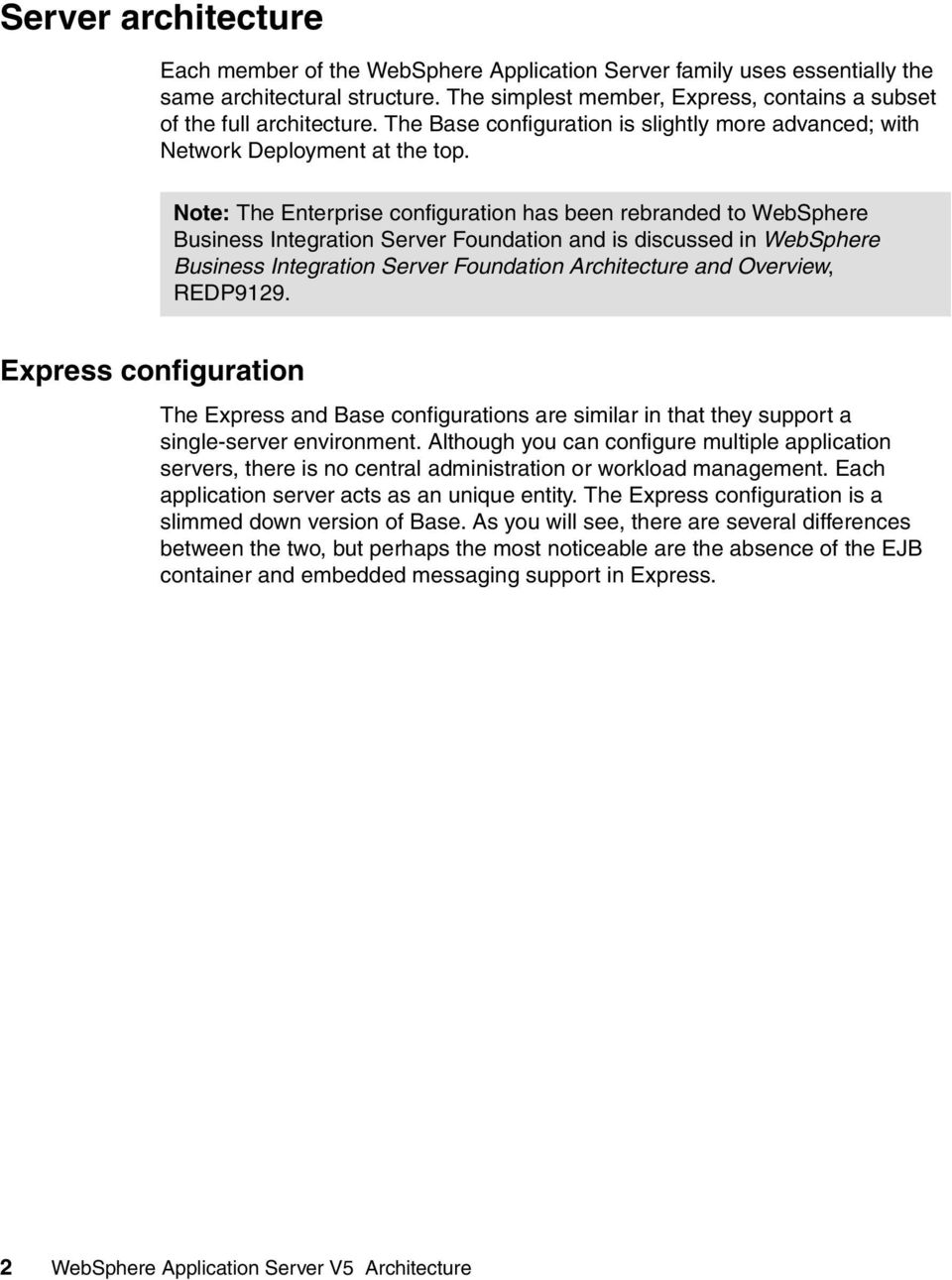
3 Node Application Server Web browser client HTTP server WebSphere plug-in Web container Embedded HTTP server SOAP (Web Services) engine Config repository (XML files) Admin UI JCA services Admin application application (EAR) Admin service Application Database Name Server (JNDI) Studio Site Developer Security server IBM Agent Controller Figure 1 WebSphere Application Server - Express overview Base configuration The next step up in configurations is the Base configuration. Unlike the Express configuration, it has an EJB container, embedded messaging support, JCA resource adapter support and several other differences. The Base configuration has no central administration support and no workload management features. Figure 2 shows an overview of the runtime architecture in a Base installation. WebSphere Application Server V5 Architecture 3

4 Node Application Server Web browser client HTTP server WebSphere plug-in Web container Embedded HTTP server SOAP (Web Services) engine Config repository (XML files) Admin UI Client container Java client Scripting client EJB container JCA services Admin application application (EAR) Admin service Application Database Name Server (JNDI) Security server JMS Server Figure 2 IBM WebSphere Application Server components Network Deployment configuration The Network Deployment configuration offers central administration and workload management. A Network Deployment environment consists of one or more Base installations and a Deployment Manager installation. The Base application servers are added to the cell and managed by the Deployment Manager. The Network Deployment package also includes the Web Services Private UDDI Registry and Web Services Gateway. 4 WebSphere Application Server V5 Architecture

5 Admin UI Cell Deployment Manager Admin application Admin Service Name Server (NDI) Master repository (file) Scripting client Node Node Agent Admin Service Application Server Web browser client HTTP server W ebsphere plug-in Web container Embedded HTTP server SOAP (W eb Services) engine Config repository (file) Client container Java client EJB container JCA services application (EAR) UDDI registry (ear) Admin service Session Database Application Database Web Services Gateway Name Server (NDI) Security server JMS Server Figure 3 IBM WebSphere Application Server Network Deployment components Cells, nodes and servers Regardless of the configuration, the WebSphere Application Server is organized based on the concept of cells, nodes and servers. While all these elements are present in each configuration, cells and nodes do not play an important role until you reach the Network Deployment configuration. Servers Servers perform the actual code execution. There are several types of servers, depending on the configuration. Each server runs in its own JVM. Application servers: WebSphere Application Server V5 Architecture 5
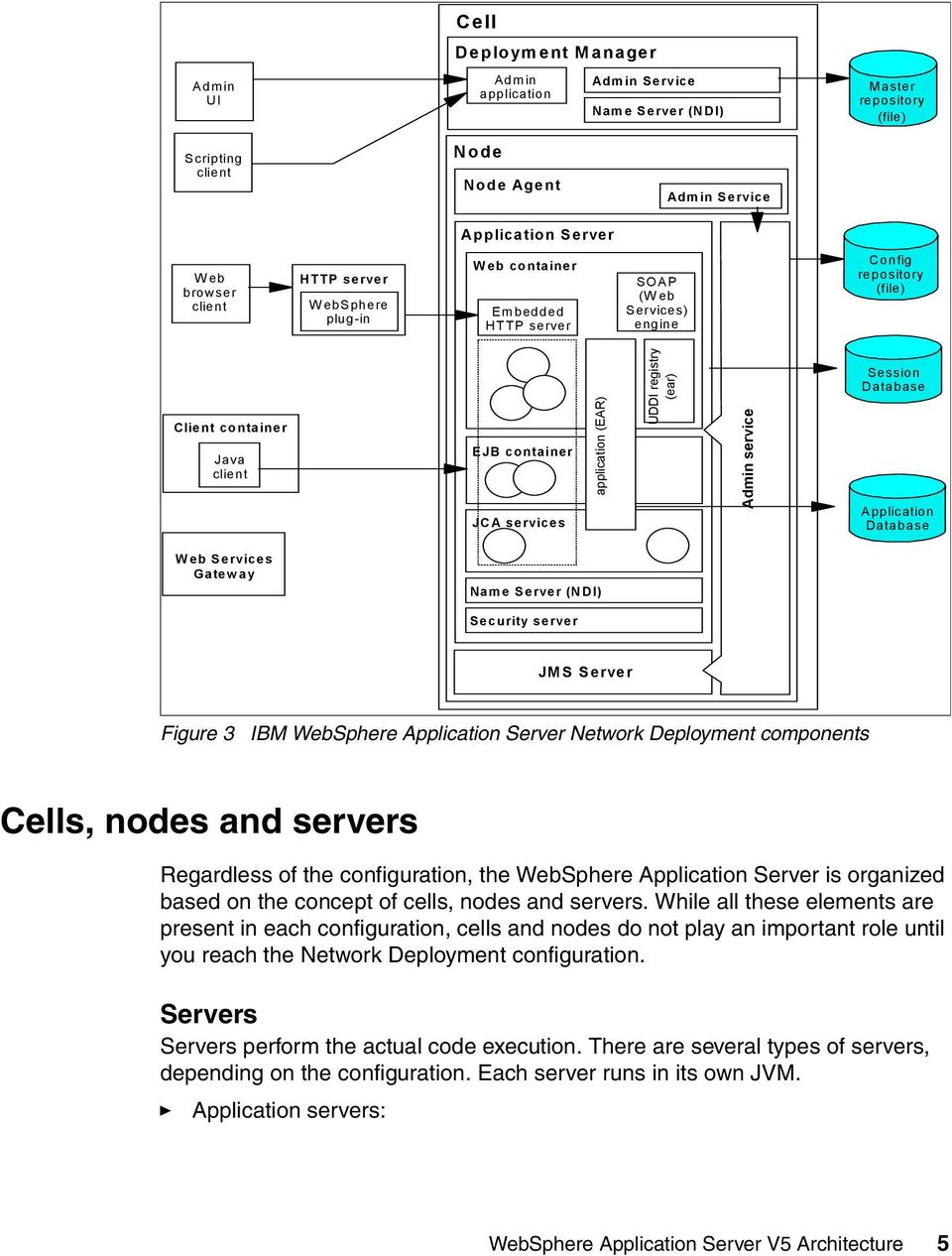
6 The application server is the primary runtime component in all configurations. This is where the application actually executes. All WebSphere Application Server configurations can have one or more application servers. In the Express and Base configurations, each application server functions as a separate entity. There is no workload distribution or common administration among application servers. In the Network Deployment configuration, multiple application servers are maintained from a central administration point. In addition, application servers can be clustered for workload distribution. JMS servers: The Base and Network Deployment configurations provide an embedded JMS server for messaging support. In the Base configuration, the JMS server functions are integrated into the application server. In the Network Deployment, the JMS server runs in a separate JVM. There is one JMS server per node. Nodes (and node agents) A node is a logical grouping of WebSphere-managed server processes that share common configuration and operational control. A node is generally associated with one physical installation of WebSphere Application Server. In the Express and Base configurations of WebSphere Application Server, there is only one node. As you move up through the more advanced WebSphere Application Server configurations, the concepts of configuring multiple nodes from one common administration server and workload distribution among nodes are introduced. In these centralized management configurations, each node has a node agent that works with a Deployment Manager to manage administration processes. Cells A cell is a grouping of nodes into a single administrative domain. In the Base and Express configurations, a cell contains one node. That node may have multiple servers, but the configuration files for each server are stored and maintained individually. With the Network Deployment configuration, a cell can consist of multiple nodes, all administered from a single point. The configuration and application files for all nodes in the cell are centralized into a cell master configuration repository. This centralized repository is managed by the Deployment Manager process and synchronized out to local copies held on each of the nodes. 6 WebSphere Application Server V5 Architecture
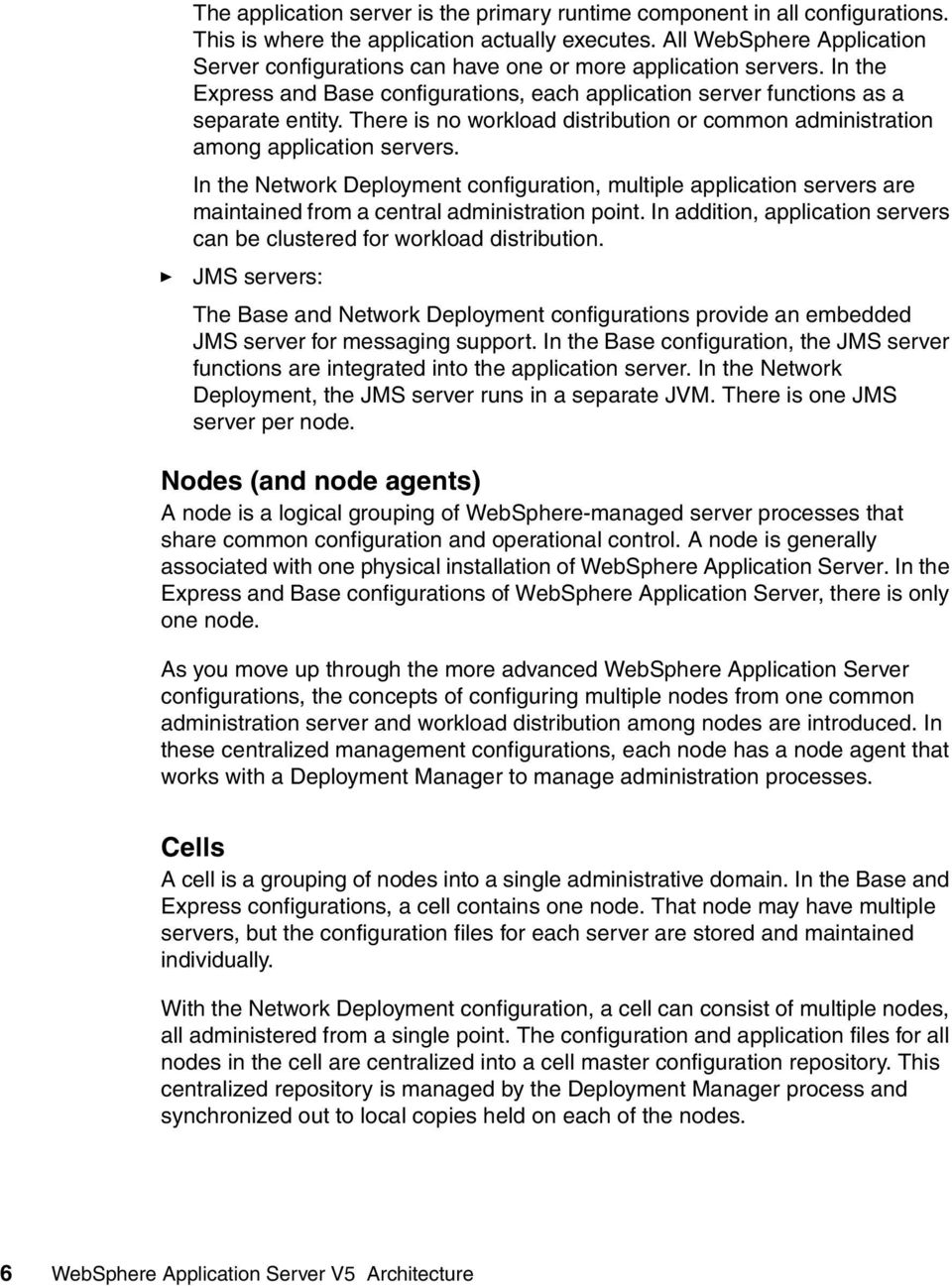
7 Servers WebSphere Application Server uses servers to provide the functions required to host applications. Application servers execute user applications. They may act as individual servers or a member of a cluster. JMS servers provide the embedded messaging support. Table 1 WebSphere Application Server server support Express Base ND Application server Yes Yes Yes JMS server No Yes (integrated into application server) Yes Application server clustering No No Yes Application server Application servers provide the runtime environment for application code. They provide containers and services that specialize in enabling the execution of specific Java application components. Each application server runs in its own Java virtual machine (JVM). In all configurations, one application server, called server1, is available automatically after installation. Additional application servers can be created, but unless you are using the Network Deployment configuration, the application servers are configured independently and have no workload distribution capabilities. JMS server Messaging support is provided through the use of one of the following JMS providers: WebSphere JMS provider (embedded) WebSphere MQ JMS provider Generic JMS provider If you use the WebSphere MQ JMS provider or a generic JMS provider, the JMS functions are provided by an external product. WebSphere Application Server V5 Architecture 7

8 The embedded WebSphere JMS provider, on the other hand, is included with all WebSphere Application Server configurations except the Express configuration. The integrated messaging functions provided by the WebSphere JMS provider include support for message-driven beans, point-to-point and publish/subscribe styles of messaging, and integration with the transaction management service. The functions of the embedded WebSphere JMS provider are implemented by a JMS server. In the Base configuration, the JMS server runs in the same JVM as the application server. From a configuration standpoint, it is a part of the application server. In the Network Deployment configuration, the JMS server is separated from the application server and runs in a separate dedicated JVM. In this case, the configuration for the JMS server is independent of application servers. Clusters The Network Deployment configuration offer the option of using application server clustering to provide enhanced workload distribution. A cluster is a logical collection of application server processes, with the sole purpose of providing workload balancing. Application servers that belong to a cluster are "members" of that cluster and must all have identical application components deployed on them. Other than the applications configured to run on them, cluster members do not have to share any other configuration data. For example, one cluster member might be running on a large multi-processor server while another member of that same cluster might be running on a small laptop. The server configuration settings for each of these two cluster members are very different, except in the area of application components assigned to them. In that area of configuration, they are identical. The members of a cluster can be located on a single node (vertical cluster), across multiple nodes (horizontal cluster) or on a combination of the two. Application management When you install, update, or delete an application, the updates are automatically distributed to all members in the cluster. Workload management Clustering application servers that host Web containers automatically enables plug-in workload management for the application servers and the servlets they 8 WebSphere Application Server V5 Architecture

9 host. Routing of servlet requests occurs between the Web server plug-in and the clustered application servers using HTTP or HTTPS. HTTP Server Plug-in Servlet Requests Web Container App Server Web Container App Server Figure 4 Plug-in (Web container) workload management This routing is based on weights associated with the cluster members. If all cluster members have identical weights, the plug-in will send equal requests to all members of the cluster assuming no strong affinity configurations. If the weights are scaled in the range from zero to twenty, the plug-in will route requests to those cluster members with the higher weight value more often. A rule of thumb formula for determining routing preference would be: % routed to Server1 = weight1 / (weight1+weight2+...+weightn) where there are n cluster members in the cluster. The Web server plug-in will temporarily route around unavailable cluster members. Workload management for EJB containers can be performed by configuring the Web container and EJB containers on separate application servers. Multiple application servers with the EJB containers can be clustered, enabling the distribution of EJB requests between the EJB containers. WebSphere Application Server V5 Architecture 9

10 Web Container App Server EJB Requests EJB Container App Server EJB Container App Server EJB Requests Java Client Figure 5 EJB workload management In this configuration, EJB client requests are routed to available EJB containers in a round robin fashion based on assigned server weights. The EJB clients can be servlets operating within a Web container, stand-alone Java programs using RMI/IIOP, or other EJBs. The server weighted round robin routing policy will ensures a distribution based on the set of server weights that have been assigned to the members of a cluster. For example, if all servers in the cluster have the same weight, the expected distribution for the cluster would be that all servers receive the same number of requests. If the weights for the servers are not equal, the distribution mechanism will send more requests to the higher weight value servers than the lower weight value servers. The policy ensures the desired distribution, based on the weights assigned to the cluster members. You can also choose to have requests sent to the node on which the client resides as the preferred routing. In this case, only cluster members on that node will be chosen (using the round robin weight method). Cluster members on remote nodes will only be chosen if a local server is not available. Containers The J2EE 1.3 specification defines the concept of containers to provide runtime support for applications. There are two containers in the application server implementation: Web container - processes HTTP requests, servlets and JSPs. EJB container - processes enterprise beans (EJBs). In addition, there is an application client container that can run on the client machine. 10 WebSphere Application Server V5 Architecture

11 Table 2 WebSphere Application Server container support Express Base ND Web container Yes Yes Yes EJB container Application client container No Yes Yes No Yes Yes Web container The Web container processes servlets, JSP files and other types of server-side includes. Each application server runtime has one logical Web container, which can be modified, but not created or removed. Servlet processing: when handling servlets, the Web container creates a request object and a response object, then invokes the servlet service method. The Web container invokes the servlet s destroy method when appropriate and unloads the servlet, after which the JVM performs garbage collection. Embedded HTTP server: the Web container runs an embedded HTTP server for handling HTTP(S) requests from external Web server plug-ins or Web browsers. The embedded Web server is based on the IBM HTTP Server product. Directing client requests to the embedded Web server is useful for testing or development purposes and, in the Express configuration, can be considered for production use. In the more advanced configurations, the use of an external Web server and Web server plug-in as a front-end to the Web container is more appropriate for a production environment. Session management: support is provided for the javax.servlet.http.httpsession interface described in the Servlet API specification. Web services engine: Web services are provided as a set of APIs in cooperation with the J2EE applications. Web services engines are provided to support SOAP. Web server plug-ins Although the Web container has an embedded HTTP server, a more likely scenario is that an external Web server will be used to receive client requests. The Web server can serve requests that do not require any dynamic content, for example, HTML pages. However, when a request requires dynamic content WebSphere Application Server V5 Architecture 11

12 (JSP/servlet processing), it must be forwarded to WebSphere Application Server for handling. The mechanism to accomplish this is provided in the form of a Web server plug-in. The plug-in is included with the WebSphere Application Server packages for installation on a Web server. An XML configuration file, configured on the WebSphere Application Server, is copied to the Web server plug-in directory. The plug-in uses the configuration file to determine whether a request should be handled by the Web server or an application server. When a request for an application server is received, it is forwarded to the appropriate Web container in the application server. The plug-in can use HTTP or HTTPs to transmit the request. EJB container The EJB container provides all the runtime services needed to deploy and manage enterprise beans. It is a server process that handles requests for both session and entity beans. The enterprise beans (packaged in EJB modules) installed in an application server do not communicate directly with the server; instead, the EJB container provides an interface between the EJBs and the server. Together, the container and the server provide the bean runtime environment. The container provides many low-level services, including threading and transaction support. From an administrative viewpoint, the container manages data storage and retrieval for the contained beans. A single container can host more than one EJB JAR file. Client application container The client application container is a separately installed component on the client's machine. It allows the client to run applications in an EJB-compatible J2EE environment. There is a command-line executable (launchclient) that is used to launch the client application along with its client container runtime. 12 WebSphere Application Server V5 Architecture

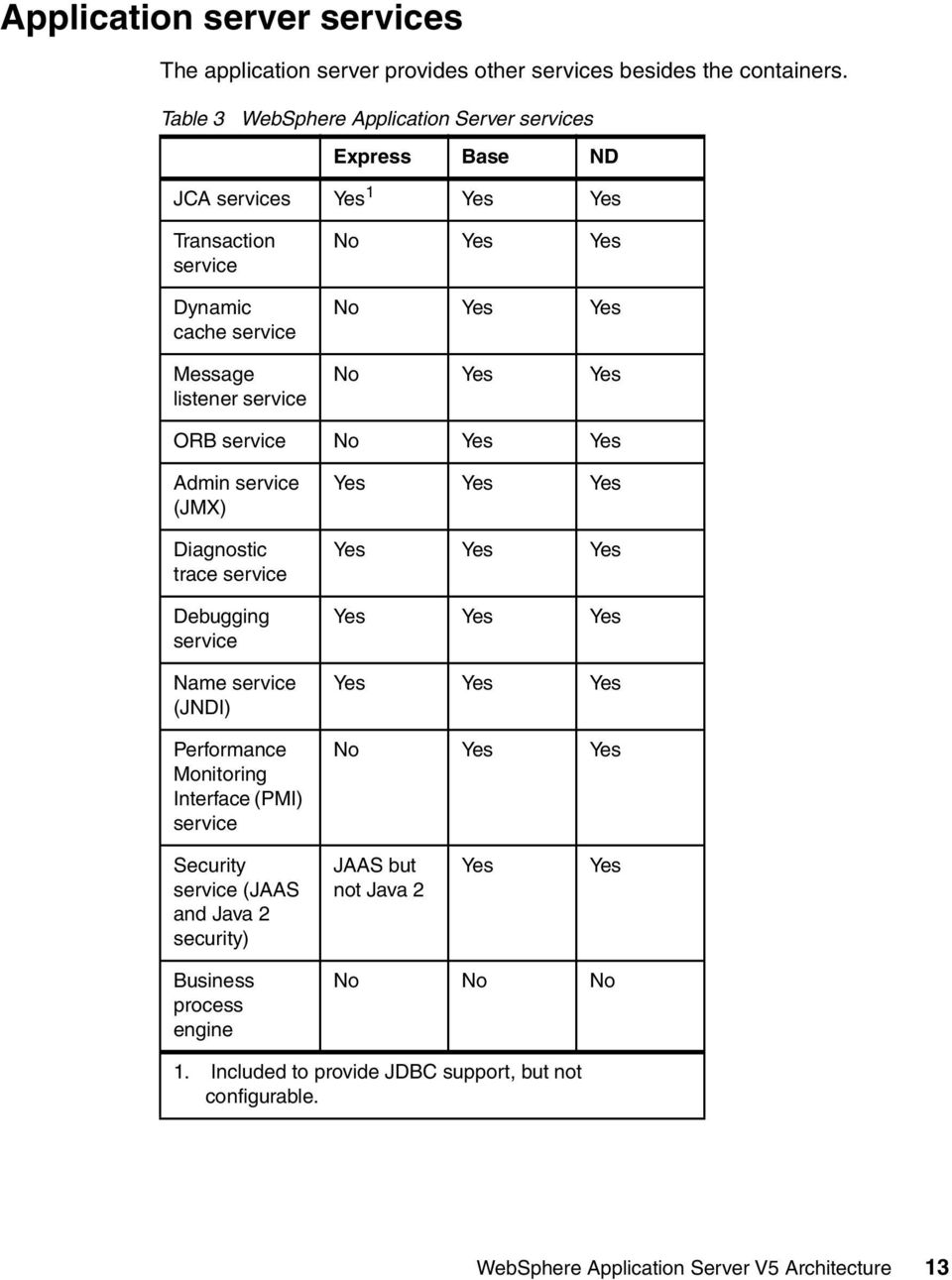
13 Application server services The application server provides other services besides the containers. Table 3 WebSphere Application Server services Express Base ND JCA services Yes 1 Yes Yes Transaction service Dynamic cache service Message listener service No Yes Yes No Yes Yes No Yes Yes ORB service No Yes Yes Admin service (JMX) Diagnostic trace service Debugging service Name service (JNDI) Performance Monitoring Interface (PMI) service Yes Yes Yes Yes Yes Yes Yes Yes Yes Yes Yes Yes No Yes Yes Security service (JAAS and Java 2 security) JAAS but not Java 2 Yes Yes Business process engine No No No 1. Included to provide JDBC support, but not configurable. WebSphere Application Server V5 Architecture 13
14 JCA services Connection management for access to enterprise information systems (EIS) in WebSphere Application Server is based on the J2EE Connector Architecture (JCA) specification, also sometimes referred to as J2C. The connection between the enterprise application and the EIS is done through the use of EIS-provided resource adapters, which are plugged into the application server. The architecture specifies the connection management, transaction management, and security contracts that exist between the application server and EIS. The Connection Manager in the application server pools and manages connections. It is capable of managing connections obtained through both resource adapters defined by the JCA specification and data sources defined by the JDBC 2.0 Extensions Specification. Note that in the Express configuration, adding resource adapters is not supported. However, the JCA support is included to handle connectivity to JDBC resources. The connectivity is handled through a resource adapter provided by WebSphere Application Server. Transaction service WebSphere applications can use transactions to coordinate multiple updates to resources as one unit of work such that all or none of the updates are made permanent. Transactions are started and ended by applications or the container in which the applications are deployed. WebSphere Application Server is a transaction manager that supports the coordination of resource managers through their XAResource interface and participates in distributed global transactions with other OTS 1.2 compliant transaction managers (for example J2EE 1.3 application servers). WebSphere applications can also be configured to interact with databases, JMS queues, and JCA connectors through their local transaction support when distributed transaction coordination is not required. The way that applications use transactions depends on the type of application component, as follows: A session bean can either use container-managed transactions (where the bean delegates management of transactions to the container) or bean-managed transactions (where the bean manages transactions itself). Entity beans use container-managed transactions. Web components (servlets) use bean-managed transactions. 14 WebSphere Application Server V5 Architecture

15 Dynamic caching In WebSphere Application Server, transactions are handled by three main components: A transaction manager that supports the enlistment of recoverable XAResources and ensures that each such resource is driven to a consistent outcome either at the end of a transaction or after a failure and restart of the application server. A container in which the J2EE application runs. The container manages the enlistment of XAResources on behalf of the application when the application performs updates to transactional resource managers (for example, databases). Optionally, the container can control the demarcation of transactions for enterprise beans configured for container-managed transactions. An application programming interface (UserTransaction) that is available to bean-managed enterprise beans and servlets. This allows such application components to control the demarcation of their own transactions. The dynamic cache service improves performance by caching the output of servlets, commands and JSP files. The dynamic cache works within an application server, intercepting calls to cacheable objects, for example, through a servlet's service() method or a command's execute() method, and either stores the object's output to or serves the object's content from the dynamic cache. Because J2EE applications have high read-write ratios and can tolerate small degrees of latency in the currency of their data, the dynamic cache can create an opportunity for significant gains in server response time, throughput, and scalability. The following caching features are available in WebSphere Application Server. Cache replication: Cache replication among cluster members takes place using the WebSphere internal replication service. Data is generated one time and copied or replicated to other servers in the cluster, thus saving execution time and resources. Cache disk offload: By default, when the number of cache entries reaches the configured limit for a given WebSphere server, eviction of cache entries occurs, allowing new entries to enter the cache service. The dynamic cache includes an alternative feature named disk offload, which copies the evicted cache entries to disk for potential future access. WebSphere Application Server V5 Architecture 15

16 Edge Side Include caching: The Web server plug-in contains a built-in ESI processor. The ESI processor has the ability to cache whole pages, as well as fragments, providing a higher cache hit ratio. The cache implemented by the ESI processor is an in-memory cache, not a disk cache, therefore, the cache entries are not saved when the Web server is restarted. External caching: The dynamic cache has the ability to control caches outside of the application server, such as IBM Edge Server, a non-z/os IBM HTTP Server's FRCA cache, and a non-z/os WebSphere HTTP Server plug-in ESI Fragment Processor. When external cache groups are defined, the dynamic cache matches externally cacheable cache entries with those groups, and pushes cache entries and invalidations out to those groups. This allows WebSphere to manage dynamic content beyond the application server. The content can then be served from the external cache, instead of the application server, improving savings in performance. Message listener service The message listener service is an extension to the JMS functions of the JMS provider. It provides a listener manager that controls and monitors one or more JMS listeners. Each listener monitors a JMS destination on behalf of a deployed message-driven bean. Object Request Broker service An Object Request Broker (ORB) manages the interaction between clients and servers, using IIOP. It enables clients to make requests and receive responses from servers in a network-distributed environment. The ORB provides a framework for clients to locate objects in the network and call operations on those objects as if the remote objects were located in the same running process as the client, providing location transparency. The client calls an operation on a local object, known as a stub. Then the stub forwards the request to the desired remote object, where the operation is run and the results are returned to the client. The client-side ORB is responsible for creating an IIOP request that contains the operation and any required parameters, and for sending the request on the network. The server-side ORB receives the IIOP request, locates the target object, invokes the requested operation, and returns the results to the client. The client-side ORB demarshals the returned results and passes the result to the 16 WebSphere Application Server V5 Architecture

17 stub, which, in turn, returns to the client application, as if the operation had been run locally. WebSphere Application Server uses an ORB to manage communication between client applications and server applications as well as communication among product components. Name service Each application server hosts a name service that provides a Java Naming and Directory Interface (JNDI) name space. The service is used to register resources hosted by the application server. The JNDI implementation in WebSphere Application Server V5 is built on top of a Common Object Request Broker Architecture (CORBA) naming service (CosNaming) JNDI provides the client-side access to naming and presents the programming model used by application developers. CosNaming provides the server-side implementation and is where the name space is actually stored. JNDI essentially provides a client-side wrapper of the name space stored in CosNaming, and interacts with the CosNaming server on behalf of the client. The naming architecture is used by clients of WebSphere applications to obtain references to objects related to those applications. These objects are bound into a mostly hierarchical structure, referred to as a name space. The name space structure consists of a set of name bindings, each consisting of a name relative to a specific context and the object bound with that name. The name space can be accessed and manipulated through a name server. The following are features of a WebSphere Application Server V5 name space: The name space is distributed For additional scalability, the name space for a cell is distributed among the various servers. The Deployment Manager, node agent and application server processes all host a name server. In previous releases, there was only a single name server for an entire administrative domain. In WebSphere releases prior to V5.0, all servers shared the same default initial context, and everything was bound relative to that initial context. In WebSphere Application Server V5, the default initial context for a server is its server root. System artifacts, such as EJB homes and resources, are bound to the server root of the server with which they are associated. Transient and persistent partitions The name space is partitioned into transient areas and persistent areas. Server roots are transient. System-bound artifacts such as EJB homes and resources are bound under server roots. There is a cell persistent root, which WebSphere Application Server V5 Architecture 17
18 can be used for cell-scoped persistent bindings, and a node persistent root, which can be used to bind objects with a node scope. Federated name space structure A name space is a collection of all names bound to a particular name server. A name space can contain naming context bindings to contexts located in other servers. If this is the case, the name space is said to be a federated name space, because it is a collection of name spaces from multiple servers. The name spaces link together to cooperatively form a single logical name space. In a federated name space, the real location of each context is transparent to client applications. Clients have no knowledge that multiple name servers are handling resolution requests for a particular requested object. In the Network Deployment configuration, the name space for the cell is federated among the Deployment Manager, node agents, and application servers of the cell. Each such server hosts a name server. All name servers provide the same logical view of the cell name space, with the various server roots and persistent partitions of the name space being interconnected by means of the single logical name space. Configured bindings The configuration graphical interface and script interfaces can be used to configure bindings in various root contexts within the name space. These bindings are read-only and are bound by the system at server startup. Support for CORBA Interoperable Naming Service (INS) object URLs WebSphere Application Server V5 contains support for CORBA object URLs (corbaloc and corbaname) as JNDI provider URLs and lookup names, as required by the J2EE 1.3 specification. Figure 6 on page 19 summarizes the naming architecture and its components. 18 WebSphere Application Server V5 Architecture

19 Machine A Deployment Manager JNDI Client lookup 9809 namespace lookup lookup Node Agent 1 Node Agent namespace namespace 2809 Application Server 1 Application Server 2 Application Server namespace namespace 9811 namespace 9810 Machine B Machine C Link between name spaces JNDI lookup Figure 6 Naming topology PMI service WebSphere Application Server collects data on runtime and applications through the Performance Monitoring Infrastructure (PMI). This infrastructure is compatible with and extends the JSR-077 specification. PMI uses a client-server architecture. The server collects performance data from various WebSphere Application Server components and stores it in memory. This data consists of counters such as servlet response time and data connection pool usage. The data can then be retrieved using a Web client, Java client or JMX client. WebSphere Application Server contains Tivoli Performance Viewer, a Java client which displays and monitors performance data. WebSphere Application Server also collects data by timing requests as they travel through the product components. PMI request metrics log time spent in major components, such as Web containers, EJB containers, and databases. These data points are recorded in logs and can be written to Application Response Time (ARM) agents used by Tivoli monitoring tools. WebSphere Application Server V5 Architecture 19

20 The PMI services can be enabled for an application server or node agent using the administrative console. The type and level of data collected can be controlled through the administrative console (or wsadmin) or from the Tivoli Performance Viewer. Security service Admin service Each application server JVM hosts a security service that uses the security settings held in the configuration repository to provide authentication and authorization functionality. The admin service runs within each server JVM. In the Base configuration, the admin service runs in the application server. In the Network Deployment configuration, each of the following hosts an admin service: Deployment Manager Node agent Application server JMS server The admin service provides the necessary functions to manipulate configuration data for the server and its components. The configuration is stored in a repository in the server's file system. The admin service has a security control and filtering functionality, providing different levels of administration to certain users or groups using the following admin roles: Administrator Monitor Configurator Operator Virtual hosts A virtual host is a configuration enabling a single host machine to resemble multiple host machines. It allows a single physical machine to support several independently configured and administered applications. It is not associated with a particular node. It is a configuration, rather than a live object, which is why it can be created, but not started or stopped. 20 WebSphere Application Server V5 Architecture

21 Each virtual host has a logical name and a list of one or more DNS aliases by which it is known. A DNS alias is the TCP/IP host name and port number used to request the servlet, for example yourhostname:80. When a servlet request is made, the server name and port number entered into the browser are compared to a list of all known aliases in an effort to locate the correct virtual host and serve the servlet. If no match is found, an HTTP 404 error is returned to the browser. IBM WebSphere Application Server provides two default virtual hosts: default_host Used for accessing most applications. For all configurations except Express, the default settings for default_host map to all requests for any alias on ports 80, 9443, and In the Express configuration, the default_host port settings are 80, 7443, and For example: admin_host Specifically configured for accessing the WebSphere Application Server V5 administrative console. Other applications are not accessible through this virtual host. For all configurations except Express, the default settings for admin_host map to requests on ports 9090 and In the Express configuration, the default_host port settings are 7090, For example: Session management In many Web applications, users dynamically collect data as they move through the site based on a series of selections on pages they visit. Where the user goes next, and what the application displays as the user's next page (or next choice) may depend on what the user has chosen previously from the site. In order to maintain this data, the application stores it in a session. WebSphere supports three approaches to track sessions: SSL session identifiers - SSL session information is used to track the HTTP session ID. Cookies - The application server session support generates a unique session ID for each user, and returns this ID to the user s browser using a cookie. The default name for the session management cookie is JSESSIONID. Using cookies is the most common method of session management. WebSphere Application Server V5 Architecture 21
22 URL rewriting Session data can be kept in local memory cache, stored externally on a database, or kept in memory and replicated among application servers. Table 4 shows the session support for each WebSphere Application Server configuration. Table 4 WebSphere Application Server session management support Express Base ND Cookies Yes Yes Yes URL rewriting Yes Yes Yes SSL session identifiers In memory cache Session persistence using a database Memory-tomemory session persistence Yes Yes Yes Yes Yes Yes No Yes Yes No No Yes The Servlet 2.3 specification defines session scope at the Web application level, meaning that session information can only be accessed by a single Web application. However, there may be times when there is a logical reason for multiple Web applications to share information, for example a user name. WebSphere V5.0 provides an IBM extension to the specification allowing session information to be shared among Web applications within an enterprise application. This option is offered as an extension to the application deployment descriptor. No code change is necessary to enable this option. This option is specified during application assembling. Session persistence Many Web applications use the simplest form of session management, the in-memory local session cache. The local session cache keeps session information in memory and local to the machine and WebSphere Application Server where the session information was first created. Local session management does not share user session information with other clustered 22 WebSphere Application Server V5 Architecture
23 machines. Users only obtain their session information if they return to the machine and WebSphere Application Server holds their session information on subsequent accesses to the Web site. Most importantly, local session management lacks a persistent store for the sessions it manages. A server failure takes down not only the WebSphere instances running on the server, but also destroys any sessions managed by those instances. By default, WebSphere places session objects in memory. However, with the Base and Network Deployment configurations, the administrator has the option of enabling persistent session management. This instructs WebSphere to place session objects in a persistent store. Using a persistent store allows the user session data to be recovered by another cluster member after a cluster member in a cluster fails or is shut down. Two options for session persistence are available: Database In a multi-server environment, session information can be stored in a central session database for session persistence. The multiple application servers hosting a particular application need to share this database information in order to maintain session states for the stateful components. Memory-to-memory using WebSphere internal messaging WebSphere internal messaging enables sessions to be shared among application servers without using a database. Using this method, sessions are stored in the memory of an application server, providing the same functionality as a database for session persistence. Two topology options are offered: Peer-to-peer topology: each application server stores sessions in its own memory. It also stores sessions to and retrieves sessions from other application servers. In other words, each application server acts as a client by retrieving sessions from other application servers, and each application server acts as a server by providing sessions to other application servers. Client/server topology: application servers act as either a replication client or a server. Those that act as replication servers store sessions in their own memory and provide session information to clients. They are dedicated replication servers that just store sessions but do not respond to the users requests. Client application servers send session information to the replication servers and retrieve sessions from the servers. They respond to user requests and store only the sessions of the users with whom they interact. WebSphere Application Server V5 Architecture 23
24 The internal messaging system is not associated with the embedded WebSphere JMS provider or JMS server. The necessary code is provided as part of the core WebSphere Application Server libraries. Web services Web services are self-contained, modular applications that can be described, published, located, and invoked over a network. WebSphere Application Server can act as both a Web service provider and as a requester. As a provider, it hosts Web services that are published for use by clients. As a requester, it hosts applications that invoke Web services from other locations. WebSphere Application Server supports SOAP-based Web service hosting and invocation. Table 5 WebSphere Application Server server support Express Base ND Base Web services support Private UDDI Registry Web Services Gateway Enterprise Web services Yes Yes Yes No No Yes No No Yes Yes Yes Yes 1 Not yet supported in V5.0 The Web services support includes the following: Web Services Description Language (WSDL), an XML-based description language that provides a way to catalog and describe services. It describes the interface of Web services (parameters and result), the binding (SOAP, EJB), and the implementation location. Universal Discovery Description and Integration (UDDI), a global, platform-independent, open framework to enable businesses to discover each other, define their interaction, and share information in a global registry. Simple Object Access Protocol (SOAP), a lightweight protocol for exchange of information in a decentralized, distributed environment. 24 WebSphere Application Server V5 Architecture
25 extensible Markup Language (XML), which provides a common language for exchanging information. Web Services Invocation Framework (WSIF), a runtime architecture for service-oriented applications that provides a binding-independent mechanism for Web service invocation. WSIF enables easy encapsulation of back-end systems connected through the J2EE Connector Architecture (JCA) as Web services. JAX-RPC (JSR 101) provides the core programming model and bindings for developing and deploying Web services on the Java platform. It is a Java API for XML-based RPC and supports only JavaBeans as Web Service provider. Enterprise Web services (JSR 109): this adds EJBs and XML deployment descriptors to JSR 101. WS-Security: this specification covers a standard set of SOAP extensions that can be used when building secure Web services to provide integrity and confidentiality. It is designed to be open to other security models including PKI, Kerberos, and SSL. WS-Security provides support for multiple security tokens, multiple signature formats, multiple trust domains, and multiple encryption technologies. It includes security token propagation, message integrity, and message confidentiality. The specification is proposed by IBM, Microsoft, and VeriSign for review and evaluation. In the future, it will replace existing Web services security specifications from IBM and Microsoft including SOAP Security Extensions (SOAP-SEC), Microsoft's WS-Security and WS-License, as well as IBM's security token and encryption documents. Enterprise services (JCA Web services) Enterprise services offer access over the Internet to applications in a platform-neutral and language-neutral fashion. They offer access to enterprise information systems (EIS) and message queues and can be used in a client/server configuration without the Internet. Enterprise services can access applications and data on a variety of platforms and in a variety of formats. An enterprise service wraps a software component in a common services interface. The software component is typically a Java class, EJB, or JCA resource adapter for an EIS. In services terminology, this software component is known as the implementation. Enterprise services primarily use WSDL and WSIF to expose an implementation as a service. Using the Integrated Edition of WebSphere Studio, you can turn CICS and IMS transactions using Java Connector Architecture (JCA) into Web services. Web service client (requester) Applications that invoke Web services are known as Web service clients or Web service requestors. An application that acts as a Web service client is deployed WebSphere Application Server V5 Architecture 25
26 to WebSphere Application Server like any other enterprise application. No additional configuration or software is needed for the Web services client to function. Web services clients can also be stand-alone applications. A Web service client will bind to a Web service server to invoke the Web service. The binding is done using a service proxy (or stub), which is generated based on the WSDL document for the Web service. This service proxy contains all the needed information to invoke the Web service and is used locally by the clients to access the business service. The binding can also be done dynamically using WSIF. Web service provider An application that acts as a Web service is deployed to WebSphere Application Server like any other enterprise application. The Web services are contained in Web modules or EJB modules. Publishing the Web service to a UDDI registry makes it available to anyone searching for it. Web services can be published to a UDDI registry using the Web Services Explorer provided with WebSphere Studio Application Developer, Integration Edition, and Enterprise Developer configurations. When using WebSphere Studio V5 to package the application for deployment, no additional configuration or software is needed for the Web services client to function. The SOAP servlets are automatically added and a SOAP admin tool is included in a Web module. If not, you will need to use soapearenabler.bat, found in the WebSphere bin directory to enable the SOAP services within the EAR file and add the SOAP admin tool. Enterprise Web Services The Enterprise Web Services, based on the JSR 109 specification request, provides the use of JAX-RPC in a J2EE environment defining the runtime architecture, as well as the implementation and deployment of Web services in a generic J2EE server. The specification defines the programming model and architecture for implementing Web services in Java based on JSRs 67, 93, 101, and future JSRs related to Web services standards. The list of JSRs may be found at: IBM WebSphere UDDI Registry WebSphere Application Server V5 provides a private UDDI registry that implements V2.0 of the UDDI specification. This enables the enterprise to run its 26 WebSphere Application Server V5 Architecture
27 own Web services broker within the company or provide brokering services to the outside world. The UDDI registry is installed as a Web application by the administrator on one application server (or cluster). A DB2 database is used to store registry data. In a test environment, Cloudscape can be used. There are three interfaces to the registry for inquiry and publish: Through the UDDI SOAP API. Through the UDDI EJB client interface. Through the UDDI user console. This Web-based GUI interface can be used to publish and to inquire about UDDI entities but only provides a subset of the UDDI API functions. Security for the UDDI registry is handled using WebSphere security. To support the use of secure access with the IBM WebSphere UDDI Registry, you need to configure WebSphere to use HTTPS and SSL. Web Services Gateway The Web Services Gateway bridges the gap between Internet and intranet environments during Web service invocations. The gateway builds upon the Web services Definition Language (WSDL) and the Web Services Invocation Framework (WSIF) for deployment and invocation. The primary function of the Web Services Gateway is to map an existing WSDL-defined Web service to a new service that is offered by the gateway to others. The gateway thus acts as a proxy. External services are imported into the gateway and made available to the enterprise as internal proxy services. Likewise, internal services are imported into the gateway and made available as external proxy services. These services are also published to the relevant UDDI registries where required. The Web Services Gateway is installed as Web application by the administrator. Exposing Web services to the outside world To expose an internal service for outside consumption, the gateway takes the WSDL file for the existing service and generates a new WSDL file that can be shared with outside requestors. The interface described in the WSDL is exactly the same, but the service endpoint is changed to the gateway, which is now the official endpoint for the service client. WebSphere Application Server V5 Architecture 27
28 You might also consider applying special security constraints to restrict the access to either specific users and/or specific methods of your service. This scenario is illustrated in Figure 7. Internet DMZ Intranet SOAP/HTTP Web Services Gateway SOAP/JMS Client Channel 1 Channel 1 Prefilter Postfilter deployed WS Channel 2 Channel 2 Web Service Implementation UDDI external WSDL URI = internal WSDL URI = Figure 7 Exposing Web services through the Gateway Importing Web services An external service may be imported and made available as an internal service. This will help the internal service requestors invoke the service as if it were running on the gateway. Again, a new WSDL is generated by the gateway showing the same interface but naming the gateway as service provider rather than the real internal server. The gateway then reroutes all requests to the actual implementation specified in the original WSDL. Of course, every client could access external Web services by traditional means, but if you add the gateway as an additional layer in between, clients do not have to change anything if the service implementor changes. This scenario is very similar to the illustration in Figure 7, with the difference that the client resides in the intranet and the Web service implementation is located at a site on the Internet. Managing channels A request for a service may originate in one protocol, but the service may be invoked in some other protocol by using the transformation function. Let us consider the case that an internal service is available on SOAP over JMS, but 28 WebSphere Application Server V5 Architecture
29 should be invoked using SOAP over HTTP. To handle such cases, you need to define a set of channels corresponding to the specific protocols on which you wish the Gateway to receive messages. The outbound channels over which the Gateway invokes the target Web services are defined implicitly by the bindings in the WSDL imported in the Gateway and do not have to be explicitly configured. By using a different inbound channel to those defined in the imported WSDL bindings, you can switch the protocol. Managing filters You can develop and use one or more filters for your Web services, which means that some specific task is done using the input and/or output messages to and from your Web service. There are standard filters as well as the possibility of creating your own. UDDI publication and lookup The gateway facilitates working with UDDI registries. As you map a service for external consumption using the gateway, you can publish the exported WSDL in the UDDI registry. When the services in the gateway are modified, the UDDI registry is updated with the latest changes. Security IBM WebSphere Application Server security sits on top of the operating system security and the security features provided by other components, including the Java language. Operating system security protects sensitive WebSphere configuration files and authenticates users when the operating system user registry is used for authentication. Standard Java security is provided through the Java Virtual Machine (JVM) used by WebSphere and the Java security classes. The Java 2 Security API provides a means to enforce access control, based on the location of the code and who signed it. Java 2 security guards access to system resources such as file I/O, sockets, and properties. WebSphere global security settings allow you to enable or disable Java 2 security and provide a default set of policies. Java 2 security can be activated or inactivated independently from WebSphere global security; however, when global security is enabled, by default Java 2 security is also enabled. The current principal of the thread of execution is not considered in the Java 2 security authorization. There are instances where it is useful for the authorization to be based on the principal, rather the code base and the signer. The Java Authentication and Authorization Services (JAAS) is a WebSphere Application Server V5 Architecture 29
30 standard Java API that allows the Java 2 security authorization to be extended to the code base on the principal as well as the code base and signers. JAAS is a standard extension to the Java 2 SDK v1.3 and is part of the Java 2 SDK V1.4. The JAAS programming model allows the developer to design application authentication in a pluggable fashion, which makes the application independent from the underlying authentication technology. JAAS does not require Java 2 security to be enabled. The Common Secure Interoperability protocol adds additional security features that enable interoperable authentication, delegation and privileges in a CORBA environment. It supports interoperability with the EJB 2.0 specification and can be used with SSL. J2EE security uses the security collaborator to enforce J2EE-based security policies and support J2EE security APIs. APIs are accessed from WebSphere applications in order to access security mechanisms and implement security policies. J2EE security guards access to Web resources such as servlets/jsps and EJB methods based on roles defined by the application developer. Users and groups are assigned to these roles during application deployment. IBM Java Secure Socket Extension (JSEE) is the Secure Sockets Layer (SSL) implementation used by WebSphere Application Server. It is a set of Java packages that enable secure Internet communications. It implements a Java version of SSLand Transport Layer Security (TLS) protocols and includes functionality for data encryption, server authentication, message integrity, and client authentication. WebSphere Application Server V5 security relies on and enhances all the above mentioned layers. It implements security policy in a unified manner for both Web and EJB resources. Table 6 on page 30 shows the security features supported by the WebSphere Application Server configurations. Table 6 WebSphere Application Server security support Express Base ND Java 2 security No Yes Yes J2EE security (role mapping) Yes Yes Yes JAAS Yes Yes Yes CSIv2 No Yes Yes 30 WebSphere Application Server V5 Architecture
31 Express Base ND Security authentication LDAP, SWAM LDAP, SWAM LDAP User registry Local OS, LDAP, Custom Registry Local OS, LDAP, Custom Registry Local OS, LDAP, Custom Registry Figure 8 presents a general view of the logical layered security architecture model of WebSphere Application Server. The flexibility of that architecture model lies in pluggable modules that can be configured according to the requirements and existing IT resources. NT/Unix user registry LDAP user registry Custom user registry SWAM LTPA JAAS Tivoli Access Manager z/os other vendor's ORB Pluggable User Registry Pluggable Authentication WebSphere Application Server Pluggable Authorization IBM CSIv2 CSIv2 IBM Figure 8 WebSphere V5 extensible security architecture User registry The pluggable user registry allows you to configure different databases to store user IDs and passwords that are used for authentication and authorization. There are three options: Local operating system user registry When configured, WebSphere uses the operating system s users and groups for authentication. LDAP user registry WebSphere Application Server V5 Architecture 31
32 In many solutions, LDAP user registry is recommended as the best solution for large scale Web implementations. Most of the LDAP servers available on the market are well equipped with security mechanisms that can be used to securely communicate with WebSphere Application Server. The flexibility of search parameters that an administrator can set up to adapt WebSphere to different LDAP schemas is considerable. Custom user registry This leaves an open door for any custom implementation of a user registry database. WebSphere API provides the UserRegistry Java interface that you should use to write the custom registry. This interface may be used to access virtually any relational database, flat files and so on. Only one single registry can be active at a time. Authentication Authentication is the process of establishing whether a client is valid in a particular context. A client can be either an end user, a machine, or an application. The pluggable authentication module allows you to choose whether WebSphere will authenticate the user or will accept the credentials from external authentication mechanisms. An authentication mechanism in WebSphere typically collaborates closely with a user registry when performing authentication. The authentication mechanism is responsible for creating a credential which is a WebSphere internal representation of a successfully authenticated client user. Not all credentials are created equal. The abilities of the credential are determined by the configured authentication mechanism. Although WebSphere provides several authentication mechanisms, only a single active authentication mechanism can be configured at once. The active authentication mechanism is selected when configuring WebSphere global security. WebSphere provides two authentication mechanisms: Simple WebSphere Authentication Mechanism (SWAM) and Lightweight Third Party Authentication (LTPA). These two authentication mechanisms differ primarily in the distributed security features each supports. SWAM (Simple WebSphere Authentication Mechanism) The SWAM authentication mechanism is intended for simple, non-distributed, single application server type runtime environments. The single application server restriction is due to the fact that SWAM does not support forwardable credentials. What this means is that if a servlet or EJB in application server 32 WebSphere Application Server V5 Architecture
33 process 1 invokes a remote method on an EJB living in another application server process 2, the identity of the caller identity in process 1 is not transmitted to server process 2. What is transmitted is an unauthenticated credential, which, depending on the security permissions configured on the EJB methods, may cause authorization failures. Since SWAM is intended for a single application server process, single sign-on (SSO) is not supported. The SWAM authentication mechanism is suitable for simple environments, software development environments, or other environments that do not require a distributed security solution. SWAM relies on the session ID; it is not as secure as LTPA, therefore using SSL with SWAM is strongly recommended. LTPA (Light Weight Third Party Authentication) Lightweight Third Party Authentication (LTPA) is intended for distributed, multiple application servers and machine environments. It supports forwardable credentials and SSO. LTPA is able to support security in a distributed environment through the use of cryptography. This allows LTPA to encrypt, digitally sign and securely transmit authentication related data and later decrypt and verify the signature. LTPA requires that the configured user registry be a central shared repository such as LDAP or a Windows domain type registry. Authorization Pluggable authorization interfaces will allow the use of different authorization mechanisms for WebSphere applications. In the current version, JAAS is supported and Tivoli Access Manager is an external authorization system. WebSphere Application Server standard authorization mechanisms are based on the J2EE security specification and Java Authentication and Authorization Services (JAAS). Java 2 security architecture uses a security policy to specify who is allowed to execute code in the application. Code characteristics, like a code signature, signer ID, or source server, determine whether or not the code will be granted access to be executed. JAAS extends this approach with role-based access control. Permission to execute a code is granted not only based on the code characteristics but also on the user, who is running it. JAAS programming models allow the developer to design application authentication in a pluggable fashion, which makes the application independent from the underlying authentication technology. WebSphere Application Server V5 Architecture 33
34 For each authenticated user, a Subject class is created and a set of Principals is included in the subject in order to identify that user. Security policies are granted based on possessed principals. Security components Figure 9 shows an overview of the security components that come into play in WebSphere Application Security. WebServer Security Plugin HTTP(S) User ID Password/ Client Certificate Web Container Security Collaborator AppServer1 authenticate() mapcredential() Requests Security Server Security Token or Density Assertion CSlv2 AppServer2 EJB Container Security Collaborator Security Server validate() JAAS Client JAAS Subject CSlv2 EJB Container Security Collaborator Protection Domain User Registry Node Agent Policy Permissions SecurityManager AccessController Java 2 Platform Security Server Figure 9 WebSphere Application Security components Security server The security server is a component of WebSphere Application Server that runs in each application server process. If multiple application server instances are executed on a single node, then multiple security servers exist on that node. The security server component is responsible for managing authentication and for collaborating with the authorization engine and the user registry. Security collaborators Security collaborators are application server processes responsible for enforcing security constraints specified in deployment descriptors. They communicate with the security server every time that authentication and authorization actions are required. The following security collaborators are identified. Web security collaborator 34 WebSphere Application Server V5 Architecture
35 The Web security collaborator resides in the Web container and provides the following services to the application: Checks authentication Performs authorization according to the constraint specified in the deployment descriptor Logs security tracing information EJB security collaborator The EJB security collaborator resides in the EJB container. It uses CSIv2 and SAS to authenticate Java client requests to enterprise beans. It works with the security server to perform the following functions: Check authorizations according to the specified security constraint Support communication with local user registry Log security tracing information Communicate external ORB using CSIv2 when a request for a remote bean is issued Security flows The following sections outline the general security flow. Web browser communication The following steps describe the interaction of the components from a security point of view when a Web browser sends a request to a WebSphere application. 1. The Web user requests a Web resource protected by WebSphere Application Server. 2. The Web server receives the request and recognizes that the requested resource is on the application server, and, using the Web server plug-in, redirects the request. 3. The Web server plug-in passes the user credentials to the Web security collaborator, which performs user authentication. 4. After successful authentication, the Web request reaches the Web container. The Web security collaborator passes the user s credentials and the security information contained in the deployment descriptor to the security server for authorization. 5. Upon subsequent requests, authorization checks are performed either by the Web collaborator or the EJB collaborator, depending on what the user is requesting. User credentials are extracted from the established security context. WebSphere Application Server V5 Architecture 35
36 Administrative tasks Administrative tasks are issued using either the Web-based administrative console or the wsadmin scripting tool. The following steps illustrate how the administration tasks are executed. 1. The administration client generates a request that reaches the server side ORB and JMX MBeans. The JMX MBeans represent managed resources. 2. The JMX MBeans contact the security server for authentication purposes. JMX beans have dedicated roles assigned and do not use user registry for authentication and authorization. Java client communication The steps below describe how a Java client interacts with a WebSphere application. 1. A Java client generates a request that reaches the server side ORB. 2. The CSIv2 or IBM SAS interceptor performs authentication on the server side on behalf of the ORB, and sets the security context. 3. The server side ORB passes the request to the EJB container. 4. After submitting a request to the access protected EJB method, the EJB container passes the request to the EJB collaborator. 5. The EJB collaborator reads the deployment descriptor from the.ear file and user credential from the security context. 6. Credentials and security information is passed to the security server which validates user access rights and passes this information back to the collaborator. 7. After receiving a response from the security server, the EJB collaborator authorizes or denies access to the user to the requested resource. Resource providers Resource providers define resources needed by running J2EE applications. Table 7 shows the resource provider support of the WebSphere Application Server configuration. Table 7 WebSphere Application Server resource provider support Express Base ND JDBC provider Yes Yes Yes JavaMail Yes Yes Yes 36 WebSphere Application Server V5 Architecture
37 Express Base ND JMS providers No Yes Yes Resource environment providers No Yes Yes URL providers No Yes Yes Resource adapters No Yes Yes JDBC resources A data source represents a real-world data source, such as a relational database. When a data source object has been registered with a JNDI naming service, an application can retrieve it from the naming service and use it to make a connection to the data source it represents. Information about the data source and how to locate it, such as its name, the server on which it resides, its port number, and so on, is stored in the form of properties on the DataSource object. This makes an application more portable because it does not need to hard code a driver name, which often includes the name of a particular vendor. It also makes maintaining the code easier because if, for example, the data source is moved to a different server, all that needs to be done is to update the relevant property in the data source. None of the code using that data source needs to be touched. Once a data source has been registered with an application server s JNDI name space, application programmers can use it to make a connection to the data source it represents. The connection will usually be a pooled connection, that is, once the application closes the connection, the connection is returned to a connection pool, rather than being destroyed. Data source classes and JDBC drivers are implemented by the data source vendor. By configuring a JDBC provider, we are providing information about the set of classes used to implement the data source and the database driver, that is, it provides the environment settings for the DataSource object. WebSphere Application Server V5 provides two types of data sources, each differentiated by how the connections are handled: WebSphere Version 4 data source WebSphere Version 5 data source WebSphere Application Server V5 Architecture 37
38 Version 4 data source WebSphere Version 4.0 provides its own JDBC connection manager to handle connection pooling and JDBC access. This support is included with WebSphere Application Server V5 to provide support for J2EE 1.2 applications. If an application chooses to use a Version 4 data source, the application will have the same connection behavior as in WebSphere Version 4. Application Server Application Datasource DB Connection Pool JDBC Driver Connections DB Server JDBC Connection Manager Figure 10 Connection pooling in WebSphere Version 4 WebSphere 5 data source In WebSphere Application Server V5, connection pooling is provided by two parts, a JCA Connection Manager and a relational resource adapter. 38 WebSphere Application Server V5 Architecture
39 Application Server Resource Adapter Datasource Connection Factory Application JCA Connection Manager Delegate JDBC Driver DB Server DB Connection Pool Connections Figure 11 Resource adapter in J2EE connector architecture The JCA Connection Manager provides the connection pooling, local transaction, and security supports. The relational resource adapter provides both JDBC wrappers and JCA CCI implementation that allows BMP, JDBC applications and CMP beans to access the database. JavaMail The JavaMail APIs provide a platform and protocol-independent framework for building Java-based mail client applications. The JavaMail APIs require service providers, known in WebSphere as protocol providers, to interact with mail servers that run the pertaining protocols. A JavaMail provider encapsulates a collection of protocol providers. WebSphere Application Server has a Built-in Mail Provider that encompasses three protocol providers: SMTP, IMAP and POP3. These protocol providers are installed as the default and should be sufficient for most applications. Simple Mail Transfer Protocol (SMTP). This is a popular transport protocol for sending mail. JavaMail applications can connect to an SMTP server and send mail through it by using this SMTP protocol provider. Post Office Protocol (POP3). This is the standard protocol for receiving mail. Internet Message Access Protocol (IMAP). This is an alternative protocol to POP3 for receiving mail. WebSphere Application Server V5 Architecture 39
40 To use other protocols, you must install the appropriate service provider for those protocols. In addition to service providers, JavaMail requires the JavaBeans Activation Framework (JAF) as the underlying framework to deal with complex data types that are not plain text, like Multipurpose Internet Mail Extensions (MIME), Uniform Resource Locator (URL) pages, and file attachments. The JavaMail APIs, the JAF, the service providers and the protocols are shipped as part of WebSphere Application Server using the following Sun licensed packages: JCA resource adapters mail.jar: contains the JavaMail APIs, and the SMTP, IMAP, and POP3 service providers. activation.jar: contains the JavaBeans Activation Framework. Application Server - Express: supports JavaMail V1.2 and the JAF V1.0. The J2EE Connector Architecture (JCA) defines a standard architecture for connecting the J2EE platform to heterogeneous Enterprise Information Systems (EIS), for example ERP, mainframe transaction processing, database systems, and legacy applications not written in the Java programming language. The JCA resource adapter is a system-level software driver supplied by EIS vendors or other third-party vendors. It provides the connectivity between J2EE components (an application server or an application client) and an EIS. To use a resource adapter, you need to install the resource adapter code and create connection factories that use the adapter. One resource adapter, the WebSphere Relational Resource Adapter, is predefined for handling data access to relational databases. This resource adapter provides data access through JDBC calls to access databases dynamically. It provides connection pooling, local transaction, and security support. The WebSphere persistence manager uses this adapter to access data for container-managed persistence (CMP) beans. URL providers URL providers implement the functionality for a particular URL protocol, such as HTTP, by extending the java.net.urlstreamhandler and java.net.urlconnection classes. It enables communication between the application and a URL resource that is served by that particular protocol. 40 WebSphere Application Server V5 Architecture
41 A URL provider named Default URL Provider is included in the initial WebSphere configuration. This provider utilizes the URL support provided by the IBM JDK. Any URL resource with protocols based on the Java 2 Standard Edition 1.3.1, such as HTTP, FTP or File, can use the default URL provider. Customers can also plug in their own URL providers that implement other protocols not supported by the JDK. JMS providers The JMS functionality provided by WebSphere includes support for three types of JMS provider: WebSphere JMS provider (embedded messaging) WebSphere MQ JMS provider Generic JMS providers There can be more than one JMS provider per node. That is, a node can be configured to concurrently make use of any combination (or all) of the WebSphere JMS provider, WebSphere MQ JMS provider and a generic JMS provider. There can only be one JMS server process (embedded WebSphere JMS provider) per node. However, it is possible to have both the WebSphere JMS provider and full WebSphere MQ concurrently installed on the same machine. In this case, there will only be one copy of the JMS client classes (MA88) and MQ transport code (binaries). Because of this, both must be at the same version and patch level. The support provided by WebSphere administration tools for configuration of JMS providers differs depending upon the provider. Table 8 provides a summary of the support. Table 8 WebSphere administration support for JMS provider configuration Configurable objects WebSphere JMS provider WebSphere MQ JMS provider Generic JMS provider Initial context factory and provider URL N ** N ** Y Messaging system objects (queues/topics) Y N N JMS administered objects (JMS connection factory and JMS destination) Y Y N ** The settings are not exposed in the WebSphere administrative console. WebSphere Application Server V5 Architecture 41
42 WebSphere JMS provider (embedded messaging) The embedded messaging support is provided as a WebSphere Application Server installation option. The embedded support provides both point-to-point and publish/subscribe functions. This support, referred to as the WebSphere JMS provider, is composed of the following IBM products: WebSphere MQ WebSphere MQ MA88 SupportPac - JMS client classes An early release of WebSphere Event Broker, providing the publish/subscribe service Each of these is reduced in footprint and function compared to the independently available product. The WebSphere JMS provider supports the requirements of the J2EE 1.3 specification: Support for the JMS specification. Providing an implementation of JMS Server 1.0. Full compliance with the J2EE 1.3 compliance tests The WebSphere JMS provider does not support: APIs other than those defined in the JMS API Interoperability with WebSphere MQ queue managers Security is integrated with the WebSphere security system, with user and group access being configured using the WebSphere administration tools. The JMS server hosts the broker and manages the external WebSphere MQ processes, including creation, management and deletion of the WebSphere MQ queues and topics. All JMS client access is performed using the WebSphere MQ client (TCP/IP) mode. WebSphere MQ JMS provider WebSphere Application Server V5 supports the use of full WebSphere MQ as the JMS provider. The product is tightly integrated with the WebSphere installation, with WebSphere providing the JMS client classes and administration interface, while WebSphere MQ provides the queue-based messaging system. Generic JMS providers WebSphere Application Server V5 supports the use of generic JMS providers, as long as they implement the ASF component of the JMS specification. JMS 42 WebSphere Application Server V5 Architecture
43 resources for generic JMS providers are not configurable using WebSphere administration. Resource environment providers The java:comp/env environment provides a single mechanism by which both JNDI name space objects and local application environment objects can be looked up. WebSphere Application Server provides a number of local environment entries by default. The J2EE 1.3 specification also provides a mechanism for defining custom (non-default) environment entries using <resource-env-ref> entries defined in an application's standard deployment descriptors. The J2EE 1.3 specification separates the definition of the resource environment entry from the application by: 1. Requiring the application server to provide a mechanism for defining separate administrative objects that encapsulate a resource environment entry. The administrative objects are to be accessible via JNDI in the application server s local name space (java:comp/env). 2. Specifying the administrative object's JNDI lookup name and the expected returned object type in <resource-env-ref>. WebSphere Application Server supports the <resource-env-ref> mechanism by providing administration objects for the following: Resource environment provider Defines an administrative object that groups together the referenceable, resource environment entry administrative objects and any required custom properties. Referenceable Defines the class name of the factory class that returns object instances implementing a Java interface. Resource environment entry Defines the binding target (JNDI name), factory class and return object type (via the link to the referenceable) of the resource environment entry. Administration IBM WebSphere Application Server V5 provides a new administration model based on the JMX framework. JMX allows you to wrap hardware and software resources in Java and expose them in a distributed environment. JMX also WebSphere Application Server V5 Architecture 43
44 provides a mapping framework for integrating existing management protocols, such as SNMP, into JMX s own management structures. Each application server has an administration service that provides the necessary functions to manipulate configuration data for the server and its components. The configuration is stored in a repository. The repository is actually a set of XML files stored in the server's file system. Administration tools Table 9 shows the administration tool support for WebSphere Application Server by configuration. Table 9 WebSphere Application Server administration tool support Express Base ND Administrative console Yes Yes Yes Commands Yes Yes Yes wsadmin Included, but not recommen ded Yes Yes Administrative console The administrative console is a Web-browser based interface that provides configuration and operation capability. It is implemented with an enterprise application (adminconsole.ear) installed on an application server. The administrator connects to the application using a Web browser client. Users assigned to different administration roles can manage the application server and certain components and services using this interface. Because the administrative console is an application, the server and application must both be started before you can use it. In the Express and Base configurations, the adminconsole application is installed on server1. If you create additional servers, you can configure them using the administrative console application on server1 but will have no runtime capabilities. You can install the adminconsole.ear application on each server in order to have full operational capabilities for that server. In the Network Deployment configuration, the administrative console application is installed and runs on the Deployment Manager. When a node is added to a cell, the adminconsole application is deleted from the node and the configuration 44 WebSphere Application Server V5 Architecture
45 files are integrated into the master cell repository to be maintained by the Deployment Manager. Commands WebSphere Application Server provides a set of commands in the <server_install>/bin directory that allow you to perform a subset of administrative functions. For example, the startserver command is provided to start an application server. wsadmin scripting client The wsadmin scripting client provides extra flexibility over the Web-based administration application, allowing administration using the command-line interface. Using the scripting client not only makes administration quicker, but helps automate the administration of multiple application servers and nodes using scripts. The scripting client uses the Bean Scripting Framework (BSF), which allows a variety of scripting languages to be used for configuration and control. The wsadmin scripting interface is included in all WebSphere Application Server configurations but is targeted toward advanced users. The use of wsadmin requires in-depth familiarity with application server architecture and a scripting language. It is not recommended for WebSphere Application Server - Express users. Configuration repository The configuration repository holds copies of the individual component configuration documents. Unlike previous versions of WebSphere Application Server, which used a relational database to hold configuration information, in V5 all configuration information is stored in XML files. The application server's Admin service takes care of the configuration and makes sure it is consistent during the runtime. Centralized administration The Network Deployment configuration allows multiple servers and nodes to be administered from a central location. This is facilitated through the use of a central Deployment Manager that handles the administration process and distributes the updated configuration to the node agent for each node. The node agent, in turn, is responsible for maintaining the configuration for the servers in the node. WebSphere Application Server V5 Architecture 45
46 Table 10 WebSphere Application Server distributed administration support Express Base ND Deployment Manager No No Yes Node agent No No Yes Managed processes All operating system processes that are components of the WebSphere product are called managed servers or managed processes. JMX support is embedded in all managed processes and these processes are available to receive administration commands and to output administration information about the state of the managed resources within the processes. WebSphere provides the following managed servers/processes: Deployment Manager Provides a single point to access all configuration information and control for a cell. The Deployment Manager aggregates and communicates with all of the node agent processes on each node in the system. Node agent Aggregates and controls all of the WebSphere managed processes on its node. There is one node agent per node. Application server Managed server that hosts J2EE applications. JMS server Managed server that hosts the embedded messaging service for a node. There is one JMS server per node. In a base configuration, the JMS server functions are provided within the application server process. Deployment Manager The Deployment Manager process provides a single, central point of administrative control for all elements in the cell. It hosts the Web-based administrative console application. Administrative tools that need to access any managed resource in a cell usually connect to the Deployment Manager as the central point of control. The Deployment Manager is responsible for the content of the repositories (configuration and application binaries) on each of the nodes. It manages this through communication with the node agent process resident on each node of the cell. 46 WebSphere Application Server V5 Architecture
47 Using the Deployment Manager, horizontal scaling, vertical scaling and distributed applications are all easy to administer and manage, since application servers are managed by nodes, and one or more nodes is/are managed by a cell. Node agent The node agent is an administrative process and is not involved in application serving functions. It hosts important administrative functions such as: File transfer services Configuration synchronization Performance monitoring The node agent aggregates and controls all the managed processes on its node by communicating with: The Deployment Manager to coordinate configuration synchronization and to perform management operations on behalf of the Deployment Manager. Application servers and JMS servers to manage (start/stop) each server and to update its configuration and application binaries as required. Only one node agent is defined (and run) on each node. In an Express or Base installation, there is no node agent. Master configuration repository With the Network Deployment configuration, a master configuration repository that contains all of the cell s configuration data is maintained by the Deployment Manager. The configuration repository at each node is a synchronized subset of the master repository. The node repositories are read-only for application server access, since only the Deployment Manager can initiate their update, pushing configuration changes out from the cell master configuration repository. The flow of an application Figure 12 on page 48 shows the typical application flow for Web browser clients using either JDBC (from a servlet) or EJB to access application databases. WebSphere Application Server V5 Architecture 47
48 Browser Client Input Page 1 HTML 2 Input Page HTML 14 WebSphere Application Server Application Server Web Container Embedded HTTP Server JSP JSP JSP EJB Container 11 EJB EJB EJB Enterprise Enterprise Enterprise Enterprise Bean Bean Bean Bean 10b Data Sources Web Server 3 13 Plug-in Servlet Servlet Servlet 6 10a 7 8b 9 JNDI 8a Connection Pool DB2 Application Database Figure 12 Application flow 1. A Web client requests a URL in the browser (input page). 2. The request is routed to the Web server over the Internet. 3. The Web server immediately passes the request to the Web server plug-in. All requests go to the WebSphere plug-in first. 4. The Web server plug-in examines the URL, verifies the list of hostname aliases from which it will accept traffic based on the virtual host information, and chooses a server to handle the request. 5. A stream is created. A stream is a connection to the Web container. It is possible to maintain a connection (stream) over a number of requests. The Web container receives the request and, based on the URL, dispatches it to the proper servlet. 6. If the servlet class is not loaded, the dynamic class loader loads the servlet (servlet init(), then doget() or dopost()). 7. JNDI is now used for lookup of either datasources or EJBs required by the servlet. 8. Depending upon whether a datasource is specified or an EJB is requested, the JNDI will direct the servlet: a. To the corresponding database, and get a connection from its connection pool in the case of a data source 48 WebSphere Application Server V5 Architecture
49 b. To the corresponding EJB container, which then instantiates the EJB when an EJB is requested 9. If the EJB requested involves an SQL transaction, it will go back to the JNDI to look up the datasource. 10.The SQL statement will be executed and the data retrieved will be sent back: a. To the servlet b. To the EJB 11.Data beans are created and handed off to JSPs in the case of EJBs. 12.The servlet sends data to JSPs. 13.The JSP generates the HTML that is sent back through the WebSphere plug-in to the Web server. 14.The Web server sends the output page (output HTML) to the browser. Developing and deploying applications planning Business/IT needs WebSphere Studio Integrated Development Environment (IDE) configure WebSphere Application Server Runtime Environment Concept WebSphere Server Test Environment Application test & debug Application Server Application design Rational Tools Application develop Application workspace deploy remote debug Application Figure 13 Develop and deploy Application design Design tools like Rational Rose or Rational XDE can be used to model the application using the Unified Modeling Language (UML). The output of the WebSphere Application Server V5 Architecture 49
50 modeling will generally consist of use case scenarios, class diagrams, and starter code generated based on the model. Application development Application development is done using WebSphere Studio (or a comparable IDE) to create the enterprise application. Use the WebSphere Studio configuration that most closely matches your needs and the capabilities of the WebSphere Application Server configuration to build the enterprise application. You can start by importing pre-generated code such as from Rational Rose, a sample application, an existing production application, or you can start from scratch. WebSphere Studio provides many tools and aids to get you started quickly. WebSphere Studio supports team development using CVS or Rational ClearCase, allowing multiple developers to share a single master source copy of the code. During the development phase, component testing can be done using the built-in WebSphere Application Server test environment. WebSphere Studio provides server tools capable of creating and managing servers both in the test environment and on remote server installations. The application is automatically packaged into an EAR file for deployment when you run the application on a server using WebSphere Studio. Application packaging J2EE 1.3 applications are packaged into Enterprise Application Archive (EAR) files to be deployed to one or more application servers. A J2EE 1.3 application contains any or all of the modules shown in Table 11. Table 11 J2EE 1.3 application modules Module Filename Contents Web module <module>.war Servlets, JSP files, and related code artifacts. EJB module <module>.jar Enterprise beans and related code artifacts. Application client module Resource adapter module <module>.jar <module>.rar Application client code. Library implementation code that your application uses to connect to enterprise information systems (EIS). This packaging is done automatically in WebSphere Studio when you export an application for deployment. If you are using another IDE, WebSphere Application 50 WebSphere Application Server V5 Architecture
51 Server (with the exception of the Express configuration) provides the Application Assembly Tool (AAT) for packaging applications. Application deployment Applications are installed on application servers using the administrative console or the wsadmin scripting interface. An application can be deployed to a single server or a cluster. In the case of a cluster, it is installed on each application server in the cluster. Installing an application involves the following: Binding resource references (created during packaging) to actual resources. For example, a data source would need to be bound to a real database. Defining JNDI names for EJB home objects. Specifying data source entries for entity beans. Binding EJB references to the actual EJB JNDI names. Mapping Web modules to virtual hosts. Specifying listener ports for message-driven beans. Mapping application modules to application servers. Mapping security roles to users or groups. After a new application is deployed, the Web server plug-in configuration file needs to be regenerated and copied to the Web server. WebSphere Application Server V5 Architecture 51
52 52 WebSphere Application Server V5 Architecture
53 Notices This information was developed for products and services offered in the U.S.A. IBM may not offer the products, services, or features discussed in this document in other countries. Consult your local IBM representative for information on the products and services currently available in your area. Any reference to an IBM product, program, or service is not intended to state or imply that only that IBM product, program, or service may be used. Any functionally equivalent product, program, or service that does not infringe any IBM intellectual property right may be used instead. However, it is the user's responsibility to evaluate and verify the operation of any non-ibm product, program, or service. IBM may have patents or pending patent applications covering subject matter described in this document. The furnishing of this document does not give you any license to these patents. You can send license inquiries, in writing, to: IBM Director of Licensing, IBM Corporation, North Castle Drive Armonk, NY U.S.A. The following paragraph does not apply to the United Kingdom or any other country where such provisions are inconsistent with local law: INTERNATIONAL BUSINESS MACHINES CORPORATION PROVIDES THIS PUBLICATION "AS IS" WITHOUT WARRANTY OF ANY KIND, EITHER EXPRESS OR IMPLIED, INCLUDING, BUT NOT LIMITED TO, THE IMPLIED WARRANTIES OF NON-INFRINGEMENT, MERCHANTABILITY OR FITNESS FOR A PARTICULAR PURPOSE. Some states do not allow disclaimer of express or implied warranties in certain transactions, therefore, this statement may not apply to you. This information could include technical inaccuracies or typographical errors. Changes are periodically made to the information herein; these changes will be incorporated in new editions of the publication. IBM may make improvements and/or changes in the product(s) and/or the program(s) described in this publication at any time without notice. Any references in this information to non-ibm Web sites are provided for convenience only and do not in any manner serve as an endorsement of those Web sites. The materials at those Web sites are not part of the materials for this IBM product and use of those Web sites is at your own risk. IBM may use or distribute any of the information you supply in any way it believes appropriate without incurring any obligation to you. Information concerning non-ibm products was obtained from the suppliers of those products, their published announcements or other publicly available sources. IBM has not tested those products and cannot confirm the accuracy of performance, compatibility or any other claims related to non-ibm products. Questions on the capabilities of non-ibm products should be addressed to the suppliers of those products. This information contains examples of data and reports used in daily business operations. To illustrate them as completely as possible, the examples include the names of individuals, companies, brands, and products. All of these names are fictitious and any similarity to the names and addresses used by an actual business enterprise is entirely coincidental. COPYRIGHT LICENSE: This information contains sample application programs in source language, which illustrates programming techniques on various operating platforms. You may copy, modify, and distribute these sample programs in any form without payment to IBM, for the purposes of developing, using, marketing or distributing application programs conforming to the application programming interface for the operating platform for which the sample programs are written. These examples have not been thoroughly tested under all conditions. IBM, therefore, cannot guarantee or imply reliability, serviceability, or function of these programs. You may copy, modify, and distribute these sample programs in any form without payment to IBM for the purposes of developing, using, marketing, or distributing application programs conforming to IBM's application programming interfaces. Copyright IBM Corp All rights reserved. 53
54 Trademarks The following terms are trademarks of the International Business Machines Corporation in the United States, other countries, or both: ^ Redbooks (logo) ibm.com Redbooks CICS DB2 IBM IMS iseries MVS RACF SP SupportPac Tivoli WebSphere z/os zseries Cloudscape The following terms are trademarks of International Business Machines Corporation and Rational Software Corporation, in the United States, other countries or both: ClearCase, Rational Rose, Rational, XDE The following terms are trademarks of other companies: Intel, Intel Inside (logos), MMX, and Pentium are trademarks of Intel Corporation in the United States, other countries, or both. Microsoft, Windows, Windows NT, and the Windows logo are trademarks of Microsoft Corporation in the United States, other countries, or both. Java and all Java-based trademarks and logos are trademarks or registered trademarks of Sun Microsystems, Inc. in the United States, other countries, or both. UNIX is a registered trademark of The Open Group in the United States and other countries. SET, SET Secure Electronic Transaction, and the SET Logo are trademarks owned by SET Secure Electronic Transaction LLC. Other company, product, and service names may be trademarks or service marks of others. 54 WebSphere Application Server V5 Architecture
WebSphere Training Outline
 WEBSPHERE TRAINING WebSphere Training Outline WebSphere Platform Overview o WebSphere Product Categories o WebSphere Development, Presentation, Integration and Deployment Tools o WebSphere Application
Course Description. Course Audience. Course Outline. Course Page - Page 1 of 5
 Course Page - Page 1 of 5 WebSphere Application Server 7.0 Administration on Windows BSP-1700 Length: 5 days Price: $ 2,895.00 Course Description This course teaches the basics of the administration and
WebSphere Server Administration Course
 WebSphere Server Administration Course Chapter 1. Java EE and WebSphere Overview Goals of Enterprise Applications What is Java? What is Java EE? The Java EE Specifications Role of Application Server What
IBM WebSphere Server Administration
 IBM WebSphere Server Administration This course teaches the administration and deployment of web applications in the IBM WebSphere Application Server. Duration 24 hours Course Objectives Upon completion
Deploying to WebSphere Process Server and WebSphere Enterprise Service Bus
 Deploying to WebSphere Process Server and WebSphere Enterprise Service Bus Course materials may not be reproduced in whole or in part without the prior written permission of IBM. 4.0.3 Unit objectives
CHAPTER 1 - JAVA EE OVERVIEW FOR ADMINISTRATORS
 CHAPTER 1 - JAVA EE OVERVIEW FOR ADMINISTRATORS Java EE Components Java EE Vendor Specifications Containers Java EE Blueprint Services JDBC Data Sources Java Naming and Directory Interface Java Message
Oracle WebLogic Server 11g Administration
 Oracle WebLogic Server 11g Administration This course is designed to provide instruction and hands-on practice in installing and configuring Oracle WebLogic Server 11g. These tasks include starting and
ITG Software Engineering
 IBM WebSphere Administration 8.5 Course ID: Page 1 Last Updated 12/15/2014 WebSphere Administration 8.5 Course Overview: This 5 Day course will cover the administration and configuration of WebSphere 8.5.
WebSphere Product Family Overview
 WebSphere Product Family Overview Unit Objectives After completing this unit, you should be able to: Discuss the WebSphere product family and the positioning of WebSphere Application Server Discuss WebSphere
Introduction to WebSphere Process Server and WebSphere Enterprise Service Bus
 Introduction to WebSphere Process Server and WebSphere Enterprise Service Bus Course materials may not be reproduced in whole or in part without the prior written permission of IBM. 4.0.3 Unit objectives
Architectural Overview
 Architectural Overview Version 7 Part Number 817-2167-10 March 2003 A Sun ONE Application Server 7 deployment consists of a number of application server instances, an administrative server and, optionally,
Glassfish Architecture.
 Glassfish Architecture. First part Introduction. Over time, GlassFish has evolved into a server platform that is much more than the reference implementation of the Java EE specifcations. It is now a highly
Chapter 2 TOPOLOGY SELECTION. SYS-ED/ Computer Education Techniques, Inc.
 Chapter 2 TOPOLOGY SELECTION SYS-ED/ Computer Education Techniques, Inc. Objectives You will learn: Topology selection criteria. Perform a comparison of topology selection criteria. WebSphere component
WebSphere Application Server - Introduction, Monitoring Tools, & Administration
 WebSphere Application Server - Introduction, Monitoring Tools, & Administration presented by: Michael S. Pallos, MBA Senior Solution Architect IBM Certified Systems Expert: WebSphere MQ 5.2 e-business
Chapter 1 - Web Server Management and Cluster Topology
 Objectives At the end of this chapter, participants will be able to understand: Web server management options provided by Network Deployment Clustered Application Servers Cluster creation and management
What Is the Java TM 2 Platform, Enterprise Edition?
 Page 1 de 9 What Is the Java TM 2 Platform, Enterprise Edition? This document provides an introduction to the features and benefits of the Java 2 platform, Enterprise Edition. Overview Enterprises today
Chapter 4. Architecture. Table of Contents. J2EE Technology Application Servers. Application Models
 Table of Contents J2EE Technology Application Servers... 1 ArchitecturalOverview...2 Server Process Interactions... 4 JDBC Support and Connection Pooling... 4 CMPSupport...5 JMSSupport...6 CORBA ORB Support...
WEBSPHERE APPLICATION SERVER ADMIN V8.5 (on Linux and Windows) WITH REAL-TIME CONCEPTS & REAL-TIME PROJECT
 WEBSPHERE APPLICATION SERVER ADMIN V8.5 (on Linux and Windows) WITH REAL-TIME CONCEPTS & REAL-TIME PROJECT Faculty Name Experience Course Duration Madhav (Certified Middleware Professional) Certified on
enterprise^ IBM WebSphere Application Server v7.0 Security "publishing Secure your WebSphere applications with Java EE and JAAS security standards
 IBM WebSphere Application Server v7.0 Security Secure your WebSphere applications with Java EE and JAAS security standards Omar Siliceo "publishing enterprise^ birmingham - mumbai Preface 1 Chapter 1:
How To Protect Your Computer From Being Hacked On A J2Ee Application (J2Ee) On A Pc Or Macbook Or Macintosh (Jvee) On An Ipo (J 2Ee) (Jpe) On Pc Or
 Pistoia_ch03.fm Page 55 Tuesday, January 6, 2004 1:56 PM CHAPTER3 Enterprise Java Security Fundamentals THE J2EE platform has achieved remarkable success in meeting enterprise needs, resulting in its widespread
SCA-based Enterprise Service Bus WebSphere ESB
 IBM Software Group SCA-based Enterprise Service Bus WebSphere ESB Soudabeh Javadi, WebSphere Software IBM Canada Ltd [email protected] 2007 IBM Corporation Agenda IBM Software Group WebSphere software
3-Tier Architecture. 3-Tier Architecture. Prepared By. Channu Kambalyal. Page 1 of 19
 3-Tier Architecture Prepared By Channu Kambalyal Page 1 of 19 Table of Contents 1.0 Traditional Host Systems... 3 2.0 Distributed Systems... 4 3.0 Client/Server Model... 5 4.0 Distributed Client/Server
A standards-based approach to application integration
 A standards-based approach to application integration An introduction to IBM s WebSphere ESB product Jim MacNair Senior Consulting IT Specialist [email protected] Copyright IBM Corporation 2005. All rights
Basic TCP/IP networking knowledge of client/server concepts Basic Linux commands and desktop navigation (if don't know we will cover it )
 About Oracle WebLogic Server Oracle WebLogic Server is the industry's best application server for building and deploying enterprise Java EE applications with support for new features for lowering cost
Introduction to WebSphere Administration
 PH073-Williamson.book Page 1 Thursday, June 17, 2004 3:53 PM C H A P T E R 1 Introduction to WebSphere Administration T his book continues the series on WebSphere Application Server Version 5 by focusing
Exam Name: IBM WebSphere Process Server V6.2,
 Vendor: IBM Exam Code: 000-375 Exam Name: IBM WebSphere Process Server V6.2, System Administration Version: DEMO 1.A company has an IBM WebSphere Process Server clustered environment running. A system
Oracle WebLogic Server 11g: Administration Essentials
 Oracle University Contact Us: 1.800.529.0165 Oracle WebLogic Server 11g: Administration Essentials Duration: 5 Days What you will learn This Oracle WebLogic Server 11g: Administration Essentials training
Client-Server Architecture & J2EE Platform Technologies Overview Ahmed K. Ezzat
 Client-Server Architecture & J2EE Platform Technologies Overview Ahmed K. Ezzat Page 1 of 14 Roadmap Client-Server Architecture Introduction Two-tier Architecture Three-tier Architecture The MVC Architecture
This document summarizes the steps of deploying ActiveVOS on the IBM WebSphere Platform.
 Technical Note Overview This document summarizes the steps of deploying ActiveVOS on the IBM WebSphere Platform. Legal Notice The information in this document is preliminary and is subject to change without
White paper. IBM WebSphere Application Server architecture
 White paper IBM WebSphere Application Server architecture WebSphere Application Server architecture This IBM WebSphere Application Server white paper was written by: Jeff Reser, WebSphere Product Manager
LinuxWorld Conference & Expo Server Farms and XML Web Services
 LinuxWorld Conference & Expo Server Farms and XML Web Services Jorgen Thelin, CapeConnect Chief Architect PJ Murray, Product Manager Cape Clear Software Objectives What aspects must a developer be aware
JBoss SOAP Web Services User Guide. Version: 3.3.0.M5
 JBoss SOAP Web Services User Guide Version: 3.3.0.M5 1. JBoss SOAP Web Services Runtime and Tools support Overview... 1 1.1. Key Features of JBossWS... 1 2. Creating a Simple Web Service... 3 2.1. Generation...
Outline SOA. Properties of SOA. Service 2/19/2016. Definitions. Comparison of component technologies. Definitions Component technologies
 Szolgáltatásorientált rendszerintegráció Comparison of component technologies Simon Balázs, BME IIT Outline Definitions Component technologies RPC, RMI, CORBA, COM+,.NET, Java, OSGi, EJB, SOAP web services,
Enabling secure communication for a Tivoli Access Manager Session Management Server environment
 Enabling secure communication for a Tivoli Access Manager Session Management Server environment Skill Level: Advanced Authors: Jenny Wong ([email protected]) Software Engineer IBM Tivoli Software Simon
This training is targeted at System Administrators and developers wanting to understand more about administering a WebLogic instance.
 This course teaches system/application administrators to setup, configure and manage an Oracle WebLogic Application Server, its resources and environment and the Java EE Applications running on it. This
Exam Name: WebSphere Application Server V5.0, Multiplatform Administration Exam Type IBM Exam Code: 000-341 Total Questions: 99
 Question: 1 Upon monitoring an application it is found that the passivation and activation counters for EJBs are extremely high. What is the BEST change to be made to the server configuration to improve
Introduction to Sun ONE Application Server 7
 Introduction to Sun ONE Application Server 7 The Sun ONE Application Server 7 provides a high-performance J2EE platform suitable for broad deployment of application services and web services. It offers
No.1 IT Online training institute from Hyderabad Email: [email protected] URL: sriramtechnologies.com
 I. Basics 1. What is Application Server 2. The need for an Application Server 3. Java Application Solution Architecture 4. 3-tier architecture 5. Various commercial products in 3-tiers 6. The logic behind
Configuration Management of Massively Scalable Systems
 1 KKIO 2005 Configuration Management of Massively Scalable Systems Configuration Management of Massively Scalable Systems Marcin Jarząb, Krzysztof Zieliński, Jacek Kosiński SUN Center of Excelence Department
Administering batch environments
 Administering batch environments, Version 8.5 Administering batch environments SA32-1093-00 Note Before using this information, be sure to read the general information under Notices on page 261. Compilation
IBM WebSphere Application Server Network Deployment for Distributed Platforms, Version 8.5. Establishing highly available services for applications
 IBM WebSphere Application Server Network Deployment for Distributed Platforms, Version 8.5 Establishing highly available services for applications Note Before using this information, be sure to read the
WebSphere Application Server V7: Monitoring the Runtime
 Chapter 11 of WebSphere Application Server V7 Administration and Configuration Guide, SG24-7615 WebSphere Application Server V7: Monitoring the Runtime Being able to measure and monitor system interactions
IBM WebSphere ESB V6.0.1 Technical Product Overview
 IBM WebSphere ESB V6.0.1 Technical Product Overview SOA on your terms and our expertise 2005 IBM Corporation The SOA Lifecycle.. For Flexible Business & IT Assemble Assemble existing and new assets to
Java EE 7: Back-End Server Application Development
 Oracle University Contact Us: 01-800-913-0322 Java EE 7: Back-End Server Application Development Duration: 5 Days What you will learn The Java EE 7: Back-End Server Application Development training teaches
Contents. Client-server and multi-tier architectures. The Java 2 Enterprise Edition (J2EE) platform
 Part III: Component Architectures Natividad Martínez Madrid y Simon Pickin Departamento de Ingeniería Telemática Universidad Carlos III de Madrid {nati, spickin}@it.uc3m.es Introduction Contents Client-server
Oracle WebLogic Foundation of Oracle Fusion Middleware. Lawrence Manickam Toyork Systems Inc www.toyork.com http://ca.linkedin.
 Oracle WebLogic Foundation of Oracle Fusion Middleware Lawrence Manickam Toyork Systems Inc www.toyork.com http://ca.linkedin.com/in/lawrence143 History of WebLogic WebLogic Inc started in 1995 was a company
Tuning WebSphere Application Server ND 7.0. Royal Cyber Inc.
 Tuning WebSphere Application Server ND 7.0 Royal Cyber Inc. JVM related problems Application server stops responding Server crash Hung process Out of memory condition Performance degradation Check if the
EVALUATION ONLY. WA2088 WebSphere Application Server 8.5 Administration on Windows. Student Labs. Web Age Solutions Inc.
 WA2088 WebSphere Application Server 8.5 Administration on Windows Student Labs Web Age Solutions Inc. Copyright 2013 Web Age Solutions Inc. 1 Table of Contents Directory Paths Used in Labs...3 Lab Notes...4
JReport Server Deployment Scenarios
 JReport Server Deployment Scenarios Contents Introduction... 3 JReport Architecture... 4 JReport Server Integrated with a Web Application... 5 Scenario 1: Single Java EE Server with a Single Instance of
E-mail Listeners. E-mail Formats. Free Form. Formatted
 E-mail Listeners 6 E-mail Formats You use the E-mail Listeners application to receive and process Service Requests and other types of tickets through e-mail in the form of e-mail messages. Using E- mail
Exam : Oracle 1Z0-108. : Oracle WebLogic Server 10gSystem Administration. Version : DEMO
 Exam : Oracle 1Z0-108 Title : Oracle WebLogic Server 10gSystem Administration Version : DEMO 1. Scenario : A single tier WebLogic cluster is configured with six Managed Servers. An Enterprise application
Web services with WebSphere Studio: Deploy and publish
 Web services with WebSphere Studio: Deploy and publish Table of Contents If you're viewing this document online, you can click any of the topics below to link directly to that section. 1. Introduction...
: Test 217, WebSphere Commerce V6.0. Application Development
 Exam : IBM 000-217 Title : Test 217, WebSphere Commerce V6.0. Application Development Version : R6.1 Prepking - King of Computer Certification Important Information, Please Read Carefully Other Prepking
Internet Engineering: Web Application Architecture. Ali Kamandi Sharif University of Technology [email protected] Fall 2007
 Internet Engineering: Web Application Architecture Ali Kamandi Sharif University of Technology [email protected] Fall 2007 Centralized Architecture mainframe terminals terminals 2 Two Tier Application
WebSphere Application Server V8.5: Technical Overview Guide
 IBM WebSphere Redpaper WebSphere Application Server V8.5: Technical Overview Guide Jan Bajerski Davide Barillari Libor Cada Susan Hanson Guo Liang Huang Rispna Jain Shishir Narain Jennifer Ricciuti Christian
WebLogic Server: Installation and Configuration
 WebLogic Server: Installation and Configuration Agenda Application server / Weblogic topology Download and Installation Configuration files. Demo Administration Tools: Configuration
WebLogic Server 7.0 Single Sign-On: An Overview
 WebLogic Server 7.0 Single Sign-On: An Overview Today, a growing number of applications are being made available over the Web. These applications are typically comprised of different components, each of
As you learned about in Chapter 1, WebSphere Application Server V6 supports the
 23 J2EE Packaging, Enhanced EARs, and the Application Server Toolkit As you learned about in Chapter 1, WebSphere Application Server V6 supports the full Java 2 Platform, Enterprise Edition (J2EE) 1.4
WebSphere Application Server V7: Deploying Applications
 Chapter 15 of WebSphere Application Server V7 Administration and Configuration Guide, SG24-7615 WebSphere Application Server V7: Deploying Applications In Chapter 14, Packaging Applicatons for Deployment,
BlackBerry Enterprise Server for Microsoft Exchange Version: 5.0 Service Pack: 2. Administration Guide
 BlackBerry Enterprise Server for Microsoft Exchange Version: 5.0 Service Pack: 2 Administration Guide Published: 2010-06-16 SWDT487521-1041691-0616023638-001 Contents 1 Overview: BlackBerry Enterprise
WebSphere Portal Server and Web Services Whitepaper
 WebSphere Server and s Whitepaper Thomas Schaeck ([email protected]) IBM Software Group Abstract As web services will become the predominant method for making information and applications available programmatically
Secure Identity Propagation Using WS- Trust, SAML2, and WS-Security 12 Apr 2011 IBM Impact
 Secure Identity Propagation Using WS- Trust, SAML2, and WS-Security 12 Apr 2011 IBM Impact Robert C. Broeckelmann Jr., Enterprise Middleware Architect Ryan Triplett, Middleware Security Architect Requirements
000-371. Web Services Development for IBM WebSphere Application Server V7.0. Version: Demo. Page <<1/10>>
 000-371 Web Services Development for IBM WebSphere Application Server V7.0 Version: Demo Page 1. Which of the following business scenarios is the LEAST appropriate for Web services? A. Expanding
Oracle Service Bus Examples and Tutorials
 March 2011 Contents 1 Oracle Service Bus Examples... 2 2 Introduction to the Oracle Service Bus Tutorials... 5 3 Getting Started with the Oracle Service Bus Tutorials... 12 4 Tutorial 1. Routing a Loan
WEBLOGIC ADMINISTRATION
 WEBLOGIC ADMINISTRATION Session 1: Introduction Oracle Weblogic Server Components Java SDK and Java Enterprise Edition Application Servers & Web Servers Documentation Session 2: Installation System Configuration
HOW TO CONFIGURE PASS-THRU PROXY FOR ORACLE APPLICATIONS
 HOW TO CONFIGURE PASS-THRU PROXY FOR ORACLE APPLICATIONS Overview of Oracle JInitiator Oracle JInitiator enables users to run Oracle Forms applications using Netscape Navigator or Internet Explorer. It
CA Identity Manager. Glossary. r12.5 SP8
 CA Identity Manager Glossary r12.5 SP8 This documentation, which includes embedded help systems and electronically distributed materials, (hereinafter referred to as the Documentation ) is for your informational
5 Days Course on Oracle WebLogic Server 11g: Administration Essentials
 PROFESSIONAL TRAINING COURSE 5 Days Course on Oracle WebLogic Server 11g: Administration Essentials Two Sigma Technologies 19-2, Jalan PGN 1A/1, Pinggiran Batu Caves, 68100 Batu Caves, Selangor Tel: 03-61880601/Fax:
1 What Are Web Services?
 Oracle Fusion Middleware Introducing Web Services 11g Release 1 (11.1.1) E14294-04 January 2011 This document provides an overview of Web services in Oracle Fusion Middleware 11g. Sections include: What
ucosminexus Application Server and BPM/ESB Platform Terminology Guide 3020-3-Y99(E)
 ucosminexus Application Server and BPM/ESB Platform Terminology Guide 3020-3-Y99(E) Relevant program products See the manual ucosminexus Application Server Overview. Export restrictions If you export this
Enhanced Connector Applications SupportPac VP01 for IBM WebSphere Business Events 3.0.0
 Enhanced Connector Applications SupportPac VP01 for IBM WebSphere Business Events 3.0.0 Third edition (May 2012). Copyright International Business Machines Corporation 2012. US Government Users Restricted
WEB SERVICES. Revised 9/29/2015
 WEB SERVICES Revised 9/29/2015 This Page Intentionally Left Blank Table of Contents Web Services using WebLogic... 1 Developing Web Services on WebSphere... 2 Developing RESTful Services in Java v1.1...
Novell Access Manager
 J2EE Agent Guide AUTHORIZED DOCUMENTATION Novell Access Manager 3.1 SP3 February 02, 2011 www.novell.com Novell Access Manager 3.1 SP3 J2EE Agent Guide Legal Notices Novell, Inc., makes no representations
Increasing IT flexibility with IBM WebSphere ESB software.
 ESB solutions White paper Increasing IT flexibility with IBM WebSphere ESB software. By Beth Hutchison, Katie Johnson and Marc-Thomas Schmidt, IBM Software Group December 2005 Page 2 Contents 2 Introduction
WebSphere Business Monitor V7.0 Configuring a remote CEI server
 Copyright IBM Corporation 2010 All rights reserved WebSphere Business Monitor V7.0 What this exercise is about... 2 Lab requirements... 2 What you should be able to do... 2 Introduction... 3 Part 1: Install
Core J2EE Patterns, Frameworks and Micro Architectures
 Core J2EE Patterns, Frameworks and Micro Architectures [email protected] Patterns & Design Expertise Center Sun Software Services January 2004 Agenda Patterns Core J2EE Pattern Catalog Background J2EE
WebLogic Server 11g Administration Handbook
 ORACLE: Oracle Press Oracle WebLogic Server 11g Administration Handbook Sam R. Alapati Mc Graw Hill New York Chicago San Francisco Lisbon London Madrid Mexico City Milan New Delhi San Juan Seoul Singapore
Enterprise Content Management System Monitor. How to deploy the JMX monitor application in WebSphere ND clustered environments. Revision 1.
 Enterprise Content Management System Monitor How to deploy the JMX monitor application in WebSphere ND clustered environments Revision 1.3 CENIT AG Author: Juergen Poiger 25. August 2015 2 Content Disclaimer...
How WebSphere Caches Dynamic Content for High-Volume Web Sites
 How WebSphere Caches Dynamic Content for High-Volume Web Sites Authors: High-Volume Web Site Team Web address: ibm.com/websphere/developer/zones/hvws Management contact: Larry Hsiung [email protected]
Deploying Rule Applications
 White Paper Deploying Rule Applications with ILOG JRules Deploying Rule Applications with ILOG JRules White Paper ILOG, September 2006 Do not duplicate without permission. ILOG, CPLEX and their respective
StreamServe Persuasion SP5 StreamStudio
 StreamServe Persuasion SP5 StreamStudio Administrator s Guide Rev B StreamServe Persuasion SP5 StreamStudio Administrator s Guide Rev B OPEN TEXT CORPORATION ALL RIGHTS RESERVED United States and other
Hybrid for SharePoint Server 2013. Search Reference Architecture
 Hybrid for SharePoint Server 2013 Search Reference Architecture 2014 Microsoft Corporation. All rights reserved. This document is provided as-is. Information and views expressed in this document, including
MagDiSoft Web Solutions Office No. 102, Bramha Majestic, NIBM Road Kondhwa, Pune -411048 Tel: 808-769-4605 / 814-921-0979 www.magdisoft.
 WebLogic Server Course Following is the list of topics that will be covered during the course: Introduction to WebLogic What is Java? What is Java EE? The Java EE Architecture Enterprise JavaBeans Application
JBS-102: Jboss Application Server Administration. Course Length: 4 days
 JBS-102: Jboss Application Server Administration Course Length: 4 days Course Description: Course Description: JBoss Application Server Administration focuses on installing, configuring, and tuning the
How to Build an E-Commerce Application using J2EE. Carol McDonald Code Camp Engineer
 How to Build an E-Commerce Application using J2EE Carol McDonald Code Camp Engineer Code Camp Agenda J2EE & Blueprints Application Architecture and J2EE Blueprints E-Commerce Application Design Enterprise
Oracle WebLogic Server
 Oracle WebLogic Server Deploying Applications to WebLogic Server 10g Release 3 (10.3) July 2008 Oracle WebLogic Server Deploying Applications to WebLogic Server, 10g Release 3 (10.3) Copyright 2007, 2008,
Redbook Overview Patterns: SOA Design with WebSphere Message Broker and WebSphere ESB
 IBM Software for WebSphere Redbook Overview Patterns: SOA Design with WebSphere Message Broker and WebSphere ESB Presenter: Kim Clark Email: [email protected] Date: 27/02/2007 SOA Design with WebSphere
Virtual Credit Card Processing System
 The ITB Journal Volume 3 Issue 2 Article 2 2002 Virtual Credit Card Processing System Geraldine Gray Karen Church Tony Ayres Follow this and additional works at: http://arrow.dit.ie/itbj Part of the E-Commerce
BlackBerry Enterprise Server for Microsoft Exchange Version: 5.0 Service Pack: 2. Feature and Technical Overview
 BlackBerry Enterprise Server for Microsoft Exchange Version: 5.0 Service Pack: 2 Feature and Technical Overview Published: 2010-06-16 SWDT305802-1108946-0615123042-001 Contents 1 Overview: BlackBerry Enterprise
Configuring Nex-Gen Web Load Balancer
 Configuring Nex-Gen Web Load Balancer Table of Contents Load Balancing Scenarios & Concepts Creating Load Balancer Node using Administration Service Creating Load Balancer Node using NodeCreator Connecting
1 What Are Web Services?
 Oracle Fusion Middleware Introducing Web Services 11g Release 1 (11.1.1.6) E14294-06 November 2011 This document provides an overview of Web services in Oracle Fusion Middleware 11g. Sections include:
ActiveVOS Server Architecture. March 2009
 ActiveVOS Server Architecture March 2009 Topics ActiveVOS Server Architecture Core Engine, Managers, Expression Languages BPEL4People People Activity WS HT Human Tasks Other Services JMS, REST, POJO,...
WebSphere IBM WebSphere XML Document Management Server
 WebSphere IBM WebSphere XML Document Management Server Version 6.2 IBM WebSphere XML Document Management Server SC00-0000-00 WebSphere IBM WebSphere XML Document Management Server Version 6.2 IBM WebSphere
FileNet System Manager Dashboard Help
 FileNet System Manager Dashboard Help Release 3.5.0 June 2005 FileNet is a registered trademark of FileNet Corporation. All other products and brand names are trademarks or registered trademarks of their
SW5706 Application deployment problems
 SW5706 This presentation will focus on application deployment problem determination on WebSphere Application Server V6. SW5706G11_AppDeployProblems.ppt Page 1 of 20 Unit objectives After completing this
Developing Java Web Services
 Page 1 of 5 Developing Java Web Services Hands On 35 Hours Online 5 Days In-Classroom A comprehensive look at the state of the art in developing interoperable web services on the Java EE platform. Students