
IBM Security QRadar Version Common Ports Guide
|
|
|
- Carmel Hawkins
- 9 years ago
- Views:
Transcription
1 IBM Security QRadar Version Common Ports Guide
2 Note: Before using this information and the product that it supports, read the information in Notices and Trademarks on page 11. Copyright IBM Corp All Rights Reserved US Government Restricted Rights - Use, duplication or disclosure restricted by GSA ADP Schedule Contract with IBM Corp.

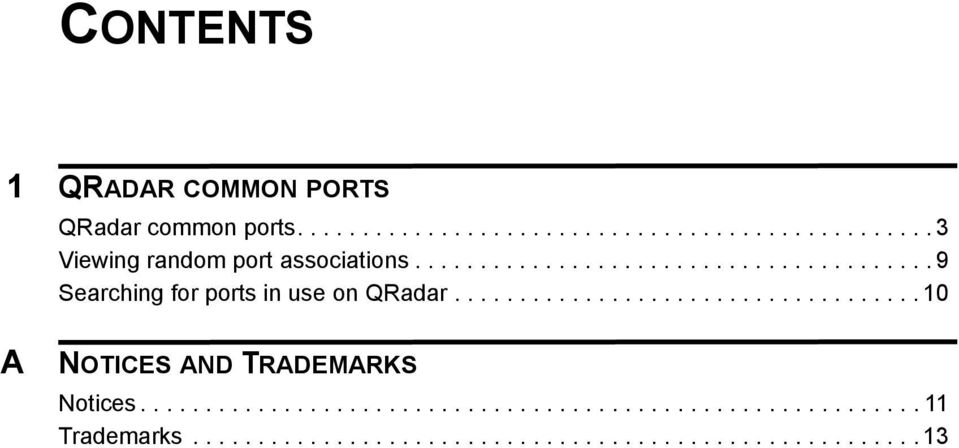
3 CONTENTS 1 QRADAR COMMON PORTS QRadar common ports Viewing random port associations Searching for ports in use on QRadar A NOTICES AND TRADEMARKS Notices Trademarks
4

5 1 QRADAR COMMON PORTS This technical note provides a list of common ports that are used by QRadar SIEM, services, and components. The information that is provided in this document contains the assigned port number, descriptions, protocols, and the signaling direction for the port. Unless otherwise noted, the ports that are listed apply to all IBM Security QRadar products and appliances. QRadar common ports The listen ports for QRadar as listed in the following table are valid only when IPtables is enabled on your QRadar system. All the ports that are listed in Table 1-1 can be tunneled, by encryption, through port 22 over SSH. Table 1-1 Listening ports that are used by QRadar, services, and components Port Description Protocol Direction Required for 22 SSH Bidirectional from the QRadar Console to all other components. Managed hosts that use encryption can establish multiple bidirectional SSH sessions to communicate securely. These SSH sessions are initiated from the managed host to provide data to the host that needs the data in the deployment. For example, Event Processor appliances can initiate multiple SSH sessions to the QRadar Console for secure communication. This communication can include tunneled ports over SSH, such as https data for port 443 and Ariel query data for port QFlow Collectors that use encryption can initiate SSH sessions to Flow Processor appliances that require data. Remote management access Adding a remote system as a managed host Log source protocols to retrieve files from external devices, for example the log file protocol Users who use the command line to communicate from desktops to the QRadar Console High Availability (HA) communication IBM Security QRadar Common Ports Technical Note

6 4 QRADAR COMMON PORTS Table 1-1 Listening ports that are used by QRadar, services, and components (continued) Port Description Protocol Direction Required for 25 SMTP From all managed hosts to your SMTP gateway 37 Rdate (time) UDP/ All systems to the QRadar Console QRadar Console to the NTP or RDATE server 80 Apache/https Users that connect to the QRadar Console Users to the QRadar Deployment Editor 111 Port mapper /UDP Managed hosts that communicate to the QRadar Console. Users that connect to the QRadar Console. 135 and dynamically allocated ports above 1024 for RPC calls. DCOM WinCollect agents and Windows operating systems that are remotely polled for events. QRadar Consoles or Event Collectors that use the Microsoft Security Event Log Protocol and Windows operating systems that are remotely polled for events. Adaptive Log Exporter agents and Windows operating systems that are remotely polled for events. QRadar to send s to an SMTP gateway Error and warning message delivery to an administrative contact Time synchronization between the QRadar Console and managed hosts Communication and downloads from the QRadar Console to user desktops The Deployment Editor application to download and display deployment information Remote Procedure Calls (RPC) for required services, such as Network File System (NFS) This traffic is generated by the following log source protocols: WinCollect Microsoft Security Event Log Protocol Adaptive Log Exporter Note: DCOM typically allocates a random port range for communication. The random port values can be configured in Microsoft Windows products to use a specific port. For more information, see your Microsoft Windows documentation. For information on the Microsoft API, see your Microsoft documentation. IBM Security QRadar Common Ports Technical Note
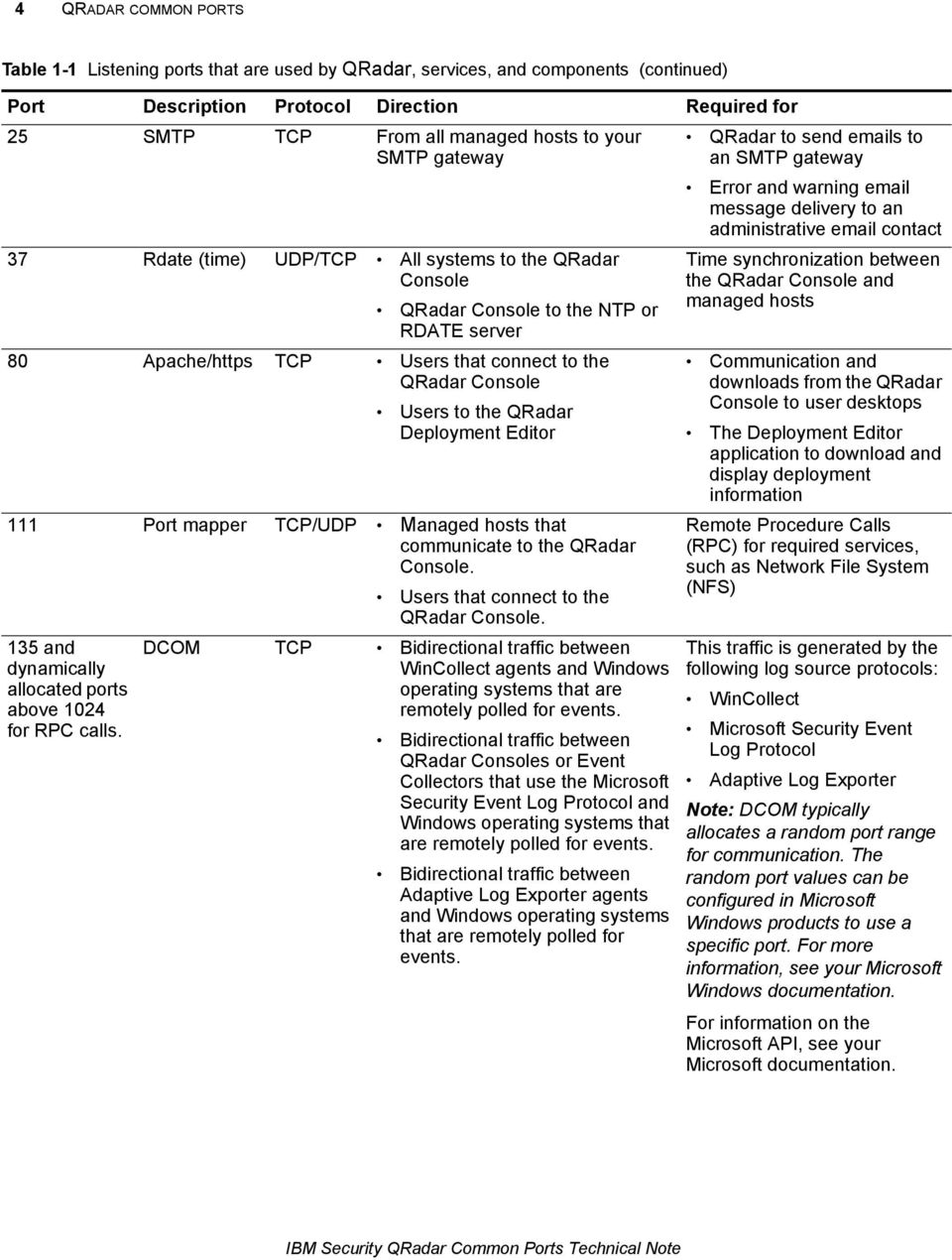
7 QRadar common ports 5 Table 1-1 Listening ports that are used by QRadar, services, and components (continued) Port Description Protocol Direction Required for 137 Windows NetBIOS name service 138 Windows NetBIOS datagram service 139 Windows NetBIOS session service UDP WinCollect agents and Windows operating systems that are remotely polled for events. QRadar Consoles or Event Collectors that use the Microsoft Security Event Log Protocol and Windows operating systems that are remotely polled for events. Adaptive Log Exporter agents and Windows operating systems that are remotely polled for events. UDP WinCollect agents and Windows operating systems that are remotely polled for events. QRadar Consoles or Event Collectors that use the Microsoft Security Event Log Protocol and Windows operating systems that are remotely polled for events. Adaptive Log Exporter agents and Windows operating systems that are remotely polled for events. WinCollect agents and Windows operating systems that are remotely polled for events. QRadar Consoles or Event Collectors that use the Microsoft Security Event Log Protocol and Windows operating systems that are remotely polled for events. Adaptive Log Exporter agents and Windows operating systems that are remotely polled for events. This traffic is generated by the following log source protocols: WinCollect Microsoft Security Event Log Protocol Adaptive Log Exporter For information on the Microsoft API, see your Microsoft documentation. For information on the Microsoft API, see your Microsoft documentation. This traffic is generated by the following log source protocols: WinCollect Microsoft Security Event Log Protocol Adaptive Log Exporter For information on the Microsoft API, see your Microsoft documentation. This traffic is generated by the following log source protocols: WinCollect Microsoft Security Event Log Protocol Adaptive Log Exporter For information on the Microsoft API, see your Microsoft documentation. IBM Security QRadar Common Ports Technical Note
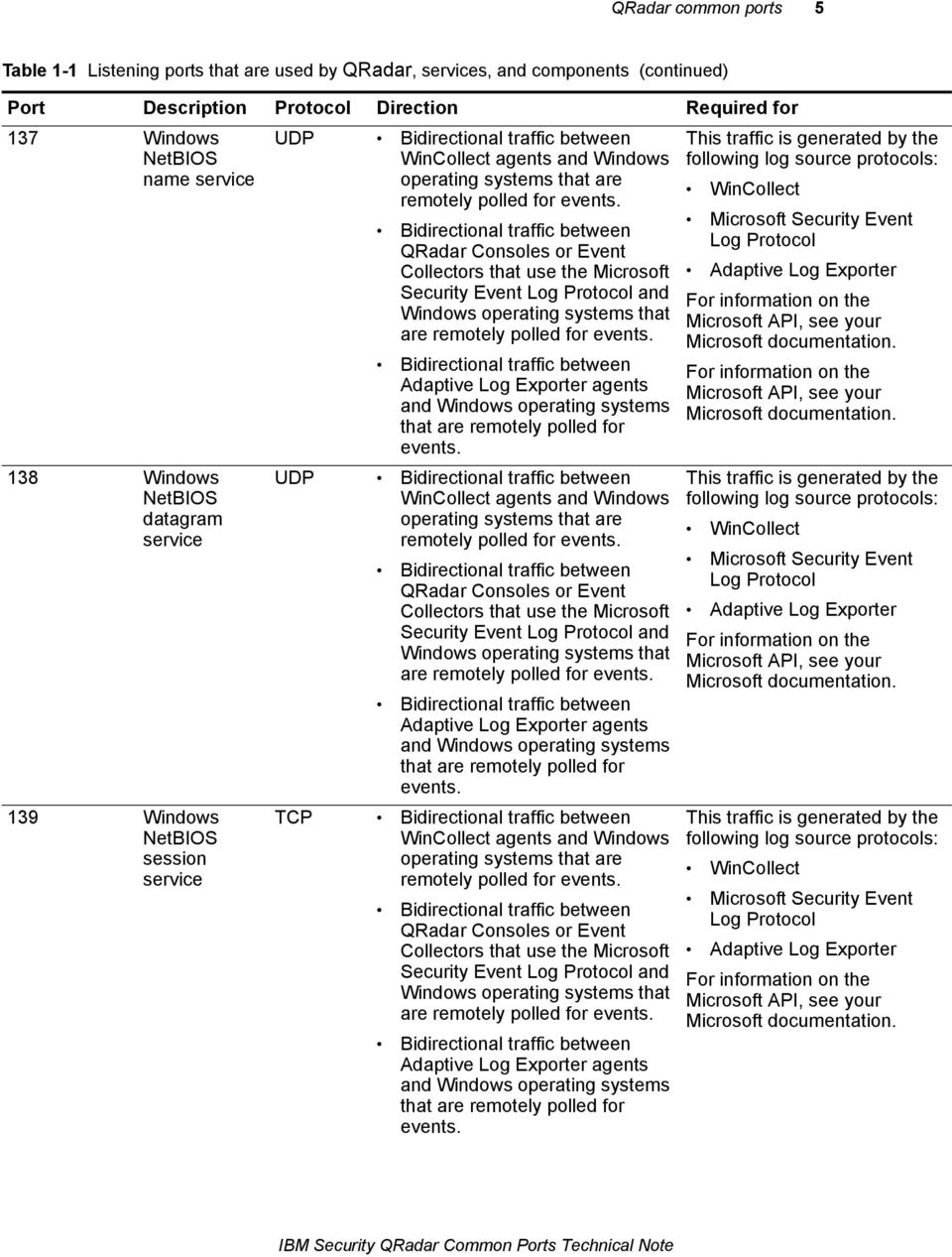
8 6 QRADAR COMMON PORTS Table 1-1 Listening ports that are used by QRadar, services, and components (continued) Port Description Protocol Direction Required for 162 SNMP log sources UDP External log sources communicating to QRadar Event Collectors UDP listening port for SNMP log sources to receive SNMP trap data. 199 NetSNMP QRadar managed hosts that connect to the QRadar Console External log sources to QRadar Event Collectors 443 Apache/https Bidirectional traffic for secure communications from all products to the QRadar Console. 445 Microsoft Directory Service WinCollect agents and Windows operating systems that are remotely polled for events. QRadar Consoles or Event Collectors that use the Microsoft Security Event Log Protocol and Windows operating systems that are remotely polled for events. Adaptive Log Exporter agents and Windows operating systems that are remotely polled for events 514 Syslog UDP/ External network appliances that provide syslog events use bidirectional traffic. External network appliances that provide UDP syslog events use uni-directional traffic. port for the NetSNMP daemon listening for communications (v1, v2c, and v3) from external log sources Configuration downloads to managed hosts from the QRadar Console QRadar managed hosts that connect to the QRadar Console Users to have log in access to QRadar SIEM QRadar Consoles that manage and provide configuration updates WinCollect agents This traffic is generated by the following log source protocols: WinCollect Microsoft Security Event Log Protocol Adaptive Log Exporter For information on the Microsoft API, see your Microsoft documentation. External log sources to send event data to QRadar components Syslog traffic includes WinCollect agents and Adaptive Log Exporter agents capable of sending either UDP or events to QRadar. IBM Security QRadar Common Ports Technical Note

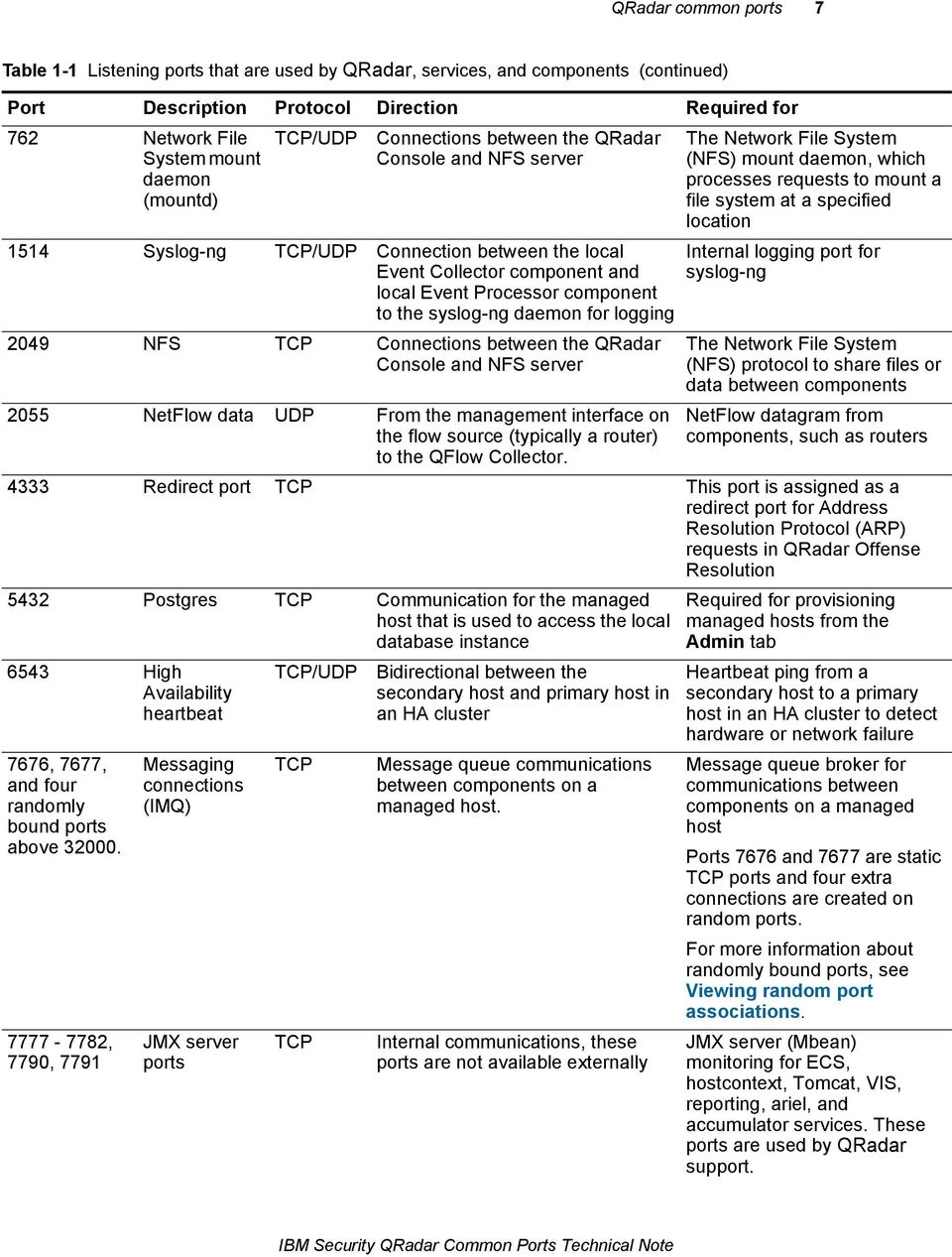
9 QRadar common ports 7 Table 1-1 Listening ports that are used by QRadar, services, and components (continued) Port Description Protocol Direction Required for /UDP Connections between the QRadar Console and NFS server 762 Network File System mount daemon (mountd) 1514 Syslog-ng /UDP Connection between the local Event Collector component and local Event Processor component to the syslog-ng daemon for logging 2049 NFS Connections between the QRadar Console and NFS server 2055 NetFlow data UDP From the management interface on the flow source (typically a router) to the QFlow Collector. The Network File System (NFS) mount daemon, which processes requests to mount a file system at a specified location Internal logging port for syslog-ng The Network File System (NFS) protocol to share files or data between components NetFlow datagram from components, such as routers 4333 Redirect port This port is assigned as a redirect port for Address Resolution Protocol (ARP) requests in QRadar Offense Resolution 5432 Postgres Communication for the managed host that is used to access the local database instance 6543 High Availability heartbeat 7676, 7677, and four randomly bound ports above , 7790, 7791 Messaging connections (IMQ) JMX server ports /UDP Bidirectional between the secondary host and primary host in an HA cluster Message queue communications between components on a managed host. Internal communications, these ports are not available externally Required for provisioning managed hosts from the Admin tab Heartbeat ping from a secondary host to a primary host in an HA cluster to detect hardware or network failure Message queue broker for communications between components on a managed host Ports 7676 and 7677 are static ports and four extra connections are created on random ports. For more information about randomly bound ports, see Viewing random port associations. JMX server (Mbean) monitoring for ECS, hostcontext, Tomcat, VIS, reporting, ariel, and accumulator services. These ports are used by QRadar support. IBM Security QRadar Common Ports Technical Note
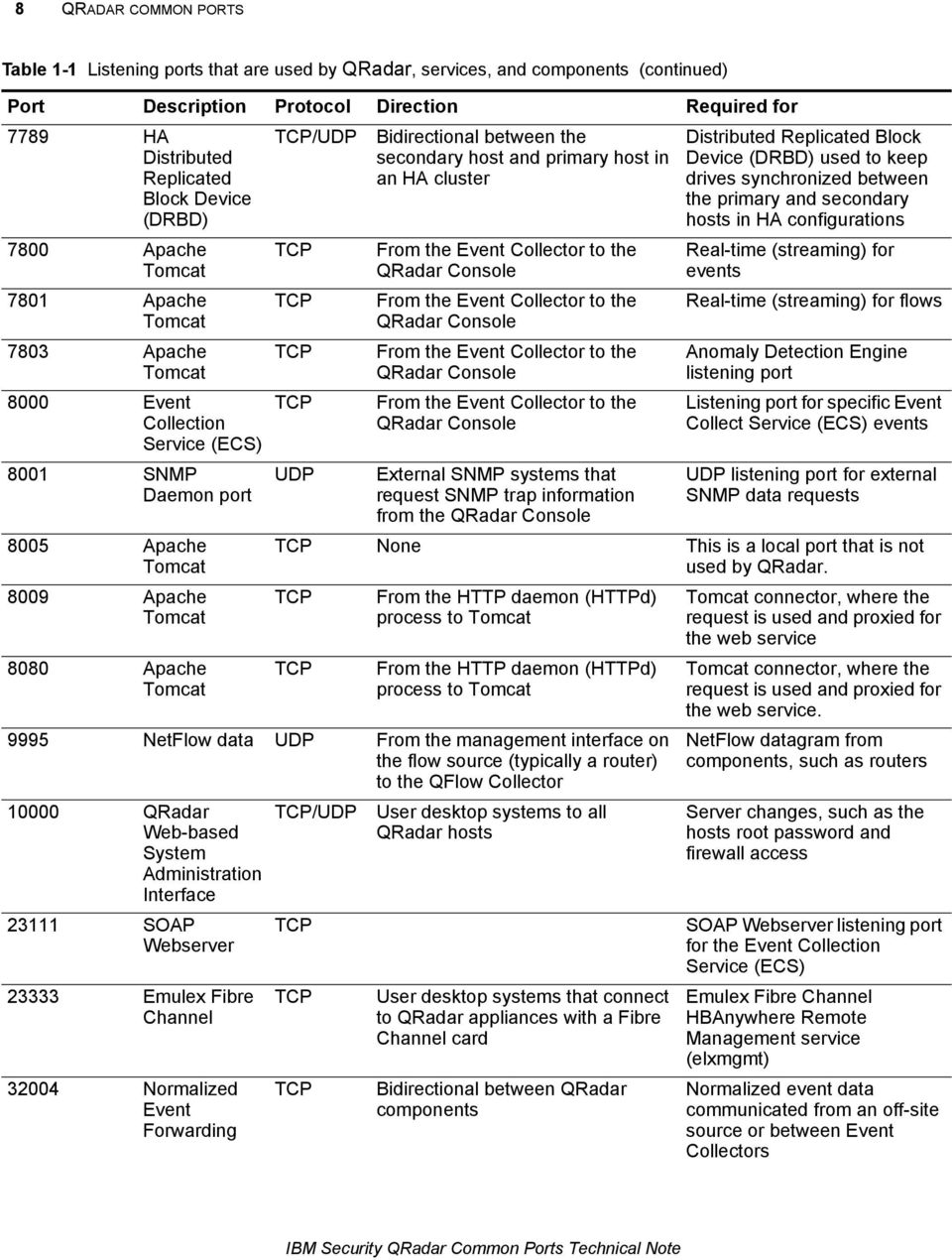
10 8 QRADAR COMMON PORTS Table 1-1 Listening ports that are used by QRadar, services, and components (continued) Port Description Protocol Direction Required for /UDP Bidirectional between the secondary host and primary host in an HA cluster 7789 HA Distributed Replicated Block Device (DRBD) 7800 Apache Tomcat 7801 Apache Tomcat 7803 Apache Tomcat 8000 Event Collection Service (ECS) 8001 SNMP Daemon port 8005 Apache Tomcat 8009 Apache Tomcat 8080 Apache Tomcat UDP From the Event Collector to the QRadar Console From the Event Collector to the QRadar Console From the Event Collector to the QRadar Console From the Event Collector to the QRadar Console External SNMP systems that request SNMP trap information from the QRadar Console Distributed Replicated Block Device (DRBD) used to keep drives synchronized between the primary and secondary hosts in HA configurations Real-time (streaming) for events Real-time (streaming) for flows Anomaly Detection Engine listening port Listening port for specific Event Collect Service (ECS) events UDP listening port for external SNMP data requests None This is a local port that is not used by QRadar. From the HTTP daemon (HTTPd) process to Tomcat From the HTTP daemon (HTTPd) process to Tomcat 9995 NetFlow data UDP From the management interface on the flow source (typically a router) to the QFlow Collector QRadar Web-based System Administration Interface SOAP Webserver Emulex Fibre Channel Normalized Event Forwarding /UDP User desktop systems to all QRadar hosts User desktop systems that connect to QRadar appliances with a Fibre Channel card Bidirectional between QRadar components Tomcat connector, where the request is used and proxied for the web service Tomcat connector, where the request is used and proxied for the web service. NetFlow datagram from components, such as routers Server changes, such as the hosts root password and firewall access SOAP Webserver listening port for the Event Collection Service (ECS) Emulex Fibre Channel HBAnywhere Remote Management service (elxmgmt) Normalized event data communicated from an off-site source or between Event Collectors IBM Security QRadar Common Ports Technical Note
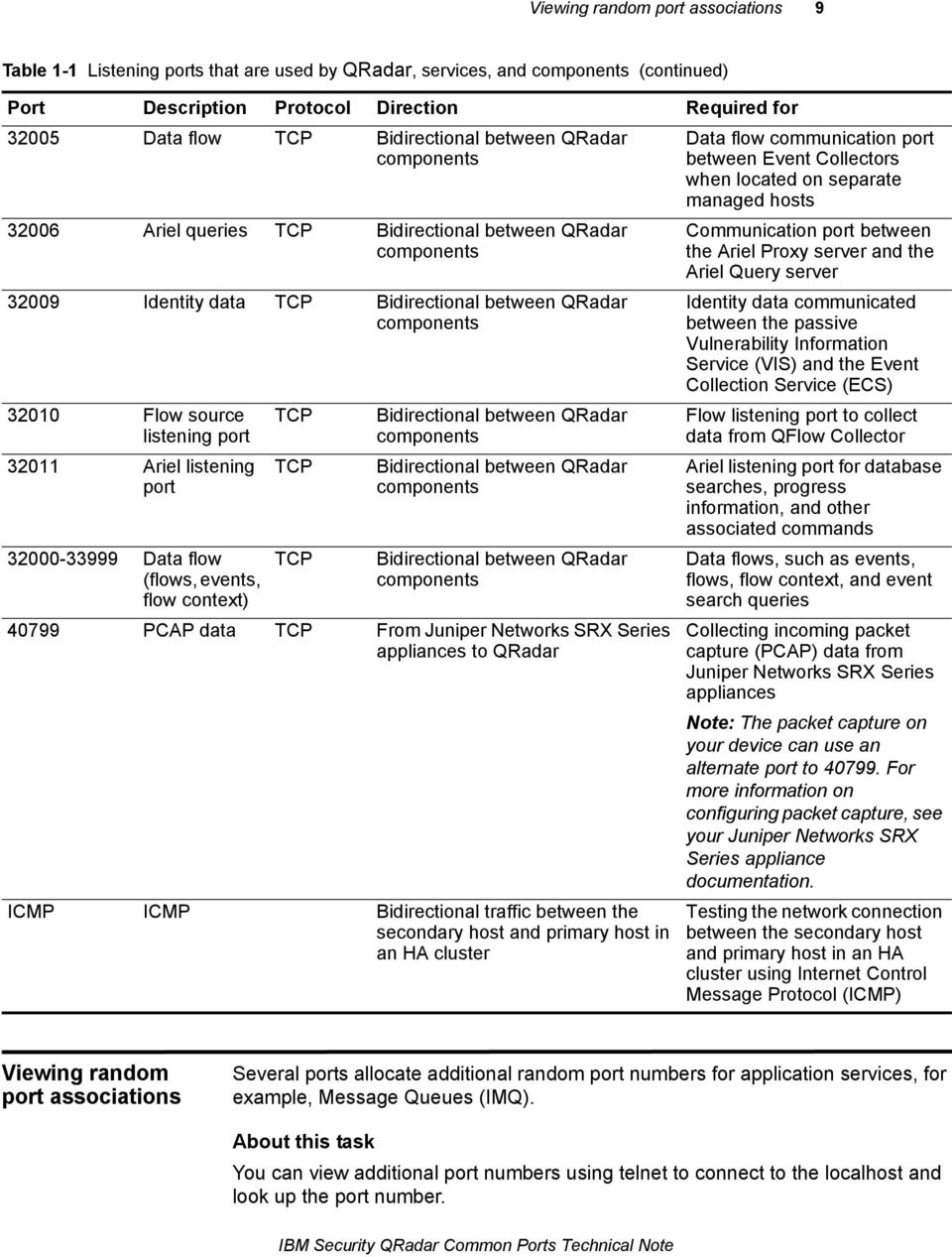
11 Viewing random port associations 9 Table 1-1 Listening ports that are used by QRadar, services, and components (continued) Port Description Protocol Direction Required for Data flow Bidirectional between QRadar components Ariel queries Bidirectional between QRadar components Identity data Bidirectional between QRadar components Flow source listening port Ariel listening port Data flow (flows, events, flow context) Bidirectional between QRadar components Bidirectional between QRadar components Bidirectional between QRadar components PCAP data From Juniper Networks SRX Series appliances to QRadar ICMP ICMP Bidirectional traffic between the secondary host and primary host in an HA cluster Data flow communication port between Event Collectors when located on separate managed hosts Communication port between the Ariel Proxy server and the Ariel Query server Identity data communicated between the passive Vulnerability Information Service (VIS) and the Event Collection Service (ECS) Flow listening port to collect data from QFlow Collector Ariel listening port for database searches, progress information, and other associated commands Data flows, such as events, flows, flow context, and event search queries Collecting incoming packet capture (PCAP) data from Juniper Networks SRX Series appliances Note: The packet capture on your device can use an alternate port to For more information on configuring packet capture, see your Juniper Networks SRX Series appliance documentation. Testing the network connection between the secondary host and primary host in an HA cluster using Internet Control Message Protocol (ICMP) Viewing random port associations Several ports allocate additional random port numbers for application services, for example, Message Queues (IMQ). About this task You can view additional port numbers using telnet to connect to the localhost and look up the port number. IBM Security QRadar Common Ports Technical Note
12 10 QRADAR COMMON PORTS Note: Random port associations are not static port numbers. If a service is restarted, the ports generated for a service are reallocated and the service is provided with a new set of port numbers. Step 1 Step 2 Step 3 Procedure Using SSH, log in to your QRadar Console, as the root user. Login: root Password: <password> Type the following command: telnet localhost 7676 If no information is displayed, press the Enter key to close the connection. Searching for ports in use on QRadar Netstat is a command-line tool used to determine which ports are in use on your QRadar Console or managed host. About this task The netstat command allows you to view all listening and established ports on the system. Step 1 Step 2 Step 3 Procedure Using SSH log in to your QRadar Console, as the root user. Login: root Password: <password> Type the following command: netstat -nap To search for specific information from the netstat port list, type the following command: netstat -nap grep <port> Where <port> is the port number or search term for the netstat search. For example: netstat -nap grep Displays all ports matching 199. netstat -nap grep postgres - Displays all postgres related ports. netstat -nap grep LISTEN - Displays information on all listening ports. What to do next For more information on netstat, type netstat? for a list of available command-line parameters. IBM Security QRadar Common Ports Technical Note

13 A NOTICES AND TRADEMARKS What s in this appendix: Notices Trademarks This section describes some important notices, trademarks, and compliance information. Notices This information was developed for products and services offered in the U.S.A. IBM may not offer the products, services, or features discussed in this document in other countries. Consult your local IBM representative for information on the products and services currently available in your area. Any reference to an IBM product, program, or service is not intended to state or imply that only that IBM product, program, or service may be used. Any functionally equivalent product, program, or service that does not infringe any IBM intellectual property right may be used instead. However, it is the user's responsibility to evaluate and verify the operation of any non-ibm product, program, or service. IBM may have patents or pending patent applications covering subject matter described in this document. The furnishing of this document does not grant you any license to these patents. You can send license inquiries, in writing, to: IBM Director of Licensing IBM Corporation North Castle Drive Armonk, NY U.S.A. For license inquiries regarding double-byte character set (DBCS) information, contact the IBM Intellectual Property Department in your country or send inquiries, in writing, to: Intellectual Property Licensing Legal and Intellectual Property Law IBM Japan Ltd , Nihonbashi-Hakozakicho, Chuo-ku Tokyo , Japan The following paragraph does not apply to the United Kingdom or any other country where such provisions are inconsistent with local law: QRadar SIEM Common Ports
14 12 INTERNATIONAL BUSINESS MACHINES CORPORATION PROVIDES THIS PUBLICATION "AS IS" WITHOUT WARRANTY OF ANY KIND, EITHER EXPRESS OR IMPLIED, INCLUDING, BUT NOT LIMITED TO, THE IMPLIED WARRANTIES OF NON-INFRINGEMENT, MERCHANTABILITY OR FITNESS FOR A PARTICULAR PURPOSE. Some states do not allow disclaimer of express or implied warranties in certain transactions, therefore, this statement may not apply to you. This information could include technical inaccuracies or typographical errors. Changes are periodically made to the information herein; these changes will be incorporated in new editions of the publication. IBM may make improvements and/or changes in the product(s) and/or the program(s) described in this publication at any time without notice. Any references in this information to non-ibm Web sites are provided for convenience only and do not in any manner serve as an endorsement of those Web sites. The materials at those Web sites are not part of the materials for this IBM product and use of those Web sites is at your own risk. IBM may use or distribute any of the information you supply in any way it believes appropriate without incurring any obligation to you. Licensees of this program who wish to have information about it for the purpose of enabling: (i) the exchange of information between independently created programs and other programs (including this one) and (ii) the mutual use of the information which has been exchanged, should contact: IBM Corporation 170 Tracer Lane, Waltham MA 02451, USA Such information may be available, subject to appropriate terms and conditions, including in some cases, payment of a fee. The licensed program described in this document and all licensed material available for it are provided by IBM under terms of the IBM Customer Agreement, IBM International Program License Agreement or any equivalent agreement between us. Any performance data contained herein was determined in a controlled environment. Therefore, the results obtained in other operating environments may vary significantly. Some measurements may have been made on development-level systems and there is no guarantee that these measurements will be the same on generally available systems. Furthermore, some measurements may have been estimated through extrapolation. Actual results may vary. Users of this document should verify the applicable data for their specific environment. Information concerning non-ibm products was obtained from the suppliers of those products, their published announcements or other publicly available sources. IBM has not tested those products and cannot confirm the accuracy of performance, compatibility or any other claims related to non-ibm products. Questions on the QRadar SIEM Common Ports
15 Trademarks 13 capabilities of non-ibm products should be addressed to the suppliers of those products. All statements regarding IBM's future direction or intent are subject to change or withdrawal without notice, and represent goals and objectives only. All IBM prices shown are IBM's suggested retail prices, are current and are subject to change without notice. Dealer prices may vary. This information contains examples of data and reports used in daily business operations. To illustrate them as completely as possible, the examples include the names of individuals, companies, brands, and products. All of these names are fictitious and any similarity to the names and addresses used by an actual business enterprise is entirely coincidental. If you are viewing this information softcopy, the photographs and color illustrations may not appear. Trademarks IBM, the IBM logo, and ibm.com are trademarks or registered trademarks of International Business Machines Corp., registered in many jurisdictions worldwide. Other product and service names might be trademarks of IBM or other companies. A current list of IBM trademarks is available on the Web at Copyright and trademark information at Microsoft, Windows, Windows NT, and the Windows logo are trademarks of Microsoft Corporation in the United States, other countries, or both. QRadar SIEM Common Ports
16

IBM Security QRadar Version 7.1.0 (MR1) Checking the Integrity of Event and Flow Logs Technical Note
 IBM Security QRadar Version 7.1.0 (MR1) Checking the Integrity of Event and Flow Logs Technical Note Note: Before using this information and the product that it supports, read the information in Notices
IBM Security QRadar Version 7.1.0 (MR1) Replacing the SSL Certificate Technical Note
 IBM Security QRadar Version 7.1.0 (MR1) Technical Note Note: Before using this information and the product that it supports, read the information in Notices and Trademarks on page 5 Copyright IBM Corp.
IBM Security QRadar Version 7.1.0 (MR1) Configuring Custom Email Notifications Technical Note
 IBM Security QRadar Version 7.1.0 (MR1) Technical Note Note: Before using this information and the product that it supports, read the information in Notices and Trademarks on page 7. Copyright IBM Corp.
IBM Security QRadar Version 7.2.0. Installing QRadar with a Bootable USB Flash-drive Technical Note
 IBM Security QRadar Version 7.2.0 Installing QRadar with a Bootable USB Flash-drive Technical Note Note: Before using this information and the product that it supports, read the information in Notices
Packet Capture Users Guide
 IBM Security QRadar Version 7.2.2 Packet Capture Users Guide SC27-6512-00 Note Before using this information and the product that it supports, read the information in Notices on page 9. Copyright IBM Corporation
IBM Cognos Controller Version 10.2.1. New Features Guide
 IBM Cognos Controller Version 10.2.1 New Features Guide Note Before using this information and the product it supports, read the information in Notices on page 3. Product Information This document applies
IBM Enterprise Marketing Management. Domain Name Options for Email
 IBM Enterprise Marketing Management Domain Name Options for Email Note Before using this information and the products that it supports, read the information in Notices on page 3. This document applies
IBM Enterprise Marketing Management. Domain Name Options for Email
 IBM Enterprise Marketing Management Domain Name Options for Email Note Before using this information and the product it supports, read the information in Notices on page 3. This document applies to all
Platform LSF Version 9 Release 1.2. Migrating on Windows SC27-5317-02
 Platform LSF Version 9 Release 1.2 Migrating on Windows SC27-5317-02 Platform LSF Version 9 Release 1.2 Migrating on Windows SC27-5317-02 Note Before using this information and the product it supports,
IBM Security QRadar Version 7.1.0 (MR1) Installing QRadar 7.1 Using a Bootable USB Flash-Drive Technical Note
 IBM Security QRadar Version 7.1.0 (MR1) Installing QRadar 7.1 Using a Bootable USB Flash-Drive Technical Note Note: Before using this information and the product that it supports, read the information
Installing on Windows
 Platform LSF Version 9 Release 1.1 Installing on Windows SC27-5316-01 Platform LSF Version 9 Release 1.1 Installing on Windows SC27-5316-01 Note Before using this information and the product it supports,
Version 8.2. Tivoli Endpoint Manager for Asset Discovery User's Guide
 Version 8.2 Tivoli Endpoint Manager for Asset Discovery User's Guide Version 8.2 Tivoli Endpoint Manager for Asset Discovery User's Guide Note Before using this information and the product it supports,
IBM Security SiteProtector System Configuring Firewalls for SiteProtector Traffic
 IBM Security IBM Security SiteProtector System Configuring Firewalls for SiteProtector Traffic Version 3.0 Note Before using this information and the product it supports, read the information in Notices
IBM FlashSystem. SNMP Guide
 IBM FlashSystem SNMP Guide IBM FlashSystem SNMP Guide Note Before using this information and the product it supports, read the information in Notices on page 9. This edition applies to IBM FlashSystem
IBM Proventia Management SiteProtector. Configuring Firewalls for SiteProtector Traffic Version 2.0, Service Pack 8.1
 IBM Proventia Management SiteProtector Configuring Firewalls for SiteProtector Traffic Version 2.0, Service Pack 8.1 Copyright Statement Copyright IBM Corporation 1994, 2010. IBM Global Services Route
IBM Cognos Controller Version 10.2.0. New Features Guide
 IBM Cognos Controller Version 10.2.0 New Features Guide Note Before using this information and the product it supports, read the information in Notices on page 9. Product Information This document applies
Sametime Version 9. Integration Guide. Integrating Sametime 9 with Domino 9, inotes 9, Connections 4.5, and WebSphere Portal 8.0.0.
 Sametime Version 9 Integration Guide Integrating Sametime 9 with Domino 9, inotes 9, Connections 4.5, and WebSphere Portal 8.0.0.1 Edition Notice Note: Before using this information and the product it
Getting Started With IBM Cúram Universal Access Entry Edition
 IBM Cúram Social Program Management Getting Started With IBM Cúram Universal Access Entry Edition Version 6.0.5 IBM Cúram Social Program Management Getting Started With IBM Cúram Universal Access Entry
IBM Security SiteProtector System Migration Utility Guide
 IBM Security IBM Security SiteProtector System Migration Utility Guide Version 3.0 Note Before using this information and the product it supports, read the information in Notices on page 5. This edition
Release Notes. IBM Tivoli Identity Manager Oracle Database Adapter. Version 5.0.1. First Edition (December 7, 2007)
 IBM Tivoli Identity Manager Version 5.0.1 First Edition (December 7, 2007) This edition applies to version 5.0 of Tivoli Identity Manager and to all subsequent releases and modifications until otherwise
IBM Rational Rhapsody NoMagic Magicdraw: Integration Page 1/9. MagicDraw UML - IBM Rational Rhapsody. Integration
 IBM Rational Rhapsody NoMagic Magicdraw: Integration Page 1/9 MagicDraw UML - IBM Rational Rhapsody Integration IBM Rational Rhapsody NoMagic Magicdraw: Integration Page 2/9 Notices Copyright IBM Corporation
Tivoli IBM Tivoli Monitoring for Transaction Performance
 Tivoli IBM Tivoli Monitoring for Transaction Performance Version 5.3.0 Evaluation Guide GC32-9190-00 Tivoli IBM Tivoli Monitoring for Transaction Performance Version 5.3.0 Evaluation Guide GC32-9190-00
IBM SmartCloud Analytics - Log Analysis. Anomaly App. Version 1.2
 IBM SmartCloud Analytics - Log Analysis Anomaly App Version 1.2 IBM SmartCloud Analytics - Log Analysis Anomaly App Version 1.2 Note Before using this information and the product it supports, read the
IBM Configuring Rational Insight 1.0.1.1 and later for Rational Asset Manager
 IBM Configuring Rational Insight 1.0.1.1 and later for Rational Asset Manager Rational Insight and Rational Asset Manager...4 Prerequisites...5 Configuring the XML data configuration for Rational Asset
Tivoli Security Compliance Manager. Version 5.1 April, 2006. Collector and Message Reference Addendum
 Tivoli Security Compliance Manager Version 5.1 April, 2006 Collector and Message Reference Addendum Copyright International Business Machines Corporation 2006. All rights reserved. US Government Users
Tivoli Endpoint Manager for Security and Compliance Analytics. Setup Guide
 Tivoli Endpoint Manager for Security and Compliance Analytics Setup Guide Setup Guide i Note: Before using this information and the product it supports, read the information in Notices. Copyright IBM Corporation
IBM FileNet System Monitor 4.0.1.5. FSM Event Integration Whitepaper SC19-3116-00
 IBM FileNet System Monitor 4.0.1.5 FSM Event Integration Whitepaper SC19-3116-00 Before using this information and the product it supports, read the information in Notices at the end of this document.
Remote Support Proxy Installation and User's Guide
 IBM XIV Storage System Remote Support Proxy Installation and User's Guide Version 1.1 GA32-0795-01 IBM XIV Storage System Remote Support Proxy Installation and User's Guide Version 1.1 GA32-0795-01 Note
IBM TRIRIGA Anywhere Version 10 Release 4. Installing a development environment
 IBM TRIRIGA Anywhere Version 10 Release 4 Installing a development environment Note Before using this information and the product it supports, read the information in Notices on page 9. This edition applies
Tivoli Endpoint Manager for Security and Compliance Analytics
 Tivoli Endpoint Manager for Security and Compliance Analytics User s Guide User s Guide i Note: Before using this information and the product it supports, read the information in Notices. Copyright IBM
IBM Lotus Protector for Mail Encryption
 IBM Lotus Protector for Mail Encryption Server Upgrade Guide 2.1.1 Version Information Lotus Protector for Mail Encryption Server Upgrade Guide. Lotus Protector for Mail Encryption Server Version 2.1.1.
Installing and Configuring DB2 10, WebSphere Application Server v8 & Maximo Asset Management
 IBM Tivoli Software Maximo Asset Management Installing and Configuring DB2 10, WebSphere Application Server v8 & Maximo Asset Management Document version 1.0 Rick McGovern Staff Software Engineer IBM Maximo
IBM VisualAge for Java,Version3.5. Remote Access to Tool API
 IBM VisualAge for Java,Version3.5 Remote Access to Tool API Note! Before using this information and the product it supports, be sure to read the general information under Notices. Edition notice This edition
Linux. Managing security compliance
 Linux Managing security compliance Linux Managing security compliance Note Before using this information and the product it supports, read the information in Notices on page 7. First Edition (December
Tivoli Endpoint Manager for Configuration Management. User s Guide
 Tivoli Endpoint Manager for Configuration Management User s Guide User s Guide i Note: Before using this information and the product it supports, read the information in Notices. Copyright IBM Corporation
IBM Endpoint Manager Version 9.2. Software Use Analysis Upgrading Guide
 IBM Endpoint Manager Version 9.2 Software Use Analysis Upgrading Guide IBM Endpoint Manager Version 9.2 Software Use Analysis Upgrading Guide Upgrading Guide This edition applies to IBM Endpoint Manager
Cúram Business Intelligence and Analytics Guide
 IBM Cúram Social Program Management Cúram Business Intelligence and Analytics Guide Version 6.0.4 Note Before using this information and the product it supports, read the information in Notices at the
Integrating ERP and CRM Applications with IBM WebSphere Cast Iron IBM Redbooks Solution Guide
 Integrating ERP and CRM Applications with IBM WebSphere Cast Iron IBM Redbooks Solution Guide Cloud computing has become a business evolution that is impacting all facets of business today, including sales,
Installing and using the webscurity webapp.secure client
 Linux Utilities for IBM System z Installing and using the webscurity webapp.secure client SC33-8322-00 Linux Utilities for IBM System z Installing and using the webscurity webapp.secure client SC33-8322-00
IBM TRIRIGA Version 10 Release 4.2. Inventory Management User Guide IBM
 IBM TRIRIGA Version 10 Release 4.2 Inventory Management User Guide IBM Note Before using this information and the product it supports, read the information in Notices on page 19. This edition applies to
Rapid Data Backup and Restore Using NFS on IBM ProtecTIER TS7620 Deduplication Appliance Express IBM Redbooks Solution Guide
 Rapid Data Backup and Restore Using NFS on IBM ProtecTIER TS7620 Deduplication Appliance Express IBM Redbooks Solution Guide This IBM Redbooks Solution Guide provides an overview of how data backup and
IBM Lotus Protector for Mail Encryption. User's Guide
 IBM Lotus Protector for Mail Encryption User's Guide Version Information Lotus Protector for Mail Encryption User's Guide. Lotus Protector for Mail Encryption Version 2.1.0. Released December 2010. This
IBM Connections Plug-In for Microsoft Outlook Installation Help
 IBM Connections Version 5 IBM Connections Plug-In for Microsoft Outlook Installation Help Edition Notice Note: Before using this information and the product it supports, read the information in "Notices."
Table 1 shows the LDAP server configuration required for configuring the federated repositories in the Tivoli Integrated Portal server.
 Configuring IBM Tivoli Integrated Portal server for single sign-on using Simple and Protected GSSAPI Negotiation Mechanism, and Microsoft Active Directory services Document version 1.0 Copyright International
Patch Management for Red Hat Enterprise Linux. User s Guide
 Patch Management for Red Hat Enterprise Linux User s Guide User s Guide i Note: Before using this information and the product it supports, read the information in Notices. Copyright IBM Corporation 2003,
Rational Build Forge. AutoExpurge System. Version7.1.2andlater
 Rational Build Forge AutoExpurge System Version7.1.2andlater Note Before using this information and the product it supports, read the information in Notices, on page 11. This edition applies to ersion
Sterling Supplier Portal. Overview Guide. DocumentationDate:9June2013
 Sterling Supplier Portal Overview Guide DocumentationDate:9June2013 Sterling Supplier Portal Overview Guide DocumentationDate:9June2013 Note Before using this information and the product it supports,
IBM TRIRIGA Application Platform Version 3.3.2. Reporting: Creating Cross-Tab Reports in BIRT
 IBM TRIRIGA Application Platform Version 3.3.2 Reporting: Creating Cross-Tab Reports in BIRT Cheng Yang Application Developer IBM TRIRIGA Copyright International Business Machines Corporation 2013. US
Implementing the End User Experience Monitoring Solution
 IBM Tivoli Application Performance Management Implementing the End User Experience Monitoring Solution John Griffith Copyright International Business Machines Corporation 2012. US Government Users Restricted
IBM Lotus Protector for Mail Encryption
 IBM Lotus Protector for Mail Encryption for Windows User's Guide 2.1.1 Version Information Lotus Protector for Mail Encryption User's Guide. Lotus Protector for Mail Encryption Version 2.1.1. Released
IBM XIV Management Tools Version 4.7. Release Notes IBM
 IBM XIV Management Tools Version 4.7 Release Notes IBM First Edition (September 2015) This edition applies to IBM XIV Management Tools version 4.7 release, and to all subsequent releases and modifications
z/os V1R11 Communications Server system management and monitoring
 IBM Software Group Enterprise Networking Solutions z/os V1R11 Communications Server z/os V1R11 Communications Server system management and monitoring z/os Communications Server Development, Raleigh, North
Active Directory Synchronization with Lotus ADSync
 Redbooks Paper Active Directory Synchronization with Lotus ADSync Billy Boykin Tommi Tulisalo The Active Directory Synchronization tool, or ADSync, allows Active Directory administrators to manage (register,
IBM Security QRadar SIEM Version 7.1.0 MR1. Administration Guide
 IBM Security QRadar SIEM Version 7..0 MR Administration Guide Note: Before using this information and the product that it supports, read the information in Notices and Trademarks on page 07. Copyright
IBM Endpoint Manager. Security and Compliance Analytics Setup Guide
 IBM Endpoint Manager Security and Compliance Analytics Setup Guide Version 9.2 IBM Endpoint Manager Security and Compliance Analytics Setup Guide Version 9.2 Note Before using this information and the
Disaster Recovery Procedures for Microsoft SQL 2000 and 2005 using N series
 Redpaper Alex Osuna Bert Jonker Richard Waal Henk Vonk Peter Beijer Disaster Recovery Procedures for Microsoft SQL 2000 and 2005 using N series Introduction This IBM Redpaper gives a example of procedures
IBM Enterprise Content Management Software Requirements
 IBM Enterprise Content Management Software Requirements This document describes the software prerequisite requirements for the IBM Enterprise Content Management suite of products. Last Updated: May 31,
TCP/IP ports on the CMM, IMM, IMM2, RSA II, BMC, and AMM management processors 1
 TCP/IP ports on the CMM, IMM, IMM2, RSA II, BMC, and AMM management processors Reference Information Chassis Management Module (CMM) TCP/IP ports on the CMM, IMM, IMM2, RSA II, BMC, and AMM management
QLogic 8Gb FC Single-port and Dual-port HBAs for IBM System x IBM System x at-a-glance guide
 QLogic 8Gb FC Single-port and Dual-port HBAs for IBM System x IBM System x at-a-glance guide The QLogic 8Gb FC Single-port and Dual-port HBA for IBM System x are PCI Express 2.0 x8 8Gb Fibre Channel adapters
IBM Endpoint Manager for Software Use Analysis Version 9 Release 0. Customizing the software catalog
 IBM Endpoint Manager for Software Use Analysis Version 9 Release 0 Customizing the software catalog IBM Endpoint Manager for Software Use Analysis Version 9 Release 0 Customizing the software catalog
IBM Security QRadar SIEM Version 7.1.0 MR1. Log Sources User Guide
 IBM Security QRadar SIEM Version 7.1.0 MR1 Log Sources User Guide Note: Before using this information and the product that it supports, read the information in Notices and Trademarks on page 108. Copyright
IBM PowerSC Technical Overview IBM Redbooks Solution Guide
 IBM PowerSC Technical Overview IBM Redbooks Solution Guide Security control and compliance are some of the key components that are needed to defend the virtualized data center and cloud infrastructure
IBM Tivoli Web Response Monitor
 IBM Tivoli Web Response Monitor Release Notes Version 2.0.0 GI11-4068-00 +---- Note ------------------------------------------------------------+ Before using this information and the product it supports,
IBM Security QRadar LEEF 1.0. Log Event Extended Format (LEEF) Guide
 IBM Security QRadar LEEF 1.0 Log Event Extended Format (LEEF) Guide Note: Before using this information and the product that it supports, read the information in Notices and Trademarks on page 19. Copyright
IBM XIV Provider for Microsoft Windows Volume Shadow Copy Service Version 2.5.0. Release Notes
 IBM XIV Provider for Microsoft Windows Volume Shadow Copy Service Version 2.5.0 Release Notes Second Edition (December 2013) This edition applies to version 2.5.0 of the IBM XIV Provider for Microsoft
IBM Digital Analytics Enterprise Dashboard User's Guide
 IBM Digital Analytics Enterprise Dashboard User's Guide Note Before using this information and the product it supports, read the information in Notices on page 17. IBM Digital Marketing and Analytics is
IBM Financial Transaction Manager for ACH Services IBM Redbooks Solution Guide
 IBM Financial Transaction Manager for ACH Services IBM Redbooks Solution Guide Automated Clearing House (ACH) payment volume is on the rise. NACHA, the electronic payments organization, estimates that
IBM Client Security Solutions. Password Manager Version 1.4 User s Guide
 IBM Client Security Solutions Password Manager Version 1.4 User s Guide IBM Client Security Solutions Password Manager Version 1.4 User s Guide First Edition (October 2004) Copyright International Business
IBM Security SiteProtector System Two-Factor Authentication API Guide
 IBM Security IBM Security SiteProtector System Two-Factor Authentication API Guide Version 2.9 Note Before using this information and the product it supports, read the information in Notices on page 13.
IBM WebSphere Message Broker - Integrating Tivoli Federated Identity Manager
 IBM WebSphere Message Broker - Integrating Tivoli Federated Identity Manager Version 1.1 Property of IBM Page 1 of 18 Version 1.1, March 2008 This version applies to Version 6.0.0.3 of IBM WebSphere Message
DataPower z/os crypto integration
 New in version 3.8.0 DataPower z/os crypto integration Page 1 of 14 DataPower z/os crypto integration NSS performs requested key operation using certificates and keys stored in RACF RACF Administrator
OS Deployment V2.0. User s Guide
 OS Deployment V2.0 User s Guide User s Guide i Note: Before using this information and the product it supports, read the information in Notices. Copyright IBM Corporation 2003, 2011. US Government Users
IBM Security QRadar SIEM Version 7.2.6. High Availability Guide IBM
 IBM Security QRadar SIEM Version 7.2.6 High Availability Guide IBM Note Before using this information and the product that it supports, read the information in Notices on page 35. Product information This
QLogic 4Gb Fibre Channel Expansion Card (CIOv) for IBM BladeCenter IBM BladeCenter at-a-glance guide
 QLogic 4Gb Fibre Channel Expansion Card (CIOv) for IBM BladeCenter IBM BladeCenter at-a-glance guide The QLogic 4Gb Fibre Channel Expansion Card (CIOv) for BladeCenter enables you to quickly and simply
S/390 Virtual Image Facility for LINUX Guide and Reference
 IBM S/390 Virtual Image Facility for LINUX Guide and Reference Version 1 Release 1.0 Program Number 5739-A01 Document Date: August 2000 GC24-5930-00 Note Before using this information and the product it
Broadcom NetXtreme Gigabit Ethernet Adapters IBM Redbooks Product Guide
 Broadcom NetXtreme Gigabit Ethernet Adapters IBM Redbooks Product Guide The Broadcom NetXtreme Gigabit Ethernet Adapters are a family of high performance PCI Express adapters. With five adapters to choose
IBM Security QRadar Version 7.2.2. WinCollect User Guide V7.2.2
 IBM Security QRadar Version 7.2.2 WinCollect User Guide V7.2.2 Note Before using this information and the product that it supports, read the information in Notices on page 47. Product information This
Brocade Enterprise 20-port, 20-port, and 10-port 8Gb SAN Switch Modules IBM BladeCenter at-a-glance guide
 Brocade Enterprise 20-port, 20-port, and 10-port 8Gb SAN Switch Modules IBM BladeCenter at-a-glance guide The Brocade Enterprise 20-port, 20-port, and 10-port 8 Gb SAN Switch Modules for IBM BladeCenter
IBM Tivoli Service Request Manager 7.1
 IBM Tivoli Service Request Manager 7.1 Using the e-mail listener and workflow to generate, query, update, and change the status of tickets Updated September 29, 2009 IBM Tivoli Service Request Manager
FileNet Integrated Document Management Technical Bulletin
 FileNet Integrated Document Management Technical Bulletin Version 4.0.3 Release May 2011 1 Contents Introduction... 3 Contact customer support... 3 Feedback... 3 Microsoft Windows Terminal Services...
IBM RDX USB 3.0 Disk Backup Solution IBM Redbooks Product Guide
 IBM RDX USB 3.0 Disk Backup Solution IBM Redbooks Product Guide The new IBM Removable Disk EXchange (RDX) USB 3.0 removable disk backup solution is designed to address your increasing capacity and backup
Communications Server for Linux
 Communications Server for Linux SNA connectivity ^business on demand software Multiple types of connectivity exist within the Communications Server for Linux. CSLinux_snaconn.ppt Page 1 of 10 SNA connectivity
IBM Endpoint Manager for OS Deployment Windows Server OS provisioning using a Server Automation Plan
 IBM Endpoint Manager IBM Endpoint Manager for OS Deployment Windows Server OS provisioning using a Server Automation Plan Document version 1.0 Michele Tomassi Copyright International Business Machines
Reading multi-temperature data with Cúram SPMP Analytics
 IBM Cúram Social Program Management Reading multi-temperature data with Cúram SPMP Analytics Anthony Farrell is a senior software engineer in the IBM Cúram platform group. Anthony has technical responsibility
QRadar SIEM 7.2 Flows Overview
 QRadar SIEM 7.2 Flows Overview Panelists Dwight Spencer Principal Solutions Architect & Co-founder of Q1 Labs Aaron Breen QRadar World-wide Support Leader Adam Frank Principal Solutions Architect Dale
WebSphere Application Server V6: Diagnostic Data. It includes information about the following: JVM logs (SystemOut and SystemErr)
 Redbooks Paper WebSphere Application Server V6: Diagnostic Data Carla Sadtler David Titzler This paper contains information about the diagnostic data that is available in WebSphere Application Server V6.
IBM DB2 for Linux, UNIX, and Windows. Deploying IBM DB2 Express-C with PHP on Ubuntu Linux
 IBM DB2 for Linux, UNIX, and Windows Best practices Deploying IBM DB2 Express-C with PHP on Ubuntu Linux Craig Tobias Software Developer IBM Canada Laboratory Farzana Anwar DB2 Information Developer IBM
Endpoint Manager for Mobile Devices Setup Guide
 Endpoint Manager for Mobile Devices Setup Guide ii Endpoint Manager for Mobile Devices Setup Guide Contents Endpoint Manager for Mobile Devices Setup Guide............. 1 Components.............. 1 Architecture..............
Remote Control 5.1.2. Tivoli Endpoint Manager - TRC User's Guide
 Tivoli Remote Control 5.1.2 Tivoli Endpoint Manager - TRC User's Guide Tivoli Remote Control 5.1.2 Tivoli Endpoint Manager - TRC User's Guide Note Before using this information and the product it supports,
Database lifecycle management
 Lotus Expeditor 6.1 Education IBM Lotus Expeditor 6.1 Client for Desktop This presentation explains the Database Lifecycle Management in IBM Lotus Expeditor 6.1 Client for Desktop. Page 1 of 12 Goals Understand
IBM Security QRadar Version 7.1.0 (MR1) WinCollect User Guide
 IBM Security QRadar Version 7.1.0 (MR1) WinCollect User Guide Note: Before using this information and the product that it supports, read the information in Notices and Trademarks on page 59. Copyright
Getting Started with IBM Bluemix: Web Application Hosting Scenario on Java Liberty IBM Redbooks Solution Guide
 Getting Started with IBM Bluemix: Web Application Hosting Scenario on Java Liberty IBM Redbooks Solution Guide Based on the open source Cloud Foundry technology, IBM Bluemix is an open-standard, cloud-based
IBM Security QRadar Version 7.2.0. Troubleshooting System Notifications Guide
 IBM Security QRadar Version 7.2.0 Troubleshooting System Notifications Guide Note: Before using this information and the product that it supports, read the information in Notices and Trademarks on page
IBM Cloud Orchestrator Content Pack for OpenLDAP and Microsoft Active Directory Version 2.0. Content Pack for OpenLDAP and Microsoft Active Directory
 IBM Cloud Orchestrator Content Pack for OpenLDAP and Microsoft Active Directory Version 2.0 Content Pack for OpenLDAP and Microsoft Active Directory IBM Cloud Orchestrator Content Pack for OpenLDAP and
Creating Applications in Bluemix using the Microservices Approach IBM Redbooks Solution Guide
 Creating Applications in Bluemix using the Microservices Approach IBM Redbooks Solution Guide Across 2014 and into 2015, microservices became the new buzzword for application development style. So what
DameWare Server. Administrator Guide
 DameWare Server Administrator Guide About DameWare Contact Information Team Contact Information Sales 1.866.270.1449 General Support Technical Support Customer Service User Forums http://www.dameware.com/customers.aspx
Continuous access to Read on Standby databases using Virtual IP addresses
 Continuous access to Read on Standby databases using Virtual IP addresses January 2011 Table of contents 1 Executive summary...1 1.1 HADR system configuration...1 1.2 System pre-requisites...1 2 Setup
IBM Network Advisor IBM Redbooks Product Guide
 IBM Network Advisor IBM Redbooks Product Guide This IBM Redbooks Product Guide describes IBM Network Advisor Version 12.4. Although every network type has unique management requirements, most organizations
Redbooks Redpaper. IBM TotalStorage NAS Advantages of the Windows Powered OS. Roland Tretau
 Redbooks Redpaper Roland Tretau IBM TotalStorage NAS Advantages of the Windows Powered OS Copyright IBM Corp. 2002. All rights reserved. ibm.com/redbooks 1 What is Network Attached Storage (NAS) Storage