
Configuring BGP Services
|
|
|
- Meryl Peters
- 10 years ago
- Views:
Transcription
1 Part No C Rev 00 May Great America Parkway Santa Clara, CA Passport 8000 Series Software Release 3.7 * C Rev 00*

2 2 Copyright 2003 Nortel Networks All rights reserved. May The information in this document is subject to change without notice. The statements, configurations, technical data, and recommendations in this document are believed to be accurate and reliable, but are presented without express or implied warranty. Users must take full responsibility for their applications of any products specified in this document. The information in this document is proprietary to Nortel Networks Inc. The software described in this document is furnished under a license agreement and may be used only in accordance with the terms of that license. The software license agreement is included in this document. Trademarks Nortel Networks, the Nortel Networks logo, the Globemark, Unified Networks, and PASSPORT are trademarks of Nortel Networks. Microsoft, Windows, and Windows NT are trademarks of Microsoft Corporation. Adobe and Acrobat Reader are trademarks of Adobe Systems Incorporated. Cisco and Cisco Systems are trademarks of Cisco Technology, Inc. Juniper Networks and JUNOS are trademarks of Juniper Networks, Inc. The asterisk after a name denotes a trademarked item. Restricted rights legend Use, duplication, or disclosure by the United States Government is subject to restrictions as set forth in subparagraph (c)(1)(ii) of the Rights in Technical Data and Computer Software clause at DFARS Notwithstanding any other license agreement that may pertain to, or accompany the delivery of, this computer software, the rights of the United States Government regarding its use, reproduction, and disclosure are as set forth in the Commercial Computer Software-Restricted Rights clause at FAR Statement of conditions In the interest of improving internal design, operational function, and/or reliability, Nortel Networks Inc. reserves the right to make changes to the products described in this document without notice. Nortel Networks Inc. does not assume any liability that may occur due to the use or application of the product(s) or circuit layout(s) described herein. Portions of the code in this software product may be Copyright 1988, Regents of the University of California. All rights reserved. Redistribution and use in source and binary forms of such portions are permitted, provided that the above copyright notice and this paragraph are duplicated in all such forms and that any documentation, advertising materials, and other materials related to such distribution and use acknowledge that such portions of the software were developed by the University of California, Berkeley. The name of the University may not be used to endorse or promote products derived from such portions of the software without specific prior written permission. SUCH PORTIONS OF THE SOFTWARE ARE PROVIDED AS IS AND WITHOUT ANY EXPRESS OR IMPLIED WARRANTIES, INCLUDING, WITHOUT LIMITATION, THE IMPLIED WARRANTIES OF MERCHANTABILITY AND FITNESS FOR A PARTICULAR PURPOSE. In addition, the program and information contained herein are licensed only pursuant to a license agreement that contains restrictions on use and disclosure (that may incorporate by reference certain limitations and notices imposed by third parties) C Rev 00
3 3 Nortel Networks Inc. software license agreement This Software License Agreement ( License Agreement ) is between you, the end-user ( Customer ) and Nortel Networks Corporation and its subsidiaries and affiliates ( Nortel Networks ). PLEASE READ THE FOLLOWING CAREFULLY. YOU MUST ACCEPT THESE LICENSE TERMS IN ORDER TO DOWNLOAD AND/OR USE THE SOFTWARE. USE OF THE SOFTWARE CONSTITUTES YOUR ACCEPTANCE OF THIS LICENSE AGREEMENT. If you do not accept these terms and conditions, return the Software, unused and in the original shipping container, within 30 days of purchase to obtain a credit for the full purchase price. Software is owned or licensed by Nortel Networks, its parent or one of its subsidiaries or affiliates, and is copyrighted and licensed, not sold. Software consists of machine-readable instructions, its components, data, audio-visual content (such as images, text, recordings or pictures) and related licensed materials including all whole or partial copies. Nortel Networks grants you a license to use the Software only in the country where you acquired the Software. You obtain no rights other than those granted to you under this License Agreement. You are responsible for the selection of the Software and for the installation of, use of, and results obtained from the Software. 1. Licensed Use of Software. Nortel Networks grants Customer a nonexclusive license to use a copy of the Software on only one machine at any one time or to the extent of the activation or authorized usage level, whichever is applicable. To the extent Software is furnished for use with designated hardware or Customer furnished equipment ( CFE ), Customer is granted a nonexclusive license to use Software only on such hardware or CFE, as applicable. Software contains trade secrets and Customer agrees to treat Software as confidential information using the same care and discretion Customer uses with its own similar information that it does not wish to disclose, publish or disseminate. Customer will ensure that anyone who uses the Software does so only in compliance with the terms of this Agreement. Customer shall not a) use, copy, modify, transfer or distribute the Software except as expressly authorized; b) reverse assemble, reverse compile, reverse engineer or otherwise translate the Software; c) create derivative works or modifications unless expressly authorized; or d) sublicense, rent or lease the Software. Licensors of intellectual property to Nortel Networks are beneficiaries of this provision. Upon termination or breach of the license by Customer or in the event designated hardware or CFE is no longer in use, Customer will promptly return the Software to Nortel Networks or certify its destruction. Nortel Networks may audit by remote polling or other reasonable means to determine Customer s Software activation or usage levels. If suppliers of third party software included in Software require Nortel Networks to include additional or different terms, Customer agrees to abide by such terms provided by Nortel Networks with respect to such third party software. 2. Warranty. Except as may be otherwise expressly agreed to in writing between Nortel Networks and Customer, Software is provided AS IS without any warranties (conditions) of any kind. NORTEL NETWORKS DISCLAIMS ALL WARRANTIES (CONDITIONS) FOR THE SOFTWARE, EITHER EXPRESS OR IMPLIED, INCLUDING, BUT NOT LIMITED TO THE IMPLIED WARRANTIES OF MERCHANTABILITY AND FITNESS FOR A PARTICULAR PURPOSE AND ANY WARRANTY OF NON-INFRINGEMENT. Nortel Networks is not obligated to provide support of any kind for the Software. Some jurisdictions do not allow exclusion of implied warranties, and, in such event, the above exclusions may not apply. 3. Limitation of Remedies. IN NO EVENT SHALL NORTEL NETWORKS OR ITS AGENTS OR SUPPLIERS BE LIABLE FOR ANY OF THE FOLLOWING: a) DAMAGES BASED ON ANY THIRD PARTY CLAIM; b) LOSS OF, OR DAMAGE TO, CUSTOMER S RECORDS, FILES OR DATA; OR c) DIRECT, INDIRECT, SPECIAL, INCIDENTAL, PUNITIVE, OR CONSEQUENTIAL DAMAGES (INCLUDING LOST PROFITS OR SAVINGS), WHETHER IN CONTRACT, TORT OR OTHERWISE (INCLUDING NEGLIGENCE) ARISING OUT OF YOUR USE OF THE SOFTWARE, EVEN IF NORTEL NETWORKS, ITS AGENTS OR SUPPLIERS HAVE BEEN ADVISED OF THEIR POSSIBILITY. The forgoing limitations of remedies also apply to any developer and/or supplier of the Software. Such developer and/or supplier is an intended beneficiary of this Section. Some jurisdictions do not allow these limitations or exclusions and, in such event, they may not apply.

4 4 4. General a. If Customer is the United States Government, the following paragraph shall apply: All Nortel Networks Software available under this License Agreement is commercial computer software and commercial computer software documentation and, in the event Software is licensed for or on behalf of the United States Government, the respective rights to the software and software documentation are governed by Nortel Networks standard commercial license in accordance with U.S. Federal Regulations at 48 C.F.R. Sections (for non-dod entities) and 48 C.F.R (for DoD entities). b. Customer may terminate the license at any time. Nortel Networks may terminate the license if Customer fails to comply with the terms and conditions of this license. In either event, upon termination, Customer must either return the Software to Nortel Networks or certify its destruction. c. Customer is responsible for payment of any taxes, including personal property taxes, resulting from Customer s use of the Software. Customer agrees to comply with all applicable laws including all applicable export and import laws and regulations. d. Neither party may bring an action, regardless of form, more than two years after the cause of the action arose. e. The terms and conditions of this License Agreement form the complete and exclusive agreement between Customer and Nortel Networks. f. This License Agreement is governed by the laws of the country in which Customer acquires the Software. If the Software is acquired in the United States, then this License Agreement is governed by the laws of the state of New York C Rev 00

5 5 Contents Preface Before you begin Text conventions Hard-copy technical manuals How to get help Chapter 1 BGP concepts Autonomous systems Internetwork segmentation Internal/external BGP routing BGP speaker Transit AS Stub and multihomed autonomous systems Peers Supernet advertisement Reducing bandwidth and maintenance Consolidating routing information CIDR and aggregate addresses Creating a supernet address Aggregate routes Confederations IBGP route reflection BGP updates Withdrawn Routes Length field Withdrawn Routes field Total Path Attributes Length field Path Attributes field
6 6 Contents Attribute Type field Attribute Length field Attribute Value field Network Layer Reachability Information field Equal-cost multipath TCP MD5 message authentication Entering and Storing MD5 Authentication Keys Generation of MD5 signatures on ingress BGP TCP packets Verification of MD5 signatures on egress BGP TCP packets Circuitless IP Chapter 2 Configuration considerations and limitations BGP implementation notes Configuration guidelines BGP Neighbor Maximum Prefix BGP-4 support RIP redistribution BGP/OSPF interaction MD5 authentication Chapter 3 Using Device Manager to configure BGP Configuring general parameters Displaying global BGP statistics Configuring aggregate addresses Configuring allowed network addresses Configuring and displaying peer information Peers tab Configuring and editing peers Displaying peer statistics Peer Groups tab Displaying route information BGP community attributes Displaying dampened routes information C Rev 00

7 Contents 7 Configuring redistribute entries Configuring Circuitless IP Configuring a circuitless IP interface Enabling OSPF on a circuitless IP interface Deleting a circuitless IP interface Copying a circuitless IP interface Exporting circuitless IP interface data Specifying global parameters Chapter 4 Using the CLI to configure BGP Roadmap of BGP CLI commands Configuring general BGP parameters Configuring BGP confederations Configuring BGP peers or peer groups Configuring route redistribution parameters Configuring BGP route redistribution parameters Configuring OSPF route redistribution parameters Configuring Direct route redistribution parameters Configuring RIP route redistribution parameters Configuring Static route redistribution parameters Configuring AS-path lists Configuring community lists Showing BGP configurations Showing BGP aggregates Showing BGP CIDR routes Showing the BGP configuration Showing flap-dampened routes Showing global flap-dampening configurations Showing a BGP redistribution list Showing BGP imported routes Showing BGP network configurations Showing BGP peer groups Showing BGP routes Showing BGP global statistics

8 8 Contents Showing BGP summaries Showing BGP peers Showing BGP peer statistics Showing BGP peer routes Showing BGP peer advertised routes Circuitless IP Configuring Circuitless IP Showing Circuitless IP output Configuring BGP debug commands Tips for using the debug commands BGP global debug commands config ip bgp global-debug mask command config ip bgp neighbor-debug-all mask command Global debug command output examples All debug output Error debug output Packet debug output Event debug output Warning debug output Init debug output Filter debug output Update debug output BGP peer/peer group debug commands Peer and peer group debug command output examples All debug output Error debug output Packet debug output Event debug output Warning debug output State debug output Filter debug output Update debug output C Rev 00

9 Contents 9 Chapter 5 Configuration examples Basic BGP example Policies Creating OSPF and BGP route distribution policies Configuration commands Redistribution considerations and tips Creating Direct, RIP, and Static route distribution policies Injecting a default route when using OSPF as an IGP CIDR and aggregate addressing example EBGP multihop and EBGP load balance BGP synchronization and next-hop self Example 1 initial configuration Example 2 unexpected changes to the initial topology Example 3 how to correct the next hop problem MD5 authentication BGP peer groups BGP path attributes Origin attribute AS path attribute AS path filtering Local preference attribute Adding preferences to specific routes Multi-exit discriminator (MED) attribute Community attribute IBGP scalability issues BGP confederations Route reflectors Multiple route reflectors Route flap dampening Appendix A Translating Cisco Systems-to-Nortel Networks command equivalents. 293 Configuration Commands Interpreting Cisco Systems-to-Nortel Networks command equivalents
10 10 Contents Operational Commands Interpreting Cisco Systems-to-Nortel Networks Operational equivalents Route preferences Appendix B Translating Juniper Networks-to-Nortel Networks equivalents Configuration Commands Interpreting Juniper Networks-to-Nortel Networks command equivalents Operational Commands Interpreting Juniper Networks-to-Nortel Networks BGP Operational equivalents 325 Route preferences Glossary Index C Rev 00

11 11 Figures Figure 1 Internetwork segmented into three autonomous systems Figure 2 Transit AS, stub AS, multihomed AS, and peer-to-peer sessions, Figure 3 Converting to binary notation Figure 4 Combining into two aggregate ranges (1 of 2) Figure 5 Combining into two aggregate ranges (2 of 2) Figure 6 Aggregating routes with CIDR Figure 7 Confederations Figure 8 Fully meshed AS with IBGP speakers Figure 9 AS with route reflector Figure 10 Route reflector with client and nonclient peers Figure 11 Update message format Figure 12 IP Prefix format Figure 13 Path attribute encoding Figure 14 Attribute Type fields Figure 15 Routers with I-BGP connections Figure 16 BGP dialog box Generals tab Figure 17 BGP dialog box Global Stats tab Figure 18 BGP dialog box Aggregates tab Figure 19 BGP Insert Aggregates dialog box Figure 20 BGP dialog box Network tab Figure 21 BGP Insert Network dialog box Figure 22 BGP dialog box Peers tab Figure 23 BGP Insert Peers dialog box Figure 24 BGP dialog box Peers tab Figure 25 BGP Peer Stat dialog box General Stats tab Figure 26 BGP Peer Stat dialog box Receive Stats tab Figure 27 BGP Peer Stat dialog box Transmit Stats tab Figure 28 BGP dialog box Peer Groups tab Figure 29 BGP Insert Peer Groups dialog box

12 12 Figures Figure 30 BGP dialog box BGP Routes tab (1 of 2) Figure 31 BGP Route Range dialog box Figure 32 BGP dialog box BGP Routes tab (2 of 2) Figure 33 BGP dialog box BGP Community Attributes tab (1 of 2) Figure 34 BGP Route Range dialog box Figure 35 BGP dialog box BGP Community Attributes tab (2 of 2) Figure 36 BGP dialog box Dampened Routes tab Figure 37 BGP dialog box Redistribute tab Figure 38 BGP, Insert Redistribute dialog box Figure 39 IP dialog box Globals tab Figure 40 IP dialog box Circuitless IP tab Figure 41 IP, Insert Circuitless dialog box Figure 42 OspfCircuitless dialog box Figure 43 IP dialog box Globals tab Figure 44 config ip bgp info command output Figure 45 config ip bgp confederation info command output Figure 46 config ip bgp neighbor info command output Figure 47 config ip bgp redistribute ospf info command output Figure 48 config ip bgp redistribute direct info command output Figure 49 config ip bgp redistribute rip info command output Figure 50 config ip bgp redistribute static info command output Figure 51 config ip as-list info command output Figure 52 config ip community-list info command output Figure 53 show ip bgp aggregates command output Figure 54 show ip bgp cidr-only command output Figure 55 show ip bgp conf command output Figure 56 show ip bgp dampened-paths command output Figure 57 show ip bgp flap-damp-config command output Figure 58 show ip bgp redistribution command output Figure 59 show ip bgp imported-routes command output Figure 60 show ip bgp networks command output Figure 61 show ip bgp peer-group command output Figure 62 show ip bgp route command output Figure 63 showing global BGP statistics Figure 64 show ip bgp summary command output C Rev 00

13 Figures 13 Figure 65 showing BGP peers Figure 66 showing BGP peer statistics Figure 67 show ip bgp neighbor route command output Figure 68 show ip bgp neighbor advertised route command output Figure 69 show ip circuitless-ip-int info command output Figure 70 All debug output example Figure 71 Error debug output example Figure 72 Packet debug output example Figure 73 Event debug output example Figure 74 Warning debug output example Figure 75 Init debug output example Figure 76 Filter debug output example Figure 77 Update debug output example Figure 78 Peer/peer group all debug output example Figure 79 Peer/peer group error debug output example Figure 80 Peer/peer group packet debug output example Figure 81 Peer/peer group event debug output example Figure 82 Peer/peer group warning debug output example Figure 83 Peer/peer group state debug output example Figure 84 Peer/peer group filter debug output example Figure 85 Update debug output example Figure 86 Basic BGP configuration Figure 87 show vlan info brouter-port command output Figure 88 config ip bgp redistribute static info command output Figure 89 Injecting a default route example Figure 90 Aggregation example Figure 91 show ip bgp route command output Figure 92 EBGP load balance example Figure 93 BGP synchronization and next-hop self example Figure 94 BGP synchronization and next hop-self example Figure 95 show ip bgp route command output (Example 1) from R Figure 96 show ip route info command output from R Figure 97 show ip bgp route command output (Example 3A) Figure 98 show ip route info command output (Example 3B) Figure 99 show ip route info command output (Example 3C)
14 14 Figures Figure 100 MD5 authentication example Figure 101 Peer group example Figure 102 Static route distribution Figure 103 show ip bgp route command output Figure 104 Using the AS Path attribute to influence inbound traffic flow Figure 105 AS path filtering example Figure 106 Using the local preference attribute to influence outbound traffic flow Figure 107 Using the local preference attribute to influence specific routes Figure 108 Using the MED attribute to influence specific routes Figure 109 Using the MED attribute for load balancing routes Figure 110 Using the community attribute to control routes Figure 111 show ip bgp route community enable command output Figure 112 Confederation example Figure 113 Route reflector example Figure 114 Multiple route reflector example Figure 115 Route flap dampening example Figure 116 show ip bgp flap-damp-config command output Figure 117 show ip bgp dampened-paths command output (Example 1). 290 Figure 118 show ip bgp dampened-paths command output (Example 2) C Rev 00

15 15 Tables Table 1 CIDR Conversion Table 2 BGP mandatory path attributes Table 3 MD5 Signature Verification Rules on BGP TCP Packets Table 4 BGP dialog box Generals tab fields Table 5 Global Stats tab descriptions Table 6 BGP Insert Aggregates dialog box fields Table 7 BGP Insert Network dialog box Table 8 BGP dialog box Peers tab Table 9 BGP Insert Peers dialog box Table 10 General Stats tab fields Table 11 Receive Stats tab fields Table 12 Transmit Stats tab fields Table 13 BGP Insert Peer Groups dialog box fields Table 14 BGP Route Range dialog box options Table 15 BGP Routes tab fields Table 16 BGP Route Range dialog box options Table 17 BGP Routes Info tab fields Table 18 Dampened Routes tab dialog box Table 19 BGP, Insert Redistribute dialog box fields Table 20 IP dialog box Circuitless IP tab fields Table 21 IP, Insert Circuitless dialog box fields Table 22 IP dialog box Globals tab fields Table 23 show ip bgp cidr-only command parameters Table 24 show ip bgp dampened-paths command parameters Table 25 show ip bgp dampened-paths command parameters Table 26 show ip bgp redistribution command parameters Table 27 show ip bgp imported-routes command parameters Table 28 show ip bgp route command parameters Table 29 BGP global statistics descriptions

16 16 Tables Table 30 show ip bgp route command parameters Table 31 BGP peer statistics descriptions Table 32 show ip bgp neighbor route command parameters Table 33 show ip bgp neighbor advertised route command parameters Table 34 Cisco Systems-to-Nortel Networks command equivalents Table 35 Cisco Systems-to-Nortel Networks operational commands Table 36 Cisco Systems-to-Nortel Networks route preference comparison Table 37 Juniper Networks-to-Nortel Networks command equivalents Table 38 Juniper Networks-to-Nortel Networks operational commands Table 39 Juniper Networks-to-Nortel Networks route preference comparison C Rev 00

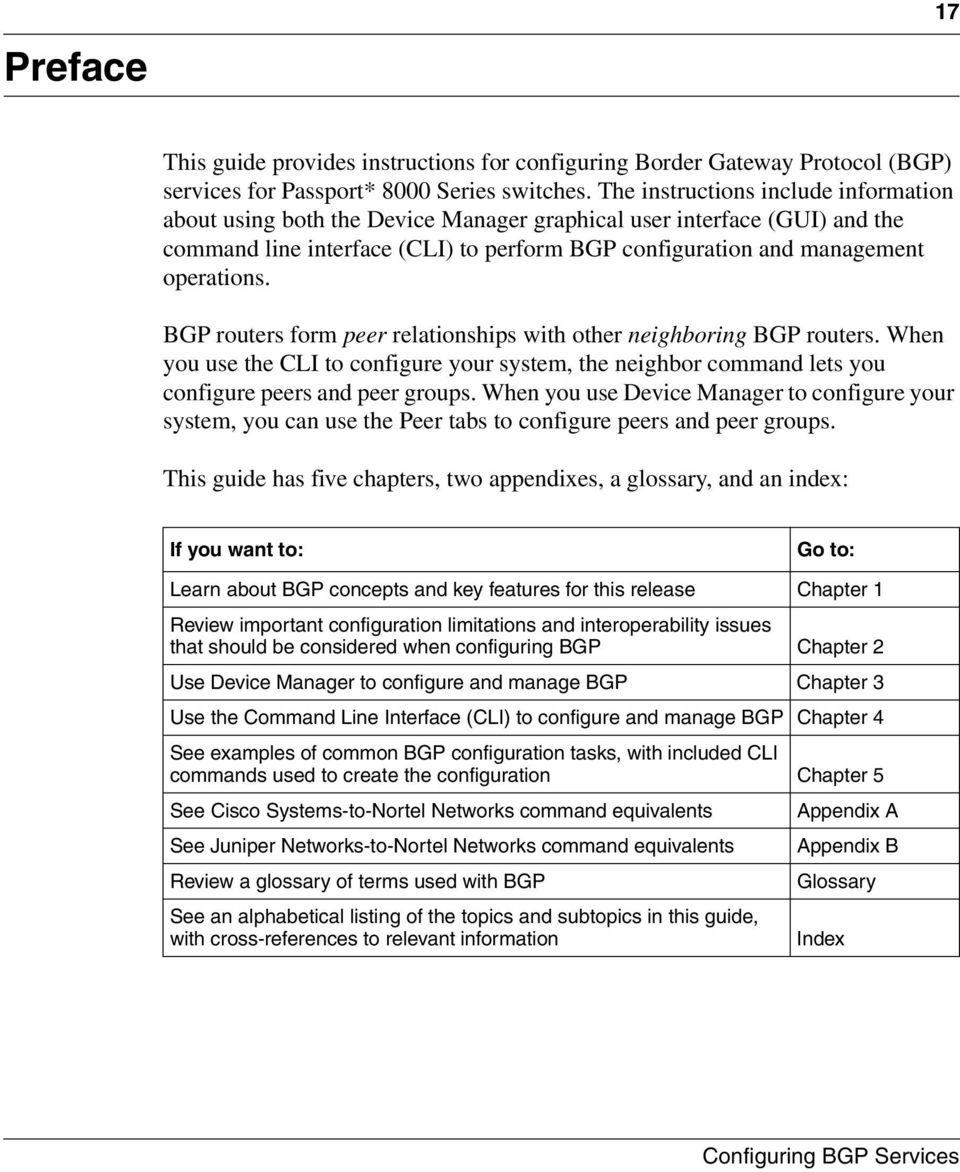
17 Preface 17 This guide provides instructions for configuring Border Gateway Protocol (BGP) services for Passport* 8000 Series switches. The instructions include information about using both the Device Manager graphical user interface (GUI) and the command line interface (CLI) to perform BGP configuration and management operations. BGP routers form peer relationships with other neighboring BGP routers. When you use the CLI to configure your system, the neighbor command lets you configure peers and peer groups. When you use Device Manager to configure your system, you can use the Peer tabs to configure peers and peer groups. This guide has five chapters, two appendixes, a glossary, and an index: If you want to: Go to: Learn about BGP concepts and key features for this release Chapter 1 Review important configuration limitations and interoperability issues that should be considered when configuring BGP Chapter 2 Use Device Manager to configure and manage BGP Chapter 3 Use the Command Line Interface (CLI) to configure and manage BGP Chapter 4 See examples of common BGP configuration tasks, with included CLI commands used to create the configuration Chapter 5 See Cisco Systems-to-Nortel Networks command equivalents Appendix A See Juniper Networks-to-Nortel Networks command equivalents Appendix B Review a glossary of terms used with BGP Glossary See an alphabetical listing of the topics and subtopics in this guide, with cross-references to relevant information Index
18 18 Preface Before you begin This guide is intended for network administrators with the following background: Basic knowledge of networks, Ethernet bridging, and IP routing Familiarity with networking concepts and terminology Basic knowledge of network topologies Experience with windowing systems or GUIs Text conventions This guide uses the following text conventions: angle brackets (< >) bold Courier text braces ({}) brackets ([ ]) Indicate that you choose the text to enter based on the description inside the brackets. Do not type the brackets when entering the command. Example: If the command syntax is ping <ip_address>, you enter ping Indicates command names and options and text that you need to enter. Example: Use the dinfo command. Example: Enter show ip {alerts routes}. Indicate required elements in syntax descriptions where there is more than one option. You must choose only one of the options. Do not type the braces when entering the command. Example: If the command syntax is show ip {alerts routes}, you must enter either show ip alerts or show ip routes, but not both. Indicate optional elements in syntax descriptions. Do not type the brackets when entering the command. Example: If the command syntax is show ip interfaces [-alerts], you can enter either show ip interfaces or show ip interfaces -alerts C Rev 00
![Courier text braces ({}) brackets ([ ]) Indicate that you choose the text to enter based on the description inside the brackets. Do not type the brackets when entering the command.](/docs-images/42/1842849/images/page_18.jpg "Example: If the command syntax is ping <ip_address>, you enter ping 192.32.10.12 Indicates command names and options and text that you need to enter. Example: Use the dinfo command.")
19 Preface 19 ellipsis points (... ) italic text plain Courier text separator ( > ) vertical line ( ) Indicate that you repeat the last element of the command as needed. Example: If the command syntax is ethernet/2/1 [<parameter> <value>]..., you enter ethernet/2/1 and as many parameter-value pairs as needed. Indicates new terms, book titles, and variables in command syntax descriptions. Where a variable is two or more words, the words are connected by an underscore. Example: If the command syntax is show at <valid_route>, valid_route is one variable and you substitute one value for it. Indicates command syntax and system output, for example, prompts and system messages. Example: Set Trap Monitor Filters Shows menu paths. Example: Protocols > IP identifies the IP option on the Protocols menu. Separates choices for command keywords and arguments. Enter only one of the choices. Do not type the vertical line when entering the command. Example: If the command syntax is show ip {alerts routes}, you enter either show ip alerts or show ip routes, but not both. Hard-copy technical manuals You can print selected technical manuals and release notes free, directly from the Internet. Go to the URL. Find the product for which you need documentation. Then locate the specific category and model or version for your hardware or software product. Use Adobe* Acrobat Reader* to open the manuals and release notes, search for the sections you need, and print them on most standard printers. Go to Adobe Systems at the URL to download a free copy of the Adobe Acrobat Reader.

20 20 Preface You can purchase printed books and documentation sets from Vervante. To order printed documentation, go to Vervante at the URL. How to get help If you purchased a service contract for your Nortel Networks* product from a distributor or authorized reseller, contact the technical support staff for that distributor or reseller for assistance. If you purchased a Nortel Networks* service program, contact one of the following Nortel Networks Technical Solutions Centers: Technical Solutions Center Telephone Europe, Middle East, and Africa (33) (4) North America (800) 4NORTEL or (800) Asia Pacific (61) (2) China (800) Additional information about the Nortel Networks* Technical Solutions Centers is available from the URL. An Express Routing Code (ERC) is available for many Nortel Networks* products and services. When you use an ERC, your call is routed to a technical support person who specializes in supporting that product or service. To locate an ERC for your product or service, go to the contact/erc/index.html URL C Rev 00

21 Chapter 1 BGP concepts 21 BGP is an inter-domain routing protocol that provides loop-free inter-domain routing between autonomous systems (ASs) or within an AS. BGP systems can exchange network layer reachability information (NLRI) with other BGP systems for the purpose of constructing a graph of AS connectivity. BGP uses this information to prune routing loops and enforce AS-level policy decisions. BGP provides features that allow you to consolidate routing information and to control the flow of BGP updates. The following sections provide an overview of BGP and includes descriptions of features you can use to optimize your BGP system. Note: See Chapter 5, Configuration examples, on page 203, for configuration examples, including commands, for most of the concepts described in this chapter. This chapter includes the following topics: Topic Page Autonomous systems 22 Consolidating routing information 27 BGP updates 39 Equal-cost multipath 44 TCP MD5 message authentication 45 Circuitless IP 48
22 22 Chapter 1 BGP concepts Autonomous systems An autonomous system (AS) is a group of routers and hosts run by a single technical administrator that has a single, clearly defined routing policy. Each autonomous system has its own unique AS number assigned by the appropriate Internet Registry entity. Note: LANs and WANs interconnected by IP routers form a group of networks called an internetwork. For administrative purposes, internetworks are divided into boundaries known as autonomous systems. This section provides an AS overview and describes the components that comprise the system. After reviewing the AS concepts in this section, you can find more information about ASs in the section titled, Basic BGP example on page 204. That section provides a basic configuration example, including CLI commands used to create the topology. This section includes the following topics: Internetwork segmentation, next Internal/external BGP routing on page 24 BGP speaker on page 24 Transit AS on page 24 Stub and multihomed autonomous systems on page 26 Peers on page 26 Supernet advertisement on page 27 Reducing bandwidth and maintenance on page C Rev 00
23 Chapter 1 BGP concepts 23 Internetwork segmentation Figure 1 shows a sample internetwork segmented into three autonomous systems. In this example, BGP exchanges information between ASs as well as between routers within the same AS. As shown in Figure 1, routers that are members of the same AS and exchange BGP updates run internal BGP (IBGP), and routers that are members of different ASs and exchange BGP updates run external BGP (EBGP). Figure 1 Internetwork segmented into three autonomous systems Autonomous system 1 Router 2 LAN A LAN B Router 1 IBGP Router 3 LAN C Router 4 EBGP Router 5 Autonomous system 2 Autonomous system 3 LAN D Router 8 EBGP Router 7 IBGP Router 6 IBGP LAN F LAN G Router 9 LAN E 10860FA
24 24 Chapter 1 BGP concepts Internal/external BGP routing Nortel Networks* supports both Internal BGP (IBGP) intra-as routing and External BGP (EBGP) external-as routing. With IBGP, each router within an AS runs an interior gateway protocol (IGP), such as routing information protocol (RIP), and open shortest path first (OSPF). The IBGP information, along with the IGP route to the originating BGP border router, determines the next hop to use for exchanging information with an external AS. Each router uses IBGP exclusively to determine reachability to external ASs. When a router receives an IBGP update that is destined for an external AS, the update is passed to IP for inclusion in the routing table only if a viable IGP route to the correct border gateway is available. EBGP is used to communicate routing information between BGP speakers that are in different ASs. BGP speaker BGP routers employ an entity within the router, referred to as a BGP speaker, that transmits and receives BGP messages and acts upon them. BGP speakers communicate with other BGP speakers by establishing a peer-to-peer session. Transit AS All BGP speakers within an AS must be fully meshed (see Figure 2 on page 25). An AS with more than one BGP speaker can use IBGP to provide a transit service for networks located outside the AS. An AS that provides this service is called a transit AS. As shown in Figure 2 on page 25, AS 40 is the transit AS. It provides information about its internal networks, as well as transit networks, to the remaining ASs. The IBGP connections between routers D, E, and F provide consistent routing information to the ASs C Rev 00
25 Figure 2 Transit AS, stub AS, multihomed AS, and peer-to-peer sessions, Chapter 1 BGP concepts 25 AS 20 Router B AS 10 AS 30 Router A BGP speaker EBGP Router C Peer-to-peer session EBGP EBGP BGP speaker Transit AS AS 40 Router D IBGP Router E Multihomed (multiple BGP speakers) Router F EBGP AS 50 Stub AS Router G 10861FA
26 26 Chapter 1 BGP concepts Stub and multihomed autonomous systems Peers As shown in Figure 2 on page 25, an AS can include one or more BGP speakers that establish peer-to-peer sessions with BGP speakers in other ASs to provide external route information for the networks within the AS: A stub AS has a single BGP speaker that establishes a peer-to-peer session with one external BGP speaker. In this case, the BGP speaker provides external route information only for the networks contained within its own AS. A multihomed AS has multiple BGP speakers. The transport protocol used with BGP is Transmission Control Protocol (TCP). When any two routers open a TCP connection to each other for the purpose of exchanging routing information, they form a peer-to-peer relationship. In Figure 2 on page 25, Routers A and D are BGP peers, as are Routers B and E, C and E, F and G, and Routers D, E, and F. Note that although Routers A and D are running EBGP, Routers D, E, and F within AS 40 are running IBGP. The EBGP peers are directly connected, while the IBGP peers are not. As long as an IGP is running that allows any two neighbors to logically communicate, the IBGP peers do not require a direct connection. Because all BGP speakers within an AS must be fully meshed logically, the IBGP mesh can grow to large proportions and become difficult to manage. You can reduce the number of peers within an AS by creating confederations and route reflectors (see Confederations on page 34, and IBGP route reflection on page 36). BGP peers exchange complete routing information only after the peer connection is established. Thereafter, BGP peers exchange routing updates. An update message consists of a network number, a list of autonomous systems that the routing information passed through (the AS path), and other path attributes that describe the route to a set of destination networks. When multiple paths are available, BGP compares the path attributes to choose the preferred path. For more information about update messages, see BGP updates on page C Rev 00
27 Chapter 1 BGP concepts 27 Supernet advertisement BGP has no concept of address classes. Each network listed in the network layer reachability information (NLRI) portion of an update message contains a prefix length field, which describes the length of the mask associated with the network. The prefix length field allows for both supernet and subnet advertisement. The supernet advertisement is what makes classless interdomain routing (CIDR) possible (see CIDR and aggregate addresses on page 28). Reducing bandwidth and maintenance BGP also provides two features that reduce the high bandwidth and maintenance costs associated with a large full-mesh topology: Confederations Route reflectors Confederations and route reflectors are discussed in Consolidating routing information, next. Consolidating routing information This section describes BGP features that allow you to reduce the size of your routing tables. The section includes the following topics: CIDR and aggregate addresses, next Aggregate routes on page 33 Confederations on page 34 IBGP route reflection on page 36
28 28 Chapter 1 BGP concepts CIDR and aggregate addresses Classless interdomain routing (CIDR) is an addressing scheme (also known as supernetting) that eliminates the concept of classifying networks into class types. Earlier addressing schemes identified five classes of networks: Class A, Class B, Class C, Class D, and Class E. Classes D (used for multicast) and E (reserved and currently not used) are not discussed in this book. For example, network , an illegal Class C network number, becomes a legal supernet when it is represented in CIDR notation as /16. The /16 is called the prefix length and becomes a way of expressing the explicit mask that CIDR requires. In this case, the addition of the prefix /16 indicates that the subnet mask consists of 16 bits (counting from the left). Note that with this method, supernet /16 represents (see Table 1). Table 1 CIDR Conversion Prefix Dotted-decimal Binary Network class / Class As / Class As / Class As / Class As / Class As / Class As / Class As / Class A or 256 Class Bs / Class Bs / Class Bs / Class Bs / Class Bs / Class Bs / Class Bs / Class Bs C Rev 00
29 Chapter 1 BGP concepts 29 Table 1 CIDR Conversion (continued) Prefix Dotted-decimal Binary Network class / Class B or 256 Class Cs / Class Cs / Class Cs / Class Cs / Class Cs / Class Cs / Class Cs / Class Cs / Class C CIDR also allows you to assign network prefixes of arbitrary lengths, as opposed to the now obsolete class system which assigned prefixes as even multiples of an octet. For example, you can assign a single routing table supernet entry of /21 to represent 8 separate Class C network numbers: through
30 30 Chapter 1 BGP concepts Creating a supernet address You can create a supernet address that covers any address range. For example, to create a supernet address that covers an address range of to , use the following procedure: 1 Convert the starting and ending address range from dotted-decimal notation to binary notation (Figure 3): a b Locate the common bits in both ranges, and then ensure that the remaining bits in the start range are zeros, and the remaining bits in the end range are all ones. If the remaining bits in the end range are not all ones (as shown in Figure 3), you must recalculate to find the IP prefix that has only ones in the remaining bits in the end range (Step 2). Figure 3 Converting to binary notation Dotted-decimal Binary Start range: Must be all zeros Common bits Remaining bits Must be all ones End range: EA C Rev 00
31 Chapter 1 BGP concepts 31 2 Recalculate to find a network prefix that has all ones in the remaining end range bits (Figure 4): a In Figure 4, is the closest IP prefix that matches the start range s common bits. The 21 bits that match the common bits form the Prefix length. Note that the Prefix length is the number of binary bits that form the explicit mask (in dotted-decimal notation) for this IP prefix. b As shown in Figure 4, the resulting first aggregate /21 represents all of the IP prefixes from to c The remaining aggregate must be formed from to the end range, (see Step 3). Figure 4 Combining into two aggregate ranges (1 of 2) Dotted-decimal Binary Start range: All zeros Common bits Remaining bits All ones End range: bits Bit mask Resuting First aggregate = = /21 Explicit mask Prefix length 10863EA
32 32 Chapter 1 BGP concepts 3 Figure 5 shows the results after forming the remaining aggregate from to the end range, As shown in Figure 5, the resulting aggregate /23 represents all of the IP prefixes from to Figure 5 Combining into two aggregate ranges (2 of 2) Dotted-decimal Binary Start range: All zeros Common bits Remaining bits All ones End range: bits Bit mask Resuting last aggregate = = /23 Explicit mask Prefix length 10864EA 4 The final result of calculating the supernet address that ranges from to is as follows: a (with mask) = /21 b (with mask) = /23 For more information about CIDR, see CIDR and aggregate addressing example on page 217. To see how CIDR lets you reduce the size of your routing tables by creating aggregate routes, see Aggregate routes, next C Rev 00
33 Chapter 1 BGP concepts 33 Aggregate routes Eliminating the idea of network classes provides an easy method to aggregate routes. Rather than advertise a separate route for each destination network in a supernet, BGP uses a supernet address to advertise a single route (called an aggregate route) that represents all the destinations. CIDR also reduces the size of the routing tables used to store advertised IP routes. Figure 6 shows an example of route aggregation using CIDR. In this example, a single supernet address /16 is used to advertise 256 separate Class C network numbers through Figure 6 Aggregating routes with CIDR /16 Passport FA
34 34 Chapter 1 BGP concepts Confederations A BGP router configured for IBGP establishes a peer-to-peer session with every other IBGP speaker in the AS. In an AS with a large number of IBGP speakers, this full-mesh topology can result in high bandwidth and maintenance costs. As shown in the following example, a full-mesh topology for an AS with 50 IBGP speakers requires 1225 internal peer-to-peer connections: Example: n x (n-1)/2 = n IBGP sessions where: 50 x (50-1)/2 = 1225 number of unique IBGP sessions You can reduce the high bandwidth and maintenance costs associated with a large full-mesh topology by dividing the AS into multiple smaller ASs (sub-ass), and then grouping them into a single confederation (see Figure 7 on page 35). Although the peers that are located in different ASs have EBGP sessions with the various sub-as peers, they preserve the next-hop, MED, and local preference information and exchange routing updates as if they were IBGP peers. This method allows all of the ASs to retain a single interior gateway protocol (IGP). When the confederation is assigned its own confederation identifier, the group of sub-ass appear as a single AS (with the confederation identifier as the AS number). For more information about confederations, see BGP confederations on page C Rev 00
35 Figure 7 Confederations Chapter 1 BGP concepts 35 As shown in Figure 7, each sub-as is fully meshed within itself and has EBGP sessions with other sub-ass that are in the same confederation. AS 200 AS 100 AS 300 EBGP EBGP AS800 EBGP AS80010 AS80020 AS80030 IBGP IBGP EBGP IBGP EBGP EBGP EBGP EBGP EBGP AS 700 AS 400 AS 500 AS 600 Passport FA
36 36 Chapter 1 BGP concepts IBGP route reflection Another way to reduce the IBGP mesh that is inherent in an AS with a large number of IBGP speakers, is to configure a route reflector (RR). Using this method, when an IBGP speaker needs to communicate with other BGP speakers in the AS, the speaker establishes a single peer-to-peer RR client session with the IBGP route reflector. For example, Figure 8 shows a simple IBGP configuration with three IBGP speakers (Routers A, B, and C). Without route reflectors configured, when Router A receives an advertised route from an external neighbor, it must advertise the route to Routers B and C. Routers B and C do not readvertise the IBGP learned routes to other IBGP speakers (BGP does not allow routers to pass routes learned from internal neighbors on to other internal neighbors, thus avoiding routing information loops). Figure 8 Fully meshed AS with IBGP speakers Fully meshed AS Router B External BGP speaker Advertised routes Router A IBGP speaker Advertised routes Routes not advertised Router C Passport FA C Rev 00
37 Chapter 1 BGP concepts 37 As shown in Figure 9, when you configure an internal BGP peer (Router B) as a route reflector, all of the IBGP speakers are not required to be fully meshed. In this case, the assigned route reflector assumes the responsibility for passing IBGP learned routes to a set of IBGP neighbors. When Router B (the route reflector in Figure 9) receives routes advertised from Router A (the IBGP speaker) it advertises them to router C. Conversely, when the route reflector receives routes from internal peers, it advertises those routes to Router A. IBGP sessions are not required between Routers A and C. Figure 9 AS with route reflector External BGP speaker Advertised routes Partially meshed AS Router A IBGP speaker Advertised routes Router B route reflector Reflected routes Router C Passport FA Route reflectors separate internal peers into two groups: client peers and nonclient peers. The route reflector and its clients form a cluster. The client peers in the cluster are not required to be fully meshed, and do not communicate with IBGP speakers outside their cluster. Nonclient peers must be fully meshed with each other.
38 38 Chapter 1 BGP concepts This concept is shown in Figure 10, where Router A is shown as the route reflector in a cluster with client Routers B, C, and D. Routers E, F, and G are fully meshed, nonclient routers. Figure 10 Route reflector with client and nonclient peers Partially meshed AS Advertised routes Cluster Route reflector Router A Reflected routes Router E Nonclient Router F Nonclient External BGP speaker Reflected routes Router G Nonclient Router B Client Router C Client Router D Client Passport FA For more information about route reflection, see Route reflectors on page C Rev 00
39 Chapter 1 BGP concepts 39 BGP updates BGP uses update messages to communicate information between two BGP speakers. The update message can be used to advertise a single feasible route to a peer, or to withdraw multiple unfeasible routes from service. Figure 11 shows the format of an update message. Figure 11 Update message format Withdrawn Routes Length (2 octets) Withdrawn Routes (variable length) Total Path Attributes Length (2 octets) Path Attributes (variable length) Network Layer Reachability Information (variable length) This section describes how BGP uses the update message fields to communicate information between BGP speakers. The following topics are included: Withdrawn Routes Length field, next Withdrawn Routes field on page 40 Total Path Attributes Length field on page 41 Path Attributes field on page 41 Network Layer Reachability Information field on page 44
40 40 Chapter 1 BGP concepts Withdrawn Routes Length field The Withdrawn Routes Length field (referred to in RFC 1771 as the Unfeasible Routes Length field) indicates the total length of the Withdrawn Routes field, in octets. The value of the Withdrawn Routes Length field is used to allow the length of the Network Layer Reachability Information field to be calculated. For example, a value of 0 indicates that no routes are being withdrawn from service, and that the Withdrawn Routes field is not present in this Update message. For more information about the Network Layer Reachability Information field, see Network Layer Reachability Information field on page 44. Withdrawn Routes field The Withdrawn Routes field is a variable length field that contains a list of IP prefixes for routes that are being withdrawn from service. Figure 12 shows the format of an IP Prefix. Figure 12 IP Prefix format Length (1 octet) Prefix (variable length) Length field The Length field indicates the number of bits in the prefix (also called the network mask). For example, /16 is equivalent to (where: the network mask is represented by the /16 which indicates the number of bits in the Length field). Prefix field The Prefix field contains the IP address prefix itself, followed by enough trailing bits to make the length of the whole field an integer multiple of 8 bits (1 octet). Note: The value of trailing bits is irrelevant. For more information about IP Prefixes and how it is used in supernetting, see CIDR and aggregate addresses on page C Rev 00
41 Chapter 1 BGP concepts 41 Total Path Attributes Length field The Total Path Attributes Length field indicates the total length of the Path Attributes field in octets. The value of the Total Path Attributes Length field is used to allow the length of the Network Layer Reachability Information field to be calculated. For example, a value of 0 indicates that no Network Layer Reachability Information field is present in this update message. For more information about the Network Layer Reachability Information field, see Network Layer Reachability Information field on page 44. Path Attributes field The Path Attributes field is a variable length sequence of path attributes that is present in every BGP Update. The path attributes contain BGP attributes that are associated with the prefixes in the Network Layer Reachability Information field (see Network Layer Reachability Information field on page 44). For example, the attribute values allow you to specify the prefixes that can be exchanged in the BGP session, which of the multiple paths of a specified prefix to use, and so on. The attributes carry the following information about the associated prefixes: Path origin The AS paths through which the prefix has been advertised Metrics that display degrees of preference for this prefix Figure 13 shows the encoding used with the Path Attribute field. The fields are described in the sections that follow. Figure 13 Path attribute encoding Attribute Type (2 octet) Attribute Length (1 or 2 octets) Attribute Value (variable length)
42 42 Chapter 1 BGP concepts Attribute Type field As shown in Figure 14, The Attribute Type field is a two-octet field that comprises two sub-fields: the Attribute Flags field, and the Attribute Type Code field. Figure 14 Attribute Type fields Attribute Flags (1 octet) Attribute Type Code (1 octet) Attribute Flags The Attribute Flags field is a bit string that contains four binary values that describe the attribute, and four bits that are unused. The bit descriptions (from the high-order bit to the low-order bit) are: The high-order bit (bit 0) is the Optional bit. When set (1) the attribute is optional. When this bit is clear (0), the attribute is well-known. Well-known attributes must be recognized by all BGP implementations and, when appropriate, passed on to BGP peers. Optional attributes are not required to be present in all BGP implementations. The second high-order bit (bit 1) is the Transitive bit. For well-known attributes, this bit must be set to 1. For optional attributes, it defines whether the attribute is transitive (when set to 1) or non-transitive (when set to 0). The third high-order bit (bit 2) is the Partial bit. It defines whether the information contained in the optional transitive attribute is partial (when set to 1) or complete (when set to 0). For well-known attributes and for optional non-transitive attributes the Partial bit must be set to 0. The fourth high-order bit (bit 3) is the Extended Length bit. It defines whether the Attribute Length is one octet (when set to 0) or two octets (when set to 1). Extended Length may be used only if the length of the attribute value is greater than 255 octets. If the Extended Length bit of the Attribute Flags octet is set to 0, the third octet of the Path Attribute contains the length of the attribute data in octets. If the Extended Length bit of the Attribute Flags octet is set to 1, then the third and the fourth octets of the path attribute contain the length of the attribute data in octets. The lower-order four bits of the Attribute Flags octet are unused. They must be zero (and must be ignored when received) C Rev 00
43 Chapter 1 BGP concepts 43 Attribute Type Code The Attribute Type Code field contains the attribute type code, as defined by the Internet Assigned Numbers Authority (IANA). The Attribute Type Code field value is used to uniquely identify the attribute from all others. The remaining octets of the Path Attribute represent the attribute value and are interpreted according to the Attribute Flags and the Attribute Type Code fields (see Attribute Flags on page 42 and Attribute Type Code on page 43). The supported Attribute Type Codes are shown in Table 2: Table 2 BGP mandatory path attributes Attribute Type code Description Origin 1 Defines the origin of the path information: Value = IGP (the path is valid all the way to the IGP of the originating AS) Value = 1--- EGP (the path was advertised using an EGP by the last AS in the AS path) Value = 2--- Incomplete (the path is valid only to the last AS in the AS path) AS path 2 Contains a list of the ASs that must be traversed to reach the given destinations. Each AS path segment is represented as follows: Path segment type Path segment length Path segment value Next hop 3 Specifies the IP address of the border router to use as a next hop for the advertised destinations (destinations listed in the NLRI field of the Update message). Multiexit discriminator 4 This attribute is used on external (internal-as) links to discriminate among multiple exit or entry points to the same neighboring AS. Local preference 5 Allows AS border routers to indicate the preference they assigned to a chosen route when advertising it to IBGP peers Atomic aggregate 6 Ensures that certain network layer reachability information (NLRI) is not deaggregated Aggregator 7 Identifies which AS performed the most recent route aggregation. This attribute contains the last AS number that formed the aggregate route followed by the IP address of the BGP speaker that formed the aggregate route.
44 44 Chapter 1 BGP concepts Attribute Length field The Attribute Length field can be one or two octets in length, depending on the value of the Extended Length field in the Attributes Flag field (see Attribute Flags on page 42). This field is used to indicate the length of the Attribute Value field (see Attribute Value field, next). Attribute Value field The Attribute Value field contains the actual value of the specific attribute and is implemented according to the values in the Attribute Flags and the Attribute Type Code fields (see Attribute Flags on page 42 and Attribute Type Code on page 43). Network Layer Reachability Information field The Network Layer Reachability Information field is a variable length field that contains a list of prefixes. The number of prefixes in the list is limited only by the packet size that can be sent between BGP speakers. For details about the format of an IP Prefix, see Figure 12 on page 40). For more information about BGP updates, see BGP path attributes on page 244. Equal-cost multipath Equal-cost multipath (ECMP) support allows a BGP speaker to perform route or traffic balancing within an AS by using multiple equal-cost routes submitted to the routing table by OSPF, RIP, or static routes. For more information about ECMP, see EBGP multihop and EBGP load balance on page C Rev 00
45 Chapter 1 BGP concepts 45 TCP MD5 message authentication You can authenticate BGP messages by TCP MD5 signatures, in compliance with RFC 2385, Protection of BGP Sessions via the TCP MD5 Signature Option. When you enable BGP authentication, the BGP speaker verifies that the BGP messages it receives from its peers are actually from a peer and not from a third party masquerading as a peer. BGP-4 TCP MD5 message authentication provides the following features: A TCP MD5 signature can exist for BGP peers. You can configure authentication and secret keys on a per-peer basis. Peers configured with common secret keys can authenticate each other and exchange routing information. Your configurations can concurrently have some BGP peers configured with authentication enabled and other BGP peers with authentication disabled. The secret keys are always stored encrypted. When you enable BGP-4 TCP MD5 authentication, the router computes a Message Digest 5 (MD5) signature for each TCP packet, based on the TCP packet and a per-peer secret key. The router adds this MD5 signature to the TCP packet containing a BGP message and sends it with the packet, but it does not send the secret key. The receiver of the TCP packet also knows the secret key and can verify the MD5 signature. A third party trying to masquerade as the sender, however, cannot generate an authentic signature because it does not know the secret key. The per-peer secret keys provide the security. If the keys are compromised, then the authentication itself is compromised. To prevent this, the secret keys are stored in encrypted form in the configuration files. Note: In the CLI commands, the term Password refers to Secret Key.
46 46 Chapter 1 BGP concepts Entering and Storing MD5 Authentication Keys By default, BGP TCP MD5 authentication is set to disabled. To enable BGP TCP MD5 authentication: With Device Manager: This feature currently cannot be configured using Device Manager. You can configure this feature using the CLI (see the next section). With the CLI: Use the following command (see Configuring BGP peers or peer groups on page 135): config ip bgp neighbor <nbr_ipaddr peer-group-name> password <password> MD5-authentication <enable disable> where: nbr_ipaddr peer-group-name is the peer s IP address or the peer s group name. password is the secret key, which is a string length with a range 0 to 1536 alphanumeric characters. The password (secret key) is encrypted and stored in the BGP configuration files. To communicate, both peers must be configured with the same password (peers that are configured with common passwords only can authenticate each other and exchange routing information). When an MD5 password (or secret key) is configured for a BGP peer that has MD5 Authentication set to enabled, BGP reads the encrypted password from the BGP configuration files and passes the unencrypted authentication key to TCP C Rev 00
47 Chapter 1 BGP concepts 47 Generation of MD5 signatures on ingress BGP TCP packets BGP peers calculate MD5 signatures in BGP messages on the following elements: TCP pseudo-header TCP header, excluding options TCP segment data TCP MD5 authentication key If TCP receives an MD5 authentication key, it reduces its maximum segment size (MSS) by 18 octets, the length of the TCP MD5 option. It also adds an MD5 signature to each transmitted packet. The peer inserts the resulting 16-byte MD5 signature into the following TCP options: kind=19, length=18. Verification of MD5 signatures on egress BGP TCP packets Upon receiving a packet, TCP performs three tests (Table 3). If a packet passes a test, it proceeds to the next test. When a packet has passed all three tests, TCP accepts the packet and sends it to BGP. If a packet fails a test, TCP logs an event, increments the count of TCP connection errors (wftcpconnmd5errors), and discards the packet. The TCP connection remains open. Table 3 lists the tests and the event message that TCP logs if a test fails. Table 3 MD5 Signature Verification Rules on BGP TCP Packets Condition Tested Action on Success Failure Event Message Is the connection configured for MD5 authentication? Is MD5 authentication enabled for this TCP connection? Does the computed MD5 signature match the received MD5 signature? Verify that the packet contains a kind=19 option. TCP computes the expected MD5 signature. TCP sends the packet to BGP. TCP MD5 No Signature TCP MD5 Authentication Disabled TCP MD5 Invalid Signature For more information about MD5, see MD5 authentication on page 238.
48 48 Chapter 1 BGP concepts Circuitless IP Circuitless IP (CLIP) is a virtual (or loop back) interface that is not associated with any physical port. You can use the CLIP interface to provide uninterrupted connectivity to your switch as long as there is an actual path to reach the device. For example, as shown in Figure 15, a physical point-to-point link exists between R1 and R2 along with the associated addresses ( /30 and /30). Note also that an IBGP session exists between two additional addresses /32 (CLIP 1) and /32 (CLIP 2). Figure 15 Routers with I-BGP connections /32 (CLIP 1) (CLIP 2) /32 R1 IBGP session R2 Physical link / /30 Passport FA C Rev 00 The CLIP interface is treated as any other IP interface. The network associated with the CLIP is treated as a local network attached to the device. This route always exists and the circuit is always up because there is no physical attachment. Routes are advertised to other routers in the domain either as external routes using the route-redistribution process or when you enable OSPF in a passive mode to advertise an OSPF internal route. You can configure the OSPF protocol only on the CLIP interface. When you create a CLIP interface, the system software programs a local route with the CPU as destid. All packets that are destined to the CLIP interface address are processed by the CPU. Any other packets with destination addresses associated with this network (but not to the interface address) are treated as if they are from any unknown host. For more information about circuitless IP, see Basic BGP example on page 204. For information about configuring CLIP using Device Manager, see Configuring Circuitless IP on page 106. For information about configuring CLIP using the CLI, see Circuitless IP on page 181.
49 Chapter 2 Configuration considerations and limitations 49 This chapter describes configuration limitations and interoperability issues that you should consider when configuring BGP. For information about BGP concepts and terminology, see Chapter 1, BGP concepts, on page 21. This chapter includes the following topics: Topic Page BGP implementation notes 50 Configuration guidelines 51 BGP Neighbor Maximum Prefix 52 BGP-4 support 53 RIP redistribution 53 BGP/OSPF interaction 53 MD5 authentication 54
50 50 Chapter 2 Configuration considerations and limitations BGP implementation notes The following guidelines are crucial to successful BGP configuration. Caution: If you do not follow these guidelines, BGP either will not work efficiently or will become disabled on the interfaces involved. BGP will not operate with an IP router in nonforwarding (host-only) mode. Make sure that the routers you want BGP to operate with are in forwarding mode. If you are using BGP for a multihomed AS (one that contains more than a single exit point), Nortel Networks* recommends that you use OSPF for your IGP and BGP for your sole exterior gateway protocol, or use intra-as IBGP routing. If OSPF is the IGP, use the default OSPF tag construction. Using EGP or modifying the OSPF tags makes network administration and proper configuration of BGP path attributes difficult. For routers that support both BGP and OSPF, the OSPF router ID and the BGP identifier must be set to the same IP address. The BGP router ID automatically uses the OSPF router ID. In configurations where BGP speakers reside on routers that have multiple network connections over multiple IP interfaces (the typical case for IBGP speakers), consider using the address of the router s circuitless (virtual) IP interface as the local peer address. In this way, you ensure that BGP is reachable as long as there is an active circuit on the router. By default, BGP speakers do not advertise or inject routes into its IGP. You must configure route policies to enable route advertisement. Coordinate routing policies among all BGP speakers within an AS so that every BGP border router within an AS constructs the same path attributes for an external path. Configure accept and announce policies on all IBGP connections to accept and propagate all routes. Make consistent routing policy decisions on external BGP connections C Rev 00
51 Configuration guidelines Chapter 2 Configuration considerations and limitations 51 When configuring BGP on the Passport 8600, you must configure the following minimum parameters: Router ID Local AS Number Enable BGP Globally BGP Neighbor Peer Session: remote IP addresses Enable BGP peer When running both BGP and OSPF, the OSPF and BGP Router ID must be the same. The Router ID must be a valid IP address of an IP interface on the router or a circuitless IP address. This IP address is used in BGP Update messages By default, the BGP Router ID automatically uses the OSPF Router ID. There is no option to configure the BGP Router ID. If you configure BGP before you have configured the OSPF Router ID, you must first disable BGP, and then enable BGP globally. BGP Policies can be added to the BGP peer configuration to influence route decisions (see Policies on page 210). Once the Passport 8600 is configured for BGP, some parameter changes may require to have either the BGP Global state or neighbor admin-state to be disabled/enabled. The CLI prompt will notify you if this is the case. BGP policies are dynamically modified. On the global level, the BGP redistribution command has an apply parameter that causes the policy to be applied, at that time. You can use the following BGP neighbor CLI command to apply policies without bringing down the peer: restart soft-reconfiguration <in> <out> The following are some examples of these commands: To disable BGP global, enter: config ip bgp <enable/disable>
52 52 Chapter 2 Configuration considerations and limitations To disable a BGP neighbor, enter: config ip bgp neighbor <ip address of neighbor> admin-state <enable/disable> To set BGP soft-reconfiguration: config ip bgp neighbor <ip address of neighbor> soft-reconfiguration-in <enable/disable> To set BGP policy redistribution: config ip bgp redistribute apply When using Device Manager, use the following commands: To disable BGP globally, enter: IP_Routing>BGP>AdminStatus <enable/disable> To disable a BGP neighbor, enter: IP_Routing>BGP>AdminStatus>Peers <IP address of peer> <enable/ disable> To set BGP soft-reconfiguration: IP_Routing>BGP>AdminStatus>Peers Info>SoftReconfiguration <in/out> IP_Routing>BGP>AdminStatus>Peers Info>SoftReconfigurationIn <enable/ disable> BGP Neighbor Maximum Prefix By default, the Maximum Prefix parameter value is set to limit 12,000 network layer reachability information (NLRI) messages per neighbor (the Maximum Prefix parameter limits the number of routes that the Passport 8600 can accept). This value prevents large numbers of BGP routes from flooding the network in the event of a misconfiguration. You can configure the Maximum Prefix limit to any value, including 0, which allows unlimited routes. When you configure the Maximum Prefix value, consider the maximum number of active routes that your equipment configuration can support C Rev 00
53 Chapter 2 Configuration considerations and limitations 53 BGP-4 support Nortel Networks* implementation of BGP supports BGP-4 as described in RFC BGP-4 has no concept of address classes. Each network listed in the network layer reachability information (NLRI) portion of an update message contains a prefix length field, which describes the length of the mask associated with the network. The prefix length field allows for both supernet and subnet advertisement. The supernet advertisement is what makes classless interdomain routing (CIDR) possible. See CIDR and aggregate addresses on page 28. In addition, BGP-4 supports BGP confederations and TCP MD5 message authentication. RIP redistribution Nortel Networks* implementation of BGP supports redistribution of RIP routes. You can create this configuration by configuring a route policy that matches the BGP protocol, and then apply the policy as a RIP-out policy on the required RIP interfaces. BGP/OSPF interaction RFC 1745 defines the interaction between BGP and OSPF when OSPF is the IGP within an autonomous system. For routers running both protocols, the OSPF router ID and the BGP ID must be the same IP address. A BGP route policy must be configured to allow BGP advertisement of OSPF routes. Interaction between BGP-4 and OSPF includes the ability to advertise supernets to support classless interdomain routing (CIDR). BGP-4 allows interdomain supernet advertisements; OSPF can carry supernet advertisements within a routing domain.
54 54 Chapter 2 Configuration considerations and limitations MD5 authentication The MD5 authentication feature is currently not configurable using Device Manager with release 3.3 software. You can configure this feature using the CLI commands C Rev 00
55 55 Chapter 3 Using Device Manager to configure BGP This chapter describes how to configure BGP using Device Manager. Note: Some screen examples in this chapter have hypertext links that lead you to relevant information about the screen. The links are accessible when viewed in online format (such as PDF). To access the links, drag your cursor across the screen and click on the item when the cursor changes to a pointing hand. For BGP concept details, see Chapter 1, BGP concepts, on page 21. For information about limitations and interoperability issues, see Chapter 2, Configuration considerations and limitations, on page 49. For configuration examples, including the required CLI commands, see Chapter 5, Configuration examples, on page 203. This chapter includes the following topics: Topic Page Configuring general parameters 56 Displaying global BGP statistics 62 Configuring aggregate addresses 66 Configuring allowed network addresses 69 Configuring and displaying peer information 70 Displaying route information 96 BGP community attributes 100 Displaying dampened routes information 103 Configuring redistribute entries 104 Configuring Circuitless IP 106
56 56 Chapter 3 Using Device Manager to configure BGP Configuring general parameters To configure general BGP parameters: From the Device Manager menu bar, choose IP Routing > BGP. The BGP dialog box opens with the Generals tab displayed (Figure 16). The Generals tab information is grouped into three sections: General, Confederation, and Reflection. Figure 16 BGP dialog box Generals tab General section. Confederation section. Route reflection section C Rev 00
57 Chapter 3 Using Device Manager to configure BGP 57 Table 4 describes the BGP dialog box Generals tab fields. Table 4 BGP dialog box Generals tab fields Field AdminStatus LocalAs Aggregate DefaultMetric Description Enables or disables BGP on the current system. The default value is disable. Click the appropriate radio button to enable or disable the option. Note: You cannot enable AdminStatus until you change the LocalAS value to any value other than 0. Sets a local autonomous system number on the current system. Specify an integer value in the range 1 to Note: You cannot enable AdminStatus until you change the LocalAS default value to any value other other than 0. You cannot change configured values when AdminStatus is set to enable. If the value is 0, you cannot globally enable BGP. Enables or disables the aggregation feature on this interface. The default value is enable. Click the appropriate radio button to enable or disable the option. Note: You cannot change values when AdminStatus is set to enable. Sets a value that is sent to a BGP neighbor to determine the cost of a route a neighbor is using. This option must be used in conjunction with the redistribute router configuration command to allow the current routing protocol to use the same metric value for all redistributed routes. The default value is -1. Specify an integer value in the range 0 to Note: A default metric value helps solve the problems associated with redistributing routes that have incompatible metrics. For example, whenever metrics do not convert, using a default metric provides a reasonable substitute and allows the redistribution to proceed.
58 58 Chapter 3 Using Device Manager to configure BGP Table 4 BGP dialog box Generals tab fields (continued) Field DefaultLocalPreference DefaultInformationOriginate AlwaysCompareMed DeterministicMed AutoPeerRestart AutoSummary Description Specifies the default value of the local preference attribute. The default value is 100. Specify an integer value in the range 0 to Note: You cannot change the default value when AdminStatus is set to enable. Checkbox When checked (enabled), allows the redistribution of network into BGP. The default value is disable (not checked). Enables or disables the comparison of the multi-exit discriminator (MED) parameter for paths from neighbors in different autonomous systems. A path with a lower MED is preferred over a path with a higher MED. The default value is disable. Click the appropriate radio button to enable or disable the option. Note: When this option is set to disable (the default value) during the best-path selection process, the MEDs are compared only among paths from the same autonomous system. If you enable this option, the MEDs are compared among paths received from any other autonomous systems. Enables or disables the deterministic MED feature, used to compare the MED values when choosing routes advertised by different peers in the same autonomous system. The default value is disable. Click the appropriate radio button to enable or disable the option. Enables or disables the process that automatically restarts a connection to a BGP neighbor. The default value is enable. Click the appropriate radio button to enable or disable the option. When enabled, allows BGP to summarize networks based on class limits (For example, Class A, B, C networks). The default value is enable. Click the appropriate radio button to enable or disable the option C Rev 00
59 Chapter 3 Using Device Manager to configure BGP 59 Table 4 BGP dialog box Generals tab fields (continued) Field NoMedPathIsWorst BestPathMedConfed DebugMask IgnoreIllegalRouterid Description When set to enable (the default value), BGP treats an update that is missing a multi-exit discriminator (MED) attribute, as the worst path. Click the appropriate radio button to enable or disable the option. When enabled, allows you to compare multi-exit discriminator (MED) attributes within a confederation. The default value is disable. Click the appropriate radio button to enable or disable the option. Checkboxes When checked (enabled) allows you to display specified debug information for BGP global configuration. The default value is none (checked). Mask choices are: none: disables all debug messages. all: enables all debug messages. error: enables display of debug error messages. packet: enables display of debug packet messages. event: enables display of debug event messages. trace: enables display of debug trace messages. warning: enables display of debug warning messages. state: enables display of debug state transition messages. init: enables display of debug initialization messages. filter: enables display of debug messages related to filtering. update: enables display of debug messages related to sending and receiving updates. When enabled, allows BGP to overlook an illegal router ID. For example, you can set this command to enable or disable the acceptance of a connection from a peer that sends an open message using a router ID of 0 (zero). The default value is disable. Click the appropriate radio button to enable or disable the option.
60 60 Chapter 3 Using Device Manager to configure BGP Table 4 BGP dialog box Generals tab fields (continued) Field Synchronization MaxEqualCostRoutes IbgpReportImportRoute FlapDampEnable ConfederationIdentifier ConfederationPeers RouteReflectionEnable RouteReflectorClusterId Description Enables or disables the router from accepting routes from BGP peers without waiting for an update from the IGP. The default value is enable. Click the appropriate radio button to enable or disable the option. Sets the maximum number of equal-cost-paths that are available to a BGP router by limiting the number of equal-cost-paths that can be stored in the routing table. The default value is 1. Specify an integer value in the range 1 to 4. Configures BGP to report imported routes to an interior BGP (IBGP) peer. This command also enables or disables reporting of non-bgp imported routes to other IBGP neighbors. The default value is enable. Click the appropriate radio button to enable or disable the option. Enables or disables route suppression for routes that flap on and off. The default value is disable. Click the appropriate radio button to enable or disable the option. Specifies a BGP confederation identifier. Specify an integer value in the range 0 to Note: You cannot configure this value when AdminStatus is set to enable. Lists adjoining ASs that are part of the confederation. Specify a list of ASs separated by commas (5500,65535,0,10,...,...). Enables or disables the reflection of routes from IBGP neighbors. The default value is disable. Click the appropriate radio button to enable or disable the option. Sets a cluster ID. This option is applicable only if the RouteReflectionEnable value is set to enable, and if multiple route reflectors are in a cluster. Specify an IP address that is the cluster ID of the reflector router C Rev 00
61 Chapter 3 Using Device Manager to configure BGP 61 Table 4 BGP dialog box Generals tab fields (continued) Field ReflectorClienToClientReflection QuickStart Description Enables or disables route reflection between two route reflector clients. This option is applicable only if the RouteReflectionEnable value is set to enable. The default value is disable. Click the appropriate radio button to enable or disable the option. Enables or disables the Quick Start feature, which forces the BGP speaker to begin establishing peers immediately, instead of waiting for the peer s auto-restart timer to expire. The default value is disable. Click the appropriate radio button to enable or disable the option.
62 62 Chapter 3 Using Device Manager to configure BGP Displaying global BGP statistics To display global BGP statistics: 1 From the Device Manager menu bar, choose IP Routing > BGP. The BGP dialog box opens with the Generals tab displayed (see Figure 16 on page 56). 2 Click the Global Stats tab. The Global Stats tab opens and displays current BGP statistics (Figure 17). Figure 17 BGP dialog box Global Stats tab Use the vertical scroll bar to display all rows. Table 5 describes the Global BGP statistics parameters C Rev 00
63 Chapter 3 Using Device Manager to configure BGP 63 Table 5 Global Stats tab descriptions Field Starts Stops Opens Closes Fails Fatals ConnExps HoldExps KeepExps RxOpens RxKeeps RxUpdates RxNotifys TxOpens TxKeeps TxUpdates TxNotifys BadEvents SyncFails TrEvent RxECodeHeader RxECodeOpen RxECodeUpdate RxECodeHoldtimer RxECodeFSM RxECodeCease RxHdrCodeNoSync RxHdrCodeInvalidMsgLength Description Number of times BGP connection started Number of times BGP connection stopped Number of times BGP connection opened TCP Number of times BGP connection closed TCP Number of times a TCP attempt failed Number of times TCP crashed due to fatal error Number of times the TCP retry timer expired Number of times the hold timer expired Number of times the keepalive timer expired Number of Opens received by BGP Number of Keepalive messages received by BGP Number of Updates received by BGP Number of Notifications received by BGP Number of transmitted by BGP Number of Keepalive messages transmitted by BGP Number of Updates transmitted by BGP Number of Notifications transmitted by BGP Number of invalid events received by FSM Number of times the FDB sync failed Trace event Total number of Header errors received Total number of Open errors received Total number of Update errors received Total number of Hold Timer Expired errors received Total number of FSM errors received Total number of Cease errors received Number of Header errors received as: Not Synchronized Number of Header errors received as: Invalid Msg len
64 64 Chapter 3 Using Device Manager to configure BGP Table 5 Global Stats tab descriptions (continued) Field RxHdrCodeInvalidMsgType RxOpCodeBadVer RxOpCodeBadAs RxOpCodeBadRtID RxOpCodeUnsuppOption RxOpCodeAuthFail RxOpCodeBadHold RxUpdCodeMalformedAttrList RxUpdCodeWelknownAttrUnreco g RxUpdCodeWelknownAttrMiss RxUpdCodeAttrFlagError RxUpdCodeAttrLenError RxUpdCodeBadORIGINAttr RxUpdCodeASRoutingLoop RxUpdCodeBadNHAttr RxUpdCodeOptionalAttrError RxUpdCodeBadNetworkField RxUpdCodeMalformedASPath TxECodeHeader TxECodeOpen TxECodeUpdate TxECodeHoldtimer TxECodeFSM Description Number of Header errors received as: Invalid Msg type Number of Open errors received as: Bad version Number of Open errors received as: Bad AS number Number of Open errors received as: Bad BGP Rtr ID Number of Open errors received as: Unsupported Option Number of Open errors received as: Auth Failure Number of Open errors received as: Bad Hold Value Number of Update errors received as: Malformed Attr List Number of Update errors received as: Welknown Attr Unrecog Number of Update errors received as: Welknown Attr Missing Number of Update errors received as: Attr Flag Error Number of Update errors received as: Attr Len Error Number of Update errors received as: Bad ORIGIN Attr Number of Update errors received as: AS Routing Loop Number of Update errors received as: Bad NEXT-HOP Attr Number of Update errors received as: Optional Attr Error Number of Update errors received as: Bad Network Field Number of Update errors received as: Malformed AS Path Total number of Header errors transmitted Total number of Open errors transmitted Total number of Update errors transmitted Total number of Hold Timer Expired errors transmitted Total number of FSM errors transmitted C Rev 00
65 Table 5 Global Stats tab descriptions (continued) Chapter 3 Using Device Manager to configure BGP 65 Field TxECodeCease TxHdrCodeNoSync TxHdrCodeInvalidMsgLen TxHdrCodeInvalidMsgType TxOpCodeBadVer TxOpCodeBadAs TxOpCodeBadRtID TxOpCodeUnsuppOption TxOpCodeAuthFail TxOpCodeBadHold TxUpdCodeMalformedAttrList TxUpdCodeWelknownAttrUnrecog TxUpdCodeWelknownAttrMiss TxUpdCodeAttrFlagError TxUpdCodeAttrLenError TxUpdCodeBadORIGINAttr TxUpdCodeASRoutingLoop TxUpdCodeBadNHAttr TxUpdCodeOptionalAttrError Description Total number of Cease errors transmitted Number of Header errors transmitted as: Not Synchronized Number of Header errors transmitted as: Invalid Msg len Number of Header errors transmitted as: Invalid Msg type Number of Open errors transmitted as: Bad version Number of Open errors transmitted as: Bad AS number Number of Open errors transmitted as: Bad BGP Rtr ID Number of Open errors transmitted as: Unsupported Option Number of Open errors transmitted as: Auth Failure Number of Open errors transmitted as: Bad Hold Value Number of Update errors transmitted as: Malformed Attr List Number of Update errors transmitted as: Welknown Attr Unrecog Number of Update errors transmitted as: Welknown Attr Missing Number of Update errors transmitted as: Attr Flag Error Number of Update errors transmitted as: Attr Len Error Number of Update errors transmitted as: Bad ORIGIN Attr Number of Update errors transmitted as: AS Routing Loop Number of Update errors transmitted as: Bad NEXT-HOP Attr Number of Update errors transmitted as: Optional Attr Error
66 66 Chapter 3 Using Device Manager to configure BGP Table 5 Global Stats tab descriptions (continued) Field TxUpdCodeBadNetworkField TxUpdCodeMalformedASPath Description Number of Update errors transmitted as: Bad Network Field Number of Update errors transmitted as: Malformed AS Path Configuring aggregate addresses To configure aggregate addresses: 1 From the Device Manager menu bar, choose IP Routing > BGP. The BGP dialog box opens with the Generals tab displayed (see Figure 16 on page 56). 2 Click the Aggregates tab. The Aggregates tab opens and displays current aggregate addresses (Figure 18). Figure 18 BGP dialog box Aggregates tab Click Insert to open the Aggregates dialog box. 3 Click Insert. The BGP Insert Aggregates dialog box opens (Figure 19) C Rev 00
67 Figure 19 BGP Insert Aggregates dialog box Chapter 3 Using Device Manager to configure BGP 67 Click to open previously configured policies. Attribute policy A. Attribute policy B. Table 6 describes the BGP Insert Aggregates dialog box fields. Table 6 BGP Insert Aggregates dialog box fields Field Address Mask AsSetGenerate Description The aggregate s IP address that you want to add or modify. The aggregate s subnet mask. Enables or disables autonomous system information. The default value is disable. Click the appropriate radio button to enable or disable the feature. You can also enable or disable this feature in the Aggregates tab by clicking in the current field and selecting enable or disable from the pull-down menu (see Figure 18 on page 66).
68 68 Chapter 3 Using Device Manager to configure BGP Table 6 BGP Insert Aggregates dialog box fields (continued) Field Description SummaryOnly Enables or disables the summarization of routes not included in routing updates. This parameter creates the aggregate route and suppresses advertisements of more specific routes to all neighbors. The default value is disable. Click the appropriate radio button to enable or disable the option. You can also enable or disable this feature in the Aggregates tab by clicking in the current field and selecting enable or disable from the pull-down menu (see Figure 18 on page 66). SuppressPolicy Sets the route policy by name (any string length between 0 and 64 characters long) to be used for the suppressed route list. This parameter creates the aggregate route and suppresses advertisements of the specified routes. Click the ellipse button and choose a policy (if configured) from the list in the SuppressPolicy dialog box (see Figure 19 on page 67). To deselect an entry, press [Ctrl] and click the left mouse button. AdvertisePolicy Sets the route policy by name (any string length between 0 and 64 characters long) to be used for route advertisements. Click the ellipse button and choose a policy (if configured) from the list in the AdvertisePolicy dialog box (see Figure 19 on page 67). To deselect an entry, press [Ctrl] and click the left mouse button. AttributePolicy Sets the route policy by name (any string length between 0 and 64 characters long) to be used for setting aggregate route attributes. Click the ellipse button and choose a policy (if configured) from the list in the AttributePolicy dialog box (see Figure 19 on page 67). To deselect an entry, press [Ctrl] and click the left mouse button C Rev 00
69 Configuring allowed network addresses To configure allowed network addresses: Chapter 3 Using Device Manager to configure BGP 69 1 From the Device Manager menu bar, choose IP Routing > BGP. The BGP dialog box opens with the Generals tab displayed (see Figure 16 on page 56). 2 Click the Network tab. The Network tab opens and displays current allowed network addresses (Figure 20). Figure 20 BGP dialog box Network tab 3 Click Insert. The BGP Insert Network dialog box opens (Figure 21). Figure 21 BGP Insert Network dialog box
70 70 Chapter 3 Using Device Manager to configure BGP Table 7 describes the BGP Insert Network dialog box fields. Table 7 BGP Insert Network dialog box Field NetworkAddr NetworkMask Network Metric Description The IP address that you want to add or modify The network subnet mask The network metric value Configuring and displaying peer information Two tabs are available for configuring and displaying information about peers and peer groups: Peers tab The Peers tab (see Peers tab on page 71) allows you to display and edit current peer information, and to configure new peers. You can also use the Peers tab to display the following peer-related statistical data: General (peer) statistics Receive statistics Transmit statistics Peer Groups tab The Peer Groups tab allows you to display and edit current peer group information, and to configure new peer groups (see Peer Groups tab on page 91) C Rev 00
71 Chapter 3 Using Device Manager to configure BGP 71 Peers tab This section includes the following topics: Configuring and editing peers, next Displaying peer statistics on page 82 Configuring and editing peers You can use the Peers tab to modify existing peer configurations or to create new peers: This section includes the following topics: Modifying existing peers, next Creating new peers on page 77 Modifying existing peers To modify existing peer configurations: 1 From the Device Manager menu bar, choose IP Routing > BGP. The BGP dialog box opens with the Generals tab displayed (see Figure 16 on page 56). 2 Click the Peers tab. The Peers tab opens and displays current peer configurations (see Figure 22 on page 72). As shown in Figure 22 on page 72, the current peer configurations can be modified in the Peers tab, using the pop-up menus (double-click most fields to select a value). When modifying current peer configurations, refer to the field descriptions described in Table 8 on page 73.
72 72 Chapter 3 Using Device Manager to configure BGP Figure 22 BGP dialog box Peers tab Double-click the GroupName field to open the GroupName dialog box. Double-click the Enable field to open the menu box. Note: Most active fields in the Peers tab are editable; double-click active fields to access pull-down menus or dialog boxes similar to those shown here. Click Insert to open the BGP Insert Peers dialog box. Use the scroll bar to display all columns C Rev 00
73 Chapter 3 Using Device Manager to configure BGP 73 Table 8 describes the BGP dialog box Peers tab fields. Table 8 BGP dialog box Peers tab Field IpAddr GrpName ENABLE State RmtAs EbgpMultiHop RoutePolicyIn Description The IP address of this peer. Adds a BGP peer to the specified subscriber group. Click the ellipse button and choose a group (if configured) from the list in the GroupName dialog box (see Figure 22 on page 72). To deselect an entry, press [Ctrl] and click the left mouse button. You can also choose a group (if configured) from the Peers tab by clicking in the current field and choosing from the list in the GroupName dialog box (see Figure 22 on page 72). Enables or disables the peer. Double-click in the field to access the pull-down menu. Read-onle field that displays the specified peer s current connection state. The State field can display any of the following connection states: idle connect active opensent openconfirm established Configures a remote-as for the peer or peer-group. Specify an integer value in the range 0 to Enables or disables a connection to a BGP peer that is more than one hop away from the local router. The default value is disable. Applies an incoming route policy rule to all routes that are learned from, or sent to, the local BGP router s peers, or peer groups. Click the ellipse button and choose a route policy (if configured) from the list in the RoutePolicyIn dialog box (see Figure 23 on page 78). To deselect an entry, press [Ctrl] and click the left mouse button.
74 74 Chapter 3 Using Device Manager to configure BGP Table 8 BGP dialog box Peers tab (continued) Field RoutePolicyOut RemovePrivateAs UpdateSrcIf ConnectRetryInt HoldTime AdminHoldTime KeepAlive AdminKeepAlive Description Applies an outgoing route policy rule to all routes that are learned from, or sent to, the local BGP router s peers, or peer groups. Click the ellipse button and choose a route policy (if configured) from the list in the RoutePolicyOut dialog box (see Figure 23 on page 78). To deselect an entry, press [Ctrl] and click the left mouse button. When enabled, strips private AS numbers when sending an update. This feature is especially useful within a confederation. The default value is enable. Specifies the source interface IP address to be used when sending EBGP packets to this peer or peer group. Sets the time interval (in seconds) for the ConnectRetry Timer. The default value is 120 seconds. The range is 1 and seconds. Read-only field Displays the BGP speaker s time interval (in seconds) for this peer. The default value is 180 seconds. The range is 3 and seconds (integer values 1 and 2 are not valid). Time interval in seconds for the Hold Timer established with the peer. The BGP speaker calculates this value using the smaller values of bgppeerholdtimeconfigured and the Hold Time received in the OPEN message. This value must be at least three seconds if it is not zero (0); in which case the Hold Timer has not been established with the peer, or, the value of bgppeerholdtimeconfigured is zero (0). Read-only field Displays the time interval (in seconds) that transpires between transmissions of the local BGP router s keep-alive packets. The keep-alive packets indicate the enabled status of the local BGP router to peers. The default value is 60 seconds. The range is 0 and seconds. Time interval in seconds for the KeepAlive timer established with the peer. The value of this object is calculated by this BGP speaker such that, when compared with bgppeerholdtime, it has the same proportion as what bgppeerkeepaliveconfigured has when compared with bgppeerholdtimeconfigured. If the value of this object is zero (0), it indicates that the KeepAlive timer has not been established with the peer, or, the value of bgppeerkeepaliveconfigured is zero (0) C Rev 00
75 Table 8 BGP dialog box Peers tab (continued) Chapter 3 Using Device Manager to configure BGP 75 Field MD5Auth Advtint DeftOriginate Weight MaxPrefix NextHopSelf RouteReflectorClient Description Read-only field that indicates the TCP MD5 authentication state. The default value is disable. Note: This feature currently cannot be configured using Device Manager. You can configure this feature using the CLI (refer to Configuring BGP peers or peer groups on page 135). Specifies the time interval (in seconds) that transpires between each transmission of an advertisement from a BGP neighbor. The default value is 5 seconds. The range is 5 and 120 seconds. When enabled, specifies that the current route originated from the BGP peer. This field enables or disables sending the default route information to the specified neighbor or peer. The default value is disable. Specifies this peer s or peer groups weight, or the priority of updates that can be received from this BGP peer. The default value is 100. Note: A weight is a numerical value you assign to a path that allows you to control the path selection process. The administrative weight is local to the router. For example, if you have particular neighbors that you want to prefer for most of your traffic, you can assign a higher weight to all routes learned from that neighbor. The range is 0 and seconds. Sets a limit on the number of routes that can be accepted from a neighbor. The default value is 12,000 routes (see Specifying number of routes learned on page 209). The range is 0 and Note: A value of 0 (zero) indicates that there is no limit to the number of routes that can be accepted. Check box When checked (enabled), specifies that the next-hop attribute in an IBGP update is the address of the local router or the router that is generating the IBGP update. The default value is not checked (disabled). Check box When checked (enabled), specifies this peer or peer group as a route reflector client. The default value is disable. Note: All peers that are configured become members of the client group and the remaining IBGP peers become members of the nonclient group for the local route reflector.
76 76 Chapter 3 Using Device Manager to configure BGP Table 8 BGP dialog box Peers tab (continued) Field SoftReCfgin SoftReCfg DebugMask SendCommunity Identifier LocalAddr ConnectRetryInt Description Allows the router to relearn routes from the specified neighbor or group of neighbors without resetting the connection when the policy changes in the inbound direction. The default value is disable. Allows you to specify how the router relearns routes when the policy changes, as follows: in (inbound) out (outbound) none (default value) Allows you to display specified debug information for the specified BGP peer. The default value is none. Mask choices are: none: disables all debug messages. error: enables display of debug error messages. packet: enables display of debug packet messages. event: enables display of debug event messages. trace: enables display of debug trace messages. warning: enables display of debug warning messages. state: enables display of debug state transition messages. init: enables display of debug initialization messages. filter: enables display of debug messages related to filtering. update: enables display of debug messages related to sending and receiving updates. all: enables all debug messages. Enables or disables sending the update message s community attribute to the specified peer. The default value is disable. Read-only field Displays the IP address of the Local sytem. Read-only field Displays the local IP address of this entry's BGP connection. Sets the time interval (in seconds) for the ConnectRetry Timer. The default value is 120 seconds. The range is 1 and seconds C Rev 00
77 Chapter 3 Using Device Manager to configure BGP 77 Creating new peers To create new peer configurations: 1 From the Device Manager menu bar, choose IP Routing > BGP. The BGP dialog box opens with the Generals tab displayed (see Figure 16 on page 56). 2 Click the Peers tab. The Peers tab opens and displays current peer configurations (see Figure 22 on page 72). 3 Click Insert. The BGP Insert Peers dialog box opens (Figure 23).
78 78 Chapter 3 Using Device Manager to configure BGP Figure 23 BGP Insert Peers dialog box Click to open After you enter your required configuration parameters in the Insert Peers dialog box (as described in Table 9 on page 79), and then click Insert, the Insert Peers dialog box closes and displays your new configuration parameters in the BGP dialog box Peers tab (see Figure 22 on page 72) C Rev 00
79 Chapter 3 Using Device Manager to configure BGP 79 By default, new peer configuration parameters are set to disable. To enable your new configuration, click the new peer s IP address in the BGP dialog box Peers tab, and then select enable from the pull-down menu in the Enable column (see Figure 22 on page 72). Note that, in Figure 22 on page 72, the specified peer s connection state is shown in the (read-only) State field. The State field can display any of the following connection states: idle connect active opensent openconfirm established Table 9 describes the BGP Insert Peers dialog box fields. Table 9 BGP Insert Peers dialog box Field IpAddr GrpName RmtAs RoutePolicyIn Description The IP address of this peer. Adds a BGP peer to the specified subscriber group. Click the ellipse button and choose a group (if configured) from the list in the GroupName dialog box (see Figure 22 on page 72). To deselect an entry, press [Ctrl] and click the left mouse button. You can also choose a group (if configured) from the Peers tab by clicking in the current field and choosing from the list in the GroupName dialog box (see Figure 22 on page 72). Configures a remote-as for the peer or peer-group. Specify an integer value in the range 0 to Applies an incoming route policy rule to all routes that are learned from, or sent to, the local BGP router s peers, or peer groups. Click the ellipse button and choose a route policy (if configured) from the list in the RoutePolicyIn dialog box (see Figure 23 on page 78). To deselect an entry, press [Ctrl] and click the left mouse button.
80 80 Chapter 3 Using Device Manager to configure BGP Table 9 BGP Insert Peers dialog box (continued) Field RoutePolicyOut DeftOriginate UpdateSrcif EbgpMultiHop RemovePrivateAs NextHopSelf DebugMask Description Applies an outgoing route policy rule to all routes that are learned from, or sent to, the local BGP router s peers, or peer groups. Click the ellipse button and choose a route policy (if configured) from the list in the RoutePolicyOut dialog box (see Figure 23 on page 78). To deselect an entry, press [Ctrl] and click the left mouse button. When enabled, specifies that the current route originated from the BGP peer. This field enables or disables sending the default route information to the specified neighbor or peer. The default value is disable. Specifies the source IP address to be used when sending EBGP packets to this peer or peer group. Enables or disables a connection to a BGP peer that is more than one hop away from the local router. The default value is disable. When enabled, strips private AS numbers when sending an update. This feature is especially useful within a confederation. The default value is enable. Check box When checked (enabled), specifies that the next-hop attribute in an IBGP update is the address of the local router or the router that is generating the IBGP update. The default value is not checked (disabled). Allows you to display specified debug information for the specified BGP peer. The default value is none. Mask choices are: none: disables all debug messages. error: enables display of debug error messages. packet: enables display of debug packet messages. event: enables display of debug event messages. trace: enables display of debug trace messages. warning: enables display of debug warning messages. state: enables display of debug state transition messages. init: enables display of debug initialization messages. filter: enables display of debug messages related to filtering. update: enables display of debug messages related to sending and receiving updates. all: enables all debug messages C Rev 00
81 Table 9 BGP Insert Peers dialog box (continued) Chapter 3 Using Device Manager to configure BGP 81 Field Advtint Weight MaxPrefix RouteReflectorClient SoftReCfgin SendCommunity Description Specifies the time interval (in seconds) that transpires between each transmission of an advertisement from a BGP neighbor. The default value is 5 seconds. Specify an integer value in the range 5 to 120 seconds. Specifies this peer s or peer groups weight, or the priority of updates that can be received from this BGP peer. The default value is 100. Note: A weight is a numerical value you assign to a path that allows you to control the path selection process. The administrative weight is local to the router. For example, if you have particular neighbors that you want to prefer for most of your traffic, you can assign a higher weight to all routes learned from that neighbor. Specify an integer value in the range 0 to seconds. Sets a limit on the number of routes that can be accepted from a neighbor. The default value is 12,000 routes (see Specifying number of routes learned on page 209). Specify an integer value in the range 0 to Note: A value of 0 (zero) indicates that there is no limit to the number of routes that can be accepted. Check box When checked (enabled), specifies this peer or peer group as a route reflector client. The default value is disable. Note: All peers that are configured become members of the client group and the remaining IBGP peers become members of the nonclient group for the local route reflector. Allows the router to relearn routes from the specified neighbor or group of neighbors without resetting the connection when the policy changes in the inbound direction. The default value is disable. Enables or disables sending the update message s community attribute to the specified peer. The default value is disable.
82 82 Chapter 3 Using Device Manager to configure BGP Displaying peer statistics To display statistics for a specified peer: 1 From the Device Manager menu bar, choose IP Routing > BGP. The BGP dialog box opens with the Generals tab displayed (see Figure 16 on page 56). 2 Click the Peers tab. The Peers tab opens and displays current peer configurations (Figure 24). Figure 24 BGP dialog box Peers tab Graph button (shown in inactive state). Use the scroll bar to display all columns. 3 Select the IP address of the peer you want to query. The selected peer s IP address is highlighted and the Graph button is now active. 4 Click Graph. The BGP Peer Stat dialog box opens with the General Stats tab displayed (Figure 25) C Rev 00
83 Chapter 3 Using Device Manager to configure BGP 83 Figure 25 BGP Peer Stat dialog box General Stats tab As shown in Figure 25, the BGP Peer Stat dialog box comprises three tabs: General Stats tab, next Receive Stats tab on page 85 Transmit Stats tab on page 88
84 84 Chapter 3 Using Device Manager to configure BGP General Stats tab The General Stats tab (shown in Figure 25) displays general statistics for a specified peer. Table 10 describes the General Stats tab fields. Table 10 General Stats tab fields Field InUpdates OutUpdates InTotalMessages OutTotalMessages FsmEstablishedTransitions FsmEstablishedTime InUpdateElapsedTime Starts Stops Opens Closes Fails Fatals ConnExps HoldExps KeepExps BadEvents SyncFails RcvdTooShort NoMarker Dropped Description Number of updates received by the peer. Number of updates transmitted by the peer. Number of total messages received by the peer. Number of total messages transmitted by the peer. The total number of times the BGP FSM transitioned into the established state. Number of seconds this peer has been in the Established state or how long since this peer was last in the Established state. This value It is set to zero when a new peer is configured or the router is booted. Elapsed time in seconds since the last BGP UPDATE message was received from the peer. Number of times peer BGP connection started. Number of times peer BGP connection stopped. Number of times peer opened TCP. Number of times peer closed TCP. Number of times a peer TCP attempt failed. Number of times peer TCP crashed due to fatal error. Number of times the peer TCP retry timer expired. Number of times the peer hold timer expired. Number of times the peer keepalive timer expired. Number of invalid events received by the peer. Number of times the peer FDB sync failed. Number of too short messages received by the peer. Number of messages received by the peer with no marker. Number of messages dropped by the peer C Rev 00
85 Chapter 3 Using Device Manager to configure BGP 85 Table 10 General Stats tab fields (continued) Field BadMsgTypes TrEvent Description Number of messages received by the peer as invalid message type. Peer trace event. You can view Peer receive and transmit statistics: To display statistics received by the peer, see Receive Stats tab, next. To display statistics transmitted by the peer, see Transmit Stats tab on page 88. Receive Stats tab To display statistical information received by the specified peer: From the The BGP Peer Stat dialog box, click the Receive Stats tab (see Figure 25 on page 83). The Receive Stats tab opens and displays current statistical information received by the specified peer (see Figure 26 on page 86).
86 86 Chapter 3 Using Device Manager to configure BGP Figure 26 BGP Peer Stat dialog box Receive Stats tab Use the vertical scroll bar to display all rows. Table 11 describes the Receive Stats tab fields. Table 11 Receive Stats tab fields Field RxMsgs RxInCompPkts RxOpens RxKeeps RxUpdates Description Number of messages received by the peer. Number of Incomplete messages received by the peer. Number of Opens received by the peer. Number of Keepalive messages received by the peer. Number of Updates received by the peer C Rev 00
87 Table 11 Receive Stats tab fields (continued) Chapter 3 Using Device Manager to configure BGP 87 Field RxNotifys RxRoutesAdded RxRoutesReplaced RxNlri RxValidUpdates RxECodeHeader RxECodeOpen RxECodeUpdate RxECodeHoldtimer RxECodeFSM RxECodeCease RxHdrCodeNoSync RxHdrCodeInvalidMsgLen RxHdrCodeInvalidMsgType RxOpCodeBadVer RxOpCodeBadAs RxOpCodeBadRtID RxOpCodeUnsuppOption RxOpCodeAuthFail RxOpCodeBadHold RxUpdCodeMalformedAttrList RxUpdCodeWelknownAttrUnreco g RxUpdCodeWelknownAttrMiss RxUpdCodeAttrFlagError RxUpdCodeAttrLenError RxUpdCodeBadORIGINAttr RxUpdCodeASRoutingLoop Description Number of Notifications received by the peer. Number of routes added into loc_rib by this peer. Number of routes that were replaced by routes received by the peer. Number of network layer reachability information (NLRI) messages received by the peer. Number of valid Updates received by the peer. Number of Header errors received by the peer. Number of Open errors received by the peer. Number of Update errors received by the peer. Number of Hold errors received by the peer. Number of FSM errors received by the peer. Number of Cease errors received by the peer. Number of Header errors received by the peer as: Not Synchronized. Number of Header errors received by the peer as: Invalid Message Length. Number of Header errors received by the peer as: Invalid Message Type. Number of Open errors received by the peer as: Bad Version. Number of Open errors received by the peer as: Bad AS. Number of Open errors received by the peer as: Bad BGP ID. Number of Open errors received by the peer as: Unsupported Options. Number of Open errors received by the peer as: Authorization Failures. Number of Open errors received by the peer as: Bad Hold Value. Number of Update errors received by the peer as: Malformed Attr List. Number of Update errors received by the peer as: Wellknown Attr Unrecog. Number of Update errors received by the peer as: Wellknown Attr Missing. Number of Update errors received by the peer as: Attr Flag Error. Number of Update errors received by the peer as: Attr Length Error. Number of Update errors received by the peer as: Attr Flag Error. Number of Update errors received by the peer as: AS Routing Loop.
88 88 Chapter 3 Using Device Manager to configure BGP Table 11 Receive Stats tab fields (continued) Field RxUpdCodeBadNHAttr RxUpdCodeOptionalAttrError RxUpdCodeBadNetworkField RxUpdCodeMalformedASPath Description Number of Update errors received by the peer as: Bad Next-Hop Attr. Number of Update errors received by the peer as: Optional Attr Error. Number of Update errors received by the peer as: Bad Network Field. Number of Update errors received by the peer as: Malformed AS PAth. To display statistics transmitted by the peer, see Transmit Stats tab, next. Transmit Stats tab To display statistical information transmitted by the specified peer: From the The BGP Peer Stat dialog box, click the Transmit Stats tab (see Figure 25 on page 83). The Transmit Stats tab opens and displays current statistical information transmitted by the specified peer (see Figure 27 on page 89) C Rev 00
89 Figure 27 BGP Peer Stat dialog box Transmit Stats tab Chapter 3 Using Device Manager to configure BGP 89
90 90 Chapter 3 Using Device Manager to configure BGP Table 12 describes the Transmit Stats tab fields. Table 12 Transmit Stats tab fields Field TxMsgs TxOpens TxKeeps TxUpdates TxNotifys TxRoutes TxECodeHeader TxECodeOpen TxECodeUpdate TxECodeHoldtimer TxECodeFSM TxECodeCease TxHdrCodeNoSync TxHdrCodeInvalidMsgLen TxHdrCodeInvalidMsgType TxOpCodeBadVer TxOpCodeBadAs TxOpCodeBadRtID TxOpCodeUnsuppOption TxOpCodeAuthFail TxOpCodeBadHold TxUpdCodeMalformedAttrList Description Number of messages transmitted by the peer. Number of Opens transmitted by the peer. Number of Keepalive messages transmitted by the peer. Number of Updates transmitted by the peer. Number of Notifications transmitted by the peer. Number of network layer reachability information (NLRI) messages transmitted by the peer. Number of Header errors transmitted by the peer. Number of Open errors transmitted by the peer. Number of Update errors transmitted by the peer. Number of Hold errors transmitted by the peer. Number of FSM errors transmitted by the peer. Number of Cease errors transmitted by the peer. Number of Header errors transmitted by the peer as: Not Synchronized. Number of Header errors transmitted by the peer as: Invalid Message Length. Number of Header errors transmitted by the peer as: Invalid Message Type. Number of Open errors transmitted by the peer as: Bad Version. Number of Open errors transmitted by the peer as: Bad AS. Number of Open errors transmitted by the peer as: Bad BGP ID. Number of Open errors transmitted by the peer as: Unsupported Options. Number of Open errors transmitted by the peer as: Authorization Failures. Number of Open errors transmitted by the peer as: Bad Hold Value. Number of Update errors transmitted by the peer as: Malformed Attr List C Rev 00
91 Table 12 Transmit Stats tab fields (continued) Chapter 3 Using Device Manager to configure BGP 91 Field TxUpdCodeWelknownAttrUnrecog TxUpdCodeWelknownAttrMiss TxUpdCodeAttrFlagError TxUpdCodeAttrLenError TxUpdCodeBadORIGINAttr TxUpdCodeASRoutingLoop TxUpdCodeBadNHAttr TxUpdCodeOptionalAttrError TxUpdCodeBadNetworkField TxUpdCodeMalformedASPath Description Number of Update errors transmitted by the peer as: Wellknown Attr Unrecog. Number of Update errors transmitted by the peer as: Wellknown Attr Missing. Number of Update errors transmitted by the peer as: Attr Flag Error. Number of Update errors transmitted by the peer as: Attr Length Error. Number of Update errors transmitted by the peer as: Attr Flag Error. Number of Update errors transmitted by the peer as: AS Routing Loop. Number of Update errors transmitted by the peer as: Bad Next-Hop Attr. Number of Update errors transmitted by the peer as: Optional Attr Error. Number of Update errors transmitted by the peer as: Bad Network Field. Number of Update errors transmitted by the peer as: Malformed AS PAth. Peer Groups tab To configure or edit peer groups: 1 From the Device Manager menu bar, choose IP Routing > BGP. The BGP dialog box opens with the Generals tab displayed (see Figure 16 on page 56). 2 Click the Peer Groups tab. The Peer Groups tab opens and displays current peer group configurations (Figure 28). You can edit any of the fields in this screen by double-clicking in the field. Your changes are applied after you click Apply. Note: Configuration changes that you apply in this screen affect all members of the associated peer group.
92 92 Chapter 3 Using Device Manager to configure BGP Figure 28 BGP dialog box Peer Groups tab Click Insert to insert new Peer groups. Use the scroll bar to display all columns. 3 Click Insert. The BGP Insert Peer Groups dialog box opens (Figure 29) C Rev 00
93 Figure 29 BGP Insert Peer Groups dialog box Chapter 3 Using Device Manager to configure BGP 93 Click to open
94 94 Chapter 3 Using Device Manager to configure BGP Table 13 describes the BGP Insert Peer Groups dialog box fields. Table 13 BGP Insert Peer Groups dialog box fields Field Index GroupName Enable RemoteAs DefaultOriginate EbgpMultiHop AdvertisementInterval KeepAlive HoldTime Description Sets a value which corresponds to a unique entry in the Peer Group Table. The default value is 1. Specify an integer value in the range 1 to Name of the group you are creating. Enables or disable the group. The default value is disable. Configures a remote-as for all peer-group members. Specify an integer value in the range 0 to When enabled, specifies that the current route originated from the BGP peer. This field enables or disables sending the default route information to the specified neighbor or peer. The default value is disable. Enables or disables a connection to a BGP peer that is more than one hop away from the local router. The default value is disable. Specifies the time interval (in seconds) that transpires between each transmission of an advertisement from a BGP neighbor. The default value is 30 seconds. Specify an integer value in the range 1 to 120 seconds. Sets the time interval (in seconds) that transpires between transmissions of the local BGP router s keep-alive packets. The keep-alive packets indicate the enabled status of the local BGP router to peers. The default value is 60 seconds. Specify an integer value in the range 1 to seconds. Sets the BGP speaker s time interval (in seconds) for this peer. The default value is 180 seconds. Specify an integer value in the range 3 to seconds (integer values 1 and 2 are not valid) C Rev 00
95 Chapter 3 Using Device Manager to configure BGP 95 Table 13 BGP Insert Peer Groups dialog box fields (continued) Field Weight MaxPrefix NextHopSelf RoutePolicyIn RoutePolicyOut RouteReflectorClient Description Specifies this peer s or peer groups weight, or the priority of updates that can be received from this BGP peer. The default value is 100. Note: A weight is a numerical value you can assign a path so that you can control the path selection process. The administrative weight is local to the router. If you have particular neighbors that you want to prefer for most of your traffic, you can assign a higher weight to all routes learned from that neighbor. Specify an integer value in the range 0 to seconds. Sets a limit on the number of routes that can be accepted from a neighbor. The default value is 12,000 routes (see Specifying number of routes learned on page 209). Specify an integer value in the range 0 to Note: A value of 0 (zero) indicates that there is no limit to the number of routes that can be accepted. Check box When checked (enabled), specifies that the next-hop attribute in an IBGP update is the address of the local router or the router that is generating the IBGP update. The default value is not checked (disabled). Applies an incoming route policy rule to all routes that are learned from, or sent to, the local BGP router s peers, or peer groups. Click the ellipse button and choose a route policy (if configured) from the list in the RoutePolicyIn dialog box (see Figure 29 on page 93). To deselect an entry, press [Ctrl] and click the left mouse button. Applies an outgoing route policy rule to all routes that are learned from, or sent to, the local BGP router s peers, or peer groups. Click the ellipse button and choose a route policy (if configured) from the list in the RoutePolicyOut dialog box. To deselect an entry, press [Ctrl] and click the left mouse button. Check box When checked (enabled), specifies this peer or peer group as a route reflector client. The default value is disable. Note: All peers that are configured become members of the client group and the remaining IBGP peers become members of the nonclient group for the local route reflector.
96 96 Chapter 3 Using Device Manager to configure BGP Table 13 BGP Insert Peer Groups dialog box fields (continued) Field SoftReconfigurationIn RemovePrivateAs SendCommunity UpdateSourceInterface Description Allows the router to relearn routes from the specified neighbor or group of neighbors without resetting the connection when the policy changes in the inbound direction. The default value is disable. When enabled, strips private AS numbers when sending an update. This feature is especially useful within a confederation. The default value is enable. Enables or disables sending the update message s community attribute to the specified peer. The default value is disable. Specifies the source IP address to be used when sending BGP packets to this peer or peer group. Displaying route information To display current BGP route information: 1 From the Device Manager menu bar, choose IP Routing > BGP. The BGP dialog box opens with the Generals tab displayed (see Figure 16 on page 56). 2 Click the BGP Routes tab. The BGP Routes tab opens (Figure 30). Figure 30 BGP dialog box BGP Routes tab (1 of 2) 3 Click Range. The BGP Route Range dialog box opens (Figure 31) C Rev 00
97 Figure 31 BGP Route Range dialog box Chapter 3 Using Device Manager to configure BGP 97 4 Choose the type of information you want to display by selecting the options in the Route Range dialog box. Table 14 describes the BGP Route Range dialog box options. Table 14 BGP Route Range dialog box options Options Type IpAddrPrefix IpAddrPrefixLen Description Specifies the route types to query: All = all routes in the route table Exact Prefixs = only routes that exactly match the prefix/len Longer Prefix = all routes that match the prefix with longer masks. The IP address of the route destination (for example ). The mask of the route destination. Must be an integer value between 0 and 32 (for example 16). 5 Click Set Range. 6 Click Close. The Route Range dialog box closes. 7 In the BGP Routes tab, click Refresh The BGP Routes tab refreshes and displays route information based on your selected options in the Route Range dialog box (Figure 32).
98 98 Chapter 3 Using Device Manager to configure BGP Note: Each time you choose new options from the Route Range dialog box, you must click Refresh in the BGP Routes tab to allow the screen to refresh and display your new configuration choices. Figure 32 BGP dialog box BGP Routes tab (2 of 2) Use the scroll bar to display all rows. Use the scroll bar to display all columns C Rev 00
99 Table 15 describes the BGP Routes tab fields. Chapter 3 Using Device Manager to configure BGP 99 Table 15 BGP Routes tab fields Field IpAddrPrefix IpAddrPrefixLen Peer NextHop Origin LocalPref ASPathSegment MultiExitDisc AtomicAggregate AggregatorAS AggregatorAddr Best Unknown Description The IP address of the route destination (for example ). The mask of the route destination. Must be an integer value between 0 and 32 (for example /16). The IP address of the peer where the path info was learned. The address of the border router that should be used for the destination network. The ultimate origin of the path information: IGB = Networks are interior EGB = Networks learned via EGP Incomplete = Undetermined The originating BGP4 speaker's degree of preference for an advertised route. A value of -1 indicates the absence of this attribute. Indicates the sequence of one or more AS path segments. This metric is used to discriminate between multiple exit points to an adjacent autonomous system. A value of -1 indicates the absence of this attribute. Specifies whether or not the local system has selected a less specific route, without selecting a more specific route. The AS number of the last BGP4 speaker that performed route aggregation. A value of zero (0) indicates the absence of this attribute. The IP address of the last BGP4 speaker that performed route aggregation. A value of indicates the absence of this attribute. Indicates whether or not this route was chosen as the best BGP4 route. One or more path attributes not understood by this BGP4 speaker. Size zero (0) indicates the absence of such attribute(s). Octets beyond the maximum size, if any, are not recorded by this object.
100 100 Chapter 3 Using Device Manager to configure BGP BGP community attributes To display information about BGP community attributes: 1 From the Device Manager menu bar, choose IP Routing > BGP. The BGP dialog box opens with the Generals tab displayed (see Figure 16 on page 56). 2 Click the BGP Community Attributes tab. The BGP Community Attributes tab opens (Figure 33). Figure 33 BGP dialog box BGP Community Attributes tab (1 of 2) 3 Click Range. The BGP Route Range dialog box opens (Figure 34). Figure 34 BGP Route Range dialog box 4 Choose the type of information you want to display by selecting the options in the BGP Route Range dialog box. Table 16 describes the BGP Route Range dialog box options C Rev 00
101 Chapter 3 Using Device Manager to configure BGP 101 Table 16 BGP Route Range dialog box options Options Type IPAddrPrefix IPAddrPrefixLen Description Specifies the route types to query: All = all routes in the route table Exact Prefixs = only routes that exactly match the prefix/len Longer Prefix = all routes that match the prefix with longer masks. The IP address of the route destination (for example ). The mask of the route destination. Must be an integer value between 0 and 32 (for example /16). 5 Click Set Range. 6 Click Close. The Route Range dialog box closes. 7 In the BGP Community Attributes tab, click Refresh. The BGP Community Attributes tab refreshes and displays route information based on your selected options in the Route Range dialog box (Figure 35). Note: Each time you choose new options from the Route Range dialog box, you must click Refresh in the BGP Community Attributes tab to allow the screen to refresh and display your new configuration choices.
102 102 Chapter 3 Using Device Manager to configure BGP Figure 35 BGP dialog box BGP Community Attributes tab (2 of 2) Use the scroll bar to display all columns. Table 17 describes the BGP Routes Info tab fields. Table 17 BGP Routes Info tab fields Field IpAddrPrefix IpAddrPrefixLen Peer Description The IP address of the route destination (for example ). The mask of the route destination. Must be an integer value between 0 and 32 (for example /16). The IP address of the peer where the path info was learned C Rev 00
103 Chapter 3 Using Device Manager to configure BGP 103 Table 17 BGP Routes Info tab fields (continued) Field Communities OriginateId ClusterId Description A string value that represents multiple community path attributes. The IP address of the route s origin. A string value that represents multiple cluster ID path attributes. Displaying dampened routes information To display information about current receive paths: 1 From the Device Manager menu bar, choose IP Routing > BGP. The BGP dialog box opens with the Generals tab displayed Figure 16 on page Click the Dampened Routes tab. The Dampened Routes tab opens and displays current dampened path information (Figure 36). Figure 36 BGP dialog box Dampened Routes tab Table 18 describes the Dampened Routes tab dialog box fields.
104 104 Chapter 3 Using Device Manager to configure BGP Table 18 Dampened Routes tab dialog box Field IpAddrPrefix IpAddrPrefixLen Peer FlapPenalty FlapCount RouteDampened ReuseTime Description The IP address of the route destination (for example ). The mask of the route destination. Must be an integer value between 0 and 32 (for example /16). The IP address of the peer where the path info was learned. Penalty value based on number of route flaps. Number of times a route flapped since the last time the penalty was reset to zero. Indicates whether this route is currently being suppressed or announced. A read-only value that allows a suppressed route to be added back to the routing table after the penalty value falls below this limit. Configuring redistribute entries You can configure a redistribute entry for BGP to announce routes of a certain source type, for example, direct, static, RIP, and OSPF. If a route policy field is not configured for a redistribute entry, then the default action is taken on the basis of metric, metric-type, and subnet configured. This is called basic redistribution. Otherwise, you use the route policy specified to perform detailed redistribution. If no redistribution entry is configured, no external LSA is generated for non-bgp routes. To configure a BGP redistribute entry: 1 From the Device Manager menu bar, choose IP Routing > BGP. The BGP dialog box opens with the Generals tab displayed (see Figure 16 on page 56). 2 Click the Redistribute tab. The Redistribute tab opens (Figure 37) C Rev 00
105 Figure 37 BGP dialog box Redistribute tab Chapter 3 Using Device Manager to configure BGP Click Insert. The BGP, Insert Redistribute dialog box opens (Figure 38). Figure 38 BGP, Insert Redistribute dialog box Click to open Table 19 describes the BGP, Insert Redistribute dialog box fields. Table 19 BGP, Insert Redistribute dialog box fields Field RouteSource Enable Description Select the route source protocol for the redistribution entry. Enables (or disables) a BGP redistribute entry for a specified source type. You can also enable or disable this feature in the Redistribute tab of the BGP dialog box by clicking in the field and selecting enable or disable from the pull-down menu.
106 106 Chapter 3 Using Device Manager to configure BGP Table 19 BGP, Insert Redistribute dialog box fields (continued) (continued) Field Metric RoutePolicy Description Sets a numerical metric value for the redistributed route. The value can be a range between 0 to The default value is 0. Notes: If you do not specify a value for this option, and no value is specified in the config ip bgp default-metric command, the default metric value is 0. Nortel Networks* recommends that you use a value that is consistent with the destination protocol. When you apply the route-policy parameter (see next field description), the metric-value that is configured within that policy takes precedence over the metric-value setting for the metric parameter described here. metric-value is an integer value between 0 and Sets the route policy by name to be used for the detailed redistribution of external routes from a specified source into a BGP domain. Click the ellipse button and choose a policy (if configured) from the list in the Route Policy dialog box (see Figure 38 on page 105). To deselect an entry, press [Ctrl] and click the left mouse button. Configuring Circuitless IP This section describes how to configure the circuitless IP feature and includes the following topics: Note: You can configure a maximum of 32 circuitless IP interfaces on each device. Configuring a circuitless IP interface, next Enabling OSPF on a circuitless IP interface on page 110 Deleting a circuitless IP interface on page 111 Copying a circuitless IP interface on page 111 Exporting circuitless IP interface data on page 112 Specifying global parameters on page 112 For conceptual information about the circuitless IP feature, see Circuitless IP on page C Rev 00
107 Configuring a circuitless IP interface Chapter 3 Using Device Manager to configure BGP 107 To configure a circuitless IP interface: 1 From the Device Manager menu bar, choose IP routing > IP. The IP dialog box opens with the Globals tab displayed (Figure 39). Figure 39 IP dialog box Globals tab 2 Click the Circuitless IP tab. The Circuitless IP tab opens (Figure 40).
108 108 Chapter 3 Using Device Manager to configure BGP Figure 40 IP dialog box Circuitless IP tab Table 20 describes the Circuitless IP tab fields. Table 20 IP dialog box Circuitless IP tab fields Field Interface IP Address Net Mask Description Displays the number assigned to the interface. Displays the IP address of the interface you are specifying as circuitless. Displays the Net Mask address of the interface you are specifying as circuitless. 3 Click Insert. The IP, Insert Circuitless dialog box opens (Figure 41). Figure 41 IP, Insert Circuitless dialog box C Rev 00
109 Chapter 3 Using Device Manager to configure BGP 109 Table 21 describes the IP, Insert Circuitless dialog box fields. Table 21 IP, Insert Circuitless dialog box fields Field Description Interface Number assigned to the interface. The range is IP Address IP address of the interface you are specifying as circuitless. Net Mask Net Mask address of the interface you are specifying as circuitless. 4 Enter an integer value in the Interface field (in the range 1 and 32). 5 Enter the IP address. 6 Enter the network Mask. 7 Click Insert. The new interface is created and appears in the Circuitless IP tab (see Figure 40 on page 108). Note: Your interface selection appears in the Circuitless IP tab dialog box as CLIP1, CLIP2, etc.
110 110 Chapter 3 Using Device Manager to configure BGP Enabling OSPF on a circuitless IP interface To enable OSPF on an interface: 1 Select the interface (CLIP1, CLIP2, etc.) in the Circuitless IP tab dialog box. Note: You must enable OSPF for circuitless IP to function. 2 Click OSPF. The OspfCircuitless dialog box opens. Figure 42 OspfCircuitless dialog box 3 Click the Enable checkbox. 4 Click Apply. Note: When OSPF is enabled, the circuitless IP interface is configured to OSPF backbone AreaId ( ) until you change the configuration. 5 To change the OSPF backbone AreaId: a Open the OspfCircuitless dialog box. b Enter the AreaId address to change the the OSPF backbone area. c Click Apply. 6 Close the dialog box C Rev 00
111 Deleting a circuitless IP interface To delete a circuitless IP interface: Chapter 3 Using Device Manager to configure BGP From the Device Manager menu bar, choose IP routing > IP. The IP dialog box opens with the Globals tab displayed (see Figure 39 on page 107). 2 Click the Circuitless IP tab. The Circuitless IP tab opens (see Figure 40 on page 108). 3 In the Interface column, select the CLIP number of the interface you want to delete. 4 Click Delete. The new interface is deleted from the list of interfaces. 5 Close the dialog box. Copying a circuitless IP interface To copy a Circuitless IP interface: 1 From the Device Manager menu bar, choose IP routing > IP. 2 Click the Circuitless IP tab. The Circuitless IP tab opens (see Figure 40 on page 108). 3 In the Interface column, select the CLIP number of the interface you want to copy. 4 Click Copy. The interface is copied to the clipboard. 5 Create a text file. 6 Use Paste to paste the information in the text file. 7 Close the dialog box.
112 112 Chapter 3 Using Device Manager to configure BGP Exporting circuitless IP interface data To export circuitless IP interface data: 1 From the Device Manager menu bar, choose IP routing > IP. 2 Click the Circuitless IP tab. The Circuitless IP tab opens (see Figure 40 on page 108). 3 In the Interface column, select the appropriate interface CLIP number of the interface that contains the data you want to export. 4 Click Export. The Export dialog box opens. 5 Specify a file name for the new export file data. 6 Specify a location where you want the new export file to be created. 7 Click OK. The interface is deleted from the list of interfaces. 8 Click Close. Specifying global parameters The Global tab displays default parameters that are in effect. You can change them, as desired. To change default parameters that are currently in effect: 1 From the Device Manager menu bar, choose IP routing > IP. The IP dialog box opens with the Globals tab displayed (Figure 43) C Rev 00
113 Chapter 3 Using Device Manager to configure BGP 113 Figure 43 IP dialog box Globals tab Prefix A Prefix B Prefix C Prefix D Click to open
114 114 Chapter 3 Using Device Manager to configure BGP Table 22 describes the IP dialog box Globals tab fields. Table 22 IP dialog box Globals tab fields Field Forwarding DefaultTTL ReasmTImeout ARPLifeTime ArpThreshold ICMPUnreachableEnable ICMPRedirectMsgEnable AlternativeEnable RouteDiscoveryEnable EcmpEnable EcmpMaxPath Ecmp1PathList Description Sets the switch for forwarding (routing) or non forwarding. The default value is forwarding. Sets the default TTL value, the maximum number of seconds before a packet is discarded, for a routed packet. Enter an integer between 1 and 255. The default value (255) is inserted if one is not supplied in the datagram header. Read-only field--the maximum number of seconds that received fragments are held while they are waiting for reassembly at this entity. The default value is 30 seconds. The lifetime of an ARP entry within the system, global to the switch. The default value is 360 minutes. The range value is 1 through minutes. The maximum number of outstanding unresolved ARP requests. The default value is 500. The range value is Enables or disables the generation of Internet Control Message Protocol (ICMP) net unreachable messages if the destination network is not reachable from this router. These messages assist in determining if the routing switch is reachable over the network. The default is value disable. Enables or disables the generation of Internet Control Message Protocol (ICMP) redirect messages from this router. The default is value disable. Enables or disables the alternative-route feature globally. For more information about alternative routes, see Networking Concepts for the Passport 8000 Series Switch. The default value is enable. Note: If the alternative-route parameter is disabled, all alternative routes are removed. When the parameter is enabled alternative routes are added back. Used to globally enables or disables router discovery. The default is disable. Globally enables or disables the Equal Cost Multipath (ECMP) feature. The default is disabled. When ECMP is disabled, the EcmpMaxPath is reset to the default value of 1. Globally configures the maximum number of ECMP paths. The range for this value is from 1 to 4. You cannot configure this field unless ECMP is enabled globally. Specifies that the network routes associated with the configured prefix-list can have only one ECMP path, regardless of the EcmpMaxPath field value. Click the ellipse button and choose a prefix-list (if configured) from the list in the RoutePolicyIn dialog box (see Figure 43 on page 113) C Rev 00
115 Table 22 IP dialog box Globals tab fields (continued) Chapter 3 Using Device Manager to configure BGP 115 Field Ecmp2PathList Ecmp3PathList Ecmp4PathList EcmpPathListApply Description Specifies that the network routes associated with the configured prefix-list can have up to two ECMP paths, regardless of the EcmpMaxPath field value. Click the ellipse button and choose a prefix-list (if configured) from the list in the RoutePolicyIn dialog box (see Figure 43 on page 113). Specifies that the network routes associated with the configured prefix-list can have up to three ECMP paths, regardless of the EcmpMaxPath field value. Click the ellipse button and choose a prefix-list (if configured) from the list in the RoutePolicyIn dialog box (see Figure 43 on page 113). Specifies that the network routes associated with the configured prefix-list can have up to four ECMP paths, regardless of the EcmpMaxPath field value. Click the ellipse button and choose a prefix-list (if configured) from the list in the RoutePolicyIn dialog box (see Figure 43 on page 113). Applies any changes in the ECMP path list configuration or in any prefix-lists that are configured to be used as a path list.
116 116 Chapter 3 Using Device Manager to configure BGP C Rev 00
117 117 Chapter 4 Using the CLI to configure BGP This chapter describes how to configure BGP using the command line interface (CLI). For conceptual information about BGP, see Chapter 1, BGP concepts, on page 21. For information about limitations and interoperability issues, see Chapter 2, Configuration considerations and limitations, on page 49. For configuration examples, including the required CLI commands, see Chapter 5, Configuration examples, on page 203. This chapter includes the following topics: Topic Page Roadmap of BGP CLI commands 118 Configuring general BGP parameters 126 Configuring BGP confederations 134 Configuring BGP peers or peer groups 135 Configuring route redistribution parameters 142 Configuring AS-path lists 148 Configuring community lists 150 Showing BGP configurations 152 Circuitless IP 181 Configuring BGP debug commands 185
118 118 Chapter 4 Using the CLI to configure BGP Roadmap of BGP CLI commands The following roadmap lists BGP tasks, with commands and optional parameters. Use this list as a quick reference or click on any command or option entry for more information: Task Command Parameter Configuring general BGP parameters config ip bgp info aggregate-address <prefix/ len> <add del> [as-set <value>] [summary-only <value>] [suppress-map <value>] [advertise-map <value>] [attribute-map <value>] aggregation <enable disable> always-cmp-med <enable disable> auto-peer-restart <enable disable> auto-summary <enable disable> cl-to-cl-reflection <enable disable> cluster-id <ipaddr> <add del> comp-bestpath-med-confed <enable disable> default-local-pref <value> <add del> default-metric <value> <add del> disable enable flap-dampening <enable disable> global-debug mask <value> C Rev 00
119 Chapter 4 Using the CLI to configure BGP 119 Task Command Parameter ibgp-report-import-rt <enable disable> ignore-illegal-rtrid <enable disable> local-as <asnum> max-equalcost-routes <value> <enable disable> neighbor-debug-all mask <value> network <prefix/len> <add del> no-med-path-is-worst <enable disable> orig-def-route <enable disable> restart route-reflection <enable disable> stats-clear synchronization <enable disable> debug-screen [<setting>] quick-start <enable disable> traps <enable disable> Configuring BGP confederations config ip bgp confederation info identifier <value> <add del> peers <as-num-list> Configuring BGP neighbors (peers and peer groups) config ip bgp neighbor <nbr_ipaddr peer-groupname> info
120 120 Chapter 4 Using the CLI to configure BGP Task Command Parameter create delete remote-as <asnum> connect-retry-interval <value> <add del> admin-state <enable disable> ebgp-multihop <enable disable> hold-time <value> <add del> keepalive-time <value> <add del> max-prefix <value> <add del> nexthop-self <enable disable> originate-def-route <enable disable> password <password> <add del> MD5-authentication <enable disable> neighbor-debug mask <value> peer-group <peer-group-name> <add del> remove-private-as <enable disable> restart [soft-reconfiguration <value>] route-advertisement- interval <value> <add del> route-policy <in out> <route-map name> <add del> route-reflector-client <enable disable> send-community <enable disable> C Rev 00
121 Chapter 4 Using the CLI to configure BGP 121 Task Command Parameter soft-reconfiguration-in <enable disable> stats-clear update-source-interface <ipaddr> <add del> weight <value> <add del> Configuring BGP route redistribution parameters config ip bgp redistribute apply Configuring OSPF route redistribution parameters config ip bgp redistribute ospf info apply create disable delete enable metric <metric-value> route-policy <policy name>
122 122 Chapter 4 Using the CLI to configure BGP Task Command Parameter Configuring direct route redistribution parameters config ip bgp redistribute direct info apply create disable delete enable metric <metric-value> route-policy <policy name> Configuring RIP route redistribution parameters config ip bgp redistribute rip info apply create disable delete enable metric <metric-value> route-policy <policy name> Configuring static route redistribution parameters config ip bgp redistribute static info apply create disable delete enable C Rev 00
123 Chapter 4 Using the CLI to configure BGP 123 Task Command Parameter metric <metric-value> route-policy <policy name> Configuring AS-path lists config ip as-list <listid> info create delete add-as-path <memberid> <permit deny> <as path> remove-as-path [memberid <value>] [as-path <value>] Configuring community lists config ip community-list <listid> info create delete add-community memberid <permit deny> community-string remove-community [memberid <value>] [community-string <value>] Displaying BGP aggregates show ip bgp aggregates [<prefix/len>] Displaying BGP CIDR routes show ip bgp cidr-only [exact <value>] Displaying BGP configuration information show ip bgp conf
124 124 Chapter 4 Using the CLI to configure BGP Task Command Parameter Displaying flap-dampened routes show ip bgp dampened-paths <ipaddr> [<prefix>] [longer-prefixes] Displaying global flap-dampened configurations show ip bgp flap-damp-config Displaying current BGP redistribution lists show ip bgp redistribution Displaying BGP imported routes show ip bgp imported-routes Displaying BGP network configurations show ip bgp networks Displaying BGP peer groups show ip bgp peer-group [<peer-group name>] Displaying BGP routes show ip bgp route [<prefix>] [longer-prefixes] [community <value>] Displaying BGP global statistics show ip bgp stats Displaying BGP summaries show ip bgp summary C Rev 00
125 Chapter 4 Using the CLI to configure BGP 125 Task Command Parameter Displaying BGP neighbor (peer) information show ip bgp neighbor info [<ipaddr>] Displaying BGP neighbor (peer) advertised routes show ip bgp neighbor advertised-route <ipaddr> [<prefix>] [longer-prefixes] Displaying BGP neighbor (peer) statistics show ip bgp neighbor stats <ipaddr> Displaying BGP neighbor (peer) routes show ip bgp neighbor route <ipaddr> [<prefix>] [longer-prefixes] [community <value>]
126 126 Chapter 4 Using the CLI to configure BGP Configuring general BGP parameters To configure general BGP parameters, use the following command: config ip bgp This command includes the following options: config ip bgp followed by: info aggregate-address <prefix/len> <add del> [as-set <value>] [summary-only <value>] [suppress-map <value>] [advertise-map <value>] [attribute-map <value>] Displays the current BGP system configuration (Figure 44). Adds or deletes an aggregate address in a BGP routing table. Because the routes in the table are only aggregated to EBGP peers, routing traffic is minimized. Note: If you add or modify the suppress-map, advertise-map, or attribute-map options, be sure that the route-policy for those options are already configured. prefix /len is an ip address and an integer value (between 0 and 32) add del adds or deletes the entry Optional values: as-set <value> enables or disables autonomous system information. The default value is disable. summary-only <value> enables or disables the summarization of routes not included in routing updates. This parameter creates the aggregate route and suppresses advertisements of more specific routes to all neighbors. The default value is disable. suppress-map <value> is the route map name (string length between 0 and 64 characters long) for the suppressed route list. advertise-map <value> is the route map name (any string length between 0 and 64 characters long) for route advertisements. attribute-map <value> is the route map name (string length between 0 and 64 characters long) C Rev 00
127 Chapter 4 Using the CLI to configure BGP 127 config ip bgp followed by: aggregation <enable disable> always-cmp-med <enable disable> auto-peer-restart <enable disable> auto-summary <enable disable> cl-to-cl-reflection <enable disable> Enables or disables the aggregation feature on this interface. The default value is enable. Note: You cannot change the default value when BGP is enabled. Enables or disables the comparison of the multi-exit discriminator (MED) parameter for paths from neighbors in different autonomous systems. A path with a lower MED is preferred over a path with a higher MED. The default value is disable. enable disable enables or disables the option. Note: When this option is set to disable (the default value) during the best-path selection process, the MEDs are compared only among paths from the same autonomous system. If you enable this option, the MEDs are compared among paths received from any other autonomous systems. Enables or disables the process that automatically restarts a connection to a BGP neighbor. The default value is enable. enable disable enables or disables the option. When enabled, allows BGP to summarize networks based on class limits (For example, Class A, B, C networks). The default value is enable. enable disable enables or disables the option. Enables or disables route reflection between two route reflector clients. This option is applicable only if the route reflection value is set to enable. The default value is enable. enable disable enables or disables the option. Note: Route reflection may be enabled even when clients are fully meshed. In this event, route reflection is not required.
128 128 Chapter 4 Using the CLI to configure BGP config ip bgp followed by: cluster-id <ipaddr> <add del> comp-bestpath-med-confed <enable disable> default-local-pref <value> <add del> default-metric <value> <add del> disable enable flap-dampening <enable disable> Sets a cluster ID. This option is applicable only if the route reflection value is set to enable, and if multiple route reflectors are in a cluster. ipaddr is the cluster ID of the reflector router. add del adds or deletes the cluster ID. When enabled, allows you to compare multi-exit discriminator (MED) attributes within a confederation. The default value is disable. enable disable enables or disables the option. Specifies the default value of the local preference attribute. The default value is 0. value is an integer value between 0 and add del adds or deletes the configuration. Note: You cannot change the default value when BGP is enabled. Sets a value that is sent to a BGP neighbor to determine the cost of a route a neighbor is using. This option must be used in conjunction with the redistribute router configuration command to allow the current routing protocol to use the same metric value for all redistributed routes. The default value is 0. value is an integer value between -1 and add del adds or deletes the configuration. Note: A default metric value helps solve the problems associated with redistributing routes that have incompatible metrics. For example, whenever metrics do not convert, using a default metric provides a reasonable substitute and allows the redistribution to proceed. Disables BGP. Enables BGP. Note: You cannot enable BGP until you change the LocalAS value to any value other than 0. Enables or disables route suppression for routes that flap on and off. The default value is disable. enable disable enables or disables the option C Rev 00
129 Chapter 4 Using the CLI to configure BGP 129 config ip bgp followed by: global-debug mask <value> ibgp-report-import-rt <enable disable> Allows you to display specified debug information for BGP global configuration. The default value is none. value is a list of mask choices that you enter (separated by comma s with no space between choices). For example: {<mask>,<mask>,<mask>...} where mask: {none,all,error,packet,event, trace,warning,state,init, filter,update}. Mask choices are: none: disables all debug messages. all: enables all debug messages. error: enables display of debug error messages. packet: enables display of debug packet messages. event: enables display of debug event messages. trace: enables display of debug trace messages. warning: enables display of debug warning messages. state: enables display of debug state transition messages. init: enables display of debug initialization messages. filter: enables display of debug messages related to filtering. update: enables display of debug messages related to sending and receiving updates. Configures BGP to report imported routes to an interior BGP (IBGP) peer. This command also enables or disables reporting of non-bgp imported routes to other IBGP neighbors. The default value is enable. enable disable enables or disables the option.
130 130 Chapter 4 Using the CLI to configure BGP config ip bgp followed by: ignore-illegal-rtrid <enable disable> local-as <asnum> max-equalcost-routes <value> <enable disable> When enabled, allows BGP to overlook an illegal router ID. For example, you can set this command to enable or disable the acceptance of a connection from a peer that sends an open message using a router ID of 0 (zero). The default value is enable. enable disable enables or disables the option. Sets a local autonomous system number on the current system. asnum is an integer value between 1 and Note: You cannot enable BGP until you change the LocalAS value to any value other than 0. You cannot change configured values when BGP is enabled. Sets the maximum number of equal-cost-paths that are available to a BGP router by limiting the number of equal-cost-paths that can be stored in the routing table. The default value is enable. value is the max-equalcost-routes allowed. the range is 1 to 4 equal-cost-paths. The default value is 1. enable disable enables or disables the option C Rev 00
131 Chapter 4 Using the CLI to configure BGP 131 config ip bgp followed by: neighbor-debug-all mask <value> network <prefix/len> <add del> no-med-path-is-worst <enable disable> Allows you to display specified debug information for BGP neighbors. The default value is none. value is a list of mask choices that you enter (separated by comma s with no space between choices). For example: {<mask>,<mask>,<mask>...} where mask: {none,all,error,packet,event, trace,warning,state,init, filter,update}. Mask choices are: none: disables all debug messages. all: enables all debug messages. error: enables display of debug error messages. packet: enables display of debug packet messages. event: enables display of debug event messages. trace: enables display of debug trace messages. warning: enables display of debug warning messages. state: enables display of debug state transition messages. init: enables display of debug initialization messages. filter: enables display of debug messages related to filtering. update: enables display of debug messages related to sending and receiving updates. Specifies IGP network prefixes for BGP to advertise for redistribution. prefix/len is the network address and mask. add del adds or deletes the configuration. Enables or disables BGP from treating an update without a multi-exit discriminator (MED) attribute as the worst path. The default value is disable. enable disable enables or disables the feature.
132 132 Chapter 4 Using the CLI to configure BGP config ip bgp followed by: orig-def-route <enable disable> restart route-reflection <enable disable> stats-clear synchronization <enable disable> debug-screen [<setting>] quick-start <enable disable> traps <enable disable> Allows the redistribution of network into BGP. The default value is disable. enable disable enables or disables the feature. Restarts BGP on the current system. Enables or disables the reflection of routes from IBGP neighbors. The default value is enable. enable disable enables or disables the feature. Resets all displayed counters to 0 (zero). Enables or disables the router from accepting routes from BGP peers without waiting for an update from the IGP. The default value is enable. enable disable enables or disables the feature. Lets you display debug messages on your console, or to save them in a log file. setting is either of two values {off on} that you enter to disable BGP screen logging (off), or to enable BGP screen logging (on). Forces the BGP speaker to begin establishing peers immediately, instead of waiting for the peer s auto-restart timer to expire. enable disable enables or disables the feature. Causes the switch to send SNMP traps for specific events. enable disable enables or disables the feature. Figure 44 shows config ip bgp info command output C Rev 00
133 Figure 44 config ip bgp info command output Passport-8610:5# config ip bgp info Chapter 4 Using the CLI to configure BGP 133 BGP version - 4 local-as - 2 Identifier BGP on/off - ON local-as - 2 aggregation - enable always-cmp-med - disable auto-peer-restart - enable auto-summary - enable comp-bestpath-med-confed - disable default-local-preference default-metric - 0 deterministic-med - disable flap-dampening - disable global-debug - none ibgp-report-import-rt - enable ignore-illegal-rtrid - disable max-equalcost-routes - 1 no-med-path-is-worst - enable orig-def-route - disable synchronization - enable route-reflection - disable cluster-id cl-to-cl-reflection - disable decision state - Idle confederation identifier - 0 quick-start - disable traps - disable
134 134 Chapter 4 Using the CLI to configure BGP Configuring BGP confederations To configure BGP confederations, use the following command: config ip bgp confederation This command includes the following options. config ip bgp confederation followed by: info identifier <value> <add del> peers <as-num-list> Displays current config ip bgp confederation info command output (Figure 45). Specifies a BGP confederation identifier. value is an integer value between 0 and add del adds or deletes the configuration. Note: You cannot configure this option when BGP is enabled. Adds or deletes other autonomous systems to a confederation. as-num-list is an integer string length value between 0 and 255 that represents the AS number. Enter one or more as numbers within quotes (for example, ) to add AS systems. Enter another set of numbers within quotes, or a single number within quotes to replace the previous configuration. Enter only a set of quotes (or 0) to delete the configuration. Figure 45 shows config ip bgp confederation info command output. Figure 45 config ip bgp confederation info command output Passport-8610:5# config ip bgp confederation info confederation identifier 35 confederation peer as C Rev 00
135 Configuring BGP peers or peer groups Chapter 4 Using the CLI to configure BGP 135 As is often the case with BGP speakers, many neighbors are configured with similar update policies (for example, many neighbors use the same distribute lists, filter lists, outbound route maps, update source, and so on). You can group the neighbors that have the same update policies into peer groups and peer associations. This association and grouping allows you to simplify your configurations and makes updates more efficient. To configure BGP peers or peer groups, use the following neighbor command: config ip bgp neighbor <nbr_ipaddr peer-group-name> where: nbr_ipaddr peer-group-name indicates that you enter the peer s IP address or the peer s group name. This command includes the following options. config ip bgp neighbor <nbr_ipaddr peer-group-name> followed by: info create delete remote-as <asnum> connect-retry-interval <value> <add del> Displays current configuration information of a BGP peer or peer-group (Figure 46). Creates a BGP peer or a peer-group. Deletes a BGP peer or a peer-group. Configures a remote-as for a BGP peer or a peer-group. asnum is an integer value between 0 and Note: You cannot configure this option when BGP peer is enabled. Sets the time interval (in seconds) for the ConnectRetry Timer. The default value is 120 seconds. value is an integer value between 1 and seconds. add del adds or deletes the configuration.
136 136 Chapter 4 Using the CLI to configure BGP config ip bgp neighbor <nbr_ipaddr peer-group-name> followed by: admin-state <enable disable> ebgp-multihop <enable disable> hold-time <value> <add del> keepalive-time <value> <add del> max-prefix <value> <add del> nexthop-self <enable disable> Enables or disables the administrative state of a BGP peer. The default value is disable. enable disable enables or disables the administrative state. Allows you to enable or disable a connection to a BGP peer that is more than one hop away from the local router. The default value is disable. enable disable enables or disables the connection. Sets the time interval (in seconds) for the BGP speaker for this peer. The default value is 180 seconds. value is an integer value with a range 0, 3 to 180 seconds (the integer values 1 and 2 are not valid). add del adds or deletes the configuration. Specifies the time interval (in seconds) that transpires between transmissions of the local BGP router s keep-alive packets. The keep-alive packets indicate the enabled status of the local BGP router to peers. The default value is 60 seconds. value is an integer value between 0 and seconds. add del adds or deletes the configuration. Sets a limit on the number of routes that can be accepted from a neighbor. The default value is 12,000 routes (see Specifying number of routes learned on page 209). value is an integer value between 0 and routes. add del adds or deletes the configuration. Note: A value of 0 (zero) indicates that there is no limit to the number of routes that can be accepted. When enabled, specifies that the next-hop attribute in an IBGP update is the address of the local router or the router that is generating the IBGP update. The default value is disable. enable disable enables or disables the feature. Note: This feature can only be configured when the neighbor option is disabled C Rev 00
137 Chapter 4 Using the CLI to configure BGP 137 config ip bgp neighbor <nbr_ipaddr peer-group-name> followed by: originate-def-route <enable disable> password <password> <add del> MD5-authentication <enable disable> When enabled, specifies that the current route originated from the BGP peer. This command enables or disables sending the default route information to the specified neighbor or peer. The default value is disable. enable disable enables or disables the feature. Allows you to configure a password for TCP MD5 authentication between two peers. password is an alphanumeric string length from 0 to 1536 characters. add del adds or deletes the password. Enables or disables TCP MD5 authentication between two peers. The default value is disable. enable disable enables or disables the feature.
138 138 Chapter 4 Using the CLI to configure BGP config ip bgp neighbor <nbr_ipaddr peer-group-name> followed by: neighbor-debug mask <value> peer-group <peer-group-name> <add del> Allows you to display specified debug information for a BGP peer. The default value is none. value is a list of mask choices that you enter (separated by comma s with no space between choices). For example: {<mask>,<mask>,<mask>...} where mask: {none,all,error,packet,event, trace,warning,state,init, filter,update}. Mask choices are: none: disables all debug messages. all: enables all debug messages. error: enables display of debug error messages. packet: enables display of debug packet messages. event: enables display of debug event messages. trace: enables display of debug trace messages. warning: enables display of debug warning messages. state: enables display of debug state transition messages. init: enables display of debug initialization messages. filter: enables display of debug messages related to filtering. update: enables display of debug messages related to sending and receiving updates. Adds a BGP peer to the specified subscriber group. peer-group-name is a string length from 0 to 1536 characters. add del adds or deletes the configuration. Note: You must create the specified subscriber group before you issue this command C Rev 00
139 Chapter 4 Using the CLI to configure BGP 139 config ip bgp neighbor <nbr_ipaddr peer-group-name> followed by: remove-private-as <enable disable> restart [soft-reconfiguration <value>] route-advertisementinterval <value> <add del> route-policy <in out> <route-map name> <add del> route-reflector-client <enable disable> When enabled, allows you to strip private AS numbers when sending an update. This feature is especially useful within a confederation. The default value is enable. enable disable enables or disables the feature. Allows you to reset a BGP inbound or outbound (or both inbound and outbound) connection using BGP soft reconfiguration. soft-reconfiguration value allows you to choose either inbound or outbound soft configuration {in out}. Note: If no {in out} choice is made, both inbound and outbound soft configurations are triggered. Specifies the time interval (in seconds) that transpires between each transmission of an advertisement from a BGP neighbor. The default value is 5 seconds. value is an integer value between 5 and 120 seconds. add del adds or deletes the configuration. Applies a route policy rule to all routes that are learned from, or sent to, the local BGP router s peers, or peer groups. Note: The local BGP router is the BGP router that allows or disallows routes and sets attributes in incoming or outgoing updates. in out indicates whether the route is incoming or outgoing. route-map name is an alphanumeric string length (0 to 256 characters) that indicates the name of the route map. add del adds or deletes the configuration. Configures the specified neighbor or group of neighbors as its route reflector client. The default value is disable. Note: All neighbors that are configured become members of the client group and the remaining IBGP peers become members of the nonclient group for the local route reflector. enable disable enables or disables the feature.
140 140 Chapter 4 Using the CLI to configure BGP config ip bgp neighbor <nbr_ipaddr peer-group-name> followed by: send-community <enable disable> soft-reconfiguration-in <enable disable> stats-clear update-source-interface <ipaddr> <add del> Enables or disables sending the update message s community attribute to the specified peer. The default value is disable. enable disable enables or disables the feature. Allows the router to relearn routes from the specified neighbor or group of neighbors without resetting the connection when the policy changes in the inbound direction. The default value is disable. enable disable enables or disables the feature. Resets all displayed counters to 0 (zero). Specifies the source IP address when sending BGP packets to this peer or peer group. Note: You cannot configure this option when BGP peer is enabled. ipaddr is the specified source IP address. add del adds or deletes the configuration. weight <value> <add del> Specifies the weight of a BGP peer or peer groups, or the priority of updates that can be received from that BGP peer. The default value is 0. Note: A weight is a numerical value you can assign a path so that you can control the path selection process. The administrative weight is local to the router. If you have particular neighbors that you want to prefer for most of your traffic, you can assign a higher weight to all routes learned from that neighbor. value is an integer value between 0 and add del adds or deletes the configuration. Figure 46 shows config ip bgp neighbor <nbr_ipaddr peer-group-name> command output C Rev 00
141 Figure 46 config ip bgp neighbor info command output Chapter 4 Using the CLI to configure BGP 141 Passport-8606:5/config/ip/bgp/neighbor/ # info BGP neighbor is remote AS 0, Internal Peer, BGP state [Idle] remote router ID admin-state - BGP OFF connect-retry-interval ebgp-multihop - disable hold-time - 0 keepalive-time - 0 hold-time-configured keepalive-time-configured - 60 max-prefix nexthop-self - disable originate-def-route - disable MD5-authentication - disable neighbor-debug - none remove-private-as - enable route-advertisement-interval - 30 route-reflector-client - disable send-community - disable soft-reconfigurationin-in - enable updt-source-interface weight Route Policy In - Route Policy Out -
142 142 Chapter 4 Using the CLI to configure BGP Configuring route redistribution parameters BGP uses IGP within the AS to distribute BGP update information between BGP speakers (the Passport 8600 supports either RIP or OSPF for IGP). The IGP itself carries no BGP information. Each BGP speaker in the AS uses IBGP exclusively to determine reachability to external networks. This section describes the commands used to configure route distribution parameters, and includes the following topics: Configuring BGP route redistribution parameters, next Configuring OSPF route redistribution parameters on page 142 Configuring Direct route redistribution parameters on page 144 Configuring RIP route redistribution parameters on page 146 Configuring Static route redistribution parameters on page 147 Configuring BGP route redistribution parameters To allow policy updates to take effect for BGP route redistribution context, use the following command: config ip bgp redistribute apply Configuring OSPF route redistribution parameters To configure and apply OSPF route redistribution parameters, use the following command: config ip bgp redistribute ospf C Rev 00
143 This command includes the following options. Chapter 4 Using the CLI to configure BGP 143 config ip bgp redistribute ospf followed by: info apply create disable delete enable metric <metric-value> route-policy <policy name> Displays current config ip bgp redistribute ospf info command output (Figure 47). Applies current OSPF route redistribution parameters to BGP. Creates an OSPF route redistribution entry. Disables route redistribution from OSPF. Deletes the current OSPF route redistribution entry. Enables the current OSPF route redistribution entry. Sets a numerical metric value for the redistributed route. The value can be a range between 0 to The default value is 0. Notes: If you do not specify a value for this option, and no value is specified in the config ip bgp default-metric command, the default metric value is 0. Nortel Networks* recommends that you use a value that is consistent with the destination protocol. When you apply the route-policy parameter (see next field description), the metric-value that is configured within that policy takes precedence over the metric-value setting for the metric parameter described here. metric-value is an integer value between 0 and Specifies the route policy filter that is used to import OSPF routes to BGP. policy name is an alphanumeric string length (0 to 64 characters) that indicates the name of the route policy. Figure 47 shows config ip bgp redistribute ospf info command output.
144 144 Chapter 4 Using the CLI to configure BGP Figure 47 config ip bgp redistribute ospf info command output Passport-8610:5# config ip bgp redistribute ospf info create: delete: N/A enable: FALSE metric: 1 route-policy: Configuring Direct route redistribution parameters To configure and apply directly-connected IP interface route redistribution parameters, use the following command: config ip bgp redistribute direct This command includes the following options. config ip bgp redistribute direct followed by: info apply create disable delete enable Displays current config ip bgp redistribute direct info command output (Figure 48). Applies the current directly-connected IP interface route redistribution parameters to BGP. Creates a directly-connected IP interface route redistribution entry. Disables route redistribution from directly-connected IP interfaces. Deletes the current directly-connected IP interface route redistribution entry. Enables the current directly-connected IP interface route redistribution entry C Rev 00
145 Chapter 4 Using the CLI to configure BGP 145 config ip bgp redistribute direct followed by: metric <metric-value> route-policy <policy name> Sets a numerical metric value for the redistributed route. The default value is 0. Note: If you do not specify a value for this option, and no value is specified in the config ip bgp default-metric command, the default metric value is 0. Nortel Networks* recommends that you use a value that is consistent with the destination protocol. metric-value is an integer value between 0 and Specifies the route policy filter that is used to import directly-connected IP interface routes to BGP. policy name is an alphanumeric string length (0 to 64 characters) that indicates the name of the route policy. Figure 48 shows config ip bgp redistribute direct info command output. Figure 48 config ip bgp redistribute direct info command output Passport-8610:5# config ip bgp redistribute direct info create: delete: N/A enable: FALSE metric: 1 route-policy:
146 146 Chapter 4 Using the CLI to configure BGP Configuring RIP route redistribution parameters To configure and apply RIP route redistribution parameters, use the following command: config ip bgp redistribute rip This command includes the following options. config ip bgp redistribute rip followed by: info apply create disable delete enable metric <metric-value> route-policy <policy name> Displays current config ip bgp redistribute rip info command output (Figure 49). Applies current RIP route redistribution parameters to BGP. Creates a RIP route redistribution entry. Disables route redistribution from RIP. Deletes the current RIP route redistribution entry. Enables the current RIP route redistribution entry. Sets a numerical metric value for the redistributed route. The default value is 0. Note: If you do not specify a value for this option, and no value is specified in the config ip bgp default-metric command, the default metric value is 0. Nortel Networks* recommends that you use a value that is consistent with the destination protocol. metric-value is an integer value between 0 and Specifies the route policy filter that is used to import RIP routes to BGP. policy name is an alphanumeric string length (0 to 64 characters) that indicates the name of the route policy C Rev 00
147 Chapter 4 Using the CLI to configure BGP 147 Figure 49 shows config ip bgp redistribute rip info command output. Figure 49 config ip bgp redistribute rip info command output Passport-8610:5# config ip bgp redistribute rip info create: delete: N/A enable: FALSE metric: 1 route-policy: Configuring Static route redistribution parameters To configure and apply IP Static route redistribution parameters, use the following command: config ip bgp redistribute static This command includes the following options. config ip bgp redistribute static followed by: info apply create disable delete enable Displays current config ip bgp redistribute static info command output (Figure 50). Applies current IP Static route redistribution parameters to BGP. Creates a IP Static route redistribution entry. Disables route redistribution from IP Static routes. Deletes the current IP Static route redistribution entry. Enables the current IP Static route redistribution entry.
148 148 Chapter 4 Using the CLI to configure BGP config ip bgp redistribute static followed by: metric <metric-value> route-policy <policy name> Sets a numerical metric value for the redistributed route. The default value is 0. Note: If you do not specify a value for this option, and no value is specified in the config ip bgp default-metric command, the default metric value is 0. Nortel Networks* recommends that you use a value that is consistent with the destination protocol. metric-value is an integer value between 0 and Specifies the route policy filter that is used to import IP Static routes to BGP. policy name is an alphanumeric string length (0 to 64 characters) that indicates the name of the route policy. Figure 50 shows config ip bgp redistribute static info command output. Figure 50 config ip bgp redistribute static info command output Passport-8610:5# config ip bgp redistribute static info create: delete: N/A enable: FALSE metric: 1 route-policy: Configuring AS-path lists To create and modify an AS-path list for autonomous systems, use the following command: config ip as-list <listid> C Rev 00
149 Chapter 4 Using the CLI to configure BGP 149 where: listid is an integer value between 1 an 1024 that represents the AS-path list ID you want to create or modify. This command includes the following options. config ip as-list <listid> followed by: info create delete add-as-path <memberid> <permit deny> <as path> remove-as-path [memberid <value>] [as-path <value>] Displays the current content of the specified AS-path list ID (Figure 51). Creates the specified AS-path list entry. Deletes the specified AS-path list entry. Adds a regular expression entry to the specified AS-path list. memberid is an integer value between 0 and that represents the regular expression entry in the AS-path list. permit deny permits or denies access for matching conditions. as path is an integer value between 0 and Removes a regular expression entry from the specified AS-path list. memberid value is an integer value between 0 and that represents the regular expression entry in the AS-path list. as-path value is an integer value between 0 and Figure 51 shows config ip as-list info command output. Figure 51 config ip as-list info command output Passport-8610:5# config ip as-list 53 info as-list id: 53 memberid: 57 permit 127_224
150 150 Chapter 4 Using the CLI to configure BGP Configuring community lists To create and modify community lists, use the following command: config ip community-list <listid> where: listid is an integer value between 1 an 1024 that represents the community list ID you want to create or modify. This command includes the following options. config ip community-list <listid> followed by: info create delete Displays the current content of the specified community list ID (Figure 52). Creates the specified community list entry. Deletes the specified community list entry C Rev 00
151 Chapter 4 Using the CLI to configure BGP 151 config ip community-list <listid> followed by: add-community memberid <permit deny> community-string remove-community [memberid <value>] [community-string <value>] Adds an entry to the community list. permit deny allows you to set the access mode, which permits or denies access for matching conditions. Note: The memberid is an integer value between 0 and 65535, that represents the member id in the community list. The community-string is an alphanumeric string value with a string length between 0 and 1536 characters (asnum:community-value) or (well-known community string). well-known community: internet no-export no-advertise local-as (known as NO_EXPORT_SUBCONFED) Removes an entry from the community list. memberid is an integer value between 0 and community-string is an alphanumeric string value with a string length between 0 and 1536 characters. Figure 52 shows config ip community-list info command output. Figure 52 config ip community-list info command output Passport-8610:5# config ip community-list 29 info community-list id: 29 memberid: 37 permit 0:345
152 152 Chapter 4 Using the CLI to configure BGP Showing BGP configurations This section describes show commands you can use to display current BGP configurations: This section includes the following topics: Showing BGP aggregates on page 152 Showing BGP CIDR routes on page 154 Showing the BGP configuration on page 155 Showing flap-dampened routes on page 157 Showing global flap-dampening configurations on page 158 Showing a BGP redistribution list on page 159 Showing BGP imported routes on page 160 Showing BGP network configurations on page 162 Showing BGP peer groups on page 162 Showing BGP routes on page 164 Showing BGP global statistics on page 165 Showing BGP summaries on page 170 Showing BGP peers on page 171 Showing BGP peer statistics on page 172 Showing BGP peer routes on page 177 Showing BGP aggregates To display information about current aggregate addresses, use the following command: show ip bgp aggregates [<prefix/len>] where: prefix/len is an IP address and an integer value (between 0 and 32). Figure 53 shows sample output for this command C Rev 00
153 Figure 53 show ip bgp aggregates command output Chapter 4 Using the CLI to configure BGP 153 Passport-8610co:5# show ip bgp aggregates aggregate address / as_set is not enabled summary only is enabled Attribute Map: Advertise Map: Suppression Map: aggregate address / as_set is not enabled summary only is enabled Attribute Map: Advertise Map: Suppression Map:
154 154 Chapter 4 Using the CLI to configure BGP Showing BGP CIDR routes To display information about current CIDR routes, use the following command: show ip bgp cidr-only [exact <value>] where: exact value is an exact match of the prefix value (an IP address and an integer value between 0 and 32. Figure 54 shows sample output for this command. Figure 54 show ip bgp cidr-only command output Passport-8610:5/show ip bgp cidr-only Network/Mask Peer Rem Addr NextHop Address Org Loc Pref / IGP 100 AS_PATH: ( ) / IGP 100 AS_PATH: ( ) / IGP 100 AS_PATH: ( ) / IGP 100 AS_PATH: ( ) / IGP 100 AS_PATH: ( ) / IGP 100 AS_PATH: ( ) The total number of CIDR routes is C Rev 00
155 Table 23 describes the cidr-only command parameters. Table 23 show ip bgp cidr-only command parameters Chapter 4 Using the CLI to configure BGP 155 Field Network/Mask Peer Rem Addr NextHop Address Org Loc Pref Description The network IP address and exact mask length (must be an integer value between 0 and 32). The IP address of the remote peer. The IP address of the next hop. The ultimate origin of the path information: IGB = Networks are interior EGB = Networks learned via EGP INC (Incomplete) = Undetermined Local preference value. Showing the BGP configuration To display information about your BGP configuration, use the following command: show ip bgp conf Figure 55 shows sample output for this command.
156 156 Chapter 4 Using the CLI to configure BGP Figure 55 show ip bgp conf command output Passport-8606:5/show# ip bgp conf BGP version - 4 local-as - 0 Identifier BGP on/off - OFF local-as - 0 aggregation - enable always-cmp-med - disable auto-peer-restart - enable auto-summary - enable comp-bestpath-med-confed - disable default-local-pref default-metric - -1 deterministic-med - disable flap-dampening - disable debug-screen - Off global-debug - none ibgp-report-import-rt - enable ignore-illegal-rtrid - disable max-equalcost-routes - 1 no-med-path-is-worst - enable orig-def-route - disable synchronization - enable route-reflection - disable cluster-id cl-to-cl-reflection - disable decision state - Idle confederation identifier - 0 quick-start - disable traps - disable C Rev 00
157 Showing flap-dampened routes Chapter 4 Using the CLI to configure BGP 157 To display information about flap-dampened routes, use the following command: show ip bgp dampened-paths <ipaddr> [<prefix>] [longer-prefixes] where: ipaddr is the IP address prefix is the IP address and exact mask length (must be an integer value between 0 and 32). longer-prefixes indicates the mask length from any specified prefix to 32 (for example, show from prefix a.b.c.d/len to a.b.c./32). community value {disable enable} allows you to enable or disable showing community attributes. Figure 56 shows sample output for this command. Figure 56 show ip bgp dampened-paths command output Passport-8610:5/config/ip/bgp/neighbor/ # show ip bgp dampened-paths Network/Mask Peer Rem Addr NextHop Address Org Loc Pref / INC 100 AS_PATH: (2) / IGP 100 AS_PATH: ( ) / INC 100 AS_PATH: (2) Table 24 describes the show ip bgp dampened-paths command parameters. Table 24 show ip bgp dampened-paths command parameters Field Network/Mask Peer Rem Addr Description The network IP address and exact mask length (must be an integer value between 0 and 32). The IP address of the remote peer.
158 158 Chapter 4 Using the CLI to configure BGP Table 24 show ip bgp dampened-paths command parameters (continued) Field NextHop Address Org Loc Pref Description The IP address of the next hop. The ultimate origin of the path information: IGB = Networks are interior EGB = Networks learned via EGP INC (Incomplete) = Undetermined Local preference value. Showing global flap-dampening configurations To display global information about flap-dampening, use the following command: show ip bgp flap-damp-config Figure 57 shows sample output for this command. Figure 57 show ip bgp flap-damp-config command output Passport-8610co:5# show ip bgp flap-damp-config ************************************************ Global Flap Dampening Configuration ************************************************ Status - disable PolicyName - N/A CutoffThreshold ReuseThreshold Decay - 2 MaxHoldDown C Rev 00
159 Chapter 4 Using the CLI to configure BGP 159 Table 25 describes the show ip bgp dampened-paths command parameters. Table 25 show ip bgp dampened-paths command parameters Field Status PolicyName CutoffThreshold Decay MaxHoldDown Description Indicates the global state of the route flap dampening feature. Valid values are enable or disable. Not applicable for this release. Indicates the penalty level that causes a route to be suppressed. Indicates the decay rate, based on the decay algorithm. Indicates the maximum length of time (in seconds) that the route will be suppressed. Showing a BGP redistribution list To display the current BGP redistribution list configuration, use the following command: show ip bgp redistribution Figure 58 shows sample output for this command. Figure 58 show ip bgp redistribution command output Passport-8610co:5# show ip bgp redistribution ==================================================================== BGP Redistribute List ==================================================================== SRC COMM LV LPRF MET MTYP NHOP ORIGIN SRCLVL EN RMAP RIP T STAT
160 160 Chapter 4 Using the CLI to configure BGP Table 26 describes the show ip bgp redistribution command parameters. Table 26 show ip bgp redistribution command parameters Field SRC COMM LV LPRF MET MTYP NHOP ORIGIN SRCLVL EN RMAP Description Indicates the redistribution source: RIP, Local, Static, or OSPF. Not applicable. Not applicable. Not applicable. Indicates the metric value Not applicable. Not applicable. Indicates the Redistribution origin: IBGP or EBGP. Not applicable. Indicates whether the redistribution policy is enabled (T) true or disabled (F) false. The route policy that is currently assigned to the redistribution policy. Showing BGP imported routes To display information about BGP imported routes, use the following command: show ip bgp imported-routes Figure 59 shows sample output for this command C Rev 00
161 Figure 59 show ip bgp imported-routes command output Chapter 4 Using the CLI to configure BGP 161 Passport-8610co:5# show ip bgp imported-routes Imported Routes route metric community localpref nexthop / / / / / / / / / Total number of imported routes is 345 Table 27 describes the show ip bgp imported-routes command parameters. Table 27 show ip bgp imported-routes command parameters Field route metric community localpref nexthop Description The path s prefix address. Route metric Not applicable Local preference value Not applicable
162 162 Chapter 4 Using the CLI to configure BGP Showing BGP network configurations To display information about BGP network configurations, use the following command: show ip bgp networks Figure 60 shows sample output for this command. Figure 60 show ip bgp networks command output Passport-8610:5 show ip bgp networks mask metric mask metric 1 Showing BGP peer groups To display information about BGP peer groups, use the following command: show ip bgp peer-group [<peer-group name>] where: peer-group name is the name of the peer group. Figure 61 shows sample output for this command C Rev 00
163 Figure 61 show ip bgp peer-group command output Chapter 4 Using the CLI to configure BGP 163 Passport-8610:5 show ip bgp peer-group ***************peer group info***************** BGP peer group name: group1 BGP peer group index: 1 remote AS 100 admin-state - BGP OFF ebgp-multihop - enable hold-time keepalive-time - 60 max-prefix - 0 nexthop-self - disable originate-def-route - disable MD5-authentication - disable remove-private-as - enable route-advertisement-interval - 30 route-reflector-client - disable send-community - disable soft-reconfiguration-in - disable weight Route Policy In - Route Policy Out neighbor info BGP neighbor is remote AS 2, External Peer, BGP state [Idle] remote router ID admin-state - BGP ON connect-retry-interval ebgp-multihop - enable hold-time keepalive-time - 60 hold-time-configured keepalive-time-configured - 60 max-prefix - 0 nexthop-self - disable originate-def-route - disable MD5-authentication - disable neighbor-debug - none remove-private-as - enable route-advertisement-interval - 30 route-reflector-client - disable send-community - disable soft-reconfigurationin-in - enable updt-source-interface weight Route Policy In - Route Policy Out -
164 164 Chapter 4 Using the CLI to configure BGP Showing BGP routes To display information about BGP routes, use the following command: show ip bgp route [<prefix>] [longer-prefixes] [community <value>] where: prefix is the IP address and exact mask length (must be an integer value between 0 and 32). longer-prefixes indicates the mask length from any specified prefix to 32 (for example, show from prefix a.b.c.d/len to a.b.c./32). community value {disable enable} allows you to enable or disable showing community attributes. Figure 62 shows sample output for this command. Figure 62 show ip bgp route command output Passport-8610:5# show ip bgp route The total number of routes is 4 Network/Mask Peer Rem Addr NextHop Address Org Loc Pref / INC 100 AS_PATH: (2) / IGP 100 AS_PATH: ( ) / INC 100 AS_PATH: (2) / INC 100 AS_PATH: (4) MED:0 Table 28 describes the show ip bgp route command parameters. Table 28 show ip bgp route command parameters Field Network/Mask Peer Rem Addr Description The path s prefix address. The remote peer address C Rev 00
165 Chapter 4 Using the CLI to configure BGP 165 Table 28 show ip bgp route command parameters (continued) Field NextHop Addr Org Local Pref Description The BGP next hop address. The route s origin value: INC (incomplete), IGP, EGP. The local preference value. Showing BGP global statistics To display global BGP statistics, use the following command: show ip bgp stats Figure 63 shows sample output for this command.
166 166 Chapter 4 Using the CLI to configure BGP Figure 63 showing global BGP statistics Passport-8610co:5# show ip bgp stats BGP Protocol: Global Statistics for BGP ================================================================ Conn-Starts... : 0 Conn-Stops... : 0 Conn-Opens... : 0 Conn-Closes... : 0 Conn-Failures... : 0 Conn-TCP Crashes. : 0 Conn-Expired... : 0 Hold-Expired... : 0 Bad-Events... : 0 Sync-Fails... : 0 Keepalive-Expired : 0 Recv-Opens... : 0 Recv-Keepalives.. : 0 Recv-Updates... : 0 Recv-Notifys... : 0 Sent-Opens... : 0 Sent-Keepalives.. : 0 Sent-Updates... : 0 Sent-Notifys... : 0 Notify Error Statistics: Hdr Errors... : Rcvd 0 Sent 0 Not Synchronized... : Rcvd 0 Sent 0 Invalid msg len... : Rcvd 0 Sent 0 Invalid msg type... : Rcvd 0 Sent 0 Open Errors... : Rcvd 0 Sent 0 Bad Version... : Rcvd 0 Sent 0 Bad AS Number... : Rcvd 0 Sent 0 Bad BGP Rtr ID... : Rcvd 0 Sent 0 Unsupported Option... : Rcvd 0 Sent 0 Auth Failures... : Rcvd 0 Sent 0 Bad Hold Value... : Rcvd 0 Sent 0 Update Errors... : Rcvd 0 Sent 0 Malformed Attr List... : Rcvd 0 Sent 0 Welknown Attr Unrecog. : Rcvd 0 Sent 0 Welknown Attr Missing. : Rcvd 0 Sent 0 Attr Flag Error... : Rcvd 0 Sent 0 Attr Len Error... : Rcvd 0 Sent 0 Bad ORIGIN Attr... : Rcvd 0 Sent 0 AS Routing Loop... : Rcvd 0 Sent 0 Bad NEXT-HOP Attr... : Rcvd 0 Sent 0 Optional Attr Error... : Rcvd 0 Sent 0 Bad Network Field... : Rcvd 0 Sent 0 Malformed AS Path... : Rcvd 0 Sent 0 Hold Timer Exp... : Rcvd 0 Sent 0 FSM Error... : Rcvd 0 Sent 0 Cease... : Rcvd 0 Sent C Rev 00
167 Table 29 describes the BGP statistics parameters. Table 29 BGP global statistics descriptions Chapter 4 Using the CLI to configure BGP 167 Field Conn-Starts Conn-Stops Conn-Opens Conn-Closes Conn-Failures Conn-TCP Crashes Conn-Expired Hold-Expired Bad-Events Sync-Fails Keepalive-Expired Recv-Opens Recv-Keepalives Recv-Updates Recv-Notifys Sent-Opens Sent-Keepalives Sent-Updates Sent-Notifys Hdr Errors (Rcvd/Sent) Not Synchronized (Rcvd/Sent) Invalid Msg len (Rcvd/Sent) Invalid Msg type (Rcvd/Sent) Open Errors (Rcvd/Sent) Bad Version (Rcvd/Sent) Description Number of times BGP connection started Number of times BGP connection stopped Number of times BGP connection opened TCP Number of times BGP connection closed TCP Number of times a TCP attempt failed Number of times TCP crashed due to fatal error Number of times the TCP retry timer expired Number of times the hold timer expired Number of invalid events received by FSM Number of times the FDB sync failed Number of times the keepalive timer expired Number of Opens received by BGP Number of Keepalive messages received by BGP Number of Updates received by BGP Number of Notifications received by BGP Number of Opens transmitted by BGP Number of Keepalive messages transmitted by BGP Number of Updates transmitted by BGP Number of Notifications transmitted by BGP Total number of Header errors received/ transmitted Number of Header errors received/transmitted as: Not Synchronized Number of Header errors received/transmitted as: Invalid Msg len Number of Header errors received/transmitted as: Invalid Msg type Total number of Open errors received/transmitted Number of Open errors received/transmitted as: Bad version
168 168 Chapter 4 Using the CLI to configure BGP Table 29 BGP global statistics descriptions (continued) Field Bad AS number (Rcvd/Sent) Bad BGP Rtr ID (Rcvd/Sent) Unsupported Option (Rcvd/Sent) Auth Failure (Rcvd/Sent) Bad Hold Value (Rcvd/Sent) Update Errors (Rcvd/Sent) Malformed Attr List (Rcvd/Sent) Welknown Attr Unrecog (Rcvd/Sent) Welknown Attr Missing (Rcvd/Sent) Attr Flag Error (Rcvd/Sent) Attr Len Error (Rcvd/Sent) Bad ORIGIN Attr (Rcvd/Sent) AS Routing Loop (Rcvd/Sent) Bad NEXT-HOP Attr (Rcvd/Sent) Optional Attr Error (Rcvd/Sent) Bad Network Field (Rcvd/Sent) Malformed AS Path (Rcvd/Sent) Hold Timer Exp (Rcvd/Sent) Description Number of Open errors received/transmitted as: Bad AS number Number of Open errors received/transmitted as: Bad BGP Rtr ID Number of Open errors received/transmitted as: Unsupported Option Number of Open errors received/transmitted as: Auth Failure Number of Open errors received/transmitted as: Bad Hold Value Total number of Update errors received/ transmitted Number of Update errors received/transmitted as: Malformed Attr List Number of Update errors received/transmitted as: Welknown Attr Unrecog Number of Update errors received/transmitted as: Welknown Attr Missing Number of Update errors received/transmitted as: Attr Flag Error Number of Update errors received/transmitted as: Attr Len Error Number of Update errors received/transmitted as: Bad ORIGIN Attr Number of Update errors received/transmitted as: AS Routing Loop Number of Update errors received/transmitted as: Bad NEXT-HOP Attr Number of Update errors received/transmitted as: Optional Attr Error Number of Update errors received/transmitted as: Bad Network Field Number of Update errors received/transmitted as: Malformed AS Path Total number of Hold Timer Expired errors received/transmitted C Rev 00
169 Table 29 BGP global statistics descriptions (continued) Chapter 4 Using the CLI to configure BGP 169 Field FSM Error (Rcvd/Sent) Cease (Rcvd/Sent) Description Total number of FSM errors received/transmitted Total number of Cease errors received/transmitted
170 170 Chapter 4 Using the CLI to configure BGP Showing BGP summaries To display information about BGP summaries, use the following command: show ip bgp summary Figure 64 shows sample output for this command. Figure 64 show ip bgp summary command output Passport-8610:5# show ip bgp summary BGP version - 4 local as - 0 Identifier Decision state - Idle The total number of routes is 0 BGP NEIGHBOR INFO Neighbor RmtAS State HldTm KpAlv HldCfg KpCfg Wght ConRty AdvInt ======== ===== ===== ===== ===== ====== ===== ==== ====== ====== Idle Idle Idle Idle BGP CONFEDERATION PEER INFO confederation identifier 22 confederation peer as BGP NETWORK INFO: Table 30 describes the show ip bgp route command parameters. Table 30 show ip bgp route command parameters Field Neighbor RmtAS State HldTm Description The IP address of the remote peer. The AS number of the remote peer. The peers operating state: Idle, Accept, Connect, Open, Open-sent, and Established. The negotiated holdtime value C Rev 00
171 Chapter 4 Using the CLI to configure BGP 171 Table 30 show ip bgp route command parameters (continued) Field KpAlv HldCfg KpCfg Wght ConRty AdvInt Description The keepalive value. The configured holdtime value. The configured keepalive value. The weight value assigned to the peer. The reestablished timer value. The route advertisement interval. Showing BGP peers To display information about BGP peers, use the following neighbor command: show ip bgp neighbor info [<ipaddr>] where: ipaddr is an optional parameter you provide to display information about a specific peer. Figure 65 shows sample output for this command.
172 172 Chapter 4 Using the CLI to configure BGP Figure 65 showing BGP peers Passport-8610:5# show ip bgp neighbor info BGP neighbor is remote AS 100, External Peer, BGP state [Active] remote router ID More-- (q = quit) admin-state - BGP ON connect-retry-interval ebgp-multihop - enable hold-time - 0 keepalive-time - 0 hold-time-configured keepalive-time-configured - 60 max-prefix - 0 nexthop-self - disable originate-def-route - disable MD5-authentication - disable neighbor-debug - none remove-private-as - enable route-advertisement-interval - 30 route-reflector-client - disable send-community - disable soft-reconfigurationin-in - enable Showing BGP peer statistics To display statistical information about a BGP peer, use the following neighbor command: show ip bgp neighbor stats <ipaddr> where: ipaddr is the specific peer s IP address. Figure 66 shows sample output for this command C Rev 00
173 Chapter 4 Using the CLI to configure BGP 173 Figure 66 showing BGP peer statistics Passport-8610:5# show ip bgp neighbor stats BGP Protocol: Peer Statistics ================================================================ Conn-Starts... : 0 Conn-Stops... : 0 Conn-Opens... : 0 Conn-Closes... : 0 Conn-Failures... : 0 Conn-TCP Crashes. : 0 Conn-Expired... : 0 Hold-Expired... : 0 Keepalive-Expired : 0 Sent-Messages... : 0 Sent-Opens... : 0 Sent-Keepalives.. : 0 Sent-Updates... : 0 Sent-Notifys... : 0 Recv-Messages... : 0 Recv-Incomp-pkts. : 0 Recv-No-Markers.. : 0 Recv-Opens... : 0 Recv-Keepalives.. : 0 Recv-Updates... : 0 Recv-Notifys... : 0 Sent-NLRI-Count.. : 0 Recv-Valid-update : 0 Recv-NLRI-Count.. : 0 Recv-NLRI-Added.. : 0 Recv-NLRI-Replace : 0 Notify Error Statistics: Hdr Errors... : Rcvd 0 Sent 0 Not Synchronized... : Rcvd 0 Sent 0 Invalid msg len... : Rcvd 0 Sent 0 Invalid msg type... : Rcvd 0 Sent 0 Open Errors... : Rcvd 0 Sent 0 Bad Version... : Rcvd 0 Sent 0 Bad AS Number... : Rcvd 0 Sent 0 Bad BGP Rtr ID... : Rcvd 0 Sent 0 Unsupported Option... : Rcvd 0 Sent 0 Auth Failures... : Rcvd 0 Sent 0 Bad Hold Value... : Rcvd 0 Sent 0 Update Errors... : Rcvd 0 Sent 0 Malformed Attr List... : Rcvd 0 Sent 0 Welknown Attr Unrecog. : Rcvd 0 Sent 0 Welknown Attr Missing. : Rcvd 0 Sent 0 Attr Flag Error... : Rcvd 0 Sent 0 Attr Len Error... : Rcvd 0 Sent 0 Bad ORIGIN Attr... : Rcvd 0 Sent 0 AS Routing Loop... : Rcvd 0 Sent 0 Bad NEXT-HOP Attr... : Rcvd 0 Sent 0 Optional Attr Error... : Rcvd 0 Sent 0 Bad Network Field... : Rcvd 0 Sent 0 Malformed AS Path... : Rcvd 0 Sent 0 Hold Timer Exp... : Rcvd 0 Sent 0 FSM Error... : Rcvd 0 Sent 0 Cease... : Rcvd 0 Sent 0
174 174 Chapter 4 Using the CLI to configure BGP Table 31 describes the BGP peer statistics parameters. Table 31 BGP peer statistics descriptions Field Conn-Starts Conn-Stops Conn-Opens Conn-Closes Conn-Failures Conn-TCP Crashes Conn-Expired Hold-Expired Keepalive-Expired Sent-Opens Sent-Keepalives Sent-Updates Sent-Notifys Recv-Messages Recv-Incomp-pkts Recv-No-Markers Recv-Opens Recv-Keepalives Recv-Updates Recv-Notifys Sent-NLRI-Count Recv-Valid-Update Recv-NLRI-Count Recv-NLRI-Added Description Number of times peer BGP connection started Number of times peer BGP connection stopped Number of times peer opened TCP Number of times peer closed TCP Number of times peer TCP attempt failed Number of times peer TCP crashed due to fatal error Number of times the peer TCP retry timer expired Number of times the peer hold timer expired Number of times the peer keepalive timer expired Number of Opens transmitted by the peer Number of Keepalive messages transmitted by the peer Number of Updates transmitted by the peer Number of Notifications transmitted by the peer Total number of messages received by the peer Number of incomplete messages received by the peer Number of messages without markers received by the peer Number of Opens received by the peer Number of Keepalive messages received by the peer Number of Updates received by the peer Number of Notifications received by the peer Number of network layer reachability information (NLRI) messages transmitted by the peer Number of valid Updates received by the peer Number of network layer reachability information (NLRI) messages received by the peer Number of routes added to the loc_rib by this peer C Rev 00
175 Table 31 BGP peer statistics descriptions (continued) Chapter 4 Using the CLI to configure BGP 175 Field Recv-NLRI-Replace Hdr Errors (Rcvd/Sent) Not Synchronized (Rcvd/Sent) Invalid Msg len (Rcvd/Sent) Invalid Msg type (Rcvd/Sent) Open Errors (Rcvd/Sent) Bad Version (Rcvd/Sent) Bad AS number (Rcvd/Sent) Bad BGP Rtr ID (Rcvd/Sent) Unsupported Option (Rcvd/Sent) Auth Failure (Rcvd/Sent) Bad Hold Value (Rcvd/Sent) Update Errors (Rcvd/Sent) Malformed Attr List (Rcvd/Sent) Welknown Attr Unrecog (Rcvd/Sent) Welknown Attr Missing (Rcvd/Sent) Attr Flag Error (Rcvd/Sent) Attr Len Error (Rcvd/Sent) Bad ORIGIN Attr (Rcvd/Sent) Description Number of routes that were replaced by routes received by the peer Total number of Header errors received/ transmitted by the peer Number of Header errors received/transmitted by the peer as: Not Synchronized Number of Header errors received/transmitted by the peer as: Invalid Msg len Number of Header errors received/transmitted by the peer as: Invalid Msg type Total number of Open errors received/transmitted by the peer Number of Open errors received/transmitted by the peer as: Bad version Number of Open errors received/transmitted by the peer as: Bad AS number Number of Open errors received/transmitted by the peer as: Bad BGP Rtr ID Number of Open errors received/transmitted by the peer as: Unsupported Option Number of Open errors received/transmitted by the peer as: Auth Failure Number of Open errors received/transmitted by the peer as: Bad Hold Value Total number of Update errors received/ transmitted by the peer Number of Update errors received/transmitted by the peer as: Malformed Attr List Number of Update errors received/transmitted by the peer as: Welknown Attr Unrecog Number of Update errors received/transmitted by the peer as: Welknown Attr Missing Number of Update errors received/transmitted by the peer as: Attr Flag Error Number of Update errors received/transmitted by the peer as: Attr Len Error Number of Update errors received/transmitted by the peer as: Bad ORIGIN Attr
176 176 Chapter 4 Using the CLI to configure BGP Table 31 BGP peer statistics descriptions (continued) Field AS Routing Loop (Rcvd/Sent) Bad NEXT-HOP Attr (Rcvd/Sent) Optional Attr Error (Rcvd/Sent) Bad Network Field (Rcvd/Sent) Malformed AS Path (Rcvd/Sent) Hold Timer Exp (Rcvd/Sent) FSM Error (Rcvd/Sent) Cease (Rcvd/Sent) Description Number of Update errors received/transmitted by the peer as: AS Routing Loop Number of Update errors received/transmitted by the peer as: Bad NEXT-HOP Attr Number of Update errors received/transmitted by the peer as: Optional Attr Error Number of Update errors received/transmitted by the peer as: Bad Network Field Number of Update errors received/transmitted by the peer as: Malformed AS Path Total number of Hold Timer Expired errors received/transmitted by the peer Total number of FSM errors received/transmitted by the peer Total number of Cease errors received/transmitted by the peer C Rev 00
177 Chapter 4 Using the CLI to configure BGP 177 Showing BGP peer routes To display information about BGP peer routes, use the following neighbor command: show ip bgp neighbor route <ipaddr> [<prefix>] [longer-prefixes] [community <value>] where: ipaddr is the specific peer s IP address. prefix is the IP address and exact mask length (must be an integer value between 0 and 32). longer-prefixes indicates the mask length from any specified prefix to 32 (for example, show from prefix a.b.c.d/len to a.b.c./32). community value {disable enable} allows you to enable or disable showing community attributes. Figure 67 shows sample output for this command.
178 178 Chapter 4 Using the CLI to configure BGP Figure 67 show ip bgp neighbor route command output Passport-8610co:5# show ip bgp neighbor route The total number of accepted routes from the neighbor is 1 Network/Mask Peer Rem Addr NextHop Address Org Loc Pref Status / IGP 10 Accepted AS_PATH: (40) MED: / IGP 10 Accepted AS_PATH: path-is-empty MED: / IGP 10 Best AS_PATH: (40) MED: / IGP 10 Accepted AS_PATH: (40) MED: / IGP 10 Used AS_PATH: (40 80) MED: / IGP 10 Used AS_PATH: (40 80) MED: / IGP 10 Accepted AS_PATH: (40 200) MED: / IGP 10 Best AS_PATH: path-is-empty MED: / IGP 10 Best AS_PATH: path-is-empty MED: / IGP 10 Best AS_PATH: path-is-empty MED: / IGP 10 Best AS_PATH: path-is-empty MED: C Rev 00
179 Chapter 4 Using the CLI to configure BGP 179 Table 32 describes the show ip bgp neighbor route command parameters. Table 32 show ip bgp neighbor route command parameters Field Network/Mask Peer Rem Addr NextHop Address Org Local Pref Status Description The IP mask of the direct route. The IP address of the remote peer. The IP address of the next hop. Well-known mandatory attribute that specifies the source of a route: IGP the route is interior to the originating AS that inserts this route into the BGP table (0 = IGP). EGP the route is learned via the Exterior Gateway Protocol (EGP) prior to being inserted into the BGP table (1 = BGP). Incomplete the origin of the route is unknown or learned by some other means. For example, these routes could be learned through RIP, OSPF, or static routes (2 = Incomplete). The value of the local preference attribute. The default value is 100 (any integer value in the range 0 to ). The route status: Accepted, Best, Used, Rejected
180 180 Chapter 4 Using the CLI to configure BGP Showing BGP peer advertised routes To display information about BGP peer advertised routes, use the following neighbor command: show ip bgp neighbor advertised-route <ipaddr> [<prefix>] [longer-prefixes] where: ipaddr is the specific peer s IP address. prefix is the IP address and exact mask length (must be an integer value between 0 and 32). longer-prefixes indicates the mask length from any specified prefix to 32 (for example, show from prefix a.b.c.d/len to a.b.c./32). Figure 68 shows sample output for this command. Figure 68 show ip bgp neighbor advertised route command output Passport-8610co:5# show ip bgp neighbor route Network/Mask NextHop Address Loc Pref Org Status / IGP Accepted AS_PATH: (40) MED: / IGP Accepted AS_PATH: path-is-empty MED: / IGP Best AS_PATH: (40) MED: / IGP Accepted AS_PATH: (40) MED: / IGP Used AS_PATH: (40 80) MED: C Rev 00
181 Chapter 4 Using the CLI to configure BGP 181 Table 33 describes the show ip bgp neighbor advertised route command parameters. Table 33 show ip bgp neighbor advertised route command parameters Field Network/Mask NextHop Address Local Pref Org Status Description The IP mask of the direct route. The IP address of the next hop. The value of the local preference attribute. The default value is 100 (any integer value in the range 0 to ). Well-known mandatory attribute that specifies the source of a route: IGP the route is interior to the originating AS that inserts this route into the BGP table (0 = IGP). EGP the route is learned via the Exterior Gateway Protocol (EGP) prior to being inserted into the BGP table (1 = BGP). Incomplete the origin of the route is unknown or learned by some other means. For example, these routes could be learned through RIP, OSPF, or static routes (2 = Incomplete). The route status: Accepted, Best, Used, Rejected Circuitless IP This section describes how to configure the circuitless IP feature. Note: You can configure a maximum of 32 circuitless IP interfaces on each device. This section includes the following topics: Configuring Circuitless IP, next Showing Circuitless IP output on page 184
182 182 Chapter 4 Using the CLI to configure BGP For conceptual information about the circuitless IP feature, see Circuitless IP on page 48. Configuring Circuitless IP To configure circuitless IP, use the following command: config ip circuitless-ip-int <id> where: <id> is an integer value in the range 1 to 32 that indicates the identification number for the specific circuitless ip interface. This command includes the following options: config ip circuitless-ip-int followed by: info area <ipaddr> create <ipaddr/mask> delete <ipaddr> ospf <enable/disable> pim <enable/disable> Displays the configured parameters for the circuitless IP interface Designates an area for the circuitless IP interface <ipaddr> is the IP address of the OSPF area that is associated with the circuitless IP interface (CLIP). Creates a circuitless IP interface <ipaddr/mask> is the IP address and Net Mask of the circuitless-ip interface. Deletes the specified circuitless IP interface <ipaddr> is the IP address of the Circuitless IP interface to be deleted. Configures OSPF in passive mode for the circuitless IP interface. <enable/disable> enables or disables the option. Configures Protocol Independent Multicast (PIM) for the circuitless IP interface. <enable/disable> enables or disables the option. Configuration example The following configuration example uses the above commands to configure circuitless IP, assign an interface number to the circuitless IP interface, and enable OSPF support C Rev 00
183 Chapter 4 Using the CLI to configure BGP 183 The example also uses the config ip circuitless-ip-int info command to display information about the Circuitless IP setup Passport-8010:5/config/ip/circuitless-ip-int/1# create / Passport-8010:5/config/ip/circuitless-ip-int/1# area Passport-8010:5/config/ip/circuitless-ip-int/1# ospf enable Passport-8010:5/config/ip/circuitless-ip-int/1# info Sub-Context: Current Context: Clip 1 : area : create : / delete : N/A ospf : enabled pim : disabled
184 184 Chapter 4 Using the CLI to configure BGP Showing Circuitless IP output To display information about the current circuitless IP configuration, use the following command: show ip circuitless-ip-int info Figure 69 shows sample output for this command. Figure 69 show ip circuitless-ip-int info command output Passport-8610:5# show ip circuitless-ip-int info ==================================================================== Circuitless Ip Interface ==================================================================== INTERFACE IP_ADDRESS NET_MASK OSPF_STATUS PIM_STATUS AREA_ID ID enable disable enable disable Passport-8610:5# C Rev 00
185 Configuring BGP debug commands Chapter 4 Using the CLI to configure BGP 185 This section describes BGP debug commands. You can use these commands to troubleshoot your BGP configuration. This section includes the following topics: Tips for using the debug commands, next BGP global debug commands on page 186 BGP peer/peer group debug commands on page 193 Tips for using the debug commands Debug command values allow you to control debug messages for global BGP message types, and for message types associated with a specified BGP peer or peer group. The following tips can help you use the debug commands: You can display debug commands for multiple mask choices by entering the mask choices separated by commas, with no space between choice. For example, to display the global debug command for mask choices error and packet, use the following command: config ip bgp global-debug mask error,packet To end (disable) the display of debug messages, use the none mask choice. For example, to end the display of global debug messages, use the following command: config ip bgp global-debug mask none You can save debug messages in a log file, or you can display the messages on your console. For example, to display (and log) a debug message, use the following command: config ip bgp debug-screen [<setting>] where: setting is either of two values {off on} that you enter to disable BGP screen logging (off), or to enable BGP screen logging (on).
186 186 Chapter 4 Using the CLI to configure BGP BGP global debug commands This section describes global debug commands that allow you to display specific debug messages for your global BGP configuration, including the BGP neighbors. You can display global debug messages for the following mask categories: none - disables the display of all debug messages all- sets the switch to display all categories of debug messages error - sets the switch to display error debug messages packet- sets the switch to display packet debug messages event- sets the switch to display event debug messages warning- sets the switch to display warning debug messages init- sets the switch to display initialization debug messages filter- sets the switch to display filter -related debug messages update- sets the switch to display update -related debug messages This section includes the following topics: config ip bgp global-debug mask command, next config ip bgp neighbor-debug-all mask command on page 187 Global debug command output examples on page 187 config ip bgp global-debug mask command To set the switch to display specific debug messages for your global BGP configuration, use the following command: config ip bgp global-debug mask <value> where: value is one or more mask choice that you enter, separated by comma s with no space between choices. For example: [<mask>,<mask>,<mask>...]. For examples of global debug command output, see Global debug command output examples on page C Rev 00
187 Chapter 4 Using the CLI to configure BGP 187 config ip bgp neighbor-debug-all mask command To set the switch to display specific debug messages for your global BGP neighbors, use the following command: config ip bgp neighbor-debug-all mask <value> where: value is one or more mask choice that you enter, separated by comma s with no space between choices. For example: [<mask>,<mask>,<mask>...]. For examples of global debug command output, see Global debug command output examples, next. Global debug command output examples This section includes the following global debug command output examples: All debug output, next Error debug output on page 189 Packet debug output on page 189 Event debug output on page 190 Warning debug output on page 190 Init debug output on page 191 Filter debug output on page 191 Update debug output on page 192 All debug output To set the switch to display all debug messages, use the following command: config ip bgp global-debug mask all Figure 70 shows the all debug output.
188 188 Chapter 4 Using the CLI to configure BGP Figure 70 All debug output example Passport-8610:5# config ip bgp global-debug mask all Passport-8610:5# [03/27/02 19:56:24] GLOBAL_EVENT:Closing socket 1 Passport-8610:5# [03/27/02 19:56:24] GLOBAL_INIT:Closing connection cb 0x3d71094, connid 2 Passport-8610:5# [03/27/02 19:56:24] GLOBAL_EVENT:Closing socket 2 Passport-8610:5# [03/27/02 19:56:24] GLOBAL_WARNING: No duplicate peer for Passport-8610:5# [03/27/02 19:56:24] GLOBAL_INIT:Closing connection cb 0x3d714a8, connid 4 Passport-8610:5# [03/27/02 19:56:24] GLOBAL_EVENT:Closing socket 4 Passport-8610:5# [03/27/02 19:56:24] GLOBAL_WARNING: No duplicate peer for Passport-8610:5# [03/27/02 19:56:24] GLOBAL_EVENT:Created socket 1 Passport-8610:5# [03/27/02 19:56:24] GLOBAL_EVENT:Bind socket 1, port 179: myaddr Passport-8610:5# [03/27/02 19:56:24] GLOBAL_EVENT:Listen on socket 1 Passport-8610:5# [03/27/02 19:56:25] GLOBAL_EVENT:Created socket 2 Passport-8610:5# [03/27/02 19:56:25] GLOBAL_EVENT:Bind socket 2, port 0: myaddr Passport-8610:5# [03/27/02 19:56:25]GLOBAL_EVENT:connect in progress:sockid 2, errno -25 Passport-8610:5# [03/27/02 19:56:25] GLOBAL_EVENT:Created socket 3 Passport-8610:5# [03/27/02 19:56:25] GLOBAL_EVENT:Bind socket 3, port 0: myaddr Passport-8610:5# [03/27/02 19:56:25] GLOBAL_EVENT:connect in progress: sockid 3, errno -25 Passport-8610:5# [03/27/02 19:56:25] GLOBAL_EVENT:sockid 3: Client connected: loc : rem Passport-8610:5# [03/27/02 19:56:25] GLOBAL_EVENT:Closing socket 3 Passport-8610:5# [03/27/02 19:56:25] GLOBAL_EVENT:Created socket 3 Passport-8610:5# [03/27/02 19:56:26] GLOBAL_EVENT:Process incoming Conn: sockid 1 Passport-8610:5# [03/27/02 19:56:26] ===== Incoming Connection ===== Passport-8610:5# [03/27/02 19:56:26] GLOBAL_EVENT:sockid 1: Accepted conn: loc : rem Passport-8610:5# [03/27/02 19:56:26] GLOBAL_WARNING: No peer for bgpid (src ) Passport-8610:5# [03/27/02 19:56:26] GLOBAL_INIT:Closing connection cb 0x3d71094, connid 2 Passport-8610:5# [03/27/02 19:56:26] GLOBAL_EVENT:Closing socket C Rev 00
189 Chapter 4 Using the CLI to configure BGP 189 Error debug output To set the switch to display error debug messages, use the following command: config ip bgp global-debug mask error Figure 71 shows the error debug output. Figure 71 Error debug output example Passport-8610:5# config ip bgp global-debug mask error Passport-8610:5/config/ip/bgp# [03/27/02 19:58:48] GLOBAL_ERROR EVENT ( ): accept conn: no peer for src Passport-8610:5/config/ip/bgp# [03/27/02 19:58:48] GLOBAL_ERROR: Incoming conn rejected: sockid 1, src Packet debug output To set the switch to display packet debug messages, use the following command: config ip bgp global-debug mask packet Figure 72 shows the packet debug output. Figure 72 Packet debug output example Passport-8610:5# config ip bgp global-debug mask packet Passport-8610:5# [03/27/02 20:05:16] GLOBAL_WARNING PKT: Send stalled error -12, sockid 2 Passport-8610:5# [03/27/02 20:05:48] GLOBAL_WARNING PKT: Send stalled error -12, sockid 4 Passport-8610:5# [03/27/02 20:05:49] GLOBAL_WARNING PKT: Send stalled error -12, sockid 4 Passport-8610:5# [03/27/02 20:05:51] GLOBAL_WARNING PKT: Send stalled error -12, sockid 4 Passport-8610:5# [03/27/02 20:05:52] GLOBAL_WARNING PKT: Send stalled error -12, sockid 4
190 190 Chapter 4 Using the CLI to configure BGP Event debug output To set the switch to display event debug messages, use the following command: config ip bgp global-debug mask event Figure 73 shows the event debug output. Figure 73 Event debug output example Passport-8610:5# config ip bgp global-debug mask event Passport-8610:5# [03/27/02 20:06:50] GLOBAL_EVENT:Process incoming Conn: sockid 1 Passport-8610:5# [03/27/02 20:06:50] ======= Incoming Connection ===== Passport-8610:5# [03/27/02 20:06:50] GLOBAL_EVENT:sockid 1: Accepted conn: loc : rem Passport-8610:5# [03/27/02 20:06:50] GLOBAL_ERROR EVENT ( ): accept conn: no peer for src Warning debug output To set the switch to display warning debug messages, use the following command: config ip bgp global-debug mask warning Figure 74 shows the warning debug output. Figure 74 Warning debug output example Passport-8610:5# config ip bgp global-debug mask warning Passport-8610:5# [03/27/02 20:08:05] GLOBAL_WARNING: No peer for bgpid (src ) Passport-8610:5# [03/27/02 20:08:05] GLOBAL_WARNING: No duplicate peer for Passport-8610:5# [03/27/02 20:08:07] GLOBAL_WARNING: No peer for bgpid (src ) Passport-8610:5# [03/27/02 20:08:08] GLOBAL_WARNING: No duplicate peer for Passport-8610:5# [03/27/02 20:08:14] GLOBAL_WARNING PKT: Send stalled error -12, sockid C Rev 00
191 Chapter 4 Using the CLI to configure BGP 191 Init debug output To set the switch to display init debug messages, use the following command: config ip bgp global-debug mask init Figure 75 shows the init debug output. Figure 75 Init debug output example Passport-8610:5# config ip bgp global-debug mask init Passport-8610:5# [03/27/02 20:09:27] GLOBAL_INIT:Closing connection cb 0x3d71094, connid 2 Passport-8610:5# [03/27/02 20:09:27] GLOBAL_INIT:Closing connection cb 0x3d714a8, connid 4 Filter debug output To set the switch to display filter-related debug messages, use the following command: config ip bgp global-debug mask filter Figure 76 shows the filter debug output. Figure 76 Filter debug output example Passport-8610:5# config ip bgp global-debug mask filter Passport-8610:5# [03/27/02 20:24:32] GLOBAL_FILTER: bgpcheckadvmap No-Match found Passport-8610:5# [03/27/02 20:24:32] GLOBAL_FILTER:bgpCheckAdvMap match permit Passport-8610:5# [03/27/02 20:24:32] GLOBAL_FILTER: bgpcheckadvmap No-Match found Passport-8610:5# [03/27/02 20:24:32] GLOBAL_FILTER: bgpcheckadvmap No-Match found
192 192 Chapter 4 Using the CLI to configure BGP Update debug output To set the switch to display update-related debug messages, use the following command: config ip bgp global-debug mask update Figure 77 shows the update debug output. Figure 77 Update debug output example Passport-8610:5# config ip bgp global-debug mask update Passport-8610:5# [03/27/02 20:14:57] GLOBAL_ERROR UPDATE: Nbr : Reject NLRI /24, Exceeded limit 3700 Passport-8610:5# [03/27/02 20:14:57] GLOBAL_ERROR UPDATE: Nbr : Reject NLRI /24, Exceeded limit 3700 Passport-8610:5# [03/27/02 20:14:57] GLOBAL_ERROR UPDATE: Nbr : Reject NLRI /24, Exceeded limit C Rev 00
193 BGP peer/peer group debug commands Chapter 4 Using the CLI to configure BGP 193 This section describes neighbor debug commands that allow you to display specific debug messages for BGP peers or peer groups. You can display neighbor debug messages for the following BGP peers or peer groups mask categories: none - disables the display of all debug messages all- sets the switch to display all categories of debug messages error - sets the switch to display error debug messages packet- sets the switch to display packet debug messages event- sets the switch to display event debug messages warning- sets the switch to display warning debug messages filter- sets the switch to display filter -related debug messages update- sets the switch to display update -related debug messages To set the switch to display specific debug messages for BGP peers or peer groups, use the following neighbor command: config ip bgp neighbor <nbr_ipaddr peer-group-name> neighbor-debug mask <value> where: nbr_ipaddr peer-group-name indicates that you enter the peer s IP address or the peer s group name. value is one or more mask choice that you enter, separated by comma s with no space between choices. For example: [<mask>,<mask>,<mask>...]. For examples of peer and peer group debug command output, see Peer and peer group debug command output examples, next.
194 194 Chapter 4 Using the CLI to configure BGP Peer and peer group debug command output examples The following debug command output examples are included in this section: All debug output on page 194 Error debug output on page 196 Packet debug output on page 196 Event debug output on page 198 Warning debug output on page 198 State debug output on page 199 Filter debug output on page 200 Update debug output on page 202 All debug output To set the switch to display all debug messages, use the following command: config ip bgp neighbor <nbr_ipaddr peer-group-name> neighbor-debug mask all where: nbr_ipaddr peer-group-name indicates that you enter the peer s IP address or the peer group s name. Figure 78 shows the peer and peer group all debug output C Rev 00
195 Figure 78 Peer/peer group all debug output example Chapter 4 Using the CLI to configure BGP 195 Passport-8610:5# config ip bgp neighbor neighbor-debug mask all Passport-8610:5# [03/27/02 20:28:31] PEER_EVENT: : skt 2: event STOP state ESTABLISHED Passport-8610:5# [03/27/02 20:28:31] PEER_ERROR PKT EVENT:( ) Snd notify: Cease Error, subcode 0 Passport-8610:5# [03/27/02 20:28:31] ======== SENT PKT - 21 bytes ======== Passport-8610:5# [03/27/02 20:28:31] ff ff ff ff ff ff ff ff ff ff ff ff ff ff ff ff Passport-8610:5# [03/27/02 20:28:31] PEER_EVENT: : Del from init update send list Passport-8610:5# [03/27/02 20:28:31] State : ESTABLISHED --> IDLE Passport-8610:5# [03/27/02 20:28:31] PEER_UPDATE: nbr : Purge RIBIN Passport-8610:5# config ip bgp en Passport-8610:5# [03/27/02 20:28:34] PEER_EVENT: : skt 0: event START state IDLE Passport-8610:5# [03/27/02 20:28:34] State : IDLE --> CONNECT Passport-8610:5# [03/27/02 20:28:34] PEER_EVENT:Response to connect req: Peer socket 2 Nbr: Passport-8610:5# [03/27/02 20:28:34] PEER_EVENT: : skt 2: event TCP_OPEN state CONNECT Passport-8610:5# [03/27/02 20:28:34] ======== SENT PKT - 29 bytes ======== Passport-8610:5# [03/27/02 20:28:34] ff ff ff ff ff ff ff ff ff ff ff ff ff ff ff ff 00 1d b4 c Passport-8610:5# [03/27/02 20:28:34] PEER_EVENT: : Setting state to BGPST_OPENSENT Passport-8610:5# [03/27/02 20:28:34] State : CONNECT --> OPENSENT Passport-8610:5# [03/27/02 20:28:34] PEER_EVENT PKT nbr , rcvd full PDU: rlen 29 Passport-8610:5# [03/27/02 20:28:34] ======== RECEIVED PKT - 29 bytes ======== Passport-8610:5# [03/27/02 20:28:34] ff ff ff ff ff ff ff ff ff ff ff ff ff ff ff ff 00 1d fe a c af 00 Passport-8610:5# [03/27/02 20:28:34] PEER_EVENT: : skt 2: event RX_OPEN state OPENSENT Passport-8610:5# [03/27/02 20:28:34] ======== SENT PKT - 19 bytes ================
196 196 Chapter 4 Using the CLI to configure BGP Error debug output To set the switch to display error debug messages for a specified peer or peer group, use the following command: config ip bgp neighbor <nbr_ipaddr peer-group-name> neighbor-debug mask error where: nbr_ipaddr peer-group-name indicates that you enter the peer s IP address or the peer group s name. Figure 79 shows the peer and peer group error debug output. Figure 79 Peer/peer group error debug output example Passport-8610:5# config ip bgp neighbor neighbor-debug mask error Passport-8610:5# [03/27/02 20:29:56] PEER_ERROR PKT EVENT:( ) Snd notify: Cease Error, subcode 0 Packet debug output To set the switch to display packet debug messages for a specified peer or peer group, use the following command: config ip bgp neighbor <nbr_ipaddr peer-group-name> neighbor-debug mask packet where: nbr_ipaddr peer-group-name indicates that you enter the peer s IP address or the peer group s name. Figure 80 shows the peer and peer group packet debug output C Rev 00
197 Figure 80 Peer/peer group packet debug output example Chapter 4 Using the CLI to configure BGP 197 Passport-8610:5# config ip bgp neighbor neighbor-debug mask packet Passport-8610:5# [03/27/02 20:30:56] PEER_EVENT PKT nbr , rcvd full PDU: rlen 29 Passport-8610:5# [03/27/02 20:30:56] ======== RECEIVED PKT - 29 bytes ============ Passport-8610:5# [03/27/02 20:30:56] ff ff ff ff ff ff ff ff ff ff ff ff ff ff ff ff 00 1d fe a c af 00 Passport-8610:5# [03/27/02 20:30:56] ======== SENT PKT - 19 bytes ================ Passport-8610:5# [03/27/02 20:30:56] ff ff ff ff ff ff ff ff ff ff ff ff ff ff ff ff Passport-8610:5# [03/27/02 20:30:56] PEER_EVENT PKT nbr , rcvd full PDU: rlen 19 Passport-8610:5# [03/27/02 20:30:56] ======== RECEIVED PKT - 19 bytes ============ Passport-8610:5# [03/27/02 20:30:56] ff ff ff ff ff ff ff ff ff ff ff ff ff ff ff ff Passport-8610:5# [03/27/02 20:30:57] ======== SENT PKT - 19 bytes ================ Passport-8610:5# [03/27/02 20:30:57] ff ff ff ff ff ff ff ff ff ff ff ff ff ff ff ff
198 198 Chapter 4 Using the CLI to configure BGP Event debug output To set the switch to display event debug messages for a specified peer or peer group, use the following command: config ip bgp neighbor <nbr_ipaddr peer-group-name> neighbor-debug mask event where: nbr_ipaddr peer-group-name indicates that you enter the peer s IP address or the peer group s name. Figure 81 shows the peer and peer group event debug output. Figure 81 Peer/peer group event debug output example Passport-8610:5# config ip bgp neighbor neighbor-debug mask event Passport-8610:5# [03/27/02 20:32:11] PEER_EVENT: : skt 2: event STOP state ESTABLISHED Passport-8610:5# [03/27/02 20:32:11] PEER_ERROR PKT EVENT:( ) Snd notify: Cease Error, subcode 0 Passport-8610:5# [03/27/02 20:32:11] PEER_EVENT: : Del from init update send list Passport-8610:5# [03/27/02 20:32:11] State : ESTABLISHED --> IDLE Warning debug output To set the switch to display warning debug messages for a specified peer or peer group, use the following command: config ip bgp neighbor <nbr_ipaddr peer-group-name> neighbor-debug mask warning where: nbr_ipaddr peer-group-name indicates that you enter the peer s IP address or the peer group s name C Rev 00
199 Chapter 4 Using the CLI to configure BGP 199 Figure 82 shows the peer and peer group warning debug output. Figure 82 Peer/peer group warning debug output example Passport-8610:5# config ip bgp neighbor neighbor-debug mask warning eventssport-8610:5# [03/27/02 20:36:09] GLOBAL_ERROR EVENT: ( ) Peer disable: already OFF Passport-8610:5# [03/27/02 20:36:14] PEER_WARNING EVENT: ( ) Peer enable: Already enabled State debug output To set the switch to display state debug messages for a specified peer or peer group, use the following command: config ip bgp neighbor <nbr_ipaddr peer-group-name> neighbor-debug mask state where: nbr_ipaddr peer-group-name indicates that you enter the peer s IP address or the peer group s name. Figure 83 shows the peer and peer group state debug output. Figure 83 Peer/peer group state debug output example Passport-8610:5# config ip bgp neighbor neighbor-debug mask state Passport-8610:5# [03/27/02 20:37:17] State : IDLE --> CONNECT Passport-8610:5# [03/27/02 20:37:17] State : CONNECT --> OPENSENT Passport-8610:5# [03/27/02 20:37:17] State : OPENSENT --> OPENCONFIRM Passport-8610:5# [03/27/02 20:37:17] State : OPENCONFIRM --> ESTABLISHED
200 200 Chapter 4 Using the CLI to configure BGP Filter debug output To set the switch to display filter-related debug messages for a specified peer or peer group, use the following command: config ip bgp neighbor <nbr_ipaddr peer-group-name> neighbor-debug mask filter where: nbr_ipaddr peer-group-name indicates that you enter the peer s IP address or the peer group s name. Figure 84 shows the peer and peer group filter debug output C Rev 00
201 Figure 84 Peer/peer group filter debug output example Chapter 4 Using the CLI to configure BGP 201 Passport-8610:5# config ip bgp neighbor neighbor-debug mask filter Passport-8610:5# [03/28/02 11:54:31] PEER_FILTER: prefix /24 Passport-8610:5# [03/28/02 11:54:31] PEER_FILTER:nbr : Inbound Policy match access list Passport-8610:5# [03/28/02 11:54:31] PEER_FILTER:nbr : Match found in the current entry Passport-8610:5# [03/28/02 11:54:31] PEER_FILTER:nbr : Match found in the current entry Passport-8610:5# [03/28/02 11:54:31] PEER_FILTER:nbr : match permit Passport-8610:5# [03/28/02 11:54:32] PEER_FILTER:nbr : bgppolicyusesnlri: TRUE Passport-8610:5# [03/28/02 11:54:32] PEER_FILTER: prefix /24 Passport-8610:5# [03/28/02 11:54:32] PEER_FILTER:nbr : Inbound Policy match access list Passport-8610:5# [03/28/02 11:54:32] PEER_FILTER:nbr : No-Match found Passport-8610:5# [03/28/02 11:54:32] PEER_FILTER:nbr : keep rej rt entry: /24 Passport-8610:5# [03/28/02 11:54:32] PEER_FILTER:nbr : bgppolicyusesnlri: TRUE Passport-8610:5# [03/28/02 11:54:32] PEER_FILTER: prefix /24 Passport-8610:5# [03/28/02 11:54:32] PEER_FILTER:nbr : Inbound Policy match access list Passport-8610:5# [03/28/02 11:54:32] PEER_FILTER:nbr : No-Match found Passport-8610:5# [03/28/02 11:54:32] PEER_FILTER:nbr : keep rej rt entry: /24 Passport-8610:5# [03/28/02 11:54:32] PEER_FILTER:nbr : bgppolicyusesnlri: TRUE Passport-8610:5# [03/28/02 11:54:32] PEER_FILTER: prefix /24 Passport-8610:5# [03/28/02 11:54:32] PEER_FILTER:nbr : Inbound Policy match access list Passport-8610:5# [03/28/02 11:54:32] PEER_FILTER:nbr : No-Match found Passport-8610:5# [03/28/02 11:54:32] PEER_FILTER:nbr : keep rej rt entry: /24 Passport-8610:5# [03/28/02 11:54:32] PEER_FILTER:nbr : Outbound plcy is NULL
202 202 Chapter 4 Using the CLI to configure BGP Update debug output To set the switch to display update-related debug messages for a specified peer or peer group, use the following command: config ip bgp neighbor <nbr_ipaddr peer-group-name> neighbor-debug mask update where: nbr_ipaddr peer-group-name indicates that you enter the peer s IP address or the peer group s name. Figure 85 shows the update debug output. Figure 85 Update debug output example Passport-8610:5# config ip bgp neighbor neighbor-debug mask update Passport-8610:5# [03/27/02 20:39:08] PEER_UPDATE: nbr : Purge RIBIN C Rev 00
203 203 Chapter 5 Configuration examples The Border Gateway Protocol (BGP) is an exterior gateway protocol used by border routers to exchange network reachability information with other BGP systems. BGP routers form peer relationships with neighboring BGP routers. Using an entity called a BGP speaker, the BGP peers transmit and receive current routing information over a reliable transport layer connection, making periodic updates unnecessary. BGP peers exchange complete routing information only when they establish a peer connection. Thereafter, BGP peers exchange routing information in the form of routing updates. A routing update includes a network number, a list of autonomous systems that the routing information has passed through (the AS path), and other path attributes that describe the route to a set of destination networks. When multiple paths are available, BGP compares the path attributes to choose the preferred path. In addition to exchanging BGP information between autonomous systems, BGP exchanges information between routers in the same AS. To differentiate between these uses, the latter is called interior BGP (IBGP). This chapter provides examples of common BGP configuration tasks and includes examples of the CLI commands used to create the configuration. For a complete description of all of the available CLI commands you can use to configure BGP, including those shown in this chapter, refer to Chapter 4, Using the CLI to configure BGP, on page 117. This chapter includes the following topics: Basic BGP example, next Policies on page 210 CIDR and aggregate addressing example on page 217 EBGP multihop and EBGP load balance on page 220 BGP synchronization and next-hop self on page 223
204 204 Chapter 5 Configuration examples MD5 authentication on page 238 BGP peer groups on page 241 BGP path attributes on page 244 Community attribute on page 266 IBGP scalability issues on page 271 BGP confederations on page 272 Route reflectors on page 277 Route flap dampening on page 289 Basic BGP example BGP uses two basic connections types: IBGP and EBGP. IBGP Routers that belong to the same autonomous system (AS) and exchange BGP updates run internal BGP (IBGP). EBGP Routers that belong to a different AS and exchange BGP updates run external BGP (EBGP). Within any AS, routers run an interior gateway protocol, such as OSPF. As shown in Figure 86 on page 205, R1 in AS 40 is running EBGP to connect to R2 and R3 in AS 20. Note that, within AS 20, R2 and R3 run IBGP. Following Figure 86, is a step-by-step procedure that shows how to configure R2 for this example. The procedure does not show the configuration steps for R1 and R3, which must also be configured to complete the configuration example C Rev 00
205 Chapter 5 Configuration examples 205 Figure 86 Basic BGP configuration AS 20 AS 40.2 CLIP = /32 R2 2/1 2/ / /3.1 IBGP /30 (OSPF) 3/1.2 R3 3/ /30 EBGP /30 1/1.1 1/2.44 R1.43 CLIP = /32 Passport FA The following configuration tasks are required to configure R2: Configure circuitless IP on R2 Configure R2 ports for EBGP and IBGP interfaces Configure OSPF on R2 Configure BGP on R2 Configure BGP peer interfaces for R2 Configure IGP network prefixes BGP route auto-summary Specifying number of routes learned To configure R2 in Figure 86, complete the following steps:
206 206 Chapter 5 Configuration examples Configure circuitless IP on R2 Note: Circuitless IP (CLIP) ensures that, if one or more of the device s interfaces becomes disabled, the device is always reachable as long as a viable path to the device exists. 1 Define a circuitless IP (CLIP) address on R2: Passport-8610:5# config ip circuitless-ip-int 1 create /32 2 Enable OSPF on the CLIP: Passport-8610:5# config ip circuitless-ip-int 1 ospf enable Configure R2 ports for EBGP and IBGP interfaces Note: In the example shown in Figure 86, R2 brouter ports (2/2 and 2/3) are used as the BGP EBGP and IBGP interfaces. For this reason, VLAN ID's of 2090 and 2091 are used in the command line. Either a brouter port or a VLAN can be configured as the BGP interface. 1 Configure port 2/1 interface: Passport-8610:5# config ethernet 2/1 ip create / Configure port 2/2 interface: Passport-8610:5# config ethernet 2/2 ip create / Configure port 2/3 interface: Passport-8610:5# config ethernet 2/3 ip create / To display the brouter port VLAN ID's, use the following command: Passport-8610:5# show vlan info brouter-port C Rev 00
207 Chapter 5 Configuration examples 207 Figure 87 shows the show vlan info brouter-port command output. Figure 87 show vlan info brouter-port command output Passport-8610:5# show vlan info brouter-port Vlan Id Port ======= ==== / / /1 Passport-8610:5# Configure OSPF on R2 Note: Be sure that the router address (the router ID) is the same as the circuitless IP address. 1 Assign R2 an AS boundary router (ASBR): This command allows R2 to accept external routes. Passport-8610:5# config ip ospf admin-state enable Passport-8610:5# config ip ospf as-boundary-router enable 2 Configure the OSPF router with the same address as the CLIP: Passport-8610:5# config ip ospf router-id Enable OSPF: Passport-8610:5# config ip ospf enable Configure BGP on R2 1 Assign R2 to AS 20: Passport-8610:5# config ip bgp local-as 20
208 208 Chapter 5 Configuration examples 2 Disable synchronization on R2: The following command disables R2 from accepting routes from BGP peers without waiting for an update from the IGP. Passport-8610:5# config ip bgp synchronization disable 3 Enable BGP on R2: Passport-8610:5# config ip bgp enable Configure BGP peer interfaces for R2 Because many neighbors use similar update policies, you can group the neighbors that have the same update policies into peer groups and peer associations. This association and grouping allows you to simplify your configurations and makes updates more efficient. You can configure peers and peer groups using the neighbor commands, as shown in the following steps: 1 Assign neighboring router (R1) as an R2 peer: Passport-8610:5# config ip bgp neighbor create Passport-8610:5# config ip bgp neighbor remote-as 40 Passport-8610:5# config ip bgp neighbor admin-state enable 2 Assign neighboring router (R3) as an R2 peer: Passport-8610:5# config ip bgp neighbor create Passport-8610:5# config ip bgp neighbor remote-as 20 Passport-8610:5# config ip bgp neighbor admin-state enable Configure IGP network prefixes Configure BGP networks that you want R2 to advertise for redistribution. Note: The networks must be present in the routing table before BGP can advertise them. Passport-8610:5# config ip bgp network /24 add C Rev 00
209 Chapter 5 Configuration examples 209 BGP route auto-summary By default, the Passport 8600 summarizes network routes based on class limits (for example, Class A, B, C networks). To disable this feature, use the following command. Passport-8610:5# config ip bgp auto-summary disable Specifying number of routes learned The BGP implementation for the 3.3 release currently has a default number of routes that can be accepted (the default value is 12,000 routes). To accept more than 12,000 routes, you must change the max-prefix parameter value. Note: The max-prefix parameter controls the maximum number of routes that a peer can accept. The purpose is to prevent non M mode configurations from accepting more routes than it can forward. Use a setting of 0 to accept an unlimited number of prefixes. For more information about the max-prefix parameter, see Configuring BGP peers or peer groups on page 135. To modify the max-prefix parameter value, use the following command: config ip bgp neighbor <nbr_ipaddr peer-group-name> max-prefix 0 add Example: Passport-8610:5# config ip bgp neighbor max-prefix 0 add For more information about... See... Showing BGP routes... Showing BGP routes on page 164. Showing BGP routes advertised by neighbors... Showing BGP peer routes on page 177. Showing BGP peers operational state... Showing BGP summaries on page 170 Showing BGP imported routes... Showing BGP imported routes on page 160
210 210 Chapter 5 Configuration examples Policies BGP uses IGP in the AS to distribute BGP update information between BGP speakers (the Passport 8600 supports either RIP or OSPF for IGP). The IGP itself carries no BGP information. Each BGP speaker in the AS uses IBGP exclusively to determine reachability to external networks. This section provides examples of the commands you use to create redistribution policies that can inject external routes within an AS. For a complete description of the route distribution commands, see Configuring route redistribution parameters on page 142. Note: If the AS is running OSPF, the border router must be configured as an AS boundary router (ASBR) in order to accept external routes (see Basic BGP example on page 204). This section includes the following topics: Creating OSPF and BGP route distribution policies, next Creating Direct, RIP, and Static route distribution policies on page 212 Injecting a default route when using OSPF as an IGP on page 213 Creating OSPF and BGP route distribution policies This section describes commands you use to create OSPF and BGP route distribution policies. Configuration commands To create OSPF and BGP route distribution policies, complete the following steps: Configure Circuitless IP Enter the following commands to configure a CLIP interface: C Rev 00
211 1 Define the circuitless IP (CLIP) address: Chapter 5 Configuration examples 211 Passport-8610:5# config ip circuitless-ip-int 1 create /32 2 Enable OSPF on the CLIP: Passport-8610:5# config ip circuitless-ip-int 1 ospf enable Configure OSPF 1 Assign an AS boundary router (ASBR): This command allows the border router to accept external routes. Passport-8610:5# config ip ospf admin-state enable Passport-8610:5# config ip ospf as-boundary-router enable 2 Configure the OSPF router with the same address as the CLIP: Passport-8610:5# config ip ospf router-id Note: Configuring the router-id with the same address as the CLIP address ensures that, if one or more of the device s interfaces becomes disabled, the device is always reachable, as long as a viable path to the device exists. 3 Enable OSPF: Passport-8610:5# config ip ospf enable Configure OSPF to BGP redistribution Enter the following commands to configure a route policy for OSPF to BGP redistribution (if required): Passport-8610:5# config ip ospf redistribute bgp create Passport-8610:5# config ip ospf redistribute bgp enable Passport-8610:5# config ip ospf redistribute bgp apply
212 212 Chapter 5 Configuration examples Configure BGP to OSPF redistribution Enter the following commands to configure a route policy for BGP to OSPF redistribution (if required): Passport-8610:5# config ip bgp redistribute ospf create Passport-8610:5# config ip bgp redistribute ospf enable Passport-8610:5# config ip bgp redistribute ospf apply Redistribution considerations and tips Consider the following tips when creating OSPF and BGP route distribution policies: The BGP route redistribution feature Use caution when configuring this feature. An improperly configured parameter could cause learned EBGP routes to be advertised out of your local AS. If this happens, other networks could be routed through your local AS. You should not enable this feature if you are peering to an Internet Service Provider (ISP) and do not wish to have traffic transit your local AS. Redistributing OSPF into BGP When you redistribute OSPF into BGP, route priority is in effect and can create routing loops. Because BGP has a higher route preference than OSPF External 1 & 2, if you redistribute OSPF external 1 & 2 routes into BGP, the BGP routes will be used and could cause a routing loop. Changing the BGP Router ID By default, the BGP Router ID automatically uses the OSPF Router ID. If you change the OSPF Router ID, you must restart BGP to use the new value. Note that OSPF uses a random Router ID, by default. Creating Direct, RIP, and Static route distribution policies You can use the following command examples to configure the Passport 8600 for distributing Static, OSPF, Direct and RIP routes. Route policies can also be used with a distribution policy C Rev 00
213 Chapter 5 Configuration examples 213 The following example shows how to enter the appropriate commands for distributing Static routes to BGP: 1 To view the range of redistribute commands, enter: Passport-8610:5# config ip bgp? Sub-Context: ospf direct rip static Current Context: 2 Configure and apply IP Static route redistribution parameters: Passport-8610:5# config ip bgp redistribute static create Passport-8610:5# config ip bgp redistribute static enable Passport-8610:5# config ip bgp redistribute static apply 3 To display the command output, enter: Passport-8610:5# config ip bgp redistribute static info Figure 88 shows config ip bgp redistribute static info command output. Figure 88 config ip bgp redistribute static info command output Passport-8610:5# config ip bgp redistribute static info create: delete: N/A enable: FALSE metric: 1 route-policy: Notice the route-policy and metric settings. Both can be used influence the advertised route(s). Injecting a default route when using OSPF as an IGP The example shown in Figure 89 shows Customer AS 20 connecting to ISP AS 40 through R1 and R2. For this example, let s suppose that you want to configure both R1 and R2 to inject a default route into the IGB in AS 20. In addition, you also want to influence the path of the default route with route metrics that will allow R3 to use either interface or interface as the next hop.
214 214 Chapter 5 Configuration examples In Figure 89, OSPF is the IGP protocol. In the step-by-step procedure that follows Figure 89, both R1 and R2 are configured to inject a default route into OSPF. The metrics for R1 are configured to allow R1 to be used as the default next-hop for router R3, as long as R1 remains operational Figure 89 Injecting a default route example ISP AS R /30.41 R / /30 Step 1. Configure R1 to inject a default route with a higher preference by setting a lower OSPF metric. Customer AS R / R3.42 R / /30.2 Step 2. Configure R2 to inject a default route with a lower preference by setting a higher OSPF metric /24 Passport FA C Rev 00
215 R1 Configuration 1 Configure the IP prefix list: Chapter 5 Configuration examples 215 Passport-8610:5# config ip prefix-list DR add-prefix /0 Note: For this example, DR represents the name used for this policy. 2 Configure the IP Route Policy: Passport-8610:5# config ip route-policy Default_OSPF Passport-8610:5# config ip route-policy seq 1 create Passport-8610:5# config ip route-policy seq 1 enable Passport-8610:5# config ip route-policy seq 1 action permit Passport-8610:5# config ip route-policy seq 1 set-injectlist DR Passport-8610:5# config ip route-policy seq 1 set-metric 100 Note: The set-metric value directly influences the OSPF route decision. For this example, R1 is set to a lower metric value than R2, which results in a higher preference value. 3 Configure route redistribution: Passport-8610:5# config ip ospf redistribute bgp create Passport-8610:5# config ip ospf redistribute bgp route-policy Default_OSPF enable Passport-8610:5# config ip ospf redistribute bgp route-policy Default_OSPF apply
216 216 Chapter 5 Configuration examples R2 Configuration 1 Configure the IP prefix list: Passport-8610:5# config ip prefix-list DR add-prefix /0 Note: For this example, DR represents the name used for this policy. 2 Configure the IP Route Policy: Passport-8610:5# config ip route-policy Default_OSPF Passport-8610:5# config ip route-policy seq 1 create Passport-8610:5# config ip route-policy seq 1 enable Passport-8610:5# config ip route-policy seq 1 action permit Passport-8610:5# config ip route-policy seq 1 set-injectlist DR Passport-8610:5# config ip route-policy seq 1 set-metric 300 Note: The set-metric value directly influences the OSPF route decision. For this example, R2 is set to a higher metric value than R1, which results in a lower preference value. 3 Configure route redistribution: Passport-8610:5# config ip ospf redistribute bgp create Passport-8610:5# config ip ospf redistribute bgp route-policy Default_OSPF enable Passport-8610:5# config ip ospf redistribute bgp route-policy Default_OSPF apply The end result of this configuration is that R3 will use the next hop to R1 for access the Internet C Rev 00
217 CIDR and aggregate addressing example Chapter 5 Configuration examples 217 BGP4 supports Classless Interdomain Routing (CIDR), an addressing scheme (also known as supernetting) that eliminates the concept of classifying networks into class types. The IP address /16, which would normally be an illegal Class C address, provides a good example of CIDR. With this method, supernet /16 represents (for more information, see CIDR and aggregate addresses on page 28). CIDR make it easy to aggregate multiple routes into a single route and considerably reduces the size of routing tables. In the example shown in Figure 90, R1 in AS 20 is configured to advertise an aggregate route of to AS 40. Following Figure 90, is a step-by-step procedure that shows how to configure R1 for this example. Figure 90 Aggregation example AS 80 AS /24 R /30.1 R /30.13 AS /30.14 R / AS 60 R /30.1 Passport FA
218 218 Chapter 5 Configuration examples R1 Configuration 1 Configure BGP on R1 as follows: Passport-8610:5# config ip bgp network /30 add Passport-8610:5# config ip bgp network /30 add Passport-8610:5# config ip bgp aggregate-address /8 add summary-only enable 2 Assign R3 in AS 40 as a BGP peer to R1: Use the neighbor command to assign peers and peer groups. Passport-8610:5# config ip bgp neighbor create Passport-8610:5# config ip bgp neighbor remote-as 40 3 Enable the peer s administrative state: Passport-8610:5# config ip bgp neighbor admin-state enable 4 Enter the following show command to display the route table for the R3 peer: Passport-8610:5# show ip bgp neighbor route Figure 91 shows sample output for this command. Note: The route table for the R3 peer now displays the aggregate address of / C Rev 00
219 Chapter 5 Configuration examples 219 Figure 91 show ip bgp route command output Passport-8610:5# show ip bgp neighbor route The total number of accepted routes from the neighbor is 6 Network/Mask Peer Rem Addr NextHop Address Org Loc Pref Status / IGP 100 Accepted AS_PATH: (20 60) / IGP 100 Best AS_PATH: (20) / IGP 100 Accepted AS_PATH: (20 60) / IGP 100 Accepted AS_PATH: (20) / IGP 100 Accepted AS_PATH: ( ) / IGP 100 Used AS_PATH: (20){25} AGGR-AS:20 AGGR-ADDR: For more information about: CIDR and aggregate addresses See: Consolidating routing information on page 27.
220 220 Chapter 5 Configuration examples EBGP multihop and EBGP load balance By default, BGP enforces the one-hop rule for BGP peers whenever two EBGP speakers are directly connected by setting the TTL field in the update message to 1. This ensures that the remote peer is located on a directly attached network. However, there may be situations where you may not be able to use the next-hop address due to an indirect connection, such as a circuitless IP (CLIP) address. In this case, you can use BGP multihop to set the TTL field to a different value. Note: BGP multihop is only used for EBGP connections, not for IBGP connections. Figure 92 shows an example of when you should use BGP multihop. As shown in this example, when two or more links are used to connect two EBGP speakers, the neighbor remote-as configuration specifies the CLIP address (also referred to as a loopback address). Note: Because the BGP peer is not directly connected when using BGP multihop, you must also configure static routes. As shown in Figure 92, R1 in AS 20 is configured to perform EBGP load balance with R2, which is a Cisco Systems* router. Following Figure 92, is a step-by-step procedure that shows how to configure R1 for this example. Figure 92 EBGP load balance example Loopback interface 0: / /24 R / /30 circuitless IP interface 1: /32 R /24 AS 25 AS 20 Passport 8600 Cisco router 10874FA C Rev 00
221 Chapter 5 Configuration examples 221 R1 Configuration Configure Circuitless IP on R1 Enter the following commands to configure a CLIP interface for R1: 1 Define the circuitless IP (CLIP) address: Passport-8610:5# config ip circuitless-ip-int 1 create / Configure BGP on R1 1 Assign R1 to AS 20: Passport-8610:5# config ip bgp local-as 20 2 Set the equal-cost-path value for R1: Passport-8610:5# config ip bgp max-equalcost-route 2 enable 3 Enable the equal cost multipath on R1: Passport-8610:5# config ip ecmp enable 4 Enable BGP on R1: Passport-8610:5# config ip bgp enable Configure IGP network prefixes Configure BGP networks that you want R1 to advertise for redistribution. Passport-8610:5# config ip bgp network /24 add Configure BGP peer interface Assign neighboring router (R2) as an R1 peer: Passport-8610:5# config ip bgp neighbor create Passport-8610:5# config ip bgp neighbor remote-as 25
222 222 Chapter 5 Configuration examples Passport-8610:5# config ip bgp neighbor ebgp-multihop enable Passport-8610:5# config ip bgp neighbor update-source-interface add Passport-8610:5# config ip bgp neighbor admin-state enable Configure R1 static routes Passport-8610:5# config ip static-route create / next-hop Passport-8610:5# config ip static-route create / next-hop R2 Configuration (Cisco router) The following Cisco commands configure R2:!Router 2 interface loopback 0 ip address ! router bgp 25 network neighbor remote-as 20 neighbor ebgp-multihop 2 neighbor update-source loopback 0! ip route ip route For more information about: EBGP multihop and load balancing See: Configuring general BGP parameters on page C Rev 00
223 BGP synchronization and next-hop self Chapter 5 Configuration examples 223 The BGP synchronization feature allows you to enable or disable the router from accepting routes from BGP peers without waiting for an update from the IGP. When you enable the synchronization parameter, the router does not advertise a route to EBGP peers until all the routers in the AS have learned the route via IGP. Normally, synchronization should be enabled for most BGP configurations (the default value is enable). An exception is when the AS is a stub AS, which does not pass traffic from one AS to another, or if all the routers in the AS run BGP. The BGP synchronization feature is predictable and, depending on your configuration settings, reacts to topology changes in predictable ways. This section describes some of the ways the BGP synchronization feature reacts to an unexpected change to the topology. This section includes the following topics: Example 1 initial configuration, next Example 2 unexpected changes to the initial topology on page 230 Example 3 how to correct the next hop problem on page 233 Example 1 initial configuration For the example shown in Figure 93 on page 224, synchronization is set to enabled. In this scenario, if the link between R2 to R6 goes down, R2 will not learn the external BGP routes from R1. Note: This may be the effect you wish to have, however if your AS is a transit AS you may still want R2 to be able to reach the external BGP routes.
224 224 Chapter 5 Configuration examples Figure 93 BGP synchronization and next-hop self example AS /24 R4 AS 200 R / / / R /30 AS 40 AS R / /30 1/1.14 R1 2/1.42 R /2 2/2 Customer AS / / /1 3/2 R3 3/2 3/4 3/ / /24 Passport FA Unless R2 learns about the network, it will not be able to reach the external BGP routes. To resolve this issue, you can either enable passive OSPF on the interface (if the IGP is OSPF), or you can enable BGP next hop-self on R C Rev 00
225 Chapter 5 Configuration examples 225 Another issue that must be addressed before R2 can reach the external routes depends on whether R3 is configured for BGP. If it is, there is no issue and R2 will place the external BGP routes into its routing table. However, if R3 is running an IGP only, then R1 and R2 should be configured to distribute BGP into IGP. Following Figure 93, is a step-by-step procedure that shows how to configure R1 and R2 for this example. R1 Configuration Configure an OSPF interface 1 Configure the OSPF interface on R1, port 1/2: Passport-8610:5# config ethernet 1/2 ip create / Enable OSPF: Passport-8610:5# config ethernet 1/2 ip ospf enable Configure circuitless IP 1 Configure CLIP on R1: Passport-8610:5# config ip circuitless-ip-int 1 create / Enable OSPF on the CLIP: Passport-8610:5# config ip circuitless-ip-int 1 ospf enable Configure OSPF 1 Assign an AS boundary router (ASBR): This command allows the border router to accept external routes. Passport-8610:5# config ip ospf admin-state enable Passport-8610:5# config ip ospf as-boundary-router enable
226 226 Chapter 5 Configuration examples 2 Configure the OSPF router with the same address as the CLIP: Passport-8610:5# config ip ospf router-id Note: Configuring the router-id with the same address as the CLIP address ensures that, if one or more of the device s interfaces becomes disabled, the device is always reachable, as long as a viable path to the device exists. 3 Enable OSPF: Passport-8610:5# config ip ospf enable Configure BGP on R1 1 Assign R1 to AS 20: Passport-8610:5# config ip bgp local-as 20 2 Enable synchronization on R2: The following command prevents R1 from advertising a route until all routers in the AS have learned the route through the IGP. Passport-8610:5# config ip bgp synchronization enable 3 Enable BGP on R1: Passport-8610:5# config ip bgp enable Configure IGP network prefixes Configure BGP networks that you want R1 to advertise for redistribution. Passport-8610:5# config ip bgp network /30 add Passport-8610:5# config ip bgp network /30 add Configure BGP peer interfaces for R1 Because many neighbors use similar update policies, you can group the neighbors that have the same update policies into peer groups and peer associations. This association and grouping allows you to simplify your configurations and makes updates more efficient. You can configure peers and peer groups using the neighbor commands, as shown in the following steps: C Rev 00
227 1 Assign neighboring router (R2) as an R1 peer: Chapter 5 Configuration examples 227 Passport-8610:5# config ip bgp neighbor create Passport-8610:5# config ip bgp neighbor remote-as 20 Passport-8610:5# config ip bgp neighbor admin-state enable 2 Assign neighboring router (R5) as an R1 peer: Passport-8610:5# config ip bgp neighbor create Passport-8610:5# config ip bgp neighbor remote-as 40 Passport-8610:5# config ip bgp neighbor admin-state enable R2 Configuration Configure an OSPF interface 1 Configure the OSPF interface on R2, port 2/2: Passport-8610:5# config ethernet 2/2 ip create / Enable OSPF: Passport-8610:5# config ethernet 2/2 ip ospf enable Configure circuitless IP 1 Configure CLIP on R2: Passport-8610:5# config ip circuitless-ip-int 1 create / Enable OSPF on the CLIP: Passport-8610:5# config ip circuitless-ip-int 1 ospf enable
228 228 Chapter 5 Configuration examples Configure OSPF 1 Assign an AS boundary router (ASBR): This command allows the border router to accept external routes. Passport-8610:5# config ip ospf admin-state enable Passport-8610:5# config ip ospf as-boundary-router enable 2 Configure the OSPF router with the same address as the CLIP: Passport-8610:5# config ip ospf router-id Note: Configuring the router-id with the same address as the CLIP address ensures that, if one or more of the device s interfaces becomes disabled, the device is always reachable, as long as a viable path to the device exists. 3 Enable OSPF: Passport-8610:5# config ip ospf enable Configure BGP on R2 1 Assign R2 to AS 20: Passport-8610:5# config ip bgp local-as 20 2 Enable synchronization on R2: The following command prevents R2 from advertising a route until all routers in the AS have learned the route through the IGP. Passport-8610:5# config ip bgp synchronization enable 3 Enable BGP on R2: Passport-8610:5# config ip bgp enable Configure IGP network prefixes Configure BGP networks that you want R2 to advertise for redistribution. Passport-8610:5# config ip bgp network /30 add Passport-8610:5# config ip bgp network /30 add C Rev 00
229 Configure BGP peer interfaces for R2 Chapter 5 Configuration examples 229 Because many neighbors use similar update policies, you can group the neighbors that have the same update policies into peer groups and peer associations. This association and grouping allows you to simplify your configurations and makes updates more efficient. You can configure peers and peer groups using the neighbor commands, as shown in the following steps: 1 Assign neighboring router (R1) as an R2 peer: Passport-8610:5# config ip bgp neighbor create Passport-8610:5# config ip bgp neighbor remote-as 20 Passport-8610:5# config ip bgp neighbor admin-state enable 2 Assign neighboring router (R6) as an R2 peer: Passport-8610:5# config ip bgp neighbor create Passport-8610:5# config ip bgp neighbor remote-as 40 Passport-8610:5# config ip bgp neighbor admin-state enable To understand how the BGP synchronization feature reacts to an unexpected change in the topology, see Example 2 unexpected changes to the initial topology, next.
230 230 Chapter 5 Configuration examples Example 2 unexpected changes to the initial topology This section shows how the BGP synchronization feature reacts to an unexpected change in the topology (for example, if a critical link is down). For this example, R3 is running OSPF as an IGP and is not running BGP (Figure 94). For demonstration purposes, we will assume that the connection between R2 and R6 is removed, simulating a link problem. Figure 94 BGP synchronization and next hop-self example 2 AS /24 R4 AS 200 R / / / R /30 AS 40 AS R / /30 1/1.14 R1 2/1.42 R /2 2/2 Customer AS / / /1 3/2 R3 3/ /24 3/4 3/ /24 Passport FA C Rev 00
231 Chapter 5 Configuration examples 231 To view the changes to the topology, complete the following steps: 1 Enter the following show command: Passport-8610:5# show ip bgp route Figure 95 displays the output of the show ip bgp route command. Figure 95 show ip bgp route command output (Example 1) from R2 Passport-8610:5# show ip bgp route The total number of routes is 11 Network/Mask Peer Rem Addr NextHop Address Org Loc Pref / IGP 100 AS_PATH: (40) / IGP 100 AS_PATH: path-is-empty / IGP 100 AS_PATH: (40 60) / IGP 100 AS_PATH: (40 60) / IGP 100 AS_PATH: (40) / IGP 100 AS_PATH: (40 80) / IGP 100 AS_PATH: (40 80) / IGP 100 AS_PATH: ( ) / IGP 100 AS_PATH: path-is-empty / IGP 100 AS_PATH: path-is-empty / IGP 100 AS_PATH: path-is-empty Notice that because the connection to R6 is down, the only route available is the next hop attribute of for all external routes.
232 232 Chapter 5 Configuration examples 2 Enter the following show command: Passport-8610:5# show ip route info Figure 96 displays the output of the show ip route info command. Notice that there is no external route information in the standard show ip route info table shown in Figure 96. None of the BGP entries are in the route table because the next hop ( ) for these entries is unreachable and is not learned through OSPF. Figure 96 show ip route info command output from R2 Passport-8610:5# show ip route info ============================================================================= Ip Route ============================================================================= DST MASK NEXT COST VLAN PORT PROT AGE TYPE PRF /- LOC 0 DB /2 OSPF 0 IB /2 OSPF 0 IB /2 OSPF 0 IB /2 LOC 0 DB 0 5 out of 5 Total Num of Dest Networks,5 Total Num of Route Entries displayed TYPE Legend: I=Indirect Route, D=Direct Route, A=Alternative Route, B=Best Route, E=Ecmp Route, U=Unresolved Route, N=Not in HW C Rev 00
233 Chapter 5 Configuration examples 233 Example 3 how to correct the next hop problem This section describes how to resolve the next hop problem pointed out in the previous section. To resolve the problem, complete the following steps: Configure R1 for nexthop-self 1 Disable the administration state for the R1 peer: You must first disable the peer s administration state before you change next-hop parameter value. Passport-8610:5# config ip bgp neighbor admin-state disable 2 Enable the R1 peer s nexthop-self parameter: Passport-8610:5# config ip bgp neighbor nexthop-self enable 3 Enable the administration state for the R1 peer: Passport-8610:5# config ip bgp neighbor admin-state enable Viewing the BGP route table for R2 To view the change to the topology, complete the following steps: 1 Enter the following show command: Passport-8610:5# show ip bgp route Figure 97 displays the output of the show ip bgp route command.
234 234 Chapter 5 Configuration examples Figure 97 show ip bgp route command output (Example 3A) Passport-8610:5# show ip bgp route The total number of routes is 10 Network/Mask Peer Rem Addr NextHop Address Org Loc Pref / IGP 100 AS_PATH: (40) / IGP 100 AS_PATH: path-is-empty / IGP 100 AS_PATH: (40 60) / IGP 100 AS_PATH: (40) / IGP 100 AS_PATH: (40 80) / IGP 100 AS_PATH: (40 80) / IGP 100 AS_PATH: ( ) / IGP 100 AS_PATH: path-is-empty / IGP 100 AS_PATH: path-is-empty / IGP 100 AS_PATH: path-is-empty As shown in Figure 97, the NextHop Address of is displayed for all routes. 2 Enter the following show command: Passport-8610:5# show ip route info Figure 98 displays the output of the show ip route info command C Rev 00
235 Figure 98 show ip route info command output (Example 3B) Chapter 5 Configuration examples 235 Passport-8610:5# show ip route info ============================================================================= Ip Route ============================================================================= DST MASK NEXT COST VLAN PORT PROT AGE TYPE PRF /- LOC 0 DB /2 OSPF 0 IB /2 OSPF 0 IB /2 OSPF 0 IB /2 LOC 0 DB 0 5 out of 5 Total Num of Dest Networks,5 Total Num of Route Entries displayed TYPE Legend: I=Indirect Route, D=Direct Route, A=Alternative Route, B=Best Route, E=Ecmp Route, U=Unresolved Route, N=Not in HW Notice that the information in the ip route info table (Figure 98) remains the same, with no changes to the route information (for example, the BGP entries still do not appear in the IP routing table). To display BGP routes in the IP routing table, you must disable BGP synchronization on R1 and R2. Because IGP is not synchronized with BGP, BGP entries are not entered into the IP forwarding table. To disable BGP synchronization on R1 and R2, complete the following steps: Disabling synchronization on R1 1 Disable BGP on R1: You must first disable BGP administration state before you change the synchronization parameter value. Passport-8610:5# config ip bgp disable 2 Disable synchronization on R1: Passport-8610:5# config ip bgp synchronization disable
236 236 Chapter 5 Configuration examples 3 Enable BGP on R1: Passport-8610:5# config ip bgp enable Disabling synchronization on R2 1 Disable BGP on R2: You must first disable BGP administration state before you change the synchronization parameter value. Passport-8610:5# config ip bgp disable 2 Disable synchronization on R2: Passport-8610:5# config ip bgp synchronization disable 3 Enable BGP on R2: Passport-8610:5# config ip bgp enable Viewing the BGP route table for R2 To view the change to the topology, enter the following show command: Passport-8610:5# show ip route info As shown in Figure 99, the output of the show ip route info command now displays the BGP routes C Rev 00
237 Figure 99 show ip route info command output (Example 3C) Chapter 5 Configuration examples 237 Passport-8610:5# show ip route info ============================================================================= Ip Route ============================================================================= DST MASK NEXT COST VLAN PORT PROT AGE TYPE PRF /2 BGP 0 IB /2 BGP 0 IB /2 BGP 0 IB /2 BGP 0 IB /2 BGP 0 IB /2 BGP 0 IB /2 BGP 0 IB /- LOC 0 DB /2 OSPF 0 IB /2 OSPF 0 IB /2 OSPF 0 IB /2 LOC 0 DB /2 BGP 0 IB out of 13 Total Num of Dest Networks,13 Total Num Route Entries displayed TYPE Legend: I=Indirect Route, D=Direct Route, A=Alternative Route, B=Best Route, E=Ecmp Route, U=Unresolved Route, N=Not in HW Although the route table problem in R2 is resolved, R2 may still not be able to communicate with any of the external networks. This is because R3 has no knowledge of these external routes. One method to correct this problem is to redistribute BGP routes into OSPF (see Creating OSPF and BGP route distribution policies on page 210). Another method is to enable BGP on R3.
238 238 Chapter 5 Configuration examples MD5 authentication The TCP MD5 authentication feature allows you to secure TCP connections that support BGP sessions. The TCP MD5 feature assigns an authentication key (also referred to as the Password or Secret key) to each BGP router, which then attaches a computed Message Digest 5 (MD5) signature to each TCP packet. Figure 100 shows an example of an MD5 authentication configuration between R1 and R2. In this example, R1 and R2 are configured as peers. To communicate, both peers must be configured with the same password. Following Figure 100, is a step-by-step procedure that shows how to configure R1 and R2 for this example. Figure 100 MD5 authentication example Customer AS 20 R1 R / / / R /24 Passport FA To configure TCP MD5 authentication between R1 and R2, complete the following steps: Note: This feature currently cannot be configured using Device Manager. You can configure this feature only using the CLI for this release C Rev 00
239 Configure R1 for MD5 authentication Chapter 5 Configuration examples Disable the administration state for the R1 peer: MD5 authentication is set to disabled, by default. You must first disable the peer s administration state before you change the MD5 authentication parameter value. Passport-8610:5# config ip bgp neighbor admin-state disable 2 Enable MD5 authentication on the R1 peer: Passport-8610:5# config ip bgp neighbor MD5-authentication enable 3 Enter a password (the secret key) for the R1 peer: The password value is a string length with a range 0 to 1536 alphanumeric characters. Passport-8610:5# config ip bgp neighbor Password <password> add 4 Enable the administration state for the R1 peer: Passport-8610:5# config ip bgp neighbor admin-state enable Configure R2 for MD5 authentication 1 Disable the administration state for the R1 peer: MD5 authentication is set to disabled, by default. You must first disable the peer s administration state before you change the MD5 authentication parameter value. Passport-8610:5# config ip bgp neighbor admin-state disable 2 Enable MD5 authentication on the R2 peer: Passport-8610:5# config ip bgp neighbor MD5-authentication enable
240 240 Chapter 5 Configuration examples 3 Enter a password (the secret key) for the R2 peer: The password value is a string length with a range 0 to 1536 alphanumeric characters. Passport-8610:5# config ip bgp neighbor Password <password> add 4 Enable the administration state for the R2 peer: Passport-8610:5# config ip bgp neighbor admin-state enable For more information about: TCP MD5 authentication Configuring TCP MD5 authentication using Device Manager Configuring TCP MD5 authentication using the CLI See: TCP MD5 message authentication on page 45. Configuring and displaying peer information on page 70. Configuring BGP peers or peer groups on page C Rev 00
241 Chapter 5 Configuration examples 241 BGP peer groups When you group existing BGP neighbors into peer groups, the changes that you make to the peer group are then applied to all current group members. This lets you simplify your configuration and make updates more efficient. Note: Changes to a peer group only apply to the current members. This means that you have to add the neighbors before making peer group changes. In the example shown in Figure 101, the configuration policy for R1 is applied to all routers (R2, R3, and R4) within AS 20. Following the figure, is a step-by-step procedure that shows how to configure R1 for this example. Figure 101 Peer group example AS 80 AS 40 R2.2 Customer R / /30.2 R3 AS /30 R4.2 Passport FA
242 242 Chapter 5 Configuration examples Configure a peer group on R1 For this example, R2, R3, and R4 are configured to use a BGP keepalive-time value of 60 and hold-time value of 180. When you configure the peer group on R1, you can change the keepalive-time and the hold-time values once, and then apply this peer group configuration to the peer group members (BGP neighbors R2, R3, and R4). If required, you can also add route policies to the peer group configuration. Note: Changes to a peer group only apply to the current members. This means that you have to add the neighbors before making peer group changes. To configure R1 for the example shown in Figure 101, complete the following steps: 1 Create the peer group (Group_1): Note that the assigned peer group name string is context-sensitive. For example, the name string Group_1, is Not the same as group_1. Passport-8610:5# config ip bgp neighbor Group_1 create 2 Create BGP peers: Passport-8610:5# config ip bgp neighbor create Passport-8610:5# config ip bgp neighbor create Passport-8610:5# config ip bgp neighbor create 3 Add peers as members of Group_1: Passport-8610:5# config ip bgp neighbor peer-group Group_1 add Passport-8610:5# config ip bgp neighbor peer-group Group_1 add Passport-8610:5# config ip bgp neighbor peer-group Group_1 add 4 Assign Group_1 to remote-as 20: Passport-8610:5# config ip bgp neighbor Group_1 remote-as C Rev 00
243 5 Assign the following parameter values to Group_1: Chapter 5 Configuration examples 243 Passport-8610:5# config ip bgp neighbor Group_1 keepalive-time 60 add Passport-8610:5# config ip bgp neighbor Group_1 hold-time 180 add 6 If required, add an existing policy (Pref_AS20) to Group_1: Passport-8610:5# config ip bgp neighbor Group_1 route-policy in Pref_AS20 add In this example, R2, R3, and R4 all use a BGP keepalive-time value of 60 and hold-time value of 180. By configuring a peer group on R1, you can change the keepalive-time and the hold-time values once, and then apply this peer group configuration to the peer group members (BGP neighbors R2, R3, and R4). If required, you can also add route policies to the peer group configuration. Note: Changes to a peer group only apply to the current members. This means that you have to add the neighbors before making peer group changes. For more information about: See: Peer concepts Autonomous systems on page 22. Configuring peers and peer groups using Device Manager Configuring peers and peer groups using the CLI Configuring and displaying peer information on page 70. Configuring BGP peers or peer groups on page 135.
244 244 Chapter 5 Configuration examples BGP path attributes The Passport 8600 allows you to create route policies that control traffic flow. You can use the policies to control traffic over multiple connections, for inbound traffic from other ASs, and for outbound traffic that comes from outside a particular AS. You can create policies that control routes, work with default routing, control specific and aggregated routes, and manipulate BGP attributes. There are four categories of BGP path attributes: 1 Well-known mandatory Mandatory attributes must be included in every BGP update message. 2 Well-known discretionary Discretionary attributes may or may not be sent in a particular BGP update message. 3 Optional transitive Transitive attributes are accepted and passed to other BGP peers. 4 Optional non-transitive Non-transitive attributes must be either accepted or ignored, but must not be passed along to other BGP peers. Path attributes are used by border routers that utilize built-in algorithms or manually configured polices to select paths. BGP uses the following path attributes to control the path a BGP router chooses: Origin (well-known mandatory) AS_path (well-known mandatory) Next Hop (well-known mandatory) Multi-Exit Discriminator Attribute (optional non-transitive) Local Preference (well-known discretionary) Atomic Aggregate (well-known discretionary) Aggregator (optional transitive) Community Attribute (optional transitive) C Rev 00
245 Chapter 5 Configuration examples 245 This section shows how you use BGP path attributes to create route policies. For more information about BGP path attributes, see BGP updates on page 39. This section includes the following topics: Origin attribute, next AS path attribute on page 249 AS path filtering on page 251 Local preference attribute on page 254 Adding preferences to specific routes on page 258 Multi-exit discriminator (MED) attribute on page 261 Community attribute on page 266 Origin attribute The Origin attribute is a well-known mandatory attribute that specifies the source of a route. The Origin is created by the AS that originates the route and includes the following possible values: IGP the route is interior to the originating AS that inserts this route into the BGP table (0 = IGP). EGP the route is learned via the Exterior Gateway Protocol (EGP) prior to being inserted into the BGP table (1 = BGP). Incomplete the origin of the route is unknown or learned by some other means. For example, these routes could be learned through RIP, OSPF, or static routes (2 = Incomplete). BGP uses the Origin attribute in its decision making process. BGP prefers the path with the lowest origin type; IGP is the lowest origin type, followed by EGP origin type, and Incomplete origin type.
246 246 Chapter 5 Configuration examples In the example shown in Figure 102, R1 is configured to distribute static routes. Following Figure 102, is a step-by-step procedure that shows how to configure R1 for this example. Figure 102 Static route distribution ISP AS R /30.41 R / /30 Customer AS R1 R / / / / R /24 Passport FA C Rev 00
247 Chapter 5 Configuration examples 247 Configure R1 To configure R1, complete the following steps: 1 Create an IP static route policy on R1: Passport-8610:5# config ip static-route create / next-hop cost 1 preference 5 2 Create a static redistribution policy on R1: Passport-8610:5# config ip bgp redistribute static create Passport-8610:5# config ip bgp redistribute static enable Passport-8610:5# config ip bgp redistribute static apply Note: When you enable static route redistribution, the EBGP peer learns static routes with a BGP Origin attribute of Incomplete (INC). 3 Add network /30 Passport-8610:5# config ip bgp network /30 add Note: When you inject networks with the BGP add network command, EBGP peers learn the network routes with a BGP Origin attribute of IGP. Displaying the static route from EPGP peer R4 To display the BGP route table, enter the following show command on R4: Passport-8610:5# show ip bgp route As shown in Figure 103, the output of the show ip bgp route command now displays the BGP routes.
248 248 Chapter 5 Configuration examples The bolded entry in the display shows the static route advertised from R1 with a BGP attribute of INC (incomplete). Because the source of the route is external to BGP, it is imported to BGP as INC. Note also that when a route is imported using the network command (see Step 3, above), the route is considered an internal (IGP) route to BGP (see the second bolded entry in Figure 103). Figure 103 show ip bgp route command output Passport-8610:5# show ip bgp route Network/Mask Peer Rem Addr NextHop Address Org Loc Pref B/U Sl / IGP 10 B/U 4 As Path: / IGP 100 B 4 As Path: <20> / IGP 0 4 As Path: / IGP 0 B 4 As Path: / IGP 0 B/U 4 As Path: / INC 0 4 As Path: <20> / IGP 10 4 As Path: <80> / IGP 10 4 As Path: <80> / IGP 100 B/U 4 As Path: <200> / IGP 100 B/U 4 As Path: <20> / IGP 10 4 As Path: <20> / IGP 10 4 As Path: <20> / IGP 100 B/U 4 As Path: <20> / IGP 10 4 As Path: <20> C Rev 00
249 Chapter 5 Configuration examples 249 AS path attribute Whenever a route passes from one AS to another, the new AS appends its AS number to the BGP update. This process creates an ordered list, referred to the AS Sequence. The AS Path attribute helps to ensure a loop-free topology. IBGP connections do not change the AS Path because the connections reside within a specific AS. Because BGP always prefers the shortest path, you can influence the incoming route selection when there are multiple paths to the local AS (referred to as AS-Path Prepending). You do this by manipulating the AS Path to a remote EBGP peer (see Figure 104). Figure 104 Using the AS Path attribute to influence inbound traffic flow ISP AS R /30.41 R / /30 Customer AS R1 R / / / R3 Configure R2 to advertise network with an AS path of 20 multiple times, influencing inbound traffic through R /24 Passport FA
250 250 Chapter 5 Configuration examples For the configuration example shown in Figure 104, R1 advertises the network unchanged. R2 is configured to have its internal AS number inserted into the AS Path multiple times. This process influences all inbound traffic that is destined for the network through R1. The following section provides a step-by-step procedure that shows how to configure R2 for this example. Configure R2 1 Configure R2 to advertise network for redistribution. Passport-8610:5# config ip prefix-list add-prefix /24 2 Configure a (multiple) IP AS list on R2: Passport-8610:5# config ip as-list 1 create Passport-8610:5# config ip as-list 1 add-as-path 1 permit " " 3 Configure an IP route policy on R2: Passport-8610:5# config ip route-policy AS_Prepend seq 1 create Passport-8610:5# config ip route-policy AS_Prepend seq 1 enable Passport-8610:5# config ip route-policy AS_Prepend seq 1 action permit Passport-8610:5# config ip route-policy AS_Prepend seq 1 match-network Passport-8610:5# config ip route-policy AS_Prepend seq 1 set-as-path 1 4 Configure a route policy that includes R5 as a peer: Passport-8610:5# config ip bgp neighbor route-policy out AS_Prepend add C Rev 00
251 Chapter 5 Configuration examples 251 AS path filtering This section shows how you can use AS path filtering to set up specific access lists. In the example shown in Figure 105, R1 is configured to deny any updates from AS 200, but allows updates from AS 40 and AS 80 only. The following section provides a step-by-step procedure that shows how to configure R1 for this example. Figure 105 AS path filtering example AS 80 AS 200 R2 ISP AS /30 Customer.42 R1 Configure R1 to deny updates from AS 200, but allow updates from AS 80 and AS 40 only. AS 20 Passport FA
252 252 Chapter 5 Configuration examples Configure R1 To configure R1, complete the following steps: 1 Configure an IP AS list on R1: The following commands sets up an access list that denies updates from AS 200 (but allows updates from AS 40 and AS 80). Passport-8610:5# config ip as-list 2 create Passport-8610:5# config ip as-list 2 add-as-path 1 deny 200 Passport-8610:5# config ip as-list 3 create Passport-8610:5# config ip as-list 3 add-as-path 1 permit 40 Passport-8610:5# config ip as-list 4 create Passport-8610:5# config ip as-list 4 add-as-path 1 permit 80 2 Configure an IP route policy on R1: Passport-8610:5# config ip route-policy AS seq 1 create Passport-8610:5# config ip route-policy AS seq 1 enable Passport-8610:5# config ip route-policy AS seq 1 action deny Passport-8610:5# config ip route-policy AS seq 1 match-as-path 2 Passport-8610:5# config ip route-policy AS seq 2 create Passport-8610:5# config ip route-policy AS seq 2 enable Passport-8610:5# config ip route-policy AS seq 2 action permit Passport-8610:5# config ip route-policy AS seq 2 match-as-path 3 Passport-8610:5# config ip route-policy AS seq 3 create Passport-8610:5# config ip route-policy AS seq 3 enable Passport-8610:5# config ip route-policy AS seq 3 action permit Passport-8610:5# config ip route-policy AS seq 3 match-as-path C Rev 00
253 3 Configure a route policy that includes R2 as a peer: Chapter 5 Configuration examples 253 Passport-8610:5# config ip bgp neighbor route-policy in AS add Alternate configuration method for R1 The above configuration example is just one method of AS Path configuration. The same configuration can also be accomplished by using the following commands: 1 Configure an IP AS list on R1: The following commands sets up an access list that denies updates from AS 200 (but allows updates from AS 40 and AS 80). Passport-8610:5# config ip as-list 2 create Passport-8610:5# config ip as-list 2 add-as-path 1 deny 200 Passport-8610:5# config ip as-list 2 add-as-path 2 permit 40 Passport-8610:5# config ip as-list 2 add-as-path 3 permit 80 2 Configure an IP route policy on R1: Passport-8610:5# config ip route-policy AS seq 1 create Passport-8610:5# config ip route-policy AS seq 1 enable Passport-8610:5# config ip route-policy AS seq 1 action permit Passport-8610:5# config ip route-policy AS seq 1 match-as-path 2 3 Configure a route policy that includes R2 as a peer: Passport-8610:5# config ip bgp neighbor route-policy in AS add
254 254 Chapter 5 Configuration examples Local preference attribute The local preference attribute is a well-known non-transitive attribute that influences the flow of outbound traffic by setting the exit point of an AS. Border routers within an AS calculate a local preference if the attribute is not configured in a BGP accept policy. The Local Preference attribute is local to ASs and is exchanged between IBGP peers only (it does not have any effect on the internal IGP protocol in use). When BGP calculates a best route, and there are multiple paths to the same destination, the path with the higher preference is always chosen. For example, in the configuration shown in Figure 106, you can influence the traffic to use the R4 to R1 path as the preferred path and use the R5 to R2 path for back up only. Figure 106 Using the local preference attribute to influence outbound traffic flow ISP AS 40 R /30 R5 Set R1 and R4 to a higher Local_Pref Set R2 and R5 to a lower Local_Pref / /30 Inject R1 with a default route that has a lower metric Customer AS R1 R / / / R / /24 Inject R2 with a default route that has a higher metric Passport FA C Rev 00
255 Chapter 5 Configuration examples 255 In Figure 106, R1 and R4 are configured with high local preference values, while R2 and R5 are configured with lower local preference values. R1 is also configured to inject a default route with a lower OSPF metric than R2, which results in R1 having a higher preference. With this configuration, all traffic leaving AS 40 exits to the customer AS 20 through R4. The local preference attribute can also be used to load-balance outbound traffic based on CIDR or network address groups. The following sections provide step-by-step procedures that show how to configure the routers for the example shown in Figure 106. Configure R4 Configure a local preference value for R4: Be sure to set the local preference value for R4 to a value that is higher than the local preference value you set for R5. Passport-8610:5# config ip bgp default-local-pref 100 add Configure R5 Configure a local preference value for R5: Be sure to set the local preference value for R4 to a value that is lower than the local preference value you set for R4. Passport-8610:5# config ip bgp default-local-pref 10 add Configure R1 1 Configure a local preference value for R1: Be sure to set the local preference value for R1 to a value that is higher than the local preference value you set for R2. Passport-8610:5# config ip bgp default-local-pref 100 add
256 256 Chapter 5 Configuration examples 2 Configure the IP prefix list: Passport-8610:5# config ip prefix-list DR add-prefix /0 Note: For this example, DR represents the name used for this default route policy. 3 Configure the IP Route Policy: Passport-8610:5# config ip route-policy Default_OSPF Passport-8610:5# config ip route-policy seq 1 create Passport-8610:5# config ip route-policy seq 1 enable Passport-8610:5# config ip route-policy seq 1 action permit Passport-8610:5# config ip route-policy seq 1 set-injectlist DR Passport-8610:5# config ip route-policy seq 1 set-metric 100 Note: The set-metric value directly influences the OSPF route decision. For this example, R1 is set to a lower metric value than R2, which results in a higher preference value. 4 Configure route redistribution: Passport-8610:5# config ip ospf redistribute bgp create Passport-8610:5# config ip ospf redistribute bgp route-policy Default_OSPF enable Passport-8610:5# config ip ospf redistribute bgp route-policy Default_OSPF apply C Rev 00
257 Configure R2 Chapter 5 Configuration examples Configure a local preference value for R2: Be sure to set the local preference value for R2 to a value that is lower than the local preference value you set for R1. Passport-8610:5# config ip bgp default-local-pref 10 add 2 Configure the IP prefix list: Passport-8610:5# config ip prefix-list DR add-prefix /0 Note: For this example, DR represents the name used for this default route policy. 3 Configure the IP Route Policy: Passport-8610:5# config ip route-policy Default_OSPF Passport-8610:5# config ip route-policy seq 1 create Passport-8610:5# config ip route-policy seq 1 enable Passport-8610:5# config ip route-policy seq 1 action permit Passport-8610:5# config ip route-policy seq 1 set-injectlist DR Passport-8610:5# config ip route-policy seq 1 set-metric 300 Note: The set-metric value directly influences the OSPF route decision. For this example, R2 is set to a higher metric value than R1, which results in a lower preference value. 4 Configure route redistribution: Passport-8610:5# config ip ospf redistribute bgp create Passport-8610:5# config ip ospf redistribute bgp route-policy Default_OSPF enable Passport-8610:5# config ip ospf redistribute bgp route-policy Default_OSPF apply
258 258 Chapter 5 Configuration examples Adding preferences to specific routes The previous example shows how to configure the default local preference on the Passport 8600 to influence all networks. Alternatively, you can configure the Passport 8600 with a route policy that influences only specified networks. For example, to influence the traffic for network to take the path between R4 and R1, you can configure a policy on R4 to have a higher Local Preference than R5 (Figure 107). Figure 107 Using the local preference attribute to influence specific routes Set the R4 Local_Pref higher than R5. ISP AS R /30.41 R5 Set the R5 Local_Pref lower than R4. Preferred Path / /30 Customer AS R1 R / / / R / /24 Passport FA The following sections provide step-by-step procedures that show how to configure R4 and R5 for the example shown in Figure C Rev 00
259 Configure R4 1 Configure the IP prefix list: Chapter 5 Configuration examples 259 Passport-8610:5# config ip prefix-list /24 add-prefix /24 Note: For this example, /24 represents the name used for this prefix list. You can use any name. 2 Configure the IP Route Policy: Passport-8610:5# config ip route-policy Policy Note: For this example, Policy represents the name used for this policy. You can use any name. (note that policy names are case-sensitive). Passport-8610:5# config ip route-policy seq 1 create Passport-8610:5# config ip route-policy seq 1 enable Passport-8610:5# config ip route-policy seq 1 action permit Passport-8610:5# config ip route-policy seq 1 match-network Note: For this example, is the name of the IP Prefix List Configuration. Passport-8610:5# config ip route-policy seq 1 set-local-pref 900 Note: For this example, the set-local-pref value must be set to a higher value than R5 s set-local-pref value. 3 Configure the IP Route Policy: Passport-8610:5# config ip route-policy Policy Passport-8610:5# config ip route-policy seq 2 create Note: For this example, sequence 2 is required for the Route Policy above. If sequence 2 is not configured, then only the /24 network will be learned via BGP on R4. Passport-8610:5# config ip route-policy seq 2 enable Passport-8610:5# config ip route-policy seq 2 action permit 4 Assign R1 as a peer to R4: Passport-8610:5# config ip bgp neighbor route-policy in Policy add
260 260 Chapter 5 Configuration examples C Rev 00 Configure R5 1 Configure the IP prefix list: Passport-8610:5# config ip prefix-list /24 add-prefix /24 Note: For this example, /24 represents the name used for this prefix list. You can use any name. 2 Configure the IP Route Policy: Passport-8610:5# config ip route-policy Policy Note: For this example, Policy represents the name used for this policy. You can use any name. (note that policy names are case-sensitive). Passport-8610:5# config ip route-policy seq 1 create Passport-8610:5# config ip route-policy seq 1 enable Passport-8610:5# config ip route-policy seq 1 action permit Passport-8610:5# config ip route-policy seq 1 match-network Note: For this example, is the name of the IP Prefix List Configuration. Passport-8610:5# config ip route-policy seq 1 set-local-pref 800 Note: For this example, the set-local-pref value must be set to a lower value than R4 s set-local-pref value. 3 Configure the IP Route Policy: Passport-8610:5# config ip route-policy Policy Passport-8610:5# config ip route-policy seq 2 create Note: For this example, sequence 2 is required for the Route Policy above. If sequence 2 is not configured, then only the /24 network will be learned via BGP on R4. Passport-8610:5# config ip route-policy seq 2 enable Passport-8610:5# config ip route-policy seq 2 action permit 4 Assign R5 as a peer to R2: Passport-8610:5# config ip bgp neighbor route-policy in Policy add
261 Multi-exit discriminator (MED) attribute Chapter 5 Configuration examples 261 The MED attribute is an optional non-transitive attribute that hints at preferred paths for routes that come from neighbors. The MEDs are only used with multiple connections to a neighboring AS in order to select a path for the return traffic. A lower MED value indicates a stronger path preference than a higher MED value. When an UPDATE message enters an AS with a certain MED value, that value is used to help the AS make the routing decision. In the example shown in Figure 108, R1 s MED value is 10 and R2 s MED value is 100. All traffic destined for AS 20 transverses over the network. Figure 108 Using the MED attribute to influence specific routes Preferred Path. ISP AS R /30.41 R / /30 Set the default MED value to 10 on R1. Customer AS R1 R / / / R3 Set the default MED value to 100 on R / /24 Passport FA
262 262 Chapter 5 Configuration examples The following sections provide step-by-step procedures that show how to configure R1 and R2 to complete the following tasks: Influencing return traffic, next Load balancing traffic on page 263 Influencing return traffic The following commands cause R1 to advertise all routes with a MED value of 10 and R2 to advertise all routes with a MED value of 100. As shown in Figure 108, all traffic from AS 40 uses the preferred path over the network. Configure R1 Configure a MED value for R1: Be sure to set the MED value for R1 to a value that is lower than the MED value you set for R2. Note: A lower MED value indicates a stronger path preference than a higher MED value. Passport-8610:5# config ip bgp default-metric 10 add Configure R2 Configure a MED value for R2: Be sure to set the MED value for R2 to a value that is higher than the MED value you set for R1. Note: A higher MED value indicates a weaker path preference than a lower MED value. Passport-8610:5# config ip bgp default-metric 100 add C Rev 00
263 Chapter 5 Configuration examples 263 Load balancing traffic MEDs can also be used to load balance inbound traffic. For example, different MED values can be used to control different CIDR blocks. This example shown in Figure 109, shows how to influence all traffic destined for network /24 to transverse over R1, and for all traffic destined for /24 to transverse over R2. Figure 109 Using the MED attribute for load balancing routes ISP AS R /30.41 R / /30 MED for = 10 MED for = 100 Customer AS R1 R / / / R3 MED for = 100 MED for = / /24 Passport FA For this example, R1 is configured to advertise the /24 network with a MED setting of 10 and the /24 network with a MED setting of 100. R2 is configured with a policy that advertises the /24 network with a MED setting of 100 and the /24 network with a MED setting of 10.
264 264 Chapter 5 Configuration examples This configuration results in all traffic destined for network /24 to transverse over R1, and traffic destined for network /24 to transverse over R2. The following sections provide step-by-step procedures that show how to configure R1 and R2 for the example shown in Figure 109. Configure R1 1 Configure the IP prefix list: Passport-8610:5# config ip prefix-list add-prefix /24 Passport-8610:5# config ip prefix-list add-prefix /24 2 Configure the IP Route Policy: Passport-8610:5# config ip route-policy MED Passport-8610:5# config ip route-policy seq 1 create Passport-8610:5# config ip route-policy seq 1 enable Passport-8610:5# config ip route-policy seq 1 action permit Passport-8610:5# config ip route-policy seq 1 match-network Passport-8610:5# config ip route-policy seq 1 set-metric 10 Passport-8610:5# config ip route-policy MED Passport-8610:5# config ip route-policy seq 2 create Passport-8610:5# config ip route-policy seq 2 enable Passport-8610:5# config ip route-policy seq 2 action permit Passport-8610:5# config ip route-policy seq 2 match-network Passport-8610:5# config ip route-policy seq 1 set-metric Assign R4 as a peer to R1: Passport-8610:5# config ip bgp neighbor route-policy out MED add C Rev 00
265 Configure R2 1 Configure the IP prefix list: Chapter 5 Configuration examples 265 Passport-8610:5# config ip prefix-list add-prefix /24 Passport-8610:5# config ip prefix-list add-prefix /24 2 Configure the IP Route Policy: Passport-8610:5# config ip route-policy MED Passport-8610:5# config ip route-policy seq 1 create Passport-8610:5# config ip route-policy seq 1 enable Passport-8610:5# config ip route-policy seq 1 action permit Passport-8610:5# config ip route-policy seq 1 match-network Passport-8610:5# config ip route-policy seq 1 set-metric 100 Passport-8610:5# config ip route-policy MED Passport-8610:5# config ip route-policy seq 2 create Passport-8610:5# config ip route-policy seq 2 enable Passport-8610:5# config ip route-policy seq 2 action permit Passport-8610:5# config ip route-policy seq 2 match-network Passport-8610:5# config ip route-policy seq 2 set-metric 10 3 Assign R5 as a peer to R2: Passport-8610:5# config ip bgp neighbor route-policy out MED add
266 266 Chapter 5 Configuration examples Community attribute Community is an optional transitive attribute that groups destinations into communities to simplify policy administration in a BGP network. A community is a group of destinations that share a common administrative property. The community attribute allows you to control your routing policies, with respect to destinations. It is common practice to create communities when you have more than one destination and want to share a common attribute. The following are specific community types: internet advertise this route to the Internet community No-export do not advertise any destinations outside of a BGP confederation No Advertise do not advertise to any BGP peer including IBGP peers No Export Subconfed do not advertise to external BGP peers, even within the same confederation. Note: For the community type no export subconfed, the Passport 8600 uses a setting of local-as. You can use the community attribute to control which routing information to accept, prefer, or distribute to other BGP neighbors. If you specify the append option in the route policy, the specified community value is added to the existing value of the community attribute. Otherwise, the specified community value replaces any community value that was set previously. Figure 110 shows an example of how you can use the community attributes to control routing information that will be distributed to neighbors. For this example, suppose you want to advertise network beyond AS 40, however you do not want to advertise network You can use the community attributes to configure R1, as follows: Note: The Passport 8600 uses an IP Community List policy to specify the community C Rev 00
267 Chapter 5 Configuration examples 267 Configure R1 with a community attribute of no-export to R3 in AS 40 for network Configure R1 with a community attribute of internet for all other networks (network ). This informs R3 to not propagate the network, but advertise all other routes learned from R1. The following section provides a step-by-step procedure that show how to configure R1 for the example shown in Figure 110. Figure 110 Using the community attribute to control routes AS /24 R2.2 AS 40 R3 AS R / / /24 Customer AS R / /30.2 Passport FA
268 268 Chapter 5 Configuration examples Configure R1 To enable the BGP peer to send community attributes, complete the following steps: 1 Configure the IP prefix list: Passport-8610:5# config ip prefix-list add-prefix /30 2 Configure the IP community list policy: Passport-8610:5# config ip community-list 1 create Passport-8610:5# config ip community-list 1 add-community memberid 1 permit community-string 55:55 Passport-8610:5# config ip community-list 1 add-community memberid 2 permit community-string no-export Passport-8610:5# config ip community-list 2 create Passport-8610:5# config ip community-list 2 add-community memberid 1 permit community-string 55:55 Passport-8610:5# config ip community-list 2 add-community memberid 2 permit community-string internet 3 Configure the IP Route Policy: Passport-8610:5# config ip route-policy community Passport-8610:5# config ip route-policy seq 1 create Passport-8610:5# config ip route-policy seq 1 enable Passport-8610:5# config ip route-policy seq 1 action permit Passport-8610:5# config ip route-policy seq 1 match-network Passport-8610:5# config ip route-policy seq 1 set-community 1 Passport-8610:5# config ip route-policy seq 1 set-community-mode additive Note: The following options are available for the set-community-mode: set-community-mode <unchanged additive none> unchanged do not change an exiting community additive append the community to the exiting community none remove the community C Rev 00
269 Chapter 5 Configuration examples 269 Passport-8610:5# config ip route-policy community Passport-8610:5# config ip route-policy seq 2 create Passport-8610:5# config ip route-policy seq 2 enable Passport-8610:5# config ip route-policy seq 2 action permit Passport-8610:5# config ip route-policy seq 2 set-community 2 Passport-8610:5# config ip route-policy seq 2 set-community-mode additive Note: The following options are available for the set-community-mode: set-community-mode <unchanged additive none> unchanged do not change an exiting community additive append the community to the exiting community none remove the community 4 Assign R3 as a peer to R1: Passport-8610:5# config ip bgp neighbor admin-state disable Passport-8610:5# config ip bgp neighbor send-community enable Passport-8610:5# config ip bgp neighbor route-policy out community add Passport-8610:5# config ip bgp neighbor admin-state enable To display the route table, enter the following show command on R3: Passport-8610:5# show ip bgp route community enable As shown in Figure 111, the output of the show ip bgp route community enable command now displays the BGP routes. The output indicates that network will not be advertised outside AS 40 while the will be advertised outside AS 40.
270 270 Chapter 5 Configuration examples Figure 111 show ip bgp route community enable command output Passport-8610:5# show ip bgp route community enable The total number of routes is 11 Network/Mask Peer Rem Addr NextHop Address Org LocPref / IGP 100 AS_PATH: (60) COMMUNITY: no-community-attr / IGP 100 AS_PATH: (20) COMMUNITY: 55:55 internet / IGP 100 AS_PATH: (60) COMMUNITY: no-community-attr / IGP 100 AS_PATH: (60) COMMUNITY: no-community-attr / IGP 100 AS_PATH: (80) COMMUNITY: no-community-attr / IGP 100 AS_PATH: (80) COMMUNITY: no-community-attr / IGP 100 AS_PATH: (60 200) COMMUNITY: no-community-attr / IGP 100 AS_PATH: (20) COMMUNITY: 55:55 no-export / IGP 100 AS_PATH: (60 20) COMMUNITY: no-community-attr / IGP 100 AS_PATH: (60 20) COMMUNITY: no-community-attr / IGP 100 AS_PATH: (20) COMMUNITY: 55:55 internet For more information about: See: BGP path attributes BGP updates on page C Rev 00
271 Chapter 5 Configuration examples 271 IBGP scalability issues In an AS, an IGP protocol such as OSPF or RIP is used to provide routes to destinations. BGP can be configured to inject the routes it learns into the IGP to make these destinations known. However, IGPs do not understand or recognize BGP attributes such as AS path information. In order to preserve and update BGP attributes, IBGP connections between border routers must be fully-meshed. Any external routing information must be re-distributed to all other routers with the AS. As the number of IBGP speakers increases, this full mesh requirement does not scale very well. With many border routers with many routes, IBGP peering can become an issue for resources such as CPU, bandwidth, and configuration management. Because of scalability, BGP speakers within an AS must maintain n*(n-1)/2 unique IBGP sessions. BGP confederations and route reflectors can be used to eliminate the full-mesh scaling problem by minimizing the number of necessary peer sessions. This section includes the following topics: BGP confederations, next Route reflectors on page 277 Multiple route reflectors on page 282
272 272 Chapter 5 Configuration examples BGP confederations You can reduce the high bandwidth and maintenance costs associated with a large full-mesh topology by dividing the AS into multiple smaller ASs (sub-ass), and then grouping them into a single confederation (see Figure 112). The confederations reduce the total number of required peers within the AS. Figure 112 Confederation example AS 80 R7 AS 200 R /30 EBGP EBGP /24 AS 40 AS R /30 EBGP R3 AS /30 IBGP IBGP /30.14 R2.2 R /24 EBGP EBGP /30.2 R6 AS 500 AS R5 Passport FA C Rev 00
273 Chapter 5 Configuration examples 273 As shown in Figure 112 on page 272, IBGP speakers within each sub-system AS establish peer sessions only with other speakers in their own sub-system. One speaker from each sub-system establishes EBGP peer sessions with a single speaker from each of the other sub-systems. Although there can be multiple smaller sub-system ASs within the confederation, to the outside world, the confederation appears to be a single AS. Without confederations, all the routers in AS 40 must be fully meshed. All routers within the confederation AS are fully meshed. Each confederation AS has a connection to the other confederation ASs and use EBGP to exchange routing updates. Even though EBGP is used between confederation ASs, the routing information exchanged is treated as if they are using IBGP. This preserves all the various IBGP information such as local preference and MED. The following sections provides a step-by-step procedure that shows how to configure R1, R2, R3, and R4 for the example shown in Figure 112 on page 272. R1 Configuration Configure BGP on R1 1 Assign R1 to AS 61000: Passport-8610:5# config ip bgp local-as Passport-8610:5# config ip bgp confederation identifier 40 add Passport-8610:5# config ip bgp confederation peers Enable BGP on R1: Passport-8610:5# config ip bgp enable Configure BGP peer interfaces for R1 1 Assign neighboring router (R7) as an R1 peer: Passport-8610:5# config ip bgp neighbor create Passport-8610:5# config ip bgp neighbor remote-as 80 Passport-8610:5# config ip bgp neighbor admin-state enable 2 Assign neighboring router (R3) as an R1 peer: Passport-8610:5# config ip bgp neighbor create
274 274 Chapter 5 Configuration examples Passport-8610:5# config ip bgp neighbor remote-as Passport-8610:5# config ip bgp neighbor admin-state enable 3 Assign neighboring router (R2) as an R1 peer: Passport-8610:5# config ip bgp neighbor create Passport-8610:5# config ip bgp neighbor remote-as Passport-8610:5# config ip bgp neighbor admin-state enable R2 Configuration Configure BGP on R2 1 Assign R2 to AS 61000: Passport-8610:5# config ip bgp local-as Passport-8610:5# config ip bgp confederation identifier 40 add 2 Enable BGP on R2: Passport-8610:5# config ip bgp enable Configure BGP peer interfaces for R2 1 Assign neighboring router (R1) as an R2 peer: Passport-8610:5# config ip bgp neighbor create Passport-8610:5# config ip bgp neighbor remote-as Passport-8610:5# config ip bgp neighbor admin-state enable 2 Assign neighboring router (R6) as an R2 peer: Passport-8610:5# config ip bgp neighbor create Passport-8610:5# config ip bgp neighbor remote-as 500 Passport-8610:5# config ip bgp neighbor admin-state enable C Rev 00
275 Chapter 5 Configuration examples 275 R3 Configuration Configure BGP on R3 1 Assign R3 to AS 61000: Passport-8610:5# config ip bgp local-as Passport-8610:5# config ip bgp confederation identifier 40 add Passport-8610:5# config ip bgp confederation peers Enable BGP on R3: Passport-8610:5# config ip bgp enable Configure BGP peer interfaces for R3 1 Assign neighboring router (R8) as an R3 peer: Passport-8610:5# config ip bgp neighbor create Passport-8610:5# config ip bgp neighbor remote-as 200 Passport-8610:5# config ip bgp neighbor admin-state enable 2 Assign neighboring router (R1) as an R3 peer: Passport-8610:5# config ip bgp neighbor create Passport-8610:5# config ip bgp neighbor remote-as Passport-8610:5# config ip bgp neighbor admin-state enable 3 Assign neighboring router (R4) as an R3 peer: Passport-8610:5# config ip bgp neighbor create Passport-8610:5# config ip bgp neighbor remote-as Passport-8610:5# config ip bgp neighbor admin-state enable
276 276 Chapter 5 Configuration examples R4 Configuration Configure BGP on R4 1 Assign R4 to AS 61010: Passport-8610:5# config ip bgp local-as Passport-8610:5# config ip bgp confederation identifier 40 add 2 Enable BGP on R4: Passport-8610:5# config ip bgp enable Configure BGP peer interfaces for R4 1 Assign neighboring router (R3) as an R4 peer: Passport-8610:5# config ip bgp neighbor create Passport-8610:5# config ip bgp neighbor remote-as Passport-8610:5# config ip bgp neighbor admin-state enable 2 Assign neighboring router (R5) as an R4 peer: Passport-8610:5# config ip bgp neighbor create Passport-8610:5# config ip bgp neighbor remote-as 1000 Passport-8610:5# config ip bgp neighbor admin-state enable For more information about: See: BGP confederation concepts Confederations on page 34. Configuring confederations using Device Manager Configuring confederations using the CLI Configuring general parameters on page 56. Configuring BGP confederations on page C Rev 00
277 Chapter 5 Configuration examples 277 Route reflectors Route reflectors (RRs) provide another alternative for reducing the number of IBGP peers within an AS. Route reflectors allow routers to advertise or reflect IBGP routes to other IBGP speakers (for more information about route reflectors, see IBGP route reflection on page 36). As shown in Figure 113, the internal peers of route reflectors are divided into two groups: client peers and nonclient peers. A route reflector reflects routes between these two groups. The nonclient peers must be fully meshed, while the client peers do not need to be fully meshed. Without a route reflector (RR1 in Figure 113), all routers in AS 40 would require a full IBGP mesh. For example, R3 would require IBGP peering with RR1, R2, and R4. With route reflection configured on RR1, IBGP peering on R3 is no longer required to R2 and R4. When a router is configured with a route reflector, the configuration also includes the route reflector client configuration. The route reflector can also be configured to control whether the routes learned by a client are to be forwarded to other clients. A route reflector and all it's clients are called a cluster. Other IBGP peers of the route reflector, that are not route reflector clients, are called nonclients. In this example, RR1 is the route reflector, R2 and R3 are route reflector clients, and R4 is a nonclient. In an AS, there can be more than one route reflector cluster. There can also be more than one route reflector in a cluster. When there is more than one reflector in a cluster, special care must be taken to prevent route loops.
278 278 Chapter 5 Configuration examples Figure 113 Route reflector example AS 80 R8 AS 200 R /30 EBGP EBGP /24 AS 40 Cluster.1.13 RR /30 Reflected routes.1 R4.61 Nonclient / R2 Reflected routes Client /30.1 R3 Client /24 EBGP EBGP /30.2 R7 AS 500 AS R6 Passport FA The following sections provides a step-by-step procedure that shows how to configure RR1, R2, and R3 for the example shown in Figure C Rev 00
279 Chapter 5 Configuration examples 279 RR1 Configuration Disable synchronization on RR1 1 Disable BGP on RR1: You must first disable BGP administration state before you change the synchronization parameter value. Passport-8610:5# config ip bgp disable 2 Disable synchronization on RR1: Passport-8610:5# config ip bgp synchronization disable 3 Assign RR1 to AS 40: Passport-8610:5# config ip bgp local-as 40 4 Enable route reflection on RR1: Passport-8610:5# config ip bgp route-reflection enable Passport-8610:5# config ip bgp cl-to-cl-reflection enable Note: The cl-to-cl-reflection parameter lets you enable or disable the route reflector clients from distributing their respective BGP routes. 5 Enable BGP on RR1: Passport-8610:5# config ip bgp enable Configure IGP network prefixes on RR1 Configure BGP networks that you want RR1 to advertise for redistribution. Passport-8610:5# config ip bgp network /30 add Passport-8610:5# config ip bgp network /30 add Configure BGP peer interfaces for RR1 1 Assign neighboring router (R2) as an RR1 peer: Passport-8610:5# config ip bgp neighbor create Passport-8610:5# config ip bgp neighbor remote-as 40 Passport-8610:5# config ip bgp neighbor route-reflector-client enable Passport-8610:5# config ip bgp neighbor admin-state enable
280 280 Chapter 5 Configuration examples 2 Assign neighboring router (R3) as an RR1 peer: Passport-8610:5# config ip bgp neighbor create Passport-8610:5# config ip bgp neighbor remote-as 40 Passport-8610:5# config ip bgp neighbor route-reflector-client enable Passport-8610:5# config ip bgp neighbor admin-state enable 3 Assign neighboring router (R4) as an RR1 peer: Passport-8610:5# config ip bgp neighbor create Passport-8610:5# config ip bgp neighbor remote-as 40 Passport-8610:5# config ip bgp neighbor admin-state enable 4 Assign neighboring router (R8) as an RR1 peer: Passport-8610:5# config ip bgp neighbor create Passport-8610:5# config ip bgp neighbor remote-as 80 Passport-8610:5# config ip bgp neighbor admin-state enable R2 Configuration Disable synchronization on R2 1 Disable BGP on R2: You must first disable BGP administration state before you change the synchronization parameter value. Passport-8610:5# config ip bgp disable 2 Disable synchronization on R1: Passport-8610:5# config ip bgp synchronization disable 3 Assign R2 to AS 40: Passport-8610:5# config ip bgp local-as 40 4 Enable BGP on R1: Passport-8610:5# config ip bgp enable C Rev 00
281 Configure BGP peer interface for R2 Assign neighbor (RR1) as an R1 peer: Chapter 5 Configuration examples 281 Passport-8610:5# config ip bgp neighbor create Passport-8610:5# config ip bgp neighbor remote-as 40 Passport-8610:5# config ip bgp neighbor admin-state enable 5 Assign neighbor (R7) as an R2 peer: Passport-8610:5# config ip bgp neighbor create Passport-8610:5# config ip bgp neighbor remote-as 1000 Passport-8610:5# config ip bgp neighbor admin-state enable R3 Configuration Disable synchronization on R3 1 Disable BGP on R3: You must first disable BGP administration state before you change the synchronization parameter value. Passport-8610:5# config ip bgp disable 2 Disable synchronization on R3: Passport-8610:5# config ip bgp synchronization disable 3 Assign R3 to AS 40: Passport-8610:5# config ip bgp local-as 40 4 Enable BGP on R3: Passport-8610:5# config ip bgp enable Configure BGP peer interface for R3 1 Assign neighbor (RR1) as an R3 peer: Passport-8610:5# config ip bgp neighbor create Passport-8610:5# config ip bgp neighbor remote-as 40 Passport-8610:5# config ip bgp neighbor admin-state enable
282 282 Chapter 5 Configuration examples 2 Assign neighbor (R6) as an R3 peer: Passport-8610:5# config ip bgp neighbor create Passport-8610:5# config ip bgp neighbor remote-as 1000 Passport-8610:5# config ip bgp neighbor admin-state enable Multiple route reflectors Normally, in a route reflector cluster there is only one route reflector (RR) that is identified by the router ID. To increase resilience, a second route reflector can be installed (see Figure 114 on page 283). When you install more than one route reflector in a cluster, the cluster must be configured with a 4-byte cluster ID. The cluster ID allows the route reflectors to recognize updates from other route reflectors in the same cluster. The cluster ID is also appended to all routes that are sent outside its cluster. If a route reflector receives an update that contains a cluster ID that is the same as the local customer ID, the update is dropped, preventing route loops. The following sections provides a step-by-step procedure that shows how to configure RR1, RR2, R3, and R4 for the example shown in Figure 114 on page 283. RR1 Configuration To configure route reflector RR1, complete the following steps: Disable synchronization on RR1 1 Disable BGP on RR1: You must first disable the BGP administration state before you change the synchronization parameter value. Passport-8610:5# config ip bgp disable 2 Disable synchronization on RR1: Passport-8610:5# config ip bgp synchronization disable C Rev 00
283 Chapter 5 Configuration examples 283 Figure 114 Multiple route reflector example AS 80 R9 AS 200 R /30 EBGP EBGP /24 AS /30.14 Cluster RR / /30 Reflected routes.1 R3 RR / /30.1 R4.1 R5 Nonclient Client Client /24 EBGP EBGP /30.2 R8 AS 500 AS R7 Passport FA 3 Assign RR1 to AS 40: Passport-8610:5# config ip bgp local-as 40
284 284 Chapter 5 Configuration examples 4 Enable route reflection on RR1: Passport-8610:5# config ip bgp route-reflection enable Passport-8610:5# config ip bgp cl-to-cl-reflection enable Note: The cl-to-cl-reflection parameter lets you enable or disable the route reflector clients from distributing their respective BGP routes. 5 Assign a 4-byte cluster ID to RR1: The 4-byte cluster ID lets route reflectors recognize updates from other route reflectors in the same cluster. Passport-8610:5# config ip bgp cluster-id add 6 Enable BGP on RR1: Passport-8610:5# config ip bgp enable Configure BGP peer interfaces for RR1 1 Assign neighboring router (R9) as an RR1 peer: Passport-8610:5# config ip bgp neighbor create Passport-8610:5# config ip bgp neighbor remote-as 80 Passport-8610:5# config ip bgp neighbor admin-state enable 2 Assign neighboring router (RR2) as an RR1 peer: Passport-8610:5# config ip bgp neighbor create Passport-8610:5# config ip bgp neighbor remote-as 40 Passport-8610:5# config ip bgp neighbor admin-state enable 3 Assign neighboring router (R3) as an RR1 peer: The following commands assign the R3 peer as an RR1 client. Passport-8610:5# config ip bgp neighbor create Passport-8610:5# config ip bgp neighbor remote-as 40 Passport-8610:5# config ip bgp neighbor route-reflector-client enable Passport-8610:5# config ip bgp neighbor admin-state enable C Rev 00
285 Chapter 5 Configuration examples Assign neighboring router (R4) as an RR1 peer: The following commands assign the R4 peer as an RR1 client. Passport-8610:5# config ip bgp neighbor create Passport-8610:5# config ip bgp neighbor remote-as 40 Passport-8610:5# config ip bgp neighbor route-reflector-client enable Passport-8610:5# config ip bgp neighbor admin-state enable RR2 Configuration To configure route reflector RR2, complete the following steps: Disable synchronization on RR2 1 Disable BGP on RR2: You must first disable the BGP administration state before you change the synchronization parameter value. Passport-8610:5# config ip bgp disable 2 Disable synchronization on RR2: Passport-8610:5# config ip bgp synchronization disable 3 Assign RR2 to AS 40: Passport-8610:5# config ip bgp local-as 40 4 Enable route reflection on RR2: Passport-8610:5# config ip bgp route-reflection enable Passport-8610:5# config ip bgp cl-to-cl-reflection enable Note: The cl-to-cl-reflection parameter lets you enable or disable the route reflector clients from distributing their respective BGP routes. 5 Assign a 4-byte cluster ID to RR2: The 4-byte cluster ID lets route reflectors recognize updates from other route reflectors in the same cluster. Passport-8610:5# config ip bgp cluster-id add
286 286 Chapter 5 Configuration examples 6 Enable BGP on RR2: Passport-8610:5# config ip bgp enable Configure BGP peer interface for RR2 1 Assign neighboring router (RR1) as an RR2 peer: Passport-8610:5# config ip bgp neighbor create Passport-8610:5# config ip bgp neighbor remote-as 40 Passport-8610:5# config ip bgp neighbor admin-state enable 2 Assign neighboring router (R4) as an RR2 peer: The following commands assign the R4 peer as an RR2 client. Passport-8610:5# config ip bgp neighbor create Passport-8610:5# config ip bgp neighbor remote-as 40 Passport-8610:5# config ip bgp neighbor route-reflector-client enable Passport-8610:5# config ip bgp neighbor admin-state enable 3 Assign neighboring router (R5) as an RR2 peer: Passport-8610:5# config ip bgp neighbor create Passport-8610:5# config ip bgp neighbor remote-as 40 Passport-8610:5# config ip bgp neighbor admin-state enable R3 Configuration To configure route reflector R3, complete the following steps: Disable synchronization on R3 1 Disable BGP on R3: You must first disable the BGP administration state before you change the synchronization parameter value. Passport-8610:5# config ip bgp disable C Rev 00
287 2 Disable synchronization on R3: Chapter 5 Configuration examples 287 Passport-8610:5# config ip bgp synchronization disable 3 Assign R3 to AS 40: Passport-8610:5# config ip bgp local-as 40 4 Enable BGP on R3: Passport-8610:5# config ip bgp enable Configure BGP peer interfaces for R3 1 Assign neighboring router (RR1) as an R3 peer: Passport-8610:5# config ip bgp neighbor create Passport-8610:5# config ip bgp neighbor remote-as 40 Passport-8610:5# config ip bgp neighbor admin-state enable 2 Assign neighboring router (R8) as an R3 peer: Passport-8610:5# config ip bgp neighbor create Passport-8610:5# config ip bgp neighbor remote-as 500 Passport-8610:5# config ip bgp neighbor admin-state enable R4 Configuration To configure route reflector R4, complete the following steps: Disable synchronization on R4 1 Disable BGP on R4: You must first disable the BGP administration state before you change the synchronization parameter value. Passport-8610:5# config ip bgp disable 2 Disable synchronization on R4: Passport-8610:5# config ip bgp synchronization disable 3 Assign R4 to AS 40: Passport-8610:5# config ip bgp local-as 40
288 288 Chapter 5 Configuration examples 4 Enable BGP on R4: Passport-8610:5# config ip bgp enable Configure BGP peer interfaces for R4 1 Assign neighboring router (R7) as an R4 peer: Passport-8610:5# config ip bgp neighbor create Passport-8610:5# config ip bgp neighbor remote-as 1000 Passport-8610:5# config ip bgp neighbor admin-state enable 2 Assign neighboring router (RR1) as an R4 peer: Passport-8610:5# config ip bgp neighbor create Passport-8610:5# config ip bgp neighbor remote-as 40 Passport-8610:5# config ip bgp neighbor admin-state enable 3 Assign neighboring router (RR2) as an R4 peer: Passport-8610:5# config ip bgp neighbor create Passport-8610:5# config ip bgp neighbor remote-as 40 Passport-8610:5# config ip bgp neighbor admin-state enable For more information about: See: Route reflector concepts IBGP route reflection on page 36. Configuring route reflection using Device Manager Configuring route reflection using the CLI Configuring general parameters on page 56. Configuring general BGP parameters on page C Rev 00
289 Chapter 5 Configuration examples 289 Route flap dampening The frequent change of network reachability information that can be caused by an unstable route is commonly referred to as route flap. Route flap dampening suppresses the advertisement of the unstable route until the route becomes stable. Note: Route flap dampening is applied only to routes that are learned via EBGP. Route flap dampening prevents routing loops and protects IBGP peers from having higher penalties for routes that are external to the AS. The following steps demonstrate a simulation of a route flap occurrence between R1 and R3, shown in Figure 115. Figure 115 Route flap dampening example AS 300 AS /30.1 IBGP R /30.2 R /30 EBGP R3.2 IBGP /24 Passport FA In this demonstration, you can see the affect of the simulation in the screen displays, before and after the simulation. To simulate a route flap occurrence between R1 and R3, complete the following steps:
290 290 Chapter 5 Configuration examples 1 Enable BGP route flap damping on R1: Passport-8610:1# config ip bgp flap-dampening enable 2 Enter the following show command on R1 to display the current flap dampening configuration: Passport-8610:1# show ip bgp flap-damp-config Figure 116 displays the current output of the show ip bgp flap-damp-config command on R1. Figure 116 show ip bgp flap-damp-config command output Passport-8610:1# show ip bgp flap-damp-config ************************************************ Global Flap Dampening Configuration ************************************************ Status - enable PolicyName - N/A CutoffThreshold ReuseThreshold Decay - 2 MaxHoldDown Enter the following command: Passport-8610:1# show ip bgp dampened-paths Figure 117 displays the output of the show ip bgp dampened-paths command. Note that because the EBGP link between R1 and R3 is currently stable, the output shown in Figure 117 displays no dampened paths, at this time. Figure 117 show ip bgp dampened-paths command output (Example 1) Passport-8610:1# show ip bgp dampened-paths Network/Mask Peer Rem Addr NextHop Address Org Loc Pref C Rev 00
291 Chapter 5 Configuration examples Disable (and then enable) the admin-state on R3: The following commands simulate a route flap situation on R3. Passport-8610:1# config ip bgp neighbor admin-state disable Passport-8610:1# config ip bgp neighbor admin-state enable 5 Enter the following show command on R1: Passport-8610:1# show ip bgp dampened-paths Figure 118 displays the output of the show ip bgp dampened-paths , after the route flap simulated by step 4. Figure 118 show ip bgp dampened-paths command output (Example 2) Passport-8610:1# show ip bgp dampened-paths Network/Mask Peer Rem Addr NextHop Address Org Loc Pref / N/A IGP 0 AS_PATH: no-as_path-attr MED:0 DAMPEN INFO:Penalty:1024 Count:1 Status:announced hist-del time:set:180, remain:173 The following list describes the output of the screen display shown in Figure 118: Count:1 indicates the number of times this route has flapped. If you disable/enable the admin-state on R3 a second time, the count will go up to 2. Remain:173 indicates the amount of hold down time left. Notice that when you display the flap damped configuration, the maximum hold down time displayed a value of 180 seconds this counter is initially set upon a new route flap. This counter will continue to count down to zero unless there is another flap, in which case the counter will go back up to 180 and then count down again. Penalty: 1024 indicates that, if the penalty count is greater than the Cut Off Threshold, the route will be suppressed even if the route is up.
292 292 Chapter 5 Configuration examples The following is a description of the algorithm that is used to control route flaps: 1 When the route flaps the first time: a A route history entry is created. The penalty will be b A timer is started (180 sec). This timer is used to delete the history entry after the set time of 180 seconds, if the route does not flap again. 2 When the route flaps a second time: a The penalty is recalculated based on the decay function. If the penalty is greater than the cut-off value (1536), the route is suppressed and a reuse time is calculated based on the reuse time function. b The reuse timer starts. When the reuse time expires, the suppressed route is announced again (the reuse time is recalculated if the route flaps again). The penalty decays slower for withdrawn routes than for update routes. The route history entry is kept longer if the route is withdrawn. For update history, the delete time is 90 seconds and the withdrawn history delete time is 180 seconds. For more information about: Configuring flap dampening using Device Manager Configuring flap dampening using the CLI See: Configuring general parameters on page 56. Configuring general BGP parameters on page C Rev 00
293 293 Appendix A Translating Cisco Systems-to-Nortel Networks command equivalents This appendix shows how to translate Cisco Systems commands and functions into corresponding Nortel Networks equivalents. This appendix includes the following topics: Configuration Commands, next Operational Commands on page 306 Route preferences on page 308 Configuration Commands Table 34 lists the equivalent Nortel Networks command line interface (CLI) commands and Device Manager logical steps for the Cisco router configuration commands. In this table, bold text indicates user-supplied variables. Following the table is an itemized list that describes the corresponding items in the table. Table 34 Cisco Systems-to-Nortel Networks command equivalents item Cisco configuration CLI commands Device Manager logical steps 1 router bgp 333 config ip bgp <enter> local-as 333 enable Note: If you are changing the local-as, first disable BGP: config ip bgp disable IP_Routing>BGP LocalAS: 333 AdminStatus: Enable neighbor remote-as 444 config ip bgp neighbor <enter> create remote-as 444 admin-state enable IP_Routing>BGP>Peers>Insert IpAddress: RemoteAs: 444 Insert
294 294 Appendix A Translating Cisco Systems-to-Nortel Networks command equivalents Table 34 Cisco Systems-to-Nortel Networks command equivalents (continued) item Cisco configuration CLI commands Device Manager logical steps 2 network mask neighbor distribute-list 5 out access list 5 deny access list 5 permit config ip bgp network /24 add config ip prefix-list add-prefix /16 config ip route-policy distribute <enter> seq 1 create enable action deny match-network IP_Routing>BGP>Nework>Insert NetworkAddr: NetworkMask: IP_Routing>Policy>Prefix List>Insert Id: 1 Prefix: PrefixMaskLen: 24 IP_Routing>Policy>Route Policy>Insert Id: 1 SequenceNumber: 1 Name: distribute Enable Mode: deny MatchNetwork: config ip route-policy distribute <enter> seq 2 create enable action permit config ip bgp neighbor route-policy out distribute add IP_Routing>Policy>Route Policy>Insert Id: 1 SequenceNumber: 2 Name: distribute Enable Mode: permit IP_Routing>BGP>Peers>Insert IpAddress: RemoteAs: 444 RoutePolicyOut: distribute Insert C Rev 00
295 Appendix A Translating Cisco Systems-to-Nortel Networks command equivalents 295 Table 34 Cisco Systems-to-Nortel Networks command equivalents (continued) item Cisco configuration CLI commands Device Manager logical steps 4 neighbor route-map IncomingMap in route-map IncomingMap permit 10 match as-path 5 set local-preference 125 ip as-path access-list permit 333_444 config ip as-list 1 <enter> create add-as-path 1 permit " " config ip route-policy IncomingMap <enter> seq 1 create enable action permit match-as-path 1 set-local-pref 125 config ip route-policy Preference <enter> seq 2 create enable action permit config ip bgp neighbor route-policy in IncomingMap add IP_Routing> Policy>As Path List>Insert Id: 1 MemberId: 1 Mode: permit AsRegularExpression: IP_Routing>Policy>Route Policy>Insert SequenceNumber: 1 Name: IncomingMap Enable Mode: permit MatchAsPath: 1 SetLocalPref: 125 IP_Routing>Policy>Route Policy>Insert Id: 1 SequenceNumber: 2 Name: IncomingMap Enable Mode: permit IP_Routing>BGP>Peers>Insert IpAddress: RemoteAs: 444 RoutePolicyIn: IncomingMap Insert
296 296 Appendix A Translating Cisco Systems-to-Nortel Networks command equivalents Table 34 Cisco Systems-to-Nortel Networks command equivalents (continued) item Cisco configuration CLI commands Device Manager logical steps 5 neighbor route-map setaspath out route-map setaspath permit 10 set as-path prepend config ip prefix-list <enter> add-prefix / 24 config ip as-list 1 create add-as-path 1 permit config ip route-policy setaspath <enter> seq 1 create enable action permit match-network set-as-path 1 config ip bgp neighbor route-policy out setaspath add IP_Routing> Policy>Prefix List>Insert Id:1 Prefix: PrefixMaskLen: 24 Name: IP_Routing> Policy>As Path List>Insert Id: 1 MemberId: 1 Mode: permit AsRegularExpression: IP_Routing>Policy>Route Policy>Insert Id: 1 SequenceNumber: 1 Name: setaspath Enable Mode: permit MatchNetwork: SetAsPath: 1 Insert IP_Routing>BGP>Peers>Insert IpAddress: RemoteAs: 444 RoutePolicyOut: setaspath Insert C Rev 00
297 Appendix A Translating Cisco Systems-to-Nortel Networks command equivalents 297 Table 34 Cisco Systems-to-Nortel Networks command equivalents (continued) item Cisco configuration CLI commands Device Manager logical steps 6 neighbor route-map AdvertiseMap out route-map AdvertiseMap permit 10 match ip address 1 set metric 100 route-map AdvertiseMap permit 20 set metric 50 access-list 1 permit neighbor filter-list 5 in ip as-path access-list 5 permit ^1000$ ^5000$ config ip prefix-list <enter> add-prefix / 24 config ip route-policy AdvertiseMap <enter> seq 1 create enable action permit match-network set-metric 100 config ip route-policy AdvertiseMap <enter> seq 2 create enable action permit set-metric 50 config ip bgp neighbor route-policy out AdvertiseMap add config ip as-list 1 <enter> create add-as-path 1 permit ^1000$ Note: Although this example shows the use of AS Path expressions, the AS Path expressions are not supported in release 3.3. config ip as-list 2 <enter> create add-as-path 1 permit ^5000$ IP_Routing> Policy>Prefix List>Insert Id: 1 Prefix: PrefixMaskLen: 24 Name: IP_Routing>Policy>Route Policy>Insert Id: 1 SequenceNumber: 1 Name: AdvertiseMap Enable Mode: permit MatchNetwork: SetMetric: 1 Insert IP_Routing>BGP>Peers>Insert IpAddress: RemoteAs: 444 RoutePolicyOut: AdvertiseMap Insert IP_Routing> Policy>As Path List>Insert Id: 1 MemberId: 1 Mode: permit AsRegularExpression: ^1000$ IP_Routing> Policy>As Path List>Insert Id: 2 MemberId: 1 Mode: permit AsRegularExpression: ^5000$
298 298 Appendix A Translating Cisco Systems-to-Nortel Networks command equivalents Table 34 Cisco Systems-to-Nortel Networks command equivalents (continued) item Cisco configuration CLI commands Device Manager logical steps config ip route-policy AS_Filter <enter> seq 1 create enable action permit match-as-path 1 config ip route-policy AS_Filter <enter> seq 2 create enable action permit match-as-path 2 config ip route-policy AS_Filter <enter> seq 3 create action deny config ip bgp neighbor route-policy in AS_Filter add IP_Routing>Policy>Route Policy>Insert Id: 1 SequenceNumber: 1 Name: AS_Filter Enable Mode: permit MatchAsPath: 1 IP_Routing>Policy>Route Policy>Insert Id: 1 SequenceNumber: 2 Name: AS_Filter Enable Mode: permit MatchAsPath: 2 IP_Routing>Policy>Route Policy>Insert Id: 1 SequenceNumber: 3 Name: AS_Filter Enable Mode: deny IP_Routing>BGP>Peers>Insert IpAddress: RemoteAs: 444 RoutePolicyIn: AS_Filter Insert C Rev 00
299 Appendix A Translating Cisco Systems-to-Nortel Networks command equivalents 299 Table 34 Cisco Systems-to-Nortel Networks command equivalents (continued) item Cisco configuration CLI commands Device Manager logical steps 8 neighbor filter-list 10 out ip as-path access-list 10 deny 350_400_500 ip as-path access-list 10 permit 350_400 config ip as-list 1 <enter> create add-as-path 1 deny config ip as-list 1 <enter> add-as-path 2 permit config ip route-policy Deny_AS <enter> seq 1 create enable action permit match-as-path 1 IP_Routing> Policy>As Path List>Insert Id: 1 MemberId: 1 Mode: deny AsRegularExpression: IP_Routing> Policy>As Path List>Insert Id: 1 MemberId: 2 Mode: permit AsRegularExpression: IP_Routing>Policy>Route Policy>Insert Id: 1 SequenceNumber: 1 Name: Deny_AS Enable Mode: permit MatchAsPath: 1 IP_Routing>BGP>Peers>Insert IpAddress: RemoteAs: 444 RoutePolicyIn: Deny_AS Insert
300 300 Appendix A Translating Cisco Systems-to-Nortel Networks command equivalents Table 34 Cisco Systems-to-Nortel Networks command equivalents (continued) item Cisco configuration CLI commands Device Manager logical steps 9 neighbor MyPeers peer-group neighbor MyPeers remote-as 333 neighbor MyPeers route-map AdvertiseMap out neighbor MyPeers route-map FilterMap in neighbor peer-group MyPeers neighbor peer-group MyPeers config ip bgp neighbor MyPeers <enter> remote-as 333 ebgp-multihop disable route-policy in FilterMap add route-policy out AdvertiseMap add config ip bgp neighbor peer-group MyPeers add config ip bgp neighbor peer-group MyPeers add IP_Routing>BGP>Peer Groups>Insert Index: 1 GroupName: MyPeers RemoteAS: 333 EbgpMultiHop: disable RoutePolicyIn: FilterMap RoutePolicyOut: AdvertiseMap IP_Routing>BGP>Peers>Insert IpAddress: GroupName: MyPeers Insert 10 aggregate-address aggregate-address summary-only Config ip bgp aggregate-address /20 add Config ip bgp aggregate-address /20 add summary-only enable IP_Routing>BGP>Peers>Insert IpAddress: GroupName: MyPeers Insert IP_Routing>BGP>Aggregates>Ins ert Address: Mask: IP_Routing>BGP>Aggregates>Ins ert Address: Mask: SummaryOnly: Enable C Rev 00
301 Appendix A Translating Cisco Systems-to-Nortel Networks command equivalents 301 Table 34 Cisco Systems-to-Nortel Networks command equivalents (continued) item Cisco configuration CLI commands Device Manager logical steps 12 router ospf 101 redistribute bgp 2000 config ip ospf redistribute bgp <enter> create enable Note: Before you enable OSPF redistribution, make sure the Passport 8600 is configured for OSPF ASBR. IP_Routing>OSPF>Redistribute> Insert RouteSource: bgp Enable 13 router bgp 2000 redistribute ospf 101 redistribute static config ip ospf <enter> as-boundary-router enable admin-state enable area create config ip bgp redistribute ospf <enter> create enable IP_Routing>OSPF>General RouterId: <ipaddr> AdminStat: enabled ASBdrRtrStatus: checked IP_Routing>BGP>Redistribute>In sert RouteSource: ospf Enable: enabled config ip bgp redistribute static <enter> create enable apply 14 timers bgp config ip bgp neighbor <enter> admin-state disable keepalive-time 60 hold-time 180 admin-state: enable IP_Routing>BGP>Redistribute>In sert RouteSource: static Enable: enabled IP_Routing>BGP>Peers> Enable: disable HoldTimeConfigured: 180 KeepAliveConfigured: 60 Enable: enable 15 interface loopback0 ip address config ip circuitless-ip-int 1 <enter> create /32 Note: To enable circuitless-ip for OSPF distribution, enter area <ipaddr> ospf enable IP_Routing>IP>Circuitless IP>Insert Interface: 1 Ip Address: Net Mask: OSPF: enable (click on tab)
302 302 Appendix A Translating Cisco Systems-to-Nortel Networks command equivalents Table 34 Cisco Systems-to-Nortel Networks command equivalents (continued) item Cisco configuration CLI commands Device Manager logical steps 16 ip subnet zero Passport has no parameter for zero subnet, already enabled. 17 router bgp 4001 Bgp confederation identifier 5 bgp confederation peers neighbor remote-as 4002 neighbor remote-as router bgp 1000 neighbor password bla4u00=2nkq 19 neighbor remote-as 100 neighbor remote-as 100 route-reflector-clie nt config ip bgp <enter> local-as 4001 confederation identifier 5 add confederation peers config ip bgp neighbor <enter> create remote-as 4002 admin-state enable config ip bgp neighbor <enter> create remote-as 510 admin-state enable config ip bgp neighbor <enter> password bla4u00=2nkq add MD5-authentication enable Password config ip bgp <enter> local-as 100 route-reflection enable cl-to-cl-reflection enable enable config ip bgp neighbor <enter> create remote-as 100 route-reflector-client enable admin-state enable Passport has no parameter for zero subnet, already enabled. IP_Routing>BGP>Generals AdminStatus: disable LocalAS: 4001 ConfederationIdentifier: 5 ConfederationPeers: AdminStatus: enable IP_Routing>BGP>Peers>Insert IpAddress: RemoteAs: 4002 IP_Routing>BGP>Peers>Insert IpAddress: RemoteAs: 510 IP_Routing>BGP>Peers>Insert IpAddress: Password: bla4u00=2nkq MD5Authentication: enable IP_Routing>BGP>Generals AdminStatus: disable LocalAS: 100 RouteReflectionEnable: enable ReflectorClientToClientReflection: enable AdminStatus: enable IP_Routing>BGP>Peers>Insert IpAddress: RemoteAs: 100 RouteReflectoinClient: checked off C Rev 00
303 Appendix A Translating Cisco Systems-to-Nortel Networks command equivalents 303 Table 34 Cisco Systems-to-Nortel Networks command equivalents (continued) item Cisco configuration CLI commands Device Manager logical steps 20 neighbor remote-as 100 neighbor remote-as 100 route-reflector-clie nt bgp cluster-id 10 config ip bgp <enter> local-as 100 route-reflection enable cl-to-cl-reflection enable cluster-id add del enable config ip bgp neighbor <enter> create remote-as 100 admin-state enable config ip bgp neighbor <enter> create remote-as 100 route-reflector-client enable admin-state enable IP_Routing>BGP>Generals AdminStatus: disable LocalAS: 100 RouteReflectionEnable: enable RouteReflectorClusterId: ReflectorClientToClientReflection: enable AdminStatus: enable IP_Routing>BGP>Peers>Insert IpAddress: RemoteAs: 100 IP_Routing>BGP>Peers>Insert IpAddress: RemoteAs: 100 RouteReflectoinClient: checked off Interpreting Cisco Systems-to-Nortel Networks command equivalents The numbers in the following list correspond to the item numbers in Table 34. Each numbered item in this list describes the function of the commands in the corresponding row of Table Enable the Border Gateway Protocol (BGP) routing process and identify the local router autonomous system (AS), 333. Activate a BGP session with peer router, IP address, that belongs to AS 444. If the local and remote AS numbers are the same, the BGP session is internal, otherwise it is an external BGP session. 2 Advertise network mask and originate it from my AS. Note that network must be present in the IP routing table for Cisco s BGP network command to advertise the route.
304 304 Appendix A Translating Cisco Systems-to-Nortel Networks command equivalents 3 Deny incoming advertisement of network , mask from peer IP address, , as specified by Cisco access list 5 or Nortel Networks policy name distribute. 4 Accept incoming advertisements, from peer , match on AS-Path that contain either AS or 345 and set Local Preference to 125, as specified by Cisco route-map and Nortel Networks policy name IncomingMap. 5 Announce advertisements to peer and append AS-Path < > to all outgoing updates, as specified by Cisco route-map and Nortel Networks policy name setaspath. 6 Announce advertisement of network mask to peer IP address , setting multi-exit discriminator (MED) to 100 as specified by Cisco route-map and Nortel Networks policy name AdvertiseMap. In addition, advertise any other networks with MED set to Accept incoming advertisements from peer , of AS-Path that contain either exactly AS 1000 or 5000 as specified by Cisco as-path access-list 5 and Nortel Networks policy name AS_Filter. 8 Announce advertisements to peer if the update includes an AS-Path that matches < > and deny updates of AS-Path that contain < > as specified by Cisco as-path access-list 5 and Nortel Networks policy names Deny_AS. 9 Create a peer group named MyPeers with the following elements: peer router AS is 333, advertise networks as specified by route-map AdvertiseMap and accept incoming networks as specified by FilterMap. Assign peer routers and to peer group MyPeers 10 Advertise the aggregate address mask ( / 21) as well as the more specific addresses i.e Advertise the aggregate address mask ( /21) only. 12 To redistribute BGP routes into OSPF. 13 To redistribute OSPF and static routes into BGP C Rev 00
305 Appendix A Translating Cisco Systems-to-Nortel Networks command equivalents Keep-alive timer is used between BGP peers as a periodic check of the TCP connection between them. Hold-down timer is the amount of elapsed time before the BGP peering session is declared dead. RFC 1771 suggests values of 30 and 90 seconds respectively. Hold-down timer is suggested to be three times the amount of the keep-alive timer. 15 Cisco s loopback interface and Nortel Networks circuitless IP interface is useful in BGP environments to use as peer interfaces. It is highly recommended using loopback interfaces for BGP as it eliminates the dependency that would otherwise occur when you use the IP address of a physical interface. 16 Enable the use of subnet zero for interface addresses and routing updates. 17 Enable Confederations for IBGP full mesh reduction. In this example, the outside world sees this as a single AS, number 5, but within the AS it is divided into autonomous systems 4001, 4002, 4003 and This router's confederation ID is It has a peer within its routing confederation domain and another peer outside. 18 Enables MD5 authentication on the TCP connection between the two BGP peers ( and ). In this example, the MD5 key is bla4u00=2nkq. 19 Enable Route Reflectors for IBGP full mesh reduction. The Passport 8600 is also configured to allow router reflector client to client route distribution. 20 Enable Route Reflectors with two route reflectors for redundancy. A cluster id must be configured when there are two or more router reflectors in a cluster.
306 306 Appendix A Translating Cisco Systems-to-Nortel Networks command equivalents Operational Commands C Rev 00 Table 35 compares the corresponding Cisco Systems and Nortel Networks operational commands. Following the table is an itemized list that describes the function of the commands in the corresponding row of this table. Table 35 Cisco Systems-to-Nortel Networks operational commands Item Cisco Nortel Networks 1 no synchronization Synchronization disabled 2 Route reflector Route reflector 3 Bgp damping Bgp damping 4 Confederation Confederation BGP monitoring commands 5 show ip route bgp show ip bgp route 6 show ip bgp neighbors show ip bgp sum 7 show ip bgp neighbors show ip bgp neighbor info show ip bgp neighbors show ip bgp neighbor stats show ip bgp neighbors show ip bgp neighbor route clear ip bgp neighbor-ip-address config ip bgp enable disable config ip bgp neighbor admin-state enable admin-state disable 11 show ip route show ip route info 12 trace Traceroute debug ip bgp You can use the local console port on the Passport 8600 to configure debug commands, which can display BGP state, events, and more. For more information about configuring debug commands, see Configuring BGP debug commands on page 185. To display bgp global debug messages, enter the following command: config ip bgp global-debug mask <value> Mask values include: none, all, error, packet, event, trace, warning, state, init, filter, and update.
307 Appendix A Translating Cisco Systems-to-Nortel Networks command equivalents 307 Table 35 Cisco Systems-to-Nortel Networks operational commands (continued) Item Cisco Nortel Networks To display specific debug messages for your global BGP neighbors, enter the following command: config ip bgp neighbor-debug-all mask <value> Mask values include: none, all, error, packet, event, trace, warning, state, init, filter, and update. Interpreting Cisco Systems-to-Nortel Networks Operational equivalents The following list describes the function of the Cisco Systems and Nortel Networks operational commands in the corresponding row of Table Do not synchronize between BGP and IGP; this enables a router to advertise a BGP network to an external peer without having that network exist in the IP routing table. 2 Route reflection is a method to alleviate the need for full mesh IBGP by allowing an internal BGP speaker to reflect (or re-advertise) routes learned through an IBGP connection to another IBGP peer. 3 Minimize the instability caused by route flapping. 4 Confederations are used to reduce the number of peers in an AS by breaking the network into multiple (smaller) ASs. 5 Show BGP routing table. 6 Show status of BGP peers. 7 Show the router s BGP timers. Within Cisco s show ip bgp neighbor command the keep-alive, hold-down and external advertisement timers are displayed. 8 Display the router s statistics. 9 Cisco s show ip bgp neighbor command displays the router s incoming and outgoing route filters. The Nortel Networks show ip bgp neighbor route command display incoming routes from peer
308 308 Appendix A Translating Cisco Systems-to-Nortel Networks command equivalents 10 Reset a neighbor s BGP connection. 11 Display the IP routing table. 12 Discover the routes the router s packets take when traveling to destination Display BGP updates/changes/events as they occur. Route preferences Table 36 compares Cisco Systems-to-Nortel Networks route preference values. Table 36 Cisco Systems-to-Nortel Networks route preference comparison Route type Cisco Preference value Nortel Networks Preference value Directly connected 0 0 Static 1 5 EBGP OSPF Intra OSPF Inter 25 BGP RIP OSPF External OSPF External IBGP C Rev 00
309 Appendix B Translating Juniper Networks-to-Nortel Networks equivalents 309 This appendix shows how to translate Juniper Networks* commands and functions into Nortel Networks equivalents. This appendix includes the following topics: Configuration Commands, next Operational Commands on page 324 Route preferences on page 326 Configuration Commands Table 37 lists the equivalent Nortel Networks command line interface (CLI) commands and Device Manager logical steps for the Juniper router configuration commands. In this table, bold text indicates user-supplied variables. Following the table is an itemized list that describes the corresponding items in the table. Table 37 Juniper Networks-to-Nortel Networks command equivalents item Juniper configuration CLI commands Device Manager logical steps 1 set routing-options autonomous-system 333 config ip bgp <enter> local-as 333 enable ** IP_Routing>BGP LocalAS: 333 AdminStatus: Enable edit protocols bgp group ebgp <enter> set type external set peer-as 444 set neighbor config ip bgp neighbor <enter> create remote-as 444 admin-state enable IP_Routing>BGP>Nework>Insert NetworkAddr: <ip address of direct interface> NetworkMask: <ip mask of direct interface>
310 310 Appendix B Translating Juniper Networks-to-Nortel Networks equivalents Table 37 Juniper Networks-to-Nortel Networks command equivalents (continued) item Juniper configuration CLI commands Device Manager logical steps 2 protocols { bgp { export direct; policy-options { policy-statement direct { term dir_export { from protocol direct; then accept; 3 protocols { bgp { group ebgp { type external; export drop; peer-as 300; neighbor ; policy-options { policy-statement drop { term list { from { protocol bgp; route-filter /16 exact reject; } then accept; config ip bgp redistribute direct <enter> create enable metric 100 apply config ip prefix-list add-prefix /16 config ip route-policy distribute <enter> seq 1 create enable action deny match-network config ip route-policy distribute <enter> seq 2 create enable action permit config ip bgp neighbor <enter> remote-as 300 route-policy out distribute add IP Routing>BGP>Redistribute> Insert RouteSource: direct Enable: enable Metric: 100 Insert IP_Routing>Policy>Prefix List>Insert Id: 1 Prefix: PrefixMaskLen: 24 IP_Routing>Policy>Route Policy>Insert Id: 1 SequenceNumber: 1 Name: distribute Enable Mode: permit MatchNetwork: IP_Routing>Policy>Route Policy>Insert Id: 1 SequenceNumber: 2 Name: distribute Enable Mode: deny IP_Routing>BGP>Peers>Insert IpAddress: RemoteAs: 444 RoutePolicyOut: distribute Insert C Rev 00
311 Appendix B Translating Juniper Networks-to-Nortel Networks equivalents 311 Table 37 Juniper Networks-to-Nortel Networks command equivalents (continued) item Juniper configuration CLI commands Device Manager logical steps 4 policy-options { policy-statement IncomingMap { term as { from { neighbor ; as-path aslist; } then { local-preference 125; } } } as-path aslist ; protocols { bgp { import IncomingMap; config ip as-list 1 <enter> create add-as-path 1 permit 333_444 config ip route-policy IncomingMap <enter> seq 1 create enable action permit match-as-path 1 set-local-pref 125 config ip route-policy Preference <enter> seq 2 create enable action permit config ip bgp neighbor route-policy in IncomingMap add Note: Although this example shows the use of AS Path expressions, the AS Path expressions are not supported in release 3.3. IP_Routing> Policy>As Path List>Insert Id: 1 MemberId: 1 Mode: permit AsRegularExpression: 333_444 IP_Routing>Policy>Route Policy>Insert SequenceNumber: 1 Name: IncomingMap Enable Mode: permit MatchAsPath: 1 SetLocalPref: 125 IP_Routing>Policy>Route Policy>Insert Id: 1 SequenceNumber: 2 Name: IncomingMap Enable Mode: permit IP_Routing>BGP>Peers>Insert IpAddress: RemoteAs: 444 RoutePolicyIn: IncomingMap Insert
312 312 Appendix B Translating Juniper Networks-to-Nortel Networks equivalents Table 37 Juniper Networks-to-Nortel Networks command equivalents (continued) item Juniper configuration CLI commands Device Manager logical steps 5 policy-options { policy-statement setaspath { term ASList { from { route-filter /24 exact; } then as-path-prepend " "; protocols { bgp { group ebgp { type external; export setaspath; peer-as 300; neighbor ; } config ip prefix-list <enter> add-prefix /24 config ip as-list 1 <enter> create add-as-path 1 permit config ip route-policy setaspath <enter> seq 1 create enable action permit match-network set-as-path 1 config ip bgp neighbor <enter> remote-as 300 route-policy out setaspath add IP_Routing> Policy>Prefix List>Insert Id:1 Prefix: PrefixMaskLen: 24 Name: IP_Routing> Policy>As Path List>Insert Id: 1 MemberId: 1 Mode: permit AsRegularExpression: IP_Routing>Policy>Route Policy>Insert Id: 1 SequenceNumber: 1 Name: setaspath Enable Mode: permit MatchNetwork: SetAsPath: 1 Insert IP_Routing>BGP>Peers>Insert IpAddress: RemoteAs: 444 RoutePolicyOut: setaspath Insert C Rev 00
313 Appendix B Translating Juniper Networks-to-Nortel Networks equivalents 313 Table 37 Juniper Networks-to-Nortel Networks command equivalents (continued) item Juniper configuration CLI commands Device Manager logical steps 6 policy-options { policy-statement AdvertiseMap { term seq1 { from { route-filter /24 exact; } then { metric 100; accept; } } term seq2 { from { route-filter /0 orlonger; } then { metric 50; accept; protocols { bgp { group ebgp { type external; export AdvertiseMap; peer-as 300; neighbor ; config ip prefix-list <enter> add-prefix / 24 config ip route-policy AdvertiseMap <enter> seq 1 create enable action permit match-network set-metric 100 config ip route-policy AdvertiseMap <enter> seq 2 create enable action permit set-metric 50 config ip bgp neighbor <enter> remote-as 300 route-policy out AdvertiseMap add IP_Routing> Policy>Prefix List>Insert Id:1 Prefix: PrefixMaskLen: 24 Name: IP_Routing>Policy>Route Policy>Insert Id: 1 SequenceNumber: 1 Name: AdvertiseMap Enable Mode: permit MatchNetwork: SetMetric: 100 Insert IP_Routing>Policy>Route Policy>Inser t Id: 1 SequenceNumber: 2 Name: AdvertiseMap Enable Mode: permit SetMetric: 50 Insert IP_Routing>BGP>Peers>Insert IpAddress: RemoteAs: 444 RoutePolicyOut: AdvertiseMap Insert
314 314 Appendix B Translating Juniper Networks-to-Nortel Networks equivalents Table 37 Juniper Networks-to-Nortel Networks command equivalents (continued) item Juniper configuration CLI commands Device Manager logical steps 7 policy-options { policy-statement AS_Filter { term aslist { from { neighbor ; as-path AS_3; } then accept; } term notthing_else { then reject; } } as-path AS_3 "(1000) (5000)"; protocols { bgp { group ebgp { type external; import AS_Filter; peer-as 300; neighbor ; config ip as-list 1 <enter> create add-as-path 1000 permit ^1000$ config ip as-list 2 <enter> create add-as-path 5000 permit ^5000$ config ip route-policy AS_Filter <enter> seq 1 create enable action permit match-as-path 1 config ip route-policy AS_Filter <enter> seq 2 create enable action permit match-as-path 2 config ip route-policy AS_Filter <enter> seq 3 create action deny config ip bgp neighbor <enter> remote-as 300 route-policy in AS_Filter add Note: Although this example shows the use of AS Path expressions, the AS Path expressions are not supported in release 3.3. IP_Routing> Policy>As Path List>Insert Id: 1 MemberId: 1000 Mode: permit AsRegularExpression: ^1000$ IP_Routing> Policy>As Path List>Insert Id: 2 MemberId: 5000 Mode: permit AsRegularExpression: ^5000$ IP_Routing>Policy>Route Policy>Insert Id: 1 SequenceNumber: 1 Name: AS_Filter Enable Mode: permit MatchAsPath: 1 IP_Routing>Policy>Route Policy>Insert Id: 1 SequenceNumber: 2 Name: AS_Filter Enable Mode: permit MatchAsPath: 2 IP_Routing>Policy>Route Policy>Insert Id: 1 SequenceNumber: 3 Name: AS_Filter Enable Mode: deny IP_Routing>BGP>Peers>Insert IpAddress: RemoteAs: 300 RoutePolicyIn: AS_Filter Insert C Rev 00
315 Appendix B Translating Juniper Networks-to-Nortel Networks equivalents 315 Table 37 Juniper Networks-to-Nortel Networks command equivalents (continued) item Juniper configuration CLI commands Device Manager logical steps 8 protocols { bgp { group ibgp { import Deny_AS; neighbor ; policy-options { policy-statement Deny_AS { term aslist1 { from as-path 1; then accept; } term aslist2 { from as-path 2; then reject; } } as-path 1 " "; as-path 2 " "; config ip as-list 1 <enter> create add-as-path 1 deny config ip as-list 1 <enter> add-as-path 2 permit config ip route-policy Deny_AS <enter> seq 1 create enable action permit match-as-path 1 config ip bgp neighbor route-policy in Deny_AS add IP_Routing> Policy>As Path List>Insert Id: 1 MemberId: 1 Mode: deny AsRegularExpression: IP_Routing> Policy>As Path List>Insert Id: 1 MemberId: 2 Mode: permit AsRegularExpression: IP_Routing>Policy>Route Poli cy>insert Id: 1 SequenceNumber: 1 Name: Deny_AS Enable Mode: permit MatchAsPath: 1 IP_Routing>BGP>Peers>Insert IpAddress: RemoteAs: 444 RoutePolicyIn: Deny_AS Insert
316 316 Appendix B Translating Juniper Networks-to-Nortel Networks equivalents Table 37 Juniper Networks-to-Nortel Networks command equivalents (continued) item Juniper configuration CLI commands Device Manager logical steps 9 protocols { bgp { group ibgp { type internal; export NHS peer-as 333; neighbor ; neighbor ; policy-options { policy-statement NHS { term next-hop { from { protocol bgp; } then { next-hop self; 10 policy-options { policy-statement agg-add { term agg { from { route-filter /20 orlonger; } then accept; 11 routing-options { aggregate { route /20 passive; } } policy-options { policy-statement agg { from protocol aggregate; then accept; } } config ip bgp neighbor NHS <enter> create remote-as 333 nexthop-self enable ebgp-multihop disable config ip bgp neighbor peer-group NHS add config ip bgp neighbor peer-group NHS add config ip bgp aggregate-address /20 add config ip bgp aggregate-address /20 add summary-only enable IP_Routing>BGP>Peer Groups>Insert Index: 1 GroupName: MyPeers EbgpMultiHop: disable IP_Routing>BGP>Peers>Insert IpAddress: GroupName: MyPeers Insert IP_Routing>BGP>Peers>Insert IpAddress: GroupName: MyPeers Insert IP_Routing>BGP>Aggregates>Ins ert Address: Mask: IP_Routing>BGP>Aggregates>Ins ert Address: Mask: SummaryOnly: Enable C Rev 00
317 Appendix B Translating Juniper Networks-to-Nortel Networks equivalents 317 Table 37 Juniper Networks-to-Nortel Networks command equivalents (continued) item Juniper configuration CLI commands Device Manager logical steps 12 protocols { ospf { export bgp_routes; area { interface { metric 200; policy-options { policy-statement bgp_routes { from protocol bgp; then accept; 13 protocols { bgp { export ospf_into_bgp; policy-options { policy-statement ospf_into_bgp { term ospf-only { from protocol ospf; then accept; config ip ospf redistribute bgp <enter> metric 200 create enable Note: Before you enable OSPF redistribution, be sure the Passport 8600 is configured for OSPF ASBR. config ip ospf <enter) as-boundary-router enable admin-state enable area create config ip bgp redistribute ospf <enter> create enable IP_Routing>OSPF>Redistribute>I nsert RouteSource: bgp Enable IP_Routing>OSPF>General RouterId: <ipaddr> AdminStat: enabled ASBdrRtrStatus: checked IP_Routing>BGP>Redistribute>In sert RouteSource: ospf Enable: enabled IP_Routing>BGP>Redistribute>In sert RouteSource: static Enable: enabled
318 318 Appendix B Translating Juniper Networks-to-Nortel Networks equivalents Table 37 Juniper Networks-to-Nortel Networks command equivalents (continued) item Juniper configuration CLI commands Device Manager logical steps 14 protocols { bgp { group ebgp { type external; hold-time 180; peer-as 300; local-as 100; neighbor ; config ip bgp neighbor <enter> admin-state disable keepalive-time 60 hold-time 180 admin-state: enable IP_Routing>BGP>Peers> Enable: disable HoldTimeConfigured: 180 KeepAliveConfigured: 60 Enable: enable Note: The Juniper software default for the Keepalive timer is one-third the HoldTime. For this example, the HoldTime is set for 180, so the KeepAlive default is interfaces { lo0 { unit 0 { family inet { address /32; config ip circuitless-ip-int 1 <enter> create /32 ** To enable circuitless-ip for ospf distribution, enter area <ipaddr> ospf enable 16 Synchronization Disabled. config ip bgp synchronization disable Note: With Juniper software, synchronization is disabled by default. There is no option to enable or disable synchronization. IP_Routing>IP>Circuitless IP>Insert Interface: 1 Ip Address: Net Mask: OSPF: enable (click on tab) IP_Routing>BGP>Generals> Synchronization: disable C Rev 00
319 Appendix B Translating Juniper Networks-to-Nortel Networks equivalents 319 Table 37 Juniper Networks-to-Nortel Networks command equivalents (continued) item Juniper configuration CLI commands Device Manager logical steps 17 routing-options { autonomous-system 4001; confederation 5 members [ ] protocols { bgp { group 1234 { type external; peer-as 4002; neighbor ; } group 3456 { type external; peer-as 510; neighbor ; 18 set protocols bgp group ebgp authentication-key bla4u00=2nkq config ip bgp <enter> local-as 4001 confederation identifier 5 add confederation peers config ip bgp neighbor <enter> create remote-as 4002 admin-state enable config ip bgp neighbor <enter> create remote-as 510 admin-state enable config ip bgp neighbor <enter> password bla4u00=2nkq add MD5-authentication enable Password IP_Routing>BGP>Generals AdminStatus: disable LocalAS: 4001 ConfederationIdentifier: 5 ConfederationPeers: AdminStatus: enable IP_Routing>BGP>Peers>Insert IpAddress: RemoteAs: 4002 IP_Routing>BGP>Peers>Insert IpAddress: RemoteAs: 510 IP_Routing>BGP>Peers>Insert IpAddress: Password: bla4u00=2nkq MD5Authentication: enable
320 320 Appendix B Translating Juniper Networks-to-Nortel Networks equivalents Table 37 Juniper Networks-to-Nortel Networks command equivalents (continued) item Juniper configuration CLI commands Device Manager logical steps 19 interfaces { fe-1/1/0 { unit 0 { family inet { address / 30; } } } fe-1/1/1 { unit 0 { family inet { address /30; } } } lo0 { unit 0 { family inet { address /32; routing-options { static { route /32 next-hop [ ]; protocols { bgp { group ebgp { type external; multihop ttl 2; local-address ; peer-as 300; neighbor ; config ethernet 1/15 ip create / <enter> config ethernet 1/17 ip create / <enter> config ip circuitless-ip 1 <enter> create /32 add config ip bgp neighbor <enter> create remote-as 100 ebgp-multihop enable update-source-inter add admin-state enable config ip static-route <enter> create /32 next-hop create /32 next-hop Right-click port 1/15>Edit IP Address>Insert Ip Address: Net Mask: >Insert Right-click port 1/17>Edit IP Address>Insert Ip Address: Net Mask: >Insert IP Routing>IP>Circuitless IP>Insert Interface: 1 Ip Address: Net Mask: >Insert Ip Routing>BGP>Peers>Insert IpAddress: RemoteAs: 100 EbgpMultiHop: enable UpdateSourceInterface: >Insert IP Routing>IP>Static Routes>Insert Dest: Mask: NextHop: >Insert IP Routing>IP>Static Routes>Insert Dest: Mask: NextHop: >Insert C Rev 00
321 Appendix B Translating Juniper Networks-to-Nortel Networks equivalents 321 Table 37 Juniper Networks-to-Nortel Networks command equivalents (continued) item Juniper configuration CLI commands Device Manager logical steps 20 routing-options { autonomous-system 100; protocols { bgp { group rr-cluster1 { peer-as 100 local-address ; cluster neighbor ; group rr-cluster2 { peer-as 100 local-address ; cluster neighbor ; config ip bgp <enter> local-as 100 route-reflection enable cl-to-cl-reflection enable cluster-id add del enable config ip bgp neighbor <enter> create remote-as 100 admin-state enable config ip bgp neighbor <enter> create remote-as 100 route-reflector-client enable admin-state enable IP_Routing>BGP>Generals AdminStatus: disable LocalAS: 100 RouteReflectionEnable: enable RouteReflectorClusterId: ReflectorClientToClientReflection: enable AdminStatus: enable IP_Routing>BGP>Peers>Insert IpAddress: RemoteAs: 100 IP_Routing>BGP>Peers>Insert IpAddress: RemoteAs: 100 RouteReflectoinClient: checked off Interpreting Juniper Networks-to-Nortel Networks command equivalents The numbers in the following list correspond to the item numbers in Table 37. Each numbered item in this list describes the function of the commands in the corresponding row of Table Enable the Border Gateway Protocol (BGP) routing process and identify the local router autonomous system (AS), 333. Activate a BGP session with peer router, IP address, that belongs to AS 444. If the local and remote AS numbers are the same, the BGP session is internal, otherwise it is an external BGP session. 2 Advertise network and mask that are direct interfaces on the Passport 8600 and originate it from my AS. Note that by default Juniper will advertise all learned routes and the BGP Network command is not used. A policy statement can be added, as shown in this
322 322 Appendix B Translating Juniper Networks-to-Nortel Networks equivalents configuration example, in order for the Juniper router to advertise it s direct interfaces. 3 Deny incoming advertisement of network , mask from peer IP address, , as specified by Juniper policy-statement drop or Nortel Networks policy name distribute. 4 Accept incoming advertisements, from peer , match on AS-Path that contain either AS or 345 and set Local Preference to 125, as specified by Juniper policy-statement IncomingMap and Nortel Networks policy name IncomingMap. 5 Announce advertisements to peer and append AS-Path < > to all outgoing updates, as specified by Juniper policy-statement setaspath route-map and Nortel Networks policy name setaspath. 6 Announce advertisement of network mask to peer IP address , setting multi-exit discriminator (MED) to 100 as specified by Juniper policy-statement AdvertiseMap and Nortel Networks policy name AdvertiseMap. In addition, advertise any other networks with MED set to Accept incoming advertisements from peer , of AS-Path that contain either exactly AS 1000 or 5000 as specified by Juniper policy-statement AS_Filter and Nortel Networks policy name AS_Filter. 8 Announce advertisements to peer if the update includes an AS-Path that matches < > and deny updates of AS-Path that contain < > as specified by Juniper policy-statement Deny_AS and Nortel Networks policy name Deny_AS. 9 Create a peer group named NHS with the following elements: nexthop-self enabled. Assign peer routers and to peer group MyPeers. Similar functionality is performed on Juniper by using the policy-statement NHS. 10 Advertise the aggregate address mask ( / 21) as well as the more specific addresses i.e Advertise the aggregate address mask ( / 21) only. 12 To redistribute BGP routes into OSPF. 13 To redistribute OSPF into BGP C Rev 00
323 Appendix B Translating Juniper Networks-to-Nortel Networks equivalents Keep-alive timer is used between BGP peers as a periodic check of the TCP connection between them. Hold-down timer is the amount of elapsed time before the BGP peering session is declared dead. RFC 1771 suggests values of 30 and 90 seconds respectively. Hold-down timer is suggested to be three times the amount of the keep-alive timer. 15 The Juniper Network loopback interface and Nortel Networks circuitless IP interface is useful in BGP environments to use as peer interfaces. It is highly recommended using loopback interfaces for BGP as it eliminates the dependency that would otherwise occur when you use the IP address of a physical interface. 16 Disable synchronization on the Passport By default, synchronization is disabled on Juniper and there is no option to enable or disable this functionality. 17 Enable Confederations for IBGP full mesh reduction. In this example, the outside world sees this as a single AS, number 5, but within the AS it is divided into autonomous systems 4001, 4002, 4003 and This router's confederation ID is It has a peer within its routing confederation domain and another peer outside. 18 Enables MD5 authentication on the TCP connection between the two BGP peers ( and ). In this example, the MD5 key is bla4u00=2nkq. 19 Enable EBGP multihop load balancing. The EBGP peering is between the loopback interface on Juniper and the circuitless ip on Nortel. On each router, static routes to the remote peer s loopback address must be configured for each data link connection. 20 Enable Route Reflectors for IBGP full mesh reduction. A cluster id is always used by Juniper and must be configured on Passport 8600 when there are two or more router reflectors in a cluster.
324 324 Appendix B Translating Juniper Networks-to-Nortel Networks equivalents Operational Commands Table 38 compares the corresponding Juniper Networks and Nortel Networks operational commands. Following the table is an itemized list that describes the function of the commands in the corresponding row of this table. Table 38 Juniper Networks-to-Nortel Networks operational commands Item Juniper Nortel Networks 1 no synchronization synchronization disabled 2 Route reflector route reflector 3 bgp damping bgp damping 4 confederation confederation BGP monitoring commands 5 show route protocol bgp show ip bgp route 6 show bgp summary show ip bgp sum 7 show bgp neighbor show ip bgp neighbor info show bgp neighbor show ip bgp neighbor stats show route advertising-protocol show ip bgp neighbor route bgp clear bgp neighbor <ip address> config ip bgp enable disable config ip bgp neighbor admin-state enable admin-state disable 11 show route show ip route info 12 traceroute Traceroute C Rev 00
325 Appendix B Translating Juniper Networks-to-Nortel Networks equivalents 325 Table 38 Juniper Networks-to-Nortel Networks operational commands (continued) Item Juniper Nortel Networks 13 a) show log messages b) configure the following: [edit protocols bgp] set traceoptions file bgp-log size 1m files 10 then use the following command: show log bgp-log You can use the local console port on the Passport 8600 to configure debug commands, which can display BGP state, events, and more. For more information about configuring debug commands, see Configuring BGP debug commands on page 185. To display bgp global debug messages, enter the following command: config ip bgp global-debug mask <value> Mask values include: none, all, error, packet, event, trace, warning, state, init, filter, and update. To display specific debug messages for your global BGP neighbors, enter the following command: config ip bgp neighbor-debug-all mask <value> Mask values include: none, all, error, packet, event, trace, warning, state, init, filter, and update. Interpreting Juniper Networks-to-Nortel Networks BGP Operational equivalents The following list describes the functions of the Juniper Networks and the Nortel Networks operational commands in the corresponding row of Table Do not synchronize between BGP and IGP; this enables a router to advertise a BGP network to an external peer without having that network exist in the IP routing table. 2 Route reflection is a method to alleviate the need for full mesh IBGP by allowing an internal BGP speaker to reflect (or re-advertise) routes learned through an IBGP connection to another IBGP peer. 3 Minimize the instability caused by route flapping. 4 Confederations are used to reduce the number of peers in an AS by breaking the network into multiple (smaller) ASs. 5 Show BGP routing table.
326 326 Appendix B Translating Juniper Networks-to-Nortel Networks equivalents 6 Show status of BGP peers. 7 Show the router s BGP neighbor information. 8 Display the router s statistics. 9 Juniper s show route advertising-protocol BGP command displays the router s incoming and outgoing routes. The Nortel Networks show ip bgp neighbor route command display incoming routes from peer Reset a neighbor s BGP connection. 11 Display the IP routing table. 12 Discover the routes the router s packets take when traveling to destination Display BGP updates/changes/events as they occur. Route preferences Table 39 compares Juniper Networks-to-Nortel Networks route preference values. Table 39 Juniper Networks-to-Nortel Networks route preference comparison Route type Juniper Preference value Nortel Networks Preference value Directly connected 0 0 Static 5 5 EBGP OSPF Intra OSPF Inter BGP RIP OSPF External OSPF External IBGP C Rev 00
327 Glossary 327 This appendix provides a glossary of common terms used with the Border Gateway Protocol (BGP). aggregate AS (autonomous system) AS confederation ASN (autonomous system number) attribute BGP (Border Gateway Protocol) BGP peer BGP neighbor BGP session BGP speaker A prefix length that is formed by combining several specific prefixes. The resulting prefix is used to combine blocks of address space into a single routing announcement. A set of routers under a single technical administration, using a single IGP and common metrics to route packets within the AS, and using an EGP to route packets to other ASs. A single logical AS that comprises multiple sub-ass to ensure scalability. A two-byte number that is used to identify a specific AS. A unit of data that is used by BGP to describe any of the following prefixes: AS-PATH, LOCAL-PREF, NEXT-HOP, and so on. An inter-domain routing protocol that provides loop-free inter-domain routing between autonomous systems (ASs) or within an AS. A relationship that is formed between any two routers that open a TCP connection to each other for the purpose of exchanging routing informations. BGP routers that have interfaces to a common network. An active connection between two routers running BGP. An entity within a BGP router that is used to communicate with other BGP speakers by establishing a peer-to-peer session.
328 328 Glossary CIDR (Classless Inter-Domain Routing) Circuitless IP cluster community dampen External BGP (EBGP) Internal BGP (IBGP) mask multihomed AS next hop A method for creating additional addresses on the Internet, which are given to Internet service providers (ISPs) that in turn delegate them to their customers. CIDR reduces the burden on Internet routers by aggregating routes so that one IP address represents thousands of addresses that are serviced by a major backbone provider. A virtual interface that does not map to any physical interface. This interface is often called a loopback. One or more route reflectors and their associated clients that form a relationship where the designated route reflectors provide route reflection for their clients, as well as nonclient peers. A BGP attribute that contains a list of 32-bit values used to identify a route as belonging to a category of routes. All of the routes in the category are treated equally by routing policies. Indicates that routes which exhibit instability are not advertised until the routes become stable for a minimum time period. A BGP session between two BGP speakers in different ASs. A BGP session between two BGP speakers in the same AS. IBGP is used to distribute routes within the AS that were learned from other sources, such as: EBGP, static routes, and so on. A bit string that is used along with an IP address to indicate the number of leading bits in the address that correspond with the network part. An AS that has multiple connections to one or more ASs and does not carry transit traffic. The next hop to which a packet should be sent in order to advance the packet to the destination C Rev 00
329 Glossary 329 OSPF (Open Shortest Path First protocol) Routing policy prefix RIP (Routing Information Protocol) route flapping route reflector route reflector client TCP (Transport Control Protocol) transit AS well-known attribute A link-state protocol in the IP suite that enables routers in the same AS to exchange routing information by means of periodic updates. Each router periodically tests the status of the physical connection to each of its neighbors, and sends this information to its other neighbors. With this information, each router builds a shortest-path tree with itself as the tree root to identify the shortest path from itself to each destination, and to build its routing table. Any form of routing that is influenced by factors other than the default algorithmically best route, such as the shortest or quickest path. A group of contiguous bits, from 0 to 32 bits in length, that defines a set of addresses. A distance vector protocol in the IP suite, used by IP and IPX network-layer protocols, that enables routers in the same AS to exchange routing information by means of periodic updates. It is most often used as a very simple IGP within small networks. An instability that is associated with a prefix, where the associated prefix routes may exhibit frequent changes in availability over a period of time. A BGP speaker that advertises routes learned from its route reflector clients to other IBGP neighbors. A BGP speaker that advertises its learned routes to a route reflector for readvertisement of its routes to the rest of the AS. The main reliable transport protocol used in the Internet (and with BGP). An AS that has multiple connections to one or more ASs and is used (with certain policy restrictions) to carry both transit and local traffic. A BGP attribute that is required to be known by all BGP implementations.
330 330 Glossary C Rev 00
331 331 Index A aggregate route, definition 33 Aggregate routes example 33 AS Path Attribute 249 AS Path Filtering 251 AS, transit 24 Attribute Type field 42 authentication, MD5 described 45 Autonomous system (AS) confederations 26 definition 22 multihomed 26 route reflection 26 stub 26 transit 24 B BGP implementation notes 50 interior BGP (IBGP) 24 route reflector 34 BGP debug commands tips for using 185 BGP path attributes 244 optional non-transitive 244 optional transitive 244 well-known discretionary 244 well-known mandatory 244 BGP Peer Groups 241 BGP peer/peer group debug commands 193 BGP speaker 24 peer-to-peer session 24 BGP updates update messages 39 BGP/OSPF interaction 53 C CIDR configuration example 217 conversion 28 prefix 28 Circuitless IP 48 configuring with CLI commands 181 CLI commands 118 roadmap of CLI commands 118 CLI commands config ip as-list 148 config ip bgp confederations 134 config ip bgp global-debug mask 186 config ip bgp global-debug mask all 187 config ip bgp global-debug mask error 189 config ip bgp global-debug mask event 190 config ip bgp global-debug mask filter 191 config ip bgp global-debug mask init 191 config ip bgp global-debug mask packet 189 config ip bgp global-debug mask update 192 config ip bgp global-debug mask warning 190 config ip bgp neighbor 135 config ip bgp neighbor neighbor-debug mask 193 config ip bgp neighbor neighbor-debug mask all 194
332 332 Index config ip bgp neighbor neighbor-debug mask error 196 config ip bgp neighbor neighbor-debug mask event 198 config ip bgp neighbor neighbor-debug mask filter 200 config ip bgp neighbor neighbor-debug mask packet 196 config ip bgp neighbor neighbor-debug mask state 199 config ip bgp neighbor neighbor-debug mask update 202 config ip bgp neighbor neighbor-debug mask warning 198 config ip bgp neighbor-debug-all mask 187 config ip circuitless-ip-int 182 config ip community-list 150 configuring route redistribution parameters 142 show commands 152 show ip circuitless-ip-int info 184 Community Attribute 266 Confederations 272 example 34 Configuration examples 203 Adding preferences to specific routes 258 AS path attribute 249 AS path filtering 251 basic example 204 CIDR and aggregate address 217 community attribute 266 confederations 272 EBGP load balancing 220 EBGP Multihop 220 load balancing 263 Local preference 254 MED attribute 261 multiple route reflectors 282 next-hop self 223 path attributes 244 peer groups 241 route flap dampening 289 route reflectors 277 synchronization 223 TCP MD5 authentication 238 conventions, text 18 customer support 20 D debug commands config ip bgp global-debug mask all 187 config ip bgp global-debug mask error 189 config ip bgp global-debug mask event 190 config ip bgp global-debug mask filter 191 config ip bgp global-debug mask init 191 config ip bgp global-debug mask packet 189 config ip bgp global-debug mask update 192 config ip bgp global-debug mask warning 190 config ip bgp neighbor neighbor-debug mask 193 config ip bgp neighbor neighbor-debug mask all 194 config ip bgp neighbor neighbor-debug mask error 196 config ip bgp neighbor neighbor-debug mask event 198 config ip bgp neighbor neighbor-debug mask filter 200 config ip bgp neighbor neighbor-debug mask packet 196 config ip bgp neighbor neighbor-debug mask state 199 config ip bgp neighbor neighbor-debug mask update 202 config ip bgp neighbor neighbor-debug mask warning 198 config ip bgp neighbor-debug-all mask command 187 global debug command output examples 187 global debug commands 186 tips for using 185 E Equal-cost multipath (ECMP) C Rev 00
333 Index 333 I IBGP (interior BGP) 36 described 24 implementation notes BGP 50 IP Globals tab fields 108, 109, 114 L Load balancing traffic 263 Local Preference Attribute 254 M Metric field 106 Multi-exit discriminator (MED) attribute 261 Multiple route reflectors 282 N Network Layer Reachability Information field 44 O Origin Attribute 245 configuration example 245 OSPF/BGP interaction described 53 P Path Attributes field 41 Peers 26 product support 20 publications hard copy 19 Route Flap Dampening 289 route reflection concepts 36 Route reflectors 277 RoutePolicy field 106 RouteSource field 105 S supernet address 30 Supernet advertisement aggregate address 27 CIDR 27, 28 support, Nortel Networks* 20 T technical publications 19 technical support 20 text conventions 18 Total Path Attributes Length field 41 traffic balancing described 44 transit AS 24 Translation Cisco Systems-to-Nortel Networks equivalents 293 Juniper Networks-to-Nortel Networks equivalents 309 W Withdrawn Routes field 40 Withdrawn Routes Length field 40 R route balancing described 44
How To Understand Bg
 Table of Contents BGP Case Studies...1 BGP4 Case Studies Section 1...3 Contents...3 Introduction...3 How Does BGP Work?...3 ebgp and ibgp...3 Enabling BGP Routing...4 Forming BGP Neighbors...4 BGP and
Shasta 5000 Broadband Service Node Provisioning Subscribers
 Release 4.3 Part No. 214664-B Rev 00 November 2003 2305 Mission College Blvd. Santa Clara, CA 95054 Shasta 5000 Broadband Service Node Provisioning Subscribers 2 Copyright 2003 Nortel Networks All rights
Border Gateway Protocol (BGP-4)
 Vanguard Applications Ware IP and LAN Feature Protocols Border Gateway Protocol (BGP-4) Notice 2008 Vanguard Networks 25 Forbes Blvd Foxboro, MA 02035 Phone: (508) 964 6200 Fax: (508) 543 0237 All rights
Module 7. Routing and Congestion Control. Version 2 CSE IIT, Kharagpur
 Module 7 Routing and Congestion Control Lesson 4 Border Gateway Protocol (BGP) Specific Instructional Objectives On completion of this lesson, the students will be able to: Explain the operation of the
Using the Border Gateway Protocol for Interdomain Routing
 CHAPTER 12 Using the Border Gateway Protocol for Interdomain Routing The Border Gateway Protocol (BGP), defined in RFC 1771, provides loop-free interdomain routing between autonomous systems. (An autonomous
Border Gateway Protocol (BGP)
 Border Gateway Protocol (BGP) Petr Grygárek rek 1 Role of Autonomous Systems on the Internet 2 Autonomous systems Not possible to maintain complete Internet topology information on all routers big database,
Inter-domain Routing Basics. Border Gateway Protocol. Inter-domain Routing Basics. Inter-domain Routing Basics. Exterior routing protocols created to:
 Border Gateway Protocol Exterior routing protocols created to: control the expansion of routing tables provide a structured view of the Internet by segregating routing domains into separate administrations
Internet inter-as routing: BGP
 Internet inter-as routing: BGP BGP (Border Gateway Protocol): the de facto standard BGP provides each AS a means to: 1. Obtain subnet reachability information from neighboring ASs. 2. Propagate the reachability
Exterior Gateway Protocols (BGP)
 Exterior Gateway Protocols (BGP) Internet Structure Large ISP Large ISP Stub Dial-Up ISP Small ISP Stub Stub Stub Autonomous Systems (AS) Internet is not a single network! The Internet is a collection
BGP overview BGP operations BGP messages BGP decision algorithm BGP states
 BGP overview BGP operations BGP messages BGP decision algorithm BGP states 1 BGP overview Currently in version 4. InterAS (or Interdomain) routing protocol for exchanging network reachability information
Contivity Configuration Manager Tool Set
 2.2 Part No. 318759-A Rev 00 December 2004 600 Technology Park Drive Billerica, MA 01821-4130 Contivity Configuration Manager Tool Set *318759-A_Rev_00* 2 Copyright 2004 Nortel Networks All rights reserved.
BGP Best Path Selection Algorithm
 BGP Best Path Selection Algorithm Document ID: 13753 Contents Introduction Prerequisites Requirements Components Used Conventions Why Routers Ignore Paths How the Best Path Algorithm Works Example: BGP
BGP Terminology, Concepts, and Operation. Chapter 6 2007 2010, Cisco Systems, Inc. All rights reserved. Cisco Public
 BGP Terminology, Concepts, and Operation 1 IGP versus EGP Interior gateway protocol (IGP) A routing protocol operating within an Autonomous System (AS). RIP, OSPF, and EIGRP are IGPs. Exterior gateway
> Border Gateway Protocol (BGP-4) Technical Configuration Guide. Ethernet Routing Switch. Engineering
 Ethernet Routing Switch 8600 Engineering > Border Gateway Protocol (BGP-4) Technical Configuration Guide Enterprise Solution Engineering Document Date: November, 2007 Document Number: NN48500-538 Document
BGP4 Case Studies/Tutorial
 BGP4 Case Studies/Tutorial Sam Halabi-cisco Systems The purpose of this paper is to introduce the reader to the latest in BGP4 terminology and design issues. It is targeted to the novice as well as the
How To Set Up Bgg On A Network With A Network On A Pb Or Pb On A Pc Or Ipa On A Bg On Pc Or Pv On A Ipa (Netb) On A Router On A 2
 61200860L1-29.4E March 2012 Configuration Guide Configuring Border Gateway Protocol in AOS for Releases Prior to 18.03.00/R10.1.0 This guide only addresses BGP in AOS data products using AOS firmware prior
HP Networking BGP and MPLS technology training
 Course overview HP Networking BGP and MPLS technology training (HL046_00429577) The HP Networking BGP and MPLS technology training provides networking professionals the knowledge necessary for designing,
Chapter 49 Border Gateway Protocol version 4 (BGP-4)
 Chapter 49 Border Gateway Protocol version 4 (BGP-4) Introduction... 1-3 Overview of BGP-4... 1-3 BGP Operation... 1-5 BGP Attributes... 1-6 BGP Route Selection... 1-8 Classless Inter-domain Routing (CIDR)
Using the Packet Capture Tool (PCAP) Ethernet Routing Switch 8600 Software Release 4.1
 Part No. 315023-E Rev 00 May 2006 4655 Great America Parkway Santa Clara, CA 95054 Using the Packet Capture Tool (PCAP) Ethernet Routing Switch 8600 Software Release 4.1 2 Copyright 2006 Nortel Networks.
CS551 External v.s. Internal BGP
 CS551 External v.s. Internal BGP Bill Cheng http://merlot.usc.edu/cs551-f12 1 Exterior vs. Interior World vs. me EGP vs. IGP Little control vs. complete administrative control BGP (and GGP, Hello, EGP)
BGP Basics. BGP Uses TCP 179 ibgp - BGP Peers in the same AS ebgp - BGP Peers in different AS's. 64512-65535 Private BGP ASN. BGP Router Processes
 BGP Basics BGPv4 - RFC 4271 - IPv6 support Path vector routing protocol EGP Routing between AS'es Classless Transit Area - Area used to reach other areas. Requires full routing table (no default routes).
Border Gateway Protocol BGP4 (2)
 Border Gateway Protocol BGP4 (2) Professor Richard Harris School of Engineering and Advanced Technology (SEAT) Presentation Outline Border Gateway Protocol - Continued Computer Networks - 1/2 Learning
Textbook Required: Cisco Networking Academy Program CCNP: Building Scalable Internetworks v5.0 Lab Manual.
 Course: NET 251 Building Scalable Internetworks Credits: 3 Textbook Required: Cisco Networking Academy Program CCNP: Building Scalable Internetworks v5.0 Lab Manual. Course Description: In this course,
Configuring BGP. Cisco s BGP Implementation
 Configuring BGP This chapter describes how to configure Border Gateway Protocol (BGP). For a complete description of the BGP commands in this chapter, refer to the BGP s chapter of the Network Protocols
Internet inter-as routing: BGP
 Internet inter-as routing: BGP BGP (Border Gateway Protocol): the de facto standard BGP provides each AS a means to: 1. Obtain subnet reachability information from neighboring ASs. 2. Propagate the reachability
APNIC elearning: BGP Attributes
 APNIC elearning: BGP Attributes Contact: [email protected] erou04_v1.0 Overview BGP Attributes Well-known and Optional Attributes AS Path AS Loop Detection ibgp and ebgp Next Hop Next Hop Best Practice
IP Addressing A Simplified Tutorial
 Application Note IP Addressing A Simplified Tutorial July 2002 COMPAS ID 92962 Avaya Labs 1 All information in this document is subject to change without notice. Although the information is believed to
--BGP 4 White Paper Ver.1.0-- BGP-4 in Vanguard Routers
 BGP-4 in Vanguard Routers 1 Table of Contents Introduction to BGP... 6 BGP terminology... 6 AS (Autonomous system):... 6 AS connection:... 6 BGP Speaker:... 6 BGP Neighbor/Peer:... 7 BGP Session:... 7
Understanding Route Redistribution & Filtering
 Understanding Route Redistribution & Filtering When to Redistribute and Filter PAN-OS 5.0 Revision B 2013, Palo Alto Networks, Inc. www.paloaltonetworks.com Contents Overview... 3 Route Redistribution......
Inter-domain Routing. Outline. Border Gateway Protocol
 Inter-domain Routing Outline Border Gateway Protocol Internet Structure Original idea Backbone service provider Consumer ISP Large corporation Consumer ISP Small corporation Consumer ISP Consumer ISP Small
E6998-02: Internet Routing
 E6998-02: Internet Routing Lecture 13 Border Gateway Protocol, Part II John Ioannidis AT&T Labs Research [email protected] Copyright 2002 by John Ioannidis. All Rights Reserved. Announcements Lectures
Routing Protocol - BGP
 Routing Protocol - BGP BGP Enterprise Network BGP ISP AS 3000 AS 2000 BGP is using between Autonomous Systems BGP(cont.) RFC 1771(BGPv4) Support CIDR Transfer the AS information to reach destination Using
Examination. IP routning på Internet och andra sammansatta nät, DD2491 IP routing in the Internet and other complex networks, DD2491
 Examination IP routning på Internet och andra sammansatta nät, DD2491 IP routing in the Internet and other complex networks, DD2491 Date: December 15 2009 14:00 18:00 1. No help material is allowed - You
APNIC elearning: BGP Basics. Contact: [email protected]. erou03_v1.0
 erou03_v1.0 APNIC elearning: BGP Basics Contact: [email protected] Overview What is BGP? BGP Features Path Vector Routing Protocol Peering and Transit BGP General Operation BGP Terminology BGP Attributes
Border Gateway Protocol Best Practices
 Border Gateway Protocol Best Practices By Clifton Funakura The Internet has grown into a worldwide network supporting a wide range of business applications. Many companies depend on the Internet for day-to-day
Nortel Ethernet Routing Switch 8600 Configuration IP Routing. Release: 7.0 Document Revision: 03.02. www.nortel.com NN46205-523
 Release: 7.0 Document Revision: 03.02 www.nortel.com NN46205-523. . Release: 7.0 Publication: NN46205-523 Document release date: 12 April 2010 While the information in this document is believed to be accurate
Route Discovery Protocols
 Route Discovery Protocols Columbus, OH 43210 [email protected] http://www.cse.ohio-state.edu/~jain/ 1 Overview Building Routing Tables Routing Information Protocol Version 1 (RIP V1) RIP V2 OSPF
MPLS VPN Route Target Rewrite
 The feature allows the replacement of route targets on incoming and outgoing Border Gateway Protocol (BGP) updates Typically, Autonomous System Border Routers (ASBRs) perform the replacement of route targets
Cisco UCS Director Payment Gateway Integration Guide, Release 4.1
 First Published: April 16, 2014 Americas Headquarters Cisco Systems, Inc. 170 West Tasman Drive San Jose, CA 95134-1706 USA http://www.cisco.com Tel: 408 526-4000 800 553-NETS (6387) Fax: 408 527-0883
Module 2: Assigning IP Addresses in a Multiple Subnet Network
 Module 2: Assigning IP Addresses in a Multiple Subnet Network Contents Overview 1 Lesson: Assigning IP Addresses 2 Lesson: Creating a Subnet 19 Lesson: Using IP Routing Tables 29 Lesson: Overcoming Limitations
Chapter 6: Implementing a Border Gateway Protocol Solution for ISP Connectivity
 : Implementing a Border Gateway Protocol Solution for ISP Connectivity CCNP ROUTE: Implementing IP Routing ROUTE v6 1 Objectives Describe basic BGP terminology and operation, including EBGP and IBGP. Configure
Understanding Virtual Router and Virtual Systems
 Understanding Virtual Router and Virtual Systems PAN- OS 6.0 Humair Ali Professional Services Content Table of Contents VIRTUAL ROUTER... 5 CONNECTED... 8 STATIC ROUTING... 9 OSPF... 11 BGP... 17 IMPORT
System Monitoring Guide Nortel Ethernet Switches 325 and 425 Software Release 3.6
 Part No. 320989-A November 2005 4655 Great America Parkway Santa Clara, CA 95054 System Monitoring Guide Nortel Ethernet Switches 325 and 425 Software Release 3.6 *320989-A* 2 Copyright 2005 Nortel Networks.
Based on Computer Networking, 4 th Edition by Kurose and Ross
 Computer Networks Internet Routing Based on Computer Networking, 4 th Edition by Kurose and Ross Intra-AS Routing Also known as Interior Gateway Protocols (IGP) Most common Intra-AS routing protocols:
BGP: Border Gateway Protocol
 LAB 8 BGP: Border Gateway Protocol An Interdomain Routing Protocol OBJECTIVES The objective of this lab is to simulate and study the basic features of an interdomain routing protocol called Border Gateway
Routing in Small Networks. Internet Routing Overview. Agenda. Routing in Large Networks
 Routing in Small Networks Internet Routing Overview AS, IGP,, BGP in small networks distance vector or link state protocols like RIP or OSPF can be used for dynamic routing it is possible that every router
DD2491 p1 2008. Inter-domain routing and BGP part I Olof Hagsand KTH/CSC
 DD2491 p1 2008 Inter-domain routing and BGP part I Olof Hagsand KTH/CSC Inter-domain routing The objective of inter-domain routing is to bind together all the thousands of independent IP networks that
BGP Router Startup Message Flow
 LEG: Brief BGP Router Startup Message Flow This sequence diagram was generated with EventStudio System Designer (http://www.eventhelix.com/eventstudio). The Border Gateway Protocol (BGP) is an inter-autonomous
A Practical Look at Network Address Translation. A Nokia Horizon Manager White Paper
 A Practical Look at Network Address Translation A Nokia Horizon Manager White Paper Part No. WP0018 Rev A Published November 2003 COPYRIGHT 2003 Nokia. All rights reserved. Rights reserved under the copyright
CITRIX SYSTEMS, INC. SOFTWARE LICENSE AGREEMENT
 CITRIX SYSTEMS, INC. SOFTWARE LICENSE AGREEMENT PLEASE READ THIS SOFTWARE LICENSE AGREEMENT CAREFULLY BEFORE DOWNLOADING, INSTALLING OR USING CITRIX OR CITRIX-SUPPLIED SOFTWARE. BY DOWNLOADING OR INSTALLING
Multihomed BGP Configurations
 Multihomed BGP Configurations lvaro Retana Cisco IOS Deployment and Scalability 1 genda General Considerations Multihomed Networks Best Current Practices 2 The Basics General Considerations 3 General Considerations
BGP Attributes and Path Selection
 BGP Attributes and Path Selection ISP Workshops Last updated 29 th March 2015 1 BGP Attributes BGP s policy tool kit 2 What Is an Attribute?... Next Hop AS Path MED...... p Part of a BGP Update p Describes
Layer 3 Routing User s Manual
 User s Manual Second Edition, July 2011 www.moxa.com/product 2011 Moxa Inc. All rights reserved. User s Manual The software described in this manual is furnished under a license agreement and may be used
Analyzing Capabilities of Commercial and Open-Source Routers to Implement Atomic BGP
 Telfor Journal, Vol. 2, No. 1, 2010. 13 Analyzing Capabilities of Commercial and Open-Source Routers to Implement Atomic BGP Aleksandar Cvjetić and Aleksandra Smiljanić Abstract The paper analyzes implementations
Shasta 5000 Broadband Service Node, Provisioning Service Policies
 Release 4.5 Part No. 214665-D Rev 00 April 2004 600 Technology Park Billerica, Massachusetts 01821 Shasta 5000 Broadband Service Node, Provisioning Service Policies 2 Copyright 2004 Nortel Networks All
Interdomain Routing. Outline
 Interdomain Routing David Andersen 15-744 Spring 2007 Carnegie Mellon University Outline What does the Internet look like? Relationships between providers Enforced by: Export filters and import ranking
Gateway of last resort is 192.208.10.5 to network 192.208.10.0
 RTB#sh ip bgp BGP table version is 14, local router ID is 203.250.15.10 Status codes: s suppressed, d damped, h history, * valid, > best, i - internal Origin codes: i - IGP, e - EGP,? - incomplete Network
BGP Link Bandwidth. Finding Feature Information. Contents
 The BGP (Border Gateway Protocol) Link Bandwidth feature is used to advertise the bandwidth of an autonomous system exit link as an extended community. This feature is configured for links between directly
basic BGP in Huawei CLI
 basic BGP in Huawei CLI BGP stands for Border Gateway Protocol. It is widely used among Internet Service Providers to make core routing decisions on the Internet. The current BGP version is BGP-4 defined
Understanding Route Aggregation in BGP
 Understanding Route Aggregation in BGP Document ID: 5441 Contents Introduction Prerequisites Requirements Components Used Conventions Network Diagram Aggregate Without the as set Argument Aggregate with
Mayfair EULA for Journal Office
 Mayfair EULA for Journal Office 9-April-2014 Page 1 of 9 Mayfair EULA for Journal Office Mayfair Software End User License Agreement Software programs which you received either installed on on the device
Table of Contents. Cisco How Does Load Balancing Work?
 Table of Contents How Does Load Balancing Work?...1 Document ID: 5212...1 Introduction...1 Prerequisites...1 Requirements...1 Components Used...1 Conventions...1 Load Balancing...1 Per Destination and
Active measurements: networks. Prof. Anja Feldmann, Ph.D. Dr. Nikolaos Chatzis Georgios Smaragdakis, Ph.D.
 Active measurements: networks Prof. Anja Feldmann, Ph.D. Dr. Nikolaos Chatzis Georgios Smaragdakis, Ph.D. Outline Organization of Internet routing Types of domains Intra- and inter-domain routing Intra-domain
GregSowell.com. Mikrotik Routing
 Mikrotik Routing Static Dynamic Routing To Be Discussed RIP Quick Discussion OSPF BGP What is Routing Wikipedia has a very lengthy explanation http://en.wikipedia.org/wiki/routing In the context of this
ITRI CCL. IP Routing Primer. Paul C. Huang, Ph.D. ITRI / CCL / N300. CCL/N300; Paul Huang 1999/6/2 1
 IP Routing Primer Paul C. Huang, Ph.D. ITRI / / N300 /N300; Paul Huang 1999/6/2 1 Basic Addressing / Subnetting Class A 0 Network Host Host Host 127 networks / 16,777,216 hosts Class A natural mask 255.0.0.0
Lecture 18: Border Gateway Protocol"
 Lecture 18: Border Gateway Protocol" CSE 123: Computer Networks Alex C. Snoeren HW 3 due Wednesday! Some figures courtesy Mike Freedman Lecture 18 Overview" Path-vector Routing Allows scalable, informed
JNCIA Juniper Networks Certified Internet Associate
 JNCIA Juniper Networks Certified Internet Associate Study Guide - Chapter 8 by Joseph M. Soricelli with John L. Hammond, Galina Diker Pildush, Thomas E. Van Meter, and Todd M. Warble This book was originally
no aggregate-address address mask [as-set] [summary-only] [suppress-map map-name] [advertise-map map-name] [attribute-map map-name]
![no aggregate-address address mask [as-set] [summary-only] [suppress-map map-name] [advertise-map map-name] [attribute-map map-name]](/thumbs/37/17757146.jpg "no aggregate-address address mask [as-set] [summary-only] [suppress-map map-name] [advertise-map map-name] [attribute-map map-name]") BGP Commands Use the commands in this chapter to configure and monitor Border Gateway Protocol (BGP). For BGP configuration information and examples, refer to the Configuring BGP chapter of the Network
BGP Commands Use the commands in this chapter to configure and monitor Border Gateway Protocol (BGP). For BGP configuration information and examples, refer to the Configuring BGP chapter of the Network
SUBSCRIPTION SERVICES.
 SUSE Manager Server SUSE Manager Server with Database SUSE Software License Agreement PLEASE READ THIS AGREEMENT CAREFULLY. BY PURCHASING, INSTALLING AND/OR USING THE SOFTWARE (INCLUDING ITS COMPONENTS),
Border Gateway Protocol, Route Manipulation, and IP Multicast
 C H A P T E R12 Border Gateway Protocol, Route Manipulation, and IP Multicast This chapter covers the Border Gateway Protocol (BGP), which is used to exchange routes between autonomous systems. It is most
Router and Routing Basics
 Router and Routing Basics Malin Bornhager Halmstad University Session Number 2002, Svenska-CNAP Halmstad University 1 Routing Protocols and Concepts CCNA2 Routing and packet forwarding Static routing Dynamic
Cisco Collaboration with Microsoft Interoperability
 Cisco Collaboration with Microsoft Interoperability Infrastructure Cheatsheet First Published: June 2016 Cisco Expressway X8.8 Cisco Unified Communications Manager 10.x or later Microsoft Lync Server 2010
THOMSON REUTERS (TAX & ACCOUNTING) INC. FOREIGN NATIONAL INFORMATION SYSTEM TERMS OF USE
 THOMSON REUTERS (TAX & ACCOUNTING) INC. FOREIGN NATIONAL INFORMATION SYSTEM TERMS OF USE 1. License and Permitted Use The Foreign National Information System (FNIS) is licensed, not sold. Subject to the
CLASSLESS INTER DOMAIN ROUTING - CIDR
 CLASSLESS INTER DOMAIN ROUTING - CIDR Marko Luoma Helsinki University of Technology Laboratory of Telecommunications Technology [email protected] ABSTRACT As the Internet evolved and become more familiar
BGP Multipath Load Sharing for Both ebgp and ibgp in an MPLS-VPN
 BGP Multipath Load Sharing for Both ebgp and ibgp in an MPLS-VPN The BGP Multipath Load Sharing for ebgp and ibgp feature allows you to configure multipath load balancing with both external BGP (ebgp)
BGP1 Multihoming and Traffic Engineering
 83950 Telecommunications Laboratory Course BGP1 BGP1 Multihoming and Traffic Engineering date & time student # name 1 2 bgp-tyo.tex,v 1.11 2005/04/18 14:09:14 ams Exp 1/17 Part I Home Assignment 1 General
This feature was introduced. This feature was integrated in Cisco IOS Release 12.2(11)T.
 BGP Link Bandwidth The Border Gateway Protocol (BGP) Link Bandwidth feature is used to advertise the bandwidth of an autonomous system exit link as an extended community. This feature is configured for
Fireware How To Dynamic Routing
 Fireware How To Dynamic Routing How do I configure my Firebox to use BGP? Introduction A routing protocol is the language a router speaks with other routers to share information about the status of network
Computer Networks Administration Help Manual Sana Saadaoui Jemai Oliver Wellnitz
 Technische Universität Braunschweig Institut für Betriebssysteme und Rechnerverbund Computer Networks Administration Help Manual Sana Saadaoui Jemai Oliver Wellnitz Braunschweig, 27 th March 2007 Contents
Bell Aliant. Business Internet Border Gateway Protocol Policy and Features Guidelines
 Bell Aliant Business Internet Border Gateway Protocol Policy and Features Guidelines Effective 05/30/2006, Updated 1/30/2015 BGP Policy and Features Guidelines 1 Bell Aliant BGP Features Bell Aliant offers
Advanced Routing. FortiOS Handbook v3 for FortiOS 4.0 MR3
 Advanced Routing FortiOS Handbook v3 for FortiOS 4.0 MR3 FortiOS Handbook Advanced Routing v3 4 January 2013 01-433-98043-20120116 Copyright 2012 Fortinet, Inc. All rights reserved. Fortinet, FortiGate,
Adaptec Event Monitor Utility. User s Guide
 Adaptec Event Monitor Utility User s Guide 2 Copyright Copyright 2013 PMC-Sierra, Inc. All rights reserved. The information in this document is proprietary and confidential to PMC-Sierra, Inc., and for
netkit lab bgp: prefix-filtering Università degli Studi Roma Tre Dipartimento di Informatica e Automazione Computer Networks Research Group
 Università degli Studi Roma Tre Dipartimento di Informatica e Automazione Computer Networks Research Group netkit lab bgp: prefix-filtering Version Author(s) E-mail Web Description 2.1 G. Di Battista,
Affiliate means a legal entity that is owned by or under common ownership with Stratus Technologies Ireland Limited.
 STRATUS TECHNOLOGIES IRELAND LIMITED ( STRATUS ) END-USER LICENSE AGREEMENT AND SOFTWARE SUPPORT TERMS AND CONDITIONS FOR STRATUS everrun SOFTWARE PRODUCTS Please read this end user license agreement ("EULA")
Sun Microsystems, Inc. ("Sun") ENTITLEMENT for SOFTWARE. Licensee/Company: Entity receiving Software.
 Sun Microsystems, Inc. ("Sun") ENTITLEMENT for SOFTWARE Licensee/Company: Entity receiving Software. Effective Date: Date of delivery of the Software to You. Software: JavaFX 1.2 Software Development Kit
Load balancing and traffic control in BGP
 DD2491 p2 2011 Load balancing and traffic control in BGP Olof Hagsand KTH CSC 1 Issues in load balancing Load balancing: spread traffic on several paths instead of a single. Why? Use resources better Can
Pervasive Software Inc. Pervasive PSQL v11 Insurance License Agreement
 Pervasive Software Inc. Pervasive PSQL v11 Insurance License Agreement IMPORTANT: DO NOT INSTALL THE ENCLOSED OR DOWNLOADED SOFTWARE UNTIL YOU HAVE READ THIS PERVASIVE PSQL LICENSE AGREEMENT ( AGREEMENT
Mobile Banking and Mobile Deposit Terms & Conditions
 Mobile Banking and Mobile Deposit Terms & Conditions PLEASE CAREFULLY REVIEW THESE TERMS AND CONDITIONS BEFORE PROCEEDING: This Mobile Banking and Mobile Deposit Addendum ( Addendum ) to the Old National
MOBILE BANKING SERVICES INCLUDING TEXT MESSAGING AND REMOTE DEPOSIT SERVICE ENROLLMENT TERMS AND CONDITIONS ( END USER TERMS )
 MOBILE BANKING SERVICES INCLUDING TEXT MESSAGING AND REMOTE DEPOSIT SERVICE ENROLLMENT TERMS AND CONDITIONS ( END USER TERMS ) The Mobile Banking Services including Text Messaging and Remote Deposit Service
The ISP Column. An Introduction to BGP the Protocol
 The ISP Column An occasional column on things Internet May 2006 Geoff Huston An Introduction to BGP the Protocol Routing in the Internet is divided into two parts fine-grained topological detail of connected
Border Gateway Protocol (BGP) Conformance and Performance Testing
 White Paper Border Gateway Protocol (BGP) Conformance and Performance Testing 26601 Agoura Road, Calabasas, CA 91302 Tel: 818.871.1800 Fax: 818.871.1805 www.ixiacom.com Contents Border Gateway Protocol:
Configuration IP Routing and Multicast Avaya Ethernet Routing Switch 4500 Series
 Configuration IP Routing and Multicast Avaya Ethernet Routing Switch 4500 Series 5.4 NN47205-506, 02.02 November 2010 2010 Avaya Inc. All Rights Reserved. Notice While reasonable efforts have been made
Introduction to Routing
 Introduction to Routing How traffic flows on the Internet Philip Smith [email protected] RIPE NCC Regional Meeting, Moscow, 16-18 18 June 2004 1 Abstract Presentation introduces some of the terminologies used,
Mobile Banking, Text Messaging and Remote Deposit Service
 Mobile Banking, Text Messaging and Remote Deposit Service Enrollment Terms and Conditions Effective as of October 9, 2012 ("END USER TERMS") This service is provided to you by BMO Harris Bank N.A. (("BMO
Configuration IP Routing Avaya Virtual Services Platform 9000
 Configuration IP Routing Avaya Virtual Services Platform 9000 3.1 NN46250-505, 02.02 August 2011 2011 Avaya Inc. All Rights Reserved. Notice While reasonable efforts have been made to ensure that the information
IP Routing Configuring RIP, OSPF, BGP, and PBR
 13 IP Routing Configuring RIP, OSPF, BGP, and PBR Contents Overview..................................................... 13-6 Routing Protocols.......................................... 13-6 Dynamic Routing
Commonwealth of Pennsylvania Software License Requirements Contract # 4400007199 Tab Software
 Andrew Baarson MPA Central Sales Manager Public Software Division Dell Software Inc. 850 Asbury Dr Buffalo Grove, IL 60089 tel +1-800-953-2191 fax +1-847-465-3277 [email protected] www.dell.com https://shop.asap.com/
- Border Gateway Protocol -
 1 Border Gateway Protocol (BGP) - Border Gateway Protocol - BGP is a standardized exterior gateway protocol (EGP), as opposed to RIP, OSPF, and EIGRP which are interior gateway protocols (IGP s). BGP Version
ALL WEATHER, INC. SOFTWARE END USER LICENSE AGREEMENT
 ALL WEATHER, INC. SOFTWARE END USER LICENSE AGREEMENT THIS SOFTWARE END USER LICENSE AGREEMENT (THIS AGREEMENT ) IS DATED FOR REFERENCE PURPOSES ONLY AS OF MARCH 26, 2009, AND IS BY AND BETWEEN ALL WEATHER,