
Configuring System Message Logging
|
|
|
- Brianna Eaton
- 9 years ago
- Views:
Transcription
1 CHAPTER 5 This chapter describes how to configure system message logging on Cisco NX-OS devices. This chapter includes the following sections: Information About System Message Logging, page 5-1 Licensing Requirements for System Message Logging, page 5-3 Guidelines and Limitations, page 5-3, page 5-3 Verifying System Message Logging Configuration, page 5-10 System Message Logging Example Configuration, page 5-11 Default Settings, page 5-11 Additional References, page 5-12 Feature History for System Message Logging, page 5-12 Information About System Message Logging You can use system message logging to control the destination and to filter the severity level of messages that system processes generate. You can configure logging to terminal sessions, a log file, and syslog servers on remote systems. System message logging is based on RFC For more information about the system message format and the messages that the device generates, see the Cisco NX-OS System Messages Reference. By default, the device outputs messages to terminal sessions. For information about configuring logging to terminal sessions, see the to Terminal Sessions section on page 5-3. By default, the device logs system messages to a log file. For information about configuring logging to a file, see the Logging System Messages to a File section on page 5-5. Table 5-1 describes the severity levels used in system messages. When you configure the severity level, the system outputs messages at that level and lower. 5-1

2 Information About System Message Logging Chapter 5. Table 5-1 System Message Severity Levels Level Description 0 emergency System unusable 1 alert Immediate action needed 2 critical Critical condition 3 error Error condition 4 warning Warning condition 5 notification Normal but significant condition 6 informational Informational message only 7 debugging Appears during debugging only The device logs the most recent 100 messages of severity 0, 1, or 2 to the NVRAM log. You cannot configure logging to the NVRAM. You can configure which system messages should be logged based on the facility that generated the message and its severity level. For information about facilities, see the Cisco Nexus 7000 Series NX-OS System Management Reference. For information about configuring the severity level by module and facility, see the Configuring Module and Facility Messages Logged section on page 5-6. This section includes the following topics: syslog Servers, page 5-2 Virtualization Support, page 5-2 syslog Servers The syslog servers run on remote systems that log system messages based on the syslog protocol. You can configure up to three IPv4 or IPv6 syslog servers. For information about configuring syslog servers, see the Configuring syslog Servers section on page 5-7. Note When the device first initializes, messages are sent to syslog servers only after the network is initialized. Virtualization Support A virtual device context (VDC) is a logical representation of a set of system resources. System message logging applies only to the VDC where commands are entered. For information about configuring VDCs, see the Cisco Nexus 7000 Series NX-OS Virtual Device Context Configuration Guide, Release 4.x. 5-2

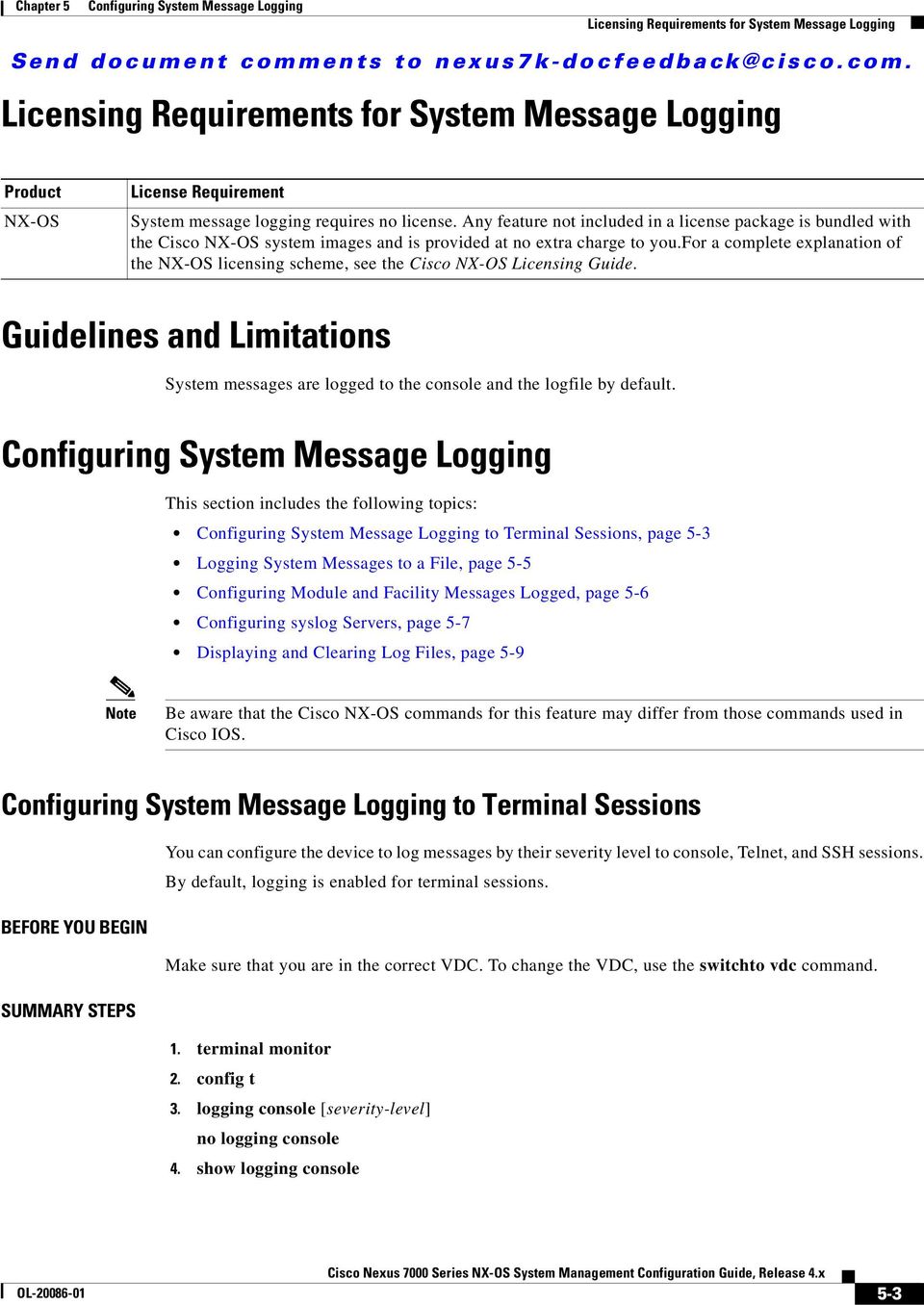
3 Chapter 5 Licensing Requirements for System Message Logging Licensing Requirements for System Message Logging Product NX-OS License Requirement System message logging requires no license. Any feature not included in a license package is bundled with the Cisco NX-OS system images and is provided at no extra charge to you.for a complete explanation of the NX-OS licensing scheme, see the Cisco NX-OS Licensing Guide. Guidelines and Limitations System messages are logged to the console and the logfile by default. This section includes the following topics: to Terminal Sessions, page 5-3 Logging System Messages to a File, page 5-5 Configuring Module and Facility Messages Logged, page 5-6 Configuring syslog Servers, page 5-7 Displaying and Clearing Log Files, page 5-9 Note Be aware that the Cisco NX-OS commands for this feature may differ from those commands used in Cisco IOS. to Terminal Sessions You can configure the device to log messages by their severity level to console, Telnet, and SSH sessions. By default, logging is enabled for terminal sessions. BEFORE YOU BEGIN Make sure that you are in the correct VDC. To change the VDC, use the switchto vdc command. SUMMARY STEPS 1. terminal monitor 2. config t 3. logging console [severity-level] no logging console 4. show logging console 5-3
4 Chapter 5 5. logging monitor [severity-level] no logging monitor 6. show logging monitor 7. copy running-config startup-config Step 1 Step 2 Step 3 Step 4 Step 5 Step 6 Step 7 terminal monitor switch# terminal monitor config t switch# config t Enter configuration commands, one per line. End with CNTL/Z. switch(config)# logging console [severity-level] switch(config)# logging console 3 no logging console [severity-level] switch(config)# no logging console show logging console switch(config)# show logging console logging monitor [severity-level] switch(config)# logging monitor 3 no logging monitor [severity-level] switch(config)# no logging monitor show logging monitor switch(config)# show logging monitor copy running-config startup-config switch(config)# copy running-config startup-config Enables the device to log messages to the console. Places you in global configuration mode. Configures the device to log messages to the console session based on a specified severity level or higher. Severity levels, which can range from 0 to 7, are listed in Table 5-1. If the severity level is not specified, the default of 2 is used. Disables the device s ability to log messages to the console. (Optional) Displays the console logging configuration. Enables the device to log messages to the monitor based on a specified severity level or higher. The configuration applies to Telnet and SSH sessions. Severity levels, which can range from 0 to 7, are listed in Table 5-1. If the severity level is not specified, the default of 2 is used. Disables logging messages to Telnet and SSH sessions. (Optional) Displays the monitor logging configuration. (Optional) Copies the running configuration to the startup configuration. 5-4

5 Chapter 5 Logging System Messages to a File BEFORE YOU BEGIN SUMMARY STEPS You can configure the device to log system messages to a file. By default, system messages are logged to the file log:messages. For information about displaying and clearing log files, see the Displaying and Clearing Log Files section on page 5-9. Make sure that you are in the correct VDC. To change the VDC, use the switchto vdc command. 1. config t 2. logging logfile logfile-name severity-level [size bytes] no logging logfile [logfile-name severity-level [size bytes]] 3. show logging info 4. copy running-config startup-config Step 1 Step 2 Step 3 Step 4 config t switch# config t Enter configuration commands, one per line. End with CNTL/Z. switch(config)# logging logfile logfile-name severity-level [size bytes] switch(config)# logging logfile my_log 6 no logging logfile [logfile-name severity-level [size bytes]] switch(config)# no logging logfile show logging info switch(config)# show logging info copy running-config startup-config switch(config)# copy running-config startup-config Places you in global configuration mode. Configures the name of the log file used to store system messages and the minimum severity level to log. You can optionally specify a maximum file size. The default severity level is 5 and the file size is Severity levels are listed in Table 5-1. The file size is from 4096 to bytes. Disables logging to the log file. (Optional) Displays the logging configuration. (Optional) Copies the running configuration to the startup configuration. 5-5

6 Chapter 5 Configuring Module and Facility Messages Logged You can configure the severity level and time-stamp units of messages logged by modules and facilities. BEFORE YOU BEGIN Make sure that you are in the correct VDC. To change the VDC, use the switchto vdc command. SUMMARY STEPS 1. config t 2. logging module [severity-level] no logging module 3. show logging module 4. logging level facility severity-level no logging level [facility severity-level] 5. show logging level [facility] 6. logging timestamp {microseconds milliseconds seconds} no logging timestamp {microseconds milliseconds seconds} 7. show logging timestamp 8. copy running-config startup-config Step 1 Step 2 Step 3 config t switch# config t Enter configuration commands, one per line. End with CNTL/Z. switch(config)# logging module [severity-level] switch(config)# logging module 3 no logging module [severity-level] switch(config)# no logging module show logging module switch(config)# show logging module Places you in global configuration mode. Enables module log messages that have the specified severity level or higher. Severity levels, which range from 0 to 7, are listed in Table 5-1. If the severity level is not specified, the default of 5 is used. Disables module log messages. (Optional) Displays the module logging configuration. 5-6
![show logging module 4. logging level facility severity-level no logging level [facility severity-level] 5. show logging level [facility] 6.](/docs-images/44/17450512/images/page_6.jpg "logging timestamp {microseconds milliseconds seconds} no logging timestamp {microseconds milliseconds seconds} 7. show logging timestamp 8.")
7 Chapter 5 Step 4 Step 5 logging level facility severity-level switch(config)# logging level aaa 2 no logging level [facility severity-level] switch(config)# no logging level aaa 3 show logging level [facility] switch(config)# show logging level aaa Step 6 logging timestamp {microseconds milliseconds seconds} Step 7 Step 8 switch(config)# logging timestamp milliseconds no logging timestamp {microseconds milliseconds seconds} switch(config)# no logging timestamp milliseconds show logging timestamp switch(config)# show logging timestamp copy running-config startup-config switch(config)# copy running-config startup-config Enables logging messages from the specified facility that have the specified severity level or higher. The facilities are listed in the Cisco Nexus 7000 Series NX-OS System Management Reference. Severity levels, which range from 0 to 7, are listed in Table 5-1. To apply the same severity level to all facilities, use the all facility. For defaults, see the show logging level command. Resets the logging severity level for the specified facility to its default level. If you do not specify a facility and severity level, the device resets all facilities to their default levels. (Optional) Displays the logging level configuration and the system default level by facility. If you do not specify a facility, the device displays levels for all facilities. Sets the logging time-stamp units. By default, the units are seconds. Note This command applies to logs that are kept in the switch. It does not apply to the external logging server. Resets the logging time-stamp units to the default of seconds. Note This command applies to logs that are kept in the switch. It does not apply to the external logging server. (Optional) Displays the logging time-stamp units configured. (Optional) Copies the running configuration to the startup configuration. Configuring syslog Servers You can configure up to three syslog servers that reference remote systems where you want to log system messages. Note We recommend that you configure the syslog server to use the management virtual routing and forwarding (VRF) instance. For more information on VRFs, see the Cisco Nexus 7000 Series NX-OS Unicast Routing Configuration Guide, Release 4.x. 5-7

8 Chapter 5 BEFORE YOU BEGIN Make sure that you are in the correct VDC. To change the VDC, use the switchto vdc command. SUMMARY STEPS 1. config t 2. logging server host [severity-level [use-vrf vrf-name]] no logging server host 3. show logging server 4. copy running-config startup-config Step 1 config t Places you in global configuration mode. Step 2 switch# config t Enter configuration commands, one per line. End with CNTL/Z. switch(config)# logging server host [severity-level [use-vrf vrf-name]] Example 1: switch(config)# logging server Example 2: switch(config)# logging server 2001::)db*::3 5 use-vrf red no logging server host Configures a syslog server at the specified hostname or IPv4 or IPv6 address. You can limit logging of messages to a particular VRF by using the use-vrf keyword. In Cisco NX-OS Release 4.2 or higher, the default VRF is default. Severity levels, which range from 0 to 7, are listed in Table 5-1. The default outgoing facility is local7. Example 1 forwards all messages on facility local 7. Example 2 forwards messages with severity level 5 or lower for VRF red. Removes the logging server for the specified host. Step 3 Step 4 switch(config)# no logging server host show logging server switch(config)# show logging server copy running-config startup-config switch(config)# copy running-config startup-config (Optional) Displays the syslog server configuration. (Optional) Copies the running configuration to the startup configuration. You can configure a syslog server on a UNIX or Linux system by adding the following line to the /etc/syslog.conf file: facility.level <five tab characters> action 5-8

9 Chapter 5 Table 5-2 describes the syslog fields that you can configure.. Table 5-2 Field Facility Level Action syslog Fields in syslog.conf Description Creator of the message, which can be auth, authpriv, cron, daemon, kern, lpr, mail, mark, news, syslog, user, local0 through local7, or an asterisk (*) for all. These facility designators allow you to control the destination of messages based on their origin. Note Check your configuration before using a local facility. Minimum severity level at which messages are logged, which can be debug, info, notice, warning, err, crit, alert, emerg, or an asterisk (*) for all. You can use none to disable a facility. Destination for messages, which can be a filename, a hostname preceded by the at sign (@), a comma-separated list of users, or an asterisk (*) for all logged-in users. To configure a syslog server on a UNIX or Linux system, follow these steps: Step 1 Step 2 Step 3 Log debug messages with the local7 facility in the file /var/log/myfile.log by adding the following line to the /etc/syslog.conf file: debug.local7 /var/log/myfile.log Create the log file by entering these commands at the shell prompt: $ touch /var/log/myfile.log $ chmod 666 /var/log/myfile.log Make sure the system message logging daemon reads the new changes by checking myfile.log after entering this command: $ kill -HUP ~cat /etc/syslog.pid~ Displaying and Clearing Log Files You can display or clear messages in the log file and the NVRAM. BEFORE YOU BEGIN Make sure that you are in the correct VDC. To change the VDC, use the switchto vdc command. SUMMARY STEPS 1. show logging last number-lines 2. show logging logfile [start-time yyyy mmm dd hh:mm:ss] [end-time yyyy mmm dd hh:mm:ss] 3. show logging nvram [last number-lines] 4. clear logging logfile 5. clear logging nvram 5-9

10 Verifying System Message Logging Configuration Chapter 5 Step 1 Step 2 Step 3 Step 4 Step 5 show logging last number-lines switch# show logging last 40 show logging logfile [start-time yyyy mmm dd hh:mm:ss] [end-time yyyy mmm dd hh:mm:ss] switch# show logging logfile start-time 2007 nov 1 15:10:0 show logging nvram [last number-lines] switch# show logging nvram last 10 clear logging logfile switch# clear logging logfile clear logging nvram switch# clear logging nvram Displays the last number of lines in the logging file. You can specify from 1 to 9999 for the last number of lines. Displays the messages in the log file that have a time stamp within the span entered. If you do not enter an end time, the current time is used. You enter three characters for the month time field, and digits for the year and day time fields. Displays the messages in the NVRAM. To limit the number of lines displayed, you can enter the last number of lines to display. You can specify from 1 to 100 for the last number of lines. Clears the contents of the log file. Clears the logged messages in NVRAM. Verifying System Message Logging Configuration To display system message logging configuration information, perform one of the following tasks: show logging console show logging info show logging last number-lines show logging level [facility] show logging logfile [start-time yyyy mmm dd hh:mm:ss] [end-time yyyy mmm dd hh:mm:ss] show logging module show logging monitor show logging nvram [last number-lines] Displays the console logging configuration. Displays the logging configuration. Displays the last number of lines of the log file. Displays the facility logging severity level configuration. Displays the messages in the log file. Displays the module logging configuration. Displays the monitor logging configuration. Displays the messages in the NVRAM log. 5-10

11 Chapter 5 System Message Logging Example Configuration show logging server show logging timestamp Displays the syslog server configuration. Displays the logging time-stamp units configuration. switch(config)# show logging timestamp Logging timestamp: Seconds For detailed information about the fields in the output from these commands, see the Cisco Nexus 7000 Series NX-OS System Management Reference. System Message Logging Example Configuration This example shows how to configure system message logging: config t logging console 3 logging monitor 3 logging logfile my_log 6 logging module 3 logging level aaa 2 logging timestamp milliseconds logging distribute logging server logging server local3 logging commit copy running-config startup-config Default Settings Table 5-3 lists the default settings for system message logging parameters. Table 5-3 Default System Message Logging Parameters Parameters Default Console logging Enabled at severity level 2 Monitor logging Enabled at severity level 5 Log file logging Enabled to log messages at severity level 5 Module logging Enabled at severity level 5 Facility logging Enabled; for severity levels, see the Cisco Nexus 7000 Series NX-OS System Management Reference. Time-stamp units Seconds syslog server logging Disabled 5-11

12 Additional References Chapter 5 Additional References For additional information related to implementing system message logging, see the following sections: Related Documents, page 5-12 Standards, page 5-12 Related Documents Related Topic System messages CLI commands System messages Document Title Cisco NX-OS System Management Reference Cisco NX-OS System Messages Reference Standards Standards No new or modified standards are supported by this feature, and support for existing standards has not been modified by this feature. Title Feature History for System Message Logging Table 5-4 lists the release history for this feature. Table 5-4 Feature History for System Message Logging Feature Name Releases Feature Information IPv6 support 4.2(1) Added support for IPv6 syslog hosts. System Message Logging 4.0(1) This feature was introduced. 5-12

Configuring System Message Logging
 This chapter describes how to configure system message logging on the Cisco Nexus 5000 Series switch and contains the following sections: Information About System Message Logging, page 1, page 2 Verifying
Configuring System Message Logging
 CHAPTER 25 This chapter describes how to configure system message logging on the Catalyst 2960 switch. Note For complete syntax and usage information for the commands used in this chapter, see the Cisco
Send document comments to [email protected].
 CHAPTER 4 This chapter describes how to configure the Domain Name Server (DNS) client. This chapter includes the following sections: Information About DNS Clients, page 4-1 Licensing Requirements for DNS
Configuring NTP. Information About NTP. NTP Overview. Send document comments to [email protected]. CHAPTER
 3 CHAPTER This chapter describes how to configure the Network Time Protocol (NTP) on Cisco NX-OS devices. This chapter includes the following sections: Information About NTP, page 3-1 Licensing Requirements
Configuring ECMP for Host Routes
 CHAPTER 8 This chapter describes how to configure the equal-cost multipathing (ECMP) protocol for host routes on the Cisco NX-OS switch. This chapter includes the following sections: Information About
Configuring Password Encryption
 This chapter describes how to configure password encryption on Cisco NX-OS devices. This chapter includes the following sections: Finding Feature Information, page 1 Information About Password Encryption,
Configuring Password Encryption
 This chapter describes how to configure password encryption on Cisco NX-OS devices. This chapter includes the following sections: Information About Password Encryption, page 1 Licensing Requirements for
Configuring SSH and Telnet
 This chapter describes how to configure Secure Shell Protocol (SSH) and Telnet on Cisco NX-OS devices. This chapter includes the following sections: Finding Feature Information, page 1 Information About
Configuring NetFlow. Information About NetFlow. NetFlow Overview. Send document comments to [email protected]. CHAPTER
 CHAPTER 19 This chapter describes how to configure the NetFlow feature on Cisco NX-OS devices. This chapter includes the following sections: Information About NetFlow, page 19-1 Licensing Requirements
Configuring NetFlow. Information About NetFlow. NetFlow Overview. Send document comments to [email protected]. CHAPTER
 CHAPTER 16 This chapter describes how to configure the NetFlow feature on Cisco NX-OS devices. This chapter includes the following sections: Information About NetFlow, page 16-1 Licensing Requirements
Configuring System Message Logging
 CHAPTER 1 This chapter describes how to configure system message logging on the Cisco 4700 Series Application Control Engine (ACE) appliance. Each ACE contains a number of log files that retain records
System Message Logging
 System Message Logging This module describes how to configure system message logging on your wireless device in the following sections: Understanding System Message Logging, page 1 Configuring System Message
NAS 272 Using Your NAS as a Syslog Server
 NAS 272 Using Your NAS as a Syslog Server Enable your NAS as a Syslog Server to centrally manage the logs from all network devices A S U S T O R C O L L E G E COURSE OBJECTIVES Upon completion of this
Configuring Logging. Information About Logging CHAPTER
 52 CHAPTER This chapter describes how to configure and manage logs for the ASASM/ASASM and includes the following sections: Information About Logging, page 52-1 Licensing Requirements for Logging, page
Configuring MPLS Hub-and-Spoke Layer 3 VPNs
 CHAPTER 23 This chapter describes how to configure a hub-and-spoke topology for Multiprotocol Layer Switching (MPLS) Layer 3 virtual private networks (VPNs) on Cisco NX-OS devices. This chapter includes
Network Monitoring & Management Log Management
 Network Monitoring & Management Log Management Network Startup Resource Center www.nsrc.org These materials are licensed under the Creative Commons Attribution-NonCommercial 4.0 International license (http://creativecommons.org/licenses/by-nc/4.0/)
Lab 11.5.6.1 Configure Syslog on AP
 Lab 11.5.6.1 Configure Syslog on AP Estimated Time: 25 minutes Number of Team Members: Students will work in teams of two. Objective In this lab, students will configure and use syslog logging to monitor
Configuring the Scheduler
 CHAPTER 10 This chapter describes how to configure the scheduler on Cisco NX-OS devices. This chapter includes the following sections: Information About the Scheduler, page 10-1 Licensing Requirements
Syslog & xinetd. Stephen Pilon
 Syslog & xinetd Stephen Pilon What create log files? Logging Policies Throw away all data immediately Reset log files at periodic intervals Rotate log files, keeping data for a fixed time Compress and
Configuring NTP. Information about NTP. NTP Overview. Send document comments to [email protected]. CHAPTER
 CHAPTER 8 This chapter describes how to configure the Network Time Protocol (NTP) and includes the following topics: Information about NTP, page 8-1 Prerequisites for NTP, page 8-3 Configuration Guidelines
Lab 5.5 Configuring Logging
 Lab 5.5 Configuring Logging Learning Objectives Configure a router to log to a Syslog server Use Kiwi Syslog Daemon as a Syslog server Configure local buffering on a router Topology Diagram Scenario In
Planning Maintenance for Complex Networks
 Planning Maintenance for Complex Networks CCNP TSHOOT: Maintaining and Troubleshooting IP Networks Olga Torstensson TSHOOT v6 1 Maintenance Models and Methodologies A network engineer s job description
Network Monitoring. SAN Discovery and Topology Mapping. Device Discovery. Topology Mapping. Send documentation comments to [email protected].
 32 CHAPTER The primary purpose of Fabric Manager is to manage the network. In particular, SAN discovery and network monitoring are two of its key network management capabilities. This chapter contains
Monitoring the Firewall Services Module
 24 CHAPTER This chapter describes how to configure logging and SNMP for the FWSM. It also describes the contents of system log messages and the system log message format. This chapter does not provide
Configuring Syslog Server on Cisco Routers with Cisco SDM
 Configuring Syslog Server on Cisco Routers with Cisco SDM Syslog is a standard for forwarding log messages in an Internet Protocol (IP) computer network. It allows separation of the software that generates
Network Monitoring & Management Log Management
 Network Monitoring & Management Log Management Network Startup Resource Center www.nsrc.org These materials are licensed under the Creative Commons Attribution-NonCommercial 4.0 International license (http://creativecommons.org/licenses/by-nc/4.0/)
Chapter 1: Planning Maintenance for Complex Networks. TSHOOT v6 Chapter 1 2007 2010, Cisco Systems, Inc. All rights reserved.
 : Planning Maintenance for Complex Networks CCNP TSHOOT: Maintaining and Troubleshooting IP Networks TSHOOT v6 1 Objectives Evaluate commonly-practiced models and methodologies for network maintenance
Connecting to the Firewall Services Module and Managing the Configuration
 CHAPTER 3 Connecting to the Firewall Services Module and This chapter describes how to access the command-line interface and work with the configuration. This chapter includes the following sections: Connecting
Configuring MAC ACLs
 Send document comments to [email protected] 12 CHAPTER This chapter describes how to configure MAC access lists (ACLs) on NX-OS devices. This chapter includes the following sections: Information
Network Monitoring & Management Log Management
 Network Monitoring & Management Log Management These materials are licensed under the Creative Commons Attribution-Noncommercial 3.0 Unported license (http://creativecommons.org/licenses/by-nc/3.0/) Syslog
ISE TACACS+ Configuration Guide for Cisco NX-OS Based Network Devices. Secure Access How-to User Series
 ISE TACACS+ Configuration Guide for Cisco NX-OS Based Network Devices Secure Access How-to User Series Author: Technical Marketing, Policy and Access, Security Business Group, Cisco Systems Date: January
Linux System Administration. System Administration Tasks
 System Administration Tasks User and Management useradd - Adds a new user account userdel - Deletes an existing account usermod - Modifies an existing account /etc/passwd contains user name, user ID #,
IPv6 Diagnostic and Troubleshooting
 8 IPv6 Diagnostic and Troubleshooting Contents Introduction.................................................. 8-2 ICMP Rate-Limiting........................................... 8-2 Ping for IPv6 (Ping6)..........................................
Cisco Setting Up PIX Syslog
 Table of Contents Setting Up PIX Syslog...1 Introduction...1 Before You Begin...1 Conventions...1 Prerequisites...1 Components Used...1 How Syslog Works...2 Logging Facility...2 Levels...2 Configuring
Enabling Remote Access to the ACE
 CHAPTER 2 This chapter describes how to configure remote access to the Cisco Application Control Engine (ACE) module by establishing a remote connection by using the Secure Shell (SSH) or Telnet protocols.
Backing Up and Restoring Data
 Backing Up and Restoring Data Cisco Unity Express backup and restore functions use an FTP server to store and retrieve data. The backup function copies the files from the Cisco Unity Express application
Security Correlation Server Quick Installation Guide
 orrelogtm Security Correlation Server Quick Installation Guide This guide provides brief information on how to install the CorreLog Server system on a Microsoft Windows platform. This information can also
Configuring Auto Policy-Based Routing
 This chapter describes how to configure the Auto Policy-Based Routing (PBR) feature on the Citrix NetScaler Application Delivery Controller (ADC) appliance to ensure that return traffic from the real server
Lab Configuring Syslog and NTP (Instructor Version)
 (Instructor Version) Instructor Note: Red font color or Gray highlights indicate text that appears in the instructor copy only. Topology Addressing Table Objectives Device Interface IP Address Subnet Mask
Red Condor Syslog Server Configurations
 Red Condor Syslog Server Configurations May 2008 2 Red Condor Syslog Server Configurations This application note describes the configuration and setup of a syslog server for use with the Red Condor mail
Computer Security DD2395 http://www.csc.kth.se/utbildning/kth/kurser/dd2395/dasakh10/
 Computer Security DD2395 http://www.csc.kth.se/utbildning/kth/kurser/dd2395/dasakh10/ Fall 2010 Sonja Buchegger [email protected] Lecture 13, Dec. 6, 2010 Auditing Security Audit an independent review and examination
Configuring Role-Based Access Control
 5 CHAPTER This chapter describes how to configure role-based access control (RBAC) on the Cisco Application Control Engine (ACE) module. This chapter contains the following sections: Information About
Configuring Network QoS
 CHAPTER 8 This chapter describes how to configure a network qos policy for the Cisco NX-OS device in the Data Center Bridging (DCB) network. This chapter includes the following sections: Note This chapter
CSE/ISE 311: Systems Administra5on Logging
 Logging Por$ons courtesy Ellen Liu Outline Introduc$on Finding log files Syslog: the system event logger Linux logrotate tool Condensing log files to useful informa$on Logging policies 13-2 Who and Why
3.1 Connecting to a Router and Basic Configuration
 3.1 Connecting to a Router and Basic Configuration Objective This lab will focus on the ability to connect a PC to a router in order to establish a console session and observe the user interface. A console
Objectives Understand Cisco IOS system architecture components. Work with the Cisco IOS Command Line Interface (CLI) and common commands.
 Objectives Understand Cisco IOS system architecture components. Work with the Cisco IOS Command Line Interface (CLI) and common commands. Learn about Cisco IOS troubleshooting techniques. Understand upgrading
Using Debug Commands
 Using Debug Commands This chapter explains how you use debug commands to diagnose and resolve internetworking problems. Specifically, it covers the following topics: Entering debug commands Using the debug?
Using Debug Commands
 CHAPTER 1 Using Debug Commands This chapter explains how you use debug commands to diagnose and resolve internetworking problems. Specifically, it covers the following topics: Entering debug commands Using
NTP and Syslog in Linux. Kevin Breit
 NTP and Syslog in Linux Kevin Breit Network Time Protocol (NTP) Synchronizes computer time with highly accurate time services NTP Architecture Utilizes time server hierarchy. Each level is called a stratum.
Encrypted Preshared Key
 The feature allows you to securely store plain text passwords in type 6 (encrypted) format in NVRAM. Feature History for Release Modification 12.3(2)T This feature was introduced. Finding Support Information
Lab 4.2.4 Advanced Telnet Operations
 Lab 4.2.4 Advanced Telnet Operations Objective Use the telnet command to remotely access other routers. Verify that the application layer between the source and the destination is working properly. Suspend
Telnet, Console and AUX Port Passwords on Cisco Routers Configuration Example
 Telnet, Console and AUX Port Passwords on Cisco Routers Configuration Example Document ID: 45843 Introduction Prerequisites Requirements Components Used Conventions Background Information Configure Passwords
Lab 1.2.3 Review of Basic Router Configuration with RIP. Objective. Background / Preparation. General Configuration Tips
 Lab 1.2.3 Review of Basic Router Configuration with RIP Objective Cable and configure workstations and routers Setup IP addressing scheme using Class B networks Configure Routing Information Protocol (RIP)
Configuring Static and Dynamic NAT Translation
 This chapter contains the following sections: Network Address Translation Overview, page 1 Information About Static NAT, page 2 Dynamic NAT Overview, page 3 Timeout Mechanisms, page 4 NAT Inside and Outside
Presented by Henry Ng
 Log Format Presented by Henry Ng 1 Types of Logs Content information, alerts, warnings, fatal errors Source applications, systems, drivers, libraries Format text, binary 2 Typical information in Logs Date
Encrypted Preshared Key
 Encrypted Preshared Key The Encrypted Preshared Key feature allows you to securely store plain text passwords in type 6 (encrypted) format in NVRAM. Feature History for Encrypted Preshared Key Release
Cisco IOS Embedded Syslog Manager Command Reference
 Americas Headquarters Cisco Systems, Inc. 170 West Tasman Drive San Jose, CA 95134-1706 USA http://www.cisco.com Tel: 408 526-4000 800 553-NETS (6387) Fax: 408 527-0883 THE SPECIFICATIONS AND INFORMATION
How To Configure Syslog over VPN
 How To Configure Syslog over VPN Applicable Version: 10.00 onwards Overview Cyberoam provides extensive logging capabilities for traffic, system and network protection functions. Detailed log information
Users Manual OP5 Logserver 1.2.1
 Users Manual OP5 Logserver 1.2.1 Copyright(C) 2003-2005 OP5 AB, www.op5.se Page 1 of 13 Table of Contents Users Manual...1 OP5 Logserver 1.2.1...1 Introduction... 3 Who is this manual for... 3 Syslog protocol...
Router Lab Reference Guide
 Router Lab Reference Guide 1 PURPOSE AND GOALS The routing lab allows testing different IP-related protocols and solutions in a close to live environment. You can learn how to configure Cisco routers and
Lab 7.2.9 Load Balancing Across Multiple Paths
 Lab 7.2.9 Load Balancing Across Multiple Paths Objective Configure Load balance across multiple paths. Observe the load balancing process. Background/Preparation Cable a network similar to the one in the
File Transfers. Contents
 A File Transfers Contents Overview..................................................... A-2................................... A-2 General Switch Software Download Rules..................... A-3 Using
Configuring NetFlow. Information About NetFlow. Send document comments to [email protected]. CHAPTER
 CHAPTER 11 Use this chapter to configure NetFlow to characterize IP traffic based on its source, destination, timing, and application information, to assess network availability and performance. This chapter
Configuring DHCP Snooping
 CHAPTER 19 This chapter describes how to configure Dynamic Host Configuration Protocol (DHCP) snooping on Catalyst 4500 series switches. It provides guidelines, procedures, and configuration examples.
EMC VNX Version 8.1 Configuring and Using the Audit Tool on VNX for File P/N 300-015-126 Rev 01 August, 2013
 EMC VNX Version 8.1 Configuring and Using the Audit Tool on VNX for File P/N 300-015-126 Rev 01 August, 2013 This technical note contains information on these topics: Executive summary... 2 Introduction...
Configuring LocalDirector Syslog
 Configuring LocalDirector Syslog Document ID: 22178 LocalDirector is now End of Sale. Refer to the Cisco LocalDirector 400 Series bulletins for more information. Contents Introduction Before You Begin
Topics. CIT 470: Advanced Network and System Administration. Logging Policies. System Logs. Throwing Away. How to choose a logging policy?
 Topics CIT 470: Advanced Network and System Administration Logging 1. System logs 2. Logging policies 3. Finding logs 4. Syslog 5. Syslog servers 6. Log monitoring CIT 470: Advanced Network and System
Kiwi SyslogGen. A Freeware Syslog message generator for Windows. by SolarWinds, Inc.
 Kiwi SyslogGen A Freeware Syslog message generator for Windows by SolarWinds, Inc. Kiwi SyslogGen is a free Windows Syslog message generator which sends Unix type Syslog messages to any PC or Unix Syslog
Security Correlation Server Quick Installation Guide
 orrelog Security Correlation Server Quick Installation Guide This guide provides brief information on how to install the CorreLog Server system on a Microsoft Windows platform. This information can also
Configuring iscsi Multipath
 CHAPTER 13 Revised: April 27, 2011, OL-20458-01 This chapter describes how to configure iscsi multipath for multiple routes between a server and its storage devices. This chapter includes the following
Lab 3 Routing Information Protocol (RIPv1) on a Cisco Router Network
 Lab 3 Routing Information Protocol (RIPv1) on a Cisco Router Network CMPE 150 Fall 2005 Introduction Today you are going to be thrown into using Cisco s Internetwork Operating System (IOS) to configure
syslog - centralized logging
 syslog - centralized logging David Morgan A logging system Conforming programs emit categorized messages Messages are candidates for logging syslog handles the logging performed by syslogd per /etc/syslog.conf
Lab 2.3.3 Configure Intrusion Prevention on the PIX Security Appliance
 Lab 2.3.3 Configure Intrusion Prevention on the PIX Security Appliance Objective Scenario Topology In this lab exercise, the students will complete the following tasks: Configure the use of Cisco Intrusion
Using RADIUS Agent for Transparent User Identification
 Using RADIUS Agent for Transparent User Identification Using RADIUS Agent Web Security Solutions Version 7.7, 7.8 Websense RADIUS Agent works together with the RADIUS server and RADIUS clients in your
Using Debug Commands
 C H A P T E R 1 Using Debug Commands This chapter explains how you can use debug commands to diagnose and resolve internetworking problems. Specifically, it covers the following topics: Entering debug
Configuring the Content Routing Software
 CHAPTER 2 This chapter describes the basic steps for configuring the Content Router software. Performing a Basic Startup Configuration After you physically install the Content Router hardware, configure
Enterprise Content Management System Monitor. Server Debugging Guide. 20.09.2013 CENIT AG Bettighofer, Stefan
 Enterprise Content Management System Monitor Server Debugging Guide 20.09.2013 CENIT AG Bettighofer, Stefan 1 Table of Contents 1 Table of Contents... 2 2 Overview... 3 3 The Server Status View... 3 4
Basic System. Vyatta System. REFERENCE GUIDE Using the CLI Working with Configuration System Management User Management Logging VYATTA, INC.
 VYATTA, INC. Vyatta System Basic System REFERENCE GUIDE Using the CLI Working with Configuration System Management User Management Logging Vyatta Suite 200 1301 Shoreway Road Belmont, CA 94002 vyatta.com
Lab 8.3.13 Configure Cisco IOS Firewall CBAC
 Lab 8.3.13 Configure Cisco IOS Firewall CBAC Objective Scenario Topology In this lab, the students will complete the following tasks: Configure a simple firewall including CBAC using the Security Device
Managing ACE Software Licenses
 CHAPTER 2 This chapter describes how to manage the software licenses for your Cisco 4700 Series Application Control Engine (ACE) appliance. It contains the following major sections: Information about ACE
Licensing Cisco NX-OS Software Features
 Licensing Cisco NX-OS Software This publication contains information related to licensing types, options, procedures, installation, and management for the Cisco NX-OS software. Cisco Data Center Network
Configuring Network Load Balancing for vethernet
 Configuring Network Load Balancing for vethernet This chapter contains the following sections: Information About Microsoft Network Load Balancing, page 1 Guidelines and Limitations, page 1 Configuring
You can specify IPv4 and IPv6 addresses while performing various tasks in this feature. The resource
 The feature enables the configuration of a Virtual Private Network (VPN) routing and forwarding instance (VRF) table so that the domain name system (DNS) can forward queries to name servers using the VRF
Lab 5.3.9b Managing Router Configuration Files Using TFTP
 Lab 5.3.9b Managing Router Configuration Files Using TFTP Device Host Name Interface IP Address Subnet Mask R1 R1 Fast Ethernet 0/0 172.17.0.1 255.255.0.0 Objectives Download and install TFTP server software.
PT Activity: Configure Cisco Routers for Syslog, NTP, and SSH Operations
 PT Activity: Configure Cisco Routers for Syslog, NTP, and SSH Operations Instructor Version Topology Diagram Addressing Table Device Interface IP Address Subnet Mask Default Gateway Switch Port R1 FA0/1
Procedure: You can find the problem sheet on Drive D: of the lab PCs. Part 1: Router & Switch
 University of Jordan Faculty of Engineering & Technology Computer Engineering Department Computer Networks Laboratory 907528 Lab. 2 Network Devices & Packet Tracer Objectives 1. To become familiar with
Chapter 6 Updating Software Images and Configuration Files
 Chapter 6 Updating Software Images and Configuration Files This chapter describes how to copy and save configuration files and software image files. Downloading and Uploading a Software Image on a TFTP
Configuring PROFINET
 CHAPTER 9 This chapter describes how to configure the PROFINET feature on the Cisco IE 3000 switch. Understanding PROFINET, page 9-1, page 9-4 Displaying the PROFINET Configuration, page 9-5 Troubleshooting
Eventlog to Syslog v4.5 Release 4.5 Last revised September 29, 2013
 Eventlog to Syslog v4.5 Release 4.5 Last revised September 29, 2013 This product includes software developed by Purdue University. The Eventlog to Syslog utility is a windows service originally created
Lab 3.5.1: Basic VLAN Configuration (Instructor Version)
 (Instructor Version) Topology Diagram Addressing Table Device (Hostname) Interface IP Address Subnet Mask Default Gateway S1 VLAN 99 172.17.99.11 255.255.255.0 N/A S2 VLAN 99 172.17.99.12 255.255.255.0
Alert Logic Log Manager
 whitepaper Alert Logic Log Manager Configuring Log Sources for Best Practice Reports CONTENTS Introduction 1 Best Practice Reports in Log Manager 2 Active Directory 2 Databases 2 Network Devices 2 Windows
Configuring Basic Settings
 CHAPTER 9 This chapter describes how to configure basic settings on your ASASM that are typically required for a functioning configuration. This chapter includes the following sections: Configuring the
Transferring Files Using HTTP or HTTPS
 Transferring Files Using HTTP or HTTPS First Published: May 5, 2005 Last Updated: May 14, 2009 Cisco IOS Release 12.4 provides the ability to transfer files between your Cisco IOS software-based device
Configuring Network Load Balancing for vethernet
 Configuring Network Load Balancing for vethernet This chapter contains the following sections: Information About Microsoft Network Load Balancing, page 1 Guidelines and Limitations, page 1 Configuring
Implementing Secure Shell
 Secure Shell (SSH) is an application and a protocol that provides a secure replacement to the Berkeley r-tools. The protocol secures sessions using standard cryptographic mechanisms, and the application
Syslog Monitoring Feature Pack
 AdventNet Web NMS Syslog Monitoring Feature Pack A dventnet, Inc. 5645 G ibraltar D rive Pleasanton, C A 94588 USA P ho ne: +1-925-924-9500 Fa x : +1-925-924-9600 Em ail:[email protected] http://www.adventnet.com
Troubleshooting the Firewall Services Module
 25 CHAPTER This chapter describes how to troubleshoot the FWSM, and includes the following sections: Testing Your Configuration, page 25-1 Reloading the FWSM, page 25-6 Performing Password Recovery, page
Using LiveAction with Cisco Secure ACS (TACACS+ Server)
 LiveAction Application Note Using LiveAction with Cisco Secure ACS (TACACS+ Server) September 2012 http://www.actionpacked.com Table of Contents 1. Introduction... 1 2. Cisco Router Configuration... 2
Managing Storage Services Modules
 CHAPTER 3 This chapter describes how to manage the Storage Services Module (SSM) and provides information about SSI images. This chapter includes the following sections: SSM Overview, page 3-1 Initial
Tracking Network Changes Using Change Audit
 CHAPTER 14 Change Audit tracks and reports changes made in the network. Change Audit allows other RME applications to log change information to a central repository. Device Configuration, Inventory, and