
E- Safety and Digital Photography - College ICT
|
|
|
- Olivia Maryann Pitts
- 5 years ago
- Views:
Transcription
1 Penrice Academy E-SAFETY POLICY Adopted by the Governing Body on June 2013 Review date: June 2015 Scope of the Policy This policy applies to all members of the College community (including staff, students, volunteers, parents / carers, visitors, community users) who have access to and are users of College ICT systems, both in and out of College. Roles and Responsibilities The following section outlines the roles and responsibilities for e-safety of individuals and groups within the College: Governors: Governors are responsible for the approval of the E-Safety Policy and for reviewing the effectiveness of the policy. This will be carried out by the Governors receiving regular information about e-safety incidents and monitoring reports. Principal and Leadership Team: The Principal is responsible for ensuring the safety (including e-safety) of members of the school community, though the day to day responsibility for e-safety will be delegated to the E-Safety Co-ordinator. The Principal and Leadership Team are responsible for ensuring that the E-Safety Coordinator and other relevant staff receive suitable CPD to enable them to carry out their e-safety roles and to train other colleagues, as relevant The Leadership Team will receive regular monitoring reports from the E-Safety Coordinator. The Principal and E-safety coordinator are aware of the procedures to be followed in the event of a serious e-safety allegation being made against a member of staff. E-Safety Coordinator: takes day to day responsibility for e-safety issues and has a leading role in establishing and reviewing the College e-safety policies and documents ensures that all staff are aware of the procedures that need to be followed in the event of an e-safety incident taking place. provides training and advice for staff liaises with the Local Authority liaises with College ICT technical staff receives reports of e-safety incidents and creates a log of incidents to inform future e- safety developments attends relevant meeting / committee of Governors reports regularly to Leadership Team STAFF POLICY - STAFF E-SAFETY Page 1 of 9

2 Network Manager / Technical staff: The Network Manager is responsible for ensuring: that the College s ICT infrastructure is secure and is not open to misuse or malicious attack that the College meets the e-safety technical requirements outlined in the SWGfL Security Policy and Acceptable Usage Policy and any relevant Local Authority E-Safety Policy and guidance that users may only access the College s networks through a properly enforced password protection policy, in which passwords are regularly changed SWGfL is informed of issues relating to the filtering applied by the Grid that he / she keeps up to date with e-safety technical information in order to effectively carry out their e-safety role and to inform and update others as relevant that the use of the network / Virtual Learning Environment (VLE) / remote access / is regularly monitored in order that any misuse / attempted misuse can be reported to the E-Safety Co-ordinator for investigation that monitoring software and systems are implemented and updated as agreed in College policies Teaching and Support Staff are responsible for ensuring that: they have an up-to-date awareness of e-safety matters and of the current College e- safety policy and practices they have read and understood the College Staff Acceptable Use Policy (AUP) they report any suspected misuse or problem to the E-Safety Co-ordinator for investigation digital communications with students ( / Virtual Learning Environment (VLE) / voice) should be on a professional level and are carried out using official College systems e-safety issues are embedded in all aspects of the curriculum and other College activities students understand and follow the College e-safety and acceptable use policy students have a good understanding of research skills and the need to avoid plagiarism and uphold copyright regulations they monitor ICT activity in lessons, extra-curricular and extended College activities they are aware of e-safety issues related to the use of mobile phones, cameras and hand held devices and that they monitor their use and implement current College policies with regard to these devices in lessons where internet use is pre-planned students should be guided to sites checked as suitable for their use and that processes are in place for dealing with any unsuitable material that is found in internet searches Child Protection Officer should be trained in e-safety issues and be aware of the potential for serious child protection issues to arise from: sharing of personal data access to illegal / inappropriate materials inappropriate on-line contact with adults / strangers potential or actual incidents of grooming cyber-bullying STAFF POLICY - STAFF E-SAFETY Page 2 of 9
3 Students are responsible for using the College ICT systems in accordance with the Student Acceptable Use Policy have a good understanding of research skills and the need to avoid plagiarism and uphold copyright regulations need to understand the importance of reporting abuse, misuse or access to inappropriate materials and know how to do so will be expected to know and understand College policies on the use of mobile phones, digital cameras and hand held devices. They should also know and understand College policies on the taking / use of images and on cyber-bullying. should understand the importance of adopting good e-safety practice when using digital technologies out of College and realise that the College s E-Safety Policy covers their actions out of College, if related to their membership of the College Parents / Carers Parents / Carers play a crucial role in ensuring that their children understand the need to use the internet / mobile devices in an appropriate way. Research shows that many parents and carers do not fully understand the issues and are less experienced in the use of ICT than their children. The College will therefore take every opportunity to help parents understand these issues through newsletters, letters, website / VLE and information about national and local e-safety campaigns and literature. Parents and carers will be responsible for: endorsing (by signature) the Student Acceptable Use Policy accessing the College website / VLE in accordance with the relevant College Acceptable Use Policy. E-Safety education will be provided in the following ways: A planned e-safety programme is provided as part of ICT and other lessons and should be regularly revisited this will cover both the use of ICT and new technologies in College and outside College Key e-safety messages are reinforced as part of a planned programme of assemblies Students are taught in all lessons to be critically aware of the materials / content they access on-line and be guided to validate the accuracy of information Students are helped to understand the need for the student AUP and encouraged to adopt safe and responsible use of ICT, the internet and mobile devices both within and outside College Students are taught to acknowledge the source of information used and to respect copyright when using material accessed on the internet Rules for use of ICT systems / internet will be posted in all ICT rooms and displayed on log-on screens Staff will act as good role models in their use of ICT, the internet and mobile devices The College will therefore seek to provide information and awareness to parents and carers through: Letters, newsletters, web site, VLE Parents evenings STAFF POLICY - STAFF E-SAFETY Page 3 of 9
4 Curriculum E-safety should be a focus in all areas of the curriculum and staff should reinforce e-safety messages in the use of ICT across the curriculum. in lessons where internet use is pre-planned, it is best practice that students should be guided to sites checked as suitable for their use and that processes are in place for dealing with any unsuitable material that is found in internet searches. Where students are allowed to freely search the internet, eg using search engines, staff should be vigilant in monitoring the content of the websites the young people visit. It is accepted that from time to time, for good educational reasons, students may need to research topics (eg racism, drugs, discrimination) that would normally result in internet searches being blocked. In such a situation, staff can request that the Network Manager (and other relevant person) can temporarily remove those sites from the filtered list for the period of study. Any request to do so, should be auditable, with clear reasons for the need. Students should be taught in all lessons to be critically aware of the materials / content they access on-line and be guided to validate the accuracy of information Students should be taught to acknowledge the source of information used and to respect copyright when using material accessed on the internet. Use of digital and video images - Photographic, Video When using digital images, staff should inform and educate students about the risks associated with the taking, use, sharing, publication and distribution of images. In particular they should recognise the risks attached to publishing their own images on the internet eg on social networking sites. Staff are allowed to take digital / video images to support educational aims, but must follow College policies concerning the sharing, distribution and publication of those images. Those images should only be taken on College equipment, the personal equipment of staff should not be used for such purposes. Care should be taken when taking digital / video images that students are appropriately dressed and are not participating in activities that might bring the individuals or the College into disrepute. Students must not take, use, share, publish or distribute images of others without their permission Photographs published on the website, or elsewhere that include students will be selected carefully and will comply with good practice guidance on the use of such images. Consent from parents/ carers will be sought at the start of each year regarding the use of images. Student s work can only be published with the permission of the student and parents or carers. Data Protection Staff must ensure that they: At all times take care to ensure the safe keeping of personal data, minimising the risk of its loss or misuse. Use personal data only on secure password protected computers and other devices, ensuring that they are properly logged-off at the end of any session in which they are using personal data. Transfer data using encryption and secure password protected devices. STAFF POLICY - STAFF E-SAFETY Page 4 of 9

5 When personal data is stored on any portable computer system, USB stick or any other removable media: the data must be encrypted and password protected the device must be password protected (many memory sticks / cards and other mobile devices cannot be password protected) the device must offer approved virus and malware checking software the data must be securely deleted from the device, in line with College policy (below) once it has been transferred or its use is complete Communications A wide range of rapidly developing communications technologies has the potential to enhance learning. The following table shows how the College currently considers the benefit of using these technologies for education outweighs their risks / disadvantages: Staff & other adults Students Communication Technologies Mobile phones may be brought to school Use of mobile phones in lessons Use of mobile phones in social time Taking photos on mobile phones or other camera devices Use of hand held devices eg PDAs, PSPs Use of personal addresses in school, or on school network Use of school for personal s Allowed Allowed at certain times Allowed for selected staff Not allowed Allowed Allowed at certain times Allowed with staff permission * * * * Use of chat rooms / facilities Use of instant messaging Use of social networking sites Use of blogs Not allowed STAFF POLICY - STAFF E-SAFETY Page 5 of 9
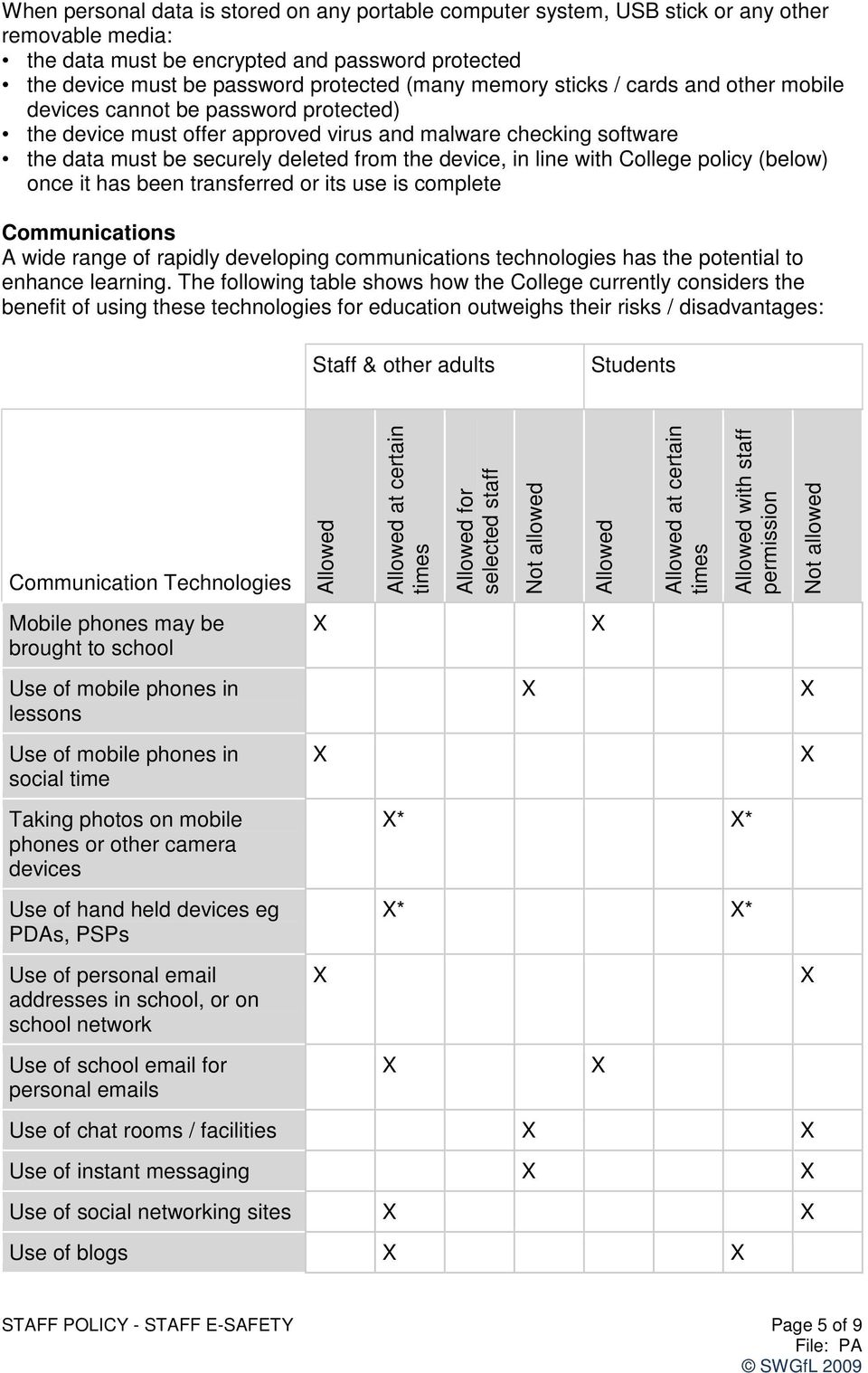
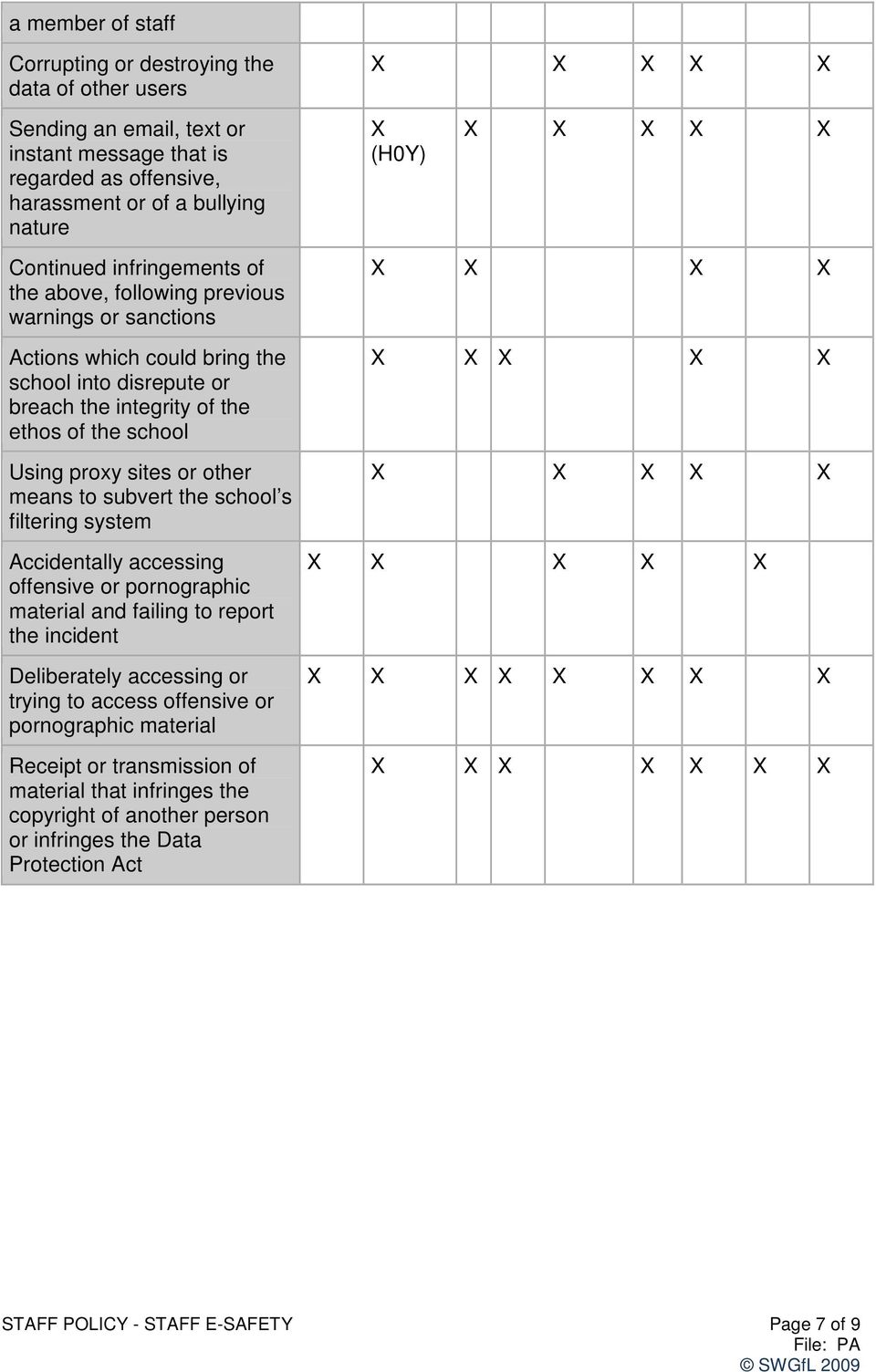
6 Use of mobile phones in social times by staff should be discreet and not visible to students. There are occasions when the curriculum requires students to take photos. This must be with the express permission of staff and in accordance with College polices. Responding to incidents of misuse by students Actions / Sanctions Incidents: Refer to class teacher / tutor Refer to Head of Department / Head of Year / other Refer to Principal Refer to Police Refer to technical support staff for action re filtering / security etc Inform parents / carers Removal of network / internet access rights* Warning Further sanction eg detention / exclusion Deliberately accessing or trying to access material that could be considered illegal (see list in earlier section on unsuitable / inappropriate activities). Unauthorised use of noneducational sites during lessons Unauthorised use of mobile phone / digital camera / other handheld device Unauthorised use of social networking / instant messaging / personal Unauthorised downloading or uploading of files Allowing others to access school network by sharing username and passwords Attempting to access or accessing the school network, using another student s account Attempting to access or accessing the school network, using the account of * * STAFF POLICY - STAFF E-SAFETY Page 6 of 9

7 a member of staff Corrupting or destroying the data of other users Sending an , text or instant message that is regarded as offensive, harassment or of a bullying nature (H0Y) Continued infringements of the above, following previous warnings or sanctions Actions which could bring the school into disrepute or breach the integrity of the ethos of the school Using proxy sites or other means to subvert the school s filtering system Accidentally accessing offensive or pornographic material and failing to report the incident Deliberately accessing or trying to access offensive or pornographic material Receipt or transmission of material that infringes the copyright of another person or infringes the Data Protection Act STAFF POLICY - STAFF E-SAFETY Page 7 of 9
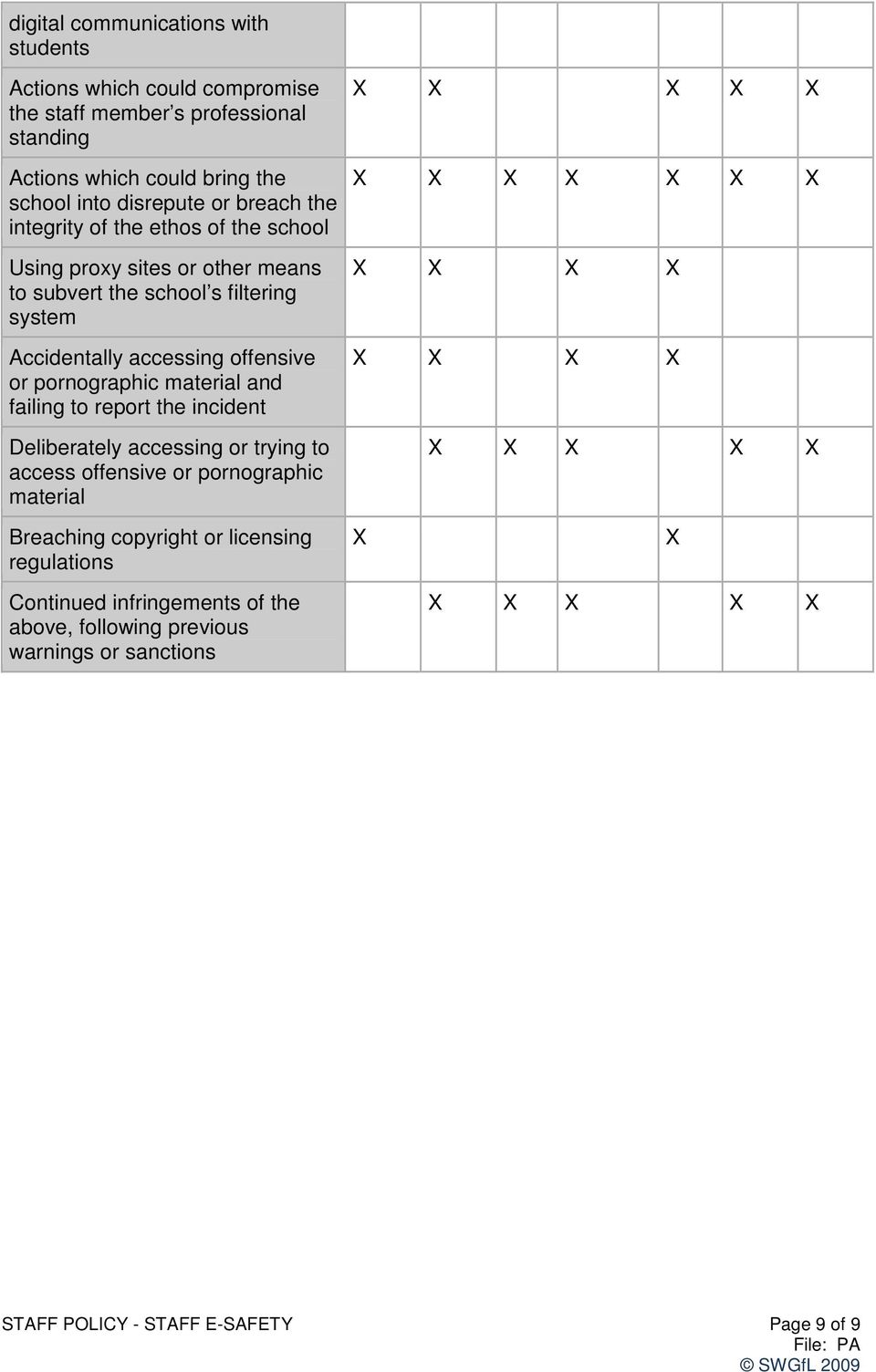
8 Responding to incidents of misuse by staff Actions / Sanctions Incidents: Refer to line managerr Refer to Principal Refer to Police Refer to Technical Support Staff for action re filtering etc Warning Suspension Disciplinary action Deliberately accessing or trying to access material that could be considered illegal (see list in earlier section on unsuitable / inappropriate activities). Excessive or inappropriate personal use of the internet / social networking sites / instant messaging / personal Unauthorised downloading or uploading of files Allowing others to access school network by sharing username and passwords or attempting to access or accessing the school network, using another person s account Careless use of personal data eg holding or transferring data in an insecure manner Deliberate actions to breach data protection or network security rules Corrupting or destroying the data of other users or causing deliberate damage to hardware or software Sending an , text or instant message that is regarded as offensive, harassment or of a bullying nature Using personal / social networking / instant messaging / text messaging to carrying out STAFF POLICY - STAFF E-SAFETY Page 8 of 9

9 digital communications with students Actions which could compromise the staff member s professional standing Actions which could bring the school into disrepute or breach the integrity of the ethos of the school Using proxy sites or other means to subvert the school s filtering system Accidentally accessing offensive or pornographic material and failing to report the incident Deliberately accessing or trying to access offensive or pornographic material Breaching copyright or licensing regulations Continued infringements of the above, following previous warnings or sanctions STAFF POLICY - STAFF E-SAFETY Page 9 of 9
John of Rolleston Primary School
 John of Rolleston Primary School E-Safety Policy February 2014 Contents 1 Introduction... 2 2 Aims... 2 3 Roles and Responsibilities... 2 3.1 Governors... 2 3.2 The Headteacher... 2 3.3 The Senior Leadership
Roles and Responsibilities The following section outlines the e-safety roles and responsibilities of individuals and groups within Heath Farm School:
 Introduction This e-safety policy was approved by the School Senior Leadership Team: January2015 The implementation of this e-safety policy will be monitored by the: E-Safety Coordinator, Senior Leadership
Development / Monitoring / Review of this Policy. Schedule for Development / Monitoring / Review
 Blakeley Heath Primary School E-Safety Policy Development / Monitoring / Review of this Policy This e-safety policy has been developed by a working group made up of: Headteacher Coordinator Staff including
Wilsthorpe Community School
 Wilsthorpe Community School Online Safety Policy REVIEWED March 2016 Introduction This Online Safety Policy has been written by the school, building on LA policy and government guidance. It has been agreed
4. The Importance of Internet Use in the Primary Curriculum
 Policy Contents 1. Introduction 2. Disability 3. Writing and Reviewing the e-safety Policy 4. The Importance of Internet Use in the Primary Curriculum 5. The Benefits of Using the Internet in Education
Endon High School. e-safety policy
 Endon High School e-safety policy Development / Monitoring / Review of this Policy This e-safety policy has been developed by a Endon High School s esafety Group Mr A. Skelding, Assistant Headteacher,
Archbishop Beck Catholic Sports College
 Archbishop Beck Catholic Sports College E Safety Policy Ratified: May 2014 Ratified by: Governors Staffing Committee Review: May 2017-1 - - 2 - 1. Development/Monitoring/Review of this Policy This e-safety
Related Policies & Documents. Reference Material. 1. Introduction. 2. Roles & Responsibilities
 Category Security Document Name e-safety Procedures Accountable Body Brantridge School Governing Body Reference SY.P2.02 Date Ratified Version 2.1 Last Update March 2015 Related Policies & Documents Document
1. Introduction. 2. Roles & Responsibilities. Governing Body. Headteacher
 Category Security Document Name E-safety Procedures Accountable Body Grafham Grange School Governing Body Reference SY.P2.01 Date Ratified 27 th August 2015 Version 1.0 Last Update August 2015 Related
St Vincent s Catholic Primary School e-safety Policy
 St Vincent s Catholic Primary School e-safety Policy Policy e-safety Policy Date January 2015 Date of review January 2016 Signed Chair of Governors Signed Headteacher Effective Practice in e-safety E-safety
Deputy Head Acting Head of Care ICT Manager Director of Social Care Estates Manager. Richard Green Lyn Henwood Tyrone da Silva Denise Banks Rob Taylor
 Chailey Heritage Foundation encompasses; Chailey Heritage School Chailey Heritage Residential Futures@Chailey Heritage Simon Yates Richard Green Lyn Henwood Tyrone da Silva Denise Banks Rob Taylor Headteacher
The Bishop s Stortford High School Internet Use and Data Security Policy
 Internet Acceptance Use and Data Security Policy Last Updated: 08/10/2012 Date of Next Review: 08/10/2015 Approved by GB: 10/10/2012 Responsible Committee: Student Welfare and Development Internet Acceptable
FREDERICK BREMER SCHOOL E SAFETY POLICY 2015-6. Date of Issue: June 2015 Ratified: For review:
 FREDERICK BREMER SCHOOL E SAFETY POLICY 2015-6 Date of Issue: June 2015 Ratified: For review: Index Contents Page Number Introduction 3 Aim of the policy 3 Roles and Responsibilities 4 Frederick Bremer
360 Degree Safe Cymru SELF REVIEW TOOL
 360 Degree Safe Cymru SELF REVIEW TOOL UPDATED OCTOBER 2014 The South West Grid for Learning Trust, Belvedere House, Woodwater Park, Pynes Hill, Exeter, EX2 5WS. Tel: 0845 601 3203 Email: [email protected]
Acceptable Use of ICT Policy. Staff Policy
 Acceptable Use of ICT Policy Staff Policy Contents INTRODUCTION 3 1. ACCESS 3 2. E-SAFETY 4 3. COMPUTER SECURITY 4 4. INAPPROPRIATE BEHAVIOUR 5 5. MONITORING 6 6. BEST PRACTICE 6 7. DATA PROTECTION 7 8.
Simon Langton Grammar School for Boys E-Safety Policy
 Background to the Policy Simon Langton Grammar School for Boys E-Safety Policy The E Safety Policy and its implementation will be reviewed annually. Our E Safety Policy has been written by the school,
St Bernadette s Catholic Primary School. E-Safety Policy
 St Bernadette s Catholic Primary School E-Safety Policy St Bernadette s Catholic Primary School - e-safety policy Our Vision St Bernadette s Catholic Primary School embrace the positive impact and educational
Berwick Academy Policy on E Safety
 Berwick Academy Policy on E Safety Overview The purpose of this document is to describe the rules and guidance associated with E Safety and the procedures to be followed in the event of an E Safety incident
EMERSON PARK ACADEMY
 1 ACCEPTABLE USE POLICY (AUP) EMERSON PARK ACADEMY (Signature of Headteacher) 1 St September 2014 2 ACCEPTABLE USE POLICY EMERSON PARK ACADEMY 'Acceptable and Responsible Use of ICT Resources' Contents
Acceptable Use Policy (AUP) School Computing
 Acceptable Use Policy (AUP) School Computing Approved by the Governing Body on Spring 2015 Review Date Spring 2018 Headteacher: Mr Ian Holmes BSc. (Hons) NPQH HOLBROOK PRIMARY SCHOOL Holbrook School Lane,
St. John the Baptist Catholic Primary School
 St. John the Baptist Catholic Primary School E-Safety Policy Prepared by: Tom Ferguson Created: February 2012 Date of next intended review: February 2013 Approved by Full Governing Body on: MISSION STATEMENT
Networking and Social Media Policy
 Networking and Social Media Policy 1 Objectives This policy sets out the Millfields Community School policy on social networking. New technologies are an integral part of our lives and are powerful tools
Dene Community School of Technology Staff Acceptable Use Policy
 Policy Overview Dene Community School of Technology The school provides computers for use by staff as an important tool for teaching, learning, and administration of the school. Use of school computers,
SUTTON COLDFIELD GRAMMAR SCHOOL FOR GIRLS E SAFETY AND SECURITY POLICY DATE: MARCH 2015 REVISION DATE: MARCH 2017
 SUTTON COLDFIELD GRAMMAR SCHOOL FOR GIRLS E SAFETY AND SECURITY POLICY 1 DATE: MARCH 2015 REVISION DATE: MARCH 2017 Background / rationale New technologies have become integral to the lives of children
Acceptable Use of ICT Policy. Learner School Policy
 Acceptable Use of ICT Policy Learner School Policy Contents INTRODUCTION 3 1. ACCESS 3 2. E-SAFETY 3 3. COMPUTER SECURITY 4 4. INAPPROPRIATE BEHAVIOUR 4 5. MONITORING 5 6. SOCIAL NETWORKING 5 7. LEGAL
Policies & Procedures. Moat Community College E-Safety Policy
 Moat Community College E-Safety Policy Vision Statement Moat Community College embraces the positive impact and educational benefits that can be achieved through appropriate use of the Internet and associated
GENERATION SAFE 360 SELF ASSESSMENT: PRINTABLE VERSION. Page 1
 Page 1 Contents 1. Introduction 2. How to use the 360 Self Assessment 3. Links to documents and resources 4. Acknowledgements 5. 360 Self Assessment 6. Report Sheet Introduction The development and expansion
SCHOOL E-SAFETY SELF REVIEW TOOL
 SCHOOL E-SAFETY SELF REVIEW TOOL The South West Grid for Learning, Belvedere House, Woodwater Park, Pynes Hill, Exeter, Devon, UK, EX2 5WS. Tel: 0845 601 3203 Fax: 01392 366 494 Email: [email protected]
Protocol for Acceptable Use of Internet and Email by Staff E-Safety Procedures Safeguarding & Child Protection Policy
 Category Document Name Accountable Body Security E-Safety Policy RADIUS Trust Reference SY.P2 Date Ratified 11 th December 2014 Version 3.1 Last Update 31 st March 2015 Related Documents Document Protocol
Social Networking Policy
 Social Networking Policy Policy Date June 2013 Review Date June 2015 Section 1: Introduction 1.1 Objectives 1.1.1 This policy sets out West Row Primary School s policy on social networking. New technologies
[Name of School] E-safety policy
![[Name of School] E-safety policy](/thumbs/30/14454703.jpg "[Name of School] E-safety policy") [Name of School] E-safety policy Adopted: Review date: Note: Blue boxes contain advisory notes which should be read and deleted. These indicate where schools need to make decisions or choices. This policy
[Name of School] E-safety policy Adopted: Review date: Note: Blue boxes contain advisory notes which should be read and deleted. These indicate where schools need to make decisions or choices. This policy
BANK VIEW HIGH SCHOOL
 BANK VIEW HIGH SCHOOL POLICY & PROCEDURES FOR E-SAFETY Chair of Governors Date./ / 20. Review Date./ / 20. Bank View High School E-Safety Policy INTRODUCTION Our policy applies to all students, staff,
Cyber-safety Agreements are also an educative tool and shall be used as a resource to support the professional development of the school community.
 Cyber Safety Policy Rationale Mannum Community College places a high priority on providing its school community with Internet facilities, ICT devices and equipment which will benefit student learning outcomes
Trinity High School Acceptable Use Policy (AUP) for Computers and the school networks.
 Trinity High School Acceptable Use Policy (AUP) for Computers and the school networks. This policy is divided into 5 main areas: 1. Aims and Objectives of the AUP 2. General Computer Use 3. Use of the
Students are expected to have regard to this policy at all times to protect the ipads from unauthorised access and damage.
 Penrice Academy Acceptable Use Policy for Mobile Digital Devices including ipads September 2014 Date of Review: May 2015 Introduction Penrice Academy ( The Academy ) may grant a licence to use ipads or
How To Ensure Your School Is Safe Online
 Ivy Road Primary School Policy for e-safety Updated - 2014 1. Introduction Pupils interact with the internet and other communications technologies such as mobile phones on a daily basis. The exchange of
Computer Network & Internet Acceptable Usage Policy. Version 2.0
 Computer Network & Internet Acceptable Usage Policy Version 2.0 April 2009 Document Version Control Version Date Description 1.0 Sept 2003 Original Version (adopted prior to establishment of BoM) 2.0 March
Witton Middle School
 Witton Middle School e-safety Policy This e-safety Policy has been put together using guidance from the Worcestershire Local Authority (LA) and is based on the guidance provided by Becta. Our Vision Witton
Sibford School Student Computer Acceptable Use Policy
 Introduction Sibford School Student Computer Acceptable Use Policy The use of the latest technology is actively encouraged at Sibford School but with this comes a responsibility to protect both students
How To Deal With Social Media At Larks Hill J & I School
 LARKS HILL JUNIOR & INFANT SCHOOL Social Media Policy Written: Reviewed Autumn Term 2015 Larks Hill J & I School Social Media Policy 1. Introduction For the purposes of this policy, social media refers
ICT Acceptable use Policy. Coláiste Mhuirlinne/ Merlin College Doughiska, Galway City.
 ICT Acceptable use Policy. Coláiste Mhuirlinne/ Doughiska, Galway City. Ratified by the Board of Management on 27 th May, 2015 Table of Contents Introduction... 2 General... 2 Internet Use... 3 Email...
School Information Security Policy
 School Information Security Policy Created By: Newport Education Service Date Created: 22 December 2009 Version: V1.0 Contents Background... 3 IT Infrastructure... 3 IT Access... 3 Acceptable use policy...
ICT Security Policy for Schools
 WOLGARSTON HIGH SCHOOL Staffordshire ICT Security Policy for Schools A Statement of Policy Author: Readability Score: Frequency of Review: J Ablewhite 15-16 years Annually Amendments 2014 JA Page 1 of
SCHOOL ONLINE SAFETY SELF REVIEW TOOL
 SCHOOL ONLINE SAFETY SELF REVIEW TOOL UPDATED February 2016 The South West Grid for Learning, Belvedere House, Woodwater Park, Pynes Hill, Exeter, EX2 5WS. Tel: 0844 381 4772 Email: [email protected]
2.0 Emended due to the change to academy status Review Date. ICT Network Security Policy Berwick Academy
 Version History Author Approved Committee Version Status date Eddie Jefferson 09/15/2009 Full Governing 1.0 Final Version Body Eddie Jefferson 18/08/2012 Full Governing Body 2.0 Emended due to the change
Social Networking Policy
 Feltonfleet School Social Networking Policy Introduction Objectives This policy sets out Feltonfleet School s policy on social networking. New technologies are an integral part of our lives and are powerful
Internet Use Policy and Code of Conduct
 Internet Use Policy and Code of Conduct UNIQUE REF NUMBER: AC/IG/023/V1.1 DOCUMENT STATUS: Agreed by Audit Committee 18 July 2013 DATE ISSUED: July 2013 DATE TO BE REVIEWED: July 2014 1 P age AMENDMENT
Online Communication Services - TAFE NSW Code of Expected User Behaviour
 Online Communication Services - TAFE NSW Code of Expected User Behaviour State of NSW, Department of Education and Training, TAFE Customer Support Copies of this document may be made for use in connection
Students Acceptable Use Policy for Electronic Resources Rules Summary
 Students Acceptable Use Policy for Electronic Resources Rules Summary This document summarizes the rules for acceptable use of CAG electronic resources (known collectively as CAGNet). All students must
How To Behave At A School
 THE LONG EATON SCHOOL ICT Security Policy Rules, expectations and advice for students APPROVED BY GOVERNORS: Student ICT Policy Introduction Educational establishments are using computer facilities more
Calwell High School Acceptable Use of ICT and Bring Your Own Device (BYOD) Guidelines & Agreement
 111 CASEY CRESCENT, CALWELL CALWELL WWW.CALWELLHS.ACT.EDU.AU / INFO@CALWELL HS.ACT.EDU.AU PH: 02 6205 6833 FAX 02 6205 6827 COURAGE SELF-DISCIPLINE RESPECT ACHIEVEMENT Calwell High School Acceptable Use
ST. MARGARET CLITHEROW ROMAN CATHOLIC PRIMARY SCHOOL E-SAFETY POLICY
 ST. MARGARET CLITHEROW ROMAN CATHOLIC PRIMARY SCHOOL www.clitherow.herts.sch.uk [email protected] E-SAFETY POLICY Ownership: Curriculum Committee Document Date: October 2012 Review Date: October
Great Horwood C.E. Combined School E-Safety/ ICT Acceptable Use Policy
 Great Horwood C.E. Combined School E-Safety/ ICT Acceptable Use Policy November 2013 This policy was adopted on:... Date of last review:... Signed:... Great Horwood C.E. Combined School Page 1 Acceptable