
PAYMENT CARD INDUSTRY (PCI) COMPLIANCE WORKBOOK. PCI SAQ TYPE C-VT Level 4. Virtual Terminals
|
|
|
- Baldwin Lamb
- 9 years ago
- Views:
Transcription
1 COAST GUARD MORALE WELL-BEING AND RECREATION (MWR) PROGRAM PAYMENT CARD INDUSTRY (PCI) COMPLIANCE WORKBOOK PCI SAQ TYPE C-VT Level 4 Virtual Terminals 31 December 2014

2 COPYRIGHT NOTICE Copyright by TurboPCI, Inc. All rights reserved. No part of this TurboPCI Easy Workbook or the accompanying TurboPCI Easy Workbook CD may be reproduced or transmitted in any form by any means, electronic, mechanical or otherwise, including recording, or by any information storage and retrieval system, without the prior written consent of TurboPCI, Inc. The products are for internal use of the purchaser and TurboPCI, Inc. authorized users of this workbook only. TurboPCI, Inc. has authorized Vaco Risk Solutions, LLC distribution rights. To request permission or obtain additional information, please contact TurboPCI, Inc. at (321) This TurboPCI Easy Workbook, the accompanying TurboPCI Easy Workbook CD and any accompanying seminar have been prepared to provide the purchaser with information on the topics covered in the workbook. The workbook is being provided with the understanding that TurboPCI, Inc. is not engaged, nor does the TurboPCI Easy Workbook or the accompanying TurboPCI Easy Workbook CD provide, legal advice or any other professional services. The TurboPCI Easy Workbook, the accompanying TurboPCI Easy Workbook CD and any accompanying seminar are not intended to be, and should not be used as a substitute for seeking professional services or advice. Warning: The unauthorized reproduction or distribution of this copyrighted work is illegal. Criminal copyright infringement, including infringement without monetary gain, is investigated by the FBI and is punishable by up to 5 years in federal prison and a fine of $250,000.

3 Table of Contents INTRODUCTION... 2 Chapter What is PCI DSS?... 4 The Payment Card Industry Security Standards Council... 4 The Payment Card Industry Data Security Standard... 5 Who Must Comply and Why... 5 Reporting PCI DSS Compliance... 6 Who Do You Report To?... 6 Chapter How Does PCI DSS Affect You and Your Business?... 8 Merchant Level Classification... 8 SAQs for Merchant Levels 2, 3 and How Do I Know If My Business Is Compliant? How Soon Do I Have To Be Compliant? Staying Organized Chapter SAQ C-VT What Do You Have To Prove? Step-By-Step Instructions Filling Out Your SAQ and Your AOC Chapter Staying Compliant How to Stay Compliant What Lies Ahead Appendix A Glossary of PCI DSS Terms Appendix B Policies and MWR Forms for PCI DSS Appendix C Sample of a MWR Compliance Calendar... 65

4 INTRODUCTION This workbook is designed to provide an easy, cost-effective solution for compliance with the Payment Card Industry Data Security Standard (PCI DSS). It is written for the U. S. Coast Guard MWR Programs that accept credit/debit cards as a form of payment for goods and/or services. The author, Dr. Suzanne Miller, is a Qualified Security Assessor who is trained and certified by the Payment Card Industry Security Standards Council. The TurboPCI Easy Workbook is divided into two parts. Part 1, PCI DSS - What's It All About, introduces you to the Payment Card Industry, their requirements and who is responsible for overseeing your compliance. Part 2, PCI DSS Steps to Compliance, covers how your MWR Program may be classified under the PCI DSS and leads you through the steps you need to take for compliance. In addition to all the things you will learn in this text, Part 2 of the workbook has alert features designed to trigger necessary actions from you: ALERT KEY PCI DSS Requirement Necessary Step 2

5 Part 1 PCI DSS What s It All About? Before you begin your compliance work, there are some basic facts we need to cover. In this section we will stroll through the basics of the Payment Card Industry Data Security Standard, its history and its fundamentals. 3

6 CHAPTER 1 What is PCI DSS? In this chapter Understand what PCI DSS is Learn how it was established Discover how it affects you See who verifies your PCI DSS compliance The Payment Card Industry Security Standards Council In order to understand the Payment Card Industry Data Security Standard (PCI DSS), you need a brief history of how it came to be. Before 2006 all payment card brands, (such as Visa, MasterCard, Discover, JCB and American Express) had created and were individually managing their own programs to fight payment card fraud. As payment card fraud increased, costs to the brands reached billions of dollars. The brands realized they needed to band together to develop enforceable and consistent standards to protect cardholder information. The Payment Card Industry Security Standards Council (PCI SSC) was formed from this united front. Today, the PCI SSC dictates best-practice security standards for payment card information, card swiping devices, and applications that process, store or transmit cardholder data. These best-practice security standards are called: Payment Card Industry Data Security Standard (PCI DSS) Payment Application Data Security Standard (PA-DSS) Pin Transaction Security Standard (PTS) Point-to-Point Encryption Standard (P2PE) These standards affect: merchants who accept payment card information (which is called cardholder data); and companies that have access to cardholder data from merchants because they provide services to those merchants. These service companies are called service providers or processors. The PCI SSC also developed two certification programs for their Standards: QSA The Qualified Security Assessor Program trains and certifies information security professionals to be experts in understanding, protecting and evaluating the use of cardholder information. 4

7 ASV The Authorized Scanning Vendor Program is designed to train and certify companies in the PCI SSC s ways of checking for vulnerability. For more information about the PCI SSC, visit The Payment Card Industry Data Security Standard The PCI DSS consists of twelve basic requirements. Each requirement has subrequirements. Some of these requirements may not apply to your MWR Program. Chapter 2 of Part 1 explains which requirements will apply to your program. Part 2 will explain what your Command must do to meet the requirements. The twelve basic requirements are: 1. Install and maintain a firewall configuration to protect cardholder data 2. Do not use vendor-supplied defaults for system passwords and other security parameters 3. Protect stored cardholder data 4. Encrypt transmission of cardholder data across open, public networks (such as the Internet) 5. Protect all systems against malware and regularly update anti-virus software or programs 6. Develop and maintain secure systems and applications 7. Restrict access to cardholder data by business need to know 8. Identify and authenticate access to system components 9. Restrict physical access to cardholder data 10. Track and monitor all access to network resources and cardholder data 11. Regularly test security systems and processes 12. Maintain a policy that addresses information security for all personnel For complete documentation of the PCI DSS requirements and sub-requirements, you can download the PCI Data Security Standard (called PCI DSS v.3.0 ) from Who Must Comply and Why All merchants, service providers, banks, web hosting companies and transaction processors who process, store, or transmit cardholder data are required to comply with the PCI DSS. How your MWR Program processes payment cards determines which 5

8 of the requirements apply to your program To become compliant, you need to follow the procedures set by the PCI DSS for every requirement that applies to your program. Because the Data Security Standard is a complex document, we have written this workbook to lead you through what you need to do to become compliant. If you can t meet a requirement by following the steps in the workbook, you ll need to develop your own steps for meeting the requirement, and a timetable for completing the steps. This is called a remediation plan. If you have not successfully completed your plan by the time you have to report your compliance, your MWR Program will not be compliant with the PCI DSS. To be compliant, all requirements must be in place and operating effectively. As a merchant if you do not comply with the PCI DSS, the brands have the legal right to take action against your Command. Also, if payment card fraud or identity theft happens because your MWR Program was not compliant at the time of the incident, the brands will hold your Command responsible. Your Command will be subjected to financial penalties and legal action, not to mention severe loss of your MWR Programs business reputation. The brands have the legal right to take away your MWR Program ability to accept payment cards. Reporting PCI DSS Compliance All merchants are required to report their compliance every year. There are two ways to report: you can complete a Self-Assessment Questionnaire (SAQ) or you can have an onsite audit performed by a QSA (Qualified Security Assessor). There are 8 types of SAQs and each has its own instructions as well as Attestation of Compliance (AOC). They are: SAQ A, SAQ A-EP, SAQ B, SAQ B-IP, SAQ C, SAQ C-VT, SAQ D and SAQ P2PE. How your business processes payment transactions determines which SAQ is right for you. If you are required to have an onsite audit, it is because either your business processes more than 6 million transactions a year, has suffered a security breach, or was selected by the brands to have a QSA audit. This workbook is only designed for merchants who report using the SAQ and who do not require an onsite QSA audit. In Chapter 2 we will determine which of the 8 SAQs you will use. Who Do You Report To? As a merchant, you signed up to accept payment cards with a bank, credit union, merchant services company, card processors or an independent sales organization (ISO). In the payment card industry, these companies are referred to as acquirers. The brands have made the acquirers responsible for making sure that all of their merchants 6

9 are compliant with the PCI DSS. If you have not already heard from your acquirer, they will be contacting you. Your acquirer is responsible for yearly reviewing and keeping a copy of your AOC. 7
10 CHAPTER 2 How Does PCI DSS Affect You and Your Business? In this chapter Learn how to classify your business Discover what you need to do to be compliant Discover how PCI DSS compliance affects you Find out how often you need to verify compliance Merchant Level Classification Each brand of the payment card industry classifies merchants by the number of transactions they process during a year; and each brand has its own classification definition. Since Visa is the most widely accepted payment card, we will use the Visa classifications when we talk about merchant levels. The levels are: Level 1 Merchants who process greater than 6 million transactions a year Level 2 Merchants who process at least 1 million but less than 6 million transactions per year Level 3 e-commerce (Internet website) merchants who process at least 20,000 but less than 1 million transactions a year Level 4 e-commerce merchants who process less than 20,000 transactions a year, and all other merchants who process up to 1 million transactions a year If you are not sure which level applies to your business, contact your acquirer. It has been determined that your MWR Program is a LEVEL: 4 If you are a Level 1 merchant, you are required to have an onsite audit performed by a QSA or a PCI SSC trained internal auditor. Because you are required to have an onsite audit, this workbook is not for you. 8

11 Merchants who are Level 2, 3, and 4 are required to fill out and submit a SAQ with an AOC on an annual basis. If a Level 2, 3 or 4 merchant has experienced a security breach of cardholder data, the merchant may be required to have an onsite audit by a QSA. Remember a brand or acquirer can require your business to have an onsite audit by a QSA at any time. SAQs for Merchant Levels 2, 3 and 4 Now that you know your Level, let s look at how you process payment cards to determine the SAQ that is right for your business. Your SAQ with the AOC are the forms you will complete and submit every year to report your compliance with the PCI DSS. Your SAQ also identifies for you the PCI DSS requirements that apply to your business. Use this table and the descriptions below it to decide which SAQ applies to you: SAQ A A-EP B B-IP C C-VT P2PE - HW Description Card-not-present merchants (e-commerce or mail/telephone-order) that have fully outsourced all cardholder data functions to PCI DSS compliant third-party service providers, with no electronic storage, processing, or transmission of any cardholder data on the merchant s systems or premises. Not applicable if cards are taken face-to-face. E-commerce merchants who outsource all payment processing to PCI DSS validated third parties, and who have a website(s) that doesn t directly receive cardholder data but that can impact the security of the payment transaction. No electronic storage, processing, or transmission of any cardholder data on the merchant s systems or premises. Applicable only to e-commerce. Merchants using only: Imprint machines with no electronic cardholder data storage; and/or Standalone, dial-out terminals with no electronic cardholder data storage. Not applicable to e-commerce. Merchants using only standalone, PTS-approved payment terminals with an IP connection to the payment processor, with no electronic cardholder data storage. Not applicable to e-commerce. Merchants with payment application systems connected to the Internet, no electronic cardholder data storage. Not applicable to e-commerce. Merchants who manually enter a single transaction at a time via a keyboard into an Internet-based virtual terminal solution that is provided and hosted by a PCI DSS validated third-party service provider. No electronic cardholder data storage. Not applicable to e-commence. Merchants using only hardware payment terminals that are included in and managed via a validated, PCI SSC-listed P2PE solution, with no electronic 9
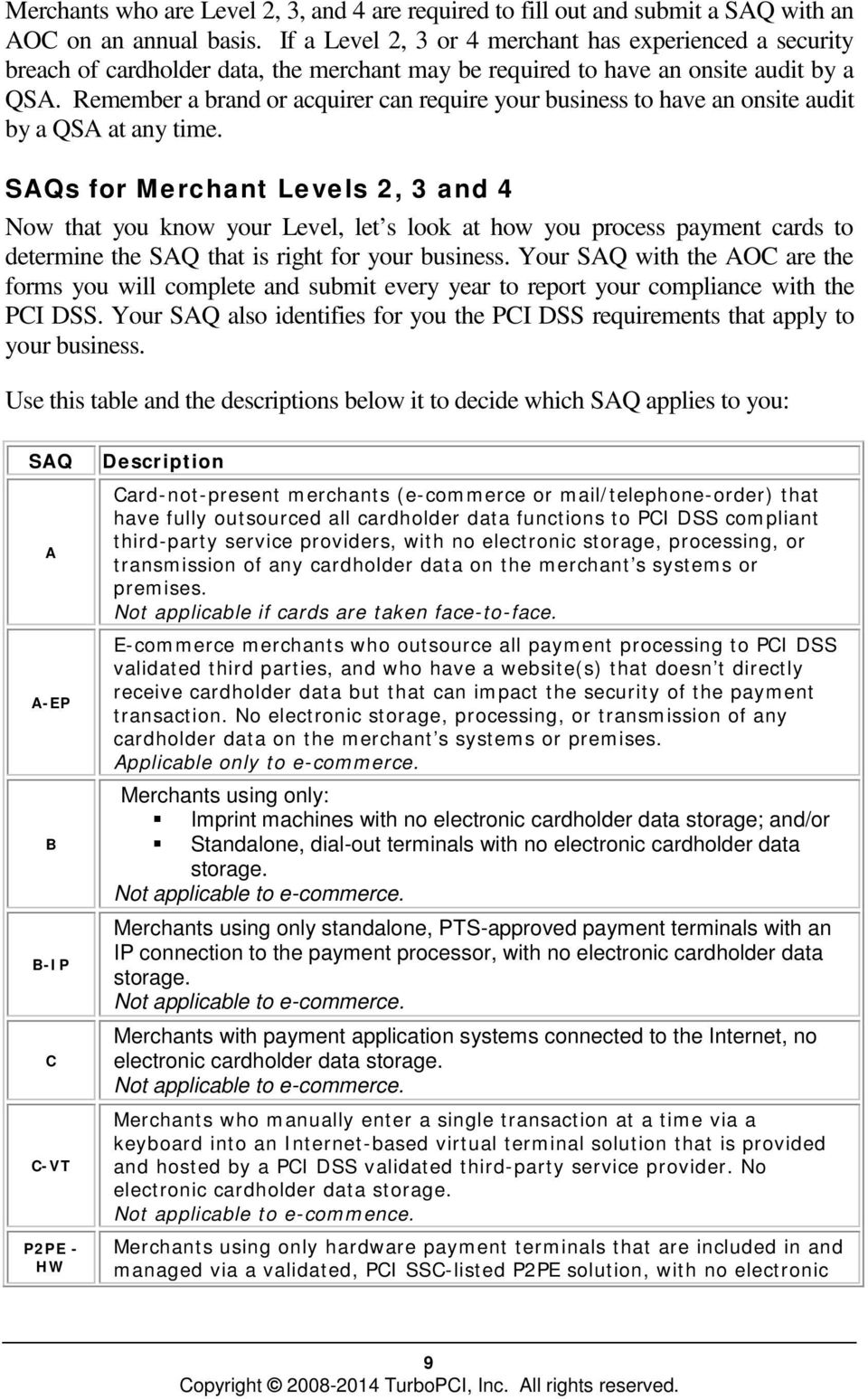
12 SAQ D Description cardholder data storage. Not applicable to e-commerce. All merchants not included in descriptions for the above SAQ types. This workbook is written for merchants who will use SAQ C-VT. If your business doesn t meet the criteria for filling out SAQ C-VT, this workbook is not for you. How Do I Know If My Business Is Compliant? Before you begin your compliance work, you need to understand how to measure your compliance status. You are not considered compliant unless you successfully meet ALL requirements for your SAQ. Download and read over the appropriate Self- Assessment Questionnaire (SAQ) with the Attestation of Compliance (AOC) to get a basic idea of what you ll need to do to become compliant, and then follow the steps in this workbook to meet those requirements. How Soon Do I Have To Be Compliant? All merchants are required to be compliant if they accept payment cards for payment. The revised standards are in effect on January 1, Although you may not have heard from your acquirer or processor yet about being compliant, it is a good idea to finish the steps in this workbook as quickly as possible. Remember that the brands and the Community Services Command (CSC) require you to be compliant at all times in order to accept payment cards. Staying Organized You ll need a MWR compliance binder to keep all of the documents that prove you are meeting the requirements. Every document you put in your compliance binder needs to be kept for at least 3 years to provide proof that you are maintaining compliance. Most businesses have a binder, notebook, or other way of keeping all of the master copies of official business policies and procedures together in one place. Throughout the workbook we will advise you to make certain policies and procedures part of your formal business documents. You will need to include those compliance policies and procedures in your official business policies and procedures. Now that you know: which SAQ is right for your business; how to determine your compliance; 10

13 how soon you need to be in compliance; and how to stay organized; You are ready to begin your PCI DSS compliance work for your MWR Program Turn the page to Part 2 of this workbook which leads you through every step you ll need to take to become, and to stay, PCI DSS compliant. 11
14 Part 2 PCI DSS Steps to Compliance To become, and to stay, PCI DSS compliant you need to follow the steps in this section. But if your business changes how it processes cardholder information, you will need to re-read Chapter 2, determine which SAQ you need to use, and use the step-by-step instructions for your new SAQ Validation Type. This is part of maintaining your compliance. REMEMBER: You are expected to maintain compliance at ALL times. 12

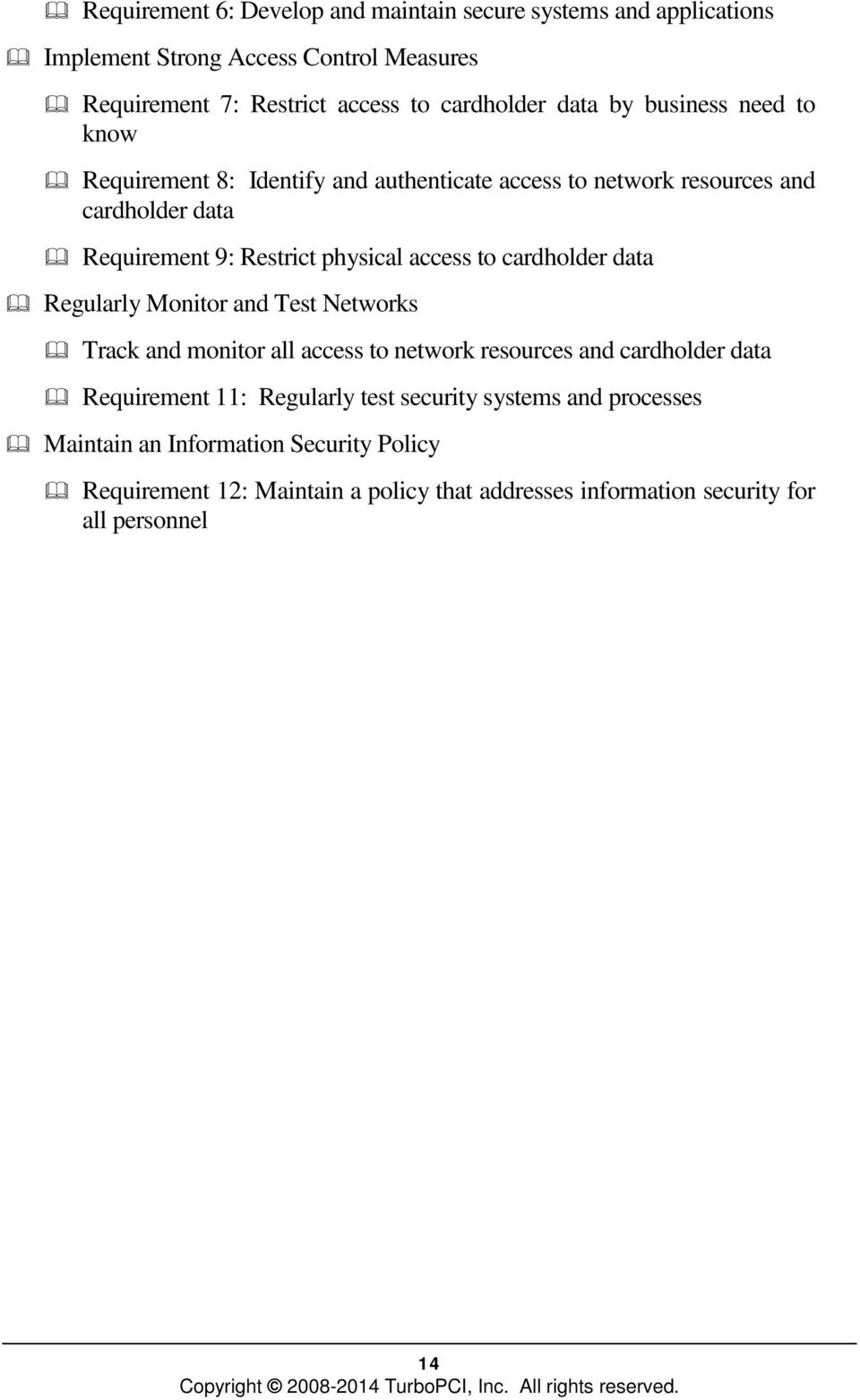
15 CHAPTER 3 SAQ C-VT In this chapter Learn the step-by-step tasks you must do Find out how to create the necessary policies, procedures and forms Learn how to complete your SAQ and AOC Learn how to maintain your compliance documents What Do You Have To Prove? You need to meet the PCI DSS Requirements listed in the Step by Step Instructions below. (Remember that you need to keep records that prove you are in compliance, and that you are staying in compliance. Keep these records in your compliance binder.) You will use SAQ C-VT because you do not meet the criteria for SAQs: A, A-EP, B, B-IP, C, D or P2PE-HW. Basic PCI DSS Requirements The following list gives an overview of the requirements: Build and Maintain a Secure Network Requirement 1: Install and maintain a firewall configuration to protect cardholder data Requirement 2: Do not use vendor-supplied defaults for system passwords and other security parameters Stored Cardholder Data Requirement 3: Protect stored cardholder data Requirement 4: Encrypt transmission of cardholder data across open, public networks Maintain a Vulnerability Management Program Requirement 5: Protect all systems against malware and regularly update anti-virus software or programs 13

16 Requirement 6: Develop and maintain secure systems and applications Implement Strong Access Control Measures Requirement 7: Restrict access to cardholder data by business need to know Requirement 8: Identify and authenticate access to network resources and cardholder data Requirement 9: Restrict physical access to cardholder data Regularly Monitor and Test Networks Track and monitor all access to network resources and cardholder data Requirement 11: Regularly test security systems and processes Maintain an Information Security Policy Requirement 12: Maintain a policy that addresses information security for all personnel 14
17 Step-By-Step Instructions Your Program s MWR Director/Officer will act as the PCI compliance officer within your MWR Program. This person will be responsible for heading up your PCI DSS compliance. Information Technology (IT) security is a complex issue and requires technical knowledge of computers, computer networks, software and hardware. Your MWR Director/Officer may not have the necessary technical knowledge. Your command may appoint a knowledgeable person or Department to work closely with your PCI compliance officer. If you do not have a knowledgeable employee, you will have to hire an expert to set up, maintain, and/or verify your compliance with the following technical requirements. Make sure you or your consultant are familiar with the forms and policies listed in Appendix B. All of these documents are available in Microsoft Word format on the CSC MWR website at You may need the following applicable policies and MWR forms: Policies 1000, 1010, 1020, 1030, 1100, 1200, 1300, 1400, 1500, 1600, 1700, 1800, 1900 MWR Forms 1001, 1002, , 1005, 1101, 1102, 1201, 1301, 1302, 1303, 1304, 1601, 1602, 1603, 1604, 1605, 1606, 1607, 1901, 1902, 1903, 2001, 2002 Your MWR Program will also need a compliance binder where you ll keep all of the documents that prove you are meeting the requirements. Every document you put in your compliance binder needs to be kept for at least 3 years to provide proof that you are maintaining compliance. In the step-by-step instructions you will first be given the specific requirements and then the steps you have to take to meet them. If the requirement doesn t apply to your MWR Program, enter N/A when asked to check if you are compliant. Now let s begin. 15
18 NOTE: If you cannot meet a requirement, contact the MWR Program Resources Specialist or the CSC Loss Prevention Director in Chesapeake, VA. Step-By-Step Instructions Reminder: Appendix A contains a Glossary of terms. Requirement 1.2 Build firewall and router configurations that restrict connections between untrusted networks and any system components in the cardholder data environment. Note: An untrusted network is any network that is external to the networks belonging to your command, and/or which is out of your command s ability to control or manage. Requirement Restrict inbound and outbound traffic to that which is necessary for the cardholder data environment, and specifically deny all other traffic. Requirement Install perimeter firewalls between any wireless networks and the cardholder data environment, and configure these firewalls to deny or control (if such traffic is necessary for business purposes) any traffic from the wireless environment into the cardholder data environment. Step 1: Perform a review of your firewall/router configurations and verify that you are blocking all unsolicited inbound network traffic from any computer that you do not manage, to your network which contains cardholder data. Step 2: Any exceptions should be documented and explained on MWR Forms 1602 and Step 3: If your business has a wireless environment, make sure that perimeter firewalls are installed between the wireless network and the cardholder data environment. 16

19 NOTE: If you cannot meet a requirement, contact the MWR Program Resources Specialist or the CSC Loss Prevention Director in Chesapeake, VA. Check if you are compliant with Requirement 1.2 Check if you are compliant with Requirement Check if you are compliant with Requirement Requirement 1.3 Prohibit direct public access between the Internet and any system component in the cardholder data environment. Requirement Do not allow any direct connections inbound or outbound for traffic between the Internet and the cardholder data environment. Requirement Do not allow unauthorized outbound traffic from the cardholder data environment to the Internet. Requirement Implement stateful inspection, also known as dynamic packet filtering. (That is, only "established" connections are allowed into the network.). Step 1: Determine if inbound and outbound traffic to/from the cardholder data environment is necessary. Make sure that you deny all inbound and outbound traffic that is not allowed. Make sure all router configuration files are secure and synchronized. Step 2: Verify your firewalls are stateful inspection. By obtaining documentation about the firewall model. Step 3: The reviewer should always sign and date the reviewed documentation and any comments or recommendations. These documents should be retained in your compliance binder. 17
20 NOTE: If you cannot meet a requirement, contact the MWR Program Resources Specialist or the CSC Loss Prevention Director in Chesapeake, VA. Check if you are compliant with Requirement 1.3 Check if you are compliant with Requirement Check if you are compliant with Requirement Check if you are compliant with Requirement Requirement 1.4 Install personal firewall software on any mobile and/or employee-owned computers with direct connectivity to the Internet (for example, laptops used by employees), and which are used to access the organization s network. Firewall configuration include: Specific configuration settings are defined for personal firewall software. Personal firewall software is actively running. Personal firewall software is not alterable by users of mobile and/or employee-owned devices. Step 1: Determine if any member of your staff is accessing your application through the Internet using their personal computer. An example is: Sam logs into the point of sales system from his home computer at the end of each day to review the sales transactions. Step 2: Verify this Internet access to your business network is appropriate and approved by management. Step 3: Make sure that every personal computer or mobile computer attached to your company s network which stores, processes or transmits cardholder data has been approved for access and has an installed, active personal firewall. Verify that the personal firewall software is configured to specific standards and is not alterable by computer users. See Requirement 1.3, Step 4 for additional information. Step 4: To prove you have completed this requirement, capture a screenshot which shows the firewall is turned on and active for each 18

21 NOTE: If you cannot meet a requirement, contact the MWR Program Resources Specialist or the CSC Loss Prevention Director in Chesapeake, VA. approved personal computer assigned to the employees on MWR Form 1201 Cardholder Data Access Privileges Authorization. Print the screenshot, label it with the name of the computer and user, and sign and date the printout. Label the top right corner with 1.4 and keep the document in your compliance binder. Check if you are compliant with Requirement 1.4 Requirement 2.1 Always change vendor-supplies defaults and remove or disable unnecessary default accounts before installing a system on the network. This applies to ALL default passwords, including but not limited to those used by operating systems, software that provides security services, applications and system accounts, point-of-sale (POS) terminals, Simple Network Management Protocol (SNMP) community strings, etc.). Requirement For wireless environments connected to the cardholder data environment or transmitting cardholder data, change wireless vendor defaults, including but not limited to default wireless encryption keys, passwords, and SNMP community strings. Step 1: Review Policy 1400 Vendor Supplied Defaults Policy. Ensure that the vendor-supplied user ID and password on the payment system to be connected to the Internet has been changed before it is connected. If you are using a wireless connection, all defaults including the WEP keys, SSID, passwords and SNMP communication strings must be changed ahead of time as well. Ensure that the vendor-supplied user ID and password on your firewall have also been changed again, before connecting to your network. Step 2: Print the list of users and their user IDs from your server. If you are using wireless, print out the configuration settings. Review the reports to make sure the vendor-supplied user defaults are no longer active. Sign and date the reviewed report(s) label the top right corner with 2.1 and put them in your compliance binder. Step 3: If you have a firewall appliance, print the list of users and their IDs. Review the list to make sure the vendor-supplied user ID is no longer active. Sign and date the list and label the top right corner with 2.1 and retain in your compliance binder. Step 4: If you are using wireless for business purposes, maintain a list of 19
22 NOTE: If you cannot meet a requirement, contact the MWR Program Resources Specialist or the CSC Loss Prevention Director in Chesapeake, VA. all employees who have knowledge of the wireless keys using MWR Form 1607 Approved Employees with Cryptographic Key Knowledge. If an employee on the list leaves the company or changes positions, you must change the wireless keys. These changes must be documented on MWR Form 1903 Encryption Key Change Log, noting the date the keys were changed and the reason for the change. Check if you are compliant with Requirement 2.1 Check if you are compliant with Requirement Requirement 2.2 Develop configuration standards for all system components. Assure that these standards address all known security vulnerabilities and are consistent with industry-accepted system hardening standards. Sources of industry-accepted hardening standards may include, but are not limited to: Center for Internet Security (CIS) International Organization for Standardization (ISO) SysAdmin Audit Network Security (SANS) Institute National Institute of Standards Technology (NIST) Requirement Enable only necessary and secure services, protocols, daemons, etc. as required for the function of the system. Requirement Implement security features for any required services, protocols, or daemons that are considered to be insecure for example, use secured technologies such as SSH, S-FTP, SSL, or IPSec VPN to protect insecure services such as NetBIOS, file sharing, Telnet, FTP, etc. Requirement Configure system security parameters to prevent misuse. Requirement Remove all unnecessary functionality, such as scripts, drivers, features, subsystems, file systems, and unnecessary web servers. Step 1: This requirement is included in Policy 1100 System Configuration 20
23 NOTE: If you cannot meet a requirement, contact the MWR Program Resources Specialist or the CSC Loss Prevention Director in Chesapeake, VA. Policy. Establish and document the checklist or the procedures used to configure all in-scope systems. Use MWR Form 1101 System Configuration Procedures to document the in-scope configurations and/or location of the documentation or ghosting media. Check if you are compliant with Requirement 2.2 Check if you are compliant with Requirement Check if you are compliant with Requirement Check if you are compliant with Requirement Check if you are compliant with Requirement Requirement Encrypt all non-console administrative access using strong cryptography. Use technologies such as SSH, VPN, or SSL/TLS for web-based management and other non-console administrative access. Step 1: Make sure that all non-console access for administrative activity is strongly encrypted, and that the encryption is invoked before the administrator s password is requested. You may need to contact your vendor for confirmation. Step 2: Configure system services and parameter files to prevent the use of Telnet and other insecure remote login commands. Step 3: Make sure that administrator access to web-based management interfaces are also strongly encrypted. Step 4: Print out the remote access report from your system which shows the administrative users who have remote access and their type of access (SSH, VPN or SSL/TLS). Review for appropriateness. If access is inappropriate, correct and print a new report. Your vendor can guide you through the process to print this report. Step 5: Sign and date the reviewed report, label the top right corner with 2.3, and keep the report in your compliance binder. 21
24 NOTE: If you cannot meet a requirement, contact the MWR Program Resources Specialist or the CSC Loss Prevention Director in Chesapeake, VA. Check if you are compliant with Requirement 2.3 Requirement Do not store sensitive authentication data subsequent to authorization (even if encrypted). If sensitive authentication data is received, render all data unrecoverable upon completion of the authorization process. Sensitive authentication data includes the data as cited in the following Requirements through 3.2.3: Requirement Do not store the card-verification code or value (three-digit or four-digit number printed on the front or back of a payment card) used to verify card-not-present transactions. Requirement Do not store the personal identification number (PIN) or the encrypted PIN block. Step 1: If you are using swiping terminals for processing card payments, verify the swipe terminal(s) are entered on MWR Form 1102 In-Scope Inventory Log are compliant terminals. Go to pcisecuritystandards.org and click on Approved Companies and Providers. Then go to "Approved PIN Transaction Security Devices" and look for each device your company uses. If your devices are on the list, they are compliant. Note of the Form as such. Place the completed form in your compliance binder. Step 2: Find out if the application you are using is PCI DSS compliant. Go to pcisecuritystandards.org and click on Approved Companies and Providers. Then click on "Validated Payment Applications" and look for each application your company uses. If your applications are on there, they are compliant. Step 3: If any of your devices or applications are not compliant, you need to contact your vendor to update your equipment or software. If possible, get a statement from your vendor that says the equipment or application they provided to you does not capture full track data. Label the top right corner of the statement with 3.2, and put it in your compliance binder. If you cannot get a statement from your vendor, you will need to have your computer system analyzed by a professional to make sure that data from the magnetic stripe is not being stored. You are not compliant unless you have proof. Step 4: Make sure you are not keeping paper copies of the three-digit or 22
25 NOTE: If you cannot meet a requirement, contact the MWR Program Resources Specialist or the CSC Loss Prevention Director in Chesapeake, VA. four-digit card-validation codes printed on the front of debit/payment cards or near the signature panel. Make sure you are not keeping paper copies of your customers' payment card pin numbers as well. Check if you are compliant with Requirement 3.2 Check if you are compliant with Requirement Check if you are compliant with Requirement Requirement 3.3 Mask PAN when displayed (the first six and last four digits are the maximum number of digits to be displayed). Notes: This requirement does not apply to employees and other parties with a legitimate business need to see the full PAN. This requirement does not supersede stricter requirements in place for displays of cardholder data - for example, for point-of-sale (POS) receipts. Step 1: Review all reports, printouts or receipts to determine if you are exposing the full payment card number of your customers. You may have some employees and other parties that have a business need to see the full PAN. Step 2: If your system component is printing the full payment card number on a receipt, this violates a United States federal law called FACTA. Contact your vendor to update your equipment. Read more about FACTA at Step 3: If your application is on the PA DSS list as PCI compliant, then check the compliant box for this requirement and move on to requirement 4.2 below. Step 4: If your application is not PCI compliant, you will need to encrypt your data. If you need help, contact your application vendor. Step 5: Once your data is encrypted, capture screen shots of the data to prove it is unreadable. Step 6: Print, sign and date the screen shots. Label the top right corner of each one with 3.3, and put them in your compliance 23
26 NOTE: If you cannot meet a requirement, contact the MWR Program Resources Specialist or the CSC Loss Prevention Director in Chesapeake, VA. binder. Check if you are compliant with Requirement 3.3 Requirement 4.1 Use strong cryptography and security protocols (for example, SSL/TLS, IPSEC, SSH, etc.) to safeguard sensitive cardholder data during transmission over open, public networks, including the following: Only trusted keys and certificates are accepted. The protocol in use only supports secure versions or configurations. The encryption strength is appropriate for the encryption methodology in use. Examples of open, public networks that are in scope of PCI DSS requirements include, but are not limited to: The Internet; Wireless technologies; Global System for Mobile communications (GSM); General Packet Radio Service (GPRS). Satellite communications. Requirement Ensure wireless networks transmitting cardholder data or connected to the cardholder data environment, use industry best practices (for example, IEEE i) to implement strong encryption for authentication and transmission. Note: The use of WEP as a security control was prohibited as of 30 June Step 1: Review Policy 1700 Encryption of Transmitted Cardholder Data Policy. Step 2: If you are using an outside vendor, contact your vendor and obtain documented proof that your cardholder data is encrypted when it is transmitted over the Internet or by wireless technologies, GSM or GPRS. 24
27 NOTE: If you cannot meet a requirement, contact the MWR Program Resources Specialist or the CSC Loss Prevention Director in Chesapeake, VA. If your company is managing all transmissions, obtain documentation to support that whenever cardholder data is transmitted or received over open, public networks, strong encryption is used. Step 3: If you are using wireless, obtain documentation to support that you are using appropriate encryption methodologies and have implemented the required controls. Step 4: Label and place all documentation in your compliance binder. You will be required to obtain this proof of encryption at least quarterly, or whenever a change is made to your network. Check if you are compliant with Requirement 4.1 Check if you are compliant with Requirement Requirement 4.2 Never send unencrypted PANs by end-user messaging technologies (for example, , instant messaging, and chat). Step 1: Make sure Policy 1700 Encryption of Transmitted Cardholder Data Policy and Policy 1010 Acceptable Use Policy both say that unencrypted PANs must never be sent by , instant messaging, chat, etc. Step 2: If you need to send sensitive information (especially all 16 digits of a PAN) through , the information must be encrypted. If your business uses automatic encryption, then you have to make sure your employees understand this requirement and the steps your company has taken to encrypt the information. You need to hold formal training sessions and use MWR Form 1004 Employee Training Sign-In Sheet for each session. Keep the sign-in sheets in your compliance binder. Step 3: If the encryption is not automatic, you must teach your employees how to encrypt s. You have to make a formal list of the steps you take to encrypt the data, and prove that you ve trained all of your employees on how to do it. Use MWR Form 1004 Employee Training Sign-In Sheet for each training session. Have every trained employee sign a statement that they understand how and when to encrypt s. Keep 25
28 NOTE: If you cannot meet a requirement, contact the MWR Program Resources Specialist or the CSC Loss Prevention Director in Chesapeake, VA. the list of steps you created to encrypt the information, the sign-in sheets and the employee confirmation statements in your compliance binder. Step 4: You ll need to train every new employee on this requirement. You can use MWR Form 1004 to record the training session. And remember to put the form in your compliance binder. Check if you are compliant with Requirement 4.2 Requirement 5.1 Deploy anti-virus software on all systems commonly affected by malicious software (particularly personal computers and servers). Requirement Ensure that all anti-virus programs are capable of detecting, removing, and protecting against all known types of malicious software. Requirement For systems considered to be not commonly affected by malicious software, perform periodic evaluations to identify and evaluate evolving malware threats in order to confirm whether such systems continue to not require anti-virus software. Step 1: You will need Policy Anti-Virus Policy. Step 2: If you are not using a system which is affected by viruses, print out a report showing the type of operating system on your payment system. You must be absolutely certain that it is an operating system known in the technology industry to not be affected by viruses. You can do this by searching the web. Skip to Step 4. Step 3: Print out a report from your electronic payment system which contains the following: Verification that anti-virus software is installed on the payment system which is connected to the Internet; and Documentation that the software detects, removes and protects against spyware and adware. 26
29 NOTE: If you cannot meet a requirement, contact the MWR Program Resources Specialist or the CSC Loss Prevention Director in Chesapeake, VA. Step 4: Sign and date your report or document, label the top right corner of the document with 5.1 and keep in your compliance binder. Check if you are compliant with Requirement 5.1 Check if you are compliant with Requirement Check if you are compliant with Requirement Requirement 5.2 Ensure that all anti-virus mechanisms are maintained as follows: Are kept current, Perform periodic scans Generate audit logs which are retained per PCI DSS Requirement Step 1: Review Policy 1800 Anti-Virus Policy. Although the questions on SAQ C-VT differ somewhat from SAQ C in this Requirement, Policy 1800 should not be modified. Step 2: Make sure the audit logs are turned on for your anti-virus software. Step 3: Print out a report from your anti-virus software which shows your audit logs are turned on, that virus definitions are updated automatically and that virus definitions are current. Step 4: Sign and date the report, label the top right corner of the document with 5.2 and keep the report in your compliance binder. Step 5: You must generate and review anti-virus audit logs periodically. Each log must be kept for one year from the date it was generated. If you keep these logs in electronic form, you have to be able to pull up the last three months of logs easily and quickly. Check if you are compliant with Requirement
30 NOTE: If you cannot meet a requirement, contact the MWR Program Resources Specialist or the CSC Loss Prevention Director in Chesapeake, VA. Requirement 5.3 Ensure that anti-virus mechanisms are actively running and cannot be disabled or altered by users, unless specifically authorized by management on a case-by-case basis for a limited time period. Note: Anti-Virus solutions may be temporarily disabled only if there is legitimate technical need, as authorized by management on a case-by-case basis. If anti-virus protection needs to be disabled for a specific purpose, it must be formally authorized. Additional security measures may also need to be implemented for the period of time during which anti-virus protection is not active. Step 1: In the bottom right hand corner of your screen, click on your anti-virus program icon. Capture a screenshot that shows the mechanism is currently active or the ability to turn off the mechanism has been disabled. Do this for all in-scope workstations and servers. Step 2: Sign and date the screenshot(s), label the top right corner of the document with 5.3 and keep the document(s) in your compliance binder. Check if you are compliant with Requirement 5.3 Requirement 6.1 Establish a process to identify security vulnerabilities, using reputable outside sources for security vulnerability information, and assign a risk ranking (for example, as high, medium or low ) to newly discovered security vulnerabilities. Step 1: Identify who in your organization needs to be on industry mailing lists for identifying newly discovered vulnerabilities. There are several industry accepted mailing list that disseminate information regarding vulnerabilities including lists published by SysAdmin, Audit, Network, Security Institute ( SANS ), National Institute of Standards and Technology ( NIST ) and Security Focus BugTraqs. 28
31 NOTE: If you cannot meet a requirement, contact the MWR Program Resources Specialist or the CSC Loss Prevention Director in Chesapeake, VA. Step 2: Rank the vulnerabilities based on their risk to your organization. Step 3: Put a process in place to remediate the vulnerabilities ranked high. Step 4: Retain all documentation relating to the process and store in your compliance binder. Check if you are compliant with Requirement 6.1 Requirement 6.2 Ensure that all system components and software are protected from known vulnerabilities by having the latest vendorsupplied security patches installed. Install critical security patches within one month of release. Note: Critical security patches should be identified according to the risk ranking process defined in Requirement 6.1 Step 1: This requirement is covered in Policy 1500 System Application and Maintenance Policy. Contact your application vendor and get a document that shows the current version or patch number. Look at your system software and find out what version or patch number is installed. If you do not how to do this, ask your vendor for help. Step 2: If you ve developed your own application(s), make sure that patches do not conflict with your existing security configurations. Step 3: If you do not have the latest version or patch, update your system. Step 4: Once you have the latest version or patch installed, print out a report of this information. Step 5: Sign and date both the documentation you received from your vendor (showing the most current version or patch number) and the printout showing your current version. Label the top right corner with 6.1 and keep in your compliance binder. Step 6: You must repeat steps 1 through 4 every time a new version or security patch is installed. 29
32 NOTE: If you cannot meet a requirement, contact the MWR Program Resources Specialist or the CSC Loss Prevention Director in Chesapeake, VA. Check if you are compliant with Requirement 6.2 Requirement 7.1 Limit access to system components and cardholder data to only those individuals whose job requires such access. Requirement Restrict access to privileged user IDs to least privileges necessary to perform job responsibilities. Requirement Assign access based on individual personnel s job classification and function. Step 1: Review Policy 1200 Identity and Authentication Access Policy and Policy 1010 Acceptable Use Policy. Step 2: If you are not currently using an automated access control system, implement and/or develop a system. If you develop a system in-house, you must meet all of the other PCI DSS Requirements that address inhouse software development. Step 3: Make Policy 1200 part of your official MWR Program documents. Keep a copy of it in your compliance binder. Check if you are compliant with Requirement 7.1 Check if you are compliant with Requirement Check if you are compliant with Requirement Requirement 8.1 Define and implement policies and procedures to ensure proper user identification management for non-consumer users and administrators on all system components as follows: Requirement Assign all users a unique ID before allowing them to access system components or cardholder data. Requirement Immediately revoke access for any 30
33 NOTE: If you cannot meet a requirement, contact the MWR Program Resources Specialist or the CSC Loss Prevention Director in Chesapeake, VA. terminated users. Requirement Manage IDs used by vendors to access, support, or maintain system components via remote access as follows: Enabled only during the time period needed and disabled when not in use. Monitored when in use. Requirement Limit repeated access attempts by locking out the user ID after not more than six attempts. Requirement Set the lockout duration to a minimum of 30 minutes or until an administrator enables the user ID. Step 1: This requirement is included in Policy 1200 Identity and Authentication Access Policy. However, it does not apply to user accounts with a point-of-sale (POS) payment application that only have access to one card number at a time to facilitate a single transaction (for example, cashier accounts). Step 2: All users must have unique IDs or login names. Users can have more than one login name or ID. Step 3: User IDs should be reviewed at least semi-annually. The reviewer should print out all access control lists from in-scope systems and applications (specifically operating systems such as Windows AD, cardholder data applications and VPNs) and verify users have unique IDs. Sign, date and retain documentation from the reviews in your compliance binder. Step 4: User accounts are to be locked after not more than 6 invalid attempts. Accounts are to be locked out for at least 30 minutes. Step 5: Lockout configuration should be obtained at least semi-annually and reviewed for compliance. The reviewer should print out the access settings. Sign, date and retain documentation from the reviews in your compliance binder. Check if you are compliant with Requirement
34 NOTE: If you cannot meet a requirement, contact the MWR Program Resources Specialist or the CSC Loss Prevention Director in Chesapeake, VA. Check if you are compliant with Requirement Check if you are compliant with Requirement Check if you are compliant with Requirement Check if you are compliant with Requirement Check if you are compliant with Requirement Requirement 8.2 In addition to assigning a unique ID, employ at least one of the following methods to authenticate all users: Something you know, such as a password or passphrase Something you have, such as a token device or smart card Something you are, such as a biometric Requirement Using strong cryptography, render all authentication credentials (such as passwords/phrases) unreadable during transmission and storage on all system components. Requirement Passwords/phrases must meet the following Require a minimum length of at least seven characters. Contain both numeric and alphabetic characters. Alternatively, the passwords/phrases must have complexity and strength at least equivalent to the parameters specified above. Requirement Change user passwords/passphrases at least every 90 days. Requirement Do not allow an individual to submit a new password/phrase that is the same as any of the last four passwords/phrases he or she has used. Requirement Set passwords/phrases for first-time use and upon reset to a unique value for each user, and change immediately 32
35 NOTE: If you cannot meet a requirement, contact the MWR Program Resources Specialist or the CSC Loss Prevention Director in Chesapeake, VA. after the first use. Step 1: Retrieve a report from your system and application that identifies the password settings. Make sure all settings are set to the requirements of 8.2. If not, make the correct changes and reprint the report. Step 2: Sign, date the report and retain this document in your compliance binder. Check if you are compliant with Requirement 8.2 Check if you are compliant with Requirement Check if you are compliant with Requirement Check if you are compliant with Requirement Check if you are compliant with Requirement Check if you are compliant with Requirement Requirement 8.3 Incorporate two-factor authentication for remote access (network-level access originating from outside the network) to the network by employees, administrators, and third parties. (For example, remote authentication and dial-in service (RADIUS) with tokens; terminal access controller access control system (TACACS) with tokens; or other technologies that facilitate two-factor authentication.) Step 1: Make sure that you have implemented two-factor authentication. This requires all users who access the cardholder data system remotely to use two forms of authentication. Typically, these are a password and a token PIN. Using a single factor twice, such as two separate passwords, is not two-factor authentication. Check if you are compliant with Requirement
36 NOTE: If you cannot meet a requirement, contact the MWR Program Resources Specialist or the CSC Loss Prevention Director in Chesapeake, VA. Requirement 8.5 Do not use group, shared or generic IDs, passwords, or other authentication methods as follows: Generic user IDs are disabled or removed. Shared user IDs do not exist for system administration and other critical functions. Shared and generic user IDs are not used to administer any system components. Step 1: These requirements are included in Policy 1200 Identity and Authentication Access Policy and Policy 1000 Information Security Policy. Step 2: You need to hold formal training sessions for employees who have access to cardholder data. The sessions must inform the users about your company s password policies and procedures. Step 3: Use MWR Form 1004 Training Sign-In Sheet to document every training session. Step 4: Copies of all training sign-in sheets should retained in your compliance binder. Step 5: Determine the type of access your vendor uses to support your system. Contacting your vendor directly might be the easiest way to find this information. Step 6: Work with your vendor to establish a time period during which your vendor will have access to your systems. This might be a set schedule, or on an as-needed basis. Step 7: Review the type of access and the time period you established for your vendor to meet the requirements in Policy Make any necessary adjustments to limit the access. Step 8: Verify there is a procedure in place to ensure that access rights of all terminated employees are revoked immediately. Step 9: A report showing all active user accounts and the employees associated with the accounts will be generated and reviewed on a quarterly basis. The reviewer should verify that accounts of all terminated employees are inactive. The reviewer should sign and date the reports and 34
37 NOTE: If you cannot meet a requirement, contact the MWR Program Resources Specialist or the CSC Loss Prevention Director in Chesapeake, VA. retain the documents in your compliance binder. Check if you are compliant with Requirement 8.5 Requirement 8.6 Where other authentication mechanisms are used (for example, physical or logical security tokens, smart cards, certificates, etc.), use of these mechanisms must be assigned as follows: Authentication mechanisms must be assigned to an individual account and not shared among multiple accounts. Physical and/or logical controls must be in place to ensure only the intended account can use that mechanism to gain access. Check if you are compliant with Requirement 8.6 Requirement 9.1 Use appropriate facility entry controls to limit and monitor physical access to systems in the cardholder data environment. Requirement Implement physical and/or logical controls to restrict access to publicly accessible network jacks. Step 1: These requirements are covered in Policy 1300 Physical Access Policy. Make sure you implement the procedures outlined in the policy in order to be compliant with these requirements. Check if you are compliant with Requirement 9.1 Check if you are compliant with Requirement
38 NOTE: If you cannot meet a requirement, contact the MWR Program Resources Specialist or the CSC Loss Prevention Director in Chesapeake, VA. Requirement 9.5 Physically secure all media. Step 1: Your media backups must be inventoried and tracked. Use MWR Form 1302 Cardholder Data Inventory Log if you are not already using a log. Step 2: When backups are moved offsite, they need to be signed out of your facility and signed in at the offsite facility. Make sure you can account for all backups at all times. Use MWR Form 1303 Removal Log for Media to track your backups if you are not already using a tracking system. Check if you are compliant with Requirement 9.5 Requirement 9.6 Maintain strict control over the internal or external distribution of any kind of media, including the following: Requirement Classify media so the sensitivity of the data can be determined. Requirement Send the media by secured courier or other delivery method that can be accurately tracked. Requirement Ensure management approves any and all media that is moved from a secured are (including when media is distributed to individuals). Step 1: Locate all paper and media (such as receipts, notes, reports, faxes, CDs, backup tapes, thumb drives, hard drives) that contain all 16 digits of your customers' payment card numbers (PAN). Do not forget that copies of s and chats are often kept in a Sent folder on computers. Step 2: Decide if you need to keep the paper and media that contain your customers full payment card number. Look at your reasons for keeping the information. You shouldn t keep it if it is not really valuable to your MWR Program. You should also take into account the risks of keeping the information, and the extra steps you have to take if you keep it (see Step 3 and requirements 9.7, 9.8, and 9.9 below). Step 3: All paper and media you decide to keep must be locked away. 36
39 NOTE: If you cannot meet a requirement, contact the MWR Program Resources Specialist or the CSC Loss Prevention Director in Chesapeake, VA. Once you have locked up the items, fill out Form MWR 1302 Cardholder Data Inventory Log to record the items you are keeping safe. If you are not keeping any paper or media that contain cardholder data, state We do not retain paper and/or media containing cardholder data on MWR Form The MWR Director/Officer must sign and date the form and keep it in the MWR compliance binder. Step 4: You ll have to update this form every year and whenever your business environment changes. Check if you are compliant with Requirement 9.6 Check if you are compliant with Requirement Check if you are compliant with Requirement Check if you are compliant with Requirement Requirement 9.7 Maintain strict control over the storage and accessibility of media. Step 1: If you do not keep sensitive cardholder information (see Requirement 9.6 above), this section doesn t apply to you. Mark it N/A and move on. Step 2: Identify paper or media listed on MWR Form 1302 Cardholder Data Inventory Log that could be removed from its secure location. Step 3: Create a copy of MWR Form 1303 Removal Log for Media for each item you identified on Form You will use MWR Form 1303 to track and log the removal of the paper or media from its secure location. Step 4: Before paper or media can be removed from its secure location, it must be marked Confidential. Make sure you track and log the removal, copying or transporting of your confidential paper or media on MWR Form Step 5: If your confidential paper or media is transported off the premises you have to use a secure courier, or deliver it by a method that can be 37
40 NOTE: If you cannot meet a requirement, contact the MWR Program Resources Specialist or the CSC Loss Prevention Director in Chesapeake, VA. tracked (such as the post office). Use MWR Form 1303 to record how the transportation was tracked. Step 6: For convenience, keep a notebook with MWR Form 1302 and all of your copies of MWR Form 1303 with, or close to, the media you ve secured. That way you or your employees won t forget to fill out the forms. Check if you are compliant with Requirement 9.7 Requirement 9.8 Destroy media when it is no loner needed for business or legal reasons as follows: Requirement Shred, incinerate, or pulp hard-copy materials so that cardholder data cannot be reconstructed. Secure storage containers used for materials that are to be destroyed. Step 1: Identify the paper or media containing cardholder data that you want to destroy. Step 2: Use MWR Form 1304 Media Destruction Log to record the description of paper or media you have identified to destroy. If you are using holding containers to accumulate these papers or media (for example, a to-be-shredded container), make sure they re secured with a lock to prevent access. Step 3: Destroy hardcopy materials by shredding, incineration or pulping. Destroy information on electronic media via a secure wipe program in accordance with industry-accepted deletion, or by physically destroying the media (such as degaussing) so that cardholder data can t be reconstructed. Step 4: Once the paper or media is destroyed, record the date of destruction and how you destroyed it on Form Make sure the person who was in charge of the destruction signs Form 1304 to certify that the information on the destroyed paper or media can t be recovered. Step 5: Management should review all Media Destruction Logs (Form 1304) at least annually. Document the review by signing and dating the 38
41 NOTE: If you cannot meet a requirement, contact the MWR Program Resources Specialist or the CSC Loss Prevention Director in Chesapeake, VA. bottom of the form and retaining them in your compliance binder. Check if you are compliant with Requirement 9.8 Check if you are compliant with Requirement Requirement 12.1 Establish, publish, maintain, and disseminate a security policy. Requirement Review the security policy at least annually and update the policy when business objectives or the risk environment changes. Step 1: Read Policy 1000 Information Security Policy. You can change this policy to suit your individual business, but it is not a good idea to delete anything even if you think it doesn t apply to you. Step 2: Make Policy 1000 an official document for your MWR Program. When the policy has been finalized, give a copy of it to all employees and contractors (processors, providers and other contractors who handle sensitive cardholder information for your company). Step 3: Make sure you review your Information Security Policy every year, and whenever your company changes how it processes cardholder information. Record your reviews on MWR Form 1002 Information Security Policy Review. Keep your Information Security Policy and MWR Forms 1002 in your compliance binder. Step 4: Every time you make changes to the policy, give a copy of the new policy to all employees and contractors. Check if you are compliant with Requirement 12.1 Check if you are compliant with Requirement
42 NOTE: If you cannot meet a requirement, contact the MWR Program Resources Specialist or the CSC Loss Prevention Director in Chesapeake, VA. Requirement 12.3 Develop usage policies for critical technologies and define proper use of these technologies. Note: Examples of critical technologies include, but are not limited to, remote access and wireless technologies, laptops, tablets, removable electronic media, usage and internet usage. Ensure these usage policies require the following: Requirement Explicit approval by authorized parties Requirement A list of all such devices and personnel with access Requirement Acceptable uses of the technology Where there is an authorized business need, the usage policies must require the data be protected in accordance with all applicable PCI DSS Requirements. Step 1: If you have followed the steps in this workbook, you ve already created your MWR Program s usage policies. The last step in meeting this requirement is to identify all critical employee-facing technologies. Use MWR Form 1003 Employee-Facing Technologies List to record the technologies you have identified. Step 2: Review Policy Acceptable Use Policy. Change the Acceptable Use Policy to include the technologies you use in your program. You can change this policy to suit your individual business but it is not a good idea to delete anything, even if you think it doesn t apply to you. Step 3: Review and update MWR Form 1003 every year. The MWR Director/Officer must sign, date and keep a copy of MWR Form 1003 in the compliance binder. Step 4: Make sure every employee reads Policy Acceptable Use Policy. When they have read it they should sign the certification page, and the MWR Director/Officer must complete and sign the Witnessed by section at the end. Then put the policy and the certification page(s) in the compliance binder. Step 5: Every new employee needs to read Policy 1010 and sign the certification page. The MWR Director/Officer must witness the signature and then put the new certification page with the others in the MWR 40
43 NOTE: If you cannot meet a requirement, contact the MWR Program Resources Specialist or the CSC Loss Prevention Director in Chesapeake, VA. compliance binder. Step 6: Any time changes are made to Policy 1010 Acceptable Use Policy, you must follow steps 5 and 6 above for the revised policy. Check if you are compliant with Requirement 12.3 Check if you are compliant with Requirement Check if you are compliant with Requirement Check if you are compliant with Requirement Requirement 12.4 Ensure that the security policy and procedures clearly define information security responsibilities for all personnel. Step 1: This requirement is met in Policy 1000 Information Security Policy. If Policy 1000 or any other policies have been modified, make sure that no sections have been deleted which clearly define the information security responsibilities for all employees and contractors. Check if you are compliant with Requirement 12.4 Requirement 12.5 Assign to an individual or team the following information security management responsibilities: Requirement Establish, document, and distribute security incident response and escalation procedures to ensure timely and effective handling of all situations Step 1: Refer to Commandant Instruction , Privacy Incident Response, Notification and Reporting Procedures for Personally Identifiable Information (PII). Step 2: Train your staff regarding Commandant Instruction Step 3: Remember to train new employees as they are assigned, and give 41
44 NOTE: If you cannot meet a requirement, contact the MWR Program Resources Specialist or the CSC Loss Prevention Director in Chesapeake, VA. them a copy of the policy. Check if you are compliant with Requirement 12.5 Check if you are compliant with Requirement Requirement Implement a formal security awareness program to make all employees aware of the importance of cardholder data security. Step 1: Refer to Commandant Instruction , Privacy Incident Response, Notification and Reporting Procedures for Personally Identifiable Information (PII). You will need to make sure that all of your employees understand how important it is to protect cardholder data. Step 2: Hold as many formal training sessions as you need but at least annually, make sure that all of your employees have the necessary training. Have your employees sign MWR Form 1004 Employee Training Sign In Sheet. Keep the sign-in sheets in your MWR compliance binder. Step 3: Remember to train new employees. Use MWR Form 1004 and place in your compliance binder. Check if you are compliant with Requirement 12.6 Requirement 12.8 Maintain and implement policies and procedures to manage service providers with whom cardholder data is shared, or that could affect the security of cardholder data, as follows: Requirement Maintain a list of service providers. Requirement Maintain a written agreement that includes an acknowledgement that the service providers are responsible for the security of cardholder data the service providers possess or otherwise store, process or transmit on behalf of the customer, or to the extent 42
45 NOTE: If you cannot meet a requirement, contact the MWR Program Resources Specialist or the CSC Loss Prevention Director in Chesapeake, VA. that they could impact the security of the customer s cardholder data environment. Note: The exact wording of an acknowledgement will depend on the agreement between the two parties, the details of the service being provided, and the responsibilities assigned to each party. The acknowledgment does not have to include the exact wording provided in this requirement. Requirement Ensure there is an established process for engaging service providers including proper due diligence prior to engagement. Requirement Maintain a program to monitor service providers PCI DSS compliance status at least annually. Requirement Maintain information about which PCI DSS requirements are managed by each service provider, and which are managed by the entity. Step 1: Make sure you do not sign a contract with a service provider, processor or acquirer without making sure that the company is PCI DSS compliant. They should provide you with a copy of their yearly AOC. Step 2: Make sure you have a written contract with every company and person you share cardholder data with. The contract must say that these companies or people are responsible for protecting your customers' cardholder data. (Do not forget any company you might use to destroy papers or media.) Use MWR Form 1001 Contract Review - PCI Security to record your review of new service provider contracts. Keep copies of your contracts and your reviews in your compliance binder. Step 3: Read Policy 1000 Information Security Policy. Make a list of who you share your customers' cardholder data with on MWR Form 1005 Service Provider Review List. Be sure to include all companies, and people who are not your employees. If you do not share cardholder data right now, write We do not share cardholder data on MWR Form 1005 and put it in your compliance binder. Then read through the next steps to find out what you will have to do if your MWR Program needs to share cardholder data in the future. Step 4: Update the list of your service providers on MWR Form 1005 every time you sign a new contract, or an old one expires. Make sure you 43
46 NOTE: If you cannot meet a requirement, contact the MWR Program Resources Specialist or the CSC Loss Prevention Director in Chesapeake, VA. review and monitor every one of your service providers PCI DSS compliance status at least once a year. Getting a copy of their AOC every year is the most cost-effective way to monitor their compliance. Use MWR Form 1001 Contract Review-PCI Security to record your review of service provider contracts. Log your review or monitoring on MWR Form Keep copies of MWR Forms 1005 and 1001, and your providers annual AOCs in your compliance binder. Check if you are compliant with Requirement 12.8 Check if you are compliant with Requirement Check if you are compliant with Requirement Check if you are compliant with Requirement Check if you are compliant with Requirement Check if you are compliant with Requirement Requirement Implement an incident response plan. Be prepared to respond immediately to a system breach. Requirement Create the incident response plan to be implemented in the event of system breach. Ensure the plan addresses, at a minimum: Roles, responsibilities, and communication and contact strategies in the event of a compromise including notification of the payment brands, at a minimum Specific incident response procedures Business recovery and continuity procedures Data back-up processes Analysis of legal requirements for reporting compromises Coverage and responses of all critical system components Reference or inclusion of incident response procedures from the payment brands 44
47 NOTE: If you cannot meet a requirement, contact the MWR Program Resources Specialist or the CSC Loss Prevention Director in Chesapeake, VA. Step 1: Refer to Commandant Instruction , Privacy Incident Response, Notification and Reporting Procedures for Personally Identifiable Information (PII). Step 2: Legal analysis is highly specific to each merchant and therefore beyond the scope of this workbook. We strongly recommend that you seek legal counsel to provide you with information on laws which apply to your MWR Program by State. An example of legal analysis given in the PCI DSS v2.0 states that any merchant with California residents in their database are must meet the requirements of California Bill 1386, which requires notification of affected consumers in the event of an actual or suspected breach. Therefore the minimum language in your Policy or Plan to meet the requirement for legal analysis would be a citation(s) of applicable law(s), and procedures for compliance (for example, notification, reporting, and logging). Although legal analysis is beyond the scope of this workbook, here are two good resources to provide a starting point for your research. The first is a link to an explanation of federal laws, although for merchants generally, there are no applicable federal laws to comply with in the event of a breach of cardholder data: The second is a link to a national clearinghouse of state-specific information on data security breach laws: Check if you are compliant with Requirement Check if you are compliant with Requirement You have completed the Step-By-Step instructions. 45
48 Filling Out Your SAQ and Your AOC You will use SAQ C-VT. You may have been given the SAQ. If not, you must download it. Go to the pcisecuritystandards.org website. Click on PCI Standards and Documents in the bar across the top. Then click on Documents Library on the left. In the bar near the top of the screen, click on SAQs. Find SAQ C-VT v3.0 and download it. Open the file you downloaded. It s called pci_saq_c-vt_v3.0doc. Read the entire document before you fill anything in. Section 1 Part 1a: Fill in all the information in this section: Company Name should be the name of your Unit s Morale Fund Account. If you are not doing business under any other name, enter N/A for DBA(s) (doing business as). Do not fill in a response to ISA Name. This does not apply to MWR. If you do not have an address, enter N/A for . If you do not have a website, enter N/A for URL. Part 1b: Do not fill out this section. If you worked with a QSA, they may want to fill out this section for you. Part 2a: Fill in the information in this section as follows: Check the Retail box Check Card-present(face-to-face) for type of payment channel Check Card-present (face-to-face) for payment channels covered by this SAQ Part 2b: Fill in the information in this section as follows: Answer the question How does your business store, process and/or transmit cardholder data? An example answer would be We do not store cardholder data. We use stand-alone terminals for processing. Part 2c: Fill in the information in this section as follows: List all the types of facilities in your Program where you have a credit card machine (i.e., bowling alley, Club, ITT) and the location of the facilities Part 2d: Fill in the information in this section as follows: Because you are not using a Payment Application, check the box No, in response to Does your organization use one or more Payment Applications? Move to the next section Part 2e: Fill in the information in this section as follows: 46
49 Enter the following as the description of the environment. The cardholder data environment consists of card processing terminals that are PTS compliant. They are connected to the processor via an analog telephone line. Part 2f: Fill in the information in this section as follows: Check the No box Part 2g: Fill in the information in this section as follows: Check all boxes Section 2 If you performed all the steps in this workbook chapter and checked all the requirement boxes Yes or N/A in this workbook, then check all the Yes boxes in this section. NOTE: If your MWR Program is NOT compliant, contact the Coast Guard MWR Program Resources Specialist in Chesapeake, VA and/or the Loss Prevention Director in Chesapeake immediately. Go to Section 3 Section 3 Part 3: Fill in the information in this section as follows: If you performed all the steps in this workbook chapter and checked all the requirement boxes Yes or N/A in this workbook, then check the Compliant box. NOTE: If your MWR Program is NOT compliant, contact the Coast Guard MWR Program Resources Specialist in Chesapeake, VA and/or the Loss Prevention Director in Chesapeake immediately. Part 3a: Fill in the information in this section as follows: If you performed all the steps in this workbook chapter and checked all the requirement boxes Yes or N/A in this workbook, then check all the boxes in this section. NOTE: If your MWR Program is NOT compliant, contact the Coast Guard MWR Program Resources Specialist in Chesapeake, VA and/or the Loss Prevention Director in Chesapeake immediately. Insert the correct version of the SAQ found on the cover of the SAQ. Part 3b: Fill in the information in this section as follows: The Unit Commanding Officer, or his/her designee, must sign as the Merchant Executive Officer. Note: The term merchant refers to any 47
50 business, or your MWR Program, that accepts credit/debit cards as forms of payment from their customers. Type in the Unit Commanding Officer s name (or his/her designee), title, and the date in this section. Part 3c: Do not fill out this section If you worked with a QSA, they may want to fill out this section for you. Part 3d: Do not fill out this section Part 4: Fill in the information in this section as follows: If you performed all the steps in this workbook chapter and checked all the requirement boxes Yes or N/A in this workbook, then check all the Yes boxes in this section. NOTE: If your MWR Program is NOT compliant, contact the Coast Guard MWR Program Resources Specialist in Chesapeake, VA and/or the Loss Prevention Director in Chesapeake immediately. Now that you have completed your SAQ C-VT, send a copy of the entire SAQ to the Coast Guard MWR Program Resources Specialist in Chesapeake, VA. Keep the original SAQ along with your annual and quarterly evidence in your compliance binder for your merchant services, bank or acquirer. You are required to retain a copy of this document for a period of no less than 6 years, 3 months. Congratulations! Now visit Chapter 4 to learn more about how your MWR Program can stay compliant throughout the year. 48
51 CHAPTER 4 Staying Compliant In this chapter Discover techniques for maintaining compliance Learn the importance of staying compliant Learn about other Payment Card Industry Security Standards How to Stay Compliant It is very important for your MWR Program to be able to prove compliance at all times. You must understand that compliance is a process, not an event! If a breach should occur, you can reduce or eliminate liability if you can prove that you were compliant at the time of the breach. So, it is very important that you follow all the steps in this workbook and keep your MWR compliance binder up-to-date. We have found the best technique for maintaining compliance is to establish a compliance calendar. As you may recall from the Step-by-Step Instructions, there are activities that need to be performed on a daily, monthly, quarterly and annual basis. Take the time to go back over all of the steps and create your annual compliance calendar. We ve provided you with a sample of a Compliance Calendar in Appendix C of this workbook. You ll find that a compliance calendar is a valuable tool to help you stay on course with compliance. Always remember that if your Command changes how it processes payment cards, you must go back to Chapter 2 and re-evaluate which SAQ/AOC your MWR Program should use. Then you ll need to follow the step-by-step instructions for your new SAQ. What Lies Ahead The PCI Security Standards Council has implemented additional standards that may affect your Program. They have placed standards around devices that capture the PIN numbers of your customers. If your Program uses equipment or kiosks that capture PIN numbers, make sure your equipment is compliant. You can download the requirements from the PCI Security Standards site. Make sure you are aware of these standards if you plan to upgrade your equipment. You should only use vendors who sell PCI-compliant equipment. Remember you are liable for not being compliant, not your vendor. 49
52 The PCI Security Standards Council has also developed standards for applications that process, transmit or store cardholder data. If you are using an application to process your customers' payment cards and the software was not developed in-house, make sure that you are using compliant software. The list of compliant software can be found at the PCI Security Standards website. This list is updated monthly. If your application is not listed, it has not been approved by the PCI SSC. You need to understand the risks and liabilities associated with using non-compliant software to process your customers payment cards. Make sure you are aware of these application standards if you plan to upgrade your software. You should only use vendors who sell PCI-compliant applications. Remember you are liable for not being compliant, not your vendor. 50
53 APPENDIX A Glossary of PCI DSS Terms Acquirer: An Acquirer is a Visa/MasterCard Affiliated Bank or Bank/Processor alliance that is in the business of processing payment card transactions for businesses and is always acquiring new merchants. AOC: The Attestation of Compliance is the self-certification that a merchant or service provider is eligible to perform and has actually performed a PCI DSS selfassessment. Appendix A - PCI DSS Applicability for Hosting Providers: In the Payment Card Industry (PCI) Data Security Standard Security Audit Procedures, Appendix A establishes the requirements for providers that host merchant and service provider clients. Approved Scanning Vendors (ASV): Companies qualified by the PCI SSC, who assist merchants in validating their compliance via use of Internet vulnerability scans. Merchants must scan their exposed and in-scope Internet connected systems quarterly and remediate any high risk items. Attests: A term commonly used by internal auditors to signify specific evidence or an action that has taken place to validate compliance with a requirement. Authorization: The process of verifying the payment card has sufficient funds (credit) available to cover the amount of the transaction. An authorization is obtained for every sale. An approval response in the form of a code sent to a merchant s POS equipment (usually a terminal) from a card issuing financial institution that verifies availability of credit or funds in the cardholder account to make the purchase. Also see Point-Of-Sale. Authorization Response: An issuing financial institution s electronic message reply to an authorization request, which may include: Approval transaction was approved Decline transaction was not approved Call Center response pending more information, merchant must call the toll-free authorization phone number. Authorization Code: A code that a payment card issuing bank returns in an electronic message to the merchant s POS equipment that indicates approval of the transaction. The code serves as proof of authorization. 51
54 Bankcard: A payment card issued by a Visa or MasterCard-sponsored financial institution. (American Express, Discover, Diners Club, JCB, etc., are issued directly from their respective operations, rather than through banks.) Batch: The accumulation of captured payment card transactions in the merchant s terminal or POS awaiting settlement. Brand: A term frequently used in the Payment card Industry that typically references a single payment card association such as: American Express, Visa, MasterCard, JCB or Discover. Capture: The submission of an electronic payment card transaction for financial settlement. Authorized payment card sales must be captured and settled in order for a merchant to receive funds for those sales. Also see Settlement. Cardholder: Any person who holds a payment card account (bankcard or otherwise) or that uses a payment card to purchase goods and services. Cardholder Data: Sensitive cardholder information printed on the front and back of the card and stored in the magnetic stripe on the back of the card. Card Issuing Bank: An EFT Network Member-Bank that runs a payment card or debit card purchasing service for their account holders. An example is Citibank and the Citibank Visa Card that they issue. Card Not Present: A transaction where the card is not present at the time of the transaction (such as mail order or telephone order). Payment card data is manually entered into the terminal, as opposed to swiping a card s magnetic stripe through the terminal. Center For Internet Security (CIS): A non-profit enterprise whose mission is to help organizations reduce the risk of business and e-commerce disruptions resulting from inadequate technical security controls. Chargeback: A payment card transaction that is billed back to the merchant after the sale has been settled. Chargebacks are initiated by the card issuer on behalf of the cardholder. Typical cardholder disputes involve product delivery failure or product/service dissatisfaction. Cardholders are urged to try to obtain satisfaction from the merchant before disputing the bill with the payment card issuer. Close Batch: The process of sending the batch for settlement. CNP: Stands for Card Not Present. 52
55 Code 10 Authorization: If a merchant suspects a card is fraudulent at the time of the transaction, the merchant can call their voice authorization phone number and ask for a code 10. The voice operator will instruct the merchant on how to proceed. Commercial Cards: Credit or charge cards issued to businesses to cover expenses such as travel and entertainment and procurement. Includes the multiple payment card brands of purchasing cards, business cards, corporate cards and multi-utility fleet cards. Visa and MasterCard now have special procedures for passing billing information back to the card issuing bank so that it can be displayed on cardholder statements; this is a program for promoting the use of payment cards for business purchases by providing purchase tracking to business users. New regulations require that this billing information be passed back with the transactions, otherwise a higher pass through fee will be incurred. Compensating Controls: Compensating controls may be considered when an entity cannot meet a requirement explicitly as stated, due to legitimate technical or documented business constraints but has sufficiently mitigated the risk associated with the requirement through implementation of other controls. Compliance Binder: Binder for merchants that serves as a repository to store compliance reports and support documentation. Corporate Card: Charge card designed for business-related expenses, such as travel and entertainment. Please see Commercial Card. Credit (Reversal): Nullification of an authorized transaction (sale) that has not been settled. If supported by the card issuer, a reversal will immediately undo an authorization and return it to the open-to-buy balance on a cardholder s account. Some card issuers do not support reversals. Critical Employee Facing Technology: Devices such as modems and wireless technology that must have defined usage policies for the proper use of these technologies for all employees and contractors. CVV/CVC Code: Stands for CARD VERIFICATION VALUE CODE. CVV is an authentication procedure established by payment card companies to further efforts towards reducing fraud for internet transactions. It consists of requiring a cardholder to enter the CVV number in at transaction time to verify that the card is on hand. The CVV code is a security feature for card not present transactions, and now appears on all major credit and debit cards. This is a three or four digit code which provides a cryptographic check of the information embossed on the card. The CVV code helps ascertain that the customer placing the order actually possesses the payment card and that the card account is legitimate. Each payment card company has its own name for the CVV code, but it functions the same for all major card types. (VISA refers to the code as CVV2, MasterCard calls it CVC2, and American Express calls it CID.) 53
56 DDA Account: This is the merchants Demand Deposit Account, otherwise known as the merchant s home town bank account. Debit Card: Payment card whose funds are withdrawn directly from the cardholder s checking account at the time of sale (online debit on a Debit Network) or after batch settlement (off-line debit on a Payment card Network). Deposit Correction Notice (DCN): Adjustments (debits or credits) made for an outof-balance condition due to various problems in the transmittal. The correction is made by the merchant s acquirer at the time of capture prior to being sent out for interchange. Discount Rate: The percentage of sales amounts that the bankcard acquirer or card issuer charges the merchant for the settlement of the transactions. Edit Rejects: The rejection of a sales draft by Visa or MasterCard before a transaction processes through interchange, but after it has been paid by the acquirer. Electronic Cash Register (ECR): A device used for cash sales. Can also be integrated to accept payment cards. Electronic Data Capture (EDC): Process of electronically authorizing, capturing and settling a payment card transaction. External Network Connection: A term used to convey that a line/service has been installed externally to a merchant s network. Fleet Cards: Private label payment cards designed mainly for repairs, maintenance and fueling of business vehicles. Footer: Text printed at the bottom of a sales draft. A merchant can customize the footer (i.e., Have a Nice Day, No Refunds, Thank You for Shopping With Us, etc.). Full Track Data: The data that is written into the black stripe located on the back of a payment card. The data is commonly referred to as full tracked data. Full tracked data contains highly sensitive information such as: cardholder name, account number, and card expiration date. Hosting Provider: Services offered to merchants and other service providers that range from simple to complex; from shared space on a server to a whole range of shopping cart options; from payment applications to connections to payment gateways and processors; and for hosting dedicated to just one customer per server. 54
57 Independent Sales Organization (ISO): An ISO is an Independent Sales Organization that represents a Bank or Bank/Processor alliance. The ISO has an agreement to sell the services of the Bank or Bank/Processor alliance, and is allowed to mark up the Fees and sign up merchants. These entities are classic Middle Men, as they are typically not performing the services sold. They typically match the banking services they sell with Front End solutions for accepting transactions in order to offer merchants a working system. Their Front End Systems can be anything from VeriFone or Hypercom POS Terminals to PC based Dial-Out Payment card Processing Software, to Shopping Carts paired with a Secure Payment Gateway. (In all cases, the Front End solution must be compatible with the Processor in order to function.) Information Supplement Requirement 6.6 Code Reviews and Application Firewalls Clarified: Document provided by the PCI Security Standards Council which provides guidance to assist in determining the best option, which can vary depending on products in use, how an organization procures or develops its web applications, and other factors within the environment. Interchange: The standardized electronic exchange of financial and non-financial data associated with sale and credit data between merchant acquirers and card issuers on various types of MasterCard and Visa transactions. Interchange Fee: A fee paid by an acquirer to an issuer for transactions entered into interchange. The interchange fee is a percentage applied, according to Visa/MasterCard regulations, to the dollar value of each transaction. There are multiple categories of interchange, and Visa and MasterCard have their own criteria for their own categories. A transaction must meet the specified criteria for a category in order for that category s rate to be applied. Each transaction is evaluated individually, so various interchange rates may apply within one batch of merchant transactions. Internet Service Provider (ISP): Internet Service Providers (ISPs) are Website Hosting companies that provide a home for a merchant s website. They typically resell and/or support the services of a Secure Gateway Provider and/or ISO or Agent or Bank. (IPSEC) Internet Protocol Security is a protocol suite for securing Internet Protocol (IP) communications by authenticating and encrypting each IP packet of a data stream. IPSEC also includes protocols for establishing mutual authentication between agents at the beginning of the session and negotiation of cryptographic keys to be used during the session. IPSEC can be used to protect data flows between a pair of hosts (e.g. computer users or servers), between a pair of security gateways (e.g. routers or firewalls), or between a security gateway and a host. 55
58 ISA: The ISA Program of the PCI Security Standards Council provides an opportunity for eligible internal security assessment professionals of qualifying organizations to receive PCI DSS training and certification that will improve the organization s understanding of the PCI DSS, facilitate the organization s interactions with QSAs, enhance the quality, reliability, and consistency of the organization s internal PCI DSS self-assessments, and support the consistent and proper application of PCI DSS measures and controls. Issuing Financial Institution: The financial institution that extends credit to a cardholder through bankcard accounts. The financial institution issues a payment card and bills the cardholder for purchases against the bankcard account. Also referred to as the cardholder s financial institution. Manual Close: A batch close that must be initiated by the merchant on a daily basis, as opposed to an auto close at a pre-set time. Merchant: A business which accepts payment cards from customers for payment. Merchant Identification Number (MID): This number is generated by a processor/acquirer and is specific to each individual merchant location. This number is used to identify the merchant during processing of daily transactions, rejects, adjustments, chargebacks, end-of-month processing fees, etc. Merchant Service Provider: A business entity directly involved in the processing, storage, or transmission of transaction data or cardholder data on behalf of a merchant. This also include companies that provide services which control or could impact the security of cardholder data. Magnetic Stripe: A strip of magnetic tape affixed to the back of payment cards containing identifying data, such as account number and cardholder name. Mail Order/Telephone Order (MOTO): Payment card transactions initiated via mail, or telephone. Also known as card-not-present transactions. National Institute of Standards Technology (NIST): Non-regulatory federal agency within U.S. Commerce Department s Technology Administration. Mission is to promote U.S. innovation and industrial competitiveness by advancing measurement science, standards, and technology to enhance economic security and improve quality of life. Network: Company and system used to authorize and capture payment card transactions. Non-Qualified Transaction Fees (NON-Qual): Bankcard sales transactions that do not meet set Visa/MasterCard criteria for that particular merchant and are processed at 56
59 a higher interchange rate. An example of this is a merchant that is retail (card present) that processes a card-not-present transaction (or manually enters card data rather than swiping the magnetic stripe through the terminal). The merchant will pay the difference between what they should have paid on retail and what they actually qualified for (card not present). This difference is called non-qualified interchange fees. PC Application Software: A software program that is designed to perform a specific function on a computer system. Examples would be accounting systems, manufacturing systems, order entry and fulfillment, ticketing, reservations, etc. The application is either purchased or built by the merchant, and must be interfaced with a payment card authorization system in order to provide on-line transaction processing. PANs: See Primary Account Numbers Payment Application Data Security Standard (PA-DSS): PCI Security Standards Council-managed program formerly under the supervision of the Visa Inc. program known as the Payment Application Best Practices (PABP). The goal of PA-DSS is to help software vendors and others develop secure payment applications that do not store prohibited data, such as full magnetic stripe, CVV2 or PIN data, and ensure their payment applications support compliance with the PCI DSS. Payment Card Industry Data Security Standard (PCI DSS): A set of comprehensive requirements for enhancing payment account data security, which was developed by the founding payment brands of the PCI Security Standards Council, including American Express, Discover Financial Services, JCB International, MasterCard Worldwide and Visa Inc., to help facilitate the broad adoption of consistent data security measures on a global basis. Payment Card Industry Security Standards Council (PCI SSC): An open global forum established for the ongoing development, enhancement, storage, dissemination and implementation of security standards for account data protection. Payment Card Industry Qualified Security Assessor (PCI QSA): A certification obtained by experienced security consultants to enable them to conduct the On-Site Data Security Assessment for PCI DSS Compliance. QSAs are required to re-certify every year by attending training by PCI and passing the exam. A re-certifying QSA must obtain additional CPE s from training and other experiences in order to obtain certification. Point Of Sale (POS): A location where payment card transactions are performed with the cardholder present, such as a retail store. The card is read magnetically, and the cardholder s signature is obtained as insurance against the transaction. This is the most secure form of payment card commerce. 57
60 POS Terminal: Equipment used to capture, transmit and store payment card transactions at the point of sale. Examples are VeriFone terminals. Primary Account Number (PAN): Primary Account Number is the payment card number (credit or debit) that identifies the issuer and the particular cardholder account. Also called account number. Private Label Cards: Credit, debit or stored-value cards that can be used only within a specific merchant s store. Also referred to as proprietary cards. Processor: A Processor is the company that actually routes an Authorization Request from a Point of Sale device (such as a VeriFone payment card terminal) to Visa or MasterCard, and then arranges for Fund Settlement to the merchant. Such processors are traditionally accessed via direct dial out modems connecting to their system. Processors need to have a Sponsoring Bank in order to gain access to the Visa and MasterCard networks. When a Processor or other entity has made such an arrangement with a Sponsoring Bank to resell their services, they are called an Agent of that bank. Any entity that sells Visa or MasterCard must disclose themselves as an Agent of their Sponsoring Bank. Such sales entities may be a Processor, or an ISO/Agent of the Processor or Processor/Bank alliance. Many banks are also their own processors, while other banks will use a Third Party Processor to handle this processing for them (in their own brand name in some cases). Processing Network (Vendor): The medium of data transport between the merchant application and the processor. This company authorizes and captures payment card transactions. Some examples of processing networks are FDR, MAPP and Envoy. Procurement/Purchasing Cards: Charge cards used by businesses to cover purchasing expenses, such as raw materials or office supplies. Real-Time Processing: Real-Time Processing means that when a website s customer conducts an online purchase, that the check or payment card information is conveyed to the Processor at that exact time so that an authorization can be requested and received at that moment. Real-Time Processing always implies that a Secure Payment Gateway is being utilized, whether proprietary or third party. Please see Secure Payment Gateways and Real Versus Non-Real Time Processing. Reserve Account: One method that ACH Processors use to mitigate risk, is to require that merchants maintain a Reserve Account at the Processor s Sponsoring Bank. This allows the Processor to issue a Hold on funds in this account when fraud has been detected or an excessively large number of returns are received. Merchants with good credit history can usually meet the expectations of ACH Processors for covering returns and so are not always required to keep a reserve account. In cases where a reserve is required, the minimum-reserve-balance in the account is set at about 20% of the anticipated processing volume. New merchants are usually allowed to build up 58
61 their reserve by sending in transactions which are not withdrawn until the minimum reserve balance is achieved; after that, the merchant is allowed to withdraw the excess funds for transfer to their home town bank. Reviewer: A staff member within your organization who is responsible for verifying security procedures and requirements are being followed. Position may be an internal or external auditor. Sales Draft (Ticket): A form showing an obligation on the cardholder s part to pay money (i.e., the sales amount) to the card issuer. This is the piece of paper that is signed when making the purchase. Sales draft data can be captured electronically and sent to be processed over the phone lines. Also see Electronic Data Capture. SANS: SysAdmin, Audit, Network, Security Institute (See Secure Payment Gateway: Secure Payment Gateway companies help other Processors conduct secure business on the internet using Secure Socket Layer (SSL) technology. They provide a system that passes payment card data, authorization requests, and authorization responses over the internet using encryption technology. The transaction information is sent by the Payment Gateway secure server via leased line to the payment card network where the validity of the card is checked and the availability of funds on that account is verified. An authorization code is returned via leased line to the Payment Gateway; the authorization is encrypted by the Payment Gateway and transmitted in encrypted form to the web server of the merchant, which triggers fulfillment of the order. Rather than try and create their own Secure Web System, many Banks and Bank/Processor alliances will use a Secure Payment Gateway Provider to perform this task for them. Secure Payment Software/Software Module/Payment Module: In order to conduct secure business on the web, the Secure Gateway Provider runs a Secure Host System, and sells/licenses software modules that allow Shopping Carts and other applications to request and receive Payment card Authorizations via their system using encrypted communications. (This is called Real Time Authorization.) The other features of this licensed software are the functions provided to merchants online when they connect to the Secure Payment Gateway host; merchants can access their own account information, use a Virtual Terminal to conduct transactions, handle administrative tasks, etc. (These features all live on the provider s Host computer system.) Security Officer (MWR Director/Officer): This person is responsible for the development, implementation and management of the information security. They direct staff in identifying, developing, implementing and maintaining security processes across the MWR Program to reduce risks, respond to incidents, and limit exposure to liability in all areas of financial, physical, and personal risk; establish appropriate standards and risk controls associated with intellectual property; and direct the establishment and implementation of policies and procedures related to data 59
62 security. This is typically done with the assistance of a person or department with the technical competencies to complete. Service Provider: Acquirers, third party processors (TPPs), data storage entities (DSEs) or any other entity that stores, processes, or transmits cardholder data. Settlement: The process of sending a merchant s batch to the network for processing and payment. For non-bankcards, the issuer pays the merchant directly (less applicable fees) and then bills the cardholder. For bankcards, the acquirer pays the merchant (less applicable fees) with funds from Visa/MasterCard. The bankcard issuer then bills the cardholder for the amount of the sale. Also see Capture. Shopping Cart Software: These applications typically provide a means of capturing a client s payment card information, but they rely on the Software Module of the Secure Gateway Provider, in conjunction with the Secure Payment Gateway, in order to conduct secure Payment card transactions online. Any given shopping cart can work with any given Secure Gateway Provider, the only requirement being that some computer code be written or provided to communicate with the Secure Gateway of choice, and that this code be integrated into the Shopping Cart Application. Shopping Cart Software Providers: Shopping Cart Software Providers are software companies that either produce, utilize or resell Shopping Cart Applications (programs) that display merchandise and/or services, and take orders for merchants. Smart card: A credit-type card that electronically stores account information in the card itself. Software: A POS Terminal Application or PC or Internet Application that runs transactions and associated administration. Sponsoring Bank: A Sponsoring Bank is a Chartered Bank or S & L that has obtained membership in Visa or MasterCard in order to allow a Processor access to the Visa and MasterCard networks (in order to process these types of transactions). Since only a Bank may join Visa or MasterCard, many Processors make deals with a Sponsoring Bank in order to gain access to the Visa and MasterCard networks. Because these Sponsoring agreements are usually like a partnership, the line between the Sponsoring Banks and their Processors is not always clear; sometimes the partnership is referred to by the name of the bank, while other times they are referred to by the name of the Processor. SPT: Stands for Straight Pass Through. SSL: See TLS. 60
63 T & E Cards: Credit or charge card used by businesses for travel and entertainment expenses. Examples of these cards are American Express, Diners Club, Carte Blanche and JCB. Also see Corporate Cards. Terminal: Equipment used to capture, transmit and store payment card transactions. Terminal Identification Number (TID): A unique number assigned to each POS terminal. Terminal Software: Programming that determines the characteristics and features of the terminal. Third-Party Processor: A Third Party Processor is an independent processor that is contracted with by a Bank or Processor to conduct some part of the transaction processing process. Some of these Third Party Processors specialize in running and hosting networks of Point Of Sale (POS) terminals connected to their Host via dial out modem; they produce the software in the POS terminals as well as in their host, and route authorization requests to Visa or MasterCard as needed (MAPP, MDI, FDR, for example). Other Third Party Processors specialize in the Settlement of payment card transactions with Visa and MasterCard so that merchants can be paid (FDR for example). In the world of Internet Payment card Processing, the Secure Payment Gateway Provider is another type of Third Party Processor. Third Party Secure Payment Gateway: In this model, the Third Party Secure Payment Gateway s server-computers have to provide a connection between the merchant s website and the Visa/MC (or Check) Merchant Processor. This is done via telephone (or leased land line). The Merchant Processor will receive the transaction through its non-internet modem bank, and then send the transaction through its direct connection to the Card Network (like Visa) for approval. The Merchant Processor returns a response via land line to the Secure Payment Gateway, which encrypts the message and transmits it over the web back to the originating secure website host. The Third Party Secure Payment Gateway is a different company than the Merchant Processor, and has its own fees that are separate from any Merchant Processing fees. Rather than try and create their own Secure Web System, many Banks and Bank/Processor alliances will use a Secure Payment Gateway Provider to perform this task for them. (TLS) Transport Layer Security and its predecessor, Secure Sockets Layer (SSL), are cryptographic protocols that provide security and data integrity for communications over networks such as the Internet. TLS and SSL encrypt the segments of network connections at the Transport Layer end-to-end. Untrusted network: An external network that is not part of a corporate network; hence the term: untrusted network was created. 61
64 Value Added Reseller (VAR): Third-party vendor that enhances or modifies existing hardware or software, adding value to the services provided by the processor or acquirer. VPN: A virtual private network is a computer network in which some of the links between nodes are carried by open connections or virtual circuits in some larger networks, such as the Internet, as opposed to running across a single private network. The Link Layer protocols of the virtual network are said to be tunneled through the transport network. One common application is to secure communications through the public Internet, but a VPN does not need to have explicit security features such as authentication or content encryption. For example, VPNs can also be used to separate the traffic of different user communities over an underlying network with strong security features, or to provide access to a network via customized or private routing mechanisms. 62
65 APPENDIX B Policies and MWR Forms for PCI DSS Following is a list of all PCI DSS Policies and MWR Forms that can be accessed at Policies Policy 1000 Information Security Policy Policy 1010 Acceptable Use Policy Policy 1020 Security Incident Policy Policy 1030 Security Incident Procedures Response and Reporting Policy Policy 1100 Configuration Standards Policy Policy 1200 Identity and Authentication Access Policy Policy 1300 Physical Access Policy Policy 1400 Vendor-Supplied Defaults Policy Policy 1500 System and Application Development and Maintenance Policy Policy 1600 Firewall and Router Policy Policy 1700 Encryption of Transmitted Cardholder Data Policy Policy 1800 Vulnerability Management Policy 63
66 MWR Forms MWR Form 1001 Contract Review-PCI Security MWR Form 1002 Information Security Policy Review MWR Form 1004 Training Sign-In Sheet MWR Form 1005 Service Provider Review List MWR Form 1101 Configuration Standards Procedures MWR Form 1102 Inventory Log MWR Form 1201 Cardholders Data Access Privileges Authorization MWR Form 1301 Visitors Log MWR Form 1302 Cardholder Data Inventory Log MWR Form 1303 Removal Log for Media MWR Form 1304 Media Destruction Log MWR Form 1601 Change Control Form to Add Administrators to Network Devices MWR Form 1602 Firewall Application Traffic Ruleset MWR Form 1603 Ruleset for Boundary Router MWR Form 1604 List of Approved Network Device Administrators MWR Form 1605 Network Device Implementation Checklist and Approval Form MWR Form 1606 Router Template Checklists MWR Form 1607 Approved Employees with Cryptographic Key Knowledge 64
67 APPENDIX C Sample of a MWR Compliance Calendar REQUIREMENT # STEP # PERIOD DESCRIPTION As Needed Determine the type of access your vendor uses to support your system. Review the type of access and the time period you established for your vendor. This is a reactive task. Track each occurrence when your vendor(s) needs to access your system Monthly Review the reports from your firewall to verify unauthorized access has been halted or obtain documentation from the vendor that your ports are being monitored Quarterly Use auditing and monitoring tools to verify that: deny all inbound and outbound traffic that is not allowed all router configuration files are secure and synchronized Quarterly Verify that perimeter firewalls between all wireless networks are configured correctly Quarterly Review the encryption application access control list and verify only those individuals who have signed Form 1901 are on the list. REVIEW SCHEDULE 65
68 REQUIREMENT # STEP # PERIOD DESCRIPTION Quarterly Review on a quarterly basis, the reviewer should obtain a report showing all active user accounts and the employees associated with the accounts. The reviewer should verify that all terminated employees accounts are inactive Quarterly The reviewer needs to select a sample of tapes from the tape inventory and verify their location. Documentation from the review needs to be signed, dated and retained in your compliance binder Quarterly Verify all wireless logs are being reviewed daily by sampling days. Form 2001 shows the logs to review and use Form 2002 Log Daily Monitoring Review to log the review Quarterly Use a wireless analyzer to make sure you verify the validity of each wireless network that appears on the analyzer Quarterly Verify all daily operations are being performed. This is accomplished by sampling days and verifying the tracking mechanism has recorded successful completion of all tasks for the sampled days Quarterly Each quarter, the reviewer needs to verify all daily operations are being performed. This is accomplished by sampling days and verifying the tracking mechanism has recorded successful completion of all tasks for the sampled days Semi-annually Compare firewall and routers with the information on Forms 1602 and Semi-annually Printout all access control lists from in-scope systems and REVIEW SCHEDULE 66
69 REQUIREMENT # STEP # PERIOD DESCRIPTION applications (specifically operating systems, such as, Windows AD, cardholder data applications, and VPNs) and verify users have unique IDs Semi-annually (Sample all users until completed) Verify that the firewall software on personal computers is installed and active for a sample of users. Rotate the sample so that all user mobile computers are reviewed every six months Yearly Review the wireless configuration settings reports to make sure the vendor supplied user defaults are no longer active. Verify against your current vendor list Yearly Print the list of users and their ids from your firewall. Review the list to make sure the vendor supplied user id is no longer active Yearly A yearly review should be performed (or when changes are made to the encryption application) to verify key-encrypting keys are stored separately from data-encrypting keys Yearly Perform a review by selecting a sample of newly discovered vulnerabilities to verify that the company reviewed the vulnerability, documented recommended action(s) and implemented the recommended action Yearly Make sure you can account for all backup tapes at all times. Use Form 1303 Removal Log for Media to track your backup tapes if you are not already using a tracking system Yearly Update Form 1302 Cardholder Data Inventory Log to record REVIEW SCHEDULE 67
70 REQUIREMENT # STEP # PERIOD DESCRIPTION the type of documents and media you are keeping safe Yearly You must perform penetration testing at least once a year or after any major upgrade. Penetration testing is not required to be performed by an ASV. Verify that you are testing at the network-layer and the application-layer Yearly Make sure you review Policy 1000 on a yearly basis or when your business environment changes. Record your yearly review on Form 1002 Information Security Policy Review Yearly Use Form 1001 Contract Review PCI Security Policy to document your review of service provider contracts. Make sure your contract states these companies or individuals are responsible for protecting your customers' cardholder data. REVIEW SCHEDULE 68
PAYMENT CARD INDUSTRY (PCI) COMPLIANCE WORKBOOK. PCI SAQ TYPE A-EP Level 4. Virtual Terminals
 COAST GUARD MORALE WELL-BEING AND RECREATION (MWR) PROGRAM PAYMENT CARD INDUSTRY (PCI) COMPLIANCE WORKBOOK PCI SAQ TYPE A-EP Level 4 Virtual Terminals 31 December 2014 COPYRIGHT NOTICE Copyright 2008-2014
PAYMENT CARD INDUSTRY (PCI) COMPLIANCE WORKBOOK. PCI SAQ TYPE B Level 4. Virtual Terminals
 COAST GUARD MORALE WELL-BEING AND RECREATION (MWR) PROGRAM PAYMENT CARD INDUSTRY (PCI) COMPLIANCE WORKBOOK PCI SAQ TYPE B Level 4 Virtual Terminals 31 December 2014 COPYRIGHT NOTICE Copyright 2008-2014
Becoming PCI Compliant
 Becoming PCI Compliant Jason Brown - [email protected] Enterprise Security Architect Enterprise Architecture Department of Technology, Management and Budget State of Michigan @jasonbrown17 History
PCI DSS Requirements - Security Controls and Processes
 1. Build and maintain a secure network 1.1 Establish firewall and router configuration standards that formalize testing whenever configurations change; that identify all connections to cardholder data
University of Sunderland Business Assurance PCI Security Policy
 University of Sunderland Business Assurance PCI Security Policy Document Classification: Public Policy Reference Central Register IG008 Policy Reference Faculty / Service IG 008 Policy Owner Chief Financial
Payment Card Industry (PCI) Data Security Standard Self-Assessment Questionnaire C and Attestation of Compliance
 Payment Card Industry (PCI) Data Security Standard Self-Assessment Questionnaire C and Attestation of Compliance Payment Application Connected to Internet, No Electronic Cardholder Data Storage Version
Policies and Procedures
 Policies and Procedures Provided by PROGuard The following are policies and procedures which need to be enforced to ensure PCI DSS compliance. In order to answer yes to the questions and pass the SAQ,
Section 3.9 PCI DSS Information Security Policy Issued: June 2016 Replaces: January 2015
 Section 3.9 PCI DSS Information Security Policy Issued: June 2016 Replaces: January 2015 I. PURPOSE The purpose of this policy is to establish guidelines for processing charges on Payment Cards to protect
So you want to take Credit Cards!
 So you want to take Credit Cards! Payment Card Industry - Data Security Standard: (PCI-DSS) Doug Cox GSEC, CPTE, PCI/ISA, MBA [email protected] Data Security Analyst University of Michigan PCI in Higher Ed
PCI Compliance 3.1. About Us
 PCI Compliance 3.1 University of Hawaii About Us Helping organizations comply with mandates, recover from security breaches, and prevent data theft since 2000. Certified to conduct all major PCI compliance
Payment Card Industry (PCI) Data Security Standard Self-Assessment Questionnaire C and Attestation of Compliance
 Payment Card Industry (PCI) Data Security Standard Self-Assessment Questionnaire C and Attestation of Compliance Merchants with Payment Application Systems Connected to the Internet No Electronic Cardholder
Achieving PCI-Compliance through Cyberoam
 White paper Achieving PCI-Compliance through Cyberoam The Payment Card Industry (PCI) Data Security Standard (DSS) aims to assure cardholders that their card details are safe and secure when their debit
Why Is Compliance with PCI DSS Important?
 Why Is Compliance with PCI DSS Important? The members of PCI Security Standards Council (American Express, Discover, JCB, MasterCard, and Visa) continually monitor cases of account data compromise. These
Payment Card Industry (PCI) Data Security Standard Self-Assessment Questionnaire D and Attestation of Compliance for Service Providers
 Payment Card Industry (PCI) Data Security Standard Self-Assessment Questionnaire D and Attestation of Compliance for Service Providers SAQ-Eligible Service Providers Version 3.0 February 2014 Document
Implementation Guide
 Implementation Guide PayLINK Implementation Guide Version 2.1.252 Released September 17, 2013 Copyright 2011-2013, BridgePay Network Solutions, Inc. All rights reserved. The information contained herein
Payment Card Industry - Data Security Standard (PCI-DSS) Security Policy
 Payment Card Industry - Data Security Standard () Security Policy Version 1-0-0 3 rd February 2014 University of Leeds 2014 The intellectual property contained within this publication is the property of
Technology Innovation Programme
 FACT SHEET Technology Innovation Programme The Visa Europe Technology Innovation Programme () was designed to complement the Payment Card Industry (PCI) Data Security Standard (DSS) by reflecting the risk
74% 96 Action Items. Compliance
 Compliance Report PCI DSS 2.0 Generated by Check Point Compliance Blade, on July 02, 2013 11:12 AM 1 74% Compliance 96 Action Items Upcoming 0 items About PCI DSS 2.0 PCI-DSS is a legal obligation mandated
PCI Compliance. Top 10 Questions & Answers
 PCI Compliance Top 10 Questions & Answers 1. What is PCI Compliance and PCI DSS? 2. Who needs to follow the PCI Data Security Standard? 3. What happens if I don t comply? 4. What are the basic requirements
PCI DSS Policies Outline. PCI DSS Policies. All Rights Reserved. ecfirst. 2010. Page 1 of 7 www.ecfirst.com
 Policy/Procedure Description PCI DSS Policies Install and Maintain a Firewall Configuration to Protect Cardholder Data Establish Firewall and Router Configuration Standards Build a Firewall Configuration
General Standards for Payment Card Environments at Miami University
 General Standards for Payment Card Environments at Miami University 1. Install and maintain a firewall configuration to protect cardholder data and its environment Cardholder databases, applications, servers,
GFI White Paper PCI-DSS compliance and GFI Software products
 White Paper PCI-DSS compliance and Software products The Payment Card Industry Data Standard () compliance is a set of specific security standards developed by the payment brands* to help promote the adoption
PCI DSS Compliance. 2015 Information Pack for Merchants
 PCI DSS Compliance 2015 Information Pack for Merchants This pack contains general information regarding PCI DSS compliance and does not take into account your business' particular requirements. ANZ recommends
PCI Data Security Standards
 PCI Data Security Standards An Introduction to Bankcard Data Security Why should we worry? Since 2005, over 500 million customer records have been reported as lost or stolen 1 In 2010 alone, over 134 million
PCI Compliance Top 10 Questions and Answers
 Where every interaction matters. PCI Compliance Top 10 Questions and Answers White Paper October 2013 By: Peer 1 Hosting Product Team www.peer1.com Contents What is PCI Compliance and PCI DSS? 3 Who needs
Payment Card Industry (PCI) Data Security Standard Self-Assessment Questionnaire
 Payment Card Industry (PCI) Data Security Standard Self-Assessment Questionnaire Instructions and Guidelines Version 3.2 May 2016 Document Changes Date Version Description October 1, 2008 1.2 October 28,
Did you know your security solution can help with PCI compliance too?
 Did you know your security solution can help with PCI compliance too? High-profile data losses have led to increasingly complex and evolving regulations. Any organization or retailer that accepts payment
Credit Card Security
 Credit Card Security Created 16 Apr 2014 Revised 16 Apr 2014 Reviewed 16 Apr 2014 Purpose This policy is intended to ensure customer personal information, particularly credit card information and primary
Presented By: Bryan Miller CCIE, CISSP
 Presented By: Bryan Miller CCIE, CISSP Introduction Why the Need History of PCI Terminology The Current Standard Who Must Be Compliant and When What Makes this Standard Different Roadmap to Compliance
March 2012 www.tufin.com
 SecureTrack Supporting Compliance with PCI DSS 2.0 March 2012 www.tufin.com Table of Contents Introduction... 3 The Importance of Network Security Operations... 3 Supporting PCI DSS with Automated Solutions...
Payment Card Industry (PCI) Data Security Standard Self-Assessment Questionnaire
 Payment Card Industry (PCI) Data Security Standard Self-Assessment Questionnaire Instructions and Guidelines Version 1.1 February 2008 Table of Contents About this Document... 1 PCI Data Security Standard
Project Title slide Project: PCI. Are You At Risk?
 Blank slide Project Title slide Project: PCI Are You At Risk? Agenda Are You At Risk? Video What is the PCI SSC? Agenda What are the requirements of the PCI DSS? What Steps Can You Take? Available Services
SonicWALL PCI 1.1 Implementation Guide
 Compliance SonicWALL PCI 1.1 Implementation Guide A PCI Implementation Guide for SonicWALL SonicOS Standard In conjunction with ControlCase, LLC (PCI Council Approved Auditor) SonicWall SonicOS Standard
05.118 Credit Card Acceptance Policy. Vice Chancellor of Business Affairs. History: Effective July 1, 2011 Updated February 2013
 05.118 Credit Card Acceptance Policy Authority: Vice Chancellor of Business Affairs History: Effective July 1, 2011 Updated February 2013 Source of Authority: Office of State Controller (OSC); Office of
Payment Card Industry (PCI) Data Security Standard Self-Assessment Questionnaire B and Attestation of Compliance
 Payment Card Industry (PCI) Data Security Standard Self-Assessment Questionnaire B and Attestation of Compliance Imprint Machines or Stand-alone Dial-out Terminals Only, no Electronic Cardholder Data Storage
Visa U.S.A Cardholder Information Security Program (CISP) Payment Application Best Practices
 This document is to be used to verify that a payment application has been validated against Visa U.S.A. Payment Application Best Practices and to create the Report on Validation. Please note that payment
Payment Card Industry (PCI) Data Security Standard Self-Assessment Questionnaire C-VT and Attestation of Compliance
 Payment Card Industry (PCI) Data Security Standard Self-Assessment Questionnaire C-VT and Attestation of Compliance Merchants with Web-Based Virtual Payment Terminals No Electronic Cardholder Data Storage
Payment Card Industry (PCI) Data Security Standard
 Payment Card Industry (PCI) Data Security Standard Requirements and Security Assessment Procedures Version 1.2.1 July 2009 Document Changes Date Version Description Pages October 2008 July 2009 1.2 1.2.1
PCI Compliance. How to Meet Payment Card Industry Compliance Standards. May 2015. cliftonlarsonallen.com. 2015 CliftonLarsonAllen LLP
 2015 CliftonLarsonAllen LLP PCI Compliance How to Meet Payment Card Industry Compliance Standards May 2015 cliftonlarsonallen.com Overview PCI DSS In the beginning Each major card brand had its own separate
How NETGEAR ProSecure UTM Helps Small Businesses Meet PCI Requirements
 How NETGEAR ProSecure UTM Helps Small Businesses Meet PCI Requirements I n t r o d u c t i o n The Payment Card Industry Data Security Standard (PCI DSS) was developed in 2004 by the PCI Security Standards
Enforcing PCI Data Security Standard Compliance
 Enforcing PCI Data Security Standard Compliance Marco Misitano, CISSP, CISA, CISM Business Development Manager Security & VideoSurveillance Cisco Italy 2008 Cisco Systems, Inc. All rights reserved. 1 The
PCI PA - DSS. Point BKX Implementation Guide. Version 2.01. Atos Xenta, Atos Xenteo and Atos Yomani using the Point BKX Payment Core
 PCI PA - DSS Point BKX Implementation Guide Atos Xenta, Atos Xenteo and Atos Yomani using the Point BKX Payment Core Version 2.01 POINT TRANSACTION SYSTEMS AB Box 92031, 120 06 Stockholm, Tel. +46 8 566
TREASURER S OFFICE ADMINISTRATIVE STANDARDS FOR THE TREASURER S FISCAL PROCEDURE No. 08-01 MERCHANT DEBIT AND CREDIT CARD RECEIPTS
 TREASURER S OFFICE ADMINISTRATIVE STANDARDS FOR THE TREASURER S FISCAL PROCEDURE No. 08-01 MERCHANT DEBIT AND CREDIT CARD RECEIPTS 1. Introduction Debit and Credit Card Receipt Standards apply to the administration
Payment Card Industry (PCI) Compliance. Management Guidelines
 Page 1 thehelpdeskllc.com 855-336-7435 Payment Card Industry (PCI) Compliance Management Guidelines About PCI Compliance Payment Card Industry (PCI) compliance is a requirement for all businesses that
PCI Compliance. What is New in Payment Card Industry Compliance Standards. October 2015. cliftonlarsonallen.com. 2015 CliftonLarsonAllen LLP
 cliftonlarsonallen.com PCI Compliance What is New in Payment Card Industry Compliance Standards October 2015 Overview PCI DSS In the beginning Each major card brand had its own separate criteria for implementing
Payment Card Industry (PCI) Data Security Standard Self-Assessment Questionnaire D and Attestation of Compliance
 Payment Card Industry (PCI) Data Security Standard Self-Assessment Questionnaire D and Attestation of Compliance All other SAQ-Eligible Merchants and Service Providers Version 2.0 October 2010 Document
Payment Card Industry (PCI) Data Security Standard ROC Reporting Instructions for PCI DSS v2.0
 Payment Card Industry (PCI) Data Security Standard ROC Reporting Instructions for PCI DSS v2.0 September 2011 Changes Date September 2011 Version Description 1.0 To introduce PCI DSS ROC Reporting Instructions
Payment Card Industry (PCI) Data Security Standard Self-Assessment Questionnaire B and Attestation of Compliance
 Payment Card Industry (PCI) Data Security Standard Self-Assessment Questionnaire B and Attestation of Compliance Merchants with Only Imprint Machines or Only Standalone, Dial-out Terminals Electronic Cardholder
PCI PA - DSS. Point ipos Implementation Guide. Version 1.01. VeriFone Vx820 using the Point ipos Payment Core
 PCI PA - DSS Point ipos Implementation Guide VeriFone Vx820 using the Point ipos Payment Core Version 1.01 POINT TRANSACTION SYSTEMS AB Box 92031, 120 06 Stockholm, Tel. +46 8 566 287 00 www.point.se Page
Payment Card Industry (PCI) Data Security Standard Self-Assessment Questionnaire D and Attestation of Compliance
 Payment Card Industry (PCI) Data Security Standard Self-Assessment Questionnaire D and Attestation of Compliance All other Merchants and all SAQ-Eligible Service Providers Version 1.2 October 2008 Document
PCI COMPLIANCE REQUIREMENTS COMPLIANCE CALENDAR
 PCI COMPLIANCE REQUIREMENTS COMPLIANCE CALENDAR AUTHOR: UDIT PATHAK SENIOR SECURITY ANALYST [email protected] Public Network Intelligence India 1 Contents 1. Background... 3 2. PCI Compliance
Credit Card Processing, Point of Sale, ecommerce
 Credit Card Processing, Point of Sale, ecommerce Compliance, Self Auditing, and More John Benson Kurt Willey HACKS REGULATIONS Greater Risk for Merchants Topics Compliance Changes Scans Self Audits
North Carolina Office of the State Controller Technology Meeting
 PCI DSS Security Awareness Training North Carolina Office of the State Controller Technology Meeting April 30, 2014 agio.com A Note on Our New Name Secure Enterprise Computing was acquired as the Security
Payment Card Industry Data Security Standard Self-Assessment Questionnaire B-IP Guide
 Payment Card Industry Data Security Standard Self-Assessment Questionnaire B-IP Guide Prepared for: University of Tennessee Merchants 26 August 2015 Prepared by: University of Tennessee System Administration
Using Automated, Detailed Configuration and Change Reporting to Achieve and Maintain PCI Compliance Part 2
 Using Automated, Detailed Configuration and Change Reporting to Achieve and Maintain PCI Compliance Part 2 An in-depth look at Payment Card Industry Data Security Standard Requirements 1, 2, 3, 4 Alex
1.3 Prohibit Direct Public Access - Prohibit direct public access between the Internet and any system component in the cardholder data environment.
 REQUIREMENT 1 Install and Maintain a Firewall Configuration to Protect Cardholder Data Firewalls are devices that control computer traffic allowed between an entity s networks (internal) and untrusted
Key Steps to Meeting PCI DSS 2.0 Requirements Using Sensitive Data Discovery and Masking
 Key Steps to Meeting PCI DSS 2.0 Requirements Using Sensitive Data Discovery and Masking SUMMARY The Payment Card Industry Data Security Standard (PCI DSS) defines 12 high-level security requirements directed
This appendix is a supplement to the Local Government Information Security: Getting Started Guide, a non-technical reference essential for elected
 This appendix is a supplement to the Local Government Information Security: Getting Started Guide, a non-technical reference essential for elected officials, administrative officials and business managers.
Payment Card Industry (PCI) Data Security Standard
 Payment Card Industry (PCI) Data Security Standard Requirements and Security Assessment Procedures Version 2.0 October 2010 Document Changes Date Version Description Pages October 2008 July 2009 October
Introduction. PCI DSS Overview
 Introduction Manage Engine Desktop Central is part of ManageEngine family that represents entire IT infrastructure with products such as Network monitoring, Helpdesk management, Application management,
Thoughts on PCI DSS 3.0. September, 2014
 Thoughts on PCI DSS 3.0 September, 2014 Speaker Today Jeff Sanchez is a Managing Director in Protiviti s Los Angeles office. He joined Protiviti in 2002 after spending 10 years with Arthur Andersen s Technology
PCI DSS v2.0. Compliance Guide
 PCI DSS v2.0 Compliance Guide May 2012 PCI DSS v2.0 Compliance Guide What is PCI DSS? Negative media coverage, a loss of customer confidence, and the resulting loss in sales can cripple a business. As
PCI Data Security Standards (DSS)
 ENTERPRISE APPLICATION WHITELISTING SOLUTION Achieving PCI Compliance at the Point of Sale Using Bit9 Parity TM to Protect Cardholder Data PCI: Protecting Cardholder Data As the technology used by merchants
PCI DSS Quick Reference Guide
 PCI DSS Quick Reference Guide Understanding the Payment Card Industry Data Security Standard version 2.0 For merchants and entities that store, process or transmit cardholder data Contents Copyright 2010
Payment Card Industry (PCI) Data Security Standard Self-Assessment Questionnaire D and Attestation of Compliance
 Payment Card Industry (PCI) Data Security Standard Self-Assessment Questionnaire D and Attestation of Compliance All other SAQ-Eligible Merchants and Service Providers Version 2.0 October 2010 Document
PCI DSS Quick Reference Guide Understanding the Payment Card Industry Data Security Standard version 3.1
 PCI DSS Quick Reference Guide Understanding the Payment Card Industry Data Security Standard version 3.1 For merchants and other entities involved in payment card processing Contents PCI DSS Quick Reference
Question Name C 1.1 Do all users and administrators have a unique ID and password? Yes
 Category Question Name Question Text C 1.1 Do all users and administrators have a unique ID and password? C 1.1.1 Passwords are required to have ( # of ) characters: 5 or less 6-7 8-9 Answer 10 or more
REDSEAL NETWORKS SOLUTION BRIEF. Proactive Network Intelligence Solutions For PCI DSS Compliance
 REDSEAL NETWORKS SOLUTION BRIEF Proactive Network Intelligence Solutions For PCI DSS Compliance Overview PCI DSS has become a global requirement for all entities handling cardholder data. A company processing,
Catapult PCI Compliance
 Catapult PCI Compliance Table of Contents Catapult PCI Compliance...1 Table of Contents...1 Overview Catapult (PCI)...2 Support and Contact Information...2 Dealer Support...2 End User Support...2 Catapult
Payment Card Industry Data Security Standard
 Payment Card Industry Data Security Standard Office of the State Treasurer Ryan Pitroff Banking Services Manager [email protected] PCI-DSS A common set of industry tools and measurements to help
Puzzled about PCI compliance? Proactive ways to navigate through the standard for compliance
 Puzzled about PCI compliance? Proactive ways to navigate through the standard for compliance March 29, 2012 1:00 p.m. ET If you experience any technical difficulties, please contact 888.228.0988 or [email protected]
Don Roeber Vice President, PCI Compliance Manager. Lisa Tedeschi Assistant Vice President, Compliance Officer
 Complying with the PCI DSS All the Moving Parts Don Roeber Vice President, PCI Compliance Manager Lisa Tedeschi Assistant Vice President, Compliance Officer Types of Risk Operational Risk Normal fraud
PCI DSS 3.0 Changes Bill Franklin Executive IT Auditor [email protected] January 23, 2014
 PCI DSS 3.0 Changes Bill Franklin Executive IT Auditor [email protected] January 23, 2014 Agenda Introduction PCI DSS 3.0 Changes What Can I Do to Prepare? When Do I Need to be Compliant? Questions
MasterCard PCI & Site Data Protection (SDP) Program Update. Academy of Risk Management Innovate. Collaborate. Educate.
 MasterCard PCI & Site Data Protection (SDP) Program Update Academy of Risk Management Innovate. Collaborate. Educate. The Payment Card Industry Security Standards Council (PCI SSC) Open, Global Forum Founded
Payment Card Industry Self-Assessment Questionnaire
 How to Complete the Questionnaire The questionnaire is divided into six sections. Each section focuses on a specific area of security, based on the requirements included in the PCI Data Security Standard.
Worldpay s guide to the Payment Card Industry Data Security Standard (PCI DSS)
 Worldpay s guide to the Payment Card Industry Data Security Standard (PCI DSS) What is PCI DSS? The 12 Requirements Becoming compliant with SaferPayments Understanding the jargon SaferPayments Be smart.
Payment Card Industry Data Security Standard Training. Chris Harper Vice President of Technical Services Secure Enterprise Computing, Inc.
 Payment Card Industry Data Security Standard Training Chris Harper Vice President of Technical Services Secure Enterprise Computing, Inc. March 27, 2012 Agenda Check-In 9:00-9:30 PCI Intro and History
Cyber Security: Secure Credit Card Payment Process Payment Card Industry Standard Compliance
 Cyber Security: Secure Credit Card Payment Process Payment Card Industry Standard Compliance A Non-Technical Guide Essential for Business Managers Office Managers Operations Managers Compliant? Bank Name
PCI DSS FAQ. The twelve requirements of the PCI DSS are defined as follows:
 What is PCI DSS? PCI DSS is an acronym for Payment Card Industry Data Security Standards. PCI DSS is a global initiative intent on securing credit and banking transactions by merchants & service providers
PCI DSS 3.0 Overview. OSU Business Affairs Business Affairs PIT Crew - Project, Improvement, & Technology Robin Whitlock
 PCI DSS 3.0 Overview OSU Business Affairs Business Affairs PIT Crew - Project, Improvement, & Technology Robin Whitlock 01/16/2015 Purpose of Today s Presentation To provide an overview of PCI 3.0 based
TABLE OF CONTENTS. Compensating Controls Worksheet... 51. ReymannGroup, Inc. PCI DSS SAQ Tool Version 2009 Page 1 of 51
 TABLE OF CONTENTS Purpose of this Tool... 2 How to Get the Most Value from this Tool... 2 Build and Maintain a Secure Network Requirement 1: Install and maintain a firewall configuration to protect data...
Payment Card Industry (PCI) Data Security Standard. Summary of Changes from PCI DSS Version 1.2.1 to 2.0
 Payment Card Industry (PCI) Data Security Standard Summary of s from PCI DSS Version 1.2.1 to 2.0 October 2010 General General Throughout Removed specific references to the Glossary as references are generally
PCI Quick Reference Guide
 PCI Quick Reference Guide Understanding the Payment Card Industry Data Security Standard version 1.2 For merchants and organizations that store, process or transmit cardholder data Contents Copyright 2008
PCI DSS. CollectorSolutions, Incorporated
 PCI DSS Robert Cothran President CollectorSolutions www.collectorsolutions.com CollectorSolutions, Incorporated Founded as Florida C corporation in 1999 Approximately 235 clients in 35 states Targeted
SECTION: SUBJECT: PCI-DSS General Guidelines and Procedures
 1. Introduction 1.1. Purpose and Background 1.2. Central Coordinator Contact 1.3. Payment Card Industry Data Security Standards (PCI-DSS) High Level Overview 2. PCI-DSS Guidelines - Division of Responsibilities
Visa Asia Pacific Account Information Security (AIS) Program Payment Application Best Practices (PABP)
 Visa Asia Pacific Account Information Security (AIS) Program Payment Application Best Practices (PABP) This document is to be used for payment application vendors to validate that the payment application
IT Security Compliance PCI DSS FOR MERCHANTS THE PAYMENT CARD INDUSTRY DATE SECURITY STANDARD WHITE PAPER
 July 9 th, 2012 Prepared By: Mark Akins PCI QSA, CISSP, CISA WHITE PAPER IT Security Compliance PCI DSS FOR MERCHANTS THE PAYMENT CARD INDUSTRY DATE SECURITY STANDARD PCI DSS for Merchants The Payment
PCI Compliance Overview
 PCI Compliance Overview 1 PCI DSS Payment Card Industry Data Security Standard Standard that is applied to: Merchants Service Providers (Banks, Third party vendors, gateways) Systems (Hardware, software)
ISO 27001 PCI DSS 2.0 Title Number Requirement
 ISO 27001 PCI DSS 2.0 Title Number Requirement 4 Information security management system 4.1 General requirements 4.2 Establishing and managing the ISMS 4.2.1 Establish the ISMS 4.2.1.a 4.2.1.b 4.2.1.b.1
Payment Card Industry (PCI) Data Security Standard. Summary of Changes from PCI DSS Version 2.0 to 3.0
 Payment Card Industry (PCI) Data Security Standard Summary of s from Version 2.0 to 3.0 November 2013 Introduction This document provides a summary of changes from v2.0 to v3.0. Table 1 provides an overview
PCI PA - DSS. Point XSA Implementation Guide. Atos Worldline Banksys XENTA SA. Version 1.00
 PCI PA - DSS Point XSA Implementation Guide Atos Worldline Banksys XENTA SA Version 1.00 POINT TRANSACTION SYSTEMS AB Box 92031, 120 06 Stockholm, Tel. +46 8 566 287 00 www.point.se Page number 2 (16)
Adyen PCI DSS 3.0 Compliance Guide
 Adyen PCI DSS 3.0 Compliance Guide February 2015 Page 1 2015 Adyen BV www.adyen.com Disclaimer: This document is for guidance purposes only. Adyen does not accept responsibility for any inaccuracies. Merchants
Payment Card Industry (PCI) Data Security Standard Self-Assessment Questionnaire D and Attestation of Compliance
 Payment Card Industry (PCI) Data Security Standard Self-Assessment Questionnaire D and Attestation of Compliance All other SAQ-Eligible Merchants and Service Providers Version 2.0 October 2010 Document