
HTTP and HTTPS Statistics Services
|
|
|
- Bridget Carson
- 9 years ago
- Views:
Transcription
1 CHAPTER 9 This chapter describes the HTTP and HTTPS Statistics service, which returns HTTP and HTTPS connection information and statistics for individual WAEs, device groups, and for the WAAS network, in the following sections: HTTP Service HTTPS Service HTTP Service The HTTP service (HttpStats Web Service) performs one or more of the following actions: getconnoptrate getconnopttype getmaxconnreusecount getoptconncount gettotalconncount getunaccelconncount retrieveresponsestats retrievestats Syntax Service URL: WSDL URL: To obtain a description of all the operations and parameters for the HttpStats Web Service, submit a URL to the service with the suffix?wsdl as follows: To obtain management information using the Central Manager monitoring API, first call the service by using the service URL for this service as follows: Next, submit a SOAP request written in an XML format to retrieve the information. 9-1

2 HTTP Service Chapter 9 The following example shows an XML-formatted SOAP request perform the getoptconncount action. The request includes the input parameters for this particular action shown in bold. The next example shows the XML response that contains the output values for this action. Example Request <?xml version="1.0" encoding="utf-8"?> - <soapenv:envelope xmlns:soapenv=" - <soapenv:header> - <wsse:security xmlns:wsse=" xsd"> - <wsse:usernametoken> <wsse:username>admin</wsse:username> <wsse:password Type=" asswordtext">default</wsse:password> </wsse:usernametoken> </wsse:security> </soapenv:header> - <soapenv:body> - <ns3:getoptconncount xmlns:ns3=" <ns3:name>ce </ns3:name> <ns3:objtype>wae</ns3:objtype> - <ns3:timeframe> <ns2:endtime xmlns:ns2=" <ns2:frequency xmlns:ns2=" <ns2:starttime xmlns:ns2=" <ns2:timezone xmlns:ns2=" </ns3:timeframe> </ns3:getoptconncount> </soapenv:body> </soapenv:envelope> Example Response <?xml version="1.0" encoding="utf-8"?> - <soapenv:envelope xmlns:soapenv=" - <soapenv:body> - <ns:getoptconncountresponse xmlns:ns=" xmlns:ax218=" xmlns:ax216=" xmlns:ax219=" xmlns:ax217=" - <ns:return type="com.cisco.waas.ws.stats.httpoptconncount"> <ax219:endtime> t17:39:17.818z</ax219:endtime> <ax219:fastconnectionsetupscount>31</ax219:fastconnectionsetupscount> <ax219:frequency>min</ax219:frequency> </ns:return> - <ns:return type="com.cisco.waas.ws.stats.httpoptconncount"> <ax219:endtime> t17:44:18.703z</ax219:endtime> <ax219:fastconnectionsetupscount>23</ax219:fastconnectionsetupscount> <ax219:frequency>min</ax219:frequency> </ns:return> </ns:getoptconncountresponse> </soapenv:body> </soapenv:envelope> 9-2

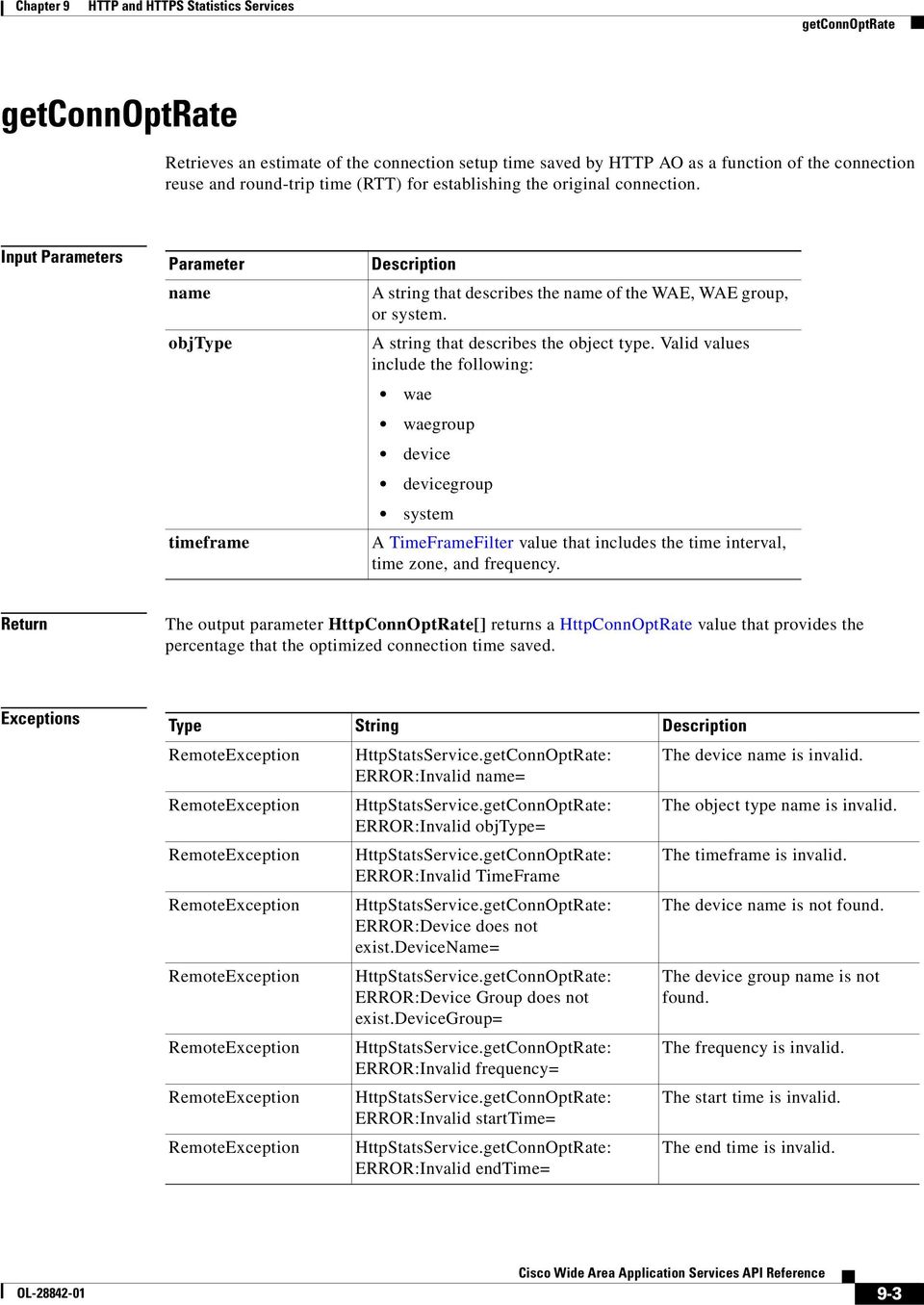
3 Chapter 9 getconnoptrate getconnoptrate Retrieves an estimate of the connection setup time saved by HTTP AO as a function of the connection reuse and round-trip time (RTT) for establishing the original connection. Input Parameters Parameter name objtype timeframe Description A string that describes the name of the WAE, WAE group, or system. A string that describes the object type. Valid values include the following: wae waegroup device devicegroup system A TimeFrameFilter value that includes the time interval, time zone, and frequency. Return The output parameter HttpConnOptRate[] returns a HttpConnOptRate value that provides the percentage that the optimized connection time saved. Exceptions Type String Description HttpStatsService.getConnOptRate: The device name is invalid. ERROR:Invalid name= HttpStatsService.getConnOptRate: The object type name is invalid. ERROR:Invalid objtype= HttpStatsService.getConnOptRate: The timeframe is invalid. ERROR:Invalid TimeFrame HttpStatsService.getConnOptRate: ERROR:Device does not exist.devicename= The device name is not found. HttpStatsService.getConnOptRate: ERROR:Device Group does not exist.devicegroup= HttpStatsService.getConnOptRate: ERROR:Invalid frequency= HttpStatsService.getConnOptRate: ERROR:Invalid starttime= HttpStatsService.getConnOptRate: ERROR:Invalid endtime= The device group name is not found. The frequency is invalid. The start time is invalid. The end time is invalid. 9-3
4 getconnoptrate Chapter 9 HttpStatsService.getMaxConnReuseCo unt: ERROR:startTime should be less than endtime starttime= HttpStats:The Method Name is not supported. MethodName= HttpStats:The SOAP Envelope Body is Null HttpStats:The Requested WebService is not available getconnoptrate:the SOAP Body doesn t have all the required elements The start time is less than the end time. The method name is not supported for a given service. The SOAP envelope is missing for a given service. The service requested is not supported. The SOAP body does not have all the required elements. 9-4

5 Chapter 9 getconnopttype getconnopttype Retrieves the HTTP optimization connection statistics. Input Parameters Parameter name objtype timeframe Description A string that describes the name of the WAE, WAE group, or system. A string that describes the object type. Valid values include the following: wae waegroup device devicegroup system A TimeFrameFilter value that includes the time interval, time zone, and frequency. Return The output parameter HttpConnOptType[] returns a HttpConnOptType value that provides the connection optimization type distribution statistics. Exceptions Type String Description HttpStatsService.getConnOptType: ERROR:Unable to get HttpConnOptType= Unknown exception. See the logs to view the error. 9-5

6 getmaxconnreusecount Chapter 9 getmaxconnreusecount Retrieves the maximum reuse count of a single connection. Input Parameters Parameter name objtype timeframe Description A string that describes the name of the WAE, WAE group, or system. A string that describes the object type. Valid values include the following: wae waegroup device devicegroup system A TimeFrameFilter value that includes the time interval, time zone, and frequency. Return The output parameter HttpMaxConnReuseCount[] returns a HttpMaxConnReuseCount value that provides the maximum reuse count of a single connection. Exceptions Type String Description HttpStatsService.getMaxConnReuse The device name is invalid. Count: ERROR:Invalid name= HttpStatsService.getMaxConnReuse The object type name is invalid. Count: ERROR:Invalid objtype= HttpStatsService.getMaxConnReuse The timeframe is invalid. Count: ERROR:Invalid TimeFrame HttpStatsService.getMaxConnReuse Count: ERROR:Device does not exist.devicename= The device name is not found. HttpStatsService.getMaxConnReuse Count: ERROR:Device Group does not exist.devicegroup= HttpStatsService.getMaxConnReuse Count: ERROR:Invalid frequency= HttpStatsService.getMaxConnReuse Count: ERROR:Invalid starttime= HttpStatsService.getMaxConnReuse Count: ERROR:Invalid endtime= The device group name is not found. The frequency is invalid. The start time is invalid. The end time is invalid. 9-6

7 Chapter 9 getmaxconnreusecount HttpStatsService.getMaxConnReuse Count: ERROR:startTime should be less than endtime starttime= HttpStats:The Method Name is not supported. MethodName= HttpStats:The SOAP Envelope Body is Null HttpStats:The Requested WebService is not available getmaxconnreusecount:the SOAP Body doesn t have all the required elements The start time is less than the end time. The method name is not supported for a given service. The SOAP envelope is missing for a given service. The service requested is not supported. The SOAP body does not have all the required elements. 9-7

8 getoptconncount Chapter 9 getoptconncount Retrieves the number of optimized HTTP connections for a WAE, WAE group, or all WAEs system wide. If you specify a time interval, the timeframe is divided into time segments. The connection count is calculated for each segment of time. Input Parameters Parameter name objtype timeframe Description A string that describes the name of the WAE, WAE group, or system. A string that describes the object type. Valid values include the following: wae waegroup device devicegroup system A TimeFrameFilter value that includes the time interval, time zone, and frequency. Return The output parameter HttpOptConnCount[] returns a HttpOptConnCount value that provides an array of HTTP traffic optimized connection statistics. Exceptions Type String Description HttpStatsService.getOptConnCount: The device name is invalid. ERROR:Invalid name= HttpStatsService.getOptConnCount: The object type name is invalid. ERROR:Invalid objtype= HttpStatsService.getOptConnCount: The timeframe is invalid. ERROR:Invalid TimeFrame HttpStatsService.getOptConnCount: ERROR:Device does not exist.devicename= The device name is not found. HttpStatsService.getOptConnCount: ERROR:Device Group does not exist.devicegroup= HttpStatsService.getOptConnCount: ERROR:Invalid frequency= HttpStatsService.getOptConnCount: ERROR:Invalid starttime= HttpStatsService.getOptConnCount: ERROR:Invalid endtime= The device group name is not found. The frequency is invalid. The start time is invalid. The end time is invalid. 9-8

9 Chapter 9 getoptconncount HttpStatsService.getOptConnCount: ERROR:startTime should be less than endtime starttime= HttpStats:The Method Name is not supported. MethodName= HttpStats:The SOAP Envelope Body is Null HttpStats:The Requested WebService is not available getoptconncount:the SOAP Body doesn t have all the required elements The start time is less than the end time. The method name is not supported for a given service. The SOAP envelope is missing for a given service. The service requested is not supported. The SOAP body does not have all the required elements. 9-9

10 gettotalconncount Chapter 9 gettotalconncount Retrieves the total number of HTTP connections for a WAE, WAE group, or all WAEs system wide. If you specify a time interval, the timeframe is divided into time segments. The connection count is calculated for each segment of time. Input Parameters Parameter name objtype timeframe Description A string that describes the name of the WAE, WAE group, or system. A string that describes the object type. Valid values include the following: wae waegroup device devicegroup system A TimeFrameFilter value that includes the time interval, time zone, and frequency. Return The output parameter HttpTotalConnCount[] returns a HttpTotalConnCount value that provides an array of HTTP traffic total connection statistics. Exceptions Type String Description HttpStatsService.getTotalConnCount: The device name is invalid. ERROR:Invalid name= HttpStatsService.getTotalConnCount: The object type name is invalid. ERROR:Invalid objtype= HttpStatsService.getTotalConnCount: The timeframe is invalid. ERROR:Invalid TimeFrame HttpStatsService.getTotalConnCount: ERROR:Device does not exist.devicename= The device name is not found. HttpStatsService.getTotalConnCount: ERROR:Device Group does not exist.devicegroup= HttpStatsService.getTotalConnCount: ERROR:Invalid frequency= HttpStatsService.getTotalConnCount: ERROR:Invalid starttime= HttpStatsService.getTotalConnCount: ERROR:Invalid endtime= The device group name is not found. The frequency is invalid. The start time is invalid. The end time is invalid. 9-10

11 Chapter 9 gettotalconncount HttpStatsService.getTotalConnCount: ERROR:startTime should be less than endtime starttime= HttpStats:The Method Name is not supported. MethodName= HttpStats:The SOAP Envelope Body is Null HttpStats:The Requested WebService is not available gettotalconncount:the SOAP Body doesn t have all the required elements The start time is less than the end time. The method name is not supported for a given service. The SOAP envelope is missing for a given service. The service requested is not supported. The SOAP body does not have all the required elements. 9-11

12 getunaccelconncount Chapter 9 getunaccelconncount Retrieves a list of unaccelerated connection counts. Input Parameters Parameter name objtype timeframe Description A string that describes the name of the WAE, WAE group, or system. A string that describes the object type. Valid values include the following: wae waegroup device devicegroup system A TimeFrameFilter value that includes the time interval, time zone, and frequency. Return The output parameter HttpUnaccelConnCount[] returns a HttpUnaccelConnCount value that provides the number of past connections from each client type. Exceptions Type String Description HttpStatsService.getUnaccelConnCount: ERROR:Unable to get HttpUnaccelConnCount= Unknown exception. See the logs to view the error. 9-12

13 Chapter 9 retrieveresponsestats retrieveresponsestats Retrieves the HTTP connection response RTT savings statistics. Input Parameters Parameter name objtype timeframe Description A string that describes the name of the WAE, WAE group, or system. A string that describes the object type. Valid values include the following: wae waegroup device devicegroup system A TimeFrameFilter value that includes the time interval, time zone, and frequency. Return The output parameter HttpResponseStats[] returns a HttpResponseStats value that provides the response time savings statistics. Exceptions Type String Description HttpStatsService.retrieveResponseStats: ERROR:Unable to get HttpResponseStats= Unknown exception. See the logs to view the error. 9-13

14 retrievestats Chapter 9 retrievestats Retrieves the HTTP connection statistics, such as response times and counts per operation. Input Parameters Parameter name objtype timeframe Description A string that describes the name of the WAE, WAE group, or system. A string that describes the object type. Valid values include the following: wae waegroup device devicegroup system A TimeFrameFilter value that includes the time interval, time zone, and frequency. Return The output parameter HttpConnStats[] returns a HttpConnStats value that provides the response time, counter per operation, and other statistics. Exceptions Type String Description HttpStatsService.retrieveStats: The device name is invalid. ERROR:Invalid name= HttpStatsService.retrieveStats: The object type name is invalid. ERROR:Invalid objtype= HttpStatsService.retrieveStats: The timeframe is invalid. ERROR:Invalid TimeFrame HttpStatsService.retrieveStats: ERROR:Device does not exist.devicename= The device name is not found. HttpStatsService.retrieveStats: ERROR:Device Group does not exist.devicegroup= HttpStatsService.retrieveStats: ERROR:Invalid frequency= HttpStatsService.retrieveStats: ERROR:Invalid starttime= HttpStatsService.retrieveStats: ERROR:Invalid endtime= The device group name is not found. The frequency is invalid. The start time is invalid. The end time is invalid. 9-14

15 Chapter 9 HTTPS Service HttpStatsService.retrieveStats: ERROR:startTime should be less than endtime starttime= HttpStats:The Method Name is not supported. MethodName= HttpStats:The SOAP Envelope Body is Null HttpStats:The Requested WebService is not available retrievestats:the SOAP Body doesn t have all the required elements The start time is less than the end time. The method name is not supported for a given service. The SOAP envelope is missing for a given service. The service requested is not supported. The SOAP body does not have all the required elements. HTTPS Service The HTTPS service (HttpsStats Web Service) performs one or more of the following actions: getconnopttype retrieveresponsestats retrievestats Syntax Service URL: WSDL URL: To obtain a description of all the operations and parameters for the HttpsStats Web Service, submit a URL to the service with the suffix?wsdl as follows: To obtain management information using the Central Manager monitoring API, first call the service by using the service URL for this service as follows: Next, submit a SOAP request written in an XML format to retrieve the information. The following example shows an XML-formatted SOAP request perform the getconnopttype action. The request includes the input parameters for this particular action shown in bold. The next example shows the XML response that contains the output values for this action. Example Request <?xml version="1.0" encoding="utf-8"?> - <soapenv:envelope xmlns:soapenv=" - <soapenv:header> - <wsse:security xmlns:wsse=" xsd"> - <wsse:usernametoken> <wsse:username>admin</wsse:username> <wsse:password Type=" asswordtext">default</wsse:password> 9-15

16 HTTPS Service Chapter 9 </wsse:usernametoken> </wsse:security> </soapenv:header> - <soapenv:body> - <ns3:getconnopttype xmlns:ns3=" <ns3:name>ce </ns3:name> <ns3:objtype>wae</ns3:objtype> - <ns3:timeframe> <ns2:endtime xmlns:ns2=" <ns2:frequency xmlns:ns2=" <ns2:starttime xmlns:ns2=" <ns2:timezone xmlns:ns2=" </ns3:timeframe> </ns3:getconnopttype> </soapenv:body> </soapenv:envelope> Example Response <?xml version="1.0" encoding="utf-8"?> <soapenv:envelope xmlns:soapenv=" - <soapenv:body> - <ns:getconnopttyperesponse xmlns:ns=" xmlns:ax238=" xmlns:ax241=" xmlns:ax240=" xmlns:ax239=" - <ns:return type="com.cisco.waas.ws.stats.httpsconnopttype"> <ax241:devicename>gowri-wae-2</ax241:devicename> <ax241:drehintsflush>0</ax241:drehintsflush> <ax241:drehintsskipallheaders>0</ax241:drehintsskipallheaders> <ax241:drehintsskiplz>0</ax241:drehintsskiplz> <ax241:endtime> t04:59:57.671z</ax241:endtime> <ax241:frequency>min</ax241:frequency> <ax241:locallyservedifnotmodified>0</ax241:locallyservedifnotmodified> <ax241:locallyservedredirect>0</ax241:locallyservedredirect> <ax241:locallyservedunauthorized>0</ax241:locallyservedunauthorized> </ns:return> </ns:getconnopttyperesponse> </soapenv:body> </soapenv:envelope> 9-16

17 Chapter 9 getconnopttype getconnopttype Retrieves the HTTPS optimization connection statistics. Input Parameters Parameter name objtype timeframe Description A string that describes the name of the WAE, WAE group, or system. A string that describes the object type. Valid values include the following: wae waegroup device devicegroup location system A TimeFrameFilter value that includes the time interval, time zone, and frequency. Return The output parameter HttpsConnOptType[] returns a HttpsConnOptType value that provides the connection optimization type distribution statistics. Exceptions Type String Description HttpsStatsService.getConnOptType: The device name is invalid. ERROR:Invalid name= HttpsStatsService.getConnOptType: ERROR:Unable to get Unknown exception. See the logs to view the error. HttpsConnOptType= HttpsStatsService.getConnOptType: The object type name is invalid. ERROR:Invalid objtype= HttpsStatsService.getConnOptType: The timeframe is invalid. ERROR:Invalid TimeFrame HttpsStatsService.getConnOptType: ERROR:Device does not exist.devicename= The device name is not found. HttpsStatsService.getConnOptType: ERROR:Device Group does not exist.devicegroup= HttpsStatsService.getConnOptType: ERROR:Invalid frequency= HttpsStatsService.getConnOptType: ERROR:Invalid starttime= The device group name is not found. The frequency is invalid. The start time is invalid. 9-17

18 getconnopttype Chapter 9 HttpsStatsService.getConnOptType: ERROR:Invalid endtime= HttpsStatsService.getConnOptType: ERROR:startTime should be less than endtime starttime= HttpsStats:The Method Name is not supported. MethodName= HttpsStats:The SOAP Envelope Body is Null HttpsStats:The Requested WebService is not available getconnopttype:the SOAP Body doesn t have all the required elements The end time is invalid. The start time is less than the end time. The method name is not supported for a given service. The SOAP envelope is missing for a given service. The service requested is not supported. The SOAP body does not have all the required elements. 9-18

19 Chapter 9 retrieveresponsestats retrieveresponsestats Retrieves the HTTPS connection response RTT savings statistics. Input Parameters Parameter name objtype timeframe Description A string that describes the name of the WAE, WAE group, or system. A string that describes the object type. Valid values include the following: wae waegroup device devicegroup location system A TimeFrameFilter value that includes the time interval, time zone, and frequency. Return The output parameter HttpsResponseStats[] returns a HttpsResponseStats value that provides the response time savings statistics. Exceptions Type String Description HttpsStatsService.retrieveResponseStat The device name is invalid. s: ERROR:Invalid name= HttpsStatsService.retrieveResponseStat s:error:unable to get Unknown exception. See the logs to view the error. HttpsResponseStats= HttpsStatsService.retrieveResponseStat The object type name is invalid. s: ERROR:Invalid objtype= HttpsStatsService.retrieveResponseStat The timeframe is invalid. s: ERROR:Invalid TimeFrame HttpsStatsService.retrieveResponseStat s: ERROR:Device does not exist.devicename= The device name is not found. HttpsStatsService.retrieveResponseStat s: ERROR:Device Group does not exist.devicegroup= HttpsStatsService.retrieveResponseStat s: ERROR:Invalid frequency= HttpsStatsService.retrieveResponseStat s: ERROR:Invalid starttime= The device group name is not found. The frequency is invalid. The start time is invalid. 9-19

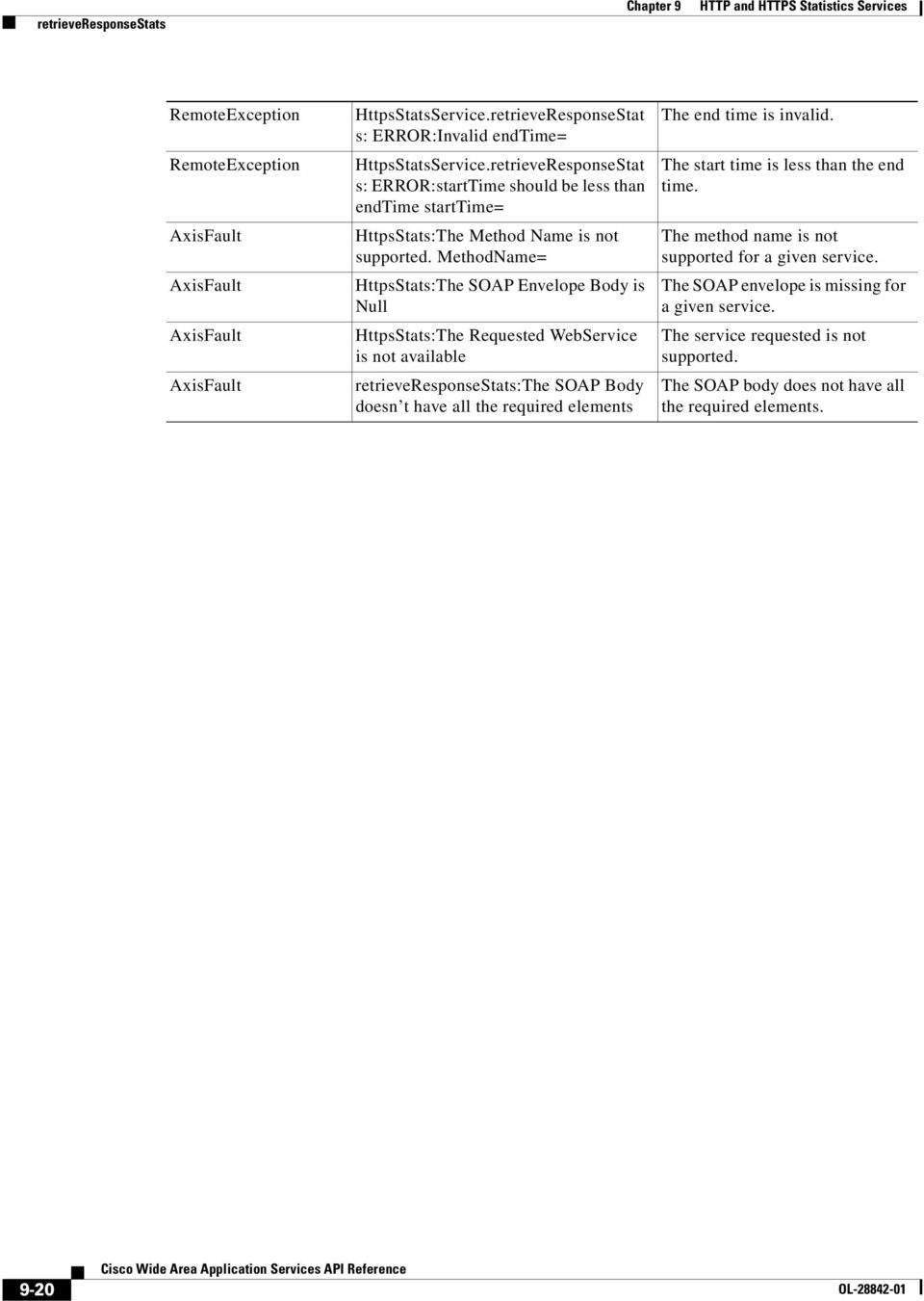
20 retrieveresponsestats Chapter 9 HttpsStatsService.retrieveResponseStat s: ERROR:Invalid endtime= HttpsStatsService.retrieveResponseStat s: ERROR:startTime should be less than endtime starttime= HttpsStats:The Method Name is not supported. MethodName= HttpsStats:The SOAP Envelope Body is Null HttpsStats:The Requested WebService is not available retrieveresponsestats:the SOAP Body doesn t have all the required elements The end time is invalid. The start time is less than the end time. The method name is not supported for a given service. The SOAP envelope is missing for a given service. The service requested is not supported. The SOAP body does not have all the required elements. 9-20
21 Chapter 9 retrievestats retrievestats Retrieves the HTTPS connection statistics, such as response times and counts per operation. Input Parameters Parameter name objtype timeframe Description A string that describes the name of the WAE, WAE group, or system. A string that describes the object type. Valid values include the following: wae waegroup device devicegroup location system A TimeFrameFilter value that includes the time interval, time zone, and frequency. Return The output parameter HttpsStats[] returns a HttpsStats value that provides the response time, counter per operation, and other statistics. Exceptions Type String Description HttpsStatsService.retrieveStats: The device name is invalid. ERROR:Invalid name= HttpsStatsService.retrieveStats: The object type name is invalid. ERROR:Invalid objtype= HttpsStatsService.retrieveStats: The timeframe is invalid. ERROR:Invalid TimeFrame HttpsStatsService.retrieveStats: ERROR:Device does not exist.devicename= The device name is not found. HttpsStatsService.retrieveStats: ERROR:Device Group does not exist.devicegroup= HttpsStatsService.retrieveStats: ERROR:Invalid frequency= HttpsStatsService.retrieveStats: ERROR:Invalid starttime= HttpsStatsService.retrieveStats: ERROR:Invalid endtime= The device group name is not found. The frequency is invalid. The start time is invalid. The end time is invalid. 9-21
22 retrievestats Chapter 9 HttpsStatsService.retrieveStats: ERROR:startTime should be less than endtime starttime= HttpsStats:The Method Name is not supported. MethodName= HttpsStats:The SOAP Envelope Body is Null HttpsStats:The Requested WebService is not available retrievestats:the SOAP Body doesn t have all the required elements The start time is less than the end time. The method name is not supported for a given service. The SOAP envelope is missing for a given service. The service requested is not supported. The SOAP body does not have all the required elements. 9-22
GetLibraryUserOrderList
 GetLibraryUserOrderList Webservice name: GetLibraryUserOrderList Adress: https://www.elib.se/webservices/getlibraryuserorderlist.asmx WSDL: https://www.elib.se/webservices/getlibraryuserorderlist.asmx?wsdl
Using Web Services to Exchange data with Qualtrics and Hobsons Connect
 Using Web Services to Exchange data with Qualtrics and Hobsons Connect Definitions Let s not argue over small differences Web Service A method of communication between two devices over the Internet. Two
Digital Signature Web Service Interface
 1 2 Digital Signature Web Service Interface 3 4 5 6 7 8 9 10 11 12 13 14 15 16 17 18 19 20 21 22 23 24 25 26 27 28 29 30 31 32 1 Introduction This document describes an RPC interface for a centralized
Specific API Usage Limitations... 6 Daily Limitation... 6 Concurrency Limitation... 6. API Description... 7 Site Data API... 7
 Last update: July 2015 SolarEdge API SolarEdge API Contents Last update: July 2015... 1 SolarEdge API... 2 Contents... 2 General... 3 Purpose and scope... 3 Acronyms and abbreviations... 3 Introduction...
e-filing Secure Web Service User Manual
 e-filing Secure Web Service User Manual Page1 CONTENTS 1 BULK ITR... 6 2 BULK PAN VERIFICATION... 9 3 GET ITR-V BY TOKEN NUMBER... 13 4 GET ITR-V BY ACKNOWLEDGMENT NUMBER... 16 5 GET RETURN STATUS... 19
Configuration Guide Copyright 2013 HiPay wallet All Rights Reserved Last updated in July 2013
 Configuration Guide 2 Table of contents Configuration Guide... 1 Introduction... 3 Pre-requisites... 4 Recent version... 4 Getting started, a step-by-step walkthrough... 5 Merchant account registration...
Cvent Web Services API. Version V200611 June 2008
 Cvent Web Services API Version V200611 Cvent, Inc. 8180 Greensboro Dr, Suite 450 McLean, VA 22102 866.318.4357 www.cvent.com [email protected] 1.0 Framework Overview... 1 1.1 Overview... 1 1.2 Compatible
MXSAVE XMLRPC Web Service Guide. Last Revision: 6/14/2012
 MXSAVE XMLRPC Web Service Guide Last Revision: 6/14/2012 Table of Contents Introduction! 4 Web Service Minimum Requirements! 4 Developer Support! 5 Submitting Transactions! 6 Clients! 7 Adding Clients!
AXL Troubleshooting. Overview. Architecture
 AXL Troubleshooting This chapter contains the following topics: Overview, page 35 Architecture, page 35 Postinstallation Checklist, page 36 Troubleshooting Tools, page 39 Error Codes, page 43 Overview
SPARROW Gateway. Developer API. Version 2.00
 SPARROW Gateway Developer API Version 2.00 Released May 2015 Table of Contents SPARROW Gateway... 1 Developer API... 1 Overview... 3 Architecture... 3 Merchant Private Key and Payment Types... 3 Integration...
JobScheduler Web Services Executing JobScheduler commands
 JobScheduler - Job Execution and Scheduling System JobScheduler Web Services Executing JobScheduler commands Technical Reference March 2015 March 2015 JobScheduler Web Services page: 1 JobScheduler Web
WEB SERVICES TEST AUTOMATION
 WEB SERVICES TEST AUTOMATION Notes for Facilitated Discussion at September 2013 Meeting of Northern Virginia Test Automation Interest Group By Rick Hower [email protected] and Jim Moore [email protected]
SPARROW Gateway. Developer Data Vault Payment Type API. Version 2.7 (6293)
 SPARROW Gateway Developer Data Vault Payment Type API Version 2.7 (6293) Released July 2015 Table of Contents SPARROW Gateway... 1 Developer Data Vault Payment Type API... 1 Overview... 3 Architecture...
PHP Language Binding Guide For The Connection Cloud Web Services
 PHP Language Binding Guide For The Connection Cloud Web Services Table Of Contents Overview... 3 Intended Audience... 3 Prerequisites... 3 Term Definitions... 3 Introduction... 4 What s Required... 5 Language
Your customer engagement transformation starts here
 Your customer engagement transformation starts here Copyright 2013 Hewlett-Packard Development Company, L.P. The information contained herein is subject to change without notice. Developing with the MediaBin
Onset Computer Corporation
 Onset, HOBO, and HOBOlink are trademarks or registered trademarks of Onset Computer Corporation for its data logger products and configuration/interface software. All other trademarks are the property
vcommander will use SSL and session-based authentication to secure REST web services.
 vcommander REST API Draft Proposal v1.1 1. Client Authentication vcommander will use SSL and session-based authentication to secure REST web services. 1. All REST API calls must take place over HTTPS 2.
WildFire Cloud File Analysis
 WildFire Cloud File Analysis The following topics describe the different methods for sending files to the WildFire Cloud for analysis. Forward Files to the WildFire Cloud Verify Firewall File Forwarding
Twinfield Single Sign On
 Twinfield Single Sign On manual, version 5.4 April 2009 For general information about our webservices see the Twinfield Webservices Manual Twinfield International NV De Beek 9-15 3871 MS Hoevelaken Netherlands
Web Service Facade for PHP5. Andreas Meyer, Sebastian Böttner, Stefan Marr
 Web Service Facade for PHP5 Andreas Meyer, Sebastian Böttner, Stefan Marr Agenda Objectives and Status Architecture Framework Features WSD Generator PHP5 eflection API Security Aspects used approach planned
THE CHALLENGE OF ADMINISTERING WEBSITES OR APPLICATIONS THAT REQUIRE 24/7 ACCESSIBILITY
 THE CHALLENGE OF ADMINISTERING WEBSITES OR APPLICATIONS THAT REQUIRE 24/7 ACCESSIBILITY As the constantly growing demands of businesses and organizations operating in a global economy cause an increased
Using ilove SharePoint Web Services Workflow Action
 Using ilove SharePoint Web Services Workflow Action This guide describes the steps to create a workflow that will add some information to Contacts in CRM. As an example, we will use demonstration site
EUR-Lex 2012 Data Extraction using Web Services
 DOCUMENT HISTORY DOCUMENT HISTORY Version Release Date Description 0.01 24/01/2013 Initial draft 0.02 01/02/2013 Review 1.00 07/08/2013 Version 1.00 -v1.00.doc Page 2 of 17 TABLE OF CONTENTS 1 Introduction...
Service for checking whether an email is operative or not. Validate email ids in your databases.
 MailStatus API Service for checking whether an email is operative or not. Validate email ids in your databases. Overview Lleida.net MailStatus API allows you to consult the validity of an email address.
Call Detail Record Access Service Part No. 520-0015-01R01
 Call Detail Record Access Service Part No. 520-0015-01R01 Summary Objective WSDL URL (Testing) WSDL URL (Hosting Production) Endpoint URL (Testing) Endpoint URL (Hosting Production) Namespace URI Service
How to consume a Domino Web Services from Visual Studio under Security
 How to consume a Domino Web Services from Visual Studio under Security Summary Authors... 2 Abstract... 2 Web Services... 3 Write a Visual Basic Consumer... 5 Authors Andrea Fontana IBM Champion for WebSphere
Setting cron job Linux/Unix operating systems using command-line interface
 Overview A cron job/scheduled task is a system-side automatic task that can be configured to run for an infinite number of times at a given interval. Cron/scheduled task allows you to schedule a command
Performance Analysis of webmethods Integrations using Apache JMeter Information Guide for JMeter Adoption
 TORRY HARRIS BUSINESS SOLUTIONS Performance Analysis of webmethods Integrations using Apache JMeter Information Guide for JMeter Adoption Ganapathi Nanjappa 4/28/2010 2010 Torry Harris Business Solutions.
SmarterMeasure Inbound Single Sign On (SSO) Version 1.3 Copyright 2010 SmarterServices, LLC / SmarterServices.com PO Box 220111, Deatsville, AL 36022
 SmarterMeasure Inbound Single Sign On (SSO) Version 1.3 Copyright 2010 SmarterServices, LLC / SmarterServices.com PO Box 220111, Deatsville, AL 36022 Contents 1. Revision History... 3 2. Overview... 3
Web Services in.net (1)
 Web Services in.net (1) These slides are meant to be for teaching purposes only and only for the students that are registered in CSE4413 and should not be published as a book or in any form of commercial
CRM On Demand. Oracle Web Services On Demand Guide
 CRM On Demand Oracle Web Services On Demand Guide Version 4.0 (Oracle CRM On Demand Release 16) Rev. A June 2009 Copyright 2005, 2009 Oracle. All rights reserved. The Programs (which include both the software
HOBOlink Web Services V2 Developer s Guide
 HOBOlink Web Services V2 Developer s Guide Onset Computer Corporation 470 MacArthur Blvd. Bourne, MA 02532 www.onsetcomp.com Mailing Address: P.O. Box 3450 Pocasset, MA 02559-3450 Phone: 1-800-LOGGERS
Author: Gennaro Frazzingaro Universidad Rey Juan Carlos campus de Mostòles (Madrid) GIA Grupo de Inteligencia Artificial
 Simple Implementation of a WebService using Eclipse Author: Gennaro Frazzingaro Universidad Rey Juan Carlos campus de Mostòles (Madrid) GIA Grupo de Inteligencia Artificial Contents Web Services introduction
Sentinel EMS v7.1 Web Services Guide
 Sentinel EMS v7.1 Web Services Guide ii Sentinel EMS Web Services Guide Document Revision History Part Number 007-011157-001, Revision E. Software versions 7.1 and later. Revision Action/Change Date A
Monitoring Traffic Interception
 CHAPTER 2 This chapter describes how to use traffic interception to monitor your WAAS devices and contains the following sections: Verifying WCCPv2 Interception, page 2-1 Verifying Inline Interception,
Single Sign On Guide. Table of Contents
 Single Sign On Guide Table of Contents I. Overview II. Benefits III. How SSO Works IV. Set-up Requirements and Recommendations V. Set-up Instructions a. Required Parameters b. Optional Parameters c. Error
Comparing Load Balancing for Server Selection Using Cloud Services
 Comparing Load Balancing for Server Selection Using Cloud Services By Daksh Gupta A Project Report Submitted In Partial Fulfillment of the Requirements of the Degree of Masters of Science In Computer Science
Custom Encryption in Siebel & Siebel Web Service Security Test Guide 1.0
 Custom Encryption in Siebel & Siebel Web Security Test Guide 1.0 Muralidhar Reddy Introduction Siebel (7.5 onwards and upto 8.1) natively supports 2 Types of Inbound web Security 1. WS Security UserName
Deploying Microsoft Operations Manager with the BIG-IP system and icontrol
 Deployment Guide Deploying Microsoft Operations Manager with the BIG-IP system and icontrol Deploying Microsoft Operations Manager with the BIG-IP system and icontrol Welcome to the BIG-IP LTM system -
United Concordia (UCD) Real Time Claim Submission & Adjudication Connectivity Specifications
 United Concordia (UCD) Real Time Claim Submission & Adjudication Connectivity Specifications May 15, 2015 Contents 1. Real Time Overview 2. Requirements 3. SOAP Messages 4. SOAP Faults 5. CORE-Compliant
Replacements TECHNICAL REFERENCE. DTCCSOLUTIONS Dec 2009. Copyright 2009 Depository Trust Clearing Corporation. All Rights Reserved.
 TECHNICAL REFERENCE Replacements Page 1 Table of Contents Table of Contents 1 Overview... 3 1.1 Replacements Features... 3 2 Roles and Responsibilities... 4 2.1 Sender (Receiving Carrier)... 4 2.2 Recipient
How To Use Blackberry Web Services On A Blackberry Device
 Development Guide BlackBerry Web Services Microsoft.NET Version 12.1 Published: 2015-02-25 SWD-20150507151709605 Contents BlackBerry Web Services... 4 Programmatic access to common management tasks...
IBM SPSS Collaboration and Deployment Services Version 6 Release 0. Single Sign-On Services Developer's Guide
 IBM SPSS Collaboration and Deployment Services Version 6 Release 0 Single Sign-On Services Developer's Guide Note Before using this information and the product it supports, read the information in Notices
Monitoring WAAS Using Cisco Network Analysis Module. Information About NAM CHAPTER
 CHAPTER 5 Monitoring WAAS Using Cisco Network Analysis Module This chapter describes Cisco Network Analysis Module (NAM), which you can use to monitor your WAAS devices. This chapter contains the following
Using the vcenter Orchestrator Plug-In for vsphere Auto Deploy 1.0
 Using the vcenter Orchestrator Plug-In for vsphere Auto Deploy 1.0 vcenter Orchestrator 4.2 This document supports the version of each product listed and supports all subsequent versions until the document
WORKING WITH LOAD BALANCING AND QUEUEING FOR ADOBE INDESIGN CS5 SERVER
 WORKING WITH LOAD BALANCING AND QUEUEING FOR ADOBE INDESIGN CS5 SERVER 2010 Adobe Systems Incorporated. All rights reserved. Working With Load Balancing and Queueing for Adobe InDesign CS5 Server Adobe,
PerfectForms SharePoint Integration
 PerfectForms SharePoint Integration Accessing Lists from PerfectForms AUTHOR: KEITH LEWIS DATE: 6/15/2011 Date of Last Revision: 6/15/11 Page 1 of 16 Contents Introduction... 3 Purpose... 3 Querying SharePoint
Finding and Preventing Cross- Site Request Forgery. Tom Gallagher Security Test Lead, Microsoft
 Finding and Preventing Cross- Site Request Forgery Tom Gallagher Security Test Lead, Microsoft Agenda Quick reminder of how HTML forms work How cross-site request forgery (CSRF) attack works Obstacles
MAGEJAM PLUGIN INSTALLATION GUIDE
 MAGEJAM PLUGIN INSTALLATION GUIDE BEFORE YOU BEGIN ANY INSTALL OR UPGRADE ** Always make sure to make a backup of your Magento installation before installing any extension especially on a live system.**
Sage 100 ERP. ebusiness Web Services Installation and Reference Guide
 Sage 100 ERP ebusiness Web Services Installation and Reference Guide 2012 Sage Software, Inc. All rights reserved. Sage, the Sage logos, and the Sage product and service names mentioned herein are registered
WORKING WITH WEB SERVICES. Rob Richards http://xri.net/=rob.richards www.cdatazone.org
 WORKING WITH WEB SERVICES Rob Richards http://xri.net/=rob.richards www.cdatazone.org Helpful Tools soapui http://www.soapui.org/ Multiple platforms Free & enhanced Pro versions SOAPSonar http://www.crosschecknet.com/
Online signature API. Terms used in this document. The API in brief. Version 0.20, 2015-04-08
 Online signature API Version 0.20, 2015-04-08 Terms used in this document Onnistuu.fi, the website https://www.onnistuu.fi/ Client, online page or other system using the API provided by Onnistuu.fi. End
Module 13 Implementing Java EE Web Services with JAX-WS
 Module 13 Implementing Java EE Web Services with JAX-WS Objectives Describe endpoints supported by Java EE 5 Describe the requirements of the JAX-WS servlet endpoints Describe the requirements of JAX-WS
The end. Carl Nettelblad 2015-06-04
 The end Carl Nettelblad 2015-06-04 The exam and end of the course Don t forget the course evaluation! Closing tomorrow, Friday Project upload deadline tonight Book presentation appointments with Kalyan
RoomWizard Synchronization Software Manual Installation Instructions
 2 RoomWizard Synchronization Software Manual Installation Instructions Table of Contents Exchange Server Configuration... 4 RoomWizard Synchronization Software Installation and Configuration... 5 System
Specific API Usage Limitations... 7 Daily Limitation... 7 Concurrency Limitation... 7 Bulk Use... 7. API Description... 8 Site Data API...
 Last update: May 2016 SolarEdge API SolarEdge API Contents SolarEdge API... 2 Contents... 2 General... 4 Purpose and scope... 4 Acronyms and abbreviations... 4 Introduction... 4 Technical Information...
Getting started with OWASP WebGoat 4.0 and SOAPUI.
 Getting started with OWASP WebGoat 4.0 and SOAPUI. Hacking web services, an introduction. Version 1.0 by Philippe Bogaerts [email protected] www.radarhack.com Reviewed by Erwin Geirnaert
Revision Action/Change Date. A Sentinel Cloud 3.0 Release December 2012 B Sentinel Cloud 3.1 Release April 2013 C
 ii Sentinel Cloud Web Services Guide Software Version This documentation is applicable for the Sentinel Cloud EMS Version 3.4. Revision History Part Number 007-012141-001, Revision E Revision Action/Change
Wind River. Intelligent Device Platform XT EMS Profile EMS DEVICE MANAGEMENT USER'S GUIDE WIND RIVER 1.0
 Wind River Intelligent Device Platform XT EMS Profile WIND RIVER EMS DEVICE MANAGEMENT USER'S GUIDE 1.0 Copyright Notice Copyright 2014 Wind River Systems, Inc. All rights reserved. No part of this publication
Swyx Trace Tool Server Installation
 Swyx Trace Tool Server Installation Overview The upload functionality of Swyx Trace Tool uses Microsoft Background Intelligent Transfer Service (BITS) to perform uploads. Details about BITS can be found
Requirement engineering Exercise the POS System solution
 Requirement engineering Exercise the POS System solution Problem Description A POS (Point-Of-Sale) system is a computer system typically used to manage the sales in retail stores. It includes hardware
Google Calendar 3 Version 0.8 and 0.9 Installation and User Guide. Preliminary Setup
 Preliminary Setup You first need to establish and create google credentials before the plugin can access your calendar. Follow the instructions in the document Setting up a Google V3 API Service Account
APMaaS Synthetic Monitoring for Web and Mobile
 APMaaS Synthetic Monitoring for Web and Mobile Data Feed API Reference September 2014 Please direct questions about APMaaS Synthetic Monitoring or comments on this document to: APM Customer Support FrontLine
Merchant Implementation Guide
 Merchant Implementation Guide Version 5.0 2013 Centricom Pty Limited. All rights reserved. Disclaimer and limitation of Liability This Merchant Implementation Guide sets out the proper procedures for the
DEPLOYMENT GUIDE DEPLOYING THE BIG-IP LTM SYSTEM WITH CITRIX PRESENTATION SERVER 3.0 AND 4.5
 DEPLOYMENT GUIDE DEPLOYING THE BIG-IP LTM SYSTEM WITH CITRIX PRESENTATION SERVER 3.0 AND 4.5 Deploying F5 BIG-IP Local Traffic Manager with Citrix Presentation Server Welcome to the F5 BIG-IP Deployment
Integrating CoroSoft Datacenter Automation Suite with F5 Networks BIG-IP
 Integrating CoroSoft Datacenter Automation Suite with F5 Networks BIG-IP Introducing the CoroSoft BIG-IP Solution Configuring the CoroSoft BIG-IP Solution Optimizing the BIG-IP configuration Introducing
Cloud Elements ecommerce Hub Provisioning Guide API Version 2.0 BETA
 Cloud Elements ecommerce Hub Provisioning Guide API Version 2.0 BETA Page 1 Introduction The ecommerce Hub provides a uniform API to allow applications to use various endpoints such as Shopify. The following
Sage CRM Connector Tool White Paper
 White Paper Document Number: PD521-01-1_0-WP Orbis Software Limited 2010 Table of Contents ABOUT THE SAGE CRM CONNECTOR TOOL... 1 INTRODUCTION... 2 System Requirements... 2 Hardware... 2 Software... 2
Magensa Services. Administrative Account Services API Documentation for Informational Purposes Only. September 2014. Manual Part Number: 99810058-1.
 Magensa Services Administrative Account Services API Documentation for Informational Purposes Only September 2014 Manual Part Number: 99810058-1.01 REGISTERED TO ISO 9001:2008 Magensa I 1710 Apollo Court
SizmekFeatures. HTML5JSSyncFeature
 Features HTML5JSSyncFeature Table of Contents Overview... 2 Supported Platforms... 2 Demos/Downloads... 3 Note... 3 For Tags Served in iframes... 3 Features... 3 Use Case... 3 Included Files... 4 Implementing
Copyright 2012, Oracle and/or its affiliates. All rights reserved.
 1 OTM and SOA Mark Hagan Principal Software Engineer Oracle Product Development Content What is SOA? What is Web Services Security? Web Services Security in OTM Futures 3 PARADIGM 4 Content What is SOA?
API documentation - 1 -
 API documentation - 1 - Table of Contents 1. Introduction 1.1. What is an API 2. API Functions 2.1. Purge list of files 2.1.1 Description 2.1.2 Implementation 2.2. Purge of whole cache (all files on all
Building and Using Web Services With JDeveloper 11g
 Building and Using Web Services With JDeveloper 11g Purpose In this tutorial, you create a series of simple web service scenarios in JDeveloper. This is intended as a light introduction to some of the
LogLogic Cisco IPS Log Configuration Guide
 LogLogic Cisco IPS Log Configuration Guide Document Release: March 2011 Part Number: LL600072-00ELS090000 This manual supports LogLogic Cisco IPS Release 1.0 and later, and LogLogic Software Release 4.9.1
DEVELOPING CONTRACT - DRIVEN WEB SERVICES USING JDEVELOPER. The purpose of this tutorial is to develop a java web service using a top-down approach.
 DEVELOPING CONTRACT - DRIVEN WEB SERVICES USING JDEVELOPER Purpose: The purpose of this tutorial is to develop a java web service using a top-down approach. Topics: This tutorial covers the following topics:
ZODIANET API (ZAPI2)
 ZODIANET API (ZAPI2) ZODIANET API ZAPI 2 Description of information exchange between the Zodianet platform and third-parties Document : specification Source: ZODIANET Mail: [email protected] Revision:
Grandstream Networks, Inc. UCM6100 Series IP PBX Appliance CDR and REC API Guide
 Grandstream Networks, Inc. UCM6100 Series IP PBX Appliance CDR and REC API Guide Index CDR REPORT... 3 CDR FILTER... 3 CDR REPORT DATA FIELDS... 4 CDR REPORT OPERATIONS... 5 CDR CSV FILE... 6 API CONFIGURATION...
About Contract Management
 Contract Management System Architecture Data Sheet June 2015 About Contract Management Oracle Primavera Contract Management is a multi-user, multi-project Web-based application that manages all aspects
Virtual Credit Card Processing System
 The ITB Journal Volume 3 Issue 2 Article 2 2002 Virtual Credit Card Processing System Geraldine Gray Karen Church Tony Ayres Follow this and additional works at: http://arrow.dit.ie/itbj Part of the E-Commerce
StreamServe Persuasion SP5 Document Broker Plus
 StreamServe Persuasion SP5 Document Broker Plus User Guide Rev A StreamServe Persuasion SP5 Document Broker Plus User Guide Rev A 2001-2010 STREAMSERVE, INC. ALL RIGHTS RESERVED United States patent #7,127,520
Back Office Service Layer
 Start Oracle Health Insurance Back Office Back Office Service Layer User Manual version 1.3 Part number: E41198_01 March 2013 Copyright 2011, 2013, Oracle and/or its affiliates. All rights reserved. This
API Endpoint Methods NAME DESCRIPTION GET /api/v4/analytics/dashboard/ POST /api/v4/analytics/dashboard/ GET /api/v4/analytics/dashboard/{id}/ PUT
 Last on 2015-09-17. Dashboard A Dashboard is a grouping of analytics Widgets associated with a particular User. API Endpoint /api/v4/analytics/dashboard/ Methods NAME DESCRIPTION GET /api/v4/analytics/dashboard/
STK Terrain Server Installation Guide
 STK Terrain Server Installation Guide This guide walks you through the process of installing and configuring STK Terrain Server on your system. System Requirements 64-bit Windows, including Windows Server
Recurring Payments Manual
 Recurring Payments Manual Version: 3.2 Contact details Simon Carmiggeltstraat 6-50 1011 DJ Amsterdam P.O. Box 10095 1001 EB Amsterdam The Netherlands T +31 20 240 1240 E [email protected] Table of Contents
Testing the API behind a mobile app
 Testing the API behind a mobile app Marc van t Veer, Polteq www.eurostarconferences.com @esconfs #esconfs Testing the API behind a mobile app System testing in a cloud enabling project Marc van t Veer
Apigee Gateway Specifications
 Apigee Gateway Specifications Logging and Auditing Data Selection Request/response messages HTTP headers Simple Object Access Protocol (SOAP) headers Custom fragment selection via XPath Data Handling Encryption
Copyright 2013 Consona Corporation. All rights reserved www.compiere.com
 COMPIERE 3.8.1 SOAP FRAMEWORK Copyright 2013 Consona Corporation. All rights reserved www.compiere.com Table of Contents Compiere SOAP API... 3 Accessing Compiere SOAP... 3 Generate Java Compiere SOAP
Connecting Custom Services to the YAWL Engine. Beta 7 Release
 Connecting Custom Services to the YAWL Engine Beta 7 Release Document Control Date Author Version Change 25 Feb 2005 Marlon Dumas, 0.1 Initial Draft Tore Fjellheim, Lachlan Aldred 3 March 2006 Lachlan
Tenrox and Microsoft Dynamics CRM Integration Guide
 Tenrox Tenrox and Microsoft Dynamics CRM Integration Guide January, 2012 2012 Tenrox. All rights reserved. About this Guide This guide describes the procedures for setting up integration between Microsoft
Technical Interface Description
 Technical Interface Description Version 2.4.1 28.04.2015 Table of Contents 1 Introduction... 6 1.1 Preamble... 6 1.2 Structure of the Document... 6 1.3 Referenced Documents... 7 1.4 List of Abbreviations...
Creating Web Services in NetBeans
 Creating Web Services in NetBeans Fulvio Frati [email protected] Sesar Lab http://ra.crema.unimi.it 1 Outline Web Services Overview Creation of a Web Services Server Creation of different Web Services
SOAP WSDL & HTTP MIME REST Web Services Companion Guide HIPAA Operating Rules (HOpR) CORE Phase II
 SOAP WSDL & HTTP MIME REST Web Services Companion Guide HIPAA Operating Rules (HOpR) CORE Phase II Companion Guide for web service options supporting the connectivity for and retrieval of ERA (835) transactions.
DocuSign Connect Guide
 Information Guide 1 DocuSign Connect Guide 2 Copyright 2003-2014 DocuSign, Inc. All rights reserved. For information about DocuSign trademarks, copyrights and patents refer to the DocuSign Intellectual
Facility Connect API: Setup & Troubleshooting. Version 1
 Facility Connect API: Setup & Troubleshooting Version 1 All copyright and other intellectual property rights in all text, images and course materials are owned by Advanced Learning or are included with
Secure XML API Integration Guide - Periodic and Triggered add in
 Secure XML API Integration Guide - Periodic and Triggered add in Document Control This is a control document DESCRIPTION Secure XML API Integration Guide - Periodic and Triggered add in CREATION DATE 15/05/2009