
Cisco Jabber Video for TelePresence 4.8 Release Notes
|
|
|
- Clarence Lewis
- 9 years ago
- Views:
Transcription

1 Cisco Jabber Video for TelePresence 4.8 Release Notes Introduction New and Changed Features Requirements Upgrade Information 5 Limitations and Restrictions 6 Caveats 10

2 Revised: May 7, 015, Introduction These release notes describe feature and capability changes as well as issues resolved in Cisco Jabber Video for TelePresence. The current version of the application is Release 4.8(11). Product Overview Cisco Jabber Video for TelePresence (Jabber Video) is an application that extends the reach of telepresence. Jabber Video works with a compatible PC or Mac and a webcam or Cisco TelePresence PrecisionHD camera to provide high-definition video communications to more people, on more devices, from more places. Jabber Video can connect to telepresence systems, resulting in a wider community of colleagues, partners, and business customers. Product Documentation The following documents are available for Cisco Jabber Video for TelePresence 4.8: Administrator Guide The Administrator Guide provides information on installation, initial configuration, and operation of the client. User Guide for Windows The User Guide provides task-based information about end user operation of the client on the Windows operating system. User Guide for Mac OS X The User Guide provides task-based information about end user operation of the client on the Mac operating system. To view documentation, see the Cisco Jabber Video for TelePresence documentation home page. New and Changed Features Release 4.8(11) Cisco Jabber Video for TelePresence 4.8(11) contains fixes to existing functionality. For information about the fixes included in this release, see: Resolved Caveats, on page 11. Release 4.8(8) Cisco Jabber Video for TelePresence 4.8(8) contains fixes to existing functionality. For information about the fixes included in this release, see: Resolved Caveats, on page 11. This release updates CiscoSSL from 4. to CiscoSSL 4.4 to address vulnerabilities in the OpenSSL library. Release 4.8(6) Cisco Jabber Video for TelePresence 4.8(6) contains fixes to existing functionality. For information about the fixes included in this release, see: Resolved Caveats, on page 11. This release updates CiscoSSL from 4. with FOM 4.1 to CiscoSSL 4. with FOM 4.1 to address the HeartBleed vulnerability in the OpenSSL library.

3 Release 4.8 Cisco Jabber Video for TelePresence 4.8 contains fixes to existing functionality. For information about the fixes included in this release, see: Resolved Caveats, on page 11. Cisco Jabber Video for TelePresence 4.8 contains the following features: A new provisioning setting (Support AES-56 in SRTP) to specify whether Jabber Video supports AES-56 in SRTP The protocol handler setting once again supports the "movi:" protocol as an alternative to "sip:". Specify "movi:" to ensure that Jabber Video is always used even if another SIP client is the system default. Important Cisco Jabber Video for TelePresence 4.8 supports Microsoft Windows 8.x in classic desktop mode only. The Metro interface and Microsoft Windows 8.x tablets are not supported. Requirements Infrastructure requirements Jabber Video requires the Provisioning option on the Cisco VCS and in Cisco TMS to be enabled. Product Cisco TelePresence Management Suite (Cisco TMS) Cisco Video Communication Server (Cisco VCS) Version required 1.6 or later X5. or later X6.0 or later for ICE support X6.1 or later for NTLM support NTLM authentication client requirements Jabber Video supports authentication with Active Directory and NTLM. For instructions on deploying NTLM authentication with Jabber Video and Cisco VCS, refer to Cisco TelePresence Video Communication Server Authenticating Devices Deployment Guide ( Note that to use NTLM authentication with Jabber Video and Cisco VCS, NTLMv must be supported by the client computer. It is especially important to be aware of this requirement if there are older computers in your network. On the client computer: 1 Go to My Computer\HKEY_LOCAL_MACHINE\SYSTEM\CurrentControlSet\Control\Lsa. If the LmCompatibilityLevel setting (REG_DWORD) is 1, set to or higher. Save your changes.

4 Caution With a setting of 1, authentication will fail for the client, and no warnings or error messages will be received from Cisco VCS, which passes the request on to the Active Directory server. PC requirements Operating System Windows 7 Windows 8.x Processor Memory GHz Intel Core Duo or equivalent. Windows 8.x or Windows 7 -bit: 1 GB RAM or more. Windows 8.x or Windows 7 64-bit: GB RAM or more Graphics card Sound card OpenGL version 1., or OpenGL version 1. with the multitexturing extension. Any standard sound card (full-duplex, 16-bit or better). Note On computers with limited processing power and/or memory, Jabber Video will use a lot of system resources, and reduced performance can be expected. On Windows 8.x, only the classic Desktop user interface is supported. Mac OS X requirements Operating System Mac OS X 10.9 Mac OS X 10.8 Mac OS X 10.7 Processor GHz Intel Core Duo or equivalent. Multimedia device requirements Microphone All microphones work well with Jabber Video. Note that some cameras have built-in microphones. 4

5 Camera Jabber Video works with most common web cameras. See the Cisco Knowledge Base for updated information on Jabber Video and cameras ( Note Cisco recommends using the Cisco PrecisionHD USB camera for business-quality HD video. Upgrade Information Upgrading The process of upgrading Cisco Jabber Video for TelePresence is controlled by the IT administrator through four provisioning options in Cisco TelePresence Management Suite: Windows Software URL OS X Software URL Windows Software Version OS X Software Version The provisioned URL must be an open (non-authenticated) http address. Automatic upgrade over ftp or https is not supported. Cisco recommends that the administrator immediately test and verify that the provisioned URLs work and are available to all provisioned users on the network. When these two options are correctly configured, users will receive a prompt when they sign in asking them whether they want to upgrade immediately: If the user accepts, the new installer will be downloaded and started automatically. Restarting the computer after installation is not necessary. If the user accepts, but the download is not available for example because the user is connecting from outside the company network, the user will be notified of the failure and the prompt will return the next time the user signs in. If the user clicks Ask Later, the prompt will return the next time the user signs in Use the deployment tools to force the upgrade to ensure the client is upgraded even without user intervention. If you want to make absolutely sure that all clients are upgraded, you can instead opt to use your deployment Upgrading to Cisco Jabber Video for TelePresence 4.8 from versions earlier than 4. The Cisco Jabber Video for TelePresence 4.8 installer will make some changes to previous installations due to changes in product name and brand in version 4.. Users must manually remove the old application after installing and launching Cisco Jabber Video for TelePresence 4.8 on Mac OS X. Windows During installation: Cisco Jabber Video for TelePresence 4.8 installs itself to the program file paths described below. Cisco Jabber Video for TelePresence registers itself as the default SIP protocol handler. When Cisco Jabber Video for TelePresence is launched: 5

6 If upgrading from version 4.1 or later, the existing profile folders and registry settings are renamed from ~\Cisco\Movi\.0\~ to ~\Cisco\JabberVideo\~. If upgrading from a version older than 4.1, the existing profile folders and registry settings are renamed from ~\TANDBERG\Movi\.0\~ to ~\Cisco\JabberVideo\~. Mac OS X Install and start up Cisco Jabber Video for TelePresence before removing Movi. Settings are imported on first startup. During installation: Cisco Jabber Video for TelePresence installs itself as a new application alongside Cisco TelePresence Movi. Cisco Jabber Video for TelePresence registers itself as the default SIP protocol handler. The program bundle identifier is now com.cisco.jabbervideo. When Cisco Jabber Video for TelePresence is launched: Preferences, Favorites, and History are imported from Movi. Stored passwords are not imported and must be re-entered. Downgrading The provisioning options for software URL and version also make it possible to provision a downgrade, taking users to an earlier version of Cisco Jabber Video for TelePresence. The downgrade process is similar to the upgrade process. When downgrading to an earlier version, the user's Favorites, History, and settings are kept intact. Logs and log settings are deleted. Note A complete downgrade to versions earlier than 4. is not possible. Limitations and Restrictions Review the following important considerations when using Cisco Jabber Video for TelePresence. Description Users upgrading from Release 4.7 or older to Release 4.8 or newer must enter their password even if the Remember me option is selected and the password is automatically filled in when the new version is first run. Users who have selected the Sign in automatically option will fail on their first login attempt. Users must enter their password and login manually. Workaround Users experience black incoming video connected to a MXP system with a movable camera through H when attempting to use Far End Camera Control (FECC). This is due to the MXP VNC source being selected when in a SIP-H call with the MXP using FECC control. Do not use FECC on a SIP-H call if you experience black video. The MXP side must manually select the main camera to be able to transmit video. Dial the MXP using SIP. 6

7 Description Due to application-specific support for Windows APIs, not all applications can be shared with Jabber Video at this time. Platforms known to cause presentation sharing issues in Jabber Video include Adobe AIR and GTK+. Workaround Sharing the entire screen rather than the application window works for most applications. Cisco Jabber Video for TelePresence may not function properly after upgrading to a new Mac OS X version. Problem reports indicate a QuickTime failure and lists ivx codec(s). Uninstall the ivx codec(s) or upgrade to a version that supports the new Mac OS X version. Users of the Cisco Security Agent (CSA) may encounter an issue where Cisco Jabber Video for TelePresence freezes during camera selection or call setup. No applications will then be able access audio devices, and the computer must be restarted for audio functionality to resume. The issue only affects users with a USB microphone or USB camera that includes a microphone. The issue is also most likely to arise under low battery conditions (Cisco Security Agent issue identifier CSCtu410). Create a new REG_DWORD registry key called MediaEnable in \HKLM\System\currentcontrolset\services\csahook and set it to the value 0. Mac OS X only: It is not possible to share full-screen PowerPoint presentations. Cisco Jabber Video for TelePresence cannot share full screen applications on Mac OS X. Cisco Jabber Video for TelePresence 4. and earlier cannot use the Mac OS X Command-tab (application switcher) or Command-Q (close application) with the presentation sharing feature. It is not possible to share an application from a different Mac OS X Space. It is only possible to share applications that are in the same Space as Cisco Jabber Video for TelePresence. It is not possible to move an application to another Space while sharing it during a call. This can cause Cisco Jabber Video for TelePresence to stop sharing of the application. If another application partially covers the Citrix window shared on a Microsoft Windows computer, Cisco Jabber Video for TelePresence being shared, will share that part of the application as well. This affects Release 4. and later. 7

8 Description Some flicker may be present in the presentation view using Microsoft Internet Explorer 6 and 8 using Cisco Jabber Video for TelePresence 4. and older. This flicker is seen on the receiving end and the PiP (picture-in-picture) on the sending end as well. This flicker may also be experienced occasionally in other applications such as Microsoft Excel and Notepad. The cause cannot be reproduced on all computers. It may be experienced on some computers and not others. Workaround Cisco Jabber Video for TelePresence 4., 4.1, 4.0, and.1.1 cannot shared a Microsoft PowerPoint presentation with embedded video. Customers may experience a loss of embedded pictures when sharing from Microsoft Word or Microsoft PowerPoint 00. This affects Cisco Jabber Video for TelePresence 4.1 and 4.0. The presentation sharing feature may not function correctly due to packet loss when using WiFi networks. This affects all versions of Cisco Jabber Video for TelePresence. Users may experience an issue where the last used application is brought to the front when the user clicks on the shared presentation. This does not cause Cisco Jabber Video for TelePresence to functional incorrectly, it only forces the user to move back to the application they were using previously. This issue is encountered on Microsoft Windows 7. (CSCtz0509) Users may experience an issue in Cisco Jabber Video for TelePresence to Cisco Jabber Video for TelePresence calls using desktop sharing where some text in a shared presentation using small fonts may be difficult to read due to lack of clarity. Lenovo W510 owners who use Cisco Jabber Video for TelePresence should use the larger 15W power supply with their computer if possible. Using the 90W power supply may cause performance degradation. Minimize all background applications before starting presentation sharing. Change Windows 7 performance settings to Adjust for best performance. Users upgrading from Cisco Jabber Video for TelePresence 4. to 4. or later may receive an error message asking them to restart their computer or reinstall the application. This error message is related to the graphics drivers on the user's computer. This error message indicates the user should upgrade their graphics drivers or downgrade to Release 4.. (CSCue0995) Refer to jabber-fails-start for information on this issue. 8

9 Description Generating DTMF tones using the keyboard in Cisco Jabber Video for TelePresence on Mac OS X duplicates the tones. Cisco Jabber Video for TelePresence displays the error message: JabberVideo.exe: Entry Point not Found when placing or receiving calls. Workaround Use the mouse. The message is caused by the Samsung Kies software. Samsung Kies installs the file avrt.dll in the folder %WINDIR%\System. Renaming this file stops the message from appearing. Cisco Jabber Video for TelePresence users on Microsoft Windows may experience unclear audio or audio with static noise. This happens even under favorable network conditions. Some sound drivers have their own set of audio enhancements that can conflict with the built-in functionality of Cisco Jabber Video for TelePresence. The most notable of these features is the Acoustic Echo Canceller. This does not apply to all driver-based enhancements. It is only in combination with certain hardware that these enhancements causes issues. If you experience this problem, disable the driver's enhancements. Select Control Panel > Hardware and Sound > Manage audio devices > Recording. Select the microphone and select Properties. Go to the Enhancement tab and check Disable all sound effects. Note that for some driver and hardware combinations, it may be enough to only disable the Acoustic Echo Canceller by unchecking it in the list of individual enhancements. An issue has been discovered during enhancements to the secure calling capabilities of Cisco Jabber Video for TelePresence. The application may not properly decrypt calls sent to some endpoints. Cisco suggests opening a technical support case with the endpoint vendor if you encounter this issue. There are three workarounds to this issue: Provision users with Support AES-56 in SRTP set to Off. Disable encryption when placing a call. Initiate secure calls from the other endpoint. Cisco Jabber Video for TelePresence may have issues sharing BFCP content when dialing into a Polycom RMX bridge with TLS enabled on the VCS. This issue is not present when TLS is disabled. Performing any of the above workarounds will resolve the issue. Disable TLS globally on the VCS where the endpoint is registered. Cisco Jabber Video for TelePresence may stop functioning when switching from one graphics card to another. The following error message is displayed: Graphics card not supported! New features in this version of Jabber Video are not supported by your computer's graphic driver. Update to the newest graphics driver available and run Jabber Video for TelePresence again. If the upgrade fails, disable the second graphics card and run Jabber Video for TelePresence again. 9

10 Caveats This section contains information on the caveats for Cisco Jabber Video for TelePresence. Bug Search Tool, on page 10 Open Caveats, on page 10 Resolved Caveats, on page 11 Bug Search Tool Known problems (bugs) are graded according to severity level. These release notes contain descriptions of the following: All severity level 1 or bugs Significant severity level bugs All customer-found bugs except severity level 6 enhancement requests You can search for problems by using the Cisco Software Bug Search Tool. Before You Begin To access Bug Search Tool, you need the following items: Internet connection Web browser Cisco.com user ID and password Procedure Step 1 Step Step To access the Bug Search Tool, go to Sign in with your Cisco.com user ID and password. To look for information about a specific problem, enter the bug ID number in the Search for field, then press Enter. What to Do Next For information about how to use the Bug Search Tool, select Help on the Bug Search Tool screen. Open Caveats The following caveats were open at time of shipping. Table 1: Open Caveats in Cisco Jabber Video for TelePresence 4.8(11) Identifier CSCut549 Movi 4.8 client disconnects after mins 10
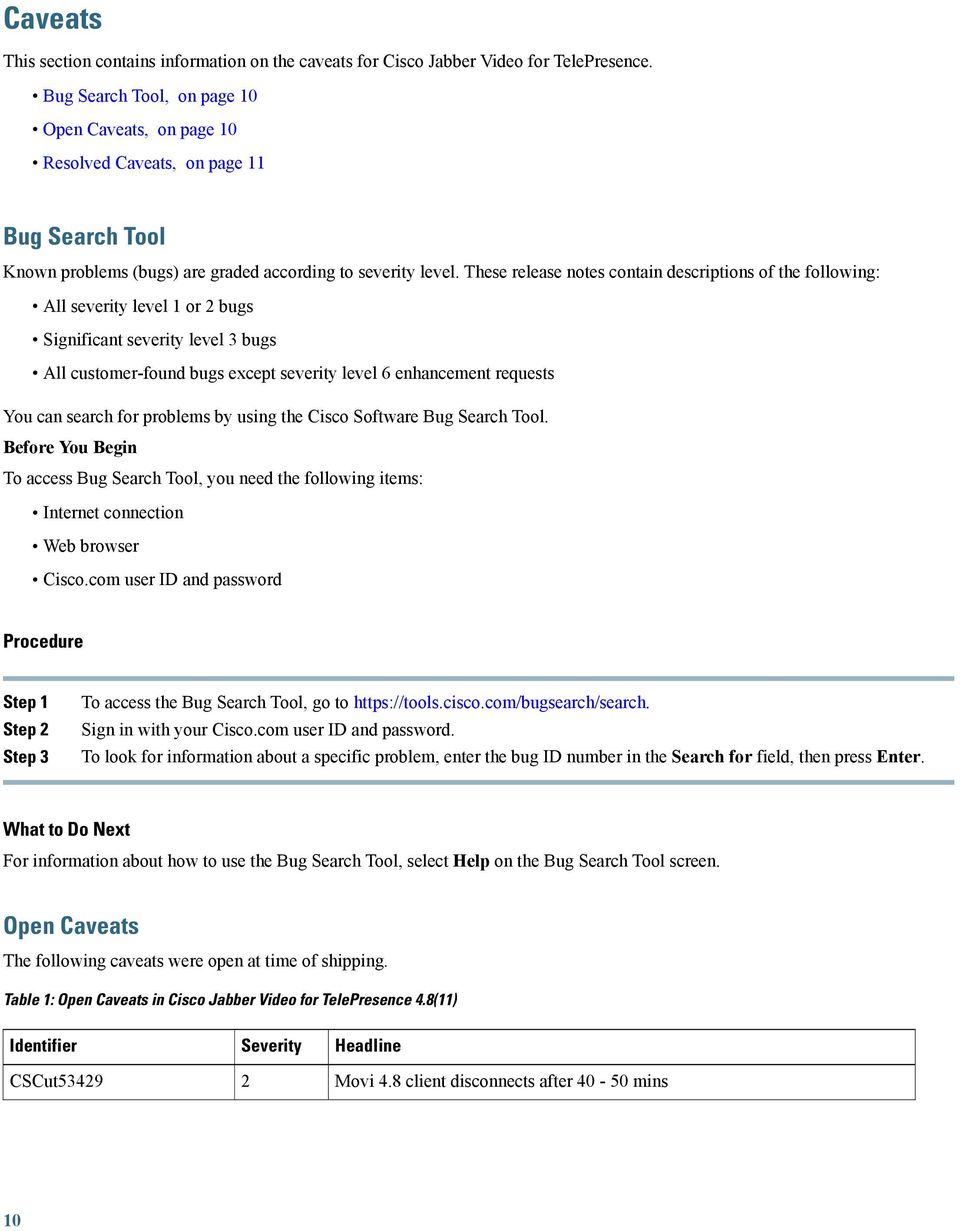
11 Identifier CSCus875 CSCut00 CSCut6940 CSCuu0454 No audio or destroyed for the 1st call after system reboot using MOVI Movi not compatible with AMD FirePro W4170M Jabber Video delegated credential checking fails with local users More than 50 contact in favorites show wrong status The following caveats were open at time of shipping. Table : Open Caveats in Cisco Jabber Video for TelePresence 4.8 Identifier CSCtu71670 CSCuj08784 CSCul507 CSCul7088 CSCum40474 CSCum76860 CSCum78889 CSCun6775 CSCue558 CSCug64596 CSCty Application sharing issues VCS<->CUCM interworking: Video starts after 1 minute Multiway: Fails on refer after challenges from VCS ICE functions improperly when any m= line is zero in SIP SDP OS X : Not sending any video, crashing when loading Video preferences Jabber Video 4.7 minimum media port range seems to be 11, not 10. PrecisionHD USB Camera LED issue Calls from Movi hangs after a few seconds Called device still rings even if caller hung up, SIP 481 Black screen when calling MPS with at least participants SIP display name not used Resolved Caveats Table : Resolved Caveats in Cisco Jabber Video for TelePresence 4.8(11) Identifier CSCus55191 CSCup04761 CSCup416 CSCuq5656 CSCus1419 CSCus4871 Echo cancellation not working Movi can't stop sharing main video presentation Multiple Vulnerabilities in OpenSSL - June 014 August 6, 014 OpenSSL Vulnerabilities Oct 014 OpenSSL Vulnerabilities JANUARY 015 OpenSSL Vulnerabilities 11

12 Identifier CSCut45966 CSCus08199 CSCup154 CSCur984 CSCuo94065 CSCus98615 CSCup MARCH 015 OpenSSL Vulnerabilities Movi 4. & 4.8 video frozen after desktop share No media until ICE fails Jabber accepting blank password after one use of password Jabber for TP does not allow TCP registration Crash while Quick Setup window is opened and web cam is connected Jabber Video 4.8 lets Windows apply Power settings during active call Table 4: Resolved Caveats in Cisco Jabber Video for TelePresence 4.8(8) Identifier CSCup416 CSCuo76479 Multiple Vulnerabilities in OpenSSL - June 014 Jabber 4.8 Crashes on Launch with UseWindowsUsername=1 The following severity 1,, and caveats were present in at least one previous release and are resolved in this release. Resolved minor caveats are not listed here. Table 5: Resolved Caveats in Cisco Jabber Video for TelePresence 4.8(6) Identifier CSCuo8855 CSCuo11104 Cisco Jabber Video for TelePresence (Movi) vulnerable to CVE May only respond to first PLI/FIR and ignore subsequent requests The following severity 1,, and caveats were present in at least one previous release and are resolved in this release. Resolved minor caveats are not listed here. Table 6: Resolved Caveats in Cisco Jabber Video for TelePresence 4.8 Identifier CSCuh08911 CSCul1667 CSCum55 CSCum4556/CSCul5911 CSCud1795 CSCuh5761 Encrypt login password in memory Unencrypted SIP registration fails Multiple rtpmap lines per dynamic payload type Crash on startup or after hibernation Call drops during re-registration across traversal zone Wireless headsets don't work on Windows 8 (Jabra and Plantronics) 1

13 Identifier CSCuj99914 CSCul161 CSCul058 CSCul4746 CSCul47476 CSCum0406 CSCum70564 CSCum8087 CSCun47996 CSCug SIP message Call-Info decode failure Allow leading and trailing spaces in passwords (Windows) Flux crash Vulnerability fixes for PNG Development Group libpng Vulnerability fixes for XMLSoft libxml Crash when bringing up or tearing down an AnyConnect VPN link Do not launch the application on startup by default Make AES-56 usage in SRTP provisionable. Vulnerability fixes for OpenSSL Reinstate the "movi:" protocol handler Closed Caveats This section contains information on the caveats closed in this release. Table 7: Closed Caveats in Cisco Jabber Video for TelePresence 4.8(11) Identifier CSCtu71670 CSCuj08784 CSCul507 CSCul7088 CSCum40474 CSCum76860 CSCum78889 CSCun6775 CSCue558 CSCug64596 CSCty Application sharing issues VCS<->CUCM interworking: Video starts after 1 minute Multiway: Fails on refer after challenges from VCS ICE functions improperly when any m= line is zero in SIP SDP OS X : Not sending any video, crashing when loading Video preferences Jabber Video 4.7 minimum media port range seems to be 11, not 10. PrecisionHD USB Camera LED issue Calls from Movi hangs after a few seconds Called device still rings even if caller hung up, SIP 481 Black screen when calling MPS with at least participants SIP display name not used 1

14 THE SPECIFICATIONS AND INFORMATION REGARDING THE PRODUCTS IN THIS MANUAL ARE SUBJECT TO CHANGE WITHOUT NOTICE. ALL STATEMENTS, INFORMATION, AND RECOMMENDATIONS IN THIS MANUAL ARE BELIEVED TO BE ACCURATE BUT ARE PRESENTED WITHOUT WARRANTY OF ANY KIND, EXPRESS OR IMPLIED. USERS MUST TAKE FULL RESPONSIBILITY FOR THEIR APPLICATION OF ANY PRODUCTS. THE SOFTWARE LICENSE AND LIMITED WARRANTY FOR THE ACCOMPANYING PRODUCT ARE SET FORTH IN THE INFORMATION PACKET THAT SHIPPED WITH THE PRODUCT AND ARE INCORPORATED HEREIN BY THIS REFERENCE. IF YOU ARE UNABLE TO LOCATE THE SOFTWARE LICENSE OR LIMITED WARRANTY, CONTACT YOUR CISCO REPRESENTATIVE FOR A COPY. The Cisco implementation of TCP header compression is an adaptation of a program developed by the University of California, Berkeley (UCB) as part of UCB's public domain version of the UNIX operating system. All rights reserved. Copyright 1981, Regents of the University of California. NOTWITHSTANDING ANY OTHER WARRANTY HEREIN, ALL DOCUMENT FILES AND SOFTWARE OF THESE SUPPLIERS ARE PROVIDED AS IS" WITH ALL FAULTS. CISCO AND THE ABOVE-NAMED SUPPLIERS DISCLAIM ALL WARRANTIES, EXPRESSED OR IMPLIED, INCLUDING, WITHOUT LIMITATION, THOSE OF MERCHANTABILITY, FITNESS FOR A PARTICULAR PURPOSE AND NONINFRINGEMENT OR ARISING FROM A COURSE OF DEALING, USAGE, OR TRADE PRACTICE. IN NO EVENT SHALL CISCO OR ITS SUPPLIERS BE LIABLE FOR ANY INDIRECT, SPECIAL, CONSEQUENTIAL, OR INCIDENTAL DAMAGES, INCLUDING, WITHOUT LIMITATION, LOST PROFITS OR LOSS OR DAMAGE TO DATA ARISING OUT OF THE USE OR INABILITY TO USE THIS MANUAL, EVEN IF CISCO OR ITS SUPPLIERS HAVE BEEN ADVISED OF THE POSSIBILITY OF SUCH DAMAGES. Any Internet Protocol (IP) addresses and phone numbers used in this document are not intended to be actual addresses and phone numbers. Any examples, command display output, network topology diagrams, and other figures included in the document are shown for illustrative purposes only. Any use of actual IP addresses or phone numbers in illustrative content is unintentional and coincidental. Cisco and the Cisco logo are trademarks or registered trademarks of Cisco and/or its affiliates in the U.S. and other countries. To view a list of Cisco trademarks, go to this URL: Third-party trademarks mentioned are the property of their respective owners. The use of the word partner does not imply a partnership relationship between Cisco and any other company. (1110R) 015 Cisco Systems, Inc. All rights reserved.

15 Americas Headquarters Cisco Systems, Inc. San Jose, CA USA Asia Pacific Headquarters Cisco Systems (USA) Pte. Ltd. Singapore Europe Headquarters Cisco Systems International BV Amsterdam, The Netherlands Cisco has more than 00 offices worldwide. Addresses, phone numbers, and fax numbers are listed on the Cisco Website at

Cisco Unified Communications Self Care Portal User Guide, Release 10.5(1)
 Cisco Unified Communications Self Care Portal User Guide, Release 10.5(1) Unified Communications Self Care Portal 2 Unified Communications Self Care Settings 2 Phones 4 Additional Settings 12 Revised:
Cisco TelePresence Management Suite Extension for Microsoft Exchange Version 4.0
 Cisco TelePresence Management Suite Extension for Microsoft Exchange Version 4.0 Software Release Notes May 2014 Contents Introduction 1 Changes to interoperability 1 Product documentation 1 New features
Cisco TelePresence VCR Converter 1.0(1.8)
 Cisco TelePresence VCR Converter 1.0(1.8) Software release notes D14725.02 February 2011 Contents Contents Document revision history... 3 Introduction... 4 New features in version 1.0(1.8)... 5 Convert
Cisco TelePresence Management Suite Extension for Microsoft Exchange Version 4.0.1
 Cisco TelePresence Management Suite Extension for Microsoft Exchange Version 4.0.1 Software Release Notes May 2014 Contents Introduction 1 Changes to interoperability 1 Product documentation 2 New features
Ports Reference Guide for Cisco Virtualization Experience Media Engine for SUSE Linux Release 9.0
 Ports Reference Guide for Cisco Virtualization Experience Media Engine for SUSE Linux Release 9.0 Ports 2 Virtualization Experience Media Engine 2 Virtualization Experience Client Manager 3 Cisco Jabber
Cisco TelePresence Movi 4.2
 Cisco TelePresence Movi 4.2 Release Notes D14835.01 April 2011 Software version 4.2.0.10318 Contents Introduction 4 New features and functionality 5 Updated look and feel 5 Graphics 5 Nomenclature 5 Changes
Cisco TelePresence Movi for Windows
 Cisco TelePresence Movi for Windows User Guide 14409.07 April 2011 Software version 4.2.0.10318 Contents Getting started 4 Signing in 4 Show video window 4 Making a call 4 Receiving a call 4 Pop-up toolbar
Cisco Jabber Video for TelePresence
 Cisco Jabber Video for TelePresence User Guide for Mac OS X Software version 4.5 D14733.05 October 2012 Contents Getting started 4 Signing in 4 Quick Setup 4 Audio and video selection 4 Resource check
Cisco Jabber Video for TelePresence 4.6 User Guide for Windows
 First Published: February 28, 2013 Americas Headquarters Cisco Systems, Inc. 170 West Tasman Drive San Jose, CA 95134-1706 USA http://www.cisco.com Tel: 408 526-4000 800 553-NETS (6387) Fax: 408 527-0883
Cisco TelePresence Video Communication Server (Cisco VCS) IP Port Usage for Firewall Traversal. Cisco VCS X8.5 December 2014
 Cisco TelePresence Video Communication Server (Cisco VCS) IP Port Usage for Firewall Traversal Cisco VCS X8.5 December 2014 Contents: Cisco VCS IP port usage Which IP ports are used with Cisco VCS? Which
Cisco TelePresence VCR MSE 8220
 Cisco TelePresence VCR MSE 8220 Getting started 61-0008-05 Contents General information... 3 About the Cisco TelePresence VCR MSE 8220... 3 Port and LED location... 3 LED behavior... 4 Installing the VCR
Cisco Collaboration with Microsoft Interoperability
 Cisco Collaboration with Microsoft Interoperability Infrastructure Cheatsheet First Published: June 2016 Cisco Expressway X8.8 Cisco Unified Communications Manager 10.x or later Microsoft Lync Server 2010
Cisco Jabber Video for TelePresence
 Cisco Jabber Video for TelePresence User Guide for Windows Software version 4.3 14409.08 December 2011 Contents Getting started 4 Signing in 4 Quick Setup 4 Audio and video selection 4 Resource check 5
Cisco Unified Workforce Optimization
 Cisco Unified Workforce Optimization Desktop Requirements Guide Version 10.5 First Published: June 18, 2014 Last Updated: March 6, 2015 THE SPECIFICATIONS AND INFORMATION REGARDING THE PRODUCTS IN THIS
Cisco TelePresence Management Suite 15.0
 Cisco TelePresence Management Suite 15.0 Software Release Notes July 2015 Product Documentation The following documents provide guidance on installation, initial configuration, and operation of the product:
Cisco TelePresence Management Suite Provisioning
 Cisco TelePresence Management Suite Provisioning Troubleshooting guide D14427.03 December 2010 Introduction Table of Contents Introduction... 3 Provisioning logs... 4 Cisco TMS provisioning directory logs...
Cisco TelePresence MCU Accessing Conferences
 Cisco TelePresence MCU Accessing Conferences Getting started 14523.02 Contents Introduction... 3 Calling in to conferences... 4 Dialing in using a hardware video endpoint... 4 Dialing in using a software
Cisco Expressway IP Port Usage for Firewall Traversal. Cisco Expressway X8.1 D15066.01 December 2013
 Cisco Expressway IP Port Usage for Firewall Traversal Cisco Expressway X8.1 D15066.01 December 2013 Contents: Cisco Expressway IP port usage Which IP ports are used with Cisco Expressway? Which IP ports
Cisco WebEx Meetings Server System Requirements
 First Published: October 21, 2012 Last Modified: October 21, 2012 Americas Headquarters Cisco Systems, Inc. 170 West Tasman Drive San Jose, CA 95134-1706 USA http://www.cisco.com Tel: 8 526-00 800 553-NETS
Cisco TelePresence Management Suite Extension for Microsoft Exchange Version 4.0.3
 Cisco TelePresence Management Suite Extension for Microsoft Exchange Version 4.0.3 Software Release Notes Revised September 2014 Contents Introduction 1 Changes to interoperability 1 Product documentation
Cisco TelePresence Authenticating Cisco VCS Accounts Using LDAP
 Cisco TelePresence Authenticating Cisco VCS Accounts Using LDAP Deployment Guide Cisco VCS X8.1 D14465.06 December 2013 Contents Introduction 3 Process summary 3 LDAP accessible authentication server configuration
Cisco UCS Director Payment Gateway Integration Guide, Release 4.1
 First Published: April 16, 2014 Americas Headquarters Cisco Systems, Inc. 170 West Tasman Drive San Jose, CA 95134-1706 USA http://www.cisco.com Tel: 408 526-4000 800 553-NETS (6387) Fax: 408 527-0883
Replacing MCU Software with TelePresence Server Software on Cisco TelePresence MCU 5300 Series. Last Updated: February 2016
 Replacing MCU Software with TelePresence Server Software on Cisco TelePresence MCU 5300 Series Last Updated: February 2016 Cisco Systems, Inc. www.cisco.com Preface Change History Table 1 Replacing MCU
Cisco Jabber for Windows 10.5 Advanced Features Guide
 First Published: August 14, 2014 Last Modified: August 26, 2014 Americas Headquarters Cisco Systems, Inc. 170 West Tasman Drive San Jose, CA 95134-1706 USA http://www.cisco.com Tel: 408 526-4000 800 553-NETS
TelePresence Migrating TelePresence Management Suite (TMS) to a New Server
 TelePresence Migrating TelePresence Management Suite (TMS) to a New Server THE SPECIFICATIONS AND INFORMATION REGARDING THE PRODUCTS IN THIS MANUAL ARE SUBJECT TO CHANGE WITHOUT NOTICE. ALL STATEMENTS,
FireSIGHT User Agent Configuration Guide
 Version 2.2 August 20, 2015 THE SPECIFICATIONS AND INFORMATION REGARDING THE PRODUCTS IN THIS MANUAL ARE SUBJECT TO CHANGE WITHOUT NOTICE. ALL STATEMENTS, INFORMATION, AND RECOMMENDATIONS IN THIS MANUAL
Cisco TelePresence Video Systems
 1 Knowledge base Profile Series Quick Set Series Codec MXP Endpoints IP Video Phone MARCH 2012 Thank you for choosing Cisco! Your Cisco product has been designed to give you many years of safe, reliable
Sample Configuration: Cisco UCS, LDAP and Active Directory
 First Published: March 24, 2011 Last Modified: March 27, 2014 Americas Headquarters Cisco Systems, Inc. 170 West Tasman Drive San Jose, CA 95134-1706 USA http://www.cisco.com Tel: 408 526-4000 800 553-NETS
Troubleshooting Procedures for Cisco TelePresence Video Communication Server
 Troubleshooting Procedures for Cisco TelePresence Video Communication Server Reference Guide Cisco VCS X7.2 D14889.01 September 2011 Contents Contents Introduction... 3 Alarms... 3 VCS logs... 4 Event
QoS: CBQoS Management Policy-to- Interface Mapping Support Configuration Guide, Cisco IOS XE Release 3S (Cisco ASR 1000)
 QoS: CBQoS Management Policy-to- Interface Mapping Support Configuration Guide, Cisco IOS XE Release 3S (Cisco ASR 1000) Americas Headquarters Cisco Systems, Inc. 170 West Tasman Drive San Jose, CA 95134-1706
Cisco ASA 5500-X Series ASA 5512-X, ASA 5515-X, ASA 5525-X, ASA 5545-X, and ASA 5555-X
 QUICK START GUIDE Cisco ASA 5500-X Series ASA 5512-X, ASA 5515-X, ASA 5525-X, ASA 5545-X, and ASA 5555-X 1 Package Contents 1 Powering On the ASA 2 Connecting Interface Cables and Verifying Connectivity
Cisco TelePresence Movi
 Cisco TelePresence Movi The Cisco TelePresence portfolio creates an immersive, face-to-face experience over the network empowering you to collaborate with others like never before. Through a powerful combination
Cisco Jabber Video for TelePresence
 Data Sheet Cisco Jabber Video for TelePresence The Cisco TelePresence portfolio creates an immersive, face-to-face experience over the network - empowering you to collaborate with others like never before.
Getting started guide
 Software version TC4.0 NOVEMBER 2010 For Cisco TelePresence System Profile Series, Codec C Series and Quick Set C20 / C20 Plus 1 TA - ToC - Hidden Thank you for choosing Cisco! text anchor Your Cisco product
Cisco Jabber Video for TelePresence
 Cisco Jabber Video for TelePresence Administrator Guide Version 4.5.7.16762 D14410 12 October 2012 Contents Introduction 4 Prerequisites 5 Infrastructure requirements 5 NTLM authentication client requirements
Cisco Unified Communications Manager SIP Line Messaging Guide (Standard)
 Cisco Unified Communications Manager SIP Line Messaging Guide (Standard) For Cisco Unified Communications Manager Release 8.5(1) These materials are made available by Cisco as a courtesy to provide certain
MXP F9. Software release notes D14723.08
 MXP F9 Software release notes D14723.08 November 2012 Contents Contents Contents... 2 Document revision history... 4 Introduction software version F9.3... 5 Resolved issues and improvements since F9.1.2...
Cisco TelePresence System User Guide, Software Release TX 6.0
 Cisco TelePresence System User Guide, Software Release TX 6.0 February 2013 Americas Headquarters Cisco Systems, Inc. 170 West Tasman Drive San Jose, CA 95134-1706 USA http://www.cisco.com Tel: 408 526-4000
Symantec Backup Exec 2010 R2. Quick Installation Guide
 Symantec Backup Exec 2010 R2 Quick Installation Guide 20047221 The software described in this book is furnished under a license agreement and may be used only in accordance with the terms of the agreement.
User Guide for the Cisco Unity Connection Phone Interface (Release 8.x)
 User Guide for the Cisco Unity Connection Phone Interface (Release 8.x) First Published: February 02, 2010 Last Modified: November 16, 2010 Americas Headquarters Cisco Systems, Inc. 170 West Tasman Drive
Cisco Jabber for Mac (Cisco WebEx Connect)
 Frequently Asked Questions Cisco Jabber for Mac (Cisco WebEx Connect) FAQs 2 Basics 2 Setup 4 Presence Status 7 Contacts 9 Chat 12 Calls 15 Voicemail 22 Meetings and Desktop Share 23 Troubleshooting 24
Cisco TelePresence MCU 5300 Series
 Cisco TelePresence MCU 5300 Series Version 4.3 Tutorial D14472 July 2012 Contents Contents... 2 Using the tutorial... 4 Assumptions... 4 MCU software version... 4 Logging in to the web interface... 5 Creating
Symantec Backup Exec TM 11d for Windows Servers. Quick Installation Guide
 Symantec Backup Exec TM 11d for Windows Servers Quick Installation Guide September 2006 Symantec Legal Notice Copyright 2006 Symantec Corporation. All rights reserved. Symantec, Backup Exec, and the Symantec
Disaster Recovery Configuration Guide for CiscoWorks Network Compliance Manager 1.8
 Disaster Recovery Configuration Guide for CiscoWorks Network Compliance Manager 1.8 Americas Headquarters Cisco Systems, Inc. 170 West Tasman Drive San Jose, CA 95134-1706 USA http://www.cisco.com Tel:
Enabling Single Sign- On for Common Identity using F5
 Enabling Single Sign- On for Common Identity using F5 THE SPECIFICATIONS AND INFORMATION REGARDING THE PRODUCTS IN THIS MANUAL ARE SUBJECT TO CHANGE WITHOUT NOTICE. ALL STATEMENTS, INFORMATION, AND RECOMMENDATIONS
Release Notes for Cisco IronPort Email Security Plug-in 7.3.1
 Release Notes for Cisco IronPort Email Security Plug-in 7.3.1 Revised: September 18, 2013 Contents These release notes contain information critical to installing and running the Cisco IronPort Email Security
Sharp Remote Device Manager (SRDM) Server Software Setup Guide
 Sharp Remote Device Manager (SRDM) Server Software Setup Guide This Guide explains how to install the software which is required in order to use Sharp Remote Device Manager (SRDM). SRDM is a web-based
Dell Statistica 13.0. Statistica Enterprise Installation Instructions
 Dell Statistica 13.0 2015 Dell Inc. ALL RIGHTS RESERVED. This guide contains proprietary information protected by copyright. The software described in this guide is furnished under a software license or
Backup Exec 15. Quick Installation Guide
 Backup Exec 15 Quick Installation Guide 21344987 Documentation version: 15 PN: 21344987 Legal Notice Copyright 2015 Symantec Corporation. All rights reserved. Symantec, the Symantec Logo, the Checkmark
Cisco Expressway CE500 Appliance
 Cisco Expressway CE500 Appliance Installation Guide First Published: April 2014 Last Updated: November 2015 X8.2 or later Cisco Systems, Inc. www.cisco.com Introduction About This Document This document
About Recovery Manager for Active
 Dell Recovery Manager for Active Directory 8.6.1 May 30, 2014 These release notes provide information about the Dell Recovery Manager for Active Directory release. About Resolved issues Known issues System
Configuring a Softphone for Windows for Virtual Contact Center
 Configuring Bria 3 for Virtual Contact Center Configuring a Softphone for Windows for Virtual Contact Center 8x8 issues softphone licenses to Virtual Contact Center customers allowing them to manage all
Quick Install Guide. Lumension Endpoint Management and Security Suite 7.1
 Quick Install Guide Lumension Endpoint Management and Security Suite 7.1 Lumension Endpoint Management and Security Suite - 2 - Notices Version Information Lumension Endpoint Management and Security Suite
IP Office IP Office Softphone Installation
 Softphone Installation - Issue 1a - (15 March 2010) 2010 AVAYA All Rights Reserved. Notices While reasonable efforts have been made to ensure that the information in this document is complete and accurate
Session Initiation Protocol Gateway Call Flows and Compliance Information
 Session Initiation Protocol Gateway Call Flows and Compliance Information Corporate Headquarters Cisco Systems, Inc. 170 West Tasman Drive San Jose, CA 95134-1706 USA http://www.cisco.com Tel: 408 526-4000
Cisco Registered Envelope Recipient Guide
 September 8, 2008 Americas Headquarters Cisco Systems, Inc. 170 West Tasman Drive San Jose, CA 95134-1706 USA http://www.cisco.com Tel: 408 526-4000 800 553-NETS (6387) Fax: 408 527-0883 Text Part Number:
Sharing Content in the Web Meeting Room with Cisco Unified MeetingPlace Release 7.1
 QUICK START GUIDE Sharing Content in the Web Meeting Room with Cisco Unified MeetingPlace Release 7.1 1 About the Meeting Room 2 Sharing Your Screen 3 Sharing a Document from Your Computer 4 About the
SOA Software: Troubleshooting Guide for Agents
 SOA Software: Troubleshooting Guide for Agents SOA Software Troubleshooting Guide for Agents 1.1 October, 2013 Copyright Copyright 2013 SOA Software, Inc. All rights reserved. Trademarks SOA Software,
VERITAS Backup Exec TM 10.0 for Windows Servers
 VERITAS Backup Exec TM 10.0 for Windows Servers Quick Installation Guide N134418 July 2004 Disclaimer The information contained in this publication is subject to change without notice. VERITAS Software
User Manual. Onsight Management Suite Version 5.1. Another Innovation by Librestream
 User Manual Onsight Management Suite Version 5.1 Another Innovation by Librestream Doc #: 400075-06 May 2012 Information in this document is subject to change without notice. Reproduction in any manner
Polycom RealPresence Desktop for Windows
 3.1 January 2014 3725-69930-002A Polycom RealPresence Desktop for Windows Trademark Information POLYCOM and the names and marks associated with Polycom's products are trademarks and/or service marks of
How To Use A Presence Desktop On A Pc Or Mac Or Ipad (For A Non-Profit) For Free
 Help 3.3 December 2014 3725-69930-004/A Polycom RealPresence Desktop for Windows Copyright 2014, Polycom, Inc. All rights reserved. No part of this document may be reproduced, translated into another language
formerly Help Desk Authority 9.1.3 Upgrade Guide
 formerly Help Desk Authority 9.1.3 Upgrade Guide 2 Contacting Quest Software Email: Mail: Web site: [email protected] Quest Software, Inc. World Headquarters 5 Polaris Way Aliso Viejo, CA 92656 USA www.quest.com
Vi-System Installation & Administration Guide. Version 4.1
 Vi-System Installation & Administration Guide Vi-System Installation & Administration Guide Version 4.1 Contents Contents 1 Installing Vi-System... 3 1.1 Before Installing... 3 1.1.1 Verify Your System
CISCO TELEPRESENCE MANAGEMENT SUITE EXTENSION
 You can read the recommendations in the user guide, the technical guide or the installation guide for CISCO TELEPRESENCE MANAGEMENT SUITE EXTENSION 2.2. You'll find the answers to all your questions on
Lync for Mac 2011 Deployment Guide
 2011 Deployment Guide Getting Started Information in this document, including URL and other Internet Web site references, is subject to change without notice. Content in this document represents the current
Breeze User Guide 29 January 2015
 Breeze User Guide 29 January 2015 Contents Getting started with StarLeaf Breeze 4 Step One: Activate your account 4 Step Two: Install Breeze 4 Installing Breeze for Windows 4 Installing Breeze on a Mac
MAX CRM v 1.2 User Guide
 MAX CRM v 1.2 User Guide MAIN Telecom, Inc. 1 Mohammed Roshdy St., Agouza, Giza. Tel: +202 3037893 Tel: +202 3037894 5 Lotfy Elsayed St., El-Haram, Giza Tel: +202 5848308 Tel: +202 5870862 [email protected]
Symbian User Guide for Cisco AnyConnect Secure Mobility Client, Release 2.4
 Symbian User Guide for Cisco AnyConnect Secure Mobility Client, Release 2.4 Updated: May 31, 2011 Contents This document describes the Cisco AnyConnect Secure Mobility Client 2.4 for devices running Symbian.
Cisco IOS Flexible NetFlow Command Reference
 Americas Headquarters Cisco Systems, Inc. 170 West Tasman Drive San Jose, CA 95134-1706 USA http://www.cisco.com Tel: 408 526-4000 800 553-NETS (6387) Fax: 408 527-0883 THE SPECIFICATIONS AND INFORMATION
VMware Horizon FLEX User Guide
 Horizon FLEX 1.0 This document supports the version of each product listed and supports all subsequent versions until the document is replaced by a new edition. To check for more recent editions of this
Deploying Polycom SoundStation IP Conference Phones with Cisco Unified Communications Manager (CUCM)
 Document Title Version SOLUTION GUIDE October 2013 1725-40120-002 Rev A Deploying Polycom SoundStation IP Conference Phones with Cisco Unified Communications Manager (CUCM) Polycom, Inc. 1 Copyright 2013,
Telepresence in an IPv6 World. Simplify the Transition
 Telepresence in an IPv6 World Simplify the Transition IPV6 has the potential to transform communications, collaboration, learning, entertainment, physical security and more. What You Will Learn If you
CA VPN Client. User Guide for Windows 1.0.2.2
 CA VPN Client User Guide for Windows 1.0.2.2 This Documentation, which includes embedded help systems and electronically distributed materials, (hereinafter referred to as the Documentation ) is for your
Frequently Asked Questions: Cisco Jabber 9.x for Android
 Frequently Asked Questions Frequently Asked Questions: Cisco Jabber 9.x for Android Frequently Asked Questions (FAQs) 2 Setup 2 Basics 4 Connectivity 8 Calls 9 Contacts and Directory Search 14 Voicemail
Networking Best Practices Guide. Version 6.5
 Networking Best Practices Guide Version 6.5 Summer 2010 Copyright: 2010, CCH, a Wolters Kluwer business. All rights reserved. Material in this publication may not be reproduced or transmitted in any form
QUICK START GUIDE. Cisco C170 Email Security Appliance
 1 0 0 1 QUICK START GUIDE Email Security Appliance Cisco C170 303357 Cisco C170 Email Security Appliance 1 Welcome 2 Before You Begin 3 Document Network Settings 4 Plan the Installation 5 Install the Appliance
ShoreTel 13 Conferencing User Guide. Part Number 850-1234-01
 ShoreTel 13 Part Number 850-1234-01 Document and Software Copyrights Copyright 1998-2012 by ShoreTel Inc., Sunnyvale, California, USA. All rights reserved. Printed in the United States of America. Contents
Cisco TelePresence VCS Certificate Creation and Use
 Cisco TelePresence VCS Certificate Creation and Use Deployment Guide Cisco VCS X8.1 D14548.08 December 2013 Contents Introduction 3 PKI introduction 3 Overview of certificate use on the VCS 3 Certificate
Integrating CAD with Thin Client and Virtual Desktop Environments
 Integrating CAD with Thin Client and Virtual Desktop Environments CAD for Cisco Unified Contact Center Express, releases 6.2 10.5 CAD for Cisco Unified Contact Center Enterprise, releases 7.0 10.0 First
NetBak Replicator 4.0 User Manual Version 1.0
 NetBak Replicator 4.0 User Manual Version 1.0 Copyright 2012. QNAP Systems, Inc. All Rights Reserved. 1 NetBak Replicator 1. Notice... 3 2. Install NetBak Replicator Software... 4 2.1 System Requirements...
Preparing Your Network for an MDsuite Installation
 Preparing Your Network for an MDsuite Installation Professional Data Services 1632 East 23 rd Avenue Hutchinson, KS 67502 Toll-free: 800.875.0480 Fax: 858.486.5493 www.mdsuite.com Introduction This document
http://docs.trendmicro.com
 Trend Micro Incorporated reserves the right to make changes to this document and to the products described herein without notice. Before installing and using the product, please review the readme files,
HP SkyRoom Frequently Asked Questions
 HP SkyRoom Frequently Asked Questions September 2009 Background... 2 Using HP SkyRoom... 3 Why HP SkyRoom?... 4 Product FYI... 4 Background What is HP SkyRoom? HP SkyRoom is a visual collaboration solution
Configuring Bria 3 Mac for Virtual Contact Center
 Configuring Bria 3 Mac for Virtual Contact Center Counterpath s Bria 3 is a softphone application that enables you to manage your Virtual Contact Center VOIP calls easily from your desktop replacing or
VMware Horizon FLEX User Guide
 Horizon FLEX 1.1 This document supports the version of each product listed and supports all subsequent versions until the document is replaced by a new edition. To check for more recent editions of this
VMware Horizon FLEX User Guide
 Horizon FLEX 1.5 This document supports the version of each product listed and supports all subsequent versions until the document is replaced by a new edition. To check for more recent editions of this
Dell One Identity Cloud Access Manager 7.0.2. Installation Guide
 Dell One Identity Cloud Access Manager 7.0.2 2014 Dell Inc. ALL RIGHTS RESERVED. This guide contains proprietary information protected by copyright. The software described in this guide is furnished under
Troubleshooting AVAYA Meeting Exchange
 Troubleshooting AVAYA Meeting Exchange Is my browser supported? Avaya Web Conferencing supports the following browser clients for joining conferences (with the described limitations). The supported browsers
QUICK START GUIDE MONDOPAD/WIN7 009-1488-01
 QUICK START GUIDE MONDOPAD/WIN7 009-1488-01 CONTENTS Hardware Setup...3 Windows Setup and Registration Process...3 Microsoft Windows Setup...3 Mondopad Software Registration...4 Microsoft Office Activation...4
Accessibility Guidelines for Cisco Unified Contact Center Management Portal
 Accessibility Guidelines for Cisco Unified Contact Center Management Portal Release 8.0(1) February 2010 Corporate Headquarters Cisco System s, Inc. 170 West Tasman D riv e San Jose, CA 95134-1706 USA
InventoryControl for use with QuoteWerks Quick Start Guide
 InventoryControl for use with QuoteWerks Quick Start Guide Copyright 2013 Wasp Barcode Technologies 1400 10 th St. Plano, TX 75074 All Rights Reserved STATEMENTS IN THIS DOCUMENT REGARDING THIRD PARTY
Cisco Prime Central Managing Certificates
 Cisco Prime Central Managing Certificates Version 1.0.5 September, 2015 Americas Headquarters Cisco Systems, Inc. 170 West Tasman Drive San Jose, CA 95134-1706 USA http://www.cisco.com Tel: 408 526-4000
Deployment Guide for the Polycom SoundStructure VoIP Interface for Cisco Unified Communications Manager (SIP)
 Deployment Guide for the Polycom SoundStructure VoIP Interface for Cisco Unified Communications Manager (SIP) UC Software 4.0.1 December 2011 1725-33223-001 Rev. A Trademark Information POLYCOM, the Polycom
video systems Getting started guide
 Cisco TelePresence Video Systems Contents Introduction User interfaces Configuration Appendices Contacts video systems Getting started guide Codec C Series Software version TC6.0 FEBRUARY 2013 MX Series
TANDBERG MANAGEMENT SUITE 10.0
 TANDBERG MANAGEMENT SUITE 10.0 Installation Manual Getting Started D12786 Rev.16 This document is not to be reproduced in whole or in part without permission in writing from: Contents INTRODUCTION 3 REQUIREMENTS
Media Server Installation & Administration Guide
 Media Server Installation & Administration Guide Smarter Surveillance for a Safer World On-Net Surveillance Systems, Inc. One Blue Hill Plaza, 7 th Floor, PO Box 1555 Pearl River, NY 10965 Phone: (845)
Legal Notes. Regarding Trademarks. Models supported by the KX printer driver. 2011 KYOCERA MITA Corporation
 Legal Notes Unauthorized reproduction of all or part of this guide is prohibited. The information in this guide is subject to change without notice. We cannot be held liable for any problems arising from
Deployment Guide for Maximum Security Environments Polycom HDX Systems, Version 3.0.5
 Polycom HDX Systems, Version 3.0.5 A warning about operating in a maximum security environment The maximum security profile is designed to lock down communications to the most stringent requirements of