
HOW TO SET UP PAYROLL
|
|
|
- Isaac Henderson
- 9 years ago
- Views:
Transcription
1 HOW TO SET UP PAYROLL D I R E C T T R A N S F E R S T O B A N K If you wish to make transfers directly to your bank, in Company Details > Constants Tab, select your bank and on the Other Tab enter your bank in the Direct Banking field. Note: for Commonwealth Bank of Australia select Westpac Australia. E M P L O Y E E T Y P E S From the GlobalBake main menu select Payroll > Employee Types Enter some Employee Types. This is a way of grouping your employees for reporting purposes. P A Y T Y P E S From the GlobalBake main menu select Payroll > Pay Types This is how you create what lines can go on a payslip. Eg Ordinary Time, Overtime, Clothing Allowance etc. Note: WOTI is an Australian term for Worked Ordinary Time These are listed in the order they appear on the pay types list: Additional Tax Allowance Child Support Specify a code and a description. This will add to the amount of tax to pay the value that you enter on the payslip line. This allows you to specify a code, description, a value, and whether it is taxed or not. The total payslip line is the value multiplied by the line quantity. Taxable Allowances are added to the pay before the tax calculation is done. Note: When changing from taxable to non taxable (or the reverse), all existing payslips must be paid first. It is a New Zealand requirement to accrue child support payments and report these on returns. Specify a code, description, and a G\L code (balance sheet) where the deductions will be accrued. The quantity that is entered on the payslip becomes the value that will PAGE 1

2 be deducted from the pay. This value is deducted after tax is calculated. Debtor Deduction Leave Alt.Day Lump Sum Salary Sick Alt.Day Payment This allows you to reduce the balance of employee s staff accounts. Ensure the staff account is entered on the employee. Specify a code, description. The quantity that is entered on the payslip becomes the value that will be deducted from the pay (after tax) and journalled to the debtor s ledger. This allows you to specify a code, description, a value, and whether it is taxed or not. The total payslip line is the value multiplied by the line quantity. A taxable deduction is subtracted after the tax calculation is done. Specify a code, description, pay rate (rate 1 4 or the average hourly rate over the previous period), and the payslip units (hours, days (8 hours) or weeks (40 hours). The total on the payslip line is the value multiplied by the line quantity multiplied by the payslip units multiplied by the pay rate. The hours are deducted from the A/L left. This is also known as a day in lieu. Specify a code and a description. When a day in lieu is accrued, enter a payslip line with a quantity of 1. When a day is used, enter a payslip line with a quantity of 1. Specify a code, description, tax rate and GL code (if desired). The total on the payslip line is the quantity entered and the tax rate governs the amount of tax paid on that particular payslip line. Specify a code, description. The total on the payslip is the salary figure on the employee file divided by the employees pay frequency. Specify a code, description, pay rate (rate 1 4 or the average hourly rate over the previous period), and the payslip units (hours, days (8 hours) or weeks (40 hours). The total on the payslip line is the value multiplied by the line quantity multiplied by the payslip units multiplied by the pay rate. The hours are deducted from the S/L left. This is for when you are paying an employee who has a statutory holiday. (If you pay someone for working on a public holiday, use pay type Time). It is put as a separate payslip line so it does not show as part of normal worked time. Specify a code, description, pay rate (rate 1 4 or the average hourly rate over the previous period), and the payslip units (hours, days (8 hours) or weeks (40 hours). The total on the payslip line is the value multiplied by the PAGE 2
3 line quantity multiplied by the payslip units multiplied by the pay rate. Student Loan Superannuation This changes the amount of money paid to the Student Loan. Specify a code and a description. The total on the payslip line is the quantity entered. This allows superannuation to be included in the payslip. Specify a code and description. If your employee is paying into the scheme as a dollar amount, tick Employee Contribution is dollar; else the quantity is a percentage. The Pre tax box is also for employee contributions. Enter the employer contribution as a percentage and the tax rate if applicable. You must enter the required GL codes. The total on the payslip line is the quantity entered (unless it is for employee by percentage). In Australia to enter minimum super payments on a payslip, put the superannuation pay type code on a payslip with no quantity, unless the employee is paying extra super, in which case enter that as the quantity. On the last payslip of a month the employer s monthly contribution to super will show on the payslip. Time This is how time is paid. Specify a code, description, pay rate (rate 1 4 or the average hourly rate over the previous period), and the payslip units (hours, days (8 hours) or weeks (40 hours) and a multiplier. The multiplier can be used for overtime or penal rates, e.g. the pay can be 1.25 times the rate. The total on the payslip line is the value multiplied by the line quantity multiplied by the payslip units multiplied by the pay rate multiplied by the multiplier. Create a separate code for ordinary time and overtime. PAGE 3
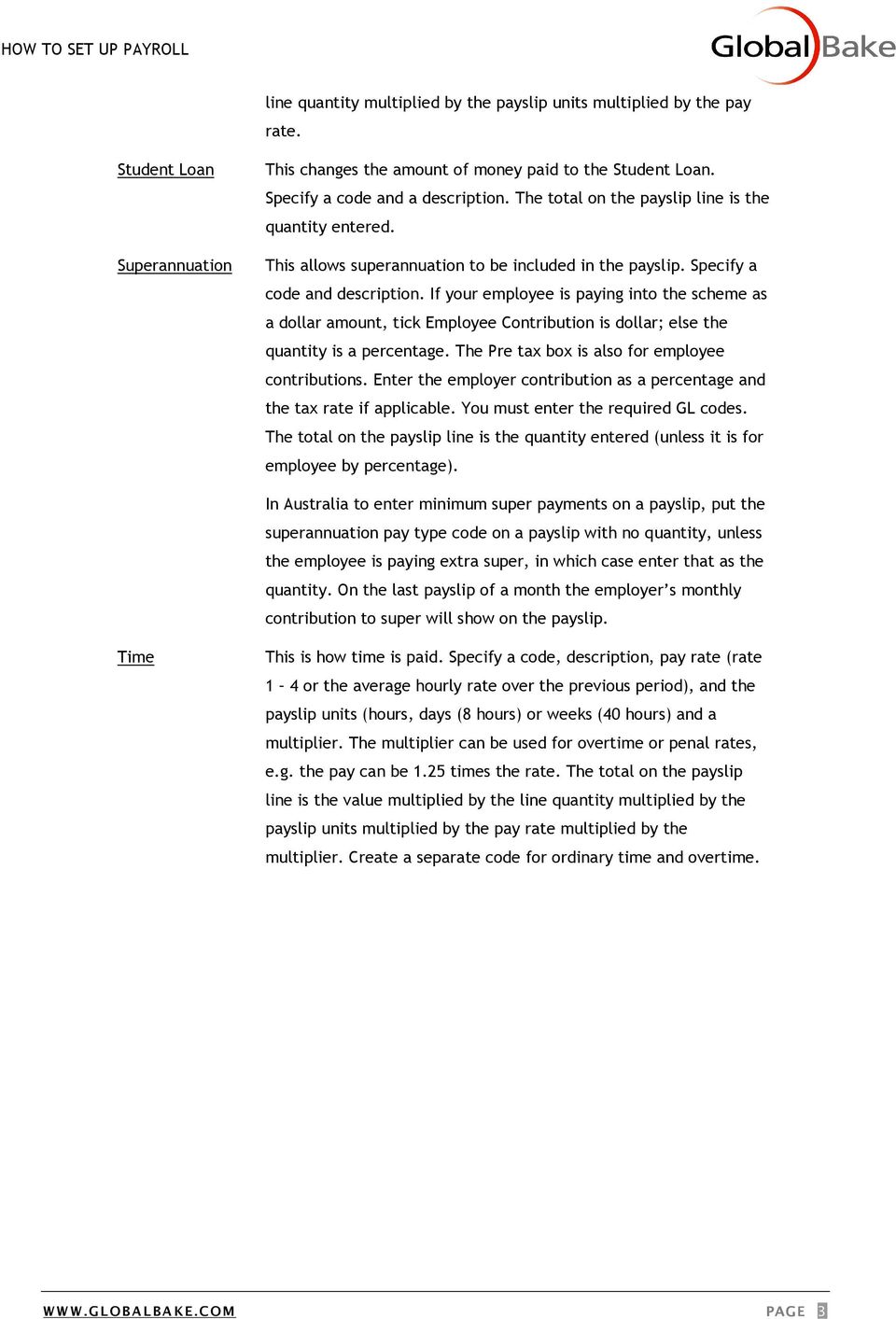
4 EMPLOYEE SET UP From the GlobalBake main menu select Payroll > Employees Enter employee information in Identity and Details fields and Contact tab information as required. Note code on the Employee must be unique. Staff Acct Weekly This is the employee's Debtor (Customer) Account. This provides a link to the debtor s (customer s) ledger. This means that a staff account can be established in the debtor s (customer s) ledger. Pay type Debtor (Customer) can be set to deduct a value from the employees pay and transfer to the debtor s (customer s) ledger to reduce outstanding balances. This is where you set how often your employee gets paid, click on the arrow to change the frequency of payment. PAGE 4
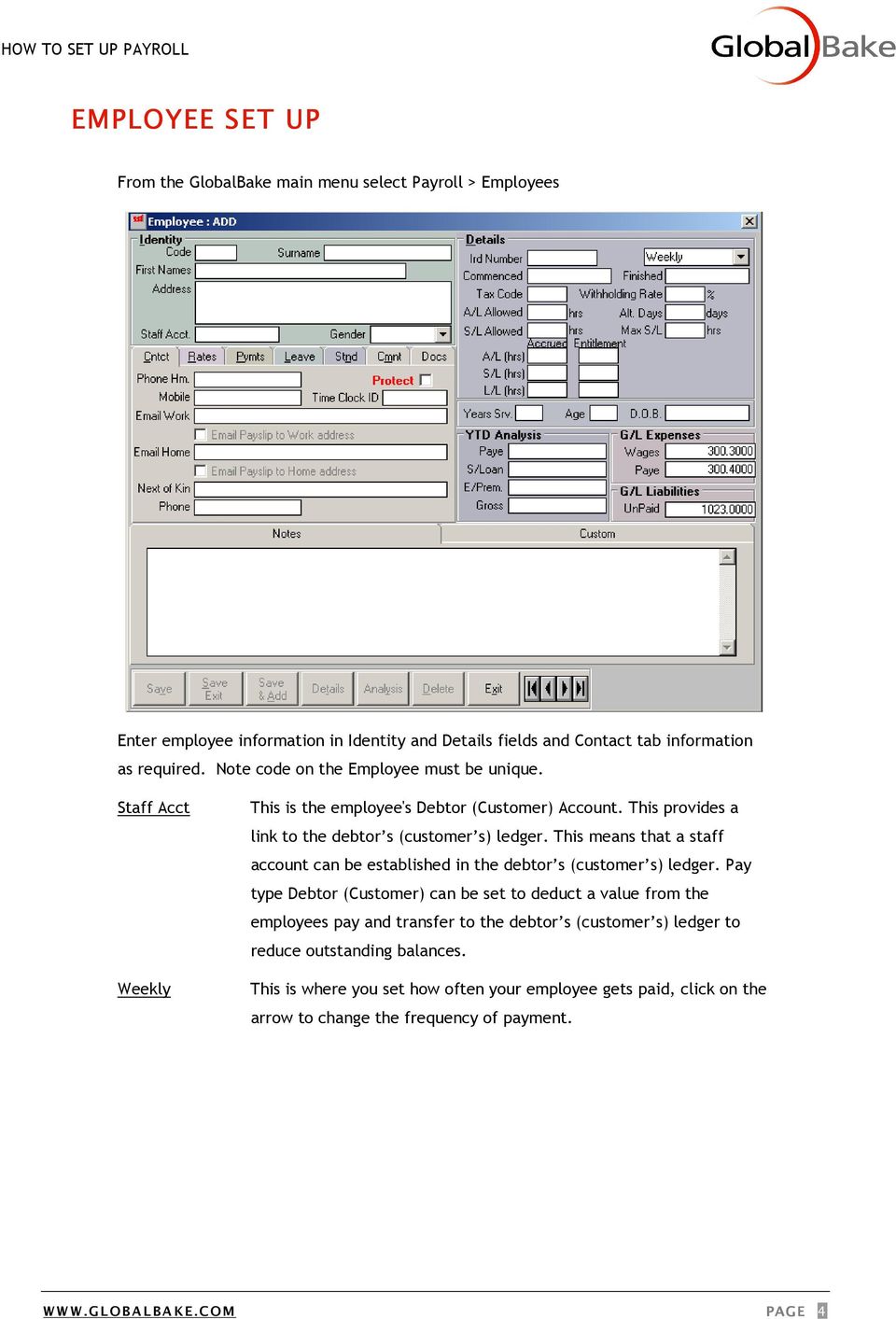
5 R A T E S T A B Rates Salary Aust.FBT Type Acc. Date This is where you set up the different pay rates. These relate to the pay types. This is the salary amount per annum. Australian FBT, reported on Group Tax Certificates. This is the Employee Type, used for grouping employee s together for reporting options. This is the date that any ACC applies from. (NZ only) G/L Expenses G/L Liabilities These are the General Ledger codes that will be used on the profit and loss statement. These codes are superseded by a GL code on a pay type. This is the GL code that will be used on the balance sheet. PAGE 5

6 TAX CODES N E W Z E A L A N D C O D E S Check online at search on 'Tax Codes' to find the correct code for each employee. Code examples, M, ME, M SL, S, S SL. A U S T R A L I A N C O D E S search on 'nat 1004', select the result regarding Schedule 1A 1 - Scale 1, where tax-free threshold NOT claimed in Tax File Number Declaration 2 - Scale 2, where payee is eligible to receive leave loading and has claimed taxfree threshold 3 - Scale 3, Foreign Residents 4R 4NR - Scale 4, where tax file number not provided by resident payee - Scale 4, where tax file number not provided by non-resident (foreign) payee 5 - Scale 5, where payee claimed FULL exemption from Medicare Levy in Medicare Levy Variation Declaration 6 - Scale 6, where payee claimed HALF exemption from Medicare Levy in Medicare Levy Variation Declaration 7 - Scale 7, where payee not eligible to receive leave loading and has claimed tax-free threshold Add letter H for WITH accumulated HELP debt Add letter F for WITH accumulated SFSS debt Add letters HF for WITH accumulated HELP debt and SFSS debt PAGE 6

7 P A Y M E N T S T A B To split an employees payslip to different bank accounts, enter the bank account and the amount to go to that account. To put the remainder of their pay to another account, enter the account and leave the amount field empty. L E A V E T A B Set up Annual, Sick and Long Service Leave entitlements here. Fill in the first line of each table on each tab and remember to enter the leave at first pay on each tab. PAGE 7

8 C R E A T I N G S T A N D I N G P A YSLIP LINES This allows you to set payslip lines that will appear every time you create a new payslip, you are then able to alter these payslip lines if needs be. E M P L O Y E E S W I T H S A L A R Y When creating a payslip line for a salaried employee, enter the quantity as 1. This will then give a portion of their yearly salary for the pay period. When the employee takes annual leave, for example, they still get a quantity of 1. They have another payslip line for Annual Leave, but it uses an annual leave pay type that has a rate that is zero. This means that the employee can take 8 hours (or 1 day) annual leave, but their pay amount remains the same. PAGE 8


9 PAY WAGES First you need to create the payslips to be paid. You can do this manually by going to Payroll, Payslips and pressing the Add button. If you have set up the Standing tab on your employees, you can use from the GlobalBake main menu select Payroll > Create Payslips to automatically create the payslips for the date required. You can then alter these payslips by going to Payroll > Payslips and selecting the payslip to change. When you have all the payslips correct go to Payroll, Pay Wages. Enter the date range containing the payslips you wish to pay. Enter the date you are going to pay the payslip on. Enter the Bank Account number to pay the payslips from. PaySlips Pay Summary Detail Rpt Pay Wages D/Crds Cash This will allow you to print all the payslips in the date range entered. This report shows the different accounts and amounts that will be paid from each payslip. It totals the direct credits and cash amounts separately. This report shows a summarised payslip for each employee. This will create the Cashbook transactions relating to the payslips. This takes you directly to the Cashbook transaction that was created. This takes you directly to the Cashbook transaction that was created. PAGE 9

Superannuation requirements are different for New Zealand and Australia.
 SUPERANNUATION Superannuation requirements are different for New Zealand and Australia. New Zealand see: http://www.ird.govt.nz/kiwisaver Australia see: http://www.ato.gov.au/superfunds P A Y T Y P E S
How To Setup & Use Insight Salon & Spa Software Payroll - Australia
 How To Setup & Use Insight Salon & Spa Software Payroll - Australia Introduction The Insight Salon & Spa Software Payroll system is one of the most powerful sections of Insight. It can save you a lot of
Tax table for back payments
 Schedule 30 Pay as you go (PAYG) withholding NAT 3348 Tax table for back payments Including lump sum payments in arrears. FOR PAYMENTS MADE ON OR AFTER 1 JULY 2010. This document is a withholding schedule
Payroll Control Files User Guide
 Payroll Control Files User Guide Created in version 2009.4.0.117 1/16 Table of Contents Payroll Control Files... 2 System... 3 Pay Codes... 5 Overview... 5 Pay Type... 6 Location on Pay Summary... 7 Criteria...
Tax table for back payments, commissions, bonuses and similar payments
 Schedule 30 Pay as you go (PAYG) withholding NAT 3348 Tax table for back payments, commissions, bonuses and similar payments Including lump sum payments in arrears. FOR PAYMENTS MADE ON OR AFTER 1 JULY
Schedule 5 Tax table for back payments, commissions, bonuses and similar payments
 Schedule 5 Tax table for back payments, commissions, bonuses and similar payments QC: 34732 Content revised: Yes Abstract revised: No Abstract: Use this table if you make a payment of salary or wages that
Statement of formulas for calculating amounts to be withheld
 Schedule Pay as you go (PAYG) withholding NAT 00 Statement of formulas for calculating amounts to be withheld For payments made on or after July 0 This document is a withholding schedule made by the Commissioner
PayBiz Student Loan / HECS Pay Type
 PayBiz Student Loan / HECS Pay Type 10/06/2015 Contents NZ: Student Loan Pay Type... 2 SLCIR Compulsory Extra Deductions... 3 SLBOR Voluntary Extra Deductions... 5 SLBOR Contribution by Percent... 6 SDR
SALARY PACKAGING SUPERANNUATION GUIDE TO EMPLOYEES
 SALARY PACKAGING SUPERANNUATION GUIDE TO EMPLOYEES Superannuation Introducing Salary Packaging Salary packaging has been made available to all staff of the University through the Enterprise Agreement process.
Managing the tax affairs of someone who has died
 Page 1 of 13 Managing the tax affairs of someone who has died Introduction This guide will help you finalise the tax affairs of a deceased person. It tells you what tax returns you may need to lodge and
Employer guide for reportable employer superannuation contributions
 Page 1 of 15 Employer guide for reportable employer superannuation contributions In the 2010-11 Federal Budget the government announced future changes to super. These changes, if passed by parliament,
Estate planning: Taxation of deceased estates
 TB 20 Estate planning: Taxation of deceased estates Issued on 15 November 2010. Summary Under Australian law there are no duties, however, income and some capital transactions may be taxed as a consequence
Lump Sum My Retirement
 Lump Sum My Retirement General advice warning The schemes administered by Super SA are exempt public sector schemes and therefore we are not required to hold an Australian Financial Services licence to
Statement of formulas for calculating amounts to be withheld
 Schedule Pay as you go (PAYG) withholding NAT 00 Statement of formulas for calculating amounts to be withheld For payments made on or after July 0 This document is a withholding schedule made by the Commissioner
Tax file number declaration
 Instructions and form for taxpayers Individuals Tax file number declaration Information you provide in this declaration will allow your payer to work out how much tax to withhold from payments made to
Medicare levy variation declaration
 individuals SEGMENT taxpayers AUDIENCE instructions and form FORMAT NAT 0929-07.2007 PRODUCT ID Medicare levy variation declaration Complete this declaration if you want to: n increase the amount withheld
RECENT INCOME TAX CHANGES
 RECENT INCOME TAX CHANGES Increased Medicare Levy Low Income Thresholds The Medicare Levy low-income thresholds for families and dependent child-student component of the threshold have been changed to
Direct Earnings Attachment
 Direct Earnings Attachment A Guide for Employers 1 What this Guide is about This guide explains what you, as an employer, need to do if DWP Debt Management (part of the Department for Work and Pensions
RECENT INCOME TAX CHANGES
 RECENT INCOME TAX CHANGES Financial Institution Details Required From 1 July 2013, when preparing your income tax returns we will need to include your nominated Australian bank account details when a refund
Termination Pays. Terminations... 2
 Termination Pays Table of Contents Terminations... 2 Types of Terminations... 2 Notice Period of Termination... 2 Redundancy Weeks to pay... 3 What s included in a Termination?... 3 Employment Termination
CLIENT FACT SHEET. If you are under age 65 you may make personal contributions to superannuation on your own behalf.
 CLIENT FACT SHEET July 2010 Understanding superannuation and superannuation contributions Superannuation is an investment vehicle designed to assist Australians in saving for their retirement. The Government
Fact Sheet Tax on Super 2009/10
 It pays to belong TM Key Focus A tax of 15% applies to concessional (i.e. before tax) contributions. All employer and salary sacrifice contributions will be taxed at the top marginal rate if your super
Superannuation (Australia)
 Superannuation (Australia) This guide is for SmoothPay Payroll users paying staff in Australia (most other regions are much simpler and the superannuation options are preset and/or self-evident). This
PNG Payroll Processing
 PNG Payroll Processing SmoothPay provides built-in localisation (tax and superannuation rules) for Papua New Guinea, including using the correct currency symbol K (instead of $ ). Employees in PNG are
CPA Australia Tax and Social Security Guide: 2013-2014
 CPA Australia Tax and Social Security Guide: 2013-2014 This guide is the initiative of the CPA Australia Retirement Savings Centre of Excellence. Information is current based on legislation as at 1 July
CPA AUSTRALIA TAX AND SOCIAL SECURITY GUIDE: 2014 2015
 CPA AUSTRALIA TAX AND SOCIAL SECURITY GUIDE: 2014 2015 This guide is the initiative of the CPA Australia Retirement Savings Centre of Excellence. Information is current based on legislation as at 1 July
Contributions are taxed differently depending on whether you are making contributions to a taxed or untaxed fund.
 Tax and super Issue Date: 1 July 2015 SUP E R ANNUATION The information in this document forms part of the Product Information Booklets for GESB Super and West State Super, each dated 1 July 2015. You
Online Payroll: Set Up Checklist for Regions Customers
 Getting started with Regions Online Payroll is easy. Our setup process is completely self guided we make it easy! No tutorials or training are required in order to complete setup and run payroll. We even
Tax and your CSS benefit
 CSF27 04/12 Tax and your CSS benefit Who should read this? All contributing CSS members. What is in this fact sheet? > > What should I know up front? > > My benefits in the CSS > > How are contributions
ADDING OPENING BALANCES
 ADDING OPENING BALANCES This document outlines how to enter Opening Balances when you are starting with GlobalBake s native accounting features. In order to bring on the opening balances you will need
Direct Earnings Attachment
 Direct Earnings Attachment A Guide for Employers Publication Date: XX XXXXX 2015 1 What this Guide is about This guide explains what you, as an employer, need to do if DWP Debt Management (part of the
CPA AUSTRALIA TAX AND SOCIAL SECURITY GUIDE: 2015 2016
 CPA AUSTRALIA TAX AND SOCIAL SECURITY GUIDE: 2015 2016 This guide is the initiative of the CPA Australia Retirement Savings Centre of Excellence. Information is current based on legislation as at 1 July
Defence Bank Pension Pension Tax File Number Declaration
 Defence Bank Pension Pension Tax File Number Declaration < Instructions This declaration is NOT an application for a tax file number. Please print neatly in BLOCK LETTERS and use a BLACK pen. Print X in
Understanding Employee Entitlements using MYOB software
 Understanding Employee Entitlements using MYOB software copyright Veechi Curtis www.veechicurtis.com.au Veechi Curtis Understanding Employee Entitlements using MYOB software 1 Table of Contents UNDERSTANDING
How MSI Payroll posts to the General Ledger Version 6.0
 How MSI Payroll posts to the General Ledger Version 6.0 User s Guide Municipal Software, Inc. 1850 W. Winchester Road, Ste 209 Libertyville, IL 60048 Phone: (847) 362-2803 Fax: (847) 362-3347 Contents
Tax table for employment termination payments
 Schedule 32 Pay as you go (PAYG) withholding NAT 70980 Tax table for employment termination payments Including delayed termination payments FOR PAYMENTS MADE ON OR AFTER 1 JULY 2013 For a full list of
CENTRAL SUSQUEHANNA INTERMEDIATE UNIT Application: Personnel. Step By Step Instructions for: How to Set Up the Fringe Benefits Directory
 CENTRAL SUSQUEHANNA INTERMEDIATE UNIT Application: Personnel Step By Step Instructions for: How to Set Up the Fringe Benefits Directory 2009 Central Susquehanna Intermediate Unit, USA Table of Contents
Payroll Generation Quick Tip
 Payroll Generation Quick Tip 1/20 This manual does not replace the Payroll Manual and is intended to be used once the payroll is set up and being processed. For setting up Payroll or if you need further
New Client Start-up Checklist
 New Client Start-up Checklist Thank you for choosing LowCostPayroll.com as your payroll service provider. In order to set your company up on our payroll system we need some information. Please review the
Retirement Income Allocated Pension
 Retirement Income Allocated Pension Information sheet S U P E R A N N U AT I O N This information sheet is intended to provide an overview of the key features and benefits of the Retirement Income Allocated
First-time employer s guide
 First-time employer s guide Information you ll need if you re thinking of employing workers for the first time IR 333 February 2014 Contents About this guide 3 Why paying tax matters 3 Are you an employer?
Redundancy A guide to the right choices
 1 July 2007 Redundancy A guide to the right choices Inside this guide Introduction What benefits will you receive? How are these benefits taxed? What to consider when receiving an employment termination
General reference guide
 General reference guide (TPS.01) Issued: 1 July 2015 The Portfolio Service Super Essentials The Portfolio Service Superannuation Plan The Portfolio Service Retirement Income Plan This guide contains important
Client Start-up Checklist
 Client Start-up Checklist Adding clients to Intuit Online Payroll for Accounting Professionals is easy! Just gather some basic client information listed in step 1, set up your client s payroll account
MLC MasterKey Super & Pension Fundamentals MLC MasterKey Super & Pension How to Guide
 MLC MasterKey Super & Pension Fundamentals MLC MasterKey Super & Pension How to Guide Preparation date 1 July 2015 Issued by The Trustee, MLC Nominees Pty Limited (MLC) ABN 93 002 814 959 AFSL 230702 The
A step by step approach to Establish and Maintain a Payroll System using MYOB AccountRight Plus v19.8
 A step by step approach to Establish and Maintain a Payroll System using MYOB AccountRight Plus v19.8 Software Publications Pty Ltd, 2013 No part of this material may be reproduced or copied in any form
MYOB EXO BUSINESS WHITE PAPER
 MYOB EXO BUSINESS WHITE PAPER MYOB EXO Payroll Integration with MYOB EXO Business EXO BUSINESS MYOB ENTERPRISE SOLUTIONS Table of Contents Table of Contents 2 Installation 3 Minimum Requirements 3 Installing
Understanding Superannuation
 Understanding Superannuation Client Fact Sheet July 2012 Superannuation is an investment vehicle designed to assist Australians save for retirement. The Federal Government encourages saving through superannuation
TECHNICAL NOTE TRANSFERRING US 401K AND IRA ACCOUNTS TO AUSTRALIA
 NetActuary.com.au Retirement Solutions Actuaries TECHNICAL NOTE TRANSFERRING US 401K AND IRA ACCOUNTS TO AUSTRALIA ITEM 1. Introduction and Overview 2. US Fund Withdrawals 3. Types of US Retirement Funds
How to complete the PAYG payment summary individual non business
 Instructions for PAYG withholding payers How to complete the PAYG payment summary individual non business Instructions to help you complete PAYG payment summary individual non business (NAT 0046) WHEN
Saving with SSRSS and KiwiSaver
 Saving with SSRSS and This information is based on legislation current at 1 April 2013. Save with SSRSS Effective 1 October 2008 the SSRSS stopped accepting applications for membership. The SSRSS schemes
Understanding retirement income Version 5.0
 Understanding retirement income Version 5.0 This document provides some additional information to help you understand the financial planning concepts discussed in the SOA in relation to understanding retirement.
Taxation of insurance payments through super Fact Sheet - October 2014
 Taxation of insurance payments through super Fact Sheet - October 2014 Insurances such as life, total and permanent disability (TPD) and income protection (IP) can be taken through super. The trustee of
How to complete the PAYG payment summary individual non-business form
 Instructions for PAYG withholding payers How to complete the PAYG payment summary individual non-business form Use these instructions when completing a PAYG payment summary individual non-business (NAT
PayBiz Bank Accounts
 PayBiz Bank Accounts 30/01/2014 Document Contents Bank Accounts...2 Window Control Buttons....3 Create an Opening Balance....4 Create a Bank Transaction....5 Create the Bank Statement....5 Enter Unpresented
Tax return for individuals 2015 1 July 2014 to 30 June 2015
 Use Individual tax return instructions 2015 to fill in this tax return n Print clearly using a black pen only n Use BLOCK LETTERS and print one character in each box S M I T H S T Individual information
2015 Personal Tax Return Instructions
 Page 1 of 6 2015 Personal Tax Return Instructions Your Last Name Your Given Names Postal Address Residential Address (if different to postal address) Your Occupation Work Phone No Mobile Phone No Home
Overseas pensions and annuity schemes
 IR 257 December 2014 Overseas pensions and annuity schemes This guide contains information on the taxation of foreign superannuation lump sums and overseas pensions. For information about overseas social
TAX TUTOR INSIDE IS YOUR TAX GUIDE FOR 2013-2014
 TAX TUTOR INSIDE IS YOUR TAX GUIDE FOR 2013-2014 PERSONAL TAX PERSONAL INCOME TAX RATES 2013-2014 & 2012-2013 Taxable Income $0 - $18,200 Nil Tax Payable $18,201 - $37,000 19% of excess over $18,200 $37,001
AustChoice Super general reference guide (ACH.02)
 AustChoice Super general reference guide (ACH.02) Issued: 28 May 2015 This guide contains important information not included in the AustChoice Super PDS. We recommend you read this entire guide. The information
Tax file number declaration
 instructions and form for taxpayers Individuals Tax file number declaration The information you provide in this declaration will enable your payer to work out how much tax to withhold from payments made
Rates of Tax 2013/14 Resident Individuals
 July Supplement 2014 Rates of Tax 2013/14 Resident Individuals The following rates apply to individuals who are residents of Australia for tax purposes for the entire income year. 1 Tax Payable 2,3 0 18,200
Reliance Super. Taxation Supplement. 14 March 2014. a membership category of Maritime Super
 Taxation Supplement 14 March 2014 Contents Tax on contributions 2 Tax on rollovers 3 Tax on investment earnings 3 Tax on super benefits 3 Spouse tax offset 7 Tax deductions for the self-employed 7 Low
Pay as you go withholding
 Introduction for employers Pay as you go withholding What you need to know Our commitment to you We are committed to providing you with accurate, consistent and clear information to help you understand
Smart strategies for maximising retirement income
 Smart strategies for maximising retirement income 2010 Why you need to create a life-long income Australia has one of the highest life expectancies in the world and the average retirement length has increased
Understanding tax Version 5.0
 Understanding tax Version 5.0 This document provides some additional information to help you understand the financial planning concepts discussed in the SOA in relation to tax. This document has been published
Super taxes, caps, payments, thresholds and rebates
 Fact Sheet Super taxes, caps, payments, thresholds and rebates This fact sheet provides a useful one-stop reference guide to the tax rates, caps, thresholds and rebates that apply or are related to superannuation
Smart strategies for maximising retirement income 2012/13
 Smart strategies for maximising retirement income 2012/13 Why you need to create a life long income Australia has one of the highest life expectancies in the world and the average retirement length has
Participant Request for Distribution
 For Faster Service Use: Distribution Fax Number: (620) 793-5051 (If faxing these forms please do not mail the originals.) Participant Request for Distribution Please print legibly and use blue or black
LWK. Chartered Accountants. Individual Tax Return Checklist
 LWK Pty. Limited ACN 121 288 373 Chartered Accountants Business Advisers and Consultants Business Advisers an Individual Tax Return Checklist This checklist has been prepared by LWK Pty Limited Chartered
Contributing to your super
 SUP E R ANNUATION Contributing to your super GESB Super and West State Super ISSUE DATE: 1 July 2015 PREPARATION DATE: 26 June 2015 Government Employees Superannuation Board ABN 43 418 292 917 Contents
Employee Information Guide. Salary Packaging
 Guide Salary Packaging April 2014 Contents Contents... 2 Disclaimer... 4 1. Introduction... 5 1.1 About this guide... 5 1.2 Financial Advice... 5 1.3 What is Salary Packaging?... 5 1.4 Who is eligible
pension benefits for new employees
 February 2013 pension benefits for new employees University of Newcastle upon Tyne Retirement Benefits Plan Saving for your future with help from the University At Newcastle University, we are committed
ENTERING THE AUSTRALIAN TAX SYSTEM
 ENTERING THE AUSTRALIAN TAX SYSTEM WHAT YOU NEED TO KNOW Lodge online with e-tax at www.ato.gov.au NAT 2705 6.2003 Where you fit and what you need to know What you need to know Why do we pay tax? Residency
How To Fill Out A Kiwi Tax Return
 IR 3G March 2014 Individual income tax return guide 2014 Please read page 5 to see if you need to file this return. Complete and send us your IR 3 return by 7 July 2014, unless you have an extension of
Superannuation Surcharge Guide. Issued: December 2013
 Superannuation Surcharge Guide Issued: December 2013 Contents Introduction... 3 Surcharge process... 4 What are my options?... 5 Need more information?... 7 Contact Centres 70 Eagle Street Brisbane 63
End of Year Superannuation Fund Circular To all Super Fund Trustees
 21 June 2013 End of Year Superannuation Fund Circular To all Super Fund Trustees Maximise year end opportunities and minimise risks The end of the financial year will be here before you know it. In this
NORTHERN TERRITORY OF AUSTRALIA ADMINISTRATIVE INSTRUCTIONS UNDER SUPERANNUATION GUARANTEE (SAFETY NET) ACT
 NORTHERN TERRITORY OF AUSTRALIA ADMINISTRATIVE INSTRUCTIONS UNDER SUPERANNUATION GUARANTEE (SAFETY NET) ACT Consolidated Working Document Prepared by the Northern Territory Superannuation Office As in
Understanding Tax Version 1.0 Preparation Date: 1st July 2013
 Understanding Tax Version 1.0 Preparation Date: 1st July 2013 This document provides some additional information to help you understand the financial planning concepts discussed in the SOA in relation
QuickBooks Online Payroll Getting Started Guide. January 2016 Powered by
 QuickBooks Online Payroll Getting Started Guide January 2016 Powered by Table of Contents Payroll Settings... 2 Business Settings... 3 ABA settings... 3 ATO Supplier settings... 7 Pay Slips... 9 Chart
Determination 2015/19: Principal Executive Office - Classification Structure and Terms and Conditions
 REMUNERATION TRIBUNAL Determination 2015/19: Principal Executive Office - Classification Structure and Terms and Conditions The Remuneration Tribunal has determined a Principal Executive Office (PEO) classification
Year-end Tax Planning Guide - 30 June 2013 BUSINESSES
 Year-end Tax Planning Guide - 30 The end of the financial year is fast approaching. In the lead up to 30 June, this newsletter covers some of the year-end tax planning matters for your consideration. BUSINESSES
Financial Assets, Liabilities and Commitments
 Financial Assets, Liabilities and Commitments Policy Statement Ref: A52923, 5.0 1 of 10 Policy name: Financial Assets, Liabilities and Commitments Policy number: Finance Key result areas: Finance Branch:
Smart strategies for your super
 Smart strategies for your super 2010 Make your super count Superannuation is still one of the best ways to accumulate wealth and save for your retirement. The main reason, of course, is the favourable
Holidays and leave. Annual holidays entitlements. Principles underpinning the Holidays Act. Establishing entitlements
 Holidays and leave This guide provides information on employees minimum legal entitlements to: annual holidays public holidays sick leave, and bereavement leave. Principles underpinning the Holidays Act
2016/17 Budget. 1. Effective Budget Night 7.30pm (AEST) 3 May 2016. 1.1 New lifetime cap for non-concessional superannuation contributions
 2016/17 Budget Superannuation reform changes 1. Effective Budget Night 7.30pm (AEST) 3 May 2016 1.1 New lifetime cap for non-concessional superannuation contributions The government will introduce a $500,000
CORPORATE NEWSLETTER
 CORPORATE NEWSLETTER Summer 2014 Page 2 Corporate Newsletter - Summer 2014 CORPORATE NEWSLETTER - SUMMER 2014 Dear Reader, Welcome to our quarterly newsletter which will provide updates and reminders of