
READ AND SAVE THESE INSTRUCTIONS PORTLAND. 54 Ceiling Fan Owner's Manual
|
|
|
- Shauna Hunt
- 10 years ago
- Views:
Transcription
1 READ AND SAVE THESE INSTRUCTIONS PORTLAND 54 Ceiling Fan Owner's Manual Model Numbers CF965BS00 - Brushed Steel CF965VNB00 - Venetian Bronze Net Weight: 25.9 Lbs. Questions, problems, missing parts: Before returning to the store call Emerson Electric Customer Service 8 a.m. - 6 p.m., Eastern, Monday-Friday Part No. F40BP Revision: Español - página 33 Français - page 65 Form No. BP7498

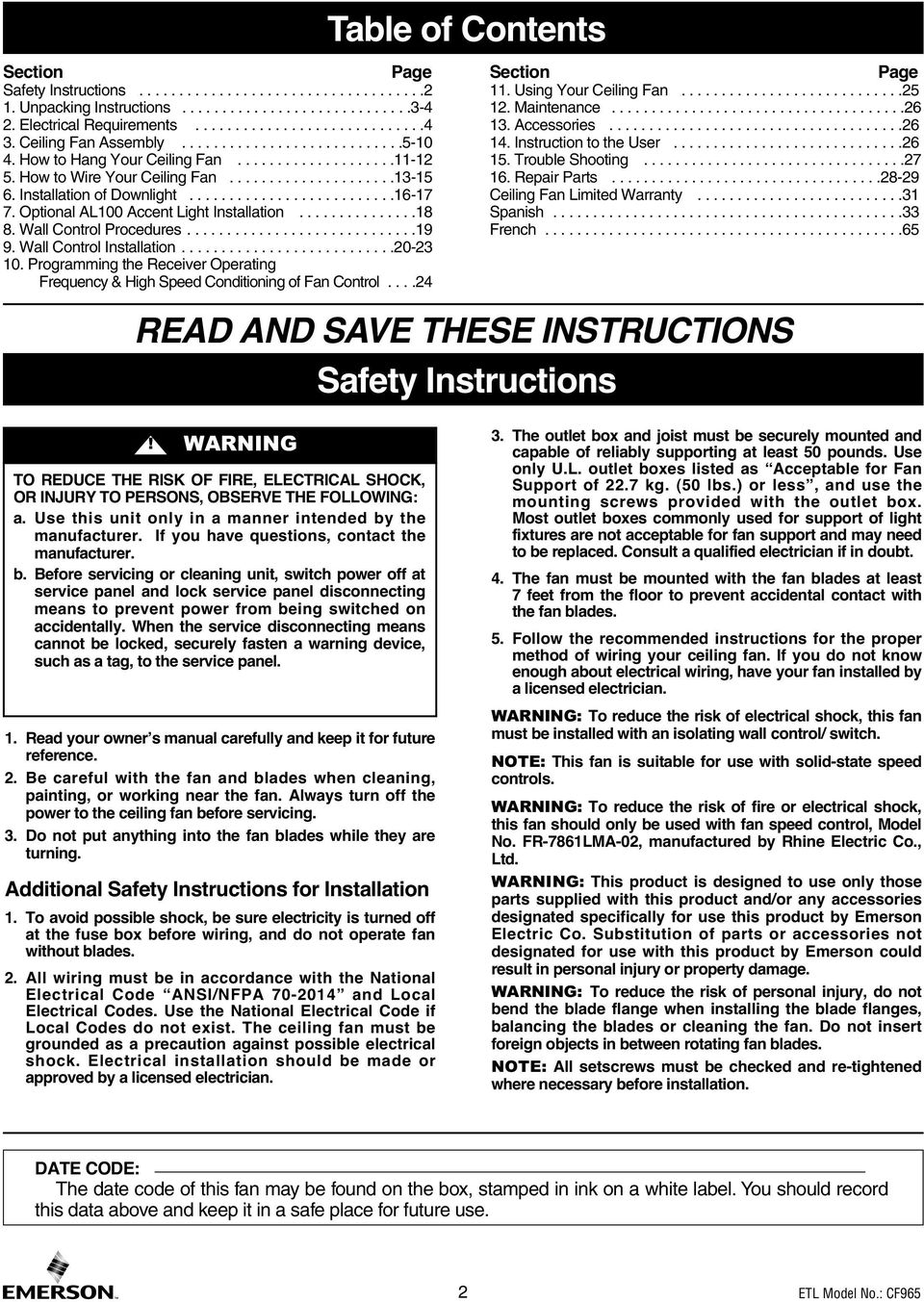
2 Section Page Safety Instructions Unpacking Instructions Electrical Requirements Ceiling Fan Assembly How to Hang Your Ceiling Fan How to Wire Your Ceiling Fan Installation of Downlight Optional AL100 Accent Light Installation Wall Control Procedures Wall Control Installation Programming the Receiver Operating Frequency & High Speed Conditioning of Fan Control Table of Contents Safety Instructions Section Page 11. Using Your Ceiling Fan Maintenance Accessories Instruction to the User Trouble Shooting Repair Parts Ceiling Fan Limited Warranty Spanish French READ AND SAVE THESE INSTRUCTIONS TO REDUCE THE RISK OF FIRE, ELECTRICAL SHOCK, OR INJURY TO PERSONS, OBSERVE THE FOLLOWING: a. Use this unit only in a manner intended by the manufacturer. If you have questions, contact the manufacturer. b. Before servicing or cleaning unit, switch power off at service panel and lock service panel disconnecting means to prevent power from being switched on accidentally. When the service disconnecting means cannot be locked, securely fasten a warning device, such as a tag, to the service panel. 1. Read your owner s manual carefully and keep it for future reference. 2. Be careful with the fan and blades when cleaning, painting, or working near the fan. Always turn off the power to the ceiling fan before servicing. 3. Do not put anything into the fan blades while they are turning. Additional Safety Instructions for Installation 1. To avoid possible shock, be sure electricity is turned off at the fuse box before wiring, and do not operate fan without blades. 2. All wiring must be in accordance with the National Electrical Code ANSI/NFPA and Local Electrical Codes. Use the National Electrical Code if Local Codes do not exist. The ceiling fan must be grounded as a precaution against possible electrical shock. Electrical installation should be made or approved by a licensed electrician. 3. The outlet box and joist must be securely mounted and capable of reliably supporting at least 50 pounds. Use only U.L. outlet boxes listed as Acceptable for Fan Support of 22.7 kg. (50 lbs.) or less, and use the mounting screws provided with the outlet box. Most outlet boxes commonly used for support of light fixtures are not acceptable for fan support and may need to be replaced. Consult a qualified electrician if in doubt. 4. The fan must be mounted with the fan blades at least 7 feet from the floor to prevent accidental contact with the fan blades. 5. Follow the recommended instructions for the proper method of wiring your ceiling fan. If you do not know enough about electrical wiring, have your fan installed by a licensed electrician. : To reduce the risk of electrical shock, this fan must be installed with an isolating wall control/ switch. NOTE: This fan is suitable for use with solid-state speed controls. : To reduce the risk of fire or electrical shock, this fan should only be used with fan speed control, Model No. FR-7861LMA-02, manufactured by Rhine Electric Co., Ltd. : This product is designed to use only those parts supplied with this product and/or any accessories designated specifically for use this product by Emerson Electric Co. Substitution of parts or accessories not designated for use with this product by Emerson could result in personal injury or property damage. : To reduce the risk of personal injury, do not bend the blade flange when installing the blade flanges, balancing the blades or cleaning the fan. Do not insert foreign objects in between rotating fan blades. NOTE: All setscrews must be checked and re-tightened where necessary before installation. DATE CODE: The date code of this fan may be found on the box, stamped in ink on a white label. You should record this data above and keep it in a safe place for future use. 2
3 1. Unpacking Instructions PACKAGE CONTENTS Do not install or use fan if any part is damaged or missing. Call Toll-Free for replacement parts: This product is designed to use only those parts supplied with this product and/or any accessories designated specifically for use with this product by Emerson Electric Co. Substitution of parts or accessories not designated for use with this product by Emerson Electric Co. could result in personal injury or property damage. 1.1 Check to see that you have received the following parts: NOTE: If you are uncertain of part description, refer to exploded view illustration below. Part Description Quantity A Fan Motor Assembly 1 B Ceiling Canopy 1 C Upper Glass Shade 1 D Motor Coupler Cover 1 E Light Kit Cover 1 F Light Kit Assembly 1 G Lower Glass Shade 1 H Fan Blade Flanges 5 I Fan Blades 5 J Hanger Bracket 1 K Hanger Ball/4.5 Downrod Assembly 1 L SW605 Wall Control w/hardware 1 M 50-Watt Mini-Halogen Base Lamps 3 HARDWARE BAG CONTENTS Part Description Quantity 1 Threaded Studs, #8-32 x 1-1/4 2 2 Knurled Knobs, # Lockwashers, External Tooth #8 2 4 Wire Connectors 3 5 Clevis Pin 1 6 Hairpin Clip 1 7 #8-32 x 1.25" Slotted Phillips Head Screw (spare) 1 8 1/4"-20 x 1/2" Slotted Phillips Head Screws w/lockwashers 11 9 #10-32 x 1/4" Slotted Phillips Washer Head Blade Screws Blade Balance Kit 1 H D B C A J K E F G L M I NOTE: Place the parts from the loose parts bags in a small container to keep them from being lost. If any parts are missing, call for replacement parts before proceeding. 1.2 Remove the fan assembly from the protective plastic bag. Place the fan assembly into the upper styrofoam with the bottom of the motor facing up. The upper styrofoam serves as a holder for the fan during the first stages of assembly. 3 emersonfans.com Please contact for further assistance

4 1. Unpacking Instructions (Continued) This Manual Is Designed to Make it as Easy as Possible for You to Assemble, Install, Operate and Maintain Your Ceiling Fan Tools Needed for Assembly One Phillips head screwdriver One 1/4 blade screwdriver Materials One stepladder One wire stripper Wiring outlet box and box connectors must be of type required by the local code. The minimum wire would be a 3-conductor (2-wire with ground) of following size: Installed Wire Length Wire Size A.W.G. Up to 50 ft ft. 12 Before assembling your ceiling fan, refer to section on proper method of wiring your fan (page 13). If you feel you do not have enough wiring knowledge or experience, have your fan installed by a licensed electrician. Your Emerson ceiling fan comes supplied with a Fan/Light Remote Control which consists of a receiver mounted inside the ceiling cover of the fan motor housing. This system allows you to regulate your ceiling fan speed and light ON/OFF. 2. Electrical Requirements Your new ceiling fan will require a grounded electrical supply line of 120 volts AC, 60 Hz, 15 amp circuit. To reduce the risk of fire, electric shock, or personal injury, mount fan to outlet box marked Acceptable for Fan Support of 22.7 kg. (50 lbs.) or less, and use screws supplied with outlet box. Most outlet boxes commonly used for support of light fixtures are not acceptable for fan support and may need to be replaced. Consult a qualified electrician if in doubt. Turning off wall switch is not sufficient. To avoid possible electrical shock, be sure electricity is turned off at the main fuse box before wiring. All wiring must be in accordance with National and Local codes and the ceiling fan must be properly grounded as a precaution against possible electrical shock. The outlet box must be securely anchored and capable of withstanding a load of at least 50 pounds. If your fan is to replace an existing ceiling light fixture, turn electricity off at the main fuse box at this time and remove the existing light fixture. To avoid fire or shock, follow all wiring instructions carefully. Any electrical work not described in these instructions should be done or approved by a licensed electrician. Please call Emerson technical support at if you have any questions about installation and operation of this ceiling fan. 4

5 3. Ceiling Fan Assembly 3.1 Disconnect electrical power to the branch circuit at the circuit breaker or fuse box before attempting to install the ceiling fan mounting plate on the outlet box. Turning off wall switch is not sufficient. To avoid possible electrical shock, be sure electricity is turned off at the main fuse box before wiring. All wiring must be in accordance with National and Local codes and the ceiling fan must be properly grounded as a precaution against possible electrical shock. 3.2 Remove the shipping spacers and the spacer attachment screws from the motor before installation of blade assemblies (Figure 1). Discard the spacers and spacer screws. SPACER ATTACHMENT SCREW SHIPPING SPACER Figure Mount blade flanges to fan blades using three #10-32 x 1/4 slotted phillips washer head screws (supplied) (Figure 2). Repeat this procedure for other four fan blades and blade flanges. #10-32 x 1/4" SLOTTED PHILLIPS WASHER HEAD SCREW (3 per blade) FAN BLADES (5) FAN BLADE FLANGES (5) Figure 2 5 emersonfans.com Please contact for further assistance

6 3. Ceiling Fan Assembly (Continued) 3.4 Loosely attach one blade/flange assembly to the motor hub by securing the two 1/4-20 x 1/2 slotted phillips head screws with lockwashers. Make sure the screws are NOT tightened (Figure 3). Repeat this procedure for other four blade/flange assemblies. 3.5 Once all five blade/flange assemblies are secured to the motor hub, proceed to tightening all 1/4-20 x 1/2 slotted phillips head screws with lockwashers at this time. 1/4-20 x 1/2" SLOTTED PHILLIPS HEAD SCREW AND LOCKWASHER (2 per blade/flange assembly) BLADE/FLANGE ASSEMBLY (5) To reduce the risk of personal injury, do not bend the blade flange when installing the blade flanges, balancing the blades or cleaning the fan. Do not insert foreign objects in between rotating fan blades. Figure 3 MOTOR HUB 3.6 Remove one #8-32 x 1-1/4 slotted phillips head screw from the lower housing adapter plate (reserve for later use). Loosen the other two screws to assemble the light kit cover to the lower housing adapter plate (Figure 4). 3.7 Rotate the light kit cover to engage the two loosened screws in the two key hole slots. Replace the #8-32 x 1-1/4 slotted phillips head screw (removed previously) and tighten all three screws to secure the light kit cover to the lower housing adapter plate (Figure 4). NOTE: Make sure wires are not pinched between light kit cover and the lower housing adapter plate. Spare #8-32 x 1-1/4 slotted phillips head screw is provided in parts bag if needed. Figure 4 #8-32 x 1-1/4" SLOTTED PHILLIPS HEAD SCREW LIGHT KIT COVER LOWER HOUSING ADAPER PLATE 6

7 3. Ceiling Fan Assembly (Continued) 3.8 Carefully turn the partially assembled ceiling fan over and place it on the styrofoam for final preparation (Figure 5). NOTE: Be extra careful not to bend the ceiling fan blades while turning the fan over onto the styrofoam. STYROFOAM CEILING FAN (partially assembled) Figure 5 NOTE: If using a longer accessory downrod, discard the supplied 4.5" downrod and install the longer downrod (sold separately) using the following instructions. 3.9 Remove the hanger ball by loosening the setscrew in the hanger ball until the ball falls freely down the downrod (Figure 6). Remove the pin from the downrod, then remove the hanger ball. Retain the pin and hanger ball for reinstallation in Step NOTE: Do not loosen the screw holding the green ground wire. PIN GREEN GROUND WIRE Figure 6 HANGER BALL SETSCREW (LOOSENED) 4.5" DOWNROD 3.10 Separate, untwist and unkink the two 80 motor leads. Route the 80 black and white motor leads through the downrod (Figure 7). TWO 80" MOTOR LEADS (UNTWISTED) Figure 7 4.5" DOWNROD 7 emersonfans.com Please contact for further assistance

8 3. Ceiling Fan Assembly (Continued) 3.11 Loosen the two setscrews in the motor coupling. Place the 4.5 downrod into the motor coupling, aligning the clevis pin holes in the downrod with the holes in the motor coupling (Figure 8). The clevis pin must go through the holes in the motor coupling and the holes in the downrod. Be sure to push the straight leg of the hairpin clip through the hole near the end of the clevis pin until the curved portion of the hairpin clip snaps around the clevis pin. The hairpin clip must be properly installed to prevent the clevis pin from working loose. Pull on the downrod to make sure the clevis pin is properly installed. MOTOR COUPLING 4.5" DOWNROD CLEVIS PIN HAIRPIN CLIP CLEVIS PIN HAIRPIN CLIP LOOSEN SETSCREWS (2) It is critical that the clevis pin in the motor coupling is properly installed. Failure to verify that the pin is properly installed could result in the fan falling. Figure While pulling up on the 4.5 downrod, retighten the two setscrews (previously loosened) in the motor coupling to secure the downrod into place (Figure 9). NOTE: The setscrews must be properly installed as described above, or fan wobble could result. It is critical that the setscrews are securely tightened. Failure to verify that the setscrews are properly installed could result in the fan falling. 4.5" DOWNROD MOTOR COUPLING RETIGHTEN SETSCREWS Figure 9 RETIGHTEN SETSCREWS 3.13 Make sure the grommet is properly installed in the coupling cover then slide the coupling cover on the downrod until it rests on the motor housing (Figure 10). Be sure the motor coupler cover is oriented correctly. 4.5" DOWNROD COUPLING COVER GROMMET COUPLING COVER MOTOR HOUSING Figure 10 8

9 3. Ceiling Fan Assembly (Continued) 3.14 Place the ceiling cover over the downrod. Be sure the ceiling cover is oriented correctly (Figure 11). 4.5" DOWNROD CEILING COVER Figure Route the two 80 motor leads through the hanger ball. Reinstall the hanger ball (Figure 12) on the downrod as follows: Position the hanger ball pin through the two holes in the downrod and align the ball so the pin is captured in the groove in the top of the hanger ball. Pull the hanger ball up tight against the pin and securely tighten the setscrew in the hanger ball. NOTE: A loose setscrew could create fan wobble. PIN 4.5" DOWNROD HANGER BALL SETSCREW Figure 12 It is critical that the pin in the hanger ball is properly installed and the setscrew securely tightened. Failure to verify that the pin and setscrew are properly installed could result in the fan falling The fan comes with black and white leads that are 80-inches long. Before installing the fan, measure up approximately 6 to 9-inches above top of hanger ball/downrod assembly (Figure 13). Cut off excess leads and strip back insulation 1/2-inch from end of leads. 6 to 9 INCHES HANGER BALL/ DOWNROD ASSEMBLY Figure 13 If installing the Optional AL100 Accent Light, Skip to Section 7. 9 emersonfans.com Please contact for further assistance

10 3. Ceiling Fan Assembly (Continued) 3.17 Carefully place the upper glass onto the motor housing (Figure 14) Rotate the four lower housing clamps over the inner edge of the upper glass. Be sure to keep the rubber pad beneath each clamp to ensure proper clamping. Tighten the four lower housing screws to secure the assembly (Figure 14). RUBBER PAD AND CLAMP (4) LOWER HOUSING SCREWS (4) Figure 14 10

11 4. How to Hang Your Ceiling Fan CEILING The fan must be hung with at least 7' of clearance from floor to blades (Figure 15). AT LEAST 7' Figure 15 FLOOR The outlet box and joist must be securely mounted and capable of supporting at least 50 lbs. Use only a U.L. outlet box listed as Acceptable for Fan Support of 22.7 kg. (50 lbs.) or less. To reduce the risk of fire, electric shock, or personal injury, mount fan to outlet box marked Acceptable for Fan Support of 22.7 kg. (50 lbs.) or less, and use screws supplied with outlet box. Most outlet boxes commonly used for support of light fixtures are not acceptable for fan support and may need to be replaced. Consult a qualified electrician if in doubt. TWO SCREWS SUPPLIED WITH OUTLET BOX Figure 16 OUTLET BOX HANGER BRACKET ANTI-ROTATION TAB 4.1 Securely attach the hanger bracket to the outlet box using the two screws supplied with the outlet box (Figure 16). Hanger bracket must seat firmly against outlet box. If the outlet box is recessed, remove wall board until bracket contacts box. If bracket and/or outlet box are not securely attached, the fan could wobble or fall. 11 emersonfans.com Please contact for further assistance

12 4. How to Hang Your Ceiling Fan (Continued) 4.2 Carefully lift the fan and seat the hanger ball/ downrod assembly on the hanger bracket that was just attached to the outlet box (Figure 17). Be sure the groove in the ball is engaged with the antirotation tab on the hanger bracket (Figure 17). Failure to seat tab in groove could cause damage to electrical wires and possible shock or fire hazard. NOTE: CEILING COVER, SUPPLY WIRES AND FAN WIRES OMITTED FOR CLARITY. HANGER BALL OUTLET BOX HANGER BRACKET HANGER BALL/ DOWNROD ASSEMBLY HANGER BRACKET To avoid possible fire or shock, do not pinch wires between the hanger ball/downrod assembly and hanger bracket. HANGER BALL GROOVE ANTI-ROTATION TAB Figure 17 12

13 5. How to Wire Your Ceiling Fan If you feel that you do not have enough electrical wiring knowledge or experience, have your fan installed by a licensed electrician. To avoid possible electrical shock, be sure electricity is turned off at the main fuse box before wiring. NOTE: If you are not sure if the outlet box is grounded, contact a licensed electrician for advice, as it must be grounded for safe operation. 5.1 Connect the green grounding lead from the hanger ball and the green grounding lead from the hanger bracket to the grounding conductor of supply (this may be a bare wire or wire with green colored insulation). Securely connect wires with wire connectors (supplied) (Figure 18). GROUND CONDUCTOR SUPPLY LISTED WIRE CONNECTOR GREEN WIRE (GROUND) FROM HANGER BALL GREEN WIRE (GROUND) FROM HANGER BRACKET Figure 18 This product is designed to use only those parts supplied with this product and/or any accessories designated specifically for use with this product by Emerson Electric Co. Substitution of parts or accessories not designated for use with this product by Emerson Electric Co. could result in personal injury or property damage. 5.2 Securely connect the fan motor white wire to the supply white (neutral) wire using wire connector (supplied) (Figure 19). SUPPLY WHITE (NEUTRAL) LISTED WIRE CONNECTOR FAN MOTOR WHITE WIRE Figure emersonfans.com Please contact for further assistance

14 5. How to Wire Your Ceiling Fan (Continued) 5.3 Securely connect the fan motor black wire to the supply black (hot) wire using wire connector (supplied) (Figure 20). SUPPLY BLACK (HOT) LISTED WIRE CONNECTOR Figure 20 FAN MOTOR BLACK WIRE 5.4 After connections have been made, turn leads upward and carefully push leads into the outlet box, with the white and green leads on one side of the outlet box and position the black lead on the other side of the outlet box (Figure 21). GREEN WIRES Check to see that all connections are tight, including ground, and that no bare wire is visible at the wire connectors, except for the ground wire. Do not operate fan until blades are in place. Noise and fan damage could result. WHITE WIRES Figure 21 BLACK WIRES 14

15 5. How to Wire Your Ceiling Fan (Continued) 5.5 Screw the two threaded studs (supplied) into the tapped holes in the hanger bracket (Figure 22). THREADED STUDS (2) Figure Lift the ceiling cover up to the threaded studs and turn until studs protrude through the holes in the ceiling cover (Figure 23). 5.7 Secure the ceiling cover in place by sliding lockwashers over the threaded studs and installing the two knurled knobs (supplied). (Figure 23). Tighten the knurled knobs securely until the ceiling cover fits snugly against the ceiling and the hole in the ceiling cover is clear of the downrod. CEILING COVER THREADED STUDS (2) LOCKWASHERS (2) KNURLED KNOBS (2) Figure 23 To avoid possible fire or shock, make sure that the electrical wires are completely inside the outlet box and not pinched between the ceiling cover and the ceiling. 15 emersonfans.com Please contact for further assistance

16 6. Installation of Downlight 6.1 Remove the pre-installed wire nut from the fan motor assembly white wire. Carefully straighten the white wire strands. Pair the light kit assembly white wire with the motor assembly white wire and install the previously removed wire nut (Figure 24). 6.2 Remove the pre-installed wire nut from the fan motor assembly black wire. Carefully straighten the black wire strands. Pair the light kit assembly black wire with the motor assembly black wire and install the previously removed wire nut (Figure 24). Check to see that all connections are tight and that no bare wire is visible at the wire connectors. FAN MOTOR ASSEMBLY BLACK WIRE FAN MOTOR ASSEMBLY WHITE WIRE LIGHT KIT ASSEMBLY WHITE WIRE LIGHT KIT ASSEMBLY Figure 24 LIGHT KIT ASSEMBLY BLACK WIRE 6.3 Remove one of the three #8-32 x 1-1/4 slotted phillips head screws from the light kit cover (Figure 25). Retain the screw for future installation. Loosen the other two screws several turns. 6.4 Carefully tuck all the wires under the light kit assembly prior to installing the light kit assembly onto the light kit cover. ROTATE LIGHT KIT ASSEMBLY CLOCKWISE TO ENGAGE 6.5 Install the light kit assembly onto the light kit cover by aligning and engage the radial slots of the light kit with the loosened screw heads on the cover. 6.6 Rotate the light kit assembly to engage the two loosened screws. 6.7 With the light kit locked into position, tighten the two previously loosened screws 6.8 Reinstall the #8-32 x 1-1/4 slotted phillips head screw (previously removed) into the light kit assembly to complete installation of the light kit. LIGHT KIT ASSEMBLY 8-32 x 1-1/4" SLOTTED PHILLIPS HEAD SCREWS (3) Figure 25 LIGHT KIT COVER To avoid possible fire or shock, do not pinch wires between the light kit assembly and the light kit cover. Spare #8-32 x 1-1/4 slotted phillips head screw is provided in parts bag if needed. 16

17 6. Installation of Downlight (Continued) To avoid risk of burns or other injuries, turn power off and allow lamp to fully cool before attempting to replace the mini-halogen base bulbs. 6.9 Screw the three 50-watt (maximum) mini-halogen base bulbs (supplied) in the light kit fixture sockets (Figure 26). NOTE: Do not touch the halogen mini-halogen base bulbs with bare hands. Fingerprints may result in shorter bulb life. Remove fingerprints with rubbing alcohol. LIGHT KIT ASSEMBLY Figure 26 LIGHT KIT FIXTURE SOCKETS (3) 50-WATT (maximum) MINI-HALOGEN BASE BULBS (3) 6.10 Place the glass shade into the opening in the light kit assembly, aligning the three flat areas on the top edge of the glass with the three raised dimples on the light kit assembly and turn the glass shade clockwise until it is fully seated (Figure 27). NOTE: Periodically check that the glass shade is seated fully clockwise in the light kit assembly. GLASS SHADE Figure emersonfans.com Please contact for further assistance

18 7. Optional AL100 Accent Light Installation CAUTION: To reduce the risk of electrical shock, disconnect the electrical supply circuit before installing the accent light kit. 7.1 Loosen and remove all three pre-installed AL100 mounting screws from the upper housing of the motor assembly (Figure 28). Retain the screws for re-installation. LOWER HOUSING SCREWS (4) GLASS SHADE Turning off wall switch is not sufficient. To avoid possible electrical shock, be sure electricity is turned off at the main fuse or circuit breaker box before wiring. All wiring must be in accordance with National and Local codes and the ceiling fan must be properly grounded as a precaution against possible electrical shock. Figure CAUTION: To reduce the risk of electric shock, disconnect the electrical supply circuit to the fan before installing light kit assembly. Position the AL100 accent light so that the opening of the AL100 accent light slides through the downrod. Align the mounting holes of the AL100 accent light to the motor assembly (Figure 29). NOTE: Be sure the AL100 accent light connector is located close to the motor assembly connector for ease of installation. Install the AL100 accent light to the motor assembly using three AL100 accent light mounting screws previously removed on Step Securely connect the AL100 accent light connector to the motor assembly connector (Figure 30). Screw the four 25-watt candelabra base bulbs into the AL100 accent light sockets (Figure 30). LOWER HOUSING SCREWS (4) AL100 ACCENT LIGHT HARNESS CONNECTOR FAN MOTOR ACCENT LIGHT CONNECTOR Figure WATT CANDELABRA BASE BULBS (4) AL100 ACCENT LIGHT HARNESS AL100 ACCENT LIGHT SOCKETS (4) Return to Section 3.17 and complete the remaining installation instructions. Figure 30 LIGHT KIT & FAN MOTOR ACCENT LIGHT CONNECTORS 18

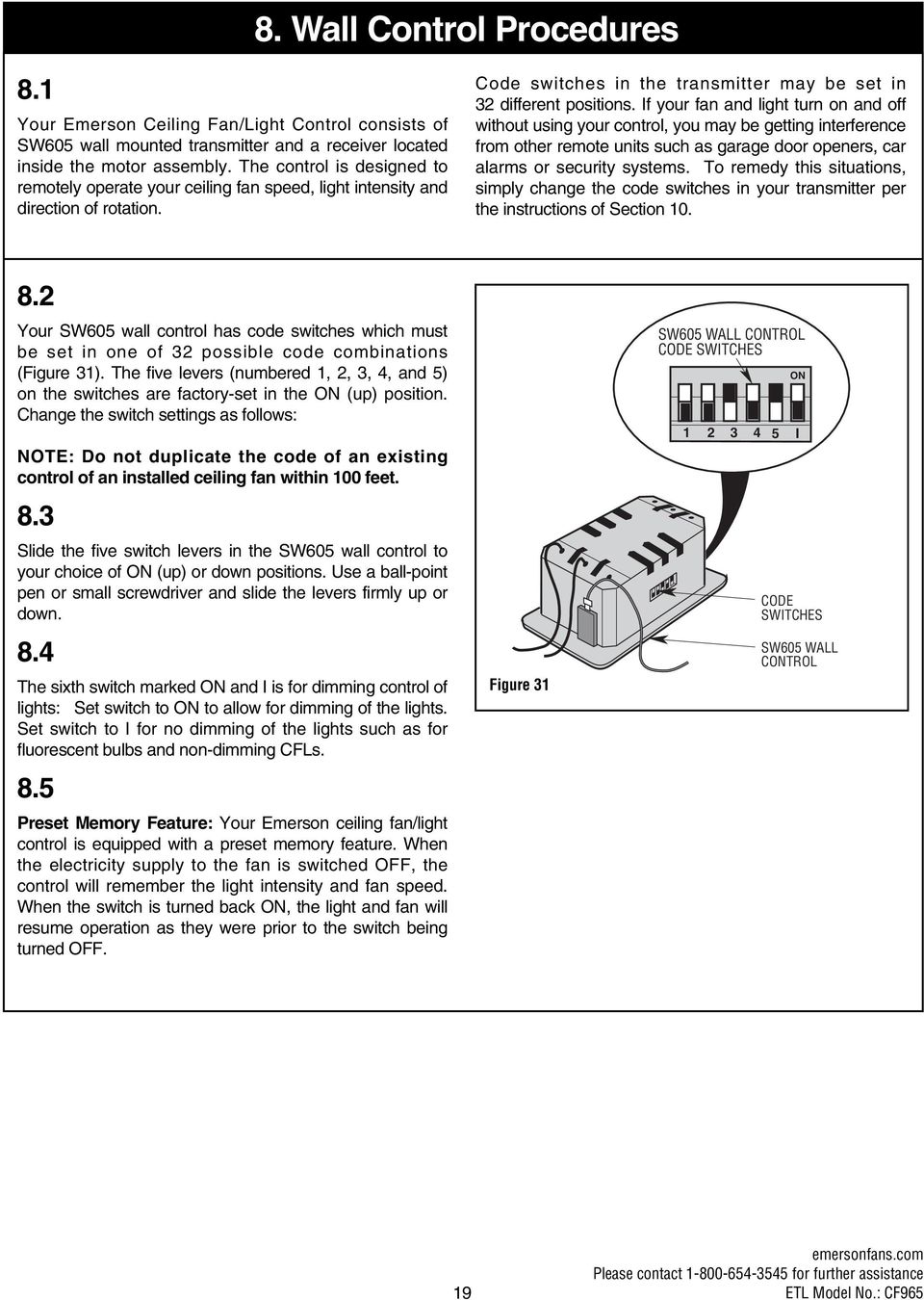
19 8. Wall Control Procedures 8.1 Your Emerson Ceiling Fan/Light Control consists of SW605 wall mounted transmitter and a receiver located inside the motor assembly. The control is designed to remotely operate your ceiling fan speed, light intensity and direction of rotation. Code switches in the transmitter may be set in 32 different positions. If your fan and light turn on and off without using your control, you may be getting interference from other remote units such as garage door openers, car alarms or security systems. To remedy this situations, simply change the code switches in your transmitter per the instructions of Section Your SW605 wall control has code switches which must be set in one of 32 possible code combinations (Figure 31). The five levers (numbered 1, 2, 3, 4, and 5) on the switches are factory-set in the ON (up) position. Change the switch settings as follows: NOTE: Do not duplicate the code of an existing control of an installed ceiling fan within 100 feet. 8.3 Slide the five switch levers in the SW605 wall control to your choice of ON (up) or down positions. Use a ball-point pen or small screwdriver and slide the levers firmly up or down. 8.4 The sixth switch marked ON and I is for dimming control of lights: Set switch to ON to allow for dimming of the lights. Set switch to I for no dimming of the lights such as for fluorescent bulbs and non-dimming CFLs. 8.5 Preset Memory Feature: Your Emerson ceiling fan/light control is equipped with a preset memory feature. When the electricity supply to the fan is switched OFF, the control will remember the light intensity and fan speed. When the switch is turned back ON, the light and fan will resume operation as they were prior to the switch being turned OFF. Figure 31 SW605 WALL CONTROL CODE SWITCHES ON I CODE SWITCHES SW605 WALL CONTROL 19 emersonfans.com Please contact for further assistance
20 9. Wall Control Installation SINGLE-POLE INSTALLATION CAUTION: To reduce the risk of electrical shock, disconnect the electrical supply circuit before installing the fan, light kit or receiver. NOTE: Make all wiring connections using wire connectors (supplied). Make sure that all connections are tight, including ground, and that no bare wire is visible at the wire connectors, except for the ground wire. 9.1 Disconnect electrical power to the branch circuit at the circuit breaker or fuse box before attempting to install the ceiling fan SW605 wall control into the outlet box. 9.2 Remove faceplate and screws from existing wall control. Pull control out from the wall box. Determine the hot wire and the load wire and disconnect these wires from control (Figure 32). Do not attempt to disconnect any wires not already connected to existing control. Turning off wall switch is not sufficient. To avoid possible electrical shock, be sure electricity is turned off at the main fuse or circuit breaker box before wiring. All wiring must be in accordance with National and Local codes and the ceiling fan must be properly grounded as a precaution against possible electrical shock. HOT NEUTRAL BLK EXISTING WALL CONTROL BLACK RECEIVER LOCATED WITHIN THE MOTOR HOUSING BLACK LOAD GROUND Figure 32 20

21 Wall Control Installation (Continued) Before installing the SW605 wall control, place the SW605 wall control in OFF mode by pushing ON/OFF switch to the OFF position. 9.4 Connect one black wire of the SW605 wall control to the hot wire. Securely connect wires with wire connectors supplied (Figure 33). 9.5 Connect one black wire of wall switch to the load (black) wire in wall box. Securely connect wires with wire connector supplied. Figure 33 SCREWS (2) SWITCH COVER DECORATIVE WALL PLATE SW605 FAN/LIGHT WALL CONTROL BLK BLACK HOT TO 120VAC SOURCE TO LOAD GROUND NEUTRAL WIRES WALL BOX Do not connect any neutral (white) wire to this control. Incorrect wiring will damage this control. 9.6 Screw the SW605 wall control into wall box using the supplied screws. Leave the SW605 wall control in OFF mode until fan installation is completed. Check to see that all connections are tight and that no bare wires are visible at the wire connectors. 9.7 The SW605 wall control is supplied with a white, ivory, and almond color switch covers. Choose the finish that best suits your needs and snap the cover onto the SW605 wall control (Figure 33). 9.8 Install decorator wall plate using the two screws provided with wall plate. Leave the SW605 wall control in OFF mode until fan installation is completed (Figure 33). 21 emersonfans.com Please contact for further assistance
22 HI MED LOW FAN OFF OFF LIGHT ON HI MED LOW FAN OFF OFF LIGHT ON 9. Wall Control Installation (Continued) 3-WAY INSTALLATION (One fan controlled by two different SW605 wall controls) (See Figures 33 and 34.) 9.9 Turning off wall switch is not sufficient. To avoid possible electrical shock, be sure electricity is turned off at the main fuse or circuit breaker box before wiring. All wiring must be in accordance with National and Local codes and the ceiling fan must be properly grounded as a precaution against possible electrical shock. Disconnect electrical power to the branch circuit at the circuit breaker or fuse box before attempting to install the ceiling fan SW605 wall control into the outlet box. HOT BLACK NEUTRAL Figure 34 SW605 FAN/LIGHT WALL CONTROL EMERSON EMERSON TRAVELER WIRE BLK BLK RECEIVER LOCATED WITHIN THE MOTOR HOUSING SECOND SW605 WALL CONTROL PURCHASED SEPARATELY LOAD BLACK GROUND Do not connect any neutral (white) wire to this control. Incorrect wiring will damage this control At all wall box locations remove faceplates and screws from existing controls. Pull controls out from wall boxes and determine which wall box contains the hot lead and which wall box contains the load wire. Also, identify traveler wires which are common to both wall boxes. Disconnect wires from existing controls only. Do not attempt to disconnect any wires not already connected to existing controls Before installing the SW605 wall control, place the SW605 wall control in OFF mode by pushing ON/OFF switch to the OFF position Install a SW605 wall control in the wall box containing the hot wire first. Connect the black wire of the SW605 wall control to the hot wire. Securely connect the wires with wire connectors supplied Connect the other black wire of the SW605 wall control to both remaining traveler wires in the wall box and secure with wire connector supplied. 22
23 9. Wall Control Installation (Continued) 3-WAY WIRING DIAGRAM: NEW CONSTRUCTION NOTE: Retrofit 3-way installations are likely to include two traveler wires between the two wall boxes. In new construction, only one traveler wire Is required (See Figure 35). STANDARD WIRING FOR EXISTING 3-WAY CONTROLS HOT BLK EXISTING WALL CONTROL BLACK Check to see that all connections are tight and that no bare wires are visible at the wire connectors. TRAVELER WIRES LOAD 9.14 Screw the SW605 wall control into wall box using the supplied screws. Leave the SW605 wall control in OFF mode until fan installation is completed The SW605 wall control is supplied with a white, ivory, and almond color switch covers. Choose the finish that best suits your needs and snap the cover onto the SW605 wall control (Figure 27) Next, install the other SW605 wall control (sold separately) into the wall box containing the load wire. Connect the black wire of the SW605 wall control to the traveler wire(s) already connected to the black wire (in the other wall box). Secure with wire connectors supplied. 3-WAY WIRING DIAGRAM: RETROFIT HOT Figure 35 BLK SW605 FAN/LIGHT WALL CONTROL BLK TRAVELER WIRES BLK SW605 FAN/LIGHT WALL CONTROL SECOND SW605 WALL CONTROL PURCHASED SEPARATELY BLK BLACK LOAD 9.17 Connect one black wire of the SW605 wall control to the load (black) wire and secure with wire connector supplied Connect one black wire of the SW605 wall control to both remaining traveler wires in the wall box and secure with wire connector supplied. 23 emersonfans.com Please contact for further assistance
24 10. Programming the Receiver Operating Frequency & High Speed Conditioning of Fan Control -- Important - Read This Section Carefully and Follow the High Speed Conditioning Instructions Closely -- PROGRAMMING THE RECEIVER OPERATING FREQUENCY & HIGH SPEED CONDITIONING OF FAN CONTROL IMPORTANT: Ceiling fan blades MUST be installed before high speed conditioning can begin Turn the wall control ON/OFF switch to the "OFF" position. Restore electricity to the ceiling fan branch circuit at the circuit breaker or fuse box Flip the SW605 wall control's ON/OFF switch to "ON" position. Within one minute of flipping the switch to "ON", push and hold the FAN OFF button ( ) for 3 to 5 seconds to set the code in the receiver. The ceiling fan lights (if installed) will blink to indicate the SW605 wall control code has been paired with the receiver. IMPORTANT: Immediately after successful pairing, the ceiling fan will automatically begin high speed conditioning of the motor. During conditioning, the electronic motor control software is calculating speeds for the 2nd through 5th speed settings based on the blades that were installed on the fan The fan will run for approximately 2 minutes in the upward direction then reverse direction to down flow and run an additional 2 minutes. When conditioning is complete, the fan will come to complete stop. IMPORTANT: Do not interrupt the conditioning until the fan comes to a complete stop in approximately 5 minutes. All functions of the control will be rejected during conditioning High speed conditioning is now complete If programming is unsuccessful, retry the above instructions after cycling the SW605 wall control ON/OFF switch to restart the 1 minute programming time period If still unsuccessful, shut off the electricity at the fuse box or breaker panel and change the SW605 wall control frequency (page 16). After changing the frequency settings, repeat instructions 1-5 of this section within one minute of restoring the electricity. 24
25 11. Using Your Ceiling Fan USING YOUR CEILING FAN (Figure 36) Your SW605 wall control has full control of your fan and light. NOTE: Prior to operation of the fan and light from the wall control, set the fan speed to HIGH (...) and turn the light ON ( ) To set the desired fan speed, press the ( ) button to decrease the speed and the ( ) to increase the speed. The LED display will light up to indicate the new speed selected To turn the downlight on, press and release the ( ) button. The light will turn on at the light intensity previously selected. To change the intensity hold the button down. The intensity will go up and down while the button is held. Release the button at the desired intensity To turn the uplight on, press and release the ( ) button. The light will turn on at the light intensity previously selected. The intensity will go up and down while the button is held. Release the button at the desired intensity Your SW605 wall control comes complete with your choice of three wall cover plates; ivory, white and light almond If airflow is desired in the opposite direction, press the ( ) button on the SW605 wall control. The fan must be operating at any speed for the reverse button to function. The blades will turn in the opposite direction and reverse the airflow Your fan is now wired to be turned on and off from the fan switch. Fan installation must be completed, including the installation of the fan blades, before testing the SW605 wall control. POWER INDICATOR LIGHT FAN DIRECTION FAN OFF BUTTON Figure 36 LIGHT BUTTON HIGH TO LOW SPEED BUTTONS ON/OFF SWITCH O = OFF / = ON 25 emersonfans.com Please contact for further assistance
26 12. Maintenance IMPORTANT CARE INSTRUCTIONS for your Ceiling Fan Periodic cleaning of your new ceiling fan is the only maintenance that is needed. When cleaning, use only a soft brush or lint free cloth to avoid scratching the finish. Abrasive cleaning agents are not required and should be avoided to prevent damage to finish. Do not use water when cleaning your ceiling fan. It could damage the motor or the blades and create the possibility of an electrical shock. 13. Accessories Ceiling Fan/Light Controls (see store or catalog). Downrod Extension Kits (see store or catalog). The use of any other control not specifically approved for this fan could result in fire, shock and personal injury. This product is designed to use only those parts supplied with this product and/or any accessories designated specifically for use with this product by Emerson Electric Co. Substitution of parts or accessories not designated for use with this product by Emerson Electric Co. could result in personal injury or property damage. 14. Instruction to the User (if device contains a digital device) This equipment has been tested and found to comply with the limits for a class B digital device, pursuant to part 15 of the FCC Rules. These limits are designed to provide reasonable protection against harmful interference in a residential installation. This equipment generates, uses and can radiate radio frequency energy and if not installed and used in accordance with the instructions, may cause harmful interference to radio communications. However, there is no guarantee that interference will not occur in a particular installation. If this equipment does cause harmful interference to radio or television reception, which can be determined by turning the equipment off and on, the user is encouraged to try to correct the interference by one or more of the following measures: Reorient or relocate the receiving antenna. Increase the separation between the equipment and receiver. Connect the equipment into an outlet on a circuit different from that to which the receiver is connected. Consult the dealer or an experienced radio/tv technician for help. This equipment has been certified to comply with the limits for a class B computing device, pursuant to FCC Rules. In order to maintain compliance with FCC regulations, shielded cables must be used with this equipment. Operation with non-approved equipment or unshielded cables is likely to result in interference to radio and TV reception. The user is cautioned that changes and modifications made to the equipment without the approval of manufacturer could void the user s authority to operate this equipment. This Class B digital apparatus meets all requirements of the Canadian Interference-Causing Equipment Regulations. 26
27 15. Trouble Shooting : FOR YOUR OWN SAFETY TURN OFF POWER AT FUSE BOX OR CIRCUIT BREAKER BEFORE TROUBLE SHOOTING YOUR FAN. TROUBLE PROBABLE CAUSE SUGGESTED REMEDY 1. Fan will not start. 1. Fuse or circuit breaker blown. 1. Check main and branch circuit fuses or circuit breakers. 2. Loose electrical connections to the fan. 2. Check all wire connections on the fan. : Make sure main power is turned OFF. 2. Fan sounds noisy. 1. Blades are not tightly fastened to the fan. 1. Check all blade screws for tightness. 2. Loose screws in fan motor. 2. Check to make sure all screws in fan motor are snug (not over-tight). 3. Light fixture connectors are rattling 3. Reposition the connectors and carefully reassemble the cover inside the light kit housing adapter. : Make sure main power is turned OFF. 3. Fan wobbles 1. Blades are not tightly fastened to the fan. 1. Check all blade screws for tightness. excessively. : Make sure main power is turned OFF. 2. Fan blades out of balance. 2. Interchange an adjacent (side-by-side) blade pair to redistribute the weight. Locate the supplied blade balancing kit and follow the included instructions. 4. Lamp will not 1. Loose electrical connectors. 1. Shut off the branch circuit electricity at the fuse box or breaker. illuminate. panel and check the receiver electrical connectors for proper installation. 2. The lamp is burnt out. 2. Turn the electricity off and replace the lamp with a new 50W maximum lamp. 3. Lamp turns on and then turns off. 3. The built-in circuit breaker is tripping. Check that the lamp is 50W maximum. CAUTION: Turn the lights off before touching halogen lamps, they are very hot and can burn your fingers. 27 emersonfans.com Please contact for further assistance
28 16. Repair Parts
29 16. Repair Parts Listing Model Numbers Key No. Description CF965BS00 CF965VNB00 * Hanger Ball Assembly, Consisting of: Hanger Bracket (1) 2 Hanger Ball (1) Downrod Assembly (1) 4 Ceiling Canopy (1) BS VNB 5 Upper Glass Shade (1) OM OM 6 Motor Coupler Cover (1) BS VNB 7 Control Receiver DC Motor (1) Light Kit Cover (1) BS VNB 9 Light Kit Assembly (1) WW WW 10 50W Mini-Halogen Base Bulbs (3) 11 Lower Glass Shade (1) OM OM 12 Fan Blade Flanges (5) BS VNB 13 Fan Blades (5) DM/WA DM/WA 14 SW605 Wall Control w/hardware (1) SW605 SW605 * Parts Bag Containing: CRM BLOX 15 Threaded Studs, #8-32 x 1-1/4 (2) 16 Knurled Knobs, #8-32 (2) 17 Lockwashers, #8 External Tooth (2) 18 Wire Connectors (3) 19 Clevis Pin (1) 20 Hairpin Clip (1) 21 #8-32 x 1.25" Slotted Phillips Head Screws (spare) (1) 22 1/4"-20 x 1/2" Slotted Phillips Head Screws w/lockwashers (11) 23 #10-32 x 1/4" Slotted Phillips Washer Head Blade Screws (16) 24 Balancing Kit (1) Owner's Manual BP7498 BP7498 Before discarding packaging material, be certain all parts have been removed. HOW TO ORDER REPAIR PARTS WHEN ORDERING REPAIR PARTS, ALWAYS GIVE THE FOLLOWING INFORMATION: PART NUMBER NAME OF ITEM PART DESCRIPTION MODEL NUMBER The model number of your Fan will be found on a label attached to the top housing. For repair parts, phone emersonfans.com Please contact for further assistance
30 Notes 30
31 Emerson Air Comfort Ceiling Fan Limited Warranty What The Limited Warranty Covers: This limited warranty is offered by Air Comfort Products division of Emerson Electric Co. ("Emerson" "we" or "us") located at the address stated below to the original retail purchaser ("you" or "your") of an Emerson Air Comfort Ceiling Fan product ("Emerson Ceiling Fan") and covers the motor and the other components and accessories of the Emerson Ceiling Fan against all defects in workmanship and materials. What The Period Of Coverage Is: This limited warranty will cover the Emerson Ceiling Fan motor for the expected lifetime of your Emerson Ceiling Fan (when operated in accordance with your Owner's Manual or other instructions provided by Emerson to you with the Emerson Ceiling Fan). All other components and accessories of the Emerson Ceiling Fan are covered by this limited warranty for a period of one (1) year from its date of original retail purchase. ANY IMPLIED WARRANTY, INCLUDING WITHOUT LIMITATION, ANY IMPLIED WARRANTY OF MERCHANTABILITY OR FITNESS FOR A PARTICULAR PURPOSE THAT IS AVAILABLE TO YOU UNDER THE LAWS OF YOUR STATE OR PROVINCE SHALL COVER THE MOTOR FOR THE EXPECTED LIFETIME OF THE MOTOR (SUBJECT TO PROPER USE), AND FOR ONE YEAR WITH RESPECT TO COMPONENTS AND ACCESSORIES. No Other Express or Implied Warranty Applies: THE LIMITED WARRANTIES PROVIDED ABOVE ARE THE SOLE AND EXCLUSIVE WARRANTIES PROVIDED BY EMERSON TO YOU FOR YOUR EMERSON CEILING FAN, AND ARE IN LIEU OF ALL OTHER WARRANTIES, WRITTEN OR ORAL, EXPRESS OR IMPLIED, WHETHER ARISING BY OPERATION OF LAW OR OTHERWISE, WHETHER OR NOT THE PURPOSE HAS BEEN DISCLOSED AND WHETHER OR NOT THE EMERSON CEILING FAN HAS BEEN SPECIFICALLY DESIGNED OR MANUFACTURED FOR YOUR USE OR PURPOSE. EMERSON HEREBY DISCLAIMS ANY AND ALL IMPLIED WARRANTIES, INCLUDING WITHOUT LIMITATION, IMPLIED WARRANTIES OF MERCHANTABILITY OR FITNESS FOR A PARTICULAR PURPOSE FOR COMPONENTS AND ACCESSORIES AS OF THE EXPIRATION OF THE ONE YEAR WARRANTY PERIOD FOR SUCH COMPONENTS AND ACCESSORIES. IMPLIED WARRANTIES OF MERCHANTABILITY OR FITNESS FOR A PARTICULAR PURPOSE FOR THE MOTOR PORTION OF THE EMERSON CEILING FAN ARE LIKEWISE DISCLAIMED BY EMERSON AT SUCH TIME THAT THE EXPECTED LIFETIME OF THE EMERSON CEILING FAN UNDER NORMAL USAGE HAS BEEN REACHED. EXCLUSIONS OR LIMITATIONS OF IMPLIED WARRANTIES MAY VARY FROM STATE TO STATE AND PROVINCE TO PROVINCE SO THE ABOVE LIMITATIONS MAY NOT APPLY TO YOU. What We Will Do To Correct Problems: If during the one (1) year warranty period the motor or any component or accessory of your Emerson Ceiling Fan is defective in materials or workmanship, or if during the expected lifetime of the Emerson Ceiling Fan (when used in accordance with the User Manual or other instructions) the motor is defective in materials or workmanship, you must contact Emerson during the applicable warranty period. If the defect is covered by warranty, Emerson will repair or replace the defective motor, component or other accessory at no charge to you. If repair of the motor, component or accessory is not practical or possible within a reasonable time and no replacement Emerson Ceiling Fan can be provided, Emerson will refund to you the actual purchase price of your Emerson Ceiling Fan. We will ship the repaired or the replacement Emerson Ceiling Fan to you at no charge, but you are responsible for all costs of removal and reinstallation of your Emerson Ceiling Fan. How You Can Receive Warranty Service: You must be the original retail purchaser and have proof of your purchase of the Emerson Ceiling Fan to obtain your remedy under this limited warranty. You can return your Emerson Ceiling Fan to your place of purchase, or you can call Emerson Customer Service at to obtain a return authorization and service identification tag. In order for us to confirm that your Emerson Ceiling Fan is still under warranty, please retain your receipt or other proof of purchase and have that information readily available when returning your Emerson Ceiling Fan to your place of purchase, or upon calling Emerson Customer Service. If you call Emerson Customer Service, prior to your call please be prepared to provide all model numbers shown on your Emerson Ceiling Fan. Once we have processed your return authorization request, we will provide you with a postage paid return label which should be affixed to the Emerson Ceiling Fan package you ship to the address listed at the end of this limited warranty. The return label will be sent to the mailing address you provide to us by phone. What Is Not Covered: This limited warranty does not extend to and expressly excludes: The glass globes and light bulbs of your Emerson Ceiling Fan, Loss or damage to the motor or any component or accessory caused by normal wear and tear, rather than due to defects in materials or workmanship, Loss or damage resulting from conditions beyond our reasonable control, including without limitation, repairs not made at our factory or authorized service center, use of parts or accessories not provided to you as part of this warranty by our factory or authorized service center, mishandling, unreasonable use, misuse, abuse, modifications or other damage caused by you or a third party to your Emerson Ceiling Fan while not in our possession, Loss or damage resulting from improper installation, or other failure to comply with instructions in your Owner's Manual. This limited warranty is deemed null and void upon the occurrence of either of the following events: You cease to own the Emerson Ceiling Fan product, or The Emerson Ceiling Fan is moved from its original point of installation. This limited warranty is only valid within the 50 United States, the District of Columbia, and Canada. No other written or oral warranties apply, and no employee, agent, dealer or other person is authorized to give any warranties on behalf of Air Comfort Products or Emerson Electric Co. Limitation of Liability REPAIR, REPLACEMENT OR A REFUND ARE THE EXCLUSIVE REMEDIES AVAILABLE TO YOU UNDER THIS LIMITED WARRANTY. TO THE EXTENT PERMITTED BY LAW, IN NO EVENT SHALL EMERSON OR ANY EMERSON AUTHORIZED DEALER BE LIABLE FOR ANY INCIDENTAL, SPECIAL, INDIRECT, OR CONSEQUENTIAL DAMAGES, INCLUDING ANY ECONOMIC LOSS, WHETHER RESULTING FROM NONPERFORMANCE, USE, MISUSE OR INABILITY TO USE THE EMERSON CEILING FAN OR FOR THE NEGLIGENCE OF EMERSON OR AN EMERSON AUTHORIZED DEALER. EMERSON SHALL NOT BE LIABLE FOR DAMAGES CAUSED BY DELAY IN PERFORMANCE AND IN NO EVENT, REGARDLESS OF THE FORM OF THE CLAIM OR CAUSE OF ACTION (WHETHER BASED IN CONTRACT, INFRINGEMENT, NEGLIGENCE, STRICT LIABILITY, OTHER TORT OR OTHERWISE), SHALL EMERSON'S OR ANY EMERSON AUTHORIZED AGENT'S LIABILITY TO YOU OR ANY INDIVIDUAL USING THE EMERSON CEILING FAN EXCEED THE PRICE PAID BY THE ORIGINAL OWNER FOR THE EMERSON CEILING FAN. The term "consequential damages" shall include, but not be limited to, loss of anticipated profits, business interruption, loss of use or revenue, cost of capital or loss or damage to property or equipment. How State and Provincial Law Relates To The Warranty: Some states and provinces do not allow the exclusion or limitation of incidental or consequential damages so the above exclusion or limitation may not apply to you. This limited warranty gives you specific legal rights, and you may also have other rights which vary from state to state or province to province. 31 emersonfans.com Please contact for further assistance
32 Air Comfort Products DIVISION OF EmErSON ElEctrIc co W. Florissant St. louis, mo Questions, problems, missing parts: Before returning to the store call Emerson Electric Customer Service 8 a.m. - 6 p.m., Eastern, Monday-Friday Retain this manual for future use. Part No. F40BP Revision: Printed in China 01/15 Form No. BP7498
READ AND SAVE THESE INSTRUCTIONS HIGHRISE. 50 Ceiling Fan Owner's Manual. Model Numbers CF430SW00. Satin White. Net Weight: 24.3 Lbs.
 READ AND SAVE THESE INSTRUCTIONS HIGHRISE 50 Ceiling Fan Owner's Manual CF430BS00 Brushed Steel Model Numbers CF430SW00 Satin White Net Weight: 24.3 Lbs. CF430ORB00 Oil Rubbed Bronze Questions, problems,
READ AND SAVE THESE INSTRUCTIONS
 READ AND SAVE THESE INSTRUCTIONS SUMMER NIGHT 52 Damp Location Ceiling Fan Owner's Manual Net Weight: 1.5 Lbs. ENERGY STAR Model No. CF52AW01 CF52ORB01 CF52BQ01 CF52WB01 CF52CK01 CF52WW01 CF52SCB01 LIMITED
1. SAFETY RULES WARNING TO REDUCE THE RISK OF FIRE, ELECTRIC SHOCK OR PERSONAL INJURY, MOUNT FAN TO OUTLET BOX MARKED "ACCEPTABLE FOR FAN SUPPORT".
 1 1. SAFETY RULES 1. To reduce the risk of electric shock, insure electricity has been turned off at the circuit breaker or fuse box before beginning. 2. All wiring must be in accordance with the National
1. SAFETY RULES. 8. Avoid placing objects in the path of the blades.
 1 1. SAFETY RULES 1. To reduce the risk of electric shock, insure electricity has been turned off at the circuit breaker or fuse box before beginning. 2. All wiring must be in accordance with the National
Scottsdale 52 in Ceiling Fan Owne r s manual. Scottsdale Ventilador de Techo de 1,32 Manual del Propietario
 538 855 Scottsdale 52 in Ceiling Fan Owne r s manual Scottsdale Ventilador de Techo de 1,32 Manual del Propietario m Scottsdale by Hampton Bay 56 Scottsdale Thank you for purchasing our ceiling fan. This
Table of Contents. www.hunterfan.com. What to Expect with. Preparation. Tools Needed. Wiring. Hanging the Fan. Blades. Motor Housing.
 www.hunterfan.com Table of Contents What to Expect with Your Installation 30 inches Hanging the Fan Wiring 8 Maintenance, Operation & Cleaning Light Kit 13??? 14 1 9 Troubleshooting 11 5 Blades Motor Housing
Ceiling Fan Installation Instructions
 Ceiling Fan Installation Instructions 1525..series OWNER S MANUAL READ AND SAVE THESE INSTRUCTIONS Total fan wieght with light kit 1-1525-CUL-English INSTALLATION CH-545 Safety Tips WARNING: TO REDUCE
CortezTM A Kichler Décor Ceiling Fan
 CortezTM A Kichler Décor Ceiling Fan Kichler Lighting 7711 East Pleasant Valley Road P.O. Box 318010 Cleveland, Ohio 44131-8010 Customer Service 866.558.5706 8:30 AM to 5:00 PM EST, Monday - Friday Instruction
Owners & Installation Manual for the Sheridan, Mountainair, Pine Valley and Old Forge Ceiling Fan Family
 Owners & Installation Manual for the Sheridan, Mountainair, Pine Valley and Old Forge Ceiling Fan Family Part of the Kiva Lighting Family Custom Lighting and Fans Since 1992 1312 12th St NW Albuquerque,
SAN FRANCISCO. U.S. Patents: 5,951,253; 6,158,964; 6,171,060; 6,250,885 INSTRUCTION MANUAL WARRANTY CERTIFICATE
 SAN FRANCISCO BY U.S. Patents: 5,951,253; 6,158,964; 6,171,060; 6,250,885 INSTRUCTION MANUAL WARRANTY CERTIFICATE This product is protected by United States Federal and/or State Law, including Patent,
Owner s Guide and Installation Manual. Vancouver Model Name. 21321, 21328 Model No. English Español
 For Your Records and Warranty Assistance For reference, also attach your receipt or a copy of your receipt to the manual. Vancouver Model Name 21321, 21328 Model No. Type A Models Owner s Guide and Installation
60" TulleTM. Instruction Manual. A Kichler Select ceiling fan
 60" TulleTM A Kichler Select ceiling fan Kichler Lighting 7711 East Pleasant Valley Road P.O. Box 318010 Cleveland, Ohio 44131-8010 Customer Service 866.558.5706 8:30 AM to 5:00 PM EST, Monday - Friday
LUCCI AIRFUSION QUEST II CEILING FAN
 LUCCI AIRFUSION QUEST II CEILING FAN WITH IR REMOTE INSTALLATION OPERATION MAINTENANCE WARRANTY INFORMATION CAUTION READ INSTRUCTIONS CAREFULLY FOR SAFE INSTALLATION AND FAN OPERATION. V1.0 QUEST II IR
54 LinkTM. Instruction Manual. Includes our new CoolTouch Control System Looks permanent, but goes wherever you go! U.S.
 54 LinkTM Includes our new CoolTouch Control System TM Looks permanent, but goes wherever you go! U.S. Patent Pending A Kichler Décor ceiling fan HIGH EFFICIENCY DC MOTOR Kichler Lighting 7711 East Pleasant
ATS Overhead Table Shelf System INSTRUCTION MANUAL
 ATS Overhead Table Shelf System INSTRUCTION MANUAL ATS Overhead Table Shelf System Instruction Manual Warranty Newport Corporation warrants this product to be free of defects in material and workmanship
AerAtron. Ceiling fans
 AerAtron Ceiling fans User Manual & Technical Specifications Models: e502 & e503 Electricians PLEASE FOLLOW THESES INSTRUCTIONS CAREFULLY & PAY SPECIAL ATTENTION TO THE NOTES NOTES WILL ASSIST WITH AN
AerAtron. Ceiling fans
 AerAtron Ceiling fans User Manual & Technical Specifications Models: e502 & e503 Australian edition 2011 Instructions...3 General precautions...3 Location and installation requirements for your fan...3
On/Off Relay Switch and 3-Way Switch Kit
 45637/45638 Wireless Lighting Control On/Off Relay Switch and 3-Way Switch Kit marthome Control the On/Off status of permanently installed lighting, fans and more! www.lowes.com/iris 2012 JASCO Made in
Atlanta CAUTION READ INSTRUCTIONS CAREFULLY FOR SAFE INSTALLATION AND FAN OPERATION. IF UNSURE CONSULT A QUALIFIED ELECTRICIAN
 OWNERS INSTRUCTION MANUAL 30 /76cm Atlanta INSTALLATION OPERATION MAINTENANCE CAUTION READ INSTRUCTIONS CAREFULLY FOR SAFE INSTALLATION AND FAN OPERATION. IF UNSURE CONSULT A QUALIFIED ELECTRICIAN PAGE
Advantium 2 Plus Alarm
 ADI 9510-B Advantium 2 Plus Alarm INSTALLATION AND OPERATING INSTRUCTIONS Carefully Read These Instructions Before Operating Carefully Read These Controls Corporation of America 1501 Harpers Road Virginia
7 High-Resolution Digital Photo Frame
 TM 16-1003 User s Guide 7 High-Resolution Digital Photo Frame One demo photo included, as illustrated Please read this user s guide before using your new photo frame. Package contents Photo Frame AC Adapter
Conference Phone UserÕs Manual. Part No. 54-2070-01R1 Printed in Korea. 2002 Bogen Communications, Inc.
 Part No. 54-2070-01R1 Printed in Korea. 2002 Bogen Communications, Inc. UserÕs Manual Notice Every effort was made to ensure that the information in this guide was complete and accurate at the time of
LT SERIES User s Manual
 LT SERIES User s Manual 1 - LT Series Operations Manual TABLE OF CONTENTS Specifications... 2 Introduction... 3 LT Series Models... 4 Optional Features... 4 Getting Started... 5 Installation... 5 Registration...
Triple Threat 3-in-1 Game Table 3 IN 1 GAME TABLE
 NG0M Triple Threat 3-in- Game Table 3 IN GAME TABLE Thank 3 in Y Game Table Thank you for your purchase of our product. We work around the clock and around the globe to ensure that our products maintain
Installation and Operation Guide PD4600 Series Converter Replacement
 Installation and Operation Guide PD4600 Series Converter Replacement Extended warranties are available for purchase at www.progressivedyn.com Member Thank you for selecting Progressive Dynamics as your
Navico-Northstar 2kW JRC Radar Package, Scanner Cable Removal and Replacement
 Navico-Northstar 2kW JRC Radar Package, Scanner Cable Removal and Replacement This work instruction describes the methods and means for which to remove and reinstall optional scanner cable configurations
LED Security Spotlight User Manual
 MOT ION-TR ACKING LED Security Spotlight User Manual www.jascoproducts.com 1-800-654-8483 2 TABLE OF CONTENTS Parts List 3 Questions? Missing Parts? 4 Installation (Wall mount) 6-9 Installation (Eave mount)
LED MOTION ACTIVATED FLOOD LIGHT
 Utilitech & UT Design are registered trademarks of LF, LLC. All Rights Reserved. ITEM #0460794, 0459228 LED MOTION ACTIVATED FLOOD LIGHT MODEL #SE1019-WH3-02LF0-U, SE1019-TBZ-02LF0-U Français p. 8 Español
WARNING: FAILURE TO FOLLOW THESE RULES MAY RESULT IN SERIOUS PERSONAL INJURY CAUTION: INSTALLATION LOCATION:
 Revision Level: 01 Revision Date: 07/07/2011 Please read all instructions carefully to help ensure a correct and SAFE installation of your Second Wind Ultraviolet Germicidal Air Purifier. Failure to do
Indoor/Outdoor Color Camera with Built-in 2.4 GHz Wireless Transmitter, plus X10 controlled power supply, and Video Receiver.
 Indoor/Outdoor Color Camera with Built-in 2.4 GHz Wireless Transmitter, plus X10 controlled power supply, and Video Receiver. OWNER'S MANUAL VR36A XC18A XM13A MODEL VK69A (INCLUDES XC18A CAMERA, XM13A
ChicagoTM. Instruction Manual. Includes our new CoolTouch TM Control System Looks permanent, but goes wherever you go! U.S.
 ChicagoTM A Kichler Décor ceiling fan Designed to coordinate with a popular Kichler Lighting collection. Includes our new CoolTouch TM Control System Looks permanent, but goes wherever you go! U.S. Patent
OWNER S MANUAL DRAINVAC ATOMIK PRINTED APRIL 4-2011
 OWNER S MANUAL th DRAINVAC ATOMIK PRINTED APRIL 4-2011 INTRODUCTION We take this opportunity to express our gratitude and extend our congratulations for your decision to purchase a Drainvac product. A
Installation Instructions
 520 Installation Instructions Thank you very much for purchasing PIAA product. Please read this entire manual before installation and use of this product. For Installers Please give this Installation Manual
Owner s Instruction Manual. 2500/2554 Telephones Message Waiting
 Owner s Instruction Manual 2500/2554 Telephones Message Waiting THANK YOU FOR PURCHASING THIS TELEPHONE We want you to know all about your new telephone, how to install it, the features it provides, and
LiteAide OWNER'S MANUAL PREASSEMBLED AUTOMATIC SECURITY FLOODLIGHTS MOTION SENSOR SECURITY LIGHTING SYSTEMS
 OWNER'S MANUAL PREASSEMBLED AUTOMATIC SECURITY FLOODLIGHTS MOTION SENSOR SECURITY LIGHTING SYSTEMS LiteAide HE-100B HE-100BW HE-112 HE-112W HE-117 HE-117W HE-117-2B OWNER'S MANUAL FLOOD LAMPS (BULBS) Your
INSTALLATION INSTRUCTION SPEC. SHEET 7/00. City of New York Calendar #40747 ETL LISTED UNDER U.L. STD. 2108 LOW VOLTAGE TRACK LIGHTING SYSTEM
 7/00 INSTALLATION INSTRUCTION SPEC. SHEET 99052 99063 City of New York Calendar #40747 Copyright c 2000 ALFA Lighting, Inc. All rights reserved. Call:1-415-975-8080 QUICK JACK QJS R LISTED 9901483 ETL
GSM-EXT Cable Assembly Installation Guide
 GSM-EXT Cable Assembly Installation Guide For Documentation and Online Support: http://www.security.honeywell.com/hsc/resources/mywebtech General Information The GSM-EXT cable assembly is used to connect
Express5800/120Ed. Rack Mount Kit Installation Procedures PN: 455-01607-001
 Express5800/120Ed Rack Mount Kit Installation Procedures PN: 455-01607-001 Proprietary Notice and Liability Disclaimer The information disclosed in this document, including all designs and related materials,
BATHROOM HEATER. User's Manual. Page 2...A515 Page 9...A716
 BATHROOM HEATER User's Manual Page 2...A515 Page 9...A716 BATHROOM HEATER User's Manual A515 SAVE THESE INSTRUCTIONS AND READ ALL INSTRUCTIONS BEFORE USING THE HEATER. Dear customers, Thank you for selecting
This equipment has been tested and found to comply with the limits for a Class B digital device, pursuant to part 15 of the FCC Rules.
 Power Max Level 2 Charging Station en Installation and Operating Instructions This equipment has been tested and found to comply with the limits for a Class B digital device, pursuant to part 15 of the
AM/FM Emergency Weather Radio/Light With Hand Crank Back-Up Power
 VEC173 ONE YEAR LIMITED WARRANTY PROGRAM This limited warranty program is the only one that applies to this product, and it sets forth all the responsibilities of Vector Manufacturing, regarding this product.
Intelli-Time Alarm Clock model 13027
 Instruction Manual Intelli-Time Alarm Clock model 13027 CONTENTS Unpacking Instructions... 2 Package Contents... 2 Product Registration... 2 Features & Benefits... 3 Clock Setup... 4 Intelli-Time Clock...
About this Manual. Support for Your Product
 About this Manual We ve added this manual to the Agilent website in an effort to help you support your product. This manual is the best copy we could find; it may be incomplete or contain dated information.
GPS AutoSteer System Installation Manual
 GPS AutoSteer System Installation Manual Supported Vehicles John Deere Sprayers 4720 4630 4730 4830 AutoTrac Ready PN: 602-0227-01-A LEGAL DISCLAIMER Note: Read and follow ALL instructions in this manual
Wireless Indoor/ Outdoor Thermometer
 Wireless Indoor/ Outdoor Thermometer Owner s Manual Please read before using this equipment. ˆ Contents FCC Information... 3 FCC Declaration of Conformity... 5 Preparation... 5 Installing Batteries...
Dual-Cool Notebook Cooler Pad. User s Manual
 Dual-Cool Notebook Cooler Pad Model #: CF4500U User s Manual Rev. 060801 User s Record: To provide quality customer service and technical support, it is suggested that you keep the following information
MCR1900 Media Converter 19-Slot Chassis
 MCR1900 Media Converter 19-Slot Chassis Installation Guide Part #5500304-11 Copyright Statement This document must not be reproduced in any way whatsoever, either printed or electronically, without the
User s Manual. Bluetooth Calculator Keypad. Page
 User s Manual Bluetooth Calculator Keypad Page Regulatory Compliance This device complies with Part 15 of the FCC Rules. Operation is subject to the following two conditions: (1) This device may not cause
4.3-inch Back-Up Camera
 TM 4.-inch Back-Up Camera Model No.: PKC0BU4 Owner s Manual and Warranty Information Read these instructions completely before using this product. Retain this Owner s Manual for future reference. INTRODUCTION
GENUINE PARTS INSTALLATION INSTRUCTIONS
 GENUINE PARTS INSTALLATION INSTRUCTIONS DESCRIPTION: Illuminated Kick Plate APPLICATION: Rogue (2011) PART NUMBER: 999G6 GX010 KIT CONTENTS: Item A B C G H QTY 1 1 1 D 1 E 1 F 3 15 6 Description Kick Plate,
TRANSFORMER 1-855-HD-HAMPTON HAMPTONBAY.COM
 Item #1001 509 794 Model DIY-300PS USE AND CARE GUIDE TRANSFORMER Questions, problems, missing parts? Before returning to the store, call HamptonBay Customer Service 8 a.m. - 7 p.m., EST, Monday Friday,
StorTrends 3400 Hardware Guide for Onsite Support
 StorTrends 3400 Hardware Guide for Onsite Support MAN-3400-SS 11/21/2012 Copyright 1985-2012 American Megatrends, Inc. All rights reserved. American Megatrends, Inc. 5555 Oakbrook Parkway, Building 200
USE &CARE GUIDE. Remote Faucet Pump System. See Important Safeguards on page 2
 Remote Faucet Pump System USE &CARE GUIDE See Important Safeguards on page 2 An exclamation point within an equilateral triangle is intended to alert user to the presence of important operating and maintenance
Operating Instructions
 Operating Instructions Series L 000 Cord Reels Model Numbers: L 000 L 0 0 L 0 B L 0 X L 00 L A X L 0 L 0 0 L 00 L 0 L 0 B L 0 0 X L 00 L 0 A L 0 X IMPORTANT Read this manual carefully before installing,
PT-6000 Power Tower INSTALLATION MANUAL SPECIFICATIONS
 PT-6000 Power Tower INSTALLATION MANUAL 10.5 9.75 12 22.75 10.75 MAXIMUM SOIL HEIGHT: DO NOT ALLOW FILL TO EXCEED THIS LEVEL! 11.5 4 4 13 Optional PT-BASE for new installations or when previous 2000/6000
ScreenLogic Wireless Connection Kit. Installation Guide. pool/spa control system
 pool/spa control system ScreenLogic Wireless Connection Kit Installation Guide P/N 520663 - Rev B 8 Technical Support Contact Technical Support at: Sanford, North Carolina (8 A.M. to 5 P.M.) Phone: (800)
ECM-D70T / ECM-D70T1.5
 Elliptical Ceiling Dual Mount for 37 to 50 Flat Panels INSTALLATION INSTRUCTIONS CREATING POSITIVE CUSTOMER EXPERIENCES 9531-041-001-01 Contents ECM-D70T / ECM-D70T1.5 Installation Tools... 3 Parts List...
FOR THE FOLLOWING MODELS: EE-8075W EE-8075O EE-8075R EE-8075BK
 FIREPLACE HEATER FOR THE FOLLOWING MODELS: EE-8075W EE-8075O EE-8075R EE-8075BK If you have any questions about the operation of your fireplace heater, please contact Crane Customer Care. Toll Free: 888-599-0992
BroadBand PowerShield. User Manual
 BroadBand PowerShield User Manual 990-0375G 12/2006 Chapter 1 General Information The PowerShield provides a power source for broadband telephony and other DC applications. Safety This Safety Guide contains
Operation Manual. 150 Watt Halogen Light Source for Endoscopy Model # s ESS-150, ESS-150A ESS-220, ESS-220A
 Operation Manual 150 Watt Halogen Light Source for Endoscopy Model # s ESS-150, ESS-150A ESS-220, ESS-220A Endoscopy Support Services, Inc. Croton River Executive Park Route 22, Bldg. 3 Brewster, NY 10509
Cooktop Low-Profile Ventilation Hoods
 INSTALLATION GUIDE Cooktop Low-Profile Ventilation Hoods Contents Wolf Cooktop Low-Profile Ventilation Hoods........ 3 Cooktop Low-Profile Hood Specifications.......... 4 Cooktop Low-Profile Hood Installation............
BUILT-IN DISHWASHER INSTALLATION INSTRUCTIONS
 BUILT-IN DISHWASHER INSTALLATION INSTRUCTIONS PLEASE READ COMPLETE INSTRUCTIONS BEFORE YOU BEGIN LEAVE INSTALLATION INSTRUCTIONS AND USER'S GUIDE WITH OWNER ALL ELECTRIC WIRING AND PLUMBING MUST BE DONE
Use & Care. of your Iron. All about the TA B L E O F C O N T E N T S. USA and Canada 1-888-845-7330
 All about the Use & Care of your Iron Important Safeguards... 2 Iron Safety Instructions... 3 Parts and Features...4 TA B L E O F C O N T E N T S Using Your Iron...6 Cleaning and Maintenance... 8 Warranty...9
Dehumidifier Users manual. For Models: DH45S DH65S
 Dehumidifier Users manual For Models: DH45S DH65S 950-0062-revD Jan. 9 2007 FORWARD The appearance of the units that you purchase might be slightly different from the ones described in the Manual, but
CMD-8000 rev. A COMMANDER SERIES REMOTE CONTROL ENTRY SYSTEM
 INTRODUCTION CMD-8000 rev. A COMMANDER SERIES REMOTE CONTROL ENTRY SYSTEM Thank you for purchasing the CMD-8000 Commander from Dakota Digital. This, along with many other products that Dakota Digital has
2013 VTech Printed in China 91-009656-000 US
 Rechargeable Power Pack User s Manual 2013 VTech Printed in China 91-009656-000 US INTRODUCTION The Rechargeable Power Pack makes it easier than ever to keep the InnoTab 3 or InnoTab 3S charged and ready
Caller-ID on your TV!
 TM Caller-ID on your TV! User s Manual and Installation Guide Copyright 1998 NetMedia Inc., All rights reserved. Rev. 061898 Thank you for your purchase of Caller-TV! You are now ready to enjoy the convenience
GreenWay Solar LED Path and Trail Lighting System. Installation and Owner s Manual
 GreenWay Solar LED Path and Trail Lighting System Installation and Owner s Manual Important Notes and Warnings This installation and instruction manual provides installation, operation, and maintenance
POWER GEAR SLIDE OUT MANUAL
 POWER GEAR SLIDE OUT MANUAL Operation Guide FLUSH FLOOR SLIDE OUT SYSTEM FOR AMERICAN COACH PRODUCTS 82 S0220 01 Rev. 1 AMERICAN COACH SLIDE OUT MANUAL FLUSH FLOOR SYSTEM TABLE OF CONTENTS SECTION PAGE
Foodservice Equipment Specialists P.O. Box 880 Saco, ME. / U.S.A. 04072 877-854-8006 * FAX (207) 283-8080
 Foodservice Equipment Specialists P.O. Box 880 Saco, ME. / U.S.A. 04072 877-854-8006 * FAX (207) 283-8080 FOR SERVICE ASSISTANCE U.S. AND CANADA CALL: 1-877-854-8006 24 HOURS/DAY 7 DAYS/WEEK TABLE OF CONTENTS
USER GUIDE TURBOCORD TM PORTABLE CHARGER 120V/240V: DUAL VOLTAGE. AeroVironment EV Solutions
 USER GUIDE TURBOCORD TM PORTABLE CHARGER 120V/240V: DUAL VOLTAGE AeroVironment EV Solutions 2013 AeroVironment, Inc. All rights reserved. AeroVironment, EV Solutions, and the AeroVironment logo are trademarks
OWNER S MANUAL Table Tennis Table Patent Pending
 OWNER S MANUAL Table Tennis Table Patent Pending Be sure to write your model number and serial number here for future reference. You can find these numbers printed on the bottom of the table. MODEL # T8179
Model 53603. Owner s Manual. Español - P. 19 Français - P. 39
 Model 53603 Owner s Manual Español - P. 19 Français - P. 39 Table of Contents I. Introduction............................ 1 Sample Watering Plan.......................... 1 II. Installation...........................
LIEBERT VNSA Installation Sheet
 LIEBERT VNSA Installation Sheet Description The Liebert vnsa network switch is designed for connecting multiple Ethernet-ready devices and comes in various models. The unit may have: A Liebert icom display
DTM04 TANK MONITOR DTM08 TANK MONITOR Dtm12 TANK MONITOR. Installation and Operation Manual
 DTM04 TANK MONITOR DTM08 TANK MONITOR Dtm12 TANK MONITOR Installation and Operation Manual 1 ENGLISH Safety Instructions 2 Features 2-3 Specifications 3 Installation 4-5 Wiring Diagrams 6-7 Warranty 8
PRODUCT: WASHER / WASHER-DRYER COMBO MODEL: AW 120 / AW 122 / AW 125 AWD 120 / AWD 121 / AWD 129
 PRODUCT: WASHER / WASHER-DRYER COMBO MODEL: The information included in this Splendide Repair Manual may change without notice. Please see our web site www.splendide.com/service/docs.html for updates,
IMPORTANT INSTRUCTIONS & OPERATING MANUAL. Houston 50 Inch Electric Wall Mounted Fireplace Black / White
 IMPORTANT INSTRUCTIONS & OPERATING MANUAL Houston 50 Inch Electric Wall Mounted Fireplace Black / White Model Number:MFE5050BK Model Number:MFE5050WH Read these instructions carefully before attempting
Alarm Clock USER GUIDE
 Alarm Clock USER GUIDE Jazwares, Inc. 2012 CONTENTS Please read the instructions along with the Alarm Clock carefully before you use it, so that you can operate it conveniently. WELCOME & Warnings Page
Wiser Panel Meter, Model Number WISERCTPM200 Installer s Guide
 Instruction Bulletin EAV85226 08/2014 Wiser Panel Meter, Model Number WISERCTPM200 Installer s Guide Retain for future use. Product Description Kit Contents The Wiser Panel Meter is for use in energy management
Automatic Phone-Out Home Monitoring Systems
 Automatic Phone-Out Home Monitoring Systems Power Outage and Freeze Alarm Model Number: THP202 Power Outage, Freeze and Flood Alarm Product Description Model Number: THP201 These monitoring systems are
About the HotWire 7900 10-Slot Standalone Shelf
 TM HotWire Model 7900 10-Slot Standalone Shelf Installation Instructions Document Number 7900-A2-GN10-10 About the HotWire 7900 10-Slot Standalone Shelf The HotWire 7900 10-Slot Standalone Shelf is designed
MTV-FS1 / FS1T / FSB375
 MTV-FS1 / FS1T / FSB375 MYE Entertainment Freestanding LCD TV Floor Stand with Base Assembly Instructions man_mtvfs1_b3 www.myeclubtv.com Table of Contents Parts List 3 Parts Identification......3 Hardware
DC Series Digital Conversion Alarm Operator s Manual
 DC Series Digital Conversion Alarm Operator s Manual Ver. 2012 - Rev. 1004 Class 1 Inc. design manufacture installation service world class innovation Call us for your next project. Area Alarm Conversion
FUTURE CALL PICTURE CARE PHONE MODEL: FC-1007 USER MANUAL
 FUTURE CALL PICTURE CARE PHONE MODEL: FC-1007 USER MANUAL Please follow instructions for repairing if any otherwise do not alter or repair any parts of device except specified. IMPORTANT SAFETY INSTRUCTIONS
For Models #6-5001, #6-7501, #10-7501 & #10-12K1
 EmerGen Switch Manual Transfer Switch Manufactured by CONNECTICUT ELECTRIC SWITCH MFG. CO. 1-800-730-2557 OWNER S MANUAL & INSTALLATION INSTRUCTIONS For Models #6-5001, #6-7501, #10-7501 & #10-12K1 PLEASE
Elo Touch Solutions Wall-mounting Kit for the 5501L IDS Touchmonitors
 Installation Manual Elo Touch Solutions Wall-mounting Kit for the 5501L IDS Touchmonitors SW602206 Rev B Table of Contents Chapter 1: Safety Warning... 3 Chapter 2: Kit Contents... 4 Included in Kit...
SOLAR ELECTRIC MODULE ES-124 & ES-62T Owners Manual and Installation Guide
 SOLAR ELECTRIC MODULE ES-124 & ES-62T Owners Manual and Installation Guide circuit. Reverse connection will damage the module and may result in fire. CAUTIONS Solar electric modules produce DC electricity
JANUS INTERNATIONAL CORPORATION INSTALLATION INSTRUCTIONS Pantheon Mini Operator
 JANUS INTERNATIONAL CORPORATION INSTALLATION INSTRUCTIONS Pantheon Mini Operator The Janus Pantheon mini operator does not typically require the provision of any additional site requirements other than
IMPORTANT SAFETY INSTRUCTIONS WARNING READ AND SAVE THESE OPERATING AND SAFETY INSTRUCTIONS BEFORE USING THIS HEATER.
 THERMAWAVE CERAMIC HEATER Model HZ-850 Series Model HZ-860 Series IMPORTANT SAFETY INSTRUCTIONS WARNING READ AND SAVE THESE OPERATING AND SAFETY INSTRUCTIONS BEFORE USING THIS HEATER. Warning Failure to
PGL5/6 - Parking Garage Luminaire Installation Instructions
 P.O. Box 60080 16555 East Gale Ave. City of Industry, California 91716-0080 626/968-5666 FAX 626/330-3861 PGL5/6 - Parking Garage Luminaire Installation Instructions PGL51/61 PGL52/62 PGL53/63 PGL54/64
All in One Activity Walker Instruction Manual
 All in One Activity Walker Instruction Manual Read all instructions BEFORE assembly and USE of product. KEEP INSTRUCTIONS FOR FUTURE USE. Record the following information for quick reference. Note: Illustrations
ReadyNet Easy Jack 2 Voice/Data and Data Only Owner s Manual PX-211d and PX-211v
 ReadyNet Easy Jack 2 Voice/Data and Data Only Owner s Manual PX-211d and PX-211v Phonex Broadband Corporation dba ReadyNet 6952 High Tech Drive Midvale, Utah 84047 801.566.0100 Phone 801.566.0880 Fax www.readynetsolutions.com
Wireless Phone Jack System
 926 Manual V2.0(1J9643) 6/10/99 1:39 PM Page 1 RC926 Wireless Phone Jack System (Digital Satellite System # D916) The Wireless Phone Jack System works with most telephone line devices, such as: Answering
Installation Guide 2010 BMW S1000RR Full Exhaust System
 Installation Guide 2010 BMW S1000RR Full Exhaust System!! THIS PRODUCT IS DESIGNED FOR USE IN CLOSED COURSE RACING AND IS NOT INTENDED FOR HIGHWAY USE!! Congratulations on the purchase of your new TaylorMade
Mercury Helios 2 ASSEMBLY MANUAL & USER GUIDE
 Mercury Helios 2 ASSEMBLY MANUAL & USER GUIDE TABLE OF CONTENTS INTRODUCTION...1 1.1 MINIMUM SYSTEM REQUIREMENTS 1.1.1 Apple Mac Requirements 1.1.2 PC Requirements 1.1.3 Supported PCIe Cards 1.2 PACKAGE
WWW.CALIFORNIAAIRTOOLS.COM Customer Support 1-866-409-4581
 sound proof AIr CoMprEssor CAbInEt owner's MAnuAl spc03 WWW.CALIFORNIAAIRTOOLS.COM Customer Support 1-866-409-4581 TAbLe OF CONTeNTS INTROduCTION IntroductIon 2 Important Safety InStructIonS 5 components
Weather Radio Alarm Clock
 1200093 User s Guide Weather Radio Alarm Clock Thank you for purchasing your Weather Radio Alarm Clock from RadioShack. Please read this user s guide before installing, setting up, and using your new weather
Installation & Operation Manual
 GET CONNECTED Installation & Operation Manual DEVICE INTEGRATION AND CHARGING KIT TranzIt USB IS32 Note to Readers, The information contained within the following documentation is subject to change without
SCREENLOGIC INTERFACE WIRELESS CONNECTION KIT
 SCREENLOGIC INTERFACE WIRELESS CONNECTION KIT FOR INTELLITOUCH AND EASYTOUCH CONTROL SYSTEMS INSTALLATION GUIDE IMPORTANT SAFETY INSTRUCTIONS READ AND FOLLOW ALL INSTRUCTIONS SAVE THESE INSTRUCTIONS Technical