
AN EDUCATOR'S GUIDE TO EVALUATING THE USE OF TECHNOLOGY IN SCHOOLS AND CLASSROOMS
|
|
|
- Kenneth Gardner
- 10 years ago
- Views:
Transcription
1 AN EDUCATOR'S GUIDE TO EVALUATING THE USE OF TECHNOLOGY IN SCHOOLS AND CLASSROOMS 1998 U.S. Department of Education Office of Educational Research and Improvement
2

3 AN EDUCATOR'S GUIDE TO EVALUATING THE USE OF TECHNOLOGY IN SCHOOLS AND CLASSROOMS Prepared by: Sherri Quiñones and Rita Kirshstein Pelavin Research Center American Institutes for Research 1000 Thomas Jefferson St., NW, Suite 400 Washington, D.C Prepared for: U.S. Department of Education Office of Educational Research and Improvement Nancy Loy, Project Officer
4 The U.S. Department of Education, through the American Institutes for Research, has obtained permission from copyright holders and other producers to reproduce the questionnaires in this guide. All other material contained in this Handbook is in the public domain and may be used and reprinted without special permission; citation as to source, however, is expected.

5 CONTENTS ITEM PAGE Table of Contents Preface i iii Overview of Handbook 1 Why am I evaluating? 3 What is an evaluation anyway? 6 Where do I start? 9 What questions should I ask? 12 What information do I need to collect? 16 What s the best way to collect my information? 25 What are my conclusions? 35 How do I communicate my results? 39 Where do I go from here? 42 APPENDIX A ADDITIONAL SOURCES 45 APPENDIX B WORKSHEETS 49 APPENDIX C EXAMPLES OF TECHNOLOGY SURVEYS 59 An Educator s Guide to Evaluating the Use of Technology in Schools and Classrooms Page i

6 An Educator s Guide to Evaluating the Use of Technology in Schools and Classrooms Page ii

7 PREFACE THE CHALLENGE Evaluating educational technology programs can be a challenging endeavor. As more and more states, districts, and schools develop technology plans to ensure that technology will be used effectively to benefit student learning and achievement, the need to understand technology s impact on improving student achievement will become even greater. Furthermore, the funding that states and districts receive to implement components of technology plans often requires some type of evaluation. The question thus becomes, how do you evaluate educational technology programs that vary in: the types of students they serve the curriculum areas in which teachers use technology, and the type of technology itself? THE GUIDE This guide was developed for the U.S. Department of Education by the American Institutes for Research in conjunction with its formative evaluation of the Technology Literacy Challenge Fund. The guide represents a joint effort among the Office of Educational Research and Improvement, the Office of Educational Technology, and the Office of Elementary and Secondary Education. The guide should be viewed as a tool for individuals who have little or no formal training in research or evaluation. Its intended informal style and accompanying worksheets provide the basic principles of evaluation and are designed to help district and school personnel gain an overview of and ideas for evaluating local technology initiatives. The guide is not meant to be the key to conducting a perfect evaluation. There is no such thing as a perfect program and no such thing as a perfect evaluation. Rather, the goal of this handbook is to provide educators a resource with which to jump into the evaluation process, learning as they go. An Educator s Guide to Evaluating the Use of Technology in Schools and Classrooms Page iii
8 An Educator s Guide to Evaluating the Use of Technology in Schools and Classrooms Page iv

9 OVERVIEW OF HANDBOOK PURPOSE OF GUIDE Your school has just received a grant to purchase new computers and to train teachers to integrate technology into their teaching activities that will enable the school to achieve some of the goals outlined in both the district and school technology plans. Everyone is excited about the new technology and the possibilities it has for improving teaching and learning. However, people have questions. The agency funding the grant wants to know if it is getting its "money's worth"; the superintendent wants to know if teachers are using technology in their instruction and whether the technology is affecting student work and motivation; parents want to know if the new technology is improving standardized test scores; and the district professional development coordinator wants to know the effect of training on teacher and student technology skills. Someone has to try to answer all of these questions. For better or worse, this someone is you! Yes, there are strings attached to the grant. In this age of limited resources, people want to know if the money they are spending is producing results, and they want answers soon. Yes, your time is limited. You are still trying to coordinate the purchase of the new equipment and make sure that it is running properly. You are also trying to make sure that teachers are getting the training they need so that the technology will be used appropriately. And on top of all of this, you must set up an evaluation that will satisfy many different interests. So the question becomes: How do I do this evaluation and how can I make it useful to me as well as everybody else? This guide is designed to help you through the evaluation process and to make it as painless as possible. Primarily geared to educators or administrators with little or no research experience, it is intended for use at the district or school level. BASIC ORGANIZING QUESTIONS As you begin the evaluation process, you will have a number of questions. This guide is organized in sections by typical questions one might ask in going through the evaluation process. Within each section, a number of materials will guide you in answering questions for your particular program. Materials will consist of tips and "tricks of the trade" along with worksheets and ideas for additional resources. The following questions are addressed: Why am I evaluating? What is an evaluation anyway? Where do I start? What questions should I ask? What information do I need to collect? What's the best way to collect my information? What are my conclusions? How do I communicate my results? Where do I go from here? In addition, throughout this guide, you will have the opportunity to follow a sample school district (Rivers) through the evaluation process. It is hoped that this example will give you "real life" ideas for your own evaluation. So, let's get started! On the next page is an overview of "Rivers." An Educator s Guide to Evaluating the Use of Technology in Schools and Classrooms Page 1

10 RIVERS OVERVIEW INTRODUCTION TO RIVERS SCHOOL DISTRICT * Rivers School District serves 6,000 primarily working-class students just outside of a large metropolitan city. The district consists of one high school, two middle schools, and four elementary schools. The district has grown fairly steadily over the years, with much of the growth coming from a large minority population moving out of the city. The school district has many issues to deal with: The attendance rate has dropped from 95 to 85 percent. The dropout rate has been climbing slowly but steadily. Standardized test scores have remained consistently below the state average for the past decade, with reading scores exceptionally low. Also, Rivers has only recently jumped onto the "technology bandwagon." Two years ago, administrators formed a technology planning committee to determine how technology could be used to improve student learning. The committee finished devising a technology plan last year that outlined two ways in which technology could help alleviate some of the problems at Rivers. First, learning centers could be set up in the libraries in the elementary schools that could be used not only during the school day but could also be open after school hours for students to do homework and receive extra tutoring. In addition, as only 10 percent of the teachers had Internet accounts and only 5 percent of them had used technology in their classes, the committee felt that professional development was an absolute necessity. Just after the committee released the technology plan, the district superintendent learned that funds were available for educational technology through the Technology Literacy Challenge Fund, a Federal program that assists states to implement their technology plans. The committee wrote a proposal that incorporated the activities above and received $200,000 in funding. The $200,000 in funding was used for the two main activities outlined in the technology plan. First, media centers with Internet connections were set up in the libraries of the elementary schools. Second, summer training was offered to all teachers in the district at two levels. There was a course on basic computer applications and computer use as well as a course on designing lessons incorporating technology. Each course lasted approximately two weeks. As part of some additional state funding for technology, Kathy Wilson, a teacher, was appointed the district technology coordinator and charged with overseeing the implementation of grant activities. In addition, Kathy was given the responsibility of evaluating the program. As a teacher, not a researcher, Kathy has a lot of questions about how to evaluate a new program. * Rivers is a name used for illustrative purposes only. Any resemblance to an actual district is purely coincidental. An Educator s Guide to Evaluating the Use of Technology in Schools and Classrooms Page 2
11 WHY AM I EVALUATING? PURPOSES FOR EVALUATION There are many different reasons to evaluate a program. Many people think of program evaluation as a nerve-wracking process meant to determine continued funding or recognition. Although making decisions on continued funding or recognition can be a purpose of program evaluation, there are many other, less worrisome reasons to evaluate a program. Some of these follow: To provide information to program personnel and others on aspects of the program that work well and potential problems. To catch potential problems early in the program so they can be corrected before more serious problems occur. To guide further evaluation efforts. For instance, an evaluation may bring to light issues that need to be examined in greater detail or an initial evaluation of program implementation may be used, in part, to guide a later evaluation of long-term impact. To provide information on what technical assistance may be needed. To determine what impact the program is having on participants. In general, one important purpose of any evaluation should be continual program improvement. By using evaluation results, program administrators can better understand how their program is working and where it is headed. With this greater understanding, they are better able to make decisions that will improve the program in the long run. The purpose of evaluation should influence the design of the evaluation. Evaluation can take many different forms. One factor influencing the form an evaluation could take is the purpose for which the evaluation was designed in the first place. As an example, look at the following scenarios: School A has recently offered a series of professional development activities for teachers on different computer applications. To plan for additional professional development, the school wants to evaluate the current abilities of teachers who participated as well as the needs of teachers who did not. Thus, data will need to be collected from a wide range of teachers. School B is planning a series of professional development activities for teachers on different computer applications. This school wants to use evaluation to decide if the professional development was a success and if it should be repeated. In this case, data will probably be collected only from teachers who participated in the program and will be collected both before and after participation. One evaluation can also have multiple purposes. For instance, an evaluation of student computer use could be designed both to assess the types of programs students prefer and to inform those designing a new curriculum on the topics needing attention in computer literacy courses. These are different examples of why others may be evaluating. Why are you evaluating? An Educator s Guide to Evaluating the Use of Technology in Schools and Classrooms Page 3

12 RIVERS WHY IS RIVERS EVALUATING? One of the first things that Kathy Wilson, the technology coordinator at Rivers, asked herself when she was given the task of evaluating the technology initiative, was why the evaluation was necessary in the first place. Kathy realized that different stakeholders may have different reasons for wanting an evaluation, and that it would be a good idea to take others needs and interests into account when planning the evaluation. So, to better understand the overall purpose for the district s efforts to evaluate its technology plan, Kathy sat down and listed each of the major stakeholders and what they wanted to know about the effort. She came up with the following. Stakeholders Mr. Jones, HS Principal What they want from an evaluation To find out if the technology and training are helping to alleviate some of the problems at the school (e.g., low reading scores) Dr. Walker, Superintendent Same as Mr. Jones, but also wants to find out if it is more cost-effective than other options Ms. Phillips, Professional Development To get information that will help her plan and improve next year s professional development activities Teachers To determine if student reading skills are improving as a result of Internet-based lessons and availability of the media centers Parents To know if the technology is making their children more computer literate and if it will give their children greater opportunities in the future From this analysis, Kathy concluded that most people wanted an evaluation to provide information on how specific efforts to implement the technology plan are, at the present time, "working." Since she knows that she will probably be responsible for implementing further technology efforts in the future, Kathy also decided that, for her own use, she wants information on the implementation process. She feels that detailed information on what it took to get the program going will help her to better understand both the current state of the program and future program outcomes. So, Kathy's answer to the question of "Why am I doing this evaluation?" has two major parts: To find out if the program is beginning to produce desired results (e.g., reading test scores are improving, professional development is effective, the program is cost effective) To obtain information on implementing the program An Educator s Guide to Evaluating the Use of Technology in Schools and Classrooms Page 4
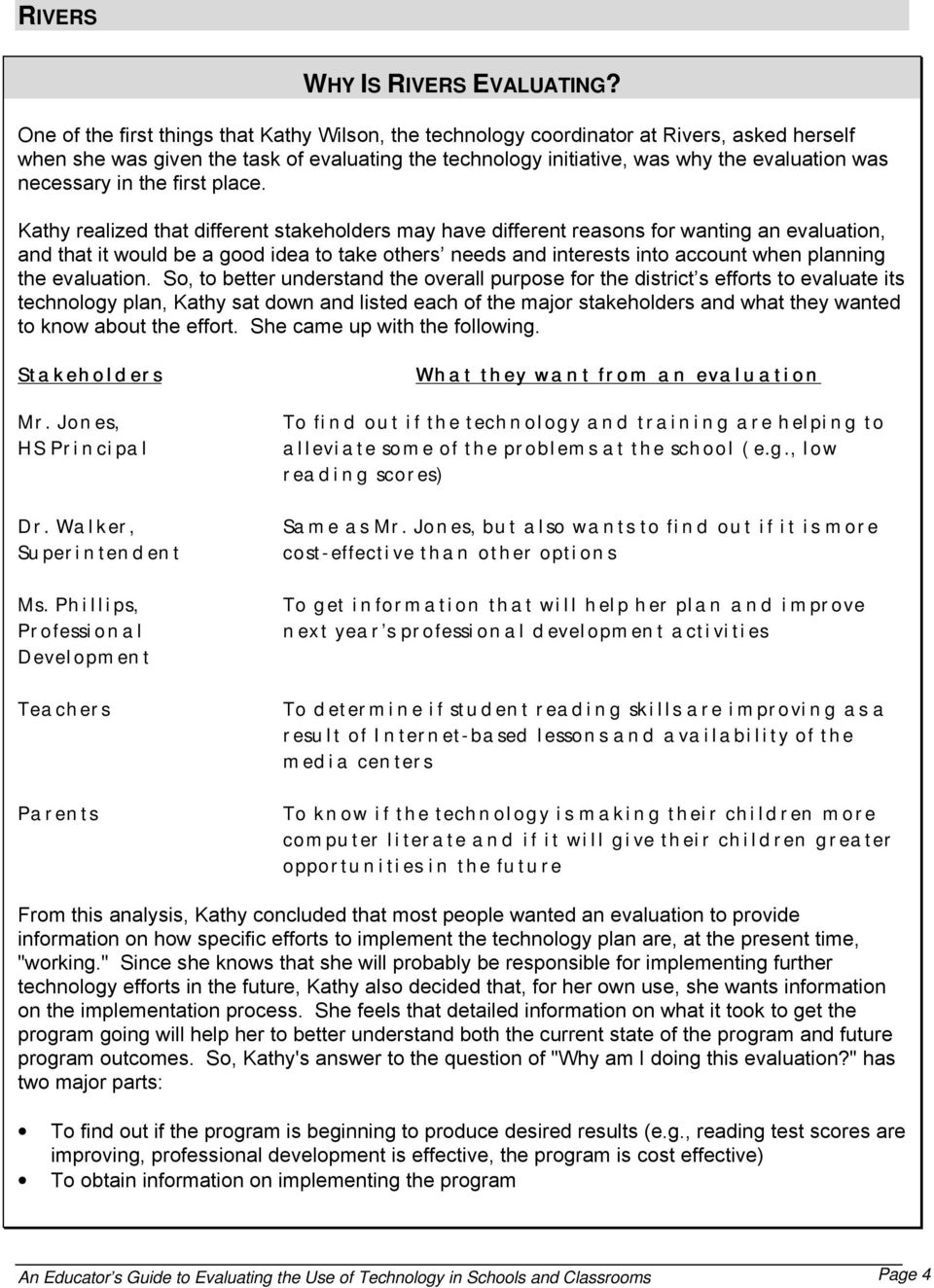
13 "WHY AM I EVALUATING" WORKSHEET To answer the larger question of "Why am I evaluating?" you will need to consider the different stakeholders in your program and what they want out of the evaluation. Stakeholders What they want from an evaluation What do you want from an evaluation? Looking at what both you and other stakeholders want from an evaluation, what are two or three major reasons or purposes for doing your evaluation? How might these reasons affect the design of your evaluation? An Educator s Guide to Evaluating the Use of Technology in Schools and Classrooms Page 5
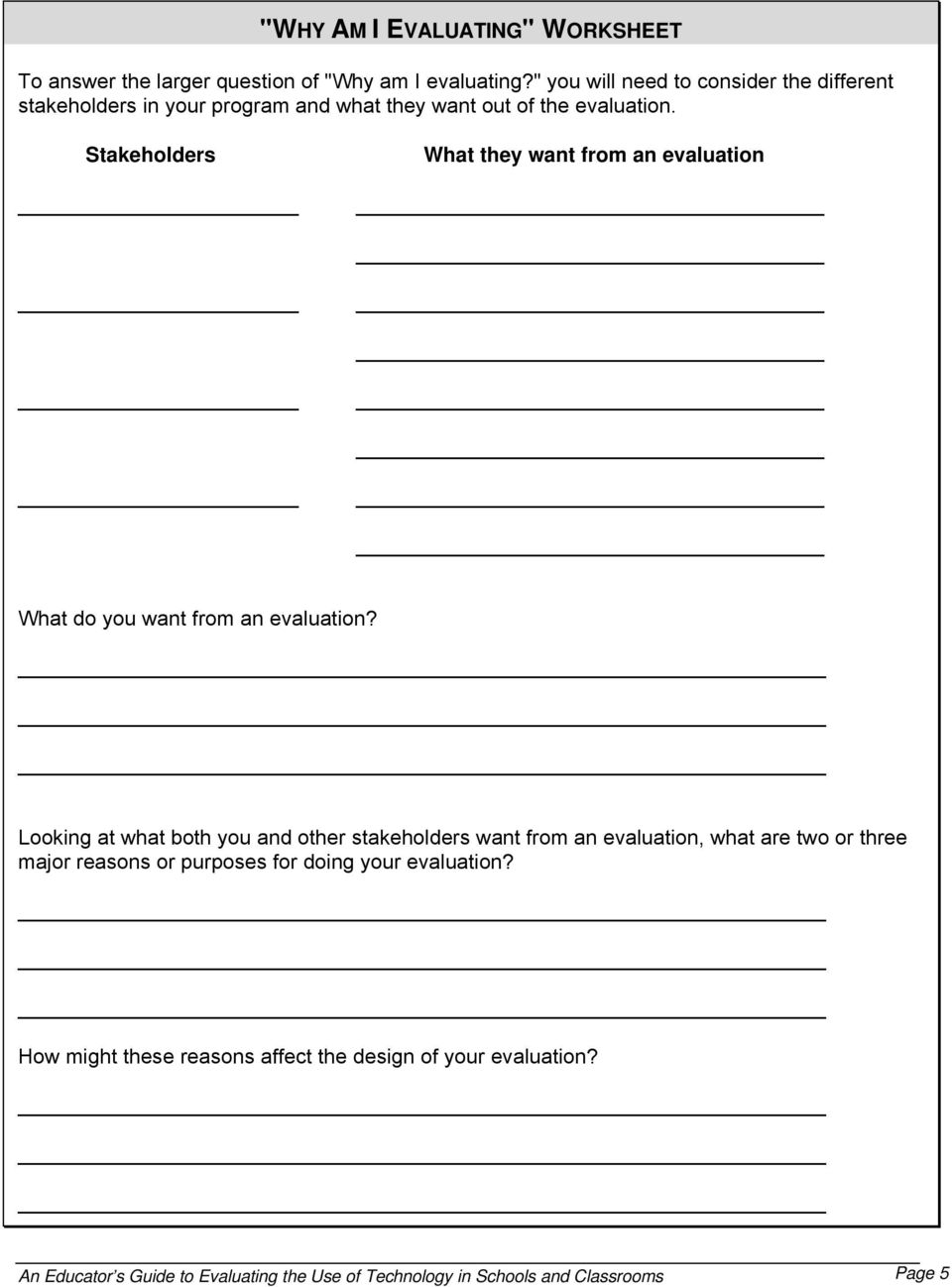
14 WHAT IS AN EVALUATION ANYWAY? DEFINITION EVALUATION OVERVIEW Rossi and Freeman (1993) define evaluation as "the systematic application of social research procedures for assessing the conceptualization, design, implementation, and utility of... programs." There are many other similar definitions and explanations of "what evaluation is" in the literature. Our view is that, although each definition, and in fact, each evaluation is slightly different, there are several different steps that are usually followed in any evaluation. It is these steps which guide the questions organizing this handbook. An overview of the steps of a "typical" evaluation follows. STEP 1 Get an Overview of the Program STEP 2 Determine Why You Are Evaluating STEP 3 Determine What You Need to Know and Formulate Research Questions STEP 4 Figure Out What Information You Need to Answer Questions STEP 5 Design the Evaluation STEP 6 Collect Information/Data STEP 7 Analyze Information STEP 8 Formulate Conclusions STEP 9 Communicate Results STEP 10 Use Results to Modify Program An Educator s Guide to Evaluating the Use of Technology in Schools and Classrooms Page 6
15 FORMATIVE EVALUATION Evaluators often talk about two different types of evaluations: "formative" and "summative." A formative evaluation is usually conducted in the early stages of a program and addresses questions about implementation and ongoing planning. This type of evaluation typically examines process rather than product. In the case of technology programs, a formative evaluation might ask if equipment was received on time, if the expected number of teachers received professional development, what skills teachers learned from professional development, or if the equipment is being used in the classroom as planned. Formative evaluations are useful for various purposes. For example: They may help catch problems early on, while they can still be corrected. They are an evaluation of process, so they may be useful in understanding why different outcomes emerge and improving program management. They provide an opportunity to collect baseline data for future summative (or impact ) evaluations. They help identify appropriate outcomes for summative evaluations. The following are some examples of formative evaluation: FORMATIVE EVALUATION EXAMPLES Example A - "Why didn't they show up?" At the beginning of the school year, Smalltown High School decided to provide the first part of a two-part teacher professional development series on the integration of technology into the classroom. While the teachers attending the professional development were satisfied and seemed to benefit from it, the turnout was lower than expected. Upon further investigation, the evaluators found out that, since the professional development was offered after school, many teachers who were involved in leading extra-curricular activities could not attend. Learning this, evaluators surveyed teachers about their preferences and availability. From the survey results, the decision was made to have both Saturday training and training during the summer. Example B - "Things don't always go as planned." During the summer, Big City Elementary completed all its wiring. The school s plan was to install equipment in the fall and provide professional development for teachers that would teach them how to use the new equipment in the spring. In December, as part of its overall evaluation plan, the school assessed whether the equipment had been installed as intended. It turned out that most of the computer equipment was backordered and would not be installed in time for the professional development. Evaluators determined that, because of the delay, prices had dropped and better equipment could be obtained at a similar cost. The school quickly updated specifications and was able not only to receive the equipment in time for the spring professional development, but to purchase better equipment than originally intended. An Educator s Guide to Evaluating the Use of Technology in Schools and Classrooms Page 7
16 SUMMATIVE EVALUATION Summative evaluations assess program outcomes or impacts. To determine the relationship of different factors to outcomes, similar to formative evaluations, some information used in summative evaluations is collected early in the life of a program (e.g., baseline data, test scores). Unlike formative evaluations, however, a portion of the information is collected after the program has been completely implemented and adequate time has passed to expect outcomes to occur. In terms of evaluating educational technology, a summative evaluation might ask if teacher technology skills improved as a result of a professional development activity, if teachers are using technology to a greater extent in their instruction, or if technology improved student motivation or performance. Some advantages of summative evaluations include: They can, if designed correctly, provide evidence for a cause-and-effect relationship. They assess long-term effects. They provide data on impacts. They can provide data on change across time. Examples of summative evaluation follow: SUMMATIVE EVALUATION EXAMPLES Example A - "Which type of professional development is better?" Administrators at Smalltown High had two different approaches to providing professional development to teachers on the use of technology in their classrooms. One group felt that, since many teachers did not have extensive computer knowledge, it was important to teach them how to use the software before teaching them how to integrate the software into instruction. This group proposed a six-week schedule (one session per week), with three sessions on the software itself and three sessions on integrating it into teaching. Another group felt that teachers would learn how to use the software as a result of it simply being available, so this group proposed a full six sessions focusing solely on curriculum integration. The school decided to test both options. Teachers signed up for professional development and then were randomly assigned to one of the two types. One year after participating, evaluators surveyed the teachers on the use of different types of software in their instruction and observed teachers use of technology in the classroom. Example B - "Test scores, test scores." One year after spending a large amount of money on technology, parents of students at Big City Elementary started asking whether the new technology would improve test scores. As the school planned on adding new technology grade-by-grade, a decision was made to follow cohorts of students over time to assess changes in math and reading scores. Specifically, the school was interested in comparing the class of students going through the school two years before the technology was implemented to the class two years after the technology was implemented. To assess long-term impacts, the school would monitor test scores of the students through graduation from high school. An Educator s Guide to Evaluating the Use of Technology in Schools and Classrooms Page 8
17 WHERE DO I START? STARTING EARLY Planning an evaluation starts with planning for technology. It is best to plan your evaluation at the same time that the technology program itself is being planned. Early involvement will help you for two reasons. First, it will allow you to collect baseline data. Second, it will allow you to structure professional development and/or purchases to the evaluation design. For instance, in Example A above, teachers were randomly assigned to different kinds of professional development so that different types of teachers (e.g., novice vs. veteran) were distributed roughly equally among both types. To implement random assignment, the evaluator had to be involved in program planning. What if the program is already underway? Is it too late? No, it's not too late. Though you probably won't have as many options for structuring the evaluation, you can still start a good evaluation after the program has begun. HELPFUL DOCUMENTS Ok, so where do I start? Start by learning as much as you can about the background and goals of the program. You can do this by reviewing a number of different documents: Technology plans. Technology plans will give you the history and intended uses of technology in the area. They will help you understand how plans have changed over the years, where people believe technology should be at different points in time, previous data collection activities, and what people believe will be the long-term benefits of technology. Information from previous evaluations. Was information collected prior to implementing the program? Was a "needs assessment" done? Were recommendations followed? It will be worth looking at this information so that you do not duplicate efforts and can learn from previous experiences. Curriculum and/or standards. Does the state, district, or school have a set curriculum or standards? Is technology a separate topic or is it integrated into different content areas? Looking at these documents will give you information on how technology is presently being infused into teaching. School board minutes. Reviewing school board meeting minutes may give you an idea of board member plans for technology use in schools. TALK TO PEOPLE OTHER RESOURCES In addition to reviewing documents, you will also want to speak with people who were involved in planning the program. They will be able to tell you who the major stakeholders are as well as the motivation behind the program. Finally, you may want to look at other evaluations. Have any previous surveys been done at your school or district? Are there similar schools or districts doing a technology evaluation? You should talk to persons who planned the program, call your state technology coordinator to find out if other districts in your state are doing evaluations, and use the Internet to see what other states and districts are doing. Indeed, technology itself is a wonderful time-saving tool when designing and conducting evaluations. Many associations, states, and school districts have placed evaluation designs and examples of surveys on the Internet. An example of a good place to start is the U.S. Department of Education s website ( An Educator s Guide to Evaluating the Use of Technology in Schools and Classrooms Page 9
18 RIVERS WHERE DID RIVERS START? The program was already underway before Kathy was asked to do the evaluation, so she was not able to provide input into planning. In addition, the district had not collected any technology information to date. Thus, her next step was to assess the different pieces of documentation and the human resources available to help her devise an evaluation strategy. The following is a list of the documents she was able to obtain: Document Comments State Technology Plan Plan developed two years ago by state tech coordinator Committee formed (teachers, tech people, school board) Major tasks - wiring, hardware, and professional development Wiring to be completed in two years (NOW!) Goal is to use technology in new media centers to get students connected to the world District Technology Plan Written last year by committee of teachers Plan to have wiring done this year, hardware next year Focus on elementary schools first, then middle, then high Goal is to use technology to improve reading achievement Curriculum/Standards State standards and curriculum are somewhat different from the district curriculum. The state curriculum consists of a set of skills that students are expected to master: among these skills are technology competencies. The district curriculum does not mention technology much, but when it does it is in the context of sample lesson plans or activities to foster a concept (e.g., incorporates using computers for writing in English and for conducting a science fair project). After reviewing documents, Kathy talked to a few people to get more information. First, she called the state technology coordinator to get some background on the state plan and information on which other districts in the state may be evaluating technology programs. She found out that the state plan was written mostly by the technology coordinator with the input of a technology committee. She also found out that a technology coordinator from a district about two hours away had also recently called requesting evaluation guidance. Kathy got this person s number, called him, and they decided to share information with one another and to meet regularly. Finally, Kathy talked with the principal, the superintendent, and the professional development coordinator. They gave her a brief overview of district efforts and pointed her to some printed resources. She then went to the library in the district office to look up these resources and look for additional information on other district evaluations. Using the Internet and a CD-ROM database, she found many examples she could draw on, including sample surveys. An Educator s Guide to Evaluating the Use of Technology in Schools and Classrooms Page 10

19 "WHERE DO I START? " WORKSHEET What documents are available (e.g., state and/or local technology plans)? Ask questions about the plans. What major stakeholders were involved in creating the documents that were collected? Why were the plans written? Are the state and local plans similar (e.g., have similar timeframes)? Are the plans being implemented? How have plans changed over the years? What are some major goals in the plans (e.g., "use technology to improve student writing skills")? How is technology integrated into the curriculum and/or standards? Whom could you talk to about the evaluation? Who else may be collecting data you can use? Are there any other resources that you learned about by talking to people? What does the Internet have to offer? An Educator s Guide to Evaluating the Use of Technology in Schools and Classrooms Page 11

20 WHAT QUESTIONS SHOULD I ASK? PROGRAM GOALS First, review program goals. Figuring out what questions to ask is probably one of the most difficult tasks in designing an evaluation. One way to begin to think of questions is to review program goals. For our purposes here, a goal is defined as an overall objective of a program or initiative. Goals tend to be broad and general. They reflect the overall intent of a program or a shared vision of what the program is supposed to accomplish. For example, a district s technology plan could state that all teachers are to receive adequate professional development so that they can integrate tech-nology into their teaching and help improve student performance. Technology goals will differ slightly from district to district and perhaps school to school. They are generally reflective, at least in part, of local concerns, state plans or goals related to educational technology, other educational reform initiatives, and possibly the national technology goals. Reviewing the specific purposes that you and others might have for evaluation discussed on the worksheet on page 5 and reviewing written plans and documents are two places you might start in trying to find information on the goals of your program. YOUR PRIORITIES OTHERS' PRIORITIES Next, figure out what you would like to know about the program. Trying to answer the question "What questions should I ask?" can begin with asking yourself what you want to know or what you would like to find out about your technology program. Do you want to know what teachers thought of the training? Do you want to know how often students are using the new equipment? Do you want to know the extent of student technology skills? What goals do you want to see accomplished? What questions do you want answered? Then figure out what others would like to know about the program as well. Fortunately or unfortunately, your opinion is not the only one that needs to be considered. What goals do other people have for the program? What questions do others want answered? Some stakeholders that may need to be considered include: Funding agency (e.g., Department of Education, foundation, state agency) State officials School boards Legislators School administrators (e.g., principal, superintendent) Teachers Parents You can find out what others want to know in two ways. First, you could simply ask questions. Ask the person who gave you the responsibility for conducting the evaluation about persons who were involved in decision-making for the program. He or she should have at least a fairly good idea of who the major stakeholders are. In addition, you could get some information on individual goals and questions that people want answered from reading various planning documents. For instance, if the technology plan includes a list of major program goals, then it is a fair assumption that people will want to know if these major goals have been or are in the process of being achieved. An Educator s Guide to Evaluating the Use of Technology in Schools and Classrooms Page 12
21 OTHER REQUIREMENTS Also, keep in mind any other external requirements. Grant money often comes with certain strings attached. In particular, many grants come with legal or contractual requirements. For example, in the case of the Technology Literacy Challenge Fund awards, funds are to be targeted to areas with the greatest poverty and the greatest need for technology. Some types of requirements that you might run into include: Requirements on what the money can or cannot be used to purchase Requirements on how much money can be used for equipment Requirements for matching funds Requirements on certain types of reports or data that must be provided to the district or state (e.g., progress reports) THINKING ABOUT OUTCOMES Finally, think about how you may want to ask questions about outcomes. One of the most pressing questions you are likely to encounter in evaluating a technology initiative is whether the initiative produces measurable outcomes. For example, you may be asked whether student achievement has improved or you may be asked about other potential long-term impacts such as changes in classroom teaching methods. You will need to begin to think about how you will answer such questions as: Does the availability of technology in the classroom increase the quality and/or quantity of student work? Has professional development related to technology changed the way that teachers are organizing instruction? Are teachers teaching any differently than they did before participating in professional development? Does having access to the Internet increase student knowledge of other cultures and traditions? Does the infusion of technology into the curriculum help increase student performance on standardized tests? In the hustle and bustle of trying to get a technology initiative off the ground, it may be tempting to put these types of questions low on your priority list and not think about them. On the other hand, you may feel the pressure of wanting to know the answers to these types of questions quickly. Neither of these approaches is helpful. In general, questions that measure a program s impact take time to answer. You may be more interested in getting your program off the ground (e.g., determining whether the basic features of your program are in place, whether the computers you were supposed to have operating in classrooms are actually there) than thinking about longer-term impacts. But don t forget: it is often these questions about impact that are of primary interest to policymakers. An Educator s Guide to Evaluating the Use of Technology in Schools and Classrooms Page 13
22 RIVERS WHAT QUESTIONS DID RIVERS ASK? Kathy had already asked herself why different stakeholders wanted an evaluation and what they wanted from an evaluation. She had also come up with two major reasons why she wanted an evaluation: To find out if the program is beginning to produce desired results (e.g., student reading scores are beginning to improve, professional development is effective, the program is cost effective) To get information on the implementation process Well, these reasons seemed very broad, so Kathy, using the general ideas and the list of specific things that others wanted from the evaluation, came up with general goals that people were interested in and, within these goals, more specific questions she wanted answered. The following is the result of her work: Goal Improved reading performance Improved dropout and attendance rates Cost-effectiveness Effective professional development Increased computer literacy Question Will the new technology and training help improve reading performance? Will the new technology and training help lower the dropout rate and increase attendance? Will this program be as or more cost-effective than other programs that may show similar results? Will the professional development help teachers integrate technology into their teaching? Will students and teachers become more computer literate as a result of the program? After coming up with the questions above, Kathy reviewed them to determine if there was anything she was leaving out. She assessed her priorities and made sure they were included. She ran through her list of stakeholders principal, superintendent, professional development coordinator, teachers, parents, herself. All stakeholders were accounted for. Finally, Kathy looked at the grant to see if there were any requirements she needed to assess. The grant was through the Technology Literacy Challenge Fund, so it was fairly flexible and many of the requirements were at the state level. Basically, one of the biggest requirements was that the district was responsible for reporting back to the state yearly on what they had done. In Kathy's opinion, assessing the goals that she had developed would satisfy the state. She would call her state technology coordinator to be sure, but it looked fine and she thought she was ready to further define her evaluation plan. An Educator s Guide to Evaluating the Use of Technology in Schools and Classrooms Page 14
23 "WHAT QUESTIONS SHOULD I ASK?" WORKSHEET What do you want to know? (You may want to look back to the worksheet on page 5 for ideas on why you are evaluating and what you want from an evaluation.) What will others want to know (e.g., principal, superintendent, board members, funding agency, teachers, parents, students)? What other requirements are there? After this exercise, what are your "top 5" or "top 10" goals and questions? Goals Research Questions to Address Goals An Educator s Guide to Evaluating the Use of Technology in Schools and Classrooms Page 15
24 WHAT INFORMATION DO I NEED TO COLLECT? Now that you've identified goals and formulated research questions, the next task is to figure out what information you will need to address them. In evaluator's terms, you will need to define more clearly your indicators and measures. This section is designed to guide you through the process of figuring out what kind of information you need to collect. EVIDENCE To meet requirements and to address questions, you will need evidence. Think about the questions that you and others would like to have answered about your technology program. First, what evidence would you need to have to answer your questions? What evidence will others be looking for? Examples of evidence might include: Improvement (or lack of improvement) in test scores Information on quality and quantity of professional development Data on numbers of computers and Internet connections Information on student use (e.g., types, amount, what technology is used for and in what subjects) TYPES OF INFORMATION GOING FROM QUESTIONS TO EVIDENCE The type of information needed can vary from study to study. Although there are many variations, the type of information you will collect may be qualitative or quantitative and either may be appropriate. An example of strictly qualitative information would be a narrative description of a program or descriptions of how students are using computers. An example of strictly quantitative information would be counts of computers in school buildings, number of professional development hours, or number of hours students spend using computers. Qualitative and quantitative data can reinforce one another. For example, knowing both what students do when using computers, a qualitative measure, and how much time students spend using computers, a quantitative measure, provides a more complete understanding of student computer usage than either type of data individually. Ok, I have my goals and questions and I know there are different kinds of information out there How do I know what information I should get? What you want to do is go from the goals and questions you have already thought about to "indicators," to "benchmarks," and then to "measures." Some of these terms you may have heard before (e.g., goals), others you may not have. Since they are used in a variety of ways by different researchers, it's easy to get lost in the language. For simplicity, we'll take each of the steps one at a time, defining how we use the terms as we go, beginning on the next page with an explanation of goals. An Educator s Guide to Evaluating the Use of Technology in Schools and Classrooms Page 16
25 GOALS First, review your goals. In the last section, you devised a list of goals and research questions. Although goals can vary greatly, they can be thought of as generally falling into two broad categories: intermediate or outcome. Intermediate goals are the products or processes necessary to achieve outcomes. In one sense, intermediate goals can be described as a means to an end. The national technology goals, as follows, are good examples of intermediate goals. All teachers in the nation will have the training and support they need to help students learn using computers and the information superhighway; All teachers and students will have modern multimedia computers in their classrooms; Every classroom will be connected to the information superhighway; and Effective and engaging software and online resources will be an integral part of every school's curriculum. Intermediate goals such as these and the indicators, benchmarks, and measures developed from them are important for determining whether a program is up and running as it was intended and are vital for providing possible explanations for ultimate outcomes. Outcome goals reflect the final product, or outcome, desired. In many cases, in educational research, outcome goals are related broadly to improved teaching and learning. For example, one may want to know if access to word processing software will improve student writing. In this case, access to word processing software would be an intermediate goal and improvement in student writing would be an outcome goal. The relationship between intermediate goals and outcome goals is not always straightforward. In some cases, intermediate results (e.g., more computers in the classroom, added professional development) work together to enable desired outcomes to occur. In other cases, one intermediate result will influence an outcome by way of another intermediate result (e.g., increased professional development leads to increased integration of technology into the curriculum, which then leads to higher student performance). The ultimate goal of many technology programs is to increase various aspects of student achievement and, in some cases, teacher performance. For instance, a district may want to use technology to improve the quality of student writing. However, there are steps that must occur before determining whether the use of technology has improved student writing. There must be (a) enough technology available to make a difference, (b) teachers adequately trained to use that technology, and (c) integration of technology into the curriculum and classroom activities. In this case, the outcome goal is improved student writing and the intermediate goals, those means to an end, are the availability of technology, professional development, and curriculum integration. An Educator s Guide to Evaluating the Use of Technology in Schools and Classrooms Page 17
26 In this section, we will use three intermediate goals and two outcome goals as examples: Intermediate Professional Development Availability of Technology Curriculum Integration Outcome Reading and Writing Computer Literacy All teachers will have the training they need to help students learn using computers and the Internet. All teachers and students will have modern multimedia computers in their classrooms. Teachers will use and view technology (e.g., effective and engaging software and online resources) as an integral part of the curriculum and daily classroom activities. Student reading and writing will significantly improve. Both teachers and students will display increased computer literacy. Although there are many different ways that the above goals could be related, the following diagram outlines some of the possibilities: Intermediate Goals Professional Development. (All teachers will have the training they need to help students learn using computers and the Internet.) Availability of Technology. (All teachers and students will have modern multimedia computers in their classrooms.) Curriculum Integration. (Teachers will use and view tech-nology (e.g. effective and engaging software and online resources) as an integral part of the curriculum.) Outcome Goals Reading and Writing. (Student reading and writing will significantly improve.) Computer Literacy. (Both teachers and students will display increased computer literacy.) The relationship among the goals is not straightforward. For example, all of the intermediate goals can work together directly to influence the computer literacy of students, and both professional development and the availability of technology can influence computer literacy by means of their effect on curriculum integration. Every goal (intermediate and outcome) is important, and it is necessary to assess each of them. We now turn to the task of how to assess goals and, specifically, the task of developing indicators, benchmarks, and measures based on goals. An Educator s Guide to Evaluating the Use of Technology in Schools and Classrooms Page 18
27 INDICATORS Next, you will need to develop indicators. For our purposes here, indicators are statements that reflect specific goals that can be used to gauge progress. Indicators help orient you toward a measure of performance outcomes and typically focus on only one aspect of a goal. Some examples related to the goals described on the previous page are: GOALS Intermediate Professional Development Availability of Technology Curriculum Integration Outcome Reading and Writing Computer Literacy INDICATORS Increasing numbers of teachers will be trained to integrate technology into their teaching. Teachers will learn how to integrate technology into their teaching. Teacher:computer and student:computer ratios will steadily decline. Students will actively use computers for projects and assignments. Technology will increasingly be incorporated into the curriculum in all subject areas. An increasing percentage of teacher lessons will incorporate technology. Students will produce reports and presentations that teachers judge to be of higher quality. Students will display increasingly higher performance on tests assessing reading ability. Both teachers and students will display increased computer literacy. Good indicators should: Include relevant measures. Indicators should be designed with thought toward the information that could be collected to inform them. Address appropriate groups. Indicators should consider any subpopulations that need to be examined separately (e.g., school level, racial/ethnic group). Be few. You do not need a lot of indicators to convey a lot of information. Be actionable. Indicators should guide improvement by helping to identify programs that are working and those that are not, should help program administrators make decisions to improve results, and should help policy makers judge progress toward goals. Be timely. Indicators should be as useful next year as they are today. Be reliable. Indicators should be easily measured by a variety of people and across time. Be comparable. Measures developed from the present indicators should be able to be compared to measures developed from similar indicators in the past. Page 19
28 BENCHMARKS A benchmark is a specific target. Benchmarks provide a sense of what the program is striving to attain, either on an incremental basis (e.g., every year test scores will rise 2 percentage points ) or as a final target (e.g., all students will score at or above the proficient level ). Two important factors need to be considered when setting benchmarks: the resources available to the program and a starting point, or baseline. If, for example, you are evaluating a relatively small initiative that is funding the purchase of new equipment, you would not expect the student to computer ratio to increase to the same extent as it might in a program that provides more extensive funding. Baselines also are important. They help establish the amount of change one can realistically expect. Let s assume that the purpose of the program you are evaluating is to improve student reading. To set an appropriate benchmark, you would need to determine student performance before the program began. This is considered a baseline, a point from which to measure change and to determine appropriate benchmarks. INDICATORS Intermediate Increasing numbers of teachers will be trained to integrate technology into their teaching. Teachers will learn how to integrate technology into their teaching. Teacher:computer and student: computer ratios will steadily decline. Students will actively use computers for projects and assignments. Technology will increasingly be incorporated into the curriculum in all subject areas. An increasing percentage of teacher lessons will incorporate technology. Outcome Students will produce reports and presentations that teachers judge to be of higher quality. Students will display increasingly higher performance on tests assessing reading ability. Both teachers and students will display increased computer literacy. BENCHMARKS By the end of the school year, 50 percent of teachers will have had technology training. After training, teachers will be able to devise at least three ex-amples of how technology could be integrated into their lessons. By next year, teacher:computer and student:computer ratios schoolwide (counting all computers) will be 4:1 and 6:1. All students will use computers at school at least 4 hours per week. In two years, English, science, and social studies curricula will have at least 25 percent of lessons incorporating technology. All trained teachers will have at least 25 percent of lessons incorporating technology. Within two years, student grades on reports and presentations will increase, on average, by 10 points or one letter grade. 1 Within two years, student scores on the reading portion of standardized tests (e.g., ITBS, CAT) will increase by 10 percent. 1 After one year, at least 75 percent of teachers and students will display at least an intermediate level of computer literacy. 1 Figures are used as examples only. The actual percentage difference that would be considered significant will vary by a number of factors (e.g., number and type of students tested, test or grades used) An Educator s Guide to Evaluating the Use of Technology in Schools and Classrooms Page 20
29 MEASURES A measure is an item reflecting the information or evidence needed to answer a research question, inform an indicator, or determine how close one is to achieving a benchmark. If applicable, a measure typically includes gauges such as percentages and ratios. Measures are similar to indicators, but are more concrete and more specific. Often, an indicator will have multiple measures. Measures attempt to answer the question of what evidence you would need to have to assess your indicators. The following are examples of measures used to assess the benchmarks: BENCHMARKS Intermediate By the end of the school year, 50 percent of teachers will have had technology training. After training, teachers will be able to devise at least three examples of how technology could be integrated into their lessons. By next year, teacher:computer and student:computer ratios schoolwide (counting all computers) will be 4:1 and 6:1. All students will use computers at school at least 4 hours per week. In two years, English, science, and social studies curricula will have at least 25 percent of lessons incorporating technology. All trained teachers will have at least 25 percent of lessons incorporating technology. Outcome Within two years, student grades on reports and presentations will increase, on average, by 10 points or one letter grade. Within two years, student scores on the reading portion of standardized tests (e.g., ITBS, CAT) will increase by 10 percent. After one year, at least 75 percent of teachers and students will display at least an intermediate level of computer literacy. MEASURES Number and percent of teachers requesting and receiving training by type of training Lesson plans produced at professional development activities Teacher responses from professional development survey Teacher:computer ratios Student:computer ratios Percent of students who use computers at least four hours per week at school By subject area, the percentage and frequency of lessons included in the curriculum that incorporate technology From classroom observations, the percentage of teacher lessons that incorporate technology Percentage of lesson plans that incorporate technology Student letter or numerical grades on reports and presentations Student standardized test scores Student and teacher self-report of computer literacy Student and teacher results from a skills test requiring performance of various tasks on a computer. On the next page, you will find a summary of the goals, indicators, benchmarks, and measures discussed. This should help you to follow your own path from general goals to specific ideas of what information you will need to collect to measure them. Take it one step at a time. First, write down your goals and questions, then indicators, benchmarks, and measures. An Educator s Guide to Evaluating the Use of Technology in Schools and Classrooms Page 21
30 GOALS INDICATORS BENCHMARKS MEASURES Intermediate Professional Development Increasing numbers of teachers will be trained to integrate technology into their teaching. By the end of the school year, 50 percent of teachers will have had technology training. Number and percent of teachers requesting and receiving training by type of training Availability of Technology Curriculum Integration Outcome Reading and Writing Computer Literacy Teachers will learn how to integrate technology into their teaching. Teacher:computer and student: computer ratios will steadily decline. Students will actively use computers for projects and assignments. Technology will increasingly be incorporated into the curriculum in all subject areas. An increasing percentage of teacher lessons will incorporate technology. Students will produce reports and presentations that teachers judge to be of higher quality. Students will display increasingly higher performance on tests assessing reading ability. Both teachers and students will display increased computer literacy. After training, teachers will be able to devise at least three examples of how technology could be integrated into their lessons. By next year, teacher: computer and student: computer ratios schoolwide (counting all computers) will be 4:1 and 6:1. All students will use computers at school at least 4 hours per week. In two years, English, science, and social studies curricula will have at least 25 percent of lessons incorporating technology. All trained teachers will have at least 25 percent of lessons incorporating technology. Within two years, student grades on reports and presentations will increase, on average, by 10 points or one letter grade. Within two years, student scores on the reading portion of standardized tests (e.g., ITBS, CAT) will increase by 10 percent. After one year, at least 75 percent of teachers and students will display at least an intermediate level of computer literacy. Lesson plans produced at professional development activities Teacher responses from professional development survey Teacher:computer ratios Student:computer ratios Percent of students who use computers at least four hours per week at school By subject area, the percentage and frequency of lessons included in the curriculum that incorporate technology From classroom observations, the percentage of teacher lessons that incorporate technology Percentage of lesson plans that incorporate technology Student letter or numerical grades on reports and presentations Student standardized test scores Student and teacher selfreport of computer literacy Student and teacher results from a skills test requiring performance of various tasks on a computer. An Educator s Guide to Evaluating the Use of Technology in Schools and Classrooms Page 22
31 RIVERS WHAT INFORMATION DID RIVERS NEED TO COLLECT? Kathy decided to take the goals and questions she had already come up with and use the goals to develop indicators, benchmarks, and measures. Here is what she came up with: Goals Indicators Benchmarks Measures Improved reading performance (Will the new technology and training improve reading performance?) Test scores in reading will improve for all students, including those who display poor performance. In 3 years, scores will improve, on average, by 10 percent with at least a 10 percent increase also seen in students scoring in the lowest quartile (bottom 25 percent) ITBS scores in reading State test scores in reading Grades in reading Improved dropout and attendance rates (Will the new technology and training help lower the dropout rate and increase attendance?) Percentage of dropouts will decrease and Attendance will increase. By the end of the school year, the dropout rate will decrease 1 percent and the attendance rate will increase 2 percent. Dropout rate Attendance rate Cost-effectiveness (Will this program be as or more costeffective than other programs that may show similar results?) The program will be as or more costeffective than other programs with similar results. The budget for this program will be the same as or lower than a program demonstrating similar results. Program budget Budget of similar program Program evaluations Effective professional development activities (Will the professional development help teachers integrate technology into their teaching?) Teachers will develop lessons that integrate technology into their teaching. Teachers will develop lessons that integrate technology into their assign-ments at least once a week. Review of teacher lesson plans Observation of classrooms Teacher Survey Increased computer literacy (Will students and teachers become more computer literate as a result of the program?) Teachers and students will become more computer literate. By the end of the school year, teachers and students will show improved computer literacy. Assessment of teacher computer literacy Assessment of student computer literacy An Educator s Guide to Evaluating the Use of Technology in Schools and Classrooms Page 23
32 "WHAT INFORMATION DO I NEED TO COLLECT?" WORKSHEET Using the goals and research questions you came up with in the last section as a starting point, work through the following grid. You may have to revise some of your goals and questions as a result. GOALS INDICATORS BENCHMARKS MEASURES An Educator s Guide to Evaluating the Use of Technology in Schools and Classrooms Page 24
33 WHAT S THE BEST WAY TO COLLECT MY INFORMATION? There are many different methods of collecting information. Any college textbook on research design and analysis will provide an overview of different methods of data collection (e.g., Rossi & Freeman, 1993). Here, we present the "highlights." We will begin with a few tips, or words of advice, and in the process define some basic terminology. BASELINE DATA PILOT TESTING Collecting baseline data may be important. As noted in the discussion on benchmarks on page 20, baseline data provide information at the start of a program. Baseline data are used to set benchmarks and to determine the amount of change at different points in the course of the program. For example, if you wanted to find out if teacher use of technology increases after professional development, it would be best to collect information on use both before and after the activity. In this case, information on the amount of use before professional development would be considered "baseline data." Baseline data are most important when the question you are trying to answer is one of change (e.g., has student computer use increased? Does training help improve teacher attitudes towards technology?). Pilot testing may prevent costly mistakes. Another term that you may have heard is "pilot testing." Pilot testing is a trial run of procedures and instruments that you plan to use. For example, pilot testing of a mail survey to teachers could be done in a couple of different ways. You could mail the survey to a handful of teachers and then call them to discuss the questions. An easier, but less rigorous, method might be to distribute the survey after a professional development activity and ask the teachers there what they think. The main purpose of pilot testing is to catch potential problems before they become costly mistakes. It is typically used if an instrument or method of data collection is being used for the first time or for the first time with a particular group (e.g., a survey used before with a different age group). Pilot testing provides information on how long data collection can be expected to take and a preview of how difficult items will be to complete. The latter is important as, with proper advanced notice, you can modify questions and possibly even the way you collect information (e.g., reading questions to people rather than having people read questions themselves). USING MULTIPLE SOURCES It s best to use multiple sources. When looking for evidence, many sources are better than one. For example, if you are gathering information on student computer use and you obtain reports from students, observe students using the computer, and get computer logs detailing an increase in use, there is a good chance that the information is reliable. On the other hand, if only computer logs are collected, or only student reports or observations are used, you will need to make conclusions more cautiously. A general rule is, the more sources of evidence that you have, the more faith you can have in a result or finding. SAMPLING An Educator s Guide to Evaluating the Use of Technology in Schools and Classrooms Page 25
34 Sometimes you won t have the time or money to get information from everyone. If collecting information from everyone (e.g., all schools) is not feasible, you will need to sample or get information from a subset of persons or schools. Proper sampling techniques allow you to take information from a small group and generalize to a larger group (e.g., some students in a school to all students in the school). There are many ways to sample, and the process can readily become difficult. By far, the easiest way to is to choose people randomly (e.g., pull names out of a hat or take every third person on a list). However, sometimes random sampling may not be possible (e.g., you need to rely on volunteers, groups may already have been assigned), or there may be a reason that you would not want to sample randomly. For example: You may be interested in results from a particular group. For example, you may be particularly interested in learning whether your technology program improves student achievement for students who transferred to your high school from a particular middle school, but there are not that many students who participated in your technology program from that school. If you selected a random sample, you may not select enough of these students from which to draw conclusions. To investigate the effects of your technology program on students from that particular middle school, you may need to sample these students separately or only look at these students. You may want to make certain that your sample reflects a range of students or teachers. For example, you may want to find out if a technology program works with students at all ability levels. A true random sample from the district as a whole may not provide you with sufficient numbers of lowperforming students or students enrolled in honors classes. You thus may need to oversample low-performing students or students enrolled in honors classes. Techniques of sampling that would not be considered random are used fairly regularly, but must be treated with caution. By not selecting a sample randomly, you will be able to make conclusions about the types of students or teachers that were sampled, but you may not be able to make conclusions about the group as a whole (e.g., all students in the district). Sampling can be a valuable tool and there are many resources available to help you (e.g., books, statisticians or social scientists at your local university). A good piece of advice on sampling is to consult your library or call a local university if you have questions. COMPARISON GROUPS An Educator s Guide to Evaluating the Use of Technology in Schools and Classrooms Page 26
35 You may need to compare one group to another. Often, it is helpful when evaluating a program to compare one group to another. Typically, comparisons are made between students or teachers who have been exposed to a particular initiative and students or teachers who have not been exposed. For example, you might compare: Classroom lessons of teachers who have received training to lessons of teachers who have not received training; The computer literacy of teachers before and after professional development; The computer literacy of students in classrooms with four computers to students in classrooms with only one computer; of Other types of comparisons can also inform evaluations. You might want to compare: The amount and type of computer use of girls to that of boys; or The achievement of students in the school to national norms. As you can see, there are many ways to think about comparison groups. Some require looking at possible differences in the same group over time (e.g., comparing teachers before and after a professional development activity). Some require examining differences between groups differing in program implementation (e.g., number of computers in a classroom). Some require looking at how different groups (e.g., gender, ethnicity, at-risk, grade level) respond to the same program. All methods are used regularly, and the best method will vary from program to program. In general, there are three pieces of advice we would give: Compare groups that are as similar as possible in areas other than the difference you are investigating (e.g., someone interested in gender differences in computer use would make sure that students differed only on gender). Make conclusions cautiously about the role technology plays in differences (e.g., What else could explain differences?). Compare your results to those of other studies (e.g., Did other people find the same thing? Why or why not?). An Educator s Guide to Evaluating the Use of Technology in Schools and Classrooms Page 27
36 SOURCE OF INFORMATION COMPARING TO OTHER RESULTS POSSIBLE CONSTRAINTS DESIGNING FOR ANALYSIS To figure out which method of data collection to use, you will need to ask yourself some additional questions. Specifically, you will need to ask whom you will get your information from, whether you will need to compare your program with others, and what possible constraints there are. Whom should I be getting information from? Your source of information will vary depending on the issue you wish to address. For example, if you are interested in professional development, it would be best to get information from teachers and/or administrators or coordinators. If you are interested in student use, then it would be wise to go to the source students. For technology programs, possible sources of data include administrators, teachers, students, parents, program coordinators, businesspeople (e.g., software manufacturers), and financial experts (e.g., information from budgets). There are three main things to keep in mind when deciding what source of information to use. First, think about the person(s) or materials that will give you the most accurate information. Second, assess the availability of this person or materials and use an alternate source if necessary, staying as close to your desired source as possible. Third, tailor your instruments to the level of knowledge of the person you are getting your information from. For instance, you will need to word a questionnaire very differently for adults than for children. Do I need to be able to compare my results to others? If you need to be able to compare across programs or compare the results of your evaluation with similar evaluations, you should look at how information was collected previously and what instruments were used. If the same method and instruments are available and will work, use them! Otherwise, you will need to stick as closely as possible to what was done previously and make comparisons cautiously. What are some possible constraints? Many of the reasons that researchers choose one data collection method over another have to do with different constraints that were placed on them. Some typical constraints include time, money, availability of personnel, and legal or bureaucratic roadblocks (e.g., not able to use a copyrighted test, needing permission from parents and/or school officials but there is not time). Two common con-straints are the need for district approval (e.g., the district must approve any research done in the schools) and parental permission for student surveys (e.g., do you need signed permission slips?). Check out these policies early! What kind of analysis will the information require? When deciding what type of information to collect, another point to consider is the type of analysis that will be required to form conclusions about the information. For informa-tion such as numerical responses on surveys, you may want to think about the level of statistical knowledge required. If your background is not exten-sive, it may be wise to gather information that can be expressed in terms of counts or percentages (e.g., 46 percent of teachers said they had training). For qualitative types of information, time and complexity of analysis may both be a concern. Coming up with a method of looking at and coding narrative responses can be both a time-consuming and complicated task. On the one hand, qualitative information is useful as it provides a lot of detail and rich context. However, analyzing it is often not as straightforward as it seems. An Educator s Guide to Evaluating the Use of Technology in Schools and Classrooms Page 28
37 Now that you have your potential measures and an overview of some basic data collection issues, it's time to look at your options for what method to use to collect information. Some common methods include surveys, interviews, focus groups, observations, and collection of already available materials (e.g., school records). Following is an overview of these different methods of data collection. SURVEYS Surveys are often used to collect information from large groups. Surveys can vary along a number of dimensions, such as how questions are asked and how the survey instrument is delivered. For instance, questions can be openended (no choices provided) or close-ended (choices provided). Surveys can also be mailed or distributed in teachers boxes at school, or administered by telephone, or in a large group setting. The question of what to ask on a survey and how to ask it is not an easy one. Like sampling, entire books and college courses have been devoted to the development and delivery of surveys. It is easy to get lost in the complexity, but there is a basic tenet that may help you out: Think about what you need to know and ask it as directly as you can. For example, if you want to know how often teachers use the Internet in their teaching, you may want to ask, How often do you use the Internet in your teaching? either in an open-ended format or by providing possible response options (daily, once a week, etc.). Once you have survey questions that you feel will meet your needs, you will need to figure out the best method to administer them. The three most common ways to deliver a survey are by mail or distribution into "mailboxes" at a school, in a group setting, or by telephone. Mail surveys are one of the least costly methods of delivering surveys. However, you may run into problems getting people to return surveys, obtaining correct addresses and phone numbers. Administering a survey to a group, possibly at a teachers meeting, is probably the quickest way to collect survey information. In addition, administering a survey to a group will allow more flexibility than mail surveys to answer respondents questions (e.g., "Do I consider graphing calculators as a use of technology?"). Telephone surveys may be a good way to go if the group of people you wish to collect information from is not readily available (e.g., parents) or if the information requires extended explanation on either your part or the part of the respondent. Overall, there are many advantages to using surveys. Most are easy to analyze, they can be quickly administered, and they can be easily adapted to fit specific situations. Using a previously administered survey will save you time and energy, may give you something to compare your results to (if results from previous administrations of the survey are available), and will give you confidence that some of the potential problems have already been addressed. One word of caution in using surveys that others have developed is warranted, though. It s tempting to look at an already developed survey and think that it is wonderful, but you need to look at what information you need and adapt surveys as you see fit. INTERVIEWS An Educator s Guide to Evaluating the Use of Technology in Schools and Classrooms Page 29
38 FOCUS GROUPS Just like surveys, interviews can vary greatly in form. Interview protocols can range from extremely unstructured (e.g., a list of general topics to be covered) to something that might resemble reading aloud a survey (i.e., lists of questions that must be asked). Interviews are somewhat like surveys an interviewer asks questions of people but since interviews occur on an individual basis, they are often more time-consuming and costly. In addition, evaluators need to be concerned about consistency across interviewers. However, interviews also have advantages. They are good for collecting detailed information or information from a limited number of people. In addition, interviews give people an opportunity to explain responses or give responses that you may not have predicted. For example, interviews may be useful in examining gender differences in signing up for computer classes. Focus groups can be an easier way to collect information that otherwise would be collected through interviews. Focus groups can be thought of as group interviews. Just like interviews, they can be structured or unstructured. One of the most popular ways to use focus groups is in conjunction with surveys either the focus group helps the researcher interpret the results of a survey or a focus group helps define and/or refine survey questions. An advantage of focus groups is that, since data are being collected from multiple people at the same time, they are more cost-effective than interviews. A disadvantage is that, in the group setting, you might not get to hear the opinions of all participants (e.g., some may not feel comfortable speaking in this forum). You also need to be concerned about how well those participating in the group represent the group you are interested in (e.g., are there only honors students in the group?) Another issue regarding focus groups, that can be both an advantage and a disadvantage, is that responses from one participant can sometimes trigger responses from others. OBSERVATIONS SCHOOL RECORDS Another common method of collecting information is to observe. Sometimes the best way to collect information about people's behavior is to watch them. Observation allows the researcher to collect information without being a burden on the person providing the information. Typically evaluators develop guides that structure the observation process. As an example, observation can be used to collect data on teacher lessons and student use of computers. One drawback to observation, however, is that it measures only what you can see. Other types of data (e.g., opinions, reasons behind behavior) cannot be collected in this fashion. Another drawback is that it can be time-consuming as multiple observations are often required. Don t forget school records. Schools routinely gather lots of information (e.g., attendance, grades, test scores) that could be useful to your evaluation. Getting this information directly from school records can save time. In addition, it can also be more accurate than asking students or teachers for the information and relying on their recollections. However, it is important to ensure the confidentiality of school records. In general, you will need to make sure that you don t report individual student names, that you have accessed records through the appropriate channels, and that you have received necessary permission. Even with these caveats in mind, though, records may be easier to get than you may think and, if they provide needed information, they are worth considering. An Educator s Guide to Evaluating the Use of Technology in Schools and Classrooms Page 30
39 COLLECTING MATERIALS IN THE MEANTIME... Finally, you could also look at other existing documentation. Looking at already existing evidence (e.g., teacher lesson plans) places little burden on people. Drawbacks, however, are that information may not be exactly what you need, in the form you need, or may be incomplete or need explanation. Different pieces of evidence take different amounts of time to collect. Often stakeholders will want to see results quickly. For some measures (e.g., test scores), however, it could take years. What do you do in the meantime? Here are some ideas for evidence that doesn t take long to see results: Information on student use. For example, gather narratives on time spent at computers, how students are using technology (e.g., class projects), anecdotes of student excitement (e.g., they are lined up during lunch period") or student problems (e.g., getting into inappropriate material). Student work. Soon after installing equipment, students will begin to use it to produce work. Collecting this work will provide examples of how the equipment can be used and the possibilities for improving student work. Teacher lesson plans or classroom observations. Soon after teachers have been trained, some will experiment with technology in their lessons. These beginning lessons can be used as either examples for further training or examples to give to stakeholders of technology use. Comments from students and parents. Like it or not, teachers and others will hear comments (either positive or negative) from students or parents. Ask around to find out what these comments are. Comments might give you ideas on areas you may want to investigate later or they may provide anecdotal evidence of student use and attitudes. Start collecting outcome data. Although it may be too soon to answer impact questions, you can start collecting information relating to outcomes early in the program s history. Gathering information from the beginning of the program will allow you to track students progress over time. Collecting a variety of information throughout a program forms the core of an evaluation approach known as portfolio assessment. For more information on portfolio assessment, consult the RAND website ( PUTTING IT TOGETHER At this point, you have information on many possibilities. The next step is to put the information together to decide which of the many possibilities to use. On the following page is a summary of the different methods of collecting data that were discussed here, listing some advantages and disadvantages for each. It is not meant to be an exhaustive list, but rather a guide for things you should watch for or be aware of. In addition, you will find, in Appendix C, examples of surveys. If they address the information you are looking for, great! Acknowledge where they came from and feel free to use them. For other materials, you need to make certain that there are no copyright restrictions. After some final decisions, you should be ready to go. You have your goals and research questions, you know what kind of information you need, and you know how you're going to collect it. Remember to make sure you have all the permissions necessary (e.g., district, teachers, parents, children), and start interviewing, surveying, observing, or collecting materials. An Educator s Guide to Evaluating the Use of Technology in Schools and Classrooms Page 31
40 DIFFERENT METHODS OF COLLECTING INFORMATION METHOD ADVANTAGES DISADVANTAGES Surveys Mail Can survey many people Difficult to get much detail Not time-consuming Sometimes difficult to get correct Relatively inexpensive addresses Everyone gets the same instrument May be problems with interpreting Objective Interpretation questions Sometimes a problem getting Group- Administered Can survey many people Not time-consuming Relatively inexpensive Everyone gets the same instrument Objective interpretation Relatively inexpensive Telephone Able to ask for more detail when needed Everyone gets the same instrument Interview Researcher can know how people are interpreting questions Able to ask for more detail when needed Provide detailed data Focus Group Researcher can know how people are interpreting questions Able to ask for more detail when needed Able to interview multiple people at one time, thus, more cost-effective Responses from one person provide stimulus for other people Observation Objective interpretation Low burden for people providing data Student Records Objective interpretation Low burden for people providing data Relatively inexpensive Collection of Materials Objective interpretation Low burden for people providing data Relatively inexpensive surveys completed and returned May be problems with interpreting questions Difficult to get much detail Sometimes difficult reaching people Lack of anonymity Time-consuming Because of time, can limit sample size Subjective interpretation Can be expensive Can be difficult to analyze Group setting may inhibit some individuals from providing information Sometimes hard to coordinate multiple schedules Responses from one person provide stimulus for other people Time-consuming Some items are not observable Can be expensive Participant behavior may be affected by observer presence May not correspond to exactly what researcher wants May be incomplete or require additional interpretation May need special permission to use May not correspond to exactly what researcher wants May be incomplete or require additional interpretation An Educator s Guide to Evaluating the Use of Technology in Schools and Classrooms Page 32
41 RIVERS HOW DID RIVERS COLLECT INFORMATION? Kathy listed possible ways to collect information pertinent to her measures and came up with the following: Review of teacher lesson plans before and after they took part in professional development activities Interviews - parents, teachers, students, administrators Collect reading test scores Collect information from district records on attendance and dropout rates Assessment of computer literacy Observation? Self-Assessment? Test? Since her principal said that she had only had six months to come up with a report, she decided that she could not do everything she wanted doing both interviews and surveys would take too much time. So, she had to set priorities. Well, since surveys are quicker, she decided to survey a random sample of 100 teachers, 25 administrators, 300 students, and the parents of the 300 students. While searching the Internet, Kathy found examples of surveys (in fact, many more than she needed!) that had previously been used both in high schools and in elementary schools. She found a student survey that looked like it would work well it had some questions on attitudes toward computers, use of computers, and a self-assessment of computer literacy. Her district had assessed professional development programs before, so a survey was available that had been previously used. But in order to address her specific professional development concerns (e.g., will professional development help teachers integrate technology into their teaching?), Kathy needed information on both participation and its results. She therefore needed to review teacher lesson plans and observe teachers in the classroom as well as determine how much and what types of professional development teachers participated in. Kathy felt she came up with the right set of instruments and methods to use, and since most of the survey questions had been used before, she felt pilot testing was not necessary. However, she still had a few questions: What kind of parental and or district permission would be needed? Am I going to run into statistical analyses I can't handle? Will my results be comparable to other studies? (people want this) Kathy, luckily, has a friend at a local university. She faxed drafts of her surveys to him and asked his opinion on comparability, statistical analysis, and permissions needed. He assured her that, since the issues addressed were not sensitive (e.g., sex, drugs) and since she worked for the district, she did not have to go through a formal review process to get district approval. In addition, she could handle parent permission by sending the parent surveys out first and giving them a vehicle for declining to let their children participate (e.g., call her if they have a problem with it). Finally, Kathy's friend at the district said that she did the right thing by picking previously used surveys, and that since the district had used them before, there would be no problem with copyright. He suggested a few changes to the questions she had added, but basically she was "good to go" and would be able to compare her results to other programs. An Educator s Guide to Evaluating the Use of Technology in Schools and Classrooms Page 33
42 WHAT S THE BEST WAY TO COLLECT MY INFORMATION? " WORKSHEET What did you think of as possible measures? What kind of information has been collected before and/or is already available? What kind of constraints do you have (e.g., time, money, needed permission from district)? Assess Quality of Measures. Will the measures give you the information needed? Are they doable given time and financial constraints? Do you need to sample? If so, how will you do it? Do you need to use comparison groups? If so, how will you do it? Have the instruments been used before? If not, do you need to do pilot testing? What kind of statistical knowledge will be required to analyze the data? Any other problems you need to resolve? An Educator s Guide to Evaluating the Use of Technology in Schools and Classrooms Page 34
43 WHAT ARE MY CONCLUSIONS? REVIEW RESEARCH QUESTIONS ORGANIZE YOUR INFORMATION ANALYZE What s next? I've got some information, now what do I do with it? The first thing you should probably do is review your goals and research questions. Figure out what you wanted to know in the first place. It's easy to get lost in the amount of data you have collected and the details of individual responses. Reviewing what you wanted to know may help focus you on the task at hand figuring it out! Next, organize your information by goal. If you filled out a chart of goals, indicators, benchmarks, and measures, you have a good start. Make a list of what information you now have that corresponds to each measure, and thus, addresses each of your goals. You will probably find that one instrument, such as a survey, addresses multiple goals and helps to answer multiple questions. This is expected. Do the best you can to separate out which measure corresponds to which goal and if there is overlap (e.g., one measure still addresses multiple goals), put the measure under both. Like it or not, the next step is data analysis. Sometimes, when people think of data analysis, they assume that complicated statistics must be involved and are worried that they do not have the background to attempt such a task. In reality, there are two things to keep in mind: Not all data analysis involves complex statistics. Even if statistics are involved, they should be at the level that the intended audience will easily understand. The most common way statistics are used in evaluation is for descriptive purposes. For example, if you want to describe the number of hours students spent using a computer at school, you would want to calculate either an average or the percentage of students who use computers more than a certain specified base. In addition, you may want to also compare the results of different groups of students (e.g., at-risk students, gifted and talented students) to see if technology has different impacts. In this case, you may want to use the same statistics (e.g., means, percentages), but report separate results for each group. Whether you use an average or percentage and how you want to group your information depends on the type of information you have collected. COMING TO A CONCLUSION In the end, the important part of analyzing information is not the statistics, but rather the conclusions that you draw. This is what this section is meant to guide you through reaching conclusions. The process of coming to a conclusion can vary widely from goal to goal. One of the most difficult tasks is defining vague goals, such as what is "sufficient training"? Luckily, you have your indicators and benchmarks to help you with this. For example, if a certain benchmark was reached, then what you were measuring could be considered sufficient or adequate. To help you understand the process and give you some ideas, several examples of how goals were addressed are provided on the next page. The goals vary in topic and type of information used. An Educator s Guide to Evaluating the Use of Technology in Schools and Classrooms Page 35
44 GOAL MEASURE(S) COMING TO A CONCLUSION Number and percentage of teachers requesting and receiving training by type of training Professional Development Curriculum Integration Reading and Writing By subject area, the percentage and frequency of lessons included in the curriculum that incorporate technology Student letter or numerical grades on reports and presentations Carlos in District A wanted to know about teacher access to training. The district wanted to make sure that all teachers had training within two years, so he developed a benchmark 50 percent of teachers should have had training after the first year to determine the extent of training. Carlos then obtained a list of all training activities offered at the state, district, and school levels from the district professional development coordinator and lists of persons who attended the activities. He found out that there was a three-day summer training given by the district (50 slots open) and three one-day workshops given by one of the schools in the district (30 spaces for each). The three-day summer training ended up being full (50 people attended), but only an average of 20 people attended the workshops. Carlos was then able to describe what was offered and the number of attendees and compare what he found with the indicators and benchmarks that he had established. With only 25 percent of teachers having had training, he concluded that, unfortunately, the district was not meeting its benchmark. He recommended that, since the summer workshop was well attended, the district should offer additional summer workshops in the coming year. Cecily in District B sat down and went through the district curriculum. Defining incorporating technology as either the teacher or students using technology during the proposed lesson or activity, and having set a benchmark of 25 percent of lessons as optimal, she counted all the lessons in three main subject areas: English, science, and social studies. She found that 30 percent of the science and social studies lessons contained technology, but only 5 percent of the English lessons contained technology. Thus, Cecily concluded that science and social studies are on target, but English is not. Steve in School C asked all students in the fourth and fifth grades to write three reports at the beginning of the school year on different trips they would like to take within the United States. At the end of the school year, he asked these same students to write three reports on trips they would like to take to other countries. He not only examined these reports for content and quality of citations, but also incorporated information into his conclusions on the extent to which the teachers of these students used technology in their classrooms. (He had observed each of the fourth and fifth grade classrooms on at least six random occasions throughout the year.) Students whose teachers incorporated technology into their lessons did improve more than students whose teachers did not incorporate technology as much. Thus, Steve concluded that having computers available to students in classrooms was not sufficient; teachers had to use technology on a regular basis in their lessons in order for student performance to improve. An Educator s Guide to Evaluating the Use of Technology in Schools and Classrooms Page 36
45 RIVERS WHAT WERE RIVERS CONCLUSIONS? Here is Kathy's attempt to come to conclusions on her research questions: Goal Improved reading performance (Will the new technology and training improve reading performance?) Improved dropout and attendance rates (Will the new technology and training help lower the dropout rate and increase attendance?) Cost-effectiveness (Is this program as or more costeffective than other programs that may show similar results?) Effective professional development activities (Will the professional development help teachers integrate technology into their teaching?) Increased computer literacy (Will students and teachers become more computer literate as a result of the program?) Measure(s) ITBS reading scores State test scores in reading Grades in reading Dropout rate Attendance rate Program budget Budget of similar program Program evaluations Review of teacher lesson plans Observation of classrooms Teacher Survey Assessment of teacher computer literacy Assessment of student computer literacy Conclusion Process Kathy determined that the program has not been in operation long enough to reach a conclusion on this question yet. She acquired test scores and grades from the district and will track scores annually over the next 5 years. Again, Kathy felt that more time was needed to answer this question. She collected the information from district records and will continue to examine these records on an annual basis. Kathy got budgets of 5 programs she thought were similar in terms of expected results. She ranked them all by cost and expected results. The cost of the Rivers technology program ranked in the middle. It is too soon to draw conclusions about results, however. Kathy both reviewed teachers lesson plans and observed classes. Kathy determined that teachers were incorporating technology into their teaching more often after they had participated in professional development. She also surveyed teachers and determined that teachers believed technology was improving their teaching, particularly in social studies. On both teacher and student surveys, there was a self-assessment of computer literacy. However, just as with test scores and attendance rates, and because baseline data are only now being collected, Kathy feels more time is needed to reach a conclusion as to whether there is change over time. An Educator s Guide to Evaluating the Use of Technology in Schools and Classrooms Page 37
46 "WHAT ARE MY CONCLUSIONS?" WORKSHEET Try to fill out the same form that Kathy did: Goal Measure(s) Conclusion Process Page 38
47 HOW DO I COMMUNICATE MY RESULTS? REQUIREMENTS AUDIENCE First, figure out what you may be required to do. Many grants come with formal evaluation requirements that specify the types of reports that must be submitted, as well as when they are required. For example, one of the requirements of the Technology Literacy Challenge Fund is that districts receiving funding need to submit a report to their state annually. Take advantage of these requirements. Treat them as your chance to tell those in charge about your program and either why it is a success or what you would need to make it a success (e.g., more time, more resources). Next, figure out who your audiences are. You know you have to write a couple of reports or at least a couple of memos. Your next step is to figure out who will be reading them. Make a list of (1) all those you are required to communicate your results to, and (2) all others whom you want to know about your evaluation. Then, for each audience, ask yourself these questions: What background do they have in the subject or regarding the program? What will they want to know? How much time and/or interest will they have? This will help you tailor your communication. In general, if you are given guidelines, try to stick to them as closely as you can. If you aren't given guidelines, then make your best guess. These are some tips to keep in mind: If the audience already has background information on the program, try to stick as much as you can to providing only specific findings from your evaluation. If not, then you may have to try to "bring them up to speed." Figure out which of your goals addressed what they wanted to know and why they wanted the evaluation. Address these goals. If the audience wants something immediately, write a short memo summarizing major findings first, and then follow it up with a longer report. Don't be afraid of including recommendations or possible areas of change. If you want to make changes, you're going to have to talk about it sooner or later, and having it in a report is a way to start the conversation. THERE ARE MANY WAYS TO COMMUNICATE Long reports are not the only way to communicate results. Reports are only one way to communicate results. Other options (some may be required, some not) include: A memo or letter A phone call A presentation before a board or committee A publication in a journal, newspaper, or magazine A workshop for teachers A webpage An Educator s Guide to Evaluating the Use of Technology in Schools and Classrooms Page 39
48 RIVERS HOW DID RIVERS COMMUNICATE RESULTS? Earlier, Kathy had listed the major stakeholders in the program. They included: Mr. Jones, the high school principal; Dr. Walker, the superintendent; Ms. Phillips, the professional development coordinator; teachers; and parents. In addition to this list, Kathy added the school board and Ms. Johnson, head of the Information Management Systems Department. She felt that the school board would be responsible for providing more funding for technology, so they should know the results, and Ms. Johnson requested to see any results as they would affect future equipment funding, and thus, information systems resources. Next, Kathy brainstormed about how to "spread the word" to all of these people. Mr. Jones was mostly interested in test scores and attendance and dropout rates. Dr. Walker would be interested in the same thing, but also would be interested in her cost comparison of Rivers program with others. In addition, both Mr. Johnson and Dr. Walker might be interested in any anecdotal evidence of teacher or student use. Ms. Phillips and teachers would probably want information from the surveys about the professional development. Parents would probably be interested in the self-assessments of computer literacy and test scores. They also might be interested in any scenarios that Kathy can provide about how their children are using computers or how teachers are using computers in the classrooms. Oh, and last but not least, the school board probably would be interested in something similar to what the superintendent was getting, and Ms. Johnson would probably be interested in any anecdotes or information about equipment. From this, Kathy listed what types of communication she thought she could produce (e.g., reports, presentations), and to whom they would go. Report, Presentation, etc. Short report on satisfaction Memo on reading test scores and attendance/ dropout conclusions Report on impact of professional development Short report on self-assessment of computer literacy Overview at PTA meeting (computer literacy, satisfaction, anecdotes) Presentation at School Board meeting Memo to Ms. Johnson re: equipment anecdotes (also offer her copies of reports) To whom it would go Jones, Walker, School Board Jones, Walker Phillips Jones, Walker, School Board Everyone School Board Johnson It looked like a lot of work, but Kathy kept reminding herself that "short" report meant just that short. She realized that, first of all, she didn't have time to write anything extensive, and, second, the people she was giving it to (e.g., the principal and superintendent) didn't have time to read anything extensive. However, it was still going to take some time to write and, since the school had spent quite a lot of money, the principal and superintendent wanted some feedback ASAP. So, before she got to work, Kathy decided to send them both an message giving a few highlights of what she found (e.g., a few descriptions of lessons she received from the survey), and telling them what kinds of reports, etc., she was planning. They were both satisfied with this and it gave them something to tell the school board. An Educator s Guide to Evaluating the Use of Technology in Schools and Classrooms Page 40
49 HOW DO I COMMUNICATE MY RESULTS?" WORKSHEET What requirements do you have? To whom do you need to communicate findings? Name Type of Information What reports or memos could you write and to whom would they go? Report or Memo Recipient What presentations could you do? Presentation Recipient Is there anything you need to do in the meantime before the reports or presentations (e.g., e- mails)? An Educator s Guide to Evaluating the Use of Technology in Schools and Classrooms Page 41
50 WHERE DO I GO FROM HERE? You've completed a lot of work. People have reports sitting on their desks. You've given presentations. What's the next step? How do you help make sure that the reports don't just sit there collecting dust or that people don't forget about the presentation five minutes out the door? How do you help make sure that your information is used? WHAT YOU AND OTHERS WANT FOSTERING CHANGE SOME CHANGES TAKE TIME FOLLOW-UP RESEARCH First, think about what changes you and others would like to see. Before you can attempt to persuade others to use your information, you need to figure out what you would like to happen. What changes would you like to see or what decisions do you think need to be made as a result of your information? Then, think about what changes others might want and/or how they might want to use the information. This will provide two benefits. First, if people have the same objective in mind (e.g., "we need to get a full-time technical support person at the school"), they can work together. Second, knowing how others would like the information used gives you more awareness of where they are coming from and, thus, more information on how they would best be motivated. Next take action! Have you ever heard the expression, "the squeaky wheel gets oiled"? This is your chance to be a squeaky wheel. You have evidence from your evaluation, you've given reports to people, you know what you want done. Ask for it! Find out who is in charge of making the changes you want. Find out if he/she has had a chance to read your report. If you have made recommendations in the report, you can bring this up (e.g., "I was curious to know your thoughts on..." or "What did you think about...?") Otherwise, just bite the bullet and bring it up. Tell the person in charge that you have a suggestion and want to know what he or she thinks about it. However, be cautious. You have already had a chance to process the information that you've collected, but others have not. If they need a little breathing space to think about it and process it, by all means, give it to them. Know that some changes take time. It's tempting to want to see results right away, but, in most cases, it won't happen. Change, especially largescale change, takes time. People need to process the information you've collected, figure out for themselves what they want to do about it, get motivated to do it, and then go through the appropriate process (e.g., get approvals, order equipment through procurement) before you will see any results from your evaluation work. Be patient. If you keep at it, change will happen, but it doesn't happen overnight. Finally, remember to follow up. Chances are that there are some questions that you were not able to answer at this point in time. You needed more information, more time, or both. Remember to come back to these items and "finish the job." An Educator s Guide to Evaluating the Use of Technology in Schools and Classrooms Page 42
51 RIVERS HOW DID RIVERS USE THE INFORMATION? Kathy looked at the reports she had written to review the suggestions she had made. She also reviewed the notes she had taken when she surveyed a group of teachers about the professional development activities and the narrative comments that the teachers provided on the survey. The three areas where she saw potential for using the information for immediate change were as follows: Although Kathy was unwilling to draw conclusions from the data on student test scores, she did note that students in two classes whose reading performance had been particularly low the previous year seemed to improve slightly more than students whose performance had been more average. Teachers indicated that they could benefit even more from the professional development they had participated in if there were a person on-site who could assist them with software use and integrating technology into their lessons. On self-assessment, both students and teachers seemed comfortable using some software programs but not others. For example, people expressed comfort with search engines for the Web, but didn t seem to know about the CD-ROM resources in the library. From these three findings, Kathy had three suggestions she could make to improve the program. First, she talked to Mr. Jones and Mr. Walker about the possibility of providing one or two additional computers in classes that enrolled large numbers of at-risk students. She also suggested offering teachers in these classes additional professional development. Since these students had shown some improvement and since the school board was particularly interested in trying to improve the performance of students performing at the bottom quartile on state tests, Mr. Jones and Mr. Walker agreed to include these expenses in the budget. When Kathy relayed teachers desire for technology assistance on-site, Ms. Phillips informed her of several funding opportunities that could support this type of staff. While Kathy was talking to Ms. Phillips, she showed her the results of the self-assessment and asked if there was a possibility of adding a training session on the CD-ROMs or replacing a session on use of the Internet with one on the CD-ROM software. Ms. Phillips was very glad to see the self-assessment information, agreed with Kathy's interpretation of a need for the class, and found a few more areas where training might be useful. She didn't think there would be any problem getting the school librarian to lead a session or two on the CD-ROM software and said that, depending on the topic, it might be easy to add other sessions. In any case, the selfassessment information would come in handy for the planning of next year s professional development offerings. Finally, Kathy put notes in her files of where she still needed to collect information. Specifically, she needed to continue to monitor test scores and to collect further information on attendance and dropout rates. She had told her principal and superintendent that she would track these things and they would probably remind her, but putting it on a list of periodic data to collect would keep her from being caught by surprise when asked for the information. An Educator s Guide to Evaluating the Use of Technology in Schools and Classrooms Page 43
52 WHERE DO I GO FROM HERE? WORKSHEET What changes do you want? What changes do others want? Whom can or did you talk to about these suggestions? What did you find out could be done? What information do you need to follow-up on? An Educator s Guide to Evaluating the Use of Technology in Schools and Classrooms Page 44
53 APPENDIX A ADDITIONAL SOURCES An Educator s Guide to Evaluating the Use of Technology in Schools and Classrooms Page 45
54 An Educator s Guide to Evaluating the Use of Technology in Schools and Classrooms Page 46
55 ADDITIONAL SOURCES Bodily, S., & Mitchell, K. J. (1997). Evaluating challenge grants for technology in education: A sourcebook. Santa Monica, CA: RAND. Fink, A. (1995). A survey handbook. Newbury Park, CA: Sage. Frechtling, J. (ed.) (1996). User-friendly handbook for project evaluation: Science, mathematics, engineering, and technology education. Arlington, VA: National Science Foundation. Herman, J. L. (ed.) (1987). Program Evaluation Kit. Newbury Park, CA: Sage. International Society for Technology in Education. (1998). International Society for Technology in Education: Teachers helping teachers use technology in the classroom. Morgan, D. L. (1997). The focus group guidebook. Newbury Park, CA: Sage. Rossi, P. H., & Freeman, H. E. (1993). Evaluation: A systemic approach. Newbury Park, CA: Sage. Soriano, F. I. (1995). Conducting needs assessments. Newbury Park, CA: Sage. U.S. Department of Education. (1998). U.S. Department of Education: Office of Educational Technology. An Educator s Guide to Evaluating the Use of Technology in Schools and Classrooms Page 47
56 An Educator s Guide to Evaluating the Use of Technology in Schools and Classrooms Page 48
57 APPENDIX B WORKSHEETS For your convenience, we are including copies of all of the worksheets found throughout the Handbook. An Educator s Guide to Evaluating the Use of Technology in Schools and Classrooms Page 49
58 An Educator s Guide to Evaluating the Use of Technology in Schools and Classrooms Page 50
59 "WHY AM I EVALUATING" WORKSHEET To answer the larger question of "Why am I evaluating?" you will need to consider the different stakeholders in your program and what they want out of the evaluation. Stakeholders What they want from an evaluation What do you want from an evaluation? Looking at what both you and other stakeholders want from an evaluation, what are two or three major reasons or purposes for doing your evaluation? How might these reasons affect the design of your evaluation? An Educator s Guide to Evaluating the Use of Technology in Schools and Classrooms Page 51
60 "WHERE DO I START? " WORKSHEET What documents are available (e.g., state and/or local technology plans)? Ask questions about the plans. What major stakeholders were involved in creating the documents that were collected? Why were the plans written? Are the state and local plans similar (e.g., have similar timeframes)? Are the plans being implemented? How have plans changed over the years? What are some major goals in the plans (e.g., "use technology to improve student writing skills")? How is technology integrated into the curriculum and/or standards? Whom could you talk to about the evaluation? Who else may be collecting data you can use? Are there any other resources that you learned about by talking to people? What does the Internet have to offer? An Educator s Guide to Evaluating the Use of Technology in Schools and Classrooms Page 52
61 "WHAT QUESTIONS SHOULD I ASK?" WORKSHEET What do you want to know? (You may want to look back to the worksheet on page 5 for ideas on why you are evaluating and what you want from an evaluation.) What will others want to know (e.g., principal, superintendent, board members, funding agency, teachers, parents, students)? What other requirements are there? After this exercise, what are your "top 5" or "top 10" goals and questions? Goals Research Questions to Address Goals An Educator s Guide to Evaluating the Use of Technology in Schools and Classrooms Page 53
62 "WHAT INFORMATION DO I NEED TO COLLECT?" WORKSHEET Using the goals and research questions you came up with in the last section as a starting point, work through the following grid. You may have to revise some of your goals and questions as a result. GOALS INDICATORS BENCHMARKS MEASURES An Educator s Guide to Evaluating the Use of Technology in Schools and Classrooms Page 54
63 "WHAT ARE MY CONCLUSIONS?" WORKSHEET Try to fill out the same form that Kathy did: Goal Measure(s) Conclusion Process An Educator s Guide to Evaluating the Use of Technology in Schools and Classrooms Page 55
64 HOW DO I COMMUNICATE MY RESULTS?" WORKSHEET What requirements do you have? To whom do you need to communicate findings? Name Type of Information What reports or memos could you write and to whom would they go? Report or Memo Recipient What presentations could you do? Presentation Recipient Is there anything you need to do in the meantime before the reports or presentations (e.g., s)? An Educator s Guide to Evaluating the Use of Technology in Schools and Classrooms Page 56
65 WHERE DO I GO FROM HERE? WORKSHEET What changes do you want? What changes do others want? Whom can or did you talk to about these suggestions? What did you find out could be done? What information do you need to follow-up on? An Educator s Guide to Evaluating the Use of Technology in Schools and Classrooms Page 57
66 An Educator s Guide to Evaluating the Use of Technology in Schools and Classrooms Page 58
67 APPENDIX C EXAMPLES OF TECHNOLOGY SURVEYS * The U.S. Department of Education, through the American Institutes for Research, has obtained permission from copyright holders and other producers to reproduce the questionnaires in this guide. Permission has also been granted for the reader to use the questionnaires, or parts of the questionnaires, for research purposes. Permission to publish surveys, however, only extends to this Handbook and not to any other publications. * Surveys included represent examples of instruments addressing different issues and populations. Surveys selected include only a small portion of those available for use. An Educator s Guide to Evaluating the Use of Technology in Schools and Classrooms Page 59
68
69 DISTRICT AND ADMINISTRATIVE SURVEYS
70
71
72
73
74
75
76
77
78
79 SCHOOL HARDWARE RESOURCE SURVEY SCHOOL: TYPE: HIGH MID ELEM District: Date of Survey: SCHOOL WIDE INFORMATION NUMBER OF BUILDINGS Ethernet Hubs with Acceptable Electrical Power Routers on Network Multiplexers (Newbridge) Rooms Served by Network PBX/Key Systems Communications Closets (IDF/MDF) Main Data Lines to Site EQUIPMENT AND DEVICES IN ROOMS TOTAL NUMBER OF AREAS AND ROOMS Computers DESCRIPTION Mainframe Terminals Vintage I: Other Tandy, Commodore 64, etc. Vintage I: Apple Apple IIe, Apple Iigs, Apple II+ Vintage II: Apple (68000/020/030) Mac LC, LCII, LCIII, Iici, Plus, SE, etc. Vintage III: Apple (68040) Quadra 605, Centris 610, LC 475, etc. Vintage IV: Apple (Power Mac) Performa 6400, 6100, 7200, 8500, 4400, etc. Vintage I: PC (8086/8088/286) 286 Vintage II: PC (386) 386dx, 386sx Vintage III: PC (486) 486dx, 486sx Vintage IV: PC (Pentium) Pentium, Pentium Pro, Pentium II CD Capable Computers Equipped with internal/external CD-ROM drive AV Capable Computer Equipped with audio/video input/output Portable Computer Laptop, notebook, Powerbook, etc. OTHER COMPUTER DEVICES LCD Panel, LCD Projector Laser Printer Dot Matrix Printer Inkjet Printer CD-ROM Tower Scanner Alpha Smarts/Word Processor Digital Camera Video Editing System Presenter DESCRIPTION Attaches to a computer to view screen LTV, etc. Classrooms Office Areas Libraries Resource Rooms Networking Equipment AREAS SERVED Vintage I: Network Wiring LocalTalk/Baseband Vintage II: Network Wiring Ethernet/Token Ring Vintage III: Network Wiring Fast Ethernet/FDDI Vintage I: File Sharing Networking Peer to Peer Vintage II: File Sharing Networking Dedicated File Server Vintage III: File Sharing Networking NOS Server (Novell, Win NT) Modems Speeds: Dedicated Modem Lines Dedicated Internet Access WAN Access Form: HWRS ver2.2mm 2/3/98 1 copyright 1998 EDmin Open Systems Teacher Work Areas
80 SCHOOL: TYPE: HIGH MID ELEM DISTRICT: DATE OF SURVEY: Classrooms Office Areas Libraries Resource Rooms Teacher Work Areas Broadcasting Equipment TV Broadcasting System Voice Broadcasting System AUDIO/VISUAL EQUIPMENT Phones Dedicated FAX lines Stereo System Cassette Deck TV s VCR s Laserdisc Player/DVD Player Projectors Video Conferencing Links Video Retrieval Services Cable Access Satellite Access Video Camcorder Other Equipment (write in below) DESCRIPTION DESCRIPTION Component, Boom Box, etc. Future Plans NOTES (estimate numbers) Computers Network Connected Computers Phones Dedicated FAX Lines Dedicated Modem Lines Video Conferencing Links Video Retrieval Services Dial-up Internet Connections Direct Internet Connections Other Equipment (write in below) DOES YOUR SITE HAVE ACCEPTABLE ELECTRICAL POWER FOR YOUR PLANNED COMPUTERS? YES NO Used by Permission copyright 1998 EDmin Open Systems
81 ROOM HARDWARE RESOURCE SURVEY SCHOOL: ROOM NUMBER: District: Date of Survey: TYPE OF ROOM CLASSROOM OFFICE AREA LIBRARY RESOURCE ROOM/LAB TEACHER WORK AREA EQUIPMENT AND DEVICES IN ROOMS Computers Description Number Mainframe Terminals Vintage I: Other Tandy, Commodore 64, etc. Vintage I: Apple Apple IIe, Apple Iigs, Apple II+ Vintage II: Apple (68000/020/030) Mac LC, LCII, LCIII, Iici, Plus, SE, etc. Vintage III: Apple (68040) Quadra 605, Centris 610, LC 475, etc. Vintage IV: Apple (Power Mac) Performa 6400, 6100, 7200, 8500, 4400, etc. Vintage I: PC (8086/8088/286) 286 Vintage II: PC (386) 386dx, 386sx Vintage III: PC (486) 486dx, 486sx Vintage IV: PC (Pentium) Pentium, Pentium Pro, Pentium II CD Capable Computers Equipped with internal/external CD-ROM drive AV Capable Computer Equipped with audio/video input/output Portable Computer Laptop, notebook, Powerbook, etc. Other Computer Devices Number Broadcasting Equipment Number LCD Panel, LCD Projector TV Broadcasting System Laser Printer Voice Broadcasting System Dot Matrix Printer Inkjet Printer Audio/Visual Equipment Number CD-ROM Tower Phones Scanner Dedicated FAX lines Alpha Smarts/Word Processor Stereo System Digital Camera Cassette Deck Video Editing System TV s Presenter VCR s Laserdisc Player/DVD Player Networking Equipment Number Projectors Vintage I: Network Wiring Video Conferencing Links Vintage II: Network Wiring Video Retrieval Services Vintage III: Network Wiring Cable Access Vintage I: File Sharing Satellite Access Vintage II: File Sharing Video Camcorder Vintage III: File Sharing Modems Other Equipment (write in below) Dedicated Modem Lines Dedicated Internet Access WAN Access Used by Permission copyright 1998 EDmin Open Systems
82
83 ADMINISTRATOR TECHNOLOGY SURVEY Developed as part of: The Evaluation of the Technology Literacy Challenge Fund Developed by: American Institutes for Research 1000 Thomas Jefferson Street, N.W. Suite 400 Washington, D.C (202) Rita Kirshstein, Project Director 1998
84 ADMINISTRATOR TECHNOLOGY SURVEY Please provide the following information: Name of the school School address School phone number 1. What level is your school? Please check one. Elementary (includes at least grades 1-4) Middle/Intermediate/Junior (includes no grade below 4 or or above 10, but includes at least grade 7-8) High/includes at least grade 11 and 12) Combined (combination of one or more of the above categories) 2. What was the total enrollment in your school on October 1, 1998? 3. How many classroom teachers were employed full-time at your school on October 1, 1998? 4. How many classrooms/instructional rooms does your school have? 5. How many computers does your school own (include portable computers and laptops)? a. For staff/administrative use only (no student access) b. For student use (include any used by students, even if staff members also use them) c. Other (please specify ) d. Total (should equal the sum of a, b, and c) 6. How many computers are located in each of the following areas? 1
85 a. Classrooms/Instructional rooms b. Libraries/Media Centers c. Computer labs d. Staff/administrative offices e. Other (please specify ) f. Total (should equal the sum of a through e) 7. Does your school have a local area network? (please check one) Yes No 8. How many of your computers are connected to this network? 9. How many classrooms/instructional rooms have at least one computer permanently located in them? 10. How many classrooms/instructional rooms have at least one computer permanently located in them that is connected to the Internet? 11. Of those computers that are for student use, please indicate the number you have of each brand and capacity: a. IBM-compatible 286 b. IBM-compatible 386 c. IBM-compatible 486 d. IBM-compatible Pentium e. Other IBM-compatible f. Apple II g. Macintosh h. Power Mac i. LC 475/LC 580 j. Other Apple or Macintosh clone k. Total (should equal #5b above) 2
86 12. How many of these machines have each of the types of hardware specified available for student use? a. CD-ROM drive/dvd drive b. Microphone c. Speakers d. Interactive videodisc player e. Video camera f. Scanner g. Printer h. Other (please specify ) Other (please specify ) Other (please specify ) 13. What types of software are available to students (please check those that are available) a. Word processing b. Spreadsheet c. Database d. Graphical e. Desktop publishing f. Presentations g. On-line services (e.g., America Online, CompuServe, KidsNet, or Prodigy) h. Hypermedia/Multimedia (e.g., Hypercard) i. Integrated Learning Systems (e.g., Jostens, CCC) j. Simulation Programs k. Drill/Practice Programs/Tutorials l. Other (please specify ) 14. How many teachers received school or district-sponsored training in the use of computers during school year ? 15. Does your school have a technical support person available on staff to provide assistance to teachers in using the computers? (please check one) Yes, full-time Yes, part-time No 16. To how many professional journals on educational technology or that include articles on educational technology does your school subscribe? (please check one) None or more 3
87 17. Is there any reading material available in your school for teachers regarding technology or the integration of technology into the classroom? (please check one) Yes No 18. Does your school follow a written curriculum? (please check one) Yes No (SKIP TO Q. 20) 19. If yes, is technology specifically mentioned in the curriculum, either as a tool for learning or as a separate subject? (please check one) Yes, as a tool for learning Yes, as a separate subject Yes, both No 20. Do you have minimum computer technology standards or requirements for teachers or students to meet? Yes, for teachers only Yes, for students only Yes, for both teachers and students No 4
88
89 TEACHER SURVEYS
90
91 TECHNOLOGY NEEDS ASSESSMENT SURVEY Name: Type: certified classified School: Grades: District: Position: Complete each section of the survey checking the appropriate letter for your response to each item. YOUR TECHNOLOGY BACKGROUND Have you used the following technologies? A = yes, frequently B = yes, rarely C = no D = don t know A B C D E 1. IBM-Compatible Computer Windows 3.11, Windows 95, Windows NT 2. Apple Macintosh Computer Performa, PowerMac, LC, Quadra, 3. Other Computer DOS, Apple //e, UNIX, etc. 4. VCR Recorder, player 5. Laserdisc Player or DVD Player 6. Video Camcorder 7. Digital Camera 8. LCD Panel or Computer Projector 9. Internet Web Browser/Online Service Navigator, Internet Explorer, AOL, Prodigy, etc. 10. Fax Machine 11. Modem 12. CD-ROM 13. Scanner 14. Networks (File/Print Sharing) STAFF CENTERED TECHNOLOGY Have you used computer technology for the following for your job? A = yes, frequently B = yes, rarely C = no D = don t know A B C D E 15. Student Management Grading/attendance/assessment programs 16. Student Information Student records, discipline, health systems 17. School Management Budget, personnel, scheduling/calendar, etc. 18. Word Processing Word, Word Perfect, ClarisWorks, Simpletext 19. Spreadsheets or Databases Excel, Filemaker Pro 20. Desktop Publishing Pagemaker, QuarkXpress, Print Shop Deluxe 21. Authoring or Multimedia Hyperstudio, Director 22. Instructional Demonstration/Tutorial Powerpoint, Persuasion 23. Information Retrieval Infotrac, SIRS, Library Circulation, etc. 24. Audio/Video Capture or Digitizing Premiere, Videoshop 25. Art/Graphic Development Photoshop, Painter, Illustrator, Canvas 26. Computerized Testing Microtest 27. Internet or Online Service Access Navigator, Internet Explorer, AOL, Compuserve 28. Web Page Development FrontPage, HomePage, Pagemill, BB Edit 29. Eudora, Outlook, Exchange, er Used by Permission copyright 1998 EDmin Open Systems
92 STUDENT-CENTERED TECHNOLOGY In your classes, do students use the following computer-aided instruction (CAI)? A = yes, frequently B = yes, rarely C = no D = don t know E = not applicable A B C D E 30. CAI: drill and practice/tutorial 31. CAI: simulation/educational games Sim City, Sim Life, Civilization 32. Word Processing Word, Word Perfect, ClarisWorks, Simpletext 33. Information Retrieval SIRS, Periodic Index, Encarta, Library Circulation 34. Problem Solving Math Blaster, Oregon Trail 35. Database/Spreadsheet use Excel, Filemaker Pro 36. Internet Access Telecommunications, research, current events 37. Student Portfolio Building 38. Authoring/Multimedia Development Hyperstudio, Director 39. Desktop Publishing Yearbook, journalism, newspaper 40. Electronic Presentations Powerpoint, Persuasion 41. Video Development 42. Open Lab Access 43. Web Page Development If the following technologies were available, how would you rate the potential of each to impact instruction or to support instruction? A = high B = somewhat high C = somewhat low D = low E = don t know A B C D E 44. Individual Computer 45. Network File Server 46. Modem/Bulletin Board/Telecommunications 47. Teleconferencing/Interactive Video 48. Educational TV-ITV/Videotapes 49. Internet Access 50. Laserdisc/DVD Player 51. Multimedia System/CD-ROM 52. Electronic Library Access 53. LCD Panel/Computer Projector 54. Electronic Chalkboard 55. Voice Activation/Touch Screen Input Systems 56. Video Camcorder 57. Expert Systems for Diagnostics 58. School/District 59. Fax Machines 60. High Quality Printing (color/laser) 61. Video Capture/Editing Equipment 62. Web Server/Home Page Development Software 63. CD-ROM Production 64. Desktop Publishing Resources 65. Scanners 66. Digital Cameras Used by Permission copyright 1998 EDmin Open Systems
93 STAFF DEVELOPMENT ACTIVITIES Identify the quantity of training you have received in each of the following areas. A = extensive B = lots C = some D = minimal E = none A B C D E 67. Advanced Input/Output Devices Scanner, digital camera, thermal printer 68. Telecommunications Modem, , bulletin boards, internet access 69. TV/Audio/Video Educational TV, Laserdisc, VCR, Camcorder, etc. 70. Word Processing 71. Database/Spreadsheet 72. Authoring/Multimedia Development 73. Portfolio Development 74. Networking/Network Management 75. School Management Budgets, scheduling, personnel 76. Student Management Grading, attendance, student records 77. Desktop Publishing 78. Interactive Video 79. Curriculum Specific Applications 80. Basic Operating System Techniques Mac OS, DOS, Windows 3.11, Win 95, Win NT 81. CD-ROM/Multimedia Applications 82. Electronic Research Online, CD-ROM based, databases 83. HTML/Web Page Development Identify the quantity of training you feel you need in each of the following areas. A = EXTENSIVE B = LOTS C = SOME D = MINIMAL E = NONE A B C D E 84. Advanced Input/Output Devices Scanner, digital camera, thermal printer 85. Telecommunications Modem, , bulletin boards, internet access 86. TV/Audio/Video Educational TV, Laserdisc, VCR, Camcorder, etc. 87. Word Processing 88. Database/Spreadsheet 89. Authoring/Hypermedia Development 90. Portfolio Development 91. Networking/Network Management 92. School Management Budgets, scheduling, personnel 93. Student Management Grading, attendance, student records 94. Desktop Publishing 95. Interactive Video 96. Curriculum Specific Applications 97. Basic Operating System Techniques Mac OS, DOS, Windows 3.11, Win 95, Win NT 98. CD-ROM/Multimedia Applications 99. Electronic Research Online, CD-ROM based, databases 100. HTML/Web Page Development Used by Permission copyright 1998 EDmin Open Systems
94
95 CODE 77 Self-Evaluation Rubrics for Basic Teacher Computer Use Please judge your level of achievement in each of the following competencies. Circle the number which best reflects your current level of skill attainment. (Be honest, but be kind.) At the end of the training program, you will complete the same set of rubrics that will reflect your level of skill attainment at that time. (Level 3 is considered mastery.) This tool is to help measure the effectiveness of our training program, and to help you do a self-analysis to determine the areas in which you should continue to learn and practice. Keep a copy of these rubrics to refer to during the training. I. Basic computer operation Level 1 I do not use a computer. Level 2 I can use the computer to run a few specific, preloaded programs. It has little effect on either my work or home life. I am somewhat anxious I might damage the machine or its programs. Level 3 I can set-up my computer and peripheral devices, load software, print, and use most of the operating system tools like the scrapbook, clock, note pad, find command, and trash can (recycling bin). I can format a data disk. Level 4 I can run two programs simultaneously, and have several windows open at the same time. I can customize the look and sounds of my computer. I use techniques like shiftclicking to work with multiple files. I look for programs and techniques to maximize my operating system. I feel confident enough to teach others some basic operations. II. File management Level 1 I do not save any documents I create using the computer. Level 2 I save documents I ve created but I cannot chose where they are saved. I do not backup my files. Level 3 I have a filing system for organizing my files, and can locate files quickly and reliably. I back-up my files to floppy disk or other storage device on a regular basis. Level 4 I regularly run a disk-optimizer on my hard drive, and use a back-up program to make copies of my files on a weekly basis. I have a system for archiving files which I do not need on a regular basis to conserve my computer s hard drive space. III. Word processing Level 1 I do not use a word processor, nor can I identify any uses or features it might have which would benefit the way I work. Level 2 I occasionally use the word processor for simple documents which I know I will modify and use again. I generally find it easier to hand write or type most written work I do. Level 3 I use the word processor for nearly all my written professional work: memos, tests, worksheets, and home communication. I can edit, spell check, and change the format of a document. I can paginate, preview and print my work. I feel my work looks professional. Level 4 I use the word processor not only for my work, but have used it with students to help them improve their own communication skills. IV. Spreadsheet use Level 1 I do not use a spreadsheet, nor can I identify any uses or features it might have which would benefit the way I work.
96 Level 2 Level 3 Level 4 I understand the use of a spreadsheet and can navigate within one. I can create a simple spreadsheet which adds a column of numbers. I use a spreadsheet for several applications. These spreadsheets use labels, formulas and cell references. I can change the format of the spreadsheets by changing column widths and text style. I can use the spreadsheet to make a simple graph or chart. I use the spreadsheet not only for my work, but have used it with students to help them improve their own data keeping and analysis skills. V. Database use Level 1 I do not use a database, nor can I identify any uses or features it might have which would benefit the way I work. Level 2 I understand the use of a database and can locate information within one which has been pre-made. I can add or delete data in a database. Level 3 I use databases for a personal applications. I can create an original database - defining fields and creating layouts. I can find, sort and print information in layouts which are clear and useful to me. Level 4 I can use formulas with my database to create summaries of numerical data. I can use database information to mail merge in a word processing document. I use the database not only for my work, but have used it with students to help them improve their own data keeping and analysis skills. VI. Graphics use Level 1 I do not use graphics in my word processing or presentations, nor can I identify any uses or features they might have which would benefit the way I work. Level 2 I can open and create simple pictures with the painting and drawing programs. I can use programs like PrintShop or SuperPrint. Level 3 I use both pre-made clip art and simple original graphics in my word processed documents and presentation. I can edit clip art, change its size, and place it on a page. I can purposefully use most of the drawing tools, and can group and un-group objects. I can use the clipboard to take graphics from one application for use in another. The use of graphics in my work helps clarify or amplify my message. Level 4 I use graphics not only for my work, but have used it with students to help them improve their own communications. I can use graphics and the word processor to create a professional looking newsletter. VII. Hypermedia use Level 1 I do not use hypermedia (HyperStudio), nor can I identify any uses or features it might have which would benefit the way I work. Level 2 I can navigate through a pre-made hypermedia program. Level 3 I can create my own hypermedia stacks for information presentation. These stacks use navigation buttons, sounds, dissolves, graphics, and text fields. I can use an LCD projection device to display the presentation to a class. Level 4 I use hypermedia with students who are making their own stacks for information keeping and presentation. VIII. Network use Level 1 I do not use the on-line resources available in my building, nor can I identify any uses
97 Level 2 Level 3 Level 4 or features they might have which would benefit the way I work. I understand that there is a large amount of information available to me as a teacher which can be accessed through networks, including the Internet. With the help of the media specialist, I can use the resources on the network in our building. I use the networks to access professional and personal information from a variety of sources including networked CD-ROM reference materials, on-line library catalogs, the ERIC database, and the World Wide Web. I have an account that I use on a regular basis. Using telecommunications, I am an active participant in on-line discussions, can download files and programs from remote computers. I use telecommunications with my students. IX. Student Assessment Level 1 I do not use the computer for student assessment. Level 2 I understand that there are ways I can keep track of student progress using the computer. I keep some student produced materials on the computer, and write evaluations of student work and notes to parents with the word processor. Level 3 I effectively use an electronic grade book to keep track of student data and/or I keep portfolios of student produced materials on the computer. I use the electronic data during parent/teacher conferences. Level 4 I rely on the computer to keep track of outcomes and objectives individual students have mastered. I use that information in determining assignments, teaching strategies, and groupings. X. Ethical use understanding Level 1 I am not aware of any ethical issues surrounding computer use. Level 2 I know that some copyright restrictions apply to computer software. Level 3 I clearly understand the difference between freeware, shareware, and commercial software and the fees involved in the use of each. I know the programs for which the district or my building holds a site license. I understand the school board policy on the use of copyrighted materials. I demonstrate ethical usage of all software and let my students know my personal stand on legal and moral issues involving technology. I know and enforce the school s technology policies and guidelines, including its Internet Acceptable Use Policy. I have a personal philosophy I can articulate regarding the use of technology in education. Level 4 I am aware of other controversial aspects of technology use including data privacy, equitable access, and free speech issues. I can speak to a variety of technology issues at my professional association meetings, to parent groups, and to the general community.
98
99 CODE 77 Self-Evaluation Rubrics for Advanced Teacher Computer Use I. Instructional software use Level 1 I do not use instructional software as a part of my instructional program, nor am I aware of any titles which might help my students meet their learning goals. Level 2 I use a few computer programs as an instructional supplement, as a reward, or with special needs children. Level 3 I use several programs (drill and practice, simulations, tutorials, etc.) chosen by my department or grade level to help all my students meet specific learning objectives. The software allows me teach and/or reinforce concepts more effectively than traditional methods. When it is available, I use the software s management system to help assess individual student performance. I use technological resources to meet the needs of students who do not respond to traditional methods of instruction. Level 4 I seek out new programs for evaluation and adoption. I know sources of software reviews and keep current on new developments in computer technologies through professional reading and conference attendance. I share my findings with other professionals. II. Information literacy skills Level 1 I am not familiar with the term information literacy, nor do I know why such skills are important. Level 2 As a part of my curriculum, I have library research projects and I support the library skills taught by the media specialist. I am aware that there are electronic resources available to my students. Level 3 My curriculum includes multiple projects that have an information literacy component. These are team taught with the media specialist. I understand the Big Six or a similar information literacy process and design student projects so that they require higher level thinking skills, use electronic information sources, require the use of computer productivity software, and are authentically assessed. I guide my students in accessing, evaluating and using information and experts from world-wide sources through the Internet and video conferencing. Level 4 I am actively involved in curriculum planning teams and advocate for multidisciplinary units and activities which require information literacy skills. I share successful units with others through print and electronic publishing and through conference presentations and workshops. III. Modification of instructional delivery Level 1 I have one or two effective methods of delivering content or teaching skills to my students. I do not use technology which requires that I change my instructional methodology. Level 2 I have tried units or projects which are student-directed, use small groups, or are highly individualized, but I primarily use teacher-directed, whole group instruction. Level 3 I use a variety of instructional delivery methods and student grouping strategies routinely throughout the year. I can design activities and approaches which both best fit the learning objectives and the availability of the technology available to me. I can use small groups working cooperatively or in rotation to take advantage of student to
100 Level 4 equipment ratios of greater than one to one. I modify instructional methods to take advantage of the learning styles of individual students. I continuously try new approaches suggested by research or observation to discover the most effective means of using technology to engage my students and meet curricular goals. I work with a team of fellow teachers to create, modify and improve my practices in this area. IV. Assessment of student performance Level 1 I evaluate my students using objective tests only. Level 2 I evaluate some student performances or projects using subjective criteria. I save some student work for cumulative folders and parent conferences, and print some electronically produced student work. Level 3 I use a wide range of assessments to evaluate student projects and performances. I can create assessment tools like checklists, rubrics and benchmarks which help the student assess his own performance and allow me to objectively determine the quality of student work. I ask students to keep both a physical and electronic portfolio of their work. Students and their parents have the means to continuously access the recorded progress students are making toward their learning goals through networked grade books and portfolios. Students are given the opportunity to demonstrate skills through performance to a wide audience via data and video networks. I have a means of aggregating performance data for my class which I use to modify my teaching activities and strategies. Level 4 I continuously try new approaches suggested by research or observation to discover the most effective means of using technology to help assess student learning. I work with a team of fellow teachers to create, modify and improve my work in this area. V. Individualization of the educational program Level 1 I modify my curriculum or instructional methods only for students with identified special needs. Level 2 I occasionally give students the choice of assignments in my class, but all class members (unless they are in special education) must meet in the same learning objectives within the same time frame. Skill remediation is done during summer school or informally during or after school. Level 3 With the assistance of the student, parents and appropriate specialists, I create an individualized learning plan for each of my students. I track the accomplishment of learning goals in the plan using a computerized tool. I use this tool during parent conferences and for school or state reporting. Students and their parents have networked access to this tool for continuous monitoring of progress and plan modification. Level 4 I provide suggestions about the content and design of the individualized computerized planning and report tools. VI. Professional growth and communication Level 1 I do not use electronic resources for professional growth or communication. Level 2 I can find lesson plans and some research in on-line data bases. I correspond with
101 Level 3 Level 4 parents and other teachers using . I use the Internet and other on-line resources to obtain research findings, teaching materials and information related to the content of my classes. I read electronic newsletters and journals to keep current on educational practices. I participate in electronic discussion groups and chat rooms which are related to my area of education, and both contribute to and use the best practices discussed there. I use a computerized presentation program when giving workshops or speaking at conferences. I use technology to take part in distance learning opportunities for my own professional development. I organize professional growth opportunities for other teachers and feel comfortable teaching other staff members about the use of technology. VII. Research and evaluation of technology use Level 1 I have not attempted to determine whether the use of instructional technology has made a difference in my students learning or classroom climate. Level 2 I gather, use and share anecdotal information and observations about student use of technology in my classroom. Level 3 I use action research and aggregated data to accurately determine whether the technology and methodology I am using has an impact on how well my students learn and on school climate. Level 4 I participate in formal studies of the impact of technology on student learning conducted by professional groups and academics. I have designed such studies as part of my own professional education. I report electronically and in print the findings of my research to other professionals. Self-Evaluation Rubrics for Teacher Internet Use To successfully complete this class you must be able to demonstrate mastery of each of the following skills. You will keep a portfolio of recorded searches, print-outs, journal entries, professional articles, etc. which demonstrate the competencies. This checklist will: 1) Allow the effectiveness of my instruction to be evaluated 2) Give you, the learner, a guide to the skills you must master to meet the course outcome. 3) Provide an indicator of what you need to do to complete the class. I. Internet basics Level 1 I do not understand how networks work, nor can I identify any personal or professional uses for networks, including the Internet. I do not have an account on any network nor would I know how to get one. Level 2 I can identify some personal or professional uses for networks, and understand they have a value to my students and me. I ve read some articles about the Internet in the popular press. I can directly use network access to a library catalog or CD-ROM. Level 3 I can describe what a computer network does and how it can be useful personally and professionally. I can distinguish between a local area network, a wide area network, and the Internet and can describe educational uses for each. I can describe the history of the
102 Level 4 Internet, recognize its international character, and know to a degree the extent of its resources. I have personal access to the Internet that allows me to receive and send , download files, and access the World Wide Web. I know that I must protect my password, and should restrict access by others to my account I use networks on a daily basis to access and communicate information. I can serve as an active participant in a school or organizational planning group, giving advice and providing information about networks. I can recommend several ways of obtaining Internet access to others. II. and electronic mailing lists Level 1 I do not use . Level 2 I understand the concept of and can explain some administrative and educational uses for it. Level 3 I use regularly and can: read and delete messages send, forward and reply to messages to create nicknames, mailing lists, and a signature file send and receive attachments use electronic mailing lists and understand the professional uses of them read and contribute to a professional electronic mailing list Level 4 I can send group mailings and feel confident that I could administer an electronic mailing list. I use activities that require in my teaching. I can locate lists of subject oriented mailing lists. III. The World Wide Web Level 1 I do not use the World Wide Web. Level 2 I am aware that the World Wide Web is a means of sharing information on the Internet. I can browse the Web for recreational purposes. Level 3 I can use a Web browser like Explorer or Netscape to find information on the World Wide Web, and can list some of the Web s unique features. I can explain the terms: hypertext, URL, http, and html. I can write URLs to share information locations with others. I can use Web search engines to locate subject specific information and can create bookmarks to Web sites of educational value. Level 4 I can configure my web browser with a variety of helper applications. I understand what cookies do and whether to keep them enabled. I can speak to the security issues of online commerce and data privacy. IV. Search tools Level 1 I cannot locate any information on the Internet. Level 2 I can occasionally locate useful information on the Internet by browsing or through remembered sources. Level 3 I can conduct an efficient search of Internet resources using directories likeyahoo or search engines like Excite, Lycos,or Infoseek. I can use advanced search commands to specify and limited the number of hits I get. I can state some guidelines for evaluating the information I find on the Internet and can write a bibliographic citation for information found.
103 Level 4 I can identify some specialized search tools for finding software and addresses. I can speculate on future developments in on-line information searching including know-bots and other kinds of intelligent search agents. V. Newsgroups, gophers and telnet Level 1 I have no knowledge of newsgroups, gophers, or telnet functions. Level 2 I know that there are resources in a variety of formats available on the Internet, but cannot confidently access them. Level 3 I read the newsgroups that interest me on a regular basis, and I can contribute to newsgroups. I understand the use of gophers and can locate several that help me. I can write directions to locating a gopher so that others can find it as well. I can access a remote computer through the telnet command, including remote library catalogs. I can find the help screens when emulating remote computers and can log off properly. Level 4 I know how to find, configure, and use the specialized tools for newsgroups, gophers, and telnet access. I use the resources found in these areas with my students. VI. Obtaining, decompressing, and using files Level 1 I cannot retrieve files from remote computers. Level 2 I know that documents and computer programs that are useful to my students and me are stored on computers throughout the world. I cannot retrieve these files. Level 3 I understand the concept and netiquette of anonymous FTP sites. I can transfer files and programs from remote locations to my computer, and can use programs or plug-ins that help me do this. I can extract compressed files, and know some utilities that help me view graphics and play sounds and movies. I understand the nature and danger of computer viruses, and know how to minimize my risk of contracting a computer virus. Level 4 I use information I have retrieved as a resource for and with my students. I understand the concept of a network server, and the functions it can serve in an organization. I can use an ftp client to upload files to a server. VII. Real-time and push technologies Level 1 I use only static documents and files I retrieve from the Internet. Level 2 I have some information sent to me on a regular basis through and I check some sites on a regular basis for information. Level 3 I use chat-rooms and customized news and information feeds. I can listen to audio streamed from the web. I know the hardware and software requirements for web-based videoconferencing. Level 4 I can use real-time applications to design a virtual classroom or interactive learning experience. My students use videoconferencing for communication with experts and project collaboration with other students. VIII. Webpage construction Level 1 I cannot create a page which can be viewed with a web browser. Level 2 I can save text I ve created as an html file with a command in my word processor. I know a few, simple html commands. Level 3 Using hand-coded html or a web page authoring tool, I can: - view web pages as a source documents - create a formatted web page that uses background color, font styles and alignment,
104 Level 4 IX. Level 1 Level 2 Level 3 Level 4 graphics, and tables - include links to other parts of my document or other Internet sites in my page - know basic guidelines for good web page construction and the district s web policies I can use the web as an interface to databases. When appropriate, I can register my pages with search engine sites. I can help write web creation policies for design, content, and use. Learning opportunities using the Internet I am not aware of any ways the Internet can be used with students in my classroom. I occasionally allow my students to use the Internet to find information. I know a variety of projects and activities that effectively use the Internet to instruct and involve students. I know a source for collaborative projects, can direct students to on-line tutorials and learning resources, and encourage a variety of key-pal activities. I can design and implement an Internet project or maintain an educational Internet site. X. Netiquette, On-line Ethics, and Current Issues Surrounding Internet Use in K-12 Schools Level 1 I am not aware of any ethics or proprieties regarding the Internet nor am I unaware of any issues dealing with Internet use in a school setting. Level 2 I understand a few rules that my students and I should follow when using the Internet. I understand that the Internet is sometimes a controversial resource which many educators and parents do not understand. Level 3 I have read a guideline for Internet use such as Rinaldi s The Net: User Guidelines and Netiquette or other source, and follow the rules outlined. I know and read the FAQ files associated with sources on the Internet. I am aware that electronic communication is a new communications medium that may require new sensitivities. I can identify print and on-line resources that speak to current Internet issues like: - censorship/site blocking software - copyright - legal and illegal uses - data privacy - security I can list some of the critical components of a good Acceptable Use Policy and know and use our district s. Level 4 I can use my knowledge of the Internet to write good school policies and activities that help students develop good judgment and good information skills. Permission to freely print and use these rubrics is given. Complete and updated versions of these rubrics plus other assessment tools for staff development in technology can be found Doug Johnson's The Indispensable Teacher's Guide to Computer Skills: a Staff Development Guide, Linworth Publishing, 1998 ( ). Contact Doug Johnson at or [email protected] for further information.
105 TEACHER TECHNOLOGY SURVEY Developed as part of: The Evaluation of the Technology Literacy Challenge Fund Developed by: American Institutes for Research 1000 Thomas Jefferson Street, N.W. Suite 400 Washington, D.C (202) Rita Kirshstein, Project Director American Institutes for Research
106 TEACHER TECHNOLOGY SURVEY Please provide the following information: Name of the school School address School phone number 1. What grade levels do you teach? (please check all that apply) K Other What subject areas do you teach? (please check all that apply) Elementary education (all subjects combined) Mathematics Science Social Studies Language Arts Second Languages Fine Arts Physical Education Health Vocational education Computers Special education Other (please specify ) 3. How do you classify your main assignment at the school? Regular full-time teacher Regular part-time teacher ltinerant (you teach at more than one school) Long-term substitute Other (please specify ) 1 American Institutes for Research
107 4. As of the end of the last school year, how many years had you been teaching? 5. How many total students do you teach each week? 6. What is your average class size? 7. Do you have a computer in your classroom? (If you use more than one classroom, think about the one you spend the most time in for this and all other questions) (please check one) Yes, one Yes, more than one No 8. Do you have any computers in your classroom that are connected to the Internet? (please check one) Yes, one Yes, more than one No 9. How many hours does your average student spend on the computer at school in an average week? 10. How many hours does your average student spend using the Internet at school in an average week? 11. Approximately how often do you use each of these applications with your students? (check one) Once or Not Daily Weekly Monthly twice a year Never Available Computers in general Word processing packages Spreadsheets Databases Graphical applications Presentation software (e.g., Power Point) Desktop publishing Any Internet activity Search engines for the Internet (e.g., Infoseek, Yahoo) Hypermedia/Multimedia (e.g., Hypercard) Integrated Learning Systems (e.g., Jostens, CCC) Simulation Programs Drill/Practice Programs, Tutorials 2 American Institutes for Research
108 12. How do students use computers in your classes? (check all that apply) to organize and store information to collect data and perform measurements to manipulate/analyze/interpret data to communicate information as the result of investigations to create visual displays of data/information (e.g., graphs, charts, maps) to plan, draft, proofread, revise, and publish written text to create graphics or visuals of non-data products (e.g., diagrams, pictures, figures) to create visual presentations to perform calculations to create models or simulations to support individualized learning for remediation for basic skills to compensate for a disability or limitation other (please specify ) 13. How do you use the Internet in your classes? (Check all that apply) to gather information from a variety of sources to communicate with others outside of the school other (please specify ) 14. In an average week, you may take on a variety of roles. What percentage of the time do you think you act in each of the following roles: Lecturer % Coach % Mediator % Facilitator % Total _100_ % (should add up to 100 percent) 15. Have you received any professional development in the use of technology during the past school year ( )? (please check one) Yes No 3 American Institutes for Research
109 PROFESSIONAL DEVELOPMENT ACTIVITIES WHAT PROFESSIONAL DEVELOPMENT SHOULD BE INCLUDED? Report all professional development related to the use of technology that you participated in over the past year, including the summer of 1997 and the school year. Do not report professional development not related to technology (e.g., reading), but do report professional development in specific subject areas that incorporated technology applications. 16. In the past year did you participate in or lead any of the following types of professional development activities related to technology? We are treating these categories as mutually exclusive so please report hours for each activity under on category only. a. Within-district workshops or institutes, focused on a specific topic, provided by or within the district. b. Out-of-district workshops and institutes, focused on a specific topic, provided outside of the district. c. Courses for college credit. d. Teacher collaboratives or networks, connecting teachers regionally, state-wide, nationally, or internationally (do not include activities described in questions a through c). e. Out-of-district conferences, provided by professional organizations, regional centers, the state department of education, etc. f. Immersion or internship activities, in which a teacher spends a concentrated period of time working in a lab or industrial setting with professionals in his subject area. g. Receiving mentoring, coaching, lead teaching, or observation, in a one-on-one situation, usually in the classroom. h. Teacher resource center, which provides professional development materials and is staffed by a lead or resource teacher. i. Committees or task forces focusing on curriculum, instruction, or student assessment. j. Teacher study groups that meet regularly, in face-to-face meetings, to further your knowledge in your discipline or of pedagogical approaches. Other forms of organized professional development related to technology. (Do not include reading or other work you have done on your own.) Specify N Y # of Hours Did you lead this activity? Y N 4 American Institutes for Research
110 17. In the past year, from the summer of 1997 through the school year, did you participate in any of the following types of individual professional development related to technology? a. Individual research project, in which you examine your own teaching and your students learning. Yes hours in the past year No b. Individual learning, in which you read journals or other professional publications, browse the Internet, etc. Yes hours in the past year No c. Other forms of individual professional development related to the use of technology in teaching (specify) Yes hours in the past year No 18. Approximately how many hours did you spend during the school year in all types of technologyrelated professional development activities? Include all of the types of activities listed in Questions 1 & How much do you believe that technology has changed or determined the way you teach your classes? (please check one) Greatly Somewhat Not at all 5 American Institutes for Research
111 20. Think of up to three of the technology-related professional development activities you participated in during the school year. Using the activities codes below, indicate the type of activity and the extent to which you agree with statements in the chart. a. Within-district workshops or institutes b. Out-of-district workshops and institutes c. Courses for college credit d. Teacher collaboratives or networks e. Out-of-district conferences f. Immersion or internship activities g. Receiving mentoring, coaching, lead teaching, or observation Activities h. Teacher resource center i. Committees or task forces j. Teacher study groups k. Other forms of organized professional development l. Individual research project m. Individual learning n. Other forms of individual professional development Key: SA = Strongly Agree, A = Agree, D = Disagree, SD = Strongly Disagree a. Well matched to you own goals for your professional development Activity 1 SA A D SD Activity 2 SA A D SD Activity 3 SA A D SD b. Well matched to your school s or department s plan to change practice Activity 1 SA A D SD Activity 2 SA A D SD Activity 3 SA A D SD c. Based explicitly on what you had learned in earlier professional development experiences Activity 1 SA A D SD Activity 2 SA A D SD Activity 3 SA A D SD d. Followed up with activities that built upon what you learned in this professional development activity Activity 1 SA A D SD Activity 2 SA A D SD Activity 3 SA A D SD e. Designed to support reform efforts underway in your school Activity 1 SA A D SD Activity 2 SA A D SD Activity 3 SA A D SD f. Designed to support state or district curriculum frameworks Activity 1 SA A D SD Activity 2 SA A D SD Activity 3 SA A D SD g. Designed to support state or district assessment Activity 1 SA A D SD Activity 2 SA A D SD Activity 3 SA A D SD 21. Rate your experience and comfort level in each of the following applications using a scale of American Institutes for Research
112 Experience Comfort where 1 = a lot of experience 1 = very comfortable, 2 = some experience 2 = moderately comfortable, 3 = little experience 3 = would need some help to feel comfortable, and 4 = no experience 4 = would need a lot of help to feel comfortable Computers in general ExperienceComfort level Word processing packages Spreadsheets Databases Graphical applications Presentation software (e.g., Power Point) Desktop publishing Internet software (e.g., Netscape) Search engines for the Internet Hypermedia/Multimedia (e.g., Hypercard) Integrated Learning Systems (e.g., Jostens, CCC) Simulation Programs Drill/Practice Programs/Tutorials 7 American Institutes for Research
113 Department of Educational Accountability MONTGOMERY COUNTY PUBLIC SCHOOLS Rockville, Maryland TEACHER SURVEY: GLOBAL ACCESS FY How many years have you taught at this school? Computer Access Yes No Not Sure Do you have a computer in your classroom? Do you have Netscape access from that computer? Do you have a First Class account? Do you have a computer at home? If you own a computer, answer the following: Does your home computer have a CD-ROM drive? Does your home computer have Internet access? Can you access First Class from home? Resources Used for Planning: Check the appropriate box(s) to indicate the resource(s) that you used to plan and implement your instructional program during this academic year. Curriculum resources found on First Class Curriculum resources found on the MCPS Website Curriculum resources found on other locations on the Internet On-line resources (e.g., Studyworks, Electric Library, ProQuest, etc.) Information found on an educational listserve discussion Lesson(s) that you found on the Web If you checked any of the resources above, please name two specific resources that you found particularly useful. Support: Please put a check next to those who have provided you with support in integrating technology into your work. Teachers in my school School media specialist Instructional technology specialist, (OGAT) Curriculum specialist in my subject area Parent/community volunteer Students User support specialist in my school Level of Use: Which of the following statements best describes your use of technology in your instructional program? Technology is fully integrated into my instructional program. I have integrated technology into specific instructional units/projects. I use technology infrequently with students. I have not used technology at all in my instructional program.
114 Training Check any of the training activities listed below that you participated in during this academic year For each training activity checked indicate the topics and the approximate number of hours spent. Indicate your level of satisfaction with each training activity checked. School based training given by Global Access trainer School based training given by school-based staff (tech committee chair, other technology leaders) Instructional Technology Integration Project (ITIP) training Content specific training (e.g., math, science, etc.) Countywide workshops during the school year Topics Hours Very Satisfied Satisfied Not Satisfied Summer training A distance learning course Technology related conference (e.g., MICCA, Classroom Connect, etc.) College or university technology related course(s) Administrative Tasks Indicate which of the following administrative tasks you engaged in during this academic year. Indicate approximately how often you engaged in this activity Rarely (Once or twice) Frequently (Several times per marking period) Regularly (Approx. once per week or more) Used technology to keep track of student progress/achievement (e.g., grades, interims) Used technology to keep track of attendance Obtained school-wide information via First Class Obtained district-wide administrative information via First Class
115 Computer Tools/Applications Put a check next to any computer tool/application you used during this academic year. For every computer tool/application you checked indicate approximately how often it was used. Rarely (Once or twice) Frequently (Several times per marking period) Regularly (Approx. once/per week) For every application/ tool checked, indicate whether the teacher used it directly and/or the students used it directly. Check both if applicable. Teacher used directly Students used directly Word processing Worked on/created data base Spreadsheet Desktop publishing Charts/graphing Graphic organizer Statistical package Multimedia presentation Computer programming Simulations Digital camera/scanner Digital imaging software (e.g., NIH Image or PC Image) Image manipulating software (e.g., Photo Shop, etc.) Graphing calculator Probeware Content specific software or CD-ROMs On-line newspaper/magazine Creating projects On-line exchanges (penpal, Scientific info collection activities Web page development Video conferencing Retrieving information from the Internet Retrieving information from Electronic resources on the Research and Learning Hub /Media Center Teaching Practices In what ways, if any, has the use of technology changed your instructional practices? Ye s No Not yet, but I think I will I spend less time lecturing to the whole class. I spend more time with individual students. I am more comfortable with small group activities. I am more comfortable with students working independently. I am better able to differentiate instruction. I am better able to present complex material to my students I am better able to assess students work in particular subject areas. Doesn t apply
116 Planning Activities Rate your ability to perform the following planning activities involving technology. Highly Able Able Not Able Doesn t Apply Connect instructional uses of technology to curriculum objectives and student achievement Identify the appropriate technology Accommodate for different levels of students technology expertise Determine how the students projects will be evaluated Estimate overall time required to complete projects Prepare student materials (templates, student checklists, grading sheets) Determine how students will be organized, how time will be allocated, and how technology will be shared Barriers Indicate whether any of the following are barriers to integrating technology into your instructional program. Not a Barrier Minor Barrier Major Barrier Not enough or limited access to computer hardware Not enough computer software Purchased software has not been installed Lack of time in school schedule for projects involving technology Use of technology not integrated into curriculum documents Lack of adequate technical support for technology projects Not enough teacher training opportunities for technology projects Lack of knowledge about ways to integrate technology to enhance curriculum Technology integration is not a school priority Difficulty finding substitutes in order for teachers to attend training Hiring substitutes in order for teachers to attend training is discouraged Students do not have access to the necessary technology at home We are very interested in any comments you have regarding your experience with technology in general or Global Access in particular. Please write you comments in the space provided below. Feel free to attach additional paper. Thank you for taking the time to complete this questionnaire. We appreciate your input.
117
118 STUDENT SURVEYS
119
120
121
Georgia s Technology Literacy Challenge Fund Grant Application. Bremen City Schools. Section 3: Grant Proposal
 1 Georgia s Technology Literacy Challenge Fund Grant Application Bremen City Schools Section 3: Grant Proposal Narrative: Due to our system size (total enrollment: 1,430 pre-k to 12) and our belief that
The ABCs of RTI in Elementary School: A Guide for Families
 The ABCs of RTI in Elementary School: A Guide for Families November 2012 National Center on Response to Intervention http://www.rti4success.org About the National Center on Response to Intervention Through
USAID/Macedonia Secondary Education Activity, Monitoring and Evaluation Plan
 USAID/Macedonia Secondary Education Activity, Monitoring and Evaluation Plan January 2004 Contract Number: GDG-A-00-03-00006-00 Task Order Number: 165-00-03-00105-00 EQUIP1: Secondary Education Activity
Cover Letter Handbook for Teachers. Table of Contents
 Cover Letter Handbook for Teachers Table of Contents Effective Cover Letters... 1 Guidelines... 1 Cover Letter Format for Teachers... 2 Sample Cover Letters... 3 Cover Letter Guidelines for Educational
TEACHERS HELP KIDS LEARN.
 TEACHERS HELP KIDS LEARN. BUT TEACHERS ALSO NEED HELP TO DO A GOOD JOB. THIS IS THE STORY OF A TEACHER WHO TRIES HARD BUT DOESN T GET THE HELP SHE NEEDS, AND HOW THAT HURTS HER KIDS. TEACHER QUALITY: WHAT
The MetLife Survey of
 The MetLife Survey of Challenges for School Leadership Challenges for School Leadership A Survey of Teachers and Principals Conducted for: MetLife, Inc. Survey Field Dates: Teachers: October 5 November
From High School to the Future: Potholes on the Road to College
 Research Summary c c s r CONSORTIUM ON CHICAGO SCHOOL RESEARCH AT THE UNIVERSITY OF CHICAGO March 2008 Executive Summary From High School to the Future: Potholes on the Road to College Melissa Roderick,
APEX program evaluation study
 APEX program evaluation study Are online courses less rigorous than in the regular classroom? Chung Pham Senior Research Fellow Aaron Diel Research Analyst Department of Accountability Research and Evaluation,
08X540. School For Community Research and Learning 1980 Lafayette Avenue School Address: Bronx, NY 10473
 NYSED/NYCDOE JOINT INTERVENTION TEAM REPORT AND RECOMMENDATIONS BEDS Code/DBN: 08X540 School Name: School For Community Research and Learning 1980 Lafayette Avenue School Address: Bronx, NY 10473 Principal:
WHAT HAPPENS IF MY CHILD IS HAVING TROUBLE LEARNING IN SCHOOL?
 TABLE OF CONTENTS INTRODUCTION... 1 WHAT HAPPENS IF MY CHILD IS HAVING TROUBLE LEARNING IN SCHOOL?... 2 STEPS TO GETTING SERVICES... 3 ANSWERS TO FREQUENTLY ASKED QUESTIONS... 9 REQUEST FOR ASSISTANCE...
100-Day Plan. A Report for the Boston School Committee By Dr. Tommy Chang, Superintendent of Schools. July 15
 July 15 2015 100-Day Plan A Report for the Boston School Committee By Dr. Tommy Chang, Superintendent of Schools Boston Public Schools, 2300 Washington Street, Boston, MA 02119 About this plan Over the
Writing and Belonging to the College Community: A Direct Connection
 I Writing and Belonging to the College Community: A Direct Connection Martha Macomber Introduction During my first weeks of college I remember walking through the campus and looking down at the concrete
DATA, DATA, DATA Steps and Tools for Planning and Using Your Data
 DATA, DATA, DATA Steps and Tools for Planning and Using Your Data It is no longer enough for Professional School Counselors to answer the question, What do school counselors do? Professional School Counselors
Administrative Decision Making in Early Childhood Education:
 Administrative Decision Making in Early Childhood Education: HOW DO I USE THE REPORTS AVAILABLE IN ONLINE REPORTER? Assessment Technology, Incorporated Written by: Jason K. Feld, Ph.D. Assessment Technology,
Know-How Nancy Protheroe
 research report Program Evaluation Know-How Nancy Protheroe Take a critical look at specific school programs and approaches by using these research-based strategies In the assessment-driven environment
Implementing RTI Using Title I, Title III, and CEIS Funds
 Implementing RTI Using Title I, Title III, and CEIS Funds Key Issues for Decision-makers U.S. Department of Education 1 As Response to Intervention, or RTI expands across the country, the question we at
From the Top: Superintendents on Instructional Leadership
 RESEARCH AND COMMUNICATIONS From the Top: Superintendents on Instructional Leadership Report of a National Survey Among Superintendents Conducted for Education Week by Belden Russonello & Stewart July
Think about the College of Education courses you have taken in your degree program. Tell us which you perceive to be the most valuable and least
 Think about the College of Education courses you have taken in your degree program. Tell us which you perceive to be the most valuable and least valuable and why. Open-Ended Response least valuable would
Information and Technology Literacy Framework. PreK-12
 Information and Technology Literacy Framework PreK-12 Approved January 2006 Introduction to the Information and Technology Literacy Framework Background Information In 1998, the State Department of Education
BYOD and Wi-Fi in K-12 Education: Growth Trends 2014 June 2014
 June 2014 Developed by Ann Watson EdNET Insight Senior Analyst for Meru Networks About This Report MDR s EdNet Insight Service conducted this survey of district and schoollevel leaders on behalf of Meru
Continuous Improvement:
 Continuous Improvement: It Takes More Than Test Scores Analyzing state assessment results is only the beginning of effective data-driven decision making. Victoria L. Bernhardt There is no question that
Response Rates in Online Teaching Evaluation Systems
 Response Rates in Online Teaching Evaluation Systems James A. Kulik Office of Evaluations and Examinations The University of Michigan July 30, 2009 (Revised October 6, 2009) 10/6/2009 1 How do you get
Middle Grades Action Kit How To Use the Survey Tools!
 How To Use the Survey Tools Get the most out of the surveys We have prepared two surveys one for principals and one for teachers that can support your district- or school-level conversations about improving
>> My name is Danielle Anguiano and I am a tutor of the Writing Center which is just outside these doors within the Student Learning Center.
 >> My name is Danielle Anguiano and I am a tutor of the Writing Center which is just outside these doors within the Student Learning Center. Have any of you been to the Writing Center before? A couple
Great Expectations: How Digital Project Planning Fosters Collaboration between Academic Libraries and External Entities
 Ms. Shelley Barba Metadata Librarian Library Great Expectations: How Digital Project Planning Fosters Collaboration between Academic Libraries and External Entities This article looks at how project management
Virginia s College and Career Readiness Initiative
 Virginia s College and Career Readiness Initiative In 1995, Virginia began a broad educational reform program that resulted in revised, rigorous content standards, the Virginia Standards of Learning (SOL),
The Virginia Reading Assessment: A Case Study in Review
 The Virginia Reading Assessment: A Case Study in Review Thomas A. Elliott When you attend a conference organized around the theme of alignment, you begin to realize how complex this seemingly simple concept
Oklahoma City Public Schools. Lau Plan
 Oklahoma City Public Schools Lau Plan Named after the landmark Lau vs Nichols U.S. Supreme Court Decision of 1974, this document describes how OKCPS ensures an equitable education for English Language
CERTIFICATION OF SCHOOL TECHNOLOGY PLAN
 CERTIFICATION OF SCHOOL TECHNOLOGY PLAN PRESENTED TO 4580, Hanover Community School Corp 7/1/2014-6/30/2017 Approved 1st Update The above referenced school corporation's technology plan is hereby certified
UNH Graduate Education Department. Quarterly Assessment Report
 First Quarter Assessment Report UNH Graduate Education Department Quarterly Assessment Report First Quarter i First Quarter Assessment Report Table of Contents Introduction... Section - Purpose of the
A Guide to Curriculum Development: Purposes, Practices, Procedures
 A Guide to Curriculum Development: Purposes, Practices, Procedures The purpose of this guide is to provide some general instructions to school districts as staff begin to develop or revise their curriculum
for LM students have apparently been based on the assumption that, like U.S. born English speaking children, LM children enter U.S.
 1 The Effects of Counseling on Academic Achievement among Language Minority (LM) Middle School Students Timothy Fitzgerald Garnet-Patterson Middle School District of Columbia Public Schools Submitted June
Frequently Asked Questions Contact us: [email protected]
 Frequently Asked Questions Contact us: [email protected] 1 P a g e Contents Identification of a Priority, Focus, or Reward School... 4 Is a list of all Priority, Focus, and Reward Schools available to
A Study of Michigan s School Principal Shortage 1
 Policy Report No. 12 January 2003 A Study of Michigan s School Shortage 1 Philip A. Cusick Educational Administration Michigan State University Introduction Effective school leadership, in the form of
ANSWERS TO COMMON BANKRUPTCY QUESTIONS
 Wayne Howell, PLLC ANSWERS TO COMMON BANKRUPTCY QUESTIONS A decision to file for bankruptcy should be made only after determining that bankruptcy is the best way to deal with your financial problems. This
Advice for Recommenders: How to write an effective Letter of Recommendation for applicants to the Stanford MBA Program
 Advice for Recommenders: How to write an effective Letter of Recommendation for applicants to the Stanford MBA Program -- Edited Transcript of Interview updated 27 July 2011 What are some of your responsibilities
Qatari K-12 Education - Problem Solving Climate Crisis
 SESRI Policy & Program Evaluation Workshop Doha, Qatar January 19-22, 2015 Outline: Session 5 Measurement: Benchmarking in Evaluation Design Quasi-experimental research designs: Combining evaluation with
What Does Research Tell Us About Teaching Reading to English Language Learners?
 Jan/Feb 2007 What Does Research Tell Us About Teaching Reading to English Language Learners? By Suzanne Irujo, ELL Outlook Contributing Writer As a classroom teacher, I was largely ignorant of, and definitely
Assessments in Alabama
 Parents Guide to NEW Assessments in Alabama In November 2010, Alabama adopted the Common Core State Standards (CCSS) along with selected Alabama standards. The combined standards are known as the College-
New Mexico 3-Tiered Licensure System
 New Mexico 3-Tiered Licensure System Requirements & Guidelines for the Preparation of the New Mexico Professional Development Dossier (PDD) for Teachers Prepared by the New Mexico Public Education Department
ACT National Curriculum Survey 2012. Policy Implications on Preparing for Higher Standards. improve yourself
 ACT National Curriculum Survey 2012 Policy Implications on Preparing for Higher Standards improve yourself ACT is an independent, not-for-profit organization that provides assessment, research, information,
2015-2016 Instructional Management Plan
 Greenwood Public School District Dr. Montrell Greene, Superintendent Dr. June Leigh, Director of Curriculum 2015-2016 Instructional Management Plan Greenwood Public School District Academic Education Department
Texas Principal Evaluation and Support System FAQ
 A. Overview 1. What is T-PESS? Texas Principal Evaluation and Support System FAQ T-PESS is the Texas Principal Evaluation and Support System. It is a new principal evaluation system for the state of Texas
1 REVISOR 8710.4925. C. show verification of completing a Board of Teaching preparation program
 1 REVISOR 8710.4925 8710.4925 READING LEADER. Subpart 1. Scope of practice. A reading leader is authorized to facilitate and provide site-based or districtwide leadership for kindergarten through grade
Improving the Progression, attainment and enjoyment of KS3 students in Mathematics using single sex classes in a co-educational, comprehensive school
 TEFP1011 Susanne Hashmi-Lewis - Kings College Guildford Improving the Progression, attainment and enjoyment of KS3 students in Mathematics using single sex classes in a co-educational, comprehensive school
CASE STUDY. The Education of a Special Education Student: with Parental Disallowance of Prescribed Psychological Drugs. Howard M. Holt, Ph.D.
 CASE STUDY The Education of a Special Education Student: with Parental Disallowance of Prescribed Psychological Drugs By Howard M. Holt, Ph.D. Reprints by Permission of Dream Builders (310) 673 0737 *CASE
Competency-Based Learning: Definitions, Policies, and Implementation
 Competency-Based Learning: Definitions, Policies, and Implementation Aubrey Scheopner Torres, Education Development Center Jessica Brett, Education Development Center Joshua Cox, Education Development
1EVALUATION AND TYPES OF EVALUATION 1. REASONS FOR CONDUCTING EVALUATIONS
 Section 1EVALUATION AND TYPES OF EVALUATION 1. REASONS FOR CONDUCTING EVALUATIONS The notion of evaluation has been around a long time in fact, the Chinese had a large functional evaluation system in place
HOW TO EVALUATE YOUR TRUANCY REDUCTION PROGRAM
 HOW TO EVALUATE YOUR TRUANCY REDUCTION PROGRAM National Center for School Engagement September 2005 An initiative of the Colorado Foundation for Families and Children 303 E. 17 th Avenue, Suite 400 Denver,
Integrating a Factory and Supply Chain Simulator into a Textile Supply Chain Management Curriculum
 Integrating a Factory and Supply Chain Simulator into a Textile Supply Chain Management Curriculum Kristin Thoney Associate Professor Department of Textile and Apparel, Technology and Management ABSTRACT
SIUE Mass Communications Graduate Program Guide & Handbook. Designed To Educate & Assist Our Prospective & Current Masters Candidates
 SIUE Mass Communications Graduate Program Guide & Handbook Designed To Educate & Assist Our Prospective & Current Masters Candidates Copyright SIUE Mass Communications Department 2010 Table of Contents
Texas Teacher Evaluation and Support System FAQ
 A. Overview 1. *What is T-TESS? Texas Teacher Evaluation and Support System FAQ T-TESS is the Texas Teacher Evaluation and Support System. It is a new teacher evaluation system for the state of Texas designed
Quality Assurance Initiatives in Literacy and Essential Skills: A Pan-Canadian Perspective
 Quality Assurance Initiatives in Literacy and Essential Skills: A Pan-Canadian Perspective Summary of Key Informant Interviews Final Report November 2014 Acknowledgments Thank you to the following organizations
How To Align A Student With A Teacher
 ALIGNING CURRICULUM, INSTRUCTION, CLASSROOM ASSESSMENTS AND STANDARDIZED TESTS (Supports PEPE Teacher Indicator 3.1, 3.4) Alabama Department of Education Dr. Ed Richardson, State Superintendent of Education
BYOD (Bring Your Own Device)
 BYOD (Bring Your Own Device) Goal: As school districts budgets shrink and the need for technology resources increases, districts must find creative ways to bring technology into the schools. We are exploring
Pearson Achievement Solutions School Progress Atlanta Public Schools Atlanta, Georgia
 Pearson Achievement Solutions School Progress Atlanta Public Schools Atlanta, Georgia Pearson Achievement Solutions has worked with 11 schools in Atlanta Public Schools since the 2000-01 school year. Prior
Monroe County Department of Education. Technology Plan
 Monroe County Department of Education Technology Plan Madisonville Tennessee 2011-2013 Office of Technology Gary Sharp, Director III. SYSTEM-WIDE GOALS AND OBJECTIVES Instructional Technology A. GOAL I:
Park Community Charter School Kaukauna Area School District. Information Technology Plan. (July 1, 2011 June 30, 2014)
 Park Community Charter School Kaukauna Area School District Information Technology Plan 2011 2014 (July 1, 2011 June 30, 2014) Park Community Charter School Information Technology Plan 2011-2014 Page 1
FREQUENTLY ASKED QUESTIONS ABOUT ALABAMA COLLEGE AND CAREER STANDARDS
 FREQUENTLY ASKED QUESTIONS ABOUT ALABAMA COLLEGE AND CAREER STANDARDS ALABAMA DEPARTMENT OF EDUCATION Thomas R. Bice, State Superintendent of Education Frequently Asked Questions The Standards What are
Special Education Program Descriptions 2014-2015
 Special Education Program Descriptions 2014-2015 Stillwater Central School District 1068 Hudson Avenue Stillwater, New York 12180 Introduction This document provides descriptions of the special education
Developing Measurable Program Goals and Objectives
 Developing Measurable Program Goals and Objectives Adapted from Presentation Developed by: Sharon T. Wilburn, Ph.D. and d Kenneth T. Wilburn, Ph.D. University of North Florida Florida Department of Education
TINA: But we re getting ahead of ourselves. Let s start at the beginning This is Ivy Tech.
 SFX: Commercial Soundtrack STU: There s nothing like it. Walking across that stage knowing you ve graduated and you re ready for the next step. Whether it s a job or continuing on with your education Ivy
Principal Internships Five Tips for a Successful and Rewarding Experience
 Grey, Teresa I. (2001, May). Principal Internships: Five tips for a successful and rewarding experience. Phi Delta Kappan, 82 (9), 663-665. Principal Internships Five Tips for a Successful and Rewarding
Keys to Success for. Informational. Interviewing
 Keys to Success for Informational Interviewing Outline, Scripts and Questions Miller Graduate Center for Career Services LaCava 275 w 781-891- 2164 Informational Interviewing Introduction An important
19K660. Brooklyn, NY 11207. Jocelyn Badette
 NYSED/NYCDOE JOINT INTERVENTION TEAM REPORT AND RECOMMENDATIONS BEDS Code/DBN: 19K660 School Name: W. H. Maxwell High School 145 Pennsylvania Avenue School Address: Brooklyn, NY 11207 Principal: Jocelyn
Web-Based Education in Secondary Schools in Cyprus A National Project
 Web-Based Education in Secondary Schools in Cyprus A National Project Aimilia Tzanavari, George A. Papadopoulos Department of Computer Science University Of Cyprus Nicosia, CYPRUS {aimilia, george}@cs.ucy.ac.cy
ANNUAL REPORT ON CURRICULUM, INSTRUCTION AND STUDENT ACHIEVEMENT
 The mission of the Greenbush-Middle River School is to provide a quality education which will prepare all students to meet success by developing self-directed thinkers and communicators who are responsible,
GUIDELINES FOR THE IEP TEAM DATA COLLECTION &
 GUIDELINES FOR THE IEP TEAM DATA COLLECTION & Progress Monitoring Decisions about the effectiveness of an intervention must be based on data, not guesswork. Frequent, repeated measures of progress toward
Student Preferences for Learning College Algebra in a Web Enhanced Environment
 Abstract Student Preferences for Learning College Algebra in a Web Enhanced Environment Laura Pyzdrowski West Virginia University Anthony Pyzdrowski California University of Pennsylvania It is important
Failed By The System
 Failed By The System The views of young care leavers on their educational experiences Barnardo s There were too many promises made but not many fulfilled, Care Leaver aged 16 Policy and Research Page 1
Tamika just loved school this year! She was in second grade
 Tamika just loved school this year! She was in second grade and she loved it because she had the best teacher ever Mrs. Washington! Mrs. Washington loved math, just like Tamika, and she liked to organize
PERFORMANCE MANAGEMENT AND EVALUATION: WHAT S THE DIFFERENCE? Karen E. Walker, Ph.D., and Kristin Anderson Moore, Ph.D.
 Publication #2011-02 information for program providers and funders who seek to understand what performance management is, how it differs from evaluation, and why both are critical. January 2011 PERFORMANCE
A framework to plan monitoring and evaluation
 6. A framework to plan monitoring and evaluation Key ideas Monitoring and evaluation should be an integral part of (and therefore affect) all stages of the project cycle. As mentioned earlier, you need
Databases Can Help Teachers with Standards Implementation
 Databases Can Help Teachers with Standards Implementation by Victoria L. Bernhardt A superintendent I know spoke for 99 percent of the school districts in America today when he told me that his district
Principals Use of Computer Technology
 Principals Use of Computer Technology 85 Lantry L. Brockmeier James L. Pate Don Leech Abstract: The Principal s Computer Technology Survey, a 40-item instrument, was employed to collect data on Georgia
PRO-NET. A Publication of Building Professional Development Partnerships for Adult Educators Project. April 2001
 Management Competencies and Sample Indicators for the Improvement of Adult Education Programs A Publication of Building Professional Development Partnerships for Adult Educators Project PRO-NET April 2001
Annual Report on Curriculum, Instruction, and Student Achievement Independent School District 700, Hermantown Community Schools
 Annual Report on Curriculum, Instruction, and Student Achievement Independent School District 700, Hermantown Community Schools Information for the constituents of the Hermantown School District of curriculum,
Curriculum Development, Revision, and Evaluation Processes
 Curriculum Development, Revision, and Evaluation Processes Connections Education has substantial resources for curriculum development and instructional support. The company s team of talented, experienced
Internship Guide. M.Ed. in Special Education
 Internship Guide M.Ed. in Special Education Together We Shape the Future College of Education Qatar University Draft - December 2007 The conceptual framework of the College of Education at Qatar University
Career and Technical Education: Research Roundup
 Career and Technical Education: Research Roundup BY EDUTOPIA STAFF Career academies have been around in one form or another for four decades, but these days they're in a groove. It's not often in education
The Official Study Guide
 The Praxis Series ebooks The Official Study Guide Pennsylvania Grades 4 8 Subject Concentration: Science Test Code: 5159 Study Topics Practice Questions Directly from the Test Makers Test-Taking Strategies