
Using SAP Logon Tickets for Single Sign on to Microsoft based web applications
|
|
|
- Loraine Malone
- 10 years ago
- Views:
Transcription
1 Collaboration Technology Support Center - Microsoft - Collaboration Brief March 2005 Using SAP Logon Tickets for Single Sign on to Microsoft based web applications André Fischer, Project Manager CTSC, SAP AG Michael Sambeth, NetWeaver Practice Unit Enterprise Portal, SAP Deutschland AG & Co. KG Summary Single Sign-On (SSO) is a key feature of the SAP Enterprise Portal that eases user interaction with the many component systems available to the user in a portal environment. Single Sign-On to web based Microsoft backend systems such as Outlook Web Access in extranet scenarios was limited to the user id password mechanism since windows integrated authentication in extranet scenarios cannot be used. To avoid the administrative overhead that is caused by the need to maintain the user credentials a seamless SSO technique is needed such as SAP Logon Tickets. Users of the SAP Enterprise Portal can now take advantage of a new ISAPI Filter provided by SAP. The SSO22KerbMap Module uses the new delegation features that are available with Microsoft s Kerberos implementation in Windows Server 2003 and Active Directory The ISAPI Filter provided by SAP securely identifies the user by the SAP Logon Ticket and requests a constrained Kerberos ticket from Active Directory on behalf of that user which can than be used for SSO to a Microsoft web based application. Applies to SAP Enterprise Portal 6.0 SP2 Patch 4 and higher Microsoft Windows Server 2003, Active Directory 2003 Keywords Single Sign-On (SSO), Kerberos, Constrained Delegation, SAP Logon Ticket Level of difficulty Technical consultants, Developers Contact For feedback or questions you can contact the Collaboration Technology Support Center at [email protected]. Please check the.net interoperability area in the SAP Developer Network for any updates or further information. 1

2 Copyright 2004 SAP AG. All rights reserved. No part of this publication may be reproduced or transmitted in any form or for any purpose without the express permission of SAP AG. The information contained herein may be changed without prior notice. Some software products marketed by SAP AG and its distributors contain proprietary software components of other software vendors. Microsoft, Windows, Outlook, and PowerPoint are registered trademarks of Microsoft Corporation. IBM, DB2, DB2 Universal Database, OS/2, Parallel Sysplex, MVS/ESA, AIX, S/390, AS/400, OS/390, OS/400, iseries, pseries, xseries, zseries, z/os, AFP, Intelligent Miner, WebSphere, Netfinity, Tivoli, and Informix are trademarks or registered trademarks of IBM Corporation in the United States and/or other countries. Oracle is a registered trademark of Oracle Corporation. UNIX, X/Open, OSF/1, and Motif are registered trademarks of the Open Group. Citrix, ICA, Program Neighborhood, MetaFrame, WinFrame, VideoFrame, and MultiWin are trademarks or registered trademarks of Citrix Systems, Inc. HTML, XML, XHTML and W3C are trademarks or registered trademarks of W3C, World Wide Web Consortium, Massachusetts Institute of Technology. Java is a registered trademark of Sun Microsystems, Inc. JavaScript is a registered trademark of Sun Microsystems, Inc., used under license for technology invented and implemented by Netscape. MaxDB is a trademark of MySQL AB, Sweden. SAP, R/3, mysap, mysap.com, xapps, xapp, SAP NetWeaver, and other SAP products and services mentioned herein as well as their respective logos are trademarks or registered trademarks of SAP AG in Germany and in several other countries all over the world. All other product and service names mentioned are the trademarks of their respective companies. Data contained in this document serves informational purposes only. National product specifications may vary. These materials are subject to change without notice. These materials are provided by SAP AG and its affiliated companies ("SAP Group") for informational purposes only, without representation or warranty of any kind, and SAP Group shall not be liable for errors or omissions with respect to the materials. The only warranties for SAP Group products and services are those that are set forth in the express warranty statements accompanying such products and services, if any. Nothing herein should be construed as constituting an additional warranty. 2

3 Contents Summary...1 Applies to...1 Keywords...1 Level of difficulty...1 Contents...3 Introduction...4 SSO to non-sap applications...5 SAP Logon Tickets... 5 Web Server Filter... 6 Dynamic Link Libary... 6 Account Aggregation... 7 SSO from SAP to a Microsoft environment...7 Constrained delegation and protocol transition... 8 The SAP SSO2KerbMap Module...9 Conclusion...10 Limitations...10 References
4 Introduction Integration of Microsoft based applications into SAP Enterprise Portal is a demand of customers. A typical integration scenario is the use of Outlook Web Access in SAP Enterprise Portal. The portal user should be able to access the applications in the backend systems without the need to provide username and password. For this it is needed that the backend applications can be accessed using SSO. SAP Logon Tickets are the flexible central authentication token used in the SAP world and can be used for SSO to all SAP products in the back end. 3 rd party applications can also leverage SAP Logon Tickets for SSO. For this SAP provides a Web Server Filter that can be used for an authentication by means of a http header variable and a Dynamic Link Library for Verifying SSO Tickets in 3 rd party software which can be used to provide native support for SAP Logon Tickets in applications written in C or JAVA. Microsoft web based applications usually only support the authentication methods basic authentication or windows integrated authentication (Kerberos) provided by the Internet Information Server. However, Kerberos does not work well over the internet due to the typical configuration of client-side firewalls. As a result SSO to Microsoft backend systems in extranet scenarios was limited to the user id password mechanism. A seamless solution that allows SAP Logon Tickets to be used for SSO to Microsoft based backend systems could not be developed by SAP until Microsoft provided new features to its implementation of the Kerberos protocol. Based on the new feature called protocol transition using constrained delegation SAP developed the SSO22KerbMap Module. This new ISAPI Filter requests a constrained Kerberos ticket for users identified by valid SAP Logon Ticket that can be used for SSO to Microsoft web based applications in the back end. 4

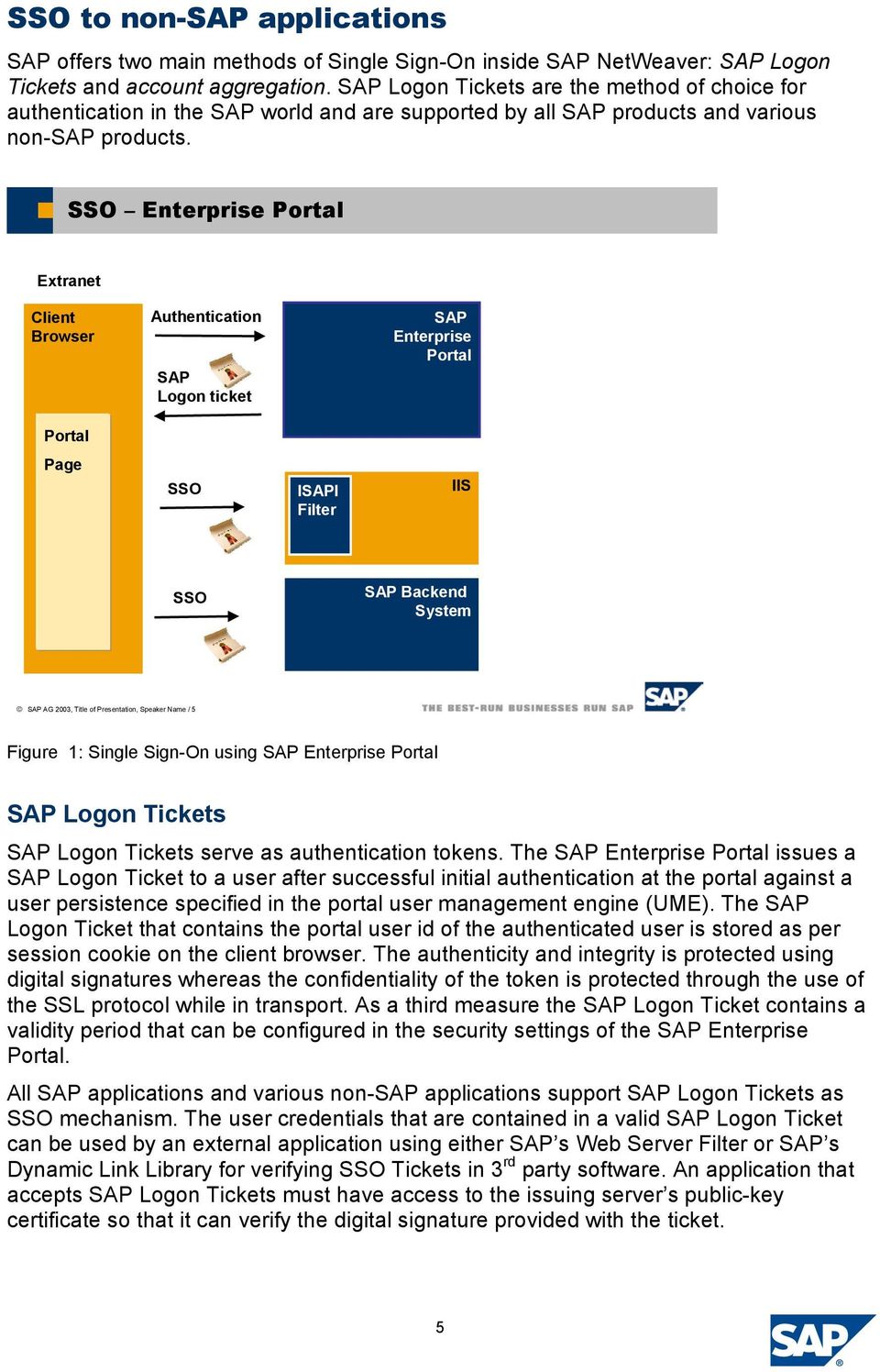
5 SSO to non-sap applications SAP offers two main methods of Single Sign-On inside SAP NetWeaver: SAP Logon Tickets and account aggregation. SAP Logon Tickets are the method of choice for authentication in the SAP world and are supported by all SAP products and various non-sap products. SSO Enterprise Portal Extranet Client Browser Authentication SAP Logon ticket SAP Enterprise Portal Portal Page SSO ISAPI Filter IIS SSO SAP Backend System SAP AG 2003, Title of Presentation, Speaker Name / 5 Figure 1: Single Sign-On using SAP Enterprise Portal SAP Logon Tickets SAP Logon Tickets serve as authentication tokens. The SAP Enterprise Portal issues a SAP Logon Ticket to a user after successful initial authentication at the portal against a user persistence specified in the portal user management engine (UME). The SAP Logon Ticket that contains the portal user id of the authenticated user is stored as per session cookie on the client browser. The authenticity and integrity is protected using digital signatures whereas the confidentiality of the token is protected through the use of the SSL protocol while in transport. As a third measure the SAP Logon Ticket contains a validity period that can be configured in the security settings of the SAP Enterprise Portal. All SAP applications and various non-sap applications support SAP Logon Tickets as SSO mechanism. The user credentials that are contained in a valid SAP Logon Ticket can be used by an external application using either SAP s Web Server Filter or SAP s Dynamic Link Library for verifying SSO Tickets in 3 rd party software. An application that accepts SAP Logon Tickets must have access to the issuing server s public-key certificate so that it can verify the digital signature provided with the ticket. 5
6 Web Server Filter As of SAP Enterprise portal 5.0 SAP offers a Web Server Filter that can be used to implement Single Sign On to web based applications that support authentication by a http header variable. The Web Server filter is available on Windows for the Microsoft Internet Information Server (IIS), Apache and the iplanet Web Server. The filter verifies the logon ticket using the digital certificate of the Portal Server, then extracts the name of the authenticated user from the logon ticket, and writes it into the http header. The name of the http header variable can be specified using the parameter remote_user_alias in the filter configuration file. A simple example for an ASP application that is using the SAP Web Server Filter is shown in the following listing. It is assumed that the parameter remote_alias_user has been assigned the value MY_SAP_USER. <%@ LANGUAGE="VBSCRIPT" %> <% Dim struser struser = Request.ServerVariables("MY_SAP_USER") If MY_SAP_USER <> "SecretUserID" Then UserNotAuthenticated If MY_SAP_USER = "SecretUserID" Then UserAuthenticated Sub UserNotAuthenticated() Response.Write " User is NOT authenticated. " End Sub Sub UserAuthenticated() Response.Write " User is authenticated. " End Sub %> <HTML> <HEAD> Test page check user id </HEAD> <BODY> Welcome to the test page </BODY> </HTML> The Web Server Filter can be downloaded from the SAP Service Marketplace using the shortcut patches and following the path Technology Components-> SAP SSOEXT -> SAP SSOEXT-> NT/I386. Dynamic Link Libary If a self written application should provide native support for SSO using SAP Logon Tickets the Dynamic Library for Verifying SSO Tickets in Third-Party Software sapssoext.dll can be used. SAP provides Java and C sample files that can provide some hints how the library can be implemented in the source code of a high level programming language such as Visual Basic, C or JAVA. The library can be downloaded from the SAP Service Marketplace using the shortcut patches and following the path Technology Components-> SAP SSOEXT -> SAP SSOEXT-> NT/I386. 6

7 Account Aggregation With this SSO mechanism the Portal Server uses user mapping information (user id and password) provided by users or administrators to give the portal user access to external systems. The portal components connect to the external system with the user s credentials stored in the portal database. The usage of account aggregation has several drawbacks. First of all it requires that a SAP portal user has to maintain a user id and password for each application that is using account aggregation. If the password in one backend application changes the SAP portal user has to maintain the stored credentials too. Though account aggregation can be used as an option where no other solution might work it causes a significant administrative overhead. Using account aggregation to access a web based backend system that is configured to use basic authentication results in sending a URL that contains user name and password. A security update from Microsoft that has been published recently removes support for handling user names and passwords in HTTP and HTTP with Secure Sockets Layer (SSL) or HTTPS URLs in Microsoft Internet Explorer. The following URL syntax is no longer supported in Internet Explorer if this security patch has been applied. http(s)://username:password@server/resource.ext SSO from SAP to a Microsoft environment The preferred method for authentication in a Microsoft environment is Kerberos on which windows integrated authentication is based. Since the Kerberos protocol is usually blocked by firewalls windows integrated authentication cannot be used over the internet. A common problem in extranet scenarios is thus client authentication and authorization for external facing Windows services. While in a pure Intranet scenario windows integrated authentication can be used this is not an option for extranet scenarios. Therefore external facing services have to use other authentication techniques. This problem is addressed by two new extensions that have been added by Microsoft to its implementation of the Kerberos protocol which allow the use of constrained delegation and protocol transition. The new features can only be used on members of the Windows Server 2003 family and require that the functional level of the domain and forest have been raised to Windows Server

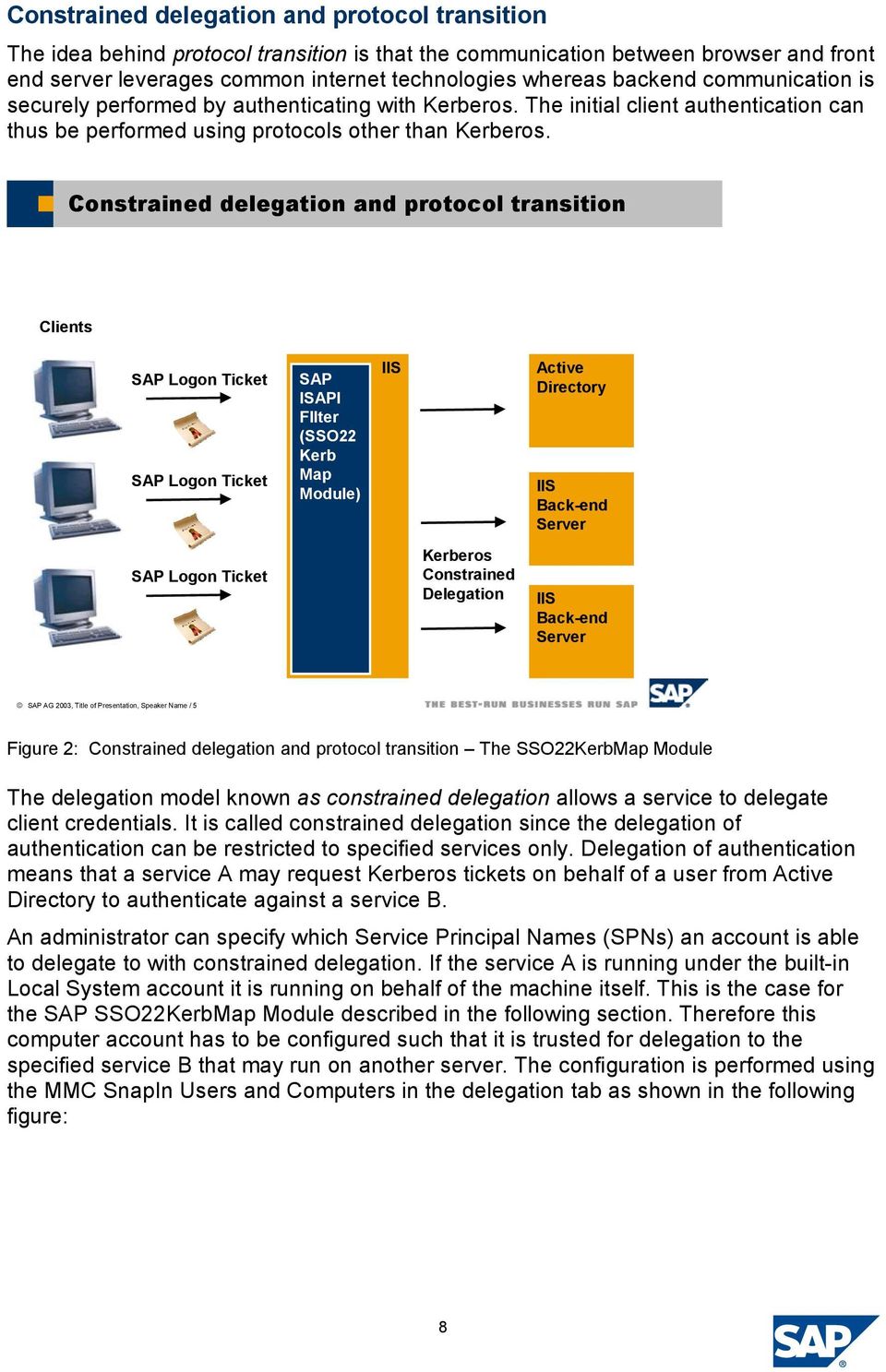
8 Constrained delegation and protocol transition The idea behind protocol transition is that the communication between browser and front end server leverages common internet technologies whereas backend communication is securely performed by authenticating with Kerberos. The initial client authentication can thus be performed using protocols other than Kerberos. Constrained delegation and protocol transition Clients SAP Logon Ticket SAP Logon Ticket SAP ISAPI FIlter (SSO22 Kerb Map Module) IIS Active Directory IIS Back-end Server SAP Logon Ticket Kerberos Constrained Delegation IIS Back-end Server SAP AG 2003, Title of Presentation, Speaker Name / 5 Figure 2: Constrained delegation and protocol transition The SSO22KerbMap Module The delegation model known as constrained delegation allows a service to delegate client credentials. It is called constrained delegation since the delegation of authentication can be restricted to specified services only. Delegation of authentication means that a service A may request Kerberos tickets on behalf of a user from Active Directory to authenticate against a service B. An administrator can specify which Service Principal Names (SPNs) an account is able to delegate to with constrained delegation. If the service A is running under the built-in Local System account it is running on behalf of the machine itself. This is the case for the SAP SSO22KerbMap Module described in the following section. Therefore this computer account has to be configured such that it is trusted for delegation to the specified service B that may run on another server. The configuration is performed using the MMC SnapIn Users and Computers in the delegation tab as shown in the following figure: 8
9 Figure 3: Configuration of constrained delegation using MMC Note that for protocol transition to be used the network administrator must explicitly grant the right for constrained delegation using "any authentication protocol" on the front end server. The SAP SSO2KerbMap Module Based on the technology of constrained delegation using protocol transition SAP offers the SSO2KerbMap module. SAP s new SSO22KerbMap ISAPI Filter securely identifies the user by the SAP Logon Ticket and requests a constrained Kerberos ticket from Active Directory on behalf of the interactive SAP portal user. The idea behind the SSO22KerbMap Module is that both SAP Logon Tickets and Kerberos Tickets represent user credentials for their respective security contexts. Constrained delegation using protocol transition allows the use of user credentials represented by a SAP Logon Ticket to obtain a Kerberos ticket which can be used for SSO to MS based backend systems. The SSO22KerbMap Module consists technically out of an ISAPI Filter DLL. The filter allows to obtain Kerberos Tickets on behalf of the user that has been successfully authenticated by the portal and thus has been submitted a valid SAP Logon Ticket. How does the filter work in detail? If the filter DLL is installed as an ISAPI Filter all http requests that are passing the filter will be analyzed. If a SAP Logon Ticket is found in the header of an http request the portal user id is extracted. The next step performed is the identification of the user in Active Directory based on the information found in the SAP Logon Ticket. Using the configuration file SSO22KerbMap.ini the filter retrieves the information from the 9

10 parameter SSO2AccountAttribute which user attribute in Active Directory is used as portal logon id. It is recommended to use a unique attribute such as the userprincipalname as portal user id. The filter checks for a user in active directory where the value of the attribute matches the value found in the SAP Logon Ticket. If exactly one user is found the ISAPI Filter requests a Kerberos ticket on behalf of that user and adds the Kerberos token to the header. Conclusion SAP Enterprise Portal serves as an end to end solution for SSO for both SAP and Microsoft backend applications. No 3 rd party software is needed to set up a Single Sign- On solution to access SAP and IIS based backend systems. No additional software has to be installed on the frontends to enable this SSO solution. Limitations Constrained delegation can only be enabled on a member of the Windows Server 2003 family. The functional level of your domain and forest has to be raised to Windows Server SAP Logon Tickets as being implemented as cookies are only sent to servers in the same DNS domain as the portal server. If SAP Enterprise Portal and the backend applications reside in different DNS domains one has to configure Issuing SAP Logon Tickets for multiple Domains. Please see -> Cross Domain SSO. 10

11 References Exploring S4U Kerberos extensions in windows A security update is available that modifies the default behavior of Internet Explorer for handling user information in HTTP and in HTTPS URLs follow the path: Technology Components-> SAP SSOEXT -> SAP SSOEXT-> NT/I386 SSO22KerbMap ISAPI Module Dynamic Library for Verifying SSO Tickets in Third-Party Software Web Server Filter SAP Note SSO2 To Kerberos Mapping Filter: Known issues SPL_TXT&_NNUM=735639&_NLANG=E 11
Collaboration Technology Support Center - Microsoft - Collaboration Brief
 Collaboration Technology Support Center - Microsoft - Collaboration Brief February 2007 Single Sign-On to a Microsoft Exchange Cluster Summary Users of the SAP NetWeaver Portal can take advantage of Single
Integration of SAP central user administration with Microsoft Active Directory
 Collaboration Technology Support Center Microsoft - Collaboration Brief June 2005 Integration of SAP central user administration with Microsoft Active Directory Chris Kohlsdorf, Senior System Architect
Integration of Outlook Web Access (OWA) into SAP Enterprise Portal
 Collaboration Technology Support Center - Microsoft - Collaboration Brief October 2004 Integration of Outlook Web Access (OWA) into SAP Enterprise Portal André Fischer, Project Manager CTSC, SAP AG Michael
Configuring Distribution List in Compliant User Provisioning
 Configuring Distribution List in Compliant User Provisioning Applies To: GRC Access Control Suite for 5.3 Summary: Configuration of Distribution List in Compliant User Provisioning will allow a group of
Download and Install Crystal Reports for Eclipse via the Eclipse Software Update Manager
 Download and Install Crystal Reports for Eclipse via the Eclipse Software Update Manager Applies to: Crystal Reports for Eclipse version 2 Summary This document provides a step-by-step guide on how to
How To Configure MDM to Work with Oracle ASM-Based Products
 SAP NetWeaver How-To Guide How To Configure MDM to Work with Oracle ASM-Based Products Applicable Releases: MDM 7.1 SP10 and later Version 1.0 June 2013 Copyright 2013 SAP AG. All rights reserved. No part
SAP CCMS Monitors Microsoft Windows Eventlog
 MSCTSC Collaboration Brief November 2004 SAP CCMS Monitors Microsoft Windows Eventlog Christian Klink Member of CTSC Focus Group SAP Technology Consultant SAP Technology Consulting II SAP Deutschland AG
3 rd party Service Desk interface
 SAP Solution Manager 3 rd party Service Desk interface Product Management SAP Solution Manager SAP AG Disclaimer This presentation is a preliminary version and not subject to your license agreement or
Developing Applications for Integration between PI and SAP ERP in Different Network Domains or Landscapes
 Developing Applications for Integration between PI and SAP ERP in Different Network Domains or Landscapes Applies to: SAP NetWeaver Process Integration 7.1+ SAP NetWeaver 7.02 (ABAP) Summary This document
How to Set Up an Authorization for a Business Partner in Customer Relationship Management (CRM) Internet Sales: Sample Case
 How to Set Up an Authorization for a Business Partner in Customer Relationship Management (CRM) Internet Sales: Sample Case Applies to: SAP CRM 4.0 Internet Sales and beyond Summary You want to set up
Implementing Outlook Integration for SAP Business One
 Welcome to your RKT Live Expert Session Implementing Outlook Integration for SAP Business One Valerie Arguin Solution Manager Please note that we are recording this session! Your Presenter Please insert
CREATING A PURCHASE ORDER STORE RECORD WEB SERVICE
 SAP BEST PRACTICES AND SERVICE SOLUTION MANAGEMENT CREATING A PURCHASE ORDER STORE RECORD WEB SERVICE Exercise / Solution ITAI SADAN, SOLUTION OFFICE, SAP AMERICA SAP BEST PRACTICES AND SERVICE SOLUTION
How to Create Web Dynpro-Based iviews. Based on SAP NetWeaver 04 Stack 09. Jochen Guertler
 How to Create Web Dynpro-Based iviews Based on SAP NetWeaver 04 Stack 09 Jochen Guertler Copyright Copyright 2004 SAP AG. All rights reserved. No part of this publication may be reproduced or transmitted
SAP GRC Access Control: Background jobs for risk analysis and remediation (formerly Virsa Compliance Calibrator)
 SAP GRC Access Control: Background jobs for risk analysis and remediation (formerly Virsa Compliance Calibrator) Applies to: SAP GRC Access Control, version 5.2 Summary This document discusses the background
R/3 and J2EE Setup for Digital Signature on Form 16 in HR Systems
 R/3 and J2EE Setup for Digital Signature on Form 16 in HR Systems Agenda 1. R/3 - Setup 1.1. Transaction code STRUST 1.2. Transaction code SM59 2. J2EE - Setup 2.1. Key Storage 2.2. Security Provider 2.3.
Ronald Bueck SBO Product Definition
 SAP Business One Welcomes you to the Weekly Partner Webinar Series Overview Microsoft Outlook Integration Add-on Ronald Bueck SBO Product Definition Please note that we are recording this session! Your
Backup & Restore with SAP BPC (MS SQL 2005)
 How-to Guide SAP CPM How To Backup & Restore with SAP BPC (MS SQL 2005) Version 1.0 September 2007 Applicable Releases: SAP BPC 5.1 Copyright 2007 SAP AG. All rights reserved. No part of this publication
E-Recruiting Job Board Integration using XI
 E-Recruiting Job Board Integration using XI SAP AG 2005 SAP AG 1 Overview of Integration Scenario E-Recruiting System Configuration Delivered XI Components Basic XI-side Configuration Message Monitoring
Posting Messages into XI
 Posting Messages into XI Applies to: SAP NetWeaver Exchange Infrastructure Summary This article demonstrates how easy it is to post XML/SOAP messages into SAP NetWeaver Exchange Infrastructure (XI) using
Sales Rush Sales Order Processing S01- Lean Baseline Package. SAP Lean Baseline Package Version: V1.500 Country: UK Language: EN Date: February 2006
 SAP Lean Baseline Package Version: V1.500 Country: UK Language: EN Date: February 2006 Sales Rush Sales Order Processing S01- Lean Baseline Package SAP AG Neurottstr. 16 69190 Walldorf Germany 1.1.1 Copyright
How to configure BusinessObjects Enterprise with Citrix Presentation Server 4.0
 How to configure BusinessObjects Enterprise with Citrix Presentation Server 4.0 Applies to: BusinessObjects Enterprise XI 3.0 Summary The objective of this document is to provide steps to install and configure
Extract Archived Data from SAP ERP
 How-to Guide SAP NetWeaver 7.0 How To Extract Archived Data from SAP ERP Version 1.00 May 2006 Applicable Releases: SAP NetWeaver 7.0 (BI capability) Copyright 2008 SAP AG. All rights reserved. No part
Analyzing Sales Data for Choosing Forecast Strategies
 Analyzing Sales Data for Choosing Forecast Strategies Applies to The article applies to the Demand Planner in SAP APO. Works for version 4.7 and upwards. Summary Choosing the right forecasting strategy
Integrate Third Party Collaboration Tools in the SAP NetWeaver Portal. SAP NetWeaver Product Management
 Integrate Third Party Collaboration Tools in the SAP NetWeaver Portal SAP NetWeaver Product Management Overview Native Third-Party Services Code Samples Summary Integration of Third-Party Collaboration
Process Archiving using NetWeaver Business Process Management
 Process Archiving using NetWeaver Business Process Management Applies to: NetWeaver Composition Environment 7.2, 7.3. For more information, visit the Business Process Modeling homepage. Summary This document
Single Sign-On between SAP Portal and SuccessFactors
 Single Sign-On between SAP Portal and SuccessFactors Dimitar Mihaylov 7/1/2012 Contents 1. Overview... 3 2. Trust between SAP Portal 7.3 and SuccessFactors... 5 2.1. Initial configuration in SAP Portal
Performance Best Practices Guide for SAP NetWeaver Portal 7.3
 SAP NetWeaver Best Practices Guide Performance Best Practices Guide for SAP NetWeaver Portal 7.3 Applicable Releases: SAP NetWeaver 7.3 Document Version 1.0 June 2012 Copyright 2012 SAP AG. All rights
prioritize XI messages on integration server
 How-to Guide SAP NetWeaver 2004s How To prioritize XI messages on integration server Version 1.00 May 2006 Applicable Releases: SAP NetWeaver 2004s Process Integration Enabling Application-to-Application
SAP Master Data Governance- Hiding fields in the change request User Interface
 SAP Master Data Governance- Hiding fields in the change request User Interface Applies to: ERP 6 Ehp 5 SAP Master Data Governance. For more information, visit the Master Data Management homepage. Summary
Workflow extended notifications
 Workflow extended notifications Motivation Automatic Notifications Motivation The longest duration in a process is the wait time Purchaser Prod. Planner Wait time Accountant Wait time Wait time can be
Integrating Easy Document Management System in SAP DMS
 Integrating Easy Document Management System in SAP DMS Applies to: SAP Easy Document Management System Version 6.0 SP12. For more information, visit the Product Lifecycle Management homepage. Summary This
Methodology to Implement SAP Process Integration
 Methodology to Implement SAP Process Integration Applies to: SAP NetWeaver, SAP Exchange Infrastructure, SAP Process Integration Summary When starting a SAP PI project from scratch, it is very important
Integration of Universal Worklist into Microsoft Office SharePoint
 Integration of Universal Worklist into Microsoft Office SharePoint Applies to: SAP NetWeaver Portal 7.01 SP3 Microsoft Office SharePoint 2007 For more information, visit the Portal and Collaboration homepage.
Global Transport Label - General Motors -
 SAP Customer Success Story Automotive Consulting Solutions Print form for the Sales and Distribution process Global Transport Label - General Motors - Agenda GETRAG Corporate Group Description of the Function
Understanding HR Schema and PCR with an Example
 Understanding HR Schema and PCR with an Example Applies to: SAP ECC 6.0 version, SAP HCM module. For more information, visit the Enterprise Resource Planning homepage. Summary This document will provide
Enterprise Software - Applications, Technologies and Programming
 Enterprise Software - Applications, Technologies and Programming Dr. Uwe Kubach, Dr. Gregor Hackenbroich, Dr. Ralf Ackermann SAP Research 2010 SAP AG. All rights reserved. / Page 1 Abstract This lecture
How To Balance In Sap Bw
 How-to Guide SAP NetWeaver 04 How To Load Balancing For Data Load Processing and Warehouse Management In BW Version 1.10 January 2005 Applicable Releases: SAP NetWeaver 04 For source system requirements
SAP NetWeaver MDM 5.5 SP3 SAP Portal iviews Installation & Configuration. Ron Hendrickx SAP NetWeaver RIG Americas Foundation Team
 SAP NetWeaver MDM 5.5 SP3 SAP Portal iviews Installation & Configuration Ron Hendrickx SAP NetWeaver RIG Americas Foundation Team Prerequisites Required: Basic MDM knowledge Basic EP6 content management
Business One in Action - How can we post bank fees and charges while posting Incoming or Outgoing Payment transactions?
 Business One in Action - How can we post bank fees and charges while posting Incoming or Outgoing Payment transactions? Applies to: SAP Business One, Accounting, Banking and Reconciliation Summary: This
Utilities for downloading and uploading OO ABAP classes in XML format
 SDN Contribution Utilities for downloading and uploading OO ABAP classes in XML format Applies to: SAP WebAS 6.20 and above. Summary This article will present two utility reports for downloading and uploading
NetWeaver Business Client (NWBC) for Incentives and Commissions Management (ICM)
 NetWeaver Business Client (NWBC) for Incentives and Commissions Management (ICM) Applies to: Enhancement Pack 5 (Ehp5), EA-APPL, Incentives and Commissions Management (FS-ICM). Summary This article discusses
SAPFIN. Overview of SAP ERP Financials COURSE OUTLINE. Course Version: 15 Course Duration: 2 Day(s)
 SAPFIN Overview of SAP ERP Financials. COURSE OUTLINE Course Version: 15 Course Duration: 2 Day(s) SAP Copyrights and Trademarks 2014 SAP AG. All rights reserved. No part of this publication may be reproduced
Maintaining Different Addresses and Email Ids for a Business Partner via CRM Web UI
 Maintaining Different Addresses and Email Ids for a Business Partner via CRM Web UI Applies to: CRM 7.0 SP09. For more information, visit the Customer Relationship Management homepage. Summary This article
Integration of SAP Netweaver User Management with LDAP
 Integration of SAP Netweaver User Management with LDAP Applies to: SAP Netweaver 7.0/7.1 Microsoft Active Directory 2003 Summary The document describes the detailed steps of configuring the integration
Monitoring and Management of Landscapes with SAP NetWeaver Administrator. Dieter Krieger, SAP AG
 Monitoring and Management of Landscapes with SAP NetWeaver Administrator Dieter Krieger, SAP AG Overview of SAP NetWeaver Administrator Setting up SAP NetWeaver Administrator Using SAP NetWeaver Administrator
Secure MobiLink Synchronization using Microsoft IIS and the MobiLink Redirector
 Secure MobiLink Synchronization using Microsoft IIS and the MobiLink Redirector A whitepaper from ianywhere Author: Joshua Savill, Product Manager This whitepaper was written in the context of SQL Anywhere
Table of Contents. How to Find Database Index usage per ABAP Report and Creating an Index
 How to Find Database Index usage per ABAP Report and Creating an Index Applies to: SAP NETWEAVER WEB AS ABAP. For more information, visit the ABAP homepage Summary The aim of this article is to show how
How to Create a Support Message in SAP Service Marketplace
 How to Create a Support Message in SAP Service Marketplace Summary This document explains how to create a message (incident) on the SAP Service Marketplace. It is assumed that the customer has never logged
HR400 SAP ERP HCM Payroll Configuration
 HR400 SAP ERP HCM Payroll Configuration. COURSE OUTLINE Course Version: 15 Course Duration: 5 Day(s) SAP Copyrights and Trademarks 2014 SAP AG. All rights reserved. No part of this publication may be reproduced
How to Schedule Report Execution and Mailing
 How To Guide SAP Business One Document Version: 1.0 2012-09-02 Applicable Releases: SAP Business One 8.81 PL10 and higher, SAP Business One 8.82 Typographic Conventions Type Style Example Description Words
SAP NetWeaver 04 Security Guide. Security Guide for SAP Mobile Infrastructure
 SAP NetWeaver 04 Security Guide Security Guide for SAP Mobile Infrastructure Document Version 1.00 April 29, 2004 SAP AG Neurottstraße 16 69190 Walldorf Germany T +49/18 05/34 34 24 F +49/18 05/34 34 20
Third Party Digital Asset Management Integration
 Third Party Digital Asset Management Integration Objectives At the end of this unit, you will be able to: Assign Digital Assets to CRM Objects Work with the Where-Used List Describe the necessary customizing
Alert Notification in SAP Supply Network Collaboration. SNC Extension Guide
 Alert Notification in SAP Supply Network Collaboration SNC Extension Guide Version: 1.2 Date 08.02.2010 1 The SNC Extension Guide is a collection of tips and tricks on how to extend SAP Supply Network
Roster Configuration (Payroll) in SAP ECC 6.0 Tips & Tricks
 Roster Configuration (Payroll) in SAP ECC 6.0 Tips & Tricks Applies to: SAP ECC 6.0 onwards. Summary Roster is an application which shows persons of reserved category against specific roster points. Roster
Implementing SSO between the Enterprise Portal and the EPM Add-In
 Implementing SSO between the Enterprise Portal and the EPM Add-In Applies to: SAP BusinessObjects Planning and Consolidation 10, version for SAP NetWeaver SP1 and higher EPM Add-In, SP3 and higher. For
SAP SYSTEM MEASUREMENT GUIDE
 Global License Auditing Services SAP SYSTEM MEASUREMENT GUIDE MEASUREMENT PROGRAM AND LICENSE ADMINISTRATION WORKBENCH Version 7.0 Updated Edition, August 2015 Copyright 2015 SAP SE. All rights reserved.
Problems with your Data Model in SAP NetWeaver MDM Do s and Don ts
 How-to Guide SAP NetWeaver 7.0 (2004s) How to Avoid Problems with your Data Model in SAP NetWeaver MDM Do s and Don ts Version 1.00 May 2007 Applicable Releases: SAP NetWeaver 2004 SAP NetWeaver 7.0 (2004s)
AC200. Basics of Customizing for Financial Accounting: General Ledger, Accounts Receivable, Accounts Payable COURSE OUTLINE
 AC200 Basics of Customizing for Financial Accounting: General Ledger, Accounts Receivable, Accounts Payable. COURSE OUTLINE Course Version: 15 Course Duration: 5 Day(s) SAP Copyrights and Trademarks 2015
TM111. ERP Integration for Order Management (Shipper Specific) COURSE OUTLINE. Course Version: 15 Course Duration: 2 Day(s)
 TM111 ERP Integration for Order Management (Shipper Specific). COURSE OUTLINE Course Version: 15 Course Duration: 2 Day(s) SAP Copyrights and Trademarks 2014 SAP SE. All rights reserved. No part of this
How to Configure and Trouble Shoot Email Notification for Process Control 2.5
 SAP SOLUTIONS FOR GOVERNANCE, RISK, AND COMPLIANCE How-To Guide How to Configure and Trouble Shoot Email Notification for Process Control 2.5 SAP GRC Regional Implementation Group Applicable Releases:
Configuring Single Sign-on for SAP HANA
 Configuring Single Sign-on for SAP HANA Applies to: SAP BusinessObjects Business Intelligence platform 4.0 Feature Pack 3. For more information, visit the Business Objects homepage. Summary This document
SAP Sales and Operations Planning Software Product (xsop)
 SAP Sales and Operations Planning Software Product (xsop) Ray Adams IBU Chemicals March 20 th, 2007 S&OP Overview Functions in xsop Demonstration Wrap-up Why is Sales & Operations Planning needed? Constrained
Log Analysis Tool for SAP NetWeaver AS Java
 Log Analysis Tool for SAP NetWeaver AS Java Applies to: SAP NetWeaver 6.40, 7.0x, 7.1x, 7.20 and higher Summary Log Analysis is an SAP tool for analyzing list formatted logs and traces in Application Server
UI Framework Logo exchange without skin copy. SAP Enhancement Package 1 for SAP CRM 7.0
 UI Framework Logo exchange without skin copy SAP Enhancement Package 1 for SAP CRM 7.0 1 Objectives At the end of this unit, you will be able to: Change the logo within CRM 7.0 WebClient UI Add a logo
Installation Guide Customized Installation of SQL Server 2008 for an SAP System with SQL4SAP.VBS
 Installation Guide Customized Installation of SQL Server 2008 for an SAP System with SQL4SAP.VBS Target Audience Technology Consultants System Administrators PUBLIC Document version: 1.00 09/16/2008 Document
UI Framework Simple Search in CRM WebClient based on NetWeaver Enterprise Search (ABAP) SAP Enhancement Package 1 for SAP CRM 7.0
 UI Framework Simple Search in CRM WebClient based on NetWeaver Enterprise Search (ABAP) SAP Enhancement Package 1 for SAP CRM 7.0 1 Objectives At the end of this unit, you will be able to: Use the new
ERP Quotation and Sales Order in CRM WebClient UI Detailed View. SAP Enhancement Package 1 for SAP CRM 7.0 CRM Sales - SFA
 ERP Quotation and Sales Order in CRM WebClient UI Detailed View SAP Enhancement Package 1 for SAP CRM 7.0 CRM Sales - SFA ERP Quote, Order, Quantity Contract in CRM WebClient UI Recognizing that many SAP
Budget Control by Cost Center
 SAP Business One Budget Control by Cost Center Ecosystem & Channels Readiness July 2011 Allows a precise follow up of costs booked using the cost accounting dimensions functionality as introduced in SAP
BW Workspaces Use Cases
 BW Workspaces Use Cases Applies to SAP NetWeaver Business Warehouse 7.30 (BW7.30) SP05 and SAP NetWeaver Business Warehouse Accelerator 7.20 (BWA7.20)/HANA 1.0 running as a database for SAP NetWeaver BW
Eliminating Authentication Pop- Ups in SAP Landscapes
 Eliminating Authentication Pop- Ups in Landscapes Cristina Buchholz, Patrick Hildenbrand Product Security, Learning Objectives As a result of this workshop, you will be able to: Understand Authentication
How to Configure Access Control for Exchange using PowerShell Cmdlets A Step-by-Step guide
 SAP How-to Guide Mobile Device Management SAP Afaria How to Configure Access Control for Exchange using PowerShell Cmdlets A Step-by-Step guide Applicable Releases: SAP Afaria 7 SP3 HotFix 06, SAP Afaria
SAP xapp Resource and Portfolio Management (SAP xrpm)
 SAP xapp Resource and Management (SAP xrpm) Version 2.0 Kai Nylen Solution Adviser, SAP Finland Outline Challenges Facing Organizations SAP xrpm Product Overview SAP xrpm Architecture SAP xrpm Customer
UI Framework Task Based User Interface. SAP Enhancement Package 1 for SAP CRM 7.0
 UI Framework Task Based User Interface SAP Enhancement Package 1 for SAP CRM 7.0 1 Agenda 1. Overview 2. Task Based User Interface 3. Further Information SAP 2009 / Page 2 2 Objectives of the Presentation
SAP NetWeaver BRM 7.3
 SAP NetWeaver BRM 7.3 New Features Overview Arti Gopalan Solution Specialist SAP NetWeaver BRM NetWeaver Orchestration SAP Labs India Agenda Technical Components of NW BRM Rules Composer Rules Manager
Business Requirements... 3 Analytics... 3 Typical Use Cases... 8 Related Content... 9 Copyright... 10
 SAP BW Data Mining Analytics: Process Reporting Applies to: SAP BW Data Mining. For more information, visit the Analytics homepage. Summary SAP BW Data Mining serves as a process design platform for a
Portfolio and Project Management 5.0: Excel Integration for Financial and Capacity Planning
 Portfolio and Project Management 5.0: Excel Integration for Financial and Capacity Planning Applies to: Portfolio and Project Management 5.0 Summary Financial and Capacity planning for item, initiative
Sending Additional Files from SAP Netweaver PI to third Party System
 Sending Additional Files from SAP Netweaver PI to third Party System Applies to: SAP Netweaver PI. Summary The document describes about a scenario where the requirement is to send multiple files from one
Data Archiving in CRM: a Brief Overview
 Data Archiving in CRM: a Brief Overview Applies to: Developing Archiving Solutions in SAP CRM technology. For more information, visit the Customer Relationship Management homepage. Summary This document
K in Identify the differences between the universe design tool and the information design tool
 K in Identify the differences between the universe design tool and the information design tool The information design tool is a new modeling tool for the semantic layer that enables you to manipulate metadata
Xcelsius Dashboards on SAP NetWaver BW Implementation Best Practices
 Xcelsius Dashboards on SAP NetWaver BW Implementation Best Practices Patrice Le Bihan, SAP Intelligence Platform & NetWeaver RIG, Americas Dr. Gerd Schöffl, SAP Intelligence Platform & NetWeaver RIG, EMEA
How To Use the BPC Mass User Management Tool in BPC 10.0 NW
 How To Use the BPC Mass User Management Tool in BPC 10.0 NW Applies to: SAP BusinessObjects Planning & Consolidation 10.0, version for SAP NetWeaver. For more information, visit the Enterprise Performance
Sample Universe on Microsoft OLAP Cube
 Sample Universe on Microsoft OLAP Cube Applies to: SAP BusinessObjects XI4, the information design tool and Microsoft Analysis Services 2005 & 2008. For more information, visit the Business Objects homepage.
OData in a Nutshell. August 2011 INTERNAL
 OData in a Nutshell August 2011 INTERNAL Objectives At the end of this module, you will be able to: Understand the OData Standard and how it works. Understand how OData uses the Atom Protocol. Understand
USDL XG WP3 SAP use case. Kay Kadner
 XG WP3 SAP use case Kay Kadner Customer Marketplace Company B Runtime Company D Innovation & Community Community Company A Repository Company C Repository Provider Provider 2 Integrated Demonstrator -
Service Level Reporting for Business Process Monitoring
 Service Level Reporting in SAP Solution Manager Service Level Reporting for Business Process Monitoring with SAP Solution Manager 7.1 May 2013 SAP AG Dietmar-Hopp-Allee 16 69190 Walldorf Germany T +49/18
Matthias Steiner SAP. SAP HANA Cloud Platform A guided tour
 Matthias Steiner SAP SAP HANA Cloud Platform A guided tour SAP HANA Cloud Platform A guided tour Matthias Steiner April, 2011 Overview Platform Capabilities Portal Mobile Collaboration Integration Analytics
Compliant, Business-Driven Identity Management using. SAP NetWeaver Identity Management and SBOP Access Control. February 2010
 Compliant, Business-Driven Identity Management using SAP NetWeaver Identity Management and SBOP Access Control February 2010 Disclaimer This presentation outlines our general product direction and should
Learning Series: SAP NetWeaver Process Orchestration, secure connectivity add-on 1c SFTP Adapter
 Learning Series: SAP NetWeaver Process Orchestration, secure connectivity add-on 1c SFTP Adapter Applies to: SAP NetWeaver Process Orchestration, Secure Connectivity Add-on 1.0 SP0 Summary This article
DATA ARCHIVING IN SAP R/3 ENTERPRISE. Georg Fischer PM Data Archiving SAP AG
 DATA ARCHIVING IN SAP R/3 ENTERPRISE Georg Fischer PM Data Archiving SAP AG Agenda Introduction Data Archiving Basics Access to Archived Data Data Archiving Projects Information and Contacts SAP AG 2003,
Query, Read, Create and Update CLOUD FOR CUSTOMER ODATA SERVICE QUERY, READ, CREATE AND UPDATE
 ODATA SERVICE Query, Read, Create and Update CLOUD FOR CUSTOMER ODATA SERVICE QUERY, READ, CREATE AND UPDATE Version Date Completed Author Description/Comment 1.0 12-06-2014 Raghavendra Jadi, Unnati Hasija,
How to Add an Attribute to a Case, Record and a Document in NW Folder Management (ex-records Management)
 How to Add an Attribute to a Case, Record and a Document in NW Folder Management (ex-records Management) Applies to: SAP Folder Management 2.4 & 3.0. For more information, visit the Enterprise Performance
How To Use the ESR Eclipse Tool with the Enterprise Service Repository
 How To Use the ESR Eclipse Tool with the Enterprise Service Repository Applies to: SAP NetWeaver Process Orchestration 7.31 SP2 SAP NetWeaver Process Integration PI 7.31 SP2 Summary With PI 7.31 SP2, an
SEM and Budget Preparation. David Reifschneider Sr. Consultant, SAP SI America
 SEM and Budget Preparation David Reifschneider Sr. Consultant, SAP SI America Agenda: SAP s Higher Education Budgeting Solution 1 Introduction: Budget Requirements 2 BW Structure and Content 3 SEM-BPS
ARCHIVING OF IDOCS IN SAP
 SDN Contribution ARCHIVING OF IDOCS IN SAP Summary Archiving is the process of offloading data in SAP documents to a file at the Operating system layer for future retrieval and optionally delete the documents
User Experience in Custom Apps
 User Experience in Custom Apps p o w e r e d b y t h e S A P M o b i l e P l a t f o r m S e a n L o n g U X A r c h i t e c t M a n u e l S a e z - D i r e c t o r M o b i l e I n n o v a t i o n C e
SAP Cloud Strategy - Timeless Software. Frank Stienhans on behalf of Kaj van de Loo SAP
 SAP Strategy - Timeless Software Frank Stienhans on behalf of Kaj van de Loo SAP Decades-Long Relationships With the World s Largest Enterprises Trading Industries Consumer Industries Financial Process
Consume an External Web Service in a Nutshell with good old ABAP
 Consume an External Web Service in a Nutshell with good old ABAP Applies to: SAP_BASIS, Release 701, SP Level 8 Summary Have you ever tried to consume an external web service out of ABAP? This document
Enabling Full-Text Search for Business Objects in mysap ERP
 SDN Contribution Enabling Full-Text Search for Business Objects in mysap ERP Applies to: SAP NetWeaver 2004s, mysap ERP 2005 Summary The SAP NetWeaver Search Engine Service (SES) for business objects is