
HIPAA. Security Procedures. Resource Manual
|
|
|
- Magdalene Marshall
- 10 years ago
- Views:
Transcription
1 HIPAA Security Procedures Resource Manual
2 The following security policies and procedures have been developed by North Dakota State University (NDSU) for its internal use only in its role as a hybrid entity under HIPAA. These policies and procedures were developed to bring NDSU into compliance with the Health Insurance Portability and Accountability Act of 1996 Security Rule. 2

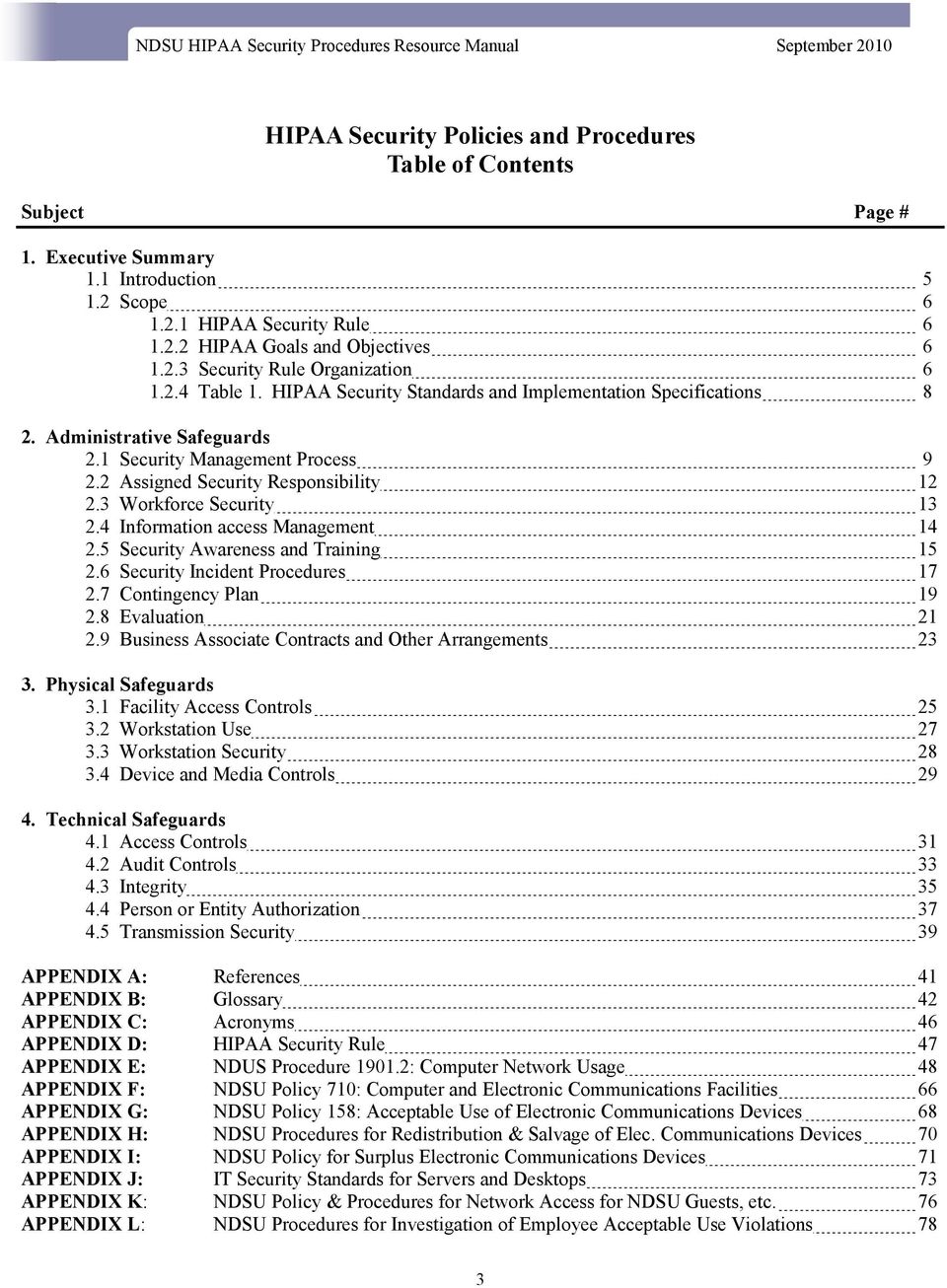
3 HIPAA Security Policies and Procedures Table of Contents Subject Page # 1. Executive Summary 1.1 Introduction Scope HIPAA Security Rule HIPAA Goals and Objectives Security Rule Organization Table 1. HIPAA Security Standards and Implementation Specifications 8 2. Administrative Safeguards 2.1 Security Management Process Assigned Security Responsibility Workforce Security Information access Management Security Awareness and Training Security Incident Procedures Contingency Plan Evaluation Business Associate Contracts and Other Arrangements Physical Safeguards 3.1 Facility Access Controls Workstation Use Workstation Security Device and Media Controls Technical Safeguards 4.1 Access Controls Audit Controls Integrity Person or Entity Authorization Transmission Security 39 APPENDIX A: References 41 APPENDIX B: Glossary 42 APPENDIX C: Acronyms 46 APPENDIX D: HIPAA Security Rule 47 APPENDIX E: NDUS Procedure : Computer Network Usage 48 APPENDIX F: NDSU Policy 710: Computer and Electronic Communications Facilities 66 APPENDIX G: NDSU Policy 158: Acceptable Use of Electronic Communications Devices 68 APPENDIX H: NDSU Procedures for Redistribution & Salvage of Elec. Communications Devices 70 APPENDIX I: NDSU Policy for Surplus Electronic Communications Devices 71 APPENDIX J: IT Security Standards for Servers and Desktops 73 APPENDIX K: NDSU Policy & Procedures for Network Access for NDSU Guests, etc. 76 APPENDIX L: NDSU Procedures for Investigation of Employee Acceptable Use Violations 78 3
4 This page left intentionally blank. 4

5 1. Executive Summary This document summarizes the HIPAA security standards and explains some of the structure and organization of the Security Rule. The document was created to help educate readers about security terms used in the HIPAA Security Rule and to improve understanding of the meaning of the security safeguards set out in the Rule. This document is intended as an aid/resource to understanding security concepts discussed in the HIPAA Security Rule and does not supplement, replace, or supersede the HIPAA Security Rule itself. The HIPAA Security Rule specifically focuses on the safeguarding of electronic protected health information (EPHI). All covered entities under HIPAA must comply with the HIPAA Security Rule, which establishes a set of security standards for protecting certain health care information. The standards and guidelines listed in this document can be used to support the requirements of HIPAA. These standards are based on the objectives of providing appropriate levels of information security according to a range of risk levels. The guidelines recommend the types of information and information systems to be included in each category. In addition, this document will also recommend minimum information security requirements (i.e., management, operational, and technical controls) for information and information systems in each category. Emphasis will be placed on: Ensuring there is an information security program in place and trained personnel assigned to manage and support the program. Integration of security in the business processes. Implementation and management of a security plan to manage the security requirements set forth by the HIPAA Security Rule. 1.1 Introduction Congress enacted the Health Insurance Portability and Accountability Act of 1996 (HIPAA) to simplify and standardize health care administrative processes, thereby reducing costs and other burdens on the heath care industry. The HIPAA statute is comprised of five titles: Title I Title II Title III Title IV Title V HIPAA Health Insurance Reform HIPAA Administrative Simplification HIPAA Tax Related Health Provisions Application and Enforcement of Group Health Plan Requirements Revenue Offsets Title II, includes the HIPAA administrative simplification requirements that address how electronic health care transactions are transmitted and stored. Pursuant to these provisions of HIPAA, the Secretary of Health and Human Services (HHS) adopted several sets of rules (in addition to the Security Rule) implementing the HIPAA administrative simplification requirements. HHS has published proposed or final rules related to the following five components of health care industry practices: Code sets used to identify health care services. Identifiers used for unique designations for employers and health care providers. Electronic data interchange transactions. Security. Privacy. This document addresses only the security component of the HIPAA statute. 5

6 1.2 Scope This document is designed to help educate NDSU administrative personnel about IT security concepts included in the HIPAA Security Rule. It is intended as an aid to understanding security concepts discussed in the HIPAA Security Rule, and does not supplement, replace, or supersede the Security Rule itself. Anyone seeking clarifications of the HIPAA Security Rule should send to or contact the CMA HIPAA hotline at This hotline was established for the specific purpose of providing assistance with questions related to HIPAA and its requirements HIPAA Security Rule The HIPAA Security Rule specifically focuses on the safeguarding of electronic protected health information (EPHI). All covered entities under HIPAA must comply with the HIPAA Security Rule, which establishes a set of security standards for securing certain health information. In general, the standards of HIPAA apply to the following covered entities that meet the following descriptions: Health Care Providers - Any provider of medical or other health services, or supplies, that transmits any health information in electronic form in connection with a transaction for which a standard has been adopted. Health Plans - Any individual or group plan that provides or pays the cost of health care. Health Care Clearinghouses - Any public or private entity that processes health care transactions from a standard format to a nonstandard format, or vice-versa. This section summarizes the HIPAA security standards and explains some of the structure and organization of the Security Rule HIPAA Goals and Objectives The main goal of the HIPAA Security Rule is to protect the confidentiality, integrity and availability of electronic protected health information (EPHI). Confidentiality is the property that data or information is not made available or disclosed to unauthorized persons or processes. Integrity is the property that data or information has not been altered or destroyed in an unauthorized manner. Availability is the property that data or information is accessible and usable upon demand by an authorized person Security Rule Organization To understand the requirements of the HIPAA Security Rule, it is helpful to be familiar with the basic security terminology it uses to describe the security measures. Each security measure of the HIPAA Security Rule can be categorized as being an Administrative, Physical or Technical safeguard. Administrative safeguards are defined as the administrative actions, policies, and procedures to manage the selection, development, implementation and maintenance of security measures to protect electronic protected health information and to manage the conduct of the covered entity s workforce in relation to the protection of that information. 6

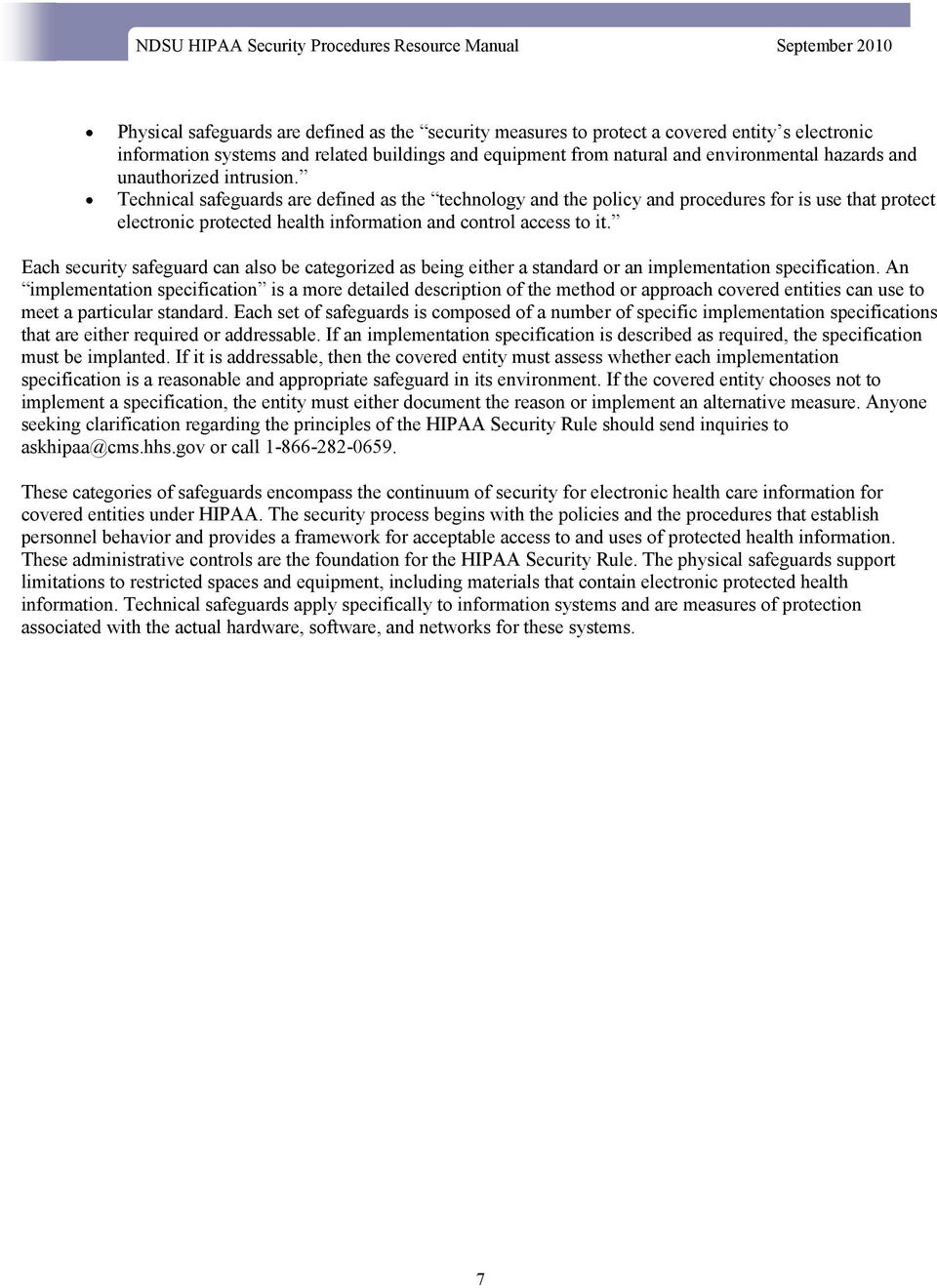
7 Physical safeguards are defined as the security measures to protect a covered entity s electronic information systems and related buildings and equipment from natural and environmental hazards and unauthorized intrusion. Technical safeguards are defined as the technology and the policy and procedures for is use that protect electronic protected health information and control access to it. Each security safeguard can also be categorized as being either a standard or an implementation specification. An implementation specification is a more detailed description of the method or approach covered entities can use to meet a particular standard. Each set of safeguards is composed of a number of specific implementation specifications that are either required or addressable. If an implementation specification is described as required, the specification must be implanted. If it is addressable, then the covered entity must assess whether each implementation specification is a reasonable and appropriate safeguard in its environment. If the covered entity chooses not to implement a specification, the entity must either document the reason or implement an alternative measure. Anyone seeking clarification regarding the principles of the HIPAA Security Rule should send inquiries to [email protected] or call These categories of safeguards encompass the continuum of security for electronic health care information for covered entities under HIPAA. The security process begins with the policies and the procedures that establish personnel behavior and provides a framework for acceptable access to and uses of protected health information. These administrative controls are the foundation for the HIPAA Security Rule. The physical safeguards support limitations to restricted spaces and equipment, including materials that contain electronic protected health information. Technical safeguards apply specifically to information systems and are measures of protection associated with the actual hardware, software, and networks for these systems. 7
8 1.2.4 HIPAA Security Standards and Implementation Specifications Table 1. HIPAA Security Standards and Implementation Specifications 1 Implementation Specifications Standards Sections Required Addressable Administrative Safeguards Security Management Process (a)(1) Risk Analysis Risk Management Sanction Policy Information System Activity Review Assigned Security Responsibility (a)(2) None Information Access Management (a)(4) Isolating Health Care Clearinghouse Function Access Authorization Security Awareness Training (a)(5) None Security Reminders Security Incident Protection (a)(6) Response and Reporting Access Establishment and Modification Protection from Malicious Software Log-in Monitoring Password Management Contingency Plan (a)(7) Data Backup Plan Evaluation (b)(1) None Business Associate Contracts and Other Arrangements (b)(1) Facility Access Controls (a)(1) None Disaster Recovery Plan Emergency Mode Operation Plan Written Contract or Other Arrangement Physical Safeguards Testing and Revision Procedure Applications and Data Criticality Analysis Implementation Specifications (a)(2) None Contingency Operations Workstation Use (b) None Workstation Security (c) None Facility Security Plan Access Control and Validation Procedures Maintenance Records Device and Media Controls (d)(1) Disposal Media Re-use Technical Safeguards Implementation Specifications (d)(2) None Access Control (a)(1) Unique User Identification Emergency Access Procedure Audit Control (b) None Accountability Data Backup and Storage Automatic Logoff Encryption and Decryption Integrity (c)(1) None Mechanism to Authenticate Electronic Protected Health Information Person or Entity (d) None Transmission Security (e)(1) None Integrity Controls Encryption 1 Adapted from 68 Federal Register 8380, February 20, 2003 (Appendix A to Subpart C or Part 164 Security Standards: Matrix 8

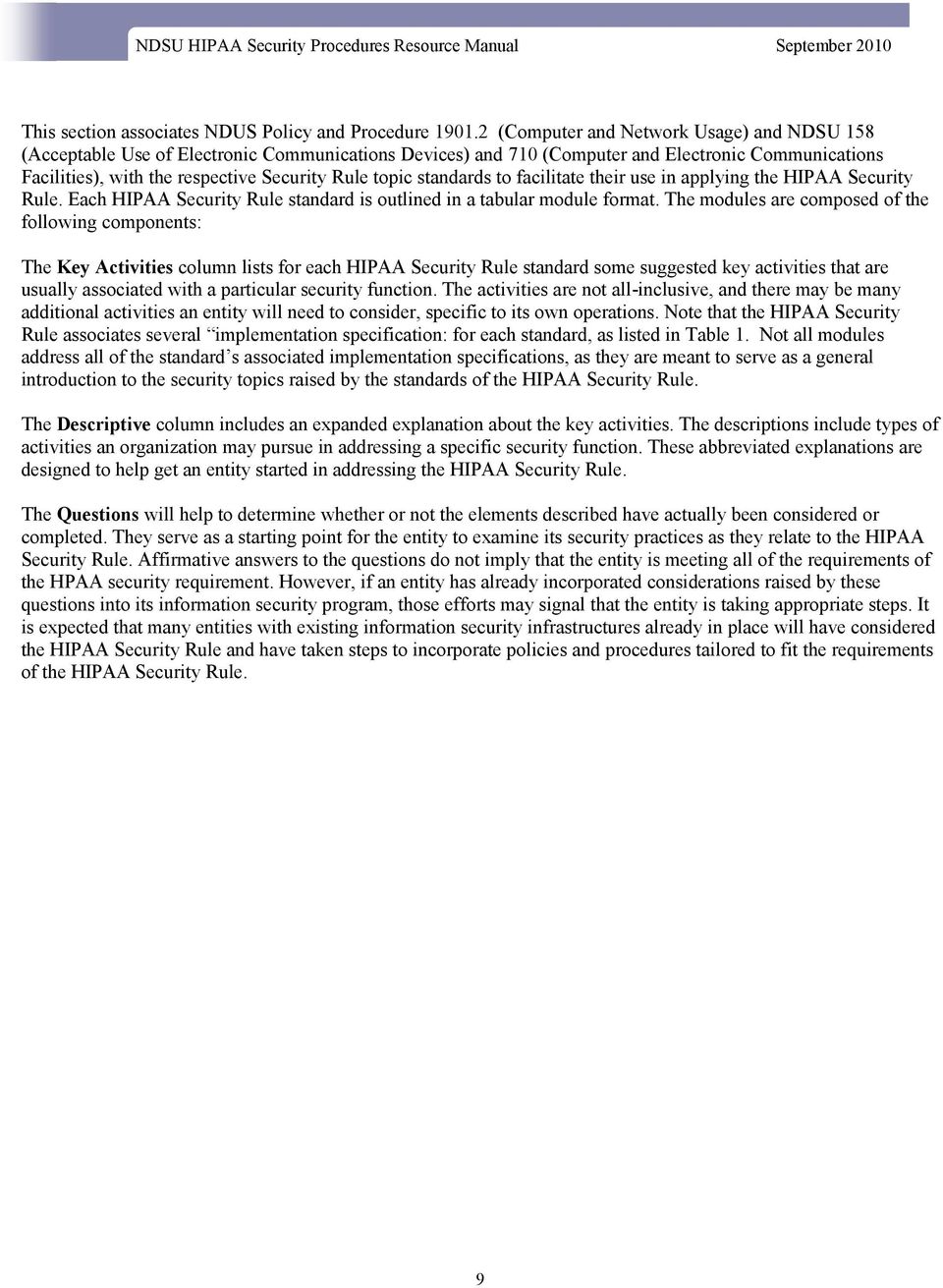
9 This section associates NDUS Policy and Procedure (Computer and Network Usage) and NDSU 158 (Acceptable Use of Electronic Communications Devices) and 710 (Computer and Electronic Communications Facilities), with the respective Security Rule topic standards to facilitate their use in applying the HIPAA Security Rule. Each HIPAA Security Rule standard is outlined in a tabular module format. The modules are composed of the following components: The Key Activities column lists for each HIPAA Security Rule standard some suggested key activities that are usually associated with a particular security function. The activities are not all-inclusive, and there may be many additional activities an entity will need to consider, specific to its own operations. Note that the HIPAA Security Rule associates several implementation specification: for each standard, as listed in Table 1. Not all modules address all of the standard s associated implementation specifications, as they are meant to serve as a general introduction to the security topics raised by the standards of the HIPAA Security Rule. The Descriptive column includes an expanded explanation about the key activities. The descriptions include types of activities an organization may pursue in addressing a specific security function. These abbreviated explanations are designed to help get an entity started in addressing the HIPAA Security Rule. The Questions will help to determine whether or not the elements described have actually been considered or completed. They serve as a starting point for the entity to examine its security practices as they relate to the HIPAA Security Rule. Affirmative answers to the questions do not imply that the entity is meeting all of the requirements of the HPAA security requirement. However, if an entity has already incorporated considerations raised by these questions into its information security program, those efforts may signal that the entity is taking appropriate steps. It is expected that many entities with existing information security infrastructures already in place will have considered the HIPAA Security Rule and have taken steps to incorporate policies and procedures tailored to fit the requirements of the HIPAA Security Rule. 9
10 2. Administrative Safeguards 2.1 Security Management Process ( (a)(1)) HIPAA Standard: Implement policies and procedures to prevent, detect, contain, and correct security violations. Key Activities Description Questions 1. Identify Relevant Information Systems Identify all information systems that house individually identifiable health information. Include all hardware and software that are used to collect, store, process, or transmit protected health information. Analyze business functions and verify ownership and control of information system elements as necessary. Has all the hardware and software for which the organization is responsible been identified and inventoried? Is the current information system configuration documented, including connections to other system? Have the types of information and uses of that information been identified and the sensitivity of each type of information been evaluated? (See NDUA data section - for more on categorization of sensitivity levels.) 2. Conduct Risk Assessment Risk assessment typically includes the following steps: Determine system characterization: Hardware Software System interfaces Data and information People System mission. Identify any vulnerability or weakness in security procedures or safeguards. Identify events that negatively impact security. Identify the potential impact that a security breach could have on an entity s operations or assets, including loss of integrity, availability, or confidentiality. Recommend security controls for the information and the system, including all the technical and nontechnical protections in place to address security concerns. Determine residual risk. Document all outputs and outcomes from the risk assessment activities. Are there any prior risk assessments, audit comments, security requirements, and/or security test results? Are there resources available? (I.e., ITS, NDUS, Listservs, mass media, virus alerts, vendors, etc.) What are the current and planned controls? Is the facility located in a region prone to any natural disasters such as earthquakes, floods, or fires? Has responsibility been assigned to check all hardware and software to determine whether selected settings are enabled? And, unnecessary settings disabled? Is there an analysis of current safeguards on effectiveness relative to the identified risks? 10

11 Key Activities Description Questions 3. Acquire IT Systems and Services Although the HIPAA Security Rule does not require purchasing any particular technology, additional hardware, software, or services may be needed to adequately protect information. Consideration for their selection should include the following: Applicability of the IT solution to the intended environment. The sensitivity of the data. The organization s security policies, procedures and standards. Other requirements such as resources available for operation, maintenance, and training. 4. Create and Deploy Policies and Procedures Document the decisions concerning the management, operational, and technical controls selected to mitigate identified risks. Create policies that clearly establish roles and responsibilities and assign ultimate responsibility for the implementation of each control to particular individuals or offices. Create procedures to be followed to accomplish particular security related tasks. 5. Supplemental References NDUS NDSU 710 NDSU 158 NDSU HIPAA Privacy Policies and Procedures How will new security controls work with the existing IT structure? Have the security requirements of the organization been compared with the security features of existing or proposed hardware and software? Has a cost-benefit analysis been conducted to determine the reasonableness of the investment given the security risks identified? Has a training strategy been developed? Are policies and procedures in place for security? (Refer to current NDUS/NDSU security policies and procedures in place.) Are there user manuals available and are they up-to-date? (Refer to current HR manuals and employee/ staff manuals available.) Is there a formal documented system/department security plan? Is there a process for communicating policies and procedures reviewed and updated as needed? (e.g., is this addressed during regularly scheduled staff meetings?) 11

12 2.2 Assigned Security Responsibility ( (a)(2)) HIPAA Standard: Identify the security official who is responsible for the development and implementation of the policies and procedures required. Key Activities Description Questions 1. Select a Security Official to be Assigned Responsibility for HIPAA Security Identify the individual who will ultimately be responsible for security Select an individual who is able to assess the effective security and to serve as a point of contact for security policy, implementation and monitoring. 2 Who in the organization: Oversees the development and communication of security policies and procedures? Is responsible for conducting the risk assessment? Handles the results of periodic security evaluations? Directs IT security purchasing and investment? Ensures that security concerns have been addressed in system implementation? 2. Assign and Document the Individual s Responsibility Document the individual s responsibilities in a job description. Communicate this assigned role to the entire organization. Is there a complete job description that accurately reflects the assigned security duties and responsibilities? Have the staff members in the organization been notified as to whom to call in the event of a security problem? 3. Supplemental References NDUS All policies pertaining to personnel for NDSU Human Resources NDSU HIPAA Privacy Policies and Procedures 2 Theresa Semmens, NDSU IT Security Officer has been appointed the NDSU Security Official for the HIPAA Privacy and Security Rules 12

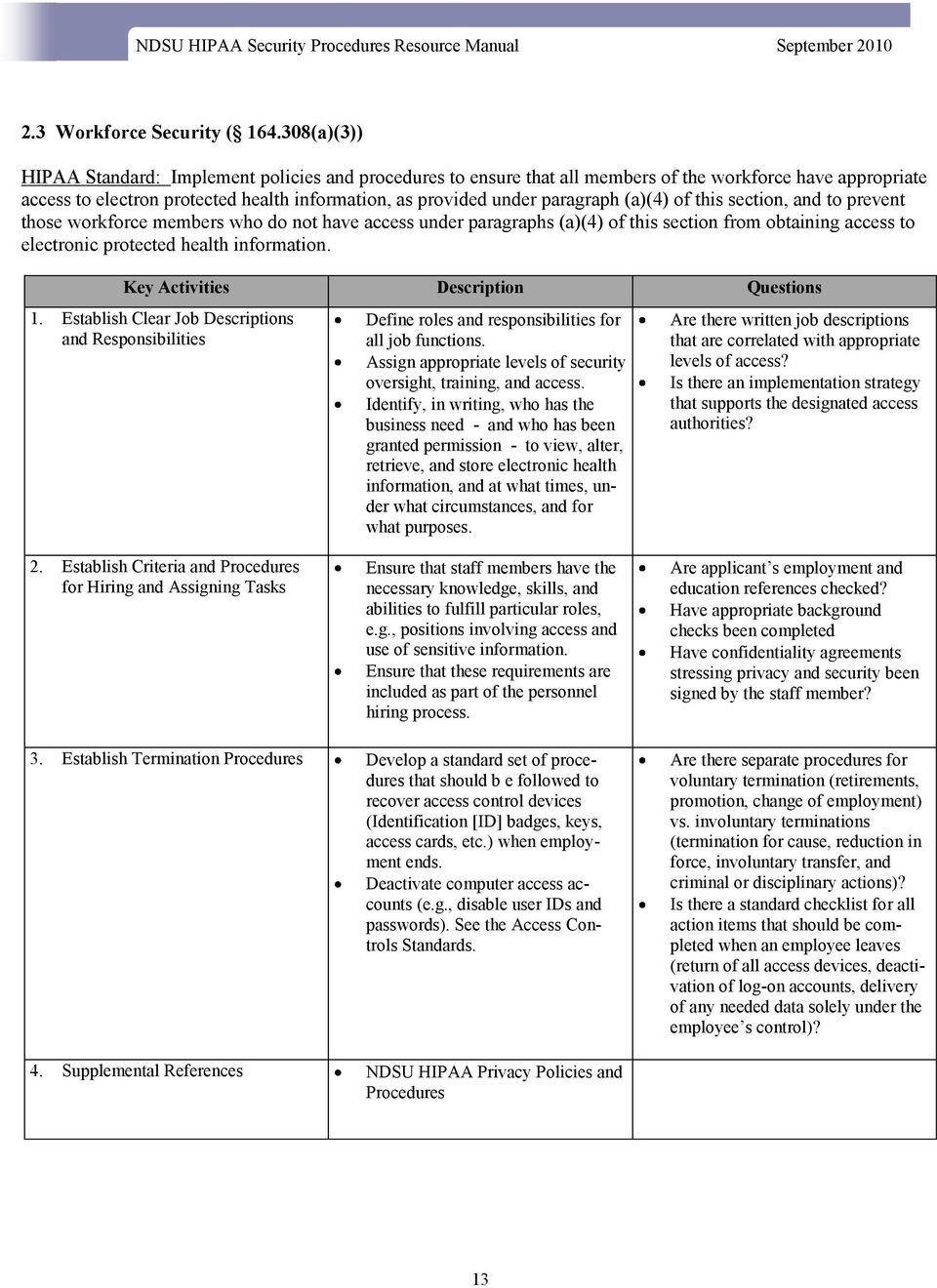
13 2.3 Workforce Security ( (a)(3)) HIPAA Standard: Implement policies and procedures to ensure that all members of the workforce have appropriate access to electron protected health information, as provided under paragraph (a)(4) of this section, and to prevent those workforce members who do not have access under paragraphs (a)(4) of this section from obtaining access to electronic protected health information. Key Activities Description Questions 1. Establish Clear Job Descriptions and Responsibilities Define roles and responsibilities for all job functions. Assign appropriate levels of security oversight, training, and access. Identify, in writing, who has the business need - and who has been granted permission - to view, alter, retrieve, and store electronic health information, and at what times, under what circumstances, and for what purposes. Are there written job descriptions that are correlated with appropriate levels of access? Is there an implementation strategy that supports the designated access authorities? 2. Establish Criteria and Procedures for Hiring and Assigning Tasks Ensure that staff members have the necessary knowledge, skills, and abilities to fulfill particular roles, e.g., positions involving access and use of sensitive information. Ensure that these requirements are included as part of the personnel hiring process. Are applicant s employment and education references checked? Have appropriate background checks been completed Have confidentiality agreements stressing privacy and security been signed by the staff member? 3. Establish Termination Procedures Develop a standard set of procedures that should b e followed to recover access control devices (Identification [ID] badges, keys, access cards, etc.) when employment ends. Deactivate computer access accounts (e.g., disable user IDs and passwords). See the Access Controls Standards. Are there separate procedures for voluntary termination (retirements, promotion, change of employment) vs. involuntary terminations (termination for cause, reduction in force, involuntary transfer, and criminal or disciplinary actions)? Is there a standard checklist for all action items that should be completed when an employee leaves (return of all access devices, deactivation of log-on accounts, delivery of any needed data solely under the employee s control)? 4. Supplemental References NDSU HIPAA Privacy Policies and Procedures 13
14 2.4 Information access Management ( (a)(4)) HIPAA Standard: Implement policies and procedures for authorizing access to electronic protected health information that are consistent with the applicable requirements for subpart E of this part. Key Activities Description Questions 1. Determine Criteria for Establishing Access Decide how the person with the assigned security responsibility will consistently grant access to others within the organization. Document which process will be used to select the basis for restricting access. Choose between identity-based access (by name) or role-based access (by job or other appropriate means). Does the organization s IT operating system have the capacity to set access controls? Are there documented job descriptions that accurately reflect assigned duties and responsibilities and enforce segregation of duties? Will access be identity-based on their job requirements? 2. Determine Who Should be Authorized to Access Information Systems 3. Evaluate Existing Security Measures Related to Access Controls Establish standards for granting access. Provide formal authorization from the appropriate authority before granting access to sensitive information. Evaluate access controls already in place or implement new access controls as appropriate. Coordinate with other existing management, operational, and technical controls, such as policy standards and personnel procedures, maintenance and review of audit trails, identification, and authentication of users, and physical access controls. Are duties separated such that only the minimum necessary electronic health information is made available to each staff member based on their job requirements? Are access policies reviewed and updated routinely? Do all employees receive appropriate security training? Are authentication mechanisms used to verify the identity of those accessing systems? Does management regularly review the list access authorizations and update as necessary? What policies and procedures are already in place for access control safeguards? 4. Supplemental References NDSU HIPAA Privacy Policies and Procedures NDUS NDSU 158 NDSU

15 2.5 Security Awareness and Training ( (a)(5)) HIPAA Standard: Implement security awareness and training program for all members of its workforce (including management). Key Activities Description Questions 1. Conduct a Training Needs Assessment 2. Develop and Approve a Training Strategy and a Plan 3. Develop Appropriate Awareness and Training Content; Create Training Materials; and Determine Best Delivery Methods Determine the training needs of the organization. Interview and involve key personnel in assessing security training needs. Address the specific HIPAA policies that require awareness and training in the written training strategy. Outline the written training plan, the scope of the awareness and training program; the goals; the target audiences; the learning objectives; the deployment methods, evaluation, and measurement techniques; and the frequency of training. Select the topics that may need to be included in the training materials such as the following: Security reminders. Incident reporting. How to protect and guard the system from malicious software. Procedures for monitoring login attempts and reporting discrepancies. Password management and use. Use new and hot information from advisories, online IT security daily news web sites, and periodicals. What awareness, training, and education programs are needed (e.g., what is required)? What is the current status regarding how these needs are being addressed (e.g., how well are current efforts working)? Where are the gaps between the needs and what is being done (e.g., what more needs to be done)? What are the training priorities? Is there a procedure in place to ensure that everyone in the organization receives security awareness training? What type of security training is needed to address specific technical topics based on job responsibility? When should training be scheduled to ensure that compliance deadlines are met? Is security awareness discussed with all new hires (e.g., employee orientation)? Are security topics reinforced during routine staff meetings? Have employees received a copy of or do they have easy access to the security procedures and policies? Do employees know whom to contact and how to handle a security incident? Do employees understand the consequences of noncompliance with the stated security policy? Are employees who travel aware of both physical laptop security issues and how to handle them? Do employees know the importance of timely application of system patches? 15

16 Key Activities Description Questions 3. Develop Appropriate Awareness and Training Content; Create Training Materials; and Determine Best Delivery Methods (Cont d) Deliver training information to staff in the easiest and most cost-efficient manner. Consider using a variety of media and avenues according to what is appropriate for the organization based on workforce size, location, level of education, etc. Is there in-house training staff? What is the security training budget? 4. Implementing the Training Schedule and conduct the training outlined in the strategy and plan. Implement any reasonable technique to disseminate the security message in an organization, including newsletters, screensavers, videotapes, messages, teleconferencing sessions, staff meetings, and computer-based training. 5. Monitor and Evaluate Training Plan Keep the security awareness and training program fresh and current. Conduct training whenever changes occur in the technology and practices as appropriate. Monitor the training program implementation to be sure all employees participate. Implement corrective actions when problems arise. Have all employees received adequate training to fulfill their security responsibilities? What methods are available or already in use to make employees aware of security (e.g., posters or booklets, Web tutorials, Web sites)? Are employee training and professional development programs documented and monitored (e.g., responsibility review)? Is there annual security refresher training? How are new employees trained on security? 6. Supplemental References NDSU HIPAA Privacy Policies and Procedures NDUS NDSU 158 NDSU 710 Any other applicable NDSU personnel policies 16

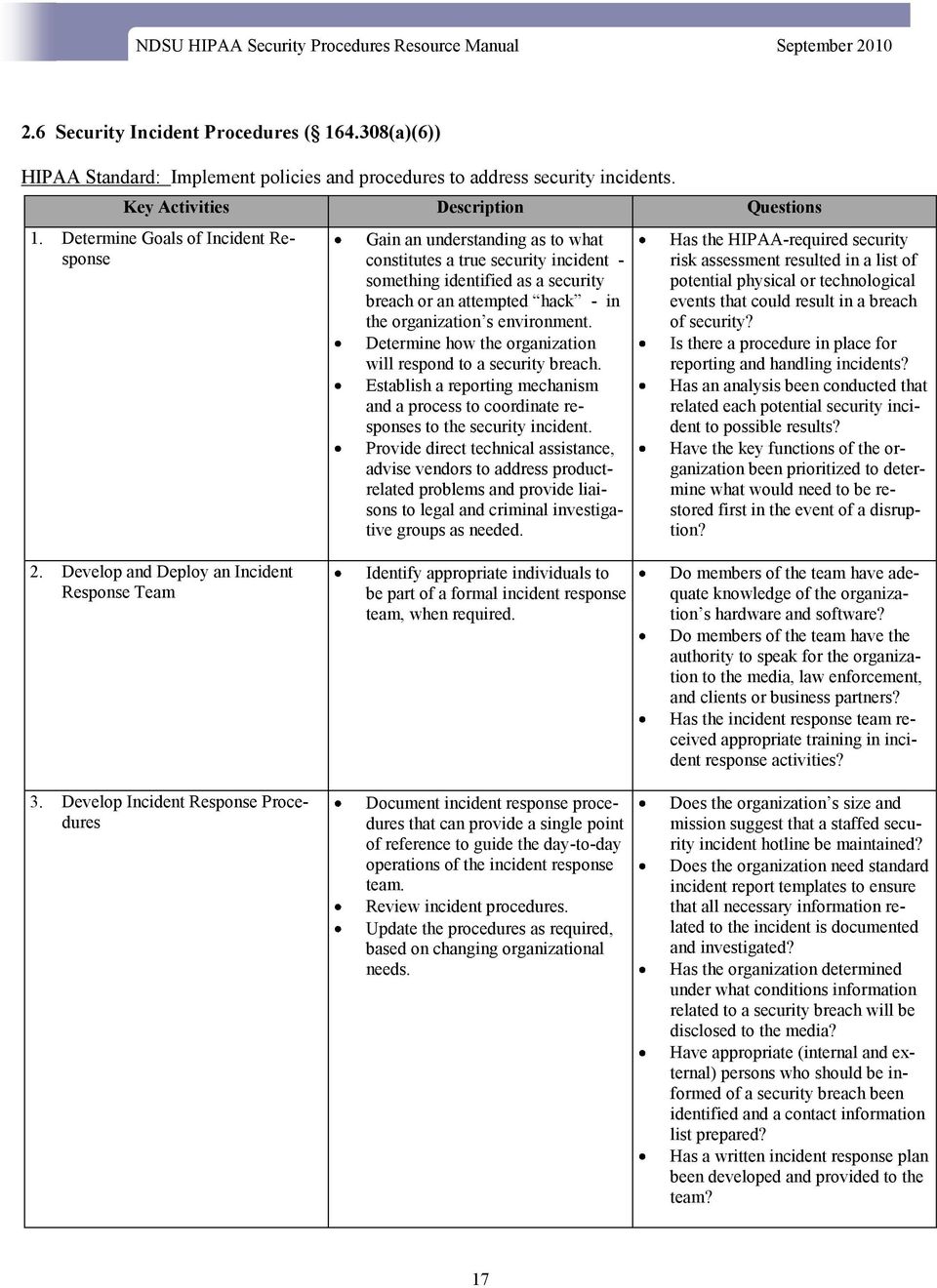
17 2.6 Security Incident Procedures ( (a)(6)) HIPAA Standard: Implement policies and procedures to address security incidents. Key Activities Description Questions 1. Determine Goals of Incident Response Gain an understanding as to what constitutes a true security incident - something identified as a security breach or an attempted hack - in the organization s environment. Determine how the organization will respond to a security breach. Establish a reporting mechanism and a process to coordinate responses to the security incident. Provide direct technical assistance, advise vendors to address productrelated problems and provide liaisons to legal and criminal investigative groups as needed. Has the HIPAA-required security risk assessment resulted in a list of potential physical or technological events that could result in a breach of security? Is there a procedure in place for reporting and handling incidents? Has an analysis been conducted that related each potential security incident to possible results? Have the key functions of the organization been prioritized to determine what would need to be restored first in the event of a disruption? 2. Develop and Deploy an Incident Response Team 3. Develop Incident Response Procedures Identify appropriate individuals to be part of a formal incident response team, when required. Document incident response procedures that can provide a single point of reference to guide the day-to-day operations of the incident response team. Review incident procedures. Update the procedures as required, based on changing organizational needs. Do members of the team have adequate knowledge of the organization s hardware and software? Do members of the team have the authority to speak for the organization to the media, law enforcement, and clients or business partners? Has the incident response team received appropriate training in incident response activities? Does the organization s size and mission suggest that a staffed security incident hotline be maintained? Does the organization need standard incident report templates to ensure that all necessary information related to the incident is documented and investigated? Has the organization determined under what conditions information related to a security breach will be disclosed to the media? Have appropriate (internal and external) persons who should be informed of a security breach been identified and a contact information list prepared? Has a written incident response plan been developed and provided to the team? 17
18 Key Activities Description Questions 4. Incorporate Post-Incident Analysis into Updates and Revisions Measure effectiveness and update security incident response procedures to reflect lessons learned, and make recommendations for improvements to security controls after a security incident. 5. Supplemental References NDSU HIPAA Privacy Policies and Procedures NDUS Does the incident response team keep adequate documentation of security incidents that list what weaknesses were exploited and how access to information was gained? Do records reflect new contacts and resources identified for responding to an incident? Does the organization consider whether current procedures were adequate for responding to a particular security incident? 18

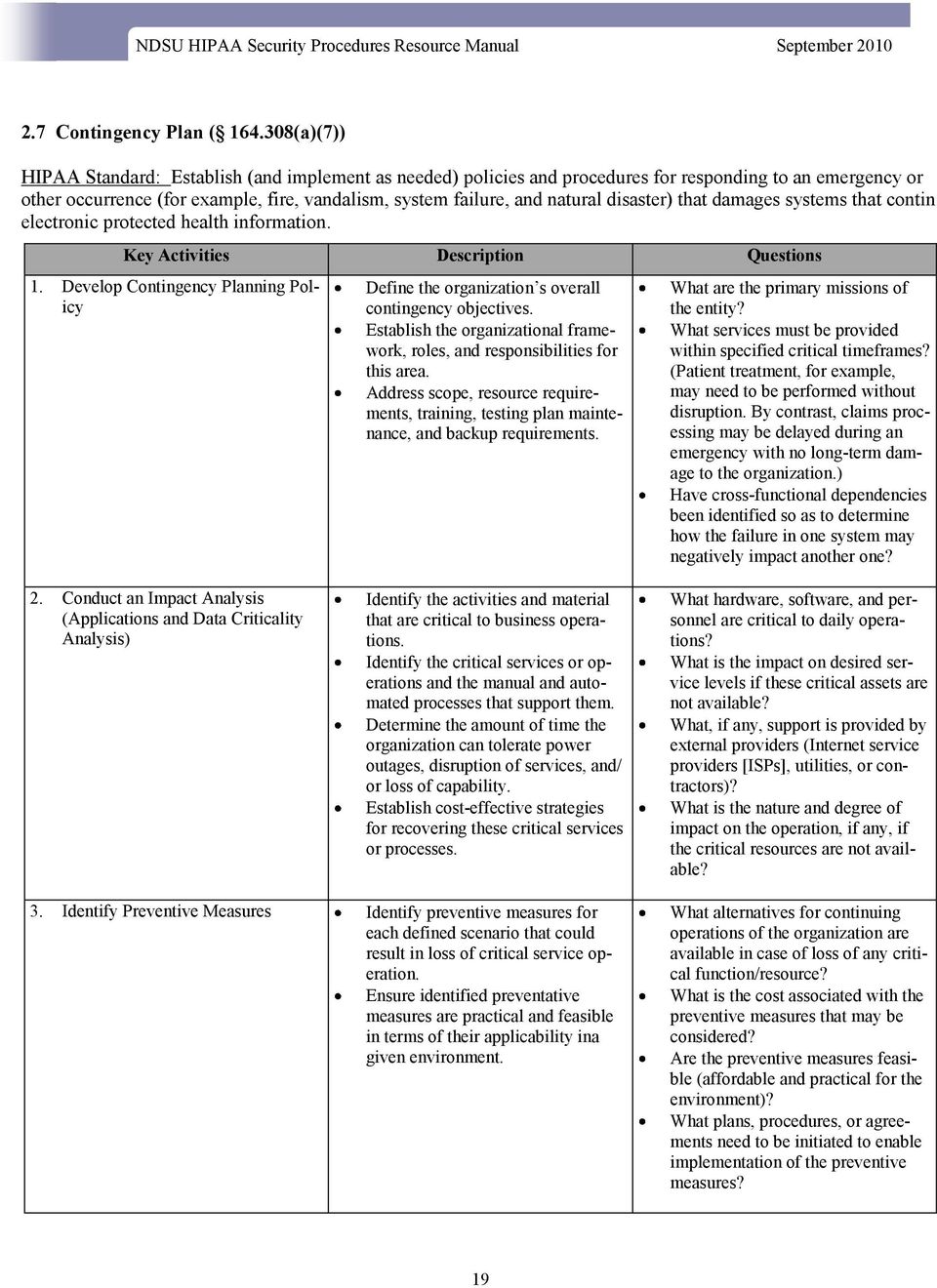
19 2.7 Contingency Plan ( (a)(7)) HIPAA Standard: Establish (and implement as needed) policies and procedures for responding to an emergency or other occurrence (for example, fire, vandalism, system failure, and natural disaster) that damages systems that contin electronic protected health information. Key Activities Description Questions 1. Develop Contingency Planning Policy Define the organization s overall contingency objectives. Establish the organizational framework, roles, and responsibilities for this area. Address scope, resource requirements, training, testing plan maintenance, and backup requirements. What are the primary missions of the entity? What services must be provided within specified critical timeframes? (Patient treatment, for example, may need to be performed without disruption. By contrast, claims processing may be delayed during an emergency with no long-term damage to the organization.) Have cross-functional dependencies been identified so as to determine how the failure in one system may negatively impact another one? 2. Conduct an Impact Analysis (Applications and Data Criticality Analysis) Identify the activities and material that are critical to business operations. Identify the critical services or operations and the manual and automated processes that support them. Determine the amount of time the organization can tolerate power outages, disruption of services, and/ or loss of capability. Establish cost-effective strategies for recovering these critical services or processes. What hardware, software, and personnel are critical to daily operations? What is the impact on desired service levels if these critical assets are not available? What, if any, support is provided by external providers (Internet service providers [ISPs], utilities, or contractors)? What is the nature and degree of impact on the operation, if any, if the critical resources are not available? 3. Identify Preventive Measures Identify preventive measures for each defined scenario that could result in loss of critical service operation. Ensure identified preventative measures are practical and feasible in terms of their applicability ina given environment. What alternatives for continuing operations of the organization are available in case of loss of any critical function/resource? What is the cost associated with the preventive measures that may be considered? Are the preventive measures feasible (affordable and practical for the environment)? What plans, procedures, or agreements need to be initiated to enable implementation of the preventive measures? 19
20 Key Activities Description Questions 4. Develop Recovery Strategy Finalize the set of contingency procedures that should be invoked for all identified impacts including emergency mode operation. The strategy must be adaptable to the existing operating environment and address allowable outage times and associated priorities identified in Step 2. Ensure, if part of the strategy depends on external organizations for support, that formal agreements are in place with specific requirements stated. Have agreed-upon procedures for each possible type of impact identified been documented? Has a coordinator who manages, maintains, and updates the plan been designated? Has an emergency call list been distributed to all employees? Have recovery procedures been documented? Has a determination been made regarding when the plan needs to be activated (anticipated duration of outage, tolerances for outage or loss of capability, impact on service delivers, etc.)? 5. Develop the Contingency Plan Document all decisions made in the previous steps. Is there a written plan? Does it address both disaster recovery and data backup? 6. Plan Testing, Training, and Execution Test the contingency plan on a predefined cycle (stated in policy development under Step 1). Train those with defined plan responsibilities in their roles. If possible, involve external entities (vendors, alternative site/service providers) in testing exercises. Make key decisions regarding how the testing is to occur ( tabletop exercise versus staging a real operational scenario including actual loss of capability). Decide how to segment the type of testing based on the assessment of business impact and acceptability of sustained loss of service. Consider cost. How is the plan to be tested? Does testing lend itself to a phased approach? Is it feasible to actually take down functions/services for the purpose of testing? Can testing be done during normal business hours, or must it take place during off-hours? If full testing is infeasible, has a tabletop scenario (classroom-like exercise) been considered? How frequently is the plan to be tested (annually)? When should the plan be revised? 7. Supplemental References NDSU HIPAA Privacy Policies and Procedures NDUS

21 2.8 Evaluation ( (a)(8)) HIPAA Standard: Perform a periodic technical and non-technical evaluation based on the standards implemented under this rule and subsequently, in response to environmental or operational changes affecting the security of electronic protected health information that establishes the extent to which an entity s security policies and procedures meet the requirements of this subpart. Key Activities Description Questions 1. Determine Whether Internal or External Evaluation is Most Appropriate Decide whether the evaluation will be conducted with internal staff resources or external consultants. Engage external expertise to assist the internal evaluation team where additional skills and expertise is required. Use internal resources to supplement an external source of help, because these internal resources can provide the best institutional knowledge and history of internal policies and practices. Which staff has the technical expertise and experience to evaluate the system? How much training will staff need on security-related technical and non-technical issues? What are the credentials required for an outside vendor? What is the budget for internal resources to assist with an evaluation? Can other external organizations provide assistance if needed? 2. Develop Standards and Measurements for All Areas and Topics of Security Use an evaluation strategy and tool that has substance and can be tracked, such as a questionnaire or checklist, because documentation is key to demonstrating compliance. Implement tools that can provide reports on the level of compliance, integration, or maturity of a particular security safeguard. If available, engage corporate, legal, or regulatory compliance staff when conducting the analysis. Leverage any existing reports or documentation that may already be prepared by the organization addressing compliance, integration, or maturity of a particular security safeguard. Have management, operational, and technical issues been considered? Do the elements of the evaluation procedure (questions, statements, and other components) address individual, measurable security safeguards? Has the procedure been developed and tested in a few areas or systems? Is the procedure supportive of objectives contained in HIPAA? Does the evaluation tool consider all standards and implementation specifications of the HIPAA Security Rule? 3. Conduct Evaluation Determine in advance what departments and/or staff will participate in the evaluation. Secure management support for the evaluation process to ensure participation. Collect and document all needed information. Have staff members with knowledge of IT security been consulted in the evaluation team? Has specifically worded, written approval from senior management been received for any penetration testing? 21
22 Key Activities Description Questions Collection methods may include the following: Interviews Surveys Outputs of automated tool, such as access control auditing tools, system logs, and results of penetration testing. Penetration testing is a security testing method where trusted insiders attempt to compromise system security for the sole purpose of testing the effectiveness of security controls. Has the process been formally communicated to those who have been assigned roles and responsibilities in the evaluation process? Is an automated tool available to support the evaluation process? 4. Document Results Analyze the evaluation results. Identify security weaknesses. Document, in writing, every finding and decision. Develop security program priorities and establish targets for continuous improvement. 5. Repeat Evaluation Periodically Establish the frequency of evaluations, taking into account the sensitivity the EPHI controlled by the organization, it size and complexity, and other relevant laws or accreditation requirements. Repeat evaluations when significant changes to the security environment are made; e.g., if new technology is adopted or there are newly recognized risks to the security of the information. Does the process support development of security recommendations? Has a report been written that highlights key findings and recommendations? Have steps been taken to ensure that the final report is made available only to those persons designated to receive it? Do security policies specify that evaluations will be repeated when changes are made to security practices or the IT system? Do policies on frequency of security evaluations reflect any and all relevant federal or state laws? 6. Supplemental References NDSU HIPAA Privacy Policies and Procedures NDUS
23 2.9 Business Associate Contracts and Other Arrangements ( (b)(1)) HIPAA Standard: A covered entity, in accordance with , may permit a business associate to create, receive, maintain, or transmit electronic protected health information on the covered entity s behalf only if the covered entity obtains satisfactory assurances, in accordance with (s) that the business associate appropriately safeguards the information. Key Activities Description Questions 1. Identify Entities that are Business Associates and Under the HIPAA Security Rule Identify the individual or department who will be responsible for coordinating the execution of business associate agreements. Reevaluate the list of business associates to determine who has access whether the list is complete and current. Identify systems covered by the contract/agreement. Do the business associate agreements written and executed contain sufficient language to ensure that required information types will be protected? Are there any new organizations or vendors that now provide a service or function on behalf of the organization? Such services may include the following: Claims processing or billing Data Analysis Utilization Review Quality Assurance Benefit Management Practice Management Re-pricing All other HIPAA-regulated functions. Hardware Maintenance Have outsourced functions involving the use of protected information been considered such as the following: Actuarial Services Data Aggregation Administrative Services Accreditation Financial Services? 2. Execute New Agreements or Update Existing Agreements as Appropriate Identify roles and responsibilities. Include security requirements in business associate contracts/ agreements to address confidentiality, integrity, and availability of sensitive information. Specify any training requirements associated with the contract/ agreement. Who is responsible for coordinating and preparing the final agreement? Does the agreement specify how information is to be transmitted to an from the business associate? Does the agreement stipulate who is to have access to protected information and for what purpose? 23
24 Key Activities Description Questions 3. Establish Process for Measuring Contract Performance and Terminating the Contract if Security Requirements are Not Being Met Maintain clear lines of communication. Conduct security reviews. Establish criteria for measuring contract performance (metrics). 4. Supplemental References NDSU HIPAA Privacy Policies and Procedures What is the service being performed? What is the outcome expected? Is there a process for reporting security incidents related to the agreement? Is there a need to retain audit logs to support security reviews of the contract? Is there a process in place for terminating the contract if requirements are not being met and has the business associate been advised of what conditions would warrant termination? 24
25 3. Physical Safeguards 3.1 Facility Access Controls ( (a)(1)) HIPAA Standard: Implement policies and procedures to limit physical access to its electronic information systems and the facility or facilities in which they are housed, while ensuring that properly authorized access is allowed. (Note: Supports the Information Access Management Administrative Standard and Access Control Standard.) Key Activities Description Questions 1. Conduct an Analysis of Existing Physical Security Vulnerabilities Inventory facilities and identify shortfalls and/or vulnerabilities in current physical security capabilities. Assign degrees of significance to each vulnerability identified. Highest priority should be on the following primary types of facilities: Data centers. Peripheral equipment locations. IT staff offices. Workstation locations. Do non-public areas have locks and cameras? Are workstations protected from public access or viewing? Are entrances and exits secured? Do policies and procedures already exist regarding access to and use of facilities and equipment? What is the threat environment? Are there possible natural or manmade disasters that could happen in our environment? Do normal physical protections exist (locks on doors, windows, wet., and other means of preventing unauthorized access)? 2. Identify Corrective Measures Identify and assign responsibility for the measures and activities necessary to correct deficiencies. Develop and deploy policies and procedures to ensure that repairs, upgrade, and/or modifications are made to the appropriate physical areas of the facility. Who is responsible for security? \Who is responsible for facility/ physical security? Are policies and procedures already in place? Do they need to be revised? What training will be needed for emp0loyees to understand the policies and procedures? How will we document the decisions and actions? Are we dependent on a landlord or particular group of department to make physical changes to meet the requirements? 25
26 Key Activities Description Questions 3. Develop a Facility Security Plan Document appropriate measures to provide physical security protection for EPHI in a covered entity s possession. Include documentation of the facility inventory, as well as information regarding the physical maintenance records and the history of changes, upgrades, and other modifications. 4. Develop Access Control Procedures Develop policies and procedures to provide facility access to authorized personnel and visitors. Is there an inventory of facilities and existing security practices? What are the current procedures for securing the facilities (exterior, interior, equipment, access controls, maintenance records, etc.)? Who is responsible for the facility plan? Is there a contingency plan already in place, under revision, or under development? What policies and procedures are in place for controlling access by staff, contractors, visitors, and probationary employees? How many access points exist in each facility? Is there an inventory? Is monitoring equipment necessary? 5. Establish Contingency Operations Procedures Develop policies and procedures to provide appropriate facility access to emergency response personnel. Who need access to the facility in the event of disaster? What is the backup plan for facility access? Who is responsible for implementing the contingency plan in each department, unit, etc.? What is the backup plan for emergency access to EPHI? Have all types of potential disasters been considered (fire, flood, earthquake, etc.)? Have clear lines of authority been established for crisis managementtype decisions? 6. Supplemental References NDSU HIPAA Privacy Policies and Procedures NDUS NDSU 158 NDSU
27 3.2 Workstation Use ( (b)) HIPAA Standard: Implement policies and procedures that specify the proper functions to be performed, the manner in which those function are to be performed, and the physical attributes of the surroundings of a specific workstation that can access electronic protected health information. Key Activities Description Questions 1. Identify Workstation Types and Functions or Uses Inventory workstations and devices. Develop policies and procedures for each type of workstation and workstation device, identifying and accommodating their unique issues. 3 Classify workstations based on the capabilities, connections, and allowable activities for each workstation used. Do we have an inventory of workstation types and locations in the department or organization? Who is responsible for this inventory and its maintenance? What tasks are commonly performed on a given workstation or type of workstation? Are there wireless tools in use as workstations? If so, what types and for what purpose? (Examples include Personal Digital Assistance (PDAs), laptops with wireless Internet connections, etc.) 2. Identify Expected Performance of Each Type of Workstation Develop and document policies and procedures related to the proper use and performance of workstations. How are workstations used in dayto-day operations? What are key operational risks that could result in a breach of security? 3. Supplemental References NDSU HIPA Privacy Policies and Procedures NDUS NDSU 158 NDSU The definition of a workstation is an electronic computing device, i.e., desktop, laptop, or other device that performs similar functions, including the electronic media in its immediate environment. This latter statement extends the definition of workstation to a wider range of computer input and output devices - unintelligence and intelligent computer terminals, personal digital assistants, other wireless devices, diagnostic equipment, etc. 27
28 3.3 Workstation Security ( (c)) HIPAA Standard: Implement physical safeguards for all workstations that access electronic protected health information, to restrict access to authorized users. Key Activities Description Questions 1. Identify All Methods of Physical Access to Workstations Document the different ways workstations are accessed by employees and non-employees. Is there an inventory of all current workstations? Are any workstations located in public areas? Are laptops used as workstations? Are Personal Digital Assistants (PDAs) used as workstations? 2. Analyze the Risk Associated with Each Type of Access Determine which type of access holds the greatest threat to security. Are any workstations in areas that are more vulnerable to unauthorized viewing of the data they contain? What are the options for making modifications to the current access configuration? 3. Identify Physical Safeguards Document the options for deploying physical safeguards that will minimize the risk of security of electronic health information. What safeguards are in place (i.e., locked doors, screen barriers, cameras, guards)? Do any workstations need to be relocated to enhance physical security? Have employees been trained on security? Do mobile workstations have the ability to encrypt data storage and transmission? 4. Supplemental References NDSU HIPAA Privacy Policies and Procedures NDUS NDSU 158 NDSU
29 3.4 Device and Media Controls ( (d)(1)) HIPAA Standard: Implement policies and procedures that govern the receipt and removal of hardware and electronic media that contain electronic protected health information into and out of a facility, and the movement of these items within the facility. Key Activities Description Questions 1. Evaluate Methods of Final Disposal of Electronic Health Information (EPHI) Determine and document the appropriate methods to dispose of hardware, software, and the data itself. Assure that EPHI is properly destroyed and cannot be recreated. What data is maintained by the organization, and where? Is data on removable, reusable media such as tapes and CDs? Is there a process for destroying data on hard drives and file servers? What are the options for disposing of data on hardware? What are the costs? 2. Develop and Implement Procedures for Reuse of Electronic Media 3. Maintain Records of Hardware, Media, and Personnel 4. Develop Backup Procedures to Ensure That the Integrity of Electronic Health Information Will Not Be Jeopardized During Equipment Relocation Ensure that health information previously stored on electronic media cannot be accessed and reused. Identify removable devices and their use. Ensure that EPHI is removed from reusable media before it is used to record new information. Ensure that EPHI is not inadvertently released or shared with any unauthorized party. Ensure that an individual is responsible for, and record the receipt and removal of hardware and software with EPHI. Ensure that an exact, retrievable copy of the data is retained and protected. Do policies and procedures already exist regarding reuse of electronic media (hardware and software)? Is one individual and/or department responsible for coordinating the disposal of data, and the reuse of the hardware and software? Are employees appropriately trained on security and risks to EPHI when reusing software and hardware? Where is the data stored (what type of media)? What procedures already exist regarding tracking of hardware and software within the organization? What procedures exist to track hardware and software internally? Who is responsible for maintaining records of hardware and software? Are backup files maintained offsite? Do backup procedures exist? Who has this responsibility? Are backup procedures documented and available to other staff? If data were to be unavailable for a period of time, what would the business impact be? Is there a contingency plan in place? 29
30 Key Activities Description Questions 5. Supplemental References NDSU HIPAA Privacy Policies and Procedures NDUS Policy NDSU Computer Redistribution and Surplus Policy Procedure for Redistribution and Salvage of Computers and Peripherals 30
31 4. Technical Safeguards 4.1 Access Control ( (a)(1)) HIPAA Standard: Implement technical policies and procedures for electronic information systems that maintain electronic protected health information to allow access to those persons or software programs that have been granted access rights as specified in (a)(4). (Note: Supports the Information Access Management Administrative Standard and Facility Access Controls Physical Standard.) Key Activities Description Questions 1. Analyze Workloads and Operations to Identify the Access Needs of All Users Identify an approach for access control. Consider all applications and systems containing electronic health information that should only be available to approved users. What are the applications/systems that require access controls? What user roles are defined for those applications/system? Where is the health information supporting those applications/ systems currently housed (i.e., stand -alone PC, network)? Are data and/or systems being accessed remotely? 2. Identify All Data and Systems Where Access Control is a Requirement. Determine the scope and degree of access control needed. How are systems accessed (viewing data, modifying data, creating data)? Are passwords being used? If so, are they unique by individual? 3. Ensure That All System Users Have Been Assigned a Unique Identifier. Ensure that system activity can be traced to a specific user. Ensure that the necessary data is available in the system logs to support audit and other related business functions. How should the identifier be established (length and content)? Should the identifier be selfselected or randomly generated? How often should the identifier be changed? 4. Develop Access Control Policy. Establish a formal policy for access control that will guide the development of procedures. Have rules of behavior been established and communicated by system users? How will rules of behavior be enforced? Has a determination been made on use of encryption? 5. Implement Access Control Procedures Using Selected Hardware and Software. Implement the policy and procedures using a cost-effective hardware/software solution. Who will manage the access controls procedures? Are current users trained in access control management? Will user training be needed to implement access control procedures? 31
32 Key Activities Description Questions 6. Review and Update User Access. Enforce policy and procedures as a matter of ongoing operations. Determine if any changes are needed for access control mechanisms. Establish procedures for updating access when users require the following: Initial access. Increased access. Access to different systems or applications than those they currently have. Have new employees/users been given proper instructions for protecting data and systems? What are the procedures for new employee/user access to data and systems? Are there procedures for reviewing and, if appropriate, modifying access authorization for existing users? 7. Establish an Emergency Access Procedure. 8. Terminate Access if it is No Longer Required. Identify a method of supporting continuity of operations should the normal access procedures be disabled or unavailable due to system problems. Ensure only those with a need to know have access to protect data and systems. When should the emergency access procedure be activated? Who is authorized to make the decision? Who has assigned roles in the process? Is the emergency access procedure to be a default emergency procedure, which has been established and communicated to all users, or is it a process restricted to, and conducted by a few authorized individuals? Can it be activated on a user-byuser basis? Are rules being enforced to remove access by staff members who no longer have a need to know because they have changed assignments or have stopped working for the organization? 9. NOTE: The descriptions and questions/tasks that appear in this standard assume that the appropriate policies have been written and that the Security Official, the Security Management Plan and infrastructure are in place. 10. Supplemental References: NDSU HIPA Privacy Policies and Procedures NDUS NDSU 158 NDSU
33 4.2 Audit Control ( (b)) HIPAA Standard: Implement hardware, software, and/or procedure mechanisms that record and examine activity in information systems that contain or use electronic protected health information. Key Activities Description Questions 1. Determine the Systems or Activities that Will be Tracked or Audited. Determine the appropriate scope of any system audits that will be necessary based on the size and needs of the covered entity. Use results or risk assessment to determine which systems and activities should be tracked and audited. Determine what data needs to be captured. Where is EPHI at risk in the organization? What systems, applications, or processes make data vulnerable to unauthorized or inappropriate tampering, users, or disclosures? What activities will be monitored (Create, Read, Update, Delete = CRUD)? What should the audit record include (i.e., user ID, event type/date/ time)? 2. Select the Tools that Will be Deployed for Auditing and System Activity Reviews. 3. Develop and Deploy the Information System Activity Reviews. 4. Develop Appropriate Standard Operating Procedures. Evaluate existing system capabilities and determine if any changes or upgrades are necessary. Document and communicate to the workforce the facts about the organization s decisions on audits and reviews. Determine the types of audit trail data and monitoring procedures that will be needed to derive exception reports. What tools are in place? What are the most appropriate monitoring tools for the organization (third party, freeware, or operating system provided)? Are changes/upgrades cost effective? Who is responsible for the overall audit process and results? How often will audits take place? How often will audit results be analyzed? What is the organization s sanction policy for employee violations? Where will audit information reside (i.e., separate server)? How will exception reports or logs be reviewed? Where will monitoring reports be filed and maintained? Is there a formal process in place to address system misuse, abuse, and fraudulent activity? How will managers and employees be notified, when appropriate, regarding suspect activity? 33
34 Key Activities Description Questions 5. Implement the Audit/System Activity Review Process. Activate the necessary audit system. Begin logging and auditing procedures. 6. NOTE: The descriptions and questions/tasks that appear in this module assume that the appropriate policies have been written and that the Security Official, the Security Management Plan and infrastructure are in place. 7. Supplemental References. NDSU HIPAA Privacy Policies and Procedures NDUS NDSU 158 NDSU 710 NDSU Acceptable Use of Electronic Communication Devises Procedure NDSU Forensic Responsibility Chart NDSU ITS Equipment Seizure Form What mechanisms will be implemented to assess the effectiveness of the audit process (metrics)? What is the plan to revise the audit process when needed? 34
35 4.3 Integrity ( (c)(1)) HIPAA Standard: Implement policies and procedures to protect electronic protected health information from improper alteration or destruction. Key Activities 1Description 2Questions 1. Identify All Users Who are Authorized to Access Electronic Protected Health Information. Identify all approved users with the ability to alter or destroy data. How are users authorized to access the information? Is there a sound basis established as to why they need the access? Have they been trained on how to use the information? Is there an audit trail established for access to the information? 2. Indentify Any Possible Unauthorized Sources That May be Able to Intercept the Information and Modify It. 3. Develop the Integrity Policy and Requirements. 4. Implement Procedures to Address These Requirements. Identify scenarios that may result in modification to the electronic health information by unauthorized sources (i.e., hackers, disgruntled employees, business competitors). Consider conducting this activity as part of your Risk Analysis. Establish a formal (written) set of integrity requirements based on the results of the analysis completed in the previous steps. Identify which methods will be used to protect the information from modification. Identify tools and techniques to be developed or procured that support the assurance of integrity. What are likely sources that could jeopardize information integrity? What can be done to protect the integrity of the information when it is residing on a system (at rest)? What procedures and policies can be established to decrease or eliminate alteration of the information during transmission (i.e., encryption)? How feasible and cost-effective to the environment are the options being considered? Have the requirements been discussed and agreed to by identified key personnel involved in the processes that are affected? Have the requirements been documented? Has a written policy been developed and communicated to system users? Are current audit, logging, and access control techniques sufficient to address the integrity of the information? If not, what additional techniques can we apply to check information integrity (i.e., quality control processes, transactions and output reconstruction)? Can additional training of users decrease instances attributable to human errors? 35
36 Key Activities 1Description 2Questions 5. Establish a Monitoring Process to Access How the Implemented Process is Working. Review existing processes to determine if objectives are being addressed. Reassess integrity processes continually as technology and operational environments change to determine if they need to be revised. 6. Supplemental Resources. NDSU HIPAA Privacy Policies and Procedures NDUS NDSU 158 NDSU 710 Network Access Policy and Procedure for NDSU Guests, Vendors, Clients, and Sponsored Groups Are there reported instances of information integrity problems and have they decreased since integrity procedures have been implemented? Does the process, as implemented, provide a higher level of assurance that information integrity is effective? 36
37 4.4 Person or Entity Authentication ( (d)) HIPAA Standard: Implement procedures to verify that a person or entity seeking access to electronic protected health information is the one claimed. Key Activities 1Description 2Questions 1. Determine Authentication Applicability to Current Systems/ Applications. Identify methods available for authentication. Authentication is the process of establishing the validity of a transmission s source or verifying an individual s authorization claim for specific access privileges to information and information systems. What authentication methods are available? What are the advantages and disadvantages of each method? What will it cost to implement the available methods in our environment? Do we have trained staff who can maintain the system or do we need to consider outsourcing some of the support? 2. Evaluate Authentication Options Available. 3. Select and Implement Authentication Option. Weigh the relative advantages and disadvantages commonly used in authentication approaches. There are four commonly used approaches available: 1. Something a person knows, such as a password. 2. Something a person has or is in possession of, such as a token (smart card, ATM card, etc.). 3. Some type of biometric identification a person provides, such as a fingerprint. 4. A combination of two or more of the above approaches. Consider the results of the analysis conducted under Step 2 above, and select appropriate authentication methods. Implement the methods selected into your operations and activities. What are the strengths and weaknesses of each available option? Which can be best supported with assigned resources (budget/ staffing)? What level of authentication is appropriate based on our assessment of risk to the information/systems? Do we need to acquire outside vendor support to implement the process? Has necessary user and support staff training been completed? Have formal authentication policy and procedures been established and communication? Has necessary testing been completed to ensure that the authentication system is working as prescribed? Do the procedures include ongoing maintenance and updates? Is the process implemented in such a way that it does not compromise the authentication information (password file encryption, etc.)? 37
38 Key Activities 1Description 2Questions 5. Supplemental References. NDSU HIPAA Privacy Policies and Procedures NDUS NDSU 158 NDSU 710 Network Access Policy and Procedure for NDSU Guests, Vendors, Clients, and Sponsored Groups 38
39 4.5 Transmission Security ( (e)(1) HIPAA Standard: Implement technical security measures to guard against unauthorized access to electronic protected health information that is being transmitted over an electronic communications network. Key Activities 1Description 2Questions 1. Identify Any Possible Unauthorized Sources that May be Able to Intercept and/or Modify the Information. Identify scenarios that may result in modification to the electronic protected health information (EPHI) by unauthorized sources during transmission (i.e., hackers, disgruntled employees, business competitors). What measures exist to protect EPHI? What measures are planned to protect EPHI> Is there an auditing process in place? Is there assurance that information is not altered during transmission? Are there trained staff members to monitor transmissions? 2. Develop a Transmission Security Policy. 3. Implement Procedures for Transmitting Electronic Health Information Using Hardware/Software if Needed. Establish a formal (written) set of requirements for transmitting electronic protected health information. Identify methods of transmission that will be used to protect electronic health information. Identify tools and techniques that will be used to support the transmission security policy. Have the requirements been discussed and agreed to by identified key personnel involved in transmitting electronic health information? Has a written policy been developed and communicated to system users? Is encryption needed to effectively protect the information? Is encryption feasible and cost effective in this environment? Are staff members skilled in the use of encryption? 4. Supplemental References. NDSU HIPAA Privacy Policies and Procedures NDUSA
40 Appendix A - References Public Laws Public Law , Health Insurance Portability and Accountability Act (HIPAA) of 1996, August, 21, 1996 Federal Regulations Health Insurance Reform: Security Standards; Final Rule ( The HIPAA Security Rule ), 68 C.F.R. 8334, February 20, 2003 University Systems Policies and Procedures SBHE Policy NDUS Policy/Procedure NDSU Policies and Procedures NDSU Policy 158 NDSU Policy 710 NDSU Acceptable Use for Electronic Device Communications Procedures NDSU Acceptable Use Responsibility Chart NDSU ITS Equipment Seizure Form Acceptable Use of Electronic Communication Devices and NDSU (Pamphlet) NDSU Computer Redistribution and Surplus Policy Procedure for Redistribution and Salvage of Computers and Peripherals NDSU Network Access Policy and Procedure for NDSU Guests, Vendors, Clients and Sponsored Groups Web Sites and Other Resources National Institute of Standards and Technology (NIST): Computer Security Resource Center (CSRC), csrc.nist.gov/ Department of Health and Human Services (DHHS), Centers for Medicare and Medicaid Services (CMS), HIPAA Resources, Workgroup for Electronic Data Interchange (WEDI), National Committee on Vital and Health Statistics (NCVHS), 40
41 Appendix B - Glossary The terms and definitions used in this resource document have been obtained from congressional legislation, executive orders, and commonly accepted glossaries of security terminology, including that of the National Institute of Standards and Technology (NIST) Special Publication : Recommended Security Controls for Federal Information Systems. Administrative Safeguards Administrative actions, policies, and procedures to manage the selection, development, implementation, and maintenance of security measures to protect electronic health information and to manage the conduct of the covered entity s workforce in relation to protecting the information. Addressable As applied to an implementation specification of the Health Insurance Portability Accountability Act of 1996 (HIPAA), describing a measure that is mandatory for all HIPAA-covered entities unless the entity concludes the measure is not reasonable and appropriate after conducting a required analysis. The covered entity may still be required to implement an equivalent measure if the equivalent measure is reasonable and appropriate and achieves the same end as the addressable implementation specification. Affiliated Covered Entities Legally, separated covered entities that are under common ownership or control that have all designated themselves as single affiliated covered entities for the purposes of the Privacy and Security Rule (more precisely, those parts of the Rules appearing at 45 C.F.R., Part 160, Subparts C and E). Availability The property that data or information is accessible and usable on demand by an authorized person. Ensuring timely and reliable access and use of information. (NDIS SB ) Authorized User Computing and networking resources are provided to support the academic research, instructional, outreach and administrative objectives of the NDUS and its institutions. These resources are extended to accomplish tasks related to the individual s status with NDUS or its institutions. Authorized users are (1) current faculty, staff and students of the North Dakota University System; (2) individuals connecting to a public information service (see section 5.3); and (3) other individuals or organizations specifically authorized by the NDUS or and NDUS institution. For the purpose of this policy, no attempt is made to differentiate among users by the user s group. These policies treat all users similarly, whether student, faculty, staff or other authorized user in terms of expectations of the user s conduct. 41
42 Appendix B - Glossary Business Associate An entity dependent of a HIPAA-covered entity that handles individually identifiable health information received from or provided to the covered entity. For examples of the kinds of activities conducted by business associates, as well as certain exceptions to the definition, see Standards for Privacy of Individually Identifiable Health Information; Final Rule, 65 Fed. Reg (2000) at Computer Security Contingency An event with the potential to disrupt computer operations, thereby, disrupting critical mission and business functions. Examples include a power outage, hardware failure, fire. Flood, or storm. If the event is very destructive, it is often called a disaster. Confidentiality The property that data or information is not made available or disclosed to unauthorized persons or processes. Preserving authorized restrictions on information access and disclosure, including means for protecting personal privacy and proprietary information. (NIST SB800-53) Contingency See Computer Security Contingency. Controls See Security Controls. Countermeasures Synonymous with security controls and safeguards. Actions, devices, procedures, techniques, or other measures that reduce the vulnerability of an information system. Covered Entities Entities that must comply with any or all of the HIPAA Rules in this document, including certain providers, health plans, and health care clearinghouses that are regulated by the HIPAA Security Rule and/or the HIPA Privacy Rule. Electronic Protected Health Information (EPHI) Individually identifiable health information (IIHI) that is transmitted or maintained electronically. EPHI excluded information transmitted or maintained in media that are not electronic. Some other categories of information include IIHI are excluded by EPHI such as some education and employment records. 42
43 Appendix B - Glossary Final Rule The version of the specific requirements for compliance with a statute published by the agency empowered to do so by the relevant statute. Final Rules are published after a public comment period and are usually redrafted to account for issues identified by these public comments. The Final Security and Privacy Rules set compliance deadlines, after which they are effective and enforceable. Health Care Clearinghouse A public or private entity that processes or facilitates the processing of health information received from another entity to or from a standard format. Health Care Provider A provider of medical or health services and any other person who furnishes, bills, or is paid for health care in the normal course of business. Health Information Any information, whether oral or recorded in any form or medium, that is created or received by a health care provider, health plan, public health authority, employer, life insurer, school or university or health care clearinghouse; and relates to the past, present or future physical or mental health or condition of an individual; the provision or health care to an individual; or the past, present or future payment of the provision of health care to an individual. Health Plan An individual or group plan that provides or pays the cost of medical care. Hybrid Entity A single legal entity that is a covered entity, whose business activities include both covered and non-covered functions, and that has designated one or more of it components as health care components in accordance with 45 C.F.R. section. Impact See Potential Impact. Implementation Specification Specification requirements or instructions for implementing a standard. Incident An occurrence that actually or potentially jeopardizes the confidentiality, integrity, or availability of an information system or the information system process, stores or transmits, or that constitutes a violation or imminent threat of violation of security policies, security procedures, or acceptable use policies. (NIST SB ) 43
44 Appendix B - Glossary Individually Identifiable Health Information (IIHI) Information that is a subset of health information, including demographic information collected from an individual, and is created or received by a health care provider, health plan, employer, or health care clearinghouse, and related to the past, present, or future physical or mental health of an individual; the provision of health care to an individual; or the past, present, or future payment for the provision of health care to an individual; and that identifies the individual or with respect to which there is a reasonable basis to believe the information can be used to identify the individual. Information Security The protection of information and information systems from unauthorized access, use, disclosure, disruption, modification, integrity, and availability. Information System A discrete set of information resources organized for the collection, processing, maintenance, use, sharing, dissemination, or disposition of information. Information Technology Any equipment or interconnected system or subsystem of equipment that is used in the automatic acquisition, storage, manipulation, management, movement, control, display, switching, interchanges, transmission, or reception of data or information. Integrity The property that data or information has not been altered or destroyed in an unauthorized manner. Guarding against improper information mortification or destruction, and includes ensuring information non-repudiation and authenticity. (NISC SB ) Management Controls The security controls (i.e., safeguards and countermeasures) for an information system that focuses on the management of risk and the management of the information security system. Actions that are performed primarily to support management decisions with regard to information system security. Measures See Security Controls. Mitigate See Risk Mitigation. Operational Controls The security controls (i.e., safeguards and countermeasures) for an information system that are primarily implemented and executed by people (as opposed to the information system). 44
45 Appendix B - Glossary Potential Impact The loss of confidentiality, integrity, or availability of a breach could be expected to have, such as: 1) a limited adverse effect; 2) a serious adverse effect; or 3) a severe or catastrophic adverse effect on organizational operations, organizational assets, or individuals. (NIST SB ) Physical Safeguards Physical measures, policies, and procedures to protect a covered entity s electronic information systems and related buildings and equipment from natural environmental hazards, and unauthorized instruction. Proposed Rule Proposed requirements for compliance with a statute that is published for public comment by the agency empowered to do so by the relevant statute. Proposed rules are not binding (i.e., complying with a proposed rule). Protected Health Information Individually identifiable health information that is transmitted or maintained electronically or by using any other medium. Some categories of information included in the IIHI are not considered to EPHI, such as some educational and employment records. Required Mandatory as applied to HIPA implementation specifications for all covered entities to comply with HIPAA Rules. 45
46 Appendix C - Acronyms This appendix lists acronyms used within this document. C.F.R. CIO CMS CSD CSRC EPHI HHS ID IIHI IT LAN NIST PHI SIRT SP U.S.C. Code of Federal Regulations Chief Information Officer Centers for Medicare and Medicaid Services Computer Security Division Computer Security Resource Center Electronic Protected Health Information Department of Health and Human Services Identification Individually Identifiable Health Information Information Technology Local Area Network National Institute of Standards and Technology Protected Health Information Security Incident Response Team Special Publication United States Code 46
47 Appendix D - HIPAA Security Rule Because of the length of the HIPAA Security Rule, go to the following website for complete information: 47
48 Appendix E - NDUS Computer and Network Usage NDUS Computer and Network Usage Source: SBHE Effective: November 02, DEFINITIONS Authorized use: Use of computing and networking resources shall be limited to those resources and purposes for which access is granted. Use for political purposes is prohibited (see Section of the ND Century Code). Use for private gain or other personal use not related to job duties or academic pursuits is prohibited, unless such use is expressly authorized under governing institution or system procedures, or, when not expressly authorized, such use is incidental to job duties or limited in time and scope, and such use does not: (1) interfere with NDUS operation of information technologies or electronic mail services; (2) burden the NDUS with incremental costs; or (3) interfere with the user's obligations to the institution or NDUS. Authorized user(s): Computing and networking resources are provided to support the academic research, instructional, outreach and administrative objectives of the NDUS and its institutions. These resources are extended to accomplish tasks related to the individual's status with NDUS or its institutions. Authorized users are (1) current faculty, staff and students of the North Dakota University System; (2) individuals connecting to a public information service (see section 5.3); and (3) other individuals or organizations specifically authorized by the NDUS or an NDUS institution. For the purposes of this policy, no attempt is made to differentiate among users by the user's group. These policies treat all users similarly, whether student, faculty, staff or other authorized user, in terms of expectations of the user's conduct. Campus IT Department: Official central information technology department as designated by the institution's president or chief executive officer. Campus Information Technology Security Officer: Individual, designated by the Institution, responsible for IT security policy education and enforcement, and coordination of incident investigation and reporting. Campus Judicial Officers: The designated Campus Judicial Officers for students, or appropriate supervising authority for faculty and staff, as defined by the Institution. NDUS Chief Information Officer Council representative (CIO): The senior staff member responsible for information technology. Computing and networking resources: Computing resources and network systems including, but not limited to, computer time, data processing, and storage functions; computers, computer systems, servers, networks, and their input/output and connecting devices; and any related programs, software and documentation. Further, it is understood that any device that connects to a campus network, whether wired or wireless, is expected to comply with all NDUS and institutional policies and procedures. Electronic information: Any electronic text, graphic, audio, video, digital record, digital signature or message stored on or transported via electronic media. This includes electronic mail messages and web pages. 48
49 Appendix E - NDUS Computer and Network Usage HECN: The North Dakota Higher Education Computer Network, which has been given the responsibility of maintaining the computer and network systems for the North Dakota University System. Institution: One of the eleven colleges or universities within the North Dakota University System. Open record: Electronic information used in support of college, university or NDUS business, regardless of where the electronic information originated or resides may be subject to open records laws of North Dakota (see Section of the ND Century Code). Scrubbed: The act of ensuring that no data is retrievable from a storage device according to current "best practice." Sensitive data: Any data, the unauthorized disclosure of which may place the Institution or NDUS at risk. Server: Any device that provides computing service to multiple computers or individuals. Student record: As defined by the Family Educational Rights and Privacy Act of 1974 (FERPA), a student educational record includes records containing information directly related to a student and maintained by an educational agency or institution or by a party acting for the agency or institution. Unit: Department, office or other entity within an institution. Update: A new release (or version) or a piece of software that is generally understood to be an error correction release and does not contain new functionality. Upgrade: A new release (or version) of a piece of software that contains new functionality. User: See Authorized User(s) 2. INDIVIDUAL PRIVILEGES The following individual privileges are conditioned upon acceptance of the accompanying responsibilities within the guidelines of the Computer and Network Usage Policy. 2.1 Privacy In general, all electronic information shall be free from access by any but the authorized users of that information. Exceptions to this basic principle shall be kept to a minimum and made only when essential to: 1. meet the requirements of the state open records law and other statutory or regulatory requirements; 2. protect the integrity of the College or University and the rights and property of the State; 49
50 Appendix E - NDUS Computer and Network Usage 3. allow system administrators to perform routine maintenance and respond to emergency situations such as combating "viruses" and the like (see 4.3, 4.4) Encryption and password protection When using encryption utilities or password protection schemes on institutional information or computing equipment, a unit-level recovery process must be used. No data protection schemes may be used to deprive a unit or institution from access to data or computing equipment to which they are entitled Freedom from harassment and undesired information All members of the campus community have the right not to be harassed by computer or network usage of others (see ) Appeals of sanctions Individuals may appeal any sanctions according to the process defined for their Institution. 3. INDIVIDUAL RESPONSIBILITIES Each member of the campus community enjoys certain privileges and is responsible for the member's actions. The interplay of these privileges and responsibilities engenders the trust and intellectual freedom that form the heart of this community Respect for rights of others and legal and policy restrictions Users are responsible to all other members of the campus community in many ways. These include the responsibility to: - respect and value the right of privacy; - recognize and respect the diversity of the population and opinion in the community, and; - comply with NDUS and Institution policy and all laws and contracts regarding the use of information that is the property of others Privacy of information All electronic information which resides on NDUS and institution computers, and any data on any device that connects, wired or wireless, to the campus network may be determined to be subject to the open records laws of North Dakota. Individuals are prohibited from looking at, copying, altering, or destroying another individual's electronic information without explicit permission (unless authorized or required to do so by law or regulation). The ability to access a file or other information does not imply permission to do so unless the information has been placed in a public area such as a web site. The NDUS CIO is authorized to develop and publish standards for the NDUS institutions. The NDUS Data Classification and Information Technology Security Standard further defines and explains NDUS and institution data classifications, standards, and security responsibilities. Except to the extent that a user lacks control over messages sent to the user, electronic information is deemed to be in the possession of a user when that user has effective control over the location of its storage Intellectual property Users are responsible for recognizing and honoring the intellectual property rights of others. Users are prohibited from using, inspecting, copying, storing, and redistributing copyrighted material and computer programs in violation of copyright laws. Software subject to licensing must be properly licensed and all users must strictly adhere to all license 1. 50
51 Appendix E - NDUS Computer and Network Usage provisions (installation, use, copying, number of simultaneous users, term of license, etc.). When reproducing or distributing information, users are responsible for the observation of copyright rights and other intellectual property rights of others and all state and federal laws, Institutional and NDUS policies. Generally materials owned by others cannot be used without the owner's permission. Written consent from the copyright owner is normally necessary to reproduce or distribute copyrighted material. There are some exceptions such as fair use in teaching and in research. Documentation of consent to use copyrighted materials must be kept on record and made available to institution officials upon request. The NDUS assumes no obligation to monitor users for infringing activities, but will, when such activities are called to the appropriate official's attention, investigate to determine if there is likely infringement and make appropriate responses. Users should also be careful of the unauthorized use of trademarks. Certain uses of such marks online on websites or in domain names can constitute trademark infringement. Unauthorized use of an institution's name in these situations can also constitute trademark infringement Harassment Users may not use NDUS or NDUS Institution computers or networks to harass any other person. Prohibited activities include, but are not limited to: (1) intentionally using the computer to annoy, harass, terrify, intimidate, threaten, offend or bother another person by conveying obscene language, pictures, or other materials or threats of bodily harm to the recipient or the recipient's immediate family; (2) intentionally using the computer to contact another person repeatedly with the intent to annoy, harass or bother, whether or not an actual message is communicated, and/or the purpose of legitimate communication exists, and where the recipient has expressed a desire for the communication to cease; (3) intentionally using the computer to contact another person repeatedly regarding a matter for which one does not have a legal right or institutional sanction to communicate, once the recipient has provided reasonable notice that he or she desires such communication to cease; (4) intentionally using the computer to disrupt or damage the academic, research, administrative, or related pursuits of another; or (5) Intentionally using the computer to invade the privacy, academic or otherwise, of another or the threatened invasion of the privacy of another Responsible use of resources Users are responsible for knowing to which resources they have been granted access, and refraining from all acts that waste or prevent others from using these resources, or from using them in ways proscribed by the NDUS or NDUS institutions or state or federal laws Information integrity Electronic information is easily manipulated. It is the user's responsibility to verify the integrity and completeness of information compiled or used. No one should depend on information or communications to be correct if the information or communication is contrary to expectations. It is important to verify that information with the source Use of personally managed systems Any device connecting directly to a NDUS or institution network, whether via wire or wireless or modem device must be administered and maintained in a manner consistent with the policies of the NDUS and institution and all applicable laws, including access and security issues. Anti-virus software should be installed and any software installed (especially operating system and anti-virus software) should be kept up-to-date with regard to security patches. Personal firewalls should be deployed when their installation will not interfere with the function of the device or the administration of the network; and such firewalls should be configured to allow minimal traffic. 51
52 Appendix E - NDUS Computer and Network Usage At a minimum, password facilities should be utilized to ensure that only authorized individuals can access the system. Passwords should be a minimum of eight characters and a combination of upper and lower case letters, numbers and special characters, as the system allows. They should not be words found in a dictionary. Nor should they be something that is easily discerned from knowledge of the owner. Passwords should not be written anywhere and not sent via or shared with others. System administrators will ensure that passwords are not readable in plain text on the systems. The administrative account/login and password should be changed to values specified by the campus IT department; and any system default "guest" account/login should be assigned a password and disabled. All unnecessary software and services should be disabled. Any device configured as a server must be registered with the campus IT department. The NDUS CIO is authorized to develop and publish standards for the NDUS institutions. The NDUS Server Information Technology Security Standard further defines NDUS and institution server standards and security responsibilities. It is the responsibility of the owner/administrator of a personally managed system to maintain logs appropriate to the type of server and to make those logs available to NDUS or institution personnel as needed. The HECN manages the name space and IP subnets for the NDUS. Policies pertaining to these services can be found at Video transmission devices All audio and/or video transmission devices (web cams, etc.) must be utilized in a manner consistent with these policies and all applicable laws Access to computing and networking resources The NDUS makes every effort to provide secure, reliable computing and networking resources. However, such measures are not foolproof and the security of a user's electronic information is the responsibility of the user. Administrative desktop computers should be behind locked doors when the office is unoccupied and access to these devices should be based on minimal need. Under no circumstances may an external network be interconnected to act as a gateway to the campus network without coordination and explicit approval from the campus IT department Sharing of access Access to computing and networking resources, computer accounts, passwords, and other types of authorization are assigned to individual users and must not be shared with others. Users are responsible for any use or misuse of their authentication information and authorized services. Institution Departments or Administrative Offices; or Institution-wide Help Desk or information functions; or officially recognized Faculty, Staff or Student Organizations may be granted permission for multi-user accounts with common authentication, for approved purposes. Requests for these types of accounts must come from the individual assuming responsibility for the activity of the account and be approved by the NDUS Chief Information Officer Council representative. Only the person responsible for the activity of the account is authorized to share access and authentication information and only persons individually entitled to access NDUS systems may be given access to these accounts. 52
53 Appendix E - NDUS Computer and Network Usage Permitting unauthorized access Authorized users may not run or otherwise configure software or hardware to intentionally allow access by unauthorized users (see section 1) Use of privileged access Access to information should be provided within the context of an authorized user's official capacity with the NDUS or NDUS institutions. Authorized users have a responsibility to ensure the appropriate level of protection over that information Termination of access When an authorized user changes status (e.g., terminates employment, graduates, retires, changes positions or responsibilities within the Institution, etc.), the user must coordinate with the unit responsible for initiating that change in status to ensure that access authorization to all institution resources is appropriate. A user may not use computing and networking resources, accounts, access codes, privileges, or information for which the user is not authorized Backups While the NDUS will make every effort to provide reliable computing facilities, ultimately it is the individual user's responsibility to maintain backups of their own critical data. Such backups should be stored in a secure off-site location Device registration Any desktop computer and any network addressable device that connects to a campus network should be approved by and registered with the campus IT department Attempts to circumvent security Users are prohibited from attempting to circumvent or subvert any system's security measures. Any security incidents should be reported to the system administrators and the Campus IT Security Officer Decoding access control information Users are prohibited from using any computer program or device to intercept or decode passwords or similar access control information Denial of service Deliberate attempts to degrade the performance of any computer system or network or to deprive authorized personnel of resources or access to any computer system or network are prohibited Harmful activities Harmful activities are prohibited. Examples include, but are not limited to, IP spoofing; creating and propagating viruses; port scanning; disrupting services; damaging files; or intentional destruction of or damage to equipment, software, or data Unauthorized activities Authorized users may not: - damage computer systems; - obtain extra resources not authorized to them; - deprive another user of authorized resources, or - gain unauthorized access to systems by using knowledge of: 53
54 Appendix E - NDUS Computer and Network Usage a special password; loopholes in computer security systems; another user's password, or access abilities used during a previous position Unauthorized monitoring Authorized users may not use computing resources for unauthorized monitoring or scanning of electronic communications without prior approval of the campus CIO or the campus or NDUS IT Security Officer Academic dishonesty Use of NDUS computing facilities to commit acts of academic dishonesty will be handled through existing campus procedures which address allegations of academic dishonesty Personal business Computing and networking resources may not be used in connection with compensated outside work or for private business purposes unrelated to the NDUS or institutions, except in accordance with the NDUS Consulting Policy. 4. NDUS AND NDUS INSTITUTION PRIVILEGES 4.1. Control of access to information NDUS and NDUS institutions may control access to their information and the devices on which it is stored, manipulated, and transmitted, in accordance with the policies of the Institution and NDUS and federal and state laws. Access to information and devices is granted to authorized NDUS personnel as necessary for the performance of their duties and such access should be based on minimal need to perform those duties Imposition of sanctions The Institution may impose sanctions on anyone who violates the Computer and Network Usage Policy System administration access A system administrator (i.e., the person responsible for the technical operation of a particular machine) may access electronic information as required for the maintenance of networks and computer and storage systems, such as to create backup copies of media. However, in all cases, all rights to privacy of information are to be preserved to the greatest extent possible Monitoring of usage, inspection of electronic information The Electronic Communications Privacy Act allows system administrators or other authorized campus and NDUS employees to access a person's electronic information in the normal course of employment, when necessary, to protect the integrity of computing and networking resources or the rights or property of the Institution or NDUS. Additionally, other laws, including the U.S.A. P.A.T.R.I.O.T. ACT of 2001, may expand the rights and responsibilities of campus administrators. Electronic information may be subject to search by law enforcement agencies under court order. The NDUS and Institution may also specifically monitor the activity, systems and accounts of individual users of the Institutions' computing and networking resources without notice. This includes individual login sessions, electronic information and communications. This monitoring may occur in the following instances: 1. The user has voluntarily made them accessible to the public. 2. It reasonably appears necessary to do so to protect the integrity, security, or functionality of the Institution or to protect the Institution or NDUS from liability. 54
55 Appendix E - NDUS Computer and Network Usage 3. There is reasonable cause to believe that the user has violated, or is violating, Institution or NDUS policies or any applicable laws. 4. An account appears to be engaged in unusual or unusually excessive activity, as indicated by the monitoring of general activity and usage patterns. 5. Upon receipt of a legally served directive of appropriate law enforcement agencies. 6. Upon receipt of a specific complaint of suspected or alleged violation of policy or law regarding a specific system or activity. Any such monitoring must be accomplished in such manner that all privileges and right to privacy are preserved to the greatest extent possible and with the prior permission of the Campus ITSO or CIO, if reasonable. For further information, please see 2.1 for information on privacy. 4.5 Suspension of individual privileges NDUS and Institutions operating computers and networks may suspend computer and network privileges of a user: - to protect the integrity, security or functionality of the Institution or NDUS and/or their resources or to protect the Institution or NDUS from liability; - to protect the safety or well-being of members of the community, or - upon receipt of a legally served directive of appropriate law enforcement agencies or others. Access will be promptly restored when the protections are assured, unless access is suspended as a result of formal disciplinary action imposed by Campus Judicial Officers, HECN or other legal officers. 4.6 Retention of access User accounts are assigned to a specific individual at a specific institution within the NDUS. When a specific affiliation is terminated, the NDUS or Institution may elect to terminate the user's account, transfer the account, continue the account for a limited period of time, or, in the case of , temporarily redirect incoming communications. 4.7 Network maintenance The HECN and the campus networking personnel have the responsibility of maintaining the networks for the benefit of all authorized users. This implies that, in emergency situations, they may, if there is no other way to resolve a problem, request that a device (whether wired or wireless) be disconnected from the network or powered down, or, if necessary, take such action themselves. The NDUS CIO is authorized to develop and publish standards for the NDUS institutions. NDUS network standards are further defined in the NDUS Network Information Technology Security Standard. 5. NDUS AND NDUS INSTITUTION RESPONSIBILITIES The Institution shall ensure that physical or network access to all critical infrastructures shall be monitored; and such access granted and maintained based solely on need. Individual campuses are expected to develop policies and procedures to address those environments unique to their campus. Such policies or procedures may not be contrary to the express terms or the intent of NDUS policies and procedures. 55
56 Appendix E - NDUS Computer and Network Usage 5.1. Risk management Periodic risk assessment of information systems infrastructure and data shall be completed by NDUS and Institutions. Any discovered vulnerabilities should be presented to the appropriate campus and NDUS officials. The networking services and computer operations personnel are responsible for providing adequate disaster recovery plans and procedures for critical systems under their responsibility in the event of a natural or man made disaster Physical concerns Desktop computers and computer peripherals should be protected from theft and vandalism and any institutionally owned devices should be readily identifiable as institutionally owned. Public access computers should be in a monitored area. Installations with computer and networking resources will implement reasonable security measures to protect the resources against natural disasters, environmental threats, accidents and deliberate attempts to damage the systems. The NDUS CIO is authorized to develop and publish standards for the NDUS institutions. See NDUS Physical Information Technology Security Standards for additional information Configuration concerns The Institution's campus IT department shall, for those desktops they manage, change the Administrative login and password, make inaccessible any system defined accounts and turn off any unnecessary software or services. Any access to a server, other than a public server, should be authenticated and logged. Access to all servers should be based on minimal need. Software with security vulnerabilities will be patched in a timely manner. The NDUS CIO is authorized to develop and publish standards for the NDUS institutions. Refer to the NDUS Server Information Technology Security Standard for more information Security procedures The NDUS and Institutions have the responsibility to develop, implement, maintain, and enforce appropriate security procedures to ensure the integrity of individual and institutional computing and networking resources, and to impose appropriate sanctions when security or privacy is abridged. Each Institution shall designate an Information Technology Security Officer to coordinate the security efforts on their campus. This individual shall be considered an "other school official" determined to have legitimate educational interests for purposes of sharing information under federal law. This person shall coordinate efforts and share information, with other campus officials, as necessary. The Information Technology Security Officer will keep appropriate records of any incidents/investigations on the Officer's campus and, if requested, share those records with the appropriate NDUS personnel. The NDUS shall designate an Information Technology Security Officer, who will assist the campus Information Technology Security Officers in their duties and who shall be considered an "other school official" determined to have legitimate educational interests for each campus under federal law Public information services Institutions may configure computing systems to provide information services to the public at large. (Current examples include, but are not limited to "ftp" and "www") However, in so doing, any such systems must comply with all NDUS and institution policies and applicable laws. Particular attention must be paid to the following sections of this policy: 1(Authorized use), (Intellectual Property) and 3.2 (Responsible use of resources). Use of public services must not cause computer or network loading that impairs other services or impedes access. 56
57 Appendix E - NDUS Computer and Network Usage 5.4 Communications and record keeping It is the responsibility of each institution that provides computing facilities to: inform users of all applicable NDUS computing policies and procedures; to address, through existing campus judicial procedures any resulting complaints to maintain appropriate records and to inform the NDUS CIO designate of the progress and resolution of any incident responses; and provide an environment consistent with these policies and procedures. 5.5 Backup and retention of data Normal backup procedures are employed for disaster recovery on NDUS and institution systems. Therefore, if a user removes electronic information, it may still be retrievable by the system administrators. These backups may or may not be retained for an extended period of time. Backed-up electronic information may be available for the investigation of an incident by system administrators or law enforcement personnel. Administrators of the systems may be required to attempt to recover files in legal proceedings. For data critical to the function of the Institution, a second set of backups should be maintained off-site in a secured protected area. 5.6 Schedule of service Most scheduled maintenance of NDUS computing and networking resources will be done at pre-announced times. There are times when some computing and networking resources will be unavailable due to unforeseeable circumstances. Problems may arise with electronic information transmission and storage. Such occurrences may cause a disruption to service or loss of data. The NDUS assumes no liability for loss of service or data. However, all efforts must be made to ensure the availability of services at other than scheduled maintenance times. 5.7 Privacy of records Campus access to student computer records will be governed by existing campus records policies. Generally, student records, including computer records, fall under the Family Educational Rights and Privacy Act of 1974 (FERPA). The computer records of a student are educational records and cannot be released without written consent from the student except as elsewhere defined by institutional policy or state or federal law. The institution's response to subpoenas for student records will be carried out as defined by the institution and state or federal law. The NDUS CIO is authorized to develop and publish standards for the NDUS institutions. Standards for institutional data and its classifications can be found in the NDUS Data Classification and Information Technology Security Standard. 5.8 Domain name services The HECN administers the nodak.edu domain and IP subnets for NDUS. Procedures for adding hosts and related policies can be found in the "Policy for Name Service and Usage" 5.9 Virus protection software The HECN shall make available virus-protection software for NDUS users and keep available the most current updates Legal software The Institution shall periodically audit institutionally owned devices for proper software licenses Data privacy Any electronic data asset of the NDUS or the Institution shall be classified as Public, Private or Confidential according to the NDUS Data Classification and Information Technology Security Standard. The owner of data is that person, department or office that is responsible for the integrity of the data. It is the responsibility of the owner of the data to classify the data. 57
58 Appendix E - NDUS Computer and Network Usage It is the responsibility of anyone using or viewing the data to protect the data at the level determined by the owner of the data or as mandated by law. Appropriate efforts must be taken to ensure data integrity, confidentiality and availability. 6. PROCEDURES AND SANCTIONS The NDUS makes every reasonable effort to protect the rights of the individual users of its computing and networking resources while balancing those rights against the needs of the entire user community. The NDUS and Institution will make every effort to resolve any system or network problems in the least intrusive manner possible Investigative contact If anyone is contacted by a representative from an external law enforcement organization (District Attorney's Office, FBI, ISP security officials, etc.) that is conducting an investigation of an alleged violation involving NDUS or Institution computing and networking resources, they must inform the Institution's Information Technology Security Officer and the NDUS Information Technology Security Officer Responding to security and abuse incidents All authorized users are stakeholders and share a measure of responsibility in intrusion detection, prevention, and response. In the NDUS, the HECN has been delegated the authority to enforce information security policies and is charged with: Implementing system architecture mandates, system protection features, and procedural information security measures to minimize the potential for fraud, misappropriation, unauthorized disclosure, loss of data, or misuse. Initiating appropriate and swift action, using any reasonable means, in cases of suspected or alleged information security incidents to ensure necessary protection of NDUS or an Institution's resources, which may include disconnection of resources, appropriate measures to secure evidence to support the investigation of incidents, or any reasonable action deemed appropriate to the situation. All users and units have the responsibility to report any discovered unauthorized access attempts or other improper usage of NDUS or Institution computing and networking resources. All users and units that have reported to them (other than as in 6.1 above) a security or abuse problem with any NDUS or Institution computing or networking resources, including violations of this policy are to: Take immediate steps as necessary to ensure the safety and well being of information resources. For example, if warranted, a system administrator should be contacted to temporarily disable any offending or apparently compromised computer accounts, or to temporarily disconnect or block offending computers from the network (see section 4.5, 4.6 and 4.7). Make appropriate reports on any discovered unauthorized access attempts or other improper usage of institution or NDUS computing and networking resources. Ensure that the following people are notified: (1) The administrator of the computer, if known. (2) If appropriate, the campus Information Technology Security Officer or the campus IT Department First and minor incident Minor infractions of these policies are generally resolved informally by the unit administering the accounts or network in conjunction with the Campus Information Technology Security Officer. Minor infractions are those in which the impact on the computer or network resource is minimal and limited to the local network. Resolution of the infraction will include referral to the 58
59 Appendix E - NDUS Computer and Network Usage Code of Student Life, staff or faculty handbooks, or other resources for self-education about appropriate use. In the case of students, a copy of the resolution will be sent to the Campus Judicial Officer Subsequent and/or major violations Repeated minor infractions or more serious misconduct may result in immediate loss of computer access privileges or the temporary or permanent modification of those privileges. More serious violations include, but are not limited to, unauthorized use of computing facilities, attempts to steal passwords or data, unauthorized use, distribution or copying of licensed software, or other copyrighted materials, use of another's account, harassment or threatening behavior, or crashing the system. Policy violators will be referred by the campus Information Technology Security Officer to the Campus Judicial Officer for further action Range of disciplinary sanctions Users who violate this policy are subject to the full range of sanctions, including the loss of computer or network access privileges, disciplinary action, dismissal from the institution, and legal action. Use that is judged excessive, wasteful, or unauthorized may result in denial of access to computing and networking resources and may subject the user to appropriate disciplinary and/or legal procedures. Any offense which violates local, state, or federal laws may result in the immediate loss of all computing and networking resource privileges and will be referred to appropriate college or university offices and/or law enforcement authorities Appeals Notice of violations and appeals of decisions will follow campus procedures. REFERENCE: SBHE Policy
60 Appendix E - NDUS Computer and Network Usage NOTE: Because of the sensitive nature of Sections I V of , revised version, January 2005, the sections are considered PRIVATE and CONFIDENTIAL. These sections will not be part of the PUBLIC version of SECTION I NDUS Server IT Security Procedures For purposes of these procedures, a server is defined as any device that provides computing service to multiple computers or individuals. Systems administrators should configure their servers based on the assumption that the network they are connected to is insecure. All unused services should be disabled. Any access to a server other than a public server (i.e., public web server) should be authenticated and access permission based on minimal need. File access permissions should be set to restrict access to confidential or sensitive data to authorized personnel only. Server administrators should regularly check for new services installed that allow access from the network (i.e., normal UNIX user installs Apache Web serve on port 40404). Software with security vulnerabilities will be patched in a timely manner. In situations where an identified vulnerability cannot be quickly patched, action such as increased monitoring or further restricting access to the affected application will be taken. System administrators will monitor vulnerability notifications relevant to their platform(s) and application(s). Servers that have been compromised should be disconnected, fixed and documented prior to reconnecting to the network. Remote access to the server for server administrators should be restricted to only those clients who need it using a software firewall of VPN or similar method. User remote access will be authenticated and may be further restricted based on the function of the server. If the server only needs access to the internal network, external access should be filtered (i.e., dedicated DHCP server, and internal Web server). System administrators will respect the resumed confidentiality of all data, looking at it only when given permission or where required to maintain the proper functioning of the server. The use of scanners or monitors is prohibited without the explicit permission of the campus ITSDO or the NDUS ITSO. Any exchange of authentication information between the client and the server should be done over an encrypted connection. Any connection that has the potential to transmit confidential or sensitive data should be encrypted. Sensitive or confidential data such as student records should be encrypted to ensure data confidentiality and integrity when transmitted over a network. Servers shall be configured to log any activity relevant to the purpose of the server, as well as any security-related events. Such logs shall be retained for a minimum of thirty (30) days. Access log backups will be kept for a minimum of thirty (30) days. Servers clocks shall be synchronized with Universal time servers to ensure the usefulness of timestamps in log files. Data shall be protected against disaster by making regular backups. A second set of backups for mission-critical data should be maintained off-site in a secured, protected area. Data should be properly scrubbed from any server hardware (i.e., server tapes, external disk arrays) before the hardware is surplussed or scrapped to prevent the unintentional release of data. 60
61 Appendix E - NDUS Computer and Network Usage Security incidents will be reported to the appropriate officials, including the local campus ITSO. End-users will be notified in the event that a security incident results in the disclosure, or possible disclosure, or confidential data. All servers will be registered with the campus IT department. 61
62 Appendix E - NDUS Computer and Network Usage SECTION II NDUS Data Classification and IT Security Procedures Any electronic data asset of the NDUS or Institution shall be classified as Public, Private or Confidential, according to the following guidelines. Public Data: Public data is defined as data that any entity, either internal or external to the NDUS, can access. Open record laws of North Dakota may apply. Private Data: Private data includes information that the NDUS or Institution is under legal or contractual obligation to protect. Private information may be copied and distributed within the NDUS only to authorized users. Private informatio9n disclosed to authorized external users must be done so under a non-disclosure agreement. Confidential Data: Confidential data is information that is not be to publicly disclosed. The disclosure, use, or destruction of Confidential Data can have adverse effects on the NDUS or Institution, and possibly carry significant civil, fiscal, or criminal liability. This designation is used for highly sensitive information whose access is restricted to selected, authorized employees. The recipients of confidential information have an obligation not to reveal the contents to another individual unless that person has a valid need to know for the information. Confidential information must not be copies without authorization from the identified owner. Examples of NDUS Data Classification Schema: PUBLIC Employee Information: Name Salary Expense reimbursements Job titles Job description Education and training Previous work experience First and last employment Existence and status of complaints Terms of buy-out agreements Final disposition of disciplinary action Work location Work phone number Honors and awards received Payroll time sheets Home address (*) Home telephone number (*) (*) Unless employee has requested non-disclosure (suppress). Student Directory Information: Name Address Telephone number Electronic ( ) address Dates of enrollment Enrollment status Major Advisor College Class Academic awards and honors Degree received The above information is pubic, unless the student has requested non-disclosure (suppress). Other: Budgets Financial data on public sponsored projects Course offerings Invoices and purchase orders 62
63 Appendix E - NDUS Computer and Network Usage PRIVATE Employee Information: Employee ID number Birth date Location of assets Donors Gender Ethnicity Citizenship Citizen visa code Veteran and disability status Non-directory Student Information: Grades Courses taken Schedule Test scores Advising records Educational services received Disciplinary actions Student ID Non-directory student information may not be released except under certain prescribed conditions. CONFIDENTIAL Legal investigations conducted by the Institution Trade secrets or intellectual property such as research activities Gross pension Health records Sealed bids Social Security Number Value and nature of fringe benefits Passwords The owner of a data item is that person, department, or office that is responsible for the integrity of the data. It shall be the responsibility of the owner of the data to classify the data. However, all individuals accessing data are responsible for the protection of the data at the level determined by the owner of the data or as mandated by law. Any data not yet classified by the owner shall be deemed Confidential. Access to data items may be further restricted by law, beyond the classification systems of the NDUS or Institution. All data access must be authorized under the principle of least privilege and based on minimal need and all access to Confidential data must be authenticated and logged. When necessary, data transmission and storage should be encrypted. Sensitive data such as student records should be encrypted to ensure data confidentiality and integrity when transmitted over a network. Data having value beyond the person that created it or data critical to the mission of the NDUS or the Institution shall be located, or backed up, on centralized servers maintained by the NDUS or Institution, unless otherwise authorized by the campus or University System CIO or ITSO. Appropriate effort shall be taken to protect data integrity, confidentiality and availability wherever it may reside: on a production server, on a disk array, on tape, on CD ROM, etc. Prior to redistribution of medial, all data must be scrubbed from any media not scheduled for destruction. 63
64 Appendix E - NDUS Computer and Network Usage SECTION III NDUS Network IT Security Procedures Physical access to the wiring closet should be restricted to only those staff members who have been determined to need access. Network equipment residing in an area not restricted to networking personnel should be further protected from intentional or accidental access. Access to network resources should be authenticated and users should be accounted for with appropriate timestamps and IP addresses. Network access logs of users should be retained for no less than thirty (30) days. Firewalls and/or access control lists should be used, when appropriate, to protect network resources and minimize propagation of viruses and worms. Clocks within all networking devices such as routers and switches should be synchronized with the Universal time servers to ensure the usefulness of timestamps in log files. Network equipment should be kept current with the manufacturer s firmware and OS patches, where possible. All network equipment with remote management capabilities should be password protected and administered over a secure network (i.e., VPN, SSH, or separate VLAN). Wireless networks should be implemented with a proper site survey to minimize the ability for unauthorized users to connect to the network. Wireless networks should be engineered in such a way as to limit signal propagation to only those areas where coverage is needed. Network administrators will monitor vulnerability notifications relevant to their devices. Critical networks should be monitored for security violations using intrusion detection and/or other methods. Networks should be proactively scanned by networking staff to identify vulnerabilities of network devices. Sensitive data such as student records should be encrypted to ensure data confidentiality and integrity when transmitted over a network. Under no circumstances may an external network be interconnected to act as a gateway to the comnputer network without coordination and explicit approval from the campus IT department. Security incidents will be reported to the appropriate officials, including the local campus ITSO. 64
65 Appendix E - NDUS Computer and Network Usage SECTION IV NDUS Physical IT Security Procedures Installations of computer and networking resources will implement reasonable security measures to protect the resources against natural disasters, environmental threats, accidents, and deliberate attempts to damage the systems. The networking services and computer operations personnel are responsible for providing adequate disaster recovery plans and procedures for critical systems data. Access to the networking services areas and computer operations areas are to be restricted only to those responsible for the operation and maintenance of the equipment. No individuals will be allowed in the networking services areas and the computer operations areas unless they are under close supervision of an employee of that area. Measures shall be taken to ensure that unauthorized individuals can not easily access the server or networking areas. Doors and windows shall be locked at all times and any windows shall be of shatterproof glass. Any external crawl spaces shall be blocked or alarmed. During non-business hours, the networking services areas and computer operations areas will be secured. Physical access to any peripherals (i.e., storage equipment) or media (i.e., backup tapes) that may contain data or access credentials should be restricted to only those staff members who have been determined to need access. Electronic access cards and/or keys are to remain in the possession of the person they are assigned to until such time as when the person terminates or is terminated from their position. Staff who (voluntarily) terminate their employment must return their electronic access cards or keys at the time of their termination or reassignment. Staff who are (involuntarily) terminated must surrender their electronic access cards or keys at the time they are notified of their dismissal; if the staff member refuses to comply, or the supervisor has failed to collect these items, the electronic access cards are to be canceled immediately and the locks requiring keys are to be re-keyed. Public computing areas must be protected from theft and vandalism and should be monitored. 65
66 Appendix F - NDSU 710: Computer and Electronic Communications Facilities NDSU 710: Computer and Electronic Communications Facilities Source: NDSU President Effective: March Section 158 and NDUS Procedure govern acceptable use of electronic communications devices and provide definitions used in this section. 2. If someone suspects that another individual has access to their credentials (i.e., UserID and/or password) or has evidence of any other security breach, it should be immediately reported to the NDSU Information Technology Security Officer and supervisor. 3. Batch and interactive access to the administrative computer systems (e.g. ConnectND) must be authorized by a designated access control officer. To locate the appropriate access control officer for a system, contact the Office of Accounting, Human Resources/Payroll, or Registration and Records (student systems), respectively. Supervisors of users with access to the administrative computer systems are responsible for notifying the appropriate access control officer(s) when the user changes jobs or terminates employment with the University. 4. In order to protect the campus data networks, the NDSU Vice President for Information Technology (VPIT) reserves the right to establish requirements and procedures for network access, including forms of registration and/or authorization before devices are able to access the network. In the event of imminent threats or network disruption, it may also be necessary to temporarily block specific types of network traffic or to isolate portions of the network. Any device may be removed from the network or have its network access blocked without notice if its connection to the network poses a threat to the network, to the device itself, or to the user(s) of the device. Examples of reasons why a device might be removed from the network, or blocked include, but are not limited to, the following: 4.1. A device does not meet current device requirements A device is used for unauthorized uses or by unauthorized users (see Policy Section 158) Network addresses are unauthorized, misappropriated or have been modified to avoid restrictions 4.4. A device's connection to the network poses a threat to network or data security as a result of improper configuration or other reasons. 5. Requests for data and networking services must be made to Enterprise Computing and Infrastructure (ECI). The following procedures apply: 5.1. Work requests: must be submitted on the Request for Data/Networking Services available on the Web. If you have questions, please contact the IT Help Desk (phone option 1). There is a charge for materials and labor. ECI personnel will provide an estimated cost of the project prior to installation, if requested All wiring for data circuits, for example Local Area Networks (LAN), in campus buildings must be installed and tested by ECI personnel or with their approval before it can be connected to the campus communications backbone. 66
67 Appendix F - NDSU 710: Computer and Electronic Communications Facilities 5.3. Departmental (or Building) LANs connected to the Campus Communication backbone must be linked through equipment authorized by ECI Wireless access points and other radio communications devices, modems, or other remote access devices connected to the campus network must be authorized by ECI Unauthorized mechanical or electrical alteration of any part of the network infrastructure (e.g., wall jacks, wire closets, building wiring or circuits) is prohibited. Employees and VPIT approved third party contractors are responsible for promoting the physical security of electronic computing devices and network infrastructure at all times. Access to wiring closets and other locations with computer or electronics communications equipment shall be limited and strictly controlled Assignment of network addresses (e.g., Internet Protocol addresses, domain names) is coordinated by ECI. Contact the Help Desk ( option 1) for more information. 6. The Vice President for Information Technology (VPIT) reserves the right to establish requirements and procedures for connecting servers to the NDSU networks. Servers are integral to many computer systems and networks. They provide, by their nature, special challenges to ensure the confidentiality, integrity, and availability of computer and network resources. 6.1 A "server" is defined as any device that provides computing service to multiple computers or individuals. See NDUS Procedure Section All servers on the NDSU networks or operated by NDSU entities must be registered with the Vice President for Information Technology (VPIT). 6.3 All servers are subject to established NDUS and NDSU policies, procedures, and standards. See NDUS Procedure section 3.5, the "NDUS Server Information Technology Security Procedures", and NDSU VPIT Server Procedures 6.4 Servers holding private and/or confidential data, defined in the "NDUS Data Classification and Information Technology Security Standards", are especially critical and must be individually evaluated by the VPIT or designee. The factors to be evaluated include, but are not limited to, the following: The physical, logical and environmental security of the server The professional training of the server administrator The configuration of the server with regard to security The provision for the regular audit and review of the server. 67
68 Appendix G - NDSU 158: Acceptable Use of Electronic Communications Devices NDSU 158 Acceptable Use of Electronic Communications Devices Source: SBHE Effective: July All employees, students, and other users of North Dakota University System computing and networking resources shall comply with applicable laws, policies, and procedures. The chancellor shall adopt procedures establishing rules governing access to and use of computing and networking resources. 2. NDUS Procedure , "Computer and Network Usage," contains specific policies, procedures, rights, and responsibilities which also apply to NDSU. See: Of central importance in this document are the definitions of "Authorized Use" and "Authorized Users" from section 1: "Authorized use: Use of computing and networking resources shall be limited to those resources and purposes for which access is granted. Use for political purposes is prohibited. Use for private gain or other personal use not related to job duties or academic pursuits is prohibited, unless such use is expressly authorized under governing institution or system procedures, or, when not expressly authorized, such use is incidental to job duties or limited in time and scope, and such use does not: (1) interfere with NDUS operation of information technologies or electronic mail services; (2) burden the NDUS with incremental costs; or (3) interfere with the user's obligations to the institution or NDUS." "Authorized user(s): Computing and networking resources are provided to support the academic research, instructional, outreach and administrative objectives of the NDUS and its institutions. These resources are extended to accomplish tasks related to the individual's status with NDUS or its institutions. Authorized users are (1) current faculty, staff and students of the North Dakota University System; (2) individuals connecting to a public information service (see section 5.3); and (3) other individuals or organizations specifically authorized by the NDUS or an NDUS institution. For the purposes of this policy, no attempt is made to differentiate among users by the user's group. These policies treat all users similarly, whether student, faculty, staff or other authorized user, in terms of expectations of the user's conduct." 3. Examples of Electronic Communications Devices (ECD) include NDSU provided computers, telephones, cell phones, facsimile (fax) machines, personal digital assistants (PDA's), network equipment and infrastructure, software, information services, peripherals, flash drives, data media, etc. Use of some of these devices may also be affected by other policies or procedures and local, state, and federal laws. In particular, NDSU Policy Section 710 contains further administrative policy on Computer and Electronic Communications Facilities. 4. Examples of uses which NDSU considers to be unauthorized and unacceptable uses of NDSU provided electronic communications devices include but are not limited to: intentionally viewing, listening to, or sharing obscene or pornographic materials including child pornography; political use; personal commercial gain; copyright (DMCA) violations; hacking or other disruption of operations for other ECD's; attempting to conceal one's identity (such as anonymous s) for an unlawful or improper purpose or use of a false identity; threatening communications; harassment; use contributing to a hostile, intimidating, or offensive work environment; fraud; stalking; luring of minors; and invasion of privacy. 5. The Acceptable Use Review Committee (AURC) is charged with establishing recommended procedures and working with NDSU administrators and the NDSU Information Technology Security Officer to ensure consistent responses to alleged violations of this policy. The members of the AURC are the: Director of Human Resources/Payroll Vice President for Equity, Diversity, and Global Outreach 68
69 Appendix G - NDSU 158: Acceptable Use of Electronic Communications Devices 1. University General Counsel, and Associate Vice President for Information Technology and Chief Information Officer or their designees. Procedures are published at 6. Alleged violations of this policy by employees should be reported to the NDSU Information Technology Security Officer and the responsible administrator at the Dean or Director level or higher. The administrator and NDSU IT Security Officer in turn will work with the AURC to assess the situation and recommend an appropriate course of action. The person accused of the violation should not be notified until this discussion has taken place. Allegations concerning students who are not employed by NDSU are guided by the Code of Student Behavior (See Policy Section 601). The outcome of an investigation might include a finding of no violation, a violation of policy or law, and/or referral to law enforcement for criminal investigation. 7. Sanctions for violations of policy or law include but are not limited to one or more of the following actions: verbal caution; letter of warning; loss of computer and/or network access; referral to the Employee Assistance Program, training, or education; letter of reprimand; suspension with or without pay; and termination of employment. 8. Employee questions about acceptable use should be directed to their supervisors. Supervisors and administrators may contact AURC members or the NDSU IT Security Officer in Information Technology Services ( option 1) if they have questions. 69
70 Appendix H - NDSU Procedures for Redistribution & Salvage of Electronic Communications Devices Procedure for Redistribution and Salvage of Computers and Peripherals References: NDSUS NDSU 158 NDSU 710 Responsible University Officer: Responsible Office: Tom Moberg Director of Information Technology Systems Information Technology Services Purpose and Scope: The protection of data contained on NDSU-owned machines and peripherals is of utmost importance. Due to state and federal laws, all computers and peripherals going to surplus must be sanitized and cleaned. That is, all data must be removed from the hard drive or read only memory (ROM). This includes all computers owned by NDSU and its affiliates. All removal media that is no longer used or usable must be rendered unusable and properly disposed of. Security Processing for Surplus Computers and Peripherals: Depending on their condition and usability, surplus machines are either appropriately destroyed according to EPA regulations, or sold at NDSU surplus auction to the general public. Information Technology Services will use one of two methods on each computer hard drive prior to releasing the University computers for surplus. Physically destroying the drive, rendering it unusable. This is the best method to protect the information on the hard drive because destroying the drive assures the data cannot be recovered. Hard drives can be rendered unusable by disintegrating, pulvering, or melting. It must be disposed of according to EPA standards. Overwriting the hard drive data so that the data cannot be recovered. Data on the hard drive is sanitized by overwriting the data with other data so that the original data cannot be recovered. Department of Defense recommends this be done multiple times. All OEM software shall be included with the machine when it goes to surplus. The software does not need to be loaded onto the machine, but must be included with the manufacturer s information related to the computer (warranty, instruction book, etc.). Security Processing for University Redistribution: ITS will be responsible for sanitizing and reformatting the hard drives of the computers that will be redistributed to other University units. Security Processing for Removable Media: Removable media consists of zip drives, thumb drives, CD s, DVD s, and floppy disks containing data pertinent to NDSU. If it has been determined that the data on removable media is outdated or no longer usable, the media should be rendered unusable and destroyed. If the media is reusable, the media should be reformatted. Data erasure is not sufficient. It is still very easy to restore and retrieve data that has been erased from media. If the media is not reusable, the media should be destroyed by cross-shredding or incinerating. All forms of disposal should conform to all applicable environmental laws and regulations. 70
71 Appendix I - NDSU Policy for Surplus Electronic Communications Devices NDSU Computer Redistribution and Surplus Policy References: NDSUS NDSU 158 NDSU 710 Responsible University Officer: Responsible Office: Tom Moberg Director of Information Technology Systems Information Technology Services Rationale of Policy: Currently, NDSU-owned computers, peripherals, and removal media are sent from various NDSU colleges, departments, and organizations directly to Surplus for salvage. Sensitive student and NDSU business and personal data is left on the hard drives of the computers being sent to surplus. Removable media, i.e., floppy disks, thumb drives, zip drives, compact disks, and DVD s are not cleaned of the data that is stored on them. Access to this information and University-owned and licensed software packages are available to anyone who purchases the salvage equipment or retrieved the removable media from the wastebasket or other means of improper disposal. This is an unacceptable practice, and the University could be held accountable and liable for the release of student or NDSU business and/or personal information and/or a violation of software licensing agreements. Policy Statement: All NDSU-owned computers, peripherals, and removal media must be sent to Information Technology Services for security processing prior to being redistributed or disposed of through surplus. All computer hard drives must be clean and sanitized of data and software before being redistributed, destroyed, or disposed of. All disposals of said hard drives and computers must meet or exceed the current environmental standards and laws. All removable media will be disposed of in a manner that meets or exceeds the environmental standards and laws, and in a manner that renders them useless. Procedures: Departments on campus may decide they have hardware they no longer need, and they call the Purchasing Department to inform them of the computer equipment to be surplused. The Purchasing Department creates a job ticket for Facilities Management to pick up the hardware. The Purchasing Department contact the State Surplus Department in Bismarck and offers them the first refusal on the hardware. Facilities management delivers the hardware to a staging area. The hardware is examined and will fall into one of three categories: The hardware meets or exceeds the usable minimum standard for campus. This hardware is then sent to ITS. The system data on the hard drive is erased to a level of DOD standards. The system is then reinstalled and tested, then cascaded back onto campus. The hardware falls below the minimum standard for sale at the NDSU surplus auction. Any system that is below the required GHz has its internal hard drive removed and physically destroyed. The computer and hard drive are then picked up by an outside vendor, who has the system components recycled in an environmentally appropriate manner. The hardware falls between the above two options and it is sent to the NDSU auction. The system data on the hard drive is erased to a level of DOLD standards. This guarantees that all data on the drive is no longer recoverable by the new owners. The system then has a base operating system installed, and the hardware is tested to a minimum level. These systems are labeled with the following statement, and sent to the surplus sale location: 71
72 Appendix I - NDSU Policy for Surplus Electronic Communications Devices This system DOES NOT meet the minimum requirements set forth by ITS to be used on campus. This system should be disposed of, off campus. Systems have been wiped (DOD 5520). O/S Speed Mhz RAM MB HHD GB Working components: CD-ROM Floppy TBU/ZIP These devices worked on this date:. No warranty is given or implied. Devices may require drivers to be installed. No antivirus installed. No updates may have been done. The information on this label may not be correct. Monitors: All monitors are tested, and the working monitors are labeled with the following data and sent to the auction. All non-working monitors will be disposed of in an environmentally friendly process. No warranty given or implied. This monitor worked before shipping to surplus; however, there is no guarantee that it will work now. 72
73 Appendix J - IT Security Standards for Servers and Desktops IT Security Standards for Servers and Desktops References: NDSUS NDSU 158 NDSU 710 Responsible University Officer: Theresa Semmens NDSU IT Security Officer Tom Moberg Director of Information Technology Systems Responsible Office: Information Technology Services The following standards are required for all computers (servers and desktops): General Standards: All servers must be compliant with NDSU Policy 710. All servers must be registered tie NDSU ITS. All servers must have a static IP. Static IP addresses can be requested through Network Services. Device registration: Any desktop computer and any network addressable device that connects to a campus network should be approved by and registered with the campus IT department. Colleges and departments must maintain a current inventory of all desktops and servers. At a minimum, the inventory should contain the NDSU inventory number, the computer s serial number, software and OEM license number of software preloaded through the manufacturer, the location, and who the computer is assigned to. Colleges and departments shall develop, test, and maintain a disaster recovery and business continuity plan. Colleges and departments shall maintain backup and restore procedures. Run regular schedule backups of data. Backups should be stored off-site. If your department lacks this capability, ITS can provide these services. Data Security Standards: Colleges and departments must determine and classify types of data stored on servers and desktops. All servers and desktops containing sensitive or confidential data must have methods installed and enabled to protect data. Access should be given only to those who require access to such data. That access should be only what is necessary (i.e., read, write, modify, etc.). It is recommended that confidentiality agreements be signed and secured from users accessing data which needs to be protected from unauthorized access. Physical Security Standards: College and department servers must be located in a secure area with up-to-date documentation of who has access. Area should be one which is not public and only accessible by those who require access. Doors and windows must be locked when not in use. A log of who has keys to the area must be maintained. Keys must be collected from those who no longer need access to the area. Servers should be located in a climate controlled environment. Use of a UPS (Uninterruptable Power Supply) is recommended. It should have line conditioning for electrical and network cabling. It is recommended that servers are cabled and locked to an immovable surface or stored in a cage that is locked. If desktops are located in a public area, they must be cabled and locked to an immovable surface. 73
74 Appendix J - IT Security Standards for Servers and Desktops Fire suppression services must be available (fire extinguishers). Logical Security Standards: Operating systems and applications must be current with all service packs and patches. Anti-virus software must be installed and current with all recent signatures. Install and enable a firewall. Configure to allow only necessary/required traffic. Review logs regularly for inapprop0riate or unneeded access. Logs must be kept a minimum of thirty (30) days. Review the purpose of the server/desktop to only allow services, applications, and access as they pertain to the purpose. For example: If being used as a Web server, data, or data bases, should not be maintained on the same machine. Run only the services needed on the server. The services must be related to the role it is serving. Install only software and applications that are needed for the purpose of the machine. Use SFTP (Secure File Transfer Protocol) or SSH (Secure Shell) protocols. Disable Telnet and FTP (File Transfer Protocol) protocols. Disable all services that will not be used. Configure all services to log all connections and authentication information Assign appropriate person to review logs and report any unusual activity. Logs must be kept for a minimum period of thirty (30) days. User Account Standards: A unique login and password must be created for each user. Password standards must conform to NDSU and NDUS policies and procedures. The administrator/root account must be renamed and strong password created. Only the individual managing the server should have access to the administrator account. It is recommended the server is not run in administrator mode. Administrator mode should be used only when necessary. Force new users to change their password when their first login. The guest account must be deleted or renamed and a strong password set. Disable or delete old accounts/logins that belong to those who no longer need access. For those who are terminated wither voluntarily or willfully, the accounts must be locked or deleted. If account is a shared account, the password must be changed each time someone is added to or leaves the group. Password should be changed on a regular basis for these accounts. Reassignment/Surplus of Electronic Equipment: Colleges and departments shall use a secure deletion program that conforms to DOD standards to erase data from hard disks and media prior to reassignment, surplus, or disposal. Colleges and departments shall maintain changes to inventory. Operating system and any application software that was initially shipped with computer must be reassigned with computer. Failure to follow established security standards can result in sanctions. 74
75 Appendix J - IT Security Standards for Servers and Desktops Information Technology Server Security Checklist/Terms of Use Department/College: Server Host Name: MAC Address: Purpose of Server: If server is not being managed and maintained by the NDSU Division of IT, has been approved by the Vice President for Information Technology. All servers must be issued a static IP address. All data transmitted and/or stored on the server must be classified according to NDUS Servers, applications, and data not managed by the NDSU Division of IT must be managed and maintained by qualified information technology professionals. Each person with access to the server must be assigned a unique ID/login. All IDs/logins are required to use strong passwords for access and authentication. Access to data is granted on a need-to-know basis. Guest access accounts are disabled or deleted. Intrusion detection, anti-spyware, and anti-virus software are installed and a process exists for keeping it up-to-date with current signatures. The server, applications, and services will work in a non-administrator/privileged mode. The server s operating system and applications will only use serves and protocols necessary to the purpose of the server. All unnecessary services and protocols are disabled or removed. The physical location of the server is a securely locked area that is accessible only by those who are authorized. When repurposing or disposing of server and its components, it is understood that all data must be scrubbed from the machine using Department of Defense (DOD) standards. It is understood that any data storage devices must be destroyed prior to being scrapped. Destruction is according to best industry standards. It is understood and acknowledged that all IT servers/services at NDSU are subject to audit. It is understood that if confidential data is collected, the data is stored and transferred in an accepted encrypted format, and the storage, use, and decimation of such data has been approved by the VP of Finance and Administration and the VP for Information Technology. By signing, I agree that I am responsible for the oversight, management, and maintenance of this server, application(s), and service(s), and that the information in this form is accurate to the best of my knowledge. I have read and understand NDSU Policy 710: Computer and Electronic Communications Facilities. Dean/Department Chair Technical Contact Date Date Approved Denied (Reasons cited on additional page.) VPIT (Initials) Date 75
76 Appendix K - NDSU Policy & Procedures for Network Access for NDSU Guests, etc. NDSU Policy & Procedures for Network Access for NDSU Guests, etc. References: NDSUS NDSU 158 NDSU 710 Responsible University Officer: Responsible Office: Tom Moberg Director of Information Technology Systems Information Technology Services Rational: Protection of NDSU s electronic data, equipment and assets is an ongoing process that requires increasing due diligence and standards. To better protect the users, the network, the systems, the assets, and the electronic data, it is paramount that all users must have an authorized user ID and password. This section establishes the standards and guidelines to support a secure and safe network system. Purpose: This section establishes standards and guidelines for temporary network access for North Dakota State University (the University) guests, vendors, clients, and sponsored groups. Scope: This section is effective for NDSU guests. This includes those using privately-owned computers or systems to access NDSU network services. This section will be in compliance with all policies and procedures in accordance with the North Dakota University System, North Dakota State University, and all applicable laws and regulations. Policy Statement: 1. Each NDSU guest who wishes to access the NDSU network services must have a unique temporary NDSU user account (userid and password) for use only by that individual, and only for a specific limited time. 2. Guest accounts must be authorized by an event sponsor in compliance with NDSU policy on the use of University services and facilities (NDSU 700), and requested by the event sponsor s guest account administrator. The event sponsor is responsible for recording the names of the guests using each account and for informing guests of the policies and expectations for acceptable use of network facilities. 3. Student groups requesting access for their guests must obtain and event sponsor from a recognized administrative unit of the University (i.e., the college or department of their advisor). 4. All guests must comply with the NDUS : Computer and Network Usage; SBHE : Computing Facilities; NDSU 158: Acceptable Use of Electronic Communications Devices; NDSU 710: Computer and Electronic Communications Facilities; and, if applicable, the NDSU Code of Student Behavior. 5. The NDUS IT Security Officer and the NDSU IT Security Officer reserve the right to refuse creation and authorization of accounts based on NDUS or NDSU policy or on previous violations of policy and procedure. Procedures: NDSU students, faculty, and staff can obtain their accounts (userid and password) through The focus of this document is on temporary guest accounts for users who are not enrolled students and are not employees of NDSU. Deans, directors, and chairpersons may contact the NDSU IT Security Officer to appoint a guest account administrator for their unit at least one working week in advance of the first request. In many cases, the IT Liaison for the department will be appointed as the guest account administrator. ITS will provide advance training for the guest account administrators and authorize them for access to the special guest account request facilities described below. Administrators should immediately inform the NDSU IT Security Officer if the authority to create guest accounts should be removed (i.e., if the staff member leaves the Uni 76
77 Appendix K - NDSU Policy & Procedures for Network Access for NDSU Guests, etc. versity or transfers to a different unit). 1. At least three working days prior to the event, the guest account administrator shall request the guest accounts using the Web-based guest account request system. Information required includes: a. The name of the sponsored individual or group. b. If more than one person, the maximum number of guest accounts needed. c. The reason for the account. d. The starting date access is required. e. The length of time the account will be used (1-7 days). f. The type of access needed (i.e., wireless or cluster access). g. The name of the event sponsor. The required forms used to record compliance acknowledgement and account assignments will be printed at this time but the accounts will be activated for the specific date(s) requested. 2. Any computer cluster (lab) reservations must be entered separately using cluster reservation procedures. 77
78 Appendix L - NDSU Procedures for Investigation of Employee Acceptable Use Violations Introduction and Purpose. Computers and other electronic communication devices (ECDs) have become vital tools in accomplishing the University's mission. Most employees and students depend on these devices daily to accomplish their work, and the University invests in and supports a variety of equipment and information technology (IT) related items. These IT resources are not unlimited; however, it is important to assure that they are used appropriately. In addition, the University has a responsibility to assure that they are used legally and in keeping with State Board of Higher Education and NDSU acceptable use policies (AUP) [see Policies and Laws section]. University IT users should be aware that, except where precluded by law, the University has the right to measure and monitor ECD usage, including but not limited to storing, accessing, and reviewing information received or sent through or over the Internet. Monitoring of an individual's Internet use is possible when requested by the appropriate official. In addition, Internet sites deemed by the University to be unrelated to the University's responsibilities may be blocked, and the University will cooperate with any law enforcement investigation. If you have questions about appropriate use of electronic communications devices, be sure to discuss it with your supervisor. The NDSU IT Security Officer in ITS is also available to answer any questions and help supervisors facilitate a safe and productive work environment. Guidelines for Incidental Personal Use. Incidental personal use of University owned ECDs or personal use on University time is acceptable when the use: Does not interfere with the person's work performance; Is of nominal cost or value; Does not create the appearance of impropriety; Is not for a political or personal commercial purpose; Is reasonable in time, duration, and frequency; Makes minimal use of hardware, software and network resources. Some uses, however, are never acceptable. These include: Use for harassment or similar inappropriate behavior; Use for accessing or distributing sexually explicit, offensive or erotic material; Violation of copyright rules that apply to most information on the Internet (approval for the use and distribution of such information must be obtained from the owner/author); Use for probing or hacking; Use of non-business peer-to-peer (P2P), data transfer, and streaming technologies which consume significant amounts of bandwidth (expecially when they act as "servers" for other clients on the Internet). Examples include but are not limited to Kazaa, Gnutella, BitTorrent, Abacast, etc. Users can avoid many problems by never installing personal software on NDSU devices; Use of pirated software or data; Knowingly distributing viruses or bypassing of state virus protection. Inappropriate use may range widely in seriousness and impact on the other users. Often misuse can be addressed by the supervisor or administrator in the unit where it occurs. On some occasions, however, the misuse may represent a major violation of acceptable use. The University has established procedural guidelines for investigating an alleged major violation of acceptable use. 78
79 Appendix L - NDSU Procedures for Investigation of Employee Acceptable Use Violations Summary of Procedural Guidelines. Initial discovery of a potential AUP violation can result from a number of triggering events which include but are not limited to: Bandwidth and network monitoring Complaint by a supervisor, other employee or person Inadvertent discovery during routine service or maintenance DMCA (federal copyright law) complaint (includes copyrighted materials such as music, movies, software, etc.) Creation or distribution of SPAM or other network abuse Law enforcement query or subpoena; open records request Other sources. The NDSU IT Security Officer will be notified if she/he is not already aware of the problem. The appropriate Dean(s) or Director(s) will be notified as soon as possible so that there can be an initial decision or meeting established with the Appropriate Use Review Committee* (AURC) to assess the situation and agree on an appropriate course of action. The alleged violator will not be notified until this discussion has taken place and a decision when to notify the alleged violator has been made. A course of action is determined that can include monitoring and/or seizure and examination of equipment and related IT items (for example: computers, communication devices, hardware, software, media). Occasionally, emergency action might be necessary so that the NDSU IT Security Officer may not be able to contact all the above officials before an action is taken. If child pornography or other criminal violations are suspected, appropriate law enforcement will be notified. Outcomes of the investigation could include the following determinations: no violation, violation of law or policy, and/or possible criminal violations. Sanctions, if a violation is found, could include, but are not limited to: verbal caution; letter of warning; loss of computer and/or network access; referral to the Employee Assistance Program; referral for training and education; letter of reprimand; suspension with or without pay; and termination of employment. Any criminal process is separate but can also be considered when deciding on appropriate sanctions. The employee may use the normal employment appeals processes for any sanctions imposed. *Members of the AURC include the Director of Human Resources, Director of Equal Opportunity, General Counsel and the Vice Provost and Chief Information Officer or their designees. Additional information on the acceptable use procedural guidelines for the AURC is available at Policies and Laws. North Dakota State University NDSU Policy 158: Acceptable Use of Electronic Communication Devices Procedures establishing rules governing access to and use of computing and networking resources. No obscene or offensive material shall be entered into the computer or sent through external networks or electronic mail systems. Unauthorized copies of copyrighted material shall not be created, distributed, or knowingly utilized. NDSU Policy 710: Computer and Electronic Communications Facilities Users shall not use computing facilities for any illegal purpose or to enter or send any material that is obscene or defamatory, or to enter or send material that is intended to annoy, harass or alarm another person which serves no legitimate purpose. 79
80 Appendix L - NDSU Procedures for Investigation of Employee Acceptable Use Violations North Dakota University System SBHE : Computing Facilities All employees, students and other users of North Dakota University System computing and networking resources shall comply with applicable laws, policies and procedures. NDUS : Computer and Network Usage Use of computing and networking resources shall be limited to those resources and purposes for which access is granted. Use for political purposes is prohibited. Use for private gain or other personal use not related to job duties or academic pursuits is prohibited, unless such use is expressly authorized under governing institution or system procedures, or when no expressly authorized, such use is incidental to job duties or limited in time and scope, and such use does not: 1) interfere with NDUS operation of information technologies or electronic mail services; 2) burden the NDUS with incremental costs; or 3) interfere with the user s obligations to the institution or NDUS. NDUS : Privacy In general, all electronic information shall be free from access by any but the authorized users of that information. Exceptions to this basic principle shall be kept to a minimum. NDUS : Freedom from harassment and undesired information All members of the campus community have the right not to be harassed by computer or network usage of others. NDUS : Imposition of sanctions The Institution may impose sanctions on anyone who violates the Computer and Network Usage policy. NDUS : System administration access A system administrator (i.e., the person responsible for the technical operation of a particular machine) may access electronic information as required for the maintenance of networks and computer and storage systems, such as to create backup copies of media. However, in all cases, all rights to privacy of information are to be preserved to the greatest extent possible. NDUS : Monitoring of usage, inspection of electronic information The Electronic Communications Privacy Act allows system administrators or other authorized campus and NDUS employees to access a person s electronic information in the normal course of employment, when necessary, to protect the integrity of computing and networking resources or the rights or property of the Institution or NDUS. Additionally, other laws, including the Patriot Act of 2001, may expand the rights and responsibilities of campus administrators. Electronic information may be subject to search bylaw enforcement agencies under court order. ND Century Code Title 12.1 Criminal Code NDCC : Luring Minors by Computer or Other Electronic Means Makes it a crime for an adult to lure a minor to engage in sexual acts. This is a class B felony if the adult is over 22 year of age and the minor is under 15 years of age. NDCC : Computer Fraud - Computer Crime Whoever gains or attempts to gain unauthorized access to alter, damage, copy, disclose, take possession of any part of a computer, computer system, computer network, with the intent to defraud, control, or prevent authorized use, is guilty of computer fraud, a class C felony. NDCC Obscenity - Definitions -Dissemination - Classification of offenses A person is guilty of a class C felony if, knowing of its character, the person disseminates obscene material or if 80
81 Appendix L - NDSU Procedures for Investigation of Employee Acceptable Use Violations the person produces, transports, or sends obscene material with intent that it be disseminated. NDCC Possession of certain materials prohibited A person is guilty of a class C felony if, knowing of its character and content, that person knowingly possesses any motion picture, photograph, or other visual representation that includes sexual conduct by a minor. US Federal Law 18 USC 1462: Importation or Transportation of Obscene Matters Whoever uses an interactive computer service through interstate commerce to transmit obscene material is guilty of a felony. 18 USC 2252: Certain Activities Relating to Material Involving the Sexual Exploitation of Minors Whoever transports, receives or distributes any visual depiction of a minor engaging in sexual activity by means of computer or mail deliveries can be fined and or imprisoned up to 15 years. If a prior offense has occurred under this law, imprisonment can be up to 30 years. 18 USC 2422(b): Coercion and Enticement Whoever uses a computer in interstate commerce that persuades, induces, entices or coerces any individual under the age of 18 to engage in prostitution or sexual activity can be fined and/or imprisoned up to 15 years. 81
82 This page left blank intentionally. 82
HIPAA Security. 2 Security Standards: Administrative Safeguards. Security Topics
 HIPAA Security SERIES Security Topics 1. Security 101 for Covered Entities 5. 2. Security Standards - Organizational, Security Policies Standards & Procedures, - Administrative and Documentation Safeguards
HIPAA Security Alert
 Shipman & Goodwin LLP HIPAA Security Alert July 2008 EXECUTIVE GUIDANCE HIPAA SECURITY COMPLIANCE How would your organization s senior management respond to CMS or OIG inquiries about health information
Appendix 4-2: Sample HIPAA Security Risk Assessment For a Small Physician Practice
 Appendix 4-2: Administrative, Physical, and Technical Safeguards Breach Notification Rule How Use this Assessment The following sample risk assessment provides you with a series of sample questions help
State HIPAA Security Policy State of Connecticut
 Health Insurance Portability and Accountability Act State HIPAA Security Policy State of Connecticut Release 2.0 November 30 th, 2004 Table of Contents Executive Summary... 1 Policy Definitions... 3 1.
Health Insurance Portability and Accountability Act (HIPAA) and Health Information Technology for Economic and Clinical Health Act (HITECH)
 Health Insurance Portability and Accountability Act (HIPAA) and Health Information Technology for Economic and Clinical Health Act (HITECH) Table of Contents Introduction... 1 1. Administrative Safeguards...
HIPAA SECURITY RISK ASSESSMENT SMALL PHYSICIAN PRACTICE
 HIPAA SECURITY RISK ASSESSMENT SMALL PHYSICIAN PRACTICE How to Use this Assessment The following risk assessment provides you with a series of questions to help you prioritize the development and implementation
HIPAA Information Security Overview
 HIPAA Information Security Overview Security Overview HIPAA Security Regulations establish safeguards for protected health information (PHI) in electronic format. The security rules apply to PHI that is
VMware vcloud Air HIPAA Matrix
 goes to great lengths to ensure the security and availability of vcloud Air services. In this effort VMware has completed an independent third party examination of vcloud Air against applicable regulatory
IBM Internet Security Systems. The IBM Internet Security Systems approach for Health Insurance Portability and Accountability Act compliance overview
 IBM Internet Security Systems The IBM Internet Security Systems approach for Health Insurance Portability and Accountability Act compliance overview Health Insurance Portability and Accountability Act
SUBJECT: SECURITY OF ELECTRONIC MEDICAL RECORDS COMPLIANCE WITH THE HEALTH INSURANCE PORTABILITY AND ACCOUNTABILITY ACT OF 1996 (HIPAA)
 UNIVERSITY OF PITTSBURGH POLICY SUBJECT: SECURITY OF ELECTRONIC MEDICAL RECORDS COMPLIANCE WITH THE HEALTH INSURANCE PORTABILITY AND ACCOUNTABILITY ACT OF 1996 (HIPAA) DATE: March 18, 2005 I. SCOPE This
HIPAA Security. assistance with implementation of the. security standards. This series aims to
 HIPAA Security SERIES Security Topics 1. Security 101 for Covered Entities 2. Security Standards - Administrative Safeguards 3. Security Standards - Physical Safeguards 4. Security Standards - Technical
HIPAA Security Checklist
 HIPAA Security Checklist The following checklist summarizes HIPAA Security Rule requirements that should be implemented by covered entities and business associates. The citations are to 45 CFR 164.300
HIPAA Audit Processes HIPAA Audit Processes. Erik Hafkey Rainer Waedlich
 HIPAA Audit Processes Erik Hafkey Rainer Waedlich 1 Policies for all HIPAA relevant Requirements and Regulations Checklist for an internal Audit Process Documentation of the compliance as Preparation for
HIPAA Security COMPLIANCE Checklist For Employers
 Compliance HIPAA Security COMPLIANCE Checklist For Employers All of the following steps must be completed by April 20, 2006 (April 14, 2005 for Large Health Plans) Broadly speaking, there are three major
An Introductory Resource Guide for Implementing the Health Insurance Portability and Accountability Act (HIPAA) Security Rule
 NIST Special Publication 800-66 An Introductory Resource Guide for Implementing the Health Insurance Portability and Accountability Act (HIPAA) Security Rule Joan Hash, Pauline Bowen, Arnold Johnson, Carla
HIPAA Security. 5 Security Standards: Organizational, Policies. Security Topics. and Procedures and Documentation Requirements
 HIPAA Security S E R I E S Security Topics 1. Security 101 for Covered Entities 2. Security Standards - Administrative Safeguards 3. Security Standards - Physical Safeguards 4. Security Standards - Technical
SAMPLE HIPAA/HITECH POLICIES AND PROCEDURES MANUAL FOR THE SECURITY OF ELECTRONIC PROTECTED HEALTH INFORMATION
 SAMPLE HIPAA/HITECH POLICIES AND PROCEDURES MANUAL FOR THE SECURITY OF ELECTRONIC PROTECTED HEALTH INFORMATION Please Note: 1. THIS IS NOT A ONE-SIZE-FITS-ALL OR A FILL-IN-THE BLANK COMPLIANCE PROGRAM.
CERT Resilience Management Model (CERT -RMM) V1.1: NIST Special Publication 800-66 Crosswalk
 CERT Resilience Management Model (CERT -RMM) V1.1: NIST Special Publication 800-66 Crosswalk Lisa R. Young, Software Engineering Institute Ma-Nyahn Kromah, SunGard Availability Services October 2013 TECHNICAL
HIPAA/HITECH PRIVACY & SECURITY CHECKLIST SELF ASSESSMENT INSTRUCTIONS
 HIPAA/HITECH PRIVACY & SECURITY CHECKLIST SELF ASSESSMENT INSTRUCTIONS Thank you for taking the time to fill out the privacy & security checklist. Once completed, this checklist will help us get a better
HIPAA Security. 1 Security 101 for Covered Entities. Security Topics
 HIPAA SERIES Topics 1. 101 for Covered Entities 2. Standards - Administrative Safeguards 3. Standards - Physical Safeguards 4. Standards - Technical Safeguards 5. Standards - Organizational, Policies &
HIPAA Security. 2 Security Standards: Administrative Safeguards. Security. Topics
 HIPAA Security SERIES Security Topics 1. Security 101 for Covered Entities 5. 2. Security Standards - Organizational, Security Policies Standards & Proc - A edures, dministrativ and e Documentation Safeguards
HIPAA Security Series
 7 Security Standards: Implementation for the Small Provider What is the Security Series? The security series of papers provides guidance from the Centers for Medicare & Medicaid Services (CMS) on the rule
Policies and Procedures Audit Checklist for HIPAA Privacy, Security, and Breach Notification
 Policies and Procedures Audit Checklist for HIPAA Privacy, Security, and Breach Notification Type of Policy and Procedure Comments Completed Privacy Policy to Maintain and Update Notice of Privacy Practices
How To Write A Health Care Security Rule For A University
 INTRODUCTION HIPAA Security Rule Safeguards Recommended Standards Developed by: USF HIPAA Security Team May 12, 2005 The Health Insurance Portability and Accountability Act (HIPAA) Security Rule, as a
HIPAA Security. 4 Security Standards: Technical Safeguards. Security Topics
 HIPAA Security S E R I E S Security Topics 1. Security 101 for Covered Entities 2. Security Standards - Administrative Safeguards 3. Security Standards - Physical Safeguards 4. Security Standards - Technical
An Oracle White Paper December 2010. Leveraging Oracle Enterprise Single Sign-On Suite Plus to Achieve HIPAA Compliance
 An Oracle White Paper December 2010 Leveraging Oracle Enterprise Single Sign-On Suite Plus to Achieve HIPAA Compliance Executive Overview... 1 Health Information Portability and Accountability Act Security
HIPAA Security. 6 Basics of Risk Analysis and Risk Management. Security Topics
 HIPAA Security SERIES Security Topics 1. Security 101 for Covered Entities 2. Security Standards - Administrative Safeguards 3. Security Standards - Physical Safeguards 4. Security Standards - Technical
Policies and Compliance Guide
 Brooklyn Community Services Policies and Compliance Guide relating to the HIPAA Security Rule June 2013 Table of Contents INTRODUCTION... 3 GUIDE TO BCS COMPLIANCE WITH THE HIPAA SECURITY REGULATION...
Unified Security Anywhere HIPAA COMPLIANCE ACHIEVING HIPAA COMPLIANCE WITH MASERGY PROFESSIONAL SERVICES
 Unified Security Anywhere HIPAA COMPLIANCE ACHIEVING HIPAA COMPLIANCE WITH MASERGY PROFESSIONAL SERVICES HIPAA COMPLIANCE Achieving HIPAA Compliance with Security Professional Services The Health Insurance
HIPAA Security Rule Compliance
 HIPAA Security Rule Compliance Caryn Reiker MAXIS360 HIPAA Security Rule Compliance what is it and why you should be concerned about it Table of Contents About HIPAA... 2 Who Must Comply... 2 The HIPAA
HIPAA Compliance Guide
 HIPAA Compliance Guide Important Terms Covered Entities (CAs) The HIPAA Privacy Rule refers to three specific groups as covered entities, including health plans, healthcare clearinghouses, and health care
BEFORE THE BOARD OF COUNTY COMMISSIONERS FOR MULTNOMAH COUNTY, OREGON RESOLUTION NO. 05-050
 BEFORE THE BOARD OF COUNTY COMMISSIONERS FOR MULTNOMAH COUNTY, OREGON RESOLUTION NO. 05-050 Adopting Multnomah County HIPAA Security Policies and Directing the Appointment of Information System Security
HIPAA Compliance Review Analysis and Summary of Results
 HIPAA Compliance Review Analysis and Summary of Results Centers for Medicare & Medicaid Services (CMS) Office of E-Health Standards and Services (OESS) Reviews 2008 Table of Contents Introduction 1 Risk
C.T. Hellmuth & Associates, Inc.
 Technical Monograph C.T. Hellmuth & Associates, Inc. Technical Monographs usually are limited to only one subject which is treated in considerably more depth than is possible in our Executive Newsletter.
SECURITY RISK ASSESSMENT SUMMARY
 Providers Business Name: Providers Business Address: City, State, Zip Acronyms NIST FIPS PHI EPHI BA CE EHR HHS IS National Institute of Standards and Technology Federal Information Process Standards Protected
UNIVERSITY OF CALIFORNIA, SANTA CRUZ 2015 HIPAA Security Rule Compliance Workbook
 Introduction Per UCSC's HIPAA Security Rule Compliance Policy 1, all UCSC entities subject to the HIPAA Security Rule ( HIPAA entities ) must implement the UCSC Practices for HIPAA Security Rule Compliance
Supplier Security Assessment Questionnaire
 HALKYN CONSULTING LTD Supplier Security Assessment Questionnaire Security Self-Assessment and Reporting This questionnaire is provided to assist organisations in conducting supplier security assessments.
ITS HIPAA Security Compliance Recommendations
 ITS HIPAA Security Compliance Recommendations October 24, 2005 Updated May 31, 2010 http://its.uncg.edu/hipaa/security/ Table of Contents Introduction...1 Purpose of this Document...1 Important Terms...1
The second section of the HIPAA Security Rule is related to physical safeguards. Physical safeguards are physical measures, policies and procedures
 The second section of the HIPAA Security Rule is related to physical safeguards. Physical safeguards are physical measures, policies and procedures to protect and secure a covered entity s electronic information
Ohio Supercomputer Center
 Ohio Supercomputer Center IT Business Continuity Planning No: Effective: OSC-13 06/02/2009 Issued By: Kevin Wohlever Director of Supercomputer Operations Published By: Ohio Supercomputer Center Original
CHIS, Inc. Privacy General Guidelines
 CHIS, Inc. and HIPAA CHIS, Inc. provides services to healthcare facilities and uses certain protected health information (PHI) in connection with performing these services. Therefore, CHIS, Inc. is classified
HIPAA: In Plain English
 HIPAA: In Plain English Material derived from a presentation by Kris K. Hughes, Esq. Posted with permission from the author. The Health Insurance Portability and Accountability Act of 1996 (HIPAA), Pub.
HIPAA Compliance: Are you prepared for the new regulatory changes?
 HIPAA Compliance: Are you prepared for the new regulatory changes? Baker Tilly CARIS Innovation, Inc. April 30, 2013 Baker Tilly refers to Baker Tilly Virchow Krause, LLP, an independently owned and managed
HIPAA 203: Security. An Introduction to the Draft HIPAA Security Regulations
 HIPAA 203: Security An Introduction to the Draft HIPAA Security Regulations Presentation Agenda Security Introduction Security Component Requirements and Impacts Administrative Procedures Physical Safeguards
The HIPAA Security Rule Primer A Guide For Mental Health Practitioners
 The HIPAA Security Rule Primer A Guide For Mental Health Practitioners Distributed by NASW Printer-friendly PDF 2006 APAPO 1 Contents Click on any title below to jump to that page. 1 What is HIPAA? 3 2
LAMAR STATE COLLEGE - ORANGE INFORMATION RESOURCES SECURITY MANUAL. for INFORMATION RESOURCES
 LAMAR STATE COLLEGE - ORANGE INFORMATION RESOURCES SECURITY MANUAL for INFORMATION RESOURCES Updated: June 2007 Information Resources Security Manual 1. Purpose of Security Manual 2. Audience 3. Acceptable
Heather L. Hughes, J.D. HIPAA Privacy Officer U.S. Legal Support, Inc. [email protected] www.uslegalsupport.com
 Heather L. Hughes, J.D. HIPAA Privacy Officer U.S. Legal Support, Inc. [email protected] www.uslegalsupport.com HIPAA Privacy Rule Sets standards for confidentiality and privacy of individually
The HIPAA Security Rule Primer Compliance Date: April 20, 2005
 AMERICAN PSYCHOLOGICAL ASSOCIATION PRACTICE ORGANIZATION Practice Working for You The HIPAA Security Rule Primer Compliance Date: April 20, 2005 Printer-friendly PDF 1 Contents Click on any title below
HIPAA: Understanding The Omnibus Rule and Keeping Your Business Compliant
 1 HIPAA: Understanding The Omnibus Rule and Keeping Your Business Compliant Introduction U.S. healthcare laws intended to protect patient information (Protected Health Information or PHI) and the myriad
University of Illinois at Chicago Health Sciences Colleges Information Technology Group Security Policies Summary
 University of Illinois at Chicago Health Sciences Colleges Information Technology Group Security Policies Summary This Summary was prepared March 2009 by Ian Huggins prior to HSC adoption of the most recent
HIPAA/HITECH: A Guide for IT Service Providers
 HIPAA/HITECH: A Guide for IT Service Providers Much like Arthur Dent in the opening scene of The Hitchhiker s Guide to the Galaxy (HHGTTG), you re experiencing the impact of new legislation that s infringing
Data Security and Integrity of e-phi. MLCHC Annual Clinical Conference Worcester, MA Wednesday, November 12, 2014 2:15pm 3:30pm
 Electronic Health Records: Data Security and Integrity of e-phi Worcester, MA Wednesday, 2:15pm 3:30pm Agenda Introduction Learning Objectives Overview of HIPAA HIPAA: Privacy and Security HIPAA: The Security
HIPAA and Mental Health Privacy:
 HIPAA and Mental Health Privacy: What Social Workers Need to Know Presenter: Sherri Morgan, JD, MSW Associate Counsel, NASW Legal Defense Fund and Office of Ethics & Professional Review 2010 National Association
HIPAA: Compliance Essentials
 HIPAA: Compliance Essentials Presented by: Health Security Solutions August 15, 2014 What is HIPAA?? HIPAA is Law that governs a person s ability to qualify immediately for health coverage when they change
Datto Compliance 101 1
 Datto Compliance 101 1 Overview Overview This document provides a general overview of the Health Insurance Portability and Accounting Act (HIPAA) compliance requirements for Managed Service Providers (MSPs)
Data Management Policies. Sage ERP Online
 Sage ERP Online Sage ERP Online Table of Contents 1.0 Server Backup and Restore Policy... 3 1.1 Objectives... 3 1.2 Scope... 3 1.3 Responsibilities... 3 1.4 Policy... 4 1.5 Policy Violation... 5 1.6 Communication...
HIPAA Compliance Guide
 HIPAA Compliance Guide Important Terms Covered Entities (CAs) The HIPAA Privacy Rule refers to three specific groups as covered entities, including health plans, healthcare clearinghouses, and health care
WHITE PAPER. HIPAA-Compliant Data Backup and Disaster Recovery
 WHITE PAPER HIPAA-Compliant Data Backup and Disaster Recovery DOCUMENT INFORMATION HIPAA-Compliant Data Backup and Disaster Recovery PRINTED March 2011 COPYRIGHT Copyright 2011 VaultLogix, LLC. All Rights
IT Best Practices Audit TCS offers a wide range of IT Best Practices Audit content covering 15 subjects and over 2200 topics, including:
 IT Best Practices Audit TCS offers a wide range of IT Best Practices Audit content covering 15 subjects and over 2200 topics, including: 1. IT Cost Containment 84 topics 2. Cloud Computing Readiness 225
University of Pittsburgh Security Assessment Questionnaire (v1.5)
 Technology Help Desk 412 624-HELP [4357] technology.pitt.edu University of Pittsburgh Security Assessment Questionnaire (v1.5) Directions and Instructions for completing this assessment The answers provided
HIPAA Compliance and the Protection of Patient Health Information
 HIPAA Compliance and the Protection of Patient Health Information WHITE PAPER By Swift Systems Inc. April 2015 Swift Systems Inc. 7340 Executive Way, Ste M Frederick MD 21704 1 Contents HIPAA Compliance
Nationwide Review of CMS s HIPAA Oversight. Brian C. Johnson, CPA, CISA. Wednesday, January 19, 2011
 Nationwide Review of CMS s HIPAA Oversight Brian C. Johnson, CPA, CISA Wednesday, January 19, 2011 1 WHAT I DO Manage Region IV IT Audit and Advance Audit Technique Staff (AATS) IT Audit consists of 8
District of Columbia Health Information Exchange Policy and Procedure Manual
 District of Columbia Health Information Exchange Policy and Procedure Manual HIPAA Privacy & Direct Privacy Policies (Version 1 November 27, 2012) Table of Contents Policy # Policy/Procedure Description
Policy Title: HIPAA Security Awareness and Training
 Policy Title: HIPAA Security Awareness and Training Number: TD-QMP-7011 Subject: HIPAA Security Awareness and Training Primary Department: TennDent/Quality Monitoring/Improvement Effective Date of Policy:
FINAL May 2005. Guideline on Security Systems for Safeguarding Customer Information
 FINAL May 2005 Guideline on Security Systems for Safeguarding Customer Information Table of Contents 1 Introduction 1 1.1 Purpose of Guideline 1 2 Definitions 2 3 Internal Controls and Procedures 2 3.1
HIPAA Security and HITECH Compliance Checklist
 HIPAA Security and HITECH Compliance Checklist A Compliance Self-Assessment Tool HIPAA SECURITY AND HITECH CHECKLIST The Health Insurance Portability and Accountability Act of 1996 (HIPAA) requires physicians
PRIVACY POLICIES AND FORMS FOR BUSINESS ASSOCIATES
 PRIVACY POLICIES AND FORMS FOR BUSINESS ASSOCIATES TABLE OF CONTENTS A. Overview of HIPAA Compliance Program B. General Policies 1. Glossary of Defined Terms Used in HIPAA Policies and Procedures 2. Privacy
Healthcare Compliance Solutions
 Privacy Compliance Healthcare Compliance Solutions Trust and privacy are essential for building meaningful human relationships. Let Protected Trust be your Safe Harbor The U.S. Department of Health and
HIPAA Security Matrix
 HIPAA Matrix Hardware : 164.308(a)(1) Management Process =Required, =Addressable Risk Analysis The Covered Entity (CE) can store its Risk Analysis document encrypted and offsite using EVault managed software
Information Security Policy September 2009 Newman University IT Services. Information Security Policy
 Contents 1. Statement 1.1 Introduction 1.2 Objectives 1.3 Scope and Policy Structure 1.4 Risk Assessment and Management 1.5 Responsibilities for Information Security 2. Compliance 3. HR Security 3.1 Terms
Securing the FOSS VistA Stack HIPAA Baseline Discussion. Jack L. Shaffer, Jr. Chief Operations Officer
 Securing the FOSS VistA Stack HIPAA Baseline Discussion Jack L. Shaffer, Jr. Chief Operations Officer HIPAA as Baseline of security: To secure any stack which contains ephi (electonic Protected Health
Authorized. User Agreement
 Authorized User Agreement CareAccord Health Information Exchange (HIE) Table of Contents Authorized User Agreement... 3 CareAccord Health Information Exchange (HIE) Polices and Procedures... 5 SECTION
Healthcare Management Service Organization Accreditation Program (MSOAP)
 ELECTRONIC HEALTHCARE NETWORK ACCREDITATION COMMISSION (EHNAC) Healthcare Management Service Organization Accreditation Program (MSOAP) For The HEALTHCARE INDUSTRY Version 1.0 Released: January 2011 Lee
M E M O R A N D U M. Definitions
 M E M O R A N D U M DATE: November 10, 2011 TO: FROM: RE: Krevolin & Horst, LLC HIPAA Obligations of Business Associates In connection with the launch of your hosted application service focused on practice
HIGH-RISK SECURITY VULNERABILITIES IDENTIFIED DURING REVIEWS OF INFORMATION TECHNOLOGY GENERAL CONTROLS
 Department of Health and Human Services OFFICE OF INSPECTOR GENERAL HIGH-RISK SECURITY VULNERABILITIES IDENTIFIED DURING REVIEWS OF INFORMATION TECHNOLOGY GENERAL CONTROLS AT STATE MEDICAID AGENCIES Inquiries
California State University, Sacramento INFORMATION SECURITY PROGRAM
 California State University, Sacramento INFORMATION SECURITY PROGRAM 1 I. Preamble... 3 II. Scope... 3 III. Definitions... 4 IV. Roles and Responsibilities... 5 A. Vice President for Academic Affairs...
HIPAA Security. Jeanne Smythe, UNC-CH Jack McCoy, ECU Chad Bebout, UNC-CH Doug Brown, UNC-CH
 HIPAA Security Jeanne Smythe, UNC-CH Jack McCoy, ECU Chad Bebout, UNC-CH Doug Brown, UNC-CH What is this? Federal Regulations August 21, 1996 HIPAA Became Law October 16, 2003 Transaction Codes and Identifiers
The Second National HIPAA Summit
 HIPAA Security Regulations: Documentation and Procedures The Second National HIPAA Summit Healthcare Computing Strategies, Inc. John Parmigiani Practice Director, Compliance Programs Tom Walsh, CISSP Practice
Information Security Risk Assessment Checklist. A High-Level Tool to Assist USG Institutions with Risk Analysis
 Information Security Risk Assessment Checklist A High-Level Tool to Assist USG Institutions with Risk Analysis Updated Oct 2008 Introduction Information security is an important issue for the University
Krengel Technology HIPAA Policies and Documentation
 Krengel Technology HIPAA Policies and Documentation Purpose and Scope What is Protected Health Information (PHI) and What is Not What is PHI? What is not PHI? The List of 18 Protected Health Information
An Effective MSP Approach Towards HIPAA Compliance
 MAX Insight Whitepaper An Effective MSP Approach Towards HIPAA Compliance An independent review of HIPAA requirements, detailed recommendations and vital resources to aid in achieving compliance. Table
HIPAA Security Education. Updated May 2016
 HIPAA Security Education Updated May 2016 Course Objectives v This computer-based learning course covers the HIPAA, HITECH, and MSHA Privacy and Security Program which includes relevant Information Technology(IT)
WHITE PAPER. HIPPA Compliance and Secure Online Data Backup and Disaster Recovery
 WHITE PAPER HIPPA Compliance and Secure Online Data Backup and Disaster Recovery January 2006 HIPAA Compliance and the IT Portfolio Online Backup Service Introduction October 2004 In 1996, Congress passed
Montclair State University. HIPAA Security Policy
 Montclair State University HIPAA Security Policy Effective: June 25, 2015 HIPAA Security Policy and Procedures Montclair State University is a hybrid entity and has designated Healthcare Components that
Table of Contents INTRODUCTION AND PURPOSE 1
 HEALTH INSURANCE PORTABILITY AND ACCOUNTABILITY ACT OF 1996 ( HIPAA ) COMPLIANCE PROGRAM Adopted December 2008: Revised February 2009, May, 2012, and August 2013 Table of Contents INTRODUCTION AND PURPOSE
HIPAA: MANAGING ACCESS TO SYSTEMS STORING ephi WITH SECRET SERVER
 HIPAA: MANAGING ACCESS TO SYSTEMS STORING ephi WITH SECRET SERVER With technology everywhere we look, the technical safeguards required by HIPAA are extremely important in ensuring that our information
Bridging the HIPAA/HITECH Compliance Gap
 CyberSheath Healthcare Compliance Paper www.cybersheath.com -65 Bridging the HIPAA/HITECH Compliance Gap Security insights that help covered entities and business associates achieve compliance According
Joseph Suchocki HIPAA Compliance 2015
 Joseph Suchocki HIPAA Compliance 2015 Sponsored by Eagle Associates, Inc. Eagle Associates provides compliance services for over 1,200 practices nation wide. Services provided by Eagle Associates address
Overview of the HIPAA Security Rule
 Office of the Secretary Office for Civil Rights () Overview of the HIPAA Security Rule Office for Civil Rights Region IX Alicia Cornish, EOS Sheila Fischer, Supervisory EOS Topics Upon completion of this