
Measurement Data Input Unit USB Input Tool Series
|
|
|
- Miles Richards
- 10 years ago
- Views:
Transcription
1 Measurement Data Input Unit USB Input Tool Series Small Tool Instruments and Data Management Catalog No.E12007(2)

2 Still entering measurement results manually into a check sheet? Read scale Enter values into check sheet Use the keyboard to create inspection certificate Misreadings may occur Wrong values may be entered Typing mistakes may occur Using digital measuring tools together with the USB Input Tool makes recording measurement results more efficient and improves data reliability. Digimatic micrometer USB Input Tool IT-016U (Requires separate connecting cable) Send to computer at the push of a Same result as when typing numbers with the keyboard and then pressing Enter. Connecting cable (optional) Refer to page 4, 9, and 10 for details. Measuring Tool with Digimatic Output 2

3 The USB Input Tool lets you send measurement data to a computer at the simple push of a! No need for initial setup, and cost is eminently affordable! Simply connect to the USB port of a computer Without needing special software or initial setup, the data can be used in any general-purpose software application that accepts numeric input from a keyboard, such as Excel, Word, Notepad, etc. Input Tool Series Connecting Configuration / Specifications IT-016U Page 4 and 5 USB-ITN Page 4 and 5 IT-007R Page 6 Taskbar indication Windows Device Manager screen The USB Input Tool will be recognized as a USB numeric keypad When connected, the USB Input Tool is recognized automatically as an HID (Human Interface Device) keyboard (using the standard Windows driver). = Optional Software USB-ITPAK V2.0 Pages 7-9 Measuring Tool Compatibility List Pages The USB Input Tool requires no setup and is very reasonably priced. It is ideal for moving away from manual recording and for maintaining quality records in electronic form, which are vital first steps towards higher inspection efficiency and reliability. An existing measuring tool with digimatic output can be used. Simply purchase the USB Input Tool and use it to send measurement data to a personal computer (a connecting cable is required depending on the models). Two different series are available in various configurations to fit different application scenarios. New model See page 4,5 See page 4,5 Requires separate connecting cable USB Input Tool IT-016U USB Input Tool Direct USB-ITN Use your existing measuring tool equipped with a data output Remove the cover to access the output connector You may already own a measuring tool that can be used. See the photographs below to check whether it has a Digimatic output connector. The connector type may be different, depending on the measuring tool model. See the list showing measuring tool compatibility on pages Digimatic Indicator Old-model Digimatic Micrometer Waterproof Digimatic Micrometer Digimatic Height Gage Hardness Testing Machine (rear view) Production Line Surface Roughness Measuring Instrument 3

4 USB Input Tool Connecting Configurations/Sp Merely connecting this tool to a PC allows measurement data to be input to Excel, Memo Pad, etc. Two types of USB input tools are available depending on your purpose. IT-016U (1) USB Input Tool Released in Jan Box type equipped with a built-in data switch and an add-on foot switch terminal This interface box is provided with a larger data input switch compared with the old type (from ø4mm to ø18mm), improving operability. The switch has also widely increased in durability. (From million times to ten million times) Old type IT-012U New type IT-016U ø4mm ø18mm Easy data input is enabled by connecting the foot switch (optional). (The foot switch terminal comes standard.) Foot switch NOTE: If your tool is renewed from IT-012U, note that some instrument models may not be connected. Please refer to Note 2 in the List of Compatible Instruments on page 11. (2) USB Input Tool Direct (7 Models) Released in Jun Slimline, cable-integrated type This tool is a cable-integrated type slimmed down by eliminating the interface box. It provides simple connecting to a PC and smooth cable routing, thus improving workability. <Caution in combining with an instrument> USB-ITN USB-ITN-D/E/F/G type which has no data switch on the connector part of the input tool cannot be used depending on the instrument to be combined.* In this case, use box type IT-016U with a data switch. * Please refer to Note 1 in the List of Compatible Instruments on page 11. Combination of IT-016U and Dedicated Option of USB-ITN For details, refer to pages 6 to 8. The efficiency of recording inspection results in Excel has improved. For the clients who feel that it is not enough to merely load numeric data into Excel, Mitutoyo has increased the efficiency of inspection task including repeated operations through the combination of optional software USB-ITPAK V2.0 that enables creation of inputting procedure to any Excel sheet. Usage example in combination with USB-ITPAK V2.0: Efficiency improvement in inspection tasks to be daily performed in the same repeated procedure such as sampling or 100% inspection of mass-produced products 4

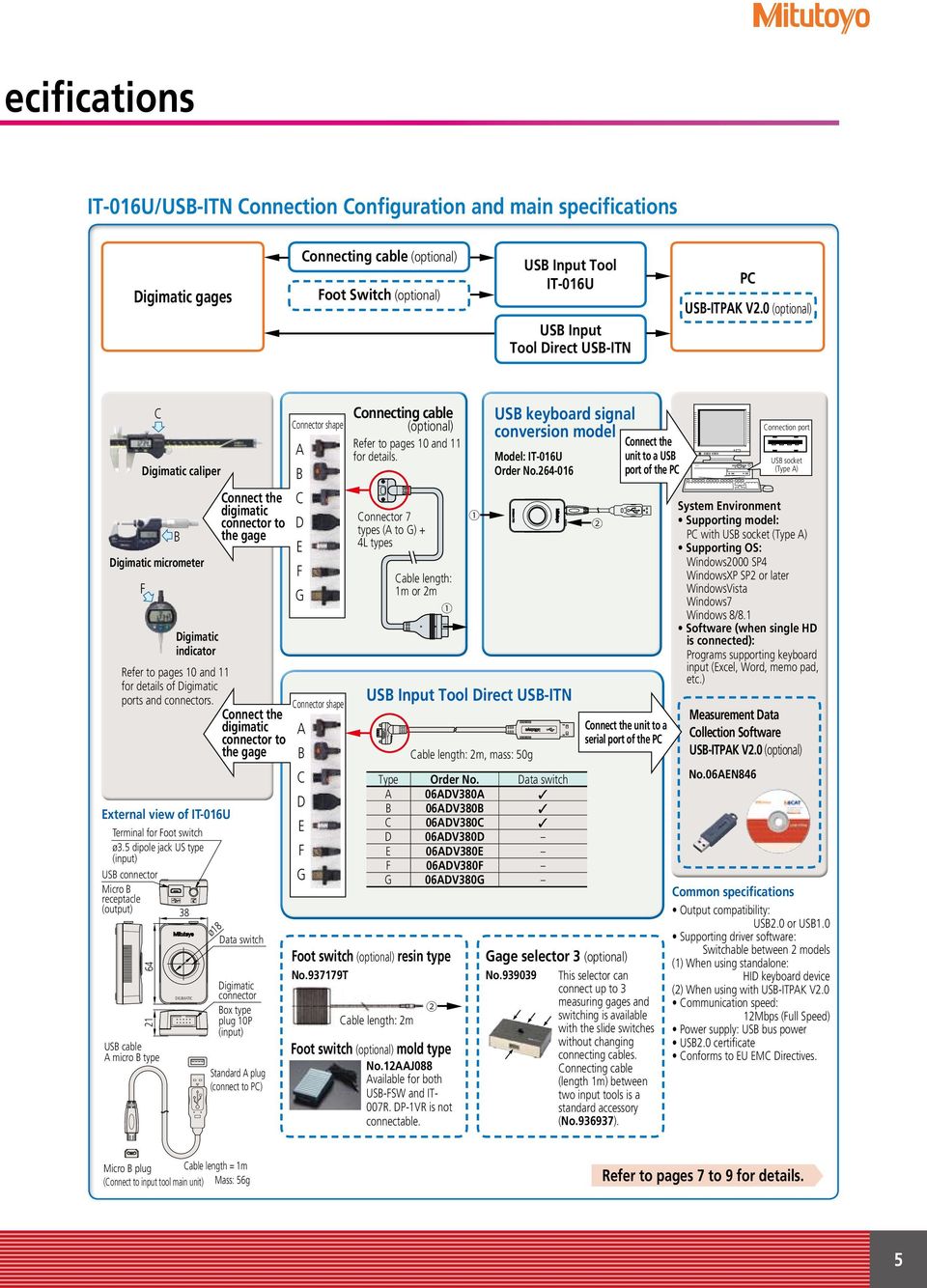
5 ecifications IT-016U/USB-ITN Connection Configuration and main specifications Digimatic gages Connecting cable (optional) Foot Switch (optional) USB Input Tool IT-016U USB Input Tool Direct USB-ITN PC USB-ITPAK V2.0 (optional) F C Digimatic caliper External view of IT-016U B Digimatic micrometer Digimatic indicator Refer to pages 10 and 11 for details of Digimatic ports and connectors. Terminal for Foot switch ø3.5 dipole jack US type (input) USB connector Micro B receptacle (output) USB cable A micro B type DIGIMATIC Connect the digimatic connector to the gage ø18 Connect the digimatic connector to the gage Data switch Digimatic connector Box type plug 10P (input) Standard A plug (connect to PC) Connector shape A B C D E F G Connector shape A B C D E F G Connecting cable (optional) Refer to pages 10 and 11 for details. Connector 7 types (A to G) + 4L types Cable length: 2m Cable length: 1m or 2m Foot switch (optional) resin type No T Foot switch (optional) mold type No.12AAJ088 Available for both USB-FSW and IT- 007R. DP-1VR is not connectable. USB keyboard signal conversion model Model: IT-016U Order No USB Input Tool Direct USB-ITN Cable length: 2m, mass: 50g Type Order No. Data switch A 06ADV380A B 06ADV380B C 06ADV380C D 06ADV380D E 06ADV380E F 06ADV380F G 06ADV380G Connect the unit to a USB port of the PC Connect the unit to a serial port of the PC Gage selector 3 (optional) No This selector can connect up to 3 measuring gages and switching is available with the slide switches without changing connecting cables. Connecting cable (length 1m) between two input tools is a standard accessory (No ). Connection port USB socket (Type A) System Environment Supporting model: PC with USB socket (Type A) Supporting OS: Windows2000 SP4 WindowsXP SP2 or later WindowsVista Windows7 Windows 8/8.1 Software (when single HD is connected): Programs supporting keyboard input (Excel, Word, memo pad, etc.) Measurement Data Collection Software USB-ITPAK V2.0 (optional) No.06AEN846 Common specifications Output compatibility: USB2.0 or USB1.0 Supporting driver software: Switchable between 2 models (1) When using standalone: HID keyboard device (2) When using with USB-ITPAK V2.0 Communication speed: 12Mbps (Full Speed) Power supply: USB bus power USB2.0 certificate Conforms to EU EMC Directives. Micro B plug Cable length = 1m (Connect to input tool main unit) Mass: 56g Refer to pages 7 to 9 for details. 5
6 Input Tool Connection Configuration/Specifications Input tool series RS-232C communication conversion type IT-007R Input tool for RS-232C communication best suited for communication control of the software! Control is available by transmitting data request commands via RS-232C communication. For example, production engineers can create communication programs to load the measurement data by transmitting a command from the PC. This product is a compact and low-cost RS-232C communication interface, which is convenient when it is installed in a machine tool or dedicated device to feed back measurement data (for connection other than to a PC, a separate power supply is required). IT-007R Connection Configuration and main specification Digimatic gages Connecting cable (optional) Foot switch (optional) Gage selector 3 (optional) Input tool IT-007R PC C Digimatic caliper B Connect the C digimatic B connector to D the gage Digimatic micrometer E F F G Digimatic indicator Refer to pages 10 and 11 for details of Digimatic ports and connectors. Connector shape A Connecting cable (optional) Refer to pages 10 and 11 for details. Connector 7 types (A to G) + 4 L types Cable length: 1m or 2m RS-232C communication conversion type Connect the Model: IT-007R unit to a Order No serial port of the PC Data output is available by transmitting data request commands from the PC. Connection port D-sub9 pin System Environment Supporting model: PC pr sequencer with a serial port (D-sub 9 pin) Note) When connecting to a sequencer, a power supply is required. Due to the restriction of power supply (storage), A second or more input interval is required. Software: A program compatible with the RS-232C communication (such as a hyper terminal) is required. Note) Connecting with USB-ITPAK V2.0 is not available. Specifications of IT-007R RS-232C Communication Output specification: RS-232C compliant Communication method: Full duplex Communication speed: 2400bps (fixed) Bit configuration: Start bit 1 Data length 8 (Most significant bit, 0 (fixed)) Parity, None Stop bit 1 Flow control: None Home position: DCE (modem definition) Data format (1) When data output Output order D1 D2 D3 D4 D5 D6 D7 D8 D9 D10 D11 D12 D A (fixed) Signs, "+" or "-" Digimatic gage display value (Floating decimal point) CR (2) Error code output D1 D2 D3 D4 9 1 (fixed) CR Example of format DisplayOutput data A CR A CR Error code No. 1 : No data input 2 : Loaded data with format other than specified Foot switch (optional) resin type No T Gage selector 3 (optional) No Connector specification and power supply from the PC This product operates while accumulating the power supplied from the P C. A second or more input interval is required. Data request signal Data can be output by transmitting a character from the PC. [Data import method] Data switch of Input Tool Data switch of connecting cable Data switch of Digimatic gages Command transmission from PC Operate one of above four methods. Pin No. Symbol in/out Description of functions 1 (N.C.) No connecting 2 RXD OUT Data output from this product to the PC 3 TXD IN Data input from the PC to this product 4 DTR IN +12 V power supply from the PC* 5 GND Ground 6 DSR OUT Not used 7 RTS IN +12V power supply from the PC* 8 CTS OUT Not used 9 (N.C.) Not used External view of IT-007R Terminal for foot switch Digimatic input tetminal (flat 10 pin) Cable length: 0.9m Mass: 91g (including a cable) D-SUB 9pin female * "4" and "6", "7" and "8" are short-circuited with each other inside this product. * When connecting to a sequencer, a power supply is required. Input voltage: Supplied in the range 6 V - 16 V Power supply terminal: Supplied to pins 4 and 7 If the power supply is difficult, please consider to purchase MUX-10F (power supply by AC adapter and connectable with 4 units of Digimatic gages). 6

7 Optional Note: These options are common for IT-016U, USB-ITN, and U-WAVE. They cannot be used with the IT-007R. U-WAVE is measurement data wireless communication system. For the system summary, refer to the U-Wave leaflet (Catalog No. E12000). Measurement data collection software USB-FSW USB-ITPAK V2.0 Upgraded USB-ITPAK V2.0 now supports U-WAVE, a wireless communication system. Both wired connecting (USB-ITN) and wireless system (U-WAVE) are supported. New functions of USB-ITPAK V2.0 Supports the U-WAVE wireless communication system Timer input function (IT-007R are not supported) USB-ITPAK V2.0 creates a procedure to input data from gages equipped with Digimatic output to Excel sheets via IT-016U or USB-ITN or U-WAVE. Using together with USB-ITPAK V2.0 will further improve the operational efficiency of repetition inspection work. Best suited for keeping track of inspection data of mass-produced products. Automatically calls Excel sheet. Cursor moves can be specified. Input range can be specified per Digimatic gage, which reduces improper input. Main features of USB-ITPAK V2.0 Setting of Microsoft Excel input: Designation of where to input (workbook, worksheet, cell range), cursor move (right, down), and others. Selection of measuring method (3 modes available) (1) Sequential measurement (2) Simultaneous measurement (3) Individual measurement (refer to page 11 for details). Data handling Commands available: "Data Output Request", "Data Cancel", "Data Skip", "Arbitrary Character Input" (available only after prior registration and with a foot switch) Command input methods: Pressing a mouse, function key, foot switch, etc. (available only with a foot switch in the discrete measurement mode) Number of connectable devices and others Connectable devices: (1) IT-016U, (2) USB-ITN, (3) USB-FSW, (4) U-WAVE-R (Each U-WAVE-R can accept measurement data from up to 100 registered instruments) Order No. Model No. USB-ITPAK V2.0 Order No. 06AEN846 Upgrade pricing from V1.0 is not available. Please purchase V2.0. <TIP> Refer to the USB-ITPAK V2.0 user's manual on the Mitutoyo website. USB-ITPAK V2.0 USB dongle A USB dongle must be connected to the PC running the software. Measurement date/time display Others: Compatible with Windows 8, 64-bit OS, and Russian included in the operating language selection The last data input can be canceled by a single operation (foot switch, function key etc.) Data input or cancellation can be performed at once in multiple-point simultaneous measurement. Number of connectable devices (total number of (1) (2) (3) (4) ): devices or less for Windows 2000/XP - 20 devices or less for Windows Vista/7/8/8.1 Number of registerable instruments (total number of (1) (2) (3) (4) ): 400 instruments or less Method to control/identify connected devices: VCP (Virtual COM Port) - for device types (1) and (2), the driver software is switched from HID to VCP to apply this method. Data loading time: when using USB-ITN, 0.2s to 0.3s per gage unit U-WAVE event drive mode: 0.5s data refresh interval Timer input function (only in simultaneous measurement) Input interval (time): 0.1s (Note 4) to 24 hours maximum (Note 4: If a shorter time is set, a priority is given to the longer time compared with the actual communication time.) Measurement date/time display function (available in sequential and simultaneous measurements) The display format is subject to the setting of the Excel sheet. Operating environment Windows 2000 SP4, Windows XP SP2 Compatible OS * 1 or later, Windows Vista, Windows7, Windows8, Windows8.1 Supported Excel Excel 2000, Excel 2002, Excel 2003, versions * 2 Excel 2007, Excel 2010, Excel 2013 Hard disk Free space of more than 20MB CD-ROM drive For program installation USB port * 3 2 ports or more (for USB dongle and USB-ITN) Monitor resolution , 256 colors or more *1: 32-bit, 64-bit OS supported *2: Operation with Excel for MAC OS is not guaranteed. *3: A commercially available hub can be used. (USB certified product is recommended) USB Foot Switch Adapter This USB adapter for connecting a PC is required when using the Foot Switch (No T) in USB-ITN. A dedicated VCP driver* for this adapter is included in USB-ITPAK V2.0. Order No. Price Main specification Model No. Order No. USB-FSW 06ADV384 Foot Switch Adapter USB-FSW Overall length: 160mm USB-ITPAK V2.0 supports use of the foot switch for data handling. Data control: Data request, Data cancel, Data skip Character string input (e.g. GO/NG, etc.) *USB-FSW is used for installation of the VCP driver. Foot switch (No T) USB-FSW External view Language support Operation language (15 languages) Japanese, English, German, French, Spanish, Italian, Czech, Swedish, Turkish, Polish, Hungarian, Russian, Korean, Chinese (traditional/simplified), and Simplified Chinese Operation manual (PDF file) Japanese, English, German USB ITPAK V2.0 and the PC Operating System must use the same natural language. Output data by causing a contact signal from the Foot Switch. MONO(ø3.5)2-CON.MINIATURE PLUG US Type Unit:mm 7

8 Optional Note: These options are common for IT-016U, SB-ITN and U-WAVE. They cannot be used with the IT-007R. USB-ITPAK V2.0 <TIP> User's manual for USB-ITPAK V2.0 is posted on our website with details of setting procedures, etc. Sequential measurement measurement examples: 3 measurement methods by USB-ITPAK V2.0 are explained with example below. Measurement values are input one by one according to a procedure previously defined by using one or more Digimatic gages (via IT-016U or USB-ITN or U-WAVE). <Measurement examples> Outside diameter in X and Y directions and length H for the workpiece below are measured in order for 5 pieces and finally perform OK/NG judgement for external view by visual check (scratches, color unevenness, etc.). X Y (1) Measure outside diameter at X and Y of 5 workpieces with a micrometer. (2) Measure length H of 5 workpieces. U-WAVE-T U-WAVE-R The last data input may be cancelled by pressing and holding the data switch USB-ITN-C USB hub (Commercial item) USB-FSW 4 pcs. + Foot switch 4 pcs. H (3) Inspect external view to check if there are any scratches or color shading and input OK or NG. Character strings Input OK Character strings Input NG Data request Data cancel When a measuring procedure is executed, a window (as below) is displayed. Data request*, Data cancel*, Data skip*, Aborting, Complete can be specified. * These operations can be allocated to the function key or foot switch (via USB-FSW). A B C D E F 1 Setting Dimension X 3 Dimension Y 4 Dimension H External 5 Appearance OK OK NG Cell movement direction after inputting data (down and right) Carriage return (Low, column) Microsoft Excel sheet previously specified Input range of micrometer (B2 to F3) Input range of caliper (B4 to F4) Input range of visual judgment (B5 to F5) Cell that will receive next input is highlighted in green 8

9 Simultaneous measurement Measurement values are input simultaneously from several Digimatic gages (via IT-016U or USB-ITN or U-WAVE) <Measurement examples> Simultaneous measurement of the heights A to D on the workpiece below. U-WAVE-R U-WAVE-T 2 pcs. USB-ITN-C 2 Height A B C D USB hub (Commercial item) USB-FSW 2 pcs. + Foot switch 2 pcs. Data request Data cancel A B C D E 1 Height A Height B Height C Height D Note) To perform simultaneous measurement using U-WAVE, a special order U-WAVEPAK (Event drive) is required. Refer to the U-WAVE leaflet (E12000) for more details. First measurement (finished) Second measurement (finished) Third measurement (finished) Fourth measurement (Wait for next input) Individual measurement <Measurement examples> Two operators measure 6 workpieces (three each, both working at the same time) A B C Several operators input measurement data asynchronously according to individually defined procedures (where to input, move direction, etc.) from each Digimatic gage via IT-016U or USB-ITN or U-WAVE. USB hub (Commercial item) U-WAVE-R Since several individual operators perform measurement simultaneously, an operation key and a function key in the window below cannot be used at the same time. The only effective input device in this case is the foot switch (via USB-FSW). Operator 1 USB-ITN-C Workpiece Nos. 1 to 3 Data Data request cancel Workpiece Nos. 4 to 6 USB-FSW x 4 pcs. + Foot switch x 4 pcs. Operator 2 U-WAVE-T The last data input may be cancelled by pressing and holding the data switch A B C D E F G 1 Settin Dimension A Dimension B Dimension C Operator 1 Operator 2 Cell that will receive next input Cell that will receive next input Notes on using USB-ITPAK V2.0: Do not merge the cells in the specified range as a measurement data input. During measurement, the Microsoft Excel worksheet cannot be modified in any way apart from entering data. If you need to modify the sheet, it is necessary to abort or finish the measurement. 9

10 Measuring Tool Compatibility List Compatibility of USB-ITN and connecting cables with measuring tools USB Input Tool Direct USB-ITN Select a USB-ITN whose gage connector fits the Digimatic port on your gage Connector type Model No. Order No. Water-proof type (A) with output USB-ITN-A 06ADV380A (B) Water-proof type with output USB-ITN-B 06ADV380B (C) Straight type with output USB-ITN-C 06ADV380C L type with output (CR) switch (cable outlet is right) No applicable models USB-ITN-C is available Refer to the following figure. IT-016U/IT-007R/DP-1VR/MUX-10F/ EC Counter Select a cable whose gage connector fits the Digimatic port on your gage Connector type (A) Water-proof type with output (B) Water-proof type with output (C) Straight type with output L type with output (CR) switch (cable outlet is right) 1m 05CZA624 05CZA AZB512 Order No. 2m 05CZA625 05CZA AZB513 Connector type (A) Water-proof type with output (B) Water-proof type with output (C) Straight type with output L type with output (CR) switch (cable outlet is right) Gage connectors on data cable Picture of gage connector Data switch Available Available Available Available Digimatic ports on gage Picture of Digimatic port Please note that some high-precision Digimatic gages are capable of displaying the measurement result to more than 6 digits. However, according to the Digimatic output specification, the result may be output in 6 digits only. Digimatic gages whose display may exceed 6 digits Laser Scan Micrometers Litematic Linear gage counter (EH) High-Accuracy Digimatic Micrometer ( / ) Applicable models Digimatic caliper / , etc / , etc / , etc / , etc / , etc / , etc / , etc / , etc / , etc. Digimatic special application caliper / , etc. Digimatic depth gage / , etc. Digimatic scale unit , , etc. Digimatic micrometer / / , etc / , etc / Dedicated micrometers for Digimatic / , etc / , etc / , etc / , etc / , etc / , etc. Digimatic micrometer head / , etc. Digimatic holtest / , etc. Digimatic depth gage / , etc. Digimatic caliper / , etc / , etc / , etc. Digimatic special application caliper / etc / , etc / / , etc. Digimatic depth gage / , etc. Digimatic micrometer head / Digimatic scale unit / / , etc. Digimatic micrometer / , etc / L-shape Straight Type C straight connectors are available, but may interfere with thimble operation. 10

11 (D) Flat 10-pin type (E) Flat 10-pin type (F) Flat 10-pin type (FB) (cable outlet is back) (FR) (cable outlet is right) (FL) (cable outlet is left) Flat straight (G) waterproof type USB-ITN-D 06ADV380D USB-ITN-E 06ADV380E USB-ITN-F 06ADV380F No applicable models USB-ITN-F is available USB-ITN-G 06ADV380G (D) Flat 10-pin type (E) Round 6-pin type (F) Flat straight type (FB) (cable outlet is back) (FR) (cable outlet is right) (FL) (cable outlet is left) Flat straight (G) waterproof type EAA EAA190 (Note 1) When using ID-F, EB, EC-101D, ID-C112A, ID-U, ID-SS, ID-SX with USB-ITN, it is required to use together with USB-ITPAK. (Note 2) USB-ITN and IT-016U cannot be used with EF/EH, VL-50-B/50S-B, and SJ-500/SV (D) Flat 10-pin type (E) Round 6-pin type (F) Flat straight type (FB) (cable outlet is back) (FR) (cable outlet is right) (FL) (cable outlet is left) Flat straight (G) waterproof type N/A N/A N/A N/A N/A N/A N/A Digimatic indicator ID-H ID-F (Note1) High-precision height gage QM-Height Mu-checker Digital Mu-checker (using a foot switch) Laser scan micrometer LSM-9506 Digital height master / Linear gage counter EF/EH (Note 2) EB (Note 1), EC-101D (Note 1) Litematic VL-50-B/50S-B (Note 2) Contour measuring system SJ-210/310/410 SJ-500/SV-2100 (Note 2) Hardness testing machines HM-210/220 Digimatic micrometer / , etc / , etc / , etc. Digital height master / , etc. Hardness testing machines HM-100 HM-200 HV-100 HR-300/400/500 HH-411 Digimatic indicator ID-CX, ID-C (Peak-Value Hold Type) (Note1), ID-C (Calculation type), ID-C (Bore Gage Type), ID-U (Note2), ID-SS (Note1), ID-SX (Note1) Digimatic height gage / / / / , etc. (, cable outlet is right) ABS borematic Digimatic bore gage / , etc / , etc. Scale unit Hardness testing machines Digimatic depth gage / / HH-300 Digimatic type (ID-CX) / , etc. Digimatic indicator ID-N ID-B 11

12 (2)B-(CH)HS, Printed in Japan Coordinate Measuring Machines Vision Measuring Systems Form Measurement Optical Measuring Whatever your challenges are, Mitutoyo supports you from start to finish. Mitutoyo is not only a manufacturer of top quality measuring products but one that also offers qualified support for the lifetime of the equipment, backed up by comprehensive services that ensure your staff can make the very best use of the investment. Sensor Systems Test Equipment and Seismometers Digital Scale and DRO Systems Small Tool Instruments and Data Management Apart from the basics of calibration and repair, Mitutoyo offers product and metrology training, as well as IT support for the sophisticated software used in modern measuring technology. We can also design, build, test and deliver bespoke measuring solutions and even, if deemed cost-effective, take your critical measurement challenges in-house on a sub-contract basis. Find additional product literature and our product catalogue Note: Product illustrations are without obligation. Product descriptions, in particular any and all technical specifications, are only binding when explicitly agreed upon. MITUTOYO and MiCAT are either registered trademarks or trademarks of Mitutoyo Corp. in Japan and/or other countries/regions. Other product, company and brand names mentioned herein are for identification purposes only and may be the trademarks of their respective holders. Mitutoyo Corporation 20-1, Sakado 1-Chome, Takatsu-ku, Kawasaki-shi, Kanagawa , Japan T +81 (0) F +81 (0)
