
EMC STORAGE OPTIONS FOR NICE PERFORM VERSION 3.5
|
|
|
- Sydney Franklin
- 10 years ago
- Views:
Transcription
1 White Paper EMC STORAGE OPTIONS FOR NICE PERFORM VERSION 3.5 Abstract This white paper presents detailed information regarding the features offered by EMC storage solutions and the NICE Systems Perform call center recording application, and how the products have been integrated into a complete contact center recording archive solution. January 2011

2 Copyright 2011 EMC Corporation. All Rights Reserved. EMC believes the information in this publication is accurate of its publication date. The information is subject to change without notice. The information in this publication is provided as is. EMC Corporation makes no representations or warranties of any kind with respect to the information in this publication, and specifically disclaims implied warranties of merchantability or fitness for a particular purpose. Use, copying, and distribution of any EMC software described in this publication requires an applicable software license. For the most up-to-date listing of EMC product names, see EMC Corporation Trademarks on EMC.com. VMware is a registered trademark of VMware, Inc. All other trademarks used herein are the property of their respective owners. Part Number h8161 2

3 Table of Contents Executive summary... 5 Audience... 5 Terminology... 5 Solution overview... 7 NICE Perform... 8 NICE Perform and Storage Center... 8 EMC archive-capable storage platforms... 8 EMC Centera: Archiving made simple... 8 EMC Celerra: Simple, powerful, unified storage from EMC... 9 Celerra File-Level Retention... 9 Other Celerra benefits Solution design NICE Storage Center architecture for archiving Storage capacity Required network bandwidth High availability and disaster recovery NICE Perform and EMC Centera integration Interoperability Hardware platform support Operating system support Historical SDK and CentraStar support SDK and CentraStar compatibility support statement EMC Centera feature support Retention Access profiles / virtual pools Single instancing Embedded BLOB usage Containerization strategy Streaming model Other relevant API features deployed Solution configuration and setup considerations NICE Storage Center configuration EMC Centera-specific configuration Defining EMC Centera as an ESM device Deployment scenarios Single Storage Center single EMC Centera cluster Redundant EMC Centera configuration Redundant Storage Center and EMC Centera configuration

4 NICE Perform and EMC Celerra integration Defining Celerra/FLR as an ESM device Retention Deployment scenarios Single Storage Center single EMC Celerra cluster Redundant Storage Center and EMC Celerra configuration Conclusion References Additional information Appendix: Configuring a NICE ESM device

5 Executive summary Safely archiving, quickly accessing, and totally protecting fixed content are necessities rather than luxuries. Government regulations alone present the need for a fixed-content storage archiving solution that meets all of these requirements. For fixed content, such as recorded customer interactions, including voice recordings and screens containing , Web interactions, and other application windows, the need for this solution is especially important. For example, imagine 500 traders taking multiple calls every day. If a customer dispute arises, the traders need proof of what was said, when, and by whom. For this they need the most efficient recording, retrieval, and secure storage solution for managing a high volume of transactions. This solution must help them reduce liability while minimizing the resources required to verify compliance and resolve customer disputes. This solution is available now from EMC and NICE Systems. EMC, the leading provider of open, consolidated, and highly available storage solutions, has joined forces with NICE, a worldwide leader of multimedia recording solutions, applications, and related professional services for business interaction management. The end result is a total recording and archiving solution that provides high-volume, efficient, secure, centralized storage of thousands of recorded customer conversations involved with financial trading, insurance, banking, customer service, and other business transactions. From application through storage, EMC storage arrays, in combination with the NICE Suite of products, create an intelligent, complete chain of information custody. This level of information authenticity and the ability to ensure that an organization s retention and disposition policies are enforced make EMC and NICE the optimal Customer Dynamics archive solution for businesses and organizations. Audience The intended audience is customers, including storage architects and administrators and any others involved in evaluating, acquiring, managing, or designing an EMC archiving environment. This includes EMC staff and partners for guidance and development of proposals. This paper is not intended to replace the standard NICE Perform, EMC Centera, or EMC Celerra documentation. Terminology Access profile: Access profiles are used by applications and users of management tools to authenticate to a cluster, and by clusters to authenticate to another cluster for replication or restore connections. System administrators can create access profiles using the CLI. Each access profile consists of a profile name, a secret (password), and a set of capabilities and roles. Celerra File-Level Retention (FLR): FLR is an EMC Celerra Network Server software feature that protects files from modification or deletion until a specified retention date. 5

6 Centera API / Centera SDK: The EMC Centera SDK is a set of cross-platform application programming interfaces (API) that makes it simple for customer applications to perform functions such as store, retrieve, delete, and query for data objects in a variety of flexible and powerful ways. All applications must use this API to read and write to EMC Centera. Centera capabilities: Pool-bound content access rights granted by the system administrator to an access profile. They determine which operations an application can perform on the pool data. Possible capabilities are write (w), read (r), delete (d), exist (e), privileged delete (D), query (q), clip copy (c), Purge (p), and Litigation hold (h). Centera CLI: The EMC Centera Command Line Interface (CLI) is a tool for system administrators to manage and monitor EMC Centera. Centera cluster: A cluster is a single logical CAS archive that is accessible to an SDKbased client application. Client applications can store, retrieve, and delete fixedcontent objects from a cluster. A single cluster can be accessed by one or more applications via a set of node IP addresses and access profiles. Clustered nodes are automatically aware of nodes that attach to and detach from the cluster. Centera pool: Note: In the context of this document, Centera pools refer to virtual application pools. A virtual pool (VP) is a logical construct that effectively subsets the cluster, allowing controlled data segregation with the granularity in access protection it implies, simple management, and capacity reporting capabilities. CentraStar : EMC firmware used by EMC Centera Cluster mask: Defines the server EMC Centera capabilities that access profiles can enable. At the cluster level, the cluster (authorization) mask is used to override other profiles. Content address: A data object s unique identifier. A content address is the claim ticket that is returned to the client application when an object is stored to the archive. Content address storage (CAS): An object-oriented, location-independent approach for archiving large quantities of fixed-content data. Node: Logically, a network entity that is uniquely identified through a system ID, IP address, and port. Physically, a node is a computer system that is part of the EMC Centera cluster. Node role: The roles that can be assigned to each individual node are either external or internal. Nodes with an external node role have an external IP address configured and use their Eth2 port for communication with the customer's network; external roles are access management, and replication. Storage role is the only internal role. Refer to the online help for additional information. Pool mask: Defines the EMC Centera capabilities granted to a particular virtual pool. 6

7 Solution overview NICE is the market leader in providing fast and efficient solutions for the capture, storage, retrieval, and analysis of customer interactions for the enterprise sector, including contact centers, financial trading floors, and facilities organizations. Such organizations handle and record many thousands of interactions (phone calls, s, and more) every day. NICE offers a uniquely holistic view of customer interactions, with the broadest set of performance and analytics solutions, each a leader in its category, addressing the full spectrum of business issues from strategic to operational, from providing competitive intelligence to reducing operational expenses, as depicted in Figure 1. Figure 1. NICE Perform applications platform Using NICE s multidimensional interaction analytics, organizations can identify specific customer interactions and analyze their content. This enables both contact center managers and other business users to gain valuable insights, take appropriate actions, and improve the business performance of the enterprise. NICE provides cost-effective solutions that operate in Time Division Multiplexing (TDM), hybrid, and VoIP environments for maximum flexibility and reliability. 7

8 NICE Perform NICE Perform, part of the NICE SmartCenter suite, provides a comprehensive solution for capturing and analyzing customer interactions to enable organizations to drive business performance, enhance operational efficiency, and ensure regulatory compliance, while maintaining low total cost of ownership (TCO). It provides organizations with critical business insights through unified solutions for compliance recording, quality management, interaction analytics, customer feedback and agent coaching. NICE Perform and Storage Center NICE Perform Storage Center is a storage management solution for audio and screen recording. The Storage Center module stores the desired audio and screen interactions data on an enterprise storage infrastructure (either SAN, NAS, or CAS architecture-based) for long-term archiving. Selective archiving and selective retention capabilities enable users to optimize archiving according to business policy requirements. The NICE Storage Center solution includes both a user interface, which enables users to set the system configuration and various storage rules, and an engine, which implements storage rules and enables the retrieval of calls. EMC archive-capable storage platforms With all of its storage platforms archive-capable, whether you need a multipurpose storage solution or a pure archive, EMC has the solution for your use with NICE Perform Storage Center. EMC Centera: Archiving made simple The EMC Centera disk storage platform was specifically designed to store and provide fast, easy access to archived information. It provides the most archive functionality, best operational efficiency, and best TCO. Whether integrated with an in-house-developed application or an application from a continually growing group of industry-focused EMC partners, EMC Centera is the optimal information archive for businesses and organizations that require a simple, affordable, and secure solution to expanding amounts of critical information. EMC Centera creates globally unique identifiers (digital fingerprints) for each piece of information, which greatly simplifies the task of managing, sharing, and protecting all sizes of content repositories. The use of digital fingerprinting for information identification eliminates applications from managing storage, is the mechanism for deduplication, eliminates the opportunity for errors, and assures that no piece of modified content can ever be represented as the original. All these benefits derived from the digital fingerprint content address allow EMC Centera to be the only archive storage platform that does not have a requirement to be backed up. This takes a huge cost out of storing information. 8

9 EMC Centera cost-effectively puts information online in support of new sources of revenue generation, expanded business models, and increased service levels to users and customers. EMC Centera provides write once, read many (WORM) attributes in a hands-free management environment that combine to provide users with a TCO superior to conventional archiving approaches. The EMC Centera CentraStar software operating environment employs an innovative content-addressing system to simplify management, ensure content uniqueness, and deliver the scalability needed for terabyte- to petabyte-level archive requirements. And the EMC Centera system accomplishes this while dramatically lowering overall management costs. The big picture Purpose-built magnetic-disk-based storage that overcomes the limitations of tape, optical, or traditional disk technologies Addresses governance and compliance needs for information authenticity, retention, and preservation Self- healing and self-managing capabilities allow you to easily manage times more information than with other archive storage Tamper- and future-proof architecture Designed to store millions and billions of pieces of information that will outlive the platform on which they reside EMC Celerra: Simple, powerful, unified storage from EMC With the amount of data growing exponentially, EMC understands that consolidation is key. EMC unified storage can be used as both primary and secondary storage, as archiving is but one of its many use cases. With EMC unified storage you can consolidate file-based servers with NAS (CIFS, NFS) and application block-based storage with iscsi or Fibre Channel and further improve performance and scalability with Celerra Multi-Path File System (MPFS). EMC Celerra unified storage offerings support mixed application and mixed workload environments. It provides storage efficiency and performance-enhancing storage tiering (within the array itself across Flash, Fibre Channel, and SATA drive technologies or to other devices), WORM capability, and advanced single-instance storing that includes compression. Whatever the size of your enterprise or how diverse your application requirements, EMC Celerra provides industry-leading storage functionality in a single integrated system. Celerra File-Level Retention Celerra File-Level Retention is an EMC Celerra Network Server software feature that protects files from modification or deletion until a specified retention date. When you use FLR, you can archive data to file-level retention storage on standard rewriteable magnetic disks through NFS or CIFS operations. FLR enables you to create a permanent, unalterable set of files and directories, and ensures the integrity of data. 9

10 At the NAS level, FLR provides an option to retain necessary data to meet WORM requirements. Celerra FLR comes in two variations: File Level Retention Compliance (FLR-C): Protects data from changes made by users through NAS protocols such as CIFS, NFS, and FTP including an administrator action, plus it meets the requirement of SEC Rule 17a-4(f). You cannot delete an FLR-C file system that has files in the locked state. File Level Retention Enterprise (FLR-E): Protects data from changes made by users through NAS protocols such as CIFS, NFS, and FTP but not including an administrator action. This means that (only) a Celerra administrator with the appropriate authorization can delete an FLR-E file system even if it has protected files. Other Celerra benefits Ease of use Celerra Manager provides a simple-to-use, web-based graphical user interface for configuring, controlling, and monitoring all Celerra platforms and functionalities. Celerra Manager provides wizards to simplify common administrative tasks as well as monitoring capabilities such as at-a-glance system status and detailed performance metrics High availability Celerra keeps your information online with no-compromise availability, which means you continue running at the same performance and service levels even in the event of a failure. This unprecedented level of system availability is attributed to the robust design of the underlying EMC CLARiiON architecture and the unique fault-detection and fault-isolation capabilities, and to Celerra s DART and CLARiiON s FLARE operating environments. Advanced protection The EMC Celerra family offers multiple protection options to keep business up and running from powerful snaps that allow file-level and application-level restores and disk-based logical copies, to LAN-free backup to improve the efficiency of backup operations, to remote IP-based replication for disaster recovery, backups, and testing. And you can also leverage the advanced data protection capabilities of Celerra Replicator across all Celerra unified storage offerings. Celerra Replicator allows users to manage replications based on the business-defined services levels and has proactive modeling capabilities to ensure service levels can be met. Advanced functionality EMC Celerra provides the flexibility of adding optional functionality: Ensuring disk-based WORM requirements are enabled with Celerra FLR 10

11 Providing Web-based/wizard-driven intuitive management through Celerra Manager/Advanced Edition Improving performance and scalability over traditional NAS environments with Celerra Multi-Path File System (MPFS) Creating point-in-time copies with EMC Celerra Replicator Integrating leading anti-virus providers and quota management vendors with Celerra Anti-Virus Agent and Celerra Event Publishing Agent, respectively System flexibility All Celerra offerings provide superior flexibility and investment protection to meet various customer business requirements and achieve the results you require for applications such as Microsoft Exchange, SQL Server, and Windows, Oracle, and UNIX/Linux file servers. The Celerra family is also certified to support VMware, Microsoft Hyper-V, and Xen deployments where customers enjoy the consolidation benefits of a virtual environment. All EMC, Microsoft, Oracle, and VMware solutions are backed with industry-leading best practices and proven reference architectures for investment protection. EMC: Your best choice for unified storage EMC offers many options for unified storage with the EMC Celerra family from the entry-level Celerra NX4, to the midrange NS-120 and NS-480, and to the enterpriseclass NS-960. Celerra also offers the most comprehensive suite of built-in features at no additional cost, such as snapshots and snapshot management, to create readonly and read/write logical views for data protection and application testing, automated volume management to enable profile-based provisioning, virtual (thin) provisioning to optimize capacity utilization, data deduplication for increased storage efficiency, and file movement APIs for tiered storage and archiving. This means that customers can buy a more complete solution for less money. Solution design NICE Storage Center has developed enhanced integrations with EMC Centera CAS or Celerra NAS, to appropriately address unique customer s regulatory and operational archiving requirements. As audio-recording systems are considered critical by most customers, redundancy solutions for the Storage Center Server are also available. In case of a failure a hotstandby Storage Center Server will be employed to handle the audio- and screenrecordings storage tasks. Customers today have a choice of archive storage options when implementing NICE solutions. Whether the requirement is for a purpose-built, compliant long-term archive at the lowest TCO, or for a flexible NAS-based, multipurpose file system, EMC 11

12 storage solutions provide cost-effective, scalable, and easily managed archive platforms. NICE Storage Center architecture for archiving As of version 3.5 of NICE Perform, EMC customers have the choice of archiving to either (or both) EMC Centera or Celerra. Figure 2 represents the architecture of the archive process for Storage Center, including EMC Centera and Celerra as possible archiving targets. Figure 2. Storage Center architecture diagram Archiving takes place according to the following steps: 1. An administrator using the Web Client defines rules via the Rule Manager. 2. Based on the rules definition, the Rule Engine Applications server queries the Database and creates tasks for Storage Center. 3. Storage Center queries the database for recordings to archive. 4. Storage Center fetches data from the Voice/Screen Loggers. 5. Storage Center archives the calls to EMC Centera, Celerra, or another Enterprise Storage Management device. 12

13 Storage capacity Calculating the required net storage capacity can be done using the following formula: Daily storage capacity = (Average number of calls per day) (Average call audio size) The average call audio size can be calculated using the following formula: Average call audio size = (Audio compression in Kb/s) seconds) (Average call length in For example, in a site using ACA 5.6 Kb/s compression for recording, having an average call length of 3 minutes, the average call audio size will be 3 60 (seconds) 5.6 Kb/s = 1008 kilobits = 126 kilobytes. Referring to the storage capacity per day, if this site has 20,000 calls per day and is required to store them all, then the average daily net storage capacity required will be 20,000 calls 126 KB = 2.4 GB. Note: The formulas above refer to storing the audio in a NICE proprietary format. Required network bandwidth Calculating the required average network bandwidth can be done using the following formula: Required network bandwidth = amount of data to be archived / the time used for archiving For example, if the data to be archived is 20 GB in size and it should take 24 hours to complete the archiving procedure, then the required average network bandwidth is 20 GB / 24 hour = 0.83 GB/hour = KB/s. High availability and disaster recovery Additional considerations on high availability and disaster recovery specific to each EMC storage platform are described in the following sections. NICE Perform and EMC Centera integration Interoperability Hardware platform support NICE Perform Storage Center components are installed on a commercial off-the-shelf (COTS) server as long as it meets the NICE minimum requirements server spec. These servers are normally supplied by the end customer. Note: All NICE software components including Storage Center can be fully virtualized. NICE provides sizing recommendations as part of its documentation. 13

14 Operating system support NICE supports both Windows Server 2003 and Windows Server Historical SDK and CentraStar support Table 1. SDK and CentraStar support Version SDK supported CentraStar supported NICE Perform x, 3.1,3.2 All revisions NICE Perform x, 3.1,3.2 All revisions NICE Perform x, 3.1, 3.2 All revisions NICE Perform 3.0 SP1, SP2, SP3 2.x, 3.1 All revisions Storage Center 8.9 SP5 2.x, 3.2 All revisions SDK and CentraStar compatibility support statement NICE accepts the EMC Centera statement on compatibility between an SDK revision and future revisions of CentraStar. If a customer wishes to upgrade an existing EMC Centera cluster in a Storage Center deployment, they may do so. EMC Centera feature support Retention NICE Perform Storage Center allows retention periods to be set for archived audio or screen recordings. The retention value is set to the value defined in the Forced Deletion field. If retention is not selected, then NICE Perform will set the retention period to be zero. Please note that NICE Perform calculates the EMC Centera retention period based on when the recording was first recorded, not when it s first archived. For example, if the policy for the retention of audio recordings is 4 weeks and the recording is held on the call logger for 1 week before it is archived to EMC Centera, Storage Center will then set the clip s retention period to be 3 weeks. The retention period is specified in a flexible way for each of the recordings archived by Storage Center. Note: Storage Center also supports Advanced Retention Management, that is, Litigation Hold and also allows the extension of existing retention periods on stored calls. Access profiles / virtual pools NICE Perform Storage Center (NICE Perform 3.1, 3.2, and 3.5) supports the use of PEA files to allow an instance of Storage Centera to be authenticated to an EMC Centera cluster via an access profile. It therefore follows that virtual pools are supported. Single instancing Single instancing is not relevant to the archiving of voice call recordings. 14

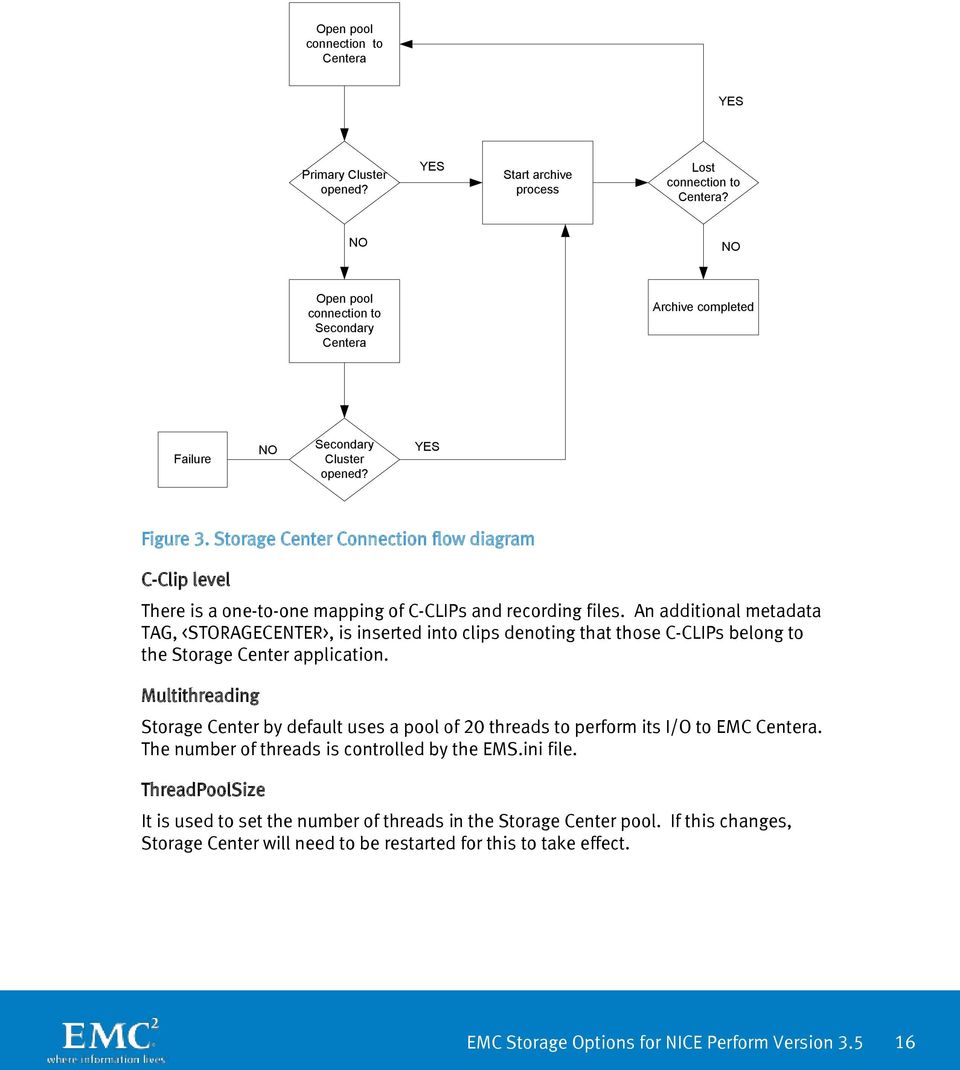
15 Embedded BLOB usage Storage Center does not enable the use of embedded BLOBs natively. This could be enabled through the use of the environment variables: FP_OPTION_EMBEDDED_DATA_THRESHOLD Please note that if this is set higher than 16 KB (and EMC recommends a maximum of 100 KB is used) then you should also set FP_OPTION_BUFFER_SIZE to the same size to ensure the CDF can be accommodated in the memory buffer used to temporarily house the CDF until it is written to the Centera. Otherwise portions of it will be paged to disk and performance may suffer. Before doing so a customer should check with NICE support. Also please note that embedded BLOB will cause CDFs to grow in size by 33 percent. Containerization strategy NICE Storage Center does not containerize calls at this moment. Streaming model NICE Storage Center uses Generic Streams to write content to EMC Centera with marker support disabled. Other relevant API features deployed Pool connections Storage Center opens a single pool of connection for each and every archive task. The administrator should configure multiple IP addresses for the primary Centera, and if one exists, for the secondary Centera too. Storage Center always attempts to open a connection to the primary Centera. If this connection times out, then an attempt will be made to open a connection to the secondary Centera. 15

16 Open pool connection to Centera YES Primary Cluster opened? YES Start archive process Lost connection to Centera? NO NO Open pool connection to Secondary Centera Archive completed Failure NO Secondary Cluster opened? YES Figure 3. Storage Center Connection flow diagram C-Clip level There is a one-to-one mapping of C-CLIPs and recording files. An additional metadata TAG, <STORAGECENTER>, is inserted into clips denoting that those C-CLIPs belong to the Storage Center application. Multithreading Storage Center by default uses a pool of 20 threads to perform its I/O to EMC Centera. The number of threads is controlled by the EMS.ini file. ThreadPoolSize It is used to set the number of threads in the Storage Center pool. If this changes, Storage Center will need to be restarted for this to take effect. 16
17 Writing The write operation from Storage Center to the EMC Centera is a multithreaded operation. The number of threads to be used is a configurable parameter and is set in the ESM.ini file. Deletion Storage Center has an automated delete function. When configuring a storage rule, you can set a Forced Deletion for those recordings. Storage Center automatically runs a process to identify those items that have reached their forced deletion period and will automatically issue a delete. As the retention period is not longer than the Forced Deletion period, the data will be deleted from the EMC Centera. The act of deleting a recording is a two-phase function. Phase 1 is to delete the content from the EMC Centera, and Phase 2 is to update the NICE Perform database to reflect the fact that the call has been deleted. Special consideration: It has been observed that if the deletion task is terminated abnormally a delete task may be interrupted between phases. This means that the content has been deleted from the EMC Centera but not marked as such in the NICE database. The next time the delete task runs, it will attempt to delete the call for the second time, and fail. This will generate an error making it appear that there is a problem with EMC Centera s ability to delete content. Solution configuration and setup considerations NICE Storage Center configuration A full discussion of how to configure NICE Storage Centera is outside of the scope of this document; however, the steps involved, including Centera-specific details, are detailed next. When defining a Storage Center you must perform the following steps: 1. Install and define the Storage Center Server using the NICE Perform installation tools and the Storage Center plug-in in the administration applications of NICE Perform. 2. Define an ESM device for that Storage Center. For EMC Centera this is the IP addresses of the access nodes (see below). 3. Define a storage group. For each group a group name and retention period are defined. The ESM is associated with a storage group that Storage Center writes the recording to before moving it to the ESM. The correlation between a storage group and an ESM is done using the storage rules. EMC Centera-specific configuration Storage Center should be configured with the IP addresses of the primary, and if one exists, replica EMC Centera cluster. This can be carried out within the Storage Center plug-in in the NICE Perform administration application. It is recommended that two or 17

18 more IP addresses should be provided for both the primary and replica clusters. This is for redundancy. If you specified only one IP address for the primary cluster and that particular access node was not currently online, then the system would be unable to communicate with that cluster even though it might be working online with several online access nodes. Please note that NICE use the term secondary to mean an NICE replica cluster. It is not to be confused with an EMC Centera secondary, which is a read-only cluster associated with a primary cluster in an EMC Centera pool. Defining EMC Centera as an ESM device You must create an ESM device for the EMC Centera being used by Storage Center. Note at present you can only define one EMC Centera for a Storage Center instance. Configuring EMC Centera for NICE Storage Center is covered fully in the Storage Center Installation and Configuration Guide and this document should be consulted before any configuration of the EMC Centera. Nevertheless, high-level details are covered in the Appendix. The secondary that Storage Center is referring to in this GUI is not an EMC Centera secondary. It is the EMC Centera that is at the Storage Center secondary site (see the redundant configuration discussions below). If you configure the IP address of the replica Centera cluster as the secondary referred to in this GUI, then if Storage Center detects that the primary cluster is down, it will close and reopen the pool connection and pick up the replica and continue to write to that. Deployment scenarios Single Storage Center single EMC Centera cluster Figure 4 shows the standard configuration of one Storage Center Server with one EMC Centera cluster. In this configuration, there is no HA or DR provision at either the level of Storage Center or EMC Centera. Figure 4. Single Storage Center and single EMC Centera cluster 18

19 Redundant EMC Centera configuration Figure 5. Redundant EMC Centera In this configuration only the EMC Centera configuration is redundant as only a replica Centera is configured, not a NICE Storage Center redundant secondary server. So HA and DR are only at the EMC Centera level. All content written by the production site Storage Center will be replicated by the primary EMC Centera to the replica Centera across the WAN. In the event that the primary EMC Centera becomes unavailable to the NICE Storage Center Server it will close the connection to the primary Centera and reattempt a connection to the pool. If the primary is still unavailable then NICE Storage Center will connect to the replica EMC Centera. Once the primary EMC Centera comes back online, the NICE Storage Center Server will reopen the pool connection in time and at that point it will connect to the primary EMC Centera again. It is recommended that Bi-Directional Replication is configured so that when the primary comes back online, all content that was written to the replica EMC Centera will be copied to the primary, thus resynchronizing it with the replica EMC Centera. 19

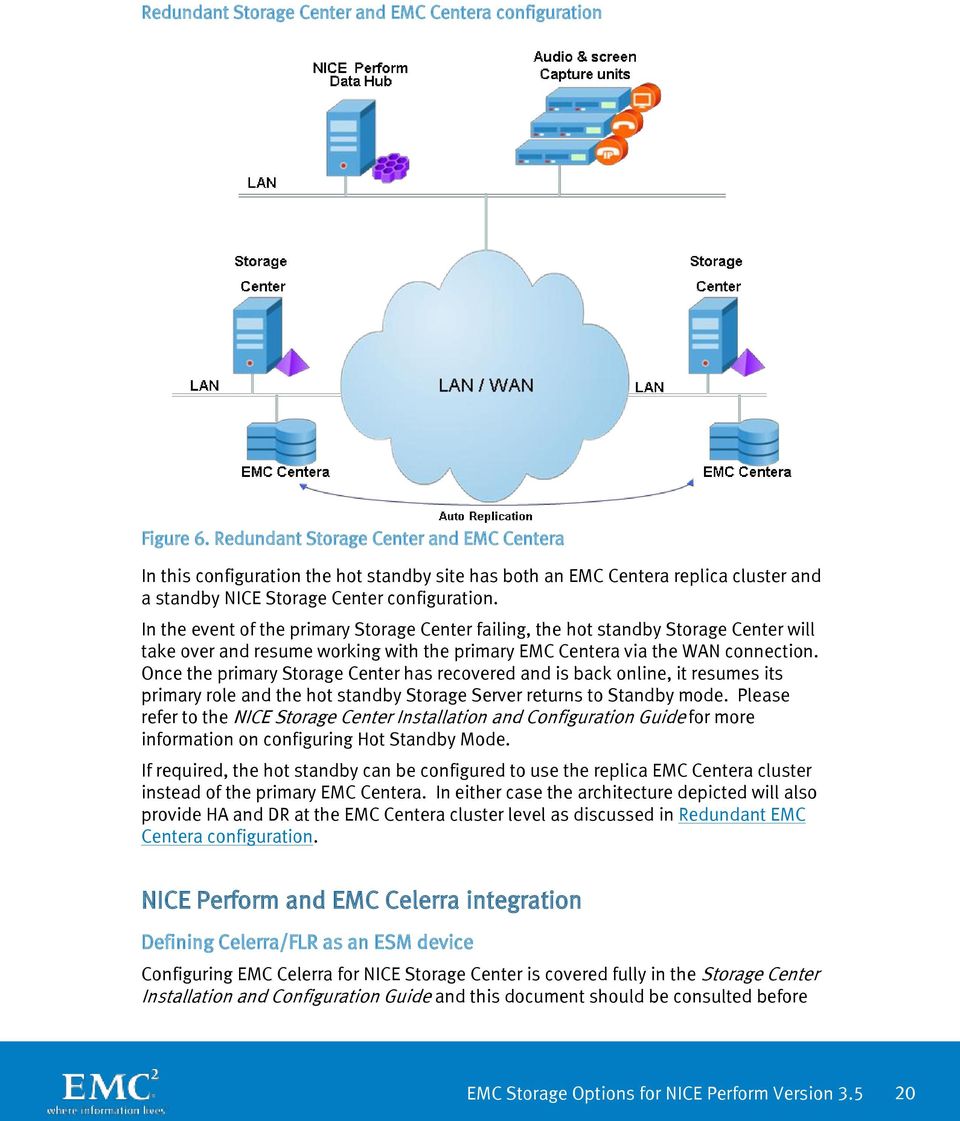
20 Redundant Storage Center and EMC Centera configuration Figure 6. Redundant Storage Center and EMC Centera In this configuration the hot standby site has both an EMC Centera replica cluster and a standby NICE Storage Center configuration. In the event of the primary Storage Center failing, the hot standby Storage Center will take over and resume working with the primary EMC Centera via the WAN connection. Once the primary Storage Center has recovered and is back online, it resumes its primary role and the hot standby Storage Server returns to Standby mode. Please refer to the NICE Storage Center Installation and Configuration Guide for more information on configuring Hot Standby Mode. If required, the hot standby can be configured to use the replica EMC Centera cluster instead of the primary EMC Centera. In either case the architecture depicted will also provide HA and DR at the EMC Centera cluster level as discussed in Redundant EMC Centera configuration. NICE Perform and EMC Celerra integration Defining Celerra/FLR as an ESM device Configuring EMC Celerra for NICE Storage Center is covered fully in the Storage Center Installation and Configuration Guide and this document should be consulted before 20

21 any configuration of the EMC Celerra. Nevertheless, high-level details are covered in the Appendix. Retention Retention is defined at the storage rule level. There can be multiple storage groups per ESM device. The customer can define retention values as the number of days to retain calls on the ESM device. Deployment scenarios Single Storage Center single EMC Celerra cluster Figure 7 shows the standard configuration of one Storage Center Server with one EMC Celerra cluster. There is no HA or DR provision at either the level of Storage Center or EMC Celerra. EMC Celerra Figure 7. Single Storage Center and single EMC Celerra cluster 21
22 Redundant Storage Center and EMC Celerra configuration EMC Celerra Figure 8. Redundant Storage Center and EMC Celerra In this configuration the hot standby site has a standby NICE Storage Center configuration. In the event of the primary Storage Center failing, the hot standby Storage Center will take over and resume working with the EMC Celerra via the WAN connection. Once the primary storage Centera has been recovered and is back online, it resumes its primary role and the hot standby Storage Server returns to Standby mode. Please refer to the NICE Storage Center User s Guide for more information on configuring Hot Standby Mode. Conclusion Whether your need is a dedicated archive or a multiuse storage platform, EMC has the archive-capable storage solution for you. EMC Centera-based archives enforce organizational and application policies for information retention and disposition intrinsic in storage and by doing so completes the information chain of custody. It ensures corporate accountability and reduces the costs of legal discovery and litigation support and it s easy to manage. 22
23 EMC Celerra unified storage provides all the flexibility needed to deploy it as both your primary storage and archive. With advanced functionality and the ability to simultaneously use Flash, FC, and SATA disk technology you ll get the best TCO at every stage of your information s life. High-performing, cost-effective, and secure, EMC Celerra unified storage is a great choice when a singular architecture is best for your environment. NICE Perform Storage Center and EMC s archive-capable storage platforms will automate your entire content lifecycle to mitigate the risk of noncompliance. You'll leverage full auditability at all stages of content creation, approval, and use while enforcing information retention and disposal. References The following can be found on EMC Powerlink (access required): EMC Centera Online Help EMC Centera SDK Version 3.2 API Reference Guide EMC Centera Console Version 2.2 Setup Guide EMC Centera SDK Version 3.2 Programmer s Guide EMC Centera Server Version 4.0 Release Notes EMC Celerra FLR Additional information NICE website Celerra Family and EMC Centera pages on EMC.com CONTACT US This seamless integration of EMC and NICE products is available now. To learn more, call your EMC or NICE sales representative or visit our websites at and Appendix: Configuring a NICE ESM device This appendix provides additional information on how to configure EMC Centera or Celerra as an ESM device. Complete information is available in the Storage Center Installation and Configuration Guide and this document should be consulted before any configuration is performed. To configure an ESM device: 1. Verify that you are in Technician mode: From the Settings menu, verify that Technician Mode is selected. 2. In the Organization Tree, expand the Storage branch, and select the ESM Devices branch. 3. From the Actions menu, select New ESM Device. The New ESM Definition wizard starts. 23
24 Note: Use the Retention API for remote storage option when configuring Celerra unified storage. 4. Click Next. The Define the ESM Device window appears: In the ESM Device Name field, enter a name for the ESM device. In the ESM Device Type list, select the ESM at your site. NOTE: Use the Retention API for remote storage option when configuring Celerra unified storage. In the Retrieve Group list, select the storage group with which you want to associate the ESM. 5. Click Next. Depending on the ESM device type, different options appear: For an EMC Centera device, enter the IP Address of the available access node on the primary Centera. For EMC Celerra unified storage (Retention API for remote storage), enter Host Name or IP Address, and Volume information as shown. 24

25 6. Click Next. The Summary window appears. 7. Click Finish. At this point, the new ESM device appears in the ESM Devices branch. 25
EMC Backup and Recovery for Microsoft SQL Server 2008 Enabled by EMC Celerra Unified Storage
 EMC Backup and Recovery for Microsoft SQL Server 2008 Enabled by EMC Celerra Unified Storage Applied Technology Abstract This white paper describes various backup and recovery solutions available for SQL
EMC PERFORMANCE OPTIMIZATION FOR MICROSOFT FAST SEARCH SERVER 2010 FOR SHAREPOINT
 Reference Architecture EMC PERFORMANCE OPTIMIZATION FOR MICROSOFT FAST SEARCH SERVER 2010 FOR SHAREPOINT Optimize scalability and performance of FAST Search Server 2010 for SharePoint Validate virtualization
EMC Backup and Recovery for Microsoft SQL Server
 EMC Backup and Recovery for Microsoft SQL Server Enabled by Quest LiteSpeed Copyright 2010 EMC Corporation. All rights reserved. Published February, 2010 EMC believes the information in this publication
EMC CENTERA VIRTUAL ARCHIVE
 White Paper EMC CENTERA VIRTUAL ARCHIVE Planning and Configuration Guide Abstract This white paper provides best practices for using EMC Centera Virtual Archive in a customer environment. The guide starts
EMC Integrated Infrastructure for VMware
 EMC Integrated Infrastructure for VMware Enabled by EMC Celerra NS-120 Reference Architecture EMC Global Solutions Centers EMC Corporation Corporate Headquarters Hopkinton MA 01748-9103 1.508.435.1000
EMC Business Continuity for Microsoft SQL Server 2008
 EMC Business Continuity for Microsoft SQL Server 2008 Enabled by EMC Celerra Fibre Channel, EMC MirrorView, VMware Site Recovery Manager, and VMware vsphere 4 Reference Architecture Copyright 2009, 2010
Using EMC SourceOne Email Management in IBM Lotus Notes/Domino Environments
 Using EMC SourceOne Email Management in IBM Lotus Notes/Domino Environments Technology Concepts and Business Considerations Abstract EMC SourceOne Email Management enables customers to mitigate risk, reduce
IP Storage in the Enterprise Now? Why? Daniel G. Webster Unified Storage Specialist Commercial Accounts
 1 IP Storage in the Enterprise Now? Why? Daniel G. Webster Unified Storage Specialist Commercial Accounts 2 10Gigabit Ethernet in the News Every where you look 10Gb Ethernet products Changing the face
EMC Backup and Recovery for Microsoft SQL Server
 EMC Backup and Recovery for Microsoft SQL Server Enabled by EMC NetWorker Module for Microsoft SQL Server Copyright 2010 EMC Corporation. All rights reserved. Published February, 2010 EMC believes the
IBM TSM DISASTER RECOVERY BEST PRACTICES WITH EMC DATA DOMAIN DEDUPLICATION STORAGE
 White Paper IBM TSM DISASTER RECOVERY BEST PRACTICES WITH EMC DATA DOMAIN DEDUPLICATION STORAGE Abstract This white paper focuses on recovery of an IBM Tivoli Storage Manager (TSM) server and explores
How To Protect Data On Network Attached Storage (Nas) From Disaster
 White Paper EMC FOR NETWORK ATTACHED STORAGE (NAS) BACKUP AND RECOVERY Abstract This white paper provides an overview of EMC s industry leading backup and recovery solutions for NAS systems. It also explains
EMC Integrated Infrastructure for VMware
 EMC Integrated Infrastructure for VMware Enabled by Celerra Reference Architecture EMC Global Solutions Centers EMC Corporation Corporate Headquarters Hopkinton MA 01748-9103 1.508.435.1000 www.emc.com
EMC Backup and Recovery for Microsoft Exchange 2007 SP2
 EMC Backup and Recovery for Microsoft Exchange 2007 SP2 Enabled by EMC Celerra and Microsoft Windows 2008 Copyright 2010 EMC Corporation. All rights reserved. Published February, 2010 EMC believes the
Configuring Celerra for Security Information Management with Network Intelligence s envision
 Configuring Celerra for Security Information Management with Best Practices Planning Abstract appliance is used to monitor log information from any device on the network to determine how that device is
EMC Disk Library with EMC Data Domain Deployment Scenario
 EMC Disk Library with EMC Data Domain Deployment Scenario Best Practices Planning Abstract This white paper is an overview of the EMC Disk Library with EMC Data Domain deduplication storage system deployment
Virtual Provisioning. Management. Capacity oversubscription Physical allocation on the fly to logical size. With Thin Provisioning enabled
 Management Virtual Provisioning Capacity oversubscription Physical allocation on the fly to logical size Automatic File System Extension past logical size With Thin Provisioning enabled Additional storage
CONFIGURATION GUIDELINES: EMC STORAGE FOR PHYSICAL SECURITY
 White Paper CONFIGURATION GUIDELINES: EMC STORAGE FOR PHYSICAL SECURITY DVTel Latitude NVMS performance using EMC Isilon storage arrays Correct sizing for storage in a DVTel Latitude physical security
Windows Server 2008 Hyper-V Backup and Replication on EMC CLARiiON Storage. Applied Technology
 Windows Server 2008 Hyper-V Backup and Replication on EMC CLARiiON Storage Applied Technology Abstract This white paper provides an overview of the technologies that are used to perform backup and replication
Quick Start - Virtual Server idataagent (Microsoft/Hyper-V)
 Page 1 of 31 Quick Start - Virtual Server idataagent (Microsoft/Hyper-V) TABLE OF CONTENTS OVERVIEW Introduction Key Features Complete Virtual Machine Protection Granular Recovery of Virtual Machine Data
Cisco and EMC Solutions for Application Acceleration and Branch Office Infrastructure Consolidation
 Solution Overview Cisco and EMC Solutions for Application Acceleration and Branch Office Infrastructure Consolidation IT organizations face challenges in consolidating costly and difficult-to-manage branch-office
EMC AVAMAR INTEGRATION WITH EMC DATA DOMAIN SYSTEMS
 EMC AVAMAR INTEGRATION WITH EMC DATA DOMAIN SYSTEMS A Detailed Review ABSTRACT This white paper highlights integration features implemented in EMC Avamar with EMC Data Domain deduplication storage systems
How To Get A Storage And Data Protection Solution For Virtualization
 Smart Storage and Modern Data Protection Built for Virtualization Dot Hill Storage Arrays and Veeam Backup & Replication Software offer the winning combination. Veeam and Dot Hill Solutions Introduction
EMC DATA DOMAIN OPERATING SYSTEM
 ESSENTIALS HIGH-SPEED, SCALABLE DEDUPLICATION Up to 58.7 TB/hr performance Reduces protection storage requirements by 10 to 30x CPU-centric scalability DATA INVULNERABILITY ARCHITECTURE Inline write/read
EMC Virtual Infrastructure for Microsoft SQL Server
 Microsoft SQL Server Enabled by EMC Celerra and Microsoft Hyper-V Copyright 2010 EMC Corporation. All rights reserved. Published February, 2010 EMC believes the information in this publication is accurate
Backup and Recovery for SAP Environments using EMC Avamar 7
 White Paper Backup and Recovery for SAP Environments using EMC Avamar 7 Abstract This white paper highlights how IT environments deploying SAP can benefit from efficient backup with an EMC Avamar solution.
EMC Celerra Gateway. Reach new heights of availability, scalability, and flexibility with EMC Celerra Gateway platforms: NS40G and NS-G8
 DATA SHEET EMC Celerra Gateway Reach new heights of availability, scalability, and flexibility with EMC Celerra Gateway platforms: NS40G and NS-G8 The Big Picture Ensure no-compromise availability through
STORAGE CENTER. The Industry s Only SAN with Automated Tiered Storage STORAGE CENTER
 STORAGE CENTER DATASHEET STORAGE CENTER Go Beyond the Boundaries of Traditional Storage Systems Today s storage vendors promise to reduce the amount of time and money companies spend on storage but instead
Understanding EMC Avamar with EMC Data Protection Advisor
 Understanding EMC Avamar with EMC Data Protection Advisor Applied Technology Abstract EMC Data Protection Advisor provides a comprehensive set of features that reduce the complexity of managing data protection
EMC Virtual Infrastructure for Microsoft Applications Data Center Solution
 EMC Virtual Infrastructure for Microsoft Applications Data Center Solution Enabled by EMC Symmetrix V-Max and Reference Architecture EMC Global Solutions Copyright and Trademark Information Copyright 2009
VMware vsphere Data Protection 6.0
 VMware vsphere Data Protection 6.0 TECHNICAL OVERVIEW REVISED FEBRUARY 2015 Table of Contents Introduction.... 3 Architectural Overview... 4 Deployment and Configuration.... 5 Backup.... 6 Application
EMC Data Protection Advisor 6.0
 White Paper EMC Data Protection Advisor 6.0 Abstract EMC Data Protection Advisor provides a comprehensive set of features to reduce the complexity of managing data protection environments, improve compliance
Protect Microsoft Exchange databases, achieve long-term data retention
 Technical white paper Protect Microsoft Exchange databases, achieve long-term data retention HP StoreOnce Backup systems, HP StoreOnce Catalyst, and Symantec NetBackup OpenStorage Table of contents Introduction...
STORAGE CENTER WITH NAS STORAGE CENTER DATASHEET
 STORAGE CENTER WITH STORAGE CENTER DATASHEET THE BENEFITS OF UNIFIED AND STORAGE Combining block and file-level data into a centralized storage platform simplifies management and reduces overall storage
EMC VNX FAMILY. Copyright 2011 EMC Corporation. All rights reserved.
 EMC VNX FAMILY 1 IT Challenges: Tougher than Ever Four central themes facing every decision maker today Overcome flat budgets Manage escalating complexity Cope with relentless data growth Meet increased
VMware Site Recovery Manager with EMC RecoverPoint
 VMware Site Recovery Manager with EMC RecoverPoint Implementation Guide EMC Global Solutions Centers EMC Corporation Corporate Headquarters Hopkinton MA 01748-9103 1.508.435.1000 www.emc.com Copyright
EMC DATA DOMAIN OPERATING SYSTEM
 EMC DATA DOMAIN OPERATING SYSTEM Powering EMC Protection Storage ESSENTIALS High-Speed, Scalable Deduplication Up to 58.7 TB/hr performance Reduces requirements for backup storage by 10 to 30x and archive
Infortrend EonNAS 3000 and 5000: Key System Features
 Infortrend EonNAS 3000 and 5000: Key System Features White paper Abstract This document introduces Infortrend s EonNAS 3000 and 5000 systems and analyzes key features available on these systems. Table
EMC SourceOne. Disaster Recovery Solution Guide. Version 7.2 302-000-951 REV 01
 EMC SourceOne Version 7.2 Disaster Recovery Solution Guide 302-000-951 REV 01 Copyright 2005-2015 EMC Corporation. All rights reserved. Published in USA. Published April 30, 2015 EMC believes the information
Microsoft SQL Server 2005 on Windows Server 2003
 EMC Backup and Recovery for SAP Microsoft SQL Server 2005 on Windows Server 2003 Enabled by EMC CLARiiON CX3, EMC Disk Library, EMC Replication Manager, EMC NetWorker, and Symantec Veritas NetBackup Reference
Pacific Life Insurance Company
 Pacific Life Insurance Company Pacific Life Turns Compliance into Business Advantage SOLUTION SNAPSHOT Applications: SAP, Oracle, Microsoft Exchange, Microsoft SQL Server, KVS, FileNet EMC Software: EMCControlCenter
ENTERPRISE STORAGE WITH THE FUTURE BUILT IN
 ENTERPRISE STORAGE WITH THE FUTURE BUILT IN Breakthrough Efficiency Intelligent Storage Automation Single Platform Scalability Real-time Responsiveness Continuous Protection Storage Controllers Storage
EMC Unified Storage for Microsoft SQL Server 2008
 EMC Unified Storage for Microsoft SQL Server 2008 Enabled by EMC CLARiiON and EMC FAST Cache Reference Copyright 2010 EMC Corporation. All rights reserved. Published October, 2010 EMC believes the information
Understanding EMC Avamar with EMC Data Protection Advisor
 Understanding EMC Avamar with EMC Data Protection Advisor Applied Technology Abstract EMC Data Protection Advisor provides a comprehensive set of features to reduce the complexity of managing data protection
EMC arhiviranje. Lilijana Pelko Primož Golob. Sarajevo, 16.10.2008. Copyright 2008 EMC Corporation. All rights reserved.
 EMC arhiviranje Lilijana Pelko Primož Golob Sarajevo, 16.10.2008 1 Agenda EMC Today Reasons to archive EMC Centera EMC EmailXtender EMC DiskXtender Use cases 2 EMC Strategic Acquisitions: Strengthen and
Replicating VNXe3100/VNXe3150/VNXe3300 CIFS/NFS Shared Folders to VNX Technical Notes P/N h8270.1 REV A01 Date June, 2011
 Replicating VNXe3100/VNXe3150/VNXe3300 CIFS/NFS Shared Folders to VNX Technical Notes P/N h8270.1 REV A01 Date June, 2011 Contents Introduction... 2 Roadmap... 3 What is in this document... 3 Test Environment...
ACCELERATING YOUR IT TRANSFORMATION WITH EMC NEXT-GENERATION UNIFIED STORAGE AND BACKUP
 ACCELERATING YOUR IT TRANSFORMATION WITH EMC NEXT-GENERATION UNIFIED STORAGE AND BACKUP Virtualization, in particular VMware, has changed the way companies look at how they deploy not only their servers,
EMC VNXe File Deduplication and Compression
 White Paper EMC VNXe File Deduplication and Compression Overview Abstract This white paper describes EMC VNXe File Deduplication and Compression, a VNXe system feature that increases the efficiency with
How to Manage Critical Data Stored in Microsoft Exchange Server 2010. By Hitachi Data Systems
 W H I T E P A P E R How to Manage Critical Data Stored in Microsoft Exchange Server 2010 By Hitachi Data Systems April 2012 2 Table of Contents Executive Summary and Introduction 3 Mission-critical Microsoft
EMC RECOVERPOINT FAMILY
 EMC RECOVERPOINT FAMILY Cost-effective local and remote data protection and disaster recovery solution ESSENTIALS Maximize application data protection and disaster recovery Protect business applications
Introduction to NetApp Infinite Volume
 Technical Report Introduction to NetApp Infinite Volume Sandra Moulton, Reena Gupta, NetApp April 2013 TR-4037 Summary This document provides an overview of NetApp Infinite Volume, a new innovation in
EMC Celerra NS Series/Integrated
 Data Sheet EMC Celerra NS Series/Integrated High-end features in a mid-tier IP Storage solution: NS20, NS40, NS80 The Big Picture Ensure no-compromise availability through integrated advanced clustering,
Actifio Big Data Director. Virtual Data Pipeline for Unstructured Data
 Actifio Big Data Director Virtual Data Pipeline for Unstructured Data Contact Actifio Support As an Actifio customer, you can get support for all Actifio products through the Support Portal at http://support.actifio.com/.
SharePoint Backup and Recovery: Ensuring Complete Protection
 SharePoint Backup and Recovery: Ensuring Complete Protection A Detailed Review Abstract The growing use of Microsoft SharePoint in the market is driving the need for comprehensive solutions for managing
EMC ISILON OneFS OPERATING SYSTEM Powering scale-out storage for the new world of Big Data in the enterprise
 EMC ISILON OneFS OPERATING SYSTEM Powering scale-out storage for the new world of Big Data in the enterprise ESSENTIALS Easy-to-use, single volume, single file system architecture Highly scalable with
EMC Data Domain Boost for Oracle Recovery Manager (RMAN)
 White Paper EMC Data Domain Boost for Oracle Recovery Manager (RMAN) Abstract EMC delivers Database Administrators (DBAs) complete control of Oracle backup, recovery, and offsite disaster recovery with
EMC MID-RANGE STORAGE AND THE MICROSOFT SQL SERVER I/O RELIABILITY PROGRAM
 White Paper EMC MID-RANGE STORAGE AND THE MICROSOFT SQL SERVER I/O RELIABILITY PROGRAM Abstract This white paper explains the integration of EMC Mid-range Storage arrays with the Microsoft SQL Server I/O
Archive 8.0 for File Systems and NAS Optimize Storage Resources, Reduce Risk and Improve Operational Efficiencies
 BACKUP & RECOVERY ARCHIVE REPLICATION RESOURCE MANAGEMENT SEARCH Key Benefits Optimize capacity in primary storage with tiered storage architecture, providing cost and resource benefits Retain transparent
HP ProLiant Storage Server family. Radically simple storage
 HP ProLiant Storage Server family Radically simple storage The HP ProLiant Storage Server family delivers affordable, easy-to-use network attached storage (NAS) solutions that simplify storage management
EMC Data Domain Boost for Oracle Recovery Manager (RMAN)
 White Paper EMC Data Domain Boost for Oracle Recovery Manager (RMAN) Abstract EMC delivers Database Administrators (DBAs) complete control of Oracle backup, recovery, and offsite disaster recovery with
SILVER PEAK ACCELERATION WITH EMC VSPEX PRIVATE CLOUD WITH RECOVERPOINT FOR VMWARE VSPHERE
 VSPEX IMPLEMENTATION GUIDE SILVER PEAK ACCELERATION WITH EMC VSPEX PRIVATE CLOUD WITH RECOVERPOINT FOR VMWARE VSPHERE Silver Peak Abstract This Implementation Guide describes the deployment of Silver Peak
Using HP StoreOnce Backup systems for Oracle database backups
 Technical white paper Using HP StoreOnce Backup systems for Oracle database backups Table of contents Introduction 2 Technology overview 2 HP StoreOnce Backup systems key features and benefits 2 HP StoreOnce
Using HP StoreOnce D2D systems for Microsoft SQL Server backups
 Technical white paper Using HP StoreOnce D2D systems for Microsoft SQL Server backups Table of contents Executive summary 2 Introduction 2 Technology overview 2 HP StoreOnce D2D systems key features and
Cost-Effective Storage Solutions for VMware View 4.5 Enabled by EMC Unified Storage
 Cost-Effective Storage Solutions for VMware View 4.5 Enabled by EMC Unified Storage EMC Information Infrastructure Solutions Abstract Virtual desktop infrastructures introduce a new way for IT organizations
Microsoft SQL Server 2008 R2 Enterprise Edition and Microsoft SharePoint Server 2010
 Microsoft SQL Server 2008 R2 Enterprise Edition and Microsoft SharePoint Server 2010 Better Together Writer: Bill Baer, Technical Product Manager, SharePoint Product Group Technical Reviewers: Steve Peschka,
WHY SECURE MULTI-TENANCY WITH DATA DOMAIN SYSTEMS?
 Why Data Domain Series WHY SECURE MULTI-TENANCY WITH DATA DOMAIN SYSTEMS? Why you should take the time to read this paper Provide data isolation by tenant (Secure logical data isolation for each tenant
Redefining Microsoft SQL Server Data Management
 Redefining Microsoft SQL Server Data Management Contact Actifio Support As an Actifio customer, you can get support for all Actifio products through the Support Portal at http://support.actifio.com/. Copyright,
IMPROVING VMWARE DISASTER RECOVERY WITH EMC RECOVERPOINT Applied Technology
 White Paper IMPROVING VMWARE DISASTER RECOVERY WITH EMC RECOVERPOINT Applied Technology Abstract EMC RecoverPoint provides full support for data replication and disaster recovery for VMware ESX Server
Virtualization Support - Real Backups of Virtual Environments
 Virtualization Support Real Backups of Virtual Environments Contents Virtualization Challenges 3 The Benefits of Agentless Backup 4 Backup and Recovery Built for Virtualized Environments 4 Agentless in
CommVault Simpana Archive 8.0 Integration Guide
 CommVault Simpana Archive 8.0 Integration Guide Data Domain, Inc. 2421 Mission College Boulevard, Santa Clara, CA 95054 866-WE-DDUPE; 408-980-4800 Version 1.0, Revision B September 2, 2009 Copyright 2009
Integration Guide. EMC Data Domain and Silver Peak VXOA 4.4.10 Integration Guide
 Integration Guide EMC Data Domain and Silver Peak VXOA 4.4.10 Integration Guide August 2013 Copyright 2013 EMC Corporation. All Rights Reserved. EMC believes the information in this publication is accurate
VMware vsphere Data Protection 5.8 TECHNICAL OVERVIEW REVISED AUGUST 2014
 VMware vsphere Data Protection 5.8 TECHNICAL OVERVIEW REVISED AUGUST 2014 Table of Contents Introduction.... 3 Features and Benefits of vsphere Data Protection... 3 Additional Features and Benefits of
IBM Global Technology Services September 2007. NAS systems scale out to meet growing storage demand.
 IBM Global Technology Services September 2007 NAS systems scale out to meet Page 2 Contents 2 Introduction 2 Understanding the traditional NAS role 3 Gaining NAS benefits 4 NAS shortcomings in enterprise
Virtualizing SQL Server 2008 Using EMC VNX Series and Microsoft Windows Server 2008 R2 Hyper-V. Reference Architecture
 Virtualizing SQL Server 2008 Using EMC VNX Series and Microsoft Windows Server 2008 R2 Hyper-V Copyright 2011 EMC Corporation. All rights reserved. Published February, 2011 EMC believes the information
Quantum DXi6500 Family of Network-Attached Disk Backup Appliances with Deduplication
 PRODUCT BRIEF Quantum DXi6500 Family of Network-Attached Disk Backup Appliances with Deduplication NOTICE This Product Brief contains proprietary information protected by copyright. Information in this
EMC Replication Manager and Kroll Ontrack PowerControls for Granular Recovery of SharePoint Items
 EMC Replication Manager and Kroll Ontrack PowerControls for Granular Recovery of SharePoint Items Applied Technology Abstract This white paper discusses how Kroll Ontrack PowerControls integrates with
BlueArc unified network storage systems 7th TF-Storage Meeting. Scale Bigger, Store Smarter, Accelerate Everything
 BlueArc unified network storage systems 7th TF-Storage Meeting Scale Bigger, Store Smarter, Accelerate Everything BlueArc s Heritage Private Company, founded in 1998 Headquarters in San Jose, CA Highest
EMC Virtual Infrastructure for Microsoft Applications Data Center Solution
 EMC Virtual Infrastructure for Microsoft Applications Data Center Solution Enabled by EMC Symmetrix V-Max and Reference Architecture EMC Global Solutions Copyright and Trademark Information Copyright 2009
How To Backup With Ec Avamar
 BACKUP AND RECOVERY FOR MICROSOFT-BASED PRIVATE CLOUDS LEVERAGING THE EMC DATA PROTECTION SUITE A Detailed Review ABSTRACT This white paper highlights how IT environments which are increasingly implementing
EMC DATA DOMAIN RETENTION LOCK SOFTWARE
 White Paper EMC DATA DOMAIN RETENTION LOCK SOFTWARE A DETAILED REVIEW Abstract Enterprises continue to see an exponential growth in the unstructured data that is proliferating across their primary storage
Isilon OneFS. Version 7.2.1. OneFS Migration Tools Guide
 Isilon OneFS Version 7.2.1 OneFS Migration Tools Guide Copyright 2015 EMC Corporation. All rights reserved. Published in USA. Published July, 2015 EMC believes the information in this publication is accurate
Cost Effective Backup with Deduplication. Copyright 2009 EMC Corporation. All rights reserved.
 Cost Effective Backup with Deduplication Agenda Today s Backup Challenges Benefits of Deduplication Source and Target Deduplication Introduction to EMC Backup Solutions Avamar, Disk Library, and NetWorker
Using HP StoreOnce Backup Systems for NDMP backups with Symantec NetBackup
 Technical white paper Using HP StoreOnce Backup Systems for NDMP backups with Symantec NetBackup Table of contents Executive summary... 2 Introduction... 2 What is NDMP?... 2 Technology overview... 3 HP
EMC NetWorker and Replication: Solutions for Backup and Recovery Performance Improvement
 EMC NetWorker and Replication: Solutions for Backup and Recovery Performance Improvement A Detailed Review Abstract Recovery management, the next phase in the evolution of backup and data protection methodologies,
EMC Virtual Infrastructure for SAP Enabled by EMC Symmetrix with Auto-provisioning Groups, Symmetrix Management Console, and VMware vcenter Converter
 EMC Virtual Infrastructure for SAP Enabled by EMC Symmetrix with Auto-provisioning Groups, VMware vcenter Converter A Detailed Review EMC Information Infrastructure Solutions Abstract This white paper
Virtualized Exchange 2007 Archiving with EMC EmailXtender/DiskXtender to EMC Centera
 EMC Solutions for Microsoft Exchange 2007 Virtualized Exchange 2007 Archiving with EMC EmailXtender/DiskXtender to EMC Centera EMC Commercial Solutions Group Corporate Headquarters Hopkinton, MA 01748-9103
EMC Business Continuity for Microsoft SQL Server Enabled by SQL DB Mirroring Celerra Unified Storage Platforms Using iscsi
 EMC Business Continuity for Microsoft SQL Server Enabled by SQL DB Mirroring Applied Technology Abstract Microsoft SQL Server includes a powerful capability to protect active databases by using either
Big data management with IBM General Parallel File System
 Big data management with IBM General Parallel File System Optimize storage management and boost your return on investment Highlights Handles the explosive growth of structured and unstructured data Offers
EMC Backup and Recovery for SAP Oracle with SAP BR*Tools Enabled by EMC Symmetrix DMX-3, EMC Replication Manager, EMC Disk Library, and EMC NetWorker
 EMC Backup and Recovery for SAP Oracle with SAP BR*Tools Enabled by EMC Symmetrix DMX-3, EMC Replication Manager, EMC Disk Library, and EMC NetWorker Reference Architecture EMC Global Solutions Operations
AUTOMATED DATA RETENTION WITH EMC ISILON SMARTLOCK
 White Paper AUTOMATED DATA RETENTION WITH EMC ISILON SMARTLOCK Abstract EMC Isilon SmartLock protects critical data against accidental, malicious or premature deletion or alteration. Whether you need to
IBM Scale Out Network Attached Storage
 IBM Scale Out Network Attached Storage Most advanced architecture, flexible clustered scale-out solution Highlights Provides extreme scalability to accommodate capacity growth Enables ubiquitous access
Simplified Management With Hitachi Command Suite. By Hitachi Data Systems
 Simplified Management With Hitachi Command Suite By Hitachi Data Systems April 2015 Contents Executive Summary... 2 Introduction... 3 Hitachi Command Suite v8: Key Highlights... 4 Global Storage Virtualization
IBM Infrastructure for Long Term Digital Archiving
 IBM Infrastructure for Long Term Digital Archiving A new generation of archival storage Rudolf Hruška Information Infrastructure Leader IBM Systems & Technology Group [email protected] 2010 IBM
IBM System Storage DS5020 Express
 IBM DS5020 Express Manage growth, complexity, and risk with scalable, high-performance storage Highlights Mixed host interfaces support (Fibre Channel/iSCSI) enables SAN tiering Balanced performance well-suited
HIGHLY AVAILABLE MULTI-DATA CENTER WINDOWS SERVER SOLUTIONS USING EMC VPLEX METRO AND SANBOLIC MELIO 2010
 White Paper HIGHLY AVAILABLE MULTI-DATA CENTER WINDOWS SERVER SOLUTIONS USING EMC VPLEX METRO AND SANBOLIC MELIO 2010 Abstract This white paper demonstrates key functionality demonstrated in a lab environment
Reference Architecture. EMC Global Solutions. 42 South Street Hopkinton MA 01748-9103 1.508.435.1000 www.emc.com
 EMC Backup and Recovery for SAP with IBM DB2 on IBM AIX Enabled by EMC Symmetrix DMX-4, EMC CLARiiON CX3, EMC Replication Manager, IBM Tivoli Storage Manager, and EMC NetWorker Reference Architecture EMC
TECHNICAL PAPER. Veeam Backup & Replication with Nimble Storage
 TECHNICAL PAPER Veeam Backup & Replication with Nimble Storage Document Revision Date Revision Description (author) 11/26/2014 1. 0 Draft release (Bill Roth) 12/23/2014 1.1 Draft update (Bill Roth) 2/20/2015
EMC NETWORKER AND DATADOMAIN
 EMC NETWORKER AND DATADOMAIN Capabilities, options and news Madis Pärn Senior Technology Consultant EMC [email protected] 1 IT Pressures 2009 0.8 Zettabytes 2020 35.2 Zettabytes DATA DELUGE BUDGET DILEMMA
Evaluation of Enterprise Data Protection using SEP Software
 Test Validation Test Validation - SEP sesam Enterprise Backup Software Evaluation of Enterprise Data Protection using SEP Software Author:... Enabling you to make the best technology decisions Backup &
Protecting enterprise servers with StoreOnce and CommVault Simpana
 Technical white paper Protecting enterprise servers with StoreOnce and CommVault Simpana HP StoreOnce Backup systems Table of contents Introduction 2 Technology overview 2 HP StoreOnce Backup systems key