
Colasoft Capsa Technical White Paper. Maximize Network Value
|
|
|
- Noah Curtis
- 10 years ago
- Views:
Transcription
1 Colasoft Capsa Technical White Paper Maximize Network Value
2 Content Content BACKGROUND... 3 OVERVIEW... 3 CONCEPT AND PRINCIPLE... 4 HOW TO WORK... 4 DATA CAPTURE... 4 DATA ANALYSIS... 5 EXPORTING DATA... 6 KEY FEATURES... 6 FLEXIBLE PROJECT EXPLORER... 6 REPORTS... 6 MATRIX... 6 EXPERT NETWORK DIAGNOSIS... 7 PACKET FILTERS... 7 PACKET DECODING... 7 TCP STREAM RECONSTRUCTION... 7 LOG ANALYSIS... 7 SUMMARY STATISTICS... 7 STATISTIC VIEWS... 7 OPERATING MULTIPLE PROJECTS AND MULTIPLE ADAPTERS... 7 TECHNICAL INDICATORS... 7 SYSTEM REQUIREMENTS... 7 SUPPORTED PROTOCOLS... 8 DECODING PROTOCOLS... 8 SUPPORTED NETWORKS... 9 CAPTURE RESOURCES... 9 SUPPORTED PACKET FILE FORMATS... 9 LOG ANALYSIS... 9 TCP STREAM RECONSTRUCTION FORMATS... 9 REAL TIME DECODING AND ANALYSIS... 9 TIMESTAMP... 9 NETWORK MONITORING... 9 NOTES / 10

3 Background Background The rapid popularization and wide application of network, including various E-Commerce, E-Government, network office and other uses of modern information, offers opportunities of faster development to enterprises. However, while people are enjoying convenience and profits brought by network, they also have to be suffering its low efficiency, troubles and even breakdown, which may cause damages to enterprises/organizations operation and result in incalculable loss. As security management and performance maintenance is becoming more and more important, network engineers and administrators are facing the problems on how to improving network speed and efficiency. But on the other hand, due to network infrastructure being more complex and network technology developing amazingly quickly, it is more difficult than ever before to implement network maintenance and network arrangement. A good network tool, like Colasoft Capsa, can help administrators to be troubleshooting expert, find and solve network problems when problems are occurring. Overview With the abilities of data colleting, packet decoding and analysis, statistics, reports, logs and graphs, Colasoft Capsa makes your network transparent in the presence of you. It can help network administrators to fulfill safety management, network maintenance, network debugging, protocol analysis, performance optimization, replay network operation and so on. Network administrators can quickly locate network bottle-neck or attack with the real-time monitoring, packet decoding and data display, With Colasoft Capsa you can: Analyze non-normal traffic Analyze the mock IP and spoofed MAC address attack Analyze tiny fragment attack and buffer overflow attack Analyze DOS/DDOS/DRDOS attack Analyze TCP conversations in network Analyze whether s transmission is normal in network Analyze whether FTP transfers is normal in network Identify the Broadcast/Multicast storm Identify the packets transmitted in network is correct or not Identify network troubleshoots Identify the access of My Network Place is correct or not Detect the circuit breakdown in network Detect worms attack in network Detect the PC infected virus Analyze and locate what result in network slow down Analyze and locate what cause network intermittence Analyze and locate why users can not access internet Detect the executions of scan and scan attacks Detect the password attacks Detect the web server attacks Detect the troubleshoots in the NIC, PC circuit and transmission rate of peer equipment Detect the operations of HTTP Proxy program, such as MSN 3/ 10

4 Concept and Principle Concept and Principle As a rule, all network interfaces of a same segment have the ability to visit all the data transmitted on physical medium and each network interface is supposed to have a hardware address which is different to other existing network interfaces' on network, and at the same time, every network should have at least a broadcast address. In common cases, a legal network interface should response to only these two kinds of frames: Target domain of frame has a hardware address matching to local network interface Target domain of frame has a broadcast address In reality, all data are transmitted by the network interfaces in network, which has four kinds of work module: Broadcast - sends a message to everyone on the network whereas multicasting sends a message to a select list of recipients (default). Multicast - multicasting refers to sending a message to a select group. Directed - receiving messages of itself in direct mode Promiscuous - promiscuous makes the interface receive all packets, regardless of whether they were destined for this host or not. Although, in default, the NIC can only receive the messages sent to itself when work in broadcast mode, we can force a NIC into the promiscuous mode to receive all frames on the network devices in spite of its destination. Colasoft Capsa is an application designed strictly complied with Ethernet work mode. We abstract every network frame as an object, e.g. IP address, Physical address, Protocol and Packet, which compose a Project in Colasoft Capsa. The objects changed continuously in a Project reveals the real time traffic in network. Colasoft Capsa works as bypass based on the Ethernet sniffer technology. First, Colasoft Capsa makes the NIC installed it can monitor all packets in the network by forcing the NIC into promiscuous mode. Colasoft Capsa analyzes monitored packets and displays the analysis results in its user interface then. How to Work Data capture Before analyzes packets, Colasoft Capsa needs to collect the transmitted packets in network. Colasoft Capsa executes collecting packets on the data link layer to capture the packets of Ethernet lower layers. There are four ways Colasoft Capsa to collect packets: Install Colasoft NDIS Protocol Driver on Windows collect the packets system transmitted from NIC. Install Colasoft NDIS intermediate Driver on Windows system collect the packets system transmitted from NIC. Installing Colasoft NDIS Protocol TDI Driver on Windows system to collect the loopback packets of local host. In default, Colasoft Capsa collects packets by installing Colasoft NDIS Protocol Driver and Colasoft TDI Driver. Note: Users need to install the intermediate driver manually by doing as following: click the Packet Capture Drivers command in the Tools menu, choose the Colasoft NDIS intermediate Driver from the combo box in the top of this page and then click the Install button. The collection efficiency is extraordinary important for collecting packets. To improve the collection efficiency, Colasoft Capsa filters the collected packets and discard those did not matching the filtering rules in its core of system to reduce the resource occupy during the process of packets transmitted from the core of system to user interface. In default, the packets collecting process of Colasoft Capsa is showed in the following figure. 4/ 10
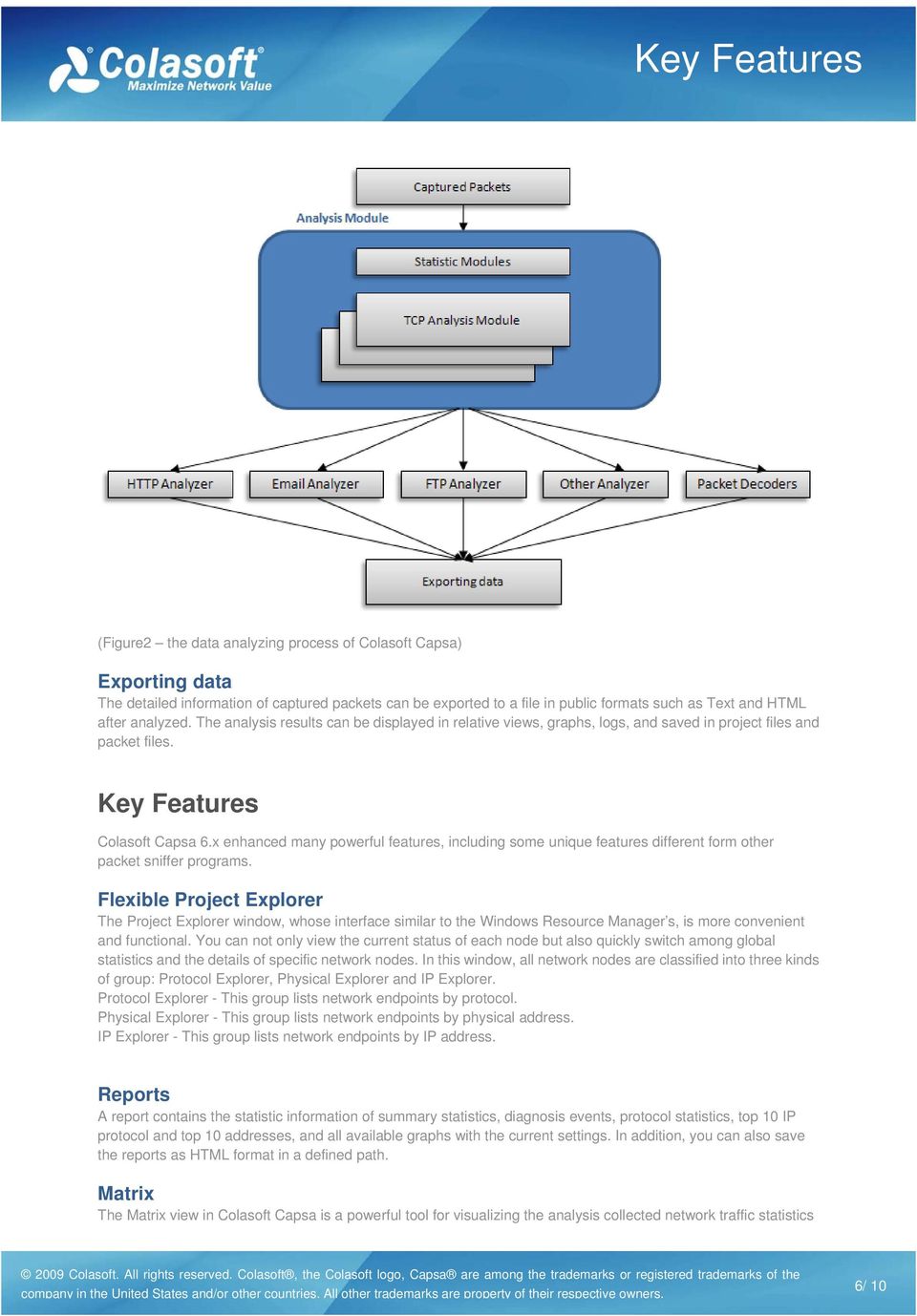
5 How to Work (Figure1 - the data capturing process of Colasoft Capsa) Data analysis The core of system analyzes the packets match the filtering rules immediately after received them. The data analysis includes packets statistics, packets decoding, TCP reconstruction, protocol analysis and etc. The following figure is the data analysis process of Colasoft Capsa. company in the United States and/or other countries. All other trademarks are property of their respective owners. 5/ 10

6 Key Features (Figure2 the data analyzing process of Colasoft Capsa) Exporting data The detailed information of captured packets can be exported to a file in public formats such as Text and HTML after analyzed. The analysis results can be displayed in relative views, graphs, logs, and saved in project files and packet files. Key Features Colasoft Capsa 6.x enhanced many powerful features, including some unique features different form other packet sniffer programs. Flexible Project Explorer The Project Explorer window, whose interface similar to the Windows Resource Manager s, is more convenient and functional. You can not only view the current status of each node but also quickly switch among global statistics and the details of specific network nodes. In this window, all network nodes are classified into three kinds of group: Protocol Explorer, Physical Explorer and IP Explorer. Protocol Explorer - This group lists network endpoints by protocol. Physical Explorer - This group lists network endpoints by physical address. IP Explorer - This group lists network endpoints by IP address. Reports A report contains the statistic information of summary statistics, diagnosis events, protocol statistics, top 10 IP protocol and top 10 addresses, and all available graphs with the current settings. In addition, you can also save the reports as HTML format in a defined path. Matrix The Matrix view in Colasoft Capsa is a powerful tool for visualizing the analysis collected network traffic statistics company in the United States and/or other countries. All other trademarks are property of their respective owners. 6/ 10
7 Technical Indicators in real time. The nodes were arranged in an elongated ellipse and line weight to indicate the volume of traffic between nodes. You can view matrix statistics not only for a global network, but also for specific network nodes. Expert network diagnosis The Diagnoses view presents the diagnosis events of global network or selected network node. You can find a diagnosis statistics according to network layers from the upper view, whereas the corresponding events are listed in the lower sub view, each event is assigned a severity level. Packet filters Colasoft Capsa provides two kinds of filters: Simple Filter and Advanced Filter. The simple filter allows you to customize some commonly used filters by address, port and/or protocol in a single filter. In addition to make simple filters by address, port and protocol, the advanced filters in Colasoft Capsa also allow you to create packet value filters, packet size filters and packet pattern filers based on the logical rules of And, Or and Not. Packet decoding Instantly decodes captured packets and displays detailed decode information in Hex, ASCII or EBCDIC. The packet information in the packet decode view, Hex and ASCII/EBCDIC view are consistent, when you select a section in one of these views, the corresponding portions will be highlighted in the other views. TCP stream reconstruction Initial information can be revered from data fragments through restructuring packets. Analysts is able to see, from TCP stream in the Conversations view, the session and response between client and server, and the real data information received/sent by client or server, so that get hold of the actual operation of network. Log analysis Presents the records of network communications analyzed by advanced analyzers, including messages log, FTP transfers log, HTTP requests log and DNS analysis log. Colasoft Capsa can generate single log file or split log files for the results analyzed by advanced analyzers. Summary statistics Provides general statistic information, including start date/time, general errors, errors, traffic, packet size distribution, and many other statistics analyzed by multiple analyzers. You can take snapshots for the summary statistics at any time, which will be very helpful if you want to compare your network state in the future. Statistic views The new statistic views comprise Summary view, Endpoints view and Protocols view. These views offer the statistics for network activities, allowing you to get an integrated impression of your network with a few glances. This feature is also very helpful when you need to compare graphs or view reports Operating multiple projects and multiple adapters Colasoft Capsa can operate multiple projects synchronous. If you have more than one adapter installed on the local machine, Colasoft Capsa can capture the traffic on all the adapters. You can create a project monitoring all adapters simultaneously, or just focusing on a specific adapter. Technical Indicators System Requirements Minimum P3 500 CPU 256 MB RAM Windows 2000 (SP 4 or later), Windows XP (SP 1 or later) 32bit and 64bit Edition, Windows bit and 64bit Edition, Windows Vista 32bit and 64bit Edition, Windows bit and 64bit Edition, Windows 7 32bit and 64bit 7/ 10

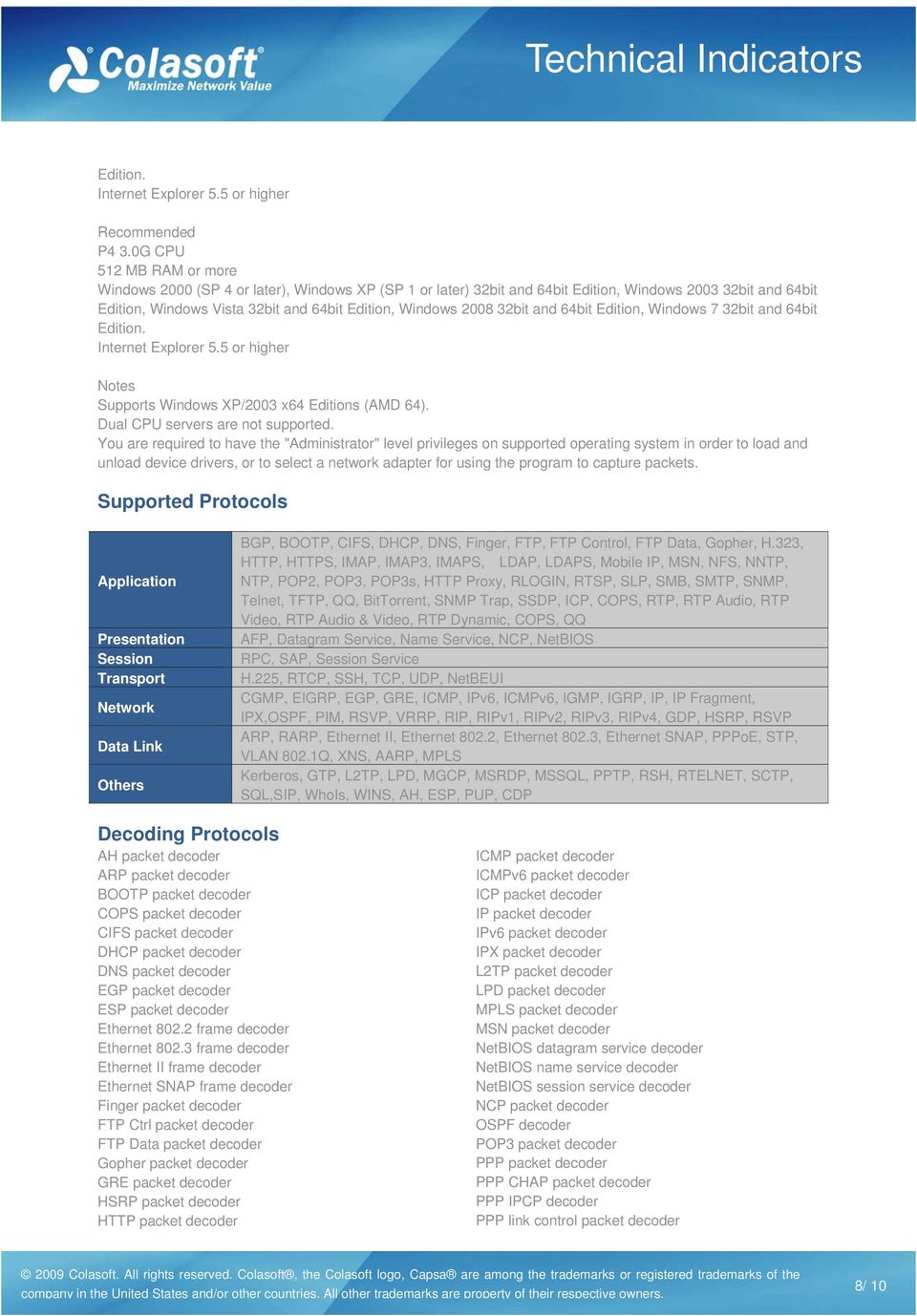
8 Technical Indicators Edition. Internet Explorer 5.5 or higher Recommended P4 3.0G CPU 512 MB RAM or more Windows 2000 (SP 4 or later), Windows XP (SP 1 or later) 32bit and 64bit Edition, Windows bit and 64bit Edition, Windows Vista 32bit and 64bit Edition, Windows bit and 64bit Edition, Windows 7 32bit and 64bit Edition. Internet Explorer 5.5 or higher Notes Supports Windows XP/2003 x64 Editions (AMD 64). Dual CPU servers are not supported. You are required to have the "Administrator" level privileges on supported operating system in order to load and unload device drivers, or to select a network adapter for using the program to capture packets. Supported Protocols Application Presentation Session Transport Network Data Link Others BGP, BOOTP, CIFS, DHCP, DNS, Finger, FTP, FTP Control, FTP Data, Gopher, H.323, HTTP, HTTPS, IMAP, IMAP3, IMAPS, LDAP, LDAPS, Mobile IP, MSN, NFS, NNTP, NTP, POP2, POP3, POP3s, HTTP Proxy, RLOGIN, RTSP, SLP, SMB, SMTP, SNMP, Telnet, TFTP, QQ, BitTorrent, SNMP Trap, SSDP, ICP, COPS, RTP, RTP Audio, RTP Video, RTP Audio & Video, RTP Dynamic, COPS, QQ AFP, Datagram Service, Name Service, NCP, NetBIOS RPC, SAP, Session Service H.225, RTCP, SSH, TCP, UDP, NetBEUI CGMP, EIGRP, EGP, GRE, ICMP, IPv6, ICMPv6, IGMP, IGRP, IP, IP Fragment, IPX,OSPF, PIM, RSVP, VRRP, RIP, RIPv1, RIPv2, RIPv3, RIPv4, GDP, HSRP, RSVP ARP, RARP, Ethernet II, Ethernet 802.2, Ethernet 802.3, Ethernet SNAP, PPPoE, STP, VLAN 802.1Q, XNS, AARP, MPLS Kerberos, GTP, L2TP, LPD, MGCP, MSRDP, MSSQL, PPTP, RSH, RTELNET, SCTP, SQL,SIP, WhoIs, WINS, AH, ESP, PUP, CDP Decoding Protocols AH packet decoder ARP packet decoder BOOTP packet decoder COPS packet decoder CIFS packet decoder DHCP packet decoder DNS packet decoder EGP packet decoder ESP packet decoder Ethernet frame decoder Ethernet frame decoder Ethernet II frame decoder Ethernet SNAP frame decoder Finger packet decoder FTP Ctrl packet decoder FTP Data packet decoder Gopher packet decoder GRE packet decoder HSRP packet decoder HTTP packet decoder ICMP packet decoder ICMPv6 packet decoder ICP packet decoder IP packet decoder IPv6 packet decoder IPX packet decoder L2TP packet decoder LPD packet decoder MPLS packet decoder MSN packet decoder NetBIOS datagram service decoder NetBIOS name service decoder NetBIOS session service decoder NCP packet decoder OSPF decoder POP3 packet decoder PPP packet decoder PPP CHAP packet decoder PPP IPCP decoder PPP link control packet decoder 8/ 10
9 Technical Indicators PPP PAP decoder PPPoE discovery packet decoder PPPoE session packet decoder PPTP packet decoder QQ packet decoder RARP packet decoder RIPv1 decoder RIPv2 decoder RSVP packet decoder SAP packet decoder SCTP packet decoder SMB packet decoder SMTP packet decoder SPX packet decoder SSH packet decoder TCP packet decoder TELNET packet decoder TFTP decoder UDP packet decoder VLAN tag decoder VRRP packet decoder Supported Networks Colasoft Capsa can monitor and analyze communications transmitted on Ethernet, Fast Ethernet or Gigabit Ethernet networks. Capture Resources 100/1000 Mbps Ethernet adapters Loopback Interface (Windows 2000/XP) Supported Packet File Formats Colasoft Capsa native format (*.cscpkt) Colasoft Capsa previous format (*.cpf) Sniffer packet file format (*.cap) EtherPeek packet file format (*.pkt) TokenPeek packet file format (*.pkt) AiroPeek packet file format (*.pkt) Raw packet file format (*.rawpkt) Microsoft Network Monitor 2.x (*.cap) TCP DUMP File(*.dmp) Log Analysis messages analysis FTP transfers analysis HTTP requests analysis DNS analysis TCP Stream Reconstruction Formats ASCII EBCDIC Real-time decoding and analysis Colasoft Capsa captures, decodes and analyzes network communication in real time. Timestamp Colasoft Capsa captures packets and decodes in microsecond and displayed in Hex, ASCII and EBCDIC. Network Monitoring Colasoft Capsa monitors network communication in real time. 9/ 10

10 Notes Notes As a network analysis program, Colasoft Capsa should be used by the users with basic knowledge on network technologies. It will more helpful in network management, network traffic analysis and network problems troubleshooting if users more skilled in network technologies. The basic network technology for using a sniffer program including: The Ethernet work principle. The IP address, MAC address and often used protocols of TCP/IP suite. The work principle of some network devices, such as hub, switch and router. Please visit for more details. This white paper is owned by Colasoft.. No part of this white paper may be reproduced or transmitted in any form, or by any means, electronic or mechanical, including photocopying, for any purpose, without the express written permission of Colasoft Colasoft. All rights reserved. [email protected] 10/ 10

1 Data information is sent onto the network cable using which of the following? A Communication protocol B Data packet
 Review questions 1 Data information is sent onto the network cable using which of the following? A Communication protocol B Data packet C Media access method D Packages 2 To which TCP/IP architecture layer
User Datagram Protocol - Wikipedia, the free encyclopedia
 Página 1 de 6 User Datagram Protocol From Wikipedia, the free encyclopedia User Datagram Protocol (UDP) is one of the core protocols of the Internet protocol suite. Using UDP, programs on networked computers
A host-based firewall can be used in addition to a network-based firewall to provide multiple layers of protection.
 A firewall is a software- or hardware-based network security system that allows or denies network traffic according to a set of rules. Firewalls can be categorized by their location on the network: A network-based
Lab VI Capturing and monitoring the network traffic
 Lab VI Capturing and monitoring the network traffic 1. Goals To gain general knowledge about the network analyzers and to understand their utility To learn how to use network traffic analyzer tools (Wireshark)
Transport and Network Layer
 Transport and Network Layer 1 Introduction Responsible for moving messages from end-to-end in a network Closely tied together TCP/IP: most commonly used protocol o Used in Internet o Compatible with a
Guide to Network Defense and Countermeasures Third Edition. Chapter 2 TCP/IP
 Guide to Network Defense and Countermeasures Third Edition Chapter 2 TCP/IP Objectives Explain the fundamentals of TCP/IP networking Describe IPv4 packet structure and explain packet fragmentation Describe
Packet Capture. Document Scope. SonicOS Enhanced Packet Capture
 Packet Capture Document Scope This solutions document describes how to configure and use the packet capture feature in SonicOS Enhanced. This document contains the following sections: Feature Overview
COMPUTER NETWORK TECHNOLOGY (300)
 Page 1 of 10 Contestant Number: Time: Rank: COMPUTER NETWORK TECHNOLOGY (300) REGIONAL 2014 TOTAL POINTS (500) Failure to adhere to any of the following rules will result in disqualification: 1. Contestant
s@lm@n CompTIA Exam N10-006 CompTIA Network+ certification Version: 5.1 [ Total Questions: 1146 ]
![s@lm@n CompTIA Exam N10-006 CompTIA Network+ certification Version: 5.1 [ Total Questions: 1146 ]](/thumbs/27/9611247.jpg "s@lm@n CompTIA Exam N10-006 CompTIA Network+ certification Version: 5.1 [ Total Questions: 1146 ]") s@lm@n CompTIA Exam N10-006 CompTIA Network+ certification Version: 5.1 [ Total Questions: 1146 ] Topic break down Topic No. of Questions Topic 1: Network Architecture 183 Topic 2: Network Operations 149
s@lm@n CompTIA Exam N10-006 CompTIA Network+ certification Version: 5.1 [ Total Questions: 1146 ] Topic break down Topic No. of Questions Topic 1: Network Architecture 183 Topic 2: Network Operations 149
Basic Network Configuration
 Basic Network Configuration 2 Table of Contents Basic Network Configuration... 25 LAN (local area network) vs WAN (wide area network)... 25 Local Area Network... 25 Wide Area Network... 26 Accessing the
User Manual. (Enterprise Edition)
 User Manual (Enterprise Edition) Copyright 2013 Colasoft LLC. All rights reserved. Information in this document is subject to change without notice. No part of this document may be reproduced or transmitted
SSVVP SIP School VVoIP Professional Certification
 SSVVP SIP School VVoIP Professional Certification Exam Objectives The SSVVP exam is designed to test your skills and knowledge on the basics of Networking, Voice over IP and Video over IP. Everything that
Cover. White Paper. (nchronos 4.1)
 Cover White Paper (nchronos 4.1) Copyright Copyright 2013 Colasoft LLC. All rights reserved. Information in this document is subject to change without notice. No part of this document may be reproduced
2057-15. First Workshop on Open Source and Internet Technology for Scientific Environment: with case studies from Environmental Monitoring
 2057-15 First Workshop on Open Source and Internet Technology for Scientific Environment: with case studies from Environmental Monitoring 7-25 September 2009 TCP/IP Networking Abhaya S. Induruwa Department
SSVP SIP School VoIP Professional Certification
 SSVP SIP School VoIP Professional Certification Exam Objectives The SSVP exam is designed to test your skills and knowledge on the basics of Networking and Voice over IP. Everything that you need to cover
Review: Lecture 1 - Internet History
 Review: Lecture 1 - Internet History late 60's ARPANET, NCP 1977 first internet 1980's The Internet collection of networks communicating using the TCP/IP protocols 1 Review: Lecture 1 - Administration
Network Security: Workshop
 Network Security: Workshop Protocol Analyzer Network analysis is the process of capturing network traffic and inspecting it closely to determine what is happening on the network decodes,, or dissects,,
Monitor network traffic in the Dashboard tab
 As a network analyzer (aka. packet sniffer & protocol analyzer), Capsa makes it easy for us to monitor and analyze network traffic in its intuitive and information-rich tab views. With Capsa's network
Networking 4 Voice and Video over IP (VVoIP)
 Networking 4 Voice and Video over IP (VVoIP) Course Objectives This course will give delegates a good understanding of LANs, WANs and VVoIP (Voice and Video over IP). It is aimed at those who want to move
EXPLORER. TFT Filter CONFIGURATION
 EXPLORER TFT Filter Configuration Page 1 of 9 EXPLORER TFT Filter CONFIGURATION Thrane & Thrane Author: HenrikMøller Rev. PA4 Page 1 6/15/2006 EXPLORER TFT Filter Configuration Page 2 of 9 1 Table of Content
Cisco ASA, PIX, and FWSM Firewall Handbook
 Cisco ASA, PIX, and FWSM Firewall Handbook David Hucaby, CCIE No. 4594 Cisco Press Cisco Press 800 East 96th Street Indianapolis, Indiana 46240 USA Contents Foreword Introduction xxii xxiii Chapter 1 Firewall
Cover. User Guide. (Enterprise Edition)
 Cover User Guide (Enterprise Edition) Copyrig ht Copyright 2015 Colasoft LLC. All rights reserved. Information in this document is subject to change without notice. No part of this document may be reproduced
Course Overview: Learn the essential skills needed to set up, configure, support, and troubleshoot your TCP/IP-based network.
 Course Name: TCP/IP Networking Course Overview: Learn the essential skills needed to set up, configure, support, and troubleshoot your TCP/IP-based network. TCP/IP is the globally accepted group of protocols
How To Use A Network Over The Internet (Networking) With A Network (Netware) And A Network On A Computer (Network)
 1 TCP Transmission Control Protocol, is a connection based Internet protocol responsible for breaking data into packets to send over a network using IP (internet protocol) IP works at the TCP/IP Internet
Protocol Specification & Design. The Internet and its Protocols. Course Outline (trivia) Introduction to the Subject Teaching Methods
 The Internet and its Protocols Protocol Specification & Design Robert Elz [email protected] [email protected] http://fivedots.coe.psu.ac.th/~kre/ Friday: 13:30-15:00 (Rm: 101)???: xx:x0-xx:x0 (Rm:???)
cnds@napier Slide 1 Introduction cnds@napier 1 Lecture 6 (Network Layer)
 Slide 1 Introduction In today s and next week s lecture we will cover two of the most important areas in networking and the Internet: IP and TCP. These cover the network and transport layer of the OSI
Cover. Whitepaper. (Professional Edition)
 Cover Whitepaper (Professional Edition) Copyrig ht Copyright 2015 Colasoft LLC. All rights reserved. Information in this document is subject to change without notice. No part of this document may be reproduced
Configure A VoIP Network
 Configure A VoIP Network Prof. Mr. Altaf. I. Darvadiya Electronics & Communication C.U.Shah College of Engg. & Tech. Wadhwan(363030), India e-mail: [email protected] Ms. Zarna M. Gohil Electronics & Communication
The Product Description of SmartAX. MT882 ADSL2+ Router
 The Product Description of SmartAX MT882 ADSL2+ Router HUAWEI Huawei Technologies Co., Ltd Table of Contents Product Description...1 1. Preface...1 2. Highlights...1 3. Features and Benefits...2 4. Technical
Network Models OSI vs. TCP/IP
 Network Models OSI vs. TCP/IP Network Models Using a formal model allows us to deal with various aspects of Networks abstractly. We will look at two popular models OSI reference model TCP/IP model Both
Colasoft Capsa 7.2.1. User Manual. Maximize Network Value
 Colasoft Capsa 7.2.1 User Manual Maximize Network Value Content Content Content... 2 Overview... 5 New Features... 5 License Agreement... 7 Installation and Deployment... 8 Installation Environment...
Networking Technology Online Course Outline
 Networking Technology Online Course Outline Introduction Networking Technology Introduction Welcome to InfoComm University About InfoComm International About Networking Technology Network Technology Course
CT522-128 LANforge WiFIRE Chromebook 802.11a/b/g/n WiFi Traffic Generator with 128 Virtual STA Interfaces
 1 of 8 Network Testing and Emulation Solutions http://www.candelatech.com [email protected] +1 360 380 1618 [PST, GMT -8] CT522-128 LANforge WiFIRE Chromebook 802.11a/b/g/n WiFi Traffic Generator with
Cisco Packet Tracer 6.3 Frequently Asked Questions
 Cisco Packet Tracer 6.3 Frequently Asked Questions Last Updated 22 January 2015 FAQ Table of Contents Cisco Packet Tracer 6.3 Release...1 Q1. What is Cisco Packet Tracer?... 1 Q2. How can I obtain Packet
How To Make Gigabit Ethernet A Reality
 Off-loading TCP/IP into hardware makes Gigabit Ethernet a reality for your application Coupling a TCP/IP Offload Engine (TOE) with FPGA technology can deliver over 100MBytes/s data rate (in each direction),
Kick starting science...
 Computer ing (TDDD63): Part 1 Kick starting science... Niklas Carlsson, Associate Professor http://www.ida.liu.se/~nikca/ What do you have in the future? What do you have in the future? How does it keep
Firewall VPN Router. Quick Installation Guide M73-APO09-380
 Firewall VPN Router Quick Installation Guide M73-APO09-380 Firewall VPN Router Overview The Firewall VPN Router provides three 10/100Mbit Ethernet network interface ports which are the Internal/LAN, External/WAN,
Network Security. Network Packet Analysis
 Network Security Network Packet Analysis Module 3 Keith A. Watson, CISSP, CISA IA Research Engineer, CERIAS [email protected] 1 Network Packet Analysis Definition: Examining network packets to determine
DL TC72 Communication Protocols: HDLC, SDLC, X.25, Frame Relay, ATM
 DL TC72 Communication Protocols: HDLC, SDLC, X.25, Frame Relay, ATM Objectives: Base training of an engineer for the installation and maintenance of Digital Telecommunications and Internetworking systems.
UTT Technologies offers an effective solution to protect the network against 80 percent of internal attacks:
 HiPER 840 4-WAN Broadband Gateway/Router Overview HiPER 840 4-WAN Broadband Gateway/Router is a purpose-built solution designed for small-sized Internet cafés, broadband communities and schools which require
Computer Networks CS321
 Computer Networks CS321 Dr. Ramana I.I.T Jodhpur Dr. Ramana ( I.I.T Jodhpur ) Computer Networks CS321 1 / 22 Outline of the Lectures 1 Introduction OSI Reference Model Internet Protocol Performance Metrics
Chapter 3 Using Access Control Lists (ACLs)
 Chapter 3 Using Access Control Lists (ACLs) Access control lists (ACLs) enable you to permit or deny packets based on source and destination IP address, IP protocol information, or TCP or UDP protocol
COMPUTER NETWORK TECHNOLOGY (40)
 PAGE 1 OF 9 CONTESTANT ID# Time Rank COMPUTER NETWORK TECHNOLOGY (40) Regional 2012 TOTAL POINTS (450) Failure to adhere to any of the following rules will result in disqualification: 1. Contestant must
Multi-Homing Dual WAN Firewall Router
 Multi-Homing Dual WAN Firewall Router Quick Installation Guide M73-APO09-400 Multi-Homing Dual WAN Firewall Router Overview The Multi-Homing Dual WAN Firewall Router provides three 10/100Mbit Ethernet
Figure 1. Wireshark Menu Bar
 Packet Capture In this article, we shall cover the basic working of a sniffer, to capture packets for analyzing the traffic. If an analyst does not have working skills of a packet sniffer to a certain
Computer Networks/DV2 Lab
 Computer Networks/DV2 Lab Room: BB 219 Additional Information: http://www.fb9dv.uni-duisburg.de/ti/en/education/teaching/ss08/netlab Equipment for each group: - 1 Server computer (OS: Windows 2000 Advanced
Post-Class Quiz: Telecommunication & Network Security Domain
 1. What type of network is more likely to include Frame Relay, Switched Multi-megabit Data Services (SMDS), and X.25? A. Local area network (LAN) B. Wide area network (WAN) C. Intranet D. Internet 2. Which
Cape Girardeau Career Center CISCO Networking Academy Bill Link, Instructor. 2.,,,, and are key services that ISPs can provide to all customers.
 Name: 1. What is an Enterprise network and how does it differ from a WAN? 2.,,,, and are key services that ISPs can provide to all customers. 3. Describe in detail what a managed service that an ISP might
ICTTEN8195B Evaluate and apply network security
 ICTTEN8195B Evaluate and apply network security Release 1 ICTTEN8195B Evaluate and apply network security Modification History Release Release 2 Comments This version first released with ICT10 Integrated
Cisco Certified Network Associate Exam. Operation of IP Data Networks. LAN Switching Technologies. IP addressing (IPv4 / IPv6)
 Cisco Certified Network Associate Exam Exam Number 200-120 CCNA Associated Certifications CCNA Routing and Switching Operation of IP Data Networks Operation of IP Data Networks Recognize the purpose and
Packet Monitor in SonicOS 5.8
 Packet Monitor in SonicOS 5.8 Document Contents This document contains the following sections: Packet Monitor Overview on page 1 Configuring Packet Monitor on page 5 Using Packet Monitor and Packet Mirror
Data Link Protocols. TCP/IP Suite and OSI Reference Model
 Data Link Protocols Relates to Lab. This module covers data link layer issues, such as local area networks (LANs) and point-to-point links, Ethernet, and the Point-to-Point Protocol (PPP). 1 TCP/IP Suite
Copyright 2006 Comcast Communications, Inc. All Rights Reserved.
 ii Copyright 2006 Comcast Communications, Inc. All Rights Reserved. Comcast is a registered trademark of Comcast Corporation. Comcast Business IP Gateway is a trademark of Comcast Corporation. The Comcast
Network Pop Quiz 5 Brought to you by www.rmroberts.com please visit our site!
 Network Pop Quiz 5 Brought to you by www.rmroberts.com please visit our site! This is a set of questions to help you prepared for the CompTIA Network+ certification examination. You should not exceed twenty
Virtual Server and DDNS. Virtual Server and DDNS. For BIPAC 741/743GE
 Virtual Server and DDNS For BIPAC 741/743GE August, 2003 1 Port Number In TCP/IP and UDP networks, a port is a 16-bit number, used by the host-to-host protocol to identify to which application program
Lab 2. CS-335a. Fall 2012 Computer Science Department. Manolis Surligas [email protected]
 Lab 2 CS-335a Fall 2012 Computer Science Department Manolis Surligas [email protected] 1 Summary At this lab we will cover: Basics of Transport Layer (TCP, UDP) Broadcast ARP DNS More Wireshark filters
CCNP v2 Eğitimi İçeriği
 Öngereksinimler: CCNA http://www.cliguru.com/ccna Kurs Tanımı: CCNP v2 Eğitimi İçeriği Giriş seviyesi network bilgilerine sahip katılımcıları network'ün temeli olan Routing Switching alanında orta üst
CT505-30 LANforge-FIRE VoIP Call Generator
 1 of 11 Network Testing and Emulation Solutions http://www.candelatech.com [email protected] +1 360 380 1618 [PST, GMT -8] CT505-30 LANforge-FIRE VoIP Call Generator The CT505-30 supports SIP VOIP
Distinct. Network Monitor. User s Guide
 Distinct Network Monitor Version 4.2 User s Guide Distinct Corporation 3315 Almaden Expressway San Jose, CA 95118 USA Phone: +1 408-445-3270 Fax: +1 408-445-3274 Email: [email protected] WWW: http://www.distinct.com
Chapter 2 Quality of Service (QoS)
 Chapter 2 Quality of Service (QoS) Software release 06.6.X provides the following enhancements to QoS on the HP 9304M, HP 9308M, and HP 6208M-SX routing switches. You can choose between a strict queuing
Virtual private network. Network security protocols VPN VPN. Instead of a dedicated data link Packets securely sent over a shared network Internet VPN
 Virtual private network Network security protocols COMP347 2006 Len Hamey Instead of a dedicated data link Packets securely sent over a shared network Internet VPN Public internet Security protocol encrypts
Chapter 6 Configuring the SSL VPN Tunnel Client and Port Forwarding
 Chapter 6 Configuring the SSL VPN Tunnel Client and Port Forwarding This chapter describes the configuration for the SSL VPN Tunnel Client and for Port Forwarding. When a remote user accesses the SSL VPN
- Basic Router Security -
 1 Enable Passwords - Basic Router Security - The enable password protects a router s Privileged mode. This password can be set or changed from Global Configuration mode: Router(config)# enable password
Module 1: Reviewing the Suite of TCP/IP Protocols
 Module 1: Reviewing the Suite of TCP/IP Protocols Contents Overview 1 Lesson: Overview of the OSI Model 2 Lesson: Overview of the TCP/IP Protocol Suite 7 Lesson: Viewing Frames Using Network Monitor 14
2006 Network + Domain 2 - Study Guide
 2006 Network + Domain 2 - Study Guide (2nd of a 4 part series) CompTIA Network+ - Domain 2 Introduction The second domain of the CompTIA Network+ exam represents 20% of the examination and covers the most
Microsoft. CompTIA Network+ Rapid Review. (Exam N10-005) Craig Zacker
 Microsoft CompTIA Network+ Rapid Review (Exam N10-005) Craig Zacker Introduction xix Preparing for the exam xxiii Chapter 1 Network Concepts 1 Objective 1.1: Compare the layers of the OSI and TCP/IP models
NetXRay Protocol Analyzer and Network Monitor Installation Guide. Release 3.0
 NetXRay Protocol Analyzer and Network Monitor Installation Guide Release 3.0 Network General, Sniffer, Distributed Sniffer System, SniffMaster and NetXRay are registered trademarks of Network General Corporation
Intrusion Detection, Packet Sniffing
 Intrusion Detection, Packet Sniffing By : Eng. Ayman Amaireh Supervisor :Dr.: Lo'ai Tawalbeh New York Institute of Technology (NYIT)- Jordan s s campus-2006 12/2/2006 eng Ayman 1 What is a "packet sniffer"?
CompTIA Network+ (Exam N10-005)
 CompTIA Network+ (Exam N10-005) Length: Location: Language(s): Audience(s): Level: Vendor: Type: Delivery Method: 5 Days 182, Broadway, Newmarket, Auckland English, Entry Level IT Professionals Intermediate
Validate the performance and security of IPS/IDS, Firewall and Proxy - January 2009
 Validate the performance and security of IPS/IDS, Firewall and Proxy - January 2009 Gregory Fresnais [email protected] +33672510922 Director of International Business Development BreakingPoint Systems
Detecting Threats in Network Security by Analyzing Network Packets using Wireshark
 1 st International Conference of Recent Trends in Information and Communication Technologies Detecting Threats in Network Security by Analyzing Network Packets using Wireshark Abdulalem Ali *, Arafat Al-Dhaqm,
LESSON 3.6. 98-366 Networking Fundamentals. Understand TCP/IP
 Understand TCP/IP Lesson Overview In this lesson, you will learn about: TCP/IP Tracert Telnet Netstat Reserved addresses Local loopback IP Ping Pathping Ipconfig Protocols Anticipatory Set Experiment with
The Cisco IOS Firewall feature set is supported on the following platforms: Cisco 2600 series Cisco 3600 series
 Cisco IOS Firewall Feature Set Feature Summary The Cisco IOS Firewall feature set is available in Cisco IOS Release 12.0. This document includes information that is new in Cisco IOS Release 12.0(1)T, including
High Performance 10Gigabit Ethernet Switch
 BDCOM S3900 Switch High Performance 10Gigabit Ethernet Switch BDCOM S3900 is a standard L3 congestion-less switch series, which are capable of multi-layer switching and wire-speed route forwarding. Its
Load Balance Router R258V
 Load Balance Router R258V Specification Hardware Interface WAN - 5 * 10/100M bps Ethernet LAN - 8 * 10/100M bps Switch Reset Switch LED Indicator Power - Push to load factory default value or back to latest
NETASQ MIGRATING FROM V8 TO V9
 UTM Firewall version 9 NETASQ MIGRATING FROM V8 TO V9 Document version: 1.1 Reference: naentno_migration-v8-to-v9 INTRODUCTION 3 Upgrading on a production site... 3 Compatibility... 3 Requirements... 4
Before deploying SiteAudit it is recommended to review the information below. This will ensure efficient installation and operation of SiteAudit.
 SiteAudit Knowledge Base Deployment Check List June 2012 In This Article: Platform Requirements Windows Settings Discovery Configuration Before deploying SiteAudit it is recommended to review the information
Application Aware Traffic Engineering and Monitoring
 Course Number Presentation_ID 2000, 1999, 2000, Cisco Cisco Systems, Systems, Inc. Inc. 1 Application Aware Traffic Engineering and Monitoring Session 2000, Cisco Systems, Inc. 2 Agenda Challenges, Metrics,
Internetworking and IP Address
 Lecture 8 Internetworking and IP Address Motivation of Internetworking Internet Architecture and Router Internet TCP/IP Reference Model and Protocols IP Addresses - Binary and Dotted Decimal IP Address
Bro at 10 Gps: Current Testing and Plans
 U.S. Department of Energy Bro at 10 Gps: Current Testing and Plans Office of Science Brian L. Tierney Lawrence Berkeley National Laboratory Bro s Use at LBL Operational 24 7 since 1996 Monitors traffic
Firewall Defaults, Public Server Rule, and Secondary WAN IP Address
 Firewall Defaults, Public Server Rule, and Secondary WAN IP Address This quick start guide provides the firewall defaults and explains how to configure some basic firewall rules for the ProSafe Wireless-N
Understanding TCP/IP. Introduction. What is an Architectural Model? APPENDIX
 APPENDIX A Introduction Understanding TCP/IP To fully understand the architecture of Cisco Centri Firewall, you need to understand the TCP/IP architecture on which the Internet is based. This appendix
Cisco Configuring Commonly Used IP ACLs
 Table of Contents Configuring Commonly Used IP ACLs...1 Introduction...1 Prerequisites...2 Hardware and Software Versions...3 Configuration Examples...3 Allow a Select Host to Access the Network...3 Allow
Advanced VSAT Solutions Bridge Point-to-Multipoint (BPM) Overview
 2114 West 7 th Street Tempe, AZ 85281 USA Voice +1.480.333.2200 E-mail [email protected] Web www.comtechefdata.com Advanced VSAT Solutions Bridge Point-to-Multipoint (BPM) Overview January 2014 2014
Lab 3.3 Configuring QoS with SDM
 Lab 3.3 Configuring QoS with SDM Learning Objectives Configure Quality of Service tools with the SDM QoS wizard Monitor traffic patterns using the SDM QoS interface Topology Diagram Scenario Cisco Security
Chapter 6 Configuring IP
 Chapter 6 Configuring IP This chapter describes the Internet Protocol (IP) parameters on HP ProCurve routing switches and switches and how to configure them. After you add IP addresses and configure other
CCT vs. CCENT Skill Set Comparison
 Operation of IP Data Networks Recognize the purpose and functions of various network devices such as Routers, Switches, Bridges and Hubs Select the components required to meet a given network specification
UPPER LAYER SWITCHING
 52-20-40 DATA COMMUNICATIONS MANAGEMENT UPPER LAYER SWITCHING Gilbert Held INSIDE Upper Layer Operations; Address Translation; Layer 3 Switching; Layer 4 Switching OVERVIEW The first series of LAN switches
Fundamentals of the Internet 2009/10. 1. Explain meaning the following networking terminologies:
 Fundamentals of Internet Tutorial Questions (2009) 1. Explain meaning the following networking terminologies: Client/server networking, Coax, twisted pair, protocol, Bit, Byte, Kbps, KBps, MB, KB, MBps,
Data Networking and Architecture. Delegates should have some basic knowledge of Internet Protocol and Data Networking principles.
 Data Networking and Architecture The course focuses on theoretical principles and practical implementation of selected Data Networking protocols and standards. Physical network architecture is described
Broadband Router User s Manual
 Broadband Router User s Manual Table of Contents Chapter 1 Introduction...4 1.1 The Broadband Router......4 1.2 Physical Features of Broadband Router...4 1.3 Non-Physical Features of Broadband Router..
Layer 3 Network + Dedicated Internet Connectivity
 Layer 3 Network + Dedicated Internet Connectivity Client: One of the IT Departments in a Northern State Customer's requirement: The customer wanted to establish CAN connectivity (Campus Area Network) for
Roles for Servers in the SCW Database
 Roles for Servers in the SCW Database Application BizTalk 2004 Business Activity BizTalk 2004 Messaging and Orchestration ASP.NET session state BizTalk 2004 EDI Integration BizTalk 2004 Rules Engine Audit
TCP/IP Fundamentals. Edmund Lam IT Audit Manager University of California [email protected] 7/25/99 1
 TCP/IP Fundamentals Edmund Lam IT Audit Manager University of California [email protected] 7/25/99 1 What we will discuss: TCP/IP related to OSI Layers History of TCP/IP and what is it? TCP/IP Structure
TCP/IP Fundamentals. OSI Seven Layer Model & Seminar Outline
 OSI Seven Layer Model & Seminar Outline TCP/IP Fundamentals This seminar will present TCP/IP communications starting from Layer 2 up to Layer 4 (TCP/IP applications cover Layers 5-7) IP Addresses Data
Configuring the Transparent or Routed Firewall
 5 CHAPTER This chapter describes how to set the firewall mode to routed or transparent, as well as how the firewall works in each firewall mode. This chapter also includes information about customizing
BASIC ANALYSIS OF TCP/IP NETWORKS
 BASIC ANALYSIS OF TCP/IP NETWORKS INTRODUCTION Communication analysis provides powerful tool for maintenance, performance monitoring, attack detection, and problems fixing in computer networks. Today networks