
Broadband Quality in Public Libraries: Speed Test Findings and Results
|
|
|
- Amelia Wilson
- 10 years ago
- Views:
Transcription
1 Broadband Quality in Public Libraries: Test Findings and Results March 1, 2015 by John Carlo Bertot, Ph.D. Co-Director and Professor Jean Lee Graduate Research Associate Nishit Pawar Graduate Research Associate Paul T. Jaeger Co-Director and Professor
2 Table of Contents List of Figures... ii Intro and Context... 1 A Study of the User Experience.. 1 Methodology Procedure and Approach... 3 Data Quality and Test Limitations 4 The University of Maryland Test v. test.net. 5 Digital Inclusion Survey and Test Data. 5 Key Findings and Results. 7 Overall Test Results by Connection Type and Locale. 7 Direct Connection Results.. 7 Wi-Fi Connection Results 9 Test Results by Network Load. 11 City Libraries. 12 Suburban Libraries.. 14 Town Libraries.. 17 Rural Libraries.. 20 Grouping the Results. 20 The Dropoff: v. User Experience. 22 Test and the Digital Inclusion Survey 23 Basic and Advanced Technologies Offered by Libraries 24 Conclusion. 25 A Call for Future Research. 26 References.. 26 Appendix A. Test Data Tables.. 27 Appendix B. Digital inclusion and Test Methodology Appendix C. Selected Tables from DI Survey and Test Analysis. 43 University of Maryland College Park i
3 List of Figures Figure 1: Participation in 2013 Digital Inclusion Survey and Test. 2 Figure 2: Total Test Sample and Participation (Branch/Outlet). 2 Figure 3: Total Public Library System Test Participation 3 Figure 4: Total Public Library Outlet/Branch Test Participation. 3 Figure 5: States Represented by Test Participation. 3 Figure 6: Total Participation in Test by Test Type and Locale... 4 Figure 7: Test Results Variation... 6 Figure 8: Public Library Direct Connect Test Results by Locale (in Kbps).. 8 Figure 9: Public Library Direct Connect Upload Test Results by Locale (in Kbps).. 8 Figure 10: Public Library Wi-Fi Test Results by Locale (in Kbps).. 10 Figure 11: Public Library Wi-Fi Upload Test Results by Locale (in Kbps) 11 Figure 12: City Public Library Direct Connect Test Results by Load (in Kbps). 12 Figure 13: City Public Library Direct Connect Upload Test Results by Load (in Kbps) Figure 14: City Public Library Wi-Fi Test Results by Load (in Kbps) Figure 15: City Public Library Wi-Fi Test Results by Load (in Kbps) Figure 16: Suburban Public Library Direct Connect Test Results by Load (in Kbps). 15 Figure 17: Suburban Public Library Direct Connect Test Results by Load (in Kbps). 16 Figure 18: Suburban Public Library Wi-Fi Test Results by Load (in Kbps) 16 Figure 19: Suburban Public Library Wi-Fi Upload Test Results by Load (in Kbps). 17 Figure 20: Town Public Library Direct Connect Test Results by Load (in Kbps). 18 Figure 21: Town Public Library Direct Connect Upload Test Results by Load (in Kbps) 18 Figure 22: Town Public Library Wi-Fi Test Results by Load (in Kbps) 19 Figure 23: Town Public Library Wi-Fi Upload Test Results by Load (in Kbps). 19 Figure 24: Public Library Outlets Grouped Test Direct Connect s, by Locale Code. 21 Figure 25: Public Library Outlets Grouped Test Direct Connect Upload s, by Locale Code Figure 26: Public Library Outlets Grouped Test Wi-Fi s, by Locale Code Figure 27: Public Library Outlets Grouped Test Wi-Fi Upload s, by Locale Code. 22 Figure 28: Public Library Outlet Compared to Device-Level, by Locale Code, in Megabits Per Second.. 22 University of Maryland College Park ii
4 Figure 29: Public Library Outlet Upload Compared to Device-Level, by Locale Code, in Megabits Per Second. 23 Recommended report citation: Bertot, J.C., Lee, J., Pawar N., Jaeger, P.T. (2015). Broadband Quality in Public Libraries: Test Results and Findings. College Park, MD: Information Policy & Access Center, University of Maryland College Park. Available at University of Maryland College Park iii

5 Intro and Context From e-books to e-government services to distance learning, more of the information and services people seek and use in our nation s public libraries are delivered to them via wired and wireless broadband networks. The American Library Association (ALA) and the Information Policy and Access Center (ipac) at the University of Maryland have tracked these trends over two different but related survey efforts since Most recently we published results from the Digital Inclusion Survey ( which is funded by the Institute of Museum and Library Services (IMLS), in July Among its national findings, virtually all public libraries now provide free Wi-Fi access and an average of 20 computers. Overall, libraries also report some progress in their public Internet speeds (e.g., about 10% of libraries reported speeds of 1.5Mbps or less, compared with 23.4% two years earlier), but still falling far short of goals established in the recent E-rate Modernization proceeding and in the National Broadband Plan (with about 2% of libraries with 1 Gbps speeds). Only about half of all libraries report maximum Internet download speeds greater than 10 Mbps, with city libraries generally skewing on the higher end (about 27% with maximum speeds of 100 Mbps or higher) and rural libraries generally skewing on the lower end (about 3% with speeds of 100 Mbps or higher). Two-thirds of libraries indicated they would like to improve their broadband speeds. Using this nationwide survey and a smaller subset of libraries that provided both subscribed Internet speeds and measured speed test data last fall, the ALA and ipac sought to drill down further to approximate the user experience via a public library s public Internet access connection. A Study of the User Experience In order to inform the policy discourse around broadband in public libraries, this 2014 research effort sought to approximate the user experience via a public library s public Internet access connection through a national speed test data collection effort. More specifically, the study sought to: Collect speed test data via a public library s direct connect devices (e.g., a public access computer using a library s hardwired infrastructure); Collect speed test data via a public library s wireless (Wi-Fi) connected device (e.g., a laptop computer); and Collect speed test data via a public library s wireless (Wi-Fi) mobile-connected device (e.g., a smartphone, tablet). 1 In addition, the study sought to enhance the speed test data collection with integration and additional analysis using the 2013 Digital Inclusion Survey data collection effort conducted by the Information Policy & Access Center (ipac) at the University of Maryland in partnership with the American Library Association 1 The mobile device data collection was experimental and in part a proof of concept test that used speedof.me as its speed capture tool. The tool is an HTML5-based produce and thus we were able to build a mobile device interface that did not require an app download and was not flash-based and thus could work with IOS (iphone and ipad devices). University of Maryland College Park 1

6 (ALA) and the International City/County Management Association (ICMA) and funded by the U.S. Institute of Museum and Library Services. Methodology The 2013 Digital Inclusion Survey included a speed test tool embedded within the survey. The survey licensed an instance of Ookla 2 and built a custom data collection and capture tool around the utility. 1,669 unique public library locations ran an instance of the speed test as part of the 2013 Digital Inclusion Survey. Of those, 1,510 completed the Survey as well and reported their subscribed broadband upload and download speeds (see Figure 1). Figure 1: Participation in 2013 Digital Inclusion Survey and Test Locale Code Libraries City 375 Suburban 332 Town 284 Rural 519 Overall 1,510 The Summer 2014 supplementary study undertook a multi-stage sampling approach to collect speed test data from libraries. For general speed test data (direct connect, Wi-Fi, and mobile), the study team opened up the speed test tool to all libraries for use. For analysis of Digital Inclusion Survey data and speed test data, we drew a proportionate sample of 1,000 libraries based on aggregated library locale (City, Suburban, Town, and Rural) from those aforementioned 1,510 libraries that participated in both the 2013 Digital Inclusion Survey and the voluntary speed test. We factored in geographic region and whether a library was part of a larger system with multiple branches or stand alone. Figure 2 shows the sampled library distribution by locale and total participation. In all 70% of sampled libraries participated in the summer supplement. Figure 2: Total Test Sample and Participation (Branch/Outlet) Locale Code Distribution in Population* 2014 Test Sample City 16.6% 166 Suburban 23.2% 232 Town 19.8% 198 Rural 40.3% 403 Overall 100.0% 1,000 * The 2013 Digital Inclusion Survey used the FY2011 Public Library Survey outlet file published by IMLS (the most current file at the time) as its sample frame. The study team modified the file to remove U.S. Territory libraries, bookmobiles, and books by mail instances, leaving 16,715 library locations from which to draw a sample. 2 Ookla is the underlying speed test capture tool in the website that many organizations use to measure the speed of their connection. University of Maryland College Park 2

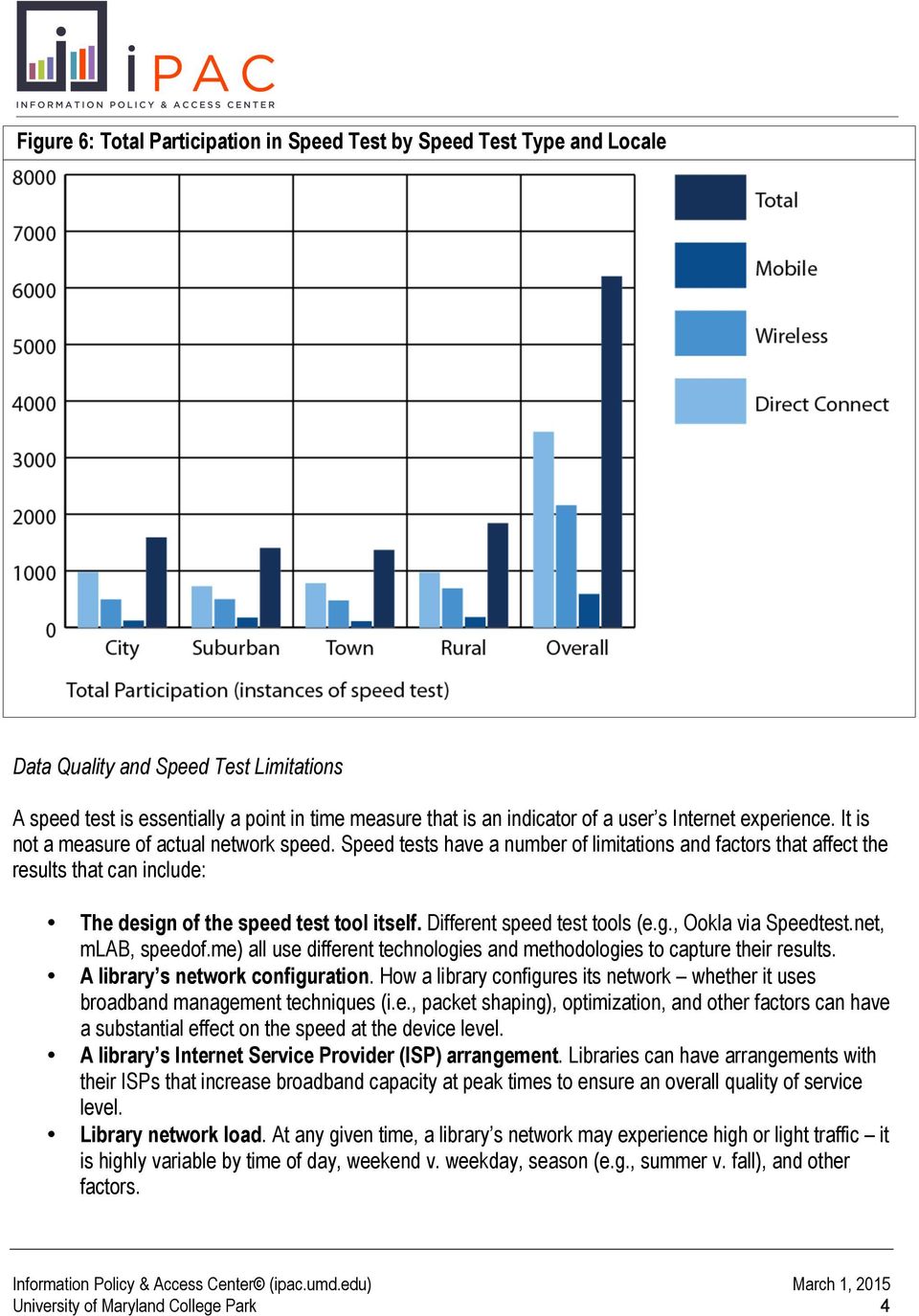
7 The speed test was in the field from July 14, 2014, through August 15, As Figures 3-5 show, a total of 1,230 public library systems and 2,251 library locations (outlets/branches) spread across 49 states participated in the speed test. Figure 3: Total Public Library System Test Participation Total Public Library Participation (number of library systems) Locale Code Direct Connect Wireless Mobile Total City Suburban Town Rural Overall ,230 1,230 Library systems in all participated, however, some systems ran the speed test multiple times across connection type. Figure 4: Total Public Library Outlet/Branch Test Participation Total Public Library Participation (number of library branches/locations) Locale Code Direct Connect Wireless Mobile Total City Suburban Town Rural Overall ,251 Figure 5: States Represented by Test Participation Total Participation by State Locale Code Direct Connect Wireless Mobile Total Overall Procedure and Approach As part of the speed test, we asked participating libraries to: Run the speed test multiple times when the library was closed, when usage was light, typical, and heavy (these were self-identified determinations); Indicate whether the test was via a directly connected computer or Wi-Fi (the mobile test was separate, thus that determination was automatic); Indicate the library s subscribed download and upload broadband speeds; Provide the number of public access computers available at the location/branch. In all, the study captured 6,207 instances of the speed test that included 3,458 direct connect instances, 2,160 Wi-Fi instances, and 589 mobile instances (see Figure 6). University of Maryland College Park 3

8 Figure 6: Total Participation in Test by Test Type and Locale Data Quality and Test Limitations A speed test is essentially a point in time measure that is an indicator of a user s Internet experience. It is not a measure of actual network speed. tests have a number of limitations and factors that affect the results that can include: The design of the speed test tool itself. Different speed test tools (e.g., Ookla via test.net, mlab, speedof.me) all use different technologies and methodologies to capture their results. A library s network configuration. How a library configures its network whether it uses broadband management techniques (i.e., packet shaping), optimization, and other factors can have a substantial effect on the speed at the device level. A library s Internet Service Provider (ISP) arrangement. Libraries can have arrangements with their ISPs that increase broadband capacity at peak times to ensure an overall quality of service level. Library network load. At any given time, a library s network may experience high or light traffic it is highly variable by time of day, weekend v. weekday, season (e.g., summer v. fall), and other factors. University of Maryland College Park 4
9 The number of hops to the content sought. A tool such as speedtest.net typically selects a speed test server that is the closest to the test location. In reality, the content a user might seek could reside on a server thousands of miles and multiple network hops away, which can impact the user experience. Traffic on the Internet. At any given time, the Internet in a given area might range from high to low volume. This is highly variable and can impact the user experience. The user device and its configuration. The type of device (desktop, laptop, tablet, smartphone, other) through which a user might access the Internet can have a significant impact on reported/captured speeds from a speed test. The device s processor, memory, network card, and other configurations can affect the results. As a result, any speed test data are best viewed as an approximate simulation of an individual s experience at a specific moment in time via a library s public access network. The University of Maryland Test v. test.net With the above limitations identified and acknowledged, we received comments from some libraries that raised concerns about the reported speeds via the University of Maryland (UMD) test as compared to results captured via test.net. Both versions of the speed tests relied on Ookla to capture speed test data. The UMD tool was integrated into a custom data collection tool that captured speed test data automatically and had a more limited number of servers that were used to generate speed test results as opposed to the entire universe of servers available to libraries via the test.net tool. Figure 7 compares test.net results from several servers selected at random as compared to the UMD speed test instance. As the results show, the UMD and default (in general the closest server to the test site via test.net) are comparable. The test does, however, point out that results from a speed test can vary greatly depending on the server used to capture the speed test data. The variance is particularly extreme for Server Six. But all the results vary in some way, a reflection of speed test capture tools. Digital Inclusion Survey and Test Data In addition to conducting the speed test, the study merged the speed test results with selected technology training, technology services, information resources, and programming data from the 2013 Digital Inclusion Survey (Bertot, et al., 2014). The findings section highlights some trends that this analysis identified, with additional methodological details in Appendix B and selected data tables in Appendix C. University of Maryland College Park 5

10 Figure 7: Test Results Variation Server/Test Connection Type Upload Default test.net (Ookla) One test.net (Ookla) Two test.net (Ookla) Three test.net (Ookla) Four test.net (Ookla) Five test.net (Ookla) Six test.net (Ookla) Seven test.net (Ookla) Wireless (Wi-Fi) 24.75Mbps 22.28Mbps Direct 57.99Mbps 39.12Mbps Wireless (Wi-Fi) 24.96Mbps 17.68Mbps Direct 58.04Mbps 26.77Mbps Wireless (Wi-Fi) 24.75Mbps 16.48Mbps Direct 58.00Mbps 38.70Mbps Wireless (Wi-Fi) 24.54Mbps 12.35Mbps Direct 58.04Mbps 13.68Mbps Wireless (Wi-Fi) 24.95Mbps 22.05Mbps Direct 50.82Mbps 38.70Mbps Wireless (Wi-Fi) 24.44Mbps 7.23Mbps Direct 24.14Mbps 38.23Mbps Wireless (Wi-Fi) 4.54Mbps 7.81Mbps Direct 1.66Mbps 12.35Mbps Wireless (Wi-Fi) 23.25Mbps 13.65Mbps Direct 58.00Mbps 17.10Mbps Wireless (Wi-Fi) UMD 23.82Mbps 21.25Mbps (Ookla) Direct 56.50Mbps 38.10Mbps Note 1: test results validation was conducted using a 50Mbps down/25mbps up fiber connection to the Internet over a 100Mbps internal network connection. Wireless tests were conducted via a n wireless router to the same internal network. Note 2: test.net tests were conducted initially using the default server selected by the test.net site via a directly connected computer. After the initial tests, seven servers (moving from East to West across the United States) were selected at random with all tests run all within a 15 minute window. The selected servers were recorded so as to conduct the tests again using Wi-Fi.The same methodology was used for the Wi-Fi test. Note 3: The UMD test, which used a licensed instance of Ookla, was conducted first and recorded for comparative purposes using the same network set up and devices. Note 4: Results captured August 11, University of Maryland College Park 6

11 Key Findings and Results This section summarizes the key findings from the speed test study. Appendix A contains the full set of data tables generated from the speed test. Given the experimental nature of the mobile device speed test, this section highlights the results from the direct connection and Wi-Fi speed test results. Appendix A, however, includes the data tables and results generated from the mobile version of the speed test. Overall Test Results by Connection Type and Locale This section highlights speed test results by both locale (City, Suburban, Town, and Rural) and speed test type (direct connection, Wi-Fi, and mobile). Direct Connection Results City public libraries reported an average captured download speed of 84,735 Kbps (82.74 Mbps), with a median download captured download speed of 31,210 Kbps (30.47 Mbps), minimum captured speed of 560 Kbps (.55 Mbps), and a maximum captured download speed of 841,534 Kbps ( Mbps) (see Figure 8). Suburban public libraries reported an average captured download speed of 47,535 Kbps (46.42 Mbps), with a median download captured speed of 19,240 Kbps (18.79 Mbps), minimum download captured speed of 480 Kbps (.47 Mbps), and a maximum captured download speed of 809,961 Kbps ( Mbps). Town public libraries reported an average captured download speed of 26,083 Kbps (25.47 Mbps), with a median download captured speed of 10,791 Kbps (10.54 Mbps), minimum captured speed of 160 Kbps (.16 Mbps), and a maximum captured download speed of 795,597 Kbps ( Mbps). Rural public libraries reported an average captured download speed of 20,462 Kbps (19.98 Mbps), with a median download captured speed of 9,168 Kbps (8.95 Mbps), minimum captured speed of 20 Kbps (.02 Mbps), and a maximum captured download speed of 499,462 Kbps ( Mbps). University of Maryland College Park 7

12 Figure 8: Public Library Direct Connect Test Results by Locale (in Kbps) Figure 9: Public Library Direct Connect Upload Test Results by Locale (in Kbps) University of Maryland College Park 8

13 City public libraries reported an average upload speed of 55,053 Kbps (53.76 Mbps), with a median upload captured speed of 25,843 Kbps (25.23 Mbps), minimum upload captured speed of 160 Kbps (.16 Mbps), and a maximum captured upload speed of 811,490 Kbps ( Mbps) (see Figure 9). Suburban public libraries reported an average captured upload speed of 23,381 Kbps (22.83 Mbps), with a median upload captured speed of 9,130 Kbps (8.91 Mbps), minimum captured upload speed of 200 Kbps (.19 Mbps), and a maximum captured upload speed of 666,791 Kbps ( Mbps). Town public libraries reported an average captured upload speed of 13,336 Kbps (13.02 Mbps), with a median upload captured speed of 3,359 Kbps (3.28 Mbps), minimum captured speed of 73 Kbps (.07 Mbps), and a maximum captured upload speed of 544,166 Kbps ( Mbps). Rural public libraries reported an average captured upload speed of 10,108 Kbps (9.87 Mbps), with a median upload captured speed of 2,196 Kbps (2.14 Mbps), minimum captured speed of 20 Kbps (.02 Mbps), and a maximum captured upload speed of 477,730 Kbps ( Mbps). Wi-Fi Connection Results The Wi-Fi results (shown in more detail in the tables found in Appendix A) would indicate that some libraries conducted the Wi-Fi test remotely, thus skewing some of the results. That is, the tests were not run using a device connected to the library s Wi-Fi network in the public access area, but rather through remote login techniques by IT staff. Given this, we recommend relying on the median speeds reported as a more accurate reflection of a typical user s experience in a public library via a Wi-Fi connection. City public libraries reported and average captured Wi-Fi download speed of 58,999 Kbps (57.61 Mbps), with a median captured Wi-Fi download speed of 13,708 Kbps (13.38 Mbps), minimum captured Wi-Fi download speed of 400 Kbps (.39 Mbps), and a maximum captured Wi-Fi download speed of 835,398 Kbps University of Maryland College Park 9

14 Figure 10: Public Library Wi-Fi Test Results by Locale (in Kbps) ( Mbps) (see Figure 10). Suburban public libraries reported an average captured Wi-Fi download speed of 21,068 Kbps (20.57 Mbps), with a median captured Wi-Fi download speed of 14,718 Kbps (14.37 Mbps), minimum captured Wi-Fi download speed of 150 Kbps (.15 Mbps), and a maximum captured download Wi-Fi speed of 494,809 Kbps ( Mbps). Town public libraries reported an average captured download Wi-Fi speed of 17,739 Kbps (17.32 Mbps), with a median download Wi-Fi captured speed of 9,563 Kbps (9.34 Mbps), minimum captured speed of 20 Kbps (.02 Mbps), and a maximum Wi-Fi download speed of 403,563 Kbps ( Mbps). Rural public libraries reported an average captured download Wi-Fi speed of 12,873 Kbps (12.57 Mbps), with a median download captured speed of 6,420 Kbps (6.27 Mbps), minimum captured speed of 20 Kbps (.02 Mbps), and a maximum captured download speed of 492,430 Kbps ( Mbps). City public libraries reported an average captured upload Wi-Fi speed of 12,873 Kbps (12.57 Mbps), with a median captured upload Wi-Fi speed of 6,434 Kbps (6.28 Mbps), minimum captured upload Wi-Fi speed of 10 Kbps (.01 Mbps), and a maximum captured upload Wi-Fi speed of 696,098 Kbps ( Mbps) (see Figure 11). Suburban public libraries reported an average captured upload Wi-Fi speed of 9,615 Kbps (9.39 Mbps), with a median captured upload Wi-Fi speed of 6,005 Kbps (5.86 Mbps), minimum captured upload Wi-Fi speed of 107 Kbps (.10 Mbps), and a maximum captured upload Wi-Fi speed of 107,355 Kbps ( Mbps). Town public libraries reported and average captured upload Wi-Fi speed of 8,707 Kbps (8.50 Mbps), with a median upload captured Wi-Fi speed of 2,932 Kbps (2.86 Mbps), minimum captured University of Maryland College Park 10

15 upload Wi-Fi speed of 70 Kbps (.07 Mbps), and a maximum captured upload Wi-Fi speed of 384, 766 Kbps ( Mbps). Rural public libraries reported an average captured upload Wi-Fi speed of 5,728 Kbps (5.60 Mbps), Figure 11: Public Library Wi-Fi Upload Test Results by Locale (in Kbps) with a median upload captured Wi-Fi speed of 1,440 Kbps (1.41 Mbps), minimum captured Wi-Fi speed of 10 Kbps (.01 Mbps), and a maximum captured upload Wi-Fi speed of 372,972 Kbps ( Mbps). Test Results by Network Load Librarians were asked to indicate whether the speed test was being conducted when the library was closed, or usage was light (e.g., there are only a small number of people using the computers and Wi-Fi), typical e.g., the use of the computers and/or Wi-Fi is about what we typically get during the day), or heavy e.g., most or all of our computers are in use, there are many people using the library s Wi-Fi). These were selfreported perceptual indicators, but they provide a useful way to classify and analyze the impact of network load and usage on reported speeds at the device level and thus an indication of what a user might experience during peak versus lighter times. Individual perceptions can vary, nor should the data be viewed as actual measures of network load. University of Maryland College Park 11

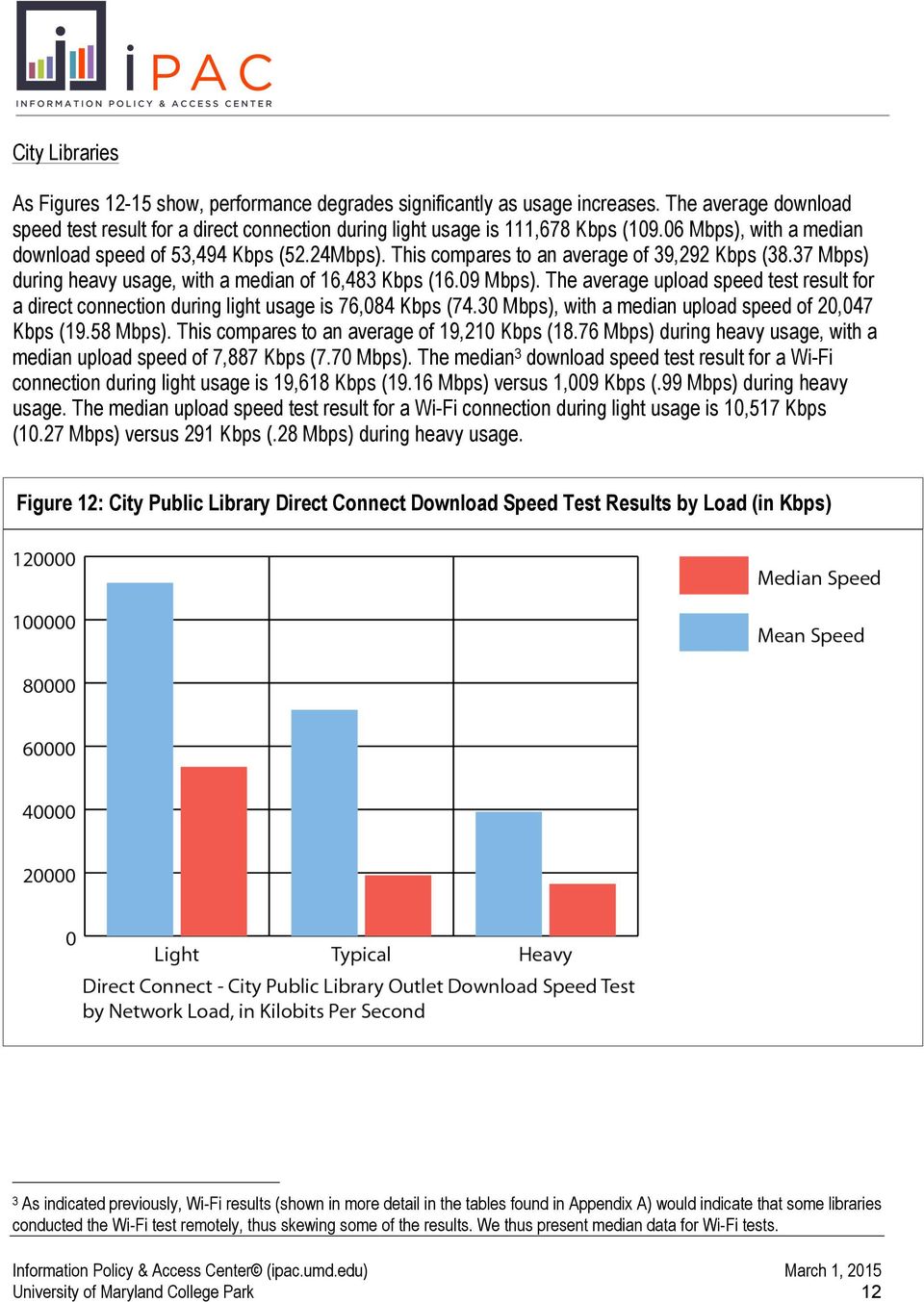
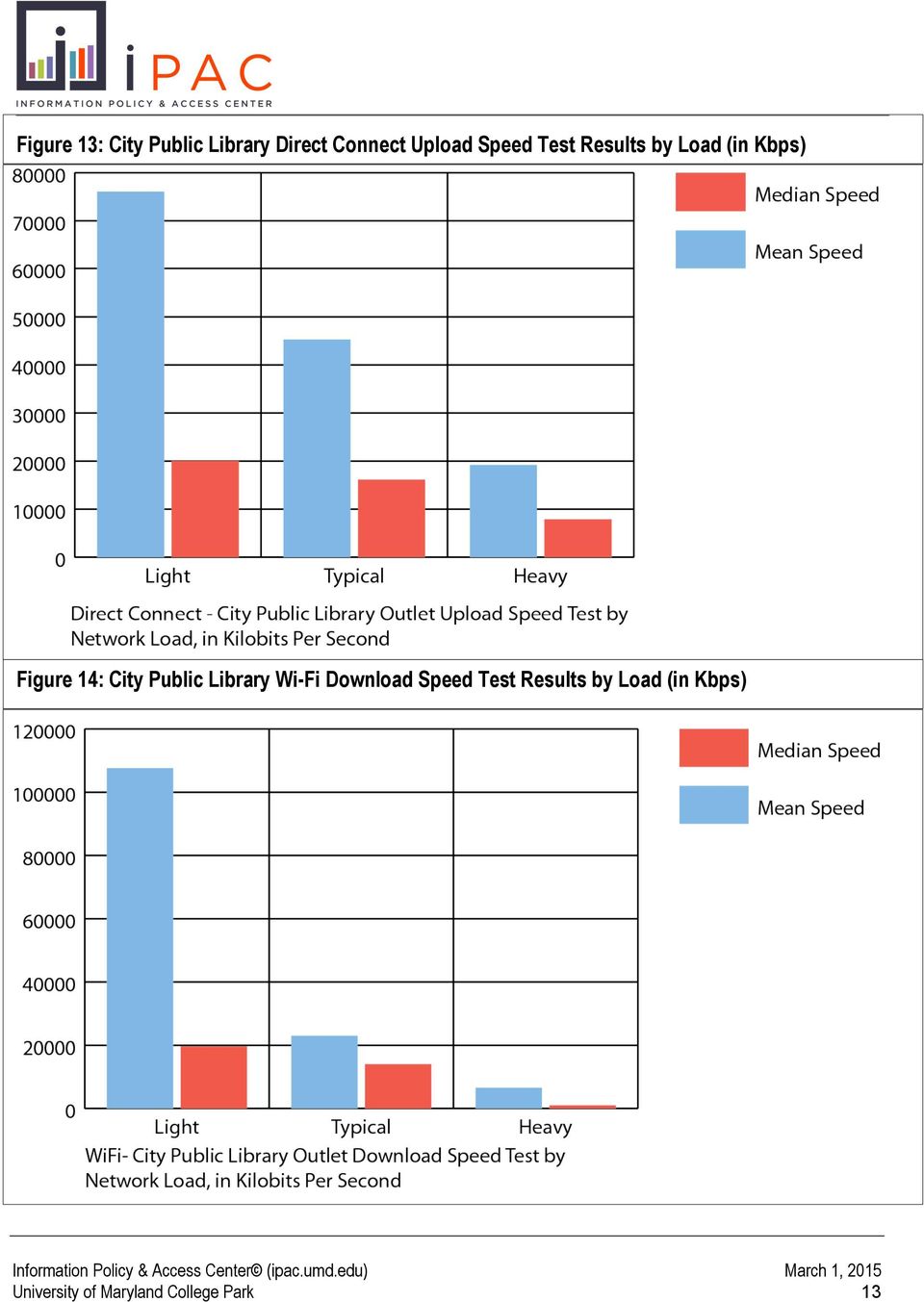
16 City Libraries As Figures show, performance degrades significantly as usage increases. The average download speed test result for a direct connection during light usage is 111,678 Kbps ( Mbps), with a median download speed of 53,494 Kbps (52.24Mbps). This compares to an average of 39,292 Kbps (38.37 Mbps) during heavy usage, with a median of 16,483 Kbps (16.09 Mbps). The average upload speed test result for a direct connection during light usage is 76,084 Kbps (74.30 Mbps), with a median upload speed of 20,047 Kbps (19.58 Mbps). This compares to an average of 19,210 Kbps (18.76 Mbps) during heavy usage, with a median upload speed of 7,887 Kbps (7.70 Mbps). The median 3 download speed test result for a Wi-Fi connection during light usage is 19,618 Kbps (19.16 Mbps) versus 1,009 Kbps (.99 Mbps) during heavy usage. The median upload speed test result for a Wi-Fi connection during light usage is 10,517 Kbps (10.27 Mbps) versus 291 Kbps (.28 Mbps) during heavy usage. Figure 12: City Public Library Direct Connect Test Results by Load (in Kbps) 3 As indicated previously, Wi-Fi results (shown in more detail in the tables found in Appendix A) would indicate that some libraries conducted the Wi-Fi test remotely, thus skewing some of the results. We thus present median data for Wi-Fi tests. University of Maryland College Park 12
17 Figure 13: City Public Library Direct Connect Upload Test Results by Load (in Kbps) Figure 14: City Public Library Wi-Fi Test Results by Load (in Kbps) University of Maryland College Park 13
18 Figure 15: City Public Library Wi-Fi Test Results by Load (in Kbps) Suburban Libraries As with City libraries, performance degrades significantly as usage increases in Suburban libraries (see Figures 16-19). The average download speed test result for a direct connection during light usage is 54,704 Kbps (53.42 Mbps), with a median speed test result of 20,067 Kbps (19.60 Mbps). This compares to an average download speed of 30,310 Kbps (29.60 Mbps) during heavy usage, with a median speed test result of 9,810 Kbps (9.58 Kbps). The average upload speed test result for a direct connection during light usage in Suburban libraries is 25,808 Kbps (25.20 Mbps), with a median speed test result of 9,530 Kbps (9.31 Mbps). This compares of to an average upload speed of 15,896 Kbps (15.52 Mbps) during heavy usage, with a median upload speed test result of 5,525 Kbps (5.40 Mbps). The median 4 download speed test result for a Wi-Fi connection during light usage is 16,198 Kbps (15.81 Mbps) versus 9,017 Kbps (8.80 Mbps) during heavy usage. The median upload speed test result for a Wi-Fi connection during light usage is 7,617 Kbps (7.44 Mbps) versus 3,445 Kbps (3.36 Mbps) during heavy usage. 4 As indicated previously, Wi-Fi results (shown in more detail in the tables found in Appendix A) would indicate that some libraries conducted the Wi-Fi test remotely, thus skewing some of the results. We thus present median data for Wi-Fi tests. University of Maryland College Park 14

19 Figure 16: Suburban Public Library Direct Connect Test Results by Load (in Kbps) University of Maryland College Park 15

20 Figure 17: Suburban Public Library Direct Connect Test Results by Load (in Kbps) Figure 18: Suburban Public Library Wi-Fi Test Results by Load (in Kbps) University of Maryland College Park 16

21 Figure 19: Suburban Public Library Wi-Fi Upload Test Results by Load (in Kbps) Town Libraries in town libraries are variable in terms of load for the reported direct connect speeds. The average download speed test result for a direct connection during light usage in Town libraries is 24,129 Kbps (23.56 Mbps), with a median download speed test result of 11,890 Kbps (11.61 Mbps). This compares to 29,025 Kbps (28.34 Mbps) during heavy usage, with a median download speed test result of 14,740 Kbps (14.39 Mbps). The average upload speed test result for a direct connection during light usage in Town libraries is 12,377 Kbps (12.09 Mbps), with a median upload speed test result of 3,708 Kbps (3.62 Mbps). This compares to 9,907 Kbps (9.67 Mbps) during heavy usage, with a median upload speed test result of 3,247 Kbps (3.17 Mbps). The median 5 download speed test result for a Wi-Fi connection during light usage is 9,783 Kbps (9.55 Mbps) versus 7,293 Kbps (7.12 Mbps) during heavy usage. The median upload speed test result for a Wi-Fi connection during light usage is 3,056 Kbps (2.98 Mbps) versus 2,569 Kbps (2.51 Mbps) during heavy usage. 5 As indicated previously, Wi-Fi results (shown in more detail in the tables found in Appendix A) would indicate that some libraries conducted the Wi-Fi test remotely, thus skewing some of the results. We thus present median data for Wi-Fi tests. University of Maryland College Park 17
22 Figure 20: Town Public Library Direct Connect Test Results by Load (in Kbps) Figure 21: Town Public Library Direct Connect Upload Test Results by Load (in Kbps) University of Maryland College Park 18
23 Figure 22: Town Public Library Wi-Fi Test Results by Load (in Kbps) Figure 23: Town Public Library Wi-Fi Upload Test Results by Load (in Kbps) University of Maryland College Park 19
24 Rural Libraries speeds in Rural libraries indicate that as usage increases, speeds at the device level decrease. The average download speed test result for a direct connection during light usage in Rural libraries is 21,039 Kbps (20.55 Mbps), while the median captured download speed test result is 9,353 Kbps (9.13 Mbps). This compares to 15,748 Kbps (15.38 Mbps) during heavy usage, as compared to a median captured download speed test result of 6,880 Kbps (6.72 Mbps). The average upload speed test result for a direct connection in Rural libraries during light usage is 10,580 Kbps (10.33 Mbps), with a median captured speed test result of 2,759 Kbps (2.69 Mbps). This compares to 6,569 Kbps (6.42 Mbps) during heavy usage, with a median captured upload speed test result of 992 Kbps (.97 Mbps). The median 6 download speed test result for a Wi-Fi connection during light usage is 9,783 Kbps (9.55 Mbps) versus 7,293 Kbps (7.12 Mbps) during heavy usage. The median upload speed test result for a Wi-Fi connection during light usage is 3,056 Kbps (2.98 Mbps) versus 2,569 Kbps (2.51 Mbps) during heavy usage. Grouping the Results Figures provide another view of the speed test result data by grouping the speed test result data into speed categories. In viewing the data this way, the results show that: Users in City libraries in general experience direct connect download speeds in the 10.1Mbps- 24.9Mbps (29.6%) and 50Mbps-99.9Mbps (27.0%) ranges and Wi-Fi download speeds in the 10.1Mbps-24.9Mbps (27.1%) and less than 1.5Mbps (20.6%) ranges. Direct connect upload speeds fall in the 10.1Mbps-24.9Mbps (29.6%) and 25.0Mbps-49.9Mbps (26.2%) ranges and Wi-Fi upload speeds in the 1.6Mbps-10Mbps range (36.2%). Users in Suburban libraries in general experience direct connect download speeds in the 1.6Mbps- 10Mbps range (33.1%), and Wi-Fi download speeds in the 10.1Mbps-24.9Mbps (36.1%) and range. Direct connect upload speeds fall in the 1.6Mbps-10Mbps range (41.9%), and Wi-Fi upload speeds in the 1.6Mbps-10Mbps range (42.4%). Users in Town libraries in general experience download speeds in the 1.6Mbps-10Mbps range (41.5% direct connect and 48.1% Wi-Fi); and upload speeds in the 1.6Mbps-10Mbps range (48.1% direct connect and 45.4% Wi-Fi). Users in Rural libraries in general experience download speeds in the 1.6Mbps-10Mbps range (42.4% direct connect and 44.7% Wi-Fi); and upload speeds in the 1.5Mbps or less range (43.3% direct connect and 54.6% Wi-Fi). 6 As indicated previously, Wi-Fi results (shown in more detail in the tables found in Appendix A) would indicate that some libraries conducted the Wi-Fi test remotely, thus skewing some of the results. We thus present median data for Wi-Fi tests. University of Maryland College Park 20
25 Figure 24: Public Library Outlets Grouped Test Direct Connect s, by Locale Code Locale Code City Suburban Town Rural Overall 1.5Mbps or Less 4.4% (n=43) 3.6% (n=26) 7.0% (n=55) 13.3% (n=129) 7.3% (n=253) 33.2% (n=1,149) 26.7% (n=924) 12.7% (n=438) 16.3% (n=565) Figure 25: Public Library Outlets Grouped Test Direct Connect Upload s, by Locale Code Locale Code City Suburban Town Rural Overall 1.5Mbps or Less 11.7% (n=114) 13.5% (n=98) 30.7% (n=240) 43.3% (n=421) 25.2% (n=874) 38.6% (n=1,335) 17.3% (n=598) 6.6% (n=228) 9.6% (n=332) 3.8% (n=133) Figure 26: Public Library Outlets Grouped Test Wi-Fi s, by Locale Code Locale Code City Suburban Town Rural Overall 1.5Mbps or Less 20.6% (n=102) 5.2% (n=26) 6.1% (n=29) 20.3% (n=140) 13.8% (n=297) 36.6% (n=791) 29.2% (n=630) 8.9% (n=193) 9.2% (n=198) 2.7% (n=95) 1.6Mbps- 10Mbps 17.4% (n=170) 33.1% (n=241) 41.5% (n=324) 42.4% (n=412) Direct Connect s 10.1Mbps- 25.0Mbps- 24.9Mbps 49.9Mbps 29.6% 13.8% (n=289) (n=135) 24.2% 17.7% (n=176) (n=129) 27.5% 12.8% (n=215) (n=100) 25.1% 7.6% (n=244) (n=74) 50Mbps- 99.9Mbps 27.0% (n=264) 16.5% (n=120) 9.7% (n=76) 10.7% (n=104) 100Mbps- 1Gbps 7.8% (n=76) 4.9% (n=36) 1.4% (n=11) 0.9% (n=9) 1.6Mbps- 10Mbps 29.6% (n=289) 41.9% (n=305) 48.1% (n=376) 37.2% (n=362) Direct Connect Upload s 10.1Mbps- 25.0Mbps- 24.9Mbps 49.9Mbps 26.2% 8.6% (n=256) (n=84) 22.8% 8.8% (n=166) (n=64) 10.5% 4.7% (n=82) (n=37) 9.7% 4.4% (n=94) (n=43) 50Mbps- 99.9Mbps 17.4% (n=170) 10.6% (n=77) 50% (n=39) 4.7% (n=46) 100Mbps- 1Gbps 6.6% (n=64) 2.5% (n=18) 0.9% (n=7) 0.6% (n=6) 1.6Mbps- 10Mbps 19.2% (n=95) 31.7% (n=158) 48.1% (n=230) 44.7% (n=308) Wi-Fi s 10.1Mbps- 25.0Mbps- 24.9Mbps 49.9Mbps 27.1% 12.1% (n=134) (n=60) 36.1% 13.1% (n=180) (n=65) 30.5% 6.3% (n=146) (n=30) 24.7% 5.5% (n=170) (n=38) 50Mbps- 99.9Mbps 14.9% (n=74) 11.8% (n=59) 7.7% (n=37) 4.1% (n=28) 100Mbps- 1Gbps 6.1% (n=30) 2.0% (n=10) 1.3% (n=6) 0.7% (n=5) 2.4% (n=51) University of Maryland College Park 21
26 Figure 27: Public Library Outlets Grouped Test Wi-Fi Upload s, by Locale Code Locale Code City Suburban Town Rural Overall 1.5Mbps or Less 28.5% (n=141) 19.3% (n=96) 37.0% (n=177) 54.6% (n=376) 36.6% (n=790) 39.5% (n=853) 15.2% (n=329) 3.8% (n=82) 3.3% (n=71) 1.6Mbps- 10Mbps 36.2% (n=179) 42.4% (n=211) 45.4% (n=217) 35.7% (n=246) Wi-Fi Upload s 10.1Mbps- 25.0Mbps- 24.9Mbps 49.9Mbps 19.2% 5.1% (n=95) (n=25) 28.3% 6.4% (n=141) (n=32) 10.5% 3.6% (n=50) (n=17) 6.2% 1.2% (n=43) (n=8) 50Mbps- 99.9Mbps 6.1% (n=30) 2.8% (n=14) 3.1% (n=15) 1.7% (n=12) 100Mbps- 1Gbps 5.1% (n=25) 0.8% (n=4) 0.4% (n=2) 0.6% (n=4) 1.6% (n=35) The Dropoff: v. User Experience Figures 28 and 29 show the difference between a library s median subscribed download and upload speeds and the median speed at the device level in a library. Caution should be used with these numbers. They are not a measure of actual speed, but rather are presented as an indicator of the user s experience in the public library by type of device. Note also that the type of device (directly connected computer, Wi-Ficonnected device) has an effect on the user experience as well. As the data show, the device level measure of speed shows a drop off as compared to subscribed speed as to be expected. The drop off can range substantially, however: roughly 11% in Rural libraries, 13% in City libraries, 35% in Town libraries, and 37% in Suburban libraries (download speed, via directly connected devices). Upload speed drop off is more pronounced: 47% in City, 55% in Suburban libraries, 67% in Town libraries, and 76% in Rural libraries (upload speed, via directly connected devices). Figure 28: Public Library Outlet Compared to Device- Level, by Locale Code, in Megabits Per Second Locale Code City Suburban Town Rural Overall Median 35.2 Mbps (n=1,055) 30.0 Mbps (n=904) 16.0 Mbps (n=768) 10.0 Mbps (n=1,003) 20.0 Mbps (n=3,822) Direct Connect Test (median) 30.5 Mbps (n=977) 18.8 Mbps (n=728) 10.5 Mbps (n=781) 8.9 Mbps (n=972) 17.2 Mbps (n=3,458) Wi-Fi Test (median) 13.4 Mbps (n=495) 14.4 Kbps (n=498) 9.3 Mbps (n=478) 6.3 Mbps (n=689) 10.8 Mbps (n=2,160) University of Maryland College Park 22
27 Figure 29: Public Library Outlet Upload Compared to Device-Level, by Locale Code, in Megabits Per Second Locale Code City Suburban Town Rural Overall Median 29.3 Mbps (n=1,048) 20.0 Mbps (n=846) 10.0 Mbps (n=784) 8.9 Mbps (n=961) 15.0 Mbps (n=3,636) Direct Connect Test (median) 15.5 Mbps (n=977) 8.9 Mbps (n=728) 3.3 Mbps (n=781) 2.1 Mbps (n=972) 7.5 Mbps (n=3,458) Wi-Fi Test (median) 6.3 Mbps (n=495) 5.9 Mbps (n=498) 2.9 Mbps (n=478) 1.4 Mbps (n=689) 4.1 Mbps (n=2,160) Test and the Digital Inclusion Survey This section summarizes the key findings from the analyses conducted upon merging the speed test results, including the reported number of public access computers, with selected data on technologies, services, training, training types, and programming from the 2013 Digital Inclusion Survey (Bertot, et al., 2014). In doing this, the study team created a subset of data with the following characteristics: It included only libraries that participated in both the speed test and the 2013 Digital Inclusion Survey; and It included only libraries that participated in the direct connect version of the speed test (not Wi-Fi or Mobile, if the library only ran tests via those means). Using this approach created a dataset with 1,578 cases through which to conduct analysis. The Digital Inclusion Survey data consists primarily of binary/nominal data for example, whether a library offers a particular type of technology training, program, or service. For extended analysis, the selected 2013 Digital Inclusion Survey data (technologies, services, training, training types, and programming) were categorized as being either basic or advanced library offerings. In addition, the captured and subscribed direct connect speeds from the speed test were divided into quintiles (see Appendix B for further information). al analyses were then conducted between the speed test data, the numbers of public access computers, and the basic and advanced categorizations of what libraries offer to the public. In general, the correlational analysis did not show a statistical relationship between subscribed broadband speeds, speed test results, and the public access technology services offered by libraries to their communities. More specifically, the correlational analyses indicated the following trends (see Appendix C for correlation tables): University of Maryland College Park 23
28 Generally, there were weak positive relationships between the captured or subscribed speeds and the basic/advanced categories, but lacked statistical significance. The strongest correlation was usually between the basic library offerings and the advanced. The exception to this was in the case of basic and advanced economic programming [r = 0.019, n = 671, p = 0.628]. This may indicate that libraries that provide greater numbers of basic service offerings are also more likely to provide more advanced offerings, as well. There was also a weak positive correlation between the number of public access computers (PACs) and the basic and advanced library offerings, with a greater positive relationship to advanced offerings. This may indicate that if a library is able to offer more computers as a resource, they are also more likely to be able to provide more advanced offerings. These findings were limited to the particular methodological approach used. The dataset available from the results was a limited subset and the lack of strong correlational relationships may be attributed to the number of cases used in the analysis. Basic and Advanced Technologies Offered by Libraries The following results regarding the basic and advanced technologies offered by libraries in relation to the different speed variables the captured speeds from the speed test, the captured speeds grouped into quintiles, the subscribed speeds reported by libraries, and the subscribed speeds grouped into quintiles serves as an example of the correlational coefficients and degrees of significance between the speeds and library offerings. Appendix C includes the resulting correlation matrices generated regarding the speed variables in relation to the all the different library offerings. There was a slightly positive correlation between the basic technologies offered by libraries and the captured speed test download speeds [r = 0.084, n = 720, p = 0.024]. No significant relationship was found between basic technologies and captured upload speeds [r = 0.065, n = 720, p = 0.080]. However, the positive relationship became more discernible between the basic technology offerings and the captured download speed quintiles [r = 0.211, n = 720, p = 0.000], as well as the captured upload speed quintiles [r = 0.182, n = 720, p = 0.000]. With regard to subscribed speeds, there was no significant relationship between basic technologies and the subscribed download speeds [r = , n = 682, p = 0.777] or subscribed upload speeds [r = , n = 679, p = 0.805]. As was the case for reported speeds, there was a significant relationship for the subscribed speeds after being divided into quintiles, with a slightly positive correlation between basic technology offerings and the subscribed download speed quintiles [r = 0.196, n = 682, p = 0.000] or subscribed upload speed quintiles [r = 0.196, n = 679, p = 0.000]. The positive correlation between the advanced technologies offered by libraries and the captured download speeds was stronger than with basic technologies [r = 0.205, n = 720, p = 0.000], as well as for captured upload speeds [r = 0.195, n = 720, p = 0.000]. This positive relationship was comparable to that of advanced technology offerings and the reported download speed quintiles [r = 0.193, n = 720, p = 0.000], as well as the reported upload speed quintiles [r = 0.205, n = 720, p = 0.000]. Between advanced technologies and the subscribed download speeds, there was a weak positive relationship [r = 0.164, n = University of Maryland College Park 24
29 682, p = 0.000], as well as for subscribed upload speeds [r = 0.147, n = 679, p = 0.000]. There was a slightly positive correlation between advanced technology offerings and the subscribed download speed quintiles [r = 0.262, n = 682, p = 0.000], and for subscribed upload speed quintiles [r = 0.216, n = 679, p = 0.000]. Although the relationship was still relatively weak, the strongest relationship with basic and advanced technologies offered by libraries was the positive relationship between the two [r = 0.357, n = 720, p = 0.000]. It is also worth mentioning that there was a slight positive correlation between the number of public access computers and the basic technology offerings [r = 0.190, n = 716, p = 0.000] and advanced technology offerings [r = 0.237, n = 716, p = 0.000]. In summary, the analysis as conducted did not show a statistically significant correlation between broadband connectivity and the digital services and/or resources provided by libraries to the communities that they serve. This may be a reflection of the approach taken with the analysis conducted. There is a need for greater empirical study of the relationship between broadband connectivity and public access technology services to more definitively explore the topic. Conclusion The study sought to provide insights into the broadband connectivity quality of service that users experience in public libraries through the use of speed test tools. As noted, the data do not provide measures of actual library broadband connectivity speeds, but rather provide data that a typical user might experience at the device level at a particular moment in time in public libraries through multiple connection types directly connected via a library s public access computers, wirelessly connected (Wi-Fi) via a laptop, and wirelessly (Wi-Fi) connected using a mobile (e.g., smartphone, tablet) device. In general, the data show that: City and Suburban public libraries provide greater quality of service at the device level as compared with Town and Rural public libraries, and there is a wide range of connectivity speeds across public libraries; Directly connected devices exhibit the greatest captured upload and download speeds, followed by Wi-Fi-connected laptops and Wi-Fi-connected mobile devices. This is not surprising, but given the increased move towards user-owned devices in libraries, does raise questions about the overall user experience in public libraries through Wi-Fi; Quality of service degrades at peak use times, sometimes dramatically; Upload speeds reported are lower substantially in some cases than download speeds, thus impacting the ability of users to create and upload digital content (e.g., multi-media files, forms, and other content); and Other factors than broadband contribute to the types of services and resources (e.g., information technology literacy, programs, services) that libraries provide to their communities. That is, the University of Maryland College Park 25
30 study did not find significant relationships between broadband connectivity and speed test data and the provision of digitally inclusive services. Ultimately, the shows that public libraries report a range of connectivity and capacity, thus impacting the overall user experience at any given time. A Call for Future Research This study, with its identified overall sought to approximate the user connectivity experience in public libraries. There is a need, however, for in-depth study and analysis of broadband connectivity in public libraries that ascertains the quality of broadband and network services. Towards that end, we encourage the FCC to expand its Measuring Broadband America ( ) research initiative to include community anchor institutions such as public libraries. Such research would provide a definitive assessment of the quality of broadband services in public libraries and facilitate further development of the E-rate program into the future. References Bertot, J.C., Jaeger, P.T., Lee, J., Dubbels, K., McDermott, A.J., & Real, B. (2014) Digital Inclusion Survey: Survey Findings and Results. College Park, MD: Information Policy & Access Center. Available at: Federal Communications Commission (2014). Measuring Broadband America 2014: Consumer Wireline Broadband Performance in the U.S. Washington, DC: Federal Communications Commission. Available at: University of Maryland College Park 26
31 Appendix A. Test Data Tables Figure A-1: Total Test Participation (instances run) Total Participation (instances of speed test) Locale Code Direct Connect Wireless Mobile Total City Suburban Town Rural Overall Figure A-2: Total Public Library System Test Participation Total Public Library Participation (number of library systems) Locale Code Direct Connect Wireless Mobile Total City Suburban Town Rural Overall ,230 Library systems in all participated, however, some systems ran the speed test multiple times across connection type. Figure A-3: Total Public Library Outlet/Branch Test Participation Total Public Library Participation (number of library branches) Locale Code Direct Connect Wireless Mobile Total City Suburban Town Rural Overall Figure A-4: States Represented by Test Participation (instances run) Total Participation by State (instances of speed test) Locale Code Direct Connect Wireless Mobile Total City Suburban Town Rural Overall University of Maryland College Park 27
32 Figure A-5: Public Library Outlet Connection, by Locale Code, in Kilobits Per Second Locale Code Mean Median City Suburban Town Rural Overall 180,467 Kbps (n=1,055) 155,450 Kbps (n=904) 53,160 Kbps (n=860) 35,645 Kbps (n=1,003) 107,898 Kbps (n=3,822) 36,000 Kbps (n=1,055) 30,720 Kbps (n=904) 16,384 Kbps (n=860) 10,240 Kbps (n=1,003) 20,480 Kbps (n=3,822) Minimum Maximum 200 Kbps 2,048,000 Kbps (n=1,055) (n=1,055) 200 Kbps 1,024,000 Kbps (n=904) (n=904) 768 Kbps 1,024,000 Kbps (n=860) (n=860) 200 Kbps 1,024,000 Kbps (n=1,003) (n=1,003) 200 Kbps (n=3,822) 2,048,000 Kbps (n=3,822) Range 2,047,800 Kbps (n=1,055) 1,023,975 Kbps (n=904) 1,023,232 Kbps (n=860) 1,023,975 Kbps (n=1,003) 2,047,975 Kbps (n=3,822) Standard Deviation 445,583 Kbps (n=1,055) 304,917 Kbps (n=904) 146,259 Kbps (n=860) 106,778 Kbps (n=1,003) 297,610 Kbps (n=3,822) Figure A-6: Public Library Outlet Upload Connection, by Locale Code, in Kilobits Per Second Locale Code Mean Median City Suburban Town Rural Overall 174,407 Kbps (n=1,048) 135,949 Kbps (n=846) 40,367 Kbps (n=784) 28,689 Kbps (n=961) 98,106 Kbps (n=3,639) 30,000 Kbps (n=1,048) 20,480 Kbps (n=846) 10,240 Kbps (n=784) 9,200 Kbps (n=961) 15,360 Kbps (n=3,639) Upload Minimum Maximum 200 Kbps 2,048,000 Kbps (n=1,048) (n=1,048) 75 Kbps 1,024,000 Kbps (n=846) (n=846) 200 Kbps 1,024,000 Kbps (n=784) (n=784) 200 Kbps 1,024,000 Kbps (n=961) (n=961) 200 Kbps (n=3,639) 2,048,000 Kbps (n=3,639) Range 2,047,800 Kbps (n=1,048) 1,023,925 Kbps (n=846) 1,023,800 Kbps (n=784) 1,023,975 Kbps (n=961) 2,047,975 Kbps (n=3,639) Standard Deviation 445,113 Kbps (n=1,048) 294,919 Kbps (n=846) 131,789 Kbps (n=784) 98,568 Kbps (n=961) 235,015 Kbps (n=3,639) University of Maryland College Park 28
33 Direct Connect Figure A-7: Public Library Outlets Test, by Locale Code, in Kilobits Per Second Direct Connect Test s Locale Code Mean Median Minimum Maximum Range City 84,735 Kbps 31,210 Kbps 560 Kbps 841,534 Kbps 840,974 Kbps (n=977) (n=977) (n=977) (n=977) (n=977) Suburban 47,535 Kbps 19,240 Kbps 480 Kbps 809,961 Kbps 809,481 Kbps (n=728) (n=728) (n=728) (n=728) (n=728) Town 26,083 Kbps 10,791 Kbps 160 Kbps 795,597 Kbps 795,437 Kbps (n=781) (n=781) (n=781) (n=781) (n=781) Rural 20,426 Kbps 9,168 Kbps 20 Kbps 499,462 Kbps 499,442 Kbps (n=972) (n=972) (n=972) (n=972) (n=972) Overall 44,695 Kbps (n=3,458) 17,602 Kbps (n=3,458) 20 Kbps (n=3,458) 841,534 Kbps (n=3,458) 736,333 Kbps (n=3,458) Standard Deviation 170,501 Kbps (n=977) 81,432Kbps (n=728) 53,999 Kbps (n=781) 36,971Kbps (n=972) 85,726 Kbps (n=3,458) Figure A-8: Public Library Outlets Test Upload, by Locale Code, in Kilobits Per Second Direct Connect Upload Test s Locale Code Mean Median Minimum Maximum Range City 55,053 Kbps 15,843 Kbps 160 Kbps 811,490 Kbps 811,330 Kbps (n=977) (n=977) (n=977) (n=977) (n=977) Suburban 23,381 Kbps 9,130 Kbps 200 Kbps 666,791 Kbps 666,591 Kbps (n=728) (n=728) (n=728) (n=728) (n=728) Town 13,336 Kbps 3,359 Kbps 73 Kbps 544,166 Kbps 544,093 Kbps (n=781) (n=781) (n=781) (n=781) (n=781) Rural 10,108 Kbps 2,196 Kbps 20 Kbps 477,730 Kbps 477,710 Kbps (n=972) (n=972) (n=972) (n=972) (n=972) Overall 25,470 Kbps (n=3,458) 7,632 Kbps (n=3,458) 20 Kbps (n=3,458) 811,490 Kbps (n=3,458) 624,931 Kbps (n=3,458) Standard Deviation 124,744 Kbps (n=977) 40,932 Kbps (n=728) 40,875 Kbps (n=781) 24,967 Kbps (n=972) 57,880 Kbps (n=3,458) University of Maryland College Park 29
34 Wi-Fi Figure A-9: Public Library Outlet Wireless Test, by Locale Code, in Kilobits Per Second Wireless Test s Locale Code Mean Median Minimum Maximum Range City 58,999 Kbps 13,708 Kbps 400 Kbps 835,398 Kbps 834,998 Kbps (n=495) (n=495) (n=495) (n=495) (n=495) Suburban 21,068 Kbps 14,718 Kbps 150 Kbps 494,809 Kbps 494,659 Kbps (n=498) (n=498) (n=498) (n=498) (n=498) Town 17,739 Kbps 9,563 Kbps 20 Kbps 403,563 Kbps 403,543 Kbps (n=478) (n=478) (n=478) (n=478) (n=478) Rural 12,873 Kbps 6,420 Kbps 20 Kbps 492,430 Kbps 492,410 Kbps (n=689) (n=689) (n=689) (n=689) (n=689) Standard Deviation 172,175 Kbps (n=495) 40,529 Kbps (n=498) 29,558 Kbps (n=478) 28,777 Kbps (n=689) 27,670 Kbps 11,102 Kbps 20 Kbps 835,398 Kbps 556,402. Kbps 67,760 Kbps Overall (n=2,160) (n=2,160) (n=2,160) (n=2160) (n=2,160) (n=2,160) Note: The results indicate would indicate that some libraries tested their wireless connections remotely, thus the high maximum speeds reports. In the case of the Wi-Fi reported speeds, the median speed is likely a better indicator of the typical user experience. Figure A-10: Public Library Outlet Wireless Test Upload, by Locale Code, in Kilobits Per Second Wireless Upload Test s Locale Code Mean Median Minimum Maximum City 39,111 Kbps 6,434 Kbps 10 Kbps 696,098 Kbps (n=495) (n=495) (n=495) (n=495) Suburban 9,615 Kbps 6,005 Kbps 107 Kbps 107,355 Kbps (n=498) (n=498) (n=498) (n=498) Town 8,707 Kbps 2,932 Kbps 70 Kbps 384,766 Kbps (n=478) (n=478) (n=478) (n=478) Rural 5,728 Kbps 1,440 Kbps 10 Kbps 372,972 Kbps (n=689) (n=689) (n=689) (n=689) Range 696,088 Kbps (n=495) 107,248 Kbps (n=498) 384,696 Kbps (n=478) 372,962 Kbps (n=689) Standard Deviation 126,920 Kbps (n=495) 12,558 Kbps (n=498) 23,705 Kbps (n=478) 22,468 Kbps (n=689) 15,790 Kbps 4,202 Kbps 10 Kbps 696,098 Kbps 390,248 Kbps 46,413 Kbps Overall (n=2,160) (n=2,160) (n=2,160) (n=2,160) (n=2,160) (n=2,160) Note: The results indicate would indicate that some libraries tested their wireless connections remotely, thus the high maximum speeds reports. In the case of the Wi-Fi reported speeds, the median speed is likely a better indicator of the typical user experience. University of Maryland College Park 30
35 Mobile Figure A-11: Public Library Outlets Test, by Locale Code, in Kilobits Per Second Mobile Test s Locale Code Mean Median Minimum Maximum City 13,196 Kbps 6,675 Kbps 120 Kbps 121,330 Kbps (n=120) (n=120) (n=120) (n=120) Suburban 17,024 Kbps 13,510 Kbps 390 Kbps 68,470 Kbps (n=176) (n=176) (n=176) (n=176) Town 9,425 Kbps 5,385 Kbps 30 Kbps 52,370 Kbps (n=110) (n=110) (n=110) (n=110) Rural 10,491 Kbps 8,240 Kbps 20 Kbps 141,820 Kbps (n=183) (n=183) (n=183) (n=183) Overall 12,534Kbps (n=589) 8,452 Kbps (n=589) 20 Kbps (n=589) 141,820 Kbps (n=589) Range 121,210 Kbps (n=120) 68,080 Kbps (n=176) 52,340 Kbps (n=110) 141,800 Kbps (n=183) 95,857 Kbps (n=589) Standard Deviation 17,810 Kbps (n=120) 14,049 Kbps (n=176) 10,466 Kbps (n=110) 16,608 Kbps (n=183) 14,733 Kbps (n=589) Figure A-12: Public Library Outlets Test Upload, by Locale Code, in Kilobits Per Second Locale Code Mean Median City Suburban Town Rural Overall 6,081 Kbps (n=120) 7,156 Kbps (n=176) 42,328 Kbps (n=110) 4,392 Kbps (n=183) 5,465 Kbps (n=589) 2,470 Kbps (n=120) 5,860 Kbps (n=176) 2,175 Kbps (n=110) 2,660 Kbps (n=183) 3,291 Kbps (n=589) Mobile Upload Test s Minimum Maximum 50 Kbps 63,780 Kbps (n=120) (n=120) 10 Kbps 28,830 Kbps (n=176) (n=176) 40 Kbps 32,070 Kbps (n=110) (n=110) 30 Kbps 19,660 Kbps (n=183) (n=183) 10 Kbps (n=589) 63,780 Kbps (n=589) Range 63,730 Kbps (n=120) 28,820 Kbps (n=176) 32,030 Kbps (n=110) 19,630 Kbps (n=183) 36,052 Kbps (n=589) Standard Deviation 8,600 Kbps (n=120) 5,939 Kbps (n=176) 5,775 Kbps (n=110) 4,487 Kbps (n=183) 6,200 Kbps (n=589) University of Maryland College Park 31
36 City (Direct Connect) Figure A-13: City Public Library Outlet Test by Network Load, in Kilobits Per Second Network Load Mean Median Light 111,678 Kbps 53,494 Kbps (n=395) (n=395) Typical 71,524 Kbps 19,217 Kbps (n=444) (n=444) Heavy 39,292 Kbps 16,483 Kbps (n=101) (n=101) Network capacity self-reported by participating libraries. Direct Connect Minimum Maximum 826 Kbps 824,044 Kbps (n=395) (n=395) 614 Kbps 841,534 Kbps (n=444) (n=444) 913 Kbps 793,875 Kbps (n=101) (n=101) Range 823,218 Kbps (n=395) 840,920 Kbps (n=444) 792,962 Kbps (n=101) Standard Deviation 198,133 Kbps (n=395) 156,184 Kbps (n=444) 85,679 Kbps (n=101) Figure A-14: City Public Library Outlet Upload Test by Network Load, in Kilobits Per Second Network Load Mean Median Light 76,084 Kbps 20,047 Kbps (n=395) (n=395) Typical 45,300 Kbps 16,135 Kbps (n=444) (n=444) Heavy 19,210 Kbps 7,887 Kbps (n=101) (n=101) Network capacity self-reported by participating libraries. Direct Connect Minimum Maximum 327 Kbps 685,585 Kbps (n=395) (n=395) 160 Kbps 811,490 Kbps (n=444) (n=444) 201 Kbps 479,774 Kbps (n=101) (n=101) Range 685,258 Kbps (n=395) 811,330 Kbps (n=444) 479,573 Kbps (n=101) Standard Deviation 148,011 Kbps (n=395) 112,390 Kbps (n=444) 50,481 Kbps (n=101) University of Maryland College Park 32
37 Suburban (Direct Connect) Figure A-15: Suburban Public Library Outlet Test by Network Load, in Kilobits Per Second Network Load Mean Median Light 54,704 Kbps 20,067 Kbps (n=410) (n=410) Typical 40,621 Kbps 19,209 Kbps (n=227) (n=227) Heavy 30,310 Kbps 9,810 Kbps (n=55) (n=55) Network capacity self-reported by participating libraries. Direct Connect Minimum Maximum 530 Kbps 809,961 Kbps (n=410) (n=410) 582 Kbps 449,239 Kbps (n=227) (n=227) 480 Kbps 182,062 Kbps (n=55) (n=55) Range 809,431 Kbps (n=410) 4486,57 Kbps (n=227) 181,582 Kbps (n=55) Standard Deviation 98,764 Kbps (n=410) 54,309 Kbps (n=227) 37,118 Kbps (n=55) Figure A-16: Suburban Public Library Outlet Upload Test by Network Load, in Kilobits Per Second Network Load Mean Median Light 25,808 Kbps 9,530 Kbps (n=410) (n=410) Typical 21,270 Kbps 8,934 Kbps (n=227) (n=227) Heavy 15,896 Kbps 5,525 Kbps (n=55) (n=55) Network capacity self-reported by participating libraries. Direct Connect Minimum Maximum 249 Kbps 666,791 Kbps (n=410) (n=410) 200 Kbps 206,463 Kbps (n=227) (n=227) 250 Kbps 155,265 Kbps (n=55) (n=55) Range 666,542 Kbps (n=410) 206,263 Kbps (n=227) 155,015 Kbps (n=55) Standard Deviation 47,740 Kbps (n=410) 30,447 Kbps (n=227) 26,863 Kbps (n=55) University of Maryland College Park 33
38 Town (Direct Connect) Figure A-17: Town Public Library Outlet Test by Network Load, in Kilobits Per Second Network Load Mean Median Light 24,129 Kbps 11,890 Kbps (n=423) (n=423) Typical 29,365 Kbps 9,662 Kbps (n=264) (n=264) Heavy 29,025 Kbps 14,740 Kbps (n=66) (n=66) Network capacity self-reported by participating libraries. Direct Connect Minimum Maximum 696 Kbps 549,183 Kbps (n=423) (n=423) 470 Kbps 795,597 Kbps (n=264) (n=264) 770 Kbps 182,762 Kbps (n=66) (n=66) Range 548,487 Kbps (n=423) 795,127 Kbps (n=264) 181,992 Kbps (n=66) Standard Deviation 37,754 Kbps (n=423) 77,094 Kbps (n=264) 37,031 Kbps (n=66) Figure A-18: Town Public Library Outlet Upload Test by Network Load, in Kilobits Per Second Network Load Mean Median Light 12,377 Kbps 3,708 Kbps (n=423) (n=423) Typical 16,079 Kbps 3,095 Kbps (n=264) (n=264) Heavy 9,907 Kbps 3,247 Kbps (n=66) (n=66) Network capacity self-reported by participating libraries. Direct Connect Minimum Maximum 73 Kbps 478,784 Kbps (n=423) (n=423) 86 Kbps 544,166 Kbps (n=264) (n=264) 205 Kbps 82,987 Kbps (n=66) (n=66) Range 478,711 Kbps (n=423) 544,080 Kbps (n=264) 82,782 Kbps (n=66) Standard Deviation 31,100 Kbps (n=423) 57,410 Kbps (n=264) 14,658 Kbps (n=66) University of Maryland College Park 34
39 Rural (Direct Connect) Figure A-19: Rural Public Library Outlet Test by Network Load, in Kilobits Per Second Network Load Mean Median Light 21,039 Kbps 9,353 Kbps (n=635) (n=635) Typical 20,461 Kbps 9,632 Kbps (n=234) (n=234) Heavy 15,748 Kbps 6,880 Kbps (n=67) (n=67) Network capacity self-reported by participating libraries. Direct Connect Minimum Maximum 249 Kbps 499,462 Kbps (n=635) (n=635) 230 Kbps 244,500 Kbps (n=234) (n=234) 860 Kbps 95,523 Kbps (n=67) (n=67) Range 499,213 Kbps (n=635) 244,270 Kbps (n=234) 94,663 Kbps (n=67) Standard Deviation 41,244 Kbps (n=635) 28,139 Kbps (n=234) 24,210 Kbps (n=67) Figure A-20: Rural Public Library Outlet Upload Test by Network Load, in Kilobits Per Second Network Load Mean Median Light 10,580 Kbps 2,759 Kbps (n=635) (n=635) Typical 10,148 Kbps 2,190 Kbps (n=234) (n=234) Heavy 6,569 Kbps 992 Kbps (n=67) (n=67) Network capacity self-reported by participating libraries. Direct Connect Minimum Maximum 111 Kbps 477,730 Kbps (n=635) (n=635) 131 Kbps 121,802 Kbps (n=234) (n=234) 123 Kbps 94,531 Kbps (n=67) (n=67) Range 477,619 Kbps (n=635) 121,671 Kbps (n=234) 94,408 Kbps (n=67) Standard Deviation 27,954 Kbps (n=635) 18,725 Kbps (n=234) 14,499 Kbps (n=67) University of Maryland College Park 35
40 City (Wi-Fi) Figure A-21: City Public Library Outlet Test by Network Load, in Kilobits Per Second Network Load Mean Median Wi-Fi Minimum Maximum 525 Kbps 835,398 Kbps (n=232) (n=232) 400 Kbps 796,763 Kbps (n=147) (n=147) 515 Kbps 5,5751 Kbps (n=110) (n=110) Range Standard Deviation 236,490 Kbps (n=232) 67,339 Kbps (n=147) 9,865 Kbps (n=110) 107,641 Kbps 19,618 Kbps 834,873 Kbps Light (n=232) (n=232) (n=232) 22,875 Kbps 14,002 Kbps 796,363 Kbps Typical (n=147) (n=147) (n=147) 6,571 Kbps 1,009 Kbps 55,236 Kbps Heavy (n=110) (n=110) (n=110) Note 1: Network capacity self-reported by participating libraries. Note 2: The results indicate would indicate that some libraries tested their wireless connections remotely, thus the high maximum speeds reports. In the case of the Wi-Fi reported speeds, the median speed is likely a better indicator of the typical user experience. Figure A-22: City Public Library Outlet Upload Test by Network Load, in Kilobits Per Second Network Load Mean Median Wi-Fi Minimum Maximum 240 Kbps 696,098 Kbps (n=232) (n=232) 10 Kbps 143,118 Kbps (n=147) (n=147) 180 Kbps 20,666 Kbps (n=110) (n=110) Range Standard Deviation 178,435 Kbps (n=232) 19,856 Kbps (n=147) 5,200 Kbps (n=110) 74,141 Kbps 10,517 Kbps 695,858 Kbps Light (n=232) (n=232) (n=232) 11,585 Kbps 6,040 Kbps 143,108 Kbps Typical (n=147) (n=147) (n=147) 3,388 Kbps 291 Kbps 20,486 Kbps Heavy (n=110) (n=110) (n=110) Note 1: Network capacity self-reported by participating libraries. Note 2: The results indicate would indicate that some libraries tested their wireless connections remotely, thus the high maximum speeds reports. In the case of the Wi-Fi reported speeds, the median speed is likely a better indicator of the typical user experience. University of Maryland College Park 36
41 Suburban (Wi-Fi) Figure A-23: Suburban Public Library Outlet Test by Network Load, in Kilobits Per Second Network Load Mean Median Wi-Fi Minimum Maximum 150 Kbps 494,809 Kbps (n=308) (n=308) 479 Kbps 87,976 Kbps (n=154) (n=154) 1,041 Kbps 23,044 Kbps (n=32) (n=32) Range Standard Deviation 50,090 Kbps (n=308) 14,742 Kbps (n=154) 5,061 Kbps (n=32) 24,573 Kbps 16,198 Kbps 494,659 Kbps Light (n=308) (n=308) (n=308) 16,597 Kbps 14,768 Kbps 87,497 Kbps Typical (n=154) (n=154) (n=154) 8,996 Kbps 9,017 Kbps 22,003 Kbps Heavy (n=32) (n=32) (n=32) Note 1: Network capacity self-reported by participating libraries. Note 2: The results indicate would indicate that some libraries tested their wireless connections remotely, thus the high maximum speeds reports. In the case of the Wi-Fi reported speeds, the median speed is likely a better indicator of the typical user experience. Figure A-24: Suburban Public Library Outlet Upload Test by Network Load, in Kilobits Per Second Network Load Mean Median Wi-Fi Minimum Maximum 153 Kbps 107,355 Kbps (n=308) (n=308) 125 Kbps 73,835 Kbps (n=154) (n=154) 107 Kbps 14,014 Kbps (n=32) (n=32) Range Standard Deviation 14,279 Kbps (n=308) 9,136 Kbps (n=154) 4,228 Kbps (n=32) 10,984 Kbps 7,614 Kbps 107,202 Kbps Light (n=308) (n=308) (n=308) 7,637 Kbps 5,305 Kbps 73,710 Kbps Typical (n=154) (n=154) (n=154) 5,170 Kbps 3,445 Kbps 13,907 Kbps Heavy (n=32) (n=32) (n=32) Note 1: Network capacity self-reported by participating libraries. Note 2: The results indicate would indicate that some libraries tested their wireless connections remotely, thus the high maximum speeds reports. In the case of the Wi-Fi reported speeds, the median speed is likely a better indicator of the typical user experience. University of Maryland College Park 37
42 Town (Wi-Fi) Figure A-25: Town Public Library Outlet Test by Network Load, in Kilobits Per Second Network Load Mean Median Wi-Fi Minimum Maximum 415 Kbps 403,563 Kbps (n=366) (n=366) 250 Kbps 95,074 Kbps (n=84) (n=84) 20 Kbps 36,325 Kbps (n=20) (n=20) Range Standard Deviation 32,252 Kbps (n=366) 18,446 Kbps (n=84) 9,955 Kbps (n=20) 18,996 Kbps 9,783 Kbps 403,148 Kbps Light (n=366) (n=366) (n=366) 13,193 Kbps 8,376 Kbps 94,824 Kbps Typical (n=84) (n=84) (n=84) 10,540 Kbps 7,293 Kbps 36,305 Kbps Heavy (n=20) (n=20) (n=20) Note 1: Network capacity self-reported by participating libraries. Note 2: The results indicate would indicate that some libraries tested their wireless connections remotely, thus the high maximum speeds reports. In the case of the Wi-Fi reported speeds, the median speed is likely a better indicator of the typical user experience. Figure A-26: Town Public Library Outlet Upload Test by Network Load, in Kilobits Per Second Network Load Mean Median Wi-Fi Minimum Maximum 120 Kbps 384,766 Kbps (n=366) (n=366) 70 Kbps 86,346 Kbps (n=84) (n=84) 230 Kbps 26,032 Kbps (n=20) (n=20) Range Standard Deviation 26,327 Kbps (n=366) 11,454 Kbps (n=84) 6,736 Kbps (n=20) 9,394 Kbps 3,056 Kbps 384,646 Kbps Light (n=366) (n=366) (n=366) 6,141 Kbps 2,857 Kbps 86,376 Kbps Typical (n=84) (n=84) (n=84) 4,607 Kbps 2,569 Kbps 25,802 Kbps Heavy (n=20) (n=20) (n=20) Note 1: Network capacity self-reported by participating libraries. Note 2: The results indicate would indicate that some libraries tested their wireless connections remotely, thus the high maximum speeds reports. In the case of the Wi-Fi reported speeds, the median speed is likely a better indicator of the typical user experience. University of Maryland College Park 38
43 Rural (Wi-Fi) Figure A-27: Rural Public Library Outlet Test by Network Load, in Kilobits Per Second Network Load Mean Median Wi-Fi Minimum Maximum 60 Kbps 492,430 Kbps (n=565) (n=565) 20 Kbps 95,094 Kbps (n=24) (n=24) 90 Kbps 94,140 Kbps (n=91) (n=91) Range Standard Deviation 31,035 Kbps (n=565) 20,237 Kbps (n=24) 12,919 Kbps (n=91) 13,618 Kbps 6,623 Kbps 492,370 Kbps Light (n=565) (n=565) (n=565) 11,715 Kbps 5,109 Kbps 95,074 Kbps Typical (n=24) (n=24) (n=24) 8,978 Kbps 4,709 Kbps 94,050 Kbps Heavy (n=91) (n=91) (n=91) Note 1: Network capacity self-reported by participating libraries. Note 2: The results indicate would indicate that some libraries tested their wireless connections remotely, thus the high maximum speeds reports. In the case of the Wi-Fi reported speeds, the median speed is likely a better indicator of the typical user experience. Figure A-28: Rural Public Library Outlet Upload Test by Network Load, in Kilobits Per Second Network Load Mean Median Wi-Fi Minimum Maximum 10 Kbps 372,972 Kbps (n=565) (n=565) 30 Kbps 48,059 Kbps (n=91) (n=91) 50 Kbps 24,472 Kbps (n=24) (n=24) Range Standard Deviation 24,625 Kbps (n=565) 6,038 Kbps (n=91) 6,738 Kbps (n=91) 6,284 Kbps 1,468 Kbps 372,962 Kbps Light (n=565) (n=565) (n=565) 3,282 Kbps 1,390 Kbps 48,029 Kbps Typical (n=91) (n=91) (n=91) 3,437 Kbps 944 Kbps 24,422 Kbps Heavy (n=24) (n=24) (n=91) Note 1: Network capacity self-reported by participating libraries. Note 2: The results indicate would indicate that some libraries tested their wireless connections remotely, thus the high maximum speeds reports. In the case of the Wi-Fi reported speeds, the median speed is likely a better indicator of the typical user experience. University of Maryland College Park 39
44 Appendix B. Digital Inclusion and Test Methodology Data from the speed test and the 2013 Digital Inclusion Survey were merged according to the NCES library ID numbers of the libraries that participated in the speed test. In cleaning up the speed test data, for the instances where data was given in megabits per second (Mbps), the given value was multiplied by 1,024 to get the value in kilobits per second (Kbps). values in gigabits per second (Gbps) were multiplied by 1,048,576. When libraries did not provide a subscribed speed for the speed test, some of the instances of missing speed test data was imputed by cross-referencing the missing data with provided subscribed speed data from the 2013 Digital Inclusion Survey. If the speed test data was still missing, the missing data was then imputed with subscription speed data according to the data collected by the National Telecommunications & Information Administration (NTIA) and the Federal Communications Commission (FCC) for the National Broadband Map of Community Anchor Institutions. In order to group the speed data available into quintiles, a statistical analysis was performed on the frequencies at 20%, 40%, 60%, and 80%. The speed variable was then recoded into its associated quintile variable accounting for missing values so that numbers 1 through 5 were associated with the range of values that fell within the appropriate statistical percentiles (lowest through highest). The following table describes the original variable, the associated quintile variable, and the associated range of speed values for 1-5. Figure B-1. Original Variable Associated Quintile Variable Associated Range kbps kbps_quint 'kbps Recoded ()'. 1 = Lowest thru = thru = thru = thru Uploadkbps New_Kbps UploadNew_Kbps Uploadkbps_Quint 'Uploadkbps Recoded ()'. New_Kbps_Quint 'New_Kbps Recoded ()'. UploadNew_Kbps_Quint 'UploadNew_Kbps Recoded ()'. 5 = thru Highest 1 = Lowest thru = thru = thru = thru = thru Highest 1 = Lowest thru = thru = thru = thru = thru Highest 1 = Lowest thru = thru = thru = thru = thru Highest For questions 10, 11, 21, 22, 26, 30, 34, and 38, the technologies, services, training, types of training, and programs offered by libraries were categorized as basic or advanced. Variables for these categories were University of Maryland College Park 40
45 computed as a sum of the basic or advanced library offerings that libraries reported from the 2013 Digital Inclusion Survey. For example, the Basic Technology variable accounted for the total sum of technologies categorized as basic (color printers, wireless printing, scanners, laptops, e-readers, cross platform e-book access platforms) that libraries offered for use by patrons. The instances when libraries responded with other as a response were not included. These categorizations generally followed the rankings provided by the Edge Initiative as a guide. The following table describes which library offerings were considered basic or advanced by question: Figure B-2. Question Basic Advanced 10. Does THIS LIBRARY BRANCH make available the following technologies for use by patrons? Color printers; wireless printing; scanners; laptops; e-readers; and cross platform e-book access platforms. Large-format printers; 3D printers; tablet computers; recreational gaming consoles; smart technology objects; digital displays; development technologies; and audio/visual 11. Does THIS LIBRARY BRANCH make available the following technology services or resources for use by patrons? 21. Did THIS LIBRARY BRANCH offer technology training on the following topics to its patrons in the last 12 months? 22. For each of the following training topics, what type(s) of training did THIS LIBRARY BRANCH offer to its patrons in the last 12 months? 26. Which of the following education and learning programs did THIS LIBRARY BRANCH offer to patrons in the last 12 months? 30. Which of the following economy and workforce development programming did THIS LIBRARY BRANCH offer the following types of in the last 12 months? 34. Which of the following formal community and civic engagement programming and services did THIS LIBRARY BRANCH offer in Digital/virtual reference; licensed databases; e-books; online homework assistance; online job/employment resources; online language learning; a mobile device-enabled website; mobile apps to access library services and resources; and work spaces for mobile workers. General computer skills; general computer software use; general Internet use; accessing and using online services and databases; safe online practices; social media; general familiarity with new technologies. Informal point of use; online training materials. Basic literacy skills; GED or equivalent education; and summer reading. Accessing and using employment databases and other job opportunity resources; applying for jobs; applying for unemployment claims online; and accessing and using online business information resources. Hosting community engagement events; hosting social connection events; accessing and using government programs and services; completing editing commons. Digitized special collections; free video conferencing services; subscribed video conferencing services; print on demand (POD); scanned codes; and collaborative and group work software. Digital photography; software; hardware; and online applications; assistive technology use; using video conferencing technologies; web site development; digital content creation; cloud computing applications. Formal; individual by appointment. Accessing and using formal online education content; ESL/ESOL/ELL; foreign language instruction; and Science; Technology; Engineering; Math (STEM) maker spaces. Developing business plans; entrepreneurship and small business development; co-work spaces/incubators. Hosting creation events; hosting hackathons or other coding/app development events; and creating open data repositories for local government data. University of Maryland College Park 41
46 the last 12 months? 38. Which of the following of health and wellness programming did THIS LIBRARY BRANCH offer in the last 12 months? online government forms; and accessing government information resources. Accessing, assessing, and using online health information; identifying and articulating health and wellness issues; finding and assessing health insurance information; and developing healthy lifestyles. Finding and assessing health care providers; managing a chronic health condition or a disease; managing a developmental disorder; and bringing in healthcare providers to offer limited healthcare screening services at the library. University of Maryland College Park 42
47 Appendix C. Selected Tables from DI Survey and Test Analysis Figure C-1. Matrix for correlation coefficients (r) showing the relationship between captured speeds in kbps, basic and advanced technologies, and number of public access computers. Q10 Basic Q10 Advanced Upload Technologies Technologies (kbps) (kbps) (kbps) Upload (kbps) Q10 Basic Technologies Q10 Advanced Technologies 1 N ** N * N **.195 **.357 ** N **.254 **.190 **.237 ** N **. is significant at the 0.01 level (2-. *. is significant at the 0.05 level (2-. University of Maryland College Park 43
48 Figure C-2. Matrix for correlation coefficients (r) showing the relationship between captured speed quintiles, basic and advanced technologies, and number of public access computers. Q10 Basic Q10 Advanced Upload Technologies Technologies Upload Q10 Basic Technologies Q10 Advanced Technologies 1 N ** N **.182 ** N **.205 **.357 ** N **.379 **.190 **.237 ** N **. is significant at the 0.01 level (2-. University of Maryland College Park 44
49 Figure C-3. Matrix for correlation coefficients (r) showing the relationship between subscribed speeds in kbps, basic and advanced technologies, and number of public access computers. Q10 Basic Q10 Advanced Upload Technologies Technologies (kbps) (kbps) (kbps) Upload (kbps) Q10 Basic Technologies Q10 Advanced Technologies 1 N ** N N **.147 **.357 ** N **.151 **.190 **.237 ** N **. is significant at the 0.01 level (2-. University of Maryland College Park 45
50 Figure C-4. Matrix for correlation coefficients (r) showing the relationship between subscribed speed quintiles, basic and advanced technologies, and number of public access computers. Q10 Basic Q10 Advanced Upload Technologies Technologies Upload Q10 Basic Technologies Q10 Advanced Technologies 1 N ** N **.196 ** N **.216 **.357 ** N **.391 **.190 **.237 ** N **. is significant at the 0.01 level (2-. University of Maryland College Park 46
51 Figure C-5. Matrix for correlation coefficients (r) showing the relationship between captured speeds in kbps, basic and advanced services, and number of public access computers. Q11 Basic Q11 Advanced Upload Services Services (kbps) (kbps) (kbps) Upload (kbps) Q11 Basic Services Q11 Advanced Services 1 N ** N **.105 ** N **.101 **.379 ** N **.254 **.190 **.210 ** N **. is significant at the 0.01 level (2-. University of Maryland College Park 47
52 Figure C-6. Matrix for correlation coefficients (r) showing the relationship between captured speed quintiles, basic and advanced services, and number of public access computers. Q11 Basic Q11 Advanced Upload Services Services Upload Q11 Basic Services Q11 Advanced Services 1 N ** N **.291 ** N **.259 **.379 ** N **.379 **.190 **.210 ** N **. is significant at the 0.01 level (2-. University of Maryland College Park 48
53 Figure C-7. Matrix for correlation coefficients (r) showing the relationship between subscribed speeds in kbps, basic and advanced services, and number of public access computers. Q11 Basic Q11 Advanced Upload Services Services (kbps) (kbps) (kbps) Upload (kbps) Q11 Basic Services Q11 Advanced Services 1 N ** N **.129 ** N * ** N **.151 **.190 **.210 ** N **. is significant at the 0.01 level (2-. *. is significant at the 0.05 level (2-. University of Maryland College Park 49
54 Figure C-8. Matrix for correlation coefficients (r) showing the relationship between subscribed speed quintiles, basic and advanced services, and number of public access computers. Q11 Basic Q11 Advanced Upload Services Services Upload Q11 Basic Services Q11 Advanced Services 1 N ** N **.342 ** N **.257 **.379 ** N **.391 **.190 **.210 ** N **. is significant at the 0.01 level (2-. University of Maryland College Park 50
55 Figure C-9. Matrix for correlation coefficients (r) showing the relationship between captured speeds in kbps, basic and advanced training, and number of public access computers. Q21 Basic Q21 Advanced Upload Training Training (kbps) (kbps) (kbps) Upload (kbps) Q21 Basic Training Q21 Advanced Training 1 N ** N **.099 ** N **.088 *.421 ** N **.254 **.159 **.213 ** N **. is significant at the 0.01 level (2-. *. is significant at the 0.05 level (2-. University of Maryland College Park 51
56 Figure C-10. Matrix for correlation coefficients (r) showing the relationship between captured speeds quintiles, basic and advanced training, and number of public access computers. Q21 Basic Q21 Advanced Upload Training Training Upload Q21 Basic Training Q21 Advanced Training 1 N ** N **.155 ** N **.156 **.421 ** N **.379 **.159 **.213 ** N **. is significant at the 0.01 level (2-. University of Maryland College Park 52
57 Figure C-11. Matrix for correlation coefficients (r) showing the relationship between subscribed speeds in kbps, basic and advanced training, and number of public access computers. Q21 Basic Q21 Advanced Upload Training Training (kbps) (kbps) (kbps) Upload (kbps) Q21 Basic Training Q21 Advanced Training 1 N ** N N ** N **.151 **.159 **.213 ** N **. is significant at the 0.01 level (2-. University of Maryland College Park 53
58 Figure C-12. Matrix for correlation coefficients (r) showing the relationship between subscribed speed quintiles, basic and advanced training, and number of public access computers. Q21 Basic Q21 Advanced Upload Training Training Upload Q21 Basic Training Q21 Advanced Training 1 N ** N **.194 ** N **.138 **.421 ** N **.391 **.159 **.213 ** N **. is significant at the 0.01 level (2-. University of Maryland College Park 54
59 Figure C-13. Matrix for correlation coefficients (r) showing the relationship between captured speeds in kbps, basic and advanced training types, and number of public access computers. Q22 Basic Q22 Advanced Upload Training Type Training Type (kbps) (kbps) (kbps) Upload (kbps) Q22 Basic Training Type Q10 Advanced Training Type 1 N ** N N **.156 **.343 ** N **.254 **.091 *.348 ** N **. is significant at the 0.01 level (2-. *. is significant at the 0.05 level (2-. University of Maryland College Park 55
60 Figure C-14. Matrix for correlation coefficients (r) showing the relationship between captured speed quintiles, basic and advanced training types, and number of public access computers. Q22 Basic Q22 Advanced Upload Training Type Training Type Upload Q22 Basic Training Type Q10 Advanced Training Type 1 N ** N **.148 ** N **.284 **.343 ** N **.379 **.091 *.348 ** N **. is significant at the 0.01 level (2-. *. is significant at the 0.05 level (2-. University of Maryland College Park 56
61 Figure C-15. Matrix for correlation coefficients (r) showing the relationship between subscribed speeds in kbps, basic and advanced training types, and number of public access computers. Q22 Basic Q22 Advanced Upload Training Type Training Type (kbps) (kbps) (kbps) Upload (kbps) Q22 Basic Training Type Q10 Advanced Training Type 1 N ** N N ** N **.151 **.091 *.348 ** N **. is significant at the 0.01 level (2-. *. is significant at the 0.05 level (2-. University of Maryland College Park 57
62 Figure C-16. Matrix for correlation coefficients (r) showing the relationship between subscribed speed quintiles, basic and advanced training types, and number of public access computers. Q22 Basic Q22 Advanced Upload Training Type Training Type Upload Q22 Basic Training Type Q10 Advanced Training Type 1 N ** N **.174 ** N **.269 **.343 ** N **.391 **.091 *.348 ** N **. is significant at the 0.01 level (2-. *. is significant at the 0.05 level (2-. University of Maryland College Park 58
63 Figure C-17. Matrix for correlation coefficients (r) showing the relationship between captured speeds in kbps, basic and advanced education programming, and number of public access computers. (kbps) Upload (kbps) Q26 Basic Education Q26 Advanced Education (kbps) Upload (kbps) Q26 Basic Education Q26 Advanced Education 1 N ** N N **.085 *.265 ** N **.254 **.076 *.251 ** N **. is significant at the 0.01 level (2-. *. is significant at the 0.05 level (2-. University of Maryland College Park 59
64 Figure C-18. Matrix for correlation coefficients (r) showing the relationship between captured speed quintiles, basic and advanced education programming, and number of public access computers. Upload Q26 Basic Education Q26 Advanced Education Upload Q26 Basic Education Q26 Advanced Education 1 N ** N N **.186 **.265 ** N **.379 **.076 *.251 ** N **. is significant at the 0.01 level (2-. *. is significant at the 0.05 level (2-. University of Maryland College Park 60
65 Figure C-19. Matrix for correlation coefficients (r) showing the relationship between subscribed speeds in kbps, basic and advanced education programming, and number of public access computers. (kbps) Upload (kbps) Q26 Basic Education Q26 Advanced Education (kbps) Upload (kbps) Q26 Basic Education Q26 Advanced Education 1 N ** N N ** N **.151 **.076 *.251 ** N **. is significant at the 0.01 level (2-. *. is significant at the 0.05 level (2-. University of Maryland College Park 61
66 Figure C-20. Matrix for correlation coefficients (r) showing the relationship between subscribed speed quintiles, basic and advanced education programming, and number of public access computers. Upload Q26 Basic Education Q26 Advanced Education Upload Q26 Basic Education Q26 Advanced Education 1 N ** N N **.181 **.265 ** N **.391 **.076 *.251 ** N **. is significant at the 0.01 level (2-. *. is significant at the 0.05 level (2-. University of Maryland College Park 62
67 Figure C-21. Matrix for correlation coefficients (r) showing the relationship between captured speeds in kbps, basic and advanced economic programming, and number of public access computers. (kbps) Upload (kbps) Q30 Basic Economic Q30 Advanced Economic (kbps) Upload (kbps) Q30 Basic Economic Q30 Advanced Economic 1 N ** N N **.102 ** N **.254 ** * N **. is significant at the 0.01 level (2-. *. is significant at the 0.05 level (2-. University of Maryland College Park 63
68 Figure C-22. Matrix for correlation coefficients (r) showing the relationship between captured speed quintiles, basic and advanced economic programming, and number of public access computers. Upload Q30 Basic Economic Q30 Advanced Economic Upload Q30 Basic Economic Q30 Advanced Economic 1 N ** N N N **.379 ** * N **. is significant at the 0.01 level (2-. *. is significant at the 0.05 level (2-. University of Maryland College Park 64
69 Figure C-23. Matrix for correlation coefficients (r) showing the relationship between subscribed speeds in kbps, basic and advanced economic programming, and number of public access computers. (kbps) Upload (kbps) Q30 Basic Economic Q30 Advanced Economic (kbps) Upload (kbps) Q30 Basic Economic Q30 Advanced Economic 1 N ** N N **.119 ** N **.151 ** * N **. is significant at the 0.01 level (2-. *. is significant at the 0.05 level (2-. University of Maryland College Park 65
70 Figure C-24. Matrix for correlation coefficients (r) showing the relationship between subscribed speed quintiles, basic and advanced economic programming, and number of public access computers. Upload Q30 Basic Economic Q30 Advanced Economic Upload Q30 Basic Economic Q30 Advanced Economic 1 N ** N N N **.391 ** * N **. is significant at the 0.01 level (2-. *. is significant at the 0.05 level (2-. University of Maryland College Park 66
71 Figure C-25. Matrix for correlation coefficients (r) showing the relationship between captured speeds in kbps, basic and advanced civic engagement programming, and number of public access computers. Q34 Basic Q34 Advanced Civic Civic Upload Engagement Engagement (kbps) (kbps) (kbps) Upload (kbps) Q34 Basic Civic Engagement Q34 Advanced Civic Engagement 1 N ** N **.095 * N **.200 **.294 ** N **.254 **.147 **.118 ** N **. is significant at the 0.01 level (2-. *. is significant at the 0.05 level (2-. University of Maryland College Park 67
72 Figure C-26. Matrix for correlation coefficients (r) showing the relationship between captured speed quintiles, basic and advanced civic engagement programming, and number of public access computers. Q34 Basic Q34 Advanced Civic Civic Upload Engagement Engagement Upload Q34 Basic Civic Engagement Q34 Advanced Civic Engagement 1 N ** N **.115 ** N **.154 **.294 ** N **.379 **.147 **.118 ** N **. is significant at the 0.01 level (2-. University of Maryland College Park 68
73 Figure C-27. Matrix for correlation coefficients (r) showing the relationship between subscribed speeds in kbps, basic and advanced civic engagement programming, and number of public access computers. Q34 Basic Q34 Advanced Civic Civic Upload Engagement Engagement (kbps) (kbps) (kbps) Upload (kbps) Q34 Basic Civic Engagement Q34 Advanced Civic Engagement 1 N ** N **.148 ** N **.161 **.294 ** N **.151 **.147 **.118 ** N **. is significant at the 0.01 level (2-. University of Maryland College Park 69
74 Figure C-28. Matrix for correlation coefficients (r) showing the relationship between subscribed speed quintiles, basic and advanced civic engagement programming, and number of public access computers. Q34 Basic Q34 Advanced Civic Civic Upload Engagement Engagement Upload Q34 Basic Civic Engagement Q34 Advanced Civic Engagement 1 N ** N **.140 ** N **.185 **.294 ** N **.391 **.147 **.118 ** N **. is significant at the 0.01 level (2-. University of Maryland College Park 70
75 Figure C-29. Matrix for correlation coefficients (r) showing the relationship between captured speeds in kbps, basic and advanced health programming, and number of public access computers. Q38 Basic Q38 Advanced Upload Health Health (kbps) (kbps) (kbps) Upload (kbps) Q38 Basic Health Q38 Advanced Health 1 N ** N N ** N **.254 ** * N **. is significant at the 0.01 level (2-. *. is significant at the 0.05 level (2-. University of Maryland College Park 71
76 Figure C-30. Matrix for correlation coefficients (r) showing the relationship between captured speed quintiles, basic and advanced health programming, and number of public access computers. Q38 Basic Q38 Advanced Upload Health Health Upload Q38 Basic Health Q38 Advanced Health 1 N ** N N ** N **.379 ** * N **. is significant at the 0.01 level (2-. *. is significant at the 0.05 level (2-. University of Maryland College Park 72
77 Figure C-31. Matrix for correlation coefficients (r) showing the relationship between subscribed speeds in kbps, basic and advanced health programming, and number of public access computers. Q38 Basic Q38 Advanced Upload Health Health (kbps) (kbps) (kbps) Upload (kbps) Q38 Basic Health Q38 Advanced Health 1 N ** N N ** N **.151 ** * N **. is significant at the 0.01 level (2-. *. is significant at the 0.05 level (2-. University of Maryland College Park 73
78 Figure C-32. Matrix for correlation coefficients (r) showing the relationship between subscribed speed quintiles, basic and advanced health programming, and number of public access computers. Q38 Basic Q38 Advanced Upload Health Health Upload Q38 Basic Health Q38 Advanced Health 1 N ** N N ** N **.391 ** * N **. is significant at the 0.01 level (2-. *. is significant at the 0.05 level (2-. University of Maryland College Park 74
79 The Information Policy & Access Center (ipac) is a response to the pressing need for research on the processes, practices, policies, and social issues that govern access to information in our increasingly digital information society. We at ipac are committed to studying what policies and/or technologies lead to equitable and inclusive information access, a digitally-ready population, an informed and engaged public, access to Internet-enabled resources and technologies, or preservation of the cultural record, among key examples. ipac aspires to be an innovative and forward looking research and education facility that explores social, policy, and technology aspects of information access and use across cultural institutions, government agencies, and other information-based organizations; communities; and populations. ipac focuses on four major areas of research and education: Libraries, Cultural, and Public Institutions Research on institutions, such as public libraries, school library media centers, archives, museums, and government agencies that are the sources of information, resources, services, and unifying space within their communities. Policy Analysis of the policies that shape the ways in which these institutions can serve their communities, as well as the roles of these institutions as access points for and providers of government and other information and services in society. Diverse Populations Advocacy and emphasis on the ways in which institutions and policies can promote inclusive information access and services for individuals and communities, including the underserved, underrepresented, and disadvantaged by embracing innovative approaches to diversity. Preservation Research and best practices on the preservation of the cultural record, cultural objects, and the assessment and conservation of materials particularly in digital formats. Through these core aspects of cultural institutions, ipac seeks to contribute to scholarship and the information professions at the international and national levels, while also serving the local needs of libraries and cultural institutions in the Washington, DC metropolitan area and the state of Maryland.
U.S. public libraries provide critical access to Internet services
 t U.S. public libraries provide critical access to Internet services Libraries serve a unique and important role in providing free access to all types of information and telecommunications services. This
U.S. public libraries provide critical access to Internet services
 U.S. public libraries provide critical access to Internet services Libraries serve a unique and important role in providing free access to all types of information and telecommunications services. This
Getting Broadband. FCC Consumer Facts. What Is Broadband?
 Getting Broadband FCC Consumer Facts What Is Broadband? Broadband or high-speed Internet access allows users to access the Internet and Internetrelated services at significantly higher speeds than those
EMERGENCY FLEXIBLE BACK-UP. Internet packages to support your business
 EMERGENCY FLEXIBLE BACK-UP Internet s to support your business EMERGENCY 24-48 hours 7 days 100 10 per day 110 Yes Yes For customers who already have an Internet connection, our contracts give more flexibility
Before the FEDERAL COMMUNICATIONS COMMISSION WASHINGTON, DC 20554
 Before the FEDERAL COMMUNICATIONS COMMISSION WASHINGTON, DC 20554 In the Matter of ) ) Modernizing the E-Rate Program ) WC Docket No. 13-184 For Schools and Libraries ) ) COMMENTS OF THE WRITERS GUILD
How To Get High Speed Internet In Australia
 ADSL vs Cable Cable subscribers are connected directly to high speed lines while ADSL subscribers are connected directly to medium speed lines Cable subscribers share the line connecting them to neighbourhood
Broadband Definitions and Acronyms
 The New Mexico Broadband Program Broadband Definitions and Acronyms Version 1, April 2013 Prepared for: The New Mexico Broadband Program NM Department of Information Technology http://www.doit.state.nm.us/broadband/
John B. Horrigan, PhD November 2014. Prepared for Public Knowledge
 Smartphones and Broadband: Tech users see them as complements and very few would give up their home broadband subscription in favor of their smartphone John B. Horrigan, PhD November 2014 Prepared for
How To Calculate Library Circulation Per Capita
 Public Libraries in the United States Survey Fiscal Year 2012 December 2014 Project Teams Institute of Museum and Library Services (IMLS) Office of Planning, Research and Evaluation Justin Grimes C. Arturo
Ms. Marlene H. Dortch Secretary Federal Communications Commission 445 12 th Street SW Washington, D.C. 20554 VIA ELECTRONIC SUBMISSION
 Ms. Marlene H. Dortch Secretary Federal Communications Commission 445 12 th Street SW Washington, D.C. 20554 VIA ELECTRONIC SUBMISSION Re: Public Comment on AT&T and NTCA s Petitions to the FCC (GN Docket
HOW GCI INTERNET BEATS DSL THE STRAIGHT COMPARISON GCI YOUR BUSINESS TECHNOLOGY PARTNER
 HOW GCI INTERNET BEATS DSL THE STRAIGHT COMPARISON GCI INTERNET VERSUS DSL How do GCI Internet and DSL compare? In Alaska, GCI Internet comes out on top. More Alaskans choose GCI 1, and when you stack
Broadband in the Upper Peninsula of Michigan
 Broadband in the Upper Peninsula of Michigan A high-speed Internet connection is a modern lifeline to quality jobs, information, and vital services ranging from interactive telemedicine to higher education.
What Is Broadband? How Does Broadband Work?
 What Is Broadband? High-speed Internet access or broadband allows users to access the Internet and Internet-related services at significantly higher speeds than those available through dialup Internet
MOBILE BROADBAND IN NEBRASKA
 MOBILE BROADBAND IN NEBRASKA Data Collected Using the Mobile Pulse Application Cullen Robbins IT/Telecom/GIS Analyst Telecommunications Department Nebraska Public Service Commission August 2015 Page 1
Cisco Global Cloud Index: Forecast and Methodology, 2012 2017
 White Paper Cisco Global Cloud Index: Forecast and Methodology, 2012 2017 What You Will Learn The Cisco Global Cloud Index is an ongoing effort to forecast the growth of global data center and cloud-based
2013 Measuring Broadband America February Report
 2013 Measuring Broadband America February Report A Report on Consumer Wireline Broadband Performance in the U.S. FCC s Office of Engineering and Technology and Consumer and Governmental Affairs Bureau
VIA CONNECT PRO Deployment Guide
 VIA CONNECT PRO Deployment Guide www.true-collaboration.com Infinite Ways to Collaborate CONTENTS Introduction... 3 User Experience... 3 Pre-Deployment Planning... 3 Connectivity... 3 Network Addressing...
ADSL or Asymmetric Digital Subscriber Line. Backbone. Bandwidth. Bit. Bits Per Second or bps
 ADSL or Asymmetric Digital Subscriber Line Backbone Bandwidth Bit Commonly called DSL. Technology and equipment that allow high-speed communication across standard copper telephone wires. This can include
FTTH Progress and Impact. Understanding the FTTH landscape to enable better business decisions
 FTTH Progress and Impact Understanding the FTTH landscape to enable better business decisions Informational Objectives For Session Better FTTH planning The drivers for FTTH The direction of FTTH Better
Fixed Line Broadband Performance (ADSL) in New Zealand. April June 2013
 Fixed Line Broadband Performance (ADSL) in New Zealand April June 213 Copyright Epitiro Group Limited, 213. No reproduction, copy, transmission or translation of this publication may be made without written
ISP Checklist. Considerations for communities engaging Internet Services from an Internet Service Provider. June 21 2005. Page 1
 ISP Checklist Considerations for communities engaging Internet Services from an Internet Service Provider. June 21 2005 Page 1 Table of Contents Terminology...3 1. What you need to know about working with
Alaska Broadband Audit Report May 2015 Page 62
 RECOMMENDAT Alaska Broadband Audit Report May 2015 Page 62 E-RATE AND ALASKA EDUCATION As the Alaska School Broadband Audit and Needs Assessment Survey have shown, connecting schools to broadband in Alaska
NORTH AMERICA ERICSSON MOBILITY REPORT APPENDIX NOVEMBER
 NORTH AMERICA ERICSSON MOBILITY REPORT APPENDIX NOVEMBER 214 MARKET OVERVIEW Key figures: North America M 214 22 CAGR 214 22 Mobile subscriptions (million) 385 49 4% Smartphone subscriptions (million)
VODAFONE CONNECT BROADBAND AND HOME PHONE SERVICES NOW AVAILABLE TO VODAFONE UK CUSTOMERS
 10 June 2015 VODAFONE CONNECT BROADBAND AND HOME PHONE SERVICES NOW AVAILABLE TO VODAFONE UK CUSTOMERS Vodafone Connect delivers high speed broadband and home phone services Roll out to customers starts
VIA COLLAGE Deployment Guide
 VIA COLLAGE Deployment Guide www.true-collaboration.com Infinite Ways to Collaborate CONTENTS Introduction... 3 User Experience... 3 Pre-Deployment Planning... 3 Connectivity... 3 Network Addressing...
QUALITY OF SERVICE FOR CLOUD-BASED MOBILE APPS: Aruba Networks AP-135 and Cisco AP3602i
 QUALITY OF SERVICE FOR CLOUD-BASED MOBILE APPS: Aruba Networks AP-135 and Cisco AP3602i Conducted at the Aruba Proof-of-Concept Lab November 2012 Statement of test result confidence Aruba makes every attempt
What Customers Want from Wi-Fi (Brazil)
 What Customers Want from Wi-Fi (Brazil) Insights from Cisco IBSG Customer Research Cisco Internet Business Solutions Group August 2012 Internet Business Solutions Group 1 Contents Executive Summary Research
DOCUMENT REFERENCE: SQ312-003-EN. SAMKNOWS SMARTPHONE-BASED TESTING SamKnows App for Android White Paper. May 2015
 DOCUMENT REFERENCE: SQ312-003-EN SAMKNOWS SMARTPHONE-BASED TESTING SamKnows App for Android White Paper May 2015 SAMKNOWS QUALITY CONTROLLED DOCUMENT. SQ REV LANG STATUS OWNER DATED 312 003 EN FINAL JP
Executive Summary: TERRA Region Internet Use Study and Literature Review
 Executive Summary: TERRA Region Internet Use Study and Literature Review The following are some of the conclusions from the TERRA Internet/broadband study and the literature review that are relevant for
Broadband Bonding Network Appliance TRUFFLE BBNA6401
 Broadband Bonding Network Appliance TRUFFLE BBNA6401 White Paper In this brief White Paper we describe how the TRUFFLE BBNA6401 can provide an SMB with faster and more reliable Internet access at an affordable
Connect South Carolina 2012 Technology Assessment Of Beaufort, Colleton, Hampton, and Jasper Counties
 Connect South Carolina 2012 Technology Assessment Of Beaufort, Colleton, Hampton, and Jasper Counties 2013 Connect South Carolina All Rights Reserved. Do Not Copy Without Written Permission. Computer Adoption
SHIDLER TELEPHONE INTERNET BROADBAND INTERNET SERVICE DISCLOSURES. Updated November 20, 2011
 SHIDLER TELEPHONE INTERNET BROADBAND INTERNET SERVICE DISCLOSURES Updated November 20, 2011 Consistent with FCC regulations, 1 Shidler Telephone Company provides this information about our broadband Internet
2014 Measuring Broadband America Fixed Broadband Report
 2014 Measuring Broadband America Fixed Broadband Report A Report on Consumer Fixed Broadband Performance in the U.S. FCC s Office of Engineering and Technology and Consumer and Governmental Affairs Bureau
POTTAWATOMIE TELEPHONE COMPANY BROADBAND INTERNET SERVICE DISCLOSURES. Updated November 19, 2011
 POTTAWATOMIE TELEPHONE COMPANY BROADBAND INTERNET SERVICE DISCLOSURES Updated November 19, 2011 Consistent with FCC regulations, 1 Pottawatomie Telephone Company provides this information about our broadband
HardyNet Network Management Practices Policy Disclosure
 HardyNet Network Management Practices Policy Disclosure Pursuant to the Federal Communications Commission s enacted Open Internet Rules found in Part 8 of Title 47 of the Code of Federal Regulations, HardyNet,
Introduction Page 2. Understanding Bandwidth Units Page 3. Internet Bandwidth V/s Download Speed Page 4. Optimum Utilization of Bandwidth Page 8
 INDEX Introduction Page 2 Understanding Bandwidth Units Page 3 Internet Bandwidth V/s Download Speed Page 4 Factors Affecting Download Speed Page 5-7 Optimum Utilization of Bandwidth Page 8 Conclusion
Bridging the Last Mile California s Wireless Internet Providers
 Bridging the Last Mile California s Wireless Internet Providers Lead Author: Adam Morrison, Intern, California Broadband Initiative: www.calink.ca.gov Disclaimer: This document is a working draft and intended
DOCUMENT REFERENCE: SQ312-002-EN. SAMKNOWS SMARTPHONE-BASED TESTING SamKnows App for Android White Paper. March 2014
 DOCUMENT REFERENCE: SQ312-002-EN SAMKNOWS SMARTPHONE-BASED TESTING SamKnows App for Android White Paper March 2014 SAMKNOWS QUALITY CONTROLLED DOCUMENT. SQ REV LANG STATUS OWNER DATED 312 002 EN FINAL
Speed Matters: High Speed Internet for All
 Speed Matters: High Speed Internet for All Communications Workers of America www.speedmatters.org The emergence of a new communications system one based on high speed interactive networks designed for
Browser All you do is navigate to http://uk.slingbox.com/go/slingbox. Login and view.
 Viewing your cameras anywhere is really easy with a handykam slinbox. Just connect to your router, setup an account and you can view it anywhere. Here are some potential ways to view your LIVE stream.
NEW HOPE TELEPHONE COOPERATIVE
 NEW HOPE TELEPHONE COOPERATIVE BROADBAND INTERNET SERVICE DISCLOSURES FCC regulations 1 require persons providing broadband Internet services to publicly disclose various pieces of information. New Hope
HC900 Hybrid Controller When you need more than just discrete control
 HC900 Hybrid Controller When you need more than just discrete control Product Brief: Wireless Communications and HC900 Controllers Background: With the introduction of Honeywell s One Wireless network
N300 WiFi Range Extender
 Model EX2700 User Manual July 2014 202-11395-01 350 East Plumeria Drive San Jose, CA 95134 USA Support Thank you for selecting NETGEAR products. After installing your device, locate the serial number on
Android OS Mobile Dialer Application Manual. Make low cost Internet calls from Android Smartphone or Tablet
 Android OS Mobile Dialer Application Manual Make low cost Internet calls from Android Smartphone or Tablet Android Mobile Dialer Application 1. Introduction... 2 2. Signup... 3 3. Download & Setup... 5
Cisco Global Cloud Index Supplement: Cloud Readiness Regional Details
 White Paper Cisco Global Cloud Index Supplement: Cloud Readiness Regional Details What You Will Learn The Cisco Global Cloud Index is an ongoing effort to forecast the growth of global data center and
Cisco Outdoor Wireless Mesh Enables Alternative Broadband Access
 Cisco Outdoor Wireless Mesh Enables Alternative Broadband Access Cisco ServiceMesh defines a network design for service providers delivering valueadded municipal wireless services over a mesh network.
2014 Vermont Residential Telecommunications Survey Report
 2014 Vermont Residential Telecommunications Survey Report Prepared for the Vermont Public Service Department by the Castleton Polling Institute Castleton College 6 Alumni Drive Castleton, Vermont 05735
Frequently Asked Questions. Troubleshooting
 Frequently Asked Questions & Troubleshooting What is DisplayNote? DisplayNote is versatile, multi-platform, collaboration and annotation software, combining both the presentation aspects of interactive
ADSL & Naked DSL Product Training
 ADSL & Naked DSL Product Training Objectives Today we will cover the following topics: How does the Internet work? ACN Pricing Plans How to sell ACN services ACN Pacific Pty Ltd 2011. Not to be reproduced
Mapping Broadband Availability in New Hampshire
 Mapping Broadband Availability in New Hampshire Fay Rubin, NHBMPP Project Director NEURISA Lightning Talks Hanover, NH April 16, 2013 This presentation is funded under grant # 33-50-M09048 from the U.S.
Results from MyConnection SG Pilot (October 2014 March 2015)
 Results from MyConnection SG Pilot (October 2014 March 2015) IDA launched the MyConnection SG mobile application in October 2014 to complement the IDA Quality of Service ( QoS ) framework to allow IDA
Community Forum Agenda October 2012
 Community Forum Agenda October 2012 Topic Welcome CEKC/WSUE LTPT Project Scope Forums Survey Data Results LTPT Next Steps Broadband 101/Map Q&A Websites Mapping Survey Complete Survey Close/Next Steps
UK fixed-line broadband performance, November 2014 The performance of fixed-line broadband delivered to UK residential consumers
 UK fixed-line broadband performance, November 2014 The performance of fixed-line broadband delivered to UK residential consumers Research Report Publication date: 26 th February 2015 About this document
AC750 WiFi Range Extender
 Model EX6100 User Manual April 2014 202-11307-03 350 East Plumeria Drive San Jose, CA 95134 USA Support Thank you for selecting NETGEAR products. After installing your device, locate the serial number
NORTHLAND COMMUNICATIONS BROADBAND INTERNET SERVICES NETWORK MANAGEMENT POLICY
 NORTHLAND COMMUNICATIONS BROADBAND INTERNET SERVICES NETWORK MANAGEMENT POLICY Northland is dedicated to providing high-quality Internet access services consistent with FCC regulations 1. Northland s Broadband
Iowa Broadband. Current Market Analysis & Initial Recommendations For Acceleration of Iowa s Broadband Market
 Iowa Broadband Current Market Analysis & Initial Recommendations For Acceleration of Iowa s Broadband Market The First in a Series of Reports by Connect Iowa August 2010 connectiowa.org Table of Contents
Quality of Service Analysis of Video Conferencing over WiFi and Ethernet Networks
 ENSC 427: Communication Network Quality of Service Analysis of Video Conferencing over WiFi and Ethernet Networks Simon Fraser University - Spring 2012 Claire Liu Alan Fang Linda Zhao Team 3 csl12 at sfu.ca
networks Live & On-Demand Video Delivery without Interruption Wireless optimization the unsolved mystery WHITE PAPER
 Live & On-Demand Video Delivery without Interruption Wireless optimization the unsolved mystery - Improving the way the world connects - WHITE PAPER Live On-Demand Video Streaming without Interruption
How the Netflix ISP Speed Index Documents Netflix Congestion Problems
 How the Netflix ISP Speed Index Documents Netflix Congestion Problems By Peter Sevcik June 2014 NetForecast Report NFR5117 2014 NetForecast, Inc. As of this writing, a comedic YouTube video featuring Netflix
NEWWAVE COMMUNICATIONS BROADBAND INTERNET SERVICE DISCLOSURES. Updated October 2012
 NEWWAVE COMMUNICATIONS BROADBAND INTERNET SERVICE DISCLOSURES Updated October 2012 Consistent with FCC regulations, 1 NewWave Communications provides this information about our broadband Internet access
ALLION USA PUBLIC WI-FI HOTSPOT COMPETITIVE ANALYSIS WHITE PAPER
 ALLION USA PUBLIC WI-FI HOTSPOT COMPETITIVE ANALYSIS WHITE PAPER Date: 6/21/2013 Rev 1.0 Visit our Web Site at: www.allionusa.com Introduction Public Wi-Fi hotspots are becoming increasingly common in
US Business Services 2015
 US Business Services 2015 Executive Summary CMR Market Research May 2015 Reproduction without permission 1 The contents of this report represent CMR s analysis of the information available to the public
App coverage. ericsson White paper Uen 284 23-3212 Rev B August 2015
 ericsson White paper Uen 284 23-3212 Rev B August 2015 App coverage effectively relating network performance to user experience Mobile broadband networks, smart devices and apps bring significant benefits
RESERVATION TELEPHONE COOPERATIVE BROADBAND INTERNET SERVICE DISCLOSURES
 Updated January 2012 RESERVATION TELEPHONE COOPERATIVE BROADBAND INTERNET SERVICE DISCLOSURES Consistent with FCC regulations, 1 Reservation Telephone Cooperative ( RTC ) provides this information about
Chapter 5. Data Communication And Internet Technology
 Chapter 5 Data Communication And Internet Technology Purpose Understand the fundamental networking concepts Agenda Network Concepts Communication Protocol TCP/IP-OSI Architecture Network Types LAN WAN
FCC Urban Rates Survey Data Collection. Filing Instructions
 FCC Urban Rates Survey Data Collection Filing Instructions Industry Analysis & Technology Division Wireline Competition Bureau Federal Communications Commission Table of Contents Introduction... 1 Before
Before you start your SKE course:
 Before you start your SKE course: We are looking forward to supporting you in your studies with us. As you know the course is entirely delivered online. In preparation, we just need to check with you about