
HP Fortify Software Security Center v3.60 System Requirements. HP Fortify Software Licenses. HP Fortify Software Security Center Server Requirements
|
|
|
- Caren Russell
- 10 years ago
- Views:
Transcription
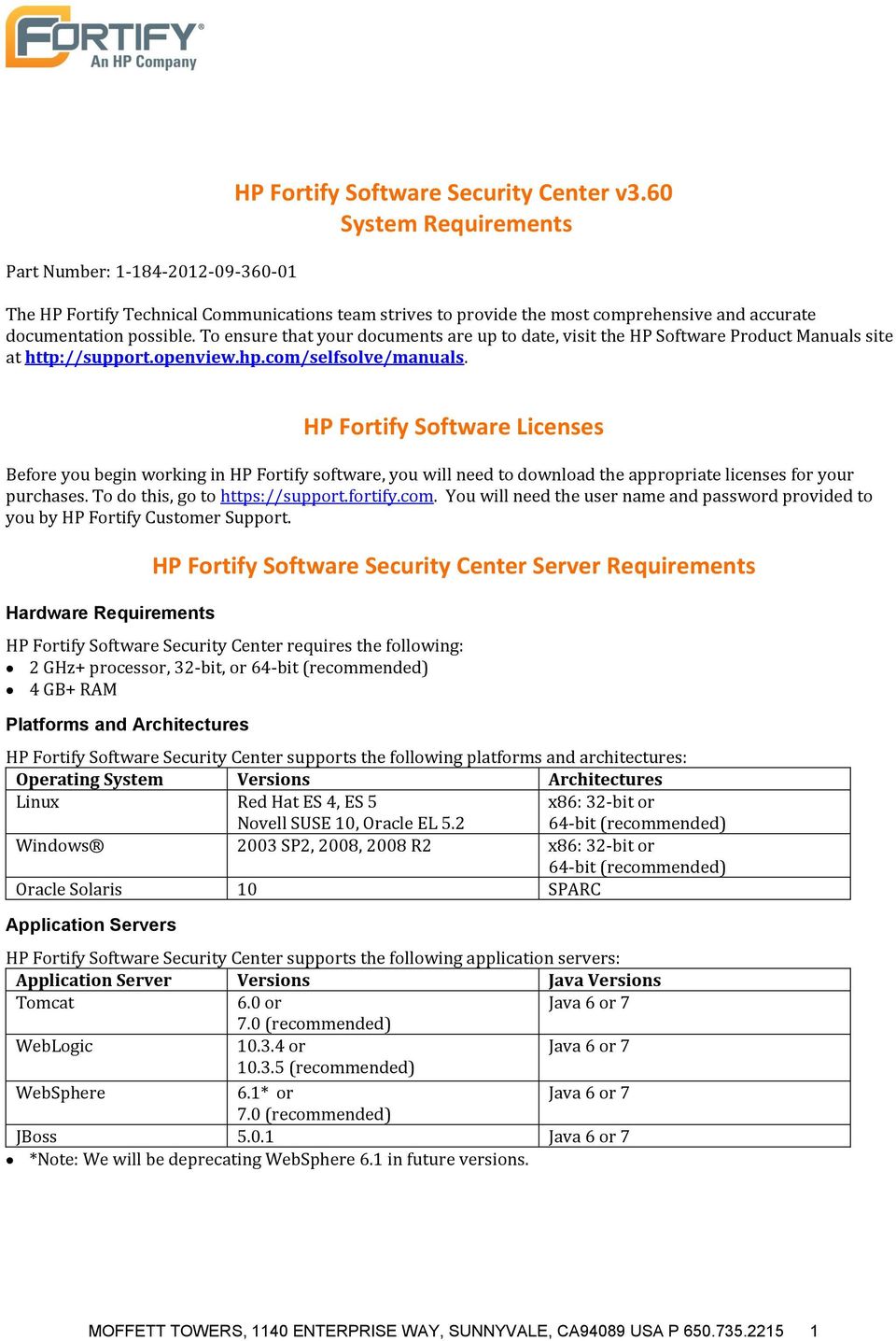
1 Part Number: HP Fortify Software Security Center v3.60 System Requirements The HP Fortify Technical Communications team strives to provide the most comprehensive and accurate documentation possible. To ensure that your documents are up to date, visit the HP Software Product Manuals site at HP Fortify Software Licenses Before you begin working in HP Fortify software, you will need to download the appropriate licenses for your purchases. To do this, go to You will need the user name and password provided to you by HP Fortify Customer Support. Hardware Requirements HP Fortify Software Security Center Server Requirements HP Fortify Software Security Center requires the following: 2 GHz+ processor, 32-bit, or 64-bit (recommended) 4 GB+ RAM Platforms and Architectures HP Fortify Software Security Center supports the following platforms and architectures: Operating System Versions Architectures Linux Red Hat ES 4, ES 5 Novell SUSE 10, Oracle EL 5.2 x86: 32-bit or 64-bit (recommended) Windows 2003 SP2, 2008, 2008 R2 x86: 32-bit or 64-bit (recommended) Oracle Solaris 10 SPARC Application Servers HP Fortify Software Security Center supports the following application servers: Application Server Versions Java Versions Tomcat 6.0 or Java 6 or (recommended) WebLogic or Java 6 or (recommended) WebSphere 6.1* or Java 6 or (recommended) JBoss Java 6 or 7 *Note: We will be deprecating WebSphere 6.1 in future versions. MOFFETT TOWERS, 1140 ENTERPRISE WAY, SUNNYVALE, CA94089 USA P
2 Databases HP Fortify Software Security Center supports the following databases in a production environment: Databases Character Sets Drivers MS SQL Server 2005 or 2008 (recommended) SQL_Latin1_General_ CP1_CI_AS, Unicode JTDS (Recommended) JDBC 3.0 Type 4 driver for Microsoft SQL Server version Driver class: net.sourceeforge.jtds.jdbc.driver Jar file: jtds jar MySQL 5.0.x: and higher MySQL 5.1.x: or and higher (recommended) Oracle 10g and 11g Microsoft Microsoft SQL Server JDBC Driver 2.0 Type 4 Driver class: com.microsoft.sqlserver.jdbc.sqlserverdr iver Jar files: sqljdbc4.jar (Java 6) sqljdbc.jar (Java 5) UTF8, Latin1 MySQL Connector/J 5.1 or Driver class: com.mysql.jdbc.driver Jar file: mysql-connector-java- AL32UTF8 for all languages WE8MSWIN1252 for US English <Version_Number>-bin.jar Oracle Database 11g Release 1 ( ) JDBC Drivers Driver class: oracle.jdbc.oracledriver Jar files: jdbc6.jar (Java 6) jdbc5.jar (Java 5) DB2 9.5, 9.7 UTF8, IBM-1252 Note: IBM DB2 drivers also require that you add at least one of the following driver license files to the CLASSPATH before loading the JDBC driver and seeding your database. db2jcc_license_cisuz.jar db2jcc_license_cu.jar IBM DB2 JDBC Driver v9.5 FP Driver class: com.ibm.db2.jcc.db2driver Jar files: db2jcc.jar (Java 5) db2jcc4.jar (Java 6) Note: If SQL Server is configured to use any character encoding other than unicode, you must append "sendstringparametersasunicode=false" to the end of your jdbc URL. For example: jdbc:jtds:sqlserver://dbhost:1433/ssc;sendstringparametersasunicode=false HP Fortify Software Security Center Demonstration Server includes an Apache Derby database for MOFFETT TOWERS, 1140 ENTERPRISE WAY, SUNNYVALE, CA94089 USA P

3 Databases Character Sets Drivers evaluation purposes only. This database cannot be expanded or upgraded. Do not use it to store critical data. Database Disk Space Use the following formula to estimate the size (in GB) of the HP Fortify Software Security Center database disk space: DB_Space (GB) = ( TotalIssues *30kb) TotalArtifacts in kb 1,000,000 where: <TotalIssues> = Total number of issues in the system <TotalArtifacts> = Total size of all uploaded artifacts and scan results Notes: This equation produces only a rough estimate for the allocation of database disk space. The formula is not intended for use in estimating disk space requirements for long term projects. The disk requirements for the HP Fortify Software Security Center databases grow in proportion to the number of projects, scans, and issues in the system. Browsers HP Fortify Software Security Center requires Flash Player version 10.2 or later. For the best experience, we recommend that you use one of the following browsers with a minimum resolution of 1280x1024: Browser Flash Plugin Firefox Flash Player 11 (recommended) Internet Explorer Flash Player 11 (recommended) Safari Flash Player 11 (recommended) Chrome Flash Player 11 (recommended) JAWS (See HP Fortify Assistive Flash Player 11 (recommended) Technologies Section 508) Authentication Systems Windows Active Directory Service LDAP Service Integrations HP Fortify Software Security Center supports the following service integrations: Service Applications Versions Bug Creation Bugzilla 3.0 HP ALM 11 JIRA 4.0 Authentication CA SiteMinder 12 Active Directory 2003, 2008 Issue Import AppDetective 6.0 Dynamic Assessments AppScan 7.7, 7.9, 8.0 For compatibility with HP Fortify Static Code Analyzer (SCA), HP WebInspect, and HP AMP, see HP Fortify 3.60 Compatibility Matrix WebInspect Enterprise Notes: ALM 11 changeset mapping is only supported in conjunction with VisualSVN. Importing third-party issues may lose some functionality of the third-party format MOFFETT TOWERS, 1140 ENTERPRISE WAY, SUNNYVALE, CA94089 USA P

4 Documentation The documents listed in the following table apply to HP Fortify Software Security Center: Document Name PDF HTML Help HP Fortify Software Security Center User Guide HP_Fortify_SSC_User_Guide_3.60.pdf HP Fortify Software Security Center Process Guide HP Fortify Software Security Center Installation and Configuration Guide HP Fortify Software Security Center Real-Time Hybrid Analysis User Guide N/A HP_Fortify_SSC_Installation_and_ Configuration_Guide_3.60.pdf HP_Fortify_Real_Time_Hybrid_Analysis_U ser_guide_3.60.pdf HP Fortify Software Security Center Help Within the web application at /ssc/guide/ HP Fortify Software Security Center Installation and Configuration Help N/A MOFFETT TOWERS, 1140 ENTERPRISE WAY, SUNNYVALE, CA94089 USA P

5 Hardware Requirements HP Fortify Static Code Analyzer Requirements HP Fortify Software recommends that you install HP Fortify Static Code Analyzer (SCA) on a high-end processor with at least 4 GB of RAM. If your software is particularly complex, you may need more RAM. Platforms and Architectures SCA supports the following platforms and architectures: Operating System Architectures Versions Linux x86: 32-bit or 64-bit (recommended) Red Hat ES 4, ES5 Novell SUSE 10, Oracle EL 5.2 Windows x86: 32-bit or 64-bit (recommended) Mac OS x , 10.7 Solaris SPARC 10 x86 10 HP-UX Itanium SP1, 2008, XP, Vista Business, Vista Ultimate, Windows 7 Notes: Audit Workbench, Process Designer, Custom Rules Editor, and Scan Wizard are not supported on HP-UX, and Oracle Solaris. SCA has not been tested on all Linux variants, but most distributions are not known to cause issues. SCA has been supported on other platforms in the past. If the operating system that you require is not in the table above, please contact HP Fortify support for more information. Languages SCA supports the programming languages listed in the following table: Language Versions ABAP/BSP 6 ActionScript/MXML (Flex) 3, 4 ASP.NET, VB.NET, C# 1.1, 2.0, 3.0, 3.5, 4.0 (.NET) C/C++ See Compilers on page 6. Classic ASP (with VBScript) 2, 3 COBOL IBM Enterprise Cobol for z/os with IMS, DB2, CICS, MQ CFML 5, 7, 8 HTML 4 and earlier Java 1.3, 1.4, 1.5, 1.6, 1.7 JavaScript/AJAX 1.7 JSP 1.2, 2.1 Objective-C See Compilers on page 6. PHP PL/SQL Python 2.6 T-SQL SQL Server 2005 and 2008 Visual Basic 6 VBScript 2.0, 5.0 XML 1.0 Note: ios projects compiled using Objective-C require 4.3 or 4.5 of the ios SDK. MOFFETT TOWERS, 1140 ENTERPRISE WAY, SUNNYVALE, CA94089 USA P

6 Build Tools SCA supports the build tools listed in the following table: Build Tool Versions Ant 1.5.x, 1.6.x, 1.7.x, 1.8.x Maven to 2.x.x MSBuild 2, 3.5, 4 Xcodebuild 4.1, 4.2, 4.2.1, 4.3 Compilers SCA supports the compilers listed in the following table: Compilers Operating Systems Clang 2.9, 3.0 Mac OS LLVM-GCC 4.2, 4.3 Mac OS GNU gcc Linux, HP-UX, Mac OS, Solaris, Windows GNU g Linux, HP-UX, Mac OS, Solaris, Windows Intel icc 8.0 Linux Microsoft cl 12.x 13.x Windows Sun cc / Sun CC 5.9, 5.10, 5.11 Solaris Sun javac Linux, HP-UX, Mac OS, Solaris, Windows Integrated Development Environments SCA supports the following integrated development environments: Auditing and Scanning Plugins Remediation Plugins (audit-only) Eclipse 3.3, 3.4, 3.5, 3.6, 3.7 JDeveloper , RAD 7, 7.5, 8.0, 8.5; RSA 7, 7.5, 8.0 IntelliJ 10, 11 JBuilder 2008 R2 Microsoft Visual Studio 2010 Microsoft Visual Studio 2003 (scanning only) Microsoft Visual Studio 2005, 2008, 2010 Note: The HP Fortify Software Security Center Plugin for Eclipse requires JRE 1.5 or greater. HP Fortify Build Monitor HP Fortify Build Monitor supports the following Windows platforms and architectures: Operating System Architectures Versions Windows x86: 32-bit and 64-bit 2003 SP1, 2008, XP Windows x86: 32-bit 2000 Note: Build Monitor is not supported on Windows Vista or later. Service Integrations HP Fortify Audit Workbench and Secure Code Plugins (SCP) support the following service integrations: Service Applications Versions Supported Tools Bug Creation Bugzilla 3.0 Audit Workbench, Visual Studio SCP, Eclipse SCP HP Quality Center 9.2, 10.0 Audit Workbench, Eclipse SCP Microsoft Team 2005, 2008, 2010 Visual Studio SCP Foundation Server Software Security Center Bugtracker 3.60 Audit Workbench, Eclipse SCP Issue Import AppDetective 6.0 Issue Import MOFFETT TOWERS, 1140 ENTERPRISE WAY, SUNNYVALE, CA94089 USA P

7 Service Applications Versions Supported Tools AppScan 7.7, 7.9, 8.0 For compatibility with HP Fortify SSC, HP WebInspect, and HP AMP, see the HP Fortify 3.60 Compatibility Matrix on page 15. MOFFETT TOWERS, 1140 ENTERPRISE WAY, SUNNYVALE, CA94089 USA P

8 Notes: HP Quality Center integration requires that you install the HPQC Client-Side Add-in software. Team Foundation Server integration requires that you install the Visual Studio Team Explorer software. When integrating with TFS 2010, Visual Studio SCP must be installed on a machine running Visual Studio Documentation The documents listed in the following table apply to HP Fortify Static Code Analyzer: Document Name PDF HTML Help HP Fortify Audit Workbench User Guide HP_Fortify_Audit_Workbench_User_Guide_ 3.60.pdf HP Fortify Audit Workbench User Guide Help HP Fortify Eclipse HP_Fortify_Eclipse_Plugin_Guide_3.60.pdf HP Fortify Eclipse Plugin Guide HP Fortify JDeveloper Installation and Usage Guide HP Fortify Package for Visual Studio Installation and Configuration Guide HP Fortify Remediation Package for Microsoft Visual Studio 2010 Installation and Usage Guide HP Fortify Remediation Plugin for IntelliJ Installation and Usage Guide HP Fortify Software Security Center Process Designer User Guide HP Fortify Static Code Analyzer Custom Rules Guide HP Fortify Static Code Analyzer for COBOL Addendum HP Fortify Static Code Analyzer Installation and Configuration Guide HP Fortify Static Code Analyzer User Guide HP Fortify Static Code Analyzer Utilities User Guide HP_Fortify_JDeveloper_Install_and_Usage_ Guide_3.60.pdf HP_Fortify_Visual_Studio_Install_and_ Config_3.60.pdf HP_Fortify_VS_2010_Remediation_3.60.pdf HP_Fortify_IntelliJ_Remediation_3.60.pdf HP_Fortify_Process_Designer_User_Guide_3. 60.pdf HP_Fortify_SCA_Custom_Rules_3.60.pdf HP_Fortify_SCA_COBOL_Addendum_3.60.pdf HP_Fortify_SCA_Install_and_Config_3.60.pdf HP_Fortify_SCA_User_Guide_3.60.pdf HP_Fortify_SCA_Utilities_User_Guide_ 3.60.pdf Plugin Help HP Fortify JDeveloper Help HP Fortify Visual Studio Package Help HP Fortify Visual Studio 2010 Remediation Package Help HP Fortify IntelliJ Remediation Plugin Help N/A N/A N/A HP Fortify v3.60 SCA Install & Config Help HP Fortify v3.60 SCA User Help N/A MOFFETT TOWERS, 1140 ENTERPRISE WAY, SUNNYVALE, CA94089 USA P

9 HP Fortify CloudScan HP Fortify CloudScan has three major components: CloudScan CLI, CloudScan Controller, and CloudScan Cloud. The requirements for each component are listed below. Hardware Requirements CloudScan CLI CloudScan CLI will run on any machine that supports HP Fortify Static Code Analyzer. Because CloudScan CLI is installed on build machines running SCA, hardware requirements will be met. Hardware Requirements CloudScan Controller HP Fortify Software recommends that you install the CloudScan Controller on a high-end processor running at 2 GHz with at least 4 GB of RAM. Platforms and Architectures The CloudScan Controller supports the following platforms and architectures: Operating System Architectures Versions Linux x86: 32-bit or Red Hat ES 4, ES5, Novell SUSE 10, Oracle EL bit (recommended) Windows x86: 32-bit or 64-bit (recommended) 2003 SP1, 2008, XP Vista Business, Vista Ultimate, Windows 7 Disk Space Requirement To estimate the amount of disk space you will need on the machine running the CloudScan Controller, use the following equation: (number of jobs per day) (average size of mobile build session) (number of days data is persisted) 100MB is a conservative estimate for the average size of the mobile build session. Seven days is the default for the number of days the data is persisted. CloudScan Cloud The CloudScan Cloud is created using the Cloudera CDH3u0 release of the Apache Hadoop distribution. Your Cloudera Hadoop cluster will require at least two machines. For information on creating your Hadoop network: Notes: 64-bit nodes with 8GB+ RAM are recommended. The Hadoop slave nodes will require SCA to be installed. The official range of supported platforms for Cloudera includes Linux distributions not officially supported by SCA. However, there are no known SCA issues on these additional Linux variants. The size and resource requirements of HP Fortify jobs running in this cluster are not typical. Leveraging an existing Hadoop cluster may adversely affect the performance of other jobs running on the system. Create a separate Cloudera Apache Hadoop cluster to use with CloudScan. MOFFETT TOWERS, 1140 ENTERPRISE WAY, SUNNYVALE, CA94089 USA P

10 Documentation The documents listed in the following table apply to HP Fortify CloudScan: Document Name PDF HTML Help HP Fortify CloudScan Installation, Configuration, and Usage Guide HP_Fortify_CloudScan_Guide_3.60.pdf HP Fortify CloudScan Help MOFFETT TOWERS, 1140 ENTERPRISE WAY, SUNNYVALE, CA94089 USA P

11 HP Fortify Software Security Center Real-Time Analyzer Requirements Hardware Requirements HP Fortify Software recommends that you install HP Fortify Real-Time Analyzer (RTA) on a high-end processor or equivalent with at least 1 GB of RAM and 545 MB of available hard disk space for the software. The installation also requires at least 60 MB of available space in the temp directory. Supported Java Runtime Environments RTA supports the following Java runtime environments: JRE Type Major Versions IBM J , 1.5.0, Oracle HotSpot 1.4.2, 1.5.0, Oracle JRockit 1.4.2, 1.5.0, RTA for Java is supported on Windows, Linux, and Solaris. Supported Application Servers RTA supports the following application servers: Application Server Versions RedHat JBoss 4.0, 5.0, 5.1, 6.0 Apache Tomcat 5.0, 5.5, 6.0, 7.0 Oracle WebLogic 8.1, 9.0, 9.2, 10.0, 10.3, 11g, 11gR1 IBM WebSphere 6.0, 6.1, 7.0 Supported.NET Runtime Environments RTA supports the following.net runtime environments: Operating System CLR Architectures CLR.NET Versions Windows XP 32-bit 2.0, 3.0, 3.5, 4.0 Windows Server bit, 64-bit 2.0, 3.0, 3.5, 4.0 Windows Server bit, 64-bit 2.0, 3.0, 3.5, 4.0 Windows Server 2008 R2 64-bit 2.0, 3.0, 3.5, 4.0 Windows 7 32-bit, 64-bit 2.0, 3.0, 3.5, 4.0 Supported.NET Application Server RTA supports the following.net application server: Application Server Versions IIS 5.1, 6, 7, 7.5 MOFFETT TOWERS, 1140 ENTERPRISE WAY, SUNNYVALE, CA94089 USA P

12 Documentation The following documentation applies to HP Fortify Real-Time Analyzer: Document Name PDF HTML Help HP Fortify Real-Time Analyzer Operator Guide HP_Fortify_RTA_Operator_Guide_3.60.pdf HP Fortify v3.60 RTA Operator Guide Help HP Fortify Real-Time Analyzer: Java Edition Installation and Configuration Guide HP_Fortify_RTA_Java_Install_and_ Config_Guide_3.60.pdf HP Fortify v3.60 RTA Java Install & Config Help HP Fortify Real-Time Analyzer: Microsoft.NET Edition Installation and Configuration Guide HP Fortify Real-Time Analyzer: Java Edition Designer Guide HP Fortify Real-Time Analyzer: Rulepack Kit Guide HP Fortify Real-Time Analyzer:.NET Edition Designer Guide HP_Fortify_RTA_DOTNET_Install_a nd_config_guide.3.60.pdf HP_Fortify_RTA_Java_Designer_Gu ide_3.60.pdf HP_Fortify_RTA_Rulepack_Kit_Gui de_ 3.60.pdf HP_Fortify_RTA_Net_Designer_Gui de_3.60.pdf HP Fortify v3.60 RTA NET Install & Config Help N/A N/A N/A MOFFETT TOWERS, 1140 ENTERPRISE WAY, SUNNYVALE, CA94089 USA P

13 Hardware Requirements HP Fortify Software Security Center SecurityScope Requirements HP Fortify Software recommends that you install HP Fortify SecurityScope on a high-end processor or equivalent with at least 1 GB of RAM and 545 MB of available hard disk space for the software. The installation also requires at least 60 MB of available space in the temp directory. Supported Java Runtime Environments SecurityScope supports the following Java runtime environments: JRE Type Major Versions IBM J , 1.5.0, Oracle HotSpot 1.4.2, 1.5.0, Oracle JRockit 1.4.2, 1.5.0, SecurityScope for Java is supported on Windows, Linux, and Solaris. Supported Application Servers SecurityScope supports the following application servers: Application Server Versions RedHat JBoss 4.0, 5.0, 5.1, 6.0 Apache Tomcat 5.0, 5.5, 6.0, 7.0 Oracle WebLogic 8.1, 9.0, 9.2, 10.0, 10.3, 11g, 11gR1 IBM WebSphere 6.0, 6.1, 7.0 Supported.NET Runtime Environments SecurityScope supports the following.net runtime environments: Operating System CLR Architectures CLR.NET Versions Windows XP 32-bit 2.0, 3.0, 3.5, 4.0 Windows Server bit, 64-bit 2.0, 3.0, 3.5, 4.0 Windows Server bit, 64-bit 2.0, 3.0, 3.5, 4.0 Windows Server 2008 R2 64-bit 2.0, 3.0, 3.5, 4.0 Windows 7 32-bit, 64-bit 2.0, 3.0, 3.5, 4.0 Supported.NET Application Server SecurityScope supports the following.net application server: Application Server Versions IIS 5.1, 6, 7, 7.5 MOFFETT TOWERS, 1140 ENTERPRISE WAY, SUNNYVALE, CA94089 USA P

14 Documentation The following documentation applies to HP Fortify SecurityScope: Document Name PDF HTML Help HP Fortify SecurityScope User Guide HP_Fortify_SecurityScope_User_ Guide_3.60.pdf HP Fortify SecurityScope User Help HP Fortify SecurityScope: Microsoft.NET Edition Installation and Configuration Guide HP_Fortify_SecurityScope_ DOTNET_Install_and_Config_3.6 0.pdf HP Fortify SecurityScope.NET Edition Help HP Fortify SecurityScope: Java Edition Installation and Configuration Guide HP Fortify SecurityScope Taint Rulepack Guide HP Fortify Software Security Center Real-Time Hybrid Analysis User Guide HP_Fortify_SecurityScope_Java_ Install_and_Config_3.60.pdf HP_Fortify_SecurityScope_Taint _ Rulepack_Guide_3.60.pdf HP_Fortify_Real_Time_Hybrid_ Analysis_User_Guide_3.60.pdf HP Fortify SecurityScope Java Edition Help N/A N/A MOFFETT TOWERS, 1140 ENTERPRISE WAY, SUNNYVALE, CA94089 USA P

15 Summary HP Fortify 3.60 Compatibility Matrix This section provides compatibility information for HP Fortify Software Security Center and components. HP Fortify Software Security Center 3.60 HP Fortify Software Security Center works with the following component versions: Component Versions Audit Workbench 2.0, 2.1, 2.5, 2.6, 2.6.1, 2.6.5, 3.0, 3.1, 3.20, 3.30, 3.40, 3.50, 3.60 Secure Coding Plugin 2.0, 2.1, 2.5, 2.6, 2.6.1, 2.6.5, 3.0, 3.1, 3.20, 3.30, 3.40, 3.50, 3.60 HP Fortify Client 2.0, 2.1, 2.5, 2.6, 2.6.1, 2.6.5, 3.0, 3.1, 3.20, 3.30, 3.40, 3.50, 3.60 HP Fortify RTA 2.6, 2.6.1, 2.6.5, 3.0, 3.1, 3.20, 3.30, 3.40, 3.50, 3.60 Process Designer 2.6, 2.6.1, 2.6.5, 3.0, 3.1, 3.20, 3.30, 3.40, 3.50, 3.60 JDeveloper Plugin 2.6, 2.6.1, 2.6.5, 3.0, 3.1, 3.20, 3.30, 3.40, 3.50, 3.60 Visual Studio 2010 Remediation Plugin 3.40, 3.50, 3.60 IntelliJ Remediation Plugin 3.50, 3.60 HP Fortify SecurityScope 3.0, 3.1, 3.20, 3.30, 3.40, 3.50, 3.60 HP WebInspect 8.0, 8.10, 9.00, 9.10, 9.20, 9.30 HP AMP 9.10, 9.20, 9.30 FPR Compatibility Later versions of HP Fortify products can open and read FPR files generated by earlier versions of HP Fortify products. For example, Audit Workbench 3.20 can read 2.1 FPR files. Earlier versions of HP Fortify products cannot open and read FPR files generated by later versions of HP Fortify products. For example, Audit Workbench 2.1 cannot read 3.20 FPR files. FPR versions are determined as follows: The version of an FPR is the same as the version of the analyzer that initially generates it. For example, an FPR generated by SCA 2.1 will be version 2.1. If two FPRs are merged, the resulting FPR has the version of the later one. For example, if a 2.1 and a 2.5 FPR are merged, the resulting FPR will be version 2.5. Caution: HP Fortify Software Security Center keeps a project file FPR that contains the latest scan results and audit information for each project. Audit Workbench and the Secure Coding Plugins also use this project file for collaborative auditing. Each time an FPR is uploaded to HP Fortify Software Security Center, it is merged with the project file. If the FPR has a later version number than the project file, the project file s version will change to match the FPR. In order for Audit Workbench and the Secure Coding Plugins to work with the updated FPR, they must be at least the same version as the FPR. For example, Audit Workbench 2.0 cannot read a 2.5 FPR. Seed Bundle HP Fortify Software Security Center 3.60 supports seed bundle MOFFETT TOWERS, 1140 ENTERPRISE WAY, SUNNYVALE, CA94089 USA P

16 Process Templates HP Fortify Software Security Center 3.60 supports the following process templates: Process Templates 2.0, 2.1, 2.5, 2.6, 2.6.1, 3.0, 3.1, 3.20, 3.30, 3.40, 3.50, and 3.60 (If you have older versions of Process Templates, you might need to open them in 3.60 Process Designer first and make appropriate changes before they can be accepted by HP Fortify Software Security Center 3.60.) Runtime Configuration Bundle and Template HP Fortify Software Security Center 3.60 supports Runtime Configuration Bundle and Template MOFFETT TOWERS, 1140 ENTERPRISE WAY, SUNNYVALE, CA94089 USA P

17 Acquiring HP Fortify Software HP Fortify Software is available on DVD or as an electronic download. You must have a SAID access account number in order to download HP Fortify Software from the HP Software Support Online site. Table 1 lists the available packages and describes their contents. Table 1: Packages File Name Software_HP_Fortify_3.60_Eng_SW_Media_T F iso Software_HP_Fortify_3.60_Eng_SW_Media_T F iso.sig Software_HP_Fortify_3.60_Linux_Unix_Mac_ TF iso Software_HP_Fortify_3.60_Linux_Unix_Mac_ TF iso.sig HP_Fortify_Scan_Wizard_3.60_Windows_TF zip HP_Fortify_Scan_Wizard_3.60_Windows_TF zip.sig HP_Fortify_Scan_Wizard_3.60_MacOSX_TF tar.gz HP_Fortify_Scan_Wizard_3.60_MacOSX_TF tar.gz.sig HP_Fortify_Scan_Wizard_3.60_Linux_TF tar.gz HP_Fortify_Scan_Wizard_3.60_Linux_TF tar.gz.sig HP_Fortify_SSC_Demo_Suite_3.60_Windows_ x86_tf zip HP_Fortify_SSC_Demo_Suite_3.60_Windows_ x86_tf zip.sig HP_Fortify_SSC_Demo_Suite_3.60_Windows_ x64_tf zip HP_Fortify_SSC_Demo_Suite_3.60_Windows_ x64_tf zip.sig HP_Fortify_SSC_Demo_Suite_3.60_Unix_TF tar.gz HP_Fortify_SSC_Demo_Suite_3.60_Unix_TF tar.gz.sig HP_Fortify_SSC_Server_3.60_TF zip HP_Fortify_SSC_Server_3.60_TF zip.sig HP_Fortify_CloudScan_Controller_3.60_TF zip Description Disc image of the entire Software Security Center product line. After downloading, you will need to either mount the ISO image or burn it to a DVD before installation. For Windows operating systems. Signature file for the Software Security Center product line ISO for Windows. Disc image of the entire Software Security Center product line. After downloading, you will need to either mount the ISO image or burn it to a DVD before installation. For Linux, Unix, and Macintosh operating systems. Signature File for the Software Security Center product line ISO for Linux, Unix, and Macintosh operating systems. HP Fortify Scan Wizard for Windows. Signature file for HP Fortify Scan Wizard for Windows. HP Fortify Scan Wizard for Macintosh OSX. Signature file for HP Fortify Scan Wizard for Macintosh OSX. HP Fortify Scan Wizard for Linux. Signature file for HP Fortify Scan Wizard for Linux. HP Fortify Demo Suite for Windows (x86) Signature file for HP Fortify Demo Suite for Windows (x86) HP Fortify Demo Suite for Windows (x64) Signature file for HP Fortify Demo Suite for Windows (x64) HP Fortify Demo Suite for Unix Signature file for HP Fortify Demo Suite for Unix HP Fortify Software Security Center Signature file for HP Fortify Software Security Center HP Fortify CloudScan Controller MOFFETT TOWERS, 1140 ENTERPRISE WAY, SUNNYVALE, CA94089 USA P

18 File Name HP_Fortify_CloudScan_Controller_3.60_TF zip.sig HP_Fortify_SecurityScope_3.60_TF zip HP_Fortify_SecurityScope_3.60_TF zip.sig HP_Fortify_RTA_3.60_TF zip HP_Fortify_RTA_3.60_TF zip.sig HP_Fortify_SCA_and_Apps_3.60_Windows_T F zip HP_Fortify_SCA_and_Apps_3.60_Windows_T F zip.sig HP_Fortify_SCA_and_Apps_3.60_Mac_TF tar.gz HP_Fortify_SCA_and_Apps_3.60_Mac_TF tar.gz.sig HP_Fortify_SCA_and_Apps_3.60_Linux_TF tar.gz HP_Fortify_SCA_and_Apps_3.60_Linux_TF tar.gz.sig Description Signature file for HP Fortify CloudScan Controller HP Fortify SecurityScope Signature file for HP Fortify SecurityScope HP Fortify RTA Signature file for HP Fortify RTA The HP Fortify SCA and Apps package for Windows includes: Static Code Analyzer Audit Workbench HP Fortify SCA plugin for Eclipse HP Fortify SCA plugin for Visual Studio 2003 HP Fortify SCA plugin for Visual Studio 2005 HP Fortify SCA plugin for Visual Studio 2008 HP Fortify SCA plugin for Visual Studio 2010 HP Fortify SCA plugin for Visual Studio 2010 Remediation Note: The plugins for IntelliJ and Jdeveloper are available only on DVD and as part of the ISO. Signature files for the HP Fortify SCA and Apps package for Windows The HP Fortify SCA and Apps package for Macintosh includes: Static Code Analyzer Audit Workbench HP Fortify SCA plugin for Eclipse HP Fortify SCA plugin for Visual Studio 2003 HP Fortify SCA plugin for Visual Studio 2005 HP Fortify SCA plugin for Visual Studio 2008 HP Fortify SCA plugin for Visual Studio 2010 HP Fortify SCA plugin for Visual Studio 2010 Remediation Note: The plugins for IntelliJ and Jdeveloper are available only on DVD and as part of the ISO. Signature file for the HP Fortify SCA and Apps package for Macintosh The HP Fortify SCA and Apps package for Linux includes: Static Code Analyzer Audit Workbench HP Fortify SCA plugin for Eclipse HP Fortify SCA plugin for Visual Studio 2003 HP Fortify SCA plugin for Visual Studio 2005 HP Fortify SCA plugin for Visual Studio 2008 HP Fortify SCA plugin for Visual Studio 2010 HP Fortify SCA plugin for Visual Studio 2010 Remediation Note: The plugins for IntelliJ and Jdeveloper are available only on DVD and as part of the ISO. Signature file for the HP Fortify SCA and Apps package for Linux MOFFETT TOWERS, 1140 ENTERPRISE WAY, SUNNYVALE, CA94089 USA P


19 File Name HP_Fortify_SCA_3.60_HPUX_TF tar.gz HP_Fortify_SCA_3.60_HPUX_TF tar.gz.sig HP_Fortify_SCA_3.60_Solaris_TF tar.gz HP_Fortify_SCA_3.60_Solaris_TF tar.gz.sig Description HP Fortify SCA for HPUX Signature file for HP Fortify SCA for HPUX HP Fortify SCA for Solaris Signature file for HP Fortify SCA for Solaris Downloading the Software To download HP Fortify Software from the HP Software Support Online site: 1. Navigate to 2. Click the Downloads tab to enter the software downloads section. 3. Click the Login button and sign in using your HP Passport credentials. Note: If you don t have an HP Passport, click the >>New users please register link. The Downloads screen appears. 4. Click the Software Updates link. The Software updates screen appears. 5. Click My Updates. The My software updates screen appears. If you don t have SAID access for HP Fortify products associated with your HP Passport, you will need to select the Directly enter an SAID: radio button and type in your HP Fortify SAID account number. MOFFETT TOWERS, 1140 ENTERPRISE WAY, SUNNYVALE, CA94089 USA P

20 6. Select the terms and conditions check box and click the View available products button. The My software updates product list page appears. 7. Expand the Application Security Center product node. The list of product names that fall under the Application Security Center category are revealed. 8. From the Product name box select the desired version of the HP Fortify English Software E- Media software. For information on the available packages, see Table 1: Packages on page From the Downloads box, select the package you want to download. 10. Click the Download Directly>> or Use HP Download Manager>> button. Note: If your organization requires that you verify the download, you will also need to download the like-named signature file. For example, if you download the HP_Fortify_3.60_Eng_SW_Media_TF iso file, you will also need to download the associated signature file, HP_Fortify_3.60_Eng_SW_Media_TF iso.sig. In rare cases, the signature file you download will have the wrong extension (either.zip or.gz). If this occurs, change the final extension to.sig. Verifying Software Downloads The following instructions walk you through the process of verifying the HP Fortify package you acquired from the Downloads section of the HP Software Support Online site ( Successful verification ensures that the package has not been altered since it was signed by HP and posted to the site. Before proceeding with the verification process, download the HP Fortify product files and their associated signature (*.sig) files. This process is not required for use of the software, but may be required by your organization for security reasons. Preparing Your System for Electronic Media Verification 1. Download and install version 1.4.x or 2.0.x of GnuPG: 2. Generate a private key: $ gpg --gen-key NOTE: Issue the command without '$' prompt on Windows. When prompted for key type, select DSA and Elgamal. When prompted for a key size, select When prompted for the length of time the key should be valid, select key does not expire. Answer the user identification questions and provide a passphrase to protect your private key. 3. Create an HP public key file: mpid=reg_r1002_usen Follow the instructions on the linked page to create an HP public key file. Per the instructions, name the key file hppublickey.pub. 4. Import the HP public key into GnuPG. a. Move the hppublickey.pub file to the GNU installation directory. b. Navigate to the GNU installation directory. c. Run gpg --import hppublickey.pub MOFFETT TOWERS, 1140 ENTERPRISE WAY, SUNNYVALE, CA94089 USA P

21 Verify that the Signature File Matches the Downloaded Software Package 1. Navigate to the directory where you stored the downloaded package and signature file. On Windows machines, issue the following command: gpg --verify <Signature_File_Name> <Downloaded_File_Name> On Unix/Linux: gpg -verify <Signature_File_Name> <Downloaded_File_Name> 2. Examine the output to insure you receive verification that the software you downloaded has been signed by HP and has not been altered. Your output should include something like the following: c:.sig HP.Fortify_3.SEng_SW.Media_TF iso \Users\username\<downloadDirectory>gpg --uerif HPFortify_3.5Eng_SWJ1edia_TF3O iso gpg: Signature made 04/18/12 15:05:36 Pacific Daylight Time using DSA key ID 2689BB87 gpg: Good signature from Hewlett-Packard Company(HP Codesigning Service) gpg: WARNING: This key is not certified with a trusted signature! gpg: There is no indication that the signature belongs to the owner. Primary key fingerprint: FB41 0E68 CEDF 95D E95 527B CS3A 2689 B887 Note: The warning message occurs because the HP public key is not known to the system. You can ignore this warning or set up your environment to identify the HP public key as a trusted signature. For more information on downloading, verifying, and installing HP Fortify Software, please see "Acquiring HP Fortify Software" on page 17. MOFFETT TOWERS, 1140 ENTERPRISE WAY, SUNNYVALE, CA94089 USA P
22 The ISO Download If you choose to download an ISO file of the entire suite, you will need to either burn the ISO to a DVD or mount the ISO file prior to installing the software. To Burn the ISO File to a DVD: Windows Unix/Linux MacOSX Windows 7 natively supports burning an ISO to a DVD. 1. Put a writable DVD disc in your writable DVD drive. 2. Navigate to the ISO file that you downloaded. 3. Right-click the file name. 4. Select Burn disc image from the menu. The Windows Disc Image Burner window appears 5. Select your system's writable DVD drive. 6. (optional) Check the Verify disc after burning box. 7. Click the Burn button. Note: Windows versions prior to Windows 7 do not natively support burning an ISO file to a DVD. You will need to acquire software that supports burning an ISO to disc. The following instructions are general command line instructions; your distro might require alterations to these steps. 1. Put a writable DVD disc in your writable DVD drive. 2. To find the path to your disc drive, type: wodim devices and press Enter. 3. Burn the ISO file to disc by typing: wodim dev=/dev/cdrw v data <downloaded_iso_file>. iso, replacing /dev/cdrw with the path to your disc drive. 4. Press Enter. Note: You can also burn an ISO file using software included with a GUI shell. 1. Insert a blank DVD into the drive. 2. Run Disk Utility. 3. From the File menu, choose Open Disk Image and select the ISO to be burned. 4. Select the item representing the ISO file from the list of volumes. 5. Click the Burn button and follow the instructions. MOFFETT TOWERS, 1140 ENTERPRISE WAY, SUNNYVALE, CA94089 USA P
23 To Mount the ISO File: Windows Linux / Unix MacOSX If you choose not to burn the ISO image to a disc, you can mount the ISO on your hard The following instructions are general command-line instructions; your distribution might require alterations to these steps. drive and run the 1. Open a terminal in Linux. installation from there. 2. Become root or an administrator user. Windows does not include native support for mounting ISO files. 3. Create a mount point for the ISO file: mkdir/media/<folder_name_for_mount _point> You will need to use a third-party application 4. Navigate to the directory you just created. if you choose to mount the ISO file to a directory in Windows 5. Type: mount o loop file.iso /media/<folder_name_for_mount_point > rather than burning it to disc. 6. Type Enter. 1. Run Disk Utility. 2. Select Open Image File from the Disk Utility menu. 3. Select the HP Fortify ISO file. The ISO should appear on the Mac OS desktop. MOFFETT TOWERS, 1140 ENTERPRISE WAY, SUNNYVALE, CA94089 USA P
24 HP Fortify Assistive Technologies (Section 508) In accordance with section 508 of the Rehabilitation Act, HP Fortify Software Security Center and HP Fortify Audit Workbench have been engineered to work with the JAWS screen reading software package from Freedom Scientific. JAWS provides text-to-speech support for use by the visually impaired. With JAWS, labels, text boxes, and other textual components can be read aloud, providing greater access to these technologies. Using JAWS with HP Fortify Products When using JAWS to generate text-to-speech translations of the text in Audit Workbench or Software Security Center's graphical user interface, there are a number of keyboard combinations that will help you get the most out of the interaction. The following table provides a list of useful keyboard commands. Note: For best results, run JAWS before launching your browser and logging on to your HP Fortify program. JAWS Keyboard Combinations The following table lists keyboard combinations that will help you use JAWS with HP Fortify products. For more information on using JAWS, consult the JAWS documentation. To do this Use this keyboard combination To read values in combo boxes. Press Ctrl + down arrow key to turn on Form mode, or press Enter. Tab through multi-line text boxes. Press Ctrl + Tab to move from one multiline text box to another. Read multi-line labels. Press Insert + down arrow to read all lines in label. Read disabled items (grayed-out). Press Insert + B or Insert + down arrow. Read disabled check boxes. Press ESC to leave Forms mode and enter Virtual Cursor mode. Enable table headings to be read. 1. Press Insert + F2. The Run JAWS Manager dialog box appears. 2. Click the OK button. Switch between pods or panels. 1. Hold down CTRL + F7 while you select the new pane Return focus to the application (JAWS is reading the web browser application rather than the content of the browser). 2. Release CTRL + F7 Press CTRL + R to refresh the display. By refreshing the display, your session will be aborted and any data you have typed into the page will be lost. For more information or assistance, please visit HP Accessibility at: MOFFETT TOWERS, 1140 ENTERPRISE WAY, SUNNYVALE, CA94089 USA P
HP Fortify Software Security Center v3.70 System Requirements. HP Fortify Software Licenses. HP Fortify Software Security Center Server Requirements
 Part Number: 1-184-2012-11-370-01 HP Fortify Software Security Center v3.70 System Requirements The HP Fortify Technical Communications team strives to provide the most comprehensive and accurate documentation
System Requirements - CommNet Server
 System Requirements - CommNet Page 1 of 11 System Requirements - CommNet The following requirements are for the CommNet : Operating System Processors Microsoft with Service Pack 4 Microsoft Advanced with
System Requirements - Table of Contents
 Page 1 of 12 System Requirements - Table of Contents CommNet Server CommNet Agent CommNet Browser CommNet Browser as a Stand-Alone Application CommNet Browser as a Remote Web-Based Application CommNet
Oracle Business Intelligence Publisher. 1 Oracle Business Intelligence Publisher Certification. Certification Information 10g Release 3 (10.1.3.4.
 Oracle Business Intelligence Publisher Certification Information 10g Release 3 (10.1.3.4.2) E12692-08 September 2011 This document outlines the certified hardware and software configurations for Oracle
Adobe LiveCycle ES Update 1 System Requirements Adobe LiveCycle ES Foundation-based solution components
 Adobe LiveCycle ES Update 1 System Requirements Adobe LiveCycle ES Foundation-based solution s LiveCycle Barcoded Forms ES LiveCycle e Business Activity ty Monitoring ES LiveCycle Content Services ES LiveCycle
FileNet Business Activity Monitor (BAM) Release Notes
 FileNet Business Activity Monitor (BAM) Release Notes Release 3.6.0 September 2006 FileNet is a registered trademark of FileNet corporation. All other product and brand names are trademarks or registered
HP Service Manager Compatibility Matrix
 HP Service Manager Compatibility Matrix Software Version 9.21 January 12, 2011 Click one of the following links to see more detailed information. Tier Definitions Servers Applications Support Windows Client
VERSION 9.02 INSTALLATION GUIDE. www.pacifictimesheet.com
 VERSION 9.02 INSTALLATION GUIDE www.pacifictimesheet.com PACIFIC TIMESHEET INSTALLATION GUIDE INTRODUCTION... 4 BUNDLED SOFTWARE... 4 LICENSE KEY... 4 SYSTEM REQUIREMENTS... 5 INSTALLING PACIFIC TIMESHEET
Getting Started with ESXi Embedded
 ESXi 4.1 Embedded vcenter Server 4.1 This document supports the version of each product listed and supports all subsequent versions until the document is replaced by a new edition. To check for more recent
HP Universal CMDB. Software Version: 10.20. Support Matrix
 HP Universal CMDB Software Version: 10.20 Support Matrix Document Release Date: January 2015 Software Release Date: January 2015 Legal Notices Warranty The only warranties for HP products and services
Tivoli Endpoint Manager for Remote Control Version 8 Release 2. User s Guide
 Tivoli Endpoint Manager for Remote Control Version 8 Release 2 User s Guide Tivoli Endpoint Manager for Remote Control Version 8 Release 2 User s Guide Note Before using this information and the product
HP Fortify Static Code Analyzer
 HP Fortify Static Code Analyzer Software Version 4.10 Installation and Configuration Guide Document Release Date: April 2014 Software Release Date: April 2014 Legal Notices Warranty The only warranties
Data Sheet VISUAL COBOL 2.2.1 WHAT S NEW? COBOL JVM. Java Application Servers. Web Tools Platform PERFORMANCE. Web Services and JSP Tutorials
 Visual COBOL is the industry leading solution for COBOL application development and deployment on Windows, Unix and Linux systems. It combines best in class development tooling within Eclipse and Visual
Installation Guide. SAP Control Center 3.3
 Installation Guide SAP Control Center 3.3 DOCUMENT ID: DC01002-01-0330-01 LAST REVISED: November 2013 Copyright 2013 by SAP AG or an SAP affiliate company. All rights reserved. No part of this publication
SNOW LICENSE MANAGER (7.X)... 3
 SYSTEM REQUIREMENTS Products Snow License Manager Software Store Option Snow Inventory Server, IDR, IDP Client for Windows Client for Linux Client for Unix Client for OS X Oracle Scanner Snow Integration
Enterprise Manager. Version 6.2. Installation Guide
 Enterprise Manager Version 6.2 Installation Guide Enterprise Manager 6.2 Installation Guide Document Number 680-028-014 Revision Date Description A August 2012 Initial release to support version 6.2.1
Kony MobileFabric. Sync Windows Installation Manual - WebSphere. On-Premises. Release 6.5. Document Relevance and Accuracy
 Kony MobileFabric Sync Windows Installation Manual - WebSphere On-Premises Release 6.5 Document Relevance and Accuracy This document is considered relevant to the Release stated on this title page and
SIEMENS. Teamcenter 11.2. Windows Server Installation PLM00013 11.2
 SIEMENS Teamcenter 11.2 Windows Server Installation PLM00013 11.2 Contents Part I: Getting started with Teamcenter server installation Requirements and overview.............................................
Installation Guide for FTMS 1.6.0 and Node Manager 1.6.0
 Installation Guide for FTMS 1.6.0 and Node Manager 1.6.0 Table of Contents Overview... 2 FTMS Server Hardware Requirements... 2 Tested Operating Systems... 2 Node Manager... 2 User Interfaces... 3 License
BRecommended Software. Environments and Minimum System Requirements. Publication Date: July 31, 2015. TIBM Enterprise Marketing Management Products
 T TIBM Enterprise Marketing Management Products TVersion 9.1.0 Publication Date: July 31, 2015 BRecommended Software T19B18 Environments and Minimum System Requirements Copyright Copyright IBM 2014 IBM
Verax Service Desk Installation Guide for UNIX and Windows
 Verax Service Desk Installation Guide for UNIX and Windows March 2015 Version 1.8.7 and higher Verax Service Desk Installation Guide 2 Contact Information: E-mail: [email protected] Internet: http://www.veraxsystems.com/
SNOW LICENSE MANAGER (7.X)... 3
 SYSTEM REQUIREMENTS Products Snow License Manager Snow Inventory Server, IDR, IDP Client for Windows Client for Linux Client for Unix Client for OS X Oracle Scanner External Data Provider Snow Distribution
System Administration Training Guide. S100 Installation and Site Management
 System Administration Training Guide S100 Installation and Site Management Table of contents System Requirements for Acumatica ERP 4.2... 5 Learning Objects:... 5 Web Browser... 5 Server Software... 5
Contents. BMC Atrium Core 7.6.00 Compatibility Matrix
 Contents INTRODUCTION... 2 Supported Configurations... 2 Known Issues... 2 Potential Issues... 2 Support Policy for later versions of vendor products released after Atrium Core 7.5.00... 2 BMC ATRIUM CMDB,
SIEMENS. Teamcenter 11.2. Windows Client Installation PLM00012 11.2
 SIEMENS Teamcenter 11.2 Windows Client Installation PLM00012 11.2 Contents Getting started with Teamcenter client installation............................. 1-1 Introduction to Teamcenter client installation....................................
bbc Installing Your Development Environment Adobe LiveCycle ES July 2007 Version 8.0
 bbc Installing Your Development Environment Adobe LiveCycle ES July 2007 Version 8.0 2007 Adobe Systems Incorporated. All rights reserved. Adobe LiveCycle ES 8.0 Installing Your Development Environment
http://docs.trendmicro.com
 Trend Micro Incorporated reserves the right to make changes to this document and to the products described herein without notice. Before installing and using the product, please review the readme files,
Platform Support Guide
 Platform Support Guide For Pegasystems Partners, Customers, and Prospects PRPC versions 6.3 SP1 and prior December 15, 2015 Platform Support Guide Copyright 2015 Pegasystems Inc., Cambridge, MA All rights
Team Foundation Server 2010, Visual Studio Ultimate 2010, Team Build 2010, & Lab Management Beta 2 Installation Guide
 Page 1 of 243 Team Foundation Server 2010, Visual Studio Ultimate 2010, Team Build 2010, & Lab Management Beta 2 Installation Guide (This is an alpha version of Benjamin Day Consulting, Inc. s installation
Microsoft Windows Apple Mac OS X
 Products Snow License Manager Snow Inventory Server, IDP, IDR Client for Windows Client for OS X Client for Linux Client for Unix Oracle Scanner External Data Provider Snow Distribution Date 2014-04-02
FAQS. You can schedule a WebEx session ahead or start it instantly in your choice of ways:
 FAQS What is WebEx? WebEx is an easy way to exchange ideas and information with anyone, anywhere. It combines real-time desktop sharing with phone conferencing, so everyone sees the same thing as you talk.
Microsoft Windows Apple Mac OS X
 Products Snow License Manager Snow Inventory Server, IDP, IDR Client for Windows Client for OSX Client for Linux Client for Unix Oracle Scanner External Data Provider Snow Distribution Date 2014-02-12
bbc Installing and Deploying LiveCycle ES2 Using JBoss Turnkey Adobe LiveCycle ES2 November 30, 2011 Version 9
 bbc Installing and Deploying LiveCycle ES2 Using JBoss Turnkey Adobe LiveCycle ES2 November 30, 2011 Version 9 2011 Adobe Systems Incorporated and its licensors. All rights reserved. Installing and Deploying
Getting Started with Attunity CloudBeam for Azure SQL Data Warehouse BYOL
 Getting Started with Attunity CloudBeam for Azure SQL Data Warehouse BYOL Overview This short guide explains how to use Attunity CloudBeam to replicate data from your on premises database to Microsoft
How To Set Up An Ibm Marketing Management System
 IBM Enterprise Marketing Management 9.1.2 Recommended Software Environments and Minimum System Requirements 9/23/2015 IBM Corporation Copyright Copyright IBM 2015 IBM Corporation B1WA LKG1 550 King Street
DocuShare Installation Guide
 DocuShare Installation Guide Publication date: February 2011 This document supports DocuShare Release 6.6.1 Prepared by: Xerox Corporation DocuShare Business Unit 3400 Hillview Avenue Palo Alto, California
FileMaker 11. ODBC and JDBC Guide
 FileMaker 11 ODBC and JDBC Guide 2004 2010 FileMaker, Inc. All Rights Reserved. FileMaker, Inc. 5201 Patrick Henry Drive Santa Clara, California 95054 FileMaker is a trademark of FileMaker, Inc. registered
The operating system requirements listed in this document include the most current patches and service packs.
 System requirements The Quark Publishing Platform system requirements listed below are baseline requirements, but your number of users, number of assets, and number of asset revisions affect system performance.
Scholastic Reading Inventory Installation Guide
 Scholastic Reading Inventory Installation Guide For use with Scholastic Reading Inventory version 2.0.1 or later and SAM version 2.0.2 or later Copyright 2011 by Scholastic Inc. All rights reserved. Published
Getting Started using the SQuirreL SQL Client
 Getting Started using the SQuirreL SQL Client The SQuirreL SQL Client is a graphical program written in the Java programming language that will allow you to view the structure of a JDBC-compliant database,
DocuShare Installation Guide
 DocuShare Installation Guide Publication date: May 2009 This document supports DocuShare Release 6.5/DocuShare CPX Release 6.5 Prepared by: Xerox Corporation DocuShare Business Unit 3400 Hillview Avenue
Redtail CRM Integration. Users Guide. 2011 Cities Digital, Inc. All rights reserved. Contents i
 Redtail CRM Integration Users Guide 2011 Cities Digital, Inc. All rights reserved. Contents i Contents Redtail Integration with Laserfiche by Cities Digital 1 Overview... 1 Requirements 3 Minimum Server
Synchronizer Installation
 Synchronizer Installation Synchronizer Installation Synchronizer Installation This document provides instructions for installing Synchronizer. Synchronizer performs all the administrative tasks for XenClient
BarTender Web Print Server
 The World's Leading Software for Label, Barcode, RFID & Card Printing White Paper BarTender Web Print Server Web-based Software for Printing Barcodes, Labels, ID Cards and more. Contents Introduction to
StruxureWare Power Monitoring 7.0.1
 StruxureWare Power Monitoring 7.0.1 Installation Guide 7EN02-0308-01 07/2012 Contents Safety information 5 Introduction 7 Summary of topics in this guide 7 Supported operating systems and SQL Server editions
http://docs.trendmicro.com
 Trend Micro Incorporated reserves the right to make changes to this document and to the products described herein without notice. Before installing and using the product, please review the readme files,
In order to upload a VM you need to have a VM image in one of the following formats:
 What is VM Upload? 1. VM Upload allows you to import your own VM and add it to your environment running on CloudShare. This provides a convenient way to upload VMs and appliances which were already built.
<Insert Picture Here> Oracle Policy Automation 10.3.1 System Requirements
 Oracle Policy Automation 10.3.1 System Requirements December 2011 Version 1.01 Oracle Policy Automation Products Version 10.3.1 Overview Product Oracle Policy Modeling Oracle Policy
Change Manager 5.0 Installation Guide
 Change Manager 5.0 Installation Guide Copyright 1994-2008 Embarcadero Technologies, Inc. Embarcadero Technologies, Inc. 100 California Street, 12th Floor San Francisco, CA 94111 U.S.A. All rights reserved.
CA Identity Manager. Installation Guide (WebLogic) r12.5 SP8
 CA Identity Manager Installation Guide (WebLogic) r12.5 SP8 This documentation, which includes embedded help systems and electronically distributed materials, (hereinafter referred to as the Documentation
Replicon Web TimeSheet
 TimeAttend TimeCost TimeBill TimeOff WebExpense Replicon Web TimeSheet INSTALLATION GUIDE Notices 2008-2012 Replicon, Inc. All rights reserved. All parts of this document are the property of Replicon,
IBM Unica Enterprise Products Version 8.6.0 Publication Date: May 26, 2014. Recommended Software Environments and Minimum System Requirements
 IBM Unica Enterprise Products Version 8.6.0 Publication Date: May 26, 2014 Recommended Software Environments and Minimum System Requirements Copyright Copyright IBM 2014 IBM Corporation Reservoir Place
System Requirements. SAS Regular Price Optimization 4.2. Server Tier. SAS Regular Price Optimization Long Jobs Server
 System Requirements SAS Regular Price Optimization 4.2 Server Tier For information about the file sizes required for the server tier software, please visit Install Center (http://support.sas.com/installcenter)
HP Client Automation Standard Fast Track guide
 HP Client Automation Standard Fast Track guide Background Client Automation Version This document is designed to be used as a fast track guide to installing and configuring Hewlett Packard Client Automation
Contents. BMC Remedy AR System 7.5.00 Compatibility Matrix
 Contents AR SYSTEM SERVER SUPPORTED HARDWARE PLATFORMS AND OPERATING SYSTEMS... 3 AR SYSTEM SERVER SUPPORTED DATABASES...3 JAVA SUPPORT... 4 AR SYSTEM MID-TIER SUPPORTED CONFIGURATIONS...5 AR SYSTEM CLIENT
1 Review Information About this Guide
 Oracle Database Client Quick Installation Guide 11g Release 2 (11.2) for Microsoft Windows x64 (64-Bit) E49700-03 December 2014 This guide describes how to quickly install the Oracle Database Client product
Tested configuration for Major versions of Primavera:-
 Tested configuration for Major versions of Primavera:- s 7:- This configurations that have been tested for the Primavera P6 version 7.0 release is shown below. s Generic Platform Platform Collation Page/Locale
Teamcenter 10.1. Installation on UNIX and Linux Servers Guide. Publication Number PLM00011 J
 Teamcenter 10.1 Installation on UNIX and Linux Servers Guide Publication Number PLM00011 J Proprietary and restricted rights notice This software and related documentation are proprietary to Siemens Product
HP OpenView Service Desk
 HP OpenView Service Desk Installation Guide Software Version: 5.10 For Windows and UNIX Operating Systems Manufacturing Part Number: None Document Release Date: April 2007 Software Release Date: August
Product Roadmap. Sushant Rao Principal Product Manager Fortify Software, a HP company
 Product Roadmap Sushant Rao Principal Product Manager Fortify Software, a HP company Agenda Next Generation of Security Analysis Future Directions 2 Currently under investigation and not guaranteed to
CA Business Intelligence
 CA Business Intelligence Installation Guide r2.1 This documentation and any related computer software help programs (hereinafter referred to as the Documentation ) is for the end user s informational purposes
WebSphere Business Monitor V7.0: Clustering Single cluster deployment environment pattern
 Copyright IBM Corporation 2010 All rights reserved WebSphere Business Monitor V7.0: Clustering Single cluster deployment environment pattern What this exercise is about... 2 Exercise requirements... 2
Automated Process Center Installation and Configuration Guide for UNIX
 Automated Process Center Installation and Configuration Guide for UNIX Table of Contents Introduction... 1 Lombardi product components... 1 Lombardi architecture... 1 Lombardi installation options... 4
Application Servers - BEA WebLogic. Installing the Application Server
 Proven Practice Application Servers - BEA WebLogic. Installing the Application Server Product(s): IBM Cognos 8.4, BEA WebLogic Server Area of Interest: Infrastructure DOC ID: AS01 Version 8.4.0.0 Application
CA Harvest Software Change Manager
 CA Harvest Software Change Manager Implementation Guide Release 12.5 This Documentation, which includes embedded help systems and electronically distributed materials, (hereinafter referred to as the Documentation
Oracle Product Data Quality
 Oracle Product Data Quality Oracle DataLens Server Installation Guide Version 55 E18261-01 August 2010 Oracle Product Data Quality Oracle DataLens Server Installation Guide, Version 55 E18261-01 Copyright
INSTALLING MICROSOFT SQL SERVER AND CONFIGURING REPORTING SERVICES
 INSTALLING MICROSOFT SQL SERVER AND CONFIGURING REPORTING SERVICES TECHNICAL ARTICLE November 2012. Legal Notice The information in this publication is furnished for information use only, and does not
Sage Grant Management System Requirements
 Sage Grant Management System Requirements You should meet or exceed the following system requirements: One Server - Database/Web Server The following system requirements are for Sage Grant Management to
OnCommand Performance Manager 1.1
 OnCommand Performance Manager 1.1 Installation and Setup Guide For Red Hat Enterprise Linux NetApp, Inc. 495 East Java Drive Sunnyvale, CA 94089 U.S. Telephone: +1 (408) 822-6000 Fax: +1 (408) 822-4501
BRecommended Software. Environments and Minimum System Requirements. Publication Date: May 21, 2015. TIBM Enterprise Marketing Management Products
 T T Enterprise Marketing Management Products TVersion 9.1.1 Publication Date: May 21, 2015 BRecommended Software T19B18 Environments and Minimum System Requirements Copyright Copyright 2014 Corporation
Quick Start Guide for VMware and Windows 7
 PROPALMS VDI Version 2.1 Quick Start Guide for VMware and Windows 7 Rev. 1.1 Published: JULY-2011 1999-2011 Propalms Ltd. All rights reserved. The information contained in this document represents the
XenClient Enterprise Synchronizer Installation Guide
 XenClient Enterprise Synchronizer Installation Guide Version 5.1.0 March 26, 2014 Table of Contents About this Guide...3 Hardware, Software and Browser Requirements...3 BIOS Settings...4 Adding Hyper-V
Installing Management Applications on VNX for File
 EMC VNX Series Release 8.1 Installing Management Applications on VNX for File P/N 300-015-111 Rev 01 EMC Corporation Corporate Headquarters: Hopkinton, MA 01748-9103 1-508-435-1000 www.emc.com Copyright
Supported Platforms. HP Vertica Analytic Database. Software Version: 7.1.x
 HP Vertica Analytic Database Software Version: 7.1.x Document Release Date: 10/14/2015 Legal Notices Warranty The only warranties for HP products and services are set forth in the express warranty statements
SAP Predictive Analytics 2.3 Supported Platforms (PAM)
 Supported Platforms (PAM) October 26 th, 2015 Disclaimer: This document is subject to change and may be changed by SAP at any time without notice. The document is not intended to be binding upon SAP to
Oracle Access Manager
 Oracle Access Manager Third-Party Integrations for, WebPass, Application Server Connector and Policy Manager 10g (10.1.4.0.1), 10g (10.1.4.2.0), and 10g (10.1.4.3) August 2013 This document is a guide
<Insert Picture Here> Oracle Policy Automation 10.4.4 System Requirements
 Oracle Policy Automation 10.4.4 System Requirements July 2013 Version 1.00 Oracle Policy Automation Products Version 10.4.4 Overview Product Oracle Policy Modeling Oracle Policy Automation
FileMaker 12. ODBC and JDBC Guide
 FileMaker 12 ODBC and JDBC Guide 2004 2012 FileMaker, Inc. All Rights Reserved. FileMaker, Inc. 5201 Patrick Henry Drive Santa Clara, California 95054 FileMaker and Bento are trademarks of FileMaker, Inc.
StrikeRisk v6.0 IEC/EN 62305-2 Risk Management Software Getting Started
 StrikeRisk v6.0 IEC/EN 62305-2 Risk Management Software Getting Started Contents StrikeRisk v6.0 Introduction 1/1 1 Installing StrikeRisk System requirements Installing StrikeRisk Installation troubleshooting
Quark Publishing Platform 10.1 ReadMe
 Quark Publishing Platform 10.1 ReadMe CONTENTS Contents Quark Publishing Platform 10.1 ReadMe...6 Quark Publishing Platform components...7 Compatibility matrix...7 Server components...10 Other optional
Quark Publishing Platform 9.5 ReadMe
 Quark Publishing Platform 9.5 ReadMe CONTENTS Contents Quark Publishing Platform 9.5 ReadMe...5 Quark Publishing Platform components...6 Compatibility matrix...6 Server components...7 Other optional components...8
PEARSON Parent/Teacher Guide to Online Electronic Practice Assessment Tests (epats) FAQs, Instructions, and Hardware & Software Requirements
 PEARSON Parent/Teacher Guide to Online Electronic Practice Assessment Tests (epats) FAQs, Instructions, and Hardware & Software Requirements Copyright 2014 4/11/2014 Table of Contents Introduction... 1
Oracle Universal Content Management 10.1.3
 Date: 2007/04/16-10.1.3 Oracle Universal Content Management 10.1.3 Document Management Quick Start Tutorial Oracle Universal Content Management 10.1.3 Document Management Quick Start Guide Page 1 Contents
This document is provided to you by ABC E BUSINESS, Microsoft Dynamics Preferred partner. System Requirements NAV 2016
 This document is provided to you by ABC E BUSINESS, Microsoft Dynamics Preferred partner. System Requirements NAV 2016 Page 1 System Requirements NAV 2016 Microsoft Dynamics NAV Windows Client Requirements
CONFIGURING MICROSOFT SQL SERVER REPORTING SERVICES
 CONFIGURING MICROSOFT SQL SERVER REPORTING SERVICES TECHNICAL ARTICLE November/2011. Legal Notice The information in this publication is furnished for information use only, and does not constitute a commitment
GoAnywhere Director to GoAnywhere MFT Upgrade Guide. Version: 5.0.1 Publication Date: 07/09/2015
 GoAnywhere Director to GoAnywhere MFT Upgrade Guide Version: 5.0.1 Publication Date: 07/09/2015 Copyright 2015 Linoma Software. All rights reserved. Information in this document is subject to change without
Enfinity Suite 6.3 System Requirements Sheet
 Specific System Requirements for Tomcat on Microsoft Windows Server 2003 Windows Server 2003 Enterprise Edition (64bit), SP1 x86 based (64bit) 3 GB Subject to change without prior notice. 1 Specific System
SNOW LICENSE MANAGER (7.X)... 3
 SYSTEM REQUIREMENTS Products Snow License Manager Snow Automation Platform Snow Device Manager Snow Inventory Server, IDR, IDP Mobile Information Server Client for Windows Client for Linux Client for Unix
QuickStart Guide for Managing Mobile Devices. Version 9.2
 QuickStart Guide for Managing Mobile Devices Version 9.2 JAMF Software, LLC 2013 JAMF Software, LLC. All rights reserved. JAMF Software has made all efforts to ensure that this guide is accurate. JAMF
LiveCycle Software Compatibility Matrix
 LiveCycle Software Compatibility Matrix Version 2.0 February 5, 2008 For General Distribution 1 of 47 Version 2.0 Table of Contents Document Revision History... 3 Software LiveCycle Policy... 4 Currently
Issue Tracking Anywhere Installation Guide
 TM Issue Tracking Anywhere Installation Guide The leading developer of version control and issue tracking software Table of Contents Introduction...3 Installation Guide...3 Installation Prerequisites...3
ProSystem fx Engagement Installation Guide
 ProSystem fx Engagement Installation Guide August 2011 Copyright 2011 CCH INCORPORATED. A Wolters Kluwer business. All Rights Reserved. Material in this publication may not be reproduced or transmitted,
Bitrix Site Manager ASP.NET. Installation Guide
 Bitrix Site Manager ASP.NET Installation Guide Contents Introduction... 4 Chapter 1. Checking for IIS Installation... 5 Chapter 2. Using An Archive File to Install Bitrix Site Manager ASP.NET... 7 Preliminary
Quick Start Guide for Parallels Virtuozzo
 PROPALMS VDI Version 2.1 Quick Start Guide for Parallels Virtuozzo Rev. 1.1 Published: JULY-2011 1999-2011 Propalms Ltd. All rights reserved. The information contained in this document represents the current
SNOW LICENSE MANAGER (8.X)... 4
 SYSTEM REQUIREMENTS Products Snow License Manager Snow Automation Platform Snow Device Manager Snow Inventory Server, IDR, IDP Mobile Information Server Client for Windows Client for Unix Client for OS
Witango Application Server 6. Installation Guide for Windows
 Witango Application Server 6 Installation Guide for Windows December 2010 Tronics Software LLC 503 Mountain Ave. Gillette, NJ 07933 USA Telephone: (570) 647 4370 Email: [email protected] Web: www.witango.com
IBM License Metric Tool Version 7.2.2. Installing with embedded WebSphere Application Server
 IBM License Metric Tool Version 7.2.2 Installing with embedded WebSphere Application Server IBM License Metric Tool Version 7.2.2 Installing with embedded WebSphere Application Server Installation Guide
IBM Unica PredictiveInsight Version 8.5.0 Publication Date: June 7, 2011. Recommended Software Environments and Minimum System Requirements
 IBM Unica PredictiveInsight Version 8.5.0 Publication Date: June 7, 2011 Recommended Software Environments and Minimum System Requirements Copyright Copyright IBM 2011 IBM Corporation Reservoir Place North
Supported Platforms. HP Vertica Analytic Database. Software Version: 7.0.x
 HP Vertica Analytic Database Software Version: 7.0.x Document Release Date: 5/7/2014 Legal Notices Warranty The only warranties for HP products and services are set forth in the express warranty statements
System Requirements and Platform Support Guide
 Foglight 5.6.7 System Requirements and Platform Support Guide 2013 Quest Software, Inc. ALL RIGHTS RESERVED. This guide contains proprietary information protected by copyright. The software described in