
Bus Air Conditioning and Heating Unit
|
|
|
- Catherine Merryl Hunt
- 10 years ago
- Views:
Transcription
1 Bus Air Conditioning and Heating Unit Rearmount 68RM RM RM (with Electronic Thermostat)
2 OPERATION AND SERVICE MANUAL BUS AIR CONDITIONING AND HEATING UNIT Rearmount 68RM RM RM (with Electronic Thermostat) Carrier Transicold Division, Carrier Corporation, P.O. Box 4805, Syracuse, N.Y Carrier Corporation 1998 D Printed in U. S. A. 1198
3 SAFETY SUMMARY GENERAL SAFETY NOTICES The following general safety notices supplement the specific warnings and cautions appearing elsewhere in this manual. They are recommended precautions that must be understood and applied during operation and maintenance of the equipment covered herein. The general safety notices are presented in the following three sections labeled: First Aid, Operating Precautions and Maintenance Precautions. A listing of the specific warnings and cautions appearing elsewhere in the manual follows the general safety notices. FIRST AID An injury, no matter how slight, should never go unattended. Always obtain first aid or medical attention immediately. OPERATING PRECAUTIONS Always wear safety glasses. Keep hands, clothing and tools clear of the evaporator and condenser fans. No work should be performed on the unit until all circuit breakers and start-stop switches are turned off, and power supply is disconnected. Always work in pairs. Never work on the equipment alone. In case of severe vibration or unusual noise, stop the unit and investigate. MAINTENANCE PRECAUTIONS Beware of unannounced starting of the evaporator and condenser fans. Do not open the condenser fan grille or evaporator access panels before turning power off, and disconnecting and securing the power plug. Be sure power is turned off before working on motors, controllers, solenoid valves and electrical control switches. Tag circuit breaker and power supply to prevent accidental energizing of circuit. Do not bypass any electrical safety devices, e.g. bridging an overload, or using any sort of jumper wires. Problems with the system should be diagnosed, and any necessary repairs performed, by qualified service personnel. When performing any arc welding on the unit, disconnect all wire harness connectors from the modules in the control box. Do not remove wire harness from the modules unless you are grounded to the unit frame with a static-safe wrist strap. In case of electrical fire, open circuit switch and extinguish with CO 2 (never use water). i

4 SPECIFIC WARNING AND CAUTION STATEMENTS SAFETY SUMMARY To help identify the label hazards on the Unit and explain the level of awareness each one carries, an explanation is given with the appropriate consequences: DANGER --- means an immediate hazard which WILL result in severe personal injury or death. WARNING --- means to warn against hazards or unsafe conditions which COULD result in severe personal injury or death. CAUTION --- means to warn against potential hazard or unsafe practice which COULD result in minor personal injury, product or property damage. The statements listed below are applicable to the refrigeration unit and may appear elsewhere in this manual. These recommended precautions must be understood and applied during operation and maintenance of the equipment covered herein. WARNING When servicing the unit, use caution when handling R-22 and R-134a. These refrigerants when in contact with high temperatures (about 1000_F) will decompose into highly corrosive and toxic compounds WARNING Be sure to avoid refrigerant coming in contact with the eyes. Should refrigerant come in contact with the eyes, wash eyes for minimum of 15 minutes with potable water only. THE USE OF MINERAL OIL OR REFRIGERANT OILS IS NOT RECOMMENDED. WARNING Be sure to avoid refrigerant coming in contact with the skin. Should refrigerant come in contact with the skin, it should be treated as if the skin had been frostbitten or frozen. WARNING Be sure ventilation in the workspace is adequate to keep the concentration of refrigerant below 1000 parts per million. If necessary, use portable blowers. WARNING Beware of rotating fan blades and unannounced starting of fans. WARNING Do not use a nitrogen cylinder without a pressure regulator and do not use oxygen in a refrigeration system, as an explosion could occur. WARNING Never fill a refrigerant cylinder beyond its rated capacity. Cylinder may rupture due to excessive pressure when exposed to high temperatures. WARNING When starting the unit, be sure that all manual refrigerant valves in the discharge line are open. Severe damage could occur from extremely high refrigerant pressures ii

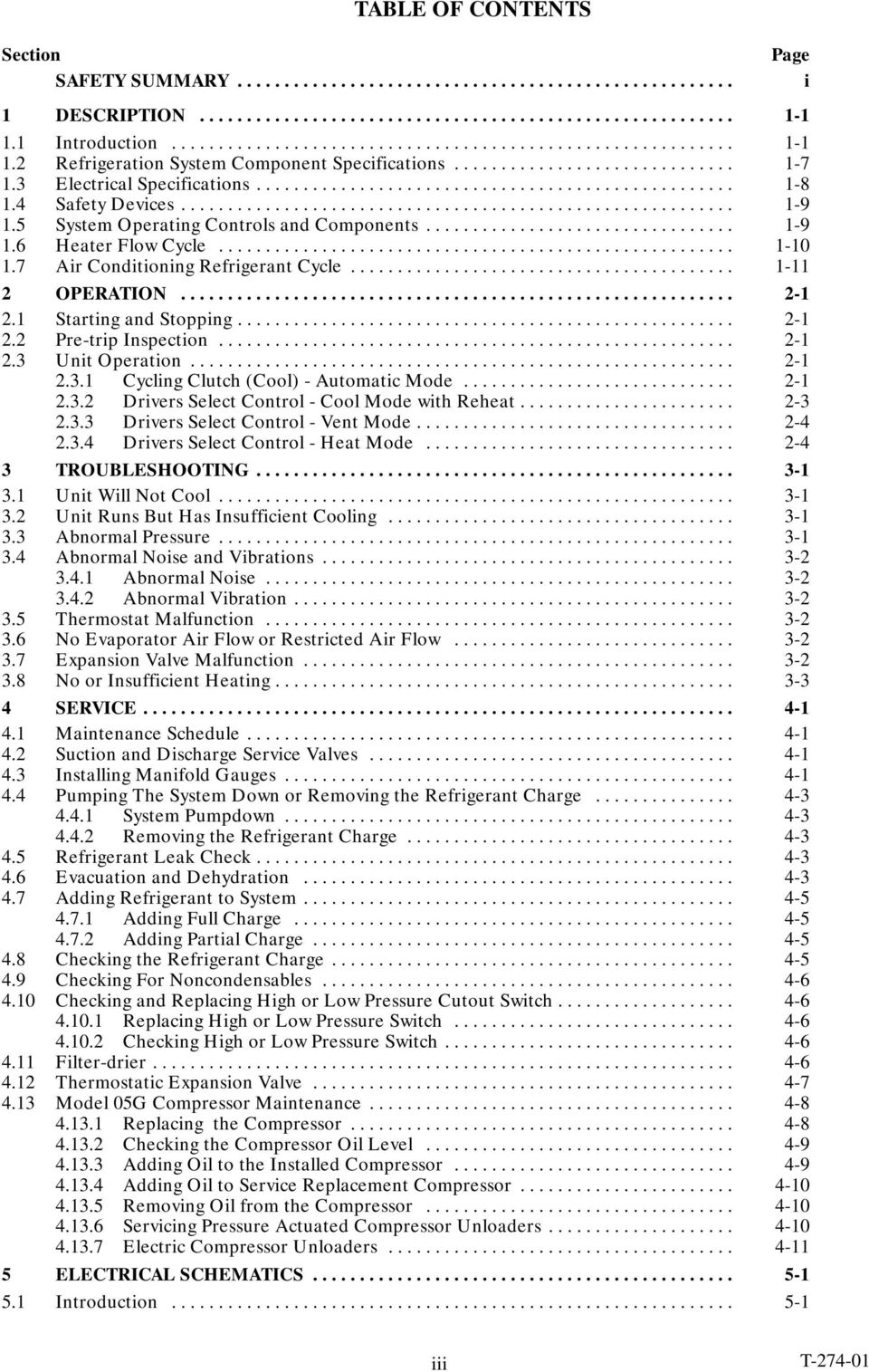
5 TABLE OF CONTENTS Section SAFETY SUMMARY... Page i 1 DESCRIPTION Introduction Refrigeration System Component Specifications Electrical Specifications Safety Devices System Operating Controls and Components Heater Flow Cycle Air Conditioning Refrigerant Cycle OPERATION Starting and Stopping Pre-trip Inspection Unit Operation Cycling Clutch (Cool) - Automatic Mode Drivers Select Control - Cool Mode with Reheat Drivers Select Control - Vent Mode Drivers Select Control - Heat Mode TROUBLESHOOTING Unit Will Not Cool Unit Runs But Has Insufficient Cooling Abnormal Pressure Abnormal Noise and Vibrations Abnormal Noise Abnormal Vibration Thermostat Malfunction No Evaporator Air Flow or Restricted Air Flow Expansion Valve Malfunction No or Insufficient Heating SERVICE Maintenance Schedule Suction and Discharge Service Valves Installing Manifold Gauges Pumping The System Down or Removing the Refrigerant Charge System Pumpdown Removing the Refrigerant Charge Refrigerant Leak Check Evacuation and Dehydration Adding Refrigerant to System Adding Full Charge Adding Partial Charge Checking the Refrigerant Charge Checking For Noncondensables Checking and Replacing High or Low Pressure Cutout Switch Replacing High or Low Pressure Switch Checking High or Low Pressure Switch Filter-drier Thermostatic Expansion Valve Model 05G Compressor Maintenance Replacing the Compressor Checking the Compressor Oil Level Adding Oil to the Installed Compressor Adding Oil to Service Replacement Compressor Removing Oil from the Compressor Servicing Pressure Actuated Compressor Unloaders Electric Compressor Unloaders ELECTRICAL SCHEMATICS Introduction iii
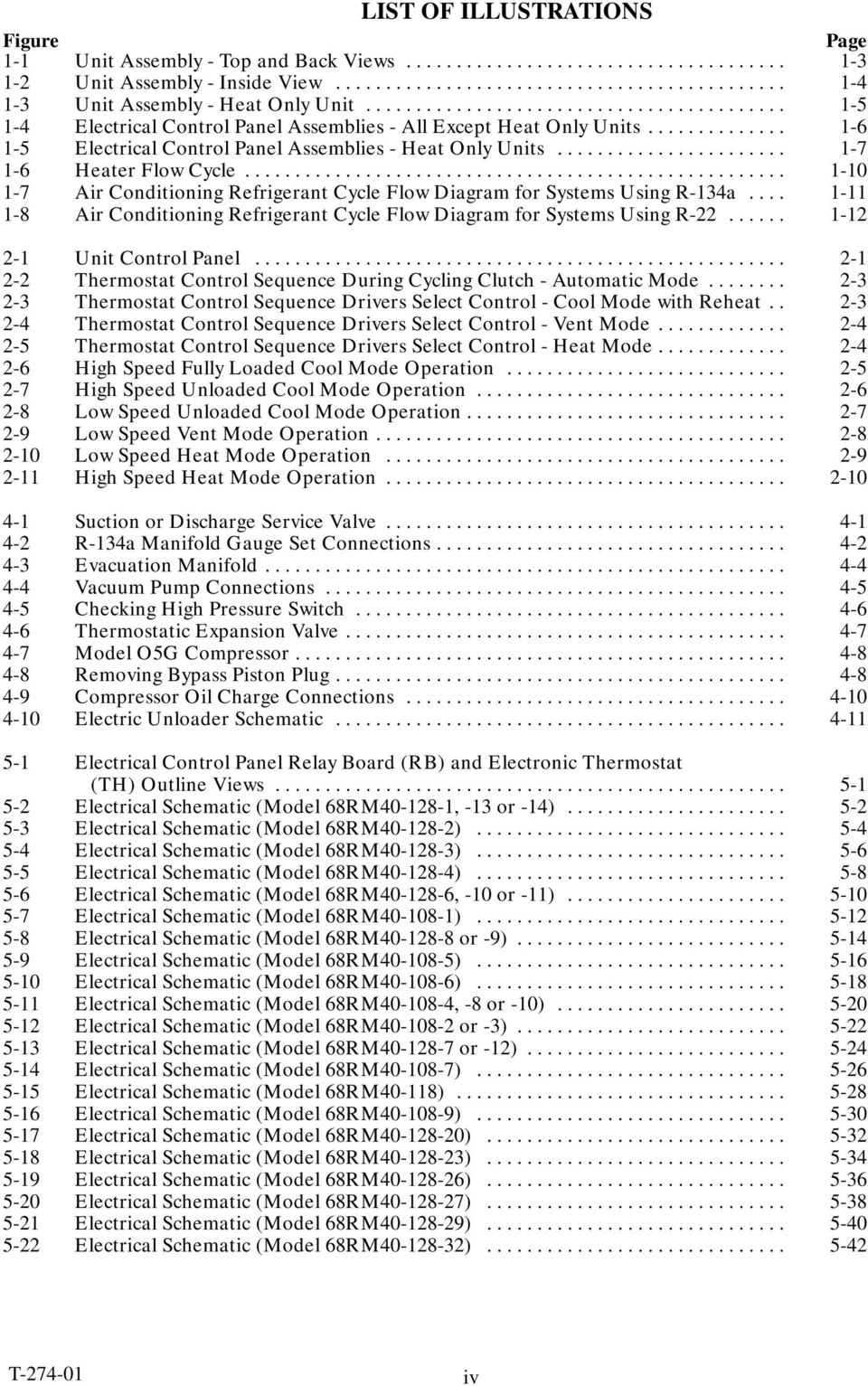
6 LIST OF ILLUSTRATIONS Figure Page 1-1 Unit Assembly - Top and Back Views Unit Assembly - Inside View Unit Assembly - Heat Only Unit Electrical Control Panel Assemblies - All Except Heat Only Units Electrical Control Panel Assemblies - Heat Only Units Heater Flow Cycle Air Conditioning Refrigerant Cycle Flow Diagram for Systems Using R-134a Air Conditioning Refrigerant Cycle Flow Diagram for Systems Using R Unit Control Panel Thermostat Control Sequence During Cycling Clutch - Automatic Mode Thermostat Control Sequence Drivers Select Control - Cool Mode with Reheat Thermostat Control Sequence Drivers Select Control - Vent Mode Thermostat Control Sequence Drivers Select Control - Heat Mode High Speed Fully Loaded Cool Mode Operation High Speed Unloaded Cool Mode Operation Low Speed Unloaded Cool Mode Operation Low Speed Vent Mode Operation Low Speed Heat Mode Operation High Speed Heat Mode Operation Suction or Discharge Service Valve R-134a Manifold Gauge Set Connections Evacuation Manifold Vacuum Pump Connections Checking High Pressure Switch Thermostatic Expansion Valve Model O5G Compressor Removing Bypass Piston Plug Compressor Oil Charge Connections Electric Unloader Schematic Electrical Control Panel Relay Board (RB) and Electronic Thermostat (TH) Outline Views Electrical Schematic (Model 68RM , -13 or -14) Electrical Schematic (Model 68RM ) Electrical Schematic (Model 68RM ) Electrical Schematic (Model 68RM ) Electrical Schematic (Model 68RM , -10 or -11) Electrical Schematic (Model 68RM ) Electrical Schematic (Model 68RM or -9) Electrical Schematic (Model 68RM ) Electrical Schematic (Model 68RM ) Electrical Schematic (Model 68RM , -8 or -10) Electrical Schematic (Model 68RM or -3) Electrical Schematic (Model 68RM or -12) Electrical Schematic (Model 68RM ) Electrical Schematic (Model 68RM40-118) Electrical Schematic (Model 68RM ) Electrical Schematic (Model 68RM ) Electrical Schematic (Model 68RM ) Electrical Schematic (Model 68RM ) Electrical Schematic (Model 68RM ) Electrical Schematic (Model 68RM ) Electrical Schematic (Model 68RM ) iv
7 LIST OF TABLES Table Page 1-1 Part (Model) Number Chart Unloader Pressure Switch Settings Safety Devices R-22 Temperature - Pressure Chart R-134a Temperature - Pressure Chart v

8 SECTION 1 DESCRIPTION 1.1 INTRODUCTION This manual contains Operating and Electrical Data, and Service Instructions for the Model RM40A Bus Air Conditioning and Heating systems shown in the part (model)numberchartbelow. The RM40A unit is a one-piece system consisting of a condenser, evaporator and heater coil assemblies. The unit is installed in the rear A/C compartment of the bus. The RM40A unit interfaces with the air conditioning compressor, driver s switches, floor heater, water valves and pump to provide a complete air conditioning, heating and ventilation system. The RM40A unit has one type of thermostat, which in combination with a separate relay board, can control the unit in either a cycling clutch mode or reheat mode. (See Table 1-1.) In units configured for a cycling clutch, the compressor cycles on and off to control bus interior temperature. In units configured for reheat, the coolant valve opens or closes on thermostat command to control bus interior temperature, while the air conditioning mode continues to operate. 1-1

9 Table 1-1. Part (Model) Number Chart Part (Model) Refrigerant Thermostat Relay Board (RB) Configuration Evaporator and Condenser Blower Motors Schematic No. Figure Reference 68RM R-22 Adjustable Cycling Clutch Wound Field 68RM RM R-22 Adjustable Reheat Permanent Magnet 68RM RM R-22 Adjustable Cycling Clutch Permanent Magnet 68RM RM R-22 Fixed Reheat Wound Field 68RM RM R-22 Fixed Cycling Clutch Permanent Magnet 68RM RM R-22 Fixed Reheat Brushless 68RM RM R-22 Adjustable Reheat Wound Field 68RM RM R-22 Fixed Cycling Clutch Wound Field 68RM RM R-22 Adjustable Reheat Brushless 68RM RM R-22 Fixed Reheat Wound Field 68RM RM Permanent Magnet N/A Adjustable N/A (Heat Only) (Evap. Fan Motor Only) 68RM RM R-134a Fixed Cycling Clutch Brushless 68RM RM R-134a Adjustable Cycling Clutch Wound Field 68RM RM R-134a Adjustable Reheat Brushless 68RM RM R-134a Adjustable Reheat Wound Field 68RM RM R-134a Adjustable Reheat Permanent Magnet 68RM RM R-134a Adjustable Reheat Wound Field 68RM RM R-134a Fixed Reheat Permanent Magnet 68RM RM R-134a Fixed Reheat Permanent Magnet 68RM RM R-134a Adjustable Reheat Permanent Magnet 68RM RM R-134a Adjustable Reheat Permanent Magnet 68RM RM R-134a Adjustable Reheat Wound Field 68RM RM R-134a Fixed Cycling Clutch Brushless 68RM RM R-134a Fixed Cycling Clutch Brushless 68RM RM R-134a Fixed Reheat Wound Field 68RM RM R-134a Adjustable Reheat Brushless 68RM RM R-134a Adjustable Reheat Permanent Magnet 68RM RM R-134a Adjustable Reheat Wound Field 68RM RM R-134a Fixed Reheat Permanent Magnet 68RM RM R-134a Adjustable Reheat Wound Field 68RM

10 TOP VIEW BACK VIEW 26 1 ROADSIDE (RS) CURBSIDE (CS) 23 OUT IN Condenser Coil Switch #1 (UPS1) 17. Filter-Drier 2. Evaporator Blower Housing 10. Heater Coil 18. Sight Glass and Blower Wheel (hidden) 11. Liquid-Suction Heat Exchanger 19. Receiver 3. DischargeLineCheckValve 12. Filter-Drier Outlet Valve 20. Fusible Plug 4. Discharge Line Shutoff Valve 13. Thermostatic Expansion Valve 21. Filter-Drier Inlet Valve 5. Discharge Line Connection (hidden from viewbehind panel) 23. Reheat Coolant Valve 22. Coolant Hookup Panel to Compressor 6. Condensate Drain Connection 14. Suction Line Connection 24. Condenser Fan Motor 7. Evaporator Blower Motor To Compressor 25. Condenser Fan Blade 8. Unloader Pressure 15. Condenser Fan Switch (CFS) 26. Low Ambient Thermostat Switch #2 (UPS2) 16. Unloader Pressure (LATH) 9. Unloader Pressure Switch #3 (UPS3) Figure 1-1. Unit Assembly ---Top and Back Views 1-3
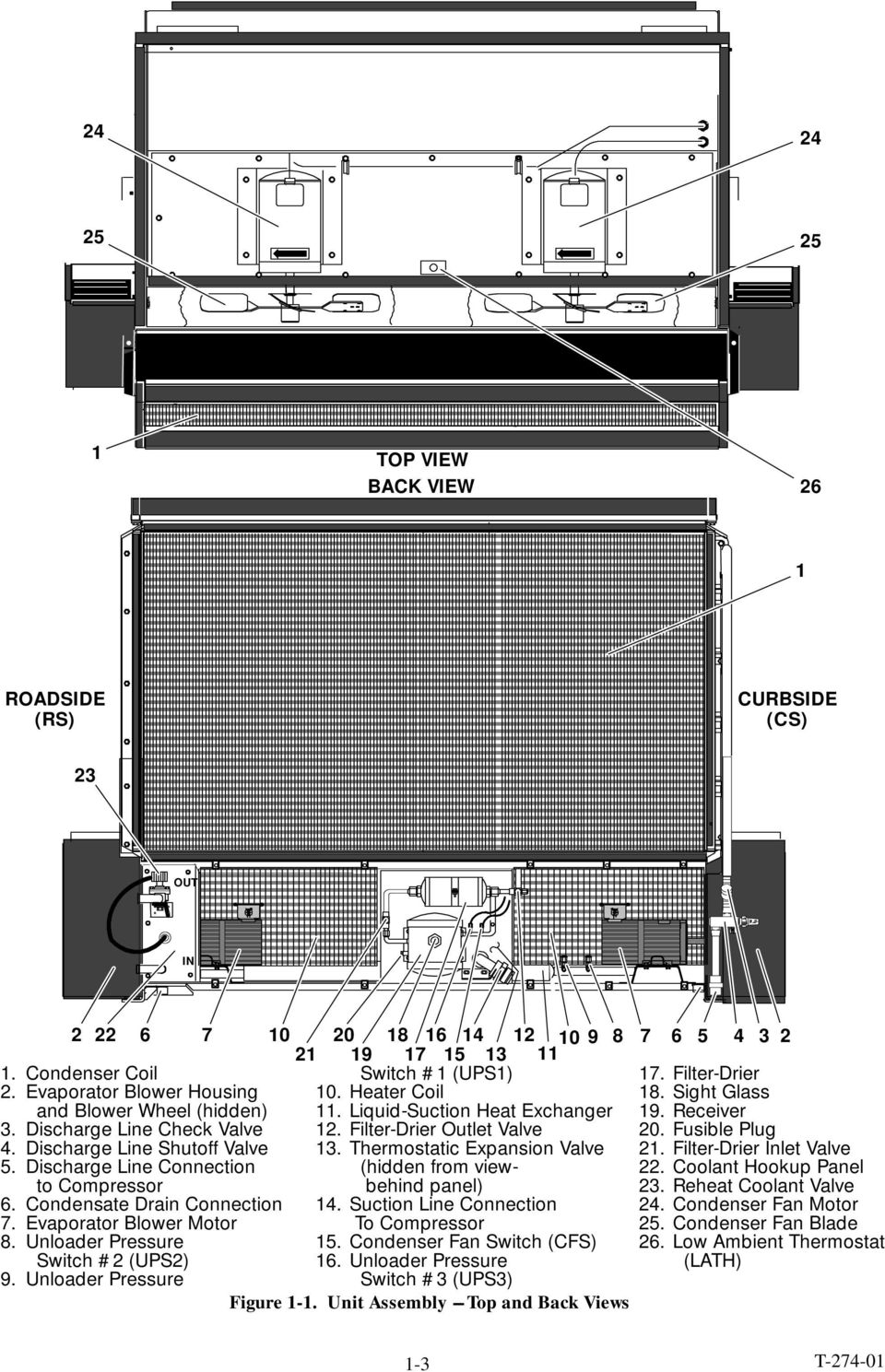
11 1 2 3 (+) (--) Watt Resistor (Optional for Permanent Magnet Condenser Fan Motors Only) 2. Upper Mounting Bracket 3. Electrical Control Panel (See Figure 1-4.) 4. Evaporator Blower Wheel 5. Return Air Sensor 6. Return Air Filter 7. Return Air Filter Bracket 8. Evaporator Coil 9. Gauge Set (Optional) vdc Battery Cables vdc Electrical Interface Plug Figure 1-2. Unit Assembly - Inside View 1-4
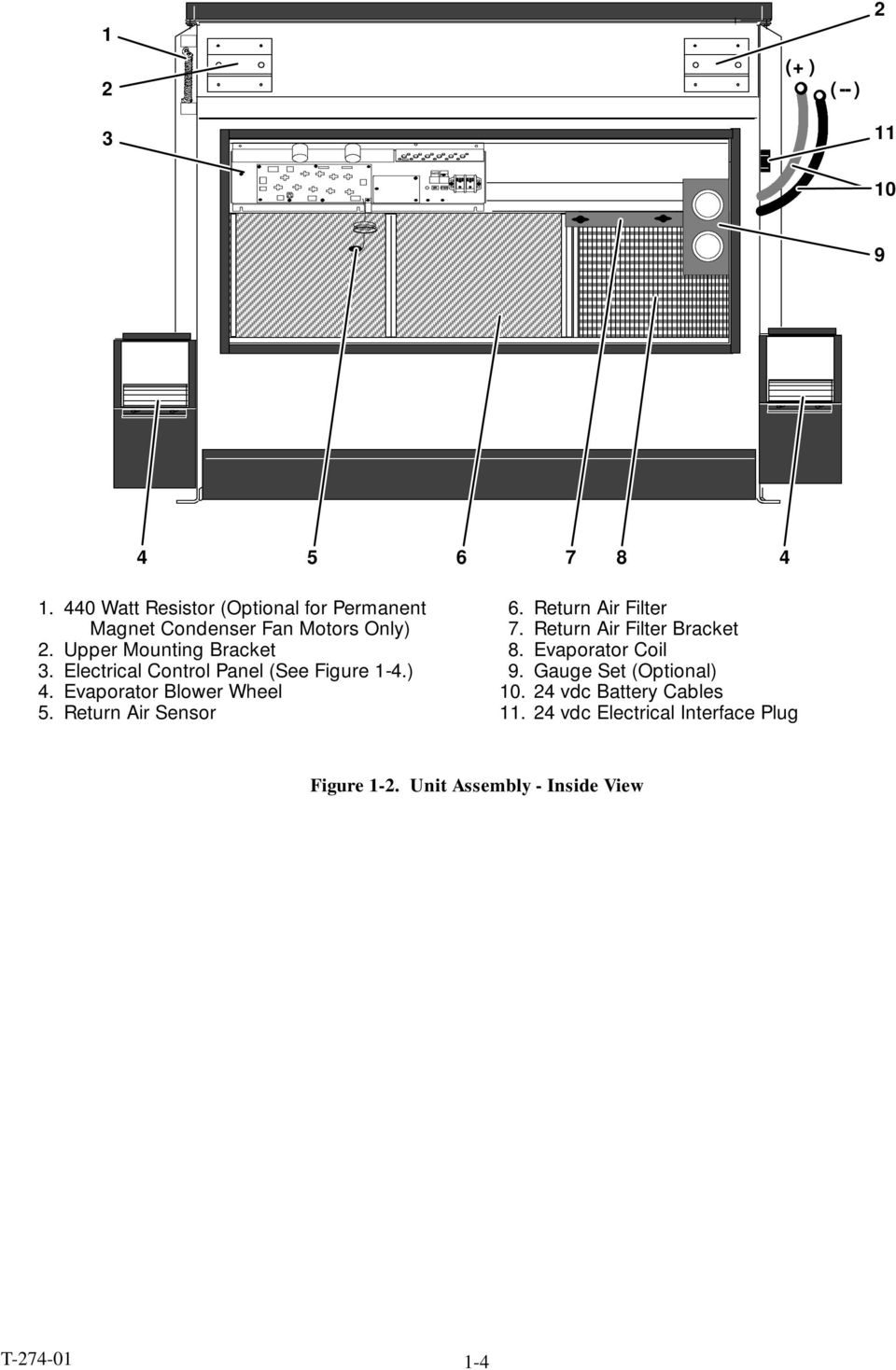
12 1 ROADSIDE (RS) CURBSIDE (CS) 9 OUT IN REAR BUS VIEW (+) (--) Blank Frame (Condenser) 2. Evaporator Blower Housing and Blower Wheel-Roadside 3. Access Panel 4. Blower Motor 5. Heater Coil INSIDE BUS VIEW Access Panel 7. Coolant Hookup Panel 8. Evaporator Blower Housing and Blower Wheel-Curbside 9. Heater Coolant Valve vdc Electrical Interface Plug Figure 1-3. Unit Assembly - Heat Only Unit vdc Battery Cables 12. Evaporator Coil 13. Return Air Filter Bracket 14. Return Air Filter 15. Electrical Control Panel (See Figure 1-5.) 1-5
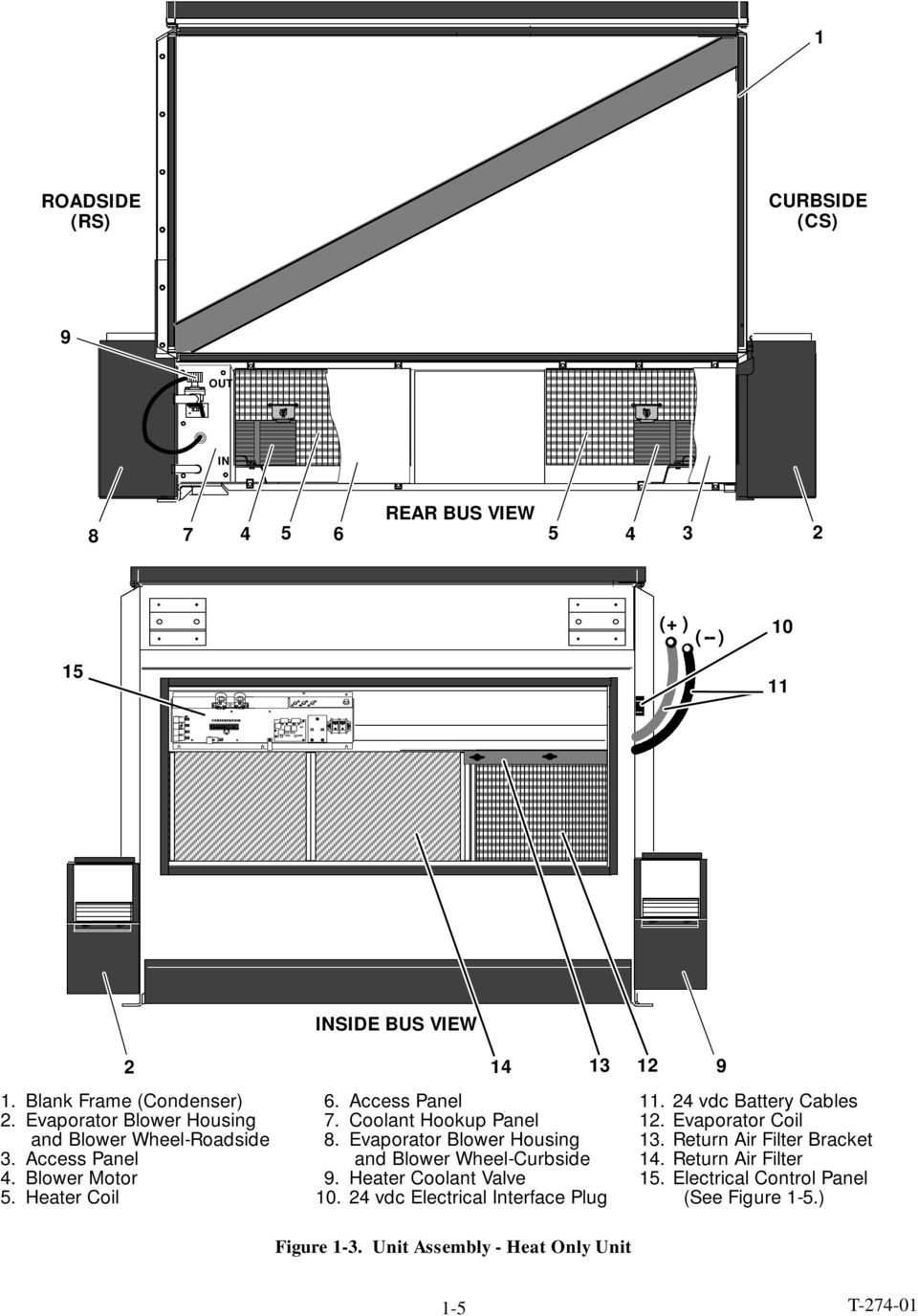
13 WOUND FIELD MOTORS PERMANENT MAGNET MOTORS BRUSHLESS MOTORS Condenser Speed Relay (CSR) 12. Circuit Breaker #6 (CB6) 2. Evaporator Speed Relay (ESR) 13. Temperature Selector (Optional) 3. Evaporator Fan Relay #1 (EFR1) 14. Hourmeter (Optional) 4. Evaporator Fan Relay #2 (EFR2) 15. Power Terminal Block 5. Condenser fan Relay #1 (CFR1) 16. Blower Relay (BR) 6. Condenser fan Relay #2 (CFR2) 17. Electronic Thermostat (TH) 7. Circuit Breaker #1 (CB1) 18. Relay Board (RB) 8. Circuit Breaker #3 (CB3) 19. Evaporator Speed Relay (ESR) 9. Circuit Breaker #2 (CB2) 20. Floor Blower Relay Lockout (FBRL) 10. Circuit Breaker #4 (CB5) 21. Floor Blower Relay (FBR) 11. Circuit Breaker #5 (CB6) Figure 1-4. Electrical Control Panel Assemblies - All Except Heat Only Units 1-6
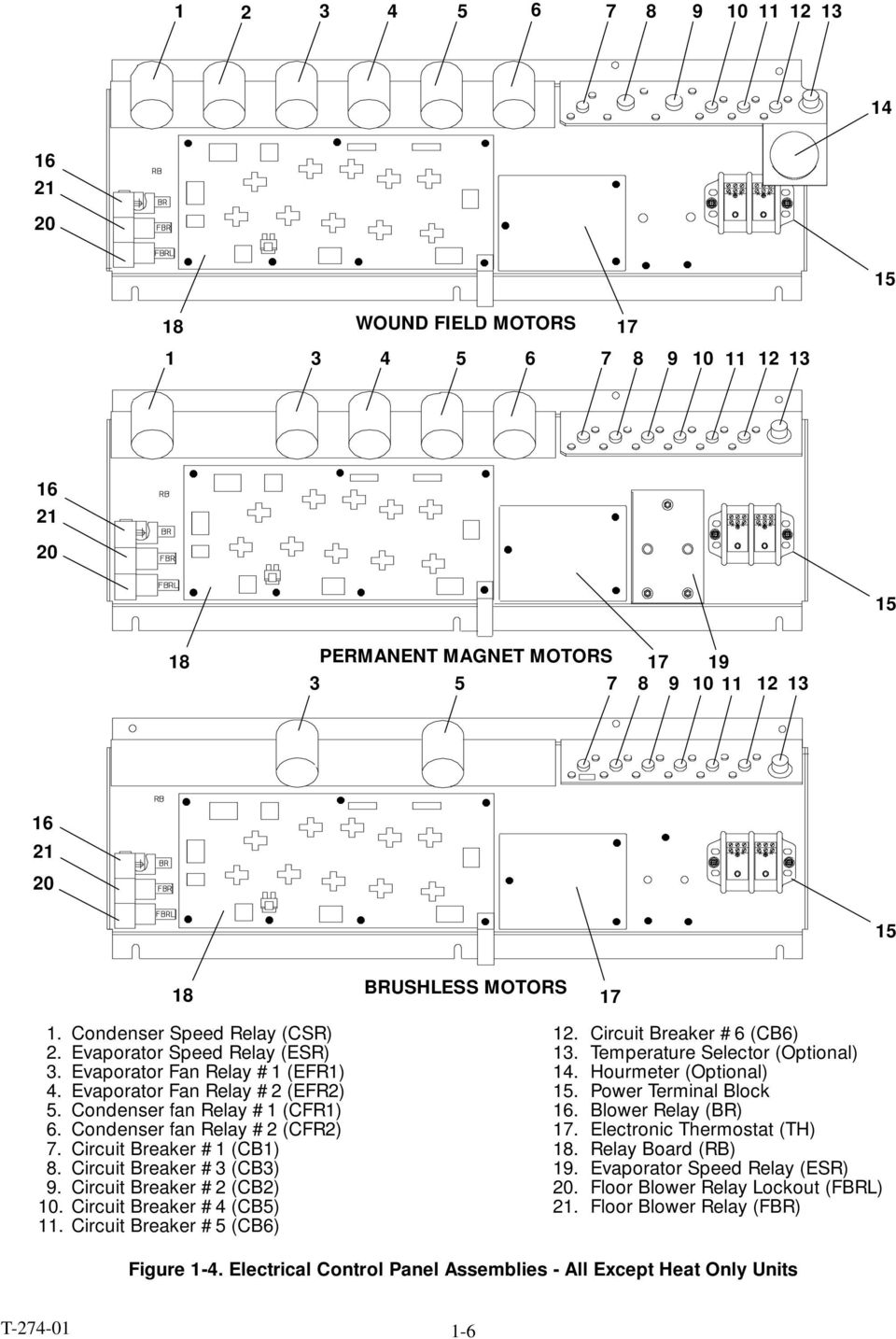
14 Evaporator Fan Relay #1 (EFR1) 10. Evaporator Speed Relay #1 (ESR1) 2. Evaporator Fan Relay #2 (EFR2) 11. Electronic Thermostat (TH) 3. Circuit Breaker CB#1 (CB1) 12. Terminal Block, 10-Pole 4. Circuit Breaker CB#3 (CB3) 13. Diode (D3) 5. Circuit Breaker CB#2 (CB2) 14. Blower Relay (BR) 6. Temperature Selector 15. Evaporator Overload Relay #2 (OR2) 7. Diode (D5) 16 Evaporator Overload Relay #1 (OR1) 8. Diode (D6) 17. Floor Blower Relay (FBR) 9. Power Terminal Block 18. Boost Pump Relay (BPR) Figure 1-5. Electrical Control Panel Assembly - Heat Only Units 1.2 REFRIGERATION SYSTEM COMPONENT SPECIFICATIONS a. Refrigeration Charge R-22: R-134a: b. Compressor 16 lb (7.26 kg) 24 lb (10.88 kg) Model: 05G No. of Cylinder: 6 Weight (Dry): 145 lb (66 kg) including clutch Oil Charge: New Compressor: 6.75 pints (3.2 liters) Replacement Compressor: 5.5 pints (2.6 liters) Oil Level: Old Crankcase (before S/N 4994J): Bottom to 1/4 of sight glass New Crankcase (beginning S/N 4994J): Between Min---Max marks on crankcase Approved Compressor Oils - R-22: Calumet Refining Co.:R030 Texaco : WF68 Witco: 4GS Suniso Approved Compressor Oils - R-134a: Castrol: Icematic SW68C Mobil: EAL Artic 68 ICI: Emkarate RL68H c. 05G Compressor Electric Unloader Pressure Switches UPS1, UPS2 & UPS3 (See Table 1-2.) d. Thermostatic Expansion Valve R-22 Units Superheat Setting: 12 3_F ( _C) MOP Setting: psig( kg/cm@) R-134a Units Superheat Setting: 11 3_F ( _C) MOP Setting: 65 4 psig( kg/cm@) e. Low Pressure Switch (LPS) Opens at: 6 3 psig( kg/cm@) Closes at: 25 3 psig( kg/cm@) f. High Pressure Switch (HPS) R-22 Units Opens at: psig ( kg/cm@) Closes at: psig ( kg/cm@) R-134a Units Opens at: psig ( kg/cm@) Closes at: psig ( kg/cm@) g. Condenser Fan Switch (CFS) R-22 Units Closes for High Speed: psig ( kg/cm@) Opens for Low Speed: psig ( kg/cm@) 1-7

15 R-134a Units Opens for High Speed: psig ( Closes for Low Speed: psig ( h. Water Temperature Switch (WTS) (Customer Supplied) i. Low Ambient Thermostat (LATH) Opens at: 45 3_F ( _C) Closes at: 55 5_F ( _C) j. Unit Weight Approximate: 640 lb (290 kg) 1.3 ELECTRICAL SPECIFICATIONS a. Evaporator/Heater Blower Motors Brushless Motor Bearing Lubrication: Factory Lubricated (additional grease not required) Horsepower: 0.75 (1.0 kw) Full Load Amps (FLA): 25 amps Operating Speed: High Speed: 1800 rpm Low Speed: 1600 rpm Voltage: 24 vdc Permanent Magnet Motor Bearing Lubrication: Factory Lubricated (additional grease not required) Horsepower: 0.75 (1.0 kw) Full Load Amps (FLA): 27 amps Operating Speed: 1800 rpm Voltage: 27 vdc Wound Field Motor Bearing Lubrication: Factory Lubricated (additional grease not required) Horsepower: 0.8/0.5 (1.1/0.67 kw) Full Load Amps (FLA): 28/24 amps Operating Speed: 1800/1400 rpm Voltage: 27 vdc b. Condenser Fan Motor Brushless Motor Bearing Lubrication: Factory Lubricated (additional grease not required) Horsepower: 0.5 hp (0.67 kw) Full Load Amps (FLA): 17 amps Operating Speed: High Speed: 1550 rpm Low Speed: 1000 rpm Voltage: 24 vdc Permanent Magnet Motor Bearing Lubrication: Factory Lubricated (additional grease not required) Horsepower: 0.75 hp (1.0 kw) Full Load Amps (FLA): 27 amps Operating Speed: 1800 rpm Voltage: 27 vdc Wound Field 2-Speed Motor Bearing Lubrication: Factory Lubricated (additional grease not required) Horsepower: 0.75/0.25 (1.0/0.34 kw) Full Load Amps (FLA): 21/13 amps Operating Speed: 1600/1200 rpm Voltage: 27 vdc Table 1-2. Unloader Pressure Switch Settings UNLOADER PRESSURE SWITCH-Contacts Open/Close Settings UPS1 UPS2 UPS3 Refrigerant Load Up (Opens) Unload (Closes) Load Up (Opens) Unload (Closes) Load Up (Opens) Unload (Closes) R ( ) 54 2 ( ) 61 2 ( ) 51 2 ( ) (23 1.1) (28 0.7) R-134a 35 3 ( ) 26 2 ( ) 31 2 ( ) 23 2 ( ) (19 1.1) (19 1.1) 1-8

16 1.4 SAFETY DEVICES System components are protected from damage caused by unsafe operating conditions with safety devices. (See Table 1-3.) During the A/C mode, the compressor will automatically stop if the HPS or LPS switch contacts open due to an unsafe operating condition. Opening HPS or LPS contacts de-energizes the A/C compressor clutch. The A/C Stop Light will also illuminate indicating that an unsafe operating condition has occurred. The evaporator blower motors and condenser fans will continue to run. During any mode of operation (A/C, Vent or Heat), operation will automatically stop if the bus circuit breaker (CB29) senses excessive current draw. The evaporator, condenser and floor heater motors are protected independently against high current draw with circuit breakers (CB1,2,3, 4, and 5). The wound field and permanent magnet evaporator and condenser fan motors are also protected by an internal overload thermostat. If one or both of the evaporator motor safety devices opens to stop the evaporator fan motor(s), the system may develop a low pressure condition which may cause the low pressure switch (LPS) to open, shutting the compressor down. If a condenser fan motor safety device opens to stop the condenser fan motor(s), the system may develop a high pressure condition, which may open the high pressure switch (HPS) to shut the compressor down. When a safety device opens and causes the unit operation to stop, place the climate control switch to off position before resolving the problem. The safety device may need to be manually reset before restarting the unit. 1.5 SYSTEM OPERATING CONTROLS AND COMPONENTS a. Electronic Thermostat (TH) The RM40A unit has one type of thermostat, which operates in combination with a separate relay board to control the operation of the unit in a cycling clutch mode or a reheat mode. (See Table 1-1.) In units configured for a cycling clutch, the compressor cycles on and off to control bus interior temperature. In units configured for reheat, the Reheat Coolant Valve (RCV) opens or closes on thermostat command to control bus interior temperature, while the air conditioning mode continues to operate. The setpoint of the thermostat is either manually set (adjustable) or factory set (fixed). (See Table 1-1.) The thermostat s temperature sensor monitors the bus interior temperature at the return air section of the unit and controls the operating function of the system to maintain the bus interior temperature at the setpoint. Table 1-3. Safety Devices Unsafe Condition Safety Device Device Setting 1. Excessive current draw by the 1. Circuit Breaker --- CB1 1. Opens at 20 amps floor heater blowers and boost pump. Manual Reset 2. Excessive current draw by 2. Circuit Breaker --- CB2 2. Opens at 40 amps evaporator motor no.1. Manual Reset 3. Excessive current draw by 3. Circuit Breaker --- CB3 3. Opens at 40 amps evaporator motor no. 2. Manual Reset 4. Excessive current draw by 4. Circuit Breaker --- CB4 4. Opens at 40 amps condenser motor no. 2. Manual Reset 5. Excessive current draw by 5. Circuit Breaker --- CB5 5. Opens at 40 amps condenser motor no.1. Manual Reset 6. Excessive current draw by the 6. Circuit Breaker --- CB6 6. Opens at 10 amps clutch coil. Manual Reset 7. High compressor 7. High Pressure Switch (HPS) 7. Refer to Section 1.2 discharge pressure. Manual Reset 8. Loss of refrigerant charge 8. Low Pressure Switch (LPS) 8. Opens at 6 3psig Manual Reset ( kg/cm@) 1-9

17 The Electronic Thermostat (TH) regulates the operational cycles of the unit by energizing or de-energizing four interior relays to control low or high speed cool, low or high speed heat or vent and unloaded or loaded cool operational modes in response to deviations in bus interior temperature relative to the thermostatsetpoint.(seefigure5-1.)onerelaycontrols the operation of Unloader Valve #1 (UV1). Another controls low or high speed evaporator fan operation. Another activates the cool cycle and the other relay activates the heat cycle. Refer to Section 2 for description of operational control sequences for the various operational modes. b. Manual Switches A/C Mode Switch (ACMS) ---Supplied by OEM The A/C Mode Switch (ACMS), which is located on the driver s control panel, activates the operation of the unit. When the switch is closed, 24 vdc is fed from the circuit breaker (CB29) through the ACMS switch to feed power to terminal B5 (Connector B) on the relay board. Defrost Switch (DFS) ---Supplied by OEM The Defrost Switch (DFS) will manually energize the Boost Pump Relay (BPR) to activate the boost pump motor. c. Thermal Switches Water Temperature Switch (WTS) ---Supplied by OEM The Water Temperature Switch (WTS) is located on the block of the vehicle engine and senses the vehicle engine coolant temperature. The WTS is a normally closed switch that opens on temperature rise at 120_F (49_C). When the vehicle water temperature is below 120_F, the switch is closed, completing a circuit for the Blower Relay (BR); this switch prevents the circulation of cooler air throughout the bus during the initial start-up of the vehicle and unit. Condenser Motor Overloads (COL1 and COL2) - Used on Wound Field and Permanent Magnet Motors Only Each condenser motor is equipped with an internal overload thermostat. If excessive motor temperature exists, the COL switch will open to de-energize the corresponding motor contactor; this will stop the affected condenser motor. Evaporator Motor Overloads (EOL1 and EOL2) - Used on Wound Field and Permanent Magnet Motors Only Each evaporator blower motor is equipped with an internal overload thermostat. If either motor experiences excessive temperature, the corresponding EOL switch will open to de-energize the OR relay coil opening the OR relay contacts; this de-energizes the ESR1 relay, which forces the unaffected evaporator fan motor into high speed. Freeze Protection Temperature Switch (FPTS)---(Optional) The switch operates off the thermostat to interrupt power to the A/C compressor clutch when low evaporator coil temperature occurs. d. Pressure Switches Condenser Fan Switch (CFS) TheCondenserFanSwitch(CFS)islocatedonthe inlet line to the receiver. When the condenser coil refrigerant pressure reaches psig ( kg/cm@) forr-22 or psig ( kg/cm@) for R-134a, CFS switch will either open or close on pressure rise (depending on the unit model) to energize or de-energize the motor contactor and control the speed of the condenser fan motors; this will lock the Condenser Fan Motors (CM1 and CM2) in high speed until the refrigerant pressure in the condenser coil drops to psig ( kg/cm@) forr-22or psig ( kg/cm@) for R-134a, resuming low speed operation. (See wiring schematics in Section 5 for specific wiring differences.) 1.6 HEATER FLOW CYCLE Heating is controlled by the thermostat which controls the operation of the Reheat Coolant Valve (RCV). When the reheat water valve solenoid is energized, the valve will open to allow engine coolant to flow through the heater coil Heater Coil 2. Reheat Coolant Valve 3. Outlet Tube 4. Inlet Tube 5. Inlet Hose 6. Outlet Hose Figure 1-6. Heater Flow Cycle

18 1.7 AIR CONDITIONING REFRIGERANT CYCLE When air conditioning is selected, the unit operates as a vapor compression system using R-22 or R-134a as a refrigerant. The main components of the system are the reciprocating compressor, air-cooled condenser coil, thermostatic expansion valve, and evaporator coil. Systems using R-134a also incorporate a Liquid-Suction Heat Exchanger (LSHX). The compressor raises the pressure and the temperature of the refrigerant and forces it into the condenser tubes. The condenser fan circulates surrounding air (which is at a temperature lower than the refrigerant) over the outside of the condenser tubes. Heat transfer is established from the refrigerant (inside the tubes) to the condenser air (flowing over the tubes). Thecondensertubeshavefinsdesignedtoimprovethe transfer of heat from the refrigerant gas to the air. This removal of heat causes the refrigerant to liquefy; thus liquid refrigerant leaves the condenser and flows to the receiver. The receiver serves as a liquid refrigerant reservoir so that a constant supply of liquid is available to the evaporator as needed, and acts as a storage space when pumping down the system. The receiver is equipped with a sight glass to observe the refrigerant for restricted flow and correct charge level. The refrigerant leaves the receiver and flows through the manual receiver outlet valve, and the through a filter-drier where an absorbent keeps the refrigerant clean and dry. From the filter-drier, the liquid refrigerant flows through the subcooler where it is subcooled before entering the liquid-suction heat exchanger The Liquid-Suction Heat Exchanger (LSHX), used on R-134a systems only, increases system operating efficiency by subcooling liquid refrigerant before it enters the thermal expansion valve; this reduces flash gas. It also serves to ensure there is no liquid refrigerant in the suction vapor returning to the compressor. If there is low temperature liquid refrigerant present in the suction line returning to the compressor, it will evaporate in the heat exchanger due heat absorbed from the liquid line. The liquid then flows to a thermostatic expansion valve which reduces pressure and temperature of the liquid and meters the flow of liquid refrigerant to the evaporator to obtain maximum use of the evaporator heat transfer surface. The low pressure, low temperature liquid that flows into the evaporator tubes is colder than the air that is circulated over the evaporator tubes by the evaporator blower. Heat transfer is established from the evaporator air (flowing over the tubes) to the refrigerant (inside the tubes). The evaporator tubes have aluminum fins to increase heat transfer from the air to the refrigerant; therefore the cooler air is circulated to the interior of the bus. The transfer of heat from the air to the low temperature liquid refrigerant in the evaporator causes the liquid to vaporize. This low temperature, low pressure vapor passes through the suction line. The low pressure refrigerant vapor is now drawn into the compressor where the cycle repeats. When ventilation only is selected only the evaporator blowers function to circulate air throughout the bus. The refrigerant cycle will remain off UPS1 UPS Compressor 2. Discharge Line 3.DischargeLineCheckValve Condenser Coil 5. Receiver 6. Filter-Drier Inlet Valve 7. Filter-Drier 8. Filter-Drier Outlet Valve 9. Thermostatic Expansion Valve 10. Evaporator Coil 11. Suction Line 12. Subcooler 13. Liquid-Suction Heat Exchanger 14. Condenser Fan Switch (CFS) 15. Unloader Pressure Switch (UPS3) 16. Charge Isolation Valve 17. Discharge Service Port 18. Suction Service Port 19. Unloader Pressure Switch (UPS2) 20. Unloader Pressure Switch (UPS1) 21. Liquid Solenoid Valve (LSV) Figure 1-7. Air Conditioning Refrigerant Cycle Flow Diagram for Systems Using R-134a 8 CFS 14 UPS

19 UPS1 UPS2 8 CFS UPS Compressor 2. Discharge Line 3.DischargeLineCheckValve 4. Condenser Coil 5. Receiver 6. Filter-Drier Inlet Valve 7. Filter-Drier 8. Filter-Drier Outlet Valve 9. Thermostatic Expansion Valve 10. Evaporator Coil 11. Suction Line 12. Subcooler 13. Condenser Fan Switch (CFS) 14. Unloader Pressure Switch (UPS3) 15. Charge Isolation Valve 16. Discharge Service Port 17. Suction Service Port 18. Unloader Pressure Switch (UPS2) 19. Unloader Pressure Switch (UPS1) 20. Liquid Solenoid Valve (LSV) - (Not Installed on All units) 17 Figure 1-8. Air Conditioning Refrigerant Cycle Flow Diagram for Systems Using R

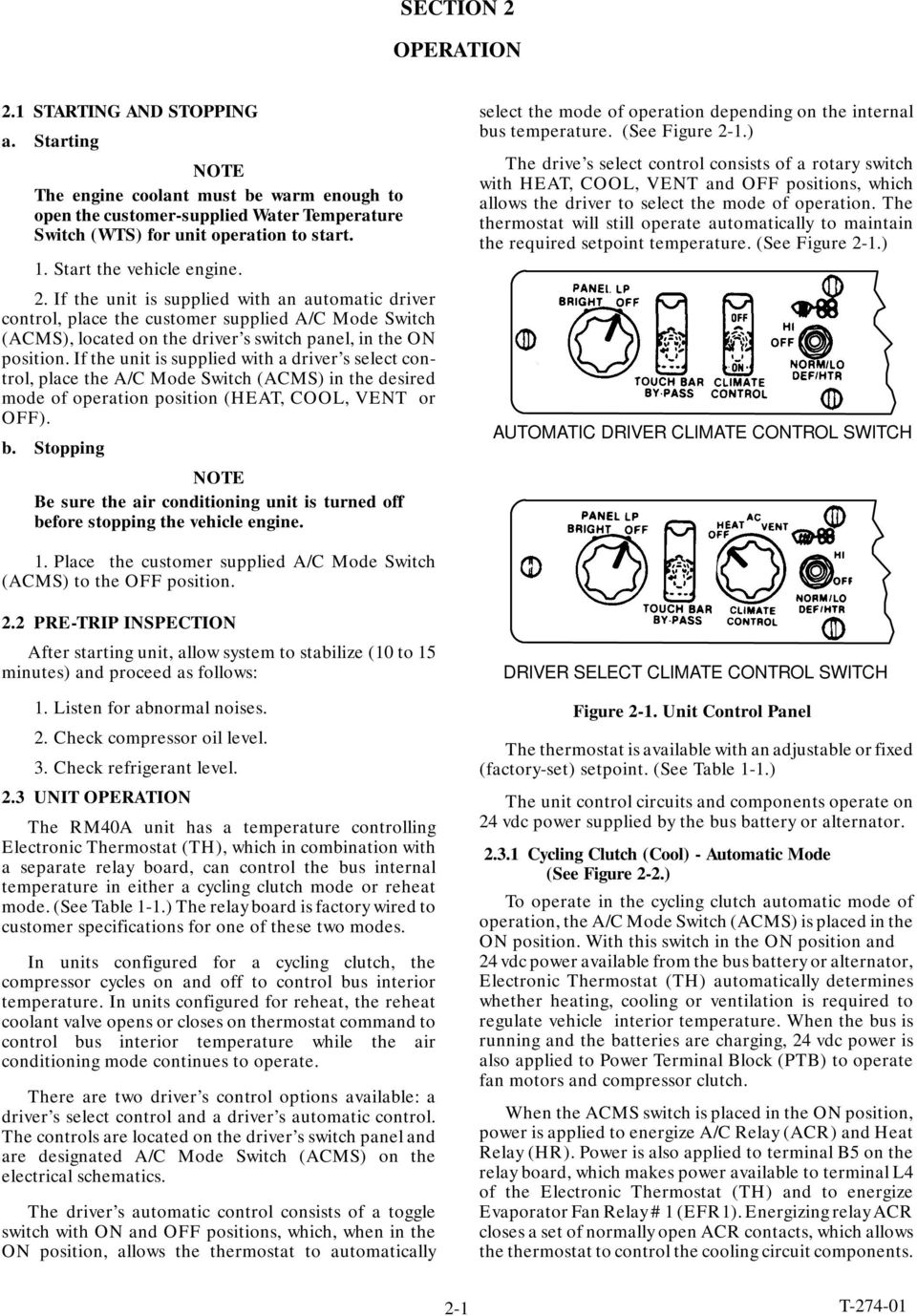
20 SECTION 2 OPERATION 2.1 STARTING AND STOPPING a. Starting NOTE Theenginecoolantmustbewarmenoughto open the customer-supplied Water Temperature Switch (WTS) for unit operation to start. 1. Start the vehicle engine. 2. If the unit is supplied with an automatic driver control, place the customer supplied A/C Mode Switch (ACMS), located on the driver s switch panel, in the ON position. If the unit is supplied with a driver s select control, place the A/C Mode Switch (ACMS) in the desired mode of operation position (HEAT, COOL, VENT or OFF). b. Stopping NOTE Be sure the air conditioning unit is turned off before stopping the vehicle engine. select the mode of operation depending on the internal bus temperature. (See Figure 2-1.) The drive s select control consists of a rotary switch withheat,cool,ventandoffpositions,which allows the driver to select the mode of operation. The thermostat will still operate automatically to maintain the required setpoint temperature. (See Figure 2-1.) AUTOMATIC DRIVER CLIMATE CONTROL SWITCH 1. Place the customer supplied A/C Mode Switch (ACMS) to the OFF position. 2.2 PRE-TRIP INSPECTION After starting unit, allow system to stabilize (10 to 15 minutes) and proceed as follows: 1. Listen for abnormal noises. 2. Check compressor oil level. 3. Check refrigerant level. 2.3 UNIT OPERATION The RM40A unit has a temperature controlling Electronic Thermostat (TH), which in combination with a separate relay board, can control the bus internal temperature in either a cycling clutch mode or reheat mode. (See Table 1-1.) The relay board is factory wired to customer specifications for one of these two modes. In units configured for a cycling clutch, the compressor cycles on and off to control bus interior temperature. In units configured for reheat, the reheat coolant valve opens or closes on thermostat command to control bus interior temperature while the air conditioning mode continues to operate. There are two driver s control options available: a driver s select control and a driver s automatic control. The controls are located on the driver s switch panel and are designated A/C Mode Switch (ACMS) on the electrical schematics. The driver s automatic control consists of a toggle switch with ON and OFF positions, which, when in the ON position, allows the thermostat to automatically DRIVER SELECT CLIMATE CONTROL SWITCH Figure 2-1. Unit Control Panel The thermostat is available with an adjustable or fixed (factory-set) setpoint. (See Table 1-1.) The unit control circuits and components operate on 24 vdc power supplied by the bus battery or alternator Cycling Clutch (Cool) - Automatic Mode (See Figure 2-2.) To operate in the cycling clutch automatic mode of operation, the A/C Mode Switch (ACMS) is placed in the ONposition.WiththisswitchintheONpositionand 24 vdc power available from the bus battery or alternator, Electronic Thermostat (TH) automatically determines whether heating, cooling or ventilation is required to regulate vehicle interior temperature. When the bus is running and the batteries are charging, 24 vdc power is also applied to Power Terminal Block (PTB) to operate fan motors and compressor clutch. When the ACMS switch is placed in the ON position, power is applied to energize A/C Relay (ACR) and Heat Relay (HR). Power is also applied to terminal B5 on the relay board, which makes power available to terminal L4 of the Electronic Thermostat (TH) and to energize Evaporator Fan Relay #1 (EFR1). Energizing relay ACR closes a set of normally open ACR contacts, which allows the thermostat to control the cooling circuit components. 2-1
21 Energizing relay HR closes a set of normally open HR contacts, which allows the thermostat to control the heating circuit components. Energizing relay EFR1 closes a set of normally open EFR1 contacts to power Evaporator Fan Motors (EM1 and EM2). Upon rising and falling interior bus temperatures, the the thermostat control sequence during the automatic cycling clutch mode is as follows: a. Also, from terminal B5, power is available to energize Fault Relay (FR) provided a high or low refrigerant pressure condition does not exist. Energizing relay FR closes a set of normally open FR contacts in the circuit to Compressor Clutch (CL) and opens a set of normally closed FR contacts in the circuit to A/C Stop Relays #1 and #2 (ACSR1 and ACSR2). When the system is in the cooling mode, the Compressor Clutch (CL) is energized through closed FR, CFR1, ACSR1 and CR contacts. The open set of FR contacts keeps A/C Stop Relays #1 and #2 (ACSR1 and ACSR2) de-energized as long as system refrigerant pressures (high and low) are at values that keep switches closed. (See Table 1-2.) If High Pressure Switch (HPS) or Low Pressure Switch (LPS) contacts open, relay FR de-energizes to disengage the refrigerant compressor clutch and illuminate the A/C Stop Light. b. When the vehicle s interior temperature rises to 3 F below the thermostat setpoint, the thermostat switches from high speed heat mode to low speed heat mode. (See Figure 2-10.) In the low speed heat mode, the thermostat remains in the HEAT position and switches from HIGH to LOW position for low speed fan operation. The heating control circuit is activated by applying power, through closed HR contacts, to energize Reheat Coolant Valve (RCV) solenoid, Floor Blower Relay (FBR), Boost Pump Relay (BPR) and the customer- supplied Sidewall Water Valve (SWV). Energizing Boost Pump Relay (BPR) closes normally open BPR contacts to start Boost Pump Motor. Energizing Floor Blower Relay (FBR) closes normally open FBR contacts to start floor blowers. Energizing Reheat Coolant Valve (RCV) solenoid opens the valve and starts the flow of engine coolant through the heating coils for heating. When the thermostat switches from HIGH to LOW, power is applied to both sides of evaporator fan motor coils EMC1 and EMC2 to change both evaporator fan motors (brushless motors) from high speed to low speed operation. c. When the vehicle s interior temperature rises to the thermostat setpoint, the thermostat switches from low speed heat mode to low speed vent mode. (See Figure 2-9.) In the low speed vent mode, the thermostat remains in the LOW position and switches from HEAT position to a neutral position; this deactivates the heating control circuit by removing power from the heating control circuit components. The cooling control circuit remains deactivated and the evaporator fans continue to operate on low speed. d. When the vehicle s interior temperature rises to 1 F above the thermostat setpoint, the thermostat switches from low speed vent mode to low speed unloaded cool mode. (See Figure 2-8.) In the low speed unloaded cool mode, the thermostat is in the UNLOAD position and switches from the neutral position to the COOL position; this activates the cooling control circuit by applying power, through closed ACR contacts, to energize Condenser Fan Relay #1 (CFR1) and Clutch Relay (CR). Power is also applied to one side of condenser fan motor coils CM1 and CM2. Energizing Clutch Relay (CR) closes a set of normally open CR contacts to activate the Compressor Clutch (CL), through closed FR and ACR1 contacts; this starts the air conditioning compressor. Energizing relay CFR1 closes a set of normally open CFR1 contacts to power Condenser Fan Motors (CM1 and CM2). e. With power applied to both sides of the CMC1 and CMC2 coils, through the Condenser Fan Switch (CFS) contacts, the condenser fan motors will operate on low speed. During cooling operation, when Condenser Fan Switch (CFS) opens due to high condensing pressure, power is removed from one side of the coils and the condenser fans will then operate on high speed. With the thermostat in the UNLOAD position, power is applied to Unloader Valve #1 (UPS1) solenoid to energize the coil. Energizing the coil causes the compressor to unload one bank (two cylinders). Valve UV1 can also be controlled by Unloader Pressure Switch #1 (UPS1). If suction pressure falls to the setpoint of switch UPS1, switch contacts close to energize valve UV1 and unload one compressor cylinder bank. An additional unloader valve (UV2), controlled by either Unloader Pressure Switch #2 (UPS2) or Unloader Pressure Switch #3 (UPS3), loads or unloads another bank of cylinders. Switch UPS2 senses refrigerant suction pressure and switch UPS3 senses refrigerant discharge pressure. (See Table 1-2.) f. When the vehicle s interior temperature rises to 3 F above the thermostat setpoint, the thermostat switches from low speed cool mode to high speed cool mode. (See Figure 2-7.) In the low speed cool mode, the thermostat remains in the COOL position and switches to HIGH position for fan speed, changing evaporator fan motor operation from low speed to high speed by removing power from one side of the evaporator fan motor coils. The compressor remains unloaded with two cylinders not operating. g. When the vehicle s interior temperature rises to 5 F above the thermostat setpoint, the thermostat remains in the COOL and HIGH positions and switches to LOAD position; this fully loads the refrigerant compressor by de-energizing Unloader Valve (UV1) solenoid coil. (See Figure 2-6.) The compressor is now operating on all six cylinders. h. On a falling temperature, except for a 2 F differential, thermostat control sequence changes in reverse to the above. (See Figure 2-2.) 2-2
22 3 FABOVE SETPOINT 1 FABOVE SETPOINT SETPOINT 1 F BELOW SETPOINT 2 F BELOW SETPOINT HIGH SPEED, FULLY LOADED COOL HIGH SPEED, UNLOADED COOL LOW SPEED UNLOADED COOL LOW SPEED VENT LOW SPEED HEAT RISING TEMPERATURE 5 FABOVE SETPOINT 3 FABOVE SETPOINT 1 FABOVE SETPOINT SETPOINT 3 F BELOW SETPOINT Upon rising and falling interior bus temperatures, the thermostat control sequence, during the driver select control - cool with reheat mode, is as follows: a. When the bus interior temperature rises to the thermostat setpoint, the thermostat deactivates the heating cycle by removing power from the heating control circuit. The system is now operating in low speed unloaded cool mode. Refer to section 2.3.1d. and e. for status of controls while in this mode. b. When the bus interior temperature rises to 3 F above the thermostat setpoint, the thermostat switches from low speed unloaded cool to high speed unloaded cool. Refer to section 2.3.1f. for a description of control action. c. When the bus interior temperature rises to 5 F above the thermostat setpoint, the thermostat switches from high speed unloaded cool to high speed fully loaded cool. Refer to section 2.3.1g. for a description of control action. d. Upon a falling temperature, the thermostat control sequence changes in reverse to the above. See Figure 2-3 for control points. 5 FBELOW SETPOINT HIGH SPEED HEAT RISING TEMPERATURE FALLING TEMPERATURE Figure 2-2. Thermostat Control Sequence During Cycling Clutch - Automatic Mode HIGH SPEED, FULLY LOADED COOL 5 FABOVE SETPOINT Driver Select Control - Cool Mode with Reheat (See Figures 2-3.) With the driver select control (A/C Mode Switch ACMS) in the COOL position and with Relay Board (RB) configured for reheat, the unit will operate on continuous cooling and the heating control circuit will be activated or deactivated on thermostat demand. 3 FABOVE SETPOINT HIGH SPEED, UNLOADED COOL 3 FABOVE SETPOINT 1 FABOVE SETPOINT SETPOINT LOW SPEED UNLOADED COOL SETPOINT Placing the ACMS switch in the COOL position energizes A/C Relay (ACR), closing a set of normally open ACR contacts. Power is also applied to terminal B5, which applies power to Relay Board (RB). Because of jumpers installed on the terminal board, power is applied from the relay board to the cooling control circuit through ACR closed contacts. 2 F BELOW SETPOINT LOW SPEED UNLOADED COOL WITH REHEAT Power is also applied to Evaporator Fan Relays #1 and #2 (EFR1 and EFR2), which closes contacts to power Evaporator Fan Motors #1 and #2 (EM1 and EM2). Refer to section 2.3.1a. for other control actions. The Heat Relay (HR) cannot be energized with the ACMS switch in the COOL position. However, jumpers on the relay board enable the thermostat to apply power to the heating control circuit upon demand for heating. FALLING TEMPERATURE Figure 2-3. Thermostat Control Sequence Drivers Select Control - Cool Mode with Reheat 2-3
23 2.3.3 Drivers Select Control - Vent Mode (See Figure 2-4.) With the driver select control (A/C Mode Switch ACMS) in the VENT position, A/C Relay (ACR) and Heat Relay (HR) cannot be energized. Therefore, the heating and cooling circuits cannot be activated. The system now operates in the vent mode only. Placing switch ACMS in the VENT position applies power to relay board terminal B5 to energize Evaporator Fan Relay #1 (EFR1), closing EFR1 normally open contacts to power the evaporator fan motors. When the bus interior temperature rises to 3 Fbelow the thermostat setpoint, the thermostat switches from high to low speed vent mode. In this mode, the thermostat switches to the LOW position to apply power to the other side of evaporator fan motor coils EM1 and EM2. With power applied to both sides of these coils, the fan motors operate in low speed. (See Figure 2-9.) When the bus interior temperature rises to 3 Fabove the thermostat setpoint, the thermostat switches from low to high speed vent mode. In this mode, the thermostat switches to the HIGH position to remove power from one side of evaporator fan motor coils EMC1 and EMC2. With power removed from one side of these coils, the fan motors operate in high Speed. Upon a falling temperature, the thermostat control sequence changes in reverse to the above. See Figure 2-4 for control points. HIGH SPEED VENT RISING TEMPERATURE 3 F ABOVE SETPOINT Driver Select Control - Heat Mode (See Figure 2-5.) With the driver select control (A/C Mode Switch ACMS) in the HEAT position, Heat Relay (HR) is energized to close a set of normally open HR contacts allowing the thermostat to control the heating control circuit. With the ACMS switch in the HEAT position, the A/C Relay (ACR) cannot be energized. Therefore, the cooling circuit cannot be activated. When the bus interior temperature falls to 2 Fbelow the thermostat setpoint, the thermostat switches from the low speed vent mode to low speed heat mode. In the low speed heat mode, the thermostat switches to the HEAT position. Switching to the HEAT position, applies power to the heating control circuit to activate the heating cycle. The thermostat remains in the LOW position to operate the evaporator fan motors on low speed. When the bus interior temperature falls to 5 Fbelow the thermostat setpoint, the thermostat switches from low speed heat mode to high speed heat mode. In the high speed heat mode, the thermostat switches to HIGH position to remove power from one side of evaporator fan motor coils EM1 and EM2. With power from one side of these coils, the fan motors operate on high speed. (See Figure 2-11.) The thermostat remains in the HEAT position. Upon a rising temperature, the thermostat control sequence changes in reverse to the above. See Figure 2-5 for control points. RISING TEMPERATURE 1 F ABOVE SETPOINT SETPOINT LOW SPEED VENT SETPOINT SETPOINT SETPOINT LOW SPEED VENT 2 F BELOW SETPOINT LOW SPEED HEAT 3 F BELOW SETPOINT 3 F BELOW SETPOINT 5 FBELOW SETPOINT HIGH SPEED HEAT 5 FBELOW SETPOINT HIGH SPEED VENT FALLING TEMPERATURE FALLING TEMPERATURE Figure 2-4. Thermostat Control Sequence Drivers Select Control - Vent Mode Figure 2-5. Thermostat Control Sequence Drivers Select Control - Heat Mode 2-4
24 (PTB2) =Energized Circuit =De-energized Circuit Figure 2-6. High Speed Fully Loaded Cool Mode Operation 2-5
25 =Energized Circuit =De-energized Circuit Figure 2-7. High Speed Unloaded Cool Mode Operation 2-6
26 =Energized Circuit =De-energized Circuit Figure 2-8. Low Speed Unloaded Cool Mode Operation 2-7
27 =Energized Circuit =De-energized Circuit Figure 2-9. Low Speed Vent Mode Operation 2-8
28 =Energized Circuit =De-energized Circuit Figure Low Speed Heat Mode Operation 2-9
29 =Energized Circuit =De-energized Circuit Figure High Speed Heat Mode Operation 2-10
30 SECTION 3 TROUBLESHOOTING INDICATION/ REFERENCE TROUBLE POSSIBLE CAUSES SECTION 3.1 UNIT WILL NOT COOL Compressor will not run V-Belt loose or defective Check Compressor malfunction See Note Clutch malfunction Check/Replace Safety device open 1.4 Electrical malfunction A/C mode switch defective Check Circuit Breaker open Check/Reset Thermostat malfunction 3.5 Water Temperature Switch (WTS) Closed Check 3.2 UNIT RUNS BUT HAS INSUFFICIENT COOLING Compressor Compressor valves defective See Note V-belt loose Check Refrigeration system Abnormal pressures 3.3 No or restricted evaporator air flow 3.6 Expansion valve malfunction 3.7 Restricted refrigerant flow 3.7 & 4.10 Low refrigerant charge 4.5 & 4.7 Service valves partially closed Open Safety device open 1.4 Coolant Valve Stuck Open Check 3.3 ABNORMAL PRESSURE High discharge pressure Refrigerant overcharge 4.4 Noncondensibles in system Check Pressure Condenserfanmotorrotationincorrect Check Condenser coil dirty Clean Low discharge pressure Compressor valves(s) worn or broken See Note Low refrigerant charge 4.5 & 4.7 High suction pressure Compressor valves worn or broken See Note Low suction pressure Suction service valve partially closed Open Filter-drier inlet or outlet valves partially closed Check/Open Filter-drier partially plugged 4.10 Low refrigerant charge 4.5 & 4.7 Expansion valve malfunction 3.7 Restricted air flow 3.6 Low evaporator air flow Blower running in reverse Check Dirty air filter Clean Icing of coil Clean Suction and discharge pressures Compressor valves defective See Note tend to equalize when unit is operating NOTE: Refer to 05G Compressor manual, Form
31 INDICATION/ REFERENCE TROUBLE POSSIBLE CAUSES SECTION 3.4 ABNORMAL NOISE AND VIBRATIONS ABNORMAL NOISE Compressor Loose mounting bolts See Note Worn bearings See Note Worn or broken valves See Note Liquid slugging 3.7 Insufficient oil Clutch loose or rubbing Check CondenserorEvaporatorfan Looseordefective Check/Adjust Bearings Replace Blade Interference Check Blade broken or missing Check ABNORMAL VIBRATION Compressor Loose mounting bolts Check Evaporator or Condenser fan Bent shaft on motor Replace Motor Blade broken or missing Check 3.5 THERMOSTAT MALFUNCTION Will not control Thermostat defective Replace Sensor defective Replace Defective wiring Check 3.6 NO EVAPORATOR AIR FLOW OR RESTRICTED AIR FLOW No evaporator air flow Motor defective Replace Fan damage Replace Brushes defective Replace Return air filter dirty Check Fan relays defective Check Safety device open 1.4 Wiring polarity incorrect Section EXPANSION VALVE MALFUNCTION Low suction pressure with Low refrigerant charge 4.5 & 4.7 high superheat Wax, oil or dirt plugging valve orifice Check Ice formation at valve seat 4.6 Superheat setting too high 4.11 Power assembly failure Replace Loss of bulb charge Replace Broken capillary 4.11 Low superheat and liquid Superheat setting too low 4.11 slugging in compressor Ice holding valve open 4.11 Foreign material in valve 4.11 NOTE: Refer to 05G Compressor manual, Form Pin and seat of expansion valve eroded or held open by foreign material 4.11 Loose or uninsulated sensing bulb 4.11 Fluctuating suction pressure Improper bulb location or loose bulb installation 4.11 Low superheat setting 4.11
32 INDICATION/ REFERENCE TROUBLE POSSIBLE CAUSES SECTION 3.8 NO OR INSUFFICIENT HEATING Insufficient heating Dirty or plugged heater coil or filter Check/Clean Coolant valve malfunction or plugged Check/Replace Low coolant level Check No heating Coolant valve malfunction or plugged Check Thermostat malfunction 3.5 Boost pump relay or pump malfunction Check Safety device open 1.4 NOTE: Refer to 05G Compressor manual, Form
33 SECTION 4 SERVICE 4.1 MAINTENANCE SCHEDULE WARNING Beware of rotating fan blades and unannounced starting of fans. UNIT OPERATION ON OFF a. Daily Maintenance X Pre-trip inspection --- after starting X Check tension and condition of V-belt(s) b. Weekly Inspection and Maintenance X Perform daily inspection X Check condenser, evaporator coils and air filters X Check refrigerant hoses and compressor shaft seal for leaks X Feel filter-drier for excessive temperature drop across drier. c. Monthly Inspection and Maintenance X X X X X X Perform weekly inspection and maintenance Clean evaporator drain pan and hose(s) Check wire harness for chafing and loose terminals Check fan motor bearings Check compressor mounting bolts for tightness Check fan motor brushes REFERENCE SECTION 2.2 None 4.1.a None b None Replace/Tighten None None None 4.2 SUCTION AND DISCHARGE SERVICE VALVES The suction and discharge service valves used on the compressor are equipped with mating flanges for connection to flanges on the compressor. These valves are provided with a double seat and a gauge connection, which allows servicing of the compressor and refrigerant lines. Turning the valve stem counterclockwise (all the way out) will backseat the valve to open the suction or dischargelinetothecompressorandcloseoffthegauge connection. In normal operation, the valve is backseated to allow full flow through the valve. The valve should always be backseated when connecting the service manifold gauge lines to the gauge ports. Turning the valve stem clockwise (all the way forward) will frontseat the valveto closeoff thesuction ordischarge line to isolate the compressor and open the gauge connection. To measure suction or discharge pressure, midseat the valve by opening the valve clockwise 1/4 to 1/2 turn. With the valve stem midway between frontseated and backseated positions, the suction or discharge line is open to both the compressor and the gauge connection. To Discharge or from Suction Line Port to Compressor Service Valve Frontseated (clockwise) Gauge Connection Service Valve Backseated (counterclockwise) Valve Cap Valve Stem Figure Suction or Discharge Service Valve 4.3 INSTALLING MANIFOLD GAUGES The manifold gauge set can be used to monitor system operation pressure, add or remove refrigerant, evacuate, and equalize the system. 4-1
34 The manifold gauge in Figure 4-2 shows hand valves, gauges and refrigerant openings. When the manifold hand valves are backseated (open), the high and low side hoses are common with the center hose as well as each other. When the low and high side valves are frontseated (closed), the high and low side hoses are isolated from each other and the center hose. It is in the front seated Low Pressure Gauge (closed) position that system pressures can be monitored. When both valves are open (backseated), pressure will cause vapor to flow from the high side to the low side across the compressor. When only the low side valve is opened, it is possible to add refrigerant in vapor form to the system. High Pressure Gauge Opened (Backseated) Hand Valve Closed (Frontseated) Hand Valve Hose Fittings ( Acme) A C B To Suction Service Port To Discharge Service or Manual Liquid Line Port Red (Refrigeration or Evacuation) Hose Blue (Refrigeration or Evacuation) Hose Low Side Field Service Coupling Hose Fitting with O Ring Hose Fitting with O Ring High Side Field Service Coupling Blue Knob Hose Fitting ( Acme) Yellow (Refrigeration) Hose Red Knob A. Connection to Low Side of System B. Connection to High Side of System C. Connection to Vacuum Pump, Refrigerant Cylinder or Oil Container Purge Line To service the refrigerant system, the manifold gauge set is connected to the compressor suction (low side) service valve for low pressure connection and either the compressor discharge (high side) service valve or the filter drier inlet or outlet valve for high pressure connection. The high pressure connection will depend upon the component to be serviced. (Refer to Figure 4-4.) a. At the Compressor 1. Backseat both suction and discharge service valves 2. Frontseat manifold set hand valves. 3. Connect low side (blue) manifold hose to the compressor suction service valve. Open valve on manifold hose to depress service port schrader valve. 4. Connect high side (red) manifold hose to the compressor discharge service valve. Open valve on manifold hose to depress service port schrader valve. Figure 4-2. R-134a Manifold Gauge Set Connections 5. Midseat both suction and discharge service valves on compressor to read refrigerant pressures. b. At the Compressor Suction Service Valve and Filter-Drier Inlet or Outlet Valve 1. Backseat both suction and discharge service valves 2. Frontseat manifold set hand valves. 3. Connect low side (blue) manifold hose to the compressor suction service valve. Open valve on manifold hose to depress service port schrader valve. 4. Backseat filter-drier inlet or outlet valve, depending upon which one will be used. 5. With manifold set valves frontseated, connect the high side manifold hose (red) to the filter drier inlet or outlet valve, whichever one was backseated in step Frontseat filter drier valve one turn to read high pressure. 4-2
35 4.4 PUMPING THE SYSTEM DOWN OR REMOVING THE REFRIGERANT CHARGE NOTE To avoid damage to the earth s ozone layer, use a refrigerant recovery system whenever removing refrigerant System Pumpdown To service or replace the filter-drier, expansion valve, evaporator coil or suction line, perform the following procedure to pump all the system refrigerant charge into the condenser and receiver tank: a. Install manifold gauge set to compressor service valves. (Refer to section 4.3.) b. It will be necessary to install a jumper across the Low Pressure Switch (LPS) contacts to reach 0 psig. (Refer to wiring schematic for best location to install a jumper across the switch, at the compressor or on the relay board.).) c. Frontseat (clockwise) filter-drier inlet valve. Start and run system in cooling mode while monitoring pressures. Stop the unit when the suction pressure reaches 0 psig to 10-inches hg vacuum. The pressure will rise depending on how much refrigerant is absorbed into the oil. Repeat this procedure until correct pressure is maintained. d. Frontseat (clockwise) suction service valve to trap the refrigerant in the high side of the system. e. The low side of the system is now ready for servicing. When service work is complete, leak check the low side of the system. (Refer to section 4.5.) On units with a liquid solenoid valve, it will be necessary to externally power the solenoid allowing refrigerant leak check pressure to equalize on both sides of the valve. f. Evacuate and dehydrate the low side of the system to proper pressure/vacuum levels. (Refer to section 4.6.) As with leak checking, the liquid solenoid valve, if installed, will need to be externally power to obtain complete evacuation. g. Open compressor suction service valve and filter-drier inlet valve to allow refrigerant to flow back into the low side of the system. h. Remove low pressure switch jumper and external power to the liquid solenoid valve, if installed. Run the system and check for proper operation Removing the Refrigerant Charge NOTE On units with a liquid solenoid installed, it willbe necessary to apply external source of power to the solenoid to open the valve and enable removal all of the refrigerant. Connect a refrigerant recovery system to the unit to remove refrigerant charge. Refer to instructions provided by the manufacturer of the refrigerant recovery system. 4.5 REFRIGERANT LEAK CHECK To check for leaks in the refrigeration system, perform the following procedure. A refrigerant leak check should always be performed after the system has been opened to replace or repair a component. a. On units equipped with liquid solenoid valve (LSV), it will be necessary to externally power the solenoid to open the valve and leak check properly. b. If system is without refrigerant, charge system with refrigerant to build up pressure between 30 to 50 psig (2.1 to 3.5 kg/cm@). NOTES It is recommended that the appropriate refrigerant used, be used to pressurize the system. c. Add sufficient nitrogen to raise system pressure to 150 to 200 psig (10.5 to 14.1 kg/cm@). d. Check for leaks. The recommended procedure for finding leaks in a system is with a halide torch or electronic leak detector. Testing joints with soap suds is satisfactory only for locating large leaks. e. Repeat the entire procedure if necessary. f. Evacuate and dehydrate the system as outlined in section 4-6. g. Remove the refrigerant and nitrogen used to pressurize the system prior to leak repair. h. Charge the unit as outlined in section EVACUATION AND DEHYDRATION Proper evacuation and dehydration procedures are imperative when service repairs or component replacement are performed on the system to ensure proper unit performance and long compressor life. The results of improper evacuation are harsh. Noncondensible gases in the system result in high head pressure; moisture may cause ice blockage at the expansion valve; moisture and refrigerant may react to form an acid. This acid may cause copper plating of the bearing surfaces and eventual compressor failure. a. Equipment Needed 1. Vacuum Pump - A good vacuum pump (minimum of 5 cfm volume displacement, at atmospheric pressure) A pump of this capacity is available through the Carrier Service Parts, CTD P/N Thermistor Vacuum Gauge - A thermistor vacuum gauge (electronic vacuum gauge) measures the low absolute pressures necessary to remove moisture from the system. A compound gauge (manifold gauge set) is not recommended because of it s inherent inaccuracy. A vacuum gauge is available from a refrigeration supplier. 3. Evacuation Hoses - Three 3/8 evacuation hoses, the length to be determined by the application of the service set-up. 3/8 to 1/4 adapter connector are also needed to make compressor connections. (Evacuation hoses and adapters are available from your local 4-3
36 refrigeration supplier.) Do not use standard refrigeration hoses to evacuate. These hoses are designed for pressure not vacuum and may collapse during evacuation. 4. Evacuation Manifold -Aevacuationmanifoldis recommended for connecting the equipment needed for a proper evacuation. The evacuation manifold can be made easily as shown in Figure Liquid Line Solenoid Jumper Harness -Aliquid line solenoid jumper harness is used to apply an external 24 vdc source to energize the solenoid. 6. Recovery System - A refrigerant recovery system is recommended for removing the refrigerant. Tube Stock /2 in. 3/8 Flare Fittings (4) 1/4 Flare Fitting 1/2 Flare Fitting Packless Valve 1/2 Flare Fitting Figure 4-3. Evacuation Manifold Packless Valve 1/8 NPT Fittings 1/8 NPT Fitting (2) b. Evacuation Procedure To help speed up the evacuation process and to increase the evaporation of moisture, keep the ambient temperature above 60_F (15.6_C). If ambient temperature is lower than 60_F (15.6_C), ice may form before moisture removal is complete. Heat lamps or alternate sources of heat may be used to raise system temperature if necessary. 1. Before refrigerant removal and evacuation, leak test unit. 2. Using an external 24 vdc power source, energize the liquid line solenoid valve coil by installing a jumper harness through the Weatherpac connector. 3. Remove all remaining refrigerant charge in the system. 4. Connect evacuation manifold, vacuum pump, vacuum gauge, reclaimer and hoses as shown in Figure 4-4. All hand valves on manifold should be closed. The compressor service valves should be midseated, if used, with service valve caps installed. The reclaimer valve should be closed. 5. Start vacuum pump. Slowly open manifold valve to the pump. Open valve to the vacuum gauge. Evacuate unit until vacuum gauge indicates 1500 microns (29.86 inches = 75.8 cm) Hg vacuum. Close gauge valve, vacuum pumpvalve,andstopvacuumpump. 6. Open the refrigerant cylinder vapor valve to break the vacuum. Raise the pressure approximately 2 psig. This will absorb any remaining moisture in the system for the second evacuation. Close the cylinder valve. 7. Repeat steps 5. and Evacuate again, as described in step 5. to microns Hg vacuum. 9. Charge the system to specifications through the refrigerant recovery machine (using manufactures charging procedure) or as outlined in section 4.7 (Charging the Refrigeration System). 10. Keep liquid line solenoid valve externally powered until unit has been charged. Disconnect external power to the liquid line solenoid valve before operating unit and reinstall the Weatherpac connection to the liquid line solenoid valve. 4-4
37 4.7 ADDING REFRIGERANT TO SYSTEM Adding Full Charge 1. Installa manifold gauge set as outlined in section 4.3.b. 2. On units with liquid solenoid valve apply external to the solenoid to open the valve and enable charging the whole system. 3. Evacuate and dehydrate the system as outlined in section 4.6.b, as applicable, if not completed at this time. 4. Place the refrigerant cylinder on the scale and connect charging line from the cylinder to the filter-drier inlet valve. Purge charging line at valve. 5. Note weight of refrigerant cylinder. 6. Open liquid valve on refrigerant cylinder. Open filter-drier inlet valve half way and allow the liquid refrigerant to flow into the unit. Monitor weight of refrigerant cylinder to determine how much refrigerant is entering the system. Refer to section 1.2.b for the correct refrigerant charge. 7. When refrigerant cylinder weight (scale) indicates that the correct charge has been added, close liquid line valve at the cylinder and backseat the filter-drier inlet valve. Disconnect lines. Check refrigerant charge. (See section 4.9.) If the entire charge cannot be added, apartial chargemay be necessary UPS1 UPS2 2 1 CFS UPS Condenser Coil 2. Filter-Drier Outlet Service Valve 3. Filter-Drier 4. Filter-Drier Inlet Service Valve 5. Receiver 6. Thermostatic Expansion Valve 7. Suction Service Valve and Service Port 8. Discharge Service Port 9. Discharge Service Valve Liquid-Suction Heat Exchanger (R-134a Units Only) 11. Compressor 12. Reclaimer 13. Vacuum Manifold 14. Thermistor Vacuum Gauge 15. Compound Gauge 16. Vacuum Pump 17. Refrigerant Cylinder 18 Subcooler 19 Liquid Solenoid Valve (LSV) -If Installed Figure 4-4. Vacuum Pump Connections Adding Partial Charge 1. Start the vehicle engine and allow unit to stabilize. 2. Place the refrigerant cylinder on the scale and connect charging hose from refrigerant cylinder vapor valve to the compressor suction service valve. Purge charging line. 3. Open the refrigerant cylinder vapor valve. Midseat suction valve (if used) and monitor the weight of the cylinder to add the remaining refrigerant. When the correct charge level is obtained, as outlined in section, turn off cylinder charging valve and backseat compressor suction service valve. 4. Disconnect manifold gauge set. c. Rununitincoolmodefor15minutes.With suction service valve midseated, purge hose at refrigerant cylinder. Open cylinder valve and add vapor charge until refrigerant level appears in receiver sight glass. Under the above conditions, the system will be properly charged when the receiver sight glass appears half full of refrigerant. If it is not half full, add or remove refrigerant untilitisattheproperlevel. d. Backseat suction service valve. Close vapor valve on refrigerant drum and note weight. Replace all valve caps. 4-8 CHECKING THE REFRIGERANT CHARGE NOTES The following conditions must be met to accurately check the refrigerant charge: 4-5
38 1. Bus engine operating at high idle. 2. Unit operation in cool mode and the compressor fully loaded (6-cylinder operation) for 15 minutes. 3. Head pressure at least 150 psig (for R-134a systems) or 250 psig (for R-22 systems). It may be necessary to block condenser air flow to raise head pressure. Under the above conditions, the system is properly charged when the receiver sight glass appears half full of refrigerant. If the sight glass is not half full, add or remove refrigerant charge until it is at the proper level CHECKING FOR NONCONDENSABLES To check for noncondensables, proceed as follows: a. Stabilize system to equalize pressure between the suction and discharge side of the system. b. Check temperature at the condenser and receiver. c. Check pressure at the compressor discharge service valve. d. Check saturation pressure as it corresponds to the condenser/receiver temperature using the Temperature-Pressure Chart, Table 4-1 or Table 4-2. e. If gauge reading is 3 psig or more than the calculated P/T pressure in step d, noncondensibles are present. f. Remove refrigerant using a refrigerant recovery system. g. Evacuate and dehydrate the system. (Refer to section 4.6.) h. Charge the unit. (Refer to section 4.7.) a. Remove switch from unit. All units are equipped with schrader valves at the high pressure switch connection. b. Connect an ohmmeter across switch terminals. If the switch is good, the ohmmeter will indicate no resistance, indicating that the contacts are closed. c. Connect switch to a cylinder of dry nitrogen. (See Figure 4-4.) Cylinder Valve and Gauge 2. Pressure Regulator 3. Nitrogen Cylinder 4. Pressure Gauge (0 to 400 psig = 0to36kg/cm@) 5. Bleed-Off Valve 6. 1/4 inch Connection Figure 4-5. Checking High Pressure Switch d. Set nitrogen pressure regulator higher than cutout point on switch being tested. (Refer to section 1.2.) e. Open cylinder valve. Slowly open the regulator valve to increase the pressure until it reaches cutout point. The switch should open, which is indicated by an infinite reading on an ohmmeter (no continuity). f. Close cylinder valve and release pressure through the bleed-off valve. As pressure drops to cut-in point, the switch contacts should close, indicating no resistance on the ohmmeter. g. Replace switch if it does not function as outlined above CHECKING AND REPLACING HIGH OR LOW PRESSURE CUTOUT SWITCH Replacing High or Low Pressure Switch a. The high and low pressure switches are equipped with schrader valve to allow removal and installation without pumping the unit down. b. Disconnect wiring from defective switch. c. Install new cutout switch after verifying switch settings. (Refer to section ) Checking High or Low Pressure Switch WARNING Do not use a nitrogen cylinder without a pressure regulator. Do not use oxygen in or near a refrigeration system or as an explosion may occur FILTER-DRIER If a pressure drop across the filter-drier is indicated or the moisture-indicator may show an abnormal (wet) condition, the filter-drier must be changed. a. Check for a restricted filter. Backseat the inlet and outlet valves of the filter-drier and attach the gauge manifold set. Midseat both valve and start unit. Observe the pressure reading. If a pressure drop of more than 10 psigis indicated the filter is plugged and must be changed. b. Pump down the system as outlined in section 4-4, except pump down the filter-drier only. Close filter-drier inlet valve; pump down and close filter-drier outlet valve. c. Turn the driver s A/C switch and rear control switch to the OFF position. d. Place a new filter-drier near the unit for immediate installation. e. Using two open end wrenches, slowly crack open the flare nuts on each side of the filter-drier. Remove the filter-drier. 4-6
39 CAUTION The filter-drier may contain liquid refrigerant. Slowly open the flare nuts and avoid contact with exposed skin or eyes. f. Remove seal caps from the new filter-drier. Apply a light coat of compressor oil to the O rings. g. Assemble the new filter-drier to lines ensuring that the arrow on the body of the filter-drier points in the direction of the refrigerant flow (refrigerant flows from left to right, as viewed). Finger tighten flare nuts. h. Tighten filter-drier flare nuts usingtwo open end wrenches. i. Install vacuum pump on filter drier inlet valve. Evacuate to 500 microns and disconnect vacuum pump. j. Open both inlet and outlet valves. k. Test filter-drier for leaks. l. Check refrigerant level THERMOSTATIC EXPANSION VALVE The thermostat expansion valve (TXV) is an automatic device which maintains constant superheat of the refrigerant gas leaving the evaporator regardless of suction pressure. The valve functions are: (a) automatic response of refrigerant flow to match the evaporator load and (b) prevention of liquid refrigerant entering the compressor. Unless the valve is defective, it seldom requires any maintenance. a. Replacing the Expansion Valve 1. Pump down the unit. (Refer to section 4.4.) 2. Remove insulation (Presstite) from expansion valve bulb and then remove bulb from suction line. 3. Loosen flare nut and disconnect equalizer line from expansion valve. 4. Remove flange screws and lift off power assembly. Remove the cage assembly and check for foreign material in valve body. 5. The thermal bulb is located below the center of the suction line (four or seven o clock position). This area must be clean to ensure positive bulb contact. Strap thermal bulb to suction line and insulate both with Presstite. 6. Install new gaskets and insert cage assembly and install power assembly. 7. Fasten equalizer tube to expansion valve. 8. Evacuate by connecting the vacuum pump to the filter drier outlet valve. 9. Open filter-drier inlet valve and then check refrigerant level. (Refer to section ) 10. Check superheat. b. To Measure Superheat 1. Remove Presstite from expansion valve bulb and suction line. 2. Loosen one TXV bulb clamp and make sure area under clamp (above TXV bulb) is clean. 3. Place temperature thermocouple on top and parallel to the TXV bulb, and then secure loosened clamp making sure both bulbs are firmly secured to suction line. ReplacePresstitearoundbulb. 4. Connect an accurate gauge to the 1/4 port on the suction service valve. 5. Run unit until unit has stabilized. NOTE When conducting this test, the suction pressure must be at least 6 psig (0.42 kg/cm@) below the expansion valve maximum operating pressure (MOP). Refer to section 1.2 for MOP. 6. From the temperature/pressure chart, determine the saturation temperature corresponding to the evaporator outlet pressure. Add an estimated suction line loss of 2 psig (0.14 kg/cm@) to the number. 7. Note the temperature of the suction gas at the expansion valve bulb. Subtract the saturation temperature determined in Step 6 from the average temperature measured in Step 7. The difference is the superheat of the suction gas. NOTE TXV s are non-adjustable on later units. c. Adjusting Valve Superheat Power Head 7. Bulb 2. Cap Seal 8 Gasket 3. Flare Seal 9. Cage Assembly 4. Retaining Nut 10. Body Flange 5. Adjusting Stem 11. Capscrew 6. Equalizer Connection Figure 4-6. Thermostatic Expansion Valve 1. Remove hex cap from side of TXV power head; this will expose the adjusting stem which has a screw slot. 2. With a screwdriver, turn the adjusting stem clockwise to increase superheat or counterclockwise to reduce superheat. Approximately two turns of the adjusting stem will change superheat 1_F. Make
40 adjustment slowly to give the valve a chance to equalize at a new setting. 3. Replace cap and check operation of unit MODEL 05G COMPRESSOR MAINTENANCE Replacing the Compressor a. Removing 1. If compressor is inoperative and refrigerant pressure still exists, frontseat the suction and discharge service valves to isolate most of the refrigerant in the system from the compressor. NOTE If the compressor runs, pump down the compressor by frontseating the suction service valve until the pressure drops to 1 psig, then stop the unit. 2. Slowly release compressor pressure to a recovery system. 3. Remove the suction and discharge service valves and disconnect the high and low pressure switches (HPS and LPS). 4. Loosen the compressor to allow removal of all belts from the compressor. 5. Disconnect the wire connections to the unloader. 6. Attach sling or other device to compressor to remove. The compressor weighs approximately 146 lbs. 7. Remove the clutch from the compressor. NOTE Ifthecompressoristobereturnedtothefactory, drain oil from defective compressor before shipping Discharge Service Port 2. Discharge Service Valve 3. Unloader Coil 4. Discharge Snubber Assembly 5. High Pressure Switch 9 6. Suction Service Valve 7. Suction Service Port 8. Clutch Assembly 9.OilFillPlug 10. Oil Level Sight Glass 11. Oil Drain Plug 12. Oil Pressure Tap Figure 4-7. Model 05G Compressor NOTE If the compressor runs, pump down the compressor by frontseating the suction service valve until the pressure drops to 1 psig, then stop the unit. 8 GASKET SPRING COMPRESSOR HEAD BYPASS PISTON PLUG FLANGE COVER capscrews (NOT INTERCHANGEABLE WITH CONTROL VALVE SCREWS) Figure 4-8. Removing Bypass Piston Plug b. Installing NOTE It is important to check the compressor oil level of the new compressor. 1. The original unloader valves must be transferred to the replacement compressor. The plug arrangement removed from the replacement is installed in the original compressor as a seal. If piston is stuck, it may be extracted by threading a socket head cap screw into top of piston. A 4-8
41 small Teflon seat ring at bottom of piston must be removed. NOTE The service replacement compressor is sold without shutoff valves (but with valve pads). Theseshouldbeplacedontheoldcompressor before shipping. Check oil level in service replacement compressor. If none add the applicable amount outlined in section 1.2.b. 2. Remove the high pressure switch and install on new compressor after checking switch setting. (Refer to section 4.10.). 3. Install compressor in unit by reversing step 4.13.a. It is recommended using new locknuts when replacing compressor. Install new gaskets on service valves and tighten bolts uniformly. 4. Attach two lines to the suction and discharge service valves. Dehydrate and evacuate compressor to 500 microns (29.90 Hg vacuum = 75.9 cm Hg vacuum). Turn off valves on both lines to pump. 5. Fully backseat (open) both suction and discharge service valves. 6. Remove vacuum pump lines and install manifold gauges. CAUTION All replacement compressors come equipped with a filter sock installed in the suction service valve screen. The presence of the sock is indicatedbyanorangetagesecuredbyoneofthe suction service valve mounting bolts. It will be necessary to remove the sock after running the system for two hours. 7. Start unit and check for noncondensables 8. Check refrigerant level and add if necessary. 9. Check compressor oil level. (Refer to section ) Add oil if necessary. 10. Check compressor unloader operation. 11. Check refrigerant cycles. 12. Ensure the system has been running for two hours before proceeding. 13. Perform a low side pumpdown. 14. Remove the suction service valve and filter sock. 15. Re-install the suction service valve using a new gasket. 16. Evacuate and dehydrate the system. (Refer to section 4.4.) 17. Check for leaks after pumpdown valves are opened. (Refer to section 4.5.) Checking the Compressor Oil Level NOTE It may be necessary to preheat the coach and/or operate the system in the Reheat Mode to keep the compressor fully loaded throughout this procedure a. Operate the coach for at least one-half hour at fast idle engine speed, with the temperature controls at the coldest setting and the compressor fully loaded (six cylinder operation). b. Ensure the system is fully charged and the compressor crankcase is warm to the touch after fifteen minutes of operation; this will ensure no liquid refrigerant is returning to the compressor. (Refer to section ) NOTE If the compressor is not level, an average between both sight glasses will be needed to determine proper oil level. c. Shut off the A/C system and immediately record the oil level in the compressor sight glass(s). d. If the oil level is 1/4 sight glass in older model compressors (serial numbers below 4994J) or between the Min and Max marks (Figure 4-7) on newer compressors (serial numbers 4994J and above), the oil level is acceptable and the bus can be released into service. If the oil level is higher or lower than these levels, oilwillhavetobeaddedorremovedbyusingonethe following procedures Adding Oil to the Installed Compressor CAUTION The appropriate compressor oil must be used according to the refrigerant used in the system. (Refer to section 1.2.b.) There are three methods of adding oil to the compressor, as outlined in the procedures that follow. The oil sump method, paragraph a., is the preferred method. a. Oil Sump Method 1. With the system off, connect manifold gauge set to the compressor service valves. Connect the blue hose to the suction port and red hose to the discharge port. (See Figure 4-2.) 2. Frontseat (clockwise) the compressor suction and discharge service valves. 3. Reclaim the refrigerant in the compressor. Shut off the reclaimer and verify that the pressure remains at zero psig. If it does not, continue reclaiming until the pressure remains at zero psig. 4. Remove the oil fill plug and slowly add oil to the compressor sump through the oil fill opening until the proper oil level is obtained. (See Figure 4-7.) The correct oil level should be between the Min and Max marks on compressor crankcase adjacent to the sight glass(es). 5. Replacetheoilfillplug. 6. Evacuate the compressor to 1000 microns, if the oil sump has been opened to atmosphere 7. Backseat (counterclockwise) discharge service valve. 4-9
42 8. Restart the system and recheck oil level. (Refer to section ) b. Oil Pump Method Suction Service Valve Gauge Manifold 1. Connect an oil pump to a one U.S. gallon (3.785 liters) refrigeration oil container. Using the Robinair compressor oil pump (Carrier Transicold P/N 14388) is recommended. NOTE When the compressor is in operation, the pump check valve prevents the loss of refrigerant, while allowing servicemen to develop sufficient pressure to overcome the operating suction pressure to add oil as necessary. 2. Backseat suction service valve and connect oil charging hose to port. Crack the service valve and purge the oil hose at oil pump. Add oil as necessary. c. Closed System Method In an emergency where an oil pump is not available, oil may be drawn into the compressor through the suction service valve. CAUTION Extreme care must be taken to ensure the manifold common connection remains immersed in oil at all times. Otherwise air and moisture will be drawn into the compressor. 1. Connect manifold gauge set. Place center charging line into compressor oil container as shown in Figure 4-9. Slowly open discharge hand valve to purge line, then close. 2. Frontseat the suction service valve and place a jumper wire on the low pressure switch to by-pass the switch. 3. Start unit and pull crankcase pressure until suction pressure gauge indicates 5 inches/hg. Shut down unit. 4. Crack open manifold valve and allow vacuum in compressor to draw oil slowly into compressor. When level is just above one quarter glass, close manifold valve. Midseat the suction service valve. Remove the LPS jumper wire. 5. Startunitandcheckcompressoroillevel. 6. Backseat valve to remove hose from suction service valve and replace service valve caps. Compressor Oil Container Figure 4-9. Compressor Oil Charge Connections Adding Oil to Service Replacement Compressor CAUTION The appropriate compressor oil must be used according to the refrigerant used in the system. (Refer to section.1.2.b.) Service replacement compressors may or may not be shipped with oil. If the replacement compressor is shipped without oil, add oil through the oil fill plug port. (Refer to section 1.2.b.) Removing Oil from the Compressor a. If the oil level recorded in section , step c., is above Max line on the the sight glass, remove oil from the compressor. b. Connect manifold gauges to the compressor. c. Frontseat (clockwise) suction service valve and pump unit down to zero psig. Frontseat (clockwise) discharge service valve and slowly open suction service port to ensure there is no pressure at the oil drain plug. d. Remove the oil drain plug on the bottom plate of the compressor and drain the proper amount of oil from the compressor. Replace the plug securely back into the compressor. e. Repeat step a. to ensure proper oil level Servicing Pressure Actuated Compressor Unloaders (If Equipped) The unloader valve settings are given in Table 1.2. Start the following procedure with the compressor not running. a. Connect a set of manifold pressure gauges to the service valves or high and low pressure switch connections in order to monitor both discharge and suction pressures. b. Turn large (1-1/16 in.) load-up setpoint adjustment hex nut on top of unloader clockwise to bottom stop. On models equipped with unloader adjustment jam nut (1-1/2 in.), turn this nut clockwise to bottom stop, then turn the load-up adjustment hex nut clockwise down against the jam nut. c. Remove sealing caps (unscrew counterclockwise) that cover the pressure differential adjustment screws on side of both unloader flanges. 4-10
43 d. Turn unloader differential screw clockwise to bottom stop. switch monitoring refrigerant 4-10.) pressure. (See Figure e. Check oil level in compressor sight glass and then start engine. f. Runengineatfastidlefortenminutes. g. Slowly turn the suction service valve stem clockwise until the suction pressure is at the valve s loaded (cut-in) setting. NOTE At this point, the difference between the discharge and suction pressures also must be at least 10 to 120 psig (7.0 to 8.4 kg/cm@). Itmaybe necessary to artificially load the system (i.e., block off condenser coil airflow or open hot water valve) to attain the required system pressures. h. Turn the load-up adjustment nut on the pressure unloader slowly counterclockwise while observing system pressures, until the pressures jump (i.e., rapid decrease in suction pressure and increase in discharge pressure). The cylinder head is now loaded. Leave the adjustment nut in this position. i. Readjust the suction service valve until the suction pressure is at the valve (cutout) unloaded setting. j. Turn the pressure differential adjustment screw slowly counterclockwise until the pressures jump (i.e., rapid increase in suction pressure and decrease in discharge pressure). The cylinder head is now unloaded. Leave the adjustment nut in this position. 24V UPS1 UPS2 UPS3 UV1 UV2 Figure Electric Unloader Schematic Pressure switches UPS1 and UPS2 are installed in the suction return line to the compressor. Each switch monitors suction pressure and operates one unloader by controlling the voltage applied to the unloader coil. When suction pressure falls to the setpoint of the pressure switch, the switch contacts close applying control voltage to energize the unloader coil, which unloads one of the compressor cylinders. Pressure switch UPS3 is installed in the liquid line to the receiver. The switch monitors refrigerant liquid line pressure and operates unloader coil UL2 by controlling voltage applied to the coil. When refrigerant liquid pressure rises to the setpoint of the pressure switch, the switch contacts close applying control voltage to energize unloader coil UL2, which unloads one of the compressor cylinder banks. Pressure switch (UPS1, UPS2 and UPS3) settings are givenintable1-2. NOTE On models equipped with unloader adjustment jam nuts, turn these nuts counterclockwise up tightly against the load-up adjustment hex nut, to lock-in unloader valve adjustment. k. This unloader is now completely set. Check for repeatability by adjusting the suction service valve as necessary. l. Reinstall the sealing caps that cover the differential adjustment screws, and tighten. m. Backseat both suction and discharge service valves (turn counterclockwise) and disconnect manifold gauge set Electric Compressor Unloaders The internal operation of the electric unloaders is similar to that of the pressure activated unloaders, except that instead of being activated by refrigerant suction pressure, the electric unloaders are activated by an electromagnetic coil, which is energized by a pressure 4-11
44 Table 4-1. R-22 Pressure - Temperature Chart Temperature Pressure Temperature Pressure _F _C Psig Kg/cm 2 Bar _F _C Psig Kg/cm 2 Bar
45 Table 4-2. R-134a Temperature - Pressure Chart BOLD NO. = Inches Mercury Vacuum (cm Hg Vac) Temperature Pressure Temperature Pressure _F _C Psig kpa Kg/cm@ Bar _F _C Psig kpa Kg/cm@ Bar
46 SECTION 5 ELECTRICAL SCHEMATICS NOTE If you do not find your exact unit or schematic listed on page 1-2 in the front of this book, consult your local Carrier Transicold service representative or call the technical hot line at for assistance in getting a copy of the applicable schematic. 5.1 INTRODUCTION This section contains Electrical Schematics covering the Models listed in Table 1-1. Before performing operation and maintenance on the equipment, ensure that precautions listed in the Safety Summary in the front of the manual are read, understood and applied. RELAY BOARD (RB) K PLUG K4 K4 - LOAD/UNLOAD RELAY K2 K2 - COOL RELAY L PLUG K1 K1 - HIGH/LOW SPEED RELAY K3 K3 - HEAT RELAY ELECTRONIC THERMOSTAT (TH) Figure 5-1. Electrical Control Panel Relay Board (RB) and Electronic Thermostat (TH) Outline Views. 5-1
47 RM40A HEAT/COOL, R-134a, 22-PIN CONNECTOR, AUTO SWITCH, ROTRON BRUSHLESS MOTORS, FIXED THERMOSTAT AND FLOOR BLOWER KIT Figure 5-2. Electrical Schematic (Model 68RM , -13 or -14) Dwg. No. 68RM (Sheet 1 of 2) 5-2
48 Figure 5-2. Electrical Schematic (Model 68RM , -13 or -14) Dwg. No. 68RM (Sheet 2 of 2) 5-3
49 RM40A HEAT/COOL, R-134a, 22-PIN CONNECTOR, 4-MODE SWITCH, G.E. WOUND FIELD MOTORS, ADJUSTABLE THERMOSTAT AND HOUR METER Figure 5-3. Electrical Schematic (Model 68RM ) Dwg. No. 68RM (Sheet 1 of 2) 5-4
50 Figure 5-3. Electrical Schematic (Model 68RM ) Dwg. No. 68RM (Sheet 2 of 2) 5-5
51 RM40A HEAT/COOL, R-134a, 22-PIN CONNECTOR, 4-MODE SWITCH, ROTRON BRUSHLESS MOTORS, ADJUSTABLE THERMOSTAT Figure 5-4. Electrical Schematic (Model 68RM ) Dwg. No. 68RM (Sheet 1 of 2) 5-6
52 Figure 5-4. Electrical Schematic (Model 68RM ) Dwg. No. 68RM (Sheet 2 of 2) 5-7
53 RM40A HEAT/COOL, R-134a, 22-PIN CONNECTOR, AUTO SWITCH, G.E. WOUND FIELD MOTORS, ADJUSTABLE THERMOSTAT AND HOUR METER Figure 5-5. Electrical Schematic (Model 68RM ) Dwg. No. 68RM (Sheet 1 of 2) 5-8
54 Figure 5-5. Electrical Schematic (Model 68RM ) Dwg. No. 68RM (Sheet 2 of 2) 5-9
55 RM40A HEAT/COOL, R-134a, 22-PIN CONNECTOR, AUTO SWITCH, G.E. PERMANENT MAGNET MOTORS AND ADJUSTABLE THERMOSTAT Figure 5-6. Electrical Schematic (Model 68RM , -10 or -11) Dwg. No. 68RM (Sheet 1 of 2) 5-10
56 Figure 5-6. Electrical Schematic (Model 68RM , -10 or -11) Dwg. No. 68RM (Sheet 2 of 2) 5-11
57 RM40A HEAT/COOL, R-22, 22-PIN CONNECTOR, 4-MODE SWITCH, G.E. WOUND FIELD MOTORS AND ADJUSTABLE THERMOSTAT Figure 5-7. Electrical Schematic (Model 68RM ) Dwg. No. 68RM (Sheet 1 of 2) 5-12
58 Figure 5-7. Electrical Schematic (Model 68RM ) Dwg. No. 68RM (Sheet 2 of 2) 5-13
59 RM40A HEAT/COOL, R-134a, 22-PIN CONNECTOR, AUTO SWITCH, G.E. PERMANENT MAGNET MOTORS AND FIXED THERMOSTAT Figure 5-8. Electrical Schematic (Model 68RM or -9) Dwg. No. 68RM (Sheet 1 of 2) 5-14
60 Figure 5-8. Electrical Schematic (Model 68RM or -9) Dwg. No. 68RM (Sheet 2 of 2) 5-15
61 RM40A HEAT/COOL, R-22, 22-PIN CONNECTOR, AUTO SWITCH, G.E. PERMANENT MAGNET MOTORS AND FIXED THERMOSTAT Figure 5-9. Electrical Schematic (Model 68RM ) Dwg. No. 68RM (Sheet 1 of 2) 5-16
62 Figure 5-9. Electrical Schematic (Model 68RM ) Dwg. No. 68RM (Sheet 2 of 2) 5-17
63 FBR FBRL FLOOR BLOWER RELAY FLOOR BLOWER RELAY LOCKOUT RM40A HEAT/COOL, R-22, 22-PIN CONNECTOR, AUTO SWITCH, ROTRON BRUSHLESS MOTORS AND FIXED THERMOSTAT Figure Electrical Schematic (Model 68RM ) Dwg. No. 68RM (Sheet 1 of 2) 5-18
64 Figure Electrical Schematic (Model 68RM ) Dwg. No. 68RM (Sheet 2 of 2) 5-19
65 ACHM A/C HOUR METER (OPTIONAL) RM40A HEAT/COOL, R-22, 22-PIN CONNECTOR, 4-MODE SWITCH, G.E. WOUND FIELD MOTORS, FIXED THERMOSTAT Figure Electrical Schematic (Model 68RM , -8 or -10) Dwg. No. 68RM (Sheet 1 of 2) 5-20
66 Figure Electrical Schematic (Model 68RM or -10) Dwg. No. 68RM (Sheet 2 of 2) 5-21
67 RM40A HEAT/COOL, R-22, 22-PIN CONNECTOR, AUTO SWITCH, G.E. PERMANENT MAGNET MOTORS, ADJUSTABLE THERMOSTAT Figure Electrical Schematic (Model 68RM or -3) Dwg. No. 68RM (Sheet 1 of 2) 5-22
68 Figure Electrical Schematic (Model 68RM or -3) Dwg. No. 68RM (Sheet 2 of 2) 5-23
69 RM40A HEAT/COOL, R-134a, 22-PIN CONNECTOR, AUTO SWITCH, G.E. WOUND FIELD MOTORS, ADJUSTABLE THERMOSTAT Figure Electrical Schematic (Model 68RM or -12) Dwg. No. 68RM (Sheet 1 of 2) 5-24
70 Figure Electrical Schematic (Model 68RM or -12) Dwg. No. 68RM (Sheet 2 of 2) 5-25
71 RM40A HEAT/COOL, R-22, 22-PIN CONNECTOR, AUTO SWITCH, G.E. WOUND FIELD MOTORS, ADJUSTABLE THERMOSTAT Figure Electrical Schematic (Model 68RM ) Dwg. No. 68RM (Sheet 1 of 2) 5-26
72 Figure Electrical Schematic (Model 68RM ) Dwg. No. 68RM (Sheet 2 of 2) 5-27
73 RM40A, HEAT ONLY, 22-PIN CONNECTOR, G.E. PERMANENT MAGNET MOTORS, ADJUSTABLE THERMOSTAT Figure Electrical Schematic (Model 68RM40-118) Dwg. No. 68RM (Sheet 1 of 2) 5-28
74 ACMS Figure Electrical Schematic (Model 68RM40-118) Dwg. No. 68RM (Sheet 2 of 2) 5-29
75 CUSTOMER SUPPLIED COMPONENTS RM4OA HEAT/COOL, R-22, 22-PIN CONNECTOR, 4-MODE SWITCH, ROTRON BRUSHLESS MOTORS, ADJUSTABLE THERMOSTAT Figure Electrical Schematic (Model 68RM ) Dwg. No. 68RM (Sheet 1 of 2) 5-30
76 Figure Electrical Schematic (Model 68RM ) Dwg. No. 68RM (Sheet 2 of 2) 5-31
77 COL1 CONDENSER OVERLOAD #1 COL2 CONDENSER OVERLOAD #2 EOL1 EVAPORATOR OVERLOAD #1 EOL2 EVAPORATOR OVERLOAD #2 FBR FBRL FLOOR BLOWER RELAY FLOOR BLOWER RELAY LOCKOUT LSV LIQUIDSOLENOIDVALVE OR1 EVAPORATOR OVERLOAD RELAY #1 OR2 EVAPORATOR OVERLOAD RELAY #2 RM4OA HEAT/COOL, R-134a, 22-PIN CONNECTOR, AUTO OR 4-POSITION SWITCH, G.E. WOUND FIELD MOTORS, FIXED THERMOSTAT Figure Electrical Schematic (Model 68RM ) Dwg. No. 68RM (Sheet 1 of 2) 5-32
78 Figure Electrical Schematic (Model 68RM ) Dwg. No. 68RM (Sheet 2 of 2) 5-33
79 ACMS A/C 4-POSITION MANUAL SWITCH LSV LIQUID SOLENOID VALVE CUSTOMER SUPPLIED COMPONENTS RM4OA HEAT/COOL, R-134a, 22-PIN CONNECTOR, 4-POSITION/AUTO SWITCH, ROTRON BRUSHLESS MOTORS, LSV, ADJUSTABLE THERMOSTAT Figure Electrical Schematic (Model 68RM ) Dwg. No. 68RM (Sheet 1 of 2) 5-34
80 Figure Electrical Schematic (Model 68RM ) Dwg. No. 68RM (Sheet 2 of 2) 5-35
81 DRI DROPPING RESISTOR - CONDENSER MOTORS, LOW SPEED FBR FBRL FLOOR BLOWER RELAY FLOOR BLOWER RELAY LOCKOUT LSV LIQUIDSOLENOIDVALVE OR2 EVAPORATOR OVERLOAD RELAY #2 RM4OA HEAT/COOL, R-134a, 22-PIN CONNECTOR, AUTO SWITCH, G.E. PERMANENT MAGNET MOTORS, ADJUSTABLE THERMOSTAT Figure Electrical Schematic (Model 68RM ) Dwg. No. 68RM (Sheet 1 of 2) 5-36
82 Figure Electrical Schematic (Model 68RM ) Dwg. No. 68RM (Sheet 2 of 2) 5-37
83 COL1 CONDENSER OVERLOAD #1 COL2 CONDENSER OVERLOAD #2 EOL1 EVAPORATOR OVERLOAD #1 EOL2 EVAPORATOR OVERLOAD #2 FBR FBRL FLOOR BLOWER RELAY FLOOR BLOWER RELAY LOCKOUT LSV LIQUID SOLENOID VALVE OR1 EVAPORATOR OVERLOAD RELAY #1 OR2 EVAPORATOR OVERLOAD RELAY #2 RM4OA HEAT/COOL, R-134a, 22-PIN CONNECTOR, 4-POSITION/AUTO SWITCH, G.E. WOUND FIELD MOTORS, ADJUSTABLE THERMOSTAT Figure Electrical Schematic (Model 68RM ) Dwg. No. 68RM (Sheet 1 of 2) 5-38
84 Figure Electrical Schematic (Model 68RM ) Dwg. No. 68RM (Sheet 2 of 2) 5-39
85 DRI DROPPING RESISTOR - CONDENSER MOTORS, LOW SPEED FBR FBRL FLOOR BLOWER RELAY FLOOR BLOWER RELAY LOCKOUT LSV LIQUIDSOLENOIDVALVE OR1 EVAPORATOR OVERLOAD RELAY #1 OR2 EVAPORATOR OVERLOAD RELAY #2 RM4OA HEAT/COOL, R-134a, 22-PIN CONNECTOR, AUTO SWITCH, G.E. PERMANENT MAGNET MOTORS, FIXED THERMOSTAT Figure Electrical Schematic (Model 68RM ) Dwg. No. 68RM (Sheet 1 of 2) 5-40
86 Figure Electrical Schematic (Model 68RM ) Dwg. No. 68RM (Sheet 2 of 2) 5-41
87 D40 40 LSV LIQUID SOLENOID VALVE RM40A HEAT/COOL, R-134a, 22-PIN CONNECTOR, AUTO SWITCH, G.E. WOUND FIELD MOTORS, ADJUSTABLE THERMOSTAT Figure Electrical Schematic (Model 68RM ) Dwg. No. 68RM (Sheet 1 of 2) 5-42
88 Figure Electrical Schematic (Model 68RM ) Dwg. No. 68RM (Sheet 2 of 2) 5-43
Transport Air Conditioning
 Transport Air Conditioning OPERATION AND SERVICE for MODELS AC310 & AC350 Rooftop Air Conditioning Units With BT324 Carrier Sutrak Digital Display (CSDD) or 280P/282P Electronic Thermostat T--304 Rev A
Table Z. Troubleshooting Chart for Air Conditioners. Cause
 Troubleshooting Chart for Air Conditioners Type of Unit Complaint Cause With open-type compressor Electric motor will not start Power failure Check circuit for power source Compressor stuck Locate cause
Transport Air Conditioning TRANSPORT AIR CONDITIONING OPERATOR S MANUAL. for SPLIT SYSTEM. Bus Air Conditioning Units.
 R Transport Air Conditioning TRANSPORT AIR CONDITIONING OPERATOR S MANUAL for SPLIT SYSTEM Bus Air Conditioning Units T--326 Rev -- OPERATOR S MANUAL BUS AIR CONDITIONING UNITS GEN IV & GEN V CONTENTS
CC145. Air Conditioning System. Operation Manual. CC145 Compact Cooler 4/2013 P.N. 10000034A
 Air Conditioning System Operation Manual CC145 Compact Cooler 4/2013 P.N. 10000034A To receive the best performance from the air conditioning system, we suggest carefully reading this manual before operating
Oil and Coolant Circulating Heating System. Model - OCSM
 Oil and Coolant Circulating Heating System Model - OCSM Installation & Operation Manual 216280-000 REV 2 Identifying Your System The HOTSTART heating system is designed to heat fluids for use in marine
Table V. Troubleshooting Checklist for Refrigeration Systems. Air or non-condensable gas in system. Inlet water warm.
 Table V Troubleshooting Checklist for Refrigeration Systems TROUBLE POSSIBLE CAUSE CORRECTIVE MEASURE High condensing pressure. Low condensing pressure. Air or non-condensable gas in system. Inlet water
Heating, Ventilation, Air Conditioning and Refrigeration (HVACR)
 Heating, Ventilation, Air Conditioning and Refrigeration (HVACR) I. Demonstrate safety skills in typical HVACR work situations to NATE Core Installer Knowledge Areas for Technician Excellence for Safety
Aerosphere Midibus. Air Conditioning System. Operation Manual. Aerosphere Midibus 05/2013 P.N. 10000038A
 Air Conditioning System Operation Manual Aerosphere Midibus 05/2013 P.N. 10000038A To receive the best performance from the air conditioning system, we suggest carefully reading this manual before operating
THERMO KING TRUCK & TRAILER UNIT ALARM CODES THIS DOCUMENT SHOWS ALL CURRENT ALARM CODES FOR THERMO KING TRUCK AND TRAILER UNITS.
 THERMO KING TRUCK & TRAILER UNIT ALARM CODES THIS DOCUMENT SHOWS ALL CURRENT ALARM CODES FOR THERMO KING TRUCK AND TRAILER UNITS. NOT ALL CODES ARE POSSIBLE ON ANY INDIVIDUAL UNIT. IF THE ALARM APPLIES
Why and How we Use Capacity Control
 Why and How we Use Capacity Control On refrigeration and air conditioning applications where the load may vary over a wide range, due to lighting, occupancy, product loading, ambient weather variations,
543-0032-00, 943-0032-00. User s Manual
 543-0032-00, 943-0032-00 User s Manual 1 Comfort Alert Diagnostics Faster Service And Improved Accuracy The Comfort Alert diagnostics module is a breakthrough innovation for troubleshooting heat pump and
01-3 6820-11 6820-11 AIR CONDITIONER GENERAL 1. SPECIFICATIONS AIR CONDITIONER REXTON 2010.01
 682011 013 GENERAL 1. SPECIFICATIONS 682011 014 682011 2. REPAIR INSTRUCTIONS 1) Precautions for Working with R134a R12 refrigerant and R134a refrigerant are not compatible. These refrigerants must never
SERVICE MANUAL FOR 6535 SERIES TWO TON HIGH EFFICIENCY PACKAGED HEAT PUMPS
 SERVICE MANUAL FOR 6535 SERIES TWO TON HIGH EFFICIENCY PACKAGED HEAT PUMPS TABLE OF CONTENTS 1. Warnings...2 2. Accessibility Of Appliance...3 3. Unit Dimensions And Specifications...3 4. Unit Specifications
Refrigerant Changeover Guidelines R-22 to R-407C. Leading the Industry with Environmentally Responsible Refrigerant Solutions
 Refrigerant Changeover Guidelines R-22 to R-407C Leading the Industry with Environmentally Responsible Refrigerant Solutions Copeland does not CFC advocate the wholesale changeover of HCFC HCFC refrigerants
Training Syllabus to Instruct/Prepare for the ASE Transit Bus HVAC Test
 APTA STANDARDS DEVELOPMENT PROGRAM RECOMMENDED PRACTICE American Public Transportation Association 1666 K Street, NW, Washington, DC, 20006-1215 APTA BTS-BMT-RP-001-10 Approved October, 2010 APTA Bus Maintenance
INSTALLATION INSTRUCTIONS Fan Coil Replacement Coil Kit EBX & EBXX
 Fan Coil Replacement Coil Kit EBX & EBXX These instructions must be read and understood completely before attempting installation. These instructions covers the installation of replacement coil kit into
It will be available soon as an 8.5 X 11 paperback. For easier navigation through the e book, use the table of contents.
 The System Evaluation Manual and Chiller Evaluation Manual have been revised and combined into this new book; the Air Conditioning and Refrigeration System Evaluation Guide. It will be available soon as
NSN 4120-01-21 4-3692
 *TM 9-4120-388-14 TECHNICAL MANUAL Operator s, Unit, Direct Support, And General Support Maintenance Manual AIR CONDITIONER, VERTICAL, COMPACT, 18,000 BTU/HR 208 VOLT, 3 PHASE, 50/60 HERTZ NSN 4120-01-21
Skills Canada National Competition Instructions and Competition Details 38 Refrigeration and Air Conditioning / Post - Secondary May 27-30, 2015 -
 Skills Canada National Competition Instructions and Competition Details / Post - Secondary May 27-30, 2015 - Saskatoon 1. Test Project Details This project is designed to test the range of skills used
Refrigerant Charging Unit ICOGD. 020AH1000 Operating Manual. FR.8.2.4-09 İ-COLD 12.03.2014 Rev. 00
 E Refrigerant Charging Unit ICOGD 020AH1000 Operating Manual FR.8.2.4-09 İ-COLD 12.03.2014 Rev. 00 Contents Technical Specifications... 20 Safety... 21 A/C System... 22 Components... 23 Control Panel...
Service manual. Website: www.andico.com.au CAUTION - BEFORE SERVICING THE UNIT, READ THE SAFETY - PRECAUTIONS IN THIS MANUAL.
 Website: www.andico.com.au Service manual CAUTION - BEFORE SERVICING THE UNIT, READ THE SAFETY - PRECAUTIONS IN THIS MANUAL. - ONLY FOR AUTHORISED SERVICE PERSONNEL. MODELS: MPK1-09CR-QB8 MPK1-12ER-QB6
ON-VEHICLE INSPECTION
 Sight Glass I11244 ONVEHICLE INSPECTION 1. INSPECT REFRIGERANT VOLUME Observe the sight glass on the liquid tube. AC3 AC22F05 Test conditions: Running engine at 1,500 rpm Blower speed control switch: HI
Refrigerant Changeover Guidelines R-22 to R-407C. Leading the Industry with Environmentally Responsible Refrigerant Solutions
 Refrigerant Changeover Guidelines R-22 to R-407C Leading the Industry with Environmentally Responsible Refrigerant Solutions Emerson Climate CFC Technologies, Inc. does not advocate the HCFC wholesale
MINNESOTA WEST COMMUNITY & TECHNICAL COLLEGE COURSE OUTLINE
 MINNESOTA WEST COMMUNITY & TECHNICAL COLLEGE COURSE OUTLINE Faculty are required to have the outline submitted to the Academic Affairs Office. The course outline is the form used for approval of new courses
SERVICE MANUAL 12VDC WALL THERMOSTAT AIR CONDITIONING SYSTEMS ROOFTOP UNITS ONLY
 SERVICE MANUAL 12VDC WALL THERMOSTAT AIR CONDITIONING SYSTEMS ROOFTOP UNITS ONLY! WARNING - SHOCK HAZARD! TO PREVENT THE POSSIBILITY OF SEVERE PERSONAL INJURY, DEATH, OR EQUIPMENT DAMAGE DUE TO ELECTRICAL
SECTION 23 81 03 - PACKAGED ROOFTOP AIR CONDITIONING UNITS NON-CUSTOM
 SECTION 23 81 03 - PACKAGED ROOFTOP AIR CONDITIONING UNITS NON-CUSTOM PART 1 - GENERAL 1.1 SUMMARY A. Section Includes: 1. Packaged rooftop air conditioning unit (5 tons and smaller). 2. Roof curb. 1.2
HEATER, AIR CONDITIONING AND VENTILATION
 55-1 GROUP 55 HEATER, AIR CONDITIONING AND VENTILATION CONTENTS GENERAL DESCRIPTION 55-2 HEATER AND AIR CONDITIONING SYSTEM 55-4 HEATER CONTROL 55-6 A/C-ECU 55-7 A/C COMPRESSOR 55-9 CONDENSER 55-9 DUCT
How To Diagnose And Fix A Car With A Power Control Unit
 55- GROUP 55 HEATER, AIR CONDITIONING AND VENTILATION CONTENTS GENERAL DESCRIPTION......... 55-3 SERVICE PRECAUTIONS......... 55- CAUTION LABELS................... 55-........ 55-5 INTRODUCTION TO HEATER,
Heater and Air Conditioner, Blend Air System, Troubleshooting 83.06
 A/C Performance Diagnosis Problem Warm Airflow When the Air Conditioner is On, A/C Not Working, or Poor A/C Performance (dash outlet temperature is too high) Problem Warm Airflow When the Air Conditioner
SECTION 23 00 01 HEATING, VENTILATION AND AIR CONDITIONING EQUIPMENT
 SECTION 23 00 01 HEATING, VENTILATION AND AIR CONDITIONING EQUIPMENT PART 1 - GENERAL 1.1 DESCRIPTION A. The Work specified in this Section consists of designing, furnishing and installing factory-assembled
SECTION 15750 PACKAGED ROOFTOP AIR CONDITIONING UNITS
 SECTION 15750 PART 1 - GENERAL 1.01 DESCRIPTION A. Section includes requirements for roof mounted, self-contained units, with electric cooling, and electric or reverse refrigeration cycle (heat pump) heating
A/C-HEATER SYSTEM - AUTOMATIC
 A/C-HEATER SYSTEM - AUTOMATIC 1995 Volvo 850 1995-96 Auto. A/C-Heater Systems Volvo 850 * PLEASE READ THIS FIRST * WARNING: To avoid injury from accidental air bag deployment, read and carefully follow
Hoshizaki America, Inc.
 Hoshizaki America, Inc. Stackable Crescent Cuber Models KM-1301SAH/3, SWH/3, SRH/3 KM-1400SWH-M, SWH3-M KM-1601SAH/3, SWH/3, SRH/3 KM-1900SAH/3, SWH/3, SRH/3 KM-2100SWH3, SRH3 KM-2500SWH3, SRH3 KMH-2000SWH/3,
HVAC-02, Air Conditioning Troubleshooting and Repair
 HVAC-02, Air Conditioning Troubleshooting and Introduction Since I'm constantly receiving questions on 944 air conditioning systems, I figured it's time to come up with come helpful troubleshooting tips.
Elements Elements describe the essential outcomes. 1. Prepare to diagnose and repair air conditioning and HVAC system
 AURETU004 Application Competency Field Unit Sector Elements Elements describe the essential outcomes. 1. Prepare to diagnose and repair air conditioning and HVAC system 2. Diagnose air conditioning and
PROAIR Water-Cooled Air Conditioner. CR43WC Model INSTRUCTION MANUAL. Rev. E 2013 Pentair Technical Products P/N 10-1008-167
 PROAIR Water-Cooled Air Conditioner CR43WC Model INSTRUCTION MANUAL Rev. E 2013 Pentair Technical Products P/N 10-1008-167 87976466 TABLE OF CONTENTS HANDLING & TESTING THE AIR CONDITIONER...3 INSTALLATION
National Competency Based Skill Training Refrigeration and Air-conditioning Mechanic Logbook
 National Competency Based Skill Training Refrigeration and Air-conditioning Mechanic Logbook Trainee:... Training Provider:... Year:... Trainee Contact no:... Competency Based Skill Training Logbook Introduction
CARING FOR YOUR WATER HEATER
 http://waterheatertimer.org/troubleshoot-rheem-tankless-water-heater.html Water Heater Inspections CARING FOR YOUR WATER HEATER Venting System (Direct Vent Only) The venting system should be inspected
Air Conditio. Subaru Air Conditioning Systems. End Wrench
 Air Conditio Introduction Over the years, Subaru air conditioning systems have taken many different shapes and sizes, from full manual, cable and vacuum-controlled systems like those found on Loyale models,
SECTION 412-00 Climate Control System General Information and Diagnostics
 412-00-i Climate Control System General Information and Diagnostics 412-00-i SECTION 412-00 Climate Control System General Information and Diagnostics CONTENTS PAGE DIAGNOSIS AND TESTING Climate Control
Troubleshooting HVAC/R systems using refrigerant superheat and subcooling
 Troubleshooting HVAC/R systems using refrigerant superheat and subcooling Application Note Troubleshooting and servicing refrigeration and air conditioning systems can be a challenging process for both
Refrigeration System Installation & Operation Manual
 Refrigeration System Installation & Operation Manual Manitowoc Foodservice Walk-In Division 2915 Tennessee Avenue North P.O. Box 550 Parsons, TN 38363 Phone: 800-225-9916 www.manitowocfsusa.com 550001058-3
POLICY BULLETIN Tecumseh Compressor Company Compressor Group
 to Bulk Milk Coolers and Other System Page 1 of 5 Overall reliability can be enhanced if there exists a complete understanding of the features, system design, installation requirements, processing, charging
Section 7. Evaporator thermistor. Under-and-over pressure safety switches. Connections to the ECU
 Automatic Temperature Control Diagnosis and Repair Diagnosis of Automatic A/C Systems The most common automatic A/C system malfunctions tend to be the result of basic air conditioning problems. These problems
How To Defrost A Truck
 DOLE REFRIGERATING COMPANY 1420 Higgs Road Lewisburg, Tennessee 37091 Phone (931) 359-6211 1-800-251-8990 www.doleref.com SEQUENTIAL DEFROST SERVICE MANUAL June 2002 1 SEQUENTIAL DEFROST Table of Contents
specializing in AIR CONDITIONING, PARTS AND SYSTEMS for your classic vehicle PERFECT FIT IN-DASH HEAT/ COOL/ DEFROST 1967-72 CHEVROLET PICKUP
 specializing in AIR CONDITIONING, PARTS AND SYSTEMS for your classic vehicle PERFECT FIT IN-DASH HEAT/ COOL/ DEFROST 1967-72 CHEVROLET PICKUP CONTROL & OPERATING INSTRUCTIONS The controls on your new Perfect
Chapter 5. Components, Symbols, and Circuitry of Air-Conditioning Wiring Diagrams
 Chapter 5 Components, Symbols, and Circuitry of Air-Conditioning Wiring Diagrams Objectives Upon completion of this course, you will be able to: Explain what electrical loads are and their general purpose
AUTOMATIC CONTROL HEATING, VENTILATION AND AIR CONDITIONING SYSTEM
 SECTION 7D AUTOMATIC CONTROL HEATING, VENTILATION AND AIR CONDITIONING SYSTEM TABLE OF CONTENTS Description and Operation... 7D- General... 7D- FATC Control... 7D- FATC Input/Output Routing Diagram...
LOBOY 16 AIR CONDITIONERS
 INSTRUCTION MANUAL FOR: LOBOY 16 AIR CONDITIONERS McLean Midwest Corp. dba: McLean Cooling Technology 11611 Business Park Blvd. N Champlin, MN 55316 Tel: 763-323-8200 Fax: 763-576-3200 www.mcleancoolingtech.com
Portable Air Conditioner
 Portable Air Conditioner Owner's Manual Model:3 in 1 12,000 Btu/h Series 3 Please read this owner s manual carefully before operation and retain it for future reference. CONTENTS 1. SUMMARY...1 2. PORTABLE
CDS TROUBLESHOOTING SECTION I. VACUUM. 1.0. Weak vacuum at wand. Gauge reads normal (10hg to 14hg)
 CDS TROUBLESHOOTING SECTION I. VACUUM 1.0. Weak vacuum at wand. Gauge reads normal (10hg to 14hg) 1.1. Clogged hoses or wand tube. Disconnect hoses and carefully check for an obstruction. 1.2. Excessive
Electronically Controlled Clutchless or Variable Drive Compressors
 Electronically Controlled Clutchless or Variable Drive Compressors On many new air conditioning systems, such as Lexus, Cadillac, Chrysler, and others, a new type of compressor has been fitted. There are
T15 AIR CONDITIONER INSTRUCTION MANUAL FOR: McLean Thermal 11611 Business Park Blvd. N Champlin, MN 55316 Tel: 763-323-8200 Fax: 763-576-3200
 INSTRUCTION MANUAL FOR: T15 AIR CONDITIONER McLean Thermal 11611 Business Park Blvd. N Champlin, MN 55316 Tel: 763-323-8200 Fax: 763-576-3200 www.mcleanthermal.com INSTRUCTION MANUAL TABLE OF CONTENTS
Heat Pump Water Heater IOM Manual
 Heat Pump Water Heater IOM Manual Installation Operation & Maintenance This manual is intended as an aid to qualified service personnel for proper installation, operation and maintenance of the heat pump
Evaluate, Clean, and Tune Guidance
 Evaluate, Clean, and Tune Guidance The Evaluate, Clean and Tune (ECT) process serves three essential purposes in the Weatherization Assistance Program (WAP). The first is to evaluate the existing system
prestige Condensing Water Boiler SERVICE TECHNICIAN S TROUBLE SHOOTING GUIDE 2008-36 TSG-PRESTIGE Date revised: 12/6/10
 prestige Condensing Water Boiler SERVICE TECHNICIAN S TROUBLE SHOOTING GUIDE Date revised: 12/6/10 2008-36 TSG-PRESTIGE Table of Contents INTRODUCTION Page 1-2 SERVICING TIPS AND INSTRUCTIONS Page 3-4
HVAC. (w) HVAC SYSTEM. Blower unit. (See BLOWER UNIT REMOVAL/INSTALLATION.) (See BLOWER UNIT DISASSEMBLY/ASSEMBLY.) Air filter
 HVAC HVAC SYSTEM Blower unit 1 (See BLOWER UNIT REMOVAL/INSTALLATION.) (See BLOWER UNIT DISASSEMBLY/ASSEMBLY.) Air filter 2 3 (See AIR FILTER REMOVAL/INSTALLATION.) (See AIR FILTER INSPECTION.) A/C unit
Holdover Plates Transport Refrigeration Systems
 Holdover Plates Transport Refrigeration Systems Hercules Manufacturing Company 800 Bob Posey Street PO Box 497 Henderson, KY 42419-0497 1-800-633-3031 270-826-9501 www.herculesvanbodies.com FAX: 270-826-0439
Central Air Conditioning Plants
 Central Air Conditioning Plants In our department, these plants (Air cooled or water cooled) are commonly available above 10 TR up to 100 TR. These types of plants are more suitable for large installations
MIDLAND COLLEGE SYLLABUS DEMR 1323 AUTOMOTIVE HEATING AND AIR CONDITIONING 2-4
 Course Description: Text, References and Supplies: Course Goals/Objectives: Theory of automotive air conditioning and heating systems. Emphasis on the basic refrigeration cycle and diagnosis and repair
MAINTENANCE INSTRUCTIONS. Thermia Robust heat pump
 MAINTENANCE INSTRUCTIONS Thermia Robust heat pump 9 6 8 0-5 4 7 4 5 0 0 1 R e v. 3 Table of contents 1 Important information.................. 2 1.1 Product description....................... 2 1.2 General................................
COMPRESSOR REPLACEMENT PROCEDURE
 COMPRESSOR REPLACEMENT PROCEDURE Bard Manufacturing Company Bryan, Ohio 43506 Since 1914...Moving ahead just as planned Manual No.: 2100-003E Supersedes 2100-003D File: Volume I, Tab 1 Date: 06-25-02 Copyright
Indoor coil is too warm in cooling mode or too cold in heating mode. Reversing valve or coil thermistor is faulty
 Codes Room Air Conditioner range: Indoor unit alarm s If timer lamp flashes for 1 second on, 1 second off, this indicates pre heating on the coil during heating mode and is not an error. If timer lamp
Single Zone LCD Thermostat Operating Instructions
 Fan Cool Furnace *Heat Pump or Heat Strip On/Off F Single Zone LCD Thermostat Operating Instructions MODEL 3313192.XXX Cool/Furnace 3313193.XXX Cool/Furnace/Heat Pump 3313194.XXX Cool/Furnace/Heat Strip
Hydraulic Trouble Shooting
 Hydraulic Trouble Shooting Hydraulic systems can be very simple, such as a hand pump pumping up a small hydraulic jack, or very complex, with several pumps, complex valving, accumulators, and many cylinders
SERVICE MANUAL. Room Air Conditioner Multi Split Wall-Mounted Type Indoor. FSAI-Pro-91AE2 FSAI-Pro-121AE2 FSAIF-Pro-181AE2
 SERVICE MANUAL Room Air Conditioner Multi Split Wall-Mounted Type Indoor FSAI-Pro-91AE2 FSAI-Pro-121AE2 FSAIF-Pro-181AE2 NOTE: Before servicing the unit, please read this at first. Always contact with
AE21-1319 R6 December 2013. Digital Capacity Control for Copeland Scroll Refrigeration Compressors AE21-1319 R6
 AE21-1319 R6 December 2013 Digital Capacity Control for Copeland Scroll Refrigeration Compressors TABLE OF CONTENTS Section Page Section Page Safety Safety Instructions...2 Safety Icon Explanation...2
SYLLABUS For BASIC TRADE COURSE (360 Hours) On REFRIGERATION AND AIR CONDITIONING
 SYLLABUS For BASIC TRADE COURSE (360 Hours) On REFRIGERATION AND AIR CONDITIONING INDEX 1. Introduction 3 2. Objectives 3 3. Employment Opportunity 4 4. Course Structure 4 5. Entry Qualification 4 6. List
EVANS ELECTRONIC TEMPERATURE CONTROL TROUBLESHOOTING GUIDE for systems equipped with electric coolant valve and external PC board.
 EVANS ELECTRONIC TEMPERATURE CONTROL TROUBLESHOOTING GUIDE for systems equipped with electric coolant valve and external PC board. This Troubleshooting Guide covers the electric coolant valve and control
MP-4000 Alarm List (Software version 2.4.3 or later)
 Service Bulletin SUBJECT: MP4000 Alarm s BULLETIN: C 100 DATE: June 19, 2013 ALARM LIST Where it is possible the alarm number is kept the same as for MP-3000. MP-3000 holds alarm number from 0 to 127.
Federal Wage System Job Grading Standards for Air Conditioning Equipment Operating, 5415. Table of Contents
 Federal Wage System Job Grading Standards for Air Conditioning Equipment Operating, 5415 Table of Contents WORK COVERED... 2 WORK NOT COVERED...2 TITLES... 2 GRADE LEVELS... 2 HELPER AND INTERMEDIATE JOBS...
SERVICE MANUAL FOR 12 VDC WALL THERMOSTAT AIR CONDITIONING SYSTEMS ROOF TOP UNITS ONLY
 RV Products Division SERVICE MANUAL FOR 12 VDC WALL THERMOSTAT AIR CONDITIONING SYSTEMS ROOF TOP UNITS ONLY Airxcel, Inc. RV Products Division P.O. Box 4020 Wichita, KS 67204 1976A376 (1-11) TABLE OF CONTENTS
User s Information/Installation Instructions
 Outdoor Heat Pump User s Information/Installation Instructions 13 SEER R-410A High Efficiency Split System These units have been designed and tested for capacity and effi ciency in accordance with A.R.I.
TRAINING, EXAMINATION AND CERTIFICATION
 TECHNICAL STANDARDS & SAFETY AUTHORITY TRAINING, EXAMINATION AND CERTIFICATION REFRIGERATION OPERATOR CLASS B CERTIFICATION & EXAMINATION GUIDE REVISED EDITION 2 CERTIFICATIONS PERSUANT TO THE OPERATING
Vertical Display and Storage B1350-2. SKOPE Gen2: Three Door Chiller
 Vertical Display and Storage User Manual MAN1227 Rev. 3.0 March 2008 edition CONTACT ADDRESSES Designed and Manufactured by New Zealand SKOPE INDUSTRIES LIMITED PO Box 1091, Christchurch New Zealand Freephone:
Refrigeration Basics 101. By: Eric Nelson
 Refrigeration Basics 101 By: Eric Nelson Basics Refrigeration is the removal of heat from a material or space, so that it s temperature is lower than that of it s surroundings. When refrigerant absorbs
SERVICE MANUAL. Room Air Conditioner Multi Split type Outdoor unit /R410A DC Inverter/
 SERVICE MANUAL Room Air Conditioner Multi Split type Outdoor unit /R410A DC Inverter/ FS2MI-147HFD FS2MI-187HFD FS3MI-217HFD FS3MI-277HFD FS4MI-277HFD FS4MI-367HFD FS5MI-367HFD NOTE: Before servicing the
Container Refrigeration. OPERATION & SERVICE MANUAL For 69NT40-561-201 Evergreen Container Refrigeration Units T 364
 Container Refrigeration OPERATION & SERVICE MANUAL For 69NT40-561-201 Evergreen Container Refrigeration Units T 364 OPERATION AND SERVICE MANUAL CONTAINER REFRIGERATION UNIT Model 69NT40 561 201 Carrier
Elements Elements describe the essential outcomes.
 AURETU005 Application Competency Field Unit Sector Elements Elements describe the essential outcomes. Retrofit and modify air conditioning and HVAC systems This unit describes the performance outcomes
Any Service Technician Can Fix It A Good Service Technician Can Figure Out What s Wrong With It.
 I Dave s Statement If the thermostat calls for cooling, and the furnace fan is running properly, and the coil airflow is adequate, and the condenser fan is running properly, and the condenser airflow is
Failure code manual. content
 Failure code manual content 一 wall split AC series 2 二 floor standing AC series. 4 三 portable AC series.. 5 四 dehumidifer 6 五 DC inverter single split series...7 六 DC inverter multi-split series 10 1 一
Heating and Air Conditioning
 Heating and Air Conditioning S Y L L A B U S Your Course Learning Plan UAWLETC EK 4-13-06 A. General Course Information Course description: The Heating and Air Conditioning students of UAW-LETC will successfully
MACS Recommended Service Procedures
 MACS Recommended Service Procedures Initial Customer Contact It is important to obtain information from the customer identifying the problem and any previous servicing history prior to attempting repair
MAC-120HE-01 Air-Cooled Chiller
 MAC-120HE-01 Air-Cooled Chiller 10 Ton / 120,000 BTUH Air-Cooled Chiller 208/230-1-50/60 1 HVAC Guide Specifications Air-Cooled Liquid Chiller Nominal Size: 10 Tons Multiaqua Model Number: MAC-120HE-01
GLYCOL CHILLER SYSTEM TROUBLESHOOTING 101
 GLYCOL CHILLER SYSTEM TROUBLESHOOTING 101 By Jim VanderGiessen Jr, Pro Refrigeration Inc. There is a good chance your glycol chiller system is often completely forgotten about, until that dreaded day you
AIR CONDITIONING UNITS
 A/C Systems Warranty Manual AIR CONDITIONING UNITS Revision 10/2014 Doc. P/N: 10000033E AP 10000033E 10/2014 Contents: I. Spheros North America Warranty Statement II. Warranty Manual 1-7 Purpose of this
ICE AIR. Console Water Source Heat Pump (WSHP) OPERATING & MAINTENANCE MANUAL. Wo r l d C l a s s C o m f o r t. www.ice-air.com
 80 Hartford Avenue Mount Vernon New York 10553 Tel: 914-668-4700 EXT. 203 Fax: 914-668-5643 www.ice-air.com Wo r l d C l a s s C o m f o r t Console Water Source Heat Pump (WSHP) OPERATING & MAINTENANCE
USER S, MAINTENANCE and SERVICE INFORMATION MANUAL
 CONTENTS SAFETY INFORMATION................ 2 FOR YOUR SAFETY....................... 2 SYSTEM OPERATION.................. 2 THERMOSTATS........................... 2 INTERMITTENT IGNITION DEVICE...........
REFRIGERATED TYPE COMPRESSED AIR DRYERS INSTRUCTION MANUAL. For Sales & Service please contact:
 7610.478.16 8/99 INSTRUCTION MANUAL Models 8005, 8010, 8015 For Sales & Service please contact: CENTRAIR Air Systems & Supplies Phone: 705-722-5747 Fax: 705-722-5458 Email: [email protected] Website: www.centrair.ca
T-Series Air Conditioner T62 Model
 INSTRUCTION MANUAL T-Series Air Conditioner T62 Model Protecting Electronics. Exceeding Expectations. McLean Cooling Technology 11611 Business Park Blvd N Champlin, MN 55316 USA Tel 763-323-8200 Fax 763-576-3200
Table of Contents. First Aid for Refrigerant Exposure 35. First Aid for Skin Exposure / First Aid for Eye. Chapter 3:
 Table of Contents Chapter 1: Introduction to Automotive Heating, Air Conditioning, and Ventilation 11 Heating, Ventilating, and Air Conditioning (HVAC) Systems 12 Why Is It Called HVAC? Major Heating,
Test Code: 8297 / Version 1
 Blueprint HVAC Maintenance Technology PA Test Code: 8297 / Version 1 Copyright 2014. All Rights Reserved. General Assessment Information HVAC Maintenance Technology PA Blueprint Contents General Assessment
Name: Air Conditioning, Heating and Refrigeration (47.0201)
 Name: Air Conditioning, Heating and Refrigeration (47.0201) Directions: Evaluate the student by entering the appropriate number to indicate the degree of competency. Rating Scale (0-6): 0 No Exposure no
Installation Instructions for Alarm Module Kit A043F059
 Instruction Sheet 07-2013 Installation Instructions for Alarm Module Kit A043F059 1 Introduction The information contained within is based on information available at the time of going to print. In line
SL280UHV SERIES GAS FURNACE WARNING
 2010 Lennox Industries Inc. Dallas, Texas, USA 506677 01 11/2010 Supersedes 506409 01 SL280UHV SERIES GAS FURNACE Litho U.S.A. FIRE OR EXPLOSION HAZARD. Failure to follow safety warnings exactly could
ENGINE COOLING SYSTEM
 ENGINE COOLING SYSTEM 1988 Toyota Celica 1987-88 TOYOTA Engine Cooling Systems Celica DESCRIPTION The basic liquid cooling system consists of a radiator, water pump, thermostat, cooling fan, pressure cap,
! WARNING. McDonnell & Miller Installation & Maintenance Instructions MM-217(I) Series 150S and 157S (Snap Switch, All Models except 157S-RB-P)
 Series 150S and 157S (Snap Switch, All Models except 157S-RB-P) Low Water Cut-Off/Pump Controllers For Steam Boilers and Other Level Control Applications McDonnell & Miller Installation & Maintenance Instructions
Panel Mounted Air Conditioners by Dantherm, Inc.
 Panel Mounted Air Conditioners by Dantherm, Inc. CS020020A/B with USACG-6 Control PRODUCT INFORMATION MANUAL AC-2 CS020020 USACG-6 Manual Rev H Page 1 of 17 Dantherm, Inc. 110 Corporate Drive, Suite K
Air Conditioning System
 Air Conditioning System 1 Chonan Technical Service Training Center Chonan Technical Service Training Center 2 Objectives To understand the components of air conditioning system. To understand the control
HEATER, AIR CONDITIONER AND VENTILATION <MANUAL A/C>
 HEATER, AIR CONDITIONER AND VENTILATION Click on the applicable bookmark to selected the required model year. 55A-2 HEATER, AIR CONDITIONER AND VENTILATION CONTENTS SERVICE SPECIFICATIONS...