
Usability evaluation of E-grocery
|
|
|
- Egbert Higgins
- 10 years ago
- Views:
Transcription
1 Usability evaluation of E-grocery From a user-centered perspective Bachelor s thesis within Informatics Author: Ghaemmaghami Pegah Lindholm Sofie Tutor: Eva Linde Jönköping June 2011

2 Acknowledgements We would like to express our gratitude to all the faculties and people who have made our thesis possible. A special thanks goes to our program manager Ulf Larsson and our supervisor Eva Linde, without them the thesis would not have been completed. Furthermore we would like to thank all the participants who willingly gave us their time, without them there would not be a result and the purpose of the paper would not be achieved. Last but not least we would like to thank our families and friends for their support and love during the work.

3 Bachelor s Thesis in Informatics Title: Usability evaluation of E-grocery Author: Ghaemmaghami Pegah Lindholm Sofie Tutor: Eva Linde Date: Subject terms: E-commerce; E-grocery; Interaction design Abstract Purpose: The purpose of our thesis is to evaluate the usability of e-grocery sites, by evaluating the (1) navigation, how easy is it for the user to find what they need either by menu navigation or internal search facility? (2) Content, how informative is the content on the site, is it up to date and easy to comprehend? (3) Interface, how appealing is the web sites interface and graphical use to the customer? The three will be contributing to good or poor usability. Background: E-commerce has become more used by people, and some argue that the option of e-commerce is not longer an option but a must. With the increase in technology adaptation and customer becoming more used to using e-commerce their demands increases. A website has to be interactively designed, making the experience enjoyable for the user. But how is the usability in the new e-grocery web sites in Sweden? Frame of reference: The theoretical framework in our thesis is build on the web usability and customer buying behavior by Bekker and Van der Merwe (2003), as well as web usability criteria s developed by a number of authors. For the persona development we used a framework from Robert Reinmann, Kim Goodwin and Lane Halley. Method: In this work we have used an inductive research approach using questionnaires, observation, interview and user study as our method for data collection. We analyzed the data with support of the theoretical frameworks, on web usability evaluation in combination with the customer buying behavior process. We also developed personas from our empirical data, which can be used in the redesign of the web sites. Conclusion: Our conclusion is that the usability in e-grocery web sites is poor, both of the sites we evaluated in our user study had some major problems in either all or some of the usability criteria s.
4 Table of Contents 1 Introduction Background E-Commerce at ICA E-Commerce at Coop Problem analysis Purpose Research question Delimitations Definitions Theoretical Framework Customer buying behavior Web usability and the customer buying behavior Web usability Usability evaluation Web usability evaluation and customer buying behavior Requirements Personas Persona Creation Methodology Research approach Research design Research method User centered approach Data collection Qualitative method User study Interviews Observation Questionnaire Method of analysis Reliability Validity Ecological validity Empirical data Participants User study User study User study User study User study User study User study User study Overall user evaluation of sites Evaluation of interface i
5 4.3.2 Evaluation of content Evaluation of navigation Analysis Web usability evaluation & customer buying behavior ICA Coop Requirements Personas Step 1 Identifying behavioral variables Step 2 map interview subjects to behavioral variables Step 3 Identifying significant behavior pattern Step 4 synthesizing characteristics and relevant goals Step 5 Checking for redundancy and completeness Step 6 expand descriptions of attributes and behaviors Step 7 designating persona types Conclusion Discussion Critique of method Future research List of references Appendix A Appendix B ii

6 Figures Figure The four parts of Interaction Design... 3 Figure 2.1 Comparison of Customer buying behavior by Shaw et al Figure Web site evaluation framework by Merwe and Bekker Figure Combined web site usability evaluation & web site usability and customer buying behavior framework Figure Map interview subjects to behavioral variables Figure The Graphic design Figure the product display Figure Placing of elements Figure Content of the website Figure Menu Figure Search Engine Figure Move Around Figure Easy to find Figure Labeling Figure Interface of 37 Figure Basket Figure Interface of 41 Figure Step 2 map interviews to behavioral variables Figure Step 3 identify significant behavioral patterns Tables Table 1 Participants Table 2 Summary scenarios Table 3 Requirements Table 4 Behavioral variables Table 5 Synthesize characteristics iii

7 1 Introduction ICA and Coop are two well-known grocery stores with branches spread out all over Sweden. In this study we are evaluating the usability criteria for the web shops of these two stores. In this section we will describe briefly about the history of the both web shops, we will discuss the problem to be solved, the reason that this study was pursued and the limitations mainly due to time and recourses available. We also introduced the keywords being used throughout this study. 1.1 Background Electronic commerce (e-commerce) is business that is conducted over the Internet. The E- commerce or E-business phenomenon emerged in the beginning of the 1990 s and at this time the customers were more patient than they are today (Luftman, 2003). In the beginning the market was small, low technology adaptation due to higher prices and slow Internet connection was the main reasons for this. Over the past 20 years this has changed and the e-market is according to some, no longer optional but necessary for a company's survival. High technology adaptation and reduced prices has allowed a large amount of the developed world s households to become frequent users of the Internet and the process towards a virtual society is emerging. E-commerce is defined as the process of buying, selling, or exchanging products, services, or information via computer networks Turban et al. (2006) p Laudon and Traver (2009) described e-commerce today to be nothing like it was when it emerged in the 1990 s. E-commerce has evolved and so has the expectations from the customers, no customer today will sit and wait for content or graphic to load for very long. Today s customers are more and more used to have it their way and sites that cannot perform are soon to be left. Our starting position in our mind when doing this thesis is the one click that the users can do at any time to leave the site, perhaps forever. An e-commerce site without any customers is as wasteful as a store without customers. The increased expectations and competition has created a larger focus on the interactivity of the sites. How can we design to keep customers on the site and, make them come back? Interaction design is about designing interactive experiences, a users experience flow through time (Shedroff, 1994). Most of the products we use in our daily life have been developed with some interaction in mind. Interaction design has the purpose of creating communications between either a user and a system or multiple users using the same system (Preece et al. 2002). Preece et al. (2002 ) says that interaction design is the behavior of interactive systems and creates meaningful relationships between people and the products and services they use. Interaction design focus on usability of products and systems, for a system to be considered usable it should be easy to learn, effective to use, and enjoyable form the users perspective (Preece et al p.14). Interaction design has four basic parts figure 1.1, but for this thesis our considerations will be on the first part, identify needs and establish requirements. 2
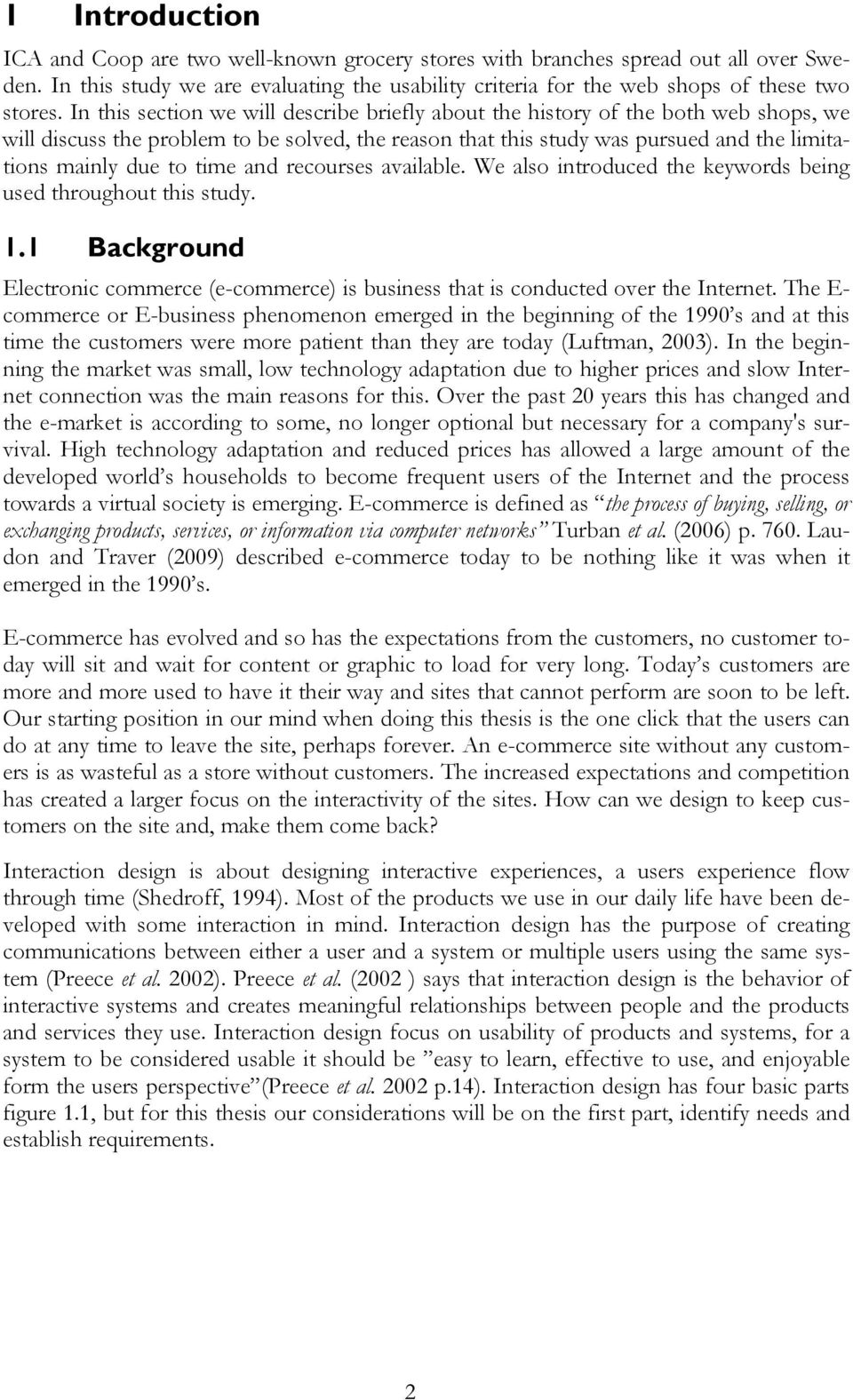
8 2. Developing alterna)ve designs 3. Building interac)ve versions of the designs 1. Inden)fying needs and establishing requirements Interac)on design 4. Evalua)ng designs Figure The four parts of Interaction Design E-Commerce at ICA Handla24.se is the main solution for online grocery shopping of ICA s products. The site was developed in cooperation between ICA dealers, for other ICA dealers. The dealers own the online platform, to ensure equal benefits to all parties involved. The option to go online is decided by the local ICA store franchise owners. Handla24.se has attracted dealers from across the country and they have the possibility to deliver in multiple cities in Sweden. Handla24.se has been available since E-Commerce at Coop Mataffären.se is the main solution for online grocery shopping of Coop s products; it is also the solution that Coop considers their own store. Mataffären.se was developed by Claes Hassel and Niclas Zeitlin, the former CEO and plant manager of NetXtra and is fully owned by the Coop corporate group. The web solution has been available since spring of 2008, but at the moment they only have the possibility to deliver in the Stockholm region. 1.2 Problem analysis As mentioned in the previous section e-commerce has become a must for most organizations, and the customers have become more demanding. When a web site is not user friendly or un-usable the customers leave the site and move on to another. It is also known that some products are harder to sell over the Internet, especially products the customers like to touch and smell like groceries for instance. In this case the usability of the web site has to be even better since it has to make up for the lost evaluation of products by the customer. In the e-grocery one of the main reasons people do not buy their food online is because they wish to see it before purchase. E-grocery is a new phenomenon in Sweden but already in the end of the 90 s some stores tried their luck in this new business. Most of those that tried, failed and the e-grocery market was dead for many years. Now it is starting to bloom again with pages that deliver food baskets with all the ingredients needed for a certain amount of dinners, accompanied with a recipe for each. However there has not been much advertising on the existence of e- grocery from the large corporations as one could imagine. There are things that make people less willing to buy online when it comes to food, the first as mentioned before, people like to see the product before purchase. Secondly people also think in general at the moment that the prices for delivery are too high. Thirdly people would rather have the food and groceries right away than waiting for the delivery. A fourth reason is that people be- 3

9 lieve the quality of the products will be lower when they do not choose themselves and finally due to the habit of going to the store (Svensk handel, 2009). There has been a large amount of research done on both interaction design and e- commerce, for example Jacob Nielsen has evaluated a large amount of web sites and identified some common denominators for failure. Some are still relevant today while others have decrease in value as technology has evolved. Navigation is still important, with bad navigation that is not easy to understand the user can end up lost in hyperspace (Nielsen, 2006). However little research has focused on both e-business and interaction design, Sunesson et al. (2006) conducted a study evaluating the usability of six web sites with focus on user perspective using the framework from Bekker and Van der Merwe (2006). Most research in e-commerce when it comes to e-grocery focus has been on customer s value, habits and thoughts. In this thesis we aim at combining the two areas of research into one, evaluating the web sites with user studies and a focus of the usability of the e-grocery site, not the customers values, habits and thoughts. We have searched for previous research but been un able to find the specific combination of framework and method. For now we hope that you are starting to grasp the connection between interaction design and e-commerce. Why interaction design and usability is important in the new market where the customer can just move to the next site in a few seconds by doing one thing, a click! 1.3 Purpose The purpose of our thesis is to evaluate the usability of e-grocery sites, we categorized various elements affecting the usability evaluation into these categories:(1) navigation, how easy is it for the user to find what they need either by menu navigation or internal search facility? (2) Content, how informative is the content on the site, is it up to date and easy to comprehend? (3) Interface, how appealing is the web sites interface and graphical use to the customer? The three will be contributing to good or poor usability. 1.4 Research question We are interested in knowing how well the e-grocery sites perform from a user perspective, the usability of the sites. We want to measure the usability of the web sites using wellknown factors that have an impact on the usability. The second question aims at understanding the users better so developers in the process of designing the web site can use our results in the future. Ø How good is the usability in e-grocery web sites? o How easy is it for the user to navigate in the site? o How informative is the content of the site? o How appealing is the interface of the site? Ø What considerations are needed to design interactive e-groceries? o How to understand the users better? o What is easy, effective and enjoyable from the users perspective? 4

10 1.5 Delimitations The delimitations of our thesis are based on time and resources available. We have chosen two e-grocery sites for evaluating their usability. The choice is based on the brand knowledge and size of the company. We choose ICA and Coop, which are two of Sweden s largest food retailers across the country. Both brands are well known to most people in Sweden. The evaluations of the web sites will be conducted in a user study where the user is provided with seven scenarios or tasks, we tried to capture all elements of the interaction but the time of one hour for each of the user studies does not allow the thorough evaluation as one could wish. We also tried to evaluate the same functionalities in both sites so that we could compare those websites and propose better suggestions for enhancing the usability. We have some restrictions on the interaction design, we will only consider the first part, identifying needs and establishing requirements. This means that when evaluating the web sites we will focus our attention on. (1) The navigation system, how they are build and how easily their users can move around, (2) The internal search facility, how optimized it is and how helpful it is to the user, (3) The content of the web site, whether the information is relevant and also how easy it is for the user to find the information they are looking for, (4) The graphic design, is the design of the web site attractive to the user? And is the placement of the elements appealing? We will use people between the ages of to understand how their experiences with the web shops are, as we believe these people to be the future customers of the sites. Young people are more adaptive towards new technology. The time and resources available have impacted the choice of users we have in our user study. If we had more time and resources we could have followed real customers as they use the site in their real life. However we are restricted to using available potential customers at the university. An advantage of the users without any previous knowledge of the site is that they have not developed their own solutions and we will be able to capture the problems a new customer encounter on their first interaction with the site. We will force them to deal with some problems and in that way try and capture how they solve them and how they feel. The time and resource also affected the environment that the study was conducted in. We will use a laboratory environment, which will be highly controlled. Since we are interested in the usability of the web site therefore we do not consider the process involved in the payment and how secure it is. We also exclude all factors influencing the overall customer satisfaction that happens after the order has been placed, for instance the delivery and customer service. 1.6 Definitions User: People who interact directly with the product to achieve a task. (Preece et al, 2002) Customer: Users who want the system to work properly so that they are charged the right amount for goods.(preece et al, 2002) E-grocery: Transaction of groceries over the Internet. Usability: we used usability regarding making sure if the website is easy to learn, effective to use and enjoyable to use from the user perspective. Internal search facility: search functionality within the website. Persona: Personas are imaginary persons that are created by the authors to represent groups of respondent with the same common characteristics. 5
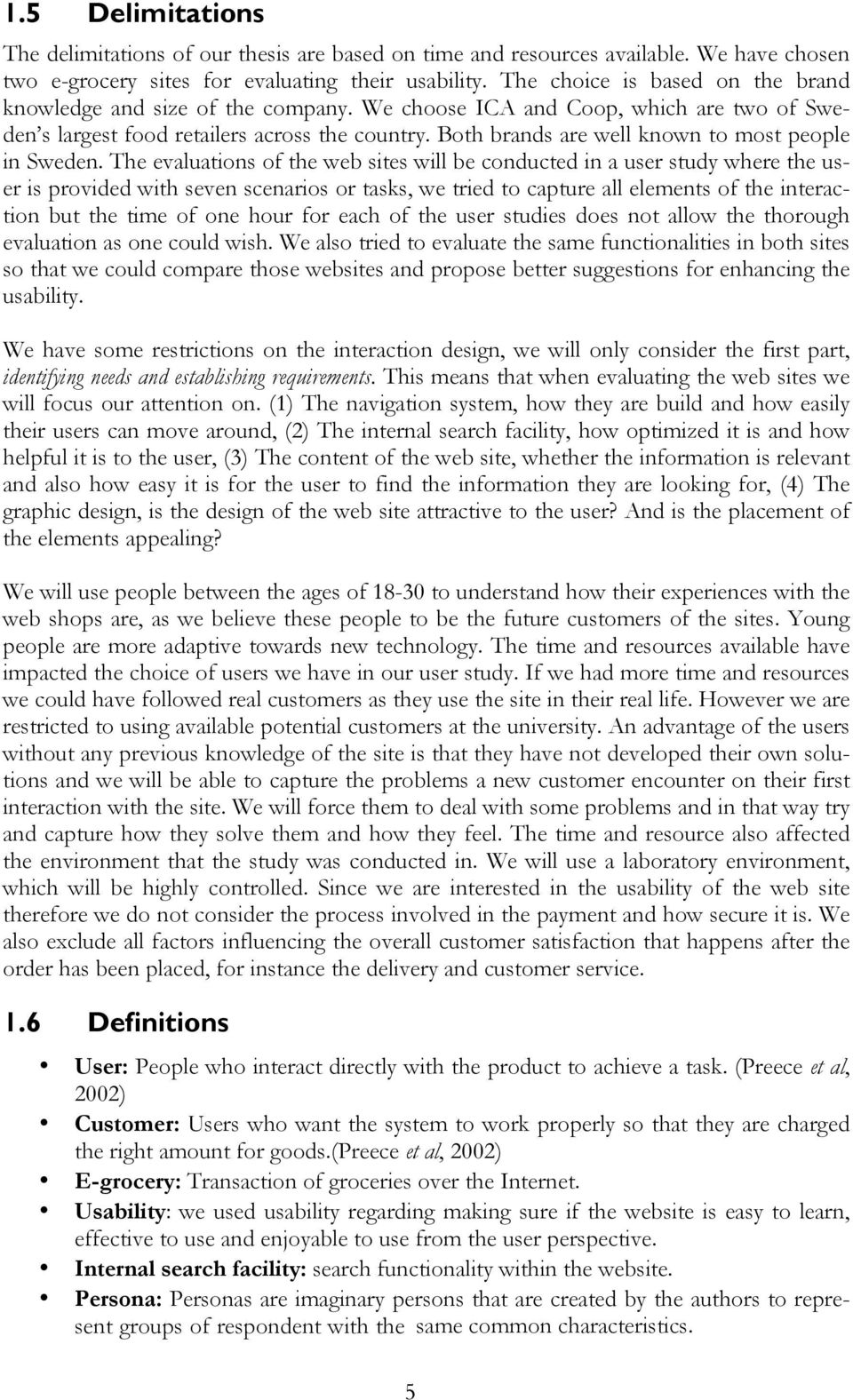
11 2 Theoretical Framework This chapter presents the literature related to web usability and also the tools and framework to obtain an interactive web shop. 2.1 Customer buying behavior The customer buying process is used to understand the different steps the customer goes through prior to a purchase. It is known to have five stages, with a focus on different parts of the process, which prepares the customer for purchase. In different literatures the five steps can have different names but the general ones are shown in figure 3.1.For companies that consider doing e-business it is important to understand the difference between the traditional way customers prepare for a purchase and the way customers prepare for a purchase using the Internet. Shaw et al. (2000) summarized the different parts of both the traditional model and the Internet model into a comparable model, figure 2.1.! E$#-)')4.#,!"4-&,!?.'&$.&'!"4-&,! "#$%&'!(')*+,#'&!-&*#.-!/0! 1$&#').2!#3#$&.&((!45! 6$4/,&*(!7)#!#-7&$')().2!'8#'! )(!6$&(&.'&-!).!#!('$#'&2)1#,,0! 5#74$#/,&!*#..&$!! *#..&$! B-7&$')().2!)(!#11&((&-!#'!'8&! -)(1$&')4.!45!'8&!+(&$!! 9)(%!,&7&,(!54$!6+$18#(&!#.-! +(&!45!6$4-+1'!-&'&$*).&! #*4+.'!45!&.&$20!&:&$'&-! C4('(!45!).54$*#')4.!(&#$18!#$&! $&-+1&-!4$!&,)*).#'&-A!*#%).2! 14*6#$)(4.=(8466).2!()*6,)(')1<! '8)$-!6#$'0!$&5&$$#,(!&#(),0!#7#),#/,&! 7)#!.&3(2$4+6(!! ;(&!45!8&+$)(')1(!).!1#(&(!45!).54! 47&$,4#-!4$!,43!).74,7&*&.'! 6$4-+1'(<!'$)#,!#/),)'0!1$)')1#,!54$! 8)28=$)(%!6$4-+1'(>! C4*6&.(#'4$0!-&1)()4.!$+,&(! 8#.-,&-!#+'4*#')1#,,0<!'$)#,!#/),)'0! /&14*).2!'&18.4,42)1#,,0!5&#()/,&!'4! $&-+1&!$)(%>!!?*6#1'&-!/0!'8&!(&$7)1&! &.14+.'&$>!! C4*6&.(#'4$0!-&1)()4.!$+,&(! 8#.-,&-!#+'4*#')1#,,0<!'$)#,!#/),)'0! /&14*).2!'&18.4,42)1#,,0!5&#()/,&!'4! #55&1'(!#'')'+-&!'43#$-!/$#.-A! 6$4/#/),)'0!45!$&6+$18#(&A! #.-!34$-!45!*4+'8>!! D4$-!45!*4+'8!(6$&#-(!$#6)-,0! 47&$!-)(1+(()4.!2$4+6(A!1#+().2! #.!#11&,&$#'&-!-)55+()4.!1+$7&>! Figure 2.1 Comparison of Customer buying behavior by Shaw et al

12 2.1.1 Web usability and the customer buying behavior The customer buying behavior process can be useful to understand when designing a web page. The customers focus will be on different aspects of the web page during the different stages. Van der Merwe and Bekker (2003) developed a framework that shows the relationship between the customer buying behavior and usability evaluation of web pages. The framework relates the technical aspects of design and the stages that any customer would go through when intend to shop online, this is visualized in figure Figure Web site evaluation framework by Merwe and Bekker 2003 The need recognition phase in the Internet model, as described in figure 3.1 starts when, the customer recognizes a need and searches for a web site. In this stage the focus of the customers attention will be on the interface of the web site, at this stage the customer is not interested in how good the content is or reliable the site is. If the site interface is not appealing the customer is likely to go to another site. The interface is build up by the colors, background and font as well as the graphical design. If the web site has a bad or unsatisfying interface it will be recognized as poor usability. The information gathering process has focus of the navigation of the site. It should be easy for them to find the information they are looking for. The navigation should be easy and logical, allowing the customer to know where in the site he is, where he has been and where he finds what he is looking for. The customer does not want to be lost in hyperspace, nor spend energy on learning a specific sites navigation system. If the navigation is unsatisfying or hard to use it will be recognized a poor usability. Evaluating information is when the customer needs to have access to good content; if the two first stages are good but the contents are poor the customer will leave the page. Customers want the information to be easy to read and up to date. Sites that clearly have not been updated in a while will have outdated content, irrelevant to the customer. The time it takes to load the page content can be longer if the customer believes the content to be relevant to them and the same applies for graphics. If the content is hard to read, outdated or irrelevant makes the user experience unsatisfying and this will be recognized as poor usability. As notices in figure the framework only focuses on the first four steps of the customer buying process, this is because the website design or usability is not that affected by the post purchase evaluation. The last stage when making the purchase the reliability is important, as at this point the customer is al- ready willing to buy the product or service. 7
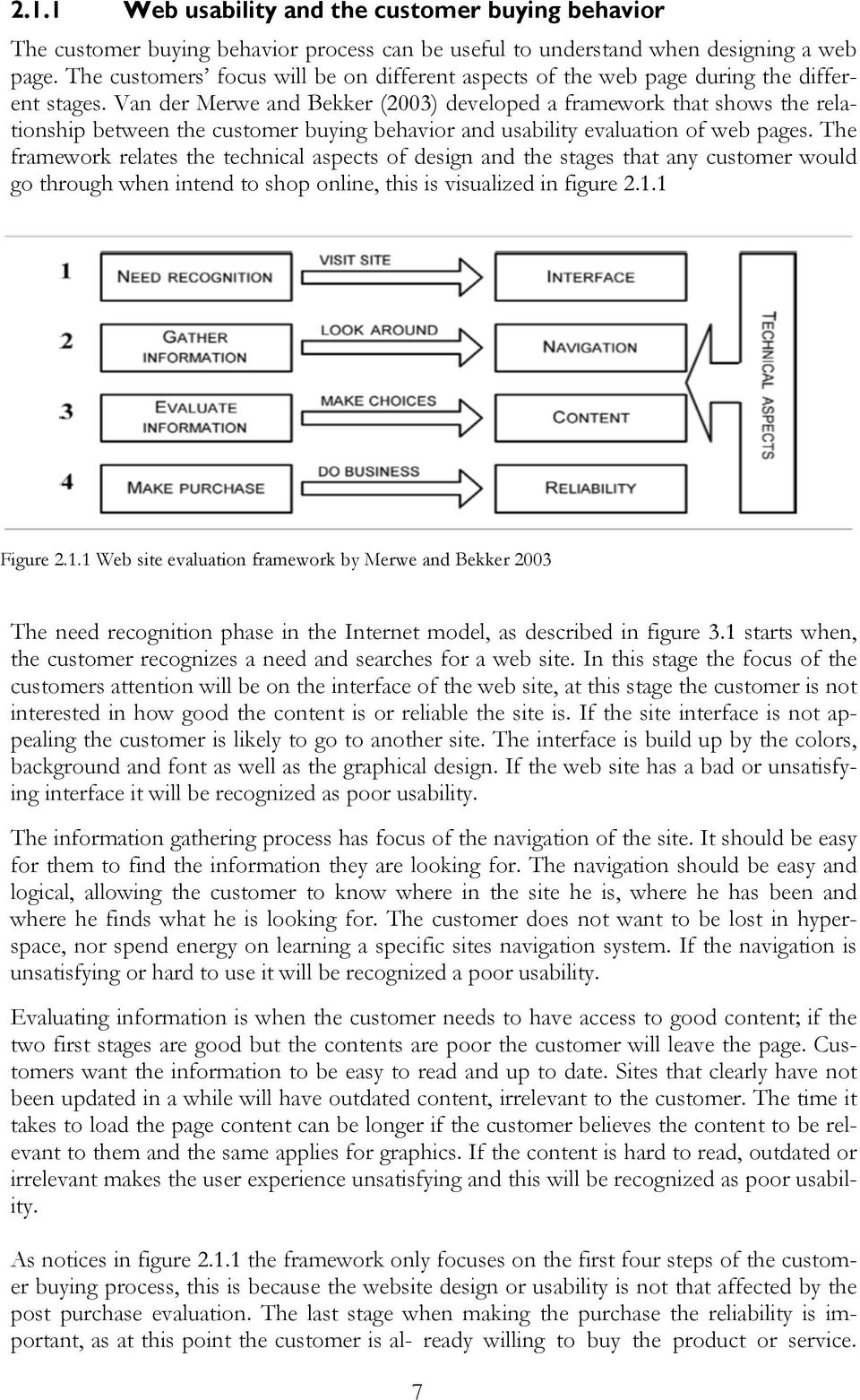
13 According to Van der Merwe and Bekker (2003p.332) reliability has two aspects, first The degree to which a customer is able to use the ordering process on the site easily and effectively. And second The degree to which the company is able to fulfill its promises and obligations to customers every time a purchase is made. 2.2 Web usability Web usability concerns increased expectation of users due to high competitiveness of World Wide Web in the new era. As it was mentioned earlier, nowadays users have the option to switch to other websites if they feel that one website is not usable meaning that it is not easy to find what they want or do not see that the website is designed for them. In order to fulfill the requirements of web usability we will present the elements of usability in terms of interactive products Usability evaluation The usability is important in interaction design, a web site can be assessed on how interactive it is by performing a usability test. Good interactivity is a large contributor to customer satisfaction as well as poor interactivity leads to non-satisfied customers. To be able to make a usability test we need to know who the users are, how is it intended to be used and also where it is going to be used. Products with good usability are: (1) easy to learn, (2) effective to use, (3) enjoyable from the user s perspective and (4) easy to remember (Preece et al. 2002). Badre (2002) argues that whether the user perceives the experience to be enjoyable or not depends highly on the purpose of their visit. Badre (2002) also says that the same elements of a web site could make a customer satisfied in one web site while making the customer dissatisfied in another. For example, if the customer is looking for a cheap flight he wants to spend as little time and using the minimum clicks as possible, in this situation unnecessary animations and graphics which slows down the system is annoying. If the same customer has the intention to buy a dress the animations and graphics are important for the customer to evaluate the design of the dress and a longer loading time may be worth the wait. Badre also suggests some questions that could be asked to evaluate the usability, for instance: (1) do error messages make sense to the user? (2) Is the overall user experience pleasant and intuitive for the user? (3) Does performance change across different browsers and platform types? Across different Internet speeds and monitor sizes (4) is content organized in such a way that users can easily find the information they are looking for? Usability should be evaluated based on six usability criteria, in each of them the focus will be on different aspects that will build up the overall user experience. Navigation: Krug (2005) argues that navigation tools should always help the user to build a mental map. It should be clear to the user where they are in the site and how the pages are related to each other. Search facility optimization: Thurow et al.(2009) argue that the search facility optimization has traditionally been defined as the process of designing, writing, coding, scripting, and programming an entire web site so it will appear in the top positions in a web search for selected key words. However Nielsen s link-dominant users will almost always browse first and only use the search facility if they run out of links or get frustrated enough 8

14 by the site. For almost all other people the decision of searching or browsing depends on their current frame of mind, if they are in a hurry or not, and whether the sites navigation system seems to be easy to use. Eventually, if people cannot find what they are looking for they will leave. Graphic design (aesthetic): According to Badre (2002) the use of graphics for aesthetic expressions is a crucial factor as it eases the human processing of information. Colors and pictorial images can make a chunk of information easier to understand. Some guidelines for designers when they consider using graphics in a web site is: Ø Use GIF picture instead of JPEG for image rendering, they are smaller. Limit the number of colors used. Ø Active and clickable parts of images should be clearly mentioned Ø Use coding techniques instead of using graphical images. Ø When images are slow to download and the purpose of the site is to provide service in a quick time or users are dial-up users do not use graphics. Ø Inform users if the large image will be loaded by a link to the page. Content: The quality of the content is crucial for a webpage. The information should be both available and attract the users attention. Users only read 20 % of the whole content on the page (Thurow et al. 2009). Users prefer to scan information looking for keywords, if they cannot find what they want with the keywords they may leave the web page. Thurow et al. (2009) also emphasizes the importance of calling for an action in the site and not just a call for attention. What do you want the customer to do once they find the information? Web forms: People do not like to use web forms instead designers should use three interdependent layers involving forms according to Jarrett et al. (2009) which are described below. If these three layers work well the user perception of forms will be different. Good forms crate good experiences while bad forms can have serious consequences. Ø Relationship: the relationship between the organization that is asking the questions and the person who is answering. Ø Conversation: the questions that it asks, any other instructions, and the way the form is arranged into topics. Ø Appearance: the way that it looks: the arrangement of text, input areas such as fields and graphics and the use of color. Responsiveness: a measurement for measuring responsiveness could be the time that customer is waiting for respond from company. Responsiveness could be in two ways: (1) load time and (2) search time. 9
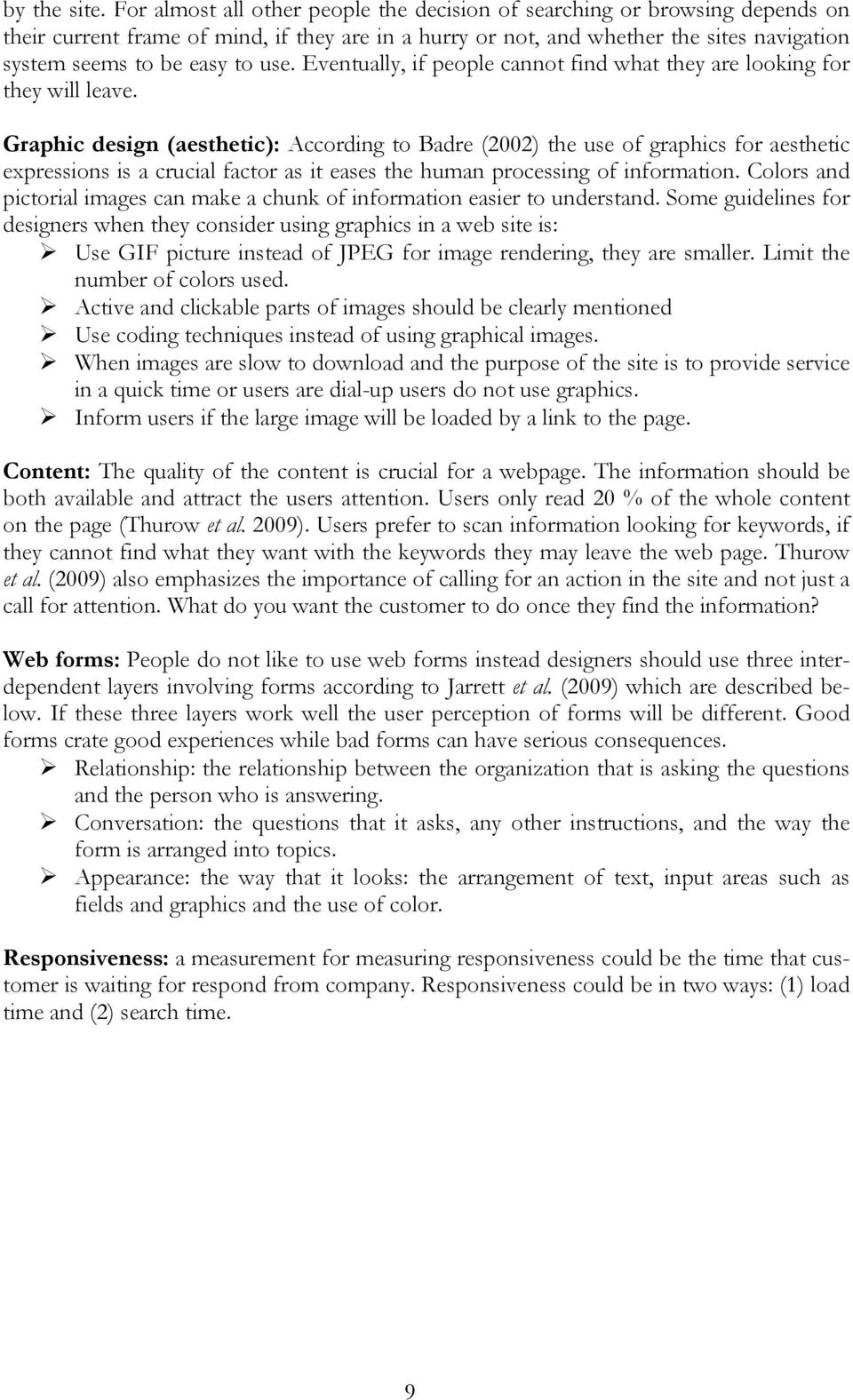
15 2.3 Web usability evaluation and customer buying behavior For our analysis of the usability of the web sites we will use a combination of the web usability evaluation criteria and web usability and customer buying process. We will incorporate the theories for graphical design into the interface evaluation. In the navigation we incorporate the navigation theories from web usability evaluation as well as the search facility optimization. The content evaluation will incorporate the theories of content from the usability criteria. Figure Combined web site usability evaluation & web site usability and customer buying behavior framework 2.4 Requirements To all products that are developed there are requirements, which states what is expected of the product. In Preece et al. (2002) book interaction design, the requirements have been divided in smaller parts and will be presented below. To know the requirements of the system is important when developing it, otherwise the system may be excellent but useless in its intended situation. Functional requirements: what the system should be able to do. It is very important to find the functional requirements of an interactive product. Non-functional requirements: the constraints there are on the system and its developments. Data requirements: It should capture the size, persistence, accuracy and amount of data entered in the interactive product. Environmental requirements: refers to the circumstances the product is used, can be the physical, social, and the organization and technical environment. User requirements: the characteristics of the intended user group could be a novice, expert, casual or a frequent user. Usability requirements: captures the usability goals and associated measures for a particular product. The importance of requirements: according to Taylor (2000 cited in Preece et al. 2002) the major failure for IT projects occur during the identification of requirements and objectives. Clear and detailed requirements are critical success factors. We need to know the 10
16 need and requirements of our users to be able to assess the usability of the system and see if the requirements are fulfilled by the system leading to satisfied customers. Different types of requirements: There are two types of requirements that can be captured during our user study, functional requirements and non-functional requirements as described above. The requirements will be developed by us, and consist of general requirements of a web shop. The requirements will be used for our own understanding of what is needed and expected from a web shop. 2.5 Personas According to Mulder et al. (2006) a persona is a realistic character sketch representing one segment of a Web site s targeted audience. Mulder et al. (2006) further describes that personas should have the following characteristics: Each persona represents real users that you care about. The personas attributes and descriptions are accurate and complete. The set of personas covers the full range of your users. We use personas in order to identify the existing and future customers of the two websites and suggest our conclusions, which will be guidelines for developing and designing new version of those websites. Personas summarize our research finding and bring the target group to life, so the considered companies could make decision according to what their customers want not according to themselves. For instance if they have a scenario that is putting the tittle recipe in their website and they don t know where to place it or how to notify the users about it they can ask a questions like what would Anna do? Anna here is a fictional character that represents the characteristics of people with the same desires. In this way they can involve customers in the development of websites Persona Creation When creating personas it requires equal amounts of research and analysis. The process for creating personas we will use was developed by Robert Reinmann, Kim Goodwin and Lane Halley and is presented below; all parts are from Goodwin (2009). The process was developed through real interaction projects and has been documented in several papers. The persona framework will be used in our thesis to develop a set of personas, which will help us answer our second research question, by understanding the personas needs and feelings. The process has seven steps: Step 1 Identify behavioral variables Step 2 Map interview subjects to behavioral variables Step 3 Identify significant behavior patterns Step 4 Synthesize characteristics and relevant goals Step 5 Check for redundancy and completeness Step 6 Expand descriptions of attributes and behaviors Step 7 Designate persona types 11

17 Step 1 Identify behavioral variables In the first step of the persona creation the researcher goes trough his/hers data looking for distinct behaviors the observed users have. Demographics can be useful, because it can affect a person s behavior but too much attention should not be spend on it. In general there are five important distinct behavior patterns that emerge. Activities what the user does, frequency and volume Attitudes how the user thinks about the product domain and technology Aptitudes what education and training the user has; capability to learn Motivations why the user is engaged in the product domain Skills user capabilities related to the product domain and technology. Goodwin (2009) suggest that some questions should be asked after the behavioral variables have been found. For example, if a persona hypothesis was developed in the beginning of the work, now is the time to compare the variables against the assumption. Find if there were additional, unanticipated or, anticipated variables that were not supported by data. List the complete set of variables you found and if there is a variance to the ones you anticipated, add, subtract, or modify the anticipated behaviors Step 2 Map interview subjects to behavioral variables When the complete set of behavioral variables have been identified, the interviews should be mapped against each of the variables. Some variables will have multiple behaviors while others only have two distinct. It is not as important to map the interviews precisely on the scale, as it is to map them in the right relationship to each other. Figure Map interview subjects to behavioral variables Step 3 Identify significant behavior patterns When you have mapped your interviews, then you should look for clusters that occur across multiple ranges or variables. If there is six to eight variables of a subject that clusters this is likely to represent a significant behavior pattern and will from a basis of a persona. For patterns to be valid there has to be a logical or causative connection, not just a spurious correlation between clustered behaviors. For example There is clearly a logical connection if data show that people who regularly purchases CDs also like to download MP3 files, but there is probably no logical connection if the data shows that interviewees who frequently purchase CDs online are also vegetarians. 12

18 Step 4 Synthesize characteristics and relevant goals Synthesize characteristics For the significant behavior patterns you have found you need to synthesize details form you data. You need to describe the potential use environment typical workday, current solutions and frustrations, and relevant relationships with others. Brief bullet points will be enough at this point to describe the characteristics of the behaviors. At this point you can add some descriptions to you personas to make them come to life, but do not add too much fictional data. In this stage it is important for you to choose the first and last name of the persona. This should be chosen based on the type of person the persona is, without tending towards stereotypes. You can also add geographical and demographic information as this can help visualize the persona. From now on you should referee to the persona by the name. Synthesize goals The most important thing to synthesize from the data is the goals. These are best derived from analysis of the behavior patterns comprising each of the personas. With the knowledge of the logical connections between the persona s behaviors, you can infer the goals that lead to behaviors. This can be done by either observing actions or analyzing subject s responses to goal-oriented questions. The majority of useful persona goals will be end goals and the normal amount will be three to five goals per persona. There are also life goal, which are more important for the development for personas used for customer-oriented products. A persona can in general have zero to one life goal. A third form of goals is the experience goal, most personas can have experience goals like don t waste time and don t feel stupid but occasionally there are more specific experiences. A persona should have zero to two experience goals. Persona Relationships In some cases it makes sense if the personas belong to the same family, company or have some form of social connection. However, in most cases the personas are unrelated with different geographic locations and different social groups. When deciding whether the personas should have business or social relationships consider: 1. Whether you observed any behavioral variations in your interview subjects related to variations in company size, industry, or family/social dynamics. 2. If it is critical to illustrate workflow or social interactions between coworkers or members of a family or social group Step 5 Check for redundancy and completeness Now your persona is coming to life, and its time to check for incompleteness and redundancies. If you have missing behaviors you might have to do more research. If you have personas that are significant and only vary by a small variable you can either remove one and tweak the other, or make them more distinct. Each persona you have has to be distinct from all other personas in at least one significant behavior Step 6 Expand descriptions of attributes and behaviors In this step you take you bullet point list and the goals identified in step 4 and make them more descriptive. Third-person narrative is far more powerful at conveying the persona s attitudes, needs, and problems to other team members. The persona should be syn- 13

19 thesized of the most important details, relevant to this persona. The narrative should be maximum two pages and needs to contain some fictional situations, but remember it is not a short story. You can introduce your persona by job or lifestyle, describing his or hers concerns and interests that have an immediate effect on the product. A photograph can make the persona seem more real, but choose a picture with great care. The picture should portray the persona in a good way Step 7 Designate persona types This is the last step and now the personas should feel like real people you know. You have to consider whom you are designing for and prioritize between the different personas. They can be sorted into six types of personas: Primary: The target for the design interface, it can only exist one primary for a product interface but for some products like (Enterprise products) there can be multiple. The primary target will be dissatisfied if the interface is designed for some other persona, while all other personas will not be completely dissatisfied with the one developed for the primary. Secondary: Is mostly satisfied with the primary persona s interface but has specific additional needs, which can be accommodated without upsetting the products ability to serve the primary persona. Sometimes there are no secondary personas but if there are three or more it can be a sign of that the products scope is too large. Your goal is to satisfy the primary persona and then adjust the design to accommodate secondary personas. Supplemental: Personas that are not primary or secondary becomes supplemental. They will be satisfied with the solution provided for the primary because their needs are a combination of the primary and secondary personas. Stakeholders are often supplemental personas. Customer: Addresses the needs of customers and not end users, are often treated like secondary personas. In some enterprise environments they can be the primary for their own administrative interface. Served: Are different from the earlier mentioned personas, they are not users of the products but directly affected by the use of the product. Provides a way of tracking second-order social and physical ramifications of products and are treated like secondary personas. Negative: Those personas that the product is not build to serve, they are like served personas not users of the product. Negative personas are used to communicate to other team members that these are not designed for. 14
20 3 Methodology This chapter presents the method used in this study for first data collection and second data analysis. We describe the usage of user-centered approach and what methods are appropriate in order to collect the data in use study. We will consider both the advantages and disadvantages of the methods. 3.1 Research approach Research design The research design provides a plan or a framework for data collection and its analysis. (Gharui and Grönhaug, 2005 p. 55) The research methods, on the other hand, refer to the techniques used to collect data. (Gharui and Grönhaug, 2005 p. 55) The choice of research design should be strategic and based on the approach that allows the researcher to solve the research problem in the best possible way within the given constraints. In other words the research design should be effective in producing the wanted information within the constraints put on the researcher (Gharui and Grönhaug, 2005). There are three main research designs: (1) Exploratory, which seeks to gain new insights and explore unstructured research questions. (2) Explanatory, which seeks to explain some knowledge, for example to prove a theory. (3) Casual, which seeks to understand the cause and effect relationships. Both of the last designs incorporate well-structured research questions. The design should be chosen based on the structure of the research question (Gharui and Grönhaug, 2005). For our research we have chosen to use the exploratory research design, which according to Robson (2002:59 cited in Saunders et al. 2007) is good for loosely understood research problems. With this design we can find the answers to what is happening by searching for new insights. The exploratory design is good with inductive research methods. The researcher who does exploratory research gathers information, data and tries to analyze it and come to a conclusion. This is also the approach of inductive methods and will be explained in the next section. As the project evolves and the amount of information increase the picture of the research problem will become clearer (Gharui and Grönhaug, 2005). There are three principles in this design for conducting the search, a literature search, interviewing experts in the subject, and conducting focus group interviews. The main advantage of exploratory research is that it is very flexible and therefore we can change our view along the way. This fits the interaction design, which is broad and can be viewed from multiple perspectives. Along the way we can narrow down our perspective and the research become clearer Research method We will use an inductive research method in our thesis, in this method the researcher draws his conclusions from the data that is collected. The data is the source for the conclusion and the researched does not develop any hypothesis before. The inductive process is: Observation Findings Theory building. 15

21 As mentioned in the previous section this method works well with the exploratory research design we have chosen. Inductive approach does not require a hypothesis but we have the theoretical frameworks as an assumption and support while analysing data in order to generate a set of new conclusions. The disadvantage of inductive method is that it may be hard for us to generalize our findings to the general public. Our inducted conclusions are based on empirical observations so it is hard to generalise them to the bigger population. Generalization can be done but would need an extensive amount of data and the research question would need to be more structured User centered approach Interaction design research always involves a thorough user study taking user-centered approach. Within our research design and methodology we will use this as our approach for collecting data. The user-centered approach is based on processes such as: Early focus on users and tasks: directly studying cognitive, behavioral, anthropomorphic & attitudinal characteristics Empirical measurement: user s reactions and performance to scenarios, manuals, simulations & prototypes are observed, recorded and analyzed Iterative design: when problems are found in user testing, fix them and carry out more tests (Preece et al. 2002) With the user centered approach we will first consider the characteristics of our sample segment. This will be done using a questionnaire, then we will construct scenarios that are developed to capture as much of the web site functionalities as possible. The user will be asked to perform the scenarios and use the method talk out loud while they are doing it, this will allow us to capture their feeling in each of scenarios. 3.2 Data collection A survey strategy will be used in our thesis, a survey method is commonly used to answer questions which involve; Who, What, Where, How much and How many. Survey strategy is often used in exploratory research, which is the research design in this report. This strategy is useful for questionnaires as well as structured interview and structured observation. The data collection will consist of a user study. A questionnaire was sent out to everyone on at Jönköping University, to attract people to our user study. The user study has three methods for data collection, questionnaire, interview and observation. 3.3 Qualitative method Qualitative methods are used to gather more in-depth data. The qualitative data collection is the most important collection for our thesis, to be able to create a deep understanding of the users experience we need to collect the data qualitatively. The aim of the data collection is to understand the users underlying feelings, impressions and reactions as well as their values and beliefs. 16
22 3.3.1 User study There are two types of user studies; the first one is when evaluating a concept, prototype or developed technology by observing the users while they use it. In this way solutions and changes can be made according to the users desire and needs. The second type of user study is when one is trying to discover what need users have that is not fulfilled. The social aspects are the focus here, and therefore observing what people do in their everyday life, whether at home or work. In our thesis we aim at conducting the first of the two types of user studies. The web sites are developed all ready but wee want to find the needs and requirements that will lead to customer or user satisfaction. By observing the users while they are interacting with the two web sites we will try and to both capture, and understand the needs of the users as well as what is considered valuable to them Scenarios Scenarios are a description of a human activity or task, which provide an opportunity for exploration of contexts, need, and requirements. A scenario does not explicitly describe how to use of software or other technological support to achieve a task. Scenarios make the users feel involved in the story and makes the researcher focus on the human activity rather than the interaction with technology. This is according to Preece et al. (2002) a good way of exploring the constraints that exist on the interactive product, by studying the users irritations. We provided our users with a number of scenarios and observed as well as asked questions of how they experienced the web sites during the tasks Interviews The interviews were conducted as a part of the user study, to understand the users personal reactions and values. Before the user study we collected some background information about the users, which according to Ghauri and Grönhaug (2005) is important. The background information was collected using a questionnaire with closed-answer questions. An interview can either be structured, unstructured, or semi-structured interview, depending on what the researched has as a goal for the interview. What it is the researcher wish to understand and gain a deeper knowledge in. For our research the semi-structured was used, some questions are prepared before but to gain a deeper knowledge of what each user experience during our user study we have to be able to ask questions that seem relevant at that time. The fact that not all users answered the exact same questions it is harder to know exactly what each user would have answered to each of the questions. We used the semistructured interview since our scenarios were structured but in the interview we did not have a unstructured questions and asked users to express how they feel differently. The questions we asked were mainly to allow the user to explain why they did a task in a certain way or how they felt during the different tasks. Questions were for instance why did you do like that or how do you feel about this, and how would you like it to be. These questions are important to have answers to because they will capture the expectations the user has, and the requirements, as well as their feelings. If we ask specific questions and only allow certain answers we may miss some important variables for user satisfaction. To capture these we ask the users to use a method called thinking aloud while they are completing the tasks. Our questions will be based on what they are doing and saying we will base our questions. 17
23 The thinking aloud or talk aloud method is very simple; the users are given a task with the instruction to talk to the observer while they are working on it. The things we want the users to tell us is what they are thinking: what are they trying to do, why do you do that, what questions arise while your doing the task, is something confusing? When using thinking aloud it is important to explain for the user that it is the system that is being tested and not them. (Lewis and Rieman, 1994) Observation The second qualitative method for data collection that is being used is observation, which is good when the researched is interested in understanding social behaviors. The observation will be conducted in combination with the interviews, in the user study. By listening and watching the users we collect the behavioral data. Observation will be used to increase our knowledge in the users experience and behaviors. A disadvantage of using observation is that it is hard to make generalizations, because the observer is subjective and it is hard to systematically observe and record the data. The lack of generalization impacts the validation of the findings and we have to provide satisfactory validity and reliability evidence. The user study will be conducted at the university library; hence it will be in a laboratory environment. The advantage of doing the user study in a laboratory environment is that we can control the environment, four our users to have the same environmental conditions we chose the laboratory. A negative aspect of the laboratory environment is that we will not be able to know if the users would do it the same way in a natural setting. We weight the natural settings advantage against the laboratory and decided that we wanted all users to have the exact same environment, as this would make the users starting position more equal, and the usability would be easier to evaluate without having to determine what environmental conditions each of the users had. As observers we are not part of the natural setting and could influence the user, but according to Ghauri and Grönhaug (2005) does the observed object ignore the observer after a short while. An important acknowledgement to the influence factor is how we talk and dress; we should use the same voice for all of them and not ask leading questions. Both the human and mechanical observation method was used the human observations were done by us. For the mechanical the software Camtasia was used. The software records the users mouse movements at all times during the user study, and their voice. In this way we could record both what they did and said at once, without the user being disturbed by a camera. The users were told about it, and agreed to the method, which is important from an ethical perspective Questionnaire Questionnaires were used at two times during our data collection. The questionnaires allow us to collect a large amount of data during a short period of time. The first questionnaire was aimed at finding the possible users, and collected some background information about their computer habits and Internet usage. The aim was to collect enough data to semirandomly select the potential users who have no prior knowledge about the website, for the user study. We chose those that stated that they have never used the targeted websites before. Based on the information collected from the questionnaire we would like to select people with different usage habits. 18
24 The questionnaire developed for this can be found in appendix A. The questionnaire was distributed by the school system, with a link to the monkeysurvey.com. In this way we could reach a large target group at once. The second questionnaire was developed to capture the users overall evaluation and impression of the sites. This was provided to the users after they had finished the scenarios for each of the web sites. The purpose was to collect the data in a way making a comparison between the sites easier. The questionnaire is based on statements which the user either agrees with (4) or disagrees with (1) or somewhere in between. Not using a middle number the user is forced to choose between agreeing and disagreeing. This questionnaire was more of a qualitative collection as we captured the users impression. This questionnaire can be found in appendix B. 3.4 Method of analysis We have used an inductive analysis method, where we allow the data to guide us to the conclusions. With the help of the theoretical framework we will analyze the data by comparing the empirical findings with the concepts in the framework. We will use the customer buying behavior process and web usability framework developed by Bekker and Van der Merwe in combination with the web site usability evaluation criteria s to analyze the usability in the websites. 3.5 Reliability Reliability of a study depends highly on the method of collecting data. If it is possible to repeat the data collection procedure and get exactly the same result then the study is reliable. In our thesis we use semi-structured interviews, where the main questions/tasks are the same for all our respondents. This process can easily be repeated again and therefore the work can be considered reliable. The recording of each session makes it more reliable since it was possible to go back and hear the reactions, expressions and movements of each of the participants and decrease the observer bias. 3.6 Validity Validity is concerned with evaluating if the study measures what it is supposed to measure (Preece et al. 2002). The validity of our work is based on the secondary literature, which is the theoretical framework guiding us to what measure for usability is needed Ecological validity Ecological validity examines how the environment in which the study has been done affected the result of the study. For instance in our study we were obliged to conduct a laboratory experiments since we did not have enough time and recourses to conduct our study in an uncontrolled environment. However laboratory studies are low in ecological validity since there is no guarantee that the result happens exactly the same way in the real world. (Preece et al. 2002) 19
25 4 Empirical data 4.1 Participants The participants in our user study were selected based on the personal information they provided us with in the questionnaires. We tried to have a group of participants that were diverse in age, sex, and computer habits. The user study had three women and four men in the ages between We choose people who had not used the sites previously because we wanted to find what problems a new user could encounter. On average the users spend hours by the computer, with one user spending and one only spending The time they spend online was lowers and four of the users spent hours and the two other A full summary of the users responses is summarized below. Sex Age Hours spent by the computer per week Hours spent online per week How often do your by products online User 1 Female Once every 2-3 months User 2 Male Once a month User 3 Male Once every 2-3 months User 4 Female Once every 2-3 months User 5 Male Once every 2-3 months User 6 Female Once every 4-6 months User 7 Male Once every 2-3 months Table 1 Participants 4.2 User study From the user study we collected data though video and voice, using a program called Camtasia we were able to capture both the voice of the users as well as their mouse movements. We have then made transcripts of this trying to describe their feelings, movements and what they say in text. A summary of each user study will be provided below, and the complete transcripts are available in appendix. Below is a summary based on each task the users were given; there are 7 tasks for each of the websites. ICA COOP I.A Find Ica s web store CA. Find coops web store. I.B Find out if ICA delivers to your address CB. Find out if Coop delivers to your address. 20
26 I.1 You are planning a family dinner with your closest relatives, and you have decided to serve mintchokladtårta as dessert, go to ica.se and find the recipe, then place the needed items in your basket in Ica s web store I.2 You are considering to order but before you do, you want to read the rules and regulations for the service, find the terms and conditions for delivery leveransvillkor. I.3 You have now almost finished to shop but there is still a few things you need, however the total sum has almost reached your budget limit, go to the basket (so you can see all your items) and remove 2 items (any), then continue to shop instead of checking out. I.4 You have just decided to start eating more fruit and a friend of yours have agreed to do the same, and suggested that you buy the fruit together. Find out the most efficient way for you to purchase 8 kg of seasonal fruit. I.5 You are throwing a kids party, and are going to serve the children cookies, unfortunately one of the children is glutenallergic, find a cookie that he will be able to eat. What if there is something else, can you find a gluten free and milk free cookie? C1. You have decided to make biff stroganoff (for the first 4) and pastasallad med grilladkyckling (for the last 3) for dinner, find a recipe of this at mataffären.se and place all the needed items in your basket. C2. You are considering to order but before you do, you want to read the rules and regulations for the service, find the terms and conditions for delivery leveransvillkor. C3. You are looking for chicken, any kind will do, filet, whole or sticks, the important thing is to find the chicken that is cheapest per kg. C4. You want to buy some cookies for the weekend, look what is available form their own bakery and place the cheapest cookie in you basket C5. You have never ordered food from this web site before and are interested in knowing what will happen if your order is not delivered on time, find information about this. Table 2 Summary scenarios User study Coop C.A: The user goes to Google, to search for Coop, and then goes to their homepage in which she looks for links to the web shop. She finds nothing and returns to Google and searches for coop hemleveranser in the second link she finds the web shop. She believes it would be easier to find the web shop if she knew the name. It took 4 minutes for her to complete the task. C.B: Looks at the top menu of the web site (mataffären.se), she chooses the menu option ny kund but it is not the right one. Then changes to leveranstider and finds out that they do not deliver to her address. It took 1:20 minutes for her to complete the task. C.1: Goes to the top menu option Recept and use the recipe search facility to look for biff stroganoff, and is provided with a recipe. Start searching for the products in the 21
27 product search facility thinks it is annoying if she has to go back and forth between the recipe and product search. She would prefer if there were a button for adding all products, and be able to remove if you already have the product. She tries if the label maträtt in top of the recipe has that function. Becomes happy when we show her the ett klick köp one click buy function. Unfortunately those recipes are not shown when searched and changes on a weekly basis. It took 5 minutes for her to complete the task. C2: Study the menu options and clicks kundtjänst and then chooses leveransvillkor in the submenu. Does not think it was hard to find, she found it where she expected it to be. It took 1 minute for her to complete the task. C3: Read the product menu and chooses kött och chark and in the submenu chooses fågel. She reads price per kilos and chooses the cheapest chicken. She does not notice that she was only shown the fresh chicken available and misses the frozen chicken, which is found under another menu option ( frysdisk fågel ). It took 2 minutes for her to complete the task. C4: Chooses bageri in the product menu and in the submenu fika she finds vårt konditori. She looks at the products available and chooses the one she thinks is the cheapest. It s not very hard to compare prices but not all have per/kg. She thinks the pictures are helpful on the products where the picture does not have advertisement. It took 3 minutes for her to complete the task. C5: She goes to kundtjänst and reads the submenu options where she chooses leveranstider which she realizes is not the right. She tries leveranser instead, wrong again, changes to leveransvillkor and scans the content of the page and finds it here. She thought it could be easier to find it was in a shorter text, under perhaps leveranstider instead as she had to go through the whole text to find it. It took 2 minutes for her to complete the task ICA I.A: Goes to Google and searches for Ica hemkörning using the dropdown-list options. Tries two pages before she finds ica.se hemleveranser, she clicks to the first page of ICA and from there she chooses Handla på nätet but does not what she is looking for. She starts to feel lost and confused. She uses the page search facility looking for hemleveranser but the result is unsatisfying. She wants to click butiker but it is not possible. She clicks on läs mer om ICA matkassen and at the bottom of the page she find the whole site menu (which is at the bottom of every page) and find mat på nätet and finds a store in Jönköping. She does not notice that the menu option mat på nätet has been available in the left top side during the whole time she has been in the handla på nätet category. It took 5 minutes for her to complete the task. I.B: Types the post code in the textbox available on the first page and finds out that this store does not deliver to her address. It took 44 seconds for her to complete the task. I.1: Goes back to Ica s homepage by using the tab (the handla24 opened in a new window) where she reads the menu and chooses recept och mat. She uses the recipe search facility to look for Mintchoklad kaka (which was supposed to be tårta, but we made a translation mistake) she changes to mint choklad kaka but cannot find it. Searches for only deserts and goes through pages 1-7 until she finds the right cake. She adds the products to the basket in handla24.se by tabbing between sites and using the product search facility at handla24.se. She has some problems with the results of searches, gives her options that is less relevant. She thinks the dropdown list for the search is helpful but not necessary and the pop-up your products have been placed in the basket is helpful, in Coop she had to scroll up to see it the products were add- 22
28 ed. It took 10 minutes for her to complete the task. I.2: Goes to kundtjänst, when hovering over the label the submenu list is shown in a dropdown, in here she chooses leveransvillkor. The delivery terms were where she expected them to be. It took 16 seconds for her to complete the task. I.3: Removes items from the visual basket, when told goes to the basket and removes items and clicks fortsätt att handla at the bottom of the page (not the top option). The technical error appearing when doing this annoys her, she comes to a page with the message your search gave no result, because she did not make a search. Instead she thinks it would be appropriate with the front page. It took 2 minutes for her to complete the task. I.4: Goes to frukt och grönt in the submenu options she chooses frukt och bär she does not know which fruit is seasonal and after a while she gives up on the task. It took 2 minutes for her to complete the task. I.5: Read menu chooses skafferi och bak and in the submenu kaka, bröd,glutenfrimix. She does not find what she is looking for and changes menu option to bröd och kex in which she finds bernards bageri and chooses a budapestbakelse she knows its gluten free from experience but is unable to find any product description. It took 2 minutes for her to complete the task User study Coop C.A: Goes to Google, and searches for coop web store changes to coop forum because the results were in English. He goes to coops homepage and looks in our stores, after some time at the page without results he goes back to Google and searches for coop forum webbutik. In the result he finds a web store but not the right one. Thinks it would be easier if he knew the name of the web store. It took 5 minutes for him to complete the task. C.B: Once found, he looks at the menus (both the top menu and lower menus) and goes to kundtjänst in an attempt to find the answer he puts an item in the basket and goes to the checkout, which require login. Thinks it is bad that it is so hard to find where they give the information about deliveries and the labels on the site is unhelpful for him. He is certain that they will deliver but would like a pop up function for the checking to be sure. (Coop has a pop-up function but its only active the very first time you visit the site in that browser). We show in that the information is in leveranstider. Thinks this is bad because that indicates times not places. It took 4 minutes for him to complete the task. C.1: Goes to recept and uses the recipe search facility and find a recipe on the second try. He hopes they have an easier way than placing each of the products by themselves in the basket. Wish for a one-click buy function. He goes to ett klick köp but uses the search facility again and in the recipe he tries to click the label maträtt to see if the products can be added in one click. After a while he finds a biff stroganoff recipe in the one click buy, under the weeks menu. He does not notice it is another recipe but thinks this one should show when searched for, he adds each item buy itself and does not see the add all button at the top and bottom of the recipe. It took 3 minutes for him to complete the task. C2: Hovers over the menu and then switches to coop.se and then back and chooses kundtjänst and in the submenu leveransvillkor which has a wall of text which he has no intention to read. If I want it I ll buy it anyway without reading the terms and conditions. It took 23
29 30 seconds for him to complete the task. C3: Goes to kött och chark and chooses fågel and sorts by hälsosignerad vara. He would like a button to sort the chicken based on price. Notice there are quite few chickens available. He looks at the other menu option and chooses frysdisk and then fågel. Does not appreciate that there is chicken in two different places, he wants all products in one page and the ability to sort them. It took 2 minutes for him to complete the task. C4: Goes to skafferi but does not find what he wants, so he uses the product search facility looking for kakor and the result is cereals. It is kind of hard finding stuff and he did not expect cereals to come up in a search for cookies. Use the search sub category resultat i andra kategorier and chooses kakor och kex. He does not notice the change from skafferi to bageri. He finds eget bageri and with some helps eget konditori. He does not like to read, and seldom reads the labels and names he just want to be able to search for it and find it. It took 5 minutes for him to complete the task. C5: Goes to kundtjänst and chooses köpvillkor and scroll down the content until he is at leverans and reads the paragraphs. He misses the information he is looking for and are not sure if he found it or not. He Looks under leveranstider and then leveransgaranti. It is a smaller amount of text and he finds the information, köpvillkor is the right place for the information but it should be easier to find, without having to read the whole text. It took 3 minutes for him to complete the task ICA I.A: Goes to Google and searches for Ica webshop using the dropdown list. Chooses the first option (which is an ad) and is the right one. It took 30 seconds for him to complete the task. I.B: Enters postcode on the first page and finds out if they deliver. Thinks it is easy to find out if they deliver once you find the web shop. When trying to find it through Ica.se he goes to handla på nätet then mat på nätet. It is better and easier than coop. It took 2 minutes for him to complete the task. I.1: use the recipe search looking for mintchokladtårta, which he finds right away. He looks for a one-click buy solution; he also looks for the recipe in the handla24.se web store. He is desperate for a one-click buy and is getting frustrated. He uses the product search facility to find the products use the dropdown list occasionally. He thinks it s annoying to have to switch between sites. The pop-up notification goes by without being noticed. It took 8 minutes for him to complete the task. I.2: Goes to kundtjänst and the dropdown menu list shows and he chooses leveransvillkor. It was easier than Coop and the outline is better, here are bullet points for the important information. It took 20 seconds for him to complete the task. I.3: Goes to the visual basket and deletes, then to the real basket and clicks fortsätt handla he is not annoyed by the technical error, from here he can use the search function in any way he wants to, since the engine is good. It took 1 minute for him to complete the task. I.4: Goes to frukt och grönt then in the submenu frukt och bär, he decides that orange is a seasonal fruit. Then he finds fruktlåda, he does not read labels or product descriptions but clicks one of them. It has its own category and therefore does not need to go under frukt och bär. It took 4 minutes for him to complete the task. 24
30 I.5: Uses the product search to look for kakor and uses the dropdown list to specify chokladkakor gl.fri finds a result. He has to use the menu to look for products, just want to search for them. When asked he goes to skafferi och bak he would not buy a finished cookie but made one himself, and the search facility here is way better than coops. When looking for a cookie without two ingredients he goes to bröd och kex and chooses kakor, kex as submenu and looks at similar categories and specifies glutenfria kakor, kex Is unable to find the product information on the products. He thinks it is bad that the product information is unavailable, he wants to read it because he wants to avoid E-numbers and says he would never buy from here when the product information is missing. He has the same problem when going the other way around looking for cookies without milk and then cross-reference with gluten. It took 5 minutes for him to complete the task User study Coop C.A: Coops homepage is not working and he is forced to use Google to find their web store, after a few tries he finds it. He thinks that the web shop Coop considers their store should come up as the first result when searching for Coop web store, and not the competitors. It took 30 seconds for him to complete the task. C.B: He tries ny kund which requires sign up and changes to kundtjänst instead, in the submenu he goes to leveranser but does not find it. He tries the FAQ, and the search facility on site, but none provides him with what he needs. He starts wondering if he has to register to know if they deliver, this annoys him. He once did the whole shopping at a site and at checkout they told him they did not deliver, never went back to that site. When he is back in FAQ he finds in the text something about deliveries under leveranstider, he goes there and finds it. It is misleading and wrong, this should be about delivery times. It took 4 minutes for him to complete the task. C.1: Tries the menu label vårmiddag because he thought it would have recipes and examples but does not find it and goes to menu option recept instead where he uses the search facility. With the search facility he finds a recipe, and then uses the product search facility to search for the products. He is surprised when the common ingredient sirloin steak cannot be found, and he does not like that the search results are shown on top of the other page. The flash and fancy design is hard on the computer, he says he would not use the site on his Mac computer. He is skeptical about if an inexperienced computer user would be able to switch between the recipes and search as much as he do. With some help he finds the other recipe in one click buy and places all items separately in the basket. He does not notice the buy all button in the top or bottom, he also thinks that when searched the recipe should come up, if the site has multiple recipes of the same dish they should all be shown. And a one click buy option for all recipes would be good. It took 11 minutes for him to complete the task. C2: Goes to kundtjänst and hovers over köpvillkor but decides to go to leveransvillkor. It was not hard to find, and if he knows they deliver he rarely reads the terms and conditions. It took 20 seconds for him to complete the task. C3: He uses the product search facility and looks at the submenu options available in the result. He is confused by the fact that there are two subcategories named bird. He checks one first and then the other, realizes the difference of the categories he is annoyed that all do not come on one page and that he cannot go back and forth between the categories. He would like a sorting function. He would like to have product information, since the chicken that is cheapest is not always the price worthiest. It took 4:20 minutes for him to complete the task. 25
31 C4: He reads the menu options and then chooses bageri and under fika he finds eget konditori. He notice that comparative prices only exist on half of the cookies making it harder for him to find the cheapest one without having to calculate it himself. It took 2 minutes for him to complete the task. C5: Goes to kundtjänst and then leveransgaranti but changes his mind and goes to FAQ instead. He goes back to leveransgaranti and finds it. He thinks it would be better with fewer menu categories, or if there were more subcategories, for example food as head and then meat, fish and chicken as subcategories shown when food is expanded. It took 1 minute for him to complete the task ICA I.A: Uses Google to get to Ica.se, and from there clicks handla på nätet and then the submenu option mat på nätet. He thinks he saw something relevant for the webshop on the previous page so he goes back. He clicks se hela listan här finns ICA matkassen and uses CTRL + F to search for Jönköping. He cannot find what he is looking for and goes back to mat på nätet where he finds it. The label food basket is a bit misleading in his opinion, he saw it and went back but it was wrong. It took 2 minutes for him to complete the task. I.B: He checks his postcode, which is done on the first page. It took 20 seconds for him to complete the task. I.1: He clicks the ICA logo (ica.se) and use the recipe search looking for mintchokladtårta but is unable to find it. He tries other combinations of the word and specifying that it should be dessert, and then he clicks matlexikon A-Ö but realizes quickly its wrong. He goes back to the search and tries more combinations then only specifies it should be a desserts, the result shows all desserts and he looks through pages 1-7 until he finds it. When searched for now it shows. When trying to add the items he clicks lägg till i min inköpslista but realizes it will not work and goes to the handl24.se web page and search for each product. He uses the dropdown list occasionally. He thinks the green pop-up is helpful because he knows that he can move on. To have a one click buy functionality would be nice but he does not think any site will have it, now he has to remember all the measurements. It took 9 minutes for him to complete the task. I.2: Goes to ny kund and at the bottom there is a link to leveransvillkor. He knows the information is always available under nykund. Going to kundtjänst would be his second option but he considers that to be more relevant if he needs help. It took 20 seconds for him to complete the task. I.3: He first clicks my shopping list, and then tries to click the image for the basket. He finds the basket and removes two items, and clicks to continue to shop. The error is annoying him because he instantly checked in the basket if the products he deleted was gone or not. He thinks it would be more appropriate to link the fortsätt handla button to the first page. It took 1:30 minutes for him to complete the task. I.4: He clicks vänliga varor but changes his mind and goes to frukt och grönt and chooses the submenu frukt och bär. He starts adding fruit he thinks the seasonal fruit is the ones where prices shift during the year. When he searched for fruktlåda he finds a fruit basket with seasonal fruit, however this can only be found if it s searched for. It took 4 minutes for him to complete the task. I.5: He searched for kakor and then specifies bröd och kex in the search per category. He clicks the products to find infor- mation but there is none. He thinks it is wired 26
32 that they do not have an advanced search, where it is possible to combine for example gluten free and milk free. It took 3 minutes for him to complete the task User study Coop C.A: Coops homepage is still not working so she is forced to find the web shop through Google. She searches in Google Coop shopping online and chooses the fifth option in the list. She choose this because it was the only in Swedish and it was another color on the link (because it had been clicked before). It took 50 seconds for her to complete the task. C.B: She chooses nykund and starts filling in the form, and continues. She thinks it is inconvenient if she has to register to know and since they do not tell her otherwise when she fills in the personal information she suppose they deliver to her. She would not do this normally. She goes to kundtjänst and looks at the sub menus and tries a few. She sees somewhere that you can change address at anytime so her belief is that they can deliver to everyone. When she goes to leveranstider she finds out they do not. She did not expect to find it in this place since it should be about times. Preferably there would be a test if we deliver in the middle of the front page, she hopes they would notify her before she is done shopping otherwise she would be pissed off. It took 3,20 minutes for her to complete the task. C.1: She goes to recept and use the recipe search facility to look for it and she finds one recipe. She changes her mind and tries out one click buy where she finds another recipe for the same dish. She went to one click buy because the name implied that she could buy with just one click. She uses the by all button and adds all products at one time. She thinks it would be better if she got a notification when a product was placed in the basket, she assumes that it will be in the basket anyway. It took 3 minutes for her to complete the task. C2: She goes to the basket, but it is not here (as it was in ICA for her), she even tries to continue to the checkout but that requires her to log in. she goes to kundtjänst instead and the submenu leveransvillkor. It took 40 seconds for her to complete the task. C3: She searches for chicken and gets a result of all products containing chicken, she choose bird in the search by category option. She hopes that she is shown all the chicken now; she thinks it is annoying that she has to go through all of the chicken. When pointed out for her she notice that the chicken is frozen and she is in the freezer. She goes to kött och chark and chooses bird in the submenu. She realizes that you cannot see all chicken at one time; she thinks this is smart she says with a tone of irony. It took 3 minutes for her to complete the task. C4: She goes to bageri. She thinks it easy to read the labels but is unsure of whether all the products are from their own bakery. She goes to kakor, kex in the submenu under fika and realizes that these are not from their own bakery. She chooses eget konditori instead and finds the cookies. It took 1,40 minutes for her to complete the task. C5: She goes to kundtjänst and chooses leveranser in the submenu and then changes to leveransvillkor and finds it because she has read the text previously during the session. She knows it should be in this place. It took 1,30 minutes for her to complete the task ICA I.A: She goes directly to ica.se and the menu category handla på nätet and the submenu category mat på nätet and chooses the web shop in Bankeryd. She thinks it was easy to find ICA s web shop everything made sense. It took 1 minute for her to complete the task. 27
33 I.B: She checks the postcode on the first page. It took 20 seconds for her to complete the task. I.1: She goes to recipes and uses the recipe search, tries all possible combinations of the words and with or without dessert specification. Even with the advanced search she is unable to find the cake and she goes through pages 1-17 she is becoming more frustrated the more time she spends looking for it. We let her choose another recipe that she finds. She tries to click the highlighted ingredient names to see if that is a way of adding the products to the basket. She tries out the inköpslista function but realizes it is not working, as she wants it to. She is unsure if it is just a list she has created or if she can buy it from here. She has some problems searching for the products, she wants to copy them in ica.se and paste them in handla24.se but it is not really working. She uses the dropdown list occasionally. She thinks the pop-up is good but she would like to be able to buy all products in one click. It took 12,50 minutes for her to complete the task. I.2: She goes to Kassan and finds a link to leveransvillkor which opens in a new pop-up window. She thinks it is easy to find and she believes it is in this place in most websites. It took 15 seconds for her to complete the task. I.3: She is already in the basket, and removes two items. She then clicks fortsätt handla she is not intimidated by the system error; your search gave no results. She does not think it is a big deal because everything is still here. It took 1 minute for her to complete the task. I.4: She goes to frukt och grönt and then the submenu category fruktlåda she thinks this is convenient when she want a large amount of fruit. She thinks the pictures and labels are misleading, the seasonal fruit basket is also containing exotic fruits, which is shown in the picture, she needs to read the product description to know which of the baskets have the seasonal fruits. It took 2,20 minutes for her to complete the task. I.5: She goes to Vänliga varor because it makes sense to her to go there, they have all the allergy food here. In the submenu she chooses glutenfri and finds a cookie. If she were to find a product without both milk and gluten she believes she needs to read the product description. She is unable to this however and thinks it is pretty stupid; she would not be able to buy a product without both ingredients knowing it. It took 2 minutes for her to complete the task User study Coop C.A: Goes to Google and searches for coops web store, he uses the dropdown list. He finds coops homepage and looks around on it. He goes back to Google a few times, especially since he is given misleading information from the interviewer. She eventually gives him the name of the web store. He does not like that the web store has no resemblance with coop. he would not know that it was coops web store. It took 3 minutes for him to complete the task. C.B: He hovers over the menu and finds a link to the FAQ, he believes they deliver because they state, we deliver to your address. He goes to leveranser and then leveransgaranti and then finally finds it in leveranstider and finds out they do not. He think it was kind of easy to find out but he did not expect to find it under the delivery times label, he thought it would be more about times. He does not think it is an appropriate name on the function. It took him 2 minutes to complete the task. C.1: He uses the product search to look for pasta salad but it gives him no results. He then realizes that he should use the recipe search facility instead. He tries all possible 28
34 combinations of the dish name and ingredients he can come up with, using the advanced searched function as well. With help he finds the recipe in one click buy, he adds to the products to the basket separately. This makes him add the same product more than once; he does not see the buy all button. He thinks that the search should show the recipe when it exists. It took 5,30 minutes for him to complete the task. C.2: Hovers over menu and clicks the logo, then the question mark image at the bottom of the page. The image is not clickable but he finds a link next to it, which takes him to FAQ, he changes the submenu in kundtjänst from FAQ to leveransvillkor. He thinks it was easy to find. It took 50 seconds for him to complete the task. C.3: He uses the product search facility to look for chicken he notice that there are two bird options, which he thinks, is weird. He knows when he is in one of the categories that he does not see all available chickens, and it would be good if they had a sorting function. It took 3,30 minutes for him to complete the task. C.4: He goes to bageri and the submenu category eget konditori and adds a cookie to the basket. He still has the sorting problem. It took 1 minute for him to complete the task. C.5: Clicks the logo, then read more next to the question mark, and changes the submenu category from FAQ to leveransgaranti. It was easy to find because he had been in this section previously in the session. It took 1 minute for him to complete the task ICA I.A: He goes to Google and searches for ICA online shop, then chooses the second option in the list (which is the same site as the first option). He has the same impression as he had with Coop; there is no resemblance to Ica. It took 1 minute for him to complete the task. I.B: He scrolls down the first page and goes to kundtjänst and the submenu category leveranstider. He looks at all the postcodes that Bankeryd and Hovslätt deliver to and find his. He did not notice the entry box on the first page. It took 1 minute for him to complete the task. I.1: He misses the direction in the question to go to Ica.se and tries to find the recipe in handla24.se, after a while interviewer helps him notice the mistake. He uses the recipe search in ica.se and looks for; mintchokladtårta, mintchoklad, and tårta but cannot seem to find it. Interviewer allows him to choose any cake, which he does and uses the lägg till I min inköpslista function. He realizes that he need to be a member to explore this function, and thinks this is as inconvenient as it gets that he need to go between two sites. He places the products in the basket with some help from the dropdown list. He thinks the dropdown is helpful as well as the pop-up. It took 11,30 minutes for him to complete the task. I.2: He goes to kundtjänst and then in the submenu leveransvilkor. It was easy to find and he reads the labels. It took 20 seconds for him to complete the task. I.3: Deletes two products in the visual basket, then the interviewer corrects him and he goes to the real basket where he deletes two more products. He is not bothered with the error your search gave no result. He would just continue to shop anyway, because he only cares if something happens to the basket. The error does not directly affect his products or anything in his opinion. It took 45 seconds for him to complete the task. I.4: He goes to frukt och grönt and looks at the submenu options; he goes to erbjudanden outside the category. He thinks maybe since he is buying such a large amount they have some 29
35 promotions. He goes back to the frukt och grönt category and the subcategory frukt och bär. He thinks it is hard to know which is seasonal and it is not efficient when he wants such a large amount. He is told about the fruit basket category, he thinks that is a better option and they state which one contains seasonal fruit when you go into the product information. It took 4 minutes for him to complete the task. I.5: He goes to skafferi och bak but changes his mind and looks at the menu options again and changes to bröd och kex and the submenu glutenfrittbröd, kex. He finds a cookie. It was easy to find a gluten free cookie, finding one without both gluten and milk is harder. The products have no information, which he thinks they should have. It took 2 minutes for him to complete the task User study Coop C.A: Goes to coop.se and then goes to Google and looks for coops web store. Clicks a link to coop.se and finds a link from there to Mataffären.se. It took her 2,40 minutes to complete the task. C.B: Hover over leveranstider but goes to kundtjänst and then leveranser. She does not find what she is looking for and reads all submenu options in kundtjänst. She clicks the logo, and she thinks it s only in the Stockholm area but is not sure. She goes to FAQ and finds a mentioning of delivery times, where she goes and finds it. She thinks it is weird, why should it be in that menu option? It took her 2 minutes to complete the task. C.1: Goes to recept and uses the recipe search to look for the dish, he tries all combinations of the dish name and ingredients she can come up with. She thinks the recipe should come up at all of her search combinations. She chooses pasta salad and tries to place all the items at once, with the help of the interviewer she is directed to one click buy. She thinks it is weird that the recipe is here but not shown when searched. She uses the buy all button. It is easier and good with the one click buy function. It took her 4 minutes to complete the task. C.2: Goes to kundtjänst and the submenu leveransvillkor. It was very easy to find and she has knowledge that it is usually in this place. It took her 20 seconds to complete the task. C.3: She uses the product search to find chicken. Is there any way to sort them? She had a result containing all products with chicken in them. She chooses bird in the categories shown, she is confident that she can see all the chicken here. She would like to be able to sort them buy price maybe. She did not notice the two categories of bird but when told, she thinks it would be good if they were clearer in the difference of the chicken, frozen and fresh. It took her 3 minutes to complete the task. C.4: She goes to bageri and the submenu eget konditori, and finds a cookie. There are no product pictures available now, but when the product is clicked the next page has a picture, which is weird. She thinks it would be good with picture because sometimes you do not know what it is. It took her 2 minutes to complete the task. C.5: She goes to kundtjänst and then leveransvillkor she is not sure if she found it, and continues to leveransgaranti which she reads and finds it. It was not very hard to find, but they could have made more categorization of the text within the leveransgaranti. It took her 2 minutes to complete the task. 30
36 ICA I.A: She types ica.se in the browser and sees the web history in the dropdown list; she chooses a link that leads her strait to handla på nätet at ica.se. She goes to the food basket Varukorg, which asks her to login, she goes back and chooses mat på nätet and finds the Bankeryd web store. It took her 1,18 minutes to complete the task. I.B: She enters the postcode on the first page. She thinks it was easy to find it, much easier than coop. It took her 20 seconds to complete the task. I.1: She goes to Ica.se and recept och mat and clicks shopping list but notice it is wrong, she uses the recipe search to find the cake. She tries all possible combinations that she can think of; mint choklad, tårtamintchoklad, mint choklad, and last mintchokladtårta and finds it. She thinks it should have shown in all of her searches. She adds the recipe to her shopping list she realizes that it is not in the basket because it is two different sites. She goes to handla24.se and use the search function for some of the products while others she use the menu. She thinks that the dropdown list is helpful, and so is the pop-up. It took her11 minutes to complete the task. I.2: She goes to kundtjänst and then the submenu leveransvillkor. It was easy to find. It took her 15 seconds to complete the task. I.3: She clicks the image (basket) but it is not clickable. She then clicks to checkout, in the basket she removes two products and then clicks continue to shop. She thinks the error is confusing because she did not make a search, but she does not mind it really since she still have the basket and can continue anyway. It took her1 minute to complete the task. I.4: She goes to frukt och grönt and skims the submenu options and chooses fruktlåda. She thinks it was a bit confusing whether to go to fruit or fruit basket, but went with the later because it sounded like an offer or something. It took her 2,30 minutes to complete the task. I.5: She goes to skafferi och bak but changes to bröd och kex and the submenu gluten fri. bröd och kex. She shorts the products based on gluten free, and finds a cookie. When trying to find a cookie without both milk and gluten she tries to find the product information, which is unavailable. She believes people would like to be able to read the product information, maybe not all people she is not sure. She thinks they do not have any cookies that are free from both. It took her 2 minutes to complete the task User study Coop C.A: He goes to Google and finds coops homepage; he fools around a bit on the web site but cannot find the web store. He thinks it would be easier if he knew the name. He goes back to Google and this time finds it. He reacts to the fact that there is no relation between Coop and mataffären, he did not know that it was coops web store and he did not know that he had to search for mataffären instead of coop. It took him 3 minutes to complete the task. C.B: He goes to kundtjänst and to transporter and then clicks the submenu option leveranser cannot find it. He goes to FAQ and finds in one of the answers something about delivery times in bold, so he goes there and finds it. He thinks it was pretty easy to find, because he read in the text that this was the place where to check. It took him 1,30 minutes to complete the task. C.1: He hovers over our dinner, but then uses the product search to look for reci- 31
37 pes, there are no results, and he also tries the dish name but still no results. He tries our dinner and then finds the menu option recept. He uses the recipe search to look for the dish. He uses the advanced search but is unable to find it. He gets to choose any pasta dish, and tries to add the products. He checks if the green bullet points next to each ingredient is clickable, he tries to click the maträtt label and checks the basket to see if the products where added. He thinks they might be so, and tries to do the same with another recipe. It is not working. He would like them to have a button next to the ingredient and you can choose which ones you want to buy. He is advised to go to the one click buy, where he finds the dish he was originally looking for. It is not good that it exist when he could not find it with the search. He puts all products in the basket separately. He misses the buy all button but thinks it is good that he can buy them separately because maybe he do not want some of them but both options should be available. He thinks they could use another color for the buy all button, all buttons are green and it is hard to distinguish them. It took him 9,30 minutes to complete the task. C.2: Goes to kundtjänst and the submenu option leveransvillkor. It was easy to find. It took him 30 seconds to complete the task. C.3: Hovers over our dinner, and looks at each of the product menu options before he finds frysdisk. He looks at the page but decides to change to kött och chark in which he finds chicken. He tries to sort the chicken but it s not possible. He thinks he get all the chicken available now because he did not see any in frysdisk, which he finds later. He looked on the product category images and could not see chicken so he assumed tit was not in that category. He is confused by the different categories, he is not sure if all frozen food is in freezer or if there is frozen food elsewhere and the other way around, he sees that fish is in two categories to ( fiskdisk and frysdisk ). He thinks it s hard to sort the chicken prices in his head, in fresh it is only per kg price, while in frozen some have both per kg and per package. It took him 6 minutes to complete the task. C.4: Searches for cookies in the product search and find cereals. He uses the option to go to hits according to category and chooses kakor och kex. He is not sure if he the cookies he see is from their own bakery or not. He tries the menu instead, and finds that the cookies are not from their own bakery. The menu is a bit confusing, it is hard to distinguish if all the cookies and bread comes from their own bakery or not. He finds the eget konditori and chooses a cookie. He did not think it was very easy. It took him 2 minutes to complete the task. C.5: Goes to leveranstider label, but then changes to leveransvillkor in the submenu options. He read the paragraphs, but then changes to leveransgaranti in the submenu, and reads the page and finds what he is looking for. If I wanted to know it I would go on until I found it, it could be in multiple places on the site. It took him 1 minute to complete the task ICA I.A: Searches in Google for ica.se and finds the homepage, but is confused by what the interviewer says and goes back to Google and redo the procedure. He then chooses handla på nätet and the submenu mat på nätet and finds a web store close to him. It was quite easy to find the web store, he does not know if it was easier than coops because he did not pay much attention on their homepage if they had a link. It took him 1 minute to complete the task. I.B: task. He enters his postcode on the first page. It took him 10 seconds to complete the I.1: He clicks recpet och mat and the uses the recipe search for the cake with the combinations; mint, dessert + tårta, chokladtårta + dessert, mint + dessert but he does not find it. Not even with the advanced search options is he able to find until he spells it 32
38 mintchokladtårta. This was bad; it should come up when I type mint, or tårta. The spelling should not be that important, it should be able to find it anyway. He clicks the recipe considers the shopping list, but clicks the ingredients instead which is blue indicating it is clickable. This however only leads him to a search result with everything containing chocolate. He uses the shopping list, creating a new. He is not sure if they are in his basket now, but does not think so. Perhaps he needs to be a member to use the function. He finds it hard to find where to search for the products in handla24.se.he searches for the products and use the dropdown list at all times. He goes back to the ica.se web site to check the amount he needs all the time. He thinks that both the dropdown and the pop-up are helpful. It took him 11 minutes to complete the task. I.2: He goes to kundtjänst and first hovers over delivery areas before choosing leveransvillkor.it was easy. It took him 20 seconds to complete the task. I.3: Removes products from the visual basket, when asked he understands we want him to go into the basket. He goes to the basket and removes two products and clicks continue to shop. He does not care for the error that occurs; maybe it would be better if they had the first page or latest news here instead. It took him 1 minute to complete the task. I.4: He clicks frukt och grönt and then the submenu option frukt och bär and looks at the similar categories and goes back to frukt och grönt and chooses fruktlåda. He looks at the picture to find which one is seasonal. He did not like that he had to read small text to find out which was seasonal, the pictures were not helping him enough to know. But if he wanted to buy it he would probably read it. It took him 2 minutes for to complete the task. I.5: He goes to skafferi och bak he does not seem to be able to find cookies and changes to översikt över alla produkter but he still cannot find it, the tries butik sortimentet. He decides to search for cookies but does not find it in the dropdown list so he returns to studying the menu. He finds godis och snacks which he tries but then changes to bröd och kex in which he find the submenu kakor och kex. He sorts the products based on gluten free. When trying to find a product that is free from both he has trouble, there is no information and he tries both clicking the image and when product when added in the basket to find it. He wonders why there is no product description. He would not buy if there is no information. It took him 2 minutes to complete the task. 4.3 Overall user evaluation of sites After each of the users had completed the tasks at the web sites we gave then a questionnaire, to be able to more quantitatively and easily see what their overall experience was on the web site. Their answers have been grouped into the three categories mentioned in section 2.1.1, the framework by Bekker and van der Merwe. 33
39 4.3.1 Evaluation of interface 100,00% 80,00% 60,00% 40,00% 20,00% 0,00% The graphical design was a2rac3ve Ica Coop The first part of the framework focus on the interface, we will shortly describe the users reactions to the interface. The graphical design as shown in the chart to the right was overall better in ICA than Coop. users tended to prefer the ICA design before Coops, which by one user was described as boring. Figure The Graphic design 100% 80% 60% 40% 20% 0% The product display was a2rac3ve Ica Coop The product display was better in ICA than in Coop, however both of them had users that disagreed with the statement. In Coop for instance the advertisement was perceived as annoying, and during some parts the pictures were missing. Figure the product display 100% 80% 60% 40% 20% 0% The placing of the elements of the web site was appealing Ica Coop The placing was overall preferred by the way ICA had placed them, some people preferred to have the menu on the right while others liked that they could scan all at once without scrolling down. In Coop one user complained about the layout of the site, the user did not like that the next window opened above the previous. Figure Placing of elements 34
40 4.3.2 Evaluation of content The content of the web site was informa3ve 100% 80% 60% 40% 20% Ica 0% Coop The content was overall better in Coop than ICA; this was the one category where Coop in general performed better than ICA according to our users. The main problem ICA had was the lack of product information, which was absent on all products our users tried to read on. In Coop they have product information. Figure Content of the website Evaluation of navigation 100% 80% 60% 40% 20% 0% The sites menu easy to understand Ica Coop Coops menu was harder to understand according to our users. An important factor in this case could be that it was very hard for most of the users to find the out if they could deliver to them, delivery times was not signaling delivery possibilities according to the users. Figure Menu 1 4/5 3/5 2/5 1/5 0 The search engine was efficient Ica Coop Coops search facility was one of the large problems for users. Either the search was unable to find what they were looking for, or it provided irrelevant results to them. For example when searched for cookies (Kakor) the result was cereals. The users did not appreciate this. For ICA the problem was on their homepage (Ica.se) where the recipe search required exact spelling and even then not always returned the right recipe. Figure Search Engine 35
41 100% 80% 60% 40% 20% 0% It was easy to move around Ica Coop The moving around was not very hard for either of the sites, but some people preferred how Ica s navigation was build up. Figure Move Around 100% 80% 60% 40% 20% 0% The labeling was clear and consistent Ica Coop The labeling was mostly clear and consistent but one user thought that it Ica s labeling was inconsistent. In Coop most thought that partly they disagreed with the statement, probably affected by the previous mentioned problem with delivery information. Figure Labeling 100% 80% 60% 40% 20% 0% It was easy and efficient to find what I was looking for Ica Coop Most users thought ICA was quite easy to move around and to find what they were looking for, the search facility and the menu was good. In Coop however users did not have the same experience. For instance they thought it was hard to find all the chicken available. Figure Easy to find 36
42 5 Analysis In this chapter we will use the theories from the theoretical framework and analyze our data with. The analyses have two parts, the analysis of the usability in the e-grocery sites, and the development of personas and requirements. 5.1 Web usability evaluation & customer buying behavior The web usability evaluation criteria s has been combined with the web usability and customer buying behavior framework. The usability of each of the sites will be analyzed below and suggestions for improvements will be made. The combined framework is described in section ICA Need recognition Interface During the first phase the customer is looking for a web site, in our case here they were looking for ICA s web shop, Handla24.se. None of our users knew the site from before and no one knew the name of the site. Most of our users used Google to find ICA s homepage and from there, find the web shop. Some of our users found the web shop easily from the homepage, by the labels shop online and food online. There were a few of our users however that had a problem finding the food online link after they pushed shop online. Some of the users used Google and came straight to the web shop because ICA has paid Google to Handla24.se as an advertisement when searched for. When the users had found the web shop some of them reacted on the lack of resemblance between the ica.se and handla24. Figure Interface of As the framework describes the interface of the site is the most important evaluation aspect at this time in the process. Handla24.se s interface is shown in figure 5.1.1, they use few 37
43 colors and there is not a lot of graphics. The graphic design was part of the interface evaluation, there choice of a red and white as the background colors are probably because the site should resemble ICA, whom use red and white in their logo, to help brand recognition. Most of our users found the graphical design of the web site appealing, and the placement of the different areas were good. They particularly liked that the basket was shown in the right side and was visible at all times, the users seldom had to scroll up or down to see the basket. The fact that the menu was always visible was also positive. Handla24.se had a small problem with users not being able to recognize if an image was clickable or not. In the product lists the images were clickable, but the basket image was not. When asked to go to the basket some of our users clicked the image because it was more logical to them than to click the label checkout. The checkout label did not portray that the user wanted to view the basket but to purchase and finish, which was not what they wanted. The main interface of graphical issue in Handla24.se was that the product displays were not described as appealing for our users. Some of the product pictures were not inviting, while others were misleading. Some of our users used the product display as their main source for which category or product to choose, and when reading the product information for instance they did not think the picture represented what the product contained. An example could be the fruit basket; a user looked at the pictures and excluded two of the products based on the pictures. The user later realized that one of the two excluded were what she was looking for. The purpose of graphics is to help the users comprehend information, by having misleading pictures they work against the purpose. In overall the users were not completely satisfied with the usability of the web site. Handla24.se could make some improvements to increase the customer satisfaction. We recommendhandla24.se to: Improve the clarity of which images are clickable. An example could be the basket, which at the moment had an image, which looks like a clickable button. Instead they should have an actual button. We suggest they to design it as an example bellow: Figure Basket The right picture is the one they are currently using and the left one is how we think they could redesign it, according to the user study we did. Improve the product display so the pictures are more representative of the product. Improve the clarity of which images are clickable. Improve the resemblance of ICA, so customers more easily can connect the 38
44 link between the two sites. Gather information navigation During the user study the user where given a few tasks, at this time they where gathering information and at this point the navigation is in focus, how easy is it for the user to find what they are looking for. Most of our users used the search function at the site, because they wanted to find the products easily. Some used the search function in combination with the navigation menu, they did this because they believed some products would be easier to search for and some were easier to use the menu for. None of our users used the navigation menu solely, this can tell us that young people probably prefer to use the search facility that to figure out the menu. According to our users the search facility was efficient, as a search facility should be. There was a problem with the search facility when some products where searched for. For example, when the users searched for egg, the first result was egg timer. The users had to either scroll down quite far in the list or specify what size of the egg package they wanted. The users could use the dropdown list function to specify what they were looking for, which about half of our users thought was helpful. Some of the users wrote what they needed but then used the dropdown list to select the exact same search input. The users perceived the search facility to be good. Using the menu navigation was easy, the labels were clear but sometimes users were confused by the menu options. An example could be that all of our users chose the Spence and Baking (Skafferi) option when they were looking for cookies, which instead was located under bread and crackers. By some reason the Spence and Baking (Skafferi) category was their first choice, and they the category resemble cookies to them. A user should not have to consider which category is the right, the category labels should be distinct and only one should be perceived as the right one. It was perceived as easy to move around in handla24.se, and it was easy and efficient to find what they were looking for. In the top of the page, just below the heading there is a small notification to the user where they are at the moment. Things like this are highly recommended to have to help the user to not feel lost in the page. Each of the menu categories for products had sub-categories that were shown once the category was clicked. In the submenu the categories were displayed with a picture and name that were relevant to the category. As mentioned in the graphical design analysis part, some of the pictures where perceived as misleading. Because handla24.se does not have their own recipe database we allowed the users to use the recipes from Ica.se. The users usually had problems finding the recipe we had asked them to look for. Most of our users used the recipe search function at the site, and searched for all the combinations of the dish name they could possibly come up with, specifying that it should be a dessert. Some even used the advanced search as well but could not find the recipe. There were a few that easily located the recipe but in general the users had to go through seven pages of dessert recipes before they could find it. Some of our users could not find it at all. The search function required the user to spell the dish name exactly as it should be, and even then it was not always found. We found that our users were highly unsatisfied with the search function. To increase the satisfaction with the navigation we suggest that Handla24.se should: Improve search relevance; the most relevant products should come first without having to define the search. 39
45 Make the categorization of menu more clear and distinct, so people only considers one to be the right. We also suggest that they should add their own recipe search, with a good search function that does not require the exact dish name. Evaluate information Content Information should be available and up to date; in this stage ICA would lose most of their customers. The general perception was that Ica s content was not informative. The information that was informative was in the customer service menu, for instance some customers expressed that they liked the way they presented important information. By using bullet points the information was more comprehensible to the user. The main reason for the low performance was the lack of product information. The users thought it was strange that the information was not provided and some even said that they would not buy from the site if they did not have it. The usability here is low and not at all satisfying to the users, handla24.se needs to: Improve the information about products Coop Need recognition interface To find coops web shop most of our users used Google, from Google they preceded to Coops homepage. The users spent some time at the homepage but most were unable to find the web shop from this page, even though Coop has a link to the shop from their our stores. The users mostly returned to Google after a while without luck, and searched for it there. It took most of the users a number of searches before they could actually find the right one or we had to provide them with the name mataffären.se. 40
46 Figure Interface of As the framework describes the interface of the site is the most important evaluation aspect when the user is trying to recognize their needs. Coop s interface is shown in figure The green and white background with light gray menu labels was not very appealing to the users. Some described the graphical design as boring and not very memorable, the user did not like the design at all. Two of our users reacted to the lack of resemblance, both name and interface between the web shop and company. Another issue was that the gray label of the menu was hard to read with the white background. In some places the users described that they wish the labels were more distinct in color and shape, for instance in the one click buy where the buy all and buy buttons had the same size and color. The users described the placement of the elements of the page to be both appealing and not appealing. Some thought it was good while others thought that for instance the basket could have been in another place, now they had to scroll to the top of the page to see it. Another concern was the way pages were presented, the new pages opened on top of the existing one up to three layers. The idea behind this is probably that it should be easy for the customer to go backward, but our users described it as annoying. The product display was problem, sometimes the pictures were missing or there were advertisement on top of it making it hard for the user to see the picture. The advertising was also described as annoying. Our users did not think the overall graphical design to be attractive. Mataffären.se had the same problem with clickable images as handla24.se, sometimes users tried to click the images instead of looking for a link. The usability of the interface is not satisfying for the users and mataffären.se should improve in areas such as: Choices of color, to make the labels easier to read Improve the clarity of which images are clickable, so that it shows hand 41
47 icon when user hover on it. Improve the resemblance of Coop, so customers more easily can connect the link between the Coop website and the web shop. Memorability of the site, customers should remember it. Gather information navigation Most of our users thought it were hard to find what they were looking for, and the menu was not easy to understand. The information was not under the right label, for instance almost all of the users had problems finding the delivery possibility because it was placed under delivery times. Another problem was to know where in the site they were, when searching for products the users had problems noticing in which menu they ended up and could not use the menu to find the place again. The search function on the site was described as inefficient and bad, it lacked the ability to find some basic products, like steak. It was also unable to list the results according to relevance of the search, which was frustrating for the users. The recipe search function did not work well either, it was unable to find recipes that existed and it did not show all available recipes of the dish. Most users were forced more or less to in some way use the navigation menu due to the poor search function. This was not very appreciated and the users thought it was irritating. The labeling of the menu was not clear and consistent and it was hard for the users to find products when they existed in more than one category with no information about the difference. An example could be the chicken, which existed in both meat and charcuterie and the freezer and the users did not know the difference but thought that when they had found bird in one of the categories all the chicken was shown to them. Mataffären.se should improve the: Internal Search facility, it should be able to return relevant results and all results available. Help the customers to know where they are in the site, visual map. Help the users to choose the right category with more appropriate pictures. Evaluate information Content The content in coops web shop was perceived as more informative than Ica. However the information in the customer service was hard to comprehend. The user had to go through all of it or scan the first sentence in each paragraph looking for keywords. Users would have preferred if all the available content in a product category could be displayed on one page, for instance it was not possible to view all chickens at one time. The user was forced to go between two categories. Some information was hard to find as well, for instance whether Coop delivered or not. The usability of the content in Coop was better than ICA but they should improve: Make it easier for customers to comprehend important information Help users find the information easier. 42
48 5.2 Requirements We identified our own version of functional and non-functional requirements for each section of a basic e-grocery website. The purpose of identifying these requirements is for our own guidance to be clear what each section of website should do and how it should do it. Since there might be several different expectations of each functionality, on websites we came up with our version of expectation, therefore both of us have a clear mind map when we are identifying the requirements from our targeted users. In our point of view some of functional requirements could be generalized to many web shops, for instance a web page should load in less than 5 seconds (Preece et al. 2002). In our thesis we do not focus on what happens in the payment transactions or how the system should function in the background, for our thesis the important requirements will be those that have an immediate effect on the users experience when interacting with the system. The functional requirement of the web shop is to allow the customer to view products, place products in basket, show basket, calculate price, purchase safely, and register. The functional and non-functional requirements stated below are requirements we have found to be important for the web sites to become more usable. Functional Requirement Non Functional Requirement Menu Should show available categories. - Labels should be clear. Product Menu Should show all available - Product information should products. be available. Product Picture Should display real product image. - Pictures should have good Quality and Loads fast Delivery Search Should check postcode against delivery. - Should check all databases even if one chooses wrong Product Search Recipe Search Basket Customer registration Web site Content Table 3 Requirements Should check search input against products in database. Should check search input against recipes database. Store items placed in it. And be able to see, change and update basket. Should calculate price. The customer should be able to register and system should save the data. store. - Should show all relevant results sorted by degree of relevance. - Should show all relevant results. (Multiple recipes) - Show that it is places in basket. - Show products in visual basket. - Images should load in standard time. - System has to guarantee the customers data is transmitted securely. - System has to be easy to use and compatible with multiple browsers. - Should be informative - Should be easy to comprehend - Should be up to date 43
49 5.3 Personas Following our data analysis in order to answer our second question in the research questions we came up with our own version of personas that represent different part of the site users and as a whole personas would help designers to understand their users better and find out what is easy, effective and enjoyable from their perspective Step 1 Identifying behavioral variables The behavioral variables are created with analyzing the data we have gathered in our user study, questionnaire and focus group. The questionnaire helps us understand the background of our objects, and the user study shows us their behaviors. We start by looking at the behaviors each of the users has shown during the user study. The behaviors for each of the users are presented in the table below. User 1 User 2 User 3 Activities Use Google to find homepage Use homepage to find the web shop Use search facility Does not want to have to products Use one click buy Graphic is important Uses dropdown list Pop-ups are helpful Errors are not appreciated Will read if necessary Can use tabs to go between sites Not easy to sort products Use Google to find homepage Use homepage to find web shop Use search functions Reads few of the labels and little of the content Wants a sorting function Wants one click buy Adds products separately Wants everything of one category to be on one page. To have to tab between pages is irritating Pop-up is not noticed and not necessary Is not annoyed by error Product information is important User 4 User 5 User 6 Homepage to find web shop Google if unable to find it on homepage Concerned about sites impact on computer (flash, graphics) Search optimization Add products separately Would like options in the one click buy Wants sorting function Comparative prices should be available on all products Less categories and more subcategories Dropdown is helpful Pop-up is helpful Errors are not appreciated Labels are confusing, clickable images Use menu Combined advanced search Product information 44
50 Activities Use Google to find web shop Use both menu and search facility frequently Would like all products in one page Not intimidated by error Pictures should be informative Stupid to be unable to read product information Uses one click buy Pop-up is helpful Use advanced search User 7 Activities Use Google to find homepage Homepage to find web shop Use search facility Reads menu Wants sorting function Use dropdown frequently Adds products separately Pictures should be informative Error is not cared for Use menu Dislike to read text Use Google to find homepage Homepage to find web shop Use search facility Adds products separately Images that are not clickable is unclear Wants sorting function Dropdown is helpful Pop-up is helpful Not bothered by error Product information should be available Homepage to find web shop Use Google when unable to find web shop Use one click buy Use search facility Dropdown is helpful Pop-up is useful Images are unclear if they are clickable Thinks error should not be there but does not mind personally Table 4 Behavioral variables Step 2 map interview subjects to behavioral variables When we had found the complete set of behavioral variables in our user studies, which can be found in the previous section we tried to map the interviews on each of the variables against each other. In some areas most of our users were a like, for example almost everyone used Google in some way. The mapping is shown in the figures below. Numbers, based on the order the user study was conducted, represents the users Advanced search Clear Basic search functionality of images 6 3 Hard to know functionality of images 45
51 one click buy option 3 5 Normal recipe Use one clikc buy Adds products separatly Does not want to read Search optimization is important Prefers images Does not mind reading Search optimization is not important Product information is important Wants a sorting fucntion 6 Go to Prefers text homepage first Product information is not important Do not need a sorting function Go directly to web store Use search function Use menu Pictures are important 6 1 Pictures are not important Pop-up is useful Pop-up is unnecessary Dropdown list is useful Dropdown list is unnecessary The sites effect on computer is important 3 The sites effects on computer is not important Use Google Go to homepage Errors are not appreciated Errors are not annoying Figure Step 2 map interviews to behavioral variables Step 3 Identifying significant behavior pattern In the next step we looked at were each of the users were in relationship to each other and tired to find users that had 6-8 common characteristics. We first tried to find if there were more than two users that had some common characteristic, this would make fewer personas and make it easier in step 5, we wanted to group the users so that they had very distinct characteristics. After our analysis we decided to group 2,3,7 together, they had 9 common characteristics. Then we tried all the possible combinations of the remaining four users to have two personas with distinct characteristic, we found that 6-1 and 6-5 had almost the same but combining all three of them did not work, so we based the decision on which one had the most in common with user number 4. We came to the conclusion to group 6-5 together and 1-4 together, in this way we 6-5 had 10 in common and 1-4 has six. Advanced search Clear Basic search functionality of images Hard to know functionality of images one click buy option 3 5 Normal recipe Use one clikc buy Adds products separatly 46
52 Does not want to read Search optimization is important Prefers images Does not mind reading Search optimization is not important Product information is important Wants a sorting fucntion 6 Go to Prefers text homepage first Product information is not important Do not need a sorting function Go directly to web store Use search function Use menu Pictures are important 6 1 Pictures are not important Pop-up is useful The sites effect on computer is important Dropdown list Pop-up is Dropdown list is unnecessary is useful unnecessary 2 1 The sites effects on Go to Use Google computer is homepage not important Errors are not appreciated Errors are not annoying Figure Step 3 identify significant behavioral patterns Step 4 synthesizing characteristics and relevant goals The new clusters of users will be the foundation for the persona development. We will have three personas with distinct characteristics. At this point we will briefly describe the persona with bullet points. We will use the common characteristics as the main base for the persona but also add some fictional environmental and personal information. This will help us visualize the personas. We will also add the three different kinds of goals to each persona, and decide the name for them. From now on they will be referred to by name. Karl Gustavsson Pooya Shagy Lisa Nilsson Users 2,3 and 7 6 and 5 1 and 4 47
53 Characteristics Go to home page first Use search function Drop-down list is useful Prefer one click buy option Does not want to read Wants a sorting function Adds products separately Search optimization is important Goals Environmental and personal information End goal: Make things quick/without having to read a lot, /it should be efficient Life goal: 0 Experience goal: I don t like to read/ I want the web page to make the process easy for me/ I m lazy Male, 25, student, has advanced computer skills, limited budget Go to homepage first Use search function Pop-up is useful Prefer one click buy option It is hard for them to know the functionality of an image Do not mind reading They do not have a priority for search optimization, it s not pleasant for them though Prefer basic search End goal: The functionality that exists is enough. Life goal: 0 Experience goal: don t want to try a lot, if I don t find it easily I will move on. Have one way of doing things. Male, 23, student, basic computer skills, limited budget, origin form another country (parents) Pop-up is useful Use one click buy Do not have a priority to have an optimized search facility Did not explicitly reacted irritated when there when no product information Do not want to read Use search functionality End goal: Low tolerance, if I don t find what I need I will go elsewhere, high expectations, trusting the system Life goal: 0 Experience goal: have an eye for details, entertainment, quick result. Female, 22, student, Above average computer skills, limited budget Table 5 Synthesize characteristics Step 5 Checking for redundancy and completeness For our three personas we have checked for redundancy, as we only have three personas with clear distinct characteristics between them all. We did not have to remove any of our personas or add more to them to make them more distinct. The completeness was good for the first two of our personas but could have been better for the third. However we have no possibility to collect more data to make the third persona more complete. It is usually considered that a persona should come from users who have 6-8 common characteristics, but our third persona has been combined by two users having 6 common characteristics. We use the 6 characteristics to build a persona as complete as possible. 48
54 5.3.6 Step 6 expand descriptions of attributes and behaviors In this section we build on our personas. Using everything we have found for their characteristics we build their personality and describe them in a way so they fell like descriptions of real people Persona 1: Karl Gustavsson Karl is a twenty-five-year-old student currently in his second year of master degree. He spends much of his time in school, either going to class or using the library facilities to study. He majors in information technology and are well aware of the possibilities a computer has, he took some courses in database management and programing during his bachelor degree. Karl likes when the technology can make things easier for him, he usually becomes a bit lazy and does not like having to use his mind when using a web site. He has high demands both on the attractiveness on the site but also how easy it should be to use it for him. A site that does not help him finding things fast and easy he leaves after just a short while. With the knowledge of both databases and programming he knows how some of the functionalities of a web site works, and expects them to do it. The especially like when the site as a combined or advanced search, and sorting functions. In this way the process of finding the wanted information is easier. Since Karl has two computers with two different operating systems and uses different browsers on them he expects that a web site should look the same on both of them. As a student Karl has a lot of books and articles to read as well as papers to write. This means a lot of information to comprehend and he is usually tired after reading so much. He does not like to spend time reading information that is irrelevant to him, he considers this to be a waste of his precious time which he could spend in so many better ways. He is willing to read lots of information if the information is relevant or entertaining to him. With all the time Karl spends in class or the library he has a hard time to find the time to go to the grocery store and considers web stores to be a good option for people in his position. With the web store he can do the shopping while he is still in school, and either have it delivered or pick it up after school. Karl has discovered that sometimes it is possible to order a whole meal with one click, and likes the idea but he is not comfortable with having to follow the ingredients to the letter, instead he would like to have the option of similar products in a drop down functionality. So if he is buying a dish and he prefers to use butter instead of margarine, which the recipe suggest, he should be able to choose between the two Persona 2: Pooya Shagy Twenty-three-year-old Pooya is born in Sweden but his parents comes from the Middle East, has grown up speaking two languages. His passion in life is languages, which he hopes to work with. He is studying to become a teacher in Swedish and English, as a kid his family traveled a lot and he knows how important it is to be able to talk more than one language. As he started to study he had to move away from home, which was not the easiest. Almost all Pooya s time is spending in school, going to class or studying. Pooya also helps some of the less fortunate neighborhoods by volunteering in a middle school helping the kids with their homework. As he does not have a lot of time left he often end up eating 49
55 takeout food, which has not been good on his economy. His parents have now made him promise to start buying food, telling him about web stores selling groceries. Pooya knows how to use a computer in a basic way and is not interested in knowing more, if he has a problem he finds someone who can help him. Pooya has a lot of patience when it comes to students but technology, which he is not interested in, makes him irritated if it does not work. However he does not have high demands and only require basic functions to work, as he does not know how to operate the more advanced. He considers it to be a black box between what he does and the result he returns. Figuring out a site menu is not for him, he will use the search function using all the words he can possibly come up with and if it does not work he will leave the site. Since he does not know what is happening he like when the site gives him indications that the process was successful, a notification of some sort. He sometimes has problems knowing which of the sites images he can click and which is just an image, as this differ from site to site, it confuses him. When he is looking for something he would rather have too much information than possibly missing the important information. Therefore he will read the information as long as it seems relevant to him Persona 3:Lisa Nilsson Twenty-two-year-old Lisa studies graphic design and likes to paint in her spare time, she uses both computer based painting tools as well as the regular. A web site that has a bad graphic design annoys her and it takes something extra to catch her attention. Between the time spend in school and painting she enjoys playing football; she thinks it helps her to be more creative and give her new ideas as she is running on the field. Lisa lives in a shared flat with two girlfriends, which she meets during her first year of university. She thinks the most it is boring to read almost anything that does not concern design, fashion or travel. So having to read a lot of text in a web site is boring to her and she will go somewhere else, where the text is shorter or easier to read. When using a web site Lisa uses the functionalities that can help her complete the task in the shortest possible time. She likes when the web sites have the same functionalities as those she has visited in the past. The web site experience has to be enjoyable for her to continue to use the site; if a site is enjoyable to her she can accept some problems with the functionalities. She is not always sure if something is hard or difficult or if it is just that she does not know how it should work Step 7 designating persona types When designing a web shop for our personas we have decided that Karl should be our primary persona. Karl has the greatest knowledge and demands on the functionality of the web shop therefore he should be the primary persona. Pooya has less demands than Karl and will be happy with a site that is designed for Karl, because if all of Karl s needs are fulfilled so will Pooya s. Lisa has more knowledge of functionalities than Pooya, but less than Karl. She also has fewer needs and hers will be fulfilled if Karl s needs are, so will also be a secondary persona for our design. 50
56 6 Conclusion In this study we identified the challenges that customers perceive when considering to do online shopping. Our focus was in the satisfaction produced from usability and not other elements involving in overall customer satisfaction. We evaluated how e-retailers can improve their usability by designing or redesigning their website not according to what they think is usable but by testing the usability criteria. We categorized the usability criteria to three categories of (1) Navigation (2) Interface and content. We suggested a set of persona according to our user study, by which developers could understand their users among the young people better and aim at fulfilling their need strategies and requirements which answers our second research question. How good is the usability in e-grocery web sites? o How easy is it for the user to navigate in the site? o How informative is the content of the site? o How appealing is the interface of the site? What considerations are needed to design interactive e-groceries? o How to understand the users better? o What is easy, effective and enjoyable from the users perspective? How easy is it for users to navigate in the site? ü For Coop we concluded that it was very hard for the users to navigate in the site, the menu was not very helpful and users felt lost. The search facility was very unhelpful in finding the wanted product. It would return irrelevant results and at times no result at all. ü For ICA the navigation was not a very large problem, the search facility was efficient to use and it was in general easy to find what the user were looking for. In some cases the search facility did not show the most relevant products first, this made the navigation harder as users had to specify what they were looking for. Some of the menu options were confusing to the users but in general it was clear. The search facility How informative is the content of the site? ü The users perceived the content in coops web shop as informative, there were a large amount of information available. Unfortunately the information was at time difficult to find and once the users found the information it was hard to comprehend the large amount. The users easily missed the important information or were unsure if they had found it. ü Ica had a less informative web shop according to the users. If the information existed it was easy to find and written in a way so the important information was easy to find and comprehend. The main problem with the content in ICA was the missing product information, this upset some of the users who thought that the web site was not good to use without the information. How appealing is the interface of the site? ü Coops interface was not very attractive, and it was difficult to read the light gray labels against the white background. Labels were at times hard to distinguish from each other due to having the same size and color of the button. The site was boring and not memorable and the advertisement on product picture was annoying. 51
57 ü Ica graphical design is mostly appealing and users enjoyed the red and white background. The placement of the basket was good in ICA; the user did not have to scroll to see the basket. The product display was at times not inviting and the pictures were misleading. How good is usability in e-grocery sites? Based on the three evaluation criteria s we have concluded that the usability in e-grocery sites is not very good, it is not satisfactory to the users. Even if the two sites we have evaluated differ the overall usability is poor. The sites are not easy to navigate for the users; it is not informative in a way that users can comprehend the information and the interface not very attractive to the users. We identified a number of functional and non-functional requirements for the web site. If the web site would be designed with these requirements in mind as well as the personas we developed the web site would probably be considered more usable. The most important requirements for the site would be the product search facility; if the search is unable to find the products the customers can buy it. Another one would be the basket; if customers were unable to place items in the basket no purchase would be made. 52
58 7 Discussion We have found that the usability in e-grocery is poor, from the evaluation of content, navigation and interface. The results differ between the two sites we have evaluated but in a combined evaluation both have a rather poor usability. The results do not apply to all e- grocery stores as we have only evaluated two out of all available. In a work of comparison of the two web sites the result would be different. The three evaluation parts could have been chosen differently but we thought that with these we could capture the overall usability of the web site, navigation has been identified as an important aspect. If the navigation is not functioning the users cannot find what they are looking for and therefore not buy anything. If the Content of the site is poor, as described in ICA were there I no product description the users may reject the site. Users like to have the information available and be able to determine if they want to read it or not. The interface is quite personal, but we looked at it from the labels, graphics, and fonts and tried to find the problems that existed, if someone does not like the color green it is not a large usability problem but when users cannot read the menu due to the color light grey and white it can be considered a usability problem. Our study was only evaluating the usability of the e-grocery sites from the perspective of young adults. We can there for not generalize the finding to the overall population in Sweden. However we can assume that the older population would have the same or more problems. But to conclude it further analysis and research is necessary. Our findings should be used as a guide for the e-grocery site developers to avoid developing non-usable sites. The improvement suggestions provided in each of the evaluation analysis sections can be used to improve the most critical usability problems as we see it. We developed the functional requirements for our own use, but they can be used by developers to know the basic requirements a web store has. The most important aspect of our findings is the personas, which the developers should have in mind when developing. Our personas may not be complete, and could use some more research. These personas could be used as a guide in future research where the researcher finds out more about the characteristics of each of them. We used seven people for three personas, which meant that we had some difficulties in finding very distinct characteristics. If we for instance would have tested more people and in more age groups or backgrounds we may have found a different result. A main decision we did was to only use participants that were fluent in Swedish and English, as we assumed that the understanding of the Swedish was important. If we had used some of the international students available on the school we could have analyzed the usability from another perspective, how usable and easy are the sites for non-swedish people. To evaluate the sites with user studies we believe was the right approach, in this way we could really get to know and understand the problems the users had. If we only would have used a framework of evaluation and used ourselves as the evaluators the result may have been different, but most importantly we would not know the users thoughts and feelings. 53
59 7.1 Critique of method We consider this study reliable since we used a standardized and structured scenarios for the interviews and observations therefore if the study would be done by other researchers in the exact same environment the result should be the same. The users preference of the stores may have and some impact of their reactions to the site but we believe that it did not have a large impact because we could observe the problems they had. To analyze the videos We used qualitative approach for our study to be able to provide open-ended discussions for the users. Furthermore for the purpose of our study that is a usability testing with usercentered approach that requires precise observation. What we could do differently here is that if we have collected our data through case studies however we couldn t find any usability evaluation in e-grocery websites, otherwise it could have been useful to compare their result with ours and check if we have missed any element regarding user requirements. The weaknesses of this study is that first of all we were restricted to the available time contributed to this project so we were not able to test our result by designing the prototype of these website and show it to our targeted sample and evaluate if the prototype fulfills their needs. Therefore the further development of this study would be the second stage in interaction design that is developing alternative design that meets the requirements that we identified here. Another weakness could be that we did not consider how a non-swedish user in our targeted sample, hence we have no requirements for someone who do not know the language of the website. We assume that someone who do not know the language of the website (Swedish) would probably behave the same way as if he/she is in the grocery store in Sweden and cannot recognize the products by their name but by their physical appearance. The same behavior would happen if he/she enters the webshop, therefore the pictures and aesthetical design of the webshop should be in such ways that provide the same clarity for someone who do not understand the text. In our case it was so important to record not only what the participant say they feel but also their tone when they were talking out loud and the way they move around with mouse is of crucial importance when conducting a user study, therefore we also captured the screen. 7.2 Future research The future extensibility and possibility of this study would be to identify how the mentioned usability requirements would create customer satisfaction followed by customer e- loyalty. Although there are a lot of factors involved in customer satisfaction such as user s previous experiences and habits or the post purchase expectations that user might have, with the help of this research the factors involving the user satisfaction only limited to the usability criteria could be discussed. The contribution to the Informatics field of this thesis is the contribution of new insights on how well the e-commerce sites of the new market can be considered usable from a user perspective. The result can be useful for later studies in the field of interaction design in e-commerce, with a focus on e-grocery. 54
60 8 List of references Badre A.N (2002) Shaping Web Usability: Interaction Design in Context, Addison-Wesley Professional Cooper A, Reimann R. and Cronin D. (2007) About Face 3: The Essentials of Interaction Design,John Wiley & Sons Ghauri P. and Grönhaug K. (2005) Resarch methods in business studies: a practical guide, third edition. Harlow England: Pearson education limited. Goodwin K. (2009) Designing for the Digital Age: How to Create Human-Centered Products and Services, John Wiley & Sons Jarret C. and Gaffney G. (2009) Forms that Work: Designing Web Forms for Usability, Elsevier USA: Morgan Kaufmann. Krug S. (2005) Don t Make Me Think!: A Common Sense Approach to Web Usability, Second Edition, New Riders Laudon K.C. and Guerio-Traver C. (2009) E-commerce, business. Technology, Society. USA: Prentice Hall. Lewis C. and Rieman J. (1993, 1994) Task-Centered User Interface Design. (may ) Luftman J.N. (2003) Competing in the information age, New York: Oxford University Press Mulder S. and Yaar Z. (2006), The User Is Always Right: A Practical Guide to Creating and Using Personas for the Web, New Riders Nielsen J. and Loranger H. (2006) Prioritizing web usability, California, USA: New Riders Preece. J, Rogers Y. and Sharp H. (2002) Human-computer interaction, United States of America, John Wiley & Sons Saunders M., Lewis P. and Thornhill, A. (2007) Research Methods for Business Students. 4th ed. Harlow: Pearson Education Limited. Shedroff, N. (1994). Information Interaction Design: A unified field theory of design Shaw M., Blanning R., Strader T. and Whinston A. (2000) Handbook on electronic Commerce, Berlin, Germany : Springer-Verlag Suneson E., Jahic E., Persson P. (2006) Hur bra är din e-handelsplats: En utvärderinguranvändarperspektiv, Internationellahandelshögskolan: Högskolan I Jönköping, Svensk handel (2009) MAT PÅ NÄTET: En undersökning om svenska konsumenters matinköp på internet. (svenskhandel.se) Thurow S. and Musica N. (2009) When Search Meets Web Usability, New Riders Turban E., King D., Viehland D., and Lee J. (2006) Electronic commerce 2006: a managerial perspective 55
61 Van der Merwe R. and Bekker J. (2003) A framework and methodology for evaluating e- commerce web sites Internet Research: Electronic Networking Applications and Policy volume 13, number 5. pp
62 Appendix Appendix A Gender? Male 1. Age? Female above How many hours do you spend by the computer each week (approximately)? more than How many hours do you spend surfing the Internet per week (approximately)? more than How often do you buy products on-line? 1. Once a week or more often 2. Once every 2-3 weeks (1-2 times a month) 3. Once a month 4. Once every 2-3 months (4-6 times a year) 5. Once every 4-6 months (2-3 times a year) 6. Once every 6-12 months (once a year) 7. Less than once a year 5. Have you used the Internet to buy groceries? Yes No 6. If yes, from which site(s) did you buy? 57
63 Appendix B Appendix Now evaluate your overall experience of the web site, please rank the following statements on a scale from 1 (disagree) to 4 (agree) 1. The graphical design was attractive The sites menu was easy to understand The labeling was clear and consistent Thesearch facility was efficient The product display was attractive It was easy to move around The content of the web site was informative The placing of the elements of the web site was appealing It was easy and efficient to find what I was looking for
Using qualitative research to explore women s responses
 Using qualitative research to explore women s responses Towards meaningful assistance - how evidence from qualitative studies can help to meet survivors needs Possible questions Why do survivors of SV
Ready to Redesign? THE ULTIMATE GUIDE TO WEB DESIGN BEST PRACTICES
 Ready to Redesign? THE ULTIMATE GUIDE TO WEB DESIGN BEST PRACTICES Web Development Your First Online Impression Web development is a complex, multifaceted process with a lot of moving parts. Much like
Mobile Apps: What Consumers Really Need and Want. A Global Study of Consumers Expectations and Experiences of Mobile Applications
 Mobile Apps: What Consumers Really Need and Want A Global Study of Consumers Expectations and Experiences of Mobile Applications The Difference Between a Mobile App and a Mobile Website Before we evaluate
Segmentation: Foundation of Marketing Strategy
 Gelb Consulting Group, Inc. 1011 Highway 6 South P + 281.759.3600 Suite 120 F + 281.759.3607 Houston, Texas 77077 www.gelbconsulting.com An Endeavor Management Company Overview One purpose of marketing
Bad designs. Chapter 1: What is interaction design? Why is this vending machine so bad? Good design. Good and bad design.
 Bad designs Chapter 1: What is interaction design? Elevator controls and labels on the bottom row all look the same, so it is easy to push a label by mistake instead of a control button People do not make
Chapter 3: Approaches to Creating Personas
 Chapter 3: Approaches to Creating Personas By Steve Mulder from The User Is Always Right: A Practical Guide to Creating and Using Personas for the Web First things first: There is no one right way to create
Website Planning Questionnaire. Introduction. Thank you for your interest in the services of The Ultimate Answer!
 Website Planning Questionnaire Colleen Rice Nelson Introduction Thank you for your interest in the services of The Ultimate Answer! Every choice and decision you make concerning your website may or may
Usability Test Plan Docutek ERes v. 5.0.05 University of Texas Libraries
 Usability Test Plan Docutek ERes v. 5.0.05 University of Texas Libraries Prepared for: INF 385p Usability (Dr. Randolph Bias) Prepared by: Laura Bright, Rachael Gilg and Heather Nodler Date: March 24,
Web Design Foundations (2015-16)
 Course Description Web Design Foundations is a course that prepares students with work-related web design skills for advancement into postsecondary education and industry. The course is intended to develop
Customer Market Research Primer
 Customer Market Research Primer This factsheet acts as a primer to the basic concepts of Market Research and how a business or individual could do their own research. Market research is an effective way
Information Visualization WS 2013/14 11 Visual Analytics
 1 11.1 Definitions and Motivation Lot of research and papers in this emerging field: Visual Analytics: Scope and Challenges of Keim et al. Illuminating the path of Thomas and Cook 2 11.1 Definitions and
Answers to Review Questions
 Tutorial 2 The Database Design Life Cycle Reference: MONASH UNIVERSITY AUSTRALIA Faculty of Information Technology FIT1004 Database Rob, P. & Coronel, C. Database Systems: Design, Implementation & Management,
Related guides: 'Planning and Conducting a Dissertation Research Project'.
 Learning Enhancement Team Writing a Dissertation This Study Guide addresses the task of writing a dissertation. It aims to help you to feel confident in the construction of this extended piece of writing,
Web as New Advertising Media among the Net Generation: A Study on University Students in Malaysia
 Web as New Advertising Media among the Net Generation: A Study on University Students in Malaysia Arasu Raman* and Viswanathan Annamalai** Globalization drives a number of opportunities for small to medium
Online & Offline Correlation Conclusions I - Emerging Markets
 Lead Generation in Emerging Markets White paper Summary I II III IV V VI VII Which are the emerging markets? Why emerging markets? How does the online help? Seasonality Do we know when to profit on what
To measure or not to measure: Why web usability is different. from traditional usability.
 To measure or not to measure: Why web usability is different from traditional usability. Charlotte Olsson Department of Informatics Umeå University, 901 87 UMEÅ, Sweden +46 90 786 6820 [email protected]
Our Guide to Customer Journey Mapping
 Our Guide to Customer Journey Mapping Our Guides Our guides are here to help you understand a topic or to provide support for a particular task you might already be working on. Inside you ll find lots
Exploring new ways of Usability testing for an E-Science/ Scientific research application
 Exploring new ways of Usability testing for an E-Science/ Scientific research application By Julio Cesar Dovalina St. Edward s University Advisor Dr. Gregory Madey 1 Abstract There is a growing interest
DESIGNING FOR THE USER INSTEAD OF YOUR PORTFOLIO
 DESIGNING FOR THE USER INSTEAD OF YOUR PORTFOLIO AN INTRODUCTION TO USER EXPERIENCE DESIGN Wade Shearer wadeshearer.com Wade Shearer User Experience Designer and Evangelist Vivint, Omniture, LDS Church,
Usability Issues in Web Site Design
 Version 3, April 98 (available from http://www.npl.co.uk/npl/sections/us and in Proceedings of UPA 98) Usability Issues in Web Site Design Nigel Bevan National Physical Laboratory, Usability Services,
Enriched Links: A Framework For Improving Web Navigation Using Pop-Up Views
 Enriched Links: A Framework For Improving Web Navigation Using Pop-Up Views Gary Geisler Interaction Design Laboratory School of Information and Library Science University of North Carolina at Chapel Hill
A Usability Test Plan for The San Antonio College Website
 A Usability Test Plan for The San Antonio College Website (2012) Prepared for Julie Cooper and Mark Goodspeed Contributors of the San Antonio College Website San Antonio, Texas by Cristal Palomino, Shelby
User research for information architecture projects
 Donna Maurer Maadmob Interaction Design http://maadmob.com.au/ Unpublished article User research provides a vital input to information architecture projects. It helps us to understand what information
E-tailing: Analysis of Customer Preferences towards Online Shopping in Pune Region
 E-tailing: Analysis of Customer Preferences towards Online Shopping in Pune Region *Prof. Vishal Raut Associate Professor-Trinity Institute of Management & Research Pune, Maharashtra, India **Prof. Dr.
About metrics and reporting in model-based robot assisted functional testing
 1 (13) Matti Vuori, 2014-01-10 RATA project report About metrics and reporting in model-based robot assisted functional testing Table of contents 1. Introduction... 1 2. Different tests have different
Using Choice-Based Market Segmentation to Improve Your Marketing Strategy
 Using Choice-Based Market Segmentation to Improve Your Marketing Strategy Dr. Bruce Isaacson, President of MMR Strategy Group Dominique Romanowski, Vice President of MMR Strategy Group 16501 Ventura Boulevard,
Inbound Marketing The ultimate guide
 Inbound Marketing The ultimate guide La Casita Del Cuco.EBOOK Inbound Marketing - The ultimate guide Version _ 02 Date _ September 2015 Introduction Inbound Marketing is a marketing philosophy which has
An Iterative Usability Evaluation Procedure for Interactive Online Courses
 An Iterative Usability Evaluation Procedure for Interactive Online Courses by Laurie P. Dringus ABSTRACT The Internet and World Wide Web (W3) have afforded distance learners simple links to access information.
Outline. Lecture 13: Web Usability. Top Ten Web Design Mistakes. Web Usability Principles Usability Evaluations
 Lecture 13: Web Usability Outline Web Usability Principles Usability Evaluations Wendy Liu CSC309F Fall 2007 1 2 What Makes Web Application Development Hard? Target audience can be difficult to define
CAPTURING UNTAPPED REVENUE: How Customer Experience Insights Improve Remarketing and Customer Recovery Efforts
 CAPTURING UNTAPPED REVENUE: How Customer Experience Insights Improve Remarketing and Customer Recovery Efforts Hilary Salazar, Product Marketing Manager, Tealeaf TABLE OF CONTENTS Executive Summary...1
The Business Plan. What financial information do I need to include? You should obtain and be prepared to reference:
 The Business Plan What is a Business Plan? The Business Plan is a clearly written analysis of your company. It explains the industry in which you compete, your company s goals & objectives, and your plan
Chapter 11. HCI Development Methodology
 Chapter 11 HCI Development Methodology HCI: Developing Effective Organizational Information Systems Dov Te eni Jane Carey Ping Zhang HCI Development Methodology Roadmap Context Foundation Application 1
www.doncaster.gov.uk
 Market Research It is essential that market research is undertaken to establish there is a need for childcare within a specified area and have knowledge of the local community that a business wishes to
Chapter 2: Research Methodology
 Chapter 2: Research Methodology 1. Type of Research 2. Sources of Data 3. Instruments for Data Collection 4. Research Methods 5. Sampling 6. Limitations of the Study 6 Chapter 2: Research Methodology Research
Testing Websites with Users
 3 Testing Websites with Users 3 TESTING WEBSITES WITH USERS Better Practice Checklist Practical guides for effective use of new technologies in Government www.agimo.gov.au/checklists version 3, 2004 Introduction
CHAPTER 11 REQUIREMENTS
 Lecture Software Engineering CHAPTER 11 REQUIREMENTS Lecture Software Engineering Topics Determining What the Client Needs Overview of the Requirements Workflow Understanding the Domain The Business Model
White Paper: Designing Resourceful Graphical User Interfaces (GUIs) for Healthcare Applications
 Accelerate Development Reduce Time to Product Automate Critical Tasks White Paper: Designing Resourceful Graphical User Interfaces (GUIs) for Healthcare Applications The ASHVINS GROUP, Inc. 6161 Blue Lagoon
E-loyalty in fashion e-commerce an investigation in how to create e-loyalty
 E-loyalty in fashion e-commerce an investigation in how to create e-loyalty Authors: Ellinor Hansen Marketing, Master Programme, 60 credits Supervisor: PhD. Setayesh Sattari Examiner: PhD. Sarah Philipson
The 4 Mindsets of Mobile Product Design. Scott Plewes
 The 4 Mindsets of Mobile Product Design Scott Plewes With the recent popularity of smart phones and tablets, software product managers are under pressure to create mobile versions of their products for
Methods of psychological assessment of the effectiveness of educational resources online
 Svetlana V. PAZUKHINA Leo Tolstoy Tula State Pedagogical University, Russian Federation, Tula Methods of psychological assessment of the effectiveness of educational resources online Currently accumulated
How do I: Conduct Market Research?
 How do I: Conduct Market Research? Think the business needs some market research and not sure how to go about it? This guide will help you quickly answer these, understand the task ahead, its key elements
CHAPTER III METHODOLOGY. The purpose of this study was to describe which aspects of course design
 CHAPTER III METHODOLOGY The purpose of this study was to describe which aspects of course design and/or instruction are more effective and successful in the online environment than in the face-to-face
Factors Influencing the Adoption of Biometric Authentication in Mobile Government Security
 Factors Influencing the Adoption of Biometric Authentication in Mobile Government Security Thamer Omar Alhussain Bachelor of Computing, Master of ICT School of Information and Communication Technology
Screen Design : Navigation, Windows, Controls, Text,
 Overview Introduction Fundamentals of GUIs Screen Design : Navigation, Windows, Controls, Text, Evaluating GUI Performance - Methods - Comparison 1 Example: Automotive HMI (CAR IT 03/2013) 64, 68, 69 2
Agent s Handbook. Your guide to satisfied customers
 Agent s Handbook Your guide to satisfied customers Introduction LiveChat is a tool that facilitates communication between a company and its customers. Agents who wield that tool use it to make customers
It is clear the postal mail is still very relevant in today's marketing environment.
 Email and Mobile Digital channels have many strengths, but they also have weaknesses. For example, many companies routinely send out emails as a part of their marketing campaigns. But people receive hundreds
EVALUATION OF E-COMMERCE WEB SITES ON THE BASIS OF USABILITY DATA
 Articles 37 Econ Lit C8 EVALUATION OF E-COMMERCE WEB SITES ON THE BASIS OF USABILITY DATA Assoc. prof. Snezhana Sulova, PhD Introduction Today increasing numbers of commercial companies are using the electronic
The Human Touch Performance Appraisal II
 The Human Touch Performance Appraisal II T raining Leader s Guide Coastal Training Technologies Corp 500 Studio Drive Virginia Beach, VA 23452 2000 Coastal Training Technologies Corp. All rights reserved.
Considering the Cultural Issues of Web Design in Implementing Web-Based E-Commerce for International Customers
 Considering the Cultural Issues of Web Design in Implementing Web-Based E-Commerce for International Customers Kyeong. S. Kang The First International Conference on Electronic Business, Faculty of Information
GENERIC AGENCY STATEMENT OF WORK. Website Redesign Project Generic Company
 GENERIC AGENCY STATEMENT OF WORK Generic Company TABLE OF CONTENTS Our Envisioning Methodology... 3 Promote a Friendly Image to Prospective & Current Clients... 3 Enable Ease of Use... 3 Create a Design
05/10/2015. Chapter 3 - Marketing Research. Marketing Project Plan
 Chapter 3 - Marketing Research Copyright 2013 Pearson Canada Inc. Marketing Project Plan How do we begin the project? Identify product What do we need? We need to gather information We also need to do
Best Practice in Web Design
 Best Practice in Web Design Irrespective of whether you are intending to use a flat 'brochureware' website or an interactive e- commerce site, the overall look and feel of your website will play an important
BUSINESS OCR LEVEL 3 CAMBRIDGE TECHNICAL. Cambridge TECHNICALS WEBSITE DESIGN STRATEGY CERTIFICATE/DIPLOMA IN Y/502/5490 LEVEL 3 UNIT 19
 Cambridge TECHNICALS OCR LEVEL 3 CAMBRIDGE TECHNICAL CERTIFICATE/DIPLOMA IN BUSINESS WEBSITE DESIGN STRATEGY Y/502/5490 LEVEL 3 UNIT 19 GUIDED LEARNING HOURS: 60 UNIT CREDIT VALUE: 10 WEBSITE DESIGN STRATEGY
Qualitative data acquisition methods (e.g. Interviews and observations) -.
 Qualitative data acquisition methods (e.g. Interviews and observations) -. Qualitative data acquisition methods (e.g. Interviews and observations) ( version 0.9, 1/4/05 ) Code: data-quali Daniel K. Schneider,
Improving Government Websites and Surveys With Usability Testing and User Experience Research
 Introduction Improving Government Websites and Surveys With Usability Testing and User Experience Research Jennifer Romano Bergstrom, Jonathan Strohl Fors Marsh Group 1010 N Glebe Rd., Suite 510, Arlington,
NORTHERN VIRGINIA COMMUNITY COLLEGE PSYCHOLOGY 211 - RESEARCH METHODOLOGY FOR THE BEHAVIORAL SCIENCES Dr. Rosalyn M.
 NORTHERN VIRGINIA COMMUNITY COLLEGE PSYCHOLOGY 211 - RESEARCH METHODOLOGY FOR THE BEHAVIORAL SCIENCES Dr. Rosalyn M. King, Professor DETAILED TOPICAL OVERVIEW AND WORKING SYLLABUS CLASS 1: INTRODUCTIONS
GUIDELINES FOR WEB DESIGN
 GUIDELINES FOR WEB DESIGN General guidelines for Web design relate to: * Organization and structure * Navigation * Format, content, and appearance * Housekeeping Web Guide 1 ORGANIZATION AND STRUCTURE
Next-generation e-commerce for retail: How to optimize cross-channel marketing, sales and service.
 Next-generation e-commerce for retail: How to optimize cross-channel marketing, sales and service. > ATTRACT AND RETAIN HIGHLY PROFITABLE CUSTOMERS > PROVIDE SEAMLESS CROSS-CHANNEL SHOPPING > EXTEND CAPABILITIES
Modeling Customer Behavior in Multichannel Service Distribution: A Rational Approach D. Heinhuis
 Modeling Customer Behavior in Multichannel Service Distribution: A Rational Approach D. Heinhuis Appendix 4 Summary Research question Most organizations have innovated their distribution strategy and adopted
User Interface Design
 User Interface Design Winter term 2005/2006 Thursdays, 14-16 c.t., Raum 228 Prof. Dr. Antonio Krüger Institut für Geoinformatik Universität Münster 20. Februar 06 IfGi Universität Münster User Interface
How To Be A Successful Employee
 Attention to Detail Achieves thoroughness and accuracy when accomplishing a task through concern for all the areas involved. Provides accurate, consistent numbers on all paperwork Provides information
Preproduction in the Game Development Process
 Preproduction in the Game Development Process From Proposal to Prototype Instructor Sara R. Farr Preproduction At this point, you already have an approved game proposal outlining your game. Preproduction
Frequency Matters. The keys to optimizing email send frequency
 The keys to optimizing email send frequency Email send frequency requires a delicate balance. Send too little and you miss out on sales opportunities and end up leaving money on the table. Send too much
Small business CRM examined
 Small business CRM examined Ing. Štefan Vantroba MSc. University of Technology in Brno, Faculty of Business and Management, Kolejní 2, 61200 Brno Abstract CRM practices can help small businesses to step
Exercise 7.1 What are advertising objectives?
 These exercises look at the topics in the context of a communications mix. We start with an examination of what advertising objectives are (Exercise 7.1). We then look at how to set advertising objectives
Marketing Funnels integrated into your Customer Journey Maps: A Winning Combination
 B2C Marketing Management Marketing Funnels integrated into your Customer Journey Maps: A Winning Combination On most websites the most common path is usually followed by less than five percent of visitors,
HOW TO USE DATA VISUALIZATION TO WIN OVER YOUR AUDIENCE
 HOW TO USE DATA VISUALIZATION TO WIN OVER YOUR AUDIENCE + TABLE OF CONTENTS HOW DATA SUPPORTS YOUR MESSAGE 1 Benefits of Data Visualization WHEN TO USE DATA VISUALIZATION HOW TO FIND THE STORY IN YOUR
The objective setting phase will then help you define other aspects of the project including:
 Web design At the start of a new or redesign web project, an important first step is to define the objectives for the web site. What actions do you want visitors to take when they land on the web site?
Inbound Marketing: Best Practices
 423-797-6388 www.nektur.com [email protected] Inbound Marketing: Best Practices We believe in empowering brands with the tools to achieve sustainable growth. Outline 1. 10 Suprising Facts 2. Email Marketing
Bb 2. Targeting Segmenting and Profiling How to generate leads and get new customers I N S I G H T. Profiling. What is Segmentation?
 Bb 2 ISSUE 2 Targeting Segmenting and Profiling How to generate leads and get new customers Profiling Why, what does it entail and how do you do it? What is Segmentation? The method and the benefits Targeting
Web design & planning
 Instructor Guide Timing: 12 to 18 hours Level: Ages 15 and up Web design & planning Project Overview In this project, student teams work on a project to build a website for a client. The client selects
Step 1: Analyze Data. 1.1 Organize
 A private sector assessment combines quantitative and qualitative methods to increase knowledge about the private health sector. In the analytic phase, the team organizes and examines information amassed
How To Test For Elulla
 EQUELLA Whitepaper Performance Testing Carl Hoffmann Senior Technical Consultant Contents 1 EQUELLA Performance Testing 3 1.1 Introduction 3 1.2 Overview of performance testing 3 2 Why do performance testing?
Exemplary Audit Report vonage.com
 Exemplary Audit Report vonage.com Prepared by Robert Drózd on 15 July 2007. Reviewed and published on 11 October 2009. For more information, see: www.webaudit.pl This work is licensed under a Creative
Redesigning the supply chain for Internet shopping Bringing ECR to the households
 Redesigning the supply chain for Internet shopping Bringing ECR to the households Jan Holmström Kari Tanskanen Vesa Kämäräinen Department of Industrial Management Helsinki University of Technology Abstract
Software Requirements Specification. For. Get Real Website. Version 0.2. Prepared by Ken Cone. OUS Industry Affairs <7/16/07> Page i of 10
 Software Requirements Specification For Get Real Website Version 0.2 Prepared by Ken Cone OUS Industry Affairs Page i of 10 Page 1 Table of Contents Table of Contents... 1 Revision History...
CompuScholar, Inc. Alignment to Tennessee Web Design Foundations Standards
 CompuScholar, Inc. Alignment to Tennessee Web Design Foundations Standards Tennessee Course Details: Course Name: Primary Career Cluster: Course Code: Credit: Grade Level: Teacher Resources: Web Design
Key Factors for Developing a Successful E-commerce Website
 IBIMA Publishing Communications of the IBIMA http://www.ibimapublishing.com/journals/cibima/cibima.html Vol. 2010 (2010), Article ID 763461, 9 pages Key Factors for Developing a Successful E-commerce Website
Models of Dissertation Research in Design
 Models of Dissertation Research in Design S. Poggenpohl Illinois Institute of Technology, USA K. Sato Illinois Institute of Technology, USA Abstract This paper is a meta-level reflection of actual experience
Developing Principles for Mobile Marketing Communications
 Developing Principles for Mobile Marketing Communications Abstract This paper explores practitioner s perceptions of the key elements in planning mobile communication campaigns. Eleven in-depth interviews
Search Engine Optimization Marketing Research on the Internet: a Case Study of yuanju99.com
 Search Engine Optimization Marketing Research on the Internet: a Case Study of yuanju99.com Yu, Shan 2013 Leppävaara Laurea University of Applied Sciences Laurea Leppävaara Search Engine Optimization Marketing
Consumer behavior towards online marketing
 2016; 2(5): 859-863 ISSN Print: 2394-7500 ISSN Online: 2394-5869 Impact Factor: 5.2 IJAR 2016; 2(5): 859-863 www.allresearchjournal.com Received: 14-03-2016 Accepted: 15-04-2016 Dr. Mohan Kumar TP Co-Ordinator,
Using Survey Research to Evaluate Communications Campaigns
 Using Survey Research to Evaluate Communications Campaigns Prepared for the Communications Consortium Media Center Belden Russonello & Stewart November 2004 Introduction When should a non-profit communications
Requirements Engineering: Elicitation Techniques
 2008:PR003 Requirements Engineering: Elicitation Techniques Sai Ganesh. Gunda Source:http://www.marcocioffi.com/archives/2005/04/requirements-engineering/ MASTER S THESIS Software Engineering, 2008 Department
Magaseek embraces data-driven decision making to enhance site design.
 Magaseek embraces data-driven decision making to enhance site design. E-commerce site uses Adobe Analytics and Adobe Target to optimize websites, improve sales, and better serve both consumers and brands.
RISK ASSESSMENT MODEL AND SUPPLY CHAIN RISK CATALOG
 RISK ASSESSMENT MODEL AND SUPPLY CHAIN RISK CATALOG Dr. Borut Jereb Tina Cvahte Dr. Bojan Rosi University of Maribor, Faculty of logistics Mariborska 7, SI-3000 Celje, Slovenia Phone number: +386 3 428