
Cisco Nexus 9000 Data Center Service Provider
|
|
|
- Barbara Wells
- 10 years ago
- Views:
Transcription
1 Guide Cisco Nexus 9000 Data Center Service Provider Guide March Cisco and/or its affiliates. All rights reserved. This document is Cisco Public Information. Page 1 of 80

2 Contents 1. Introduction What You Will Learn Disclaimer Why Choose Cisco Nexus 9000 Series Switches About Cisco Nexus 9000 Series Switches ACI-Readiness What Is ACI? Converting Nexus 9000 NX-OS Mode to ACI Mode Evolution of Data Center Design Evolution of Data Center Operation Key Features of Cisco NX-OS Software Data Center Design Considerations Traditional Data Center Design Leaf-Spine Architecture Spanning Tree Support Layer 2 versus Layer 3 Implications Virtual Port Channels (vpc) Overlays Virtual Extensible LAN (VXLAN) BGP EVPN Control Plane for VXLAN VXLAN Data Center Interconnect (DCI) with a BGP Control Plane Integration into Existing Networks Pod Design with vpc Fabric Extender Support Pod Design with VXLAN Traditional Three-Tier Architecture with 1/10 Gigabit Ethernet Server Access Traditional Cisco Unified Computing System and Blade Server Access Integrating Layer 4 - Layer 7 Services Cisco Nexus 9000 Data Center Topology Design and Configuration Hardware and Software Specifications Leaf-Spine-Based Data Center Topology Traditional Data Center Topology Managing the Fabric Adding Switches and Power-On Auto Provisioning Software Upgrades Guest Shell Container Virtualization and Cloud Orchestration VM Tracker OpenStack Cisco UCS Director Cisco Prime Data Center Network Manager Cisco Prime Services Catalog Automation and Programmability Support for Traditional Network Capabilities Programming Cisco Nexus 9000 Switches through NX-APIs Chef, Puppet, and Python Integration Cisco and/or its affiliates. All rights reserved. This document is Cisco Public Information. Page 2 of 80

3 12.4 Extensible Messaging and Presence Protocol Support OpenDay Light Integration and OpenFlow Support Troubleshooting Appendix Products Cisco Nexus 9500 Product Line Cisco Nexus 9300 Product Line NX-API About NX-API Using NX-API NX-API Sandbox NX-OS Configuration Using Postman Configuration Configuration of Interfaces and VLAN Configuration of Routing - EIGRP BGP Configuration for DCI vpc Configuration at the Access Layer Multicast and VXLAN Firewall ASA Configuration F5 LTM Load Balancer Configuration References Design Guides Nexus 9000 platform Network General Migration Analyst Reports Cisco and/or its affiliates. All rights reserved. This document is Cisco Public Information. Page 3 of 80

4 1. Introduction 1.1 What You Will Learn The Cisco Nexus 9000 Series Switch product family makes the next generation of data center switching accessible to customers of any size. This white paper is intended for the commercial customer new to the Cisco Nexus 9000 who is curious how the Cisco Nexus 9000 might be feasibly deployed in its data center. This white paper will highlight the benefits of the Cisco Nexus 9000, outline several designs suitable for small-tomidsize customer deployments, discuss integration into existing networks, and walk through a Cisco validated Nexus 9000 topology, complete with configuration examples. The featured designs are practical for both entry-level insertion of Cisco Nexus 9000 switches, and for existing or growing organizations scaling out the data center. The configuration examples transform the logical designs into tangible, easy-to-use templates, simplifying deployment and operations for organizations with a small or growing IT staff. Optionally, readers can learn how to get started with the many powerful programmability features of Cisco NX-OS from a beginner s perspective by referencing the addendum at the end of this document. This white paper also provides many valuable links for further reading on protocols, solutions, and designs discussed. A thorough discussion on the programmability features of the Cisco Nexus 9000 is out of the scope of this document. 1.2 Disclaimer Always refer to the Cisco website for the most recent information on software versions, supported configuration maximums, and device specifications at Why Choose Cisco Nexus 9000 Series Switches Cisco Nexus 9000 Series Switches (Figure 1) are ideal for small-to-medium-sized data centers, offering five key benefits: price, performance, port-density, programmability, and power efficiency. Figure 1. Cisco Nexus 9000 Series Switch Product Family Cisco Nexus 9000 Series Switches are cost-effective by taking a merchant-plus approach to switch design. Both Cisco developed, plus merchant silicon application-specific integrated circuits (ASICs; Trident II, sometimes abbreviated as T2) power Cisco Nexus 9000 switches. The T2 ASICs also deliver power efficiency gains. Additionally, Cisco Nexus 9000 Series Switches lead the industry in 10 GE and 40 GE price-per-port densities. The cost-effective design approach, coupled with a rich feature set, make the Cisco Nexus 9000 a great fit for the commercial data center Cisco and/or its affiliates. All rights reserved. This document is Cisco Public Information. Page 4 of 80

5 Licensing is greatly simplified on the Cisco Nexus At the time of writing, there are two licenses available: the Enterprise Services Package license can enable dynamic routing protocol and Virtual Extensible LAN (VXLAN) support, and the Data Center Network Manager (DCNM) license provides a single-pane-of-glass GUI management tool for the entire data center network. Future licenses may become available as new features are introduced. Lastly, the Cisco Nexus 9000 offers powerful programmability features to drive emerging networking models, including automation and DevOps, taking full advantage of tools like the NX-API, Python, Chef, and Puppet. For the small-to-midsize commercial customer, the Cisco Nexus 9000 Series Switch is the best platform for 1-to-10 GE migration or 10-to-40 GE migration, and is an ideal replacement for aging Cisco Catalyst switches in the data center. The Cisco Nexus 9000 can easily be integrated with existing networks. This white paper will introduce you to a design as small as two Cisco Nexus 9000 Series Switches, and provide a path to scale out as your data center grows, highlighting both access/aggregation designs, and spine/leaf designs. 1.4 About Cisco Nexus 9000 Series Switches The Cisco Nexus 9000 Series consists of larger Cisco Nexus 9500 Series modular switches and smaller Cisco Nexus 9300 Series fixed-configuration switches. The product offerings will be discussed in detail later in this white paper. Cisco provides two modes of operation for the Cisco Nexus 9000 Series. Customers can use Cisco NX-OS Software to deploy the Cisco Nexus 9000 Series in standard Cisco Nexus switch environments. Alternately, customers can use the hardware-ready Cisco Application Centric Infrastructure (ACI) to take full advantage of an automated, policy-based, systems management approach. In addition to traditional NX-OS features like virtual PortChannel (vpc), In-Service Software Upgrades (ISSU - future), Power-On Auto-Provisioning (POAP), and Cisco Nexus 2000 Series Fabric Extender support, the singleimage NX-OS running on the Cisco Nexus 9000 introduces several key new features: The intelligent Cisco NX-OS API (NX-API) provides administrators a way to manage the switch through remote procedure calls (JSON or XML) over HTTP/HTTPS, instead of accessing the NX-OS command line directly. Linux shell access can enable the switch to be configured through Linux shell scripts, helping automate the configuration of multiple switches and helping to ensure consistency among multiple switches. Continuous operation through cold and hot patching provides fixes between regular maintenance releases or between the final maintenance release and the end-of-maintenance release in a non-disruptive manner (for hot patches). VXLAN bridging and routing in hardware at full line rate facilitates and accelerates communication between virtual and physical servers. VXLAN is designed to provide the same Layer 2 Ethernet services as VLANs, but with greater flexibility and at a massive scale. For more information on upgrades, refer to the Cisco Nexus 9000 Series NX-OS Software Upgrade and Downgrade Guide. This white paper will focus on basic design, integration of features like vpc, VXLAN, access layer device connectivity, and Layer 4-7 service insertion. Refer to the addendum for an introduction to the advanced programmability features of NX-OS on Cisco Nexus 9000 Series Switches. Other features are outside the scope of this white paper Cisco and/or its affiliates. All rights reserved. This document is Cisco Public Information. Page 5 of 80

6 2. ACI-Readiness 2.1 What Is ACI? The future of networking with Cisco Application Centric Infrastructure (ACI) is about providing a network that is deployed, monitored, and managed in a fashion that supports rapid application change. ACI does so through the reduction of complexity and a common policy framework that can automate provisioning and management of resources. Cisco ACI works to solve the business problem of slow application deployment due to focus on primarily technical network provisioning and change management problems, by enabling rapid deployment of applications to meet changing business demands. ACI provides an integrated approach by providing application-centric, end-to-end visibility from a software overlay down to the physical switching infrastructure. At the same time it can accelerate and optimize Layer 4-7 service insertion to build a system that brings the language of applications to the network. ACI delivers automation, programmability, and centralized provisioning by allowing the network to be automated and configured based on business-level application requirements. ACI provides accelerated, cohesive deployment of applications across network and Layer 4-7 infrastructure and can enable visibility and management at the application level. Advanced telemetry for visibility into network health and simplified day-two operations also opens up troubleshooting to the application itself. ACI s diverse and open ecosystem is designed to plug into any upper-level management or orchestration system and attract a broad community of developers. Integration and automation of both Cisco and third-party Layer 4-7 virtual and physical service devices can enable a single tool to manage the entire application environment. With ACI mode customers can deploy the network based on application requirements in the form of policies, removing the need to translate to the complexity of current network constraints. In tandem, ACI helps ensure security and performance while maintaining complete visibility into application health on both virtual and physical resources. Figure 2 highlights how the network communication might be defined for a three-tier application from the ACI GUI interface. The network is defined in terms of the needs of the application by mapping out who is allowed to talk to whom, and what they are allowed to talk about by defining a set of policies, or contracts, inside an application profile, instead of configuring lines and lines of command-line interface (CLI) code on multiple switches, routers, and appliances Cisco and/or its affiliates. All rights reserved. This document is Cisco Public Information. Page 6 of 80
7 Figure 2. Sample Three-Tier Application Policy 2.2 Converting Nexus 9000 NX-OS Mode to ACI Mode This white paper will feature Cisco Nexus 9000 Series Switches in NX-OS (standalone) mode. However, Cisco Nexus 9000 hardware is ACI-ready. Cisco Nexus 9300 switches and many Cisco Nexus 9500 line cards can be converted to ACI mode. Cisco Nexus 9000 switches are the foundation of the ACI architecture, and provide the network fabric. A new operating system is used by Cisco Nexus 9000 switches running in ACI mode. The switches are then coupled with a centralized controller called the Application Policy Infrastructure Controller (APIC) and its open API. The APIC is the unifying point of automation, telemetry, and management for the ACI fabric, helping to enable an application policy model approach to the data center. Conversion from standalone NX-OS mode to ACI mode on the Cisco Nexus 9000 is outside the scope of this white paper. For more information on ACI mode on Cisco Nexus 9000 Series Switches, visit the Cisco ACI website. 3. Evolution of Data Center Design This section describes the key considerations that are driving data center design and how these are addressed by Cisco Nexus 9000 Series Switches. Flexible Workload Placement Virtual machines may be placed anywhere in the data center, without considerations of physical boundaries of racks. After initial placement, virtual machines may be moved for optimization, consolidation, or other reasons, which could include migrating to other data centers or to public cloud. The solution should provide mechanisms to allow such movements in a seamless manner to the virtual machines. The desired functionality is achieved using VXLAN and a distributed any-cast gateway Cisco and/or its affiliates. All rights reserved. This document is Cisco Public Information. Page 7 of 80

8 East-West Traffic within the Data Center Data center traffic patterns are changing. Today, more traffic moves east-west from server to server through the access layer, as servers need to talk to each other and consume services within the data center. This shift is primarily driven by consolidation of data centers, evolution of clustered applications such as Hadoop, virtual desktops and multi-tenancy. Traditional three-tier data center design is not optimal, as east-west traffic is often forced up through the core or aggregation layer, taking a suboptimal path. The requirements of east-west traffic are addressed by a two-tier flat data center design that takes full advantage of a Leaf-and-Spine architecture, achieving most specific routing at the first hop router at the access layer. Host routes are exchanged to help ensure most specific routing to and from servers and hosts. And virtual machine mobility is supported through detection of virtual machine attachment and signaling of a new location to the rest of the network so that routing to the virtual machine continues to be optimal. The Cisco Nexus 9000 can be used as an end-of-row or top-of-rack access layer switch, as an aggregation or core switch in a traditional, hierarchical two- or three-tier network design, or deployed in a modern Leaf-and-Spine architecture. This white paper will discuss both access/aggregation and Leaf/Spine designs. Multi-Tenancy and Segmentation of Layer 2 and 3 Traffic Large data centers, especially service provider data centers, need to host multiple customers and tenants who would have overlapping private IP address space. The data center network must allow co-existence of traffic from multiple customers on shared network infrastructure and provide isolation between those unless specific routing policies allow. Traffic segmentation is achieved by a) using VXLAN encapsulation, where VNI (VXLAN Network Identifier) acts as segment identifier, and b) through Virtual Route Forwarding (VRFs) to de-multiplex overlapping private IP address space. Eliminate or Reduce Layer 2 Flooding in the Data Center In the data center, unknown unicast traffic and broadcast traffic in Layer 2 is flooded, with Address Resolution Protocol (ARP) and IPv6 neighbor solicitation being the most significant part of broadcast traffic. While a VXLAN can enable distributed switching domains which allow virtual machines (VMs) to be placed anywhere within a data center, this comes at the cost of having to broadcast traffic across the distributed switching domains that are now spread across the data center. Therefore VXLAN implementation has to be complemented with a mechanism that would reduce the broadcast traffic. The desired functionality is achieved by distributing MAC reachability information through Border Gate Protocol Ethernet VPN (BGP EVPN) to optimize flooding relating to unknown Layer 2 unicast traffic. Optimization of reducing broadcasts associated with ARP and IPv6 neighbor solicitation is achieved by distributing the necessary information through BGP EVPN and caching it at the access switches. An address solicitation request can then locally respond without sending a broadcast. Multi-Site Data Center Design Most service provider data centers, as well as large enterprise data centers, are multi-site to support requirements such as geographical reach, disaster recovery, etc. Data center tenants require the ability to build their infrastructure across different sites as well as operate across private and public clouds Cisco and/or its affiliates. All rights reserved. This document is Cisco Public Information. Page 8 of 80
9 4. Evolution of Data Center Operation Data center operation has rapidly evolved in the last few years, driven by some of these needs: Virtualization - All popular virtualization platforms - ESXi, OpenStack, and HyperV - have built-in virtual networking. Physical networking elements have to interface and optimize across these virtual networking elements. Convergence of compute, network and storage elements - Users want to implement full provisioning use cases (that is, create tenants, create tenant networks, provision VMs, bind VMs to a tenant network, create vdisks, bind vdisks to a VM) through integrated orchestrators. In order for this to be achieved, all infrastructure elements need to provide APIs to allow orchestrators to provision and monitor the devices. DevOps - As scale of data centers has grown, data center management is increasingly through programmatic frameworks such as Puppet and Chef. These frameworks have a Master that controls the target devices through an Agent that runs locally on the target devices. Puppet/Chef allows users to define their intent through a manifest/recipe. A reusable set of configuration or management tasks - and allows the recipe to be deployed on numerous devices which are executed by the Agent. Dynamic application provisioning - Data center infrastructure is quickly transitioning from an environment that supports relatively static workloads confined to specific infrastructure silos to a highly dynamic cloud environment in which any workload can be provisioned anywhere and can scale on demand according to application needs. As the applications are provisioned, scaled, and migrated, their corresponding infrastructure requirements, IP addressing, VLANs, and policies need to be seamlessly enforced. Software Define Networking (SDN) - SDN separates the control plane from data plane within a network, allowing intelligence and the state of the network to be managed centrally while abstracting the complexity of the underlying physical network. The industry has standardized around protocols such as OpenFlow. SDN would allow users to adapt the network dynamically to application needs for applications such as Hadoop, Video Delivery, and others. The Cisco Nexus 9000 has been designed to address the operational needs of evolving data centers. Refer to Section 6 in this document for a detailed discussion on the features. Programmability and Automation NX-APIs: Intelligent Cisco NX-OS API (NX-API) provides administrators a way to manage the switch through remote procedure calls (JSON or XML) over HTTP/HTTPS, instead of accessing the NX-OS command line directly. Integration with Puppet and Chef: Cisco Nexus 9000 switches provide agents a way to integrate with Puppet and Chef, as well as recipes that allow automated configuration and management of a Cisco Nexus 9000 Series Switch. The recipe, when deployed on a Cisco Nexus 9000 Series Switch, translates into network configuration settings and commands for collecting statistics and analytics information. OpenFlow: Cisco supports OpenFlow through its OpenFlow plug-ins that are installed on NX-OSpowered devices and through the Cisco ONE Enterprise Network Controller that is installed on a server and manages the devices using the OpenFlow interface. ONE Controller, in turn, provides Java abstractions to applications to abstract and manage the network Cisco and/or its affiliates. All rights reserved. This document is Cisco Public Information. Page 9 of 80

10 Cisco OnePK : OnePK is an easy-to-use toolkit for development, automation, rapid service creation, and more. It supports C, Java, and Python, and integrates with PyCharm, PyDev, Eclipse, IDLE, NetBeans, and more. With its rich set of APIs, you can easily access the valuable data inside your network and perform functions. Examples include customizing route logic; creating flow-based services such as quality of service (QoS); adapting applications for changing network conditions such as bandwidth; automating workflows spanning multiple devices; and empowering management applications with new information. Guest Shell: Starting with Cisco NX-OS Software Release 6.1(2)I3(1), the Cisco Nexus 9000 Series devices support access to a decoupled execution space called the Guest Shell. Within the guest shell the network-admin is given Bash access and may use familiar Linux commands to manage the switch. The guest shell environment has: Access to the network, including all VRFs known to the NX-OS Software Read and write access to host Cisco Nexus 9000 bootflash Ability to execute Cisco Nexus 9000 CLI Access to Cisco onepk APIs The ability to develop, install, and run Python scripts The ability to install and run 64-bit Linux applications A root file system that is persistent across system reloads or switchovers Integration with Orchestrators & Management Platforms Cisco UCS Director: Cisco UCS Director provides easy management of Cisco converged infrastructure platforms, vblock, and FlexPod, and provides end-to-end provisioning and monitoring of uses cases around Cisco UCS Servers, Nexus switches, and Storage Arrays. Cisco Prime Data Center Network Manager (DCNM) is a very powerful tool for centralized data center monitoring, managing, and automation of Cisco data center compute, network, and storage infrastructure. A basic version of DCNM is available for free, with more advanced features requiring a license. DCNM allows centralized management of all Cisco Nexus switches, Cisco UCS, and Cisco MDS devices. OpenStack: OpenStack is the leading open-source cloud management platform. The Cisco Nexus 9000 Series includes plug-in support for OpenStack s Neutron. The Cisco Nexus plug-in accepts OpenStack Networking API calls and directly configures Cisco Nexus switches as well as Open vswitch (OVS) running on the hypervisor. Not only does the Cisco Nexus plug-in configure VLANs on both the physical and virtual network, but it also intelligently allocates VLAN IDs, de-provisioning them when they are no longer needed and reassigning them to new tenants whenever possible. VLANs are configured so that virtual machines running on different virtualization (computing) hosts that belong to the same tenant network transparently communicate through the physical network. Moreover, connectivity from the computing hosts to the physical network is trunked to allow traffic only from the VLANs configured on the host by the virtual switch. For more information, visit OpenStack at Cisco Cisco and/or its affiliates. All rights reserved. This document is Cisco Public Information. Page 10 of 80

11 Policy-based networking to address dynamic application provisioning: Nexus 9000 can operate in standalone and ACI mode. ACI mode provides rich-featured, policy-based networking constructs and a framework to holistically define infrastructure needs of applications as well as provision and manage the infrastructure. Some of the constructs supported by ACI include definition of Tenants, Applications, End Point Groups (EPGs), Contracts & Policies and association of EPGs to the network fabric. For more details, refer to the Cisco Application Centric Infrastructure Design Guide: 5. Key Features of Cisco NX-OS Software Cisco NX-OS Software for Cisco Nexus 9000 Series Switches works in two modes: Standalone Cisco NX-OS deployment Cisco ACI deployment The Cisco Nexus 9000 Series uses an enhanced version of Cisco NX-OS Software with a single binary image that supports every switch in the series to simplify image management. Cisco NX-OS is designed to meet the needs of a variety of customers, including midmarket, enterprise, service providers, and a range of specific industries. Cisco NX-OS allows customers to create a stable and standard switching environment in the data center for the LAN and SAN. Cisco NX-OS is based on a highly secure, stable, and standard Linux core, providing a modular and sustainable base for the long term. Built to unify and simplify the data center, Cisco NX-OS provides the networking software foundation for the Cisco Unified Data Center. Its salient features include: Modularity - Cisco Nx-OS provides isolation between control and data forwarding planes within the device and between software components, so that a failure within one plane or process does not disrupt others. Most system functions, features, and services are isolated so that they can be started as well as restarted independently in case of failure while other services continue to run. Most system services can perform stateful restarts, which allow the service to resume operations transparently to other services. Resilience - Cisco NX-OS is built from the foundation to deliver continuous, predictable, and highly resilient operations for the most demanding network environments. With fine-grained process modularity, automatic fault isolation and containment, and tightly integrated hardware resiliency features, Cisco NX-OS delivers a highly reliable operating system for operation continuity. Cisco NX-OS resiliency includes several features. Cisco In-Service Software Upgrade (ISSU) provides problem fixes, feature enhancements, and even full OS upgrades without interrupting operation of the device. Per-process modularity allows customers to restart individual processes or update individual processes without disrupting the other services on the device. Cisco NX- OS also allows for separation of the control plane from the data plane; data-plane events cannot block the flow of control commands, helping to ensure uptime. Efficiency - Cisco NX-OS includes a number of traditional and advanced features to ease implementation and ongoing operations. Monitoring tools, analyzers, and clustering technologies are integrated into Cisco NX-OS. These features provide a single point of management that simplifies operations and improves efficiency Cisco and/or its affiliates. All rights reserved. This document is Cisco Public Information. Page 11 of 80
12 Having a single networking software platform that spans all the major components of the data center network creates a predictable, consistent environment that makes it easier to configure the network, diagnose problems, and implement solutions. Cisco Data Center Network Manager (DCNM) is a centralized manager that can handle all Cisco NX-OS devices, allowing centralization of all the monitoring and analysis performed at the device level and providing a high level of overall control. Furthermore, Cisco NX- OS offers the same industry-standard command-line environment that was pioneered in Cisco IOS Software, making the transition from Cisco IOS Software to Cisco NX-OS Software easy. Virtualization - Cisco NX-OS is designed to deliver switch-level virtualization. With Cisco NX-OS, switches can be virtualized in many logical devices, each operating independently. Device partitioning is particularly useful in multi-tenant environments and in environments in which strict separation is necessary due to regulatory concerns. Cisco NX-OS provides VLANs and VSANs and also supports newer technologies such as VXLAN, helping enable network segregation. The technologies incorporated into Cisco NX-OS provide tight integration between the network and virtualized server environments, enabling simplified management and provisioning of data center resources. For additional information about Cisco NX-OS refer to the Cisco Nexus 9500 and 9300 Series Switches NX-OS Software data sheet. 6. Data Center Design Considerations 6.1 Traditional Data Center Design Traditional data centers are built on a three-tier architecture with core, aggregation, and access layers (Figure 3), or a two-tier collapsed core with the aggregation and core layers combined into one layer (Figure 4). This architecture accommodates a north-south traffic pattern where client data comes in from the WAN or Internet to be processed by a server in the data center, and is then pushed back out of the data center. This is common for applications like web services, where most communication is between an external client and an internal server. The north-south traffic pattern permits hardware oversubscription, since most traffic is funneled in and out through the lower-bandwidth WAN or Internet bottleneck. A classic network in the context of this document is the typical three-tier architecture commonly deployed in many data center environments. It has distinct core, aggregation, and access layers, which together provide the foundation for any data center design. Table 1 outlines the layers of a typical tier-three design, and the functions of each layer. Table 1. Layer Core Aggregation Classic Three-Tier Data Center Design Description This tier provides the high-speed packet switching backplane for all flows going in and out of the data center. The core provides connectivity to multiple aggregation modules and provides a resilient, Layer 3 -routed fabric with no single point of failure (SPOF). The core runs an interior routing protocol, such as Open Shortest Path First (OSPF) or Border Gateway Protocol (BGP), and load-balances traffic between all the attached segments within the data center. This tier provides important functions, such as service module integration, Layer 2 domain definitions and forwarding, and gateway redundancy. Server-to-server multitier traffic flows through the aggregation layer and can use services, such as firewall and server load balancing, to optimize and secure applications. This layer provides the Layer 2 and 3 demarcations for all northbound and southbound traffic, and it processes most of the eastbound and westbound traffic within the data center Cisco and/or its affiliates. All rights reserved. This document is Cisco Public Information. Page 12 of 80

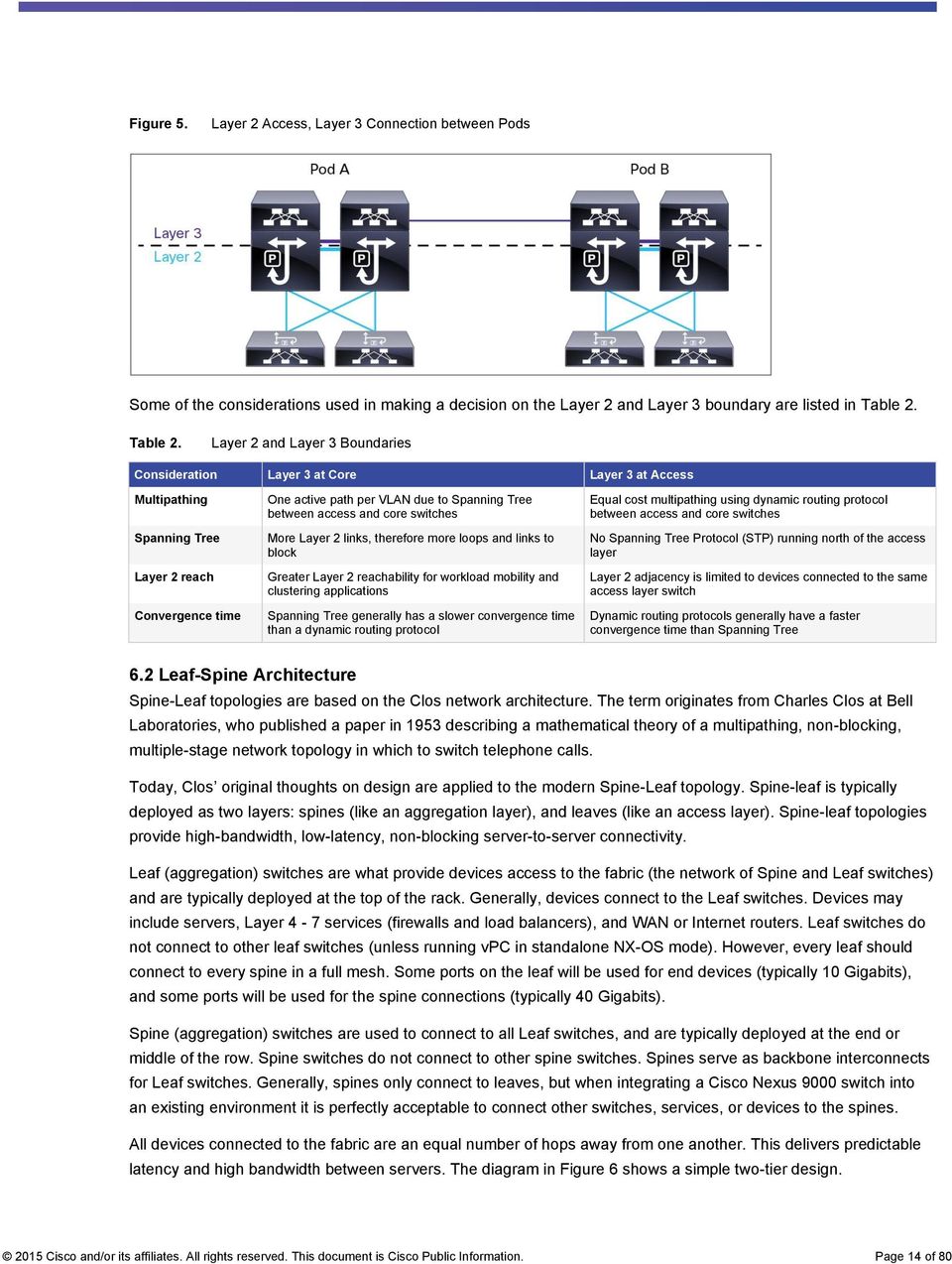
13 Layer Access Description This tier is the point at which the servers physically attach to the network. The server components consist of different types of servers: Blade servers with integral switches Blade servers with pass-through cabling Clustered servers Possibly mainframes The access-layer network infrastructure also consists of various modular switches and integral blade server switches. Switches provide both Layer 2 and Layer 3 topologies, fulfilling the various server broadcast domain and administrative requirements. In modern data centers, this layer is further divided into a virtual access layer using hypervisor-based networking, which is beyond the scope of this document. Figure 3. Traditional Three-Tier Design Figure 4. Traditional Two-Tier Medium Access-Aggregation Design Customers may also have the small collapsed design replicated to another rack or building, with a Layer 3 connection between the pods (Figure 5) Cisco and/or its affiliates. All rights reserved. This document is Cisco Public Information. Page 13 of 80

14 Figure 5. Layer 2 Access, Layer 3 Connection between Pods Some of the considerations used in making a decision on the Layer 2 and Layer 3 boundary are listed in Table 2. Table 2. Layer 2 and Layer 3 Boundaries Consideration Layer 3 at Core Layer 3 at Access Multipathing Spanning Tree Layer 2 reach Convergence time One active path per VLAN due to Spanning Tree between access and core switches More Layer 2 links, therefore more loops and links to block Greater Layer 2 reachability for workload mobility and clustering applications Spanning Tree generally has a slower convergence time than a dynamic routing protocol Equal cost multipathing using dynamic routing protocol between access and core switches No Spanning Tree Protocol (STP) running north of the access layer Layer 2 adjacency is limited to devices connected to the same access layer switch Dynamic routing protocols generally have a faster convergence time than Spanning Tree 6.2 Leaf-Spine Architecture Spine-Leaf topologies are based on the Clos network architecture. The term originates from Charles Clos at Bell Laboratories, who published a paper in 1953 describing a mathematical theory of a multipathing, non-blocking, multiple-stage network topology in which to switch telephone calls. Today, Clos original thoughts on design are applied to the modern Spine-Leaf topology. Spine-leaf is typically deployed as two layers: spines (like an aggregation layer), and leaves (like an access layer). Spine-leaf topologies provide high-bandwidth, low-latency, non-blocking server-to-server connectivity. Leaf (aggregation) switches are what provide devices access to the fabric (the network of Spine and Leaf switches) and are typically deployed at the top of the rack. Generally, devices connect to the Leaf switches. Devices may include servers, Layer 4-7 services (firewalls and load balancers), and WAN or Internet routers. Leaf switches do not connect to other leaf switches (unless running vpc in standalone NX-OS mode). However, every leaf should connect to every spine in a full mesh. Some ports on the leaf will be used for end devices (typically 10 Gigabits), and some ports will be used for the spine connections (typically 40 Gigabits). Spine (aggregation) switches are used to connect to all Leaf switches, and are typically deployed at the end or middle of the row. Spine switches do not connect to other spine switches. Spines serve as backbone interconnects for Leaf switches. Generally, spines only connect to leaves, but when integrating a Cisco Nexus 9000 switch into an existing environment it is perfectly acceptable to connect other switches, services, or devices to the spines. All devices connected to the fabric are an equal number of hops away from one another. This delivers predictable latency and high bandwidth between servers. The diagram in Figure 6 shows a simple two-tier design Cisco and/or its affiliates. All rights reserved. This document is Cisco Public Information. Page 14 of 80
15 Figure 6. Two-Tier Design and Connectivity Another way to think about the Spine-Leaf architecture is by thinking of the Spines as a central backbone, with all leaves branching off the spine like a star. Figure 7 depicts this logical representation, which uses identical components laid out in an alternate visual mapping. Figure 7. Logical Representation of a Two-Tier Design 6.3 Spanning Tree Support The Cisco Nexus 9000 supports two Spanning Tree modes: Rapid Per-VLAN Spanning Tree Plus (PVST+), which is the default mode, and Multiple Spanning Tree (MST). The Rapid PVST+ protocol is the IEEE 802.1w standard, Rapid Spanning Tree Protocol (RSTP), implemented on a per-vlan basis. Rapid PVST+ interoperates with the IEEE 802.1Q VLAN standard, which mandates a single STP instance for all VLANs, rather than per VLAN. Rapid PVST+ is enabled by default on the default VLAN (VLAN1) and on all newly created VLANs on the device. Rapid PVST+ interoperates with devices that run legacy IEEE 802.1D STP. RSTP is an improvement on the original STP standard, 802.1D, which allows faster convergence. MST maps multiple VLANs into a Spanning Tree instance, with each instance having a Spanning Tree topology independent of other instances. This architecture provides multiple forwarding paths for data traffic, enables load balancing, and reduces the number of STP instances required to support a large number of VLANs. MST improves the fault tolerance of the network because a failure in one instance does not affect other instances. MST provides rapid convergence through explicit handshaking because each MST instance uses the IEEE 802.1w standard. MST improves Spanning Tree operation and maintains backward compatibility with the original 802.1D Spanning Tree and Rapid PVST Cisco and/or its affiliates. All rights reserved. This document is Cisco Public Information. Page 15 of 80

16 6.4 Layer 2 versus Layer 3 Implications Data center traffic patterns are changing. Today, more traffic moves east-west from server to server through the access layer, as servers need to talk to each other and consume services within the data center. The oversubscribed hardware now isn t sufficient for the east-west 10 Gigabit-to-10 Gigabit communications. Additionally, east-west traffic is often forced up through the core or aggregation layer, taking a suboptimal path. Spanning Tree is another hindrance in the traditional three-tier data center design. Spanning Tree is required to block loops in flooding Ethernet networks so that frames are not forwarded endlessly. Blocking loops means blocking links, leaving only one active path (per VLAN). Blocked links severely impact available bandwidth and oversubscription. This can also force traffic to take a suboptimal path, as Spanning Tree may block a more desirable path (Figure 8). Figure 8. Suboptimal Path between Servers in Different Pods Due to Spanning Tree Blocked Links Addressing these issues could include: a. Upgrading hardware to support 40- or 100-Gigabit interfaces b. Bundling links into port channels to appear as one logical link to Spanning Tree c. Or, moving the Layer 2/Layer 3 boundary down to the access layer to limit the reach of Spanning Tree (Figure 9). Using a dynamic routing protocol between the two layers allows all links to be active, fast reconvergence, and equal cost multipathing (ECMP). Figure 9. Two-Tier Routed Access Layer Design 2015 Cisco and/or its affiliates. All rights reserved. This document is Cisco Public Information. Page 16 of 80

17 The tradeoff in moving Layer 3 routing to the access layer in a traditional Ethernet network is that it limits Layer 2 reachability. Applications like virtual-machine workload mobility and some clustering software require Layer 2 adjacency between source and destination servers. By routing at the access layer, only servers connected to the same access switch with the same VLANs trunked down would be Layer 2-adjacent. This drawback is addressed by using VXLAN, which will be discussed in subsequent section. 6.5 Virtual Port Channels (vpc) Over the past few years many customers have sought ways to move past the limitations of Spanning Tree. The first step on the path to Cisco Nexus-based modern data centers came in 2008 with the advent of Cisco virtual Port Channels (vpc). A vpc allows a device to connect to two different physical Cisco Nexus switches using a single logical port-channel interface (Figure 10). Prior to vpc, port channels generally had to terminate on a single physical switch. vpc gives the device activeactive forwarding paths. Because of the special peering relationship between the two Cisco Nexus switches, Spanning Tree does not see any loops, leaving all links active. To the connected device, the connection appears as a normal port-channel interface, requiring no special configuration. The industry standard term is called Multi- Chassis EtherChannel; the Cisco Nexus-specific implementation is called vpc. Figure 10. vpc Physical Versus Logical Topology vpc deployed on a Spanning Tree Ethernet network is a very powerful way to curb the number of blocked links, thereby increasing available bandwidth. vpc on the Cisco Nexus 9000 is a great solution for commercial customers, and those satisfied with current bandwidth, oversubscription, and Layer 2 reachability requirements. Two of the sample small-to-midsized traditional commercial topologies are depicted using vpcs in Figures 11 and 12. These designs leave the Layer 2/Layer 3 boundary at the aggregation to permit broader Layer 2 reachability, but all links are active as Spanning Tree does not see any loops to block Cisco and/or its affiliates. All rights reserved. This document is Cisco Public Information. Page 17 of 80

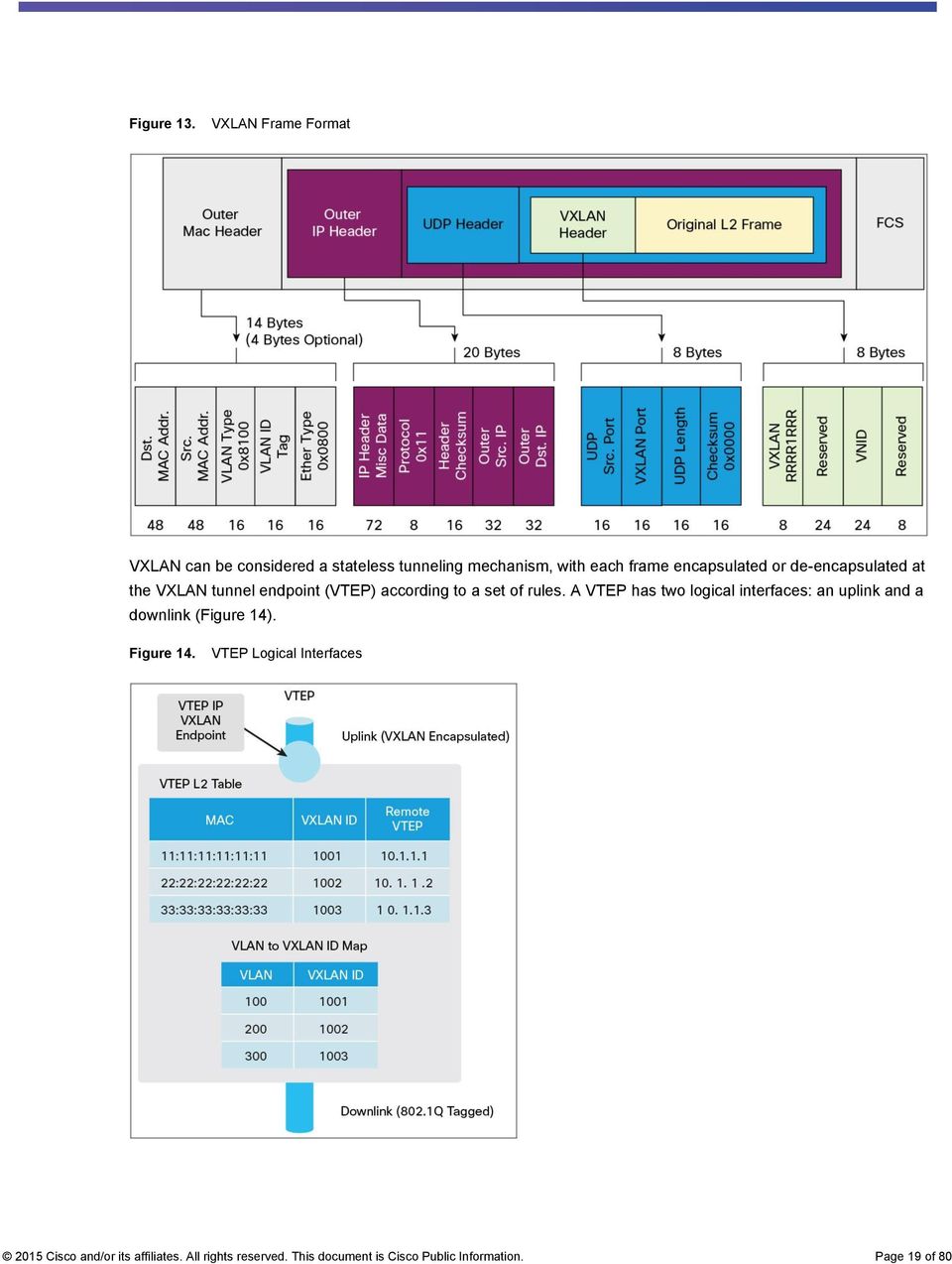
18 Figure 11. Traditional One-Tier Collapsed Design with vpc Figure 12. Traditional Two-Tier Design with vpc 6.6 Overlays Overlay technologies are useful in extending the Layer 2 boundaries of a network across a large data center as well as across different data centers. This section discusses some of the important overlay technologies, including: An overview of VXLAN VXLAN with BGP EVPN as the control plane VXLAN Data Center Interconnect with a BGP control plane For more information on overlays in general, read the Data Center Overlay Technologies white paper Virtual Extensible LAN (VXLAN) VXLAN is a Layer 2 overlay scheme over a Layer 3 network. It uses an IP/User Datagram Protocol (UDP) encapsulation so that the provider or core network does not need to be aware of any additional services that VXLAN is offering. A 24-bit VXLAN segment ID or VXLAN network identifier (VNI) is included in the encapsulation to provide up to 16 million VXLAN segments for traffic isolation and segmentation, in contrast to the 4000 segments achievable with VLANs. Each of these segments represents a unique Layer 2 broadcast domain and can be administered in such a way that it can uniquely identify a given tenant's address space or subnet (Figure 13) Cisco and/or its affiliates. All rights reserved. This document is Cisco Public Information. Page 18 of 80

19 Figure 13. VXLAN Frame Format VXLAN can be considered a stateless tunneling mechanism, with each frame encapsulated or de-encapsulated at the VXLAN tunnel endpoint (VTEP) according to a set of rules. A VTEP has two logical interfaces: an uplink and a downlink (Figure 14). Figure 14. VTEP Logical Interfaces 2015 Cisco and/or its affiliates. All rights reserved. This document is Cisco Public Information. Page 19 of 80
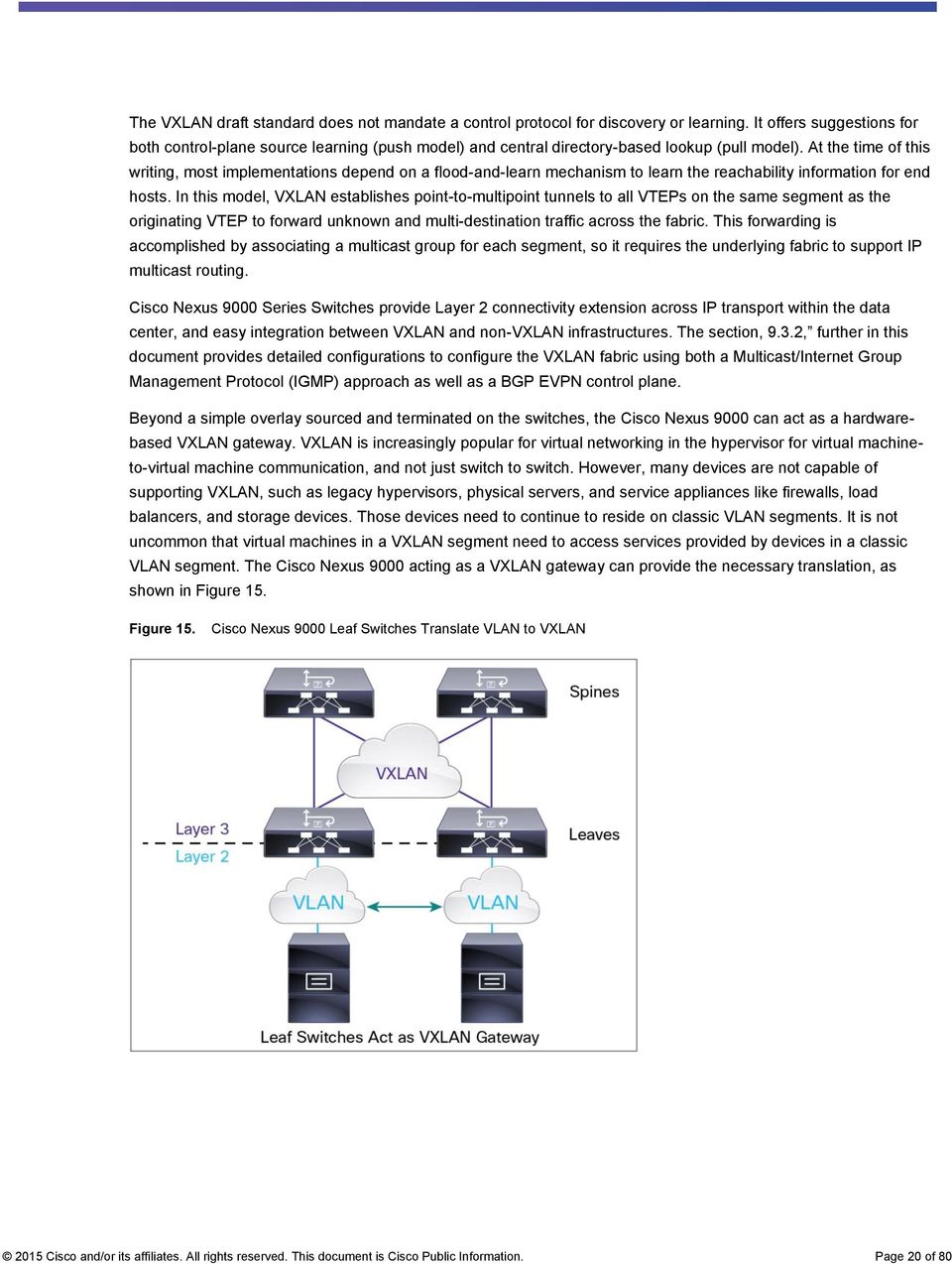
20 The VXLAN draft standard does not mandate a control protocol for discovery or learning. It offers suggestions for both control-plane source learning (push model) and central directory-based lookup (pull model). At the time of this writing, most implementations depend on a flood-and-learn mechanism to learn the reachability information for end hosts. In this model, VXLAN establishes point-to-multipoint tunnels to all VTEPs on the same segment as the originating VTEP to forward unknown and multi-destination traffic across the fabric. This forwarding is accomplished by associating a multicast group for each segment, so it requires the underlying fabric to support IP multicast routing. Cisco Nexus 9000 Series Switches provide Layer 2 connectivity extension across IP transport within the data center, and easy integration between VXLAN and non-vxlan infrastructures. The section, 9.3.2, further in this document provides detailed configurations to configure the VXLAN fabric using both a Multicast/Internet Group Management Protocol (IGMP) approach as well as a BGP EVPN control plane. Beyond a simple overlay sourced and terminated on the switches, the Cisco Nexus 9000 can act as a hardwarebased VXLAN gateway. VXLAN is increasingly popular for virtual networking in the hypervisor for virtual machineto-virtual machine communication, and not just switch to switch. However, many devices are not capable of supporting VXLAN, such as legacy hypervisors, physical servers, and service appliances like firewalls, load balancers, and storage devices. Those devices need to continue to reside on classic VLAN segments. It is not uncommon that virtual machines in a VXLAN segment need to access services provided by devices in a classic VLAN segment. The Cisco Nexus 9000 acting as a VXLAN gateway can provide the necessary translation, as shown in Figure 15. Figure 15. Cisco Nexus 9000 Leaf Switches Translate VLAN to VXLAN 2015 Cisco and/or its affiliates. All rights reserved. This document is Cisco Public Information. Page 20 of 80
21 6.6.2 BGP EVPN Control Plane for VXLAN The EVPN overlay draft specifies adaptations to the BGP Multiprotocol Label Switching (MPLS)-based EVPN solution to enable it to be applied as a network virtualization overlay with VXLAN encapsulation where: The Provider Edge (PE) node role described in BGP MPLS EVPN is equivalent to the VTEP or network virtualization edge (NVE) device VTEP endpoint information is distributed using BGP VTEPs use control-plane learning and distribution through BGP for remote MAC addresses instead of data plane learning Broadcast, unknown unicast, and multicast data traffic is sent using a shared multicast tree or with ingress replication BGP Route Reflector (RR) is used to reduce the full mesh of BGP sessions among VTEPs to a single BGP session between a VTEP and the RR Route filtering and constrained route distribution are used to help ensure that control plane traffic for a given overlay is only distributed to the VTEPs that are in that overlay instance The Host MAC mobility mechanism is in place to help ensure that all the VTEPs in the overlay instance know the specific VTEP associated with the MAC Virtual network identifiers are globally unique within the overlay The EVPN overlay solution for VXLAN can also be adapted to be applied as a network virtualization overlay with VXLAN for Layer 3 traffic segmentation. The adaptations for Layer 3 VXLAN are similar to Layer 2 VXLAN except: VTEPs use control plane learning and distribution using the BGP of IP addresses (instead of MAC addresses) The virtual routing and forwarding instance is mapped to the VNI The inner destination MAC address in the VXLAN header does not belong to the host, but to the receiving VTEP that does the routing of the VXLAN payload. This MAC address is distributed using a BGP attribute along with EVPN routes Note that since IP hosts have an associated MAC address, coexistence of both Layer 2 VXLAN and Layer 3 VXLAN overlays will be supported. Additionally, the Layer 2 VXLAN overlay will also be used to facilitate communication between non-ip based (Layer 2-only) hosts VXLAN Data Center Interconnect (DCI) with a BGP Control Plane The BGP EVPN control plane feature of the Cisco Nexus 9000 can be used to extend the reach of Layer 2 domains across data center pods, domains, and sites. Figure 16 shows two overlays in use: Overlay Transport Virtualization (OTV) on a Cisco ASR 1000 for data centerto-data center connectivity, and VXLAN within the data center. Both provide Layer 2 reachability and extension. OTV is also available on the Cisco Nexus 7000 Series Switch Cisco and/or its affiliates. All rights reserved. This document is Cisco Public Information. Page 21 of 80
22 Figure 16. Virtual Overlay Networks Provide Dynamic Reachability for Applications 7. Integration into Existing Networks In migrating your data center to the Cisco Nexus 9000 Series, you need to consider, not only compatibility with existing traditional servers and devices; you also need to consider the next-generation capabilities of Cisco Nexus 9000 switches, which include: VXLAN with added functionality of BGP control plane for scale Fabric Extender (FEX) vpc 10/40 Gbps connectivity Programmability With their exceptional performance and comprehensive feature set, Cisco Nexus 9000 Series Switches are versatile platforms that can be deployed in multiple scenarios, including: Layered access-aggregation-core designs Leaf-and-spine architecture Compact aggregation-layer solutions Cisco Nexus 9000 Series Switches deliver a comprehensive Cisco NX-OS Software data center switching feature set. Table 2 lists the current form factors. Visit for latest updates to Cisco Nexus 9000 portfolio Cisco and/or its affiliates. All rights reserved. This document is Cisco Public Information. Page 22 of 80
23 Table 3. Cisco Nexus 9000 Series Switches Device Model Line Cards and Expansion Modules Description Deployment Cisco Nexus 9500 Modular Switch N9K-X9636PQ 36-port 40-Gbps Enhanced Quad Small Form-Factor Pluggable (QSFP+) End of row (EoR), middle of row (MoR), aggregation layer, and core N9K-X9564TX 48-port 1/10GBASE-T plus 4-port 40-Gbps QSFP+ Cisco Nexus 9396PX Switch Cisco Nexus 93128TX Switch N9K-X9564PX 48-port 1/10-Gbps SFP+ plus 4-port 40-Gbps QSFP+ N9K-C9396PX Cisco Nexus 9300 platform with 48-port 1/10- Gbps SFP+ N9K-C93128TX Cisco Nexus 9300 platform with 96-port 1/10GBASE-T Top of rack (ToR), EoR, MoR, aggregation layer, and core ToR, EoR, MoR, aggregation layer, and core 7.1 Pod Design with vpc A vpc allows links physically connected to two different Cisco Nexus 9000 Series Switches to appear as a single PortChannel to a third device. A vpc can provide Layer 2 multipathing, which allows the creation of redundancy by increasing bandwidth, supporting multiple parallel paths between nodes, and load-balancing of traffic where alternative paths exist. The vpc design remains the same as described in the vpc design guide, with the exception that the Cisco Nexus 9000 Series does not support vpc active-active or two-layer vpc (evpc). Refer to the vpc design and best practices guide for more information: pdf. Figure 17 shows a next-generation data center with Cisco Nexus switches and vpc. There is a vpc between the Cisco Nexus 7000 Series Switches and the Cisco Nexus 5000 Series Switches, a dual-homed vpc between the Cisco Nexus 5000 Series Switches and the Cisco Nexus 2000 Series FEXs, and a dual-homed vpc between the servers and the Cisco Nexus 2000 Series FEXs. Figure 17. vpc Design Considerations with Cisco Nexus 7000 Series in the Core 2015 Cisco and/or its affiliates. All rights reserved. This document is Cisco Public Information. Page 23 of 80
24 In a vpc topology, all links between the aggregation and access layers are forwarding and are part of a vpc. Gigabit Ethernet connectivity makes use of the FEX concept outlined in subsequent section. Spanning Tree Protocol does not run between the Cisco Nexus 9000 Series Switches and the Cisco Nexus 2000 Series FEXs. Instead, proprietary technology keeps the topology switches and the fabric extenders free of loops. Adding vpc to the Cisco Nexus 9000 Series Switches in the access layer allows additional load distribution from the server to the fabric extenders to the Cisco Nexus 9000 Series Switches. An existing Cisco Nexus 7000 Series Switch can be replaced with a Cisco Nexus 9500 platform switch with one exception: Cisco Nexus 9000 Series Switches do not support vpc active-active or two-layer vpc (evpc) designs. The rest of the network topology and design does not change. Figure 18 shows the new topology. Figure 19 shows the peering that occurs between Cisco Nexus 9500 platforms. Figure 18. vpc Design with Cisco Nexus 9500 Platform in the Core Figure 19. Peering between Cisco Nexus 9500 Platforms 2015 Cisco and/or its affiliates. All rights reserved. This document is Cisco Public Information. Page 24 of 80
25 7.2 Fabric Extender Support To use existing hardware, increase access port density, and increase 1-Gigabit Ethernet (GE) port availability, Cisco Nexus 2000 Series Fabric Extenders (Figure 20) can be attached to the Cisco Nexus 9300 platform in a single-homed straight-through configuration. Up to 16 Fabric Extenders can be connected to a single Cisco Nexus 9300 Series Switch. Host uplinks that are connected to the fabric extenders can either be Active/Standby, or Active/Active, if configured in a vpc. The following Cisco Nexus 2000 Series Fabric Extenders are currently supported: N2224TP N2248TP N2248TP-E N2232TM N2232PP B22HP Figure 20. Cisco Nexus 2000 Series Fabric Extenders For the most up-to-date feature support, refer to the Cisco Nexus 9000 Software release notes. Fabric extender transceivers (FETs) also are supported to provide a cost-effective connectivity solution (FET-10 Gb) between Cisco Nexus 2000 Fabric Extenders and their parent Cisco Nexus 9300 switches. For more information about FET-10 Gb transceivers, review the Nexus 2000 Series Fabric Extenders data sheet. The supported Cisco Nexus 9000 to Nexus 2000 Fabric Extender topologies are shown in Figures 21 and 22. As with other Cisco Nexus platforms, think of Cisco Fabric Extender Technology like a logical remote line card of the parent Cisco Nexus 9000 switch. Each Cisco FEX connects to one parent switch. Servers should be dual-homed to two different fabric extenders. The server uplinks can be in an Active/Standby network interface card (NIC) team, or they can be in a vpc if the parent Cisco Nexus 9000 switches are set up in a vpc domain Cisco and/or its affiliates. All rights reserved. This document is Cisco Public Information. Page 25 of 80
26 Figure 21. Supported Cisco Nexus 9000 Series Switches Plus Fabric Extender Design with an Active/Standby Server Figure 22. Supported Cisco Nexus 9000 Series Switches Plus Fabric Extender Design with a Server vpc For detailed information, see the Cisco Nexus 2000 Series NX-OS Fabric Extender Configuration Guide for Cisco Nexus 9000 Series Switches, Release Cisco and/or its affiliates. All rights reserved. This document is Cisco Public Information. Page 26 of 80
27 7.3 Pod Design with VXLAN The Cisco Nexus 9500 platform uses VXLAN, a Layer 2 overlay scheme over a Layer 3 network. VXLAN can be implemented both on hypervisor-based virtual switches to allow scalable virtual-machine deployments and on physical switches to bridge VXLAN segments back to VLAN segments. VXLAN extends the Layer 2 segment-id field to 24 bits, potentially allowing up to 16 million unique Layer 2 segments in contrast to the 4000 segments achievable with VLANs over the same network. Each of these segments represents a unique Layer 2 broadcast domain and can be administered in such a way that it uniquely identifies a given tenant s address space or subnet. Note that the core and access-layer switches must be Cisco Nexus 9000 Series Switches to implement VXLAN. In Figure 23, the Cisco Nexus 9500 platform at the core provides Layer 2 and 3 connectivity. The Cisco Nexus 9500 and 9300 platforms connect over 40-Gbps links and use VXLAN between them. The existing FEX switches are single-homed to each Cisco Nexus 9300 platform switch using Link Aggregation Control Protocol (LACP) port channels. The end servers are vpc dual-homed to two Cisco Nexus 2000 Series FEXs. Figure 23. VXLAN Design with Cisco Nexus 9000 Series 2015 Cisco and/or its affiliates. All rights reserved. This document is Cisco Public Information. Page 27 of 80
28 7.4 Traditional Three-Tier Architecture with 1/10 Gigabit Ethernet Server Access In a typical data center design, the aggregation layer requires a high level of flexibility, scalability, and feature integration, because aggregation devices constitute the Layer 3 and 2 boundaries, which require both routing and switching functions. Access-layer connectivity defines the total forwarding capability, port density, and Layer 2 domain flexibility. Figure 24 depicts Cisco Nexus 7000 Series Switches at both the core and the aggregation layer, a design in which a single pair of data center core switches typically interconnect multiple aggregation modules using 10 Gigabit Ethernet Layer 3 interfaces. Figure 24. Classic Three-Tier Design Option 1: Cisco Nexus 9500 Platform at the Core and the Aggregation Layer In this design, the Cisco Nexus 9500 platform (Figure 24) replaces the Cisco Nexus 7000 Series at both the core and the aggregation layer. The Cisco Nexus slot switch is a next-generation, high-density modular switch with the following features: Modern operating system High density (40/100-Gbps aggregation) Low power consumption The Cisco Nexus 9500 platform uses a unique combination of a Broadcom Trident-2 application-specific integrated circuit (ASIC) and an Insieme ASIC to provide faster deployment times, enhanced packet buffer capacity, and a comprehensive feature set. The Cisco Nexus 9508 chassis is a 13-rack-unit (13RU) 8-slot modular chassis with front-to-back airflow and is well suited for large data center deployments. The Cisco Nexus 9500 platform supports up to 3456 x 10 Gigabit Ethernet ports and 864 x 40 Gigabit Ethernet ports, and can achieve 30 Tbps of fabric throughput per rack system Cisco and/or its affiliates. All rights reserved. This document is Cisco Public Information. Page 28 of 80
29 The common equipment for the Cisco Nexus 9508 includes: Two half-slot supervisor engines Four power supplies Three switch fabrics (upgradable to six) Three hot-swappable fan trays The fan trays and the fabric modules are accessed through the rear of the chassis. Chassis have eight horizontal slots dedicated to the I/O modules. Cisco Nexus 9508 Switches can be fully populated with 10, 40, and (future) 100 Gigabit Ethernet modules with no bandwidth or slot restrictions. Online insertion and removal of all line cards is supported in all eight I/O slots. Option 2: Cisco Nexus 9500 Platform at the Core and Cisco Nexus 9300 Platform at the Aggregation Layer Depending on growth in the data center, a combination of the Cisco Nexus 9500 platform at the core and the aggregation layer (Figure 25) and the Cisco Nexus 9500 platform at the core with the Cisco Nexus 9300 platform at the aggregation layer can be used to achieve better scalability (Figure 26). Figure 25. Cisco Nexus 9500 Platform-Based Design The Cisco Nexus 9300 platform is currently available in two fixed configurations: Cisco Nexus 9396PX - 2RU with 48 ports at 10 Gbps and 12 ports at 40 Gbps Cisco Nexus 93128TX - 3RU with 96 ports at 1/10 Gbps and 8 ports at 40 Gbps In both options, the existing Cisco Nexus 7000 Series Switches at the core and the aggregation layer can be swapped for Cisco Nexus 9508 Switches while retaining the existing wiring connection Cisco and/or its affiliates. All rights reserved. This document is Cisco Public Information. Page 29 of 80
30 Currently, Fibre Channel over Ethernet (FCoE) support is not available for this design. Figure 26. Cisco Nexus 9500 and 9300 Platform-Based Design 7.5 Traditional Cisco Unified Computing System and Blade Server Access In a multilayer data center design, you can replace core Cisco Nexus 7000 Series Switches with the Cisco Nexus 9500 platform, or replace the core with the Cisco Nexus 9500 platform and the access layer with the Cisco Nexus 9300 platform. You can also connect an existing Cisco Unified Computing System (Cisco UCS ) and blade server access layer to Insieme hardware (Figures 27 and 28). Figure 27. Classic Design Using Cisco Nexus 7000 and 5000 Series and Fabric Extenders 2015 Cisco and/or its affiliates. All rights reserved. This document is Cisco Public Information. Page 30 of 80
31 Figure 28. Classic Design Using Cisco Nexus 9500 and 9300 Platforms and Fabric Extenders 8. Integrating Layer 4 - Layer 7 Services Cisco Nexus 9000 Series Switches can be integrated into any of the vendor service appliances. Section 9 outlines topologies where the Cisco Nexus 9000 is connected to: A Cisco ASA firewall in routed mode with ASA acting as a default gateway for the hosts which connect to its screened subnets F5 Networks Load Balancer in one-arm mode Firewalls can be connected in routed or transparent mode. They need to meet the following criteria for a typical data center scenario: An outside user visits the web server An inside user visits the inside host on another network An inside user accesses an outside web server For details on connecting Cisco ASA firewalls visit: 9. Cisco Nexus 9000 Data Center Topology Design and Configuration This section will walk through a sample Cisco Nexus 9000 design using real equipment, including Cisco Nexus 9508 and Nexus 9396 Switches, both VMware ESXi servers and standalone bare metal servers, and a Cisco ASA firewall. This topology has been tested in a Cisco lab to validate and demonstrate the Cisco Nexus 9000 solution. The intent of this section is to give a sample network design and configuration, including the features discussed earlier in this white paper. Always refer to the Cisco configuration guides for the latest information Cisco and/or its affiliates. All rights reserved. This document is Cisco Public Information. Page 31 of 80
32 The terminology and switch names used in this section reference Leaf and Spine, but the similar configuration could be used and applied to an access-aggregation design. 9.1 Hardware and Software Specifications Two Cisco Nexus N9K-C9508 Switches (8-slot) with the following components in each switch: One N9K-X9636PQ (36p QSFP 40 Gigabit) Ethernet module Six N9K-C9508-FM fabric modules Two N9K-SUP-A supervisor modules Two N9K-SC-A system controllers Two Cisco Nexus 9396PX Switches (48p SFP+ 1/10 Gigabit) with the following expansion module in each switch: One N9K-M12PQ (12p QSFP 40 Gigabit) Ethernet module Two Cisco UCS C-Series servers (could be replaced with Cisco UCS Express servers for smaller deployments). For more information on server options, visit Cisco Unified Computing System Express. One Cisco ASA 5510 firewall appliance One F5 Networks BIG-IP load balancer appliance Cisco Nexus 9000 switches used in this design run Cisco NX-OS Software Release 6.1(2)I2(3). The VMware ESXi servers used run ESXi build The Cisco ASA runs version 8.4(7). The F5 runs Build Hotfix HF Leaf-Spine-Based Data Center Topology The basic network setup is displayed in Figure 29. It includes: Application - Cisco.app1.com: Ex - External IP The External Web Server for this application run in the inside zone in the Load balancer with IP of and Application Server with IP of The web server nodes run at the following IP addresses: , The application server nodes run at the following IP addresses: and Cisco and/or its affiliates. All rights reserved. This document is Cisco Public Information. Page 32 of 80
33 Figure 29. Layer 4 - Layer 7 Service Topology for a Leaf-Spine Architecture In this simple topology, web server VMs are connected to VLAN 50 and application server VMs are connected to VLAN 60 with the IP addressing scheme, x and x, respectively. The server VM network is termed as inside. Server VMs are connected to Leaf switches in vpc mode. Leaf switch-port interfaces are connected to firewall and load-balancing devices. Leaf routed port interfaces are connected to each of the spine interfaces in the data center. A VTEP is created with loopback interfaces in each of the Leaf. The default gateways for the server VMs live on the Cisco ASA 5510 firewall appliance. In the above topology the IP addresses are and for the VLAN 50 and VLAN 60 inside network. The firewall inside interface is divided into sub-interfaces for each type of traffic, with the correct VLAN associated to the subinterface. Additionally, there is an access list to dictate which zones and devices can talk to each other. The F5 load balancer is connected to in one-arm mode where the load-balancer network is connected in same network as that of inside network. Figure 30 shows the Leaf-Spine architecture VXLAN topology Cisco and/or its affiliates. All rights reserved. This document is Cisco Public Information. Page 33 of 80
34 Figure 30. Leaf-Spine Architecture with a VXLAN Topology for Layer 4-7 Services Figures 31 and Figure 32 illustrate the logical models of north-south and east-west traffic flows. Legend 2015 Cisco and/or its affiliates. All rights reserved. This document is Cisco Public Information. Page 34 of 80
35 In Figure 31, an outside user visits the web server. Figure 31. North-South Traffic Flow 1. A user on the outside network requests ( ) a web page using the global destination address of , whose network is on the outside interface subnet of the firewall. 2. The firewall receives the packet and because it is a new session, the security appliance verifies that the packet is allowed according to the terms of the security policy (access lists, filters, AAA). The firewall translates the destination address ( ) to the VIP address ( ) of web server present in the load balancer. The firewall then adds a session entry to the fast path and forwards through to the web server subinterface network. 3. The packet comes to the load-balancer interface that services the packet based on service-pool conditions. The load balancer does a Source Network Address Translation (NAT) with the IP address of the load-balancer VIP address, , and the destination NAT of the respective service node IP address ( ) based on service pool conditions. The load balancer then forwards the packet through the web server interface with a session entry created in the load balancer. 4. The node ( ) responds back to the request from the load balancer. 5. The load balancer does a reverse NAT with the client IP address ( ) for the destination address from the established session Cisco and/or its affiliates. All rights reserved. This document is Cisco Public Information. Page 35 of 80
36 6. As the packet reaches the firewall, the packet bypasses the many lookups associated with a new connection since the connection has already been previously established. The firewall performs the reverse NAT by translating the Source server IP address ( ) with the global IP address ( ), which is on the outside network of the firewall. The firewall then forwards the packet to the outside client ( ). In Figure 32, a web server user visits the app server. Figure 32. East-West Traffic Flow 1. A user on the web server network ( ) of VLAN 50 does a request for the application server with the destination address of in VLAN 60 which is VIP of the Appserver. As the destination address is of another subnet, the packet reaches the gateway of the VLAN 50 network, which is on the web server subinterface of the firewall (that is, ). 2. The firewall receives the packet and because it is a new session, the security appliance verifies that the packet is allowed according to the terms of the security policy (access lists, filters, AAA). The firewall then records that a session is established and forwards the packet out of app server sub-interface of VLAN 60 as the destination IP is on VLAN 60 sub-interface as per the NAT configuration. 3. As the packet comes to the load balancer app server VIP, the service pool associated with that interface services the packet based on service-pool conditions. The load balancer does a source NAT with the IP address of the VIP and destination NAT of the app server service-pool with node IP address The load balancer then forwards the packet with a session entry created in the load balancer. 4. The node ( ) responds back to the request from the load balancer Cisco and/or its affiliates. All rights reserved. This document is Cisco Public Information. Page 36 of 80
37 5. The load balancer does a reverse NAT with the source IP with VIP and the destination address with the requester IP from the already established session. 6. As the packet is destined to another subnet the packet reaches the firewall, the packet bypasses the many lookups associated with a new connection since the connection has already been established. As the destination IP is on the web server network, the packet is placed in the web server sub-interface and the firewall forwards the packet to the inside user. In Figure 33, a web server user accesses an outside internet server. The same flow is applicable for app server user access an outside internet server. Figure 33. Traffic to an Outside Internet 1. The user on the inside network requests a web page from ( ). 2. The firewall receives the packet since its webserver sub-interface is the default gateway for webserver hosts. Because it is a new session, the firewall verifies that the packet is allowed according to the terms of the security policy (access lists, filters, AAA). The firewall translates the local source address ( ) to the outside global address, , which is the outside interface address. The firewall records that a session is established and forwards the packet from the outside interface. 3. When responds to the request, the packet goes through the firewall, and because the session is already established, the packet bypasses the many lookups associated with a new connection. The firewall appliance performs NAT by translating the global destination address ( ) to the local user address, for which there is already an existing connection established. 4. The packet is sent back to the web server user from the web server network of the firewall, and the firewall forwards the packet to the web server user Cisco and/or its affiliates. All rights reserved. This document is Cisco Public Information. Page 37 of 80
38 9.3 Traditional Data Center Topology In the simple topology outlined in Figure 34, web server VMs are connected to VLAN 50 and application server VMs in VLAN 60 with the IP addressing scheme, x and x, respectively. Server VMs are connected to access switches in vpc mode. Connections between access and aggregation switches are through vpc. Figure 34. Layer 4-7 Service Topology for Traditional Three Tier Data Center Architecture Layer 4-7 service provisioning happens in layer (Figure 34). Aggregation device switch ports are connected with load-balancer and firewall devices, and their routed ports are connected to Core devices. VTEP is created with loopback interfaces in each of the aggregate devices for VXLAN communication. The default gateways for the server VMs live on the Cisco ASA 5510 firewall appliance. In the above topology, IP addresses are and for the VLAN 50 and VLAN 60 inside network. The firewall inside interfaces are divided into sub-interfaces for each type of traffic, with the correct VLAN associated to the subinterface. Additionally, there is an access list to dictate which zones and devices can talk to each other. The logical model of North-South and East-West Traffic Flows in a traditional, three- tier architecture are similar to those in the Leaf-Spine architecture Cisco and/or its affiliates. All rights reserved. This document is Cisco Public Information. Page 38 of 80
39 Figure 35. Traditional Data Center Architecture with a VXLAN Topology for Layer 4-7 Services 10. Managing the Fabric Adding Switches and Power-On Auto Provisioning Power-On Auto Provisioning (POAP) automates the processes of installing and upgrading software images and installing configuration files on Cisco Nexus switches that are being deployed in the network for the first time. When a Cisco Nexus switch with the POAP feature boots and does not find the startup configuration, the switch enters POAP mode, locates a Domain Host Configuration Protocol (DHCP) server, and boots itself with its interface IP address, gateway, and Domain Name System (DNS) server IP address. The switch also obtains the IP address of a Trivial FTP (TFTP) server or the URL of an HTTP server and downloads a configuration script that can enable the switch to download and install the appropriate software image and configuration file. POAP can enable touchless boot-up and configuration of new Cisco Nexus 9000 Series Switches, reducing the need for time-consuming, error-prone, manual tasks to scale network capacity (Figure 36) Cisco and/or its affiliates. All rights reserved. This document is Cisco Public Information. Page 39 of 80
40 Figure 36. Automated Provisioning of Cisco Nexus 9000 Series with POAP Power-On Auto Provisioning will be enabled, on condition that: a. No startup configuration exists b. The DHCP server present in the network responds to the DHCP discover message of the device booted up To use the PoAP feature on the Cisco Nexus device, follow these steps: 1. Configure the DHCP server to assign an IP address for the Cisco Nexus 9000 switch. Figure 37 shows a sample Ubuntu DHCP configuration. Figure 37. Sample Ubuntu DHCP Server Configuration 2015 Cisco and/or its affiliates. All rights reserved. This document is Cisco Public Information. Page 40 of 80
41 2. Poap.py boot file name specified in the DHCP configuration is present in 3. Configure the TFTP server and place the poap.py file in the default TFTP server directory. 4. Change the image file name according to need. Then configure the file, IP address, and credentials in the poap.py script based on the setup and needs. 5. Place the image file, along with.md5 for the image, in the TFTP server. The md5 can be generated by command md5sum <Image_file> <image_file>.md5 on any Linux server. 6. Boot the device. Figure 38 shows a sample output during the Cisco Nexus switch boot-up process using POAP. Figure 38. Sample Output Software Upgrades To upgrade the access layer without a disruption to hosts that are dual-homed through vpc, follow these steps: Upgrade the first vpc switch (vpc primary switch). During this upgrade, the switch will be reloaded. When the switch is reloaded, the servers or the downstream switch detect loss of connectivity to the first switch and will start forwarding traffic to the second (vpc secondary) switch. Verify that the upgrade of the switch has completed successfully. At the completion of the upgrade, the switch will restore vpc peering and all the vpc links. Upgrade the second switch. Repeating the same process on the second switch will cause the second switch to reload during the upgrade process. During this reload, the first (upgraded) switch will forward all the traffic to and from the servers. Verify that the upgrade of the second switch has completed successfully. At the end of this upgrade, complete vpc peering is established and the entire access layer will have been upgraded Cisco and/or its affiliates. All rights reserved. This document is Cisco Public Information. Page 41 of 80
42 Guest Shell Container Starting with Cisco NX-OS Software Release 6.1(2)I3(1), the Cisco Nexus 9000 Series devices support access to a decoupled execution space called the guest shell. Within the guest shell, the network admin is given Bash access and may use familiar Linux commands to manage the switch. The guest shell environment has: Access to the network, including all VRFs known to Cisco NX-OS Software Read and write access to host Cisco Nexus 9000 bootflash The ability to execute Cisco Nexus 9000 command-line interface (CLI) Access to Cisco onepk APIs The ability to develop, install, and run python scripts The ability to install and run 64-bit Linux applications A root file system that is persistent across system reloads or switchovers Decoupling the execution space from the native host system allows customization of the Linux environment to suit the needs of the applications without impacting the integrity of the host system. Applications, libraries, or scripts that are installed or modified within the guest shell file system are separate from that of the host. By default, the guest shell is freshly installed when the standby supervisor transitions to an active role using the guest shell package available on that supervisor. With a dual-supervisors system, the network admin can utilize the guest shell synchronization command, which synchronizes the guest shell contents from the active supervisor to the standby supervisor. For more details, refer to the Cisco Nexus 9000 Series NX-OS Programmability Guide, Release 6.x: x/programmability/guide/b_cisco_nexus_9000_series_nx-os_programmability_guide.pdf. 11. Virtualization and Cloud Orchestration 11.1 VM Tracker Cisco Nexus Series Switches provide a VM Tracker feature that allows the switch to communicate with up to four VMware vcenter connections. VM Tracker dynamically configures VLANs on the interfaces to the servers when a VM is created, deleted, or moved. Currently, the VM Tracker feature is supported for ESX 5.1 and ESX 5.5 versions of VMware vcenter. It supports up to 64 VMs per host and 350 hosts across all vcenters. It can support up to 600 VLANs in MST mode and up to 507 VLANs in PVRST mode. The current version of VM Tracker relies on Cisco Discovery Protocol to associate hosts to switch ports. Following are some operations that are possible with VM Tracker: Enable VMTracker - By default, VMTracker is enabled for all interfaces of a switch. You can optionally disable and enable it on specific interfaces by using the [no] vmtracker enable command. Create a connection to VMware vcenter. Configure dynamic VLAN connection - By default, VM Tracker tracks all asynchronous events from VMware vcenter and updates the switchport configuration immediately. Optionally, you can also configure a synchronizing mechanism that synchronizes all host, VM, and port-group information automatically with VMware vcenter at a specified interval Cisco and/or its affiliates. All rights reserved. This document is Cisco Public Information. Page 42 of 80
43 Enable dynamic VLAN creation - Dynamic creation and deletion of VLANs globally is enabled by default. When dynamic VLAN creation is enabled, if a VM is moved from one host to another and the VLAN required for this VM does not exist on the switch, the required VLAN is automatically created on the switch. You can also disable this capability. However, if you disable dynamic VLAN creation, you must manually create all the required VLANs. VPC compatibility checking - In a VPC the vcenter connections need to be identical across both the peers. VM Tracker provides a command to check VPC compatibility across two peers. When VM Tracker is used, the user cannot perform any Layer 2 or Layer 3 configuration that is related to switchports and VLANs, except to update the native VLAN. VM Tracker Configuration Leaf1(config)# feature vmtracker Leaf1(config)# vmtracker connection vcenter_conn1 Leaf1(config)# remote ip address port 80 vrf management Leaf1(config)# username root password vmware Leaf1(config)# connect Leaf1(config)# set interval sync-full-info 120 Leaf2(config)# feature vmtracker Leaf2(config)# vmtracker connection vcenter_conn1 Leaf2(config)# remote ip address port 80 vrf management Leaf2(config)# username root password vmware Leaf2(config)# connect Leaf2(config)# set interval sync-full-info 120 Table 4 outlines the relevant show commands for VM Tracker configuration. Table 4. Show Commands show vmtracker status show vmtracker info detail Provides the connection status of vcenter Provides information on VM properties that are associated to the local interface For more information, refer to the Cisco Nexus 9000 Series NX-OS Virtual Machine Tracker Configuration Guide, Release 6.x: x/vm_tracker/configuration/guide/b_cisco_nexus_9000_series_nx- OS_Virtual_Machine_Tracker_Configuration_Guide/b_Cisco_Nexus_9000_Series_Virtual_Machine_Tracker_Confi guration_guide_chapter_011.html OpenStack The Cisco Nexus 9000 Series includes support for the Cisco Nexus plug-in for OpenStack Networking (Neutron). The plug-in allows customers to easily build their infrastructure-as-a-service (IaaS) networks using the industry's leading networking platform, delivering performance, scalability, and stability with familiar manageability and control. The plug-in helps bring operation simplicity to cloud network deployments. OpenStack s capabilities for building on-demand, self-service, multitenant computing infrastructure are well known. However, implementing OpenStack's VLAN networking model across virtual and physical infrastructures can be difficult Cisco and/or its affiliates. All rights reserved. This document is Cisco Public Information. Page 43 of 80
44 OpenStack Networking provides an extensible architecture that supports plug-ins for configuring networks directly. However, each network plug-in enables configuration of only that plug-in s target technology. When OpenStack clusters are run across multiple hosts with VLANs, a typical plug-in configures either the virtual network or the physical network, but not both. The Cisco Nexus plug-in solves this problem by enabling the use of multiple plug-ins simultaneously. A typical deployment runs the Cisco Nexus plug-in in addition to the standard Open vswitch (OVS) plug-in. The Cisco Nexus plug-in accepts OpenStack Networking API calls and directly configures Cisco Nexus switches as well as OVS running on the hypervisor. Not only will the Cisco Nexus plug-in configure VLANs on both the physical and virtual network, but it also intelligently allocates VLAN IDs, de-provisioning them when they are no longer needed and reassigning them to new tenants whenever possible. VLANs are configured so that virtual machines running on different virtualization (computing) hosts that belong to the same tenant network transparently communicate through the physical network. Moreover, connectivity from the computing hosts to the physical network is trunked to allow traffic only from the VLANs configured on the host by the virtual switch (Figure 39). Table 5 outlines the various challenges network admins encounter and how OpenStack resolves them. Figure 39. Cisco OpenStack Neutron Plug-in with Support for Cisco Nexus 9000 Series Switches Table 5. Cisco Nexus Plug-in for OpenStack Networking Requirement Challenge Cisco Plug-in Resolution Extension of tenant VLANs across virtualization hosts Efficient use of limited VLAN IDs VLANs must be configured on both physical and virtual networks. OpenStack supports only a single plug-in at a time. The operator must choose which parts of the network to manually configure Static provisioning of VLAN IDs on every switch rapidly consumes all available VLAN IDs, limiting scalability and making the network more vulnerable to broadcast storms Accepts OpenStack API calls and configures both physical and virtual switches Efficiently uses limited VLAN IDs by provisioning and de-provisioning VLANs across switches as tenant networks are created and destroyed 2015 Cisco and/or its affiliates. All rights reserved. This document is Cisco Public Information. Page 44 of 80
45 Requirement Challenge Cisco Plug-in Resolution Easy configuration of tenant VLANs in top-of rack (ToR) switch Intelligent assignment of VLAN IDs For large, multirack deployments, aggregation switch VLAN configuration Operators need to statically provision all available VLANs on all physical switches, a manual and errorprone process Switch ports connected to virtualization hosts are configured to handle all VLANs, reaching hardware limits very soon When computing hosts run in several racks, ToR switches need to be fully meshed, or aggregation switches need to be manually trunked Dynamically provisions tenant-network-specific VLANs on switch ports connected to virtualization hosts through the Cisco Nexus plug-in driver Configures switch ports connected to virtualization hosts only for the VLANs that correspond to the networks configured on the host, enabling accurate port-to-vlan associations Supports Cisco Nexus 2000 Series Fabric Extenders to enable large, multirack deployments and eliminate the need for aggregation-switch VLAN configuration 11.3 Cisco UCS Director Cisco UCS Director is an extremely powerful, centralized management and orchestration tool that can make the day-to-day operations of a small commercial IT staff palatable. By using the automation UCS Director affords, a small IT staff can speed up delivery of new services and applications. Cisco UCS Director abstracts hardware and software into programmable tasks, and takes full advantage of a workflow designer to allow an administrator to simply drag and drop tasks into a workflow to deliver the necessary resources. A sample UCS Director workflow is depicted in Figure 40. Figure 40. Sample Cisco UCS Director Workflow Cisco UCS Director gives you the power to automate many common tasks one would normally perform manually from the UCS Manager GUI. Many of the tasks that can be automated with UCS Director are listed in Figure Cisco and/or its affiliates. All rights reserved. This document is Cisco Public Information. Page 45 of 80
46 Figure 41. Common UCS Director Automation Tasks For more information, read the Cisco UCS Director solution overview Cisco Prime Data Center Network Manager Cisco Prime Data Center Network Manager (DCNM) is a very powerful tool for centralized data center monitoring, managing, and automation of Cisco data center compute, network, and storage infrastructure. A basic version of DCNM is available for free, with more advanced features requiring a license. DCNM allows centralized management of all Cisco Nexus switches, and Cisco UCS and MDS devices. DCNM-LAN version 6.x was used in our sample design for management of the infrastructure. One powerful feature of DCNM is the ability to have a visual, auto-updating topology diagram. Figure 42 shows the sample lab topology. Figure 42. DCNM Topology Diagram 2015 Cisco and/or its affiliates. All rights reserved. This document is Cisco Public Information. Page 46 of 80
47 DCNM can also be used to manage advanced features like vpcs, Cisco NX-OS image management, and inventory control. A sample visual inventory is pictured from one of the spine switches (Figure 43). Figure 43. DCNM Switch Inventory 11.5 Cisco Prime Services Catalog As organizations continue to expand automation, self-service portals are a very important component, used to provide a storefront or a marketplace view to consumers to consume infrastructure and application services. The Cisco Prime Services Catalog provides the following key features: A single pane of glass for provisioning, configuration, and management of IaaS, PaaS, and other IT services (Figure 44) Single sign-on (SSO) for IaaS, PaaS, and other IT services; there is no need to log on to multiple systems IT administrators can easily create service catalogs in a graphical way to join application elements with business policies and governance Integration with various infrastructures and various IT sub-systems through APIs to promote information exchange and provisioning of infrastructure and applications. Examples include OpenStack, Cisco UCS Director, Red Hat Openshift PaaS, vcenter, and more Creations of storefronts so that application developers and IT project managers can browse and request available application stacks through an intuitive user interface 2015 Cisco and/or its affiliates. All rights reserved. This document is Cisco Public Information. Page 47 of 80
48 Figure 44. Example of Cisco Prime Services Catalog Integration with PaaS and IaaS Platforms 12. Automation and Programmability 12.1 Support for Traditional Network Capabilities While many new and important features have been discussed, it is important to highlight the additional features support on the Cisco Nexus 9000 Series Switches, such as quality of service (QoS), multicast, and Simple Network Management Protocol (SNMP) and supported MIBs. Quality of Service New applications and evolving protocols are changing QoS demands in modern data centers. High-frequency trading floor applications are very sensitive to latency, while high-performance computing is typically characterized by bursty, many-to-one east-west traffic flows. Applications, such as storage, voice, and video, also require special and different treatment in any data center. Like the other members of the Cisco Nexus family, the Cisco Nexus 9000 Series Switches support QoS configuration through Cisco Modular QoS CLI (MQC). Configuration involves identifying traffic using class maps based on things such as protocol or packet header markings; defining how to treat different classes through policy maps by possibly marking packets, queuing, or scheduling; and then applying policy maps to either interfaces or the entire system using the service policy command. QoS is enabled by default and does not require a license. Unlike Cisco IOS Software, Cisco NX-OS on the Cisco Nexus 9000 switch uses three different types of policy maps depending on the QoS feature you are trying to implement. The three types of Cisco NX-OS QoS and their primary usages include: Type QoS - for classification, marking, and policing Type queuing - for buffering, queuing, and scheduling Type network QoS - for systemwide settings, congestion control, and pause behavior Type network-qos policy maps are applied only systemwide, whereas type QoS and type queuing can each be applied simultaneously on a single interface, one each ingress and egress for a total of four QoS polices per interface, if required Cisco and/or its affiliates. All rights reserved. This document is Cisco Public Information. Page 48 of 80
49 Multicast The Cisco Nexus 9300 platform provides high-performance, line rate Layer 2 and Layer 3 multicast throughput with low latency at scale at up to 8000 multicast routes with multicast routing enabled. The Cisco Nexus 9300 platform optimizes multicast lookup and replication by performing IP-based lookup for Layer 2 and Layer 3 multicast to avoid common aliasing problems in multicast IP-to-MAC encoding. The Cisco Nexus 9300 platform supports IGMP versions 1, 2, and 3, Protocol-Independent Multicast (PIM) sparse mode, anycast rendezvous point, and MSDP. SNMP and Supported MIBs SNMP provides a standard framework and language to manage devices on the network, including the Cisco Nexus 9000 Series Switches. The SNMP manager controls and monitors the activities of network devices using SNMP. The SNMP agent lives in the managed device and reports the data to the managing system. The agent on the Cisco Nexus 9000 Series Switches must be configured to talk to the manager. MIBs are a collection of managed objects by the SNMP agent. Cisco Nexus 9000 Series Switches support SNMP v1, v2c, and v3. The switches can also support SNMP over IPv6. SNMP generates notifications about Cisco Nexus 9000 Series Switches to send to the manager, for example, notifying the manager when a neighboring router is lost. A trap notification is sent from the agent on the Cisco Nexus 9000 switch to the manager, who does not acknowledge the message. A notification to inform is acknowledged by the manager. Table 6 provides the SNMP traps enabled by default. On a Cisco Nexus 9000 switch, Cisco NX-OS supports stateless restarts and is also aware of virtual routing and forwarding (VRF). Using SNMP does not require a license. For a list of supported MIBs on the Cisco Nexus 9000 Series Switches, see this list. For configuration help, see the section Configuring SNMP in the Cisco Nexus 9000 Series NX-OS System Management Configuration Guide, Release 6.0. Table 6. Trap Type generic generic entity entity entity entity entity entity entity entity link link link link link link SNMP Traps Enabled by Default on Cisco Nexus 9000 Series Switches Description : coldstart : warmstart : entity_mib_change : entity_module_status_change : entity_power_status_change : entity_module_inserted : entity_ module_removed : entity_unrecognised_module : entity_fan_status_change : entity_power_out_change : linkdown : linkup : extended-linkdown : extended-linkup : cielinkdown : cielinkup 2015 Cisco and/or its affiliates. All rights reserved. This document is Cisco Public Information. Page 49 of 80
50 Trap Type link rf license license license license upgrade upgrade rmon rmon rmon rmon entity Description : delayed-link-state-change : redundancy_framework : notify-license-expiry : notify-no-license-for-feature : notify-licensefile-missing : notify-license-expirty-warning : UpgradeOpNotifyOnCompletion : UpgradeJobStatusNotify : risingalarm : fallingalarm : hcrisingalarm : hcfallingalarm : entity_sensor 12.2 Programming Cisco Nexus 9000 Switches through NX-APIs Cisco NX-API allows for HTTP-based programmatic access to the Cisco Nexus 9000 Series platform. This support is delivered by NX-API, an open-source web server. NX-API provides the configuration and management capabilities of the Cisco NX-OS CLI with web-based APIs. The device can be set to publish the output of the API calls in XML or JSON format. This API enables rapid development on the Cisco Nexus 9000 Series platform. This section provides the API configurations to achieve the functionality that was earlier done through CLIs (described in previous section). Configuration details are provided as part of Section (NX-API Sandbox) Chef, Puppet, and Python Integration Puppet and Chef are two popular, intent-based, infrastructure automation frameworks. Chef allows users to define their intent through a recipe - a reusable set of configuration or management tasks - and allows the recipe to be deployed on numerous devices. The recipe, when deployed on a Cisco Nexus 9000 Series Switch, translates into network configuration settings and commands for collecting statistics and analytics information. The recipe allows automated configuration and management of a Cisco Nexus 9000 Series Switch. Puppet provides a similar intent-definition construct, called a manifest. The manifest, when deployed on a Cisco Nexus 9000 Series Switch, translates into network configuration settings and commands for collecting information from the switch. Both Puppet and Chef are widely deployed and receive significant attention in the infrastructure automation and DevOps communities. The Cisco Nexus 9000 Series supports both the Puppet and Chef frameworks, with clients for Puppet and Chef integrated into enhanced Cisco NX-OS on the switch (Figure 45) Cisco and/or its affiliates. All rights reserved. This document is Cisco Public Information. Page 50 of 80
51 Figure 45. Automation with Puppet Support on a Cisco Nexus 9000 Series 12.4 Extensible Messaging and Presence Protocol Support Enhanced Cisco NX-OS on the Cisco Nexus 9000 Series integrates an Extensible Messaging and Presence Protocol (XMPP) client into the operating system. This integration allows a Cisco Nexus 9000 Series Switch to be managed and configured by XMPP-enabled chat clients, which are commonly used for human communication. XMPP support can enable several useful capabilities: Group configuration - Add a set of Cisco Nexus 9000 Series devices to a chat group and manage a set of Cisco Nexus 9000 Series Switches as a group. This capability can be useful for pushing common configurations to a set of Cisco Nexus 9000 Series devices instead of configuring the devices individually. Single point of management - The XMPP server can act as a single point of management. Users authenticate with a single XMPP server and gain access to all the devices registered on the server. Security - The XMPP interface supports role-based access control (RBAC) and helps ensure that users can run only the commands that they are authorized to run. Automation - XMPP is an open, standards-based interface. This interface can be used by scripts and management tools to automate management of Cisco Nexus 9000 Series devices (Figure 46). Figure 46. Automation with XMPP Support on Cisco Nexus 9000 Series 2015 Cisco and/or its affiliates. All rights reserved. This document is Cisco Public Information. Page 51 of 80
52 12.5 OpenDay Light Integration and OpenFlow Support The Cisco Nexus 9000 Series will support integration with the open source OpenDayLight project championed by Cisco (Figure 47). OpenDayLight is gaining popularity in certain user groups because it can meet some of their requirements from the infrastructure. Operators want affordable, real-time orchestration and operation of integrated virtual computing, application, and networking resources. Application developers want a single simple interface for the network. Underlying details such as router, switch, or topology can be a distraction that they want to abstract and simplify. The Cisco Nexus 9000 Series will integrate with the OpenDayLight controller through well-published, comprehensive interfaces such as Cisco onepk. Figure 47. OpenDaylight: Future Support on Cisco Nexus 9000 Series The Cisco Nexus 9000 Series will also support OpenFlow to help enable use cases such as network tap aggregation (Figure 48) Cisco and/or its affiliates. All rights reserved. This document is Cisco Public Information. Page 52 of 80
53 Figure 48. Tap Aggregation Using OpenFlow Support on Cisco Nexus 9000 Series 13. Troubleshooting Encapsulated remote switched port analyzer (ERSPAN) mirrors traffic on one or more source ports and delivers the mirrored traffic to one or more destination ports on another switch (Figure 49). The traffic is encapsulated in generic routing encapsulation (GRE) and is therefore, routable across a layer 3 network between the source switch and the destination switch. Figure 49. ERSPAN ERSPAN copies the ingress and egress of a given switch source and creates a GRE tunnel back to an ERSPAN destination. This allows network operators to strategically place network monitoring gear in a central location of the network. Administrators can then collect historical traffic patterns in great detail. ERSPAN can enable remote monitoring of multiple switches across your network. It transports mirrored traffic from source ports of different switches to the destination port, where the network analyzer has connected. Monitor all the packets for the source port which are received (ingress), transmitted (egress), or bidirectional (both). ERSPAN sources include source ports, source VLANs, or source VSANs. When a VLAN is specified as an ERSPAN source, all supported interfaces in the VLAN are ERSPAN sources. ERSPAN can also be used for packet monitoring Cisco and/or its affiliates. All rights reserved. This document is Cisco Public Information. Page 53 of 80
54 ERSPAN Configuration! Configure ERSPAN Leaf1# Configure terminal Leaf1(config)# Interface Ethernet2/5 Leaf1(config-if)# ip address /24 Leaf1(config-if)# ip router eigrp 1 Leaf1(config-if)# no shut Leaf1(config)# monitor session 1 type erspan-source Leaf1(config)# erspan-id 1 Leaf1(config)# vrf default Leaf1(config)# destination ip Leaf1(config)# source interface Ethernet2/1 rx Leaf1(config)# source interface Ethernet2/2 rx Leaf1(config)# source vlan 50,60 rx Leaf1(config)# no shut Leaf1(config)# monitor erspan origin ip-address global Leaf2(config)# monitor session 1 type erspan-source Leaf2(config)# erspan-id 1 Leaf2(config)# vrf default Leaf2(config)# destination ip Leaf2(config)# source interface Ethernet2/1 rx Leaf2(config)# source interface Ethernet2/2 rx Leaf2(config)# source vlan 50,60,100 rx Leaf2(config)# no shut Leaf2(config)# monitor erspan origin ip-address global Show Command show monitor session all Provides details on ERSPAN connections Ethanalyzer is a Cisco NX-OS protocol analyzer tool based on the Wireshark (formerly Ethereal) open source code. Is a command-line version of Wireshark that captures and decodes packets. Ethanalyzer is a useful tool to troubleshoot the control plane and traffic destined for the switch CPU. Use the management interface to troubleshoot packets that hit the mgmt0 interface. Ethanalyzer uses the same capture filter syntax as tcpdump and the display filter syntax of Wireshark syntax. All packets matching log ACEs are punted (with rate limiting). Use capture and display filters to see only a subset of traffic matching log ACEs. Leaf2# ethanalyzer local interface inband capture-filter tcp port 80 Leaf2# ethanalyzer local interface inband 2015 Cisco and/or its affiliates. All rights reserved. This document is Cisco Public Information. Page 54 of 80
55 Ethanalyzer does not capture data traffic that Cisco NX-OS forwards in the hardware, but can use ACLs with a log option as a workaround. Leaf2(config)# ip access-list acl-cap Leaf2(config-acl)# permit tcp eq 80 log Leaf2(config-acl)# permit ip any any Leaf2(config)# interface e1/1 Leaf2(config-if)# ip access-group acl-cap in Leaf2# ethanalyzer local interface inband capture-filter tcp port 80 A rollback allows a user to take a snapshot, or user checkpoint, of the Cisco NX-OS configuration and then reapply that configuration to a device at any point without having to reload the device. A rollback allows any authorized administrator to apply this checkpoint configuration without requiring expert knowledge of the features configured in the checkpoint. Cisco NX-OS automatically creates system checkpoints. You can use either a user or system checkpoint to perform a rollback. A user can create a checkpoint copy of the current running configuration at any time. Cisco NX-OS saves this checkpoint as an ASCII file, which user can use to roll back the running configuration to the checkpoint configuration at a future time. The user can create multiple checkpoints to save different versions of a running configuration. When a user rolls back the running configuration, it can trigger the following rollback types: Atomic - implement a rollback only if no errors occur Best effort - implements a rollback and skips any errors Stop-at-first failure - implements a rollback that stops if an error occurs The default rollback type is atomic. Checkpoint Configuration and Use of Rollbacks! Configure Checkpoint Leaf1# checkpoint stable_leaf1 Leaf2# checkpoint stable_leaf2 Leaf3# checkpoint stable_leaf3! Display content of Check point Leaf1# show checkpoint stable! Display differences between check point stable_leaf1 and running config 2015 Cisco and/or its affiliates. All rights reserved. This document is Cisco Public Information. Page 55 of 80
56 Leaf1# show diff rollback-patch checkpoint stable running-config!! Rollback the running config to a user checkpoint stable_leaf1 Leaf1# rollback running-config checkpoint stable_leaf1 14. Appendix 14.1 Products Cisco Nexus 9500 Product Line The Cisco Nexus 9500 Series modular switches are typically deployed as spines (aggregation or core switches) in commercial data centers. Figure 50 lists the line cards available in the Cisco Nexus 9500 chassis in NX-OS standalone mode at the time of writing (ACI-only line cards have been removed). Figure 50. Cisco Nexus 9500 Line Card Offerings Note: Check the Cisco Nexus 9500 data sheets for the latest product information. Line card availability may have changed since the time of writing Cisco Nexus 9300 Product Line The Cisco Nexus 9300 Series fixed-configuration switches are typically deployed as leaves (access switches). Some 9300 switches are semi-modular by providing an uplink module slot for additional ports. Figure 51 lists Cisco Nexus 9300 chassis that support NX-OS standalone mode available at the time of writing Cisco and/or its affiliates. All rights reserved. This document is Cisco Public Information. Page 56 of 80
57 Figure 51. Cisco Nexus 9300 Chassis Offerings Note: Check the Cisco Nexus 9300 data sheets for the latest product information. Switch availability may have changed since the time of writing NX-API About NX-API On Cisco Nexus devices, CLIs are run only on the device. NX-API improves the accessibility of these CLIs by making them available outside of the switch by using HTTP/HTTPS. Use this extension to the existing Cisco Nexus CLI system on the Cisco Nexus 9000 Series devices. NX-API supports show commands, configurations, and Linux Bash Using NX-API The commands, command type, and output type for the Cisco Nexus 9000 Series devices are entered using NX- API by encoding the CLIs into the body of a HTTP/HTTPs POST. The response to the request is returned in XML or JSON output format NX-API Sandbox NX-API supports configuration, show commands, and Linux Bash. NX-API supports xml as well as JSON formats for requests as well as responses. NX-API can also be used to configure Cisco Nexus 9000 switches using Rest Client and Postman. NX-API access requires that the admin enable the management interface and the NX-API feature on Cisco Nexus 9000 Series Switches. Enable NX-API with the feature manager CLI command on the device. By default, NX-API is disabled. Enable NX- API in leaf and spine nodes Cisco and/or its affiliates. All rights reserved. This document is Cisco Public Information. Page 57 of 80
58 How to Enable the Management Interface and NX-API Feature! Enable Management interface Leaf1# conf t Leaf1(config)# interface mgmt 0 Leaf1(config)# ip address /24 Leaf1(config)# vrf context management Leaf1(config)# default gateway ! Enable NXAPI feature Leaf1# conf t Leaf1(config)# feature nxapi Once the management interface and NX-API features are enabled, they can be used through Sandbox or Postman as described in the steps that immediately follow. By default, http/https support is enabled when enabling the NX- API feature. When using the NX-API Sandbox, use of the Firefox browser, release 24.0 or later, is recommended. 1. Open a browser and enter http(s)://<mgmt-ip> to launch the NX-API Sandbox. Figures 53 and 54 are examples of a request and output response. Figure 52. Request - cli_show 2015 Cisco and/or its affiliates. All rights reserved. This document is Cisco Public Information. Page 58 of 80
59 Figure 53. Output Response - cli_config 2. Provide the CLI command for which XML/JSON is to be generated. 3. Select the Message format option as XML or JSON in the top pane. 4. Enter the command type: cli_show for show commands and cli_conf for configuration commands. 5. Brief descriptions of the request elements are displayed in the bottom left pane. 6. After the request is posted, the output response is displayed in the bottom right pane (Figure 55). 7. If the CLI execution is SUCCESS, the response will contain: <msg>success</msg> <code>200</code>. 8. If the CLI execution fails, the response will contain: <msg>input CLI command error</msg> <code>400</code> 2015 Cisco and/or its affiliates. All rights reserved. This document is Cisco Public Information. Page 59 of 80
60 Figure 54. Response after CLI Execution NX-OS Configuration Using Postman Postman is a REST client available as a Chrome browser extension. Use Postman to execute NX-API REST calls on Cisco Nexus devices. Postman allows great reusability through writing APIs to perform various configurations remotely. 9. Open a web browser and run the Postman client. The empty web user interface should look like the screenshot in Figure 56. Figure 55. View of an Empty Web User Interface 2015 Cisco and/or its affiliates. All rights reserved. This document is Cisco Public Information. Page 60 of 80
61 10. Follow these steps to use Postman for NX-API execution. i) Enter MGMT IP ( in the URL tab. Provide the user name and password in the popup windows. ii) Select the type of operation as POST iii) XML/JSON is selected for a raw format type. iv) Request the body to contain the XML/JSON requests. v) Press in order to send the API requests to the Cisco Nexus device Cisco and/or its affiliates. All rights reserved. This document is Cisco Public Information. Page 61 of 80
62 14.3 Configuration Configuration of Interfaces and VLAN Basic VLAN and Interface Configuration! Create and (optionally) name VLANs Leaf1# configure terminal Leaf1(config)# vlan 50,70,100 Leaf1(config-vlan)# vlan 50 Leaf1(config-vlan)# name Webserver Leaf1(config-vlan)# vlan 60 Leaf1(config-vlan)# name Appserver! Configure Layer 3 spine-facing interfaces! Configure Interface connected to Spine1 Leaf1# configure terminal Leaf1(config)# interface Ethernet2/1 Leaf1(config-if)# description Connected to Spine1 Leaf1(config-if)# no switchport Leaf1(config-if)# speed Leaf1(config-if)# ip address /30 Leaf1(config-if)# no shutdown! Configure Interface connected to Spine2 Leaf1(config)# interface Ethernet2/2 Leaf1(config-if)# description connected to Spine2 Leaf1(config-if)# no switchport Leaf1(config-if)# speed Leaf1(config-if)# ip address /30 Leaf1(config-if)# no shutdown! Configure Layer 2 server and service-facing interfaces! (Optionally) Limit VLANs and use STP best practices Leaf1(config)# interface Ethernet1/1-2 Leaf1(config-if-range)# switchport Leaf1(config-if-range)# switchport mode trunk Leaf1(config-if-range)# switchport trunk allowed vlan 50,60 Leaf1(config-if-range)# no shutdown 2015 Cisco and/or its affiliates. All rights reserved. This document is Cisco Public Information. Page 62 of 80
63 Leaf1(config)# interface Ethernet1/1 Leaf1(config-if)# description to Server1 Leaf1(config-if)# interface Ethernet1/2 Leaf1(config-if)# description to Server2 Leaf1(config-if)# interface Ethernet1/48 Leaf1(config-if)# description to F5 Active LB Leaf1(config-if)# switchport Leaf1(config-if)# switchport mode trunk Leaf1(config-if)# switchport trunk allowed vlan 50,60 Leaf1(config-if)# no shutdown! Configure Leaf2 Interface connected to Spine1 Leaf2# Configure terminal Leaf2(config)# interface Ethernet2/1 Leaf2(config-if)# description connected to Spine1 Leaf2(config-if)# no switchport Leaf2(config-if)# speed Leaf2(config-if)# ip address /30 Leaf2(config-if)# no shutdown! Configure Interface connected to Spine2 Leaf2(config)# interface Ethernet2/2 Leaf2(config-if)# description to connected to Spine2 Leaf2(config-if)# no switchport Leaf2(config-if)# speed Leaf2(config-if)# ip address /30 Leaf2(config-if)# no shutdown! Configure Interface connected to Server1 Leaf2(config)# interface Ethernet1/1 Leaf2(config-if)# description Connected to server1 Leaf2(config-if)# switchport mode trunk 50,60 Leaf2(config-if)# no shutdown! Configure Interface connected to Server2 Leaf2(config)# interface Ethernet1/2 Leaf2(config-if)# description Connected to server2 Leaf2(config-if)# switchport mode trunk 50, Cisco and/or its affiliates. All rights reserved. This document is Cisco Public Information. Page 63 of 80
64 Leaf2(config-if)# no shutdown! Configure Spine1 Interface connected to Leaf1 Spine1# configure terminal Spine1(config)# interface Ethernet1/1 Spine1(config-if)# description connected to Leaf1 Spine1(config-if)# speed Spine1(config-if)# ip address /30 Spine1(config-if)# no shutdown! Configure Interface connected to Leaf2 Spine1(config)# interface Ethernet1/2 Spine1(config-if)# description Connection to Leaf2 Spine1(config-if)# speed Spine1(config-if)# ip address /30 Spine1(config-if)# no shutdown! Configure Spine2 Interface connected to Leaf1 Spine2# Configure terminal Spine2(config)# interface Ethernet1/1 Spine2(config-if)# description Connection to Leaf1 Spine2(config-if)# speed Spine2(config-if)# ip address /30 Spine2(config-if)# no shutdown! Configure Interface connected to Leaf2 Spine2(config)# interface Ethernet1/2 Spine2(config-if)# description Connection to Leaf2 Spine2(config-if)# speed Spine2(config-if)# ip address /30 Spine2(config-if)# no shutdown Configuration of Routing - EIGRP Enhanced Interior Gateway Routing Protocol (EIGRP) Configuration! Enable the EIGRP feature on Leaf1! Configure global EIGRP process and (optional) router ID Leaf1# configure terminal Leaf1(config)# feature eigrp 2015 Cisco and/or its affiliates. All rights reserved. This document is Cisco Public Information. Page 64 of 80
65 Leaf1(config)# router eigrp 1 Leaf1(config-router)# router-id ! Enable the EIGRP process on spine-facing interfaces Leaf1(config-router)# interface Ethernet2/1-2 Leaf1(config-if-range)# ip router eigrp 1! Enable the EIGRP feature on Leaf2! Configure global EIGRP process and (optional) router ID Leaf2# configure terminal Leaf2(config)# feature eigrp Leaf2(config)# router eigrp 1 Leaf2(config-router)# router-id ! Enable the EIGRP process on spine-facing interfaces Leaf2(config-router)# interface Ethernet2/1-2 Leaf2(config-if-range)# ip router eigrp 1! Enable the EIGRP feature on Spine1! Configure global EIGRP process and (optional) router ID Spine1# configure terminal Spine1(config)# feature eigrp Spine1(config)# router eigrp 1 Spine1(config-router)# router-id ! Enable the EIGRP process on Leaf-facing interfaces Spine1(config-router)# interface Ethernet1/1-3 Spine1(config-if-range)# ip router eigrp 1! Enable the EIGRP feature on Spine1! Configure global EIGRP process and (optional) router ID Spine2# configure terminal Spine2(config)# feature eigrp Spine2(config)# router eigrp 1 Spine2(config-router)# router-id ! Enable the EIGRP process on Leaf-facing interfaces 2015 Cisco and/or its affiliates. All rights reserved. This document is Cisco Public Information. Page 65 of 80
66 Spine2(config-router)# interface Ethernet1/1-2 Spine2(config-if-range)# ip router eigrp BGP Configuration for DCI This configuration is between the leaf and external router that was connected for DCI/External Connectivity. Configure BGP AS internal to the data center and re-distribute the routes. Leaf1# Configure terminal Leaf1(config)# feature bgp Leaf1(config)# route-map bgp-route permit Leaf1(config-map)# match ip address prefix-list *.* Leaf1(config-map)# set tag 65500! Configure global BGP routing process and establish neighbor with External border router Leaf1(config)# router bgp Leaf1(config)# neighbor remote-as Leaf1(config-router)# address-family ipv4 unicast Leaf1(config-router-af)# redistribute eigrp bgp-re route-map bgp-route! Re-distribute BGP routes into EIGRP routing table Leaf1(config)# router eigrp 1 Leaf1(config-router)# router-id Leaf1(config-router)# redistribute bgp route-map bgp-route vpc Configuration at the Access Layer vpc Domain and Device Configuration! Enable feature and create a vpc domain Leaf1(config)# feature vpc Leaf1(config)# vpc domain 1! Set peer keepalive heartbeat source and destination Leaf1(config-vpc-domain)# )# peer-keepalive destination source Cisco and/or its affiliates. All rights reserved. This document is Cisco Public Information. Page 66 of 80
67 ! Automatically and simultaneously enable the following! best practice commands using the mode auto command: peer-! gateway, auto-recovery, ip arp synchronize, and ipv6 nd! synchronize. Leaf1(config-vpc-domain)# mode auto! Create port channel interface and attach it to physical interface Leaf1(config)# feature lacp! Create the peer-link Port Channel and add to domain! Configure best practice Spanning Tree features on vpc! Create a Port Channel and vpc for a server! The vpc must match on the other peer for the server Leaf1(config)# interface port-channel10 Leaf1(config-if)# description to Peer Leaf1(config-if)# switchport mode trunk Leaf1(config-if)# spanning-tree port type network Leaf1(config-if)# vpc peer-link Leaf1(config-if)# no shutdown!! Please note that spanning tree port type is changed to "network" port type on vpc peer-link. This will enable spanning tree Bridge Assurance on vpc peer-link provided the STP Bridge Assurance (which is enabled by default) is not disabled. Leaf1(config)# interface port-channel20 Leaf1(config-if)# description to Sever1 Leaf1(config-if)# switchport mode trunk Leaf1(config-if)# vpc 20 Leaf1(config-if)# no shutdown Leaf1(config)# interface port-channel21 Leaf1(config-if)# description to Sever2 Leaf1(config-if)# switchport mode trunk Leaf1(config-if)# vpc 21 Leaf1(config-if)# no shutdown Leaf1(config-if)# interface Ethernet1/1 Leaf1(config-if)# switchport mode trunk allowed vlan 50, Cisco and/or its affiliates. All rights reserved. This document is Cisco Public Information. Page 67 of 80
68 Leaf1(config-if)# channel-group 20 Leaf1(config-if)# interface Ethernet1/2 Leaf1(config-if)# switchport mode trunk allowed vlan 50,60 Leaf1(config-if)# channel-group 21 Leaf1(config)# interface Ethernet1/33-34 Leaf1(config-if-range)# channel-group 10 mode active Leaf2! Enable feature and create a vpc domain Leaf2(config)# feature vpc Leaf2(config)# vpc domain 1! Set peer keepalive heartbeat source and destination Leaf2(config-vpc-domain)# )# peer-keepalive destination source ! Automatically and simultaneously enable the following! best practice commands using the mode auto command: peer-! gateway, auto-recovery, ip arp synchronize, and ipv6 nd! synchronize. Leaf2(config-vpc-domain)# mode auto! Create the peer-link Port Channel and add to domain Leaf2(config-vpc-domain)# feature lacp Leaf2(config-if)# interface port-channel 10 Leaf2(config-if)# switchport Leaf2(config-if)# switchport mode trunk Leaf2(config-if)# switchport trunk allowed vlan 50,60 Leaf2(config-if)# vpc peer-link Leaf2(config)# interface Ethernet1/33-34 Leaf2(config-if-range)# channel-group 10 mode active Please note that spanning tree port type is changed to "network" port type on vpc peer-link. This will enable spanning tree Bridge Assurance on vpc peer-link provided the STP Bridge Assurance (which is enabled by default) is not disabled Cisco and/or its affiliates. All rights reserved. This document is Cisco Public Information. Page 68 of 80
69 Leaf2(config)# no shutdown! Configure best practice Spanning Tree features on vpc! Create a Port Channel and vpc for a server! The vpc #11 must match on the other peer for the server Leaf2(config)# interface port-channel20 Leaf2(config-if)# description to Sever1 Leaf2(config-if)# switchport mode trunk Leaf2(config-if)# vpc 20 Leaf2(config-if)# no shutdown Leaf2(config)# interface port-channel21 Leaf2(config-if)# description to Sever2 Leaf2(config-if)# switchport mode trunk Leaf2(config-if)# vpc 21 Leaf2(config-if)# no shutdown Leaf2(config-if)# interface Ethernet1/1 Leaf2(config-if)# switchport mode trunk allowed vlan 50,60 Leaf2(config-if)# channel-group 20 Leaf2(config-if)# interface Ethernet1/2 Leaf2(config-if)# switchport mode trunk allowed vlan 50,60 Leaf2(config-if)# channel-group 21 Table 7 outlines the show commands for these configurations. Table 7. Show Commands Show vpc Show vpc consistency-parameters <vlans/global> Provide details about the vpc configuration, and the status of various links in the device Provide details on vpc Type 1 and Type 2 consistency parameters with their peers Multicast and VXLAN Spine Protocol Independent Multicast (PIM) and Multicast Source Discovery Protocol (MSDP) Multicast Configuration Spine1! Enable PIM and MSDP to turn on multicast routing Spine1(config)# feature pim Spine1(config)# feature msdp! Enable PIM on the spine-facing interfaces 2015 Cisco and/or its affiliates. All rights reserved. This document is Cisco Public Information. Page 69 of 80
70 ! EIGRP should already be enabled on the interfaces Spine1(config)# interface Ethernet1/1-2 Spine1(config-if-range)# ip pim sparse-mode! Configure the Rendezvous Point IP address for the ASM! group range /8 to be used by VXLAN segments Spine1(config)# ip pim rp-address group-list /8! Configure MSDP sourced from loopback 1 and the peer spine! switch s loopback IP address to enable RP redundancy Spine1(config)# ip pim ssm range /8 Spine1(config)# ip msdp originator-id loopback1 Spine1(config)# ip msdp peer connect-source loopback1! Configure loopbacks to be used as redundant RPs with! the other spine switch. L0 is assigned a shared RP IP! used on both spines. L1 has a unique IP address.! Enable PIM and EIGRP routing on both loopback interfaces. Spine1(config)# interface loopback0 Spine1(config-if)# ip address /32 Spine1(config-if)# ip router eigrp 1 Spine1(config-if)# ip pim sparse-mode Spine1(config)# interface loopback1 Spine1(config-if)# ip address /32 Spine1(config-if)# ip router eigrp 1 Spine1(config-if)# ip pim sparse-mode Spine2! Enable PIM and MSDP to turn on multicast routing Spine2(config)# feature pim Spine2(config)# feature msdp! Enable PIM on the spine-facing interfaces! EIGRP should already be enabled on the interfaces Spine2(config)# interface Ethernet1/1-2 Spine2(config-if-range)# ip pim sparse-mode! Configure the Rendezvous Point IP address for the ASM 2015 Cisco and/or its affiliates. All rights reserved. This document is Cisco Public Information. Page 70 of 80
71 ! group range /8 to be used by VXLAN segments Spine2(config)# ip pim rp-address group-list /8! Configure MSDP sourced from loopback 1 and the peer spine! switch s loopback IP address to enable RP redundancy Spine2(config)# ip pim ssm range /8 Spine2(config)# ip msdp originator-id loopback1 Spine2(config)# ip msdp peer connect-source loopback1 Spine2(config)# interface loopback0 Spine2(config-if)# ip address /32 Spine2(config-if)# ip router eigrp 1 Spine2(config-if)# ip pim sparse-mode Spine2(config)# interface loopback1 Spine2(config-if)# ip address /32 Spine2(config-if)# ip router eigrp 1 Spine2(config-if)# ip pim sparse-mode Leaf Multicast Configuration Leaf1! Enable and configure PIM on the spine-facing interfaces Leaf1(config)# feature pim Leaf1(config)# interface Ethernet2/1-2 Leaf1(config-if-range)# ip pim sparse-mode! Point to the RP address configured in the spines Leaf1(config)# ip pim rp-address group-list /8 Leaf1(config)# ip pim ssm range /8 Leaf2! Enable and configure PIM on the spine-facing interfaces Leaf2(config)# feature pim Leaf2(config)# interface Ethernet2/1-2 Leaf2(config)# ip pim sparse-mode! Point to the RP address configured in the spines Leaf2(config)# ip pim rp-address group-list /8 Leaf2(config)# ip pim ssm range / Cisco and/or its affiliates. All rights reserved. This document is Cisco Public Information. Page 71 of 80
72 VXLAN Configuration! Enable VXLAN features Leaf1(config)# feature nv overlay Leaf1(config)# feature vn-segment-vlan-based! Configure loopback used for VXLAN tunnels! Configure secondary IP address for vpc support Leaf1(config)# interface loopback1 Leaf1(config-if)# ip address /32 Leaf1(config-if)# ip address /32 secondary Leaf1(config-if)# ip router eigrp 1 Leaf1(config-if)# ip pim sparse-mode! Create NVE interface, using loopback as the source! Bind VXLAN segments to an ASM multicast group Leaf1(config-if)# interface nve1 Leaf1(config-if)# source-interface loopback1 Leaf1(config-if)# member vni 5000 mcast-group Leaf1(config-if)# member vni 6000 mcast-group ! Map VLANs to VXLAN segments Leaf2(config-if)# vlan 50 Leaf2(config-vlan)# vn-segment 5000 Leaf2(config-vlan)# vlan 60 Leaf2(config-vlan)# vn-segment 6000 Leaf2(config-vlan)# vlan 100 Leaf2(config-vlan)# vn-segment Table 8 outlines the relevant show commands for these configurations. Table 8. Show Commands show nve vni show nve interface show nve peers show mac address-table dynamic Offers details of the VNI, along with the multicast address and state Offers details of the VTEP interface Provides details of peer VTEP peer devices Provides the MAC address details known to the device 2015 Cisco and/or its affiliates. All rights reserved. This document is Cisco Public Information. Page 72 of 80
73 Firewall ASA Configuration! Create subinterface for Webserver and Appserver using VLAN 50 and 60! Assign security level 100! Assign an IP address to act as a gateway for VLAN 50 and 60 ciscoasa(config)# interface Ethernet0/0.50 ciscoasa(config-subif)# description Webserver ciscoasa(config-subif)# vlan 50 ciscoasa(config-subif)# nameif Webserver ciscoasa(config-subif)# security-level 100 ciscoasa(config-subif)# ip address ciscoasa(config)# interface Ethernet0/0.60 ciscoasa(config-subif)# description Appserver ciscoasa(config-subif)# vlan 60 ciscoasa(config-subif)# nameif Appserver ciscoasa(config-subif)# security-level 100 ciscoasa(config-subif)# ip address ! Create external interface ciscoasa(config)# interface Ethernet0/1 ciscoasa(config)# nameif outside ciscoasa(config)# security-level 100 ciscoasa(config)# ip address ciscoasa(config)# interface Management0/0 ciscoasa(config)# nameif mgmt ciscoasa(config)# security-level 100 ciscoasa(config)# ciscoasa(config)# ip address ciscoasa(config)# management-only! Create object group to match web and HTTP traffic ciscoasa(config)# same-security-traffic permit inter-interface ciscoasa(config)# same-security-traffic permit intra-interface! Provide access to traffic from outside to Webserver ciscoasa(config)# object network Ciscoapp ciscoasa(config-network-object)# host Cisco and/or its affiliates. All rights reserved. This document is Cisco Public Information. Page 73 of 80
74 ciscoasa(config)# object network Webserver-VIP ciscoasa(config-network-object)# host ciscoasa(config)# nat (outside,webserver) source static any destination static Ciscoapp Webserver-VIP! Provide access to traffic from inside Webserver/Appserver to outside ciscoasa(config)# object network Webserver-outside ciscoasa(config-network-object)# nat (Webserver,outside) dynamic interface ciscoasa(config)# object network Appserver-outside ciscoasa(config-network-object)# nat (AppServer,outside) dynamic interface! Provide access to traffic from Webserver/Appserver ciscoasa(config)# object network Web-Source ciscoasa(config-network-object)# subnet ciscoasa(config)# object network App-Source ciscoasa(config-network-object)# subnet ciscoasa(config)# nat (Webserver,AppServer) source static Web-Source Web-Source destination static App-Source App-Source ciscoasa(config)# nat (AppServer,Webserver) source static App-Source App-Source destination static Web-Source Web-Source! Configure access list for HTTP traffic from outside to Webserver ciscoasa(config)# object service http ciscoasa(config-service-object)# service 80 ciscoasa(config)# access-list HTTP extended permit object http interface outside interface Webserver ciscoasa(config)# access-group HTTP global For more information on Cisco ASA 5500 firewalls, visit the Cisco ASA 5500-X Series Next-Generation Firewalls website F5 LTM Load Balancer Configuration Load Balancer Configuration ltm node { address session monitor-enabled state up 2015 Cisco and/or its affiliates. All rights reserved. This document is Cisco Public Information. Page 74 of 80
75 ltm node { address session monitor-enabled state up ltm node { address session monitor-enabled state up ltm node { address monitor icmp session monitor-enabled state up ltm persistence global-settings { ltm pool App_VIP { members { :http { address session monitor-enabled state up :http { address session monitor-enabled state up monitor http and gateway_icmp ltm pool WEB_VIP { members { :http { address session monitor-enabled state up :http { address session monitor-enabled 2015 Cisco and/or its affiliates. All rights reserved. This document is Cisco Public Information. Page 75 of 80
76 state up monitor http and gateway_icmp ltm profile fastl4 FASTL4_ROUTE { app-service none defaults-from fastl4 ltm traffic-class Traffic_Class { classification Telnet destination-address destination-mask destination-port telnet protocol tcp source-address source-mask source-port telnet ltm virtual Virtual_App { destination :http ip-protocol tcp mask pool App_VIP profiles { tcp { source /0 source-address-translation { type automap vs-index 12 ltm virtual Virtual_Web { destination :http ip-protocol tcp mask pool WEB_VIP profiles { tcp { 2015 Cisco and/or its affiliates. All rights reserved. This document is Cisco Public Information. Page 76 of 80
77 source /0 source-address-translation { type automap vs-index 12 net interface 1/1.7 { if-index 385 lldp-tlvmap mac-address 00:23:e9:9d:f6:10 media-active 10000SFPCU-FD media-max 10000T-FD mtu 9198 serial TED1829B884 vendor CISCO-TYCO net interface 1/1.8 { if-index 401 mac-address 00:23:e9:9d:f6:11 media-active 10000SFPCU-FD media-max 10000T-FD mtu 9198 serial TED1713H0DT vendor CISCO-TYCO net interface 1/mgmt { if-index 145 mac-address 00:23:e9:9d:f6:09 media-active 1000T-FD media-max 1000T-FD net route-domain 0 { id 0 routing-protocol { OSPFv2 vlans { VLAN60 VLAN Cisco and/or its affiliates. All rights reserved. This document is Cisco Public Information. Page 77 of 80
78 net self App_IP { address /24 traffic-group traffic-group-local-only vlan VLAN60 net self Web_IP { address /24 traffic-group traffic-group-local-only vlan VLAN50 net self-allow { defaults { ospf:any tcp:domain tcp:f5-iquery tcp:https tcp:snmp tcp:ssh udp:520 udp:cap udp:domain udp:f5-iquery udp:snmp net trunk Trunk_Internal { bandwidth cfg-mbr-count 1 id 0 interfaces { 1/1.8 mac-address 00:23:e9:9d:f7:e0 working-mbr-count 1 net vlan VLAN50 { if-index 832 interfaces { 2015 Cisco and/or its affiliates. All rights reserved. This document is Cisco Public Information. Page 78 of 80
79 Trunk_Internal { tagged tag 50 net vlan VLAN60 { if-index 800 interfaces { Trunk_Internal { tagged tag 60 net vlan-group VLAN_Grp_Internal { members { VLAN50 VLAN60 sys management-route default { description configured-statically gateway network default 14.4 References Design Guides Getting Started with Cisco Nexus 9000 Series Switches in the Small-to-Midsize Commercial Data Center Nexus 9000 platform Cisco Nexus 9300 Platform Buffer and Queuing Architecture VXLAN Design with Cisco Nexus 9300 Platform Switches Cisco NX-OS Software Enhancements on Cisco Nexus 9000 Series Switches Cisco Nexus 9500 Series Switches Architecture Cisco Nexus 9508 Switch Power and Performance Classic Network Design Using Cisco Nexus 9000 Series Switches Fiber-Optic Cabling Connectivity Guide for 40-Gbps Bidirectional and Parallel Optical Transceivers Network Programmability and Automation with Cisco Nexus 9000 Series Switches Simplified 40-Gbps Cabling Deployment Solutions with Cisco Nexus 9000 Series Switches 2015 Cisco and/or its affiliates. All rights reserved. This document is Cisco Public Information. Page 79 of 80
80 VXLAN Overview: Cisco Nexus 9000 Series Switches Network General Data Center Overlay Technologies Principles of Application Centric Infrastructure Migration Migrating Your Data Center to an Application Centric Infrastructure Migrate from Cisco Catalyst 6500 Series Switches to Cisco Nexus 9000 Series Switches Migrate to a 40-Gbps Data Center with Cisco QSFP BiDi Technology Analyst Reports Cisco Nexus 9508 Power Efficiency - Lippis Report Cisco Nexus 9508 Switch Performance Test - Lippis Report Cisco Nexus 9000 Programmable Network Environment - Lippis Report Cisco Nexus 9000 Series Research Note - Lippis Report Why the Nexus 9000 Switching Series Offers the Highest Availability and Reliability Measured in MTBF - Lippis Report Miercom Report: Cisco Nexus 9516 Printed in USA C / Cisco and/or its affiliates. All rights reserved. This document is Cisco Public Information. Page 80 of 80
Transform Your Business and Protect Your Cisco Nexus Investment While Adopting Cisco Application Centric Infrastructure
 White Paper Transform Your Business and Protect Your Cisco Nexus Investment While Adopting Cisco Application Centric Infrastructure What You Will Learn The new Cisco Application Centric Infrastructure
Migrate from Cisco Catalyst 6500 Series Switches to Cisco Nexus 9000 Series Switches
 Migration Guide Migrate from Cisco Catalyst 6500 Series Switches to Cisco Nexus 9000 Series Switches Migration Guide November 2013 2013 Cisco and/or its affiliates. All rights reserved. This document is
OVERLAYING VIRTUALIZED LAYER 2 NETWORKS OVER LAYER 3 NETWORKS
 OVERLAYING VIRTUALIZED LAYER 2 NETWORKS OVER LAYER 3 NETWORKS Matt Eclavea ([email protected]) Senior Solutions Architect, Brocade Communications Inc. Jim Allen ([email protected]) Senior Architect, Limelight
Simplify Your Data Center Network to Improve Performance and Decrease Costs
 Simplify Your Data Center Network to Improve Performance and Decrease Costs Summary Traditional data center networks are struggling to keep up with new computing requirements. Network architects should
VXLAN: Scaling Data Center Capacity. White Paper
 VXLAN: Scaling Data Center Capacity White Paper Virtual Extensible LAN (VXLAN) Overview This document provides an overview of how VXLAN works. It also provides criteria to help determine when and where
VMDC 3.0 Design Overview
 CHAPTER 2 The Virtual Multiservice Data Center architecture is based on foundation principles of design in modularity, high availability, differentiated service support, secure multi-tenancy, and automated
Scalable Approaches for Multitenant Cloud Data Centers
 WHITE PAPER www.brocade.com DATA CENTER Scalable Approaches for Multitenant Cloud Data Centers Brocade VCS Fabric technology is the ideal Ethernet infrastructure for cloud computing. It is manageable,
Virtualization, SDN and NFV
 Virtualization, SDN and NFV HOW DO THEY FIT TOGETHER? Traditional networks lack the flexibility to keep pace with dynamic computing and storage needs of today s data centers. In order to implement changes,
CLOUD NETWORKING FOR ENTERPRISE CAMPUS APPLICATION NOTE
 CLOUD NETWORKING FOR ENTERPRISE CAMPUS APPLICATION NOTE EXECUTIVE SUMMARY This application note proposes Virtual Extensible LAN (VXLAN) as a solution technology to deliver departmental segmentation, business
Simplify IT. With Cisco Application Centric Infrastructure. Barry Huang [email protected]. Nov 13, 2014
 Simplify IT With Cisco Application Centric Infrastructure Barry Huang [email protected] Nov 13, 2014 There are two approaches to Control Systems IMPERATIVE CONTROL DECLARATIVE CONTROL Baggage handlers follow
Data Center Design IP Network Infrastructure
 Cisco Validated Design October 8, 2009 Contents Introduction 2 Audience 3 Overview 3 Data Center Network Topologies 3 Hierarchical Network Design Reference Model 4 Correlation to Physical Site Design 5
Cisco Virtual Topology System: Data Center Automation for Next-Generation Cloud Architectures
 White Paper Cisco Virtual Topology System: Data Center Automation for Next-Generation Cloud Architectures 2015 Cisco and/or its affiliates. All rights reserved. This document is Cisco Public Information.
Network Virtualization and Data Center Networks 263-3825-00 Data Center Virtualization - Basics. Qin Yin Fall Semester 2013
 Network Virtualization and Data Center Networks 263-3825-00 Data Center Virtualization - Basics Qin Yin Fall Semester 2013 1 Walmart s Data Center 2 Amadeus Data Center 3 Google s Data Center 4 Data Center
Data Center Networking Designing Today s Data Center
 Data Center Networking Designing Today s Data Center There is nothing more important than our customers. Data Center Networking Designing Today s Data Center Executive Summary Demand for application availability
TRILL for Service Provider Data Center and IXP. Francois Tallet, Cisco Systems
 for Service Provider Data Center and IXP Francois Tallet, Cisco Systems 1 : Transparent Interconnection of Lots of Links overview How works designs Conclusion 2 IETF standard for Layer 2 multipathing Driven
Virtual PortChannels: Building Networks without Spanning Tree Protocol
 . White Paper Virtual PortChannels: Building Networks without Spanning Tree Protocol What You Will Learn This document provides an in-depth look at Cisco's virtual PortChannel (vpc) technology, as developed
How To Make A Vpc More Secure With A Cloud Network Overlay (Network) On A Vlan) On An Openstack Vlan On A Server On A Network On A 2D (Vlan) (Vpn) On Your Vlan
 Centec s SDN Switch Built from the Ground Up to Deliver an Optimal Virtual Private Cloud Table of Contents Virtualization Fueling New Possibilities Virtual Private Cloud Offerings... 2 Current Approaches
Data Center Use Cases and Trends
 Data Center Use Cases and Trends Amod Dani Managing Director, India Engineering & Operations http://www.arista.com Open 2014 Open Networking Networking Foundation India Symposium, January 31 February 1,
Implementing and Troubleshooting the Cisco Cloud Infrastructure **Part of CCNP Cloud Certification Track**
 Course: Duration: Price: $ 4,295.00 Learning Credits: 43 Certification: Implementing and Troubleshooting the Cisco Cloud Infrastructure Implementing and Troubleshooting the Cisco Cloud Infrastructure**Part
Data Center Network Evolution: Increase the Value of IT in Your Organization
 White Paper Data Center Network Evolution: Increase the Value of IT in Your Organization What You Will Learn New operating demands and technology trends are changing the role of IT and introducing new
Brocade Data Center Fabric Architectures
 WHITE PAPER Brocade Data Center Fabric Architectures Building the foundation for a cloud-optimized data center TABLE OF CONTENTS Evolution of Data Center Architectures... 1 Data Center Networks: Building
Brocade Data Center Fabric Architectures
 WHITE PAPER Brocade Data Center Fabric Architectures Building the foundation for a cloud-optimized data center. TABLE OF CONTENTS Evolution of Data Center Architectures... 1 Data Center Networks: Building
Avaya VENA Fabric Connect
 Avaya VENA Fabric Connect Executive Summary The Avaya VENA Fabric Connect solution is based on the IEEE 802.1aq Shortest Path Bridging (SPB) protocol in conjunction with Avaya extensions that add Layer
CONNECTING PHYSICAL AND VIRTUAL WORLDS WITH VMWARE NSX AND JUNIPER PLATFORMS
 White Paper CONNECTING PHYSICAL AND VIRTUAL WORLDS WITH WARE NSX AND JUNIPER PLATFORMS A Joint Juniper Networks-ware White Paper Copyright 2014, Juniper Networks, Inc. 1 Connecting Physical and Virtual
Expert Reference Series of White Papers. Planning for the Redeployment of Technical Personnel in the Modern Data Center
 Expert Reference Series of White Papers Planning for the Redeployment of Technical Personnel in the Modern Data Center [email protected] www.globalknowledge.net Planning for the Redeployment of
Stretched Active- Active Application Centric Infrastructure (ACI) Fabric
 Stretched Active- Active Application Centric Infrastructure (ACI) Fabric May 12, 2015 Abstract This white paper illustrates how the Cisco Application Centric Infrastructure (ACI) can be implemented as
Deliver Fabric-Based Infrastructure for Virtualization and Cloud Computing
 White Paper Deliver Fabric-Based Infrastructure for Virtualization and Cloud Computing What You Will Learn The data center infrastructure is critical to the evolution of IT from a cost center to a business
Cisco and Canonical: Cisco Network Virtualization Solution for Ubuntu OpenStack
 Solution Overview Cisco and Canonical: Cisco Network Virtualization Solution for Ubuntu OpenStack What You Will Learn Cisco and Canonical extend the network virtualization offered by the Cisco Nexus 1000V
Core and Pod Data Center Design
 Overview The Core and Pod data center design used by most hyperscale data centers is a dramatically more modern approach than traditional data center network design, and is starting to be understood by
Configuring Oracle SDN Virtual Network Services on Netra Modular System ORACLE WHITE PAPER SEPTEMBER 2015
 Configuring Oracle SDN Virtual Network Services on Netra Modular System ORACLE WHITE PAPER SEPTEMBER 2015 Introduction 1 Netra Modular System 2 Oracle SDN Virtual Network Services 3 Configuration Details
Ethernet Fabrics: An Architecture for Cloud Networking
 WHITE PAPER www.brocade.com Data Center Ethernet Fabrics: An Architecture for Cloud Networking As data centers evolve to a world where information and applications can move anywhere in the cloud, classic
Defining SDN. Overview of SDN Terminology & Concepts. Presented by: Shangxin Du, Cisco TAC Panelist: Pix Xu Jan 2014
 Defining SDN Overview of SDN Terminology & Concepts Presented by: Shangxin Du, Cisco TAC Panelist: Pix Xu Jan 2014 2013 Cisco and/or its affiliates. All rights reserved. 2 2013 Cisco and/or its affiliates.
STATE OF THE ART OF DATA CENTRE NETWORK TECHNOLOGIES CASE: COMPARISON BETWEEN ETHERNET FABRIC SOLUTIONS
 STATE OF THE ART OF DATA CENTRE NETWORK TECHNOLOGIES CASE: COMPARISON BETWEEN ETHERNET FABRIC SOLUTIONS Supervisor: Prof. Jukka Manner Instructor: Lic.Sc. (Tech) Markus Peuhkuri Francesco Maestrelli 17
The Impact of Virtualization on Cloud Networking Arista Networks Whitepaper
 Virtualization takes IT by storm The Impact of Virtualization on Cloud Networking The adoption of virtualization in data centers creates the need for a new class of networking designed to support elastic
CCNA DATA CENTER BOOT CAMP: DCICN + DCICT
 CCNA DATA CENTER BOOT CAMP: DCICN + DCICT COURSE OVERVIEW: In this accelerated course you will be introduced to the three primary technologies that are used in the Cisco data center. You will become familiar
TRILL Large Layer 2 Network Solution
 TRILL Large Layer 2 Network Solution Contents 1 Network Architecture Requirements of Data Centers in the Cloud Computing Era... 3 2 TRILL Characteristics... 5 3 Huawei TRILL-based Large Layer 2 Network
Roman Hochuli - nexellent ag / Mathias Seiler - MiroNet AG
 Roman Hochuli - nexellent ag / Mathias Seiler - MiroNet AG North Core Distribution Access South North Peering #1 Upstream #1 Series of Tubes Upstream #2 Core Distribution Access Cust South Internet West
Network Virtualization for Large-Scale Data Centers
 Network Virtualization for Large-Scale Data Centers Tatsuhiro Ando Osamu Shimokuni Katsuhito Asano The growing use of cloud technology by large enterprises to support their business continuity planning
Connecting Physical and Virtual Networks with VMware NSX and Juniper Platforms. Technical Whitepaper. Whitepaper/ 1
 Connecting Physical and Virtual Networks with VMware NSX and Juniper Platforms Technical Whitepaper Whitepaper/ 1 Revisions Date Description Authors 08/21/14 Version 1 First publication Reviewed jointly
VXLAN Overlay Networks: Enabling Network Scalability for a Cloud Infrastructure
 W h i t e p a p e r VXLAN Overlay Networks: Enabling Network Scalability for a Cloud Infrastructure Table of Contents Executive Summary.... 3 Cloud Computing Growth.... 3 Cloud Computing Infrastructure
Multitenancy Options in Brocade VCS Fabrics
 WHITE PAPER DATA CENTER Multitenancy Options in Brocade VCS Fabrics As cloud environments reach mainstream adoption, achieving scalable network segmentation takes on new urgency to support multitenancy.
Testing Software Defined Network (SDN) For Data Center and Cloud VERYX TECHNOLOGIES
 Testing Software Defined Network (SDN) For Data Center and Cloud VERYX TECHNOLOGIES Table of Contents Introduction... 1 SDN - An Overview... 2 SDN: Solution Layers and its Key Requirements to be validated...
Software-Defined Networks Powered by VellOS
 WHITE PAPER Software-Defined Networks Powered by VellOS Agile, Flexible Networking for Distributed Applications Vello s SDN enables a low-latency, programmable solution resulting in a faster and more flexible
Impact of Virtualization on Cloud Networking Arista Networks Whitepaper
 Overview: Virtualization takes IT by storm The adoption of virtualization in datacenters creates the need for a new class of networks designed to support elasticity of resource allocation, increasingly
VMware. NSX Network Virtualization Design Guide
 VMware NSX Network Virtualization Design Guide Table of Contents Intended Audience... 3 Overview... 3 Components of the VMware Network Virtualization Solution... 4 Data Plane... 4 Control Plane... 5 Management
Chapter 3. Enterprise Campus Network Design
 Chapter 3 Enterprise Campus Network Design 1 Overview The network foundation hosting these technologies for an emerging enterprise should be efficient, highly available, scalable, and manageable. This
Cisco Virtualized Multiservice Data Center Reference Architecture: Building the Unified Data Center
 Solution Overview Cisco Virtualized Multiservice Data Center Reference Architecture: Building the Unified Data Center What You Will Learn The data center infrastructure is critical to the evolution of
Brocade Solution for EMC VSPEX Server Virtualization
 Reference Architecture Brocade Solution Blueprint Brocade Solution for EMC VSPEX Server Virtualization Microsoft Hyper-V for 50 & 100 Virtual Machines Enabled by Microsoft Hyper-V, Brocade ICX series switch,
Network Programmability and Automation with Cisco Nexus 9000 Series Switches
 White Paper Network Programmability and Automation with Cisco Nexus 9000 Series Switches White Paper November 2013 What You Will Learn... 3 Automation and Programmability... 3 IT as a Service... 4 Private
Building the Virtual Information Infrastructure
 Technology Concepts and Business Considerations Abstract A virtual information infrastructure allows organizations to make the most of their data center environment by sharing computing, network, and storage
Course. Contact us at: Information 1/8. Introducing Cisco Data Center Networking No. Days: 4. Course Code
 Information Price Course Code Free Course Introducing Cisco Data Center Networking No. Days: 4 No. Courses: 2 Introducing Cisco Data Center Technologies No. Days: 5 Contact us at: Telephone: 888-305-1251
Federated Application Centric Infrastructure (ACI) Fabrics for Dual Data Center Deployments
 Federated Application Centric Infrastructure (ACI) Fabrics for Dual Data Center Deployments March 13, 2015 Abstract To provide redundancy and disaster recovery, most organizations deploy multiple data
May 13-14, 2015. Copyright 2015 Open Networking User Group. All Rights Reserved Confiden@al Not For Distribu@on
 May 13-14, 2015 Virtual Network Overlays Working Group Follow up from last ONUG use case and fire side discussions ONUG users wanted to see formalized feedback ONUG users wanted to see progression in use
Dynamic L4-L7 Service Insertion with Cisco ACI and A10 Thunder ADC REFERENCE ARCHITECTURE
 Dynamic L4-L7 Service Insertion with Cisco and A10 Thunder ADC REFERENCE ARCHITECTURE Reference Architecture Dynamic L4-L7 Service Insertion with Cisco and A10 Thunder ADC Table of Contents Executive Summary...3
VMware and Brocade Network Virtualization Reference Whitepaper
 VMware and Brocade Network Virtualization Reference Whitepaper Table of Contents EXECUTIVE SUMMARY VMWARE NSX WITH BROCADE VCS: SEAMLESS TRANSITION TO SDDC VMWARE'S NSX NETWORK VIRTUALIZATION PLATFORM
Extending Networking to Fit the Cloud
 VXLAN Extending Networking to Fit the Cloud Kamau WangŨ H Ũ Kamau Wangũhgũ is a Consulting Architect at VMware and a member of the Global Technical Service, Center of Excellence group. Kamau s focus at
Reference Design: Deploying NSX for vsphere with Cisco UCS and Nexus 9000 Switch Infrastructure TECHNICAL WHITE PAPER
 Reference Design: Deploying NSX for vsphere with Cisco UCS and Nexus 9000 Switch Infrastructure TECHNICAL WHITE PAPER Table of Contents 1 Executive Summary....3 2 Scope and Design Goals....3 2.1 NSX VMkernel
Networking in the Era of Virtualization
 SOLUTIONS WHITEPAPER Networking in the Era of Virtualization Compute virtualization has changed IT s expectations regarding the efficiency, cost, and provisioning speeds of new applications and services.
SOFTWARE DEFINED NETWORKING: INDUSTRY INVOLVEMENT
 BROCADE SOFTWARE DEFINED NETWORKING: INDUSTRY INVOLVEMENT Rajesh Dhople Brocade Communications Systems, Inc. [email protected] 2012 Brocade Communications Systems, Inc. 1 Why can t you do these things
Why Software Defined Networking (SDN)? Boyan Sotirov
 Why Software Defined Networking (SDN)? Boyan Sotirov Agenda Current State of Networking Why What How When 2 Conventional Networking Many complex functions embedded into the infrastructure OSPF, BGP, Multicast,
PROPRIETARY CISCO. Cisco Cloud Essentials for EngineersV1.0. LESSON 1 Cloud Architectures. TOPIC 1 Cisco Data Center Virtualization and Consolidation
 Cisco Cloud Essentials for EngineersV1.0 LESSON 1 Cloud Architectures TOPIC 1 Cisco Data Center Virtualization and Consolidation 2010 Cisco and/or its affiliates. All rights reserved. Cisco Confidential
Evolution of Software Defined Networking within Cisco s VMDC
 Evolution of Software Defined Networking within Cisco s VMDC Software-Defined Networking (SDN) has the capability to revolutionize the current data center architecture and its associated networking model.
Implementing Cisco Data Center Unified Fabric Course DCUFI v5.0; 5 Days, Instructor-led
 Implementing Cisco Data Center Unified Fabric Course DCUFI v5.0; 5 Days, Instructor-led Course Description The Implementing Cisco Data Center Unified Fabric (DCUFI) v5.0 is a five-day instructor-led training
Walmart s Data Center. Amadeus Data Center. Google s Data Center. Data Center Evolution 1.0. Data Center Evolution 2.0
 Walmart s Data Center Network Virtualization and Data Center Networks 263-3825-00 Data Center Virtualization - Basics Qin Yin Fall emester 2013 1 2 Amadeus Data Center Google s Data Center 3 4 Data Center
Juniper / Cisco Interoperability Tests. August 2014
 Juniper / Cisco Interoperability Tests August 2014 Executive Summary Juniper Networks commissioned Network Test to assess interoperability, with an emphasis on data center connectivity, between Juniper
Network Virtualization and Software-defined Networking. Chris Wright and Thomas Graf Red Hat June 14, 2013
 Network Virtualization and Software-defined Networking Chris Wright and Thomas Graf Red Hat June 14, 2013 Agenda Problem Statement Definitions Solutions She can't take much more of this, captain! Challenges
ARISTA WHITE PAPER Solving the Virtualization Conundrum
 ARISTA WHITE PAPER Solving the Virtualization Conundrum Introduction: Collapsing hierarchical, multi-tiered networks of the past into more compact, resilient, feature rich, two-tiered, leaf-spine or Spline
Speeding Up Business By Simplifying the Data Center With ACI & Nexus Craig Huitema, Director of Marketing. Session ID PSODCT-1200
 Speeding Up Business By Simplifying the Data Center With ACI & Nexus Craig Huitema, Director of Marketing Session ID PSODCT-1200 Agenda Disruption Cisco SDN Programmable Networks Virtual Topology System
TRILL for Data Center Networks
 24.05.13 TRILL for Data Center Networks www.huawei.com enterprise.huawei.com Davis Wu Deputy Director of Switzerland Enterprise Group E-mail: [email protected] Tel: 0041-798658759 Agenda 1 TRILL Overview
Chapter 1 Reading Organizer
 Chapter 1 Reading Organizer After completion of this chapter, you should be able to: Describe convergence of data, voice and video in the context of switched networks Describe a switched network in a small
Testing Network Virtualization For Data Center and Cloud VERYX TECHNOLOGIES
 Testing Network Virtualization For Data Center and Cloud VERYX TECHNOLOGIES Table of Contents Introduction... 1 Network Virtualization Overview... 1 Network Virtualization Key Requirements to be validated...
The Evolving Data Center. Past, Present and Future Scott Manson CISCO SYSTEMS
 The Evolving Data Center Past, Present and Future Scott Manson CISCO SYSTEMS Physical» Virtual» Cloud Journey in Compute Physical Workload Virtual Workload Cloud Workload HYPERVISOR 1 VDC- VDC- 2 One App
WHITE PAPER. Network Virtualization: A Data Plane Perspective
 WHITE PAPER Network Virtualization: A Data Plane Perspective David Melman Uri Safrai Switching Architecture Marvell May 2015 Abstract Virtualization is the leading technology to provide agile and scalable
Deploy Application Load Balancers with Source Network Address Translation in Cisco Programmable Fabric with FabricPath Encapsulation
 White Paper Deploy Application Load Balancers with Source Network Address Translation in Cisco Programmable Fabric with FabricPath Encapsulation Last Updated: 5/19/2015 2015 Cisco and/or its affiliates.
White Paper. SDN 101: An Introduction to Software Defined Networking. citrix.com
 SDN 101: An Introduction to Software Defined Networking citrix.com Over the last year, the hottest topics in networking have been software defined networking (SDN) and Network ization (NV). There is, however,
Cisco Prime Network Services Controller. Sonali Kalje Sr. Product Manager Cloud and Virtualization, Cisco Systems
 Cisco Prime Network Services Controller Sonali Kalje Sr. Product Manager Cloud and Virtualization, Cisco Systems Agenda Cloud Networking Challenges Prime Network Services Controller L4-7 Services Solutions
A Coordinated. Enterprise Networks Software Defined. and Application Fluent Programmable Networks
 A Coordinated Virtual Infrastructure for SDN in Enterprise Networks Software Defined Networking (SDN), OpenFlow and Application Fluent Programmable Networks Strategic White Paper Increasing agility and
Chapter 4: Spanning Tree Design Guidelines for Cisco NX-OS Software and Virtual PortChannels
 Design Guide Chapter 4: Spanning Tree Design Guidelines for Cisco NX-OS Software and Virtual PortChannels 2012 Cisco and/or its affiliates. All rights reserved. This document is Cisco Public Information.
Virtualizing the SAN with Software Defined Storage Networks
 Software Defined Storage Networks Virtualizing the SAN with Software Defined Storage Networks Introduction Data Center architects continue to face many challenges as they respond to increasing demands
White Paper. Juniper Networks. Enabling Businesses to Deploy Virtualized Data Center Environments. Copyright 2013, Juniper Networks, Inc.
 White Paper Juniper Networks Solutions for VMware NSX Enabling Businesses to Deploy Virtualized Data Center Environments Copyright 2013, Juniper Networks, Inc. 1 Table of Contents Executive Summary...3
Simplify IT. With Cisco Application Centric Infrastructure. Roberto Barrera [email protected]. VERSION May, 2015
 Simplify IT With Cisco Application Centric Infrastructure Roberto Barrera [email protected] VERSION May, 2015 Content Understanding Software Definded Network (SDN) Why SDN? What is SDN and Its Benefits?
SDN CONTROLLER. Emil Gągała. PLNOG, 30.09.2013, Kraków
 SDN CONTROLLER IN VIRTUAL DATA CENTER Emil Gągała PLNOG, 30.09.2013, Kraków INSTEAD OF AGENDA 2 Copyright 2013 Juniper Networks, Inc. www.juniper.net ACKLOWLEDGEMENTS Many thanks to Bruno Rijsman for his
Analysis of Network Segmentation Techniques in Cloud Data Centers
 64 Int'l Conf. Grid & Cloud Computing and Applications GCA'15 Analysis of Network Segmentation Techniques in Cloud Data Centers Ramaswamy Chandramouli Computer Security Division, Information Technology
SOFTWARE DEFINED NETWORKING
 SOFTWARE DEFINED NETWORKING Bringing Networks to the Cloud Brendan Hayes DIRECTOR, SDN MARKETING AGENDA Market trends and Juniper s SDN strategy Network virtualization evolution Juniper s SDN technology
Software Defined Network (SDN)
 Georg Ochs, Smart Cloud Orchestrator ([email protected]) Software Defined Network (SDN) University of Stuttgart Cloud Course Fall 2013 Agenda Introduction SDN Components Openstack and SDN Example Scenario
Data Center Network Virtualisation Standards. Matthew Bocci, Director of Technology & Standards, IP Division IETF NVO3 Co-chair
 Data Center Network Virtualisation Standards Matthew Bocci, Director of Technology & Standards, IP Division IETF NVO3 Co-chair May 2013 AGENDA 1. Why standardise? 2. Problem Statement and Architecture
Cisco NetFlow Generation Appliance (NGA) 3140
 Q&A Cisco NetFlow Generation Appliance (NGA) 3140 General Overview Q. What is Cisco NetFlow Generation Appliance (NGA) 3140? A. Cisco NetFlow Generation Appliance 3140 is purpose-built, high-performance
Data Center Design for the Midsize Enterprise. Silvo Lipovšek Systems Engineer [email protected]
 Data Center Design for the Midsize Enterprise Silvo Lipovšek Systems Engineer [email protected] Designing Data Centers for Midsize Enterprises Client Access Midsize WAN / DCI Require Dedicated DC Switches
Cisco Data Center Network Manager Release 5.1 (LAN)
 Cisco Data Center Network Manager Release 5.1 (LAN) Product Overview Modern data centers are becoming increasingly large and complex. New technology architectures such as cloud computing and virtualization
ALCATEL-LUCENT ENTERPRISE DATA CENTER SWITCHING SOLUTION Automation for the next-generation data center
 ALCATEL-LUCENT ENTERPRISE DATA CENTER SWITCHING SOLUTION Automation for the next-generation data center A NEW NETWORK PARADIGM What do the following trends have in common? Virtualization Real-time applications
Disaster Recovery Design with Cisco Application Centric Infrastructure
 White Paper Disaster Recovery Design with Cisco Application Centric Infrastructure 2015 Cisco and/or its affiliates. All rights reserved. This document is Cisco Public Information. Page 1 of 46 Contents
EVOLVED DATA CENTER ARCHITECTURE
 EVOLVED DATA CENTER ARCHITECTURE A SIMPLE, OPEN, AND SMART NETWORK FOR THE DATA CENTER DAVID NOGUER BAU HEAD OF SP SOLUTIONS MARKETING JUNIPER NETWORKS @dnoguer @JuniperNetworks 1 Copyright 2014 Juniper
hp ProLiant network adapter teaming
 hp networking june 2003 hp ProLiant network adapter teaming technical white paper table of contents introduction 2 executive summary 2 overview of network addressing 2 layer 2 vs. layer 3 addressing 2
Palo Alto Networks. Security Models in the Software Defined Data Center
 Palo Alto Networks Security Models in the Software Defined Data Center Christer Swartz Palo Alto Networks CCIE #2894 Network Overlay Boundaries & Security Traditionally, all Network Overlay or Tunneling
Demystifying Cisco ACI for HP Servers with OneView, Virtual Connect and B22 Modules
 Technical white paper Demystifying Cisco ACI for HP Servers with OneView, Virtual Connect and B22 Modules Updated: 7/7/2015 Marcus D Andrea, HP DCA Table of contents Introduction... 3 Testing Topologies...
Understanding Cisco Cloud Fundamentals CLDFND v1.0; 5 Days; Instructor-led
 Understanding Cisco Cloud Fundamentals CLDFND v1.0; 5 Days; Instructor-led Course Description Understanding Cisco Cloud Fundamentals (CLDFND) v1.0 is a five-day instructor-led training course that is designed
"Charting the Course...
 Description "Charting the Course... Course Summary Interconnecting Cisco Networking Devices: Accelerated (CCNAX), is a course consisting of ICND1 and ICND2 content in its entirety, but with the content
Simplifying Virtual Infrastructures: Ethernet Fabrics & IP Storage
 Simplifying Virtual Infrastructures: Ethernet Fabrics & IP Storage David Schmeichel Global Solutions Architect May 2 nd, 2013 Legal Disclaimer All or some of the products detailed in this presentation
Virtual Private LAN Service on Cisco Catalyst 6500/6800 Supervisor Engine 2T
 White Paper Virtual Private LAN Service on Cisco Catalyst 6500/6800 Supervisor Engine 2T Introduction to Virtual Private LAN Service The Cisco Catalyst 6500/6800 Series Supervisor Engine 2T supports virtual
Deploying Brocade VDX 6720 Data Center Switches with Brocade VCS in Enterprise Data Centers
 WHITE PAPER www.brocade.com Data Center Deploying Brocade VDX 6720 Data Center Switches with Brocade VCS in Enterprise Data Centers At the heart of Brocade VDX 6720 switches is Brocade Virtual Cluster