
HTML MARKETING GUIDE
|
|
|
- Laurel Nelson
- 10 years ago
- Views:
Transcription
1 @ HTML MARKETING GUIDE

2 LET S GET STARTED! Many marketing products like Pinpointe include a WYSIWYG + HTML editor and templates so you can easily design cool-looking HTML s. Before getting started though, there are a few very important factoids that all designers need to know. Web developers should note that designing HTML for the Web and designing for s is different. Most HTML features that have been added in the past 10 years are supported on a limited basis at best by most clients. For example, the clients Outlook, Gmail, Hotmail.com and yahoo.com are severely restricted in the HTML code and CSS styling that they support and display correctly. Microsoft Outlook 2007 only supports 40% of HTML codes; Gmail supports about 45% and yahoo.com supports most mainstream HTML code. Add to the mix a wide range of clients and mobile devices and you can see that getting your HTML design to display correctly can be a challenge. Read on for a handful of valuable tips to help marketers avoid design pitfalls and potholes. Although many web designers like to use cool stuff like flash, graphics, java script and external CSS stylesheets, most of these features are not supported in clients. If not done correctly, poorly designed s will reduce response rates and delivery rates.
3 DECEIVINGLY DIFFICULT Did you know that 4 of 5 HTML s are not W3C compliant? (That is, the HTML is not correct, compliant valid HTML code.) In many browsers, this causes an to not display properly and makes the message undeliverable, especially with MSN, Hotmail and Yahoo. Why? One hack that spammers can exploit is to use invalid or broken HTML in order to hide their actual payload message. So, if you do use HTML code in your messages, you should plan to take the extra time (or pay a designer) to get it right. TIP Achieving pixel perfection in all clients is not realistic except for the simplest of designs. KEEP IT SIMPLE HTML-formatted is best when it is simple. Extraneous images, overly complex graphics and complex table layouts all increase the chance of making mistakes in your HTML code, which is also a flag to many SPAM filters. Embedding too many graphics and rich media also bloats the size of your , which isn t good either. Of course, designs that are more complicated are also more likely to display incorrectly in multiple clients. As we will discuss in more detail, not only do clients support limited HTML, they do not support external CSS or Cascading Style Sheets, which is considered best practices when designing a website. TIP Know what clients are used most commonly by your recipients and design to the lowest common denominator. For Business to Business ( B2B ) customers, that will usually be Outlook 2007 /2010 since Outlook is the second least HTMLcapable client on the planet, just behind Lotus Notes v6 and earlier.

4 HTML STUFF THAT JUST DOESN T WORK We all want our s to look inviting and enticing, but there are many features that clients (especially Outlook 2007, Outlook 2010, Gmail (including Google Enterprise ) and Lotus Notes) simply don t support at all. Some of these are blocked to improve security and to reduce the likelihood of exploiting . Avoid including any of the following: Forms. Forms don t render properly in most clients. Frames. Very few clients render frames properly or at all. Image maps. If you really want to produce an image map-like experience, you ll need to slice up the graphic images and then add links to each image piece. Flash, animated GIF images. Outlook 2007/2010 for example doesn t support Flash at all and it you attempt to use animated GIFs, only the last frame if the GIF image will be displayed! CSS positioning or float styles. As noted earlier, many clients ignore positioning styles and FLOAT directives, so save yourself the frustration and avoid them. Javascript. JS will simply be stripped before it hits the recipients inboxes. ActiveX, PHP, ASP. Any programming code will be stripped by clients for security reasons. Images as bullet points. Outlook 2007 and beyond won t render the bullet point images. Embedded video. It won t work in almost all clients, except Apple clients. However if you would like to learn how to simulate embedded videos, check out this blog entry:


5 HTML CODING TIPS If you re going to send HTML s, here are some coding tips to help improve the likelihood that your will look the way you intended and will be read. POOR RENDERING KILLS DIALOUGE In 2007, the Experience Council studied a sampling of 1,000 s from both B2B and B2C customers and found that 21% of the s appeared completely blank while 28% showed relevant content but did not have any working links. DON T BE SLOPPY Here is another incentive to make sure your HTML code is clean. Spammers are sloppy and SPAM filters know it. So, don t be sloppy. Some spam filters will punish you for sloppy HTML code (like, forgetting to close those pesky table, font or paragraph tags.) BEWARE OF MS WORD Microsoft Word seems like the logical tool to design or prototype your design. Unfortunately MS Word creates terrible, bloated and almost always, erroneous HTML code. When you innocently paste this into your design tool or editor, the corresponding HTML source code will invariably be terrible. Note that some HTML / WYSIWYG editors have a Paste from Word tool which strips out most of the Microsoft HTML code junk. If you have this use it. AVOID EXTERNAL AND EMBEDDED CASCADING STYLE SHEETS ( CSS ) You know all that cool CSS stuff you (or your marketing team) uses when developing websites? It doesn t work in s. CSS or Cascading Style Sheets are used by web developers to consolidate all style information into a separate file (or into a separate style block within an HTML file). Virtually all clients will strip out or ignore external style sheets. Gmail will ignore your external CSS style sheet and it will strip your embedded style block. Therefore, you should avoid using CSS style sheets move CSS styles inline instead.


6 CSS STYLE SHEET SOLUTION: MOVE CSS INLINE As noted earlier, an alternative to using an external style sheet is to create an embedded <style> section within the head or body of your html . Unfortunately, this doesn t work for many clients either since Hotmail, Yahoo and others will ignore your well-crafted style definitions if they are in the <head> section, whereas Gmail (and any business that is using Google s services), completely strips the CSS style block from your HTML regardless. If your design team has delivered an HTML file with an embedded style block, the good news is that the process of taking an html file with an embedded style sheet (aka style block) and converting it into an inlined version can be automated. Pinpointe s inbox preview feature will help with this process and show you exactly how your will display with images blocked and improve your design accordingly. The most reliable approach for styling is to use inline styling. If you rely on your web development team or an agency to design your s, just give them this simple tip: Code like its 1999! Here is an example of an embedded <style> Section so you know what to check for in your HTML design: And here is an HTML code snippet that that would be inlined to achieve the same result: Here s another example of a paragraph using inline styling to set the font type: Learn more about dealing with CSS styles in at pinpointe.com/blog/css-styles-html- -design. TIP When declaring the color property in your CSS, some clients don t support shorthand hexadecimal colors such as color: #f60;. Stick to the longhand approach for the best results and use color: #ff6600.
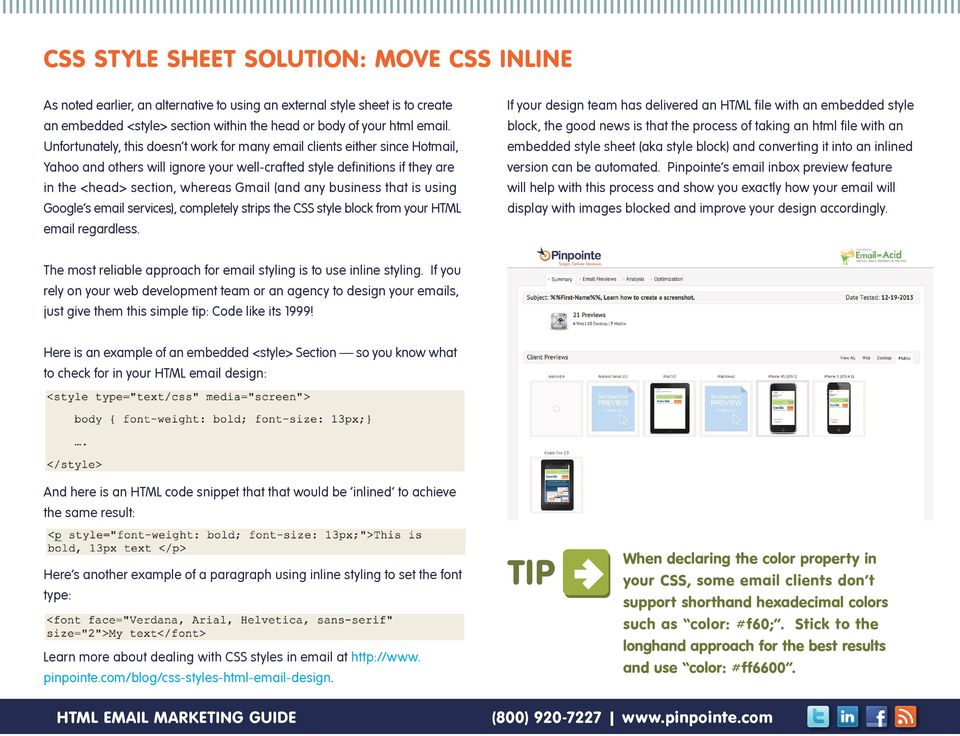
7 LAYOUT WITH HTML USE TABLES Each client has its own HTML rendering engine which means that each client displays HTML a bit differently. clients including Outlook and Gmail don t consistently support properties like float, setting margins and padding. As a result, the best bet when designing HTML s is to lay out a page or using nested tables for the layout and positioning of your . Table nesting will give you more consistent results across programs. For example, to create a two-column newsletter-style , create a table for the header, a table for the content section and a table for the footer. Then use HTML table attributes to control how the tables are displayed. Finally, wrap these three tables in a container table and set the width to 100%. The diagram below shows how this look we have a container table that has a table for the header, a table for the footer, and a table in the middle for 2 columns of content. Note there are *3* columns for this table a thin table cell is used to create the gutter between the two columns.


8 SET WIDTHS IN EACH CELL, NOT IN THE TABLE Continuing with the previous example, when combining TABLE WIDTHs, TD widths, TD padding and CSS padding into an , the final result is different in almost every client. The most reliable way to set the width of your table is to set a width for each cell, not for the table itself. Be sure to set a cell width for each cell in the table because the clients will not reliably figure out a default width. Also, avoid using percentage-based widths (except for the outer container table.) Clients like Outlook 2007 don t respect them, especially for nested tables. Stick to setting the width explicitly in pixels. If you want to add padding to each cell, use either the cell padding attribute of the table or CSS padding for each cell, but don t combine the two. SETTING BODY BACKGROUND COLORS Since many clients strip your HEADERS and BODY tags, assigning a background color in the BODY or HEAD tag as an embedded CSS STYLE section is pretty fruitless. To work around this, wrap your entire with a 100% width table and give that a background color like this:
9 BACKGROUND IMAGES IN TABLES Using background images is very popular for websites and to some extent s. However, there is so much inconsistency in the way clients display background images, that it is best to avoid background images in tables. Outlook 2007 / 2010 for example, do not support background images in tables. If you still want to use background images, always provide a background color style to display instead. For example, if your design has a background image that is mostly blue, set the background color to a similar color for clients like Outlook 2007 and 2010 that will not display your background images. AVOID WHITESPACE IN TABLE CELLS Where possible, avoid whitespace (spaces, table, carriage returns) between the <td> tags. Some clients like, Yahoo! and Hotmail can add additional padding above or below the cell contents in some scenarios, breaking your design for no apparent reason. WHITESPACE Keep any graphic images to a maximum of pixels wide. WIDTH MATTERS Keep any graphic images to a maximum of pixels wide. The message display window of most clients is about 600 pixels wide and keep in mind that many people now view their on a mobile browser, so using anything wider means that your recipient needs to scroll back and forth in order to display it. Larger screens mean the appropriate width is expanding slightly but if you want your content to be seen, the best bet is to keep it within pixels.


10 DEALING WITH IMAGES IN By default, Outlook, Yahoo, Gmail and other clients DISABLE image display by default, so your recipient will have to right click or explicitly opt to display images. There s about a 70% chance that a nice, handcrafted, HTML graphical will look like a random juxtaposition of red Xs or blue boxes with question marks in them when it s received. When designing your , start by assuming that your recipient will have image display turned OFF. Next, assume that 105% of your recipients will be too lazy to enable image display. Then ensure that your conveys the important information through the text of the . We suggest an 80/20 rule of thumb: 80% text to 20% images in your . With this in mind, here are the essentials to remember when using images in HTML . IMAGE BLOCKING = X-RATED CONTENT Image files aren t actually sent as part of an HTML (Note - It is possible to send the images along as part of a MIME attachment but this is rarely used.) Images are hosted on your server, or ours, for free, if you are a Pinpointe customer. When your recipient decides to view the images, the images are downloaded. So be sure to use absolute, fully qualified paths for any images. For example:

11 Here s how one hand crafted HTML looked when I received it. I found it in the delete bin when I was looking for an example: BALANCE COPY AND IMAGES COPY IMAGES Create a layout that ensures your text flows around the images in such a way that your readers can focus on the message instead of the red X s and blank spaces. Along the same line, avoid a format layout that starts off with a banner image, which will create a big dead spot at the top of the message and client s preview pane when image display is disabled. It is also important to balance the amount of text vs. graphics in your for SPAM reasons. Many filters produce a SPAM score based on the graphic to text ratio. This SPAMblocking technique was developed because earlier versions of SPAM firewalls filtered on text content, but then crafty spammers started creating messages that were one really big image. Most SPAM filters now rank the text to graphics ratio as another spam rating mechanism.


12 USE ALT-TEXT TAGS HTML allows you to attach descriptive text tags to graphics images. The text is displayed when the graphic is not or cannot be displayed. If the image IS displayed, the ALT text will be displayed when the cursor is hovered over the image. Either way, you win. Note that Outlook 2007/2010 do not display ALT text; however almost all clients do, and using ALT text does not cause any problems with Outlook, so we highly recommend using ALT text. Here s how to add ALT tags. First, open the Image tag (IMG). Add the ALT-text attribute. The HTML code will look like this: SIZE IMAGES PROPERLY It is best to properly size images before sending. We ve all received s that have embedded images that are 800x600 but are displayed in the at a resolution of say, 200x150. This occurs when the image dimensions are set to 200x150 in the . It displays properly in most (but not all) clients but when the is opened, the user has to download an image file that is 16x bigger than it needs to be. Stick to fixed cell widths to keep your formatting in place with or without images. AVOID SPACER IMAGES While the combination of spacer images and nested tables was popular on the web ten years ago, image blocking in many clients has ruled it out as a reliable technique today. Most clients replace images with an empty placeholder in the same dimensions, others strip the image altogether. This can lead to a poor first impression for many of your subscribers.

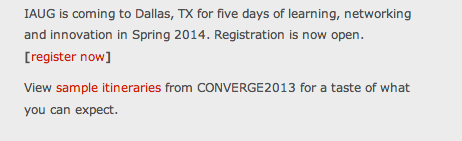
13 ALWAYS INCLUDE THE DIMENSIONS OF YOUR IMAGE If you forget to set the dimensions for each image, a number of clients will invent their own sizes when images are blocked and break your layout. Some clients will ignore the dimensions specified in code and rely on the true dimensions of your image, but we recommend setting the image size explicitly. DON T USE IMAGE FLOATS Outlook 2007, Outlook 2010 and earlier versions of Lotus Notes offer no support for the float property. Instead, use the align attribute of the.img tag to float images in your , like this example below: If you re seeing strange image behavior in Yahoo, adding the code align= top to your images can often solve this problem. UNDERSTAND AND USE PREVIEW PANES More than 70% of Enterprise customers use Outlook, which displays a 4 line preview when your recipient is using the Auto-Preview pane (most people do.) If the first thing in your is a graphic or set of links to graphics images, then the resulting display might look like this one below:

14 SETTING LINK COLORS Some clients will overwrite your link colors with their defaults, and you can avoid this by taking two steps. First, set a default color for each link inline like so: Next, add a redundant span inside the a tag. To some this may be overkill, but if link color is important to your design then a superfluous span is the best way to achieve consistency.


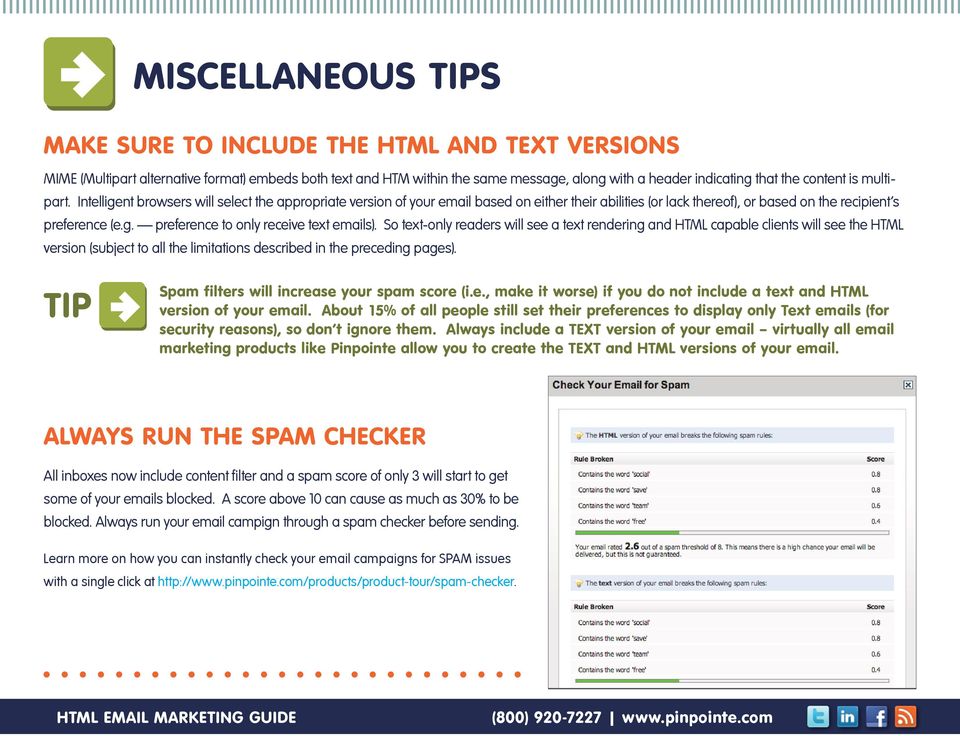
15 MISCELLANEOUS TIPS MAKE SURE TO INCLUDE THE HTML AND TEXT VERSIONS MIME (Multipart alternative format) embeds both text and HTM within the same message, along with a header indicating that the content is multipart. Intelligent browsers will select the appropriate version of your based on either their abilities (or lack thereof), or based on the recipient s preference (e.g. preference to only receive text s). So text-only readers will see a text rendering and HTML capable clients will see the HTML version (subject to all the limitations described in the preceding pages). TIP Spam filters will increase your spam score (i.e., make it worse) if you do not include a text and HTML version of your . About 15% of all people still set their preferences to display only Text s (for security reasons), so don t ignore them. Always include a TEXT version of your virtually all marketing products like Pinpointe allow you to create the TEXT and HTML versions of your . ALWAYS RUN THE SPAM CHECKER All inboxes now include content filter and a spam score of only 3 will start to get some of your s blocked. A score above 10 can cause as much as 30% to be blocked. Always run your campign through a spam checker before sending. Learn more on how you can instantly check your campaigns for SPAM issues with a single click at
16 LENGTH MATTERS This tip applies to all s, not just HTML s. Short headlines work better than long ones. How short? Roughly speaking, your subject should be under 50 characters and under 40 is even better, though trimming your subject line to 5 characters is probably counter-productive. While on the subject of subject lines, make sure your subject is honest, truthful and doesn t overpromise, or you ll not only lower your open rates, you ll potentially start to do harm to your brand. Below is a collection of bonus tips to keep in mind while crafting your HTML s - see more tips at When sending a message, keep your value statement in text, not in graphics. By value statement, I mean the description of the call to action, the purpose of the correspondence, table of contents or reason for writing. It s the meaning of life for each message. And if your message doesn t have one, it will probably expire quickly. Locate the value statement above all other content and make sure it is left justified i.e., don t put a masthead or other images above the value statement. If you are using an image for your call-to-action (eg, a Click Here button ), make sure your call-to-action has text associated with it (see using ALT tags, earlier). If you re is important enough to layout with pictures in HTML, then it s important enough to post a copy on your website, and include a link to it within your . That way, if someone receives the text version and does want to see the rendered version, it s always a click away. Most marketing vendors like Pinpointe do this automatically. MAKE S MOBILE FRIENDLY Nearly 50% of all s are now opened on mobile devices. To increase higher response rates, ensure your design is optimized for mobile viewing and interaction. Mobile responsive templates automatically adjust to display correctly on mobile phones, ipads and desktop systems, so your design renders properly on each devise. Get a sample of free pre-tested, mobile-friendly, readyto-use html templates at

17 In summary, there is a time and place for HTML correspondence, but the smart marketer will take into consideration design tips to maximize delivery rates, and include a balanced mix of Text and HTML correspondence.

18 ABOUT PINPOINTE Pinpointe is a leading provider of on-demand marketing automation software based in the heart of Silicon Valley, California. As former High Tech B2B marketers, we ve been in your shoes. Our team has a passion for helping B2B marketing professionals communicate with existing customers, and target new prospects through behavioral targeting, improved segmentation and message personalization. Pinpointe offers topnotch resources like informative webinars and a marketing tips blog that helps you to get the most out of your marketing efforts and become a successful marketer. TRY PINPOINTE FREE Try It Now - Click Here Create & Send Campaigns Send 1,000 s for Free No Risk, No Credit Card Required CONTACTING PINPOINTE Pinpointe sales and support are available from 8am to 8pm PST, M-F. Phone: (800) or (408) , Option #2 General Information: [email protected] Sales: [email protected] Twitter (Daily Facebook: LinkedIn: Marketing Tips Blog: Copyright 2013 Pinpointe On-Demand. All Rights Reserved. Pinpointe, Pinpointe On-Demand and the Pinpointe logos, and trademarks or registered trademarks of Pinpointe On-Demand, Inc.

Best Practices in Email Marketing 33 Tips to Improve Your HTML Email Design
 Best Practices in Email Marketing 33 Tips to Improve Your HTML Email Design Page 0 of 12 Introduction Many email marketing products like Pinpointe include a WYSIWYG + HTML editor and templates so you can
Email Campaign Guidelines and Best Practices
 epromo Guidelines HTML Maximum width 700px (length = N/A) Maximum total file size, including all images = 200KB Only use inline CSS, no stylesheets Use tables, rather than layout Use more TEXT instead
The Essential Guide to HTML Email Design
 The Essential Guide to HTML Email Design Index Introduction... 3 Layout... 4 Best Practice HTML Email Example... 5 Images... 6 CSS (Cascading Style Sheets)... 7 Animation and Scripting... 8 How Spam Filters
The Essential Guide to HTML Email Design
 The Essential Guide to HTML Email Design Emailmovers Limited, Pindar House, Thornburgh Road Scarborough, North Yorkshire, YO11 3UY Tel: 0845 226 7181 Fax: 0845 226 7183 Email: [email protected]
HTML TIPS FOR DESIGNING
 This is the first column. Look at me, I m the second column.
A Whitepaper of Email Marketing Questions and Answers Email Marketing 101: Tips to Maximize Email Results
 A Whitepaper of Email Marketing Questions and Answers Email Marketing 101: Tips to Maximize Email Results Page 0 of 8 Introduction This document summarizes the questions that were asked during the session
Creative Guidelines for Emails
 Version 2.1 Contents 1 Introduction... 3 1.1 Document Aim and Target Audience... 3 1.2 WYSIWYG editors... 3 1.3 Outlook Overview... 3 2 Quick Reference... 4 3 CSS and Styling... 5 3.1 Positioning... 5
How To Design An Email In Html (Html) And Html (Mailbox) Safely
 24 WAYS to impress your friends At some stage in your career, it s likely you ll be asked by a client to design a HTML email. Before you rush to explain that all the cool kids are using social media, keep
Guidelines for Effective Email Creative
 Guidelines for Effective Email Creative While the need for quality and effective design has always existed from a marketing standpoint, challenges unique to the email space require a different look at
Coding HTML Email: Tips, Tricks and Best Practices
 Before you begin reading PRINT the report out on paper. I assure you that you ll receive much more benefit from studying over the information, rather than simply browsing through it on your computer screen.
An overview of designing HTML emails for Hotmail, Yahoo, Outlook, Lotus Notes and AOL
 An Emailcenter briefing: Can your customers read your email newsletters? An overview of designing HTML emails for Hotmail, Yahoo, Outlook, Lotus Notes and AOL November, 2004 Emailcenter research has shown
Email Marketing 10Mistakes
 Most Common Email Marketing 10Mistakes At Upper Case, we see very smart customers make mistakes that cause their email response rates to suffer. Here are the most common mistakes we encounter... 01 Not
Email Marketing 101 Maximizing Email Results
 Email Marketing 101 Maximizing Email Results Craig Stouffer Pinpointe On-Demand [email protected] (408) 834-7577 x125 Mark Feldman NetProspex VP Marketing [email protected] (781) 290-5714 www.twitter.com/pinpointe
Designing HTML Emails for Use in the Advanced Editor
 Designing HTML Emails for Use in the Advanced Editor For years, we at Swiftpage have heard a recurring request from our customers: wouldn t it be great if you could create an HTML document, import it into
Converting Prospects to Purchasers.
 Email Template Guide LASSO EMAIL TEMPLATE EDITOR... 2 ABOUT LASSO EMAIL TEMPLATE EDITOR... 2 CREATING AN EMAIL TEMPLATE... 2 ACCESSING EMAIL TEMPLATES... 2 ADDING AN EMAIL TEMPLATE FOLDER... 3 BASIC PRINCIPLES
Email Guidelines. The following guidelines are for companies who develop email HTML design/creative and copy.
 The following guidelines are for companies who develop email HTML design/creative and copy. In today s email environment it is imperative that mailers consider the limitations presented by email readers
GUIDE TO CODE KILLER RESPONSIVE EMAILS
 GUIDE TO CODE KILLER RESPONSIVE EMAILS THAT WILL MAKE YOUR EMAILS BEAUTIFUL 3 Create flawless emails with the proper use of HTML, CSS, and Media Queries. But this is only possible if you keep attention
Creating Effective HTML Email Campaigns
 Creating Effective HTML Email Campaigns This event is being recorded. You will receive a copy of the audio/video at the end of the presentation. 701 South Broad Street, Lititz, PA 17543 www.listrak.com
! Email Hints & Tips
 Email Hints & Tips Email is almost 40 times better at acquiring new customers than Facebook and Twitter. (Source: McKinsey & Company) The single most important way you can improve your email performance
How To Write An Email From An Ipad To An Email Address In India
 A Designer's Guide to HTML Emails There are a whole host of ingredients that contribute to a good email marketing campaign. Permission, relevance, timeliness and engaging content are all important. Even
Table of Contents Recommendation Summary... 3 Introduction... 4 Formatting Recommendations... 5 Creative:... 7 Deliverability & Infrastructure:...
 Table of Contents Recommendation Summary... 3 Technical:... 3 Creative:... 3 Introduction... 4 Formatting Recommendations... 5 JavaScript:... 5 Forms:... 5 Background Tags and Colors:... 5 Html Text:...
Guide to B2B email marketing. Part Three: Building great emails
 Guide to B2B email marketing Part Three: Building great emails Executive Summary of Recommendations Take a look at our guidelines for building great emails in this quick, at-a-glance format Technical Email
Copyright 2011 Smart VA Ltd All Rights Reserved.
 Copyright 2011 Smart VA Ltd All Rights Reserved. No part of this guide may be reproduced or transmitted in any form whatsoever, electronic, or mechanical, including photocopying, recording, or by any informational
BEST PRACTICES EMAIL DESIGN
 BEST PRACTICES for EFFECTIVE EMAIL DESIGN July 2008 BEST PRACTICES for EFFECTIVE EMAIL DESIGN The number of professionals and businesses using email as part of their marketing campaign is growing. According
A quick guide to... Effective HTML Messages
 A quick guide to... Effective HTML Messages In this guide... Learn easy and effective ways to engage your subscribers, increase your click-through ratio (CTR), and get better results from your email marketing.
Email Design No-No s Guide for Non-Designers
 Introduction: Graphic designers are experts for a reason through training and experience they have developed an eye for what is visually appealing and what draws a reader in. But knowledge of attractive
We automatically generate the HTML for this as seen below. Provide the above components for the teaser.txt file.
 Creative Specs Gmail Sponsored Promotions Overview The GSP creative asset will be a ZIP folder, containing four components: 1. Teaser text file 2. Teaser logo image 3. HTML file with the fully expanded
EMAIL MARKETING BEST PRACTICES GUIDE
 EMAIL MARKETING BEST PRACTICES GUIDE V12 Group s Best Practices Guidelines and recommendations were implemented to help clients create clean looking emails that improve delivery and overall performance
Email Marketing Best Practices - Top 10 tips
 Email Marketing Best Practices - Top 10 tips Contents 1. Make a good first impression... 2 2. Above the fold... 3 3. Keep it short and to the point.... 3 4. Send what your customer wants not what you want
This document will describe how you can create your own, fully responsive. drag and drop email template to use in the email creator.
 1 Introduction This document will describe how you can create your own, fully responsive drag and drop email template to use in the email creator. It includes ready-made HTML code that will allow you to
A GUIDE TO MOBILE EMAIL
 A GUIDE TO MOBILE EMAIL UNDERSTANDING THE WHAT, HOW & WHY TABLE OF CONTENTS EMAILS OPENED ON MOBILE? 1 Email open market share 2011-2013 WHAT DOES THIS MEAN? 2 FIRST THINGS FIRST 2 From and Subject Lines
Caldes CM2: Marketing Emails Support Document v1.12
 Caldes CM2: Marketing Emails Support Document v1.12 Caldes Enterprise software can be used to send out marketing email. Due to the nature of these being bespoke designs, Caldes make a one off charge to
MCH Strategic Data Best Practices Review
 MCH Strategic Data Best Practices Review Presenters Alex Bardoff Manager, Creative Services [email protected] Lindsey McFadden Manager, Campaign Production Services [email protected] 2 Creative
The A Z of. Email Design
 The A Z of Email Design Table of Contents A Z of Email Design Introduction 3 1. Planning 4 A. Email length 4 B. Audience 4 C. Scheduling 4 2. Content 4 D. Content considerations 4 Why Consumers Open Emails
How to Properly Compose E-Mail HTML Code : 1
 How to Properly Compose E-Mail HTML Code : 1 For any successful business, creating and sending great looking e-mail is essential to project a professional image. With the proliferation of numerous e-mail
SimplyCast emarketing Email User Guide
 SimplyCast emarketing Email User Guide Email User Guide Page 1 Contents 1. Email Overview... 3 2. Features Overview... 3 3. Email Editor Features... 8 4. How to Create an Email Campaign?... 5 5. Additional
Microsoft Expression Web Quickstart Guide
 Microsoft Expression Web Quickstart Guide Expression Web Quickstart Guide (20-Minute Training) Welcome to Expression Web. When you first launch the program, you ll find a number of task panes, toolbars,
Email Deliverability Best Practices
 Email Deliverability Best Practices Prepared by Email Deliverability Services December 2011 Email Deliverability Best Practices Table of Contents Summary... 1 Creative Best Practices... 2 Subject Line
A Whitepaper of Email Marketing Questions and Answers Creating Landing Pages that Sell (with Bob Bly)
 A Whitepaper of Email Marketing Questions and Answers Creating Landing Pages that Sell (with Bob Bly) Page 0 of 7 Landing Pages Webinar Q and A This document summarizes the questions that were asked during
GETTING STARTED QUICK GUIDE
 GETTING STARTED GUIDE Understanding The Basics Of Using Pinpointe In 1 Minutes or Less Let s Begin Create Custom Fields Create Email Campaign Load Contact Lists Add Social Sites Send Campaign TABLE OF
RESPONSIVE DESIGN FOR MOBILE RENDERING
 WHITEPAPER RESPONSIVE DESIGN FOR MOBILE RENDERING DELIVER MOBILE-SPECIFIC CONTENT USING MEDIA QUERIES EXECUTIVE SUMMARY With the widespread adoption of smartphones and tablets, proper email rendering in
Introducing our new Editor: Email Creator
 Introducing our new Editor: Email Creator To view a section click on any header below: Creating a Newsletter... 3 Create From Templates... 4 Use Current Templates... 6 Import from File... 7 Import via
HTML Email Power Tips. HTML messages improve your CTR. World s Easiest Email Marketing.
 A quick guide to Learn easy and effective ways to engage your subscribers, increase your click-through ratio (CTR), and get better results from your email marketing. HTML Email Power Tips Be readable get
Email Marketing. Best Practices
 Email Marketing Best Practices Introduction Within email marketing, creative design serves two very important functions. First, properly composed email creative ensure proper rendering and deliverability
University of Colorado Boulder Colorado Springs Denver Anschutz Medical Campus. CU ecomm Program Email Marketing Best Practices
 University of Colorado Boulder Colorado Springs Denver Anschutz Medical Campus CU ecomm Program Email Marketing Best Practices What is ecomm?... 2 Why use ecomm?... 3 Legal Considerations... 4 Email Marketing
EMAIL MARKETING BEST PRACTICES. www.agillic.com [email protected]
 EMAIL MARKETING BEST PRACTICES www.agillic.com [email protected] SUBJECTS AND PREHEADERS Subject Preheader Tell it don t sell it Your subjects and preheaders can make all the difference to your email.
The Basics of Email Marketing
 The Basics of Email Marketing YOU RE SMART TO EXPLORE EMAIL MARKETING You realize the value in staying in touch with your customers through email, but you may not be sure where to start. Let s face it
EMAIL SUCCESS TOOLKIT
 WHITEPAPER EMAIL SUCCESS TOOLKIT EXECUTIVE SUMMARY Before you hit the send button on yet another oops message, use this toolkit to prevent mistakes. Included are a Project Brief to help with your process,
A Whitepaper of Email Marketing Webinar Questions & Answers: How an Enterprise SPAM Filter Works Questions & Answers
 A Whitepaper of Email Marketing Webinar Questions & Answers: How an Enterprise SPAM Filter Works Questions & Answers Page 0 of 10 Introduction This whitepaper is in a Question and Answer format and covers
Looking Good! Troubleshooting Email Display Problems
 E-mail Direct Mail Digital Marketing Sales Tools Funding Data Creative Services Looking Good! Troubleshooting Email Display Problems November 19, 2014 Today s Speaker Geoff Phillips Senior Editor & Email
A Whitepaper of Questions and Answers from our Webinar: How to Make SEO Work for You (w/jon Rognerud)
 A Whitepaper of Questions and Answers from our Webinar: How to Make SEO Work for You (w/jon Rognerud) Page 0 of 5 Generate Leads with Whitepapers Webinar Questions & Answers This document summarizes the
Web Portal User Guide. Version 6.0
 Web Portal User Guide Version 6.0 2013 Pitney Bowes Software Inc. All rights reserved. This document may contain confidential and proprietary information belonging to Pitney Bowes Inc. and/or its subsidiaries
Email Marketing System Options
 System Options Different Systems for Different Users We run various different types of systems for different users based on their email marketing requirements. If you have your own email marketing system
SmallBiz Dynamic Theme User Guide
 SmallBiz Dynamic Theme User Guide Table of Contents Introduction... 3 Create Your Website in Just 5 Minutes... 3 Before Your Installation Begins... 4 Installing the Small Biz Theme... 4 Customizing the
State of Nevada. Ektron Content Management System (CMS) Basic Training Guide
 State of Nevada Ektron Content Management System (CMS) Basic Training Guide December 8, 2015 Table of Contents Logging In and Navigating to Your Website Folders... 1 Metadata What it is, How it Works...
RESPONSIVE EMAIL DESIGN BY COMMUNIGATOR
 RESPONSIVE EMAIL DESIGN BY COMMUNIGATOR RESPONSIVE EMAIL DESIGN According to stats from Litmus, in 2014 at least 53% of emails were opened on a mobile device. That is a huge increase from 2011 when the
Web Development. Owen Sacco. ICS2205/ICS2230 Web Intelligence
 Web Development Owen Sacco ICS2205/ICS2230 Web Intelligence Introduction Client-Side scripting involves using programming technologies to build web pages and applications that are run on the client (i.e.
Creating an Email with Constant Contact. A step-by-step guide
 Creating an Email with Constant Contact A step-by-step guide About this Manual Once your Constant Contact account is established, use this manual as a guide to help you create your email campaign Here
The Email Marketing Performance Booster
 The Email Marketing Performance Booster Table of Contents An Introduction to Email Marketing...2 - Design & Delivery Common Mistakes to Avoid A Design That s Just Too Big...4 Ignorance of the Law...4 Faiure
Successful Email Signatures
 Successful Email Signatures Simple techniques for creating a high impact email signature Search Engine Optimisation (SEO). Pay Per Click (PPC) Social Media Marketing. International SEO. Web Design Ecommerce.
Informz for Mobile Devices: Making Your Emails PDA and Phone-Friendly
 Informz for Mobile Devices: Making Your Emails PDA and Phone-Friendly The use of personal digital assistants (PDAs) has increased exponentially since the early days of rudimentary Palm Pilots and similar
How an Innovative Email Marketing Strategy Can Pave the Way to New Customers
 How an Innovative Email Marketing Strategy Can Pave the Way to New Customers AN EMAIL MARKETING STRATEGY WHITE PAPER EMAIL MARKETING PROGRAMS According to the Direct Marketing Association, email marketing
Mail Chimp Basics. Glossary
 Mail Chimp Basics Mail Chimp is a web-based application that allows you to create newsletters and send them to others via email. While there are higher-level versions of Mail Chimp, the basic application
Software Solutions Digital Marketing Business Services. Email Marketing. What you need to know
 Software Solutions Digital Marketing Business Services Email Marketing What you need to know Contents Building Your Email List 1 Managing Your Email List. 2 Designing Your Emails 3 Branding Your Emails.....
Best Practices for Email Marketing With imodules
 Best Practices for Email Marketing With imodules Overview Communication is fundamental in building valuable relationships with your constituents. Emails can be up to 20 times more cost effective and generate
Creating an Email with Constant Contact. A step-by-step guide
 Creating an Email with Constant Contact A step-by-step guide About this Manual Once your Constant Contact account is established, use this manual as a guide to help you create your email campaign Here
30-Day Starter Guide to Email Marketing
 { 30-Day Starter Guide to Email Marketing { Introduction If you are new to email marketing or to using an email marketing service, we created this 30-day starter guide with you in mind. This guide will
Email Marketing for Hoteliers: A Step-by-Step Guide
 Email Marketing for Hoteliers: A Step-by-Step Guide Tactics to Boost your Email Marketing ROI Table of Contents Introduction...1 Step 1: Build Your Email List...2 Step 2: Develop Your Content Strategy...3
SIX SECRETS TO EMAIL MARKETING. Productivity@Work series
 SIX SECRETS TO EMAIL MARKETING Productivity@Work series It works! Everyone is excited about social media using Facebook, Twitter and other tools to reach your customers and prospects and it s making them
BlueHornet Whitepaper
 BlueHornet Whitepaper Best Practices for HTML Email Rendering BlueHornet.com Page Page 1 1 2007 Inc. A wholly owned subsidiary of Digital River, Inc. (619) 295-1856 2150 W. Washington Street #110 San Diego,
CMS Basic Training. Getting Started
 The (Content Management System), was designed to allow most people in an organization to contribute to or edit their website(s). Utilizing a set of templates and stylesheets, users can add or edit information
Welcome to MailChimp.
 Welcome to MailChimp. MailChimp is a powerful, easy way to send email newsletters. This guide will help you get your first campaign off the ground. We ll also offer tips for managing your list, viewing
Getting Started with WebSite Tonight
 Getting Started with WebSite Tonight WebSite Tonight Getting Started Guide Version 3.0 (12.2010) Copyright 2010. All rights reserved. Distribution of this work or derivative of this work is prohibited
customer community Getting started Visual Editor Guide! www.pure360community.co.uk
 Getting started! 1 Contents Introduction... 3 Visual Editor Options... 3-5 Advanced Tips... 6-7 Do s and Don ts... 7-9 Testing Messages... 10 2 Welcome The Visual Editor tool is the ideal resource for
Sizmek Features. Wallpaper. Build Guide
 Features Wallpaper Build Guide Table Of Contents Overview... 3 Known Limitations... 4 Using the Wallpaper Tool... 4 Before you Begin... 4 Creating Background Transforms... 5 Creating Flash Gutters... 7
Hypercosm. Studio. www.hypercosm.com
 Hypercosm Studio www.hypercosm.com Hypercosm Studio Guide 3 Revision: November 2005 Copyright 2005 Hypercosm LLC All rights reserved. Hypercosm, OMAR, Hypercosm 3D Player, and Hypercosm Studio are trademarks
CREATING EFFECTIVE EMAIL MARKETING CAMPAIGNS TO GROW YOUR BUSINESS.
 How to guide CREATING EFFECTIVE EMAIL MARKETING CAMPAIGNS TO GROW YOUR BUSINESS. So, by the time you re reading this handy how to guide on creating effective email campaigns to grow your business you will
Mobile Friendly Email Design
 Mobile Friendly Email Design Create emails that look good on every device. A guide by Mobile friendly email design Contents Why Design for Mobiles?...3 You Must Optimise for Mobiles...4 Mobile User s Behvaiour...5
1. Introduction...3 2. Email Deliverability-Benchmarks...4 2.1. Working with Your Service Provider...4 2.2. Email sent...4 2.3. Email delivered...
 1. Introduction...3 2. Email Deliverability-Benchmarks...4 2.1. Working with Your Service Provider...4 2.2. Email sent...4 2.3. Email delivered...4 2.4. Bounces....4 2.5. Email unsubscribe requests....5