
Bringing the Cloud into the Classroom:
|
|
|
- Eugene Carr
- 10 years ago
- Views:
Transcription
1 Bringing the Cloud into the Classroom: a formative evaluation of the code cloud computing pilot in three school districts Herbert H. Wideman Research Consultant, ABEL Funded by Council of Ontario Directors of Education (CODE) August, 2013 CODE Council of Ontario Directors of Education
2 : A formative evaluation of the CODE cloud computing pilot in three school districts Copyright Herbert H. Wideman, 2013 Project and research funded by The Council of Ontario Directors of Education (CODE) and the Ministry of Education. Research support provided through ABEL at York University. Thank you to the following districts for their participation in the research: York Region District School Board Upper Grand District School Board Simcoe Muskoka Catholic District School Board Image credits: istock (front cover, i, 1, 3, 28, 62, 65, 75) Creates (52, 71) Digital Vision (33) Fuse (7) Photodisc (46) Stockbyte (25) Anita Drossis (back cover) Design by Monika Krupa
3 report summary This report presents the results of a formative evaluation of a pilot implementation of Google cloud computing tools in three Ontario school districts. Its primary goal was to assess the implementation, use, and impact of Google cloud-based learning tools and resources in the districts over the school year, and to provide district program leaders and project funders with recommendations for enhancing the educational efficacy of cloud use in schools and for scaling up cloud adoption within and across districts in a cost-effective manner. An online survey was used to determine the nature of participating teachers professional learning experiences related to cloud use, how they made use of the cloud in teaching, emergent implementation issues, and how cloud usage impacted their teaching and assessment strategies and their students engagement levels and 21st century skill development. These topics and others were explored in more depth in six teacher focus groups conducted in the late spring. Two group interviews were also held with students to capture their experiences with and perspectives on cloud use. The evaluation found that despite delays and limitations imposed on the teachers participation in cloud professional development activities by the provincial teacher action over the fall and winter of the school year, the sessions that were attended were largely found to be effective for learning about the operation of cloud-based apps and how they can be infused into teaching. Both teachers and students found the Google applications easy to learn. Students made the greatest use of Google s applications for text document creation, presentations, and online storage of materials and student work. However the use of the cloud was an everyday practice in only a minority of classes; lack of regular access to hardware and/or missing or unreliable wireless access were major impediments to cloud use for substantial numbers of teachers. The cloud was most commonly used to support student research, writing, and presentation creation. The affordances the cloud offered for document storage, sharing, and work collaboration were seen as its major strengths. The ease with which students could collaborate when working on a shared document in the cloud and the affordances the cloud environment provided for monitoring student work history and commenting on documents led teachers to increase the amount of collaborative work and peer editing students engaged in and to provide students with more descriptive feedback in the formative stages of their work. i

4 Report Summary Some teachers also reported increasing their use of advanced teaching strategies such as inquiry learning and student-centred learning. The great majority of teachers found the cloud relatively easy to use and apply to their teaching, and valued it highly for the new affordances and efficiencies it introduced. Almost universally, cloud use fostered greater student engagement and work persistence, and it often led to more frequent application of key 21st century cognitive and metacognitive learning skills. The evaluation s recommendations are focused on three key concerns: improving classroom access to the cloud to ensure its optimal use and effectiveness; enhancing the quality and range of teachers cloud-related professional learning and support experiences to better ensure the utilization of best teaching practices when teaching with the cloud; and furthering the implementation of the cloud within schools and the scaling up its use within school districts and province-wide. ii
5 Contents contents report summary i introduction 3 Background 3 Cloud pilot project objectives 4 Evaluation objectives and method 4 teacher survey findings 7 Teacher and student background 7 Technology access 9 Teacher professional learning 10 Teacher cloud usage 13 Teaching and assessment strategies 15 Other cloud impacts on teaching 17 Student use of the cloud 18 The cloud: other considerations 21 Comparing school districts: differences between York Region and Upper Grand 23 teacher focus groups 25 Teacher background and classroom contexts 25 Technology access 25 Professional learning for the cloud 27 Elementary panel 27 Secondary panel 28 1
6 Contents Cloud professional learning: strengths and limitations 30 Learning to use the cloud 34 Using the cloud in the classroom 35 Shifting teaching strategies 39 Teacher motivation 48 Cloud limitations and barriers to use 49 Cloud use: student impacts 52 Student Engagement 52 Student Collaboration 54 Other 21st Century Learning Skills 55 Meeting different needs 57 Enhancing the cloud s educational value 59 Scaling up cloud use in schools and districts 60 students perspectives on using the cloud 62 Background 62 Learning to use the cloud 62 Student use of the cloud 63 Observed changes in pedagogy 63 Sharing through the cloud 64 Other perceived advantages and limitations 64 Student engagement 64 synthesizing the findings 65 Summary, conclusions and recommendations 65 concluding remarks and recommendations 71 appendix 75 Appendix A: Teacher focus group protocol 76 Appendix B: Student group interview protocol 78 Appendix C: Teacher survey 79 2

7 introduction This research report presents the findings of a formative evaluation of the second year of a pilot project exploring the application of cloud computing technologies to teaching and learning in three Ontario school districts. Its primary goal was to assess the implementation, use, and impact of cloud-based learning tools and resources in the districts over the school year, and to provide district program leaders and project funders with recommendations for enhancing the educational efficacy of cloud use in schools and scaling up cloud adoption within and across districts in a cost-effective manner. Two of the three districts included in this evaluation had participated in the first year of the pilot; one had not. background The Council of Ontario Directors of Education (CODE) and the Ministry of Education co-sponsored 47 local innovation projects ( pilots ) over the school year within the context of a 21st Century Teaching and Learning Pilots for System Learning research investigation. Two school districts (the York Region District School Board and Upper Grand District School Board) chose to pilot the use of cloud computing in the classroom with a small group of volunteer teachers and classes. For the second round of the Systems Learning pilots project in , both districts elected to deepen and expand their exploration of the cloud for learning; five other districts also chose to pilot the use of the cloud. One of these districts, the Simcoe Muskoka Catholic District School Board, agreed to participate in collective research with the York Region and Upper Grand districts. This report presents the results of that research. What is the cloud? Cloud computing is an amorphous term which takes on different meanings depending upon its context of use. As a technical term in computer science it is used to denote the employment of virtual servers that de-couple server functionality from specific hardware for the sake of reliability and flexibility. In common parlance and as employed in business contexts, it refers more broadly to the remote provisioning of computer services. The primary type of provisioning utilized by the three districts studied here was application service provisioning delivered by a cloud hosting service (in this case, Google); for this class of service, the vendor supplies the hardware infrastructure and the software, which interacts with the user through a front-end portal that (in the case of Google) utilizes a client-side web browser as its client interface. 1 (A second form of service provisioning, the hosting of software development tools to build applications (commonly called apps ) that run in the Google cloud, is also offered by Google, but this was not utilized by teachers (although it may have been used by the districts IT departments)). 1 See Rouse, 2010, for a more elaborated discussion of the types of cloud computing ( techtarget.com/definition/cloud-computing). 3
8 Introduction Each of the three districts chose to use Google as their cloud service provider. The Google service, in addition to providing students and teachers with access to standard Google cloud-based applications such as word processing, chat, presentation, spreadsheet, web site creation, and programs (all developed by Google) as well as specialized educational apps, made it possible to remotely store and share virtually any type of document or media file as well as engage in real-time collaborative document creation, commenting, and editing. Teachers working with Google cloud would set up class groups so that uploaded documents could be instantly shared between class members but not beyond; and school districts could set up a suite of educational apps for the district s cloud accounts that teachers would automatically find available to them at login. cloud pilot project objectives At the classroom and school levels, which are the primary focus of data collection for this evaluation, the strategic CODE cloud pilot in which the three aforementioned school districts were involved had several objectives: To build increased capacity in existing Google cloud schools To increase the number of schools using the cloud tools To increase the leadership capacity of system and school leaders in order to support the long term implementation goal of developing students digital literacy knowledge and skills To explore and share best practices of ICT integration using cloud tools in both traditional and non-traditional classroom learning environments To align cloud-based ICT integration with other board priorities (e.g. literacy, inquiry based learning and critical thinking, assessment as learning) To use the cloud to facilitate collaborative learning evaluation objectives and method The evaluation was designed to describe and assess the major determinants, processes and outcomes of cloud deployment in the classroom. In order to do so, data on the following dimensions of use were gathered from teachers and students: Teacher professional development for cloud use and its perceived value, including experiences with in-service sessions, classroom-embedded support, informal peer networking, and autonomous learning Technical and operational factors impacting cloud use in the classroom Ease of cloud tool learning and use by teachers and students Patterns and practices of cloud tool use in teaching and learning Nature of the relationships between the various cloud tools applied to teaching and the use of preferred teaching and assessment strategies such as inquiry-based learning, collaborative learning, and assessment for learning Impact of cloud use on student engagement, collaboration, digital literacy development, and use of 21st century learning skills Teacher and student perceptions of the cloud s affordances, benefits, and limitations for teaching and learning Strategies teachers thought feasible for scaling up cloud use within and across schools and districts 4

9 Introduction The data collection for the evaluation incorporated three major elements: teacher focus groups, student group interviews, and a teacher survey. Teacher focus groups. Participants for these groups were selected by district cloud program administrators following criteria established by the researcher. Participating teachers needed to have taken part in at least one formal professional learning session on cloud use, but were otherwise randomly selected. A total of 25 teachers participated in six focus groups conducted in late April and early May. Two sessions, one for elementary teachers and a second for secondary teachers, were run on location in each district. Before the groups were run, teachers were made aware that their comments would be kept anonymous and that nothing they said would be made available to their administrators in a form that could be traced back to them. The questions asked dealt with all of the topics listed above (the focus group protocol is provided in Appendix A). All focus groups were recorded and transcripts made for analysis. Student interviews. Two groups of six senior elementary level students, one from a school in York Region and another from a school in Simcoe Muskoka, were interviewed. (It did not prove possible to obtain an interview with a group of students from a school in the Upper Grand district.) The classes from which the students were chosen were selected by cloud program administrators to be representative exemplars of classes in which regular use was being made of the cloud. Student volunteers for the interviews were chosen by their teachers to accurately reflect the varied abilities found in the class as a whole. The interviews explored students experiences of learning and using the cloud, changes in teaching practices they observed when the cloud was used, and its perceived impacts on their motivation, work output, and skill development (see Appendix B for protocol). The interviews were conducted in the latter half of May and recorded (with informed parental consent) and transcribed for analysis. The students interviewed were made aware that their input would be kept anonymous and not shared with their teachers. Teacher survey. All teachers who had participated in at least one cloud-related professional learning session in the school year in each of the three districts were asked to complete an online survey at their convenience at some point over the latter part of May and the first week of June. Cloud program administrators from each district submitted lists of the teachers to be surveyed to the researcher. The number of teachers surveyed broke down as follows: 210 from York Region, 75 from Upper Grand, and 12 from Simcoe Muskoka. Multiple solicitations for participation were ed to these teachers to ensure the highest possible response rate. The questions asked included items on teacher background and teaching context, past computing and cloud experience, professional learning experiences, and the other dimensions of interest listed above (the survey questions can be found in Appendix C). Given the size of the responding group and the limited resources available for the evaluation, no open ended questions were included in the survey, but the selection of answer stems for questions were informed by an initial analysis of the focus group interview protocols to ensure that the survey answer options would be optimized to capture the kinds of responses that might have been made to open-ended questions on some topics such as barriers to cloud use. Data analysis. The qualitative data obtained from the teacher and student group interviews was analysed with the aid of ATLAS.ti qualitative research analysis software and using the well-established constant comparative methodology first articulated by Glaser and Strauss in their seminal work on grounded theory. 2 This technique involves the iterative analysis of qualitative data to discover and articulate emergent and repeatable categorical codings that are then interrelated to formulate conceptual understandings and explanations of the phenomena being studied that is fully grounded in the data. Because the survey data gathered was not from a sample of the studied population but from the entire population of teachers participating in the cloud code pilot in their respective districts, only descriptive (as opposed to inferential) statistical analysis was needed or even appropriate. In order to elicit as much useful information as possible from the survey responses provided, 2 Glaser, B.G., and Strauss, A.L. (1967). The discovery of grounded theory: Strategies for qualitative research. Chicago: Aldine. 5

10 Introduction mean scores for Likert. 3 scaled items were we not used for reporting purposes; instead frequency of response data for the answer options are provided, as they offer a more detailed picture of the distribution of teacher responses. Because all of the collected data is in the form of teacher and student self-reports (as the scale of the study did not permit direct observation or document analysis), some caution is warranted in assessing the validity of the findings and the subsequent analyses based upon them, since no independent verification of these reports was undertaken. Questions about the possibility of social desirability bias (in which respondents consciously or unconsciously alter their answers to appear more socially or professionally acceptable to others) typically come into play in such studies. However recent methodology research has provided considerable support for the accuracy and validity of teacher self-reports of their behavioral changes when these are offered under certain conditions that hold true for the present study. In a recent review of the relevant literature, Desimone 4 concludes that for behavior-based constructs, when the data collection is confidential and not linked to the teacher s own evaluation (Mayer, 1999), such as professional development activities and behavioral aspects of classroom instruction, well-constructed and administered observation, interviews, and surveys can elicit much the same information (p.189). Language usage note. For reasons of readability and succinctness, a few writing convention shortcuts will be taken in the text of the report. It will be assumed that the reader understands that all the data reported is coming from teacher and student self-reports, so qualifying clauses like according to teacher reports and the teachers found that are often omitted. And, unless otherwise noted, references made to the cloud refer to the Google cloud environment and tools as described earlier. Finally, the district school board names have been shortened in most cases to York Region, Upper Grand, and Simcoe Muskoka. The next chapter of this report presents the survey findings. It is followed by chapters that elaborate on the results of the qualitative analyses of the teacher and student group interviews. In the final chapter, the findings from the previous chapters were integrated to develop a set of conclusions, each of which is elaborated upon and grounded in the reported results. The report concludes with some summary assessments of the state of the cloud pilot, its impact on teaching and learning, and its value, and a set of recommendations presented that are intended to enhance the effectiveness of cloud implementation and better ensure success as its use is scaled up within and across schools and districts. 3 An example of a Likert rating scale would be a 5 point scale extending from strongly agree to strongly disagree. 4 Desimone, L.D. (2009). Improving impact studies of teachers professional development: Toward better conceptualizations and measures. Educational Researcher, (38)3,
11 teacher survey findings teacher and student background Of the 175 teachers who completed some or all of the survey, 145 were York Region District School Board employees; 27 were Upper Grand District School Board employees; and 3 were with the Simcoe Muskoka Catholic School District School Board. Twelve per cent had been teaching for four years or less; 22% for 5 to 8 years; and 65% for nine years or more. Approximately half of the respondents were high school teachers who typically taught at two or three grade levels in the school year. About 18% of the teachers indicated that they taught grade 8 students, and approximately the same percentage taught at each of the grade 5, 6, and 7 levels. Thirteen percent taught grade 4, and the same percentage taught at the grade 2 and 3 levels. Nine per cent taught grade 1 and 8%, Kindergarten. (These percentages total over 100% as many teachers were teaching multiple grades or split classes.) The primary subject areas teachers indicated they taught are shown in Chart 1 below. For the most part, the relative frequencies of primary subjects taught by teachers participating in the cloud implementation seem to be proportionate to what would be found in schools. However, with only one third the number of mathematics teachers as English teachers participating, it would seem that the former were substantially under-represented in the cloud trials. Prior to beginning to use the cloud in class, most teaches reported they had been using technology for a variety of purposes in their teaching (see Chart 2 below). Word processing, internet research, presentation tools, and learning management systems were being applied in teaching by a large majority of responding teachers, and a few other applications were being used by a majority, suggesting that these teachers were generally comfortable with and experienced in making use of a range of technology tools in teaching prior to their use of the cloud. Their experience is further evidenced by the fact that over half of the respondents reported that they had been using technology in the classroom for seven or more years; only 22% had been using it for less than four years, and most of those teachers had only been teaching a few years. Prior to their participation in the CODE cloud project, about ¼ of the teachers had been making use of the cloud in their teaching. Fifteen per cent had used it for one prior year, and the remaining 10% for two or more years 7
12 Teacher Survey Findings Chart 1: Primary subject taught (percentage of teachers) English/language arts Elementary homeroom Social sciences & humanities Other Sciences Mathematics Special education Technological education The arts Business studies All Other Responses % Chart 2: Technology use prior to cloud implementation (percentage of teachers) Word processing SMART Notebook Spreadsheets/graphing Educational games Presentation tools Web site creation tools Music/art creation tools Learning management systems (e.g. Moodle) Web browser-based research % 8

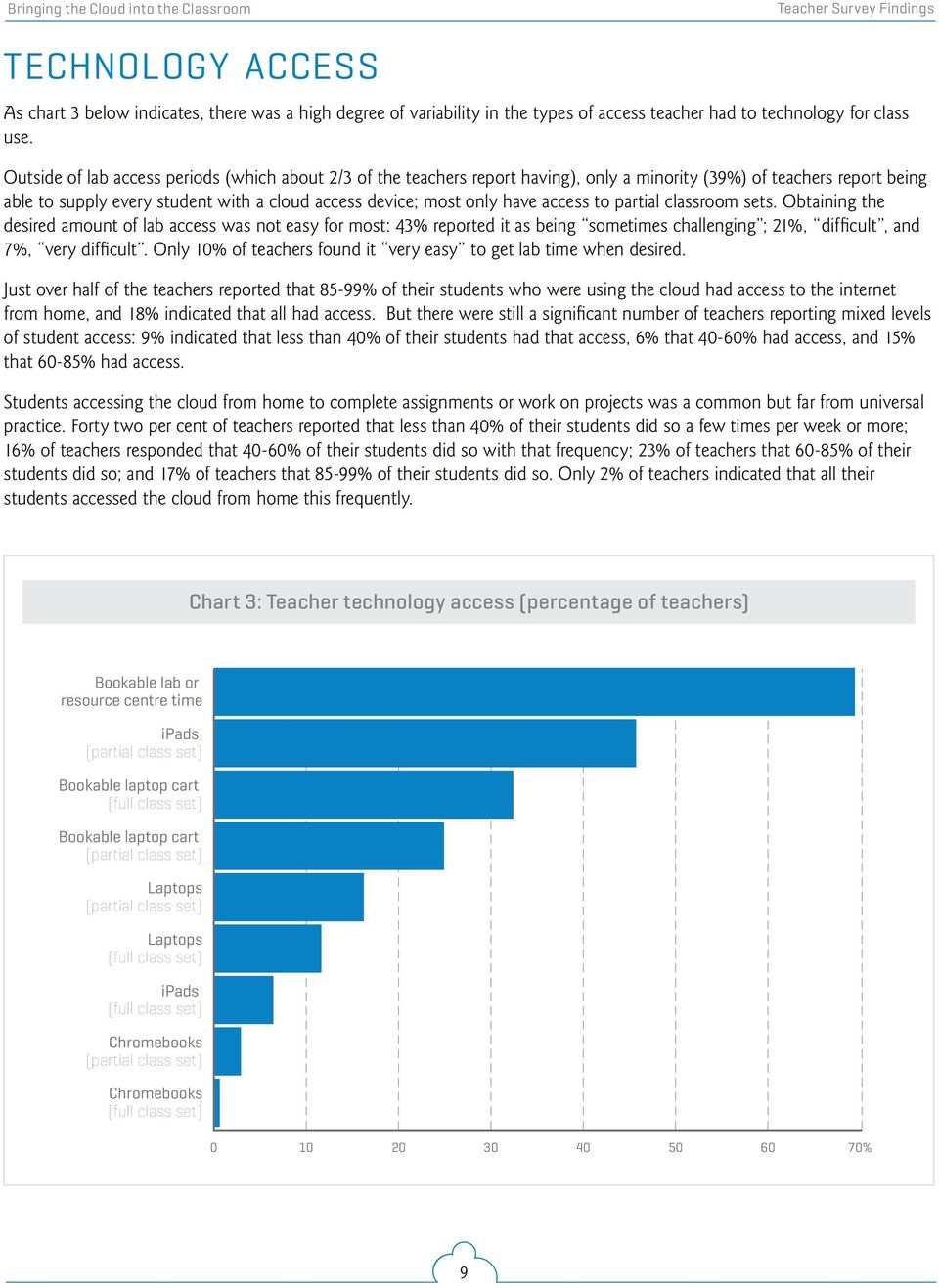
13 Teacher Survey Findings technology access As chart 3 below indicates, there was a high degree of variability in the types of access teacher had to technology for class use. Outside of lab access periods (which about 2/3 of the teachers report having), only a minority (39%) of teachers report being able to supply every student with a cloud access device; most only have access to partial classroom sets. Obtaining the desired amount of lab access was not easy for most: 43% reported it as being sometimes challenging ; 21%, difficult, and 7%, very difficult. Only 10% of teachers found it very easy to get lab time when desired. Just over half of the teachers reported that 85-99% of their students who were using the cloud had access to the internet from home, and 18% indicated that all had access. But there were still a significant number of teachers reporting mixed levels of student access: 9% indicated that less than 40% of their students had that access, 6% that 40-60% had access, and 15% that 60-85% had access. Students accessing the cloud from home to complete assignments or work on projects was a common but far from universal practice. Forty two per cent of teachers reported that less than 40% of their students did so a few times per week or more; 16% of teachers responded that 40-60% of their students did so with that frequency; 23% of teachers that 60-85% of their students did so; and 17% of teachers that 85-99% of their students did so. Only 2% of teachers indicated that all their students accessed the cloud from home this frequently. Chart 3: Teacher technology access (percentage of teachers) Bookable lab or resource centre time ipads (partial class set) Bookable laptop cart (full class set) Bookable laptop cart (partial class set) Laptops (partial class set) Laptops (full class set) ipads (full class set) Chromebooks (partial class set) Chromebooks (full class set) % 9
14 Teacher Survey Findings teacher professional learning Over 95% of the teachers had participated in at least one professional learning session devoted to some form of cloud use in education over the year. Forty percent had attended only one session; 27%, 2 sessions; 11%, 3 sessions; 11%, 4 sessions, and 7%, 5+ sessions. (It is extremely likely that the number of teachers participating in multiple sessions would have been significantly higher but for the provincial teacher unions work actions that extended through the first 2/3 of the school year, and which discouraged or prevented teachers from participating in many forms of professional development.) The teachers indicated that a range of instructional strategies were employed in their professional learning sessions (see Chart 4 below). Chart 4: Professional learning instructional strategies (percentage of teachers) π Lecture/presentation/ demonstration π Small group work π Individual work π Peer sharing/discussion π Coaching/scaffolding by session leader π Teaching/modeling provided in your class π Coaching provided in your class % Percentage of time devoted to each strategy: None 1-25% 26-50% 51-75% % Typically session leaders employed a range of teaching strategies, dividing their time between whole group presentations and demonstrations, moderating peer sharing and discussion, overseeing small group work, and providing coaching and scaffolding. A small minority of teachers reported receiving some in-class modeling and coaching. While direct whole-group knowledge delivery was a major teaching mode for most in-service sessions, it was generally used for less than half of the session time. Active and at times collaborative participation by teachers supported by leader coaching were also important elements of the typical professional learning experience. 10

15 Teacher Survey Findings The topics addressed by the provided professional learning are indicated in Chart 5 below. Chart 5: Time devoted to professional learning topics (percentage of teachers) π Learning to operate in the cloud environment and operate cloud tools/apps π Applying cloud tool/app use in the curriculum π Teaching strategies for using the cloud in the classroom π Assessment strategies when using the cloud in the classroom % Percentage of sessions devoted to each topic: None 1-25% 26-50% 51-75% % Chart 6: Reported effectiveness of professional learning experiences (percentage of teachers) π Learning how to use cloud tools and applications π Helping you integrate the use of cloud computing based activities into your curriculum π Helping you to develop ongoing professional collaborations with colleagues for sharing ideas and strategies around cloud use % Effectiveness: Not effective at all Minimally effective Somewhat effective Quite effective Very effective 11
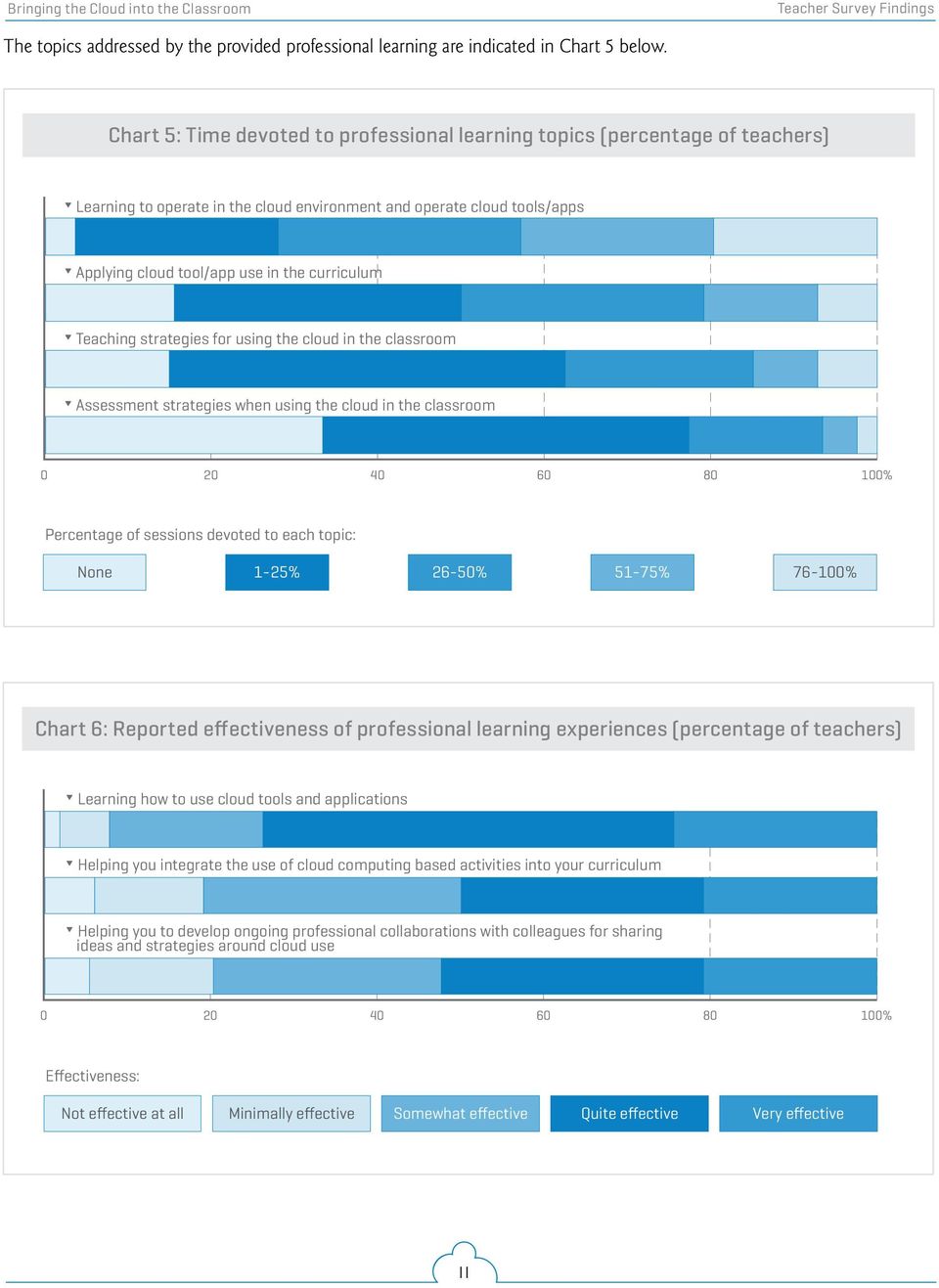
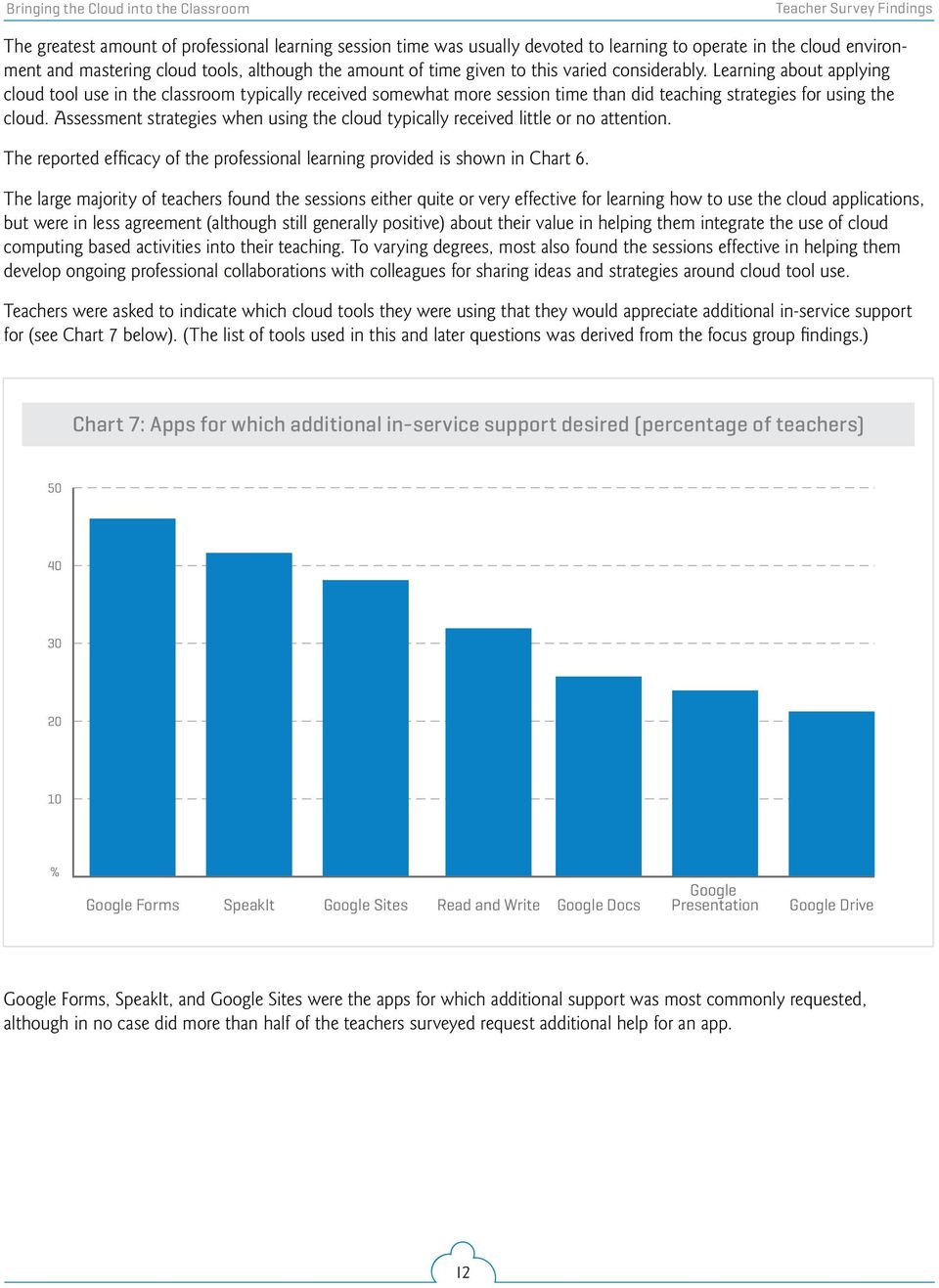
16 Teacher Survey Findings The greatest amount of professional learning session time was usually devoted to learning to operate in the cloud environment and mastering cloud tools, although the amount of time given to this varied considerably. Learning about applying cloud tool use in the classroom typically received somewhat more session time than did teaching strategies for using the cloud. Assessment strategies when using the cloud typically received little or no attention. The reported efficacy of the professional learning provided is shown in Chart 6. The large majority of teachers found the sessions either quite or very effective for learning how to use the cloud applications, but were in less agreement (although still generally positive) about their value in helping them integrate the use of cloud computing based activities into their teaching. To varying degrees, most also found the sessions effective in helping them develop ongoing professional collaborations with colleagues for sharing ideas and strategies around cloud tool use. Teachers were asked to indicate which cloud tools they were using that they would appreciate additional in-service support for (see Chart 7 below). (The list of tools used in this and later questions was derived from the focus group findings.) Chart 7: Apps for which additional in-service support desired (percentage of teachers) % Google Forms SpeakIt Google Sites Read and Write Google Docs Google Presentation Google Drive Google Forms, SpeakIt, and Google Sites were the apps for which additional support was most commonly requested, although in no case did more than half of the teachers surveyed request additional help for an app. 12
17 Teacher Survey Findings teacher cloud usage The extent to which teachers reported using the primary cloud apps discussed in the teacher focus groups is presented in Chart 8 below. Only two cloud applications were used by a substantial majority of teachers, and these were also the two apps that received the most intensive use Google Drive and Google Docs. But even these apps were only used more than three hours a month by less than half of all teachers. Google Mail, Google Forms, Google Presentation and Google Sites were used by Chart 8: Teacher cloud application use in teaching (percentage of teachers) π Google Drive π Google Docs π Google Presentation π Google Sites π Google Chat π Google Forms π Google Spreadsheets π Google Mail π SpeakIt π Read and Write π Other Google apps % Average extent of use: Did not use Up to 3h/ month 1-2h / week 2-3h / week 30min-1h / day 1-2h / day 2+ h / day 13

18 Teacher Survey Findings approximately half of the respondents. Relatively small minorities made use of these four apps for more than three hours a month. The assistive technology applications Read and Write and SpeakIt were only utilized by a tiny minority of teachers. Google Chat was used by less than 20% of the respondents; its use was blocked in many schools. The teachers reported applying the cloud tools in several teaching/learning contexts (see Chart 9 below for the relative frequencies of use by context). Chart 9: Educational applications of the cloud (percentage of teachers) π Individual student research π Collaborative student research π Individual student presentations π Collaborative student presentations π Individual student writing π Collaborative student writing π Peer assessment π Providing descriptive feedback to students π Student music/art creation π Student mathematical problem solving π Student science experiment reporting π Student work storage (Drive) % Frequency: Never Very occasionally Occasionally Frequently Very frequently 14

19 Teacher Survey Findings About 60% of the teachers used cloud applications to facilitate both individual and collaborative student research either occasionally or more frequently. Nearly half of the respondents employed cloud apps with similar frequency to support writing and presentation development and delivery, and 45% did so to provide descriptive feedback to students and to store their work on Google Drive. The use of Google apps for student science experiment reporting, music or art creation, or mathematical problem solving was very uncommon in this teacher group, and when a teacher did use them for these purposes their use was nearly always infrequent. Some of this rarity of use can be attributed to the disproportionately low numbers of science and mathematics teachers in the CODE trial. teaching and assessment strategies A minority of teachers reported a shift in their teaching modes when using the cloud with their students (see Chart 10 below). With the exception of direct teaching, the use of each of the listed modes in Chart 9 was reported to have increased slightly by 20-27% of the teachers, and substantially by 5-9% of them. Perhaps surprisingly, the overall use of direct teaching did not decline noticeably as a result. Chart 10: Changes in teacher use of teaching modes (percentage of teachers) π Whole-class mini-lessons π Small-group mini-lessons π Small-group scaffolding/coaching π Individual scaffolding/coaching π Student teaching/presentation π Whole-class direct teaching % Degree of change: Decreased significantly Decreased slightly No change Increased slightly Increased significantly 15

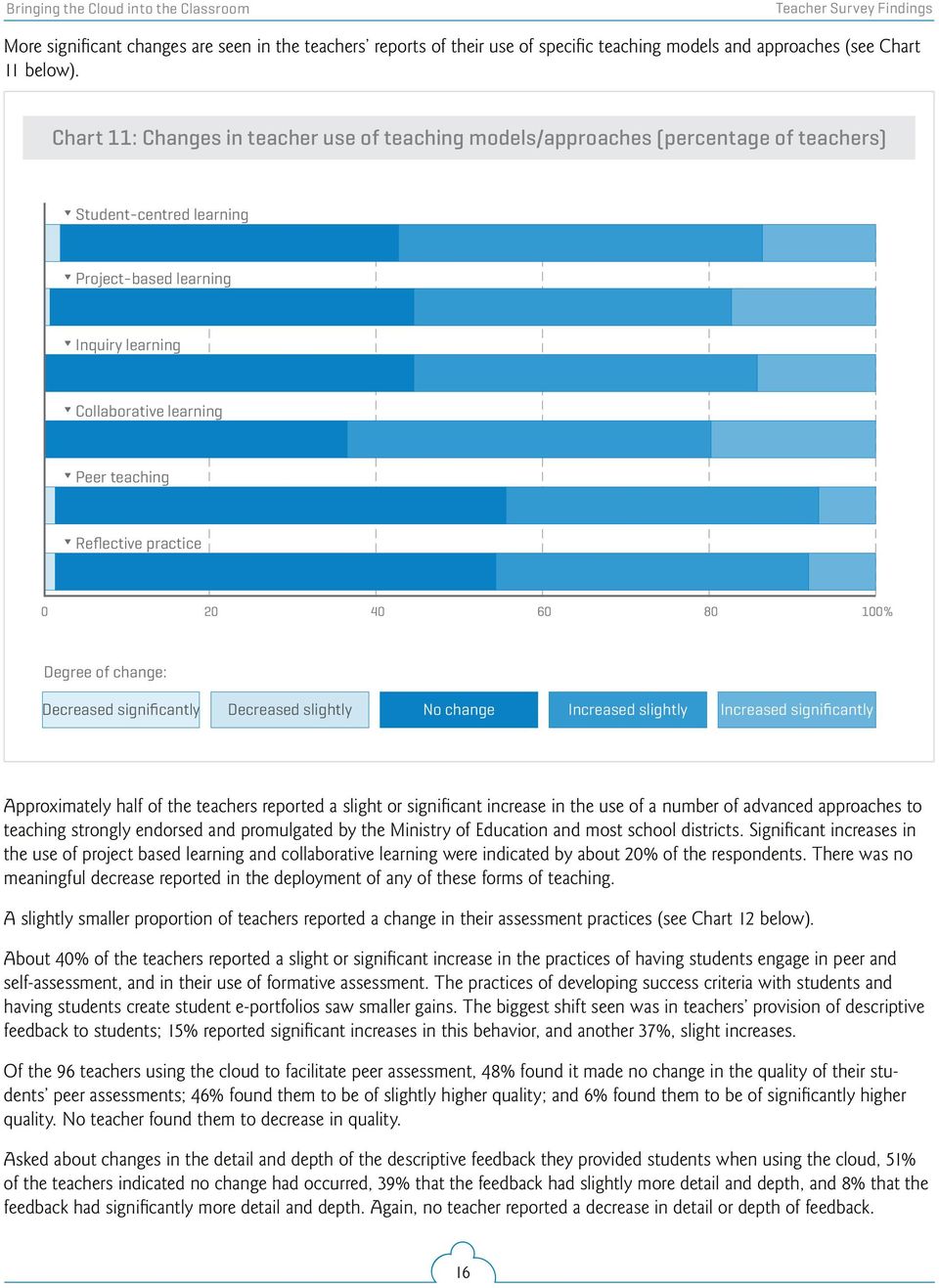
20 Teacher Survey Findings More significant changes are seen in the teachers reports of their use of specific teaching models and approaches (see Chart 11 below). Chart 11: Changes in teacher use of teaching models/approaches (percentage of teachers) π Student-centred learning π Project-based learning π Inquiry learning π Collaborative learning π Peer teaching π Reflective practice % Degree of change: Decreased significantly Decreased slightly No change Increased slightly Increased significantly Approximately half of the teachers reported a slight or significant increase in the use of a number of advanced approaches to teaching strongly endorsed and promulgated by the Ministry of Education and most school districts. Significant increases in the use of project based learning and collaborative learning were indicated by about 20% of the respondents. There was no meaningful decrease reported in the deployment of any of these forms of teaching. A slightly smaller proportion of teachers reported a change in their assessment practices (see Chart 12 below). About 40% of the teachers reported a slight or significant increase in the practices of having students engage in peer and self-assessment, and in their use of formative assessment. The practices of developing success criteria with students and having students create student e-portfolios saw smaller gains. The biggest shift seen was in teachers provision of descriptive feedback to students; 15% reported significant increases in this behavior, and another 37%, slight increases. Of the 96 teachers using the cloud to facilitate peer assessment, 48% found it made no change in the quality of their students peer assessments; 46% found them to be of slightly higher quality; and 6% found them to be of significantly higher quality. No teacher found them to decrease in quality. Asked about changes in the detail and depth of the descriptive feedback they provided students when using the cloud, 51% of the teachers indicated no change had occurred, 39% that the feedback had slightly more detail and depth, and 8% that the feedback had significantly more detail and depth. Again, no teacher reported a decrease in detail or depth of feedback. 16
21 Teacher Survey Findings Chart 12: Change in teacher use of assessment strategies (percentage of teachers) π Developing success criteria with students π Providing descriptive feedback to students π Having students engage in peer assessment π Having students engage in self-assessment π Use of formative assessment (assessment for learning) π Creation of student e-portfolios % Degree of change: Decreased significantly Decreased slightly No change Increased slightly Increased significantly other cloud impacts on teaching Slightly over half of the teachers found that the use of the cloud made it possible for them to use their time more efficiently. Specifically, 35% indicated that its use led them to make slightly more efficient use of their time, and 20% stated that it made their use of time significantly more efficient. Thirty eight per cent reported no change, and only 6% found it made their use of time slightly less efficient. Only one teacher found their time use became significantly less efficient. Teachers capacity to provide differentiated instruction appeared to be similarly impacted by cloud use. Thirty seven per cent reported that its use slightly increased their capacity to provide differentiated instruction, and 18% that it significantly increased their capacity to do so. Forty six per cent reported no change in that capacity. No teacher found the use of the cloud to decrease their capacity to provide differentiated instruction. Teachers were asked about the extent to which they collaborated in various ways with their peers around cloud use (see chart 13 below). The responses provided were very similar for the three forms of collaboration inquired about: Developing ideas and project or lesson plans for using cloud applications in your curriculum; exploring, developing, and implementing new teaching strategies and approaches to using the cloud; and providing mutual operational and technical support for the use of the cloud software 17
22 Teacher Survey Findings Chart 13: Teachers peer collaboration behaviours related to cloud use (percentage of teachers) π Develop ideas and project or lesson plans for using cloud applications in your curriculum π Explore, develop, and implement new teaching strategies and approaches to using the cloud π Provide mutual operational and technical support for the use of the cloud software and associated hardware % Frequency: Very frequently Frequently Occassionally Rarely Never and associated hardware. Six to 8% would engage in these collaborative interactions very frequently; 15 to 23%, frequently; 35 to 45%, occasionally; 20-21% rarely; and 13%, never. The provision of operational and technical support was slightly more frequent than the other forms of collaboration. The large majority of teachers clearly valued this support and collaboration; when asked, 38% found it important, and 32% very important. Only 4% found to be unimportant and 9% of minor importance. student use of the cloud Teachers generally found that their students were able to learn to use cloud tools effectively with little difficulty. Thirty seven per cent reported that it was easy for students to do so, and a further 19% that is was very easy. Twenty one percent indicated that it was slightly easy. Only 2 teachers indicated that it was very difficult; 5% that it was difficult; and 22% that it was slightly difficult. Teachers generally found that their students were able to learn to use cloud tools effectively with little difficulty. Students were often found to be able to assume the responsibility for learning to use cloud tools without direct teaching. It was reported by 26% of teachers that about half their class could do so; by 38%, that the majority of their students could do so; and by 13% that all or nearly all of their students could do so. Only 23% of teachers indicted that none or a minority of their students could do so. Teachers were asked to evaluate how the use of the cloud had impacted students demonstrated use of various critical 21st century learning skills (see Chart 14 below). 18
23 Teacher Survey Findings The skills asked about, in the order shown on Chart 14, were as follows: Locate and access relevant, high quality information Define projects and identify significant questions Analyze, integrate, and evaluate evidence Monitor progress and self-regulate appropriately Articulate thoughts in both written and verbal form Listen and read effectively to decipher meaning Interact and collaborate with peers Create and innovate Effectively employ technology to express creativity Effectively employ technology to communicate Effectively employ technology to conduct research Effectively employ technology to collaborate with peers What is immediately striking about these results is that virtually no decrease in skill use was reported for any of the 12 skills enquired about, and that between 40 and 60% of teachers indicated greater or much greater use of all of these skills with the exception of listening and reading effectively to decipher meaning. The strongest shift is seen in the social learning skill of interacting and collaborating with peers 42% of teachers indicated more use of this skill, and a further 26%, much more use. A related skill, effectively using technology to collaborate with peers, showed the second-greatest increase in use, with the associated skill of effectively employing technology to communicate right behind it in third place. In general, skills related to technology use, communication, and collaboration showed the greatest gains in reported usage. According to most teachers, students demonstrate greater levels of engagement in their work when using the cloud to support their learning. According to most teachers, students demonstrate greater levels of engagement in their work when using the cloud to support their learning. Sixteen per cent of teachers reported much more student engagement; 54%, more engagement; 26%, no change; and only 4% less engagement or much less engagement. The average level of work students produced was also impacted positively in nearly half of the cases. While 53% of teachers reported no change in work level, 42% reported an average increase of 1 level on the four-level assessment scale used in Ontario, and 3% reported an increase of 2 or more levels. Only 1% indicated a decrease (by one level). Based on their experiences in the trial, teachers were asked to indicate the overall educational value they felt cloud access had for their students. It was rated positively in nearly all cases. Only 3% felt it had no value; 20% considered it to have slight value. Thirty six per cent felt it had moderate value, and 41% saw it as having great value. 19
24 Teacher Survey Findings Chart 14: Teacher assessment of changes in student use of 21st century learning skills (percentage of teachers) π Locate and access relevant, high quality information π Define projects and identify significant questions π Analyze, integrate, and evaluate evidence π Monitor progress and self-regulate appropriately π Articulate thoughts in both written and verbal form π Listen and read effectively to decipher meaning π Interact and collaborate with peers π Create and innovate π Effectively employ technology to express creativity π Effectively employ technology to communicate π Effectively employ technology to conduct research π Effectively employ technology to collaborate with peers % Changes in effective use: Much less use Less use No change More use Much more use 20
25 Teacher Survey Findings the cloud: other considerations Based on data drawn from earlier teacher focus groups, a set of commonly reported barriers to effective cloud use were presented to respondents, who were asked to rate how great an obstacle these created in their classrooms (see Chart 15 below). Chart 15: Teacher perceptions of potential barriers to cloud use in teaching (percentage of teachers) π Limited or unreliable wireless access π Lack of just-in-time technical/operational support π Lack of cloud applications that meet my teaching needs π Unreliable or glitchy cloud software π Lack of hardware (laptops, Chromebooks, etc.) % Barrier level: Major barrier Barrier Minor barrier No barrier The barrier most commonly reported as being major was a lack of hardware for accessing the cloud in the classroom. Thirty nine percent of teachers found this to be a major barrier, and another 21% a barrier, putting it well ahead of the other rated obstacles in terms of its perceived impact, and making it a major issue for the current cloud implementations. Limited or unreliable wireless access was also a widespread cause for concern, with about ½ of respondents reporting it to be either a major barrier or a barrier. Lack of just-in-time supports was also a significant issue for 40% of respondents. There were also major or moderate concerns around unreliable or glitchy cloud software expressed by 28% of the teachers. More encouragingly, only one fifth of the teachers encountered significant barriers in locating cloud applications that met their teaching needs. Teachers were asked if they would recommend cloud use in the classroom to their colleagues. It is notable that in spite of the aforementioned barriers reported, fifty per cent said they would strongly recommend it; 39% would moderately recommend it; 10% would recommend it with some significant reservations; and only 2% would not recommend it. Teachers rated the impact of cloud use on their teaching engagement on a 7-point scale (see chart 16 below). Two thirds of the teachers reported that cloud use had enhanced their interest and engagement in teaching to some degree. A total of 47% were either more engaged or much more engaged, and a further 28% slightly more engaged. Only two teachers indicated a drop in their interest in teaching. 21
26 Teacher Survey Findings Chart 16: Cloud use impact on teaching engagement (percentage of teachers) % Much less engaged Less engaged Slightly less engaged No change Slightly more engaged More engaged Much more engaged Teachers were asked to select from a list of possible approaches of providing professional learning for cloud use those they felt would support scaling up its use in their school and district (see Chart 17 below). (These approaches were ones put forward in teacher focus groups.) Chart 17: Teacher choice of approaches to professional learning for cloud use (percentage of teachers) Devote one or more district PA days to cloud implementation Provide online video exemplars of cloud teaching/learning Offer lunch-and-learn sessions Offer after-school sessions Offer in-school one-on-one coaching by computer/digital literacy resource teachers % 22
27 Teacher Survey Findings The most popular options were for the repurposing of extant mandated district PA days to provide professional learning about the cloud, and the provision of situated and embedded learning through in-class coaching by CRTs/DLRTs. The provision of video exemplars for study was also favoured by most teachers. After-school sessions were not popular, being favoured by only 30% of respondents; lunch sessions were favoured by about one half of the teachers. comparing school districts: differences between york region and upper grand 5 A cross-tabulation comparing the survey results from the York Region and Upper Grand districts found a number of distinctions in response patterns across the two districts for many but by no means all of the questions asked in the survey. 6 The only cross-district distinction of note relating to CODE project teacher characteristics was in grades taught. About half of all York Region teachers surveyed were high school teachers, whereas only one third of the Upper Grand teachers taught at that level. There were also significantly more split level elementary classes in the Upper Grand group. More teachers in York Region reported near-universal student access to the cloud from home (74% vs. 45%), and near-universal home use of the cloud a few times a week or more for schoolwork (18% vs. 7%). More Upper Grand teachers reported it being difficult to book computer labs or other hardware (40% vs. 17%). The usage rates for different types of software employed in teaching prior to the introduction of the cloud were very similar, with one major exception: the use of learning management systems, which was far more common in York Region (83% vs. 15%). York Region teachers reported attending fewer cloud professional learning sessions over the year: 44% had attended only one session, vs. 23% of Upper Grand teachers, and 23% of Upper Grand respondents had attended four sessions vs. 7% of York Region teachers. York Region s professional development sessions made about half as much use of whole-group presentations, talks, and demonstrations, and incorporated significantly more small-group work and scaffolding and coaching by the session leaders. Somewhat less time was devoted to learning to operate in the cloud and use cloud apps in the York Region sessions, with more time being devoted to the application of the cloud to the curriculum; Upper Grand teachers spent a little more time looking at teaching and assessment strategies related to using the cloud. These reported differences in substantive focus were relatively small, however, on the order of 15-25%. About 25% of York Region teachers rated their professional learning sessions as very effective for all purposes, compared to about 5% on average for Upper Grand teachers. Conversely, a higher percentage of Upper Grand teachers rated their sessions as quite effective, by a plurality of about 15%. About 5% more Upper Grand teachers considered their sessions minimally effective. One third of York Region teachers reported making no use of Google Drive, as compared to 4% of Upper Grand teachers, and its use was considerably more frequent in Upper Grand classrooms. A parallel pattern was found for the use of Google Docs. Usage differences were somewhat less for Google Presentation; about 60% of York Region teachers did not use this tool vs. 36% of Upper Grand teachers. Similar numbers held for the use of Google Forms (58% vs. 24% non-use) and to a lesser extent Google spreadsheets (70% vs. 44%). All Upper Grand teachers were using Google mail; 37% of York Region teachers did so. York Region teachers also made significantly less frequent use of other Google apps, with 78% reporting no use vs. 40% of Upper Grand teachers. 5 The very low number of survey respondents from Simcoe Muskoka Catholic District School Board three makes that data too unreliable for inclusion in cross-district comparisons, so those results are not incorporated into the following analysis. 6 In this section of the report, for reasons of brevity only those survey questions showing substantive differences in response patterns between the two districts are discussed. For all others, no meaningful differences were found. 23
28 Teacher Survey Findings With regards to educational applications of the cloud, York Region teachers were more likely to report not making any use the cloud for individual and collaborative student presentations (42%, vs. 26% for Upper Grand). The patterns of cloud use for individual and collaborative student writing were nearly identical. The use of Google Drive for student storage was more frequent in Upper Grand district as well; 40% of York Region teachers reported not using Drive for this purpose, vs. 20% at Upper Grand. Ten to fifteen per cent more of the Upper Grand teachers reported significantly increased use of several advanced teaching models (specifically project-based learning, inquiry learning, collaborative learning, and reflective practice) compared to the York region teachers. A parallel pattern of difference is found in the frequency of provision of descriptive feedback to students; 30% of the Upper Grand teachers indicated that their use of this technique had increased significantly (vs. 10% of York Region teachers). Upper Grand respondents also reported more change in the level of detail and depth of feedback provided to students as a result of cloud use: 57% stated it had slightly more detail and depth (vs. 34% for York Region teachers). Use of the cloud enabled relatively more UG teachers to make significantly more efficient use of their time than York Region teachers (35% vs. 16%). Cloud use was also indicated by proportionately more Upper Grand teachers to have significantly increased their capacity to provide differentiated instruction (30% vs. 14%). Upper Grand teachers reported greater rates of collaboration with colleagues around cloud use. An Upper Grand teacher was about 50% more likely to occasionally collaborate with colleagues to develop project or lesson plans, and to develop new teaching approaches for using the cloud, and was more than twice as likely to frequently or very frequently provide mutual operational and technical support to colleagues around using the cloud. Several substantive but relatively minor differences were found between the two districts in the teacher ratings of changes in students effective application of 21st century learning skills. About fifteen per cent more of the Upper Grand teachers reported students made more use of the skills of locating and accessing relevant, high quality information, of listening and reading effectively, of interacting effectively with peers, and of effectively employing technology to conduct research and to collaborate with peers. However these differences were often balanced out by a higher percentage of York Region teachers reporting much more use of these skills; mean rating scores for both districts were very closely matched over all skills. A more meaningful difference was found between the two districts on the teachers assessment of changes in student engagement when using the cloud. Upper Grand teachers much more frequently reported much more engagement (47% vs. 10%) while York Region teachers more frequently reported more engagement (57% vs 42%) and no change (29% vs 11%). There was a modest difference seen between the districts in the prevalence of one of the barriers to cloud use: a lack of hardware. This was seen as a major barrier by 53% of Upper Grand teachers but only 37% of York Region teachers. Only one Upper grand teacher did not consider this to be a barrier at all, as compared to 18% of the York Region teachers. Upper Grand teachers were slightly more positive in rating the educational value of cloud access, with 53% saying it had great value as compared to 38% of York Region teachers. They also felt that using the cloud had a bigger impact of their level of engagement and interest in teaching, with 47% reporting being more engaged as compared to 32% of York Region teachers, and 21% vs. 11% indicating they were much more engaged. (However York Region teachers were no less likely to recommend cloud use to their colleagues.) Finally, Upper Grand teachers were much more favourable to the idea of providing online video exemplars of cloud teaching (100% vs. 57%) and to the provision of after-school professional learning sessions (60% to 25%). 24
29 teacher focus groups teacher background and classroom contexts Most of the teachers who participated in the focus groups had been teaching for eight to 15 years; there were two who had been teaching three years or less, and three who had been teaching for 18 years or more. With one exception, the elementary classroom teachers interviewed all currently taught in grade 6, 7 or 8; two had a grade-split classroom. Besides teaching homeroom, two had rotary teaching responsibilities for history and geography in one case, literacy and mathematics for the other. One only taught core French, at the Junior division level. One worked part-time as the school s math and literacy coach. Another teacher had a dual role as the school librarian and special education teacher; a third was a teacher librarian who also did planning for K-3 students and supported both students and colleagues in technology use. A fourth had recently been promoted to a technology resource position responsible for a family of schools; prior to that he had been the primary-level resource/special education teacher at his school. The secondary teachers participating taught a wide range of subjects, from philosophy to science, although there were no mathematics teachers in the groups. Several were in atypical roles. One taught in an alternative education program to a small group of special needs students, teaching family studies and social science. Three had among their responsibilities the teaching of fully online courses to students they never meet with in person. One taught in a co-op program. Another was the school s Digital Literacy Resource Teacher (DLRT) and spent some of her time working with teachers in that role, as well as devoting a period a day to the library. The makeup of the classes taught by these teachers varied widely. Their schools had a representative distribution of catchment areas in terms of socio-economic status, from less affluent and working class through upper middle class. Six teachers indicated that their class or classes included a relatively high proportion of students with IEPS or unidentified behavioural or learning difficulties, and five characterized their class(es) as having a high proportion of non-native English language learners. Three remarked on a high degree of variability in the functional levels of students within their classes. Technology access Constraints on technology access were stated to be a major or significant limitation to effective use by most teachers. Most schools had one or more bookable labs, but these were typically oversubscribed and had to be booked weeks in advance; if a teacher s planned schedule of work had to be changed in the meantime then the scheduled time would be unusable. Teachers 25
30 Teacher Focus Groups felt constrained by the competing demands of their colleagues to limit their own classes access to the labs at levels far below those considered optimal. Often the labs did not have enough computers to provide for a full class set; sometimes one or more computers would be inoperable. We have very little computer access. It s very competitive to get in. There are two labs that anybody in the school can book, so it s very competitive. My department has a set of 6 and a set of 8 ipads that we can book out but we try to keep them as two separate sets rather than as one set of 14, so we do that. Wireless access was a major issue for several teachers who were teaching in portables, as the wireless signal from the main school building would either not reach their classroom or be so unreliable or slow as to be unusable much or most of the time. As lab carts of laptops could not be brought to portables, the only access these classes had to technology was by booking computer lab rooms, which were very often not available at useful times. The use of lab carts sometimes proved to be problematic. Lap top sets typically did not provide a full classroom set of computers, so some students would have to be paired up or supplementary computer resources chased down. Batteries would lack charge and die out with no power cords available. A few teachers were very satisfied with their technology access. These teachers were typically in blueprint or model schools, pilot projects, or demonstration classrooms (such as the Learning@School classrooms in York Region), with excellent Wi-Fi bandwidth and ready access to devices as needed (the class might have a partial or full set of dedicated devices, or students might bring in devices from home). I have an L@S classroom so I have tons of technology in the room. We have 10 ipads; a Smartboard; a document camera; MacBook; 3 desktop computers, cameras; ipod Touches, and every student has his/her own device that they can bring to school.iphones; ipod Touches; ipods; Blackberries; laptops also. Teachers who had difficulty in accessing computers found their access limitations reduced if their school or district instituted a bring your own technology (BYOT) policy. About half of the teachers relied on their students bringing their own devices to class to make up for the shortfall in available technology, and this often worked satisfactorily, although a few teachers reported that certain student devices had considerable difficulty accessing or using Google cloud apps. Teachers with partial classroom sets of devices would sometimes split their classes so that the half without in-class equipment went to the library or lab to use computers, but this arrangement was not deemed entirely satisfactory as it created its own supervision and teaching challenges. Those teachers who had received or had access to sets of Chromebooks were very positive about their value and cost effectiveness. Their operation presented no difficulties for students, and they were able to provide virtually all of the needed functionality found in a laptop costing three times as much money. The only capability they were seen to lack was the ability to support complex media content creation by running advanced programs like Photoshop. However this was considered a minor drawback as the call for such software was very infrequent and could be accommodated on another readily accessible device. Teachers Prior Technology Use The great majority of these teachers had been making considerable use of technology in their teaching prior to taking up use of the cloud. Common computing applications at the elementary level included the use of internet search engines for student research; the use of media creation tools such as imovie and Audacity to build multimedia content; the use of word processing for writing; the use of online presentation tools for student presentations (Voice Thread, Prezi); and SmartBoard software like Smart Notebook for content creation and sharing. A minority of elementary teachers also employed the use of learning management systems (primarily Moodle in York Region and Desire2Learn in Upper Grand) for content delivery, resource management, student dialogue and interaction through blogging and discussion groups, assignment collection, and assessment delivery. 26
31 Teacher Focus Groups Technology use was more intensive and varied in elementary classrooms than in high school classrooms, partly due to easier technology access. High school teachers had their students using word processing and conducting web based research on an intermittent basis, and would employ PowerPoint (or Prezi) for their own presentations. A few played Youtube videos in class, and several others (most from York Region) made use of a learning management system for teaching their online and blended courses or to supplement their regular classes. For example, the co-op teacher was using Adobe Connect to communicate with off-campus students and Desire2Learn as her course management tool. One secondary teacher was using Comic Life and Smart Ideas with her English students. professional learning for the cloud The extent and form of the professional learning experiences relating to cloud use in teaching that these teachers participated in over the year varied considerably, both by school district and by school level. There were however certain commonalities of focus as well as a shared set of teaching strategies employed by most PD session leaders. Elementary panel Simcoe Muskoka elementary teachers first had a class visit from a technology coach in the fall to introduce learning in the cloud to students; this was followed up with three full-day group sessions over the next several months with the coach, with two further sessions planned before the end of the year. The coach shared strategies for using Google Docs and Google Drive to facilitate student dialogue and group work, such as employing a jigsaw technique to develop a class ebook incorporating text and graphics on a curriculum topic. Most of the session time was given over to exploring and discussing teaching and assessment-for-learning strategies for using the cloud and looking at how these could be employed to further mastery of the curriculum; comparatively little time was spent learning how to operate in the cloud environment or make use of cloud tools. Teaching strategies to encourage student reflective learning and self-assessment were emphasized in the session time devoted to the building of student e-portfolios. Direct, whole group instruction was minimal; the session leader made a practice of teaching us the way that she expects us to teach our kids. So it s a lot of group work and a lot of discussion, and she weaves in and out of that. All but one of the Upper Grand elementary teachers interviewed had received basic training in cloud use the previous school year and were in their second year of employing it in their teaching. Three of the four had been a part of the district s tech coach training program the previous year and were now coaching their school colleagues, helping them set up their classes in the UGCloud, and teaching them the basics of utilizing Google Docs, Forms, and Drive to create and share student work. They also worked collectively at a board level to schedule and run after-school workshops in different district zones. (Many of these workshops could not be run however due to the work action taken by the Ontario teachers federations in the winter of 2013, and only resumed in the late spring.) None of the teachers had participated in formal training or professional development provided by the board that related to cloud use in the current school year. But the district did support the professional development of several of the teachers in the focus group by funding their participation in other events such as the ECOO and OAME conferences and a Google Summit held for the district over one spring weekend. Two of the teachers had been funded to attend an upcoming two day Google Boot Camp. The teachers reported that these events were of great value in expanding their repertoire of strategies for applying the cloud effectively in their teaching. Most indicated that a great deal of their learning about the cloud this year had been a result of their own self-directed study and exploration. The York Region elementary teachers reported receiving considerable professional learning support, occasionally in the form of in-class coaching. One teacher had been part of an intensive hands-on all-day session held on-site with two other teachers; he spent the morning learning to use Google tools, and the afternoon creating lessons augmented by cloud use, with the session leader providing guidance in the incorporation of cloud use into the lessons. The three other teachers participated 27
32 Teacher Focus Groups in a two day session devoted to creating a social justice learning unit in which the use of Google apps would be integrated. Participants first learned to operate in the Google cloud environment through hands-on practice in Google Drive and Google Forms, and then progressed to working in small groups to author and implement different unit lessons within Google Docs or Forms, with the help of coaching provided by the two session leaders. Forms were used not only to deliver content but to provide a medium for student questioning and response sharing. (Work on the unit was not yet complete by mid-may; and a second similar session to complete it had been scheduled for later in the spring.) This professional learning session had incorporated some differentiation teachers having prior experience with Google applications explored a more advanced application for document sharing and marking (Doctupus) as neophytes were being guided through basic cloud operations. One of the teachers later had one of the two session leaders teach his students how to use the Google cloud tools. A second was thinking through how Google Forms could be used to support research and debate on a social justice issue and was asking a session leader to come to her class and help me pull all those things together. This same teacher had had a digital resource teacher work with her and a few other teachers in her school for a day developing a math lesson in the morning, and then co-teaching the lesson in the afternoon, providing the technology piece by photographing students work as they progressed and uploading it to Google Docs for sharing and discussion with peers. The teachers then collectively reflected on how the lesson had gone. Secondary panel York Region high school teachers reported receiving some professional development support for learning to use the cloud, although again due to the teacher action this year participation in professional development generally had not been as high as in past years. Several noted that much of their growth in cloud expertise this year had been self-guided, and done on their own time. One teacher had participated in a full-day session for history teachers at her school that focused on using Google Drive and apps to support collaborative assignments for students. Some of the session time had been spent learning how to set up class groups using specialized cloud educational apps: On the Google Drive I ve created a presentation (like a PowerPoint) that students in small groups are going to be collaborating on to create a final product. So using Doctopus I was able to create the permissions so that only those three students could see that presentation as well as myself. And then using Goobric I m going to be able to have a rubric for the assignment attached to an individual student. And part of the challenge is I ve got different students doing different roles so there are different rubrics. So there is an editor, an advertiser, the designer for a philosophers magazine. So yeah, it s all about the kind of technological organization of the permissions and allowing people to have access to it. Attention was also given in the session to the pedagogical dimension of this project specifically, about how to incorporate student collaboration in an online environment, and the skills and attitudes that students require for this to be successful. A science teacher had participated with a partner-teacher in two day-long sessions examining the use of cloud tools in inquiry-based science teaching. In these sessions he first learned about the capabilities and operation of cloud tools, and then began the process of re-working his standard assignments to make them cloud-based, in order to enhance peer sharing and interaction, and increase students generation of descriptive feedback about peers work. 28
33 Teacher Focus Groups A cloud professional development session offered at one of the York Region high schools for the English department allowed teachers to select the app they wished to focus on, providing individualized instruction, which proved valuable as teachers differed widely in their prior knowledge levels and interests. A few York Region high school teachers received one on one support in learning new cloud applications they were interested in such as Doctopus. This session will be followed up by a show and share session in which teachers will be expected to demonstrate how they have applied what they learned to their teaching, and outcomes reflected upon. All of the Simcoe Muskoka secondary teachers interviewed participated in the same cloud in-service sessions (they were all teaching English in the same school). Two of the teachers had a greater prior knowledge of the cloud than the others. Five all-day sessions were held, each with only the four teachers and a session leader present. The sessions would generally start with viewing or reading topical material on pedagogy, sometimes but not always tied to cloud use (an example given was an article about providing effective feedback for learning). The teachers would use cloud apps (Google Docs, Google Groups, Google Forms, a drawing app, and a graphic organizer) to respond to and discuss the material. In this way they were developing their pedagogic knowledge while simultaneously learning and using the cloud applications much as their students would. Google Sites was used by the teachers to create web sites for their classes. A form for student end-of-year reflection was created in Google Forms. Teachers were asked to select two students for detailed study of their work product. Most of the session time was spent in active learning and exploration; teachers had time to discover and add to their Drive additional apps that might be of use. The session leader emphasized the importance of using the cloud in ways that furthered student learning and prompted the teachers to devise ways of applying it effectively (in one reported case, for student peer editing). The teachers were offered additional one-on-one in-class coaching if it was desired, and this offer was taken up by one of the less knowledgeable teachers. Upper Grand secondary teachers reported varying degrees of participation in district professional development sessions on cloud use over the year. A teacher who was more experienced with the cloud (he had been part of the project the prior year) did not feel the need to attend sessions as they were thought to be too basic, preferring instead to learn on their own through online resources and experimentation. Another with two years cloud experience was a member of a professional learning community at her school looking at the use of Google docs, and had also participated in a Chromebook pilot project, which had provided her with a one-day overview of UGCloud and Google apps. Her district had also sent her to a two day Google Summit on Education which she found pushed her further forward (although some sessions were thought to be too basic). (This teacher was also a member of a district group creating learning resources for teachers new to the cloud that were scheduled to be rolled out next year.) One teacher took advantage of a highly skilled school colleague, who demonstrated cloud operations and uses to him and his class; another attended the Google weekend event sponsored by his district as well as the ECOO conference, and had found both valuable for furthering his skill in cloud use. Only one teacher reported attending more than a day s worth of formal sessions on the cloud within the district; she found the time well spent as the sessions provided her with answers to her many how-to questions. cloud professional learning: strengths and limitations The teachers were nearly unanimous in their praise for the quality of the professional development they participated in that was related to their cloud implementation. There were a number of elements of the professional development sessions and support offered that were common across the districts that were highly valued, relating to both the substance and form of the professional learning provided. The teachers appreciated that the learning of the practical, operational aspects of using the cloud, while by no means ignored, was made subservient to a greater focus using the cloud technologies to improve pedagogy and enhance student learning. They valued the new teaching and assessment strategies that were discussed and demonstrated, and talked about how their exposure to these impacted their thinking and practice. 29
34 Teacher Focus Groups One of the most important things that I think I ve picked up from [the session leader] last week was when she showed us a presentation online and said, We need to be better with the assignments that we re giving to our children. So if it s something that kids can find online don t give it to your children anymore. So our projects have changed in that they re not fact-based, they need to be more collaborative and they need to be a little bit more (what s the word I m looking for?) Like not just content-based. They need to synthesize the information. (So more of an inquiry-based type of approach?) Yeah. And she has shown us how to do that having this technology. [The session leader] had a beautiful article on reflective practice and children reflecting on their learning and how we needed to use that, even the e-portfolio includes that reflection piece. So they have to put in their best pieces of work; they have to reflect on it what did they like? What could they improve on the next time? So that s a really critical piece as well, being able to revise so it s not just Here s my work. I ll hand it in; it s done. By using Google Docs we can put in our comments. They can constantly revise their work until they feel that it s ready. And it s such great learning, because they re willing to go back and it s so easy to revise. Teacher 1: I feel like it s just making me think a little bit more, because sure, she gives us one or two ideas as well as we re all sharing a couple ideas every time we meet, but that is making me think, Oh, we re doing... oh, well maybe I can gear that idea toward something I m already doing in my class, or how can I relate this to some other subject that I m already doing? Teacher 2: And it makes us makes us I think get away from doing old practices and into new exciting practices to just get the kids more engaged in what they re doing at school. Teacher 3: Because we re more engaged too and we feel more excited. When the teachers were being taught how to operate in the cloud and use cloud apps, most of their instruction incorporated extensive hands-on exploration (rather than relying primarily on leader demonstrations). This was considered a much more effective approach to learning the software s mechanics. [Teachers] valued the new teaching and assessment strategies that were discussed. It was very hands-on which was great, because I found that I picked it up a lot quicker I think than if I was just listening about how to do it or somebody just showing me. We were actually hands-on and being guided through the whole process of how to use it which was excellent. Equally valued was the session leaders willingness to practice what they preached by having their teacher students engage in inquiry, collaboration, and experimentation as they actively applied the teaching approaches and cloud use strategies under discussion in their own lesson and unit planning. This mode of professional development was strongly preferred over sessions in which teachers sit passively through presentations meant to deliver packaged best practices for assimilation. Teacher 1: I feel like this learning for me in PD and I ve taken far too many AQs now in the past six years this type of PD has been meaningful to me because I m answering questions like my own students are answering them. But I m answering the questions myself and going through it. It s not memorizing how to do things. It makes me think about exploring it and figuring it out myself, so it actually sticks with me. I haven t just stored ideas in the back of my head. I m actually using them every day in teaching. So I m a better student now, which makes me a better teacher. 30
35 Teacher Focus Groups Teacher 2: I will agree with that for sure. Every time I came back from one of those PD days I had like five new ideas, five new different things I was doing with my classes, and I think that s because I saw a lot of best practices from all sorts of different people and I adapted them. The individualization offered in some of the professional learning sessions appealed to many. Teachers appreciated the It was some of the most valuable PD I ve had in years. session leaders willingness to take into account their interests and needs in determining session content, and to support more advanced exploration when it was appropriate. I don t need to sit in a meeting and learn how to create a Google site or a Google Doc, because I know how to do that. So I love that people aren t all at the same level and it s good to recognize that. And someone really maybe just does need more time to learn how to put their class in and to create folders or do whatever, and the session flexibility gives the people who are in a little bit of a different spot a chance to move ahead with their learning. [The two session leaders] just sort of keep strolling around asking, How is it going, can I help you with this? And they just sort of chime in and help push you a little bit and support you, and they allowed everybody to work at their own pace on what they were doing. And it was some of the most valuable PD I ve had in years because of that ability. The responsive follow-up and ongoing interactive support provided by session leaders to their session participants was nearly always considered exemplary, and extremely helpful both in answering operational questions and supporting a grounded development of teaching expertise using the cloud. It also served to boost teachers levels of engagement in new cloud-augmented practices and their persistence in the face of challenges. [The session leader] is more of our guide to be honest, because we get to feed back with each other. I should say that she is available more than she should be, because I m the person ing or saying like, You should go to bed now. Because I will her tons of times to ask for help and she s always available and always throwing out ideas like, Did you try this, did you default to this, or did you ask anybody else in the group? I feel like she is part of our learning group. In York Region in particular, session leaders (who were nearly always Digital Literacy Resource Teachers (DLRTs)) would make themselves available to teachers who wanted them to teach cloud applications to their students, typically because the teachers were not yet comfortable doing so themselves. This service was found to be extremely valuable by those teachers who made use of it. To have somebody in who knows and to be able to work with the students as they re working hands-on was amazing, because you could see the light bulbs going off in your kids heads. The talk amongst the students in the classroom as they were all working on the Google Docs, and having Joseph being able to answer their questions was really valuable. I wouldn t have been able to do that. While there was generally a high level of satisfaction with the professional learning provided for the project, there were a number of limitations noted in the professional development offered over the year that was seen as leaving room for 31
36 Teacher Focus Groups significant improvements in its reach and efficacy. One of the most commonly cited was the scheduling of the in-service sessions this year not in the fall but in the mid to late spring, a busy time of year when teachers felt less inclination and saw less opportunity to bring these changes into their practices. (The three districts did have plans in place to offer professional development sessions much earlier in the year but the teacher work actions over the fall and winter blocked teacher participation until the spring.) I find especially at the beginning of the year when we re fresh, we re eager, we re excited to get things started that s the time. I mean it was great to have this PD with the Google Docs last week or the week before that was fabulous, but the year is almost over. I think it would have been more powerful to have it at the beginning where we can really start implementing and start using Google Apps in our classrooms right from day one rather than introducing something new at this point. A second issue that most of those more advanced and experienced in the use of the cloud raised was a need for more opportunities for advanced professional learning that better met their needs. Many felt the standard offerings were a waste of their time as they had moved beyond what they had to offer. Teacher 1: It s very frustrating to go to a PD day and sit and listen to things that I m already years past, and it s not relevant. The PD is not relevant to where we should be at this point. Teacher 2: Despite our supposedly differentiated instruction. Teacher 3: Yes. I feel that we re preaching a lot but it s not being given to us. There s no consideration for that. I just would like more opportunities for people who are on the upper edge of it to be able to move forward and do really new and fun things. Like when something like Doctopus and Goobric comes across the table we get so excited because it s finally something new for us that we can do and learn and whatever. And I would just love more opportunities like that. One teacher pointed out the drawbacks of the delay in his professional learning for his class: One of my classes, they were piloting Google Docs, so I get them all signed up. And we used it, but when I reflect back on like how I used it with them I would have used it so much more in an integrated way and made it so much more a part of my program had I had this PD at the beginning of the year compared to now, because I was taking the view, Yeah, you can use it if you sign up for it it sounds good. But I really didn t know what I was doing so I didn t use it very effectively. A few Upper Grand teachers felt that their in-service sessions had been too operationally oriented and had not provided enough focus on pedagogical applications of the cloud. There was also an apparent lack of effective communication within the Upper Grand district regarding the in-service opportunities that were available. (This became evident in the Upper Grand teacher discussions when teachers expressed surprise at not hearing about sessions that others were aware of or had attended). A few teachers from York Region raised concerns about what they saw as an upcoming decrease in professional learning and support around ICT in the district and what this might mean for cloud implementation. At a time when a push for broader cloud use was being scaled up, these teachers thought it inadvisable for the district to be cutting the number of DLRTs in the schools and decreasing the amount of professional development time available, as they saw effective in-service as critical to the success of the cloud rollout. It s sort of like saying Climb the ladder, I m going to cut a bunch of the rungs though. It doesn t make any sense to me 32
37 Teacher Focus Groups sometimes. There was also concern expressed about the longer-term stability of the cloud implementation. Given a recent history of technology turnover in the district it was thought teachers might be reluctant to invest time in learning to use tools that might be quickly abandoned. The instructional time lost when students have to serially learn to use several software packages in relatively short order was also raised. Teacher 1: It would be really great if I we chose something and stuck with it for a bit. We have people who are still not comfortable with Moodle and now we re introducing D2L. And I m not really getting a clear sense from the Board which do you want us to use? There does come a point where it s like if we re going to use an online learning management system, it should be the same one. Teacher 2: And we re sending our kids in so many different places. They started to learn Moodle and now we re saying Learn D2L, and by the way we re also Google Apps, right? Teacher 3: And Edmodo. Several teachers felt strongly they and their colleagues needed more time for collaborative learning and planning if the cloud implementation was to have a transformative impact on teaching beyond the walls of a few select classrooms. A few saw a need for a more systematic and formal structure for cloud professional learning; otherwise, it was thought, participation and buy-in was too idiosyncratic and dependent on the attitudes of local school administrators and who the keeners are in your school. I think the number one complaint that most teachers in schools have is, we don t have the time to really delve in and practice and work together, because a lot of good things happen when teachers are able to collaborate with each other and spend the time to co-plan and co-teach lessons and develop assignments and work together and implement them in our classroom. A lot of the teachers that are using these cloud programs are self-starters and go-getters and we do spend the extra time. I ll spend a lot of time on weekends or evenings, and in the summer I ll be working on stuff. But you need to be fully engaged with the class to really try it out to see what happens, so it really does need to happen during the school year. And if you re going to have a consistent approach or consistent methodology used within the school, there needs to be that extra time, because not all teachers will be able to devote that kind of time for whatever reason. A Special Education teacher saw a need for better inservicing of teachers who had IEP students in their class using cloudbased assistive technologies: It s a problem, looking at my new role working with these kids who have a learning disability, they need the cloud. They re using their SEA laptops, the teachers don t know what s on the laptops. They don t know how they could be supporting those kids. So the cloud is a part of what s on those laptops. I think that it does need to be a Ministry thing-- there needs to be some sort of technology training because those kids are getting left behind because their teachers don t know how to use the technology. 33
38 Teacher Focus Groups learning to use the cloud The basic uses of the cloud for document creation, storage, and sharing were found very easy to learn by all of those interviewed. Several reasons were given for this: the similarity of the Google Docs and Google Drive app functions and interface to other software they had used, such as Microsoft Word; the simple and well-designed user interfaces the software presents to the user; and (in most cases) their prior experience and level of comfort in using technology generally, and their openness to and interest in learning new technologies. Many pointed out that much or most of their learning was self-directed and independent of formal professional development initiatives. Several teachers noted how when they did encounter an operational or functional issue that stumped them, very often their students could provide solutions, and that they were (or became) comfortable with assuming the role of a co-learner with the other students in this context. When I first started I said, Here s how you create a folder. I would like you to have a folder for every subject. I would like them to be colour-coded. I want you to know how to do sub-folders, and I don t know how to do that. So I said, I ll figure it out or maybe one of you could figure it out and then we ll share. And within minutes I had a girl say, I know how to colour code them, and she went up and showed the class. And then someone else said, I know how to do the sub-folders, so they showed the class. I think that s really important to model for the kids that you re learning right along with them. That it s okay that the kids know more than you do. Because the kids will explore it and they have such a great time. One teacher reported some initial difficulty moving between data and question forms in Google Forms, and a few found Google Sites to present a steeper learning curve than other simpler applications. Teachers found that students seldom encountered any difficulties in learning to log into their class cloud accounts and use Google Drive and the basic cloud apps. Students collaborated extensively with each other in this learning process, to the I think that s really important to model for the kids that you re learning right along with them. point where often little if any teacher intervention would be required beyond an initial introductory walkthrough. No student resistance to learning cloud use was reported; to the contrary, students were described as enthusiastically exploring and experimenting, autonomously learning program functions that their teachers sometimes did not know about. A teacher who provided support for colleagues in using the cloud remarked that If our teachers in our school were as easy to teach this stuff to as the students, my life would be so easy. Even primary students were able to master basic operations, although they required more practice and support. That would be something that we would hear from primary teachers: Oh, we probably can t use that with the primary kids. The primary kids, you can scaffold it in teaching for sure. We spent a lot of time just logging in. What does it mean to log in? What does it mean to open up Google Chrome, you know, step by step. But once they ve got it... My Grade 2 class by the end of the year was logging in on their own, and had no problems setting up Google presentations or their documents, sending s to their pen pals. I think that it s more of a teacher hesitation than anything. I think that with proper teaching it can be applicable to any grade. 34
39 Teacher Focus Groups In a few classes, students were found to have some initial difficulty understanding how to navigate the links that connected a Google Forms spreadsheet with a live data collection form and a results summary. Developing web sites through Google Sites was also mentioned by a few teachers as being a more complex and challenging task for students than other Google cloud activities. But students were willing to persist in the face of these challenges and eventually developed the requisite knowledge and skill. using the cloud in the classroom There were two applications of the cloud in the classroom that received near-universal use by these teachers and their students: document storage and sharing (using Google Drive) and text document creation (using Google Docs). Students made use of Google Docs for a broad range of purposes, the most frequent being completing assignment sheets distributed to them through Drive; creating and compiling research notes and materials for projects and essays; journaling; and drafting and revising creative, expository, and persuasive written work of varying length and complexity. Collaborative document creation was a very common activity, and peer review, reflection, and editing were also widely used practices; the application of these teaching strategies was greatly facilitated by the flexible and easily accessible document storage provided by Google Drive. We just finished reading Animal Farm so I had them write a reader response journal on the Chromebooks on the Cloud on what their basic thoughts and responses were to Animal Farm. I left it completely open. I said you can write about whatever you want to, it just needs to be a page of your dissection, analysis, on the book. And then the next day when they were done that, I put them in to groups of four and I asked them to share their journal with their group members and then taking turns, pull up that person s journal on all four of your Chromebooks. So you re sitting there with your group and you can each see each other s journals, and go through each other s journals and discuss it out loud as well as looking at it, and then make comments and discuss it and add to it- Did you ever think about this? Or I noticed you made that comment. I was circulating and they were having some really interesting discussions about stuff that was going on in the book, stuff I thought was pretty fantastic, stuff I ve never even heard students say before, but I think it s because the technology allowed them to go further and feel more comfortable, so it was good. In mathematics I do things through an inquiry-based style of learning, and at the end of the math lesson we consolidate our learning. And so through Google Docs we are able to create a document where we can take the highlights and the summaries the most important parts of the lessons (the key learnings) and we co-create a document together. They work in math pairs and then the math pairs can then take their key understandings and their key ideas through the learning, and then as a whole class they generate their ideas on one document so that anybody can go back and look at the strategies that the students use to solve the problem and they can access those strategies later on. Three other cloud-based applications were used by approximately one third of the teachers: Google Presentation, Google Sites (for web page creation and hosting), and Google Forms. Google Presentation was used by students to document and present the findings of their research and inquiries, both to their teacher and to fellow students. Presentations were often created collaboratively, and subject to peer review. They typically incorporated text as well as some form of visual material (such as photographs, artwork, or embedded/linked video). Students would normally use their digital presentations for making personal presentations to their class, but occasionally they recorded voiceovers for their presentation slides and bypassed live presentations altogether, making them available to the class through Drive. (In some classes, students would sometimes be allowed to choose what media or application they used to present their findings a text-based document, a presentation, or a Web site, for example.) Teachers made use of Google Presentation to provide content and resources when doing wholeclass direct teaching, embedding text, images, and video clips in them that students could later make use of by accessing the presentations through the cloud. (One teacher had begun digitally distributing presentations to her class before presenting them so that students could have them open on their Chromebooks to add their own notes to as she spoke.) 35
40 Teacher Focus Groups Several teachers had their students create web sites using Google Sites as a vehicle for demonstrating and consolidating their learning and, through the sharing of these sites with peers, sparking reflective class discussion. Due to the relative complexity of site development this activity would typically only be used for large-scale inquiry projects, and the sites would usually be created collaboratively by pairs or small groups. In a few classes each student created e-portfolios of their work with Sites. Several teachers had used [Google Sites] to implement a virtually paperless classroom. In my history class right now they re creating a virtual museum of Canada in the Second World War, using Google Sites. They ve only just started that but that s the end goal at least. Last year I did a physical museum in the classroom and this time around I liked the idea of using the Sites because they ll be able to access that information later on to review for the test and the exam; have access to the summary of the information but also the full project that the other students have done. Google Sites was more frequently used by teachers to create and host a class web site which would be updated with current assignments and homework, learning resources, a class calendar with upcoming deadlines, and (sometimes) information for parents. Several teachers had used it to implement a virtually paperless classroom. The Google Forms application was being used for several purposes delivering and marking quizzes; student creation and implementation of surveys, and the analysis and graphing of survey findings; and (in a few instances) for mathematics instruction and exploration (using the spreadsheet component of the application). A few teachers had also created forms that provided rubrics and rating tables that were used to scaffold students when giving feedback to peers. Several other cloud applications were employed by smaller numbers of teachers. A handful of elementary teachers were using Sites-created web sites to host student e-portfolios, in which students presented their best work to their classmates and parents, and documented and reflected upon their progress over the year. Three teachers made use of Google Maps to allow students to geolocate resources and area-related information they had researched (and in one case to make this accessible to park visitors through the use of readable QR codes placed on-site). We used Google Maps this year with our Grade 1s to talk about community. We went in and we were able to share a map with all of the students in the class. They were able to drag and drop their little arrow for where their house was. We could see where everybody lived within the community. They could plot their path from their house to the school, so it was a very easy Grade 1 application. I used it again at the Grade 4 level. The students talked about Canada and all the provinces across Canada. They do little research projects. Rather than doing just a basic presentation, we had a Canada map and shared it with all of the students. They picked a spot within the province that they researched, and they were able to actually attach all of their information and photos; their presentations were linked right to that spot. We now have a very interactive Google map where the kids can go to and learn about all the different places across Canada. Two teachers reported making and uploading videos of themselves teaching that their students could later access for review: I only do inquiry-based learning in math and language, but what has made it easy is the sharing of strategies particularly in math so that the students can go back and watch it at any point. So I ll use a camera and record a demonstration of how to use a certain strategy in math, and then I can put it up on Google Docs and then students can go back at any point to review it, to watch it almost like a demonstration video. A few specialized cloud educational apps were being explored by a handful of the most experienced teachers, primarily 36
41 Teacher Focus Groups Goobric (an application for pushing customized rubrics and other documents to the Drive spaces of individual or small groups of students) and Doctupus (an app for organizing resources in one s Drive folder into more manageable folder trees and customizing sharing access). On the Google Drive I ve created a presentation that students in small groups are going to be collaborating on to create a final product. Using Doctopus I was able to create the permissions so that only those three students could see that presentation as well as myself. And then using Goobric I m going to be able to have the rubric for the assignment attached to an individual student. And part of the challenge is I ve got different students taking different roles so there are different rubrics. So there is an editor, an advertiser, a designer for a philosophers magazine. So it s all about the kind of the technological organization of the permissions and allowing people to have access to it. Assistive programs were employed by several teachers when working with students who faced challenges understanding written text. Two third-party Google apps Read and Write, and SpeakIt were used by students to read aloud written text. (One teacher noted that Read and Write had a more natural voice than Kurzweil that was easier for her students to understand.) These two apps had the advantage of not requiring a dedicated SEA computer with special software for their use, so teachers were able to utilize them with students who did not have that equipment. And because these apps could be readily accessed at home, students requiring this type of assistive tool to do homework were no longer disadvantaged. The cloud often played an important coordinating function when teachers were working with colleagues. When a resource teacher, special education teacher, or librarian was working with students, the students regular teacher could easily distribute through the cloud the relevant assignments and other documents those co-teachers needed to most effectively supplement or complement the efforts of the regular teacher, and the assisting teacher could inform the regular teacher about what was accomplished or provide any other resources needed. The students support teachers saw only occasionally could also be provided with resources and feedback in a more timely manner. One special education teacher talked about how this worked in his case: These apps could be readily accessed at home, [and] students [who faced challenges understanding written text] were no longer disadvantaged. Because I m not with my withdrawal students all the time, so with the cloud, they me to let me know what they re working on in the class, so I can communicate with them that way despite not seeing them for up to a week. Also, I can share documents with them or their teachers. So I downloaded a copy of Bridge to Terabithia, for instance, in a PDF format and then I was able to share that with them on the Cloud so that they could load that on their own devices. It s the same with sharing with the teachers, it s a great way for communicating and sharing large files. So for instance, the EQAO stuff on Kurzweil, I can share that. I just shared that with Grade 6 teachers to say here s a folder for all my schools, for them to be able to access. Elementary division teacher librarians played a key role in several schools in introducing both students and classroom teachers to the cloud, setting up class groupings, and in supporting its use for student research projects. One librarian s experience illustrates the diverse ways in which these teachers can have a major impact on advancing cloud use in their schools: With students themselves I work primarily with kindergarten to grade 3 students in terms of schedule time every single week. I see kindergarteners every single day and we re using technology in some format every day. My kindergarten students we don t do as much on the cloud in an independent fashion; however, we do some things that we re working on as a group. But for grade 1 to 3, the beginning of the year is very much getting them set up, letting them explore a 37
42 Teacher Focus Groups little bit, exploring Drive, Google documents, creating presentations. And then as the year goes on, working with the classroom teachers to support their science and social studies programs: doing research projects and then creating the presentations to go along with those, also doing the media lit piece and some digital citizenship with those students. So those students I see for one period per week (grade 1 to 3); and then if we re in the middle of a true research project then often times we ll book an additional time for those classes for a two or three week time period while we re in the middle of something. The Grade 4 to 8 students: I work with any Grade 4 to 8 students who are interested in being part of my extracurriculars that I run, so book clubs, tech club, those types of things; my Google Ninjas. And so those students are coming in at their recess breaks and at lunch hours. We use the Cloud for Sites, for blogging, for all kinds of things that we re doing with those. For the Grade 4 to 8 classrooms themselves again, it s on a booking process. So teachers will come to me and say we want to work on this or we re working on this particular thing. Our Grade 7s and 8s, for example, this year we re doing a magazine project where every student had to create a 40-page magazine and the students were buying and selling articles from each other. We set it all up Cloud-based. So there again, that s where the teachers would sign me out, and for about two months nobody else could get my time at all, because I was supporting that program. So my role in that way kind of changes week-to-week, depending upon what is happening in the building, but certainly working with all five hundred students in some way shape or form throughout the year. The Upper Grand district had made Noodle Tools, a web-based research note-taking and bibliography tool that integrated fully with Google Docs, available throughout the system; one teacher librarian had found that software very effective for supporting student research and had been introducing it to a number of classes. Teachers [moved] towards more student-directed and inquiry-driven approaches that incorporated new levels and forms of student collaboration. The frequency and extent to which the cloud was being used in classrooms varied widely. Several teachers indicated that their students were making use of it in some form for the majority or virtually all of their day. Other classes made use of it for a small part of their day, a few times per week, or once a week. A few teachers reported rarely using it. The Special Education teacher interviewed used it most of the time when working with his withdrawal students. The major determinant of use levels was ease of hardware access. Elementary teachers who had a dedicated set of laptops or Chromebooks in class or could call upon them at will made extensive daily use of them for cloud access; those with less frequent access (particularly secondary teachers) had their students working with the cloud when they were able to book lab time or get a lab cart of computers into their room. Unavailable, overly slow, or unreliable wireless access also severely constrained use for a substantial minority of teachers. Another barrier to regular use over the year mentioned by a few teachers was the late scheduling of their cloud in-service training, which did not take place until well into the spring; these teachers had not felt knowledgeable enough before this training to make use of the cloud in any significant way. Finally, one co-op program teacher had resisted using the cloud because she was already making extensive use of the Desire2Learn learning management system which she had found to meet her needs well. She had spent considerable class time getting her students functioning in it and did not want to spend more time introducing a new system to them. shifting teaching strategies Teachers were asked if they had made any changes in their teaching strategies when their students were making use of the cloud. Most indicated that they had moved away to some degree from traditional whole-class direct teaching towards more student-directed and inquiry-driven approaches that incorporated new levels and forms of student collaboration that the cloud tools made possible. Several teachers commented on how they were shifting their focus from providing all the answers 38
43 Teacher Focus Groups to guiding their students to explore and learn on their own initiative using the resources accessible to them through the Internet, developing knowledge which could then be brought into the cloud for integration, consolidation, and sharing. I was the expert at the front who could show them how to do the math question and just show them how much knowledge I had. But I can give you an example of just how it has changed. We were talking about matter, and a boy said, Well how do we know the matter on the sun, like how do we know what it s composed of? I know the answer to this. And then I started and I stopped and I said, Look that up and you can teach the class, so it s all of that. They love it too. They re learning. They re answering their own questions because the information is at their fingertips. So instead of me being the knowledgeable one they have that access, and I m just sort of guiding them and structuring their work and where they need to go. I feel like a better teacher now because it s not me standing at the front. I m saying to them, this is the topic that I want to explore with you guys, you can go online and find all these facts. But I m focused on what can we do collaboratively to share information and kind of pull it in to our life and relate it to ourselves, which is a lot more interesting for them rather than just having me sitting at the front and going through a passage and reading with them. They can explore things on their own, so I feel like that makes me a better teacher. I m no longer standing up at the front of the room with a slide show. Actually for me that was a little bit hard to sort of let go of, because I went in to teaching because I really like doing presentations and all that stuff. But the kids are taking a lot more ownership over their own learning which is great. There s a lot of student-led inquiry, which I really like. These changes were reported across subject areas and grade levels. One elementary teacher who had been moving towards inquiry in her mathematics teaching before the introduction of the cloud talked about its impact: I m looking at my math program in a whole different way saying I can now go this way and make it even more hands-on and the students can see what everyone else is doing and they re getting that instant feedback. They can see other students work and use that to help them: Oh, I didn t quite get that but oh, look now I can see this person did it this way and I understand that. When teachers did lead presentations, they often made use of them in more interactive ways. A few teachers had students remotely add information, comments, or questions on the slide or document being presented as they (the teacher) talked, and this new content would then be discussed by the class. Two teachers created a topical outline or template in presentation form and then had students conduct their own research and add the requisite content to the presentation by inserting slides they had created on a subtopic of interest; following that, the whole class viewed and discussed the final collective product. Two cases of in-class flipping were recounted, in which teachers developed stand-alone presentations which students viewed on their own devices while the teacher provided guidance to those who needed it. [Students are] answering their own questions because the information is at their fingertips Several teachers thought that the use of the cloud had encouraged more authentic forms of learning that had deeper meaning for students. Having students sharing their work with peers and the external world through the cloud gave them a more meaningful and valued audience for their efforts, which was seen to drive greater levels of engagement. A number of teachers commented on how they were giving students a greater voice in their own learning; this was thought to be an important 39
44 Teacher Focus Groups impetus to developing the abilities and attitudes that support autonomous and lifelong learning: Students are making the choice of what they want to learn about and they re doing it on their own time. I mean, isn t that what we want? We want kids to be lifelong learners and I really find that the cloud has allowed them to be that. To be able to go out and pick a topic, something that is of interest to them and research it, to do a presentation or a site, to create something. But part of that whole create process is the sharing, because to create it for yourself... some kids might lose interest in that but to be able to share it with somebody who is then going to go on and give them some feedback round it then that just makes it that much more valid. A few teachers reported pursuing projects that made use of the cloud to drive learning that had a purpose that went beyond the classroom. In one instance, students in grade 3 and 6 co-developed learning resources they hosted on Google Sites that were location-tagged to a Google map, and to QR codes distributed in a local conservation area that visitors could scan to access information about the immediate area s history, geography, and ecosystems. One teacher on this project commented on the role of the cloud in this form of teaching: It is important to know the cloud isn t necessarily what [students] are excited about. I think what the cloud allows to happen is that it allows students to make the projects meaningful because they are able to connect what they re doing to a wider purpose so that s why they re excited about it. And it s also taking these projects and allowing that to be accessed outside of the school. Another teacher saw a more direct causal role for the use of the cloud and its applications in fostering more authentic and self-directed learning: Using these technologies I think students find that school s more relevant. It has more of a real world application, in that they are using these tools outside of the classroom too. They know they re going to be using these tools in the future. Really, education is going through a huge paradigm shift right now. Moving from that really what was medieval style of education where I stand and lecture and you regurgitate what you know. Now students are engaged in more authentic self-directed learning. And even though a student is in grade 9 or 10 or 12, and may not be able to articulate that, I think the responses in the classroom are demonstrating that s how they re feeling. Virtually all of the teachers reported substantially increased levels of student Virtually all of the teachers reported collaboration and shifts in the nature of student-teacher interactions occurring in substantially increased levels of student their teaching as a consequence of 1) the much greater ease with which documents could be shared between students and collaboration and shifts in the nature of between teacher and student in the cloud, and 2) the new functional affordances for student-teacher interactions occurring different forms of sharing and real-time collaboration the cloud offered that were not previously possible with (or very challenging to accomplish using) conventional software. These affordances made it possible for students at remote locations to simultaneously add content to the same document and comment on each other s contributions in real time, while also maintaining a dialogue on their work using Google Chat, and to easily access their classmates documents for peer editing and the provision of descriptive feedback. They also made it possible for teachers to distribute class materials in one step, to easily access student documents and view their editing history, to add markups and comments of their own, and to alert the students to the fact that they have provided formative feedback. Teachers saw the cloud as enabling new and often unique opportunities to share student work in more meaningful ways: 40
45 Teacher Focus Groups It s not just between the students and the teacher anymore. And I saw that with my Grade 2s, all of a sudden the stuff that they were preparing in Google Docs, for instance, could be shared with other people in their class who could give them comments and then share it with me that way and then share it with the pen pals. When they produced digital story telling projects, for instance, they could share that publicly with their parents. And I think it s just neat for them to see the change in who the audience for their work is. The frequency and intensity of student collaboration was reported to have increased significantly in most classes, at both the small-group and whole-class levels. The learning tasks addressed by these collaborations varied; they might entail the creation of a whole-class product (one class, for example, created an online philosophy magazine); or they could involve students working in small groups to pursue inquiry-based research, or to mark up or comment on primary documents, as was done in one history class: In small groups I ve had students mark up primary source documents I ve imported into Google Docs to identify certain pieces within the document. I m asking them So where are you finding examples of bias? Where are you finding opinion versus fact? So I have the students work on picking those pieces out, identifying those issues and then we come back together face-to-face to discuss. The collaborative creation of a shared cloud document by students was an activity frequently employed by teachers who wished to foster reflective discussion and exchange around curriculum content. The class watched a video clip on sweatshops. I then put the kids in groups of three or four and they had to dialogue within their group of what that video clip meant to them. There were questions that I gave to them ahead of time that I wanted them to discuss in their group, but it was an online discussion within a document. And they thought that was neat, to have that kind of interaction with each other. Small group work was sometimes combined with whole class collaboration in a two stage process. Small groups would work internally on a shared document; this could either be a response to a topic or question unique to each group or on the same topic or question. The small group documents would then be presented to the whole class, and one master document developed through a process of class discussion, review and revision that integrated the different groups contributions. Collaborative work of this type was seen as pedagogically advantageous by most teachers both because it fostered more student-directed learning and because it built critical communication skills. In the words of one secondary teacher, Students being able to collaborate on something, and their work not being all what I want them to come up with, is transformative for me, because just like these [other teachers], I m usually the one that s imparting all of the knowledge. Allowing students that opportunity to come to it themselves and practice those writing skills. It s not just about them talking. They re actually writing it down. Like they actually have to be able to articulate it in some way that other people can understand and not be able to just talk it through; I think that that s an important piece for them also. The cloud s collaborative affordances also made it easier for teachers to get students to make their thinking explicit and then critically reflect on each others work, and several teachers viewed this as a powerful process for advancing students critical thinking skills. The use of cloud technology to support group work was thought by most teachers to make collaboration more equitable and inclusive: Typically when you bring it all together to synthesize the material there s always one person who s synthesizing that or writing it on the board or whatever is happening. Now it is truly co-collaborated because you re just taking pieces from whatever they ve already done. The engagement piece is there. The students the ones who are shy, the ones who are 41
46 Teacher Focus Groups not going to put up their hand to speak; the ones who are apprehensive in writing, are engaged because of the technology and the newness or the uniqueness of Google allowing them to bring in their own devices. Small collaborative groups could be set up in the cloud in such a way that only group members had access to a group s shared research materials and collaborative documents, which made it easier for teachers to run small-group collaborative activities without disruptive input or plagiarism intruding from outside the group. Collaboration was also made much more efficient through cloud sharing: The ability for people to see other people s work and see their other ideas without having to open up a notebook so it s much more approachable and it s faster, because they just have to open up a file that s been shared with them as opposed to walking somewhere in the room picking out a notebook, rifling through the pages. It just makes things much faster in terms of collaboration. The active monitoring of ongoing collaborative work that the cloud tools make possible was a feature many teachers appreciated, as the authentic knowledge this monitoring gave them made it possible for them to intervene more effectively at critical junctures in the learning process. A teacher cited one example of this process in action: If I poke in to our homogeneous group and they re all struggling, then my being able to scaffold within a document how I want them to share and give them their roles; I can actually structure it within the cloud, and let them know You re responsible for this, that and there, and they know what they re doing. They can see, Oh, I have to do this part. It s kind of showing them how to do the group work, whereas you can t sometimes model it when they re standing in a group because it s kind of embarrassing for an intermediate student. You can prompt them visually on here and it s okay. The special education teacher interviewed found that cloud based collaboration reduced the social isolation of special needs students that often develops when they are independently using assistive technology. They re collaborating, instead of them just using the SEA computer to produce a document that they re going to print out and give to the teacher, they can now use the cloud to do that collaboration with other students who are also doing it on the cloud and sharing, it makes them a part of the learning group. Using cloud-based sharing for collaborative work was found by the teachers to ameliorate one of the logistical limitations of traditional collaborative projects the necessity for collaborators to be together in one location at the same time to collectively work on a document or presentation. With the cloud, students could work together from anywhere in the school where they had access to technology; one student could be doing research in the library adding material to a project document while another extracted information from online sources in the classroom, and work could also be done later from home. If a student was absent from class they could easily contribute work on their own time. Use of the cloud made collaboration more equitable and inclusive Teachers valued the access the cloud gave them to students research materials so that they could assess their appropriateness and then provide feedback and guidance if they were found to be using resources that were either too simple or too complex for their level. They cited several further advantages of cloud use for student monitoring: More authentic assessment data were available and higher degrees of student accountability were possible when students worked in the cloud, since teachers could view student documents to quickly determine where students were in their work and what problems they might be having. Because students document revision history was also viewable, teachers could easily determine when 42
47 Teacher Focus Groups students were using cut-and-paste procedures to insert plagiarized text. In the case of collaborative work, teachers could discern (by means of the colour coding of text) how much each individual team member was contributing to the joint endeavor. Classroom management was also enhanced; teachers let students know that their document comments could be seen by them, which substantially reduced or eliminated the incidence of inappropriate commenting. Cloud-based document sharing was also being applied to the distribution of resource and administrative documents in certain schools. Several schools had begun to use a Google Calendar for sharing out class and school schedules and events, and a few had created Google sites for courses taught by several teachers. With the cloud, students could work together from anywhere. We have a group of our teachers that have put basically the entire civics course on to a Google site. It s only shared with the civics teachers within the school. Instead of having that binder in the office that everyone could go to and it would get destroyed, they now have everything online so links, files and all that. And that tends to be a course that teachers get parachuted in to. You can add the new teacher onto that site; they ve got access to it. The kids don t have access to it so it s still protected. We keep track of our professional learning community meeting discussions in a shared Google Doc so that we can go back to it. And if somebody has an idea between PLCs Hey, X and I really like to talk about this ; they can add that to the Google Doc either actually in the text or as a comment. So it keeps us all kind of on track and we all have access to it and it s not one person taking notes and then they get filed somewhere and nobody ever remembers where they are. The ease with which students could access classmate s work and add comments to it in the cloud led teachers (especially elementary teachers) to make more frequent and intensive use of peer editing as a teaching technique. Using the cloud for this activity enhanced the teachers ability to monitor the quality and progression of peer editing: Because you see the revision history and peer comments, you can see who is really becoming a good peer editor, because they re able to go in and change what s on there. The chat feature: the kids were using that a lot in our building at first and then we asked them to change it to comment so that we could see what was happening, because the chat doesn t get trailed. All kinds of other learning can happen and other conversations can happen around Why did you change this?, and those types of things that they can do. (On the use of chat: several secondary teachers did report allowing students to use chat when collaborating despite the lack of a data trail. One mentioned how students in her class spontaneously began using it to facilitate online collaboration on a project without her introducing it to the class. ) Using the cloud, it was easy for teachers to check and see if students acted on good suggestions from their peer editors by viewing a document s revision history. Requirements for peer editing as well as the revision of a student s own work on the basis of peer review were often explicitly laid out in an assigned task s expectations; and, as data on these actions were now readily available to teachers, student performance on both activities were sometimes made factors in teachers project or assignment marking. Peer assessment was also reported to be a common occurrence, and was typically a structured activity, for which students would either co-develop or be provided with guiding questions or rubrics for framing their descriptive feedback to classmates. Here is how one elementary teacher organized peer feedback on current event summaries that students had written on topics of their choice and saved in the cloud: I had some look-fors written down which I wanted them to focus on Is this topic worth a discussion, or is it a good to know topic? And that s the basis on which they would rate the whole summary. Students worked in groups of six. 43
48 Teacher Focus Groups Once they had that written on the paper for all five of their peers they reviewed, it went up I had created a Google form for each group in which I had the summary information and assessment to be entered sorted in different sections title, author, peer assessment in a paragraph and give peer rating. And that came out as a table. So, on the table all the student inputs were put up there. As a group now they didn t have to look at any paper that they had done or anything. They saw all their assessments and everybody had a laptop and they re sitting and they re discussing it and they re looking at each other s feedback. And now each group member has to choose one of the five summaries that they ve written which they re going to share to the class. And they sit and collaboratively fix each other s selected summary now. So it s group summaries that they re really creating. It s not the summary that only one person has written. Then it s presented to the class. The teachers were nearly unanimous in reporting that the ease of document sharing afforded by cloud storage had made it easier and more efficient for them to provide descriptive feedback on student work throughout the drafting and revision cycle, and as a consequence they were doing so with more regularity. One elementary teacher noted in a representative comment, I do more of it [provide descriptive feedback] and it s continuous. So it s not just you get their final end product and you make your comments based on that. I mean I can see it as it s going on. Another noted how the flexibility with which feedback could be provided using the cloud made it possible for her to better meet district calls to use assessment for learning: Cloud storage had made it easier and more efficient for [teachers] to provide descriptive feedback on student work. At our school a really big push over the last couple of years has been using success criteria and descriptive feedback. And the cloud makes that descriptive feedback so easy. So if you re working with a group of 30 children it s sometimes hard to get around and give them that personal feedback as they re working on their research project. But because they ve shared everything with me I can take half an hour/an hour after school or after the kids have read at night, and I can be adding on those little comments down the side so that the next day when they re working on something they have that comment right there for them. As Miranda was saying, I find that I m much more in tune with the children s speaking process, because of those comments, because the kids love to be able to comment back. And then you get that real conversation going that you maybe don t have time for in a class situation. One elementary teacher offered a powerful illustration of how using the cloud can optimize the feedback process: I saw the future of teaching the other day where I conference from my table, and it was almost a wireless kind of distance at class work. Every group was working and I was just flipping back and forth to all their pages and commenting where I thought they needed to work and improve and how they could add in questions when they put up a note, questions for them to think about. So I conference with all five groups simultaneously. So I thought it was quite amazing. But it was so easy, the conferencing aspect. The quick turn-around of teacher assessments that the cloud made possible was appreciated by several teachers. They saw immediacy of feedback as vital to engaging students in meaningful revision and critical reflection. Two years ago a student would hand in a paper copy to the teacher-librarian; so she would have 120 Grade 9 projects to mark. And it would take two weeks to get them back. And by then the kids could have been finished or they re so frustrated because it s taken so long. So now she s watching and commenting as it s happening. And getting that quick formative assessment to a student is where they re going really learn to grow and develop their own skills. If the assessment happens two weeks later the kid has moved on. 44
49 Teacher Focus Groups One day an English class had come down to the library and the teacher was sitting with a Chromebook and she was editing the kids work as they were sitting on the computers typing it up. And she said, It s great because I add a comment and then I see the kid make the change! And she said, I never see that. The cloud made it easy to share a commented document with a class, or have the whole class provide real-time feedback through the cloud on a publicly displayed student document practices a few teachers had started exploring, both to model descriptive feedback practices and to make students aware of common writing errors to avoid. A few teachers had also begun providing specific descriptive feedback to students on the quality of the peer edits they were making on others documents, and on how appropriately students were taking advantage of the peer feedback they received in subsequent edits of their own documents. The Google Docs software can automatically notify teachers when students have made some form of response to their comments; teachers find this feature makes ongoing document assessment dialogues with students far easier to manage. It s nice because when they hit the resolve or add or reply buttons for my comment, I know then to go in and check it out and see what s been done or changed. I know at least they ve read the comment long enough to hit the resolve button. Before it would be Here s your essay, I d really like you to fix it, and they bring it back in. They have maybe fixed the citations piece and that was the only piece they fixed despite the 30 other problems noted. As with peer edits, teachers can easily track students editing actions in response to their own feedback, a function that teachers found to be a real aid in student assessment. One of the great things about descriptive feedback [on the cloud] is not just that I can provide that feedback, but that I can see how the child has changed what they ve done based on my comments, one teacher remarked. The feedback is never lost and can be returned to later, and the teacher is not forced to track it separately in a daybook or tracking sheet. Teachers noted that students were more likely to act on suggested revisions when they were embedded in their documents because the kids see that comment sitting there staring at them while they work on it. Teachers editing feedback given to students over the cloud became a model for the students themselves to use when doing peer editing. After she had been peer editing for a few weeks, one elementary teacher noted that her students peer editing comments were mimicking mine and it was like 23 little teachers saying exactly the same thing. High engagement when using the cloud reduced time spent dealing with off-task behaviour and other class management issues. A few teachers had begun using Google Forms to present short quizzes at the end of a class or lesson to assess learning of main concepts, and to diagnose prior knowledge before beginning a unit to assist with unit planning. One mentioned that her colleagues had begun using Flubaroo, a Google app that automated quiz marking and the ing of those marks to students. A science teacher found storing lab reports on the cloud brought significant benefits when it came time for him to asses them: it speeded things up because he could type comments more quickly that he could write them, but more importantly when a large portion of his students were making the same mistake he could write up a corrective explanation that he would then stamp via shortcut keys into all of the offending documents at the appropriate location; in the past, he said, he would have handwritten a less helpful not correct on the report. 45
50 Teacher Focus Groups Time is a commodity that teachers value greatly, and those interviewed were universally appreciative of the ways in which using the cloud made more of it available to them by introducing certain efficiencies into everyday classroom tasks and generally keeping them better organized. High on the list of time-saving benefits was a great reduction in or even complete elimination of the need to photocopy and distribute paper resources of varying types: assignment sheets, project rubrics, curriculum materials, and even quizzes. The organizing of resources and student work into digital folders within Drive made possible much more efficient storage and retrieval of materials, and their accessibility from any location with Internet access without the need to lug around piles of paper was seen as a great boon, increasing the efficiency of class preparation and marking. Sharing materials with classes or colleagues became an almost-instantaneous process. Students, who would lose working papers or pen drives regularly (or claim to have done so as an excuse for not turning in work), were no longer exposed to that risk (or had that excuse). And while a number of teachers did find (especially initially) that the more frequent formative assessments that they engaged in when using the cloud consumed additional time, some learned to take advantage of peer editing to reduce this burden: Right now we re working on published books and it s so time consuming to read all this, but that s when I had to get a little smarter and, you need to share with others; they need to do more proof reading, it can t just be solely on me. Some teachers noted that units did not take as long to teach, and content did not take as long to deliver, partly because students high engagement when using the cloud reduced time spent dealing with off-task behaviour and other class management issues, and partly because students are teaching themselves more. With a shift to more student-directed and collaborative teaching, a few teachers noticed that their teaching burdens were reduced: When I have a Google form [that students are using] or when I have them collaborating I just stand and watch. I don t have to do anything. I don t have to talk; they re doing all the talking in the sense they re doing all the typing; they re sharing. Even when the whole class collaborates with me, it s not just my voice; it s everybody s voice up there, then it s a huge, nice discussion that s happening. Other administrative efficiencies were also noticed: I used to have to have lists of who had handed in papers and assignments. Now it s all there. When teachers were absent for a few days it made communicating with students to guide their work far easier. Teachers who had created class web sites in Google Sites and/or were using Google Calendar shared with their class found these resources very helpful in keeping their students up to date on readings, assignments, tests, and homework requirements. This proved especially valuable for students who were or had been absent, as it saved teachers time that would have otherwise been spent getting them caught up with the class. Coordinating student work assignments with supporting staff was also made easier: We may be in the middle of something and I think You know what, Sarah needs to go be in a smaller room for some more direct instruction. Our resource teacher in the Student Success Centre happens to be an old French teacher so I can easily go on to the cloud, I can share whatever we re doing with her, send her a quick and say, Sarah is on her way; this is what we re working on. So she has a copy when Sarah gets there. In the two minutes it takes Sarah to walk 46
51 Teacher Focus Groups down there, that teacher has already got the document that we re working on. The convenience of having access to a broad range of tools under one common file system and platform, with only one sign-in required, was seen as a significant advantage, as students had less complexity to deal with and did not need to keep track of multiple IDs and passwords. It also removed barriers to embedding media in presentations and documents; YouTube videos for example could be readily embedded in presentations as both were part of Google s cloud platform (although not all schools allowed students access to YouTube). Student presentations could be run through much more efficiently as startup times were greatly reduced due to the instant accessibility of Google Presentation files. Finally, for most teachers, marking digitally-based work was more efficient than marking paper copies, because they could type faster than they could write, and could return work instantly work that could not be lost. Cloud use was seen to increase the amount of teacher collaboration significantly. Interacting with colleagues and parents. Cloud use was seen to increase the amount of teacher collaboration significantly, both because of the new functionalities the cloud itself provided for facilitating collective reflection, collaboration, and sharing, and because the tasks of learning to use the cloud and how to exploit its educational potential were made easier and more comfortable for most teachers when undertaken with the collaboration and support of colleagues. Teachers frequently relied on knowledgeable in-school colleagues and/or co-participants in cloud professional development sessions they had attended for technical and operational support. They often supported each other in experimenting with new teaching strategies, and in some schools co-developed lessons and assignments. If there s something that I don t know how to do, we have such a connection of peers we can talk to, I can ask anybody that I went through training with. I can go on Twitter. I can talk to the teachers; Bill [district digital literacy administrator]; and others, and I can find out for people, so there s a network. While some of this collaboration was done in face-to-face meetings, much if not most of it transpired through the cloud, which made it easy to share, comment on, and update documents such as lesson plans and assignments, and to collaborate at times and in locations that were most suitable, often asynchronously a major advantage given conflicting schedules which often made real-time teacher meetings of any length very difficult. Some teachers found these collaborations important not simply because they addressed immediate operational and planning concerns but because they built new practices of professional cooperation that encouraged continued innovation and learning. Q: Does having that kind of peer-to-peer support encourage you in bringing these innovations forward and working with them? T: Absolutely, yeah. It s kind of like being accountable to each other without really being accountable. Like I want to see what she s doing so that I incorporate it and I want to share what I m doing, so I have somebody to tell, Hey! This is what I did and this is how it worked really well. Or ask Hey, I really don t know how to do this can somebody please help me? As mentioned earlier, using the cloud, resource teachers could easily collaborate with classroom teachers in providing individualized support for students with IEPs. Teachers reduced duplication of effort by collaborating through the cloud in the development of units and assignments. A few teachers were part of external Google Circles and Google Communities in which they shared practices and lesson ideas. More formal channels of collaboration, for example school district Professional Learning Communities, were using Google Sites as a platform for sharing meeting minutes and collaboratively developing 47
52 Teacher Focus Groups resource documents. Administrations at several schools were using the cloud to make current versions of key curriculum and resource documents readily available to staff, and placing the school calendar into Google Calendar which all teachers could then use as a template for class calendars, making it much easier to avoid scheduling conflicts. Teacher surveys were run using Google Forms, and resources like computer labs booked and meeting agendas and other administrative documents distributed school-wide through the cloud. Learning about the new tools and developing new ideas for applying them was rewarding and exciting. Many of the teachers interviewed who were more experienced and advanced in cloud use (primarily in the Upper Grand district) were taking a leadership role in their collaborations with peers, offering considerable informal (and occasionally formal workshop) support to other teachers in their schools just learning about the cloud. One teacher, for example, had created a series of PDF documents consisting of series of screenshots delineating some basic cloud operations such as converting and uploading PowerPoint presentations to the cloud. Teachers encouraged their students to share their cloud logins with their parents so that parents could view student work and the comments that teachers were making on it; however a few teachers found that most of their students were reluctant to do so. Certain teachers had made parents aware of class web sites they had created with Google Sites, where assignments, homework, upcoming tests, and important dates and deadlines could be accessed. These sites usually incorporated a Google class calendar. Teachers felt that by providing parents with more detailed and timely information about work expectations, parents would be in a much better position to monitor and guide their child s efforts, which would foster greater student accountability. While parents often expressed their appreciation for being given access to this information, the teachers had no way of knowing the precise extent to which they took advantage of it. teacher motivation Many of the teachers interviewed spoke of the increased engagement and excitement that their learning about and use of the cloud had brought to their experience of teaching. The reasons offered were various. A few attributed it to the increased student engagement they witnessed and the more sustained interactions with students they experienced. Two stated that learning about the new tools and developing new ideas for applying them was rewarding and exciting, and several mentioned that they would not want to go back to the old way of doing things. A few saw the use of the cloud challenging some of their habitual practices in ways that advanced them professionally. When it comes to my teaching style I m very much like teacher directed. That s how I operate and it s what I m used to; it s what I m comfortable with. And so I think part of learning to work with these cloud apps is challenging ourselves, because as educators we should also be challenging ourselves to be better. That s probably the biggest area that I need to work on is not always knowing what the outcome will be. It s harder for me to just let it go and not know what they might come up with and not know where they might go with it and what questions they might have, because then I feel like I might not know the answers to those questions. And so it s being okay to let them do that, The teachers commitment to employing the cloud in teaching was indirectly evidenced in their unprompted recounting of their plans for its application in the upcoming school year. Many of them had already thought through how they would expand their use of the cloud and make it more effective in , and those expecting equipment upgrades were eagerly awaiting their arrival. 48
53 Teacher Focus Groups cloud limitations and barriers to use While teachers were largely positive about their experiences working with the cloud, some did encounter problems, limitations, or barriers to effective usage. As mentioned earlier, limited hardware access and wireless networking shortfalls were use the most commonly cited constraints, substantially limiting cloud use by many of the teachers interviewed. (These technology constraints were fairly widespread, but were most prevalent in the Upper Grand district. Schools in that district had been informed of plans to provide more Chromebook class sets and expand and improve wireless access district-wide by September.) A majority of teachers reported at least occasional problems logging in to or maintaining reliable, non-laggy connections with Google Drive. Attempts to log in 25 or more computers simultaneously often resulted in long delays, with it taking 10 or more minutes to get everyone connected; one teacher reported that his class got booted out of the York Region cloud twice in a 6 week period when all his students were trying to log in. Several teachers had Google Drive and Docs go offline a few times, making document work and sharing impossible. While these events were infrequent, other impediments were more common. Slow and unreliable networking speeds meant teachers could not stream videos to their classes in real time, but would have to download or locally cache them in advance. Several teachers indicated that printing could be either inconvenient (if the printer was many rooms away) or unworkable (when desired document formatting was lost). Most teachers using ipads encountered recurrent issues in getting them to connect properly to the cloud; students using ipads might not be able to receive or send documents as their institutional Gmail accounts would not be accessible and using Drive for sharing did not work reliably either. Teachers noticed how these frustrations impacted their students and tempered their own enthusiasm. Kids are doing great work and to have such a little thing throw your class off track is so disheartening. So I ve had the same thing where I ve had students working on a document collaboratively and it overwhelmed the system and just shut down. Another barrier that several teachers found frustrating was a failure on the part of the districts in which they worked to update certain computer disk images with the appropriate software needed for accessing the cloud. Only the current Chrome browser provided smooth and full access to Google cloud features and applications, but computers in teacher preparation rooms, which sometimes had not been updated for years, either did not have this browser installed or had very old versions that were not fully compatible with the cloud. As a result teachers could not use these stations during their prep time. Some of these locations had no wireless service either so teachers could not use personal laptops for access. There was broad agreement expressed by a group of York Region elementary teachers when one of them commented that We re being taught and we are implementing all of this but the technology that we have at our school and we have available to us can t support the software and the platforms we re being shown and taught how to use. Access is very much I think probably the biggest challenge for all of us. I think if we all had access there s so many things collaboratively that we could discuss and do, really interesting things, but we don t have access to do those things. The introduction of BYOD policies and the resultant influx of mobile devices brought with it several issues. In one district, separate mobile login IDs and passwords differing from those used for laptop cloud access were required, which led to student confusion and wasted time. In addition, mobile devices (including ipads) did not integrate as smoothly into the cloud. Students could view but not create or edit Google Presentations from them which was seen as a major drawback, since presentation creation was a very common learning activity in cloud-enabled classrooms. Having many students using mobile devices to access the cloud simultaneously was reported to result in unreliable performance that caused students to give up their use. I tried to use a cloud-based tool the other day and at the beginning of the presentation 16 students were interacting with 49
54 Teacher Focus Groups it using mobile devices and it was awesome. By the time we finished seven were left because it was so laggy. Students were saying it s not working. And they re so used to things happening fairly quickly so if I have to tell them, Oh, just wait two minutes for it to refresh from this slide to this slide they re saying, Oh, forget it; why am I doing this? The teacher cloud storage maximum of five gigabytes instituted in the Upper Grand district was found too restrictive by a few teachers. One discussed how it limited his teaching options by constricting the resources he could share with his classes. This same teacher thought the district s policy of disallowing the purchase of Google apps for classroom use was counterproductive as there were applications he had found that he thought would be of value but could not get. Access is... probably the biggest challenge for all of us. A few teachers contended that any push to fully infuse cloud use in teaching will require that a highly reliable ICT infrastructure be in place if it is to succeed. Having to always be ready with alternative plans in case the technology fails imposes an additional workload on teachers that it was thought most teachers will not accept. But that day when the Board servers went down my lessons are now pretty much entirely based online. I don t know what we re going to do right now, so it s really hard when we re being told technology, technology, technology, and then we can t rely on the technology to be there for us. So you have to kind of take a second and always have a backup plan because it s not reliable right now. All our lessons are so much tech-based, and one day if you don t have it or one time when we don t have it, we re thrown off how do we start our lesson, because everything was around it. Even a YouTube clip, if you re not able to show it as a starting activation piece, it throws us off. The biggest issue if they want us to use technology and they want us to use the bandwidth stuff we have to have adequate bandwidth because if it doesn t it s just going to fall apart. Inequitable student access to technology was a concern for several teachers and one that constrained their cloud use on occasion. A few teachers pointed out that not all of their students had access from home, and that while many students bring their own devices into the classroom, there are often occasions where everyone in the class does not have access to the cloud at a time when sharing devices may not be the most pedagogically optimal strategy. The ease of access and ready communication that the cloud supported, when combined with student expectations of always-on teacher support, created problems for some teachers, who did not want their personal time impinged upon: The expectation from students is that Oh, you re always around. You can always help me out or you can give me feedback or whatever. And then if I m going away for the weekend I feel like bad if I can t get a hold of my students. That s the part I don t like is I don t like feeling like I have a responsibility to them on the weekends or at nights. Several software issues were raised by one or more teachers. Students working with assistive software like the Kurzweil and Dragon speech to text tools were thought to be put at a disadvantage as these tools were not integrated with the cloud, so files produced in them had to be first converted to an acceptable format and then manually uploaded to the cloud. By the time [these students] have done that, the class conversation has already moved on, the special education teacher remarked. Teachers had been having students use the chat feature in Google Docs to dialogue with other students who had editing rights on a working document in order to facilitate collaboration in that work, but a recent change by Google had disabled that option: 50
55 Teacher Focus Groups They recently changed the chat feature within Google Docs so that it s part of the overall chat feature, which we had turned off in our Board because students could chat with anyone anywhere. So now our options are that they can t chat at all within the document which was one of the strengths of the program, or they can use Google Call to chat, which in terms of the security and safety of our kids we don t want them to use. A teacher had set up her class to use Google Groups for small group work but was not allowed to proceed because her district had not established a secured use mode for it. A math teacher noted the inability of Google Docs to handle mathematical symbols easily, making its use in that subject area very limited: You can t use it as a tablet where students are able to write mathematics and speak in mathematical language, because you can only type with keys. And so being able to do some type of independent task where they re demonstrating their learning in terms of mathematics, it s not easy to do; you can t do it through Google Docs. One teacher indicated that the use of video recording in student projects brought with it issues around parental permissions and maintaining privacy. Parental understanding and agreement had to be fostered, and techniques for blurring out faces in videos applied. Marking by hand was preferred by one teacher because she found the necessity to use both the mouse and the keyboard when commenting in Google Docs slowed down the process too much. Another mentioned that a shortcut key was needed to close off a comment so that the mouse was not needed. cloud use: student impacts The two most commonly observed changes in student behaviour and outcome that teachers attributed to the introduction of the cloud into the classroom were large and broad gains in student engagement and persistence in learning, and substantial increases in the degree and quality of student collaboration with their peers. Student Engagement Marked improvements in students ability to focus and stay on-task were noted by nearly every teacher when students were working with cloud technologies of varying types. Behavioural issues largely vanished from sight (although a couple of teachers did indicate that they had a few students who were inclined to use hardware for purely social rather than educational ends). Students at all levels of learning ability were found to be equally engaged. And this greater engagement did not appear to be a short-term novelty effect, as teachers who had been using the cloud since the fall found no fall-off in student motivation over that time. Students learning became more self-directed and active as they took the initiative to explore and find answers. My students engagement has lasted and the cloud has engaged the students who I thought were un-engageable. Like lower students who completely copped out at any sign of something that was difficult. And I feel it s consistent among all tasks just as long as we have that technology use as well as collaborative use which is what they like, because it s that extra support. They re not alone in this; that s when they have the most fear I find in doing the task. I ve had Chromebooks since I think early October and the 51
56 Teacher Focus Groups engagement is what I would say is a remarkable feature. And I have a woman who comes into all our Grade 7s & 8s as a coach. She says it s quite notable going to different schools and then coming into my room that they re always engaged, every single one of them. The students who are low I got a boy who was at a PM Level 20 who is now... oh he s getting close to 30. So those sorts of changes are remarkable, because in the previous years when I ve had these students in Grade 7, to move them two levels and I ll be working like crazy having them read to me every day. Increased engagement demonstrated itself in numerous ways. Students learning became more self-directed and active as they took the initiative to explore and find answers both on their own and in collaboration with peers. With the cloud available, it became easier for teachers to take advantage of teachable moments, letting students seek answers to arising questions in real time rather than feeding them the answers. A few teachers noted that their teaching just naturally became more student-driven as student passivity was greatly reduced. As much as you try to do a student-centred classroom before [using the cloud], you have a lot of kids there who aren t really driven. Hmm, I don t know how to do it, I m out of here. But using the cloud gets them more engaged, it creates that interest to keep everybody there and ensure it s more of a student-driven environment; they take more ownership and responsibility for their learning. Teachers found students expressing (or demonstrating less directly) a greater sense of accomplishment in the work they had done with the cloud. Students were widely reported to be more accountable for their work, as evidenced by their better on-time submission rates and their more proactive behaviour in contacting their teachers by any time questions or problems with their work developed. Students would actively seek feedback and help from their teachers through on evenings and weekends, and most teachers would respond to these requests outside of class time, which stimulated higher levels of student engagement. Students are more engaged because they know I m around and accessible was how one teacher expressed it. The general willingness of most teachers to respond in off-hours seemed to reduce student frustration and resultant passivity. I was surprised just at the number of students that were excited about and it has definitely changed how quickly they submit something to me for feedback; whereas before I would be chasing around six to eight students, Where is it. Where is it? Where is it, and I would get an excuse. I m not getting that. I m getting the work submitted and they re almost excited about it. I submitted it to you last night, did you get it? I never had that before. The act of consciously sharing work through the cloud was seen to foster in students a greater sense of responsibility for their efforts: A student s paper journal is shared with me, and I can access that paper journal at any point, but the fact that they ve clicked on share [for the cloud based journal] and they put in my address, that s something. They ve taken that extra step and now they know I have constant access to that, and then I m able to share that with parents or guardians or whoever may be. There is an extra sense of accountability then that wasn t there before with that thing that was in their desk. 52
57 Teacher Focus Groups Students became more engaged in the new forms of dialogue the cloud enabled. Online discussions were often more fruitful and inclusive than face to face oral discussions. Students were not hesitant to dialogue online, provide peer feedback, and express and react to opinions. They were generally more responsive to editing suggestions from both teachers and peers made through the cloud, making recommended changes instead of ignoring problems in their work. Online discussions were often more fruitful and inclusive than face to face oral discussions A few secondary teachers remarked that female students who would hesitate to talk in a mixed gender class were more willing to contribute to discussions and collaborative work and to demonstrate leadership when working in the cloud. This greater level of participation was even more widely seen with students who were highly introverted or had language or other learning difficulties. These students are more relaxed and comfortable at the keyboard they feel it s a safer place to share, they are not afraid to put their voice out there. Maintaining student anonymity also led to greater participation and engagement in discussion; one teacher took advantage of this to pair up students for anonymous cloud-based collaboration who would have otherwise never worked together effectively. Students who were reluctant to ask questions in front of the class due to embarrassment were found to much more frequently raise these questions with their teacher through the cloud. Students with access to Chromebooks in their classroom would constantly seek them out. Teachers reported students coming into class earlier to work with them, and wanting to keep on them through break periods. One secondary teacher stated They don t think of it as work when they re on the Chromebook. A few elementary teachers recounted incidents of students who enjoyed the process of doing a web site or presentation project so much that they went on to build sites or presentations of their own to share with peers and parents on topics of personal interest. Most students were excited by the opportunity the cloud gave them to easily incorporate different media, especially video, into their work. Teacher 1: They were doing magazine articles. So they asked, Can we put it in a video? And I said, No. It s a magazine article. Think about what that looks like. You need your picture, your captions, [and] your story. And I went home that night and I m reading my online magazines, there were the videos in there, and I went: Oh. The next day I said, Okay, I was thinking old school; you can put in one video. Teacher 2: And they want to. They want to put all that in. That s where I think they retain more information, because we re not just giving them one very structured, very boring type of way to explain what they know or show what they know. Teacher 3: They like visual. They don t like textbook and paper. When they see things up on the screen whether it be their own screen in front of them, they re engaged. Teachers proffered a number of reasons as to why working with the cloud engaged students to such a great degree, among them: its affordances for the use of multiple media in the learning process; the greater capacity it gave students to present their knowledge in more grown-up and attractive ways; the greater amount of collaboration it engendered; and the broader range of communicative and expressive options it offered students. I think they feel like they have more ownership because I ve opened up their opportunities based on the technology. It doesn t have to be an essay. You can choose to do this as a presentation, you can choose to do this as a Podcast, you can choose to do this however you want, it s made that engagement a little bit more authentic; it s what they want to do. So I think that did increase engagement a fair bit. And I think even the idea of collaboration You can work with the 53
58 Teacher Focus Groups group on this, you can bounce ideas off each other and that s okay, that s not cheating, allowed a little bit more buy-in to some extent. What is very likely a fundamental reason for students greater engagement was cogently expressed by one secondary teacher: This technology is an integrated part of their life that has been around them all the time. It would almost be like if you were used to working with pens and pencils and all kinds of modern things and you suddenly walk through the school doors and your teacher handed you a slate and a piece of chalk. You d be asking What is this! Well for years I ve seen that frustration on my students faces because they walk through the doors and their school world is way, way, way behind where their world is. And so, you lose them the second they walk through the door, whereas starting to use this, these are relevant useful parts of their life and suddenly when you integrate those two worlds you start to see school becoming a lot more alive. My students I feel can t stop playing with their iphones, Blackberries, things like that. And if I suddenly make that a tool for my lesson, suddenly the other parts that they were using it for before disappear and they re using it for the purpose I ve given them. Student Collaboration Cloud use not only increased the amount of collaborative work students engaged in, it had (over varying periods of time) led to noticeable improvements in many students collaborative skills. Evidence of more substantive and reflective student interaction was seen in students written comments on shared documents and in the real-time chat that took place in much cloud-based collaboration. [Students] are learning the language of how they should be talking or commenting rather than shutting people off verbally and saying no and then shoving their stuff in front of them. They re learning how to word their comments. I think that brings a lot of respect in working collaboratively among themselves. They are good listeners too. They are becoming really active listeners because now they re listening so that they can comment. Not listening just for the sake of listening. They know that if they re listening to something they could argue it; they could comment on it, so they re becoming more active in listening. Seeing others ideas and work much more frequently and consequently realizing that their own efforts were of comparable quality encouraged many otherwise reluctant students to share and discuss their own ideas and work. [Cloud use] led to noticeable improvements in many students collaborative skills. One teacher summed up her experience with both small-group and whole-class cloud-based collaboration as follows: It was a feeling of everybody being able to contribute to it. And at the end of it, I didn t feel it was me who told [my students] Do it ; it was not my idea. These pros and cons in the debate were not coming from me. Everybody in the class came up with these, so it was more than collaboration, it was a feeling that we did it as a class. It was not individuals, or it was not me who told them to do it in a certain way. I did not feed their minds with certain ideas. It all came from them. So it s just that good feeling that we did it together, which is different from teacher directed teaching. 54
59 Teacher Focus Groups As mentioned earlier, teachers recounted a number of instances in which students who had previously been largely incapable of meaningful collaboration became active contributors in cloud-based working groups. If all students had their own computers, it was easier for those normally reticent to begin to participate. But even when computers had to be shared, a gradual shift to greater equity in group participation was sometimes observed: Students were demonstrating greater ability to self-regulate, assuming more responsibility for monitoring their progress, revising work, and completing tasks on schedule with less teacher intervention. When I started it was more there was one leader in a group doing most of the work, but it isn t that way anymore. Now they re all contributing. One person is typing but they re all contributing. And the leader will say, Well I think... And my shy, quiet boy will say, You know, I m wondering if it couldn t be like this? The fact that students now had remote access to their class materials and documents through the cloud from home or elsewhere was seen by most teachers to have had a major impact on both levels of collaboration and on students willingness to pursue their learning outside the classroom. Homework completion rates went up, in a few cases reaching 100%. Collaborative work outside the classroom increased as it became possible for students connecting from different locations to collaborate in real time; or alternatively students would contribute to common project documents at different times. Students with SEA equipment provided by the school district, which could not be brought home, now had access through assistive Google apps to some of the same assistive functionality they enjoyed in the classroom and so were better enabled to do homework. Remote access also eased the logistical issues associated with keeping students who were absent for extended periods working parallel with the class so as not to fall behind; parents appreciated that their child could stay current in their work while on extended trips, and co-op and alternative education teachers valued it for monitoring and guiding students who because of their programs were not seen as frequently in person. Other 21st Century Learning Skills Several other important 21st century student learning skills showed some evidence of development with cloud use. The majority of teachers thought their students were demonstrating greater ability to self-regulate, assuming more responsibility for monitoring their progress, revising work, and completing tasks on schedule with less teacher intervention. There is more self-regulation. I think if we re looking in terms of learning skills there s definitely more self-regulation and an ability to take initiative. They re more inclined to monitor their own work and be able to stay on task. Because they re excited about it and because they can do things much more readily through their fingertips they re a lot more accountable. Some part of this gain appeared to be a natural consequence of their increased engagement, part due to more peer collaboration, and part due to teachers providing students with greater opportunities to practise and develop self-management skills by shifting to a more student-directed teaching mode. I did a project-based learning type thing where the kids were in groups and they each had to study an ism from the 19th century and each group had a different ism. And I said, You ve got a week to do this. And I m not going to talk to you for the next week as a class. You ve got the tools, you ve got the stuff. And for the first two days they didn t believe me. And I said, Okay, this is the end of day two. You ve got three more days and then you re presenting this to the class. 55
60 Teacher Focus Groups Go! And that third day they all kind of freaked out. So it did make them more accountable and it did make them sort of buckled down eventually... We need to get this done because she s not going to lead us through it. She is not going to ask us the questions; we have to formulate the questions. We have to put them on here, we have to answer them; we have to do all that stuff. So how much of that is philosophical and how much of that is tech-based? I think that the philosophical change and the pedagogical change is happening because the tech is available. So I think they re connected. A few teachers expressed some surprise at the level of self-direction their students achieved when using the cloud, and this in turn encouraged them to expand their use of student-directed teaching strategies: I ve watched them do it. And I can see that they appreciate that and that they are able to work in that way. I mean they re Grade 9s, too. I wouldn t have thought that off the top that that would be something that they would be able to do without a lot of my direction. Several teachers noted that they found students not only retained knowledge better but were able to apply it in other contexts more effectively. One example was cited by a teacher who when leading a discussion about the labour action related to a recent Bangladesh factory disaster asked his students what it reminded them of, and a few tied it to the Winnipeg General Strike studied earlier in the year. That never would have happened before, the teacher said. Here again both cloud use and a more student-centred pedagogy appeared to have a role in enhancing retention and transfer. Speaking to the pedagogy, one teacher stated My students are making connections because their learning is inquiry-based. They re actually making connections to their own life. They re not just saying, Oh yeah I have to remember the five themes of geography and they go in this order and here is an acronym for them. The utilization of jigsaw collaborative teaching methods, in which students first gathered information either autonomously or in small groups and then collectively integrated it through whole-class discussion and document creation, was seen by several teachers to have enhanced students ability to integrate knowledge as well as to analyze and critically reflect on different perspectives. One elementary teacher pointed to great gains in her students capacity to take a point of view and argue coherently for it. Another discussed her success at encouraging her students to communicate their thinking effectively in order to foster valuable critical discussion: Because of the collaborative nature of the cloud tools I m really trying to get them to show their thinking and then question each other s thinking which I think is the step towards that critical thinking piece. So I ve really been working at that and it happens with their blogs; it happens with their collaborative documents; it happens with whatever they re doing. Because I m asking them to put their thought process out there, it allows everybody their peers and me to comment on that and say, so did you think of it this way or why did you think that. Growth in critical thinking skills was only noted by about half of the teachers. A number of teachers felt that they had not been using the cloud long enough to make an informed assessment of its impact on student thinking skills, and a few others had seen no changes. I set up scaffolding to facilitate critical thought but really, it s just like scaffolding set up around the house, you don t even notice any improvements on the house; it s just stuff set up. And I feel as though my scaffolding hasn t scaffolded what I thought it was actually going to do. There was a similar mixed response to enquiries about the effects of cloud use on students development of research skills. A majority indicated that with some teaching, modeling, and coaching, students had advanced in their ability to seek out and access higher quality sources of information, moving beyond Wikipedia and other first-line sources. Supervision was still called for in order to guide and redirect students when needed. When students were working in class time, remote monitoring through the cloud made it possible for teachers to have a near-real-time awareness of the status of their students research efforts so they were able to intervene in a timelier manner as needed. But several secondary teachers thought that many 56
61 Teacher Focus Groups students were lazy in the way they approached online research, and were too unfocussed in their efforts. One of these teachers provided an example of this behaviour in one of her secondary classes: I gave [my class] a whole period in the computer lab to research the Shakespearian authorship question; the next period they were going to write four paragraphs taking a position [on this] and they still didn t have a position. Because they weren t reading with the intent to come up with a position even though they knew at the outset that that s what they were supposed to do. They were just kind of taking in the information but not really considering what they were taking in. One element of research skill did show consistent improvement the ability to design, conduct, and analyze small surveys, in large part due to the affordances for surveying provided by Google Forms. This application, by eliminating the need for students to focus (typically painfully) on the mechanics of setting up survey results tables and graphing the survey results, gave teachers more time to work with students on the conceptual elements of survey design and analysis. In combination with reduced levels of student frustration and resistance, this added attention led to higher quality survey work and deeper data analysis in several classes. Growth in certain digital literacy skills was reported as widespread, particularly for those skills relating to software and hardware operational facility and their effective application to work tasks. Students constantly experimented with cloud software and sought out new tools; as mentioned earlier, teachers reported many instances of students having learned operational skills that they themselves had not learned, and often took advantage of this by having these students share new procedures and discovered program features with the class. In one instance, for example, a teacher was conducting a remote class over Adobe Connect and mentioned that she wished she could add a voiceover to the presentation she was giving; a student said he knew how to do that and demonstrated the procedure to the whole class. In another class, elementary students began using the Google chat function to dialogue about collaborative work being done in Google Docs without the chat feature even being introduced by their teacher. Most teachers at both the elementary and secondary levels were less sanguine about the state of student knowledge and skill relating to other aspects of digital literacy, such as being aware of the public nature of online social spaces and the permanency of their digital footprints, and understanding (and respecting) intellectual property rights. Digital etiquette often had to be taught or reviewed. Inappropriate student dialogue did occur in a few classes, but it was very uncommon. meeting different needs Where the cloud made one of its most noticeable impacts was on the experiences and outcomes of those needing the greatest amount of instructional differentiation, such as students with IEPs or language challenges. Several teachers found that having access to the cloud led students who were normally unable to participate in conventional classroom activities to demonstrate different and often unexpected competencies, whether in technology use or new forms of creativity or communication, giving them a chance to shine in class and changing the way they were perceived: These students may be really low pencil and paper wise or reading wise, but all of a sudden you put technology in front of them and they become the teachers to the other kids. So they weren t looked at as the low kids anymore or the kids on IEPs, right? Because all of a sudden they know more than other people and they re eager. So it was nice just to see a little bit of that power shift.- It puts a lot of your kids that struggle in school on the same playing field as other kids in the classroom. So they feel valued and they feel that they have something to offer to the rest of the kids. And they re willing to share their work because they re proud of themselves. 57
62 Teacher Focus Groups The ability of teachers to provide more consistent real-time monitoring of resource students (special education students withdrawn from class) and provide more immediate feedback through the cloud has resulted in substantial outcome improvements for some of these students. Several teachers found the quantity of student writing output increased. Assistive technologies provided by Google apps such as Read and Write and SpeakIt made it possible for teachers to provide better differentiation as it afforded them more time for instruction, since students could use these tools to have text read to them without a teacher needing to be present. Assistive technologies provided by Google apps...made it possible for teachers to provide better differentiation. When all or most of a class was using technology to work on the cloud, those students with SEAs, who often resisted using their assistive devices in class for fear of being perceived as dumb, were much more willing to do, as the stigma of being different was largely removed. As a consequence, teachers noted how these students confidence was built up, and how they began to collaborate in cloud-based group activities. A few teachers had seen more contribution in-class from autistic students who were typically very withdrawn. Students with high social anxiety, oral language challenges, or who simply needed more time to respond students who rarely put up their hand in class were willing and able to contribute to online discussions. Quality of work. While teachers had trouble being specific about the types of changes they had seen, a large majority did state that they had found the quality of student work produced was enhanced in some way when the cloud was used. More creative expression in written work was mentioned by a few teachers. An elementary teacher who had students choose an online image and then respond in writing to it expressed amazement at the writing that resulted: the language they used was incredible. Another elementary teacher stated that The depth and the quality of [my students ] work is far superior. And so something that might have required really in my mind I m expecting two sentences, I ll have pages. They ll put it in to their own words. There would be pictures, diagrams, maps and it s far more than what I need or wanted but they re excited about it. They re learning and so I just let them go. Whereas I might have come in with 10 questions on the same thing, I realize that one good inquiry-based question will just set them off. The ease with which students could access and revise their work when it was stored in the cloud, together with increased amounts of both peer editing and formative feedback from teachers, were all mentioned as reasons for improvements in the quality of written work and other project components such as presentations. I m finding the quality of what kids are producing amazes me sometimes; when you go in and you look at the revision history on things and see what time they re working on it, and I think You re Grade 5, you should not be up working on this at 11:30 at night, but they re engaged. They want to make a higher quality and because they can access it from home they re able to get in and do those types of things. enhancing the cloud s educational value The teachers offered a range of suggestions for increasing the educational utility of the cloud. Some were directed at technical or operational aspects of the Google toolset, others on equipment constraints, but most concerned teacher preparation and support. The technical and operational improvements recommended focused on enhancing systems compatibility, ease of use, and adding desired functionality. Better and more complete integration of ipads into the cloud was sought to address the multiple 58
63 Teacher Focus Groups limitations these had as cloud clients. Several teachers wanted the Google chat app modified to permit teacher monitoring of all in-class chat and to constrain chat participation to those on the class list; without these features, they felt they could not risk its use. It was suggested that students receive some visual cue alerting them when a shared document had been commented on by a teacher. And when students opened such a document, teachers wanted the students to see the comments by default instead of having to manually open them, so that students did not miss them. The granularity of control provided by Google Docs for fine tuning output was considered too limited; one teacher cited the example of positioning images in a text document, something accomplished easily in Word but not fully achievable in Google Docs. Most teachers wanted to see better hardware access and would much prefer to have a full class set of dedicated devices so students could use them on-demand, as and when needed; only then did they see students getting the maximum value out of cloud use. Working in small groups around a shared device meant sacrificing certain advantages of fully online collaboration, as one student controlled the inputs, and introverts and those less verbally articulate were put at a disadvantage in this face to face setting. Providing each student with their own Chromebook or laptop was thought to address these limitations, allowing for more equitable collaboration which could be fully monitored. Chromebooks were universally considered a far better cost-benefit proposition for equipping schools than either laptop or ipad acquisition, as students were able to accomplish 95% of what they could do on a laptop with a Chromebook for one third of the cost per unit, and Chromebooks had both greater cloud functionality and better cloud integration than ipads. The teachers who experienced issues with wireless connectivity (and they were the majority) pressed for stable, reliable, and high-speed connectivity that would not hinder student access. A few pointed out that most of their colleagues would not likely persist through the kinds of connectivity challenges that they had gone through; if the problems were not addressed, scaling up cloud use was likely to fail. A few of the more advanced teachers wanted to see the removal of limiting constraints placed by district IT departments on available teacher cloud storage space and on the buying of cloud apps for classroom use (one teacher remarked that he saw his IT department as the tail wagging the dog ). Most teachers wanted to see better hardware access and... a full class set of dedicated devices so students could use them on-demand. There was a near-universal call for the enhancement and expansion of professional learning opportunities around cloud applications in teaching, both for themselves and for colleagues. More hands-on sessions for school staff were requested, at lunch and after school. A few teachers recommended more staff meeting time be devoted to getting teachers interested in using the cloud by running demonstrations and short how-to briefings. 59
64 Teacher Focus Groups Teacher 1: More PD would definitely improve my teaching because then I m going to be able to see how much more I m capable of doing through [the cloud] and what my students are capable of doing through that. Teacher 2: I was just saying even if we have had two PDs doesn t mean that we know everything. It needs to continue. Chances are if we are just left to find out and learn on our own we may not learn the right way, and then we re teaching the kids the wrong things. Or we may completely get disengaged with the process because it s not working; it s frustrating and then you give up. There was strong agreement that some of the mandated topics covered in the formal district-wide professional development days were repetitive or not useful and would be better repurposed to advance cloud integration. Several teachers had strong views on that subject that are well reflected in one teacher s comments: It s very frustrating that the board gives time to watch these movies on what footwear to wear. I m capable of choosing my footwear, that s fine. And I ve been teaching long enough, but meanwhile they roll out these programs like the cloud and there s no implementation, there s no collaboration. If we taught our classes the way our board runs PD we would have failed. The teachers who were more advanced in their cloud use wanted to see differentiated professional development sessions that included a next steps track offering advanced content on specialized educational applications that they could take advantage of. In addition to seeking more formal professional development opportunities, teachers talked about needing more time time to share ideas and collaborate on resource, lesson, and/or unit development in departmental or divisional groups in their school; to collaborate across schools; and to seek out and test new cloud applications. We want our students to collaborate and work together in inquiry-based learning. Why are we teaching 21st century skills but ourselves working under this old medieval paradigm? It makes no sense. Time is the only thing. It was felt by a number of teachers that the existing networks for sharing ideas and resources related to cloud use were inadequate. The establishment of online discussion communities within the cloud itself was proposed to foster beneficial exchanges, mutual support, and resource sharing, to build an effective community of practice around the technology. A centralized resource bank to share templates and exemplars that demonstrate best practices in cloud use was suggested: I don t want to sit here and try to figure it out, how I will be able to use that [cloud app] in my classroom. I want that part already done and then I ll focus on the teaching aspect of it. scaling up cloud use in schools and districts Teachers saw the task of scaling up cloud use across their schools and district-wide as a major challenge given the lack of knowledge (and in certain cases active resistance) evident amongst many of their professional colleagues, but they did offer a wide range of suggestions for facilitating broader implementation. In addition to the most popular recommendation an increase in professional learning opportunities of the types discussed in the previous section better communication to teachers of upcoming professional development sessions was recommended (in fact, several of those interviewed were not themselves aware of professional development sessions that were scheduled or had happened in their districts). Running a small-scale needs assessment survey to determine teacher interests and then customizing professional development session offerings to those needs was suggested, as was the focusing of development efforts on small clusters of teachers within schools, so that cluster members can offer mutual support and encouragement and avoid the professional isolation which can shut down innovation. Leveraging the knowledge of more advanced teachers by providing them with occasional release 60
65 Teacher Focus Groups time to provide training and support in their schools was proposed. The running of a weekend Google carousel for teachers using teachers experienced in using the cloud as trainers was suggested as a very low-cost option for training as no release time funding would be needed. A few teachers who had successfully deployed proficient students to train their colleagues recommended that as another low-cost solution. There was a near-universal call for the enhancement and expansion of professional learning opportunities around cloud applications. The provision of online training materials, including short 5 to 10 minute videos offering operational training and classroom practice exemplars, that are directly tied to district professional learning networks and other online resources teachers are used to frequenting was proposed. At the hardware level, the provision of ready and reliable cloud access infrastructure and equipment was considered critical to eliminating teacher and student frustration and promoting success. The diversion of funds from textbook purchases and course pack duplication to technology acquisition was thought to be one low-cost approach to help scale up use. There were certain issues that teachers thought needed attention at the district level. Paramount among these was maintaining continuity of cloud access over grades and schools; ensuring that, for example, a grade 8 student who has had two years of working in the cloud does not lose cloud access on entering high school and have his work suffer badly as a consequence. Related to this was a concern for equity of access both within and across schools. The current district deployments of resources for cloud use was seen as being driven by many inequitable factors such as individual school administrator support, differing levels of school technology resources, and voluntary teacher buy-in. It was suggested that once a nucleus of strong users was established at a school who could provide needed support, the cloud should be rolled out school-wide to scale use as quickly as possible. Teachers noted that many of their colleagues were wary of committing their time and effort to learn about the cloud due to their experience with past innovations that had been fads of the day and then evaporated. It was recommended that districts make clear their multi-year commitment to supporting cloud use to ease those concerns. 61
66 students perspectives students perspectives on using the on using cloudthe cloud background The students interviewed in Simcoe Muskoka were from the same grade 7 class, as were the grade 8 students interviewed in York Region. Both were in their first year of using the cloud in class, but the Simcoe Muskoka students had begun work in the cloud in the fall, while those in York Region had started in late winter. Both groups of students had been using technology prior to the cloud introduction, primarily for research and document production (text and presentations). The York Region class had been making use of a class Moodle for distributing curriculum materials, uploading finished work to the teacher, and distributing marks and comments on student work. The York Region students had some experience using Microsoft Office applications (Word, Excel, and PowerPoint); the Simcoe Muskoka students had used Macintosh equivalents. At about the time the cloud was introduced to her students, the Simcoe Muskoka teacher received a set of 10 Chromebooks for her class. The only other technology access students had in the school was to a set of laptops for one 40 minute period a week. Several students brought their own ipads to class regularly. The York Region class was equipped with enough netbooks, ipads, and MacBooks to provide a device for every student. All students interviewed had computers and internet access at home. learning to use the cloud Students in both classes reported that most of their learning was done through personal exploration and experimentation following brief introductions and modeling provided primarily by a digital literacy teacher/coach who co-taught with their homeroom teacher for a few hours on several occasions. This teacher would show students how the cloud could be used to accomplish tasks required for their current project or assignment and then facilitate their hands-on exploration of the cloud tools. The students much preferred this active mode of learning. As one expressed it, It s boring if you sit there and you watch the teacher do it and you just kind of want to do it but you can t. Students would readily help each other and even the teacher learn new software. Both teachers were willing to have students demonstrate operations and functions they personally had not mastered to the class; students reported feeling comfortable taking that role. None of the students had any significant difficulty learning the cloud tools; they found them user-friendly and well designed 62
67 Students' Perspectives on Using the Cloud student use of the cloud Students in both classes used the major cloud applications (Drive, Docs, Forms, Presentation) for the same general purposes, and their use was embedded in similar pedagogical approaches, although the specifics of their assignments and projects differed. Both classes made intensive daily use of Google drive and Docs for different forms of creative, persuasive and expository writing as well as well as inquiry project research. Google Presentations incorporating images and videos were commonly employed to demonstrate and communicate project learning; students in both classes created and shared online surveys, and analyzed and graphed results using Google Forms. Virtually all Language Arts and Social Studies classwork was done in the cloud, but aside from the survey work in Forms the cloud was not applied to mathematical studies, nor was it used in science instruction. [Students] found [the cloud tools] user-friendly and well designed There were some notable differences between the classes in patterns of use. The Simcoe Muskoka class used a broader range of more specialized cloud applications (a difference possibly due to the longer time in which this teacher had been using the cloud). Students reported the use of SpeakIt by some peers to read out student-written text to check spellings and grammar. Google Maps was being used in a small-group mapping project to geo-locate researched geographical images and data. Students had used Google Sites to createpersonal e-portfolios which were being added to over the year, and Google Translate was regularly being used in French lessons. Their project presentations included Vimoe and Youtube videos, images, and background music. The York Region class appeared to be in the process of transitioning from a primarily Moodle-centred technology use pattern to one that incorporated the use of cloud applications. The teacher made use of Google Forms to generate assignment sheets that students filled in; these were then shared back after being marked. Google Drive was being used to host and share for peer review documents students were creating for a class digital yearbook. Small groups had collaboratively drafted pointof-view papers giving different perspectives on a class-chosen topic which were then shared out and commented upon by other students. The teacher allowed the Google chat feature to be used when students were collaborating to keep the volume down in the room and permit dialogue with partners without disruptive movement around the room. observed changes in pedagogy The students thought that there had been three significant shifts in the way their teachers worked with them with the introduction of the cloud. They were engaging in more collaborative pair and small group work than they had before, and most of this collaboration was being conducted online through the cloud, both in and out of class. They also found themselves (at the behest of their teachers) both giving and receiving more descriptive feedback from peers at various stages in their work, again using the sharing and commenting functionality of the cloud for this purpose. Some indicated that their teachers feedback had become more detailed and helpful, and they all found the faster turnaround of teacher and peer responses on the cloud made the feedback they received more useful when revising their work. Finally, they reported that they were sometimes more actively involved in whole-class learning as their teachers no longer presented information to them while they sat passively but invited them to add comments and questions to a shared document that was being created or added to as the teacher talked. 63
68 Students' Perspectives on Using the Cloud sharing through the cloud Being able to share documents easily through the cloud with both peers and teacher and being able to access them from any location were affordances viewed as major cloud advantages by these students. They largely preferred working in pairs or groups rather than singly as they could then share the workload and learn from others; but done the traditional way, collaboration was seen as open to inequity, as certain peers would not do their fair share of the work but not have this reflected in a lower mark. With the cloud this issue was easily resolved, since teachers could review revision histories to determine relative contributions, and the students were well aware of this. Consequently they were much more comfortable collaborating with others through the cloud. Students were very appreciative of the capacity sharing through the cloud gave them to collaborate with fellow students after hours from home. They would work synchronously with partners on research tasks and document creation, using chat tools to discuss their work. other perceived advantages and limitations Students saw the use of the cloud offering additional advantages over traditional ways of working and using technology. Google Drive made it possible for them to organize their work effectively and retrieve it quickly. They did not have to concern themselves with hardware or software compatibility issues when working from home, or with losing their work on misplaced pen drives. Those using Chromebooks found them convenient to use and fast to start up, log in, and connect to the internet, and online access was generally reliable. The ease with which students could pursue questions of interest on their own initiative at a moment s notice on the internet led them to do more research and uncover more information, and a few students saw this more thorough research as leading them to create better quality reports and presentations. The few cloud limitations students encountered were relatively minor. A few software glitches were mentioned, such as occasional freezeups occurring when dragging images into a Google document. Google had recently dropped its in-document chat feature, which students had widely used when collaborating, and it was missed. Background music could not be imported into Google Presentations. Youtube videos were not accessible and could only be run in presentations through the teacher s laptop. student engagement Every student interviewed felt that using the cloud made school more interesting and fun, and there appeared to be little drop-off in enthusiasm for it on the part of those who had been using it for several months. Students required to share Chromebooks expressed a strong desire for their own dedicated devices. Several students said they put more effort into the work they did on the cloud, either because it made it easier to do the work or it made it more fun. Several students felt they were learning more on their own and less from their teacher. One student remarked on the increased focus and interaction she had seen when students were working as a whole group with the teacher through the cloud: When [the teacher is] modeling to us everybody is like paying attention. They re not focusing on something else. They re looking at the [projected display]; they all have their own computer; they re all contributing to everything. 64
69 synthesizing the findings summary, conclusions and recommendations In this section, the findings from the teacher focus groups, student interviews, and the teacher survey are integrated and summarized. The major study findings are each presented in their simplest form in boldface, and then elaborated upon and tied to supporting evidence in the following discussion. 1. Both teachers and students found the Google cloud and cloud applications relatively easy to learn and work with. Teachers found the cloud organization and structure as well as the Google based applications subsumed into it well-designed, offering a simple and efficient user interface, and having the functionalities that met most of their needs. Google Forms and Google Sites were more challenging to use due to their greater complexity, but even for these apps, less than half of the teachers wanted additional in-service. There were a few anomalies and limitations encountered in the Google cloud system, particularly when using the cloud with ipads, but these were generally minor. Students of all ages readily learned cloud app operations and functionalities, sometimes before their teachers, and would spontaneously teach each other. They preferred to learn through hands-on exploration and experimentation supplemented by teacher guidance and modeling rather than by sitting passively through whole-group direct instruction. 2. The cloud professional learning sessions offered in each district were generally well received. Most teachers considered these sessions critical for getting them started in using the cloud for teaching. Among the surveyed teachers, there was a stronger consensus about the effectiveness of the sessions for learning to use the cloud than there was for their value in learning how to integrate the cloud into the curriculum or for developing ongoing professional collaborations with colleagues around cloud use but even for these two latter purposes about half of the teachers found the sessions either quite or very effective. There was considerable variance between the Upper Grand and York Region in-service sessions in the average extent to which different pedagogical modes were used. York Region s professional development sessions made about half as much use of whole-group presentations, talks, and demonstrations, and incorporated significantly more 65
70 Synthesizing the Findings small-group work and scaffolding and coaching by the session leaders. Significantly more York Region teachers found their sessions to be very effective than Upper Grand teachers (25% vs. 5%), suggesting that small-group, activity centred learning is likely to be a more fruitful approach to cloud in-service than whole-group presentations and demonstrations. Focus group participants thought the proportions of session time devoted to software operation, curriculum integration, and advanced pedagogies for cloud use were appropriate. The pedagogical design of the sessions, which nearly always emphasized hands-on exploration supported by session leader modeling and coaching, was frequently praised, and the teachers valued the time they were given to begin developing plans for integrating cloud use into their units and lessons (although nearly all of them wanted more of it). Focus group participants were more uniformly positive than survey respondents about how effectively session leaders brought a focus on the use of advanced teaching/ learning strategies such as inquiry learning and assessment for learning into their sessions. It was generally felt that the sessions should be conducted over the fall and winter rather than in the spring, by which time planning for the year was set and teachers had less energy and time for new initiatives. The most experienced and proficient cloud users lamented the absence of more advanced professional development opportunities tailored to their needs, and a number of teachers called for more release time to collaborate with colleagues in developing cloud-infused lessons and units at the departmental or divisional level. 3. Both in-class and professional learning session follow-up support provided by session leaders and resource teachers was found to be extremely effective in advancing cloud use. This embedded support took several forms: co-planning and then co-teaching a lesson; modeling teaching strategies in-class; providing cloud support for students and teachers in-class during initial implementation; giving students an introduction to the cloud through demonstrations, and coaching their exploration of it in hands-on sessions; and (most commonly) answering teachers queries and phone calls, often outside of school hours, to provide timely operational and technical support as well as address pedagogical questions and offer suggestions. Teachers offer nothing but praise for the responsiveness and quality of the support received from these individuals. 4. The extent of cloud use in the classroom was typically quite limited, both in the range of applications used and the amount of time for which they were used. There was a small minority of teachers who did make consistent use of the cloud: about 15-20% of the teachers surveyed, as well as most of those interviewed, were utilizing it for at least an hour a day. By a large margin, the most frequently used cloud apps were Google Drive (for document storage and sharing) and Google Docs. These were the only apps used by more than half of all teachers, but even they were only used for over three hours a week by a minority of the teachers surveyed (although that proportion was much higher amongst the teachers participating in the focus groups). Teacher uptake of other mainstream Google apps such as Forms, and Presentation was modest; only about half of the teachers made use of these at all, and about one quarter or less used them for more than three hours per month. Other applications were typically used for 3 hours a month or less. Focus group members pointed to constraints on hardware access and missing or unreliable wireless access as the major factors reducing use. Lack of teacher knowledge and insufficient in-service preparation were secondary factors limiting extent of use. A third of York Region teachers made no use of Google drive, as compared to less than 5% of Upper Grand teachers; a similar proportion held for the use of Google Docs. It seems probable that these discrepancies occurred because over 80% of the York Region teachers were using a learning management system independent of the cloud (vs. 15% at Upper Grand) and employed that tool rather than the cloud for document sharing and distribution. 5. Student research, writing, and presentation creation were the most common student activities that made use of the cloud. The majority of teachers had students using the cloud both individually and collaboratively for each of these activities, although they varied greatly in the frequency with which they did so. Several other student tasks that were less widespread or frequent were done with the aid of the cloud, including survey creation, data collection and analysis using Google Forms, and inquiry project site creation and e-portfolio creation using Google Sites. 66
71 Synthesizing the Findings 6. Student use of the cloud for certain subject areas was very uncommon. The Google cloud applications lack of functionality in rendering and manipulating mathematical symbols severely curtailed its use in mathematics teaching. That same limitation may partly explain its rare usage for student science experiment reporting. The cloud was rarely applied in the creation of art or music, either, perhaps partly due to a lack of specialist applications for the arts. 7. The majority of teachers using the cloud typically made greater use of several forms of teaching practice that the Ministry and schools boards consider to be best practices and work to promulgate. Survey data indicated that for the majority of teachers the utilization of inquiry learning, student-centred learning, project-based learning, and collaborative learning approaches increased slightly or significantly. A substantial minority also expanded their use of what are typically considered best-practice teaching delivery modes (use of mini-lessons, individual and small-group scaffolding and coaching, and peer teaching). Nearly all of those interviewed indicated that they were engaging in less whole-class direct teaching, and most provided examples of how they were making greater use of student-centred, project-based, collaborative, and inquiry-driven learning practices in their classrooms. Several teachers noted that they had always favoured these approaches but that with the introduction of the cloud it became more feasible for them to expand their use, since they could now easily monitor and guide student work and students now had access to the online tools and resources to pursue research and learning with less teacher intervention. There was, however, a substantial minority of surveyed teachers who did not report any change in their teaching strategies. In light of the significant shifts in pedagogy recounted in the focus groups by teachers making frequent use of the cloud in their class, it seems highly probable that this minority consists almost exclusively of the same segment of teachers who were found to be making very infrequent use of the cloud, as no pedagogical change would be likely at those usage levels. 8. The most pervasive shift in pedagogy reported was the increased use of collaborative teaching and learning practices at both the small-group and whole class level. Teachers were more willing to adopt a collaborative pedagogy when the cloud was used for document production because using the cloud addressed what they saw as a major assessment challenge around collaborative work the accurate attribution of student work effort and achievement. Their access to document revision histories gave them the data they felt they needed to provide equitable assessments, and, in conjunction with ongoing monitoring and the use of descriptive feedback, to keep students accountable for their efforts as they progressed through a project. Both the collaborative creation of a shared document and the whole-class or small-group sharing of documents each group or student had created were greatly facilitated through the cloud, another reason teachers took greater advantage of these practices to stimulate greater discussion and collective critical reflection at the group and class levels. 9. The use of the cloud led many teachers to alter their assessment practices in ways that furthered assessment-for learning and assessment-as-learning. A slim majority of teachers indicated they were providing more descriptive feedback on student work, and about 40% had their students engaging in more peer assessment and self-assessment. Substantial minorities were also delivering more detailed and in-depth feedback to students when using the cloud. Teachers reported that the ease of monitoring document creation and revision that the cloud made possible, together with the efficiencies it brought to the tasks of commenting on and returning documents to students, encouraged them to engage in more formative and iterative assessment in order to help students improve their work before it was completed, rather than simply marking final versions of submitted papers and projects. 10. Applying the cloud to their teaching enabled teachers to use their time more efficiently. This advantage was reported by a majority of survey respondents and nearly all of the interviewed teachers. Moving to a largely paper-free way of working saved considerable time previously spent searching for, photocopying, collecting and distributing documents. Because students were often assuming more responsibility for their own learning, less direct teaching time was needed. For many teachers, assessing and marking student work could be done more efficiently in the cloud than when using paper documents (although these time savings were to some extent balanced out by the 67
72 Synthesizing the Findings increased amount of time most teachers spent performing formative assessments). Sharing resources with colleagues and support staff became far less time consuming. Less teacher time was spent addressing student management issues as student work was now rarely lost; a higher proportion of student assignments and project reports were submitted on time; and the technology compatibility limitations that previously prevented some students from completing work at home that had been initiated on school computers were largely overcome. 11. Cloud use increased the amount of teacher collaboration. Collaboration with peers was an important element in cloud implementation. Valued highly by most teachers, peer collaboration related to cloud use was engaged in least occasionally by about two thirds of teachers. It had several key functions: it served as a primary means for obtaining technical and operational support; it made it possible to share the workload of developing plans for cloud integration into the curriculum; and it provided psychosocial support and a forum for idea generation and reflection when exploring new teaching approaches and tools for use in/with the cloud. The cloud itself helped facilitate peer collaboration through its chat, comment, and shared document creation services. 12. Use of the cloud often increased a teacher s capacity to provide differentiated instruction. A slight majority of those surveyed and nearly all of those interviewed found cloud use made it possible for them to increase the amount of differentiated instruction they were able to offer. By making greater use of student-directed and inquiry-driven teaching strategies and less use of whole-class direct teaching when employing the cloud, teachers gave themselves more time to individualize their work with individuals and small groups. The cloud itself made it possible to provide more individualized guidance as teachers had immediate access to more authentic learning data and a more direct way to provide feedback and coaching. And because the entire class was using cloud technology, students with special learning needs who required the aid of assistive technology were more willing to take advantage of it, as they no longer saw themselves as singled out and stigmatized for receiving special attention. Teachers could more readily use the Google text to speech apps than the more specialized programs like Kurzweil, and that combined with their ready availability led them to use these tools with more students who needed this type of support rather than manually reading to them. Several teachers reported that the increased differentiation and support for special learning that they were able to implement with the aid of the cloud resulted in substantial improvements in student performance and learning for many students with different types of learning difficulties. 13. Increased student engagement was by far the most commonly reported effect of cloud use on student behaviour and work practices. Significant and often dramatic increases in student engagement and persistence were almost universally seen, and appeared to be independent of either the particular type of cloud application being used or the nature of the task being done. Off-task and problematic behaviours decreased substantially and students demonstrated more accountability and responsibility for their work. The students themselves were unanimous in their preference for working in the cloud for nearly all of their learning activities; they felt its use made schooling more fun and inclined them to persist in their tasks. Teachers reported increased evidence of students having a greater sense of accomplishment in their work products. The greater sharing with peers and (especially) external audiences that the cloud enabled proved highly motivating to students. Reticent students unwilling or unable to participate in oral discussions became significant contributors to online dialogues and collaborations. Teachers who had been using the cloud regularly for several months reported very little long-term decrease in student engagement, suggesting that the increased engagement seen was not merely a short-term novelty effect. The extent of cloud use appeared to have a direct correlation with students level of engagement: Upper Grand students, who according to their teachers made significantly more use of the cloud on average than York Region students, were much more frequently reported as demonstrating much more engagement than York Region students. Students greater engagement and on-task persistence when utilizing the cloud in their activities was seen to be a critical causal factor in leading students to make greater use of and further develop 21st century learning skills. 14. When students were using the cloud, their effective utilization of a number of 21st century learning skills typically increased. The most widely reported increase (by 2/3 of the surveyed teachers) was in the exercise 68
73 Synthesizing the Findings of collaborative skills. When given some guidance by their teachers and access to the new affordances for collective document creation that the cloud provided, students of all ages and abilities proved capable of engaging in substantially more frequent and productive collaborative learning than had been common before the introduction of the cloud. The cloud also made it possible for students to collaborate more effectively from remote locations and outside of school hours. About half of the teachers indicated that their students demonstrated an increased capacity to create and innovate, and showed a greater propensity to monitor their progress and self-regulate their work. The increased student application of several skills that are key components of 21st century digital literacy was also attested to by the majority of teachers: the ability to use technology effectively to communicate, to conduct effective research, to collaborate with peers, and to express one s creativity. Slightly less than half of the teachers indicated that students effective use of other more broadly applicable learning skills defining and shaping an inquiry, accessing, analyzing, and integrating evidence, thinking analytically, and communicating effectively had also expanded. However some of the teachers interviewed felt unable to offer an assessment of any changes in effective use of these cognitive skills on the part of their students because in their view they had not been using the cloud long enough to fairly assess any changes. A number of both elementary and secondary teachers felt many students research skills were still weak, and their understanding of certain aspects of digital citizenship undeveloped. 15. The quality of student work done using the cloud was judged higher than that done by hand by a substantial minority of teachers. Forty-two per cent of those surveyed indicated that the average quality of student work had increased by one level on the provincial four-level scale. A large majority of the interviewed teachers, who made substantially more use on average of the cloud than the surveyed group, were of the view that their students work had improved significantly, suggesting that more intensive use of the cloud is likely to result in greater and/or more widespread improvements in student work product. Teachers often could not articulate precisely the nature of this improvement. A few teachers cited improved creative expression in student work. A more developed use of language and a greater elaboration of ideas were other improved elements mentioned by several teachers. 16. Cloud use was highly valued by most teachers, and it had enhanced their interest and engagement in teaching. Three quarters of the surveyed teachers reported experiencing greater professional engagement, as did all those interviewed. Teachers found implementing new technologies together with new teaching techniques in ways that seemed to be enhancing student engagement and skill development to be professionally stimulating and motivating. Their positive perspective on cloud use is clearly reflected in the survey findings: 90% of those surveyed would recommend cloud use to their colleagues without significant reservation, and 77% saw the cloud as having moderate or great educational value for their students The most common barriers to the use of the cloud in teaching that teachers encountered were inadequate class access to technology and absent, slow, or unreliable wireless connectivity. These constraints on usage were widely reported; 60% of the teachers found insufficient hardware access to be a significant barrier, and half found inadequate wireless access a significant barrier. These technology limitations were clearly the single biggest cause for the modest extent to which many teachers made use of the cloud in the classroom, and very likely reduced the impact of cloud use on students learning engagement and 21st century skill development. Some teachers felt that based on their experience they would need a dedicated partial or full class set of devices in order to properly implement student-directed and inquiry-driven teaching supported by cloud use because it required ongoing, reliable cloud access to succeed. Additional limitations impeding cloud use that were cited by a substantial minority of teachers were insufficient professional development opportunities, limited operational support, and lack of release time to collaborate with colleagues in developing learning plans and resources for cloud integration. Several teachers thought that existing district-level organizational and online infrastructure for supporting collegial networking and community building 69
74 Synthesizing the Findings around cloud use was not adequate to the task. Comparatively few teachers found the cloud environment or the cloud applications to be unreliable or inadequate for meeting their needs. 18. Teachers saw two critical prerequisites for effectively scaling up cloud use in and across schools: the provision of sufficient professional learning opportunities for teachers, and the establishment of a functionally adequate and reliable hardware and wireless networking infrastructure so that classes have ready access to the cloud on demand. They offered a number of suggestions for enhancing cloud professional development, such as devoting PA days to cloud implementation, having digital literacy resource teachers provide in-class coaching, providing online learning resources including video teaching exemplars, and offering weekend training workshops. Establishing equity of access and use within and across schools was considered a key objective. 19. Chromebooks were thought to provide the most cost-effective means for students to access the cloud and are the hardware of choice for scaling up cloud use. They delivered the most glitch-free access to the cloud and its applications, were quick to start up and sufficiently powerful to run cloud apps smoothly, were very portable and rugged, and proved to be easy for even primary-level students to use. All of the teachers and students who had used them were very much in favour of further Chromebook acquisitions. 20. School librarians were often critical actors in expanding cloud use in their schools. They were typically the only in-school staff who had time to work individually with teachers and their classes to support cloud-based research projects, make teachers aware of the advantages of cloud use, set up student accounts, and provide initial training and support to students as they began to apply the cloud tools to their work. 70
75 concluding remarks and recommendations The cloud implementation in the three districts studied faced a major challenge to its implementation schedule when teacher action effectively blocked the provision of cloud professional learning until the spring of While this did have significant consequences for the timeliness of the in-service provided and consequently for both the extent of cloud use over the year and the degree of impact that use had on student outcomes, it did not prove to be a mortal blow to the program. A substantial minority of participating teachers had made cloud use an integral and regular element of their teaching practice by the spring, and most teachers who had taken at least one in-service session on it had made at least occasional use of it with their students. Aside from the frustrations engendered by technology access limitations, teachers reported virtually no negative consequences of cloud use, and the majority had seen significant benefits for their teaching and for student learning emerge with its use. The unique affordances the cloud offered to support document sharing, collaborative work, peer evaluation, and teacher monitoring and assessment for learning were all valued and seen by the majority of teachers to have had substantive impacts on teacher practices and the use and students development of important 21st century learning skills. More collaborative, student-directed, and inquiry-driven teaching strategies were being brought into the classroom; peer and formative assessment had increased in most classes, often with positive consequences on the amount of meaningful student revision undertaken and the subsequent quality of student work. Near-universal and often dramatic increases in student engagement and work persistence were observed, and appeared to be important mediating factors in the reported widespread development of digital literacy skills, as well as the improvements in the application of several cognitive learning skills that was noted by many teachers. While the findings of this study offer considerable support for the continued infusion of cloud use into teaching in light of its unique benefits, the implementation of the cloud as it has transpired this year has some significant limitations in addition to the scheduling problems mentioned, and could be significantly improved in ways that would enhance cloud takeup, scalability, and impact if the following recommendations are implemented: 1. Ensure that adequate technology infrastructure is in place before teachers begin using the cloud in the classroom. Failure to provide either ready access to hardware or reliable wireless connectivity leads to teacher frustration, and for those less committed than some of the leading edge innovators interviewed for this study this is very likely to generate resistance to use. More importantly, it prevents teachers from making optimal use of the affordances the cloud offers for ongoing collaboration and sharing, and for students ad-hoc pursuit of learning on their own initiative and at teachable moments, and in so doing weakens the impact of cloud implementation on both teaching practices and student outcomes. Teacher experience of initial success has shown in educational change research to be critical to the implementation of effective educational innovation, and this success is unlikely if cloud use is rendered too infrequent due to inadequate device availability or wireless networking limitations. 71
76 Concluding Remarks and Recommendations 2. Commence professional learning for cloud use in October, and offer a planned sequence of sessions for teachers over the year. Rather than providing one-off trainings, which research has shown to be largely ineffectual in fostering change, districts need to offer a sequence of three or four sessions, with several weeks between each one, during which participating teachers are tasked to try out new cloud tools and teaching strategies and report back on their experiences at the next session. For teachers new to the cloud, the first session should provide a vision of teaching possibilities as well as a basic introduction to cloud operation and use in the classroom. Subsequent sessions should focus primarily on curriculum integration and transforming teaching and assessment strategies using the cloud. To be maximally effective, the sessions need to be directly tied to teacher requirements and needs; among other things, this entails offering parallel sessions for specific grade ranges and (in the case of high school teachers) subject disciplines. 3. Cloud professional learning sessions need to be active and interactive learning experiences and in many cases, particularly in York Region and Simcoe Muskoka, they were. But more traditional presentations were the major component of many sessions. Teachers much preferred and found more effective professional development that incorporated high levels of hands-on exploration, opportunities to dialogue with their fellow teachers and the session leader, and time to work collaboratively together to develop lesson ideas and project plans. Large, whole-group presentations might superficially appear to be more cost effective, but they do not provide the kinds of experiences that facilitate the most learning, develop the greatest levels of teacher buy-in, or begin to develop a community of practice around cloud use. 4. Provide advanced professional learning opportunities for more experienced cloud users. These users found such opportunities to be largely lacking, and as more teachers complete their initial training and develop in-class experience this need will become more pressing. Next-steps sessions offer an opportunity for districts to devote more time and attention to embedding cloud use in advanced teaching/learning strategies such as student-directed and collaborative learning, and to help teachers take advantage of the affordances the cloud offers for extending assessment-as-learning and assessment-for-learning more deeply into everyday practice. Specialized Google apps designed for educators that can help teachers work more effectively and efficiently should also be explored. The use of the cloud in subject areas where it is currently very limited, such as mathematics, needs further exploration in these sessions as well. It is vital to keep advanced users motivated and committed since districts will need to move these individuals into informal and formal leadership roles in their schools if they are to succeed in making cloud use ubiquitous in schools. 5. Provide in-class support as a follow-up to professional development sessions. Those teachers that were able to avail themselves of such support, whether in the form of in-class coaching or co-teaching, or through remote exchanges by or phone, found it a very valuable learning aid that helped to build their competence and confidence in exploring and incorporating the use of the cloud. Implementation research has repeatedly confirmed the importance of providing these types of embedded support for the success of any educational innovation. 6. Once a district has decided to scale up cloud use, it should make an explicit multi-year commitment to doing so and explain its long-term plans to its teachers. Teachers have seen what they consider to be educational fads come and go, especially in the rapidly-changing field of technology, and are often understandably reluctant to commit the time to learning to use the cloud for fear of the same thing happening to it. Announcing a multi-year district commitment that includes a timetable for providing the technology resources needed to make cloud use functionally effective would likely assuage many of these apprehensions and encourage greater teacher participation. Switching over to the exclusive use of the cloud for administrative functions, as Upper Grand is in the process of doing with its service, is another good strategy for demonstrating that commitment, and has the additional advantage of giving teachers exposure to the cloud outside of the classroom which should work to lower some teachers resistance to its use. 72
77 Concluding Remarks and Recommendations 7. Build a small nucleus of a few experienced cloud users in a school before implementing the cloud school-wide. This strategy is already being followed in several schools in the districts studied for this report, but is worth reiterating here, as it can be an extremely effective approach to creating an on-site psychological and operational support structure for second-wave novice users who generally are less likely than first-wave innovators to persist and succeed if they are forced to implement change autonomously. Members of a nucleus group can provide informal professional learning sessions at lunch, presentations at staff meetings, and perhaps most importantly offer informal support on an ad-hoc basis, without incurring significant costs to schools or districts. And if these teachers can be provided with occasional release time to work with their peers, their effectiveness in building a culture of changed practice in the school can be significantly amplified. It is recommended that teacher-librarians be part of any nucleus group when possible as they have more extensive working relationships with other teachers and have more time to provide collegial support. 8. Districts acquiring new devices for cloud classroom access should purchase Chromebooks. Chromebooks provided the most glitch-free and rapid access to the cloud and its applications. Their battery life is outstanding, so charge depletion in class is rarely a problem, and they require minimal support from a district s IT department. Both elementary and secondary teachers found Chromebooks more than sufficient for meeting the vast majority of student computing needs. But their primary advantage over ipads, Netbooks, and laptops is their extremely low unit cost, which makes it possible for a district to provide two to three times as many students with cloud access for a given budget allocation. 9. Create online communities in each district specifically addressing cloud use. These can be a powerful medium for providing remote support to users, but to be effective they must offer useful teaching resources and be regularly monitored by a digital literacy coach who can quickly provide answers to questions on topics ranging from software operation to curriculum integration and teaching techniques. Only then will a community offer enough of value to incent the participation of the critical mass of teachers required to establish a community of practice, one in which teachers engage in mutually beneficial professional dialogue and collaborative exploration and development, and with experience begin to assume leadership in helping others. These communities should be heavily publicized to attract initial interest, and integrated with existing online offerings in the district in a manner that allows teachers to readily locate and participate in them without requiring additional accounts. 10. Develop a provincial repository of professional learning and curriculum resources for cloud use to that is accessible by all teachers. These resources should include learning materials that address all aspects of using the cloud in teaching and learning, including the operational and technical knowledge needed for utilizing cloud applications, curriculum integration guidance for all divisions and subject areas, and pedagogical strategies for utilizing the cloud in ways that further the development of best teaching practices. Resources should be provided both to support cloud in-service sessions offered by the school districts and to enable independent study. Ideally, the repository would give teachers and professional development staff online access to multimedia resources of varying types: videos of introductory presentations, operational walkthroughs incorporating screen recordings, how-to documents and other relevant readings, and a large library of classroom video segments demonstrating innovative teaching with the cloud at all grade levels. The repository should include or link to an interactive discussion forum directly tied to these resources so that teachers experimenting with these new tools and techniques for teaching with them have a venue to provide each other with mutual support, reflectively discuss experiences, and collaborate together on curriculum projects and lesson development. Such a repository would expand the number of cloud professional learning resources available to all districts, creating a more equitable situation for those districts with low enrollments, which have far less money to develop their own materials. And by largely eliminating duplications of effort across districts it would substantially reduce the total cost of their development. Given the number of districts in the province, the only feasible strategy for establishing a functional repository would entail the Ministry assuming responsibility for its development and operation, and either 73
78 Concluding Remarks and Recommendations soliciting from the districts or creating the resources needed to populate it. While the associated costs would be non-trivial, the potential that cloud computing offers for furthering student learning would make such an investment extremely cost-effective. 11. If possible, the Ministry should mandate or otherwise strongly support the use of one common cloud computing platform across the province. This avoids the problem of splitting the expenditure of provincial training and development funds across multiple cloud platforms, and provides a clear direction for all district development efforts, which could help to spark cloud take-up in districts where this has not yet happened. Equally important, it would send a strong signal to teachers that cloud use has a substantial commitment behind it and will not simply be a short-term trend that can be ignored. Such a commitment by the Ministry would put it in a strong bargaining position with the cloud service provider, giving it more negotiating leverage to request the development of custom applications or changes in existing services, such as the classroom-delimited chat functionality teachers requested, or better applications for mathematical work. With its very low operating costs, high level of functionality, growing library of specialized teaching applications, and relative dominance in the educational market, the Google platform would appear to be a strong candidate for such a platform. 74
79 appendix 75
80 Appendix appendix a: teacher focus group protocol Greeting/small talk Introduction Welcome and informed consent Overview and group procedures Background: (Get first name on tape from each participant) What grades and subjects do you teach? Before using cloud technology, what was your comfort level with and use of technology in your teaching? Do you use cloud technology with all of your different classes? Overview: Briefly describe the ways in which you have used cloud technology in your teaching this year. Professional development and support: What professional learning experiences have you participated in to develop your capacity to use cloud tools in your teaching? Describe. What have been the strengths of the approaches used? What have been the weaknesses or limitations? Has the classroom support provided met your needs? Describe its strengths and limitations. Implementation: What barriers to the use of the cloud have you encountered, if any? How easy or difficult did you find it to learn the cloud tools you used? How easy or difficult did you find it to incorporate their use into your teaching? How readily did your students learn to use these tools? How frequently and extensively are cloud tools accessed and used by your students? Teaching practices: Describe how the use of the cloud tools has impacted your teaching. How do you incorporate their use, and for what purposes? What teaching strategies (if any) have changed as a result of cloud use? What teaching practices have not been affected? Has it had any impact on the nature of or frequency with which you have students engaged in inquiry learning projects? Has there been any increase in the use of authentic learning tasks? Has it changed the amount of self-directed and self-paced learning? Have there been any unplanned or unanticipated impacts of cloud use on your teaching? Has cloud use made your teaching time more efficient? Why or why not? Assessment: How has cloud use changed your assessment practices? Are you able to gather authentic student data better using the cloud? If so, how and why? Probe: Has there been any shift in your use of assessment for learning? Probe: Has there been any change in your use of descriptive feedback in your teaching, by yourself or your students? (frequency/type) 76
81 Appendix Student impacts: Describe the ways in which your students are using cloud tools in their learning. Have you seen any changes in student engagement as a result? Describe and illustrate. How has it affected the quality of their learning? Probe: research skills, critical thinking and problem solving, autonomous work, collaboration, digital literacy Probe: improve students ability to self-assess, reflect on their learning and set goals? Has the use of cloud tools resulted in changes in student work product? Describe. Probe: have you seen any change in the amount of cut and paste work? How has cloud use impacted the way students work outside of class? Communication and collaboration: Have the use of cloud tools changed the way you interact or collaborate with your teaching colleagues? Have they changed the ways in which you interact with parents? Ending questions: All things considered, what did you like most and dislike most about using cloud tools in teaching? What would you like to see done that would improve the value and effectiveness of cloud tools in your teaching? Do you have any ideas about how cloud use could be scaled up in your schools and district-wide in a cost-effective manner? 77
82 Appendix appendix b: student group interview protocol Greeting/small talk Introduction Welcome and informed consent Overview and group procedures Background: (Get first name on tape from each participant) What grade are you in? Before you started using Cloud tools like the Google Apps, what had you been using computers for in school? At home? Do you have high-speed internet access at home? Implementation: (Describe cloud tools) What cloud tools are you using in class? For how much of your class time are you using (each tool mentioned)? How did you learn to use the tools? Mostly from the teacher, mostly by exploring them yourself, or mostly from other students? How easy or challenging did you find it to learn to use the tools? Do you think the tools are easy to use? Are there any problems you ve had using them? Use patterns: Talk a bit about each tool you use and what you are using them for. (Probe for illustrations.) Can you think of any ways in which how you do assignments or projects is different when you use the cloud tools? (Probe: freedom to choose research topics, information sources, ways to present findings) Does the teacher teach any differently when the cloud tools are being used in the class? How? Do you use the cloud tools when doing work outside the classroom? How and how often? Has the use of cloud tools changed the way you work with other students on projects and assignments? Describe. Do you use the cloud apps to access and comment on other students work? How and how often? Outcomes: Has the use of cloud tools had any effect on how interesting or enjoyable school is for you? Do you think their use has had any effect on the quality of the work you do? If so, how is the work different? (Probe: make better use of information, develop better arguments, be more creative, present findings more effectively) Do you think you work with other students any more or less when you use the cloud apps? Do they make working with others more useful or effective? Concluding: Are there any other ways in which using cloud apps has changed what you do in class, or how you feel about school? Are there any disadvantages to using cloud apps compared to other computer applications, like Microsoft Office for example? Would you like to see the cloud apps used any more or less often in class? Why? 78
83 Appendix appendix c: teacher survey 79
84 Appendix 80
85 Appendix 81
86 Appendix 82
87 Appendix 83
88 Appendix 84
89 Appendix 85
90 Appendix 86
91 Appendix 87
92 Appendix 88
93 Appendix 89
94 Appendix 90
95 Appendix 91
96 Appendix 92
97
98
Evaluation of a Laptop Program: Successes and Recommendations
 Evaluation of a Laptop Program: Successes and Recommendations Deborah L. Lowther University of Memphis [email protected] Steven M. Ross [email protected] Gary R. Morrison [email protected] Key
2.) Where do you primarily work? o School Site o District
 1.) What is your current job responsibility? o Librarian o Librarian Media Specialist o Library Assistant o Media Specialist o Teacher Librarian o Instructional Technology Specialist o Other 2.) Where
A SURVEY OF K-12 TEACHERS
 T EACHING WITH S TUDENT R ESPONSE S YSTEM T ECHNOLOGY A SURVEY OF K-12 TEACHERS William R. Penuel Valerie Crawford Angela Haydel DeBarger SRI International Christy Kim Boscardin UCLA Katherine Masyn UC-Davis
Higher Performing High Schools
 COLLEGE READINESS A First Look at Higher Performing High Schools School Qualities that Educators Believe Contribute Most to College and Career Readiness 2012 by ACT, Inc. All rights reserved. A First Look
What is the impact of multisource learning on History at Key Stage 3?
 What is the impact of multisource learning on History at Key Stage 3? Researchers: Lloyd Brown and Rolf Purvis Date of research: September 2000 August 2001 Contact details: Chesterton Community College,
RUNNING HEAD: TEACHER PERCEPTIONS OF ONLINE LEARNING TOOLS. Teacher Perceptions as an Integral Component in the Development of Online Learning Tools
 Online Learning Tools 1 RUNNING HEAD: TEACHER PERCEPTIONS OF ONLINE LEARNING TOOLS Teacher Perceptions as an Integral Component in the Development of Online Learning Tools Jessica D. Cunningham and Kelly
Evaluation of Chicago Public Schools Virtual Pre-K Ready For Math Program That Integrates PBS KIDS Lab Digital Math Content
 Evaluation of Chicago Public Schools Virtual Pre-K Ready For Math Program That Integrates PBS KIDS Lab Digital Math Content A Report to the CPB-PBS Ready To Learn Initiative Betsy McCarthy, PhD Donna Winston,
Note: Survey responses are based upon the number of individuals that responded to the specific question. Response Responses Responses
 State: IN Results based on 133 survey(s). Note: Survey responses are based upon the number of individuals that responded to the specific question. What is your current job responsibility? (select one)
Teacher ICT skills. Evaluation and Accountability Department of Education and Training Western Australia.
 Teacher ICT skills Evaluation of the Information and Communication Technology (ICT) Knowledge and Skills Levels of Western Australian Government School Teachers. Evaluation and Accountability Department
MARZANO SCHOOL LEADERSHIP EVALUATION MODEL
 TEACHER & LEADERSHIP EVALUATION MARZANO SCHOOL LEADERSHIP EVALUATION MODEL Prepared by Learning Sciences Marzano Center Center for Teacher and Leadership Evaluation April 2012 1 TEACHER & LEADERSHIP EVALUATION
California Standards Implementation. Teacher Survey
 California Standards Implementation Teacher Survey October 2015 Thank you for taking this survey endorsed by the California State Board of Education and California Department of Education. Its purpose
Research Report - 2008. Working Conditions. Experiences of Elementary and Secondary Teachers in Ontario s Public Schools
 Research Report - 2008 Working Conditions Experiences of Elementary and Secondary Teachers in Ontario s Public Schools 1 Research Kenneth Leithwood OISE/University of Toronto, 2008 2 Teachers in secondary
2015 REPORT Teachers Speak: Technology in the Classroom ORION S NEXUS K-12 TEACHER SURVEY RESULTS
 2015 REPORT Teachers Speak: Technology in the Classroom ORION S NEXUS K-12 TEACHER SURVEY RESULTS TABLE OF CONTENTS PURPOSE OF STUDY 1 SECTION 1: BLENDED LEARNING IN THE CLASSROOM TODAY 2 SECTION 2: WHAT
Start Date: July 2015 End Date: June 2016. Technology Plan 1. West Michigan Academy of Arts & Academics 7/30/15
 District: West Michigan Academy of Arts & Academics [70902] Building: [08332] ISD: Ottawa Area ISD [70] Address: 17350 Hazel Street, Spring Lake, Michigan 49456 Contact: Cathy Cantu Phone: 616 844 9961
p e d a g o g y s t r a t e g y MCEETYA A u s t r a l i a N e w Z e a l a n d
 p e d a g o g y s t r a t e g y MCEETYA A u s t r a l i a N e w Z e a l a n d Pedagogies that integrate information and communication technologies can engage students in ways not previously possible, enhance
Uinta County School District #1 Multi Tier System of Supports Guidance Document
 Uinta County School District #1 Multi Tier System of Supports Guidance Document The purpose of this document is to provide an overview of Multi Tier System of Supports (MTSS) framework and its essential
Standards for Professional Development
 Standards for Professional Development APRIL 2015 Ohio Standards for Professional Development April 2015 Page 1 Introduction All of Ohio s educators and parents share the same goal that Ohio s students
From the Top: Superintendents on Instructional Leadership
 RESEARCH AND COMMUNICATIONS From the Top: Superintendents on Instructional Leadership Report of a National Survey Among Superintendents Conducted for Education Week by Belden Russonello & Stewart July
Lancaster City School District. Technology Plan July 1, 2012 to June 30, 2015
 Lancaster City School District Technology Plan July 1, 2012 to June 30, 2015 Adopted on May 22, 2012 SPECIAL THANKS The following people collaborated on this transformative plan for educational technology
Web-Based Education in Secondary Schools in Cyprus A National Project
 Web-Based Education in Secondary Schools in Cyprus A National Project Aimilia Tzanavari, George A. Papadopoulos Department of Computer Science University Of Cyprus Nicosia, CYPRUS {aimilia, george}@cs.ucy.ac.cy
Arkansas Teaching Standards
 Arkansas Teaching Standards The Arkansas Department of Education has adopted the 2011 Model Core Teaching Standards developed by Interstate Teacher Assessment and Support Consortium (InTASC) to replace
SCHOOL IMPROVEMENT GRANT (SIG) PRACTICE:
 SCHOOL IMPROVEMENT GRANT (SIG) PRACTICE: JOB-EMBEDDED PROFESSIONAL DEVELOPMENT CRIM OPEN CAMPUS HIGH SCHOOL ATLANTA PUBLIC SCHOOLS ATLANTA, GEORGIA Crim Open Campus High School (Crim) 1 faced an ongoing
CEHD ipad Initiative. Year One Report Fall 2010 Spring 2011. Treden Wagoner, M.A.Ed. Sheila Hoover, Ph.D. David Ernst, Ph.D.
 CEHD ipad Initiative Year One Report Fall 2010 Spring 2011 Treden Wagoner, M.A.Ed. Sheila Hoover, Ph.D. David Ernst, Ph.D. 2 Mobile Learning learning within various contexts and locations facilitated by
LITERACY. Paying Attention to. Six Foundational Principles for Improvement in Literacy, K 12
 K 12 Paying Attention to LITERACY Six Foundational Principles for Improvement in Literacy, K 12 Focus on literacy. Build an understanding of effective literacy instruction. Design a responsive literacy
TOOL KIT for RESIDENT EDUCATOR and MENT OR MOVES
 Get to Know My RE Observe Collect Evidence Mentor Moments Reflect Review Respond Tailor Support Provide Provide specific feedback specific Feedback What does my RE need? Practice Habits Of Mind Share Data
Education at the Crossroads: Online Teaching and Students' Perspectives on Distance Learning
 Education at the Crossroads: Online Teaching and Students' Perspectives on Distance Learning Jacqueline Leonard and Smita Guha Temple University Abstract The Internet offers colleges and universities new
Teachers Know Best. What Educators Want from Digital Instructional Tools 2.0
 Teachers Know Best What Educators Want from Digital Instructional Tools 2.0 November 2015 ABOUT THIS STUDY As part of the Bill & Melinda Gates Foundation s efforts to improve educational outcomes for all
ACT National Curriculum Survey 2012. Policy Implications on Preparing for Higher Standards. improve yourself
 ACT National Curriculum Survey 2012 Policy Implications on Preparing for Higher Standards improve yourself ACT is an independent, not-for-profit organization that provides assessment, research, information,
The North Carolina Recent Graduate Survey Report 2012-2013
 The North Carolina Recent Graduate Survey Report 2012-2013 Fayetteville State University Education Policy Initiative at Carolina April 2014 One Two Three Four Five One Two Three Four Five Recent Graduate
Intel Teach Essentials Course Instructional Practices and Classroom Use of Technology Survey Report. September 2006. Wendy Martin, Simon Shulman
 Intel Teach Essentials Course Instructional Practices and Classroom Use of Technology Survey Report September 2006 Wendy Martin, Simon Shulman Education Development Center/Center for Children and Technology
Additional Qualification Course Guideline. Primary Education Specialist
 Additional Qualification Course Guideline Primary Education Specialist Schedule D Regulation 184/97 Teachers Qualifications Standards of Practice and Education April 2003 Ce document est disponible en
Teacher Evaluation. Missouri s Educator Evaluation System
 Teacher Evaluation Missouri s Educator Evaluation System Teacher Evaluation Protocol Introduction Missouri s Educator Evaluation System was created and refined by hundreds of educators across the state.
National Standards of Quality for Online Courses
 National Standards of Quality for Online Courses North American Council for Online Learning 1 National Standards of Quality for Online Courses Introduction The mission of the North American Council for
Online Course Self-Assessment Form
 Online courses are approved by the University of California in two steps: Online Course Self-Assessment Form 1. Assessment against International Association for K-12 Online Learning (inacol) course standards.
North Carolina Professional Teaching Standards
 North Carolina Professional Teaching Standards For every student in North Carolina, a knowledgeable, skilled compassionate teacher...a star in every classroom. As Approved by the State Board of Education
Short Course. Coding. Specification for Junior Cycle
 for Contents Page 3 Introduction to junior cycle Page 4 Rationale Page 5 Aim Page 6 Links Page 8 Course overview Page 9 Expectations for students 10 Strand 1: Computer science introduction 11 Strand 2:
UNH Graduate Education Department. Quarterly Assessment Report
 First Quarter Assessment Report UNH Graduate Education Department Quarterly Assessment Report First Quarter i First Quarter Assessment Report Table of Contents Introduction... Section - Purpose of the
The Art and Science of Teaching the Common Core State Standards
 The Art and Science of Teaching the Common Core State Standards Author: Robert J. Marzano July 2013 Learning Sciences Marzano Center 3001 PGA Boulevard Palm Beach Gardens, Florida 33410 717.845.6300 MarzanoCenter.com
School District of Janesville
 School District of Janesville Background The American Recovery and Reinvestment Act of 2009 (ARRA) included a $650 million allocation in ESEA Title II, Part D, commonly referred to as the Enhancing Education
Budget Sub allocations by category that you are submitting for approval at this time.
 Bloomfield Smart Schools Investment Plan (SSIP) Overview What is the estimate of the total number of students and staff that will benefit from this Smart Schools Investment Plan based on the cumulative
Seven Strategies of Assessment for Learning
 Seven Strategies of Assessment for Learning A STUDY GUIDE from ETS Assessment Training Institute Jan Chappuis Educational Testing Service Portland, Oregon Princeton, New Jersey Table of Contents Learning
Quitline Tax Increase. Survey NEW ZEALAND POLICE CITIZENS SATISFACTION RESEARCH (TN/10/19) Six Month Follow Up. Contents
 Market Research Proposal Proposal Prepared For New Zealand Police Quitline Tax Increase Research Report Prepared for The Quit Group January 2011 Survey Six Month Follow Up NEW ZEALAND POLICE CITIZENS SATISFACTION
PBS TeacherLine Pre-Survey and Post-Survey Evaluation Report
 PBS TeacherLine Pre-Survey and Post-Survey Evaluation Report June 2010 Prepared by: Jonathan Margolin, Ph.D. Debbie Davidson-Gibbs Natalie Tucker Data analyst: Jiuping Chen 20 N. Wacker Drive, Suite 1231
How To Improve Education Planning In Dekalb County Schools
 I. Executive Summary At the request of Superintendent Cheryl Atkinson, Education Planners, LLC (Ed Planners) conducted an evaluation of the curricula-based programs and professional development currently
NC TEACHER EVALUATION PROCESS SAMPLE EVIDENCES AND ARTIFACTS
 STANDARD I: ELEMENT A: Teachers demonstrate leadership Teachers lead in their classroom Developing Has assessment data available and refers to it to understand the skills and abilities of students Accesses
FAIRFIELD PUBLIC SCHOOLS K-12 Library Media Department DRAFT. Library Media Curriculum Linking Core Curriculum with 21 st Century Skills
 FAIRFIELD PUBLIC SCHOOLS K-12 Library Media Department Library Media Curriculum Linking Core Curriculum with 21 st Century Skills DRAFT Draft September, 2014 1 Fairfield Public Schools Library Media Department,
Clarity Middle School Survey
 Clarity Middle School Survey Instructions Take 10 minutes to help your school with technology in the classroom. This is an anonymous survey regarding your technology use. It will take approximately 10
FRAMEWORK FOR EFFECTIVE TEACHING. Newark Public Schools Teacher Performance Evaluation
 FRAMEWORK FOR EFFECTIVE TEACHING Newark Public Schools Teacher Performance Evaluation A GUIDEBOOK FOR TEACHERS & ADMINISTRATORS 2014-2015 TABLE OF CONTENTS Letter from the Superintendent... iii Introduction...
2015-16 Rubric for Evaluating Colorado s Specialized Service Professionals: Speech-Language Pathologists
 2015-16 Rubric for Evaluating Colorado s Specialized Service Professionals: Speech-Language Pathologists Definition of an Effective Speech-Language Pathologist Effective speech-language pathologists are
Honeoye Smart Schools Investment Plan (SSIP) Overview Final Plan
 Honeoye Smart Schools Investment Plan (SSIP) Overview Final Plan What is the estimate of the total number of students and staff that will benefit from this Smart Schools Investment Plan based on the cumulative
Rubric for Effective Teacher Technology Use (Organized by the Four Domains of Danielson s Framework for Teaching 1 )
 Rubric for Effective Teacher Technology Use (Organized by the Four Domains of Danielson s Framework for Teaching 1 ) Domain 1: Planning and Preparation Technology-related competencies in this domain: Basic
REPORT OF FINDINGS AUDIO ENHANCEMENT RESEARCH PROJECT DELPHI RESEARCH OF NEVADA, INC. For. The Research and Evaluation Department
 AUDIO ENHANCEMENT RESEARCH PROJECT For The Research and Evaluation Department Clark County School District April 2005 EXECUTIVE SUMMARY The Clark County School District (CCSD, District) is currently using
Florida Department of Education. Professional Development System Evaluation Protocol
 Professional Development System Evaluation Protocol Reviewer s Guide Third Cycle 2010-14 Bureau of Educator Recruitment, Development and Retention April 2010 printing Florida Department of Education Reviewers
Aurora University Master s Degree in Teacher Leadership Program for Life Science. A Summary Evaluation of Year Two. Prepared by Carolyn Kerkla
 Aurora University Master s Degree in Teacher Leadership Program for Life Science A Summary Evaluation of Year Two Prepared by Carolyn Kerkla October, 2010 Introduction This report summarizes the evaluation
Indiana s Department of Education STEM Education Implementation Rubric
 Indiana s Department of Education STEM Education Rubric The rubric that follows provides an outline for the implementation of STEM attributes in schools. The rubric is designed to show varying levels of
WILLSBORO CSD Instructional Technology Plan - Annually - 2015
 LEA Information A. LEA Information 1. What is the total student enrollment based on the most recent BEDS Day submission? 2. 249 What is the student enrollment by grade band based on the latest BEDS Day
What is independent learning and what are the benefits for students?
 What is independent learning and what are the benefits for students? Author(s): Bill Meyer, Naomi Haywood, Darshan Sachdev and Sally Faraday Publisher: London: Department for Children, Schools and Families
Writing a Review of Literature. Patricia J. Holman. Walden University. Dr. Kiela Bonelli. Introduction to Educational Research (EDUC 6653G 4)
 1 Writing a Review of Literature Patricia J. Holman Walden University Dr. Kiela Bonelli Introduction to Educational Research (EDUC 6653G 4) April 5, 2010 2 Writing a Review of Literature School systems
Atlantis Charter School
 Atlantis Charter School Technology Plan 2013-2017 Background Atlantis Charter School, one of the longest-standing charter schools in Massachusetts, is currently in its 18 th year of operation. The school
MORIAH CSD Instructional Technology Plan - Annually - 2015
 LEA Information A. LEA Information 1. What is the total student enrollment based on the most recent BEDS Day submission? 2. 693 What is the student enrollment by grade band based on the latest BEDS Day
The North Carolina Recent Graduate Survey Report 2012-2013
 The North Carolina Recent Graduate Survey Report 2012-2013 University of North Carolina Asheville Education Policy Initiative at Carolina April 2014 A.1 One Two Three Four Five One Two Three Four Five
Northeastern Catholic District School Board. Catholic Education in a Digital Age
 Northeastern Catholic District School Board Catholic Education in a Digital Age 1 Northeastern Catholic District School Board - Geography 2 Northeastern Catholic District School Board Mission and Vision
CEHD ipad Initiative YEAR TWO REPORT FALL 2011 SPRING 2012. Treden Wagoner, M.A.Ed. Anne Schwalbe Sheila Hoover, Ph.D. David Ernst, Ph.D.
 CEHD ipad Initiative YEAR TWO REPORT FALL 2011 SPRING 2012 Treden Wagoner, M.A.Ed. Anne Schwalbe Sheila Hoover, Ph.D. David Ernst, Ph.D. 2 Mobile Learning learning within various contexts and locations
Students Track Their Own Learning with SAS Data Notebook
 Students Track Their Own Learning with SAS Data Notebook Lucy Kosturko SAS Institute, Inc. [email protected] Jennifer Sabourin SAS Institute, Inc. [email protected] Scott McQuiggan SAS Institute,
Center on Education Policy, 2007. Reading First: Locally appreciated, nationally troubled
 CEP, Compendium of Major NCLB Studies Reading First Page 1 Center on Education Policy, 2007 Reading First: Locally appreciated, nationally troubled Examines the perceived effectiveness of Reading First,
CLARK COUNTY SCHOOL DISTRICT CURRICULUM &PROFESSIONAL DEVELOPMENT DIVISION
 CLARK COUNTY SCHOOL DISTRICT CURRICULUM & DEVELOPMENT DIVISION Licensed Employee Appraisal System Enhancing Professional Practice Professional Domain Standards and Indicators Levels of Performance Rubric
Covington Community Schools Innovative Technology Finalized Planning Grant Report
 Covington Community Schools Innovative Technology Finalized Planning Grant Report Covington Community Schools believes that students learn differently and at individual paces. To ensure that our students
Integrating Technology in the Classroom
 Session 5 Integrating Technology in the Classroom Copyright 2012 SEDL Connecting Kids to Mathematics and Science 5.1 Acknowledgments Connecting Kids to Mathematics and Science was made possible through
The MetLife Survey of
 The MetLife Survey of Challenges for School Leadership Challenges for School Leadership A Survey of Teachers and Principals Conducted for: MetLife, Inc. Survey Field Dates: Teachers: October 5 November
How To Pass A Queens College Course
 Education Unit Assessment Analysis Guide...committed to promoting equity, excellence, and ethics in urban schools and communities 1 Unit Assessment Analysis Guide Introduction Form 1: Education Unit Core
Masters Comprehensive Exam and Rubric (Rev. July 17, 2014)
 1 Educational Leadership & Policy Studies Masters Comprehensive Exam and Rubric (Rev. July 17, 2014) The comprehensive exam is intended as a final assessment of a student s ability to integrate important
Online Professional Development Modules N O R T H C A R O L I N A D E P A R T M E N T O F P U B L I C I N S T R U C T I O N
 Online Professional Development Modules N O R T H C A R O L I N A D E P A R T M E N T O F P U B L I C I N S T R U C T I O N Free self-paced modules, self-paced mini-modules, and facilitated courses Learn
Emerging Use of ICT for Teaching and Learning in Schools of Pakistan
 Article Summary Tazmeen Sultan is part of the Educational Technology team at a Private School, in Lahore, Pakistan. Her responsibilities include facilitating the effective use of computers and other instructional
Online Collection of Midterm Student Feedback
 9 Evaluation Online offers a variety of options to faculty who want to solicit formative feedback electronically. Researchers interviewed faculty who have used this system for midterm student evaluation.
CDW G 21st-Century Classroom Assessment Tool
 CDW G 21st-Century Classroom Assessment Tool CONTENTS Instructions... 3 Student Survey Instrument... 4 Faculty Survey Instrument... 14 IT Staff Survey Instrument... 22 2 2010 CDW G 21st-Century Classroom
Massachusetts Department of Elementary and Secondary Education. Professional Development Self- Assessment Guidebook
 Massachusetts Department of Elementary and Secondary Education Professional Development Self- Assessment Guidebook For Teacher Professional Development Offerings Modified for use by the District and School
Colorado Professional Teaching Standards
 Colorado Professional Teaching Standards Standard I: Teachers demonstrate knowledge of the content they teach a. Teachers provide instruction that is aligned with the Colorado Academic Standards and their
Programming and Coding. Draft Specification for Junior Cycle Short Course
 Programming and Coding Draft Specification for Junior Cycle Short Course October 2013 Contents Introduction to junior cycle... 3 Rationale... 3 Aim... 4 Links... 4 Course Overview... 7 Expectations for
Principal Practice Observation Tool
 Principal Performance Review Office of School Quality Division of Teaching and Learning Principal Practice Observation Tool 2014-15 The was created as an evidence gathering tool to be used by evaluators
School Effectiveness Framework. A support for school improvement and student success K 12. The School Effectiveness Framework K 12
 2013 School Effectiveness Framework A support for school improvement and student success K 12 i Ministry of Education Mowat Block Queen s Park Toronto ON M7A 1L2 Ministère de l Éducation Édifice Mowat