
Integration Guide. SafeNet Authentication Service. SAS Using RADIUS Protocol with Linux PAM Modules
|
|
|
- Adrian Strickland
- 9 years ago
- Views:
Transcription
1 SafeNet Authentication Service Integration Guide Technical Manual Template Release 1.0, PN: , Rev. A, March 2013, Copyright 2013 SafeNet, Inc. All rights reserved. 1
2 Document Information Document Part Number , Rev. B Release Date October 2014 Trademarks All intellectual property is protected by copyright. All trademarks and product names used or referred to are the copyright of their respective owners. No part of this document may be reproduced, stored in a retrieval system or transmitted in any form or by any means, electronic, mechanical, chemical, photocopy, recording, or otherwise, without the prior written permission of SafeNet, Inc. Disclaimer SafeNet makes no representations or warranties with respect to the contents of this document and specifically disclaims any implied warranties of merchantability or fitness for any particular purpose. Furthermore, SafeNet reserves the right to revise this publication and to make changes from time to time in the content hereof without the obligation upon SafeNet to notify any person or organization of any such revisions or changes. We have attempted to make these documents complete, accurate, and useful, but we cannot guarantee them to be perfect. When we discover errors or omissions, or they are brought to our attention, we endeavor to correct them in succeeding releases of the product. SafeNet invites constructive comments on the contents of this document. These comments, together with your personal and/or company details, should be sent to the address or below. Contact Method Mail Contact Information SafeNet, Inc Millennium Drive Belcamp, Maryland 21017, USA [email protected] 2
3 Contents Contents Third-Party Software Acknowledgement... 5 Description... 5 Applicability... 5 Environment... 5 Audience... 6 RADIUS-based Authentication using SAS Cloud... 6 RADIUS-based Authentication using SAS-SPE and SAS-PCE... 7 RADIUS Authentication Flow using SAS... 8 Dataflow for One step Authentication... 8 Data Flow for Two step Authentication... 8 Prerequisites... 9 Configuring SafeNet Authentication Service Synchronizing Users Stores to SafeNet Authentication Service Authenticator Assignment in SAS Adding a Linux Server as an Authentication Node in SAS Checking the SAS RADIUS Address Configuring Linux PAM Modules Compiling the PAM Module Adding a RADIUS Server for the PAM Module Securing the RADIUS Server Configuration Configuring the Application-specific Configuration Files Running the Solution Running the SSHD Service: One-step Authentication Running the SSHD Service: Two-step Authentication Appendix: Changing a Label in the PAM Module Support Contacts
4
5 Third-Party Software Acknowledgement This document is intended to help users of SafeNet products when working with third-party software, such as Linux PAM Modules. Material from third-party software is being used solely for the purpose of making instructions clear. Screen images and content obtained from third-party software will be acknowledged as such. Description SafeNet Authentication Service delivers a fully automated, versatile, and strong authentication-as-a-service solution. With no infrastructure required, SafeNet Authentication Service provides smooth management processes and highly flexible security policies, token choice, and integration APIs. PAM modules can be used in Linux environments to provide an additional level of security with a given service or application that is PAM aware. This document describes how to: Deploy multi-factor authentication (MFA) options in Linux PAM Modules using SafeNet OTP authenticators managed by SafeNet Authentication Service. Configure Linux PAM Modules to work with SafeNet Authentication Service in RADIUS mode. It is assumed that the Linux PAM Modules environment is already configured and working with static passwords prior to implementing multi-factor authentication using SafeNet Authentication Service. Linux PAM Modules can be configured to support multi-factor authentication in several modes. The RADIUS protocol will be used for the purpose of working with SafeNet Authentication Service. Applicability The information in this document applies to: SafeNet Authentication Service (SAS) SafeNet s cloud-based authentication service. SafeNet Authentication Service Service Provider Edition (SAS-SPE) A server version that is used by Service Providers to deploy instances of SafeNet Authentication Service. SafeNet Authentication Service Private Cloud Edition (SAS-PCE) A server version that is used to deploy the solution on-premises in the organization. Environment The integration environment that was used in this document is based on the following software versions: SafeNet Authentication Service (SAS) SafeNet s cloud-based authentication service Linux PAM Modules on RHEL 6.4 and SuSe 11 (64-bit OS) 5
6 Audience This document is targeted to system administrators who are familiar with the Linux PAM Modules and are interested in adding multi-factor authentication capabilities using SafeNet Authentication Service. RADIUS-based Authentication using SAS Cloud SAS Cloud provides two RADIUS mode topologies: SAS cloud-hosted RADIUS service A RADIUS service that is already implemented in the SAS cloud environment and can be used without any installation or configuration requirements. Local RADIUS hosted on-premises - A RADIUS agent that is implemented in the existing customer s RADIUS environment. The agent forwards the RADIUS authentication requests to the SAS cloud environment. The RADIUS agent can be implemented on a Microsoft NPS/IAS server. For more information on how to install and configure SAS Agent for IAS/NPS, refer to: This document demonstrates the solution using the SAS cloud-hosted RADIUS service. 6
7 RADIUS-based Authentication using SAS-SPE and SAS-PCE In addition to the pure cloud-based offering, SafeNet Authentication Service comes with two on-premises versions: SafeNet Authentication Service Service Provider Edition (SPE) An on-premises version of SafeNet Authentication Service targeted at service providers interested in hosting SAS in their data center. SafeNet Authentication Service Private Cloud Edition (PCE) An on-premises version of SafeNet Authentication Service targeted at organizations interested in hosting SAS in their private cloud environment. For both on-premises versions, SAS can be integrated with the following solutions that serve as local RADIUS servers: Microsoft Network Policy Server (MS-NPS) or the legacy Microsoft Internet Authentication Service (MS-IAS) SafeNet Authentication Service is integrated with the local RADIUS servers using a special onpremises agent called SAS Agent for Microsoft IAS and NPS. For more information on how to install and configure the SAS Agent for Microsoft IAS and NPS, refer to the following document: FreeRADIUS The SAS FreeRADIUS Agent is a strong authentication agent that is able to communicate with SAS through the RADIUS protocol. For more information on how to install and configure the SAS FreeRADIUS Agent, refer to the SafeNet Support Portal. 7
8 RADIUS Authentication Flow using SAS The following sub-sections describe the dataflow of a multi-factor authentication transaction for Linux PAM Modules. The dataflow is described for: One-step authentication Two-step authentication Dataflow for One step Authentication 1. A user attempts to log on to the PAM-aware Linux service using an OTP authenticator. 2. The Linux server sends a RADIUS request with the user s credentials to SafeNet Authentication Service for validation. 3. The SAS authentication reply is sent back to the Linux server. 4. The user is granted or denied access to the Linux service based on SAS reply. Data Flow for Two step Authentication 1. A user attempts to log on to the PAM-aware Linux service using the username/password combination. 2. On successful authentication, the Linux server requests an OTP. 3. The user provides the OTP to the Linux server. 4. The Linux server sends a RADIUS request with the user s credentials (username and OTP) to SafeNet Authentication Service for validation. 5. The SAS authentication reply is sent back to the Linux server. 6. The user is granted or denied access to the Linux service based on the SAS reply. 8
9 Prerequisites To enable SafeNet Authentication Service to receive RADIUS requests from Linux PAM Modules, ensure the following: End users can use the PAM-aware Linux services with a static password before configuring the Linux PAM Modules to use RADIUS authentication. Ports 1812/1813 are open to and from the Linux server. A shared secret key has been selected, providing an added layer of security by supplying an indirect reference to a shared secret key. It is used by a mutual agreement between the RADIUS server and RADIUS client for encryption, decryption, and digital signature purposes. Download the RADIUS PAM modules from this website: (*This URL is a third-party website and could change at any time.) Extract the contents of the tar.gz file (PAM modules you downloaded) to a directory. Ensure that you have sufficient privileges to read and write to that directory. The user name in Linux and the user ID in SAS must be identical. 9
10 Configuring SafeNet Authentication Service The deployment of multi-factor authentication using SAS with Linux PAM Modules using RADIUS protocol requires: Synchronizing Users Stores to SAS Authenticator Assignment in SAS Adding Linux PAM Modules as an Authentication Node in SAS Checking the SAS RADIUS IP address Synchronizing Users Stores to SafeNet Authentication Service Before SAS can authenticate any user in your organization, you need to create a user store in SAS that reflects the users that would need to use multi-factor authentication. User records are created in the SAS user store using one of the following methods: Manually, one user at a time using the Create User shortcut Manually, by importing one or more user records via a flat file Automatically, by synchronizing with your Active Directory/LDAP server using the SAS Synchronization Agent For further details on importing users to SafeNet Authentication Service, refer to the section on creating users in the SafeNet Authentication Service Subscriber Account Operator Guide: SubscriberAccountOperatorGuide.pdf All SafeNet Authentication Service documentation can be found on the SafeNet Knowledge Base site. Authenticator Assignment in SAS SAS supports a number of authentication methods that can be used as a second authentication factor for users who are authenticating through Linux PAM Modules. The following authenticators are supported: etoken PASS KT-4 Token MP-1 Software Token MobilePASS Authenticators can be assigned to users in two ways: Manual provisioning Assign an authenticator to users one by one. Provisioning rules The administrator can set provisioning rules in SAS so that the rules will be triggered when group memberships and other user attributes change; an authenticator will be assigned automatically to the user. 10
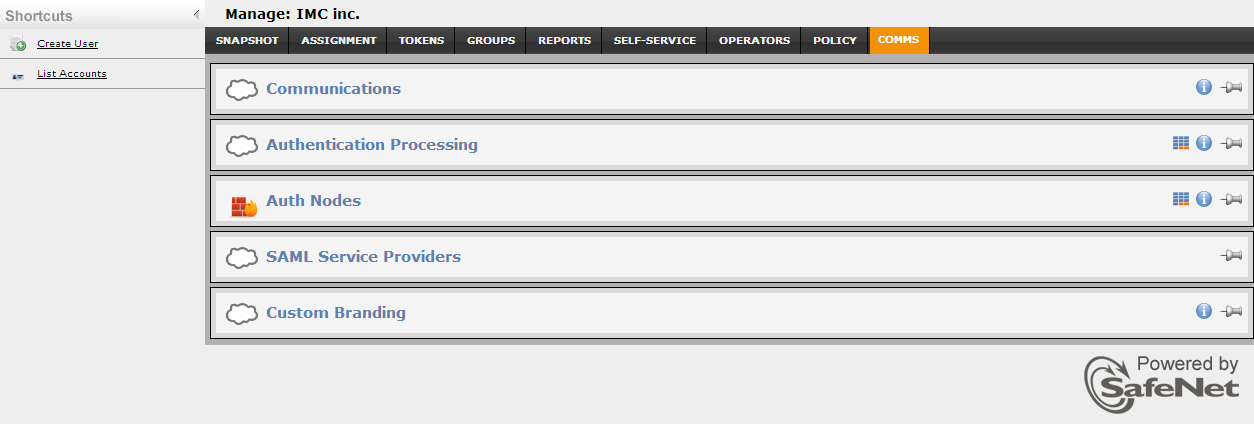
11 Refer to provisioning rules in the SafeNet Authentication Service - Subscriber Account Operator Guide to learn how to provision the different authentication methods to the users in the SafeNet Authentication Service User Store. SubscriberAccountOperatorGuide.pdf Adding a Linux Server as an Authentication Node in SAS Add a RADIUS entry in the SAS Authentication Nodes module to prepare it to receive RADIUS authentication requests from a Linux server. You will need the IP address of the Linux server and the shared secret to be used by both SAS and the Linux server. To add an Authentication Node in SAS: 1. Log in to the SAS console with an Operator account. 2. Click the COMMS tab, and then select the Auth Nodes module. 11

12 3. In the Auth Nodes module, click the Auth Nodes link. 4. Click Add. 5. In the Add Auth Nodes section, complete the following fields, and then click Save: Agent Description Host Name Low IP Address In Range Configure FreeRADIUS Synchronization Shared Secret Confirm Shared Secret Enter a host description. Enter the name of the host that will authenticate with SAS. Enter the IP address of the host that will authenticate with SAS. Select this option. Enter the shared secret key. Re-enter the shared secret key to confirm it. 12

13 The Auth Node is added to the system. Checking the SAS RADIUS Address Before adding SafeNet Authentication Service as a RADIUS server on the Linux server, check the IP address of the SAS RADIUS server. The IP address will then be added to the Linux server as a RADIUS server at a later stage. To check the IP address of the SAS RADIUS server: 1. Log in to the SAS console with an Operator account. 13

14 2. Click the COMMS tab, and then select the Auth Nodes module. 3. Click the Auth Nodes link. The SAS RADIUS server details are displayed. 14
15 Configuring Linux PAM Modules Configure the Linux PAM Modules to use RADIUS authentication for PAM-aware applications. To achieve this, you need to: Compile the PAM module Add a RADIUS server for the PAM module Secure the RADIUS server configuration Configure the application-specific configuration files Compiling the PAM Module 1. Log in as a root user. 2. Go to the directory where the PAM module package is extracted. 3. To compile the PAM module for your system, run the following command: make 4. To copy pam_radius_auth.so to /lib/security, run the following command: cp pam_radius_auth.so /lib/security/pam_radius_auth.so Adding a RADIUS Server for the PAM Module The FreeRADIUS PAM module searches for the server file in the /etc/raddb directory. This file contains the location of the RADIUS servers, the shared secret, and the order in which each RADIUS server will be checked. To add a RADIUS server: 1. Verify that the /etc/raddb directory exists. If it does not exist, run the following command to create it: mkdir /etc/raddb 2. A generic server configuration file, pam_radius_auth.conf, exists in the directory where the PAM module package is extracted. Run the following command to move the pam_radius_auth.conf file to the /etc/raddb directory and rename it to server: mv pam_radius_auth.conf /etc/raddb/server 15
16 3. Open the server file. Below is an example of the server file: 4. Enter the RADIUS server details in the following format: Server:Port shared_secret timeout where: A RADIUS port must be specified in the server file. The default RADIUS port numbers are 1812 or The timeout field controls the time for which the module waits before deciding if the server has failed to respond. This setting is optional. If multiple entries for the RADIUS server exist, they are tried in the order specified. If a server fails to respond, it is skipped and the next server is tried. Securing the RADIUS Server Configuration Once the configuration in the server file is complete, it must be secured in order to prevent tampering. Run the following commands to secure the server file: chown root /etc/raddb/ chmod -rwx /etc/raddb chmod -rwx /etc/raddb/server 16
17 Configuring the Application-specific Configuration Files Configure the PAM-aware application you would like to implement. SafeNet only supports the PAM-aware applications listed in the /etc/pam.d directory or in the pam.conf file. The image below lists all the applications in the /etc/pam.d directory. PAM-aware applications (su, halt, reboot, etc.) that require root authentication should not use SAS authentication. In the sub-sections below, the configuration required for some of the PAM-aware applications is discussed. NOTE: To avoid loss of any configuration, you must take back up of the existing PAM aware file (for example, login, telnet, and gdm) before deleting its content to test SAS authentication. Configuration for One-step Authentication For one-step authentication, the configuration is explained for the following PAM-aware applications: login telnet sshd gdm login The login PAM file affects the local console login sessions. To enable SAS authentication, delete the existing content of the login PAM file and then add the following content: #%PAM-1.0 auth required /lib/security/pam_radius_auth.so account required /lib/security/pam_permit.so account required /lib/security/pam_unix.so password required /lib/security/pam_unix.so session required /lib/security/pam_console.so session required /lib/security/pam_unix.so 17
18 telnet The telnet service can be authenticated using SAS. The login PAM file affects telnet sessions for SUSE Linux and the remote PAM file affects telnet sessions for RedHat Linux. To enable SAS authentication, delete the existing content of the login PAM file and then add the following content: #%PAM-1.0 auth required /lib/security/pam_radius_auth.so account required /lib/security/pam_permit.so account required /lib/security/pam_unix.so password required /lib/security/pam_unix.so session required /lib/security/pam_unix.so sshd (OpenSSH) For security reasons and compatibility with the FreeRADIUS PAM module, you must have at least SSHD version 2.4 for F-Secure or SSH2 version 2.9 for OpenSSH. SAS will provide support only for versions of OpenSSH/OpenSSL included with RedHat or any updates provided by RedHat. To enable SAS authentication, delete the existing content of the sshd PAM file and then add the following content: #%PAM-1.0 auth required /lib/security/pam_radius_auth.so account required /lib/security/pam_unix.so password required /lib/security/pam_unix.so session required /lib/security/pam_unix.so account required /lib/security/pam_access.so session required /lib/security/pam_console.so The following configuration must be done in the sshd_config file, which is located under the etc/ssh/ directory: PasswordAuthentication PermitEmptyPasswords ChallengeResponseAuthentication UsePrivilegeSeparation UsePAM yes no no no yes 18
19 gdm (graphical desktop logon) To enable SAS authentication, delete the existing content of the gdm-password PAM file and then add the following content: #%PAM-1.0 auth required /lib/security/pam_radius_auth.so auth required /lib/security/pam_nologin.so account required /lib/security/pam_access.so account required /lib/security/pam_unix.so password required /lib/security/pam_unix.so session required /lib/security/pam_unix.so NOTE: For some operating systems, the gdm file may be used instead of the gdmpassword file. SAS does not support challenge-response with graphical logon. To globally enable a graphical logon on startup, edit the /etc/ inittab file. Change id:3:initdefault: to id:5:initdefault: Configuration for Two-step Authentication PAM-aware applications can also be configured for two-step authentication. The end user will have to enter both the Linux password and the one-time password (OTP). Two-step authentication can be configured to work in two ways: The user first enters the Linux password and then the OTP. The user first enters the OTP and then the Linux password. For two-step authentication, the configuration is explained for the following PAM-aware applications: sshd gdm sshd If you want the user to enter the Linux password first: To enable SAS authentication, delete the existing content of the sshd PAM file and then add the following content: #%PAM-1.0 auth requisite /lib/security/pam_unix.so not_set_pass auth required /lib/security/pam_radius_auth.so account required /lib/security/pam_unix.so password required /lib/security/pam_unix.so 19
20 session required /lib/security/pam_unix.so account required /lib/security/pam_access.so session required /lib/security/pam_console.so If you want the user to enter the OTP first: To enable SAS authentication, delete the existing content of the sshd PAM file and then add the following content: #%PAM-1.0 auth requisite /lib/security/pam_radius_auth.so auth required /lib/security/pam_unix.so password required /lib/security/pam_unix.so session required /lib/security/pam_unix.so account required /lib/security/pam_access.so session required /lib/security/pam_console.so The following configuration must be done in the sshd_config file, which is located in the etc/ssh/ directory: PasswordAuthentication PermitEmptyPasswords ChallengeResponseAuthentication UsePrivilegeSeparation UsePAM no no yes no yes gdm If you want the user to enter the Linux password first: To enable SAS authentication, delete the existing content of the gdm-password PAM file and then add the following content: #%PAM-1.0 auth requisite /lib/security/pam_unix.so not_set_pass auth required /lib/security/pam_radius_auth.so account required /lib/security/pam_access.so account required /lib/security/pam_unix.so password required /lib/security/pam_unix.so session required /lib/security/ pam_unix.so 20
21 If you want the user to enter the OTP first: To enable SAS authentication, delete the existing content of the gdm-password PAM file and then add the following content: #%PAM-1.0 auth requisite /lib/security/pam_radius_auth.so auth required /lib/security/pam_unix.so account required /lib/security/pam_access.so account required /lib/security/pam_unix.so password required /lib/security/pam_unix.so session required /lib/security/pam_unix.so 21
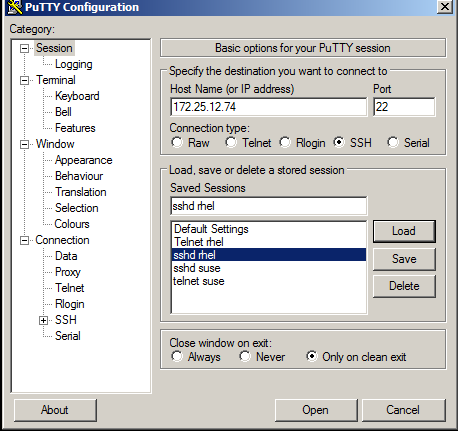
22 Running the Solution After configuring the PAM aware Linux services and the RADIUS server, the user is ready to authenticate to these services with the help of SafeNet OTP authenticator instead of the static password. The Linux user requiring authentication should be added in SAS and a token should be provisioned. Running the SSHD Service: One-step Authentication 1. Open PuTTY. 2. In the Host Name box, enter the IP address of the Linux server. 3. For Connection Type, select SSH and then click Open. (The screen image above is from PuTTY. Trademarks are the property of their respective owners.) 22
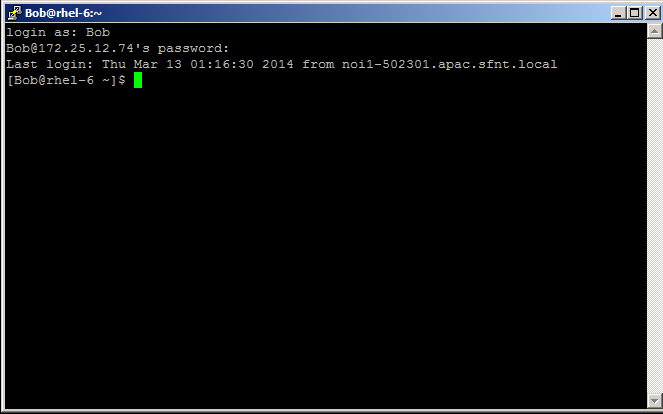
23 4. On the SSH login window, enter the user name for which the token is provisioned. (The screen image above is from Microsoft. Trademarks are the property of their respective owners.) 5. Generate a one-time password. 6. Enter the one-time password as the user s password and then press Enter. The user is successfully logged in. 23
24 Running the SSHD Service: Two-step Authentication In this solution, the user would enter the password first and then the OTP. 1. Open PuTTY. 2. In the Host Name box, enter the IP address of the Linux server. 3. For Connection Type, select SSH and then click Open. (The screen image above is from PuTTY. Trademarks are the property of their respective owners.) 4. On the SSH login window, enter the user name for which the token is provisioned. (The screen image above is from Microsoft. Trademarks are the property of their respective owners.) 24
25 5. Enter the Password and then press Enter. 6. Generate a one-time password. 7. Enter the one-time password and then press Enter. The user is successfully logged in. 25
26 Appendix: Changing a Label in the PAM Module With two-step authentication, when the system prompts for a one-time password (OTP), a Password field is displayed for entry of the OTP. You can change the text/label for the Password field if desired. To change the Password field text/label: 1. Go to the directory where the PAM module package is extracted. 2. Open the pam_radius_auth.c file in a text editor. 3. Go to line 1152 (only for PAM version ) and change the text Password: with the text of your choice; for example, Enter OTP:, as shown below. For other versions of PAM, search for the similar section of code. 4. Save the file and close it. 5. Compile the PAM module to apply the changes. 26
27 Support Contacts If you encounter a problem while installing, registering, or operating this product, please make sure that you have read the documentation. If you cannot resolve the issue, contact your supplier or SafeNet Customer Support. SafeNet Customer Support operates 24 hours a day, 7 days a week. Your level of access to this service is governed by the support plan arrangements made between SafeNet and your organization. Please consult this support plan for further information about your entitlements, including the hours when telephone support is available to you. Contact Method Address Contact Information SafeNet, Inc Millennium Drive Belcamp, Maryland USA Phone United States International Technical Support Customer Portal Existing customers with a Technical Support Customer Portal account can log in to manage incidents, get the latest software upgrades, and access the SafeNet Knowledge Base. 27
Integration Guide. SafeNet Authentication Service. SAS Using RADIUS Protocol with Apache HTTP Server
 SafeNet Authentication Service Integration Guide Technical Manual Template Release 1.0, PN: 000-000000-000, Rev. A, March 2013, Copyright 2013 SafeNet, Inc. All rights reserved. 1 Document Information
Integration Guide. SafeNet Authentication Service. SAS Using RADIUS Protocol with Microsoft DirectAccess
 SafeNet Authentication Service Integration Guide SAS Using RADIUS Protocol with Microsoft DirectAccess Technical Manual Template Release 1.0, PN: 000-000000-000, Rev. A, March 2013, Copyright 2013 SafeNet,
Integration Guide. SafeNet Authentication Service. Using SAS as an Identity Provider for Tableau Server
 SafeNet Authentication Service Integration Guide Technical Manual Template Release 1.0, PN: 000-000000-000, Rev. A, March 2013, Copyright 2013 SafeNet, Inc. All rights reserved. 1 Document Information
Integration Guide. SafeNet Authentication Service. Using SAS as an Identity Provider for Salesforce
 SafeNet Authentication Service Integration Guide Technical Manual Template Release 1.0, PN: 000-000000-000, Rev. A, March 2013, Copyright 2013 SafeNet, Inc. All rights reserved. 1 Document Information
Integration Guide. SafeNet Authentication Service. Using SAS as an Identity Provider for Drupal
 SafeNet Authentication Service Integration Guide Technical Manual Template Release 1.0, PN: 000-000000-000, Rev. A, March 2013, Copyright 2013 SafeNet, Inc. All rights reserved. 1 Document Information
Integration Guide. SafeNet Authentication Service. VMWare View 5.1
 SafeNet Authentication Service Integration Guide Technical Manual Template Release 1.0, PN: 000-000000-000, Rev. A, March 2013, Copyright 2013 SafeNet, Inc. All rights reserved. 1 Document Information
Integration Guide. SafeNet Authentication Service. Using RADIUS Protocol for Radiator RADIUS Server
 SafeNet Authentication Service Integration Guide TechnicalManual Template Release 1.0, PN: 000-000000-000, Rev. A, March 2013, Copyright 2013 SafeNet, Inc. All rights reserved. 1 Document Information Document
SafeNet Authentication Service
 SafeNet Authentication Service Integration Guide All information herein is either public information or is the property of and owned solely by Gemalto NV. and/or its subsidiaries who shall have and keep
SafeNet Authentication Service
 SafeNet Authentication Service All information herein is either public information or is the property of and owned solely by Gemalto NV. and/or its subsidiaries who shall have and keep the sole right to
Configuration Guide. SafeNet Authentication Service AD FS Agent
 SafeNet Authentication Service AD FS Agent Configuration Guide Technical Manual Template Release 1.0, PN: 000-000000-000, Rev. A, March 2013, Copyright 2013 SafeNet, Inc. All rights reserved. 1 Document
Integration Guide. SafeNet Authentication Client. Using SAC with Putty-CAC
 SafeNet Authentication Client Integration Guide Technical Manual Template Release 1.0, PN: 000-000000-000, Rev. A, March 2013, Copyright 2013 SafeNet, Inc. All rights reserved. 1 Document Information Document
Agent Configuration Guide
 SafeNet Authentication Service Agent Configuration Guide SAS Agent for Microsoft Internet Information Services (IIS) Technical Manual Template Release 1.0, PN: 000-000000-000, Rev. A, March 2013, Copyright
Integration Guide. SafeNet Authentication Service. Oracle Secure Desktop Using SAS RADIUS OTP Authentication
 SafeNet Authentication Service Integration Guide Oracle Secure Desktop Using SAS RADIUS OTP Authentication Technical Manual Template Release 1.0, PN: 000-000000-000, Rev. A, March 2013, Copyright 2013
Integration Guide. SafeNet Authentication Service. Using SAS with Web Application Proxy. Technical Manual Template
 SafeNet Authentication Service Integration Guide Technical Manual Template Release 1.0, PN: 000-000000-000, Rev. A, March 2013, Copyright 2013 SafeNet, Inc. All rights reserved. 1 Document Information
Configuration Guide. SafeNet Authentication Service. SAS Agent for Microsoft Internet Information Services (IIS)
 SafeNet Authentication Service Configuration Guide Technical Manual Template Release 1.0, PN: 000-000000-000, Rev. A, March 2013, Copyright 2013 SafeNet, Inc. All rights reserved. 1 Document Information
Configuration Guide. SafeNet Authentication Service. SAS Agent for Microsoft Outlook Web Access 1.06
 SafeNet Authentication Service Configuration Guide 1.06 Technical Manual Template Release 1.0, PN: 000-000000-000, Rev. A, March 2013, Copyright 2013 SafeNet, Inc. All rights reserved. 1 Document Information
Integration Guide. SafeNet Authentication Service. Using RADIUS and LDAP Protocols for Cisco Secure ACS
 SafeNet Authentication Service Integration Guide Using RADIUS and LDAP Protocols for Cisco Secure ACS Technical Manual Template Release 1.0, PN: 000-000000-000, Rev. A, March 2013, Copyright 2013 SafeNet,
Installation Guide. SafeNet Authentication Service
 SafeNet Authentication Service Installation Guide Technical Manual Template Release 1.0, PN: 000-000000-000, Rev. A, March 2013, Copyright 2013 SafeNet, Inc. All rights reserved. 1 Document Information
Configuration Guide. SafeNet Authentication Service. SAS Agent for Microsoft Outlook Web App. Technical Manual Template
 SafeNet Authentication Service Configuration Guide Technical Manual Template Release 1.0, PN: 000-000000-000, Rev. A, March 2013, Copyright 2013 SafeNet, Inc. All rights reserved. 1 Document Information
Configuration Guide. SafeNet Authentication Service. Token Validator Proxy Agent
 SafeNet Authentication Service Configuration Guide Technical Manual Template Release 1.0, PN: 000-000000-000, Rev. A, March 2013, Copyright 2013 SafeNet, Inc. All rights reserved. 1 Document Information
Integration Guide. SafeNet Authentication Client. Using SAC CBA for Check Point Security Gateway
 SafeNet Authentication Client Integration Guide Technical Manual Template Release 1.0, PN: 000-000000-000, Rev. A, March 2013, Copyright 2013 SafeNet, Inc. All rights reserved. 1 Document Information Document
Synchronization Agent Configuration Guide
 SafeNet Authentication Service Synchronization Agent Configuration Guide 1 Document Information Document Part Number 007-012476-001, Revision A Release Date July 2014 Trademarks All intellectual property
Configuration Guide. SafeNet Authentication Service. Remote Logging Agent
 SafeNet Authentication Service Configuration Guide Technical Manual Template Release 1.0, PN: 000-000000-000, Rev. A, March 2013, Copyright 2013 SafeNet, Inc. All rights reserved. 1 Document Information
SafeNet Authentication Service
 SafeNet Authentication Service Integration Guide All information herein is either public information or is the property of and owned solely by Gemalto NV. and/or its subsidiaries who shall have and keep
Migration Guide. SafeNet Authentication Service. SafeWord/SAMx. Migration Guide: SafeNet Authentication Service. SafeWord/SAMx
 SafeNet Authentication Service Migration Guide 1 Document Information Document Part Number 007-012524-001, Rev. C Release Date January 2015 Trademarks All intellectual property is protected by copyright.
SafeNet Authentication Manager Express. Upgrade Instructions All versions
 SafeNet Authentication Manager Express Upgrade Instructions All versions www.safenet-inc.com 4690 Millennium Drive, Belcamp, Maryland 21017 USA Telephone: +1 410 931 7500 or 1 800 533 3958 www.safenet-inc.com
SafeNet Cisco AnyConnect Client. Configuration Guide
 SafeNet Cisco AnyConnect Client Configuration Guide All information herein is either public information or is the property of and owned solely by Gemalto NV. and/or its subsidiaries who shall have and
Integration Guide. SafeNet Authentication Service. Using RADIUS Protocol for Cisco ASA
 SafeNet Authentication Service Integration Guide Technical Manual Template Release 1.0, PN: 000-000000-000, Rev. A, March 2013, Copy right 2013 Saf enet, Inc. All rights reserv ed. 1 Document Information
Gemalto SafeNet Minidriver 9.0
 SafeNet Authentication Client Gemalto SafeNet Minidriver 9.0 Technical Manual Template Release 1.0, PN: 000-000000-000, Rev. A, March 2013, Copyright 2013 SafeNet, Inc. All rights reserved. 1 Document
CRYPTOCard Authentication. Using PAM for Linux and Solaris. Quick Start Guide. Copyright 2002-2003 CRYPTOCard Corporation All Rights Reserved 030428
 CRYPTOCard Authentication Using PAM for Linux and Solaris Quick Start Guide Copyright 2002-2003 CRYPTOCard Corporation All Rights Reserved 030428 http://www.cryptocard.com Table of Contents CHANGE HISTORY...
Implementation Guide for protecting. Linux/Unix/Solaris Pam Modules
 Implementation Guide for protecting Linux/Unix/Solaris Pam Modules Copyright 2009 CRYPTOCard Inc. http:// www.cryptocard.com Copyright Copyright 2009, CRYPTOCard All Rights Reserved. No part of this publication
Integration Guide. SafeNet Authentication Service. Integrating Active Directory Lightweight Services
 SafeNet Authentication Service Integration Guide Technical Manual Template Release 1.0, PN: 000-000000-000, Rev. A, March 2013, Copyright 2013 SafeNet, Inc. All rights reserved. 1 Document Information
SAS Agent for Outlook Web Access
 SAS Agent for Outlook Web Access CUSTOMER RELEASE NOTES Version: 1.06 Build: 1.06.27725 Issue Date: 4 February 2015 Document Part Number: 007-012888-001, Rev. D Contents Product Description... 2 Release
SafeNet Authentication Service
 SafeNet Authentication Service Push OTP Integration Guide All information herein is either public information or is the property of and owned solely by Gemalto NV. and/or its subsidiaries who shall have
User Guide. SafeNet MobilePASS for Windows Phone
 SafeNet MobilePASS for Windows Phone User Guide Technical Manual Template Release 1.0, PN: 000-000000-000, Rev. A, March 2013, Copyright 2013 SafeNet, Inc. All rights reserved. 1 Document Information Product
SafeNet MobilePASS Version 8.2.0, Revision B
 SafeNet MobilePASS Version 8.2.0, Revision B User Guide Software Version 8.2.0 Documentation Version: 20101118 2012 SafeNet, Inc. All rights reserved Preface All intellectual property is protected by copyright.
Microsoft SQL Server Integration Guide
 Microsoft SQL Server Integration Guide Document Information Document Part Number 007-011108-001 (Rev J) Release Date August 2013 Trademarks All intellectual property is protected by copyright. All trademarks
Juniper SSL VPN Authentication QUICKStart Guide
 Juniper SSL VPN Authentication QUICKStart Guide Powerful Authentication Management for Service Providers and Enterprises Authentication Service Delivery Made EASY Copyright 2012 SafeNet, Inc. All rights
SAS Agent for Outlook Web App
 SAS Agent for Outlook Web App CUSTOMER RELEASE NOTES Version: 1.08 Build: 1.08.579 Issue Date: 17 November 2015 Document Part Number: 007-012888-001, Rev. F Contents Product Description... 2 Release Description...
Microsoft IAS and NPS Agent Configuration Guide
 Microsoft IAS and NPS Agent Configuration Guide Powerful Authentication Management for Service Providers and Enterprises Authentication Service Delivery Made EASY Agent IAS and NPS (Microsoft) Configuration
Strong Authentication for Juniper Networks SSL VPN
 Strong Authentication for Juniper Networks SSL VPN with Powerful Authentication Management for Service Providers and Enterprises Authentication Service Delivery Made EASY Copyright Copyright 2011. CRYPTOCard
Microsoft IIS Integration Guide
 Microsoft IIS Integration Guide Preface Preface 2015 SafeNet, Inc. All rights reserved. Part Number: 007-011955-001 (Rev E, 12/2015) All intellectual property is protected by copyright. All trademarks
SafeNet MSSQL EKM Provider User Guide
 SafeNet MSSQL EKM Provider User Guide Version 4.8.5 Documentation Version: 20080705 Copyright Information 2009 SafeNet, Inc. All rights reserved All intellectual property is protected by copyright. All
Cisco ASA Authentication QUICKStart Guide
 Cisco ASA Authentication QUICKStart Guide Powerful Authentication Management for Service Providers and Enterprises Authentication Service Delivery Made EASY Copyright 2012 SafeNet, Inc. All rights reserved.
SafeNet KMIP and Amazon S3 Integration Guide
 SafeNet KMIP and Amazon S3 Integration Guide Documentation Version: 20130524 2013 SafeNet, Inc. All rights reserved Preface All intellectual property is protected by copyright. All trademarks and product
Active Directory Rights Management Service Integration Guide
 Active Directory Rights Management Service Integration Guide Preface Preface 2013 SafeNet, Inc. All rights reserved. Part Number: 007-011230-001 (Rev F, 07/2013) All intellectual property is protected
Preface. Microsoft Office Sharepoint Server 2007 Integration Guide. 2009 SafeNet, Inc. All rights reserved. Part Number: 009804-001 (Rev A, 06/2009)
 Microsoft Office Sharepoint Server 2007 Integration Guide Preface Preface 2009 SafeNet, Inc. All rights reserved. Part Number: 009804-001 (Rev A, 06/2009) All intellectual property is protected by copyright.
Sentinel Cloud V.3.5 Installation Guide
 Sentinel Cloud V.3.5 Installation Guide ii Sentinel Cloud Installation Guide Document Revision History Part number 007-012284-001, Revision C. September 2014 Disclaimer and Copyrights Copyright 2014, SafeNet,
Configuration Guide. SafeNet Authentication Service. SAS Agent for PEAP
 SafeNet Authentication Service Configuration Guide Technical Manual Template Release 1.0, PN: 000-000000-000, Rev. A, March 2013, Copyright 2013 SafeNet, Inc. All rights reserved. 1 Document Information
Authenticate vsftpd (a secure FTP server for UNIXlike systems) with IDENTIKEY Authentication Sever
 KB 160083 Authenticate vsftpd (a secure FTP server for UNIXlike systems) with IDENTIKEY Authentication Sever Creation date: 11/03/2016 Last Review: 11/03/2016 Revision number: 2 Document type: How To Security
Preface. Limitations. Disclaimers. Technical Support. Luna SA and IBM HTTP Server/IBM Web Sphere Application Server Integration Guide
 Luna SA and IBM HTTP Server/IBM Web Sphere Application Server Integration Guide Preface Preface 2012 SafeNet, Inc. All rights reserved. Part Number: 007-012077-001 (Rev B, 06/2012) All intellectual property
SAS Token Validator Proxy Agent Configuration Guide
 SAS Token Validator Proxy Agent Configuration Guide Powerful Authentication Management for Service Providers and Enterprises Authentication Service Delivery Made EASY Copyright 2014 SafeNet, Inc. All rights
Strong Authentication for Cisco ASA 5500 Series
 Strong Authentication for Cisco ASA 5500 Series with Powerful Authentication Management for Service Providers and Enterprises Authentication Service Delivery Made EASY Copyright Copyright 2011. CRYPTOCard
Strong Authentication for Juniper Networks
 Strong Authentication for Juniper Networks SSL VPN SSO and OWA with Powerful Authentication Management for Service Providers and Enterprises Authentication Service Delivery Made EASY Copyright Copyright
Hands-On Lab: WSUS. Lab Manual Expediting WSUS Service for XP Embedded OS
 Lab Manual Expediting WSUS Service for XP Embedded OS Summary In this lab, you will learn how to deploy the security update to your XP Pro or XP embedded images. You will also learn how to prepare the
Quick Start Guide for VMware and Windows 7
 PROPALMS VDI Version 2.1 Quick Start Guide for VMware and Windows 7 Rev. 1.1 Published: JULY-2011 1999-2011 Propalms Ltd. All rights reserved. The information contained in this document represents the
Enterprise Self Service Quick start Guide
 Enterprise Self Service Quick start Guide Software version 4.0.0.0 December 2013 General Information: [email protected] Online Support: [email protected] 1 2013 CionSystems Inc. ALL RIGHTS RESERVED.
INTEGRATION GUIDE. IDENTIKEY Federation Server for Juniper SSL-VPN
 INTEGRATION GUIDE IDENTIKEY Federation Server for Juniper SSL-VPN Disclaimer Disclaimer of Warranties and Limitation of Liabilities All information contained in this document is provided 'as is'; VASCO
DualShield. for PAM RADIUS. Implementation Guide. (Version 5.4) Copyright 2012 Deepnet Security Limited
 DualShield for Implementation Guide (Version 5.4) Copyright 2012 Deepnet Security Limited Copyright 2012, Deepnet Security. All Rights Reserved. Page 1 Trademarks Deepnet Unified Authentication, MobileID,
INTEGRATION GUIDE. General Radius Config
 INTEGRATION GUIDE General Radius Config Disclaimer Disclaimer of Warranties and Limitation of Liabilities All information contained in this document is provided 'as is'; VASCO Data Security assumes no
Omniquad Exchange Archiving
 Omniquad Exchange Archiving Deployment and Administrator Guide Manual version 3.1.2 Revision Date: 20 May 2013 Copyright 2012 Omniquad Ltd. All rights reserved. Omniquad Ltd Crown House 72 Hammersmith
Dell One Identity Cloud Access Manager 8.0.1 - How to Configure for SSO to SAP NetWeaver using SAML 2.0
 Dell One Identity Cloud Access Manager 8.0.1 - How to Configure for SSO to SAP NetWeaver using SAML 2.0 May 2015 About this guide Prerequisites and requirements NetWeaver configuration Legal notices About
Windows Server Update Services 3.0 SP2 Step By Step Guide
 Windows Server Update Services 3.0 SP2 Step By Step Guide Microsoft Corporation Author: Anita Taylor Editor: Theresa Haynie Abstract This guide provides detailed instructions for installing Windows Server
Dell One Identity Cloud Access Manager 8.0.1 - How to Configure Microsoft Office 365
 Dell One Identity Cloud Access Manager 8.0.1 - How to Configure Microsoft Office 365 May 2015 This guide describes how to configure Microsoft Office 365 for use with Dell One Identity Cloud Access Manager
Generating an Apple Push Notification Service Certificate
 www.novell.com/documentation Generating an Apple Push Notification Service Certificate ZENworks Mobile Management 2.6.x January 2013 Legal Notices Novell, Inc., makes no representations or warranties with
For Active Directory Installation Guide
 For Active Directory Installation Guide Version 2.5.2 April 2010 Copyright 2010 Legal Notices makes no representations or warranties with respect to the contents or use of this documentation, and specifically
SafeNet Authentication Service Token Validator Proxy Agent. Configuration Guide
 SafeNet Authentication Service Token Validator Proxy Agent Configuration Guide All information herein is either public information or is the property of and owned solely by Gemalto NV. and/or its subsidiaries
How To Connect A Gemalto To A Germanto Server To A Joniper Ssl Vpn On A Pb.Net 2.Net 3.5.1 (Net 2) On A Gmaalto.Com Web Server
 Application Note: Integrate Juniper SSL VPN with Gemalto SA Server [email protected] October 2007 www.gemalto.com Table of contents Table of contents... 2 Overview... 3 Architecture... 5 Configure
StreamServe Persuasion SP5 Control Center
 StreamServe Persuasion SP5 Control Center User Guide Rev C StreamServe Persuasion SP5 Control Center User Guide Rev C OPEN TEXT CORPORATION ALL RIGHTS RESERVED United States and other international patents
Quick Start Guide for Parallels Virtuozzo
 PROPALMS VDI Version 2.1 Quick Start Guide for Parallels Virtuozzo Rev. 1.1 Published: JULY-2011 1999-2011 Propalms Ltd. All rights reserved. The information contained in this document represents the current
EMC Data Protection Search
 EMC Data Protection Search Version 1.0 Security Configuration Guide 302-001-611 REV 01 Copyright 2014-2015 EMC Corporation. All rights reserved. Published in USA. Published April 20, 2015 EMC believes
Strong Authentication for Microsoft TS Web / RD Web
 Strong Authentication for Microsoft TS Web / RD Web with Powerful Authentication Management for Service Providers and Enterprises Authentication Service Delivery Made EASY Copyright Copyright 2011. CRYPTOCard
INTEGRATION GUIDE. DIGIPASS Authentication for Juniper SSL-VPN
 INTEGRATION GUIDE DIGIPASS Authentication for Juniper SSL-VPN Disclaimer Disclaimer of Warranties and Limitation of Liabilities All information contained in this document is provided 'as is'; VASCO Data
DameWare Server. Administrator Guide
 DameWare Server Administrator Guide About DameWare Contact Information Team Contact Information Sales 1.866.270.1449 General Support Technical Support Customer Service User Forums http://www.dameware.com/customers.aspx
Security Configuration Guide P/N 300-010-493 Rev A05
 EMC VPLEX Security Configuration Guide P/N 300-010-493 Rev A05 June 7, 2011 This guide provides an overview of VPLEX security configuration settings, including secure deployment and usage settings needed
SETTING UP ACTIVE DIRECTORY (AD) ON WINDOWS 2008 FOR DOCUMENTUM @ EROOM
 SETTING UP ACTIVE DIRECTORY (AD) ON WINDOWS 2008 FOR DOCUMENTUM @ EROOM Abstract This paper explains how to setup Active directory service on windows server 2008.This guide also explains about how to install
INTEGRATION GUIDE. DIGIPASS Authentication for Microsoft Exchange ActiveSync 2007
 INTEGRATION GUIDE DIGIPASS Authentication for Microsoft Exchange ActiveSync 2007 Disclaimer Disclaimer of Warranties and Limitation of Liabilities All information contained in this document is provided
Strong Authentication for Microsoft SharePoint
 Strong Authentication for Microsoft SharePoint with Powerful Authentication Management for Service Providers and Enterprises Authentication Service Delivery Made EASY Copyright Copyright 2011. CRYPTOCard
How To - Implement Clientless Single Sign On Authentication with Active Directory
 How To Implement Clientless Single Sign On in Single Active Directory Domain Controller Environment How To - Implement Clientless Single Sign On Authentication with Active Directory Applicable Version:
IBM Campaign Version-independent Integration with IBM Engage Version 1 Release 3 April 8, 2016. Integration Guide IBM
 IBM Campaign Version-independent Integration with IBM Engage Version 1 Release 3 April 8, 2016 Integration Guide IBM Note Before using this information and the product it supports, read the information
Novell Access Manager
 J2EE Agent Guide AUTHORIZED DOCUMENTATION Novell Access Manager 3.1 SP3 February 02, 2011 www.novell.com Novell Access Manager 3.1 SP3 J2EE Agent Guide Legal Notices Novell, Inc., makes no representations
Management Reporter Integration Guide for Microsoft Dynamics AX
 Microsoft Dynamics Management Reporter Integration Guide for Microsoft Dynamics AX July 2013 Find updates to this documentation at the following location: http://go.microsoft.com/fwlink/?linkid=162565
Email Archiving User Guide Outlook Plugin. Manual version 3.1
 Email Archiving User Guide Outlook Plugin Manual version 3.1 Copyright 2012 Omniquad Ltd. All rights reserved. Omniquad Ltd Crown House 72 Hammersmith Road Hammersmith London W14 8TH United Kingdom Omniquad
Remote Management Reference
 www.novell.com/documentation Remote Management Reference ZENworks 11 Support Pack 2 October 2013 Legal Notices Novell, Inc., makes no representations or warranties with respect to the contents or use of
4.0 SP2 (4.0.2.0) May 2015 702P03296. Xerox FreeFlow Core Installation Guide: Windows Server 2008 R2
 4.0 SP2 (4.0.2.0) May 2015 702P03296 Installation Guide: Windows Server 2008 R2 2015 Xerox Corporation. All rights reserved. Xerox, Xerox and Design, and FreeFlow are trademarks of Xerox Corporation in
BlackShield ID Agent for Remote Web Workplace
 Agent for Remote Web Workplace 2010 CRYPTOCard Corp. All rights reserved. http:// www.cryptocard.com Copyright Copyright 2010, CRYPTOCard All Rights Reserved. No part of this publication may be reproduced,
4.0. Offline Folder Wizard. User Guide
 4.0 Offline Folder Wizard User Guide Copyright Quest Software, Inc. 2007. All rights reserved. This guide contains proprietary information, which is protected by copyright. The software described in this
Configuring and Monitoring Citrix Access Gateway-Linux Servers. eg Enterprise v5.6
 Configuring and Monitoring Citrix Access Gateway-Linux Servers eg Enterprise v5.6 Restricted Rights Legend The information contained in this document is confidential and subject to change without notice.
How To Secure An Rsa Authentication Agent
 RSA Authentication Agents Security Best Practices Guide Version 3 Contact Information Go to the RSA corporate web site for regional Customer Support telephone and fax numbers: www.rsa.com. Trademarks RSA,
Administration Quick Start
 www.novell.com/documentation Administration Quick Start ZENworks 11 Support Pack 3 February 2014 Legal Notices Novell, Inc., makes no representations or warranties with respect to the contents or use of
OnCommand Performance Manager 1.1
 OnCommand Performance Manager 1.1 Installation and Setup Guide For Red Hat Enterprise Linux NetApp, Inc. 495 East Java Drive Sunnyvale, CA 94089 U.S. Telephone: +1 (408) 822-6000 Fax: +1 (408) 822-4501
Identikey Server Getting Started Guide 3.1
 Identikey Server Getting Started Guide 3.1 Disclaimer of Warranties and Limitations of Liabilities Disclaimer of Warranties and Limitations of Liabilities The Product is provided on an 'as is' basis, without
Apache HTTP Server Integration Guide
 Apache HTTP Server Integration Guide Document Information Document Part Number 007-011228-001 (Rev E) Release Date November 2014 Trademarks All intellectual property is protected by copyright. All trademarks
Secret Server Installation Windows Server 2012
 Table of Contents Introduction... 2 ASP.NET Website... 2 SQL Server Database... 2 Administrative Access... 2 Prerequisites... 2 System Requirements Overview... 2 Additional Recommendations... 3 Beginning
Novell Identity Manager
 Password Management Guide AUTHORIZED DOCUMENTATION Novell Identity Manager 3.6.1 June 05, 2009 www.novell.com Identity Manager 3.6.1 Password Management Guide Legal Notices Novell, Inc. makes no representations
VMware Identity Manager Administration
 VMware Identity Manager Administration VMware Identity Manager 2.6 This document supports the version of each product listed and supports all subsequent versions until the document is replaced by a new
BlackShield ID Agent for Terminal Services Web and Remote Desktop Web
 Agent for Terminal Services Web and Remote Desktop Web 2010 CRYPTOCard Corp. All rights reserved. http:// www.cryptocard.com Copyright Copyright 2010, CRYPTOCard All Rights Reserved. No part of this publication
INTEGRATION GUIDE. DIGIPASS Authentication for VMware Horizon Workspace
 INTEGRATION GUIDE DIGIPASS Authentication for VMware Horizon Workspace Disclaimer Disclaimer of Warranties and Limitation of Liabilities All information contained in this document is provided 'as is';
Interworks. Interworks Cloud Platform Installation Guide
 Interworks Interworks Cloud Platform Installation Guide Published: March, 2014 This document contains information proprietary to Interworks and its receipt or possession does not convey any rights to reproduce,
IBM Campaign and IBM Silverpop Engage Version 1 Release 2 August 31, 2015. Integration Guide IBM
 IBM Campaign and IBM Silverpop Engage Version 1 Release 2 August 31, 2015 Integration Guide IBM Note Before using this information and the product it supports, read the information in Notices on page 93.