
SAP on SUSE Linux Enterprise
|
|
|
- Lora Douglas
- 9 years ago
- Views:
Transcription
1 SAP on SUSE Linux Enterprise Running SAP NetWeaver on SUSE Linux Enterprise Server with High Availability - DRBD dual data center 11 SP1 December 20, 2011 Best Practice

2 Running SAP NetWeaver on SUSE Linux Enterprise Server with High Availability - DRBD dual data center List of Authors: Fabian Herschel ([email protected]), Markus Guertler ([email protected]), Lars Pinne ([email protected]) Copyright Novell, Inc. and contributors. All rights reserved. This guide has been created in cooperation with LINBIT HA-Solution GmbH. Many thanks for all good contributions. Permission is granted to copy, distribute and/or modify this document under the terms of the GNU Free Documentation License, Version 1.2 or any later version published by the Free Software Foundation; with the Invariant Section being this copyright notice and license. A copy of the license is included in the section entitled GNU Free Documentation License. For Novell trademarks, see the Novell Trademark and Service Mark list Linux* is a registered trademark of Linus Torvalds. All other third party trademarks are the property of their respective owners. A trademark symbol (, etc.) denotes a Novell trademark; an asterisk (*) denotes a third party trademark. All information found in this book has been compiled with utmost attention to detail. However, this does not guarantee complete accuracy. Neither Novell, Inc., SUSE LINUX Products GmbH, the authors, nor the translators shall be held liable for possible errors or the consequences thereof.

3 Contents Executive Summary vii Part I Introduction and Concept 1 1 Introduction SAP on Linux SUSE Linux Enterprise Server SUSE Linux Enterprise Server High Availability Extension Database for SAP Sizing, Deployment and Migration Considerations One Concept Two Use Cases High Availability Concept Overview Use Case 1 DRBD dual data center with two clusters - 2x Use Case 2 DRBD dual data center with one cluster Part II Installation of "DRBD dual data center" with MaxDB 29 3 Installation Overview 31 4 Planning 33 5 Prerequisites Hardware Requirements Software Requirements, Connection Data, and all the Rest

4 6 Download the Needed SAP Installation Media 39 7 Install SUSE Linux Enterprise Server 11 SP1 for SAP File System Layout Software Selection Runlevel and System Services Miscellaneous Check SLES for SAP Installation Prepare SAN Storage Multipath Configuration Partitioning MD Configuration DRBD Setup LVM Configuration File System Creation Check the SAN Storage Configure the Cluster on both Sites Install the SUSE Linux Enterprise High Availability Extension Software Packages on all Nodes Basic Cluster and CRM Configuration STONITH Resource Configuration Storage Resource Configuration Configure Virtual IP Addresses Install SAP NetWeaver 7.0 EHP SAP Installation Procedure Installation of the Central Services Instance ASCS Installation of the Database Installation of the Central Instance Check the SAP Installation Integrating SAP into the cluster SAP resource configuration Testing the Cluster Check the SAP Integration Application Cluster Tests
5 Part III Appendix 93 A Software Downloads 95 B Novell Products Online Documentation 97 C SAP Notes 99 D Links to SUSE Linux Enterprise Server, SAP, Databases 103 E Sample CRM Configuration for SAP Simple Stack High Availability 109 F Licenses 113 F.1 GNU Free Documentation License F.2 GNU General Public License Terminology 121
6

7 Executive Summary SAP Business Suite is a sophisticated application platform for large enterprises and mid-size companies. Many critical business environments require the highest possible SAP application availability. SUSE Linux Enterprise High Availability Extension, when running on modern x86-64 hardware platforms, satisfies this requirement. Together with a redundant layout of the technical infrastructure, single points of failure can be eliminated. SAP NetWeaver is a common stack of middleware functionality used to support the SAP business applications. This guide describes a SAP NetWeaver installation on SUSE Linux Enterprise Server 11 SP1 with the additional SUSE Linux Enterprise High Availability Extension. We will also describe possible failure scenarios and methods to avoid them. The described concept has proven its maturity during several years of productive operations for customers of different size and branches. This document focuses on deploying SAP in a dual-site cluster, where each site has redundant access to a SAN storage with two storage heads, using host-based mirroring with MD for intra-site synchronous replication and the DRBD technology to replicate asynchronously off-site. We will cover the commonly used disaster-recovery strategy, having one site with a two-node cluster at one geographical location and another site with another two-node cluster at another geographical location. After a complete failure of the first site (both cluster nodes down), the second site can takeover the operation of the SAP applications and databases. The site fail-over procedure is half-automated and requires some manual interaction. The local site fail-over is completely automated. Two sites with two two-node clusters require four nodes in total. Four dedicated servers and two times a redundant SAN infrastructure with four storage heads in total can be quite expensive. A cheaper, but less redundant variant of this scenario is, to use only one two-node cluster in the first site and a non-redundant standalone server in the second site. The server at the second site could also be equipped with a local storage, thus not requiring a SAN. This is a technical document designed to allow system administrators and technical consultants to integrate highly available SAP bussiness applications into an existing SUSE Linux Enterprise Server infrastructure.
8 The described storage stack and SAP configuration can be used with or without a high availability cluster. It is possible to add high availability functionality to an already running system if the installation complies with the described solution. This guide will show you how to: plan a SUSE Linux Enterprise platform for SAP workload, set up a Linux high availability infrastructure for SAP, including a storage stack that includes DRBD, perform a basic SAP NetWeaver installation on SUSE Linux Enterprise. This guide will also help you to install the following software components: SUSE Linux Enterprise Server 11 SP1 SUSE Linux Enterprise High Availability Extension MaxDB (Oracle and DB2 are supported, too) SAP NetWeaver 7.0 EHP1 (other versions are supported, too) This guide is aimed at IT professionals with skills in: SAP basic operating, data center system concepts and configuration, Linux knowledge at LPI1 or CLE level. To apply this guide, you need access to the following resources: SUSE Linux Enterprise Server 11 SP1 installation media. To update systems, you must have either Internet access, Novell ZENworks Linux Management, or a local Subscription Management Tool. SUSE Linux Enterprise High Availability Extension installation media. To update systems, you must have either Internet access, Novell ZENworks Linux Management, or a local Subscription Management Tool. SAP NetWeaver 7.0 EHP1 Installation Media. viii Running SAP NetWeaver on SUSE Linux Enterprise Server with High Availability - DRBD dual data center

9 Appropriate hardware: two servers, network, storage. For details, see below. This guide focuses on one DRBD-based solution, which supports a dual data center topology. We will give an overview of the covered SAP scenarios, include a brief overview of the DRBD technology and describe in detail the DRBD configuration in conjunction with the HA cluster configuration. Depending on your requirements, other scenarios can be selected or combined. A typical combination is the DRBD dual data center solution with host-based mirroring (Linux md-raid) and SBD (Stonith Block Device) dual data center solution. In this case, hostbased mirroring is used to replicate SAP data between two local sites (campus cluster). SBD is used as an effective disk-based split-brain protection for the two-node campus cluster located at the first and second site. DRBD is then used to replicate the data to another two-node cluster or a single standalone server at a third site. A typical use-case for this solution is to have two local sites close to each other on the U.S. east-cost and a third site on the U.S. west-coast. The classic method of asynchronous log-shipping to a remote site far away on the database-level would be obsolete with this solution. An overview of typical SAP high availability scenarios can be found in the white-paper "SAP on SUSE Linux Enterprise - Best Practices for Running SAP NetWeaver on SUSE Linux Enterprise Server 11 with High Availability" Executive Summary ix
10

11 Part I. Introduction and Concept

12

13 Introduction SAP on Linux Novell and SAP cooperate on a wide range of tasks. Along with the operating system layer, Novell and SAP work closely to integrate Novell identity and security management solutions with SAP's NetWeaver platform and business software applications. Novell has multiple dedicated resources working at SAP headquarters and the SAP LinuxLab to ensure maximum interoperability between our products with SAP software and technologies. SAP has built SAP LinuxLab to assist with the release of SAP software on Linux. LinuxLab supports other SAP departments in the development of the Linux platform. It processes Linux-specific support problems and acts as an information hub to all SAP partners in the Linux ecosystem A Brief History of SAP on Linux In terms of data and computing, SAP applications are used to build the information backbones of companies. Therefore, SAP workloads need to be high-performance with good scalability. In the past, this need was only met by dedicated data center hardware and operating systems such as IBM Mainframes or HP 9000 UNIX servers (among others). Introduction 3

14 In the 1990s, Intel-based (x86) systems met the performance criteria for running smaller SAP workloads. The main drive behind the adaption of x86-based platforms was the relatively lower cost and higher return on investment (ROI) for these systems compared to mainframe or UNIX servers. At the same time, Linux matured into a fully capable operating system that provided all the key functions needed to run all kinds of workloads. In the following years, Linux (and the x86 platform) evolved into a system that fulfills the needs for all kinds of SAP workloads, from the smallest to the largest systems. Currently, SUSE Linux Enterprise 11 has been tested with up to 4,096 CPUs and 4 TiB RAM, with even higher theoretical limits. In the beginning, SAP on Linux was limited to 32-bit, but with the x86-64 extensions to the x86 architecture, these limitations where overcome. Today, nearly all x86 architecture server CPUs are 64-bit capable. Where possible, SAP endorsed open standards and technologies. This allowed SAP to support a very wide range of operating systems and hardware platforms. Open-sourcebased Linux provides the maximum in openness, so it was only natural for SAP to start supporting it in SAP tries to be operating system agnostic and act neutral on the customer's chosen operating systems. Unlike other software vendors, SAP has clearly stated its policies toward open source and Linux. For instance, the usage of binary only (closed source) device drivers (kernel modules) is not supported. This helps the Linux and open source communities since hardware vendors are encouraged to either publish the specifications and APIs of their hardware so the Linux community can write drivers, or make driver source code available that can be included in the Linux kernel (see SAP Note ). Linux allows customers to reduce their total cost of ownership (TCO). Linux distributors do not charge a license fee for Linux because it is open source. Only support and services need to be acquired. Since Linux is supported on a very wide range of hardware systems, customers now have the choice to opt out of vendor lock-in. In terms of administration, SAP customers see little difference between Linux and proprietary UNIX-like operating systems. Linux is an accepted operating system in all areas of data center computing. Through open interfaces and a wide range of available applications, Linux is very capable of providing services at all availability levels necessary for successful standalone SAP workloads or integration with existing environments. 4 Running SAP NetWeaver on SUSE Linux Enterprise Server with High Availability - DRBD dual data center

15 1.2 SUSE Linux Enterprise Server SUSE Linux Enterprise Server Is Prepared for SAP Since the very start of SAP involvement with Linux, SUSE has been the number one Linux platform for SAP. SUSE Linux Enterprise Server has become the reference platform for SAP's software development. SAP now actively suggests SUSE Linux Enterprise Server when customers want to run SAP workloads on Linux. Recently, SUSE Linux Enterprise Server was chosen as the operating system for SAP's all-in-one business solutions and became a part of the SAP product line. SUSE Linux Enterprise Server has been fine-tuned to provide the best Linux platform for SAP software. YaST, the main installation and administration tool for SUSE Linux Enterprise Server, provides a SAP software pattern that installs the prerequisites needed for running SAP software. Also, some system parameters are fine-tuned in preparation for the SAP workload. In this document, we use SUSE Linux Enterprise Server 11 SP1 x86-64 with updates from Novell Customer Center SUSE Linux Enterprise Server for SAP Applications SUSE Linux Enterprise Server for SAP Applications is the only operating system optimized for all mission-critical SAP software solutions, including appliances, and is recommended by SAP as a preferred Linux platform. SUSE Linux Enterprise Server for SAP Applications is based on the newest SUSE Linux Enterprise technology, a highly reliable, scalable, secure and optimized server operating system that is built to power both physical and virtual mission-critical workloads. SUSE Linux Enterprise Server for SAP Applications is optimized for all missioncritical SAP software solutions. It is validated and certified by SAP and is, therefore, uniquely positioned to support SAP software solutions including appliances. Find more Introduction 5

16 details about this product at -sap.html. Installing a highly available cluster using SUSE Linux Enterprise Server for SAP Applications is more comfortable, because all needed packages including the cluster packages and SAP-related packages, like the java JDK, are already included in one single product Support and Certification For SAP customers, Novell offers the SUSE Linux Enterprise Server Priority Support for SAP Applications. This support offering provides customers with a single support point of entry for issues ranging from the operating system to the application ( Currently the following SUSE Linux Enterprise Server systems, including all service packs (SP), are certified as 64-bit version for SAP: SUSE Linux Enterprise Server for SAP Applications 11 ( SUSE Linux Enterprise Server 11 for AMD64 and Intel EM64T SUSE Linux Enterprise Server 11 SUSE Linux Enterprise Server 11 for AMD64 and Intel EM64T SUSE Linux Enterprise Server 11 for IBM Power SUSE Linux Enterprise Server 11 for IBM System z SUSE Linux Enterprise Server 11 for Intel ia64 SUSE Linux Enterprise Server 10 SUSE Linux Enterprise Server 10 for AMD64 and Intel EM64T SUSE Linux Enterprise Server 10 for IBM Power SUSE Linux Enterprise Server 10 for IBM System z 6 Running SAP NetWeaver on SUSE Linux Enterprise Server with High Availability - DRBD dual data center
17 SUSE Linux Enterprise Server 10 for Intel ia64 SUSE Linux Enterprise Server 9 SUSE Linux Enterprise Server 9 for AMD64 and Intel EM64T SUSE Linux Enterprise Server 9 for IBM POWER SUSE Linux Enterprise Server 9 for zseries SUSE Linux Enterprise Server 9 for Intel ia64 SUSE Linux Enterprise Server 8 SUSE Linux Enterprise Server 8 for zseries SAP and Novell are working together to ensure that SUSE Linux Enterprise Server service packs always match the certification of the respective product. In fact, SAP recommends to always use the latest available service pack. Novell will provide at least five years of general support for platform and operating system products, including its revisions, starting at the date of a product's general availability. When general support ends, Novell will offer extended support for a minimum of two years. This gives SAP customers a long installation run-time ensuring a low TCO. 1.3 SUSE Linux Enterprise Server High Availability Extension Your data is your most valuable asset it is what your business depends on. Robust, scalable and manageable storage is a top priority for your IT department. High availability storage, applications and services are critical for your business to be competitive. But even as data grows, you can lower storage management costs and still benefit from an easy-to-manage, high-availability and storage foundation that scales as needed. The High Availability Extension, a featured addition for SUSE Linux Enterprise Server 11, satisfies these needs. It includes high availability service and application clustering, file systems/clustered file systems, network file systems (NAS), volume managers, Introduction 7

18 networked storage systems and drivers (SAN), and the management of all these components working together. Unlike proprietary solutions, SUSE Linux Enterprise High Availability Extension keeps costs low by integrating open source, enterprise-class components. The key components of the extension are: OpenAIS, a high availability cluster manager, supports multinode failover. Distributed Replicated Block Devices (DRBD8) provides fast data resynchronization capabilities over LAN, replicated storage area network (SAN) semantics, allowing cluster-aware file systems to be used without additional SANs. We use DRBD with the LinBit Resource Agent to mirror the data asynchronously from one data center to an other. Resource Agents to monitor availability of resources Oracle Cluster File System 2 (OCFS2), a parallel cluster file system, offers scalability. Cluster Logical Volume Manager (clvm2), a logical volume manager for the Linux kernel, provides a method of allocating space on mass storage devices that is more flexible than conventional partitioning schemes. High availability GUI and various command line tools. SUSE Linux Enterprise Server High Availability Extension integrates these open source technologies and enables you to support line-of-business workloads traditionally reserved for UNIX and mainframe systems. Without this integration, you would have to configure each component separately and manually prevent conflicting administration operations from affecting shared storage. When delivered as an integrated solution, the High Availability Storage Infrastructure technology automatically shares cluster configuration and coordinates cluster-wide activities to ensure deterministic and predictable administration of storage resources for shared disk-based clusters. The multinode failover support in OpenAIS, the improved node and journaling recovery in OCFS2, and the snapshots in the Logical Volume Management System (clvm2) are some examples of the high availability features in the storage infrastructure. Other features, such as the cluster awareness and ready-to-run support of Oracle RAC, enrich the environment, simplifying administrative tasks or eliminating them completely. 8 Running SAP NetWeaver on SUSE Linux Enterprise Server with High Availability - DRBD dual data center

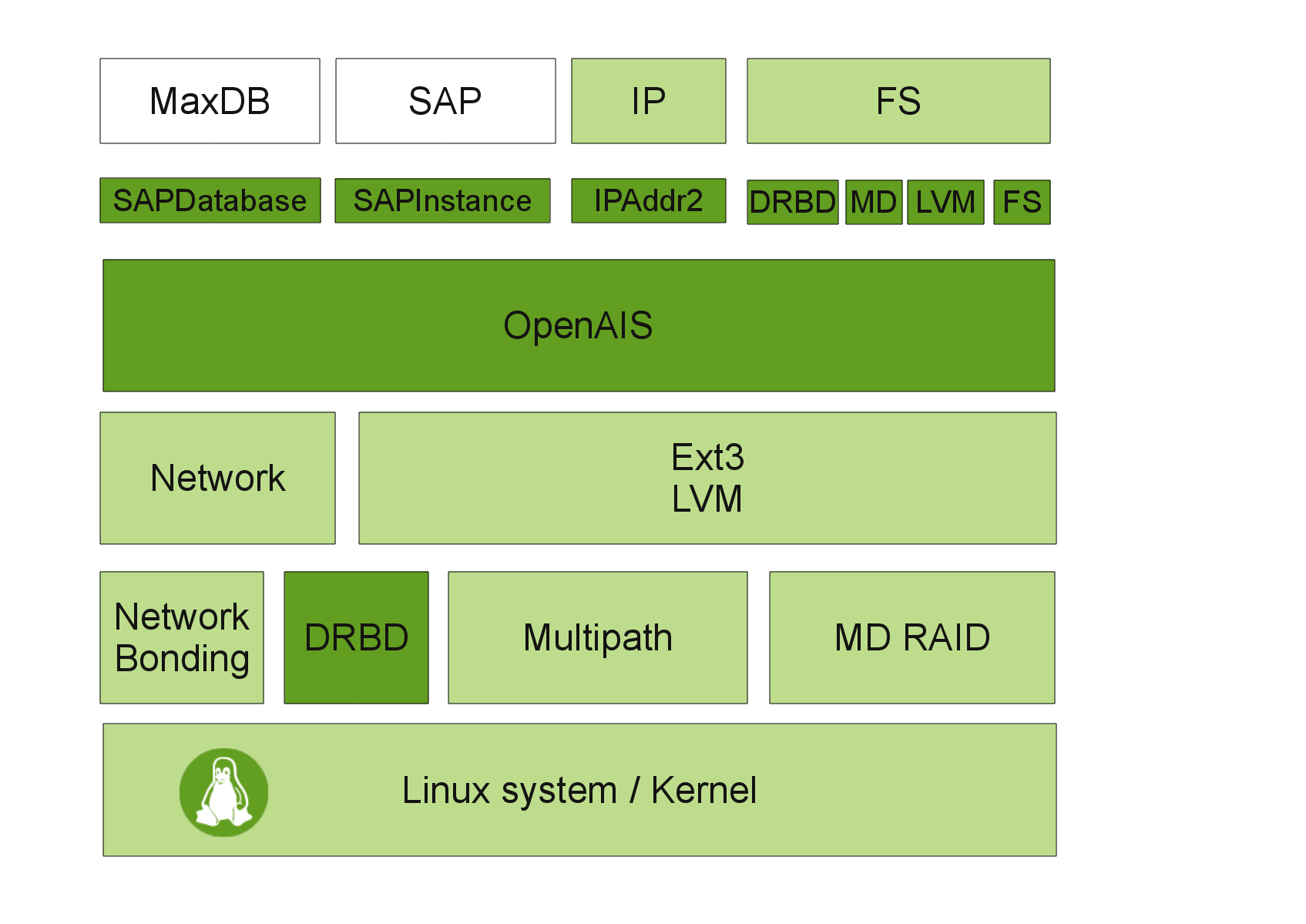
19 Availability is a result of the interaction of cluster software with application services on the front side and the operating system and hardware resources behind it. Following this basic idea, cluster software like OpenAIS could not increase availability on its own. It needs a lot of modules, such as services, resource agents, a messaging layer, network and file system availability, and a stable Linux kernel designed and configured for productive server systems in data centers. Figure 1.1 Modules of a High Availability SAP Cluster The central application of our cluster is the SAP system itself. We need to provide the SAP database and the central SAP instance with high availability (white boxes). Operating system (light colored boxes) and cluster software (dark colored boxes) together give us the needed functionality. In this document, we use SUSE Linux Enterprise Server High Availability Extension x86-64 with updates from Novell Customer Center. Introduction 9
20 1.3.1 Storage Scenarios and I/O Stack for SAP The file systems required by the operating system (i.e. mounted on / or /var) are usually stored on local hard drives using RAID-1 or RAID-5 disk arrays. Sometimes LVM is also used to gain more flexibility, i.e. for online file system extensions. This implies that these file systems can only be accessed by the local operating system or applications running locally on this server. Even if these file systems are placed on LUNs in a storage area network (SAN) outside the server, they are treated as local. Besides the usual file systems for the operating system installation (like /, /var and others), SAP and the SAP databases require their own file systems. These file systems are not stored locally. Instead they are provided by NFS file servers or on LUNs exported by storage units in storage area networks. Please be aware that the storage on which the database resides is subject to specifications and recommendations of the database vendor. Some file systems have to be shared across all cluster nodes so that every cluster node can access the file system at the same time. The recommended way of providing this service is the usage of a network file system (NFS). The NFS service also has to be highly available. In this document we use a dedicated NFS server. This server could be either a third-party product or a SUSE Linux Enterprise Server High Availability Extension cluster that runs NFS resources. Under specific circumstances, it may be possible to integrate the NFS server into the SAP cluster. Both the separate NFS cluster as well as the integrated NFS server are described in separate documents. 10 Running SAP NetWeaver on SUSE Linux Enterprise Server with High Availability - DRBD dual data center
21 Figure 1.2 SAN IO Layers of High Availability Stack for SAP 8 Filesystem Ext3 Ext3 7 Logical Volumes lv1_sap lv2_sap 6 Volume Groups vg_sap 5 DRBD asynchronous data replication drbd0 4 MD Raid 1 for Host Based Mirroring md0 3 Multipath devices mpath1 mpath2 2 HBA raw devices sda sdb sdc sdd 1 SAN storage system Other file systems, e.g. mounted to /usr/sap/<sid> or /oracle/<sid>, only have to be available on one cluster node at the same time. However, each cluster node must be able to access these file systems if the cluster manager decides to use them. In our current concept, we use LVM2 on top of DRBD and MD RAID, which has shown its road capability for years. This storage stack can be used with or without a cluster. The UNIX file system is the highest layer of a whole I/O stack consisting of multiple I/O layers. Each layer provides a certain kind of functionality. For all I/O critical tasks, we have configured an I/O stack that supports the following functions: Low latency: high I/O throughput and fast response times. Host-based mirroring for storing data simultaneously on two separate storage units in a SAN. DRBD to synchronize the data from one site to the other. Logical Volume Manager for a flexible management of file systems. Multipath I/O for an additional level of redundancy for file systems stored on LUNs in the SAN. Introduction 11
22 Online resizing (extending) of file systems, snapshots of file systems using LVM snapshots, moving or copying file systems. This guide describes two common use cases in which DRBD (Distributed Replicated Block Device) technology is used to replicate SAP data over IP networks. The first use case describes a scenario in which SAP data is replicated asynchronously from one site to another site. Each site runs a local-cluster. This use-case is described in detail. The second use case simplifies the setup by not having two clusters at two sites, but only one cluster at the first site and a standalone server at the second site Introduction to DRBD DRBD (Distributed Replicated Block Device) is a distributed storage system that replicates data on the block device layer over the network between two hosts. It is sometimes referred to as raid over the network. However, DRBD has some unique additional features: 1. Fully synchronous, memory synchronous or asynchronous modes of operation. 2. Automatic recovery after node, network, or disk failures. 3. Bandwidth of background resynchronization are tunable. 4. Online data verification. 5. Feature-complete OCF Heartbeat/Pacemeker resource agent. 6. Support for TCP/IP over Ethernet, SuperSockets over Dolphin NICs (8.3.2) and SDP over Infiniband. 7. Support for single block device sizes of up to one petabyte. 8. Support for active bandwidth management for mirroring over long distance and high throughput internet links, including optional complete fall behind in case bandwidth is not sufficient. A complete feature list is available at -list/ 12 Running SAP NetWeaver on SUSE Linux Enterprise Server with High Availability - DRBD dual data center
23 DRBD communication protocols Protocol A. Asynchronous replication protocol. Local write operations on the primary node are considered completed as soon as the local disk write has occurred and the replication packet has been placed in the local TCP send buffer. In the event of a forced failover, data loss may occur. The data on the standby node is consistent after failover. However, the most recent updates performed prior to the crash may be lost. Protocol B. Memory synchronous (semi-synchronous) replication protocol. Local write operations on the primary node are considered completed as soon as the local disk write has occurred and the replication packet has reached the peer node. Normally, no writes are lost in case of a forced fail-over. However, in the event of simultaneous power failure on both nodes and concurrent, irreversible destruction of the primary node's data store, the most recent writes completed on the primary node may be lost. Protocol C. Synchronous replication protocol. Local write operations on the primary node are considered completed only after both the local and the remote disk write have been confirmed. As a result, loss of a single node is guaranteed not to lead to any data loss. Data loss is, of course, inevitable even with this replication protocol if both nodes (or their storage subsystems) are irreversibly destroyed at the same time. The definition of these protocols have been taken from the DRBD user guide. We are using protocol A in this solution to implement an asynchronous mirror from one data center to an other. DRBD refers to both the software (kernel module and associated userspace tools) and the specific logical block devices managed by the software. The terms "DRBD device" and "DRBD block device" are also often used for the latter. DRBD layers logical block devices (conventionally named /dev/drbdx, where X is the device minor number) over existing local block devices on participating cluster nodes. Writes to the primary node are transferred to the lower-level block device and simultaneously propagated to the secondary node. The secondary node then transfers data to its corresponding lower-level block device. All read I/O is performed locally. Should the primary node fail, a cluster management process promotes the secondary node to a primary state. This transition may require a subsequent verification of the Introduction 13
24 integrity of the file system stacked on top of DRBD, by way of a filesystem check or a journal replay. When the failed ex-primary node returns, the system may (or may not) raise it to primary level again, after device data resynchronization. DRBD's synchronization algorithm is efficient in the sense that only those blocks that were changed during the outage must be resynchronized rather than the device in its entirety. The DRBD suite is open source and licensed under the GNU General Public License v2 and is part of the official Linux kernel. It is mainly being developed by the Austrian company LINBIT. Novell has a strong partnership with LINBIT and therefore can ensure a fast and high-quality support as well as a fast resolution of software defects (bugs) SAP Resource Agents The SAP Instance Resource Agent is responsible for starting, stopping and monitoring the services in a SAP instance. The following services are monitored in the resource agent: disp+work, msg_server, enserver, enrepserver, jcontrol, and jstart. The SAP Instance Resource Agent can be used to manage the following SAP instances: SAP WebAS ABAP Release , SAP WebAS Java Release (for 6.40 please also read SAP note ), SAP WebAS ABAP + Java Add-In Release (Java is not monitored by the cluster). The purpose of the SAP Database resource agent is to start, stop and monitor the database instance of an SAP system. Together with the relational database management systems (RDBMS), it will also control the related network service for the database, like the Oracle Listener and the xserver of MaxDB. The resource agent expects a standard SAP installation and therefore needs fewer parameters to configure. The monitor operation of the resource agent can test the availability of the database by using SAP tools (R3trans or jdbcconnect). This ensures that the database is really accessible for the SAP system. The SAP Database resource agent supports the following databases in a SAP installation: Oracle 10gR2 and 11gR2, 14 Running SAP NetWeaver on SUSE Linux Enterprise Server with High Availability - DRBD dual data center
25 IBM DB2 UDB for Windows and Unix 9.x, SAP-DB / MaxDB 7.7. The resource agents are part of the SUSE Linux Enterprise Server High Availability Extension. 1.4 Database for SAP Three major RDBMS are supported with SAP on SUSE Linux Enterprise Server, either with or without the SUSE Linux Enterprise Server High Availability Extension. In addition, for SAP deployments with each of these databases, SAP priority support is available from Novell. Oracle 10gR2 and 11gR2 IBM DB2 UDB for Windows and UNIX 9.x SAP-DB / MaxDB 7.x The supported hardware platform for all RDBMS on SUSE Linux Enterprise Server 11 is x86-64 (also known as x86 64-bit, AMD64, EM64T ). Nevertheless, some databases are also supported on other hardware platforms such as power or z-series. Details can be found on the certification pages listed as links in the appendix. SUSE Linux Enterprise Server ships with an installation pattern for Oracle database servers. The pattern contains the RPM package orarun which sets several system settings according to the needs of an Oracle server. If Oracle is installed together with SAP, this package should not be installed to avoid conflicts with the settings from the RPM sapconf. Further information can be found on the web pages listed in the appendix. MaxDB was chosen as RDBMS for this document mainly to shorten the planning and installation procedure. Since the document is targeting a basic installation of SAP in a high-availability cluster, the use cases are covered with MaxDB. This installation example does not imply any judgement on how well one of the database management systems fits for a given workload. Introduction 15
26 1.4.1 MaxDB The SAP MaxDB is the database of choice for small business and midsize companies requiring a solid, affordable low-maintenance database. MaxDB is available for all installations of the SAP Business All-in-One solution and the SAP Business Suite family of business applications. MaxDB is bundled with the full license for the SAP NetWeaver technology platform. And the SAP Business by Design solution uses MaxDB as the default database for the host system. Designed for online transaction processing and database sizes up to multiple terabytes, MaxDB is the preferred database for internal SAP installations on UNIX and Linux ( sme/businessallinone/kits/lowertco.epx). MaxDB s ancestor AdabasD was available on Linux in Between 1997 and 2004 the software was available as SAP-DB, then it was renamed to MaxDB. MaxDB as standalone product is supported for SUSE Linux Enterprise Server 11 on the hardware platforms x86-64 and ppc64 ( As an integrated database for the SAP NetWeaver technology platform, the respective certification applies for SUSE Linux Enterprise Server 11 on x86-64 and ppc64. For SAP systems, the appropriate product certification matrix should be applied ( websmp201.sap-ag.de/pam). MaxDB installation media can be obtained from the SAP portal along with NetWeaver. The installation of MaxDB is seamlessly integrated into the SAP installer. SAP offers several services around MaxDB for SAP applications. More information can be found on the Web pages listed in the appendix. 1.5 Sizing, Deployment and Migration Considerations Running SAP workloads in SUSE Linux Enterprise Server can reduce the TCO considerably. Through the homogenization of the data center (and thus the consolidation of resources), cost savings can be achieved even for highly specialized SAP installations. SUSE Linux Enterprise Server is very well prepared for automated installation and deployment, making it easy to deploy many servers. Novell provides tools for managing updates and releases as well as ease day-to-day administration. 16 Running SAP NetWeaver on SUSE Linux Enterprise Server with High Availability - DRBD dual data center
27 SUSE Linux Enterprise Server is very capable of providing the base for small or large systems. Customers run smaller central instances or larger distributed systems all with the same system base. It is quite possible to run multiple SAP instances in parallel on one system even when using high availability clusters. SAP requests that system sizing is done by the hardware vendor. Novell has good relationships with many hardware vendors to make sure SUSE Linux Enterprise Server runs smoothly on a broad range of enterprise servers fit to run SAP workloads. Novell and its partners are very active in providing customers with solutions to their specific needs when it comes to Linux deployment. Novell consulting has been developing best practices for high availability SAP installations and provides this information to customers and partners. Hundreds of successful SAP to Linux migrations have been made. The results regarding cost savings, performance and reliability have exceeded expectations in many instances. Since most data centers have adopted a Linux strategy, the know-how for deploying and administrating Linux systems is often in place and available. SAP-specific configurations and administration experience is available through Novell consultation and partners. This makes the operating system side of the migration less risky and a ROI can be seen within the first six months of migration. SAP provides check lists and guidelines for the OS and database migration. Introduction 17
28
29 One Concept Two Use Cases 2 SAP NetWeaver installation can be adapted to several architectures for the entire system. You can plan and implement a simple stack SAP system with one instance and the database on the same machine without any methods to increase the availability. You can take this simple installation scenario, add high availability components and bring the SAP system into a high availability scenario. There may also be reasons to install a SAP system with additional application servers. In a high availability scenario, this could lead to a more advanced enqueue replication setup. In all previously mentioned cases, SAP is treated in a two-tier manner, this means SAP application and database processes can run on the same system. Another common use case is to run the enqueue replication server and the database on different machines. In this case, high availability for the enqueue replication server is covered by the described concept as well. This document covers these two use cases: DRBD dual data center with two clusters - 2x2 nodes DRBD dual data center with one cluster and one standalone node nodes Both use cases (2x2 and 2+1) can be used with all common SAP installation types. SAP central system: All instances are running on one node. Depending on the installation type, this may be one central instance or multiple instances on one node. SAP enqueue replication: The replicated enqueue server solves one availability issues of the enqueue service which otherwise would be a single point-of-failure (SPOF). The One Concept Two Use Cases 19
30 replicated enqueue server provides a transparent solution to this availability issue and enables the SAP system to continue production in the case of a failing enqueue server. In a typicall setup there are two host machines (physical or virtual), one for the standalone enqueue server and one for the replicated enqueue server. Refer to the SAP documentation at the SAP Marketplace for more details. Such a two system setup has the following advantages: Redundancy: The replicated enqueue server holds a complete copy of the lock table. Flexability: The two most critical components (enqueue server and message server) could be restarted in a very short time and even faster than a complete SAP application server. Availability: The standby server runs a replicated enqueue server that can be activated if the primary enqueue server fails, using the enqueue table copy. The result is that in the event of standalone enqueue server failure, no transactions or updates are lost and the enqueue service for the SAP system continues without interruption. The SAP instances are running on different nodes, including the enqueue replication mechanism. The database may run on a different cluster. The installation of the first use case (2x2) will be shown step by step in this document. The simplified use case 2 (2+1) can be easily adopted from the first use case by omitting the setup of the second cluster. Of course, you have to setup the complete storage stack and IP addresses. 2.1 High Availability Concept Overview The concept was chosen to match these top-level goals: High availability Low complexity Flexible scalability 20 Running SAP NetWeaver on SUSE Linux Enterprise Server with High Availability - DRBD dual data center
31 Road capability To achieve these goals, we separate the SAP system into a clustered and an unclustered area. The clustered area holds all mandatory SAP components such as SAP database and needed SAP instances. The unclustered area holds all optional and scalable SAP components such as additional SAP instances. This allows to scale the entire SAP system without increasing the cluster complexity. The horizontal scaling is just a purpose of the unclustered area. The architecture is focused to one single SAP system, even if it is possible to run more than one SAP system in the same cluster. The example configuration described in this document consists of a total of 4 SAP nodes spread across two distinct sites, with 2 nodes per site. The nodes in each site form a Pacemaker high availability cluster. This architecture assumes that within a single site, a SAN exists with fully meshed fibre channel connectivity. Cluster nodes are assigned two SCSI Logical Units (LUNs) spread across two different shared storage devices. Each cluster node has access to both LUNs with redundant (multipath) connectivity and uses Linux software RAID (MD) for hostbased mirroring. For replication between sites, a DRBD device is layered on top the RAID mirror. Thus, asynchronous storage replication between sites requires no SAN connectivity -- simple IP connectivity is sufficient. This concept uses STONITH (Shoot The Other Node In The Head) and can be expanded with SFEX (Shared Disk File Exclusiveness). While STONITH allows server fencing using remote management boards over LAN, SFEX provides storage protection over SAN. In our example setup for DRBD we do not use SFEX. One Concept Two Use Cases 21
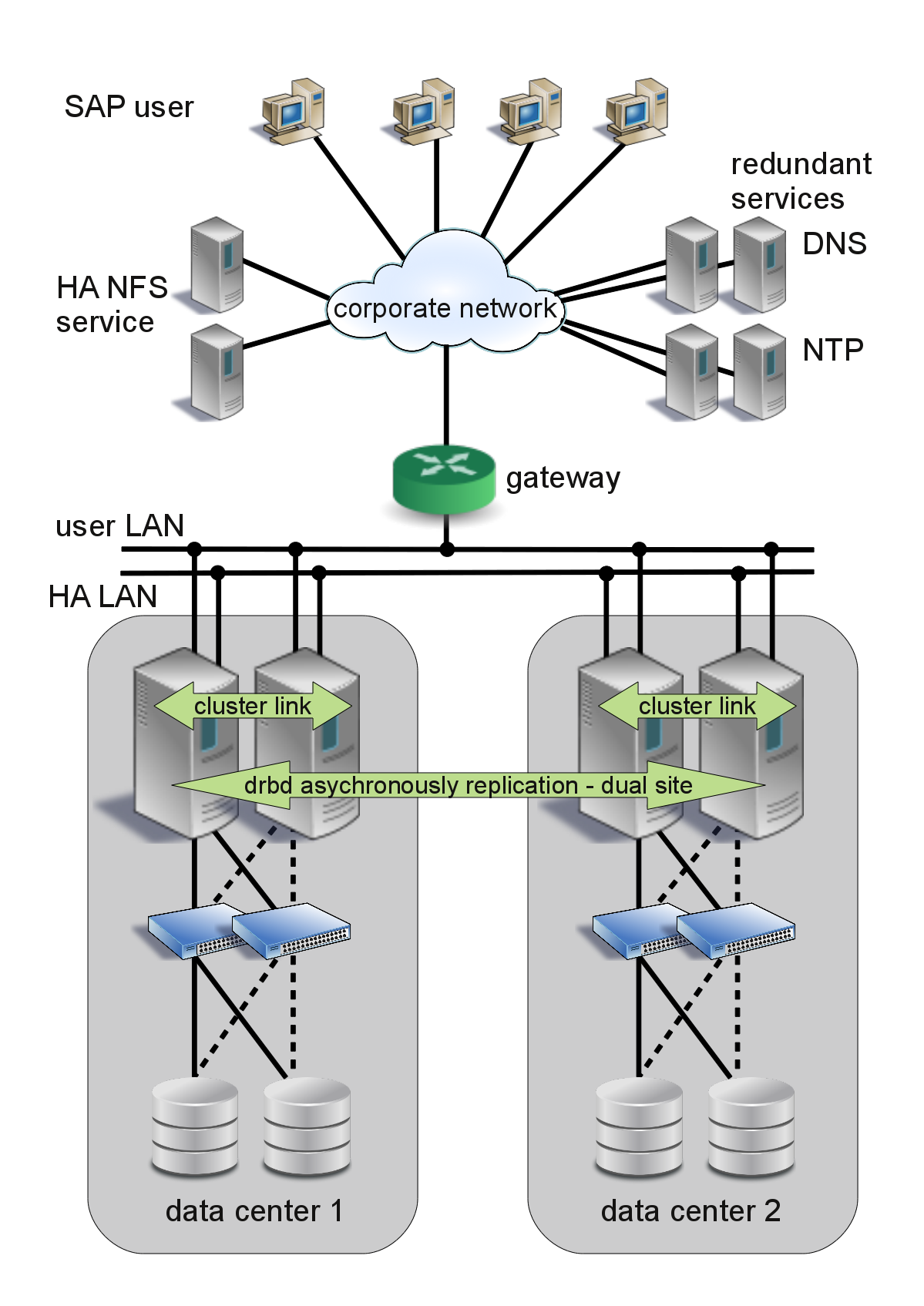
32 Figure 2.1 General Architecture The network file system (NFS) is used to share data between the nodes, for example for the SAP transport directory. In this concept we assume that a reliable NFS is provided by a service outside the cluster. Either a highly available NFS server based on SUSE Linux Enterprise Server 11 or a third party product could be used. An NFS high availability cluster based on SUSE Linux Enterprise Server 11 is described in another document. In some case it might be desirable to have the NFS server in the same cluster as the SAP application. This is also covered in an extra document. 22 Running SAP NetWeaver on SUSE Linux Enterprise Server with High Availability - DRBD dual data center
33 In a complex, high availability SAP environment, several types of failures may occur. These failures range from software crashes up to a loss of the whole network or SAN infrastructure. The cluster must be able to safely handle all of these failures. Even in a split brain scenario, if the cluster communication between both nodes is broken, the cluster must ensure a proper continuation of all services Server Fencing and Storage Protection STONITH, SBD, watchdog, and LAN-based quorum STONITH (Shoot the other Node in the Head) is a key mechanism of corosync clusters. STONITH is used to clearify the cluster node status in a situation where a cluster node got lost. Such a situation can occur in the following example cases: A node has a power outage or (complete) hardware problem, so the node is not longer available. A node crashes with a kernel freeze. A node has far to high load and cannot answer on the cluster communication for a (longer) period of time. A node has a network disruption and cannot answer on the cluster communication. In all these cases, the cluster can notify that a node got lost but cannot determine whether the node can still affect any resources controlled by the cluster. This is why the cluster decides to fence the node via a STONITH device. Such a STONITH action can switch a node off or force it to reboot (reset). Typical STONITH methods are: Remote Management Board-based system control Remote management boards, like HP's ILO boards can reset, start or shut down a server. The reset and power cycle functions can be accessed not only via their webinterfaces but also via the network using standardized interfaces like IPMI (intelligent platform management interface) or similar. This functionality makes these boards ideal candidates for STONITH agents. For ILO2 boards, a dedicated STONITH agent called riloe exists. For boards of other manufacturers, take a look at the list of available One Concept Two Use Cases 23
34 STONITH agents or use the IPMI agent, which works for most servers. A clear disadvantage of STONITH with remote-management boards is that a total power failure of a server also disables the remote management boards. A STONITH request from another node cannot be completed in this case and prevents an automatic fail-over. Power switch-based system control Remotely controllable power switches provide a reliable way to start, shut down and power-cycle a server. This method is preferred over the use of remote management boards. It is much more likely that a power switch is still accessible after a powerfailure affecting a single server than a remote management board, which usually relies on the power supplies of the affected server. STONTIH agents exist for various power-switches, e.g. from APC. A disadvantage of power-switches may be the administrative domain in large data centers. If the power switch is not under control of the cluster administration team, it may happen that somebody changes the password of the power-switch without noticing the cluster team. SBD (Split Brain Detection) - SAN-based system control An alternative option is STONITH based on a Split Brain Detection (SBD) disk together with the kernel watchdog. Future implementations of the SBD will respect the cluster's quorum status. In case the SBD disk fails, the cluster will continue to work as long as it has the quorum. Thus, the impact of a failing SAN LUN is reduced compared to the SFEX-based solution mentioned above. The second major advantage is that server fencing works in LAN-split, SAN-split, and complete-split scenarios. A solution based on this SBD will be described in another document. In this example installation, we use the Management Board-based system control via IPMI or ILO interfaces. 2.2 Use Case 1 DRBD dual data center with two clusters - 2x2 The "2x2" scenario of the DRBD dual data center uses two separate and nearly independent corosync clusters working at two different sites. Nearly independent cluster means that the clusters do not have a direct communication at the cluster layer, so both cluster frameworks are running only local at their specific site. 24 Running SAP NetWeaver on SUSE Linux Enterprise Server with High Availability - DRBD dual data center
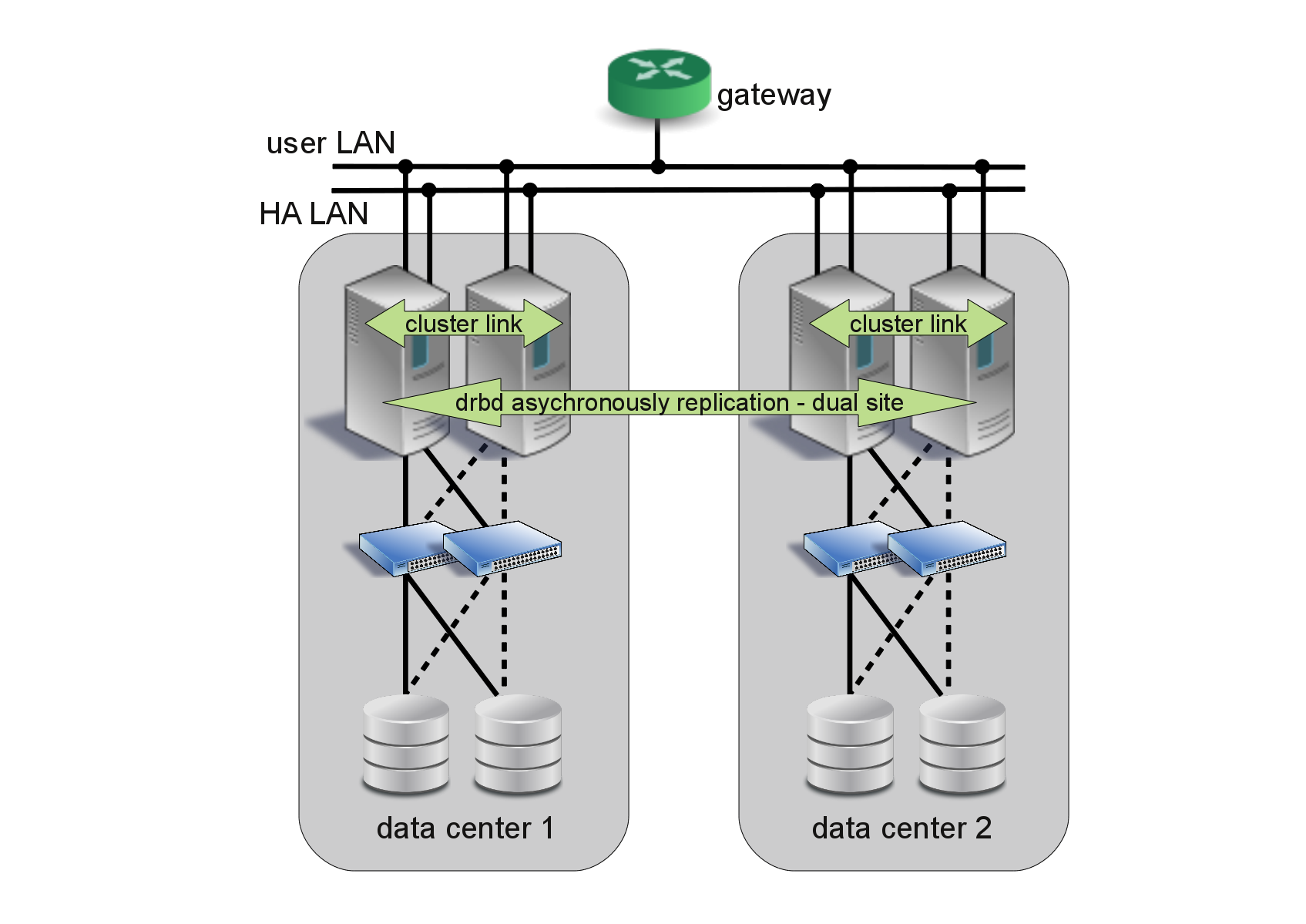
35 Of course the data need to be synchronized from one site to the other and that is why the cluster nodes of one site need a communication channel via TCP/IP to the other site. To avoid both clusters to run the DRBD device in master role and to start the SAP system, one site is defined to always run the DRBD device in slave mode (be the passive side of the synchronization). The other site is defined to always run the DRBD device in master mode (be the active side of the synchronization). If the data center communication fails, the current site running the SAP system will stay productive while the other site is waiting for the DRBD synchronization to come back. If the active cluster site fails completely and you need to run a site-failover, the administrator needs to change the DRBD device role from slave to master. Of course the administrator must prevent both clusters from running in master mode at the same time. This is why we decided to run the site-failover in a semi-automatic mode with only one administrative interaction. You can also run the sites active/active if you place more than one SAP system on the clusters and define multiple DRBD synchronizations. But each of these DRBD devices needs to be run as master/slave and never dual active. Figure 2.2 DRBD synchronization with two clusters in two data centers One Concept Two Use Cases 25
36 The advantages of this cluster model: Flexible design Synchronization between two data centers Second site also runs with High Availability to improve the status of the DRBD synchronization Both sites uses the same architecture Site failover is semi-automatic but can be triggered easily. One disadvantage is: Four nodes are used for this concept. 2.3 Use Case 2 DRBD dual data center with one cluster The "2+1" scenario of the DRBD dual data center uses one corosync cluster and a standalone node working at two different sites. The data must be synchronized from one site to the other, therefore the cluster nodes of one site need a TCP/IP communication channel to the standalone node of the other site. To avoid both sites running the DRBD device in master role and to start the SAP system, one site is defined to always run the DRBD device in slave mode (be the passive side of the synchronization). The other site is defined to always run the DRBD device in master mode (be the active side of the synchronization). If the data center communication fails, the current site running the SAP system will stay productive while the other site is waiting for the DRBD synchronization to come back. If the active cluster site fails completely and you need to run a site-failover, the administrator needs to change the DRBD device role from slave to master and start a procedure which starts all resources (storage devices, file systems, IP addresses, database and 26 Running SAP NetWeaver on SUSE Linux Enterprise Server with High Availability - DRBD dual data center
37 SAP instances). The administrator must prevent both clusters running in master mode at the same time. This scenario does not provide a semi-automatic site-failover. The failover must be covered by the system management procedures. Figure 2.3 DRBD synchronization with two clusters in two data centers Flexible design Synchronization between two data centers Price: Only 3 nodes are used for the local High Availability cluster and the datacenter synchronization. Some disadvantages are: The sites uses different architectures Site takeover is more complex (start of the SAP system) Not recommended for active/active scenarios. One Concept Two Use Cases 27
38
39 Part II. Installation of "DRBD dual data center" with MaxDB
40
41 Installation Overview 3 This part describes the installation of a SAP NetWeaver with MaxDB on SUSE Linux Enterprise Server for SAP Applications for a proof of concept. The procedure is divided into the following steps: Planning (Chapter 4, Planning (page 33)) Checking prerequisites (Chapter 5, Prerequisites (page 35)) Downloading SAP NetWeaver installation media (Chapter 6, Download the Needed SAP Installation Media (page 39)) Installation of SUSE Linux Enterprise Server for SAP Applications on all nodes (Chapter 7, Install SUSE Linux Enterprise Server 11 SP1 for SAP (page 43)) Preparing SAN storage on both sites (Chapter 8, Prepare SAN Storage (page 49)) Cluster Configuration on both sites (Chapter 9, Configure the Cluster on both Sites (page 63)) Installation of SAP NetWeaver and MaxDB (Chapter 10, Install SAP NetWeaver 7.0 EHP1 (page 75)) Integration of SAP NetWeaver and MaxDB into the High Availability Cluster (Chapter 11, Integrating SAP into the cluster (page 85)) Checking final results (Chapter 12, Testing the Cluster (page 87)) Installation Overview 31
42
43 Planning 4 Proper planning is essential for a well performing SAP system. For planning and support of your SAP installation, visit [ to download installation guides, review installation media lists and browse through the SAP notes. This section focuses on aspects of planning a SAP installation. The first major step is to size your SAP system then derive the hardware sizing to be used for implementation. Use the SAP benchmarks ( solutions/benchmark/index.epx) to estimate sizing for a proof of concept. If you plan to migrate an existing SAP system you should first obtain or estimate the system characteristics of the old SAP system. The key values of these characteristics include: SAPS (benchmarks) of the old SAP system Memory (RAM) size and usage of the old hardware Disk size, performance and usage of the old SAP system Network performance and utilization of the old hardware Language support (including Unicode) If you have valid key values, you can adapt these to the characteristics of your new SAP system. If you plan a new installation instead of a migration, you might need to adapt experiences with other SAP installations or use some of the published benchmarks as mentioned above. Planning 33
44 Estimate the SAPS in the new SAP system. This includes planning additional capacities, if needed. The calculation should also include estimated growth calculations, such as a boost of SAPS per year. Typical SAP growth is between 10% and 20% per year. Choose RAM size, as well as disk size and performance for the Linux system. Also include a boost of the usage. Depending on the usage, the disk space may grow 30% per year. The disk size must also include the export and r3trans areas if they are not provided by other servers. Check if Unicode support is necessary for the new system. 34 Running SAP NetWeaver on SUSE Linux Enterprise Server with High Availability - DRBD dual data center
45 Prerequisites 5 This chapter describes what hardware and software is needed for a proof of concept. It also outlines how to gather all information necessary to succeed. 5.1 Hardware Requirements The final hardware sizing for production systems is always the responsibility of the hardware vendor. At the time this document was written, a base installation of NetWeaver on top of SUSE Linux Enterprise Server 11 SP1 for a proof of concept could be done on the following hardware equipment: 2* CPU x GHz (AMD64 or EM64T), 8GB RAM, 100GB disk space for OS and empty SAP system, a few hundred GB up to some TB additional disk space for test data, 3* Gbit/s Ethernet, IPMI or ILO remote management board. Although the cluster offers High Availability across two servers, each single server should already have the maximum possible availability using redundant devices: self correcting ECC RAM, Prerequisites 35
46 two or three redundant power supplies (connected to two circuits), several redundant cooling fans, two or more internal disks with RAID(1/5/6/10) controller, redundant LAN network controllers, redundant LAN network links (connected to two switches), redundant SAN host bus controllers, redundant SAN FC links (connected to two switches). Make sure to use certified hardware. Information about certified hardware can be found in the Novell YES database ( Search.jsp), in the SAP notes and on the hardware manufacturer's pages. Use certification notes from the Novell YES database and the hardware manufacturer to select appropriate hardware components. 5.2 Software Requirements, Connection Data, and all the Rest Before you can start with the installation, make sure you meet the prerequisites. SAP documentation: Make sure that you have the latest version of the Master Guide by checking SAP Service Marketplace immediately before starting the installation. The Master Guide is regularly updated on SAP Service Marketplace at service.sap.com/instguidesnw70. Sizing data gathered in the planning stage for the installation. Configuration data: IP addresses, DNS names, gateway SAP SIDs Linux usernames (like <sid>adm), UIDs 36 Running SAP NetWeaver on SUSE Linux Enterprise Server with High Availability - DRBD dual data center
47 Connection data: SAN LUNs (names, LUN numbers) and multipath configuration parameters. There are some special parameter settings for multipath and SAN-HBA kernel modules, depending on the hardware setup (SAN storage model and SAN setup). Check if SAN storages require partition alignment for performance reasons. Refer to the installation and configuration guides from Novell and hardware vendors. Access to the system management boards to be used by the cluster to fence a node in special cases (STONITH). For most common data center hardware, there are supported management boards like ILO or IPMI, which provide stable interfaces to be used with STONITH. In addition to the network that connects the SAP servers to the clients, we recommend two additional dedicated network links between the two servers for cluster intercommunication. At least one additional dedicated network link is mandatory. Infrastructure such as DNS server, NTP server and a pingable highly available network node. This network node can be the gateway between the SAP system and the clients who need to access the service. If the gateway is no longer available, the service is not available. The cluster can determine which cluster node has a (ping) connection to the ping node and can migrate a service if needed. SAP installation media (for details see the table in the next section). The SAP installation media can either be ordered as a physical CD/DVD or downloaded from The next section describes the procedure for downloading the SAP media. SAP S-User (partner user) to download the media and installation guides and to browse through the SAP notes system. The S-User must have permission to download the installation media. Ask your company's SAP partner manager to create an S-User and to grant the proper rights. During installation of the central instance of SAP NetWeaver you will be asked to provide a Solution Manager Key. You need to create such a key for your combination of hostname (DNS name of the virtual IP address for high availability installations), SAP system ID (SID) and SAP instance number (like 00, 01, 02). This key can be created using your company s Solution Manager, an additional SAP program. This document does not cover the installation of the Solution Manager. If you do not have Prerequisites 37
48 access to your company s Solution Manager, ask your internal SAP partner manager how to get a Solution Manager key. To download the SAP installation media, you will need the SAP download manager. A short description of the installation is integrated in the next section. To run the download manager you need a matching Java version. In former PoCs, SUN Java (package java-1_6_0-sun u1-26) worked very well. Have a look at the installation notes presented during the procedure to download the SAP download manager. An up-to-date patch level of the SUSE Linux Enterprise Server 11 SP1 installation. You will need: a Novell Customer Center account, "SUSE Linux Enterprise Server for SAP Applications 11 SP1" installation media for x86-64 hardware platform, or "SUSE Linux Enterprise Server 11 SP1" and "SUSE Linux Enterprise High Availability Extension 11 SP1" installation media for x86-64 hardware platform, possibly additional hardware-specific driver updates, and a software management software such as the subscription management tool (optional). To test the SAP system you either need to have a previously installed SAP client (guilogon, guistart) or you need to install this software on at least one of your workstations. 38 Running SAP NetWeaver on SUSE Linux Enterprise Server with High Availability - DRBD dual data center
49 Download the Needed SAP Installation Media 6 This section describes in a more general way how to download the SAP installation media. As an example, we download the media for SAP NetWeaver 7.0 EHP1 with database engine MaxDB RDBMS 7.7 for SUSE Linux Enterprise Server 11 SP1 x We recommend you use a SUSE Linux Enterprise Server 11/SUSE Linux Enterprise Desktop 11 SP1 or newer to download the media. This section only describes the download using a SUSE Linux Enterprise system. 1. Access the SAP download site 2. You are asked to login with your S-User and password (see prerequisites). 3. From the menu on the left, select Download Installation and Updates Entry by Application group. 4. From the Installation and Upgrades menu on the right, select SAP NetWeaver SAP NetWeaver (yes, twice). 5. Now you have to select your NetWeaver version. In our example, we select SAP EHP1 for SAP NetWeaver 7.0 Installation and Upgrade Linux SAP DB. The version for your use case may differ, the example will follow the names and paths of NW 7.0 EHP1. 6. From the media list, select the following media and click on Add to download basket. Download the Needed SAP Installation Media 39
50 Table 6.1 SAP NetWeaver Installation Sources Type Number Title Size [KB] Date ZIP CD SAP License Keys & License Audit EXE _1 Onl. Doc. SAP NW 7.0 EHP1 SPS02 1 of RAR _2 Onl. Doc. SAP NW 7.0 EHP1 SPS02 2 of EXE _1 NW 7.0 EHP1 Installation Export 1 of RAR _2 NW 7.0 EHP1 Installation Export 2 of EXE _1 NW 7.0 EHP1 Kernel LINUX 1 of RAR _2 NW 7.0 EHP1 Kernel LINUX 2 of RAR _3 NW 7.0 EHP1 Kernel LINUX 3 of RAR _4 NW 7.0 EHP1 Kernel LINUX 4 of RAR _5 NW 7.0 EHP1 Kernel LINUX 5 of RAR _6 NW 7.0 EHP1 Kernel LINUX 6 of RAR _7 NW 7.0 EHP1 Kernel LINUX 7 of Running SAP NetWeaver on SUSE Linux Enterprise Server with High Availability - DRBD dual data center
51 Type Number Title Size [KB] Date RAR _8 NW 7.0 EHP1 Kernel LINUX 8 of ZIP _8 NW 7.01/BS 7 Installation Master Linux on x bit ZIP _8 MaxDB RDBMS Build 28 - Linux on x bit The total size of installation sources is 10GB for the chosen NetWeaver 7.0 EHP1 with MaxDB. To unpack the archives, roughly twice the disk space is needed. Other products might need more space. 7. After some time, a pop-up with two buttons appears. Press "Download Basket". 8. Your selected media is shown in your download basket. If you haven't installed the SAP download manager yet, you will have to download and install it now. Click get download manager in this case. The SAP Download Manager Installation Guide is shown. Check the section prerequisites and the SAP Download Manager installation guide. You need a Java version that fits SAP needs. Download the Linux version. You get a self-extracting archive that starts after the download. Follow the installation steps. We have installed the Download Manager in the local home directory, SAP_Download_Manager. 9. Start the installed SAP Download Manager using the command ~/SAP_Download/Manager/Download_Manager. 10. If you start the SAP Download Manager for the first time, you will need to provide some credentials such as the SAP Marketplace address ( Download the Needed SAP Installation Media 41
52 .com), your S-User, your S-User-Password and the Data Store (directory to place the downloaded files). 11. Press the "download all objects" button (the button with two right arrows). 12. Be patient, the download will take some time. 13. After the download, unpack the downloaded files using unzip (for ZIP type) and unrar (for EXE and RAR type). Unrar is able to skip the self extracting code in the EXE files and will include all files of a media set such as 1/2, 2/ Copy (rsync) the extracted files to your system to be installed or create NFS exports on the installation source and NFS mounts on the target systems. In our setup we use: /sapcd/instma for the Installation Master, /sapcd/kernel for the NW 7.01 kernel, /sapcd/maxdb for the MaxDB engine, /sapcd/instexp NW 7.0 EHP1 installation export. 15. You also need the JRE Unlimited Strength Jurisdiction Policy Files Archive (unrestricted.zip) matching your Java version. Download it from either IBM or SUN. 42 Running SAP NetWeaver on SUSE Linux Enterprise Server with High Availability - DRBD dual data center
53 Install SUSE Linux Enterprise Server 11 SP1 for SAP 7 In this chapter we describe relevant configuration parameters of SUSE Linux Enterprise Server 11 SP1 x86-64 for this use case. The installation procedure itself should be well known to the target audience and therefore is not described. Refer to the product documentation for general information on the SUSE Linux Enterprise Server 11 ( You can also use this chapter for the installation of SUSE Linux Enterprise Server for SAP Applications 11 SP File System Layout For a proof of concept, the following partition and file system layout for the operating system is a good example: Table 7.1 OS File System Layout No. Mount Point Size File System Options 1 /boot 128MB ext2 noatime 2 swap 2*RAM (max. 20GB) swap 3 / 16GB ext3 noatime Install SUSE Linux Enterprise Server 11 SP1 for SAP 43
54 No. Mount Point Size File System Options 4 /var rest ext3 noatime,data=writeback SUSE Linux Enterprise Server 11 and SUSE Linux Enterprise High Availability need about 4.5GB disk space. The size of /boot depends on the number of kernels that should be installed in parallel. Each kernel needs approximately 35MB disk space in /boot. The size of /var depends on the amount of log data and application-specific usage, 5GB or more are appropriate. If the SAP NetWeaver installation sources should be put on the local disk, 20GB additional free space is needed. We use the directory link /sapcd in our examples. Besides the usual OS file systems, SAP and the SAP databases require their own file systems. These file systems are not stored locally. Instead they are provided by NFS file servers or on LUNs in Storage Area Networks (SAN). Typically we need for SAP: /sapmnt /usr/sap/<sid> /sapdb (for MaxDB. Oracle and DB2 require other paths.) File system sizes depend on the use case. The database file system can be from 100GB up to multiple TB. After a fresh installation, around 30GB are in the database. 7.2 Software Selection It is a good practice to install as little software as needed or recommended. We deselect the GNOME Desktop Environment as we plan to run the server in runlevel 3 and not use local Gnome sessions. Since we install the X Window System, we can still start X-Window-based applications locally or remotely. We also deselect AppArmor, because we do not plan to use it. SAP recommends some additional software to be installed. The resulting pattern selection should be: + Base system pattern + X Window pattern + 32-bit runtime pattern + Print server pattern + SAP Application Server Base pattern 44 Running SAP NetWeaver on SUSE Linux Enterprise Server with High Availability - DRBD dual data center

55 + C/C++ Compiler and Tools pattern + High Availability pattern - No AppArmor pattern - No Gnome pattern NOTE If you are installing SLES for SAP, then you should also install the pattern High Availability. For the standard SLES, we recommend to install this pattern later. Now your pattern list should look like the one in: Figure 7.1 SUSE Linux Enterprise Server 11 Software Selection for SAP Make sure you also install the following SAP-specific packages: sapconf prepares the operating system for SAP needs. sap-locale contains special code pages only needed for non-unicode systems. If you plan to run SAP application servers on SUSE Linux Enterprise Server together with application servers on another OS, see SAP Notes and on how to get the correct code pages. Install SUSE Linux Enterprise Server 11 SP1 for SAP 45
56 An appropriate JRE and JDK must be installed before starting the SAP installation. We use the IBM sr13 FP8 JRE and JDK. Check the SAP notes for exact and current versions. NOTE If SUSE Linux Enterprise Server for SAP Applications is used, the correct IBM JRE and JDK are included as java-1_4_2-ibm-sap and java_1_4_2-ibm-sap-devel. The packages for SUSE Linux Enterprise Server are named java_1_4_2-ibm and java_1_4_2-ibm-devel To select the RPMs, change to Details and search for the package names containing java-1_4_2. Select: + java_1_4_2-ibm-sap + java_1_4_2-ibm-sap-devel If you plan to extract the SAP installation sources, install the RPM unrar as well. The RPMs orarun and ulimit conflict with the SAP requirements and should not be installed. We recommend to update the complete operating system to a current level. Either connect to the NCC via Internet or use a locally installed update proxy like SMT. The update procedure should be well known to the target audience and therefore is not described. For information on NCC refer to the Novell documentation ( ncc/data/bktitle.html ). As of the publication date of this document, you should have at least the following releases of the core operating system: kernel-default lvm multipath-tools mkinitrd Running SAP NetWeaver on SUSE Linux Enterprise Server with High Availability - DRBD dual data center
57 device-mapper glibc nfs-client libext2fs libuuid uuid-runtime You should also have at least the following releases of the additional software: sapconf sap-locale java-1_4_2-ibm-1.4.2_sr java-1_4_2-ibm-devel-1.4.2_sr libgcc _ gcc _ Runlevel and System Services Recommended runlevel is 3: multi user with network. The services ntp, boot.clock, uuidd, boot.sapconf, boot.multipath, and multipathd should be enabled. The Network Time Protocol (NTP) service has to be set up correctly. If running the SAP system in a high availability cluster, the services boot.dmraid and boot.md are disabled. This functionality is controlled by the cluster. Install SUSE Linux Enterprise Server 11 SP1 for SAP 47
58 7.4 Miscellaneous System language has to be en_us. 7.5 Check SLES for SAP Installation Carefully check the installed system. All selections and parameters mentioned in previous chapters have to be correct. A script can help to collect the relevant data. An example is the whbsaprecheck script contained in the ClusterTools2 RPM. This RPM is not part of SUSE Linux Enterprise Server 11. Find the latest release in the SUSE Build Service ( ClusterTools2&baseproject=SUSE%3ASLE-11&lang=en ). For documentation of the general operating system configuration, the supportconfig script from the supportutils RPM can be used. The supportutils RPM is part of SUSE Linux Enterprise Server Running SAP NetWeaver on SUSE Linux Enterprise Server with High Availability - DRBD dual data center
59 Prepare SAN Storage 8 Next, we will configure SAN access for a proof of concept, following these steps: 1. Configure the multipathed SAN access (to be done per site) 2. Create Partitions on the storage LUNs (to be done per site) 3. Prepare MD for cluster integration (to be done per site) 4. Set up DRBD for synchronization of the data from one site to the other (to be done once, after both sites are ready including MD) 5. Configure Logical Volume Manager (LVM) for our SAP scenario (the LVM settings have to be done on both sides, the creation of LVM objects such as physical volumes, volume groups and logical volumes has to be done once on the DRBD master side) 6. Configure file systems for our SAP scenario (to be done once on the DRBD master side) 7. Check the configuration Refer to the product documentation for general information on storage administration with the SUSE Linux Enterprise Server 11 ( documentation/sles11/stor_admin/?page=/documentation/ sles11/stor_admin/data/bookinfo.html ). Prepare SAN Storage 49
60 8.1 Multipath Configuration Enable multipathing services boot.multipath and multipathd. The multipathing drivers and tools support most storage arrays. Consult the vendor s hardware documentation to determine what settings are required. When storage arrays are automatically detected, the default settings for multipathing apply. If you want nondefault settings, you must manually change the configuration in the /etc/multipath.conf file. Storage arrays that require special commands on failover from one path to the other or that require special nonstandard error handling, may require hardware handlers. Consult the hardware vendor s documentation to determine if its hardware handler must be installed. To identify the correct devices and blacklist section entries, consult your SAN administrator. In our setup we use no-path-retry to avoid service interruption in case of shorttime path failures. Nevertheless, path failure will result in read errors, which are detected by the upper layers of the I/O stack. Read the Linux Multipath documentation to decide whether to use this option. We also set the failback time to a re-initiated path to a value greater than zero. This setting reduces the risk of running into I/O errors if a single SAN path starts frequently to go up and down in a very short time (path flapping). This setting can be modified in the failback parameter. Configure multipath to use user-friendly names. Definitions of user-friendly names should be done in a separate bindings file (/etc/multipath.bind) if you have more than a few devices. See man multipath.conf (bindings_file parameter) for details. We recommend to assign names to all LUNs. Mixing unassigned LUNs with assigned ones may lead to erratic behavior. A sample configuration for an HP EVA storage looks like this: #/etc/multipath.conf defaults { dev_loss_tmo 10 fast_io_fail_tmo 5 user_friendly_names yes bindings_file /etc/multipath.bind } blacklist { 50 Running SAP NetWeaver on SUSE Linux Enterprise Server with High Availability - DRBD dual data center
61 devnode "^(ram raw loop fd md dm- sr scd st)[0-9]*" devnode "^cciss!c[0-9]d[0-9]*" devnode "^dcssblk[0-9]*" } devices { device { vendor "HP COMPAQ" product "HSV1[01]1 (C)COMPAQ HSV2[01]0 HSV300 HSV4[05]0" path_grouping_policy group_by_prio getuid_callout "/lib/udev/scsi_id -g -u /dev/%n" path_checker tur path_selector "round-robin 0" prio alua rr_weight uniform failback immediate hardware_handler "0" no_path_retry 5 rr_min_io 100 } } NOTE This configuration is used for a particular environment only. Multipath configuration has to follow the hardware manufacturers recommendations and has to be aligned with the storage administrator's concepts. In general, the time multipathing needs to recover path failures should be shorter than the monitoring timeout of the storage stack resource agents. Otherwise a path failure could lead to node fencing in the worst case. On the other hand, sporadic path flapping should not lead to permanently disabled pathes. To fine-tune the multipath behavior, specify the number of retries for a failed path (no_path_retry), the retry interval, the failback time to a re-initiated path, and the failback policy. Details for specific hardware can be found in the multipath.conf man page (man 5 multipath.conf). Usually it is a good idea to start without any device section, but use the compiled-in defaults. To make configuration changes or changes inside the SAN visible, you may have to flush the multipath tables. After you modify the /etc/multipath.conf file, you must run mkinitrd to re-create the INITRD on your system. Refer to the documentation mentioned above for details. Prepare SAN Storage 51
62 8.2 Partitioning Some SAN storages require partition alignment for performance reasons. Check this and adapt the partitioning scheme if needed. In this document only two LUNs are used for each site of the synchronization. You may also reserve some disk space (a small partition) if you want to integrate the SBD in the future. The SBD may not reside on a mirrored device. # fdisk /dev/mapper/sapvol1... Disk /dev/mapper/sapvol1: GB, bytes 255 heads, 63 sectors/track, cylinders Units = cylinders of * 512 = bytes Device Boot Start End Blocks Id System /dev/mapper/sapvol1-part Linux /dev/mapper/sapvol1-part Linux # partprobe # kpartx -a /dev/mapper/sapvol1 Repeat this for the second LUN and on both sites. 8.3 MD Configuration Procedure 8.1 Configuring RAID1 1 Disable the /etc/init.d/boot.md service. 2 If non-cluster controlled MD devices are required, either replace them with a script /etc/init.d/boot.non-cluster-md or similar, or use a script to manually create MD devices and mount file systems. 3 Mount the file system to create sub-mountpoints beneath 4 /etc/mdadm.conf must contain a line to disable scanning and automatic assembling of MD devices. The file should also contain the information where the configuration files are placed and why: # /etc/mdadm.conf # Never add any devices to this file 52 Running SAP NetWeaver on SUSE Linux Enterprise Server with High Availability - DRBD dual data center
63 # Cluster mdadm configuration can be found # in /clusterconf/<sapinstance>/mdadm.conf # # Always make sure that the bood.md service is disabled # chkconfig boot.md off # # MD-Devices, that are not under cluster control are stored # in the file /etc/mdadm.conf.localdevices # The file /etc/mdadm.conf.localdevices is used by the boot # script /etc/rc.d/boot.non-cluster-md # # Prevent mdadm from finding devices by auto-scan: DEVICE /dev/null # 5 Verify LUNs in /dev/mapper (names have to match exported names from storage systems) 6 Configure a RAID-1 array to hold your data. This array will act as a host-based mirror that duplicates writes across the two storage LUNs. This array will subsequently be used as the backing device of the DRBD resource. To configure this array, use the mdadm utility. The following example assumes that the RAID-1 array will be configured on two multipath devices (partitions) named sapvol1_part2 and sapvol2_part2. Use the metadata format 1.2 or higher: mdadm metadata=1.2. mdadm --create --level=1 --raid-devices=2 \ --bitmap=internal /dev/md0 \ --metadata=1.2 \ /dev/mapper/sapvol1_part2 /dev/mapper/sapvol2_part2 If the component devices are freshly installed and have been low-level formatted, you may add the --assume-clean option to mdadm. This skips the initial device synchronization. 7 For maximum availability, you must ensure that the two component devices reside in distinct SAN enclosures. Preferably, these two enclosures should be located in separate fire areas or in two different buildings. Prepare SAN Storage 53
64 8 After you have run mdadm, check the contents of /proc/mdstat to see that the array has been brought up properly. 9 Since both hosts on each site have access to the same storage LUNs, you may now stop the array on one node then bring it up on the other. WARNING At this point no safeguards exist to prevent data corruption if the array is accessed by more than one node. You must ensure that the array is stopped on the one node before it is reassembled on the other. Stop the array with the following command: mdadm --stop /dev/md0 Check the status in /proc/mdstat (should be stopped now). Executing the following command on the peer node will enable it there: mdadm --assemble /dev/md0 \ /dev/mapper/sapvol1_part2 /dev/mapper/sapvol2_part2 10 Check the status in /proc/mdstat (should be started now). 11 When this is completed, you should store the array configuration in a file separate from the default MD configuration file (/etc/mdadm.conf) to prevent this array from being automatically started at system boot-up. In this example, we are using /etc/mdadm-cluster.conf as configuration file: mdadm --detail /dev/md0 > /etc/mdadm-cluster.conf 12 Bring the RAID array back to the first node (similar procedure: stop on second node, check if the ARRAY is stopped, start the ARRAY on the first node, check if the ARRAY is started). 54 Running SAP NetWeaver on SUSE Linux Enterprise Server with High Availability - DRBD dual data center
65 NOTE Once you are satisfied that the RAID-1 array has been set up correctly, repeat the above steps on the nodes in the remote site. 8.4 DRBD Setup Next, configure a DRBD resource to hold your data. This resource will act as the Physical Volume of an LVM Volume Group to be created later. This example assumes that the LVM Volume Group is called sapvg, hence the DRBD resource uses the name sap. Since the DRBD resource acts as a replication link between both sites and can always run on any of the two nodes in the same site, the configuration is of the floating peers type. For more information on this type of setup, see [the DRBD User's Guide] ( We highly recommend that you put your resource configuration in a file that resides in the /etc/drbd.d directory and whose name is identical to that of the resource: /etc/drbd.d/sap. Its contents should look similar to this: resource sap { protocol A; device /dev/drbd0; syncer { rate 30M; al-extents 1019; } disk /dev/md0; meta-disk internal; floating :7788; floating :7788; } NOTE: To determine the right synchronization values, also read DRBD User's Guide). Prepare SAN Storage 55
66 After you have created this resource and copied the configuration file to the other DRBD node, you must initialize and synchronize the resource as specified in DRBD User's Guide), Section "Configuring DRBD". NOTE When creating DRBD metadata as outlined in the User's Guide, you must do so on only one node per site. Perform the procedure to create the DRBD devices on both sites: Procedure 8.2 Creating the DRBD devices and starting the device for the first time 1 Create device metadata. This step must be completed only on initial device creation. It initializes DRBD's metadata drbdadm create-md sap 2 To startup the DRBD device, use the command drbdadm up. This command includes the steps 'attach' (assignment to the local storage devices), 'syncer' (setting the synchronization values) and 'connect' (connecting to the remote site). drbdadm up sap 3 Check the status of the device using the proc file system. # cat /proc/drbd cat /proc/drbd version: (api:88/proto:86-96) GIT-hash: 5c0b d4785d90a2c603378f9017b build by phil@fat-tyre, :17:35 0: cs:connected ro:secondary/secondary ds:inconsistent/inconsistent A r----- ns:0 nr:0 dw:0 dr:0 al:0 bm:0 lo:0 pe:0 ua:0 ap:0 ep:1 wo:b oos: At this point the Secondary/Secondary and Inconsistent/Inconsistent status is normal. The synchronization may only be started on one site: 56 Running SAP NetWeaver on SUSE Linux Enterprise Server with High Availability - DRBD dual data center
67 Procedure 8.3 Performing the initial sync 1 Be careful with this step. Select the data source from which to sync to the other site. If there is no data on the device so far, you can sync in both directions. How ever, if you already have stored data on the device on one site, you must select the correct source or you will lose data. 2 Starting the synchronization (here for resource sap) drbdadm -- --overwrite-data-of-peer primary sap 3 Check the status of the device using the proc file system: # cat /proc/drbd ls3198:/boot # cat /proc/drbd version: (api:88/proto:86-96) GIT-hash: 5c0b d4785d90a2c603378f9017b build by phil@fat-tyre, :17:35 0: cs:syncsource ro:primary/secondary ds:uptodate/inconsistent A r---- ns: nr:0 dw:0 dr: al:0 bm:7 lo:0 pe:0 ua:0 ap:0 ep:1 wo:b oos: [=>...] sync'ed: 12.0% (904380/ )K finish: 0:41:52 speed: 320 (320) K/sec Now the roles (Primary/Secondary) are changed and also the device status (UpToDate/Inconsistent). The synchronization is limited to 320K/sec. 4 You can change the sync rate for this initial synchronization. drbdsetup /dev/drbd0 syncer -r 110M 5 Check the status of the device using the proc file system: # cat /proc/drbd... 0: cs:connected ro:primary/secondary ds:uptodate/uptodate A r---- ns: nr:0 dw:0 dr: al:0 bm:63 lo:0 pe:0 ua:0 ap:0 ep:1 Now the device status is UpToDate/UpToDate on both sites. 6 Reset the changed sync rate. drbdadm adjust sap Prepare SAN Storage 57
68 8.5 LVM Configuration Procedure 8.4 Configure LVM 1 Adapt LVM filter. It is necessary to instruct LVM to read Physical Volume signatures from DRBD devices, rather than the underlying backing block devices. To do so, open the LVM configuration file (/etc/lvm/lvm.conf) and edit the following entry: filter = [ "a /dev/drbd.* ", "r.* " ] This filter avoids scanning for VGs in /dev/disk* directories. If you are using VGs for local file systems on your internal hard drives, make sure to add the local devices to this filter (a /dev/<my_device>). 2 In addition, you should disable the LVM cache by setting: write_cache_state = 0 After disabling the LVM cache, make sure you remove any stale cache entries by deleting /etc/lvm/cache/.cache. You must repeat the above steps on all nodes in both sites. 3 Create PVs using pvcreate on MDs. Before creating an LVM Volume Group, it is necessary to initialize the DRBD resource as an LVM Physical Volume. After initiating the initial synchronization of your DRBD resource, issue the following command on the node where your resource is currently in the Primary role: pvcreate /dev/drbd/by-res/sap 4 Create VGs using vgcreate on PVs: 58 Running SAP NetWeaver on SUSE Linux Enterprise Server with High Availability - DRBD dual data center
69 vgcreate sapvg /dev/drbd/by-res/sap The logical extent size can be set to a value larger than 8MB, e.g. 64MB. 5 Create LVs using lvcreate on VGs. This example assumes three LVs named sapmnt, sapdb and usrsap: lvcreate -n sapmnt -L 10G sapvg lvcreate -n sapdb -L 100G sapvg lvcreate -n usrsap -L 10G sapvg IMPORTANT: It is not necessary to repeat pvcreate, vgcreate, or lvcreate on the DRBD peer node. 8.6 File System Creation Procedure 8.5 Creating file systems 1 Create ext3 file systems using mkfs.ext3 on the LVs. Activate the VG and create file systems on the new LVs. This example assumes ext3 as the file system type: vgchange -a sap mkfs -t ext3 -m1 -Osparse_super /dev/sap/sapmnt mkfs -t ext3 -m1 -Osparse_super /dev/sap/usrsap mkfs -t ext3 -m1 -Tlargefile4 -Osparse_super,resize_inode /dev/sap/sapdb -E resize=500g NOTE As with the LVM-related commands, it is not necessary to repeat mkfs on the peer node. Ext3 supports online resizing of file systems only if these file systems are created with the special parameters -O resize_inode -E resize=<max-online-resize>. Prepare SAN Storage 59
70 <max-online-resize> specifies the maximum file system size (after resizing) in number of blocks. If you omit this option, the default is used: a maximum file system size of 1024 times the original file system size. We assume that the database file system might grow to 500GB. # for f in sapdb sapmnt usrsap; do tune2fs -c0 /dev/sapvg/$f; done Here we reduce the frequency of automatic file system checks by setting the mount count to zero. You can also set the period between checks, e.g. if the file systems are regularly checked during system maintenance. 2 Create mount points: # mkdir -p /sapdb /sapmnt /usr/sap 3 Manually mount new file systems: # mount -onoatime /dev/sapvg/sapdb /sapdb # mount -onoatime /dev/sapvg/sapmnt /sapmnt # mount -onoatime /dev/sapvg/usrsap /usr/sap 4 Create sub-directories in the correct place: # mkdir /usr/sap/<sid> # mkdir /var/sapcd 8.7 Check the SAN Storage Procedure 8.6 Checking the SAN Storage 1 Unmount the file systems, deactivate the VG, stop the DRBD device, stop the MD RAID device, stop multipathing on the first node, and check the status. # df -h; df -i # umount /sapdb /usr/sap /sapmnt # vgchange -a n sapvg # drbdadm down sap # cat /proc/drbd # mdadm --manage --stop /dev/md0 60 Running SAP NetWeaver on SUSE Linux Enterprise Server with High Availability - DRBD dual data center
71 # /etc/init.d/multipathd stop # /etc/init.d/boot.multipath stop 2 Restart the multipathing and the MD RAID device, DRBD device, activate the VG, mount the file systems, and check the status. # /etc/init.d/boot.multipath start # /etc/init.d/multipathd start # multipath -ll # mdadm --assemble --config /etc/mdadm.cluster.conf /dev/md0 # cat /proc/mdstat # drbdadm up sap # cat /proc/drbd # vgchange -a y sapvg # lvs # mount -onoatime /dev/sapvg/sapdb /sapdb # mount -onoatime /dev/sapvg/sapmnt /sapmnt # mount -onoatime /dev/sapvg/usrsap /usr/sap # df -h; df -i 3 Test if SAN access works with reasonable speed and without errors. The size of the test file should be at least 1.5 times the RAM size to get a reliable speed estimation. Do not forget to remove the test file afterwards. dd if=/dev/zero of=/sapdb/test.dd bs=256m count=64..., 245 MB/s # grep "I/O error" /var/log/messages You should see no errors. The definition of 'reasonable speed' may vary. At the time this document was written, a sustained linear write rate should be expected between 50 MB/s and 200 MB/s. Consult the SAN storage administrator to find out current speed expectations. For documentation of the storage-related OS configuration, use the supportconfig script from the supportutils RPM. The supportutils RPM is part of SUSE Linux Enterprise Server 11. Prepare SAN Storage 61
72
73 Configure the Cluster on both Sites 9 This chapter covers the installation of the add-on product SUSE Linux Enterprise High Availability Extension on top of the already running SUSE Linux Enterprise Server 11 SP1. The instructions also fit the installation of a cluster based on the product SUSE Linux Enterprise Server for SAP Applications. The only difference is that SUSE Linux Enterprise Server for SAP Applications 11 includes the SUSE Linux Enterprise Server High Availability Extension 11. You do not need to add an aditional media. We will demonstrate a basic cluster configuration. Afterwards the cluster will be prepared to receive the resource configuration needed for the SAP Simple Stack High Availability scenario. This basic configuration is the same for other high availability scenarios mentioned in this document. Installation of packages Basic cluster setup and configuration of crm Configuration of STONITH Configuring ressources for storage including DRBD Configuring ressources for virtual IP addresses Checking the results Refer to the product documentation for general information on the SUSE Linux Enterprise High Availability Extension ( sle_ha/ ). Configure the Cluster on both Sites 63
74 9.1 Install the SUSE Linux Enterprise High Availability Extension Software Packages on all Nodes If you have installed "SLES for SAP" and included the High Availability pattern during the installation, you can skip this section and proceed with Section 9.2, Basic Cluster and CRM Configuration (page 65). 1. Open the YaST Sofware Management module. 2. Add the installation source for SUSE Linux Enterprise High Availability Extension (you can skip this step for SUSE Linux Enterprise Server for SAP Applications as the packages are included in this product). 3. Select the following pattern: + High availability pattern 4. Click Accept to start the installation. The installation procedure should be well known to the target audience and therefore is not described in detail. We recommend to update the cluster management software to the current version. Either connect to the NCC via the Internet or use a locally installed update proxy like SMT. The update procedure should be well known to the target audience and therefore is not described. As of the publication date of this document, you should have at least the following versions installed: drbd drbd-utils drbd-bash-completion drbd-udev drbd-pacemaker Running SAP NetWeaver on SUSE Linux Enterprise Server with High Availability - DRBD dual data center
75 drbd-kmp-default _ _ corosync cluster-glue libcorosync libglue libpacemaker ldirectord openais pacemaker pacemaker-mgmt pacemaker-mgmt-client resource-agents yast2-drbd Basic Cluster and CRM Configuration Configure OpenAIS Basics Configuring Corosync in a 2-node cluster and enabling Pacemaker is a straightforward process that is well documented at Pacemaker web site]. You must configure two distinct clusters (one cluster per site), with each cluster consisting of two nodes. Do not attempt to create a 4-node cluster that spans two sites. Configure the Cluster on both Sites 65
76 Configure the Cluster Start Mode There are controversial discussions about whether it makes sense to start the cluster manager OpenAIS automatically during system boot. We recommend not to start OpenAIS during system boot. If a cluster node gets fenced (rebooted by a STONITH action) during a failure situation, an automatic OpenAIS start would cause this node to rejoin the cluster. Depending on the cluster configuration, a failback of some resources may occur. If the failure situation appears again on this node, another fence (reboot) may happen. This could lead to a reboot loop and may also affect the availability of the clustered SAP services. To disable the automatic start of OpenAIS, use the following command: # chkconfig openais off Note: Disabling the automatic start of OpenAIS will cause SAP databases and instances to not start automatically after a system boot. To start OpenAIS manually after the system boot, type # /etc/init.d/openais start Configure the Corosync Do not forget to make all changes on both cluster nodes. OpenAIS uses configuration files residing in the directories /etc/openais and /etc/corosync. Use YaST to create these files or edit the files directly if you are familiar with the file formats. In most cases, the files must be identical on all cluster nodes. The /etc/corosync/corosync.conf file configures all parameters for the basic cluster operation. Configuration, distributed to both nodes: # /etc/corosync/corosync.conf - Demo Cluster Setup totem {... interface { 66 Running SAP NetWeaver on SUSE Linux Enterprise Server with High Availability - DRBD dual data center
77 #Network Address to be bind for this interface setting bindnetaddr: #The multicast address to be used mcastaddr: #The multicast port to be used mcastport: 5405 #The ringnumber assigned to this interface setting ringnumber: 0 } #To make sure the auto-generated nodeid is positive clear_node_high_bit: yes }... # Starting the Cluster for the First Time Before we start the cluster, we need to check: Does the network environment allow/support multicast communication? Are the network links up and configured? Is the firewall down or adapted to cluster needs? (this document does not discuss firewall settings) Are users and passwords identical on both nodes (hacluster)? Does name resolution (DNS, /etc/hosts) and time service (NTP) work correctly on both nodes? If you are ready to start the cluster manager, call rcopenais start on both nodes. After some time, call the command crm_mon -r to see if the cluster is working and both nodes are online. Have a look at the SUSE Linux Enterprise High Availability Extension documentation for more details. Creating a Basic Pacemaker CRM Configuration In a highly available SAP server configuration that involves a 2-node cluster, you should set Pacemaker's "no quorum policy" to ignore loss of quorum; Configure the Cluster on both Sites 67
78 set the default resource stickiness to 200. To do so, issue the following commands in the CRM shell: crm(live)# configure crm(live)configure# property no-quorum-policy="ignore" crm(live)configure# rsc_defaults resource-stickiness="200" crm(live)configure# commit 9.3 STONITH Resource Configuration Once you have established cluster communications between all Corosync/Pacemaker nodes, configure STONITH (Shoot The Other Node In The Head) resources for node fencing. This is required to avoid uncoordinated, potentially destructive access to shared storage. Pacemaker supports a large number of STONITH devices; listing all of them would be well beyond the scope of this guide. The examples below assume that the cluster nodes are equipped with IPMI fencing devices. IMPORTANT: For fencing to work properly, IPMI relies on network connectivity between the node issuing the fencing request and the node to be fenced. This means the nodes must use a network path that is independent from the network paths used for cluster communication. In this example, host hpn07 connects to hpn08's IPMI device at the IP address In contrast, hpn08 reaches hpn07's IPMI device via Both IPMI devices can be accessed with the username ipmi and the password secret. Configure the STONITH resource for fencing host hpn07 as follows (note that this is the resource to fence hpn07, consequently it must never run on hpn07). crm(live)configure# primitive p_ipmi_hpn07 stonith:external/ipmi \ params hostname=hpn07 ipaddr= \ userid=ipmi passwd=secret \ op monitor interval=30s crm(live)configure# location l_stonith_not_on_hpn07 p_ipmi_hpn07 \ -inf: hpn07 crm(live)configure# commit 68 Running SAP NetWeaver on SUSE Linux Enterprise Server with High Availability - DRBD dual data center
79 Likewise, configure a STONITH resource for fencing +hpn08+ as shown here: crm(live)configure# primitive p_ipmi_hpn08 stonith:external/ipmi \ params hostname=hpn08 ipaddr= \ userid=ipmi passwd=secret \ op monitor interval=30s crm(live)configure# location l_stonith_not_on_hpn08 p_ipmi_hpn08 \ -inf: hpn08 crm(live)configure# commit Once these two resources have been committed, observe crm_mon to verify that the STONITH resources have started on the correct nodes. Recall that a running STONITH resource simply means it is ready to fence the node it manages, not that it is in fact fencing. Repeat the above steps for the two nodes in the remote site. NOTE For further information, an excellent guide on configuring STONITH is available at the Pacemaker Web site: _fencing.html. 9.4 Storage Resource Configuration RAID-1 To enable your RAID-1 array as a cluster resource, issue the following commands in the crm shell: crm(live)configure# primitive p_raid1 ocf:heartbeat:raid1 \ params raidconf="/etc/mdadm-cluster.conf" raiddev="/dev/md0" \ op monitor interval="20s" crm(live)configure# commit Configure the Cluster on both Sites 69
80 Once you have committed this configuration, Pacemaker should assemble the array on one of the two nodes. You may verify this with crm_mon or check the contents of the /proc/mdstat virtual file. As always, repeat this step on the cluster nodes at the remote site DRBD The DRBD configuration in a split-site setup, where DRBD replicates data that is stored on shared storage, requires that: the DRBD peers are configured to float, meaning they are not tied to an individual physical host; each site only contains one DRBD peer; only one of the sites is configured to allow DRBD to assume the Primary role. First, configure a cluster IP address to be used by the floating DRBD service. This example assumes that DRBD uses IP address in a class C (24-bit) subnet: crm(live)configure# primitive p_ip_drbd ocf:heartbeat:ipaddr2 \ params ip=" " cidr_netmask="24" \ op monitor interval="10s" crm(live)configure# commit You must not duplicate this configuration snippet verbatim on the remote site. Instead, configure the remote site to use the other DRBD peer's floating IP address -- in this example : crm(live)configure# primitive p_ip_drbd ocf:heartbeat:ipaddr2 \ params ip=" " cidr_netmask="24" \ op monitor interval="10s" crm(live)configure# commit Now, combine these two resources into one resource group (on both sites): crm(live)configure# group g_drbd_prereq p_raid1 p_ip_drbd crm(live)configure# commit 70 Running SAP NetWeaver on SUSE Linux Enterprise Server with High Availability - DRBD dual data center
81 At this point, you have set up the prerequisites necessary for DRBD to function: the backing device (your MD array) and the IP address for a floating configuration. Now, proceed with the DRBD configuration, starting with the local site. crm(live)configure# primitive p_drbd_sap ocf:linbit:drbd \ params drbd_resource="sap" \ op monitor interval="30s" role="master" \ op monitor interval="20s" role="slave" crm(live)configure# ms ms_drbd_sap p_drbd_sap \ meta notify="true" master-max=1 clone-max=1 \ target-role="master" crm(live)configure# colocation c_drbd_on_prereq \ inf: ms_drbd_sap g_drbd_prereq crm(live)configure# order o_prereq_before_drbd \ inf: g_drbd_prereq ms_drbd_sap crm(live)configure# commit Of crucial importance is the clone-max=1 meta variable for the master/slave resource. In this configuration, one Pacemaker cluster must manage only one DRBD peer, not both. Note also that for this site, we set the target-role to Master. Proceed with the DRBD configuration for the remote site: crm(live)configure# primitive p_drbd_sap ocf:linbit:drbd \ params drbd_resource="sap" \ op monitor interval="30s" role="master" \ op monitor interval="20s" role="slave" crm(live)configure# ms ms_drbd_sap p_drbd_sap \ meta notify="true" master-max=1 clone-max=1 \ target-role="slave" crm(live)configure# colocation c_drbd_on_prereq \ inf: ms_drbd_sap g_drbd_prereq crm(live)configure# order o_prereq_before_drbd \ inf: g_drbd_prereq ms_drbd_sap crm(live)configure# commit Here we set the target-role to Slave meaning that without manual intervention, Pacemaker will never promote the DRBD resource to the Primary role here. This meta attribute acts as our site fail-over trigger as we will see later. Otherwise, the resource configuration is identical to the one in the local site. Configure the Cluster on both Sites 71
82 9.4.3 LVM and File Systems Now that MD and DRBD are running, we will make our LVM volume group (sapvg) a highly available cluster resource: crm(live)configure# primitive p_lvm_sap ocf:heartbeat:lvm \ params volgrpname="sapvg" \ op start interval="0" timeout="30" \ op stop interval="0" timeout="30" \ op monitor interval="10" timeout="30" Likewise, we must create Filesystem resources managing the file systems residing on these volumes: crm(live)configure# primitive p_fs_sap_db ocf:heartbeat:filesystem \ params device="/dev/sapvg/sapdb" directory="/sapdb/" fstype="ext3" \ op start interval="0" timeout="60" \ op stop interval="0" timeout="60" \ op monitor interval="20" timeout="40" crm(live)configure# primitive p_fs_sap_instance ocf:heartbeat:filesystem \ params device="/dev/sapvg/usrsap" directory="/usr/sap" fstype="ext3" \ op start interval="0" timeout="60" \ op stop interval="0" timeout="60" \ op monitor interval="20" timeout="40" crm(live)configure# primitive p_fs_sapmnt ocf:heartbeat:filesystem \ params device="/dev/sapvg/sapmnt" directory="/sapmnt" fstype="ext3" \ op monitor interval="20s" \ op monitor interval="0" timeout="40s" \ op start interval="0" timeout="60s" \ op stop interval="0" timeout="40" Conveniently, we can now combine all these resources into one resource group: crm(live)configure# group g_sap p_lvm_sap p_fs_sapmnt \ p_fs_sap_db p_fs_sap_instance Now we introduce order and colocation constraints to this resource group so that it is only started on a node where the DRBD resource is in the Primary role: crm(live)configure# colocation c_sap_on_drbd \ inf: g_sap ms_drbd_sap:master crm(live)configure# order o_drbd_before_sap \ inf: ms_drbd_sap:promote g_sap:start 72 Running SAP NetWeaver on SUSE Linux Enterprise Server with High Availability - DRBD dual data center
83 crm(live)configure# commit Once these changes have been committed, Pacemaker should perform the following actions: activate the sapvg Volume Group on whatever node currently holds the floating DRBD resource in the Primary role; mount the three Logical Volumes in the VG into the specified mount point directories. Verify the correct functionality with the crm_mon, vgdisplay or vgs and mount commands. If you are satisfied with the results, duplicate the configuration on the remote site. There the ms_drbd_sap resource group is barred from being promoted by its target-role=slave meta attribute. Since the g_sap resource group depends on the Master role of ms_drbd_sap, the g_sap resource group does not start in the remote site. 9.5 Configure Virtual IP Addresses Now we configure the virtual IP addresses which are needed to install the SAP software properly. We need three virtual IP addresses, which must match the virtual host names used during the SAP installation: matching sap<sid>db (here: sapdrbdb) for the MaxDB instance matching sap<sid>as (here: sapdrbas) for the central service instance matching sap<sid>ci (here: sapdrbci) for the first application server. To set these up, use resources of the IPaddr2 type: crm(live)configure# primitive p_ip_sapdb ocf:heartbeat:ipaddr2 \ params ip=" " cidr_netmask="24" \ op monitor interval="10s" crm(live)configure# primitive p_ip_ascs ocf:heartbeat:ipaddr2 \ params ip=" " cidr_netmask="24" \ op monitor interval="10s" crm(live)configure# primitive p_ip_ci ocf:heartbeat:ipaddr2 \ Configure the Cluster on both Sites 73
84 params ip=" " cidr_netmask="24" \ op monitor interval="10s" Once set up, you can add the new resources to the existing g_sap group. Edit the group: crm(live)configure# edit g_sap Use an editor to modify the group so it has the following contents: group g_sap p_lvm_sap p_fs_sapmnt \ p_fs_sap_db p_ip_sapdb \ p_fs_sap_instance \ p_ip_ascs \ p_ip_ci Finally, commit this configuration: crm(live)configure# commit 74 Running SAP NetWeaver on SUSE Linux Enterprise Server with High Availability - DRBD dual data center
85 Install SAP NetWeaver 7.0 EHP1 10 In this section we describe the installation of SAP NetWeaver 7.0 EHP1 on SUSE Linux Enterprise Server 11 SP1 in a Simple Stack standalone scenario. All components are placed on one single system. It is prepared to be integrated in a high availability cluster according to the SAP Simple Stack High Availability scenario. We install the SAP system components, using several virtual hostnames to match the high availability installation needs SAP Installation Procedure In the following we describe the installation process step-by-step for an easy typical SAP installation. The installation will take several hours, depending on the performance of your hardware. If you plan to disconnect your workstation from the network during the installation, use an X-session manager like NoMachine NX or vncserver. To cover high availability aspects and also to be able to place some of the components of the SAP system on different hosts later, we use the installation workflow High Availability System. This leads into a separate installation of the central services instance (ASCS), the database and the central instance (DVEBMGS). The three IP addresses for the SAP virtual hostnames have to be set up and the names must be resolved in /etc/hosts. You need a root session with X-forwarding. So use either ssh to login to the server system, including forwarding options (like -Y or -X). ssh -Y root@server Install SAP NetWeaver 7.0 EHP1 75
86 Enter the mounted installation master directory. The correct path depends on your selections made above. If you are following our sample, the path is: /sapcd/instma cd /sapcd/instma The installation master for UNIX systems can be used for installations on AIX (PPC64), HPUX (PARISC), Linux (i386, ia64, PPC64, S390_64 and x86-64), OS390_32, OS400 (PPC64), Solaris (SPARC), Solaris (x86-64) and Windows (i386, ia64 and x86-64). In our sample we select Linux for x86-64 architecture and enter the directory IM_LINUX_X86_64. cd IM_LINUX_X86_ Installation of the Central Services Instance ASCS Start the SAP Installation Master by running the sapinst command:./sapinst SAPINST_USE_HOSTNAME=sap<sid>as. Instead of sap<sid>as use your virtual hostname reserved for the ASCS. At the top of the screen you will see the five major phases of the installation procedure. The highlighted number represents the active step. The first step is named 1 - Choose Option. In the left area, select SAP NetWeaver 7.0 including Enhancement Package 1 SAP Application Server ABAP Max DB High-Availability System Central Services Instance for ABAP (ASCS). The screen shot shows the expanded service tree. If you have selected Central Services Instance for ABAP (ASCS), click the Next button on the left side. With the next dialog you reach major phase 2 - Define Parameters. The first dialog of this step is labeled Parameter Mode > Default Settings. There are two radio buttons to select the parameter mode, typical and custom. In this document, we prefer the typical parameter mode to reduce the selection of prompts. Click Next to proceed to the following dialog. The dialog SAP System > General Parameters is used to define the SAP system identifier SID (we use DRB in our example) and the SAP system mount directory 76 Running SAP NetWeaver on SUSE Linux Enterprise Server with High Availability - DRBD dual data center
87 (we use /sapmnt). Since we install an unicode system, we activate the checkmark. Click Next to proceed. Figure 10.1 Start Dialog of the SAP Installation Manager In the Dialog SAP System > Administrator Password, set the password for the Linux user <sid>adm. You can also define the unique user ID and the group ID for the Linux user group sapsys. Click Next to proceed. Now the installer asks for the two-digit instance number for the central services instance (ASCS). In our example we use 00. Click Next to proceed. In the dialog SAP System > ASCS Instance, do not change the port numbers for the ASCS if you want to follow our example. Just click Next to proceed. The Media Browser > Software Package dialog asks for an additional path, the installation media for the NetWeaver kernel (ABAP). In our sample the path is /sapcd/kernel. You can either enter the path directly in the input field or use the file browser. After you have provided the correct path, click Next to proceed. The installation enters the phase 3 - Summary. The last step before the installation of the central services instance (ASCS) is Parameter Summary dialog. Doublecheck the settings. If everything is correct, click Next to proceed. Install SAP NetWeaver 7.0 EHP1 77
88 The installer switches to phase 4 - Execute. The dialog Task Progress provides an overview of the installation progress and about the status of the scheduled tasks. The status bar at the bottom of the window gives some detailed information for tasks which are running for a long time. If the installation is successful, the installer reaches phase 5 - Completed Installation of the Database Start the SAP Installation Master by running the sapinst command:./sapinst SAPINST_USE_HOSTNAME=sap<sid>db. Instead of sap<sid>db use your virtual hostname reserved for the database. At the top of the screen you see again the five major phases of the installation procedure. The highlighted number represents the active step. The first step is named Choose Service. In the left area, select SAP NetWeaver 7.0 including Enhancement Package 1 SAP Application Server ABAP Max DB High-Availability System Database Instance. The screen shot shows the expanded service tree. If you have selected Database Instance, click the Next button on the left side. The installer switches to phase 2 - Define Parameters. The dialog is titled SAP System > General Parameters. Make sure the checkmark Profiles are available is set and provide the Profile Directory path. Following our example, /sapmnt/<sid>/profile is a good choice. Replace <SID> with your SAP system ID. Click Next to proceed. In the dialog SAP System > Master Password set the start password for Linux, SAP, the database (such as <sidadm>, <sid>user,...) and SAP system users (such as DDIC). Click Next to proceed. In the dialog SAP System Database, provide a database ID (in our example we use <SID>. The Database Host should be the one which you provided on the command line while starting sapinst (sap<sid>db in our example). Click Next to proceed. In the dialog MaxDB > Database Software Owner, specify the name, group and IDs of the Linux user owning the software. Typically the values should be sdb and sdba. If you do not intend to set specific user and group IDs, let the installer choose these values. Click Next to proceed. 78 Running SAP NetWeaver on SUSE Linux Enterprise Server with High Availability - DRBD dual data center
89 In the dialog MaxDB > Database Instance Software Owner, specify the name, password and IDs of the Linux user owning the database instance. Typically, the values should be sqd<sid> and sdba. If you do not intend to set specific user and group IDs, let the installer choose these values. Click Next to proceed. The Media Browser > Software Package dialog asks for the full path of the installation media Installation Export NW.... In our sample the path is /sapcd/ InstExp. Click Next to proceed. The installer asks for the target path for the database and database instance installation. In our example we choose /sapdb. Click Next to proceed. The Media Browser > Software Package dialog asks for an additional path, the install media for the MaxDB RDMBS. In our example the path is /sapcd/maxdb. Click Next to proceed. Now the installer asks for the passwords to be used for database users superdba and control. Click Next to proceed. In the dialog MaxDB > Database Parameters you can set some major installation and configuration parameters. The most important one for our example is the Volume Medium Type. This parameter must be set to File System if you want to follow our example. Click Next to proceed. In the MaxDB > Log Volumes dialog, tune and size the database log area. In our example we do not change any values. Click Next to proceed. In the dialog MaxDB > Data Volumes, tune and size the database files for objects like tables, indexes and so on. In our example we do not change any values. Click Next to proceed. The installer shows the dialog MaxDB > ABAP Database Schema Password and asks for the password of SAP<SID> scheme. Click Next to proceed. In the dialog SAP System > Database Import, define the SAP code page and the number of maximum parallel import jobs. In our example we do not change any values. Click Next to proceed. The Media Browser > Software Package dialog asks for an additional path, the install media for the NetWeaver kernel (ABAP). In our example the path is /sapcd/ Install SAP NetWeaver 7.0 EHP1 79
90 kernel. You can either enter the path directly in the input field or use the file browser. After you have provided the correct path, click Next to proceed. The dialog SAP System > Unpack Archives should show a list of archives to be unpacked. Normally you do not need to change anything here. Click Next to proceed. The installation is now in phase 3 - Summary. The last step before the installation of the central services instance (ASCS) is the Parameter Summary. Double-check the settings. If everything is correct, click Next to proceed. The installer switches to phase 4 - Execute. The Task Progress dialog provides an overview of the installation progress and the status of scheduled tasks. The status bar at the bottom of the window gives some detailed information for tasks which are running for a long time. The installation of the database software is quite fast, but the step Import ABAP could take several hours, depending on the performance of your hardware. Keep the installer GUI open to get either the final success message or an error information. If the installation is successful, the installer switches to phase 5 - Completed Installation of the Central Instance Start the SAP Installation Master by running the sapinst command:./sapinst SAPINST_USE_HOSTNAME=sap<sid>ci Instead of sap<sid>ci use your virtual hostname reserved for the central instance. At the top of the screen you will see the five major phases of the installation procedure. The highlighted number represents the active step. The first step is named Choose Service. In the left area, select SAP NetWeaver 7.0 including Enhancement Package 1 SAP Application Server ABAP Max DB High-Availability System Central Instance. The screen shot shows the expanded service tree. If you have selected Central Instance, click the Next button on the left side. In the dialog SAP System > General Parameters define the Profile Directory (we use /sapmnt/<sid>/profile). Click Next to proceed. 80 Running SAP NetWeaver on SUSE Linux Enterprise Server with High Availability - DRBD dual data center
91 In the dialog SAP System > Master Password, you provide the already defined password for all users which are created during the installation. Click Next to proceed. The dialog SAP System > Central Instance provides a list of already installed SAP instances. Specify the Central Instance Number. In our example we use 01. Click Next to proceed. The installer will show the dialog SAP System > DDIC Users. In our example the checkmark DDIC user has a password different from default should not be set. This tells the installer to use the master password provided earlier. Click Next to proceed. The installer needs to kow the password used during the Database Instance installation. Provide the master password here if you have used the same password. Click Next to proceed. In the dialog MaxDB > ABAP Database Schema Password, provide the password defined during the Database Instance installation. Enter the master password if you have used the same password. Click Next to proceed. The Media Browser > Software Package dialog asks for an additional path, the install media for the NetWeaver kernel (ABAP). In our sample the path is /sapcd/kernel. You can either enter the path directly in the input field or use the file browser. After you have provided the correct path, click Next to proceed. The dialog SAP System > Unpack Archives should show a list of archives to be unpacked. Normally you do not need to change anything here. Click Next to proceed. The installation now reaches phase 3 - Summary. The last step before the installation of the central services instance (ASCS) is the Parameter Summary. Double-check the settings. If everything is correct, click Next to proceed. The installer switches to phase 4 - Execute. The Task Progress s dialog provides an overview of the installation progress and the status of scheduled tasks. The status bar at the bottom of the window may also give some detailed information for tasks which are running for a long time. In this phase, the installer needs a valid Solution Manager Key (listed as prerequisite). You need to create such a Solution Manager Key using your local Solution Install SAP NetWeaver 7.0 EHP1 81
92 Manager. This is a separate SAP product, which is used for central SAP system maintenance. This document does not cover the installation of this product. Refer to the SAP installation documentation if have not already installed your Solution Manager. If the installation is successful, the installer switches to phase 5 - Completed Check the SAP Installation Use the command dpmon -pf=<instance_profile> to check the status of the SAP processes for each application instance (ASCS, CI/PAS) of an ABAP system. You will see the result of transaction SM50 without logging on to the SAP system. Use the SAP client to access the installed SAP system. Depending on your SAP client installation (mentioned in the prerequisites), you can start the SAP session either with guilogon to define the SAP client connections. With guistart you can access your SAP system directly if you already know the SAP logon string: # export PLATIN_JAVA=/usr/lib/jvm/java-1_5_0-ibm-1.5.0_sr8a/bin/java; # guistart /H/<server>/S/<port> Figure 10.2 SAP Client 82 Running SAP NetWeaver on SUSE Linux Enterprise Server with High Availability - DRBD dual data center
93 Server is your (virtual) server name and port is the SAP port. The SAP port can be calculated as: port = instance_number. In case the SAP central instance has the instance number 02 and our SAP server is named sap01. So the correct access string is: /H/sap01/S/3202. Login as user DDIC with the password given during the installation. Test stopping SAP and database processes. Login as user <sid>adm (here: drbadm) and stop ASCS, DB, and CI. # stopsap r3 DVEBMGS01 sapdrbci # stopsap r3 ASC00 sapdrbas # stopdb Test starting SAP and database processes. Double-check the three virtual IP addresses needed by the SAP processes. Login as user <sid>adm and start ASCS, DB, and CI. # startsap r3 ASC00 sapdrbas # startdb # startsap r3 DVEBMGS01 sapdrbci Now check all processes again. Install SAP NetWeaver 7.0 EHP1 83
94
95 Integrating SAP into the cluster SAP resource configuration Once the SAP database and instances have been properly installed, you can add SAP resources to the cluster configuration. This example assumes one SAP database of the ADA (MaxDB) type, listening on , one SAP instance named DRB_ASC00_sapdrbas, listening on , one SAP instance named DRB_DVEBMGS01_sapdrbci, listening on To set these up, use resources of the SAPDatabase, and SAPInstance types. crm(live)configure# primitive p_sapdatabase ocf:heartbeat:sapdatabase \ params DBTYPE="ADA" SID="DRB" \ DIR_EXECUTABLE="/usr/sap/DRB/ASC00/exe" \ AUTOMATIC_RECOVER="true" \ op monitor interval="20s" timeout="20s" \ op start interval="0" timeout="360" \ op stop interval="0" timeout="360" crm(live)configure# primitive p_sap_ascs ocf:heartbeat:sapinstance \ params InstanceName="DRB_ASC00_sapdrbas" AUTOMATIC_RECOVER="true" \ op monitor interval="120s" timeout="60s" \ op start interval="0" timeout="180s" \ op stop interval="0" timeout="240s" crm(live)configure# primitive p_sap_ci ocf:heartbeat:sapinstance \ params InstanceName="DRB_DVEBMGS01_sapdrbci" AUTOMATIC_RECOVER="true" \ Integrating SAP into the cluster 85
96 op start interval="0" timeout="180" \ op stop interval="0" timeout="240" \ op monitor interval="120s" timeout="60s" Once set up, you can add the new resources to the existing +g_sap+ group. Edit the group: crm(live)configure# edit g_sap Then, using the editor, modify the group so it has the following content: group g_sap p_lvm_sap p_fs_sapmnt \ p_fs_sap_db p_ip_sapdb p_sapdatabase \ p_fs_sap_instance \ p_ip_ascs p_sap_ascs \ p_ip_ci p_sap_ci Finally, commit this configuration: crm(live)configure# commit When this configuration is complete, Pacemaker should perform the following actions in this order: start the database cluster IP address and the SAP database; start the cluster IP address and SAP instance for DRB_ASC00_sapdrbas; start the cluster IP address and SAP instance for DRB_DVEBMGS01_sapdrbci. If everything has started up as expected, duplicate the configuration on the remote site. As previously discussed in Section 8.5, LVM Configuration (page 58), the g_sap resource group, although configured, is not expected to start at the remote site at this point. 86 Running SAP NetWeaver on SUSE Linux Enterprise Server with High Availability - DRBD dual data center
97 Testing the Cluster 12 This chapter describes a number of tests that should be conducted on the described setup before going into production. It is not an exhaustive list, rather a minimum requirement for a testing procedure Check the SAP Integration Use crm_mon or hb_gui to check,if the resources are running on one cluster node. hb_gui should show all resources GREEN. Check the needed default policies for stonith-enabled, default-resource-stickiness, and no-quorum-policy. For example, use cibadmin -Q grep <string>. Use the crm_gui to migrate the whole SAP system to the other node. Login on the node that runs the SAP system and issue rcopenais stop to stop the cluster manager gracefully. Restart the cluster manager after all resources have been migrated to the other node. Conduct some more tests from the test table below. Discuss beforehand which tests are useful in your particular environment. For productive clusters, a test plan for all possible failure scenarios is necessary. Testing the Cluster 87
98 Table 12.1 Test Case Basic Cluster Tests Procedure and Expected Result Administrative cluster manager start-up Procedure: Neither node has any cluster services running. Start the cluster service on both nodes as root: rcopenais start Expected behavior: The init script starts corosync and pacemaker. Cluster manager joins both nodes to the cluster and starts application on one cluster node. Administrative cluster manager shutdown (on one node) Procedure: Both nodes running and joined to the cluster. Stop the cluster service on the node which is currently running the application as user root: rcopenais stop Expected behavior: Cluster manager migrates running application to peer node, removes node from cluster, then pacemaker and corosync both shutdown. Cluster manager software failure Procedure: Both nodes running and joined to the cluster. On the node which is currently running the application, forcibly shut down all pacemaker and corosync services: kill -9 corosync and pacemaker pids Expected behavior: Pacemaker on surviving node marks offending node as UNCLEAN, initiates fencing via STONITH. When offending node is confirmed to have left the cluster, status changes to OFFLINE, and Pacemaker starts RAID, DRBD, and applications on surviving node. Cluster node reboot Procedure: Both nodes running and joined to the cluster. Initiate a graceful reboot on the node currently running the application: 88 Running SAP NetWeaver on SUSE Linux Enterprise Server with High Availability - DRBD dual data center
99 Test Case Procedure and Expected Result reboot Expected behavior: Cluster manager migrates resources to the non-rebooting node, then shuts down cluster services and initiates a reboot. After the reboot, the cluster services _do not_ restart automatically. CAUTION: When automatic cluster service restart is disabled (with insserv -r openais), openais is not only removed from the startup, but also from the shutdown sequence. Thus, when the administrator initiates a reboot, the system does not gracefully shut down cluster resources prior to unconfiguring the network. Therefore failover is affected by a STONITH sequence as described in test "cluster manager software failure". As a consequence, what should be a graceful resource migration turns into forced failover, possibly prompting data recovery (and hence, greater-than-necessary service disruption) on the surviving node. The system startup/shutdown sequence on SLE must be enhanced for this test to complete as expected. NOTE: As a workaround for this problem, system administrators should always manually shut down cluster services (rcopenais stop) before initiating a reboot. Hard node failure Procedure: Both nodes joined to the cluster, applications running. Forcibly reboot the node that is currently running the application: echo b > /proc/sysrq-trigger Alternatively switch off the node using a remote console. Expected behavior: Pacemaker on surviving node marks offending node as UNCLEAN, initiates fencing via STONITH. When offending node is confirmed to have left the cluster, status changes to Testing the Cluster 89
100 Test Case Procedure and Expected Result OFFLINE, and Pacemaker starts RAID, DRBD, IP adresses and applications on the surviving node. Single cluster link failure Procedure: Disable interface used by one Corosync ring: ip link set down interface NOTE: If a Corosync ring uses a bonding interface (recommended), repeat the above command with all constituent devices. Expected behavior: No change in cluster status (except if using ocf:pacemaker:ping uplink monitoring, not covered in this guide). Complete cluster communication failure Procedure: On the node running g_sap, disable all network interfaces used for cluster communications. Repeat the following command for all cluster interfaces (and for all constituent devices if using bonding) ip link set down interface Expected behavior: Pacemaker on surviving node marks offending node as UNCLEAN, initiates fencing via STONITH. When offending node is confirmed to have left the cluster, status changes to OFFLINE, and Pacemaker starts RAID, DRBD, and applications on surviving node. Set one node to standby Procedure Switch the status of the node running the SAP system to standby using either the crm command line or the ClusterService command (ClusterTools2 package). crm node standby hpn07 If you are used to running ClusterService, you can do the same with: ClusterService --cmd NSS grimsel 90 Running SAP NetWeaver on SUSE Linux Enterprise Server with High Availability - DRBD dual data center
101 Test Case Procedure and Expected Result Expected behavior: Database and CI instance group is running on remaining node. Virtual IPs are running on remaining node Application Cluster Tests Table 12.2 Test Case Application Cluster Tests Procedure and Expected Result Resource migration Procedure: Both nodes running and joined to the cluster, resources started. Migrate the SAP resource group to a specific node: crm resource move g_sap node Expected behavior: CRM shell places a location constraint sticking the +g_sap+ resource group onto the specified node. Pacemaker shuts down the resource on the original node and brings it back up on the specified node. The location constraint persists after this action, and can subsequently be removed with the following command: crm resource unmove g_sap Resource failure (CI instance) Procedure: Forcibly shut down the SAP instance by sending it a SIGKILL signal: kill -9 pid Expected behavior: When running the next pending monitor operation, Pacemaker detects the failure and restarts the resource. Fail Testing the Cluster 91
102 Test Case Procedure and Expected Result count for this resource increases by 1, as shown with crm_mon -f. 92 Running SAP NetWeaver on SUSE Linux Enterprise Server with High Availability - DRBD dual data center
103 Part III. Appendix
104
105 Software Downloads A Product SUSE Linux Enterprise Server for SAP Applications 11 SP1 SUSE Linux Enterprise Server 11 SP1 SUSE Linux Enterprise High Availability Extension SUSE Linux Enterprise 11 Subscription Management Tool ClusterTools2 NetWeaver 7.0 EHP1 MaxDB URL Download?buildid=ut_49uTDXYc Download?buildid=x4q3cbksW7Q~ Download?buildid=9xvsJDAsS04~ Download?buildid=5qJ9eEidDzs~ search?q=clustertools2 &baseproject=suse%3asle-11%3asp1 &lang=en&include_home=true included with NetWeaver
106
107 Novell Products Online Documentation B Documentation for Novell products is available at in HTML and PDF formats. Product Subscription Management Tool SUSE Linux Enterprise Server for SAP Applications 11 SUSE Linux Enterprise Server 11 SUSE Linux Enterprise High Availability Extension URL documentation/smt11/ sles-for-sap.html documentation/sles11/ documentation/sle_ha/
108
109 SAP Notes C The general installation of SAP on Linux is described in the SAP Note SAP software on Linux: Essential information. This SAP note also points to some SAP notes with more detailed information about hardware platforms and Linux enterprise distributions. A good entry point for installing SAP on SUSE Linux Enterprise Server 11 is SAP Note SAP Notes are available at the SAP Service Marketplace ( [ You need an account to access this information. SAP Note Title SUSE LINUX Enterprise Server 11 Installation notes Install SAP software on Linux: Essential information Linux: Locale problems after updating glibc SAP Management Console (SAP MC) SAP support terms and 3rd-party kernel drivers J2EE engine installation on heterogenous architectures Linux: Preparing SLES for SAP environments Download J2SE for the x64 platform
110 SAP Note Title Linux: Supported Java versions on the x86_64 platform Java Cryptography Extention Jurisdiction Policy Release Restrictions for SAP EHP 1 for SAP NetWeaver SAP NetWeaver 7.0 (2004s) Documentation Homogeneous system copy with MaxDB (SAP DB) FAQ: SAP MaxDB Log area SAP Web AS 6.40 SR1 Installation on UNIX: MaxDB FAQ: SAP MaxDB Runtime Environment FAQ: Database structure check (VERIFY) SAP memory management for 64-bit Linux systems FAQ: SAP MaxDB Runtime Environment Unloading/loading MaxDB statistics data Update required: Advantages for MaxDB on 64-bit Available MaxDB documentation FAQ: SAP MaxDB/liceCache technology SAP Web AS 6.40 SR1 ABAP Installation on UNIX HA ACC 7.1 PI/Adaptive Computing Controller Problems w/ sapstartsrv as of Release 7.00 & Running SAP NetWeaver on SUSE Linux Enterprise Server with High Availability - DRBD dual data center
111 SAP Note Title Backward porting of sapstartsrv for earlier releases Oracle database 11g: Integration in SAP environment SAP Notes 101
112
113 Links to SUSE Linux Enterprise Server, SAP, Databases D SUSE Linux Enterprise Server: _packages documentation/ncc/ncc/data/bktitle.html _Brochure_SinglePage%20Online.pdf _Applications_FAQ.pdf _SAP.pdf
114 SUSE Linux Enterprise Server: _in_sap_dc_ _final_english_en.doc _Resource-SAPDatabase NovellSearch_public/SearchResults?keywords=migration&page= main&docstatus1=p&docstatus1=u&tab=1&x=0&y=0 NovellSearch_public/SearchResults?keywords=sap&page=main &docstatus1=p&docstatus1=u&tab=1&x=0&y=0 NovellSearch_public/SearchResults?id=NovellSearch_public &path=http%3a%2f%2fwww.novell.com%2frc%2fdocrepository %2Fportal_skins%2FNovellSearch_public&page=advsearch &solution1=&solution2=&solution3=&keywords=high+availab &title=&description=&publishdate1=&publishdate2= &geography1=&x=0&y= _Technical-Presentation_en_en.odp _v1.3_ _en.pdf _Servers_Solution_Presentation_f_110409_en.pdf Running SAP NetWeaver on SUSE Linux Enterprise Server with High Availability - DRBD dual data center
115 SUSE Linux Enterprise Server: SAP: _nw_70_design.htm#nw70ehp Links to SUSE Linux Enterprise Server, SAP, Databases 105
116 SAP: 3a6bff505211d e829fbbd/content.htm IBM DB2: swg J441045L92289N69/#White%20papers +Linux+Enterprise+Server+%28SLES% DB techarticle/dm-0406qi/ 106 Running SAP NetWeaver on SUSE Linux Enterprise Server with High Availability - DRBD dual data center
117 IBM DB2: MaxDB: uuid/7001df5e-549f-2a f818b3c e9640dc522f28e a1550b0/content.htm aba9a d b6b8b11/frameset.htm b0ed16f56c1d41915c70c87bf44f04/frameset.htm Oracle: _install.pdf technology/oracle/index.epx Links to SUSE Linux Enterprise Server, SAP, Databases 107
118 Oracle: ORACLEONLINUX.pdf Running SAP NetWeaver on SUSE Linux Enterprise Server with High Availability - DRBD dual data center
119 Sample CRM Configuration for SAP Simple Stack High Availability E # # configure the crm # crm(live)# configure crm(live)configure# property no-quorum-policy="ignore" crm(live)configure# rsc_defaults resource-stickiness="200" crm(live)configure# commit # # configure STONITH/ipmi (two IPMI interfaces) # crm(live)configure# primitive p_ipmi_hpn07 stonith:external/ipmi \ params hostname=hpn07 ipaddr= \ userid=ipmi passwd=secret \ op monitor interval=30s crm(live)configure# location l_stonith_not_on_hpn07 p_ipmi_hpn07 \ -inf: hpn07 crm(live)configure# commit crm(live)configure# primitive p_ipmi_hpn08 stonith:external/ipmi \ params hostname=hpn08 ipaddr= \ userid=ipmi passwd=secret \ op monitor interval=30s crm(live)configure# location l_stonith_not_on_hpn08 p_ipmi_hpn08 \ -inf: hpn08 crm(live)configure# commit # # configure one host based mirror # crm(live)configure# primitive p_raid1 ocf:heartbeat:raid1 \ params raidconf="/etc/mdadm-cluster.conf" raiddev="/dev/md0" \ op monitor interval="20s" crm(live)configure# commit # # configure DRBD IP addresses (THIS ONE ON SITE A ONLY)
120 # crm(live)configure# primitive p_ip_drbd ocf:heartbeat:ipaddr2 \ params ip=" " cidr_netmask="24" \ op monitor interval="10s" crm(live)configure# commit # # configure DRBD IP addresses (THIS ONE ON SITE B ONLY) # crm(live)configure# primitive p_ip_drbd ocf:heartbeat:ipaddr2 \ params ip=" " cidr_netmask="24" \ op monitor interval="10s" crm(live)configure# commit # # group all DRBD pre-requisites # crm(live)configure# group g_drbd_prereq p_raid1 p_ip_drbd crm(live)configure# commit # # configure DRBD device (THIS ONE ON SITE A ONLY) # crm(live)configure# primitive p_drbd_sap ocf:linbit:drbd \ params drbd_resource="sap" \ op monitor interval="30s" role="master" \ op monitor interval="20s" role="slave" crm(live)configure# ms ms_drbd_sap p_drbd_sap \ meta notify="true" master-max=1 clone-max=1 \ target-role="master" crm(live)configure# colocation c_drbd_on_prereq \ inf: ms_drbd_sap g_drbd_prereq crm(live)configure# order o_prereq_before_drbd \ inf: g_drbd_prereq ms_drbd_sap crm(live)configure# commit # # configure DRBD device (THIS ONE ON SITE B ONLY) # crm(live)configure# primitive p_drbd_sap ocf:linbit:drbd \ params drbd_resource="sap" \ op monitor interval="30s" role="master" \ op monitor interval="20s" role="slave" crm(live)configure# ms ms_drbd_sap p_drbd_sap \ meta notify="true" master-max=1 clone-max=1 \ target-role="slave" crm(live)configure# colocation c_drbd_on_prereq \ inf: ms_drbd_sap g_drbd_prereq crm(live)configure# order o_prereq_before_drbd \ inf: g_drbd_prereq ms_drbd_sap crm(live)configure# commit # # configure LVM # crm(live)configure# primitive p_lvm_sap ocf:heartbeat:lvm \ params volgrpname="sapvg" \ op start interval="0" timeout="30" \ 110 Running SAP NetWeaver on SUSE Linux Enterprise Server with High Availability - DRBD dual data center
121 op stop interval="0" timeout="30" \ op monitor interval="10" timeout="30" # # configure file systems # crm(live)configure# primitive p_fs_sap_db ocf:heartbeat:filesystem \ params device="/dev/sapvg/sapdb" directory="/sapdb/" fstype="ext3" \ op start interval="0" timeout="60" \ op stop interval="0" timeout="60" \ op monitor interval="20" timeout="40" crm(live)configure# primitive p_fs_sap_instance ocf:heartbeat:filesystem \ params device="/dev/sapvg/usrsap" directory="/usr/sap" fstype="ext3" \ op start interval="0" timeout="60" \ op stop interval="0" timeout="60" \ op monitor interval="20" timeout="40" crm(live)configure# primitive p_fs_sapmnt ocf:heartbeat:filesystem \ params device="/dev/sapvg/sapmnt" directory="/sapmnt" fstype="ext3" \ op monitor interval="20s" \ op monitor interval="0" timeout="40s" \ op start interval="0" timeout="60s" \ op stop interval="0" timeout="40" # # configure IP addresses # crm(live)configure# primitive p_ip_sapdb ocf:heartbeat:ipaddr2 \ params ip=" " cidr_netmask="24" \ op monitor interval="10s" crm(live)configure# primitive p_ip_ascs ocf:heartbeat:ipaddr2 \ params ip=" " cidr_netmask="24" \ op monitor interval="10s" crm(live)configure# primitive p_ip_ci ocf:heartbeat:ipaddr2 \ params ip=" " cidr_netmask="24" \ op monitor interval="10s" # # configure SAP database # crm(live)configure# primitive p_sapdatabase ocf:heartbeat:sapdatabase \ params DBTYPE="ADA" SID="DRB" \ DIR_EXECUTABLE="/usr/sap/DRB/ASC00/exe" \ AUTOMATIC_RECOVER="true" \ op monitor interval="20s" timeout="20s" \ op start interval="0" timeout="360" \ op stop interval="0" timeout="360" # # configure SAP instances # crm(live)configure# primitive p_sap_ascs ocf:heartbeat:sapinstance \ params InstanceName="DRB_ASC00_sapdrbas" AUTOMATIC_RECOVER="true" \ op monitor interval="120s" timeout="60s" \ op start interval="0" timeout="180s" \ op stop interval="0" timeout="240s" crm(live)configure# primitive p_sap_ci ocf:heartbeat:sapinstance \ Sample CRM Configuration for SAP Simple Stack High Availability 111
122 params InstanceName="DRB_DVEBMGS01_sapdrbci" AUTOMATIC_RECOVER="true" \ op start interval="0" timeout="180" \ op stop interval="0" timeout="240" \ op monitor interval="120s" timeout="60s" # # group sap and pre-req # crm(live)configure# group g_sap p_lvm_sap p_fs_sapmnt \ p_fs_sap_db p_ip_sapdb p_sapdatabase \ p_fs_sap_instance \ p_ip_ascs p_sap_ascs \ p_ip_ci p_sap_ci # # configure constraints # crm(live)configure# colocation c_sap_on_drbd \ inf: g_sap ms_drbd_sap:master crm(live)configure# order o_drbd_before_sap \ inf: ms_drbd_sap:promote g_sap:start crm(live)configure# commit 112 Running SAP NetWeaver on SUSE Linux Enterprise Server with High Availability - DRBD dual data center
123 Licenses F GNU Free Documentation License Version 1.2, November 2002 Copyright (C) 2000,2001,2002 Free Software Foundation, Inc. 59 Temple Place, Suite 330, Boston, MA USA Everyone is permitted to copy and distribute verbatim copies of this license document, but changing it is not allowed. PREAMBLE The purpose of this License is to make a manual, textbook, or other functional and useful document free in the sense of freedom: to assure everyone the effective freedom to copy and redistribute it, with or without modifying it, either commercially or noncommercially. Secondarily, this License preserves for the author and publisher a way to get credit for their work, while not being considered responsible for modifications made by others. This License is a kind of copyleft, which means that derivative works of the document must themselves be free in the same sense. It complements the GNU General Public License, which is a copyleft license designed for free software. We have designed this License in order to use it for manuals for free software, because free software needs free documentation: a free program should come with manuals providing the same freedoms that the software does. But this License is not limited to software manuals; it can be used for any textual work, regardless of subject matter or whether it is published as a printed book. We recommend this License principally for works whose purpose is instruction or reference. APPLICABILITY AND DEFINITIONS This License applies to any manual or other work, in any medium, that contains a notice placed by the copyright holder saying it can be distributed under the terms of this License. Such a notice grants a world-wide, royalty-free license, unlimited in duration, to use that work under the conditions stated herein. The Document, below, refers to any such manual or work. Any member of the public is a licensee, and is addressed as you. You accept the license if you copy, modify or distribute the work in a way requiring permission under copyright law. A Modified Version of the Document means any work containing the Document or a portion of it, either copied verbatim, or with modifications and/or translated into another language. A Secondary Section is a named appendix or a front-matter section of the Document that deals exclusively with the relationship of the publishers or authors of the Document to the Document s overall subject (or to related matters) and contains nothing that could fall directly within that overall subject. (Thus, if the Document is in part a textbook of mathematics, a Secondary Section may not explain any mathematics.) The relationship could be a matter of historical connection with the subject or with related matters, or of legal, commercial, philosophical, ethical or political position regarding them. The Invariant Sections are certain Secondary Sections whose titles are designated, as being those of Invariant Sections, in the notice that says that the Document is released under this License. If a section does not fit the above definition of Secondary then it is not allowed to be designated as Invariant. The Document may contain zero Invariant Sections. If the Document does not identify any Invariant Sections then there are none. The Cover Texts are certain short passages of text that are listed, as Front-Cover Texts or Back-Cover Texts, in the notice that says that the Document is released under this License. A Front-Cover Text may be at most 5 words, and a Back-Cover Text may be at most 25 words. A Transparent copy of the Document means a machine-readable copy, represented in a format whose specification is available to the general public, that is suitable for revising the document straightforwardly with generic text editors or (for images composed of pixels) generic paint programs or (for
124 drawings) some widely available drawing editor, and that is suitable for input to text formatters or for automatic translation to a variety of formats suitable for input to text formatters. A copy made in an otherwise Transparent file format whose markup, or absence of markup, has been arranged to thwart or discourage subsequent modification by readers is not Transparent. An image format is not Transparent if used for any substantial amount of text. A copy that is not Transparent is called Opaque. Examples of suitable formats for Transparent copies include plain ASCII without markup, Texinfo input format, LaTeX input format, SGML or XML using a publicly available DTD, and standard-conforming simple HTML, PostScript or PDF designed for human modification. Examples of transparent image formats include PNG, XCF and JPG. Opaque formats include proprietary formats that can be read and edited only by proprietary word processors, SGML or XML for which the DTD and/or processing tools are not generally available, and the machine-generated HTML, PostScript or PDF produced by some word processors for output purposes only. The Title Page means, for a printed book, the title page itself, plus such following pages as are needed to hold, legibly, the material this License requires to appear in the title page. For works in formats which do not have any title page as such, Title Page means the text near the most prominent appearance of the work s title, preceding the beginning of the body of the text. A section Entitled XYZ means a named subunit of the Document whose title either is precisely XYZ or contains XYZ in parentheses following text that translates XYZ in another language. (Here XYZ stands for a specific section name mentioned below, such as Acknowledgements, Dedications, Endorsements, or History.) To Preserve the Title of such a section when you modify the Document means that it remains a section Entitled XYZ according to this definition. The Document may include Warranty Disclaimers next to the notice which states that this License applies to the Document. These Warranty Disclaimers are considered to be included by reference in this License, but only as regards disclaiming warranties: any other implication that these Warranty Disclaimers may have is void and has no effect on the meaning of this License. VERBATIM COPYING You may copy and distribute the Document in any medium, either commercially or noncommercially, provided that this License, the copyright notices, and the license notice saying this License applies to the Document are reproduced in all copies, and that you add no other conditions whatsoever to those of this License. You may not use technical measures to obstruct or control the reading or further copying of the copies you make or distribute. However, you may accept compensation in exchange for copies. If you distribute a large enough number of copies you must also follow the conditions in section 3. You may also lend copies, under the same conditions stated above, and you may publicly display copies. COPYING IN QUANTITY If you publish printed copies (or copies in media that commonly have printed covers) of the Document, numbering more than 100, and the Document s license notice requires Cover Texts, you must enclose the copies in covers that carry, clearly and legibly, all these Cover Texts: Front-Cover Texts on the front cover, and Back-Cover Texts on the back cover. Both covers must also clearly and legibly identify you as the publisher of these copies. The front cover must present the full title with all words of the title equally prominent and visible. You may add other material on the covers in addition. Copying with changes limited to the covers, as long as they preserve the title of the Document and satisfy these conditions, can be treated as verbatim copying in other respects. If the required texts for either cover are too voluminous to fit legibly, you should put the first ones listed (as many as fit reasonably) on the actual cover, and continue the rest onto adjacent pages. If you publish or distribute Opaque copies of the Document numbering more than 100, you must either include a machine-readable Transparent copy along with each Opaque copy, or state in or with each Opaque copy a computer-network location from which the general network-using public has access to download using public-standard network protocols a complete Transparent copy of the Document, free of added material. If you use the latter option, you must take reasonably prudent steps, when you begin distribution of Opaque copies in quantity, to ensure that this Transparent copy will remain thus accessible at the stated location until at least one year after the last time you distribute an Opaque copy (directly or through your agents or retailers) of that edition to the public. It is requested, but not required, that you contact the authors of the Document well before redistributing any large number of copies, to give them a chance to provide you with an updated version of the Document. MODIFICATIONS You may copy and distribute a Modified Version of the Document under the conditions of sections 2 and 3 above, provided that you release the Modified Version under precisely this License, with the Modified Version filling the role of the Document, thus licensing distribution and modification of the Modified Version to whoever possesses a copy of it. In addition, you must do these things in the Modified Version: A. Use in the Title Page (and on the covers, if any) a title distinct from that of the Document, and from those of previous versions (which should, if there were any, be listed in the History section of the Document). You may use the same title as a previous version if the original publisher of that version gives permission. B. List on the Title Page, as authors, one or more persons or entities responsible for authorship of the modifications in the Modified Version, together with at least five of the principal authors of the Document (all of its principal authors, if it has fewer than five), unless they release you from this requirement. C. State on the Title page the name of the publisher of the Modified Version, as the publisher. 114 Running SAP NetWeaver on SUSE Linux Enterprise Server with High Availability - DRBD dual data center
125 D. Preserve all the copyright notices of the Document. E. Add an appropriate copyright notice for your modifications adjacent to the other copyright notices. F. Include, immediately after the copyright notices, a license notice giving the public permission to use the Modified Version under the terms of this License, in the form shown in the Addendum below. G. Preserve in that license notice the full lists of Invariant Sections and required Cover Texts given in the Document s license notice. H. Include an unaltered copy of this License. I. Preserve the section Entitled History, Preserve its Title, and add to it an item stating at least the title, year, new authors, and publisher of the Modified Version as given on the Title Page. If there is no section Entitled History in the Document, create one stating the title, year, authors, and publisher of the Document as given on its Title Page, then add an item describing the Modified Version as stated in the previous sentence. J. Preserve the network location, if any, given in the Document for public access to a Transparent copy of the Document, and likewise the network locations given in the Document for previous versions it was based on. These may be placed in the History section. You may omit a network location for a work that was published at least four years before the Document itself, or if the original publisher of the version it refers to gives permission. K. For any section Entitled Acknowledgements or Dedications, Preserve the Title of the section, and preserve in the section all the substance and tone of each of the contributor acknowledgements and/or dedications given therein. L. Preserve all the Invariant Sections of the Document, unaltered in their text and in their titles. Section numbers or the equivalent are not considered part of the section titles. M. Delete any section Entitled Endorsements. Such a section may not be included in the Modified Version. N. Do not retitle any existing section to be Entitled Endorsements or to conflict in title with any Invariant Section. O. Preserve any Warranty Disclaimers. If the Modified Version includes new front-matter sections or appendices that qualify as Secondary Sections and contain no material copied from the Document, you may at your option designate some or all of these sections as invariant. To do this, add their titles to the list of Invariant Sections in the Modified Version s license notice. These titles must be distinct from any other section titles. You may add a section Entitled Endorsements, provided it contains nothing but endorsements of your Modified Version by various parties--for example, statements of peer review or that the text has been approved by an organization as the authoritative definition of a standard. You may add a passage of up to five words as a Front-Cover Text, and a passage of up to 25 words as a Back-Cover Text, to the end of the list of Cover Texts in the Modified Version. Only one passage of Front-Cover Text and one of Back-Cover Text may be added by (or through arrangements made by) any one entity. If the Document already includes a cover text for the same cover, previously added by you or by arrangement made by the same entity you are acting on behalf of, you may not add another; but you may replace the old one, on explicit permission from the previous publisher that added the old one. The author(s) and publisher(s) of the Document do not by this License give permission to use their names for publicity for or to assert or imply endorsement of any Modified Version. COMBINING DOCUMENTS You may combine the Document with other documents released under this License, under the terms defined in section 4 above for modified versions, provided that you include in the combination all of the Invariant Sections of all of the original documents, unmodified, and list them all as Invariant Sections of your combined work in its license notice, and that you preserve all their Warranty Disclaimers. The combined work need only contain one copy of this License, and multiple identical Invariant Sections may be replaced with a single copy. If there are multiple Invariant Sections with the same name but different contents, make the title of each such section unique by adding at the end of it, in parentheses, the name of the original author or publisher of that section if known, or else a unique number. Make the same adjustment to the section titles in the list of Invariant Sections in the license notice of the combined work. In the combination, you must combine any sections Entitled History in the various original documents, forming one section Entitled History ; likewise combine any sections Entitled Acknowledgements, and any sections Entitled Dedications. You must delete all sections Entitled Endorsements. COLLECTIONS OF DOCUMENTS You may make a collection consisting of the Document and other documents released under this License, and replace the individual copies of this License in the various documents with a single copy that is included in the collection, provided that you follow the rules of this License for verbatim copying of each of the documents in all other respects. You may extract a single document from such a collection, and distribute it individually under this License, provided you insert a copy of this License into the extracted document, and follow this License in all other respects regarding verbatim copying of that document. Licenses 115
126 AGGREGATION WITH INDEPENDENT WORKS A compilation of the Document or its derivatives with other separate and independent documents or works, in or on a volume of a storage or distribution medium, is called an aggregate if the copyright resulting from the compilation is not used to limit the legal rights of the compilation s users beyond what the individual works permit. When the Document is included in an aggregate, this License does not apply to the other works in the aggregate which are not themselves derivative works of the Document. If the Cover Text requirement of section 3 is applicable to these copies of the Document, then if the Document is less than one half of the entire aggregate, the Document s Cover Texts may be placed on covers that bracket the Document within the aggregate, or the electronic equivalent of covers if the Document is in electronic form. Otherwise they must appear on printed covers that bracket the whole aggregate. TRANSLATION Translation is considered a kind of modification, so you may distribute translations of the Document under the terms of section 4. Replacing Invariant Sections with translations requires special permission from their copyright holders, but you may include translations of some or all Invariant Sections in addition to the original versions of these Invariant Sections. You may include a translation of this License, and all the license notices in the Document, and any Warranty Disclaimers, provided that you also include the original English version of this License and the original versions of those notices and disclaimers. In case of a disagreement between the translation and the original version of this License or a notice or disclaimer, the original version will prevail. If a section in the Document is Entitled Acknowledgements, Dedications, or History, the requirement (section 4) to Preserve its Title (section 1) will typically require changing the actual title. TERMINATION You may not copy, modify, sublicense, or distribute the Document except as expressly provided for under this License. Any other attempt to copy, modify, sublicense or distribute the Document is void, and will automatically terminate your rights under this License. However, parties who have received copies, or rights, from you under this License will not have their licenses terminated so long as such parties remain in full compliance. FUTURE REVISIONS OF THIS LICENSE The Free Software Foundation may publish new, revised versions of the GNU Free Documentation License from time to time. Such new versions will be similar in spirit to the present version, but may differ in detail to address new problems or concerns. See Each version of the License is given a distinguishing version number. If the Document specifies that a particular numbered version of this License or any later version applies to it, you have the option of following the terms and conditions either of that specified version or of any later version that has been published (not as a draft) by the Free Software Foundation. If the Document does not specify a version number of this License, you may choose any version ever published (not as a draft) by the Free Software Foundation. ADDENDUM: How to use this License for your documents To use this License in a document you have written, include a copy of the License in the document and put the following copyright and license notices just after the title page: Copyright (c) YEAR YOUR NAME. Permission is granted to copy, distribute and/or modify this document under the terms of the GNU Free Documentation License, Version 1.2 or any later version published by the Free Software Foundation; with no Invariant Sections, no Front-Cover Texts, and no Back-Cover Texts. A copy of the license is included in the section entitled GNU Free Documentation License. If you have Invariant Sections, Front-Cover Texts and Back-Cover Texts, replace the with...texts. line with this: with the Invariant Sections being LIST THEIR TITLES, with the Front-Cover Texts being LIST, and with the Back-Cover Texts being LIST. If you have Invariant Sections without Cover Texts, or some other combination of the three, merge those two alternatives to suit the situation. If your document contains nontrivial examples of program code, we recommend releasing these examples in parallel under your choice of free software license, such as the GNU General Public License, to permit their use in free software. GNU General Public License Version 2, June 1991 Copyright (C) 1989, 1991 Free Software Foundation, Inc. 59 Temple Place - Suite 330, Boston, MA , USA 116 Running SAP NetWeaver on SUSE Linux Enterprise Server with High Availability - DRBD dual data center
127 Everyone is permitted to copy and distribute verbatim copies of this license document, but changing it is not allowed. Preamble The licenses for most software are designed to take away your freedom to share and change it. By contrast, the GNU General Public License is intended to guarantee your freedom to share and change free software--to make sure the software is free for all its users. This General Public License applies to most of the Free Software Foundation s software and to any other program whose authors commit to using it. (Some other Free Software Foundation software is covered by the GNU Library General Public License instead.) You can apply it to your programs, too. When we speak of free software, we are referring to freedom, not price. Our General Public Licenses are designed to make sure that you have the freedom to distribute copies of free software (and charge for this service if you wish), that you receive source code or can get it if you want it, that you can change the software or use pieces of it in new free programs; and that you know you can do these things. To protect your rights, we need to make restrictions that forbid anyone to deny you these rights or to ask you to surrender the rights. These restrictions translate to certain responsibilities for you if you distribute copies of the software, or if you modify it. For example, if you distribute copies of such a program, whether gratis or for a fee, you must give the recipients all the rights that you have. You must make sure that they, too, receive or can get the source code. And you must show them these terms so they know their rights. We protect your rights with two steps: (1) copyright the software, and (2) offer you this license which gives you legal permission to copy, distribute and/or modify the software. Also, for each author s protection and ours, we want to make certain that everyone understands that there is no warranty for this free software. If the software is modified by someone else and passed on, we want its recipients to know that what they have is not the original, so that any problems introduced by others will not reflect on the original authors reputations. Finally, any free program is threatened constantly by software patents. We wish to avoid the danger that redistributors of a free program will individually obtain patent licenses, in effect making the program proprietary. To prevent this, we have made it clear that any patent must be licensed for everyone s free use or not licensed at all. The precise terms and conditions for copying, distribution and modification follow. GNU GENERAL PUBLIC LICENSE TERMS AND CONDITIONS FOR COPYING, DISTRIBUTION AND MODIFICATION 0. This License applies to any program or other work which contains a notice placed by the copyright holder saying it may be distributed under the terms of this General Public License. The Program, below, refers to any such program or work, and a work based on the Program means either the Program or any derivative work under copyright law: that is to say, a work containing the Program or a portion of it, either verbatim or with modifications and/or translated into another language. (Hereinafter, translation is included without limitation in the term modification.) Each licensee is addressed as you. Activities other than copying, distribution and modification are not covered by this License; they are outside its scope. The act of running the Program is not restricted, and the output from the Program is covered only if its contents constitute a work based on the Program (independent of having been made by running the Program). Whether that is true depends on what the Program does. 1. You may copy and distribute verbatim copies of the Program s source code as you receive it, in any medium, provided that you conspicuously and appropriately publish on each copy an appropriate copyright notice and disclaimer of warranty; keep intact all the notices that refer to this License and to the absence of any warranty; and give any other recipients of the Program a copy of this License along with the Program. You may charge a fee for the physical act of transferring a copy, and you may at your option offer warranty protection in exchange for a fee. 2. You may modify your copy or copies of the Program or any portion of it, thus forming a work based on the Program, and copy and distribute such modifications or work under the terms of Section 1 above, provided that you also meet all of these conditions: a) You must cause the modified files to carry prominent notices stating that you changed the files and the date of any change. b) You must cause any work that you distribute or publish, that in whole or in part contains or is derived from the Program or any part thereof, to be licensed as a whole at no charge to all third parties under the terms of this License. c) If the modified program normally reads commands interactively when run, you must cause it, when started running for such interactive use in the most ordinary way, to print or display an announcement including an appropriate copyright notice and a notice that there is no warranty (or else, saying that you provide a warranty) and that users may redistribute the program under these conditions, and telling the user how to view a copy of this License. (Exception: if the Program itself is interactive but does not normally print such an announcement, your work based on the Program is not required to print an announcement.) These requirements apply to the modified work as a whole. If identifiable sections of that work are not derived from the Program, and can be reasonably considered independent and separate works in themselves, then this License, and its terms, do not apply to those sections when you distribute them as separate works. But when you distribute the same sections as part of a whole which is a work based on the Program, the distribution of the whole must be on the terms of this License, whose permissions for other licensees extend to the entire whole, and thus to each and every part regardless of who wrote it. Thus, it is not the intent of this section to claim rights or contest your rights to work written entirely by you; rather, the intent is to exercise the right to control the distribution of derivative or collective works based on the Program. Licenses 117
128 In addition, mere aggregation of another work not based on the Program with the Program (or with a work based on the Program) on a volume of a storage or distribution medium does not bring the other work under the scope of this License. 3. You may copy and distribute the Program (or a work based on it, under Section 2) in object code or executable form under the terms of Sections 1 and 2 above provided that you also do one of the following: a) Accompany it with the complete corresponding machine-readable source code, which must be distributed under the terms of Sections 1 and 2 above on a medium customarily used for software interchange; or, b) Accompany it with a written offer, valid for at least three years, to give any third party, for a charge no more than your cost of physically performing source distribution, a complete machine-readable copy of the corresponding source code, to be distributed under the terms of Sections 1 and 2 above on a medium customarily used for software interchange; or, c) Accompany it with the information you received as to the offer to distribute corresponding source code. (This alternative is allowed only for noncommercial distribution and only if you received the program in object code or executable form with such an offer, in accord with Subsection b above.) The source code for a work means the preferred form of the work for making modifications to it. For an executable work, complete source code means all the source code for all modules it contains, plus any associated interface definition files, plus the scripts used to control compilation and installation of the executable. However, as a special exception, the source code distributed need not include anything that is normally distributed (in either source or binary form) with the major components (compiler, kernel, and so on) of the operating system on which the executable runs, unless that component itself accompanies the executable. If distribution of executable or object code is made by offering access to copy from a designated place, then offering equivalent access to copy the source code from the same place counts as distribution of the source code, even though third parties are not compelled to copy the source along with the object code. 4. You may not copy, modify, sublicense, or distribute the Program except as expressly provided under this License. Any attempt otherwise to copy, modify, sublicense or distribute the Program is void, and will automatically terminate your rights under this License. However, parties who have received copies, or rights, from you under this License will not have their licenses terminated so long as such parties remain in full compliance. 5. You are not required to accept this License, since you have not signed it. However, nothing else grants you permission to modify or distribute the Program or its derivative works. These actions are prohibited by law if you do not accept this License. Therefore, by modifying or distributing the Program (or any work based on the Program), you indicate your acceptance of this License to do so, and all its terms and conditions for copying, distributing or modifying the Program or works based on it. 6. Each time you redistribute the Program (or any work based on the Program), the recipient automatically receives a license from the original licensor to copy, distribute or modify the Program subject to these terms and conditions. You may not impose any further restrictions on the recipients exercise of the rights granted herein. You are not responsible for enforcing compliance by third parties to this License. 7. If, as a consequence of a court judgment or allegation of patent infringement or for any other reason (not limited to patent issues), conditions are imposed on you (whether by court order, agreement or otherwise) that contradict the conditions of this License, they do not excuse you from the conditions of this License. If you cannot distribute so as to satisfy simultaneously your obligations under this License and any other pertinent obligations, then as a consequence you may not distribute the Program at all. For example, if a patent license would not permit royalty-free redistribution of the Program by all those who receive copies directly or indirectly through you, then the only way you could satisfy both it and this License would be to refrain entirely from distribution of the Program. If any portion of this section is held invalid or unenforceable under any particular circumstance, the balance of the section is intended to apply and the section as a whole is intended to apply in other circumstances. It is not the purpose of this section to induce you to infringe any patents or other property right claims or to contest validity of any such claims; this section has the sole purpose of protecting the integrity of the free software distribution system, which is implemented by public license practices. Many people have made generous contributions to the wide range of software distributed through that system in reliance on consistent application of that system; it is up to the author/donor to decide if he or she is willing to distribute software through any other system and a licensee cannot impose that choice. This section is intended to make thoroughly clear what is believed to be a consequence of the rest of this License. 8. If the distribution and/or use of the Program is restricted in certain countries either by patents or by copyrighted interfaces, the original copyright holder who places the Program under this License may add an explicit geographical distribution limitation excluding those countries, so that distribution is permitted only in or among countries not thus excluded. In such case, this License incorporates the limitation as if written in the body of this License. 9. The Free Software Foundation may publish revised and/or new versions of the General Public License from time to time. Such new versions will be similar in spirit to the present version, but may differ in detail to address new problems or concerns. Each version is given a distinguishing version number. If the Program specifies a version number of this License which applies to it and any later version, you have the option of following the terms and conditions either of that version or of any later version published by the Free Software Foundation. If the Program does not specify a version number of this License, you may choose any version ever published by the Free Software Foundation. 10. If you wish to incorporate parts of the Program into other free programs whose distribution conditions are different, write to the author to ask for permission. For software which is copyrighted by the Free Software Foundation, write to the Free Software Foundation; we sometimes make exceptions for this. Our decision will be guided by the two goals of preserving the free status of all derivatives of our free software and of promoting the sharing and reuse of software generally. 118 Running SAP NetWeaver on SUSE Linux Enterprise Server with High Availability - DRBD dual data center
129 NO WARRANTY 11. BECAUSE THE PROGRAM IS LICENSED FREE OF CHARGE, THERE IS NO WARRANTY FOR THE PROGRAM, TO THE EXTENT PERMITTED BY APPLICABLE LAW. EXCEPT WHEN OTHERWISE STATED IN WRITING THE COPYRIGHT HOLDERS AND/OR OTHER PARTIES PROVIDE THE PROGRAM AS IS WITHOUT WARRANTY OF ANY KIND, EITHER EXPRESSED OR IMPLIED, INCLUDING, BUT NOT LIMITED TO, THE IMPLIED WARRANTIES OF MERCHANTABILITY AND FITNESS FOR A PARTICULAR PURPOSE. THE ENTIRE RISK AS TO THE QUALITY AND PERFORMANCE OF THE PROGRAM IS WITH YOU. SHOULD THE PROGRAM PROVE DEFECTIVE, YOU ASSUME THE COST OF ALL NECESSARY SERVICING, REPAIR OR CORRECTION. 12. IN NO EVENT UNLESS REQUIRED BY APPLICABLE LAW OR AGREED TO IN WRITING WILL ANY COPYRIGHT HOLDER, OR ANY OTHER PARTY WHO MAY MODIFY AND/OR REDISTRIBUTE THE PROGRAM AS PERMITTED ABOVE, BE LIABLE TO YOU FOR DAMAGES, INCLUDING ANY GENERAL, SPECIAL, INCIDENTAL OR CONSEQUENTIAL DAMAGES ARISING OUT OF THE USE OR INABILITY TO USE THE PROGRAM (INCLUDING BUT NOT LIMITED TO LOSS OF DATA OR DATA BEING RENDERED INACCURATE OR LOSSES SUSTAINED BY YOU OR THIRD PARTIES OR A FAILURE OF THE PROGRAM TO OPERATE WITH ANY OTHER PROGRAMS), EVEN IF SUCH HOLDER OR OTHER PARTY HAS BEEN ADVISED OF THE POSSIBILITY OF SUCH DAMAGES. END OF TERMS AND CONDITIONS How to Apply These Terms to Your New Programs If you develop a new program, and you want it to be of the greatest possible use to the public, the best way to achieve this is to make it free software which everyone can redistribute and change under these terms. To do so, attach the following notices to the program. It is safest to attach them to the start of each source file to most effectively convey the exclusion of warranty; and each file should have at least the copyright line and a pointer to where the full notice is found. one line to give the program s name and an idea of what it does. Copyright (C) yyyy name of author This program is free software; you can redistribute it and/or modify it under the terms of the GNU General Public License as published by the Free Software Foundation; either version 2 of the License, or (at your option) any later version. This program is distributed in the hope that it will be useful, but WITHOUT ANY WARRANTY; without even the implied warranty of MERCHANTABILITY or FITNESS FOR A PARTICULAR PURPOSE. See the GNU General Public License for more details. You should have received a copy of the GNU General Public License along with this program; if not, write to the Free Software Foundation, Inc., 59 Temple Place - Suite 330, Boston, MA , USA. Also add information on how to contact you by electronic and paper mail. If the program is interactive, make it output a short notice like this when it starts in an interactive mode: Gnomovision version 69, Copyright (C) year name of author Gnomovision comes with ABSOLUTELY NO WARRANTY; for details type `show w. This is free software, and you are welcome to redistribute it under certain conditions; type `show c for details. The hypothetical commands `show w and `show c should show the appropriate parts of the General Public License. Of course, the commands you use may be called something other than `show w and `show c ; they could even be mouse-clicks or menu items--whatever suits your program. You should also get your employer (if you work as a programmer) or your school, if any, to sign a copyright disclaimer for the program, if necessary. Here is a sample; alter the names: Yoyodyne, Inc., hereby disclaims all copyright Licenses 119
130 interest in the program `Gnomovision (which makes passes at compilers) written by James Hacker. signature of Ty Coon, 1 April 1989 Ty Coon, President of Vice This General Public License does not permit incorporating your program into proprietary programs. If your program is a subroutine library, you may consider it more useful to permit linking proprietary applications with the library. If this is what you want to do, use the GNU Lesser General Public License [ instead of this License. 120 Running SAP NetWeaver on SUSE Linux Enterprise Server with High Availability - DRBD dual data center
131 Terminology active/active, active/passive A concept of how services are running on nodes. An active-passive scenario means that one or more services are running on the active node and the passive node waits for the active node to fail. Active-active means that each node is active and passive at the same time. cluster A high-performance cluster is a group of computers (real or virtual) sharing the application load in order to achieve faster results. A high-availability cluster is designed primarily to secure the highest possible availability of services. cluster information base (CIB) A representation of the whole cluster configuration and status (node membership, resources, constraints, etc.) written in XML and residing in memory. A master CIB is kept and maintained on the designated coordinator (DC) (page 122) and replicated to the other nodes. cluster partition Whenever communication fails between one or more nodes and the rest of the cluster, a cluster partition occurs. The nodes of a cluster are split in partitions but still active. They can only communicate with nodes in the same partition and are unaware of the separated nodes. As the loss of the nodes on the other partition cannot be confirmed, a split brain scenario develops (see also split brain (page 125)). cluster resource manager (CRM) The main management entity responsible for coordinating all non-local interactions. Each node of the cluster has its own CRM, but the one running on the DC is the one elected to relay decisions to the other non-local CRMs and process their input. A CRM interacts with a number of components: local resource managers, both on its own node and on the other nodes, non-local CRMs, administrative commands, the fencing functionality, and the membership layer. consensus cluster membership (CCM) The CCM determines which nodes make up the cluster and shares this information across the cluster. Any new addition and any loss of nodes or quorum is delivered by the CCM. A CCM module runs on each node of the cluster.
132 designated coordinator (DC) The master node. This node is where the master copy of the CIB is kept. All other nodes get their configuration and resource allocation information from the current DC. The DC is elected from all nodes in the cluster after a membership change. distributed lock manager (DLM) DLM coordinates disk access for clustered file systems and administers file locking to increase performance and availability. distributed replicated block device (DRBD) DRBD is a block device designed for building high availability clusters. The whole block device is mirrored via a dedicated network and is seen as a network RAID- 1. failover Occurs when a resource or node fails on one machine and the affected resources are started on another node. fencing Describes the concept of preventing access to a shared resource by isolated or failing cluster members. Should a cluster node fail, it will be shut down or reset to prevent it from causing trouble. This way, resources are locked out of a node whose status is uncertain. Heartbeat resource agent Heartbeat resource agents were widely used with Heartbeat version 1. Their use is deprecated, but still supported in version 2. A Heartbeat resource agent can perform start, stop, and status operations and resides under /etc/ha.d/ resource.d or /etc/init.d. For more information about Heartbeat resource agents, refer to (see also OCF resource agent (page 124)). high availability High availability is a system design approach and associated service implementation that ensures a prearranged level of operational performance will be met during a contractual measurement period. 122 Running SAP NetWeaver on SUSE Linux Enterprise Server with High Availability - DRBD dual data center
133 Availability is a key aspect of service quality. Availability is usually calculated based on a model involving the Availability Ratio and techniques such as Fault Tree Analysis. See also: _Management SBD Stonith Block Device In an environment where all nodes have access to shared storage, a small partition is used for disk-based fencing. SFEX Shared Disk File Exclusiveness. SFEX provides storage protection over SAN. local resource manager (LRM) The local resource manager (LRM) is responsible for performing operations on resources. It uses the resource agent scripts to carry out these operations. The LRM is dumb in that it does not know of any policy. It needs the DC to tell it what to do. LSB resource agent LSB resource agents are standard LSB init scripts. LSB init scripts are not limited to use in a high availability context. Any LSB-compliant Linux system uses LSB init scripts to control services. Any LSB resource agent supports the options start, stop, restart, status and force-reload and may optionally provide try-restart and reload as well. LSB resource agents are located in /etc/ init.d. Find more information about LSB resource agents and the actual specification at and (see also OCF resource agent (page 124) and Heartbeat resource agent (page 122)). node Any computer (real or virtual) that is a member of a cluster and invisible to the user. Terminology 123
134 policy engine (PE) The policy engine computes the actions that need to be taken to implement policy changes in the CIB. This information is then passed on to the transaction engine, which in turn implements the policy changes in the cluster setup. The PE always runs on the DC. OCF resource agent OCF resource agents are similar to LSB resource agents (init scripts). Any OCF resource agent must support start, stop, and status (sometimes called monitor) options. Additionally, they support a metadata option that returns the description of the resource agent type in XML. Additional options may be supported, but are not mandatory. OCF resource agents reside in /usr/lib/ ocf/resource.d/<provider>. Find more information about OCF resource agents and a draft of the specification at OCFResourceAgent and (see also Heartbeat resource agent (page 122)). quorum In a cluster, a cluster partition is defined to have quorum (is quorate ) if it has the majority of nodes (or votes). Quorum distinguishes exactly one partition. It is part of the algorithm to prevent several disconnected partitions or nodes from proceeding and causing data and service corruption (split brain). Quorum is a prerequisite for fencing, which then ensures that quorum is indeed unique. resource Any type of service or application that is known to Heartbeat. Examples include an IP address, a file system, or a database. resource agent (RA) A resource agent (RA) is a script acting as a proxy to manage a resource. There are three different kinds of resource agents: OCF (Open Cluster Framework) resource agents, LSB resource agents (Standard LSB init scripts), and Heartbeat resource agents (Heartbeat v1 resources). Single Point of Failure (SPOF) A single point of failure (SPOF) is any component of a cluster that, should it fail, triggers the failure of the entire cluster. 124 Running SAP NetWeaver on SUSE Linux Enterprise Server with High Availability - DRBD dual data center
135 split brain A scenario in which the cluster nodes are divided into two or more groups that do not know of each other (either through a software or hardware failure). STONITH prevents a split brain situation from badly affecting the entire cluster. Also known as a partitioned cluster scenario. The term split brain is also used in DRBD but means that the two nodes contain different data. STONITH The acronym for Shoot the other node in the head, which refers to the fencing mechanism that shuts down a misbehaving node to prevent it from causing trouble in a cluster. transition engine (TE) The transition engine (TE) receives policy directives from the PE and carries them out. The TE always runs on the DC. From there, it instructs the local resource managers on the others nodes which actions to take. Terminology 125
136
SAP Solutions High Availability on SUSE Linux Enterprise Server for SAP Applications
 Technical White Paper Enterprise Linux Servers SAP Solutions High Availability on SUSE Linux Enterprise Server for SAP Applications All best practices have been developed jointly between Hewlett-Packard
SAP on SUSE Linux Enterprise
 SAP on SUSE Linux Enterprise Running SAP NetWeaver on SUSE Linux Enterprise Server with High Availability - Simple Stack 11 SP1 December 20, 2011 Best Practice www.suse.com Running SAP NetWeaver on SUSE
SAP on SUSE Linux Enterprise
 SAP on SUSE Linux Enterprise SAP NetWeaver on SUSE Linux Enterprise Server with High Availability - Enqueue Replication Server and sap_suse_cluster_connector Integration 11 SP2 October 17, 2012 Best Practice
Implementing the SUSE Linux Enterprise High Availability Extension on System z
 Implementing the SUSE Linux Enterprise High Availability Extension on System z Mike Friesenegger Novell Monday, February 28, 2011 Session Number: 8474 Agenda What is a high availability (HA) cluster? What
SAP Applications Made High Available on SUSE Linux Enterprise Server 10
 Technical Guide www.novell.com SAP Applications Made High Available on SUSE Linux Enterprise Server 10 prepared by: Markus Gürtler, Fabian Herschel, Matthias Schlarb, Alexander Krauth Table of Contents
High Availability Storage
 High Availability Storage High Availability Extensions Goldwyn Rodrigues High Availability Storage Engineer SUSE High Availability Extensions Highly available services for mission critical systems Integrated
The functionality and advantages of a high-availability file server system
 The functionality and advantages of a high-availability file server system This paper discusses the benefits of deploying a JMR SHARE High-Availability File Server System. Hardware and performance considerations
Integrated Application and Data Protection. NEC ExpressCluster White Paper
 Integrated Application and Data Protection NEC ExpressCluster White Paper Introduction Critical business processes and operations depend on real-time access to IT systems that consist of applications and
SUSE Linux Enterprise High Availability Extension. Piotr Szewczuk konsultant [email protected]
 SUSE Linux Enterprise High Availability Extension Piotr Szewczuk konsultant [email protected] SUSE Linux Enterprise Product Lines and Products Server Product Line SUSE Linux Enterprise Server SUSE Linux
SanDisk ION Accelerator High Availability
 WHITE PAPER SanDisk ION Accelerator High Availability 951 SanDisk Drive, Milpitas, CA 95035 www.sandisk.com Table of Contents Introduction 3 Basics of SanDisk ION Accelerator High Availability 3 ALUA Multipathing
Red Hat Cluster Suite
 Red Hat Cluster Suite HP User Society / DECUS 17. Mai 2006 Joachim Schröder Red Hat GmbH Two Key Industry Trends Clustering (scale-out) is happening 20% of all servers shipped will be clustered by 2006.
OVERVIEW. CEP Cluster Server is Ideal For: First-time users who want to make applications highly available
 Phone: (603)883-7979 [email protected] Cepoint Cluster Server CEP Cluster Server turnkey system. ENTERPRISE HIGH AVAILABILITY, High performance and very reliable Super Computing Solution for heterogeneous
Implementing the SUSE Linux Enterprise High Availability Extension on System z Mike Friesenegger
 Implementing the SUSE Linux Enterprise High Availability Extension on System z Mike Friesenegger SUSE Technical Specialist [email protected] but soon to be [email protected] Agenda SUSE Linux Enterprise Server
PolyServe Matrix Server for Linux
 PolyServe Matrix Server for Linux Highly Available, Shared Data Clustering Software PolyServe Matrix Server for Linux is shared data clustering software that allows customers to replace UNIX SMP servers
Using EonStor FC-host Storage Systems in VMware Infrastructure 3 and vsphere 4
 Using EonStor FC-host Storage Systems in VMware Infrastructure 3 and vsphere 4 Application Note Abstract This application note explains the configure details of using Infortrend FC-host storage systems
High Availability Solutions for the MariaDB and MySQL Database
 High Availability Solutions for the MariaDB and MySQL Database 1 Introduction This paper introduces recommendations and some of the solutions used to create an availability or high availability environment
Red Hat Global File System for scale-out web services
 Red Hat Global File System for scale-out web services by Subbu Krishnamurthy (Based on the projects by ATIX, Munich, Germany) Red Hat leads the way in delivering open source storage management for Linux
How To Use Suse Linux High Availability Extension 11 Sp3.11.2.2 (Suse Linux)
 Release Notes for SUSE Linux Enterprise High Availability Extension 11 SP3 Release Notes for SUSE Linux Enterprise High Availability Extension 11 SP3 Version 11.3.13 (2013-05-27) Abstract These release
SAN Conceptual and Design Basics
 TECHNICAL NOTE VMware Infrastructure 3 SAN Conceptual and Design Basics VMware ESX Server can be used in conjunction with a SAN (storage area network), a specialized high speed network that connects computer
HGST Virident Solutions 2.0
 Brochure HGST Virident Solutions 2.0 Software Modules HGST Virident Share: Shared access from multiple servers HGST Virident HA: Synchronous replication between servers HGST Virident ClusterCache: Clustered
VERITAS Business Solutions. for DB2
 VERITAS Business Solutions for DB2 V E R I T A S W H I T E P A P E R Table of Contents............................................................. 1 VERITAS Database Edition for DB2............................................................
Veritas Storage Foundation High Availability for Windows by Symantec
 Veritas Storage Foundation High Availability for Windows by Symantec Simple-to-use solution for high availability and disaster recovery of businesscritical Windows applications Data Sheet: High Availability
Achieving Mainframe-Class Performance on Intel Servers Using InfiniBand Building Blocks. An Oracle White Paper April 2003
 Achieving Mainframe-Class Performance on Intel Servers Using InfiniBand Building Blocks An Oracle White Paper April 2003 Achieving Mainframe-Class Performance on Intel Servers Using InfiniBand Building
Enterprise Storage Solution for Hyper-V Private Cloud and VDI Deployments using Sanbolic s Melio Cloud Software Suite April 2011
 Enterprise Storage Solution for Hyper-V Private Cloud and VDI Deployments using Sanbolic s Melio Cloud Software Suite April 2011 Executive Summary Large enterprise Hyper-V deployments with a large number
Data Protection with IBM TotalStorage NAS and NSI Double- Take Data Replication Software
 Data Protection with IBM TotalStorage NAS and NSI Double- Take Data Replication September 2002 IBM Storage Products Division Raleigh, NC http://www.storage.ibm.com Table of contents Introduction... 3 Key
An Oracle White Paper August 2011. Oracle VM 3: Server Pool Deployment Planning Considerations for Scalability and Availability
 An Oracle White Paper August 2011 Oracle VM 3: Server Pool Deployment Planning Considerations for Scalability and Availability Note This whitepaper discusses a number of considerations to be made when
IP SAN Fundamentals: An Introduction to IP SANs and iscsi
 IP SAN Fundamentals: An Introduction to IP SANs and iscsi Updated April 2007 Sun Microsystems, Inc. 2007 Sun Microsystems, Inc., 4150 Network Circle, Santa Clara, CA 95054 USA All rights reserved. This
HP Serviceguard Cluster Configuration for HP-UX 11i or Linux Partitioned Systems April 2009
 HP Serviceguard Cluster Configuration for HP-UX 11i or Linux Partitioned Systems April 2009 Abstract... 2 Partition Configurations... 2 Serviceguard design assumptions... 4 Hardware redundancy... 4 Cluster
Whitepaper: Back Up SAP HANA and SUSE Linux Enterprise Server with SEP sesam. [email protected] www.sepusa.com Copyright 2014 SEP
 Whitepaper: Back Up SAP HANA and SUSE Linux Enterprise Server with SEP sesam [email protected] www.sepusa.com Table of Contents INTRODUCTION AND OVERVIEW... 3 SOLUTION COMPONENTS... 4-5 SAP HANA... 6 SEP
HP Serviceguard Cluster Configuration for Partitioned Systems
 HP Serviceguard Cluster Configuration for Partitioned Systems July 2005 Abstract...2 Partition configurations...3 Serviceguard design assumptions...4 Hardware redundancy...4 Cluster membership protocol...4
Deploying Global Clusters for Site Disaster Recovery via Symantec Storage Foundation on Infortrend Systems
 Deploying Global Clusters for Site Disaster Recovery via Symantec Storage Foundation on Infortrend Systems Application Notes Abstract: This document describes how to apply global clusters in site disaster
IBM TSM DISASTER RECOVERY BEST PRACTICES WITH EMC DATA DOMAIN DEDUPLICATION STORAGE
 White Paper IBM TSM DISASTER RECOVERY BEST PRACTICES WITH EMC DATA DOMAIN DEDUPLICATION STORAGE Abstract This white paper focuses on recovery of an IBM Tivoli Storage Manager (TSM) server and explores
EMC Virtual Infrastructure for Microsoft SQL Server
 Microsoft SQL Server Enabled by EMC Celerra and Microsoft Hyper-V Copyright 2010 EMC Corporation. All rights reserved. Published February, 2010 EMC believes the information in this publication is accurate
EMC Business Continuity for Microsoft SQL Server Enabled by SQL DB Mirroring Celerra Unified Storage Platforms Using iscsi
 EMC Business Continuity for Microsoft SQL Server Enabled by SQL DB Mirroring Applied Technology Abstract Microsoft SQL Server includes a powerful capability to protect active databases by using either
Virtualizing SQL Server 2008 Using EMC VNX Series and Microsoft Windows Server 2008 R2 Hyper-V. Reference Architecture
 Virtualizing SQL Server 2008 Using EMC VNX Series and Microsoft Windows Server 2008 R2 Hyper-V Copyright 2011 EMC Corporation. All rights reserved. Published February, 2011 EMC believes the information
Windows Server 2008 R2 Hyper-V Live Migration
 Windows Server 2008 R2 Hyper-V Live Migration Table of Contents Overview of Windows Server 2008 R2 Hyper-V Features... 3 Dynamic VM storage... 3 Enhanced Processor Support... 3 Enhanced Networking Support...
Informix Dynamic Server May 2007. Availability Solutions with Informix Dynamic Server 11
 Informix Dynamic Server May 2007 Availability Solutions with Informix Dynamic Server 11 1 Availability Solutions with IBM Informix Dynamic Server 11.10 Madison Pruet Ajay Gupta The addition of Multi-node
IBM Storwize V5000. Designed to drive innovation and greater flexibility with a hybrid storage solution. Highlights. IBM Systems Data Sheet
 IBM Storwize V5000 Designed to drive innovation and greater flexibility with a hybrid storage solution Highlights Customize your storage system with flexible software and hardware options Boost performance
HRG Assessment: Stratus everrun Enterprise
 HRG Assessment: Stratus everrun Enterprise Today IT executive decision makers and their technology recommenders are faced with escalating demands for more effective technology based solutions while at
Mirror File System for Cloud Computing
 Mirror File System for Cloud Computing Twin Peaks Software Abstract The idea of the Mirror File System (MFS) is simple. When a user creates or updates a file, MFS creates or updates it in real time on
Deploying Exchange Server 2007 SP1 on Windows Server 2008
 Deploying Exchange Server 2007 SP1 on Windows Server 2008 Product Group - Enterprise Dell White Paper By Ananda Sankaran Andrew Bachler April 2008 Contents Introduction... 3 Deployment Considerations...
High Availability & Disaster Recovery Development Project. Concepts, Design and Implementation
 High Availability & Disaster Recovery Development Project Concepts, Design and Implementation High Availability & Disaster Recovery Development Project CONCEPTS Who: Schmooze Com Inc, maintainers, core
TUT8155 Best Practices: Linux High Availability with VMware Virtual Machines
 TUT8155 Best Practices: Linux High Availability with VMware Virtual Machines Jeff Lindholm SUSE Sr. Systems Engineer [email protected] Agenda SUSE Linux Enterprise High Availability Extension 12 Level
Novell PlateSpin Orchestrate
 High Availability Configuration Guide AUTHORIZED DOCUMENTATION Novell PlateSpin Orchestrate 2.6 December 8, 2010 www.novell.com PlateSpin Orchestrate 2.6 High Availability Configuration Guide Legal Notices
VERITAS Cluster Server v2.0 Technical Overview
 VERITAS Cluster Server v2.0 Technical Overview V E R I T A S W H I T E P A P E R Table of Contents Executive Overview............................................................................1 Why VERITAS
Real-time Protection for Hyper-V
 1-888-674-9495 www.doubletake.com Real-time Protection for Hyper-V Real-Time Protection for Hyper-V Computer virtualization has come a long way in a very short time, triggered primarily by the rapid rate
Using Multipathing Technology to Achieve a High Availability Solution
 Using Multipathing Technology to Achieve a High Availability Solution Table of Contents Introduction...3 Multipathing Technology...3 Multipathing I/O Implementations...5 Storage Redundancy...5 Infortrend
Implementing Storage Concentrator FailOver Clusters
 Implementing Concentrator FailOver Clusters Technical Brief All trademark names are the property of their respective companies. This publication contains opinions of StoneFly, Inc. which are subject to
High-Availability Using Open Source Software
 High-Availability Using Open Source Software Luka Perkov Iskon Internet, Zagreb, Croatia Nikola Pavković Ruđer Bošković Institute Bijenička cesta Zagreb, Croatia Juraj Petrović Faculty of Electrical Engineering
SAP HANA Operation Expert Summit BUILD - High Availability & Disaster Recovery
 SAP HANA Operation Expert Summit BUILD - High Availability & Disaster Recovery Dr. Ralf Czekalla/SAP HANA Product Management May 09, 2014 Customer Disclaimer This presentation outlines our general product
Microsoft SQL Server 2005 on Windows Server 2003
 EMC Backup and Recovery for SAP Microsoft SQL Server 2005 on Windows Server 2003 Enabled by EMC CLARiiON CX3, EMC Disk Library, EMC Replication Manager, EMC NetWorker, and Symantec Veritas NetBackup Reference
Windows Server 2008 R2 Hyper-V Live Migration
 Windows Server 2008 R2 Hyper-V Live Migration White Paper Published: August 09 This is a preliminary document and may be changed substantially prior to final commercial release of the software described
Hard Partitioning and Virtualization with Oracle Virtual Machine. An approach toward cost saving with Oracle Database licenses
 Hard Partitioning and Virtualization with Oracle Virtual Machine An approach toward cost saving with Oracle Database licenses JANUARY 2013 Contents Introduction... 2 Hard Partitioning Concepts... 2 Oracle
An Oracle White Paper January 2013. A Technical Overview of New Features for Automatic Storage Management in Oracle Database 12c
 An Oracle White Paper January 2013 A Technical Overview of New Features for Automatic Storage Management in Oracle Database 12c TABLE OF CONTENTS Introduction 2 ASM Overview 2 Total Storage Management
High Availability for Databases Protecting DB2 Databases with Veritas Cluster Server
 WHITE PAPER: P customize T E C H N I C A L Confidence in a connected world. High Availability for Databases Protecting DB2 Databases with Veritas Cluster Server Eric Hennessey, Director Technical Product
INFOBrief. Red Hat Enterprise Linux 4. Key Points
 INFOBrief Red Hat Enterprise Linux 4 Key Points Red Hat Enterprise Linux 4 (RHEL 4) is the first release from Red Hat to support the 2.6 operating system kernel. This is a significant release as it contains
An Oracle White Paper October 2013. Oracle RAC and Oracle RAC One Node on Extended Distance (Stretched) Clusters
 An Oracle White Paper October 2013 Oracle RAC and Oracle RAC One Node on Extended Distance (Stretched) Clusters Introduction... 1 What is an Extended Distance Oracle RAC Cluster?... 3 Benefits of Oracle
Installation Quick Start SUSE Linux Enterprise Server 11 SP1
 Installation Quick Start SUSE Linux Enterprise Server 11 SP1 Installation Quick Start SUSE Linux Enterprise Server 11 SP1 NOVELL QUICK START CARD Use the following procedures to install a new version of
Setup for Failover Clustering and Microsoft Cluster Service
 Setup for Failover Clustering and Microsoft Cluster Service Update 1 ESXi 5.1 vcenter Server 5.1 This document supports the version of each product listed and supports all subsequent versions until the
Best Practices for Data Sharing in a Grid Distributed SAS Environment. Updated July 2010
 Best Practices for Data Sharing in a Grid Distributed SAS Environment Updated July 2010 B E S T P R A C T I C E D O C U M E N T Table of Contents 1 Abstract... 2 1.1 Storage performance is critical...
OPTIMIZING SERVER VIRTUALIZATION
 OPTIMIZING SERVER VIRTUALIZATION HP MULTI-PORT SERVER ADAPTERS BASED ON INTEL ETHERNET TECHNOLOGY As enterprise-class server infrastructures adopt virtualization to improve total cost of ownership (TCO)
Red Hat Enterprise Linux as a
 Red Hat Enterprise Linux as a file server You re familiar with Red Hat products that provide general-purpose environments for server-based software applications or desktop/workstation users. But did you
How To Live Migrate In Hyperv On Windows Server 22 (Windows) (Windows V) (Hyperv) (Powerpoint) (For A Hyperv Virtual Machine) (Virtual Machine) And (Hyper V) Vhd (Virtual Hard Disk
 Poster Companion Reference: Hyper-V Virtual Machine Mobility Live Migration Without Shared Storage Storage Migration Live Migration with SMB Shared Storage Live Migration with Failover Clusters Copyright
Intel SATA SSD Testing: Synchronous High Availability and Disaster Recovery Replication
 : Synchronous High Availability and Disaster Recovery Replication Greg Eckert Matt Kereczman Devin Vance Copyright 2015 LINBIT USA, LLC Trademark notice DRBD and LINBIT are trademarks or registered trademarks
Overview of I/O Performance and RAID in an RDBMS Environment. By: Edward Whalen Performance Tuning Corporation
 Overview of I/O Performance and RAID in an RDBMS Environment By: Edward Whalen Performance Tuning Corporation Abstract This paper covers the fundamentals of I/O topics and an overview of RAID levels commonly
Windows Host Utilities 6.0.2 Installation and Setup Guide
 Windows Host Utilities 6.0.2 Installation and Setup Guide NetApp, Inc. 495 East Java Drive Sunnyvale, CA 94089 U.S.A. Telephone: +1 (408) 822-6000 Fax: +1 (408) 822-4501 Support telephone: +1 (888) 463-8277
Introduction to Gluster. Versions 3.0.x
 Introduction to Gluster Versions 3.0.x Table of Contents Table of Contents... 2 Overview... 3 Gluster File System... 3 Gluster Storage Platform... 3 No metadata with the Elastic Hash Algorithm... 4 A Gluster
Symantec Storage Foundation and High Availability Solutions Microsoft Clustering Solutions Guide for Microsoft SQL Server
 Symantec Storage Foundation and High Availability Solutions Microsoft Clustering Solutions Guide for Microsoft SQL Server Windows 6.1 February 2014 Symantec Storage Foundation and High Availability Solutions
Setup for Failover Clustering and Microsoft Cluster Service
 Setup for Failover Clustering and Microsoft Cluster Service Update 1 ESX 4.0 ESXi 4.0 vcenter Server 4.0 This document supports the version of each product listed and supports all subsequent versions until
Building a Flash Fabric
 Introduction Storage Area Networks dominate today s enterprise data centers. These specialized networks use fibre channel switches and Host Bus Adapters (HBAs) to connect to storage arrays. With software,
SUSE Linux Enterprise Server 10 Frequently Asked Questions
 FAQ www.novell.com SUSE Linux Enterprise Server 10 Frequently Asked Questions June 2007 What is the difference between SUSE Linux Enterprise 10 and SUSE Linux Enterprise Server 10? SUSE Linux Enterprise
Violin Memory Arrays With IBM System Storage SAN Volume Control
 Technical White Paper Report Best Practices Guide: Violin Memory Arrays With IBM System Storage SAN Volume Control Implementation Best Practices and Performance Considerations Version 1.0 Abstract This
Network Attached Storage. Jinfeng Yang Oct/19/2015
 Network Attached Storage Jinfeng Yang Oct/19/2015 Outline Part A 1. What is the Network Attached Storage (NAS)? 2. What are the applications of NAS? 3. The benefits of NAS. 4. NAS s performance (Reliability
www.vce.com SAP Landscape Virtualization Management Version 2.0 on VCE Vblock System 700 series
 www.vce.com SAP Landscape Virtualization Management Version 2.0 on VCE Vblock System 700 series Version 1.1 December 2014 THE INFORMATION IN THIS PUBLICATION IS PROVIDED "AS IS." VCE MAKES NO REPRESENTATIONS
Protect Microsoft Exchange databases, achieve long-term data retention
 Technical white paper Protect Microsoft Exchange databases, achieve long-term data retention HP StoreOnce Backup systems, HP StoreOnce Catalyst, and Symantec NetBackup OpenStorage Table of contents Introduction...
E-Series. NetApp E-Series Storage Systems Mirroring Feature Guide. NetApp, Inc. 495 East Java Drive Sunnyvale, CA 94089 U.S.
 E-Series NetApp E-Series Storage Systems Mirroring Feature Guide NetApp, Inc. 495 East Java Drive Sunnyvale, CA 94089 U.S. Telephone: +1 (408) 822-6000 Fax: +1 (408) 822-4501 Support telephone: +1 (888)
Cisco Active Network Abstraction Gateway High Availability Solution
 . Cisco Active Network Abstraction Gateway High Availability Solution White Paper This white paper describes the Cisco Active Network Abstraction (ANA) Gateway High Availability solution developed and
How To Make An Org Database Available On Linux
 by Andrey Kvasyuk, Senior Consultant July 7, 2005 Introduction For years, the IT community has debated the merits of operating systems such as UNIX, Linux and Windows with religious fervor. However, for
Contents. SnapComms Data Protection Recommendations
 Contents Abstract... 2 SnapComms Solution Environment... 2 Concepts... 3 What to Protect... 3 Database Failure Scenarios... 3 Physical Infrastructure Failures... 3 Logical Data Failures... 3 Service Recovery
EMC Backup and Recovery for Microsoft SQL Server 2008 Enabled by EMC Celerra Unified Storage
 EMC Backup and Recovery for Microsoft SQL Server 2008 Enabled by EMC Celerra Unified Storage Applied Technology Abstract This white paper describes various backup and recovery solutions available for SQL
SAP HANA Storage Requirements
 SAP HANA Storage Requirements As an in-memory database, SAP HANA uses storage devices to save a copy of the data, for the purpose of startup and fault recovery without data loss. The choice of the specific
Post-production Video Editing Solution Guide with Quantum StorNext File System AssuredSAN 4000
 Post-production Video Editing Solution Guide with Quantum StorNext File System AssuredSAN 4000 Dot Hill Systems introduction 1 INTRODUCTION Dot Hill Systems offers high performance network storage products
Enabling Multi-pathing on ESVA with Red Hat Enterprise Linux 6 Device Mapper
 Enabling Multi-pathing on ESVA with Red Hat Enterprise Linux 6 Device Mapper Application Note Abstract This document describes how to enable multi-pathing configuration using the Device Mapper service
White Paper. SAP NetWeaver Landscape Virtualization Management on VCE Vblock System 300 Family
 White Paper SAP NetWeaver Landscape Virtualization Management on VCE Vblock System 300 Family Table of Contents 2 Introduction 3 A Best-of-Breed Integrated Operations Architecture 3 SAP NetWeaver Landscape
Solution Brief Availability and Recovery Options: Microsoft Exchange Solutions on VMware
 Introduction By leveraging the inherent benefits of a virtualization based platform, a Microsoft Exchange Server 2007 deployment on VMware Infrastructure 3 offers a variety of availability and recovery
DEPLOYING IBM DB2 FOR LINUX, UNIX, AND WINDOWS DATA WAREHOUSES ON EMC STORAGE ARRAYS
 White Paper DEPLOYING IBM DB2 FOR LINUX, UNIX, AND WINDOWS DATA WAREHOUSES ON EMC STORAGE ARRAYS Abstract This white paper provides an overview of key components, criteria, and requirements for deploying
Affordable Remote Data Replication
 SANmelody Application Affordable Remote Data Replication Your Data is as Valuable as Anyone s You know very well how critical your data is to your organization and how much your business would be impacted
Building Reliable, Scalable AR System Solutions. High-Availability. White Paper
 Building Reliable, Scalable Solutions High-Availability White Paper Introduction This paper will discuss the products, tools and strategies available for building reliable and scalable Action Request System
Achieving High Availability & Rapid Disaster Recovery in a Microsoft Exchange IP SAN April 2006
 Achieving High Availability & Rapid Disaster Recovery in a Microsoft Exchange IP SAN April 2006 All trademark names are the property of their respective companies. This publication contains opinions of
High Availability with Postgres Plus Advanced Server. An EnterpriseDB White Paper
 High Availability with Postgres Plus Advanced Server An EnterpriseDB White Paper For DBAs, Database Architects & IT Directors December 2013 Table of Contents Introduction 3 Active/Passive Clustering 4
High Availability and Disaster Recovery for Exchange Servers Through a Mailbox Replication Approach
 High Availability and Disaster Recovery for Exchange Servers Through a Mailbox Replication Approach Introduction Email is becoming ubiquitous and has become the standard tool for communication in many
Storage Management for the Oracle Database on Red Hat Enterprise Linux 6: Using ASM With or Without ASMLib
 Storage Management for the Oracle Database on Red Hat Enterprise Linux 6: Using ASM With or Without ASMLib Sayan Saha, Sue Denham & Lars Herrmann 05/02/2011 On 22 March 2011, Oracle posted the following
WHITE PAPER. How To Build a SAN. The Essential Guide for Turning Your Windows Server Into Shared Storage on Your IP Network
 WHITE PAPER How To Build a SAN The Essential Guide for Turning Your Windows Server Into Shared Storage on Your IP Network TABLE OF CONTENTS Introduction... 3 What is a SAN?... 4 Why iscsi Storage?... 4
SuSE Linux High Availability Extensions Hands-on Workshop
 SHARE Orlando August 2011 SuSE Linux High Availability Extensions Hands-on Workshop Richard F. Lewis IBM Corp [email protected] Trademarks The following are trademarks of the International Business Machines
EMC PowerPath Family
 DATA SHEET EMC PowerPath Family PowerPath Multipathing PowerPath Migration Enabler PowerPath Encryption with RSA The enabler for EMC host-based solutions The Big Picture Intelligent high-performance path
Oracle9i Release 2 Database Architecture on Windows. An Oracle Technical White Paper April 2003
 Oracle9i Release 2 Database Architecture on Windows An Oracle Technical White Paper April 2003 Oracle9i Release 2 Database Architecture on Windows Executive Overview... 3 Introduction... 3 Oracle9i Release
EMC VPLEX FAMILY. Continuous Availability and data Mobility Within and Across Data Centers
 EMC VPLEX FAMILY Continuous Availability and data Mobility Within and Across Data Centers DELIVERING CONTINUOUS AVAILABILITY AND DATA MOBILITY FOR MISSION CRITICAL APPLICATIONS Storage infrastructure is