
Project Proposal PDT401: Automatic deployment of operating system, drivers and software using MDT, Chocolatey and Powershell.
|
|
|
- Samuel Barber
- 9 years ago
- Views:
Transcription
1 Project Proposal PDT401: Automatic deployment of operating system, drivers and software using MDT, Chocolatey and Powershell. Gus Johansson Thomas Rovala
2 Table of contents 1 Introduction Problem Analysis Solution Requirement Specification Hardware Software Preliminary design Topology diagram Project details Project breakdown Preliminary schedule Conclusion... 6 References... 7

3 1 Introduction This project will explore ways of increasing administrator efficiency with regards to time, effort, and cost, when installing operating systems, software drivers and software programs on multiple computers in an organization. 2 Problem Analysis Individually installing operating systems, drivers and software on workstations and servers is not scalable solution, due to its ineffective use of administrator time. This is especially true when setting up new sites where no previous configuration exists on the machines. Inefficient use of administrator time will in turn lead to higher labour costs, and put an unnecessary amount of workload on the administrator on an individual level. The inefficient means of configuring the machines also increase the lead time from the point where the machines are ready for configuration, to the point where they are ready to be used by the organization. 3 Solution Microsoft Deployment Toolkit (MDT) [1] gives administrators the opportunity to automatically deploy and install Windows operating systems for workstations and servers. When combined with Chocolatey [2], the complete solution creates effective means of deploying operating systems, software drivers and Windows PowerShell scripts [3] to the workstations. The PowerShell scripts may then be used to automatically download and install any additional software programs the user should get access to. 4 Requirement Specification 4.1 Hardware This project demands a network switch and a minimum of two PCs, where one acts as a server, and the other acts as a client. For a more thorough testing environment a second client is desirable, for a total of three PCs. 4.2 Software The following is a list of software that will be used in this project: Windows Server 2012 R2, using free licenses from DreamSpark. Chocolatey, an open source framework for installing software programs. 2

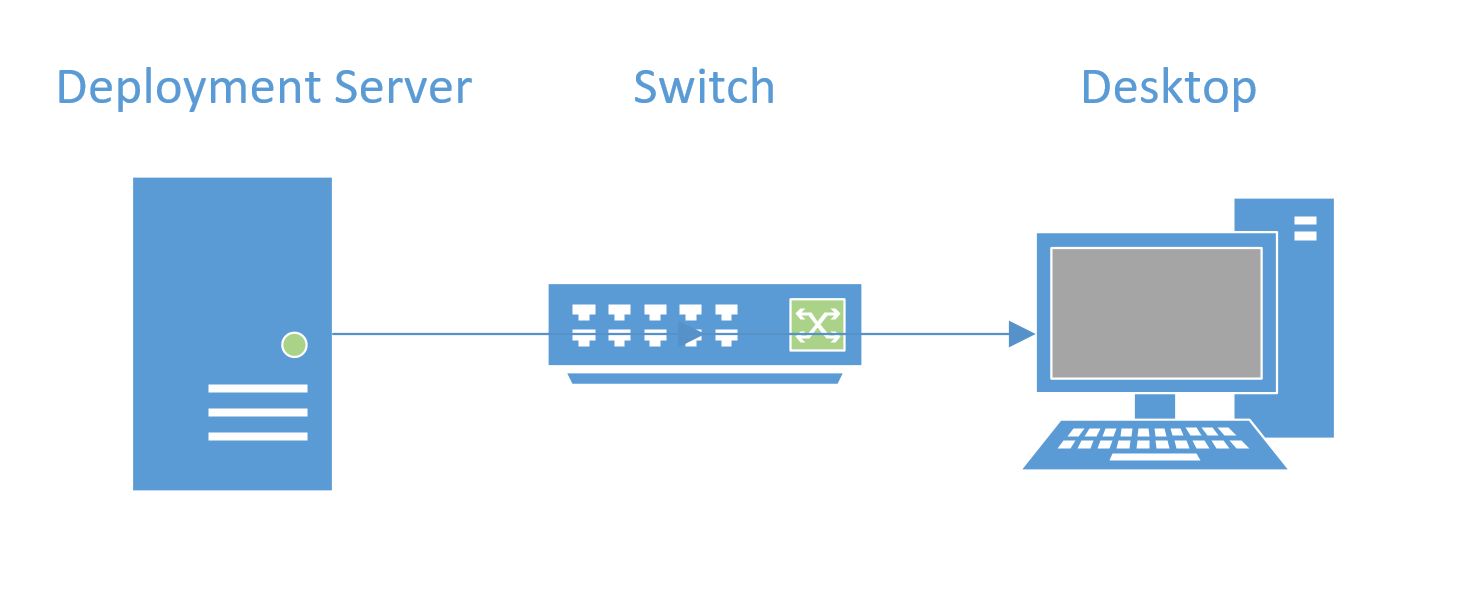
4 5 Preliminary design 5.1 Topology diagram The following figure shows a simple topology to be used during configuration, testing, and verification of the project details: Fig 5.1: Topology to be used during the project. 5.2 Project details Considering our lack of experience in the areas to be explored during this project, our mindset is to work with an iterative methodology. As the project progresses and the main objects are fulfilled, we wish to add additional features to it. We will explore the possibilities to deploy different types of Windows OS versions, add Microsoft Office to the MDT task sequence including an activation procedure, add the installed OS to Active Directory and the proper AD Organisation Unit, and branding the OS with organization logo. The main features for the project are described in further detail in the following sub headers: Microsoft Deployment Toolkit MDT will be used for deploying and installing a Windows operating system Chocolatey A Chocolatey library will be used to host software to be downloaded by and installed on the workstations using PowerShell scripts included in the OS image received by the MDT server. An advantage of using a separate library instead of including the software in the OS image is that new software can easily be added to all workstations on the site afterwards Windows PowerShell scripts The PowerShell scripts will force the client to access the Chocolatey library to download and install the chosen software programs. 3

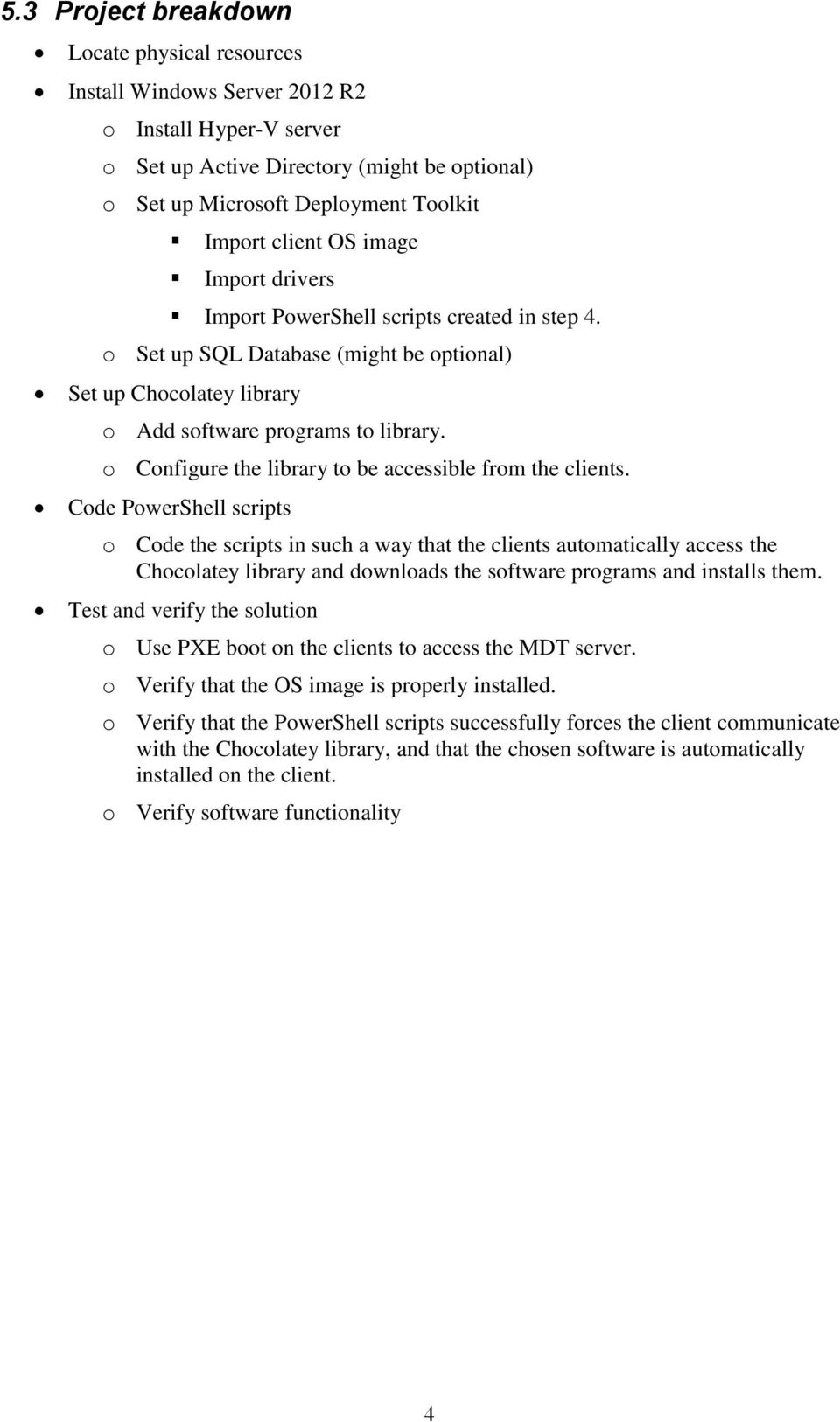
5 5.3 Project breakdown Locate physical resources Install Windows Server 2012 R2 o Install Hyper-V server o Set up Active Directory (might be optional) o Set up Microsoft Deployment Toolkit Import client OS image Import drivers Import PowerShell scripts created in step 4. o Set up SQL Database (might be optional) Set up Chocolatey library o Add software programs to library. o Configure the library to be accessible from the clients. Code PowerShell scripts o Code the scripts in such a way that the clients automatically access the Chocolatey library and downloads the software programs and installs them. Test and verify the solution o Use PXE boot on the clients to access the MDT server. o Verify that the OS image is properly installed. o Verify that the PowerShell scripts successfully forces the client communicate with the Chocolatey library, and that the chosen software is automatically installed on the client. o Verify software functionality 4
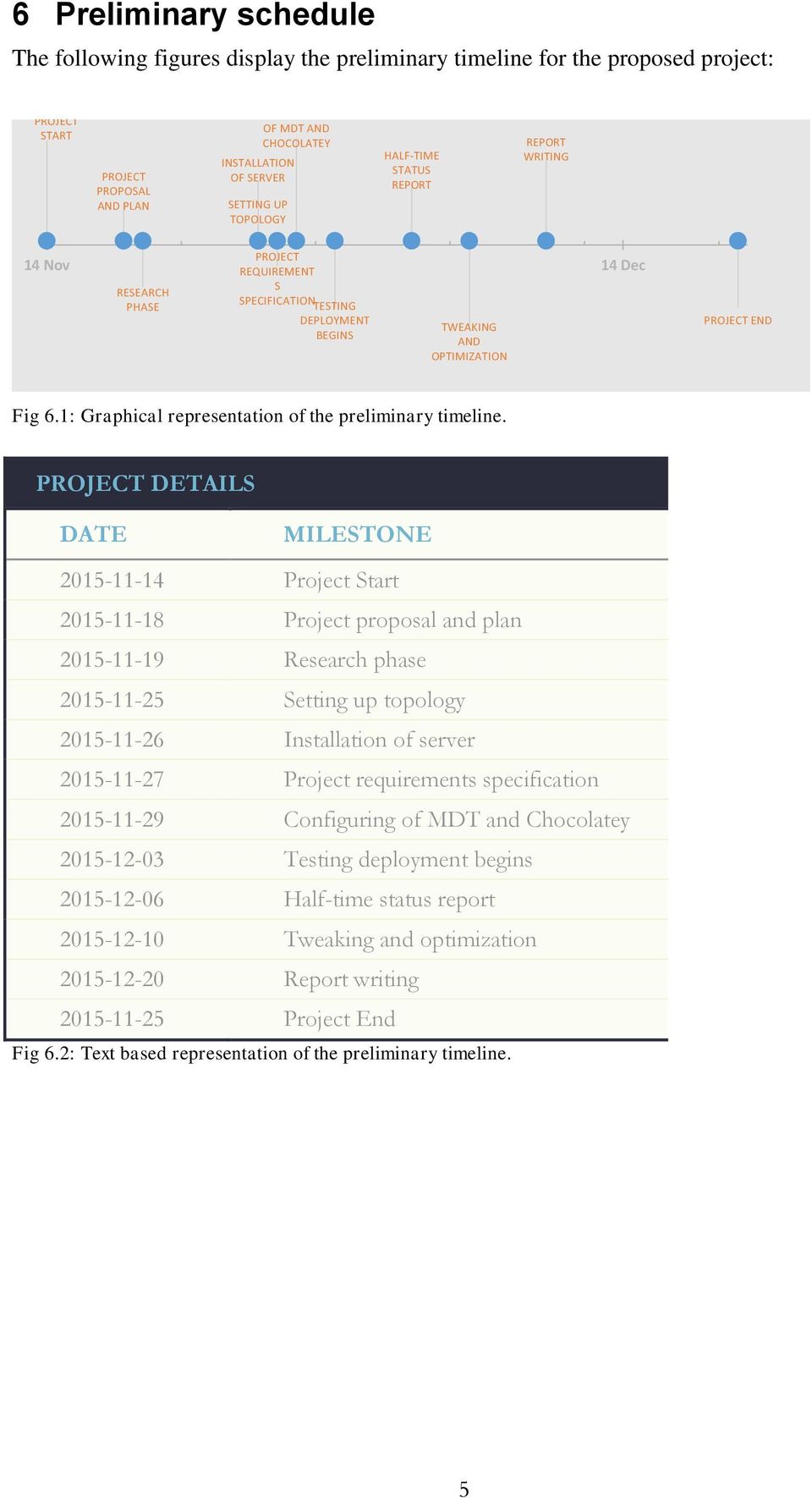
6 6 Preliminary schedule The following figures display the preliminary timeline for the proposed project: PROJECT START PROJECT PROPOSAL AND PLAN INSTALLATION OF SERVER SETTING UP TOPOLOGY CONFIGURING OF MDT AND CHOCOLATEY HALF-TIME STATUS REPORT REPORT WRITING RESEARCH PHASE PROJECT REQUIREMENT S SPECIFICATION TESTING DEPLOYMENT BEGINS 14 Nov 14 Dec TWEAKING AND OPTIMIZATION PROJECT END Fig 6.1: Graphical representation of the preliminary timeline. PROJECT DETAILS DATE MILESTONE Project Start Project proposal and plan Research phase Setting up topology Installation of server Project requirements specification Configuring of MDT and Chocolatey Testing deployment begins Half-time status report Tweaking and optimization Report writing Project End Fig 6.2: Text based representation of the preliminary timeline. 5
7 7 Conclusion The solution presented in this proposal is in use by many organizations today. The installation and configuration of the system is however not an easy task. In our first NIT semester we successfully deployed an operating system to a workstation using FOG [4], while our teacher installed and configured the FOG server. With our restricted experience in this specific field, it is realistic to anticipate issues during installation and configuration. We do however welcome this challenge, and believe in our own skills to deliver the project on time. Furthermore we believe that this will make a great project for the PDT course, and we look forward to learn more about this area of IT, that may very well be relevant to our future career. 6
8 References 1. Microsoft Technet. Microsoft Deployment Toolkit. Microsoft (2015). [Online] (Accessed ) 2. Chocolatey. About Chocolatey. Real Dimensions Software, LLC (2015). (Accessed ) 3. Microsoft Developer Network. Microsoft Powershell. Microsoft (2015). [Online] (Accessed ) 4. FOG Project. The FOG Project. FOG Project (2015). [Online] (Accessed ) 5. TechNet Magazine. Zero Touch Installation: Automating Operating Systems Migrations. Microsoft Corporation and CMP Media, LLC (2008). [Online] (Accessed ) 7
![[Online] https://msdn.microsoft.com/en-us/mt173057.aspx (Accessed 2015-11-15) 4. FOG Project. The FOG Project. FOG Project (2015). [Online] http://www.fogproject.org (Accessed 2015-11-15) 5.](/docs-images/48/18852194/images/page_8.jpg "TechNet Magazine. Zero Touch Installation: Automating Operating Systems Migrations. Microsoft Corporation and CMP Media, LLC (2008). [Online] https://technet.microsoft.com/en-us/magazine/2006.09.")
Planning and Managing Windows 7 Desktop Deployments and Environments
 Planning and Managing Windows 7 Desktop Deployments and Environments Course Details Duration: Course code: 5 Days M6294 Overview: This five-day instructor-led course is intended for desktop administrators
FAQ. NetApp MAT4Shift. March 2015
 i FAQ NetApp MAT4Shift March 2015 TABLE OF CONTENTS 1 General... 3 1.1 Solution Overview...3 What is NetApp MAT4Shift?... 3 What business needs does this solution address?... 3 What is the value of the
Planning and Managing Windows 7 Desktop Deployments & Environments - 6294 Version 7
 Planning and Managing Windows 7 Desktop Deployments & Environments - 6294 Version 7 Note This course is not scheduled to be released until January of 2010. Overview This five-day instructor-led course
MS-6294- Planning and Managing Windows 7 Desktop Deployment and Environments
 MS-6294- Planning and Managing Windows 7 Desktop Deployment and Environments Table of Contents Introduction Audience At Completion Prerequisites Microsoft Certified Professional Exams Student Materials
20415 - Implementing a Desktop Infrastructure
 20415 - Implementing a Desktop Infrastructure Duration: 5 days Course Price: $2,975 Software Assurance Eligible Course Description Course Overview This 5-day instructor-led training course provides you
Course 6331A: Deploying and Managing Microsoft System Center Virtual Machine Manager
 Course 6331A: Deploying and Managing Microsoft System Center Virtual Machine Manager Length: 3 Days Language(s): English Audience(s): IT Professionals Level: 300 Technology: Microsoft System Center Virtual
Syllabus 20695 Windows Enterprise Desktop Deployment. Subject Description: Subject Hours: Performance Objectives: Prerequisites
 Syllabus 20695 Windows Enterprise Desktop Deployment Subject Description: Subject Hours: Performance Objectives: Prerequisites After completing this course, students will be able to: Assess the network
Configuring and Deploying a Private Cloud with System Center 2012 MOC 10751
 Configuring and Deploying a Private Cloud with System Center 2012 MOC 10751 Course Outline Module 1: Planning for the Private Cloud This module describes the core components of a private cloud and the
MS 10751A - Configuring and Deploying a Private Cloud with System Center 2012
 MS 10751A - Configuring and Deploying a Private Cloud with System Center 2012 Description: Days: 5 Prerequisites: This course describes private cloud configuration and deployment with Microsoft System
Course 10751A: Configuring and Deploying a Private Cloud with System Center 2012
 Course 10751A: Configuring and Deploying a Private Cloud with System Center 2012 OVERVIEW About this Course This course describes private cloud configuration and deployment with Microsoft System Center
Outline SSS6422 - Microsoft Windows Server 2008 Hyper-V Virtualization
 Outline SSS6422 - Microsoft Windows Server 2008 Hyper-V Virtualization Duration: Three consecutive Saturdays About this Course This instructor led course teaches students how to implement and manage Windows
Configuring and Deploying a Private Cloud with System Center 2012
 Course 10751A: Configuring and Deploying a Private Cloud with System Center 2012 Length: Delivery Method: 5 Days Instructor-led (classroom) About this Course This course describes private cloud configuration
Planning and Managing Windows 7 Desktop Deployments and Environments
 Planning and Managing Windows 7 Desktop s and s Introduction This five-day instructor-led course is intended for desktop administrators who want to specialize in desktop deployment, configuration, and
MS 20247C Configuring and Deploying a Private Cloud
 MS 20247C Configuring and Deploying a Private Cloud Description: Days: 5 Prerequisites: This course equips students with the skills they require to configure and deploy a cloud using Microsoft System Center
10751-Configuring and Deploying a Private Cloud with System Center 2012
 Course Outline 10751-Configuring and Deploying a Private Cloud with System Center 2012 Duration: 5 days (30 hours) Target Audience: This course is intended for data center administrators who will be responsible
Deploying and Managing Microsoft System Center Virtual Machine Manager
 Deploying and Managing Microsoft System Center Virtual Machine Manager Overview About this Course This three-day instructor-led course teaches students how to implement a Microsoft System Center Virtual
NE-6294A Planning and Managing Windows 7 Desktop Deployments and Environments
 NE-6294A Planning and Managing Windows 7 Desktop s and s Summary Duration Vendor Audience 5 Days Microsoft IT Professionals Published Level Technology 04 January 2010 300 Windows 7 Delivery Method Instructor-led
MS-10751: Configuring and Deploying a Private Cloud with System Center 2012. Required Exam(s) Course Objectives. Price. Duration. Methods of Delivery
 MS-10751: Configuring and Deploying a Private Cloud with System Center 2012 This course teaches students how to design, install and configure a private cloud, including how to configure and deploy the
Please contact Cyber and Technology Training at (410)777-1333/[email protected] for registration and pricing information.
 Course Name Start Date End Date Start Time End Time Active Directory Services with Windows Server 8/31/2015 9/4/2015 9:00 AM 5:00 PM Active Directory Services with Windows Server 9/28/2015 10/2/2015 9:00
Managing your HP infrastructure with Insight Control Integrations and System Center 2012
 Managing your HP infrastructure with Insight Control Integrations and System Center 2012 Doug de Werd HP Product Manager Oct. 18, 2012 Agenda SC 2007 SC 2012 Introduction Insight Control for System Center
HP Insight Control for Microsoft System Center integration overview
 HP Insight Control for Microsoft System Center integration overview Integration note, 2 nd edition Introduction... 3 Integrating Insight Control with System Center... 3 Licensing... 5 Complementary functionality
MCSE: Private Cloud Training Course (System Center 2012)
 MCSE: Private Cloud Training Course (System Center 2012) Microsoft Course 10751 (Exam 70-247) Prerequisites MCSA: Windows Server 2012 Microsoft Course 10751 Exam 70-247 At Course Completion Prerequisites
Microsoft Diagnostics and Recovery Toolset 7 Evaluation Guide
 Microsoft Diagnostics and Recovery Toolset 7 Evaluation Guide White Paper Descriptor This document provides administrators with information and steps-by-step technique for deploying Microsoft Diagnostics
Configuring and Deploying a Private Cloud. Day(s): 5. Overview
 Configuring and Deploying a Private Cloud Day(s): 5 Course Code: M20247 Overview This course equips students with the skills they require to configure and deploy a cloud using Microsoft System Center 2012
Course Outline: Course 6331: Deploying and Managing Microsoft System Center Virtual Machine Manager Learning Method: Instructor-led Classroom Learning
 Course Outline: Course 6331: Deploying and Managing Microsoft System Center Virtual Machine Manager Learning Method: Instructor-led Classroom Learning Duration: 3.00 Day(s)/ 24 hrs Overview: This three-day
Parallels Mac Management v4.0
 Parallels Mac Management v4.0 Deployment Guide July 18, 2015 Copyright 1999 2015 Parallels IP Holdings GmbH and its affiliates. All rights reserved. All other marks and names mentioned herein may be trademarks
INFORMATION TECHNOLOGY SERVICES TECHNICAL SERVICES 2012 2013 Program Review
 INFORMATION TECHNOLOGY SERVICES TECHNICAL SERVICES 2012 2013 Program Description Technical Services is a service unit in Information Technology Services. The unit: 1. Acquires and distributes new computing
AdminStudio 2013. Installation Guide. Version 2013
 AdminStudio 2013 Installation Guide Version 2013 Legal Information Book Name: AdminStudio 2013 Installation Guide / Full and Limited Editions Part Number: ADS-2013-IG03 Product Release Date: July 16, 2013
StarWind Virtual SAN Hyper-Converged Platform Quick Start Guide
 Hardware-less VM Storage StarWind Virtual SAN Hyper-Converged Platform Quick Start Guide DATE: MAY 2015 TECHNICAL PAPER Trademarks StarWind, StarWind Software and the StarWind and the StarWind Software
Configuring and Deploying a Private Cloud
 Course 20247C: Configuring and Deploying a Private Cloud Course Details Course Outline Module 1: Planning for the Cloud Planning a hybrid cloud involves understanding these tools and technologies so that
Microsoft Azure for IT Professionals 55065A; 3 days
 Lincoln Land Community College Capital City Training Center 130 West Mason Springfield, IL 62702 217-782-7436 www.llcc.edu/cctc Microsoft Azure for IT Professionals 55065A; 3 days Course Description This
Developing Microsoft Azure Solutions 20532B; 5 Days, Instructor-led
 Developing Microsoft Azure Solutions 20532B; 5 Days, Instructor-led Course Description This course is intended for students who have experience building vertically scaled applications. Students should
Course 20697-2A: Deploying and Managing Windows 10 Using Enterprise Services
 Course 20697-2A: Deploying and Managing Windows 10 Using Enterprise Services Duration: 35 hours About this Course This 5-day course provides administrators with the knowledge and skills needed to deploy
Deploying Dedicated Virtual Desktops in Hosted Environments
 Deploying Dedicated Virtual Desktops in Hosted Environments Technical Preview Release Citrix XenDesktop 5.6 for Windows Server 2008 R2 Deploying Dedicated Desktops in Hosted Environments Hosted Server
Deploying Dedicated Virtual Desktops in Hosted Environments
 Deploying Dedicated Virtual Desktops in Hosted Environments Citrix XenDesktop 5.6 for Windows Server 2008 R2 Deploying Dedicated Desktops in Hosted Environments Hosted Server VDI enables CSPs to provide
In addition to their professional experience, students who attend this training should have technical knowledge in the following areas.
 6422A - Implementing and Managing Windows Server 2008 Hyper-V Course Number: 6422A Course Length: 3 Days Course Overview This three-day instructor-led course teaches students how to implement and manage
Configuring and Deploying a Private Cloud
 Course Code: M20247 Vendor: Microsoft Course Overview Duration: 5 RRP: 2,025 Configuring and Deploying a Private Cloud Overview This course equips students with the skills they require to configure and
Planning and Managing Windows 7 Desktop Deployments and Environments
 Planning and Managing Windows 7 Desktop Deployments and Environments Course Number: 6294A Course Length: 5 Days Course Overview This five-day course is intended for desktop administrators who want to specialize
Developing Microsoft Azure Solutions
 Course 20532A: Developing Microsoft Azure Solutions Page 1 of 7 Developing Microsoft Azure Solutions Course 20532A: 4 days; Instructor-Led Introduction This course is intended for students who have experience
Developing Microsoft Azure Solutions 20532A; 5 days
 Lincoln Land Community College Capital City Training Center 130 West Mason Springfield, IL 62702 217-782-7436 www.llcc.edu/cctc Developing Microsoft Azure Solutions 20532A; 5 days Course Description This
Windows 10 and Enterprise Mobility
 Windows 10 and Enterprise Mobility Deploying Windows 10 using Microsoft Deployment Toolkit The exercises in this lab guide show how to deploy Windows 10 by using Microsoft Deployment Toolkit (MDT) 2013
Configuring and Deploying a Private Cloud 20247C; 5 days
 Lincoln Land Community College Capital City Training Center 130 West Mason Springfield, IL 62702 217-782-7436 www.llcc.edu/cctc Configuring and Deploying a Private Cloud 20247C; 5 days Course Description
ACTIVE MICROSOFT CERTIFICATIONS:
 Last Activity Recorded : August 30, 2012 Microsoft Certification ID : 30999 BERT VAN HOVE BARON EMPAINLAAN 68 MECHELEN, 2800 BE [email protected] ACTIVE MICROSOFT CERTIFICATIONS: Microsoft Certified
6422: Implementing and Managing Windows Server 2008 Hyper-V (3 Days)
 www.peaklearningllc.com 6422: Implementing and Managing Windows Server 2008 Hyper-V (3 Days) Introduction This three-day instructor-led course teaches students how to implement and manage Windows Server
MS-6422A - Implement and Manage Microsoft Windows Server Hyper-V
 MS-6422A - Implement and Manage Microsoft Windows Server Hyper-V Table of Contents Introduction Audience At Completion Prerequisites Microsoft Certified Professional Exams Student Materials Outline Introduction
SIDE BY SIDE MIGRATION STEPS. John Johnston, Senior Solutions Architect SA IT Services
 SIDE BY SIDE MIGRATION STEPS John Johnston, Senior Solutions Architect SA IT Services TABLE OF CONTENTS CONTENTS Document Properties 1 Author 1 Revision 1 Background 1 Summary 2 Prerequisites 3 SCCM 2012
Designing Database Solutions for Microsoft SQL Server 2012 MOC 20465
 Designing Database Solutions for Microsoft SQL Server 2012 MOC 20465 Course Outline Module 1: Designing a Database Server Infrastructure This module explains how to design an appropriate database server
10974B: Deploying and Migrating Windows Servers
 10974B: Deploying and Migrating Windows Servers Course Details Course Code: Duration: Notes: 10974B 3 days This course syllabus should be used to determine whether the course is appropriate for the students,
Mirjam van Olst. Best Practices & Considerations for Designing Your SharePoint Logical Architecture
 Mirjam van Olst Best Practices & Considerations for Designing Your SharePoint Logical Architecture About me http://sharepointchick.com @mirjamvanolst [email protected] Agenda Introduction Logical Architecture
MCTS Guide to Microsoft Windows 7. Chapter 13 Enterprise Computing
 MCTS Guide to Microsoft Windows 7 Chapter 13 Enterprise Computing Objectives Understand Active Directory Use Group Policy to control Windows 7 Control device installation with Group Policy settings Plan
Server Virtualization with Windows Server Hyper-V and System Center
 Server Virtualization with Windows Server Hyper-V and System Center About this Course This five day course will provide you with the knowledge and skills required to design and implement Microsoft Server
System Requirements for Microsoft Dynamics SL 2015
 System for Microsoft Dynamics SL 2015 Overview This document contains the minimum client hardware requirements, server recommendations and Terminal Server minimum hardware requirements supported by the
Integration and Automation with Lenovo XClarity Administrator
 Integration and Automation with Lenovo XClarity Administrator Extend Management Processes to Existing Ecosystems Lenovo Enterprise Business Group April 2015 2015 Lenovo. All rights reserved. Introduction
Cursuri Certificare Microsoft
 Course # Cursuri Certificare Microsoft Course Name 2011, 2398, 2399 Troubleshooting Microsoft Exchange Server 2003 2072, 2321, 2322, 2323, Administering a Microsoft SQL Server 2000 Database 2324) 2185
Microsoft Training and Certification Guide. Current as of December 31, 2013
 Microsoft Training and Certification Guide Current as of December 31, 2013 Welcome to the Microsoft Training and Certification Guide. This device is intended to provide a quick, comprehensive view of our
Installation Guide. . All right reserved. For more information about Specops Deploy and other Specops products, visit www.specopssoft.
 . All right reserved. For more information about Specops Deploy and other Specops products, visit www.specopssoft.com Copyright and Trademarks Specops Deploy is a trademark owned by Specops Software. All
HP Client Manager 6.1
 HP Client Manager 6.1 Introduction... 2 New Features in HPCM 6.1... 4 Understanding how HPCM works... 6 Extensive reporting capability... 7 HPCM in operation... 7 Client inventory... 7 Health monitoring...
Configuring and Deploying a Private Cloud
 3 Riverchase Office Plaza Hoover, Alabama 35244 Phone: 205.989.4944 Fax: 855.317.2187 E-Mail: [email protected] Web: www.discoveritt.com Configuring and Deploying a Private Cloud Course: MS20247D
M6422A Implementing and Managing Windows Server 2008 Hyper-V
 M6422A Implementing and Managing Windows Server 2008 Hyper-V Looking at Training Differently... Course 6422A: Implementing and Managing Windows Server 2008 Hyper-V Length: Published: Language(s): Audience(s):
Expert Reference Series of White Papers. Microsoft Service Manager Simplified
 Expert Reference Series of White Papers Microsoft Service Manager Simplified [email protected] www.globalknowledge.net Microsoft Service Manager Simplified Randy Muller, MCT, MCT Regional Lead,
Course Syllabus. Implementing and Managing Windows Server 2008 Hyper-V. Key Data. Audience. At Course Completion. Prerequisites
 Course Syllabus Implementing and Managing Windows Server 2008 Hyper-V Key Data Product #: 3961 Elements of this syllabus are subject to change. This three-day instructor-led course teaches students how
Updating Your Windows Server 2008 Technology Skills to Windows Server 2008 R2
 Course 10159A: Updating Your Windows Server 2008 Technology Skills to Windows Server 2008 R2 OVERVIEW About this Course This three-day instructor-led course teaches the new features of Windows Server 2008
Introducing. Markus Erlacher Technical Solution Professional Microsoft Switzerland
 Introducing Markus Erlacher Technical Solution Professional Microsoft Switzerland Overarching Release Principles Strong emphasis on hardware, driver and application compatibility Goal to support Windows
Eaton NetWatch v5.0 NetWatch on Microsoft Hyper-V server 2008 Installation and configuration guide
 Eaton NetWatch v5.0 NetWatch on Microsoft Hyper-V server 2008 Installation and configuration guide Hyper-V 6.0 NetWatch Main operating system: 2008 Enterprise x64 (hosting Hyper-V) Eaton UPS Eaton NetWatch
Course Syllabus. Deploying Microsoft Windows Server 2008. Key Data. Audience. At Course Completion
 Key Data Product #: 6418B Course Syllabus Deploying Microsoft Windows Server 2008 This 3-day instructor-led course provides students with an understanding of migrating and deploying Windows Server 2008
How To Get A Certificate From Ms.Net For A Server Server
 Last Activity Recorded : December 19, 2014 Microsoft Certification ID : 2665612 MARC GROTE Wittorfer Strasse 4 Bardowick, Lower Saxony 21357 DE [email protected] ACTIVE MICROSOFT CERTIFICATIONS:
Deploying and Managing Windows 10 Using Enterprise Services
 Deploying and Managing Windows 10 Using Enterprise Services Course Details Days 5.00 Course Code M206972 Overview This 5-day course provides administrators with the knowledge and skills needed to deploy
ACTIVE MICROSOFT CERTIFICATIONS:
 Last Activity Recorded : August 04, 2011 Microsoft Certification ID : 483228 KENT NORDSTROM Asbergsvagen 27 Soderhamn, 82637 SW [email protected] ACTIVE MICROSOFT CERTIFICATIONS: Microsoft Certified Solutions
Migrating Microsoft s ASP.NET and IIS.NET Community Websites to Microsoft Azure
 Microsoft Azure Migration: Microsoft s.net Community Websites Customer Solution Case Study Migrating Microsoft s ASP.NET and IIS.NET Community Websites to Microsoft Azure Customer: Microsoft Corporation
Implementing a Desktop Infrastructure Course 20415B; 5 days, Instructor-led
 Implementing a Desktop Infrastructure Course 20415B; 5 days, Instructor-led Course Description This 5-day instructor-led course provides you with the skills and knowledge needed to plan, design, and implement
Release Notes: SANsymphony-V System Center Operations Manager (SCOM) Management Pack 1.3
 Release Notes Cumulative Change Summary Date Original 1.0 release November 1, 2011 Added additional troubleshooting notes April 3, 2012 Clarified Management Pack Software Requirements; added known issue
Microsoft Training and Certification Guide. Current as of March 16, 2015
 Microsoft Training and Certification Guide Current as of March 16, 2015 Welcome to the Microsoft Training and Certification Guide. This guide is intended to provide a quick, comprehensive view of our training
Course 20532B: Developing Microsoft Azure Solutions
 Course 20532B: Developing Microsoft Solutions Five Days, Instructor-Led About this Course This course is intended for students who have experience building vertically scaled applications. Students should
Server Virtualization with Windows Server Hyper-V and System Center
 Course 20409 Server Virtualization with Windows Server Hyper-V and System Center Length: Language(s): Audience(s): 5 Days English IT Professionals Level: 300 Technology: Windows Server 2012 Type: Delivery
HP Client Manager 6.2
 HP Client Manager 6.2 Introduction... 2 New Features in HPCM 6.2... 4 Understanding how HPCM works... 5 Extensive reporting capability... 5 HPCM in operation... 6 Client inventory... 6 Health monitoring...
Microsoft 20694 - Virtualizing Enterprise Desktops and Apps
 1800 ULEARN (853 276) www.ddls.com.au Microsoft 20694 - Virtualizing Enterprise Desktops and Apps Length 5 days Price $4169.00 (inc GST) Version B Overview This five-day, hands-on training course is designed
AZP: Microsoft Azure Infrastructure for IT Professional
 AZP: Microsoft Azure Infrastructure for IT Professional Objective: This course provides knowledge in Microsoft Azure, Microsoft s cloud computing platform. The course focuses on infrastructure implementation
70-246: Monitoring and Operating a Private Cloud with System Center 2012
 70-246: Monitoring and Operating a Private Cloud with System Center 2012 Module 01 - System Center 2012 Lesson 1: What is System Center 2012? Suite of Components Operations Manager Configuration Manager
CONFIGURING MICROSOFT SQL SERVER REPORTING SERVICES
 CONFIGURING MICROSOFT SQL SERVER REPORTING SERVICES TECHNICAL ARTICLE November/2011. Legal Notice The information in this publication is furnished for information use only, and does not constitute a commitment
70-415. Implementing a Desktop Infrastructure. Version: Demo. Page <<1/9>>
 70-415 Implementing a Desktop Infrastructure Version: Demo Page 1. Casos de Estudio Testlet 1 Case Study 1 Proseware Inc. The following testlet will present a Case Study followed by [count] multiple
20247D: Configuring and Deploying a Private Cloud
 20247D: Configuring and Deploying a Private Course Details Course Code: Duration: Notes: 20247D 5 days This course syllabus should be used to determine whether the course is appropriate for the students,
Deploying and Managing Windows 10 Using Enterprise Services
 Course 20697-2: Deploying and Managing Windows 10 Using Enterprise Services Course details Course Outline Module 1: Managing Desktops and Devices in an Enterprise Environment This module explains the most
Specops Command. Installation Guide
 Specops Software. All right reserved. For more information about Specops Command and other Specops products, visit www.specopssoft.com Copyright and Trademarks Specops Command is a trademark owned by Specops
NETFORT LANGUARDIAN INSTALLING LANGUARDIAN ON MICROSOFT HYPER V
 NETFORT LANGUARDIAN INSTALLING LANGUARDIAN ON MICROSOFT HYPER V Instructions apply to installs on Windows Server 2012 R2 Before you begin When deployed in a Hyper V environment, LANGuardian will capture
Microsoft Windows Server 2008: MS-6422 Implementing and Managing Hyper V Virtualization 6422
 coursemonster.com/us Microsoft Windows Server 2008: MS-6422 Implementing and Managing Hyper V Virtualization 6422 View training dates» Overview This three day instructor led course teaches students how