
Usability of ERP Error Messages
|
|
|
- Kristin Horton
- 9 years ago
- Views:
Transcription
1 Usability of ERP Error Messages Mazhar Sadiq * & Antti Pirhonen Department of Computer Science and Information System University of Jyväskylä, Finland * masadiq {at} jyu.fi Abstract Usability of complex information system like enterprise resource planning (ERP) system is still a challenging area. This is why many usability problems have been found in the ERP system. In this article, we tried to highlight the 21 usability problems in ERP error messages by using Nielsen s heuristics and inquiry questionnaire methods. Nielsen s heuristics is a better for finding a large number of unique usability problems in different areas. The inquiry questionnaire method has some constraints, but it is useful for comprehending how the actual end-users perceive an application. Keywords-component; Usability; Nielsen s heuristics method; Inquiry questionnaire method I. INTRODUCTION There has been a lack of research on the evaluation of complex information system such as the enterprise resource planning (ERP) system. Evaluating the ERP application is an emerging area and it is particularly challenging because of system complexity, business processes integration, and variability of users in different countries. Nowadays, it has become the fashion to use ERP and other systems like supply chain management and customer resource management in the industrial context. The ERP system has shown great promise but the benefits of cost saving, processes automation, declines in inventory, reduction in working capital, increased productivity and operational benefits of the organisation have been achieved in the face of daunting usability problems [1]. Some of the usability problems mentioned in the existing literature are transaction execution problems, identification and access to the correct functionality, lack of support in error situations, terminology problems, learnability problems and lack of ability to cut and paste [1,2]. Over the last 20 years, many usability evaluation methods (UEMs) such as user centric, expert centric, inquiry based and analytical based methods have been developed and implemented in order to improve human interaction with the product. The aim of these methods is to identify issues or areas of improvement for the interaction so that increased usability could be achieved [3]. The current usability evaluation method is shown in Figure 1. Figure 1. Usability evaluation method [4] Four categories of usability evaluation methods are: user testing, inspection oriented, inquiry oriented and analytical modelling. A. User Testing This category includes a set of methods that involves users. The main purpose is to record the performance measurements to determine whether or not usability goals have been achieved. Usability testing in the laboratory has several advantages, for example the condition for conducting the test can be controlled and all participants share the same experience. By conducting usability in the field, it is possible to find the usability problems related to the context of use [3, 4]. B. Inspection Based Methods The inspection based method involves a small group of evaluators identifying the usability problems. This kind of method is commonly used in industry because it is said to be fast and cheap. The usability inspection method does not take into account the contextual factors and the success of this method lies in the experts ability to interpret and draw meaningful conclusions [3, 4]. C. Inquiry Based Methods To evaluate user interfaces and applications, the inquiry evaluation method is used to survey user behaviour and usage of the system [4]

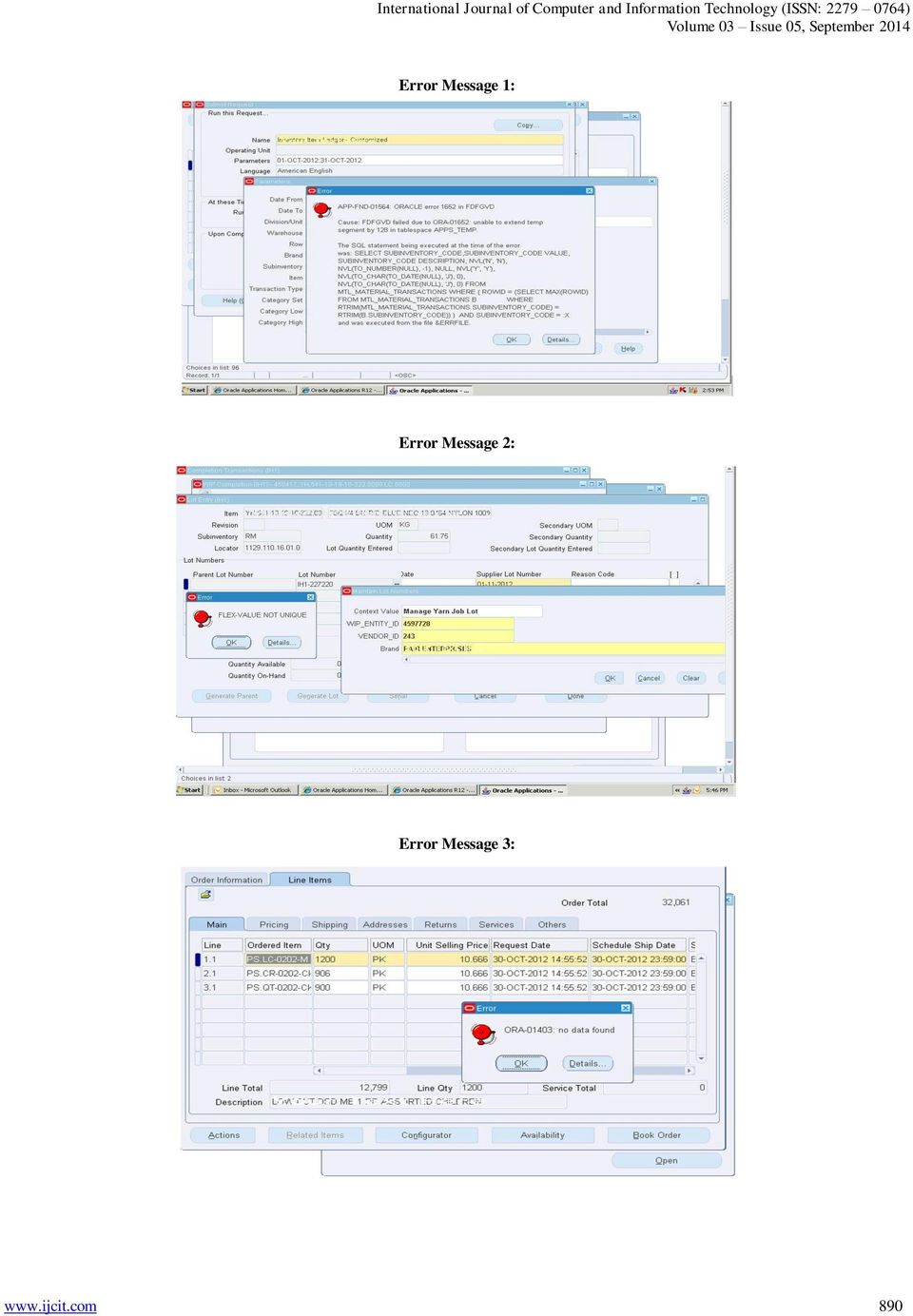
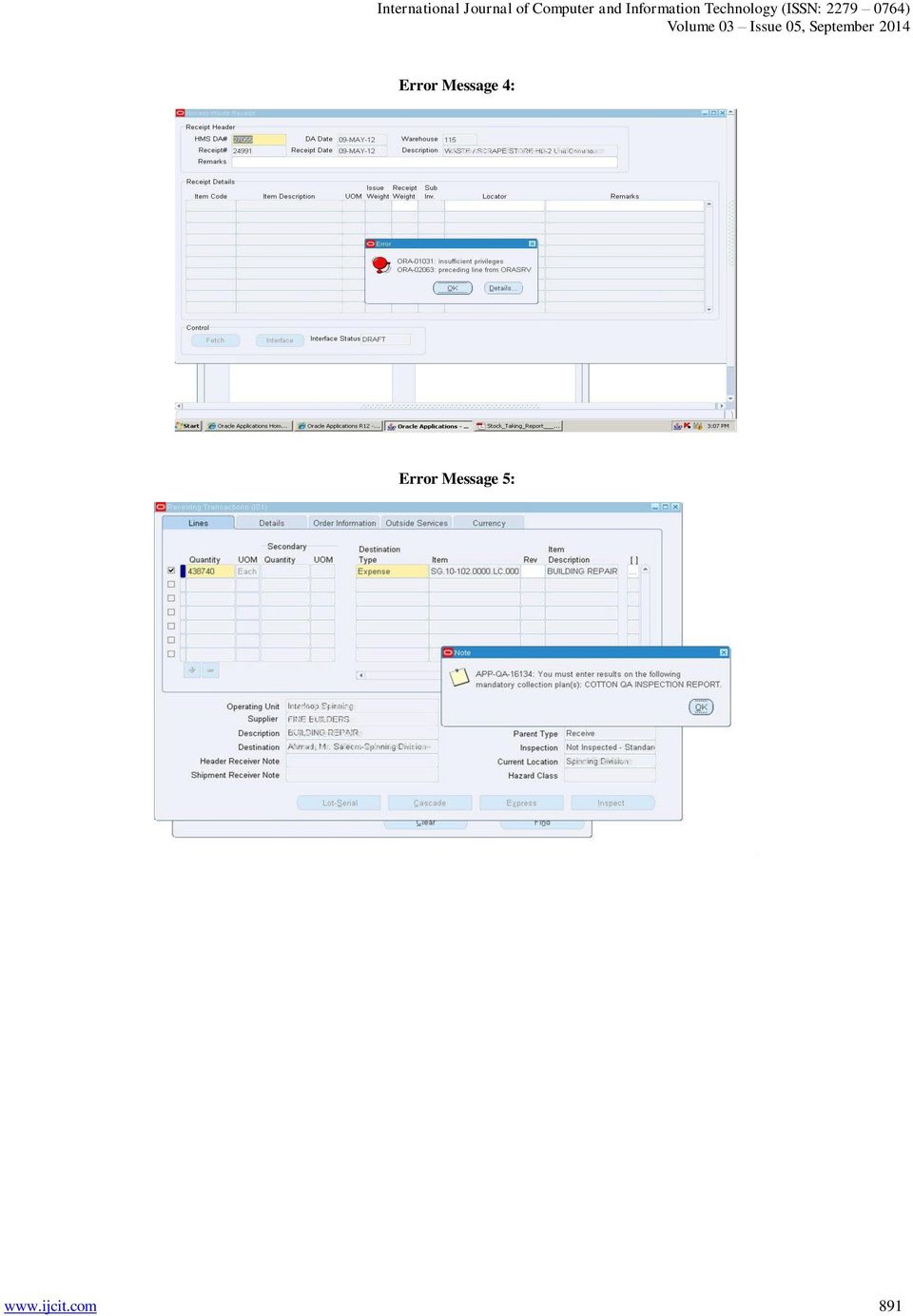
2 D. Analytical Modelling The analytical modelling method was originally applied in the field of software engineering. For instance, it has been used for automatic testing, formal description of user and task models, model-based evaluations and critical incident analysis [4]. The above-mentioned usability evaluation methods have been mostly applied in other domains but there is lack of literature in the field of ERP application. For instance, various studies have applied user testing and heuristics evaluation methods in evaluating different types of user interfaces, such as commercial web sites [5], a hotel website [6], a web-based software program [7], a universal brokerage platform [8], software user interfaces [9], 3D educational software and 3D maps [10], an office application s drawing editor [11,12], a novel information retrieval interface [13], an interactive telephone-based interface [14] and e-commerce websites [3]. The main goal of this article was to find the usability problems in ERP error messages. For this purpose, we have used Nielsen s heuristics and inquiry questionnaire method. As a sub-goal, we also try to highlights the result of these methods by total number of usability problems found, usability area and their severity level. This paper has been organised as follows: Section 2 describes the research methodology; section 3 outlines the results of usability problems; section 4 discusses the usability area, and lastly Section 5 presents the conclusions of this study. II. RESEARCH METHODOLOGY In order to approach this research, we have used Nielsen s heuristics and inquiry questionnaire methods. One hosiery organisation from Pakistan was selected. This organisation has been utilizing the Oracle ERP system for the last seven years. They have implemented so called Module-by-module approach. In module-by-module approach, organisation first implements one module and then integrate it into an existing system before starting another module. In order to maintain the consistency with the result, we have used the same ERP organisation for Nielsen s heuristics and inquiry questionnaire. The overall research methodology can be seen in Figure 2. To apply the Nielsen s heuristics, we first had to collect the real world error messages of the ERP application. It was a big challenge because the organisation didn t want to share this information. In order to collect the error messages, many call and reminder s were sent to the people working in different departments of the organisations. The author also physically visited the organisation. As a result of this process, a total of eight error messages were collected. Three error messages were eliminated because of a similar types. Five error messages were selected for the purpose of heuristics evaluation. The details of the five error messages with ten Nielsen s heuristics are shown in Appendix A. The heuristics questionnaire consisted of three parts. The first part involved demographic questions designed to collect information about the respondents name, current position and number of heuristic. The second part consisted of Nielsen s heuristics and the scale for identifying usability problems. The third part consisted of five real world error messages collected from the organisation. Figure 2. Research Methodology To avoid any kind of bias, the authors of this article didn t participate in the evaluation process. Three independent evaluators from the University of Jyvaskyla (Finland), were selected. The details of the independent evaluators are shown in Table 1. Table 1. Characteristics of independent Evaluators used for Nielsen s Heuristic method Name Current Position No. of Evaluations A Postdoctoral Researcher 8-10 B Ph.D. Student 5 C Ph.D. Candidate 2 To get the feedback on the ERP error messages by using the inquiry questionnaire method, we selected 40 end-users from different departments of the organisation. All the endusers were full time employees working in this organisation. Of 40 end-user, 30 were male and 10 were female. The characteristics of the 40 end-users are outlined in Table 2. Table 2. Characteristics of End-Users used for the Inquiry Questionnaire Method Number of End-Users Department Education Experience with ERP 10 Finance BBA-MBA Processing BA-MA Procurement BA-MA Finishing BA-MA 1-6 Total:

3 The inquiry questionnaire consisted of three parts. The first part involved demographic questions designed to collect the information about end-user, their education, certification, work experience and current working module. The second part involved four questions and one open ended question. The third part involved two more question. The end-users were approached twice during this process. They were approached at the beginning when there was a need to get feedback on the first four questions and one open-ended question. The questionnaire is presented in Appendix B (Questions (1-4) and one open-ended question). The end-users were approached again during the later stage when there was a need to get feedback on the last two questions (Appendix B: Question (5-6)). Question 5, and 6 were developed on the basis of the usability problems that were identified from Nielsen s heuristics method. III. RESULTS This section highlights the usability problems found by Nielsen s heuristics and inquiry questionnaire methods. A. Usability problems Identified by Nielsen s Heuristics A total of 16 usability problems were identified by Nielsens s heuristics method. The list is as follow: 1) Several error messages windows are open simultaneously, it s confusing. 2) Too much information, it s not obvious what s the problem. 3) User does not necessarily perceive at what point the error has been made. 4) Red colour (bell-symbol) is informative, but the symbol is slightly confusing, it refers more to notice than error. 5) Provided information is expressed unclearly and by using system language rather than by using concepts that are familiar to the user. 6) It s not clear what is flex-value (is it WIP_INTITY_ID or VENDOR_ID or something else?). 7) Possibility to compare error message s information to related information in the window behind is unclear. 8) It is not clear what ORA refers to; possibility to compare error message s information to related information in the window behind is unclear. 9) Error message is highly un-informational and there are no concepts familiar to the user. 10) The match between information in the note and information in the window behind is unclear. 11) The function of the message is unclear; what is the difference between note - and error -messages? 12) It s not clear whether the note refers to Quantity or Destination type field (in the window behind). 13) Not speaking the users' language. 14) Not helping users recognise, diagnose and recover from errors. 15) Irrelevant information. 16) Not following consistency and standards. B. Usability problems Identified by Inquiry Questionnaire The total number of usability problems identified by the inquiry questionnaire method was five. The feedback from 40 end-users with mean and median values is shown in Table 3. End-users were not able to give the feedback to Question 6. For one open ended question, they didn t mention any usability problem by themselves. Table 3. Usability problems identified by Inquiry Questionnaire ERP Error Messages Questionnaire Mean Median ERP application gives Error messages that are meaningful or non-technical? ERP application gives Error messages that clearly tell me, what is the cause of problem? ERP application gives Error messages that clearly tell me, how to fix the problem? Whenever, I make a mistake using ERP application, I recover easily and quickly? Simultaneously opening of several Error messages Windows are confusing in this ERP application? Error messages generated from this ERP application follow the consistency and standard N/A N/A related to window operating system? IV. DISCUSSION This section discusses the two methods in terms of total number of usability problems, usability area and severity level. A. Total number of Usability Problems found The total number of usability problems identified by Nielsen s heuristics and inquiry questionnaire method was 21. Nielsen s heuristics is more effective in identifying a large portion of problems in ERP error messages. A total of 16 usability problems were identified by Nielsen s heuristics method. On the other hand, the inquiry questionnaire method found only five usability problems and it was not effective in some cases. For instance, all the end-users were unable to reply and understand the following question: Q6. Error messages generated from this ERP application follow the consistency and standard related to the Windows operating system. The reason behind this is firstly that the field of HCI is new in Pakistan. It is still hard to find bachelor or master degrees in the field of HCI at university level. The concept of HCI or usability has not been penetrated in universities as well as into the organisations level of Pakistan. Secondly, the enduser didn t get any computer literacy training related to ERP application. Third, they didn t know what kind of icons are used for error messages in the Windows operating system and the meaning of each of them. For instance, the icons used in Windows 7 and Vista are shown in Figure

4 Figure 3. Standard Error, Warning, Information and Question Mark Icons [15] The meaning of each icon is as follows [15]: Standard Error Icon (Left most from Figure 3): The user interface (UI) is presenting an error or problem that has occurred. Warning Icon: The UI is presenting a condition that might cause a problem in the future. Information Icon: The UI is presenting useful information. Question Mark Icon: The UI indicates a help entry point. Now, let us look at the icon that was shown in the ERP error message window. Figure 4. Icon Used in the ERP Error Message Window [16] This icon is totally different from the Windows operating system and didn t follow any platform standard. In Nielsen s heuristics method, the independent evaluators successfully identified this usability problem. view, the opening of multiple error windows is a minor problem. However, it is a major problem from the end-users point of view and this usability issue caused a lot of confusion for them. Second, the end-users are also more interested in knowing the cause of the problems rather than how to fix and recover from the errors. V. CONCLUSION Since the launching of the concept of usability, it has become more or less obvious requirement of interactive technology. More recently, subjective perception of the value of technology has largely superseded the traditional usability approach. The concept of user experience appears the currently dominant way to conceptualise user s perspective. The shift from quite objectively measured usability qualities to subjective issues reflects the change of information technology; in the past, industrial applications were in focus, stressing efficiency, error rates and other quantifiable characteristics. At the moment, in a contrary, much of the information technology deals with consumer products, which are important to be enjoyable and easy to adopt to guarantee commercial success. However, even if ICT-based consumer products seem to dominate the public image of digital technology, the need to produce effective and robust industrial applications has not diminished. We argue and demonstrate in the current study, that usability issues are as topical and essential in industry as ever. B. Usability problems area and Severity level Nielsen s heuristics evaluation method is more effective in identifying a large usability area, as compared to the inquiry questionnaire method. The problems found in different usability areas by the heuristics method include visibility of system status, match between system and the real world, user control and freedom, consistency and standards, error prevention, recognition rather than recall, aesthetic and minimalist design and help users recognise, diagnose and recover from errors. Within these areas, the evaluators were also able to identify unique usability problem, for instance several error messages windows are open simultaneously, it s confusing. Table 5, presents the usability problem areas (with their severity level). Table 5. Comparison of the Two Methods According to Usability Area and Severity level Usability Area Problems NH IQ Visibility of System Multiple Error messages Status Window is confusing 1 3 Consistency and Problems with Standard Standards Icon 2 N/A Match between System Technical or Nonmeaningful and Real World 2 2 Help Users Recognise, Cause of Error? 2 2 Diagnose and Recover How to Fix the Error? 2 1 from Errors Recover from Error? 2 1 If we compare the above results, then there are some interesting points to note. First, from the evaluators point of 886

5 REFERENCES [1] Topi, H., Lucas, W. and Babaian, T. "Identifying usability issues with an ERP implementation," In Proceedings of the 7th International Conference on Enterprise Information Systems, pp (2005). [2] Shehab, E., Sharp, M., Supramaniam, L. and Spedding, T. Enterprise Resource Planning: An Integrative Review, Business Process Management Journal4, 10 (4), (2004). [3] Hasan, L., Morris, A. and Probets, S., A comparison of usability evaluation methods for evaluating e-commerce websites, Behaviour & Information Technology, (31:7), pp (2012). [4] Bernhaupt, R., Mihalic, K. and Obrist, M. Usability evaluation methods for mobile applications, Handbook of user research on User Interface Design and Evaluation for Mobile Technology, XLIV, pp (2008). [5] Tan, W., Liu, D. and Bishu, R. Web evaluation: heuristic evaluation vs. user testing, International Journal of Industrial Ergonomics, 39, (2009). [6] Molich, R. and Dumas, J. Comparative usability evaluation (CUE-4), Behaviour & Information Technology, 27 (3), (2008). [7] Fu, L., Salvendy, G. and Turley, L. Effectiveness of user testing and heuristic evaluation as a function of performance classification, Behaviour & Information Technology, 21 (2), (2002). [8] Law, L. and Hvannberg, E. Complementarity and convergence of heuristic evaluation and usability test: a case study of Universal Brokerage Platform, In: ACM international conference proceeding series, 3, proceedings of the second Nordic conference on human computer interaction, October, Aarhus, Denmark. New York, NY, USA: ACM Press, (2002). [9] Simeral, E. and Branaghan, R. A comparative analysis of heuristic and usability evaluation methods, STC Proceedings [online]. Available at: (1997). [10] Bach, C. and Scapin, D.L. Comparing inspections and user testing for the evaluation of virtual environments, International Journal of Human Computer Interaction, 26 (8), (2010). [11] Cockton, G. and Woolrych, A. Understanding inspection methods: lessons from an assessment of heuristic evaluation, In: A. Blandford and J. Vanderdonckt, eds.people and computers XV. Berlin: SpringerVerlag, (2001). [12] Lavery, D., Cockton, G. and Atkinson, M.P. "Comparison of evaluation methods using structured usability problem reports," Behaviour & Information Technology (16:4/5), pp (1997). [13] Doubleday, A., Ryan, M., Springett, M. and Sutcliffe, A. A comparison of usability techniques for evaluating design, In: Proceedings of the 2nd conference on designing interactive systems, August, Amsterdam, The Netherlands. New York, USA: ACM Press, (1997). [14] Desurvire, H., Lawrence, D. and Atwood, M. Empiricism versus judgement: comparing user interface evaluation methods on a new telephonebased interface, SIGCHI Bulletin, 23 (4), (1991). [15] Corporation, M. Window user interaction Guidelines for Window 7 and Window Vista,. Available at: (2010). [16] Oracle. Oracle inventory user guide Release 12 Part No. B , Oracle Corporation, USA (2006)
![, Supramaniam, L. and Spedding, T. Enterprise Resource Planning: An Integrative Review, Business Process Management Journal4, 10 (4), 359 386 (2004). [3] Hasan, L., Morris, A. and Probets, S.](/docs-images/49/17786261/images/page_5.jpg ", A comparison of usability evaluation methods for evaluating e-commerce websites, Behaviour & Information Technology, (31:7), pp 707-737 (2012). [4] Bernhaupt, R., Mihalic, K. and Obrist, M.")
6 Appendix A Heuristic Evaluation of ERP Error Messages Name: Current Position: Number of Heuristic work done: The purpose of this study work is to evaluate ERP error messages by using Nielsen s Heuristics. These real time error messages have been collected from one of the Hosiery Organisation of Pakistan. The findings of this study will help us to understand the usability problems and their severity level in ERP error message. All responses given will be treated with confidence. The result will be used for research purpose only and no attempt will be made to identify any individual in any publication. Please read 5 Error messages and do Severity rank (0 to 3) in your opinion. Thank you! 888

7 Nielsen s 10 Point Usability Heuristics for User Interface Design 1 Visibility of system status 2 Match between system and the real world 3 User control and freedom The system should always keep users informed about what is going on, through appropriate feedback within reasonable time. The system should speak the users' language, with words, phrases and concepts familiar to the user, rather than system-oriented terms. Follow real-world conventions, making information appear in a natural and logical order. Users often choose system functions by mistake and will need a clearly marked "emergency exit" to leave the unwanted state without having to go through an extended dialogue. Support undo and redo. 4 Consistency and standards Users should not have to wonder whether different words, situations, or actions mean the same thing. Follow platform conventions. 5 Error prevention 6 Recognition rather than recall 7 Flexibility and Efficiency of use 8 Aesthetic and Minimalist design Even better than good error messages is a careful design which prevents a problem from occurring in the first place. Either eliminate error-prone conditions or check for them and present users with a confirmation option before they commit to the action. Minimize the user's memory load by making objects, actions, and options visible. The user should not have to remember information from one part of the dialogue to another. Instructions for use of the system should be visible or easily retrievable whenever appropriate. Accelerators- unseen by the novice user- may often speed up the interaction for the expert user such that the system can cater to both inexperienced and experienced users. Allow users to tailor frequent actions. Dialogues should not contain information which is irrelevant or rarely needed. Every extra unit of information in a dialogue competes with the relevant units of information and diminishes their relative visibility Help users recognize, diagnose, and recover from errors Help and Documentation Error messages should be expressed in plain language (no codes), precisely indicate the problem, and constructively suggest a solution. Even though it is better if the system can be used without documentation, it may be necessary to provide help and documentation. Any such information should be easy to search, focused on the user's task, list concrete steps to be carried out, and not be too large. Severity Rank Scale for Identifying Usability problems Definition 0 I don't agree that this is a usability problem at all 1 Cosmetic problem only: need not be fixed unless extra time is available on project 2 Major usability problem: important to fix, so should be given high priority 3 Usability catastrophe: imperative to fix this before product can be released 889

8 Error Message 1: Error Message 2: Error Message 3: 890
9 Error Message 4: Error Message 5: 891
10 Appendix B ERP Error Messages Evaluation Name: Education: Certification Related to ERP Applications, If any: Work Experience with ORACLE ERP Application: Current Working Modules: This questionnaire (which starts on the following page), gives you an opportunity to tell us your reactions to the Oracle ERP application you used. Your response will help us to understand what aspects of ERP Errors Messages you are particularly concerned about and the aspects that satisfy you. To a great degree as possible, think about all the ERP Error Messages that you have received when interacting with the Oracle ERP application. All responses given will be treated with confidence. The result will be used for research purpose only and no attempt will be made to identify any individual or Organisation in any publication. Please read each statement and indicate how strongly you agree or disagree with the statement by selecting a number on the scale (1-3). 1 is for strongly dis-agree and 3 is for strongly agree. Please select Zero (0) if you think this is not an issue. Thank you! 892
11 ERP Error Messages Related Questionnaire ERP application gives Error messages that are meaningful or non-technical? 2. ERP application gives Error messages that clearly tell me, what is the cause of problem? 3. ERP application gives Error messages that clearly tell me, how to fix the problem? 4. Whenever, I make a mistake using ERP application, I recover easily and quickly? Please mention any other Issues which is left in above Questionnaire? ERP Error Messages Related Questionnaire Continue Simultaneously opening of several Error messages Windows are confusing in this ERP application? Error messages generated from this ERP application follow the consistency and standard related to window operating system? 893

Muhammad F Walji PhD and Jiajie Zhang PhD The University of Texas Health Science Center at Houston
 Muhammad F Walji PhD and Jiajie Zhang PhD The University of Texas Health Science Center at Houston AMIA Usability Task Force HIMSS Usability Task Force Jiajie Zhang, Amy Franklin, Juhan Sonin original
Screen Design : Navigation, Windows, Controls, Text,
 Overview Introduction Fundamentals of GUIs Screen Design : Navigation, Windows, Controls, Text, Evaluating GUI Performance - Methods - Comparison 1 Example: Automotive HMI (CAR IT 03/2013) 64, 68, 69 2
Usability Heuristics for the Web. 1. Visibility of system status
 Page 1 sur 5 Register Domains[.com.net.org] for only $14.99 at Bluegenesis.com! Usability Related Articles Find Search List Departments List Topics Web Tools Guide Buy Software at the Web Tools Store Search
A usability study of a website prototype designed to be responsive to screen size
 A usability study of a website prototype designed to be responsive to screen size Sophie Rundgren Interactive Media Design Södertörn University Alfred Nobels allé 7 141 89 Huddinge [email protected]
Outline. Lecture 13: Web Usability. Top Ten Web Design Mistakes. Web Usability Principles Usability Evaluations
 Lecture 13: Web Usability Outline Web Usability Principles Usability Evaluations Wendy Liu CSC309F Fall 2007 1 2 What Makes Web Application Development Hard? Target audience can be difficult to define
UX UI. An intro to the world of User Experience and User Interface
 UX UI An intro to the world of User Experience and User Interface Agenda Introduction UX UI Define your product Basic Guidelines Summary UX Hi - Product Design Student at Bezalel Academy of Arts and Design
Sherry Pagoto, PhD University of Massachusetts Medical School. Kristin Schneider, PhD Rosalind Franklin University
 Sherry Pagoto, PhD University of Massachusetts Medical School Kristin Schneider, PhD Rosalind Franklin University Usability is broadly defined as how easy it is to use a system, how efficiently a person
Usability in ERP (Single and Multiple Document Interface) Application Environments
 International Journal of Business, Humanities and Technology Vol. 4, No. 4; July 2014 Usability in ERP (Single and Multiple Document Interface) Application Environments Mazhar Sadiq & Antti Pirhonen Department
Appendix A Protocol for E-Learning Heuristic Evaluation
 Appendix A Protocol for E-Learning Heuristic Evaluation This instrument and protocol are intended for use by instructional designers and other experts engaged in heuristic evaluations of e-learning programs.
TABLE OF CONTENTS CHAPTER TITLE PAGE
 TABLE OF CONTENTS CHAPTER TITLE PAGE ACKNOWLEDGEMENT ABSTRACT ABSTRAK LIST OF TABLES LIST OF FIGURES LIST OF ABBREVIATIONS i ii iii iv v vii 1 INTRODUCTION 1.0 Introduction 1 1.1 Problem Statement 2 1.2
EVALUATING THE USABILITY OF ERP SYSTEMS: WHAT CAN CRITICAL INCIDENTS TELL US?
 EVALUATING THE USABILITY OF ERP SYSTEMS: WHAT CAN CRITICAL INCIDENTS TELL US? Mari-Klara Oja Bentley University MA, United States [email protected] Wendy Lucas Bentley University MA, United States [email protected]
E-Procurement Usability: The Good, The Bad and The Ugly
 E-Procurement Usability: The Good, The Bad and The Ugly Consumer-Like Usability Key to Higher User Adoption of ERP-based E-Procurement Published: July 2010 This White Paper is the first in a series of
Interface Design Rules
 Interface Design Rules HCI Lecture 10 David Aspinall Informatics, University of Edinburgh 23rd October 2007 Outline Principles and Guidelines Learnability Flexibility Robustness Other Guidelines Golden
User interface design. Designing effective interfaces for software systems. Ian Sommerville 2000 Software Engineering, 6th edition. Chapter 15 Slide 1
 User interface design Designing effective interfaces for software systems Ian Sommerville 2000 Software Engineering, 6th edition. Chapter 15 Slide 1 Objectives To suggest some general design principles
Exploring the Usability of Municipal Web Sites: A Comparison Based on Expert Evaluation Results from Four Case Studies
 Informatica Economică vol. 14, no. 4/2010 87 Exploring the Usability of Municipal Web Sites: A Comparison Based on Expert Evaluation Results from Four Case Studies Costin PRIBEANU, Ruxandra-Dora MARINESCU,
Analysis of Four Usability Evaluation Methods Applied to Augmented Reality Applications
 Analysis of Four Usability Evaluation Methods Applied to Augmented Reality Applications Héctor Martínez a,b, Payel Bandyopadhyay c,d a SenseTrix, PL 20 FI-00101 Helsinki, Finland b Tampere University of
Bad designs. Chapter 1: What is interaction design? Why is this vending machine so bad? Good design. Good and bad design.
 Bad designs Chapter 1: What is interaction design? Elevator controls and labels on the bottom row all look the same, so it is easy to push a label by mistake instead of a control button People do not make
White Paper: Designing Resourceful Graphical User Interfaces (GUIs) for Healthcare Applications
 Accelerate Development Reduce Time to Product Automate Critical Tasks White Paper: Designing Resourceful Graphical User Interfaces (GUIs) for Healthcare Applications The ASHVINS GROUP, Inc. 6161 Blue Lagoon
EHR Heuristic Evaluation
 [Place logo of clinic here] EHR Heuristic Evaluation Preview Packet Background, Description of Process, Heuristics List, and Examples of Violations Created by: Thank you for participating in our heuristic
Types of Usability Testing For Your Website
 LEGAL SERVICES NTAP v v NATIONAL TECHNOLOGY ASSISTANCE PROJECT Website Usability Testing A Guide for Legal Aid Websites Jamila Hussein & Xander Karsten 1 Website Usability Testing Guide This guide is designed
Web Design Competition 2013. College of Computing Science, Department of Information Systems. New Jersey Institute of Technology
 COMPETITION PURPOSE The Web is the most transformable invention of our time. This competition features the creation of high-quality, well-designed and original Websites, while seeking to identify and encourage
Heuristic Evaluation of Three Cellular Phones
 Heuristic Evaluation of Three Cellular Phones Siemens CF62T Samsung VGA1000 Motorola T720 ISE 217, Human Computer Interaction San Jose State University May 2005 Allison Eckholm Robert Murphy Richard Pack
User interface design. Ian Sommerville 2004 Software Engineering, 7th edition. Chapter 16 Slide 1
 User interface design Ian Sommerville 2004 Software Engineering, 7th edition. Chapter 16 Slide 1 Objectives To suggest some general design principles for user interface design To explain different interaction
Testing Websites with Users
 3 Testing Websites with Users 3 TESTING WEBSITES WITH USERS Better Practice Checklist Practical guides for effective use of new technologies in Government www.agimo.gov.au/checklists version 3, 2004 Introduction
Heuristic Evaluation Quality Score (HEQS): Defining Heuristic Expertise
 Vol. 4, Issue 1, November 2008, pp. 49-59 Heuristic Evaluation Quality Score (HEQS): Defining Heuristic Expertise Shazeeye Kirmani Infosys Technologies Ltd. Electronics City, Hosur Road, Bangalore, India,
User interface evaluation experiences: A brief comparison between usability and communicability testing
 User interface evaluation experiences: A brief comparison between usability and communicability testing Experiências de avaliação de interface de usuário: uma breve comparação entre usabilidade e testes
An Iterative Usability Evaluation Procedure for Interactive Online Courses
 An Iterative Usability Evaluation Procedure for Interactive Online Courses by Laurie P. Dringus ABSTRACT The Internet and World Wide Web (W3) have afforded distance learners simple links to access information.
The Creative Curriculum for Preschool: Objectives for Development & Learning
 Curriculum Alignment of The Creative Curriculum for Preschool: Objectives for Development & Learning with Alignment of The Creative Curriculum for Preschool: Objectives for Development & Learning With
Investigating the Relative Importance of Design Criteria in the Evaluation of the Usability of Educational Websites from the Viewpoint of Students
 , July 4-6, 202, London, U.K. Investigating the Relative Importance of Design Criteria in the Evaluation of the Usability of Educational Websites from the Viewpoint of Students Layla Hasan, Member, IAENG
Introduction to Embedded help and Examples applied to dotlrn
 Introduction to Embedded help and Examples applied to dotlrn Created by Ludivine Martin Created by Ludivine Martin Page 2 ABOUT THE HELP SECTION Help is the last resort - People don t use the help section,
Usability in e-learning Platforms: heuristics comparison between Moodle, Sakai and dotlrn
 Usability in e-learning Platforms: heuristics comparison between Moodle, Sakai and dotlrn Ludivine Martin 1,5, David Roldán Martínez 2,5, Olga Revilla 3,5, Maria José Aguilar 4,5, Olga C. Santos 1,5, Jesús
An Investigation of User-Experience Design of E-Commerce Websites
 Proceedings of the World Congress on Electrical Engineering and Computer Systems and Science (EECSS 2015) Barcelona, Spain July 13-14, 2015 Paper No. 316 An Investigation of User-Experience Design of E-Commerce
E-vote 2011 Version: 1.0 Testing and Approval Date: 26/10/2009. E-vote 2011. SSA-U Appendix 5 Testing and Approval Project: E-vote 2011
 E-vote 2011 SSA-U Appendix 5 Testing and Approval Project: E-vote 2011 Change log Version Date Author Description/changes 0.1 26.10.09 First version Page 1 CONTENT 1. INTRODUCTION 3 2. TESTING PROCESS
Usability Evaluation with Users CMPT 281
 Usability Evaluation with Users CMPT 281 Outline Usability review Observational methods Interview methods Questionnaire methods Usability ISO 9241-11: The extent to which a product can be used by specified
Email Etiquette (Netiquette) Guidance
 Email Etiquette (Netiquette) Guidance January 2007 Email Etiquette (Netiquette) Guidance January 2007-1/13 Version Control Version Author(s) Replacement Date 1.0 Timothy d Estrubé Information Governance
Dr Kate Garland. B.Sc., M.Sc., Ph.D., F.H.E.A., AFBPsS, CPsychol. University Campus Suffolk, IPSWICH, UK [email protected]
 Paper v Digital Presented to: UNI Europa Graphical Conference Publishing on the move: Knowing and organising to anticipate changes Brussels 29-30 October 2014 Dr Kate Garland B.Sc., M.Sc., Ph.D., F.H.E.A.,
An Enterprise Framework for Evaluating and Improving Software Quality
 An Enterprise Framework for Evaluating and Improving Software Quality Abstract Philip Lew [email protected] With the world s economy increasingly driven by software products, there has been a relentless
HELSINKI METROPOLIA UNIVERSITY OF APPLIED SCIENCES. Master s Degree in Business Informatics. Master s Thesis research
 HELSINKI METROPOLIA UNIVERSITY OF APPLIED SCIENCES Master s Degree in Business Informatics Master s Thesis research USABILITY STUDY FOR SAILFISH OPERATING SYSTEM. Author: Elena Xydaki Tutor: Thomas Rohweder,
SOFTWARE DESIGN TECHNIQUES. Nagalaxmi Telkar CSCI 5828 Presentation Slides
 SOFTWARE DESIGN TECHNIQUES Nagalaxmi Telkar CSCI 5828 Presentation Slides CONTENTS Introduction Software Design Life Cycle Software Design Process Tackling Design Problems Architectural Design Abstract
Teaching Expert Thinking (by Wendy Adams and Carl Wieman, CU-SEI and UBC-CWSEI, and Dan Schwartz, Stanford School of Education)
 CWSEI & CU-SEI July 30, 2008 Teaching Expert Thinking (by Wendy Adams and Carl Wieman, CU-SEI and UBC-CWSEI, and Dan Schwartz, Stanford School of Education) Experts and novices differ: The study of differences
Development of Evaluation Heuristics for Web Service User Experience
 Development of Evaluation Heuristics for Web Service User Experience Kaisa Väänänen-Vainio-Mattila Tampere University of Technology Human-Centered Technology Korkeakoulunkatu 6 33720 Tampere, Finland [email protected]
The Usability of Electronic Stores based on the Organization of Information and Features
 The Usability of Electronic Stores based on the Organization of Information and Features CHAN KAH-SING Singapore Polytechnic This paper describes an investigation on how the perceived usability of electronic
Appropriate Web Usability Evaluation Method during Product Development
 Master Thesis Software Engineering Thesis no: MSE-2008-03 Feb 2008 Appropriate Web Usability Evaluation Method during Product Development A comparison and analysis of formative web usability evaluation
HMRC Tax Credits Error and Fraud Additional Capacity Trial. Customer Experience Survey Report on Findings. HM Revenue and Customs Research Report 306
 HMRC Tax Credits Error and Fraud Additional Capacity Trial Customer Experience Survey Report on Findings HM Revenue and Customs Research Report 306 TNS BMRB February2014 Crown Copyright 2014 JN119315 Disclaimer
User-centered design principles were applied to
 User-Centered Design of a Web Site for Library and Information Science Students: Heuristic Evaluation and Usability Testing Laura Manzari and Jeremiah Trinidad-Christensen This study describes the life
Web Usability: Principles and Evaluation Methods
 Web Usability: Principles and Evaluation Methods Maristella Matera, Francesca Rizzo, Giovanni Toffetti Carughi Dipartimento di Elettronica e Informazione, Politecnico di Milano Piazza Leonardo da Vinci,
How To Know If Online Courses Work For Middle And High School Students
 Do Online Courses Work for Middle Grades and High School Students? Online Students Have Their Say William R. Thomas Can a middle grades or high school student really take a course for credit just by using
User Resistance Factors in Post ERP Implementation
 User Resistance Factors in Post ERP Implementation Sayeed Haider Salih 1 e-mail: [email protected] Ab Razak Che Hussin 2 e-mail: [email protected] Halina Mohamed Dahlan 3 e-mail: [email protected] Author(s)
User experience in ERP system development An action research project to involve user experience in the everyday work
 LINKÖPING UNIVERSITY User experience in ERP system development An action research project to involve user experience in the everyday work Maja Schylström Supervisor: Johan Åberg Co- supervisor: Kristin
An activity-based analysis of hands-on practice methods
 Journal of Computer Assisted Learning (2000) 16, 358-365 An activity-based analysis of hands-on practice methods S. Wiedenbeck, J.A. Zavala & J. Nawyn University of Nebraska Abstract The success of exploration-based
Mensch-Maschine-Interaktion 1. Chapter 8 (June 21st, 2012, 9am-12pm): Implementing Interactive Systems
 Mensch-Maschine-Interaktion 1 Chapter 8 (June 21st, 2012, 9am-12pm): Implementing Interactive Systems 1 Overview Introduction Basic HCI Principles (1) Basic HCI Principles (2) User Research & Requirements
Usability as a Challenge in Precision Agriculture Case Study: an ISOBUS VT
 1 Usability as a Challenge in Precision Agriculture Case Study: an ISOBUS VT H. E. S. Haapala 1), L. Pesonen 1) and P. Nurkka 1)2) 1) MTT Agrifood Research Finland, Vakolantie 55, FI-03400 Vihti, Finland,
Prioritisation of knowledge required for ERP implementations: client and implementation partner perspective
 Prioritisation of knowledge required for ERP implementations: client and implementation partner perspective By Uchitha Jayawickrama, Shaofeng Liu and Melanie Hudson Smith Overview This article identifies
METHODOLOGIES FOR STUDIES OF PROGRAM VISUALIZATION
 Full paper ABSTRACT METHODOLOGIES FOR STUDIES OF PROGRAM VISUALIZATION Niko Myller & Roman Bednarik Department of Computer Science University of Joensuu PO Box 111, FI-80101 [email protected]
Increasing operational efficiency through improved customer service a case from the process maintenance business
 Increasing operational efficiency through improved customer service a case from the process maintenance business Jaana Auramo, Kari Tanskanen and Johanna Småros Department of Industrial Engineering and
A Comparison Between User Interface Design for Different Kinds of Mobile Applications
 A Comparison Between User Interface Design for Different Kinds of Mobile Applications Rashmi Bakshi Abstract: In present research, a comparative study is conducted between designs of various mobile applications
How to Develop a Sporting Habit for Life
 How to Develop a Sporting Habit for Life Final report December 2012 Context Sport England s 2012-17 strategy aims to help people and communities across the country transform our sporting culture, so that
Software Project Management Matrics. Complied by Heng Sovannarith [email protected]
 Software Project Management Matrics Complied by Heng Sovannarith [email protected] Introduction Hardware is declining while software is increasing. Software Crisis: Schedule and cost estimates
CONTENTS 1. INTRODUCTION 1 2. EQUALITY 1. - Part-time posts 1 - Equality proofing JESP scores 1 3. CABINET OFFICE ROLE 1 4. TRADE UNION ROLE 2
 JESP Job Evaluation for Senior Posts Good Practice Guide March 2008 CONTENTS Page 1. INTRODUCTION 1 2. EQUALITY 1 - Part-time posts 1 - Equality proofing JESP scores 1 3. CABINET OFFICE ROLE 1 4. TRADE
Guest Article: What will make healthcare software usable?
 (From: http://www.healthcareguy.com/2009/04/13/guest-article-what-will-make-healthcare-softwareusable/) Guest Article: What will make healthcare software usable? Last month I posted several entries about
Developing new GCSE, A level and AS qualifications for first teaching in 2016
 Developing new GCSE, A level and AS qualifications for first teaching in 2016 covering: GCSE Art and design Computer science Dance Music Physical education A level and AS qualifications Ancient languages
Get to Grips with SEO. Find out what really matters, what to do yourself and where you need professional help
 Get to Grips with SEO Find out what really matters, what to do yourself and where you need professional help 1. Introduction SEO can be daunting. This set of guidelines is intended to provide you with
Council of Ambulance Authorities
 Council of Ambulance Authorities Patient Satisfaction Survey 2013 Prepared for: Mojca Bizjak-Mikic Manager, Data & Research The Council of Ambulance Authorities Prepared by: Natasha Kapulski Research Associate
P3M3 Portfolio Management Self-Assessment
 Procurement Programmes & Projects P3M3 v2.1 Self-Assessment Instructions and Questionnaire P3M3 Portfolio Management Self-Assessment P3M3 is a registered trade mark of AXELOS Limited Contents Introduction
Levels of measurement in psychological research:
 Research Skills: Levels of Measurement. Graham Hole, February 2011 Page 1 Levels of measurement in psychological research: Psychology is a science. As such it generally involves objective measurement of
1 st Usability Testing for the New SmartSite Gradebook NG
 1 st Usability Testing for the New SmartSite Gradebook NG There are a series of short activities to perform. These are all tied to the Instructor role. Remember that we are not testing you, but rather
Understanding the User Model of the Elderly People While Using Mobile Phones
 Understanding the User Model of the Elderly People While Using Mobile Phones Hsien-Hui TANG Shih-An KAO DITL, The Graduate Institute of Industrial Design, Chang Gung University, Taiwan [email protected]
Evaluation of Fiji National University Campus Information Systems
 ISSN No. 0976-5697!"# $#$!%&&$ '()))* Evaluation of Fiji National University Campus Information Systems Bimal Aklesh Kumar Department of Computer Science and Information Systems Fiji National University