
This chapter deals with the database approach to
|
|
|
- Bernadette Chambers
- 9 years ago
- Views:
Transcription
1 chapter 9 Database Management Systems This chapter deals with the database approach to managing an organization s data resources. The database model is a particular philosophy whose objectives are supported by specific strategies, techniques, hardware, and software that are very different from those associated with flat-file environments. Chapter 1 drew a distinction between two general data management approaches: the flat-file model and the database model. Because the best way to present the virtues of the database model is by contrast with the flat-file model, the first section of this chapter examines how traditional flat-file problems are resolved under the database approach. Important features of modern relational databases are covered later in the chapter. The second section describes in detail the functions and relationship between four primary elements of the database environment: the users, the database management system (DBMS), the database administrator (DBA), and the physical database. The third section is devoted to an in-depth explanation of the characteristics of the relational model. A number of database design topics are covered, including data modeling, deriving relational tables from entity relationship (ER) diagrams, the creation of user views, and data normalization techniques. The fourth section concludes the chapter with a discussion of distributed database issues. It examines three possible database configurations in a distributed environment: centralized, partitioned, and replicated databases. Learning Objectives After studying this chapter, you should: Understand the operational problems inherent in the flat-file approach to data management that gave rise to the database concept. Understand the relationships among the defining elements of the database environment. Understand the anomalies caused by unnormalized databases and the need for data normalization. Be familiar with the stages in database design, including entity identification, data modeling, constructing the physical database, and preparing user views. Be familiar with the operational features of distributed databases and recognize the issues that need to be considered in deciding on a particular database configuration.

2 398 PART III Advanced Technologies in Accounting Information Overview of the Flat-File versus Database Approach Many so-called legacy systems are characterized by the flat-file approach to data management. In this environment, users own their data files. Exclusive ownership of data is a natural consequence of two problems associated with the legacy-system era. The first problem is a business culture that erects barriers between organizational units that inhibit entity-wide integration of data. The second problem stems from limitations in flat-file management technology that require data files to be structured to the unique needs of the primary user. Thus, the same data, used in slightly different ways by different users, may need to be restructured and reproduced in physically different files. Figure 9-1 illustrates this model. In the figure, the file contents are represented conceptually with letters. Each letter could signify a single data attribute (field), a record, or an entire file. Note also that data element B is present in all user files. This is called data redundancy and is the cause of three types of data management problems: data storage, data updating, and currency of information. Each of these, as well as a fourth problem taskdata dependency, which is not directly related to data redundancy will be examined next. DATA STORAGE Chapter 1 showed that an efficient information system captures and stores data only once and makes this single source available to all users who need it. This is not possible in the flat-file environment. To meet the private data needs of users, organizations must incur the costs of both multiple collection and multiple storage procedures. Indeed, some commonly used data may be duplicated dozens, hundreds, or even thousands of times, creating excessive storage costs. DATA UPDATING Organizations have a great deal of data stored on master files and reference files that require periodic updating to reflect operational and economic changes. For example, a change in a customer s name or 9-1 FLAT-FILE DATA MANAGEMENT DATA User 1 Transactions Program 1 A, B, C User 2 Transactions Program 2 X, B, Y User 3 Transactions Program 3 L, B, M

3 CHAPTER 9 Database Management Systems 399 address must be reflected in the appropriate master files. This piece of information may be important to several user departments in the organization, such as sales, billing, credit, customer services, sales promotion, and catalog sales. When users maintain separate files, any such change must be made separately for each user. This adds significantly to the cost of data management. CURRENCY OF INFORMATION In contrast to the problem of performing multiple updates is the problem of failing to update the files of all users affected by a change. If update messages are not properly disseminated, then some users may not record the change and will perform their duties and make decisions based on outdated data. TASK-DATA DEPENDENCY Another problem with the flat-file approach is the user s inability to obtain additional information as his or her needs change. This problem is called task-data dependency. The user s information set is constrained by the data that he or she possesses and controls. For example, in Figure 9-1, if the information needs of User 1 change to include Data L, User 1 s program would not have access to these data. Although Data L exists in the files of another user, keep in mind the culture of this environment. Users do not interact as members of a user community. They act independently. As such, User 1 may be unaware of the presence of Data L elsewhere in the organization. In this environment, it is difficult to establish a mechanism for the formal sharing of data. Therefore, Data L would need to be recreated from scratch. This will take time, inhibit User 1 s performance, add to data redundancy, and drive data management costs even higher. THE DATABASE APPROACH Figure 9-2(a) presents a simple overview of the database approach with the same users and data requirements as in Figure 9-1. The most obvious change from the flat-file model is the pooling of data into a common database that is shared by all the users. 9-2(a) THE DATABASE CONCEPT DATABASE User 1 Transactions Program 1 User 2 Transactions User 3 Transactions Program 2 Program 3 A, B, C, X, Y, L, M

4 400 PART III Advanced Technologies in Accounting Information FLAT-FILE PROBLEMS SOLVED Data sharing (the absence of ownership) is the central concept of the database approach. Let s see how this resolves the problems identified. No data redundancy. Each data element is stored only once, thereby eliminating data redundancy and reducing storage costs. Single update. Because each data element exists in only one place, it requires only a single update procedure. This reduces the time and cost of keeping the database current. Current values. A change any user makes to the database yields current data values for all other users. For example, when User 1 records a customer address change, User 3 has immediate access to this current information. Task-data independence. Users have access to the full domain of data available to the firm. As users information needs expand beyond their immediate domain, the new needs can be more easily satisfied than under the flat-file approach. Only the limitations of the data available to the firm (the entire database) and the legitimacy of their need to access it constrains users. CONTROLLING ACCESS TO THE DATABASE The database approach places all the firm s information eggs in one basket. It is essential, therefore, to take very good care of the basket. The example in Figure 9-2(a) has no provision for controlling access to the database. Assume Data X is sensitive, confidential, or secret information that only User 3 is authorized to access. How can the organization prevent others from gaining unauthorized access to it? THE DATABASE MANAGEMENT SYSTEM Figure 9-2(b) adds a new element to Figure 9-2(a). Standing between the users programs and the physical database is the database management system (DBMS). The purpose of the DBMS is to provide controlled access to the database. The DBMS is a special software system that is programmed to know which data elements each user is authorized to access. The user s program sends requests for data to the DBMS, 9-2(b) THE DATABASE CONCEPT User 1 Transactions Program 1 A, B, User 2 Transactions Program 2 D B M S C, X, Y, L, M User 3 Transactions Program 3

5 CHAPTER 9 Database Management Systems 401 which validates and authorizes access to the database in accordance with the user s level of authority. The DBMS will deny requests for data that the user is unauthorized to access. As one might imagine, the organization s criteria, rules, and procedures for assigning user authority are important control issues for accountants to consider. THREE CONCEPTUAL MODELS Over the years, several different architectures have represented the database approach. Early database models are as different from modern database models as they were from traditional flat files. The most common database approaches used for business information systems are the hierarchical, the network, and the relational models. Because of certain conceptual similarities, the hierarchical and network databases are termed navigational or structured models. The way that data are organized in these early database systems forces users to navigate between data elements using predefined structured paths. The relational model is far more flexible by allowing users to create new and unique paths through the database to solve a wider range of business problems. Although their limitations are severe and their ultimate demise is inevitable, hierarchical and network models still exist as legacy systems that support mission-critical functions in some companies. Most modern systems, however, employ relational databases. The main text of the chapter focuses on the relational model. The key features of structured database models are outlined in the chapter appendix. Elements of the Database Environment Figure 9-3 presents a breakdown of the database environment into four primary elements: users, the DBMS, the database administrator, and the physical database. In this section we examine each of these elements. USERS Figure 9-3 shows how users access the database in two ways. The first is via user application programs that systems professionals prepare. These programs send data access requests (calls) to the DBMS, which validates the requests and retrieves the data for processing. Under this mode of access, the presence of the DBMS is transparent to the users. Data processing procedures (both batch and real-time) for transactions such as sales, cash receipts, and purchases are essentially the same as they would be in the flat-file environment. The second method of database access is via direct query, which requires no formal user programs. The DBMS has a built-in query facility that allows authorized users to process data independent of professional programmers. The query facility provides a friendly environment for integrating and retrieving data to produce ad hoc management reports. This feature has been an attractive incentive for users to adopt the database approach. DATABASE MANAGEMENT SYSTEM The second element of the database approach depicted in Figure 9-3 is the database management system. The DBMS provides a controlled environment to assist (or prevent) user access to the database and to efficiently manage the data resource. Each DBMS model accomplishes these objectives differently, but some typical features include: 1. Program development. The DBMS contains application development software. Both programmers and end users may employ this feature to create applications to access the database. 2. Backup and recovery. During processing, the DBMS periodically makes backup copies of the physical database. In the event of a disaster (for example, disk failure, program error, or malicious act) that renders the database unusable, the DBMS can recover an earlier version that is known to be correct. Although some data loss may occur, without the backup and recovery feature, the database would be vulnerable to total destruction.

6 System Requests 402 PART III Advanced Technologies in Accounting Information 9-3 ELEMENTS OF THE DATABASE CONCEPT System Development Process Database Administrator Applications Transactions User Programs DBMS U S E R S Transactions Transactions User Programs User Programs Data Definition Language Data Manipulation Language Host Operating System Query Language Physical Database Transactions User Programs User Queries 3. Database usage reporting. This feature captures statistics on what data are being used, when they are used, and who uses them. The database administrator (DBA) uses this information to help in assigning user authorization and in maintaining the database. We discuss the role of the DBA later in this section. 4. Database access. The most important feature of a DBMS is to permit authorized user access to the database. Figure 9-3 shows the three software modules that facilitate this task. These are the data definition language, data manipulation language, and the query language. Data Definition Language Data definition language (DDL) is a programming language used to define the physical database to the DBMS. The definition includes the names and the relationship of all data elements, records, and files that constitute the database. The DDL defines the database on three levels called views: the internal view, the conceptual view (schema), and the user view (subschema). Figure 9-4 shows the relationship between these views.

7 CHAPTER 9 Database Management Systems OVERVIEW OF DBMS OPERATION User Access to Data Main Memory Application Work Location Buffer Area 6 A, B A, B 5 User Program #1 A, B User Program #2 L, M, X User Program #3 A, B, L, M, X, Y, Z User Programs 1 A, B L, M, X A, B, L, M, X, Y, Z User View or Subschema 2 A, B, C,... L, M, N,... X, Y, Z Conceptual View or Schema (Logical Description of All Data Elements) Descriptions of Data Structure File Organization and Access Methods 3 Internal View Access Method Programs Operating System 4 A B C L M N X Y Z Physical Database Database Management System INTERNAL VIEW. The internal view presents the physical arrangement of records in the database. This is the lowest level of representation, which is one step removed from the physical database. The internal view describes the structure of records, the linkages between them, and the physical arrangement and sequence of records in a file. There is only one internal view of the database. CONCEPTUAL VIEW (SCHEMA). The conceptual view or schema represents the database logically and abstractly, rather than the way it is physically stored. This view allows users programs to call for data without knowing or needing to specify how the data are arranged or where the data reside in the physical database. There is only one conceptual view for a database. USER VIEW (SUBSCHEMA). The user view defines how a particular user sees the portion of the database that he or she is authorized to access. To the user, the user view is the database. Unlike the internal and conceptual views, many distinct user views exist. For example, a user in the personnel department may view the database as a collection of employee records and is unaware of the supplier and inventory records seen by the users in the inventory control department. DBMS OPERATION. To illustrate the roles of these views, let s look at the typical sequence of events that occurs in accessing data through a DBMS. The following description is hypothetical, and certain technical details are omitted.

8 404 PART III Advanced Technologies in Accounting Information 1. A user program sends a request (call) for data to the DBMS. The call is written in a special data manipulation language (discussed later) that is embedded in the user program. 2. The DBMS analyzes the request by matching the called data elements against the user view and the conceptual view. If the data request matches, it is authorized and processing proceeds to Step 3. If it does not match the views, access is denied. 3. The DBMS determines the data structure parameters from the internal view and passes them to the operating system, which performs the actual data retrieval. Data structure parameters describe the organization and access method (an operating system utility program) for retrieving the requested data. 4. Using the appropriate access method, the operating system interacts with the disk storage device to retrieve the data from the physical database. 5. The operating system then stores the data in a main memory buffer area managed by the DBMS. 6. The DBMS transfers the data to the user s work location in main memory. At this point, the user s program is free to access and manipulate the data. 7. When processing is complete, Steps 4, 5, and 6 are reversed to restore the processed data to the database. Data Manipulation Language Data manipulation language (DML) is the proprietary programming language that a particular DBMS uses to retrieve, process, and store data. Entire user programs may be written in the DML or, alternatively, selected DML commands can be inserted into programs that are written in universal languages, such as PL/1, COBOL, and FORTRAN. Inserting DML commands enables legacy application programs, which were originally written for the flat-file environment or earlier types of DBMSs, to be easily converted to work in the current database environment. The use of standard language programs also provides the organization with a degree of independence from the DBMS vendor. If the organization decides to switch its vendors to one that uses a different DML, it will not be necessary to rewrite all the user programs. By replacing the old DML commands with the new commands, user programs can be modified to function in the new environment. Query Language The query capability of the DBMS permits end users and professional programmers to access data in the database directly without the need for conventional programs. IBM s structured query language (SQL, pronounced sequel) has emerged as the standard query language for both mainframe and microcomputer DBMSs. SQL is a fourth-generation, nonprocedural language with many commands that allow users to input, retrieve, and modify data easily. The SELECT command is a powerful tool for retrieving data. The example in Figure 9-5 illustrates the use of the SELECT command to produce a user report from a database called Inventory. SQL is an efficient data processing tool. Although not a natural English language, SQL requires far less training in computer concepts and fewer programming skills than many languages. In fact, many database query systems require no SQL knowledge at all. Users select data visually by pointing and clicking at the desired attributes. The visual user interface then generates the necessary SQL commands automatically. This feature places ad hoc reporting and data processing capability in the hands of the user/manager. By reducing reliance on professional programmers, managers are better able to deal with problems that arise. DATABASE ADMINISTRATOR Refer to Figure 9-3 and note the administrative position of database administrator (DBA). This position does not exist in the flat-file environment. The DBA is responsible for managing the database resource. Multiple users sharing a common database requires organization, coordination, rules, and guidelines to protect the integrity of the database. In large organizations the DBA function may consist of an entire department of technical personnel under the database administrator. In smaller organizations someone within the computer services group

9 CHAPTER 9 Database Management Systems EXAMPLE OF SELECT COMMAND USED TO QUERY AN INVENTORY DATABASE Selected Attributes Inventory Item Desc On-Hand W-House- Loc Unit- Cost Ven Bolt 3/8 300 Chicago Nut 1/4 500 Chicago Selected Records 1569 Flange 65 Denver Disc 1000 Tulsa End Pipe 93 Denver In-Pipe 93 Denver Pump 603 Chicago SQL Command SELECT Item, Desc, On-Hand, W-House-Loc, Ven- FROM Inventory Item Desc On-Hand W-House- Loc 1568 Nut 1/4 500 Chicago 1570 Disc 1000 Tulsa Ven WHERE On-Hand > Pump 603 Chicago 1195 Report Produced may assume DBA responsibility. The duties of the DBA fall into the following areas 1 : database planning, database design, database implementation, database operation and maintenance, and database change and growth. Table 9-1 presents a breakdown of specific tasks within these broad areas. Organizational Interactions of the DBA Figure 9-6 shows some of the organizational interfaces of the DBA. Of particular importance is the relationship among the DBA, the end users, and the systems professionals of the organization. Refer again to Figure 9-3 during the examination of this relationship. As information needs arise, users send formal requests for computer applications to the systems professionals (programmers) of the organization. The requests are handled through formal systems development procedures, which produce the programmed applications. Figure 9-3 shows this relationship as the line from the user s block to the systems development process block. The user requests also go to the DBA, who evaluates these to determine the user s database needs. Once this is established, the DBA grants the user access authority by programming the user s view (subschema). This relationship is shown as the lines between the user and the DBA and between the DBA and DDL module in the DBMS. 1 Adapted from F. R. McFadden and J. A. Hoffer, Database Management, 3rd ed. (Redwood City, CA: Benjamin/Cummings Publishing, 1991), 343.

10 406 PART III Advanced Technologies in Accounting Information T A B L E 9-1 FUNCTIONS OF THE DATABASE ADMINISTRATOR Database Planning Develop organization s database strategy Define database environment Define data requirements Develop data dictionary Design Logical database (schema) External users views (subschemas) Internal view of database Database controls Implementation Determine access policy Implement security controls Specify test procedures Establish programming standards Operation and Maintenance Evaluate database performance Reorganize database as user needs demand Review standards and procedures Change and Growth Plan for change and growth Evaluate new technology By keeping access authority separate from systems development (application programming), the organization is better able to control and protect the database. Intentional and unintentional attempts at unauthorized access are more likely to be discovered when these two groups work independently. The rationale for this separation of duties is developed in Chapter 15. The Data Dictionary Another important function of the DBA is the creation and maintenance of the data dictionary. The data dictionary describes every data element in the database. This enables all users (and programmers) to share a common view of the data resource and greatly facilitates the analysis of user needs. 9-6 ORGANIZATIONAL INTERACTIONS OF THE DATABASE ADMINISTRATOR Management End Users Database Administrators Systems Professionals Operations

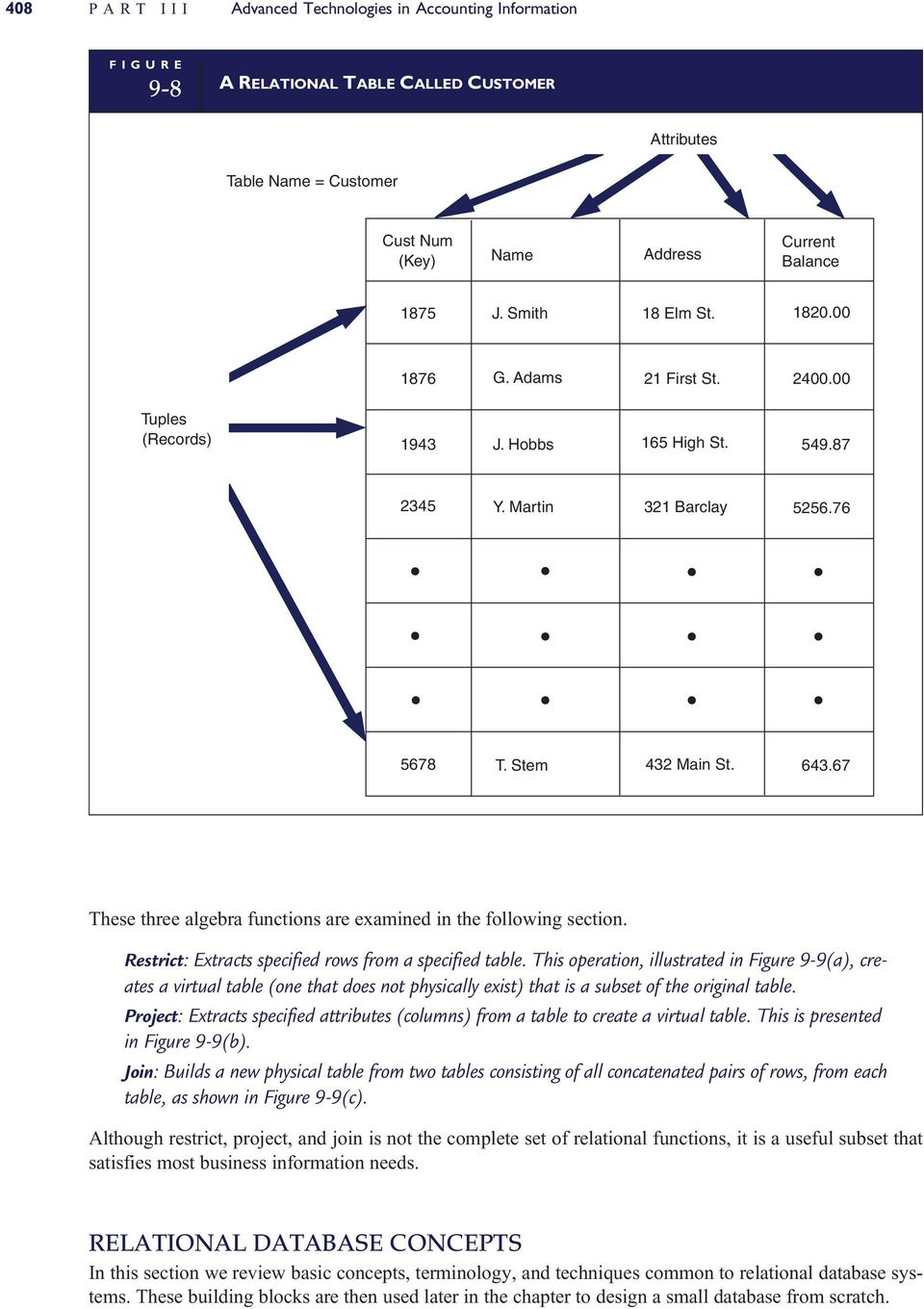
11 CHAPTER 9 Database Management Systems INDEXED SEQUENTIAL FILE Emp Index Employee Table YTD Earnings Index Key Value Record Address Emp Name L. Smith S. Buell T. Hill Address 15 Main St. 107 Hill Top 40 Barclay St. Skill Code YTD Earnings Key Value Address M. Green 251 Ule St H. Litt 423 Rauch Ave THE PHYSICAL DATABASE The fourth major element of the database approach as presented in Figure 9-3 is the physical database. This is the lowest level of the database. The physical database consists of magnetic spots on magnetic disks. The other levels of the database (for example, the user view, conceptual view, and internal view) are abstract representations of the physical level. At the physical level, the database is a collection of records and files. Relational databases are based on the indexed sequential file structure. This structure, illustrated in Figure 9-7, uses an index in conjunction with a sequential file organization. It facilitates both direct access to individual records and batch processing of the entire file. Multiple indexes can be used to create a cross-reference, called an inverted list, which allows even more flexible access to data. Two indexes are shown in Figure 9-7. One contains the employee number (primary key) for uniquely locating records in the file. The second index contains record addresses arranged by year-to-date earnings. Using this nonunique field as a secondary key permits all employee records to be viewed in ascending or descending order according to earnings. Alternatively, individual records with selected earnings balances can be displayed. Indexes may be created for each attribute in the file, allowing data to be viewed from a multitude of perspectives. The next section examines the principles that underlie the relational model and the techniques, rules, and procedures for creating relational tables from indexed sequential files. You will also see how tables are linked to other tables to permit complex data representations. The Relational Database Model E. F. Codd originally proposed the principles of the relational model in the late 1960s. 2 The formal model has its foundations in relational algebra and set theory, which provide the theoretical basis for most of the data manipulation operations used. From a purist s point of view, a fully relational system is one that conforms to 12 stringent rules that Codd outlined. 3 As a practical matter, however, not all of Codd s rules are equally important. Some are critical, but some are not. Other theorists have, therefore, proposed less rigid requirements for assessing the relational standing of a system. 4 Accordingly, a system is relational if it: 1. Represents data in the form of two-dimensional tables such as the database table, called Customer, shown in Figure Supports the relational algebra functions of restrict, project, and join. 2 C. J. Date, An Introduction to Database Systems, Vol. 1, 4th ed. (Reading, MA: Addison-Wesley, 1986), For a complete discussion of these rules, see McFadden and Hoffer, Database Management: Date, An Introduction to Database Systems:

12 408 PART III Advanced Technologies in Accounting Information 9-8 A RELATIONAL TABLE CALLED CUSTOMER Attributes Table Name = Customer Cust (Key) Name Address Current Balance 1875 J. Smith 18 Elm St G. Adams 21 First St Tuples (Records) 1943 J. Hobbs 165 High St Y. Martin 321 Barclay T. Stem 432 Main St These three algebra functions are examined in the following section. Restrict: Extracts specified rows from a specified table. This operation, illustrated in Figure 9-9(a), creates a virtual table (one that does not physically exist) that is a subset of the original table. Project: Extracts specified attributes (columns) from a table to create a virtual table. This is presented in Figure 9-9(b). Join: Builds a new physical table from two tables consisting of all concatenated pairs of rows, from each table, as shown in Figure 9-9(c). Although restrict, project, and join is not the complete set of relational functions, it is a useful subset that satisfies most business information needs. RELATIONAL DATABASE CONCEPTS In this section we review basic concepts, terminology, and techniques common to relational database systems. These building blocks are then used later in the chapter to design a small database from scratch.
13 CHAPTER 9 Database Management Systems THE RELATIONAL ALGEBRA FUNCTIONS RESTRICT, PROJECT, AND JOIN (a) Restrict (b) Project (c) Join X1 Y1 Y1 Z1 X1 Y1 Z1 X2 Y2 Y2 Z2 X2 Y2 Z2 X3 Y1 Y3 Z3 X3 Y1 Z1 Entity, Occurrence, and Attributes An entity is anything about which the organization wishes to capture data. Entities may be physical, such as inventories, customers, or employees. They may also be conceptual, such as sales (to a customer), accounts receivable (AR), or accounts payable (AP). Systems designers identify entities and prepare a model of them like the one presented in Figure This data model is the blueprint for ultimately 9-10 DATA MODEL USING AN ENTITY RELATIONSHIP DIAGRAM Customer Buys Product Sends Payment

14 410 PART III Advanced Technologies in Accounting Information creating the physical database. The graphical representation used to depict the model is called an entity relationship (ER) diagram. As a matter of convention, each entity in a data model is named in the singular noun form, such as Customer rather than Customers. The term occurrence is used to describe the number of instances or records that pertain to a specific entity. For example, if an organization has 100 employees, the Employee entity is said to consist of 100 occurrences. Attributes are the data elements that define an entity. For example, an Employee entity may be defined by the following partial set of attributes: Name, Address, Job Skill, Years of Service, and Hourly Rate of Pay. Each occurrence in the Employee entity consists of the same types of attributes, but values of each attribute will vary among occurrences. Because attributes are the logical and relevant characteristics of an entity, they are unique to it. In other words, the same attribute should not be used to define two different entities. Associations and Cardinality The labeled line connecting two entities in a data model describes the nature of the association between them. This association is represented with a verb, such as ships, requests, or receives. Cardinality is the degree of association between two entities. Simply stated, cardinality describes the number of possible occurrences in one table that are associated with a single occurrence in a related table. Four basic forms of cardinality are possible: zero or one (0,1), one and only one (1,1), zero or many (0,M), and one or many (1,M). These are combined to represent logical associations between entities. The value of the upper cardinalities at each end of the association line defines the association. For example, a (0,1) cardinality at one end and a (1,M) cardinality at the other is a (1:M) association. Figure 9-11 presents several examples of entity associations, which are discussed next EXAMPLES OF ENTITY ASSOCIATIONS Employee Is Assigned Company Car Example 1 Manager Is Provided Laptop Example 2 Customer Places Sales Order Example 3 Vendor Supplies Inventory Example 4 Vendor Supplies Inventory Example 5

15 CHAPTER 9 Database Management Systems 411 EXAMPLE 1 (1:1). Assume that a company has 1,000 employees but only 100 of them are sales staff. Assume also that each salesperson is assigned a company car, but nonsales staff are not. Example 1 in Figure 9-11 shows that for every occurrence (record) in the Employee entity, there is a possibility of zero or one occurrence in the Company Car entity. When determining the cardinality values in an entity association, select a single occurrence (record) of one entity and answer the following question: What are the minimum and maximum number of records that may be associated with the single record that has been selected? For example, selecting an Employee entity record and looking toward the Company Car entity, we see two possible values. If the selected Employee record is that of a salesperson, then he or she is assigned one (and only one) company car. This particular Employee record, therefore, is associated with only one record in the Company Car entity. If, however, the selected Employee record is that of a nonsalesperson, then the individual would be assigned no (zero) car. The Employee record in this case is associated with zero Company Car records. Thus, the minimum cardinality is zero and the maximum cardinality is one. A circle and a short line intersecting the line connecting the two entities depict this degree of cardinality. Notice that from the Employee entity perspective, the cardinality is shown at the Company Car end of the association line. Now select a Company Car record and look back at the Employee entity. Because each company car is assigned to only one employee, both the minimum and maximum number of associated records is one. Two short intersecting lines at the Employee end of the association line signify this cardinality. EXAMPLE 2 (1:1). Example 2 illustrates a situation in which each record in one entity is always associated with one (and only one) record in the associated entity. In this case, each company laptop computer is assigned to only one manager, and every manager is assigned only one computer. Two short lines intersecting the connecting line at both ends depict this cardinality. EXAMPLE 3 (1:M). Example 3 presents the relationship between Customer and Sales Order entities. Notice that the minimum number of Sales Order records per Customer record is zero and the maximum is many. This is because in any given period (a year or month) to which the Sales Order entity pertains, a particular customer may have purchased nothing (zero Sales Order records) or purchased several times (many records). From the perspective of the Sales Order entity, however, every record is associated with one and only one customer. The crow s foot symbol (which gives this form of notation its name) depicts the many cardinalities at the Sales Order end of the association line. EXAMPLE 4 (1:M). Example 4 represents a situation in which each specific item of inventory is supplied by one and only one Vendor, and each Vendor supplies one or many different inventory items to the company. Contrast this (1:M) association with Example 5 next. EXAMPLE 5 (M:M). To illustrate the many-to-many association, we again use a Vendor and Inventory relationship in Example 5. This time, however, the company has a policy of purchasing the same types of inventory from multiple suppliers. Management may choose to do this to ensure that they get the best prices or avoid becoming dependent on a single supplier. Under such a policy, each Vendor record is associated with one or many Inventory records, and each Inventory record is associated with one or many Vendors. Examples 4 and 5 demonstrate how cardinality reflects the business rules in place within an organization. The database designer must obtain a thorough understanding of how the client-company and specific users conduct business to properly design the data model. If the data model is wrong, the resulting database tables will also be wrong. Examples 4 and 5 are both valid but different options and, as we shall see, require different database designs. ALTERNATIVE CARDINALITY NOTATIONS. The cardinality notation technique shown in Figure 9-11 is called crow s foot. An alternative method is to write the cardinality values on each end of the association line connecting the two entities. Some database designers explicitly show both the upper and lower cardinality values. Some choose a shorthand version that notes only the upper cardinality. For homework assignments, your instructor will advise you of the preferred method to use. Refer to Figure 10-7 in the next chapter for examples of the alternative techniques.

16 412 PART III Advanced Technologies in Accounting Information The Physical Database Tables Physical database tables are constructed from the data model with each entity in the model being transformed into a separate physical table. Across the top of each table are attributes forming columns. Intersecting the columns to form the rows of the table are tuples. A tuple, which Codd gave a precise definition when he first introduced it, corresponds approximately to a record in a flat-file system. In accordance with convention, we will use the term record or occurrence rather than tuple. Properly designed tables possess the following four characteristics: 1. The value of at least one attribute in each occurrence (row) must be unique. This attribute is the primary key. The values of the other (nonkey) attributes in the row need not be unique. 2. All attribute values in any column must be of the same class. 3. Each column in a given table must be uniquely named. However, different tables may contain columns with the same name. 4. Tables must conform to the rules of normalization. This means they must be free from structural dependencies including repeating groups, partial dependencies, and transitive dependencies (see this chapter s appendix for a complete discussion). Linkages between Relational Tables Logically related tables need to be physically connected to achieve the associations described in the data model. Using foreign keys accomplishes this, as illustrated in Figure In this example the foreign keys are embedded in the related table. For instance, the primary key of the Customer table (CUST NUM) is embedded as a foreign key in both the Sales Invoice and Cash Receipts tables. Similarly, the primary key in the Sales Invoice table (INVOICE NUM) is an embedded foreign key in the Line Item table. Note that the Line Item table uses a composite primary key comprised of INVOICE NUM and ITEM NUM. Both fields are needed to identify each record in the table uniquely, but only the invoice number portion of the key provides the logical link to the Sales Invoice table. Foreign keys are not always embedded like those in Figure The nature of the association between the related tables determines the method used for assigning foreign keys. These methods are examined later. With foreign keys in place, a computer program can be written to navigate among the tables of the database and provide users with the data they need to support their day-to-day tasks and decision-making responsibilities. For example, if a user wants all the invoices for Customer 1875, the program will search the Sales Invoice table for records with a foreign key value of We see from Figure 9-12 that there is only one such occurrence invoice number To obtain the line-item details for this invoice, the program searches the Line Item table for records with a foreign key value of 1921, and two records are retrieved. User Views A user view was defined earlier as the set of data that a particular user sees. Examples of user views are computer screens for entering or viewing data, management reports, or source documents such as an invoice. Views may be digital or physical (paper), but in all cases, they derive from underlying database tables. Simple views may be constructed from a single table, while more complex views may require several tables. Furthermore, a single table may contribute data to many different views. A large organization will have thousands of user views that thousands of individual tables support. The task of identifying all views and translating them into normalized tables is an important responsibility of database designers that has internal control implications. The issues and techniques related to this task are examined next. ANOMALIES, STRUCTURAL DEPENDENCIES, AND DATA NORMALIZATION This section deals with why database tables need to be normalized. In other words, why is it necessary for the organization s database to form an elaborate network of normalized tables linked together like

17 CHAPTER 9 Database Management Systems LINKAGES BETWEEN RELATIONAL TABLES Customer Embedded Foreign Key Cust (Key) Name Address Current Balance J. Smith G. Adams J. Hobbs Y. Martin T. Stem 18 Elm St. 21 First St. 165 High St. 321 Barclay 432 Main St Invoice (Key) 1921 Cust 1875 $ Amount Ship Date /10/09 Sales Invoice KEY Line Item Cash Receipts Invoice 1918 Item 8312 Qnty 1 Unit Price Extended Price Remit (Key) Cust Amount Received Date Received /30/09 Embedded Foreign Key Embedded Foreign Key those illustrated in Figure 9-12? Why, instead, can we not simply consolidate the views of one user (or several) into a single common table from which all data needs may be met? Database Anomalies The answer to the above questions is that improperly normalized tables can cause DBMS processing problems that restrict, or even deny, users access to the information they need. Such tables exhibit negative operational symptoms called anomalies. Specifically these are the update anomaly, the insertion anomaly, and the deletion anomaly. One or more of these anomalies will exist in tables that are not normalized or are normalized at a low level, such as first normal form (1NF) or second normal form (2NF). To be free of anomalies, tables must be normalized to the third normal form (3NF) level. We will demonstrate the negative impact of anomalies with the user view in Figure This inventory status report would be used to provide a purchasing agent with information about inventory items to be ordered and the various suppliers (vendors) of those items. If this view were to be produced from a

18 414 PART III Advanced Technologies in Accounting Information 9-13 INVENTORY STATUS REPORT Ajax Manufacturing Co. Inventory Status Report Part ber Quantity Reorder Supplier Description Name Address On Hand Point ber Bracket Ozment Sup Buell Co. B&R Sup Gasket Ozment Sup 24 Buell Co. 28 Harris Manuf Brace Ozment Sup 24 Buell Co. 28 Harris Manuf 123 Main St. 2 Broadhead Westgate Mall 123 Main St. 2 Broadhead 24 Linden St. 123 Main St. 2 Broadhead 24 Linden St. Telephone single table, it would look similar to the one presented in Figure While such a table could indeed store the data to produce the view, it will exhibit the anomalies mentioned above. UPDATE ANOMALY. The update anomaly results from data redundancy in an unnormalized table. To illustrate, notice that Supplier ber 22 provides each of the three inventory items (Part 1, 2, and 3) shown in Figure The data attributes pertaining to Supplier ber 22 (Name, Address, and Tele ) are thus repeated in every record of every inventory item that Supplier ber 22 provides. Any change in the supplier s name, address, or telephone number must be made to each of these records in the table. In the example, this means three different updates. To better appreciate the implications of the update anomaly, consider a more realistic situation where the vendor supplies 10,000 different items of inventory. Any update to an attribute must then be made 10,000 times UNNORMALIZED DATABASE TABLE Inventory Table Primary Key Nonkey Attributes Part Description Quantity Reorder Supplier On Hand Point ber Name Address Bracket Ozment Sup 123 Main St. Bracket Buell Co. 2 Broadhead Bracket B&R Sup Westgate Mall Gasket Ozment Sup 123 Main St. Gasket Buell Co. 2 Broadhead Gasket Harris Manuf 24 Linden St. Brace Ozment Sup 123 Main St. Brace Buell Co. 2 Broadhead Brace Harris Manuf 24 Linden St. Tele

19 CHAPTER 9 Database Management Systems 415 INSERTION ANOMALY. To demonstrate the effects of the insertion anomaly, assume that a new vendor has entered the marketplace. The organization does not yet purchase from the vendor, but may wish to do so in the future. In the meantime, the organization wants to add the vendor to the database. This is not possible, however, because the primary key for the Inventory table is PART NUM. Because the vendor does not supply the organization with any inventory items, the supplier data cannot be added to the table. DELETION ANOMALY. The deletion anomaly involves the unintentional deletion of data from a table. To illustrate, assume that Supplier ber 27 provides the company with only one item: Part ber 1. If the organization discontinues this item of inventory and deletes it from the table, the data pertaining to Supplier ber 27 will also be deleted. Although the company may wish to retain the supplier s information for future use, the current table design prevents it from doing so. The presence of the deletion anomaly is less conspicuous, but potentially more serious than the update and insertion anomalies. A flawed database design that prevents the insertion of records or requires the user to perform excessive updates attracts attention quickly. The deletion anomaly, however, may go undetected, leaving the user unaware of the loss of important data until it is too late. This can result in the unintentional loss of critical accounting records and the destruction of audit trails. Table design, therefore, is not just an operational efficiency issue; it carries internal control significance that accountants need to recognize. Normalizing Tables The database anomalies described above are symptoms of structural problems within tables called dependencies. Specifically, these are known as repeating groups, partial dependencies, and transitive dependencies. The normalization process involves identifying and removing structural dependencies from the table(s) under review. (For a full explanation of this process, please review the appendix to this chapter.) The resulting tables will then meet the two conditions below: 1. All nonkey (data) attributes in the table are dependent on (defined by) the primary key. 2. All nonkey attributes are independent of the other nonkey attributes. In other words, a 3NF table is one in which the primary key of a table wholly and uniquely defines each attribute in the table. Furthermore, none of the table attributes is defined by an attribute other than the primary key. If any attributes violate these conditions, they need to be removed and placed in a separate table and assigned an appropriate key. Upon examination of Figure 9-14, we see that the primary key PART NUM does not uniquely define the nonkey attributes of SUPPLIER NUMBER, NAME, ADDRESS, and TELE NUM. Instead, each unique primary key value is associated with multiple (repeating group) values for these nonkey attributes. To resolve this structural dependency, the repeating group data must be removed from the Inventory table and placed in a separate table, which we will call Supplier. Figure 9-15 shows the two 3NF tables, Inventory and Supplier, along with a third table called Part/Supplier, which links the two. This linking technique will be explained later. Normalizing the tables has eliminated the three anomalies. First, the update anomaly is resolved because data about each supplier exist in only one location the Supplier table. Any change in the data about an individual vendor is made only once, regardless of how many items it supplies. Second, the insert anomaly no longer exists because new vendors can be added to the Supplier table even if they are not currently supplying the organization with inventory. For example, Supplier ber 30 in the table does not supply any inventory items. Finally, the deletion anomaly is eliminated. The decision to delete an inventory item from the database will not result in the unintentional deletion of the supplier data because these data reside independently in different tables. Linking Normalized Tables When unnormalized tables are split into multiple 3NF tables, they need to be linked together via foreign keys so the data in them can be related and made accessible to users. The degree of association
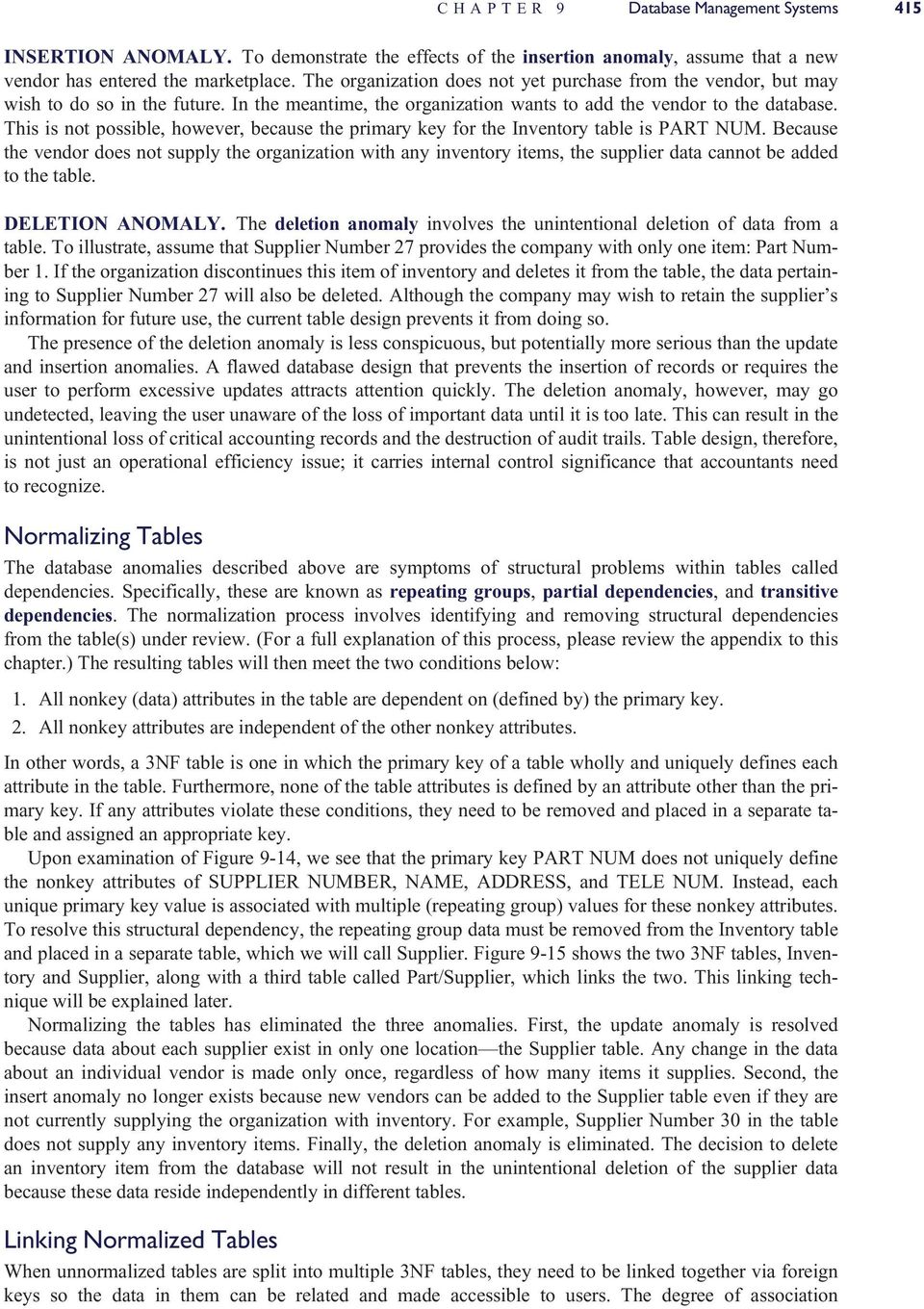
20 416 PART III Advanced Technologies in Accounting Information 9-15 NORMALIZED DATABASE TABLES PK Part/Supplier Link Table (3NF) Part Supplier ber Part Description Quant On Hand Reorder Point Bracket Gasket Brace Inventory Table (3NF) PK Supplier ber 22 Name Ozment Sup Address 123 Main St. Tele Supplier Table (3NF) Buell Co. 2 Broadhead B&R Sup Westgate Mall Harris Manuf 24 Linden St Superior Parts 82 Center St (joint cardinality) between the resulting tables (that is, 1:1, 1:M, or M:M) determines how the linking occurs. The key-assignment rules for linking tables are discussed next. KEYS IN 1:1 ASSOCIATIONS. Where a true 1:1 association exists between tables, either (or both) primary key may be embedded as a foreign key in the related table. On the other hand, when the lower cardinality value is zero (1:0,1) a more efficient table structure can be achieved by placing the one-side (1:) table s primary key in the zero-or-one (:0,1) table as a foreign key. Using the Employee/Company Car example in Figure 9-11, we see the importance of this key-assignment rule. To illustrate, imagine reversing the rule by placing the Company Car (0 side) table s primary key into the Employee (1 side) table. Because most employees are not assigned a company car, most of the foreign keys in the Employee table will have null (blank) values. While this approach would work, it could cause some technical problems during table searches. Correctly applying the key-assignment rule solves this problem because all Company Car records will have an employee assigned and no null values will occur. KEYS IN 1:M ASSOCIATIONS. Where a 1:M (or 1:0,M) association exists, the primary key of the 1 side is embedded in the table of the M side. To demonstrate the logic behind this key-assignment rule, consider two alternative business rules for purchasing inventory from suppliers. Business Rule 1. Each vendor supplies the firm with three (or fewer) different items of inventory, but each item is supplied by only one vendor.

21 CHAPTER 9 Database Management Systems APPLYING THE 1:M KEY-ASSIGNMENT RULE (PK) Inventory Table (FK) Part Description Quant On Hand Reorder Point Supplier ber "Many" Side 1 Bracket Gasket Brace (PK) Supplier Table Supplier ber 22 Name Ozment Sup Address 123 Main St. Tele "1" Side 24 Buell Co. 2 Broadhead Harris Manuf 24 Linden St This unrealistic, but technically possible, business rule describes an upper-bounded 1:M (1:1,3) association between the Supplier and Inventory tables. To apply this rule, the designer will need to modify the Inventory table structure to include the Supplier ber as illustrated in Figure Under this approach, each record in the Inventory table will now contain the value of the key field of the vendor that supplies that item. By contrast, Figure 9-17 shows what the table structure might look like if the designer reversed the key-assignment rule by embedding the PART NUM key in the Supplier table. Notice that the Supplier table now contains three part number fields each linking to an associated record in the Inventory table. Only the links to part numbers 1, 2, and 3 are shown. Although this technique violates the key-assignment rule, it would work. It does so, however, only because the upper limit of the many side of the association is known and is very small (that is, limited to three). How would this table structure look if we assume the following, more realistic business rule? Business Rule 2. Each vendor supplies the firm with any number of inventory items, but each item is supplied by only one vendor. This is a true 1:M association in which the upper limit of the many side of the association is unbounded. For instance, the vendor may supply one item of inventory or 10,000 items. How many fields must we add to the Supplier table structure to accommodate all possible links to the Inventory table? Here we can see the logic behind the 1:M key-assignment rule. The structure in Figure 9-16 still works under this business rule, whereas the technique illustrated in Figure 9-17 does not. KEYS IN M:M ASSOCIATIONS. To represent the M:M association between tables, a link table needs to be created. The link table has a combined (composite) key consisting of the primary keys of two related
22 418 PART III Advanced Technologies in Accounting Information 9-17 REVERSING THE 1:M KEY-ASSIGNMENT RULE (PK) Inventory Table Part Description Quant On Hand Reorder Point "Many" Side 1 Bracket Gasket Brace (PK) Supplier Table (FK) (FK) (FK) Supplier ber Name Address Tele Part Part Part Ozment Sup Buell Co. 123 Main St. 2 Broadhead "1" Side 28 Harris Manuf 24 Linden St tables. Let s now return to the table relationship depicted in Figure These tables illustrate an M:M association that the following business rule describes: Business Rule 3. Each vendor supplies the firm with any number of inventory items, and each item may be supplied by any number of vendors. This business rule is evident by examining the contents of the Inventory Status Report (the user view) in Figure Each part number shown has multiple suppliers, and each supplier may supply multiple items. For example, Ozment Supply provides items 1, 2, and 3. Harris Manufacturing also provides items 2 and 3. An M:M association between tables requires the creation of a separate link table because embedding a foreign key within either table is not possible. The logic in the previous 1:M example that prevented us from embedding the primary key from the many side table of an unbounded association into the table of the one side applies here also. Neither table can donate an embedded foreign key to the other because both are on the many side of the association. The solution, therefore, is to create a new link table containing the key fields of the other two tables. The link table called Part/Supplier in Figure 9-15 is a table of foreign keys. It contains the primary keys for the records in the Inventory table (PART NUM) and the related Supplier table (SUPPLIER NUM- BER). Via the link table, each inventory item can be linked to the corresponding supplier of the item, and each supplier can be linked to the inventory items that it supplies. For example, by searching the Inventory table for PART NUM 1, we see that Suppliers 22, 24, and 27 provide this item. Searching in the opposite direction, SUPPLIER NUMBER 28 provides parts 2 and 3. A separate record in the link table represents each unique occurrence of a supplier/inventory association. For example, if Supplier 24 provides 500 different inventory items, then the link table will contain 500 records to depict these associations.
23 CHAPTER 9 Database Management Systems 419 Accountants and Data Normalization Database normalization is a technical matter that is usually the responsibility of systems professionals. The subject, however, has implications for internal control that make it the concern of accountants also. For example, the update anomaly can generate conflicting and obsolete database values, the insertion anomaly can result in unrecorded transactions and incomplete audit trails, and the deletion anomaly can cause the loss of accounting records and the destruction of audit trails. Although most accountants will not be responsible for normalizing an organization s databases, they should have an understanding of the process and be able to determine whether a table is properly normalized. Designing Relational Databases This section examines the steps involved in creating a relational database. Keep in mind that database design is a portion of a much larger systems development process that involves extensive analysis of user needs, which are not covered at this time. That body of material is the subject of Chapters 13 and 14. Thus, our starting point is one that normally follows considerable preliminary work that has identified in detail the key elements of the system under development. With this backdrop, the focus will be on the following six phases of database design, which are collectively known as view modeling: 1. Identify entities. 2. Construct a data model showing entity associations. 3. Add primary keys and attributes to the model. 4. Normalize the data model and add foreign keys. 5. Construct the physical database. 6. Prepare the user views. IDENTIFY ENTITIES View modeling begins by identifying the primary entities of the business function in question. Recall that entities are things about which the organization wishes to capture data. To demonstrate entity identification, we will analyze the following key features of a simplified purchasing system: 1. The purchasing agent reviews the inventory status report (Figure 9-13) for items that need to be reordered. 2. The agent selects a supplier and prepares an online purchase order. 3. The agent prints a copy of the purchase order (Figure 9-18a) and sends it to the supplier. 4. The supplier ships inventory to the company. Upon its arrival, the receiving clerk inspects the inventory and prepares an online receiving report (Figure 9-18b). The computer system automatically updates the inventory records. Entities are represented as nouns in a system description. A number of candidate entities can be identified in the previous description: Purchasing Agent, Receiving Clerk, Inventory, Supplier, Inventory Status Report, Purchase Order, and Receiving Report. Not all of these candidates are true entities that need to be modeled in the database. To pass as valid entities, two conditions need to be met: Condition 1. Condition 2. An entity must consist of two or more occurrences. An entity must contribute at least one attribute that is not provided through other entities. We need to test these conditions for each candidate to eliminate any false entities. PURCHASING AGENT. Assuming that the organization has only one purchasing agent, then the Purchasing Agent candidate fails Condition 1. If, however, more than one agent exists, Condition 1 is met but Condition 2 may be a problem. If we assume that an Employee table already exists as part of a human
24 420 PART III Advanced Technologies in Accounting Information 9-18 PURCHASE ORDER AND RECEIVING REPORT FOR PURCHASES SYSTEM a) b) Purchase Order PO ber Receiving Report Receiving Report ber Supplier Name Supplier Address Date Received Freight Prepaid Collect PO ber Supplier Name Carrier Code BOL ber Tel No. Tel No. Order Date Date Required Supplier ber Terms Supplier Address / / / / Part ber Description Order Quantity Unit Cost Extended Cost Part ber Description Quantity Received Condition Code Total Cost resources or payroll system, then basic data about the agent as an employee are captured in that table. We need to determine what data about the agent that is unique to his or her role of order placing need to be captured. Note that we are not referring to data about the order, but data about the agent. Because we have no information on this point in our brief description of the system, we will assume no agent-specific data are captured. Hence, the Purchasing Agent candidate is not an entity to be modeled. RECEIVING CLERK. The previous argument applies also to the Receiving Clerk entity. We will assume that no clerk-specific data need to be captured that require a dedicated table. INVENTORY. The Inventory entity meets both conditions. The description suggests that the organization holds many items of inventory; thus this entity would contain multiple occurrences. Also, we can logically assume that the attributes that define the Inventory entity are not provided through other tables. The Inventory entity is, therefore, a true entity that will need to be modeled. SUPPLIER. The description states that multiple vendors supply inventory; hence the Supplier entity meets the first condition. We can also assume that it meets the second condition since no other entity would logically provide supplier data. The Supplier entity, therefore, will be included in the data model. INVENTORY STATUS REPORT. The Inventory Status Report is a user view derived from the Inventory and Supplier entities (see Figure 9-15). While it contains multiple occurrences, it is not an entity because it does not satisfy Condition 2. The view is derived entirely from existing entities and provides no additional data that require a separate entity. The view will be carefully analyzed, however, to ensure that all the attributes needed for it are included in the existing entities.
25 CHAPTER 9 Database Management Systems 421 PURCHASE ORDER. The Purchase Order entity meets both conditions. Many purchase orders will be processed in a period; thus the entity will have many occurrences. While some purchase order data can be derived from other entities (Inventory and Supplier) in the model, some attributes unique to the purchase event such as order date and order quantity will require a separate entity that needs to be modeled. RECEIVING REPORT. The Receiving Report meets both conditions. Many receipt events will take place in the period; thus a Receiving Report entity will have multiple occurrences. A Receiving Report entity will contain attributes such as date received and quantity received that are unique to this entity and thus not provided by other entities in the model. At this point our search has revealed four entities: Inventory, Supplier, Purchase Order, and Receiving Report. These will be used to construct a data model and, ultimately, the physical database tables. CONSTRUCT A DATA MODEL SHOWING ENTITY ASSOCIATIONS The next step in view modeling is to determine the associations between entities and document them with an ER diagram. Recall that associations represent business rules. Sometimes the rules are obvious and are the same for all organizations. For example, the normal association between a Customer entity and a Sales Order entity is 1:M (or 1:0,M). This signifies that one customer may place many orders during a sales period. The association would never be 1:1. This would mean that the organization restricts each customer to a single sale, which is illogical. Sometimes the association between entities is not apparent because different rules may apply in different organizations. To reiterate an important point made earlier, the organization s business rules directly impact the structure of the database tables. If the database is to function properly, its designers need to understand the organization s business rules as well as the specific needs of individual users. Figure 9-19 illustrates the entity associations in our example. The underlying business rules are explained next. 1. There is a 0,M:M association between the Purchase Order and Inventory entities. This means that each inventory item may have been ordered many times or never ordered in the current business 9-19 DATA MODEL SHOWING ENTITY ASSOCIATIONS Updates Inventory Contains Supplies Supplier Sent to Receiving Report Is Associated with Purchase Order
26 422 PART III Advanced Technologies in Accounting Information period. Obviously, every inventory item must have been purchased at least once in the past, so why do we show a 0,M cardinality for the Purchase Order entity? We must keep in mind that transaction entities, such as sales and purchases, are associated with a particular time frame. We will assume that the Purchase Order table for this system will contain records for purchases made in the current period only. Closed purchase orders of past periods will have been removed to an archive table, which is not shown in our example. 2. There is an M:M association between the Inventory and Supplier entities. This means that one or more vendors supply each inventory item, and each of them supplies one or more items of inventory. 3. There is a 1:0,M association between the Supplier and the Purchase Order entities. This means that in the current period, each supplier may have received zero or many purchase orders, but each order goes to only one supplier. 4. There is a 1:1 association between the Purchase Order and Receiving Report entities. A single receiving report record reflects the receipt of goods that are specified on a single purchase order record. Multiple purchase orders are not combined on a single receiving report. 5. The association between the Receiving Report and Inventory entities is 0,M:M. This signifies that within the period, each item of inventory may have been received many times or never. Also, each receiving report is associated with at least one and possibly many inventory items. The many-to-many (M:M and 0,M:M) associations in the data model need to be resolved before the physical databases can be created. We know from previous discussion that these associations signify a missing entity that is needed to link them. We will resolve these problems during the normalization process. ADD PRIMARY KEYS AND ATTRIBUTES TO THE MODEL ADD PRIMARY KEYS. The next step in the process is to assign primary keys to the entities in the model. The analyst should select a primary key that logically defines the nonkey attributes and uniquely identifies each occurrence in the entity. Sometimes this can be accomplished using a simple sequential code such as an Invoice ber, Check ber, or Purchase Order number. Sequential codes, however, are not always efficient or effective keys. Through careful design of block codes, group codes, alphabetic codes, and mnemonic codes, primary keys can also impart useful information about the nature of the entity. These techniques are discussed in detail in Chapter 2. Figure 9-20 presents the four entities in the model with primary keys assigned. ADD ATTRIBUTES. Every attribute in an entity should appear directly or indirectly (a calculated value) in one or more user views. Entity attributes are, therefore, originally derived and modeled from user views. In other words, if stored data are not used in a document, report, or a calculation that is reported in some way, then it serves no purpose and should not be part of the database. The attributes assigned to each entity in Figure 9-21 are derived from the user views of the Purchase Order and Receiving Report illustrated in Figure 9-18 and from the Inventory Status Report that we previously normalized. NORMALIZE DATA MODEL AND ADD FOREIGN KEYS Figure 9-22 presents a normalized data model. The normalization issues that needed resolution are outlined in the following section: 1. Repeating Group Data in Purchase Order. The attributes Part ber, Description, Order Quantity, and Unit Cost are repeating group data. This means that when a particular purchase order contains more than one item (most of the time), then multiple values will need to be captured for these attributes. To resolve this, these repeating group data were removed to a new PO Item Detail entity. The new entity was assigned a primary key that is a composite of Part ber and PO ber. The creation of the new entity also resolved the M:M association between the Purchase Order and Inventory entities by providing a link. 2. Repeating Group Data in Receiving Report. The attributes Part ber, Quantity Received, and Condition Code are repeating groups in the Receiving Report entity and were removed to a new
27 CHAPTER 9 Database Management Systems DATA MODEL SHOWING PRIMARY KEYS Updates Inventory Part ber Contains Supplies Supplier Supplier ber Sent to Receiving Report Rec Rept ber Is Associated with Purchase Order PO ber entity called Rec Report Item Detail. A COMPOSITE KEY composed of PART NUMBER and REC REPT NUMBER was assigned. As in the previous example, creating this new entity also resolved the M:M association between Receiving Report and Inventory. 3. Transitive Dependencies. The Purchase Order and Receiving Report entities contain attributes that are redundant with data in the Inventory and Supplier entities. These redundancies occur because of transitive dependencies (see the appendix of this chapter) in the Purchase Order and Receiving Report entities and are dropped. CONSTRUCT THE PHYSICAL DATABASE Figure 9-23 illustrates the 3NF table structures for the database. The primary and foreign keys linking the tables are represented by dotted lines. The following points are worth elaboration. Each record in the Rec Report Item Detail table represents an individual item on the receiving report. The table has a combined key comprising REC REPT NUMBER and PART NUMBER. This composite key is needed to uniquely identify the Quantity Received and Condition attributes of each item-detail record. The REC REPT NUMBER portion of the key provides the link to the Receiving Report table that contains general data about the receiving event. The PART NUMBER portion of the key is used to access the Inventory table to facilitate updating the Quantity on Hand field from the Quantity Received field of the Item-Detail record. The PO Item Detail table uses a composite primary key of PO NUMBER and PART NUMBER to uniquely identify the Order Quantity attribute. The PO NUMBER component of the composite key provides a link to the Purchase Order table. The PART NUMBER element of the key is a link to the Inventory table where Description and Unit Cost data reside. The next step is to create the physical tables and populate them with data. This is an involved step that must be carefully planned and executed and may take many months in a large installation. Programs will need to be written to transfer organization data currently stored in flat files or legacy databases to the new relational tables. Data currently stored on paper documents may need to be entered into the database tables manually. Once this is done, the physical user views can be produced.
28 424 PART III Advanced Technologies in Accounting Information 9-21 DATA MODEL SHOWING KEYS AND ATTRIBUTES Updates Inventory Part ber Description Quantity on Hand Reorder Point Unit Cost Contains Supplies Supplier Supplier ber Supplier Name Supplier Address Supplier Tel ber Sent to Receiving Report Rec Rept ber PO ber Date Received Carrier Code Bill of Lading ber Prepaid Collect Supplier Name Supplier Address Supplier Tel ber Part ber Description Quantity Received Condition Code Is Associated with Purchase Order PO ber Part ber Description Order Date Requested Delivery Date Order Quantity Unit Cost Supplier Name Supplier Address Supplier Tel ber PREPARE THE USER VIEWS The normalized tables should be rich enough to support the views of all users of the system being modeled. For example, the PO in Figure 9-23, which could be the data entry screen for a purchasing clerk, has been constructed from attributes located in several tables. To illustrate the relationship, the fields in the user view are cross-referenced via circled numbers to the attributes in the supporting tables. Keep in mind that these tables may also provide data for many other views not shown here, such as the receiving report, purchase requisition listing, inventory status report, and vendor purchases activity report. The query function of a relational DBMS allows the system designer to easily create user views from tables. The designer simply tells the DBMS which tables to use, their primary and foreign keys, and the attributes to select from each table. Older DBMSs require the designer to specify view parameters directly in SQL. Newer systems do this visually. The designer simply points and clicks at the tables and the attributes. From this visual representation, the DBMS generates the SQL commands for the query to produce the view. The Receiving Report, Purchase Order, and Inventory Status Report views would all be created in this way. To illustrate, the SQL commands needed to produce the inventory status report illustrated in Figure 9-13 are given in the following section.
29 CHAPTER 9 Database Management Systems NORMALIZED DATA MODEL Updates Inventory Part ber Description Quantity on Hand Reorder Point Unit Cost Pertains to Supplied by Rec Report Item Detail Rec Rept ber Part ber Quantity Received Condition Code Inventory Supplier Link Part ber Supplier ber (NO DATA) PO Item Detail Part ber PO ber Order Quantity Supplies Contains Supplier Supplier ber Supplier Name Supplier Address Supplier Tel ber Sent to Contains Receiving Report Rec Rept ber PO ber [FK] Date Received Carrier Code Bill of Lading ber Prepaid Collect Is Associated with Purchase Order PO ber Supplier ber [FK] Order Date Requested Delivery Date SELECT inventory.part-num, description, quant-on-hand, reorder-point, EOQ, part-supplier.partnum, part-supplier.supplier-number, supplier.supplier-number, name, address, tele-num, FROM inventory, part-supplier, supplier WHERE inventory.part-num = part-supplier.part-num AND part-supplier.supplier-number = supplier.supplier-number AND quant-on hand reorder-point. The SELECT command identifies all of the attributes to be contained in the view. When the same attribute appears in more than one table (for example, PART-NUM), the source table name must also be specified. The FROM command identifies the tables used in creating the view. The WHERE command specifies how rows in the Inventory, Part-Supplier, and Supplier tables are to be matched to create the view. In this case, the three tables are algebraically joined on the primary keys PART-NUM and SUPPLIER-NUMBER.
30 426 PART III Advanced Technologies in Accounting Information 9-23 NORMALIZED TABLES Inventory 9 Part ber Desc. Quantity on Hand Unit Cost PO Item Detail Combined Key Part ber PO ber 11 Order Quantity Purchase Order 1 PO ber Supplier ber 5 Order Date 6 Requested Delivery Date Receiving Report Rec Rept ber PO ber Date Received Carrier Code Bill of Lading ber Pre- Paid Collect Combined Key Rec Rept Item Detail Rec Rept ber Part ber Quantity Received Condition Code Inventory/ Supplier Link Part ber Combined Key Supplier ber Supplier 7 Supplier ber Supplier Name Supplier Address Supplier Tel ber 8 Terms User's View Purchase Order Purchase Order 1 PO Supplier Name Supplier Address 2 3 Tel No. 4 Order Date Date Required Supplier ber / / / / Terms 8 Part ber Description Order Quantity Unit Cost Extended Cost Calculated Field Calculated Field Total Cost ( )
31 CHAPTER 9 Database Management Systems 427 Multiple expressions may be linked with the AND, OR, and NOT operators. In this example, the last expression uses AND to restrict the records to be selected with the logical expression quant-onhand reorder-point. Only records whose quantities on hand have fallen to or below their reorder points will be selected for the view. The user will not see the many thousands of other inventory items that have adequate quantities available. These SQL commands will be saved in a user program called a query. To view the Inventory Status report, the purchasing agent executes the query program. Each time this is done, the query builds a new view with current data from the Inventory and Vendor tables. By providing the user with his or her personal query, rather than permitting access to the underlying base tables, the user is limited to authorized data only. A report program is used to make the view visually attractive and easy to use. Column headings can be added, fields summed, and averages calculated to produce a hard-copy or computer screen report that resembles the original user report in Figure The report program can suppress unnecessary data from the view, such as duplicated fields and the key values in the Inventory/Vendor link table. These keys are necessary to build the view, but are not needed in the actual report. GLOBAL VIEW INTEGRATION The view modeling process described previously pertained to only one business function the purchases system and the resulting tables and views constitute only a subschema of the overall database schema. A modern company, however, would need hundreds or thousands of views and associated tables. Combining the data needs of all users into a single schema or enterprise-wide view is called view integration. This is a daunting undertaking when creating the entire database from scratch. To facilitate this task, modern Enterprise Resource Planning (ERP) systems (discussed in Chapter 11) come equipped with a core schema, normalized tables, and view templates. These best-practices databases are derived from economic models that identify commonalities among the data needs of different organizations. For example, all organizations that sell products to customers will need an Inventory table, a Customer table, a Supplier table, and so forth. Many of the attributes and keys in these tables are also common to all organizations. Working from a core ERP database, the view modeling process thus becomes one of configuring or tailoring predefined views to accommodate specific user needs. ERP vendors cannot, however, anticipate the information needs of all users in advance. Therefore, new tables and new attributes may need to be added to the core schema. Although configuring the core database in this fashion is far more efficient than working from scratch, the objective is the same. The database designer must produce a set of integrated tables that are free of the update, insert, and deletion anomalies and sufficiently rich to serve the needs of all users. In Chapter 10 we will examine in detail the resources events agents (REA) model that underlies many ERP database designs. Applying REA analysis to accounting information system solutions promotes an understanding of the relevant economic events and exchanges between trading partners. ERP vendors have thus been able to anticipate the information needs of both accounting and nonaccounting users and produce core databases that support multiple views for most organization types. Databases in a Distributed Environment Chapter 1 introduced the concept of distributed data processing (DDP) as an alternative to the centralized approach. Most modern organizations use some form of distributed processing and networking to process their transactions. Some companies process all of their transactions in this way. An important consideration in planning a distributed system is the location of the organization s database. In addressing this issue, the planner has two basic options: databases can be centralized, or they can be distributed. Distributed databases fall into two categories: partitioned and replicated databases. This section examines issues, features, and trade-offs that should be carefully evaluated in deciding how databases should be distributed.
32 wookie General Akbar Greedo Rancor Tauntaun Jawa 428 PART III Advanced Technologies in Accounting Information 9-24 CENTRALIZED DATABASE Site F Site A Site E Central Database Central Site Site B Site D Site C CENTRALIZED DATABASES Under the centralized database approach, remote users send requests via terminals for data to the central site, which processes the requests and transmits the data back to the user. The central site performs the functions of a file manager that services the data needs of the remote users. The centralized database approach is illustrated in Figure Earlier in the chapter, three primary advantages of the database approach were presented: the reduction of data storage costs, the elimination of multiple update procedures, and the establishment of data currency (that is, the firm s data files reflect accurately the effects of its transactions). Achieving data currency is critical to database integrity and reliability. However, in the DDP environment, this can be a challenging task. Data Currency in a DDP Environment During data processing, account balances pass through a state of temporary inconsistency, in which their values are incorrectly stated. This occurs during the execution of any accounting transaction. To illustrate, consider the computer logic for recording the credit sale of $2,000 to customer Jones. INSTRUCTION DATABASE VALUES START AR-Jones AR-Control 1 Read AR-Sub account (Jones) Read AR-Control account Write AR-Sub account (Jones) þ $ Write AR-Control account þ $ END
33 Immediately after the execution of Instruction ber 3, and before the execution of Instruction ber 4, the AR-Control account value is temporarily inconsistent by the sum of $2,000. This inconsistency is resolved only after the completion of the entire transaction. In a DDP environment, such temporary inconsistencies can result in the permanent corruption of the database. To illustrate the potential for damage, look at a slightly more complicated example. Using the same computer logic as before, consider the processing of two separate transactions from two remote sites: Transaction 1 (T1) is the sale of $2,000 on account to customer Jones from Site A; Transaction 2 (T2) is the sale of $1,000 on account to customer Smith from Site B. The following logic shows the possible interweaving of the two processing tasks and the effect on data currency. INSTRUCTION CHAPTER 9 Database Management Systems 429 AR- Jones DATABASE VALUES Central Site AR- Smith AR- Control SITE A T1 SITE B T2 START 1 Read AR-Sub account (Jones) Read AR-Sub account (Smith) Read AR-Control account Write AR-Sub account (Jones) þ $ Read AR-Control account Write AR-Control account þ $ Write AR-Sub account (Smith) þ $ Write AR-Control account þ $ END Notice that Site B seized the AR-Control data value of $10,000 when it was in an inconsistent state. By using this value to process its transaction, Site B effectively destroyed the record of Transaction T1 that had been processed by Site A. Therefore, instead of $13,000, the new AR-Control balance is misstated at $11,000. Database Lockout To achieve data currency, simultaneous access to individual data elements by multiple sites needs to be prevented. The solution to this problem is to use a database lockout, which is a software control (usually a function of the DBMS) that prevents multiple simultaneous accesses to data. The previous example can be used to illustrate this technique: immediately upon receiving the access request from Site A for AR- Control (T1, Instruction ber 2), the central site DBMS places a lock on AR-Control to prevent access from other sites until Transaction T1 is complete. Thus, when Site B requests AR-Control (T2, Instruction ber 2), it is placed on wait status until the lock is removed. Only then can Site B access AR-Control and complete Transaction T2. DISTRIBUTED DATABASES Distributed databases can be distributed using either the partitioned or replicated technique. Partitioned Databases The partitioned database approach splits the central database into segments or partitions that are distributed to their primary users. The advantages of this approach are: Storing data at local sites increases users control. Permitting local access to data and reducing the volume of data that must be transmitted between sites improves transaction processing response time. Partitioned databases can reduce the potential for disaster. By having data located at several sites, the loss of a single site cannot terminate all data processing by the organization. The partitioned approach, which is illustrated in Figure 9-25, works best for organizations that require minimal data sharing among users at remote sites. To the extent that remote users share common data, the
34 430 PART III Advanced Technologies in Accounting Information 9-25 THE PARTITIONED DATABASE APPROACH Site 1 Primary User of Data A and B Site 3 Primary User of Data E and F A, B E, F Requests for Data Site 2 Primary User of Data C and D C, D problems associated with the centralized approach still apply. The primary user must now manage requests for data from other sites. Selecting the optimum host location for the partitions will minimize data access problems. This requires an in-depth analysis of end-user data needs. THE DEADLOCK PHENOMENON. In a distributed environment, it is possible that multiple sites will lock out each other, thus preventing each from processing its transactions. For example, Figure 9-26 illustrates three sites and their mutual data needs. Notice that Site 1 has requested (and locked) Data A and is waiting for the removal of the lock on Data C to complete its transaction. Site 2 has a lock on C and is waiting for E. Finally, Site 3 has a lock on E and is waiting for A. A deadlock occurs here because there is mutual exclusion to data, and the transactions are in a wait state until the locks are removed. This can result in transactions being incompletely processed and corruption of the database. A deadlock is a permanent condition that must be resolved by special software that analyzes each deadlock condition to determine the best solution. Because of the implications for transaction processing, accountants should be aware of the issues pertaining to deadlock resolutions. DEADLOCK RESOLUTION. Resolving a deadlock usually involves sacrificing one or more transactions. These must be terminated to complete the processing of the other transactions in the deadlock. The preempted transactions must then be reinitiated. In preempting transactions, the deadlock resolution software attempts to minimize the total cost of breaking the deadlock. Although not an easy task to automate, some of the factors that influence this decision are as follows: 1. The resources currently invested in the transaction. This may be measured by the number of updates that the transaction has already performed and that must be repeated if the transaction is terminated. 2. The transaction s stage of completion. In general, deadlock resolution software will avoid terminating transactions that are close to completion. 3. The number of deadlocks associated with the transaction. Because terminating the transaction breaks all deadlock involvement, the software should attempt to terminate transactions that are part of more than one deadlock.
35 CHAPTER 9 Database Management Systems THE DEADLOCK CONDITION Site 1 Lock A Wait for C Site 3 Lock E Wait for A A, B E, F Requests for Data Site 2 Lock C Wait for E C, D Replicated Databases In some organizations, the entire database is replicated at each site. Replicated databases are effective in companies in which there exists a high degree of data sharing but no primary user. Because common data are replicated at each site, the data traffic between sites is reduced considerably. Figure 9-27 illustrates the replicated database model. The primary justification for a replicated database is to support read-only queries. With data replicated at every site, data access for query purposes is ensured, and lockouts and delays because of network traffic are minimized. A problem arises, however, when local sites also need to update the replicated database with transactions. Because each site processes only its local transactions, different transactions will update the common data attributes that are replicated at each site and, thus, each site will possess uniquely different values after the respective updates. Using the data from the earlier example, Figure 9-28 illustrates the effect of processing credit sales for Jones at Site A and Smith at Site B. After the transactions are processed, the value shown for the common AR-Control account is inconsistent ($12,000 at Site A and $11,000 at Site B) and incorrect at both sites. Concurrency Control Database concurrency is the presence of complete and accurate data at all remote sites. System designers need to employ methods to ensure that transactions processed at each site are accurately reflected in the databases at all other sites. This task, while problematic, has implications for accounting records and is a matter of concern for accountants. A commonly used method for concurrency control is to serialize transactions. This involves labeling each transaction by two criteria. First, special software groups transactions into classes to identify potential conflicts. For example, read-only (query) transactions do not conflict with other classes of transactions. Similarly, AP and AR transactions are not likely to use the same data and do not conflict. However, multiple sales order transactions involving both read and write operations will potentially conflict.
36 432 PART III Advanced Technologies in Accounting Information 9-27 REPLICATED DATABASE APPROACH Site 1 Site 2 Site 3 A, B, C, D, E, F A, B, C, D, E, F A, B, C, D, E, F Database Replicated at Each Site The second part of the control process is to time stamp each transaction. A system-wide clock is used to keep all sites, some of which may be in different time zones, on the same logical time. Each time stamp is made unique by incorporating the site s identification number. When transactions are received at each site, they are examined first for potential conflicts. If conflicts exist, the transactions are entered into a serialization schedule. An algorithm is used to schedule updates to the database based on the transaction time stamp and class. This method permits multiple interleaved transactions to be processed at each site as if they were serial events REPLICATED DATABASES UPDATED INDEPENDENTLY AR-Control starting bal = $10,000 Sale to Jones = $2,000 Site A Site B Sale to Smith = $1,000 Databases Inconsistent AR-Control = $12,000 AR-Control = $11,000
37 CHAPTER 9 Database Management Systems 433 Distributed Databases and the Accountant The decision to distribute databases is one that should be entered into thoughtfully. There are many issues and trade-offs to consider. Some of the most basic questions to be addressed are: Should the organization s data be centralized or distributed? If data distribution is desirable, should the databases be replicated or partitioned? If replicated, should the databases be totally replicated or partially replicated? If the database is to be partitioned, how should the data segments be allocated among the sites? The choices involved in each of these questions impact the organization s ability to maintain database integrity. The preservation of audit trails and the accuracy of accounting records are key concerns. Clearly, these are decisions that the modern accountant should understand and influence intelligently. Summary This chapter examined the database approach to data management and showed how this approach enables business organizations to overcome data redundancy and the associated problems that plague the flat-file approach to data management. It showed that the database concept is composed of four dynamically interrelated components: users, the database management system, the database administrator, and the physical database. The DBMS stands between the physical database and the user community. Its principal function is to provide a controlled and secure environment for the database. This is achieved through software modules, such as a query language, a data definition language, and a data manipulation language. The DBMS also provides security against human error and natural disaster through various backup and recovery modules. Database models are abstract representations of data about entities, events, and activities, and their relationships within an organization. The focus of attention was on the relational model. A number of database design topics were covered, including data modeling, the creation of user views from ER diagrams, and data normalization techniques. Finally, the chapter presented a number of issues associated with distributed databases. It examined three possible database configurations in a distributed environment: centralized, partitioned, and the replicated databases. Appendix Distinguishing Features of Structured and Relational Databases The Hierarchical Database Model The earliest database management systems (DBMSs) were based on the hierarchical data model. This was a popular approach to data representation because it reflected, more or less faithfully, many aspects of an organization that are hierarchical in relationship. Also, it was an efficient data processing tool for highly structured problems. Figure 9-29 presents a data structure diagram showing a portion of a hierarchical database.
38 434 PART III Advanced Technologies in Accounting Information 9-29 HIERARCHICAL DATA MODEL Parent File (Record Type) A Root Segment Set Child Parent Siblings File B File C Set Child File X File Y File Z Siblings Leaf The hierarchical model is constructed of sets of files. Each set contains a parent and a child. Notice that File B, at the second level, is both the child in one set and the parent in another set. Files at the same level with the same parent are called siblings. This structure is also called a tree structure. The file at the most aggregated level in the tree is the root segment, and the file at the most detailed level in a particular branch is called a leaf. A NAVIGATIONAL DATABASE The hierarchical data model is called a navigational database because traversing it requires following a predefined path. This is established through pointers (discussed in the appendix to Chapter 2) that create explicit linkages between related records. The only way to access data at lower levels in the tree is from the root and via the pointers down the navigational path to the desired records. For example, consider the partial database in Figure To retrieve an invoice line-item record, the DBMS must first access the customer record (the root). That record contains a pointer to the sales invoice record, which points to the invoice line-item record. LIMITATIONS OF THE HIERARCHICAL MODEL The hierarchical model presents a limited view of data relationships. Based on the proposition that all business relationships are hierarchical (or can be represented as such), this model does not always reflect reality. The following rules, which govern the hierarchical model, reveal its operating constraints: 1. A parent record may have one or more child records. For example, in Figure 9-30, the customer is the parent of both sales invoice and cash receipts. 2. No child record can have more than one parent.
39 CHAPTER 9 Database Management Systems PORTION OF A HIERARCHICAL DATABASE Customer File Sales Invoice File Cash Receipts File Line- Item File The second rule is often restrictive and limits the usefulness of the hierarchical model. Many firms need a view of data associations that permit multiple parents like that represented by Figure 9-31(a). In this example, the sales invoice file has two natural parents: the customer file and the salesperson file. A specific sales order is the product of both the customer s purchase activity and a salesperson s selling efforts. Management, wishing to keep track of sales orders by customer and by salesperson, will want to view sales order records as the logical child of both parents. This relationship, although logical, violates the single parent rule of the hierarchical model. Figure 9-31(b) shows the most common way of resolving this problem. By duplicating the sales invoice file, two separate hierarchical representations are created. Unfortunately, this improved functionality is achieved at a cost increased data redundancy. The network model, examined next, deals with this problem more efficiently. The Network Database Model The network model is a variation of the hierarchical model. The principal distinguishing feature between the two is that the network model allows a child record to have multiple parents. The multiple ownership 9-31 MULTIPLE PARENT ASSOCIATION (a) (b) Salesperson File Customer File Salesperson File Customer File Sales Invoice File Sales Invoice File Sales Invoice File Natural Relationship Hierarchical Representation with Data Redundancy
40 436 PART III Advanced Technologies in Accounting Information rule is flexible in allowing complex relationships to be represented. Figure 9-31(a) illustrates a simple network model in which the sales invoice file has two parent files Customer and Salesperson. The navigational DBMS dominated the data processing industry for many years, although the current trend is overwhelmingly toward the relational model. Many hierarchical and network systems still exist and their manufacturers continue to maintain and upgrade them. Data Structures Data structures are the bricks and mortar of the database. The data structure allows records to be located, stored, and retrieved and enables movement from one record to another. Chapter 2 examined data structures commonly used by flat-file systems. These include sequential, indexed, hashing, and pointer structures. These basic structures form the foundation for the more complex hierarchical and network database structures discussed next. HIERARCHICAL MODEL DATA STRUCTURE Figure 9-32 shows the data structures and linkages between files for the partial database in Figure Because the purpose is to illustrate the navigational nature of the data structure, the content of the records has been simplified. Assume that a user of this system is using a query program to retrieve all the data pertinent to a particular sales invoice (Invoice ber 1921) for a customer John Smith (Account ber 1875). The access method used for this situation is the hierarchical indexed direct access method. Under this method, the root segment (customer file) of the database is organized as an indexed file. Lower-level records (for example, sales invoice, invoice line item, and cash receipts records) use pointers in a linkedlist arrangement. This allows both efficient processing of the root records for tasks, such as updating AR and billing customers, and direct access of detail records for inquiries. The access method retrieves the primary key CUST NUM 1875 entered by the user via the query program and compares this against the index for the root segment. Upon matching the key with the index, it directly accesses John Smith s customer record. Notice the customer record contains only summary information. The current balance figure represents the total dollar amount John Smith owes ($1,820). This is the difference between the sum of all sales to this customer and all cash received in payment on the account. The supporting details about these transactions are contained in the lower-level sales invoice and cash receipts records. In response to the user s inquiry for data pertaining to Invoice ber 1921, the access method follows the invoice record pointer to the sales invoice file. The sales invoice file is a randomly organized file of invoices for all customers arranged in a series of linked lists. The records in each linked list have a common property they all relate to a specific customer. The first record in the list the head record has a pointer to the next in the list (if one exists), which points to the next, and so on. The pointer in the customer record (the level above) directs the access method to the head record in the appropriate linked list. The access method then compares the key value sought (Invoice ber 1921) against each record in the list until it finds a match. The records in the sales invoice file contain only summary information about sales transactions. Pointers in these records identify the supporting detail records (the specific items sold) in the invoice line-item file. The structure of the line-item file is also a linked-list arrangement. Starting with the head record, the access method retrieves the entire list of line items for Invoice ber In this list there are two records. The sales invoice and line-item records are returned to the user s application for processing. NETWORK MODEL DATA STRUCTURE As with the hierarchical model, the network model is a navigational database with pointers creating explicit linkages between records. Whereas the hierarchical model allows only one path, the network model supports multiple paths to a particular record. Figure 9-33 shows the linkages for the data structure in Figure 9-31(a). The structure can be accessed at either of the root-level records (salesperson or customer) by hashing their respective primary keys (SP NUM or CUST NUM) or by reading their addresses from an index.
41 9-32 LINKAGES BETWEEN FILES IN A HIERARCHICAL DATABASE Customer File Cust Name Address Current Balance Pointers Previous Record 1875 J. Smith 18 Elm St Next Record To Head Record in Cash Receipts List To Head Record in Sales Invoice List Sales Invoice File Invoice Ship $ Amount Date Pointers /10/01 Next Invoice for Customer 1875 Last Invoice for Customer 1875 Pointer to Next Record Pointer to Next Record Pointer to Next Record Line-Item File Cash Receipts File Item Unit Extended Qnty Price Price First Cash Rec Record for Customer 1875 Pointer Pointer to Next Record Item Unit Price Extended Price Pointer Qnty Last Record Next Cash Rec Record for Customer 1875 Line-Item Record for Another Invoice Pointer to Next Record Pointer to Next Record Pointer to Next Record Last Cash Rec Record for Customer 1875 CHAPTER 9 Database Management Systems 437
42 438 PART III Advanced Technologies in Accounting Information 9-33 LINKAGES IN A NETWORK DATABASE Salesperson File Customer File SP 1 SP 2 Cust 5 Cust 6 Invoice 1 SP1 / Cust 5 Invoice 2 SP1 / Cust 6 Invoice 3 SP2 / Cust 5 Invoice 4 SP2 / Cust 5 Sales Invoice File SP Link SP Link C Link C Link A pointer field in the parent record explicitly defines the path to the child record, as discussed earlier. Notice the structure of the sales invoice file. In this example, each child now has two parents and contains explicit links to other records that form linked lists related to each parent. For example, Invoice ber 1 is the child of Salesperson ber 1 and Customer ber 5. This record structure has two links to related records. One of these is a salesperson (SP) link to Invoice ber 2. This represents a sale by Salesperson ber 1 to Customer ber 6. The second pointer is the customer (C) link to Invoice ber 3. This represents the second sale to Customer ber 5, which was processed this time by Salesperson ber 2. Under this data structure, management can track and report sales information pertaining to both customers and sales staff. Normalizing Tables in a Relational Database The database anomalies (described in the chapter) are symptoms of structural problems within tables called dependencies. Specifically, these are known as repeating groups, partial dependencies, and transitive dependencies. The normalization process involves systematically identifying and removing these dependencies from the table(s) under review. Figure 9-34 graphically illustrates the unnormalized table s progression toward 3NF as each type of dependency is resolved. Tables in 3NF will be free of anomalies and will meet two conditions: 1. All nonkey attributes will be wholly and uniquely dependent on (defined by) the primary key. 2. None of the nonkey attributes will be dependent on (defined by) other nonkey attributes. DESIGN THE USER VIEW As Illustrated in Figure 9-34, the process begins with a user view such as an output report, a source document, or an input screen. Images of user views may be prepared using a word processor, a graphics
43 CHAPTER 9 Database Management Systems STEPS IN THE NORMALIZATION PROCESS User View Unnormalized Table Represent View with a Single Table Remove Repeating Groups Table in First Normal Form (1NF) Remove Partial Dependencies Table in Second Normal Form (2NF) Remove Transitive Dependencies Table in Third Normal Form (3NF) package, or simply pencil and paper. At this point, the view is merely a pictorial representation of a set of data the user will eventually have when the project is completed. To demonstrate the normalization process, we will use the customer sales invoice and sample data presented in Figure The basic issue here is, can we store all the data needed for this view in a single table that meets the two conditions previously noted? REPRESENT THE VIEW AS A SINGLE TABLE The next step is to represent the view as a single table that contains all of the view attributes. Figure 9-36 presents a single-table structure containing the sample data from Figure Because the table contains customer invoices, invoice number (INVOICE NUM) will serve as a logical primary key. Notice the attributes Ex Price and Total Due have been highlighted in Figure The values for these attributes may be either stored or calculated. Because Ex Price is the product of two other attributes (Quantity 3 Unit Price) and Total Due is the sum of all Ex Price values, they both can be calculated from existing stored attributes rather than storing them directly in the database table. To simplify this example, therefore, we will assume that the system will calculate these attributes and they will not be part of this analysis. Now that we have a base table to work from, the next few steps in the normalization process involve identifying and, if necessary, eliminating structural dependencies that exist. If dependencies exist, correcting them will involve splitting the original single-table structure into two or more smaller and independent 3NF tables. Each of the structural dependencies and the techniques for identifying and removing them is outlined in the following sections.
44 440 PART III Advanced Technologies in Accounting Information 9-35 A USER VIEW SALES INVOICE Invoice ber: Order Date: 09/22/2009 Shipped Date: 09/27/2009 Shipped Via: UPS Customer ber: 1765 Customer Name: ABC Associates Street Address: 132 Elm St. City: Bethlehem State: PA Telephone ber: Prod Description Quantity Unit Price Ex. Price r234 Bolt cutter 2 $42.50 $85.00 m456 Gear puller 1 $16.50 $16.50 W62 Electric welder 1 $ $ Total Due $ REMOVE REPEATING GROUP DATA The first step in correcting structural dependencies is to determine if the table under review contains repeating groups. Repeating group data is the existence of multiple values for a particular attribute in a specific record. For example, the sales invoice in Figure 9-35 contains multiple values for the attributes PROD NUM, DESCRIPTION, QUANTITY, and UNIT PRICE (we ignore EX PRICE). These repeating groups represent the transaction details of the invoice. We see repeating group data in many business user views, such as purchase orders, receiving reports, bills of lading, and so on. Relational database theory prohibits the construction of a table in which a single record (a row in the table) represents multiple values for an attribute (a column in the table). To represent repeating group values in a single table, therefore, will require multiple rows as illustrated in Figure Notice that the invoice attributes, which are common to each occurrence of the repeating group data, will also be represented multiple times. For example, Order Date, Shipped Date, Customer Name, Customer Address, and so on, are recorded along with each unique occurrence of Prod, Description, Quantity, and Unit Price. To avoid such data redundancy, the repeating group data need to be removed from the table and placed in a separate table. Figure 9-37 shows the resulting tables. One is called Sales Invoice Table, with INVOICE NUM as the primary key. The second table contains the transaction details for the invoice and is called Line Item Table. Notice that the primary key of the Line Item Table is a composite key comprising two attributes: INVOICE NUM and PROD NUM. Keep in mind that this table will contain the transaction details for our example invoice as well as the transaction details for the invoices for all customers. Relational
45 CHAPTER 9 Database Management Systems UNNORMALIZED TABLE SUPPORTING USER VIEW PK Single-Table Structure for Sales Invoice Invoice Order Date Shpd Date Shpd Via Total Due Cust Cust Name Street Address City St Tele ber Prod Description Qunty Unit Price Ex Price /22/09 09/27/09 UPS ABC Assoc 132 Elm St Bethlehem PA r234 Bolt cutter /22/09 09/27/09 UPS ABC Assoc 132 Elm St Bethlehem PA m456 Gear puller /22/09 09/27/09 UPS ABC Assoc 132 Elm St Bethlehem PA W62 Elec welder Redundant Data Repeating Group Data database theory requires that a table s primary key uniquely identify each record stored in the table. PROD NUM alone cannot do this since a particular product, such as r234 (bolt cutter), may well have been sold to many other customers whose transactions are also in the table. By combining PROD NUM with the INVOICE NUM, however, we can uniquely define each transaction because the table will never contain two occurrences of the same invoice number and product number together. REMOVE PARTIAL DEPENDENCIES Next we check to see if the resulting tables contain partial dependencies. A partial dependency occurs when one or more nonkey attributes are dependent on (defined by) only part of the primary key, rather than the whole key. This can occur only in tables that have composite (two or more attribute) primary keys. Because the Sales Invoice Table has a single attribute primary key, we can ignore it in this step of 9-37 RESULTING TABLES AFTER REMOVING REPEATING GROUP DATA AND CALCULATED FIELDS Single-Table Structure for Sales Invoice Invoice Order Date Shpd Date Shpd Via Cust Cust Name Street Address City St Tele ber Prod Description Qunty Unit Price PK Sales Invoice Table Invoice Order Date Shpd Date Shpd Via Cust Cust Name Street Address City St Tele ber PK Line Item Table Invoice Prod Description Qunty Unit Price
46 442 PART III Advanced Technologies in Accounting Information 9-38 RESULTING TABLES AFTER REMOVING PARTIAL DEPENDENCY PK Line Item Table Invoice Prod Description Qunty Unit Price PK Partial Dependency Invoice Prod Qunty PK Inventory Table Line Item Table Prod Description Unit Price Other data not part of this user view the analysis. This table is already in 2NF. The Line Item Table, however, needs to be examined further. Figure 9-38 illustrates the partial dependencies in it. In the Line Item Table, INVOICE NUM and PROD NUM together define the quantity sold attribute (Qunty). If we assume, however, that the price charged for r234 is the same for all customers, then the Unit Price attribute is common to all transactions involving product r234. Similarly, the attribute Description is common to all such transactions. These two attributes are not dependent on the Invoice component of the composite key. Instead, they are defined by Prod and, therefore, only partially rather than wholly dependent on the primary key. We resolve this by splitting the table into two, as illustrated in Figure The resulting Line Item Table is now left with the single nonkey attribute Qunty. Product description and unit price data are placed in a new table called Inventory. Notice that the Inventory table contains additional attributes that do not pertain to this user view. A typical inventory table may contain attributes such as reorder point, quantity on hand, supplier code, warehouse location, and more. This demonstrates how a single table may be used to support many different user views and reminds us that this normalization example pertains to only a small portion of the entire database. We will return to this issue later. At this point, both of the tables in Figure 9-38 are in 3NF. The Line Item Table s primary key (INVOICE NUM PROD NUM) wholly defines the attribute QUNTY. Similarly, in the Inventory Table, the attributes Description and Unit Price are wholly defined by the primary key PROD NUM. REMOVE TRANSITIVE DEPENDENCIES The final step in resolving structural dependencies is to remove transitive dependencies. A transitive dependency occurs in a table where nonkey attributes are dependent on another nonkey attribute and independent of the table s primary key. An example of this is illustrated by the Sales Invoice Table in Figure The primary key INVOICE NUM uniquely and wholly defines the economic event that the attributes Order Date, Shpd Date, and Shpd Via represent. The key does not, however, uniquely define the customer attributes. The attributes Cust Name, Street Address, and so on define an entity (Customer) that is independent of the specific transaction captured by a particular invoice record. For example, assume that during the period the firm had sold to a particular customer on ten different occasions. This would result in ten different invoice records stored in the table. Using the current table structure, each of these invoice records would capture the data uniquely related to the respective transaction along with customer data that are common to all ten transactions. Therefore, the primary key does not uniquely define customer attributes in the table. Indeed, they are independent of it.
47 CHAPTER 9 Database Management Systems RESULTING TABLES AFTER REMOVING TRANSITIVE DEPENDENCY PK Sales Invoice Table Invoice Order Date Shpd Date Shpd Via Cust Cust Name Street Address City St Tele ber Transitive Dependency Sales Invoice Table PK Invoice Order Date Shpd Date Shpd Via PK Cust Cust Name Street Address City Customer Table St Tele ber We resolve this transitive dependency by splitting out the customer data and placing them in a new table called Customer. The logical key for this table is CUST NUM, which was the nonkey attribute in the former table on which the other nonkey customer attributes were dependent. With this dependency resolved, both the revised Sales Invoice Table and the new Customer Table are in 3NF. LINKING THE NORMALIZED TABLES At this point the original single-table structure has been reduced to the four normalized but independent tables presented in Figure The tables contain the sample data used in the original single-table structure presented in Figure Notice how data redundancy in the original single-table structure has been eliminated from the more efficient structure represented here. To work together, however, these tables need to be linked via foreign keys. This requires first determining the cardinality (degree of association) between the tables and then assigning foreign keys. Determine Cardinality In our example the cardinality between the four tables is one-to-many (1:M) as explained below. 1. Each customer (Customer Table) may be associated with one or many sales events (Sales Invoice Table), but each invoice is for a single customer. 2. Each Sales Invoice record is associated with one or more Line-Item records, but each Line Item is associated with only one Sales Invoice. 3. Each Inventory record is associated with one or more Line Items (a particular product has been sold many times to many customers) but each Line-Item record represents only one inventory item. Assign Foreign Keys Rules assigning foreign keys are explained in detail in the chapter. When linking in a 1:M relation as depicted in Figure 9-40, the rule is to take the primary key from the table on the 1 side of the relation and embed it as a foreign key in the table of the M side. Notice that in the relations between the Line Item Table, the Invoice Table, and the Inventory Table, this is already the case because of the Line Item Table s composite key. The Sales Invoice Table, however, needs to be modified to include CUST NUM as the FOREIGN KEY, which links it to the Customer Table. PRODUCING THE USER VIEW FROM THE NORMALIZED TABLES After these tables have been created within the DBMS, they will be populated with data from several sources. For example, customer services will add customers data to the Customer Table, inventory
48 444 PART III Advanced Technologies in Accounting Information 9-40 LINKAGES BETWEEN NORMALIZED TABLES PK Customer Table 1 PK Invoice Sales Invoice Table Order Date Shpd Date Shpd Via FK Cust M 1 Cust Cust Name Street Address City St Tel ber 1765 ABC Assoc 132 Elm St Bethlehem PA Other Customer Records /22/07 09/27/07 UPS 1765 Other Invoice Records FK PK M FK Line Item Table 1 PK Prod r234 m456 Description Unit Price Bolt cutter Gear puller Inventory Table Other Data M Invoice Prod Qunty r234 2 W62 Elec welder Other Inventory Records m W62 1 Other Line-Item Records control will enter product values into the Inventory Table, and the Sales Invoice and Line Item tables will be populated by sales transactions data from the Sales Order process. The following steps describe how the batch process might produce the actual invoices. 1. A computer program reads the Sales Invoice Table. We will assume that the first record read is invoice number (our sample record). The record attributes are stored in memory. 2. The program then reads the foreign key CUST NUM and searches the Customer Table for a record with the primary key value The customer record attributes are then stored in memory. 3. The computer program then reads the primary key INVOICE NUM and searches the Line Item Table for all occurrences of records whose INVOICE NUM component of the primary key has a value of It locates three such records and stores them in memory. 4. The program next reads the PROD NUM component of the three Line-Item records and one by one searches the Inventory File for each occurrence. The DESCRIPTION and UNIT PRICE attributes of each located record is stored in memory. 5. The program then calculates the EX PRICE attribute for each item and sums these to obtain the TOTAL DUE attribute. 6. At this point all the attributes needed to produce the original user view are in memory. They are formatted and sent to printing. 7. The computer then clears memory, reads the next record from the Invoice Table, and repeats the steps above until all invoices have been processed.
49 CHAPTER 9 Database Management Systems 445 Key Terms access method (404) anomalies (413) association (410) attributes (410) cardinality (410) centralized database (428) composite key (440) concurrency control (431) currency of information (398) data attribute (398) data currency (428) data definition language (DDL) (402) data dictionary (406) data manipulation language (DML) (404) data model (409) data redundancy (398) data storage (398) data structures (436) data updating (398) database administrator (DBA) (404) database lockout (429) database management system (DBMS) (400) deadlock (430) deletion anomaly (415) distributed data processing (DDP) (427) distributed databases (429) entity (409) entity relationship (ER) diagram (410) first normal form (1NF) (413) flat file (398) foreign keys (412) hierarchical indexed direct access method (436) hierarchical model (401) indexed sequential file (407) insertion anomaly (415) internal view (403) inverted list (407) join (408) navigational model (401) network model (401) occurrence (410) partial dependency (441) partitioned database (429) physical database (407) primary key (412) project (408) relational model (401) repeating group (440) replicated databases (431) restrict (408) schema (conceptual view) (403) second normal form (2NF) (413) structured model (401) structured query language (SQL) (404) task-data dependency (398) temporary inconsistency (428) third normal form (3NF) (413) transitive dependency (442) update anomaly (414) user view (subschema) (403) users (401) view integration (427) view modeling (419) Review Questions 1. Give five general duties of the database administrator. 2. What are the four primary elements of the database environment? 3. How are the network and hierarchical models different? 4. What flat-file data management problems are solved as a result of using the database concept? 5. What are four ways in which database management systems provide a controlled environment to manage user access and the data resources? 6. Explain the relationship between the three levels of the data definition language. As a user, which level would you be most interested in? 7. What is a primary key? 8. What is a foreign key? 9. What is a data dictionary, and what purpose does it serve? 10. Give an application for a partitioned database. 11. What is an entity? 12. Give an application for a replicated database. 13. Discuss and give an example of the following types of associations: (1:0,1), (1:1), (1:M), and (M:M).
50 446 PART III Advanced Technologies in Accounting Information 14. Distinguish between association and cardinality. 15. Explain how a separate linking table works in a many-to-many association. 16. What are the four characteristics of properly designed relational database tables? 17. What do the relational features restrict, project, and join mean? 18. What are the conditions for third normal form (3NF)? 19. Explain how the SELECT and WHERE commands help a user to view the necessary data from multiple database files (tables). 20. What is a data model? 21. How can a poorly designed database result in unintentional loss of critical records? 22. What is a user view? 23. Does a user view always require multiple tables to support it? Explain. 24. What two conditions must valid entities meet? 25. Can two different entities have the same defining attributes? Explain. Discussion Questions 1. In the flat-file data management environment, users are said to own their data files. What is meant by the ownership concept? 2. Discuss the potential aggravations you might face as a student as a result of your university using a flat-file data management environment, that is, different files for the registrar, library, parking, and so on. 3. Discuss why control procedures over access to the data resource become more crucial under the database approach than in the flat-file environment. What role does the DBMS play in helping to control the database environment? 4. What is the relationship between a database table and a user view? 5. Explain how linkages between relational tables are accomplished. 6. Explain the purpose of an ER diagram in database design. 7. SQL has been said to place power in the hands of the user. What does this statement mean? 8. Discuss the importance of the role of the database administrator. In the flat-file environment, why is such a role not necessary? What tasks does the DBA perform? 9. As users determine new computer application needs, requests must be sent to both the system programmers and the DBA. Why is it important that these two groups perform separate functions, and what are these functions? 10. Why is a separate link table required when an M:M association exits between related tables? 11. As an accountant, why would you need to be familiar with data normalization techniques? 12. How does a database lockout contribute to financial data integrity? 13. How does concurrency control contribute to financial data integrity? 14. In a relational database environment, certain accounting records (for example, journals, subsidiary ledgers, and event general ledger accounts) may not exist. How is this possible? 15. Explain how to link tables in a 1:1 association. Why may this be different in a 1:0,1 association? 16. Discuss the accounting implications of the update, insertion, and deletion anomalies associated with improperly normalized tables. 17. Give three examples that illustrate how cardinality reflects an organization s underlying business rules. 18. Discuss the key factors to consider in determining how to partition a corporate database. 19. Distinguish between a database lockout and a deadlock. 20. Replicated databases create considerable data redundancy, which is in conflict with the database concept. Explain the justification of this approach.
51 CHAPTER 9 Database Management Systems 447 Multiple-Choice Questions 1. The data attributes that a particular user has permission to access are defined by the a. operating system view. b. systems design view. c. database schema. d. user view. e. application program. 2. The database approach has several unique characteristics not found in traditional (flat-file) systems. Which of the following statements does not apply to the database model? a. Database systems have data independence; that is, the data and the programs are maintained separately except during processing. b. Database systems contain a data-definition language that helps describe each schema and subschema. c. The database administrator is the part of the software package that instructs the operating aspects of the program when data are retrieved. d. A primary goal of database systems is to minimize data redundancy. e. Database systems provide increased accessibility to data and flexibility in its usage. 3. One of the first steps in the creation of a relational database is to a. integrate accounting and nonfinancial data. b. plan for increased secondary storage capacity. c. order data-mining software that will facilitate data retrieval. d. create a data model of the key entities in the system. e. construct the physical user view using SQL. 4. Database currency is achieved by a. implementing partitioned databases at remote sites. b. employing data-cleansing techniques. c. ensuring that the database is secure from accidental entry. d. an external auditor s reconciliation of reports from multiple sites. e. a database lockout that prevents multiple simultaneous access. 5. The installation of a database management system is likely to have the least impact on a. data redundancy. b. entity-wide sharing of common data. c. exclusive ownership of data. d. the logic needed to solve a problem in an application program. e. the internal controls over data access. 6. The functions of a database administrator are a. database planning, data input preparation, and database design. b. data input preparation, database design, and database operation. c. database design, database operation, and equipment operations. d. database design, database implementation, and database planning. e. database operations, database maintenance, and data input preparation. 7. A relational database system contains the following inventory data: part number, description, quantityon-hand, and reorder point. These individual items are called a. attributes. b. relations. c. associations. d. occurrences. 8. Which of the following is a characteristic of a relational database system? a. All data within the system are shared by all users to facilitate integration. b. Database processing follows explicit links that are contained within the records. c. User views limit access to the database. d. Transaction processing and data warehousing systems share a common database. 9. Partitioned databases are most effective when a. users in the system need to share common data. b. primary users of the data are clearly identifiable.
52 448 PART III Advanced Technologies in Accounting Information c. read-only access is needed at each site. d. all of the above. 10. Database entities a. may contain zero or many occurrences. b. are represented as verbs in an ER diagram. c. may represent both physical assets and intangible phenomena. d. are often defined by common attributes that also define other entities. e. are unique to a specific user view. 11. A transitive dependency a. is a database condition that is resolved through special monitoring software. b. is a name given to one of the three anomalies that result from unnormalized database tables. c. can exist only in a table with a composite primary key. d. cannot exist in tables that are normalized at the 2NF level. e. is none of the above. 12. A partial dependency a. is the result of simultaneous user requests for the same data in a partitioned database environment. b. is a name given to one of the three anomalies that result from unnormalized database tables. c. can exist only in a table with a composite primary key. d. may exist in tables that are normalized at the 2NF level. e. is none of the above. 13. Repeating group data a. is a form of data redundancy common to replicated databases in a distributed database environment. b. is a name given to one of the three anomalies that result from unnormalized database tables. c. can exist only in a table with a composite primary key. d. cannot exist in tables that are normalized at the 2NF level. e. is none of the above. 14. The database model most likely to be used in the development of a modern (not legacy) system is a. hierarchical b. structured c. relational d. network e. navigational 15. Typical DBMS features include all of the following EXCEPT a. database interface design and development. b. backup and recovery. c. program development. d. database access. e. all of these are typical DBMS features. 16. Which of the following is least likely to be an attribute of an employee table in a normalized database? a. employee name b. employee address c. employee number d. employee supervisor s name e. all of these would be attributes of the employee table in a normalized database. 17. The advantages to using a partitioned database approach include all of the following EXCEPT a. the possibility for the deadlock phenomenon is reduced. b. user control is increased. c. transaction processing time is decreased. d. the potential for wide-scale disaster is reduced. e. these are all advantages of partitioned databases. 18. Of the following, select the attribute that would be the best primary key in an inventory table. a. ITEM NAME b. ITEM LOCATION c. ITEM COST d. ITEM NUMBER e. ITEM SUPPLIER
53 CHAPTER 9 Database Management Systems 449 Problems 1. DBMS VERSUS FLAT-FILE PROCESSING Werner Manufacturing Corporation has a flat-file processing system. The information-processing facility is very large. Different applications, such as order processing, production planning, inventory management, accounting systems, payroll, and marketing systems, use separate tape and disk files. The corporation has recently hired a consulting firm to investigate the possibility of switching to a database management system. Prepare a memo to the top management team at Werner explaining the advantages of a DBMS. Also, discuss the necessity of a database administrator and the job functions this person would perform. 2. ACCESS METHODS For each of the following file processing operations, indicate whether a sequential file, indexed random file, indexed sequential access method (ISAM), hashing, or pointer structure works the best. You may choose as many as you wish for each step. Also, indicate which would perform the least optimally. a. Retrieve a record from the file based upon its primary key value. b. Update a record in the file. c. Read a complete file of records. d. Find the next record in a file. e. Insert a record into a file. f. Delete a record from a file. g. Scan a file for records with secondary keys. 3. DATABASE DESIGN Design a relational database for a video rental store. The store, which rents only DVDs and has no sales other than DVD rentals, has approximately 5,000 customers and approximately 1,200 DVD titles. There are 25 suppliers of DVDs. Business rules include: (1) each DVD title may have many copies; (2) customers use their telephone numbers to uniquely identify themselves for video rentals; (3) a telephone number may apply to anyone in the household; (4) customers may rent more than one copy of any title, but, obviously, a copy of a title can only be rented by one customer at a time; and (5) suppliers may provide many titles and a DVD may be acquired from several different suppliers. Design the necessary database tables. State the primary key for each table as well as all other necessary attributes. Make certain the tables are in third normal form. Mark the attribute you have selected as the primary key (PK) as well as the attributes that serve as foreign keys (FK). 4. DATABASE DESIGN Sears Roebuck, the most well-known and oldest mail-order retailer in the country, discontinued its mail-order operations in Other mail-order marketers are using information systems to trim printing and postage costs of their catalogs. They also want to more effectively target their customers. Explain how an appropriately designed coding system for inventory items (see Chapter 2), incorporated in a relational database system with SQL capabilities, could allow more cost-efficient and effective mail-order operations. Sketch the necessary database table structure. 5. DATABASE DEADLOCK How is a lockout different from a deadlock? Give an accounting example to illustrate why a database lockout is necessary and how a deadlock can occur. Provide meaningful table names in your example. 6. STRUCTURED QUERY LANGUAGE A vehicle rental company has a database that includes the following tables and attributes within those tables: Customer Table Customer number (PK); customer name, customer address, customer phone number, customer credit card number Inventory Table Inventory number (PK); item description; item cost; item rental price; number of days for which an item can be rented Rental Form Table Rental Form number (PK); rental date; customer number (FK) Rental Line Item Table Rental Form number (PK); inventory number (PK); due date Required Using the SQL commands given in this chapter, write the code that would be necessary to generate a report of each customer with rented items that are past due. Customers can rent more than one item at a time, and items may have different rental periods, so this report should
54 450 PART III Advanced Technologies in Accounting Information only include overdue items. (You may use the word today to signify the current date.) 7. DISTRIBUTED DATABASES The XYZ Company is a geographically distributed organization with several sites around the country. Users at these sites need rapid access to common data for read-only purposes. Which distributed database method is best under these circumstances? Explain your reasoning. 8. DISTRIBUTED DATABASES The ABC Company is a geographically distributed organization with several sites around the country. Users at these sites need rapid access to data for transaction processing purposes. The sites are autonomous; they do not share the same customers, products, or suppliers. Which distributed database method is best under these circumstances? Explain your reasoning. 9. NORMALIZATION OF DATA A table of data for a library is shown in the table for Problem 9. Normalize these data into the third normal form, preparing it for use in a relational database environment. The library s computer is programmed to compute the due date to be 14 days after the checkout date. Document the steps necessary to normalize the data similar to the procedures found in the chapter. Index any fields necessary and show how the databases are related. 10. NORMALIZATION OF DATA A college bookstore maintains all of its records on index cards. This has proven to be a very tedious chore, and the manager has asked you to design a database that will simplify this task. The index cards are preprinted and contain the following labels: Title: Author(s): Edition: Publisher: Publisher Address: Publisher Phone #: Cost of Text: Selling Price: ber on Hand: Professor: Class: Semester: Year: Professor Phone #: Using your understanding of the business rules that exist in most colleges and for most college bookstores, prepare the base tables (in third normal form) that will be required to translate the index card information into a working database for the bookstore. 11. NORMALIZATION OF DATA Prepare the base tables, in third normal form, needed to produce the user view in the table for Problem NORMALIZATION OF DATA Prepare the base tables, in third normal form, needed to produce the user view in the table for Problem 12. PROBLEM 9: NORMALIZATION OF DATA STUDENT ID NUMBER STUDENT FIRST NAME STUDENT LAST NAME NUMBER OF BOOKS OUT BOOK CALL NO BOOK TITLE DATE OUT DUE DATE Amy Baker 4 hf351.j6 Avalanches Amy Baker 4 hf878.k3 Tornadoes Ramesh Sunder 1 i Politics James Talley 3 k987.d98 Sports James Talley 3 d Legal Rights Amy Baker 4 p987.t87 Earthquakes Ramesh Sunder 1 q875.i76 Past Heroes
55 CHAPTER 9 Database Management Systems 451 PROBLEM 11: NORMALIZATION OF DATA USER VIEW Part Description QOH Reorder Point EOQ Unit Cost Ven Ven Name Ven Address Tel 132 Bolt ABC Co. 654 Elm St Screw ABC Co. 654 Elm St Nut XYZ Co. 510 Smit Nail ABC Co. 654 Elm St NORMALIZATION OF DATA Prepare the 3NF base tables needed to produce the sales report view shown in the diagram for Problem NORMALIZATION OF DATA PURCHASE ORDER Acme Plywood Company uses the purchase order shown in the diagram for Problem 14. Acme business rules: 1. Each vendor may supply many items; an item is supplied by only one vendor. 2. A purchase order may list many items; an item may be listed on many purchase orders. 3. An employee may complete several purchase orders, but only one employee may fill out an individual PO. Prepare the 3FN base tables needed to produce this purchase order. 15. TABLE LINKING Solve this problem per the text in the diagram for Problem DEFINING ENTITIES AND DATA MODELING PAYROLL Employees at the Sagerod Manufacturing Company record their hours worked on paper time cards that are inserted into a time clock machine at the beginning and end of each shift. On Fridays, the supervisor collects the time cards, reviews and signs them, and sends them to the payroll clerk. The clerk calculates the pay for each employee and updates the employee earnings file. This involves adding a new record for each employee in the pay period that reflects the employee s gross pay, tax deductions, and other withholdings for the period. The clerk then prepares a paycheck for each employee and records them in the check register. The check register and corresponding paychecks reflect each employee s net earnings for the period. Based on these records, the clerk prepares a payroll summary, which is sent with the paychecks to the cash disbursements clerk. The clerk reviews the payroll summary, updates the cash disbursements journal to record the total payroll, and prepares a check for the total payroll, which is deposited into the payroll imprest account. The clerk then signs the paychecks and distributes them to the employees. Required Assume that this manual system is to be automated using a relational database system. Perform the following tasks. You may need to make assumptions about how certain automated activities will be performed. a. List all candidate entities in the procedures described. b. Identify the valid entities and explain why the rejected entities should not be modeled. c. Create a data model of the process showing entity associations. 17. DEFINING ENTITIES AND DATA MODELING PURCHASES PROCEDURES The business rules that constitute the purchases system for the Safe Buy Grocery Stores chain are similar at all the store locations. The purchase manager at each location is responsible for selecting his or her local suppliers. If the manager needs a product, he or she chooses a supplier. Each store follows the steps described here. 1. The purchasing function begins with sales representatives from suppliers periodically observing the shelves and displays at each location and
56 452 PART III Advanced Technologies in Accounting Information PROBLEM 12: NORMALIZATION OF DATA USER VIEW Part Description QOH Reorder Point EOQ Unit Cost Ven Ven Name Ven Address Tel 132 BOLT ABC Co. 654 Elm St RST Co th St XYZ Co. 510 Smit NAIL ABC Co. 654 Elm St XYZ Co. 510 Smit LMN Co. 18 Oak St PROBLEM 13: NORMALIZATION OF DATA Sales Report Customer ber: Customer Name : Jon Smith Address : 520 Main St.,City Invoice Date 11/11/09 Invoice Total $850 Part Quantity Unit Price $ Ext'd Price $ /21/09 $ $30 $300 Customer Total: $1,150 ** * *** * *** * *** * *** * *** * ** * Customer ber : Customer Name : Mary Smith Address : 2289 Elm St., City Invoice Date 11/13/09 Invoice Total $1,000 Part Quantity Unit Price $ Ext'd Price $ /20/09 $ $30 20 $ Customer Total: $1,500 ** * *** * *** * *** * *** * *** * ** * Next Customer Next Customer
57 CHAPTER 9 Database Management Systems 453 PROBLEM 14: NORMALIZATION OF DATA Purchase Order Acme Plywood Co. P.O. # 1234 West Ave. Date: / / Somewhere, OH Vendor: Ship Via: Please refer to this P.O. number on all correspondence. Prepared by: Item # Description Quantity Cost Extension recognizing the need to restock inventory. Inventory declines by direct sales to the customers or by spoilage of perishable goods. In addition, the supplier s sales representatives review obsolescence reports that the purchase manager prepares. These reports identify slow-moving and dated products that are deemed unsalable at a particular location. These products are returned to the supplier and replaced with more successful products. The sales representatives prepare a hard-copy purchase requisition and meet with the purchase managers of the individual store locations. Together, the sales representative and the purchase manager create a purchase order defining the products, the quantity, and the delivery date. 2. At the intended delivery date, Safe Buy Grocery Stores receive the goods from the suppliers. Goods received are unloaded from the delivery trucks and stocked on the shelves and displays by part-time employees. 3. The unloading personnel create a receiving report. Each day a receiving report summary is prepared and sent to the purchase managers for review. 4. The supplier subsequently submits an invoice to the AP department clerk, who creates an invoice record. The clerk reconciles the invoice against the receiving report and purchase order and then creates a payment obligation to be paid at a future date, depending on the terms of trade. 5. On the due date, a check is automatically prepared and sent to the supplier, and the payment is recorded in the check register. At the end of each day, a payment summary is sent to the purchase managers for review. Required Assume that the manual system described is to be automated using a relational database system. Perform the following tasks. You may need to make assumptions about how certain automated activities will be performed. a. List all candidate entities in the procedures described. b. Identify the valid entities and explain why the rejected entities should not be modeled. c. Create a data model of the process showing entity associations. d. Create a fully attributed model by adding primary keys, foreign keys, and data attributes. Normalize the model. 18. DEFINING ENTITIES AND DATA MODELING FIXED ASSET PROCEDURES The business rules that constitute the fixed asset procedures for the Safe Buy Grocery Stores chain are similar
58 454 PART III Advanced Technologies in Accounting Information PROBLEM 15: TABLE LINKING Several related tables with their primary keys (PK) are shown below. Place the foreign key(s) in the tables to link them according to the associations shown (e.g., 1:M and M:M). Create any new table(s) that may be needed. Customer Table (PK) Customer Salesperson Table (PK) Salesperson Cash Receipts Table M 1 1 M Sales Order Table M 1 Inventory Table (PK) Cash Rec (PK) Invoice M 1 (PK) Part ber M Supplier Table (PK) Vendor M at all the store locations. The store manager at each location is responsible for identifying needed fixed assets and for selecting the vendor. Freezers, refrigerators, delivery vans, and store shelving are examples of fixed asset purchases. Once the need has been identified, each store follows the procedures described next. The manager creates a purchase order, which is sent to the supplier. The supplier delivers the asset to the receiving clerk, who prepares a receiving report. Each week the fixed asset department clerk reviews the fixed asset receiving report summary and creates a fixed asset inventory record for each receipt. The fixed asset clerk maintains the inventory records and depreciation schedules. The vendor subsequently submits an invoice to the AP department clerk, who creates an invoice record. The clerk reconciles the invoice against the receiving report and purchase order and then creates a payment obligation to be paid at a future date, depending on the terms of trade. On the due date, a check is automatically prepared and sent to the vendor, and the payment is recorded in the check register. At the end of each day, a payment summary is sent to the AP manager for review. Required Assume that the manual system described is to be automated using a relational database system. Perform the following tasks. You may need to make assumptions about how certain automated activities will be performed. a. List all candidate entities in the procedures described. b. Identify the valid entities and explain why the rejected entities should not be modeled. c. Create a data model of the process showing entity associations. d. Create a fully attributed model by adding primary keys, foreign keys, and data attributes. Normalize the model.
59 CHAPTER 9 Database Management Systems DEFINING ENTITIES AND DATA MODELING SALES ORDER PROCEDURES Sales Procedures Customer to the Lotus Tea Importer Company places an order with a sales representative by phone or fax. The sales department employee then transcribes the customer order into a standard sales order format and produces the following documents: three copies of sales orders, a stock release document, a shipping notice, and a packing slip. The accounting department receives a copy of the sales order, the warehouse receives the stock release and a copy of the sales order, and the shipping department receives a shipping notice and packing slip. The sales clerk files a copy of the sales order in the department. Upon receipt of the sales order, the accounting department clerk prepares a customer invoice by adding prices to the sales order, which she obtains from the official price list. She then sends the invoice to the customer. Using data from the sales order the clerk then records the sale in the sales journal and in the AR subsidiary ledger. At the end of the day the clerk prepares a sales journal voucher, which she sends to the general ledger department for posting to the sales and AR control accounts. The warehouse receives a copy of the sales order and stock release document. A warehouse employee picks the product and sends it to the shipping department along with the stock release document. A warehouse clerk then updates the inventory records to reflect the reduction of inventory on hand. At the end of the day the clerk prepares a hard-copy inventory account summary and sends it to the general ledger department for posting to the inventory control and cost of goods sold accounts. Upon receipt of the stock release document from the warehouse, the shipping clerk prepares the two copies of a bill of lading. The BOLs and the packing slip are sent with the product to the carrier. The clerk then files the stock release in the department. Cash Receipts Procedure The mail room has five employees who open mail and sort the checks from the remittance advices. The remittance advices are sent to the accounting department where the accounting clerk updates the customer AR subsidiary ledger to reflect the reduction in accounts receivable. At the end of the day the clerk prepares an account summery and sends it to the general ledger department for posting. The mail room clerk sends the checks to the cash receipts department, where a clerk endorses each check with the words For Deposit Only. Next, the clerk records the cash receipts in the cash receipts journal. Finally, the clerk prepares a deposit slip and sends it and the checks to the bank. Required Assume that the manual system described is to be automated using a relational database system. Perform the following tasks. You may need to make assumptions about how certain automated activities will be performed. a. List all candidate entities in the procedures described. b. Identify the valid entities and explain why the rejected entities should not be modeled. c. Create a data model of the process showing entity associations. d. Create a fully attributed model by adding primary keys, foreign keys, and data attributes. Normalize the model. 20. DEFINING ENTITIES AND DATA MODELING BUSINESS RULES Given the following business rules, construct an ER diagram so each rule is captured for the database. Presume each rule is to be treated individually. Construct an ER diagram for each rule. a. A retail sales company prepares sales orders for its customers purchases. A customer can make many purchases, but a sales order is written for a single customer. b. A retail sales company orders inventory using a purchase order. An inventory item may be ordered many times, and a purchase order may be created for more than one inventory item. c. A company that sells antique cars prepares a sales order for each car sold. The inventory for this company consists of unique automobiles, and only one of these automobiles may be listed on a sales order. d. A grocery store identifies returning customers via a plastic card that the clerk scans at the time of each purchase. The purpose of this card is to track inventory and to maintain a database of customers and their purchases. Obviously, a customer may purchase an unlimited number of items from the grocery store. Items are unique only by a UPC code, and each UPC code may be associated with many different customers. e. A video rental store uniquely identifies each of its inventory items so customers can rent a movie and return the movie via a drop box, and the store can identify which copy of the movie was rented and returned. A customer is allowed to rent up to six movies at a time, but a copy of a movie can only be rented by one customer at a time.
60 456 PART III Advanced Technologies in Accounting Information 21. COMPREHENSIVE CASE (Prepared by Katie Daley and Gail Freeston, Lehigh University) D&F is a distributor of CDs and cassettes that offers benefits such as discount prices and an introductory offer of ten CDs or cassettes for a penny (not including the shipping and handling costs). Its primary target customers are college students; its main marketing strategy is constant deals to club members. The company s main competitors in the industry are BMG and Columbia House; both offer similar promotions. D&F started in 1993 with an office in Harrisburg, Pennsylvania, initially targeting college students in the surrounding area. The company realized there was a high demand for discounted music merchandise and the convenience of mail delivery within universities. After its second year, with a constant increase in customer orders, D&F relocated to Philadelphia, where it was located near more colleges and universities. The move has had a positive effect on net profits and demand, supporting the decision to continue the growth of the company. D&F recently expanded its facility to be able to fulfill a higher demand for its services. Its customer base ranges from areas as close as Villanova University to as far as Boston College. As of 2009, there were 103 employees. Their prior year s gross sales were $125 million. D&F s market share is on the rise, but is not yet comparable to the magnitude of BMG and Columbia House. However, the corporation s goals for the upcoming years include establishing itself as an industry player through increased customer satisfaction and loyalty. D&F is also considering the installation of a new information-processing system. This system will reengineer their current business functions by reducing loopholes in their internal control problems. D&F receives CDs and cassettes from various wholesale suppliers and music store chains, totaling 32 suppliers nationwide. The office has its own warehouse, stores its own merchandise, and is responsible for replenishing the inventory. D&F has had no substantial problems in the past with their suppliers. On the other hand, it has encountered problems with excess inventory, stock-outs, and discrepancies with inventory records. Revenue Cycle Becoming a member of D&F Music Club involves calling the toll-free number and speaking with a sales representative, who establishes a new customer account. A customer s account record contains his or her name, address, phone number, previous orders he or she made with the company, and a sequentially assigned unique customer account number. Customers place orders by phone with a sales representative, who prepares a sales order record. John, in the billing department, reviews the sales orders, adds prices and shipping charges, and prints a copy (invoice) that is sent to the customer. John then adds a record to the sales journal to record the sale. Chris, a warehouse employee, verifies the information on the sales order, picks the goods, prints the packing slip, and updates the inventory subsidiary ledger. Chris then prepares the bill of lading for the carrier. The goods are then shipped. Sandy in AR updates the customer accounts and general ledger control accounts. When customers make a payment on account, they send both the remittance advice (that was attached to the invoice) and a check with their account number on it. Scott, a mail room clerk, opens all the cash receipts. He separates the check and remittance advice and prepares a remittance list, which, along with the checks, is sent to the cash receipts department. Laura, the cash receipts clerk, reconciles the checks with the remittance, updates the customer s account and the general ledger, and then deposits the checks in the bank. She sends the deposit slip to Sandy in the accounting department. Upon receiving the bank receipt, Sandy files it and updates the cash receipts journal to record the amount deposited. Upon the receipt of the CDs or cassettes ordered, the customer has a 15-day trial period. If, at the end of that period, he or she sends a payment, it is understood that the goods have been accepted. If, on the other hand, the customer is dissatisfied with the product for any reason, he or she can return it to D&F Music Club at no charge. However, to return the CD or cassette, the customer must call the company to obtain an authorization number. When the goods arrive, Chris prepares the return record and updates the inventory subsidiary ledger. Printed copies of the return record are sent to John and Sandy. John reviews the return record and updates the sales journal. Sandy credits the customer s account and updates the general ledger to reverse the transaction. Expenditure Cycle The purchases system and the cash disbursements system comprise D&F Music Club s expenditure cycle. The three departments within the purchasing system are the warehouse, purchasing, and accounting. The purchasing function begins in the warehouse, which stores the inventory of CDs and cassettes. Jim, the warehouse manager, compares inventory records with the various demand forecasts of each week, which the market research analyst teams provide, to determine the necessary orders to make. At the end of the week, Jim prepares the purchase requisition record.
61 CHAPTER 9 Database Management Systems 457 Sara, the purchasing clerk, reviews the purchase requisitions, selects the suppliers, and prepares the purchase orders. Copies of the purchase orders are sent to the supplier and accounting. When the shipment arrives, Chris, the warehouse clerk, working from a blind copy of the purchase order, counts and inspects the goods for damage. He then prepares a receiving report and updates the inventory records. Upon receipt of the supplier s invoice, Diana, the accounting clerk, compares it to the respective purchase order and receiving report. If the invoice is accurate, Diana creates an AP record, sets a due date to be paid, and updates general ledger accounts. On the due date, Evan, the cash disbursements clerk, closes the AP record, cuts a check, and sends it sent to the supplier. He then updates the check register and the general ledger. Required Assume that the manual system described is to be automated using a relational database system. Perform the following tasks. You may need to make assumptions about how certain automated activities will be performed. a. List all candidate entities in the procedures described. b. Identify the valid entities and explain why the rejected entities should not be modeled. c. Create a data model of the processes showing entity associations. d. Create a fully attributed model by adding primary keys, foreign keys, and data attributes. Normalize the model. e. Prepare a data flow diagram of the system showing the data stores.
62 This page intentionally left blank
DATABASE MANAGEMENT SYSTEMS
 CHAPTER DATABASE MANAGEMENT SYSTEMS This chapter reintroduces the term database in a more technical sense than it has been used up to now. Data is one of the most valuable assets held by most organizations.
www.gr8ambitionz.com
 Data Base Management Systems (DBMS) Study Material (Objective Type questions with Answers) Shared by Akhil Arora Powered by www. your A to Z competitive exam guide Database Objective type questions Q.1
Files. Files. Files. Files. Files. File Organisation. What s it all about? What s in a file?
 Files What s it all about? Information being stored about anything important to the business/individual keeping the files. The simple concepts used in the operation of manual files are often a good guide
1. INTRODUCTION TO RDBMS
 Oracle For Beginners Page: 1 1. INTRODUCTION TO RDBMS What is DBMS? Data Models Relational database management system (RDBMS) Relational Algebra Structured query language (SQL) What Is DBMS? Data is one
ISM 318: Database Systems. Objectives. Database. Dr. Hamid R. Nemati
 ISM 318: Database Systems Dr. Hamid R. Nemati Department of Information Systems Operations Management Bryan School of Business Economics Objectives Underst the basics of data databases Underst characteristics
LOGICAL DATABASE DESIGN
 MODULE 8 LOGICAL DATABASE DESIGN OBJECTIVE QUESTIONS There are 4 alternative answers to each question. One of them is correct. Pick the correct answer. Do not guess. A key is given at the end of the module
IT2305 Database Systems I (Compulsory)
 Database Systems I (Compulsory) INTRODUCTION This is one of the 4 modules designed for Semester 2 of Bachelor of Information Technology Degree program. CREDITS: 04 LEARNING OUTCOMES On completion of this
Database Management. Chapter Objectives
 3 Database Management Chapter Objectives When actually using a database, administrative processes maintaining data integrity and security, recovery from failures, etc. are required. A database management
Chapter 2. Data Model. Database Systems: Design, Implementation, and Management, Sixth Edition, Rob and Coronel
 Chapter 2 Data Model Database Systems: Design, Implementation, and Management, Sixth Edition, Rob and Coronel 1 In this chapter, you will learn: Why data models are important About the basic data-modeling
2. Basic Relational Data Model
 2. Basic Relational Data Model 2.1 Introduction Basic concepts of information models, their realisation in databases comprising data objects and object relationships, and their management by DBMS s that
CHAPTER 6 DATABASE MANAGEMENT SYSTEMS. Learning Objectives
 CHAPTER 6 DATABASE MANAGEMENT SYSTEMS Management Information Systems, 10 th edition, By Raymond McLeod, Jr. and George P. Schell 2007, Prentice Hall, Inc. 1 Learning Objectives Understand the hierarchy
DATABASE MANAGEMENT SYSTEM
 REVIEW ARTICLE DATABASE MANAGEMENT SYSTEM Sweta Singh Assistant Professor, Faculty of Management Studies, BHU, Varanasi, India E-mail: [email protected] ABSTRACT Today, more than at any previous
Introduction to Databases
 Page 1 of 5 Introduction to Databases An introductory example What is a database? Why do we need Database Management Systems? The three levels of data abstraction What is a Database Management System?
Database Design. Marta Jakubowska-Sobczak IT/ADC based on slides prepared by Paula Figueiredo, IT/DB
 Marta Jakubowska-Sobczak IT/ADC based on slides prepared by Paula Figueiredo, IT/DB Outline Database concepts Conceptual Design Logical Design Communicating with the RDBMS 2 Some concepts Database: an
1 File Processing Systems
 COMP 378 Database Systems Notes for Chapter 1 of Database System Concepts Introduction A database management system (DBMS) is a collection of data and an integrated set of programs that access that data.
14 Databases. Source: Foundations of Computer Science Cengage Learning. Objectives After studying this chapter, the student should be able to:
 14 Databases 14.1 Source: Foundations of Computer Science Cengage Learning Objectives After studying this chapter, the student should be able to: Define a database and a database management system (DBMS)
IT2304: Database Systems 1 (DBS 1)
 : Database Systems 1 (DBS 1) (Compulsory) 1. OUTLINE OF SYLLABUS Topic Minimum number of hours Introduction to DBMS 07 Relational Data Model 03 Data manipulation using Relational Algebra 06 Data manipulation
DBMS Questions. 3.) For which two constraints are indexes created when the constraint is added?
 DBMS Questions 1.) Which type of file is part of the Oracle database? A.) B.) C.) D.) Control file Password file Parameter files Archived log files 2.) Which statements are use to UNLOCK the user? A.)
Study Notes for DB Design and Management Exam 1 (Chapters 1-2-3) record A collection of related (logically connected) fields.
 Study Notes for DB Design and Management Exam 1 (Chapters 1-2-3) Chapter 1 Glossary Table data Raw facts; that is, facts that have not yet been processed to reveal their meaning to the end user. field
7. Databases and Database Management Systems
 7. Databases and Database Management Systems 7.1 What is a File? A file is a collection of data or information that has a name, called the Filename. There are many different types of files: Data files
Concepts of Database Management Seventh Edition. Chapter 7 DBMS Functions
 Concepts of Database Management Seventh Edition Chapter 7 DBMS Functions Objectives Introduce the functions, or services, provided by a DBMS Describe how a DBMS handles updating and retrieving data Examine
CHAPTER 2 DATABASE MANAGEMENT SYSTEM AND SECURITY
 CHAPTER 2 DATABASE MANAGEMENT SYSTEM AND SECURITY 2.1 Introduction In this chapter, I am going to introduce Database Management Systems (DBMS) and the Structured Query Language (SQL), its syntax and usage.
Answers to Review Questions
 Tutorial 2 The Database Design Life Cycle Reference: MONASH UNIVERSITY AUSTRALIA Faculty of Information Technology FIT1004 Database Rob, P. & Coronel, C. Database Systems: Design, Implementation & Management,
B.Sc (Computer Science) Database Management Systems UNIT-V
 1 B.Sc (Computer Science) Database Management Systems UNIT-V Business Intelligence? Business intelligence is a term used to describe a comprehensive cohesive and integrated set of tools and process used
Foundations of Business Intelligence: Databases and Information Management
 Chapter 6 Foundations of Business Intelligence: Databases and Information Management 6.1 2010 by Prentice Hall LEARNING OBJECTIVES Describe how the problems of managing data resources in a traditional
Physical Database Design Process. Physical Database Design Process. Major Inputs to Physical Database. Components of Physical Database Design
 Physical Database Design Process Physical Database Design Process The last stage of the database design process. A process of mapping the logical database structure developed in previous stages into internal
EXTENDED LEARNING MODULE A
 EXTENDED LEARNING MODULE A DESIGNING DATABASES AND ENTITY- RELATIONSHIP DIAGRAMMING Student Learning Outcomes 1. Identify how databases and spreadsheets are both similar and different. 2. List and describe
Chapter 2 Database System Concepts and Architecture
 Chapter 2 Database System Concepts and Architecture Copyright 2011 Pearson Education, Inc. Publishing as Pearson Addison-Wesley Chapter 2 Outline Data Models, Schemas, and Instances Three-Schema Architecture
MODULE 8 LOGICAL DATABASE DESIGN. Contents. 2. LEARNING UNIT 1 Entity-relationship(E-R) modelling of data elements of an application.
 MODULE 8 LOGICAL DATABASE DESIGN Contents 1. MOTIVATION AND LEARNING GOALS 2. LEARNING UNIT 1 Entity-relationship(E-R) modelling of data elements of an application. 3. LEARNING UNIT 2 Organization of data
Bridge from Entity Relationship modeling to creating SQL databases, tables, & relations
 1 Topics for this week: 1. Good Design 2. Functional Dependencies 3. Normalization Readings for this week: 1. E&N, Ch. 10.1-10.6; 12.2 2. Quickstart, Ch. 3 3. Complete the tutorial at http://sqlcourse2.com/
DATABASE INTRODUCTION
 Introduction The history of database system research is one of exceptional productivity and startling economic impact. We have learnt that from the days of file-based systems there are better ways to handle
æ A collection of interrelated and persistent data èusually referred to as the database èdbèè.
 CMPT-354-Han-95.3 Lecture Notes September 10, 1995 Chapter 1 Introduction 1.0 Database Management Systems 1. A database management system èdbmsè, or simply a database system èdbsè, consists of æ A collection
BCA. Database Management System
 BCA IV Sem Database Management System Multiple choice questions 1. A Database Management System (DBMS) is A. Collection of interrelated data B. Collection of programs to access data C. Collection of data
Basic Concepts of Database Systems
 CS2501 Topic 1: Basic Concepts 1.1 Basic Concepts of Database Systems Example Uses of Database Systems - account maintenance & access in banking - lending library systems - airline reservation systems
Chapter 6 FOUNDATIONS OF BUSINESS INTELLIGENCE: DATABASES AND INFORMATION MANAGEMENT Learning Objectives
 Chapter 6 FOUNDATIONS OF BUSINESS INTELLIGENCE: DATABASES AND INFORMATION MANAGEMENT Learning Objectives Describe how the problems of managing data resources in a traditional file environment are solved
Information Systems Analysis and Design CSC340. 2004 John Mylopoulos Database Design -- 2. Information Systems Analysis and Design CSC340
 XX. Database Design Databases Databases and DBMS Data Models, Hierarchical, Network, Relational Database Design Restructuring an ER schema Performance analysis Analysis of Redundancies, Removing generalizations
Accounts Receivable System Administration Manual
 Accounts Receivable System Administration Manual Confidential Information This document contains proprietary and valuable, confidential trade secret information of APPX Software, Inc., Richmond, Virginia
C# Cname Ccity.. P1# Date1 Qnt1 P2# Date2 P9# Date9 1 Codd London.. 1 21.01 20 2 23.01 2 Martin Paris.. 1 26.10 25 3 Deen London.. 2 29.
 4. Normalisation 4.1 Introduction Suppose we are now given the task of designing and creating a database. How do we produce a good design? What relations should we have in the database? What attributes
Chapter 6. Foundations of Business Intelligence: Databases and Information Management
 Chapter 6 Foundations of Business Intelligence: Databases and Information Management VIDEO CASES Case 1a: City of Dubuque Uses Cloud Computing and Sensors to Build a Smarter, Sustainable City Case 1b:
Foundations of Business Intelligence: Databases and Information Management
 Chapter 5 Foundations of Business Intelligence: Databases and Information Management 5.1 Copyright 2011 Pearson Education, Inc. Student Learning Objectives How does a relational database organize data,
Foundations of Business Intelligence: Databases and Information Management
 Foundations of Business Intelligence: Databases and Information Management Problem: HP s numerous systems unable to deliver the information needed for a complete picture of business operations, lack of
KNOWLEDGE FACTORING USING NORMALIZATION THEORY
 KNOWLEDGE FACTORING USING NORMALIZATION THEORY J. VANTHIENEN M. SNOECK Katholieke Universiteit Leuven Department of Applied Economic Sciences Dekenstraat 2, 3000 Leuven (Belgium) tel. (+32) 16 28 58 09
CS2Bh: Current Technologies. Introduction to XML and Relational Databases. Introduction to Databases. Why databases? Why not use XML?
 CS2Bh: Current Technologies Introduction to XML and Relational Databases Spring 2005 Introduction to Databases CS2 Spring 2005 (LN5) 1 Why databases? Why not use XML? What is missing from XML: Consistency
Conventional Files versus the Database. Files versus Database. Pros and Cons of Conventional Files. Pros and Cons of Databases. Fields (continued)
 Conventional Files versus the Database Files versus Database File a collection of similar records. Files are unrelated to each other except in the code of an application program. Data storage is built
DATABASE MANAGEMENT SYSTEMS. Question Bank:
 DATABASE MANAGEMENT SYSTEMS Question Bank: UNIT 1 1. Define Database? 2. What is a DBMS? 3. What is the need for database systems? 4. Define tupule? 5. What are the responsibilities of DBA? 6. Define schema?
Database Design and Normalization
 Database Design and Normalization 3 CHAPTER IN THIS CHAPTER The Relational Design Theory 48 46 Database Design Unleashed PART I Access applications are database applications, an obvious statement that
Chapter 6: Physical Database Design and Performance. Database Development Process. Physical Design Process. Physical Database Design
 Chapter 6: Physical Database Design and Performance Modern Database Management 6 th Edition Jeffrey A. Hoffer, Mary B. Prescott, Fred R. McFadden Robert C. Nickerson ISYS 464 Spring 2003 Topic 23 Database
DATABASE SYSTEM CONCEPTS AND ARCHITECTURE CHAPTER 2
 1 DATABASE SYSTEM CONCEPTS AND ARCHITECTURE CHAPTER 2 2 LECTURE OUTLINE Data Models Three-Schema Architecture and Data Independence Database Languages and Interfaces The Database System Environment DBMS
Foundations of Business Intelligence: Databases and Information Management
 Foundations of Business Intelligence: Databases and Information Management Content Problems of managing data resources in a traditional file environment Capabilities and value of a database management
Module 3: File and database organization
 Module 3: File and database organization Overview This module introduces the basic concepts of files and databases, their components, and organization. Database characteristics, advantages, and disadvantages
Designing Databases. Introduction
 Designing Databases C Introduction Businesses rely on databases for accurate, up-to-date information. Without access to mission critical data, most businesses are unable to perform their normal daily functions,
Course 103402 MIS. Foundations of Business Intelligence
 Oman College of Management and Technology Course 103402 MIS Topic 5 Foundations of Business Intelligence CS/MIS Department Organizing Data in a Traditional File Environment File organization concepts Database:
Chapter 6 8/12/2015. Foundations of Business Intelligence: Databases and Information Management. Problem:
 Foundations of Business Intelligence: Databases and Information Management VIDEO CASES Chapter 6 Case 1a: City of Dubuque Uses Cloud Computing and Sensors to Build a Smarter, Sustainable City Case 1b:
SQL, PL/SQL FALL Semester 2013
 SQL, PL/SQL FALL Semester 2013 Rana Umer Aziz MSc.IT (London, UK) Contact No. 0335-919 7775 [email protected] EDUCATION CONSULTANT Contact No. 0335-919 7775, 0321-515 3403 www.oeconsultant.co.uk
Technology in Action. Alan Evans Kendall Martin Mary Anne Poatsy. Eleventh Edition. Copyright 2015 Pearson Education, Inc.
 Copyright 2015 Pearson Education, Inc. Technology in Action Alan Evans Kendall Martin Mary Anne Poatsy Eleventh Edition Copyright 2015 Pearson Education, Inc. Technology in Action Chapter 9 Behind the
Course: CSC 222 Database Design and Management I (3 credits Compulsory)
 Course: CSC 222 Database Design and Management I (3 credits Compulsory) Course Duration: Three hours per week for 15weeks with practical class (45 hours) As taught in 2010/2011 session Lecturer: Oladele,
- Suresh Khanal. http://mcqsets.com. http://www.psexam.com Microsoft Excel Short Questions and Answers 1
 - Suresh Khanal http://mcqsets.com http://www.psexam.com Microsoft Excel Short Questions and Answers 1 Microsoft Access Short Questions and Answers with Illustrations Part I Suresh Khanal Kalanki, Kathmandu
CA IDMS. Database Design Guide. Release 18.5.00, 2nd Edition
 CA IDMS Database Design Guide Release 18.5.00, 2nd Edition This Documentation, which includes embedded help systems and electronically distributed materials, (hereinafter referred to as the Documentation
ICOM 6005 Database Management Systems Design. Dr. Manuel Rodríguez Martínez Electrical and Computer Engineering Department Lecture 2 August 23, 2001
 ICOM 6005 Database Management Systems Design Dr. Manuel Rodríguez Martínez Electrical and Computer Engineering Department Lecture 2 August 23, 2001 Readings Read Chapter 1 of text book ICOM 6005 Dr. Manuel
Database Management. Technology Briefing. Modern organizations are said to be drowning in data but starving for information p.
 Technology Briefing Database Management Modern organizations are said to be drowning in data but starving for information p. 509 TB3-1 Learning Objectives TB3-2 Learning Objectives TB3-3 Database Management
The process of database development. Logical model: relational DBMS. Relation
 The process of database development Reality (Universe of Discourse) Relational Databases and SQL Basic Concepts The 3rd normal form Structured Query Language (SQL) Conceptual model (e.g. Entity-Relationship
Database Concepts. Database & Database Management System. Application examples. Application examples
 Database & Database Management System Database Concepts Database = A shared collection of logically related (and a description of this data), designed to meet the information needs of an organization.
Chapter 13 File and Database Systems
 Chapter 13 File and Database Systems Outline 13.1 Introduction 13.2 Data Hierarchy 13.3 Files 13.4 File Systems 13.4.1 Directories 13.4. Metadata 13.4. Mounting 13.5 File Organization 13.6 File Allocation
Chapter 13 File and Database Systems
 Chapter 13 File and Database Systems Outline 13.1 Introduction 13.2 Data Hierarchy 13.3 Files 13.4 File Systems 13.4.1 Directories 13.4. Metadata 13.4. Mounting 13.5 File Organization 13.6 File Allocation
1. Dimensional Data Design - Data Mart Life Cycle
 1. Dimensional Data Design - Data Mart Life Cycle 1.1. Introduction A data mart is a persistent physical store of operational and aggregated data statistically processed data that supports businesspeople
Introduction. Chapter 1. Introducing the Database. Data vs. Information
 Chapter 1 Objectives: to learn The difference between data and information What a database is, the various types of databases, and why they are valuable assets for decision making The importance of database
Fundamentals of Database Design
 Fundamentals of Database Design Zornitsa Zaharieva CERN Data Management Section - Controls Group Accelerators and Beams Department /AB-CO-DM/ 23-FEB-2005 Contents : Introduction to Databases : Main Database
Foundations of Business Intelligence: Databases and Information Management
 Foundations of Business Intelligence: Databases and Information Management Wienand Omta Fabiano Dalpiaz 1 drs. ing. Wienand Omta Learning Objectives Describe how the problems of managing data resources
Alexander Nikov. 5. Database Systems and Managing Data Resources. Learning Objectives. RR Donnelley Tries to Master Its Data
 INFO 1500 Introduction to IT Fundamentals 5. Database Systems and Managing Data Resources Learning Objectives 1. Describe how the problems of managing data resources in a traditional file environment are
VBA and Databases (see Chapter 14 )
 VBA and Databases (see Chapter 14 ) Kipp Martin February 29, 2012 Lecture Files Files for this module: retailersql.m retailer.accdb Outline 3 Motivation Modern Database Systems SQL Bringing Data Into MATLAB/Excel
COURSE NAME: Database Management. TOPIC: Database Design LECTURE 3. The Database System Life Cycle (DBLC) The database life cycle contains six phases;
 COURSE NAME: Database Management TOPIC: Database Design LECTURE 3 The Database System Life Cycle (DBLC) The database life cycle contains six phases; 1 Database initial study. Analyze the company situation.
Chapter 1: Introduction. Database Management System (DBMS) University Database Example
 This image cannot currently be displayed. Chapter 1: Introduction Database System Concepts, 6 th Ed. See www.db-book.com for conditions on re-use Database Management System (DBMS) DBMS contains information
Information Systems SQL. Nikolaj Popov
 Information Systems SQL Nikolaj Popov Research Institute for Symbolic Computation Johannes Kepler University of Linz, Austria [email protected] Outline SQL Table Creation Populating and Modifying
Data Dictionary and Normalization
 Data Dictionary and Normalization Priya Janakiraman About Technowave, Inc. Technowave is a strategic and technical consulting group focused on bringing processes and technology into line with organizational
Part 6. Normalization
 Part 6 Normalization Normal Form Overview Universe of All Data Relations (normalized / unnormalized 1st Normal Form 2nd Normal Form 3rd Normal Form Boyce-Codd Normal Form (BCNF) 4th Normal Form 5th Normal
Overview of Database Management Systems
 Overview of Database Management Systems Goals: DBMS basic concepts Introduce underlying managerial issues Prepare for discussion of uses of DBMS, such as OLAP and database mining 1 Overview of Database
7.1 The Information system
 Chapter 7. Database Planning, Design and Administration Last few decades have seen proliferation of software applications, many requiring constant maintenance involving: correcting faults, implementing
B.Com(Computers) II Year DATABASE MANAGEMENT SYSTEM UNIT- V
 B.Com(Computers) II Year DATABASE MANAGEMENT SYSTEM UNIT- V 1 1) What is Distributed Database? A) A database that is distributed among a network of geographically separated locations. A distributed database
10. Creating and Maintaining Geographic Databases. Learning objectives. Keywords and concepts. Overview. Definitions
 10. Creating and Maintaining Geographic Databases Geographic Information Systems and Science SECOND EDITION Paul A. Longley, Michael F. Goodchild, David J. Maguire, David W. Rhind 005 John Wiley and Sons,
HP Quality Center. Upgrade Preparation Guide
 HP Quality Center Upgrade Preparation Guide Document Release Date: November 2008 Software Release Date: November 2008 Legal Notices Warranty The only warranties for HP products and services are set forth
MS-40074: Microsoft SQL Server 2014 for Oracle DBAs
 MS-40074: Microsoft SQL Server 2014 for Oracle DBAs Description This four-day instructor-led course provides students with the knowledge and skills to capitalize on their skills and experience as an Oracle
DATABASE SYSTEMS. Chapter 7 Normalisation
 DATABASE SYSTEMS DESIGN IMPLEMENTATION AND MANAGEMENT INTERNATIONAL EDITION ROB CORONEL CROCKETT Chapter 7 Normalisation 1 (Rob, Coronel & Crockett 978184480731) In this chapter, you will learn: What normalization
Database Dictionary. Provided by GeekGirls.com
 Database Dictionary Provided by GeekGirls.com http://www.geekgirls.com/database_dictionary.htm database: A collection of related information stored in a structured format. Database is sometimes used interchangeably
Core Syllabus. Version 2.6 B BUILD KNOWLEDGE AREA: DEVELOPMENT AND IMPLEMENTATION OF INFORMATION SYSTEMS. June 2006
 Core Syllabus B BUILD KNOWLEDGE AREA: DEVELOPMENT AND IMPLEMENTATION OF INFORMATION SYSTEMS Version 2.6 June 2006 EUCIP CORE Version 2.6 Syllabus. The following is the Syllabus for EUCIP CORE Version 2.6,
Chapter 1 File Organization 1.0 OBJECTIVES 1.1 INTRODUCTION 1.2 STORAGE DEVICES CHARACTERISTICS
 Chapter 1 File Organization 1.0 Objectives 1.1 Introduction 1.2 Storage Devices Characteristics 1.3 File Organization 1.3.1 Sequential Files 1.3.2 Indexing and Methods of Indexing 1.3.3 Hash Files 1.4
Database as a Service (DaaS) Version 1.02
 Database as a Service (DaaS) Version 1.02 Table of Contents Database as a Service (DaaS) Overview... 4 Database as a Service (DaaS) Benefit... 4 Feature Description... 4 Database Types / Supported Versions...
Introduction to Database Systems
 Introduction to Database Systems A database is a collection of related data. It is a collection of information that exists over a long period of time, often many years. The common use of the term database
Overview. Physical Database Design. Modern Database Management McFadden/Hoffer Chapter 7. Database Management Systems Ramakrishnan Chapter 16
 HNC Computing - s HNC Computing - s Physical Overview Process What techniques are available for physical design? Physical Explain one physical design technique. Modern Management McFadden/Hoffer Chapter
Relational Database Basics Review
 Relational Database Basics Review IT 4153 Advanced Database J.G. Zheng Spring 2012 Overview Database approach Database system Relational model Database development 2 File Processing Approaches Based on
SQL AND DATA. What is SQL? SQL (pronounced sequel) is an acronym for Structured Query Language, CHAPTER OBJECTIVES
 C H A P T E R 1 SQL AND DATA CHAPTER OBJECTIVES In this chapter, you will learn about: Data, Databases, and the Definition of SQL Page 3 Table Relationships Page 15 The STUDENT Schema Diagram Page 37 What
Database System Architecture & System Catalog Instructor: Mourad Benchikh Text Books: Elmasri & Navathe Chap. 17 Silberschatz & Korth Chap.
 Database System Architecture & System Catalog Instructor: Mourad Benchikh Text Books: Elmasri & Navathe Chap. 17 Silberschatz & Korth Chap. 1 Oracle9i Documentation First-Semester 1427-1428 Definitions
Optimum Database Design: Using Normal Forms and Ensuring Data Integrity. by Patrick Crever, Relational Database Programmer, Synergex
 Optimum Database Design: Using Normal Forms and Ensuring Data Integrity by Patrick Crever, Relational Database Programmer, Synergex Printed: April 2007 The information contained in this document is subject
Microsoft SQL Server for Oracle DBAs Course 40045; 4 Days, Instructor-led
 Microsoft SQL Server for Oracle DBAs Course 40045; 4 Days, Instructor-led Course Description This four-day instructor-led course provides students with the knowledge and skills to capitalize on their skills
Welcome to the Data Analytics Toolkit PowerPoint presentation on EHR architecture and meaningful use.
 Welcome to the Data Analytics Toolkit PowerPoint presentation on EHR architecture and meaningful use. When data is collected and entered into the electronic health record, the data is ultimately stored
Unit 2.1. Data Analysis 1 - V2.0 1. Data Analysis 1. Dr Gordon Russell, Copyright @ Napier University
 Data Analysis 1 Unit 2.1 Data Analysis 1 - V2.0 1 Entity Relationship Modelling Overview Database Analysis Life Cycle Components of an Entity Relationship Diagram What is a relationship? Entities, attributes,
ACSG 552 Assignment #1 Spring 2009 Diana Oboikovitz. Due in class on Thursday, Jan. 22:
 ACSG 552 Assignment #1 Spring 2009 Diana Oboikovitz Due in class on Thursday, Jan. 22: Read course syllabus Read Chapters 1, 2, 3 Read lecture notes Submit answers to the following review questions & problems
ORACLE DATABASE 11G: COMPLETE
 ORACLE DATABASE 11G: COMPLETE 1. ORACLE DATABASE 11G: SQL FUNDAMENTALS I - SELF-STUDY COURSE a) Using SQL to Query Your Database Using SQL in Oracle Database 11g Retrieving, Restricting and Sorting Data