
Comprehensive Resource for Licensing and Pricing
|
|
|
- Sarah Wilkins
- 9 years ago
- Views:
Transcription
1 1 Comprehensive Resource for Licensing and Pricing Windows Server, System Center, and Forefront Licensing Guide Table of Contents What s New in This Guide 2 Windows Server 2008 R2 Offerings 2 Windows Server 2008 R2 Licensing 5 General Windows Server Licensing Construct 5 Windows Server 2008 R2 Foundation 6 Windows Server 2008 R2 Standard 6 Windows Server 2008 R2 Enterprise 7 Windows Server 2008 R2 Datacenter 9 Windows Server 2008 R2 for Itanium-Based Systems 9 Windows Web Server 2008 R2 10 Windows HPC Server 2008 R2 10 Windows Server 2008 Client Access Licensing: Decision Trees, Types, and Modes 12 Remote Desktop Services Licensing Requirements 14 External Connector License Requirements for Windows Server Virtual Desktop Infrastructure Suites Licensing 16 System Center Offerings 18 System Center Licensing 19 General System Center Licensing Construct 19 System Center Server Management for Enterprise 20 System Center Client Management for Enterprise 24 System Center Server and Client Management for Midmarket 25 Enrollment for Core Infrastructure Licensing 26 Core Infrastructure Server Suites 27 Program Requirements 27 ECI Migration Paths 28 Pricing Tables and SKUs 30 Windows Server 30 System Center 34 Best Practices and Resources 35 Windows Server Licensing Scenarios 35 Windows Server Upgrade and Downgrade Options 37 Tracking Windows Server Licenses 40 Forefront 2010 Overview 43 Forefront 2010 Offerings 43 FF 2010 Management Product Offerings 43 Forefront 2010 Protection & Access Product Offerings 43 Forefront 2010 Licensing Overview 44 Forefront Identity Manager Forefront Endpoint Protection Forefront Protection 2010 for Exchange Server 45 Forefront Online Protection 2010 for Exchange 45 Forefront Protection 2010 for Sharepoint 46 Forefront Security for Office Communications Server 47

2 2 Forefront Threat Management Gateway Forefront TMG 2010 Enterprise Edition and Standard Edition 48 Forefront TMG Web Protection Service 48 Forefront Unified Access Gateway Forefront 2010 Frequently Asked Questions 50 Forefront Protection Suite 2010 Offerings 52 Forefront Protection Suite Features 52 Forefront Protection Suite 2010 Licensing Overview 53 Forefront Protection Suite Pricing and Licensing 53 Forefront Protection Suite 2010 FAQ 54 Licensing Resources 55 Glossary of Terms and Acronyms 57 What s New in This Guide This guide provides licensing information for the Windows Server 2008 R2 operating system and Microsoft System Center datacenter solutions. It includes updated licensing information and scenarios for: The Windows HPC Server 2008 R2 operating system. System Center solutions, which IT administrators can use to manage physical and virtual IT environments across datacenters, client computers, and devices. The Virtual Desktop Infrastructure Suites, solutions that organizations can use to allow users to access desktops running in the datacenter. The Enrollment for Core Infrastructure, a Microsoft Enterprise Agreement (EA) program that enables enterprise customers to purchase core infrastructure suite products under one enrollment for a three-year term at a reduced price. Windows Server 2008 R2 Offerings Below is an overview of the Windows Server 2008 R2 core product offerings. The table indicates product names, available sales channels, licensing models, and number of running instances allowed per license in physical and virtual operating system environments (POSEs and VOSEs). Windows Server 2008 R2 Core Product Offerings License Channels License models Running instances in POSEs and VOSEs Windows Server 2008 R2 Foundation OEM (Direct OEM) Server License 1, in POSE only Windows Server 2008 R2 Standard Retail, OEM, VL, SPLA VL and OEM: Server + CAL SPLA: Processor or SAL Windows Server 2008 R2 Enterprise Retail, OEM, VL, SPLA VL and OEM: Server + CAL SPLA: Processor or SAL Windows Server 2008 R2 Datacenter OEM, VL, SPLA Processor + CAL SPLA: Processor 1 + unlimited Windows Server 2008 R2 for Itanium-Based Systems OEM, VL Processor + CAL 1 + unlimited Windows Web Server 2008 R2 Retail, OEM, VL, SPLA Server License 1 or 1

3 Foundation Standard Enterprise Datacenter Itanium Web HPC 3 License Channels License models Running instances in POSEs and VOSEs Windows HPC Server 2008 R2 OEM, VL, SPLA Server License Windows Server 2008 Client Access License (CAL) Retail, OEM, VL, SPLA VL and OEM: CAL SPLA: Windows Standard or Enterprise SAL N/A Windows Server 2008 Remote Desktop Services (RDS) CAL Retail, OEM, VL, SPLA, ISVR VL, OEM, ISVR: RDS CAL SPLA: RDS SAL N/A Windows Server 2008 Rights Management Services (RMS) CAL VL, SPLA VL: RMS CAL SPLA: RMS SAL N/A Windows Server 2008 External Connector Windows Server 2008 RDS External Connector Windows Server 2008 RMS External Connector VL Server License N/A VL Server License N/A VL Server License N/A Windows Server 2008 R2 Edition Comparison by Server Role Server Role Web Services (Internet Information Services) Application Server Print and Document Services Hyper-V Active Directory Domain Services Active Directory Lightweight Directory Services Active Directory Rights Management Services DHCP Server DNS Server Fax Server UDDI Services Windows Deployment Services Active Directory Certificate Services 1 1 File Services 2 2

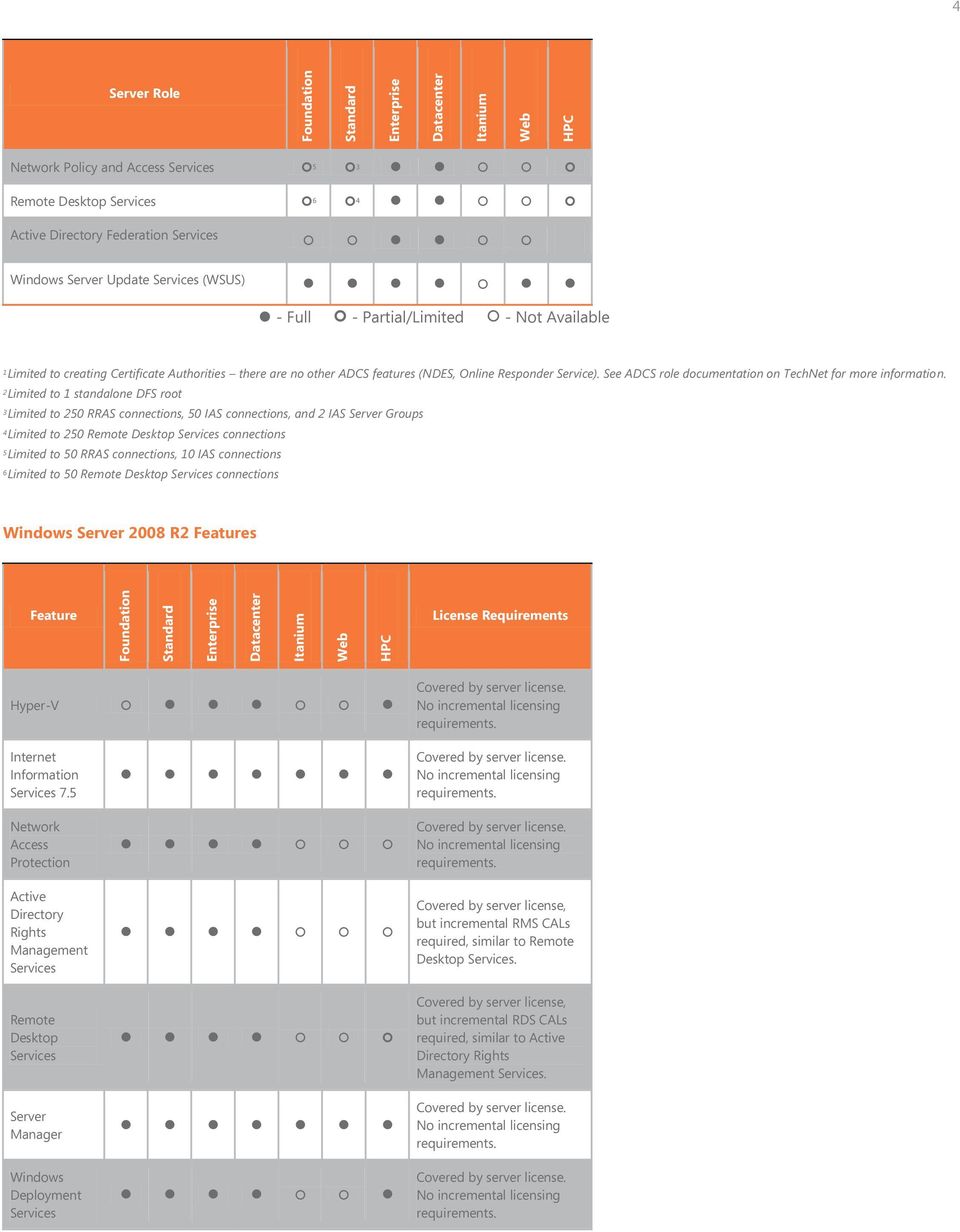
4 Foundation Standard Enterprise Datacenter Itanium Web HPC Foundation Standard Enterprise Datacenter Itanium Web HPC 4 Server Role Network Policy and Access Services 5 3 Remote Desktop Services 6 4 Active Directory Federation Services Windows Server Update Services (WSUS) - Full - Partial/Limited - Not Available 1 Limited to creating Certificate Authorities there are no other ADCS features (NDES, Online Responder Service). See ADCS role documentation on TechNet for more information. 2 Limited to 1 standalone DFS root 3 Limited to 250 RRAS connections, 50 IAS connections, and 2 IAS Server Groups 4 Limited to 250 Remote Desktop Services connections 5 Limited to 50 RRAS connections, 10 IAS connections 6 Limited to 50 Remote Desktop Services connections Windows Server 2008 R2 Features Feature License Requirements Hyper-V Covered by server license. No incremental licensing requirements. Internet Information Services 7.5 Network Access Protection Active Directory Rights Management Services Remote Desktop Services Server Manager Windows Deployment Services Covered by server license. No incremental licensing requirements. Covered by server license. No incremental licensing requirements. Covered by server license, but incremental RMS CALs required, similar to Remote Desktop Services. Covered by server license, but incremental RDS CALs required, similar to Active Directory Rights Management Services. Covered by server license. No incremental licensing requirements. Covered by server license. No incremental licensing requirements.
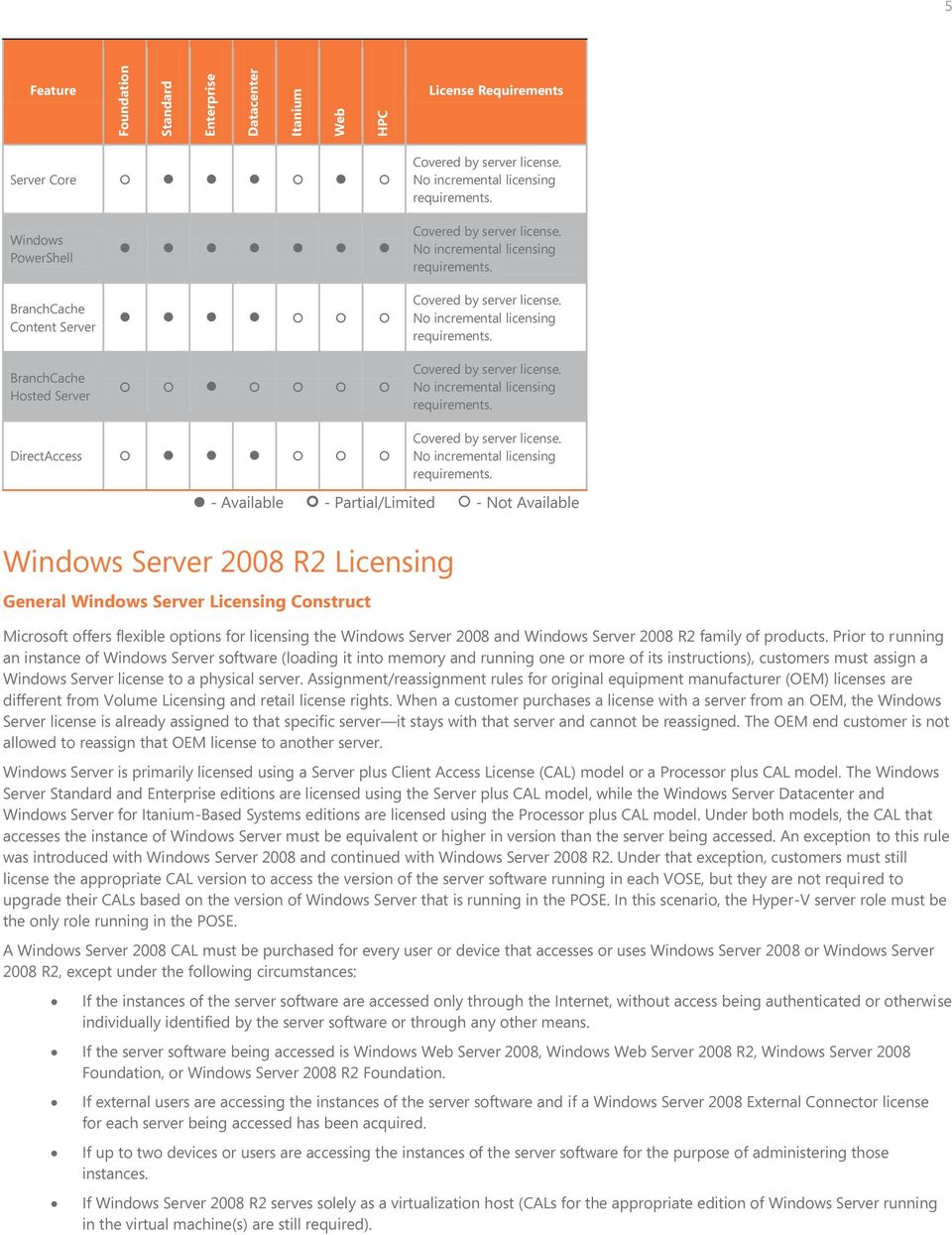
5 Foundation Standard Enterprise Datacenter Itanium Web HPC 5 Feature License Requirements Server Core Covered by server license. No incremental licensing requirements. Windows PowerShell BranchCache Content Server BranchCache Hosted Server Covered by server license. No incremental licensing requirements. Covered by server license. No incremental licensing requirements. Covered by server license. No incremental licensing requirements. DirectAccess Covered by server license. No incremental licensing requirements. - Available - Partial/Limited - Not Available Windows Server 2008 R2 Licensing General Windows Server Licensing Construct Microsoft offers flexible options for licensing the Windows Server 2008 and Windows Server 2008 R2 family of products. Prior to running an instance of Windows Server software (loading it into memory and running one or more of its instructions), customers must assign a Windows Server license to a physical server. Assignment/reassignment rules for original equipment manufacturer (OEM) licenses are different from Volume Licensing and retail license rights. When a customer purchases a license with a server from an OEM, the Windows Server license is already assigned to that specific server it stays with that server and cannot be reassigned. The OEM end customer is not allowed to reassign that OEM license to another server. Windows Server is primarily licensed using a Server plus Client Access License (CAL) model or a Processor plus CAL model. The Windows Server Standard and Enterprise editions are licensed using the Server plus CAL model, while the Windows Server Datacenter and Windows Server for Itanium-Based Systems editions are licensed using the Processor plus CAL model. Under both models, the CAL that accesses the instance of Windows Server must be equivalent or higher in version than the server being accessed. An exception to this rule was introduced with Windows Server 2008 and continued with Windows Server 2008 R2. Under that exception, customers must still license the appropriate CAL version to access the version of the server software running in each VOSE, but they are not required to upgrade their CALs based on the version of Windows Server that is running in the POSE. In this scenario, the Hyper-V server role must be the only role running in the POSE. A Windows Server 2008 CAL must be purchased for every user or device that accesses or uses Windows Server 2008 or Windows Server 2008 R2, except under the following circumstances: If the instances of the server software are accessed only through the Internet, without access being authenticated or otherwise individually identified by the server software or through any other means. If the server software being accessed is Windows Web Server 2008, Windows Web Server 2008 R2, Windows Server 2008 Foundation, or Windows Server 2008 R2 Foundation. If external users are accessing the instances of the server software and if a Windows Server 2008 External Connector license for each server being accessed has been acquired. If up to two devices or users are accessing the instances of the server software for the purpose of administering those instances. If Windows Server 2008 R2 serves solely as a virtualization host (CALs for the appropriate edition of Windows Server running in the virtual machine(s) are still required).
6 6 Below are key licensing parameters associated with each of the products in the Windows Server 2008 family. Windows Server 2008 R2 Foundation Windows Server 2008 R2 Foundation is available through OEMs only on select single-processor servers. For details on exact server models, please contact the server manufacturer. Windows Server 2008 R2 Foundation is licensed by server. Each license of Windows Server 2008 R2 Foundation is limited to a maximum of 15 user accounts, which can be assigned to only one distinct user at a time. Because Windows Server 2008 R2 Foundation is licensed in this way, Windows Server CALs are not required. However, Remote Desktop Services CALs or Rights Management Services CALs are required to use those server roles on a server running Windows Server 2008 R2 Foundation. Windows Server 2008 R2 Standard Customers who have a license for Windows Server 2008 R2 Standard may run one instance of the server software in the POSE and one instance of the server software in a VOSE. If the customer runs the instance in the VOSE, the instance running in the POSE can only be used to manage the instance of the operating system running in the VOSE. When customers run both instances of the server software, the instance running in the POSE may only be used to manage and service the instance of the operating system running in the VOSE. Running instances of Windows Server 2008 R2 Standard This is the use right for one POSE and one VOSE in Windows Server 2008 R2 Standard. The orange arrow indicates that the POSE may only be used to manage/service the VOSE.

7 7 Moving virtual instances of Windows Server 2008 R2 Standard With Windows Server 2008 R2 Standard, customers may move a virtual instance of the server software to another server that is properly licensed to support the added instance. Volume Licensing customers can reassign the actual license to another server every 90 days. Windows Server 2008 R2 Enterprise Customers licensed with Windows Server 2008 R2 Enterprise may run one instance of the server software in the POSE and up to four instances of the server software in the VOSE. If a customer is running four instances in the VOSE, the instance running in the POSE can only be used to manage the four instances of the operating system running in the VOSE. The diagram below illustrates this licensing option. When customers run all five instances, the instance of the server software running in the POSE may only be used to manage and service the instances of the operating system running in the VOSE. Running instances of Windows Server 2008 R2 Enterprise

8 8 This is the use right for one POSE and four VOSEs. The orange arrow indicates that the POSE may be used only to manage and service the VOSE. Moving virtual instances of Windows Server 2008 R2 Enterprise Customers may move a virtual instance of Windows Server 2008 R2 Enterprise to another server that is properly licensed to support an added instance. Volume Licensing customers can reassign the actual license to another server every 90 days.

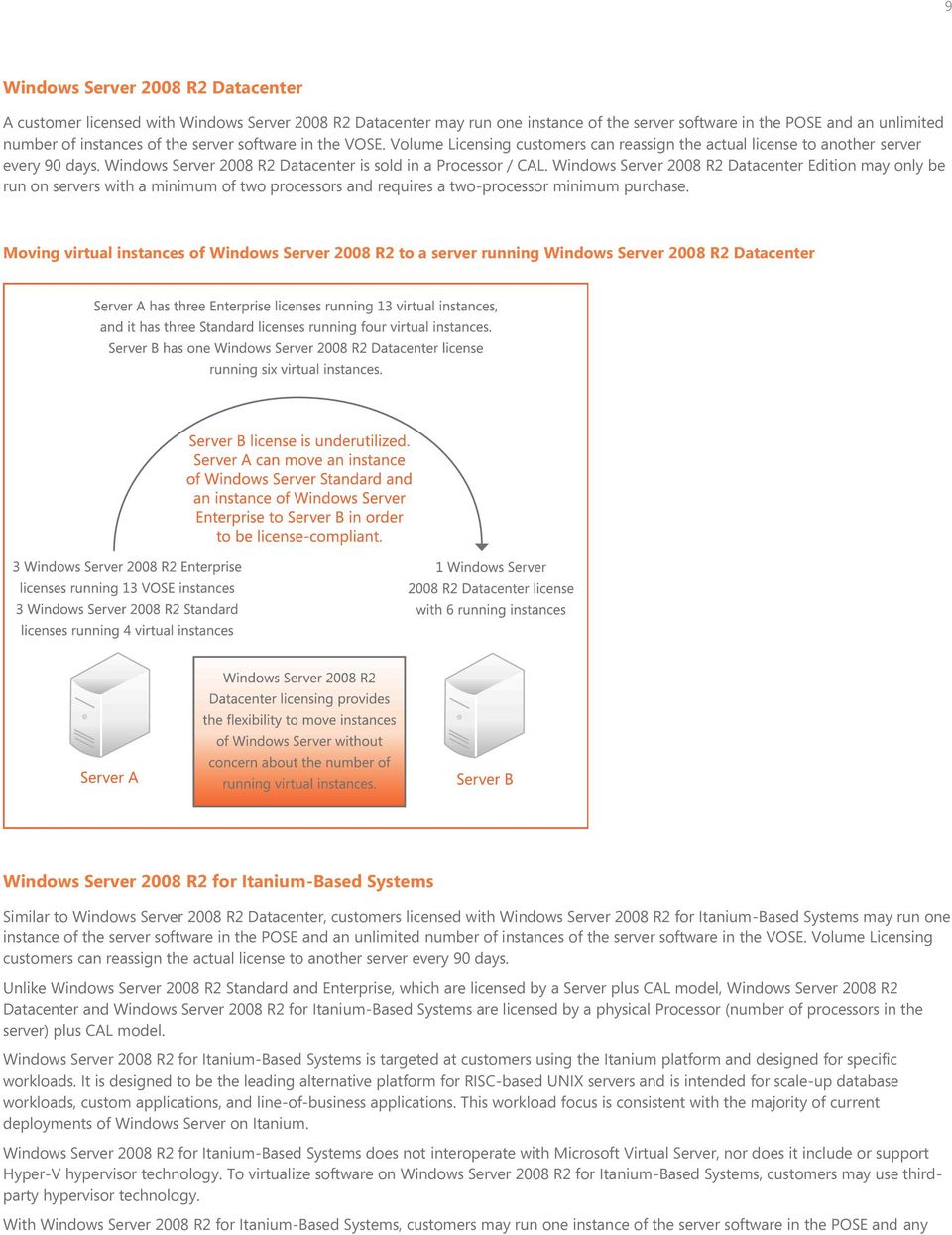
9 9 Windows Server 2008 R2 Datacenter A customer licensed with Windows Server 2008 R2 Datacenter may run one instance of the server software in the POSE and an unlimited number of instances of the server software in the VOSE. Volume Licensing customers can reassign the actual license to another server every 90 days. Windows Server 2008 R2 Datacenter is sold in a Processor / CAL. Windows Server 2008 R2 Datacenter Edition may only be run on servers with a minimum of two processors and requires a two-processor minimum purchase. Moving virtual instances of Windows Server 2008 R2 to a server running Windows Server 2008 R2 Datacenter Windows Server 2008 R2 for Itanium-Based Systems Similar to Windows Server 2008 R2 Datacenter, customers licensed with Windows Server 2008 R2 for Itanium-Based Systems may run one instance of the server software in the POSE and an unlimited number of instances of the server software in the VOSE. Volume Licensing customers can reassign the actual license to another server every 90 days. Unlike Windows Server 2008 R2 Standard and Enterprise, which are licensed by a Server plus CAL model, Windows Server 2008 R2 Datacenter and Windows Server 2008 R2 for Itanium-Based Systems are licensed by a physical Processor (number of processors in the server) plus CAL model. Windows Server 2008 R2 for Itanium-Based Systems is targeted at customers using the Itanium platform and designed for specific workloads. It is designed to be the leading alternative platform for RISC-based UNIX servers and is intended for scale-up database workloads, custom applications, and line-of-business applications. This workload focus is consistent with the majority of current deployments of Windows Server on Itanium. Windows Server 2008 R2 for Itanium-Based Systems does not interoperate with Microsoft Virtual Server, nor does it include or support Hyper-V hypervisor technology. To virtualize software on Windows Server 2008 R2 for Itanium-Based Systems, customers may use thirdparty hypervisor technology. With Windows Server 2008 R2 for Itanium-Based Systems, customers may run one instance of the server software in the POSE and any
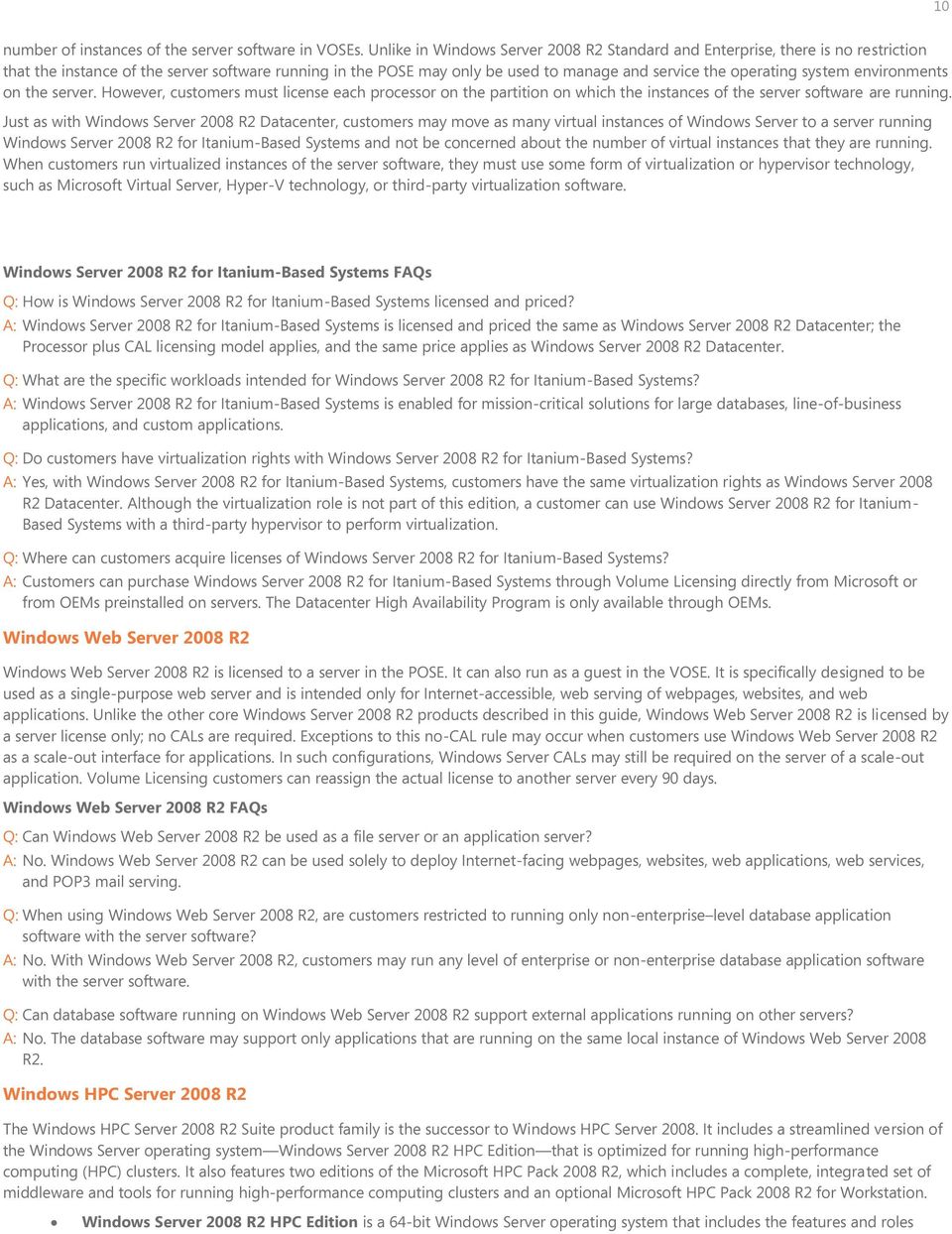
10 10 number of instances of the server software in VOSEs. Unlike in Windows Server 2008 R2 Standard and Enterprise, there is no restriction that the instance of the server software running in the POSE may only be used to manage and service the operating system environments on the server. However, customers must license each processor on the partition on which the instances of the server software are running. Just as with Windows Server 2008 R2 Datacenter, customers may move as many virtual instances of Windows Server to a server running Windows Server 2008 R2 for Itanium-Based Systems and not be concerned about the number of virtual instances that they are running. When customers run virtualized instances of the server software, they must use some form of virtualization or hypervisor technology, such as Microsoft Virtual Server, Hyper-V technology, or third-party virtualization software. Windows Server 2008 R2 for Itanium-Based Systems FAQs Q: How is Windows Server 2008 R2 for Itanium-Based Systems licensed and priced? A: Windows Server 2008 R2 for Itanium-Based Systems is licensed and priced the same as Windows Server 2008 R2 Datacenter; the Processor plus CAL licensing model applies, and the same price applies as Windows Server 2008 R2 Datacenter. Q: What are the specific workloads intended for Windows Server 2008 R2 for Itanium-Based Systems? A: Windows Server 2008 R2 for Itanium-Based Systems is enabled for mission-critical solutions for large databases, line-of-business applications, and custom applications. Q: Do customers have virtualization rights with Windows Server 2008 R2 for Itanium-Based Systems? A: Yes, with Windows Server 2008 R2 for Itanium-Based Systems, customers have the same virtualization rights as Windows Server 2008 R2 Datacenter. Although the virtualization role is not part of this edition, a customer can use Windows Server 2008 R2 for Itanium- Based Systems with a third-party hypervisor to perform virtualization. Q: Where can customers acquire licenses of Windows Server 2008 R2 for Itanium-Based Systems? A: Customers can purchase Windows Server 2008 R2 for Itanium-Based Systems through Volume Licensing directly from Microsoft or from OEMs preinstalled on servers. The Datacenter High Availability Program is only available through OEMs. Windows Web Server 2008 R2 Windows Web Server 2008 R2 is licensed to a server in the POSE. It can also run as a guest in the VOSE. It is specifically designed to be used as a single-purpose web server and is intended only for Internet-accessible, web serving of webpages, websites, and web applications. Unlike the other core Windows Server 2008 R2 products described in this guide, Windows Web Server 2008 R2 is licensed by a server license only; no CALs are required. Exceptions to this no-cal rule may occur when customers use Windows Web Server 2008 R2 as a scale-out interface for applications. In such configurations, Windows Server CALs may still be required on the server of a scale-out application. Volume Licensing customers can reassign the actual license to another server every 90 days. Windows Web Server 2008 R2 FAQs Q: Can Windows Web Server 2008 R2 be used as a file server or an application server? A: No. Windows Web Server 2008 R2 can be used solely to deploy Internet-facing webpages, websites, web applications, web services, and POP3 mail serving. Q: When using Windows Web Server 2008 R2, are customers restricted to running only non-enterprise level database application software with the server software? A: No. With Windows Web Server 2008 R2, customers may run any level of enterprise or non-enterprise database application software with the server software. Q: Can database software running on Windows Web Server 2008 R2 support external applications running on other servers? A: No. The database software may support only applications that are running on the same local instance of Windows Web Server 2008 R2. Windows HPC Server 2008 R2 The Windows HPC Server 2008 R2 Suite product family is the successor to Windows HPC Server It includes a streamlined version of the Windows Server operating system Windows Server 2008 R2 HPC Edition that is optimized for running high-performance computing (HPC) clusters. It also features two editions of the Microsoft HPC Pack 2008 R2, which includes a complete, integrated set of middleware and tools for running high-performance computing clusters and an optional Microsoft HPC Pack 2008 R2 for Workstation. Windows Server 2008 R2 HPC Edition is a 64-bit Windows Server operating system that includes the features and roles
11 11 necessary for running clustered HPC applications. Customers use clustered HPC applications to help solve complex computational problems or a set of closely related computational problems in parallel, which typically involves using several servers as a group, or cluster. Microsoft HPC Pack 2008 R2 Express includes the essential software for HPC clusters based on the Windows operating system, including job scheduling, message passing interface, and other development application programming interfaces, system administration, deployment, and support for high-speed networking. Microsoft HPC Pack 2008 R2 Enterprise includes a superset of the functionality included in the HPC Pack 2008 R2 Express along with the capability to add Windows 7 based workstation nodes and run calculations across the cluster by using Microsoft Excel 2010 spreadsheet software. Microsoft HPC Pack 2008 R2 for Workstation includes software for deploying Windows 7 based workstations as workstation nodes within a Windows HPC Server cluster, which provides the ability to expand the HPC cluster with CPU cycles from Windows 7 based workstations. Licensing options for the Windows HPC Server 2008 R2 family of products are flexible and cost effective. Prior to running an instance of the software (loading it into memory and running one or more of its instructions), customers must assign a license to a physical server or workstation. Each HPC cluster can have only one active head node but may also have a second, inactive head node for failover purposes. The following licensing options are available: The Windows HPC Server 2008 R2 Suite* licensing model consists of a Windows Server 2008 R2 HPC Edition operating system license and a Windows HPC Pack 2008 R2 Enterprise license for each server (for example, a head node, a broker node, or a compute node) in the cluster. Windows Server 2008 R2 HPC Edition is licensed using a server model. In the case of virtualization, customers can run one instance of the server software in a POSE and one instance in a VOSE on a licensed server. If both instances are running at the same time, the instance in the POSE is limited. Customers can only use the license to (1) run hardware virtualization software, (2) provide hardware virtualization services, and (3) run software to manage and service OSEs on the licensed server. Customers who have a license for Windows Server 2008 R2 HPC Edition may run one instance of the server software in the POSE and one instance of the server software in the VOSE. Microsoft HPC Pack 2008 R2 Express* is available for download and can be used with any licensed copy of Windows Server 2008 R2 HPC Edition, as well as Windows Server 2008 R2 Standard, Windows Server 2008 R2 Enterprise, and Windows Server 2008 R2 Datacenter. Microsoft HPC Pack 2008 R2 Express supports failover clustering services included with Windows Server 2008 R2 Enterprise or Datacenter to provide a second head node for improved cluster availability. Microsoft HPC Pack 2008 R2 Enterprise* is licensed using a server model and can be used with any licensed copy of Windows Server 2008 R2 HPC Edition, as well as with Windows Server 2008 R2 Standard, Windows Server 2008 R2 Enterprise, and Windows Server 2008 R2 Datacenter. For Microsoft HPC Pack 2008 R2 Enterprise, compute nodes that require the Enterprise functionality require a license per server. Microsoft HPC Pack 2008 R2 Enterprise supports failover clustering services included with Windows Server 2008 R2 Enterprise or Datacenter to provide a second head node for improved cluster availability. Microsoft HPC Pack 2008 R2 for Workstation is an optional software license that customers can use to enable a PC running the Windows 7 operating system to participate in a Windows-based HPC cluster. This edition is limited to Window 7 Professional, Windows 7 Enterprise, and Windows 7 Ultimate (32-bit or 64-bit). Microsoft HPC Pack 2008 R2 for Workstation is licensed using a server model and can be used only on a workstation node. Customers may run, at any one time, one instance of that software on a device if the device is in workstation mode. Windows HPC Server 2008 R2 Suite, Windows Server 2008 R2 HPC Edition, HPC Pack 2008 R2 Enterprise, and HPC Pack 2008 R2 for Workstation are available through OEMs and volume licensing channels, which includes academic and government programs. It is also available through the Microsoft Services Provider License Agreement. These products are not available through the retail channel. *When running the Microsoft HPC Pack 2008 R2 Enterprise or Express with a non-hpc Edition of Windows Server 2008 R2 (for example, Standard, Enterprise, or Datacenter), a customer must conform to the licensing of the underlying operating system.

12 12 Windows Server 2008 Client Access Licensing: Decision Trees, Types, and Modes CAL: Decision Trees The following decisions trees are designed to help define licensing based on specific needs. Windows Server CAL or External Connector License Decision Tree

13 13 RDS CAL or RDS External Connector License Decision Tree CALs Types and Licensing Modes Windows Server CALs are differentiated by type and by licensing mode. There are two types of CALs: Device CALs, which are an access license for every device (used by any user). Device CALs make the most economical and administrative sense for a customer with multiple users for one device, such as shift workers. User CALs, which are an access license for every named user accessing the server (from any device). User CALs make the most economical and administrative sense for a customer with many roaming employees who need access to the corporate network from unknown devices, and/or employees who access the network via multiple devices (that is, if the number of users is less than the number of devices, then this is the more economical choice). There are also two licensing modes for CALs: Per user or per device mode, which is determined by the number of users or devices accessing the server software (the number of servers accessed does not matter). Per server mode, which is determined by the maximum number of users or devices that may simultaneously access or use the server software running on a particular server. The acquired Windows Server CALs are designated for use exclusively with a particular server. CAL FAQs Q: Can customers use a Windows Server 2008 CAL to access a license for Windows Server 2008 R2? A: Yes. A Windows Server 2008 CAL can be used to access Windows Server 2008 R2. Q: Can customers use Windows Server 2003 CALs to access Windows Server 2008 R2 software? A: No. Customers must either purchase Windows Server 2008 CALs or have Software Assurance (to upgrade CALs) to access instances of Windows Server 2008 R2. The Windows Server 2003 CALs may continue accessing instances of Windows Server Q: If a user or device accesses a server running Windows Server 2008 R2 but is authenticating by using a third-party authentication application (non-microsoft based authentication), does the user or device still require a Windows Server 2008 CAL? A: Yes. If the user or device is authenticating by any means to a server running Windows Server 2008 R2, it requires a Windows Server 2008 CAL. Q: If a user is only infrequently accessing certain protocols or services of the server software (such as Network Access Protection or

14 14 Dynamic Host Configuration Protocol), is a Windows Server CAL still required? A: Yes. A Windows Server CAL is still required for such infrequent use of the server software. Q: Can customers use a Windows Server Device CAL and a Windows Server User CAL to access the same server? Also, can customers use an RDS Device CAL and an RDS User CAL on the same Remote Desktop Session Host server? A: Yes. Windows Server Device and User CALs, as well as RDS Device and User CALs, can be used on the same server. Q: Is there a difference in price between Device CALs and User CALs? A: No. Windows Server Device CALs and Windows Server User CALs are priced the same, as are RDS Device CALs and RDS User CALs. Q: Are there any differences between the requirements for CALs in Windows Server 2003 versus Windows Server 2008? A: The only primary difference with Windows Server 2008 CAL requirements is the following: If customers deploy Windows Server 2003 virtual machines onto Windows Server 2008 R2, they do not require Windows Server 2008 CALs for their virtual machine users. (A customer will still require CALs for the appropriate Windows Server edition, in this case for Windows Server 2003.) This is only true if the Windows Server 2008 R2 in the POSE is running the Hyper-V server role. Q: Windows Server 2008 R2 came with a set number of CALs because the customer acquired it through a retail store or with a new piece of hardware. How does the customer designate those CALs as being User or Device CALs? A: When the software comes packaged with CALs, the customer chooses whether those CALs are User or Device CALs after they makes the purchase, on the CAL End User License Agreement document. Q: A customer has some extra Windows Server 2003 CALs that are not being used. Can they apply these to servers running Windows Server 2008 R2? A: No. CALs must be applied to the same version (or higher) as the server software they are accessing. In other words, users or devices accessing a server running Windows Server 2008 R2 must have Windows Server 2008 CALs. Q: If a customer moves an instance of Windows Server 2003 to run as a virtual instance on a server with Windows Server 2008 R2 Enterprise running in the POSE, can they use Windows Server 2003 CALs to access the virtual instance of Windows Server 2003? A: Yes. If a customer deploys Windows Server 2003 virtual machines onto Windows Server 2008 R2, they do not require Windows Server 2008 CALs for virtual machine users. (A customer still will require CALs for the appropriate Windows Server edition, in this case for Windows Server 2003.) This is true only if the Windows Server 2008 R2 in the POSE is running the Hyper-V server role. Q: Can customers use a Windows Server 2008 User CAL to access a server running Windows Server 2003? A: Yes. Both Windows Server 2008 User and Device CALs can be used to access instances of Windows Server Q: If a customer has Software Assurance for its CALs, can they switch between User and Device CALs? A: Volume Licensing customers may switch from one to the other when they renew their Software Assurance. Customers must designate CALs as Device or User when upgrading them. Q: Will customers be allowed to switch between Windows Server 2008 Device CALs and User CALs? What about RDS CALs? A: If a customer s Windows Server CALs are covered under Software Assurance, they can convert those Windows Server CALs from Device CALs to User CALs, or vice versa, when they renew their Software Assurance. If a customer s Windows Server CALs are not covered under Software Assurance, they may not switch; the choice is permanent. This also applies to RDS CALs. Q: Are CALs required for Windows Web Server 2008 R2? A: No. Windows Web Server 2008 R2 is licensed by a server license only and no CALs are required. However, when Windows Web Server 2008 R2 is used as a scale-out interface for applications running on servers, Windows Server CALs may still be required on these backend servers running Windows Server. Remote Desktop Services Licensing Requirements In addition to the Windows Server 2008 CAL, a Terminal Services 2008 CAL (TS CAL) or Windows Server 2008 RDS CAL will be required to access any application or graphical user interface remotely hosted by Windows Server 2008 R2. This includes, but is not limited to, the use of Remote Desktop Services. Application licensing on Remote Desktop Services will vary by application vendor, and customers should check the licensing requirement with each vendor. Windows Server 2008 TS CALs are functionally equivalent to RDS CALs and can be used for connecting to Windows Server 2008 R2 Remote Desktop Session Hosts and Remote Desktop Virtualization Hosts. A Windows Server 2008 R2 Remote Desktop license server can issue and track both TS CALs and RDS CALs, but a Windows Server 2008 TS license server needs to be running either Service Pack 2 or have the QFE (hotfix) described in Microsoft Knowledge Base article ( installed to be
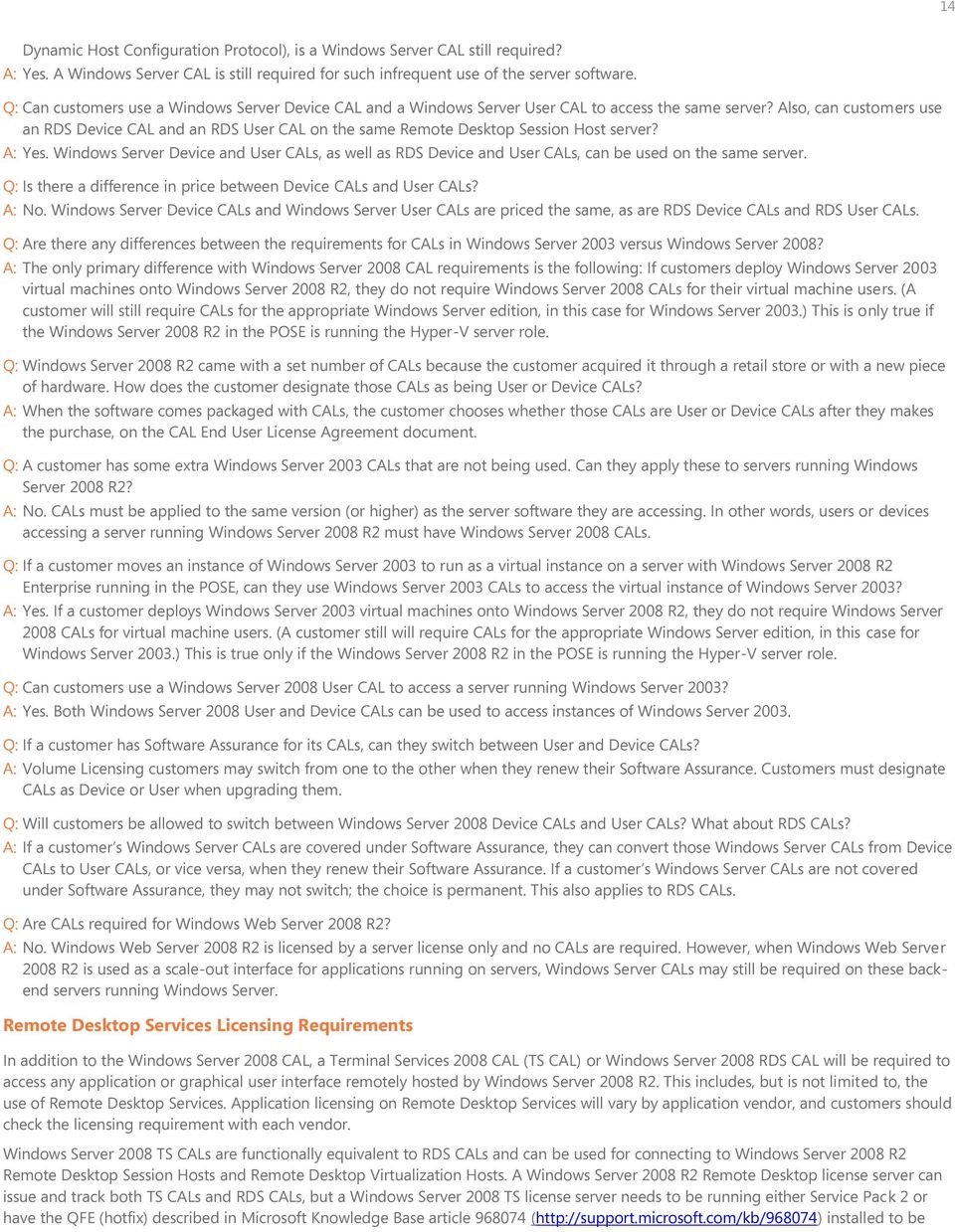
15 15 able to manage RDS CALs. As in Windows Server 2003, the Remote Desktop Services feature in Windows Server is intended for remote administration. Up to two administrators can connect for administrative purposes without TS or RDS CALs. However, a TS CAL or RDS CAL is required for any user or users who need to connect additional administrators beyond the first two. If a customer has many external users accessing the Remote Desktop Session Host server, the customer has the option to acquire a Windows Server 2008 Remote Desktop Services External Connector license in place of a per user or per device CAL. All RDS CALs or External Connector licenses must be the same version or newer than the Windows Server operating system in use. Note: Customers who use RDS on Windows Server 2008 R2 need access to a Windows Server 2008 R2 Remote Desktop license server; a Windows Server 2003 TS license server cannot be used. However, customers who run Terminal Services on Windows Server 2003 can use a Remote Desktop license server running on Windows Server 2008 R2; therefore, if customers are running both Windows Server 2003 Terminal Services and Windows Server 2008 R2 Remote Desktop Services in their organizations, they will need to run a Windows Server 2008 R2 Remote Desktop license server. Note: As with Windows Server 2003 Terminal Services, per device licensing is tracked and enforced in the Remote Desktop Session Host server. Customers have 120 days to activate a Remote Desktop license server after installing a Remote Desktop Session Host server (referred to as a grace period). Once a Remote Desktop license server is activated, customers have an additional 90 days to add TS CALs or RDS CALs to the Remote Desktop license server (referred to as temporary CALs or tokens). External Connector License Requirements for Windows Server 2008 If customers would like external users (that is, users who are not employees or on-site contractors) to access their network and do not want to purchase individual CALs for each of them, they can acquire a Windows Server 2008 External Connector (EC) license for each instance of Windows Server 2008 that will be accessed by these external users. Each physical server that external users access requires one EC license regardless of the number of instances running. The right to run instances of the server software is licensed separately; the EC, like the CAL, simply permits access and are version and functionality specific. ECs must be the same version or later than the server software being accessed. The decision on whether to acquire CALs or an EC for external users is primarily a financial one. Similarly, instead of acquiring individual RDS CALs for valid external users of RDS functionality, customers can acquire a Windows Server 2008 Remote Desktop Services EC license for each terminal server being accessed. A Windows Server EC license is a prerequisite for an RDS EC license. Additionally, instead of acquiring individual RMS CALs for valid external users of RMS functionality, customers can acquire a Windows Server 2008 Rights Management Services EC license for each terminal server being accessed. Customers must acquire a Windows Server EC license when they acquire an RMS EC license. Customers can acquire Windows Server EC, RDS EC, and RMS EC licenses for servers running instances of Windows Server 2008 R2 Standard, Enterprise, Datacenter, and Windows Server 2008 R2 for Itanium-Based Systems. The EC licenses are not applicable to Windows Web Server 2008 R2, Windows HPC Server 2008 R2, or Windows Server 2008 R2 Foundation. Downgrade rights are available for the EC, RDS EC, and RMS EC licenses. The acquisition of an EC license does not negate the requirement to acquire a Windows Server license. External Connector FAQs Q: For which Windows Server editions do customers acquire EC licenses? A: External Connector licenses should be acquired for each edition of Windows Server that the external user is accessing or using, not just the server to which they are authenticating. Q: Can customers acquire a Windows Server 2008 EC license and use it to access a Windows Server 2003 licensed server? A: Yes. Using the EC license to access a Windows Server 2003 licensed server maintains the rights of the EC license. Q: If a customer purchases an RDS EC license for a remote desktop, do they also need to purchase a Windows Server EC license for the same server? And does the customer need additional Windows Server EC licenses for the other Windows Servers that the RDS user is accessing? A: Yes. A Windows Server EC license must always be acquired when an RDS EC license is acquired. A Windows Server EC license must be purchased for every instance of Windows Server that the RDS user is accessing.

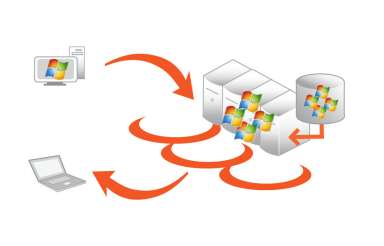
16 16 Virtual Desktop Infrastructure Suites Licensing Virtual Desktop Infrastructure (VDI) is a desktop delivery solution that enables organizations to store and run desktop workloads (for example, operating systems, applications, data) virtually in the datacenter and present the user interface via a remote desktop protocol to user devices. With VDI, client operating systems are decoupled from the devices, such as desktops, portable computers, and thin clients, and run as virtual machines. This way, organizations can provide employees with a desktop experience from anywhere. VDI is a key technology for enabling successful desktop virtualization implementations in organizations of any size or type. Virtual Desktop Infrastructure Virtual Desktop Infrastructure (VDI) enables each user to access their personal desktop, applications, and settings in the datacenter from a connected desktop or thin client device. Microsoft offers two licensing suites to enable VDI: the Microsoft Virtual Desktop Infrastructure Standard Suite (VDI Standard Suite) and the Microsoft Virtual Desktop Infrastructure Premium Suite (VDI Premium Suite). The VDI Standard Suite is for customers who are specifically interested in using VDI to virtualize desktops. The VDI Premium Suite is for customers who are looking for a complete desktop virtualization solution, including full session virtualization capabilities through Windows Server 2008 R2 RDS. Both VDI suites are subscription licenses and available in four different versions, all of which include use rights for RDS, Microsoft System Center Virtual Machine Manager, Configuration Manager, and Operations Manager. Two of the four suites include the Microsoft Desktop Optimization Pack, a suite of technologies that helps to improve compatibility and management, reduce support costs, improve asset management, and improve quality control. VDI Standard Suite Use Rights With the VDI Standard Suite, customers have access to the following products: Windows Server 2008 R2 RDS CAL, the Microsoft Desktop Optimization Pack, Virtual Machine Manager Client Management License (Virtual Machine Manager Client ML), Configuration Manager Standard Server ML, and Operations Manager Standard Server Management License (Operations Manager Standard Server ML). When purchased as part of a VDI suite, use rights for these licenses are restricted to enabling the virtual desktop. Windows Server 2008 R2 Remote Desktop Services CAL In the VDI Standard Suite, the RDS CAL rights are restricted so that customers may not use the session virtualization capabilities of RDS in any way. That is, customers may not access Windows Server software directly or indirectly to host a graphical user interface by using RDS functionality or any other technology. Customers can use the VDI Standard Suite for desktop virtualization only when there is a separate virtual machine image of the operating system for each device that accesses the OSE. System Center Virtual Machine Manager Client Management License Customers can use System Center Virtual Machine Manager Client Management License to manage at any one time up to four virtual client OSEs that are accessed by a device licensed under a VDI suite. The virtual client OSEs may be used on up to four different VDI hosts. However, client OSEs that run on hosts with mixed desktop and server workloads may not be managed. System Center Configuration Manager and Operations Manager Standard Server Management License Under the VDI Standard Suite, customers can use System Center Configuration Manager and Operations Manager Standard Server MLs to manage the POSE on the VDI hosts, as long as the POSE is used solely to run hardware virtualization software, provide hardware virtualization services, and run software to manage and service virtual client OSEs on the VDI host. Configuration Manager and Operations Manager Standard Server MLs under the VDI Standard Suite do not include in-guest VDI desktop management (that is, the management or monitoring of a guest operating system running in the virtual machine).

17 17 Microsoft Desktop Optimization Pack Under the VDI Standard Suite, Microsoft Desktop Optimization Pack use rights are equivalent to the use rights of the product outside the suite. VDI Premium Suite Use Rights The VDI Premium Suite includes all of the components of the VDI Standard Suite and RDS CAL rights equivalent to those outside the suite. These additional rights enable customers to license all RDS session virtualization capabilities, including capabilities available through Microsoft Application Virtualization for Remote Desktop Services. All use rights restrictions that apply to System Center Virtual Machine Manager, Configuration Manager, and Operation Manager under the VDI Standard Suite apply equally to the VDI Premium Suite. Management Server Rights Both VDI suites include the Standard Server Management Licenses for Configuration Manager and Operations Manager. These use rights are restricted to desktop workloads running on the virtual machines. Online Services Components An online services component called Microsoft Asset Inventory Service (AIS) is included as part of the Microsoft Desktop Optimization Pack for Software Assurance, which is included in both VDI suites. The cost of the online services subscription is included in the VDI suite subscription fee. If subscription coverage of the VDI suite lapses, so do the rights to access the AIS online services components. Activation of the AIS online service under the VDI suites is handled the same way as AIS activation for customers who use the Microsoft Desktop Optimization Pack outside of the VDI suites. Roaming Use Rights The VDI license permits the primary user to access the virtual client OSE from any third-party device for work-related activity. These rights terminate when the corresponding rights on the VDI device expire, when there is a change in the primary user status, or when the primary user leaves the organization. The VDI limitations against accessing RDS sessions continue to apply if the Roaming Use Rights are invoked under the VDI Standard Suite. Windows Virtual Desktop Access The Windows Virtual Desktop Access license is an additional license required for each PC or thin client that accesses the virtualized desktop. These licenses are in addition to the infrastructure licensing that the VDI suites provide. Virtual Desktop Access licenses are available as an annual subscription per device for PCs and thin clients.

18 18 System Center Offerings Microsoft System Center offerings are available as standalone products and as suites that combine two or more products that work together in a complementary fashion. System Center suites offer several advantages over standalone products, including virtualization use rights and significant discounts. Following are tables that provide overviews of the System Center core product offerings for suites and standalone versions. System Center Suite Offerings Product System Center Server Management Suite Enterprise (SMSE) System Center Server Management Suite Datacenter (SMSD) System Center Client Management Suite Description Features a comprehensive solution for end-toend management of physical and low-density virtual server environments Features a comprehensive solution for end-toend management of high-density virtual server environments Addresses the challenges of managing a user environment through integrated client management solutions Channels VL, OEM VL, OEM VL System Center Essentials Plus 2010 Server Management License Suite Provides a unified virtualization and IT server management solution for midsize businesses that can manage any workload VL, FPP System Center Essentials Plus 2010 Client Management License Suite Provides a unified client management solution for midsize businesses VL, FPP System Center Standalone Offerings Product System Center Configuration Manager System Center Operations Manager System Center Data Protection Manager System Center Service Manager Description Assesses, deploys, and updates servers, clients, and devices across physical, virtual, distributed, and mobile environments. Can be licensed with or without Microsoft SQL Server Manages services across an IT environment and identifies and resolves issues that affect the health of distributed IT services. Can be licensed with or without Microsoft SQL Server Backs up and recovers data from key business applications (for example, Microsoft SQL Server, Microsoft Exchange Server, and Microsoft SharePoint Server), file shares on Windows Server 2003 and Windows Server 2008, and Windows desktop and portable computers. Includes the runtime of Microsoft SQL Server Delivers an integrated platform for automating and adapting IT best practices for incident and problem resolution, change management, and asset life cycle management. Can be Channels VL, FPP VL, FPP, OEM VL, FPP, OEM VL
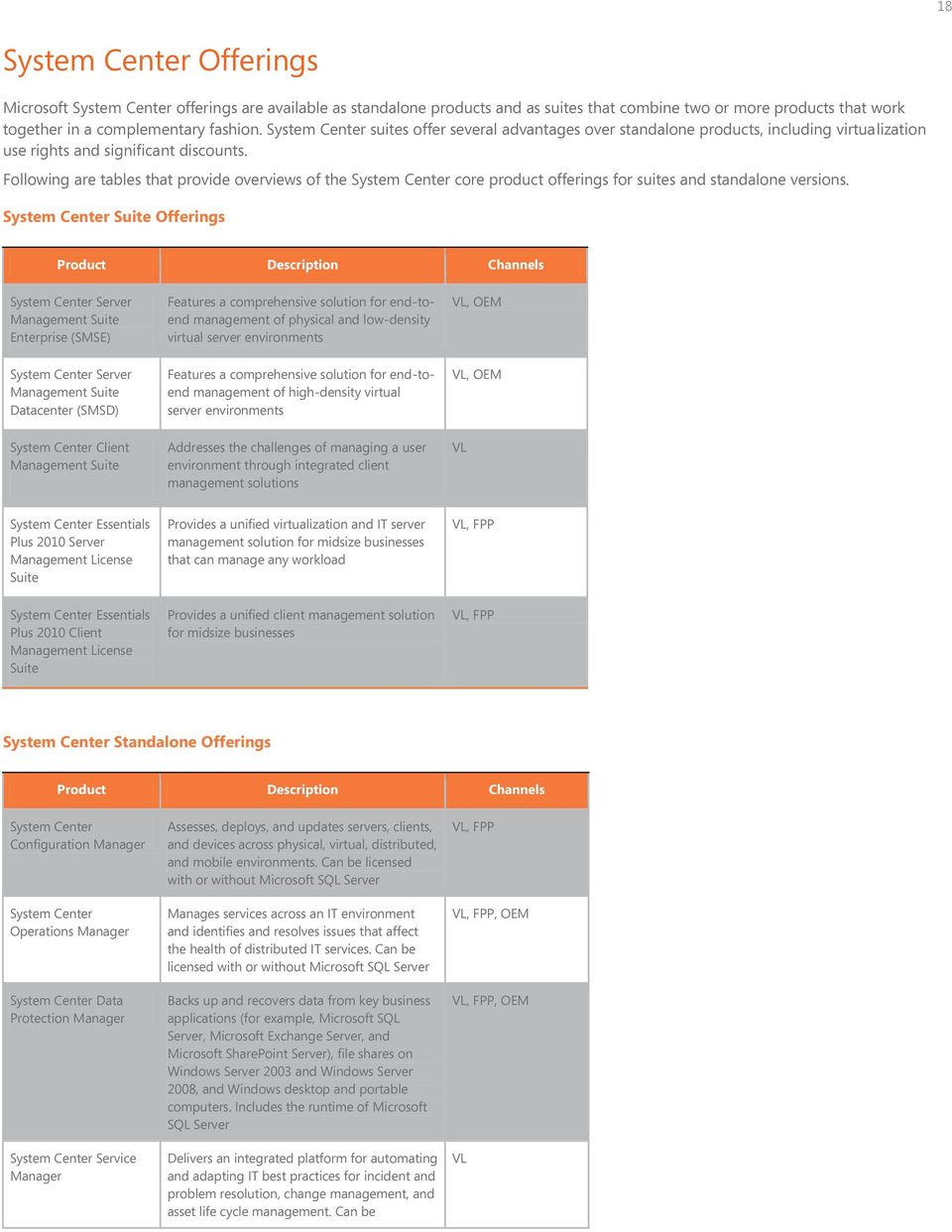
19 19 Product Description Channels System Center Virtual Machine Manager System Center Essentials purchased with or without Microsoft SQL Server Manages physical and virtual IT infrastructures, increases server utilization, and optimizes resources dynamically across multiple virtualization and physical platforms Allows midsize businesses to manage a broad range of tasks across physical and virtual servers, clients, hardware, software, and IT services VL, FPP, OEM VL, FPP, OEM System Center Licensing General System Center Licensing Construct Microsoft System Center products are licensed per user, per operating system environment (OSE), or per device depending on the license type. System Center products are not licensed by core. In most cases, a Management Server License is required for each instance of System Center that is deployed. A Server Management License (Server ML) or a Client Management License (Client ML) is required for each OSE being managed by the System Center software. System Center Licensing Elements Customers can license System Center products as management suites that include licenses to multiple products or as standalone products. For example, if a customer purchases the System Center Server Management Suite Enterprise, one suite license allows the customer to run all of the component products and manage four virtual environments, plus the parent (the POSE instance that is limited to supporting the virtualization capability) running on the server. The price of that suite is relatively equivalent to the price of two standalone Server MLs.

20 20 System Center Server Management for Enterprise System Center Server Suite Licensing Server Management Suites provide customers with an easy and economical server management solution for departmental or enterprise server environments. System Center Server Management Suite Enterprise (SMSE) This suite includes one license for end-to-end server management, including licensing for physical and virtual environments. For customers who want to employ virtualization, the suite delivers a cost advantage. One suite license for each physical server covers the management of that server and each of the virtual servers (plus any workloads) running on that server. It features Enterprise Server MLs for Configuration Manager, Operations Manager, Data Protection Manager, Virtual Machine Manager, and Service Manager Server ML (no edition). The suite also includes Management Server Licenses for Virtual Machine Manager and Data Protection Manager. It provides the right to manage up to four VOSEs in addition to the POSE, provided the POSE is limited to supporting the virtualization capability. System Center Server Management Suite Datacenter (SMSD) This suite provides a solution for end-to-end management of high-density virtual server environments. It includes Enterprise Server MLs for Configuration Manager, Operations Manager, Data Protection Manager, Virtual Machine Manager, and Service Manager Server ML (no edition). It also includes Management Server Licenses for Virtual Machine Manager and Data Protection Manager. Customers can purchase licenses on a per processor basis and can manage an unlimited number of OSEs on a single server. The suite requires at least two per processor licenses be assigned to a server device. License System Center Server Management Suite Enterprise Includes Enterprise Server MLs for Configuration Manager, Operations Manager, Data Protection Manager, Virtual Machine Manager, and Service Manager Server ML System Center Server Management Suite Datacenter Includes Enterprise Server MLs for Configuration Manager, Operations Manager, Data Protection Manager, Virtual Machine Manager, and Service Manager Server ML Licensing Overview Licensed on a per device basis One suite license provides for the management of up to four virtual OSEs plus the parent (the POSE instance that is limited to supporting the virtualization capability) running on that server Any workload can be managed Licensing is discounted compared to standalone product licensing Features the rights to manage up to four VOSEs and one POSE, provided the POSE is limited to supporting the virtualization capability Licensed on a per processor basis Requires at least two per processor licenses be assigned to a server device Any workload can be managed Features the rights to manage an unlimited number of OSEs System Center Grants Customers who license System Center Server Management Suites can also receive the following technologies in the form of grants available for download. License Description Licensing Overview Opalis Provides IT process automation of incident response, provisioning, virtual life cycle management, and change management Orchestrates and integrates System Center products with third-party management tools, Offered as a grant by the Opalis subsidiary to customers who purchase Server Management Suite Enterprise or Server Management Suite Datacenter* Not available as a standalone product

21 21 License Description Licensing Overview AVIcode 5.7 enabling interoperability and process consistency across the datacenter Provides a comprehensive suite of application monitoring capabilities, including server/component monitoring, end-user monitoring, transaction monitoring, dependency discovery, and integrated reporting and analysis Enables a complete keyboardto-eyeball view of application health and behavior Offered as a grant by the AVIcode subsidiary to customers who purchase Server Management Suite Enterprise or Server Management Suite Datacenter** Not available as a standalone product *Opalis software will be granted to the holder of any new or existing SMSE or SMSD license with active Software Assurance coverage on or between December 10, 2009 and April 30, SMSE and SMSD licenses acquired through the Core Infrastructure Server Enterprise and Core Infrastructure Server Datacenter under the Enrollment for Core Infrastructure on or between the same dates also qualify for the Opalis software grant. Opalis, licensed from the Microsoft Opalis subsidiary as a grant to SMSE and SMSD customers, is not provided outside of the SMSE or SMSD licenses. **AVIcode 5.7 software will be granted to any SMSE, SMSD, CIS Suite Enterprise, or CIS Suite Datacenter customer with active Software Assurance (SA) on or between October 5, 2010 and October 30, AVIcode 5.7, licensed from the Microsoft AVIcode subsidiary as a grant to SMSE and SMSD customers, is not provided outside of the SMSE or SMSD licenses. System Center Server Standalone Licensing Other than buying System Center products via a suite, customers can purchase System Center server and client licenses on a standalone basis. For most Microsoft System Center products, there are two editions of Server MLs: Standard and Enterprise. A Standard Server ML is used to manage basic workloads, while an Enterprise Server ML is used for basic workloads as well as for advanced workloads that are not covered by the Standard Server ML. The following table outlines System Center Server Standalone licensing options: License System Center Configuration Manager 2007 R3 Standard Server ML Management by instances of the server software using desired configuration management (DCM) of only Basic Operating System Workloads running in the licensed OSE, as well as management of any applications running in that OSE that do not require use of DCM. Basic Operating System Workloads means: These basic operating system utilities: System Resource Manager, Password Change Notification, Baseline Security Analyzer, Reliability and Availability Services These file and print service workloads: Print Server, Distributed File System (DFS), File Replication Service (FRS), Network File System (NFS), File Transfer Protocol (FTP), and Windows SharePoint Services These networking service workloads: Distributed Naming Service (DNS), Dynamic Host Configuration Protocol (DHCP), and Windows Internet Naming Service (WINS) These security workloads: Firewall, Proxy, Enterprise Server ML Management by instances of the server software using DCM of: IT Compliance and Governance configurations Basic Operating System Workloads All other operating system utilities, service Workloads, as well as any applications running in the licensed OSE
22 22 License Standard Server ML Enterprise Server ML System Center Operations Manager 2007 R2 System Center Data Protection Manager 2010 System Center Service Manager 2010 SP1 System Center Virtual Machine Manager 2008 R2 Intrusion detection and prevention, Antivirus management, Application security gateway, Content filtering (which includes URL filtering and Spam), Network forensics, Security information management, and Vulnerability assessment in order to safeguard the network and host Management by instances of the server software of only Basic Operating System Workloads running in the licensed OSE. Basic Operating System Workloads means: These basic operating system utilities: System Resource Manager, Password Change Notification, Baseline Security Analyzer, Reliability and Availability Services These file and print service workloads: Print Server, Distributed File System (DFS), File Replication Service (FRS), Network File System (NFS), File Transfer Protocol (FTP), and Windows SharePoint Services These networking service workloads: Distributed Naming Service (DNS), Dynamic Host Configuration Protocol (DHCP), and Windows Internet Naming Service (WINS) These security workloads: Firewall, Proxy, Intrusion detection and prevention, Antivirus management, Application security gateway, Content filtering (which includes URL filtering and Spam), Network forensics, Security information management, and Vulnerability assessment in order to safeguard the network and host Basic file backup and recovery management by instances of the server software of: Operating system components Utilities Service workloads running in the licensed OSE These security workloads: Firewall, Proxy, Intrusion detection and prevention, Antivirus management, Application security gateway, Content filtering (which includes URL filtering and Spam), Network forensics, Security information management, and Vulnerability assessment in order to safeguard the network and host N/A N/A Management by instances of the server software of: Basic Operating System Workloads All other operating system utilities All other service workloads Any applications running in the licensed OSE Backup and recovery, including basic file backup and recovery, by instances of the server software of The server system state All operating system components All utilities All server workloads Any applications running in the licensed OSE The customer uses the server to manage any workload. The customer uses the server to manage any workload.
23 23 System Center Server Management Licensing Options and Overview 1. Management Server Licenses Available with and without SQL Server Technologies Data Protection Manager and Virtual Machine Manager is included with SMSE/SMSD and MLs 2. Standalone Licenses All sold on a per OSE basis (except Virtual Machine Manager which is sold per device) Available with and without SA 3. Server Suites Discounted compared to standalone product licensing Only available with SA SMSE is licensed per device for up to 4 OSEs SMSD is licensed per processor for unlimited OSEs (2-proc minimum) 4. Software Grant Use Rights Rights to Opalis granted by the Opalis subsidiary to SMSE and SMSD customers Rights to AVIcode granted by the AVIcode subsidiary to SMSE and SMSD customers *This includes the runtime-restricted version of SQL Server 2008 Standard Edition, which can only be used to support the management application that it is sold with System Center Configuration Manager, System Center Operations Manager, and System Center Service Manager. **Opalis software will be granted to the holder of any new or existing SMSE or SMSD license with active Software Assurance coverage on or between December 10, 2009 and April 30, SMSE and SMSD licenses acquired through the Core Infrastructure Server Enterprise and Core Infrastructure Server Datacenter under the Enrollment for Core
24 24 Infrastructure on or between the same dates also qualify for the Opalis software grant. Opalis, licensed from the Microsoft Opalis subsidiary as a grant to SMSE and SMSD customers, is not provided outside of the SMSE or SMSD licenses. ***This includes the runtime-restricted version of SQL Server 2008 Standard Edition, which can only be used to support the System Center Data Protection Manager management application. ****AVIcode 5.7 software will be granted to the holder of any new or existing SMSE or SMSD license with active Software Assurance coverage on or between October 5, 2010 and October 30, SMSE and SMSD licenses acquired through the Core Infrastructure Server Enterprise and Core Infrastructure Server Datacenter under the Enrollment for Core Infrastructure on or between the same dates also qualify for the AVIcode software grant. AVIcode, licensed from the Microsoft AVIcode subsidiary as a grant to SMSE and SMSD customers, is not provided outside of the SMSE or SMSD licenses. System Center Client Management for Enterprise System Center Client Suite Licensing To make it easier for enterprise customers to license clients, Microsoft offers client licensing suites that are discounted compared to standalone product licensing. This provides an easy and economical option for customers who want to integrate client life cycle management to help reduce the cost of deploying, managing, securing, and troubleshooting client systems. There are three client suites available: System Center Client Management Suite, Core Client Access License (CAL), and Enterprise Client Access License (ECAL). System Center Client Management Suite The System Center Client Management Suite helps customers address the challenges of managing a user environment through integrated client management solutions. The suite helps lower costs and improve end-user service, and supports IT compliance. Composed of Data Protection Manager, Operations Manager, and Service Manager, the suite provides an easy way for customers to purchase Client MLs. Customers who want to automate IT service management in accordance with process frameworks and best practices should consider the Client Management Suite. Licensing is available on a per OSE or per user basis. The suite is available only with SA. License System Center Client Management Suite Includes Client MLs for Data Protection Manager, Operations Manager, and Service Manager Licensing Overview Licensed on a per OSE or per user basis Licensing is discounted compared to standalone product licensing Core Client Access License Suite The Core CAL Suite provides a simple way to establish an investment in key Microsoft technologies through a single license agreement. The Core CAL Suite includes Configuration Manager, which customers can use to help manage clients. Licensing is available on a per device or per user basis. If a customer purchases one license for a user, they can associate any number of OSEs with the licensed user. The suite is available only with SA. Enterprise Client Access License Suite The ECAL Suite is a single licensing vehicle for a broad software portfolio and is a better value than acquiring separate components. The suite is significantly discounted, and it includes all products in the Client Management Suite and all Core CAL Suite components. Licenses are available on a per device or per user basis. If a customer purchases one license for a user, they can associate any number of OSEs with the licensed user. The suite is available only with SA. Comparison of Client MLs License Client Management Suite Core CAL Suite Enterprise CAL Suite System Center Configuration Manager 2007 R3 Client ML System Data Protection Manager 2010 Client ML
25 25 License Client Management Suite Core CAL Suite Enterprise CAL Suite System Center Operations Manager 2007 R2 Client ML System Center Service Manager 2010 SP1 Client ML Other server CALs and technologies Available with SA Licensing option per OSE or per user System Center Client Standalone Licensing per device or per user Available per device or per user Not Available For all non-server OSEs on any device that you wish to manage, you will also need a client ML. There are two types of client MLs: OSE MLs and User MLs. OSE MLs: Like Server MLs where the required number of MLs equals the number of OSEs, you will need an OSE client ML for each non-server OSE you wish to manage on a device. Your OSE client MLs permit your instances of the server software to manage an equivalent number of non-server OSEs used by any users of a device. User MLs: Alternatively, you may choose to use user client MLs. These MLs permit the management of any non-server OSEs used by each user to whom a user client ML is assigned. If you have more than one user using an OSE, and you are not licensing by OSE, you must assign user client MLs to each of the users. License System Center Configuration Manager 2007 R3 System Center Data Protection Manager 2010 System Center Operations Manager 2007 R2 Licensing Overview Per OSE: One OSE for each license Per User: Any number of OSEs associated with the licensed user System Center Service Manager 2010 SP1 System Center Virtual Machine Manager 2008 R2 System Center Server and Client Management for Midmarket System Center Essentials are designed specifically for midsize organizations. These products are available as suites or standalone licenses. System Center Server Suite Licensing System Center Essentials Plus 2010 Suites System Center Essentials Plus 2010 Suites provide a unified virtualization, IT management, and data protection solution for midsize businesses. The suites help customers reduce costs, gain better control, and simplify the complexity of the virtual and physical IT environment. When purchasing an Essentials suite, customers must still purchase the System Center Essentials 2010 Management Server License, just as it is required for the standalone System Center Essentials 2010 products. But only one Client ML or one Server ML is required for each physical Windows client or Windows Server device that needs to be managed and protected. The rights to use Data Protection Manager come with the purchase of the System Center Essentials Plus 2010 Client ML or Server ML. System Center Essentials requires Microsoft SQL Server data management software to support its operational activities. Essentials 2010 ships with SQL Server 2008 Express, which is recommended for managing up to 15 server OSEs and 150 client OSEs. For larger
26 26 deployments, customers can purchase SQL Server 2008 Standard separately or in conjunction with Essentials. The latter is sold as System Center Essentials 2010 with SQL Server Technology and includes SQL Server 2008 Standard, which may be used only to support Essentials License System Center Essentials Plus 2010 Server Management License Suite Includes the Server ML for System Center Essentials and the Server ML to Data Protection Manager for System Center Essentials System Center Essentials Plus 2010 Client Management License Suite Includes the Client ML for System Center Essentials and the Client ML to Data Protection Manager for System Center Essentials Licensing Overview Manages up to the technical limit of 50 server OSEs. (One license required for each managed device.) Manages up to the technical limit of 500 client OSEs. (One license is required for each managed device.) System Center Server Standalone Licensing System Center Essentials are also available as standalone server management and client management licenses. A Server ML is required for each physical server device and a Client ML is required for each client device on which the customer wants to manage operating system environments. License Licensing Overview System Center Essentials 2010 Manages up to the technical limit of 50 server OSEs and 500 client OSEs. (One license required for each managed device) Enrollment for Core Infrastructure Licensing Microsoft Enrollment for Core Infrastructure (ECI) is a Microsoft Enterprise Agreement enrollment program designed to help customers more easily acquire the foundation for a protected, well-managed IT infrastructure. ECI is designed to help simplify licensing, reduce costs, and manage core infrastructure more efficiently. This Volume Licensing program enables enterprise customers to purchase core infrastructure products under one enrollment for a three-year term at a reduced price. The Microsoft Core Infrastructure Server Suites available only through ECI bring together Microsoft Forefront Endpoint Protection client security, System Center server management solutions, and the Windows Server operating system. ECI offers a cost-efficient way to license these core infrastructure products and gives customers the flexibility to choose technology with the right scale and management capability for workloads and environments. By purchasing the Core Infrastructure Server Suites, customers can save 20 percent compared to purchasing product licenses individually. Customers can choose any combination of the three suites and upgrade licenses to support their changing IT environment. Microsoft Core Infrastructure Server Suites DATACENTER ENTERPRISE STANDARD
27 27 DATACENTER ENTERPRISE STANDARD Server Management Suite Datacenter Server Management Suite Enterprise Server Management Licenses Standard Core Infrastructure Server Suites There are three Core Infrastructure Server Suites Standard, Enterprise, and Datacenter and they are available only through the ECI program. Each suite provides product rights to the edition that best meets the intended use of the product. These usage scenarios include: Basic workloads (Standard suite) More complex workloads, such as Active Directory, and the need for some virtualization (Enterprise suite) More complex workloads, greater scale, and the need for extensive virtualization (Datacenter suite) Suite Details ECI Server Suite Details Products Core Infrastructure Server Suite Standard Core Infrastructure Server Suite Enterprise Core Infrastructure Server Suite Datacenter Makes economic sense for oneprocessor machines running basic workloads Provides Standard Server MLs and no System Center Virtual Machine Manager Supports one virtualized instance per processor Makes economic sense on twoprocessor machines Has a minimum purchase requirement of two processors Supports up to four virtualized instances on a two-processor server Offers the greatest value and can run the most automated, virtual instances with the right to run unlimited virtual machines Has a minimum purchase requirement of two processors per server but is valid for any machine with two or more processors Windows Server 2008 R2 Standard Microsoft System Center Server MLs Standard Microsoft Forefront Endpoint Protection Windows Server 2008 R2 Enterprise Microsoft System Center Server Management Suite Enterprise Microsoft Forefront Endpoint Protection Windows Server 2008 R2 Datacenter Microsoft System Center Server Management Suite Datacenter Microsoft Forefront Endpoint Protection
28 Operations Manager Configuration Manager Data Protection Manager Service Manager Opalis (grant) AVIcode (grant) Virtual Machine Manager 28 Program Requirements The Enrollment for Core Infrastructure program includes the following requirements: Minimum initial purchase. All Core Infrastructure Server Suites are sold per processor. Initial purchase must be for 50 processor licenses. Customers can purchase any combination of the suites to meet the minimum purchase requirement. Annual true up. Orders are consolidated annually to account for additional deployments during the year. Software Assurance. SA helps customers maximize their return on investment by providing cost-effective rights to software, training, and support services. Software Assurance for a three-year term is required on all Core Infrastructure Server Suite licenses. Windows CAL and External Connectors. To access the Core Infrastructure Server Suites, customers need to acquire Windows Server CALs for employees. Just like Windows Server standalone purchases, customers who provide external users with access to Windows Server must acquire Windows Server CALs for each user or buy EC licenses for each server licensed to run one or more instances of Windows Server. These can be acquired through the EA, Select Plus, or Select License Agreements as a standalone product or through the Core CAL or ECAL Suites. System Center Licensing Rights. All Core Infrastructure Server Suites include licensing rights to run the System Center consoles and to manage the parent operating system on a virtualized server. Core Infrastructure Server Suite Comparison System Center Server Management Licenses (MLs) and Consoles Core Infrastructure Server Suite Editions Windows Server Edition Forefront Client Security & Console Datacenter 2 + processors Unlimited virtualized instances Datacenter System Center Server Management Suite Datacenter Enterprise 2 processors 4 virtualized instances Standard 1 processor 1 virtualized instance Enterprise Standard System Center Server Management Suite Enterprise - Available - Not Available ECI Migration Paths Customers can migrate to one or more Core Infrastructure Server Suites from their current infrastructure configuration. When using migration SKUs midterm, customers can receive a credit for the Windows Server Software Assurance as they will continue to pay on its existing enrollment.
29 29 Product Migration Paths The Enrollment for Core Infrastructure program offers customers several purchasing options that work with existing licensing investments. 1. Intended for a new license purchase or a license without Software Assurance or expired Software Assurance. 2. Intended for a customer who already owns a Windows Server license with current Software Assurance. (This SKU does not include a Windows Server license.) 3. Intended for a customer who already owns a Windows Server license with current Software Assurance and System Center Server Management Suite Enterprise or System Center Server Management Suite Datacenter license with current Software Assurance. 4. Intended for a customer who already owns the Core Infrastructure Server Suites licenses and is simply renewing. 5. Intended for a customer who is migrating a Windows Server license with Software Assurance midterm and qualifies for credit for the duplicative Software Assurance on the new Core Infrastructure Server Suite Software Assurance. 6. Customers who have made significant investments in System Center licenses and Software Assurance may find it best to wait until the end of their Software Assurance term rather than migrate midterm. Step Ups to higher suites from Standard to Enterprise or Datacenter, or from Enterprise to Datacenter are an option as the customer s IT environment changes.
30 30 Pricing Tables and SKUs The following tables represent sample estimated retail pricing for fully packaged product pricing through retail and Volume Licensing channels. Not all pricing is listed. Actual prices and payment terms may vary. Final prices and payment terms of licenses acquired through resellers are determined by agreement between the customer and its reseller. Windows Server Fully Packaged Product (FPP) Retail Pricing Windows Server 2008 R2 Product ERP (USD) SKU Channel Availability Windows Server 2008 R2 Foundation N/A No FPP OEM only Windows Server 2008 R2 Standard $1,029 (with 5 CALs) P All Windows Server 2008 R2 Standard $1,209 (with 10 CALs) P All Windows Server 2008 R2 Enterprise $3,919 (with 25 CALs) P All Windows Server 2008 R2 Datacenter $2,999 (with NO CALs) No FPP No FPP Windows Server 2008 R2 for Itanium-Based Systems $2,999 No FPP No FPP Windows Web Server 2008 R2 $469 LWA All Windows Server 2008 R2 5 CAL Pack $199 User: R Device: R All Windows Server 2008 R2 20 CAL Pack $799 User: R Device: R All Rights Management Services 2008 CAL $37 To come All Remote Desktop Services CAL Pack $149 User: 6VC Device: 6VC All Remote Desktop Services CAL Pack $749 User: 6VC Device: 6VC All Remote Desktop Services CAL Pack $2,979 User: 6VC Device: 6VC All Volume Licensing Price Levels Windows Server 2008 R2 Standard Product ERP Open NL (L) $726 Open C $711
31 31 Product ERP OLV (Value) $1,270 (3 years with SA) AE L Open NL $115 AE L Open B $109 Select A $721 Select B $672 Select C $616 Select D $570 Select AE A $98 Enterprise A $1,172 (Listed Language 3 years with SA) Enterprise B $1,091 (Listed Language 3 years with SA) Enterprise C $1,000 (Listed Language 3 years with SA) Enterprise D $926 (Listed Language 3 years with SA) Volume Licensing Price Levels Windows Server 2008 R2 Enterprise Product ERP (USD) Open NL (L) $2,358 Open C $2,311 OLV (Value) $4,126 (3 years with SA) AE L Open NL $372 AE L Open B $353 Select A $2,343 Select B $2,181 Select C $1,999 Select D $1,851 Select AE A $318 Enterprise A Enterprise B Enterprise C Enterprise D $3,807 (Listed Language 3 years with SA) $3,545 (Listed Language 3 years with SA) $3,249 (Listed Language 3 years with SA) $3,007 (Listed Language 3 years with SA)
32 32 Volume Licensing Price Levels Windows Server 2008 R2 Datacenter Product ERP (USD) Open NL (L) $2,405 Open C $2,357 OLV (Value) $4,209 (3 years with SA) AE L Open NL $379 AE L Open B $360 Select A $2,390 Select B $2,225 Select C $2,040 Select D $1,888 Select AE A $325 Enterprise A $3,884 (Listed Language 3 years with SA) Enterprise B $3,615 (Listed Language 3 years with SA) Enterprise C $3,314 (Listed Language 3 years with SA) Enterprise D $3,068 (Listed Language 3 years with SA) Volume Licensing Price Levels Windows Server 2008 R2 for Itanium-Based Systems Product ERP (USD) Open NL (L) $2,405 Open C $2,357 OLV (Value) $4,209 (3 years with SA) AE L Open NL $379 AE L Open B $360 Select A $2,390 Select B $2,225 Select C $2,040 Select D $1,888
33 33 Product ERP (USD) Select AE A $325 Enterprise A $3,884 (Listed Language 3 years with SA) Enterprise B $3,615 (Listed Language 3 years with SA) Enterprise C $3,315 (Listed Language 3 years with SA) Enterprise D $3,068 (Listed Language 3 years with SA) Volume Licensing Price Levels Windows Web Server 2008 R2 Product ERP (USD) Open NL (L) $403 Open C $395 OLV (Value) $705 (3 years with SA) AE L Open NL $64 AE L Open B $61 Select A $401 Select B $373 Select C $342 Select D $317 Select AE A $55 Enterprise A $651 (Listed Language 3 years with SA) Enterprise B $606 (Listed Language 3 years with SA) Enterprise C $555 (Listed Language 3 years with SA) Enterprise D $514 (Listed Language 3 years with SA) Volume Licensing Price Levels Windows Server 2008 CAL (User CAL SKUs) Product ERP (USD) Open NL (L) $30 Open C $29
34 34 Product ERP (USD) OLV (Value) $52 (3 years with SA) AE L Open NL $8 AE L Open B $8 Select A $30 Select B $27 Select C $25 Select D $23 Select AE A $7 Enterprise A $14 (Listed Language 3 years with SA) Enterprise B $13 (Listed Language 3 years with SA) Enterprise C $12 (Listed Language 3 years with SA) Enterprise D $11 (Listed Language 3 years with SA) System Center Product System Center Configuration Manager 2007 R3 ERP Open NL - L with 2 year SA (USD) Standard Server ML - $235 Enterprise Server ML - $646 Client ML - $62 Management Server License without SQL Technologies - $869 Management Server License with SQL Technologies - $1,981 System Center Operations Manager 2007 R2 Standard Server ML - $237 Enterprise Server ML - $648 Client ML - $49 Management Server License without SQL Technologies - $872 Management Server License with SQL Technologies - $1,987 System Center Data Protection Manager 2010 Standard Server ML - $237 Enterprise Server ML - $648 Client ML - $48 System Center Virtual Machine Manager 2008 R2 Enterprise Server ML - $1,304 Client ML - $39 System Center Service Manager 2010 Server ML - $389 Client ML - $69 Management Server License without SQL Technologies - $903
35 35 Product ERP Open NL - L with 2 year SA (USD) Management Server License with SQL Technologies - $2,060 System Center Server Management Suite Enterprise $1,569 System Center Management Suite Datacenter $1,310 Per Proc 2-proc minimum per server System Center Client Management Suite $70 Best Practices and Resources Windows Server Licensing Scenarios The following demonstrate licensing scenarios for Windows Server. Windows Server in Three-Tier Architecture Example 1 XYZ, Inc. has a corporate network with a firewall server, an authentication server, a file and print server, and servers running SQL Server, Exchange Server, and a custom application. XYZ, Inc. also has five internal and external employees, and 20 business partners that are allowed limited access to some of the company s corporate servers (specifically those running SQL Server and the custom application). Because there are a total of six servers running Windows Server software, XYZ, Inc. requires six Windows Server licenses. To grant employees access to the corporate servers, the company needs five Windows Server user CALs or seven Windows Server device CALs (for employees, access can be either internal or external). XYZ, Inc. also needs 20 Windows Server user CALs or four EC licenses for its partners (one for each firewall server and authentication server, and one for each of the servers they get access to).
36 36 In this case, it is more cost effective to license employees on a user CAL basis because there are fewer users than devices. And since the external users are known (and limited in number), it is more cost effective to acquire individual Windows Server CALs for them as opposed to acquiring EC licenses for each server accessed by the external users. Remote Desktop Services External Connector Example 2 ABC Health Corporation wants to extend its benefits application to customers, business partners, and insurance companies. There are 2,500 users and devices, but only 500 users at any given time. Employees, other than administrators, do not access this set of servers. Because there are a total of three servers running Windows Server software (one firewall and authentication server, two Remote Desktop Session Host servers), ABC Health Corporation needs three Windows Server licenses. For external users, the company needs 2,500 Windows Server user CALs and 2,500 RDS user CALs, or three Windows Server EC licenses and two RDS EC licenses. In this case, the number of external users is quite large, so there is a significant cost difference thus, it is more cost effective to acquire EC licenses. Compare 2,500 x $29 vs. (3 x $2, x $8,000) that is, $75,000 (and indirect costs of managing 2,500 external users) vs. $22,000. Note: There is no concurrent licensing for remote desktop servers, so 500 users at any given time does not impact the CALs required unless the 2,500 users use the same 500 devices. In this case, ABC Health Corporation can purchase 500 RDS device CALs (this is a highly unlikely scenario). Server Plus CAL Licensing Model
37 37 Example 3 Based on the diagram above: Internal client users and devices require CALs for Windows Server 2008 and Exchange Server Users and devices that use the Terminal Services functionality of Windows Server 2008 R2 require CALs for Windows Server 2008, Windows Server 2008 RDS, and Exchange Server 2007 to access Exchange Server. External users do not require CALs as the server is licensed with both Windows Server 2008 and Exchange Server 2007 EC licenses. Windows Server Upgrade and Downgrade Options Previous versions of Windows Server can be upgraded to Windows Server 2008 R2, as shown below. Volume Licensing customers who have SA on Windows Server Standard, Enterprise, or Datacenter can choose Windows Server 2008 with or without Hyper-V technology. Once they decide, they will not be able to switch. Upon renewal of their SA, they will acquire the appropriate SA renewal SKU. Windows Server Upgrade Options Windows 2000 (no SA) Customer has: Customer acquires: New Windows Server 2008 R2 Standard L or L & SA Windows 2000 (with SA) No additional purchase required Windows 2000 Advanced (no SA) New Windows Server 2008 R2 Enterprise L or L & SA Windows 2000 Advanced (with SA) No additional purchase required Windows Server 2003 Standard Edition (no SA) New Windows Server 2008 R2 Standard L or L & SA Windows Server 2003 Standard Edition (with SA) No additional purchase required Window Server 2003 Enterprise Edition (no SA) New Windows Server 2008 R2 Enterprise L or L & SA Windows Server 2003 Enterprise Edition (with SA) No additional purchase required Windows Server 2003 Enterprise Edition (Itanium platform) (no SA) New Windows Server 2008 R2 for Itanium-Based Systems or new Windows Server 2008 R2 Enterprise L or L & SA Windows Server 2003 Enterprise Edition (Itanium platform) (with SA) No additional purchase required Windows Server 2003 Datacenter Edition (no SA) New Windows Server 2008 R2 Datacenter L or L & SA Windows Server 2003 Datacenter Edition (with SA) No additional purchase required Windows Server 2003 Datacenter Edition (Itanium platform) (no SA) New Windows Server 2008 R2 for Itanium-Based Systems or new Windows Server 2008 R2 Datacenter L or L & SA Windows Server 2003 Datacenter Edition (Itanium platform) (with SA) No additional purchase required Windows Server 2003 Web Edition (no SA) New Windows Web Server 2008 R2 L or L & SA Windows Server 2003 Web Edition (with SA) No additional purchase required
38 38 Customer has: Windows Server 2003 CAL, 2003 TS CAL, and 2003 RMS CAL (no SA) Customer acquires: New Windows Server 2008 CAL, Windows Server 2008 RDS CAL, and Windows Server 2008 RMS CAL, respectively or L & SA Windows Server 2003 CAL, 2003 TS CAL, and 2003 RMS CAL (with SA) No additional purchase required Windows Server 2003 R2 Standard Edition (no SA) New Windows Server 2008 R2 Standard L or L & SA Windows Server 2003 R2 Standard Edition (with SA) No additional purchase required Windows Server 2003 R2 Enterprise Edition (no SA) New Windows Server 2008 R2 Enterprise L or L & SA Windows Server 2003 R2 Enterprise Edition (with SA) No additional purchase required Windows Server 2003 R2 Datacenter Edition (no SA) New Windows Server 2008 R2 Datacenter L or L & SA Windows Server 2003 R2 Datacenter Edition (with SA) No additional purchase required Windows Server 2008 Standard (no SA) New Windows Server 2008 R2 Standard L or L & SA Windows Server 2008 Standard (with SA) No additional purchase required Windows Server 2008 Standard without Hyper-V (no SA) Windows Server 2008 Standard without Hyper-V (with SA) Windows Server 2008 Enterprise (no SA) New Windows Server 2008 R2 Standard L or L & SA No additional purchase required New Windows Server 2008 R2 Enterprise L or L & SA Windows Server 2008 Enterprise (with SA) No additional purchase required Windows Server 2008 Enterprise without Hyper-V (no SA) Windows Server 2008 Enterprise without Hyper-V (with SA) Windows Server 2008 Datacenter (no SA) New Windows Server 2008 R2 Enterprise L or L & SA No additional purchase required New Windows Server 2008 R2 Datacenter L or L & SA Windows Server 2008 Datacenter (with SA) No additional purchase required Windows Server 2008 Datacenter without Hyper-V (no SA) Windows Server 2008 Datacenter without Hyper-V (with SA) Windows Server 2008 for Itanium-Based Systems (no SA) Windows Server 2008 for Itanium-Based Systems (with SA) New Windows Server 2008 R2 Datacenter L or L & SA No additional purchase required Windows Server 2008 R2 for Itanium-Based Systems No additional purchase required
39 39 Windows Server Downgrade Rights Windows Server 2008 R2 Windows Server 2008 Windows Server 2003 Windows 2000 Server Windows Server 2008 R2 Standard Windows Server 2008 Standard Windows Server 2003 Standard Edition Windows 2000 Server Windows Server 2008 Standard without Hyper-V Windows Server 2008 R2 Enterprise Windows Server 2008 Enterprise Windows Server 2003 Enterprise Edition Windows 2000 Advanced Server Windows Server 2008 Enterprise without Hyper-V Windows Server 2008 R2 Datacenter* Windows Server 2008 Datacenter* Windows Server 2008 Datacenter without Hyper- V* Windows Server 2003 Datacenter Edition* Windows 2000 Datacenter Server Windows Server 2008 R2 for Itanium-Based Systems* Windows Server 2008 for Itanium-Based Systems* Windows Server 2003 Datacenter Edition (IA)** or Windows Server 2003 Enterprise Edition (IA)* N/A - no equivalent Windows Web Server 2008 R2 Windows Web Server 2008 Windows Server 2003 Web Edition* N/A - no equivalent Windows Server 2008 R2 Foundation** Windows Server 2008 Foundation** N/A - no equivalent N/A - no equivalent N/A - no equivalent Windows Server 2008 CAL Windows Server 2003 CAL Windows 2000 CAL N/A - no equivalent Windows Server 2008 External Connector Windows Server 2003 Web Edition Windows 2000 Internet Connector Windows Server 2008 R2 Remote Desktop Services CAL Windows Server 2008 Terminal Services CAL Windows Server 2003 Terminal Services CAL Windows 2000 Terminal Services CAL Windows Server 2008 R2 Remote Desktop Services External Connector Windows Server 2008 Terminal Services CAL Windows Server 2003 Terminal Services External Connector Windows Terminal Services Internet Connector N/A - no equivalent Windows Server 2008 Terminal Services CAL N/A - no equivalent Windows Server 2008 Rights Management Services External Connector Windows Server 2003 Rights Management Services CAL Windows Server 2003 Terminal Services External Connector N/A - no equivalent N/A - no equivalent *These editions are only available for OEM and VL customers. **OEM only.
40 40 Tracking Windows Server Licenses Although there are tools and products that can assist customers in assessing Windows Server and Windows Server CAL asset management, the most accurate process remains a scheduled and disciplined manual audit of the licenses that are being used. The Microsoft Assessment and Planning (MAP) Toolkit can assist in this effort. If a customer is proactive in managing server licenses, as well as managing the number of users and devices within the organization that are accessing Windows Server licenses, it will result in more effective use of the software. Ultimately, it will result in cost savings because the customer will always know the number of licenses that they have purchased, as well as the number of licenses that are in use. Customers can minimize over licensing by always being aware of any license entitlements that are not currently being used. Microsoft expects customers to employ these methods within the parameters offered. Customers are responsible for complying with the Product Use Rights (PUR), even in cases not described here. With that understanding, the following are high-level best practices and procedures for managing Windows Server licenses: For each infrastructure group within the organization, identify a complete and accurate organizational view of the enterprise. Specifically, for each infrastructure group identify: A summary of hardware and software deployments. The number of employees and external users accessing the Windows Server software. Who has direct management responsibility for each unique inventory group throughout the organization. Assign Volume Licensing and FPP retail licenses to servers and track their usage. Create an inventory of instances of Windows Server that are deployed or are intended for future use. Track available licenses and the assigned licenses in an access-controlled spreadsheet or report to ensure that data is current and will not unintentionally be changed by unauthorized users. Track the number of available and running instances of the software that corresponds to each assigned license. Track the number of employees and external users who access Windows Server software. Review and update the lists on a monthly basis. For each infrastructure group and business unit in the scope of the enterprise, ensure that there is a centralized license inventory that is periodically reconciled with software vendor records and inventory reports. Ensure that local business units, infrastructure groups, business functions, legacy acquired companies, and corporate headquarters follow the same strategy, processes, and technology. Use tools that can provide near real-time (daily) deployment and network configuration details. A software asset discovery tool can collect and report on appropriate licensing metrics. (For example: user, device, hyper-threaded CPU, core, etc.) When hardware is retired, institute an automated, comprehensive process that ensures that, once flagged for disposal, installed software is recorded and licenses are tracked and controlled centrally. Servers: What to Count Except for Windows Server 2008 R2 Datacenter, customers must license the maximum number of running instances of Windows Server that run on each server. Because Windows Server Volume Licensing and FPP retail licenses cannot be reassigned more than once every 90 days, server licenses may not be pooled among servers. 1. By using an asset discovery tool such as the MAP Toolkit, or by counting manually, identify each running instance of Windows Server. Make note of the editions and what server each instance runs on. 2. For Windows Server Standard, Windows Server Enterprise, and Windows Web Server editions: If a customer is not virtualizing Windows Server, they need a license for each running instance of the appropriate edition of Windows Server. If a customer is virtualizing Windows Server Standard or Windows Web Server editions, they should count the number of virtual instances on each server. If the physical instance is not being used only to manage and service virtual instances, the customer needs a license for the physical instance as well. If a customer is virtualizing Windows Server Enterprise, for each server, they should count the number of virtual instances, divide by four, and round up to the next whole number. If the physical instance is not being used only to manage and service virtual instances, add one to the number of virtual instances before dividing by four and rounding up.
41 41 3. For Windows Server Datacenter: Count the number of physical processors on each server running Windows Server Datacenter. Multicore processors are considered a single physical processor. Using the MAP Toolkit to Track Server Licenses Without the need to deploy software agents on individual machines, the MAP Toolkit identifies Windows Server operating systems that are installed on a network and provides detailed hardware and device analysis of those servers, including server operating system version information. The MAP Toolkit is a self-contained tool that customers use independently; no information or data is reported back to Microsoft. The MAP Toolkit, which can be downloaded from the TechNet website ( is a Windows client application that runs on Windows XP Service Pack 2, Windows Vista, and Windows 7, and on Windows Server 2003 Service Pack 2, Windows Server 2008, and Windows Server 2008 R2. To get started, follow these steps: 1. Download and install the MAP Toolkit. The usual installation steps apply; however, there are some significant prerequisites. These include Microsoft Office Word and Office Excel, and the Microsoft Office system Primary Interop Assemblies, which are available on the Microsoft Office install disk. All other prerequisites can be downloaded, including SQL Server Express, which the installer will download and install. 2. Click the Start button and then point to All Programs. Click Microsoft Assessment and Planning Toolkit to run the program. 3. Create a database. For example, enter WindSrv Perform an inventory using the Inventory and Assessment Wizard: Select a method to identify computers. If using Active Directory or Windows Networking protocols, specify the workgroup or domain name. Specify a working account name for the Windows Management Instrumentation (WMI) connections during inventory. If in a workgroup that the customer owns, it might have a global administrator account. If in a corporate domain, this might be more difficult and the customer may need to get a special account from the domain administrator. Click Finish. The MAP Toolkit will inventory the customer s network and provide inventory and upgrade information. 5. After the inventory is complete, generate reports for either the Windows Server 2008 Readiness or Windows Server 2008 R2 Readiness scenario. The Hardware Assessment workbook (WS2008HardwareAssessment.xls) contains a worksheet titled Server Inventory that lists every instance of Windows Server located during the inventory, along with key information about the current operating system, operating system edition, and operating system version and service pack installed on the computer. The Role Assessment workbook (WS2008RoleAssessment.xls) contains information on each operating system role enabled on a particular server. It can be used to identify, for example, which servers have Hyper-V enabled and which servers are running Terminal Services. For more information on the MAP Toolkit, go to CAL Tracking Counting Device CALs If a customer does not intend to license access on a per user basis, they need Windows Server CALs for every device that accesses the server software. The customer can manually count devices or employ management server tools like those provided by System Center Configuration Manager, which yield a count of devices on the network. If a customer is using device CALs, they must ensure that a CAL is assigned to every device that accesses the servers including mobile devices and remote devices, such as those that belong to employees who might access these servers from home. Therefore, the customer may choose to restrict access to its servers from outside the premises to ensure that only devices with CALs may access the server. Device CALs: What to Count 1. Manually or with the aid of a management server, count every device that directly or indirectly accesses Windows Server. 2. If the count includes external access: a) If a Windows Server EC is assigned to the server (Volume Licensing only), subtract all devices used by non-employees and off-site contractors and agents.
42 42 b) Subtract unauthenticated and anonymous external devices, as these do not require a CAL. Counting User CALs With user CALs, customers can access the server from any device and generally correlate to user accounts on the server, which are more readily tracked. For this reason, Windows Server access licenses are predominantly user CAL based. When licensing user CALs, customers may choose to manually count people in the same sense they would count devices, either throughout the organization or on a departmental level. However, this count may be inaccurate if server access is not limited to the users counted, and this method assigns a CAL to users who may never access the server. A second option for counting user CALs is to count user accounts that have permission to access Windows Server. This count should indicate the user CAL requirement, as long as anonymous access is disabled on instances of Windows Server. Likewise, permission to access the server does not require a CAL, only access to the server does; therefore, there is a possibility that a customer may overestimate their CAL requirement (while ensuring compliance) if they do not purge expired accounts or some accounts that never access the server. A third option (only for assessing access to web servers) is to use Internet Information Services logs to measure actual access to the servers. Although this likely will provide the most precise measure of user CAL obligation, this method has the following challenges: The customer must analyze access logs far enough into the past so that all users accessing the server over time are logged. Because licenses may be reassigned once every 90 days, analyzing the total number of unique users over the past 90 days will yield the most useful count. Because every user may not access every server, a customer will need to analyze the logs of each server, and then deduplicate users who have accessed more than one server. Anonymous access to the server will invalidate counting by this method. Finally, by using User and Computer queries in Active Directory, customers can assess the number of logon users and devices that access the servers. This is a good, complementary step to a manual counting process. The process includes the following steps: 1. Create a Group Policy object in Active Directory. 2. Link it to the organizational unit in which the computer objects exist for which usage the customer wants to determine. 3. Edit the Group Policy object. 4. Expand Computer Settings, expand Windows Settings, expand Security Settings, expand Local Policies, and expand Audit Policy. 5. Enable Audit Account Logon Events for Success (and failure if necessary). 6. Once the policy becomes effective, the server will begin logging logon events in the Security log (Go to Windows Logs and then Security). 7. These events can be viewed locally or customers can present a consolidated view using event subscriptions or a tool named EventCombMT.exe located in Active Directory. User CALs: What to Count 1. Manually or with the aid of a management server, count every user that directly or indirectly accesses Windows Server. 2. If the count includes external access: a) If a Windows Server EC is assigned to the server (Volume Licensing only), subtract all users who are not employees or on-site contractors and agents. b) Subtract unauthenticated external users, as these do not require a CAL.
43 43 Forefront 2010 Overview Microsoft Forefront delivers end-to-end security and access to information through an integrated line of protection, access and identity management products. Security should be a means to a business end. Microsoft is working to deliver business ready security to help companies achieve their business goals while managing risk and helping ensure that the right people always have access to the information they need to get their jobs done. Forefront Security products deliver protection, access, and management solutions, built around user identity and integrated with a highly secure, interoperable platform. Our solutions help to deliver a more contextual and user-centric security solution aligned to the needs of our customers. Microsoft is working to achieve the goal of business ready security based on 3 fundamental tenets: Integrate and Extend Across the Enterprise Help Protect Everywhere, Access Anywhere Simplify the Experience, Manage Compliance Deeply integrates with the identity infrastructure and across the stack Support for heterogeneous environments On-premises and hosted solutions for seamless connectivity Open standards and protocols based identity and security platform Defense in depth across multiple layers to help protect across endpoints, servers, and network Secure identity-based access products help connect the mobile workforce virtually anywhere Identity-aware protection help organizations secure information and enable policy-based access Enable centralized management of the environment and gain critical visibility into the state of the infrastructure Help improve security and compliance through identity tracking and enforcement throughout the enterprise Provide policy management features and reporting to enable auditing and compliance Forefront 2010 Offerings Below is an overview of the Forefront 2010 Standalone offerings. The table indicates product names, product description, and channels. Forefront 2010 Management Product Offerings Product Channels Forefront Identity Manager 2010 VL Forefront 2010 Protection & Access Product Offerings Product Channels Forefront Endpoint Protection 2010 Forefront Protection 2010 for Exchange Server Forefront Online Protection for Exchange Forefront Protection 2010 for Sharepoint Forefront Security for Office Communications Server Forefront Threat Management Gateway 2010 Forefront Unified Access Gateway VL VL VL VL VL VL VL
44 Forefront 2010 Licensing Overview Forefront Identity Manager 2010 FIM 2010 is licensed on a per server and per user Client Access License (CAL) basis. FIM 2010 has a list price of $15,000 per server and $18 per user CAL. Note: Prices are listed in U.S. Dollars. The listed prices are Open NL prices; reseller pricing may vary. This product is only available through volume licensing programs. FIM 2010 is available through Microsoft Volume Licensing and requires: A server license for each server on which FIM components are installed. This gives the license holder the right to use FIM server software. A Client Access License (CAL) for each user for whom the software issues or manages identity information. A Client Access License (CAL) for each administrator using FIM management capabilities. Exception: CALs are not required to synchronize identity information for users and administrators who are using only the FIM synchronization service. Note: There are no device CALs for FIM. FIM 2010 requires Windows Server 2008 and SQL Server 2008 as its back-end store. Educational pricing is available for FIM Find out more about volume licensing for educational institutions at Purchasing Options FIM 2010 is available through the following licensing programs: Enterprise Agreement Enterprise Agreement Subscription Select Select Plus Open Open Value Open Value Subscription Service Provider License Agreement (SPLA) Campus and School Agreement U.S. Government Independent Software Vendor (ISV) 44 Forefront Endpoint Protection 2010 Forefront Endpoint Protection 2010 is available as a per-user or per-device subscription through Microsoft Volume Licensing. The subscription includes all antimalware updates and product upgrades during the license period. Client operating systems can be licensed with a User Subscription License (USL) or Device Subscription License (DSL). Server operating systems must be licensed with a Device Subscription License (DSL). Microsoft System Center Configuration Manager 2007 R2 or R3 serves as the management infrastructure for Forefront Endpoint Protection For customers who want to centrally manage Forefront Endpoint Protection, valid System Center Configuration Manager 2007 licenses are required Purchasing Options Forefront Endpoint Protection 2010 can be purchased as a stand-alone product or as part of the Core CAL Suite or Forefront Protection Suite.
45 45 Forefront Protection 2010 for Exchange Server Forefront Protection 2010 for Exchange Server is licensed through Microsoft Volume Licensing in the Microsoft Online Services program on a per user or per device monthly subscription model for internal sites, and a per server monthly subscription model for Internet-facing sites. This license includes all antivirus scan engines, signatures, and product upgrades during the license period. Customers can license Forefront Protection 2010 for Exchange Server as part of the following Microsoft licensing programs: Enterprise Agreement Enterprise Agreement Subscription Select Academic and Government Select Open Value Open Value Subscription Service Provider License Agreement (SPLA) High Volume Services Campus and School Agreement Purchasing Options Forefront Protection 2010 for Exchange Server is available for purchase as a stand-alone product and as part of three company-wide suites Exchange Enterprise CAL with services, Enterprise CAL Suite, and Forefront Protection Suite. Pricing Product Estimated Prices Description Forefront Protection 2010 for Exchange Server $15.00 US per user, per year Forefront Protection 2010 for Exchange Server includes multiple scan engines from industry-leading security firms integrated into a single solution to help businesses protect their Exchange Server messaging environments from viruses, worms, and spam. Forefront Protection 2010 for Exchange Server External Connector Varies Forefront Protection 2010 for Exchange Server can also be used to protect Exchange Servers being accessed by external users through an Exchange External Connector license. Forefront Security for Exchange Server External Connector subscriptions are licensed per server, with one server license required for each Exchange Server External Connector license protected. Downgrade Rights Customers who purchase Forefront Protection 2010 for Exchange Server to protect Microsoft Exchange Server 2007 will also be licensed to use Microsoft Antigen for Exchange, Microsoft Antigen for SMTP Gateways, and Antigen Spam Manager to protect their Microsoft Exchange 2000 Server and Microsoft Exchange Server 2003 environments. Forefront Online Protection 2010 for Exchange Whether you run Exchange Server in-house, in the cloud or outsource your through a service provider, Forefront Online Protection for Exchange helps protect your messaging environment, while reducing IT cost and complexity. Forefront Online Protection for Exchange is licensed through Microsoft Volume Licensing in the Microsoft Online Services program on a per user or per device monthly subscription model This license includes all antivirus scan engines, signatures, and product upgrades during the license period. Customers can license Forefront Online Protection for Exchange as part of the following Microsoft licensing programs Enterprise Agreement Enterprise Agreement Subscription Select Academic and Government Select
46 46 Open Value Open Value Subscription Service Provider License Agreement (SPLA) Campus and School Agreement Purchasing Options Forefront Online Protection for Exchange is available for purchase as a stand-alone product and as part of three company-wide suites Exchange Enterprise CAL with services, Enterprise CAL Suite, and Forefront Protection Suite. It is also included as part of the Business Productivity Online Suite (BPOS) and Exchange Online services. Pricing Product Estimated Prices Description Forefront Online Protection for Exchange Starts at $20.00 US per user, per year * Microsoft Forefront Online Protection for Exchange is a fully managed service that employs multiple technologies to help prevent spam, viruses, and phishing scams from reaching corporate networks and to help enforce corporate -use policies. Pricing is on a per user or per device basis as a subscription. Forefront Online Protection for Exchange can be purchased as a standalone service, and is also included in a number of different Microsoft product suites, including Microsoft Business Productivity Online Suite, Exchange Online, Microsoft Enterprise CAL, Exchange Enterprise CAL with services, and Forefront Protection Suite.. * Prices vary with volume and type of program. Forefront Protection 2010 for SharePoint Forefront Protection 2010 for SharePoint is licensed through Microsoft Volume Licensing in the Microsoft Online Services program on a per user or per device monthly subscription model for internal sites, and a per server monthly subscription model for Internet-facing sites. This license includes all antivirus scan engines, signatures, and product upgrades during the license period. Customers can license Forefront Protection 2010 for SharePoint as part of the following Microsoft licensing programs: Enterprise Agreement Enterprise Agreement Subscription Select Academic and Government Select Open Value Open Value Subscription Service Provider License Agreement (SPLA) Campus and School Agreement High Volume Services Purchasing Options Forefront Protection 2010 for SharePoint is available for purchase as a standalone product and as part of two company-wide suites, Enterprise CAL Suite and Forefront Protection Suite.
47 47 Pricing The estimated annual subscription prices for an organization with at least five users are: Product Estimated Prices Description Forefront Protection 2010 for SharePoint $7.20 US per user, per year Forefront Protection 2010 for SharePoint integrates multiple scan engines from industryleading vendors and provides content controls to help businesses protect their Microsoft Office SharePoint 2010 and 2007 and Windows SharePoint Services 3.0 collaboration environments and block malware and out-of-policy content from entering SharePoint libraries. Forefront Protection 2010 for SharePoint Internet Sites Varies Forefront Protection 2010 for SharePoint can also be used to protect Internet-facing websites running on Microsoft Office SharePoint Server 2010 and 2007 for Internet Sites against malicious code and inappropriate content. Forefront Protection 2010 for SharePoint Internet Sites monthly subscriptions are licensed per server, with one server license required for each Microsoft Office SharePoint Server for Internet Sites server protected. Downgrade Rights Customers who purchase Forefront Protection 2010 for SharePoint, which protects Microsoft Office SharePoint Server 2010 and 2007 and Windows SharePoint Services 3.0 collaboration environments, also receive downgrade rights to Antigen for SharePoint which protects SharePoint Server 2003 and Windows SharePoint Services 2.0. Forefront Security for Office Communications Server Forefront Security for Office Communications Server is licensed through Microsoft Volume Licensing in the Microsoft Online Services program on a per-user or per-device monthly subscription model. This license includes all antimalware scan engines, signatures, and product upgrades during the license period. Customers can license Forefront Security for Office Communications Server as part of the following Microsoft licensing programs: Enterprise Agreement Enterprise Agreement Subscription Select Academic and Government Select Open Value Open Value Subscription Service Provider License Agreement (SPLA) Campus and School Agreement High Volume Services Purchasing Options Forefront Security for Office Communications Server is available for purchase as a stand-alone product and as part of two company-wide suites: Enterprise CAL Suite and Forefront Protection Suite. Pricing The estimated annual subscription prices for an organization with at least five users are: Product Estimated Prices Description Forefront Security for Office Communications Server $6.92 U.S. per user, per year Microsoft Forefront Security for Office Communications Server provides fast and effective protection against IM-based malware and out-of-policy content for Office Communications Server 2007 environments..
48 48 Downgrade Rights Customers who purchase Forefront Security for Office Communications Server to protect Microsoft Office Communications Server 2007 will also be licensed to use Microsoft Antigen for Instant Messaging to protect their Microsoft Office Live Communications Server 2005 environments. Forefront Threat Management Gateway 2010 The Forefront TMG solution includes two separately licensed elements: Forefront TMG 2010* Server provides URL filtering, anti-malware inspection, intrusion prevention, application- and networklayer firewall, and HTTP/HTTPS inspection in a single solution. Forefront TMG Web Protection Service provides continuous updates for malware filtering and access to cloud-based URL filtering to protect against the latest Web threats. * Forefront TMG 2010 is licensed under the processor licensing model, with a license required for each physical or virtual processor accessed by an operating system environment running a TMG Server. This license does not require any device or user CALs. Forefront TMG 2010 Enterprise Edition and Standard Edition are offered in the following Microsoft licensing programs: Enterprise Agreement Enterprise Agreement Subscription Select Academic and Government Select ISV Royalty OEM Open Open Value Open Value Subscription Service Provider License Agreement (SPLA) Campus and School Agreement * Forefront TMG Standard Edition is also available in Full Packaged Product (FPP) for retail sale through distributors. Forefront TMG Web Protection Service is a subscription product licensed per user or per device. It is offered as a stand-alone product or as part of the Enterprise CAL Suite or Forefront Protection Suite. TMG Web Protection Service is available in the same Microsoft licensing programs as Forefront TMG 2010, except for the following: ISV Royalty OEM Open FPP Pricing Product Licenses Price* Description Forefront TMG 2010 Standard Edition Forefront TMG 2010 Enterprise Edition $1,499 per processor Forefront TMG 2010 Standard Edition is a comprehensive, secure Web gateway that helps protect employees from Web-based threats.. $5,999 per processor Forefront TMG 2010 Enterprise Edition license gives customers increased scalability, provides access to a central management console, and offers complete support for virtual environments
49 49 Product Licenses Price* Description Forefront TMG 2010 Enterprise Edition 25-processor pack $75,000 for 25 processors Forefront TMG 2010 Enterprise Edition 25-processor pack is offered at 50% off the base price for customers who need Forefront TMG 2010 in large deployment scenarios such as branch offices. Forefront TMG Web Protection Service $12.00 per user or device, annually Forefront TMG Web Protection Service provides continuous updates for malware filtering and access to cloud-based URL filtering to protect against the latest Web threats. * All prices reflect pricing for purchases in the United States and Canada and appear in US dollars. The prices listed are estimated retail prices; reseller pricing may vary. Required Software Production Licenses Price* Description Windows Server 2008 with Service Pack (SP2) or Windows Server 2008 R2 Standard $1029 per server Forefront TMG 2010 Standard and Enterprise Edition require Windows Server 2008 with Service Pack (SP2) or Windows Server 2008 R2 operating system. Visit the Windows Server 2008 Pricing and Licensing page for the details. * All prices reflect pricing for purchases in the United States and Canada and appear in US dollars. The prices listed are estimated retail prices; reseller pricing may vary. Forefront Unified Access Gateway 2010 Forefront Unified Access Gateway 2010 is licensed through Microsoft Volume Licensing (MVLS) and requires: A server license, available either through an OEM appliance or as software. It gives the license holder the right to install and use the server software. A Client Access License (CAL) for each named or authenticated device or user that accesses a system running Unified Access Gateway. A Device CAL grants the right for one device (accessed by any user) to access the Unified Access Gateway server software. A User CAL permits one user (using any device) to access the server software. An optional external connector license is also available to enable external parties to access the network. Customers have the choice to license an external connector for each Unified Access Gateway Server that those external users will access, or to license a Unified Access Gateway CAL for each external user.. Customers can license Unified Access Gateway as part of the following Microsoft licensing programs: Enterprise Agreement Enterprise Agreement Subscription Select Select Plus Open Open Value Open Value Subscription Service Provider License Agreement (SPLA) Campus and School Agreements US Government Purchasing Options Customers can buy Unified Access Gateway server licenses: Through OEM partners if they want to buy Unified Access Gateway as a physical appliance. This includes the underlying Windows Server 2008 R2 license. From Microsoft Volume Licensing. These options require provisioning the license from a customer s existing agreement. Appliances are available from Microsoft partner hardware vendors
50 50 Pricing Unified Access Gateway Client Access Licenses Product Licenses Price Description UAG 2010 User CAL $15 per user UAG 2010 appliances require a CAL for each named and/or authenticated user who accesses resources through the gateway. UAG 2010 Device CAL $15 per user UAG 2010 appliances require a CAL for each client device that accesses resources through the gateway. UAG ,000 CAL Pack Varies For highly scalable environments, UAG offers a 10,000 CAL Pack (either device or user) that provide additional discounts. Other Licenses Product Licenses Price Description UAG 2010 EC* Varies Grants access to the UAG 2010 server by an unlimited number of external users that can include, but is not limited to, business partners, suppliers, customers, retirees, and alumni. It is licensed per server. Service Provider License Agreement (SPLA) $1 Per User Per Month Intended for service provider environments where service is resold or repackaged to an end customer. * UAG CALs will be added to the Enterprise CAL starting in spring 2010 Forefront 2010 Frequently Asked Questions Q. What is Microsoft Forefront? A. The Microsoft Forefront comprehensive line of business security products provides greater protection and control through integration with your existing IT infrastructure and through simplified deployment, management, and analysis. Microsoft Forefront helps you confidently meet ever-changing threats and increased business demands with highly responsive information protection and access control solutions supported by Microsoft technical guidance. Q. What products are currently in the Forefront brand family? A. The Forefront product line currently consists of the following products: Management * Forefront Identity Manager 2010 * Forefront Protection Server Management Console Protection & Access * Forefront Endpoint Protection 2010 * Forefront Protection 2010 for Exchange Server * Forefront Online Protection for Exchange * Forefront Protection 2010 for SharePoint * Forefront Security for Office Communication Server * Forefront Threat Management Gateway 2010
51 51 * Forefront Unified Access Gateway 2010 Related platform technologies include: * Windows Identity Foundation * Active Directory Technologies Q: How is Microsoft Forefront different from other security solutions from Microsoft? A: Microsoft Forefront is a comprehensive product line of security products for business customers, and is designed to be centrally managed and integrated into IT infrastructure products, such as Active Directory, and is intended to scale to many thousands of users. As such, Microsoft Forefront security products are distinct from Microsoft consumer-oriented security products, such as Windows Live OneCare, Windows Defender, and the firewalls built into Windows XP and Windows Vista, which are designed to secure stand-alone PCs. Q: What are the main benefits customers can anticipate with Forefront? A: First and foremost, Forefront provides business customers with highly effective security for Microsoft operating systems, applications, and servers. Beyond that, however, Forefront products are designed to work with your Microsoft infrastructure, such as Active Directory (AD), Group Policies, or Windows Update Services. This means that you can manage security service deployment, distribution, configuration, and enforcement across your organization seamlessly. Security management and reporting becomes more centralized in Forefront; its products integrate with System Center solutions and Windows Server Update Services. More centralized collection and analysis of security management information is possible because all security event information is stored in a single SQL Server repository from which events can be identified and interpreted. The common infrastructure obviates the need to deploy unnecessarily redundant infrastructure, speeding deployment and reducing costs. And of course, this minimizes the need for expensive training and retraining of administrative staff in a variety of unrelated management and reporting consoles. Q: Why did Microsoft brand the security products as Forefront? A: The products under the Forefront brand all share a common vision for how to best secure a business s IT infrastructure. This new brand underlines the Microsoft commitment to the security space and the intent to continually expand an enterprise-grade security product line. In addition, the Forefront brand helps distinguish Microsoft business security products from our more consumer-oriented products, such as Microsoft Security Essentials. Q: Why aren t all the Forefront security products branded as Forefront? A: Each product under the Forefront brand will undergo a name change consistent with Forefront brand guidelines when the next major version of that product is released. During this transition period, some names may or may not include "Forefront," but all the products embody the values and vision of the brand. Q: How will customers be able to purchase Forefront? A: Forefront products will be available as stand-alone solutions or as part of the Enterprise CAL suite, the Exchange Enterprise CAL suite, or an integrated security product suite. Customers who buy stand-alone solutions today will be able to easily upgrade to these broader Microsoft licensing vehicles. See Forefront Products and Licensing for more information. Q: Why should customers choose Forefront security products over competing solutions? A: The industry has concentrated its efforts on adding more and more features to existing products or creating new security products, thus multiplying the number and complexity of point solutions. Despite this, business security issues continue to grow, due in large part to the significant operational challenges: Integrating those security products so they work well together and leverage each other Integrating them into pre-existing IT infrastructure Managing and deploying security simply, pervasively, and without mistakes Managing security as a single solution instead of a bunch of disparate products
52 52 Forefront provides a comprehensive family of highly effective security products, but this is only the first step. By concentrating our efforts on the integration and management aspects of security, Forefront products can help prevent misconfiguration, enable organizations to deploy security products more pervasively, and give businesses a unified view into the security state of their networks. In fact, addressing these operational issues makes the network more secure the configurations are correct, security is deployed where it is needed, and management and reporting are simplified. Q: What support does Forefront offer for heterogeneous environments? A: While Microsoft believes that its security products provide the best security for Microsoft operating systems, applications, and servers, it recognizes that many customers have non-microsoft products in their network; some may be security devices, while others may be applications or servers they wish to protect. Microsoft has an extensive partner ecosystem whose members develop numerous products to protect other operating systems, as well as applications like Oracle and SAP. In keeping with our belief that the major customer challenges are in the areas of integration and management, Microsoft is driving our partners to integrate with Microsoft-based infrastructure products, such as Active Directory, System Center Operations Manager, and System Center Configuration Manager, as well as Internet standards, such as WS-Management, that will enable system administrators to simply and efficiently manage their network security whether the solution is an all-microsoft solution or a heterogeneous solution. Forefront Protection Suite 2010 Offerings Forefront Protection Suite Features Microsoft Forefront Protection Suite, formerly known as the Forefront Security Suite, offers a powerful combination of security software and services that provide comprehensive and simplified protection of a customer s IT infrastructure. The suite consists of the following products: Forefront Endpoint Protection 2010 Microsoft Forefront Protection 2010 for Exchange Server Microsoft Forefront Protection 2010 for SharePoint Microsoft Forefront Security for Office Communications Server Microsoft Forefront Online Protection for Exchange Forefront Threat Management Gateway Web Protection Service Forefront Endpoint Protection 2010, the next version of Forefront Client Security, enables businesses to simplify and improve endpoint protection while greatly reducing infrastructure costs Multiple-engine antimalware and antispam protection for onpremise Microsoft Exchange Server environments. File filtering, keyword blocking, and antivirus scanning for Microsoft Office SharePoint Server document libraries Virus scanning and content filtering for instant message conversations and file transfers Microsoft-hosted antimalware and antispam service offering enterprise-class reliability for messaging security and management. URL Filtering and Web antimalware update service for Forefront Threat Management Gateway 2010 In addition to the upfront cost savings associated with purchasing the Forefront Protection Suite, customers also benefit from: End-to-end protection of the IT infrastructure with a full range of protection products and services Reduced ongoing costs through deployment of easy to manage, defense-in-depth protections Simplified license management, purchasing, and renewal
53 53 Forefront Protection Suite 2010 Licensing Overview The Forefront Protection Suite is the next generation release of the Forefront Security Suite. The Forefront Protection Suite delivers comprehensive protection across endpoints, servers and the network edge and provides significant value over acquiring these products stand-alone. Microsoft Forefront protection products can be licensed individually as well as in comprehensive product suites. Microsoft offers Forefront security products in three different licensing suites to meet your IT protection needs. 1. The Forefront Protection Suite is for customers who want the comprehensive security offered by the Forefront protection products. Learn more about Forefront Protection Suite. 2. The Microsoft Enterprise Client Access License (CAL) Suite brings together 11 of the latest Microsoft products to provide your organization the newest innovations in compliance, real-time collaboration, security, communication, desktop management, and more. The Microsoft Enterprise CAL Suite provides an outstanding opportunity for customers to use their existing investments in the Microsoft core platform. The Enterprise CAL Suite includes the Forefront Protection Suite, as well as Active Directory Rights Management Services. 3. The Exchange Enterprise CAL with services Suite is the best choice for enterprises looking for a security solution specifically for their Exchange environment. This offering includes Forefront Protection 2010 for Exchange Server, Forefront Online Protection for Exchange, as well as other server CALs and technologies. Standalone Products Forefront Protection Suite Enterprise CAL Suite Exchange Enterprise CAL with services Forefront Endpoint Protection 2010 Forefront Protection 2010 for Exchange Server Forefront Protection 2010 for SharePoint Forefront Security for Office Communications Server Forefront Online Protection for Exchange Other Server CALs and technologies Forefront Protection Suite Pricing and Licensing Microsoft continues to invest in improving the security experience and delivering value to our customers. New additions to the Forefront Protection Suite include the Forefront Threat Management Gateway Web Protection Service and the new release of Forefront Protection 2010 for SharePoint. NOTE: Forefront Threat Management Gateway 2010 server is not included in the Forefront Protection Suite. This product is licensed on a per-processor basis and is required to use the Forefront Threat Management Gateway Web Protection Service. Licensing Forefront Protection Suite is licensed through Microsoft Volume Licensing (MVLS) in the Microsoft Online Services program on a per-user or per-device subscription model. This license includes all product upgrades, relevant antivirus or antispam scanning engine updates, and security signatures for all components during the license period. Customers can license Forefront Protection Suite as part of the following Microsoft licensing programs: Enterprise Agreement Enterprise Agreement Subscription Select Academic Select Government Select Open Value Open Value Subscription Server Provider License Agreement High Volume Services Campus and School Agreements
54 54 Pricing Product Estimated Prices Description Microsoft Forefront Protection Suite $53.50 US per user, per year Forefront Protection Suite includes Forefront Protection 2010 for Exchange Server, Forefront Online Protection for Exchange, Forefront Endpoint Protection 2010, Forefront Protection 2010 for SharePoint, Forefront Security for Office Communications Server, and Forefront Threat Management Gateway Web Protection Service. Upgrade Rights Customers who purchased Forefront Security Suite automatically get access to Forefront Protection Suite, as well as any new products that are added to the suite while they have a valid license agreement. Downgrade Rights Purchasers of Forefront Protection Suite will be licensed to use the previous versions of all component products including Microsoft Antigen for Exchange, Microsoft Antigen for SMTP Gateways, and Microsoft Antigen Spam Manager to protect Exchange 2003 and Exchange 2000 environments. Microsoft Antigen for SharePoint to protect SharePoint Portal Server 2005 and Windows SharePoint Services 2.0 environments. Microsoft Antigen for Instant Messaging to protect Live Communications Server 2005 environments Forefront Protection Suite 2010 Frequently Asked Questions Q: What is Forefront Protection Suite? A: The Forefront Protection Suite is the next generation release of the Forefront Security Suite and includes Microsoft Forefront Endpoint Protection 2010, Microsoft Forefront Protection 2010 for Exchange Server, Microsoft Forefront Protection 2010 for SharePoint, Microsoft Forefront Security for Office Communications Server and Microsoft Forefront Online Protection for Exchange. Q: What s new in Forefront Protection Suite? A: Forefront Protection Suite now includes Forefront Protection 2010 for Exchange Server, Forefront Online Protection for Exchange, Forefront Threat Management Gateway Web Protection Service, and Forefront Protection 2010 for SharePoint. Forefront Protection 2010 for Exchange Server includes a new antispam engine that provides 99% detection rates with very low false positives (West Coast Labs). It also integrates with Forefront Online Protection for Exchange, allowing you to provision, apply common policies, and manage quarantines for hosted and on-premise antimalware and antispam filtering in a single solution. Forefront Threat Management Gateway Web Protection Service requires Forefront Threat Management Gateway 2010 (purchased separately) and provides access to in-the-cloud URL filtering and Web antimalware updates to ensure that employees can safely and productively use the Internet for business without worrying about malicious web sites. Forefront Protection 2010 for SharePoint blocks malware and out-of-policy content from entering SharePoint libraries. The new release includes antispyware detection, scanning performance optimization, and support for Microsoft Office SharePoint Server 2010, PowerShell, and Hyper-V. Q: Why should customers consider suites instead of stand-alone products? A: Suites simplify deploying defense-in-depth security solutions that help maximize an organization s security. License management is simplified. Suites deliver value above purchasing the products separately. In the case of Forefront Protection Suite, customers can save up to 30 percent% discount compared with obtaining the products separately and benefit from a single vendor relationship to address client, server, and messaging and collaboration security needs.
55 55 Q: How can I get pricing for Forefront Protection Suite? A: Forefront Protection Suite pricing is available through your Microsoft account representative or your authorized reseller. Q: Is Forefront Protection Suite part of the Enterprise Client Access License (ECAL)? A: Yes, Forefront Protection Suite is included in ECAL. Q: Do customers get a discount if they purchase Forefront Protection Suite and then upgrade to ECAL? A: Yes. Customers will receive a credit for the Forefront Protection Suite in the amount of its discounted value in ECAL. Q: Can customers who have already acquired some of the products on a stand-alone basis convert to Forefront Protection Suite? A: Yes. A step-up SKU is available to customers who have already purchased licenses for Microsoft Antigen for Exchange or Forefront Security for Exchange Server. Licensing Resources General Microsoft Licensing Resources Microsoft Product User Rights Document Microsoft Product List Document Volume Licensing Briefs Microsoft Volume Licensing Pages Software Assurance Pricing and Licensing Page Find a Partner Technical Resources Download Trial and BETA software Enrollment for Core Infrastructure Enrollment for Core Infrastructure Microsoft Enterprise Agreement Microsoft Software Assurance Windows Server 2008 R2
56 56 System Center Opalis AVIcode Advisor Forefront
57 Glossary of Terms and Acronyms CAL CIFS Client CORE CAL DCM DFS DHCP DNC DNS EC ECAL Client Access License. Provides access to server software for either the user or device. Common Internet File System A computer, object, or program that obtains data or services from a server Core Client Access License Desired Configuration Management Distributed Files System Dynamic Host Configuration Protocol Domain Name Controller Domain Name System External Connector Enterprise Client Access License External User A person who is not an employee, or similar personnel of the company or its affiliates, and is not someone to whom you provide hosted services using the server software. FPP FTP IAS IIS Instance IP ISVR MAP MDOP ML NFS OEM OSE POSE RADIUS RDS RISC RMS RRAS SA SAL SMB SPLA TS UDDI Full Packaged Product License File Transfer Protocol Internal Authentication Service Internet Information Services Version of the server software that is created, stored, or run on a server. Internet Protocol Independent Software Vendor Royalty licensing program Microsoft Assessment and Planning Microsoft Desktop Optimization Pack Management License network file system original equipment manufacturer operating system environment physical operating system environment Remote Authentication Dial-In User Service Remote Desktop Services Reduce Instruction Set Computing Rights Management Services Routing and Remote Access Service Software Assurance. Provides automatic access to new technology and productivity benefits, support, tools, and training to help deploy and use software efficiently. Subscriber Access License. This is based on a per user monthly licensing model in the SPLA program. Server Message Block Services Provider License Agreement. This agreement enables service providers to license Microsoft products on a monthly subscription basis to provide services and hosted applications to their end customers. Terminal Services Universal Description, Discovery, and Integration Services 57
58 58 VDI VL VOSE WINS Virtual Desktop Infrastructure Volume Licensing virtual operating system environment Windows Internet Name Service 2011 Microsoft Corporation.
Comprehensive Resource for Licensing and Pricing
 1 Comprehensive Resource for Licensing and Pricing Windows Server, System Center, and Forefront Licensing Guide Table of Contents What s New in This Guide 2 Windows Server 2008 R2 Offerings 2 Windows Server
Your Comprehensive Resource for Licensing and Pricing. Windows Server 2008 R2 Licensing Guide
 Your Comprehensive Resource for Licensing and Pricing Windows Server 2008 R2 Licensing Guide m Table of Contents Summary 3 Table of Windows Server 2008 R2 Core Product Offerings 3 License Terms Windows
Microsoft Windows Server 2008 Licensing Guide. Your Ultimate Quick Reference Resource for Licensing and Pricing
 Microsoft Windows Server 2008 Licensing Guide Your Ultimate Quick Reference Resource for Licensing and Pricing m Table of Contents Summary..................................... 2 Windows Server 2008 Client
Windows Server 2012 R2 Licensing Datasheet
 Windows Server 2012 R2 Licensing Datasheet Product overview Windows Server 2012 R2 captures Microsoft s experience of delivering global-scale cloud services to provide an enterprise-class server and cloud
Windows Server 2012 R2 Licensing Datasheet
 Windows Server 2012 R2 Licensing Datasheet Product overview Windows Server 2012 R2 captures Microsoft s experience of delivering global-scale cloud services to provide an enterprise-class server and cloud
Q. How many instances may I run with a license of SBS 2011 Essentials?... 7. Q. How many users can use the SBS 2011 Essentials software?...
 Licensing FAQ Table of Contents SBS 2011 Essentials... 7 Q. How many instances may I run with a license of SBS 2011 Essentials?... 7 Q. How many users can use the SBS 2011 Essentials software?... 7 Q.
Q. How many instances may I run with a license of SBS 2011 Essentials?... 7. Q. How many users can use the SBS 2011 Essentials software?...
 Licensing FAQ SBS 2011 Essentials... 7 Q. How many instances may I run with a license of SBS 2011 Essentials?... 7 Q. How many users can use the SBS 2011 Essentials software?... 7 Q. I am running SBS 2011
Licensing Windows for VDI Environments
 Microsoft VDI Suites and Windows VDA Frequently Asked Questions Licensing Windows for VDI Environments How does Microsoft license Windows for virtual environments? Microsoft licenses Windows for virtual
Licensing Windows for VDI Environments
 Licensing Windows for VDI Environments What licensing changes has Microsoft announced? Microsoft has announced the following licensing changes for virtual desktops that will come into effect on July 1st,
System Center 2012 Server Management Licensing... 2
 Contents System Center 2012 Server Management Licensing... 2 1. What s new with System Center 2012 licensing?... 2 2. Can you describe the product editions offered with System Center 2012?... 2 3. How
Licensing & Pricing FAQ
 Licensing & Pricing FAQ Table of Contents DATACENTER AND STANDARD EDITIONS... 4 Q1. What is new in Windows Server 2012?... 4 Q2. What is the difference between Windows Server 2012 Standard edition and
Licensing Windows Server 2012 R2 Remote Desktop Services and Microsoft Desktop Applications for Use with RDS. Summary... 1
 Volume Licensing brief Licensing Windows Server 2012 R2 Remote Desktop Services and Table of Contents This brief applies to all Microsoft Volume Licensing programs. Summary... 1 What's New in This Brief...
LICENSING MANAGEMENT SERIES. A Guide to Assessing Windows Server Licensing
 LICENSING MANAGEMENT SERIES A Guide to Assessing Windows Server Licensing July 2010 This document provides customers of Windows Server 2003, Windows Server 2003 R2, Windows Server 2008, and Windows Server
Windows Server 2012 Licensing & Pricing FAQ
 Windows Server 2012 Licensing & Pricing FAQ Table of Contents WINDOWS SERVER 2012 DATACENTER AND STANDARD EDITIONS... 3 Q1. What is new in Windows Server 2012?... 3 Q2. What is the difference between Windows
Licensing Microsoft server products for use in virtual environments
 Volume Licensing brief Licensing Microsoft server products for use in virtual environments April 2014 Table of Contents This brief applies to all Microsoft Volume Licensing programs. Summary... 2 What
SPLA Compliance Your Check List!
 SPLA Compliance Your Check List! This SPLA Compliance Check List document has been compiled by HP SLMS to assist Service Providers in understanding the program and product licensing rules under Microsoft
System Center 2012 R2
 Volume Licensing reference guide System Center 2012 R2 System Center 2012 R2 Licensing Guide (i) Introduction This guide can help Microsoft Volume Licensing customers understand how Microsoft System Center
Licensing Quick Reference Guide. Microsoft Internal Edition - Do Not Distribute Exter-
 Licensing Quick Reference Guide Microsoft Internal - Do Not Distribute Exter- Version 1.0 4/28/2010 Introduction Overview This Quick Reference Guide is for people who need to understand the basics of how
SOFTWARE LICENSING ADVISORS
 SOFTWARE LICENSING ADVISORS SOFTWARE LICENSING ADVISORS LICENSING BRIEF LICENSING BRIEF WINDOWS SERVER EXTERNAL ACCESS AND AUTHENTICATION Changes in Windows Server 2012 permit External Users to access
The Software Licensing Advisors Guide to Microsoft Software Assurance Rights
 www.msftadvisors.com The Software Licensing Advisors Guide to Microsoft Software Assurance Rights This guide summarizes Software Assurance (SA) benefits that are described in multiple Microsoft documents,
Hyper-V Hosting Guidance:
 Hyper-V Hosting Guidance: Using and Licensing Microsoft Server Products in Hyper-V Virtual Hosting Scenarios Microsoft Hosting Guidance Monday, January 18, 2010 Version 3.0 The information contained in
Licensing Expert Series. Microsoft Licensing The Private Cloud
 Licensing Expert Series Microsoft Licensing The Private Cloud Economics All About the App Cross-Platform From the Metal Up Foundation For the Future Cloud On Your Terms All About the App Requirements
Licensing Windows for Virtual Desktops
 Licensing Windows for Virtual Desktops This document is intended to explain licensing Windows virtual desktops and how to calculate the number of licenses required for common usage scenarios. Contents
MICROSOFT OPEN PROGRAMS GUIDE. Microsoft Open Programs Guide
 Microsoft Open Programs Guide 1 Table of Contents Microsoft Open Programs Overview... 3 Benefits... 3 The Open Program Family... 3 Open Value... 4 Open Value Organization-Wide Option... 4 Open Value Subscription
Licensing Microsoft s Virtual Desktop Infrastructure Technology
 Licensing Microsoft s Virtual Desktop Infrastructure Technology Microsoft Virtual Desktop Infrastructure (VDI) offers the ability to rapidly and securely deploy desktops from the data center to users.
Microsoft SQL Server 2012 Licensing Guide
 Microsoft SQL Server 2012 Licensing Guide Contents Overview...3 SQL Server 2012 Editions...4 How SQL Server 2012 Licenses Are Sold...5 SQL Server 2012 Licensing Models...6 Core-Based Licensing...7 Server+CAL
Microsoft SQL Server 2012 Licensing Guide. June 2012
 Microsoft SQL Server 2012 Licensing Guide June 2012 Contents Overview...3 SQL Server 2012 Editions...4 How SQL Server 2012 Licenses Are Sold...5 SQL Server 2012 Licensing Models...6 Core-Based Licensing...7
Microsoft SQL Server 2014 Licensing Guide
 Microsoft SQL Server 2014 Licensing Guide Publish Date: April 1, 2014 Contents 1 Overview 1 SQL Server 2014 Editions 3 How SQL Server 2014 Licenses Are Sold 4 SQL Server 2014 Licensing Models 4 Core-Based
Licensing Microsoft Office software in Volume Licensing
 Volume Licensing brief Licensing Microsoft Office software in Volume Licensing This brief applies to all Volume Licensing programs. Table of Contents Summary... 1 What s New in This Brief... 1 Details...
Licensing Windows desktop operating system for use with virtual machines
 Volume Licensing brief Licensing Windows desktop operating system for use with virtual machines Table of Contents This brief applies to all Microsoft Volume Licensing programs. Summary... 1 Details...
Licensing Windows desktop operating system for use with virtual machines
 Volume Licensing brief Licensing Windows desktop operating system for use with virtual machines Table of Contents This brief applies to all Microsoft Volume Licensing programs. Summary... 1 Details...
How Customers Are Cutting Costs and Building Value with Microsoft Virtualization
 How Customers Are Cutting Costs and Building Value with Microsoft Virtualization Introduction The majority of organizations are incorporating virtualization into their IT infrastructures because of the
Licensing Windows and Microsoft Office for use on a Mac
 Volume Licensing brief Licensing Windows and Microsoft Office for use on a Mac Table of Contents This brief applies to all Volume Licensing programs. Summary... 1 What s New in This Brief... 1 Details...
Licensing Microsoft Office 365 ProPlus Subscription Service in Volume Licensing
 Volume Licensing brief Licensing Microsoft Office 365 ProPlus Subscription Service in Volume Licensing Table of Contents This brief applies to the Microsoft Volume Licensing Enterprise Agreement, Enterprise
Licensing Guide. Microsoft Internal Edition - Do Not Distibute Externally. Version 1.0 6/17/09
 Licensing Guide Microsoft Internal Edition - Do Not Distibute Externally Version 1.0 6/17/09 2009 Microsoft Corporation. All Rights Reserved. Microsoft, the Microsoft logo, Active Directory, BizTalk, Excel,
System Center 2012 R2 Licensing Datasheet
 Licensing Datasheet Product Overview Microsoft offers solutions for managing datacenter resources, private clouds, and client devices. Private Cloud/ Management helps your organization achieve IT as a
VMware vsphere with Operations Management and VMware vsphere
 VMware vsphere with Operations Management and VMware vsphere Licensing, Pricing and Packaging WHITE PAPER Table of Contents Executive Summary.... 3 VMware vsphere with Operations Management Overview....
Transition: Let s have a look at what will be covered.
 Welcome to the Microsoft Licensing Overview course, designed for partners preparing to take the Microsoft Licensing Overview assessment. This course introduces you to Microsoft Licensing program and product
Implementing and Managing Microsoft Desktop Virtualization
 Implementing and Managing Microsoft Desktop Virtualization Course 10324: 5 days, Instructor-led Course Description This five-day, instructor-led course provides you with the knowledge and skills to implement
Volume Licensing reference guide. Windows 8 and Windows RT
 Volume Licensing reference guide Windows 8 and Windows RT Table of Contents Introduction... 1 Windows 8 Editions, Windows RT, and Related Products... 2 Windows 8 Editions and Windows RT... 2 Windows Desktop
EXAM - 74-678. Designing and Providing Microsoft Volume Licensing Solutions to Large Organizations. Buy Full Product
 Microsoft EXAM - 74-678 Designing and Providing Microsoft Volume Licensing Solutions to Large Organizations Buy Full Product http://www.examskey.com/74-678.html Examskey Microsoft 74-678 exam demo product
Guide to Microsoft Volume Licensing. Guide to Microsoft Volume Licensing
 Guide to Microsoft Volume Licensing March 2013 i Table of Contents Chapter 1: Introduction to Microsoft Volume Licensing... 1 How to Use This Guide... 1 Keys to Understanding Microsoft Volume Licensing...
LICENSING MANAGEMENT SERIES. A Guide to Assessing Exchange Server Licensing
 LICENSING MANAGEMENT SERIES A Guide to Assessing Exchange Server Licensing April 2012 This document gives Microsoft Volume Licensing customers an overview of licensing for Microsoft Exchange Server 2010,
Microsoft Enterprise Agreement
 Microsoft Enterprise Agreement TABLE OF CONTENTS Introduction... 3 Enterprise Agreement Introduction... 3 Enterprise Agreement Benefits... 4 Program Features... 5 Enterprise Products... 5 Additional Products...
Microsoft SQL Server 2012 Virtualization Licensing Guide. June 2012
 Microsoft SQL Server 2012 Virtualization Licensing Guide June 2012 Contents Introduction...4 Quick Overview: Licensing SQL Server 2012 for Virtualization...4 Licensing Individual Virtual Machines...4 Licensing
Windows Server 2012 授 權 說 明
 Windows Server 2012 授 權 說 明 PROCESSOR + CAL HA 功 能 相 同 的 記 憶 體 及 處 理 器 容 量 虛 擬 化 Windows Server 2008 R2 Datacenter Price: NTD173,720 (2 CPU) Packaging All features Unlimited virtual instances Per processor
Microsoft Client Licensing in Virtual Desktop Environments
 Microsoft Client Licensing in Virtual Desktop Environments The purpose of this document is to provide an overview over the possible Microsoft client-side licensing and purchasing options for Server Based
Licensing Windows desktop operating system for use with virtual machines
 Volume Licensing brief Licensing Windows desktop operating system for use with virtual machines Table of Contents This brief applies to all Microsoft Volume Licensing programs. Summary... 1 What s new...
Client Access Licenses Suite Bridges Overview
 Volume Licensing brief Client Access Licenses Suite Bridges Overview This brief applies to all Microsoft Volume Licensing programs. Table of Contents Summary... 1 What s New in this Brief... 1 Details...
ICONICS Choosing the Correct Edition of MS SQL Server
 Description: This application note aims to assist you in choosing the right edition of Microsoft SQL server for your ICONICS applications. OS Requirement: XP Win 2000, XP Pro, Server 2003, Vista, Server
Microsoft 20694 - Virtualizing Enterprise Desktops and Apps
 1800 ULEARN (853 276) www.ddls.com.au Microsoft 20694 - Virtualizing Enterprise Desktops and Apps Length 5 days Price $4169.00 (inc GST) Version B Overview This five-day, hands-on training course is designed
NE-6416D Updating Your Windows Server 2003 Technology Skills to Windows Server 2008
 NE-6416D Updating Your Windows 2003 Technology Skills to Windows Summary Duration Vendor Audience 5 Days Microsoft IT Professionals Published Level Technology 25 October 2011 200 Delivery Method Instructor-led
Microsoft Lync Server 2010 LICENSING GUIDE
 Microsoft Lync Server 2010 LICENSING GUIDE Table of Contents Executive Summary... 3 1 Key Changes for Lync Server 2010... 4 1.1 New Brand... 4 1.2 New Plus CAL... 4 1.3 Changes to the Enterprise CAL and
Microsoft Enterprise Agreement. Program Guide
 Microsoft Enterprise Agreement Program Guide 1 Table of Contents Enterprise Agreement Introduction...3 Enterprise Agreement Overview...3 Enterprise Agreement Benefits...3 Enterprise Agreement Program Features...5
Services Provider License Agreement Cloud Platform Suite & Guest
 Services Provider License Agreement Cloud Platform Suite & Guest Frequently Asked Questions (FAQ) Last modified February 2014 Table of Contents Q1. What is the Cloud Platform Suite?... 2 Q2. What is the
You need to recommend a monitoring solution to ensure that an administrator can review the availability information of Service1. What should you do?
 QUESTION 1 Your network contains the following: 20 Hyper-V hosts 100 virtual machines 2,000 client computers You need to recommend an update infrastructure design to meet the following requirements: Deploy
Virtualizing Enterprise Desktops and Apps
 Course 20694B: Virtualizing Enterprise Desktops and Apps Page 1 of 6 Virtualizing Enterprise Desktops and Apps Course 20694B: 4 days; Instructor-Led Introduction This four-day, hands-on training course
CAL UPDATE FAQ. Affected CALS:
 CAL UPDATE FAQ Affected CALS: Bing Maps Server CAL Core CAL Suite Enterprise CAL Suite Exchange Server Standard and Enterprise CALs Lync Server Standard and Enterprise CALs Project Server CAL SharePoint
MS-6416: Updating your Network Infrastructure and Active Directory Technology Skills to Windows Server 2008
 MS-6416: Updating your Network Infrastructure and Active Directory Technology Skills to Windows Server 2008 This five-day instructor-led course teaches the features and technologies of Windows Server 2008
Windows 8.1 and Windows RT 8.1
 Volume Licensing reference guide Windows 8.1 and Windows RT 8.1 December 2014 1 Table of Contents Windows 8.1 Editions, Windows RT 8.1, and Related Products... 3 Windows 8.1 Editions and Windows RT 8.1...
Windows 10 Desktop Operating System
 Volume Licensing Reference Guide Windows 10 Desktop Operating System July 2015 1 Table of Contents Windows 10 Editions and Related Products... 3 Windows 10 Editions... 3 Windows Desktop Offerings Available
Microsoft SQL Server 2014 Virtualization Licensing Guide
 Microsoft SQL Server 2014 Virtualization Licensing Guide June 2014 Contents 1 Introduction 1 Quick Overview: Licensing SQL Server 2014 for Virtualization -Licensing Individual Virtual Machines -Licensing
MCSA/MCITP: Enterprise Windows Server 2008 Course 9952; 14 Days, Instructor-led
 MCSA/MCITP: Enterprise Windows Server 2008 Course 9952; 14 Days, Instructor-led Course Description Whether you are looking to learn new technology, gain Server 2008 certification, or simply improve your
ATRIA TECHNOLOGIES. MICROSOFT SPLA DISTI NEWSLETTER March 2012. Having trouble reading this email? View it in your browser.
 ATRIA TECHNOLOGIES MICROSOFT SPLA DISTI NEWSLETTER March 2012 IN THIS ISSUE : Having trouble reading this email? View it in your browser. 1. System Center 2012 Content (System Center 2012 Content ) a.
Everything you every wanted to know about how to licence your Windows Server with Client Access Licences (CALs)
 Everything you every wanted to know about how to licence your Windows Server with Client Access Licences (CALs) Client Access Licenses (CALs) Q. What is the difference between a Windows Server 2003 R2
Introducing. Markus Erlacher Technical Solution Professional Microsoft Switzerland
 Introducing Markus Erlacher Technical Solution Professional Microsoft Switzerland Overarching Release Principles Strong emphasis on hardware, driver and application compatibility Goal to support Windows
Windows Server 2008 R2 Essentials
 Windows Server 2008 R2 Essentials Installation, Deployment and Management 2 First Edition 2010 Payload Media. This ebook is provided for personal use only. Unauthorized use, reproduction and/or distribution
MS-6416D: Updating Your Windows Server 2003 Technology Skills to Windows Server 2008
 MS-6416D: Updating Your Windows Server 2003 Technology Skills to Windows Server 2008 Description This five-day instructor-led course teaches the features and technologies of Windows Server 2008 and Windows
Updating Your Windows Server 2003 Technology Skills to Windows Server 2008
 Updating Your Windows Server 2003 Technology Skills to MS6416: 5 Days Course Overview This five-day instructor-led course teaches the features and technologies of and R2 to IT professionals who have specialist
Self-Hosted Applications
 Volume Licensing brief Self-Hosted Applications Table of Contents Summary... 1 What s New in This Brief... 1 Details... 1 Licensing Options for Self-Hosted ISVs... 1 What is a Qualified Unified Solution?...
Implementing and Managing Microsoft Desktop Virtualization 10324 en
 Implementing and Managing Microsoft Desktop Virtualization 10324 en Course Outline Module 1: Overview of Desktop Virtualization Scenarios Many organizations are exploring the use of virtualization to optimize
Microsoft Volume Licensing Reference Guide
 Microsoft Volume Licensing Reference Guide February 2010 Contents CHAPTER 1: Introduction to Volume Licensing... 3 Keys to Understanding Microsoft Volume Licensing... 3 How to Use This Guide... 7 CHAPTER
Microsoft Volume Licensing Reference Guide
 Microsoft Volume Licensing Reference Guide DECEMBER 2010 1 2 Contents CHAPTER 1: Introduction to Volume Licensing...4 Keys to Understanding Microsoft Volume Licensing... 5 Licensing Microsoft Cloud Services...
SOFTWARE LICENSING ADVISORS LICENSING BRIEF SQL SERVER VIRTUAL SERVER MOBILITY WITHOUT SOFTWARE ASSURANCE
 SOFTWARE LICENSING ADVISORS LICENSING BRIEF SQL SERVER VIRTUAL SERVER MOBILITY WITHOUT SOFTWARE ASSURANCE By taking advantage of some lesser-known SQL Server licensing options, customers can significantly
What are Qualified Devices?
 Volume Licensing brief What are Qualified Devices? This brief applies to the following commercial and government programs: The Microsoft Enterprise Agreement (Microsoft Enterprise Enrollment, Microsoft
Six Secrets to Offering Commercial Hosting Services using Microsoft SPLA
 Six Secrets to Offering Commercial Hosting Services using Microsoft SPLA Presented by: Robert J. Scott and Christopher Barnett www.scottandscottllp.com Speakers Robert Scott Christopher Barnett Agenda
Planning for Windows Server 2008 Servers
 Planning for Windows Server 2008 Servers Course Number: 6430B Course Length: 3 Days Course Overview This 3-day course is intended for IT pros who are interested in the knowledge and skills necessary to
Windows Server 2008 Essentials. Installation, Deployment and Management
 Windows Server 2008 Essentials Installation, Deployment and Management Windows Server 2008 Essentials First Edition. This ebook is provided for personal use only. Unauthorized use, reproduction and/or
Microsoft Agreement FAQ
 Microsoft Agreement FAQ 1. Why did the University of Utah seek to establish the Microsoft Campus Agreement? In years past, Microsoft has allowed the University to utilize multiple agreements (Select and
Course MS20694A Virtualizing Enterprise Desktops and Apps. Length: 5 Days
 3 Riverchase Office Plaza Hoover, Alabama 35244 Phone: 205.989.4944 Fax: 855.317.2187 E-Mail: [email protected] Web: www.discoveritt.com Course MS20694A Virtualizing Enterprise Desktops and Apps
Microsoft licensing for the Consumerization of IT
 Volume Licensing brief Microsoft licensing for the Consumerization of IT Table of Contents This brief applies to all Microsoft Volume Licensing programs. Summary... 1 What s New in this Brief?... 1 Introduction...
Microsoft Virtual Desktop Infrastructure (VDI) FAQ
 Microsoft Virtual Desktop Infrastructure (VDI) FAQ Q1: What is VDI? A1: Virtual Desktop Infrastructure (VDI) is a centralized desktop delivery solution that enables organizations to store and execute desktop
Licensing Guide for Customers. License Mobility through Microsoft Software Assurance
 Licensing Guide for Customers License Mobility through Microsoft Software Assurance Table of Contents Chapter 1: Introduction to cloud services... 1 Cloud adoption and customer needs... 1 IT as a Service:
QuickSpecs. HP Session Allocation Manager Software (SAM v2.3) Overview
 Overview Introduction A key component of the HP Virtual Client Essentials software portfolio, Session Allocation Manager (SAM) administrative software brokers network connections to seamlessly deliver
Planning and Implementing Windows Server 2008
 Planning and Implementing Windows Server 2008 Course Number: 6433A Course Length: 5 Days Course Overview This five day course is intended for IT Professionals who are interested in the knowledge and skills
Microsoft and Citrix: Joint Virtual Desktop Infrastructure (VDI) Offering
 Microsoft and Citrix: Joint Virtual Desktop Infrastructure (VDI) Offering Architectural Guidance July 2009 The information contained in this document represents the current view of Microsoft Corporation
Building Your Complete Remote Access Infrastructure on Windows Server 2012
 Building Your Complete Remote Access nappliance White Paper August 2012 Introduction Remote access is a complex challenge for IT administrators. Providing system access to remote users involves a broad
Services Provider Use Rights
 Microsoft Volume Licensing Services Provider Use Rights Worldwide English August 2012 1 TABLE OF CONTENTS INTRODUCTION... 2 UNIVERSAL LICENSE TERMS... 4 PER PROCESSOR LICENSE MODEL... 10 BizTalk Server
Course Outline: 6433 _ Planning and Implementing Windows Server 2008 Clustering
 Course Outline: 6433 _ Planning and Implementing Windows Server 2008 Clustering Learning Method: Instructor-led Classroom Learning Duration: 5.00 Day(s)/ 40 hrs Overview: This five day course is intended