
Sharding and MongoDB. Release MongoDB, Inc.
|
|
|
- Winfred Joseph
- 10 years ago
- Views:
Transcription
1 Sharding and MongoDB Release MongoDB, Inc. February 08, 2016

2 2

3 MongoDB, Inc This work is licensed under a Creative Commons Attribution-NonCommercial- ShareAlike 3.0 United States License 3

4 Contents 1 Sharding Introduction Purpose of Sharding Sharding in MongoDB Data Partitioning Maintaining a Balanced Data Distribution Additional Resources Sharding Concepts Sharded Cluster Components Sharded Cluster Architectures Sharded Cluster Behavior Sharding Mechanics Sharded Cluster Tutorials Sharded Cluster Deployment Tutorials Sharded Cluster Maintenance Tutorials Sharded Cluster Data Management Troubleshoot Sharded Clusters Sharding Reference Sharding Methods in the mongo Shell Sharding Database Commands Reference Documentation i
5 ii

6 Sharding is the process of storing data records across multiple machines and is MongoDB s approach to meeting the demands of data growth. As the size of the data increases, a single machine may not be sufficient to store the data nor provide an acceptable read and write throughput. Sharding solves the problem with horizontal scaling. With sharding, you add more machines to support data growth and the demands of read and write operations. Contents 1

7 2 Contents

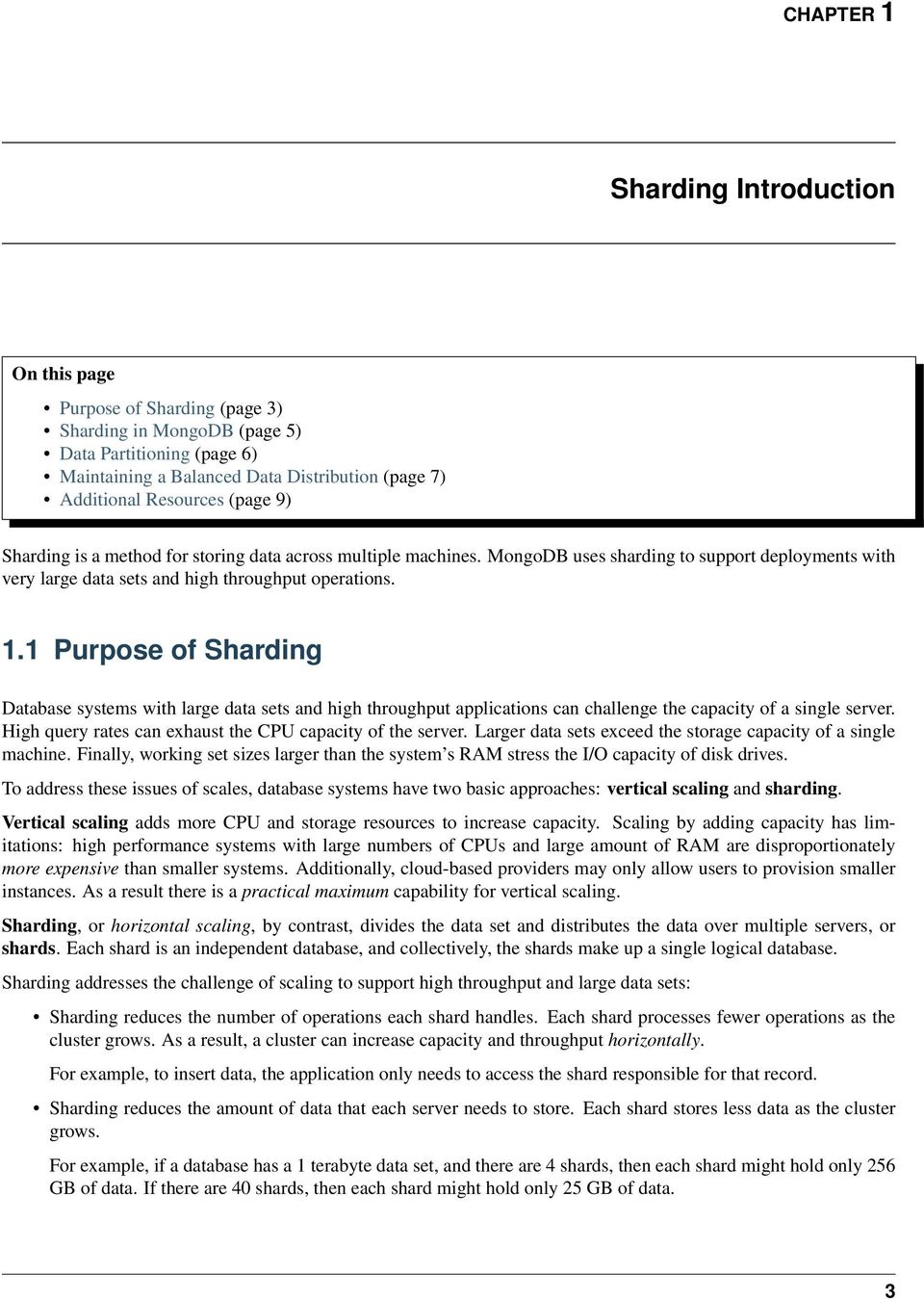
8 CHAPTER 1 Sharding Introduction On this page Purpose of Sharding (page 3) Sharding in MongoDB (page 5) Data Partitioning (page 6) Maintaining a Balanced Data Distribution (page 7) Additional Resources (page 9) Sharding is a method for storing data across multiple machines. MongoDB uses sharding to support deployments with very large data sets and high throughput operations. 1.1 Purpose of Sharding Database systems with large data sets and high throughput applications can challenge the capacity of a single server. High query rates can exhaust the CPU capacity of the server. Larger data sets exceed the storage capacity of a single machine. Finally, working set sizes larger than the system s RAM stress the I/O capacity of disk drives. To address these issues of scales, database systems have two basic approaches: vertical scaling and sharding. Vertical scaling adds more CPU and storage resources to increase capacity. Scaling by adding capacity has limitations: high performance systems with large numbers of CPUs and large amount of RAM are disproportionately more expensive than smaller systems. Additionally, cloud-based providers may only allow users to provision smaller instances. As a result there is a practical maximum capability for vertical scaling. Sharding, or horizontal scaling, by contrast, divides the data set and distributes the data over multiple servers, or shards. Each shard is an independent database, and collectively, the shards make up a single logical database. Sharding addresses the challenge of scaling to support high throughput and large data sets: Sharding reduces the number of operations each shard handles. Each shard processes fewer operations as the cluster grows. As a result, a cluster can increase capacity and throughput horizontally. For example, to insert data, the application only needs to access the shard responsible for that record. Sharding reduces the amount of data that each server needs to store. Each shard stores less data as the cluster grows. For example, if a database has a 1 terabyte data set, and there are 4 shards, then each shard might hold only 256 GB of data. If there are 40 shards, then each shard might hold only 25 GB of data. 3

9 4 Chapter 1. Sharding Introduction
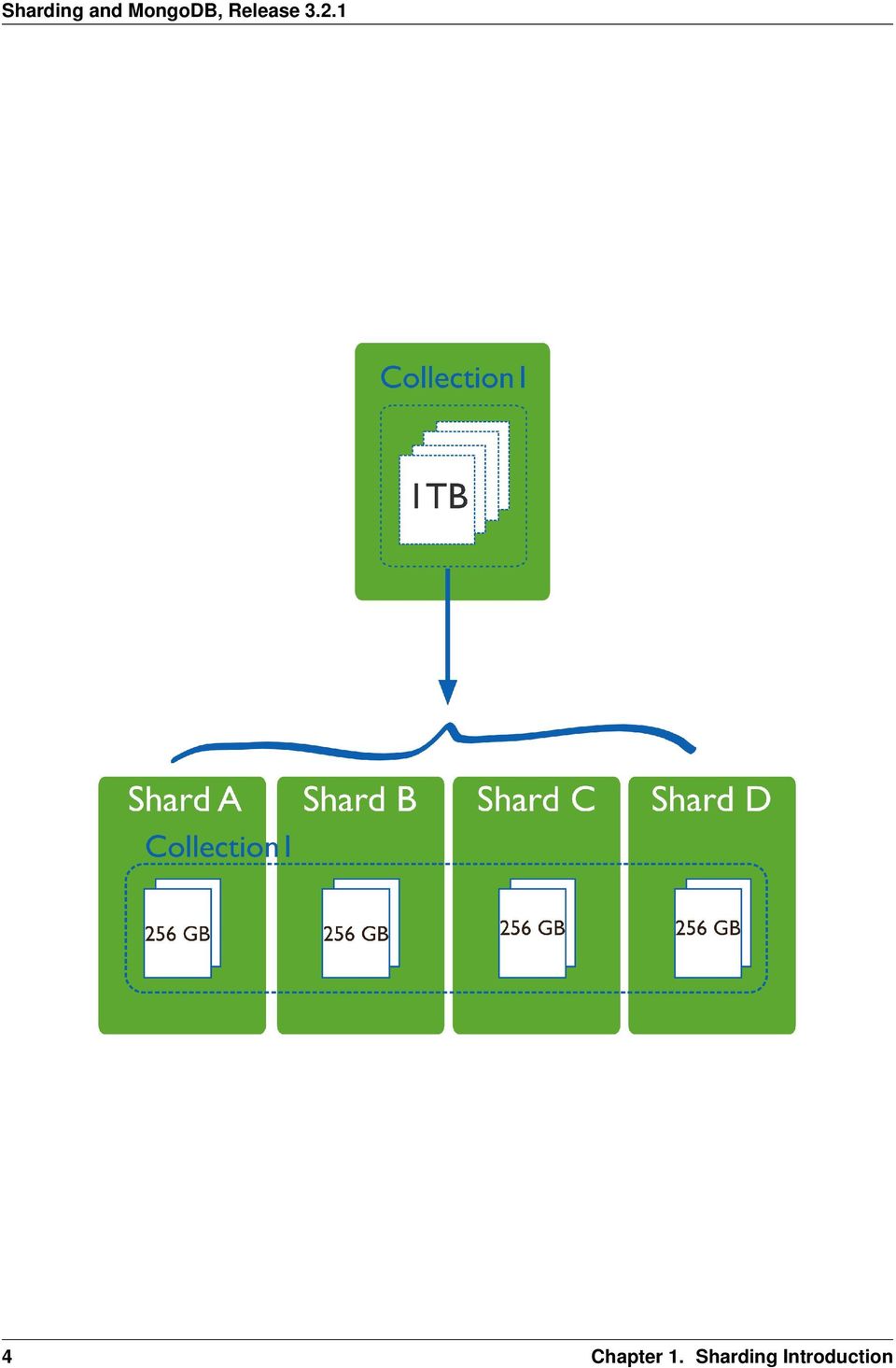
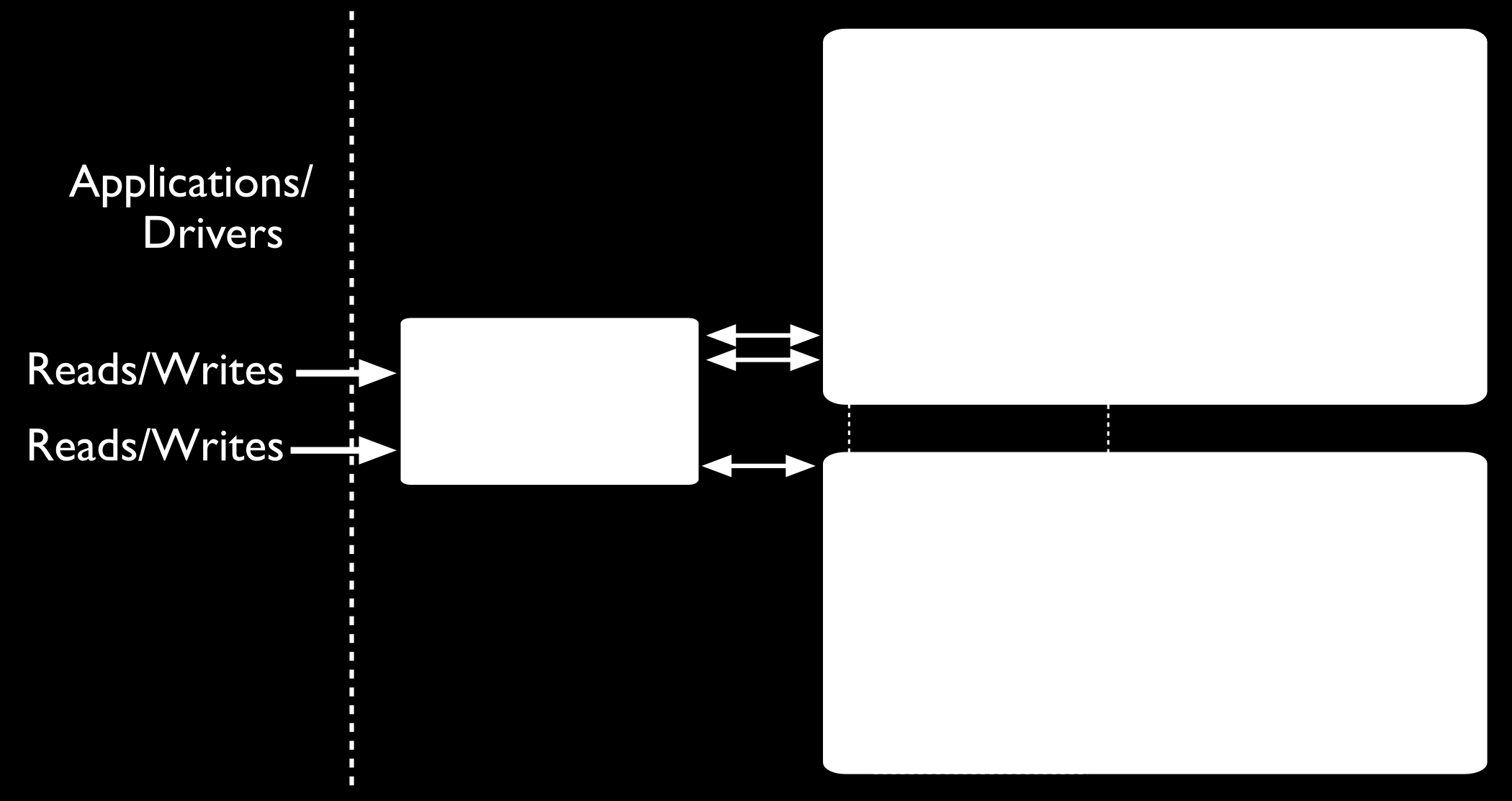
10 1.2 Sharding in MongoDB MongoDB supports sharding through the configuration of a sharded clusters. Sharded cluster has the following components: shards, query routers and config servers. Shards store the data. To provide high availability and data consistency, in a production sharded cluster, each shard is a replica set 1. For more information on replica sets, see Replica Sets. Query Routers, or mongos instances, interface with client applications and direct operations to the appropriate shard or shards. A client sends requests to a mongos, which then routes the operations to the shards and returns the results to the clients. A sharded cluster can contain more than one mongos to divide the client request load, and most sharded clusters have more than one mongos for this reason. Config servers store the cluster s metadata. This data contains a mapping of the cluster s data set to the shards. The query router uses this metadata to target operations to specific shards. Changed in version 3.2: Starting in MongoDB 3.2, config servers for sharded clusters can be deployed as a replica set. The replica set config servers must run the WiredTiger storage engine. MongoDB 3.2 deprecates the use of three mirrored mongod instances for config servers. 1 For development and testing purposes only, each shard can be a single mongod instead of a replica set Sharding in MongoDB 5

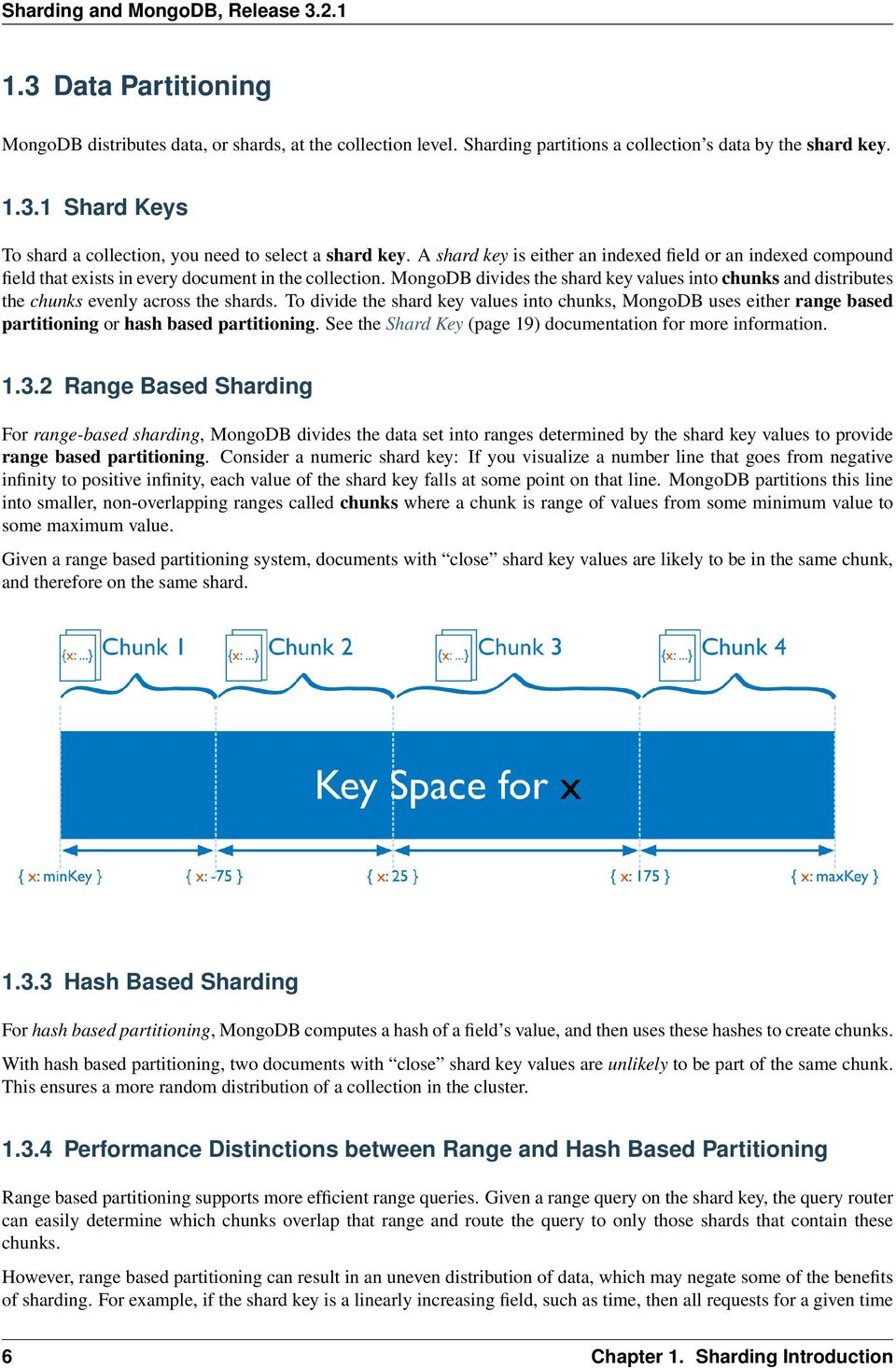
11 1.3 Data Partitioning MongoDB distributes data, or shards, at the collection level. Sharding partitions a collection s data by the shard key Shard Keys To shard a collection, you need to select a shard key. A shard key is either an indexed field or an indexed compound field that exists in every document in the collection. MongoDB divides the shard key values into chunks and distributes the chunks evenly across the shards. To divide the shard key values into chunks, MongoDB uses either range based partitioning or hash based partitioning. See the Shard Key (page 19) documentation for more information Range Based Sharding For range-based sharding, MongoDB divides the data set into ranges determined by the shard key values to provide range based partitioning. Consider a numeric shard key: If you visualize a number line that goes from negative infinity to positive infinity, each value of the shard key falls at some point on that line. MongoDB partitions this line into smaller, non-overlapping ranges called chunks where a chunk is range of values from some minimum value to some maximum value. Given a range based partitioning system, documents with close shard key values are likely to be in the same chunk, and therefore on the same shard Hash Based Sharding For hash based partitioning, MongoDB computes a hash of a field s value, and then uses these hashes to create chunks. With hash based partitioning, two documents with close shard key values are unlikely to be part of the same chunk. This ensures a more random distribution of a collection in the cluster Performance Distinctions between Range and Hash Based Partitioning Range based partitioning supports more efficient range queries. Given a range query on the shard key, the query router can easily determine which chunks overlap that range and route the query to only those shards that contain these chunks. However, range based partitioning can result in an uneven distribution of data, which may negate some of the benefits of sharding. For example, if the shard key is a linearly increasing field, such as time, then all requests for a given time 6 Chapter 1. Sharding Introduction
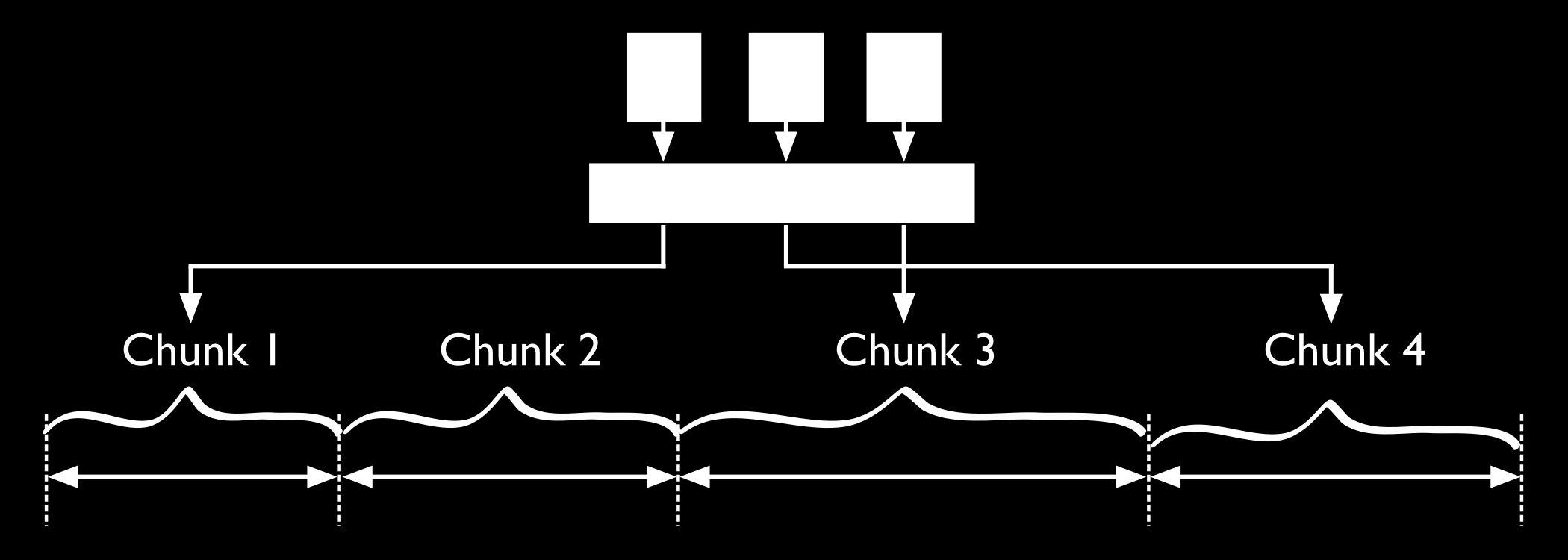
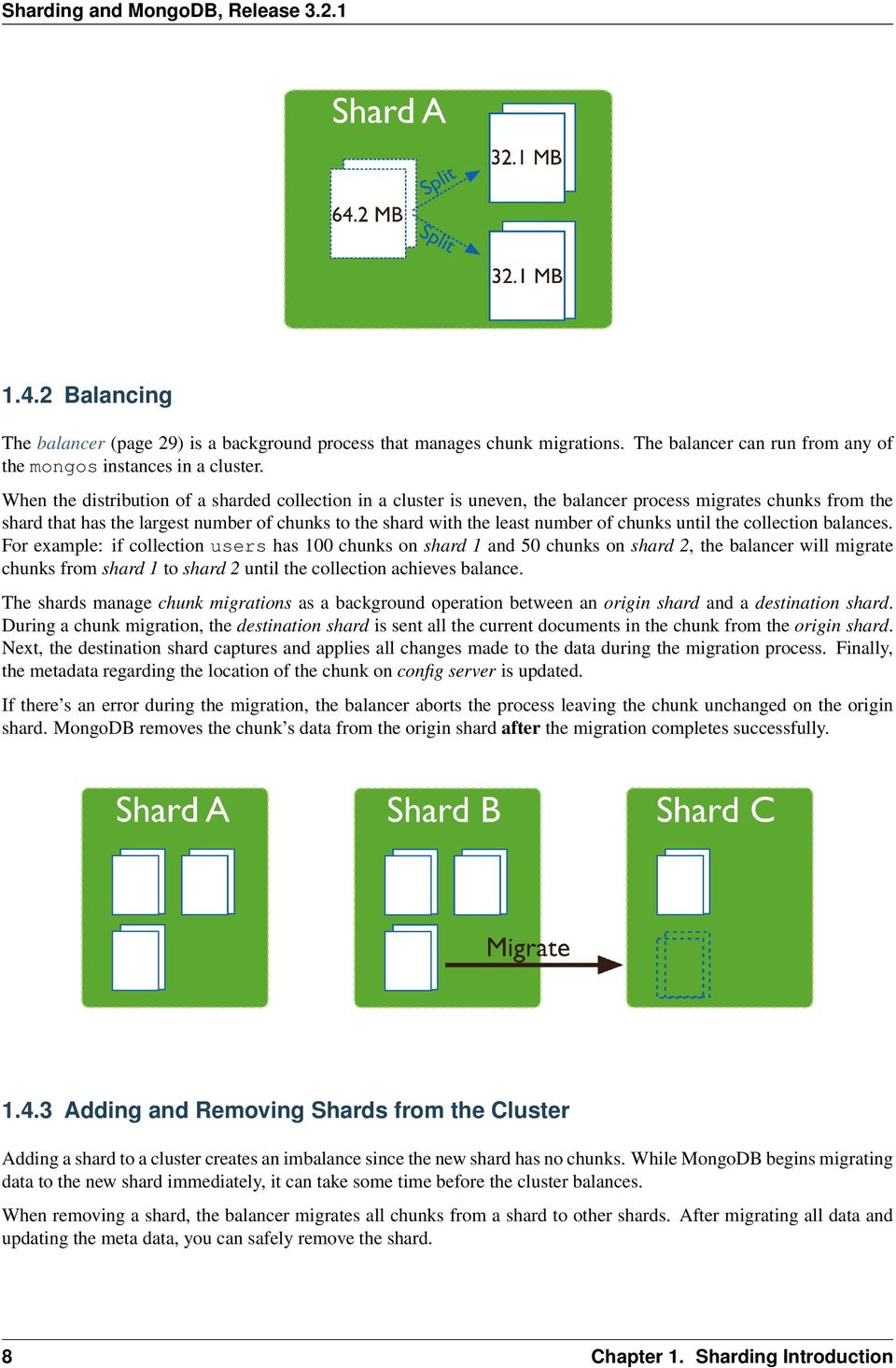
12 range will map to the same chunk, and thus the same shard. In this situation, a small set of shards may receive the majority of requests and the system would not scale very well. Hash based partitioning, by contrast, ensures an even distribution of data at the expense of efficient range queries. Hashed key values results in random distribution of data across chunks and therefore shards. But random distribution makes it more likely that a range query on the shard key will not be able to target a few shards but would more likely query every shard in order to return a result Customized Data Distribution with Tag Aware Sharding MongoDB allows administrators to direct the balancing policy using tag aware sharding. Administrators create and associate tags with ranges of the shard key, and then assign those tags to the shards. Then, the balancer migrates tagged data to the appropriate shards and ensures that the cluster always enforces the distribution of data that the tags describe. Tags are the primary mechanism to control the behavior of the balancer and the distribution of chunks in a cluster. Most commonly, tag aware sharding serves to improve the locality of data for sharded clusters that span multiple data centers. See Tag Aware Sharding (page 27) for more information. 1.4 Maintaining a Balanced Data Distribution The addition of new data or the addition of new servers can result in data distribution imbalances within the cluster, such as a particular shard contains significantly more chunks than another shard or a size of a chunk is significantly greater than other chunk sizes. MongoDB ensures a balanced cluster using two background process: splitting and the balancer Splitting Splitting is a background process that keeps chunks from growing too large. When a chunk grows beyond a specified chunk size (page 33), MongoDB splits the chunk in half. Inserts and updates triggers splits. Splits are an efficient meta-data change. To create splits, MongoDB does not migrate any data or affect the shards Maintaining a Balanced Data Distribution 7

13 1.4.2 Balancing The balancer (page 29) is a background process that manages chunk migrations. The balancer can run from any of the mongos instances in a cluster. When the distribution of a sharded collection in a cluster is uneven, the balancer process migrates chunks from the shard that has the largest number of chunks to the shard with the least number of chunks until the collection balances. For example: if collection users has 100 chunks on shard 1 and 50 chunks on shard 2, the balancer will migrate chunks from shard 1 to shard 2 until the collection achieves balance. The shards manage chunk migrations as a background operation between an origin shard and a destination shard. During a chunk migration, the destination shard is sent all the current documents in the chunk from the origin shard. Next, the destination shard captures and applies all changes made to the data during the migration process. Finally, the metadata regarding the location of the chunk on config server is updated. If there s an error during the migration, the balancer aborts the process leaving the chunk unchanged on the origin shard. MongoDB removes the chunk s data from the origin shard after the migration completes successfully Adding and Removing Shards from the Cluster Adding a shard to a cluster creates an imbalance since the new shard has no chunks. While MongoDB begins migrating data to the new shard immediately, it can take some time before the cluster balances. When removing a shard, the balancer migrates all chunks from a shard to other shards. After migrating all data and updating the meta data, you can safely remove the shard. 8 Chapter 1. Sharding Introduction
14 1.5 Additional Resources Sharding Methods for MongoDB (Presentation) 2 Everything You Need to Know About Sharding (Presentation) 3 MongoDB for Time Series Data: Sharding 4 MongoDB Operations Best Practices White Paper 5 Talk to a MongoDB Expert About Scaling 6 MongoDB Consulting Package 7 Quick Reference Cards Additional Resources 9
15 10 Chapter 1. Sharding Introduction

16 CHAPTER 2 Sharding Concepts These documents present the details of sharding in MongoDB. These include the components, the architectures, and the behaviors of MongoDB sharded clusters. For an overview of sharding and sharded clusters, see Sharding Introduction (page 3). Sharded Cluster Components (page 12) A sharded cluster consists of shards, config servers, and mongos instances. Shards (page 13) A shard is a single server or replica set that holds a part of the sharded collection. Config Servers (page 14) Config servers hold the metadata about the cluster, such as the shard location of the data. Sharded Cluster Architectures (page 15) Outlines the requirements for sharded clusters, and provides examples of several possible architectures for sharded clusters. Sharded Cluster Requirements (page 15) Discusses the requirements for sharded clusters in MongoDB. Production Cluster Architecture (page 16) Outlines the components required to deploy a redundant and highly available sharded cluster. Continue reading from Sharded Cluster Architectures (page 15) for additional descriptions of sharded cluster deployments. Sharded Cluster Behavior (page 18) Discusses the operations of sharded clusters with regards to the automatic balancing of data in a cluster and other related availability and security considerations. Shard Keys (page 19) MongoDB uses the shard key to divide a collection s data across the cluster s shards. Sharded Cluster High Availability (page 21) Sharded clusters provide ways to address some availability concerns. Sharded Cluster Query Routing (page 23) The cluster s routers, or mongos instances, send reads and writes to the relevant shard or shards. Sharding Mechanics (page 29) Discusses the internal operation and behavior of sharded clusters, including chunk migration, balancing, and the cluster metadata. Sharded Collection Balancing (page 29) Balancing distributes a sharded collection s data cluster to all of the shards. Sharded Cluster Metadata (page 35) The cluster maintains internal metadata that reflects the location of data within the cluster. Continue reading from Sharding Mechanics (page 29) for more documentation of the behavior and operation of sharded clusters. 11

17 2.1 Sharded Cluster Components Sharded clusters implement sharding. A sharded cluster consists of the following components: Shards A shard is a MongoDB instance that holds a subset of a collection s data. Each shard is either a single mongod instance or a replica set. In production, all shards are replica sets. For more information see Shards (page 13). Config Servers Config servers (page 14) hold metadata about the sharded cluster. The metadata maps chunks to shards. Changed in version 3.2: Starting in MongoDB 3.2, config servers for sharded clusters can be deployed as a replica set. The replica set config servers must run the WiredTiger storage engine. MongoDB 3.2 deprecates the use of three mirrored mongod instances for config servers. For more information, see Config Servers (page 14). mongos Instances mongos instances route the reads and writes from applications to the shards. Applications do not access the shards directly. For more information see Sharded Cluster Query Routing (page 23). To deploy a sharded cluster, see Deploy a Sharded Cluster (page 38). 12 Chapter 2. Sharding Concepts

18 2.1.1 Shards On this page Primary Shard (page 13) Shard Status (page 14) A shard is a replica set or a single mongod that contains a subset of the data for the sharded cluster. Together, the cluster s shards hold the entire data set for the cluster. Typically each shard is a replica set. The replica set provides redundancy and high availability for the data in each shard. Important: MongoDB shards data on a per collection basis. You must access all data in a sharded cluster via the mongos instances. If you connect directly to a shard, you will see only its fraction of the cluster s data. There is no particular order to the data set on a specific shard. MongoDB does not guarantee that any two contiguous chunks will reside on a single shard. Primary Shard Every database has a primary 1 shard that holds all the un-sharded collections in that database. To change the primary shard for a database, use the moveprimary command. The process of migrating the primary shard may take significant time to complete, and you should not access the collections until it completes. 1 The term primary shard has nothing to do with the term primary in the context of replica sets Sharded Cluster Components 13

19 When you deploy a new sharded cluster with shards that were previously used as replica sets, all existing databases continue to reside on their original shard. Databases created subsequently may reside on any shard in the cluster. Shard Status Use the sh.status() method in the mongo shell to see an overview of the cluster. This reports includes which shard is primary for the database and the chunk distribution across the shards. See sh.status() method for more details Config Servers On this page Replica Set Config Servers (page 14) Read and Write Operations on Config Servers (page 14) Config Server Availability (page 15) Config servers store the metadata (page 35) for a sharded cluster. Warning: If the config servers become inaccessible, the cluster is not accessible. If you cannot recover the data on a config server, the cluster will be inoperable. MongoDB also uses the config servers to manage distributed locks. Replica Set Config Servers Changed in version 3.2. Starting in MongoDB 3.2, config servers for new sharded clusters can be deployed as a replica set. This change improves consistency across the config servers, since MongoDB can take advantage of the standard replica set read and write protocols to replicate the data across the config servers. In addition, using a replica set for config servers allows a sharded cluster to have more than 3 config servers since a replica set can have up to 50 members. The following restrictions apply to a replica set configuration when used for config servers: Must have zero arbiters. Must have no delayed members. Must build indexes (i.e. no member should have buildindexes setting set to false). Earlier versions of MongoDB required exactly three mirrored mongod instances to act as the config servers. MongoDB 3.2 deprecates the use of three mirrored mongod instances for config servers. Each sharded cluster must have its own config servers. Do not use the same config servers for different sharded clusters. Read and Write Operations on Config Servers Config servers store the cluster s metadata in the config database (page 95). The mongos instances cache this data and use it to route reads and writes to shards. MongoDB only writes data to the config servers when the metadata changes, such as 14 Chapter 2. Sharding Concepts
20 after a chunk migration (page 30), or after a chunk split (page 33). When writing to the replica set config servers, MongoDB uses a write concern of "majority". MongoDB reads data from the config server in the following cases: A new mongos starts for the first time, or an existing mongos restarts. After change in the cluster metadata, such as after a chunk migration. When reading from the replica set config servers, MongoDB uses a of "majority". Config Server Availability If the config server replica set loses its primary and cannot elect a primary, the cluster s metadata becomes read only. You can still read and write data from the shards, but no chunk migration or chunk splits will occur until the replica set can elect a primary. If all config databases become unavailable, the cluster can become inoperable. The mongos instances cache the metadata from the config servers. As such, if all config server members become unavailable, you can still use the cluster if you do not restart the mongos instances until after the config servers are accessible again. If you restart the mongos instances before the config servers are available, the mongos will be unable to route reads and writes. Clusters become inoperable without the cluster metadata. To ensure that the config servers remain available and intact, backups of config servers are critical. The data on the config server is small compared to the data stored in a cluster, and the config server has a relatively low activity load. See A Config Server Replica Set Member Become Unavailable (page 22) for more information. 2.2 Sharded Cluster Architectures The following documents introduce deployment patterns for sharded clusters. Sharded Cluster Requirements (page 15) Discusses the requirements for sharded clusters in MongoDB. Production Cluster Architecture (page 16) Outlines the components required to deploy a redundant and highly available sharded cluster. Sharded Cluster Test Architecture (page 18) Sharded clusters for testing and development can include fewer components Sharded Cluster Requirements On this page Data Quantity Requirements (page 16) While sharding is a powerful and compelling feature, sharded clusters have significant infrastructure requirements and increases the overall complexity of a deployment. As a result, only deploy sharded clusters when indicated by application and operational requirements Sharding is the only solution for some classes of deployments. Use sharded clusters if: your data set approaches or exceeds the storage capacity of a single MongoDB instance Sharded Cluster Architectures 15
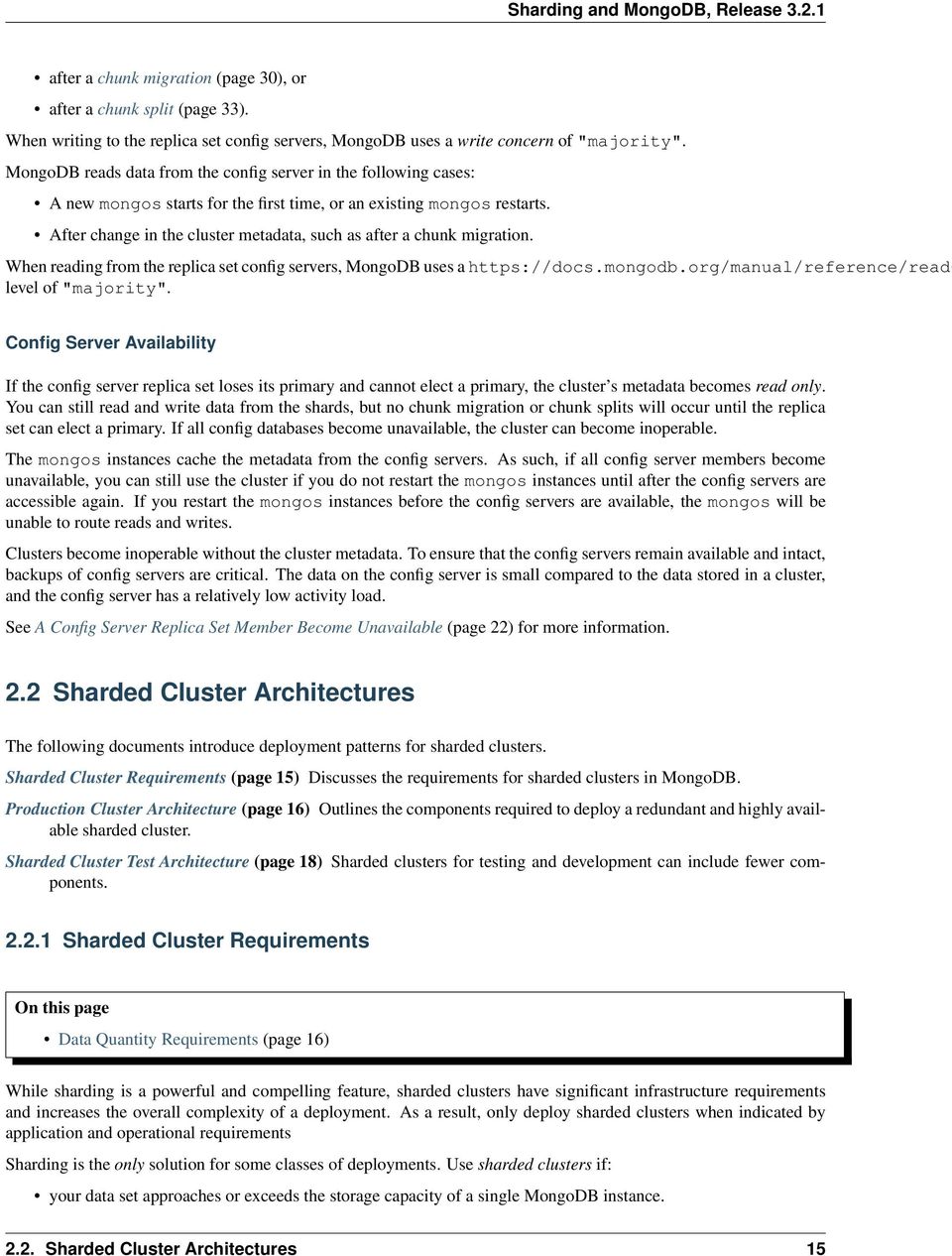
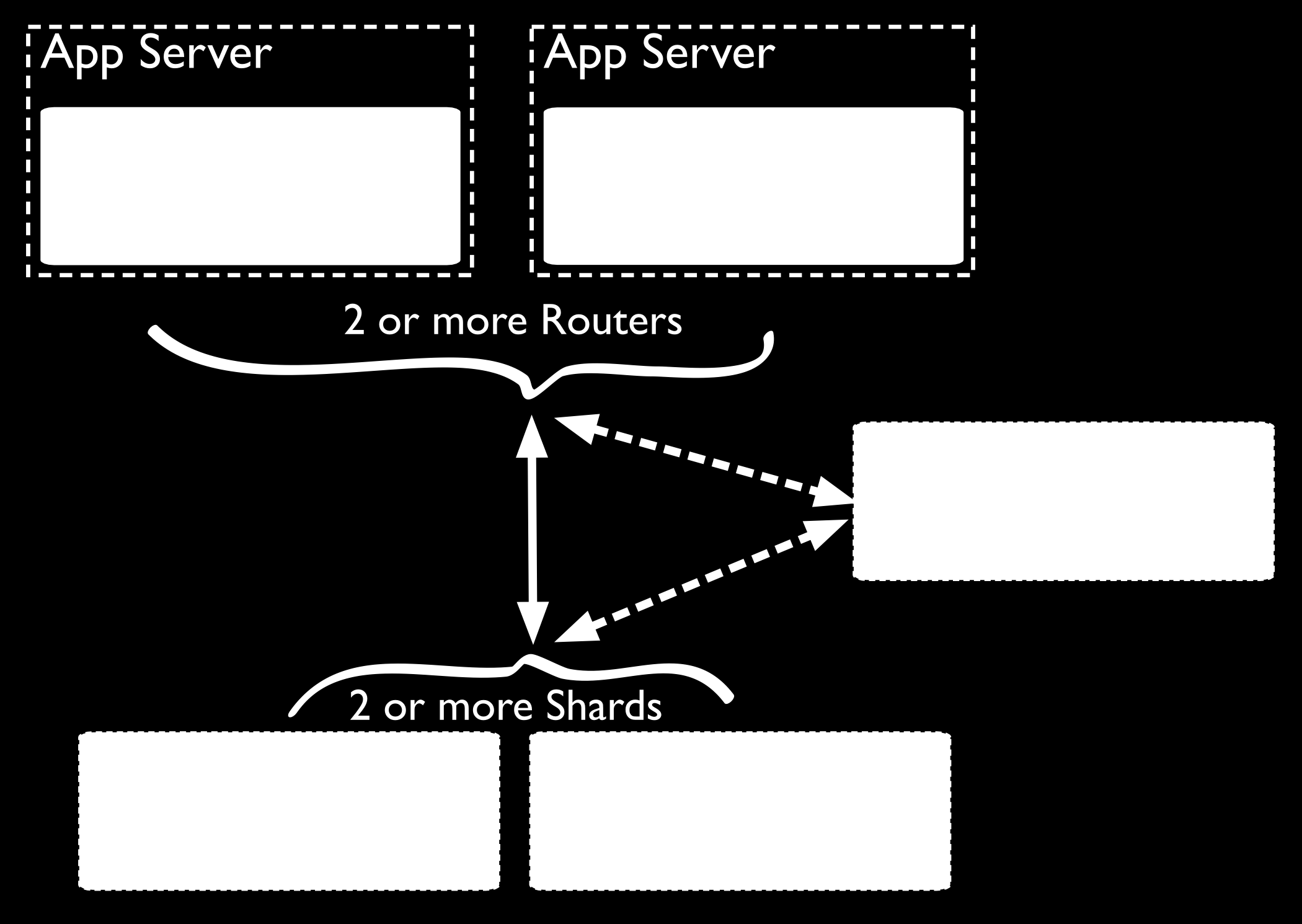
21 the size of your system s active working set will soon exceed the capacity of your system s maximum RAM. a single MongoDB instance cannot meet the demands of your write operations, and all other approaches have not reduced contention. If these attributes are not present in your system, sharding will only add complexity to your system without adding much benefit. Important: It takes time and resources to deploy sharding. If your system has already reached or exceeded its capacity, it will be difficult to deploy sharding without impacting your application. As a result, if you think you will need to partition your database in the future, do not wait until your system is over capacity to enable sharding. When designing your data model, take into consideration your sharding needs. Data Quantity Requirements Your cluster should manage a large quantity of data if sharding is to have an effect. The default chunk size is 64 megabytes. And the balancer (page 29) will not begin moving data across shards until the imbalance of chunks among the shards exceeds the migration threshold (page 30). In practical terms, unless your cluster has many hundreds of megabytes of data, your data will remain on a single shard. In some situations, you may need to shard a small collection of data. But most of the time, sharding a small collection is not worth the added complexity and overhead unless you need additional write capacity. If you have a small data set, a properly configured single MongoDB instance or a replica set will usually be enough for your persistence layer needs. Chunk size is user configurable. For most deployments, the default value is of 64 megabytes is ideal. See Chunk Size (page 33) for more information Production Cluster Architecture In a production cluster, you must ensure that data is redundant and that your systems are highly available. To that end, a production cluster must have the following components: Config Servers Changed in version 3.2: Starting in MongoDB 3.2, config servers for sharded clusters can be deployed as a replica set. The replica set config servers must run the WiredTiger storage engine. MongoDB 3.2 deprecates the use of three mirrored mongod instances for config servers. A single sharded cluster must have exclusive use of its config servers (page 14). If you have multiple sharded clusters, each cluster must have its own replica set config servers. Two or More Replica Sets As Shards These replica sets are the shards. For information on replica sets, see One or More Query Routers (mongos) The mongos instances are the routers for the cluster. Typically, deployments have one mongos instance on each application server. See also: You may also deploy a group of mongos instances and use a proxy/load balancer between the application and the mongos. In these deployments, you must configure the load balancer for client affinity so that every connection from a single client reaches the same mongos. Because cursors and other resources are specific to an single mongos instance, each client must interact with only one mongos instance. Deploy a Sharded Cluster (page 38) 16 Chapter 2. Sharding Concepts
22 2.2. Sharded Cluster Architectures 17
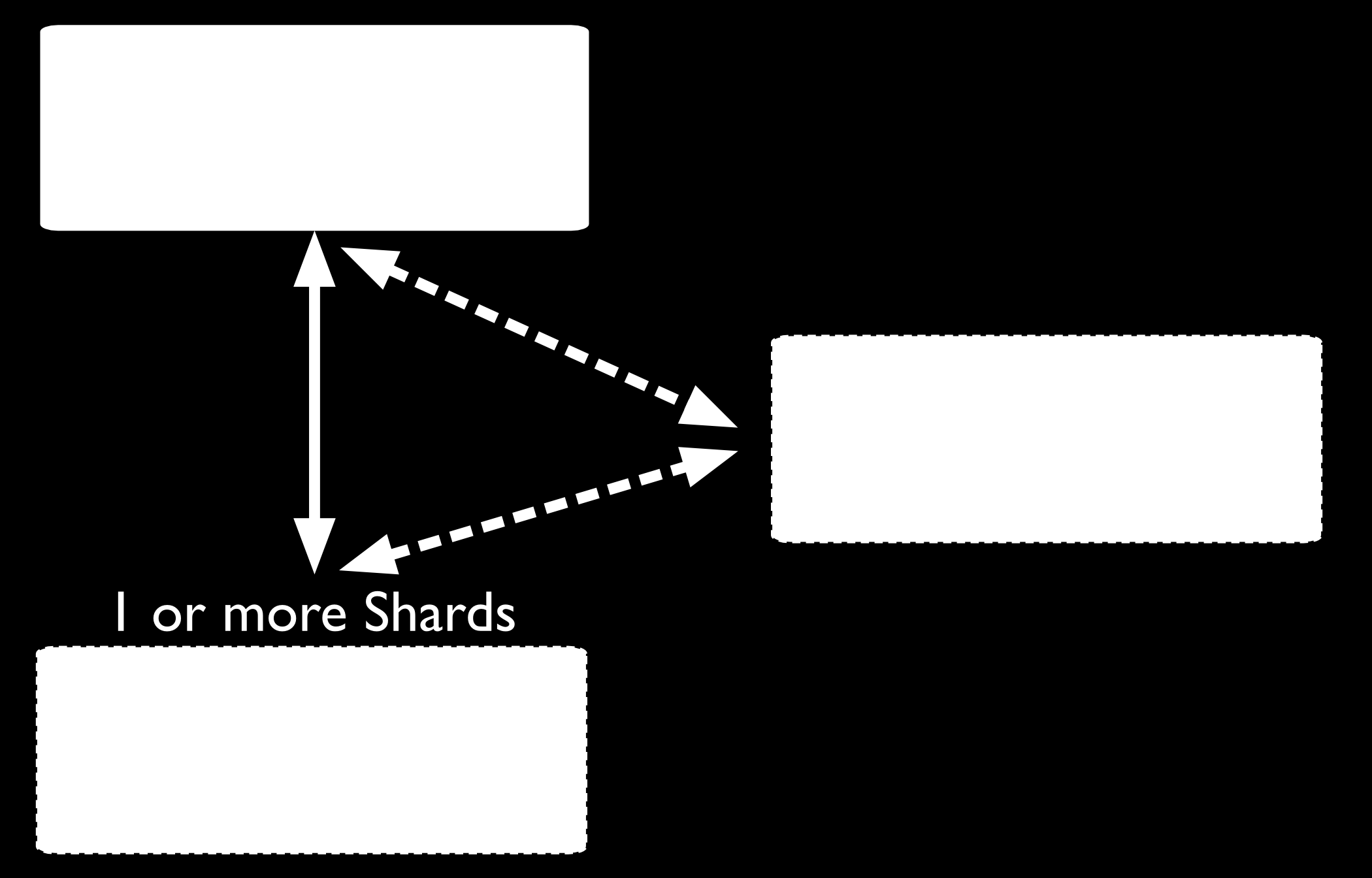
23 2.2.3 Sharded Cluster Test Architecture Warning: Use the test cluster architecture for testing and development only. For testing and development, you can deploy a sharded cluster with a minimum number of components. These nonproduction clusters have the following components: A replica set config server (page 14) with one member. Changed in version 3.2: Starting in MongoDB 3.2, config servers for sharded clusters can be deployed as a replica set. The replica set config servers must run the WiredTiger storage engine. MongoDB 3.2 deprecates the use of three mirrored mongod instances for config servers. At least one shard. Shards are either replica sets or a standalone mongod instances. One mongos instance. See Production Cluster Architecture (page 16) 2.3 Sharded Cluster Behavior These documents address the distribution of data and queries to a sharded cluster as well as specific security and availability considerations for sharded clusters. Shard Keys (page 19) MongoDB uses the shard key to divide a collection s data across the cluster s shards. Sharded Cluster High Availability (page 21) Sharded clusters provide ways to address some availability concerns. Sharded Cluster Query Routing (page 23) The cluster s routers, or mongos instances, send reads and writes to the relevant shard or shards. 18 Chapter 2. Sharding Concepts

24 Tag Aware Sharding (page 27) Tags associate specific ranges of shard key values with specific shards for use in managing deployment patterns Shard Keys On this page Considerations (page 19) Hashed Shard Keys (page 19) Impacts of Shard Keys on Cluster Operations (page 20) Additional Information (page 21) The shard key determines the distribution of the collection s documents among the cluster s shards. The shard key is either an indexed field or an indexed compound field that exists in every document in the collection. MongoDB partitions data in the collection using ranges of shard key values. Each range, or chunk, defines a nonoverlapping range of shard key values. MongoDB distributes the chunks, and their documents, among the shards in the cluster. When a chunk grows beyond the chunk size (page 33), MongoDB attempts to split the chunk into smaller chunks, always based on ranges in the shard key. Considerations Shard keys are immutable and cannot be changed after insertion. See the system limits for sharded cluster for more information. The index on the shard key cannot be a multikey index. Hashed Shard Keys New in version 2.4. Hashed shard keys use a hashed index of a single field as the shard key to partition data across your sharded cluster. The field you choose as your hashed shard key should have a good cardinality, or large number of different values. Hashed keys work well with fields that increase monotonically like ObjectId values or timestamps Sharded Cluster Behavior 19
25 If you shard an empty collection using a hashed shard key, MongoDB will automatically create and migrate chunks so that each shard has two chunks. You can control how many chunks MongoDB will create with the numinitialchunks parameter to shardcollection or by manually creating chunks on the empty collection using the split command. To shard a collection using a hashed shard key, see Shard a Collection Using a Hashed Shard Key (page 45). Tip MongoDB automatically computes the hashes when resolving queries using hashed indexes. Applications do not need to compute hashes. Impacts of Shard Keys on Cluster Operations The shard key affects write and query performance by determining how the MongoDB partitions data in the cluster and how effectively the mongos instances can direct operations to the cluster. Consider the following operational impacts of shard key selection: Write Scaling Some possible shard keys will allow your application to take advantage of the increased write capacity that the cluster can provide, while others do not. Consider the following example where you shard by the values of the default _id field, which is ObjectId. MongoDB generates ObjectId values upon document creation to produce a unique identifier for the object. However, the most significant bits of data in this value represent a time stamp, which means that they increment in a regular and predictable pattern. Even though this value has high cardinality (page 45), when using this, any date, or other monotonically increasing number as the shard key, all insert operations will be storing data into a single chunk, and therefore, a single shard. As a result, the write capacity of this shard will define the effective write capacity of the cluster. A shard key that increases monotonically will not hinder performance if you have a very low insert rate, or if most of your write operations are update() operations distributed through your entire data set. Generally, choose shard keys that have both high cardinality and will distribute write operations across the entire cluster. Typically, a computed shard key that has some amount of randomness, such as ones that include a cryptographic hash (i.e. MD5 or SHA1) of other content in the document, will allow the cluster to scale write operations. However, random shard keys do not typically provide query isolation (page 21), which is another important characteristic of shard keys. New in version 2.4: MongoDB makes it possible to shard a collection on a hashed index. This can greatly improve write scaling. See Shard a Collection Using a Hashed Shard Key (page 45). Querying The mongos provides an interface for applications to interact with sharded clusters that hides the complexity of data partitioning. A mongos receives queries from applications, and uses metadata from the config server (page 14), to route queries to the mongod instances with the appropriate data. While the mongos succeeds in making all querying operational in sharded environments, the shard key you select can have a profound affect on query performance. See also: The Sharded Cluster Query Routing (page 23) and config server (page 14) sections for a more general overview of querying in sharded environments. 20 Chapter 2. Sharding Concepts
26 Query Isolation Generally, the fastest queries in a sharded environment are those that mongos will route to a single shard, using the shard key and the cluster meta data from the config server (page 14). For queries that don t include the shard key, mongos must query all shards, wait for their responses and then return the result to the application. These scatter/gather queries can be long running operations. If your query includes the first component of a compound shard key 2, the mongos can route the query directly to a single shard, or a small number of shards, which provides better performance. Even if you query values of the shard key that reside in different chunks, the mongos will route queries directly to specific shards. To select a shard key for a collection: determine the most commonly included fields in queries for a given application find which of these operations are most performance dependent. If this field has low cardinality (i.e not sufficiently selective) you should add a second field to the shard key making a compound shard key. The data may become more splittable with a compound shard key. See Sharded Cluster Query Routing (page 23) for more information on query operations in the context of sharded clusters. Sorting In sharded systems, the mongos performs a merge-sort of all sorted query results from the shards. See Sharded Cluster Query Routing (page 23) and index-sort for more information. Indivisible Chunks An insufficiently granular shard key can result in chunks that are unsplittable. See Create a Shard Key that is Easily Divisible (page 44) for more information. Additional Information Considerations for Selecting Shard Keys (page 43) Shard a Collection Using a Hashed Shard Key (page 45) Sharded Cluster High Availability On this page Application Servers or mongos Instances Become Unavailable (page 22) A Single mongod Becomes Unavailable in a Shard (page 22) All Members of a Shard Become Unavailable (page 22) A Config Server Replica Set Member Become Unavailable (page 22) Renaming Mirrored Config Servers and Cluster Availability (page 22) Shard Keys and Cluster Availability (page 23) A production (page 16) cluster has no single point of failure. This section introduces the availability concerns for MongoDB deployments in general and highlights potential failure scenarios and available resolutions. 2 In many ways, you can think of the shard key a cluster-wide index. However, be aware that sharded systems cannot enforce cluster-wide unique indexes unless the unique field is in the shard key. Consider the page for more information on indexes and compound indexes Sharded Cluster Behavior 21
27 Application Servers or mongos Instances Become Unavailable If each application server has its own mongos instance, other application servers can continue to access the database. Furthermore, mongos instances do not maintain persistent state, and they can restart and become unavailable without losing any state or data. When a mongos instance starts, it retrieves a copy of the config database and can begin routing queries. A Single mongod Becomes Unavailable in a Shard Replica sets provide high availability for shards. If the unavailable mongod is a primary, then the replica set will elect a new primary. If the unavailable mongod is a secondary, and it disconnects the primary and secondary will continue to hold all data. In a three member replica set, even if a single member of the set experiences catastrophic failure, two other members have full copies of the data. 3 Always investigate availability interruptions and failures. If a system is unrecoverable, replace it and create a new member of the replica set as soon as possible to replace the lost redundancy. All Members of a Shard Become Unavailable If all members of a replica set shard are unavailable, all data held in that shard is unavailable. However, the data on all other shards will remain available, and it is possible to read and write data to the other shards. However, your application must be able to deal with partial results, and you should investigate the cause of the interruption and attempt to recover the shard as soon as possible. A Config Server Replica Set Member Become Unavailable Changed in version 3.2: Starting in MongoDB 3.2, config servers for sharded clusters can be deployed as a replica set. The replica set config servers must run the WiredTiger storage engine. MongoDB 3.2 deprecates the use of three mirrored mongod instances for config servers. Replica sets provide high availability for the config servers. If an unavailable config server is a primary, then the replica set will elect a new primary. If the replica set config server loses its primary and cannot elect a primary, the cluster s metadata becomes read only. You can still read and write data from the shards, but no chunk migration (page 29) or chunk splits (page 78) will occur until a primary is available. If all config databases become unavailable, the cluster can become inoperable. Note: All config servers must be running and available when you first initiate a sharded cluster. Renaming Mirrored Config Servers and Cluster Availability If the sharded cluster is using mirrored config servers instead of a replica set and the name or address that a sharded cluster uses to connect to a config server changes, you must restart every mongod and mongos instance in the sharded cluster. Avoid downtime by using CNAMEs to identify config servers within the MongoDB deployment. To avoid downtime when renaming config servers, use DNS names unrelated to physical or virtual hostnames to refer to your config servers (page 14). Generally, refer to each config server using the DNS alias (e.g. a CNAME record). When specifying the config server connection string to mongos, use these names. These records make it possible to change the IP address or rename config servers without changing the connection string and without having to restart the entire cluster. 3 If an unavailable secondary becomes available while it still has current oplog entries, it can catch up to the latest state of the set using the normal replication process; otherwise, it must perform an initial sync. 22 Chapter 2. Sharding Concepts
28 Shard Keys and Cluster Availability The most important consideration when choosing a shard key are: to ensure that MongoDB will be able to distribute data evenly among shards, and to scale writes across the cluster, and to ensure that mongos can isolate most queries to a specific mongod. Furthermore: Each shard should be a replica set, if a specific mongod instance fails, the replica set members will elect another to be primary and continue operation. However, if an entire shard is unreachable or fails for some reason, that data will be unavailable. If the shard key allows the mongos to isolate most operations to a single shard, then the failure of a single shard will only render some data unavailable. If your shard key distributes data required for every operation throughout the cluster, then the failure of the entire shard will render the entire cluster unavailable. In essence, this concern for reliability simply underscores the importance of choosing a shard key that isolates query operations to a single shard Sharded Cluster Query Routing On this page Routing Process (page 23) Detect Connections to mongos Instances (page 24) Broadcast Operations and Targeted Operations (page 24) Sharded and Non-Sharded Data (page 27) MongoDB mongos instances route queries and write operations to shards in a sharded cluster. mongos provide the only interface to a sharded cluster from the perspective of applications. Applications never connect or communicate directly with the shards. The mongos tracks what data is on which shard by caching the metadata from the config servers (page 14). The mongos uses the metadata to route operations from applications and clients to the mongod instances. A mongos has no persistent state and consumes minimal system resources. The most common practice is to run mongos instances on the same systems as your application servers, but you can maintain mongos instances on the shards or on other dedicated resources. Changed in version 3.2: For aggregation operations that run on multiple shards, if the operations do not require running on the database s primary shard, these operations can route the results to any shard to merge the results and avoid overloading the primary shard for that database. Routing Process A mongos instance uses the following processes to route queries and return results. How mongos Determines which Shards Receive a Query A mongos instance routes a query to a cluster by: 2.3. Sharded Cluster Behavior 23
29 1. Determining the list of shards that must receive the query. 2. Establishing a cursor on all targeted shards. In some cases, when the shard key or a prefix of the shard key is a part of the query, the mongos can route the query to a subset of the shards. Otherwise, the mongos must direct the query to all shards that hold documents for that collection. Example Given the following shard key: { zipcode: 1, u_id: 1, c_date: 1 } Depending on the distribution of chunks in the cluster, the mongos may be able to target the query at a subset of shards, if the query contains the following fields: { zipcode: 1 } { zipcode: 1, u_id: 1 } { zipcode: 1, u_id: 1, c_date: 1 } How mongos Handles Query Modifiers If the result of the query is not sorted, the mongos instance opens a result cursor that round robins results from all cursors on the shards. If the query specifies sorted results using the sort() cursor method, the mongos instance passes the $orderby option to the shards. The primary shard for the database receives and performs a merge sort for all results before returning the data to the client via the mongos. If the query limits the size of the result set using the limit() cursor method, the mongos instance passes that limit to the shards and then re-applies the limit to the result before returning the result to the client. If the query specifies a number of records to skip using the skip() cursor method, the mongos cannot pass the skip to the shards, but rather retrieves unskipped results from the shards and skips the appropriate number of documents when assembling the complete result. However, when used in conjunction with a limit(), the mongos will pass the limit plus the value of the skip() to the shards to improve the efficiency of these operations. Detect Connections to mongos Instances To detect if the MongoDB instance that your client is connected to is mongos, use the ismaster command. When a client connects to a mongos, ismaster returns a document with a msg field that holds the string isdbgrid. For example: { } "ismaster" : true, "msg" : "isdbgrid", "maxbsonobjectsize" : , "ok" : 1 If the application is instead connected to a mongod, the returned document does not include the isdbgrid string. Broadcast Operations and Targeted Operations In general, operations in a sharded environment are either: 24 Chapter 2. Sharding Concepts
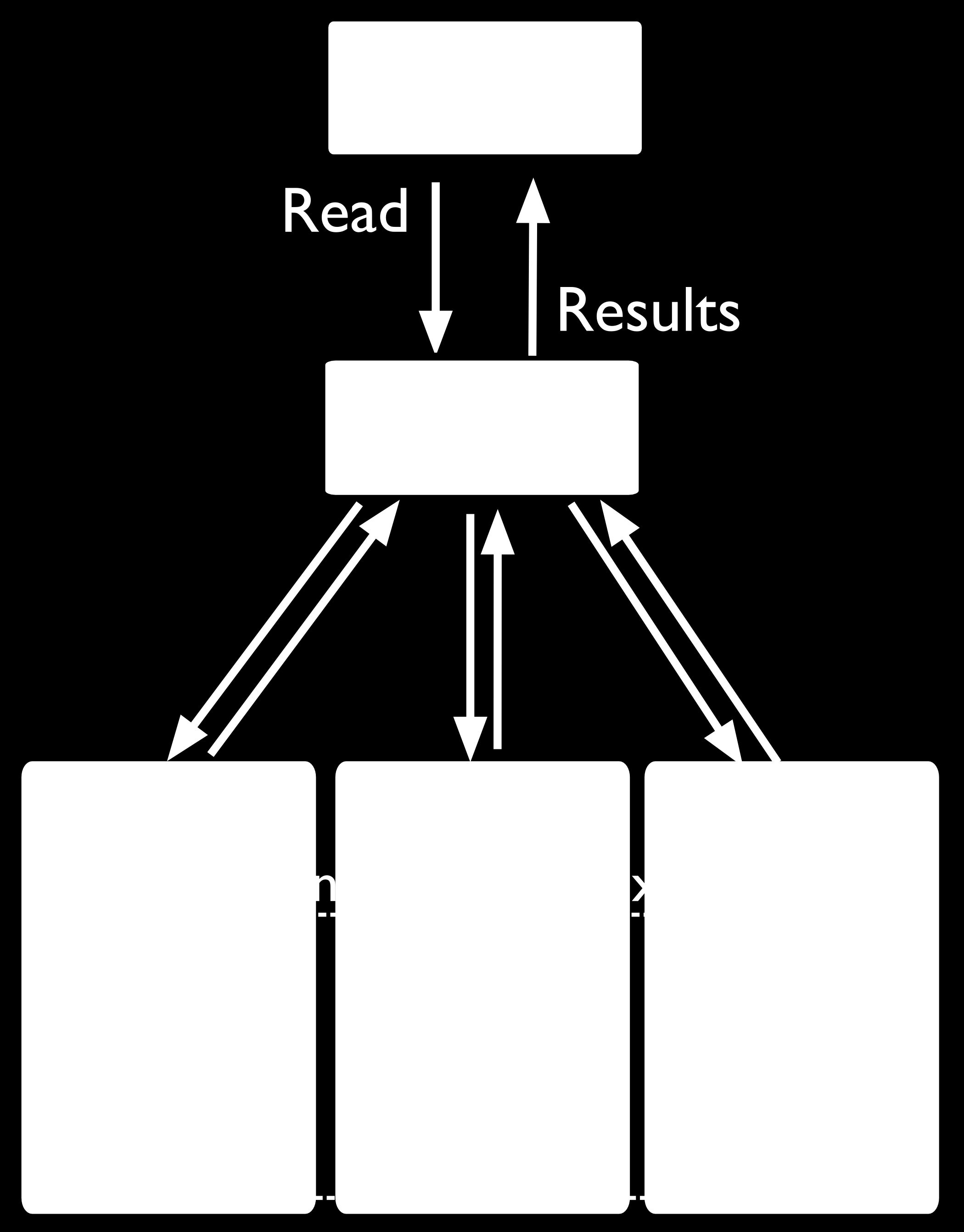
30 Broadcast to all shards in the cluster that hold documents in a collection Targeted at a single shard or a limited group of shards, based on the shard key For best performance, use targeted operations whenever possible. While some operations must broadcast to all shards, you can ensure MongoDB uses targeted operations whenever possible by always including the shard key. Broadcast Operations mongos instances broadcast queries to all shards for the collection unless the mongos can determine which shard or subset of shards stores this data. Multi-update operations are always broadcast operations. The remove() operation is always a broadcast operation, unless the operation specifies the shard key in full. Targeted Operations All insert() operations target to one shard. All single update() (including upsert operations) and remove() operations must target to one shard Sharded Cluster Behavior 25
31 Important: All update() and remove() operations for a sharded collection that specify the justone or multi: false option must include the shard key or the _id field in the query specification. update() and remove() operations specifying justone or multi: false in a sharded collection without the shard key or the _id field return an error. For queries that include the shard key or portion of the shard key, mongos can target the query at a specific shard or set of shards. This is the case only if the portion of the shard key included in the query is a prefix of the shard key. For example, if the shard key is: { a: 1, b: 1, c: 1 } The mongos program can route queries that include the full shard key or either of the following shard key prefixes at a specific shard or set of shards: { a: 1 } { a: 1, b: 1 } Depending on the distribution of data in the cluster and the selectivity of the query, mongos may still have to contact multiple shards 4 to fulfill these queries. 4 mongos will route some queries, even some that include the shard key, to all shards, if needed. 26 Chapter 2. Sharding Concepts
32 Sharded and Non-Sharded Data Sharding operates on the collection level. You can shard multiple collections within a database or have multiple databases with sharding enabled. 5 However, in production deployments, some databases and collections will use sharding, while other databases and collections will only reside on a single shard. Regardless of the data architecture of your sharded cluster, ensure that all queries and operations use the mongos router to access the data cluster. Use the mongos even for operations that do not impact the sharded data Tag Aware Sharding On this page Considerations (page 28) Behavior and Operations (page 28) Additional Resource (page 28) MongoDB supports tagging a range of shard key values to associate that range with a shard or group of shards. Those shards receive all inserts within the tagged range. The balancer obeys tagged range associations, which enables the following deployment patterns: isolate a specific subset of data on a specific set of shards. ensure that the most relevant data reside on shards that are geographically closest to the application servers. This document describes the behavior, operation, and use of tag aware sharding in MongoDB deployments. 5 As you configure sharding, you will use the enablesharding command to enable sharding for a database. This simply makes it possible to use the shardcollection command on a collection within that database Sharded Cluster Behavior 27
33 Considerations Shard key range tags are distinct from replica set member tags. Hash-based sharding only supports tag-aware sharding on an entire collection. Shard ranges are always inclusive of the lower value and exclusive of the upper boundary. Behavior and Operations The balancer migrates chunks of documents in a sharded collection to the shards associated with a tag that has a shard key range with an upper bound greater than the chunk s lower bound. During balancing rounds, if the balancer detects that any chunks violate configured tags, the balancer migrates those chunks to shards associated with those tags. After configuring a tag with a shard key range and associating it with a shard or shards, the cluster may take some time to balance the data among the shards. This depends on the division of chunks and the current distribution of data in the cluster. Once configured, the balancer respects tag ranges during future balancing rounds (page 29). See also: Manage Shard Tags (page 86) Additional Resource Whitepaper: MongoDB Multi-Data Center Deployments 6 Webinar: Multi-Data Center Deployment Chapter 2. Sharding Concepts
34 2.4 Sharding Mechanics The following documents describe sharded cluster processes. Sharded Collection Balancing (page 29) Balancing distributes a sharded collection s data cluster to all of the shards. Chunk Migration Across Shards (page 30) MongoDB migrates chunks to shards as part of the balancing process. Chunk Splits in a Sharded Cluster (page 33) When a chunk grows beyond the configured size, MongoDB splits the chunk in half. Shard Key Indexes (page 34) Sharded collections must keep an index that starts with the shard key. Sharded Cluster Metadata (page 35) The cluster maintains internal metadata that reflects the location of data within the cluster Sharded Collection Balancing On this page Cluster Balancer (page 29) Migration Thresholds (page 30) Shard Size (page 30) Balancing is the process MongoDB uses to distribute data of a sharded collection evenly across a sharded cluster. When a shard has too many of a sharded collection s chunks compared to other shards, MongoDB automatically balances the chunks across the shards. The balancing procedure for sharded clusters is entirely transparent to the user and application layer. Cluster Balancer The balancer process is responsible for redistributing the chunks of a sharded collection evenly among the shards for every sharded collection. By default, the balancer process is always enabled. Any mongos instance in the cluster can start a balancing round. When a balancer process is active, the responsible mongos acquires a lock by modifying a document in the lock collection in the Config Database (page 95). Changed in version 3.2: With replica set config servers, clock skew does not affect distributed lock management. If you are using mirrored config servers, large differences in timekeeping can lead to failed distributed locks. With mirrored config servers, minimize clock skew by running the network time protocol (NTP) ntpd on your servers. To address uneven chunk distribution for a sharded collection, the balancer migrates chunks (page 30) from shards with more chunks to shards with a fewer number of chunks. The balancer migrates the chunks, one at a time, until there is an even distribution of chunks for the collection across the shards. For details about chunk migration, see Chunk Migration Procedure (page 31). Changed in version 2.6: Chunk migrations can have an impact on disk space. Starting in MongoDB 2.6, the source shard automatically archives the migrated documents by default. For details, see movechunk directory (page 32). Chunk migrations carry some overhead in terms of bandwidth and workload, both of which can impact database performance. The balancer attempts to minimize the impact by: Moving only one chunk at a time. See also Chunk Migration Queuing (page 32). Starting a balancing round only when the difference in the number of chunks between the shard with the greatest number of chunks for a sharded collection and the shard with the lowest number of chunks for that collection reaches the migration threshold (page 30) Sharding Mechanics 29
35 You may disable the balancer temporarily for maintenance. See Disable the Balancer (page 72) for details. You can also limit the window during which the balancer runs to prevent it from impacting production traffic. See Schedule the Balancing Window (page 71) for details. Note: The specification of the balancing window is relative to the local time zone of all individual mongos instances in the cluster. See also: Manage Sharded Cluster Balancer (page 69). Migration Thresholds To minimize the impact of balancing on the cluster, the balancer will not begin balancing until the distribution of chunks for a sharded collection has reached certain thresholds. The thresholds apply to the difference in number of chunks between the shard with the most chunks for the collection and the shard with the fewest chunks for that collection. The balancer has the following thresholds: Number of Chunks Migration Threshold Fewer than and greater 8 Once a balancing round starts, the balancer will not stop until, for the collection, the difference between the number of chunks on any two shards for that collection is less than two or a chunk migration fails. Shard Size By default, MongoDB will attempt to fill all available disk space with data on every shard as the data set grows. To ensure that the cluster always has the capacity to handle data growth, monitor disk usage as well as other performance metrics. When adding a shard, you may set a maximum size for that shard. This prevents the balancer from migrating chunks to the shard when the value of mem.mapped exceeds the maximum size. Use the maxsize parameter of the addshard command to set the maximum size for the shard. See also: Change the Maximum Storage Size for a Given Shard (page 68) and Chunk Migration Across Shards On this page Chunk Migration (page 31) movechunk directory (page 32) Jumbo Chunks (page 33) Chunk migration moves the chunks of a sharded collection from one shard to another and is part of the balancer (page 29) process. 30 Chapter 2. Sharding Concepts
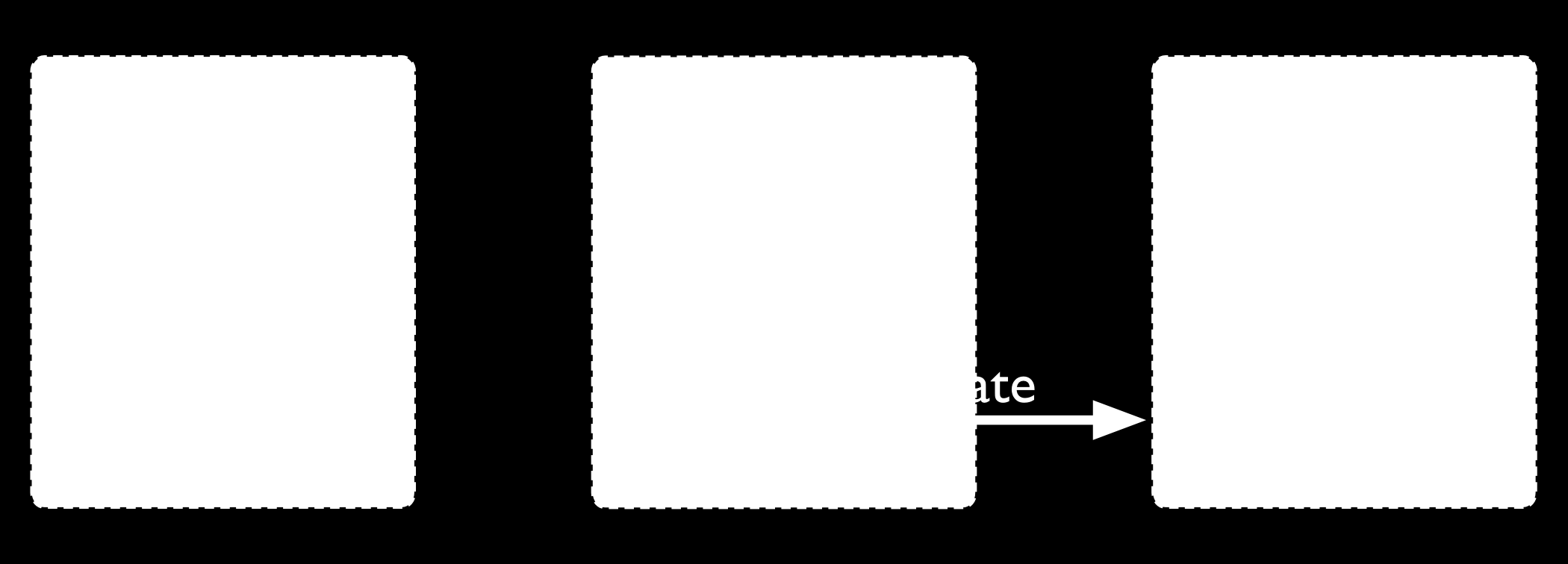
36 Chunk Migration MongoDB migrates chunks in a sharded cluster to distribute the chunks of a sharded collection evenly among shards. Migrations may be either: Manual. Only use manual migration in limited cases, such as to distribute data during bulk inserts. See Migrating Chunks Manually (page 79) for more details. Automatic. The balancer (page 29) process automatically migrates chunks when there is an uneven distribution of a sharded collection s chunks across the shards. See Migration Thresholds (page 30) for more details. Chunk Migration Procedure All chunk migrations use the following procedure: 1. The balancer process sends the movechunk command to the source shard. 2. The source starts the move with an internal movechunk command. During the migration process, operations to the chunk route to the source shard. The source shard is responsible for incoming write operations for the chunk. 3. The destination shard builds any indexes required by the source that do not exist on the destination. 4. The destination shard begins requesting documents in the chunk and starts receiving copies of the data. 5. After receiving the final document in the chunk, the destination shard starts a synchronization process to ensure that it has the changes to the migrated documents that occurred during the migration. 6. When fully synchronized, the destination shard connects to the config database and updates the cluster metadata with the new location for the chunk. 7. After the destination shard completes the update of the metadata, and once there are no open cursors on the chunk, the source shard deletes its copy of the documents. Note: If the balancer needs to perform additional chunk migrations from the source shard, the balancer can start the next chunk migration without waiting for the current migration process to finish this deletion step. See Chunk Migration Queuing (page 32). Changed in version 2.6: The source shard automatically archives the migrated documents by default. For more information, see movechunk directory (page 32). The migration process ensures consistency and maximizes the availability of chunks during balancing Sharding Mechanics 31
37 Chunk Migration Queuing To migrate multiple chunks from a shard, the balancer migrates the chunks one at a time. However, the balancer does not wait for the current migration s delete phase to complete before starting the next chunk migration. See Chunk Migration (page 31) for the chunk migration process and the delete phase. This queuing behavior allows shards to unload chunks more quickly in cases of heavily imbalanced cluster, such as when performing initial data loads without pre-splitting and when adding new shards. This behavior also affect the movechunk command, and migration scripts that use the movechunk command may proceed more quickly. In some cases, the delete phases may persist longer. If multiple delete phases are queued but not yet complete, a crash of the replica set s primary can orphan data from multiple migrations. The _waitfordelete, available as a setting for the balancer as well as the movechunk command, can alter the behavior so that the delete phase of the current migration blocks the start of the next chunk migration. The _waitfordelete is generally for internal testing purposes. For more information, see Wait for Delete (page 69). Chunk Migration and Replication Changed in version 3.0: The default value secondarythrottle became true for all chunk migrations. The new writeconcern field in the balancer configuration document allows you to specify a write concern semantics with the _secondarythrottle option. By default, each document operation during chunk migration propagates to at least one secondary before the balancer proceeds with the next document, which is equivalent to a write concern of { w: 2 }. You can set the writeconcern option on the balancer configuration to set different write concern semantics. To override this behavior and allow the balancer to continue without waiting for replication to a secondary, set the _secondarythrottle parameter to false. See Change Replication Behavior for Chunk Migration (page 68) to update the _secondarythrottle parameter for the balancer. For the movechunk command, the secondarythrottle parameter is independent of the _secondarythrottle parameter for the balancer. Independent of the secondarythrottle setting, certain phases of the chunk migration have the following replication policy: MongoDB briefly pauses all application writes to the source shard before updating the config servers with the new location for the chunk, and resumes the application writes after the update. The chunk move requires all writes to be acknowledged by majority of the members of the replica set both before and after committing the chunk move to config servers. When an outgoing chunk migration finishes and cleanup occurs, all writes must be replicated to a majority of servers before further cleanup (from other outgoing migrations) or new incoming migrations can proceed. movechunk directory Starting in MongoDB 2.6, sharding.archivemovedchunks is enabled by default. With sharding.archivemovedchunks enabled, the source shard archives the documents in the migrated chunks in a directory named after the collection namespace under the movechunk directory in the storage.dbpath. 32 Chapter 2. Sharding Concepts
38 Jumbo Chunks During chunk migration, if the chunk exceeds the specified chunk size (page 33) or if the number of documents in the chunk exceeds Maximum Number of Documents Per Chunk to Migrate, MongoDB does not migrate the chunk. Instead, MongoDB attempts to split (page 33) the chunk. If the split is unsuccessful, MongoDB labels the chunk as jumbo to avoid repeated attempts to migrate the chunk Chunk Splits in a Sharded Cluster On this page Chunk Size (page 33) Limitations (page 34) Indivisible Chunks (page 34) As chunks grow beyond the specified chunk size (page 33) a mongos instance will attempt to split the chunk in half. Splits may lead to an uneven distribution of the chunks for a collection across the shards. In such cases, the mongos instances will initiate a round of migrations to redistribute chunks across shards. See Sharded Collection Balancing (page 29) for more details on balancing chunks across shards. Chunk Size The default chunk size in MongoDB is 64 megabytes. You can increase or reduce the chunk size (page 83), mindful of its effect on the cluster s efficiency. 1. Small chunks lead to a more even distribution of data at the expense of more frequent migrations. This creates expense at the query routing (mongos) layer. 2. Large chunks lead to fewer migrations. This is more efficient both from the networking perspective and in terms of internal overhead at the query routing layer. But, these efficiencies come at the expense of a potentially more uneven distribution of data. 3. Chunk size affects the Maximum Number of Documents Per Chunk to Migrate. For many deployments, it makes sense to avoid frequent and potentially spurious migrations at the expense of a slightly less evenly distributed data set Sharding Mechanics 33
39 Limitations Changing the chunk size affects when chunks split but there are some limitations to its effects. Automatic splitting only occurs during inserts or updates. If you lower the chunk size, it may take time for all chunks to split to the new size. Splits cannot be undone. If you increase the chunk size, existing chunks must grow through inserts or updates until they reach the new size. Note: Chunk ranges are inclusive of the lower boundary and exclusive of the upper boundary. Indivisible Chunks In some cases, chunks can grow beyond the specified chunk size (page 33) but cannot undergo a split; e.g. if a chunk represents a single shard key value. See Considerations for Selecting Shard Keys (page 43) for considerations for selecting a shard key Shard Key Indexes On this page Example (page 34) All sharded collections must have an index that starts with the shard key; i.e. the index can be an index on the shard key or a compound index where the shard key is a prefix of the index. If you shard a collection without any documents and without such an index, the shardcollection command will create the index on the shard key. If the collection already has documents, you must create the index before using shardcollection. Important: The index on the shard key cannot be a multikey index. Example A sharded collection named people has for its shard key the field zipcode. It currently has the index { zipcode: 1 }. You can replace this index with a compound index { zipcode: 1, username: 1 }, as follows: 1. Create an index on { zipcode: 1, username: 1 }: db.people.createindex( { zipcode: 1, username: 1 } ); 2. When MongoDB finishes building the index, you can safely drop the existing index on { zipcode: 1 }: db.people.dropindex( { zipcode: 1 } ); Since the index on the shard key cannot be a multikey index, the index { zipcode: 1, username: 1 } can only replace the index { zipcode: 1 } if there are no array values for the username field. If you drop the last valid index for the shard key, recover by recreating an index on just the shard key. For restrictions on shard key indexes, see limits-shard-keys. 34 Chapter 2. Sharding Concepts
40 2.4.5 Sharded Cluster Metadata Config servers (page 14) store the metadata for a sharded cluster. The metadata reflects state and organization of the sharded data sets and system. The metadata includes the list of chunks on every shard and the ranges that define the chunks. The mongos instances cache this data and use it to route read and write operations to shards. Config servers store the metadata in the Config Database (page 95). Important: Always back up the config database before doing any maintenance on the config server. To access the config database, issue the following command from the mongo shell: use config In general, you should never edit the content of the config database directly. The config database contains the following collections: changelog (page 96) chunks (page 97) collections (page 98) databases (page 98) lockpings (page 98) locks (page 99) mongos (page 99) settings (page 99) shards (page 100) version (page 100) For more information on these collections and their role in sharded clusters, see Config Database (page 95). See Read and Write Operations on Config Servers (page 14) for more information about reads and updates to the metadata Sharding Mechanics 35
41 36 Chapter 2. Sharding Concepts
42 CHAPTER 3 Sharded Cluster Tutorials The following tutorials provide instructions for administering sharded clusters. For a higher-level overview, see Sharding (page 1). Sharded Cluster Deployment Tutorials (page 37) Instructions for deploying sharded clusters, adding shards, selecting shard keys, and the initial configuration of sharded clusters. Deploy a Sharded Cluster (page 38) Set up a sharded cluster by creating the needed data directories, starting the required MongoDB instances, and configuring the cluster settings. Considerations for Selecting Shard Keys (page 43) Choose the field that MongoDB uses to parse a collection s documents for distribution over the cluster s shards. Each shard holds documents with values within a certain range. Shard a Collection Using a Hashed Shard Key (page 45) Shard a collection based on hashes of a field s values in order to ensure even distribution over the collection s shards. Add Shards to a Cluster (page 46) Add a shard to add capacity to a sharded cluster. Continue reading from Sharded Cluster Deployment Tutorials (page 37) for additional tutorials. Sharded Cluster Maintenance Tutorials (page 58) Procedures and tasks for common operations on active sharded clusters. View Cluster Configuration (page 58) View status information about the cluster s databases, shards, and chunks. Remove Shards from an Existing Sharded Cluster (page 74) Migrate a single shard s data and remove the shard. Manage Shard Tags (page 86) Use tags to associate specific ranges of shard key values with specific shards. Continue reading from Sharded Cluster Maintenance Tutorials (page 58) for additional tutorials. Sharded Cluster Data Management (page 76) Practices that address common issues in managing large sharded data sets. Troubleshoot Sharded Clusters (page 91) Presents solutions to common issues and concerns relevant to the administration and use of sharded clusters. Refer to for general diagnostic information. 3.1 Sharded Cluster Deployment Tutorials The following tutorials provide information on deploying sharded clusters. 37
43 Deploy a Sharded Cluster (page 38) Set up a sharded cluster by creating the needed data directories, starting the required MongoDB instances, and configuring the cluster settings. Considerations for Selecting Shard Keys (page 43) Choose the field that MongoDB uses to parse a collection s documents for distribution over the cluster s shards. Each shard holds documents with values within a certain range. Shard a Collection Using a Hashed Shard Key (page 45) Shard a collection based on hashes of a field s values in order to ensure even distribution over the collection s shards. Add Shards to a Cluster (page 46) Add a shard to add capacity to a sharded cluster. Convert a Replica Set to a Sharded Cluster (page 48) Convert a replica set to a sharded cluster in which each shard is its own replica set. Upgrade Config Servers to Replica Set (page 53) Replace your sharded cluster with a single replica set. Convert Sharded Cluster to Replica Set (page 57) Replace your sharded cluster with a single replica set Deploy a Sharded Cluster On this page Considerations (page 38) Deploy the Config Server Replica Set (page 39) Start the mongos Instances (page 39) Add Shards to the Cluster (page 40) Enable Sharding for a Database (page 41) Shard a Collection (page 41) Using 3 Mirrored Config Servers (Deprecated) (page 42) Changed in version 3.2. Starting in MongoDB 3.2, config servers for sharded clusters can be deployed as a replica set. The replica set config servers must run the WiredTiger storage engine. MongoDB 3.2 deprecates the use of three mirrored mongod instances for config servers. The following tutorial deploys a new sharded cluster for MongoDB 3.2. To deploy a sharded cluster for earlier versions of MongoDB, refer to the corresponding version of the MongoDB Manual. Considerations Host Identifier Warning: Sharding and localhost Addresses If you use either localhost or as the hostname portion of any host identifier, for example as the host argument to addshard or the value to the --configdb run time option, then you must use localhost or for all host settings for any MongoDB instances in the cluster. If you mix localhost addresses and remote host address, MongoDB will error. Connectivity All members of a sharded cluster must be able to connect to all other members of a sharded cluster, including all shards and all config servers. Ensure that the network and security systems, including all interfaces and firewalls, allow these 38 Chapter 3. Sharded Cluster Tutorials
44 connections. Deploy the Config Server Replica Set Changed in version 3.2: Starting in MongoDB 3.2, config servers for sharded clusters can be deployed as a replica set. The replica set config servers must run the WiredTiger storage engine. MongoDB 3.2 deprecates the use of three mirrored mongod instances for config servers. The following restrictions apply to a replica set configuration when used for config servers: Must have zero arbiters. Must have no delayed members. Must build indexes (i.e. no member should have buildindexes setting set to false). The config servers store the sharded cluster s metadata. The following steps deploy a three member replica set for the config servers. 1. Start all the config servers with both the --configsvr and --replset <name> options: mongod --configsvr --replset configreplset --port <port> --dbpath <path> Or if using a configuration file, include the sharding.clusterrole and replication.replsetname setting: sharding: clusterrole: configsvr replication: replsetname: configreplset net: port: <port> storage: dbpath: <path> For additional options, see or 2. Connect a mongo shell to one of the config servers and run rs.initiate() to initiate the replica set. rs.initiate( { _id: "configreplset", configsvr: true, members: [ { _id: 0, host: "<host1>:<port1>" }, { _id: 1, host: "<host2>:<port2>" }, { _id: 2, host: "<host3>:<port3>" } ] } ) To use the deprecated mirrored config server deployment topology, see Start 3 Mirrored Config Servers (Deprecated) (page 42). Start the mongos Instances The mongos instances are lightweight and do not require data directories. You can run a mongos instance on a system that runs other cluster components, such as on an application server or a server running a mongod process. By default, a mongos instance runs on port Sharded Cluster Deployment Tutorials 39
45 When you start the mongos instance, specify the config servers, using either the sharding.configdb setting in the configuration file or the --configdb command line option. Note: All config servers must be running and available when you first initiate a sharded cluster. 1. Start one or more mongos instances. For --configdb, or sharding.configdb, specify the config server replica set name followed by a slash and at least one of the config server hostnames and ports: mongos --configdb configreplset/<cfgsvr1:port1>,<cfgsvr2:port2>,<cfgsvr3:port3> If using the deprecated mirrored config server deployment topology, see Start the mongos Instances (Deprecated) (page 43). Add Shards to the Cluster A shard can be a standalone mongod or a replica set. In a production environment, each shard should be a replica set. Use the procedure in to deploy replica sets for each shard. 1. From a mongo shell, connect to the mongos instance. Issue a command using the following syntax: mongo --host <hostname of machine running mongos> --port <port mongos listens on> For example, if a mongos is accessible at mongos0.example.net on port 27017, issue the following command: mongo --host mongos0.example.net --port Add each shard to the cluster using the sh.addshard() method, as shown in the examples below. Issue sh.addshard() separately for each shard. If the shard is a replica set, specify the name of the replica set and specify a member of the set. In production deployments, all shards should be replica sets. Optional You can instead use the addshard database command, which lets you specify a name and maximum size for the shard. If you do not specify these, MongoDB automatically assigns a name and maximum size. To use the database command, see addshard. The following are examples of adding a shard with sh.addshard(): To add a shard for a replica set named rs1 with a member running on port on mongodb0.example.net, issue the following command: sh.addshard( "rs1/mongodb0.example.net:27017" ) To add a shard for a standalone mongod on port of mongodb0.example.net, issue the following command: sh.addshard( "mongodb0.example.net:27017" ) Note: It might take some time for chunks to migrate to the new shard. 40 Chapter 3. Sharded Cluster Tutorials
46 Enable Sharding for a Database Before you can shard a collection, you must enable sharding for the collection s database. Enabling sharding for a database does not redistribute data but make it possible to shard the collections in that database. Once you enable sharding for a database, MongoDB assigns a primary shard for that database where MongoDB stores all data before sharding begins. 1. From a mongo shell, connect to the mongos instance. Issue a command using the following syntax: mongo --host <hostname of machine running mongos> --port <port mongos listens on> 2. Issue the sh.enablesharding() method, specifying the name of the database for which to enable sharding. Use the following syntax: sh.enablesharding("<database>") Optionally, you can enable sharding for a database using the enablesharding command, which uses the following syntax: db.runcommand( { enablesharding: <database> } ) Shard a Collection You shard on a per-collection basis. 1. Determine what you will use for the shard key. Your selection of the shard key affects the efficiency of sharding. See the selection considerations listed in the Considerations for Selecting Shard Key (page 44). 2. If the collection already contains data you must create an index on the shard key using createindex(). If the collection is empty then MongoDB will create the index as part of the sh.shardcollection() step. 3. Shard a collection by issuing the sh.shardcollection() method in the mongo shell. The method uses the following syntax: sh.shardcollection("<database>.<collection>", shard-key-pattern) Replace the <database>.<collection> string with the full namespace of your database, which consists of the name of your database, a dot (e.g..), and the full name of the collection. The shard-key-pattern represents your shard key, which you specify in the same form as you would an index key pattern. Example The following sequence of commands shards four collections: sh.shardcollection("records.people", { "zipcode": 1, "name": 1 } ) sh.shardcollection("people.addresses", { "state": 1, "_id": 1 } ) sh.shardcollection("assets.chairs", { "type": 1, "_id": 1 } ) sh.shardcollection("events.alerts", { "_id": "hashed" } ) In order, these operations shard: (a) The people collection in the records database using the shard key { "zipcode": 1 }. 1, "name": This shard key distributes documents by the value of the zipcode field. If a number of documents have the same value for this field, then that chunk will be splittable (page 45) by the values of the name field Sharded Cluster Deployment Tutorials 41
47 (b) The addresses collection in the people database using the shard key { "state": 1 }. 1, "_id": This shard key distributes documents by the value of the state field. If a number of documents have the same value for this field, then that chunk will be splittable (page 45) by the values of the _id field. (c) The chairs collection in the assets database using the shard key { "type": 1, "_id": 1 }. This shard key distributes documents by the value of the type field. If a number of documents have the same value for this field, then that chunk will be splittable (page 45) by the values of the _id field. (d) The alerts collection in the events database using the shard key { "_id": "hashed" }. This shard key distributes documents by a hash of the value of the _id field. MongoDB computes the hash of the _id field for the hashed index, which should provide an even distribution of documents across a cluster. Using 3 Mirrored Config Servers (Deprecated) Start 3 Mirrored Config Servers (Deprecated) Changed in version 3.2: Starting in MongoDB 3.2, config servers for sharded clusters can be deployed as a replica set. The replica set config servers must run the WiredTiger storage engine. MongoDB 3.2 deprecates the use of three mirrored mongod instances for config servers. In production deployments, if using mirrored config servers, you must deploy exactly three config server instances, each running on different servers to assure good uptime and data safety. In test environments, you can run all three instances on a single server. Important: All members of a sharded cluster must be able to connect to all other members of a sharded cluster, including all shards and all config servers. Ensure that the network and security systems including all interfaces and firewalls, allow these connections. 1. Create data directories for each of the three config server instances. By default, a config server stores its data files in the /data/configdb directory. You can choose a different location. To create a data directory, issue a command similar to the following: mkdir /data/configdb 2. Start the three config server instances. Start each by issuing a command using the following syntax: mongod --configsvr --dbpath <path> --port <port> The default port for config servers is You can specify a different port. The following example starts a config server using the default port and default data directory: mongod --configsvr --dbpath /data/configdb --port For additional command options, see or Note: All config servers must be running and available when you first initiate a sharded cluster. 42 Chapter 3. Sharded Cluster Tutorials
48 Start the mongos Instances (Deprecated) Changed in version 3.2: Starting in MongoDB 3.2, config servers for sharded clusters can be deployed as a replica set. The replica set config servers must run the WiredTiger storage engine. MongoDB 3.2 deprecates the use of three mirrored mongod instances for config servers. If using 3 mirrored config servers, when you start the mongos instance, specify the hostnames of the three config servers, either in the configuration file or as command line parameters. Tip To avoid downtime, give each config server a logical DNS name (unrelated to the server s physical or virtual hostname). Without logical DNS names, moving or renaming a config server requires shutting down every mongod and mongos instance in the sharded cluster. To start a mongos instance, issue a command using the following syntax: mongos --configdb <config server hostnames> For example, to start a mongos that connects to config server instance running on the following hosts and on the default ports: cfg0.example.net cfg1.example.net cfg2.example.net You would issue the following command: mongos --configdb cfg0.example.net:27019,cfg1.example.net:27019,cfg2.example.net:27019 Each mongos in a sharded cluster must use the same configdb string, with identical host names listed in identical order. If you start a mongos instance with a string that does not exactly match the string used by the other mongos instances in the cluster, the mongos instance returns a Config Database String Error (page 91) error and refuses to start. To add shards, enable sharding and shard a collection, see Add Shards to the Cluster (page 40), Enable Sharding for a Database (page 41), and Shard a Collection (page 41) Considerations for Selecting Shard Keys Choosing a Shard Key For many collections there may be no single, naturally occurring key that possesses all the qualities of a good shard key. The following strategies may help construct a useful shard key from existing data: 1. Compute a more ideal shard key in your application layer, and store this in all of your documents, potentially in the _id field. 2. Use a compound shard key that uses two or three values from all documents that provide the right mix of cardinality with scalable write operations and query isolation. 3. Determine that the impact of using a less than ideal shard key is insignificant in your use case, given: limited write volume, expected data size, or application query patterns Sharded Cluster Deployment Tutorials 43
49 4. Use a hashed shard key. Choose a field that has high cardinality and create a hashed index on that field. MongoDB uses these hashed index values as shard key values, which ensures an even distribution of documents across the shards. Tip MongoDB automatically computes the hashes when resolving queries using hashed indexes. Applications do not need to compute hashes. Considerations for Selecting Shard Key Choosing the correct shard key can have a great impact on the performance, capability, and functioning of your database and cluster. Appropriate shard key choice depends on the schema of your data and the way that your applications query and write data. Create a Shard Key that is Easily Divisible An easily divisible shard key makes it easy for MongoDB to distribute content among the shards. Shard keys that have a limited number of possible values can result in chunks that are unsplittable. For instance, if a chunk represents a single shard key value, then MongoDB cannot split the chunk even when the chunk exceeds the size at which splits (page 33) occur. See also: Cardinality (page 45) Create a Shard Key that has High Degree of Randomness A shard key with high degree of randomness prevents any single shard from becoming a bottleneck and will distribute write operations among the cluster. See also: Write Scaling (page 20) Create a Shard Key that Targets a Single Shard A shard key that targets a single shard makes it possible for the mongos program to return most query operations directly from a single specific mongod instance. Your shard key should be the primary field used by your queries. Fields with a high degree of randomness make it difficult to target operations to specific shards. See also: Query Isolation (page 21) Shard Using a Compound Shard Key The challenge when selecting a shard key is that there is not always an obvious choice. Often, an existing field in your collection may not be the optimal key. In those situations, computing a special purpose shard key into an additional field or using a compound shard key may help produce one that is more ideal. 44 Chapter 3. Sharded Cluster Tutorials
50 Cardinality Cardinality in the context of MongoDB, refers to the ability of the system to partition data into chunks. For example, consider a collection of data such as an address book that stores address records: Consider the use of a state field as a shard key: The state key s value holds the US state for a given address document. This field has a low cardinality as all documents that have the same value in the state field must reside on the same shard, even if a particular state s chunk exceeds the maximum chunk size. Since there are a limited number of possible values for the state field, MongoDB may distribute data unevenly among a small number of fixed chunks. This may have a number of effects: If MongoDB cannot split a chunk because all of its documents have the same shard key, migrations involving these un-splittable chunks will take longer than other migrations, and it will be more difficult for your data to stay balanced. If you have a fixed maximum number of chunks, you will never be able to use more than that number of shards for this collection. Consider the use of a zipcode field as a shard key: While this field has a large number of possible values, and thus has potentially higher cardinality, it s possible that a large number of users could have the same value for the shard key, which would make this chunk of users un-splittable. In these cases, cardinality depends on the data. If your address book stores records for a geographically distributed contact list (e.g. Dry cleaning businesses in America, ) then a value like zipcode would be sufficient. However, if your address book is more geographically concentrated (e.g ice cream stores in Boston Massachusetts, ) then you may have a much lower cardinality. Consider the use of a phone-number field as a shard key: Phone number has a high cardinality, because users will generally have a unique value for this field, MongoDB will be able to split as many chunks as needed. While high cardinality, is necessary for ensuring an even distribution of data, having a high cardinality does not guarantee sufficient query isolation (page 21) or appropriate write scaling (page 20). If you choose a shard key with low cardinality, some chunks may grow too large for MongoDB to migrate. See Jumbo Chunks (page 33) for more information. Shard Key Selection Strategy When selecting a shard key, it is difficult to balance the qualities of an ideal shard key, which sometimes dictate opposing strategies. For instance, it s difficult to produce a key that has both a high degree randomness for even data distribution and a shard key that allows your application to target specific shards. For some workloads, it s more important to have an even data distribution, and for others targeted queries are essential. Therefore, the selection of a shard key is about balancing both your data and the performance characteristics caused by different possible data distributions and system workloads Shard a Collection Using a Hashed Shard Key 3.1. Sharded Cluster Deployment Tutorials 45
51 On this page Shard the Collection (page 46) Specify the Initial Number of Chunks (page 46) New in version 2.4. Hashed shard keys (page 19) use a hashed index of a field as the shard key to partition data across your sharded cluster. For suggestions on choosing the right field as your hashed shard key, see Hashed Shard Keys (page 19). For limitations on hashed indexes, see index-hashed-index. Note: If chunk migrations are in progress while creating a hashed shard key collection, the initial chunk distribution may be uneven until the balancer automatically balances the collection. Shard the Collection To shard a collection using a hashed shard key, use an operation in the mongo that resembles the following: sh.shardcollection( "records.active", { a: "hashed" } ) This operation shards the active collection in the records database, using a hash of the a field as the shard key. Specify the Initial Number of Chunks If you shard an empty collection using a hashed shard key, MongoDB automatically creates and migrates empty chunks so that each shard has two chunks. To control how many chunks MongoDB creates when sharding the collection, use shardcollection with the numinitialchunks parameter. Important: MongoDB 2.4 adds support for hashed shard keys. After sharding a collection with a hashed shard key, you must use the MongoDB 2.4 or higher mongos and mongod instances in your sharded cluster. Warning: MongoDB hashed indexes truncate floating point numbers to 64-bit integers before hashing. For example, a hashed index would store the same value for a field that held a value of 2.3, 2.2, and 2.9. To prevent collisions, do not use a hashed index for floating point numbers that cannot be reliably converted to 64-bit integers (and then back to floating point). MongoDB hashed indexes do not support floating point values larger than Add Shards to a Cluster On this page Considerations (page 47) Add a Shard to a Cluster (page 47) You add shards to a sharded cluster after you create the cluster or any time that you need to add capacity to the cluster. If you have not created a sharded cluster, see Deploy a Sharded Cluster (page 38). In production environments, all shards should be replica sets. 46 Chapter 3. Sharded Cluster Tutorials
52 Considerations Balancing When you add a shard to a sharded cluster, you affect the balance of chunks among the shards of a cluster for all existing sharded collections. The balancer will begin migrating chunks so that the cluster will achieve balance. See Sharded Collection Balancing (page 29) for more information. Changed in version 2.6: Chunk migrations can have an impact on disk space. Starting in MongoDB 2.6, the source shard automatically archives the migrated documents by default. For details, see movechunk directory (page 32). Capacity Planning When adding a shard to a cluster, always ensure that the cluster has enough capacity to support the migration required for balancing the cluster without affecting legitimate production traffic. Add a Shard to a Cluster You interact with a sharded cluster by connecting to a mongos instance. 1. From a mongo shell, connect to the mongos instance. For example, if a mongos is accessible at mongos0.example.net on port 27017, issue the following command: mongo --host mongos0.example.net --port Add a shard to the cluster using the sh.addshard() method, as shown in the examples below. Issue sh.addshard() separately for each shard. If the shard is a replica set, specify the name of the replica set and specify a member of the set. In production deployments, all shards should be replica sets. Optional You can instead use the addshard database command, which lets you specify a name and maximum size for the shard. If you do not specify these, MongoDB automatically assigns a name and maximum size. To use the database command, see addshard. The following are examples of adding a shard with sh.addshard(): To add a shard for a replica set named rs1 with a member running on port on mongodb0.example.net, issue the following command: sh.addshard( "rs1/mongodb0.example.net:27017" ) Changed in version For MongoDB versions prior to 2.0.3, you must specify all members of the replica set. For example: sh.addshard( "rs1/mongodb0.example.net:27017,mongodb1.example.net:27017,mongodb2.example.net To add a shard for a standalone mongod on port of mongodb0.example.net, issue the following command: sh.addshard( "mongodb0.example.net:27017" ) Note: It might take some time for chunks to migrate to the new shard Sharded Cluster Deployment Tutorials 47
53 3.1.5 Convert a Replica Set to a Sharded Cluster On this page Overview (page 48) Prerequisites (page 48) Procedures (page 48) Overview This tutorial converts a single three-member replica set to a sharded cluster with two shards. Each shard is an independent three-member replica set. This tutorial is specific to MongoDB 3.2. For other versions of MongoDB, refer to the corresponding version of the MongoDB Manual. The procedure is as follows: 1. Create the initial three-member replica set and insert data into a collection. See Set Up Initial Replica Set (page 48). 2. Start the config servers and a mongos. See Deploy Config Server Replica Set and mongos (page 49). 3. Add the initial replica set as a shard. See Add Initial Replica Set as a Shard (page 50). 4. Create a second shard and add to the cluster. See Add Second Shard (page 50). 5. Shard the desired collection. See Shard a Collection (page 51). Prerequisites This tutorial uses a total of ten servers: one server for the mongos and three servers each for the first replica set, the second replica set, and the config server replica set (page 14). Each server must have a resolvable domain, hostname, or IP address within your system. The tutorial uses the default data directories (e.g. /data/db and /data/configdb). Create the appropriate directories with appropriate permissions. To use different paths, see The tutorial uses the default ports (e.g and 27019). To use different ports, see Procedures Set Up Initial Replica Set This procedure creates the initial three-member replica set rs0. The replica set members are on the following hosts: mongodb0.example.net, mongodb1.example.net, and mongodb2.example.net. Step 1: Start each member of the replica set with the appropriate options. For each member, start a mongod, specifying the replica set name through the replset option. Include any other parameters specific to your deployment. For replication-specific parameters, see cli-mongod-replica-set. mongod --replset "rs0" Repeat this step for the other two members of the rs0 replica set. 48 Chapter 3. Sharded Cluster Tutorials
54 Step 2: Connect a mongo shell to a replica set member. (e.g. mongodb0.example.net) Connect a mongo shell to one member of the replica set mongo mongodb0.example.net Step 3: Initiate the replica set. of the current member. From the mongo shell, run rs.initiate() to initiate a replica set that consists rs.initiate() Step 4: Add the remaining members to the replica set. rs.add("mongodb1.example.net") rs.add("mongodb2.example.net") Step 5: Create and populate a new collection. The following step adds one million documents to the collection test_collection and can take several minutes depending on your system. Issue the following operations on the primary of the replica set: use test var bulk = db.test_collection.initializeunorderedbulkop(); people = ["Marc", "Bill", "George", "Eliot", "Matt", "Trey", "Tracy", "Greg", "Steve", "Kristina", "K for(var i=0; i< ; i++){ user_id = i; name = people[math.floor(math.random()*people.length)]; number = Math.floor(Math.random()*10001); bulk.insert( { "user_id":user_id, "name":name, "number":number }); } bulk.execute(); For more information on deploying a replica set, see Deploy Config Server Replica Set and mongos Starting in MongoDB 3.2, config servers for sharded clusters can be deployed as a replica set. The replica set config servers must run the WiredTiger storage engine. MongoDB 3.2 deprecates the use of three mirrored mongod instances for config servers. This procedure deploys the three-member replica set for the config servers (page 14) and the mongos. The config servers use the following hosts: mongodb7.example.net, mongodb8.example.net, and mongodb9.example.net. The mongos uses mongodb6.example.net. Step 1: Deploy the config servers as a three-member replica set. Start a config server on mongodb7.example.net, mongodb8.example.net, and mongodb9.example.net. Specify the same replica set name. The config servers use the default data directory /data/configdb and the default port mongod --configsvr --replset configreplset To modify the default settings or to include additional options specific to your deployment, see or Sharded Cluster Deployment Tutorials 49
55 Connect a mongo shell to one of the config servers and run rs.initiate() to initiate the replica set. rs.initiate( { _id: "configreplset", configsvr: true, members: [ { _id: 0, host: "mongodb07.example.net:27019" }, { _id: 1, host: "mongodb08.example.net:27019" }, { _id: 2, host: "mongodb09.example.net:27019" } ] } ) Step 2: Start a mongos instance. On mongodb6.example.net, start the mongos specifying the config server replica set name followed by a slash and at least one of the config server hostnames and ports. This tutorial specifies a small --chunksize of 1 MB to test sharding with the test_collection created earlier. Note: In production environments, do not use a small chunksize size. mongos --configdb configreplset/mongodb07.example.net:27019,mongodb08.example.net:27019,mongodb09.exa Add Initial Replica Set as a Shard The following procedure adds the initial replica set rs0 as a shard. Step 1: Connect a mongo shell to the mongos. mongo mongodb6.example.net:27017/admin Step 2: Add the shard. Add a shard to the cluster with the sh.addshard method: sh.addshard( "rs0/mongodb0.example.net:27017,mongodb1.example.net:27017,mongodb2.example.net:27017" ) Add Second Shard The following procedure deploys a new replica set rs1 for the second shard and adds it to the cluster. The replica set members are on the following hosts: mongodb3.example.net, mongodb4.example.net, and mongodb5.example.net. Step 1: Start each member of the replica set with the appropriate options. For each member, start a mongod, specifying the replica set name through the replset option. Include any other parameters specific to your deployment. For replication-specific parameters, see cli-mongod-replica-set. mongod --replset "rs1" Repeat this step for the other two members of the rs1 replica set. 50 Chapter 3. Sharded Cluster Tutorials
56 Step 2: Connect a mongo shell to a replica set member. (e.g. mongodb3.example.net) Connect a mongo shell to one member of the replica set mongo mongodb3.example.net Step 3: Initiate the replica set. of the current member. From the mongo shell, run rs.initiate() to initiate a replica set that consists rs.initiate() Step 4: Add the remaining members to the replica set. Add the remaining members with the rs.add() method. rs.add("mongodb4.example.net") rs.add("mongodb5.example.net") Step 5: Connect a mongo shell to the mongos. mongo mongodb6.example.net:27017/admin Step 6: Add the shard. In a mongo shell connected to the mongos, add the shard to the cluster with the sh.addshard() method: sh.addshard( "rs1/mongodb3.example.net:27017,mongodb4.example.net:27017,mongodb5.example.net:27017" ) Shard a Collection Step 1: Connect a mongo shell to the mongos. mongo mongodb6.example.net:27017/admin Step 2: Enable sharding for a database. Before you can shard a collection, you must first enable sharding for the collection s database. Enabling sharding for a database does not redistribute data but makes it possible to shard the collections in that database. The following operation enables sharding on the test database: sh.enablesharding( "test" ) The operation returns the status of the operation: { "ok" : 1 } Step 3: Determine the shard key. For the collection to shard, determine the shard key. The shard key (page 19) determines how MongoDB distributes the documents between shards. Good shard keys: have values that are evenly distributed among all documents, group documents that are often accessed at the same time into contiguous chunks, and allow for effective distribution of activity among shards. Once you shard a collection with the specified shard key, you cannot change the shard key. For more information on shard keys, see Shard Keys (page 19) and Considerations for Selecting Shard Keys (page 43). This procedure will use the number field as the shard key for test_collection Sharded Cluster Deployment Tutorials 51
57 Step 4: Create an index on the shard key. key (page 34). use test db.test_collection.createindex( { number : 1 } ) Before sharding a non-empty collection, create an index on the shard Step 5: Shard the collection. shard key. In the test database, shard the test_collection, specifying number as the use test sh.shardcollection( "test.test_collection", { "number" : 1 } ) The method returns the status of the operation: { "collectionsharded" : "test.test_collection", "ok" : 1 } The balancer (page 29) will redistribute chunks of documents when it next runs. As clients insert additional documents into this collection, the mongos will route the documents between the shards. Step 6: Confirm the shard is balancing. To confirm balancing activity, run db.stats() or db.printshardingstatus() in the test database. use test db.stats() db.printshardingstatus() Example output of the db.stats(): { "raw" : { "rs0/mongodb0.example.net:27017,mongodb1.example.net:27017,mongodb2.example.net:27017" : { "db" : "test", "collections" : 3, "objects" : , "avgobjsize" : , "datasize" : , "storagesize" : , "numextents" : 14, "indexes" : 2, "indexsize" : , "filesize" : , "ok" : 1 }, "rs1/mongodb3.example.net:27017,mongodb4.example.net:27017,mongodb5.example.net:27017" : { "db" : "test", "collections" : 3, "objects" : 14697, "avgobjsize" : , "datasize" : , "storagesize" : , "numextents" : 7, "indexes" : 2, "indexsize" : , "filesize" : , "ok" : 1 } }, "objects" : , 52 Chapter 3. Sharded Cluster Tutorials
58 } "avgobjsize" : 111, "datasize" : , "storagesize" : , "numextents" : 21, "indexes" : 4, "indexsize" : , "filesize" : , "extentfreelist" : { "num" : 0, "totalsize" : 0 }, "ok" : 1 Example output of the db.printshardingstatus(): --- Sharding Status --- sharding version: { "_id" : 1, "mincompatibleversion" : 5, "currentversion" : 6, "clusterid" : ObjectId(" c04ad5132c271597c") } shards: { "_id" : "rs0", "host" : "rs0/mongodb0.example.net:27017,mongodb1.example.net:27017,mongodb2.ex { "_id" : "rs1", "host" : "rs1/mongodb3.example.net:27017,mongodb4.example.net:27017,mongodb5.ex active mongoses: "3.2.0" : 2 balancer: Currently enabled: yes Currently running: no Failed balancer rounds in last 5 attempts: 0 Migration Results for the last 24 hours: 1 : Success databases: { "_id" : "test", "primary" : "rs0", "partitioned" : true } test.test_collection shard key: { "number" : 1 } unique: false balancing: true chunks: rs1 5 rs0 186 too many chunks to print, use verbose if you want to force print Run these commands for a second time to demonstrate that chunks are migrating from rs0 to rs Upgrade Config Servers to Replica Set On this page Prerequisites (page 54) Procedure (page 54) New in version 3.2: Starting in 3.2, config servers for a sharded cluster can be deployed as a replica set. The following procedure upgrades three mirrored config servers to a config server replica set (page 14). Using a replica set for the 3.1. Sharded Cluster Deployment Tutorials 53
59 config servers improves consistency across the config servers, since MongoDB can take advantage of the standard replica set read and write protocols for the config data. In addition, this allows a sharded cluster to have more than 3 config servers since a replica set can have up to 50 members. Prerequisites All binaries in the sharded clusters must be at least version 3.2. See 3.2-upgrade-cluster for instructions to upgrade the sharded cluster. The existing config servers must be in sync. Procedure Important: The procedure outlined in this tutorial requires downtime. 1. Disable the balancer as described in Disable the Balancer (page 72). 2. Connect a mongo shell to the first config server listed in the configdb setting of the mongos and run rs.initiate() to initiate the single member replica set. rs.initiate( { _id: "csreplset", version: 1, configsvr: true, members: [ { _id: 0, host: "<host>:<port>" } ] } ) _id corresponds to the replica set name for the config servers. version set to 1, corresponding to the initial version of the replica set configuration. configsvr must be set be true. members array contains a document that specifies: members._id which is a numeric identifier for the member. members.host which is a string corresponding to the config server s hostname and port. 3. Restart this config server as a single member replica set with: the --replset option set to the replica set name specified during the rs.initiate(), the --configsvrmode option set to the legacy config server mode Sync Cluster Connection Config (sccc), the --configsvr option, and the --storageengine option set to the storage engine used by this config server. For this upgrade procedure, the existing config server can be using either MMAPv1 or WiredTiger. Include additional options as specific to your deployment. mongod --configsvr --replset csreplset --configsvrmode=sccc --storageengine <storageengine> --po Or if using a configuration file, specify the replication.replsetname:, sharding.clusterrole, sharding.configsvrmode and net.port. 54 Chapter 3. Sharded Cluster Tutorials
60 sharding: clusterrole: configsvr configsvrmode: sccc replication: replsetname: csreplset net: port: <port> storage: dbpath: <path> engine: <storageengine> 4. Start the new mongod instances to add to the replica set. These instances must use the WiredTiger storage engine. Starting in 3.2, the default storage engine is WiredTiger for new mongod instances with new data paths. Important: Do not add existing config servers to the replica set. Use new dbpaths for the new instances. The number of new mongod instances to add depends on the config server currently in the single-member replica set: If the config server is using MMAPv1, start 3 new mongod instances. If the config server is using WiredTiger, start 2 new mongod instances. Note: The example in this procedure assumes that the existing config servers use MMAPv1. For each new mongod instance to add, include the --configsvr and the --replset options: mongod --configsvr --replset csreplset --port <port> --dbpath <path> Or if using a configuration file: sharding: clusterrole: configsvr replication: replsetname: csreplset net: port: <port> storage: dbpath: <path> 5. Using the mongo shell connected the replica set config server, add the new mongod instances as non-voting, priority 0 members: rs.add( { host: <host:port>, priority: 0, votes: 0 } ) 6. Once all the new members have been added as non-voting, priority 0 members, ensure that the new nodes have completed the initial sync and have reached SECONDARY state. To check the state of the replica set members, run rs.status() in the mongo shell: rs.status() 7. Shut down one of the other non-replica set config servers; i.e. either the second and third config server listed in the configdb setting of the mongos. 8. Reconfigure the replica set to allow all members to vote and have default priority of Sharded Cluster Deployment Tutorials 55
61 var cfg = rs.conf(); cfg.members[0].priority = 1; cfg.members[1].priority = 1; cfg.members[2].priority = 1; cfg.members[3].priority = 1; cfg.members[0].votes = 1; cfg.members[1].votes = 1; cfg.members[2].votes = 1; cfg.members[3].votes = 1; rs.reconfig(cfg); 9. Step down the first config server, i.e. the server started with --configsvrmode=sccc. rs.stepdown() 10. Shut down the following members of the sharded cluster: The mongos instances. The shards. The remaining non-replica set config servers. 11. Shut down the first config server. If the first config server uses the MMAPv1 storage engine, remove the member from the replica set. Connect a mongo shell to the current primary and use rs.remove(): Important: If the first config server uses the WiredTiger storage engine, do not remove. rs.remove("<hostname>:<port>") 12. If the first config server uses WiredTiger, restart the first config server in config server replica set (CSRS) mode; i.e. restart without the --configsvrmode=sccc option: Important: If the first config server uses the MMAPv1 storage engine, do not restart. mongod --configsvr --replset csreplset --storageengine wiredtiger --port <port> --dbpath <path> Or if using a configuration file, omit the sharding.configsvrmode setting: sharding: clusterrole: configsvr replication: replsetname: csreplset net: port: <port> storage: dbpath: <path> engine: <storageengine> 13. Restart the shards. 14. Restart mongos instances with updated --configdb or configdb setting. For the updated --configdb or configdb setting, specify the replica set name for the config servers and the members in the replica set. 56 Chapter 3. Sharded Cluster Tutorials
62 mongos --configdb csreplset/<rsconfigsver1:port1>,<rsconfigsver2:port2>,<rsconfigsver3:port3> 15. Re-enable the balancer as described in Enable the Balancer (page 72) Convert Sharded Cluster to Replica Set On this page Convert a Cluster with a Single Shard into a Replica Set (page 57) Convert a Sharded Cluster into a Replica Set (page 57) This tutorial describes the process for converting a sharded cluster to a non-sharded replica set. To convert a replica set into a sharded cluster Convert a Replica Set to a Sharded Cluster (page 48). See the Sharding (page 1) documentation for more information on sharded clusters. Convert a Cluster with a Single Shard into a Replica Set In the case of a sharded cluster with only one shard, that shard contains the full data set. Use the following procedure to convert that cluster into a non-sharded replica set: 1. Reconfigure the application to connect to the primary member of the replica set hosting the single shard that system will be the new replica set. 2. Optionally remove the --shardsrv option, if your mongod started with this option. Tip Changing the --shardsrv option will change the port that mongod listens for incoming connections on. The single-shard cluster is now a non-sharded replica set that will accept read and write operations on the data set. You may now decommission the remaining sharding infrastructure. Convert a Sharded Cluster into a Replica Set Use the following procedure to transition from a sharded cluster with more than one shard to an entirely new replica set. 1. With the sharded cluster running, deploy a new replica set in addition to your sharded cluster. The replica set must have sufficient capacity to hold all of the data files from all of the current shards combined. Do not configure the application to connect to the new replica set until the data transfer is complete. 2. Stop all writes to the sharded cluster. You may reconfigure your application or stop all mongos instances. If you stop all mongos instances, the applications will not be able to read from the database. If you stop all mongos instances, start a temporary mongos instance on that applications cannot access for the data migration procedure. 3. Use mongodump and mongorestore to migrate the data from the mongos instance to the new replica set. Note: Not all collections on all databases are necessarily sharded. Do not solely migrate the sharded collections. Ensure that all databases and all collections migrate correctly. 4. Reconfigure the application to use the non-sharded replica set instead of the mongos instance Sharded Cluster Deployment Tutorials 57
63 The application will now use the un-sharded replica set for reads and writes. You may now decommission the remaining unused sharded cluster infrastructure. 3.2 Sharded Cluster Maintenance Tutorials The following tutorials provide information in maintaining sharded clusters. View Cluster Configuration (page 58) View status information about the cluster s databases, shards, and chunks. Replace a Config Server (page 60) Replace a config server in a config server replica set. Migrate Config Servers with the Same Hostname (page 61) For a sharded cluster with three mirrored config servers, migrate a config server to a new system while keeping the same hostname. This procedure requires changing the DNS entry to point to the new system. Migrate Config Servers with Different Hostnames (page 62) For a sharded cluster with three mirrored config servers, migrate a config server to a new system that uses a new hostname. If possible, avoid changing the hostname and instead use the Migrate Config Servers with the Same Hostname (page 61) procedure. Migrate a Sharded Cluster to Different Hardware (page 63) Migrate a sharded cluster to a different hardware system, for example, when moving a pre-production environment to production. Backup Cluster Metadata (page 66) Create a backup of a sharded cluster s metadata while keeping the cluster operational. Configure Behavior of Balancer Process in Sharded Clusters (page 67) Manage the balancer s behavior by scheduling a balancing window, changing size settings, or requiring replication before migration. Manage Sharded Cluster Balancer (page 69) View balancer status and manage balancer behavior. Remove Shards from an Existing Sharded Cluster (page 74) Migrate a single shard s data and remove the shard View Cluster Configuration On this page List Databases with Sharding Enabled (page 58) List Shards (page 59) View Cluster Details (page 59) List Databases with Sharding Enabled To list the databases that have sharding enabled, query the databases collection in the Config Database (page 95). A database has sharding enabled if the value of the partitioned field is true. Connect to a mongos instance with a mongo shell, and run the following operation to get a full list of databases with sharding enabled: use config db.databases.find( { "partitioned": true } ) Example You can use the following sequence of commands when to return a list of all databases in the cluster: use config db.databases.find() 58 Chapter 3. Sharded Cluster Tutorials
64 If this returns the following result set: { "_id" : "admin", "partitioned" : false, "primary" : "config" } { "_id" : "animals", "partitioned" : true, "primary" : "m0.example.net:30001" } { "_id" : "farms", "partitioned" : false, "primary" : "m1.example2.net:27017" } Then sharding is only enabled for the animals database. List Shards To list the current set of configured shards, use the listshards command, as follows: use admin db.runcommand( { listshards : 1 } ) View Cluster Details To view cluster details, issue db.printshardingstatus() or sh.status(). Both methods return the same output. Example In the following example output from sh.status() sharding version displays the version number of the shard metadata. shards displays a list of the mongod instances used as shards in the cluster. databases displays all databases in the cluster, including database that do not have sharding enabled. The chunks information for the foo database displays how many chunks are on each shard and displays the range of each chunk. --- Sharding Status --- sharding version: { "_id" : 1, "version" : 3 } shards: { "_id" : "shard0000", "host" : "m0.example.net:30001" } { "_id" : "shard0001", "host" : "m3.example2.net:50000" } databases: { "_id" : "admin", "partitioned" : false, "primary" : "config" } { "_id" : "contacts", "partitioned" : true, "primary" : "shard0000" } foo.contacts shard key: { "zip" : 1 } chunks: shard shard shard { "zip" : { "$minkey" : 1 } } -->> { "zip" : "56000" } on : shard0001 { "t" : 2, "i" : 0 { "zip" : } -->> { "zip" : "56800" } on : shard0002 { "t" : 3, "i" : 4 } { "zip" : } -->> { "zip" : "57088" } on : shard0002 { "t" : 4, "i" : 2 } { "zip" : } -->> { "zip" : "57500" } on : shard0002 { "t" : 4, "i" : 3 } { "zip" : } -->> { "zip" : "58140" } on : shard0001 { "t" : 4, "i" : 0 } { "zip" : } -->> { "zip" : "59000" } on : shard0000 { "t" : 4, "i" : 1 } { "zip" : } -->> { "zip" : { "$maxkey" : 1 } } on : shard0000 { "t" : 3, "i" : 3 } { "_id" : "test", "partitioned" : false, "primary" : "shard0000" } 3.2. Sharded Cluster Maintenance Tutorials 59
65 3.2.2 Replace a Config Server On this page Overview (page 60) Considerations (page 60) Procedure (page 60) Changed in version 3.2: Starting in MongoDB 3.2, config servers for sharded clusters can be deployed as a replica set. The replica set config servers must run the WiredTiger storage engine. MongoDB 3.2 deprecates the use of three mirrored mongod instances for config servers. For replacing config servers deployed as three mirrored mongod instances, see Migrate Config Servers with the Same Hostname (page 61) and Migrate Config Servers with Different Hostnames (page 62). Overview If the config server replica set becomes read only, i.e. does not have a primary, the sharded cluster cannot support operations that change the cluster metadata, such as chunk splits and migrations. Although no chunks can be split or migrated, applications will be able to write data to the sharded cluster. If one of the config servers is unavailable or inoperable, repair or replace it as soon as possible. The following procedure replaces a member of a config server replica set (page 14) with a new member. The tutorial is specific to MongoDB 3.2. For earlier versions of MongoDB, refer to the corresponding version of the MongoDB Manual. Considerations The following restrictions apply to a replica set configuration when used for config servers: Must have zero arbiters. Must have no delayed members. Must build indexes (i.e. no member should have buildindexes setting set to false). Procedure Step 1: Start the replacement config server. Start a mongod instance, specifying both the --configsvr and --replset options. mongod --configsvr --replset <replicasetname> Step 2: Add the new config server to the replica set. Connect a mongo shell to the primary of the config server replica set and use rs.add() to add the new member. rs.add("<hostnamenew>:<portnew>") 60 Chapter 3. Sharded Cluster Tutorials
66 The initial sync process copies all the data from one member of the config server replica set to the new member without restarting. mongos instances automatically recognize the change in the config server replica set members without restarting. Step 3: Shut down the member to replace. If replacing the primary member, step down the primary first before shutting down. Step 4: Remove the member to replace from the config server replica set. Upon completion of initial sync of the replacement config server, from a mongo shell connected to the primary, use rs.remove() to remove the old member. rs.remove("<hostnameold>:<portold>") mongos instances automatically recognize the change in the config server replica set members without restarting. Step 5: If necessary, update mongos configuration or DNS entry. With replica set config servers, the mongos instances specify in the --configdb or sharding.configdb setting the config server replica set name and at least one of the replica set members. As such, if the mongos instance does not specify the removed replica set member in the --configdb or sharding.configdb setting, no further action is necessary. If, however, a mongos instance specified the removed member in the --configdb or configdb setting, either: Update the setting for the next time you restart the mongos, or Modify the DNS entry that points to the system that provided the old config server, so that the same hostname points to the new config server Migrate Config Servers with the Same Hostname Important: This procedure applies to migrating config servers when using three mirrored mongod instances as config servers. Starting in MongoDB 3.2, config servers can be deployed as replica set. MongoDB 3.2 deprecates the use of three mirrored mongod instances for config servers. For replacing config servers deployed as members of a replica set, see Replace a Config Server (page 60). For a sharded cluster (page 11) that uses 3 mirrored config servers, use the following procedure migrates a config server (page 14) to a new system that uses the same hostname. To migrate all three mirrored config servers, perform this procedure for each config server separately and migrate the config servers in reverse order from how they are listed in the mongos instances configdb string. Start with the last config server listed in the configdb string. 1. Shut down the config server. This renders all config data for the sharded cluster read only Sharded Cluster Maintenance Tutorials 61
67 2. Change the DNS entry that points to the system that provided the old config server, so that the same hostname points to the new system. How you do this depends on how you organize your DNS and hostname resolution services. 3. Copy the contents of dbpath from the old config server to the new config server. For example, to copy the contents of dbpath to a machine named mongodb.config2.example.net, you might issue a command similar to the following: rsync -az /data/configdb/ mongodb.config2.example.net:/data/configdb 4. Start the config server instance on the new system. The default invocation is: mongod --configsvr When you start the third config server, your cluster will become writable and it will be able to create new splits and migrate chunks as needed Migrate Config Servers with Different Hostnames On this page Overview (page 62) Considerations (page 62) Procedure (page 63) Important: This procedure applies to migrating config servers when using three mirrored mongod instances as config servers. Changed in version 3.2: Starting in MongoDB 3.2, config servers can be deployed as replica set. MongoDB 3.2 deprecates the use of three mirrored mongod instances for config servers. For replacing config servers deployed as members of a replica set, see Replace a Config Server (page 60). Overview For a sharded cluster (page 11) that uses three mirrored config servers, all three config servers must be available in order to support operations that result in cluster metadata changes, e.g. chunk splits and migrations. If one of the config servers is unavailable or inoperable, you must replace it as soon as possible. For a sharded cluster (page 11) that uses three mirrored config servers, this procedure migrates a config server (page 14) to a new server that uses a different hostname. Use this procedure only if the config server will not be accessible via the same hostname. If possible, avoid changing the hostname so that you can instead use the procedure to migrate a config server and use the same hostname (page 61). Considerations With three mirrored config servers, changing a config server s (page 14) hostname requires downtime and requires restarting every process in the sharded cluster. While migrating config servers, always make sure that all mongos instances have three config servers specified in the configdb setting at all times. Also ensure that you specify the config servers in the same order for each mongos instance s configdb setting. 62 Chapter 3. Sharded Cluster Tutorials
68 Procedure Important: This procedure applies to migrating config servers when using three mirrored mongod instances as config servers. For replacing config servers deployed as members of a replica set, see Replace a Config Server (page 60). 1. Disable the cluster balancer process temporarily. See Disable the Balancer (page 72) for more information. 2. Shut down the config server to migrate. This renders all config data for the sharded cluster read only. 3. Copy the contents of dbpath from the old config server to the new config server. For example, to copy the contents of dbpath to a machine named mongodb.config2.example.net, use a command that resembles the following: rsync -az /data/configdb mongodb.config2.example.net:/data/configdb 4. Start the config server instance on the new system. The default invocation is: mongod --configsvr 5. Shut down all existing MongoDB processes. This includes: the mongod instances for the shards. the mongod instances for the existing config databases (page 95). the mongos instances. 6. Restart all shard mongod instances. 7. Restart the mongod instances for the two existing non-migrated config servers. 8. Update the configdb setting for each mongos instances. 9. Restart the mongos instances. 10. Re-enable the balancer to allow the cluster to resume normal balancing operations. See the Disable the Balancer (page 72) section for more information on managing the balancer process Migrate a Sharded Cluster to Different Hardware On this page Disable the Balancer (page 64) Migrate Each Config Server Separately (page 64) Restart the mongos Instances (page 65) Migrate the Shards (page 65) Re-Enable the Balancer (page 66) The tutorial is specific to MongoDB 3.2. For earlier versions of MongoDB, refer to the corresponding version of the MongoDB Manual. Changed in version 3.2. Starting in MongoDB 3.2, config servers for sharded clusters can be deployed as a replica set. The replica set config servers must run the WiredTiger storage engine. MongoDB 3.2 deprecates the use of three mirrored mongod instances for config servers Sharded Cluster Maintenance Tutorials 63
69 This procedure moves the components of the sharded cluster to a new hardware system without downtime for reads and writes. Important: While the migration is in progress, do not attempt to change to the cluster metadata (page 35). Do not use any operation that modifies the cluster metadata in any way. For example, do not create or drop databases, create or drop collections, or use any sharding commands. If your cluster includes a shard backed by a standalone mongod instance, consider converting the standalone to a replica set to simplify migration and to let you keep the cluster online during future maintenance. Migrating a shard as standalone is a multi-step process that may require downtime. Disable the Balancer Disable the balancer to stop chunk migration (page 30) and do not perform any metadata write operations until the process finishes. If a migration is in progress, the balancer will complete the in-progress migration before stopping. To disable the balancer, connect to one of the cluster s mongos instances and issue the following method: sh.stopbalancer() To check the balancer state, issue the sh.getbalancerstate() method. For more information, see Disable the Balancer (page 72). Migrate Each Config Server Separately Changed in version 3.2. Starting in MongoDB 3.2, config servers for sharded clusters can be deployed as a replica set. The replica set config servers must run the WiredTiger storage engine. MongoDB 3.2 deprecates the use of three mirrored mongod instances for config servers. The following restrictions apply to a replica set configuration when used for config servers: Must have zero arbiters. Must have no delayed members. Must build indexes (i.e. no member should have buildindexes setting set to false). For each member of the config server replica set: Important: Replace the secondary members before replacing the primary. Step 1: Start the replacement config server. Start a mongod instance, specifying both the --configsvr and --replset options. mongod --configsvr --replset <replicasetname> Step 2: Add the new config server to the replica set. Connect a mongo shell to the primary of the config server replica set and use rs.add() to add the new member. 64 Chapter 3. Sharded Cluster Tutorials
70 rs.add("<hostnamenew>:<portnew>") The initial sync process copies all the data from one member of the config server replica set to the new member without restarting. mongos instances automatically recognize the change in the config server replica set members without restarting. Step 3: Shut down the member to replace. If replacing the primary member, step down the primary first before shutting down. Restart the mongos Instances Changed in version 3.2: With replica set config servers, the mongos instances specify in the --configdb or sharding.configdb setting the config server replica set name and at least one of the replica set members. The mongos instances for the sharded cluster must specify the same config server replica set name but can specify different members of the replica set. If a mongos instance specifies a migrated replica set member in the --configdb or sharding.configdb setting, update the config server setting for the next time you restart the mongos instance. For more information, see Start the mongos Instances (page 39). Migrate the Shards Migrate the shards one at a time. For each shard, follow the appropriate procedure in this section. Migrate a Replica Set Shard To migrate a sharded cluster, migrate each member separately. First migrate the non-primary members, and then migrate the primary last. If the replica set has two voting members, add an arbiter to the replica set to ensure the set keeps a majority of its votes available during the migration. You can remove the arbiter after completing the migration. Migrate a Member of a Replica Set Shard 1. Shut down the mongod process. To ensure a clean shutdown, use the shutdown command. 2. Move the data directory (i.e., the dbpath) to the new machine. 3. Restart the mongod process at the new location. 4. Connect to the replica set s current primary. 5. If the hostname of the member has changed, use rs.reconfig() to update the replica set configuration document with the new hostname. For example, the following sequence of commands updates the hostname for the instance at position 2 in the members array: cfg = rs.conf() cfg.members[2].host = "pocatello.example.net:27017" rs.reconfig(cfg) For more information on updating the configuration document, see replica-set-reconfiguration-usage Sharded Cluster Maintenance Tutorials 65
71 6. To confirm the new configuration, issue rs.conf(). 7. Wait for the member to recover. To check the member s state, issue rs.status(). Migrate the Primary in a Replica Set Shard While migrating the replica set s primary, the set must elect a new primary. This failover process which renders the replica set unavailable to perform reads or accept writes for the duration of the election, which typically completes quickly. If possible, plan the migration during a maintenance window. 1. Step down the primary to allow the normal failover process. To step down the primary, connect to the primary and issue the either the replsetstepdown command or the rs.stepdown() method. The following example shows the rs.stepdown() method: rs.stepdown() 2. Once the primary has stepped down and another member has become PRIMARY state. To migrate the steppeddown primary, follow the Migrate a Member of a Replica Set Shard (page 65) procedure You can check the output of rs.status() to confirm the change in status. Migrate a Standalone Shard The ideal procedure for migrating a standalone shard is to convert the standalone to a replica set and then use the procedure for migrating a replica set shard (page 65). In production clusters, all shards should be replica sets, which provides continued availability during maintenance windows. Migrating a shard as standalone is a multi-step process during which part of the shard may be unavailable. If the shard is the primary shard for a database,the process includes the moveprimary command. While the moveprimary runs, you should stop modifying data in that database. To migrate the standalone shard, use the Remove Shards from an Existing Sharded Cluster (page 74) procedure. Re-Enable the Balancer To complete the migration, re-enable the balancer to resume chunk migrations (page 30). Connect to one of the cluster s mongos instances and pass true to the sh.setbalancerstate() method: sh.setbalancerstate(true) To check the balancer state, issue the sh.getbalancerstate() method. For more information, see Enable the Balancer (page 72) Backup Cluster Metadata This procedure shuts down the mongod instance of a config server (page 14) in order to create a backup of a sharded cluster s (page 3) metadata. The cluster s config servers store all of the cluster s metadata, most importantly the mapping from chunks to shards. When you perform this procedure, the cluster remains operational Disable the cluster balancer process temporarily. See Disable the Balancer (page 72) for more information. 2. Shut down one of the config databases. 1 While one of the three config servers is unavailable, the cluster cannot split any chunks nor can it migrate chunks between shards. Your application will be able to write data to the cluster. See Config Servers (page 14) for more information. 66 Chapter 3. Sharded Cluster Tutorials
72 3. Create a full copy of the data files (i.e. the path specified by the dbpath option for the config instance.) 4. Restart the original configuration server. 5. Re-enable the balancer to allow the cluster to resume normal balancing operations. See the Disable the Balancer (page 72) section for more information on managing the balancer process. See also: Configure Behavior of Balancer Process in Sharded Clusters On this page Schedule a Window of Time for Balancing to Occur (page 67) Configure Default Chunk Size (page 67) Change the Maximum Storage Size for a Given Shard (page 68) Change Replication Behavior for Chunk Migration (page 68) The balancer is a process that runs on one of the mongos instances in a cluster and ensures that chunks are evenly distributed throughout a sharded cluster. In most deployments, the default balancer configuration is sufficient for normal operation. However, administrators might need to modify balancer behavior depending on application or operational requirements. If you encounter a situation where you need to modify the behavior of the balancer, use the procedures described in this document. For conceptual information about the balancer, see Sharded Collection Balancing (page 29) and Cluster Balancer (page 29). Schedule a Window of Time for Balancing to Occur You can schedule a window of time during which the balancer can migrate chunks, as described in the following procedures: Schedule the Balancing Window (page 71) Remove a Balancing Window Schedule (page 72). The mongos instances use their own local timezones when respecting balancer window. Configure Default Chunk Size The default chunk size for a sharded cluster is 64 megabytes. In most situations, the default size is appropriate for splitting and migrating chunks. For information on how chunk size affects deployments, see details, see Chunk Size (page 33). Changing the default chunk size affects chunks that are processes during migrations and auto-splits but does not retroactively affect all chunks. To configure default chunk size, see Modify Chunk Size in a Sharded Cluster (page 83) Sharded Cluster Maintenance Tutorials 67
73 Change the Maximum Storage Size for a Given Shard The maxsize field in the shards (page 100) collection in the config database (page 95) sets the maximum size for a shard, allowing you to control whether the balancer will migrate chunks to a shard. If mem.mapped size 2 is above a shard s maxsize, the balancer will not move chunks to the shard. Also, the balancer will not move chunks off an overloaded shard. This must happen manually. The maxsize value only affects the balancer s selection of destination shards. By default, maxsize is not specified, allowing shards to consume the total amount of available space on their machines if necessary. You can set maxsize both when adding a shard and once a shard is running. To set maxsize when adding a shard, set the addshard command s maxsize parameter to the maximum size in megabytes. For example, the following command run in the mongo shell adds a shard with a maximum size of 125 megabytes: db.runcommand( { addshard : "example.net:34008", maxsize : 125 } ) To set maxsize on an existing shard, insert or update the maxsize field in the shards (page 100) collection in the config database (page 95). Set the maxsize in megabytes. Example Assume you have the following shard without a maxsize field: { "_id" : "shard0000", "host" : "example.net:34001" } Run the following sequence of commands in the mongo shell to insert a maxsize of 125 megabytes: use config db.shards.update( { _id : "shard0000" }, { $set : { maxsize : 125 } } ) To later increase the maxsize setting to 250 megabytes, run the following: use config db.shards.update( { _id : "shard0000" }, { $set : { maxsize : 250 } } ) Change Replication Behavior for Chunk Migration Secondary Throttle Changed in version 3.0.0: The balancer configuration document added configurable writeconcern to control the semantics of the _secondarythrottle option. The _secondarythrottle parameter of the balancer and the movechunk command affects the replication behavior during chunk migration (page 32). By default, _secondarythrottle is true, which means each document move during chunk migration propagates to at least one secondary before the balancer proceeds with the next document: this is equivalent to a write concern of { w: 2 }. You can also configure the writeconcern for the _secondarythrottle operation, to configure how migrations will wait for replication to complete. For more information on the replication behavior during various steps of chunk migration, see Chunk Migration and Replication (page 32). To change the balancer s _secondarythrottle and writeconcern values, connect to a mongos instance and directly update the _secondarythrottle value in the settings (page 99) collection of the config database (page 95). For example, from a mongo shell connected to a mongos, issue the following command: 2 This value includes the mapped size of all data files including the local and admin databases. Account for this when setting maxsize. 68 Chapter 3. Sharded Cluster Tutorials
74 use config db.settings.update( { "_id" : "balancer" }, { $set : { "_secondarythrottle" : false, "writeconcern": { "w": "majority" } } }, { upsert : true } ) The effects of changing the _secondarythrottle and writeconcern value may not be immediate. To ensure an immediate effect, stop and restart the balancer to enable the selected value of _secondarythrottle. See Manage Sharded Cluster Balancer (page 69) for details. Wait for Delete The _waitfordelete setting of the balancer and the movechunk command affects how the balancer migrates multiple chunks from a shard. By default, the balancer does not wait for the on-going migration s delete phase to complete before starting the next chunk migration. To have the delete phase block the start of the next chunk migration, you can set the _waitfordelete to true. For details on chunk migration, see Chunk Migration (page 31). For details on the chunk migration queuing behavior, see Chunk Migration Queuing (page 32). The _waitfordelete is generally for internal testing purposes. To change the balancer s _waitfordelete value: 1. Connect to a mongos instance. 2. Update the _waitfordelete value in the settings (page 99) collection of the config database (page 95). For example: use config db.settings.update( { "_id" : "balancer" }, { $set : { "_waitfordelete" : true } }, { upsert : true } ) Once set to true, to revert to the default behavior: 1. Connect to a mongos instance. 2. Update or unset the _waitfordelete field in the settings (page 99) collection of the config database (page 95): use config db.settings.update( { "_id" : "balancer", "_waitfordelete": true }, { $unset : { "_waitfordelete" : "" } } ) Manage Sharded Cluster Balancer 3.2. Sharded Cluster Maintenance Tutorials 69
75 On this page Check the Balancer State (page 70) Check the Balancer Lock (page 70) Schedule the Balancing Window (page 71) Remove a Balancing Window Schedule (page 72) Disable the Balancer (page 72) Enable the Balancer (page 72) Disable Balancing During Backups (page 73) Disable Balancing on a Collection (page 73) Enable Balancing on a Collection (page 73) Confirm Balancing is Enabled or Disabled (page 74) This page describes common administrative procedures related to balancing. For an introduction to balancing, see Sharded Collection Balancing (page 29). For lower level information on balancing, see Cluster Balancer (page 29). See also: Configure Behavior of Balancer Process in Sharded Clusters (page 67) Check the Balancer State sh.getbalancerstate() checks if the balancer is enabled (i.e. that the balancer is permitted to run). sh.getbalancerstate() does not check if the balancer is actively balancing chunks. To see if the balancer is enabled in your sharded cluster, issue the following command, which returns a boolean: sh.getbalancerstate() New in version 3.0.0: You can also see if the balancer is enabled using sh.status(). The currently-enabled field indicates whether the balancer is enabled, while the currently-running field indicates if the balancer is currently running. Check the Balancer Lock To see if the balancer process is active in your cluster, do the following: 1. Connect to any mongos in the cluster using the mongo shell. 2. Issue the following command to switch to the Config Database (page 95): use config 3. Use the following query to return the balancer lock: db.locks.find( { _id : "balancer" } ).pretty() When this command returns, you will see output like the following: { "_id" : "balancer", "process" : "mongos0.example.net: : ", "state" : 2, "ts" : ObjectId("4d0f872630c42d1978be8a2e"), "when" : "Mon Dec :41:10 GMT-0500 (EST)", "who" : "mongos0.example.net: : :balancer: ", "why" : "doing balance round" } This output confirms that: 70 Chapter 3. Sharded Cluster Tutorials
76 The balancer originates from the mongos running on the system with the hostname mongos0.example.net. The value in the state field indicates that a mongos has the lock. For version 2.0 and later, the value of an active lock is 2; for earlier versions the value is 1. Schedule the Balancing Window In some situations, particularly when your data set grows slowly and a migration can impact performance, it is useful to ensure that the balancer is active only at certain times. The following procedure specifies the activewindow, which is the timeframe during which the balancer will be able to migrate chunks: Step 1: Connect to mongos using the mongo shell. You can connect to any mongos in the cluster. Step 2: Switch to the Config Database. Issue the following command to switch to the config database. use config Step 3: Ensure that the balancer is not stopped. The balancer will not activate in the stopped state. sh.setbalancerstate(), as in the following: To ensure that the balancer is not stopped, use sh.setbalancerstate( true ) The balancer will not start if you are outside of the activewindow timeframe. Step 4: Modify the balancer s window. Set the activewindow using update(), as in the following: db.settings.update( { _id: "balancer" }, { $set: { activewindow : { start : "<start-time>", stop : "<stop-time>" } } }, { upsert: true } ) Replace <start-time> and <end-time> with time values using two digit hour and minute values (i.e. HH:MM) that specify the beginning and end boundaries of the balancing window. For HH values, use hour values ranging from For MM value, use minute values ranging from MongoDB evaluates the start and stop times relative to the time zone of each individual mongos instance in the sharded cluster. If your mongos instances are physically located in different time zones, set the time zone on each server to UTC+-00:00 so that the balancer window is uniformly interpreted. Note: The balancer window must be sufficient to complete the migration of all data inserted during the day Sharded Cluster Maintenance Tutorials 71
77 As data insert rates can change based on activity and usage patterns, it is important to ensure that the balancing window you select will be sufficient to support the needs of your deployment. Do not use the sh.startbalancer() method when you have set an activewindow. Remove a Balancing Window Schedule If you have set the balancing window (page 71) and wish to remove the schedule so that the balancer is always running, use $unset to clear the activewindow, as in the following: use config db.settings.update({ _id : "balancer" }, { $unset : { activewindow : true } }) Disable the Balancer By default, the balancer may run at any time and only moves chunks as needed. To disable the balancer for a short period of time and prevent all migration, use the following procedure: 1. Connect to any mongos in the cluster using the mongo shell. 2. Issue the following operation to disable the balancer: sh.stopbalancer() If a migration is in progress, the system will complete the in-progress migration before stopping. 3. To verify that the balancer will not start, issue the following command, which returns false if the balancer is disabled: sh.getbalancerstate() Optionally, to verify no migrations are in progress after disabling, issue the following operation in the mongo shell: use config while( sh.isbalancerrunning() ) { print("waiting..."); sleep(1000); } Note: To disable the balancer from a driver that does not have the sh.stopbalancer() or sh.setbalancerstate() helpers, issue the following command from the config database: db.settings.update( { _id: "balancer" }, { $set : { stopped: true } }, { upsert: true } ) Enable the Balancer Use this procedure if you have disabled the balancer and are ready to re-enable it: 1. Connect to any mongos in the cluster using the mongo shell. 2. Issue one of the following operations to enable the balancer: From the mongo shell, issue: 72 Chapter 3. Sharded Cluster Tutorials
78 sh.setbalancerstate(true) From a driver that does not have the sh.startbalancer() helper, issue the following from the config database: db.settings.update( { _id: "balancer" }, { $set : { stopped: false } }, { upsert: true } ) Disable Balancing During Backups If MongoDB migrates a chunk during a backup, you can end with an inconsistent snapshot of your sharded cluster. Never run a backup while the balancer is active. To ensure that the balancer is inactive during your backup operation: Set the balancing window (page 71) so that the balancer is inactive during the backup. Ensure that the backup can complete while you have the balancer disabled. manually disable the balancer (page 72) for the duration of the backup procedure. If you turn the balancer off while it is in the middle of a balancing round, the shut down is not instantaneous. The balancer completes the chunk move in-progress and then ceases all further balancing rounds. Before starting a backup operation, confirm that the balancer is not active. You can use the following command to determine if the balancer is active:!sh.getbalancerstate() &&!sh.isbalancerrunning() When the backup procedure is complete you can reactivate the balancer process. Disable Balancing on a Collection You can disable balancing for a specific collection with the sh.disablebalancing() method. You may want to disable the balancer for a specific collection to support maintenance operations or atypical workloads, for example, during data ingestions or data exports. When you disable balancing on a collection, MongoDB will not interrupt in progress migrations. To disable balancing on a collection, connect to a mongos with the mongo shell and call the sh.disablebalancing() method. For example: sh.disablebalancing("students.grades") The sh.disablebalancing() method accepts as its parameter the full namespace of the collection. Enable Balancing on a Collection You can enable balancing for a specific collection with the sh.enablebalancing() method. When you enable balancing for a collection, MongoDB will not immediately begin balancing data. However, if the data in your sharded collection is not balanced, MongoDB will be able to begin distributing the data more evenly. To enable balancing on a collection, connect to a mongos with the mongo shell and call the sh.enablebalancing() method. For example: sh.enablebalancing("students.grades") The sh.enablebalancing() method accepts as its parameter the full namespace of the collection Sharded Cluster Maintenance Tutorials 73
79 Confirm Balancing is Enabled or Disabled To confirm whether balancing for a collection is enabled or disabled, query the collections collection in the config database for the collection namespace and check the nobalance field. For example: db.getsiblingdb("config").collections.findone({_id : "students.grades"}).nobalance; This operation will return a null error, true, false, or no output: A null error indicates the collection namespace is incorrect. If the result is true, balancing is disabled. If the result is false, balancing is enabled currently but has been disabled in the past for the collection. Balancing of this collection will begin the next time the balancer runs. If the operation returns no output, balancing is enabled currently and has never been disabled in the past for this collection. Balancing of this collection will begin the next time the balancer runs. New in version 3.0.0: You can also see if the balancer is enabled using sh.status(). The currently-enabled field indicates if the balancer is enabled Remove Shards from an Existing Sharded Cluster On this page Ensure the Balancer Process is Enabled (page 74) Determine the Name of the Shard to Remove (page 74) Remove Chunks from the Shard (page 75) Check the Status of the Migration (page 75) Move Unsharded Data (page 75) Finalize the Migration (page 76) To remove a shard you must ensure the shard s data is migrated to the remaining shards in the cluster. This procedure describes how to safely migrate data and how to remove a shard. This procedure describes how to safely remove a single shard. Do not use this procedure to migrate an entire cluster to new hardware. To migrate an entire shard to new hardware, migrate individual shards as if they were independent replica sets. To remove a shard, first connect to one of the cluster s mongos instances using mongo shell. Then use the sequence of tasks in this document to remove a shard from the cluster. Ensure the Balancer Process is Enabled To successfully migrate data from a shard, the balancer process must be enabled. Check the balancer state using the sh.getbalancerstate() helper in the mongo shell. For more information, see the section on balancer operations (page 72). Determine the Name of the Shard to Remove To determine the name of the shard, connect to a mongos instance with the mongo shell and either: Use the listshards command, as in the following: 74 Chapter 3. Sharded Cluster Tutorials
80 db.admincommand( { listshards: 1 } ) Run either the sh.status() or the db.printshardingstatus() method. The shards._id field lists the name of each shard. Remove Chunks from the Shard From the admin database, run the removeshard command. This begins draining chunks from the shard you are removing to other shards in the cluster. For example, for a shard named mongodb0, run: use admin db.runcommand( { removeshard: "mongodb0" } ) This operation returns immediately, with the following response: { } "msg" : "draining started successfully", "state" : "started", "shard" : "mongodb0", "ok" : 1 Depending on your network capacity and the amount of data, this operation can take from a few minutes to several days to complete. Check the Status of the Migration To check the progress of the migration at any stage in the process, run removeshard from the admin database again. For example, for a shard named mongodb0, run: use admin db.runcommand( { removeshard: "mongodb0" } ) The command returns output similar to the following: { } "msg" : "draining ongoing", "state" : "ongoing", "remaining" : { "chunks" : 42, "dbs" : 1 }, "ok" : 1 In the output, the remaining document displays the remaining number of chunks that MongoDB must migrate to other shards and the number of MongoDB databases that have primary status on this shard. Continue checking the status of the removeshard command until the number of chunks remaining is 0. Always run the command on the admin database. If you are on a database other than admin, you can use sh._admincommand to run the command on admin. Move Unsharded Data If the shard is the primary shard for one or more databases in the cluster, then the shard will have unsharded data. If the shard is not the primary shard for any databases, skip to the next task, Finalize the Migration (page 76) Sharded Cluster Maintenance Tutorials 75
81 In a cluster, a database with unsharded collections stores those collections only on a single shard. That shard becomes the primary shard for that database. (Different databases in a cluster can have different primary shards.) Warning: Do not perform this procedure until you have finished draining the shard. 1. To determine if the shard you are removing is the primary shard for any of the cluster s databases, issue one of the following methods: sh.status() db.printshardingstatus() In the resulting document, the databases field lists each database and its primary shard. For example, the following database field shows that the products database uses mongodb0 as the primary shard: { "_id" : "products", "partitioned" : true, "primary" : "mongodb0" } 2. To move a database to another shard, use the moveprimary command. For example, to migrate all remaining unsharded data from mongodb0 to mongodb1, issue the following command: db.runcommand( { moveprimary: "products", to: "mongodb1" }) This command does not return until MongoDB completes moving all data, which may take a long time. The response from this command will resemble the following: { "primary" : "mongodb1", "ok" : 1 } Finalize the Migration To clean up all metadata information and finalize the removal, run removeshard again. For example, for a shard named mongodb0, run: use admin db.runcommand( { removeshard: "mongodb0" } ) A success message appears at completion: { } "msg" : "removeshard completed successfully", "state" : "completed", "shard" : "mongodb0", "ok" : 1 Once the value of the state field is completed, you may safely stop the processes comprising the mongodb0 shard. See also: Sharded Cluster Data Management The following documents provide information in managing data in sharded clusters. Create Chunks in a Sharded Cluster (page 77) Create chunks, or pre-split empty collection to ensure an even distribution of chunks during data ingestion. 76 Chapter 3. Sharded Cluster Tutorials
82 Split Chunks in a Sharded Cluster (page 78) Manually create chunks in a sharded collection. Migrate Chunks in a Sharded Cluster (page 79) Manually migrate chunks without using the automatic balance process. Merge Chunks in a Sharded Cluster (page 80) Use the mergechunks to manually combine chunk ranges. Modify Chunk Size in a Sharded Cluster (page 83) Modify the default chunk size in a sharded collection Clear jumbo Flag (page 83) Clear jumbo flag from a shard. Manage Shard Tags (page 86) Use tags to associate specific ranges of shard key values with specific shards. Enforce Unique Keys for Sharded Collections (page 87) Ensure that a field is always unique in all collections in a sharded cluster. Shard GridFS Data Store (page 90) Choose whether to shard GridFS data in a sharded collection Create Chunks in a Sharded Cluster Pre-splitting the chunk ranges in an empty sharded collection allows clients to insert data into an already partitioned collection. In most situations a sharded cluster will create and distribute chunks automatically without user intervention. However, in a limited number of cases, MongoDB cannot create enough chunks or distribute data fast enough to support required throughput. For example: If you want to partition an existing data collection that resides on a single shard. If you want to ingest a large volume of data into a cluster that isn t balanced, or where the ingestion of data will lead to data imbalance. For example, monotonically increasing or decreasing shard keys insert all data into a single chunk. These operations are resource intensive for several reasons: Chunk migration requires copying all the data in the chunk from one shard to another. MongoDB can migrate only a single chunk at a time. MongoDB creates splits only after an insert operation. Warning: Only pre-split an empty collection. If a collection already has data, MongoDB automatically splits the collection s data when you enable sharding for the collection. Subsequent attempts to manually create splits can lead to unpredictable chunk ranges and sizes as well as inefficient or ineffective balancing behavior. To create chunks manually, use the following procedure: 1. Split empty chunks in your collection by manually performing the split command on chunks. Example To create chunks for documents in the myapp.users collection using the field as the shard key, use the following operation in the mongo shell: for ( var x=97; x<97+26; x++ ){ for( var y=97; y<97+26; y+=6 ) { var prefix = String.fromCharCode(x) + String.fromCharCode(y); db.runcommand( { split : "myapp.users", middle : { prefix } } ); } } This assumes a collection size of 100 million documents Sharded Cluster Data Management 77
83 For information on the balancer and automatic distribution of chunks across shards, see Cluster Balancer (page 29) and Chunk Migration (page 31). For information on manually migrating chunks, see Migrate Chunks in a Sharded Cluster (page 79) Split Chunks in a Sharded Cluster Normally, MongoDB splits a chunk after an insert if the chunk exceeds the maximum chunk size (page 33). However, you may want to split chunks manually if: you have a large amount of data in your cluster and very few chunks, as is the case after deploying a cluster using existing data. you expect to add a large amount of data that would initially reside in a single chunk or shard. For example, you plan to insert a large amount of data with shard key values between 300 and 400, but all values of your shard keys are between 250 and 500 are in a single chunk. Note: New in version 2.6: MongoDB provides the mergechunks command to combine contiguous chunk ranges into a single chunk. See Merge Chunks in a Sharded Cluster (page 80) for more information. The balancer may migrate recently split chunks to a new shard immediately if mongos predicts future insertions will benefit from the move. The balancer does not distinguish between chunks split manually and those split automatically by the system. Warning: Be careful when splitting data in a sharded collection to create new chunks. When you shard a collection that has existing data, MongoDB automatically creates chunks to evenly distribute the collection. To split data effectively in a sharded cluster you must consider the number of documents in a chunk and the average document size to create a uniform chunk size. When chunks have irregular sizes, shards may have an equal number of chunks but have very different data sizes. Avoid creating splits that lead to a collection with differently sized chunks. Use sh.status() to determine the current chunk ranges across the cluster. To split chunks manually, use the split command with either fields middle or find. The mongo shell provides the helper methods sh.splitfind() and sh.splitat(). splitfind() splits the chunk that contains the first document returned that matches this query into two equally sized chunks. You must specify the full namespace (i.e. <database>.<collection> ) of the sharded collection to splitfind(). The query in splitfind() does not need to use the shard key, though it nearly always makes sense to do so. Example The following command splits the chunk that contains the value of for the zipcode field in the people collection of the records database: sh.splitfind( "records.people", { "zipcode": "63109" } ) Use splitat() to split a chunk in two, using the queried document as the lower bound in the new chunk: Example The following command splits the chunk that contains the value of for the zipcode field in the people collection of the records database. sh.splitat( "records.people", { "zipcode": "63109" } ) 78 Chapter 3. Sharded Cluster Tutorials
84 Note: splitat() does not necessarily split the chunk into two equally sized chunks. The split occurs at the location of the document matching the query, regardless of where that document is in the chunk Migrate Chunks in a Sharded Cluster In most circumstances, you should let the automatic balancer migrate chunks between shards. However, you may want to migrate chunks manually in a few cases: When pre-splitting an empty collection, migrate chunks manually to distribute them evenly across the shards. Use pre-splitting in limited situations to support bulk data ingestion. If the balancer in an active cluster cannot distribute chunks within the balancing window (page 71), then you will have to migrate chunks manually. To manually migrate chunks, use the movechunk command. For more information on how the automatic balancer moves chunks between shards, see Cluster Balancer (page 29) and Chunk Migration (page 31). Example Migrate a single chunk The following example assumes that the field username is the shard key for a collection named users in the myapp database, and that the value smith exists within the chunk to migrate. Migrate the chunk using the following command in the mongo shell. db.admincommand( { movechunk : "myapp.users", find : {username : "smith"}, to : "mongodb-shard3.example.net" } ) This command moves the chunk that includes the shard key value smith to the shard named mongodb-shard3.example.net. The command will block until the migration is complete. Tip To return a list of shards, use the listshards command. Example Evenly migrate chunks To evenly migrate chunks for the myapp.users collection, put each prefix chunk on the next shard from the other and run the following commands in the mongo shell: var shserver = [ "sh0.example.net", "sh1.example.net", "sh2.example.net", "sh3.example.net", "sh4.exa for ( var x=97; x<97+26; x++ ){ for( var y=97; y<97+26; y+=6 ) { var prefix = String.fromCharCode(x) + String.fromCharCode(y); db.admincommand({movechunk : "myapp.users", find : { prefix}, to : shserver[(y-97)/6]}) } } See Create Chunks in a Sharded Cluster (page 77) for an introduction to pre-splitting. New in version 2.2: The movechunk command has the: _secondarythrottle parameter. When set to true, MongoDB ensures that changes to shards as part of chunk migrations replicate to secondaries throughout the migration 3.3. Sharded Cluster Data Management 79
85 operation. For more information, see Change Replication Behavior for Chunk Migration (page 68). Changed in version 2.4: In 2.4, _secondarythrottle is true by default. Warning: The movechunk command may produce the following error message: The collection's metadata lock is already taken. This occurs when clients have too many open cursors that access the migrating chunk. You may either wait until the cursors complete their operations or close the cursors manually Merge Chunks in a Sharded Cluster On this page Overview (page 80) Procedure (page 80) Overview The mergechunks command allows you to collapse empty chunks into neighboring chunks on the same shard. A chunk is empty if it has no documents associated with its shard key range. Important: Empty chunks can make the balancer assess the cluster as properly balanced when it is not. Empty chunks can occur under various circumstances, including: If a pre-split (page 77) creates too many chunks, the distribution of data to chunks may be uneven. If you delete many documents from a sharded collection, some chunks may no longer contain data. This tutorial explains how to identify chunks available to merge, and how to merge those chunks with neighboring chunks. Procedure Note: Examples in this procedure use a users collection in the test database, using the username filed as a shard key. Identify Chunk Ranges In the mongo shell, identify the chunk ranges with the following operation: sh.status() The output of the sh.status() will resemble the following: --- Sharding Status --- sharding version: { "_id" : 1, "version" : 4, 80 Chapter 3. Sharded Cluster Tutorials
86 { "username" : { "$minkey" : 1 } } -->> { "username" : "user16643" } on : shard0 { "username" : "user16643" } -->> { "username" : "user2329" } on : shard0000 Tim { "username" : "user2329" } -->> { "username" : "user29937" } on : shard0000 Tim { "username" : "user29937" } -->> { "username" : "user36583" } on : shard0000 Ti { "username" : "user36583" } -->> { "username" : "user43229" } on : shard0000 Ti { "username" : "user43229" } -->> { "username" : "user49877" } on : shard0000 Ti { "username" : "user49877" } -->> { "username" : "user56522" } on : shard0000 Ti { "username" : "user56522" } -->> { "username" : "user63169" } on : shard0001 Ti { "username" : "user63169" } -->> { "username" : "user69816" } on : shard0001 Ti { "username" : "user69816" } -->> { "username" : "user76462" } on : shard0001 Ti { "username" : "user76462" } -->> { "username" : "user83108" } on : shard0001 Ti { "username" : "user83108" } -->> { "username" : "user89756" } on : shard0001 Ti { "username" : "user89756" } -->> { "username" : "user96401" } on : shard0001 Ti { "username" : "user96401" } -->> { "username" : { "$maxkey" : 1 } } on : shard0 "mincompatibleversion" : 4, "currentversion" : 5, "clusterid" : ObjectId(" c901f6712dcd8f400") } shards: { "_id" : "shard0000", "host" : "localhost:30000" } { "_id" : "shard0001", "host" : "localhost:30001" } databases: { "_id" : "admin", "partitioned" : false, "primary" : "config" } { "_id" : "test", "partitioned" : true, "primary" : "shard0001" } test.users shard key: { "username" : 1 } chunks: shard shard The chunk ranges appear after the chunk counts for each sharded collection, as in the following excerpts: Chunk counts: chunks: Chunk range: shard shard { "username" : "user36583" } -->> { "username" : "user43229" } on : shard0000 Timestamp(6, 0) Verify a Chunk is Empty The mergechunks command requires at least one empty input chunk. To check the size of a chunk, use the datasize command in the sharded collection s database. For example, the following checks the amount of data in the chunk for the users collection in the test database: Important: You must use the use <db> helper to switch to the database containing the sharded collection before running the datasize command. use test db.runcommand({ "datasize": "test.users", "keypattern": { username: 1 }, "min": { "username": "user36583" }, 3.3. Sharded Cluster Data Management 81
87 }) "max": { "username": "user43229" } If the input chunk to datasize is empty, datasize produces output similar to: { "size" : 0, "numobjects" : 0, "millis" : 0, "ok" : 1 } Merge Chunks Merge two contiguous chunks on the same shard, where at least one of the contains no data, with an operation that resembles the following: db.runcommand( { mergechunks: "test.users", bounds: [ { "username": "user68982" }, { "username": "user95197" } ] } ) On success, mergechunks produces the following output: { "ok" : 1 } On any failure condition, mergechunks returns a document where the value of the ok field is 0. View Merged Chunks Ranges After merging all empty chunks, confirm the new chunk, as follows: sh.status() The output of sh.status() should resemble: { "username" : { "$minkey" : 1 } } -->> { "username" : "user16643" } on : shard0 { "username" : "user16643" } -->> { "username" : "user56522" } on : shard0000 Ti { "username" : "user56522" } -->> { "username" : "user96401" } on : shard0001 Ti { "username" : "user96401" } -->> { "username" : { "$maxkey" : 1 } } on : shard0 --- Sharding Status --- sharding version: { "_id" : 1, "version" : 4, "mincompatibleversion" : 4, "currentversion" : 5, "clusterid" : ObjectId(" c901f6712dcd8f400") } shards: { "_id" : "shard0000", "host" : "localhost:30000" } { "_id" : "shard0001", "host" : "localhost:30001" } databases: { "_id" : "admin", "partitioned" : false, "primary" : "config" } { "_id" : "test", "partitioned" : true, "primary" : "shard0001" } test.users shard key: { "username" : 1 } chunks: shard shard Chapter 3. Sharded Cluster Tutorials
88 3.3.5 Modify Chunk Size in a Sharded Cluster When the first mongos connects to a set of config servers, it initializes the sharded cluster with a default chunk size of 64 megabytes. This default chunk size works well for most deployments; however, if you notice that automatic migrations have more I/O than your hardware can handle, you may want to reduce the chunk size. For automatic splits and migrations, a small chunk size leads to more rapid and frequent migrations. The allowed range of the chunk size is between 1 and 1024 megabytes, inclusive. To modify the chunk size, use the following procedure: 1. Connect to any mongos in the cluster using the mongo shell. 2. Issue the following command to switch to the Config Database (page 95): use config 3. Issue the following save() operation to store the global chunk size configuration value: db.settings.save( { _id:"chunksize", value: <sizeinmb> } ) Note: The chunksize and --chunksize options, passed at startup to the mongos, do not affect the chunk size after you have initialized the cluster. To avoid confusion, always set the chunk size using the above procedure instead of the startup options. Modifying the chunk size has several limitations: Automatic splitting only occurs on insert or update. If you lower the chunk size, it may take time for all chunks to split to the new size. Splits cannot be undone. If you increase the chunk size, existing chunks grow only through insertion or updates until they reach the new size. The allowed range of the chunk size is between 1 and 1024 megabytes, inclusive Clear jumbo Flag On this page Procedures (page 84) If MongoDB cannot split a chunk that exceeds the specified chunk size (page 33) or contains a number of documents that exceeds the max, MongoDB labels the chunk as jumbo (page 33). If the chunk size no longer hits the limits, MongoDB clears the jumbo flag for the chunk when the mongos reloads or rewrites the chunk metadata. In cases where you need to clear the flag manually, the following procedures outline the steps to manually clear the jumbo flag Sharded Cluster Data Management 83
89 Procedures Divisible Chunks The preferred way to clear the jumbo flag from a chunk is to attempt to split the chunk. If the chunk is divisible, MongoDB removes the flag upon successful split of the chunk. Step 1: Connect to mongos. Connect a mongo shell to a mongos. Step 2: Find the jumbo Chunk. Run sh.status(true) to find the chunk labeled jumbo. sh.status(true) For example, the following output from sh.status(true) shows that chunk with shard key range { "x" : 2 } -->> { "x" : 4 } is jumbo. --- Sharding Status --- sharding version: {... } shards:... databases:... test.foo shard key: { "x" : 1 } chunks: shard-b 2 shard-a 2 { "x" : { "$minkey" : 1 } } -->> { "x" : 1 } on : shard-b Timestamp(2, 0) { "x" : 1 } -->> { "x" : 2 } on : shard-a Timestamp(3, 1) { "x" : 2 } -->> { "x" : 4 } on : shard-a Timestamp(2, 2) jumbo { "x" : 4 } -->> { "x" : { "$maxkey" : 1 } } on : shard-b Timestamp(3, 0) Step 3: Split the jumbo Chunk. Use either sh.splitat() or sh.splitfind() to split the jumbo chunk. sh.splitat( "test.foo", { x: 3 }) MongoDB removes the jumbo flag upon successful split of the chunk. Indivisible Chunks In some instances, MongoDB cannot split the no-longer jumbo chunk, such as a chunk with a range of single shard key value, and the preferred method to clear the flag is not applicable. In such cases, you can clear the flag using the following steps. Important: Only use this method if the preferred method (page 84) is not applicable. Before modifying the config database (page 95), always back up the config database. If you clear the jumbo flag for a chunk that still exceeds the chunk size and/or the document number limit, MongoDB will re-label the chunk as jumbo when MongoDB tries to move the chunk. 84 Chapter 3. Sharded Cluster Tutorials
90 Step 1: Stop the balancer. the Balancer (page 72). Disable the cluster balancer process temporarily, following the steps outlined in Disable Step 2: Create a backup of config database. config database. For example: Use mongodump against a config server to create a backup of the mongodump --db config --port <config server port> --out <output file> Step 3: Connect to mongos. Connect a mongo shell to a mongos. Step 4: Find the jumbo Chunk. Run sh.status(true) to find the chunk labeled jumbo. sh.status(true) For example, the following output from sh.status(true) shows that chunk with shard key range { "x" : 2 } -->> { "x" : 3 } is jumbo. --- Sharding Status --- sharding version: {... } shards:... databases:... test.foo shard key: { "x" : 1 } chunks: shard-b 2 shard-a 2 { "x" : { "$minkey" : 1 } } -->> { "x" : 1 } on : shard-b Timestamp(2, 0) { "x" : 1 } -->> { "x" : 2 } on : shard-a Timestamp(3, 1) { "x" : 2 } -->> { "x" : 3 } on : shard-a Timestamp(2, 2) jumbo { "x" : 3 } -->> { "x" : { "$maxkey" : 1 } } on : shard-b Timestamp(3, 0) Step 5: Update chunks collection. the chunk. For example, In the chunks collection of the config database, unset the jumbo flag for db.getsiblingdb("config").chunks.update( { ns: "test.foo", min: { x: 2 }, jumbo: true }, { $unset: { jumbo: "" } } ) Step 6: Restart the balancer. Restart the balancer, following the steps in Enable the Balancer (page 72). Step 7: Optional. Clear current cluster meta information. To ensure that mongos instances update their cluster information cache, run flushrouterconfig in the admin database. db.admincommand({ flushrouterconfig: 1 } ) 3.3. Sharded Cluster Data Management 85
91 3.3.7 Manage Shard Tags On this page Tag a Shard (page 86) Tag a Shard Key Range (page 86) Remove a Tag From a Shard Key Range (page 87) View Existing Shard Tags (page 87) Additional Resource (page 87) In a sharded cluster, you can use tags to associate specific ranges of a shard key with a specific shard or subset of shards. Tag a Shard Associate tags with a particular shard using the sh.addshardtag() method when connected to a mongos instance. A single shard may have multiple tags, and multiple shards may also have the same tag. Example The following example adds the tag NYC to two shards, and the tags SFO and NRT to a third shard: sh.addshardtag("shard0000", "NYC") sh.addshardtag("shard0001", "NYC") sh.addshardtag("shard0002", "SFO") sh.addshardtag("shard0002", "NRT") You may remove tags from a particular shard using the sh.removeshardtag() method when connected to a mongos instance, as in the following example, which removes the NRT tag from a shard: sh.removeshardtag("shard0002", "NRT") Tag a Shard Key Range To assign a tag to a range of shard keys use the sh.addtagrange() method when connected to a mongos instance. Any given shard key range may only have one assigned tag. You cannot overlap defined ranges, or tag the same range more than once. Example Given a collection named users in the records database, sharded by the zipcode field. The following operations assign: two ranges of zip codes in Manhattan and Brooklyn the NYC tag one range of zip codes in San Francisco the SFO tag sh.addtagrange("records.users", { zipcode: "10001" }, { zipcode: "10281" }, "NYC") sh.addtagrange("records.users", { zipcode: "11201" }, { zipcode: "11240" }, "NYC") sh.addtagrange("records.users", { zipcode: "94102" }, { zipcode: "94135" }, "SFO") Note: Shard ranges are always inclusive of the lower value and exclusive of the upper boundary. 86 Chapter 3. Sharded Cluster Tutorials
92 Remove a Tag From a Shard Key Range The mongod does not provide a helper for removing a tag range. You may delete tag assignment from a shard key range by removing the corresponding document from the tags (page 100) collection of the config database. Each document in the tags (page 100) holds the namespace of the sharded collection and a minimum shard key value. Example The following example removes the NYC tag assignment for the range of zip codes within Manhattan: use config db.tags.remove({ _id: { ns: "records.users", min: { zipcode: "10001" }}, tag: "NYC" }) View Existing Shard Tags The output from sh.status() lists tags associated with a shard, if any, for each shard. A shard s tags exist in the shard s document in the shards (page 100) collection of the config database. To return all shards with a specific tag, use a sequence of operations that resemble the following, which will return only those shards tagged with NYC: use config db.shards.find({ tags: "NYC" }) You can find tag ranges for all namespaces in the tags (page 100) collection of the config database. The output of sh.status() displays all tag ranges. To return all shard key ranges tagged with NYC, use the following sequence of operations: use config db.tags.find({ tags: "NYC" }) Additional Resource Whitepaper: MongoDB Multi-Data Center Deployments 3 Webinar: Multi-Data Center Deployment Enforce Unique Keys for Sharded Collections On this page Overview (page 87) Procedures (page 88) Overview The unique constraint on indexes ensures that only one document can have a value for a field in a collection. For sharded collections these unique indexes cannot enforce uniqueness because insert and indexing operations are local to each shard Sharded Cluster Data Management 87
93 MongoDB does not support creating new unique indexes in sharded collections and will not allow you to shard collections with unique indexes on fields other than the _id field. If you need to ensure that a field is always unique in a sharded collection, there are three options: 1. Enforce uniqueness of the shard key (page 19). MongoDB can enforce uniqueness for the shard key. For compound shard keys, MongoDB will enforce uniqueness on the entire key combination, and not for a specific component of the shard key. You cannot specify a unique constraint on a hashed index. 2. Use a secondary collection to enforce uniqueness. Create a minimal collection that only contains the unique field and a reference to a document in the main collection. If you always insert into a secondary collection before inserting to the main collection, MongoDB will produce an error if you attempt to use a duplicate key. If you have a small data set, you may not need to shard this collection and you can create multiple unique indexes. Otherwise you can shard on a single unique key. 3. Use guaranteed unique identifiers. Universally unique identifiers (i.e. UUID) like the ObjectId are guaranteed to be unique. Procedures Unique Constraints on the Shard Key Process To shard a collection using the unique constraint, specify the shardcollection command in the following form: db.runcommand( { shardcollection : "test.users", key : { 1 }, unique : true } ); Remember that the _id field index is always unique. By default, MongoDB inserts an ObjectId into the _id field. However, you can manually insert your own value into the _id field and use this as the shard key. To use the _id field as the shard key, use the following operation: db.runcommand( { shardcollection : "test.users" } ) Limitations You can only enforce uniqueness on one single field in the collection using this method. If you use a compound shard key, you can only enforce uniqueness on the combination of component keys in the shard key. In most cases, the best shard keys are compound keys that include elements that permit write scaling (page 20) and query isolation (page 21), as well as high cardinality (page 45). These ideal shard keys are not often the same keys that require uniqueness and enforcing unique values in these collections requires a different approach. Unique Constraints on Arbitrary Fields If you cannot use a unique field as the shard key or if you need to enforce uniqueness over multiple fields, you must create another collection to act as a proxy collection. This collection must contain both a reference to the original document (i.e. its ObjectId) and the unique key. If you must shard this proxy collection, then shard on the unique key using the above procedure (page 88); otherwise, you can simply create multiple unique indexes on the collection. 88 Chapter 3. Sharded Cluster Tutorials
94 Process Consider the following for the proxy collection: { } "_id" : ObjectId("...") " " ": "..." The _id field holds the ObjectId of the document it reflects, and the field is the field on which you want to ensure uniqueness. To shard this collection, use the following operation using the field as the shard key: db.runcommand( { shardcollection : "records.proxy", key : { 1 }, unique : true } ); If you do not need to shard the proxy collection, use the following command to create a unique index on the field: db.proxy.createindex( { " " : 1 }, { unique : true } ) You may create multiple unique indexes on this collection if you do not plan to shard the proxy collection. To insert documents, use the following procedure in the JavaScript shell: db = db.getsiblingdb('records'); var primary_id = ObjectId(); db.proxy.insert({ "_id" : primary_id " " : "[email protected]" }) // if: the above operation returns successfully, // then continue: db.information.insert({ "_id" : primary_id " ": "[email protected]" // additional information... }) You must insert a document into the proxy collection first. If this operation succeeds, the field is unique, and you may continue by inserting the actual document into the information collection. See The full documentation of: createindex() and shardcollection. Considerations Your application must catch errors when inserting documents into the proxy collection and must enforce consistency between the two collections. If the proxy collection requires sharding, you must shard on the single field on which you want to enforce uniqueness Sharded Cluster Data Management 89
95 To enforce uniqueness on more than one field using sharded proxy collections, you must have one proxy collection for every field for which to enforce uniqueness. If you create multiple unique indexes on a single proxy collection, you will not be able to shard proxy collections. Use Guaranteed Unique Identifier The best way to ensure a field has unique values is to generate universally unique identifiers (UUID,) such as MongoDB s ObjectId values. This approach is particularly useful for the _id field, which must be unique: for collections where you are not sharding by the _id field the application is responsible for ensuring that the _id field is unique Shard GridFS Data Store On this page files Collection (page 90) chunks Collection (page 90) When sharding a GridFS store, consider the following: files Collection Most deployments will not need to shard the files collection. The files collection is typically small, and only contains metadata. None of the required keys for GridFS lend themselves to an even distribution in a sharded situation. If you must shard the files collection, use the _id field possibly in combination with an application field. Leaving files unsharded means that all the file metadata documents live on one shard. For production GridFS stores you must store the files collection on a replica set. chunks Collection To shard the chunks collection by { files_id : 1, n : 1 }, issue commands similar to the following: db.fs.chunks.createindex( { files_id : 1, n : 1 } ) db.runcommand( { shardcollection : "test.fs.chunks", key : { files_id : 1, n : 1 } } ) You may also want to shard using just the file_id field, as in the following operation: db.runcommand( { shardcollection : "test.fs.chunks", key : { files_id : 1 } } ) Important: { files_id : 1, n : 1 } and { files_id : 1 } are the only supported shard keys for the chunks collection of a GridFS store. Note: Changed in version 2.2. Before 2.2, you had to create an additional index on files_id to shard using only this field. The default files_id value is an ObjectId, as a result the values of files_id are always ascending, and applications will insert all new GridFS data to a single chunk and shard. If your write load is too high for a single server to handle, consider a different shard key or use a different value for _id in the files collection. 90 Chapter 3. Sharded Cluster Tutorials
96 3.4 Troubleshoot Sharded Clusters On this page Config Database String Error (page 91) Cursor Fails Because of Stale Config Data (page 91) Avoid Downtime when Moving Config Servers (page 91) This section describes common strategies for troubleshooting sharded cluster deployments Config Database String Error Changed in version 3.2: Starting in MongoDB 3.2, config servers are deployed as replica sets by default. The mongos instances for the sharded cluster must specify the same config server replica set name but can specify hostname and port of different members of the replica set. If using the deprecated topology of three mirrored mongod instances for config servers, mongos instances in a sharded cluster must specify identical configdb string Cursor Fails Because of Stale Config Data A query returns the following warning when one or more of the mongos instances has not yet updated its cache of the cluster s metadata from the config database: could not initialize cursor across all shards because : stale config detected This warning should not propagate back to your application. The warning will repeat until all the mongos instances refresh their caches. To force an instance to refresh its cache, run the flushrouterconfig command Avoid Downtime when Moving Config Servers Use CNAMEs to identify your config servers to the cluster so that you can rename and renumber your config servers without downtime Troubleshoot Sharded Clusters 91
97 92 Chapter 3. Sharded Cluster Tutorials
98 CHAPTER 4 Sharding Reference On this page Sharding Methods in the mongo Shell (page 94) Sharding Database Commands (page 94) Reference Documentation (page 95) 93
99 4.1 Sharding Methods in the mongo Shell Name Description sh._admincommand() Runs a database command against the admin database, like db.runcommand(), but can confirm that it is issued against a mongos. sh.getbalancerlockdetails() Reports on the active balancer lock, if it exists. sh._checkfullname() Tests a namespace to determine if its well formed. sh._checkmongos() Tests to see if the mongo shell is connected to a mongos instance. sh._lastmigration() Reports on the last chunk migration. sh.addshard() Adds a shard to a sharded cluster. sh.addshardtag() Associates a shard with a tag, to support tag aware sharding (page 27). sh.addtagrange() Associates range of shard keys with a shard tag, to support tag aware sharding (page 27). sh.removetagrange() Removes an association between a range shard keys and a shard tag. Use to manage tag aware sharding (page 27). sh.disablebalancing() Disable balancing on a single collection in a sharded database. Does not affect balancing of other collections in a sharded cluster. sh.enablebalancing()activates the sharded collection balancer process if previously disabled using sh.disablebalancing(). sh.enablesharding() Enables sharding on a specific database. sh.getbalancerhost()returns the name of a mongos that s responsible for the balancer process. sh.getbalancerstate() Returns a boolean to report if the balancer is currently enabled. sh.help() Returns help text for the sh methods. sh.isbalancerrunning() Returns a boolean to report if the balancer process is currently migrating chunks. sh.movechunk() Migrates a chunk in a sharded cluster. sh.removeshardtag() Removes the association between a shard and a shard tag. sh.setbalancerstate() Enables or disables the balancer which migrates chunks between shards. sh.shardcollection()enables sharding for a collection. sh.splitat() Divides an existing chunk into two chunks using a specific value of the shard key as the dividing point. sh.splitfind() Divides an existing chunk that contains a document matching a query into two approximately equal chunks. sh.startbalancer() Enables the balancer and waits for balancing to start. sh.status() Reports on the status of a sharded cluster, as db.printshardingstatus(). sh.stopbalancer() Disables the balancer and waits for any in progress balancing rounds to complete. sh.waitforbalancer()internal. Waits for the balancer state to change. sh.waitforbalanceroff() Internal. Waits until the balancer stops running. sh.waitfordlock() Internal. Waits for a specified distributed sharded cluster lock. sh.waitforpingchange() Internal. Waits for a change in ping state from one of the mongos in the sharded cluster. 4.2 Sharding Database Commands The following database commands support sharded clusters. 94 Chapter 4. Sharding Reference
100 Name Description flushrouterconfig Forces an update to the cluster metadata cached by a mongos. addshard Adds a shard to a sharded cluster. cleanuporphaned Removes orphaned data with shard key values outside of the ranges of the chunks owned by a shard. checkshardingindexinternal command that validates index on shard key. enablesharding Enables sharding on a specific database. listshards Returns a list of configured shards. removeshard Starts the process of removing a shard from a sharded cluster. getshardmap Internal command that reports on the state of a sharded cluster. getshardversion Internal command that returns the config server version. mergechunks Provides the ability to combine chunks on a single shard. setshardversion Internal command to sets the config server version. shardcollection Enables the sharding functionality for a collection, allowing the collection to be sharded. shardingstate Reports whether the mongod is a member of a sharded cluster. unsetsharding Internal command that affects connections between instances in a MongoDB deployment. split Creates a new chunk. splitchunk Internal command to split chunk. Instead use the methods sh.splitfind() and sh.splitat(). splitvector Internal command that determines split points. mediankey Deprecated internal command. See splitvector. movechunk Internal command that migrates chunks between shards. moveprimary Reassigns the primary shard when removing a shard from a sharded cluster. isdbgrid Verifies that a process is a mongos. 4.3 Reference Documentation Config Database (page 95) Complete documentation of the content of the local database that MongoDB uses to store sharded cluster metadata Config Database On this page Collections (page 96) The config database supports sharded cluster operation. See the Sharding (page 1) section of this manual for full documentation of sharded clusters. Important: Consider the schema of the config database internal and may change between releases of MongoDB. The config database is not a dependable API, and users should not write data to the config database in the course of normal operation or maintenance. Warning: Modification of the config database on a functioning system may lead to instability or inconsistent data sets. If you must modify the config database, use mongodump to create a full backup of the config database. To access the config database, connect to a mongos instance in a sharded cluster, and use the following helper: 4.3. Reference Documentation 95
101 use config You can return a list of the collections, with the following helper: show collections Collections config config.changelog Internal MongoDB Metadata The config (page 96) database is internal: applications and administrators should not modify or depend upon its content in the course of normal operation. The changelog (page 96) collection stores a document for each change to the metadata of a sharded collection. Example The following example displays a single record of a chunk split from a changelog (page 96) collection: { "_id" : "<hostname>-<timestamp>-<increment>", "server" : "<hostname><:port>", "clientaddr" : " :63381", "time" : ISODate(" T14:09:21.039Z"), "what" : "split", "ns" : "<database>.<collection>", "details" : { "before" : { "min" : { "<database>" : { $minkey : 1 } }, "max" : { "<database>" : { $maxkey : 1 } }, "lastmod" : Timestamp(1000, 0), "lastmodepoch" : ObjectId(" ") }, "left" : { "min" : { "<database>" : { $minkey : 1 } }, "max" : { "<database>" : "<value>" }, "lastmod" : Timestamp(1000, 1), "lastmodepoch" : ObjectId(<...>) }, "right" : { "min" : { "<database>" : "<value>" }, "max" : { "<database>" : { $maxkey : 1 } 96 Chapter 4. Sharding Reference
102 } } } }, "lastmod" : Timestamp(1000, 2), "lastmodepoch" : ObjectId("<...>") Each document in the changelog (page 96) collection contains the following fields: config.changelog._id The value of changelog._id is: <hostname>-<timestamp>-<increment>. config.changelog.server The hostname of the server that holds this data. config.changelog.clientaddr A string that holds the address of the client, a mongos instance that initiates this change. config.changelog.time A ISODate timestamp that reflects when the change occurred. config.changelog.what Reflects the type of change recorded. Possible values are: dropcollection dropcollection.start dropdatabase dropdatabase.start movechunk.start movechunk.commit split multi-split config.changelog.ns Namespace where the change occurred. config.changelog.details A document that contains additional details regarding the change. The structure of the details (page 97) document depends on the type of change. config.chunks Internal MongoDB Metadata The config (page 96) database is internal: applications and administrators should not modify or depend upon its content in the course of normal operation. The chunks (page 97) collection stores a document for each chunk in the cluster. Consider the following example of a document for a chunk named records.pets-animal_\"cat\": { "_id" : "mydb.foo-a_\"cat\"", "lastmod" : Timestamp(1000, 3), "lastmodepoch" : ObjectId(" bd58b175c5c225fdc"), 4.3. Reference Documentation 97
103 } "ns" : "mydb.foo", "min" : { "animal" : "cat" }, "max" : { "animal" : "dog" }, "shard" : "shard0004" These documents store the range of values for the shard key that describe the chunk in the min and max fields. Additionally the shard field identifies the shard in the cluster that owns the chunk. config.collections Internal MongoDB Metadata The config (page 96) database is internal: applications and administrators should not modify or depend upon its content in the course of normal operation. The collections (page 98) collection stores a document for each sharded collection in the cluster. Given a collection named pets in the records database, a document in the collections (page 98) collection would resemble the following: { } "_id" : "records.pets", "lastmod" : ISODate(" T15:00:58.107Z"), "dropped" : false, "key" : { "a" : 1 }, "unique" : false, "lastmodepoch" : ObjectId(" bd58b175c5c225fdc") config.databases Internal MongoDB Metadata The config (page 96) database is internal: applications and administrators should not modify or depend upon its content in the course of normal operation. The databases (page 98) collection stores a document for each database in the cluster, and tracks if the database has sharding enabled. databases (page 98) represents each database in a distinct document. When a databases have sharding enabled, the primary field holds the name of the primary shard. { "_id" : "admin", "partitioned" : false, "primary" : "config" } { "_id" : "mydb", "partitioned" : true, "primary" : "shard0000" } config.lockpings Internal MongoDB Metadata The config (page 96) database is internal: applications and administrators should not modify or depend upon its content in the course of normal operation. 98 Chapter 4. Sharding Reference
104 The lockpings (page 98) collection keeps track of the active components in the sharded cluster. Given a cluster with a mongos running on example.com:30000, the document in the lockpings (page 98) collection would resemble: { "_id" : "example.com:30000: :16807", "ping" : ISODate(" T18:32:54.892Z") } config.locks Internal MongoDB Metadata The config (page 96) database is internal: applications and administrators should not modify or depend upon its content in the course of normal operation. The locks (page 99) collection stores a distributed lock. This ensures that only one mongos instance can perform administrative tasks on the cluster at once. The mongos acting as balancer takes a lock by inserting a document resembling the following into the locks collection. { } "_id" : "balancer", "process" : "example.net:40000: :16807", "state" : 2, "ts" : ObjectId("507daeedf40e1879df62e5f3"), "when" : ISODate(" T19:01:01.593Z"), "who" : "example.net:40000: :16807:balancer: ", "why" : "doing balance round" If a mongos holds the balancer lock, the state field has a value of 2, which means that balancer is active. The when field indicates when the balancer began the current operation. Changed in version 2.0: The value of the state field was 1 before MongoDB 2.0. config.mongos Internal MongoDB Metadata The config (page 96) database is internal: applications and administrators should not modify or depend upon its content in the course of normal operation. The mongos (page 99) collection stores a document for each mongos instance affiliated with the cluster. mongos instances send pings to all members of the cluster every 30 seconds so the cluster can verify that the mongos is active. The ping field shows the time of the last ping, while the up field reports the uptime of the mongos as of the last ping. The cluster maintains this collection for reporting purposes. The following document shows the status of the mongos running on example.com: { "_id" : "example.com:30000", "ping" : ISODate(" T17:08:13.538Z"), "up" : 13699, "wait config.settings Internal MongoDB Metadata The config (page 96) database is internal: applications and administrators should not modify or depend upon its content in the course of normal operation Reference Documentation 99
105 The settings (page 99) collection holds the following sharding configuration settings: Chunk size. To change chunk size, see Modify Chunk Size in a Sharded Cluster (page 83). Balancer status. To change status, see Disable the Balancer (page 72). The following is an example settings collection: { "_id" : "chunksize", "value" : 64 } { "_id" : "balancer", "stopped" : false } config.shards Internal MongoDB Metadata The config (page 96) database is internal: applications and administrators should not modify or depend upon its content in the course of normal operation. The shards (page 100) collection represents each shard in the cluster in a separate document. If the shard is a replica set, the host field displays the name of the replica set, then a slash, then the hostname, as in the following example: { "_id" : "shard0000", "host" : "shard1/localhost:30000" } If the shard has tags (page 27) assigned, this document has a tags field, that holds an array of the tags, as in the following example: { "_id" : "shard0001", "host" : "localhost:30001", "tags": [ "NYC" ] } config.tags Internal MongoDB Metadata The config (page 96) database is internal: applications and administrators should not modify or depend upon its content in the course of normal operation. The tags (page 100) collection holds documents for each tagged shard key range in the cluster. The documents in the tags (page 100) collection resemble the following: { } "_id" : { "ns" : "records.users", "min" : { "zipcode" : "10001" } }, "ns" : "records.users", "min" : { "zipcode" : "10001" }, "max" : { "zipcode" : "10281" }, "tag" : "NYC" config.version Internal MongoDB Metadata The config (page 96) database is internal: applications and administrators should not modify or depend upon its content in the course of normal operation. The version (page 100) collection holds the current metadata version number. This collection contains only one document: 100 Chapter 4. Sharding Reference
106 To access the version (page 100) collection you must use the db.getcollection() method. For example, to display the collection s document: mongos> db.getcollection("version").find() { "_id" : 1, "version" : 3 } 4.3. Reference Documentation 101
Sharding and MongoDB. Release 3.0.7. MongoDB, Inc.
 Sharding and MongoDB Release 3.0.7 MongoDB, Inc. November 15, 2015 2 MongoDB, Inc. 2008-2015 This work is licensed under a Creative Commons Attribution-NonCommercial- ShareAlike 3.0 United States License
In Memory Accelerator for MongoDB
 In Memory Accelerator for MongoDB Yakov Zhdanov, Director R&D GridGain Systems GridGain: In Memory Computing Leader 5 years in production 100s of customers & users Starts every 10 secs worldwide Over 15,000,000
MongoDB Developer and Administrator Certification Course Agenda
 MongoDB Developer and Administrator Certification Course Agenda Lesson 1: NoSQL Database Introduction What is NoSQL? Why NoSQL? Difference Between RDBMS and NoSQL Databases Benefits of NoSQL Types of NoSQL
Scaling up = getting a better machine. Scaling out = use another server and add it to your cluster.
 MongoDB 1. Introduction MongoDB is a document-oriented database, not a relation one. It replaces the concept of a row with a document. This makes it possible to represent complex hierarchical relationships
On- Prem MongoDB- as- a- Service Powered by the CumuLogic DBaaS Platform
 On- Prem MongoDB- as- a- Service Powered by the CumuLogic DBaaS Platform Page 1 of 16 Table of Contents Table of Contents... 2 Introduction... 3 NoSQL Databases... 3 CumuLogic NoSQL Database Service...
Cluster Computing. ! Fault tolerance. ! Stateless. ! Throughput. ! Stateful. ! Response time. Architectures. Stateless vs. Stateful.
 Architectures Cluster Computing Job Parallelism Request Parallelism 2 2010 VMware Inc. All rights reserved Replication Stateless vs. Stateful! Fault tolerance High availability despite failures If one
Bigdata High Availability (HA) Architecture
 Bigdata High Availability (HA) Architecture Introduction This whitepaper describes an HA architecture based on a shared nothing design. Each node uses commodity hardware and has its own local resources
PARALLELS CLOUD STORAGE
 PARALLELS CLOUD STORAGE Performance Benchmark Results 1 Table of Contents Executive Summary... Error! Bookmark not defined. Architecture Overview... 3 Key Features... 5 No Special Hardware Requirements...
MongoDB. The Definitive Guide to. The NoSQL Database for Cloud and Desktop Computing. Apress8. Eelco Plugge, Peter Membrey and Tim Hawkins
 The Definitive Guide to MongoDB The NoSQL Database for Cloud and Desktop Computing 11 111 TECHNISCHE INFORMATIONSBIBLIO 1 HEK UNIVERSITATSBIBLIOTHEK HANNOVER Eelco Plugge, Peter Membrey and Tim Hawkins
Cloud Storage. Parallels. Performance Benchmark Results. White Paper. www.parallels.com
 Parallels Cloud Storage White Paper Performance Benchmark Results www.parallels.com Table of Contents Executive Summary... 3 Architecture Overview... 3 Key Features... 4 No Special Hardware Requirements...
MongoDB Administration
 MongoDB Administration Release 3.0.7 MongoDB, Inc. October 30, 2015 2 MongoDB, Inc. 2008-2015 This work is licensed under a Creative Commons Attribution-NonCommercial- ShareAlike 3.0 United States License
IM and Presence Disaster Recovery System
 Disaster Recovery System, page 1 Access the Disaster Recovery System, page 2 Back up data in the Disaster Recovery System, page 3 Restore scenarios, page 9 Backup and restore history, page 15 Data authentication
MongoDB Aggregation and Data Processing
 MongoDB Aggregation and Data Processing Release 3.0.8 MongoDB, Inc. December 30, 2015 2 MongoDB, Inc. 2008-2015 This work is licensed under a Creative Commons Attribution-NonCommercial- ShareAlike 3.0
Informix Dynamic Server May 2007. Availability Solutions with Informix Dynamic Server 11
 Informix Dynamic Server May 2007 Availability Solutions with Informix Dynamic Server 11 1 Availability Solutions with IBM Informix Dynamic Server 11.10 Madison Pruet Ajay Gupta The addition of Multi-node
Cloud Based Application Architectures using Smart Computing
 Cloud Based Application Architectures using Smart Computing How to Use this Guide Joyent Smart Technology represents a sophisticated evolution in cloud computing infrastructure. Most cloud computing products
The MongoDB Tutorial Introduction for MySQL Users. Stephane Combaudon April 1st, 2014
 The MongoDB Tutorial Introduction for MySQL Users Stephane Combaudon April 1st, 2014 Agenda 2 Introduction Install & First Steps CRUD Aggregation Framework Performance Tuning Replication and High Availability
IBM Software Information Management. Scaling strategies for mission-critical discovery and navigation applications
 IBM Software Information Management Scaling strategies for mission-critical discovery and navigation applications Scaling strategies for mission-critical discovery and navigation applications Contents
A survey of big data architectures for handling massive data
 CSIT 6910 Independent Project A survey of big data architectures for handling massive data Jordy Domingos - [email protected] Supervisor : Dr David Rossiter Content Table 1 - Introduction a - Context
Parallels Cloud Storage
 Parallels Cloud Storage White Paper Best Practices for Configuring a Parallels Cloud Storage Cluster www.parallels.com Table of Contents Introduction... 3 How Parallels Cloud Storage Works... 3 Deploying
The Sierra Clustered Database Engine, the technology at the heart of
 A New Approach: Clustrix Sierra Database Engine The Sierra Clustered Database Engine, the technology at the heart of the Clustrix solution, is a shared-nothing environment that includes the Sierra Parallel
www.basho.com Technical Overview Simple, Scalable, Object Storage Software
 www.basho.com Technical Overview Simple, Scalable, Object Storage Software Table of Contents Table of Contents... 1 Introduction & Overview... 1 Architecture... 2 How it Works... 2 APIs and Interfaces...
Azure Scalability Prescriptive Architecture using the Enzo Multitenant Framework
 Azure Scalability Prescriptive Architecture using the Enzo Multitenant Framework Many corporations and Independent Software Vendors considering cloud computing adoption face a similar challenge: how should
Performance Characteristics of VMFS and RDM VMware ESX Server 3.0.1
 Performance Study Performance Characteristics of and RDM VMware ESX Server 3.0.1 VMware ESX Server offers three choices for managing disk access in a virtual machine VMware Virtual Machine File System
Benchmarking Couchbase Server for Interactive Applications. By Alexey Diomin and Kirill Grigorchuk
 Benchmarking Couchbase Server for Interactive Applications By Alexey Diomin and Kirill Grigorchuk Contents 1. Introduction... 3 2. A brief overview of Cassandra, MongoDB, and Couchbase... 3 3. Key criteria
Disaster Recovery White Paper
 Introduction Remote access plays a critical role in successfully executing a business recovery plan both in terms of providing access for existing remote users and accommodating the potential increase
Lecture 3: Scaling by Load Balancing 1. Comments on reviews i. 2. Topic 1: Scalability a. QUESTION: What are problems? i. These papers look at
 Lecture 3: Scaling by Load Balancing 1. Comments on reviews i. 2. Topic 1: Scalability a. QUESTION: What are problems? i. These papers look at distributing load b. QUESTION: What is the context? i. How
MongoDB Aggregation and Data Processing
 MongoDB Aggregation and Data Processing Release 2.4.14 MongoDB, Inc. December 07, 2015 2 MongoDB, Inc. 2008-2015 This work is licensed under a Creative Commons Attribution-NonCommercial- ShareAlike 3.0
MongoDB Aggregation and Data Processing Release 3.0.4
 MongoDB Aggregation and Data Processing Release 3.0.4 MongoDB Documentation Project July 08, 2015 Contents 1 Aggregation Introduction 3 1.1 Aggregation Modalities..........................................
Availability Digest. MySQL Clusters Go Active/Active. December 2006
 the Availability Digest MySQL Clusters Go Active/Active December 2006 Introduction MySQL (www.mysql.com) is without a doubt the most popular open source database in use today. Developed by MySQL AB of
SURVEY ON MONGODB: AN OPEN- SOURCE DOCUMENT DATABASE
 International Journal of Advanced Research in Engineering and Technology (IJARET) Volume 6, Issue 12, Dec 2015, pp. 01-11, Article ID: IJARET_06_12_001 Available online at http://www.iaeme.com/ijaret/issues.asp?jtype=ijaret&vtype=6&itype=12
Building a Highly Available and Scalable Web Farm
 Page 1 of 10 MSDN Home > MSDN Library > Deployment Rate this page: 10 users 4.9 out of 5 Building a Highly Available and Scalable Web Farm Duwamish Online Paul Johns and Aaron Ching Microsoft Developer
Windows Geo-Clustering: SQL Server
 Windows Geo-Clustering: SQL Server Edwin Sarmiento, Microsoft SQL Server MVP, Microsoft Certified Master Contents Introduction... 3 The Business Need for Geo-Clustering... 3 Single-location Clustering
Server Consolidation with SQL Server 2008
 Server Consolidation with SQL Server 2008 White Paper Published: August 2007 Updated: July 2008 Summary: Microsoft SQL Server 2008 supports multiple options for server consolidation, providing organizations
CitusDB Architecture for Real-Time Big Data
 CitusDB Architecture for Real-Time Big Data CitusDB Highlights Empowers real-time Big Data using PostgreSQL Scales out PostgreSQL to support up to hundreds of terabytes of data Fast parallel processing
High Availability and Clustering
 High Availability and Clustering AdvOSS-HA is a software application that enables High Availability and Clustering; a critical requirement for any carrier grade solution. It implements multiple redundancy
Technical. Overview. ~ a ~ irods version 4.x
 Technical Overview ~ a ~ irods version 4.x The integrated Ru e-oriented DATA System irods is open-source, data management software that lets users: access, manage, and share data across any type or number
MongoDB and Couchbase
 Benchmarking MongoDB and Couchbase No-SQL Databases Alex Voss Chris Choi University of St Andrews TOP 2 Questions Should a social scientist buy MORE or UPGRADE computers? Which DATABASE(s)? Document Oriented
Cisco Active Network Abstraction Gateway High Availability Solution
 . Cisco Active Network Abstraction Gateway High Availability Solution White Paper This white paper describes the Cisco Active Network Abstraction (ANA) Gateway High Availability solution developed and
Virtual Appliances. Virtual Appliances: Setup Guide for Umbrella on VMWare and Hyper-V. Virtual Appliance Setup Guide for Umbrella Page 1
 Virtual Appliances Virtual Appliances: Setup Guide for Umbrella on VMWare and Hyper-V Virtual Appliance Setup Guide for Umbrella Page 1 Table of Contents Overview... 3 Prerequisites... 4 Virtualized Server
Distributed Data Management
 Introduction Distributed Data Management Involves the distribution of data and work among more than one machine in the network. Distributed computing is more broad than canonical client/server, in that
IM and Presence Service Network Setup
 Configuration changes and service restart notifications, page 1 DNS Domain Configuration, page 2 IM and Presence Service Default Domain Configuration, page 6 IM Address Configuration, page 7 Domain Management
Cloud Computing Architecture
 Cloud Computing Architecture 1 1. Workload distribution architecture Scale up/down the IT resources Distribute workload among IT resource evenly 2 A variant Cloud service consumer requests are sent to
Stretching A Wolfpack Cluster Of Servers For Disaster Tolerance. Dick Wilkins Program Manager Hewlett-Packard Co. Redmond, WA dick_wilkins@hp.
 Stretching A Wolfpack Cluster Of Servers For Disaster Tolerance Dick Wilkins Program Manager Hewlett-Packard Co. Redmond, WA [email protected] Motivation WWW access has made many businesses 24 by 7 operations.
Enterprise Manager Performance Tips
 Enterprise Manager Performance Tips + The tips below are related to common situations customers experience when their Enterprise Manager(s) are not performing consistent with performance goals. If you
HDFS Users Guide. Table of contents
 Table of contents 1 Purpose...2 2 Overview...2 3 Prerequisites...3 4 Web Interface...3 5 Shell Commands... 3 5.1 DFSAdmin Command...4 6 Secondary NameNode...4 7 Checkpoint Node...5 8 Backup Node...6 9
THE WINDOWS AZURE PROGRAMMING MODEL
 THE WINDOWS AZURE PROGRAMMING MODEL DAVID CHAPPELL OCTOBER 2010 SPONSORED BY MICROSOFT CORPORATION CONTENTS Why Create a New Programming Model?... 3 The Three Rules of the Windows Azure Programming Model...
THE MASTER LIST OF DNS TERMINOLOGY. v 2.0
 THE MASTER LIST OF DNS TERMINOLOGY v 2.0 DNS can be hard to understand and if you re unfamiliar with the terminology, learning more about DNS can seem as daunting as learning a new language. To help people
The Hadoop Distributed File System
 The Hadoop Distributed File System The Hadoop Distributed File System, Konstantin Shvachko, Hairong Kuang, Sanjay Radia, Robert Chansler, Yahoo, 2010 Agenda Topic 1: Introduction Topic 2: Architecture
Using NCache for ASP.NET Sessions in Web Farms
 Using NCache for ASP.NET Sessions in Web Farms April 22, 2015 Contents 1 Getting Started... 1 1.1 Step 1: Install NCache... 1 1.2 Step 2: Configure for Multiple Network Cards... 1 1.3 Step 3: Configure
Comparing Microsoft SQL Server 2005 Replication and DataXtend Remote Edition for Mobile and Distributed Applications
 Comparing Microsoft SQL Server 2005 Replication and DataXtend Remote Edition for Mobile and Distributed Applications White Paper Table of Contents Overview...3 Replication Types Supported...3 Set-up &
Copyright www.agileload.com 1
 Copyright www.agileload.com 1 INTRODUCTION Performance testing is a complex activity where dozens of factors contribute to its success and effective usage of all those factors is necessary to get the accurate
Scalable Internet Services and Load Balancing
 Scalable Services and Load Balancing Kai Shen Services brings ubiquitous connection based applications/services accessible to online users through Applications can be designed and launched quickly and
Outline. Failure Types
 Outline Database Management and Tuning Johann Gamper Free University of Bozen-Bolzano Faculty of Computer Science IDSE Unit 11 1 2 Conclusion Acknowledgements: The slides are provided by Nikolaus Augsten
Performance Tuning for the Teradata Database
 Performance Tuning for the Teradata Database Matthew W Froemsdorf Teradata Partner Engineering and Technical Consulting - i - Document Changes Rev. Date Section Comment 1.0 2010-10-26 All Initial document
Database Replication with MySQL and PostgreSQL
 Database Replication with MySQL and PostgreSQL Fabian Mauchle Software and Systems University of Applied Sciences Rapperswil, Switzerland www.hsr.ch/mse Abstract Databases are used very often in business
HDFS Architecture Guide
 by Dhruba Borthakur Table of contents 1 Introduction... 3 2 Assumptions and Goals... 3 2.1 Hardware Failure... 3 2.2 Streaming Data Access...3 2.3 Large Data Sets... 3 2.4 Simple Coherency Model...3 2.5
Understanding Neo4j Scalability
 Understanding Neo4j Scalability David Montag January 2013 Understanding Neo4j Scalability Scalability means different things to different people. Common traits associated include: 1. Redundancy in the
Hypertable Architecture Overview
 WHITE PAPER - MARCH 2012 Hypertable Architecture Overview Hypertable is an open source, scalable NoSQL database modeled after Bigtable, Google s proprietary scalable database. It is written in C++ for
VXLAN: Scaling Data Center Capacity. White Paper
 VXLAN: Scaling Data Center Capacity White Paper Virtual Extensible LAN (VXLAN) Overview This document provides an overview of how VXLAN works. It also provides criteria to help determine when and where
Techniques for implementing & running robust and reliable DB-centric Grid Applications
 Techniques for implementing & running robust and reliable DB-centric Grid Applications International Symposium on Grid Computing 2008 11 April 2008 Miguel Anjo, CERN - Physics Databases Outline Robust
Oracle Endeca Server. Cluster Guide. Version 7.5.1.1 May 2013
 Oracle Endeca Server Cluster Guide Version 7.5.1.1 May 2013 Copyright and disclaimer Copyright 2003, 2013, Oracle and/or its affiliates. All rights reserved. Oracle and Java are registered trademarks of
Understanding IBM Lotus Domino server clustering
 Understanding IBM Lotus Domino server clustering Reetu Sharma Software Engineer, IBM Software Group Pune, India Ranjit Rai Software Engineer IBM Software Group Pune, India August 2009 Copyright International
ENTERPRISE INFRASTRUCTURE CONFIGURATION GUIDE
 ENTERPRISE INFRASTRUCTURE CONFIGURATION GUIDE MailEnable Pty. Ltd. 59 Murrumbeena Road, Murrumbeena. VIC 3163. Australia t: +61 3 9569 0772 f: +61 3 9568 4270 www.mailenable.com Document last modified:
STORAGE SOURCE DATA DEDUPLICATION PRODUCTS. Buying Guide: inside
 Managing the information that drives the enterprise STORAGE Buying Guide: inside 2 Key features of source data deduplication products 5 Special considerations Source dedupe products can efficiently protect
Websense Support Webinar: Questions and Answers
 Websense Support Webinar: Questions and Answers Configuring Websense Web Security v7 with Your Directory Service Can updating to Native Mode from Active Directory (AD) Mixed Mode affect transparent user
Chapter 1 - Web Server Management and Cluster Topology
 Objectives At the end of this chapter, participants will be able to understand: Web server management options provided by Network Deployment Clustered Application Servers Cluster creation and management
2. Are explicit proxy connections also affected by the ARM config?
 Achieving rapid success with WCCP and Web Security Gateway October 2011 Webinar Q/A 1. What if you are already using WCCP for Cisco waas on the same routers that you need to use WCCP for websense? Using
Silver Peak Virtual Appliances
 Silver Peak Virtual Appliances Frequently Asked Questions (FAQ) VX Installation This section addresses questions or problems you may encounter during Silver Peak VX installation. 1. I need to increase
EonStor DS remote replication feature guide
 EonStor DS remote replication feature guide White paper Version: 1.0 Updated: Abstract: Remote replication on select EonStor DS storage systems offers strong defense against major disruption to IT continuity,
Gladinet Cloud Backup V3.0 User Guide
 Gladinet Cloud Backup V3.0 User Guide Foreword The Gladinet User Guide gives step-by-step instructions for end users. Revision History Gladinet User Guide Date Description Version 8/20/2010 Draft Gladinet
Running VirtualCenter in a Virtual Machine
 VMWARE TECHNICAL NOTE VirtualCenter 2.x Running VirtualCenter in a Virtual Machine Running VirtualCenter in a virtual machine is fully supported by VMware to the same degree as if it were installed on
CS514: Intermediate Course in Computer Systems
 : Intermediate Course in Computer Systems Lecture 7: Sept. 19, 2003 Load Balancing Options Sources Lots of graphics and product description courtesy F5 website (www.f5.com) I believe F5 is market leader
Big Fast Data Hadoop acceleration with Flash. June 2013
 Big Fast Data Hadoop acceleration with Flash June 2013 Agenda The Big Data Problem What is Hadoop Hadoop and Flash The Nytro Solution Test Results The Big Data Problem Big Data Output Facebook Traditional
Hyper-V Protection. User guide
 Hyper-V Protection User guide Contents 1. Hyper-V overview... 2 Documentation... 2 Licensing... 2 Hyper-V requirements... 2 2. Hyper-V protection features... 3 Windows 2012 R1/R2 Hyper-V support... 3 Custom
Integrating VoltDB with Hadoop
 The NewSQL database you ll never outgrow Integrating with Hadoop Hadoop is an open source framework for managing and manipulating massive volumes of data. is an database for handling high velocity data.
How To Make A Backup System More Efficient
 Identifying the Hidden Risk of Data De-duplication: How the HYDRAstor Solution Proactively Solves the Problem October, 2006 Introduction Data de-duplication has recently gained significant industry attention,
Kaseya 2. User Guide. Version 7.0. English
 Kaseya 2 Backup User Guide Version 7.0 English September 3, 2014 Agreement The purchase and use of all Software and Services is subject to the Agreement as defined in Kaseya s Click-Accept EULATOS as updated
Real-time Protection for Hyper-V
 1-888-674-9495 www.doubletake.com Real-time Protection for Hyper-V Real-Time Protection for Hyper-V Computer virtualization has come a long way in a very short time, triggered primarily by the rapid rate
XDB. Shared MySQL hosting at Facebook scale. Evan Elias Percona Live MySQL Conference, April 2015
 XDB Shared MySQL hosting at Facebook scale Evan Elias Percona Live MySQL Conference, April 2015 What is XDB? In-house system for self-service database creation Web UI API for automated creation and management
NS DISCOVER 4.0 ADMINISTRATOR S GUIDE. July, 2015. Version 4.0
 NS DISCOVER 4.0 ADMINISTRATOR S GUIDE July, 2015 Version 4.0 TABLE OF CONTENTS 1 General Information... 4 1.1 Objective... 4 1.2 New 4.0 Features Improvements... 4 1.3 Migrating from 3.x to 4.x... 5 2
www.dotnetsparkles.wordpress.com
 Database Design Considerations Designing a database requires an understanding of both the business functions you want to model and the database concepts and features used to represent those business functions.
MarkLogic Server Scalability, Availability, and Failover Guide
 Scalability, Availability, and Failover Guide 1 MarkLogic 8 February, 2015 Last Revised: 8.0-1, February, 2015 Copyright 2015 MarkLogic Corporation. All rights reserved. Table of Contents Table of Contents
[email protected]. http://francescodiaz.azurewebsites.net
 [email protected] http://francescodiaz.azurewebsites.net Agenda SQL workloads on Azure Microsoft Azure IaaS concepts Best Practices for SQL running on Azure VMs HA/DR SQL DB HA/DR Dedicated Higher
High Availability for Citrix XenApp
 WHITE PAPER Citrix XenApp High Availability for Citrix XenApp Enhancing XenApp Availability with NetScaler Reference Architecture www.citrix.com Contents Contents... 2 Introduction... 3 Desktop Availability...
Scalable Internet Services and Load Balancing
 Scalable Services and Load Balancing Kai Shen Services brings ubiquitous connection based applications/services accessible to online users through Applications can be designed and launched quickly and
Job Reference Guide. SLAMD Distributed Load Generation Engine. Version 1.8.2
 Job Reference Guide SLAMD Distributed Load Generation Engine Version 1.8.2 June 2004 Contents 1. Introduction...3 2. The Utility Jobs...4 3. The LDAP Search Jobs...11 4. The LDAP Authentication Jobs...22
High Availability Solutions for the MariaDB and MySQL Database
 High Availability Solutions for the MariaDB and MySQL Database 1 Introduction This paper introduces recommendations and some of the solutions used to create an availability or high availability environment
McAfee Agent Handler
 McAfee Agent Handler COPYRIGHT Copyright 2009 McAfee, Inc. All Rights Reserved. No part of this publication may be reproduced, transmitted, transcribed, stored in a retrieval system, or translated into
LinuxWorld Conference & Expo Server Farms and XML Web Services
 LinuxWorld Conference & Expo Server Farms and XML Web Services Jorgen Thelin, CapeConnect Chief Architect PJ Murray, Product Manager Cape Clear Software Objectives What aspects must a developer be aware
Scaling Web Applications in a Cloud Environment using Resin 4.0
 Scaling Web Applications in a Cloud Environment using Resin 4.0 Abstract Resin 4.0 offers unprecedented support for deploying and scaling Java and PHP web applications in a cloud environment. This paper
Monitoring DoubleTake Availability
 Monitoring DoubleTake Availability eg Enterprise v6 Restricted Rights Legend The information contained in this document is confidential and subject to change without notice. No part of this document may
Agenda. Enterprise Application Performance Factors. Current form of Enterprise Applications. Factors to Application Performance.
 Agenda Enterprise Performance Factors Overall Enterprise Performance Factors Best Practice for generic Enterprise Best Practice for 3-tiers Enterprise Hardware Load Balancer Basic Unix Tuning Performance
University of Southern California Shibboleth High Availability with Terracotta
 University of Southern California Shibboleth High Availability with Terracotta Overview Intro to HA architecture with Terracotta Benefits Drawbacks Shibboleth and Terracotta at USC Monitoring Issues Resolved
Backup and Recovery. What Backup, Recovery, and Disaster Recovery Mean to Your SQL Anywhere Databases
 Backup and Recovery What Backup, Recovery, and Disaster Recovery Mean to Your SQL Anywhere Databases CONTENTS Introduction 3 Terminology and concepts 3 Database files that make up a database 3 Client-side
DELL RAID PRIMER DELL PERC RAID CONTROLLERS. Joe H. Trickey III. Dell Storage RAID Product Marketing. John Seward. Dell Storage RAID Engineering
 DELL RAID PRIMER DELL PERC RAID CONTROLLERS Joe H. Trickey III Dell Storage RAID Product Marketing John Seward Dell Storage RAID Engineering http://www.dell.com/content/topics/topic.aspx/global/products/pvaul/top
Tushar Joshi Turtle Networks Ltd
 MySQL Database for High Availability Web Applications Tushar Joshi Turtle Networks Ltd www.turtle.net Overview What is High Availability? Web/Network Architecture Applications MySQL Replication MySQL Clustering