
Independence Blue Cross
|
|
|
- Moris Richard Harrington
- 10 years ago
- Views:
Transcription
1 Independence Blue Cross HIPAA Transaction Standard Companion Guide Refers to the Implementation Guides Based on ASC X12 Implementation Guides, version July 2015 July v1.3 1

2 Independence Blue Cross offers products through its subsidiaries Independence Hospital Indemnity Plan, Keystone Health Plan East and QCC Insurance Company, and with Highmark Blue Shield independent licensees of the Blue Cross and Blue Shield Association. July v1.3 2

3 Preface This Companion Guide ( Companion Guide ) refers to the v5010 ASC X12 Implementation Guides and associated errata adopted under HIPAA and clarifies and specifies the data content when exchanging electronically with Independence Blue Cross (Independence). Transmissions based on this Companion Guide, used in tandem with the v5010 ASC X12 Implementation Guides, are compliant with both ASC X12 syntax and those guides. This Companion Guide is intended to convey information that is within the framework of the ASC X12 Implementation Guides adopted for use under HIPAA. This Companion Guide is not intended to convey information that in any way exceeds the requirements or usages of data expressed in the Implementation Guides. July v1.3 3
4 EDITOR S NOTE: This page is blank because major sections of a book should begin on a right-hand page. July v1.3 4

5 Table of Contents 1. Introduction Scope Overview References Additional Getting Started Working with Highmark, Inc. ( Highmark ) Trading Partner Registration Certification and Testing Overview Testing with the Payer Connectivity with the Payer/Communications Process Flows Transmission Administrative Procedures Re-Transmission Procedures Communication Protocol Specifications Passwords Contact Highmark EDI Operations EDI Technical Assistance Provider Services Applicable Websites/ Control Segments/Envelopes ISA-IEA GS-GE ST-SE Payer-Specific Business Rules and Limitations (837P, 837I, 277CA, U277, 835, and 999) X222A1 Health Care Claim: Professional (837P) X223A2 Health Care Claim: Institutional (837I) XIBC Unsolicited Claim Acknowledgment Transaction (U277) X214 Health Care Claim Acknowledgment (277CA) X221A1 Health Care Claim Payment/Advice (835) Generated on Highmark Platform X221A1 Health Care Claim Payment/Advice (835) Generated on Independence Platform X231A1 Implementation Acknowledgment for Health Care Insurance (999) Acknowledgments and Reports Report Inventory Trading Partner Agreements...36 July v1.3 5
6 10. Transaction-Specific X222A1 Health Care Claim: Professional (837P) X223A2 Health Care Claim: Institutional (837I) X214 Health Care Claim Acknowledgment (277CA) Generated on Highmark Platform X221A1 Health Care Claim Payment/Advice (835) Generated on Highmark Platform X221A1 Health Care Claim Payment/Advice (835) Generated on the Independence Platform X231A1 Implementation Acknowledgment for Health Care Insurance (999)...68 Appendices Implementation Checklist Business Scenarios Transmission Examples Frequently Asked Questions Change Summary...69 July v1.3 6
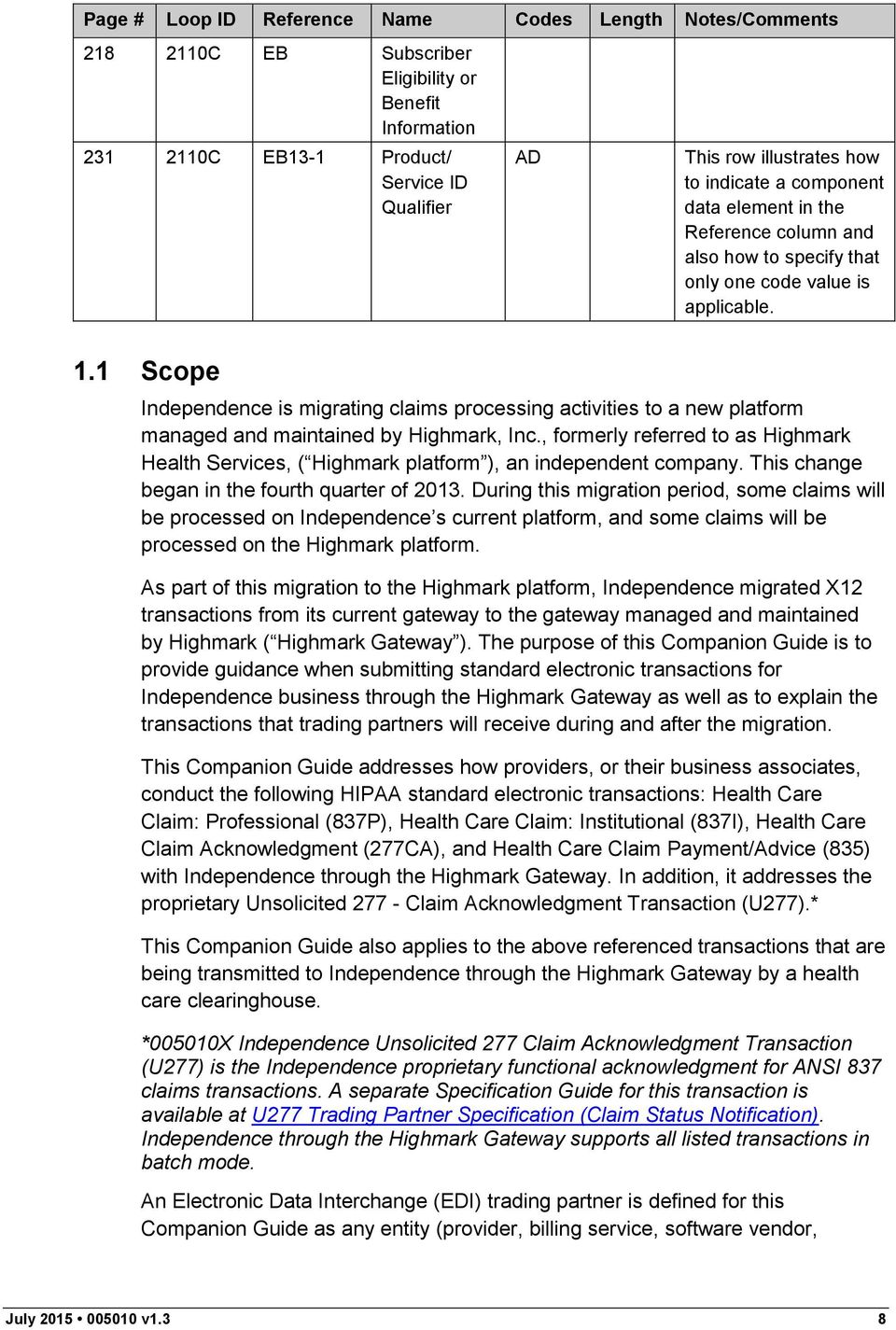
7 1. Introduction This section describes the ASC X12 Implementation Guides (IGs) adopted under HIPAA and is detailed using tables. The tables contain a row for each segment where Independence has something additional, over and above the information in the IGs. This information can: 1. Limit the repeat of loops or segments; 2. Limit the length of a simple data element; 3. Specify a subset of the IGs internal code listings; 4. Clarify the use of loops, segments, composite, and simple data elements; 5. Provide any other information tied directly to a loop, segment, composite, or simple data element pertinent to trading electronically with Independence. In addition to the row for each segment, one or more additional rows are used to describe Independence s usage for composite and simple data elements and for any other information. Notes and comments should be placed at the deepest level of detail. For example, a note about a code value should be placed on a row specifically for that code value, not in a general note about the segment. The following table specifies the columns and suggested use of the rows for the detailed description of the Companion Guide: Page # Loop ID Reference Name Codes Length Notes/Comments C NM1 Subscriber Name C NM109 Subscriber Primary Identifier C REF01 Reference Qualifier Plan Network Number 18, 49, 6P, HJ, N6 N6 This type of row indicates that a new segment has begun. It is shaded at 10%. Notes or comments about the segment are entered in this cell. 15 This type of row limits the length of the specified data element. These are the only codes transmitted by Independence. This type of row is used when a note for a particular code value is required. For example, this note could state that value N6 is the default. Not populating the first three columns indicates that the code value belongs to the row immediately above it. July v1.3 7

8 Page # Loop ID Reference Name Codes Length Notes/Comments C EB Subscriber Eligibility or Benefit C EB13-1 Product/ Service ID Qualifier AD This row illustrates how to indicate a component data element in the Reference column and also how to specify that only one code value is applicable. 1.1 Scope Independence is migrating claims processing activities to a new platform managed and maintained by Highmark, Inc., formerly referred to as Highmark Health Services, ( Highmark platform ), an independent company. This change began in the fourth quarter of During this migration period, some claims will be processed on Independence s current platform, and some claims will be processed on the Highmark platform. As part of this migration to the Highmark platform, Independence migrated X12 transactions from its current gateway to the gateway managed and maintained by Highmark ( Highmark Gateway ). The purpose of this Companion Guide is to provide guidance when submitting standard electronic transactions for Independence business through the Highmark Gateway as well as to explain the transactions that trading partners will receive during and after the migration. This Companion Guide addresses how providers, or their business associates, conduct the following HIPAA standard electronic transactions: Health Care Claim: Professional (837P), Health Care Claim: Institutional (837I), Health Care Claim Acknowledgment (277CA), and Health Care Claim Payment/Advice (835) with Independence through the Highmark Gateway. In addition, it addresses the proprietary Unsolicited Claim Acknowledgment Transaction (U277).* This Companion Guide also applies to the above referenced transactions that are being transmitted to Independence through the Highmark Gateway by a health care clearinghouse. *005010X Independence Unsolicited 277 Claim Acknowledgment Transaction (U277) is the Independence proprietary functional acknowledgment for ANSI 837 claims transactions. A separate Specification Guide for this transaction is available at U277 Trading Partner Specification (Claim Status Notification). Independence through the Highmark Gateway supports all listed transactions in batch mode. An Electronic Data Interchange (EDI) trading partner is defined for this Companion Guide as any entity (provider, billing service, software vendor, July v1.3 8
9 employer group, or financial institution) that utilizes the Highmark Gateway to send or receive electronic data to or from Independence. The Highmark Gateway supports standard electronic transactions adopted under the Health Insurance Portability and Accountability Act of 1996 (HIPAA) and additional supporting transactions as described in this Companion Guide. Highmark EDI Operations supports transactions for multiple payers, including Independence. 1.2 Overview This Companion Guide includes information needed to commence and maintain communication exchange with Independence through the Highmark Gateway. This information is organized into the following sections: Getting Started: This section includes information related to system operating hours, provider data services, and audit procedures. It also contains a list of valid characters in text data. about trading partner authorization and an overview of the trading partner testing process is also included in this section. Testing with the Payer: This section includes detailed transaction testing information and other relevant information needed to complete transaction testing with Independence on the Highmark Gateway, if applicable. Connectivity with the Payer/Communications: This section includes information on the Highmark Gateway transmission procedures and communication and security protocols. Contact : This section includes telephone numbers and addresses for support from Highmark EDI Operations. Control Segments/Envelopes: This section contains information needed to create the ISA-IEA, GS-GE, and ST-SE control segments for transactions to be submitted. Payer-Specific Business Rules and Limitations: This section contains information describing Independence s business rules. Acknowledgments and Reports: This section contains information on all transaction acknowledgments. These include the Interchange Acknowledgment (TA1), Health Care Claim Acknowledgment (277CA), Unsolicited Claim Acknowledgment Transaction (U277), and the Implementation Acknowledgment for Health Care Insurance (999). Trading Partner Agreements: This section contains general information about and links to Provider and Clearinghouse/Vendor Trading Partner Agreements (collectively referred to herein as Trading Partner Agreements ). Transaction-Specific : This section describes how IGs adopted under HIPAA will be detailed with the use of a table. The tables contain a row for each segment that has additional information that might supplement the IGs. July v1.3 9

10 1.3 References Trading partners must use the IGs adopted under the HIPAA Administrative Simplification Electronic Transaction rule and this Companion Guide for development of the EDI transactions. These documents will be made available through the EDI Trading Partner Business Center: Trading partners must use the most current national standard code lists applicable to the EDI transactions. The code lists may be accessed at the Washington Publishing Company website: The applicable code lists and their respective X12 transactions are as follows: Claim Adjustment Reason Codes and Remittance Advice Remark Codes (ASC X12/005010X221A1 Health Care Claim Payment/Advice [835]) Claim Status Category Codes and Claim Status Codes (005010X214 Health Care Claim Acknowledgment [277CA]) Provider Taxonomy Codes (ASC X12/005010X222A1Health Care Claim: Professional [837P] and ASC X12/005010X223A2 Health Care Claim: Institutional [837I]) 1.4 Additional There is no additional information at this time. 2. Getting Started 2.1 Working with Highmark, Inc. ( Highmark ) System Operating Hours Highmark is available to handle EDI transactions 24 hours a day, 7 days a week, except during scheduled system maintenance periods. It is highly recommended that trading partners transmit any test data during the hours that Highmark EDI Operations is available, 8:00 a.m. through 5:00 p.m. EST, Monday through Friday. Audit Procedures For purposes of conducting an audit for itself and/or Independence, Highmark may require access to the medical records used by the trading partner for submitting claims in accordance with the Trading Partner Agreement. The trading partner must ensure that input documents and medical records are retained and available for every automated claim for purposes of an audit. Copies of trading partner documents are acceptable. The trading partner, not the billing agent, is held accountable for accurate records. July v1.3 10

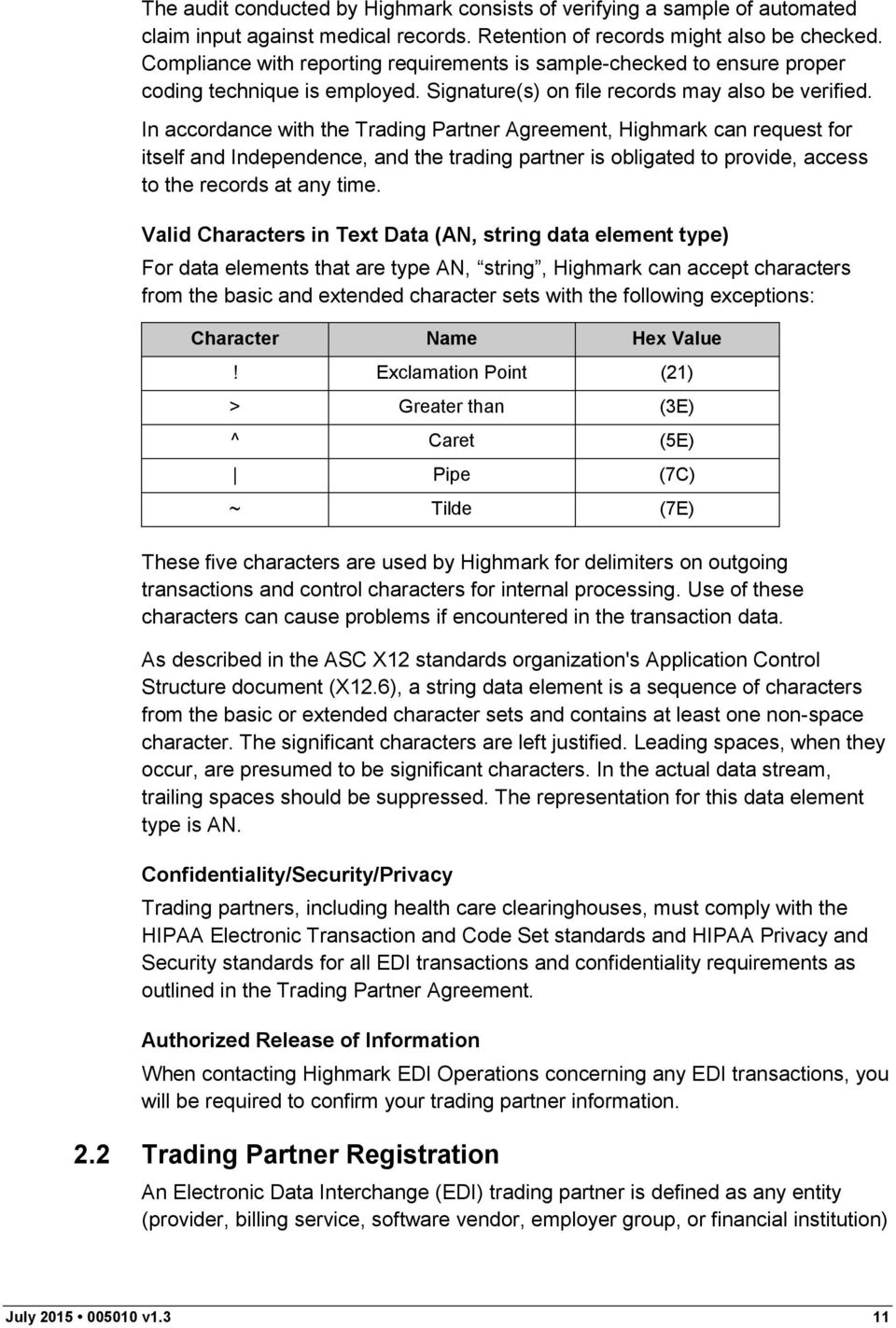
11 The audit conducted by Highmark consists of verifying a sample of automated claim input against medical records. Retention of records might also be checked. Compliance with reporting requirements is sample-checked to ensure proper coding technique is employed. Signature(s) on file records may also be verified. In accordance with the Trading Partner Agreement, Highmark can request for itself and Independence, and the trading partner is obligated to provide, access to the records at any time. Valid Characters in Text Data (AN, string data element type) For data elements that are type AN, string, Highmark can accept characters from the basic and extended character sets with the following exceptions: Character Name Hex Value! Exclamation Point (21) > Greater than (3E) ^ Caret (5E) Pipe (7C) ~ Tilde (7E) These five characters are used by Highmark for delimiters on outgoing transactions and control characters for internal processing. Use of these characters can cause problems if encountered in the transaction data. As described in the ASC X12 standards organization's Application Control Structure document (X12.6), a string data element is a sequence of characters from the basic or extended character sets and contains at least one non-space character. The significant characters are left justified. Leading spaces, when they occur, are presumed to be significant characters. In the actual data stream, trailing spaces should be suppressed. The representation for this data element type is AN. Confidentiality/Security/Privacy Trading partners, including health care clearinghouses, must comply with the HIPAA Electronic Transaction and Code Set standards and HIPAA Privacy and Security standards for all EDI transactions and confidentiality requirements as outlined in the Trading Partner Agreement. Authorized Release of When contacting Highmark EDI Operations concerning any EDI transactions, you will be required to confirm your trading partner information. 2.2 Trading Partner Registration An Electronic Data Interchange (EDI) trading partner is defined as any entity (provider, billing service, software vendor, employer group, or financial institution) July v1.3 11
12 utilizing the Highmark Gateway to transmit or receive electronic standard transactions to or from Independence. While Highmark EDI Operations accepts HIPAA-compliant transactions from any covered entity, HIPAA security requirements dictate that proper procedure is established to secure access to data. As a result, Highmark has a process in place to establish a trading partner relationship. That process has the following steps: The trading partner must identify Trading Partner Administrator and Delegate roles (see page 13 of this Companion Guide). Independence uses role-based security for transactions related to the maintenance of a trading partner relationship. The Trading Partner Administrator must complete an online application to receive from Highmark a DataStream Trading Partner ID associated with submitting transactions on behalf of Independence. The Trading Partner Administrator must agree to and electronically accept or otherwise submit the Trading Partner Agreement to Highmark. The Trading Partner Agreement establishes the legal relationship and requirements. This is separate from a participating provider agreement. Once the Trading Partner Agreement is received by Highmark, the trading partner is sent a logon ID and password combination associated with the DataStream Trading Partner ID for use when accessing the Highmark Gateway for submission or retrieval of Independence transactions ( DataStream logon ID and password ). This DataStream logon ID is also used within EDI Interchanges as the ID of the trading partner. The Confidentiality/Security/Privacy section of this Companion Guide provides more detail about the maintenance of the DataStream logon ID and password by the trading partner. Authorization Process New trading partners that want to submit EDI transactions must submit an EDI Transaction Application to Highmark EDI Operations. The EDI Transaction Application and the Trading Partner Agreement must be completed, electronically accepted and submitted by the Trading Partner Administrator who is an authorized representative of the organization submitting the EDI Transaction Application. Highmark can terminate the Trading Partner Agreement after a sixty (60) day suspension period, without notice, if the trading partner s account is inactive for a period of six (6) consecutive months, pursuant to the terms of the Trading Partner Agreement. Complete and accurate reporting of information on the EDI Transaction Application ensures that the authorization process is completed in a timely manner. If you need assistance in completing the EDI Transaction Application, July v1.3 12

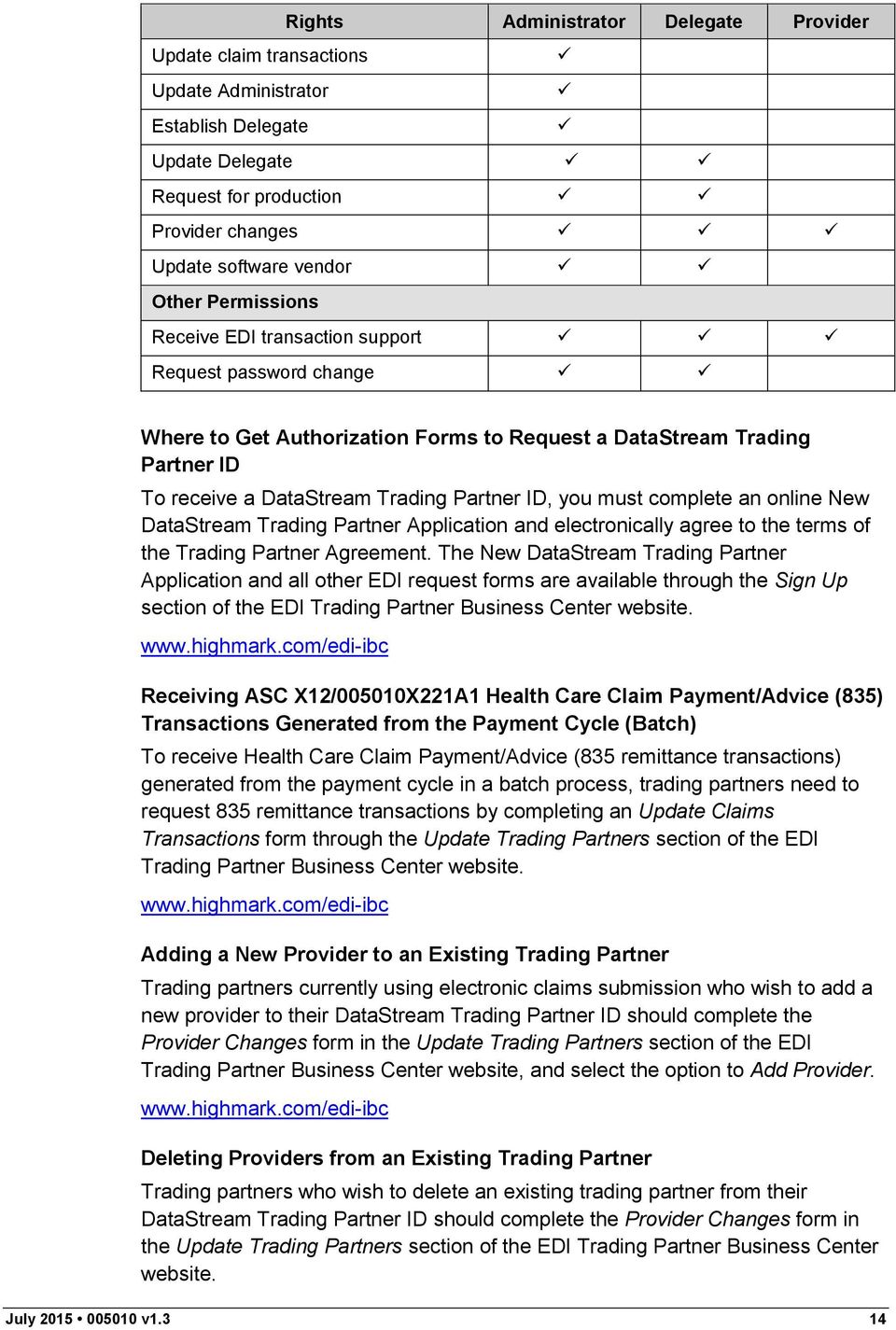
13 contact your company s technical support area, your software vendor, or Highmark EDI Operations. Upon completion of the authorization process, a DataStream logon ID and password are assigned to the trading partner. Highmark EDI Operations will authorize, in writing, the trading partner to submit production Independence EDI transactions. Trading Partner Administrator and Trading Partner Delegate Roles This section explains the Trading Partner Administrator ( Administrator ) and Trading Partner Delegate ( Delegate ) roles. Highmark EDI Operations will only make changes to the trading partner record if the change request is received from the authorized Administrator or Delegate. The Administrator is the primary representative of the trading partner entity (provider office, billing service, clearinghouse, etc.) that is authorized by the trading partner to conduct all electronic business on behalf of the trading partner, including entering into Trading Partner Agreements, modifying trading partner capabilities, and conducting inquiries about electronic transactions. The Delegate is a representative of the Trading Partner Administrator that has been authorized by the trading partner/trading Partner Administrator to conduct certain activities on behalf of the trading partner such as, requesting the addition or deletion of affiliated providers or conducting inquiries about electronic transactions. The provider is a physician or allied health care provider credentialed and approved by Independence to provide covered services to Independence members and submit standard electronic transactions for such services to Independence for processing. The Administrator is required to submit a security question and an answer to this question when registering. The security answer is used to confirm and verify the identity of the Administrator prior to Highmark making any form changes on behalf of the trading partner. The following table lists the rights that an Administrator, a Delegate, and a provider are authorized to perform: Independence Trading Partner Role-Based Security Matrix Rights Administrator Delegate Provider EDI Trading Partner Business Center Permissions New trading partner registration New trading partner request Update a trading partner s address information Delete a trading partner July v1.3 13

14 Rights Administrator Delegate Provider Update claim transactions Update Administrator Establish Delegate Update Delegate Request for production Provider changes Update software vendor Other Permissions Receive EDI transaction support Request password change Where to Get Authorization Forms to Request a DataStream Trading Partner ID To receive a DataStream Trading Partner ID, you must complete an online New DataStream Trading Partner Application and electronically agree to the terms of the Trading Partner Agreement. The New DataStream Trading Partner Application and all other EDI request forms are available through the Sign Up section of the EDI Trading Partner Business Center website. Receiving ASC X12/005010X221A1 Health Care Claim Payment/Advice (835) Transactions Generated from the Payment Cycle (Batch) To receive Health Care Claim Payment/Advice (835 remittance transactions) generated from the payment cycle in a batch process, trading partners need to request 835 remittance transactions by completing an Update Claims Transactions form through the Update Trading Partners section of the EDI Trading Partner Business Center website. Adding a New Provider to an Existing Trading Partner Trading partners currently using electronic claims submission who wish to add a new provider to their DataStream Trading Partner ID should complete the Provider Changes form in the Update Trading Partners section of the EDI Trading Partner Business Center website, and select the option to Add Provider. Deleting Providers from an Existing Trading Partner Trading partners who wish to delete an existing trading partner from their DataStream Trading Partner ID should complete the Provider Changes form in the Update Trading Partners section of the EDI Trading Partner Business Center website. July v1.3 14
15 Reporting Changes in Status If trading partners need to change any other trading partner information, they must inform Highmark EDI Operations by completing the appropriate trading partner update form through the Update Trading Partners section of the EDI Trading Partner Business Center website Certification and Testing Overview Independence through Highmark Transactional Testing Detailed payer testing requirements and procedures to be determined. Claims Transactions Detailed payer testing requirements and procedures to be determined. 3. Testing with the Payer Detailed payer testing requirements and procedures to be determined. 4. Connectivity with the Payer/Communications Highmark offers Independence trading partners the following communication method for transferring data electronically: A secure https Internet connection is available for transactions in batch mode. 4.1 Process Flows In the fourth quarter of 2013, Independence started migrating claims processing activities to the Highmark platform. During this migration period, some claims will be processed on Independence's current platform, and some claims will be processed on the Highmark platform, as illustrated in the following diagram: 277CA,835 TA1, 999, 277CA, U277, I, 837P Highmark Platform Trading Partner 837I, 837P Highmark Gateway Determine Platform 837I, 837P Independence Platform U277,835 July v1.3 15

16 837 institutional and professional claims transactions submitted to Independence via the Highmark Gateway may be processed on either Independence s current platform or the new Highmark platform. If an 837 claim transaction is processed at Independence, it will generate a U277 Claim Acknowledgment transaction and an 835 Health Care Claim Payment/Advice transaction from the Independence platform. If an 837 claim transaction is processed at Highmark, it will generate a 277CA Health Care Claim Acknowledgment transaction and an 835 Health Care Payment/Advice transaction from the Highmark platform. Trading partners will submit and receive all transactions through the Highmark Gateway. The 999 Implementation Acknowledgment for Health Care Insurance transaction, TA1 Transaction Acknowledgment transaction, 277CA Health Care Claim Acknowledgment transaction, U277 Claim Acknowledgment transaction, and 835 Health Care Payment/Advice transaction are all returned to trading partners through the Highmark Gateway. 4.2 Transmission Administrative Procedures This information will be communicated to the trading partner upon Highmark s receipt of the agreed-to Trading Partner Agreement. 4.3 Re-Transmission Procedures Independence does not have specific re-transmission procedures. Trading partners can retransmit files at their discretion. 4.4 Communication Protocol Specifications Internet Highmark offers a secure File Transfer Protocol (SFTP) through edelivery for conducting business with Independence. edelivery is available for trading partners who submit or receive any HIPAA-compliant EDI transactions in batch mode. Internet File Transfer Protocol (SFTP) through edelivery The Highmark Secure FTP Server ( edelivery ) provides an SFTP service over an encrypted data session providing on-the-wire privacy during file exchanges. This service offers an Internet accessible environment to provide the ability to exchange files with customers, providers, and business partners using a simple SFTP process in an encrypted and secure manner. Any state-of-the-art browser can be used to access the Highmark Secure FTP Server. Browsers must support strong encryption (128 bit) and must allow cookies for session tracking purposes. Once the browser capabilities are confirmed, the following are the general guidelines for exchanging files: 1. Launch your web browser. 2. Connect to the SFTP server at July v1.3 16

17 3. The server prompts you for your DataStream logon ID and password. Use the DataStream logon ID/password that Highmark provided you as part of the trading partner authorization process for accessing this service. Enter the ID, tab to password field and enter the password. 4. Press Enter or click OK. 5. The server places you in an individual file space on the SFTP server. Other users cannot access your space and you cannot access the space of other users. You cannot change your space. 6. You need to change into the directory for the type of file you are uploading or downloading from the server. 7. By default, the file transfer mode is binary. This mode is acceptable for all data types. However, you can change between ASCII and binary file transfer modes by clicking the Set ASCII / Set Binary toggle button. 8. Send Highmark a file. The following is an example of the submission of an electronic claim 1 transaction file: a. Click the hipaa-in folder to change into that directory. b. Click the browse button to select a file from your system to send to Highmark. A file finder box appears listing the files available on your system. c. Select the file you want to send to Highmark and click OK. This returns you to the browser with the file name you selected in the filename window. d. Click the Upload File button to transfer the file to Highmark. Once completed, the file appears in your file list. 9. Retrieve a file from Highmark. The following is an example of retrieval of an Implementation Acknowledgment For Health Care Insurance (999) file: a. Click the hipaa-out directory. Your browser lists all the files available to you. b. Click the ack directory. c. Click the file you want to download. Your browser downloads the file. If your browser displays the file instead of downloading, click the browser back button and click the tools next to the file you want to receive. Select application/ octet-stream. You might be prompted with the Save As file location window. Select a file location and click Save to download the file. 1 Electronic claim includes both ASC X12/005010X222A1 Health Care Claim: Professional (837) and ASC X12/005010X223A2 Health Care Claim: Institutional (837) unless otherwise noted. July v1.3 17

18 4.5 Passwords Highmark EDI Operations assigns DataStream logon IDs and passwords to trading partners. EDI transactions submitted by unauthorized trading partners will not be accepted by the Highmark Gateway. Trading partners should protect password privacy by limiting knowledge of the password to a key Administrator or their Delegates. Passwords should be changed regularly: upon initial usage and then periodically throughout the year. Also, the password should be changed if there are personnel changes in the trading partner office, or at any time the trading partner deems necessary. Trading partners must notify Highmark immediately if there is a violation of these DataStream logon ID and password requirements as required by the Trading Partner Agreement. Password requirements include: Password must be eight characters in length. Password must contain a combination of both numeric and lower case alpha characters. Password cannot contain the logon ID. Password must be changed periodically. Trading partners are directed to refer to the terms of their Trading Partner Agreement for any additional obligations they may have concerning logon IDs and passwords. Password Change Requests EDI Operations only performs a password reset if requested by an Administrator or Delegate. If an Administrator or a Delegate provides the answer to their security question, EDI Operations can provide temporary passwords over the telephone. If the security answer is not provided, a temporary password is not given during the initial telephone call. In this case, the temporary password can be provided in a follow-up or return telephone call using existing contact information on file at Highmark. 5. Contact 5.1 Highmark EDI Operations Contact information for Highmark EDI Operations: Telephone Number: Address: [email protected] When contacting Highmark EDI Operations, have your DataStream Trading Partner ID and DataStream logon ID available. These numbers facilitate the handling of your questions. July v1.3 18

19 Highmark EDI Operations is available for questions from 8:00 a.m. to 5:00 p.m. EST, Monday through Friday. 5.2 EDI Technical Assistance Contact information for Highmark EDI Operations: Telephone Number: Address: When contacting Highmark EDI Operations, have your DataStream Trading Partner ID and DataStream logon ID available. These numbers facilitate the handling of your questions. Highmark EDI Operations is available for questions from 8:00 a.m. to 5:00 p.m. EST, Monday through Friday. 5.3 Provider Services Non-EDI related inquiries should be handled through your existing channels of communication with Independence. 5.4 Applicable Websites/ EDI specifications, including this Companion Guide, will be accessible online in the Resources section of the EDI Trading Partner Business Center website: 6. Control Segments/Envelopes Interchange Control (ISA/IEA) and Function Group (GS/GE) envelopes must be used as described in the IGs. Independence's expectations for inbound ISAs and a description of data on outbound ISAs are detailed in this chapter. Specific guidelines and instructions for GS and GE segments are contained in each transaction chapter of the Companion Guide. Note: Highmark only supports one interchange (ISA/IEA envelope) per incoming transmission (file). A file containing multiple interchanges will be rejected for a mismatch between the ISA Interchange Control Number at the top of the file and the IEA Interchange Control Number at the end of the file. For 5010 claim files, the ISA13 Control number must be unique for each submitted interchange. If the content of an interchange matches another interchange submitted within the last 14 days, the file is considered a duplicate and rejected with a TA1 Duplicate Interchange. 6.1 ISA-IEA Delimiters As detailed in the IGs, delimiters are determined by the characters sent in specified, set positions of the ISA header. For transmissions to Highmark EDI July v1.3 19
20 Operations (inbound transmissions), the following list contains all characters that can be accepted as a delimiter. Note that Line Feed, hex value 0A, is an acceptable delimiter. Description StartOfHeading 01 StartofTeXt 02 EndofTeXt 03 EndOfTrans. 04 ENQuiry 05 ACKnowledge 06 BELL 07 VerticalTab 0B FormFeed 0C CarriageReturn 0D DeviceControl1 11 DeviceControl2 12 DeviceControl3 13 DeviceControl4 14 NegativeAcK 15 SYNchron.Idle 16 EndTransBlock 17 FileSeparator 1C GroupSeparator 1D RecordSeparator 1 E! % 25 & ( 28 ) 29 * 2A + 2B, 2C. 2E / 2F : 3A ; 3B < 3C = 3D > 3E? 40 [ 5B ] 5D ^ 5E Hex value July v1.3 20

21 Description { 7B } 7D ~ 7E Hex value Note: ^ can be used as a Data Element Separator, but is not accepted as a Component Element Separator, Repeating Element Separator, or Segment Terminator. Highmark uses the following delimiters in all outbound transactions. Note that these characters as well as the Exclamation Point,!, cannot be used in text data (type AN, Sting data element) within the transaction; refer to Section 2.1 Valid Characters in Text Data in this document. Delimiter Type Character Used (Hex value) Data element separator ^ (5E) Component element separator > (3E) Segment terminator ~ (7E) Repeating element separator { (7B) Data Detail and Explanation of Incoming ISA to Independence Segment: ISA Interchange Control Header (Incoming) Note: This fixed record length segment must be used in accordance with the guidelines in Appendix B of the IGs with the clarifications as follows: Table 1: Data Element Summary ISA ISA01 ISA02 ISA03 ISA04 ISA05 Interchange Control Header Authorization Qualifier Authorization Security Qualifier Security Interchange ID Qualifier 00 Independence can only support code 00 - No Authorization present. This element must be space filled. 00 Independence can only support code 00 - No Security present. ZZ This element must be space filled. Use qualifier code value ZZ Mutually Defined to designate a payer-defined ID. July v1.3 21
22 ISA06 ISA07 ISA08 ISA13 ISA 14 Interchange Sender ID Interchange ID Qualifier Interchange Receiver ID Interchange Control Number Acknowledgment Requested Use the Independence assigned security logon ID. The ID must be left justified and space filled. Any alpha characters must be upper case. 33 Use qualifier code value 33. Independence only supports the NAIC code to identify the receiver Independence For 5010 claim files the ISA13 Control number must be unique for each submitted interchange. If the content of an interchange matches another interchange submitted within the last 14 days the file will be considered a duplicate and rejected with a TA1 Duplicate Interchange. 1 A TA1 segment is always returned when the incoming interchange is rejected due to errors at the interchange or functional group envelope. ISA15 Usage Indicator The value in this element is used to determine the test or production nature of all transactions within the interchange. Data Detail and Explanation of Outgoing ISA from Independence Segment: ISA Interchange Control Header (Outgoing) Note: The following table lists clarifications of Independence s use of the ISA segment for outgoing interchanges. Table 2: Data Element Summary ISA ISA01 ISA02 Interchange Control Header Authorization Qualifier Authorization 00 Code 00 is sent - No Authorization present. This element must be space filled. July v1.3 22
23 ISA03 ISA04 ISA05 ISA06 ISA07 ISA08 ISA 14 Security Qualifier Security Interchange ID Qualifier Interchange Sender ID Interchange ID Qualifier Interchange Receiver ID Acknowledgment Requested 00 Code 00 is sent - No Security present. This element must be space filled. 33 Qualifier code value 33 is sent to designate that the NAIC code is used to identify the sender Independence ZZ Qualifier code value ZZ is sent. Mutually defined to designate that an Independence-assigned proprietary ID is used to identify the receiver. The assigned ID is the trading partner s security logon ID. This ID is left-justified and space filled. Independence always uses a 0 (No Interchange Acknowledgment Requested). ISA15 Usage Indicator Independence provides T or P as appropriate to identify the test or production nature of all transactions within the interchange. 6.2 GS-GE Functional group (GS-GE) codes are transaction specific. Therefore, information concerning the GS-GE can be found with the related transaction in Section 7 (Payer-Specific Business Rules and Limitations) and Section 10 (Transaction- Specific ) of this Companion Guide. 6.3 ST-SE Independence has no requirements outside the national transaction IGs. July v1.3 23
24 7. Payer-Specific Business Rules and Limitations (837P, 837I, 277CA, U277, 835, and 999) X222A1 Health Care Claim: Professional (837P) The Health Care Claim: Professional (837P) transaction is used for professional claims. The May 2006 ASC X X222 IG, as modified by the July 2010 Type 1 Errata Document, is the primary source for definitions, data usage, and requirements. This section and the corresponding transaction data detail make up the Companion Guide for submitting Health Care Claim: Professional (837P) claims for patients with Independence benefits plans, Federal Employees Program (FEP), and BlueCard Par Point of Service (POS). Accurate reporting of Independence s NAIC code is critical for claims submitted to Independence through the Highmark Gateway. Patient with Medicare Advantage PPO (MAPPO) Coverage from another Blue Cross Blue Shield Plan The BlueCard operating arrangement among Plans that are licensees of the Blue Cross and Blue Shield Association, an association of independent Blue Cross and Blue Shield Plans, allows Independence to accept Health Care Claim: Professional (837P) claims when the patient has coverage from an out-of-state MAPPO Plan. BlueCard also applies in certain situations for patients with coverage from other Pennsylvania Plans, as detailed in the following subsections. To be processed through this arrangement, the Member ID (Subscriber and Patient ID if sent) must be submitted with its alpha prefix. Also, Independence must be listed as the payer by submitting in the Application Receiver GS03 and in the loop 2010BB NM109 Payer ID. Independence will use the Member ID alpha prefix to identify the need to coordinate processing with another Plan. If the alpha prefix portion of the Member ID is missing, the claim will be processed as if the patient were a local independence member, rather than a member with MAPPO coverage through another Plan. Because the eligibility information for the patient would not reside on Independence s system, the claim would be denied for no coverage and any payment due the provider would be delayed until the claim is corrected and resubmitted. This operating arrangement allows Independence to be an electronic interface for its local providers to out-of-area MAPPO Plans that are licensees of the Blue Cross and Blue Shield Association. Any payment to the provider will be made by Independence. Family Planning Effective August 1, 2013, Keystone First, the Independence Medicaid affiliate/subcontractor in Pennsylvania, started processing family planning claims for Medicaid members. Providers should submit family planning claims for Medicaid members to Keystone First for processing. For dates of service prior to July v1.3 24
25 August 1, 2013, providers should submit family planning claims to Independence through the Highmark Gateway for processing on the Highmark platform. Claims Resubmission Frequency Type codes that tie to prior claims or finalized claims refer to a previous claim that has completed processing in the payer s system and produced a final paper or electronic remittance or explanation of benefits. Previous claims that are pending due to a request from the payer for additional information are not considered a prior claim or finalized claim. An 837 professional claim transaction is not an appropriate response to a payer s request for additional information. Rather, the instructions contained on the request must be followed for returning that information. At this time, there is not an EDI transaction available to use for the return of the requested information X223A2 Health Care Claim: Institutional (837I) The Health Care Claim: Institutional (837I) transaction is used for institutional claims. The May 2006 ASC X X223 IG, as modified by the August 2007 and the July 2010 Type 1 Errata documents, is the primary source for definitions, data usage, and requirements. Transactions must be submitted with the revisions in the errata; the transaction version must be identified as X223A2. This Companion Guide supplements the ASC X12 Implementation Guide and addenda with clarifications and payer-specific usage and content requirements. This section and the corresponding transaction detail make up the Companion Guide for submitting Health Care Claim: Institutional (837I) claims for patients with Independence benefit plans, including Indemnity, Preferred Provider Organization (PPO), Health Maintenance Organization (HMO), Point of Service (POS), Comprehensive Major Medical (CMM), Medicare Advantage, and Medicare Supplemental. Accurate reporting of Independence s NAIC code in the ISA08 along with associated prefixes and suffixes is critical for claims submission. Keystone Health Plan East (KHPE) KHPE-contracted providers should submit all KHPE claims to Independence s NAIC code in the ISA08 and KHPE s NAIC code in the GS03. Family Planning Effective August 1, 2013, Keystone First, the Independence Medicaid affiliate/subcontractor in Pennsylvania, started processing family planning claims for Medicaid members. Providers should submit family planning claims for Medicaid members to Keystone First for processing. For dates of service prior to August 1, 2013, providers should submit family planning claims to Independence through the Highmark Gateway for processing on the Highmark platform. July v1.3 25
26 Patient with Coverage from an Out-of-Area Blue Cross Blue Shield Plan The BlueCard operating arrangement among Plans that are licensees of the Blue Cross and Blue Shield Association allows Independence to accept Health Care Claim: Institutional (837I) claims when the patient has coverage from an out-ofstate plan. BlueCard also applies in certain situations for patients with coverage from other Pennsylvania Plans, as detailed in the subsection below. To be processed through this arrangement, the Member ID (Subscriber and Patient ID if sent) must be submitted with its alpha prefix. Also, Independence must be listed as the payer by submitting Independence s NAIC code of in the GS03 Application Receiver s Code and the loop 2010BB NM109 Payer ID. Independence will use the Member ID alpha prefix to identify the need to coordinate processing with another Plan. If the alpha prefix portion of the Member ID is missing, the claim will be processed as if the patient were a local Independence member, rather than a member with coverage through another Plan. Because the eligibility information for the patient would not reside on Independence s system, the claim would be denied for no coverage and any payment due the facility would be delayed until the claim is corrected and resubmitted. This operating arrangement allows Independence to be an electronic interface for its local providers to out-of-area Plans that are licensees of the Blue Cross Blue Shield Association. Any payment to the provider will be made by Independence XIBC Unsolicited Claim Acknowledgment Transaction (U277) Independence started moving to a new claims processing platform at Highmark in the fourth quarter of During the platform transition, trading partners will receive both the Unsolicited Claim Acknowledgment (U277) and Health Care Claim Acknowledgment (277CA) transactions. 837 institutional and professional claim transactions submitted to Independence via the Highmark Gateway may be processed on either Independence s current platform or the Highmark platform. If an 837 claim transaction is processed at Independence, it will generate a U277 Claim Acknowledgment transaction from the Independence platform. If an 837 claim transaction is processed at Highmark, it will generate a 277CA Health Care Claim transaction from the Highmark platform. Once the transition to the Highmark platform is complete, trading partners will receive only the 277CA transaction and the Independence U277 Trading Partner Specification Guide will be retired. Detailed transaction information for the U277 transaction as well as business rules and/or limitations can be found in the independent Independence U277 Trading Partner Specification X214 Health Care Claim Acknowledgment (277CA) Independence started moving to a new claims processing platform at Highmark in the fourth quarter of During the platform transition, trading partners will July v1.3 26
27 receive both the Unsolicited Claim Acknowledgment (U277) and Health Care Claim Acknowledgment (277CA) transactions. 837 institutional and professional claim transactions submitted to Independence via the Highmark Gateway may be processed on either Independence s current platform or the new Highmark platform. If an 837 claim transaction is processed at Independence, it will generate a U277 Claim Acknowledgment transaction from the Independence platform. If an 837 claim transaction is processed at Highmark, it will generate a 277CA Health Care Claim Acknowledgment transaction from the Highmark platform. Once the transition to the Highmark platform is complete, trading partners will receive only the 277CA transaction. Timeframe for Batch Health Care Claim Acknowledgment (277CA) Generally, batch claim submitters should expect a 277CA transaction within 24 hours after Independence receives the electronic claims 1, subject to processing cutoffs. In the event system issues are encountered and all claims from a single 837 transaction cannot be acknowledged in a single 277CA transaction, it may be necessary to retrieve multiple 277CA transactions related to an electronic claims transaction. See Section 4.4 Communication Protocol Specifications in this Companion Guide for information on retrieving the batch Health Care Claim Acknowledgment (277CA) X221A1 Health Care Claim Payment/Advice (835) Generated on Highmark Platform Independence started moving to a new claims processing platform at Highmark in the fourth quarter of During the platform transition, trading partners will receive the X221A1 Health Care Claim Payment Advice (835) transaction from both the current Independence platform and the Highmark platform, depending on where the claim is adjudicated. 837 institutional and professional claim transactions submitted to Independence via the Highmark Gateway may be processed on either Independence s current platform or the new Highmark platform. If an 837 claim transaction is processed at Independence, it will generate an 835 transaction from the Independence platform. If an 837 claim transaction is processed at Highmark, it will generate an 835 remittance transaction from the Highmark platform. Once the transition to the Highmark platform is complete, trading partners will receive only the 835 remittance transaction generated on the Highmark platform. This section describes business rules specific to the 835 remittance transaction generated on the Highmark platform. See Section 7.6 for business rules specific to the 835 remittance transaction generated on the current Independence platform. 1 Electronic claim includes both ASC X12/005010X222A1 Health Care Claim: Professional (837) and ASC X12/005010X223A2 Health Care Claim: Institutional (837) unless otherwise noted. July v1.3 27
28 Availability of Payment Cycle 835 Transactions (Batch) Health Care Claim Payment/Advice (835) transactions are created on a weekly or daily basis to correspond with Independence s weekly or daily payment cycles. The Health Care Claim Payment/Advice (835) payment transaction files become available for retrieval after the payment cycle is complete, and remain available for seven days. If a Health Care Claim Payment/Advice (835) transaction was expected but not available for retrieval on the third day after the payment cycle was complete, contact Highmark EDI Operations for assistance. Limitations Paper claims might not provide all data utilized in the Health Care Claim Payment/Advice (835). Therefore, some data segments and elements may be populated with default data or not available as a result of the claim submission mode. Administrative checks are issued from a manual process and are not part of the weekly or daily payment cycles. Therefore, they will not be included in the Health Care Claim Payment/Advice (835) transaction. A letter or some form of documentation usually accompanies the check. An administrative check does not routinely contain an Explanation of Benefits notice. The following information will be populated with data from internal databases: Payer name and address Payee name and address Major Medical Under certain group contracts, Independence processes major medical benefits concurrently with the basic medical-surgical coverage. In those instances, the liabilities for the basic coverage and the major medical coverage will be combined and the resulting net liabilities reported in the Claim Adjustment Segment at each service line. Under certain group contracts, Independence processes major medical benefits concurrently with the basic medical-surgical coverage. In those instances, the liabilities for the basic coverage and the major medical coverage will be combined and the resulting net liabilities will be reported in the Claim Adjustment Segment at either the claim level or each service line, depending on the type of claim. Claims that are processed concurrently with major medical coverage will reflect Remittance Advice Remark Code N7 - Processing of this claim/service has included consideration under Major Medical provisions in either the 2100 Loop MIA or MOA Segment or 2110 Loop LQ Segment to alert the provider of this processing arrangement. Claim Overpayment Refunds Member Facility Institutional Claims The Reversal and Correction methodology is used to recoup immediate refunds for overpayments identified by the provider or by Independence. The change in payment details is reflected by a reversal claim (CLP02 = 22) and a corrected July v1.3 28
29 claim (CLP02 = 1, 2, 3, or 4). The payment amount of the check/eft is reduced by the overpayment amount, after any outstanding provider offsets are applied from previous checks/efts. If Independence is unable to recoup all or a portion of the refund money from the current check/eft, the remaining refund amount to be offset on a future check will be shown as a negative amount in the Provider Adjustment PLB segment of the Health Care Claim Payment/Advice (835) using the Provider Adjustment Reason code of FB Forward Balance. The negative PLB dollars allow the Health Care Claim Payment/Advice (835) payment to balance and essentially delay or move the refund balance forward to a future Health Care Claim Payment/Advice (835), when money is available to be offset from a check/eft. When the refund dollars are eventually offset in a subsequent check/eft, the money is only reflected in the Health Care Claim Payment/Advice (835) PLB segment with the dollar amount being offset from that specific check/eft. Note that the reversal and correction claim detail is not repeated in the Health Care Claim Payment/Advice (835). Independence claims processed on the Highmark platform use the standard Balance Forward Processing methodology as defined in the ASC X12/005010X221A1 Health Care Claim Payment/Advice (835), Section Balance Forward Processing. Professional and Non-Member Facility Claims When overpayment of a professional claim is identified by the provider, and verified by Independence, the reversal/correction/offset mechanism described above for member facility institutional claims is followed. When overpayment of a professional claim is identified by Independence, the provider s payment will not be immediately reduced. This delay is intended as an opportunity for the provider to appeal Independence s overpayment determination. Due to the timing of the appeal review and actual check/ EFT reduction, providers are encouraged to NOT wait to appeal the refund request. With the exception of difficult refund cases, this new process will eliminate the form letters. In the Health Care Claim Payment/Advice (835) transaction, the Independenceidentified overpayment reversal and correction claims will be separated to a second LX loop (LX01 = 2). Because the resulting overpayment amounts for the claims in this LX loop are not being deducted from this check/eft, a negative amount which cancels out the reversal and correction overpayment claims is reported in the Provider Adjustment PLB segment. The PLB segment will have the following codes and information: Provider Adjustment Reason Code WO, Overpayment Recovery. Reference will contain the claim number from the reversal and correction claim followed by the word DEFER with no space. Example: DEFER. July v1.3 29
30 Claim Interest If an interest payment was made in connection with the original claim payment, recoupment of the interest corresponding to the overpayment will also be deferred. Deferred Interest will be individually detailed in the PLB segment to assist the provider with account reconciliation. The PLB segment will reflect the following codes and information: Provider Adjustment Reason Code L6, Interest Owed Reference will contain the claim number from the impacted claim followed by the word DEFER with no space. Example: DEFER. Both a positive and negative interest (L6) adjustment will be shown in order to not financially impact the current Health Care Claim Payment/Advice (835) payment. If an appeal is not filed, Independence will assume the provider agrees with the refund request. The overpayment refund will then be deducted from a current check/eft, and that refund amount will be reflected in a Provider Adjustment PLB segment. Note that the reversal and correction claim detail is not repeated in the Health Care Claim Payment/Advice (835). The following codes and information will be used in the PLB segment for this purpose: Provider Adjustment Reason Code WO, Overpayment Recovery. Reference will contain the claim number from the reversal and correction claim. If Interest related to this claim was previously deferred, the current refund amount being collected will include the interest amount. In the event the full refund amount cannot be deducted from the current check/eft, then the remaining balance will be moved forward to a subsequent check/eft using the Provider Adjustment Reason code of FB Forward Balance in the Provider Adjustment PLB segment of the Health Care Claim Payment/Advice (835). Independence claims processed on the Highmark platform use the standard Balance Forward Processing methodology as defined in the ASC X12/005010X221A1 Health Care Claim Payment/Advice (835), Section Balance Forward Processing. Provider Payments from Member Health Care Accounts Independence members under certain health care programs have the option to have their member liability paid directly to the provider from their health care spending account. The member health care spending accounts include Health Savings Account (HSA), Health Reimbursement Arrangement (HRA), or Flexible Spending Account (FSA). Additional information regarding this new option and the specific programs impacted was sent to providers and facilities. is also available from your Provider Relations representative. Independence will create a separate batch or payment Health Care Claim Payment/Advice (835) transaction (ST to SE Segment) to document the payment July v1.3 30
31 from the member s saving/spending account. This separate or second Health Care Claim Payment/Advice (835) reporting methodology is termed a COB reporting model meaning the member spending account Health Care Claim Payment/Advice (835) will have the code value attributes of a secondary claim payment. This is a Health Care Claim Payment/Advice (835) reporting model or methodology, designed to utilize existing automated account posting software functionality and is NOT considered to be the same as a true Payer to Payer COB process for claim adjudication. Independence will continue to create a Health Care Claim Payment/Advice (835) transaction to document Independence s payment. If the member has a saving/spending account, has selected the payment to provider option and has funds available in the account, Independence will create another Health Care Claim Payment/Advice (835) transaction to document how the remaining liabilities were addressed by the payment from the member s account. The additional Health Care Claim Payment/Advice (835) transaction, containing members health care account payments, will have the same structure as the Health Care Claim Payment/Advice (835) transactions Independence currently produces. The health care account Health Care Claim Payment/Advice (835) transactions (ST to SE Segments) will be included in the Trading partner s transmission file (ISA to IEA Segments) currently produced for Independence. Trading partners will be able to distinguish the health care account Health Care Claim Payment/Advice (835) by the following features: Loop 1000A, N102 The Payer Name will be Independence Health Care Account. Loop 2100, CLP02 The Claim Status Code for all claims contained in the 835 transaction will equal 2 Processed as secondary. Loop 2100 or Loop 2110, CAS Segment The Claim Adjustment Group and Reason Code will be OA23 for all dollars that equal the difference between the provider s charge and the Patient Responsibility dollars being considered for reimbursement under the account. Example: Health Care Claim Payment/Advice (835) Segments Documenting Payment from Independence and Payment from the Member s Account The example below illustrates the COB reporting model and Health Care Claim Payment/Advice (835) segments documenting claim payment from Independence under the patient s health care coverage plan and reimbursement from the patient s health care account. For purposes of ERA reporting only, Highmark s payment will be treated as primary and payment from the member s health care account as secondary. In this example, the provider s charge is $200. The Highmark allowance for the procedure is $180, leaving a contractual obligation of $20. Highmark applies $130 of that amount to the patient s deductible and pays the remaining $50 to the provider. This is spelled out in the primary example below, on the left. July v1.3 31
32 The right side of the example below displays an accounting of the way the member liabilities were handled through the member s saving/spending account, as it would appear on the Health Care Claim Payment/Advice (835) transaction. The entire patient deductible of $130 is being reimbursed by the member s health care account. The $70 difference ($20 Contractual Obligation plus $50 paid by Highmark) between the $200 charge and the $130 payment from the member s account was assigned a Claim Adjustment Group and Reason code of OA23 Other Adjustment/Payment adjusted due to the impact of prior payer(s) adjudication, including payments and/or adjustments. See the example below: Highmark Payment (Primary) N1^PR^INDEPENDENCE BLUE CROSS~ CLP^ABC123^1^200^50^130^12^ ~ NM1^QC^1^DOE^JOHN^^^^MI^ ~ SVC^HC>99245^200^50~ DTM^150^ ~ DTM^151^ ~ CAS^CO^45^20~ CAS^PR^1^130~ Health Care Account Payment (Secondary) N1^PR^AMERIHEALTH INC HEALTH CARE ACCOUNT~ CLP^ABC123^2^200^130^^12^ ~ NM1^QC^1^DOE^JOHN^^^^MI^ ~ SVC^HC>99245^200^130~ DTM^150^ ~ DTM^151^ ~ CAS^OA^23^70~ X221A1 Health Care Claim Payment/Advice (835) Generated on Independence Platform Independence started moving to a new claims processing platform at Highmark in the fourth quarter of During the platform transition, trading partners will receive the X221A1 Health Care Claim Payment Advice (835) transaction from both the current Independence platform and the Highmark platform, depending on where the claim is adjudicated. 837 institutional and professional claim transactions submitted to Independence via the Highmark Gateway may be processed on either Independence s current platform or the new Highmark platform. If an 837 claim transaction is processed at Independence, it will generate an 835 transaction from the Independence platform. If an 837 claim transaction is processed at Highmark, it will generate an 835 remittance transaction from the Highmark platform. Once the transition to the Highmark platform is complete, trading partners will receive only the 835 remittance transaction generated on the Highmark platform. This section describes business rules specific to the 835 remittance transaction generated on the current Independence platform. See Section 7.5 for business rules specific to the 835 remittance transaction generated on the Highmark platform X231A1 Implementation Acknowledgment for Health Care Insurance (999) Highmark returns an Implementation Acknowledgment for Health Care Insurance (999) for each Functional Group (GS-GE) envelope that is received in a batch July v1.3 32
33 mode. If multiple Functional Groups are received in an Interchange (ISA-IEA) envelope, a corresponding number of Implementation Acknowledgment for Health Care Insurance (999) transactions will be returned. Action on a Functional Group can be: acceptance, partial acceptance, or rejection. A partial acceptance occurs when the Functional Group contains multiple transactions and at least one, but not all, of those transactions is rejected. (Transaction accepted/rejected status is indicated in IK501.) The location and reason for errors are identified in one or more of the following segments: IK3 - segment errors IK4 - data element errors IK5 - transaction errors AK9 - functional group errors Rejection codes are contained in the ASC X X231A1 Implementation Acknowledgment for Health Care Insurance (999) IG. Rejected transactions or functional groups must be fixed and resubmitted. Implementation Acknowledgment for Health Care Insurance (999) transactions will have Interchange Control (ISA-IEA) and Functional Group (GS-GE) envelopes. The Version Identifier Code in GS08 of the envelope containing the Implementation Acknowledgment for Health Care Insurance (999) will be X231A1, Note that this will not match the IG identifier that was in the GS08 of the envelope of the original submitted transaction. The GS08 value from the originally submitted transaction resides in the AK103 of the Implementation Acknowledgment For Health Care Insurance (999) guide. When you were issued your DataStream Trading Partner ID, values were supplied that identify you as the submitting entity. If any of the values supplied within the envelopes of the submitted transaction do not match the values on record for your DataStream Trading Partner ID, a rejected Implementation Acknowledgment for Health Care Insurance (999) will be returned to the submitter. In the following example the IK404 value TRADING PARTNER PROFILE indicates that one or more incorrect values were submitted. In order to process your submission, these values must be corrected and the transaction resubmitted. ISA^00^ ^00^ ^33^54771 ^ZZ^XXXXXXX ^060926^1429^{^00501^ ^0^P^> GS^FA^XXXXX^999999^ ^142948^1^X^ ST^999^0001 IK1^HC^655 IK2^837^PA03 IK3^GS^114^^8 IK4^2^^7^TRADING PARTNER PROFILE IK5^R AK9^R^1^1^0 SE^8^0001 July v1.3 33
34 GE^1^1 IEA^1^ Acknowledgments and Reports 8.1 Report Inventory TA1 Segment 999 Transaction 277CA Acknowledgment U277 Acknowledgment Interchange Acknowledgment Implementation Acknowledgment for Health Care Insurance Claim Acknowledgment to the Electronic Claim 1 Unsolicited Claim Acknowledgment Transaction, generated by Independence (pre-migration) 1 Electronic claim includes both ASC X12/005010X222A1 Health Care Claim: Professional (837) and ASC X12/005010X223A2 Health Care Claim: Institutional (837) unless otherwise noted July v1.3 34
35 Outgoing Interchange Acknowledgment TA1 Segment The Highmark Gateway returns a TA1 Interchange Acknowledgment segment in batch mode when the entire interchange (ISA-IEA) must be rejected. The interchange rejection reason is indicated by the code value in the TA105 data element. This fixed length segment is built in accordance with the 999 Implementation Guide. Each Highmark Gateway TA1 will have an Interchange Control Envelope (ISA-IEA). Outgoing Implementation Acknowledgment for Health Care Insurance (999) The Highmark Gateway returns an Implementation Acknowledgment for Health Care Insurance (999) for each Functional Group (GS-GE) envelope that is received in a batch mode. If multiple Functional Groups are received in an Interchange (ISA-IEA) envelope, a corresponding number of Implementation Acknowledgment for Health Care Insurance (999) transactions will be returned. Transaction accepted/rejected status is indicated in IK501. For details on this transaction, please refer to Sections 7.7 and 10.6: X231A1 Implementation Acknowledgment for Health Care Insurance (999) of this Companion Guide. Outgoing Claim Acknowledgment (277CA Transaction) The 277CA Claim Acknowledgment Transaction is used to return a reply of accepted or not accepted for claims or encounters processed by Independence submitted via the electronic claim 1 transaction in batch mode. Acceptance at this level is based on the electronic claim. 1 Implementation Guides and front-end edits, and will apply to individual claims within an electronic claim 1 transaction. For those claims not accepted, the Health Care Claim Acknowledgment (277CA) will detail additional actions required of the submitter in order to correct and resubmit those claims. For details on this transaction, please refer to the Health Care Claim Acknowledgment (277CA) in Section 7.4 of this Companion Guide. Outgoing Unsolicited 277 Claim Acknowledgment (U277 Transaction) The Unsolicited Claim Acknowledgment Transaction (U277) is used to return a reply of accepted or not accepted for claims or encounters processed by Independence submitted via the electronic claim 1 transaction in batch mode. Acceptance at this level is based on the electronic claim 1 IGs and front-end edits, and will apply to individual claims within an electronic claim 1 transaction. For those claims not accepted by Independence for processing, U277 transaction will detail additional actions required of the submitter in order to correct and resubmit those claims. For details on this transaction, please refer to Section 7.3 of this Companion Guide and the independent Independence U277 Trading Partner Specification Guide. 1 Electronic claim includes both ASC X12/005010X222A1 Health Care Claim: Professional (837) and ASC X12/005010X223A2 Health Care Claim: Institutional (837) unless otherwise noted. July v1.3 35
36 Receiving an Unsolicited Health Care Claim Acknowledgment (U277) versus a Health Care Claim Acknowledgment (277CA) Non-migrated Independence claims will continue to be adjudicated on the Independence platform and will return the U277 transaction. Migrated claims will be adjudicated on the Highmark platform and will return the 277CA transaction. Once the migration to the Highmark platform is complete, all claims will be adjudicated on the Highmark platform and only the 277CA transaction will be returned. 9. Trading Partner Agreements Provider Trading Partner Agreement For use by professionals and institutional providers. Clearinghouse/Vendor Trading Partner Agreement For use by software vendors, billing services, or clearinghouses. Trading Partners An EDI trading partner is defined as any entity (provider, billing service, software vendor, employer group, or financial institution) utilizing the Highmark Gateway to transmit or receive electronic data to or from Independence. Payers have Trading Partner Agreements that accompany the standard IGs to ensure the integrity of the electronic transaction process. The Trading Partner Agreement is related to the electronic exchange of information, whether the Trading Partner Agreement is with an entity or a part of a larger Agreement, between each party to the Agreement. For example, a Trading Partner Agreement might specify the roles and responsibilities of each party to the Agreement in conducting standard electronic transactions. 10. Transaction-Specific This section describes how ASC X12N Implementation Guides (IGs) adopted under HIPAA will be detailed with the use of a table. The tables contain a row for each segment that Independence has something additional, over and above the information in the IGs. That information can: 1. Limit the repeat of loops, or segments 2. Limit the length of a simple data element 3. Specify a sub-set of the IGs internal code listings 4. Clarify the use of loops, segments, composite and simple data elements 5. Any other information tied directly to a loop, segment, composite, or simple data element pertinent to trading electronically with Independence. July v1.3 36
37 In addition to the row for each segment, one or more additional rows are used to describe Independence s usage for composite and simple data elements and for any other information. Notes and comments will be placed at the deepest level of detail. For example, a note about a code value will be placed on a row specifically for that code value, not in a general note about the segment. The following table specifies the columns and suggested use of the rows for the detailed description of the transaction set companion guides: Page # Loop ID Reference Name Codes Length Notes/Comments C NM1 Subscriber Name C NM109 Subscriber Primary Identifier C REF Subscriber Additional C REF01 Reference Qualifier Plan Network C EB Subscriber Eligibility or Benefit C EB13-1 Product/Service ID Qualifier 18, 49, 6P, HJ, N6 N6 AD This type of row indicates a new segment for notes and comments. It is shaded at 10%. 15 This type of row limits the length of the specified data element. These are the only codes transmitted by Independence. This type of row exists when a note for a particular code value is required. For example, this note may say that value N6 is the default. Not populating the first 3 columns makes it clear that the code value belongs to the row. This row illustrates how to indicate a component data element in the Reference column and also how to specify that only one code value is applicable. July v1.3 37
38 The following table lists the IGs for which specific transaction instructions apply and which are included in Section 10 of this Companion Guide: Unique ID X222A X223A X A X231A1 Name Health Care Claim: Professional Health Care Claim: Institutional Health Care Claim Acknowledgment Health Care Claim Payment/Advice Implementation Acknowledgment for Health Care Insurance Independence through the Highmark Gateway supports all listed transactions in batch mode X222A1 Health Care Claim: Professional (837P) Refer to Section 7.1 for Independence business rules and limitations for this specific transaction X222A1 Health Care Claim: Professional GS Functional Group Header GS02 Application Sender's Code Sender's assigned DataStream Trading Partner ID. The submitted value must not include leading zeros. GS03 Application Receiver's Code Independence CMM Independence Traditional Independence PPO Independence PC65 MAPPO 1000A NM1 Payer NM109 Submitter Identifier 1000A PER Submitter EDI Contact Keystone POS Keystone HMO Keystone Medicare Keystone First (Family Planning claims only) Sender's DataStream Trading Partner ID. The submitted value must not include leading zeros. Independence will use contact information on internal files for initial contact. July v1.3 38
39 005010X222A1 Health Care Claim: Professional PER01 PER02 Contact Function Code Name Communication Number BL Technical Department 5.1 Payer Contact Name PER03 Qualifier TE Telephone PER04 Communication Number 1000B NM1 Receiver Name 5.2 Payer Contact Communication Number NM103 Receiver Name Independence NM109 Receiver Primary Identifier 2000A PRV Billing Provider Specialty 2000A CUR Foreign Currency 2010AA NM1 Billing Provider Name 2010AA N3 Billing Provider Address N301 Address Identifies Independence as the receiver of the transaction and corresponds to the value in ISA08 Interchange Receiver ID. When the Billing Provider s National Provider Identifier (NPI) is associated with more than one Independence Specialty, the Provider Taxonomy Code correlating to the contracted specialty must be submitted in addition to the NPI. This enables the accurate application of the provider s contractual business arrangements with Independence. Do not submit. All electronic transactions will be with U.S. trading partners therefore U.S. currency will be assumed for all amounts. The provider's address on Independence internal files will be used for mailing of a check or other documents related to the claim. The Billing Provider Address must be a street address. Post Office Box or Lock Box addresses are to be sent in the Pay-To Address Loop (Loop ID 2010AB), if necessary. July v1.3 39
40 005010X222A1 Health Care Claim: Professional 2010AA N4 Billing Provider City, State, ZIP Code The provider's address on Independence internal files will be used for mailing of a check or other documents related to the claim. N403 ZIP Code The full 9 digits of the ZIP+4 Code are required. The last four digits cannot be all zeros. 2010AA REF Billing Provider Tax Number 2010AA REF01 Code Qualifier 2100AA PER Billing Provider Contact 2010AB NM1 Pay-To Address Name 2000B SBR Subscriber 2000B SBR01 Payer Responsibility Sequence Number Code SBR09 Claim Filing Indicator Code 2010BA NM1 Subscriber Name 0B A, B, C, D, E. F, G, H, S, T, U BL MC Family Planning claims only Independence uses contact information on internal files for initial contact. The provider's address on Independence internal files will be used for mailing of a check or other documents related to the claim. If value other than P (Primary) is populated, then the following Loops/Segments are required: 2320 or 2430/CAS: With appropriate Claim Adjustment Group and Claim Adjustment Reason codes along with amounts 2320/AMT: With AMT01 = D and AMT02 Payer Paid Amount 2320 or 2430/AMT: With AMT01 = AEF and AMT02 Payer Paid Amount 2330A/NM1: With Other Subscriber information Independence Products Family Planning Claims July v1.3 40
41 005010X222A1 Health Care Claim: Professional NM102 NM109 Entity Type Code Qualifier Subscriber Primary Identifier 2010BA REF Subscriber Secondary 2010BA NM1 Subscriber Name NM102 Entity Type Code Qualifier 2010CA NM1 Patient Name NM102 Entity Type Code Qualifier 2010BB NM1 Payer Name 1 For Independence claims, the Subscriber must be a Person, code value 1. The Subscriber can only be a non-person for Worker s Compensation claims, which Independence does not process. This is the identifier from the Subscriber's identification card (ID Card), including alpha characters. Spaces, dashes, and other special characters that may appear on the ID Card are for readability and appearance only and are not part of the identification code and therefore should not be submitted in this transaction. Independence does not need secondary identification to identify the Subscriber. 1 For Independence claims, the Subscriber must be a Person, code value 1. The Subscriber can only be a non-person for Worker s Compensation claims, which Independence does not process. 1 For Independence claims, the Subscriber must be a Person, code value 1. The Subscriber can only be a non-person for Worker s Compensation claims, which Independence does not process. NM103 Payer Name Independence and Family Planning July v1.3 41
42 005010X222A1 Health Care Claim: Professional NM109 Payer Identifier Independence CMM Independence Traditional Independence PPO Independence PC65 MAPPO 2010BB REF Payer Secondary 2010BB REF01 Code Qualifier REF02 Code Qualifier 2300 CLM Claim 2300 CLM101 Claim Submitter s Identifier CLM05-3 Claim Frequency Type Code 2300 REF Payer Claim Control Number G Keystone POS Keystone HMO Keystone Medicare Keystone First (Family Planning claims only) Independence does not need secondary identification to identify the payer. Independence Enter the appropriate Provider Number. Do not enter values more than 20 characters. If CLM05-3 contains 7 or 8, prior claim information is required in the following Segments are required in Loop 2300: REF Payer Claim Control Number (REF01 = F8 and Independence Claim Number in REF02) NTE Billing Note (NTE01 = ADD and detailed description regarding the adjustment in NTE02) July v1.3 42
43 005010X222A1 Health Care Claim: Professional 2300 REF01 Reference Qualifier F8 If CLM05-3 contains 7 or 8, prior claim information is required in the following Segments are required in Loop 2300: REF Payer Claim Control Number (REF01 = F8 and Independence Claim Number in REF02) 2300 NTE Claim Note For fastest processing of anesthesia claims where the surgery procedure code reported in the Anesthesia Related Procedure HI segment is a Not Otherwise Classified code, report a complete description of the surgical services in this NTE segment HI Health Care Diagnosis Code 2310A NM1 Referring Provider If CLM05-3 contains 7 or 8, prior claim information is required in the following Segments are required in Loop 2300: NTE Billing Note (NTE01 = ADD and detailed description regarding the adjustment in NTE02) ICD-10-CM Diagnosis Codes will not be accepted at this time. Further information addressing Independence implementation of the ICD-10 mandate will be issued in the future. With the implementation of the Ancillary Claim Filing mandate, the referring provider is required on Specialty Pharmacy and Independent Laboratory claims. July v1.3 43
44 005010X222A1 Health Care Claim: Professional 2310B PRV Rendering Provider Specialty 2310B REF Rendering Provider Secondary REF01 REF02 Code Qualifier Code Qualifier 2310C REF Service Facility Secondary 2310C REF01 Code Qualifier REF02 Code Qualifier G2 G2 When the Rendering Provider s National Provider Identifier (NPI) is associated with more than one Independence Contracted Specialty, the Provider Taxonomy Code correlating to the contracted specialty must be submitted in addition to the NPI. This enables the accurate application of the provider s contractual business arrangements with Independence. Independence Family Planning Claims Enter the appropriate Provider Number. Independence Enter the appropriate Provider Number. N403 ZIP Code The full 9 digits of the ZIP+4 Code are required. The last four digits cannot be all zeros CAS Claims Level Adjustment If SBR01 is a value other than P (Primary), this segment is required AMT COB Payer Paid Amount 2320 AMT Remaining Patient Liability Note: If reported at the line level, this data is not required. If SBR01 is a value other than P (Primary), this segment is required. If SBR01 is a value other than P (Primary), this segment is required. Note: If reported at the line level, this data is not required. July v1.3 44
45 005010X222A1 Health Care Claim: Professional 2330B NM1 Other Payer Name NM109 Other Payer Primary Identifier 2330B N4 Other Payer City, State, ZIP Code 2400 SV1 Service Line SV101-1 Product/Service ID Qualifier If SBR01 is a value other than P (Primary), this segment is required. Until the National Health Plan ID is established, this NM109 data element will only be used to match to the corresponding information in the 2430 loop. Use a unique number that identifies the other payer in the submitter s system. If the submitter s system does not have a unique identifier for the other payer, a value can be assigned by the submitter that is unique for each other payer within this transaction. This segment is required. If the paired N3 is sent, this segment must contain the corresponding city, state, and ZIP information. If the paired N3 is not sent, and the submitter does not know the Other Payer's city, state, and ZIP, send the Billing Provider address information as the default. Qualifier value HC, HCPCS, is the only value Independence will accept in this element DTP Last Seen Date This date is not needed for the payer s adjudication process; therefore, the date is not required AMT Sales Tax Amount 2400 PS1 Purchase Service This amount is not needed for the payer's adjudication process; therefore, the amount is not required. This information is not needed for the payer's adjudication process; therefore, it is not required. July v1.3 45
46 005010X222A1 Health Care Claim: Professional 2410 LIN Drug 2420A REF Rendering Provider Secondary 2420A REF01 Code Qualifier REF02 Code Qualifier 2420A PRV Rendering Provider Specialty 2420C N3 Service Facility Location Address G2 NDC codes are required when specified in the provider s agreement with Independence. Independence encourages submission of NDC information on all drug claims under a medical benefit to enable the most precise reimbursement and enhanced data analysis. Independence Enter the appropriate Provider Number. When the Rendering Provider s National Provider Identifier (NPI) is associated with more than one Independence contracted specialty, the Provider Taxonomy Code correlating to the contracted specialty must be submitted in addition to the NPI. This enables the accurate application of the provider s contractual business arrangements with Independence. When the 2420C Service Facility Location Name loop is sent, this N3 Location Address segment must be the physical location where the service was rendered. Post Office Box, Lockbox, or similar delivery points that cannot be the service location will not be accepted in this segment. July v1.3 46
47 005010X222A1 Health Care Claim: Professional 2430 CAS Claims Level Adjustment If SBR01 is a value other than P (Primary), this segment is required COB Payer Paid Amount Remaining Patient Liability Note: If reported at the claim level, this data is not required. If SBR01 is a value other than P (Primary), this segment is required. Note: If reported at the claim level, this data is not required X223A2 Health Care Claim: Institutional (837I) Refer to Section 7.2 for Independence business rules and limitations for this specific transaction X223A2 Health Care Claim: Institutional GS GS02 GS03 Functional Group Header Application Sender's Code Application Receiver's Code Sender's DataStream Trading Partner ID. The submitted value must not include leading zeros Independence CMM Independence Traditional Independence PPO Independence PC65 FEP BlueCard 1000A NM1 Submitter Name NM109 Submitter Identifier 1000A PER Submitter EDI Contact Keystone POS Keystone HMO Keystone Medicare Keystone First (Family Planning claims only) Sender's DataStream Trading Partner ID. The submitted value must not include leading zeros. Independence uses contact information on internal files for initial contact. July v1.3 47
48 005010X223A2 Health Care Claim: Institutional 1000B NM1 Receiver Name NM103 Receiver Name Independence or Keystone Health Plan East NM109 Receiver Primary Identifier Independence CMM Independence Traditional Independence PPO Independence PC65 FEP BlueCard 2000A PRV Billing Provider Specialty 2000A CUR Foreign Currency 2010AA NM1 Billing Provider Name Keystone POS Keystone HMO Keystone Medicare Keystone First (Family Planning claims only) When the Billing Provider s National Provider Identifier (NPI) is associated with more than one Independence Contracted Specialty, the Provider Taxonomy Code correlating to the contracted specialty must be submitted in addition to the NPI. This enables the accurate application of the provider s contractual business arrangements with Independence. Do not submit. All electronic transactions will be with U.S. trading partners, therefore, U.S. currency will be assumed for all amounts. July v1.3 48
49 005010X223A2 Health Care Claim: Institutional 2010AA NM108 Code Qualifier 2010AA NM109 code 2010AA N3 Billing Provider Address 2010AA N4 Billing Provider City, State, ZIP Code When the organization is not a health care provider (is an atypical provider) and, thus, not eligible to receive an NPI, the NM108 and NM109 fields will be omitted. The atypical provider must submit their TIN in the REF segment and their assigned Independence Corporate ID in loop 2010BB/REF (Billing Provider Secondary segment). When the organization is not a health care provider (is an atypical provider) and, thus, not eligible to receive an NPI, the NM108 and NM109 fields will be omitted. The atypical provider must submit their TIN in the REF segment and their assigned Independence Corporate ID in loop 2010BB/REF (Billing Provider Secondary segment). The provider's address on Independence internal files will be used for mailing of a check or other documents related to the claim. The provider's address on Independence internal files will be used for mailing of a check or other documents related to the claim. N403 ZIP Code The full 9 digits of the ZIP+4 Code are required. The last four digits cannot be all zeros. 2100AA PER Billing Provider Contact 2010AB NM1 Pay-To Address Name 2000B SBR Subscriber Independence will use contact information on internal files for initial contact. The provider's address on Independence internal files will be used for mailing of a check or other documents related to the claim. July v1.3 49
50 005010X223A2 Health Care Claim: Institutional SBR01 Payer Responsibility Sequence Number Code 2000B SBR09 BL 2010BA NM1 Subscriber Name NM102 NM104 Entity Type Code Qualifier Subscriber First Name MC If value other than P (Primary) is populated, then the following Loops/Segments are required: 2300/HI: If Independence secondary to Medicare, appropriate Value Codes if applicable 2300/CAS: With appropriate Claim Adjustment Group and Claim Adjustment Reason codes along with amounts 2300/AMT: With AMT01 = D and AMT02 Payer Paid Amount 2330A/NM1: With Other Subscriber information BL for Independence Products MC for Family Planning claims only 1 For Independence claims, the Subscriber must be a Person, code value 1. The Subscriber can only be a non-person for Worker s Compensation claims, which Independence does not process. Subscriber s first name is required when NM102 = 1 and the person has a first name. If the subscriber has a Single Legal Name, NM102 must = 1 and Single Legal Name must be populated in NM103 and NM104 must not be populated. July v1.3 50
51 005010X223A2 Health Care Claim: Institutional NM109 Subscriber Primary Identifier 2010BA REF Subscriber Secondary 2010BB NM1 Payer Name This is the identifier from the Subscriber's identification card (ID Card), including alpha characters. Spaces, dashes, and other special characters that may appear on the ID Card are for readability and appearance only and are not part of the identification code and therefore should not be submitted in this transaction. When the Subscriber is not the patient, the patient s ID (from the ID card) will be submitted in this 2010BA/NM109 field segment. The remainder of the patient s information (name, birth date, etc.) will continue to be submitted in the 2010CA loop. Independence does not need secondary identification to identify the Subscriber. NM103 Payer Name Independence (based on values submitted in GS03) NM109 Payer Identifier Independence CMM Independence Traditional Independence PPO Independence PC65 FEP BlueCard 2010BB REF Payer Secondary Keystone POS Keystone HMO Keystone Medicare Keystone First (Family Planning claims only) Although not required, based on Independence s business, Independence recommends this segment be included. Independence requires submission with only the below data elements for this segment. July v1.3 51
52 005010X223A2 Health Care Claim: Institutional REF01 G2 For all Independence Products except Family Planning REF CLM Claim CLM05-1 CLM05-3 Facility Type Code Claim Frequency Type Code 2300 DTP Discharge Hour Enter the Independence assigned Provider Number 84 Independence considers Free Standing Birthing Center to be Outpatient when applying data edits. If CLM05-3 contains 5, 7, or 8, prior claim information is required in the following Segments are required in Loop 2300: REF Payer Claim Control Number (REF01 = F8 and Independence Claim Number in REF02) REF Medical Records Number (REF01 = EA and Medical Record Number in REF02) NTE Billing Note (NTE01 = ADD and detailed description regarding the adjustment in NTE02) DTP03 Discharge Time Hours (HH) are expressed as '00' for midnight, '01' for 1 a.m., and so on through '23' for 11 p.m. A default of '99' will not be accepted DTP Admission Date/Hour Minutes (MM) are expressed as '00' through '59'. If the actual minutes are not known, use a default of '00'. July v1.3 52
53 005010X223A2 Health Care Claim: Institutional DTP03 Admission Date and Hour 2300 REF Payer Claim Control Number REF02 Payer Claim Control Number 2300 REF Medical Record Number REF01 Reference Qualifier 2300 NTE Billing Note NTE02 Original Reference Number EA Hours (HH) are expressed as '00' for midnight, '01' for 1 a.m., and so on through '23' for 11 p.m. A default of '99' will not be accepted. Minutes (MM) are expressed as '00' through '59'. If the actual minutes are not known, use a default of '00'. Independence requires the Payer Claim Control Number segment when Loop 2300/CLM05-3 is 5, 7, or 8. Independence Claim Number associated with the Late Charge, Replacement or Void noted by Loop 2300/CLM05-3 Independence requires the Medical Record Number segment when Loop 2300/CLM05-3 is 5, 7, or 8. Enter a detail description regarding the adjustment request K3 File Present on Admission (POA) codes are not reported in the K3. Claims with POA codes in the K3 will not be accepted for processing. POA codes are reported in the appropriate HI segment along with the appropriate diagnosis code HI Principal Diagnosis ICD-10-CM Diagnosis Codes will not be accepted at this time. Further information addressing Independence implementation of the ICD-10 mandate will be issued in the future. July v1.3 53
54 005010X223A2 Health Care Claim: Institutional 2300 HI Admitting Diagnosis 2300 HI Patient's Reason for Visit ICD-10-CM Diagnosis Codes will not be accepted at this time. Further information addressing Independence implementation of the ICD-10 mandate will be issued in the future. ICD-10-CM Diagnosis Codes will not be accepted at this time. Further information addressing Independence implementation of the ICD-10 mandate will be issued in the future HI Other Diagnosis ICD-10-CM Diagnosis Codes will not be accepted at this time. Further information addressing Independence implementation of the ICD-10 mandate will be issued in the future HI Principal Procedure 2300 HI Other Procedure HI01-1 Code List Qualifier Code 2300 HI Occurrence 2300 HI Value HI01-01 BE ICD-10-PCS Procedure Codes will not be accepted at this time. Further information addressing Independence implementation of the ICD-10 mandate will be issued in the future. ICD-10-PCS Procedure Codes will not be accepted at this time. Further information addressing Independence implementation of the ICD-10 mandate will be issued in the future. Until further notification from Independence, Advanced Billing Concepts (ABC) codes will not be accepted. An Assessment Date is submitted as an Occurrence Code 50 with the assessment date in the corresponding date/time element. When Independence is secondary to Medicare, Value Code information is required as necessary: July v1.3 54
55 005010X223A2 Health Care Claim: Institutional HI , 11, 08, 10, 06, 80, 81, 82, (Coinsurance Amount in 1st calendar year) 11 (Coinsurance Amount in 2nd calendar year) 08 (Lifetime Reserve Amount in 1st year) 10 (Lifetime Reserve Amount in 2nd year) 06 (Medicare Blood Deductible) 80 (Covered Days) 81 (Non-covered Days) 82 (Coinsurance Days) 83 (Lifetime Reserve Days) Note: For Medicare Part A: Coinsurance amounts use Value Codes 9-11 (CAS segments are not required). 2310A PRV Attending Provider Specialty For Medicare Part A: Deductible (previously identified by Value Codes A1, B1, C1) are to be reported in the CAS (Claim Adjustment Group Code PR = Patient Responsibility) segment. When the Attending Provider s National Provider Identifier (NPI) is associated with more than one Independence contracted specialty, the Provider Taxonomy Code correlating to the contracted specialty must be submitted in addition to the NPI. This enables the accurate application of the provider s contractual business arrangements with Independence. July v1.3 55
56 005010X223A2 Health Care Claim: Institutional 2310E N3 Service Facility Location Address 2310E N4 Service Facility Location City/State/ZIP When the 2310E Service Facility Location Name loop is sent, this N3 Location Address segment must be the physical location where the service was rendered. Post Office Box, Lockbox, or similar delivery points that cannot be the service location will not be accepted in this segment. N403 ZIP Code The full 9 digits of the ZIP+4 Code are required. The last four digits cannot be all zeros. 2310F NM1 Referring Provider Name Referring Provider Name loop and segment limited to one per claim. July v1.3 56
57 005010X223A2 Health Care Claim: Institutional 2320 CAS Other Subscriber Independence requires this information either at this 2320/CAS (claim level) or the 2430/CAS (service line) when the Loop 2000B/SBR01 is other than P. Note: For Medicare Part A: Deductible (previously identified by Value Codes A1, B1, and C1) should be reported as follows in the 2320 loop: CAS01 = PR (Patient Responsibility) CAS02 = 1 (Deductible) For Medicare Part A: Coinsurance amounts (previously identified by Value Codes A2, B2, C2) use Value codes (CAS Segment is not required). For Medicare Part B: Coinsurance amounts should be submitted at the 2430 loop. CAS01 = PR (Patient Responsibility) CAS02 = 2 (Coinsurance) CAS01 Claim Adjustment Group Code CO CR OA PI PR CO (Contractual Obligations) CR (Corrections and Reversals) OA (Other Adjustments) PI (Payer Initiated Reductions) PR (Patient Responsibility) CAS02 Claim Adjustment Reason Code Enter Adjustment Reason Code at the claim level. July v1.3 57
58 005010X223A2 Health Care Claim: Institutional NM109 Other Payer Primary Identifier 2410 LIN Drug 2410 CPT Pricing Until the National Health Plan ID is established, this NM109 data element will only be used to match to the corresponding information in the 2430 loop. Use a unique number that identifies the other payer in the submitter s system. If the submitter s system does not have a unique identifier for the other payer, a value can be assigned by the submitter that is unique for each other payer within this transaction. Independence requires submission of Loop ID 2410 to specify billing/reporting for drugs provided that may be part of the service(s) described in SV1. Populate LIN01 with N4 and LIN02 with the National Drug Code (NDC). Independence requires the submission of Loop ID 2410 and the provision of a price specific to the NDC provided in LIN03 that is different from the price reported in SV102. CPT04 Quantity Enter National Drug Unit Count CPT05-1 Unit or Basis for Measurement 2410 REF Reference REF01 REF02 Reference Qualifier Reference F2 GR ME ML UN XZ F2 for International Unit GR for Gram ME for Milligram ML for Milliliter UN for Unit Independence requires the submission of Loop ID 2410 if dispensing of the drug has been done with an assigned Rx number. Prescription Number July v1.3 58
59 X214 Health Care Claim Acknowledgment (277CA) Generated on Highmark Platform Refer to Section 7.4 for Independence business rules and limitations for this specific transaction. Independence started moving claims processing to the Highmark platform in the fourth quarter of During the migration period, some claims will be processed on the Independence current platform. For those claims, Independence will return a U277 transaction. Other claims will be processed on the Highmark platform and will return a 277CA transaction with the attributes described below. Once the transition to the Highmark platform is complete, trading partners will receive only the 277CA transaction X214 Health Care Claim Acknowledgment GS GS02 GS03 Functional Group Header Application Sender's Code Application Receiver's Code 2100A NM1 Source Name NM109 Source Identifier 2100B NM1 Receiver Name NM109 Receiver Identifier 2200B STC Receiver Status STC01-1 STC01-2 Health Care Claim Status Category Code Health Care Claim Status Code A1 This matches the ID in the GS03 of the claim transaction. This is the DataStream Trading Partner ID for the entity receiving this transaction. This matches the payer ID in the GS03 of the claim transaction. This is the DataStream Trading Partner ID for the entity that submitted the original 837 transaction. Status at this level will always acknowledge receipt of the claim transaction by the payer. It does not mean all of the claims have been accepted for processing. We will not report rejected claims at this level. Default value for this status level. 19 Default value for this status level. July v1.3 59
60 005010X214 Health Care Claim Acknowledgment 2200C STC01-3 Entity Identifier Code PR Default value for this status level. STC03 Action Code WQ This element is set to WQ to represent Transaction Level acceptance. Claim specific rejections and acceptance will be reported in Loop 2200D. STC04 Total Submitted Charges Provider of Service Trace Identifier 2200D STC Claim Level Status STC01-2 Health Care Claim Status Code 2200D DTP Claim Level Service Date DTP02 DTP03 Date Time Period Format Qualifier Claim Service Period 2220D STC Service Line Level Status 2220D DTP Service Line Date In most instances this is the sum of all claim dollars (CLM02) from the 837 being acknowledged. In instances where the claim dollars do not match, an exception process occurred. See Section 7.4 about the exception process. The 2200C loop is used. Status or claim totals will not be provided at the provider level. Relational edits between claim and line level data will be reported at the service level. 247 Health Care Claim Status Code '247 - Line ' will be used at the claim level when the reason for the rejection is line specific. RD8 RD8 will always be used. The earliest and latest service line dates will be used as the claim level range date for professional claims. When the service line is a single date of service, the same date will be used for the range date. Relational edits between claim and line level data will be reported at the service level. July v1.3 60
61 005010X214 Health Care Claim Acknowledgment DTP02 DTP03 Date Time Period Format Qualifier Service Line Date RD8 RD8 is used When the service line date is a single date of service, the same date will be used for the range date X221A1 Health Care Claim Payment/Advice (835) Generated on Highmark Platform Refer to Section 7.5 for Independence business rules and limitations for this specific transaction. During the Independence transition to the Highmark platform, you will receive 835 remittance transactions generated from both the current Independence platform and the Highmark platform X221A1 Health Care Claim Payment/Advice GS GS02 GS03 BPR BPR01 BPR04 REF Functional Group Header Application Sender's Code Application Receiver's Code Financial Transaction Handling Code Payment Method Code Receiver This should be a hardcoded value for Independence business. H NON This will always be the DataStream Trading Partner ID for the entity receiving this transaction. RT Estimation and Adjudication use: This value will always be used since no actual payment is being made. RT Estimation and Adjudication use: This value will always be used since no actual payment is being made or money moved. July v1.3 61
62 005010X221A1 Health Care Claim Payment/Advice REF02 Receiver 1000A REF Additional Payer REF01 REF02 Reference Qualifier Additional Payer 1000B REF Additional Payee REF01 REF02 Additional Payee Qualifier Additional Payee Identifier NF This will be the DataStream Trading Partner ID assigned by Highmark's EDI Operations for transmission of Health Care Claim Payment/Advice (835) transactions This value will always be used Independence TJ Additional Payee Number 2000 LX Header Number A number assigned for the purpose of identifying a sorted group of claims. LX01 LX01 Assigned Number Assigned Number 2100 CAS Claim Adjustment CAS01 Claim Adjustment Group Code 1 All claims except Independence Identified Overpayment reversal and correction claims where refund offset is delayed. 2 Independence Identified Overpayment reversal and correction claims where refund offset is delayed. Refer to Section 7.5 of this document for further information. OA Health Care Spending Account use: This Group Code will be used for all adjustment dollars that equal the difference between the provider s charge and the Patient Responsibility dollars being considered for reimbursement under the account. July v1.3 62
63 005010X221A1 Health Care Claim Payment/Advice CAS02 Claim Adjustment Reason Code 2100 NM1 Crossover Carrier Name 2100 NM1 Corrected Priority Payer Name NM108 NM109 Code Qualifier Code 2100 REF Other Claim Related REF01 REF02 Reference Qualifier Other Claim Related Identifier 2110 SVC Service Payment 23 Health Care Spending Account use: This Reason Code will be used for all adjustment dollars that equal the difference between the provider s charge and the Patient Responsibility dollars being considered for reimbursement under the account. PI CE This segment will only be used to report a 'Blue on Blue' Coordination of Benefits coverage situation. In this situation, Independence indicates the claim has been processed by Independence and is being transferred to a second Independence coverage. Independence uses this value Other payer IDs are not currently retained therefore a default value of will be used in this element. Professional claims: This value is used to provide the payer's Class of Contract Code and code description. Institutional claims: This value is used to provide the Reimbursement Method Code. July v1.3 63
64 005010X221A1 Health Care Claim Payment/Advice SVC01-2 PLB PLB01 PLB03-1 PLB05-1 PLB07-1 PLB09-1 PLB11-1 PLB13-1 PLB03-1 PLB05-1 PLB07-1 PLB09-1 PLB11-1 PLB13-1 PLB03-1 PLB05-1 PLB07-1 PLB09-1 PLB11-1 PLB13-1 PLB03-1 PLB05-1 PLB07-1 PLB09-1 PLB11-1 PLB13-1 Adjudicated Procedure Code Provider Adjustment Reference Provider Adjustment Reason Code Provider Adjustment Reason Code Provider Adjustment Reason Code Provider Adjustment Reason Code CS FB L6 WO The applicable Unlisted Code will be returned in this data element when a paper professional or institutional claim was submitted without a valid procedure or revenue code: Unlisted HCPCS Procedure code (SVC01-1 qualifier is HC) 0949 Unlisted Revenue code (SVC01-1 qualifier is NU) When the provider is a covered health care provider under HIPAA, the National Provider Identifier (NPI) assigned to the provider is required. This value will be used for financial arrangement adjustments such as Bulk Adjustments, Cost Rate Adjustments, etc. Supporting identification information will be provided in the Reference element. This value will be used to reflect balance forward refund amounts between weekly Health Care Claim Payment/Advice (835) transactions. Refer to Section 7.5 for more information. This value will be used to reflect the interest paid or refunded for penalties incurred as a result of legislated guidelines for timely claim processing. Refer to Section 7.5 of this document for more information on interest related to deferred refunds. This value will be used for recouping claim overpayments and reporting offset dollar amounts. Refer to Section 7.5 for more information. July v1.3 64
65 005010X221A1 Health Care Claim Payment/Advice PLB03-2 PLB05-2 PLB07-2 PLB09-2 PLB11-2 PLB13-2 PLB03-2 PLB05-2 PLB07-2 PLB09-2 PLB11-2 PLB13-2 Provider Adjustment Identifier Provider Adjustment Identifier When the Provider Adjustment Reason Code is FB the Provider Adjustment Identifier will contain the applicable 835 Identifier as defined in the ASC X12/005010X221A1 Health Care Claim Payment/Advice (835), Section Balance Forward Processing. When the Adjustment Reason Code is WO, the Provider Adjustment Identifier will contain the Independence Claim Number for the claim associated to this refund recovery. For Independence identified overpayments, the claim number will be followed by the word DEFER (example: DEFER) when the reversal and correction claims are shown on the current Health Care Claim Payment/Advice (835), but the refund amount will not be deducted until after the appeal period. Refer to Section 7.5 for more information on Claim Overpayment Refunds X221A1 Health Care Claim Payment/Advice (835) Generated on the Independence Platform Refer to Section 7.6 for Independence business rules and limitations for this specific transaction. During the Independence transition to the Highmark platform, you will receive 835 remittance transactions generated from both the current Independence platform and the Highmark platform. This section describes the transaction generated on the Independence platform X221A1 Health Care Claim Payment/Advice GS GS02 Functional Group Header Application Sender's Code This should be a hardcoded value for Independence business. July v1.3 65
66 005010X221A1 Health Care Claim Payment/Advice GS03 Application Receiver's Code 2100 DTM Coverage Expiration Date DTM01 Date/Time Qualifier This will always be the DataStream Trading Partner ID for the entity receiving this transaction. 036 Expiration Date: This is the expiration date of the patient s coverage. DTM02 Date Date expressed as CCYYMMDD 1000A PER Payer Technical Contact PER01 Contact Functional Code BL Technical Department PER02 Name Payer Contact Name PER03 PER04 PLB PLB01 Communication Number Qualifier Communication Number Provider Level Adjustment Reference 2110 SVC Service Payment SVC01-1 Product/Service ID Qualifier 2100 REF Service REF01 Payee Additional Qualifier 2110 Service Payment REF01 Reference Qualifier 1000A PER Payer Contact TE HP APC 6R Telephone Payer Contact Communication Number When the provider is a covered health care provider under HIPAA, the National Provider Indicator (NPI) assigned to the provider must be provided. Health Insurance Prospective Payment System (HIPPS) Skilled Nursing Facility Rate Code Ambulatory Payment Classification Provider Control Number new data element for Facility Claims July v1.3 66
67 005010X221A1 Health Care Claim Payment/Advice Header PER01 Contact Function Code CX Payers Claim Office PER02 Name Payer Contact Name PER03 PER04 DTM DTM01 Communication Number Qualifier Communication Number Date/Time Qualifier TE Telephone Payer Contact Communication Number 405 Production DTM02 Date Date expressed as CCYYMMDD 2100 REF Rendering Provider REF01 REF02 Payee Additional Qualifier Rendering Provider Identifier 1000B N1 Payee N103 N104 Code Qualifier Payee Code 1000B REF Payee Additional REF01 REF02 Payee Additional Qualifier Additional Payee Identifier 2100 NM1 Service Provider Name NM108 NM109 Payee Additional Qualifier Rendering Provider Identifier 1A XX PQ TJ BD FI XX Independence Provider Number Rendering Provider Identifier National Provider ID National Provider ID Number PQ: Independence Provider Number TJ: Federal Tax ID Additional Payee Number BD: Independence Provider Number FI: Federal Tax ID XX: National Provider ID Rendering Provider Identifier July v1.3 67
68 005010X221A1 Health Care Claim Payment/Advice 2110 REF Rendering Provider REF01 REF02 Payee Additional Qualifier Rendering Provider Identifier 1A Independence Provider Number Rendering Provider Identifier X231A1 Implementation Acknowledgment for Health Care Insurance (999) Refer to Section 7.6 for Independence business rules and limitations for this transaction X231A1 Implementation Acknowledgment For Health Care Insurance 2100 CTX Segment Context 2100 CTX Business Unit Identifier 2110 IK4 Implementation Data Element Note IK404 Copy of Bad Data Element Highmark has implemented levels 1 through 4 edits only. This CTX segment will not be used at this time. Highmark has implemented levels 1 through 4 edits only. This CTX segment will not be used at this time. The version of the 999 transaction does not support codes for errors in the GS segment; therefore, when there are errors in the submitted GS, TRADING PARTNER PROFILE will be placed in this element to indicate that one or more invalid values were submitted in the GS CTX Element Context Highmark has implemented levels 1 through 4 edits only. This CTX segment will not be used at this time. July v1.3 68
69 Appendices 1. Implementation Checklist Independence does not have an Implementation Checklist. 2. Business Scenarios No business scenarios at this time. 3. Transmission Examples No examples at this time. 4. Frequently Asked Questions No FAQs at this time. 5. Change Summary The items listed in the chart below were revised from the December 2013 version to this July 2015 version of the Companion Guide. Please note that there were no changes to transaction-specific information or codes. Page(s) Section Description All All Updated naming convention for Independence Blue Cross July v1.3 69
AmeriHealth Administrators
 AmeriHealth Administrators HIPAA Transaction Standard Companion Guide Refers to the Implementation Guides Based on ASC X12 Implementation Guides, version 005010 December 2013 December 2013 005010 v1.1
Independence Blue Cross
 Independence Blue Cross HIPAA Transaction Standard Companion Guide Refers to the Implementation Guides Based on ASC X12 Implementation Guides, version 005010 December 2013 December 2013 005010 v1.2 1 Independence
AmeriHealth (Pennsylvania Only)
 AmeriHealth (Pennsylvania Only) HIPAA Transaction Standard Companion Guide Refers to the Implementation Guides Based on ASC X12 Implementation Guides, version 005010 December 2013 December 2013 005010
(Delaware business only) HIPAA Transaction Standard Companion Guide
 AmeriHealth (Delaware business only) HIPAA Transaction Standard Companion Guide Refers to the Implementation Guides Based on ASC X12 Implementation Guides, version 005010 February 2014 February 2014 005010
Highmark. HIPAA Transaction Standard Companion Guide. Refers to the Implementation Guides Based on ASC X12 Implementation Guides, version 005010
 Highmark HIPAA Transaction Standard Companion Guide Refers to the Implementation Guides Based on ASC X12 Implementation Guides, version 005010 July 2015 July 2015 005010 1 Preface This Companion Guide
Highmark. HIPAA Transaction Standard Companion Guide. Refers to the Implementation Guides Based on ASC X12 Implementation Guides, version 005010
 Highmark HIPAA Transaction Standard Companion Guide Refers to the Implementation Guides Based on ASC X12 Implementation Guides, version 005010 February 2014 February 2014 005010 1 Preface This Companion
United Concordia. HIPAA Transaction Standard Companion Guide
 United Concordia HIPAA Transaction Standard Companion Guide Refers to the Implementation Guides Based on ASC X12 Implementation Guides, version 005010 CORE v5010 Master Companion Guide Template February
Highmark West Virginia
 Virginia HIPAA Transaction Standard Companion Guide Refers to the Implementation Guides Based on ASC X12 Implementation Guides, version 005010 October 2014 October 2014 005010 1 Preface This Companion
Sanford Health Plan. Electronic Remittance Advice 835 Transaction Companion Guide Trading Partner Information
 Sanford Health Plan Electronic Remittance Advice 835 Transaction Companion Guide Trading Partner Information Instructions related to Transactions based on ASC X12 Implementation Guides, version 005010
Provider EDI Reference Guide
 Provider EDI Reference Guide EDI Operations April 5, 2010 is a registered mark of Inc. ****This page left blank intentionally.**** Table of Contents Chapter 1 Introduction 13 1.1 Supported EDI Transactions.............................
Introduction. Companion Guide to X12 Transactions version 5010
 Introduction Companion Guide to X12 Transactions version 5010 Introduction: Table of Contents Table of Contents: Introduction Overview... 1 Purpose... 1 Content... 1 Document Structure... 1 Term Usage...
Florida Blue Health Plan
 FLORIDA BLUE HEALTH PLAN COMPANION GUIDE Florida Blue Health Plan ANSI 276/277- Health Care Claim Status Inquiry and Response Standard Companion Guide Refers to the Technical Report Type Three () of 005010X212A1
Alameda Alliance for Health
 Alameda Alliance for Health HIPAA Transaction Standard Companion Guide Refers to the Implementation Guides Based on ASC X12 version 005010 CORE v5010 Companion Guide October 2015 October 2015 005010 Version
DEPARTMENT OF HEALTH & MENTAL HYGIENE MEDICAL CARE PROGRAM
 DEPARTMENT OF HEALTH & MENTAL HYGIENE MEDICAL CARE PROGRAM COMPANION GUIDE FOR 270/271 - HEALTH CARE ELIGIBILITY BENEFIT INQUIRY AND RESPONSE VERSION 005010X279A1 January 1, 2013 Draft Version 2 Disclosure
Claim Status Request and Response Transaction Companion Guide
 Claim Status Request and Response Transaction Companion Guide Version 1.2 Jan. 2015 Connecticut Medical Assistance Program Disclaimer: The information contained in this companion guide is subject to change.
Combined Insurance Company of America
 Combined Insurance Company of America Companion Guide Combined Insurance Company of America HIPAA Transaction Standard Companion Guide Refers to the Implementation Guides Based on X12 version 004010 Companion
HIPAA X 12 Transaction Standards
 HIPAA X 12 Transaction Standards Companion Guide 837 Professional/ Institutional Health Care Claim Version 5010 Trading Partner Companion Guide Information and Considerations 837P/837I June 11, 2012 Centene
837 Health Care Claim: Institutional Companion Guide. HIPAA version 5010
 837 Health Care Claim: Institutional Companion Guide HIPAA version 5010 Version 1.6.3 Status: Published October 28, 2015 Blue Cross & Blue Shield of Rhode Island is an independent licensee of the Blue
Geisinger Health Plan
 Geisinger Health Plan HIPAA Transaction Companion Guide 276/277 Health Care Claim Status Request and Response ASC X12 version 005010X212 1 Disclosure Statement Geisinger Health Plan and Geisinger Indemnity
BLUE CROSS AND BLUE SHIELD OF LOUISIANA DENTAL CLAIMS COMPANION GUIDE
 BLUE CROSS AND BLUE SHIELD OF LOUISIANA CLAIMS Table of Contents I. Introduction... 3 II. General Specifications... 4 III. Enveloping Specifications... 5 IV. Loop and Data Element Specifications... 7 V.
276-277. HIPAA Transaction Standard Companion Guide. Refers to the Implementation Guides Based on ASC X12 version 005010. CORE v5010 Companion Guide
 Gold Coast Health Plan CORE Companion Guide 276-277 HIPAA Transaction Standard Companion Guide Refers to the Implementation Guides Based on ASC X12 version 005010 CORE v5010 Companion Guide August 2015
Blue Cross and Blue Shield of Texas (BCBSTX)
 Blue Cross and Blue Shield of Texas (BCBSTX) 835 Electronic Remittance Advice (ERA) Companion Guide Refers to the Implementation Guides Based on ASC X12 version 005010 Version 1.0 BCBSTX January 2014 A
276/277 HIPAA Transaction Companion Guide HIPAA/V005010X212 VERSION: 1.0 DATE: 02/05/2014
 276/277 HIPAA Transaction Companion Guide HIPAA/V005010X212 VERSION: 1.0 DATE: 02/05/2014 www.aetnaseniorproducts.com 1 Disclosure Statement This material contains confidential, proprietary information.
Health Plan of San Joaquin
 Health Plan of San Joaquin HIPAA Transaction Standard Companion Guide Refers to the Implementation Guides Based on ASC X12 version 005010 CORE v5010 Companion Guide September 2015 September 2015 005010
Companion Guide Trading Partner Information
 Companion Guide Trading Partner Information ASC X12 Standards for Electronic Data Interchange Technical Report Type 3 (TR3) v.5010 Table of Contents Preface... 2 1. Getting Started... 3 1.1 Where to Get
Florida Blue Health Plan
 FLORIDA BLUE HEALTH PLAN COMPANION GUIDE Florida Blue Health Plan ANSI 270/271- Health Care Eligibility and Benefit Inquiry and Response Standard Companion Guide Refers to the Technical Report Type Three
HIPAA TRANSACTION 837 INSTITUTIONAL STANDARD COMPANION GUIDE
 HIPAA TRANSACTION 837 INSTITUTIONAL STANDARD COMPANION GUIDE Refers to the Implementation Guides Based on X12 version 004010 A1 and version 005010 Companion Guide Version Number: 1.3 January 29, 2014 TABLE
XEROX EDI GATEWAY, INC.
 XEROX EDI GATEWAY, INC. HEALTH CARE CLAIM PAYMENT/ADVICE COLORADO MEDICAL ASSISTANCE PROGRAM DEPARTMENT OF HEALTH CARE POLICY AND FINANCING (DHCPF) COMPANION GUIDE May 16 2014 2013 Xerox Corporation. All
Xerox EDI Direct Claims Gateway Communication Document for ASC X12N 837 Health Care Claim Transaction Submission
 Xerox EDI Direct Claims Gateway Communication Document for ASC X12N 837 Health Care Claim Transaction Submission Supporting Institutional, Professional and Dental Transactions for Select Payers Updated
HIPAA EDI Companion Guide for 835 Electronic Remittance Advice
 HIPAA EDI Companion Guide for 835 Electronic Remittance Advice ASC X12 Standards for Electronic Data Interchange Technical Report Type 3 (TR3) Version 005010X221A1 Companion Guide Version: 2.0 Disclosure
Geisinger Health Plan
 Geisinger Health Plan HIPAA Transaction Companion Guide 270/271 - Eligibility, Coverage or Benefit Inquiry and Response ASC X12 version 005010X279 Document Version Number: 1.10 Revised January 09, 2014
835 Claim Payment/Advice
 Companion Document 835 835 Claim Payment/Advice Basic Instructions This section provides information to help you prepare for the ANSI ASC X12 Claim Payment/Advice (835) transaction. The remaining sections
Electronic Transaction Manual for Arkansas Blue Cross and Blue Shield FEDERAL EMPLOYEE PROGRAM (FEP) Dental Claims
 Electronic Transaction Manual for Arkansas Blue Cross and Blue Shield FEDERAL EMPLOYEE PROGRAM (FEP) Dental Claims HIPAA Transaction Companion Document Guide Refers to the X12N Implementation Guide: 005010X224A2:
How To Write A Health Care Exchange Transaction
 837 PROFESSIONAL CLAIMS AND ENCOUNTERS TRANSACTION COMPANION GUIDE JULY 23, 2015 A S C X 1 2 N 8 3 7 (0 0 5 0 10 X 222A1) VERSION 4.0 TABLE OF CONTENTS 1.0 Overview 3 2.0 Introduction 4 3.0 Data Exchange
How To Use An Electronic Data Exchange (Edi)
 Electronic Data Interchange Companion Document HIPAA...3 Getting Started with EDI...4 When You Are Set Up for EDI...4 When You Are Ready to Go Live...5 Specifications for 837P Transactions...6 Transaction
WPS Health Solutions
 WPS Health Solutions HIPAA Transaction Standard Companion Guide Refers to the Implementation Guides Based on ASC X12 version 005010220A1 Companion Guide Version Number: 1.0 October 2015 1 Preface This
WPS Health Insurance
 WPS Health Insurance HIPAA Transaction Standard Companion Guide Refers to the Implementation Guides Based on ASC X12 version 005010X222A1 and 005010X223A2 Companion Guide Version Number: V2.2 November
Blue Cross and Blue Shield of Illinois (BCBSIL)
 Blue Cross and Blue Shield of Illinois (BCBSIL) HIPAA Transaction Standard Companion Guide 270/271 Health Care Eligibility Benefit Inquiry and Response Version 1.0 BCBSIL December 2012 A Division of Health
Health Care Claim: Dental (837)
 Health Care Claim: Dental (837) Standard Companion Guide Transaction Information November 2, 2015 Version 2.2 Express permission to use ASC X12 copyrighted materials within this document has been granted.
MOLINA MEDICAID SOLUTIONS. Louisiana Medicaid 835 Health Care Claim/Payment Advice Companion Guide. Based on ASC X12N Version 005010X221A1
 MOLINA MEDICAID SOLUTIONS Louisiana Medicaid 835 Health Care Claim/Payment Advice Companion Guide Based on ASC X12N Version 005010X221A1 CORE v5010 Master Companion Guide Template Revised July 2014 Revision
835 Health Care Claim Payment/Advice Companion Guide
 835 Health Care Claim Payment/Advice Companion Guide HIPAA/V5010X221A1/835 Version: 1.2 Company: Blue Cross of Idaho Created: 07/18/2014 1.1 Disclaimer Blue Cross of Idaho (BCI) created this Companion
Communications and Connectivity
 Chapter V Communications and Connectivity Trading partners are responsible for the purchase of communication protocol packages and access support for the dial-up process to the Enterprise EDI Gateway/Clearinghouse.
HIPAA ASC X12N Version 5010. Inbound 837 Transactions. Companion Document
 HIPAA ASC X12N Version 5010 Inbound 837 Transactions Companion Document Version 1.2 Release Date: April 1, 2014 Purpose This document has been prepared as a PerformCare companion document to the ASC X12N
HIPAA EDI Companion Guide For 270/271 Eligibility Inquiry & Response Companion Guide Version: 3.0
 HIPAA EDI Companion Guide For 270/271 Eligibility Inquiry & Response Companion Guide Version: 3.0 ASCX12N National Electronic Data Interchange Transaction Set Implementation and Addenda Guides, Version
Standard Companion Guide Version Number: 0.1
 Standard Companion Guide Version Number: 0.1 Refers to the Implementation Guides Based on X12 version 005010X223A2 Health Care Claim: (837) Companion Guide Version Number: 0.1 September 2 1, 2010 Change
HIPAA Transaction ANSI X12 835 Companion Guide
 HIPAA Transaction ANSI X12 835 Companion Guide HIPAA ASC x12 V5010X279A1 Version: 1.0 11/1/2013 Document History DOCUMENT VERSION HISTORY TABLE Version Sections Revised Description Revised By Date 2 Table
Connectivity and Communications
 Chapter 5 Connectivity and Communications This chapter provides information to establish an electronic communications session with Anthem and to submit and receive files. Important: Do not send duplicate
USER GUIDE Rev. December 12, 2005
 USER GUIDE TABLE OF CONTENTS INTRODUCTION 1 FEATURES 1 REQUIREMENTS 1 FILE SIZE 1 LOGONS AND PASSWORDS 2 URL 2 AVAILABILITY 2 SUPPORT 2 ENTER NETWORK PASSWORD 3 HOME PAGE 4 CHANGE USER ID 5 GET FILES 6
HIPAA X 12 Transaction Standards
 HIPAA X 12 Transaction Standards Companion Guide 837 Professional/ Institutional Health Care Claim Version 5010 Trading Partner Companion Guide Information and Considerations 837P/837I October 25, 2011
278 HEALTH CARE SERVICES REVIEW REQUEST AND RESPONSE COMPANION GUIDE
 278 HEALTH CARE SERVICES REVIEW REQUEST AND RESPONSE COMPANION GUIDE OCTOBER 19, 2012 A S C X 1 2 N 2 7 8 (0 0 5 0 1 X 217) VERSION 3.0 TABLE OF CONTENTS 1.0 Overview 3 2.0 Introduction 4 3.0 Data Exchange
How To Use Ansi X12N For A Business
 Chapter 4 Process Flow The Enterprise EDI Gateway (Gateway) is a critical component to the process of exchanging electronic transactions with trading partners. Its programs expedite the movement of transactions
837 I Health Care Claim Institutional
 837 I Health Care Claim Institutional Revision Number Date Summary of Changes 6.0 5/27/04 Verbiage changes throughout the companion guide 7.0 06/29/04 Updated to include the appropriate AmeriHealth qualifier
835 Health Care Claim Payment / Advice
 Companion Document 835 835 Health Care Claim Payment / Advice This companion document is for informational purposes only to describe certain aspects and expectations regarding the transaction and is not
Administrative Services of Kansas
 Administrative Services of Kansas ANSI X12N 837D V4010A1 Health Care Claim Companion Guide - Dental, INC BlueCross BlueShield of Western New York BlueShield of Northeastern New York Last Updated March
WPS Insurance Corporation - WPS Commercial Business and Epic Life Insurance
 WPS Insurance Corporation - WPS Commercial Business and Epic Life Insurance Standard Companion Guide Trading Partner Information Instructions related to Transactions based on American National Standards
Standard Companion Guide
 Standard Companion Guide Refers to the Implementation Guide Based on X12 Version 005010X216 Health Care Services Review Notification and Acknowledgement (278N) Companion Guide Version Number: 3.1 October
820 Payroll Deducted and Other Group Premium Payment for Insurance Products
 Companion Document 820 820 Payroll Deducted and Other Group Premium Payment for Insurance Products This companion document is for informational purposes only to describe certain aspects and expectations
HIPAA X 12 Transaction Standards
 HIPAA X 12 Transaction Standards Companion Guide 837 Professional/ Institutional Health Care Claim Version 5010 Trading Partner Companion Guide Information and Considerations 837P/837I April 2016 1 Overview
837I Health Care Claims Institutional
 837 I Health Care Claim Institutional For Independence Administrators - 1 Disclaimer This Independence Administrators (hereinafter referred to as IA ) Companion Guide to EDI Transactions (the Companion
HIPAA Transaction Standard Companion Guide
 HIPAA Transaction Standard Companion Guide American National Standards Institute (ANSI) ASC X12N 837 (005010X222A1) Professional Health Care Claim and Blue Care Network are nonprofit corporations and independent
Horizon Blue Cross and Blue Shield of New Jersey
 Horizon Blue Cross and Blue Shield of New Jersey Companion Guide for Transaction and Communications/Connectivity Information Instructions related to Transactions based on ASC X12 Implementation Guides,
Medicare Fee-For- Service (FFS)
 Medicare Fee-For- Service (FFS) Standard Companion Guide Trading Partner Information Instructions related to Transactions based on ASC X12 Implementation Guides, version 005010 Companion Guide Version
837P Health Care Claim Professional
 837P Health Care Claim Professional Revision summary Revision Number Date Summary of Changes 6.0 5/27/04 Verbiage changes throughout the companion guide 7.0 06/29/04 Updated to include the appropriate
837 I Health Care Claim HIPAA 5010A2 Institutional
 837 I Health Care Claim HIPAA 5010A2 Institutional Revision Number Date Summary of Changes 1.0 5/20/11 Original 1.1 6/14/11 Added within the timeframes required by applicable law to page 32. Minor edits
WPS Health Insurance
 WPS Health Insurance HIPAA Transaction Standard Companion Guide Refers to the Implementation Guides Based on ASC X12 version 005010279A1 & 005010X212 Companion Guide Version Number: 3.0 November 2014 1
HP SYSTEMS UNIT. Companion Guide: Electronic Data Interchange Reports and Acknowledgements
 HP SYSTEMS UNIT I N D I A N A H E A L T H C O V E R A G E P R O G R A M S Companion Guide: Electronic Data Interchange Reports and Acknowledgements L I B R A R Y R E F E R E N C E N U M B E R : CLEL1 0
HIPAA - ASC X12N Outbound EDI 835 Electronic Remittance Advice Transaction
 HIPAA - ASC X12N Outbound EDI 835 Electronic Remittance Advice Transaction HIPAA Transaction Companion Guide Refers to the X12N Implementation Guide ANSI Version 4010 X091A1 Version 1.0 Date: November13,
835 Dental Health Care Claim Payment / Advice. Section 1 835D DentalHealth Care Claim Payment / Advice: Basic Instructions
 Companion Document 835D 835 Dental Health Care Claim Payment / Advice This companion document is for informational purposes only to describe certain aspects and expectations regarding the transaction and
Standard Companion Guide
 Standard Companion Guide Refers to the Implementation Guide Based on X12 Version 005010X216 Health Care Services Review Notification and Acknowledgement (278N) Companion Guide Version Number: 3.2 October
National Electronic Data Interchange Transaction Set Companion Guide Health Care Claims Institutional & Professional 837 ASC X12N 837 (004010X096)
 National Electronic Data Interchange Transaction Set Companion Guide Health Care Claims Institutional & Professional 837 ASC X12N 837 (004010X096) DMC Managed Care Claims - Electronic Data Interchange
835 Health Care Claim Payment / Advice
 Companion Document 835 835 Health Care Claim Payment / Advice This companion document is for informational purposes only to describe certain aspects and expectations regarding the transaction and is not
UnitedHealthcare West. HIPAA Transaction Standard Companion Guide
 UnitedHealthcare West HIPAA Transaction Standard Companion Guide Refers to the Technical Report Type 3 (TR3) Implementation Guides Based on ASC X12 Version 005010X223A2 Health Care Claim: Institutional
Blue Cross Blue Shield of Michigan
 Blue Cross Blue Shield of Michigan HIPAA Transaction Standard Companion Guide American National Standards Institute (ANSI) ASC X12N 278 (005010X217) Health Care Services Review and Response Blue Cross
835 Health Care Payment/ Remittance Advice Companion Guide
 835 Health Care Payment/ Remittance Advice Companion Guide Version 1.6 April 23, 2007 Page 1 Version 1.6 April 23, 2007 TABLE OF CONTENTS VERSION CHANGE LOG 3 INTRODUCTION 4 PURPOSE 4 SPECIAL CONSIDERATIONS
Purpose of the 270/271 Health Care Eligibility Benefit Inquiry and Response
 Oklahoma Medicaid Management Information System Interface Specifications 270/271 Health Care Eligibility Benefit Inquiry and Response HIPAA Guidelines for Electronic Transactions - Companion Document The
HIPAA 835 Companion Document
 HIPAA 835 Companion Document For use with the AC X12N 835(004010X091) and (004010X091A1) Health Care Claim Payment/Advice Transaction et Implementation Guide and Addenda And the National Provider May 2007
ARIZONA FOUNDATION FOR MEDICAL CARE ANSI X12 837 V.5010 COMPANION GUIDE. 1 Arizona Foundation for Medical Care
 ARIZONA FOUNDATION FOR MEDICAL CARE ANSI X12 837 V.5010 COMPANION GUIDE 1 Arizona Foundation for Medical Care TABLE OF CONTENTS EDI Communication...3 Getting Started...3 Testing...4 Communications...4
Geisinger Health Plan
 Geisinger Health Plan Companion Guide for the 820 Payroll Deducted and Other Group Premium Payment for Insurance Products Refers to the Implementation Guides Based on X12 version 004010A1 Version Number:
X12 Institutional & Professional Claims
 X12N 005010 ARK Transaction Instruction X12 Institutional & Professional Claims Standard Companion Guide: Communications / Connectivity & Transaction Information Instructions related to transactions based
UPMC HEALTH PLAN. HIPAA EDI Companion Guide
 UPMC HEALTH PLAN HIPAA EDI Companion Guide For 270/271 Eligibility Inquiry & Response Companion Guide Version: 1.2 Refers to the Implementation Guide Based on X12 Version 005010X279A1 ~ 1 ~ Disclosure
State of Nevada Department of Health and Human Services (DHHS) Division of Health Care Financing and Policy (DHCFP)
 Hewlett Packard Enterprise for HIPAA Compliant Electronic Transactions Nevada Medicaid Management Information System (NV MMIS) State of Nevada Department of Health and Human Services (DHHS) Division of
Georgia State Board of Workers Compensation Electronic Billing and Payment National Companion Guide (Based on ASC X12 005010 and NCPDP D.
 Georgia State Board of Workers Compensation Electronic Billing and Payment National Companion Guide (Based on ASC X12 005010 and NCPDP D.0) Release 2.0 September 10, 2012 Purpose of the Electronic Billing
STATE OF HAWAII DEPARTMENT OF HUMAN SERVICES Med-QUEST Division. Electronic Data Interchange (EDI) Manual
 STATE OF HAWAII DEPARTMENT OF HUMAN SERVICES Med-QUEST Division Electronic Data Interchange (EDI) Manual November 1, 2005 Introduction Thank you for participating in the Hawaii Medicaid program. Med-QUEST,
The information in this document will be common for all X12N implementation guides.
 ASC X12N Implementation Guide Common Content The information in this document will be common for all X12N implementation guides. Underlined information will be replaced with publisher-inserted implementation
HIPAA Transaction Standard Companion Guide 834 Eligibility Enrollment and Maintenance
 HIPAA Transaction Standard Companion Guide 834 Eligibility Enrollment and Maintenance Refers to the Implementation Guides Based on X12 version 005010 Errata Companion Guide Version Number: 2.1 June 21,
Arkansas Blue Cross Blue Shield EDI Report User Guide. May 15, 2013
 Arkansas Blue Cross Blue Shield EDI Report User Guide May 15, 2013 Table of Contents Table of Contents...1 Overview...2 Levels of Editing...3 Report Analysis...4 1. Analyzing the Interchange Acknowledgment
Subject: Changes for the 834 Benefit Enrollment and Maintenance Companion Document
 August 31, 2015 Subject: Changes for the 834 Benefit Enrollment and Maintenance Companion Document The table below summarizes recent changes to the ANSI ASC X12N 834 (005010X220A1) Benefit Enrollment and
September 2014. Subject: Changes for the Institutional 837 Companion Document. Dear software developer,
 September 2014 Subject: Changes for the Institutional 837 Companion Document Dear software developer, The table below summarizes the changes to companion document: Section Description of Change Page Data
Nebraska Medicaid X12 Submission Requirements Manual using Secure File Transfer Protocol (SFTP) Version 2.1
 Nebraska Medicaid X12 Submission Requirements Manual using Secure File Transfer Protocol (SFTP) Version 2.1 [email protected] EDI Help Desk (866) 498-4357 Table of Contents Secure File Transfer
APEX BENEFITS SERVICES COMPANION GUIDE 837 Institutional Health Care Claims. HIPAA Transaction Companion Guide 837 Institutional Health Care Claim
 HIPAA Transaction Companion Guide 837 Institutional Health Care Claim Refers to the Implementation Guides Based on X12 version 004010 Addendum Companion Guide Version Number: 1.3 May 23, 2007 Disclaimer
Georgia Department of Community Health (DCH) HIPAA Transaction Standard Companion Guide
 Georgia Department of Community Health (DCH) HIPAA Transaction Standard Companion Guide Refers to the Technical Report Type 3 (TR3) Implementation Guide Based on ASC X12N version: 005010X222A1 837 Health
Clearinghouse Screen Instructions for ANSI837
 Clearinghouse Screen Instructions for ANSI837 Provider Number (Required): The number which uniquely identifies the provider entity to which this clearinghouse record applies. If you have multiple provider
Electronic Data Interchange (EDI) 5010 Clearinghouse Services Guide
 Electronic Data Interchange (EDI) 5010 Clearinghouse Services Guide A PUBLICATION OF THE EDI DEPARTMENT OF BLUE CROSS AND BLUE SHIELD OF LOUISIANA 18NW1935 R02/12 Blue Cross and Blue Shield of Louisiana
North Carolina Workers Compensation Electronic Billing and Payment Companion Guide
 North Carolina Workers Compensation Electronic Billing and Payment Companion Guide Based on ASC X12 005010 and NCPDP D.0 Release 2.0 February 21, 2014 Important Note The International Association of Industrial
Oregon Workers Compensation Division Electronic Billing and Payment Companion Guide. Release 1.0 January 1, 2015
 Oregon Workers Compensation Division Electronic Billing and Payment Companion Guide Release 1.0 January 1, 2015 i Purpose of the Electronic Billing and Remittance Advice Guide This guide has been created