
docs.hortonworks.com
|
|
|
- Prosper Summers
- 10 years ago
- Views:
Transcription
1 docs.hortonworks.com

2 Hortonworks Data Platform : Hadoop Security Guide Copyright Hortonworks, Inc. Some rights reserved. The Hortonworks Data Platform, powered by Apache Hadoop, is a massively scalable and 100% open source platform for storing, processing and analyzing large volumes of data. It is designed to deal with data from many sources and formats in a very quick, easy and cost-effective manner. The Hortonworks Data Platform consists of the essential set of Apache Hadoop projects including MapReduce, Hadoop Distributed File System (HDFS), HCatalog, Pig, Hive, HBase, Zookeeper and Ambari. Hortonworks is the major contributor of code and patches to many of these projects. These projects have been integrated and tested as part of the Hortonworks Data Platform release process and installation and configuration tools have also been included. Unlike other providers of platforms built using Apache Hadoop, Hortonworks contributes 100% of our code back to the Apache Software Foundation. The Hortonworks Data Platform is Apache-licensed and completely open source. We sell only expert technical support, training and partner-enablement services. All of our technology is, and will remain free and open source. Please visit the Hortonworks Data Platform page for more information on Hortonworks technology. For more information on Hortonworks services, please visit either the Support or Training page. Feel free to Contact Us directly to discuss your specific needs. Except where otherwise noted, this document is licensed under Creative Commons Attribution ShareAlike 3.0 License. ii

3 Table of Contents 1. Hadoop Security Features Set up Authentication for Hadoop Cluster Components Setting Up Security for Manual Installs Preparing Kerberos Installing and Configuring the KDC Creating the Database and Setting Up the First Administrator Creating Service Principals and Keytab Files for HDP Configuring HDP Configuration Overview Creating Mappings Between Principals and UNIX Usernames Adding Security Information to Configuration Files Configure Secure HBase and ZooKeeper Configure HBase Master Create JAAS configuration files Start HBase and ZooKeeper services Configure secure client side access for HBase Optional: Configure client-side operation for secure operation - Thrift Gateway Optional: Configure client-side operation for secure operation - REST Gateway Configure HBase for Access Control Lists (ACL) Setting up One-Way Trust with Active Directory Configure Kerberos Hadoop Realm on the AD DC Configure the AD Domain on the KDC and Hadoop Cluster Hosts Allowing Impersonation Data Protection Enable RPC Encryption for the Hadoop Cluster Enable Data Transfer Protocol Enable SSL on HDP Components Understanding Hadoop SSL Keystore Factory Manage SSL Certificates Enable SSL for WebHDFS, MapReduce Shuffle, and YARN Enable SSL on Ozzie Enable SSL on WebHBase and the HBase REST API Enable SSL on HiveServer Connect to SSL Enabled Components Connect to SSL Enabled HiveServer2 using JDBC Connect to SSL Enabled Oozie Server iii
4 List of Tables 2.1. Service Principals Service Keytab File Names core-site.xml core-site.xml core-site.xml hdfs-site.xml yarn-site.xml mapred-site.xml hbase-site.xml hive-site.xml oozie-site.xml webhcat-site.xml Configure Data Protection for HDP Components Compontents that Support SSL Configuration Properties in ssl-server.xml iv

5 1. Hadoop Security Features For organizations that store sensitive data in the Hadoop ecosystem, such as proprietary or personal data that is subject to regulatory compliance (HIPPA, PCI, DSS, FISAM, etc), security is essential. Many orgranizations also have to adhere to strict internal security polices. The Hortonworks Data Platform provides a comprehensive approach to security in the following key areas: Perimeter security: HDP enables isolatation of the Hadoop cluster using a gateway and properly configured firewall rules. HDP supports the following perimeter security: Apache Knox Gateway Gateway clients Authentication: HDP provides single authentication point for services and users that integrates with existing enterprise identity and access management systems. HDP Supports the following authentication services: Kerberos LDAP Local Unix System SSO (at the perimenter through Apache Knox Gateway) Authorization (Access Control): HDP provides features that allow system administrators to control access to Hadoop data using role-based authorization. HDP supports the following authorization models: Fine-grained access control for data stored in HDFS Resource-level access control for YARN Courser-grain service level access control for MapReduce Operations Table and column family level access control for HBase data, and extended ACLs for cell level control with Accumulo. Table level access control for Apache Hive data sets Accounting (Security auditing and monitoring): HDP allows you to track Hadoop activity using Native Auditing (audit logs), perimeter security auditing logs on the Knox Gateway, and from a central location, the HDP Security Administration console, including: Access requests Data processing operations Data changes 1

6 Data Protection: HDP provides the mechanisms for encrypting data in flight, and requires the use of partner solutions for encrypting data at rest, data discovery, and data masking. HDP supports the following wire encryption methods: SSL for HDP Components RPC encryption Data Transfer Protocol 2
7 2. Set up Authentication for Hadoop Cluster Components Authentication: HDP provides single authentication point for services and users that integrates with existing enterprise identity and access management systems. HDP Supports the following authentication services: Kerberos LDAP Local Unix System SSO (at the perimenter through Apache Knox Gateway) 2.1. Setting Up Security for Manual Installs This section provides information on enabling security for a manually installed version of HDP Preparing Kerberos To create secure communication among its various components, HDP uses Kerberos. Kerberos is a third-party authentication mechanism, in which users and services that users wish to access rely on a the Kerberos server to authenticate each to the other. This mechanism also supports encrypting all traffic between the user and the service. The Kerberos server itself is known as the Key Distribution Center, or KDC. At a high level, it has the following parts: A database of the users and services (known as principals) that it knows about and their respective Kerberos passwords An authentication server (AS) which performs the initial authentication and issues a Ticket Granting Ticket (TGT) A Ticket Granting Server (TGS) that issues subsequent service tickets based on the initial TGT. A user principal requests authentication from the AS. The AS returns a TGT that is encrypted using the user principal's Kerberos password, which is known only to the user principal and the AS. The user principal decrypts the TGT locally using its Kerberos password, and from that point forward, until the ticket expires, the user principal can use the TGT to get service tickets from the TGS. Because a service principal cannot provide a password each time to decrypt the TGT, it uses a special file, called a keytab, which contains its authentication credentials. The service tickets are what allow the principal to access various services. The set of hosts, users, and services over which the Kerberos server has control is called a realm. 3
8 Because Kerberos is a time-sensitive protocol, all hosts in the realm must be time-synchronized, for example, by using the Network Time Protocol (NTP). If the local system time of a client differs from that of the KDC by as little as 5 minutes (the default), the client will not be able to authenticate Installing and Configuring the KDC To use Kerberos with HDP, either use an existing KDC or install a new one for HDP only. The following gives a very high level description of the installation process. For more information, see RHEL documentation, CentOS documentation, SLES documentation. or Ubuntu and Debian documentation. 1. Install the KDC server: On RHEL, CentOS, or Oracle Linux, run: yum install krb5-server krb5-libs krb5-auth-dialog krb5-workstation On SLES, run: zypper install krb5 krb5-server krb5-client On Ubuntu or Debian, run: apt-get install krb5 krb5-server krb5-client The host on which you install the KDC must itself be secure. When the server is installed you must edit the two main configuration files, located by default here: 2. Update the KDC configuration by replacing EXAMPLE.COM with your domain and kerberos.example.com with the FQDN of the KDC host; the configuration files are located: On RHEL, CentOS, or Oracle Linux: /etc/krb5.conf /var/kerberos/krb5kdc/kdc.conf. On SLES: /etc/krb5.conf /var/lib/kerberos/krb5kdc/kdc.conf On Ubuntu or Debian: /etc/krb5.conf 4
9 /var/kerberos/krb5kdc/kdc.conf. 3. Copy the updated krb5.conf to every cluster node Creating the Database and Setting Up the First Administrator 1. Use the utility kdb5_util to create the Kerberos database: On RHEL, CentOS, or Oracle Linux: /usr/sbin/kdb5_util create -s On SLES: [on SLES] kdb5_util create -s On Ubuntu or Debian: [on Ubuntu or Debian] kdb5_util -s create The -s option stores the master server key for the database in a stash file. If the stash file is not present, you must log into the KDC with the master password (specified during installation) each time it starts. This will automatically regenerate the master server key. 2. Set up the KDC Access Control List (ACL): On RHEL, CentOS, or Oracle Linux add administrators to /var/kerberos/ krb5kdc/kadm5.acl. On SLES, add administrators to /var/lib/kerberos/krb5kdc/kadm5.acl. For example, the following line grants full access to the database for users with the admin extension: */[email protected] * 3. Restart kadmin for the change to take effect. 4. Create the first user principal. This must be done at a terminal window on the KDC machine itself, while you are logged in as root. Notice the.local. Normal kadmin usage requires that a principal with appropriate access already exist. The kadmin.local command can be used even if no principals exist. /usr/sbin/kadmin.local -q "addprinc $username/admin" 5
![Debian] kdb5_util -s create The -s option stores the master server key for the database in a stash file.](/docs-images/40/12009231/images/page_9.jpg "If the stash file is not present, you must log into the KDC with the master password (specified during installation) each time it starts. This will automatically regenerate the master server key. 2.")
10 Now this user can create additional principals either on the KDC machine or through the network. The following instruction assume you are using the KDC machine. 5. On the KDC, start Kerberos: On RHEL, CentOS, or Oracle Linux: /sbin/service krb5kdc start /sbin/service kadmin start On SLES: rckrb5kdc start rckadmind start On Ubuntu or Debian: /etc/init.d/krb5-kdc start /etc/init.d/kadmin start Creating Service Principals and Keytab Files for HDP Each service in HDP must have its own principal. As services do not login with a password to acquire their tickets, their principal's authentication credentials are stored in a keytab file, which is extracted from the Kerberos database and stored locally with the service principal. First you must create the principal, using mandatory naming conventions. Then you must create the keytab file with that principal's information and copy the file to the keytab directory on the appropriate service host. Step 1: Create a service principal using the kadmin utility: kadmin: addprinc -randkey $principal_name/$service-host-fqdn@$hadoop.realm You must have a principal with administrative permissions to use this command. The randkey is used to generate the password. where In the example each service principal's name has appended to it the fully qualified domain name of the host on which it is running. This is to provide a unique principal name for services that run on multiple hosts, like DataNodes and TaskTrackers. The addition of the hostname serves to distinguish, for example, a request from DataNode A from a request from DataNode B. This is important for two reasons: If the Kerberos credentials for one DataNode are compromised, it does not automatically lead to all DataNodes being compromised If multiple DataNodes have exactly the same principal and are simultaneously connecting to the NameNode, and if the Kerberos authenticator being sent 6

11 happens to have same timestamp, then the authentication would be rejected as a replay request. The $principal_name part of the name must match the values in the table below. The NameNode, Secondary NameNode, and Oozie require two principals each. If you are configuring High Availability (HA) for a Quorom-based NameNode, you must also generate a principle (jn/$fqdn) and keytab (jn.service.keytab) for each JournalNode. JournalNode also requires the keytab for its HTTP service. If the JournalNode is deployed on the same host as a NameNode, the same keytab file (spnego.service.keytab) can be used for both. In addition, HA requires two NameNodes. Both the active and standby NameNode require their own principle and keytab files. The service principles of the two NameNodes can share the same name, specified with the dfs.namenode.kerberos.principal property in hdfs-site.xml, but the NameNodes still have different fully qualified domain names. Table 2.1. Service Principals Service Component Mandatory Principal Name HDFS NameNode nn/$fqdn HDFS NameNode HTTP HTTP/$FQDN HDFS SecondaryNameNode nn/$fqdn HDFS SecondaryNameNode HTTP HTTP/$FQDN HDFS DataNode dn/$fqdn MR2 History Server jhs/$fqdn MR2 History Server HTTP HTTP/$FQDN YARN ResourceManager rm/$fqdn YARN NodeManager nm/$fqdn Oozie Oozie Server oozie/$fqdn Oozie Oozie HTTP HTTP/$FQDN Hive Hive Metastore HiveServer2 hive/$fqdn Hive WebHCat HTTP/$FQDN HBase MasterServer hbase/$fqdn HBase RegionServer hbase/$fqdn Hue Hue Interface hue/$fqdn ZooKeeper ZooKeeper zookeeper/$fqdn Nagios Server Nagios nagios/$fqdn JournalNode Server a JournalNode jn/$fqdn Gateway Knox knox/$fqdn a Only required if you are setting up NameNode HA. For example: To create the principal for a DataNode service, issue this command: 7

12 kadmin: addprinc -randkey Step 2: Extract the related keytab file and place it in the keytab directory (by default / etc/krb5.keytab) of the appropriate respective components: kadmin: xst -k $keytab_file_name $principal_name/fully.qualified.domain.name You must use the mandatory names for the $keytab_file_name variable shown in this table. Table 2.2. Service Keytab File Names Component Principal Name Mandatory Keytab File Name NameNode nn/$fqdn nn.service.keytab NameNode HTTP HTTP/$FQDN spnego.service.keytab SecondaryNameNode nn/$fqdn nn.service.keytab SecondaryNameNode HTTP HTTP/$FQDN spnego.service.keytab DataNode dn/$fqdn dn.service.keytab MR2 History Server jhs/$fqdn nm.service.keytab MR2 History Server HTTP HTTP/$FQDN spnego.service.keytab YARN rm/$fqdn rm.service.keytab YARN nm/$fqdn nm.service.keytab Oozie Server oozie/$fqdn oozie.service.keytab Oozie HTTP HTTP/$FQDN spnego.service.keytab Hive Metastore HiveServer2 hive/$fqdn hive.service.keytab WebHCat HTTP/$FQDN spnego.service.keytab HBase Master Server hbase/$fqdn hbase.service.keytab HBase RegionServer hbase/$fqdn hbase.service.keytab Hue hue/$fqdn hue.service.keytab ZooKeeper zookeeper/$fqdn zk.service.keytab Nagios Server nagios/$fqdn nagios.service.keytab Journal Server a jn/$fqdn jn.service.keytab Knox Gateway b knox/$fqdn knox.service.keytab a Only required if you are setting up NameNode HA. b Only required if you are using a Knox Gateway. For example: To create the keytab files for the NameNode, issue these commands: kadmin: xst -k nn.service.keytab nn/$namenode-host kadmin: xst -k spnego.service.keytab HTTP/$namenode-host When you have created the keytab files, copy them to the keytab directory of the respective service hosts. Step 3: Verify that the correct keytab files and principals are associated with the correct service using the klist command. For example, on the NameNode: klist k -t /etc/security/nn.service.keytab Do this on each respective service in your cluster. 8

13 2.2. Configuring HDP This section provides information on configuring HDP for Kerberos. Configuration Overview Creating Mappings Between Principals and UNIX Usernames Creating the Database and Setting Up the First Administrator Creating Principals and Keytab Files for HDP Configuration Overview Configuring HDP for Kerberos has two parts: Creating a mapping between service principals and UNIX usernames. Hadoop uses group memberships of users at various places, such as to determine group ownership for files or for access control. A user is mapped to the groups it belongs to using an implementation of the GroupMappingServiceProvider interface. The implementation is pluggable and is configured in core-site.xml. By default Hadoop uses ShellBasedUnixGroupsMapping, which is an implementation of GroupMappingServiceProvider. It fetches the group membership for a username by executing a UNIX shell command. In secure clusters, since the usernames are actually Kerberos principals, ShellBasedUnixGroupsMapping will work only if the Kerberos principals map to valid UNIX usernames. Hadoop provides a feature that lets administrators specify mapping rules to map a Kerberos principal to a local UNIX username. Adding information to three main service configuration files. There are several optional entries in the three main service configuration files that must be added to enable security on HDP Creating Mappings Between Principals and UNIX Usernames HDP uses a rule-based system to create mappings between service principals and their related UNIX usernames. The rules are specified in the core-site.xml configuration file as the value to the optional key hadoop.security.auth_to_local. The default rule is simply named DEFAULT. It translates all principals in your default domain to their first component. For example, [email protected] and myusername/[email protected] both become myusername, assuming your default domain is APACHE.ORG. 9

14 Creating Rules To accommodate more complex translations, you can create a hierarchical set of rules to add to the default. Each rule is divided into three parts: base, filter, and substitution The Base The base begins with the number of components in the principal name (excluding the realm), followed by a colon, and the pattern for building the username from the sections of the principal name. In the pattern section $0 translates to the realm, $1 translates to the first component and $2 to the second component. For example: [1:$1@$0] translates [email protected] to [email protected] [2:$1] translates myusername/[email protected] to myusername [2:$1%$2] translates myusername/[email protected] to myusername%admin The Filter The filter consists of a regex in a parentheses that must match the generated string for the rule to apply. For example: (.*%admin)matches any string that ends in %admin (.*@SOME.DOMAIN) matches any string that ends The Substitution The substitution is a sed rule that translates a regex into a fixed string. For example: s/@acme\.com// removes the first instance s/@[a-z]*\.com// removes the first instance followed by a name followed by COM. s/x/y/g replaces all of the X in the name with Y Examples If your default realm was APACHE.ORG, but you also wanted to take all principals from ACME.COM that had a single component [email protected], you would create this rule: RULE:[1:$1@$0]([email protected])s/@.// DEFAULT To also translate names with a second component, you would use these rules: RULE:[1:$1@$0]([email protected])s/@.// RULE:[2:$1@$0]([email protected])s/@.// DEFAULT 10

15 To treat all principals from APACHE.ORG with the extension /admin as admin, your rules would look like this: DEFAULT Adding Security Information to Configuration Files To enable security on HDP, you must add optional information to various configuration files. Before you begin, set JSVC_Home in hadoop-env.sh. For RHEL/CentOS/Oracle Linux: export JSVC_HOME=/usr/libexec/bigtop-utils For SLES and Ubuntu: export JSVC_HOME=/usr/lib/bigtop-utils core-site.xml To the core-site.xml file on every host in your cluster, you must add the following information: Table 2.3. core-site.xml Property Name Property Value Description hadoop.security.authenticationkerberos hadoop.rpc.protection authentication; integrity; privacy Set the authentication type for the cluster. Valid values are: simple or kerberos. This is an [OPTIONAL] setting. If not set, defaults to authentication. authentication= authentication only; the client and server mutually authenticate during connection setup. integrity = authentication and integrity; guarantees the integrity of data exchanged between client and server as well as authentication. hadoop.security.authorizationtrue hadoop.security.auth_to_localthe mapping rules. For examplerule:[2:$1@$0] ([jt]t@.*example.com)s/.*/ mapred/ RULE:[2:$1@$0] ([nd]n@.*example.com)s/.*/ hdfs/ RULE:[2:$1@$0] (hm@.*example.com)s/.*/ hbase/ RULE:[2:$1@$0] (rs@.*example.com)s/.*/ hbase/ DEFAULT privacy = authentication, integrity, and confidentiality; guarantees that data exchanged between client and server is encrypted and is not readable by a man in the middle. Enable authorization for different protocols. The mapping from Kerberos principal names to local OS user names. See Creating Mappings Between Principals and UNIX Usernames for more information. 11

16 The XML for these entries: <name>hadoop.security.authentication</name> <value>kerberos</value> <description> Set the authentication for the cluster. Valid values are: simple or kerberos. <name>hadoop.security.authorization</name> <value>true</value> <description> Enable authorization for different protocols. <name>hadoop.security.auth_to_local</name> <value> DEFAULT</value> <description>the mapping from kerberos principal names to local OS user names. When using the Knox Gateway, add the following to the core-site.xml file on the master nodes host in your cluster: Table 2.4. core-site.xml Property Name Property Value Description hadoop.proxyuser.knox.groups users Grants proxy privileges for knox user. hadoop.proxyuser.knox.hosts $knox_host_fqdn Identifies the Knox Gateway host. When using the Hue, add the following to the core-site.xml file on the master nodes host in your cluster: Table 2.5. core-site.xml Property Name Property Value Description hue.kerberos.principal.shortname Hue Kerberos principal name. hadoop.proxyuser.hue.groups * Group to which all the hue users belong. Use the wild card character to select multiple groups, for example cli*. hadoop.proxyuser.hue.hosts * hadoop.proxyuser.knox.hosts $hue_host_fqdn Identifies the Knox Gateway host. 12

17 The XML for these entries: <name>hadoop.security.authentication</name> <value>kerberos</value> <description> Set the authentication for the cluster. Valid values are: simple or kerberos. <name>hadoop.security.authorization</name> <value>true</value> <description> Enable authorization for different protocols. <name>hadoop.security.auth_to_local</name> <value> DEFAULT</value> <description>the mapping from kerberos principal names to local OS user names. <name>hadoop.proxyuser.knox.groups</name> <value>users</value> <name>hadoop.proxyuser.knox.hosts</name> <value>knox.example.com</value> hdfs-site.xml To the hdfs-site.xml file on every host in your cluster, you must add the following information: Table 2.6. hdfs-site.xml Property Name Property Value Description dfs.permissions.enabled true If true, permission checking in HDFS is enabled. If false, permission checking is turned off, but all other behavior is unchanged. Switching from one parameter value to the other does not change the mode, owner or group of files or directories. dfs.permissions.supergroup hdfs The name of the group of super-users. dfs.block.access.token.enabletrue If true, access tokens are used as capabilities for accessing DataNodes. If false, no access tokens are checked on accessing DataNodes. 13
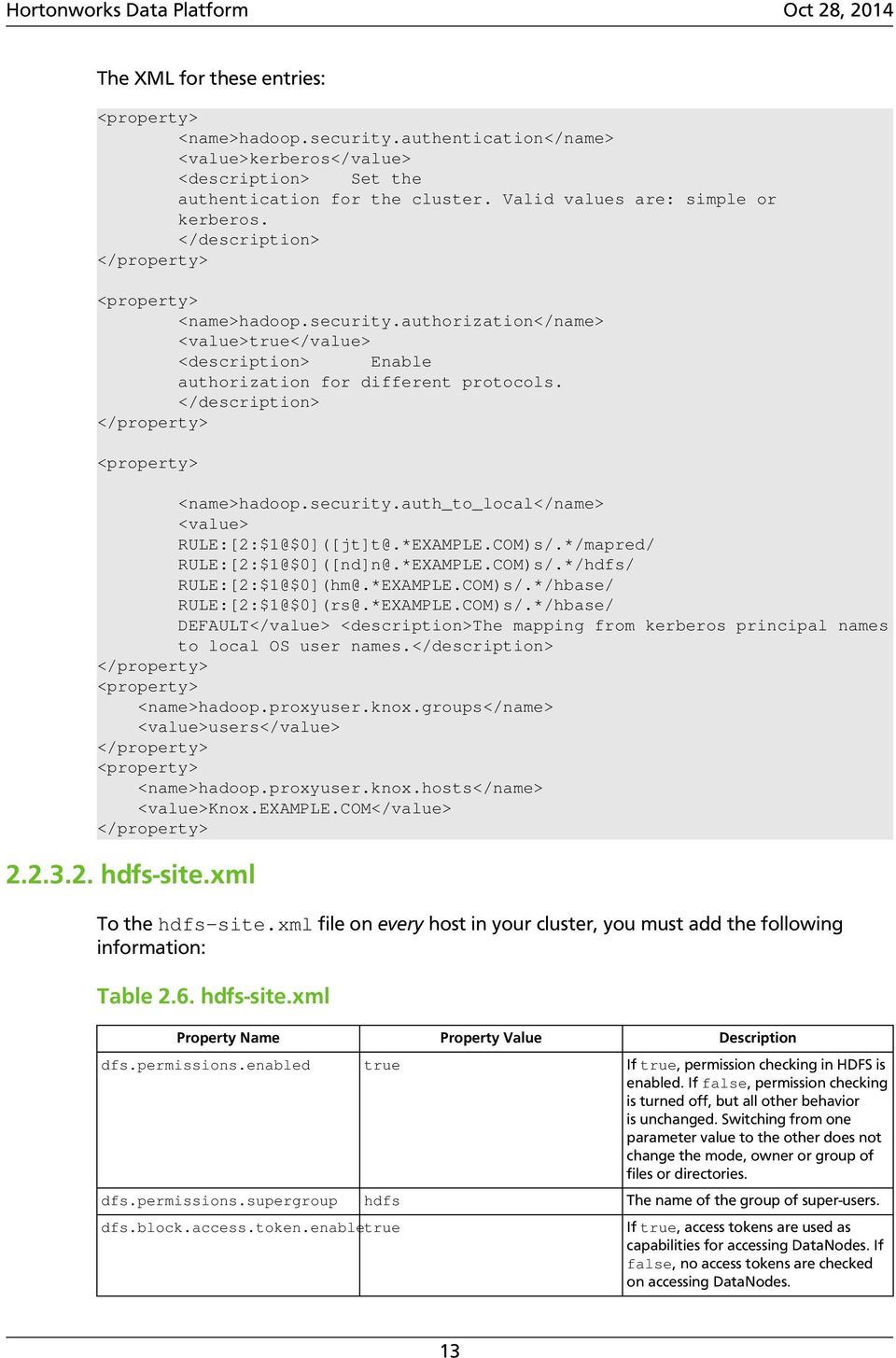
18 Property Name Property Value Description dfs.namenode.kerberos.principal dfs.secondary.namenode.kerberos.principal dfs.web.authentication.kerberos.principal dfs.web.authentication.kerberos.keytab /etc/security/keytabs/ spnego.service.keytab dfs.datanode.kerberos.principal dfs.namenode.keytab.file /etc/security/keytabs/ nn.service.keytab dfs.secondary.namenode.keytab.file /etc/security/keytabs/ nn.service.keytab dfs.datanode.keytab.file /etc/security/keytabs/ dn.service.keytab Kerberos principal name for the NameNode. Kerberos principal name for the secondary NameNode. The HTTP Kerberos principal used by Hadoop-Auth in the HTTP endpoint. The HTTP Kerberos principal MUST start with 'HTTP/' per Kerberos HTTP SPNEGO specification. The Kerberos keytab file with the credentials for the HTTP Kerberos principal used by Hadoop-Auth in the HTTP endpoint. The Kerberos principal that the DataNode runs as. "_HOST" is replaced by the real host name. Combined keytab file containing the NameNode service and host principals. Combined keytab file containing the NameNode service and host principals. <question?> The filename of the keytab file for the DataNode. dfs.https.port The HTTPS port to which the NameNode binds dfs.namenode.https-address Example: The HTTPS address to which the NameNode binds ip ec2.internal:50470 dfs.datanode.data.dir.perm 750 The permissions that must be set on the dfs.data.dir directories. The DataNode will not come up if all existing dfs.data.dir directories do not have this setting. If the directories do not exist, they will be created with this permission dfs.cluster.administrators hdfs ACL for who all can view the default servlets in the HDFS dfs.namenode.kerberos.internal.spnego.principal ${dfs.web.authentication.kerberos.principal} dfs.secondary.namenode.kerberos.internal.spnego.principal ${dfs.web.authentication.kerberos.principal} The XML for these entries: <name>dfs.permissions</name> <value>true</value> <description> If "true", enable permission checking in HDFS. If "false", permission checking is turned off, but all other behavior is unchanged. Switching from one parameter value to the other does not change the mode, owner or group of files or directories. <name>dfs.permissions.supergroup</name> <value>hdfs</value> <description>the name of the group of 14

19 super-users. <name>dfs.namenode.handler.count</name> <value>100</value> <description>added to grow Queue size so that more client connections are allowed <name>ipc.server.max.response.size</name> <value> </value> <name>dfs.block.access.token.enable</name> <value>true</value> <description> If "true", access tokens are used as capabilities for accessing datanodes. If "false", no access tokens are checked on accessing datanodes. <name>dfs.namenode.kerberos.principal</name> <description> Kerberos principal name for the NameNode <name>dfs.secondary.namenode.kerberos.principal</name> <description>kerberos principal name for the secondary NameNode. <!--cluster variant --> <name>dfs.secondary.http.address</name> <value>ip ec2.internal:50090</value> <description>address of secondary namenode web server <name>dfs.secondary.https.port</name> <value>50490</value> <description>the https port where secondary-namenode binds <name>dfs.web.authentication.kerberos.principal</name> <description> The HTTP Kerberos principal used by Hadoop-Auth in the HTTP endpoint. The HTTP Kerberos principal MUST start with 'HTTP/' per Kerberos HTTP SPNEGO specification. 15

20 <name>dfs.web.authentication.kerberos.keytab</name> <value>/etc/security/keytabs/spnego.service.keytab</value> <description>the Kerberos keytab file with the credentials for the HTTP Kerberos principal used by Hadoop-Auth in the HTTP endpoint. <name>dfs.datanode.kerberos.principal</name> <description> The Kerberos principal that the DataNode runs as. "_HOST" is replaced by the real host name. <name>dfs.namenode.keytab.file</name> <value>/etc/security/keytabs/nn.service.keytab</value> <description> Combined keytab file containing the namenode service and host principals. <name>dfs.secondary.namenode.keytab.file</name> <value>/etc/security/keytabs/nn.service.keytab</value> <description> Combined keytab file containing the namenode service and host principals. <name>dfs.datanode.keytab.file</name> <value>/etc/security/keytabs/dn.service.keytab</value> <description> The filename of the keytab file for the DataNode. <name>dfs.https.port</name> <value>50470</value> <description>the https port where namenode binds <name>dfs.https.address</name> <value>ip ec2.internal:50470</value> <description>the https address where namenode binds 16
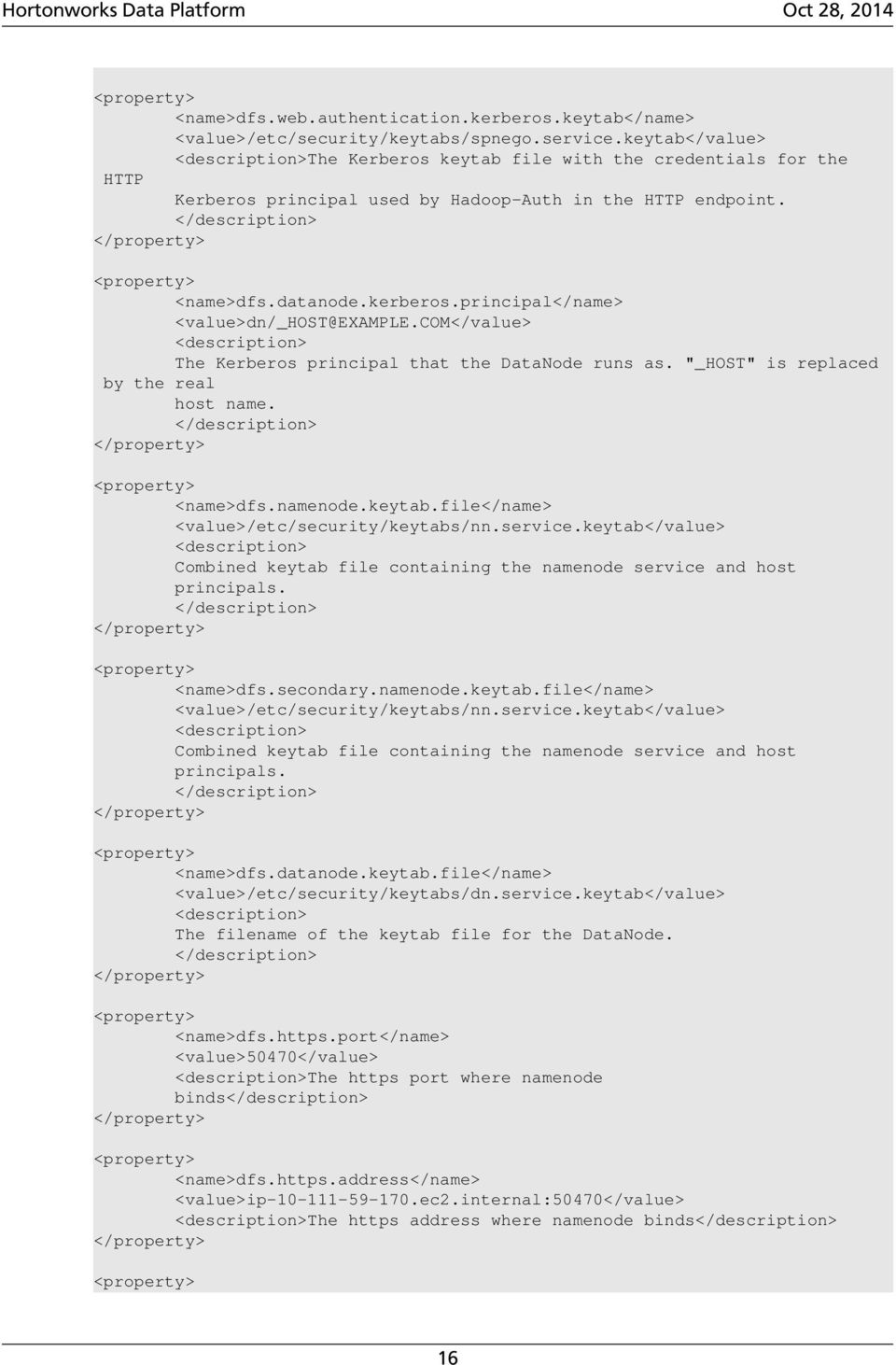
21 <name>dfs.datanode.data.dir.perm</name> <value>750</value> <description>the permissions that should be there on dfs.data.dir directories. The datanode will not come up if the permissions are different on existing dfs.data.dir directories. If the directories don't exist, they will be created with this permission. <name>dfs.access.time.precision</name> <value>0</value> <description>the access time for HDFS file is precise upto this value.the default value is 1 hour. Setting a value of 0 disables access times for HDFS. <name>dfs.cluster.administrators</name> <value> hdfs</value> <description>acl for who all can view the default servlets in the HDFS <name>ipc.server.read.threadpool.size</name> <value>5</value> <description> <name>dfs.namenode.kerberos.internal.spnego.principal</name> <value>${dfs.web.authentication.kerberos.principal}</value> <name>dfs.secondary.namenode.kerberos.internal.spnego.principal</name> <value>${dfs.web.authentication.kerberos.principal}</value> In addition, you must set the user on all secure DataNodes: export HADOOP_SECURE_DN_USER=hdfs export HADOOP_SECURE_DN_PID_DIR=/grid/0/var/run/hadoop/$HADOOP_SECURE_DN_USER yarn-site.xml You must add the following information to the yarn-site.xml file on every host in your cluster: Table 2.7. yarn-site.xml Property Name Property Value Description yarn.resourcemanager.principalyarn/[email protected] The Kerberos principal for the ResourceManager. yarn.resourcemanager.keytab /etc/krb5.keytab The keytab for the ResourceManager. 17
22 Property Name Property Value Description yarn.nodemanager.principal The Kerberos principal for the NodeManager. yarn.nodemanager.keytab /etc/krb5.keytab The keytab for the NodeManager. org.apache.hadoop.yarn.server.nodemanager.linuxcontainerexecutor The class that will execute (launch) the containers. hadoop snapshot/bin/ container-executor hadoop /etc/krb5.keytab yarn.nodemanager.containerexecutor.class yarn.nodemanager.linuxcontainer-executor.path yarn.nodemanager.linuxcontainer-executor.group yarn.timelineservice.principal yarn.timelineservice.keytab yarn.resourcemanager.webapp.delegationtoken-auth-filter.enabled true kerberos yarn.timeline-service.httpauthentication.type yarn.timeline-service.httpauthentication.kerberos.principal yarn.timeline-service.httpauthentication.kerberos.keytab /etc/krb5.keytab The path to the Linux container executor. A special group (e.g. hadoop) with executable permissions for the container executor, of which the NodeManager Unix user is the group member and no ordinary application user is. If any application user belongs to this special group, security will be compromised. This special group name should be specified for the configuration property. The Kerberos principal for the Timeline Server. The Kerberos keytab for the Timeline Server. Flag to enable override of the default Kerberos authentication filter with the RM authentication filter to allow authentication using delegation tokens (fallback to Kerberos if the tokens are missing). Only applicable when the http authentication type is Kerberos. Defines authentication used for the Timeline Server HTTP endpoint. Supported values are: simple kerberos $AUTHENTICATION_HANDLER_CLASSNAME The Kerberos principal to be used for the Timeline Server HTTP endpoint. The Kerberos keytab to be used for the Timeline Server HTTP endpoint. The XML for these entries: <name>yarn.resourcemanager.principal</name> <value>yarn/[email protected]</value> <name>yarn.resourcemanager.keytab</name> <value>/etc/krb5.keytab</value> <name>yarn.nodemanager.principal</name> <value>yarn/[email protected]</value> <name>yarn.nodemanager.keytab</name> <value>/etc/krb5.keytab</value> 18
23 <name>yarn.nodemanager.container-executor.class</name> <value>org.apache.hadoop.yarn.server.nodemanager.linuxcontainerexecutor</ value> <name>yarn.nodemanager.linux-container-executor.path</name> <value>hadoop snapshot/bin/container-executor</value> <name>yarn.nodemanager.linux-container-executor.group</name> <value>hadoop</value> <name>yarn.timeline-service.principal</name> <name>yarn.timeline-service.keytab</name> <value>/etc/krb5.keytab</value> <name>yarn.resourcemanager.webapp.delegation-token-auth-filter.enabled</ name> <value>true</value> <name>yarn.timeline-service.http-authentication.type</name> <value>kerberos</value> <name>yarn.timeline-service.http-authentication.kerberos.principal</name> <name>yarn.timeline-service.http-authentication.kerberos.keytab</name> <value>/etc/krb5.keytab</value> mapred-site.xml To the mapred-site.xml file on every host in your cluster, you must add the following information: Table 2.8. mapred-site.xml Property Name Property Value Description Final mapreduce.jobtracker.kerberos.principal Kerberos principal name for the JobTracker 19
24 Property Name Property Value Description Final mapreduce.tasktracker.kerberos.principal hadoop.job.history.user.location none mapreduce.jobtracker.keytab.file /etc/security/ keytabs/ jt.service.keytab mapreduce.tasktracker.keytab.file /etc/security/ keytabs/ tt.service.keytab mapreduce.jobtracker.staging.root.dir /user mapreduce.tasktracker.group hadoop Kerberos principal name for the TaskTracker. _HOST" is replaced by the host name of the task tracker. The keytab for the JobTracker principal The keytab for the Tasktracker principal The path prefix for the location of the staging directories. The next level is always the user's name. It is a path in the default file system The group that the task controller uses for accessing the task controller. The mapred user must be a member and users should not be members. <question?> mapreduce.jobtracker.split.metainfo.maxsize If the size of the split metainfo file is larger than this value, the JobTracker will fail the job during initialization. mapreduce.history.server.embedded false mapreduce.history.server.http.address Example: Should the Job History server be embedded within the JobTracker process true true true : cluster variant ip ec2.internal:51111 mapreduce.jobhistory.kerberos.principal jt/[email protected] : cluster variant mapreduce.jobhistory.keytab.file /etc/security/ keytabs/ : cluster variant jt.service.keytab mapred.jobtracker.blacklist.faulttimeout-window Example: 180 mapred.jobtracker.blacklist.faultbucket-width Example: 15 Kerberos principal name for JobHistory. This must map to the same user as the JT user. The keytab for the JobHistory principal 3-hour sliding window - the value is specified in minutes. 15-minute bucket size - the value is specified in minutes. mapred.queue.names default Comma separated list of queues configured for this JobTracker. true The XML for these entries: <name>mapreduce.jobtracker.kerberos.principal</name> <value>jt/[email protected]</value> <description> JT user name key. 20
25 <name>mapreduce.tasktracker.kerberos.principal</name> <description>tt user name key. "_HOST" is replaced by the host name of the task tracker. <name>hadoop.job.history.user.location</name> <value>none</value> <final>true</final> <name>mapreduce.jobtracker.keytab.file</name> <value>/etc/security/keytabs/jt.service.keytab</value> <description> The keytab for the jobtracker principal. <name>mapreduce.tasktracker.keytab.file</name> <value>/etc/security/keytabs/tt.service.keytab</value> <description>the filename of the keytab for the task tracker <name>mapreduce.jobtracker.staging.root.dir</name> <value>/user</value> <description>the Path prefix for where the staging directories should be placed. The next level is always the user's name. It is a path in the default file system. <name>mapreduce.tasktracker.group</name> <value>hadoop</value> <description>the group that the task controller uses for accessing the task controller. The mapred user must be a member and users should *not* be members. <name>mapreduce.jobtracker.split.metainfo.maxsize</name> <value> </value> <final>true</final> <description>if the size of the split metainfo file is larger than this, the JobTracker will fail the job during initialize. 21
26 <name>mapreduce.history.server.embedded</name> <value>false</value> <description>should job history server be embedded within Job tracker process <final>true</final> <name>mapreduce.history.server.http.address</name> <!--cluster variant --> <value>ip ec2.internal:51111</value> <description>http address of the history server <final>true</final> <name>mapreduce.jobhistory.kerberos.principal</name> <!--cluster variant --> <description>job history user name key. (must map to same user as JT user) <name>mapreduce.jobhistory.keytab.file</name> <!--cluster variant --> <value>/etc/security/keytabs/jt.service.keytab</value> <description>the keytab for the job history server principal. <name>mapred.jobtracker.blacklist.fault-timeout-window</name> <value>180</value> <description> 3-hour sliding window (value is in minutes) <name>mapred.jobtracker.blacklist.fault-bucket-width</name> <value>15</value> <description> 15-minute bucket size (value is in minutes) <name>mapred.queue.names</name> <value>default</value> <description> Comma separated list of queues configured for this jobtracker.</ description> 22
27 hbase-site.xml For HBase to run on a secured cluster, HBase must be able to authenticate itself to HDFS. To the hbase-site.xml file on your HBase server, you must add the following information. There are no default values; the following are all only examples: Table 2.9. hbase-site.xml Property Name Property Value Description hbase.master.keytab.file /etc/security/keytabs/ hm.service.keytab hbase.master.kerberos.principal hm/[email protected] hbase.regionserver.keytab.file/etc/security/keytabs/ rs.service.keytab hbase.regionserver.kerberos.principal rs/[email protected] The keytab for the HMaster service principal The Kerberos principal name that should be used to run the HMaster process. If _HOST is used as the hostname portion, it will be replaced with the actual hostname of the running instance. The keytab for the HRegionServer service principal The Kerberos principal name that should be used to run the HRegionServer process. If _HOST is used as the hostname portion, it will be replaced with the actual hostname of the running instance. hbase.superuser hbase Comma-separated List of users or groups that are allowed full privileges, regardless of stored ACLs, across the cluster. Only used when HBase security is enabled. hbase.coprocessor.region.classes hbase.coprocessor.master.classes The XML for these entries: Comma-separated list of Coprocessors that are loaded by default on all tables. For any override coprocessor method, these classes will be called in order. After implementing your own Coprocessor, just put it in HBase's classpath and add the fully qualified class name here. A coprocessor can also be loaded on demand by setting HTableDescriptor. Comma-separated list of org.apache.hadoop.hbase.coprocessor.masterobs coprocessors that are loaded by default on the active HMaster process. For any implemented coprocessor methods, the listed classes will be called in order. After implementing your own MasterObserver, just put it in HBase's classpath and add the fully qualified class name here. <name>hbase.master.keytab.file</name> <value>/etc/security/keytabs/hm.service.keytab</value> <description>full path to the kerberos keytab file to use for logging in the configured HMaster server principal. 23
28 <name>hbase.master.kerberos.principal</name> <description>ex. The kerberos principal name that should be used to run the HMaster process. The principal name should be in the form: If "_HOST" is used as the hostname portion, it will be replaced with the actual hostname of the running instance. <name>hbase.regionserver.keytab.file</name> <value>/etc/security/keytabs/rs.service.keytab</value> <description>full path to the kerberos keytab file to use for logging in the configured HRegionServer server principal. <name>hbase.regionserver.kerberos.principal</name> <description>ex. The kerberos principal name that should be used to run the HRegionServer process. The principal name should be in the form: If _HOST is used as the hostname portion, it will be replaced with the actual hostname of the running instance. An entry for this principal must exist in the file specified in hbase.regionserver.keytab.file <!--Additional configuration specific to HBase security --> <name>hbase.superuser</name> <value>hbase</value> <description>list of users or groups (comma-separated), who are allowed full privileges, regardless of stored ACLs, across the cluster. Only used when HBase security is enabled. <name>hbase.coprocessor.region.classes</name> <value></value> <description>a comma-separated list of Coprocessors that are loaded by default on all tables. For any override coprocessor method, these classes will be called in order. After implementing your own Coprocessor, just put it in HBase's classpath and add the fully qualified class name here. A coprocessor can also be loaded on demand by setting HTableDescriptor. 24
29 <name>hbase.coprocessor.master.classes</name> <value></value> <description>a comma-separated list of org.apache.hadoop.hbase.coprocessor.masterobserver coprocessors that are loaded by default on the active HMaster process. For any implemented coprocessor methods, the listed classes will be called in order. After implementing your own MasterObserver, just put it in HBase's classpath and add the fully qualified class name here hive-site.xml Hive Metastore supports Kerberos authentication for Thrift clients only. HiveServer does not support Kerberos authentication for any clients: Table hive-site.xml Property Name Property Value Description hive.metastore.sasl.enabled true If true, the Metastore Thrift interface will be secured with SASL and clients must authenticate with Kerberos hive.metastore.kerberos.keytab.file /etc/security/keytabs/ hive.service.keytab hive.metastore.kerberos.principal The keytab for the Metastore Thrift service principal The service principal for the Metastore Thrift server. If _HOST is used as the hostname portion, it will be replaced with the actual hostname of the running instance. hive.metastore.cache.pinobjtypes Table,Database,Type,FieldSchema,OrderComma-separated Metastore object types that should be pinned in the cache The XML for these entries: <name>hive.metastore.sasl.enabled</name> <value>true</value> <description>if true, the metastore thrift interface will be secured with SASL. Clients must authenticate with Kerberos. <name>hive.metastore.kerberos.keytab.file</name> <value>/etc/security/keytabs/hive.service.keytab</value> <description>the path to the Kerberos Keytab file containing the metastore thrift server's service principal. <name>hive.metastore.kerberos.principal</name> 25
30 <description>the service principal for the metastore thrift server. The special string _HOST will be replaced automatically with the correct hostname. <name>hive.metastore.cache.pinobjtypes</name> <value>table,database,type,fieldschema,order</value> <description>list of comma separated metastore object types that should be pinned in the cache oozie-site.xml To the oozie-site.xml file, you must add the following information: Table oozie-site.xml Property Name Property Value Description oozie.service.authorizationservice.security.enabled true oozie.service.hadoopaccessorservice.kerberos.enabled true Specifies whether security (user name/ admin role) is enabled or not. If it is disabled any user can manage the Oozie system and manage any job. Indicates if Oozie is configured to use Kerberos local.realm EXAMPLE.COM Kerberos Realm used by Oozie and Hadoop. Using local.realm to be aligned with Hadoop configuration. oozie.service.hadoopaccessorservice.keytab.file /etc/security/keytabs/ oozie.service.keytab oozie.service.hadoopaccessorservice.kerberos.principal oozie.authentication.type kerberos oozie.authentication.kerberos.principal oozie.authentication.kerberos.keytab /etc/security/keytabs/ spnego.service.keytab oozie.service.hadoopaccessorservice.namenode.whitelist oozie.authentication.kerberos.name.rules COM)s/.*/mapred/ COM)s/.*/hdfs/ COM)s/.*/hbase/ COM)s/.*/hbase/ DEFAULT oozie.service.proxyuserservice.proxyuser.knox.groups users oozie.service.proxyuserservice.proxyuser.knox.hosts $knox_host_fqdn webhcat-site.xml The keytab for the Oozie service principal. Kerberos principal for Oozie service Whitelisted job tracker for Oozie service To the webhcat-site.xml file, you must add the following information: Location of the Oozie user keytab file. The mapping from Kerberos principal names to local OS user names. See Creating Mappings Between Principals and UNIX Usernames for more information. Grant proxy privileges to the knox user. only required when using a Knox Gateway. Identifies the Knox Gateway. only required when using a Knox Gateway. 26
31 Table webhcat-site.xml Property Name Property Value Description templeton.kerberos.principal templeton.kerberos.keytab /etc/security/keytabs/spnego.service.keytab templeton.kerberos.secret secret hadoop.proxyuser.knox.groups users hadoop.proxyuser.knox.hosts $knox_host_fqdn 2.3. Configure Secure HBase and ZooKeeper Use the following instructions to set up secure HBase and ZooKeeper: 1. Configure HBase Master 2. Create JAAS configuration files 3. Start HBase and ZooKeeper services 4. Configure secure client side access for HBase 5. Optional: Configure client-side operation for secure operation - Thrift Gateway 6. Optional: Configure client-side operation for secure operation - REST Gateway 7. Configure HBase for Access Control Lists (ACL) Configure HBase Master Grant proxy privileges to the knox user. only required when using a Knox Gateway. Identifies the Knox Gateway. only required when using a Knox Gateway. Edit $HBASE_CONF_DIR/hbase-site.xml file on your HBase Master server to add the following information ($HBASE_CONF_DIR is the directory to store the HBase configuration files. For example, /etc/hbase/conf) : There are no default values. The following are all examples. 27
32 <name>hbase.master.keytab.file</name> <value>/etc/security/keytabs/hbase.service.keytab</value> <description>full path to the kerberos keytab file to use for logging in the configured HMaster server principal. <name>hbase.master.kerberos.principal</name> <description>ex. The kerberos principal name that should be used to run the HMaster process. The principal name should be in the form: If "_HOST" is used as the hostname portion, it will be replaced with the actual hostname of the running instance. <name>hbase.regionserver.keytab.file</name> <value>/etc/security/keytabs/hbase.service.keytab</value> <description>full path to the kerberos keytab file to use for logging in the configured HRegionServer server principal. <name>hbase.regionserver.kerberos.principal</name> <description>ex. kerberos principal name thatshould be used to run the HRegionServer process. The principal name should be in the form: If _HOSTis used as the hostname portion, it will be replaced with the actual hostname of the runninginstance. An entry for this principal must existin the file specified in hbase. regionserver.keytab.file <!--Additional configuration specific to HBase security --> <name>hbase.superuser</name> <value>hbase</value> <description>list of users or groups (comma-separated), who are allowed full privileges, regardless of stored ACLs, across the cluster. Only used when HBase security is enabled. 28
33 <name>hbase.coprocessor.region.classes</name> <value>org.apache.hadoop.hbase.security.token.tokenprovider,org. apache.hadoop.hbase.security.access.securebulkloadendpoint,org.apache.hadoop. hbase.security.access.accesscontroller </value> <description>a comma-separated list of Coprocessors that are loaded by default on all tables. <name>hbase.security.authentication</name> <value>kerberos</value> <name>hbase.rpc.engine</name> <value>org.apache.hadoop.hbase.ipc.securerpcengine</value> <name>hbase.security.authorization</name> <value>true</value> <description>enables HBase authorization. Set the value of this property to false to disable HBase authorization. <name>hbase.coprocessor.master.classes</name> <value>org.apache.hadoop.hbase.security.access.accesscontroller</ value> <name>hbase.bulkload.staging.dir</name> <value>/apps/hbase/staging</value> <description>directory in the default filesystem, owned by the hbase user, and has permissions(-rwx--x--x, 711) For more information on bulk loading in secure mode, see HBase Secure BulkLoad. that the hbase.bulkload.staging.dir is created by HBase Create JAAS configuration files 1. Create the following JAAS configuration files on the HBase Master, RegionServer, and HBase client host machines. These files must be created under the $HBASE_CONF_DIR directory: where $HBASE_CONF_DIR is the directory to store the HBase configuration files. For example, /etc/hbase/conf. 29
34 On your HBase Master host machine, create the hbase-server.jaas file under the /etc/hbase/conf directory and add the following content: Server { com.sun.security.auth.module.krb5loginmodule required usekeytab=true storekey=true useticketcache=false keytab="/etc/security/keytabs/hbase.service.keytab" principal="hbase/$hbase.master.hostname"; }; On each of your RegionServer host machine, create the regionserver.jaas file under the /etc/hbase/conf directory and add the following content: Server { com.sun.security.auth.module.krb5loginmodule required usekeytab=true storekey=true useticketcache=false keytab="/etc/security/keytabs/hbase.service.keytab" principal="hbase/$regionserver.hostname"; }; On HBase client machines, create the hbase-client.jaas file under the /etc/ hbase/conf directory and add the following content: Client { com.sun.security.auth.module.krb5loginmodule required usekeytab=false useticketcache=true; }; 2. Create the following JAAS configuration files on the ZooKeeper Server and client host machines. These files must be created under the $ZOOKEEPER_CONF_DIR directory, where $ZOOKEEPER_CONF_DIR is the directory to store the HBase configuration files. For example, /etc/zookeeper/conf: On ZooKeeper server host machines, create the zookeeper-server.jaas file under the /etc/zookeeper/conf directory and add the following content: Server { com.sun.security.auth.module.krb5loginmodule required usekeytab=true storekey=true useticketcache=false keytab="/etc/security/keytabs/zookeeper.service.keytab" principal="zookeeper/$zookeeper.server.hostname"; }; On ZooKeeper client host machines, create the zookeeper-client.jaas file under the /etc/zookeeper/conf directory and add the following content: 30
35 Client { com.sun.security.auth.module.krb5loginmodule required usekeytab=false useticketcache=true; }; 3. Edit the hbase-env.sh file on your HBase server to add the following information: export HBASE_OPTS ="-Djava.security.auth.login.config=$HBASE_CONF_DIR/hbaseclient.jaas" export HBASE_MASTER_OPTS ="-Djava.security.auth.login.config= $HBASE_CONF_DIR/hbase-server.jaas" export HBASE_REGIONSERVER_OPTS="-Djava.security.auth.login.config= $HBASE_CONF_DIR/regionserver.jaas" where HBASE_CONF_DIR is the HBase configuration directory. For example, /etc/ hbase/conf. 4. Edit zoo.cfg file on your ZooKeeper server to add the following information: authprovider.1=org.apache.zookeeper.server.auth.saslauthenticationprovider jaasloginrenew= kerberos.removehostfromprincipal=true kerberos.removerealmfromprincipal=true 5. Edit zookeeper-env.sh file on your ZooKeeper server to add the following information: export SERVER_JVMFLAGS ="-Djava.security.auth.login. config=$zookeeper_conf_dir/zookeeper-server.jaas" export CLIENT_JVMFLAGS ="-Djava.security.auth.login. config=$zookeeper_conf_dir/zookeeper-client.jaas" where $ZOOKEEPER_CONF_DIR is the ZooKeeper configuration directory. For example, /etc/zookeeper/conf Start HBase and ZooKeeper services Start the HBase and ZooKeeper services using the instructions provided here. If the configuration is successful, you should see the following in your ZooKeeper server logs: 31
36 11/12/05 22:43:39 INFO zookeeper.login: successfully logged in. 11/12/05 22:43:39 INFO server.nioservercnxnfactory: binding to port / : /12/05 22:43:39 INFO zookeeper.login: TGT refresh thread started. 11/12/05 22:43:39 INFO zookeeper.login: TGT valid starting at: Mon Dec 05 22:43:39 UTC /12/05 22:43:39 INFO zookeeper.login: TGT expires: Tue Dec 06 22:43:39 UTC /12/05 22:43:39 INFO zookeeper.login: TGT refresh sleeping until: Tue Dec 06 18:36:42 UTC /12/05 22:43:59 INFO auth.saslservercallbackhandler: Successfully authenticated client: authenticationid=hbase/ip LOCALDOMAIN. 11/12/05 22:43:59 INFO auth.saslservercallbackhandler: Setting authorizedid: hbase 11/12/05 22:43:59 INFO server.zookeeperserver: adding SASL authorization for authorizationid: hbase Configure secure client side access for HBase HBase configured for secure client access is expected to be running on top of a secure HDFS cluster. HBase must be able to authenticate to HDFS services. 1. Provide a Kerberos principal to the HBase client user using the instructions provided here. Option I: Provide Kerberos principal to normal HBase clients. For normal HBase clients, Hortonworks recommends setting up a password to the principal. Set maxrenewlife. The client principal's maxrenewlife should be set high enough so that it allows enough time for the HBase client process to complete. Client principals are not renewed automatically. For example, if a user runs a long-running HBase client process that takes at most three days, we might create this user's principal within kadmin with the following command: addprinc -maxrenewlife 3days Option II: Provide Kerberos principal to long running HBase clients. a. Set-up a keytab file for the principal and copy the resulting keytab files to where the client daemon will execute. Ensure that you make this file readable only to the user account under which the daemon will run. 2. On every HBase client, add the following properties to the $HBASE_CONF_DIR/ hbase-site.xml file: 32
37 <name>hbase.security.authentication</name> <value>kerberos</value> The client environment must be logged in to Kerberos from KDC or keytab via the kinit command before communication with the HBase cluster is possible. that the client will not be able to communicate with the cluster if the hbase.security.authentication property in the clientand server-side site files fails to match. <name>hbase.rpc.engine</name> <value>org.apache.hadoop.hbase.ipc.securerpcengine</value> Optional: Configure client-side operation for secure operation - Thrift Gateway Add the following to the $HBASE_CONF_DIR/hbase-site.xml file for every Thrift gateway: <name>hbase.thrift.keytab.file</name> <value>/etc/hbase/conf/hbase.keytab</value> <name>hbase.thrift.kerberos.principal</name> <value>$user/[email protected]</value> Substitute the appropriate credential and keytab for $USER and $KEYTAB respectively. The Thrift gateway will authenticate with HBase using the supplied credential. No authentication will be performed by the Thrift gateway itself. All client access via the Thrift gateway will use the Thrift gateway's credential and have its privilege Optional: Configure client-side operation for secure operation - REST Gateway Add the following to the $HBASE_CONF_DIR/hbase-site.xml file for every REST gateway: 33
38 <name>hbase.rest.keytab.file</name> <value>$keytab</value> <name>hbase.rest.kerberos.principal</name> Substitute the appropriate credential and keytab for $USER and $KEYTAB respectively. The REST gateway will authenticate with HBase using the supplied credential. No authentication will be performed by the REST gateway itself. All client access via the REST gateway will use the REST gateway's credential and have its privilege Configure HBase for Access Control Lists (ACL) Use the following instructions to configure HBase for ACL: 1. Open kinit as HBase user. a. Create a keytab for principal hbase@realm and store it in the hbase.headless.keytab file. See instructions provided here for creating principal and keytab file. b. Open kinit as HBase user. Execute the following command on your HBase Master: kinit -kt hbase.headless.keytab hbase 2. Start the HBase shell. On the HBase Master host machine, execute the following command: hbase shell 3. Set ACLs using HBase shell: grant '$USER', '$permissions' where $USER is any user responsible for create/update/delete operations in HBase. You must set the ACLs for all those users who will be responsible for create/update/delete operations in HBase. $permissions is zero or more letters from the set "RWCA": READ('R'), WRITE('W'), CREATE('C'), ADMIN('A'). 34
39 2.4. Setting up One-Way Trust with Active Directory In environments where users from Active Directory (AD) need to access Hadoop Services, set up one-way trust between Hadoop Kerberos realm and the AD (Active Directory) domain. Warning Hortonworks recommends setting up one-way trust after fully configuring and testing your Kerberized Hadoop Cluster Configure Kerberos Hadoop Realm on the AD DC Configure the Hadoop realm on the AD DC server and set up the one-way trust. 1. Add the Hadoop Kerberos realm and KDC host to the DC: ksetup /addkdc $hadoop.realm $KDC-host 2. Establish one-way trust between the AD domain and the Hadoop realm: netdom trust $hadoop.realm /Domain:$AD.domain /add /realm / passwordt:$trust_password 3. (Optional) If Windows clients within the AD domain need to access Hadoop Services, and the domain does not have a search route to find the services in Hadoop realm, run the following command to create a hostmap for Hadoop service host: ksetup /addhosttorealmmap $hadoop-service-host $hadoop.realm Run the above for each $hadoop-host that provides services that need to be accessed by Windows clients. For example, Oozie host, WebHCat host, etc. 4. (Optional) define the encryption type: ksetup /SetEncTypeAttr $hadoop.realm $encryption_type Set encryption types based on your security requirements. Mismatching encryption types causes problems. Run ksetup /GetEncTypeAttr $krb_realm to list the available encryption types. Verify that the encryption type is configured for the Hadoop realm in the krb5.conf. 35
40 Configure the AD Domain on the KDC and Hadoop Cluster Hosts Add the AD domain as a realm to the krb5.conf on the Hadoop cluster hosts. Optionally configure encryption types and UDP preferences. 1. Open the krb5.conf file with a text editor and make the following changes: a. To libdefaults, add the following properties: Sets the Hadoop realm as default: [libdefaults] default_domain = $hadoop.realm Set the encryption type: [libdefaults] default_tkt_enctypes = $encryption_types default_tgs_enctypes = $encryption_types permitted_enctypes = $encryption_types where the $encryption_types match the type supported by your environment. For example: default_tkt_enctypes = aes256-cts aes128-cts rc4-hmac arcfour-hmac-md5 des-cbc-md5 des-cbc-crc default_tgs_enctypes = aes256-cts aes128-cts rc4-hmac arcfour-hmac-md5 des-cbc-md5 des-cbc-crc permitted_enctypes = aes256-cts aes128-cts rc4-hmac arcfour-hmac-md5 descbc-md5 des-cbc-crc If TCP is open on the KDC and AD Server: [libdefaults] udp_preference_limit = 1 b. Add a realm for the AD domain: [realms] $AD.DOMAIN = { kdc = $AD-host-FQDN admin_server = $AD-host-FQDN default_domain = $AD-host-FQDN } c. Save the krb5.conf the changes to all Hadoop Cluster hosts. 2. Add the trust principal for the AD domain to the Hadoop MIT KDC: kadmin kadmin: addprinc krbtgt/$hadoop.realm@$ad.domain This command will prompt you for the trust password, use the same password as the earlier step. 36
41 If the encryption type was defined, then use the following command to configure the AD principal: kadmin: addprinc -e "$encryption_type" krbtgt/$hadoop Allowing Impersonation Superusers.html 37
42 3. Data Protection Encryption is applied to electronic information in order to ensure its privacy and confidentiality. Wire encryption protects data as it moves into and through Hadoop cluster over RPC, HTTP, Data Transfer Protocol (DTP), and JDBC. The following describes how the data is protected as it is in motion: Clients typically communicate directly with the Hadoop cluster and the data can be protected using: RPC encryption: Clients interacting directly with the Hadoop cluster through RPC. A client uses RPC to connect to the NameNode (NN) to initiate file read and write operations. RPC connections in Hadoop use Java s Simple Authentication & Security Layer (SASL), which supports encryption. Data Transfer Protocol: The NN gives the client the address of the first DataNode (DN) to read or write the block. The actual data transfer between the client and a DN uses Data Transfer Protocol. Users typically communicate with the Hadoop cluster using a Browser or a command line tools, data can be protected using: HTTPS encryption: Users typically interact with Hadoop using a browser or compontent CLI, while applications use REST APIs or Thrift. Encryption over the HTTP protocol is implemented with the support for SSL across a Hadoop cluster and for the individual components such as Ambari. JDBC: HiveServer2 implements encryption with Java SASL protocol s quality of protection (QOP) setting. With this the data moving between a HiveServer2 over jdbc and a jdbc client can be encrypted. Additionally within the cluster communication between processes can be protected using: HTTPS encryption during shuffle: Staring in HDP 2.0 encryption during shuffle is supported. The data moves between the Mappers and the Reducers over the HTTP protocol, this step is called shuffle. Reducer initiates the connection to the Mapper to ask for data and acts as SSL client. This chapter provides an overview on encryption over-the-wire in Hadoop. Data can be moved in and out of Hadoop over RPC, HTTP, Data Transfer Protocol, and JDBC. Network traffic over each of these protocols can be encrypted to provide privacy for data movement. Section 3.1, Enable RPC Encryption for the Hadoop Cluster [39] Section 3.2, Enable Data Transfer Protocol [39] Section 3.3, Enable SSL on HDP Components [39] Section 3.4, Connect to SSL Enabled Components [55] 38
43 3.1. Enable RPC Encryption for the Hadoop Cluster The most common way for a client to interact with a Hadoop cluster is through RPC. A client connects to a NameNode over RPC protocol to read or write a file. RPC connections in Hadoop use the Java Simple Authentication and Security Layer (SASL) which supports encryption. When the hadoop.rpc.protection property is set to privacy, the data over RPC is encrypted with symmetric keys. RPC encryption covers not only the channel between a client and a Hadoop cluster but also the inter-cluster communication among Hadoop services. Enable Encrypted RPC by setting the follwing properties in core-site.xml. hadoop.rpc.protection=privacy (Also supported are the authentication and integrity settings.) 3.2. Enable Data Transfer Protocol The NameNode gives the client the address of the first DataNode to read or write the block. The actual data transfer between the client and the DataNode is over Hadoop's Data Transfer Protocol. To encrypt this protocol you must set dfs.encryt.data.transfer=true on the NameNode and all DataNodes. The actual algorithm used for encryption can be customized with dfs.encrypt.data.transfer.algorithm set to either "3des" or "rc4". If nothing is set, then the default on the system is used (usually 3DES.) While 3DES is more cryptographically secure, RC4 is substantially faster. Enable Encrypted DTP by setting the following properties in hdfs-site.xml: dfs.encrypt.data.transfer=true dfs.encrypt.data.transfer.algorithm=3des ( rc4 is also supported.) Secondary Namenode is not supported with the HTTPS port. It can only be accessed by WebHDFS, hsftp, and shortcircuitread are not supported with SSL enabled Enable SSL on HDP Components The following table links to step-by-step instructions to enable SSL in the HDP environment: Table 3.1. Configure Data Protection for HDP Components HDP Component Hadoop s/link Section 3.1, Enable RPC Encryption for the Hadoop Cluster [39] Section 3.3.3, Enable SSL for WebHDFS, MapReduce Shuffle, and YARN [49] 39
44 HDP Component HBase Ambari Server s/link Section 3.3.5, Enable SSL on WebHBase and the HBase REST API [53] Ambari Security Guide, Advanced Security Options, Optional: Set Up Security for Ambari Oozie Section 3.3.4, Enable SSL on Ozzie [52] Falcon Sqoop Knox Gateway Flume Accumulo Phoenix Enabled by default, to disable see FALCON-229 Client of Hive and HBase, see Data Integration Services with HDP, Apache Sqoop Connectors Apache Knox Gateway Adminsitrator Guide, Gateway Security, Configure Wire Encryption Apache Flume User Guide, Defining Sources Apache Foundation Blog, Apache Accumulo: Generating Keystores for configuring Accumulo with SSL Installing HDP Manually, Installing Phoenix: Configuring Phoenix for Security and Apache Phoenix, Flume Plug-in Hive (HiveServer2) Section 3.3.6, Enable SSL on HiveServer2 [54] YARN HUE Ganglia Nagios This section contains the following topics: Section 3.3.3, Enable SSL for WebHDFS, MapReduce Shuffle, and YARN [49] Installing HDP Manually, Installing Hue, (Optional.) Configure Hue for SSL Ambari Security Guide, Advanced Security Options, Optional: Set Up Security for Ambari Ambari Security Guide, Advanced Security Options, Optional: Set Up Security for Ambari Section 3.3.1, Understanding Hadoop SSL Keystore Factory [40] Section 3.3.2, Manage SSL Certificates [42] Section 3.3.3, Enable SSL for WebHDFS, MapReduce Shuffle, and YARN [49] Section 3.3.4, Enable SSL on Ozzie [52] Section 3.3.5, Enable SSL on WebHBase and the HBase REST API [53] Section 3.3.6, Enable SSL on HiveServer2 [54] Understanding Hadoop SSL Keystore Factory The Hadoop SSL Keystore Factory manages SSL for Hadoop core services that communicate with other cluster services over HTTP, that is MapReduce, YARN, and HDFS. While components that have services that are typically not distributed or only recieve HTTP connections directly from clients use the built-in Java JDK SSL tools, such as HBase, and Oozie. The following table shows the Hadoop cluster services that use HTTP and support SSL for wire encryption. Table 3.2. Compontents that Support SSL Component Service SSL Management HDFS WebHDFS Hadoop SSL Keystore Factory 40
45 Component Service SSL Management MapReduce Shuffle Hadoop SSL Keystore Factory TaskTracker Hadoop SSL Keystore Factory Yarn Resource Manager Hadoop SSL Keystore Factory JobHistory Hadoop SSL Keystore Factory Hive HiveServer2 Configured in hive-site.xml HBase REST API Configured in hbase-site.xml Solr JDK: User and default Accumulo JDK: User and default Falcon REST API JDK: User and default Oozie Configured in oozie-site.xml Knox Hadoop cluster (REST client) JDK: default only Knox Gateway server JDK: User and default HDP Security Administration Server/Agent JDK: User and default When enabling support for SSL, it is important to know which SSL Management method is used by the Hadoop service. Services that are co-located on a host must have the server certificate and keys, and in some cases the client truststore, configured in both the Hadoop SSL Keystore Factory and JDK locations. When using CA signed certiticates, configure the Hadoop SSL Keystore Factory to use the Java keystore and truststore locations. The following describes the major differences between certificates managed by JDK and the Hadoop SSL Keystore Factory: Hadoop SSL Keystore Management Factory: Supports only JKS formatted keys Supports toggling the shuffle between HTTP and HTTPS. Supports two way certificate and name validation. Uses a common location for both the keystore and truststore that is available to other Hadoop core services. Allows you to manage SSL in a centeral location and progate changes to all cluster nodes. Automatically reloads the keystore and truststore without restarting services. SSL Management with JDK: Allows either HTTP or HTTPS. Uses hardcoded locations for truststores and keystores that may vary between hosts. And generally requires you to generate key pairs and import certificates on each host. Requires the service to be restarted to reload the keystores and truststores. Requires certificates to be installed in the client CA truststore. 41
46 For more information on JDK SSL Management, see Using SSL in Chapter 2: Monitoring and Managing Using JDK Manage SSL Certificates When setting up SSL in production environments, Hortonworks recommends using Certificate Authority (CA) certificates that are signed by a well-known, trusted third-party. In development and other non-production environments, you may want to use certificates signed by an internal CA or self-signed certifcate. Java-based Hadoop components such as HDFS, MapReduce, YARN, etc support JKS format, while Python based services such as Hue uses PEM format. The basic process for enabling SSL support includes: Create a signed certificate as follows: From a third-party CA (recommended for production environments) Creating and signing the certificate using an internal CA Creating a self-signed certificate (not recommended, use only in small cluster for demonstration) Installing the certificate on the host Generating a public/private key pair Securing the private key Importing the certificate into the client truststore Enabling SSL for Hadoop Component Restarting the services This section contains the following topics: Section , Generate a Certificate Signing Request (Third-party) [43] Section , Sign with Internal CA (OpenSSL) [45] Section , Create and Import Self-Signed Certificate [46] Section , Use a CA Signed Certificate [47] Section 3.3.1, Understanding Hadoop SSL Keystore Factory [40] These instructions are based on information found in the Oracle keytool reference, see keytool - Key and Certificate Management Tool and the OpenSSL How to Documentation, refer to the SSL utilities for details. 42
47 Generate a Certificate Signing Request (Third-party) To obtain a certificate signed by a third-party CA, generate a certificate signing request for each Hadoop Cluster host node as follows: A certificate signing request is typically not required when signing the certificate using an internal CA. 1. Using the service user account (shown below as $service_user), such as hive, hbase, oozie, hdfs, etc, generate the host key : su -l $service_user -C "keytool keystore keystore.jks genkey alias $host" Enter keystore password: javacaps What is your first and last name? [Unknown]: name What is the name of your organizational unit? [Unknown]: department What is the name of your organization? [Unknown]: companyname What is the name of your City or Locality? [Unknown]: city What is the name of your State or Province? [Unknown]: state What is the two-letter country code for this unit? [Unknown]: XX Is <CN=name, OU=department, O=companyname, L=city, ST=state, C=XX> correct? [no]: yes Enter key password for <host> (RETURN if same as keystore password): The keystore file is created in the user's home directory. Access to the keystore requires the password and alias. 2. Verify that key was generated: su -l hdfs -c "keytool -list -v -keystore keystore.jks" 3. Create the Certificate Signing Request (CSR). su -l hdfs -c "keytool keystore $keystorename certreq alias $host keyalg rsa file $host.csr" The CSR is created in the user's home directory. 4. Verify that the file was created: su -l hdfs -c "ls ~/" cache keystore.jks $host.csr 5. Send the CSR to the CA. Follow the instructions sent to you by the CA to properly install the keys and certificate. 43
48 Request generation instructions may vary depending on the third-party CAs, follow the instructions provided by them. Example for HDFS user creating a signing request on host nn: su -l hdfs -c "keytool -keystore keystore -genkey -alias nn" Enter keystore password: Re-enter new password: What is your first and last name? [Unknown]: Hortonworks What is the name of your organizational unit? [Unknown]: Engineering What is the name of your organization? [Unknown]: Hortonworks What is the name of your City or Locality? [Unknown]: Palo Alto What is the name of your State or Province? [Unknown]: California What is the two-letter country code for this unit? [Unknown]: US Is CN=Hortonworks, OU=Engineering, O=Hortonworks, L=Palo Alto, ST=California, C=US correct? [no]: yes Enter key password for <nn> (RETURN if same as keystore password): su -l hdfs -c "keytool -list -v -keystore keystore.jks" Enter keystore password: Keystore type: JKS Keystore provider: SUN Your keystore contains 1 entry Alias name: nn Creation date: Aug 25, 2014 Entry type: PrivateKeyEntry Certificate chain length: 1 Certificate[1]: Owner: CN=Hortonworks, OU=Engineering, O=Hortonworks, L=Palo Alto, ST= California, C=US Issuer: CN=Hortonworks, OU=Engineering, O=Hortonworks, L=Palo Alto, ST= California, C=US Serial number: 53fb6404 Valid from: Mon Aug 25 16:27:48 UTC 2014 until: Sun Nov 23 16:27:48 UTC 2014 Certificate fingerprints: MD5: 58:97:7B:B4:47:0D:2B:97:3D:0D:AA:82:D6:1D:A3:38 SHA1: 62:9F:EB:7F:DA:3A:F6:43:58:BF:43:A0:F2:BF:E0:16:A8:B2:D5:A9 Signature algorithm name: SHA1withDSA Version: 3 ******************************************* 44
49 su -l hdfs -c "keytool -keystore keystore.jks -certreq -alias nn -keyalg rsa - file nn.csr" Enter keystore password: su -l hdfs -c "ls ~/" cache keystore.jks nn.csr Sign with Internal CA (OpenSSL) OpenSSL allows you sign certificates. Considerations for internally signed certificates include: The encryption algorithms may be less secure than a well-known, trusted third-party Unknown CAs require that certificate to be installed in the corresponding client truststores When accessing the service from a client application such as HiveCLI, curl, etc, the CA must resolve on the client side or the connection attempt may fail. Users accessing the service through a browser will be able to add an exception if the certificate cannot be verified in their local truststore. To install OpenSSL and set up an internal CA: 1. Install OpenSSL, for example on CentOS run: yum install openssl 2. Generate a CA signing key and certificate: openssl genrsa -out ca.key 8192; openssl req -new -x509 -extensions v3_ca - key ca.key -out ca.crt -days Set up the CA directory structure: mkdir -m 0700 /root/ca /root/ca/certs /root/ca/crl /root/ca/newcerts /root/ CA/private 4. Move the CA key to /root/ca/private and the CA certificate to /root/ca/ certs. mv ca.key /root/ca/private;mv ca.crt /root/ca/certs 5. Add required files: touch /root/ca/index.txt; echo 1000 >> /root/ca/serial 6. Set permissions on the ca.key: chmod 0400 /root/ca/private/ca.key 7. Open the OpenSSL configuration file: vi /etc/pki/tls/openssl.cnf 8. Change the directory paths to match your environment: [ CA_default ] 45
50 dir = /root/ca # Where everything is kept certs = /root/ca/certs # Where the issued certs are kept crl_dir = /root/ca/crl # Where the issued crl are kept database = /root/ca/index.txt # database index file. #unique_subject = no # Set to 'no' to allow creation of # several ctificates with same subject. new_certs_dir = /root/ca/newcerts # default place for new certs. certificate = /root/ca/cacert.pem # The CA certificate serial = /root/ca/serial # The current serial number crlnumber = /root/ca/crlnumber # the current crl number # must be commented out to leave a V1 CRL crl = $dir/crl.pem # The current CRL private_key = /root/ca/private/cakey.pem # The private key RANDFILE = /root/ca/private/.rand # private random number file x509_extensions = usr_cert # The extentions to add to the cert 9. Save the changes and restart OpenSSL: Example of setting up OpenSSL internal CA: openssl genrsa -out ca.key 8192; openssl req -new -x509 -extensions v3_ca -key ca.key -out ca.crt -days 365 Generating RSA private key, 8192 bit long modulus e is (0x10001) You are about to be asked to enter information that will be incorporated into your certificate request. What you are about to enter is what is called a Distinguished Name or a DN. There are quite a few fields but you can leave some blank For some fields there will be a default value, If you enter '.', the field will be left blank Country Name (2 letter code) [XX]:US State or Province Name (full name) []:California Locality Name (eg, city) [Default City]:Palo Alto Organization Name (eg, company) [Default Company Ltd]:Hortonworks Organizational Unit Name (eg, section) []: Common Name (eg, your name or your server's hostname) []:nn Address []:[email protected] mkdir -m 0700 /root/ca /root/ca/certs /root/ca/crl /root/ca/newcerts /root/ca/ private ls /root/ca certs crl newcerts private Create and Import Self-Signed Certificate In small Hadoop Clusters, such as a cluster for demonstration, you can use self-signed certificates for SSL. Using self-signed certificates is less secure, for some services, such as Knox, to work with SSL the key must be imported into the Java CA store. 46
51 1. Create a self-signed certificate: cd $SERVER_KEY_LOCATION ; keytool -genkey -alias $hostname -keyalg RSA -keysize dname CN=Hortonworks,OU=hw,O=hw,L=paloalto,ST= ca,c=us -keypass $SERVER_KEYPASS_PASSWORD -keystore $KEYSTORE_FILE - storepass $SERVER_STOREPASS_PASSWORD 2. Export the certificate to a file. cd $SERVER_KEY_LOCATION ; keytool -export -alias $hostname -keystore $KEYSTORE_FILE -rfc -file $CERTIFICATE_NAME - storepass $TRUSTSTORE_PASSWORD 3. On each host, run the following command to export a certreq file from the host s keystore: keytool -keystore keystore -alias `hostname -s` -certreq -file $host.cert - storepass $hoststorekey -keypass $hostkey 4. For example, to create self-signed certificates for the Hadoop SSL Keystore Factory on the local host run: mkdir -p /etc/security/serverkeys ; mkdir -p /etc/security/clientkeys cd /etc/security/serverkeys ; keytool -genkey -alias $hostname -keyalg RSA -keysize dname "CN=Hortonworks,OU=hw,O=hw,L=paloalto,ST=ca,C=us" - keypass changeit -keystore keystore.jks -storepass changeit cd /etc/security/serverkeys ; keytool -export -alias $hostname -keystore keystore.jks -rfc -file $hostname.jks -storepass changeit Import the certificates: keytool -keystore $hostkeystore -storepass $hoststorekey -alias `hostname - s` -import -file $host.signed -keypass $hostkey Push the keystore and truststore files back out to the other nodes in the cluster (along with the Hadoop configuration files and SSL Server and Client configurations), the first time you will need to restart affected cluster services. After, you can push only the keystore and truststore files and they are automatically reloaded Use a CA Signed Certificate 1. Run the following command to create a self-signing rootca and import the rootca into client truststore: openssl genrsa -out $clusterca.key 2048 openssl req -x509 -new -key $clusterca.key -days 300 -out $clusterca keytool -importcert -alias $clusterca -file $clusterca - keystore $clustertruststore -storepass $clustertruststorekey Ensure that the ssl-client.xml on every host configure to use this $clustertrust store. When configuring with Hive point to this file, and for all other services install the certificate in the Java truststore. 2. For each host, sign certreq file with the rootca: 47
52 openssl x509 -req -CA $clusterca.pem -CAkey $clusterca.key -in $host.cert - out $host.signed -days 300 -CAcreateserial 3. On each host, import both rootca and the signed cert back in: keytool -keystore $hostkeystore -storepass $hoststorekey -alias $clusterca - import -file cluseter1ca.pem keytool -keystore $hostkeystore -storepass $hoststorekey -alias `hostname - s` -import -file $host.signed -keypass $hostkey Install Certificates in the Hadoop SSL Keystore Factory The MapReduce, YARN, and HDFS use the Hadoop SSL Keystore Factory to manage SSL Certificates. This factory uses a common directory for server keystore and client truststore. The Hadoop SSL Keystore Factory allows you to use CA certificates or self-signed certificates managed in their own stores. 1. Create a directory for the server and client stores. mkdir -p $SERVER_KEY_LOCATION ; mkdir -p $CLIENT_KEY_LOCATION 2. Import the server certicate from each node into the HTTP Factory truststore. cd $SERVER_KEY_LOCATION ; keytool -import -noprompt -alias $remotehostname -file $remote-hostname.jks -keystore $TRUSTSTORE_FILE - storepass $SERVER_TRUSTSTORE_PASSWORD 3. Create a single truststore file containing the public key from all certificates, by importing the public key for each CA or from each self-signed certificate pair: keytool -import -noprompt -alias $host -file $CERTIFICATE_NAME -keystore $ALL_JKS -storepass $CLIENT_TRUSTSTORE_PASSWORD 4. Copy the keystore and truststores to every node in the cluster. 5. Validate the common truststore file on all hosts. keytool -list -v -keystore $ALL_JKS -storepass $CLIENT_TRUSTSTORE_PASSWORD 6. Set permissions and ownership on the keys: chgrp -R $YARN_USER:hadoop $SERVER_KEY_LOCATION chgrp -R $YARN_USER:hadoop $CLIENT_KEY_LOCATION chmod 755 $SERVER_KEY_LOCATION chmod 755 $CLIENT_KEY_LOCATION chmod 440 $KEYSTORE_FILE chmod 440 $TRUSTSTORE_FILE chmod 440 $CERTIFICATE_NAME chmod 444 $ALL_JKS The complete path of the $SEVER_KEY_LOCATION and the CLIENT_KEY_LOCATION from the root directory /etc must be owned by the $YARN_USER user and the hadoop group. 48
53 Enable SSL for WebHDFS, MapReduce Shuffle, and YARN This section explains how to set up SSL for WebHDFS, YARN and MapReduce. Before you begin ensure that the SSL certificate is properly configured, including the keystore and truststore that will be used by WebHDFS, MapReduce, and YARN. HDP supports the following SSL modes: One-way SSL: SSL client validates the server identity only. Mutual authentication (2WAY SSL): Both the server and clients validate each others identity. 2WAY SSL can cause performance delays and is difficult to set up and maintain. In order to access SSL enabled HDP Services through the Knox Gateway, additional configuration on the Knox Gateway is required, see Apache Knox Gateway Adminsitrator Guide, Gateway Security, Configure Wire Encryption. To enable one-way SSL set the following properties and restart all services: 1. Set the following property values (or add the properties if required) in coresite.xml: hadoop.ssl.require.client.cert=false hadoop.ssl.hostname.verifier=default hadoop.ssl.keystores.factory.class=org.apache.hadoop.security.ssl.filebasedkeystoresfactor hadoop.ssl.server.conf=ssl-server.xml hadoop.ssl.client.conf=ssl-client.xml Specify the hadoop.ssl.server.conf and hadoop.ssl.client.conf values as the relative or absolute path to Hadoop SSL Keystore Factory configuration files. If you specify only the file name, put the files in the same directory as the core-site.xml. 2. Set the following properties (or add the properties if required) in hdfs-site.xml: dfs.http.policy=$policy dfs.client.https.need-auth=true (optional for mutual client/server certificate validation) dfs.datanode.https.address=$hostname:50475 dfs.namenode.https-address=$hostname:50470 where $Policy is either: 49
54 HTTP_ONLY: Service is provided only on HTTP HTTPS_ONLY: Service is provided only on HTTPS HTTP_AND_HTTPS: Service is provided both on HTTP and HTTPS 3. Set the following properties in mapred-site.xml: mapreduce.jobhistory.http.policy=https_only mapreduce.jobhistory.webapp.https.address=<jhs>:<jhs_https_port> 4. Set the following properties in yarn-site.xml: yarn.http.policy=https_only yarn.log.server.url= yarn.resourcemanager.webapp.https.address=<rm>:<rm_https_port> yarn.nodemanager.webapp.https.address= :<nm_https_port> 5. Create a ssl-server.xml file for the Hadoop SSL Keystore Factory: a. Copy the example SSL Server configuration file and modify the settings for your environment: cp /etc/hadoop/conf/ssl-server.xml.example /etc/hadoop/conf/ssl-server. xml b. Configure the server ssl properties: Table 3.3. Configuration Properties in ssl-server.xml Property Default Value Description ssl.server.keystore.type JKS The type of the keystore, JKS = Java Keystore, the de-facto standard in Java ssl.server.keystore.location None The location of the keystore file ssl.server.keystore.password None The password to open the keystore file ssl.server truststore.type JKS The type of the trust store ssl.server.truststore.location None The location of the truststore file ssl server.truststore.password None The password to open the trustsore For example: <name>ssl.server.truststore.location</name> <value>/etc/security/serverkeys/truststore.jks</value> <description>truststore to be used by NN and DN. Must be specified. <name>ssl.server.truststore.password</name> <value>changeit</value> <description>optional. Default value is "". 50
55 <name>ssl.server.truststore.type</name> <value>jks</value> <description>optional. The keystore file format, default value is "jks". <name>ssl.server.truststore.reload.interval</name> <value>10000</value> <description>truststore reload check interval, in milliseconds. Default value is (10 seconds). <name>ssl.server.keystore.location</name> <value>/etc/security/serverkeys/keystore.jks</value> <description>keystore to be used by NN and DN. Must be specified. <name>ssl.server.keystore.password</name> <value>changeit</value> <description>must be specified. <name>ssl.server.keystore.keypassword</name> <value>changeit</value> <description>must be specified. <name>ssl.server.keystore.type</name> <value>jks</value> <description>optional. The keystore file format, default value is "jks". 6. Create a ssl-client.xml file for the Hadoop SSL Keystore Factory: a. Copy the client truststore example file: cp /etc/hadoop/conf/ssl-server.xml.example /etc/hadoop/conf/ssl-server. xml b. Configure the client trust store values: ssl.client.truststore.location=/etc/security/clientkeys/all.jks ssl.client.truststore.password=clienttruststorepassword ssl.client.truststore.type=jks 7. Copy the configuration files (core-site.xml, hdfs-site.xml, mapred-site.xml, yarn-site.xml, ssl-server.xml, and ssl-client.xml), including the ssl-server 51
56 and ssl-client store files if the Hadoop SSL Keystore Factory uses it's own keystore and truststore files, to all nodes in the cluster. 8. Restart services on all nodes in the cluster Enable SSL on Ozzie The default SSL configuration makes all Oozie URLs use HTTPS except for the JobTracker callback URLs. This simplifies the configuration because no changes are required outside of Oozie. Oozie inherently does not trust the callbacks, they are used as hints. Before you begin ensure that the SSL certificate has been generated and properly configured. By default Oozie uses the user default keystore. In order to access SSL enabled HDP Services through the Knox Gateway, additional configuration on the Knox Gateway is required, see Apache Knox Gateway Adminsitrator Guide, Gateway Security, Configure Wire Encryption. 1. If Oozie server is running, stop Oozie. 2. Change the Oozie environment variables for HTTPS if required: OOZIE_HTTPS_PORT set to Oozie HTTPS port. The default value is OOZIE_HTTPS_KEYSTORE_FILE set to the keystore file that contains the certificate information. Default value ${HOME}/.keystore, that is the home directory of the Oozie user. OOZIE_HTTPS_KEYSTORE_PASS set to the password of the keystore file. Default value password. The see Oozie Environment Setup for more details. 3. Run the following command to enable SSL on Oozie: su -l oozie -c "oozie-setup.sh prepare-war -secure" 4. Start the Oozie server. To revert back to un-secured HTTP, run the following command: su -l oozie -c "oozie-setup.sh prepare-war" Configure Oozie HCatalogJob Properties Integrate Oozie Hcatalog by adding following property to oozie-hcatalog job.properties. For example if you are using Ambari, set the properties as: hadoop.rpc.protection=privacy 52
57 This property is in addition to any properties you must set for secure clusters Enable SSL on WebHBase and the HBase REST API Perform the following task to enable SSL on WebHBase and HBase REST API. In order to access SSL enabled HDP Services through the Knox Gateway, additional configuration on the Knox Gateway is required, see Apache Knox Gateway Adminsitrator Guide, Gateway Security, Configure Wire Encryption. 1. Verify that the HBase REST API is running, on the HBase Master run: curl If the rest daemon is not running on that port, run the following command to start it: sudo /usr/lib/hbase/bin/hbase-daemon.sh start rest -p Create and install an SSL certificate for HBase, for example to use a self-signed certificate: a. Create an HBase keystore: su -l hbase -c "keytool -genkey -alias hbase -keyalg RSA -keysize keystore hbase.jks" b. Export the certificate: su -l hbase -c "keytool -exportcert -alias hbase -file certificate.cert - keystore hbase.jks" c. Add certificate to the Java keystore: If you are not root run: sudo keytool -import -alias hbase -file certificate.cert -keystore / usr/jdk64/jdk1.7.0_45/jre/lib/security/cacerts If you are root: keytool -import -alias hbase -file certificate.cert -keystore /usr/ jdk64/jdk1.7.0_45/jre/lib/security/cacerts 3. Add the following properties to the hbase-site.xml configuration file on each node in your HBase cluster: <name>hbase.rest.ssl.enabled</name> <value>true</value> <name>hbase.rest.ssl.keystore.store</name> 53
58 <value>/path/to/keystore</value> <name>hbase.rest.ssl.keystore.password</name> <value>$keystore-password</value> <name>hbase.rest.ssl.keystore.keypassword</name> <value>$key-password</value> 4. Restart all HBase nodes in the cluster. When using a self-signed certificate, manually add the certificate to the JVM truststore on all HBase clients Enable SSL on HiveServer2 When using HiveServer2 without Kerberos authentication, you can enable SSL. In order to access SSL enabled HDP Services through the Knox Gateway, additional configuration on the Knox Gateway is required, see Apache Knox Gateway Adminsitrator Guide, Gateway Security, Configure Wire Encryption. Perform the following steps on the HiveServer2: 1. Run the following command to create a keystore for hiveserver2:: keytool -genkey -alias hbase -keyalg RSA -keysize keystore hbase.jks 2. Edit the hive-site.xml, set the following properties to enable SSL: <name>hive.server2.enable.ssl</name> <value>true</value> <description> <name>hive.server2.keystore.path</name> <value>$keystore-file-path</value> <description> <name>hive.server2.keystore.password</name> <value>$keystore-file-password</value> <description> 3. On the client-side, specify SSL settings for Beeline or JDBC client as follows: 54
59 jdbc:hive2://$host:$port/$database;ssl=true;ssltruststore=$path-totruststore;truststorepassword=$password 3.4. Connect to SSL Enabled Components This section explains how to connect to SSL enabled HDP Components: Section 3.4.1, Connect to SSL Enabled HiveServer2 using JDBC [55] Section 3.4.2, Connect to SSL Enabled Oozie Server [55] In order to access SSL enabled HDP Services through the Knox Gateway, additional configuration on the Knox Gateway is required, see Apache Knox Gateway Adminsitrator Guide, Gateway Security, Configure Wire Encryption Connect to SSL Enabled HiveServer2 using JDBC HiveServer2 implemented encryption with the Java SASL protocol's quality of protection (QOP) setting that allows data moving between a HiveServer2 over JDBC and a JDBC client to be encrypted. From the JDBC client specify sasl.sop as part of the JDBC-Hive connection string, for example jdbc:hive://hostname/dbname;sasl.qop=auth-int. For more information on connecting to Hive, see Data Integration Services with HDP, Using Apache Hive: Hive ODBC and JDBC Drivers. Tip See HIVE-4911 for more details on this enhancement Connect to SSL Enabled Oozie Server On every Oozie client system, follow the instructions for the type of certificate used in your environment Use a Self-signed Certificate from Oozie Java Clients When using a self-signed certificate, you must first install the certificate before the Oozie client can connect to the server. 1. Install the certificate in the keychain: a. Copy or download the.cert file onto the client machine. b. Run the following command (as root) to import the certificate into the JRE's keystore: sudo keytool -import -alias tomcat -file path/to/certificate.cert - keystore $JRE_cacerts 55
60 Where $JRE_cacerts is the path to the JRE's certs file. It's location may differ depending on the Operating System, but its typically called cacerts and located at $JAVA_HOME/lib/security/cacerts. It can be under a different directory in $JAVA_HOME. The default password is changeit. Java programs, including the Oozie client, can now connect to the Oozie Server using the self-signed certificate. 2. In the connection strings change HTTP to HTTPS, for example, replace with oozie.server.hostname:11443/oozie. Java does not automatically redirect HTTP addresses to HTTPS Connect to Oozie from Java Clients In the connection strings change HTTP to HTTPS and adjust the port, for example, replace with oozie.server.hostname:11443/oozie. Java does not automatically redirect HTTP addresses to HTTPS Connect to Oozie from a Web Browser Use though most browsers should automatically redirect you if you use oozie. When using a Self-Signed Certificate, your browser warns you that it can't verify the certificate. Add the certificate as an exception. 56
docs.hortonworks.com
 docs.hortonworks.com Hortonworks Data Platform : Hadoop Security Guide Copyright 2012-2015 Hortonworks, Inc. Some rights reserved. The Hortonworks Data Platform, powered by Apache Hadoop, is a massively
docs.hortonworks.com
 docs.hortonworks.com Hortonworks Data Platform : Reference Copyright 2012-2014 Hortonworks, Inc. Some rights reserved. The Hortonworks Data Platform, powered by Apache Hadoop, is a massively scalable and
docs.hortonworks.com
 docs.hortonworks.com Hortonworks Data Platform: Configuring Kafka for Kerberos Over Ambari Copyright 2012-2015 Hortonworks, Inc. Some rights reserved. The Hortonworks Data Platform, powered by Apache Hadoop,
Configuring Hadoop Security with Cloudera Manager
 Configuring Hadoop Security with Cloudera Manager Important Notice (c) 2010-2015 Cloudera, Inc. All rights reserved. Cloudera, the Cloudera logo, Cloudera Impala, and any other product or service names
docs.hortonworks.com
 docs.hortonworks.com Hortonworks Data Platform : Ambari Security Guide Copyright 2012-2015 Hortonworks, Inc. All rights reserved. The Hortonworks Data Platform, powered by Apache Hadoop, is a massively
Document Type: Best Practice
 Global Architecture and Technology Enablement Practice Hadoop with Kerberos Deployment Considerations Document Type: Best Practice Note: The content of this paper refers exclusively to the second maintenance
docs.hortonworks.com
 docs.hortonworks.com Hortonworks Data Platform: Administering Ambari Copyright 2012-2015 Hortonworks, Inc. Some rights reserved. The Hortonworks Data Platform, powered by Apache Hadoop, is a massively
How to Install and Configure EBF15328 for MapR 4.0.1 or 4.0.2 with MapReduce v1
 How to Install and Configure EBF15328 for MapR 4.0.1 or 4.0.2 with MapReduce v1 1993-2015 Informatica Corporation. No part of this document may be reproduced or transmitted in any form, by any means (electronic,
docs.hortonworks.com
 docs.hortonworks.com : Security Administration Tools Guide Copyright 2012-2014 Hortonworks, Inc. Some rights reserved. The, powered by Apache Hadoop, is a massively scalable and 100% open source platform
Pivotal HD Enterprise
 PRODUCT DOCUMENTATION Pivotal HD Enterprise Version 1.1 Stack and Tool Reference Guide Rev: A01 2013 GoPivotal, Inc. Table of Contents 1 Pivotal HD 1.1 Stack - RPM Package 11 1.1 Overview 11 1.2 Accessing
docs.hortonworks.com
 docs.hortonworks.com Hortonworks Data Platform: Upgrading HDP Manually Copyright 2012-2015 Hortonworks, Inc. Some rights reserved. The Hortonworks Data Platform, powered by Apache Hadoop, is a massively
docs.hortonworks.com
 docs.hortonworks.com : Ambari Views Guide Copyright 2012-2015 Hortonworks, Inc. All rights reserved. The, powered by Apache Hadoop, is a massively scalable and 100% open source platform for storing, processing
Pivotal HD Enterprise 1.0 Stack and Tool Reference Guide. Rev: A03
 Pivotal HD Enterprise 1.0 Stack and Tool Reference Guide Rev: A03 Use of Open Source This product may be distributed with open source code, licensed to you in accordance with the applicable open source
Architecting the Future of Big Data
 Hive ODBC Driver User Guide Revised: July 22, 2014 2012-2014 Hortonworks Inc. All Rights Reserved. Parts of this Program and Documentation include proprietary software and content that is copyrighted and
Important Notice. (c) 2010-2015 Cloudera, Inc. All rights reserved.
 Cloudera Security Important Notice (c) 2010-2015 Cloudera, Inc. All rights reserved. Cloudera, the Cloudera logo, Cloudera Impala, and any other product or service names or slogans contained in this document
CDH 5 Quick Start Guide
 CDH 5 Quick Start Guide Important Notice (c) 2010-2015 Cloudera, Inc. All rights reserved. Cloudera, the Cloudera logo, Cloudera Impala, and any other product or service names or slogans contained in this
Apache Hadoop 2.0 Installation and Single Node Cluster Configuration on Ubuntu A guide to install and setup Single-Node Apache Hadoop 2.
 EDUREKA Apache Hadoop 2.0 Installation and Single Node Cluster Configuration on Ubuntu A guide to install and setup Single-Node Apache Hadoop 2.0 Cluster edureka! 11/12/2013 A guide to Install and Configure
docs.hortonworks.com
 docs.hortonworks.com Hortonworks Data Platform : Installing HDP Manually Copyright 2012-2014 Hortonworks, Inc. Some rights reserved. The Hortonworks Data Platform, powered by Apache Hadoop, is a massively
Control-M for Hadoop. Technical Bulletin. www.bmc.com
 Technical Bulletin Control-M for Hadoop Version 8.0.00 September 30, 2014 Tracking number: PACBD.8.0.00.004 BMC Software is announcing that Control-M for Hadoop now supports the following: Secured Hadoop
Olivier Renault Solu/on Engineer Hortonworks. Hadoop Security
 Olivier Renault Solu/on Engineer Hortonworks Hadoop Security Agenda Why security Kerberos HDFS ACL security Network security - KNOX Hive - doas = False - ATZ-NG YARN ACL p67-91 Capacity scheduler ACL Killing
Secure Your Hadoop Cluster With Apache Sentry (Incubating) Xuefu Zhang Software Engineer, Cloudera April 07, 2014
 1 Secure Your Hadoop Cluster With Apache Sentry (Incubating) Xuefu Zhang Software Engineer, Cloudera April 07, 2014 2 Outline Introduction Hadoop security primer Authentication Authorization Data Protection
Guide to SASL, GSSAPI & Kerberos v.6.0
 SYMLABS VIRTUAL DIRECTORY SERVER Guide to SASL, GSSAPI & Kerberos v.6.0 Copyright 2011 www.symlabs.com Chapter 1 Introduction Symlabs has added support for the GSSAPI 1 authentication mechanism, which
Architecting the Future of Big Data
 Hive ODBC Driver User Guide Revised: July 22, 2013 2012-2013 Hortonworks Inc. All Rights Reserved. Parts of this Program and Documentation include proprietary software and content that is copyrighted and
Hadoop Security Design
 Hadoop Security Design Owen O Malley, Kan Zhang, Sanjay Radia, Ram Marti, and Christopher Harrell Yahoo! {owen,kan,sradia,rmari,cnh}@yahoo-inc.com October 2009 Contents 1 Overview 2 1.1 Security risks.............................
Like what you hear? Tweet it using: #Sec360
 Like what you hear? Tweet it using: #Sec360 HADOOP SECURITY Like what you hear? Tweet it using: #Sec360 HADOOP SECURITY About Robert: School: UW Madison, U St. Thomas Programming: 15 years, C, C++, Java
Big Data Operations Guide for Cloudera Manager v5.x Hadoop
 Big Data Operations Guide for Cloudera Manager v5.x Hadoop Logging into the Enterprise Cloudera Manager 1. On the server where you have installed 'Cloudera Manager', make sure that the server is running,
Hadoop Security Analysis NOTE: This is a working draft. Notes are being collected and will be edited for readability.
 Hadoop Security Analysis NOTE: This is a working draft. Notes are being collected and will be edited for readability. Introduction This document describes the state of security in a Hadoop YARN cluster.
docs.hortonworks.com
 docs.hortonworks.com : Ambari User's Guide Copyright 2012-2015 Hortonworks, Inc. Some rights reserved. The, powered by Apache Hadoop, is a massively scalable and 100% open source platform for storing,
Cloudera Backup and Disaster Recovery
 Cloudera Backup and Disaster Recovery Important Note: Cloudera Manager 4 and CDH 4 have reached End of Maintenance (EOM) on August 9, 2015. Cloudera will not support or provide patches for any of the Cloudera
Big Data Management and Security
 Big Data Management and Security Audit Concerns and Business Risks Tami Frankenfield Sr. Director, Analytics and Enterprise Data Mercury Insurance What is Big Data? Velocity + Volume + Variety = Value
Centrify Server Suite 2015.1 For MapR 4.1 Hadoop With Multiple Clusters in Active Directory
 Centrify Server Suite 2015.1 For MapR 4.1 Hadoop With Multiple Clusters in Active Directory v1.1 2015 CENTRIFY CORPORATION. ALL RIGHTS RESERVED. 1 Contents General Information 3 Centrify Server Suite for
CDH 5 High Availability Guide
 CDH 5 High Availability Guide Important Notice (c) 2010-2015 Cloudera, Inc. All rights reserved. Cloudera, the Cloudera logo, Cloudera Impala, and any other product or service names or slogans contained
TIBCO Spotfire Platform IT Brief
 Platform IT Brief This IT brief outlines features of the system: Communication security, load balancing and failover, authentication options, and recommended practices for licenses and access. It primarily
Integrating SAP BusinessObjects with Hadoop. Using a multi-node Hadoop Cluster
 Integrating SAP BusinessObjects with Hadoop Using a multi-node Hadoop Cluster May 17, 2013 SAP BO HADOOP INTEGRATION Contents 1. Installing a Single Node Hadoop Server... 2 2. Configuring a Multi-Node
Evaluation of Security in Hadoop
 Evaluation of Security in Hadoop MAHSA TABATABAEI Master s Degree Project Stockholm, Sweden December 22, 2014 XR-EE-LCN 2014:013 A B S T R A C T There are different ways to store and process large amount
Apache Sentry. Prasad Mujumdar [email protected] [email protected]
 Apache Sentry Prasad Mujumdar [email protected] [email protected] Agenda Various aspects of data security Apache Sentry for authorization Key concepts of Apache Sentry Sentry features Sentry architecture
Complete Java Classes Hadoop Syllabus Contact No: 8888022204
 1) Introduction to BigData & Hadoop What is Big Data? Why all industries are talking about Big Data? What are the issues in Big Data? Storage What are the challenges for storing big data? Processing What
Cloudera Manager Training: Hands-On Exercises
 201408 Cloudera Manager Training: Hands-On Exercises General Notes... 2 In- Class Preparation: Accessing Your Cluster... 3 Self- Study Preparation: Creating Your Cluster... 4 Hands- On Exercise: Working
CA Performance Center
 CA Performance Center Single Sign-On User Guide 2.4 This Documentation, which includes embedded help systems and electronically distributed materials, (hereinafter referred to as the Documentation ) is
Data Security in Hadoop
 Data Security in Hadoop Eric Mizell Director, Solution Engineering Page 1 What is Data Security? Data Security for Hadoop allows you to administer a singular policy for authentication of users, authorize
CDH 5 High Availability Guide
 CDH 5 High Availability Guide Important Notice (c) 2010-2015 Cloudera, Inc. All rights reserved. Cloudera, the Cloudera logo, Cloudera Impala, and any other product or service names or slogans contained
Upcoming Announcements
 Enterprise Hadoop Enterprise Hadoop Jeff Markham Technical Director, APAC [email protected] Page 1 Upcoming Announcements April 2 Hortonworks Platform 2.1 A continued focus on innovation within
Deploying Hadoop with Manager
 Deploying Hadoop with Manager SUSE Big Data Made Easier Peter Linnell / Sales Engineer [email protected] Alejandro Bonilla / Sales Engineer [email protected] 2 Hadoop Core Components 3 Typical Hadoop Distribution
docs.hortonworks.com
 docs.hortonworks.com Hortonworks Data Platform: Hadoop High Availability Copyright 2012-2015 Hortonworks, Inc. Some rights reserved. The Hortonworks Data Platform, powered by Apache Hadoop, is a massively
Ankush Cluster Manager - Hadoop2 Technology User Guide
 Ankush Cluster Manager - Hadoop2 Technology User Guide Ankush User Manual 1.5 Ankush User s Guide for Hadoop2, Version 1.5 This manual, and the accompanying software and other documentation, is protected
Cloudera ODBC Driver for Apache Hive Version 2.5.16
 Cloudera ODBC Driver for Apache Hive Version 2.5.16 Important Notice 2010-2015 Cloudera, Inc. All rights reserved. Cloudera, the Cloudera logo, Cloudera Impala, Impala, and any other product or service
The following process allows you to configure exacqvision permissions and privileges for accounts that exist on an Active Directory server:
 Ubuntu Linux Server & Client and Active Directory 1 Configuration The following process allows you to configure exacqvision permissions and privileges for accounts that exist on an Active Directory server:
and Hadoop Technology
 SAS and Hadoop Technology Overview SAS Documentation The correct bibliographic citation for this manual is as follows: SAS Institute Inc. 2015. SAS and Hadoop Technology: Overview. Cary, NC: SAS Institute
Cloudera Backup and Disaster Recovery
 Cloudera Backup and Disaster Recovery Important Notice (c) 2010-2013 Cloudera, Inc. All rights reserved. Cloudera, the Cloudera logo, Cloudera Impala, and any other product or service names or slogans
This handout describes how to start Hadoop in distributed mode, not the pseudo distributed mode which Hadoop comes preconfigured in as on download.
 AWS Starting Hadoop in Distributed Mode This handout describes how to start Hadoop in distributed mode, not the pseudo distributed mode which Hadoop comes preconfigured in as on download. 1) Start up 3
How to Hadoop Without the Worry: Protecting Big Data at Scale
 How to Hadoop Without the Worry: Protecting Big Data at Scale SESSION ID: CDS-W06 Davi Ottenheimer Senior Director of Trust EMC Corporation @daviottenheimer Big Data Trust. Redefined Transparency Relevance
Infomatics. Big-Data and Hadoop Developer Training with Oracle WDP
 Big-Data and Hadoop Developer Training with Oracle WDP What is this course about? Big Data is a collection of large and complex data sets that cannot be processed using regular database management tools
Centrify Identity and Access Management for Cloudera
 Centrify Identity and Access Management for Cloudera Integration Guide Abstract Centrify Server Suite is an enterprise-class solution that secures Cloudera Enterprise Data Hub leveraging an organization
TIBCO ActiveMatrix BPM Single Sign-On
 Software Release 3.1 November 2014 Two-Second Advantage 2 Important Information SOME TIBCO SOFTWARE EMBEDS OR BUNDLES OTHER TIBCO SOFTWARE. USE OF SUCH EMBEDDED OR BUNDLED TIBCO SOFTWARE IS SOLELY TO ENABLE
Integrating Kerberos into Apache Hadoop
 Integrating Kerberos into Apache Hadoop Kerberos Conference 2010 Owen O Malley [email protected] Yahoo s Hadoop Team Who am I An architect working on Hadoop full time Mainly focused on MapReduce Tech-lead
Qsoft Inc www.qsoft-inc.com
 Big Data & Hadoop Qsoft Inc www.qsoft-inc.com Course Topics 1 2 3 4 5 6 Week 1: Introduction to Big Data, Hadoop Architecture and HDFS Week 2: Setting up Hadoop Cluster Week 3: MapReduce Part 1 Week 4:
Running Kmeans Mapreduce code on Amazon AWS
 Running Kmeans Mapreduce code on Amazon AWS Pseudo Code Input: Dataset D, Number of clusters k Output: Data points with cluster memberships Step 1: for iteration = 1 to MaxIterations do Step 2: Mapper:
VMware vsphere Big Data Extensions Administrator's and User's Guide
 VMware vsphere Big Data Extensions Administrator's and User's Guide vsphere Big Data Extensions 1.0 This document supports the version of each product listed and supports all subsequent versions until
Configuration Worksheets for Oracle WebCenter Ensemble 10.3
 Configuration Worksheets for Oracle WebCenter Ensemble 10.3 This document contains worksheets for installing and configuring Oracle WebCenter Ensemble 10.3. Print this document and use it to gather the
HSearch Installation
 To configure HSearch you need to install Hadoop, Hbase, Zookeeper, HSearch and Tomcat. 1. Add the machines ip address in the /etc/hosts to access all the servers using name as shown below. 2. Allow all
PHD Enterprise 2.1.0 Release Notes
 PHD Enterprise 2.1.0 Release Notes Rev: A03 Published: September 15, 2014 Updated: February 10, 2015 Contents PHD Components Core Apache Stack Pivotal and Other Components Software Requirements Java Operating
Apache HBase. Crazy dances on the elephant back
 Apache HBase Crazy dances on the elephant back Roman Nikitchenko, 16.10.2014 YARN 2 FIRST EVER DATA OS 10.000 nodes computer Recent technology changes are focused on higher scale. Better resource usage
Security Provider Integration Kerberos Authentication
 Security Provider Integration Kerberos Authentication 2015 Bomgar Corporation. All rights reserved worldwide. BOMGAR and the BOMGAR logo are trademarks of Bomgar Corporation; other trademarks shown are
9.4 Hadoop Configuration Guide for Base SAS. and SAS/ACCESS
 SAS 9.4 Hadoop Configuration Guide for Base SAS and SAS/ACCESS Second Edition SAS Documentation The correct bibliographic citation for this manual is as follows: SAS Institute Inc. 2015. SAS 9.4 Hadoop
HDFS Users Guide. Table of contents
 Table of contents 1 Purpose...2 2 Overview...2 3 Prerequisites...3 4 Web Interface...3 5 Shell Commands... 3 5.1 DFSAdmin Command...4 6 Secondary NameNode...4 7 Checkpoint Node...5 8 Backup Node...6 9
HADOOP MOCK TEST HADOOP MOCK TEST II
 http://www.tutorialspoint.com HADOOP MOCK TEST Copyright tutorialspoint.com This section presents you various set of Mock Tests related to Hadoop Framework. You can download these sample mock tests at
docs.hortonworks.com
 docs.hortonworks.com : YARN Resource Management Copyright 2012-2015 Hortonworks, Inc. Some rights reserved. The, powered by Apache Hadoop, is a massively scalable and 100% open source platform for storing,
TIBCO ActiveMatrix BPM Single Sign-On
 TIBCO ActiveMatrix BPM Single Sign-On Software Release 4.0 November 2015 Two-Second Advantage 2 Important Information SOME TIBCO SOFTWARE EMBEDS OR BUNDLES OTHER TIBCO SOFTWARE. USE OF SUCH EMBEDDED OR
Configuring Security Features of Session Recording
 Configuring Security Features of Session Recording Summary This article provides information about the security features of Citrix Session Recording and outlines the process of configuring Session Recording
Ensure PCI DSS compliance for your Hadoop environment. A Hortonworks White Paper October 2015
 Ensure PCI DSS compliance for your Hadoop environment A Hortonworks White Paper October 2015 2 Contents Overview Why PCI matters to your business Building support for PCI compliance into your Hadoop environment
docs.hortonworks.com
 docs.hortonworks.com Hortonworks Data Platform : Automated Install with Ambari Copyright 2012-2015 Hortonworks, Inc. Some rights reserved. The Hortonworks Data Platform, powered by Apache Hadoop, is a
Revolution R Enterprise 7 Hadoop Configuration Guide
 Revolution R Enterprise 7 Hadoop Configuration Guide The correct bibliographic citation for this manual is as follows: Revolution Analytics, Inc. 2014. Revolution R Enterprise 7 Hadoop Configuration Guide.
IBM SPSS Collaboration and Deployment Services Version 6 Release 0. Single Sign-On Services Developer's Guide
 IBM SPSS Collaboration and Deployment Services Version 6 Release 0 Single Sign-On Services Developer's Guide Note Before using this information and the product it supports, read the information in Notices
Spectrum Scale HDFS Transparency Guide
 Spectrum Scale Guide Spectrum Scale BDA 2016-1-5 Contents 1. Overview... 3 2. Supported Spectrum Scale storage mode... 4 2.1. Local Storage mode... 4 2.2. Shared Storage Mode... 4 3. Hadoop cluster planning...
Important Notice. (c) 2010-2016 Cloudera, Inc. All rights reserved.
 Cloudera QuickStart Important Notice (c) 2010-2016 Cloudera, Inc. All rights reserved. Cloudera, the Cloudera logo, Cloudera Impala, and any other product or service names or slogans contained in this
White Paper. Fabasoft on Linux - Preparation Guide for Community ENTerprise Operating System. Fabasoft Folio 2015 Update Rollup 2
 White Paper Fabasoft on Linux - Preparation Guide for Community ENTerprise Operating System Fabasoft Folio 2015 Update Rollup 2 Copyright Fabasoft R&D GmbH, Linz, Austria, 2015. All rights reserved. All
Securing Hadoop in an Enterprise Context
 Securing Hadoop in an Enterprise Context Hellmar Becker, Senior IT Specialist Apache: Big Data conference Budapest, September 29, 2015 Who am I? 2 Securing Hadoop in an Enterprise Context 1. The Challenge
v7.8.2 Release Notes for Websense Content Gateway
 v7.8.2 Release Notes for Websense Content Gateway Topic 60086 Web Security Gateway and Gateway Anywhere 12-Mar-2014 These Release Notes are an introduction to Websense Content Gateway version 7.8.2. New
The Greenplum Analytics Workbench
 The Greenplum Analytics Workbench External Overview 1 The Greenplum Analytics Workbench Definition Is a 1000-node Hadoop Cluster. Pre-configured with publicly available data sets. Contains the entire Hadoop
Insights to Hadoop Security Threats
 Insights to Hadoop Security Threats Presenter: Anwesha Das Peipei Wang Outline Attacks DOS attack - Rate Limiting Impersonation Implementation Sandbox HDP version 2.1 Cluster Set-up Kerberos Security Setup
Cloudera Navigator Installation and User Guide
 Cloudera Navigator Installation and User Guide Important Notice (c) 2010-2013 Cloudera, Inc. All rights reserved. Cloudera, the Cloudera logo, Cloudera Impala, and any other product or service names or
Cloudera Manager Administration Guide
 Cloudera Manager Administration Guide Important Notice (c) 2010-2015 Cloudera, Inc. All rights reserved. Cloudera, the Cloudera logo, Cloudera Impala, and any other product or service names or slogans
Programming Hadoop 5-day, instructor-led BD-106. MapReduce Overview. Hadoop Overview
 Programming Hadoop 5-day, instructor-led BD-106 MapReduce Overview The Client Server Processing Pattern Distributed Computing Challenges MapReduce Defined Google's MapReduce The Map Phase of MapReduce
HADOOP ADMINISTATION AND DEVELOPMENT TRAINING CURRICULUM
 HADOOP ADMINISTATION AND DEVELOPMENT TRAINING CURRICULUM 1. Introduction 1.1 Big Data Introduction What is Big Data Data Analytics Bigdata Challenges Technologies supported by big data 1.2 Hadoop Introduction
How To Use Cloudera Manager Backup And Disaster Recovery (Brd) On A Microsoft Hadoop 5.5.5 (Clouderma) On An Ubuntu 5.2.5 Or 5.3.5
 Cloudera Manager Backup and Disaster Recovery Important Notice (c) 2010-2015 Cloudera, Inc. All rights reserved. Cloudera, the Cloudera logo, Cloudera Impala, and any other product or service names or
IceWarp Server - SSO (Single Sign-On)
 IceWarp Server - SSO (Single Sign-On) Probably the most difficult task for me is to explain the new SSO feature of IceWarp Server. The reason for this is that I have only little knowledge about it and
Cloudera ODBC Driver for Apache Hive Version 2.5.5
 Cloudera ODBC Driver for Apache Hive Version 2.5.5 Important Notice 2010-2013 Cloudera, Inc. All rights reserved. Cloudera, the Cloudera logo, Cloudera Impala, Impala, and any other product or service
ENTERPRISE LINUX SECURITY ADMINISTRATION
 ENTERPRISE LINUX SECURITY ADMINISTRATION This highly technical course focuses on properly securing machines running the Linux operating systems. A broad range of general security techniques such as packet
E6893 Big Data Analytics: Demo Session for HW I. Ruichi Yu, Shuguan Yang, Jen-Chieh Huang Meng-Yi Hsu, Weizhen Wang, Lin Haung.
 E6893 Big Data Analytics: Demo Session for HW I Ruichi Yu, Shuguan Yang, Jen-Chieh Huang Meng-Yi Hsu, Weizhen Wang, Lin Haung 1 Oct 2, 2014 2 Part I: Pig installation and Demo Pig is a platform for analyzing
Installing Hadoop. You need a *nix system (Linux, Mac OS X, ) with a working installation of Java 1.7, either OpenJDK or the Oracle JDK. See, e.g.
 Big Data Computing Instructor: Prof. Irene Finocchi Master's Degree in Computer Science Academic Year 2013-2014, spring semester Installing Hadoop Emanuele Fusco ([email protected]) Prerequisites You
GL-550: Red Hat Linux Security Administration. Course Outline. Course Length: 5 days
 GL-550: Red Hat Linux Security Administration Course Length: 5 days Course Description: This highly technical course focuses on properly securing machines running the Linux operating systems. A broad range
800-782-3762 www.stbernard.com. Active Directory 2008 Implementation. Version 6.410
 800-782-3762 www.stbernard.com Active Directory 2008 Implementation Version 6.410 Contents 1 INTRODUCTION...2 1.1 Scope... 2 1.2 Definition of Terms... 2 2 SERVER CONFIGURATION...3 2.1 Supported Deployment
Hadoop. Apache Hadoop is an open-source software framework for storage and large scale processing of data-sets on clusters of commodity hardware.
 Hadoop Source Alessandro Rezzani, Big Data - Architettura, tecnologie e metodi per l utilizzo di grandi basi di dati, Apogeo Education, ottobre 2013 wikipedia Hadoop Apache Hadoop is an open-source software
Hadoop Security PROTECTING YOUR BIG DATA PLATFORM. Ben Spivey & Joey Echeverria
 Hadoop Security PROTECTING YOUR BIG DATA PLATFORM Ben Spivey & Joey Echeverria Hadoop Security As more corporations turn to Hadoop to store and process their most valuable data, the risk of a potential
COURSE CONTENT Big Data and Hadoop Training
 COURSE CONTENT Big Data and Hadoop Training 1. Meet Hadoop Data! Data Storage and Analysis Comparison with Other Systems RDBMS Grid Computing Volunteer Computing A Brief History of Hadoop Apache Hadoop
Auditing Big Data for Privacy, Security and Compliance
 Auditing Big Data for Privacy, Security and Compliance Davi Ottenheimer @daviottenheimer Senior Director of Trust, EMC In-Depth Seminars D21 CRISC CGEIT CISM CISA Introduction Davi Ottenheimer (@daviottenheimer)
Siteminder Integration Guide
 Integrating Siteminder with SA SA - Siteminder Integration Guide Abstract The Junos Pulse Secure Access (SA) platform supports the Netegrity Siteminder authentication and authorization server along with
White paper. The Big Data Security Gap: Protecting the Hadoop Cluster
 The Big Data Security Gap: Protecting the Hadoop Cluster Introduction While the open source framework has enabled the footprint of Hadoop to logically expand, enterprise organizations face deployment and