
The Best Practices Book Version: 2.5
|
|
|
- Hope Washington
- 10 years ago
- Views:
Transcription
1 The Best Practices Book Version:. generated on June 0, 0
2 The Best Practices Book (.) This work is licensed under the Attribution-Share Alike.0 Unported license ( licenses/by-sa/.0/). You are free to share (to copy, distribute and transmit the work), and to remix (to adapt the work) under the following conditions: Attribution: You must attribute the work in the manner specified by the author or licensor (but not in any way that suggests that they endorse you or your use of the work). Share Alike: If you alter, transform, or build upon this work, you may distribute the resulting work only under the same, similar or a compatible license. For any reuse or distribution, you must make clear to others the license terms of this work. The information in this book is distributed on an as is basis, without warranty. Although every precaution has been taken in the preparation of this work, neither the author(s) nor SensioLabs shall have any liability to any person or entity with respect to any loss or damage caused or alleged to be caused directly or indirectly by the information contained in this work. If you find typos or errors, feel free to report them by creating a ticket on the Symfony ticketing system ( Based on tickets and users feedback, this book is continuously updated.

3 Contents at a Glance The Symfony Framework Best Practices... Creating the Project... Configuration...0 Organizing Your Business Logic... Controllers... Templates... Forms... Internationalization...0 Security... Web Assets... Tests...0 generated on June 0, 0 Contents at a Glance iii
4 Chapter The Symfony Framework Best Practices The Symfony framework is well-known for being really flexible and is used to build micro-sites, enterprise applications that handle billions of connections and even as the basis for other frameworks. Since its release in July 0, the community has learned a lot about what's possible and how to do things best. These community resources - like blog posts or presentations - have created an unofficial set of recommendations for developing Symfony applications. Unfortunately, a lot of these recommendations are unneeded for web applications. Much of the time, they unnecessarily overcomplicate things and don't follow the original pragmatic philosophy of Symfony. What is this Guide About? This guide aims to fix that by describing the best practices for developing web apps with the Symfony full-stack framework. These are best practices that fit the philosophy of the framework as envisioned by its original creator Fabien Potencier. Best practice is a noun that means "a well defined procedure that is known to produce nearoptimum results". And that's exactly what this guide aims to provide. Even if you don't agree with every recommendation, we believe these will help you build great applications with less complexity. This guide is specially suited for: Websites and web applications developed with the full-stack Symfony framework. For other situations, this guide might be a good starting point that you can then extend and fit to your specific needs: Bundles shared publicly to the Symfony community; Advanced developers or teams who have created their own standards; Some complex applications that have highly customized requirements;. generated on June 0, 0 Chapter : The Symfony Framework Best Practices

5 Bundles that may be shared internally within a company. We know that old habits die hard and some of you will be shocked by some of these best practices. But by following these, you'll be able to develop apps faster, with less complexity and with the same or even higher quality. It's also a moving target that will continue to improve. Keep in mind that these are optional recommendations that you and your team may or may not follow to develop Symfony applications. If you want to continue using your own best practices and methodologies, you can of course do it. Symfony is flexible enough to adapt to your needs. That will never change. Who this Book Is for (Hint: It's not a Tutorial) Any Symfony developer, whether you are an expert or a newcomer, can read this guide. But since this isn't a tutorial, you'll need some basic knowledge of Symfony to follow everything. If you are totally new to Symfony, welcome! Start with The Quick Tour tutorial first. We've deliberately kept this guide short. We won't repeat explanations that you can find in the vast Symfony documentation, like discussions about dependency injection or front controllers. We'll solely focus on explaining how to do what you already know. The Application In addition to this guide, you'll find a sample application developed with all these best practices in mind. The application is a simple blog engine, because that will allow us to focus on the Symfony concepts and features without getting buried in difficult details. Instead of developing the application step by step in this guide, you'll find selected snippets of code through the chapters. Please refer to the last chapter of this guide to find more details about this application and the instructions to install it. Don't Update Your Existing Applications After reading this handbook, some of you may be considering refactoring your existing Symfony applications. Our recommendation is sound and clear: you should not refactor your existing applications to comply with these best practices. The reasons for not doing it are various: Your existing applications are not wrong, they just follow another set of guidelines; A full codebase refactorization is prone to introduce errors in your applications; The amount of work spent on this could be better dedicated to improving your tests or adding features that provide real value to the end users. generated on June 0, 0 Chapter : The Symfony Framework Best Practices

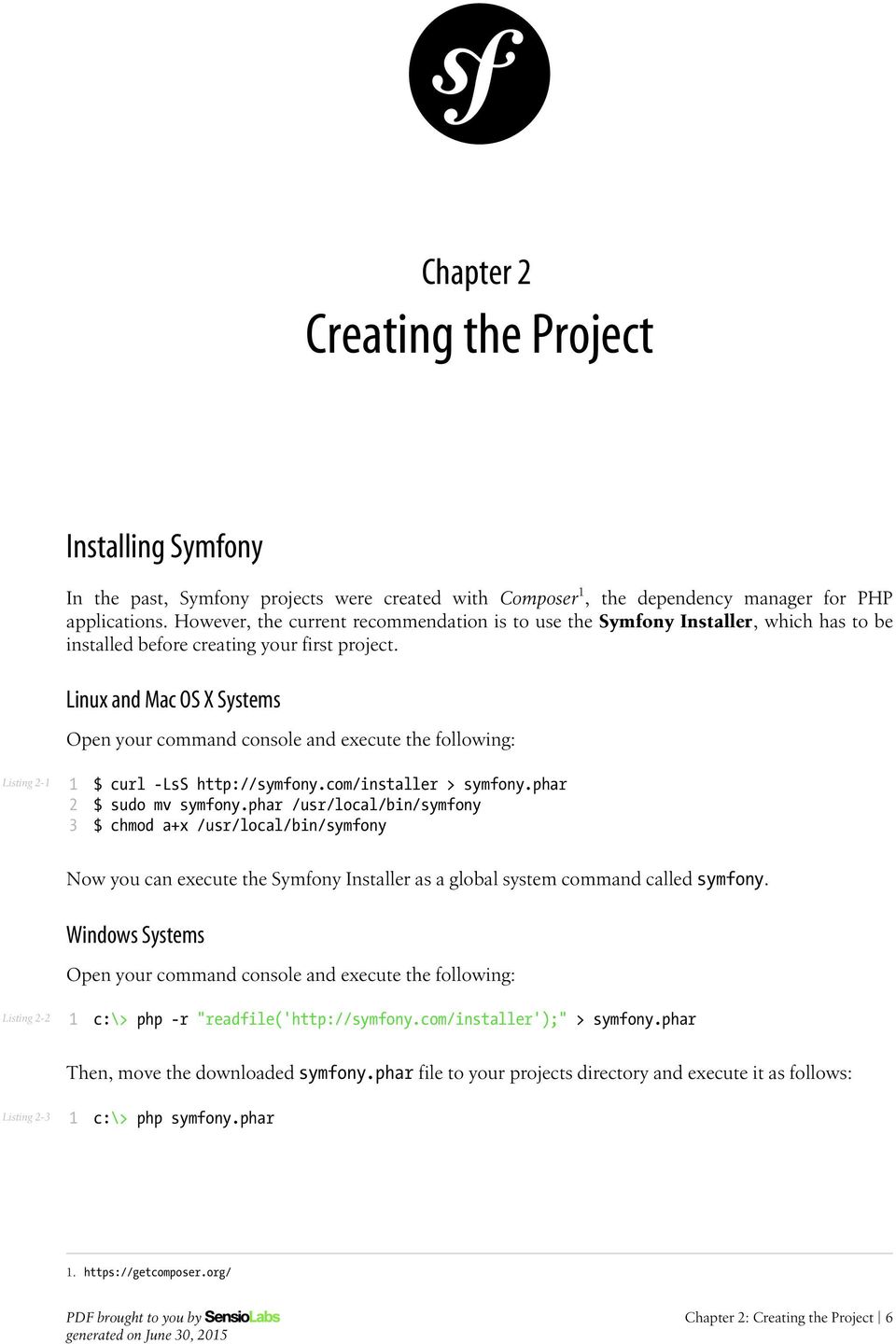
6 Chapter Creating the Project Installing Symfony In the past, Symfony projects were created with Composer, the dependency manager for PHP applications. However, the current recommendation is to use the Symfony Installer, which has to be installed before creating your first project. Linux and Mac OS X Systems Open your command console and execute the following: Listing - $ curl -LsS > symfony.phar $ sudo mv symfony.phar /usr/local/bin/symfony $ chmod a+x /usr/local/bin/symfony Now you can execute the Symfony Installer as a global system command called symfony. Windows Systems Open your command console and execute the following: Listing - c:\> php -r "readfile(' > symfony.phar Then, move the downloaded symfony.phar file to your projects directory and execute it as follows: Listing - c:\> php symfony.phar. generated on June 0, 0 Chapter : Creating the Project
7 Creating the Blog Application Now that everything is correctly set up, you can create a new project based on Symfony. In your command console, browse to a directory where you have permission to create files and execute the following commands: Listing - # Linux, Mac OS X $ cd projects/ $ symfony new blog # Windows c:\> cd projects/ c:\projects\> php symfony.phar new blog This command creates a new directory called blog that contains a fresh new project based on the most recent stable Symfony version available. In addition, the installer checks if your system meets the technical requirements to execute Symfony applications. If not, you'll see the list of changes needed to meet those requirements. Symfony releases are digitally signed for security reasons. If you want to verify the integrity of your Symfony installation, take a look at the public checksums repository and follow these steps to verify the signatures. Structuring the Application After creating the application, enter the blog/ directory and you'll see a number of files and directories generated automatically: Listing - 0 blog/ app/ console cache/ config/ logs/ Resources/ src/ AppBundle/ vendor/ web/ This file and directory hierarchy is the convention proposed by Symfony to structure your applications. The recommended purpose of each directory is the following: app/cache/, stores all the cache files generated by the application; app/config/, stores all the configuration defined for any environment; app/logs/, stores all the log files generated by the application; app/resources/, stores all the templates and the translation files for the application; src/appbundle/, stores the Symfony specific code (controllers and routes), your domain code (e.g. Doctrine classes) and all your business logic;. generated on June 0, 0 Chapter : Creating the Project

8 vendor/, this is the directory where Composer installs the application's dependencies and you should never modify any of its contents; web/, stores all the front controller files and all the web assets, such as stylesheets, JavaScript files and images. Application Bundles When Symfony.0 was released, most developers naturally adopted the symfony.x way of dividing applications into logical modules. That's why many Symfony apps use bundles to divide their code into logical features: UserBundle, ProductBundle, InvoiceBundle, etc. But a bundle is meant to be something that can be reused as a stand-alone piece of software. If UserBundle cannot be used "as is" in other Symfony apps, then it shouldn't be its own bundle. Moreover InvoiceBundle depends on ProductBundle, then there's no advantage to having two separate bundles. Create only one bundle called AppBundle for your application logic Implementing a single AppBundle bundle in your projects will make your code more concise and easier to understand. Starting in Symfony., the official Symfony documentation uses the AppBundle name. There is no need to prefix the AppBundle with your own vendor (e.g. AcmeAppBundle), because this application bundle is never going to be shared. All in all, this is the typical directory structure of a Symfony application that follows these best practices: Listing - 0 blog/ app/ console cache/ config/ logs/ Resources/ src/ AppBundle/ vendor/ web/ app.php app_dev.php If your Symfony installation doesn't come with a pre-generated AppBundle, you can generate it by hand executing this command: Listing - $ php app/console generate:bundle --namespace=appbundle --dir=src --format=annotation --no-interaction Extending the Directory Structure If your project or infrastructure requires some changes to the default directory structure of Symfony, you can override the location of the main directories: cache/, logs/ and web/. In addition, Symfony will use a slightly different directory structure when it's released: generated on June 0, 0 Chapter : Creating the Project
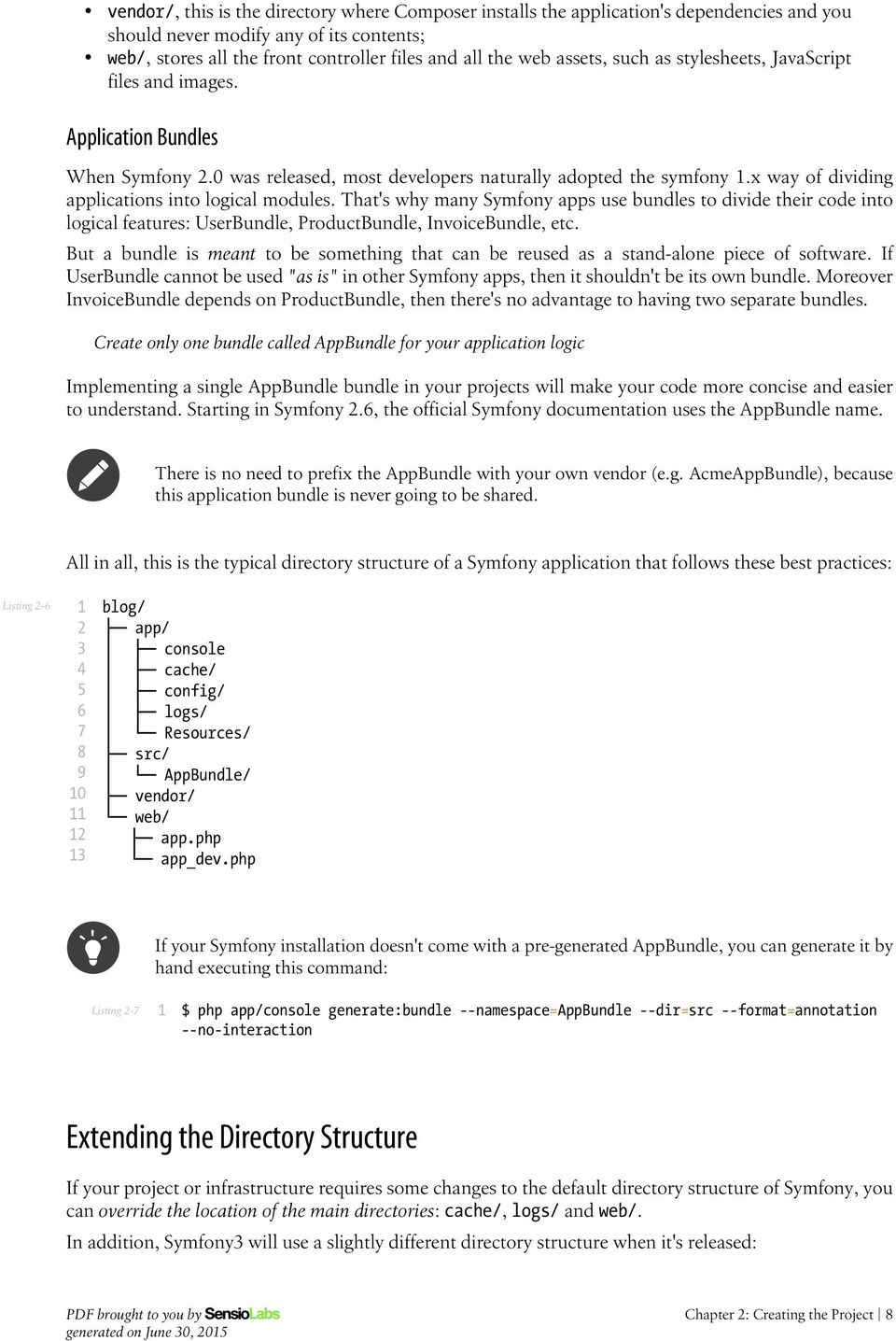
9 Listing - 0 blog-symfony/ app/ config/ Resources/ bin/ console src/ var/ cache/ logs/ vendor/ web/ The changes are pretty superficial, but for now, we recommend that you use the Symfony directory structure. generated on June 0, 0 Chapter : Creating the Project

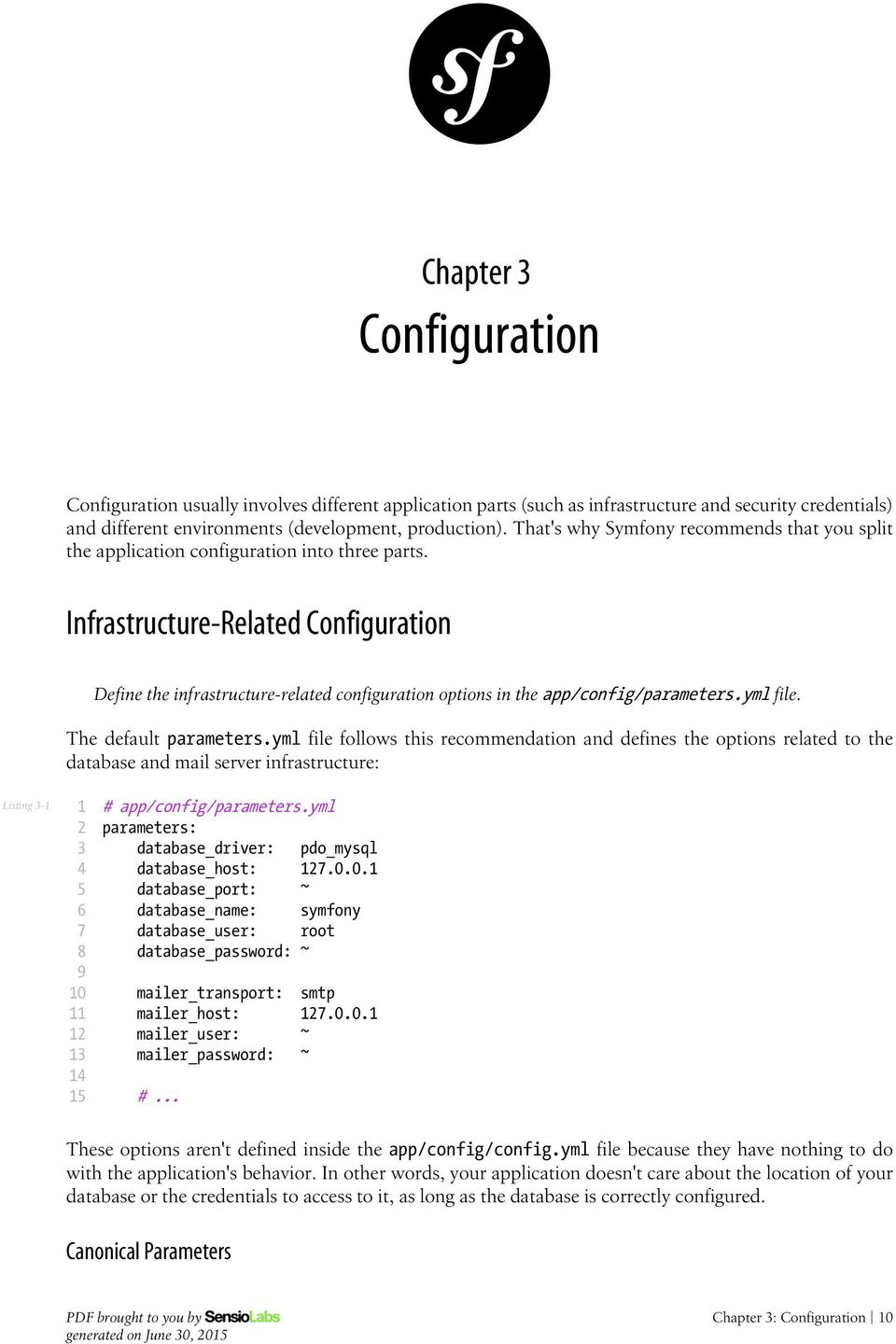
10 Chapter Configuration Configuration usually involves different application parts (such as infrastructure and security credentials) and different environments (development, production). That's why Symfony recommends that you split the application configuration into three parts. Infrastructure-Related Configuration Define the infrastructure-related configuration options in the app/config/parameters.yml file. The default parameters.yml file follows this recommendation and defines the options related to the database and mail server infrastructure: Listing - 0 # app/config/parameters.yml parameters: database_driver: pdo_mysql database_host:.0.0. database_port: ~ database_name: symfony database_user: root database_password: ~ mailer_transport: smtp mailer_host:.0.0. mailer_user: ~ mailer_password: ~ #... These options aren't defined inside the app/config/config.yml file because they have nothing to do with the application's behavior. In other words, your application doesn't care about the location of your database or the credentials to access to it, as long as the database is correctly configured. Canonical Parameters generated on June 0, 0 Chapter : Configuration 0
11 Define all your application's parameters in the app/config/parameters.yml.dist file. Since version., Symfony includes a configuration file called parameters.yml.dist, which stores the canonical list of configuration parameters for the application. Whenever a new configuration parameter is defined for the application, you should also add it to this file and submit the changes to your version control system. Then, whenever a developer updates the project or deploys it to a server, Symfony will check if there is any difference between the canonical parameters.yml.dist file and your local parameters.yml file. If there is a difference, Symfony will ask you to provide a value for the new parameter and it will add it to your local parameters.yml file. Application-Related Configuration Define the application behavior related configuration options in the app/config/config.yml file. The config.yml file contains the options used by the application to modify its behavior, such as the sender of notifications, or the enabled feature toggles. Defining these values in parameters.yml file would add an extra layer of configuration that's not needed because you don't need or want these configuration values to change on each server. The configuration options defined in the config.yml file usually vary from one environment to another. That's why Symfony already includes app/config/config_dev.yml and app/config/config_prod.yml files so that you can override specific values for each environment. Constants vs Configuration Options One of the most common errors when defining application configuration is to create new options for values that never change, such as the number of items for paginated results. Use constants to define configuration options that rarely change. The traditional approach for defining configuration options has caused many Symfony apps to include an option like the following, which would be used to control the number of posts to display on the blog homepage: Listing - # app/config/config.yml parameters: homepage.num_items: 0 If you ask yourself when the last time was that you changed the value of any option like this, odds are that you never have. Creating a configuration option for a value that you are never going to configure just isn't necessary. Our recommendation is to define these values as constants in your application. You could, for example, define a NUM_ITEMS constant in the Post entity: Listing - // src/appbundle/entity/post.php namespace AppBundle\Entity; class Post const NUM_ITEMS = 0;. generated on June 0, 0 Chapter : Configuration

12 The main advantage of defining constants is that you can use their values everywhere in your application. When using parameters, they are only available from places with access to the Symfony container. Constants can be used for example in your Twig templates thanks to the constant() function: Listing - <p> Displaying the constant('num_items', post) most recent results. </p> And Doctrine entities and repositories can now easily access these values, whereas they cannot access the container parameters: Listing - 0 namespace AppBundle\Repository; use Doctrine\ORM\EntityRepository; use AppBundle\Entity\Post; class PostRepository extends EntityRepository public function findlatest($limit = Post::NUM_ITEMS) The only notable disadvantage of using constants for this kind of configuration values is that you cannot redefine them easily in your tests. Semantic Configuration: Don't Do It Don't define a semantic dependency injection configuration for your bundles. As explained in How to Load Service Configuration inside a Bundle article, Symfony bundles have two choices on how to handle configuration: normal service configuration through the services.yml file and semantic configuration through a special *Extension class. Although semantic configuration is much more powerful and provides nice features such as configuration validation, the amount of work needed to define that configuration isn't worth it for bundles that aren't meant to be shared as third-party bundles. Moving Sensitive Options Outside of Symfony Entirely When dealing with sensitive options, like database credentials, we also recommend that you store them outside the Symfony project and make them available through environment variables. Learn how to do it in the following article: How to Set external Parameters in the Service Container generated on June 0, 0 Chapter : Configuration

13 Chapter Organizing Your Business Logic In computer software, business logic or domain logic is "the part of the program that encodes the realworld business rules that determine how data can be created, displayed, stored, and changed" (read full definition ). In Symfony applications, business logic is all the custom code you write for your app that's not specific to the framework (e.g. routing and controllers). Domain classes, Doctrine entities and regular PHP classes that are used as services are good examples of business logic. For most projects, you should store everything inside the AppBundle. Inside here, you can create whatever directories you want to organize things: Listing - symfony-project/ app/ src/ AppBundle/ Utils/ MyClass.php vendor/ web/ Storing Classes Outside of the Bundle? But there's no technical reason for putting business logic inside of a bundle. If you like, you can create your own namespace inside the src/ directory and put things there: Listing - symfony-project/ app/ src/ Acme/ Utils/ MyClass.php. generated on June 0, 0 Chapter : Organizing Your Business Logic

14 AppBundle/ vendor/ web/ The recommended approach of using the AppBundle/ directory is for simplicity. If you're advanced enough to know what needs to live in a bundle and what can live outside of one, then feel free to do that. Services: Naming and Format The blog application needs a utility that can transform a post title (e.g. "Hello World") into a slug (e.g. "hello-world"). The slug will be used as part of the post URL. Let's create a new Slugger class inside src/appbundle/utils/ and add the following slugify() method: Listing - 0 // src/appbundle/utils/slugger.php namespace AppBundle\Utils; class Slugger public function slugify($string) return preg_replace( '/[^a-z0-]/', '-', strtolower(trim(strip_tags($string))) ); Next, define a new service for that class. Listing - # app/config/services.yml services: # keep your service names short app.slugger: class: AppBundle\Utils\Slugger Traditionally, the naming convention for a service involved following the class name and location to avoid name collisions. Thus, the service would have been called app.utils.slugger. But by using short service names, your code will be easier to read and use. The name of your application's services should be as short as possible, but unique enough that you can search your project for the service if you ever need to. Now you can use the custom slugger in any controller class, such as the AdminController: Listing - public function createaction(request $request) if ($form->issubmitted() && $form->isvalid()) $slug = $this->get('app.slugger')->slugify($post->gettitle()); generated on June 0, 0 Chapter : Organizing Your Business Logic

15 0 $post->setslug($slug); Service Format: YAML In the previous section, YAML was used to define the service. Use the YAML format to define your own services. This is controversial, and in our experience, YAML and XML usage is evenly distributed among developers, with a slight preference towards YAML. Both formats have the same performance, so this is ultimately a matter of personal taste. We recommend YAML because it's friendly to newcomers and concise. You can of course use whatever format you like. Service: No Class Parameter You may have noticed that the previous service definition doesn't configure the class namespace as a parameter: Listing - # app/config/services.yml # service definition with class namespace as parameter parameters: slugger.class: AppBundle\Utils\Slugger services: app.slugger: class: "%slugger.class%" This practice is cumbersome and completely unnecessary for your own services: Don't define parameters for the classes of your services. This practice was wrongly adopted from third-party bundles. When Symfony introduced its service container, some developers used this technique to easily allow overriding services. However, overriding a service by just changing its class name is a very rare use case because, frequently, the new service has different constructor arguments. Using a Persistence Layer Symfony is an HTTP framework that only cares about generating an HTTP response for each HTTP request. That's why Symfony doesn't provide a way to talk to a persistence layer (e.g. database, external API). You can choose whatever library or strategy you want for this. generated on June 0, 0 Chapter : Organizing Your Business Logic

16 In practice, many Symfony applications rely on the independent Doctrine project to define their model using entities and repositories. Just like with business logic, we recommend storing Doctrine entities in the AppBundle. The three entities defined by our sample blog application are a good example: Listing - symfony-project/... src/ AppBundle/ Entity/ Comment.php Post.php User.php If you're more advanced, you can of course store them under your own namespace in src/. Doctrine Mapping Information Doctrine Entities are plain PHP objects that you store in some "database". Doctrine only knows about your entities through the mapping metadata configured for your model classes. Doctrine supports four metadata formats: YAML, XML, PHP and annotations. Use annotations to define the mapping information of the Doctrine entities. Annotations are by far the most convenient and agile way of setting up and looking for mapping information: Listing namespace AppBundle\Entity; use Doctrine\ORM\Mapping as ORM; use Doctrine\Common\Collections\ArrayCollection; /** */ class Post const NUM_ITEMS = 0; /** */ private $id; /** */ private $title;. generated on June 0, 0 Chapter : Organizing Your Business Logic
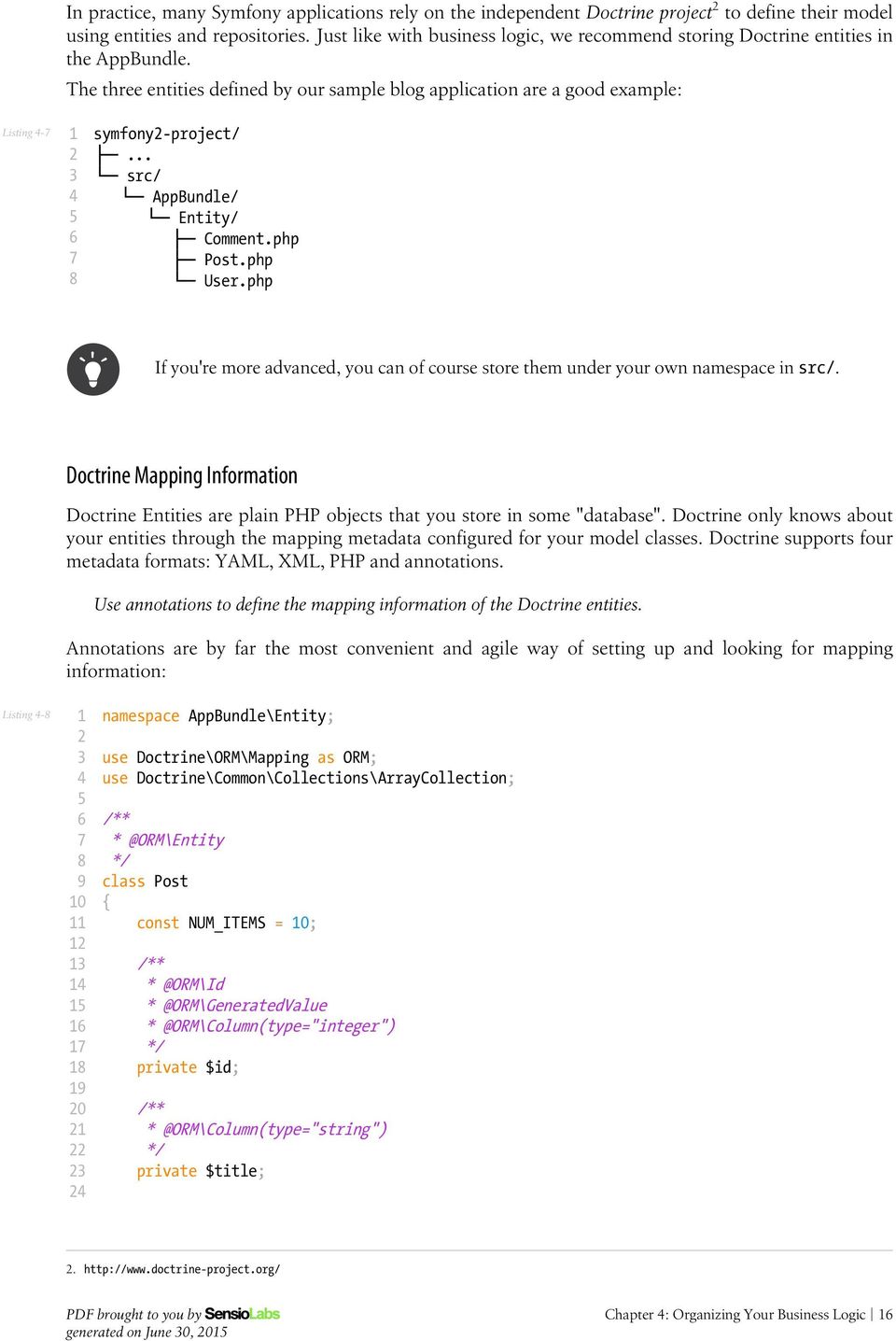
17 /** */ private $slug; /** */ private $content; /** */ private $author ; /** */ private $publishedat; /** * targetentity="comment", * mappedby="post", * orphanremoval=true * ) = "ASC") */ private $comments; public function construct() $this->publishedat = new \DateTime(); $this->comments = new ArrayCollection(); // getters and setters... All formats have the same performance, so this is once again ultimately a matter of taste. Data Fixtures As fixtures support is not enabled by default in Symfony, you should execute the following command to install the Doctrine fixtures bundle: Listing - $ composer require "doctrine/doctrine-fixtures-bundle" Then, enable the bundle in AppKernel.php, but only for the dev and test environments: Listing -0 use Symfony\Component\HttpKernel\Kernel; class AppKernel extends Kernel public function registerbundles() $bundles = array( generated on June 0, 0 Chapter : Organizing Your Business Logic

18 0 0 ); if (in_array($this->getenvironment(), array('dev', 'test'))) $bundles[] = new Doctrine\Bundle\FixturesBundle\DoctrineFixturesBundle(); return $bundles; We recommend creating just one fixture class for simplicity, though you're welcome to have more if that class gets quite large. Assuming you have at least one fixtures class and that the database access is configured properly, you can load your fixtures by executing the following command: Listing - $ php app/console doctrine:fixtures:load Careful, database will be purged. Do you want to continue Y/N? Y > purging database > loading AppBundle\DataFixtures\ORM\LoadFixtures Coding Standards The Symfony source code follows the PSR- and PSR- coding standards that were defined by the PHP community. You can learn more about the Symfony Coding standards and even use the PHP-CS-Fixer, which is a command-line utility that can fix the coding standards of an entire codebase in a matter of seconds generated on June 0, 0 Chapter : Organizing Your Business Logic

19 Chapter Controllers Symfony follows the philosophy of "thin controllers and fat models". This means that controllers should hold just the thin layer of glue-code needed to coordinate the different parts of the application. As a rule of thumb, you should follow the -0-0 rule, where controllers should only define variables or less, contain 0 actions or less and include 0 lines of code or less in each action. This isn't an exact science, but it should help you realize when code should be refactored out of the controller and into a service. Make your controller extend the FrameworkBundle base controller and use annotations to configure routing, caching and security whenever possible. Coupling the controllers to the underlying framework allows you to leverage all of its features and increases your productivity. And since your controllers should be thin and contain nothing more than a few lines of glue-code, spending hours trying to decouple them from your framework doesn't benefit you in the long run. The amount of time wasted isn't worth the benefit. In addition, using annotations for routing, caching and security simplifies configuration. You don't need to browse tens of files created with different formats (YAML, XML, PHP): all the configuration is just where you need it and it only uses one format. Overall, this means you should aggressively decouple your business logic from the framework while, at the same time, aggressively coupling your controllers and routing to the framework in order to get the most out of it. Routing Configuration To load routes defined as annotations in your controllers, add the following configuration to the main routing configuration file: Listing - # app/config/routing.yml app: resource: "@AppBundle/Controller/" type: annotation generated on June 0, 0 Chapter : Controllers
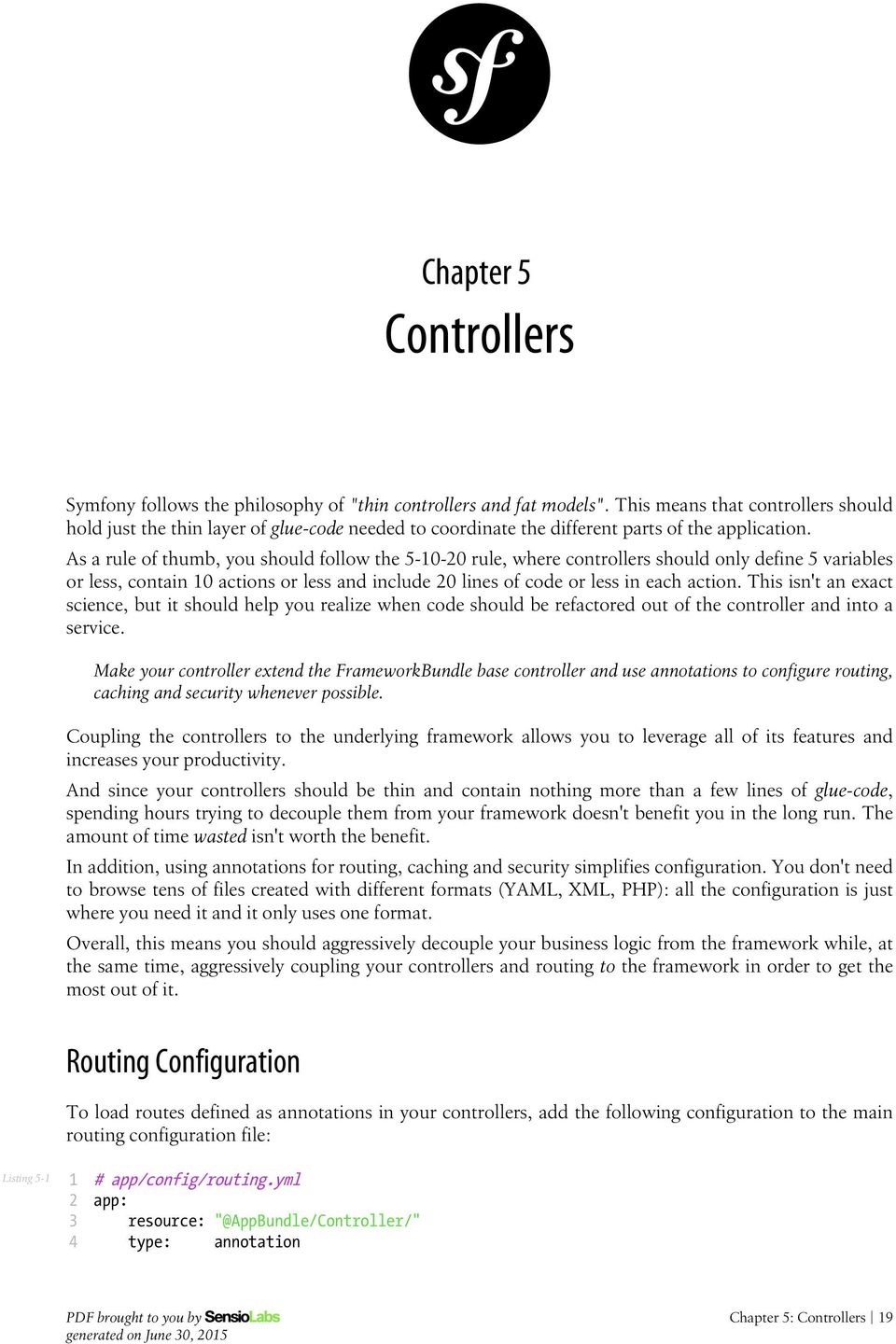
20 This configuration will load annotations from any controller stored inside the src/appbundle/ Controller/ directory and even from its subdirectories. So if your application defines lots of controllers, it's perfectly ok to reorganize them into subdirectories: Listing - 0 <your-project>/... src/ AppBundle/... Controller/ DefaultController.php... Api/ Backend/ Template Configuration Don't use annotation to configure the template used by the controller. annotation is useful, but also involves some magic. For that reason, we don't recommend using it. Most of the is used without any parameters, which makes it more difficult to know which template is being rendered. It also makes it less obvious to beginners that a controller should always return a Response object (unless you're using a view layer). Lastly, annotation uses a TemplateListener class that hooks into the kernel.view event dispatched by the framework. This listener introduces a measurable performance impact. In the sample blog application, rendering the homepage took milliseconds using the $this->render() method and milliseconds using annotation. How the Controller Looks Considering all this, here is an example of how the controller should look for the homepage of our app: Listing - 0 namespace AppBundle\Controller; use Symfony\Bundle\FrameworkBundle\Controller\Controller; use Sensio\Bundle\FrameworkExtraBundle\Configuration\Route; class DefaultController extends Controller /** name="homepage") */ public function indexaction() $posts = $this->getdoctrine() ->getrepository('appbundle:post') generated on June 0, 0 Chapter : Controllers 0

21 0 ->findlatest(); return $this->render('default/index.html.twig', array( 'posts' => $posts )); Using the ParamConverter If you're using Doctrine, then you can optionally use the ParamConverter to automatically query for an entity and pass it as an argument to your controller. Use the ParamConverter trick to automatically query for Doctrine entities when it's simple and convenient. For example: Listing - 0 use AppBundle\Entity\Post; use Sensio\Bundle\FrameworkExtraBundle\Configuration\Route; /** name="admin_post_show") */ public function showaction(post $post) $deleteform = $this->createdeleteform($post); return $this->render('admin/post/show.html.twig', array( 'post' => $post, 'delete_form' => $deleteform->createview(), )); Normally, you'd expect a $id argument to showaction. Instead, by creating a new argument ($post) and type-hinting it with the Post class (which is a Doctrine entity), the ParamConverter automatically queries for an object whose $id property matches the id value. It will also show a 0 page if no Post can be found. When Things Get More Advanced This works without any configuration because the wildcard name id matches the name of the property on the entity. If this isn't true, or if you have even more complex logic, the easiest thing to do is just query for the entity manually. In our application, we have this situation in CommentController: Listing - /** name = "comment_new") */ public function newaction(request $request, $postslug) $post = $this->getdoctrine() ->getrepository('appbundle:post'). generated on June 0, 0 Chapter : Controllers
22 0 ->findoneby(array('slug' => $postslug)); if (!$post) throw $this->createnotfoundexception(); You can also use configuration, which is infinitely flexible: Listing - 0 use AppBundle\Entity\Post; use Sensio\Bundle\FrameworkExtraBundle\Configuration\Route; use Sensio\Bundle\FrameworkExtraBundle\Configuration\ParamConverter; use Symfony\Component\HttpFoundation\Request; /** name = "comment_new") options="mapping": "postslug": "slug") */ public function newaction(request $request, Post $post) The point is this: the ParamConverter shortcut is great for simple situations. But you shouldn't forget that querying for entities directly is still very easy. Pre and Post Hooks If you need to execute some code before or after the execution of your controllers, you can use the EventDispatcher component to set up before and after filters. generated on June 0, 0 Chapter : Controllers
23 Chapter Templates When PHP was created 0 years ago, developers loved its simplicity and how well it blended HTML and dynamic code. But as time passed, other template languages - like Twig - were created to make templating even better. Use Twig templating format for your templates. Generally speaking, PHP templates are much more verbose than Twig templates because they lack native support for lots of modern features needed by templates, like inheritance, automatic escaping and named arguments for filters and functions. Twig is the default templating format in Symfony and has the largest community support of all non-php template engines (it's used in high profile projects such as Drupal ). In addition, Twig is the only template format with guaranteed support in Symfony.0. As a matter of fact, PHP may be removed from the officially supported template engines. Template Locations Store all your application's templates in app/resources/views/ directory. Traditionally, Symfony developers stored the application templates in the Resources/views/ directory of each bundle. Then they used the logical name to refer to them (e.g. AcmeDemoBundle:Default:index.html.twig). But for the templates used in your application, it's much more convenient to store them in the app/ Resources/views/ directory. For starters, this drastically simplifies their logical names: Templates Stored inside Bundles AcmeDemoBundle:Default:index.html.twig ::layout.html.twig Templates Stored in app/ default/index.html.twig layout.html.twig. generated on June 0, 0 Chapter : Templates
24 Templates Stored inside Bundles AcmeDemoBundle::index.html.twig AcmeDemoBundle:Default:subdir/index.html.twig AcmeDemoBundle:Default/subdir:index.html.twig Templates Stored in app/ index.html.twig default/subdir/index.html.twig default/subdir/index.html.twig Another advantage is that centralizing your templates simplifies the work of your designers. They don't need to look for templates in lots of directories scattered through lots of bundles. Twig Extensions Define your Twig extensions in the AppBundle/Twig/ directory and configure them using the app/config/ services.yml file. Our application needs a custom mdhtml Twig filter so that we can transform the Markdown contents of each post into HTML. To do this, first, install the excellent Parsedown Markdown parser as a new dependency of the project: Listing - $ composer require erusev/parsedown Then, create a new Markdown service that will be used later by the Twig extension. The service definition only requires the path to the class: Listing - # app/config/services.yml services: #... markdown: class: AppBundle\Utils\Markdown And the Markdown class just needs to define one single method to transform Markdown content into HTML: Listing - 0 namespace AppBundle\Utils; class Markdown private $parser; public function construct() $this->parser = new \Parsedown(); public function tohtml($text) $html = $this->parser->text($text); return $html;. generated on June 0, 0 Chapter : Templates
25 Next, create a new Twig extension and define a new filter called mdhtml using the Twig_SimpleFilter class. Inject the newly defined markdown service in the constructor of the Twig extension: Listing namespace AppBundle\Twig; use AppBundle\Utils\Markdown; class AppExtension extends \Twig_Extension private $parser; public function construct(markdown $parser) $this->parser = $parser; public function getfilters() return array( new \Twig_SimpleFilter( 'mdhtml', array($this, 'markdowntohtml'), array('is_safe' => array('html')) ), ); public function markdowntohtml($content) return $this->parser->tohtml($content); public function getname() return 'app_extension'; Lastly define a new service to enable this Twig extension in the app (the service name is irrelevant because you never use it in your own code): Listing - # app/config/services.yml services: app.twig.app_extension: class: AppBundle\Twig\AppExtension arguments: ["@markdown"] public: false tags: - name: twig.extension generated on June 0, 0 Chapter : Templates
26 Chapter Forms Forms are one of the most misused Symfony components due to its vast scope and endless list of features. In this chapter we'll show you some of the best practices so you can leverage forms but get work done quickly. Building Forms Define your forms as PHP classes. The Form component allows you to build forms right inside your controller code. This is perfectly fine if you don't need to reuse the form somewhere else. But for organization and reuse, we recommend that you define each form in its own PHP class: Listing namespace AppBundle\Form; use Symfony\Component\Form\AbstractType; use Symfony\Component\Form\FormBuilderInterface; use Symfony\Component\OptionsResolver\OptionsResolverInterface; class PostType extends AbstractType public function buildform(formbuilderinterface $builder, array $options) $builder ->add('title') ->add('summary', 'textarea') ->add('content', 'textarea') ->add('author ', ' ') ->add('publishedat', 'datetime') ; public function setdefaultoptions(optionsresolverinterface $resolver) generated on June 0, 0 Chapter : Forms
27 0 $resolver->setdefaults(array( 'data_class' => 'AppBundle\Entity\Post' )); public function getname() return 'post'; To use the class, use createform and instantiate the new class: Listing - 0 use AppBundle\Form\PostType; public function newaction(request $request) $post = new Post(); $form = $this->createform(new PostType(), $post); Registering Forms as Services You can also register your form type as a service. But this is not recommended unless you plan to reuse the new form type in many places or embed it in other forms directly or via the collection type. For most forms that are used only to edit or create something, registering the form as a service is over-kill, and makes it more difficult to figure out exactly which form class is being used in a controller. Form Button Configuration Form classes should try to be agnostic to where they will be used. This makes them easier to re-use later. Add buttons in the templates, not in the form classes or the controllers. Since Symfony., you can add buttons as fields on your form. This is a nice way to simplify the template that renders your form. But if you add the buttons directly in your form class, this would effectively limit the scope of that form: Listing - 0 class PostType extends AbstractType public function buildform(formbuilderinterface $builder, array $options) $builder ->add('save', 'submit', array('label' => 'Create Post')) ; generated on June 0, 0 Chapter : Forms
28 This form may have been designed for creating posts, but if you wanted to reuse it for editing posts, the button label would be wrong. Instead, some developers configure form buttons in the controller: Listing namespace AppBundle\Controller\Admin; use Symfony\Component\HttpFoundation\Request; use Symfony\Bundle\FrameworkBundle\Controller\Controller; use AppBundle\Entity\Post; use AppBundle\Form\PostType; class PostController extends Controller public function newaction(request $request) $post = new Post(); $form = $this->createform(new PostType(), $post); $form->add('submit', 'submit', array( 'label' => 'Create', 'attr' => array('class' => 'btn btn-default pull-right') )); This is also an important error, because you are mixing presentation markup (labels, CSS classes, etc.) with pure PHP code. Separation of concerns is always a good practice to follow, so put all the view-related things in the view layer: Listing - form_start(form) form_widget(form) <input type="submit" value="create" class="btn btn-default pull-right" /> form_end(form) Rendering the Form There are a lot of ways to render your form, ranging from rendering the entire thing in one line to rendering each part of each field independently. The best way depends on how much customization you need. One of the simplest ways - which is especially useful during development - is to render the form tags and use form_widget() to render all of the fields: Listing - form_start(form, 'attr': 'class': 'my-form-class' ) form_widget(form) form_end(form) If you need more control over how your fields are rendered, then you should remove the form_widget(form) function and render your fields individually. See the How to Customize Form Rendering article for more information on this and how you can control how the form renders at a global level using form theming. generated on June 0, 0 Chapter : Forms
29 Handling Form Submits Handling a form submit usually follows a similar template: Listing - 0 public function newaction(request $request) // build the form... $form->handlerequest($request); if ($form->issubmitted() && $form->isvalid()) $em = $this->getdoctrine()->getmanager(); $em->persist($post); $em->flush(); return $this->redirect($this->generateurl( 'admin_post_show', array('id' => $post->getid()) )); // render the template There are really only two notable things here. First, we recommend that you use a single action for both rendering the form and handling the form submit. For example, you could have a newaction that only renders the form and a createaction that only processes the form submit. Both those actions will be almost identical. So it's much simpler to let newaction handle everything. Second, we recommend using $form->issubmitted() in the if statement for clarity. This isn't technically needed, since isvalid() first calls issubmitted(). But without this, the flow doesn't read well as it looks like the form is always processed (even on the GET request). generated on June 0, 0 Chapter : Forms
30 Chapter Internationalization Internationalization and localization adapt the applications and their contents to the specific region or language of the users. In Symfony this is an opt-in feature that needs to be enabled before using it. To do this, uncomment the following translator configuration option and set your application locale: Listing - # app/config/config.yml framework: #... translator: fallback: "%locale%" # app/config/parameters.yml parameters: #... locale: en Translation Source File Format The Symfony Translation component supports lots of different translation formats: PHP, Qt,.po,.mo, JSON, CSV, INI, etc. Use the XLIFF format for your translation files. Of all the available translation formats, only XLIFF and gettext have broad support in the tools used by professional translators. And since it's based on XML, you can validate XLIFF file contents as you write them. Symfony. added support for notes inside XLIFF files, making them more user-friendly for translators. At the end, good translations are all about context, and these XLIFF notes allow you to define that context. The Apache-licensed JMSTranslationBundle offers you a web interface for viewing and editing these translation files. It also has advanced extractors that can read your project and automatically update the XLIFF files. generated on June 0, 0 Chapter : Internationalization 0
31 Translation Source File Location Store the translation files in the app/resources/translations/ directory. Traditionally, Symfony developers have created these files in the Resources/translations/ directory of each bundle. But since the app/resources/ directory is considered the global location for the application's resources, storing translations in app/resources/translations/ centralizes them and gives them priority over any other translation file. This lets you override translations defined in third-party bundles. Translation Keys Always use keys for translations instead of content strings. Using keys simplifies the management of the translation files because you can change the original contents without having to update all of the translation files. Keys should always describe their purpose and not their location. For example, if a form has a field with the label "Username", then a nice key would be label.username, not edit_form.label.username. Example Translation File Applying all the previous best practices, the sample translation file for English in the application would be: Listing - 0 <!-- app/resources/translations/messages.en.xliff --> <?xml version=".0"?> <xliff version="." xmlns="urn:oasis:names:tc:xliff:document:."> <file source-language="en" target-language="en" datatype="plaintext" original="file.ext"> <body> <trans-unit id=""> <source>title.post_list</source> <target>post List</target> </trans-unit> </body> </file> </xliff>. generated on June 0, 0 Chapter : Internationalization
32 Chapter Security Authentication and Firewalls (i.e. Getting the User's Credentials) You can configure Symfony to authenticate your users using any method you want and to load user information from any source. This is a complex topic, but the Security Cookbook Section has a lot of information about this. Regardless of your needs, authentication is configured in security.yml, primarily under the firewalls key. Unless you have two legitimately different authentication systems and users (e.g. form login for the main site and a token system for your API only), we recommend having only one firewall entry with the anonymous key enabled. Most applications only have one authentication system and one set of users. For this reason, you only need one firewall entry. There are exceptions of course, especially if you have separated web and API sections on your site. But the point is to keep things simple. Additionally, you should use the anonymous key under your firewall. If you need to require users to be logged in for different sections of your site (or maybe nearly all sections), use the access_control area. Use the bcrypt encoder for encoding your users' passwords. If your users have a password, then we recommend encoding it using the bcrypt encoder, instead of the traditional SHA- hashing encoder. The main advantages of bcrypt are the inclusion of a salt value to protect against rainbow table attacks, and its adaptive nature, which allows to make it slower to remain resistant to brute-force search attacks. With this in mind, here is the authentication setup from our application, which uses a login form to load users from the database: Listing - # app/config/security.yml security: encoders: generated on June 0, 0 Chapter : Security
33 0 0 AppBundle\Entity\User: bcrypt providers: database_users: entity: class: AppBundle:User, property: username firewalls: secured_area: pattern: ^/ anonymous: true form_login: check_path: security_login_check login_path: security_login_form logout: path: security_logout target: homepage #... access_control exists, but is not shown here The source code for our project contains comments that explain each part. Authorization (i.e. Denying Access) Symfony gives you several ways to enforce authorization, including the access_control configuration in security.yml, annotation and using isgranted on the security.context service directly. For protecting broad URL patterns, use access_control; Whenever possible, use annotation; Check security directly on the security.context service whenever you have a more complex situation. There are also different ways to centralize your authorization logic, like with a custom security voter or with ACL. For fine-grained restrictions, define a custom security voter; For restricting access to any object by any user via an admin interface, use the Symfony ACL. Annotation For controlling access on a controller-by-controller basis, use annotation whenever possible. It's easy to read and is placed consistently above each action. In our application, you need the ROLE_ADMIN in order to create a new post. this looks like: Listing - generated on June 0, 0 Chapter : Security
34 0 use Sensio\Bundle\FrameworkExtraBundle\Configuration\Route; use Sensio\Bundle\FrameworkExtraBundle\Configuration\Security; /** * Displays a form to create a new Post entity. * name="admin_post_new") */ public function newaction() Using Expressions for Complex Security Restrictions If your security logic is a little bit more complex, you can use an expression In the following example, a user can only access the controller if their matches the value returned by the getauthor method on the Post object: Listing - 0 use AppBundle\Entity\Post; use Sensio\Bundle\FrameworkExtraBundle\Configuration\Route; use Sensio\Bundle\FrameworkExtraBundle\Configuration\Security; /** name="admin_post_edit") == post.getauthor ()") */ public function editaction(post $post) Notice that this requires the use of the ParamConverter, which automatically queries for the Post object and puts it on the $post argument. This is what makes it possible to use the post variable in the expression. This has one major drawback: an expression in an annotation cannot easily be reused in other parts of the application. Imagine that you want to add a link in a template that will only be seen by authors. Right now you'll need to repeat the expression code using Twig syntax: Listing - % if app.user and app.user. == post.author % <a href="">... </a> % endif % The easiest solution - if your logic is simple enough - is to add a new method to the Post entity that checks if a given user is its author: Listing - // src/appbundle/entity/post.php. generated on June 0, 0 Chapter : Security
35 0 class Post /** * Is the given User the author of this Post? * bool */ public function isauthor(user $user = null) return $user && $user->get () == $this->getauthor (); Now you can reuse this method both in the template and in the security expression: Listing - 0 use AppBundle\Entity\Post; use Sensio\Bundle\FrameworkExtraBundle\Configuration\Security; /** name="admin_post_edit") */ public function editaction(post $post) Listing - % if post.isauthor(app.user) % <a href="">... </a> % endif % Checking Permissions The above example only works because we're using the ParamConverter, which gives the expression access to the a post variable. If you don't use this, or have some other more advanced use-case, you can always do the same security check in PHP: Listing - 0 /** name="admin_post_edit") */ public function editaction($id) $post = $this->getdoctrine()->getrepository('appbundle:post') ->find($id); if (!$post) throw $this->createnotfoundexception(); if (!$post->isauthor($this->getuser())) throw $this->createaccessdeniedexception(); generated on June 0, 0 Chapter : Security
36 Security Voters If your security logic is complex and can't be centralized into a method like isauthor(), you should leverage custom voters. These are an order of magnitude easier than ACLs and will give you the flexibility you need in almost all cases. First, create a voter class. The following example shows a voter that implements the same getauthor logic you used above: Listing namespace AppBundle\Security; use Symfony\Component\Security\Core\Authorization\Voter\AbstractVoter; use Symfony\Component\Security\Core\User\UserInterface; // AbstractVoter class requires Symfony. or higher version class PostVoter extends AbstractVoter const CREATE = 'create'; const EDIT = 'edit'; protected function getsupportedattributes() return array(self::create, self::edit); protected function getsupportedclasses() return array('appbundle\entity\post'); protected function isgranted($attribute, $post, $user = null) if (!$user instanceof UserInterface) return false; if ($attribute === self::create && in_array('role_admin', $user->getroles(), true)) return true; if ($attribute === self::edit && $user->get () === $post->getauthor ()) return true; return false; To enable the security voter in the application, define a new service: Listing -0 generated on June 0, 0 Chapter : Security
37 # app/config/services.yml services: #... post_voter: class: AppBundle\Security\PostVoter public: false tags: - name: security.voter Now, you can use the voter with annotation: Listing - /** name="admin_post_edit") post)") */ public function editaction(post $post) You can also use this directly with the security.context service or via the even easier shortcut in a controller: Listing - 0 /** name="admin_post_edit") */ public function editaction($id) $post = // query for the post... if (!$this->get('security.context')->isgranted('edit', $post)) throw $this->createaccessdeniedexception(); Learn More The FOSUserBundle, developed by the Symfony community, adds support for a database-backed user system in Symfony. It also handles common tasks like user registration and forgotten password functionality. Enable the Remember Me feature to allow your users to stay logged in for a long period of time. When providing customer support, sometimes it's necessary to access the application as some other user so that you can reproduce the problem. Symfony provides the ability to impersonate users. If your company uses a user login method not supported by Symfony, you can develop your own user provider and your own authentication provider.. generated on June 0, 0 Chapter : Security
38 Chapter 0 Web Assets Web assets are things like CSS, JavaScript and image files that make the frontend of your site look and work great. Symfony developers have traditionally stored these assets in the Resources/public/ directory of each bundle. Store your assets in the web/ directory. Scattering your web assets across tens of different bundles makes it more difficult to manage them. Your designers' lives will be much easier if all the application assets are in one location. Templates also benefit from centralizing your assets, because the links are much more concise: Listing 0- <link rel="stylesheet" href=" asset('css/bootstrap.min.css') " /> <link rel="stylesheet" href=" asset('css/main.css') " /> #... # <script src=" asset('js/jquery.min.js') "></script> <script src=" asset('js/bootstrap.min.js') "></script> Keep in mind that web/ is a public directory and that anything stored here will be publicly accessible. For that reason, you should put your compiled web assets here, but not their source files (e.g. SASS files). Using Assetic These days, you probably can't simply create static CSS and JavaScript files and include them in your template. Instead, you'll probably want to combine and minify these to improve client-side performance. You may also want to use LESS or Sass (for example), which means you'll need some way to process these into CSS files. A lot of tools exist to solve these problems, including pure-frontend (non-php) tools like GruntJS. generated on June 0, 0 Chapter 0: Web Assets
39 Use Assetic to compile, combine and minimize web assets, unless you're comfortable with frontend tools like GruntJS. Assetic is an asset manager capable of compiling assets developed with a lot of different frontend technologies like LESS, Sass and CoffeeScript. Combining all your assets with Assetic is a matter of wrapping all the assets with a single Twig tag: Listing 0-0 % stylesheets 'css/bootstrap.min.css' 'css/main.css' filter='cssrewrite' output='css/compiled/all.css' % <link rel="stylesheet" href=" asset_url " /> % endstylesheets % #... # % javascripts 'js/jquery.min.js' 'js/bootstrap.min.js' output='js/compiled/all.js' % <script src=" asset_url "></script> % endjavascripts % Frontend-Based Applications Recently, frontend technologies like AngularJS have become pretty popular for developing frontend web applications that talk to an API. If you are developing an application like this, you should use the tools that are recommended by the technology, such as Bower and GruntJS. You should develop your frontend application separately from your Symfony backend (even separating the repositories if you want). Learn More about Assetic Assetic can also minimize CSS and JavaScript assets using UglifyCSS/UglifyJS to speed up your websites. You can even compress images with Assetic to reduce their size before serving them to the user. Check out the official Assetic documentation to learn more about all the available features.. generated on June 0, 0 Chapter 0: Web Assets
40 Chapter Tests Roughly speaking, there are two types of test. Unit testing allows you to test the input and output of specific functions. Functional testing allows you to command a "browser" where you browse to pages on your site, click links, fill out forms and assert that you see certain things on the page. Unit Tests Unit tests are used to test your "business logic", which should live in classes that are independent of Symfony. For that reason, Symfony doesn't really have an opinion on what tools you use for unit testing. However, the most popular tools are PhpUnit and PhpSpec. Functional Tests Creating really good functional tests can be tough so some developers skip these completely. Don't skip the functional tests! By defining some simple functional tests, you can quickly spot any big errors before you deploy them: Define a functional test that at least checks if your application pages are successfully loading. A functional test can be as easy as this: Listing - // src/appbundle/tests/applicationavailabilityfunctionaltest.php namespace AppBundle\Tests; use Symfony\Bundle\FrameworkBundle\Test\WebTestCase; class ApplicationAvailabilityFunctionalTest extends WebTestCase /** urlprovider. generated on June 0, 0 Chapter : Tests 0
41 0 0 0 */ public function testpageissuccessful($url) $client = self::createclient(); $client->request('get', $url); $this->asserttrue($client->getresponse()->issuccessful()); public function urlprovider() return array( array('/'), array('/posts'), array('/post/fixture-post-'), array('/blog/category/fixture-category'), array('/archives'), ); This code checks that all the given URLs load successfully, which means that their HTTP response status code is between 00 and. This may not look that useful, but given how little effort this took, it's worth having it in your application. In computer software, this kind of test is called smoke testing and consists of "preliminary testing to reveal simple failures severe enough to reject a prospective software release". Hardcode URLs in a Functional Test Some of you may be asking why the previous functional test doesn't use the URL generator service: Hardcode the URLs used in the functional tests instead of using the URL generator. Consider the following functional test that uses the router service to generate the URL of the tested page: Listing - public function testblogarchives() $client = self::createclient(); $url = $client->getcontainer()->get('router')->generate('blog_archives'); $client->request('get', $url); This will work, but it has one huge drawback. If a developer mistakenly changes the path of the blog_archives route, the test will still pass, but the original (old) URL won't work! This means that any bookmarks for that URL will be broken and you'll lose any search engine page ranking. Testing JavaScript Functionality The built-in functional testing client is great, but it can't be used to test any JavaScript behavior on your pages. If you need to test this, consider using the Mink library from within PHPUnit.. generated on June 0, 0 Chapter : Tests
42 Of course, if you have a heavy JavaScript frontend, you should consider using pure JavaScript-based testing tools. Learn More about Functional Tests Consider using Faker and Alice libraries to generate real-looking data for your test fixtures generated on June 0, 0 Chapter : Tests
43
44
Practical Guided Tour of Symfony
 Practical Guided Tour of Symfony Standalone Components DependencyInjection EventDispatcher HttpFoundation DomCrawler ClassLoader BrowserKit CssSelector Filesystem HttpKernel Templating Translation
Symfony2 and Drupal. Why to talk about Symfony2 framework?
 Symfony2 and Drupal Why to talk about Symfony2 framework? Me and why Symfony2? Timo-Tuomas Tipi / TipiT Koivisto, M.Sc. Drupal experience ~6 months Symfony2 ~40h Coming from the (framework) Java world
The Symfony CMF Book Version: master
 The Symfony CMF Book Version: master generated on September, 0 The Symfony CMF Book (master) This work is licensed under the Attribution-Share Alike.0 Unported license (http://creativecommons.org/ licenses/by-sa/.0/).
Drupal CMS for marketing sites
 Drupal CMS for marketing sites Intro Sample sites: End to End flow Folder Structure Project setup Content Folder Data Store (Drupal CMS) Importing/Exporting Content Database Migrations Backend Config Unit
A Tour of Silex and Symfony Components. Robert Parker @yamiko_ninja
 A Tour of Silex and Symfony Components Robert Parker @yamiko_ninja Wait Not Drupal? Self Introduction PHP Developer since 2012 HTML and JavaScript Since 2010 Full Stack Developer at Dorey Design Group
WebSpy Vantage Ultimate 2.2 Web Module Administrators Guide
 WebSpy Vantage Ultimate 2.2 Web Module Administrators Guide This document is intended to help you get started using WebSpy Vantage Ultimate and the Web Module. For more detailed information, please see
An Email Newsletter Using ASP Smart Mailer and Advanced HTML Editor
 An Email Newsletter Using ASP Smart Mailer and Advanced HTML Editor This tutorial is going to take you through creating a mailing list application to send out a newsletter for your site. We'll be using
FileMaker Server 9. Custom Web Publishing with PHP
 FileMaker Server 9 Custom Web Publishing with PHP 2007 FileMaker, Inc. All Rights Reserved. FileMaker, Inc. 5201 Patrick Henry Drive Santa Clara, California 95054 FileMaker is a trademark of FileMaker,
Eucalyptus 3.4.2 User Console Guide
 Eucalyptus 3.4.2 User Console Guide 2014-02-23 Eucalyptus Systems Eucalyptus Contents 2 Contents User Console Overview...4 Install the Eucalyptus User Console...5 Install on Centos / RHEL 6.3...5 Configure
Drupal 8. Core and API Changes Shabir Ahmad MS Software Engg. NUST Principal Software Engineser PHP/Drupal [email protected]
 Drupal 8 Core and API Changes Shabir Ahmad MS Software Engg. NUST Principal Software Engineser PHP/Drupal [email protected] Agenda What's coming in Drupal 8 for o End users and clients? o Site builders?
STABLE & SECURE BANK lab writeup. Page 1 of 21
 STABLE & SECURE BANK lab writeup 1 of 21 Penetrating an imaginary bank through real present-date security vulnerabilities PENTESTIT, a Russian Information Security company has launched its new, eighth
NewsletterAdmin 2.4 Setup Manual
 NewsletterAdmin 2.4 Setup Manual Updated: 7/22/2011 Contact: [email protected] Contents Overview... 2 What's New in NewsletterAdmin 2.4... 2 Before You Begin... 2 Testing and Production...
Novell Identity Manager
 Password Management Guide AUTHORIZED DOCUMENTATION Novell Identity Manager 3.6.1 June 05, 2009 www.novell.com Identity Manager 3.6.1 Password Management Guide Legal Notices Novell, Inc. makes no representations
TIBCO Spotfire Web Player 6.0. Installation and Configuration Manual
 TIBCO Spotfire Web Player 6.0 Installation and Configuration Manual Revision date: 12 November 2013 Important Information SOME TIBCO SOFTWARE EMBEDS OR BUNDLES OTHER TIBCO SOFTWARE. USE OF SUCH EMBEDDED
Managing User Accounts and User Groups
 Managing User Accounts and User Groups Contents Managing User Accounts and User Groups...2 About User Accounts and User Groups... 2 Managing User Groups...3 Adding User Groups... 3 Managing Group Membership...
Introduction to Ingeniux Forms Builder. 90 minute Course CMSFB-V6 P.0-20080901
 Introduction to Ingeniux Forms Builder 90 minute Course CMSFB-V6 P.0-20080901 Table of Contents COURSE OBJECTIVES... 1 Introducing Ingeniux Forms Builder... 3 Acquiring Ingeniux Forms Builder... 3 Installing
Cloudwords Drupal Module. Quick Start Guide
 Cloudwords Drupal Module Quick Start Guide 1 Contents INTRO... 3 HOW IT WORKS... 3 BEFORE YOU INSTALL... 4 In Cloudwords... 4 In Drupal... 4 INSTALLING THE CLOUDWORDS DRUPAL MODULE... 5 OPTION ONE: Install
CA Performance Center
 CA Performance Center Single Sign-On User Guide 2.4 This Documentation, which includes embedded help systems and electronically distributed materials, (hereinafter referred to as the Documentation ) is
EPiServer Operator's Guide
 EPiServer Operator's Guide Abstract This document is mainly intended for administrators and developers that operate EPiServer or want to learn more about EPiServer's operating environment. The document
Official Amazon Checkout Extension for Magento Commerce. Documentation
 Official Amazon Checkout Extension for Magento Commerce Documentation 1. Introduction This extension provides official integration of your Magento store with Inline Checkout by Amazon service. Checkout
FileMaker Server 12. Custom Web Publishing with PHP
 FileMaker Server 12 Custom Web Publishing with PHP 2007 2012 FileMaker, Inc. All Rights Reserved. FileMaker, Inc. 5201 Patrick Henry Drive Santa Clara, California 95054 FileMaker and Bento are trademarks
Copyright 2014 Jaspersoft Corporation. All rights reserved. Printed in the U.S.A. Jaspersoft, the Jaspersoft
 5.6 Copyright 2014 Jaspersoft Corporation. All rights reserved. Printed in the U.S.A. Jaspersoft, the Jaspersoft logo, Jaspersoft ireport Designer, JasperReports Library, JasperReports Server, Jaspersoft
MarkLogic Server. Reference Application Architecture Guide. MarkLogic 8 February, 2015. Copyright 2015 MarkLogic Corporation. All rights reserved.
 Reference Application Architecture Guide 1 MarkLogic 8 February, 2015 Last Revised: 8.0-1, February, 2015 Copyright 2015 MarkLogic Corporation. All rights reserved. Table of Contents Table of Contents
Product Manual. MDM On Premise Installation Version 8.1. Last Updated: 06/07/15
 Product Manual MDM On Premise Installation Version 8.1 Last Updated: 06/07/15 Parallels IP Holdings GmbH Vordergasse 59 8200 Schaffhausen Switzerland Tel: + 41 52 632 0411 Fax: + 41 52 672 2010 www.parallels.com
Build it with Drupal 8
 Build it with Drupal 8 Comprehensive guide for building common websites in Drupal 8. No programming knowledge required! Antonio Torres This book is for sale at http://leanpub.com/drupal-8-book This version
ISVforce Guide. Version 35.0, Winter 16. @salesforcedocs
 ISVforce Guide Version 35.0, Winter 16 @salesforcedocs Last updated: vember 12, 2015 Copyright 2000 2015 salesforce.com, inc. All rights reserved. Salesforce is a registered trademark of salesforce.com,
Mobile Device Management Version 8. Last updated: 17-10-14
 Mobile Device Management Version 8 Last updated: 17-10-14 Copyright 2013, 2X Ltd. http://www.2x.com E mail: [email protected] Information in this document is subject to change without notice. Companies names
MASTERTAG DEVELOPER GUIDE
 MASTERTAG DEVELOPER GUIDE TABLE OF CONTENTS 1 Introduction... 4 1.1 What is the zanox MasterTag?... 4 1.2 What is the zanox page type?... 4 2 Create a MasterTag application in the zanox Application Store...
Elgg 1.8 Social Networking
 Elgg 1.8 Social Networking Create, customize, and deploy your very networking site with Elgg own social Cash Costello PACKT PUBLISHING open source* community experience distilled - BIRMINGHAM MUMBAI Preface
Configuring CQ Security
 Configuring CQ Security About Me CQ Architect for Inside Solutions http://inside-solutions.ch CQ Blog: http://cqblog.inside-solutions.ch Customer Projects with Adobe CQ Training Material on Adobe CQ Agenda
Electronic Ticket and Check-in System for Indico Conferences
 Electronic Ticket and Check-in System for Indico Conferences September 2013 Author: Bernard Kolobara Supervisor: Jose Benito Gonzalez Lopez CERN openlab Summer Student Report 2013 Project Specification
shweclassifieds v 3.3 Php Classifieds Script (Joomla Extension) User Manual (Revision 2.0)
 shweclassifieds v 3.3 Php Classifieds Script (Joomla Extension) User Manual (Revision 2.0) Contents Installation Procedure... 4 What is in the zip file?... 4 Installing from Extension Manager... 6 Updating
Content Management System
 Content Management System XT-CMS INSTALL GUIDE Requirements The cms runs on PHP so the host/server it is intended to be run on should ideally be linux based with PHP 4.3 or above. A fresh install requires
IceWarp Server. Log Analyzer. Version 10
 IceWarp Server Log Analyzer Version 10 Printed on 23 June, 2009 i Contents Log Analyzer 1 Quick Start... 2 Required Steps... 2 Optional Steps... 2 Advanced Configuration... 5 Log Importer... 6 General...
Working with Indicee Elements
 Working with Indicee Elements How to Embed Indicee in Your Product 2012 Indicee, Inc. All rights reserved. 1 Embed Indicee Elements into your Web Content 3 Single Sign-On (SSO) using SAML 3 Configure an
Building Better Controllers Symfony Live Berlin 2014. Benjamin Eberlei <[email protected]> 31.10.2014
 Building Better Controllers Symfony Live Berlin 2014 Benjamin Eberlei 31.10.2014 Me Working at Qafoo We promote high quality code with trainings and consulting http://qafoo.com Doctrine
Log Analyzer Reference
 IceWarp Unified Communications Log Analyzer Reference Version 10.4 Printed on 27 February, 2012 Contents Log Analyzer 1 Quick Start... 2 Required Steps... 2 Optional Steps... 3 Advanced Configuration...
Plesk 11 Manual. Fasthosts Customer Support
 Fasthosts Customer Support Plesk 11 Manual This guide covers everything you need to know in order to get started with the Parallels Plesk 11 control panel. Contents Introduction... 3 Before you begin...
EVALUATION ONLY. WA2088 WebSphere Application Server 8.5 Administration on Windows. Student Labs. Web Age Solutions Inc.
 WA2088 WebSphere Application Server 8.5 Administration on Windows Student Labs Web Age Solutions Inc. Copyright 2013 Web Age Solutions Inc. 1 Table of Contents Directory Paths Used in Labs...3 Lab Notes...4
Kollaborate Server Installation Guide!! 1. Kollaborate Server! Installation Guide!
 Kollaborate Server Installation Guide 1 Kollaborate Server Installation Guide Kollaborate Server is a local implementation of the Kollaborate cloud workflow system that allows you to run the service in-house
ADMINISTRATOR GUIDE VERSION
 ADMINISTRATOR GUIDE VERSION 4.0 2014 Copyright 2008 2014. All rights reserved. No part of this document may be reproduced or transmitted in any form or by any means electronic or mechanical, for any purpose
BlackBerry Enterprise Service 10. Secure Work Space for ios and Android Version: 10.1.1. Security Note
 BlackBerry Enterprise Service 10 Secure Work Space for ios and Android Version: 10.1.1 Security Note Published: 2013-06-21 SWD-20130621110651069 Contents 1 About this guide...4 2 What is BlackBerry Enterprise
Novell Identity Manager
 AUTHORIZED DOCUMENTATION Manual Task Service Driver Implementation Guide Novell Identity Manager 4.0.1 April 15, 2011 www.novell.com Legal Notices Novell, Inc. makes no representations or warranties with
MASTER DRUPAL 7 MODULE DEVELOPMENT
 MASTER DRUPAL 7 MODULE DEVELOPMENT by blair wadman sample available for purchase at http://befused.com/master-drupal/ LESSON 1 INTRODUCTION In this section, you will be introduced to the core Drupal concepts
Crawl Proxy Installation and Configuration Guide
 Crawl Proxy Installation and Configuration Guide Google Enterprise EMEA Google Search Appliance is able to natively crawl secure content coming from multiple sources using for instance the following main
XML Processing and Web Services. Chapter 17
 XML Processing and Web Services Chapter 17 Textbook to be published by Pearson Ed 2015 in early Pearson 2014 Fundamentals of http://www.funwebdev.com Web Development Objectives 1 XML Overview 2 XML Processing
Working with Structured Data in Microsoft Office SharePoint Server 2007 (Part1): Configuring Single Sign On Service and Database
 Working with Structured Data in Microsoft Office SharePoint Server 2007 (Part1): Configuring Single Sign On Service and Database Applies to: Microsoft Office SharePoint Server 2007 Explore different options
Net 2. NetApp Electronic Library. User Guide for Net 2 Client Version 6.0a
 Net 2 NetApp Electronic Library User Guide for Net 2 Client Version 6.0a Table of Contents 1 INTRODUCTION AND KEY FEATURES... 3 SOME OF THE KEY FEATURES INCLUDE:... 3 INSTALLATION PREREQUISITES:... 3 2
WHAT'S NEW IN SHAREPOINT 2013 WEB CONTENT MANAGEMENT
 CHAPTER 1 WHAT'S NEW IN SHAREPOINT 2013 WEB CONTENT MANAGEMENT SharePoint 2013 introduces new and improved features for web content management that simplify how we design Internet sites and enhance the
AUDIT REPORT EXAMPLE
 AUDIT REPORT EXAMPLE Severity levels: low, average, high, critical Difficulty levels: low, average, high I. General information and server configuration Problem: Too many HTTP requests. Found (on homepage):
PHP Integration Kit. Version 2.5.1. User Guide
 PHP Integration Kit Version 2.5.1 User Guide 2012 Ping Identity Corporation. All rights reserved. PingFederate PHP Integration Kit User Guide Version 2.5.1 December, 2012 Ping Identity Corporation 1001
5 Mistakes to Avoid on Your Drupal Website
 5 Mistakes to Avoid on Your Drupal Website Table of Contents Introduction.... 3 Architecture: Content.... 4 Architecture: Display... 5 Architecture: Site or Functionality.... 6 Security.... 8 Performance...
Getting Started with Clearlogin A Guide for Administrators V1.01
 Getting Started with Clearlogin A Guide for Administrators V1.01 Clearlogin makes secure access to the cloud easy for users, administrators, and developers. The following guide explains the functionality
SaskTel Hosted Exchange Administrator Guide
 SaskTel Hosted Exchange Administrator Guide Customer Center Administration Portal At least the first of the following tasks (Accept the Terms of Service) needs to be completed before the company portal
Criteria for web application security check. Version 2015.1
 Criteria for web application security check Version 2015.1 i Content Introduction... iii ISC- P- 001 ISC- P- 001.1 ISC- P- 001.2 ISC- P- 001.3 ISC- P- 001.4 ISC- P- 001.5 ISC- P- 001.6 ISC- P- 001.7 ISC-
Using Dedicated Servers from the game
 Quick and short instructions for running and using Project CARS dedicated servers on PC. Last updated 27.2.2015. Using Dedicated Servers from the game Creating multiplayer session hosted on a DS Joining
Magento Extension Developer s Guide
 Magento Extension Developer s Guide Copyright 2012 X.commerce, Inc. All rights reserved. No part of this Guide shall be reproduced, stored in a retrieval system, or transmitted by any means, electronic,
How To Use Titanium Studio
 Crossplatform Programming Lecture 3 Introduction to Titanium http://dsg.ce.unipr.it/ http://dsg.ce.unipr.it/?q=node/37 [email protected] 2015 Parma Outline Introduction Installation and Configuration
Using your Drupal Website Book 1 - Drupal Basics
 Book 1 - Drupal Basics By Karl Binder, The Adhere Creative Ltd. 2010. This handbook was written by Karl Binder from The Adhere Creative Ltd as a beginners user guide to using a Drupal built website. It
Firewall Builder Architecture Overview
 Firewall Builder Architecture Overview Vadim Zaliva Vadim Kurland Abstract This document gives brief, high level overview of existing Firewall Builder architecture.
Enterprise Knowledge Platform
 Enterprise Knowledge Platform Single Sign-On Integration with Windows Document Information Document ID: EN136 Document title: EKP Single Sign-On Integration with Windows Version: 1.3 Document date: 19
v.2.5 2015 Devolutions inc.
 v.2.5 Contents 3 Table of Contents Part I Getting Started 6... 6 1 What is Devolutions Server?... 7 2 Features... 7 3 System Requirements Part II Management 10... 10 1 Devolutions Server Console... 11
Drupal 8 The site builder's release
 Drupal 8 The site builder's release Antje Lorch @ifrik DrupalCamp Vienna 2015 #dcvie drupal.org/u/ifrik about me Sitebuilder Building websites for small NGOs and grassroots organisations Documentation
Getting Started with AWS. Hosting a Static Website
 Getting Started with AWS Hosting a Static Website Getting Started with AWS: Hosting a Static Website Copyright 2016 Amazon Web Services, Inc. and/or its affiliates. All rights reserved. Amazon's trademarks
Document management and exchange system supporting education process
 Document management and exchange system supporting education process Emil Egredzija, Bozidar Kovacic Information system development department, Information Technology Institute City of Rijeka Korzo 16,
The ultimate integrated Magento helpdesk solution
 Breincoach Wolfhezerweg 40 6874 AE Wolfheze The Netherlands Website:www.breincoach.eu email: [email protected] l phone: +31-6-925529 VAT: NL019512259B02 Bank: Paypal: [email protected] Bank: ING Account
MAGENTO Migration Tools
 MAGENTO Migration Tools User Guide Copyright 2014 LitExtension.com. All Rights Reserved. Magento Migration Tools: User Guide Page 1 Content 1. Preparation... 3 2. Setup... 5 3. Plugins Setup... 7 4. Migration
JBoss Portal 2.4. Quickstart User Guide
 Portal 2.4 Quickstart User Guide Table of Contents Portal - Overview... iii 1. Tutorial Forward...1 2. Installation...2 2.1. Downloading and Installing...2 2.2. Starting Portal...3 3. Portal Terminology...5
What s really under the hood? How I learned to stop worrying and love Magento
 What s really under the hood? How I learned to stop worrying and love Magento Who am I? Alan Storm http://alanstorm.com Got involved in The Internet/Web 1995 Work in the Agency/Startup Space 10 years php
PageScope Router. Version 1.5. Configuration Guide
 PageScope Router Version 1.5 Configuration Guide Table of Contents TABLE OF CONTENTS... 2 1. Introduction...3 1.1 IP Address and Domain Name...3 2. Sending Files to PageScope Router...4 2.1 MFP Device
Introduction to Open Atrium s workflow
 Okay welcome everybody! Thanks for attending the webinar today, my name is Mike Potter and we're going to be doing a demonstration today of some really exciting new features in open atrium 2 for handling
SyncTool for InterSystems Caché and Ensemble.
 SyncTool for InterSystems Caché and Ensemble. Table of contents Introduction...4 Definitions...4 System requirements...4 Installation...5 How to use SyncTool...5 Configuration...5 Example for Group objects
FileMaker Server 13. Custom Web Publishing with PHP
 FileMaker Server 13 Custom Web Publishing with PHP 2007 2013 FileMaker, Inc. All Rights Reserved. FileMaker, Inc. 5201 Patrick Henry Drive Santa Clara, California 95054 FileMaker and Bento are trademarks
OpenLDAP Oracle Enterprise Gateway Integration Guide
 An Oracle White Paper June 2011 OpenLDAP Oracle Enterprise Gateway Integration Guide 1 / 29 Disclaimer The following is intended to outline our general product direction. It is intended for information
Setting up a local working copy with SVN, MAMP and rsync. Agentic - 2009
 Setting up a local working copy with SVN, MAMP and rsync Agentic - 2009 Get MAMP You can download MAMP for MAC at this address : http://www.mamp.info/en/downloads/index.html Install MAMP in your APPLICATION
The Components Book Version: master
 The Components Book Version: master generated on June, 0 The Components Book (master) This work is licensed under the Attribution-Share Alike.0 Unported license (http://creativecommons.org/ licenses/by-sa/.0/).
The full setup includes the server itself, the server control panel, Firebird Database Server, and three sample applications with source code.
 Content Introduction... 2 Data Access Server Control Panel... 2 Running the Sample Client Applications... 4 Sample Applications Code... 7 Server Side Objects... 8 Sample Usage of Server Side Objects...
EasyPush Push Notifications Extension for ios
 EasyPush Push Notifications Extension for ios Copyright 2012 Milkman Games, LLC. All rights reserved. http://www.milkmangames.com For support, contact [email protected] To View full AS3 documentation,
SysPatrol - Server Security Monitor
 SysPatrol Server Security Monitor User Manual Version 2.2 Sep 2013 www.flexense.com www.syspatrol.com 1 Product Overview SysPatrol is a server security monitoring solution allowing one to monitor one or
Using RPC over HTTP with Exchange Server 2003 SP1
 Using RPC over HTTP with Exchange Server 2003 SP1 Author: Bill Boswell Bill Boswell Consulting, Inc. www.billboswellconsulting.com [email protected] RCP over HTTP has a lot of moving parts
Virtual Machine daloradius Administrator Guide Version 0.9-9
 Virtual Machine daloradius Administrator Guide Version 0.9-9 May 2011 Liran Tal of Enginx Contact Email: daloradius Website: Enginx website: [email protected] http://www.daloradius.com http://www.enginx.com
CA Nimsoft Service Desk
 CA Nimsoft Service Desk Single Sign-On Configuration Guide 6.2.6 This Documentation, which includes embedded help systems and electronically distributed materials, (hereinafter referred to as the Documentation
Creating Home Directories for Windows and Macintosh Computers
 ExtremeZ-IP Active Directory Integrated Home Directories Configuration! 1 Active Directory Integrated Home Directories Overview This document explains how to configure home directories in Active Directory
An Introduction To The Web File Manager
 An Introduction To The Web File Manager When clients need to use a Web browser to access your FTP site, use the Web File Manager to provide a more reliable, consistent, and inviting interface. Popular
This chapter describes how to use the Junos Pulse Secure Access Service in a SAML single sign-on deployment. It includes the following sections:
 CHAPTER 1 SAML Single Sign-On This chapter describes how to use the Junos Pulse Secure Access Service in a SAML single sign-on deployment. It includes the following sections: Junos Pulse Secure Access
Tenrox. Single Sign-On (SSO) Setup Guide. January, 2012. 2012 Tenrox. All rights reserved.
 Tenrox Single Sign-On (SSO) Setup Guide January, 2012 2012 Tenrox. All rights reserved. About this Guide This guide provides a high-level technical overview of the Tenrox Single Sign-On (SSO) architecture,
FileMaker Server 11. FileMaker Server Help
 FileMaker Server 11 FileMaker Server Help 2010 FileMaker, Inc. All Rights Reserved. FileMaker, Inc. 5201 Patrick Henry Drive Santa Clara, California 95054 FileMaker is a trademark of FileMaker, Inc. registered
Developers Guide. Designs and Layouts HOW TO IMPLEMENT WEBSITE DESIGNS IN DYNAMICWEB. Version: 1.3 2013.10.04 English
 Developers Guide Designs and Layouts HOW TO IMPLEMENT WEBSITE DESIGNS IN DYNAMICWEB Version: 1.3 2013.10.04 English Designs and Layouts, How to implement website designs in Dynamicweb LEGAL INFORMATION
Search help. More on Office.com: images templates
 Page 1 of 14 Access 2010 Home > Access 2010 Help and How-to > Getting started Search help More on Office.com: images templates Access 2010: database tasks Here are some basic database tasks that you can
Web Development with Flask and the Raspberry Pi Leading by Example CUAUHTEMOC CARBAJAL ITESM CEM 22/04/2014
 Web Development with Flask and the Raspberry Pi Leading by Example CUAUHTEMOC CARBAJAL ITESM CEM 22/04/2014 Introduction Flask: lightweight web application framework written in Python and based on the
Centralized Mac Home Directories On Windows Servers: Using Windows To Serve The Mac
 Making it easy to deploy, integrate and manage Macs, iphones and ipads in a Windows environment. Centralized Mac Home Directories On Windows Servers: Using Windows To Serve The Mac 2011 ENTERPRISE DEVICE
Web development... the server side (of the force)
 Web development... the server side (of the force) Fabien POULARD Document under license Creative Commons Attribution Share Alike 2.5 http://www.creativecommons.org/learnmore Web development... the server
REDCap General Security Overview
 REDCap General Security Overview Introduction REDCap is a web application for building and managing online surveys and databases, and thus proper security practices must instituted on the network and server(s)
Joomla/Mambo Community Builder
 Joomla/Mambo Community Builder Version 1.1 Installation Guide document version 1.1 03.Aug.2007 Copyright No portions of this manual may be reproduced or redistributed without the written consent of the
Module developer s tutorial
 Module developer s tutorial Revision: May 29, 2011 1. Introduction In order to keep future updates and upgrades easy and simple, all changes to e-commerce websites built with LiteCommerce should be made
Using SAML for Single Sign-On in the SOA Software Platform
 Using SAML for Single Sign-On in the SOA Software Platform SOA Software Community Manager: Using SAML on the Platform 1 Policy Manager / Community Manager Using SAML for Single Sign-On in the SOA Software
Redpaper Axel Buecker Kenny Chow Jenny Wong
 Redpaper Axel Buecker Kenny Chow Jenny Wong A Guide to Authentication Services in IBM Security Access Manager for Enterprise Single Sign-On Introduction IBM Security Access Manager for Enterprise Single
Hello World Portlet Rendered with JSP for WebSphere Portal Version 4.1
 1 of 11 16.10.2002 11:41 Hello World Portlet Rendered with JSP for WebSphere Portal Version 4.1 Table of Contents Creating the directory structure Creating the Java code Compiling the code Creating the
Portals and Hosted Files
 12 Portals and Hosted Files This chapter introduces Progress Rollbase Portals, portal pages, portal visitors setup and management, portal access control and login/authentication and recommended guidelines
Is Drupal secure? A high-level perspective on web vulnerabilities, Drupal s solutions, and how to maintain site security
 Is Drupal secure? A high-level perspective on web vulnerabilities, Drupal s solutions, and how to maintain site security Presented 2009-05-29 by David Strauss Thinking Securely Security is a process, not