
The New Prior Approval Rate Application Process
|
|
|
- Job Hensley
- 10 years ago
- Views:
Transcription
1 The New Prior Approval Rate Application Process A Tutorial State of California Department of Insurance September 01, 2015

2 Contents Purpose... 3 Grace Period Previous Versions... 3 The Prior Approval Rate Application... 3 Application Page 1 General Information... 4 Application Page 2 Insurer Group Information... 5 Application Page 3 Filing Type... 6 Application Page 4 Proposed Impact... 7 Application Page 5 Reconciliation of Direct Earned Premium Data... 8 Application Page 6 HO Form Detail... 9 Application Page 7 Additional Calendar Year Data Required by Statute... 9 Application Page 8 Miscellaneous Fees and Other Charges Application Page 9 Forms Application Page 10 Rules and Underwriting Guidelines Application Page 11 Variance Request Application Page 12 Filing Checklist The Prior Approval Rate Template Rate Template Page 1 General Information Rate Template Page 2 Summary Rate Template Page 3 Projected Yield and Federal Income Tax Rate on Investment Income Rate Template Page 4 Excluded Expense Ratio Rate Template Page 5 CDI Parameters Rate Template Page 6 Ratemaking Data Rate Template Page 7 Rate Calculation Rate Template Page 8 LCM Calculation The Standard Exhibits Template Standard Exhibits Template Page 1 General Information Standard Exhibits Template Page 2 Exhibit 5 Premium Trend Standard Exhibits Template Page 3 Exhibit 7 Loss & DCCE Development Standard Exhibits Template Page 4 Exhibit 8 Loss & DCCE Trend Special Consideration The New Prior Approval Rate Application Process A Tutorial Page 2 of 45

3 STATE OF CALIFORNIA DEPARTMENT OF INSURANCE The New Prior Approval Rate Application Process A Tutorial Purpose Effective September 1, 2015, the California Department of Insurance ( the Department ) adopted new versions of the Prior Approval Rate Application and Prior Approval Rate Template, and introduced a new Standard Exhibits Template. Concurrent with these revisions, the CDI also revised the Prior Approval Rate Filing Instructions document. The purpose of the changes is twofold: to clarify existing prior approval rate requirements and to reduce delays in the prior approval rate review process. The new Rate Template provides insurers with immediate feedback on any data or other entry errors prior to filing submission. The Standard Exhibits Template contains data required to expedite review of the filing. The Application and Templates use Microsoft Excel The pages that follow provide a practical guide to populating the new application and templates. To ensure the templates perform as designed, Excel macros must be enabled. For a complete discussion of all rate filing requirements, refer to the Prior Approval Rate Filing Instructions. Grace Period Previous Versions While the previous versions of the templates, currently accessible through SERFF, will continue to be available for submission through December 31, 2015, insurers are encouraged to begin using the new versions as soon as possible. Effective January 1, 2016, the previous versions will no longer be accepted. Any rate applications submitted using the previous versions of the application and templates on or after January 1, 2016 will be rejected by the Rate Filing Intake Unit. The Prior Approval Rate Application This Application template (PriorAppRateAPL_Ed xlsm) is intended to be the formal application submission for the filing. Included in this file are general information on the insurer or insurer group, details regarding the line of business/coverages, forms or programs being filed, the proposed impact of the filing, data reconciliation and additional data required by statute, miscellaneous fees & other charges, information regarding changes to forms or rules & underwriting guidelines, and variance requests, if any. A filing checklist is provided to ensure completeness of the filing submission. The Application template does not include any The New Prior Approval Rate Application Process A Tutorial Page 3 of 45

4 information that is used directly in the calculation of the overall minimum and maximum permitted rate changes (CHANGE_AT_MIN and CHANGE_AT_MAX) for the insurer s filed line/coverage, form or program. Within the Application, Excel sheets with blue-colored tabs require insurer input. Areas of insurer input within each page of the Application are generally formatted in blue font text and/or light blue outlined boxes. Pages that are not applicable to the line of business or Application in question will be hidden based on insurer input on Page 1 of the Application. Download and open the Application and ensure that all macros are enabled. Application Page 1 General Information Enter information regarding characteristics of the filing and specific company/contact information. Click Y in the boxes as indicated in the image below to unhide Application Page 2 (Insurer Group Information) or Application Page 11 (Variance Request) to allow for insurer input. An error term emerges to the right of the exhibit if no General Line is selected. State of California Company: Error Messages, if Any, Associated with General Information to the Left Department of Insurance (CDI) Line: 0 (DEPARTMENT USE ONLY) PRIOR APPROVAL RATE APPLICATION FOR PROPERTY & LIABILITY LINES GENERAL INFORMATION Completed by: Date: Your File #: (15 Character Maximum) Errors are displayed here, to the right of the exhibit. Filing Characteristics DEPARTMENT USE ONLY Does this filing include a variance request? (Page 11 hidden) CDI File #: If yes, SERFF #: Is this a variance request submitted after the prior Filed Date: approval application to which it applies? Compliance Date: Provide the applicable CDI File #: Public Notice Date: Does this file contain group data? If yes, complete Page 2. (Page 2 hidden) Deemer Date: Is this a specialty filing? Intake Analyst: Line Type: Bureau/Senior: General Line : Group Filing?: ERROR! Select a General Line from the pull-down menu. Yes No Subline: X-Reference #: Program: Filing Type: Rate Rule Provide the most recent applicable CDI file # in this line, Form Variance subline and/or program: New Program % Change: Company Information Company Name: Group Name: NAIC Company Code: NAIC Group Code: Organized under the laws of the State of: Home Office: Contact Name/Title: Toll Free Phone #: Fax #: Address: Mailing Address: I declare under penalty of perjury under the laws of the State of California, that the information filed is true, complete, and correct, and that price optimization methods or models have not been used in the development of the final rates for any segment of the filed rating plan. Authorized Signature Date of Filing Telephone # Refer to CDI website below for the most current rate template and prior approval factors: The New Prior Approval Rate Application Process A Tutorial Page 4 of 45

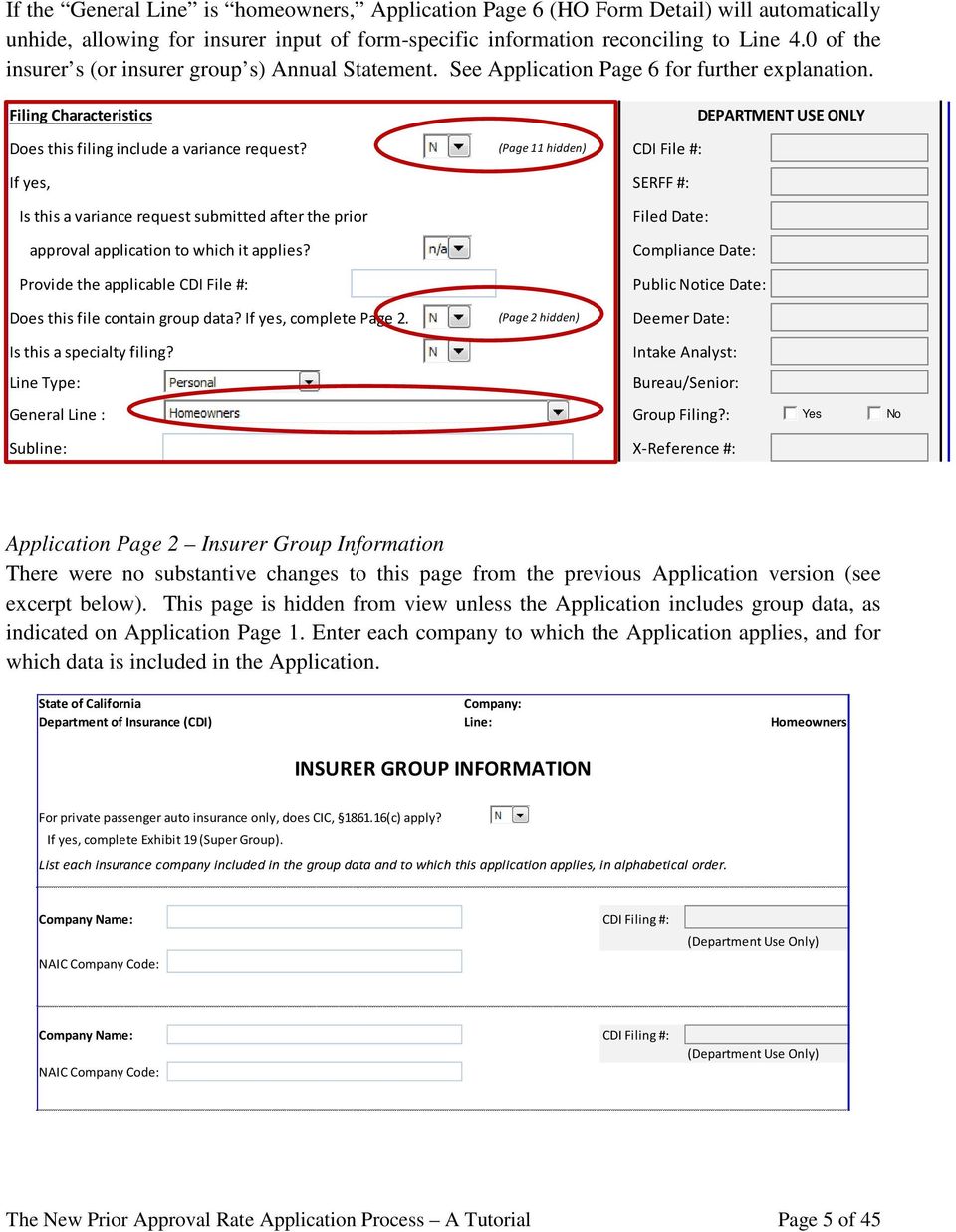
5 If the General Line is homeowners, Application Page 6 (HO Form Detail) will automatically unhide, allowing for insurer input of form-specific information reconciling to Line 4.0 of the insurer s (or insurer group s) Annual Statement. See Application Page 6 for further explanation. Filing Characteristics DEPARTMENT USE ONLY Does this filing include a variance request? (Page 11 hidden) CDI File #: If yes, SERFF #: Is this a variance request submitted after the prior approval application to which it applies? Provide the applicable CDI File #: Filed Date: Compliance Date: Public Notice Date: Does this file contain group data? If yes, complete Page 2. (Page 2 hidden) Deemer Date: Is this a specialty filing? Intake Analyst: Line Type: Bureau/Senior: General Line : Group Filing?: Yes No Subline: X-Reference #: Application Page 2 Insurer Group Information There were no substantive changes to this page from the previous Application version (see excerpt below). This page is hidden from view unless the Application includes group data, as indicated on Application Page 1. Enter each company to which the Application applies, and for which data is included in the Application. State of California Company: Department of Insurance (CDI) Line: Homeowners INSURER GROUP INFORMATION For private passenger auto insurance only, does CIC, (c) apply? If yes, complete Exhibit 19 (Super Group). List each insurance company included in the group data and to which this application applies, in alphabetical order. Company Name: CDI Filing #: NAIC Company Code: (Department Use Only) Company Name: CDI Filing #: NAIC Company Code: (Department Use Only) The New Prior Approval Rate Application Process A Tutorial Page 5 of 45
6 Application Page 3 Filing Type There were no substantive changes to this page from the previous Application version (see excerpt below). Identify the filing type by selecting the appropriate box. Required documentation reflects renumbering of exhibits and the new Standard Exhibits Template requirement for filing types with rate impact. The exhibit for Insurer s Ratemaking Calculations, Exhibit 21, is now required solely for Specialty filings. State of California Company: Department of Insurance (CDI) Line: 0 FILING TYPE The purpose of this filing is (check all that apply): Type of Filing Required Documentation 1,2,3 New Program (Includes adoption of advisory organization loss costs, forms and rules.) Pages 1 through 4, 8 through 10 & 12, Exhibit 16 plus Prior Approval Rate Template Rates (Includes adoption of advisory organization loss costs.) Rate increase Rate decrease Revenue-neutral change (zero percent overall impact) Pages 1 through 8 & 12, Exhibits 1-17 & 20, plus Prior Approval Rate Template Pages 1 through 8 & 12, Exhibits 1-17 & 20, plus Prior Approval Rate Template Pages 1 through 8 & 12, Exhibits 1-17 & 20, plus Prior Approval Rate Template Without rate impact Pages 1 through 4, 9 & 12 Rules and Underwriting Guidelines With rate impact Without rate impact (Includes adoption of advisory organization rules.) Pages 1 through 8, 10 & 12, Exhibits 1-18 & 20 plus Prior Approval Rate Template Pages 1 through 4, 10 & 12 plus Exhibit 18 1 Page numbers refer to pages of the Prior Approval Rate Application. Where Exhibits 5, 7 and 8 are required, applications must also include a completed Standard Exhibits Template. Exhibit 21 must be included for all Specialty filing applications. 2 All Private Passenger Automobile class plans must be filed separately from the Prior Approval Rate Applications. 3 Page 6 of the Prior Approval Rate Application is required solely for insurers submitting filings for a subset of their Homeowners Multiple Peril line. The New Prior Approval Rate Application Process A Tutorial Page 6 of 45

7 Application Page 4 Proposed Impact There were no substantive changes to this page from the previous Application version (see excerpt below). The page now requires the input of the proposed effective date. Projected Earned Premium is now a calculated field. State of California Company: Department of Insurance (CDI) Line: 0 IMPACT OF PROPOSED CHANGES Proposed Overall Rate Change: Proposed Earned Premium Per Exposure: Proposed Effective Date: #DIV/0! Coverage/Form 1 Indicated % Change Proposed % Change Adjusted Earned Premium 2,3 Projected Earned Premium 3 (1) $0 (2) $0 (3) $0 (4) $0 (5) $0 (6) $0 (7) $0 (8) $0 (9) $0 (10) $0 Total #DIV/0! #DIV/0! $0 $0 1 Commercial Auto Liability and Physical Damage must be combined in one application, with separate Rate Calculation pages in the Prior Approval Rate Template for liability and physical damage coverages. 2 Adjusted earned premium is the historical earned premium for the most recent year adjusted to the current rate level and trended to the average earned date of the proposed rating period. These figures should reconcile to the Prior Approval Rate Template. 3 Total earned premium must include all income derived from miscellaneous fees and other charges. The New Prior Approval Rate Application Process A Tutorial Page 7 of 45

8 Application Page 5 Reconciliation of Direct Earned Premium Data There were no substantive changes to this page from the previous Application version (see excerpt below). State of California Company: Department of Insurance (CDI) Line: 0 RECONCILIATION OF DIRECT EARNED PREMIUM DATA Annual Statement Statutory Page 14 Calendar Year Data Coverage/Form/Program 1 Latest CDI Filing # 2 2nd Prior Calendar Year 1st Prior Calendar Year Most Recent Calendar Year #VALUE! #VALUE! YYYY (1) (2) (3) Enter the most recent calendar year in YYYY format here. (4) (5) (6) (7) (8) (9) (10) Total Statutory Page 14 Difference Explain any differences: 1 This exhibit requires insurers to itemize each program until all data is reconciled to the corresponding annual statement line of insuranc 2 For residual market data, a filing number is not required. The New Prior Approval Rate Application Process A Tutorial Page 8 of 45

9 Application Page 6 HO Form Detail This page is a new addition to the Prior Approval Rate Application. The page is hidden from view unless the homeowners multiple peril ( homeowners ) line of business is selected as the General Line from the pull-down menu on Application Page 1. Any insurer submitting a filing for a subset of their entire homeowners line of business must complete this page of the Application. Enter written and earned premium, incurred loss and DCCE information for Line 4.0 as a whole, as well as for each form included in that line. If more than five forms comprise the entire line, click on the Expand to 10 forms button to expand the exhibit. The Total - All Forms must reconcile to the Annual Statement totals. State of California Company: Department of Insurance (CDI) Line: Homeowners ANNUAL STATEMENT LINE Line HOMEOWNERS MULTIPLE PERIL Enter the most recent year in YYYY format here. Year Written Earned Premium Premium Incurred Loss IL% DCCE DCCE% IL+DCCE IL+DCCE % (1) YYYY #DIV/0! 0 #DIV/0! 0 #DIV/0! (2) #VALUE! #DIV/0! 0 #DIV/0! 0 #DIV/0! (3) #VALUE! #DIV/0! 0 #DIV/0! 0 #DIV/0! (4) 3 Yr Avg #DIV/0! 0 #DIV/0! 0 #DIV/0! #VALUE! Note: Ratios are weighted averages. Dollars are arithmetic averages. Total - All Forms Year Written Premium Earned Premium Expand to 10 forms Incurred Loss IL% DCCE DCCE% IL+DCCE IL+DCCE % (5) YYYY #DIV/0! 0 #DIV/0! 0 #DIV/0! (6) #VALUE! #DIV/0! 0 #DIV/0! 0 #DIV/0! (7) #VALUE! #DIV/0! 0 #DIV/0! 0 #DIV/0! (8) 3 Yr Avg #DIV/0! 0 #DIV/0! 0 #DIV/0! Difference #DIV/0! - #DIV/0! - #DIV/0! Year HO-3 Written Premium Earned Premium Incurred Loss IL% DCCE DCCE% IL+DCCE IL+DCCE % YYYY #DIV/0! 0 #DIV/0! 0 #DIV/0! #VALUE! #DIV/0! 0 #DIV/0! 0 #DIV/0! #VALUE! #DIV/0! 0 #DIV/0! 0 #DIV/0! 3 Yr Avg #DIV/0! 0 #DIV/0! 0 #DIV/0! Application Page 7 Additional Calendar Year Data Required by Statute There were no substantive changes to this page from the previous Application version (see excerpt below). The New Prior Approval Rate Application Process A Tutorial Page 9 of 45

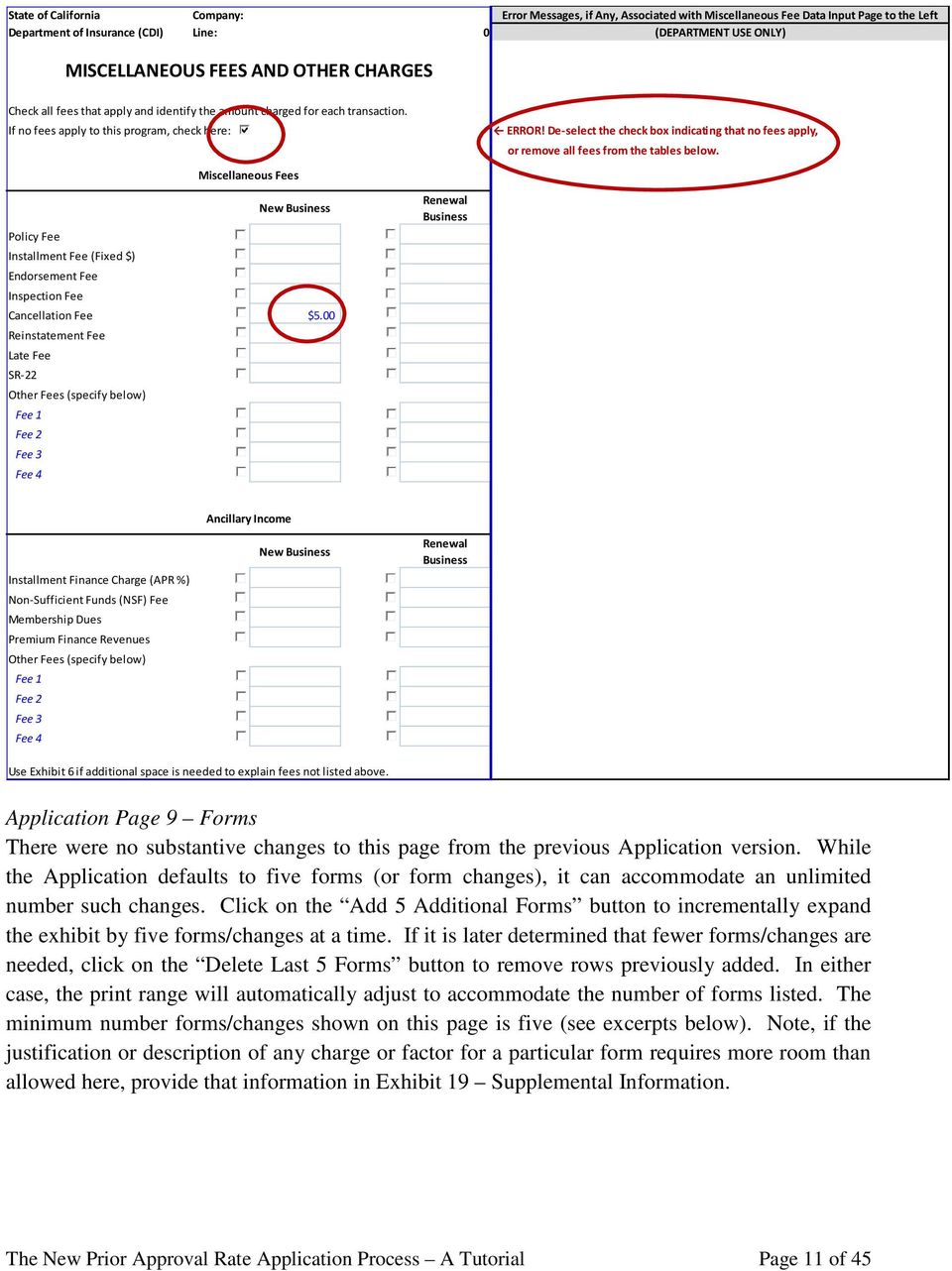
10 State of California Company: Department of Insurance (CDI) Line: Homeowners ADDITIONAL CALENDAR YEAR DATA REQUIRED BY STATUTE Refer to CIC , CIC and CIC 1864 for more information. Line Type of Data Most Recent Calendar Year (0) Calendar Year YYYY (1) Number of claims outstanding at beginning of year (2) Number of claims during the year (3) Number of claims closed during the year Enter the most recent calendar (4) Number of claims outstanding at year's end [ (1) + (2) - (3) ] year in YYYY format here. 0 (5) Unearned Premiums (6) Dollar amount of claims paid (7) Net loss reserves for outstanding claims excluding claims incurred but not reported (case reserves) (8) Net loss reserves for claims incurred but not reported (IBNR) (9) Losses incurred as a percentage of premiums earned, including IBNR (10) Net investment gain or loss and other income or gain or loss allocated to the line (11) Net income before federal and foreign income taxes [ (10) + (15) ] $0 (12) Total number of policies in force on the last day of the reporting period (13) Total number of policies canceled (14) Total number of policies non-renewed (15) Net underwriting gain or loss ( = CY earned premiums less CY incurred loss less CY incurred expense ) (16) Separate allocations of expenses for: (17) (a) commissions and brokerage expense (18) (b) other acquisition costs (19) (c) general office expenses (20) (d) taxes, licenses and fees (21) (e) loss adjustment expense (DCCE & AOE) (22) (f) other expenses Application Page 8 Miscellaneous Fees and Other Charges There were no substantive changes to this page from the previous Application version. The page lists fees and charges separately categorized as miscellaneous fees and ancillary income. Enter specific fee amounts charged to individual policies for new and renewal business. Any fees not listed must be identified under Other Fees. Note that flat dollar installment fees are considered miscellaneous income, while premium finance revenues and installment (%) finance charges are considered ancillary income. If no fees or charges apply to the application in question, leave the page blank and check the appropriate box (see excerpt below). The New Prior Approval Rate Application Process A Tutorial Page 10 of 45
![year Enter the most recent calendar (4) Number of claims outstanding at year's end [ (1) + (2) - (3) ] year in YYYY format here.](/docs-images/45/11286092/images/page_10.jpg "0 (5) Unearned Premiums (6) Dollar amount of claims paid (7) Net loss reserves for outstanding claims excluding claims incurred but not reported (case reserves) (8) Net loss reserves for claims")
11 State of California Company: Error Messages, if Any, Associated with Miscellaneous Fee Data Input Page to the Left Department of Insurance (CDI) Line: 0 (DEPARTMENT USE ONLY) MISCELLANEOUS FEES AND OTHER CHARGES Check all fees that apply and identify the amount charged for each transaction. If no fees apply to this program, check here: Miscellaneous Fees New Business Policy Fee Installment Fee (Fixed $) Endorsement Fee Inspection Fee Cancellation Fee $5.00 Reinstatement Fee Late Fee SR-22 Other Fees (specify below) Fee 1 Fee 2 Fee 3 Fee 4 Renewal Business ERROR! De-select the check box indicating that no fees apply, or remove all fees from the tables below. Ancillary Income Installment Finance Charge (APR %) Non-Sufficient Funds (NSF) Fee Membership Dues Premium Finance Revenues Other Fees (specify below) Fee 1 Fee 2 Fee 3 Fee 4 New Business Renewal Business Use Exhibit 6 if additional space is needed to explain fees not listed above. Application Page 9 Forms There were no substantive changes to this page from the previous Application version. While the Application defaults to five forms (or form changes), it can accommodate an unlimited number such changes. Click on the Add 5 Additional Forms button to incrementally expand the exhibit by five forms/changes at a time. If it is later determined that fewer forms/changes are needed, click on the Delete Last 5 Forms button to remove rows previously added. In either case, the print range will automatically adjust to accommodate the number of forms listed. The minimum number forms/changes shown on this page is five (see excerpts below). Note, if the justification or description of any charge or factor for a particular form requires more room than allowed here, provide that information in Exhibit 19 Supplemental Information. The New Prior Approval Rate Application Process A Tutorial Page 11 of 45
12 State of California Company: Department of Insurance (CDI) Line: Homeowners FORMS Add 5 Additional Forms Delete Last 5 Forms Applicable Form Source of Form Coverage Change Reflects Coverage Change Includes Factor or Charge # Title Type Source CDI File # 1 Category Restriction? 2 Broadening? Rate Impact? % Impact ($, % or Description) Proposed (1) Current Proposed (2) Current Proposed (3) Current Proposed (4) Current Proposed (5) Current 1 If Source selected is ISO or Other Advisory Organization, provide the CDI File # of applicable filing from which the form is being adopted. If Source selected is Company and Category is Replacement, provide the CDI File # under which current form is approved. 2 Forms that restrict, exclude or delete coverage require consideration of a rate offset/credit. Provide the amount of prior losses incurred associated with the impacted coverage, if any. Legend of Response Codes Type Code Source Code Category Code (1) Application (1) Insurance Services Organization (ISO) (1) New, mandatory (5) Withdrawn, mandatory (2) Endorsement (2) Other Advisory Organization (2) New, optional (6) Withdrawn, optional (3) Policy (3) Company (3) Replacement, mandatory (4) Other (Describe in filing memorandum) (4) Other (Describe in filing memorandum) (4) Replacement, optional FORMS Add 5 Additional Forms Company: Line: Delete Last 5 Forms Use Exhibit 19 if additional space is needed for description of charge. Homeowners Source of Form Coverage Change Reflects Coverage Change Includes Factor or Charge Source CDI File # 1 Category Restriction? 2 Broadening? Rate Impact? % Impact ($, % or Description) hich the form is being adopted. If Source selected is Company and Category is Replacement, provide the CDI File # under which current form is approved. amount of prior losses incurred associated with the impacted coverage, if any. ode Category Code Insurance Services Organization (ISO) (1) New, mandatory (5) Withdrawn, mandatory Other Advisory Organization (2) New, optional (6) Withdrawn, optional Company (3) Replacement, mandatory Other (Describe in filing memorandum) (4) Replacement, optional Application Page 10 Rules and Underwriting Guidelines Check the appropriate option(s): introducing a new rule, revising an existing rule, adopting an approved Advisory Organization rule, withdrawing an approved rule, or introducing or revising an underwriting guideline. Use Exhibit 18 as necessary to provide the support required in this page. Note that underwriting guidelines in the Application are reviewed only insofar they relate to the rates contained in this filing or on file with the Department. The New Prior Approval Rate Application Process A Tutorial Page 12 of 45

13 State of California Company: Department of Insurance (CDI) Line: Homeowners RULES AND UNDERWRITING GUIDELINES Insurers submitting a rule change filing must provide the information identified below. Complete Exhibit 18 as necessary to fulfill this requirement. Check all that apply: (1) Introducing a new rule(s) (2) Revising an existing rule(s) (3) Adopting an approved Advisory Organization (AO) rule(s) (4) Withdrawing an approved rule(s) (5) Introducing or revising an underwriting guideline(s) 1 If (1), (2) or (5) above is checked, provide the following: (a) The purpose for the rule or underwriting guideline or an explanation for revising an existing rule or underwriting guideline (Exhibit 18) (b) A copy of the current and proposed manual page corresponding to the rule or underwriting guideline (c) The proposed charge for the rule, and justification of the charge including the rate or premium development method (Exhibit 18) (d) The rate impact of the rule or underwriting guideline on the current book of business, with corresponding calculation of that impact (Exhibit 18) (e) Advise if the rule is: (i) Optional (ii) Mandatory If (3) above is checked, specify the approved CDI File #(s) of the AO rule: If (4) above is checked, provide the following: (a) An explanation for the withdrawal of the rule (Exhibit 18) (b) A copy of the current and proposed manual page corresponding to the withdrawn rule (c) The rate impact of withdrawing the rule on the current book of business, with corresponding calculation of that impact (Exhibit 18) The New Prior Approval Rate Application Process A Tutorial Page 13 of 45

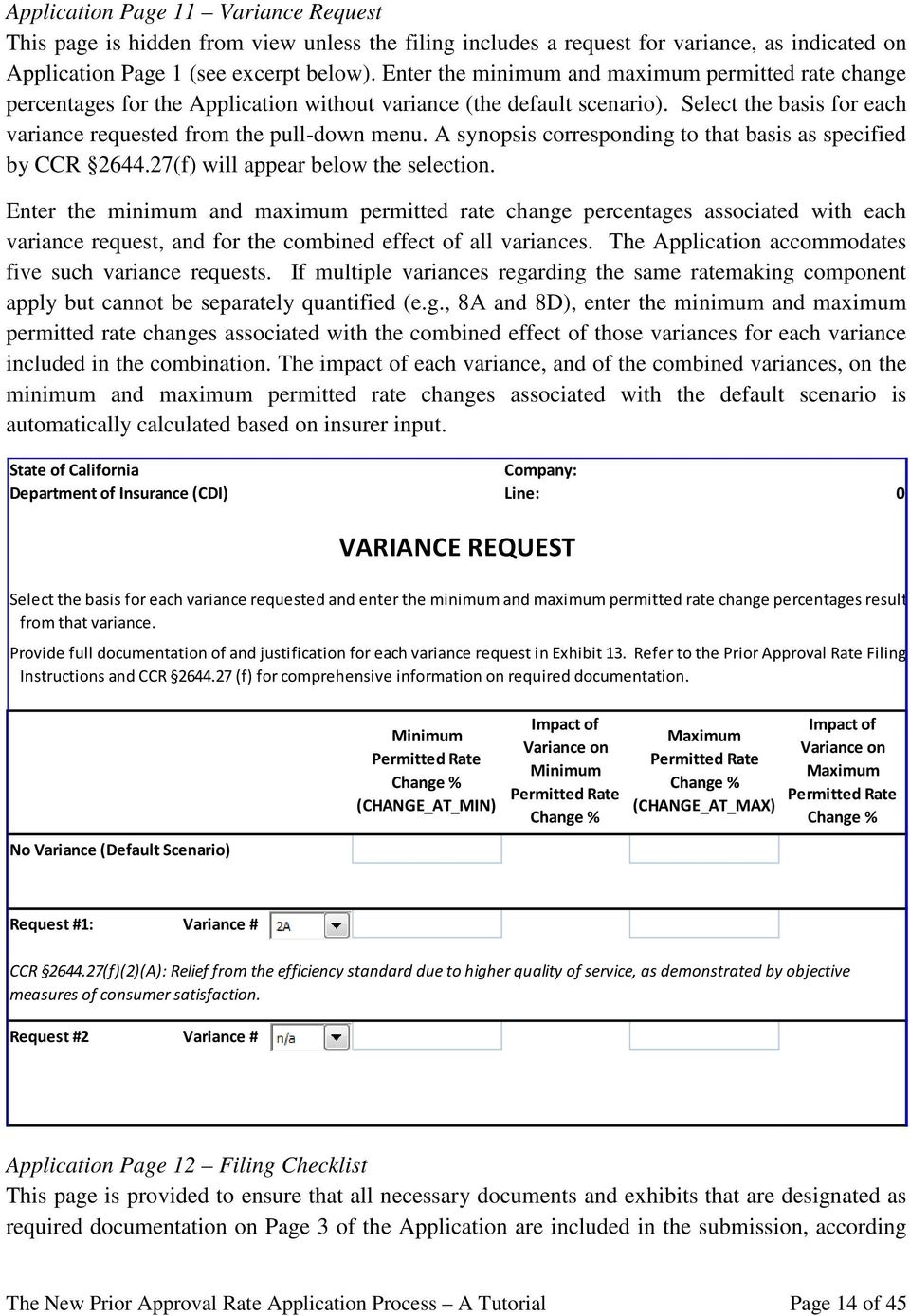
14 Application Page 11 Variance Request This page is hidden from view unless the filing includes a request for variance, as indicated on Application Page 1 (see excerpt below). Enter the minimum and maximum permitted rate change percentages for the Application without variance (the default scenario). Select the basis for each variance requested from the pull-down menu. A synopsis corresponding to that basis as specified by CCR (f) will appear below the selection. Enter the minimum and maximum permitted rate change percentages associated with each variance request, and for the combined effect of all variances. The Application accommodates five such variance requests. If multiple variances regarding the same ratemaking component apply but cannot be separately quantified (e.g., 8A and 8D), enter the minimum and maximum permitted rate changes associated with the combined effect of those variances for each variance included in the combination. The impact of each variance, and of the combined variances, on the minimum and maximum permitted rate changes associated with the default scenario is automatically calculated based on insurer input. State of California Company: Department of Insurance (CDI) Line: 0 VARIANCE REQUEST Select the basis for each variance requested and enter the minimum and maximum permitted rate change percentages resulti from that variance. Provide full documentation of and justification for each variance request in Exhibit 13. Refer to the Prior Approval Rate Filing Instructions and CCR (f) for comprehensive information on required documentation. No Variance (Default Scenario) Minimum Permitted Rate Change % (CHANGE_AT_MIN) Impact of Variance on Minimum Permitted Rate Change % Maximum Permitted Rate Change % (CHANGE_AT_MAX) Impact of Variance on Maximum Permitted Rate Change % Request #1: Variance # CCR (f)(2)(A): Relief from the efficiency standard due to higher quality of service, as demonstrated by objective measures of consumer satisfaction. Request #2 Variance # Application Page 12 Filing Checklist This page is provided to ensure that all necessary documents and exhibits that are designated as required documentation on Page 3 of the Application are included in the submission, according The New Prior Approval Rate Application Process A Tutorial Page 14 of 45
15 to the filing purpose and type(s) of filing. Check all appropriate boxes prior to submission (see excerpt below). Notice that the revised Filing Checklist reflects the elimination of old Exhibit 18 (Group Filing) and the addition of new Exhibit 20 (Customer Dislocation). State of California Company: Department of Insurance (CDI) Line: Homeowners Use this checklist to assemble a complete application: FILING CHECKLIST Prior Approval Rate Application Supporting Exhibits General Information, Page 1 Exhibit 1 - Filing History Insurer Group Information, Page 2 Exhibit 2 - Rate Level History Filing Type, Page 3 Exhibit 3 - Policy Term Distribution Proposed Impact, Page 4 Exhibit 4 - Premium Adjustment Factor Reconciliation of Direct Earned Premium to Statutory Data, Page 5 Exhibit 5 - Premium Trend Factor 3 Homeowners Form Detail (if applicable), Page 6 Additional Calendar Year Data Required by Statute, Page 7 Exhibit 6 - Miscellaneous Fees and Other Charges Exhibit 7 - Loss and Defense & Cost Containment Expense (DCCE) Development Factors 3 Miscellaneous Fees and Other Charges, Page 8 Exhibit 8 - Loss and DCCE Trend 3 Forms, Page 9 Exhibit 9 - Catastrophe Adjustment Rules and Underwriting Guidelines, Page 10 Exhibit 10 - Credibility Adjustment Variance Request, Page 11 Filing Checklist, Page 12 Exhibit 11 - Ancillary Income Exhibit 12 - Reinsurance Premium and Recoverables The New Prior Approval Rate Application Process A Tutorial Page 15 of 45

16 Filing Memorandum Exhibit 13 - Variance Request Prior Approval Rate Template 1 Exhibit 14 - Rate Distribution Standard Exhibits Template 1 Exhibit 15 - Rate Classification Relativities Printed Rate and Rule Manual Pages 1 Underwriting Guidelines 1 Forms 1,2 Exhibit 16 - New Program Exhibit 17 - Super Group Corporate Structure Verification (PPA only) Exhibit 18 - Rules and Underwriting Guidelines Copies of Reinsurance Agreements 1 Exhibit 19 - Supplemental Information 1 See Prior Approval Rate Filing Instructions. 2 Attach all independent forms and list all advisory organization forms. 3 Provide Standard Exhibits Template for these exhibits. Exhibit 20 - Customer Dislocation Exhibit 21 - Insurer's Ratemaking Calculations for Specialty Filings Additionally, old Exhibit 14 (Insurer s Ratemaking Calculations) has been renumbered is now only required for Specialty filings. All other exhibits have been renumbered accordingly. The Prior Approval Rate Template The Rate Template (PriorAppRateTl_Ed xlsm) provides all of the calculations required to derive the final CHANGE_AT_MIN and CHANGE_AT_MAX for each of the insurer s filed lines/coverages, forms or programs. The template accommodates up to 10 coverages, forms or programs, and applies to all lines of business. The file displays only as many Ratemaking Data and Rate Calculation sheets as there are coverages, forms or programs in the filing. For those filings using loss cost multipliers and loss costs from an advisory organization, the file displays a separate LCM calculation sheet associated with each coverage, form or program filed. Also included in this file are the projected yield and federal income tax on investment income derivations, the excluded expense ratio calculation, and all relevant prior approval factors (efficiency standards, reserves ratios, leverage ratios and rate of return). Finally, the file includes increased error messaging such that the final calculation of the CHANGE_AT_MIN and CHANGE_AT_MAX will not display until all errors have been resolved. The New Prior Approval Rate Application Process A Tutorial Page 16 of 45

17 Consistent with the Application, the Rate Template uses Excel sheets with blue-colored tabs for insurer input. Areas of insurer input within each page of the Rate Template are generally formatted in blue font text and/or light blue outlined boxes. Pages or rows that are not applicable to the line of business or Application in question are hidden based on insurer input on Page 1 of the Rate Template. Download and open the Rate Template and ensure that all macros are enabled. Rate Template Page 1 General Information Enter information regarding general characteristics of the filing that are common to all coverages, forms or programs contained in the Application. For many of the inputs on this page, there is an associated error message that emerges to the right of the exhibit if the information entered is invalid or if a cell requiring information is left blank. This page must be completed in full, without errors, before the Rate Template will calculate the overall minimum and maximum permitted rate changes (CHANGE_AT_MIN and CHANGE_AT_MAX). Note: To generate a valid CHANGE_AT_MIN and CHANGE_AT_MAX, all errors must be resolved on this page of the Rate Template. Any error message left unresolved will prevent the calculation of CHANGE_AT_MIN and CHANGE_AT_MAX for each coverage, form or program included in the Rate Template. Instead, each Rate Calculation page will display Error. State of California Company: Error Messages, if Any, Associated with General Information Page to the Left Department of Insurance (CDI) Line: 0 (DEPARTMENT USE ONLY) PRIOR APPROVAL RATE TEMPLATE FOR PROPERTY & LIABILITY LINES GENERAL INFORMATION Completed by: CDI File # (Department Use Only) : Date: Errors are displayed here, to the right of the exhibit. Company Name: Marketing System Distribution: %Captive %Direct %Independent ERROR! Sum of all marketing systems must add to 100%. Line Type: General Line : ERROR! Select a General Line from the pull-down menu. Proposed Effective Date (new rates): ERROR! Enter a proposed effective date. New Program: LCM Calculation(s) Included: (LCM Calculation(s) is(are) hidden unless this box is checked.) Data Aggregation: Most Recent Year of Experience Data Ending: (Enter in YYYYQ format.) ERROR! Enter the most recent fiscal period in YYYYQ format. The New Prior Approval Rate Application Process A Tutorial Page 17 of 45

18 In addition to the Company Name, name of person completing the Rate Template, and Date of completion, enter the percentage volume of each marketing system used in the line of business, based on earned premium. If the Marketing System Distribution fields are left blank or do not add to 100%, an error message will display to the right of the exhibit. The cells also prevent an invalid input (number less than 0% or greater than 100%). Company Name: Marketing System Distribution: %Captive %Direct %Independent 99.0% Line Type: General Line : Proposed Effective Date (new rates): New Program: LCM Calculation(s) Included: (LCM Calculation(s) is(are) hidden unless this box is checked.) Data Aggregation: Next enter the Line type (Personal or Commercial), a General Line, the Proposed Effective Date of the new rates, the Data Aggregation Method (accident year data, report year data, policy year data) and the Most Recent Year of Experience Data in the recorded period, in YYYYQ format. To prevent delays in the rate review process associated with mid-review requests for more current data, the Rate Template requires data in the recorded period to be ending no more than eight (8) months prior to the submission date of the filing, subject to the requirement that data be through a traditional quarter-end (i.e., March 31 st, June 30 th, September 30 th or December 31 st ). Identify the submission as a new program filing by checking the appropriate box. Similarly, check the LCM Calculation(s) Included box to unhide those pages of the Rate Template. Note: The LCM Calculation pages will not unhide until a Detailed Line Description(s) is(are) selected further down on this page. Select a Detailed Line Description from the pull-down menus near the bottom of the General Information page and enter the name of each Coverage, Form or Program associated with each line for which a rate change is being requested. It is the selecting of a Detailed Line Description The New Prior Approval Rate Application Process A Tutorial Page 18 of 45

19 that triggers the action to unhide the Ratemaking Data and Rate Calculation pages for the corresponding coverage, form or program included in this Rate Template. Enter a Proposed Impact and the Prior Effective Date of the rates currently in effect for each coverage, form or program. If these coverage/form/program rows are only partially completed, errors will result to the right of the exhibit, preventing the calculation of a final indication. Invalid entry for existing program filing: Enter name of each coverage/form/program for which a rate change is being requested in the cells below. Otherwise, leave blank. Detailed Line Description(s) Coverage/Form/Program Proposed % Impact Prior Effective Date (current rates) 2 HO-3 2.0% ERROR! Select a Detailed Line Description and enter a Coverage/Form/Program 2 HO-4 1.0% ERROR! Select a Detailed Line Description and enter a Coverage/Form/Program 2 HO-6 0.0% ERROR! Select a Detailed Line Description and enter a Coverage/Form/Program Variance Request: Does the Ratemaking Data include a Request(s) for Variance? Variance #: If yes, is Variance #3 requested for any coverage? ERROR! Select a Detailed Line Description and enter a Coverage/Form/Program, Proposed % Impact and Prior Effective Date. Alternatively, de-select the Detailed Line Description and delete all associated cell entries. ERROR! Select a Detailed Line Description and enter a Coverage/Form/Program, Proposed % Impact and Prior Effective Date. Alternatively, de-select the Detailed Line Description and delete all associated cell entries. ERROR! Select a Detailed Line Description and enter a Coverage/Form/Program, Proposed % Impact and Prior Effective Date. Alternatively, de-select the Detailed Line Description and delete all associated cell entries. Valid entry for existing program filing: Enter name of each coverage/form/program for which a rate change is being requested in the cells below. Otherwise, leave blank. Detailed Line Description(s) Coverage/Form/Program Proposed % Impact Prior Effective Date (current rates) 2 HO-3 2.0% 2/1/ HO-4 1.0% 5/15/ HO-6 0.0% 5/15/ Variance Request: Does the Ratemaking Data include a Request(s) for Variance? If yes, is Variance #3 requested for any coverage? Variance #: 1A,2A,8A The New Prior Approval Rate Application Process A Tutorial Page 19 of 45
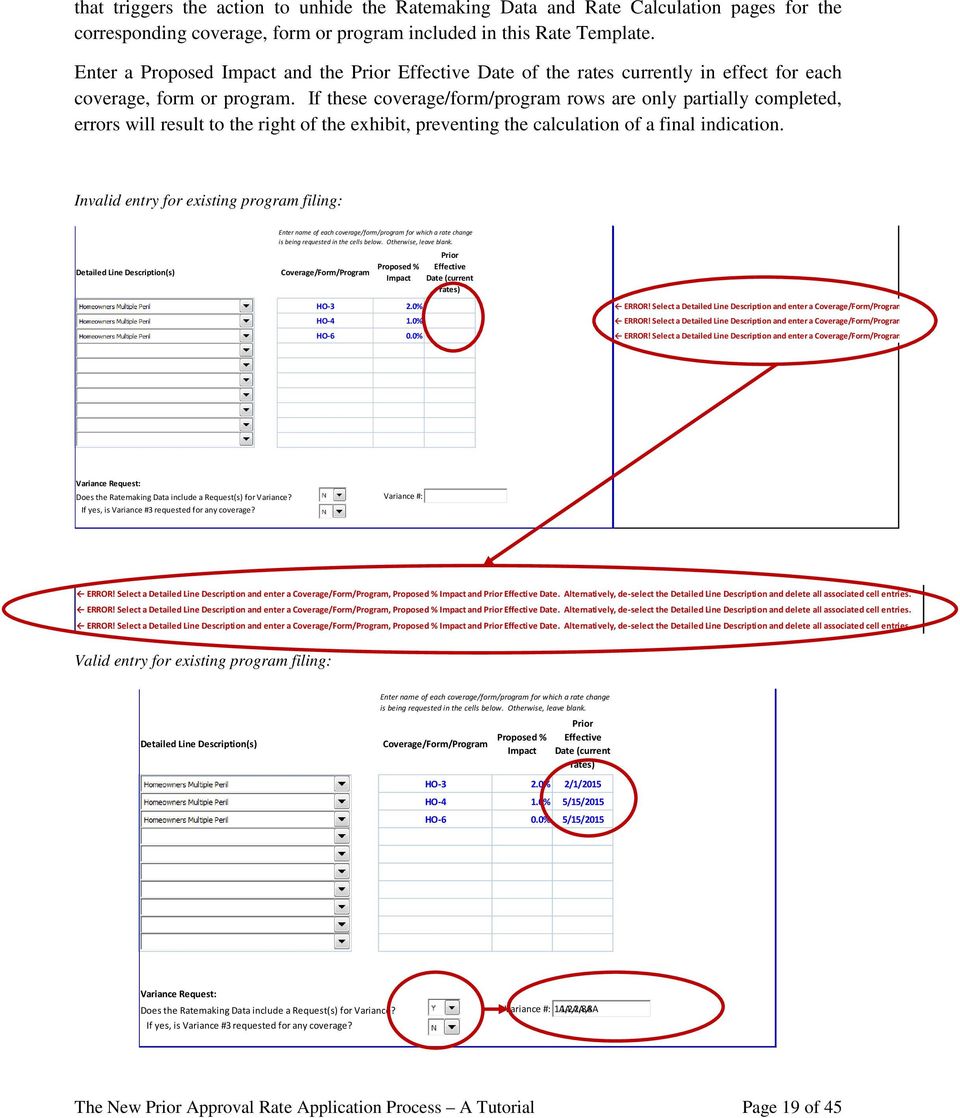
20 If a variance request is included in the submission, so specify by selecting Y in the pull-down menu at the bottom of the General Information page (see excerpt above). Enter the variance number(s) being requested, separated by commas in the text box to the right. If Variance 3 is included in the list of variance requests, further select Y in the relevant pull-down menu. This variance number must be included in the text box in order for the Rate Template to apply the adjusted leverage ratio to the ratemaking calculations. Entry of a variance request in the text box involving a change to the efficiency standard will unhide previously hidden rows of input on the Ratemaking Data pages of the Rate Template, allowing for adjustments to the efficiency standard (see discussion under Rate Template Page 6 Ratemaking Data). All variances are subject to Department approval. Note: In the event the Detailed Line Description is either Earthquake or Medical Malpractice with recognition for allowable reinsurance (refer to Prior Approval Filing Instructions for more information), additional rows for reinsurance information will become unhidden on the Ratemaking Data pages of the Rate Template. Once the General Information page of the Rate Template is populated with all errors resolved, proceed to Page 2 of the Rate Template, Summary. Note that failure to resolve all errors on this page will prevent the calculation of the indications by coverage, form or program. Rate Template Page 2 Summary This page replaces the Multi-Coverage page of the previous template versions. The display at the top of the page is nearly identical to its predecessor, showing a summary of the premium, indicated rate changes and proposed rate changes by coverage, form or program and for overall. State of California Company: Department of Insurance (CDI) Line: 0 CDI File # (Department Use Only): PRIOR APPROVAL RATE TEMPLATE FOR PROPERTY & LIABILITY LINES SUMMARY Coverage/Form/Program Latest Year Adjusted Annual Premium ($) Minimum Permitted Earned Premium ($) Maximum Permitted Earned Premium ($) Change at Minimum % Change at Maximum % Proposed % Combined The New Prior Approval Rate Application Process A Tutorial Page 20 of 45

21 An additional display summarizes the average earned premium per exposure, again for coverage, form or program and for overall. To generate the total combined average earned premium per exposure, enter in the total earned exposures in the cell outlined in light blue. This entry should reflect the latest year earned exposures for an existing book, or the projected annual exposures for a new program. This cell is the only one requiring insurer entry on this page. Note that failure to provide a figure for this cell will result in an error, which if left unresolved, will prevent the calculation of the indications by coverage, form or program. Combined Total Earned Exposures for Latest Year: Average Earned Premium $ per Exposure Coverage/Form/Program Latest Year Adjusted Minimum Permitted Maximum Permitted Proposed Latest Year Earned Exposures Combined Combined Total Earned Exposures for Latest Year: ERROR! Enter the combined total earned exposures for the latest year. Average Earned Premium $ per Exposure Coverage/Form/Program Latest Year Adjusted Minimum Permitted Maximum Permitted Proposed Latest Year Earned Exposures Combined ERROR! Enter the combined total earned exposures for the latest year. Finally, a third display on this page provides a summary of projected ultimate loss and DCCE ratios resulting from the insurer s ratemaking data and assumptions (see excerpt below). No insurer input is required here. The New Prior Approval Rate Application Process A Tutorial Page 21 of 45
22 Coverage/Form/Program Latest Year Adjusted Annual Premium ($) Latest Year Projected Ultimate Loss & DCCE ($) Latest Year Projected Ultimate Loss & DCCE Ratio Combined Rate Template Page 3 Projected Yield and Federal Income Tax Rate on Investment Income There were no substantive changes to this page from the previous Rate Template version, with the following exceptions: the asset classes included in Other Taxable Bonds have been revised slightly to conform to the current NAIC Annual Statement Blank, and the page pre-populates the monthly yield percentages by asset category from an internal Department file, similar to the treatment of rate of return. With regard to the first change, the bond asset classes of Credit Tenant Loans and Public Utilities are no longer recorded in the NAIC Annual Statement Schedule D, Part 1A, Section 1. Instead, taxable bonds include Hybrid Securities. State of California Company: Department of Insurance (CDI) Line: 0 CDI File # (Department Use Only): PROJECTED YIELD AND FEDERAL INCOME TAX RATE ON INVESTMENT INCOME Short-Term Assets Intermediate-Term Assets Long-Term Assets Line Description 1 Year or Less Over 1 Year thru 5 Years Over 5 Years thru 10 Years Over 10 Years thru 20 Years Over 20 Years 1.7 U.S. Governments 2.7 All Other Governments 3.7 States, Territories and Possessions 4.7 Political Subdivisions 5.7 Special Revenue and Assessment Obligations 6.7 Industrial and Miscellaneous 7.7 Hybrid Securities Parent, Subsidiaries and 8.7 Affiliates Source: Schedule D, Part 1A, Section 1 of the insurer group's most recent consolidated (combined) statutory Annual Statement. The New Prior Approval Rate Application Process A Tutorial Page 22 of 45
23 When calculating the weighted average yield, use the asset information from the insurer s most recent Consolidated 1 (Combined) Statutory Annual Statement for the insurer group. To ensure the latest yield/rate of return information is used in the Rate Template at the time of filing submission, navigate to the Data menu of the Excel ribbon, click on Edit Links and then click Open Source. Opening this source will automatically update the links to the most recent yield and rate of return figures. State of California Company: Department of Insurance (CDI) Line: Homeowners Multiple Peril CDI File # (Department Use Only): PROJECTED YIELD AND FEDERAL INCOME TAX RATE ON INVESTMENT INCOME (continued) Invested Assets 1 Currently Return on Federal Income Federal Income Available Yield 2 Invested Assets Tax Rate Taxes [1] [2] [3] = [1] * [2] [4] [5) = [3] * [4] (1) U.S. Government Bonds (i) Short-Term 0 0.0% % 0 (ii) Intermediate-Term 0 2.3% % 0 (iii) Long-Term 0 2.8% % 0 (2) Other Taxable Bonds (i) Short-Term 0 0.2% % 0 (ii) Intermediate-Term 0 3.3% % 0 Note that failure to generate valid figures for projected yield and federal income tax on investment income will result in errors, which if left unresolved, will prevent the calculation of the indications by coverage, form or program. Rate Template Page 4 Excluded Expense Ratio There were no substantive changes to this page from the previous Rate Template version, with the following exceptions: the required input of countrywide direct earned premium is slightly different and the page requires considerably more detailed information on advertising expenses. Whereas the previous version required that the insurer enter total countrywide direct earned premium and countrywide direct earned premium for lines of business subject to Proposition 103, the new page requires countrywide direct earned premium both for lines of business subject to and not subject to Proposition 103. The totals of these two must reconcile to the countrywide direct earned premium in the Insurance Expense Exhibit, Part 3 for the insurer group. The definition of insurer group must be consistent with that used in the calculation of the projected yield and federal income tax rate on investment income. 1 The Official NAIC Annual Statement Instructions for the 2014 Reporting Year Property/Casualty (September 2014), 601, states where the word combined appears in the blank, it should be construed to mean consolidated or combined. The New Prior Approval Rate Application Process A Tutorial Page 23 of 45
24 State of California Company: Department of Insurance (CDI) Line: 0 CDI File # (Department Use Only): EXCLUDED EXPENSE RATIO Countrywide Insurer Group Data Don t forget to enter the most recent calendar year here. 2nd Prior Calendar Year 1st Prior Calendar Year Most Recent Calendar Year #VALUE! #VALUE! YYYY Countrywide direct earned premium for lines of business subject to Proposition 103 ($): Countrywide direct earned premium for lines of business not subject to Proposition 103 ($): Total countrywide direct earned premium ($): (Note: Total must reconcile to the countrywide direct earned premium in the Insurance Expense Exhibit, Part 3 for the insurer group.) For advertising expenses, identify the institutional and all other advertising expenses by media category. The sum of the institutional and all other advertising expenses must reconcile to the total advertising expenses reported in the Insurance Expense Exhibit, Part I Supplement of the Consolidated (Combined) Statutory Annual Statement for the insurer group (see excerpt below). In addition to populating the advertising expenses, provide a sample advertisement for the highest expenditure in each category. Refer to the Prior Approval Rate Filing Instructions. CCR (f): Institutional Advertising 2nd Prior Calendar Year 1st Prior Calendar Year Most Recent Calendar Year #VALUE! #VALUE! YYYY Media Category Institutional All Other Institutional All Other Institutional All Other Print Television Radio Internet Billboards Agent Support Sponsorships Sporting Events All Other Total Advertising (Note: For each calendar year, the sum of institutional and all other advertising expenses must reconcile to the total advertising expenses reported in the Insurance Expense Exhibit, Part 1, Line 4 for the insurer group.) The remainder of this page is unchanged from the prior version. The New Prior Approval Rate Application Process A Tutorial Page 24 of 45
25 State of California Company: Department of Insurance (CDI) Line: 0 CDI File # (Department Use Only): CCR (a): Political contribution and lobbying EXCLUDED EXPENSE RATIO (continued) Countrywide Insurer Group Data 2nd Prior 1st Prior Most Recent Calendar Year Calendar Year Calendar Year #VALUE! #VALUE! YYYY CCR (b): Excessive Executive Compensation (Page 4.1) CCR (c): Bad faith judgments and associated DCCE CCR (d): All costs for unsuccessful defense of discrimination claims CCR (e): Fines and penalties CCR (f): Institutional advertising expenses (Page 4.1) CCR (g): Excessive payments to affiliates Total Excluded Expenses Excluded Expense Ratio #DIV/0! #DIV/0! #DIV/0! Three-Year Average Excluded Expense Ratio #DIV/0! Note that failure to generate a valid figure the excluded expense ratio will result in an error, which if left unresolved, will prevent the calculation of the indications by coverage, form or program. Rate Template Page 5 CDI Parameters This page is a new addition to the Rate Template, and provides a summary of most CDI parameters used in the calculation of the indications by coverage, form or program. The page displays the final prior approval factors for efficiency standard, leverage ratio, unearned premium reserves and loss reserves, after adjustment for variance if applicable for the coverages, forms or programs in question. No insurer input is required for this page. The New Prior Approval Rate Application Process A Tutorial Page 25 of 45
26 State of California Company: ABC Insurance Company Department of Insurance (CDI) Line: Homeowners Multiple Peril CDI File #: FINAL ADJUSTED CDI PARAMETERS Detailed Line Description Line Code Efficiency Standard Marketing System Distribution 100.0% 0.0% 0.0% Coverage/Form Captive Direct Independent Weighted Average Variance Adjustment Excluded Expense Ratio Final Adjusted Efficiency Standard Homeowners Multiple Peril 4 HO % 25.9% 40.0% 35.3% 0.0% 0.0% 35.3% Detailed Line Description Line Code Coverage/Form Reserves Ratio Unearned Premium Reserves Loss Reserves Raw Factor Leverage Factor (Variance 3 not applied) Variance Adjustment Final Adjusted Leverage Factor 2013 Industry P&C Data ($000s) (applies to LCM Calculation) Incurred Loss Homeowners Multiple Peril 4 HO ,432,201 1,220,450 DCCE The New Prior Approval Rate Application Process A Tutorial Page 26 of 45
27 Rate Template Page 6 Ratemaking Data There were no substantive changes to this page from the previous Rate Template version, with the following exceptions: (1) increased error messaging, which if left unresolved, will prevent the calculation of a final change and min/max, (2) the splitting of the Projected/New Program column into two separate columns, each with its own function, and (3) hidden rows for reinsurance and efficiency standard variance data, which will unhide based on insurer input on Page 1 (General) of the Rate Template. Below is the standard (no variance, no reinsurance) Ratemaking Data page: State of California Company: ABC Insurance Company Department of Insurance (CDI) Line: Homeowners Multiple Peril CDI File # (Department Use Only): RATEMAKING DATA Completed by: John Doe Variance #(s): Date Completed: 7/29/2015 Detailed Line Description: Coverage: Homeowners Multiple Peril HO-3 Expand to six years Line Description Source 2nd Prior Year Ending 1st Prior Year Ending Most Recent Year Ending (0) Year (1) California Direct Written Premium (2) California Direct Earned Premium (3) Premium Adjustment Factor Exh 4 (4) Premium Trend Factor 1 Exh 5 (5) Miscellaneous Fees and Flat Charges not included in Line (2) Exh 6 (6) Earned Exposure Units (7) Historic Losses (8) Historic Defense and Cost Containment Expense (DCCE) (9) Loss Development Factor Exh 7 (10) DCCE Development Factor Exh 7 (11) Loss Trend Factor 1 Exh 8 (12) DCCE Trend Factor 1 Exh 8 (13) Catastrophe Adjustment Factor Exh 9 (14) Credibility for Losses & DCCE Exh 10 (15) Ancillary Income Exh 11 Lines link directly to pages 3 and 4 of the application. (16) Excluded Expense Ratio Pg % Projected Federal Income Tax (17) Rate on Investment Income Pg 3.2 (18) Projected Yield Pg 3.2 Projected 1 New Program 2 1 The Projected column should reflect the annual trend expressed as a percentage for premium, loss and DCCE trends, and credibility. 2 Refer to Section III.C. of the Prior Approval Rate Filing Instructions for New Program requirements. Go to 7.1Rate Change Calculation The New Prior Approval Rate Application Process A Tutorial Page 27 of 45
28 Enter three years of data directly corresponding to the coverage, form or program under rate review, subject to the regulations pertaining to credibility (CCR and ). If more years of data are required to comply with these regulations, click on the Expand to six years button at the top of the Ratemaking Data page (refer to excerpt above). Years of data may be on a fiscal basis but must end on a traditional quarter-end (March 31, June 30, September 30 or December 31). Only those cells not grayed out require insurer input. To prevent delays in the rate review process associated with mid-review requests for more current data, the Rate Template requires data in the recorded period to be ending no more than eight (8) months prior to the submission date of the filing, subject to the additional requirement that data be through a traditional quarter-end. For submissions other than new program filings, the Projected column requires the annual trend percentages used in the calculation of the overall change and min/max, as well as the credibility of the experience data. If left blank, these required inputs will generate error messages. Additionally, if only three years of data have been entered, and the experience is less than 25% credible, an error will result, directing the insurer to input an additional number of years until the minimum of 25% credibility is achieved. Alternate treatment exists for filings with data less than 25% credible over six years (refer to Prior Approval Rate Filing Instructions for more information). For new program filings, the Projected column should be left blank. For new program filings, enter all required information in lines 1, 5-8 and 15 of the New Program column. Note that the required inputs should reflect an annual projection for a mature book of business. Thus, earned premium is set equal to written premium. Line Description Source 2nd Prior Year Ending 1st Prior Year Ending Most Recent Year Ending (0) Year (1) California Direct Written Premium (2) California Direct Earned Premium (3) Premium Adjustment Factor Exh 4 (4) Premium Trend Factor 1 Exh 5 (5) Miscellaneous Fees and Flat Charges not included in Line (2) Exh 6 (6) Earned Exposure Units (7) Historic Losses (8) Historic Defense and Cost Containment Expense (DCCE) (9) Loss Development Factor Exh 7 (10) DCCE Development Factor Exh 7 (11) Loss Trend Factor 1 Exh 8 (12) DCCE Trend Factor 1 Exh 8 (13) Catastrophe Adjustment Factor Exh 9 (14) Credibility for Losses & DCCE Exh 10 (15) Ancillary Income Exh 11 Projected 1 New Program 2 The New Prior Approval Rate Application Process A Tutorial Page 28 of 45
29 For ease of navigation through the Rate Template, a hyperlink to the Rate Calculation page corresponding to the coverage, form or program under review is provided at the bottom of each Ratemaking Data page (see excerpt below). For submissions that include a variance request associated with the efficiency standard based on insurer input on Page 1 (General) of the Rate Template, rows will unhide on the Ratemaking Data page to allow for data input: (14) Credibility for Losses & DCCE Exh 10 (15) Ancillary Income Exh 11 Lines link directly to pages 3 and 4 of the application. (16) Excluded Expense Ratio Pg % Projected Federal Income Tax (17) Rate on Investment Income Pg 3.2 (18) Projected Yield Pg 3.2 Complete Lines 19 and 20 if a Request for Variance (1A, 1B, 2A, 2B, 2C or 4) accompanies this filing (see instructions). (19) Change to Efficiency Standard 3 Exh 13 Most Recent Year Total Expense (20) Exh 13 Ratio (excluding DCCE) 4 1 The Projected column should reflect the annual trend expressed as a percentage for premium, loss and DCCE trends, and credibility. 2 Refer to Section III.C. of the Prior Approval Rate Filing Instructions for New Program requirements. 3 Applicable if any of Variance 1A, 1B, 2A, 2B, 2C or 4 (or any combination thereof) is being requested. Subject to CDI approval. 4 Refer to CCR (h). Go to 7.1Rate Change Calculation Enter the proposed change to the efficiency standard, and the insurer s most recent total expense ratio (excluding DCCE) on the lines shown in the excerpt above. Should the insurer s most recent total expense ratio be less than the efficiency standard, no additional relief will be awarded. For instance, assuming an efficiency standard of 35.3%, the following variance request will generate an error message (see excerpt below): Complete Lines 19 and 20 if a Request for Variance (1A, 1B, 2A, 2B, 2C or 4) accompanies this filing (see instructions). (19) Change to Efficiency Standard 3 Exh % Most Recent Year Total Expense (20) Ratio (excluding DCCE) 4 Exh % 1 The Projected column should reflect the annual trend expressed as a percentage for premium, loss and DCCE trends, and credibility. 2 Refer to Section III.C. of the Prior Approval Rate Filing Instructions for New Program requirements. 3 Applicable if any of Variance 1A, 1B, 2A, 2B, 2C or 4 (or any combination thereof) is being requested. Subject to CDI approval. 4 Refer to CCR (h). ERROR: Based on insurer's stated most recent year expense ratio, no relief from efficiency standard variances is allowed. Insurer's stated most recent year expense ratio is already less than or equal to the efficiency standard. The maximum amount of relief from the efficiency standard awarded to the insurer will be limited to the difference between the insurer s most recent total expense ratio and the efficiency The New Prior Approval Rate Application Process A Tutorial Page 29 of 45
30 standard itself. For instance, again assuming an efficiency standard of 35.3%, the following variance request will generate an error message (see excerpt below): Complete Lines 19 and 20 if a Request for Variance (1A, 1B, 2A, 2B, 2C or 4) accompanies this filing (see instructions). (19) Change to Efficiency Standard 3 Exh % Most Recent Year Total Expense (20) Ratio (excluding DCCE) 4 Exh % 1 The Projected column should reflect the annual trend expressed as a percentage for premium, loss and DCCE trends, and credibility. 2 Refer to Section III.C. of the Prior Approval Rate Filing Instructions for New Program requirements. 3 Applicable if any of Variance 1A, 1B, 2A, 2B, 2C or 4 (or any combination thereof) is being requested. Subject to CDI approval. 4 Refer to CCR (h). ERROR! Assuming the calculation of the insurer's most recent year expense ratio is justified, relief from the efficiency standard will be limited to the difference between that ratio and the efficiency standard, or, 0.7%, subject to CDI approval. All requests for relief from the efficiency standard are subject to Department approval. If the Detailed Line Description selected on Page (General) of the Rate Template is either Earthquake w/consideration for cost of reinsurance or one of the Medical Malpractice options indicating incl. reinsurance costs, the following lines will become unhidden on the Page 6 (Ratemaking Data). Errors are generated for failure to input a direct commission rate, or annual projections for new programs. Complete Lines 19, 20 & 21 for Earthquake and certain Medical Malpractice with Reinsurance Only (see instructions). (19) Direct Commission Rate (20) Reinsurance Premium Exh 12 (21) Reinsurance Recoverable Exh 12 1 The Projected column should reflect the annual trend expressed as a percentage for premium, loss and DCCE trends, and credibility. 2 Refer to Section III.C. of the Prior Approval Rate Filing Instructions for New Program requirements. In the event the filing submission involves a line of business allowing consideration for the cost of reinsurance AND includes an efficiency standard variance request, hidden lines for inputting data for both possibilities will unhide, and the lines will renumber accordingly. Complete Lines 19 and 20 if a Request for Variance (1A, 1B, 2A, 2B, 2C or 4) accompanies this filing (see instructions). (19) Change to Efficiency Standard 3 Exh 13 Most Recent Year Total Expense (20) Ratio (excluding DCCE) 4 Exh 13 Complete Lines 21, 22 & 23 for Earthquake and certain Medical Malpractice with Reinsurance Only (see instructions). (21) Direct Commission Rate (22) Reinsurance Premium Exh 12 (23) Reinsurance Recoverable Exh 12 Note that failure to resolve errors on the Ratemaking Data pages will prevent the calculation of the indications by coverage, form or program on the Rate Calculation pages. The New Prior Approval Rate Application Process A Tutorial Page 30 of 45
31 Rate Template Page 7 Rate Calculation This page is virtually unchanged from the previous Rate Template version, with the following minor exceptions: (1) the year of data for all CDI parameters is displayed, (2) the Change at Min and Change at Max cells return Error if any errors in the previous pages of the Rate Template is unresolved, and (3) rows for reinsurance calculations are hidden unless the Detailed Line Description selected on Page 1 (General) of the Rate Template is either Earthquake w/consideration for cost of reinsurance or one of the Medical Malpractice options indicating incl. reinsurance costs. State of California Company: ABC Insurance Company Department of Insurance (CDI) Line: Homeowners Multiple Peril CDI File # (Department Use Only): VARIANCE - NONE RATE CHANGE CALCULATION Completed by: John Doe Expand to six years Date Completed: 7/29/2015 Prior Effective Date: Proposed Effective Date: 1/1/2016 Detailed Line Description: Homeowners Multiple Peril Coverage: HO3 Data Provided by Filer Projected Prem_Written 0 Prem_Earned 0 Prem_Adj Prem_Trend 0.0% Misc_Fees 0 Exposures_Earned 0 Losses 0 DCCE 0 Loss_Devt DCCE_Devt Loss_Trend 0.0% DCCE_Trend 0.0% CAT_Adj Anc_Income 0 Credibility 0.0% ExpRatio_Excluded 0.0% FIT_Inv Yield The New Prior Approval Rate Application Process A Tutorial Page 31 of 45
32 CDI Parameters FIT_UW 35.0% EffStd_Final Data as of: % LevFact_Final Data as of: PremTaxRate Data as of: % SurplusRatio 0.91 ResRatio_UPR Data as of: ResRatio_Loss Data as of: ROR_RiskFree Data as of: July % ROR_Min -6.0% ROR_Max 7.5% Calculations Prem_Adjusted 0 Losses_Adjusted 0 DCCE_Adjusted 0 LossDCCERatio_Adjusted TCRLP_perExp LossDCCE_perExp CompLossDCCE_perExp CredLoss_perExp Anc_Inc_perExp InvInc_Fixed #VALUE! InvInc_Variable #VALUE! Net_AnnualTrend 0.0% Comp_Trend #VALUE! Max_Profit 10.5% Min_Profit -8.4% UW_Profit #VALUE! Min_Denom #VALUE! Max_Denom #VALUE! Min_Premium #VALUE! Max_Premium #VALUE! CHANGE_AT_MIN Error CHANGE_AT_MAX Error Go to 6.1Ratemaking Data The New Prior Approval Rate Application Process A Tutorial Page 32 of 45
33 If the Change at Min/Max cells display Error, messages to the right of those cells will direct the insurer to the area where errors still exist (see excerpt below). InvInc_Fixed #VALUE! InvInc_Variable #VALUE! Net_AnnualTrend 0.0% Comp_Trend #VALUE! Max_Profit 10.5% Min_Profit -8.4% UW_Profit #VALUE! Min_Denom #VALUE! Max_Denom #VALUE! See Column H of Page '3.2YieldFIT' for errors that must be corrected. Min_Premium #VALUE! See Column F of Page '4.2Excluded Exp' for errors that must be corrected. Max_Premium #VALUE! See Column I of Page '2.Summary' for errors that must be corrected. CHANGE_AT_MIN Error See Column L of Page '1.General' for errors that must be corrected. CHANGE_AT_MAX Error See Column M of Page '6.1Ratemaking Data' for errors that must be corrected. Go to 6.1Ratemaking Data See Column H of Page '3.2YieldFIT' for errors that must be corrected. See Column F of Page '4.2Excluded Exp' for errors that must be corrected. See Column I of Page '2.Summary' for errors that must be corrected. See Column L of Page '1.General' for errors that must be corrected. See Column M of Page '6.1Ratemaking Data' for errors that must be corrected. The excerpt below will become unhidden if the filing is on behalf of one of the lines of business where reinsurance costs may be considered. The Rein_Change_at_Max also returns Error unless input errors in the reinsurance section of the Ratemaking Data page are resolved. Reinsurance Calculations Comm_Rate Rein_Prem Rein_Recov 0 ReinPrem_perExp ReinRec_perExp CompLoss_Rein ReinMax_Premium #VALUE! Rein_CHANGE_AT_MAX Error Go to 6.1Ratemaking Data For ease of navigation through the Rate Template, a hyperlink to the Ratemaking page corresponding to the coverage, form or program under review is provided at the bottom of each Rate Calculation page. The New Prior Approval Rate Application Process A Tutorial Page 33 of 45
34 Rate Template Page 8 LCM Calculation The format of the LCM Calculation is somewhat more simplified than the previous version. The exhibit shows a separate calculation for the Maximum Permitted LCM for each of New Program and Existing Program filings. For New Program filings, enter the CDI file number associated with the approved Advisory Organization filing supporting the loss costs to be adopted, the Adjusting & Other Expense (AOE) or LAE load as filed by the Advisory Organization and the basis of that AOE or LAE load (see excerpt below). The most recently approved loss costs should be used. Deviation from the most recently approved loss costs requires justification in the Filing Memorandum. State of California Company: Department of Insurance (CDI) Line: Homeowners Multiple Peril CDI File #: LOSS COST MULTIPLIER (LCM) CALCULATION Detailed Line Description: Homeowners Multiple Peril Completed by: Coverage: HO-3 Date Completed: Prior Effective Date: Proposed Effective Date: (1) New Program Filings 1.1 CDI Advisory Organization (AO) File # underlying proposed loss costs 1.2 AOE or LAE load approved for line or coverage 1.3 Basis of load listed in line 1.2. AOE/(Loss+DCCE) 1.4 AO's AOE as a percent of loss and DCCE (derived from 1.3 and 0.00 U.S. P&C industry loss and DCCE experience by line) 1.5 Maximum Permitted LCM, based on efficiency standard #N/A For Existing Program filings, enter the CDI file number associated with the Advisory Organization filing supporting the company s current loss costs, and the current company LCM. The current company LCM is the company s final LCM adjusted for any loss cost modification, if applicable. Enter the CDI file numbers associated with all changes to Advisory Organization loss costs since the filing underlying the company s current loss costs, separated by commas (see excerpt below), and the corresponding cumulative percent change in loss costs for the Advisory Organization. Enter the cumulative percent change in loss costs for the Advisory Organization, adjusted for the company s own distribution. See Prior Approval Filing Instructions for more detailed information. Finally, enter the Proposed Company LCM. In the event that the Proposed Company LCM exceeds the Maximum Permitted LCM for either the New Program or the Existing Program, a warning message will display to the right of the exhibit. This message will not prevent the calculation of a final result. The New Prior Approval Rate Application Process A Tutorial Page 34 of 45
35 (2) Existing Program Filings 2.1 CDI AO File # underlying current loss costs 2.2 Current Company LCM CDI AO File #(s) underlying proposed loss costs (enter all applicable file numbers, , , separated by commas) 2.3.i Cumulative AO loss cost percent change approved for line or coverage 2.3.ii Cumulative AO loss cost percent change approved for line or coverage, adjusted for Company's distribution 2.4 Maximum Permitted LCM #N/A (3) Proposed Company LCM The Standard Exhibits Template The Standard Exhibits Template (StdExhTl_Ed xlsm) is a new addition to the prior approval rate review process. Its inclusion is expected to shorten the length of the rate review process by requesting certain required data in a standardized format up front as part of the original filing submission rather than during the rate review period. The template, which accommodates up to 10 coverages, forms or programs, requires the insurer to populate the quarterly data that when rolled results in the premium trend and loss trend components in Exhibits 5 and 8 as required by CCR In addition, the template requires the insurer to provide loss and claim count development triangles in Exhibit 7 as required by CCR , also in a standard format. In the event that a variance impacting trend or development is necessary, two versions of this file will need to be submitted, with and without variance. Any rate filing that excludes a populated Standard Exhibits Template, in Excel with working formulas intact, will be rejected by the Rate Filing Intake Unit. Consistent with the Application and Rate Template, the Standard Exhibits Template uses Excel sheets with blue-colored tabs for insurer input. Areas of insurer input within each page of the Standard Exhibits Template are generally formatted in blue font text and/or light blue outlined boxes. Download and open the Standard Exhibits Template and ensure that all macros are enabled. Standard Exhibits Template Page 1 General Information Similar to the Application and Rate Template, enter general information including the Company Name, name of person completing the Standard Exhibits Template, and Date of completion, and select the General Line from the pull-down menu. The New Prior Approval Rate Application Process A Tutorial Page 35 of 45
36 Select a Detailed Line Description from the pull-down menu for each coverage, form or program included in the Application. See excerpt below. Do not skip coverages that is, do not leave any blank coverages between non-blank coverages. Valid entry of coverages, forms or programs: State of California Company: ABC Company Department of Insurance (CDI) Line: Auto Liability and Physical Damage STANDARD EXHIBITS TEMPLATE GENERAL INFORMATION Completed by: J. Doe Date: 8/28/2015 CDI File # (Department Use Only) : Company Name: ABC Company General Line : Detailed Line Description Coverage, Form or Program (Enter name of each coverage/form/program included in this application. Otherwise, enter a blank. Do not skip coverages. Private Passenger Auto Liability Private Passenger Auto Liability Private Passenger Auto Liability Private Passenger Auto Liability Private Passenger Auto Liability Private Passenger Auto Physical Damage Private Passenger Auto Physical Damage Private Passenger Auto Physical Damage Bodily Injury Property Damage Medical Payments Uninsured Motorist UMPD Comprehensive Collision Miscellaneous Phys Dam Invalid entry of coverages, forms or programs: Detailed Line Description Coverage, Form or Program (Enter name of each coverage/form/program included in this application. Otherwise, enter a blank. Do not skip coverages. Private Passenger Auto Liability Private Passenger Auto Liability Private Passenger Auto Liability Private Passenger Auto Liability Bodily Injury Property Damage Medical Payments Uninsured Motorist Private Passenger Auto Liability Private Passenger Auto Physical Damage Private Passenger Auto Physical Damage Private Passenger Auto Physical Damage UMPD Comprehensive Collision Miscellaneous Phys Dam Select the Data Aggregation Method for loss & DCCE development from the pull-down menu (accident year or accident quarter, report year or report quarter, policy year or policy quarter). If the selected Data Aggregation Method is accident year, enter the number of months the underlying data is developed (12 or 15 is acceptable). Enter the Most Recent Fiscal Period of data for trend and loss development and for complement loss trend. In both cases, the fiscal period must be entered in YYYYQ format. Select the basis for premium trend (written or The New Prior Approval Rate Application Process A Tutorial Page 36 of 45
37 earned), indicate whether DCCE is included or excluded in the loss trend (company-specific and complement) and development data, and identify whether DCCE is on a paid or incurred basis. Data Aggregation Method for Loss & DCCE Development (Note: Quarterly Exhibit 7 is hidden.) Policy Year Months of Development for Annual Loss & DCCE Development 2 (Select 12 or 15 Months. Applicable only if annual Data Aggregation Method is selected above.) Most Recent Fiscal Period in Trend and Development Data Most Recent Fiscal Period in Complement Loss Trend and Data (Enter in YYYYQ format.) Is the Company-Specific Premium Trend Data on a written or earned basis? Does the Company-Specific Loss Trend Data include or exclude DCCE? Does the Complement Loss Trend Data include or exclude DCCE? Does the Company-Specific Loss Development Data include or exclude DCCE? Is the Company-Specific DCCE Development Data on a paid or incurred basis? Is the current NAIC categorical split of LAE (DCCE/A&OE) used in this application? (If no, provide explanation in Filing Memorandum. Include a time line as to when compliance with CCR will be achieved.) Written Includes DCCE Excludes DCCE Includes DCCE Paid Yes Select Exhibits to Print Print Selected Exhibit(s) Identify whether the data included in the Application reflects the current NAIC categorical split of LAE, or DCCE/AOE, from the pull-down menu near the bottom of the exhibit (see excerpt above). If not, provide an explanation in the Filing Memorandum, including a time line as to when compliance with CCR will be achieved. Standard Exhibits Template Page 2 Exhibit 5 Premium Trend For each coverage, form or program, the Standard Exhibit Template requires that the insurer provide the exposure and premium data separately for each of the underlying 27 quarterly data points that, when compiled to rolling 4-quarter data, serve as the basis for the calculated annual premium trend. Specifically, provide the quarterly company-specific California exposures, premium and on-level premium, whether written or earned, for 27 quarters and the trend period for the most recent year in the experience period. The trend period must extend from the average earned date (or written date, if written data is used) of the recorded year to the average earned (or written) date of the rating period. The template calculates the rolling 4-quarter data and annual trends for each of the 8, 12, 16, 20 and 24 data periods. Select the data period for the annual trend from the pull-down menu. The template then calculates the trend factors for six years, based on the trend period and annual trend selected by the insurer (see excerpt below). The annual trend selected, and the resulting factors, are the inputs into the Ratemaking Data page for premium trend for the corresponding coverage, form or program in the Rate Template. The New Prior Approval Rate Application Process A Tutorial Page 37 of 45
38 ABC Company Private Passenger Auto Liability Premium Trend California Company-Specific Premium Trend Data Bodily Injury Calendar YYYYQ Written Exposures Written Premium Quarterly Data On-Level Written Premium On-Level Written Premium per Exposure Written Exposures Rolling 4-Quarter Data Written Premium On-Level Written Premium On-Level Written Premium per Exposure ,051 12,054,232 12,295, ,887 11,675,518 11,909, ,384 12,321,093 12,567, ,364 12,175,651 12,419, ,685 48,226,495 49,191, ,328 13,846,344 14,123, ,963 50,018,607 51,018, ,248 12,497,803 12,747, ,323 50,840,892 51,857, ,562 12,891,706 13,149, ,502 51,411,505 52,439, ,255 11,689,241 11,923, ,393 50,925,094 51,943, ,788 12,626,412 12,878, ,853 49,705,162 50,699, ,801 11,243,907 11,468, ,406 48,451,266 49,420, ,301 12,215,789 12,337, ,145 47,775,348 48,608, ,459 11,163,249 11,274, ,349 47,249,357 47,960, ,678 12,698,145 12,825, ,239 47,321,090 47,906, ,798 10,986,603 11,096, ,235 47,063,786 47,534, ,915 12,163,663 12,285, ,849 47,011,660 47,481, ,277 10,696,033 10,802, ,668 46,544,444 47,009, ,022 12,498,888 12,623, ,012 46,345,187 46,808, ,763 10,593,060 10,698, ,978 45,951,645 46,411, ,918 11,675,943 11,792, ,981 45,463,925 45,918, ,735 10,035,476 10,135, ,439 44,803,368 45,251, ,191 12,189,502 12,189, ,607 44,493,981 44,817, ,160 10,546,955 10,546, ,004 44,447,876 44,664, ,691 12,831,910 12,831, ,777 45,603,843 45,704, ,811 12,006,095 12,006, ,853 47,574,461 47,574, ,516 14,655,541 14,655, ,178 50,040,501 50,040, ,697 13,090,875 13,090, ,715 52,584,421 52,584, ,885 15,308,078 15,308, ,909 55,060,589 55,060, Trend Rolling 4-Qtr Annual Trend Selected: 20 pt -3.3% 8 pt -3.8% 12 pt -3.7% Trend Period (Years) for Most Recent Year in Experience Period: pt -3.5% (Justify in Filing Memorandum) 20 pt -3.3% 24 pt -2.9% Trend Factors: Most Recent Year nd Prior Year rd Prior Year th Prior Year th Prior Year th Prior Year The number of data points in the trend selection for a particular coverage, form or program must be the same for the premium trend and the loss trend. Similarly, the trend period must be the same for premium trend and loss trend. Failure to enter these consistent inputs for premium trend and loss trend will result in error messages being displayed: The New Prior Approval Rate Application Process A Tutorial Page 38 of 45
39 Trend Rolling 4-Qtr Annual Trend Selected: 16 pt -3.5% ERROR! The number of data points selected must be 8 pt -3.8% the same for premium trend and loss trend. 12 pt -3.7% Trend Period (Years) for Most Recent Year in Experience Period: pt -3.5% (Justify in Filing Memorandum) ERROR! The trend period must be identical for 20 pt -3.3% premium and loss trends. 24 pt -2.9% Trend Factors: Most Recent Year nd Prior Year rd Prior Year th Prior Year th Prior Year th Prior Year Justification of the trend period must be provided in the Filing Memorandum. The type of exposure unit used to derive the average premium (e.g., earned house years, number of policies, earned premium, earned car years, square footage, etc.) must also be provided in the Filing Memorandum. The exposure and premium bases must match: if earned exposures are used, earned premium must also be used. Standard Exhibits Template Page 3 Exhibit 7 Loss & DCCE Development For each coverage, form or program, the Standard Exhibit Template requires that the insurer provide complete claim count development and loss (& DCCE) development triangles of company-specific California data that serve as the basis of the dollar-weighted average of the link ratios of losses for the three most recent accident years, policy years or report years available for a reporting interval. Specifically, provide all non-catastrophe loss and DCCE amount and claim count data required by CCR in triangular format. Development triangles must be complete; i.e., they must be presented through the evaluation date and must include the entire interior of the triangle for all time periods provided. The insurer may submit triangles on either annual years/annual development or quarterly years/quarterly development, as indicated by the Data Aggregation Method on Page 1 (General). If annual triangles are evaluated at 15 months of development, the insurer must additionally submit the data as of three months of development, for reconciliation purposes (see excerpt). ABC Company Private Passenger Auto Liability Non-Catastrophe Paid Loss & DCCE Development - Annual Triangles Bodily Injury Fiscal Accident Year Ending Months of Development The New Prior Approval Rate Application Process A Tutorial Page 39 of 45
40 Submit data triangles for paid loss, incurred loss, reported claim counts and paid claim counts. The Standard Exhibits template calculates the resulting link ratios, three-year dollar weighted averages and ultimate losses (and claim counts) for each coverage, form or program. Age to Age Factors Fiscal Accident Year Ending Ult Tail 3 Yr Wtd Avg Selected Age-Ult Ultimate $ DCCE may be evaluated in the same manner as losses, may be added to losses for loss development, or may be developed using ratios of DCCE to losses. A triangle of ratios of DCCE to loss is automatically populated from the triangles of DCCE to either paid or incurred loss (depending on the DCCE basis indicated in Page 1 (General) of this template). If the DCCE to loss ratio approach is selected, the Standard Exhibits Template defaults to three-year arithmetic average link ratios. ABC Company Private Passenger Auto Liability Non-Catastrophe Paid DCCE to Paid Loss Ratio Development - Annual Triangles Bodily Injury Fiscal Accident Year Ending Months of Development Age to Age Factors Fiscal Accident Year Ending Ult Tail 3 Yr Avg Selected Age-Ult Ultimate DCCE Ratio Selected Ult Loss Ultimate DCCE DCCE Age-Ult #DIV/0! #DIV/0! #DIV/0! #DIV/0! #DIV/0! #DIV/0! #DIV/0! #DIV/0! #DIV/0! #DIV/0! The New Prior Approval Rate Application Process A Tutorial Page 40 of 45
41 However, the insurer has the flexibility to select the link ratios for this method (see above). The insurer must demonstrate that its selected methodology is the most actuarially sound. At the top of the Exhibit 7 for each coverage, form or program, a summary displays the ultimate losses and DCCE under each method. Select the method desired (paid or incurred for loss, dollars or ratios for DCCE). If DCCE is included with losses, select NA (see excerpt below). In that case, separate ultimate DCCE does not display. ABC Company Private Passenger Auto Liability Loss & DCCE Development Bodily Injury Selected Ultimate Loss & DCCE: Selected Ultimate DCCE (if applicable): Incurred NA Fiscal Accident Year Ending Ultimate $ Paid Loss Method 10,606,215 11,454,712 14,891,125 17,417,727 21,197,318 20,277,735 20,622,569 21,716,572 23,186,051 30,698,676 Incurred Loss Method 10,606,215 11,454,712 14,891,125 17,417,727 21,197,518 20,105,908 20,727,062 21,051,375 21,034,129 26,307,679 Selected 10,606,215 11,454,712 14,891,125 17,417,727 21,197,518 20,105,908 20,727,062 21,051,375 21,034,129 26,307,679 Dollar DCCE Method Ratio DCCE Ratio Method Selected Fiscal Accident Year Ending Selected LDFs Loss DCCE The template displays the loss & DCCE development factors, based on the methodology selected by the insurer. These factors are the inputs into the Ratemaking Data page for loss development the corresponding coverage, form or program in the Rate Template. If the Data Aggregation Method selected on Page 1 (General) is quarterly, the input into the quarterly exhibit is similar to that of the annual exhibit. The summary display is identical to that of the annual exhibit, with quarterly ultimate loss & DCCE summed to generate annual ultimate loss & DCCE and the corresponding loss development factors for input into the Ratemaking Data page in the Rate Template. Standard Exhibits Template Page 4 Exhibit 8 Loss & DCCE Trend For each coverage, form or program, the Standard Exhibit Template requires that the insurer provide the earned exposure, claim count and loss data separately for each of the underlying 27 quarterly data points that, when compiled to rolling 4-quarter data, serve as the basis for the calculated annual frequency and annual severity trends. Specifically, provide the quarterly company-specific California earned exposures, reported claim counts, closed claim counts, paid losses, and total paid losses including partial payments in previous calendar years, for 27 quarters and the trend period for the most recent year in the experience period. The trend period must The New Prior Approval Rate Application Process A Tutorial Page 41 of 45
42 extend from the average date of loss of the recorded year to the average date of loss of the rating period. The template calculates the rolling 4-quarter data and annual trends for each of the 8, 12, 16, 20 and 24 data periods. Select the data period for the annual trend for frequency and severity from the pull-down menu. Select both the desired frequency and severity method from their respective pull-down menus. (Refer to Prior Approval Rate Filing Instructions for explanation of the different frequency and severity methods required by regulation.) ABC Company Private Passenger Auto Liability Non-Catastrophe Loss and DCCE Trend Bodily Injury Calendar YYYYQ Earned Exposures California Company-Specific Loss and DCCE Trend Data Quarterly Data Rolling 4-Quarter Data Rolling 4-Quarter Data Total Paid Losses Total Paid Losses & DCCE & DCCE Closed Claims Reported Claims including Partial including Partial Closed Reported Paid Losses & Earned Paid Losses & Payments on Closed Claims Reported Claims Payments on Frequency per Frequency per DCCE Exposures DCCE Prior Calendar Prior Calendar 100 Exposures 100 Exposures Years, on Closed Years, on Closed Claims Claims Paid Loss & DCCE Severity Total Paid Loss & DCCE Severity including Partial Payments on Prior Calendar Years, on Closed Claims , ,950,892 1,965, , ,359,390 2,489, , ,686,189 2,535, , ,236,723 3,243, ,023 1,362 2,762 10,233,195 10,233, ,513 7, , ,759,641 2,838, ,710 1,473 2,899 11,041,943 11,106, ,495 7, , ,470,733 2,498, ,668 1,521 2,947 11,153,286 11,116, ,334 7, , ,146,190 3,210, ,509 1,648 3,010 11,613,287 11,791, ,047 7, , ,368,519 4,368, ,153 1,771 3,067 12,745,083 12,916, ,195 7, , ,237,915 5,292, ,137 1,983 3,134 15,223,357 15,370, ,678 7, , ,811,670 4,991, ,365 2,210 3,183 17,564,294 17,863, ,948 8, , ,241,026 5,131, ,641 2,307 3,125 19,659,131 19,784, ,520 8, , ,327,213 5,417, ,227 2,337 3,033 20,617,825 20,833, ,821 8, , ,501,268 4,467, ,448 2,257 3,019 19,881,178 20,008, ,807 8, , ,870,175 5,888, ,810 2,295 3,109 20,939,682 20,905, ,125 9, , ,267,086 5,231, ,400 2,362 3,161 20,965,742 21,004, ,876 8, , ,082,949 5,092, ,821 2,336 3,285 20,721,478 20,679, ,870 8, , ,520,979 4,574, ,008 2,422 3,269 20,741,189 20,785, ,564 8, , ,680,312 4,669, ,228 2,424 3,205 19,551,325 19,566, ,066 8, , ,614,467 4,705, ,395 2,327 3,185 18,898,706 19,041, ,120 8, , ,117,769 5,176, ,991 2,329 3,125 18,933,526 19,125, ,128 8, , ,900,521 4,894, ,950 2,285 3,051 19,313,068 19,445, ,453 8, , ,241,618 5,318, ,899 2,221 2,907 19,874,375 20,094, ,950 9, , ,987,345 5,146, ,643 2,269 2,905 20,247,252 20,535, ,922 9, , ,719,221 4,932, ,182 2,216 2,891 19,848,705 20,292, ,957 9, , ,371,693 5,445, ,611 2,237 3,057 20,319,877 20,843, ,082 9, , ,054,624 6,229, ,631 2,297 3,415 21,132,883 21,754, ,202 9, , ,048 5,554,997 5,647, ,997 2,383 3,688 21,700,535 22,255, ,108 9,341 Selected: 20 pt Trend Credibility (Justify in Exh 10) Complement Trend Credibility- Weighted Loss Trend Rolling 4-Quarter Annual Trends Frequency: Closed 0.3% 8 pt -10.1% -2.6% 6.2% 7.6% Severity: Total Paid w/partials 3.1% 12 pt -7.4% -5.1% 3.7% 4.9% Pure Premium: 3.5% 100.0% N/A 3.5% 16 pt -4.4% -2.6% 0.9% 1.6% 20 pt 0.3% -1.2% 2.8% 3.1% Trend Period (Years) for Most Recent 24 pt 5.5% -0.2% 3.7% 4.0% Year in Experience Period: (Justify in Filing Memorandum) Trend Factors: 6 th Prior Year th Prior Year th Prior Year rd Prior Year nd Prior Year Most Recent Year Closed Frequency Reported Frequency Paid Severity Total Paid (w/partials) Severity Selected: 20 pt Trend Credibility (Justify in Exh 10) Complement Trend Credibility- Weighted Loss Trend Frequency: Closed 0.3% Severity: Total Paid w/partials 3.1% Pure Premium: 3.5% 100.0% N/A 3.5% Trend Period (Years) for Most Recent Year in Experience Period: (Justify in Filing Memorandum) The New Prior Approval Rate Application Process A Tutorial Page 42 of 45
43 The number of data points in the trend selection for a particular coverage, form or program must be the same for the premium trend and the loss trend. Similarly, the trend period must be the same for premium trend and loss trend. Failure to enter these consistent inputs for premium trend and loss trend will result in error messages being displayed. The template calculates the company-specific pure premium based on the insurer s selected inputs. Enter the credibility of the company-specific loss trend data (justified in Exhibit 10 for lines of business other than Private Passenger Auto). Under the loss trend exhibit for the specific coverage, form or program in question, an input area exists for the loss trend complement data. ABC Company Private Passenger Auto Liability Complement Loss and DCCE Trend ISO Fast Track Bodily Injury Calendar YYYYQ Earned Exposures Complement Loss Trend Data Quarterly Data Rolling 4-Quarter Data Rolling 4-Quarter Data Closed Claims Reported Claims Paid Losses Total Paid Losses including Partial Payments on Prior Calendar Years, on Closed Claims Earned Exposures Closed Claims Reported Claims Paid Losses Total Paid Losses including Partial Payments on Prior Calendar Years, on Closed Claims Closed Frequency per 100 Exposures Reported Frequency per 100 Exposures Identify the source of the loss trend data in the title of the exhibit, and enter the quarterly complement earned exposures, closed claims, reported claims, paid losses, and total paid losses on closed claims (including partial payments in prior calendar years) for 27 quarters. For California Fast Track data, only quarterly earned exposures, paid claim counts and paid losses need are required for 27 quarters. If the only complement data available is on a basis other than quarterly (i.e., rolling 4-quarter, a single loss trend percentage such as CPI, etc.), enter the annual pure premium in the box labeled Alternate Pure Premium at the bottom of the complement trend exhibit (see below). Paid Loss Severity Total Paid Loss Severity including Partial Payments on Prior Calendar Years, on Closed Claims ,960,920 27, ,020, ,986,613 26, ,270, ,002,273 26, ,057, ,430,258 30, ,579,306 12,380, , ,249,928, , ,458,222 30, ,751,950 12,877, , ,282,659, , ,474,719 30, ,216,496 13,365, , ,317,605, , ,478,616 30, ,403,770 13,841, , ,360,951, , ,469,796 30, ,934,878 13,881, , ,375,307, , ,496,470 31, ,700,981 13,919, , ,404,256, , ,514,842 31, ,477,367 13,959, , ,455,516, , ,524,898 33, ,818,257 14,006, , ,520,931, , ,557,272 34, ,047,564 14,093, , ,575,044, , ,678,633 33, ,732,525 14,275, , ,600,075, , ,740,210 34, ,420,065 14,501, , ,613,018, , ,740,886 34, ,812,140 14,717, , ,607,012, , ,745,633 35, ,420,516 14,905, , ,599,385, , ,768,087 36, ,467,680 14,994, , ,627,120, , ,797,319 35, ,888,211 15,051, , ,653,588, , ,824,113 37, ,031,399 15,135, , ,701,807, , ,823,549 36, ,553,713 15,213, , ,743,941, , ,846,435 38, ,847,416 15,291, , ,789,320, , ,863,649 36, ,705,060 15,357, , ,832,137, , ,874,511 36, ,592,803 15,408, , ,832,698, , ,876,839 34, ,044,107 15,461, , ,836,189, , ,915,364 35, ,450,857 15,530, , ,821,792, , ,937,196 35, ,327,185 15,603, , ,810,414, , ,859,958 36, ,756,969 15,589, , ,830,579, ,837 0 Rolling 4-Quarter Annual Trends Selected: 20 pt Total Paid Complement Closed Reported Paid Severity (w/partials) Trend Frequency Frequency Severity Frequency: Closed 1.1% 8 pt -3.5% #NUM! 4.0% #NUM! Severity: Paid 2.1% 12 pt -1.0% #NUM! 4.6% #NUM! Pure Premium: 3.2% 16 pt -0.2% #NUM! 2.5% #NUM! 20 pt 1.1% #NUM! 2.1% #NUM! Alternate Pure Premium : (Justify in Filing Memorandum) 24 pt 1.3% #NUM! 2.2% #NUM! The New Prior Approval Rate Application Process A Tutorial Page 43 of 45
44 Selected: 20 pt Complement Trend Frequency: Closed 1.1% Severity: Paid 2.1% Pure Premium: 3.2% Alternate Pure Premium : (Justify in Filing Memorandum) Justify the selection of the Alternate Pure Premium Trend in the Filing Memorandum. If rolling 4-quarter data is available to support that selection, provide that data in Excel format with working formulas intact in supplemental exhibits. If the complement trend is selected from the data entered (as opposed to the Alternate Pure Premium Trend), select both the desired frequency and severity method from their respective pull-down menus. Selected: 20 pt Trend Credibility (Justify in Exh 10) Complement Trend Credibility- Weighted Loss Trend Frequency: Closed 0.3% Severity: Total Paid w/partials 3.1% Pure Premium: 3.5% 57.0% 3.2% 3.4% Trend Period (Years) for Most Recent Year in Experience Period: (Justify in Filing Memorandum) Trend Factors: 6 th Prior Year th Prior Year th Prior Year rd Prior Year nd Prior Year Most Recent Year Once the complement has been selected, the template calculates the credibility-weighted trend and resulting trend factors for six years, based on the insurer s selections. The annual credibility-weighted trend selected, and the resulting factors are the inputs into the Ratemaking Data page for loss & DCCE trend for the corresponding coverage, form or program in the Rate Template. After completion of all exhibits, use the print macro at the bottom of Page 1 (General) to print final exhibits, if desired. The New Prior Approval Rate Application Process A Tutorial Page 44 of 45
45 Special Consideration In the event a multi-coverage, multi-form or multi-program filing is submitted with trend and development data analyzed by peril (or some other breakdown) within coverage, form or program, submit a separate Standard Exhibits Template for each coverage, form or program, and use the placeholders for coverage (form or program) for the perils instead. For instance, for a homeowners filing that includes a separate Rate Template for HO-3, HO-4 and HO-6 based on trend and development data by peril, submit one Standard Exhibits Template each for HO-3, HO-4 and HO-6, with perils specified in the Coverage, Form or Program column on Page 1 (General) of the template (see below). Detailed Line Description (Enter name of each coverage/form/program included in this application. Otherwise, enter a blank. Do not skip coverages. Coverage, Form or Program Homeowners Multiple Peril Homeowners Multiple Peril Homeowners Multiple Peril Homeowners Multiple Peril Homeowners Multiple Peril Homeowners Multiple Peril Fire Water Theft Liability Wind Other END OF TUTORIAL The New Prior Approval Rate Application Process A Tutorial Page 45 of 45
PRIOR APPROVAL RATE APPLICATION
 STATE OF CALIFORNIA Company Name DEPARTMENT OF INSURANCE (CDI) Line of Insurance Edition Date: 10/17/2014 Completed by: S. Ackerman Date: 11/24/2014 PRIOR APPROVAL RATE APPLICATION Attachment A California
The New Prior Approval Rate Application Process Frequently Asked Questions
 The New Prior Approval Rate Application Process Frequently Asked Questions 1. We understand that a complete underwriting manual must be filed electronically in SERFF with each private passenger automobile
Department of Consumer & Business Services Oregon Insurance Division 5 350 Winter St. NE Salem, Oregon 97301-3883 Phone (503) 947-7983
 Department of Consumer & Business Services Oregon Insurance Division 5 350 Winter St. NE Salem, Oregon 97301-3883 Phone (503) 947-7983 WORKERS COMPENSATION FORMS RATES FOR ADVISORY LOSS COST MODIFICATION
MINNESOTA AGGREGATE FINANCIAL DATA REPORTING GUIDEBOOK. Annual Calls for Experience Valued as of December 31, 2015
 MINNESOTA AGGREGATE FINANCIAL DATA REPORTING GUIDEBOOK Annual Calls for Experience Valued as of December 31, 2015 11/5/2015 ANNUAL CALLS FOR EXPERIENCE As the licensed Data Service Organization in Minnesota,
TITLE 114 LEGISLATIVE RULES INSURANCE COMMISSIONER SERIES 22 MEDICAL MALPRACTICE ANNUAL REPORTING REQUIREMENTS
 TITLE 114 LEGISLATIVE RULES INSURANCE COMMISSIONER SERIES 22 MEDICAL MALPRACTICE ANNUAL REPORTING REQUIREMENTS 114-22-1. General. 1.1. Scope. -- This legislative rule establishes guidelines and procedures
INSTRUCTIONS FOR COMPLETING INSURANCE COMPANY FINANCIAL STATEMENTS
 INSTRUCTIONS FOR COMPLETING INSURANCE COMPANY "DRAFT VERSION FOR FIRST REVIEW ONLY" Submitted to: Minstry of Finance and Economy Head of Insurance Department Republic of Armenia Submitted by: BearingPoint
Educational Note. Premium Liabilities. Committee on Property and Casualty Insurance Financial Reporting. November 2014.
 Educational Note Premium Liabilities Committee on Property and Casualty Insurance Financial Reporting November 2014 Document 214114 Ce document est disponible en français 2014 Canadian Institute of Actuaries
ABC Auto Insurance Company Actuarial Review of Loss and LAE Reserves As of 12/31/11
 ABC Auto Insurance Company Actuarial Review of Loss and LAE Reserves As of 12/31/11 Prepared by: Joe Actuary, ACAS, MAAA What s the Point Actuarial Consultants, Inc. Background and Scope ABC Auto Ins Co
NEW YORK STATE DEPARTMENT OF FINANCIAL SERVICES Instructions/Review Standards for Medicare Supplement Rate Adjustment Filings
 As of 03/04/15 These instructions & checklist apply to all individual and group Medicare Supplement rate adjustment filings. Such filings include those for Pre-Standardized, Standardized (Pre-MIPPA), and
2012 Minnesota Homeowners Report
 2012 Minnesota Homeowners Report Minnesota Department of Commerce 2012 Homeowners Insurance Report Page 1 2012 Minnesota Homeowners Report The Minnesota Homeowners Report is completed annually by the Minnesota
NAIC Group Code 0008 NAIC Company Code 00086. Combined Statement Contact LYNN CIRRINCIONE, 847-402-3029 (Area Code) (Telephone Number)
 PROPERTY AND CASUALTY COMPANIES - ASSOCIATION EDITION COMBINED ANNUAL STATEMENT FOR THE YEAR ENDED DECEMBER, 00 OF THE CONDITION AND AFFAIRS OF THE ALLSTATE INSURANCE GROUP its affiliated property casualty
LOUISIANA DEPARTMENT OF INSURANCE
 LOUISIANA DEPARTMENT OF INSURANCE OFFICE OF PROPERTY AND CASUALTY Rate and Rule Filing Handbook March 2015 Edition 2 March 2015 Edition TABLE OF CONTENTS PURPOSE... 1 AUTHORITY... 1 DEFINITIONS... 2 FILING
Filing Smart Financial and Data Services Filings Guide
 The Filing Smart web page is divided into nine sections http://www.tdi.texas.gov/financial/indexsmart.html Filing Smart General Information NAIC Checklists Company Licensing and Registration Holding Company
INSURANCE PREMIUMS TAX RETURN
 74A100 (1-15) Commonwealth of Kentucky DEPARTMENT OF REVENUE INSURANCE PREMIUMS TAX RETURN For Calendar Year 2014 Return Due March 1, 2015 FOR OFFICIAL USE ONLY 3 2 / 2 0 1 4 / * Tax Year Tr. Account Number
NAIC Group Code 0212 NAIC Company Code 02127. Combined Statement Contact Colleen M Zitt, 847-413-5048 (Area Code) (Telephone Number)
 PROPERTY AND CASUALTY COMPANIES - ASSOCIATION EDITION COMBINED ANNUAL STATEMENT FOR THE YEAR ENDED DECEMBER, 0 OF THE CONDITION AND AFFAIRS OF THE Zurich American Insurance Company Affiliates its affiliated
Territorial Rating System for Automobile Insurance
 Sec. 38a-686 page 1 (5-12) TABLE OF CONTENTS Territorial Rating System for Automobile Insurance Definitions. 38a-686-1 Private passenger nonfleet automobile insurance rate filings. 38a-686-2 Private passenger
A. Introduction. B. Legislation and Regulations
 Underwriting Rules A. Introduction All insurers that are licensed to write automobile insurance in Ontario are required to make a filing in respect of their underwriting rules with the (FSCO). The Filing
Ohio Health Insurance Rate Filing Checklist
 These guidelines apply to all contractual periodic prepayment (CPP) / premium rate filings for Group, Non-Group and Medicare / Medicaid / Federal Employee Coverage. The CPP / premium rate portions of Certificates
Nevada Division of Insurance. Annual Reporting for Credit Life, Credit Accident & Health and Credit Involuntary Unemployment Insurance
 Nevada Division of Insurance Annual Reporting for Credit Life, Credit Accident & Health and Credit Involuntary Unemployment Insurance 2014 Instructions 1. General Instructions These instructions are provided
MEDICAL MALPRACTICE CLOSED CLAIM DATA COLLECTION UNDER CONNECTICUT PUBLIC ACT 05-275
 MEDICAL MALPRACTICE CLOSED CLAIM DATA COLLECTION UNDER CONNECTICUT PUBLIC ACT 05-275 Introduction: Public Act 05-275 (the Act ) requires Medical Malpractice insurance providers to report closed claims
Massachusetts General Law Chapter 152, 25O and 53A. Classification of risks and premiums: distribution of premiums among employers.
 1 A. General Massachusetts General Law Chapter 152, 25O and 53A. Classification of risks and premiums: distribution of premiums among employers. 1. Who May Insure Workers Compensation Risks Any insurance
NAIC CENTRAL OFFICE Financial Data Repository 2014 Annual and 2015 Quarterly Financial Statement Participation Packet
 NAIC CENTRAL OFFICE Financial Data Repository 2014 Annual and 2015 Quarterly Financial Statement Participation Packet Table of Contents NAIC Financial Data Repository Participation... 2 NAIC Internet Filing....2
CALIFORNIA EARTHQUAKE AUTHORITY. Financial Statements. December 31, 2001 and 2000. (With Independent Auditors Report Thereon)
 Financial Statements (With Independent Auditors Report Thereon) Three Embarcadero Center San Francisco, CA 94111 Independent Auditors Report The Board of Directors California Earthquake Authority: We have
CHAPTER 10 - PROPERTY AND CASUALTY DIVISION SECTION.0100 - GENERAL PROVISIONS
 CHAPTER 10 - PROPERTY AND CASUALTY DIVISION SECTION.0100 - GENERAL PROVISIONS 11 NCAC 10.0101 PURPOSE OF DIVISION 11 NCAC 10.0102 DEPUTY COMMISSIONER 11 NCAC 10.0103 DIVISION PERSONNEL History Note: Authority
HOMEOWNERS BY-PERIL RATING PLAN
 HOMEOWNERS BY-PERIL RATING PLAN Homeowners By-Peril Rating Plan Your Plan to Compete... Homeowners insurers are under intense pressure to rate policies more precisely. With more carriers utilizing refined
105-228.4: Recodified as 58-6-7 by Session Laws 1995, c. 360, s. 1(c).
 Article 8B. Taxes Upon Insurance Companies. 105-228.3. Definitions. The following definitions apply in this Article: (1) Article 65 corporation. - A corporation subject to Article 65 of Chapter 58 of the
STATE OF CONNECTICUT
 STATE OF CONNECTICUT INSURANCE DEPARTMENT Bulletin PC-68 September 21,2010 To: Subject: ALL INSURANCE COMPANIES AUTHORIZED FOR AUTOMOBILE LIABILITY INSURANCE IN CONNECTICUT PERSONAL AUTOMOBILE INSURANCE
SERFF Tracking #: SMPJ-130229500 State Tracking #: Company Tracking #: 15-I-GL-9011
 SERFF Tracking #: SMPJ-130229500 State Tracking #: Company Tracking #: 15-I-GL-9011 State: District of Columbia Filing Company: Sompo Japan Insurance Company of America TOI/Sub-TOI: 17.0 Other Liability-Occ/Claims
!! "#$% &'&& "(%)*"+!,! - $./ -0/ 1#$02$.3#4*5 6.#.5"070(.5$.% 6 $7#.91#$02 99:&: ""$7*0$**,99:&: -..#$"+??@/ - 0.%4$.#. $.%#$;0 /
 #$% &'&& (%)*+, - $./ -0/ #$0$.#4*5 6.#.5070(.5$.% 6 $.%5070( 8 $7#.9#$0 99:&: $7*0$**,99:&:.#..% 507 8&: -..#$+/ - 0.%4$.#. $.%#$;0 / #0$0$0*.#.0< 507 = > -..#$+/ = 8&& ' - 0.%4$.#. $.%#$;0 / -# /-($+/
INSURANCE DEPARTMENT ALL COMPANIES LICENSED TO WRITE PROPERTY AND CASUALTY INSURANCE
 STATE OF CONNECTICUT INSURANCE DEPARTMENT Bulletin PC-42-09 August 7,2009 TO: RE: ALL COMPANIES LICENSED TO WRITE PROPERTY AND CASUALTY INSURANCE CANCELLATION AND NONRENEWAL OF PERSONAL AND COMMERCIAL
REPORT OF EXAMINATION OF THE THE WAWANESA MUTUAL INSURANCE COMPANY (U.S. BRANCH) AS OF DECEMBER 31, 2007
 REPORT OF EXAMINATION OF THE THE WAWANESA MUTUAL INSURANCE COMPANY (U.S. BRANCH) AS OF DECEMBER 31, 2007 Filed March 27, 2009 TABLE OF CONTENTS PAGE SCOPE OF EXAMINATION... 1 MANAGEMENT AND CONTROL:...
INSURANCE REGULATION 11 SURPLUS LINE BROKERS. This Regulation is promulgated pursuant to R.I. Gen. Laws 27-3-38 through 27-3-42, 42-14-17 and 42-35-3.
 Table of Contents State of Rhode Island and Providence Plantations DEPARTMENT OF BUSINESS REGULATION Division of Insurance 1511 Pontiac Avenue, Bldg. 69-2 Cranston, RI 02920 INSURANCE REGULATION 11 SURPLUS
VERMONT DEPARTMENT OF BANKING, INSURANCE, SECURITIES, AND HEALTH CARE ADMINISTRATION
 VERMONT DEPARTMENT OF BANKING, INSURANCE, SECURITIES, AND HEALTH CARE ADMINISTRATION TECHNIQUES TO STABILIZE VERMONT WORKERS COMPENSATION PREMIUM COSTS AND MINIMIZE THE IMPACT OF LARGE CLAIMS Prepared
Schedule A TERRORISM RISK INSURANCE PROGRAM
 Control Number (Treasury use) Schedule A TERRORISM RISK INSURANCE PROGRAM DECLARATION OF DIRECT EARNED PREMIUM AND CALCULATION OF INSURER DEDUCTIBLE UNDER TERRORISM RISK INSURANCE ACT (TRIA) Insurer or
Basic Reinsurance Accounting Selected Topics
 Basic Reinsurance Accounting Selected Topics By Ralph S. Blanchard, III, FCAS, MAAA and Jim Klann, FCAS, MAAA CAS Study Note The purpose of this study note is to educate actuaries on certain basic reinsurance
Instructions for Reporting Form 2012 (RF-12)
 Instructions for Reporting Form 2012 (RF-12) These instructions are intended for use in completing the 2012 Reporting Form (RF-12) for the relief association that offers a defined contribution or defined-benefit
plan, hereinafter referred to as the Plan, means the statutory, COMMISSIONER OF INSURANCE 82-33
 COMMISSIONER OF INSURANCE 82-33 Ins 3.35 Wisconsin health care liability insurance plan. (1) FINDINGS. (a) Legislation has been enacted authorizing the commissioner of insurance to promulgate a plan to
Filings: An original hardcopy CARF and other required documents must be filed along with an electronic copy of the completed CARF.
 NORTH CAROLINA DEPARTMENT OF INSURANCE Form C-200 Captive Annual Report Form Instructions (All captive insurers except association captive insurers and risk retention groups) A. GENERAL INSTRUCTIONS This
REPORT OF EXAMINATION OF THE WESTERN UNITED INSURANCE COMPANY AS OF DECEMBER 31, 2004
 REPORT OF EXAMINATION OF THE WESTERN UNITED INSURANCE COMPANY AS OF DECEMBER 31, 2004 Participating State and Zone: California Filed January 12, 2006 TABLE OF CONTENTS PAGE SCOPE OF EXAMINATION... 1 COMPANY
Bulletin 15-04. Date: January 23, 2015. All P&C Insurance Companies, The Maryland Automobile Insurance Fund and The Joint Insurance Association
 LAWRENCE J. HOGAN, JR. Governor BOYD K. RUTHERFORD Lt. Governor AL REDMER, JR. Commissioner NANCY GRODIN Deputy Commissioner JOY HATCHETTE Associate Commissioner Consumer Education and Advocacy Date: January
Overview of Tennessee s s Workers Compensation Market Conditions and Environment
 Overview of Tennessee s s Workers Compensation Market Conditions and Environment Tennessee Advisory Council on Workers Compensation August 22, 2011 Mike Shinnick,, Workers Compensation Manager Tennessee
Lender Electronic Assessment Portal. LEAP User Manual. U.S. Department of Housing and Urban Development
 Lender Electronic Assessment Portal LEAP User Manual U.S. Department of Housing and Urban Development Contents 1. Introduction... 6 1.1 System Requirements... 7 2. How to Access LEAP... 8 2.1 IPA User
COMMON COMMERCIAL PROGRAM AND SYSTEM QUESITONS
 COMMON COMMERCIAL PROGRAM AND SYSTEM QUESITONS This information we hope will be of help when quoting and issuing policies In the InsurPas system. The list is far from all inclusive. We are always trying
Basic Insurance Accounting Selected Topics
 By Ralph S. Blanchard III, FCAS, MAAA 1 July 2008 CAS Study Note Author s Change to This Edition This edition of the study note is the same as the June 2007 edition except for the following change to the
Statistical Plans for Property/Casualty Insurers Virginia R. Prevosto, FCAS
 Statistical Plans for Property/Casualty Insurers Virginia R. Prevosto, FCAS 201 STATISTICAL PLANS FOR PROPERTY / CASUALTY INSURERS by Virginia R. Prevosto, FCAS, MAAA Abstract This paper reviews the genesis
Premium Accounting By Ralph S. Blanchard III, FCAS, MAAA May 2005 CAS Study Note
 By Ralph S. Blanchard III, FCAS, MAAA May 2005 CAS Study Note The purpose of this study note is to explain the key accounting concepts and issues in the recording and evaluation of premium information,
REQUEST FOR PROPOSALS
 THE JOB COUNCIL REQUEST FOR PROPOSALS PROFESSIONAL PROPERTY/CASUALTY AND WORKERS COMPENSATION INSURANCE BROKER OF RECORD The purpose of the Request for Proposal is to select the broker best qualified to
Associated With: Cincinnati Financial Corporation THE CINCINNATI INSURANCE COMPANIES
 THE CINCINNATI INSURANCE COMPANIES Cincinnati Insurance Company A+ Cincinnati Specialty Undrs Ins A+ Cincinnati Casualty Company A+ Cincinnati Indemnity Company A+ Associated With: Cincinnati Financial
North Carolina Department of Insurance
 North Carolina Department of Insurance North Carolina Actuarial Memorandum Requirements for Rate Submissions Effective 1/1/2016 and Later Small Group Market Non grandfathered Business These actuarial memorandum
Introduction to General Insurance FEBRUARY 2015
 Important Exam Information: Exam Registration Candidates may register online or with an application. Order Study Notes There is no study note package for this examination. Introductory Study Note The Introductory
Intellect Platform - The Workflow Engine Basic HelpDesk Troubleticket System - A102
 Intellect Platform - The Workflow Engine Basic HelpDesk Troubleticket System - A102 Interneer, Inc. Updated on 2/22/2012 Created by Erika Keresztyen Fahey 2 Workflow - A102 - Basic HelpDesk Ticketing System
January 21, 2015 Memorandum 2015 1C. A. File all documents directly with the Insurance Division, Captive Insurance Branch.
 DAVID Y. IGE GOVERNOR SHAN S. TSUTSUI LT. GOVERNOR STATE OF HAW AI`I INSURANCE DIVISION DEPARTMENT OF COMMERCE & CONSUMER AFFAIRS P. O. BOX 3614 HONOLULU, HAWAI`I 968113614 335 MERCHANT STREET, ROOM 13
CompConnect RTW, Inc
 CompConnect RTW, Inc Workers Compensation Small Accounts Program - Underwriting Guidelines Program Objective & Purpose of Manual I. Program Objective Table of Contents Underwriting Criteria I. Eligibility
Instructions for E-PLAN Financial Planning Template
 Instructions for E-PLAN Financial Planning Template The EPLAN template will assist you in preparing financial projections for your existing business. The template uses Microsoft Excel to prepare your projected
OREGON MUTUAL GROUP BILLING GUIDE
 The Oregon Mutual Group offers two Direct Bill payment options for customers: The Account Bill option is a revolving bill plan. Policies are direct billed on an account basis. The Full Payment option is
Jackson National Life Global Funding U.S. $9,000,000,000
 BASE PROSPECTUS SUPPLEMENT Jackson National Life Global Funding U.S. $9,000,000,000 GLOBAL DEBT ISSUANCE PROGRAM This supplement (this Base Prospectus Supplement ) is supplemental to and must be read in
Council of Ontario Universities. COFO Online Reporting System. User Manual
 Council of Ontario Universities COFO Online Reporting System User Manual Updated September 2014 Page 1 Updated September 2014 Page 2 Table of Contents 1. Security... 5 Security Roles Defined in the Application...
Contents. Introduction to Gifts and Pledges
 Introduction to Gifts and Pledges Contents Introduction to Gifts and Pledges...5 Transaction-related Definitions...5 The Marketing Structure...5 The Account Activity Record...8 Benefits (Definition)...8
How To Calculate The Annual Rate Of Return On A Car In Alberta
 February 11, 2005 Review of Alberta Automobile Insurance Experience as of June 30, 2004 Contents 1. Introduction and Executive Summary...1 Data and Reliances...2 Limitations...3 2. Summary of Findings...4
Your Exam Content Outline
 Your Exam Content Outline The following outline describes the content of one of the Wisconsin insurance examinations. The outlines are the basis of the examinations. The examination will contain questions
SECTION III. Definitions have been included in these instructions to assist insurers with the preparation of their filings.
 SECTION III Definitions have been included in these instructions to assist insurers with the preparation of their filings. This section is not a complete set of insurance and insurance accounting definitions
Step 3. Clear Withdrawals, Data Entry Errors, and Bank Errors
 Reconciling Bank Statements If this is the first time you have reconciled a bank statement for this company, you must prepare your bank accounts. See Chapter 4, Setting Up Bank Services, for the procedure.
OECD INSURANCE STATISTICS
 ORGANISATION FOR ECONOMIC CO-OPERATION AND DEVELOPMENT ORGANISATION DE COOPÉRATION ET DE DÉVELOPPEMENT ÉCONOMIQUES DIRECTION DES AFFAIRES FINANCIÈRES ET DES ENTREPRISES DIRECTORATE FOR FINANCIAL AND ENTERPRISE
U.S. Property and Casualty Insurance Company Income Tax Return. For calendar year 2014, or tax year beginning, 2014, and ending, 20.
 Form 1120-PC Department of the Treasury Internal Revenue Service A Check if: 1 Consolidated return (attach Form 851). 2 Life-nonlife consolidated return.. 3 Schedule M-3 (Form 1120-PC) attached... U.S.
LABOR AND WORKERS COMPENSATION GROUP SELF-INSURANCE
 TITLE 11 CHAPTER 4 PART 9 LABOR AND WORKERS COMPENSATION WORKERS COMPENSATION GROUP SELF-INSURANCE 11.4.9.1 ISSUING AGENCY: Workers Compensation Administration. [8/1/96; 11.4.9.1 NMAC - Rn, 11 NMAC 4.9.1,
Indiana Department of Insurance Filing Company Checklist INDIVIDUAL MEDICARE SUPPLEMENT Review Standards (Checklist must be submitted with filing.
 Indiana Department of Insurance Filing Company Checklist INDIVIDUAL MEDICARE SUPPLEMENT Review Standards (Checklist must be submitted with filing.) Company Name NAIC # Form number(s) Filing date Statute/Regulation
Sup. Inst. 17-1 LONG-TERM CARE INSURANCE EXPERIENCE REPORTING FORMS
 Sup. Inst. 17-1 LONG-TERM CARE INSURANCE EXPERIENCE REPORTING FORMS These Reporting Forms must be filed with the NAIC by April 1 each year. The purpose of the Long-Term Care Insurance Experience Reporting
Life and A&H Industry at a Glance
 Life and A&H Industry at a Glance 2010 Life and A&H, Fraternal and Health Insurance Industry Analysis Report Table 1 illustrates the life insurance industry s aggregate financial results for insurers filing
GUIDANCE NOTES for Insurance Business
 GUIDANCE NOTES for Insurance Business INTRODUCTION 1. The Isle of Man Government is fully committed to encouraging the development of insurance business carried on from within the Island provided it is
Australian Accounting Standards Board (AASB)
 FACT SHEET September 2011 1023 General Insurance Contracts (This fact sheet is based on the standard as at 1 January 2011.) Important note: This standard is an Australian specific standard with no international
FINANCIAL SERVICES COMMISSION OF ONTARIO
 FINANCIAL SERVICES COMMISSION OF ONTARIO Filing Guidelines - Major for Proposed Revisions to Automobile Insurance Rates and Risk Classification Systems A: GENERAL INFORMATION Rate and Risk Classification
WORKERS COMPENSATION AND EMPLOYERS LIABILITY INSURANCE POLICY RETROSPECTIVE PREMIUM ENDORSEMENT THREE YEAR PLAN MULTIPLE LINES
 WORKERS COMPENSATION AND EMPLOYERS LIABILITY INSURANCE POLICY RETROSPECTIVE PREMIUM ENDORSEMENT THREE YEAR PLAN MULTIPLE LINES This endorsement is issued because you chose to have the cost of the insurance
GLOSSARY OF ACTUARIAL AND RATEMAKING TERMINOLOGY
 GLOSSARY OF ACTUARIAL AND RATEMAKING TERMINOLOGY Term Accident Accident Date Accident Period Accident Year Case- Incurred Losses Accident Year Experience Acquisition Cost Actuary Adverse Selection (Anti-Selection,