
System Event Log Troubleshooting Guide for Intel S5500/S3420 Series Server Boards
|
|
|
- Melina Park
- 10 years ago
- Views:
Transcription
1 System Event Log Troubleshooting Guide for Intel S5500/S3420 Series Server Boards Intel order number G Revision 1.1 December 2013 Platform Collaboration and Systems Division Marketing

2 Revision History System Event Log Troubleshooting Guide for Intel S5500/S3420 Series Server Boards Revision History Date Revision Modifications Number August Initial draft. December Corrected IPMI Watchdog and PEF Sensors Typical Characteristics tables. Clarified Channel designators for DIMM memory errors. Added ME sensor 17h. ii Intel order number G Revision 1.1
3 System Event Log Troubleshooting Guide for Intel S5500/S3420 Series Server Boards Disclaimers Disclaimers INFORMATION IN THIS DOCUMENT IS PROVIDED IN CONNECTION WITH INTEL PRODUCTS. NO LICENSE, EXPRESS OR IMPLIED, BY ESTOPPEL OR OTHERWISE, TO ANY INTELLECTUAL PROPERTY RIGHTS IS GRANTED BY THIS DOCUMENT. EXCEPT AS PROVIDED IN INTEL'S TERMS AND CONDITIONS OF SALE FOR SUCH PRODUCTS, INTEL ASSUMES NO LIABILITY WHATSOEVER AND INTEL DISCLAIMS ANY EXPRESS OR IMPLIED WARRANTY, RELATING TO SALE AND/OR USE OF INTEL PRODUCTS INCLUDING LIABILITY OR WARRANTIES RELATING TO FITNESS FOR A PARTICULAR PURPOSE, MERCHANTABILITY, OR INFRINGEMENT OF ANY PATENT, COPYRIGHT OR OTHER INTELLECTUAL PROPERTY RIGHT. A "Mission Critical Application" is any application in which failure of the Intel Product could result, directly or indirectly, in personal injury or death. SHOULD YOU PURCHASE OR USE INTEL'S PRODUCTS FOR ANY SUCH MISSION CRITICAL APPLICATION, YOU SHALL INDEMNIFY AND HOLD INTEL AND ITS SUBSIDIARIES, SUBCONTRACTORS AND AFFILIATES, AND THE DIRECTORS, OFFICERS, AND EMPLOYEES OF EACH, HARMLESS AGAINST ALL CLAIMS COSTS, DAMAGES, AND EXPENSES AND REASONABLE ATTORNEYS' FEES ARISING OUT OF, DIRECTLY OR INDIRECTLY, ANY CLAIM OF PRODUCT LIABILITY, PERSONAL INJURY, OR DEATH ARISING IN ANY WAY OUT OF SUCH MISSION CRITICAL APPLICATION, WHETHER OR NOT INTEL OR ITS SUBCONTRACTOR WAS NEGLIGENT IN THE DESIGN, MANUFACTURE, OR WARNING OF THE INTEL PRODUCT OR ANY OF ITS PARTS. Intel may make changes to specifications and product descriptions at any time, without notice. Designers must not rely on the absence or characteristics of any features or instructions marked "reserved" or "undefined". Intel reserves these for future definition and shall have no responsibility whatsoever for conflicts or incompatibilities arising from future changes to them. The information here is subject to change without notice. Do not finalize a design with this information. The products described in this document may contain design defects or errors known as errata which may cause the product to deviate from published specifications. Current characterized errata are available on request. Contact your local Intel sales office or your distributor to obtain the latest specifications and before placing your product order. Copies of documents which have an order number and are referenced in this document, or other Intel literature, may be obtained by calling , or go to: Revision 1.1 Intel order number G iii
4 Table of Contents System Event Log Troubleshooting Guide for Intel S5500/S3420 Series Server Boards Table of Contents 1. Introduction Purpose Industry Standard Intelligent Platform Management Interface (IPMI) Baseboard Management Controller (BMC) Intel Intelligent Power Node Manager Version Basic Decoding of a SEL Record Default Values in the SEL Records Sensor Cross Reference List BMC owned Sensors (GID = 0020h) BIOS POST owned Sensors (GID = 0001h) BIOS SMI owned Sensors (GID = 0033h) Hot Swap Controller Firmware owned Sensors (GID = 00C0h/00C2h) Node Manager / ME Firmware owned Sensors (GID = 002Ch or 602Ch) Microsoft* OS owned Events (GID = 0041) Linux* Kernel Panic Events (GID = 0021) Power Subsystems Voltage Sensors Power Unit Power Unit Status Sensor Power Unit Redundancy Sensor Power Supply Power Supply Status Sensors Power Supply AC Power Input Sensors Power Supply Current Output % Sensors Power Supply Temperature Sensors Cooling Subsystem Fan Sensors Fan Speed Sensors Fan Presence and Redundancy Sensors Temperature Sensors Regular Temperature Sensors Thermal Margin Sensors Processor Thermal Control % Sensors Discrete Thermal Sensors Processor Subsystem Processor Status Sensor Catastrophic Error Sensor Catastrophic Error Sensor Next Steps iv Intel order number G Revision 1.1

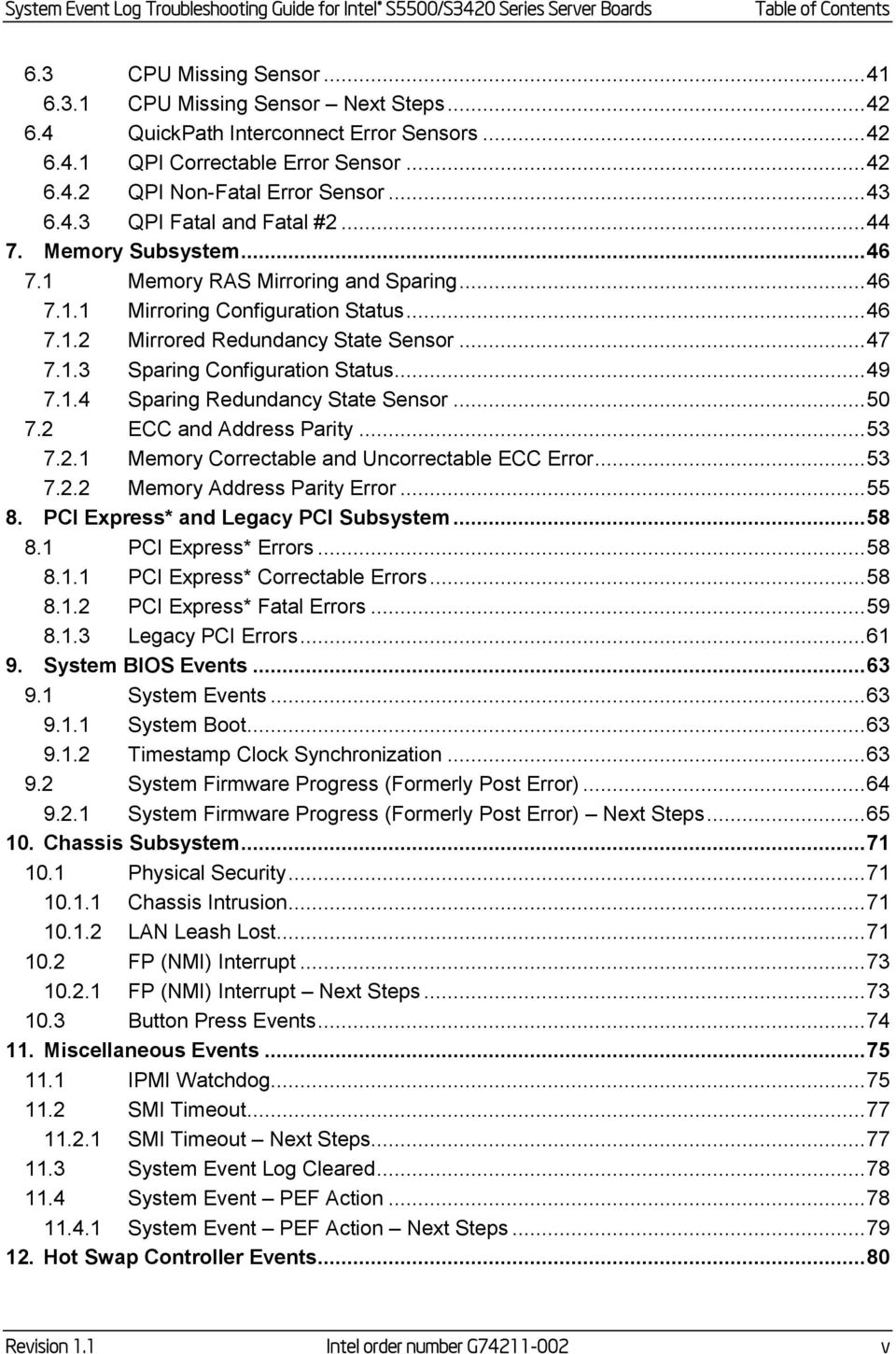
5 System Event Log Troubleshooting Guide for Intel S5500/S3420 Series Server Boards Table of Contents 6.3 CPU Missing Sensor CPU Missing Sensor Next Steps QuickPath Interconnect Error Sensors QPI Correctable Error Sensor QPI Non-Fatal Error Sensor QPI Fatal and Fatal # Memory Subsystem Memory RAS Mirroring and Sparing Mirroring Configuration Status Mirrored Redundancy State Sensor Sparing Configuration Status Sparing Redundancy State Sensor ECC and Address Parity Memory Correctable and Uncorrectable ECC Error Memory Address Parity Error PCI Express* and Legacy PCI Subsystem PCI Express* Errors PCI Express* Correctable Errors PCI Express* Fatal Errors Legacy PCI Errors System BIOS Events System Events System Boot Timestamp Clock Synchronization System Firmware Progress (Formerly Post Error) System Firmware Progress (Formerly Post Error) Next Steps Chassis Subsystem Physical Security Chassis Intrusion LAN Leash Lost FP (NMI) Interrupt FP (NMI) Interrupt Next Steps Button Press Events Miscellaneous Events IPMI Watchdog SMI Timeout SMI Timeout Next Steps System Event Log Cleared System Event PEF Action System Event PEF Action Next Steps Hot Swap Controller Events Revision 1.1 Intel order number G v
6 Table of Contents System Event Log Troubleshooting Guide for Intel S5500/S3420 Series Server Boards 12.1 HSC Backplane Temperature Sensor HSC Drive Slot Status Sensor HSC Drive Slot Status Sensor Next Steps HSC Drive Presence Sensor HSC Drive Presence Sensor Next Steps Manageability Engine (ME) Events Node Manager Exception Event Node Manager Exception Event Next Steps Node Manager Health Event Node Manager Health Event Next Steps Node Manager Operational Capabilities Change Node Manager Operational Capabilities Change Next Steps Node Manager Alert Threshold Exceeded Node Manager Alert Threshold Exceeded Next Steps ME Firmware Health Event ME Firmware Health Event Next Steps Microsoft Windows* Records Boot-up Event Records Shutdown Event Records Bug Check / Blue Screen Event Records Linux* Kernel Panic Records vi Intel order number G Revision 1.1

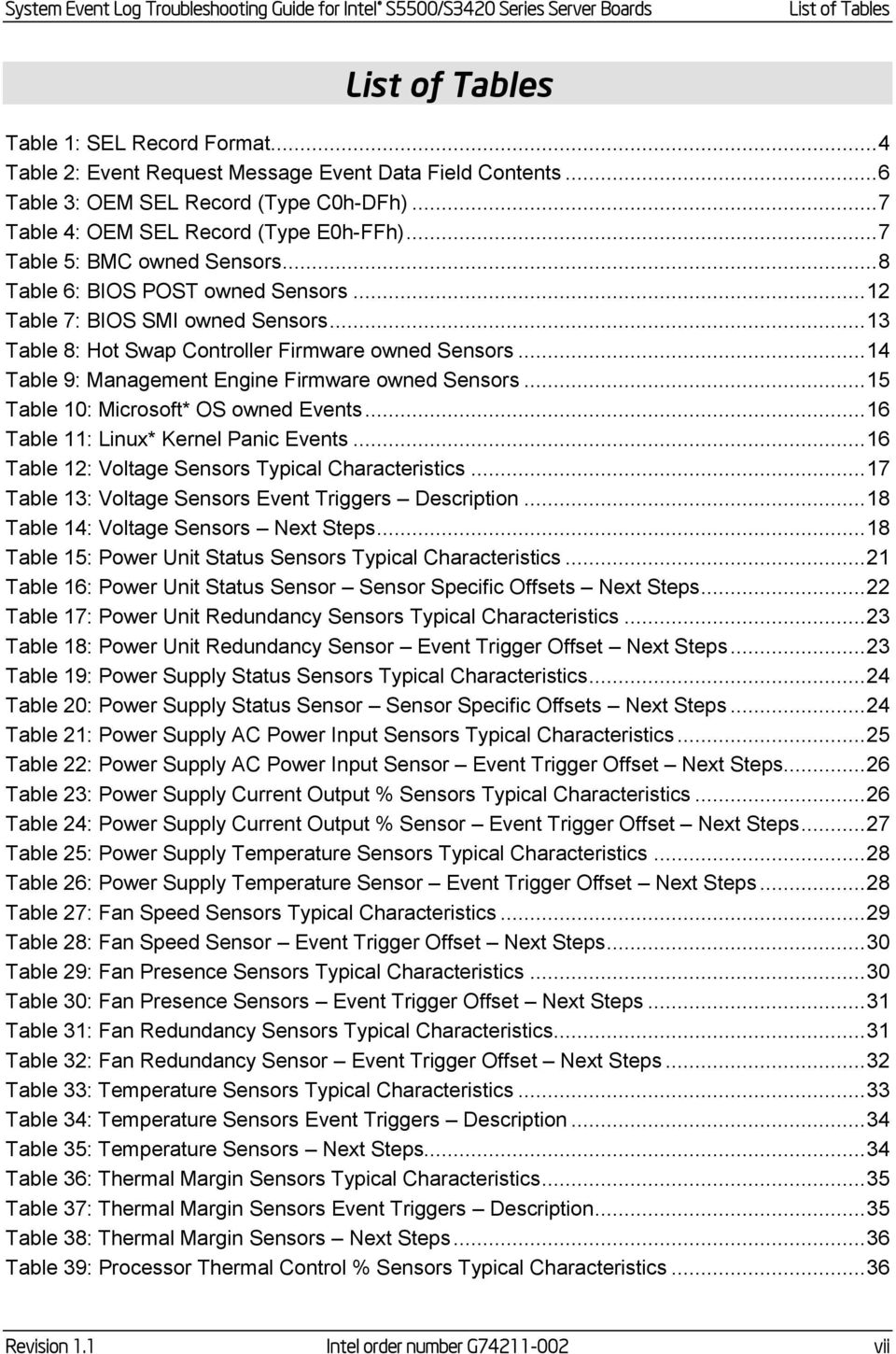
7 System Event Log Troubleshooting Guide for Intel S5500/S3420 Series Server Boards List of Tables List of Tables Table 1: SEL Record Format... 4 Table 2: Event Request Message Event Data Field Contents... 6 Table 3: OEM SEL Record (Type C0h-DFh)... 7 Table 4: OEM SEL Record (Type E0h-FFh)... 7 Table 5: BMC owned Sensors... 8 Table 6: BIOS POST owned Sensors Table 7: BIOS SMI owned Sensors Table 8: Hot Swap Controller Firmware owned Sensors Table 9: Management Engine Firmware owned Sensors Table 10: Microsoft* OS owned Events Table 11: Linux* Kernel Panic Events Table 12: Voltage Sensors Typical Characteristics Table 13: Voltage Sensors Event Triggers Table 14: Voltage Sensors Next Steps Table 15: Power Unit Status Sensors Typical Characteristics Table 16: Power Unit Status Sensor Sensor Specific Offsets Next Steps Table 17: Power Unit Redundancy Sensors Typical Characteristics Table 18: Power Unit Redundancy Sensor Event Trigger Offset Next Steps Table 19: Power Supply Status Sensors Typical Characteristics Table 20: Power Supply Status Sensor Sensor Specific Offsets Next Steps Table 21: Power Supply AC Power Input Sensors Typical Characteristics Table 22: Power Supply AC Power Input Sensor Event Trigger Offset Next Steps Table 23: Power Supply Current Output % Sensors Typical Characteristics Table 24: Power Supply Current Output % Sensor Event Trigger Offset Next Steps Table 25: Power Supply Temperature Sensors Typical Characteristics Table 26: Power Supply Temperature Sensor Event Trigger Offset Next Steps Table 27: Fan Speed Sensors Typical Characteristics Table 28: Fan Speed Sensor Event Trigger Offset Next Steps Table 29: Fan Presence Sensors Typical Characteristics Table 30: Fan Presence Sensors Event Trigger Offset Next Steps Table 31: Fan Redundancy Sensors Typical Characteristics Table 32: Fan Redundancy Sensor Event Trigger Offset Next Steps Table 33: Temperature Sensors Typical Characteristics Table 34: Temperature Sensors Event Triggers Table 35: Temperature Sensors Next Steps Table 36: Thermal Margin Sensors Typical Characteristics Table 37: Thermal Margin Sensors Event Triggers Table 38: Thermal Margin Sensors Next Steps Table 39: Processor Thermal Control % Sensors Typical Characteristics Revision 1.1 Intel order number G vii
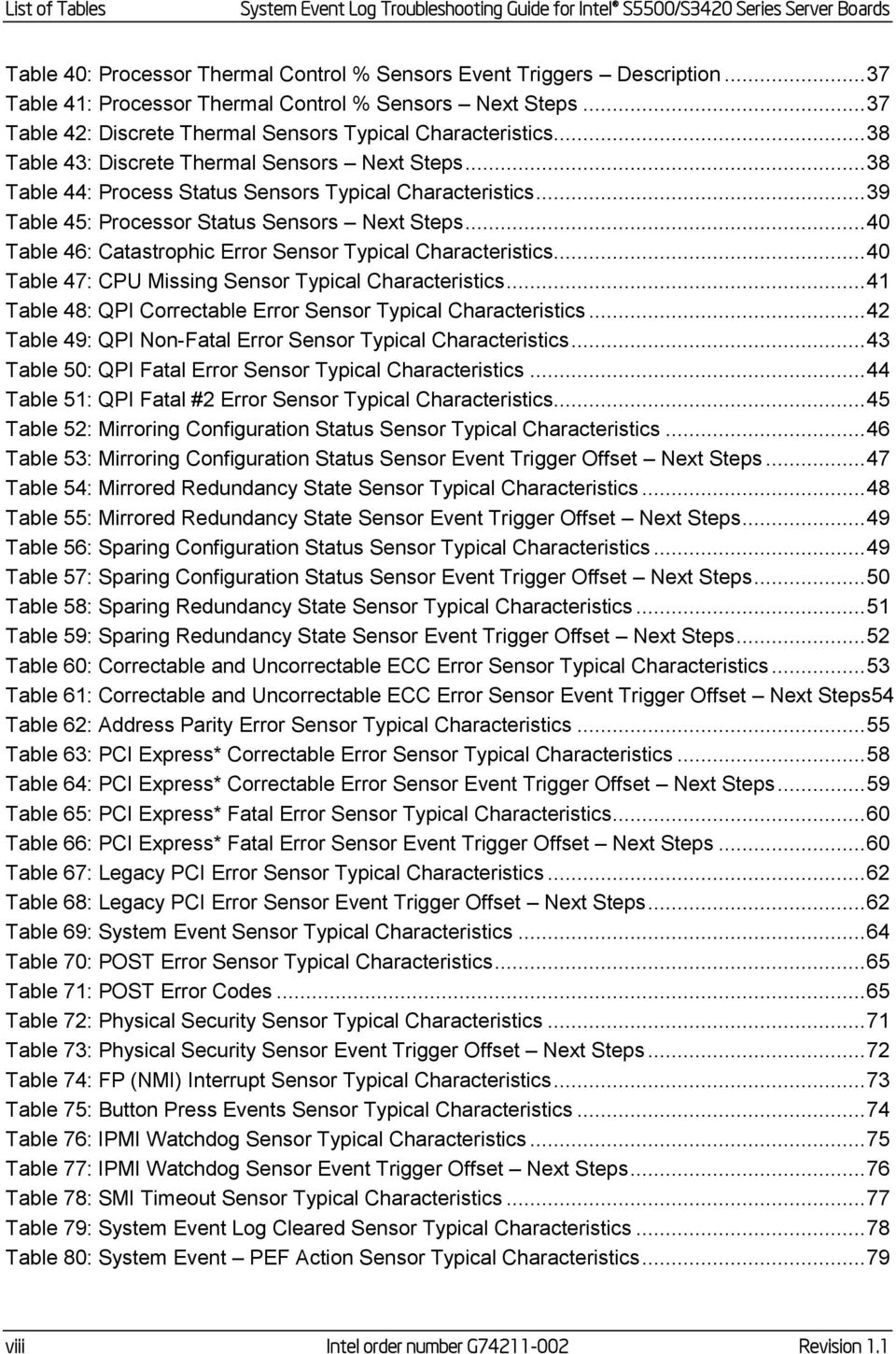
8 List of Tables System Event Log Troubleshooting Guide for Intel S5500/S3420 Series Server Boards Table 40: Processor Thermal Control % Sensors Event Triggers Table 41: Processor Thermal Control % Sensors Next Steps Table 42: Discrete Thermal Sensors Typical Characteristics Table 43: Discrete Thermal Sensors Next Steps Table 44: Process Status Sensors Typical Characteristics Table 45: Processor Status Sensors Next Steps Table 46: Catastrophic Error Sensor Typical Characteristics Table 47: CPU Missing Sensor Typical Characteristics Table 48: QPI Correctable Error Sensor Typical Characteristics Table 49: QPI Non-Fatal Error Sensor Typical Characteristics Table 50: QPI Fatal Error Sensor Typical Characteristics Table 51: QPI Fatal #2 Error Sensor Typical Characteristics Table 52: Mirroring Configuration Status Sensor Typical Characteristics Table 53: Mirroring Configuration Status Sensor Event Trigger Offset Next Steps Table 54: Mirrored Redundancy State Sensor Typical Characteristics Table 55: Mirrored Redundancy State Sensor Event Trigger Offset Next Steps Table 56: Sparing Configuration Status Sensor Typical Characteristics Table 57: Sparing Configuration Status Sensor Event Trigger Offset Next Steps Table 58: Sparing Redundancy State Sensor Typical Characteristics Table 59: Sparing Redundancy State Sensor Event Trigger Offset Next Steps Table 60: Correctable and Uncorrectable ECC Error Sensor Typical Characteristics Table 61: Correctable and Uncorrectable ECC Error Sensor Event Trigger Offset Next Steps54 Table 62: Address Parity Error Sensor Typical Characteristics Table 63: PCI Express* Correctable Error Sensor Typical Characteristics Table 64: PCI Express* Correctable Error Sensor Event Trigger Offset Next Steps Table 65: PCI Express* Fatal Error Sensor Typical Characteristics Table 66: PCI Express* Fatal Error Sensor Event Trigger Offset Next Steps Table 67: Legacy PCI Error Sensor Typical Characteristics Table 68: Legacy PCI Error Sensor Event Trigger Offset Next Steps Table 69: System Event Sensor Typical Characteristics Table 70: POST Error Sensor Typical Characteristics Table 71: POST Error Codes Table 72: Physical Security Sensor Typical Characteristics Table 73: Physical Security Sensor Event Trigger Offset Next Steps Table 74: FP (NMI) Interrupt Sensor Typical Characteristics Table 75: Button Press Events Sensor Typical Characteristics Table 76: IPMI Watchdog Sensor Typical Characteristics Table 77: IPMI Watchdog Sensor Event Trigger Offset Next Steps Table 78: SMI Timeout Sensor Typical Characteristics Table 79: System Event Log Cleared Sensor Typical Characteristics Table 80: System Event PEF Action Sensor Typical Characteristics viii Intel order number G Revision 1.1
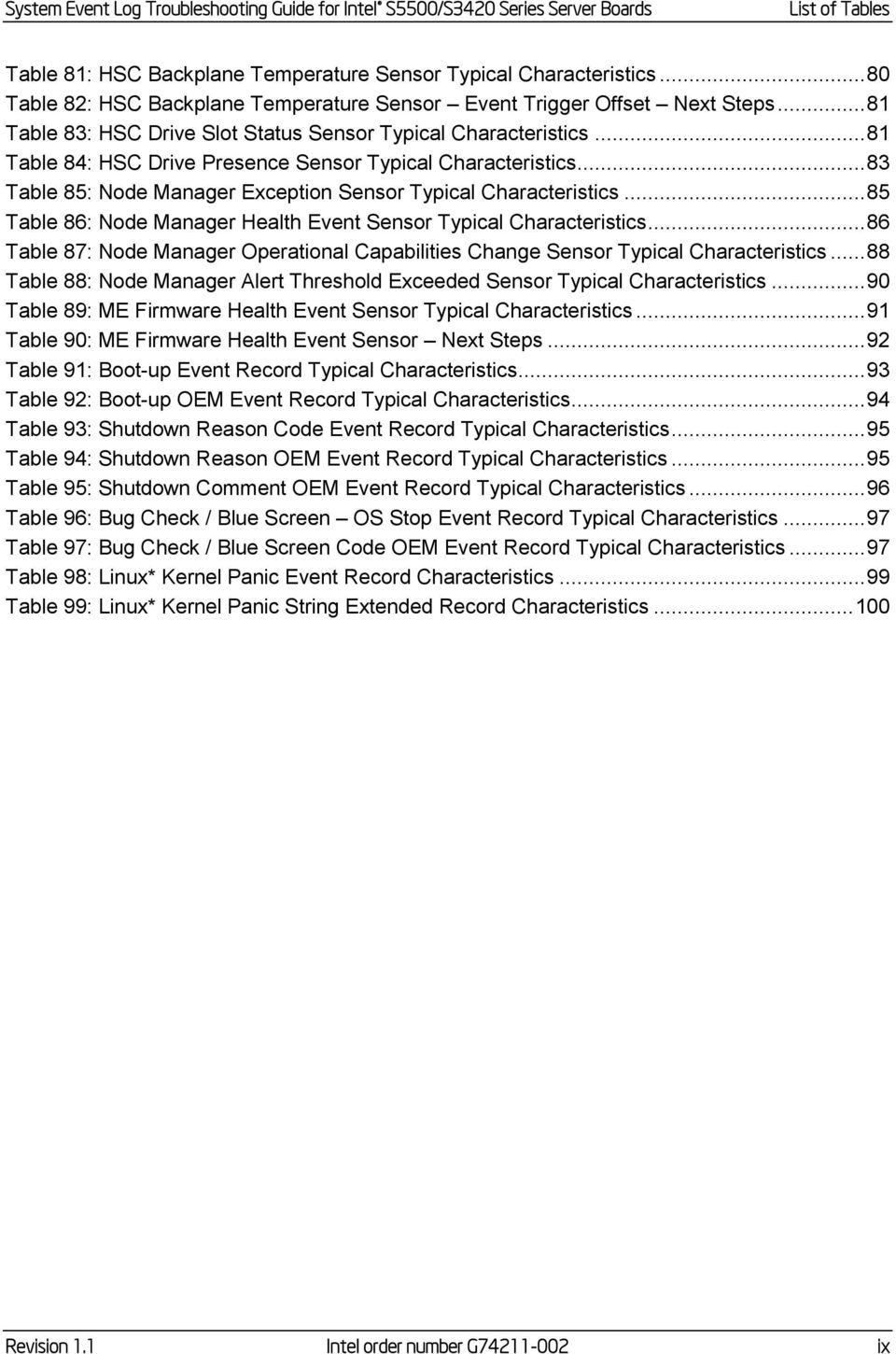
9 System Event Log Troubleshooting Guide for Intel S5500/S3420 Series Server Boards List of Tables Table 81: HSC Backplane Temperature Sensor Typical Characteristics Table 82: HSC Backplane Temperature Sensor Event Trigger Offset Next Steps Table 83: HSC Drive Slot Status Sensor Typical Characteristics Table 84: HSC Drive Presence Sensor Typical Characteristics Table 85: Node Manager Exception Sensor Typical Characteristics Table 86: Node Manager Health Event Sensor Typical Characteristics Table 87: Node Manager Operational Capabilities Change Sensor Typical Characteristics Table 88: Node Manager Alert Threshold Exceeded Sensor Typical Characteristics Table 89: ME Firmware Health Event Sensor Typical Characteristics Table 90: ME Firmware Health Event Sensor Next Steps Table 91: Boot-up Event Record Typical Characteristics Table 92: Boot-up OEM Event Record Typical Characteristics Table 93: Shutdown Reason Code Event Record Typical Characteristics Table 94: Shutdown Reason OEM Event Record Typical Characteristics Table 95: Shutdown Comment OEM Event Record Typical Characteristics Table 96: Bug Check / Blue Screen OS Stop Event Record Typical Characteristics Table 97: Bug Check / Blue Screen Code OEM Event Record Typical Characteristics Table 98: Linux* Kernel Panic Event Record Characteristics Table 99: Linux* Kernel Panic String Extended Record Characteristics Revision 1.1 Intel order number G ix
10

11 System Event Log Troubleshooting Guide for Intel S5500/S3420 Series Server Boards Introduction 1. Introduction The server management hardware that is part of Intel Server Boards and Intel Server Platforms serves as a vital part of the overall server management strategy. The server management hardware provides essential information to the system administrator and provides the administrator the ability to remotely control the server, even when the operating system is not running. The Intel Server Boards and Intel Server Platforms offer comprehensive hardware and software based solutions. The server management features make the servers simple to manage and provide alerting on system events. From entry to enterprise systems, good overall server management is essential to reduce overall total cost of ownership. This Troubleshooting Guide is intended to help the users better understand the events that are logged in the Baseboard Management Controllers (BMC) System Event Logs (SEL) on these Intel Server Boards. There is a separate User s Guide that covers the general server management and the server management software offered on Intel Server Boards and Intel Server Platforms. Server boards currently supported by this document: Intel S3200/X38ML Server Boards Intel S5500/S3420 Series Server Boards 1.1 Purpose The purpose of this document is to list all possible events generated by the Intel platform. It may be possible that other sources (not under our control) also generate events, which will not be described in this document. 1.2 Industry Standard Intelligent Platform Management Interface (IPMI) The key characteristic of the Intelligent Platform Management Interface (IPMI) is that the inventory, monitoring, logging, and recovery control functions are available independently of the main processors, BIOS, and operating system. Platform management functions can also be made available when the system is in a power-down state. IPMI works by interfacing with the BMC, which extends management capabilities in the server system and operates independently of the main processor by monitoring the on-board instrumentation. Through the BMC, IPMI also allows administrators to control power to the server, and remotely access BIOS configuration and operating system console information. IPMI defines a common platform instrumentation interface to enable interoperability between: Revision 1.1 Intel order number G

12 Introduction System Event Log Troubleshooting Guide for Intel S5500/S3420 Series Server Boards The baseboard management controller and chassis The baseboard management controller and systems management software Between servers IPMI enables the following: Common access to platform management information, consisting of: - Local access from systems management software - Remote access from LAN - Inter-chassis access from Intelligent Chassis Management Bus - Access from LAN, serial/modem, IPMB, PCI SMBus*, or ICMB, available even if the processor is down IPMI interface isolates systems management software from hardware. Hardware advancements can be made without impacting the systems management software. IPMI facilitates cross-platform management software. You can find more information on IPMI at the following URL: Baseboard Management Controller (BMC) A baseboard management controller (BMC) is a specialized microcontroller embedded on most Intel Server Boards. The BMC is the heart of the IPMI architecture and provides the intelligence behind intelligent platform management, that is, the autonomous monitoring and recovery features implemented directly in platform management hardware and firmware. Different types of sensors built into the computer system report to the BMC on parameters such as temperature, cooling fan speeds, power mode, operating system status, and so on. The BMC monitors the system for critical events by communicating with various sensors on the system board; it sends alerts and logs events when certain parameters exceed their preset thresholds, indicating a potential failure of the system. The administrator can also remotely communicate with the BMC to take some corrective actions such as resetting or power cycling the system to get a hung OS running again. These abilities save on the total cost of ownership of a system. For Intel Server Boards and Intel Server Platforms, the BMC supports the industry-standard IPMI 2.0 Specification, enabling you to configure, monitor, and recover systems remotely System Event Log (SEL) The BMC provides a centralized, non-volatile repository for critical, warning, and informational system events called the System Event Log or SEL. By having the BMC manage the SEL and logging functions, it helps to ensure that post-mortem logging information is available if a failure occurs that disables the systems processor(s). 2 Intel order number G Revision 1.1

13 System Event Log Troubleshooting Guide for Intel S5500/S3420 Series Server Boards Introduction The BMC allows access to SEL from in-band and out-of-band mechanisms. There are various tools and utilities that can be used to access the SEL. There is the Intel SELViewer and multiple open sourced IPMI tools Intel Intelligent Power Node Manager Version 1.5 Intel Intelligent Power Node Manager version 1.5 (NM) is a platform-resident technology that enforces power and thermal policies for the platform. These policies are applied by exploiting subsystem knobs (such as processor P and T states) that can be used to control power consumption. Intel Intelligent Power Node Manager enables data center power and thermal management by exposing an external interface to management software through which platform policies can be specified. It also enables specific data center power management usage models such as power limiting. The configuration and control commands are used by the external management software or BMC to configure and control the Intel Intelligent Power Node Manager feature. Because Platform Services firmware does not have any external interface, external commands are first received by the BMC over LAN and then relayed to the Platform Services firmware over IPMB channel. The BMC acts as a relay and the transport conversion device for these commands. For simplicity, the commands from the management console might be encapsulated in a generic CONFIG packet format (config data length, config data blob) to the BMC so that the BMC doesn t even have to parse the actual configuration data. The BMC provides the access point for remote commands from external management SW and generates alerts to them. Intel Intelligent Power Node Manager on Intel Manageability Engine (Intel ME) is an IPMI satellite controller. A mechanism needs to exist to forward commands to Intel ME and send response back to originator. Similarly events from Intel ME have to be sent as alerts outside of the BMC. It is the responsibility of BMC to implement these mechanisms for communication with Intel Intelligent Power Node Manager. The full specification can be downloaded from the following link: Revision 1.1 Intel order number G

14 Basic Decoding of a SEL Record System Event Log Troubleshooting Guide for Intel S5500/S3420 Series Server Boards 2. Basic Decoding of a SEL Record The System Event Log (SEL) record format is defined in the IPMI Specification. The following section provides a basic definition for each of the fields in a SEL. For more details see the IPMI Specification. The definitions for the standard SEL can be found in Table 1. The definitions for the OEM defined event logs can be found in Table 3 and Table Default Values in the SEL Records Unless otherwise noted in the event record descriptions the following are the default values in all SEL entries. Byte [3] = Record Type (RT) = 02h = System event record Byte [9:8] = Generator ID = 0020h = BMC Firmware Byte [10] = Event Message Revision (ER) = 04h = IPMI 2.0 Table 1: SEL Record Format 1 2 Record ID (RID) ID used for SEL Record access. 3 Record Type (RT) [7:0] Record Type 02h = System event record C0h-DFh = OEM timestamped, bytes 8-16 OEM defined (See Table 3) E0h-FFh = OEM non-timestamped, bytes 4-16 OEM defined (See Table 4) Timestamp (TS) Time when event was logged. LS byte first. Example: TS:[29][76][68][4C] = 4C687629h = = Sun, 15 Aug :20:09 UTC Note: There are various websites that will convert the raw number to a date/time. 4 Intel order number G Revision 1.1

15 System Event Log Troubleshooting Guide for Intel S5500/S3420 Series Server Boards Basic Decoding of a SEL Record 8 9 Generator ID (GID) 10 EvM Rev (ER) 11 Sensor Type (ST) 12 Sensor # (SN) 13 Event Dir Event Type (EDIR) 14 Event Data 1 (ED1) RqSA and LUN if event was generated from IPMB. Software ID if event was generated from system software. Byte 1 [7:1] 7-bit I 2 C Slave Address, or 7-bit system software ID [0] 0b = ID is IPMB Slave Address 1b = System software ID Byte 2 Software ID values: 0001h BIOS POST for POST errors, RAS Configuration/State, Timestamp Synch, OS Boot events 0033h BIOS SMI Handler 0020h BMC Firmware 002Ch ME Firmware 0041h Server Management Software 00C0h HSC Firmware HSBP A 00C2h HSC Firmware HSBP B [7:4] Channel number. Channel that event message was received over. 0h if the event message was received from the system interface, primary IPMB, or internally generated by the BMC. [3:2] Reserved. Write as 00b. [1:0] IPMB device LUN if byte 1 holds Slave Address. 00b otherwise. Event Message format version. 04h = IPMI v2.0; 03h = IPMI v1.0 Sensor Type Code for sensor that generated the event Number of sensor that generated the event (From SDR) Event Dir [7] 0b = Assertion event. 1b = Deassertion event. Event Type Type of trigger for the event, for example, critical threshold going high, state asserted, and so on. Also indicates class of the event. For example, discrete, threshold, or OEM. The Event Type field is encoded using the Event/Reading Type Code. [6:0] Event Type Codes 01h = Threshold (States = 0x00-0x0b) 02h-0ch = Discrete 6Fh = Sensor-Specific 70-7Fh = OEM Per Table 2: Event Request Message Event Data Field Contents 15 Event Data 2 (ED2) 16 Event Data 3 (ED3) Revision 1.1 Intel order number G
![Byte 1 [7:1] 7-bit I 2 C Slave Address, or 7-bit system software ID [0] 0b = ID is IPMB Slave Address 1b = System software ID Byte 2 Software ID values: 0001h BIOS POST for POST errors, RAS](/docs-images/41/11248863/images/page_15.jpg "Configuration/State, Timestamp Synch, OS Boot events 0033h BIOS SMI Handler 0020h BMC Firmware 002Ch ME Firmware 0041h Server Management Software 00C0h HSC Firmware HSBP A 00C2h HSC Firmware HSBP B")
16 Basic Decoding of a SEL Record System Event Log Troubleshooting Guide for Intel S5500/S3420 Series Server Boards Table 2: Event Request Message Event Data Field Contents Sensor Class Event Data Threshold Event Data 1 [7:6] 00b = Unspecified Event Data 2 01b = Trigger reading in Event Data 2 10b = OEM code in Event Data 2 11b = Sensor-specific event extension code in Event Data 2 [5:4] 00b = Unspecified Event Data 3 01b = Trigger threshold value in Event Data 3 10b = OEM code in Event Data 3 11b = Sensor-specific event extension code in Event Data 3 [3:0] Offset from Event/Reading Code for threshold event. Event Data 2 Reading that triggered event, FFh or not present if unspecified. Event Data 3 Threshold value that triggered event, FFh or not present if unspecified. If present, Event Data 2 must be present. discrete Event Data 1 [7:6] 00b = Unspecified Event Data 2 01b = Previous state and/or severity in Event Data 2 10b = OEM code in Event Data 2 11b = Sensor-specific event extension code in Event Data 2 [5:4] 00b = Unspecified Event Data 3 01b = Reserved 10b = OEM code in Event Data 3 11b = Sensor-specific event extension code in Event Data 3 [3:0] Offset from Event/Reading Code for discrete event state Event Data 2 [7:4] Optional offset from Severity Event/Reading Code (0Fh if unspecified). [3:0] Optional offset from Event/Reading Type Code for previous discrete event state (0Fh if unspecified). Event Data 3 Optional OEM code. FFh or not present if unspecified. OEM Event Data 1 [7:6] 00b = Unspecified in Event Data 2 01b = Previous state and/or severity in Event Data 2 10b = OEM code in Event Data 2 11b = Reserved [5:4] 00b = Unspecified Event Data 3 01b = Reserved 10b = OEM code in Event Data 3 11b = Reserved [3:0] Offset from Event/Reading Type Code Event Data 2 [7:4] Optional OEM code bits or offset from Severity Event/Reading Type Code (0Fh if unspecified). [3:0] Optional OEM code or offset from Event/Reading Type Code for previous event state (0Fh if unspecified). Event Data 3 Optional OEM code. FFh or not present or unspecified. 6 Intel order number G Revision 1.1
![Unspecified Event Data 3 01b = Trigger threshold value in Event Data 3 10b = OEM code in Event Data 3 11b = Sensor-specific event extension code in Event Data 3 [3:0] Offset from Event/Reading Code](/docs-images/41/11248863/images/page_16.jpg "for threshold event. Event Data 2 Reading that triggered event, FFh or not present if unspecified. Event Data 3 Threshold value that triggered event, FFh or not present if unspecified.")
17 System Event Log Troubleshooting Guide for Intel S5500/S3420 Series Server Boards Basic Decoding of a SEL Record Table 3: OEM SEL Record (Type C0h-DFh) 1 2 Record ID (RID) ID used for SEL Record access. 3 Record Type (RT) [7:0] Record Type C0h-DFh = OEM timestamped, bytes 8-16 OEM defined Timestamp (TS) Manufacturer ID OEM Defined Time when event was logged. LS byte first. Example: TS:[29][76][68][4C] = 4C687629h = = Sun, 15 Aug :20:09 UTC Note: There are various websites that will convert the raw number to a date/time. LS Byte first. The manufacturer ID is a 20-bit value that is derived from the IANA Private Enterprise ID. Most significant four bits = Reserved (0000b) h = Unspecified. 0FFFFFh = Reserved. This value is binary encoded. For example the ID for the IPMI forum is 7154 decimal, which is 1BF2h, which will be stored in this record as F2h, 1Bh, 00h for bytes 8 through 10, respectively. OEM Defined. This is defined according to the manufacturer identified by the Manufacturer ID field. Table 4: OEM SEL Record (Type E0h-FFh) 1 2 Record ID (RID) ID used for SEL Record access. 3 Record Type (RT) [7:0] Record Type E0h-FFh = OEM system event record OEM OEM Defined. This is defined by the system integrator. Revision 1.1 Intel order number G
![LS byte first. Example: TS:[29][76][68][4C] = 4C687629h = 1281914409 = Sun, 15 Aug 2010 23:20:09 UTC Note: There are various websites that will convert the raw number to a date/time. LS Byte first.](/docs-images/41/11248863/images/page_17.jpg "The manufacturer ID is a 20-bit value that is derived from the IANA Private Enterprise ID. Most significant four bits = Reserved (0000b). 000000h = Unspecified. 0FFFFFh = Reserved.")
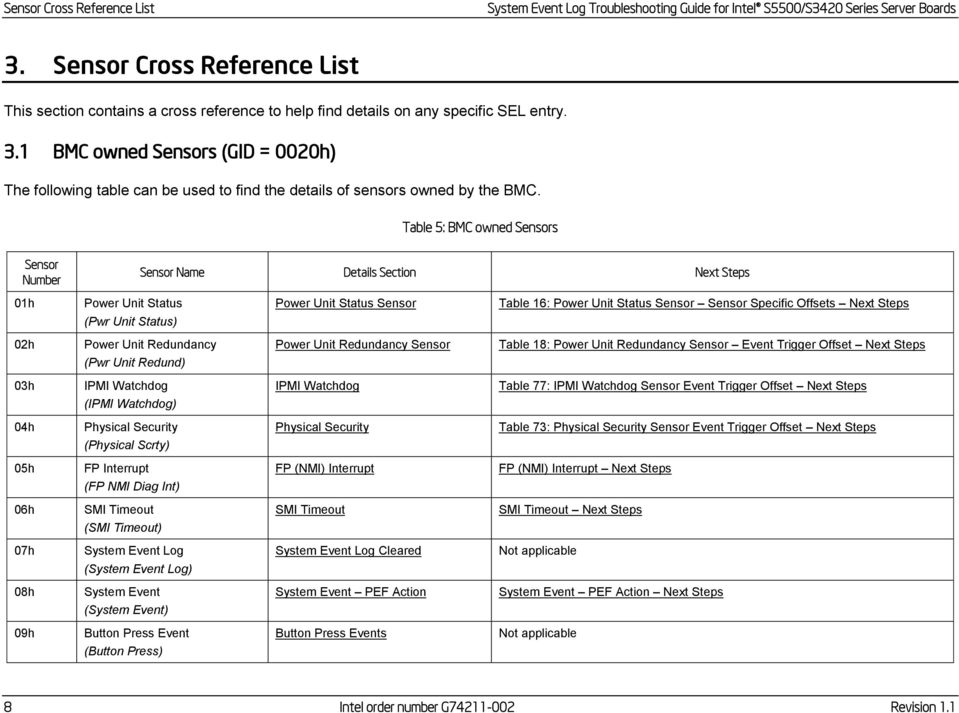
18 Sensor Cross Reference List System Event Log Troubleshooting Guide for Intel S5500/S3420 Series Server Boards 3. Sensor Cross Reference List This section contains a cross reference to help find details on any specific SEL entry. 3.1 BMC owned Sensors (GID = 0020h) The following table can be used to find the details of sensors owned by the BMC. Table 5: BMC owned Sensors Sensor Number Sensor Name Details Section Next Steps 01h Power Unit Status Power Unit Status Sensor Table 16: Power Unit Status Sensor Sensor Specific Offsets Next Steps (Pwr Unit Status) 02h Power Unit Redundancy Power Unit Redundancy Sensor Table 18: Power Unit Redundancy Sensor Event Trigger Offset Next Steps (Pwr Unit Redund) 03h IPMI Watchdog IPMI Watchdog Table 77: IPMI Watchdog Sensor Event Trigger Offset Next Steps (IPMI Watchdog) 04h Physical Security Physical Security Table 73: Physical Security Sensor Event Trigger Offset Next Steps (Physical Scrty) 05h FP Interrupt FP (NMI) Interrupt FP (NMI) Interrupt Next Steps (FP NMI Diag Int) 06h SMI Timeout SMI Timeout SMI Timeout Next Steps (SMI Timeout) 07h System Event Log System Event Log Cleared Not applicable (System Event Log) 08h System Event System Event PEF Action System Event PEF Action Next Steps (System Event) 09h Button Press Event Button Press Events Not applicable (Button Press) 8 Intel order number G Revision 1.1
19 System Event Log Troubleshooting Guide for Intel S5500/S3420 Series Server Boards Sensor Cross Reference List Sensor Number Sensor Name Details Section Next Steps 10h BB +1.1V IOH Voltage Sensors Table 14: Voltage Sensors Next Steps (BB +1.1V IOH) 11h BB +1.1V P1 Vccp Voltage Sensors Table 14: Voltage Sensors Next Steps (BB +1.1V P1 Vccp) 12h BB +1.1V P2 Vccp Voltage Sensors Table 14: Voltage Sensors Next Steps (BB +1.1V P2 Vccp) 13h BB +1.5V P1 DDR3 Voltage Sensors Table 14: Voltage Sensors Next Steps (BB +1.5V P1 DDR3) 14h BB +1.5V P2 DDR3 Voltage Sensors Table 14: Voltage Sensors Next Steps (BB +1.5V P2 DDR3) 15h BB +1.8V AUX Voltage Sensors Table 14: Voltage Sensors Next Steps (BB +1.8V AUX) 16h BB +3.3V Voltage Sensors Table 14: Voltage Sensors Next Steps (BB +3.3V) 17h BB +3.3V STBY Voltage Sensors Table 14: Voltage Sensors Next Steps (BB +3.3V STBY) 18h BB +3.3V Vbat Voltage Sensors Table 14: Voltage Sensors Next Steps (BB +3.3V Vbat) 19h BB +5.0V Voltage Sensors Table 14: Voltage Sensors Next Steps (BB +5.0V) 1Ah BB +5.0V STBY Voltage Sensors Table 14: Voltage Sensors Next Steps (BB +5.0V STBY) 1Bh BB +12.0V Voltage Sensors Table 14: Voltage Sensors Next Steps (BB +12.0V) 1Ch BB -12.0V (BB -12.0V) Voltage Sensors Table 14: Voltage Sensors Next Steps 1Dh BB +1.35V P1 LV DDR3 (BB +1.35v P1 MEM) Voltage Sensors Table 14: Voltage Sensors Next Steps Revision 1.1 Intel order number G

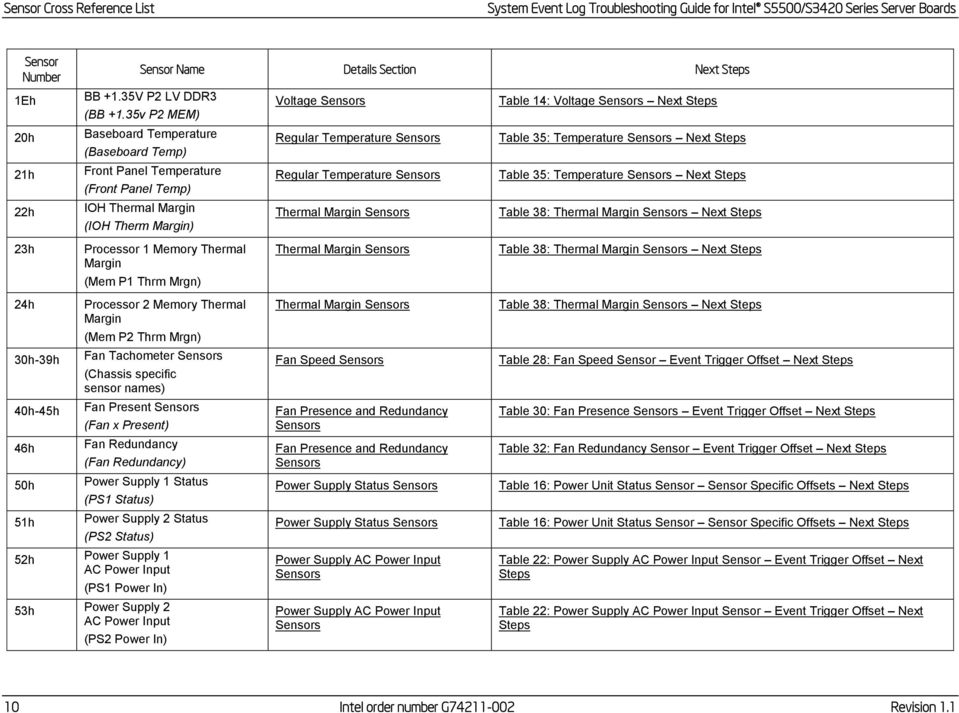
20 Sensor Cross Reference List System Event Log Troubleshooting Guide for Intel S5500/S3420 Series Server Boards Sensor Number 1Eh 20h 21h 22h Sensor Name Details Section Next Steps BB +1.35V P2 LV DDR3 Voltage Sensors Table 14: Voltage Sensors Next Steps (BB +1.35v P2 MEM) Baseboard Temperature Regular Temperature Sensors Table 35: Temperature Sensors Next Steps (Baseboard Temp) Front Panel Temperature Regular Temperature Sensors Table 35: Temperature Sensors Next Steps (Front Panel Temp) IOH Thermal Margin Thermal Margin Sensors Table 38: Thermal Margin Sensors Next Steps (IOH Therm Margin) 23h Processor 1 Memory Thermal Margin Thermal Margin Sensors Table 38: Thermal Margin Sensors Next Steps (Mem P1 Thrm Mrgn) 24h 30h-39h 40h-45h 46h 50h 51h Processor 2 Memory Thermal Margin (Mem P2 Thrm Mrgn) Fan Tachometer Sensors (Chassis specific sensor names) Fan Present Sensors (Fan x Present) Fan Redundancy (Fan Redundancy) Power Supply 1 Status (PS1 Status) Power Supply 2 Status (PS2 Status) 52h Power Supply 1 AC Power Input (PS1 Power In) 53h Power Supply 2 AC Power Input (PS2 Power In) Thermal Margin Sensors Fan Speed Sensors Fan Presence and Redundancy Sensors Fan Presence and Redundancy Sensors Power Supply Status Sensors Power Supply Status Sensors Power Supply AC Power Input Sensors Power Supply AC Power Input Sensors Table 38: Thermal Margin Sensors Next Steps Table 28: Fan Speed Sensor Event Trigger Offset Next Steps Table 30: Fan Presence Sensors Event Trigger Offset Next Steps Table 32: Fan Redundancy Sensor Event Trigger Offset Next Steps Table 16: Power Unit Status Sensor Sensor Specific Offsets Next Steps Table 16: Power Unit Status Sensor Sensor Specific Offsets Next Steps Table 22: Power Supply AC Power Input Sensor Event Trigger Offset Next Steps Table 22: Power Supply AC Power Input Sensor Event Trigger Offset Next Steps 10 Intel order number G Revision 1.1
21 System Event Log Troubleshooting Guide for Intel S5500/S3420 Series Server Boards Sensor Cross Reference List Sensor Number 54h 55h 56h 57h 60h 61h 62h 63h Sensor Name Details Section Next Steps Power Supply 1 +12V % of Maximum Current Output (PS1 Curr Out %) Power Supply 2 +12V % of Maximum Current Output (PS2 Curr Out %) Power Supply 1 Temperature (PS1 Temperature) Power Supply 2 Temperature (PS2 Temperature) Processor 1 Status (P1 Status) Processor 2 Status (P2 Status) Processor 1 Thermal Margin (P1 Therm Margin) Processor 2 Thermal Margin (P2 Therm Margin) 64h Processor 1 Thermal Control % (P1 Therm Ctrl %) 65h Processor 2 Thermal Control % (P2 Therm Ctrl %) 66h 67h 68h 69h Processor 1 VRD Temp (P1 VRD Hot) Processor 2 VRD Temp (P2 VRD Hot) Catastrophic Error (CATERR) CPU Missing (CPU Missing) Power Supply Current Output % Sensors Power Supply Current Output % Sensors Power Supply Temperature Sensors Power Supply Temperature Sensors Processor Status Sensor Processor Status Sensor Thermal Margin Sensors Thermal Margin Sensors Processor Thermal Control % Sensors Processor Thermal Control % Sensors Discrete Thermal Sensors Discrete Thermal Sensors Catastrophic Error Sensor CPU Missing Sensor Table 24: Power Supply Current Output % Sensor Event Trigger Offset Next Steps Table 24: Power Supply Current Output % Sensor Event Trigger Offset Next Steps Table 26: Power Supply Temperature Sensor Event Trigger Offset Next Steps Table 26: Power Supply Temperature Sensor Event Trigger Offset Next Steps Table 45: Processor Status Sensors Next Steps Table 45: Processor Status Sensors Next Steps Table 38: Thermal Margin Sensors Next Steps Table 38: Thermal Margin Sensors Next Steps Table 41: Processor Thermal Control % Sensors Next Steps Table 41: Processor Thermal Control % Sensors Next Steps Table 43: Discrete Thermal Sensors Table 43: Discrete Thermal Sensors Catastrophic Error Sensor Next Steps CPU Missing Sensor Next Steps Revision 1.1 Intel order number G
22 Sensor Cross Reference List System Event Log Troubleshooting Guide for Intel S5500/S3420 Series Server Boards Sensor Number 6Ah Sensor Name Details Section Next Steps IOH Thermal Trip Discrete Thermal Sensors Table 43: Discrete Thermal Sensors (IOH Thermal Trip) 3.2 BIOS POST owned Sensors (GID = 0001h) The following table can be used to find the details of sensors owned by BIOS POST. Table 6: BIOS POST owned Sensors Sensor Number Sensor Name Details Section Next Steps 01h Mirroring Redundancy State Mirrored Redundancy State Sensor Table 55: Mirrored Redundancy State Sensor Event Trigger Offset Next Steps 06h POST Error System Firmware Progress (Formerly Post Error) System Firmware Progress (Formerly Post Error) Next Steps 11h Sparing Redundancy State Sparing Redundancy State Sensor Table 59: Sparing Redundancy State Sensor Event Trigger Offset Next Steps 12h Mirroring Configuration Status Mirroring Configuration Status Table 53: Mirroring Configuration Status Sensor Event Trigger Offset Next Steps 13h Sparing Configuration Status Sparing Configuration Status Table 57: Sparing Configuration Status Sensor Event Trigger Offset Next Steps 83h System Event System Events Not applicable 3.3 BIOS SMI owned Sensors (GID = 0033h) The following table can be used to find the details of sensors owned by BIOS SMI. 12 Intel order number G Revision 1.1
23 System Event Log Troubleshooting Guide for Intel S5500/S3420 Series Server Boards Sensor Cross Reference List Table 7: BIOS SMI owned Sensors Sensor Number Sensor Name Details Section Next Steps 02h Memory ECC Error Memory Correctable and Uncorrectable ECC Error Table 61: Correctable and Uncorrectable ECC Error Sensor Event Trigger Offset Next Steps 03h Legacy PCI Error Legacy PCI Errors Table 68: Legacy PCI Error Sensor Event Trigger Offset Next Steps 04h PCI Express Fatal Error PCI Express Fatal Errors Table 66: PCI Express* Fatal Error Sensor Event Trigger Offset Next Steps 05h PCI Express Correctable Error PCI Express Correctable errors Table 64: PCI Express* Correctable Error Sensor Event Trigger Offset Next Steps 06h 07h Intel QuickPath Interface Correctable Error Intel QuickPath Interface Nonfatal Error QPI Correctable Error Sensor QPI Non-Fatal Error Sensor QPI Correctable Error Sensor Next Steps QPI Non-Fatal Error Sensor Next Steps 14h Memory Address Parity Error Memory Address Parity Error Memory Address Parity Error Sensor Next Steps 17h 18h Intel QuickPath Interface Fatal Error Intel QuickPath Interface Fatal2 Error QPI Fatal and Fatal #2 QPI Fatal and Fatal #2 83h System Event System Events Not applicable QPI Fatal and Fatal #2 Next Steps QPI Fatal and Fatal #2 Next Steps Revision 1.1 Intel order number G
24 Sensor Cross Reference List System Event Log Troubleshooting Guide for Intel S5500/S3420 Series Server Boards 3.4 Hot Swap Controller Firmware owned Sensors (GID = 00C0h/00C2h) The following table can be used to find the details of sensors owned by the Hot Swap Controller (HSC) firmware. The HSC firmware resides on a Hot Swap Back Plane (HSBP). There can be up to two HSBPs in a system. Each HSBP will have its own GID. 00C0h = HSC Firmware HSBP A 00C2h = HSC Firmware HSBP B Table 8: Hot Swap Controller Firmware owned Sensors Sensor Number Sensor Name Details Section Next Steps 01h Backplane Temperature HSC Backplane Temperature Sensor Table 82: HSC Backplane Temperature Sensor Event Trigger Offset Next Steps 02h Drive Slot 0 Status HSC Drive Slot Status Sensor HSC Drive Slot Status Sensor Next Steps 03h Drive Slot 1 Status HSC Drive Slot Status Sensor HSC Drive Slot Status Sensor Next Steps 04h Drive Slot 2 Status HSC Drive Slot Status Sensor HSC Drive Slot Status Sensor Next Steps 05h Drive Slot 3 Status HSC Drive Slot Status Sensor HSC Drive Slot Status Sensor Next Steps 06h Drive Slot 4 Status HSC Drive Slot Status Sensor HSC Drive Slot Status Sensor Next Steps 07h Drive Slot 5 Status HSC Drive Slot Status Sensor HSC Drive Slot Status Sensor Next Steps 6 Slot HSBP 08h Drive Slot 0 Presence HSC Drive Presence Sensor HSC Drive Presence Sensor Next Steps 09h Drive Slot 1 Presence HSC Drive Presence Sensor HSC Drive Presence Sensor Next Steps 0Ah Drive Slot 2 Presence HSC Drive Presence Sensor HSC Drive Presence Sensor Next Steps 0Bh Drive Slot 3 Presence HSC Drive Presence Sensor HSC Drive Presence Sensor Next Steps 0Ch Drive Slot 4 Presence HSC Drive Presence Sensor HSC Drive Presence Sensor Next Steps 0Dh Drive Slot 5 Presence HSC Drive Presence Sensor HSC Drive Presence Sensor Next Steps 8 Slot HSBP 08h Drive Slot 6 Status HSC Drive Slot Status Sensor HSC Drive Slot Status Sensor Next Steps 14 Intel order number G Revision 1.1
25 System Event Log Troubleshooting Guide for Intel S5500/S3420 Series Server Boards Sensor Cross Reference List Sensor Number Sensor Name Details Section Next Steps 09h Drive Slot 7 Status HSC Drive Slot Status Sensor HSC Drive Slot Status Sensor Next Steps 0Ah Drive Slot 0 Presence HSC Drive Presence Sensor HSC Drive Presence Sensor Next Steps 0Bh Drive Slot 1 Presence HSC Drive Presence Sensor HSC Drive Presence Sensor Next Steps 0Ch Drive Slot 2 Presence HSC Drive Presence Sensor HSC Drive Presence Sensor Next Steps 0Dh Drive Slot 3 Presence HSC Drive Presence Sensor HSC Drive Presence Sensor Next Steps 0Eh Drive Slot 4 Presence HSC Drive Presence Sensor HSC Drive Presence Sensor Next Steps 0Fh Drive Slot 5 Presence HSC Drive Presence Sensor HSC Drive Presence Sensor Next Steps 10h Drive Slot 6 Presence HSC Drive Presence Sensor HSC Drive Presence Sensor Next Steps 11h Drive Slot 7 Presence HSC Drive Presence Sensor HSC Drive Presence Sensor Next Steps 3.5 Node Manager / ME Firmware owned Sensors (GID = 002Ch or 602Ch) The following table can be used to find the details of sensors owned by the Node Manager / Management Engine (ME) firmware. Table 9: Management Engine Firmware owned Sensors Sensor Number Sensor Name Details Section Next Steps 17h ME Firmware Health Events ME Firmware Health Event ME Firmware Health Event Next Steps 18h Node Manager Exception Events Node Manager Exception Event Node Manager Exception Event Next Steps 19h Node Manager Health Events Node Manager Health Event Node Manager Health Event Next Steps 1Ah Node Manager Operational Capabilities Change Events Node Manager Operational Capabilities Change Node Manager Operational Capabilities Change Next Steps 1Bh Node Manager Alert Threshold Exceeded Events Node Manager Alert Threshold Exceeded Node Manager Alert Threshold Exceeded Next Steps Revision 1.1 Intel order number G
26 Sensor Cross Reference List System Event Log Troubleshooting Guide for Intel S5500/S3420 Series Server Boards 3.6 Microsoft* OS owned Events (GID = 0041) The following table can be used to find the details of records that are owned by the Microsoft* Operating System (OS). Table 10: Microsoft* OS owned Events Sensor Name Record Type Sensor Type Details Section Next Steps Boot Event 02h 1Fh = OS Boot Table 91: Boot-up Event Record Typical Characteristics Not applicable DCh Not applicable Table 92: Boot-up OEM Event Record Typical Characteristics Shutdown Event 02h 20h = OS Stop/Shutdown Table 93: Shutdown Reason Code Event Record Typical Characteristics Not applicable DDh Not applicable Table 94: Shutdown Reason OEM Event Record Typical Characteristics Table 95: Shutdown Comment OEM Event Record Typical Characteristics Not applicable Bug Check / Blue Screen 02h 20h = OS Stop/Shutdown Table 96: Bug Check / Blue Screen OS Stop Event Record Typical Characteristics Not applicable DEh Not applicable Table 97: Bug Check / Blue Screen Code OEM Event Record Typical Characteristics 3.7 Linux* Kernel Panic Events (GID = 0021) The following table can be used to find the details of records that can be generated when there is a Linux* Kernel panic. Table 11: Linux* Kernel Panic Events Sensor Name Record Type Sensor Type Details Section Next Steps Linux* Kernel Panic 02h 20h = OS Stop/Shutdown Table 98: Linux* Kernel Panic Event Record Characteristics Not applicable F0h Not applicable Table 99: Linux* Kernel Panic String Extended Record Characteristics 16 Intel order number G Revision 1.1
27 System Event Log Troubleshooting Guide for Intel S5500/S3420 Series Server Boards Power Subsystems 4. Power Subsystems The BMC monitors the power subsystem including power supplies, select onboard voltages, and related sensors. 4.1 Voltage Sensors The BMC monitors the main voltage sources in the system, including the baseboard, memory, and processors, using IPMI-compliant analog/threshold sensors. Note: A voltage error could be caused by the device supplying the voltage or by the device using the voltage. For each sensor it will be noted who is supplying the voltage and who is using it. Table 12: Voltage Sensors Typical Characteristics 11 Sensor Type 02h = Voltage 12 Sensor Number See Table Event Direction and Event Type [7] Event direction 0b = Assertion Event 1b = Deassertion Event [6:0] Event Type = 01h (Threshold) 14 Event Data 1 [7:6] 01b = Trigger reading in Event Data 2 [5:4] 01b = Trigger threshold in Event Data 3 [3:0] Event Triggers as described in Table Event Data 2 Reading that triggered event 16 Event Data 3 Threshold value that triggered event The following table describes the severity of each of the event triggers for both assertion and deassertion. Revision 1.1 Intel order number G
28 Power Subsystems System Event Log Troubleshooting Guide for Intel S5500/S3420 Series Server Boards Table 13: Voltage Sensors Event Triggers Hex Event Trigger Assertion Severity Deassert Severity 00h 02h 07h 09h Lower non-critical going low Lower critical going low Upper non-critical going high Upper critical going high Degraded OK The voltage has dropped below its lower non-critical threshold. non-fatal Degraded The voltage has dropped below its lower critical threshold. Degraded OK The voltage has gone over its upper non-critical threshold. non-fatal Degraded The voltage has gone over its upper critical threshold. Table 14: Voltage Sensors Next Steps Sensor Number Sensor Name Next Steps 10h BB +1.1V IOH This 1.1V line is supplied by the main board. This 1.1V line is used by the I/O hub (IOH) 1. Ensure all cables are connected correctly. 2. If the issue remains, replace the motherboard. 11h BB +1.1V P1 Vccp This 1.1V line is supplied by the main board. This 1.1V line is used by processor Ensure all cables are connected correctly. 2. Cross test the processor if possible. If the issue remains with the socket, replace the main board, otherwise the processor. 12h BB +1.1V P2 Vccp This 1.1V line is supplied by the main board. This 1.1V line is used by processor Ensure all cables are connected correctly. 2. Cross test the processor if possible. If the issue remains with the socket, replace the main board, otherwise the processor. 18 Intel order number G Revision 1.1
29 System Event Log Troubleshooting Guide for Intel S5500/S3420 Series Server Boards Power Subsystems Sensor Number Sensor Name Next Steps 13h BB +1.5V P1 DDR3 This 1.5V line is supplied by the main board. This 1.5V line is used by the memory on processor Ensure all cables are connected correctly. 2. Check the DIMMs are seated properly. 3. Cross test the DIMMs. If the issue remains with the DIMMs on this socket, replace the main board, otherwise replace the DIMM. 14h BB +1.5V P2 DDR3 This 1.5V line is supplied by the main board. This 1.5V line is used by the memory on processor Ensure all cables are connected correctly. 2. Check the DIMMs are seated properly. 15h BB +1.8V AUX +1.8V is supplied by the main board. 3. Cross test the DIMMs. If the issue remains with the DIMMs on this socket, replace the main board, otherwise replace the DIMM. +1.8V is used by the onboard NIC and I/O hub. 1. Ensure all cables are connected correctly. 2. If the issue remains, replace the main board. 16h BB +3.3V +3.3V is supplied by the power supplies. +3.3V is used by the PCIe and PCI-X slots. 1. Ensure all cables are connected correctly. 2. Reseat any PCI cards, and try them in other slots. 3. If the issue follows the card, swap it, otherwise, replace the main board. 4. If the issue remains, replace the power supplies. 17h BB +3.3V STBY +3.3V Stby is supplied by the main board. +3.3V Stby is used by the BMC, Onboard NIC, IOH, and ICH. 1. Ensure all cables are connected correctly. 2. If the issue remains, replace the board. 3. If the issue remains, replace the power supplies. Revision 1.1 Intel order number G
30 Power Subsystems System Event Log Troubleshooting Guide for Intel S5500/S3420 Series Server Boards Sensor Number Sensor Name Next Steps 18h BB +3.3V Vbat +3.3V Vbat is supplied by the CMOS battery when power is off and by the main board when power is on. +3.3V Vbat is used by the CMOS and related circuits. 1. Replace the CMOS battery. Any battery of type CR2032 can be used. 2. If error remains (unlikely), replace the board. 19h BB +5.0V +5.0V is supplied by the power supplies. +5.0V is used by the PCI slots. 1. Ensure all cables are connected correctly. 2. Reseat any PCI cards, and try them in other slots. 3. If the issue follows the card, swap it, otherwise, replace the main board. 4. If the issue remains, replace the power supplies. 1Ah BB +5.0V STBY +5.0V STBY is supplied by the power supplies. +5.0V STBY is used to generate other standby voltages. 1. Ensure all cables are connected correctly. 2. If the issue remains, replace the board. 3. If the issue remains, replace the power supplies. 1Bh BB +12.0V +12V is supplied by the power supplies. +12V is used by SATA drives, Fans, and PCI cards. In addition it is used to generate various processor voltages. 1. Ensure all cables are connected correctly. 2. Check connections on fans and HDDs. 3. If the issue follows the component, swap it, otherwise, replace the board. 4. If the issue remains, replace the power supplies. 1Ch BB -12.0V -12V is supplied by the power supplies. -12V is used by the serial port and by PCI cards. In addition it is used to generate various processor voltages. 1. Ensure all cables are connected correctly. 2. Reseat any PCI cards, and try them in other slots. 3. If the issue follows the card, swap it, otherwise, replace the main board. 4. If the issue remains, replace the power supplies. 20 Intel order number G Revision 1.1
31 System Event Log Troubleshooting Guide for Intel S5500/S3420 Series Server Boards Power Subsystems Sensor Number Sensor Name Next Steps 1Dh BB P1 Mem This 1.35V line is supplied by the main board. This 1.35V line is used by low voltage memory on processor Ensure all cables are connected correctly. 2. Check the DIMMs are seated properly. 3. Cross test the DIMMs. 4. If the issue remains with the DIMMs on this socket, replace the main board, otherwise the DIMM. 1Eh BB P2 Mem This 1.35V line is supplied by the main board. This 1.35V line is used by low voltage memory on processor Ensure all cables are connected correctly. 2. Check the DIMMs are seated properly. 3. Cross test the DIMMs. 4. If the issue remains with the DIMMs on this socket, replace the main board, otherwise the DIMM. 4.2 Power Unit The power unit monitors the power state of the system and logs the state changes in the SEL Power Unit Status Sensor The power unit status sensor monitors the power state of the system and logs state changes. Expected power-on events such as DC ON/OFF are logged and unexpected events are also logged, such as AC loss and power good loss. Table 15: Power Unit Status Sensors Typical Characteristics 11 Sensor Type 09h = Power Unit 12 Sensor Number 01h Revision 1.1 Intel order number G
32 Power Subsystems System Event Log Troubleshooting Guide for Intel S5500/S3420 Series Server Boards 13 Event Direction and Event Type [7] Event direction 0b = Assertion Event 1b = Deassertion Event [6:0] Event Type = 6Fh (Sensor Specific) 14 Event Data 1 [7:6] 00b = Unspecified Event Data 2 [5:4] 00b = Unspecified Event Data 3 [3:0] = Sensor Specific offset as described in Table 9 15 Event Data 2 Not used 16 Event Data 3 Not used Table 16: Power Unit Status Sensor Sensor Specific Offsets Next Steps Hex Sensor Specific Offset Next Steps 00h Power down System is powered down. Informational Event 04h AC Lost AC removed. Informational Event 05h Soft Power Control Failure Generally means power good was lost in the system, causing a shutdown. This could be caused by the power supply subsystem or system components. 1. Verify all power cables and adapters are connected properly (AC cables as well as the cables between the PSU and system components). 2. Cross test the PSU if possible. 3. Replace the power subsystem. 06h Power Unit Failure Power subsystem experienced a failure. Indicates a power supply failed. 1. Remove and reapply AC power. 2. If the power supply still fails, replace it Power Unit Redundancy Sensor This sensor is enabled on systems that support redundant power supplies. When a system has AC applied or if it loses redundancy of the power supplies a message will get logged into the SEL. 22 Intel order number G Revision 1.1
33 System Event Log Troubleshooting Guide for Intel S5500/S3420 Series Server Boards Power Subsystems Table 17: Power Unit Redundancy Sensors Typical Characteristics 11 Sensor Type 09h = Power Unit 12 Sensor Number 02h 13 Event Direction and Event Type [7] Event direction 0b = Assertion Event 1b = Deassertion Event [6:0] Event Type = 0Bh (Generic Discrete) 14 Event Data 1 [7:6] 00b = Unspecified Event Data 2 15 Event Data 2 Not used 16 Event Data 3 Not used [5:4] 00b = Unspecified Event Data 3 [3:0] Event Trigger Offset as described in Table 18 Table 18: Power Unit Redundancy Sensor Event Trigger Offset Next Steps Hex Event Trigger Offset 00h Fully redundant System is fully operational. Informational Event 01h Redundancy lost System is not running in redundant 02h Redundancy degraded power supply mode. 03h 04h 05h 06h 07h Non-redundant, sufficient from redundant Non-redundant, sufficient from insufficient Non-redundant, insufficient Non-redundant, degraded from fully redundant Redundant, degraded from non-redundant Next Steps This event should be accompanied by specific power supply errors (AC lost, PSU failure, and so on). Troubleshoot these events accordingly. Revision 1.1 Intel order number G
34 Power Subsystems System Event Log Troubleshooting Guide for Intel S5500/S3420 Series Server Boards 4.3 Power Supply The BMC monitors the power supply subsystem Power Supply Status Sensors These sensors report the status of the power supplies in the system. When a system first AC applied or removed it can log an event. Also if there is a failure, predictive failure, or a configuration error it can log an event. Table 19: Power Supply Status Sensors Typical Characteristics 11 Sensor Type 08h = Power Supply 12 Sensor Number 50h = Power Supply 1 Status 51h = Power Supply 2 Status 13 Event Direction and Event Type [7] Event direction 0b = Assertion Event 1b = Deassertion Event [6:0] Event Type = 6Fh (Sensor Specific) 14 Event Data 1 [7:6] 00b = Unspecified Event Data 2 [5:4] 00b = Unspecified Event Data 3 [3:0] = Sensor Specific offset as described in Table Event Data 2 Not used 16 Event Data 3 Not used Table 20: Power Supply Status Sensor Sensor Specific Offsets Next Steps Hex Sensor Specific Offset Next Steps 00h Presence Power supply detected. Informational Event. 24 Intel order number G Revision 1.1
35 System Event Log Troubleshooting Guide for Intel S5500/S3420 Series Server Boards Power Subsystems Hex Sensor Specific Offset Next Steps 01h Failure Power supply failed. Indicates a power supply failed. 1) Remove and reapply AC. 2) If the power supply still fails, replace it. 02h Predictive Failure Typically means a fan inside the power supply is not cooling the power supply. It may indicate the fan is failing. Replace the power supply. 03h AC lost AC removed. Informational Event. 06h Configuration error Power supply configuration is not supported. Indicates that at least one of the supplies is not correct for your system configuration. 1) Remove the power supply and verify compatibility. 2) If the power supply is compatible it may be faulty. Replace it Power Supply AC Power Input Sensors These sensors will log an event when a power supply in the system is exceeding its AC power in threshold. Table 21: Power Supply AC Power Input Sensors Typical Characteristics 11 Sensor Type 0Bh = Other Units 12 Sensor Number 52h = Power Supply 1 AC Power Input 53h = Power Supply 2 AC Power Input 13 Event Direction and Event Type [7] Event direction 0b = Assertion Event 1b = Deassertion Event [6:0] Event Type = 01h (Threshold) 14 Event Data 1 [7:6] 01b = Trigger reading in Event Data 2 [5:4] 01b = Trigger threshold in Event Data 3 [3:0] Event Trigger Offset as described in Table 22 Revision 1.1 Intel order number G
36 Power Subsystems System Event Log Troubleshooting Guide for Intel S5500/S3420 Series Server Boards 15 Event Data 2 Reading that triggered event 16 Event Data 3 Threshold value that triggered event The following table describes the severity of each of the event triggers for both assertion and deassertion. Table 22: Power Supply AC Power Input Sensor Event Trigger Offset Next Steps Hex Event Trigger Offset Assertion Severity Deassert Severity Next Steps 07h Upper non-critical going high Degraded OK PMBus* feature to monitor power supply power consumption. If you see this event, the system is pulling too much power on the input for the PSU rating. 09h Upper critical going high non-fatal Degraded 1. Verify the power budget is within the specified range. 2. Check for the power budget tool for your system Power Supply Current Output % Sensors PMBus*-compliant power supplies may monitor the current output of the main 12v voltage rail and report the current usage as a percentage of the maximum power output for that rail. Table 23: Power Supply Current Output % Sensors Typical Characteristics 11 Sensor Type 03h = Current 12 Sensor Number 54h = Power Supply 1 Current Output % 55h = Power Supply 2 Current Output % 26 Intel order number G Revision 1.1
37 System Event Log Troubleshooting Guide for Intel S5500/S3420 Series Server Boards Power Subsystems 13 Event Direction and Event Type [7] Event direction 0b = Assertion Event 1b = Deassertion Event [6:0] Event Type = 01h (Threshold) 14 Event Data 1 [7:6] 01b = Trigger reading in Event Data 2 [5:4] 01b = Trigger threshold in Event Data 3 [3:0] Event Trigger Offset as described in Table Event Data 2 Reading that triggered event 16 Event Data 3 Threshold value that triggered event The following table describes the severity of each of the event triggers for both assertion and deassertion. Table 24: Power Supply Current Output % Sensor Event Trigger Offset Next Steps Hex Event Trigger Offset Assertion Severity Deassert Severity Next Steps 07h Upper non-critical going high Degraded OK PMBus* feature to monitor power supply power consumption. If you see this event, the system is using too much power on the output for the PSU rating. 09h Upper critical going high non-fatal Degraded 1. Verify the power budget is within the specified range. 2. Check for the power budget tool for your system Power Supply Temperature Sensors The BMC monitors one power supply temperature sensor for each installed PMBus*-compliant power supply. Revision 1.1 Intel order number G
38 Power Subsystems System Event Log Troubleshooting Guide for Intel S5500/S3420 Series Server Boards Table 25: Power Supply Temperature Sensors Typical Characteristics 11 Sensor Type 01h = Temperature 12 Sensor Number 56h = Power Supply 1 Temperature 13 Event Direction and Event Type 57h = Power Supply 2 Temperature [7] Event direction 0b = Assertion Event 1b = Deassertion Event [6:0] Event Type = 01h (Threshold) 14 Event Data 1 [7:6] 01b = Trigger reading in Event Data 2 [5:4] 01b = Trigger threshold in Event Data 3 [3:0] Event Trigger Offset as described in Table Event Data 2 Reading that triggered event 16 Event Data 3 Threshold value that triggered event The following table describes the severity of each of the event triggers for both assertion and deassertion. Table 26: Power Supply Temperature Sensor Event Trigger Offset Next Steps Hex 07h 09h Event Trigger Offset Upper non-critical going high Upper critical going high Assertion Severity Deassert Severity Degraded OK An upper non-critical or critical temperature non-fatal Degraded threshold has been crossed. Next Steps 1. Check for clear and unobstructed airflow into and out of the chassis. 2. Ensure the SDR is programmed and correct chassis has been selected. 3. Ensure there are no fan failures. 4. Ensure the air used to cool the system is within the thermal specifications for the system (typically below 35 C). 28 Intel order number G Revision 1.1
39 System Event Log Troubleshooting Guide for Intel S5500/S3420 Series Server Boards Cooling Subsystem 5. Cooling Subsystem 5.1 Fan Sensors There are three types of fan sensors that can be present on Intel Server Systems: speed, presence, and redundancy. The last two are only present in systems with hot-swap redundant fans Fan Speed Sensors Fan speed sensors monitor the rpm signal on the relevant fan headers on the platform. Fan speed sensors are threshold-based sensors. Usually they only have lower (critical) thresholds set, so that a SEL entry is only generated if the fan spins too slowly. Table 27: Fan Speed Sensors Typical Characteristics 11 Sensor Type 04h = Fan 12 Sensor Number 30h-39h (Chassis specific) 13 Event Direction and Event Type [7] Event direction 0b = Assertion Event 1b = Deassertion Event [6:0] Event Type = 01h (Threshold) 14 Event Data 1 [7:6] 01b = Trigger reading in Event Data 2 [5:4] 01b = Trigger threshold in Event Data 3 [3:0] Event Trigger Offset as described in Table Event Data 2 Reading that triggered event 16 Event Data 3 Threshold value that triggered event The following table describes the severity of each of the event triggers for both assertion and deassertion. Revision 1.1 Intel order number G
40 Cooling Subsystem System Event Log Troubleshooting Guide for Intel S5500/S3420 Series Server Boards Table 28: Fan Speed Sensor Event Trigger Offset Next Steps Hex Event Trigger Offset Assertion Severity Deassert Severity Next Steps 00h 02h Lower non-critical going low Lower critical going low Degraded OK The fan speed has dropped below its lower non-critical threshold. non-fatal Degraded The fan speed has dropped below its lower critical threshold. A fan speed error on a new system build is typically not caused by the fan spinning too slowly, instead it is caused by the fan being connected to the wrong header (the BMC expects them on certain headers for each chassis and will log this event if there is no fan on that header). 1. Refer to the Quick Start Guide or the Service Guide to identify the correct fan headers to use. 2. Ensure the latest FRUSDR update has been run and the correct chassis was detected or selected. 3. If you are sure this was done, the event may be a sign of impending fan failure (although this will only normally apply if the system has been in use for a while). Replace the fan Fan Presence and Redundancy Sensors Fan presence sensors are only implemented for hot-swap fans, and require an additional pin on the fan header. Fan redundancy is an aggregate of the fan presence sensors and will warn when redundancy is lost. Typically the redundancy mode on Intel servers is an n+1 redundancy (if one fan fails there are still sufficient fans to cool the system, but it is no longer redundant) although other modes are also possible. Table 29: Fan Presence Sensors Typical Characteristics 11 Sensor Type 04h = Fan 12 Sensor Number 40h-45h (Chassis specific) 13 Event Direction and Event Type [7] Event direction 0b = Assertion Event 1b = Deassertion Event [6:0] Event Type = 08h (Generic digital Discrete) 30 Intel order number G Revision 1.1
41 System Event Log Troubleshooting Guide for Intel S5500/S3420 Series Server Boards Cooling Subsystem 14 Event Data 1 [7:6] 00b = Unspecified Event Data 2 [5:4] 00b = Unspecified Event Data 3 [3:0] Event Trigger Offset as described in Table Event Data 2 Not used 16 Event Data 3 Not used The following table describes the severity of each of the event triggers for both assertion and deassertion. Table 30: Fan Presence Sensors Event Trigger Offset Next Steps Event Trigger Offset Hex Assertion Severity Deassert Severity Next Steps 01h Device Present OK Degraded Assertion A fan was inserted. This event may also get logged when the BMC initializes when AC is applied. Informational only Deassert A fan was removed, or was not present at the expected location when the BMC initialized. These events only get generated in systems with hot-swappable fans, and normally only when a fan is physically inserted or removed. If fans were not physically removed: 1. Use the Quick Start Guide to check whether the right fan headers were used. 2. Swap the fans round to see whether the problem stays with the location, or follows the fan. 3. Replace the fan or fan wiring/housing depending on the outcome of step Ensure the latest FRUSDR update has been run and the correct chassis was detected or selected. Table 31: Fan Redundancy Sensors Typical Characteristics 11 Sensor Type 04h = Fan 12 Sensor Number 46h Revision 1.1 Intel order number G
42 Cooling Subsystem System Event Log Troubleshooting Guide for Intel S5500/S3420 Series Server Boards 13 Event Direction and Event Type [7] Event direction 0b = Assertion Event 1b = Deassertion Event [6:0] Event Type = 0Bh (Generic Discrete) 14 Event Data 1 [7:6] 00b = Unspecified Event Data 2 15 Event Data 2 Not used 16 Event Data 3 Not used [5:4] 00b = Unspecified Event Data 3 [3:0] Event Trigger Offset as described in Table 32 The following table describes the severity of each of the event triggers for both assertion and deassertion. Table 32: Fan Redundancy Sensor Event Trigger Offset Next Steps Hex Event Trigger Offset 00h Fully redundant System has lost one or more fans and is running in non-redundant 01h Redundancy lost mode. There are enough fans to keep the system properly cooled, but fan speeds will boost. 02h Redundancy degraded 03h 04h Non-redundant, sufficient from redundant Non-redundant, sufficient from insufficient 05h Non-redundant, insufficient System has lost fans and may no longer be able to cool itself adequately. Overheating may occur if this situation remains for a longer period of time. 06h Non-redundant, degraded from fully redundant System has lost one or more fans and is running in non-redundant mode. There are enough fans to keep the system properly cooled, but fan speeds will boost. 07h Redundant, degraded from non-redundant System has lost one or more fans and is running in a degraded mode, but still is redundant. There are enough fans to keep the system properly cooled. Next Steps Fan redundancy loss indicates failure of one or more fans. Look for lower (non) critical fan errors, or fan removal errors in the SEL, to indicate which fan is causing the problem, and follow the troubleshooting steps for these event types. 32 Intel order number G Revision 1.1
43 System Event Log Troubleshooting Guide for Intel S5500/S3420 Series Server Boards Cooling Subsystem 5.2 Temperature Sensors There are a variety of temperature sensors that can be implemented on Intel Server Systems. They are split into three types: regular temperature sensors, thermal margin sensors, and discrete temperature sensors. Each of them has its own types of events that can be logged Regular Temperature Sensors Regular temperature sensors are sensors that report an actual temperature. These are linear, threshold-based sensors. In most Intel Server Systems, there are at least two sensors defined: front panel temperature and baseboard temperature. Both these sensors typically have upper and lower thresholds set upper to warn in case of an over-temperature situation, lower to warn against sensor failure (temperature sensors typically read out 0 if they stop working). Table 33: Temperature Sensors Typical Characteristics 11 Sensor Type 01h = Temperature 12 Sensor Number See Table Event Direction and Event Type [7] Event direction 0b = Assertion Event 1b = Deassertion Event [6:0] Event Type = 01h (Threshold) 14 Event Data 1 [7:6] 01b = Trigger reading in Event Data 2 [5:4] 01b = Trigger threshold in Event Data 3 [3:0] Event Trigger Offset as described in Table Event Data 2 Reading that triggered event 16 Event Data 3 Threshold value that triggered event Revision 1.1 Intel order number G
44 Cooling Subsystem System Event Log Troubleshooting Guide for Intel S5500/S3420 Series Server Boards Table 34: Temperature Sensors Event Triggers Hex Event Trigger Assertion Severity Deassert Severity 00h 02h 07h 09h Lower non-critical going low Lower critical going low Upper non-critical going high Upper critical going high Degraded OK The temperature has dropped below its lower non-critical threshold. non-fatal Degraded The temperature has dropped below its lower critical threshold. Degraded OK The temperature has gone over its upper non-critical threshold. non-fatal Degraded The temperature has gone over its upper critical threshold. Table 35: Temperature Sensors Next Steps Sensor Name Sensor Number Next Steps Baseboard Temp 20h 1. Check for clear and unobstructed airflow into and out of the chassis. 2. Ensure the SDR is programmed and correct chassis has been selected. 3. Ensure there are no fan failures. 4. Ensure the air used to cool the system is within the thermal specifications for the system (typically below 35 C). Front Panel Temp 21h If the front panel temperature reads zero, check: 1. It is connected properly. 2. The FRUSDR has been programmed correctly for your chassis. If the front panel temperature is too high: Check the cooling of your server room. 34 Intel order number G Revision 1.1
45 System Event Log Troubleshooting Guide for Intel S5500/S3420 Series Server Boards Cooling Subsystem Thermal Margin Sensors Margin sensors are also linear sensors but typically report a negative value. This is not an actual temperature, but in fact an offset to a critical temperature. Example sensors are Processor Thermal Margin, Memory Thermal Margin, and IOH Thermal margin. Values reported should be seen as number of degrees below a critical temperature for the particular component. Table 36: Thermal Margin Sensors Typical Characteristics 11 Sensor Type 01h = Temperature 12 Sensor Number See Table Event Direction and Event Type [7] Event direction 0b = Assertion Event 1b = Deassertion Event [6:0] Event Type = 01h (Threshold) 14 Event Data 1 [7:6] 01b = Trigger reading in Event Data 2 [5:4] 01b = Trigger threshold in Event Data 3 [3:0] Event Triggers as described in Table Event Data 2 Reading that triggered event 16 Event Data 3 Threshold value that triggered event Table 37: Thermal Margin Sensors Event Triggers Hex Event Trigger Assertion Severity Deassert Severity 07h 09h Upper non-critical going high Upper critical going high Degraded OK The thermal margin has gone over its upper non-critical threshold. non-fatal Degraded The thermal margin has gone over its upper critical threshold. Revision 1.1 Intel order number G
46 Cooling Subsystem System Event Log Troubleshooting Guide for Intel S5500/S3420 Series Server Boards Table 38: Thermal Margin Sensors Next Steps Sensor Number Sensor Name Next Steps 22h IOH Therm Margin 1. Check for clear and unobstructed airflow into and out of the chassis. 23h Mem P1 Therm Margin 2. Ensure the SDR is programmed and correct chassis has been selected. 24h Mem P2 Therm Margin 3. Ensure there are no fan failures. 4. Ensure the air used to cool the system is within the thermal specifications for the system (typically below 35 C). 62h P1 Therm Margin Not a logged SEL event. Sensor is used for thermal management of the processor. 63h P2 Therm Margin Processor Thermal Control % Sensors Processor Thermal Control % sensors report the percentage of the time that the processor is throttling its performance due to thermal issues. If this is not addressed the processor could overheat and shut down the system to protect itself from damage. Table 39: Processor Thermal Control % Sensors Typical Characteristics 11 Sensor Type 01h = Temperature 12 Sensor Number See Table Event Direction and Event Type [7] Event direction 0b = Assertion Event 1b = Deassertion Event [6:0] Event Type = 01h (Threshold) 14 Event Data 1 [7:6] 01b = Trigger reading in Event Data 2 [5:4] 01b = Trigger threshold in Event Data 3 [3:0] Event Triggers as described in Table Event Data 2 Reading that triggered event. 36 Intel order number G Revision 1.1
47 System Event Log Troubleshooting Guide for Intel S5500/S3420 Series Server Boards Cooling Subsystem 16 Event Data 3 Threshold value that triggered event. Table 40: Processor Thermal Control % Sensors Event Triggers Hex Event Trigger Assertion Severity Deassert Severity 07h 09h Upper non-critical going high Upper critical going high Degraded OK The thermal margin has gone over its upper non-critical threshold. non-fatal Degraded The thermal margin has gone over its upper critical threshold. Table 41: Processor Thermal Control % Sensors Next Steps Sensor Number Sensor Name Next Steps 64h P1 Therm Ctl % These events normally only happen due to failures of the thermal solution: 65h P2 Therm Ctl % 1. Verify the heatsink is properly attached and has thermal grease. 2. If the system has a heatsink fan, ensure the fan is spinning. 3. Check all system fans are operating properly. 4. Check that the air used to cool the system is within limits (typically 35 C) Discrete Thermal Sensors Discrete thermal sensors do not report a temperature at all instead they report an overheating event of some kind. Examples as VRD Hot (voltage regulator is overheating) or processor Thermal Trip (the processor got so hot that its over-temperature protection was triggered and the system was shut down to prevent damage). Revision 1.1 Intel order number G
48 Cooling Subsystem System Event Log Troubleshooting Guide for Intel S5500/S3420 Series Server Boards Table 42: Discrete Thermal Sensors Typical Characteristics 11 Sensor Type 01h = Temperature 12 Sensor Number See Table Event Direction and Event Type [7] Event direction 0b = Assertion Event 1b = Deassertion Event [6:0] Event Type = See Table Event Data 1 [7:6] 00b = Unspecified Event Data 2 [5:4] 00b = Unspecified Event Data 3 [3:0] Event Trigger Offset as described in Table Event Data 2 Not used 16 Event Data 3 Not used Table 43: Discrete Thermal Sensors Next Steps Sensor Number Sensor Name Event Type Hex Event Trigger Offset Next Steps 66h P1 VRD Hot 05h 01h Limit Exceeded Processor1 voltage regulator overheated 67h P2 VRD Hot Processor2 voltage regulator overheated 6ah IOH Thermal Trip 03h 01h State Asserted I/O Hub (IOH) overheated 1. Check for clear and unobstructed airflow into and out of the chassis. 2. Ensure the SDR is programmed and correct chassis has been selected. 3. Ensure there are no fan failures. 4. Ensure the air used to cool the system is within the thermal specifications for the system (typically below 35 C). 38 Intel order number G Revision 1.1
49 System Event Log Troubleshooting Guide for Intel S5500/S3420 Series Server Boards Processor Subsystem 6. Processor Subsystem Intel servers report several processor-centric sensors in the SEL. 6.1 Processor Status Sensor The status sensor reports processor presence or a thermal trip condition. Each processor has a status sensor. Table 44: Process Status Sensors Typical Characteristics 11 Sensor Type 07h = Processor 12 Sensor Number See Table Event Direction and Event Type [7] Event direction 0b = Assertion Event 1b = Deassertion Event [6:0] Event Type = 6Fh (Sensor Specific) 14 Event Data 1 [7:6] 00b = Unspecified Event Data 2 [5:4] 00b = Unspecified Event Data 3 [3:0] Event Trigger Offset as described in Table Event Data 2 Not used. 16 Event Data 3 Not used. Revision 1.1 Intel order number G
50 Processor Subsystem System Event Log Troubleshooting Guide for Intel S5500/S3420 Series Server Boards Table 45: Processor Status Sensors Next Steps Sensor Number Sensor Name Hex Event Trigger Offset Next Steps 60h P1 Status 01h Thermal trip The processor exceeded the maximum temperature. 07h State Asserted Indicates the processor is present. 61h P2 Status 01h Thermal trip The processor exceeded the maximum temperature. This event normally only happens due to failures of the thermal solution: 1. Verify the heatsink is properly attached and has thermal grease. 2. If the system has a heatsink fan, ensure the fan is spinning. 3. Check all system fans are operating properly. 4. Check that the air used to cool the system is within limits (typically 35 C). 07h State Asserted Indicates the processor is present. 6.2 Catastrophic Error Sensor When the Catastrophic Error signal (CATERR#) stays asserted, it is a sign that something serious has gone wrong in the hardware. The BMC monitors this signal and reports when it stays asserted. Table 46: Catastrophic Error Sensor Typical Characteristics 11 Sensor Type 07h = Processor 12 Sensor Number 68h 13 Event Direction and Event Type [7] Event direction 0b = Assertion Event 1b = Deassertion Event [6:0] Event Type = 6Fh (Sensor Specific) 14 Event Data 1 [7:6] 00b = Unspecified Event Data 2 [5:4] 00b = Unspecified Event Data 3 [3:0] Event Trigger Offset = 01h (State Asserted) 15 Event Data 2 Not used. 40 Intel order number G Revision 1.1
51 System Event Log Troubleshooting Guide for Intel S5500/S3420 Series Server Boards Processor Subsystem 16 Event Data 3 Not used Catastrophic Error Sensor Next Steps This error is typically caused by other platform components. 1. Check for other errors near the time of the CATERR event. 2. Verify all peripherals are plugged in and operating correctly, particularly Hard Drives, Optical Drives, and I/O. 3. Update system firmware and drivers. 6.3 CPU Missing Sensor The CPU Missing sensor is a discrete sensor reporting the processor is not installed. The most common instance of this event is due to a processor populated in the incorrect socket. Table 47: CPU Missing Sensor Typical Characteristics 11 Sensor Type 07h = Processor 12 Sensor Number 69h 13 Event Direction and Event Type [7] Event direction 0b = Assertion Event 1b = Deassertion Event [6:0] Event Type = 6Fh (Sensor Specific) 14 Event Data 1 [7:6] 00b = Unspecified Event Data 2 [5:4] 00b = Unspecified Event Data 3 [3:0] Event Trigger Offset = 01h (State Asserted) 15 Event Data 2 Not used. 16 Event Data 3 Not used. Revision 1.1 Intel order number G
52 Processor Subsystem System Event Log Troubleshooting Guide for Intel S5500/S3420 Series Server Boards CPU Missing Sensor Next Steps Verify the processor is installed in the correct slot. 6.4 QuickPath Interconnect Error Sensors The Intel QuickPath Interconnect (QPI) bus on Intel S5500/S3420 series server boards is the interconnection between processors and to the chipset. The QPI Error sensors are all reported by the BIOS SMI Handler to the BMC so the Generator ID will be 33h QPI Correctable Error Sensor The system detected an error and corrected it. This is an informational event. Table 48: QPI Correctable Error Sensor Typical Characteristics 8 9 Generator ID 0033h = BIOS SMI Handler 11 Sensor Type 13h = Critical Interrupt 12 Sensor Number 06h 13 Event Direction and Event Type [7] Event direction 0b = Assertion Event 1b = Deassertion Event [6:0] Event Type = 72h (OEM Discrete) 14 Event Data 1 [7:6] 10b = OEM code in Event Data 2 [5:4] 00b = Unspecified Event Data 3 [3:0] Event Trigger Offset = Reserved 15 Event Data = CPU Event Data 3 Not used 42 Intel order number G Revision 1.1
53 System Event Log Troubleshooting Guide for Intel S5500/S3420 Series Server Boards Processor Subsystem QPI Correctable Error Sensor Next Steps This is an Informational event only. Correctable errors are acceptable and normal at a low rate of occurrence. If the error continues: 1. Check the processor is installed correctly. 2. Inspect the socket for bent pins. 3. Cross test the processor if possible QPI Non-Fatal Error Sensor The system detected a QPI non-fatal error that is recoverable. This is an informational event. Table 49: QPI Non-Fatal Error Sensor Typical Characteristics 8 9 Generator ID 0033h = BIOS SMI Handler 11 Sensor Type 13h = Critical Interrupt 12 Sensor Number 07h 13 Event Direction and Event Type [7] Event direction 0b = Assertion Event 1b = Deassertion Event [6:0] Event Type = 73h (OEM Discrete) 14 Event Data 1 [7:6] 10b = OEM code in Event Data 2 [5:4] 00b = Unspecified Event Data 3 [3:0] Event Trigger Offset = Reserved 15 Event Data = CPU Event Data 3 Not used Revision 1.1 Intel order number G
54 Processor Subsystem System Event Log Troubleshooting Guide for Intel S5500/S3420 Series Server Boards QPI Non-Fatal Error Sensor Next Steps This is an Informational event only. Non-Fatal errors are acceptable and normal at a low rate of occurrence. If the error continues: 1. Check the processor is installed correctly. 2. Inspect the socket for bent pins. 3. Cross test the processor if possible QPI Fatal and Fatal #2 The system detected a QPI fatal or non-recoverable error. This is a fatal error. Table 50: QPI Fatal Error Sensor Typical Characteristics 8 9 Generator ID 0033h = BIOS SMI Handler 11 Sensor Type 13h = Critical Interrupt 12 Sensor Number 17h 13 Event Direction and Event Type [7] Event direction 0b = Assertion Event 1b = Deassertion Event [6:0] Event Type = 74h (OEM Discrete) 14 Event Data 1 [7:6] 10b = OEM code in Event Data 2 [5:4] 00b = Unspecified Event Data 3 [3:0] Event Trigger Offset = Reserved 15 Event Data = CPU Event Data 3 Not used The QPI Fatal #2 Error is a continuation of QPI Fatal Error. 44 Intel order number G Revision 1.1
55 System Event Log Troubleshooting Guide for Intel S5500/S3420 Series Server Boards Processor Subsystem Table 51: QPI Fatal #2 Error Sensor Typical Characteristics 8 9 Generator ID 0033h = BIOS SMI Handler 11 Sensor Type 13h = Critical Interrupt 12 Sensor Number 18h 13 Event Direction and Event Type [7] Event direction 0b = Assertion Event 1b = Deassertion Event [6:0] Event Type = 74h (OEM Discrete) 14 Event Data 1 [7:6] 10b = OEM code in Event Data 2 [5:4] 00b = Unspecified Event Data 3 [3:0] Event Trigger Offset = Reserved 15 Event Data = CPU Event Data 3 Not used QPI Fatal and Fatal #2 Next Steps This is an Informational event only. Correctable errors are acceptable and normal at a low rate of occurrence. If the error continues: 1. Check the processor is installed correctly. 2. Inspect the socket for bent pins. 3. Cross test the processor if possible. Revision 1.1 Intel order number G
56 Memory Subsystem System Event Log Troubleshooting Guide for Intel S5500/S3420 Series Server Boards 7. Memory Subsystem Intel servers report memory errors, status, and configuration in the SEL. 7.1 Memory RAS Mirroring and Sparing Memory RAS Configuration Status refers to the BIOS sending the current RAS mode and RAS operational state to the BMC to log into the SEL as a SEL record. This allows a remote software/application to query and retrieve the system memory state. The memory configuration state sensors are virtual sensors. In other words, these sensors are owned and controlled completely by the BIOS, independently of the BMC. The RAS configuration and state definitions are aligned with the definitions within the Intelligent Platform Management Interface Specification, Version 2.0. Accordingly, these sensors are read as Status and Redundancy sensors (Event/Reading Type 0x09 and 0x0B respectively). Sensor Number 12h (Event Type 0x09) Mirroring Configuration Status Sensor Number 01h (Event Type 0x0B) Mirroring Redundancy State Sensor Number 13h (Event Type 0x09) Sparing Configuration Status Sensor Number 11h (Event Type 0x0B) Sparing Redundancy State Mirroring Configuration Status This sensor provides the Mirroring mode RAS configuration status. Table 52: Mirroring Configuration Status Sensor Typical Characteristics 8 9 Generator ID 0001h = BIOS POST 11 Sensor Type 0ch = Memory 12 Sensor Number 12h 46 Intel order number G Revision 1.1
57 System Event Log Troubleshooting Guide for Intel S5500/S3420 Series Server Boards Memory Subsystem 13 Event Direction and Event Type [7] Event direction 0b = Assertion Event 1b = Deassertion Event [6:0] Event Type = 09h (digital Discrete) 14 Event Data 1 [7:6] 10b = OEM code in Event Data 2 [5:4] 00b = Unspecified Event Data 3 [3:0] Event Trigger Offset as described in Table Event Data 2 Not used 16 Event Data 3 Not used Table 53: Mirroring Configuration Status Sensor Event Trigger Offset Next Steps Hex Event Trigger Offset Next Steps 01h The system has been configured into Mirrored Channel RAS Mode. User enabled mirrored channel mode in setup. Informational event only. 00h The system has been configured out of Mirrored Channel RAS Mode. Mirrored channel mode is disabled (either in setup or due to unavailability of memory at post, in which case post error 8500 is also logged). 1. If this event is accompanied by a post error 8500, there was a problem applying the mirroring configuration to the memory. Check for other errors related to the memory and troubleshoot accordingly. 2. If there is no post error then mirror mode was simply disabled in BIOS setup and this should be considered informational only Mirrored Redundancy State Sensor This sensor provides the RAS Redundancy state for the Memory Mirrored Channel Mode. Revision 1.1 Intel order number G
58 Memory Subsystem System Event Log Troubleshooting Guide for Intel S5500/S3420 Series Server Boards Table 54: Mirrored Redundancy State Sensor Typical Characteristics 8 9 Generator ID 0001h = BIOS POST 11 Sensor Type 0ch = Memory 12 Sensor Number 01h 13 Event Direction and Event Type [7] Event direction 0b = Assertion Event 1b = Deassertion Event [6:0] Event Type = 0Bh (Generic Discrete) 14 Event Data 1 [7:6] 10b = OEM code in Event Data 2 [5:4] 10b = OEM code in Event Data 3 [3:0] Event Trigger Offset as described in Table Event Data 2 [7:4] If Domain Instance Type (ED3) is set to Local, this field specifies the mirroring domain local sub-instances which channels are included in this sub-instance: 0000b Reserved 0001b {Ch A, Ch B} 0010b {Ch A, Ch C} 0011b {Ch B, Ch C} 0100b-1110b Reserved If Domain Instance Type (ED3) is set to Global, this field specifies the 0-based Socket ID of the first participant processor in this mirroring domain global instance. A value of 1111b indicates that this field is unused and does not contain valid data. [3:0] If Domain Instance Type (ED3) is set to Local, this field specifies the sparing domain local sub-instances which channels are included in this sub-instance: 0000b Reserved 0001b {Ch A, Ch B, Ch C} (only configuration possible on Intel S5500/S5520 Server Boards) 0010b-1110b Reserved If Domain Instance Type (ED3) is set to Global, this field specifies the 0-based Socket ID of the first participant processor in this sparing domain global instance. A value of 1111b indicates that this field is unused and does not contain valid data. 48 Intel order number G Revision 1.1
59 System Event Log Troubleshooting Guide for Intel S5500/S3420 Series Server Boards Memory Subsystem 16 Event Data 3 [7] Domain Instance Type 0b: Local memory sparing domain instance. This SEL pertains to a local memory mirroring domain that is restricted to memory mirroring pairs within a processor socket only. 1b: Global memory sparing domain instance. This SEL pertains to a global memory mirroring domain that pertains to memory mirroring between processor sockets. [6:4] Reserved [3:0] 0-based Instance ID of this sparing domain Table 55: Mirrored Redundancy State Sensor Event Trigger Offset Next Steps Hex Event Trigger Offset Next Steps 01h Memory is configured in Mirrored Channel Mode, and the memory is operating in the fully redundant state. System boots with mirrored channel mode active, one entry per processor. Informational event. 00h Memory is configured in Mirrored Channel Mode, and the memory has lost redundancy and is operating in the degraded state. One of the channels in the mirror pair is taken offline loss of mirror one entry only for affected processor. This event should be accompanied by memory errors indicating the source of the issue. Troubleshoot accordingly (probably replace affected DIMM) Sparing Configuration Status This sensor provides the Spare Channel mode RAS Configuration status. Table 56: Sparing Configuration Status Sensor Typical Characteristics 8 9 Generator ID 0001h = BIOS POST 11 Sensor Type 0ch = Memory Revision 1.1 Intel order number G
60 Memory Subsystem System Event Log Troubleshooting Guide for Intel S5500/S3420 Series Server Boards 12 Sensor Number 13h 13 Event Direction and Event Type [7] Event direction 0b = Assertion Event 1b = Deassertion Event [6:0] Event Type = 09h (digital Discrete) 14 Event Data 1 [7:6] 10b = OEM code in Event Data 2 [5:4] 00b = Unspecified Event Data 3 [3:0] Event Trigger Offset as described in Table Event Data 2 Not used 16 Event Data 3 Not used Table 57: Sparing Configuration Status Sensor Event Trigger Offset Next Steps Hex Event Trigger Offset Next Steps 01h The system has configured into Spare Channel RAS mode. Sparing mode is enabled in setup. Informational event only. 00h The system has configured out of Spare Channel RAS mode Sparing mode is disabled, either from setup or due to error in which case post error 8500 also occurs. 1. If this event is accompanied by a post error 8500, there was a problem applying the sparing configuration to the memory. Check for other errors related to the memory and troubleshoot accordingly. 2. If there is no post error then sparing mode was simply disabled in BIOS setup and this should be considered informational only Sparing Redundancy State Sensor This sensor provides the RAS Redundancy state for the Spare Channel Mode. 50 Intel order number G Revision 1.1
61 System Event Log Troubleshooting Guide for Intel S5500/S3420 Series Server Boards Memory Subsystem Table 58: Sparing Redundancy State Sensor Typical Characteristics 8 9 Generator ID 0001h = BIOS POST 11 Sensor Type 0ch = Memory 12 Sensor Number 11h 13 Event Direction and Event Type [7] Event direction 0b = Assertion Event 1b = Deassertion Event [6:0] Event Type = 0Bh (Generic Discrete) 14 Event Data 1 [7:6] 10b = OEM code in Event Data 2 [5:4] 10b = OEM code in Event Data 3 [3:0] Event Trigger Offset as described in Table Event Data 2 [7:4] If Domain Instance Type (ED3) is set to Local, this field specifies the 0-based Socket ID of the processor that contains the sparing domain local sub-instances. A value of 1110b indicates that the sparing configuration specified in Bits [3:0] applies globally to all sockets in the system. If Domain Instance Type (ED3) is set to Global, this field specifies the 0-based Socket ID of the second participant processor in this sparing domain global instance. A value of 1111b indicates that this field is unused and does not contain valid data. [3:0] If Domain Instance Type (ED3) is set to Local, this field specifies the sparing domain local sub-instances which channels are included in this sub-instance: 0000b Reserved 0001b {Ch A, Ch B, Ch C} (only configuration possible on Intel S5500/S5520 Server Boards) 0010b-1110b Reserved If Domain Instance Type (ED3) is set to Global, this field specifies the 0-based Socket ID of the first participant processor in this sparing domain global instance. A value of 1111b indicates that this field is unused and does not contain valid data. Revision 1.1 Intel order number G
62 Memory Subsystem System Event Log Troubleshooting Guide for Intel S5500/S3420 Series Server Boards 16 Event Data 3 [7] Domain Instance Type 0b: Local memory sparing domain instance. This SEL pertains to a local memory sparing domain that is restricted to memory sparing pairs within a processor socket only. 1b: Global memory sparing domain instance. This SEL pertains to a global memory sparing domain that pertains to memory sparing between processor sockets. [6:4] Reserved [3:0] 0-based Instance ID of this sparing domain Table 59: Sparing Redundancy State Sensor Event Trigger Offset Next Steps Hex Event Trigger Offset Next Steps 01h Memory is configured in Spare Channel Mode, and the memory is operating in the fully redundant state, with the spare channel inactive and available. System boots with spare channel mode active, one entry per processor. Informational event. 00h Memory is configured in Spare Channel Mode, and the memory has lost redundancy and is operating in the degraded state, with the spare channel active and used to replace a failed channel. Spare channel replaces failing channel, one SEL entry for processor with failing memory to signify loss of redundancy. This event should be accompanied by memory errors indicating the source of the issue. Troubleshoot accordingly (probably replace affected DIMM). 52 Intel order number G Revision 1.1
63 System Event Log Troubleshooting Guide for Intel S5500/S3420 Series Server Boards Memory Subsystem 7.2 ECC and Address Parity 1. Memory data errors are logged as correctable or uncorrectable. 2. Uncorrectable errors are fatal. 3. Memory addresses are protected with parity bits and a parity error is logged. This is a fatal error Memory Correctable and Uncorrectable ECC Error ECC errors are divided into Uncorrectable ECC Errors and Correctable ECC Errors. A Correctable ECC Error actually represents a threshold overflow. More Correctable Errors are detected at the memory controller level for a given DIMM within a given timeframe. In both cases, the error can be narrowed down to particular DIMM(s). The BIOS SMI error handler uses this information to log the data to the BMC SEL and identify the failing DIMM module. Table 60: Correctable and Uncorrectable ECC Error Sensor Typical Characteristics 8 9 Generator ID 0033h = BIOS SMI Handler 11 Sensor Type 0ch = Memory 12 Sensor Number 02h 13 Event Direction and Event Type [7] Event direction 0b = Assertion Event 1b = Deassertion Event [6:0] Event Type = 6Fh (Sensor Specific) 14 Event Data 1 [7:6] 10b = OEM code in Event Data 2 [5:4] 10b = OEM code in Event Data 3 [3:0] Event Trigger Offset as described in Table Event Data 2 [7:2] Reserved. Set to 0. [1:0] The logical rank associated with the failed DDR3 DIMM Revision 1.1 Intel order number G
64 Memory Subsystem System Event Log Troubleshooting Guide for Intel S5500/S3420 Series Server Boards 16 Event Data 3 [7:5] Indicates the Processor Socket to which the DDR3 DIMM having the ECC error is attached: 000b = Processor Socket 1 001b = Processor Socket 2 All other values are reserved. [4:3] Indicates the processor Memory Channel to which the failing DDR3 DIMM is attached: 00b = Channel A or D (For Processor Socket 1, Processor Socket 2) 01b = Channel B or E 10b = Channel C or F 11b is reserved. [2:0] Indicates the DIMM Socket on the channel to which the failing DDR3 DIMM is attached: 000b = DIMM Socket 1 001b = DIMM Socket 2 All other values are reserved. Table 61: Correctable and Uncorrectable ECC Error Sensor Event Trigger Offset Next Steps Hex Event Trigger Offset Next Steps 01h Uncorrectable ECC Error An uncorrectable (multi-bit) ECC error has occurred. This is a fatal issue that will typically lead to an OS crash (unless memory has been configured in a RAS mode). The system will generate a CATERR# (catastrophic error) and an MCE (Machine Check Exception Error). While the error may be due to a failing DRAM chip on the DIMM, it could also be caused by incorrect seating or improper contact between the socket and DIMM, or by bent pins in the processor socket. 1. If needed, decode DIMM location from hex version of SEL. 2. Verify the DIMM is seated properly. 3. Examine gold fingers on edge of the DIMM to verify contacts are clean. 4. Inspect the processor socket this DIMM is connected to for bent pins, and if found, replace the board. 5. Consider replacing the DIMM as a preventative measure. For multiple occurrences, replace the DIMM. 54 Intel order number G Revision 1.1
65 System Event Log Troubleshooting Guide for Intel S5500/S3420 Series Server Boards Memory Subsystem Hex Event Trigger Offset Next Steps 00h Correctable ECC Error threshold reached There have been too many (10 or more) correctable ECC errors for this particular DIMM since last boot. This event in itself does not pose any direct problems as the ECC errors are still being corrected. Depending on the RAS configuration of the memory, the IMC may take the affected DIMM offline. Even though this event doesn't immediately lead to problems, it can indicate one of the DIMM modules is slowly failing. If this error occurs more than once: 1. If needed, decode DIMM location from hex version of SEL. 2. Verify the DIMM is seated properly. 3. Examine gold fingers on edge of the DIMM to verify contacts are clean. 4. Inspect the processor socket this DIMM is connected to for bent pins, and if found, replace the board. 5. Consider replacing the DIMM as a preventative measure. For multiple occurrences, replace the DIMM Memory Address Parity Error Address Parity errors are errors detected in the memory addressing hardware. Because these affect the addressing of memory contents, they can potentially lead to the same sort of failures as ECC errors. They are logged as a distinct type of error because they affect memory addressing rather than memory contents, but otherwise they are treated exactly the same as Uncorrectable ECC Errors. Address Parity errors are logged to the BMC SEL, with Event Data to identify the failing address by channel and DIMM to the extent that it is possible to do so. Table 62: Address Parity Error Sensor Typical Characteristics 8 9 Generator ID 0033h = BIOS SMI Handler 11 Sensor Type 0ch = Memory 12 Sensor Number 14h 13 Event Direction and Event Type [7] Event direction 0b = Assertion Event 1b = Deassertion Event [6:0] Event Type = 6Fh (Sensor Specific) Revision 1.1 Intel order number G
66 Memory Subsystem System Event Log Troubleshooting Guide for Intel S5500/S3420 Series Server Boards 14 Event Data 1 [7:6] 10b = OEM code in Event Data 2 [5:4] 10b = OEM code in Event Data 3 [3:0] Event Trigger Offset = 02h 15 Event Data 2 [7:5] Reserved. Set to 0. [4] Channel Information Validity Check: 0b = Channel Number in Event Data 3 Bits[4:3] is not valid 1b = Channel Number in Event Data 3 Bits[4:3] is valid [3] DIMM Information Validity Check: 0b = DIMM Slot ID in Event Data 3 Bits[2:0] is not valid 1b = DIMM Slot ID in Event Data 3 Bits[2:0] is valid [2:0] Error Type: 000b = Parity Error Type not known 001b = Data Parity Error (not used) 010b = Address Parity Error All other values are reserved. 16 Event Data 3 [7:5] Indicates the Processor Socket to which the DDR3 DIMM having the ECC error is attached: 000b = Processor Socket 1 001b = Processor Socket 2 All other values are reserved. [4:3] Channel Number (if valid) on which the Parity Error occurred. This value will be indeterminate and should be ignored if ED2 Bit [4] is 0b. 00b = Channel A or D (For Processor Socket 1, Processor Socket 2) 01b = Channel B or E 10b = Channel C or F 11b = Reserved [2:0] DIMM Slot ID (if valid) of the specific DIMM that was involved in the transaction that led to the parity error. This value will be indeterminate and should be ignored if ED2 Bit [3] is 0b. 000b = DIMM Socket 1 001b = DIMM Socket 2 All other values are reserved. 56 Intel order number G Revision 1.1
67 System Event Log Troubleshooting Guide for Intel S5500/S3420 Series Server Boards Memory Subsystem Memory Address Parity Error Sensor Next Steps These are bit errors that are detected in the memory addressing hardware. An Address Parity Error implies that the memory address transmitted to the DIMM addressing circuitry has been compromised, and data read or written is compromised in turn. An Address Parity Error is logged as such in SEL but in all other ways is treated the same as an Uncorrectable ECC Error. While the error may be due to a failing DRAM chip on the DIMM, it could also be caused by incorrect seating or improper contact between the socket and DIMM, or by bent pins in the processor socket. 1. If needed, decode DIMM location from hex version of SEL. 2. Verify the DIMM is seated properly. 3. Examine gold fingers on edge of the DIMM to verify contacts are clean. 4. Inspect the processor socket this DIMM is connected to for bent pins, and if found, replace the board. 5. Consider replacing the DIMM as a preventative measure. For multiple occurrences, replace the DIMM. Revision 1.1 Intel order number G
68 PCI Express* and Legacy PCI Subsystem System Event Log Troubleshooting Guide for Intel S5500/S3420 Series Server Boards 8. PCI Express* and Legacy PCI Subsystem The PCI Express* (PCIe) Specification defines standard error types under the Advanced Error Reporting (AER) capabilities. The BIOS logs AER events into the SEL. The Legacy PCI Specification error types are PERR and SERR. These errors are supported and logged into the SEL. 8.1 PCI Express* Errors PCIe error events are either correctable (informational event) or fatal. In both cases information is logged to help identify the source of the PCIe error and the bus, device, and function is included in the extended data fields. The PCIe devices are mapped in the operating system by bus, device, and function. Each device is uniquely identified by the bus, device, and function. PCIe device information can be found in the operating system PCI Express* Correctable Errors When a PCI Express* correctable error is reported to the BIOS SMI handler, it will record the error using the following format. Table 63: PCI Express* Correctable Error Sensor Typical Characteristics 8 9 Generator ID 0033h = BIOS SMI Handler 11 Sensor Type 13h = Critical Interrupt 12 Sensor Number 05h 13 Event Direction and Event Type [7] Event direction 0b = Assertion Event 1b = Deassertion Event [6:0] Event Type = 71h (OEM Specific) 58 Intel order number G Revision 1.1
69 System Event Log Troubleshooting Guide for Intel S5500/S3420 Series Server Boards PCI Express* and Legacy PCI Subsystem 14 Event Data 1 [7:6] 10b = OEM code in Event Data 2 [5:4] 10b = OEM code in Event Data 3 [3:0] Event Trigger Offset as described in Table Event Data 2 PCI Bus number 16 Event Data 3 [7:3] PCI Device number [2:0] PCI Function number Table 64: PCI Express* Correctable Error Sensor Event Trigger Offset Next Steps Hex Event Trigger Offset Next Steps 00h 01h Receiver error Bad DLLP error Correctable error occurred Correctable bad DLLP occurred Informational event only. Correctable errors are acceptable and normal at a low rate of occurrence. If the error continues: 1. Decode bus, device, and function to identify the card. 02h Bad TLLP error Correctable bad TLP occurred 2. If this is an add-in card: 03h 04h 05h REPLAY_NUM Rollover Error REPLAY Timer Timeout Error Advisory non-fatal Error (received ERR_COR message) Correctable Replay event occurred Correctable Replay timeout event occurred Correctable advisory event occurred, typically provided as notice to software driver 06h Link bandwidth changed Link bandwidth changed a. Verify the card is inserted properly. b. Install the card in another slot and check whether the error follows the card or stays with the slot. c. Update all firmware and drivers, including non-intel components. 3. If this is an onboard device: a. Update all BIOS, firmware, and drivers. b. Replace the board PCI Express* Fatal Errors When a PCI Express* fatal error is reported to the BIOS SMI handler, it will record the error using the following format. Revision 1.1 Intel order number G
70 PCI Express* and Legacy PCI Subsystem System Event Log Troubleshooting Guide for Intel S5500/S3420 Series Server Boards Table 65: PCI Express* Fatal Error Sensor Typical Characteristics 8 9 Generator ID 0033h = BIOS SMI Handler 11 Sensor Type 13h = Critical Interrupt 12 Sensor Number 04h 13 Event Direction and Event Type [7] Event direction 0b = Assertion Event 1b = Deassertion Event [6:0] Event Type = 70h (OEM Specific) 14 Event Data 1 [7:6] 10b = OEM code in Event Data 2 [5:4] 10b = OEM code in Event Data 3 [3:0] Event Trigger Offset as described in Table Event Data 2 PCI Bus number 16 Event Data 3 [7:3] PCI Device number [2:0] PCI Function number Table 66: PCI Express* Fatal Error Sensor Event Trigger Offset Next Steps Hex Event Trigger Offset Next Steps 00h Data Link Layer Protocol Error Indicates a CRC error detected during a DLLP transaction. This means the transaction was corrupted. 01h Surprise Link Down The link was lost and is no longer functional. Requires a reboot to bring the link back. 02h Unexpected Completion Indicates the device received a completion notification for a transaction it does not recognize. This is a fatal error. 03h Received Unsupported request condition on inbound address decode with the exception of SAD Typically indicates a failure due to an incorrect address sent to the target. This unknown address is a fatal error. 1. Decode bus, device, and function to identify the card. 2. If this is an add-in card: a. Verify the card is inserted properly. b. Install the card in another slot and check whether the error follows the card or stays with the slot. c. Update all firmware and drivers, including non-intel components. 60 Intel order number G Revision 1.1
71 System Event Log Troubleshooting Guide for Intel S5500/S3420 Series Server Boards PCI Express* and Legacy PCI Subsystem Hex Event Trigger Offset 04h Poisoned TLP Error Typically indicates a parity error in a TLP transaction. This means the data received is not correct. 05h Flow Control Protocol Error Indicates an error during initialization with the device not providing enough flow control credits. This means the bus configuration is incorrect and it cannot continue. Next Steps 3. If this is an onboard device: a. Update all BIOS, firmware, and drivers. b. Replace the board. 06h Completion Timeout Error Indicates a transaction did not complete in the specified amount of time. 07h Completer Abort Error Indicates a transaction had unexpected content or format. 08h Receiver Buffer Overflow Error Indicates a synchronization problem between PCI Express* devices. Extremely rare. 09h ACS Violation Error Access Control Services, a transaction routing feature, failed. 0Ah Malformed TLP Error Indicates a transaction was sent with data exceeding the maximum allowed number of bytes. This is not allowed and is a fatal error, usually a firmware or driver problem. 0Bh Received ERR_FATAL message from downstream Error Indicates a fatal error occurred and is being reported. 0Ch Unexpected Completion Error Indicates the device received a completion notification for a transaction it does not recognize. 0Dh Received ERR_NONFATAL Message Error Indicates a non-fatal error is redefined as fatal, and is being reported Legacy PCI Errors Legacy PCI errors include PERR and SERR; both are fatal errors. Revision 1.1 Intel order number G
72 PCI Express* and Legacy PCI Subsystem System Event Log Troubleshooting Guide for Intel S5500/S3420 Series Server Boards Table 67: Legacy PCI Error Sensor Typical Characteristics 8 9 Generator ID 0033h = BIOS SMI Handler 11 Sensor Type 13h = Critical Interrupt 12 Sensor Number 03h 13 Event Direction and Event Type [7] Event direction 0b = Assertion Event 1b = Deassertion Event [6:0] Event Type = 6Fh (Sensor Specific) 14 Event Data 1 [7:6] 10b = OEM code in Event Data 2 [5:4] 10b = OEM code in Event Data 3 [3:0] Event Trigger Offset as described in Table Event Data 2 PCI Bus number 16 Event Data 3 [7:3] PCI Device number [2:0] PCI Function number Table 68: Legacy PCI Error Sensor Event Trigger Offset Next Steps Event Trigger Offset Hex Next Steps 04h PERR# Parity Error, PERR, asserted. This is a fatal error. 1. Decode bus, device, and function to identify the card. 05h SERR# System Error, SERR, asserted. This is a fatal error. 2. If this is an add-in card: a. Verify the card is inserted properly. b. Install the card in another slot and check whether the error follows the card or stays with the slot. c. Update all firmware and drivers, including non-intel components. 3. If this is an onboard device: a. Update all BIOS, firmware, and drivers. b. Replace the board. 62 Intel order number G Revision 1.1
73 System Event Log Troubleshooting Guide for Intel S5500/S3420 Series Server Boards System BIOS Events 9. System BIOS Events There are a number of events that are owned by the system BIOS. These events can occur during Power On Self Test (POST) or when coming out of a sleep state. Not all of these events signify errors. Some events are described in other chapters in this document (for example, memory events). 9.1 System Events These events can occur during POST or when coming out of a sleep state. These are informational events only. 1. When logging events during POST BIOS uses generator ID 0001h. 2. When coming out of a sleep state BIOS uses generator ID 0033h System Boot The BIOS logs a system boot event every time the system boots. The event gets logged early during POST when BIOS-BMC communication is first established. This event is not an error Timestamp Clock Synchronization These events are used when the time between the BIOS and the BMC is synchronized. Two events are logged. The BIOS does the first one to send the time synch message to the BMC for synchronization, and the timestamp that the message gets is unknown, that is, the timestamp in the log could be anything because it gets the "before" timestamp. So the BIOS sends a second time synch message to get a "baseline" correct timestamp in the log. That is the "starting time". For example, say that the time the BMC has is March 1, :00. The BIOS time synch updates that to the same date, 21:20 (the BMC was running behind). Without that second time synch message, you don't know that the log time jumped ahead, and when you get the next log message it looks like there was a 20-min delay during the boot for some unknown reasons. Without that second time synch message, the time span to the next logged message is indeterminate. With the second time synch as a baseline, the following log timestamps are always determinate. Revision 1.1 Intel order number G
74 System BIOS Events System Event Log Troubleshooting Guide for Intel S5500/S3420 Series Server Boards Table 69: System Event Sensor Typical Characteristics 8 9 Generator ID 0001h = BIOS POST 0033h = BIOS SMI Handler 11 Sensor Type 12h = System Event 12 Sensor Number 83h 13 Event Direction and Event Type [7] Event direction 0b = Assertion Event 1b = Deassertion Event [6:0] Event Type = 6Fh (Sensor Specific) 14 Event Data 1 [7:6] 00b = Unspecified Event Data 2 [5:4] 00b = Unspecified Event Data 3 [3:0] Event Trigger Offset 01h = System Boot 05h = Timestamp Clock Synchronization 15 Event Data 2 For Event Trigger Offset 05h only (Timestamp Clock Synchronization) 16 Event Data 3 Not used 00h = 1st in pair 80h = 2nd in pair 9.2 System Firmware Progress (Formerly Post Error) The BIOS logs any POST errors to the SEL. The 2-byte POST code gets logged in the ED2 and ED3 bytes in the SEL entry. This event will be logged every time a POST error is displayed. Even though this event indicates an error, it may not be a fatal error. If this is a serious error, there will typically also be a corresponding SEL entry logged for whatever was the cause of the error this event may contain more information about what happened than the POST error event. 64 Intel order number G Revision 1.1
75 System Event Log Troubleshooting Guide for Intel S5500/S3420 Series Server Boards System BIOS Events Table 70: POST Error Sensor Typical Characteristics 8 9 Generator ID 0001h = BIOS POST 11 Sensor Type 0Fh = System Firmware Progress (formerly POST Error) 12 Sensor Number 06h 13 Event Direction and Event Type [7] Event direction 0b = Assertion Event 1b = Deassertion Event [6:0] Event Type = 6Fh (Sensor Specific) 14 Event Data 1 [7:6] 10b = OEM code in Event Data 2 [5:4] 10b = OEM code in Event Data 3 [3:0] Event Trigger Offset = 0 15 Event Data 2 Low Byte of POST Error Code 16 Event Data 3 High Byte of POST Error Code System Firmware Progress (Formerly Post Error) Next Steps See the following table for POST error Codes. Table 71: POST Error Codes Error Code Error Message Response 0012 CMOS date/time not set Major 0048 Password check failed Major 0108 Keyboard component encountered a locked error. Minor 0109 Keyboard component encountered a stuck key error. Minor Revision 1.1 Intel order number G
76 System BIOS Events System Event Log Troubleshooting Guide for Intel S5500/S3420 Series Server Boards Error Code Error Message Response 0113 Fixed Media The SAS RAID firmware cannot run properly. The user should attempt to reflash the firmware. Major 0140 PCI component encountered a PERR error. Major 0141 PCI resource conflict Major 0146 PCI out of resources error Major 0192 Processor 0x cache size mismatch detected. Fatal 0193 Processor 0x stepping mismatch. Minor 0194 Processor 0x family mismatch detected. Fatal 0195 Processor 0x Intel QPI speed mismatch. Fatal 0196 Processor 0x model mismatch. Fatal 0197 Processor 0x speeds mismatched. Fatal 0198 Processor 0x family is not supported. Fatal 019F Processor and chipset stepping configuration is unsupported. Major 5220 CMOS/NVRAM Configuration Cleared Major 5221 Passwords cleared by jumper Major 5224 Password clear Jumper is Set. Major 8160 Processor 01 unable to apply microcode update Major 8161 Processor 02 unable to apply microcode update Major 8180 Processor 0x microcode update not found. Minor 8190 Watchdog timer failed on last boot Major 8198 OS boot watchdog timer failure. Major 8300 Baseboard management controller failed self-test Major 84F2 Baseboard management controller failed to respond Major 84F3 Baseboard management controller in update mode Major 84F4 Sensor data record empty Major 84FF System event log full Minor 66 Intel order number G Revision 1.1
77 System Event Log Troubleshooting Guide for Intel S5500/S3420 Series Server Boards System BIOS Events Error Code Error Message Response 8500 Memory component could not be configured in the selected RAS mode. Major 8501 DIMM Population Error. Major 8502 CLTT Configuration Failure Error. Major 8520 DIMM_A1 failed Self-Test (BIST). Major 8521 DIMM_A2 failed Self-Test (BIST). Major 8522 DIMM_B1 failed Self-Test (BIST). Major 8523 DIMM_B2 failed Self-Test (BIST). Major 8524 DIMM_C1 failed Self-Test (BIST). Major 8525 DIMM_C2 failed Self-Test (BIST). Major 8526 DIMM_D1 failed Self-Test (BIST). Major 8527 DIMM_D2 failed Self-Test (BIST). Major 8528 DIMM_E1 failed Self-Test (BIST). Major 8529 DIMM_E2 failed Self-Test (BIST). Major 852A DIMM_F1 failed Self-Test (BIST). Major 852B DIMM_F2 failed Self-Test (BIST). Major 8540 DIMM_A1 Disabled. Major 8541 DIMM_A2 Disabled. Major 8542 DIMM_B1 Disabled. Major 8543 DIMM_B2 Disabled. Major 8544 DIMM_C1 Disabled. Major 8545 DIMM_C2 Disabled. Major 8546 DIMM_D1 Disabled. Major 8547 DIMM_D2 Disabled. Major 8548 DIMM_E1 Disabled. Major 8549 DIMM_E2 Disabled. Major Revision 1.1 Intel order number G
78 System BIOS Events System Event Log Troubleshooting Guide for Intel S5500/S3420 Series Server Boards Error Code Error Message Response 854A DIMM_F1 Disabled. Major 854B DIMM_F2 Disabled. Major 8560 DIMM_A1 Component encountered a Serial Presence Detection (SPD) fail error. Major 8561 DIMM_A2 Component encountered a Serial Presence Detection (SPD) fail error. Major 8562 DIMM_B1 Component encountered a Serial Presence Detection (SPD) fail error. Major 8563 DIMM_B2 Component encountered a Serial Presence Detection (SPD) fail error. Major 8564 DIMM_C1 Component encountered a Serial Presence Detection (SPD) fail error. Major 8565 DIMM_C2 Component encountered a Serial Presence Detection (SPD) fail error. Major 8566 DIMM_D1 Component encountered a Serial Presence Detection (SPD) fail error. Major 8567 DIMM_D2 Component encountered a Serial Presence Detection (SPD) fail error. Major 8568 DIMM_E1 Component encountered a Serial Presence Detection (SPD) fail error. Major 8569 DIMM_E2 Component encountered a Serial Presence Detection (SPD) fail error. Major 856A DIMM_F1 Component encountered a Serial Presence Detection (SPD) fail error. Major 856B DIMM_F2 Component encountered a Serial Presence Detection (SPD) fail error. Major 85A0 DIMM_A1 Uncorrectable ECC error encountered. Major 85A1 DIMM_A2 Uncorrectable ECC error encountered. Major 85A2 DIMM_B1 Uncorrectable ECC error encountered. Major 85A3 DIMM_B2 Uncorrectable ECC error encountered. Major 85A4 DIMM_C1 Uncorrectable ECC error encountered. Major 85A5 DIMM_C2 Uncorrectable ECC error encountered. Major 85A6 DIMM_D1 Uncorrectable ECC error encountered. Major 85A7 DIMM_D2 Uncorrectable ECC error encountered. Major 85A8 DIMM_E1 Uncorrectable ECC error encountered. Major 85A9 DIMM_E2 Uncorrectable ECC error encountered. Major 85AA DIMM_F1 Uncorrectable ECC error encountered. Major 68 Intel order number G Revision 1.1
79 System Event Log Troubleshooting Guide for Intel S5500/S3420 Series Server Boards System BIOS Events Error Code Error Message Response 85AB DIMM_F2 Uncorrectable ECC error encountered. Major 8604 Chipset Reclaim of non-critical variables complete. Minor 9000 Unspecified processor component has encountered a non-specific error. Major 9223 Keyboard component was not detected. Minor 9226 Keyboard component encountered a controller error. Minor 9243 Mouse component was not detected. Minor 9246 Mouse component encountered a controller error. Minor 9266 Local Console component encountered a controller error. Minor 9268 Local Console component encountered an output error. Minor 9269 Local Console component encountered a resource conflict error. Minor 9286 Remote Console component encountered a controller error. Minor 9287 Remote Console component encountered an input error. Minor 9288 Remote Console component encountered an output error. Minor 92A3 Serial port component was not detected Major 92A9 Serial port component encountered a resource conflict error Major 92C6 Serial Port controller error Minor 92C7 Serial Port component encountered an input error. Minor 92C8 Serial Port component encountered an output error. Minor 94C6 LPC component encountered a controller error. Minor 94C9 LPC component encountered a resource conflict error. Major 9506 ATA/ATPI component encountered a controller error. Minor 95A6 PCI component encountered a controller error. Minor 95A7 PCI component encountered a read error. Minor 95A8 PCI component encountered a write error. Minor 9609 Unspecified software component encountered a start error. Minor Revision 1.1 Intel order number G
80 System BIOS Events System Event Log Troubleshooting Guide for Intel S5500/S3420 Series Server Boards Error Code Error Message Response 9641 PEI Core component encountered a load error. Minor 9667 PEI module component encountered an illegal software state error. Fatal 9687 DXE core component encountered an illegal software state error. Fatal 96A7 DXE boot services driver component encountered an illegal software state error. Fatal 96AB DXE boot services driver component encountered invalid configuration. Minor 96E7 SMM driver component encountered an illegal software state error. Fatal A000 TPM device not detected. Minor A001 TPM device missing or not responding. Minor A002 TPM device failure. Minor A003 TPM device failed self-test. Minor A022 Processor component encountered a mismatch error. Major A027 Processor component encountered a low voltage error. Minor A028 Processor component encountered a high voltage error. Minor A100 BIOS ACM Error Major A421 PCI component encountered a SERR error. Fatal A500 ATA/ATPI ATA bus SMART not supported. Minor A501 ATA/ATPI ATA SMART is disabled. Minor A5A0 PCI Express component encountered a PERR error. Minor A5A1 PCI Express component encountered a SERR error. Fatal A5A4 PCI Express IBIST error. Major A6A0 DXE boot services driver Not enough memory available to shadow a legacy option ROM. Minor B6A3 DXE boot services driver Unrecognized. Major 70 Intel order number G Revision 1.1
81 System Event Log Troubleshooting Guide for Intel S5500/S3420 Series Server Boards Chassis Subsystem 10. Chassis Subsystem The BMC monitors several aspects of the chassis. Next to logging when the power and reset buttons get pressed, the BMC also monitors chassis intrusion if a chassis intrusion switch is included in the chassis; as well as looking at the network connections, and logging an event whenever the physical network link is lost Physical Security Two sensors are included in the physical security subsystem: chassis intrusion and LAN leash lost Chassis Intrusion Chassis Intrusion is monitored on supported chassis, and the BMC logs corresponding events when the chassis lid is opened and closed LAN Leash Lost The LAN Leash lost sensor monitors the physical connection on the onboard network ports. If a LAN Leash lost event is logged, this means the network port lost its physical connection. Table 72: Physical Security Sensor Typical Characteristics 11 Sensor Type 05h = Physical Security 12 Sensor Number 04h 13 Event Direction and Event Type [7] Event direction 0b = Assertion Event 1b = Deassertion Event [6:0] Event Type = 6Fh (Sensor Specific) 14 Event Data 1 [7:6] 00b = Unspecified Event Data 2 [5:4] 00b = Unspecified Event Data 3 [3:0] Event Trigger Offset as described in Table 73 Revision 1.1 Intel order number G
82 Chassis Subsystem System Event Log Troubleshooting Guide for Intel S5500/S3420 Series Server Boards 15 Event Data 2 Not used 16 Event Data 3 Not used Table 73: Physical Security Sensor Event Trigger Offset Next Steps Event Trigger Offset Hex Next Steps 00h Chassis intrusion Somebody has opened the chassis (or the chassis intrusion sensor is not connected). 1. Use the Quick Start Guide and the Service Guide to determine whether the chassis intrusion switch is connected properly. 2. If this is the case, make sure it makes proper contact when the chassis is closed. 3. If this is also the case, someone has opened the chassis. Ensure nobody has access to the system that shouldn't. 04h LAN leash lost Someone has unplugged a LAN cable that was present when the BMC initialized. This event gets logged when the electrical connection on the NIC connector gets lost. This is most likely due to unplugging the cable but could also happen if there is an issue with the cable or switch. 1. Check the LAN cable and connector for issues. 2. Investigate switch logs where possible. 3. Ensure nobody has access to the server that shouldn't. 72 Intel order number G Revision 1.1
83 System Event Log Troubleshooting Guide for Intel S5500/S3420 Series Server Boards Chassis Subsystem 10.2 FP (NMI) Interrupt The front panel interrupt button (also referred to as NMI button) is a recessed button on the front panel that allows the user to force a critical interrupt which causes a crash error or kernel panic. Table 74: FP (NMI) Interrupt Sensor Typical Characteristics 11 Sensor Type 13h = Critical Interrupt 12 Sensor Number 05h 13 Event Direction and Event Type [7] Event direction 0b = Assertion Event 1b = Deassertion Event [6:0] Event Type = 6Fh (Sensor Specific) 14 Event Data 1 [7:6] 00b = Unspecified Event Data 2 [5:4] 00b = Unspecified Event Data 3 [3:0] Event Trigger Offset = 0 15 Event Data 2 Not used 16 Event Data 3 Not used FP (NMI) Interrupt Next Steps The purpose of this button is for diagnosing software issues when a critical interrupt is generated the OS typically saves a memory dump. This allows for exact analysis of what is going on in system memory, which can be useful for software developers, or for troubleshooting OS, software, and driver issues. If this button was not actually pressed, you should ensure there is no physical fault with the front panel. This event only gets logged if a user pressed the NMI button, and although it causes the OS to crash, is not an error. Revision 1.1 Intel order number G
84 Chassis Subsystem System Event Log Troubleshooting Guide for Intel S5500/S3420 Series Server Boards 10.3 Button Press Events The BMC logs when the front panel power and reset buttons get pressed. This is purely for informational purposes and these events do not indicate errors. Table 75: Button Press Events Sensor Typical Characteristics 11 Sensor Type 14h = Button/Switch 12 Sensor Number 09h 13 Event Direction and Event Type [7] Event direction 0b = Assertion Event 1b = Deassertion Event [6:0] Event Type = 6Fh (Sensor Specific) 14 Event Data 1 [7:6] 00b = Unspecified Event Data 2 [5:4] 00b = Unspecified Event Data 3 [3:0] Event Trigger Offset 0h = Power Button 2h = Reset Button 15 Event Data 2 Not used 16 Event Data 3 Not used 74 Intel order number G Revision 1.1
85 System Event Log Troubleshooting Guide for Intel S5500/S3420 Series Server Boards Miscellaneous Events 11. Miscellaneous Events The miscellaneous events section addresses sensors not easily grouped with other sensor types IPMI Watchdog PCSD server systems support an IPMI watchdog timer, which can check to see whether the OS is still responsive. The timer is disabled by default, and has to be enabled manually. It then requires an IPMI-aware utility in the operating system that will reset the timer before it expires. If the timer does expire, the BMC can take action if it is configured to do so (reset, power down, power cycle, or generate a critical interrupt). Table 76: IPMI Watchdog Sensor Typical Characteristics 11 Sensor Type 23h = Watchdog 2 12 Sensor Number 03h 13 Event Direction and Event Type [7] Event direction 0b = Assertion Event 1b = Deassertion Event [6:0] Event Type = 6Fh (Sensor Specific) 14 Event Data 1 [7:6] 11B = Sensor-specific event extension code in Event Data 2 [5:4] 00b = Unspecified Event Data 3 [3:0] Event Trigger Offset as describe in Table 77 Revision 1.1 Intel order number G
86 Miscellaneous Events System Event Log Troubleshooting Guide for Intel S5500/S3420 Series Server Boards 15 Event Data 2 [7:4] Interrupt type 0h = None 1h = SMI 2h = NMI 3h = Messaging Interrupt Fh = Unspecified All other = Reserved [3:0] Timer use at expiration 0h = Reserved 1h = BIOS FRB2 2h = BIOS/POST 3h = OS Load 4h = SMS/OS 5h = OEM Fh = Unspecified All other = Reserved 16 Event Data 3 Not used Table 77: IPMI Watchdog Sensor Event Trigger Offset Next Steps Event Trigger Offset Hex Next Steps 00h 01h 02h 03h Timer expired, status only Hard reset Power down Power cycle Our server systems support a BMC watchdog timer, which can check to see whether the OS is still responsive. The timer is disabled by default, and has to be enabled manually. It then requires an IPMI-aware utility in the operating system that will reset the timer before it expires. If the timer does expire, the BMC can take action if it is configured to do so (reset, power down, power cycle, or generate a critical interrupt). If this event is being logged, it is because the BMC has been configured to check the watchdog timer. 1. Make sure you have support for this in your OS (typically using a third-party IPMI-aware utility like ipmitool or ipmiutil along with the openipmi driver). 2. If this is the case, then it is likely your OS has hung, and you should investigate OS event logs to determine what may have caused this. 08h Timer interrupt 76 Intel order number G Revision 1.1
87 System Event Log Troubleshooting Guide for Intel S5500/S3420 Series Server Boards Miscellaneous Events 11.2 SMI Timeout SMI stands for system management interrupt and is an interrupt that gets generated so the processor can service server management events (typically memory or PCI errors, or other forms of critical interrupts), in order to log them to the SEL. If this interrupt times out, the system is frozen. Table 78: SMI Timeout Sensor Typical Characteristics 11 Sensor Type F3h = SMI Timeout 12 Sensor Number 06h 13 Event Direction and Event Type [7] Event direction 0b = Assertion Event 1b = Deassertion Event [6:0] Event Type = 03h ( digital Discrete) 14 Event Data 1 [7:6] 00b = Unspecified Event Data 2 [5:4] 00b = Unspecified Event Data 3 [3:0] Event Trigger Offset = 1 = State Asserted 15 Event Data 2 Not used 16 Event Data 3 Not used SMI Timeout Next Steps This event normally only occurs after another more critical event. 1. Check the SEL for any critical interrupts, memory errors, bus errors, PCI errors, or any other serious errors. 2. If these are not present, the system locked up before it was able to log the original issue. In this case, low level debug is normally required. Revision 1.1 Intel order number G
88 Miscellaneous Events System Event Log Troubleshooting Guide for Intel S5500/S3420 Series Server Boards 11.3 System Event Log Cleared The BMC logs a SEL clear event. This is only ever the first event in the SEL. Cause of this event is either a manual SEL clear using Intel SEL Viewer or some other IPMI-aware utility, or is done in the factory as one of the last steps in the manufacturing process. This is an informational event only. Table 79: System Event Log Cleared Sensor Typical Characteristics 11 Sensor Type 10h = Event Logging Disabled 12 Sensor Number 07h 13 Event Direction and Event Type [7] Event direction 0b = Assertion Event 1b = Deassertion Event [6:0] Event Type = 6Fh (Sensor Specific) 14 Event Data 1 [7:6] 00b = Unspecified Event Data 2 15 Event Data 2 Not used 16 Event Data 3 Not used [5:4] 00b = Unspecified Event Data 3 [3:0] Event Trigger Offset = 2 = Log area reset/cleared 11.4 System Event PEF Action The BMC is configurable to send alerts for events logged into the SEL. These alerts are called Platform Event Filters (PEF) and are disabled by default. The user must configure and enable this feature. PEF events are logged if the BMC takes action due to a PEF configuration. The BMC event triggering the PEF action will also be in the SEL. 78 Intel order number G Revision 1.1
89 System Event Log Troubleshooting Guide for Intel S5500/S3420 Series Server Boards Miscellaneous Events This functionality is built into the BMC to allow it to send alerts (SNMP or other) for any event that gets logged to the SEL. PEF filters are turned off by default and have to be enabled manually using Intel deployment assistant, Intel syscfg utility, or an IPMI-aware utility. Table 80: System Event PEF Action Sensor Typical Characteristics 11 Sensor Type 12h = System Event 12 Sensor Number 08h 13 Event Direction and Event Type [7] Event direction 0b = Assertion Event 1b = Deassertion Event [6:0] Event Type = 6Fh (Sensor Specific) 14 Event Data 1 [7:6] 11B = Sensor-specific event extension code in Event Data 2 [5:4] 00b = Unspecified Event Data 3 [3:0] Event Trigger Offset = 4 = PEF Action 15 Event Data 2 [7:6] Reserved [5] 1b = Diagnostic Interrupt (NMI) [4] 1b = OEM action [3] 1b = Power cycle [2] 1b = Reset [1] 1b = Power off [0] 1b = Alert 16 Event Data 3 Not used System Event PEF Action Next Steps This event gets logged if the BMC takes an action due to PEF configuration. Actions can be sending an alert, or resetting, power cycling, or powering down the system. There will be another event that has led to the action so you should investigate the SEL and PEF settings to identify this event, and troubleshoot accordingly. Revision 1.1 Intel order number G
90 Hot Swap Controller Events System Event Log Troubleshooting Guide for Intel S5500/S3420 Series Server Boards 12. Hot Swap Controller Events The Hot Swap Controller (HSC) implements the same basic sensor model that is utilized by the other management controllers in the system. Sensor model information is contained in the document Intelligent Platform Management Interface Specification. A common set of IPMI commands is used for configuring the sensors and returning threshold status HSC Backplane Temperature Sensor There is a thermal sensor on the Hot Swap Backplane to measure the ambient temperature. Table 81: HSC Backplane Temperature Sensor Typical Characteristics 8 9 Generator ID 00C0h = HSC Firmware HSBP A 00C2h = HSC Firmware HSBP B 11 Sensor Type 01h = Temperature 12 Sensor Number 01h 13 Event Direction and Event Type [7] Event direction 0b = Assertion Event 1b = Deassertion Event [6:0] Event Type = 01h (Threshold) 14 Event Data 1 [7:6] 01b = Trigger reading in Event Data 2 [5:4] 01b = Trigger threshold in Event Data 3 [3:0] Event Trigger Offset as described in Table Event Data 2 Reading that triggered event 16 Event Data 3 Threshold value that triggered event 80 Intel order number G Revision 1.1
91 System Event Log Troubleshooting Guide for Intel S5500/S3420 Series Server Boards Hot Swap Controller Events Table 82: HSC Backplane Temperature Sensor Event Trigger Offset Next Steps Hex Event Trigger Assertion Severity Deassert Severity Next Steps 00h Lower non-critical going low Degraded OK The temperature has dropped below its lower non-critical threshold. 1. Check for clear and unobstructed airflow into and out of the chassis. 02h 07h 09h Lower critical going low Upper non-critical going high Upper critical going high non-fatal Degraded The temperature has dropped below its lower critical threshold. Degraded OK The temperature has gone over its upper non-critical threshold. non-fatal Degraded The temperature has gone over its upper critical threshold. 2. Ensure the SDR is programmed and correct chassis has been selected. 3. Ensure there are no fan failures. 4. Ensure the air used to cool the system is within the thermal specifications for the system (typically below 35 C) HSC Drive Slot Status Sensor The HSC Drive Slot Status sensor provides the current status for drives in each of the slots. Table 83: HSC Drive Slot Status Sensor Typical Characteristics 8 9 Generator ID 00C0h = HSC Firmware HSBP A 00C2h = HSC Firmware HSBP B 11 Sensor Type 0Dh = Drive Slot (Bay) 12 Sensor Number 6 Slot HSBP 8 Slot HSBP Revision 1.1 Intel order number G
92 Hot Swap Controller Events System Event Log Troubleshooting Guide for Intel S5500/S3420 Series Server Boards 02h = Drive Slot 0 Status 03h = Drive Slot 1 Status 04h = Drive Slot 2 Status 05h = Drive Slot 3 Status 06h = Drive Slot 4 Status 07h = Drive Slot 5 Status 02h = Drive Slot 0 Status 03h = Drive Slot 1 Status 04h = Drive Slot 2 Status 05h = Drive Slot 3 Status 06h = Drive Slot 4 Status 07h = Drive Slot 5 Status 08h = Drive Slot 6 Status 09h = Drive Slot 7 Status 13 Event Direction and Event Type [7] Event direction 0b = Assertion Event 1b = Deassertion Event [6:0] Event Type = 6Fh (Sensor Specific) 14 Event Data 1 40h = Failed Drive 15 Event Data 2 Not used 16 Event Data 3 Not used HSC Drive Slot Status Sensor Next Steps If during normal operation a drive gets reported as failed, ensure that the drive was seated properly and the drive carrier was properly latched. If that does not work, replace the drive HSC Drive Presence Sensor The HSC Drive Slot Presence sensor provides the current presence state for the drive in each of the slots. After an AC power cycle there will be a SEL entry to report the presence of the drive in a slot and there will be another entry for any changes in the presence of drives after that. 82 Intel order number G Revision 1.1
93 System Event Log Troubleshooting Guide for Intel S5500/S3420 Series Server Boards Hot Swap Controller Events Table 84: HSC Drive Presence Sensor Typical Characteristics 8 9 Generator ID 00C0h = HSC Firmware HSBP A 00C2h = HSC Firmware HSBP B 11 Sensor Type 0Dh = Drive Slot (Bay) 12 Sensor Number 6 Slot HSBP 8 Slot HSBP 08h = Drive Slot 0 Presence 09h = Drive Slot 1 Presence 0Ah = Drive Slot 2 Presence 0Bh = Drive Slot 3 Presence 0Ch = Drive Slot 4 Presence 0Dh = Drive Slot 5 Presence 0Ah = Drive Slot 0 Presence 0Bh = Drive Slot 1 Presence 0Ch = Drive Slot 2 Presence 0Dh = Drive Slot 3 Presence 0Eh = Drive Slot 4 Presence 0Fh = Drive Slot 5 Presence 10h = Drive Slot 6 Presence 11h = Drive Slot 7 Presence 13 Event Direction and Event Type [7] Event direction 0b = Assertion Event 1b = Deassertion Event [6:0] Event Type = 08h ( digital Discrete) 14 Event Data 1 [7:6] 00b = Unspecified Event Data 2 [5:4] 00b = Unspecified Event Data 3 [3:0] Event Trigger Offset 0h = Device Removed / Device Absent. 1h = Device Inserted / Device Present 15 Event Data 2 Not used 16 Event Data 3 Not used HSC Drive Presence Sensor Next Steps On AC power-on the drive presence will be logged as an informational event. Revision 1.1 Intel order number G
94 Hot Swap Controller Events System Event Log Troubleshooting Guide for Intel S5500/S3420 Series Server Boards If during normal operation a drive is removed or installed, it will also log an event. If you get a drive removed or installed without operator intervention, ensure that the drive was seated properly and the drive carrier was properly latched. 84 Intel order number G Revision 1.1
95 System Event Log Troubleshooting Guide for Intel S5500/S3420 Series Server Boards Manageability Engine (ME) Events 13. Manageability Engine (ME) Events The Manageability Engine controls the PECI interface and also contains the Node Manager functionality Node Manager Exception Event A Node Manager Exception Event will be sent each time maintained policy power limit is exceeded over Correction Time Limit. Table 85: Node Manager Exception Sensor Typical Characteristics 8 9 Generator ID 002Ch ME Firmware 11 Sensor Type DCh = OEM 12 Sensor Number 18h 13 Event Direction and Event Type [7] Event direction 0b = Assertion Event 1b = Deassertion Event [6:0] Event Type = 72h (OEM) 14 Event Data 1 [7:6] 10b = OEM code in Event Data 2 [5:4] 10b = OEM code in Event Data 3 [3] Node Manager Policy event 0 Reserved 1 Policy Correction Time Exceeded Policy did not meet the contract for the defined policy. The policy will continue to limit the power or shut down the platform based on the defined policy action. [2] Reserved [1:0] 00b 15 Event Data 2 [4:7] Reserved 16 Event Data 3 Policy Id [0:3] Domain Id (Currently, supports only one domain, Domain 0) Revision 1.1 Intel order number G
96 Manageability Engine (ME) Events System Event Log Troubleshooting Guide for Intel S5500/S3420 Series Server Boards Node Manager Exception Event Next Steps This is an informational event. Next steps depend on the policy that was set. See the Node Manager Specification for more details Node Manager Health Event A Node Manager Health Event message provides a runtime error indication about Intel Intelligent Power Node Manager s health. Types of service that can send an error are defined as follows: Misconfigured policy Error reading power data Error reading inlet temperature Table 86: Node Manager Health Event Sensor Typical Characteristics 8 9 Generator ID 002Ch ME Firmware 11 Sensor Type DCh = OEM 12 Sensor Number 19h 13 Event Direction and Event Type [7] Event direction 0b = Assertion Event 1b = Deassertion Event [6:0] Event Type = 73h (OEM) 14 Event Data 1 [7:6] 10b = OEM code in Event Data 2 [5:4] 10b = OEM code in Event Data 3 [3:0] Health Event Type = 02h (Sensor Node Manager) 86 Intel order number G Revision 1.1
97 System Event Log Troubleshooting Guide for Intel S5500/S3420 Series Server Boards Manageability Engine (ME) Events 15 Event Data 2 [7:4] Error type 0-9 Reserved 10 Policy Misconfiguration 11 Power Sensor Reading Failure 12 Inlet Temperature Reading Failure 13 Host Communication error 14 Real-time clock synchronization failure 15 Platform shutdown initiated by NM policy due to execution of action defined by Policy Exception Action [3:0] Domain Id (Currently, supports only one domain, Domain 0) 16 Event Data 3 If Error type = 10 or 15 <Policy Id> If Error type = 11 <Power Sensor Address> If Error type = 12 <Inlet Sensor Address> Otherwise set to Node Manager Health Event Next Steps Misconfigured policy can happen if the max/min power consumption of the platform exceeds the values in policy due to hardware reconfiguration. First occurrence of an unacknowledged event will be retransmitted no faster than every 300 milliseconds. Real-time clock synchronization failure alert is sent when NM is enabled and capable of limiting power, but within 10 minutes the firmware cannot obtain valid calendar time from the host side, so NM cannot handle suspend periods. Next steps depend on the policy that was set. See the Node Manager Specification for more details. Revision 1.1 Intel order number G
98 Manageability Engine (ME) Events System Event Log Troubleshooting Guide for Intel S5500/S3420 Series Server Boards 13.3 Node Manager Operational Capabilities Change This message provides a runtime error indication about Intel Intelligent Power Node Manager s operational capabilities. This applies to all domains. Assertion and deassertion of these events are supported. Table 87: Node Manager Operational Capabilities Change Sensor Typical Characteristics 8 9 Generator ID 002Ch ME Firmware 11 Sensor Type DCh = OEM 12 Sensor Number 1Ah 13 Event Direction and Event Type [7] Event direction 0b = Assertion Event 1b = Deassertion Event [6:0] Event Type = 74h (OEM) 14 Event Data 1 [7:6] 00b = Unspecified Event Data 2 [5:4] 00b = Unspecified Event Data 3 [3:0] Current state of Operational Capabilities. Bit pattern: 0 Policy interface capability 0 Not Available 1 Available 1 Monitoring capability 0 Not Available 1 Available 2 Power limiting capability 0 Not Available 1 Available 15 Event Data 2 Not used 88 Intel order number G Revision 1.1
99 System Event Log Troubleshooting Guide for Intel S5500/S3420 Series Server Boards Manageability Engine (ME) Events 16 Event Data 3 Not used Node Manager Operational Capabilities Change Next Steps Policy Interface available indicates that Intel Intelligent Power Node Manager is able to respond to the external interface about querying and setting Intel Intelligent Power Node Manager policies. This is generally available as soon as the microcontroller is initialized. Monitoring Interface available indicates that Intel Intelligent Power Node Manager has the capability to monitor power and temperature. This is generally available when firmware is operational. Power limiting interface available indicates that Intel Intelligent Power Node Manager can do power limiting and is indicative of an ACPIcompliant OS loaded (unless the OEM has indicated support for non-acpi compliant OS). Current value of not acknowledged capability sensor will be retransmitted no faster than every 300 milliseconds. Next steps depend on the policy that was set. See the Node Manager Specification for more details. Revision 1.1 Intel order number G
100 Manageability Engine (ME) Events System Event Log Troubleshooting Guide for Intel S5500/S3420 Series Server Boards 13.4 Node Manager Alert Threshold Exceeded Policy Correction Time Exceeded Event will be sent each time maintained policy power limit is exceeded over Correction Time Limit. Table 88: Node Manager Alert Threshold Exceeded Sensor Typical Characteristics 8 9 Generator ID 002Ch ME Firmware 11 Sensor Type DCh = OEM 12 Sensor Number 1Bh 13 Event Direction and Event Type [7] Event direction 0b = Assertion Event 1b = Deassertion Event [6:0] Event Type = 72h (OEM) 14 Event Data 1 [7:6] 10b = OEM code in Event Data 2 [5:4] 10b = OEM code in Event Data 3 [3] = Node Manager Policy event 0 Threshold exceeded 1 Policy Correction Time Exceeded Policy did not meet the contract for the defined policy. The policy will continue to limit the power or shut down the platform based on the defined policy action. [2] Reserved 15 Event Data 2 [7:4] Reserved 16 Event Data 3 Policy ID [1:0] Threshold Number. Valid only if Byte 5 bit [3] is set to 0. 0 to 2 Threshold index [3:0] Domain Id (Currently, supports only one domain, Domain 0) 90 Intel order number G Revision 1.1
101 System Event Log Troubleshooting Guide for Intel S5500/S3420 Series Server Boards Manageability Engine (ME) Events Node Manager Alert Threshold Exceeded Next Steps First occurrence of an unacknowledged event will be retransmitted no faster than every 300 milliseconds. First occurrence of Threshold exceeded event assertion/deassertion will be retransmitted no faster than every 300 milliseconds. Next steps depend on the policy that was set. See the Node Manager Specification for more details ME Firmware Health Event This sensor is used in Platform Event messages to the BMC containing health information including but not limited to firmware upgrade and application errors. Table 89: ME Firmware Health Event Sensor Typical Characteristics 8 9 Generator ID 002Ch or 602Ch ME Firmware 11 Sensor Type DCh = OEM 12 Sensor Number 17h 13 Event Direction and Event Type [7] Event direction 0b = Assertion Event 1b = Deassertion Event [6:0] Event Type = 75h (OEM) 14 Event Data 1 [7:6] 10b = OEM code in Event Data 2 [5:4] 10b = OEM code in Event Data 3 [3:0] Health event type 0h (Firmware Status) 15 Event Data 2 See Table Event Data 3 See Table 90 Revision 1.1 Intel order number G
102 Manageability Engine (ME) Events System Event Log Troubleshooting Guide for Intel S5500/S3420 Series Server Boards ME Firmware Health Event Next Steps In the following table Event Data 3 is only noted for specific errors. If the issue continues to be persistent, provide the content of Event Data 3 to Intel support team for interpretation. Event Data 3 codes are in general not documented, because their meaning only provides some clues, varies, and usually needs to be individually interpreted. Table 90: ME Firmware Health Event Sensor Next Steps ED2 ED3 Next Steps 00h 01h Recovery GPIO forced. Recovery Image loaded due to recovery MGPIO pin asserted. Pin number is configurable in factory presets. Default recovery pin is MGPIO1. Image execution failed. Recovery Image or backup operational image loaded because operational image is corrupted. This may be either caused by flash device corruption or failed upgrade procedure. Deassert MGPIO1 and reset the Intel ME. 02h Flash erase error. Error during flash erasure procedure. The flash device must be replaced. Either the flash device must be replaced (if error is persistent) or the upgrade procedure must be started again. 03h Flash corrupted. Error while checking Flash consistency. The Flash device must be replaced (if error is persistent). 04h Internal error. Error during firmware execution FW Watchdog Timeout. Operational image needs to be updated to other version or hardware board repair is needed (if error is persistent). 05h 06h- FFh BMC did not respond to cold reset request and Intel ME rebooted the platform. Reserved. Verify the Intel Node Manager configuration. 92 Intel order number G Revision 1.1
103 System Event Log Troubleshooting Guide for Intel S5500/S3420 Series Server Boards Microsoft Windows* Records 14. Microsoft Windows* Records With Microsoft Windows Server 2003* R2 and later versions, an Intelligent Platform Management Interface (IPMI) driver was added. This added the capability of logging some OS events to the SEL. The driver can write multiple records to the SEL for the following events: Boot-up Shutdown Bug Check / Blue Screen 14.1 Boot-up Event Records When the system boots into the Microsoft Windows* OS, there can be two events logged. The first is a boot-up record and the second is an OEM event. These are informational only records. Table 91: Boot-up Event Record Typical Characteristics 8 9 Generator ID 0041h System Software with an ID = 20h 11 Sensor Type 1Fh = OS Boot 12 Sensor Number 00h 13 Event Direction and Event Type [7] Event direction 0b = Assertion Event 1b = Deassertion Event [6:0] Event Type = 6Fh (Sensor Specific) 14 Event Data 1 [7:6] 00b = Unspecified Event Data 2 [5:4] 00b = Unspecified Event Data 3 [3:0] Event Trigger Offset = 1h = C: boot completed 15 Event Data 2 Not used 16 Event Data 3 Not used Revision 1.1 Intel order number G
104 Microsoft Windows* Records System Event Log Troubleshooting Guide for Intel S5500/S3420 Series Server Boards Table 92: Boot-up OEM Event Record Typical Characteristics 1 2 Record ID ID used for SEL Record access. 3 Record Type [7:0] DCh = OEM timestamped, bytes 8-16 OEM defined Timestamp IPMI Manufacturer ID Time when event was logged. LS byte first. 0137h (311d) = IANA enterprise number for Microsoft 11 Record ID Sequential number reflecting the order in which the records are read. The numbers start at 1 for the first entry in the SEL and continue sequentially to n, the number of entries in the SEL Boot Time Timestamp of when system booted into the OS 16 Reserved 00h 14.2 Shutdown Event Records When the system shuts down from the Microsoft Windows* OS, there can be multiple events logged. The first is an OS Stop/Shutdown Event Record; this can be followed by a shutdown reason code OEM record, and then zero or more shutdown comment OEM records. These are all informational only records. 94 Intel order number G Revision 1.1
105 System Event Log Troubleshooting Guide for Intel S5500/S3420 Series Server Boards Microsoft Windows* Records Table 93: Shutdown Reason Code Event Record Typical Characteristics 8 9 Generator ID 0041h System Software with an ID = 20h 11 Sensor Type 20h = OS Stop/Shutdown 12 Sensor Number 00h 13 Event Direction and Event Type [7] Event direction 0b = Assertion Event 1b = Deassertion Event [6:0] Event Type = 6Fh (Sensor Specific) 14 Event Data 1 [7:6] 00b = Unspecified Event Data 2 [5:4] 00b = Unspecified Event Data 3 [3:0] Event Trigger Offset = 3h = OS Graceful Shutdown 15 Event Data 2 Not used 16 Event Data 3 Not used Table 94: Shutdown Reason OEM Event Record Typical Characteristics 1 2 Record ID ID used for SEL Record access. 3 Record Type [7:0] DDh = OEM timestamped, bytes 8-16 OEM defined Timestamp IPMI Manufacturer ID Time when event was logged. LS byte first. 0137h (311d) = IANA enterprise number for Microsoft Revision 1.1 Intel order number G
106 Microsoft Windows* Records System Event Log Troubleshooting Guide for Intel S5500/S3420 Series Server Boards 11 Record ID Sequential number reflecting the order in which the records are read. The numbers start at 1 for the first entry in the SEL and continue sequentially to n, the number of entries in the SEL Shutdown Reason Shutdown Reason code from the registry (LSB first.): HKLM/Software/Microsoft/Windows/CurrentVersion/Reliability/shutdown/ReasonCode 16 Reserved 00h Table 95: Shutdown Comment OEM Event Record Typical Characteristics 1 2 Record ID ID used for SEL Record access. 3 Record Type [7:0] DDh = OEM timestamped, bytes 8-16 OEM defined Timestamp IPMI Manufacturer ID Time when event was logged. LS byte first. 0137h (311d) = IANA enterprise number for Microsoft 0157h (343) = IANA enterprise number for Intel The value logged depends on the Intelligent Management Bus Driver (IMBDRV) that is loaded. 11 Record ID Sequential number reflecting the order in which the records are read. The numbers start at 1 for the first entry in the SEL and continue sequentially to n, the number of entries in the SEL Shutdown Comment Shutdown Comment from the registry (LSB first.): HKLM/Software/Microsoft/Windows/CurrentVersion/Reliability/shutdown/Comment 16 Reserved 00h 96 Intel order number G Revision 1.1
107 System Event Log Troubleshooting Guide for Intel S5500/S3420 Series Server Boards Microsoft Windows* Records 14.3 Bug Check / Blue Screen Event Records When the system experiences a bug check (blue screen), there will be multiple records written to the event log. The first is a Bug Check / Blue Screen OS Stop/Shutdown Event Record; this can be followed by multiple Bug Check / Blue Screen code OEM records that will contain the Bug Check / Blue Screen codes. This information can be used to determine what caused the failure. Table 96: Bug Check / Blue Screen OS Stop Event Record Typical Characteristics 8 9 Generator ID 0041h System Software with an ID = 20h 11 Sensor Type 20h = OS Stop/Shutdown 12 Sensor Number 00h 13 Event Direction and Event Type [7] Event direction 0b = Assertion Event 1b = Deassertion Event [6:0] Event Type = 6Fh (Sensor Specific) 14 Event Data 1 [7:6] 00b = Unspecified Event Data 2 [5:4] 00b = Unspecified Event Data 3 [3:0] Event Trigger Offset = 1h = Runtime Critical Stop (that is, core dump, blue screen ) 15 Event Data 2 Not used 16 Event Data 3 Not used Table 97: Bug Check / Blue Screen Code OEM Event Record Typical Characteristics 1 2 Record ID ID used for SEL Record access. 3 Record Type [7:0] DEh = OEM timestamped, bytes 8-16 OEM defined Revision 1.1 Intel order number G
108 Microsoft Windows* Records System Event Log Troubleshooting Guide for Intel S5500/S3420 Series Server Boards Timestamp IPMI Manufacturer ID Time when event was logged. LS byte first. 0137h (311) = IANA enterprise number for Microsoft 0157h (343) = IANA enterprise number for Intel The value logged depends on the Intelligent Management Bus Driver (IMBDRV) that is loaded. 11 Sequence Number Sequential number reflecting the order in which the records are read. The numbers start at 1 for the first entry in the SEL and continue sequentially to n, the number of entries in the SEL Bug Check/Blue Screen Data The first record of this type will contain the Bug Check / Blue Screen Stop code and will be followed by the four Bug Check / Blue Screen parameters. LSB first. Note that each of the Bug Check / Blue Screen parameters requires two records each. Both of the two records for each parameter will have the same Record ID. There will be a total of 9 records. 16 Operating system type 00 = 32 bit OS 01 = 64 bit OS 98 Intel order number G Revision 1.1
109 System Event Log Troubleshooting Guide for Intel S5500/S3420 Series Server Boards Linux* Kernel Panic Records 15. Linux* Kernel Panic Records The OpenIPMI driver supports the ability to put semi-custom and custom events in the system event log if a panic occurs. If you enable the Generate a panic event to all BMCs on a panic option, you will get one event on a panic in a standard IPMI event format. If you enable the Generate OEM events containing the panic string option, you will also get a set of OEM events holding the panic string. Table 98: Linux* Kernel Panic Event Record Characteristics 8 9 Generator ID 0021h Kernel 10 EvM Rev 03h = IPMI 1.0 format 11 Sensor Type 20h = OS Stop/Shutdown 12 Sensor Number The first byte of the panic string (0 if no panic string) 13 Event Direction and Event Type [7] Event direction 0b = Assertion Event 1b = Deassertion Event [6:0] Event Type = 6Fh (Sensor Specific) 14 Event Data 1 [7:6] 10b = OEM code in Event Data 2 [5:4] 10b = OEM code in Event Data 3 [3:0] Event Trigger Offset = 1h = Runtime Critical Stop (that is, core dump, blue screen ) 15 Event Data 2 The second byte of panic string 16 Event Data 3 The third byte of panic string Revision 1.1 Intel order number G
110 Linux* Kernel Panic Records System Event Log Troubleshooting Guide for Intel S5500/S3420 Series Server Boards Table 99: Linux* Kernel Panic String Extended Record Characteristics 1 2 Record ID ID used for SEL Record access. 3 Record Type [7:0] F0h = OEM non-timestamped, bytes 4-16 OEM defined 4 Slave Address The slave address of the card saving the panic. 5 Sequence Number A sequence number (starting at zero) Kernel Panic Data These hold the panic sting. If the panic string is longer than 11 bytes, multiple messages will be sent with increasing sequence numbers. 100 Intel order number G Revision 1.1
System Event Log Troubleshooting Guide for Intel S5500/S3420 series Server Boards
 System Event Log Troubleshooting Guide for Intel S5500/S3420 series Server Boards Intel order number G74211-001 Revision 1.0 August 2012 Enterprise Platforms and Services Division Marketing Disclaimers
System Event Log Troubleshooting Guide for PCSD Platforms Based on Intel Xeon Processor E5 4600/2600/2400/1600/1400 Product Families
 System Event Log Troubleshooting Guide for PCSD Platforms Based on Intel Xeon Processor E5 4600/2600/2400/1600/1400 Product Families Intel order number G90620-003 Revision 1.2 December 2013 Platform Collaboration
Intel N440BX Server System Event Log (SEL) Error Messages
 Intel N440BX Server System Event Log (SEL) Error Messages Revision 1.00 5/11/98 Copyright 1998 Intel Corporation DISCLAIMERS Information in this document is provided in connection with Intel products.
C440GX+ System Event Log (SEL) Messages
 C440GX+ System Event Log (SEL) Messages Revision 0.40 4/15/99 Revision Information Revision Date Change 0.40 4/15/99 Changed BIOS Events 0C EF E7 20, 0C EF E7 21 to 0C EF E7 40, 0C EF E7 41 Disclaimers
Monthly Specification Update
 Intel Server Board S1200BTLR Intel Server Board S1200BTSR Intel Server Board S1200BTLRM Intel Server System R1304BTLSFANR Intel Server System R1304BTSSFANR Intel Server System R1304BTLSHBNR Intel Server
Intel Simple Network Management Protocol (SNMP) Subagent v6.0
 Intel Simple Network Management Protocol (SNMP) Subagent v6.0 User Guide March 2013 ii Intel SNMP Subagent User s Guide Legal Information INFORMATION IN THIS DOCUMENT IS PROVIDED IN CONNECTION WITH INTEL
Monthly Specification Update
 Monthly Specification Update Intel Server Board S1400FP Family August, 2013 Enterprise Platforms and Services Marketing Enterprise Platforms and Services Marketing Monthly Specification Update Revision
System Event Log (SEL) Viewer User Guide
 System Event Log (SEL) Viewer User Guide For Extensible Firmware Interface (EFI) and Microsoft Preinstallation Environment Part Number: E12461-001 Disclaimer INFORMATION IN THIS DOCUMENT IS PROVIDED IN
Intel System Event Log (SEL) Viewer Utility
 Intel System Event Log (SEL) Viewer Utility User Guide Document No. E12461-003 Legal Statements INFORMATION IN THIS DOCUMENT IS PROVIDED IN CONNECTION WITH INTEL PRODUCTS FOR THE GENERAL PURPOSE OF SUPPORTING
Hardware Monitoring with the new IPMI Plugin v2
 Hardware Monitoring with the new IPMI Plugin v2 Werner Fischer, Technology Specialist Thomas-Krenn.AG 6. OSMC / Nuremberg / Germany 29th November 2011 Introduction who I am Werner Fischer working for a
Intel Data Direct I/O Technology (Intel DDIO): A Primer >
 Intel Data Direct I/O Technology (Intel DDIO): A Primer > Technical Brief February 2012 Revision 1.0 Legal Statements INFORMATION IN THIS DOCUMENT IS PROVIDED IN CONNECTION WITH INTEL PRODUCTS. NO LICENSE,
McAfee Data Loss Prevention
 Hardware Guide Revision B McAfee Data Loss Prevention 1650, 3650, 4400, 5500 This guide describes the features and capabilities of McAfee Data Loss Prevention (McAfee DLP) appliances to help you to manage
Intel System Event Log (SEL) Viewer Utility
 Intel System Event Log (SEL) Viewer Utility User Guide Document No. E12461-007 Legal Statements INFORMATION IN THIS DOCUMENT IS PROVIDED IN CONNECTION WITH INTEL PRODUCTS FOR THE GENERAL PURPOSE OF SUPPORTING
Intel System Event Log (SEL) Viewer Utility
 Intel System Event Log (SEL) Viewer Utility User Guide Document No. E12461-005 Legal Statements INFORMATION IN THIS DOCUMENT IS PROVIDED IN CONNECTION WITH INTEL PRODUCTS FOR THE GENERAL PURPOSE OF SUPPORTING
IPMI overview. Power. I/O expansion. Peripheral UPS logging RAID. power control. recovery. inventory. Hugo Caçote @ CERN-FIO-DS
 Intelligent Platform Management Interface IPMI Server Management IPMI chronology PROMOTERS 1998 IPMI v1.0 2001 IPMI v1.5 2004 IPMI v2.0 IPMI overview power control Power monitor Rack Mount alert Blade
McAfee Firewall Enterprise
 Hardware Guide Revision C McAfee Firewall Enterprise S1104, S2008, S3008 The McAfee Firewall Enterprise Hardware Product Guide describes the features and capabilities of appliance models S1104, S2008,
Creating Overlay Networks Using Intel Ethernet Converged Network Adapters
 Creating Overlay Networks Using Intel Ethernet Converged Network Adapters Technical Brief Networking Division (ND) August 2013 Revision 1.0 LEGAL INFORMATION IN THIS DOCUMENT IS PROVIDED IN CONNECTION
Intel Technical Advisory
 This Technical Advisory describes an issue which may or may not affect the customer s product Intel Technical Advisory 5200 NE Elam Young Parkway Hillsboro, OR 97124 TA-1054-01 April 4, 2014 Incorrectly
Intel RAID Controllers
 Intel RAID Controllers Best Practices White Paper April, 2008 Enterprise Platforms and Services Division - Marketing Revision History Date Revision Number April, 2008 1.0 Initial release. Modifications
How to Configure Intel Ethernet Converged Network Adapter-Enabled Virtual Functions on VMware* ESXi* 5.1
 How to Configure Intel Ethernet Converged Network Adapter-Enabled Virtual Functions on VMware* ESXi* 5.1 Technical Brief v1.0 February 2013 Legal Lines and Disclaimers INFORMATION IN THIS DOCUMENT IS PROVIDED
Intel System Event Log (SEL) Viewer Utility. User Guide SELViewer Version 10.0 /11.0 December 2012 Document number: G88216-001
 Intel System Event Log (SEL) Viewer Utility User Guide SELViewer Version 10.0 /11.0 December 2012 Document number: G88216-001 Legal Statements INFORMATION IN THIS DOCUMENT IS PROVIDED IN CONNECTION WITH
Intel Ethernet and Configuring Single Root I/O Virtualization (SR-IOV) on Microsoft* Windows* Server 2012 Hyper-V. Technical Brief v1.
 Intel Ethernet and Configuring Single Root I/O Virtualization (SR-IOV) on Microsoft* Windows* Server 2012 Hyper-V Technical Brief v1.0 September 2012 2 Intel Ethernet and Configuring SR-IOV on Windows*
MCA Enhancements in Future Intel Xeon Processors June 2013
 MCA Enhancements in Future Intel Xeon Processors June 2013 Reference Number: 329176-001, Revision: 1.0 INFORMATION IN THIS DOCUMENT IS PROVIDED IN CONNECTION WITH INTEL PRODUCTS. NO LICENSE, EXPRESS OR
Intel Desktop Board D925XECV2 Specification Update
 Intel Desktop Board D925XECV2 Specification Update Release Date: July 2006 Order Number: C94210-005US The Intel Desktop Board D925XECV2 may contain design defects or errors known as errata, which may cause
BIOS Update Release Notes
 PRODUCTS: DX58SO (Standard BIOS) BIOS Update Release Notes BIOS Version 3435 February 11, 2009 SOX5810J.86A.3435.2009.0210.2311 Intel(R) RAID for SATA - ICH10: Raid Option ROM 8.7.0.1007 Added nvidia*
Hardware Monitoring with the new Nagios IPMI Plugin
 Hardware Monitoring with the new Nagios IPMI Plugin Werner Fischer Technology Specialist Thomas-Krenn.AG LinuxTag 2010 Berlin, 10.06.2010 Agenda 1) About Thomas Krenn 2) IPMI basics 3) Nagios IPMI Sensor
Intel Management Engine BIOS Extension (Intel MEBX) User s Guide
 Intel Management Engine BIOS Extension (Intel MEBX) User s Guide User s Guide For systems based on Intel B75 Chipset August 2012 Revision 1.0 INFORMATION IN THIS DOCUMENT IS PROVIDED IN CONNECTION WITH
System Event Log (SEL) Viewer User Guide
 System Event Log (SEL) Viewer User Guide ROM-DOS Version Part Number: D67749-001 Disclaimer This, as well as the software described in it, is furnished under license and may only be used or copied in accordance
Intel Desktop Board DP55WB
 Intel Desktop Board DP55WB Specification Update July 2010 Order Number: E80453-004US The Intel Desktop Board DP55WB may contain design defects or errors known as errata, which may cause the product to
Dell Server Management Pack Suite Version 6.0 for Microsoft System Center Operations Manager User's Guide
 Dell Server Management Pack Suite Version 6.0 for Microsoft System Center Operations Manager User's Guide Notes, Cautions, and Warnings NOTE: A NOTE indicates important information that helps you make
Intel Server Control User s Guide
 Legal Information Intel Server Control User s Guide Version 2.3 Part Number: A09225-004 About Intel Server Control Finding the Right Tool Managing Remote Servers Connecting to a Remote Server Paging an
iscsi Quick-Connect Guide for Red Hat Linux
 iscsi Quick-Connect Guide for Red Hat Linux A supplement for Network Administrators The Intel Networking Division Revision 1.0 March 2013 Legal INFORMATION IN THIS DOCUMENT IS PROVIDED IN CONNECTION WITH
Intel Server Board S5000PALR Intel Server System SR1500ALR
 Server WHQL Testing Services Enterprise Platforms and Services Division Intel Server Board S5000PALR Intel Server System SR1500ALR Intel Server System SR2500ALBRPR Server Test Submission (STS) Report For
Intel RAID Volume Recovery Procedures
 Intel RAID Volume Recovery Procedures Revision 1.0 12/20/01 Revision History Date Revision Number 12/20/01 1.0 Release Modifications Disclaimers Information in this document is provided in connection with
Server Management on Intel Server Boards and Intel Server Platforms. Revision 1.1 September 2009
 Server Management on Intel Server Boards and Intel Server Platforms Revision 1.1 September 2009 Revision History Date Revision Description March 2008 0.5 Initial release. April 2008 0.9 Updated it for
Intel RAID Controller Troubleshooting Guide
 Intel RAID Controller Troubleshooting Guide A Guide for Technically Qualified Assemblers of Intel Identified Subassemblies/Products Intel order number C18781-001 September 2, 2002 Revision History Troubleshooting
Server Management on Intel Server Boards and Intel Server Platforms. Revision 1.0 March 2009
 Server Management on Intel Server Boards and Intel Server Platforms Revision 1.0 March 2009 Revision History Date Revision Description March 2008 0.5 Initial release. April 2008 0.9 Updated it for all
HP Integrity Servers with Windows Server 2008 SP2 and Windows Server 2008 R2 SP1 HP Insight Management WBEM Provider Events Reference Guide
 HP Integrity Servers with Windows Server 2008 SP2 and Windows Server 2008 R2 SP1 HP Insight Management WBEM Provider Events Reference Guide HP Part Number: T2369-96023 Published: April 2011 Copyright 2011
Command Line Interface User Guide for Intel Server Management Software
 Command Line Interface User Guide for Intel Server Management Software Legal Information Information in this document is provided in connection with Intel products. No license, express or implied, by estoppel
Customizing Boot Media for Linux* Direct Boot
 White Paper Bruce Liao Platform Application Engineer Intel Corporation Customizing Boot Media for Linux* Direct Boot October 2013 329747-001 Executive Summary This white paper introduces the traditional
BIOS Update Release Notes
 BIOS Update Release Notes PRODUCTS: DH61BE, DH61CR, DH61DL, DH61WW, DH61SA, DH61ZE (Standard BIOS) BIOS Version 0120 - BEH6110H.86A.0120.2013.1112.1412 Date: November 12, 2013 ME Firmware: Ignition SKU
AST2150 IPMI Configuration Guide
 AST2150 IPMI Configuration Guide Version 1.1 Copyright Copyright 2011 MiTAC International Corporation. All rights reserved. No part of this manual may be reproduced or translated without prior written
Intel Service Assurance Administrator. Product Overview
 Intel Service Assurance Administrator Product Overview Running Enterprise Workloads in the Cloud Enterprise IT wants to Start a private cloud initiative to service internal enterprise customers Find an
Intel Server Boards and Server Platforms Server Management Guide
 Intel Server Boards and Server Platforms Server Management Guide Intel part number: G37830-002 October 2012 Revision History Revision History Date Revision Description March 2008 0.5 Initial release. April
Managing Dell PowerEdge Servers Using IPMItool
 Managing Dell PowerEdge Servers Using IPMItool Dell promotes industry-standard server management capabilities through its support for Intelligent Platform Management Interface (IPMI) 1.5 technology in
Installing and Configuring the Intel Server Manager 8 SNMP Subagents. Intel Server Manager 8.40
 Installing and Configuring the Intel Server Manager 8 SNMP Subagents Intel Server Manager 8.40 Legal Information This Installing and Configuring the Intel Server Manager 8 SNMP Subagents--Intel Server
Intel HTML5 Development Environment. Article - Native Application Facebook* Integration
 Intel HTML5 Development Environment Article - Native Application Facebook* Integration V3.06 : 07.16.2013 Legal Information INFORMATION IN THIS DOCUMENT IS PROVIDED IN CONNECTION WITH INTEL PRODUCTS. NO
Intel RAID Basic Troubleshooting Guide
 Intel RAID Basic Troubleshooting Guide Technical Summary Document June 2009 Enterprise Platforms and Services Division - Marketing Revision History Intel RAID Basic Troubleshooting Guide Revision History
Intel Matrix Storage Console
 Intel Matrix Storage Console Reference Content January 2010 Revision 1.0 INFORMATION IN THIS DOCUMENT IS PROVIDED IN CONNECTION WITH INTEL PRODUCTS. NO LICENSE, EXPRESS OR IMPLIED, BY ESTOPPEL OR OTHERWISE,
IBM Europe Announcement ZG08-0232, dated March 11, 2008
 IBM Europe Announcement ZG08-0232, dated March 11, 2008 IBM System x3450 servers feature fast Intel Xeon 2.80 GHz/1600 MHz, 3.0 GHz/1600 MHz, both with 12 MB L2, and 3.4 GHz/1600 MHz, with 6 MB L2 processors,
Intel Internet of Things (IoT) Developer Kit
 Intel Internet of Things (IoT) Developer Kit IoT Cloud-Based Analytics User Guide September 2014 IoT Cloud-Based Analytics User Guide Introduction Table of Contents 1.0 Introduction... 4 1.1. Revision
Intel Data Center Manager. Data center IT agility and control
 Intel Data Center Manager Data center IT agility and control The Data Center Ecosystem 2 Why do we care about Data Center Management? attributed to devices connected to the Internet of Everything (up from
Intel Desktop Board DG43NB
 Intel Desktop Board DG43NB Specification Update August 2010 Order Number: E49122-009US The Intel Desktop Board DG43NB may contain design defects or errors known as errata, which may cause the product to
Intel Desktop Board DG45FC
 Intel Desktop Board DG45FC Specification Update July 2010 Order Number: E46340-007US The Intel Desktop Board DG45FC may contain design defects or errors known as errata, which may cause the product to
BIOS Update Release Notes
 BIOS Update Release Notes PRODUCTS: DG31PR, DG31PRBR (Standard BIOS) BIOS Version 0059 October 24, 2008 PRG3110H.86A.0059.2008.1024.1834 Added Fixed Disk Boot Sector option under Maintenance Mode. Fixed
Specification Update. January 2014
 Intel Embedded Media and Graphics Driver v36.15.0 (32-bit) & v3.15.0 (64-bit) for Intel Processor E3800 Product Family/Intel Celeron Processor * Release Specification Update January 2014 Notice: The Intel
How to Configure Intel X520 Ethernet Server Adapter Based Virtual Functions on Citrix* XenServer 6.0*
 How to Configure Intel X520 Ethernet Server Adapter Based Virtual Functions on Citrix* XenServer 6.0* Technical Brief v1.0 December 2011 Legal Lines and Disclaimers INFORMATION IN THIS DOCUMENT IS PROVIDED
Intel Server System S7000FC4URE-HWR
 Server WHQL Testing Services Enterprise Platforms and Services Division Rev 2.0 Intel Server System S7000FC4URE-HWR Server Test Submission (STS) Report For the Microsoft Windows Logo Program (WLP) June
Gigabyte Management Console User s Guide (For ASPEED AST 2400 Chipset)
 Gigabyte Management Console User s Guide (For ASPEED AST 2400 Chipset) Version: 1.4 Table of Contents Using Your Gigabyte Management Console... 3 Gigabyte Management Console Key Features and Functions...
Configuring RAID for Optimal Performance
 Configuring RAID for Optimal Performance Intel RAID Controller SRCSASJV Intel RAID Controller SRCSASRB Intel RAID Controller SRCSASBB8I Intel RAID Controller SRCSASLS4I Intel RAID Controller SRCSATAWB
BIOS Update Release Notes
 BIOS Update Release Notes PRODUCTS: DH55TC, DH55HC, DH55PJ (Standard BIOS) BIOS Version 0040 - TCIBX10H.86A.0040.2010.1018.1100 October 18, 2010 Integrated Graphics Option ROM Revision on HC/TC: 2017 PC
Intel Desktop Board DP43BF
 Intel Desktop Board DP43BF Specification Update September 2010 Order Number: E92423-004US The Intel Desktop Board DP43BF may contain design defects or errors known as errata, which may cause the product
BIOS Update Release Notes
 BIOS Update Release Notes PRODUCTS: DG31PR, DG31PRBR (Standard BIOS) BIOS Version 0070 About This Release: February 8, 2010 Integrated Graphics Option ROM Revision: PXE LAN Option ROM Revision: Improved
Intel Extreme Memory Profile (Intel XMP) DDR3 Technology
 Intel Extreme Memory Profile (Intel XMP) DDR3 Technology White Paper January 2009 Document Number: 319124-002 INFORMATION IN THIS DOCUMENT IS PROVIDED IN CONNECTION WITH INTEL PRODUCTS. NO LICENSE, EXPRESS
Monthly Specification Update
 Monthly Specification Update Intel Server Boards S5520HC, S5520HCT and S5500HCV Intel Order Number E68105-012 December, 2012 Enterprise Platforms and Services Division Enterprise Platforms and Services
Intel Retail Client Manager
 Intel Retail Client Manager Frequently Asked Questions June 2014 INFORMATION IN THIS DOCUMENT IS PROVIDED IN CONNECTION WITH INTEL PRODUCTS. NO LICENSE, EXPRESS OR IMPLIED, BY ESTOPPEL OR OTHERWISE, TO
RAID and Storage Options Available on Intel Server Boards and Systems
 and Storage Options Available on Intel Server Boards and Systems Revision 1.0 March, 009 Revision History and Storage Options Available on Intel Server Boards and Systems Revision History Date Revision
Intel Retail Client Manager Audience Analytics
 Intel Retail Client Manager Audience Analytics By using this document, in addition to any agreements you have with Intel, you accept the terms set forth below. You may not use or facilitate the use of
Intel Desktop Board DQ45CB
 Intel Desktop Board DQ45CB Specification Update July 2010 Order Number: E53961-007US The Intel Desktop Board DQ45CB may contain design defects or errors known as errata, which may cause the product to
Dell PowerEdge R610 Systems Hardware Owner s Manual
 Dell PowerEdge R610 Systems Hardware Owner s Manual Notes, Cautions, and Warnings NOTE: A NOTE indicates important information that helps you make better use of your computer. CAUTION: A CAUTION indicates
Intel Data Migration Software
 User Guide Software Version 2.0 Document Number: 324324-002US INFORMATION IN THIS DOCUMENT IS PROVIDED IN CONNECTION WITH INTEL PRODUCTS. NO LICENSE, EXPRESS OR IMPLIED, BY ESTOPPEL OR OTHERWISE, TO ANY
Temperature & Humidity SMS Alert Controller
 Temperature & Humidity SMS Alert Controller Version 7 [Windows XP/Vista/7] GSMS THR / GSMS THP Revision 110507 [Version 2.2.14A] ~ 1 ~ SMS Alarm Messenger Version 7 [Windows XP/Vista/7] SMS Pro series
Universal Serial Bus Implementers Forum EHCI and xhci High-speed Electrical Test Tool Setup Instruction
 Universal Serial Bus Implementers Forum EHCI and xhci High-speed Electrical Test Tool Setup Instruction Revision 0.41 December 9, 2011 1 Revision History Rev Date Author(s) Comments 0.1 June 7, 2010 Martin
TS500-E5. Configuration Guide
 TS500-E5 Configuration Guide E4631 Second Edition V2 March 2009 Copyright 2009 ASUSTeK COMPUTER INC. All Rights Reserved. No part of this manual, including the products and software described in it, may
Gigabyte Content Management System Console User s Guide. Version: 0.1
 Gigabyte Content Management System Console User s Guide Version: 0.1 Table of Contents Using Your Gigabyte Content Management System Console... 2 Gigabyte Content Management System Key Features and Functions...
DD670, DD860, and DD890 Hardware Overview
 DD670, DD860, and DD890 Hardware Overview Data Domain, Inc. 2421 Mission College Boulevard, Santa Clara, CA 95054 866-WE-DDUPE; 408-980-4800 775-0186-0001 Revision A July 14, 2010 Copyright 2010 EMC Corporation.
Tipos de Máquinas. 1. Overview - 7946 x3550 M2. Features X550M2
 Tipos de Máquinas X550M2 1. Overview - 7946 x3550 M2 IBM System x3550 M2 Machine Type 7946 is a follow on to the IBM System x3550 M/T 7978. The x3550 M2 is a self-contained, high performance, rack-optimized,
Intel Matrix Storage Manager 8.x
 Intel Matrix Storage Manager 8.x User's Manual January 2009 Revision 1.0 Document Number: XXXXXX INFORMATION IN THIS DOCUMENT IS PROVIDED IN CONNECTION WITH INTEL PRODUCTS. NO LICENSE, EXPRESS OR IMPLIED,
RAID and Storage Options Available on Intel Server Boards and Systems based on Intel 5500/5520 and 3420 PCH Chipset
 and Options Available on Intel Server Boards based on Intel 5500/550 and 340 PCH Chipset Revision.0 January, 011 Revision History and Options Available on Intel Server Boards based on Intel 5500/550 and
Software Solutions for Multi-Display Setups
 White Paper Bruce Bao Graphics Application Engineer Intel Corporation Software Solutions for Multi-Display Setups January 2013 328563-001 Executive Summary Multi-display systems are growing in popularity.
BIOS Update Release Notes
 PRODUCTS: D975XBX (Standard BIOS) BIOS Update Release Notes BIOS Version 1351 August 21, 2006 BX97510J.86A.1351.2006.0821.1744 Fixed issue where operating system CD installation caused blue screen. Resolved
Intel Server Board S3420GPV
 Server WHQL Testing Services Enterprise Platforms and Services Division Intel Server Board S3420GPV Rev 1.0 Server Test Submission (STS) Report For the Microsoft Windows Logo Program (WLP) Dec. 30 th,
SyAM Software* Server Monitor Local/Central* on a Microsoft* Windows* Operating System
 SyAM Software* Server Monitor Local/Central* on a Microsoft* Windows* Operating System with Internal Storage Focusing on IPMI Out of Band Management Recipe ID: 19SYAM190000000011-01 Contents Hardware Components...3
Intel Media SDK Library Distribution and Dispatching Process
 Intel Media SDK Library Distribution and Dispatching Process Overview Dispatching Procedure Software Libraries Platform-Specific Libraries Legal Information Overview This document describes the Intel Media
5520UR 00UR 00UR 625UR 625URSAS 00UR URBRP 600URLX 625URLX
 Intel Server Board S5520 5520UR Intel Server System SR600 00UR Intel Server System SR600 00UR URHS Intel Server System SR625UR Intel Server System SR625UR 625URSAS Intel Server System SR2600 00UR URBRP
Intel Server Raid Controller. RAID Configuration Utility (RCU)
 Intel Server Raid Controller RAID Configuration Utility (RCU) Revision 1.1 July 2000 Revision History Date Rev Modifications 02/13/00 1.0 Initial Release 07/20/00 1.1 Update to include general instructions
Intel Rapid Storage Technology
 Intel Rapid Storage Technology User Guide August 2011 Revision 1.0 1 Document Number: XXXXXX INFORMATION IN THIS DOCUMENT IS PROVIDED IN CONNECTION WITH INTEL PRODUCTS. NO LICENSE, EXPRESS OR IMPLIED,
Intel Server S3200SHL
 Server WHQL Testing Services Enterprise Platforms and Services Division Intel Server S3200SHL Server Test Submission (STS) Report For the Microsoft Windows Logo Program (WLP) Rev 1.0 October 16, 2006 This
Intel Desktop Board DG965RY
 Intel Desktop Board DG965RY Specification Update May 2008 Order Number D65907-005US The Intel Desktop Board DG965RY contain design defects or errors known as errata, which may cause the product to deviate
Better Integration of Systems Management Hardware with Linux
 Better Integration of Systems Management Hardware with Linux LINUXCON NORTH AMERICA Aug 2014 Charles Rose Engineer Dell Inc. Agenda Introduction Systems Management Hardware/Software Information Available
VNF & Performance: A practical approach
 VNF & Performance: A practical approach Luc Provoost Engineering Manager, Network Product Group Intel Corporation SDN and NFV are Forces of Change One Application Per System Many Applications Per Virtual
Intel Desktop Board D101GGC Specification Update
 Intel Desktop Board D101GGC Specification Update Release Date: November 2006 Order Number: D38925-003US The Intel Desktop Board D101GGC may contain design defects or errors known as errata, which may cause
Intel vpro Technology. How To Purchase and Install Go Daddy* Certificates for Intel AMT Remote Setup and Configuration
 Intel vpro Technology How To Purchase and Install Go Daddy* Certificates for Intel AMT Remote Setup and Configuration Revision 1.4 March 10, 2015 Revision History Revision Revision History Date 1.0 First
Intel Core TM i3 Processor Series Embedded Application Power Guideline Addendum
 Intel Core TM i3 Processor Series Embedded Application Power Guideline Addendum July 2012 Document Number: 327705-001 INFORMATION IN THIS DOCUMENT IS PROVIDED IN CONNECTION WITH INTEL PRODUCTS. NO LICENSE,
ASF: Standards-based Systems Management. Providing remote access and manageability in OS-absent environments
 ASF: Standards-based Systems Management Providing remote access and manageability in OS-absent environments Contents Executive Summary 3 The Promise of Systems Management 3 Historical Perspective 3 ASF
Cloud based Holdfast Electronic Sports Game Platform
 Case Study Cloud based Holdfast Electronic Sports Game Platform Intel and Holdfast work together to upgrade Holdfast Electronic Sports Game Platform with cloud technology Background Shanghai Holdfast Online
Intel Desktop Board D945GNT
 Intel Desktop Board D945GNT Specification Update Release Date: November 2007 Order Number: D23992-007US The Intel Desktop Board D945GNT may contain design defects or errors known as errata, which may cause
Remote Supervisor Adapter II. User s Guide
 Remote Supervisor Adapter II User s Guide Remote Supervisor Adapter II User s Guide Note: Before using this information and the product it supports, read the general information in Appendix B, Notices,
Intel Entry Storage System SS4000-E
 Intel Entry Storage System SS4000-E Software Release Notes March, 2006 Storage Systems Technical Marketing Revision History Intel Entry Storage System SS4000-E Revision History Revision Date Number 3 Mar
Intel Desktop Board D945GCZ
 Intel Desktop Board D945GCZ Specification Update December 2007 Order Number D23991-007US The Intel Desktop Board D945GCZ may contain design defects or errors known as errata, which may cause the product